This is the Alerter System API playground. More documentation is available at the API Help Center.
The \"Available Authorizations\" in the Authorize popup only applies to this playground web interface. Other authorizations are available for the actual API.
", "title": "Alerter System API", "version": "1.6.0", "x-logo": { "url": "https://api.apis.guru/v2/cache/logo/https_alertersystem.com_build_images_apple-touch-icon.a3295fc1.png" }, "x-origin": [ { "format": "openapi", "url": "https://www.alertersystem.com/api/docs.json", "version": "3.0" } ], "x-providerName": "alertersystem.com" }, "updated": "2023-03-04T15:29:33.880Z", "swaggerUrl": "https://api.apis.guru/v2/specs/alertersystem.com/1.6.0/openapi.json", "swaggerYamlUrl": "https://api.apis.guru/v2/specs/alertersystem.com/1.6.0/openapi.yaml", "openapiVer": "3.0.0", "link": "https://api.apis.guru/v2/specs/alertersystem.com/1.6.0.json" } } }, "amadeus.com": { "added": "2020-09-04T08:31:58.705Z", "preferred": "2.2.0", "versions": { "2.2.0": { "added": "2020-09-04T08:31:58.705Z", "info": { "description": "\nBefore using this API, we recommend you read our **[Authorization Guide](https://developers.amadeus.com/self-service/apis-docs/guides/authorization)** for more information on how to generate an access token. \n\nPlease also be aware that our test environment is based on a subset of the production, if you are not returning any results try with big cities/airports like LON (London) or NYC (New-York).", "title": "Flight Offers Search", "version": "2.2.0", "x-apisguru-categories": [ "location" ], "x-logo": { "url": "https://api.apis.guru/v2/cache/logo/https_amadeus.com_images_en_technology_mobile-tablet_mobile-woman-office-city.jpg.transform_medium_img.jpg" }, "x-origin": [ { "format": "swagger", "url": "https://developers.amadeus.com/PAS-EAS/api/v0/documents/10181/file", "version": "2.0" } ], "x-providerName": "amadeus.com", "x-release-note": { "2.0.0": [ "Initial Version", "Includes search and price flight offer" ], "2.1.0": [ "Add currencies, aircraft and carriers dictionary" ], "2.2.0": [ "Add maxPrice filtering" ] }, "x-status": "validated", "x-tags": [ "#online-retail", "#mobile-services", "#ama-for-dev" ] }, "updated": "2023-03-24T18:30:03.102Z", "swaggerUrl": "https://api.apis.guru/v2/specs/amadeus.com/2.2.0/openapi.json", "swaggerYamlUrl": "https://api.apis.guru/v2/specs/amadeus.com/2.2.0/openapi.yaml", "openapiVer": "3.0.0", "link": "https://api.apis.guru/v2/specs/amadeus.com/2.2.0.json" } } }, "amadeus.com:amadeus-airline-code-lookup": { "added": "2023-03-05T12:18:14.544Z", "preferred": "1.1.1", "versions": { "1.1.1": { "added": "2023-03-05T12:18:14.544Z", "info": { "description": "\nBefore using this API, we recommend you read our **[Authorization Guide](https://developers.amadeus.com/self-service/apis-docs/guides/authorization-262)** for more information on how to generate an access token. \n\nPlease also be aware that our test environment is based on a subset of the production, to see what is included in test please refer to our **[data collection](https://github.com/amadeus4dev/data-collection)**.", "title": "Airline Code Lookup API", "version": "1.1.1", "x-logo": { "url": "https://api.apis.guru/v2/cache/logo/https_amadeus.com_images_en_technology_mobile-tablet_mobile-woman-office-city.jpg.transform_medium_img.jpg" }, "x-origin": [ { "format": "swagger", "url": "https://raw.githubusercontent.com/amadeus4dev/amadeus-open-api-specification/main/spec/json/AirlineCodeLookUp_v1_swagger_specification.json", "version": "2.0" } ], "x-providerName": "amadeus.com", "x-release-note": { "1.0.0": [ "initial version", "List all airlines information (name and code)", "Introduction of search per IATA or ICAO code" ], "1.1.0": [ "Correct example", "Regroup parameter \"IATACode\" and \"ICAOCode\" under the same name \"airlineCodes\"" ] }, "x-serviceName": "amadeus-airline-code-lookup", "x-status": "validated", "x-tags": [ "#ama-for-dev" ] }, "updated": "2023-03-24T18:30:03.102Z", "swaggerUrl": "https://api.apis.guru/v2/specs/amadeus.com/amadeus-airline-code-lookup/1.1.1/swagger.json", "swaggerYamlUrl": "https://api.apis.guru/v2/specs/amadeus.com/amadeus-airline-code-lookup/1.1.1/swagger.yaml", "openapiVer": "2.0", "link": "https://api.apis.guru/v2/specs/amadeus.com:amadeus-airline-code-lookup/1.1.1.json" } } }, "amadeus.com:amadeus-airport-&-city-search": { "added": "2023-03-05T12:21:24.642Z", "preferred": "1.2.3", "versions": { "1.2.3": { "added": "2023-03-05T12:21:24.642Z", "info": { "description": "\nBefore using this API, we recommend you read our **[Authorization Guide](https://developers.amadeus.com/self-service/apis-docs/guides/authorization-262)** for more information on how to generate an access token. \n\nPlease also be aware that our test environment is based on a subset of the production, in test this API only contains data from the United States, Spain, United Kingdom, Germany and India. ", "title": "Airport & City Search", "version": "1.2.3", "x-logo": { "url": "https://api.apis.guru/v2/cache/logo/https_amadeus.com_images_en_technology_mobile-tablet_mobile-woman-office-city.jpg.transform_medium_img.jpg" }, "x-origin": [ { "format": "swagger", "url": "https://raw.githubusercontent.com/amadeus4dev/amadeus-open-api-specification/main/spec/json/AirportCitySearch_v1_swagger_specification.json", "version": "2.0" } ], "x-providerName": "amadeus.com", "x-release-note": { "1.0": [ "Initial Version" ], "1.1": [ "AFD-1091 - change from \"traveller\" to \"traveler\"", "change default value of view indicator to FULL", "Change search algorithm", "Addition of \"id\" for location", "New operation GET Airport or City by id", "Traveler score become interger (PTR 14827552)", "Change the option parameter into view and onlyMajor parameter", "add a characters restriction on keyword parameter" ], "1.2": [ "Remove parameter onlyMajor", "Correct example" ] }, "x-serviceName": "amadeus-airport-&-city-search", "x-status": "validated", "x-tags": [ "#ama-for-dev" ] }, "updated": "2023-03-24T18:30:03.102Z", "swaggerUrl": "https://api.apis.guru/v2/specs/amadeus.com/amadeus-airport-&-city-search/1.2.3/swagger.json", "swaggerYamlUrl": "https://api.apis.guru/v2/specs/amadeus.com/amadeus-airport-&-city-search/1.2.3/swagger.yaml", "openapiVer": "2.0", "link": "https://api.apis.guru/v2/specs/amadeus.com:amadeus-airport-&-city-search/1.2.3.json" } } }, "amadeus.com:amadeus-airport-nearest-relevant": { "added": "2023-03-05T12:22:42.950Z", "preferred": "1.1.2", "versions": { "1.1.2": { "added": "2023-03-05T12:22:42.950Z", "info": { "description": "\nBefore using this API, we recommend you read our **[Authorization Guide](https://developers.amadeus.com/self-service/apis-docs/guides/authorization-262)** for more information on how to generate an access token.\n\nPlease also be aware that our test environment is based on a subset of the production, this API in test only returns a few selected cities. You can find the list in our **[data collection](https://github.com/amadeus4dev/data-collection)**.", "title": "Airport Nearest Relevant", "version": "1.1.2", "x-logo": { "url": "https://api.apis.guru/v2/cache/logo/https_amadeus.com_images_en_technology_mobile-tablet_mobile-woman-office-city.jpg.transform_medium_img.jpg" }, "x-origin": [ { "format": "swagger", "url": "https://raw.githubusercontent.com/amadeus4dev/amadeus-open-api-specification/main/spec/json/AirportNearestRelevant_v1_swagger_specification.json", "version": "2.0" } ], "x-providerName": "amadeus.com", "x-release-note": { "1.0": [ "Initial Version" ], "1.0.1": [ "Improvement of relevance calculation", "Remove flights and travelers figures", "Flights and Travelers score become integer (PTR 14827552)" ], "1.0.2": [ "AFD-1091 - change from \"traveller\" to \"traveler\"" ], "1.1.0": [ "Add radius parameter" ], "1.1.1": [ "Correct example" ] }, "x-serviceName": "amadeus-airport-nearest-relevant", "x-status": "validated", "x-tags": [ "#ama-for-dev" ] }, "updated": "2023-03-24T18:30:03.102Z", "swaggerUrl": "https://api.apis.guru/v2/specs/amadeus.com/amadeus-airport-nearest-relevant/1.1.2/swagger.json", "swaggerYamlUrl": "https://api.apis.guru/v2/specs/amadeus.com/amadeus-airport-nearest-relevant/1.1.2/swagger.yaml", "openapiVer": "2.0", "link": "https://api.apis.guru/v2/specs/amadeus.com:amadeus-airport-nearest-relevant/1.1.2.json" } } }, "amadeus.com:amadeus-airport-on-time-performance": { "added": "2023-03-05T12:22:27.409Z", "preferred": "1.0.4", "versions": { "1.0.4": { "added": "2023-03-05T12:22:27.409Z", "info": { "description": "Before using this API, we recommend you read our **[Authorization Guide](https://developers.amadeus.com/self-service/apis-docs/guides/authorization-262)** for more information on how to generate an access token.", "title": "Airport On-Time Performance", "version": "1.0.4", "x-logo": { "url": "https://api.apis.guru/v2/cache/logo/https_amadeus.com_images_en_technology_mobile-tablet_mobile-woman-office-city.jpg.transform_medium_img.jpg" }, "x-origin": [ { "format": "swagger", "url": "https://raw.githubusercontent.com/amadeus4dev/amadeus-open-api-specification/main/spec/json/AirportOnTimePerformance_v1_swagger_specification.json", "version": "2.0" } ], "x-providerName": "amadeus.com", "x-release-note": { "1.0": [ "Initial Version" ] }, "x-serviceName": "amadeus-airport-on-time-performance", "x-status": "validated", "x-tags": [ "#ama-for-dev" ] }, "updated": "2023-03-24T18:30:03.102Z", "swaggerUrl": "https://api.apis.guru/v2/specs/amadeus.com/amadeus-airport-on-time-performance/1.0.4/swagger.json", "swaggerYamlUrl": "https://api.apis.guru/v2/specs/amadeus.com/amadeus-airport-on-time-performance/1.0.4/swagger.yaml", "openapiVer": "2.0", "link": "https://api.apis.guru/v2/specs/amadeus.com:amadeus-airport-on-time-performance/1.0.4.json" } } }, "amadeus.com:amadeus-branded-fares-upsell": { "added": "2023-03-05T12:22:11.638Z", "preferred": "1.0.1", "versions": { "1.0.1": { "added": "2023-03-05T12:22:11.638Z", "info": { "description": "\nBefore using this API, we recommend you read our **[Authorization Guide](https://developers.amadeus.com/self-service/apis-docs/guides/authorization-262)** for more information on how to generate an access token. \n\nPlease also be aware that our test environment is based on a subset of the production, if you are not returning any results try with big cities/airports like LON (London) or NYC (New-York).", "title": "Branded Fares Upsell", "version": "1.0.1", "x-logo": { "url": "https://api.apis.guru/v2/cache/logo/https_amadeus.com_images_en_technology_mobile-tablet_mobile-woman-office-city.jpg.transform_medium_img.jpg" }, "x-origin": [ { "format": "swagger", "url": "https://raw.githubusercontent.com/amadeus4dev/amadeus-open-api-specification/main/spec/json/BrandedFaresUpsell_v1_swagger_specification.json", "version": "2.0" } ], "x-providerName": "amadeus.com", "x-release-note": { "1.0.0": [ "First version of Branded Fares Upsell" ] }, "x-serviceName": "amadeus-branded-fares-upsell", "x-status": "validated", "x-tags": [ "#quick-connect", "#online-retail", "#mobile-services", "#ama-for-dev" ] }, "updated": "2023-03-24T18:30:03.102Z", "swaggerUrl": "https://api.apis.guru/v2/specs/amadeus.com/amadeus-branded-fares-upsell/1.0.1/swagger.json", "swaggerYamlUrl": "https://api.apis.guru/v2/specs/amadeus.com/amadeus-branded-fares-upsell/1.0.1/swagger.yaml", "openapiVer": "2.0", "link": "https://api.apis.guru/v2/specs/amadeus.com:amadeus-branded-fares-upsell/1.0.1.json" } } }, "amadeus.com:amadeus-flight-availabilities-search": { "added": "2023-03-05T12:21:56.087Z", "preferred": "1.0.2", "versions": { "1.0.2": { "added": "2023-03-05T12:21:56.087Z", "info": { "description": "\nBefore using this API, we recommend you read our **[Authorization Guide](https://developers.amadeus.com/self-service/apis-docs/guides/authorization-262)** for more information on how to generate an access token. \n\nPlease also be aware that our test environment is based on a subset of the production, if you are not returning any results try with big cities/airports like LON (London) or NYC (New-York).", "title": "Flight Availibilities Search", "version": "1.0.2", "x-logo": { "url": "https://api.apis.guru/v2/cache/logo/https_amadeus.com_images_en_technology_mobile-tablet_mobile-woman-office-city.jpg.transform_medium_img.jpg" }, "x-origin": [ { "format": "swagger", "url": "https://raw.githubusercontent.com/amadeus4dev/amadeus-open-api-specification/main/spec/json/FlightAvailabilitiesSearch_v1_swagger_specification.json", "version": "2.0" } ], "x-providerName": "amadeus.com", "x-release-note": { "1.0.0": [ "Initial release of Flight Availibilities Search" ] }, "x-serviceName": "amadeus-flight-availabilities-search", "x-status": "validated", "x-tags": [ "#quick-connect", "#online-retail", "#mobile-services", "#ama-for-dev" ] }, "updated": "2023-03-24T18:30:03.102Z", "swaggerUrl": "https://api.apis.guru/v2/specs/amadeus.com/amadeus-flight-availabilities-search/1.0.2/swagger.json", "swaggerYamlUrl": "https://api.apis.guru/v2/specs/amadeus.com/amadeus-flight-availabilities-search/1.0.2/swagger.yaml", "openapiVer": "2.0", "link": "https://api.apis.guru/v2/specs/amadeus.com:amadeus-flight-availabilities-search/1.0.2.json" } } }, "amadeus.com:amadeus-flight-busiest-traveling-period": { "added": "2023-03-05T12:16:39.476Z", "preferred": "1.0.2", "versions": { "1.0.2": { "added": "2023-03-05T12:16:39.476Z", "info": { "description": "\nBefore using this API, we recommend you read our **[Authorization Guide](https://developers.amadeus.com/self-service/apis-docs/guides/authorization-262)** for more information on how to generate an access token.\n\nPlease also be aware that our test environment is based on a subset of the production, to see what is included in test please refer to our **[data collection](https://github.com/amadeus4dev/data-collection)**.", "title": "Flight Busiest Traveling Period", "version": "1.0.2", "x-logo": { "url": "https://api.apis.guru/v2/cache/logo/https_amadeus.com_images_en_technology_mobile-tablet_mobile-woman-office-city.jpg.transform_medium_img.jpg" }, "x-origin": [ { "format": "swagger", "url": "https://raw.githubusercontent.com/amadeus4dev/amadeus-open-api-specification/main/spec/json/FlightBusiestTravelingPeriod_v1_swagger_specification.json", "version": "2.0" } ], "x-providerName": "amadeus.com", "x-release-note": { "1.0": [ "Initial Version" ], "1.0.1": [ "Correct example" ] }, "x-serviceName": "amadeus-flight-busiest-traveling-period", "x-status": "validated", "x-tags": [ "#ama-for-dev" ] }, "updated": "2023-03-24T18:30:03.102Z", "swaggerUrl": "https://api.apis.guru/v2/specs/amadeus.com/amadeus-flight-busiest-traveling-period/1.0.2/swagger.json", "swaggerYamlUrl": "https://api.apis.guru/v2/specs/amadeus.com/amadeus-flight-busiest-traveling-period/1.0.2/swagger.yaml", "openapiVer": "2.0", "link": "https://api.apis.guru/v2/specs/amadeus.com:amadeus-flight-busiest-traveling-period/1.0.2.json" } } }, "amadeus.com:amadeus-flight-cheapest-date-search": { "added": "2023-03-05T12:16:54.840Z", "preferred": "1.0.6", "versions": { "1.0.6": { "added": "2023-03-05T12:16:54.840Z", "info": { "description": "\nBefore using this API, we recommend you read our **[Authorization Guide](https://developers.amadeus.com/self-service/apis-docs/guides/authorization-262)** for more information on how to generate an access token.\n\nPlease also be aware that our test environment is based on a subset of the production, to see what is included in test please refer to our **[data collection](https://github.com/amadeus4dev/data-collection)**.\n", "title": "Flight Cheapest Date Search", "version": "1.0.6", "x-logo": { "url": "https://api.apis.guru/v2/cache/logo/https_amadeus.com_images_en_technology_mobile-tablet_mobile-woman-office-city.jpg.transform_medium_img.jpg" }, "x-origin": [ { "format": "swagger", "url": "https://raw.githubusercontent.com/amadeus4dev/amadeus-open-api-specification/main/spec/json/FlightCheapestDateSearch_v1_swagger_specification.json", "version": "2.0" } ], "x-providerName": "amadeus.com", "x-release-note": { "1.0.0": [ "Initial Version" ], "1.0.1": [ "Clarified example for the parameters origin, destination and currency", "Added links to ISO, IATA kind of references" ], "1.0.2": [ "Update example" ], "1.0.3": [ "Hide currency parameter" ], "1.0.4": [ "Update example", "Change link of FlightOffer from v1 to v2" ] }, "x-serviceName": "amadeus-flight-cheapest-date-search", "x-status": "validated", "x-tags": [ "#ama-for-dev" ] }, "updated": "2023-03-24T18:30:03.102Z", "swaggerUrl": "https://api.apis.guru/v2/specs/amadeus.com/amadeus-flight-cheapest-date-search/1.0.6/swagger.json", "swaggerYamlUrl": "https://api.apis.guru/v2/specs/amadeus.com/amadeus-flight-cheapest-date-search/1.0.6/swagger.yaml", "openapiVer": "2.0", "link": "https://api.apis.guru/v2/specs/amadeus.com:amadeus-flight-cheapest-date-search/1.0.6.json" } } }, "amadeus.com:amadeus-flight-check-in-links": { "added": "2023-03-05T12:17:10.821Z", "preferred": "2.1.2", "versions": { "2.1.2": { "added": "2023-03-05T12:17:10.821Z", "info": { "description": "\nBefore using this API, we recommend you read our **[Authorization Guide](https://developers.amadeus.com/self-service/apis-docs/guides/authorization-262)** for more information on how to generate an access token.\n\nPlease also be aware that our test environment is based on a subset of the production, to see what is included in test please refer to our **[data collection](https://github.com/amadeus4dev/data-collection)**.", "title": "Flight Check-in Links", "version": "2.1.2", "x-logo": { "url": "https://api.apis.guru/v2/cache/logo/https_amadeus.com_images_en_technology_mobile-tablet_mobile-woman-office-city.jpg.transform_medium_img.jpg" }, "x-origin": [ { "format": "swagger", "url": "https://raw.githubusercontent.com/amadeus4dev/amadeus-open-api-specification/main/spec/json/FlightCheck-inLinks_v2_swagger_specification.json", "version": "2.0" } ], "x-providerName": "amadeus.com", "x-release-note": { "2.0": [ "Initial Version" ], "2.1.0": [ "Change parameter \"airline\" by \"airlineCode\"", "Correct example" ] }, "x-serviceName": "amadeus-flight-check-in-links", "x-status": "validated", "x-tags": [ "#ama-for-dev" ] }, "updated": "2023-03-24T18:30:03.102Z", "swaggerUrl": "https://api.apis.guru/v2/specs/amadeus.com/amadeus-flight-check-in-links/2.1.2/swagger.json", "swaggerYamlUrl": "https://api.apis.guru/v2/specs/amadeus.com/amadeus-flight-check-in-links/2.1.2/swagger.yaml", "openapiVer": "2.0", "link": "https://api.apis.guru/v2/specs/amadeus.com:amadeus-flight-check-in-links/2.1.2.json" } } }, "amadeus.com:amadeus-flight-choice-prediction": { "added": "2023-03-05T12:15:52.364Z", "preferred": "2.0.2", "versions": { "2.0.2": { "added": "2023-03-05T12:15:52.364Z", "info": { "description": "\nBefore using this API, we recommend you read our **[Authorization Guide](https://developers.amadeus.com/self-service/apis-docs/guides/authorization-262)** for more information on how to generate an access token. \n\nPlease also be aware that our test environment is based on a subset of the production, to see what is included in test please refer to our **[data collection](https://github.com/amadeus4dev/data-collection)**.\n", "title": "Flight Choice Prediction", "version": "2.0.2", "x-logo": { "url": "https://api.apis.guru/v2/cache/logo/https_amadeus.com_images_en_technology_mobile-tablet_mobile-woman-office-city.jpg.transform_medium_img.jpg" }, "x-origin": [ { "format": "swagger", "url": "https://raw.githubusercontent.com/amadeus4dev/amadeus-open-api-specification/main/spec/json/FlightChoicePrediction_v2_swagger_specification.json", "version": "2.0" } ], "x-providerName": "amadeus.com", "x-release-note": { "2.0.0": [ "Initial Version" ] }, "x-serviceName": "amadeus-flight-choice-prediction", "x-status": "validated", "x-tags": [ "#ama-for-dev" ] }, "updated": "2023-03-24T18:30:03.102Z", "swaggerUrl": "https://api.apis.guru/v2/specs/amadeus.com/amadeus-flight-choice-prediction/2.0.2/swagger.json", "swaggerYamlUrl": "https://api.apis.guru/v2/specs/amadeus.com/amadeus-flight-choice-prediction/2.0.2/swagger.yaml", "openapiVer": "2.0", "link": "https://api.apis.guru/v2/specs/amadeus.com:amadeus-flight-choice-prediction/2.0.2.json" } } }, "amadeus.com:amadeus-flight-create-orders": { "added": "2023-03-05T12:21:40.303Z", "preferred": "1.9.0", "versions": { "1.9.0": { "added": "2023-03-05T12:21:40.303Z", "info": { "description": "Before using this API, we recommend you read our **[Authorization Guide](https://developers.amadeus.com/self-service/apis-docs/guides/authorization-262)** for more information on how to generate an access token. \n\nPlease also be aware that our test environment is based on a subset of the production, if you are not returning any results try with big cities/airports like LON (London) or NYC (New-York).", "title": "Flight Create Orders", "version": "1.9.0", "x-logo": { "url": "https://api.apis.guru/v2/cache/logo/https_amadeus.com_images_en_technology_mobile-tablet_mobile-woman-office-city.jpg.transform_medium_img.jpg" }, "x-origin": [ { "format": "swagger", "url": "https://raw.githubusercontent.com/amadeus4dev/amadeus-open-api-specification/main/spec/json/FlightCreateOrders_v1_swagger_specification.json", "version": "2.0" } ], "x-providerName": "amadeus.com", "x-release-note": { "1.0.0": [ "Initial version" ], "1.1.0": [ "Add Co2Emissions information into Create flight-order reply", "Add language in Contact for the APN feature" ], "1.2.0": [ "Add new sources \"LTC\" and \"EAC\" - **only available in Enterprise**" ], "1.3.0": [ "Add new airlineRemark subtype \"ADVANCED_TICKET_TIME_LIMIT\"" ], "1.4.0": [ "Add new Gender enum \"UNSPECIFIED\" and \"UNDISCLOSED\"", "Add EasyPay credit card brand - **only available in Enterprise**" ], "1.5.0": [ "Add new General Remark enum \"TOUR_CODE\"" ], "1.6.0": [ "Add Margins and Discounts content from Margin Manager product - **only available in Enterprise**" ], "1.7.0": [ "Add new PaymentBrand enum \"PYTON\" - **only available in Enterprise**", "Add new OtherPaymentMethod enum \"PYTON\" - **only available in Enterprise**", "Add FM Commission - **only available in Enterprise**" ], "1.8.0": [ "Add new source \"NDC\" - **only available in Enterprise**" ], "1.9.0": [ "Add FormIdentification into the flight-order" ] }, "x-serviceName": "amadeus-flight-create-orders", "x-status": "validated", "x-tags": [ "#travel-booking", "#quick-connect", "#mobile-services", "#ama-for-dev" ] }, "updated": "2023-03-24T18:30:03.102Z", "swaggerUrl": "https://api.apis.guru/v2/specs/amadeus.com/amadeus-flight-create-orders/1.9.0/swagger.json", "swaggerYamlUrl": "https://api.apis.guru/v2/specs/amadeus.com/amadeus-flight-create-orders/1.9.0/swagger.yaml", "openapiVer": "2.0", "link": "https://api.apis.guru/v2/specs/amadeus.com:amadeus-flight-create-orders/1.9.0.json" } } }, "amadeus.com:amadeus-flight-delay-prediction": { "added": "2023-03-05T12:16:08.146Z", "preferred": "1.0.6", "versions": { "1.0.6": { "added": "2023-03-05T12:16:08.146Z", "info": { "description": "\nBefore using this API, we recommend you read our **[Authorization Guide](https://developers.amadeus.com/self-service/apis-docs/guides/authorization-262)** for more information on how to generate an access token.", "title": "Flight Delay Prediction", "version": "1.0.6", "x-logo": { "url": "https://api.apis.guru/v2/cache/logo/https_amadeus.com_images_en_technology_mobile-tablet_mobile-woman-office-city.jpg.transform_medium_img.jpg" }, "x-origin": [ { "format": "swagger", "url": "https://raw.githubusercontent.com/amadeus4dev/amadeus-open-api-specification/main/spec/json/FlightDelayPrediction_v1_swagger_specification.json", "version": "2.0" } ], "x-providerName": "amadeus.com", "x-release-note": { "1.0.0": [ "Initial Version" ], "1.0.1": [ "Add enum values on result" ], "1.0.2": [ "update examples" ], "1.0.3": [ "update examples" ] }, "x-serviceName": "amadeus-flight-delay-prediction", "x-status": "validated", "x-tags": [ "#ama-for-dev" ] }, "updated": "2023-03-24T18:30:03.102Z", "swaggerUrl": "https://api.apis.guru/v2/specs/amadeus.com/amadeus-flight-delay-prediction/1.0.6/swagger.json", "swaggerYamlUrl": "https://api.apis.guru/v2/specs/amadeus.com/amadeus-flight-delay-prediction/1.0.6/swagger.yaml", "openapiVer": "2.0", "link": "https://api.apis.guru/v2/specs/amadeus.com:amadeus-flight-delay-prediction/1.0.6.json" } } }, "amadeus.com:amadeus-flight-inspiration-search": { "added": "2023-03-05T12:15:36.706Z", "preferred": "1.0.6", "versions": { "1.0.6": { "added": "2023-03-05T12:15:36.706Z", "info": { "description": "\nBefore using this API, we recommend you read our **[Authorization Guide](https://developers.amadeus.com/self-service/apis-docs/guides/authorization-262)** for more information on how to generate an access token.\n\nPlease also be aware that our test environment is based on a subset of the production, to see what is included in test please refer to our **[data collection](https://github.com/amadeus4dev/data-collection)**.\n", "title": "Flight Inspiration Search", "version": "1.0.6", "x-logo": { "url": "https://api.apis.guru/v2/cache/logo/https_amadeus.com_images_en_technology_mobile-tablet_mobile-woman-office-city.jpg.transform_medium_img.jpg" }, "x-origin": [ { "format": "swagger", "url": "https://raw.githubusercontent.com/amadeus4dev/amadeus-open-api-specification/main/spec/json/FlightInspirationSearch_v1_swagger_specification.json", "version": "2.0" } ], "x-providerName": "amadeus.com", "x-release-note": { "1.0.0": [ "Initial Version" ], "1.0.1": [ "Clarified example for the parameters origin and currency", "Added links to ISO, IATA kind of references" ], "1.0.2": [ "Correct example" ], "1.0.3": [ "Hide currency parameter" ], "1.0.4": [ "Update example", "Change link of FlightOffer from v1 to v2" ] }, "x-serviceName": "amadeus-flight-inspiration-search", "x-status": "validated", "x-tags": [ "#ama-for-dev" ] }, "updated": "2023-03-24T18:30:03.102Z", "swaggerUrl": "https://api.apis.guru/v2/specs/amadeus.com/amadeus-flight-inspiration-search/1.0.6/swagger.json", "swaggerYamlUrl": "https://api.apis.guru/v2/specs/amadeus.com/amadeus-flight-inspiration-search/1.0.6/swagger.yaml", "openapiVer": "2.0", "link": "https://api.apis.guru/v2/specs/amadeus.com:amadeus-flight-inspiration-search/1.0.6.json" } } }, "amadeus.com:amadeus-flight-most-booked-destinations": { "added": "2023-03-05T12:16:23.796Z", "preferred": "1.1.1", "versions": { "1.1.1": { "added": "2023-03-05T12:16:23.796Z", "info": { "description": "\nBefore using this API, we recommend you read our **[Authorization Guide](https://developers.amadeus.com/self-service/apis-docs/guides/authorization-262)** for more information on how to generate an access token.\n\nPlease also be aware that our test environment is based on a subset of the production, this API in test only returns a few selected cities. You can find the list in our **[data collection](https://github.com/amadeus4dev/data-collection)**.", "title": "Flight Most Booked Destinations", "version": "1.1.1", "x-logo": { "url": "https://api.apis.guru/v2/cache/logo/https_amadeus.com_images_en_technology_mobile-tablet_mobile-woman-office-city.jpg.transform_medium_img.jpg" }, "x-origin": [ { "format": "swagger", "url": "https://raw.githubusercontent.com/amadeus4dev/amadeus-open-api-specification/main/spec/json/FlightMostBookedDestinations_v1_swagger_specification.json", "version": "2.0" } ], "x-providerName": "amadeus.com", "x-release-note": { "1.0": [ "Initial Version" ], "1.1.0": [ "AFD-1091 - change from \"traveller\" to \"traveler\"", "Correct example", "Naming of parameter origin changed for originCityCode" ] }, "x-serviceName": "amadeus-flight-most-booked-destinations", "x-status": "validated", "x-tags": [ "#ama-for-dev" ] }, "updated": "2023-03-24T18:30:03.102Z", "swaggerUrl": "https://api.apis.guru/v2/specs/amadeus.com/amadeus-flight-most-booked-destinations/1.1.1/swagger.json", "swaggerYamlUrl": "https://api.apis.guru/v2/specs/amadeus.com/amadeus-flight-most-booked-destinations/1.1.1/swagger.yaml", "openapiVer": "2.0", "link": "https://api.apis.guru/v2/specs/amadeus.com:amadeus-flight-most-booked-destinations/1.1.1.json" } } }, "amadeus.com:amadeus-flight-most-traveled-destinations": { "added": "2023-03-05T16:52:06.509Z", "preferred": "1.1.1", "versions": { "1.1.1": { "added": "2023-03-05T16:52:06.509Z", "info": { "description": "\nBefore using this API, we recommend you read our **[Authorization Guide](https://developers.amadeus.com/self-service/apis-docs/guides/authorization-262)** for more information on how to generate an access token.\n\nPlease also be aware that our test environment is based on a subset of the production, this API in test only returns a few selected cities. You can find the list in our **[data collection](https://github.com/amadeus4dev/data-collection)**.", "title": "Flight Most Traveled Destinations", "version": "1.1.1", "x-logo": { "url": "https://api.apis.guru/v2/cache/logo/https_amadeus.com_images_en_technology_mobile-tablet_mobile-woman-office-city.jpg.transform_medium_img.jpg" }, "x-origin": [ { "format": "swagger", "url": "https://raw.githubusercontent.com/amadeus4dev/amadeus-open-api-specification/main/spec/json/FlightMostTraveledDestinations_v1_swagger_specification.json", "version": "2.0" } ], "x-providerName": "amadeus.com", "x-release-note": { "1.0.0": [ "Initial Version" ], "1.0.1": [ "replace \"flight\" and \"traveller\" values by score" ], "1.0.2": [ "AFD-743 - add subtype in the reply" ], "1.0.3": [ "AFD-953 - change score format" ], "1.1.0": [ "AFD-1091 - change from \"traveller\" to \"traveler\"", "Correct example", "Naming of parameter origin changed for originCityCode" ] }, "x-serviceName": "amadeus-flight-most-traveled-destinations", "x-status": "validated", "x-tags": [ "#ama-for-dev" ] }, "updated": "2023-03-24T18:30:03.102Z", "swaggerUrl": "https://api.apis.guru/v2/specs/amadeus.com/amadeus-flight-most-traveled-destinations/1.1.1/swagger.json", "swaggerYamlUrl": "https://api.apis.guru/v2/specs/amadeus.com/amadeus-flight-most-traveled-destinations/1.1.1/swagger.yaml", "openapiVer": "2.0", "link": "https://api.apis.guru/v2/specs/amadeus.com:amadeus-flight-most-traveled-destinations/1.1.1.json" } } }, "amadeus.com:amadeus-flight-offers-price": { "added": "2023-03-05T12:20:53.525Z", "preferred": "1.2.2", "versions": { "1.2.2": { "added": "2023-03-05T12:20:53.525Z", "info": { "description": "Before using this API, we recommend you read our **[Authorization Guide](https://developers.amadeus.com/self-service/apis-docs/guides/authorization-262)** for more information on how to generate an access token. \n\nPlease also be aware that our test environment is based on a subset of the production, if you are not returning any results try with big cities/airports like LON (London) or NYC (New-York).", "title": "Flight Offers Price", "version": "1.2.2", "x-logo": { "url": "https://api.apis.guru/v2/cache/logo/https_amadeus.com_images_en_technology_mobile-tablet_mobile-woman-office-city.jpg.transform_medium_img.jpg" }, "x-origin": [ { "format": "swagger", "url": "https://raw.githubusercontent.com/amadeus4dev/amadeus-open-api-specification/main/spec/json/FlightOffersPrice_v1_swagger_specification.json", "version": "2.0" } ], "x-providerName": "amadeus.com", "x-release-note": { "1.0.0": [ "Initial version" ], "1.1.0": [ "Add traveler in pricing input" ], "1.2.0": [ "Add DetailedFareRules" ] }, "x-serviceName": "amadeus-flight-offers-price", "x-status": "validated", "x-tags": [ "#quick-connect", "#online-retail", "#mobile-services", "#ama-for-dev" ] }, "updated": "2023-03-24T18:30:03.102Z", "swaggerUrl": "https://api.apis.guru/v2/specs/amadeus.com/amadeus-flight-offers-price/1.2.2/swagger.json", "swaggerYamlUrl": "https://api.apis.guru/v2/specs/amadeus.com/amadeus-flight-offers-price/1.2.2/swagger.yaml", "openapiVer": "2.0", "link": "https://api.apis.guru/v2/specs/amadeus.com:amadeus-flight-offers-price/1.2.2.json" } } }, "amadeus.com:amadeus-flight-order-management": { "added": "2023-03-05T12:17:58.150Z", "preferred": "1.9.0", "versions": { "1.9.0": { "added": "2023-03-05T12:17:58.150Z", "info": { "description": "Before using this API, we recommend you read our **[Authorization Guide](https://developers.amadeus.com/self-service/apis-docs/guides/authorization-262)** for more information on how to generate an access token. \n\nPlease also be aware that our test environment is based on a subset of the production, if you are not returning any results try with big cities/airports like LON (London) or NYC (New-York).", "title": "Flight Order Management", "version": "1.9.0", "x-logo": { "url": "https://api.apis.guru/v2/cache/logo/https_amadeus.com_images_en_technology_mobile-tablet_mobile-woman-office-city.jpg.transform_medium_img.jpg" }, "x-origin": [ { "format": "swagger", "url": "https://raw.githubusercontent.com/amadeus4dev/amadeus-open-api-specification/main/spec/json/FlightOrderManagement_v1_swagger_specification.json", "version": "2.0" } ], "x-providerName": "amadeus.com", "x-release-note": { "1.0.0": [ "Initial version" ], "1.1.0": [ "Add Delete flight Order End point", "Add Patch flight Order End Point - **only available in Enterprise**" ], "1.2.0": [ "Add PATCH flight Order End point - **only available in Enterprise**" ], "1.3.0": [ "Add new sources \"LTC\" and \"EAC\" - **only available in Enterprise**" ], "1.4.0": [ "Add new airlineRemark subtype \"ADVANCED_TICKET_TIME_LIMIT\"" ], "1.5.0": [ "Add new Gender enum \"UNSPECIFIED\" and \"UNDISCLOSED\"", "Add EasyPay credit card brand - **only available in Enterprise**" ], "1.6.0": [ "Add BookingStatus information", "Add included Meals content", "Add extra bags options on Get Flight Order - **only available in Enterprise**", "Add Margins and Discounts content from Margin Manager product - **only available in Enterprise**" ], "1.7.0": [ "Add new PaymentBrand enum \"PYTON\" - **only available in Enterprise**", "Add new OtherPaymentMethod enum \"PYTON\" - **only available in Enterprise**", "Add FM Commission - **only available in Enterprise**" ], "1.8.0": [ "Add new source \"NDC\" - **only available in Enterprise**" ], "1.9.0": [ "Add FormIdentification into the flight-order" ] }, "x-serviceName": "amadeus-flight-order-management", "x-status": "validated", "x-tags": [ "#online-retail", "#mobile-services", "#ama-for-dev" ] }, "updated": "2023-03-24T18:30:03.102Z", "swaggerUrl": "https://api.apis.guru/v2/specs/amadeus.com/amadeus-flight-order-management/1.9.0/swagger.json", "swaggerYamlUrl": "https://api.apis.guru/v2/specs/amadeus.com/amadeus-flight-order-management/1.9.0/swagger.yaml", "openapiVer": "2.0", "link": "https://api.apis.guru/v2/specs/amadeus.com:amadeus-flight-order-management/1.9.0.json" } } }, "amadeus.com:amadeus-flight-price-analysis": { "added": "2023-03-05T12:19:02.125Z", "preferred": "1.0.1", "versions": { "1.0.1": { "added": "2023-03-05T12:19:02.125Z", "info": { "description": "Before using this API, we recommend you read our **[Authorization Guide](https://developers.amadeus.com/self-service/apis-docs/guides/authorization-262)** for more information on how to generate an access token.", "title": "Flight Price Analysis API", "version": "1.0.1", "x-logo": { "url": "https://api.apis.guru/v2/cache/logo/https_amadeus.com_images_en_technology_mobile-tablet_mobile-woman-office-city.jpg.transform_medium_img.jpg" }, "x-origin": [ { "format": "openapi", "url": "https://raw.githubusercontent.com/amadeus4dev/amadeus-open-api-specification/main/spec/json/FlightPriceAnalysis_v1_swagger_specification.json", "version": "3.0" } ], "x-providerName": "amadeus.com", "x-serviceName": "amadeus-flight-price-analysis" }, "updated": "2023-03-24T18:30:03.102Z", "swaggerUrl": "https://api.apis.guru/v2/specs/amadeus.com/amadeus-flight-price-analysis/1.0.1/openapi.json", "swaggerYamlUrl": "https://api.apis.guru/v2/specs/amadeus.com/amadeus-flight-price-analysis/1.0.1/openapi.yaml", "openapiVer": "3.0.0", "link": "https://api.apis.guru/v2/specs/amadeus.com:amadeus-flight-price-analysis/1.0.1.json" } } }, "amadeus.com:amadeus-hotel-booking": { "added": "2023-03-05T12:20:37.042Z", "preferred": "1.1.3", "versions": { "1.1.3": { "added": "2023-03-05T12:20:37.042Z", "info": { "description": "\nBefore using this API, we recommend you read our **[Authorization Guide](https://developers.amadeus.com/self-service/apis-docs/guides/authorization-262)** for more information on how to generate an access token. \n\nPlease also be aware that our test environment is based on a subset of the production for this API it may change dynamically. For your tests, use big cities like LON (London) or NYC (New-York).\n\n\n**Warning: Do not perform test booking in production**. All requests are sent and processed by hotel providers. An excessive amount of fake/canceled reservation will make you blacklisted by hotel providers.\n", "title": "Hotel Booking", "version": "1.1.3", "x-logo": { "url": "https://api.apis.guru/v2/cache/logo/https_amadeus.com_images_en_technology_mobile-tablet_mobile-woman-office-city.jpg.transform_medium_img.jpg" }, "x-origin": [ { "format": "swagger", "url": "https://raw.githubusercontent.com/amadeus4dev/amadeus-open-api-specification/main/spec/json/HotelBooking_v1_swagger_specification.json", "version": "2.0" } ], "x-providerName": "amadeus.com", "x-serviceName": "amadeus-hotel-booking", "x-status": "validated", "x-tags": [ "#mobile-services" ] }, "updated": "2023-03-24T18:30:03.102Z", "swaggerUrl": "https://api.apis.guru/v2/specs/amadeus.com/amadeus-hotel-booking/1.1.3/swagger.json", "swaggerYamlUrl": "https://api.apis.guru/v2/specs/amadeus.com/amadeus-hotel-booking/1.1.3/swagger.yaml", "openapiVer": "2.0", "link": "https://api.apis.guru/v2/specs/amadeus.com:amadeus-hotel-booking/1.1.3.json" } } }, "amadeus.com:amadeus-hotel-name-autocomplete": { "added": "2023-03-05T12:15:20.931Z", "preferred": "1.0.3", "versions": { "1.0.3": { "added": "2023-03-05T12:15:20.931Z", "info": { "description": "Before using this API, we recommend you read our **[Authorization Guide](https://developers.amadeus.com/self-service/apis-docs/guides/authorization-262)** for more information on how to generate an access token. \n\nPlease also be aware that our test environment is based on a subset of the production for this API it may change dynamically. For your tests, use big cities like LON (London) or NYC (New-York).", "title": "Hotel Name Autocomplete", "version": "1.0.3", "x-logo": { "url": "https://api.apis.guru/v2/cache/logo/https_amadeus.com_images_en_technology_mobile-tablet_mobile-woman-office-city.jpg.transform_medium_img.jpg" }, "x-origin": [ { "format": "swagger", "url": "https://raw.githubusercontent.com/amadeus4dev/amadeus-open-api-specification/main/spec/json/HotelNameAutocomplete_v1_swagger_specification.json", "version": "2.0" } ], "x-providerName": "amadeus.com", "x-serviceName": "amadeus-hotel-name-autocomplete" }, "updated": "2023-03-24T18:30:03.102Z", "swaggerUrl": "https://api.apis.guru/v2/specs/amadeus.com/amadeus-hotel-name-autocomplete/1.0.3/swagger.json", "swaggerYamlUrl": "https://api.apis.guru/v2/specs/amadeus.com/amadeus-hotel-name-autocomplete/1.0.3/swagger.yaml", "openapiVer": "2.0", "link": "https://api.apis.guru/v2/specs/amadeus.com:amadeus-hotel-name-autocomplete/1.0.3.json" } } }, "amadeus.com:amadeus-hotel-ratings": { "added": "2023-03-05T12:18:30.297Z", "preferred": "1.0.2", "versions": { "1.0.2": { "added": "2023-03-05T12:18:30.297Z", "info": { "description": "Before using this API, we recommend you read our **[Authorization Guide](https://developers.amadeus.com/self-service/apis-docs/guides/authorization-262)** for more information on how to generate an access token. \n\nPlease also be aware that our test environment is based on a subset of the production, this API in test only offers 24 hotels; 10 in London and 14 in New-York. You can find the list in our **[data collection](https://github.com/amadeus4dev/data-collection)**.\n", "title": "Hotel Ratings", "version": "1.0.2", "x-logo": { "url": "https://api.apis.guru/v2/cache/logo/https_amadeus.com_images_en_technology_mobile-tablet_mobile-woman-office-city.jpg.transform_medium_img.jpg" }, "x-origin": [ { "format": "swagger", "url": "https://raw.githubusercontent.com/amadeus4dev/amadeus-open-api-specification/main/spec/json/HotelRatings_v2_swagger_specification.json", "version": "2.0" } ], "x-providerName": "amadeus.com", "x-serviceName": "amadeus-hotel-ratings" }, "updated": "2023-03-24T18:30:03.102Z", "swaggerUrl": "https://api.apis.guru/v2/specs/amadeus.com/amadeus-hotel-ratings/1.0.2/swagger.json", "swaggerYamlUrl": "https://api.apis.guru/v2/specs/amadeus.com/amadeus-hotel-ratings/1.0.2/swagger.yaml", "openapiVer": "2.0", "link": "https://api.apis.guru/v2/specs/amadeus.com:amadeus-hotel-ratings/1.0.2.json" } } }, "amadeus.com:amadeus-hotel-search": { "added": "2023-03-05T12:20:21.228Z", "preferred": "3.0.8", "versions": { "3.0.8": { "added": "2023-03-05T12:20:21.228Z", "info": { "description": "Before using this API, we recommend you read our **[Authorization Guide](https://developers.amadeus.com/self-service/apis-docs/guides/authorization-262)** for more information on how to generate an access token. \n\nPlease also be aware that our test environment is based on a subset of the production for this API it may change dynamically. For your tests, use big cities like LON (London) or NYC (New-York).", "title": "Hotel Search API", "version": "3.0.8", "x-logo": { "url": "https://api.apis.guru/v2/cache/logo/https_amadeus.com_images_en_technology_mobile-tablet_mobile-woman-office-city.jpg.transform_medium_img.jpg" }, "x-origin": [ { "format": "swagger", "url": "https://raw.githubusercontent.com/amadeus4dev/amadeus-open-api-specification/main/spec/json/HotelSearch_v3_swagger_specification.json", "version": "2.0" } ], "x-providerName": "amadeus.com", "x-serviceName": "amadeus-hotel-search" }, "updated": "2023-03-24T18:30:03.102Z", "swaggerUrl": "https://api.apis.guru/v2/specs/amadeus.com/amadeus-hotel-search/3.0.8/swagger.json", "swaggerYamlUrl": "https://api.apis.guru/v2/specs/amadeus.com/amadeus-hotel-search/3.0.8/swagger.yaml", "openapiVer": "2.0", "link": "https://api.apis.guru/v2/specs/amadeus.com:amadeus-hotel-search/3.0.8.json" } } }, "amadeus.com:amadeus-location-score": { "added": "2023-03-05T16:52:11.882Z", "preferred": "1.0.2", "versions": { "1.0.2": { "added": "2023-03-05T16:52:11.882Z", "info": { "description": "Before using this API, we recommend you read our **[Authorization Guide](https://developers.amadeus.com/self-service/apis-docs/guides/authorization-262)** for more information on how to generate an access token. \n \nPlease also be aware that our test environment is based on a subset of the production, this API in test only returns a few selected cities. You can find the list in our **[data collection](https://github.com/amadeus4dev/data-collection)**.", "title": "Location Score", "version": "1.0.2", "x-logo": { "url": "https://api.apis.guru/v2/cache/logo/https_amadeus.com_images_en_technology_mobile-tablet_mobile-woman-office-city.jpg.transform_medium_img.jpg" }, "x-origin": [ { "format": "openapi", "url": "https://raw.githubusercontent.com/amadeus4dev/amadeus-open-api-specification/main/spec/json/LocationScore_v1_swagger_specification.json", "version": "3.0" } ], "x-providerName": "amadeus.com", "x-serviceName": "amadeus-location-score" }, "updated": "2023-03-24T18:30:03.102Z", "swaggerUrl": "https://api.apis.guru/v2/specs/amadeus.com/amadeus-location-score/1.0.2/openapi.json", "swaggerYamlUrl": "https://api.apis.guru/v2/specs/amadeus.com/amadeus-location-score/1.0.2/openapi.yaml", "openapiVer": "3.0.0", "link": "https://api.apis.guru/v2/specs/amadeus.com:amadeus-location-score/1.0.2.json" } } }, "amadeus.com:amadeus-on-demand-flight-status": { "added": "2023-03-05T12:18:46.047Z", "preferred": "2.0.2", "versions": { "2.0.2": { "added": "2023-03-05T12:18:46.047Z", "info": { "description": "\nBefore using this API, we recommend you read our **[Authorization Guide](https://developers.amadeus.com/self-service/apis-docs/guides/authorization-262)** for more information on how to generate an access token. \n \nPlease also be aware that our test environment is based on a subset of the production, to see what is included in test please refer to our **[data collection](https://github.com/amadeus4dev/data-collection)**.\n", "title": "On-Demand Flight Status", "version": "2.0.2", "x-logo": { "url": "https://api.apis.guru/v2/cache/logo/https_amadeus.com_images_en_technology_mobile-tablet_mobile-woman-office-city.jpg.transform_medium_img.jpg" }, "x-origin": [ { "format": "swagger", "url": "https://raw.githubusercontent.com/amadeus4dev/amadeus-open-api-specification/main/spec/json/OnDemandFlightStatus_v2_swagger_specification.json", "version": "2.0" } ], "x-providerName": "amadeus.com", "x-release-note": { "2.0": [ "Initial version" ] }, "x-serviceName": "amadeus-on-demand-flight-status", "x-status": "validated" }, "updated": "2023-03-24T18:30:03.102Z", "swaggerUrl": "https://api.apis.guru/v2/specs/amadeus.com/amadeus-on-demand-flight-status/2.0.2/swagger.json", "swaggerYamlUrl": "https://api.apis.guru/v2/specs/amadeus.com/amadeus-on-demand-flight-status/2.0.2/swagger.yaml", "openapiVer": "2.0", "link": "https://api.apis.guru/v2/specs/amadeus.com:amadeus-on-demand-flight-status/2.0.2.json" } } }, "amadeus.com:amadeus-points-of-interest": { "added": "2023-03-05T12:19:33.676Z", "preferred": "1.1.1", "versions": { "1.1.1": { "added": "2023-03-05T12:19:33.676Z", "info": { "description": "\nBefore using this API, we recommend you read our **[Authorization Guide](https://developers.amadeus.com/self-service/apis-docs/guides/authorization-262)** for more information on how to generate an access token.\n\nPlease also be aware that our test environment is based on a subset of the production, this API in test only returns a few selected cities. You can find the list in our **[data collection](https://github.com/amadeus4dev/data-collection)**.\n", "title": "Points of Interest", "version": "1.1.1", "x-logo": { "url": "https://api.apis.guru/v2/cache/logo/https_amadeus.com_images_en_technology_mobile-tablet_mobile-woman-office-city.jpg.transform_medium_img.jpg" }, "x-origin": [ { "format": "swagger", "url": "https://raw.githubusercontent.com/amadeus4dev/amadeus-open-api-specification/main/spec/json/PointsOfInterest_v1_swagger_specification.json", "version": "2.0" } ], "x-providerName": "amadeus.com", "x-release-note": { "1.0": [ "Initial Version" ], "1.0.1": [ "Move from PointOfInterst to Location definition" ], "1.0.2": [ "New by-square endpoint as secondary resource" ], "1.1": [ "Add an id, self and rank to location resource", "Introduce GET by id", "add filter parameter for search operation" ] }, "x-serviceName": "amadeus-points-of-interest", "x-status": "validated", "x-tags": [ "#ama-for-dev" ] }, "updated": "2023-03-24T18:30:03.102Z", "swaggerUrl": "https://api.apis.guru/v2/specs/amadeus.com/amadeus-points-of-interest/1.1.1/swagger.json", "swaggerYamlUrl": "https://api.apis.guru/v2/specs/amadeus.com/amadeus-points-of-interest/1.1.1/swagger.yaml", "openapiVer": "2.0", "link": "https://api.apis.guru/v2/specs/amadeus.com:amadeus-points-of-interest/1.1.1.json" } } }, "amadeus.com:amadeus-safe-place-": { "added": "2023-03-05T12:19:49.370Z", "preferred": "1.0.0", "versions": { "1.0.0": { "added": "2023-03-05T12:19:49.370Z", "info": { "description": "\nBefore using this API, we recommend you read our **[Authorization Guide](https://developers.amadeus.com/self-service/apis-docs/guides/authorization-262)** for more information on how to generate an access token. \n \nPlease also be aware that our test environment is based on a subset of the production, this API in test only returns a few selected cities. You can find the list in our **[data collection](https://github.com/amadeus4dev/data-collection)**.", "title": "Safe Place", "version": "1.0.0", "x-logo": { "url": "https://api.apis.guru/v2/cache/logo/https_amadeus.com_images_en_technology_mobile-tablet_mobile-woman-office-city.jpg.transform_medium_img.jpg" }, "x-origin": [ { "format": "swagger", "url": "https://raw.githubusercontent.com/amadeus4dev/amadeus-open-api-specification/main/spec/json/SafePlaceAPI_v1_swagger_specification.json", "version": "2.0" } ], "x-providerName": "amadeus.com", "x-release-note": { "1.0": [ "Initial Version" ] }, "x-serviceName": "amadeus-safe-place-", "x-status": "validated", "x-tags": [ "#ama-for-dev" ] }, "updated": "2023-03-24T18:30:03.102Z", "swaggerUrl": "https://api.apis.guru/v2/specs/amadeus.com/amadeus-safe-place-/1.0.0/swagger.json", "swaggerYamlUrl": "https://api.apis.guru/v2/specs/amadeus.com/amadeus-safe-place-/1.0.0/swagger.yaml", "openapiVer": "2.0", "link": "https://api.apis.guru/v2/specs/amadeus.com:amadeus-safe-place-/1.0.0.json" } } }, "amadeus.com:amadeus-seatmap-display": { "added": "2023-03-05T12:19:17.647Z", "preferred": "1.9.2", "versions": { "1.9.2": { "added": "2023-03-05T12:19:17.647Z", "info": { "description": "Before using this API, we recommend you read our **[Authorization Guide](https://developers.amadeus.com/self-service/apis-docs/guides/authorization-262)** for more information on how to generate an access token. \n\nPlease also be aware that our test environment is based on a subset of the production, if you are not returning any results try with big cities/airports like LON (London) or NYC (New-York).", "title": "Seatmap Display", "version": "1.9.2", "x-logo": { "url": "https://api.apis.guru/v2/cache/logo/https_amadeus.com_images_en_technology_mobile-tablet_mobile-woman-office-city.jpg.transform_medium_img.jpg" }, "x-origin": [ { "format": "swagger", "url": "https://raw.githubusercontent.com/amadeus4dev/amadeus-open-api-specification/main/spec/json/SeatMapDisplay_v1_swagger_specification.json", "version": "2.0" } ], "x-providerName": "amadeus.com", "x-release-note": { "1.0": [ "first version" ], "1.1": [ "Add the posibility to includes traveler information in the display seat map from offer to benefits from discount and FF.", "Align flight Offer model with Feb-20 release" ], "1.2": [ "Retrieve the Amenities per cabin" ], "1.3": [ "Add support of Light Ticketing Carrier (LTC) and Extended Air Choice (EAC) as flight offer source - **available only in Enterprise**" ], "1.4": [ "Add the Operating flight in the response for codeshare awareness, aligned with flight offer" ], "1.5": [ "Document warnings and new error codes", "Document new premium seat characteristic (1A_AQC_PREMIUM_SEAT)" ], "1.6": [ "Add Medias in seat amenity to carry rich content", "Add field for number of seats available", "Support flightOrderId as input parameter in GET as replacement for DEPRECATED flight-orderId" ], "1.7": [ "Add new ENUM value for Power Amenity" ], "1.8": [ "Add new input parameter seatNumberServiceBookingStatusRequired - **available only in Enterprise** ", "Add new output parameter seatNumberServiceBookingStatus - **available only in Enterprise** " ], "1.9": [ "Add new usbType with a new enum in the PowerAmenity" ] }, "x-serviceName": "amadeus-seatmap-display", "x-status": "validated", "x-tags": [ "#online-retail", "#mobile-services", "#ama-for-dev" ] }, "updated": "2023-03-24T18:30:03.102Z", "swaggerUrl": "https://api.apis.guru/v2/specs/amadeus.com/amadeus-seatmap-display/1.9.2/swagger.json", "swaggerYamlUrl": "https://api.apis.guru/v2/specs/amadeus.com/amadeus-seatmap-display/1.9.2/swagger.yaml", "openapiVer": "2.0", "link": "https://api.apis.guru/v2/specs/amadeus.com:amadeus-seatmap-display/1.9.2.json" } } }, "amadeus.com:amadeus-tours-and-activities": { "added": "2023-03-05T12:21:08.974Z", "preferred": "1.0.2", "versions": { "1.0.2": { "added": "2023-03-05T12:21:08.974Z", "info": { "description": "\nBefore using this API, we recommend you read our **[Authorization Guide](https://developers.amadeus.com/self-service/apis-docs/guides/authorization-262)** for more information on how to generate an access token. \n \nPlease also be aware that our test environment is based on a subset of the production, this API in test only returns a few selected cities. You can find the list in our **[data collection](https://github.com/amadeus4dev/data-collection)**.", "title": "Tours and Activities", "version": "1.0.2", "x-logo": { "url": "https://api.apis.guru/v2/cache/logo/https_amadeus.com_images_en_technology_mobile-tablet_mobile-woman-office-city.jpg.transform_medium_img.jpg" }, "x-origin": [ { "format": "swagger", "url": "https://raw.githubusercontent.com/amadeus4dev/amadeus-open-api-specification/main/spec/json/ToursandActivities_v1_swagger_specification.json", "version": "2.0" } ], "x-providerName": "amadeus.com", "x-release-note": { "1.0": [ "First version" ] }, "x-serviceName": "amadeus-tours-and-activities", "x-status": "validated", "x-tags": [ "#ama-for-dev" ] }, "updated": "2023-03-24T18:30:03.102Z", "swaggerUrl": "https://api.apis.guru/v2/specs/amadeus.com/amadeus-tours-and-activities/1.0.2/swagger.json", "swaggerYamlUrl": "https://api.apis.guru/v2/specs/amadeus.com/amadeus-tours-and-activities/1.0.2/swagger.yaml", "openapiVer": "2.0", "link": "https://api.apis.guru/v2/specs/amadeus.com:amadeus-tours-and-activities/1.0.2.json" } } }, "amadeus.com:amadeus-travel-recommendations": { "added": "2023-03-05T12:17:42.141Z", "preferred": "1.0.3", "versions": { "1.0.3": { "added": "2023-03-05T12:17:42.141Z", "info": { "description": "Before using this API, we recommend you read our **[Authorization Guide](https://developers.amadeus.com/self-service/apis-docs/guides/authorization-262)** for more information on how to generate an access token.", "title": "Travel Recommendations API", "version": "1.0.3", "x-logo": { "url": "https://api.apis.guru/v2/cache/logo/https_amadeus.com_images_en_technology_mobile-tablet_mobile-woman-office-city.jpg.transform_medium_img.jpg" }, "x-origin": [ { "format": "openapi", "url": "https://raw.githubusercontent.com/amadeus4dev/amadeus-open-api-specification/main/spec/json/TravelRecommendations_v1_swagger_specification.json", "version": "3.0" } ], "x-providerName": "amadeus.com", "x-serviceName": "amadeus-travel-recommendations" }, "updated": "2023-03-24T18:30:03.102Z", "swaggerUrl": "https://api.apis.guru/v2/specs/amadeus.com/amadeus-travel-recommendations/1.0.3/openapi.json", "swaggerYamlUrl": "https://api.apis.guru/v2/specs/amadeus.com/amadeus-travel-recommendations/1.0.3/openapi.yaml", "openapiVer": "3.0.0", "link": "https://api.apis.guru/v2/specs/amadeus.com:amadeus-travel-recommendations/1.0.3.json" } } }, "amadeus.com:amadeus-trip-parser": { "added": "2023-03-05T12:20:05.299Z", "preferred": "3.0.1", "versions": { "3.0.1": { "added": "2023-03-05T12:20:05.299Z", "info": { "description": "\nBefore using this API, we recommend you read our **[Authorization Guide](https://developers.amadeus.com/self-service/apis-docs/guides/authorization-262)** for more information on how to generate an access token.", "title": "Trip Parser", "version": "3.0.1", "x-logo": { "url": "https://api.apis.guru/v2/cache/logo/https_amadeus.com_images_en_technology_mobile-tablet_mobile-woman-office-city.jpg.transform_medium_img.jpg" }, "x-origin": [ { "format": "openapi", "url": "https://raw.githubusercontent.com/amadeus4dev/amadeus-open-api-specification/main/spec/json/TripParser_v3_swagger_specification.json", "version": "3.0" } ], "x-providerName": "amadeus.com", "x-serviceName": "amadeus-trip-parser" }, "updated": "2023-03-24T18:30:03.102Z", "swaggerUrl": "https://api.apis.guru/v2/specs/amadeus.com/amadeus-trip-parser/3.0.1/openapi.json", "swaggerYamlUrl": "https://api.apis.guru/v2/specs/amadeus.com/amadeus-trip-parser/3.0.1/openapi.yaml", "openapiVer": "3.0.0", "link": "https://api.apis.guru/v2/specs/amadeus.com:amadeus-trip-parser/3.0.1.json" } } }, "amadeus.com:amadeus-trip-purpose-prediction": { "added": "2023-03-05T12:17:26.380Z", "preferred": "1.1.4", "versions": { "1.1.4": { "added": "2023-03-05T12:17:26.380Z", "info": { "description": "\nBefore using this API, we recommend you read our **[Authorization Guide](https://developers.amadeus.com/self-service/apis-docs/guides/authorization-262)** for more information on how to generate an access token.", "title": "Trip Purpose Prediction", "version": "1.1.4", "x-logo": { "url": "https://api.apis.guru/v2/cache/logo/https_amadeus.com_images_en_technology_mobile-tablet_mobile-woman-office-city.jpg.transform_medium_img.jpg" }, "x-origin": [ { "format": "swagger", "url": "https://raw.githubusercontent.com/amadeus4dev/amadeus-open-api-specification/main/spec/json/TripPurposePrediction_v1_swagger_specification.json", "version": "2.0" } ], "x-providerName": "amadeus.com", "x-release-note": { "1.0": [ "Initial Version" ], "1.1": [ "Remove self section from data", "Add defaults to meta", "Change result into an enum" ] }, "x-serviceName": "amadeus-trip-purpose-prediction", "x-status": "validated", "x-tags": [ "#ama-for-dev" ] }, "updated": "2023-03-24T18:30:03.102Z", "swaggerUrl": "https://api.apis.guru/v2/specs/amadeus.com/amadeus-trip-purpose-prediction/1.1.4/swagger.json", "swaggerYamlUrl": "https://api.apis.guru/v2/specs/amadeus.com/amadeus-trip-purpose-prediction/1.1.4/swagger.yaml", "openapiVer": "2.0", "link": "https://api.apis.guru/v2/specs/amadeus.com:amadeus-trip-purpose-prediction/1.1.4.json" } } }, "amazonaws.com:AWSMigrationHub": { "added": "2020-02-28T16:47:57.000Z", "preferred": "2017-05-31", "versions": { "2017-05-31": { "added": "2020-02-28T16:47:57.000Z", "info": { "version": "2017-05-31", "x-release": "v4", "title": "AWS Migration Hub", "description": "The AWS Migration Hub API methods help to obtain server and application migration status and integrate your resource-specific migration tool by providing a programmatic interface to Migration Hub.
Remember that you must set your AWS Migration Hub home region before you call any of these APIs, or a HomeRegionNotSetException error will be returned. Also, you must make the API calls while in your home region.
Identity and Access Management Access Analyzer helps identify potential resource-access risks by enabling you to identify any policies that grant access to an external principal. It does this by using logic-based reasoning to analyze resource-based policies in your Amazon Web Services environment. An external principal can be another Amazon Web Services account, a root user, an IAM user or role, a federated user, an Amazon Web Services service, or an anonymous user. You can also use IAM Access Analyzer to preview and validate public and cross-account access to your resources before deploying permissions changes. This guide describes the Identity and Access Management Access Analyzer operations that you can call programmatically. For general information about IAM Access Analyzer, see Identity and Access Management Access Analyzer in the IAM User Guide.
To start using IAM Access Analyzer, you first need to create an analyzer.
", "x-logo": { "url": "https://api.apis.guru/v2/cache/logo/https_twitter.com_awscloud_profile_image.png", "backgroundColor": "#FFFFFF" }, "termsOfService": "https://aws.amazon.com/service-terms/", "contact": { "name": "Mike Ralphson", "email": "mike.ralphson@gmail.com", "url": "https://github.com/mermade/aws2openapi", "x-twitter": "PermittedSoc" }, "license": { "name": "Apache 2.0 License", "url": "http://www.apache.org/licenses/" }, "x-providerName": "amazonaws.com", "x-serviceName": "accessanalyzer", "x-aws-signingName": "access-analyzer", "x-origin": [ { "contentType": "application/json", "url": "https://raw.githubusercontent.com/aws/aws-sdk-js/master/apis/accessanalyzer-2019-11-01.normal.json", "converter": { "url": "https://github.com/mermade/aws2openapi", "version": "1.0.0" }, "x-apisguru-driver": "external" } ], "x-apiClientRegistration": { "url": "https://portal.aws.amazon.com/gp/aws/developer/registration/index.html?nc2=h_ct" }, "x-apisguru-categories": [ "cloud" ], "x-preferred": true }, "externalDocs": { "description": "Amazon Web Services documentation", "url": "https://docs.aws.amazon.com/access-analyzer/" }, "updated": "2020-04-27T20:04:05.000Z", "swaggerUrl": "https://api.apis.guru/v2/specs/amazonaws.com/accessanalyzer/2019-11-01/openapi.json", "swaggerYamlUrl": "https://api.apis.guru/v2/specs/amazonaws.com/accessanalyzer/2019-11-01/openapi.yaml", "openapiVer": "3.0.0", "link": "https://api.apis.guru/v2/specs/amazonaws.com:accessanalyzer/2019-11-01.json" } } }, "amazonaws.com:acm": { "added": "2020-02-28T16:47:57.000Z", "preferred": "2015-12-08", "versions": { "2015-12-08": { "added": "2020-02-28T16:47:57.000Z", "info": { "version": "2015-12-08", "x-release": "v4", "title": "AWS Certificate Manager", "description": "You can use Certificate Manager (ACM) to manage SSL/TLS certificates for your Amazon Web Services-based websites and applications. For more information about using ACM, see the Certificate Manager User Guide.
", "x-logo": { "url": "https://api.apis.guru/v2/cache/logo/https_twitter.com_awscloud_profile_image.png", "backgroundColor": "#FFFFFF" }, "termsOfService": "https://aws.amazon.com/service-terms/", "contact": { "name": "Mike Ralphson", "email": "mike.ralphson@gmail.com", "url": "https://github.com/mermade/aws2openapi", "x-twitter": "PermittedSoc" }, "license": { "name": "Apache 2.0 License", "url": "http://www.apache.org/licenses/" }, "x-providerName": "amazonaws.com", "x-serviceName": "acm", "x-origin": [ { "contentType": "application/json", "url": "https://raw.githubusercontent.com/aws/aws-sdk-js/master/apis/acm-2015-12-08.normal.json", "converter": { "url": "https://github.com/mermade/aws2openapi", "version": "1.0.0" }, "x-apisguru-driver": "external" } ], "x-apiClientRegistration": { "url": "https://portal.aws.amazon.com/gp/aws/developer/registration/index.html?nc2=h_ct" }, "x-apisguru-categories": [ "cloud" ], "x-preferred": true }, "externalDocs": { "description": "Amazon Web Services documentation", "url": "https://docs.aws.amazon.com/acm/" }, "updated": "2020-03-23T09:21:07.000Z", "swaggerUrl": "https://api.apis.guru/v2/specs/amazonaws.com/acm/2015-12-08/openapi.json", "swaggerYamlUrl": "https://api.apis.guru/v2/specs/amazonaws.com/acm/2015-12-08/openapi.yaml", "openapiVer": "3.0.0", "link": "https://api.apis.guru/v2/specs/amazonaws.com:acm/2015-12-08.json" } } }, "amazonaws.com:acm-pca": { "added": "2020-02-28T16:47:57.000Z", "preferred": "2017-08-22", "versions": { "2017-08-22": { "added": "2020-02-28T16:47:57.000Z", "info": { "version": "2017-08-22", "x-release": "v4", "title": "AWS Certificate Manager Private Certificate Authority", "description": "This is the Amazon Web Services Private Certificate Authority API Reference. It provides descriptions, syntax, and usage examples for each of the actions and data types involved in creating and managing a private certificate authority (CA) for your organization.
The documentation for each action shows the API request parameters and the JSON response. Alternatively, you can use one of the Amazon Web Services SDKs to access an API that is tailored to the programming language or platform that you prefer. For more information, see Amazon Web Services SDKs.
Each Amazon Web Services Private CA API operation has a quota that determines the number of times the operation can be called per second. Amazon Web Services Private CA throttles API requests at different rates depending on the operation. Throttling means that Amazon Web Services Private CA rejects an otherwise valid request because the request exceeds the operation's quota for the number of requests per second. When a request is throttled, Amazon Web Services Private CA returns a ThrottlingException error. Amazon Web Services Private CA does not guarantee a minimum request rate for APIs.
To see an up-to-date list of your Amazon Web Services Private CA quotas, or to request a quota increase, log into your Amazon Web Services account and visit the Service Quotas console.
", "x-logo": { "url": "https://api.apis.guru/v2/cache/logo/https_twitter.com_awscloud_profile_image.png", "backgroundColor": "#FFFFFF" }, "termsOfService": "https://aws.amazon.com/service-terms/", "contact": { "name": "Mike Ralphson", "email": "mike.ralphson@gmail.com", "url": "https://github.com/mermade/aws2openapi", "x-twitter": "PermittedSoc" }, "license": { "name": "Apache 2.0 License", "url": "http://www.apache.org/licenses/" }, "x-providerName": "amazonaws.com", "x-serviceName": "acm-pca", "x-origin": [ { "contentType": "application/json", "url": "https://raw.githubusercontent.com/aws/aws-sdk-js/master/apis/acm-pca-2017-08-22.normal.json", "converter": { "url": "https://github.com/mermade/aws2openapi", "version": "1.0.0" }, "x-apisguru-driver": "external" } ], "x-apiClientRegistration": { "url": "https://portal.aws.amazon.com/gp/aws/developer/registration/index.html?nc2=h_ct" }, "x-apisguru-categories": [ "cloud" ], "x-preferred": true }, "externalDocs": { "description": "Amazon Web Services documentation", "url": "https://docs.aws.amazon.com/acm-pca/" }, "updated": "2020-02-28T16:47:57.000Z", "swaggerUrl": "https://api.apis.guru/v2/specs/amazonaws.com/acm-pca/2017-08-22/openapi.json", "swaggerYamlUrl": "https://api.apis.guru/v2/specs/amazonaws.com/acm-pca/2017-08-22/openapi.yaml", "openapiVer": "3.0.0", "link": "https://api.apis.guru/v2/specs/amazonaws.com:acm-pca/2017-08-22.json" } } }, "amazonaws.com:alexaforbusiness": { "added": "2020-02-28T16:47:57.000Z", "preferred": "2017-11-09", "versions": { "2017-11-09": { "added": "2020-02-28T16:47:57.000Z", "info": { "version": "2017-11-09", "x-release": "v4", "title": "Alexa For Business", "description": "Alexa for Business helps you use Alexa in your organization. Alexa for Business provides you with the tools to manage Alexa devices, enroll your users, and assign skills, at scale. You can build your own context-aware voice skills using the Alexa Skills Kit and the Alexa for Business API operations. You can also make these available as private skills for your organization. Alexa for Business makes it efficient to voice-enable your products and services, thus providing context-aware voice experiences for your customers. Device makers building with the Alexa Voice Service (AVS) can create fully integrated solutions, register their products with Alexa for Business, and manage them as shared devices in their organization. ", "x-logo": { "url": "https://api.apis.guru/v2/cache/logo/https_twitter.com_awscloud_profile_image.png", "backgroundColor": "#FFFFFF" }, "termsOfService": "https://aws.amazon.com/service-terms/", "contact": { "name": "Mike Ralphson", "email": "mike.ralphson@gmail.com", "url": "https://github.com/mermade/aws2openapi", "x-twitter": "PermittedSoc" }, "license": { "name": "Apache 2.0 License", "url": "http://www.apache.org/licenses/" }, "x-providerName": "amazonaws.com", "x-serviceName": "alexaforbusiness", "x-origin": [ { "contentType": "application/json", "url": "https://raw.githubusercontent.com/aws/aws-sdk-js/master/apis/alexaforbusiness-2017-11-09.normal.json", "converter": { "url": "https://github.com/mermade/aws2openapi", "version": "1.0.0" }, "x-apisguru-driver": "external" } ], "x-apiClientRegistration": { "url": "https://portal.aws.amazon.com/gp/aws/developer/registration/index.html?nc2=h_ct" }, "x-apisguru-categories": [ "cloud" ], "x-preferred": true }, "externalDocs": { "description": "Amazon Web Services documentation", "url": "https://docs.aws.amazon.com/a4b/" }, "updated": "2020-02-28T16:47:57.000Z", "swaggerUrl": "https://api.apis.guru/v2/specs/amazonaws.com/alexaforbusiness/2017-11-09/openapi.json", "swaggerYamlUrl": "https://api.apis.guru/v2/specs/amazonaws.com/alexaforbusiness/2017-11-09/openapi.yaml", "openapiVer": "3.0.0", "link": "https://api.apis.guru/v2/specs/amazonaws.com:alexaforbusiness/2017-11-09.json" } } }, "amazonaws.com:amp": { "added": "2021-01-15T15:07:17.488Z", "preferred": "2020-08-01", "versions": { "2020-08-01": { "added": "2021-01-15T15:07:17.488Z", "info": { "version": "2020-08-01", "x-release": "v4", "title": "Amazon Prometheus Service", "description": "Amazon Managed Service for Prometheus", "x-logo": { "url": "https://api.apis.guru/v2/cache/logo/https_twitter.com_awscloud_profile_image.png", "backgroundColor": "#FFFFFF" }, "termsOfService": "https://aws.amazon.com/service-terms/", "contact": { "name": "Mike Ralphson", "email": "mike.ralphson@gmail.com", "url": "https://github.com/mermade/aws2openapi", "x-twitter": "PermittedSoc" }, "license": { "name": "Apache 2.0 License", "url": "http://www.apache.org/licenses/" }, "x-providerName": "amazonaws.com", "x-serviceName": "amp", "x-aws-signingName": "aps", "x-origin": [ { "contentType": "application/json", "url": "https://raw.githubusercontent.com/aws/aws-sdk-js/master/apis/amp-2020-08-01.normal.json", "converter": { "url": "https://github.com/mermade/aws2openapi", "version": "1.0.0" }, "x-apisguru-driver": "external" } ], "x-apiClientRegistration": { "url": "https://portal.aws.amazon.com/gp/aws/developer/registration/index.html?nc2=h_ct" }, "x-apisguru-categories": [ "cloud" ], "x-preferred": true }, "externalDocs": { "description": "Amazon Web Services documentation", "url": "https://docs.aws.amazon.com/aps/" }, "updated": "2021-01-15T15:07:17.488Z", "swaggerUrl": "https://api.apis.guru/v2/specs/amazonaws.com/amp/2020-08-01/openapi.json", "swaggerYamlUrl": "https://api.apis.guru/v2/specs/amazonaws.com/amp/2020-08-01/openapi.yaml", "openapiVer": "3.0.0", "link": "https://api.apis.guru/v2/specs/amazonaws.com:amp/2020-08-01.json" } } }, "amazonaws.com:amplify": { "added": "2020-02-28T16:47:57.000Z", "preferred": "2017-07-25", "versions": { "2017-07-25": { "added": "2020-02-28T16:47:57.000Z", "info": { "version": "2017-07-25", "x-release": "v4", "title": "AWS Amplify", "description": "Amplify enables developers to develop and deploy cloud-powered mobile and web apps. The Amplify Console provides a continuous delivery and hosting service for web applications. For more information, see the Amplify Console User Guide. The Amplify Framework is a comprehensive set of SDKs, libraries, tools, and documentation for client app development. For more information, see the Amplify Framework. ", "x-logo": { "url": "https://api.apis.guru/v2/cache/logo/https_twitter.com_awscloud_profile_image.png", "backgroundColor": "#FFFFFF" }, "termsOfService": "https://aws.amazon.com/service-terms/", "contact": { "name": "Mike Ralphson", "email": "mike.ralphson@gmail.com", "url": "https://github.com/mermade/aws2openapi", "x-twitter": "PermittedSoc" }, "license": { "name": "Apache 2.0 License", "url": "http://www.apache.org/licenses/" }, "x-providerName": "amazonaws.com", "x-serviceName": "amplify", "x-aws-signingName": "amplify", "x-origin": [ { "contentType": "application/json", "url": "https://raw.githubusercontent.com/aws/aws-sdk-js/master/apis/amplify-2017-07-25.normal.json", "converter": { "url": "https://github.com/mermade/aws2openapi", "version": "1.0.0" }, "x-apisguru-driver": "external" } ], "x-apiClientRegistration": { "url": "https://portal.aws.amazon.com/gp/aws/developer/registration/index.html?nc2=h_ct" }, "x-apisguru-categories": [ "cloud" ], "x-preferred": true }, "externalDocs": { "description": "Amazon Web Services documentation", "url": "https://docs.aws.amazon.com/amplify/" }, "updated": "2020-02-28T16:47:57.000Z", "swaggerUrl": "https://api.apis.guru/v2/specs/amazonaws.com/amplify/2017-07-25/openapi.json", "swaggerYamlUrl": "https://api.apis.guru/v2/specs/amazonaws.com/amplify/2017-07-25/openapi.yaml", "openapiVer": "3.0.0", "link": "https://api.apis.guru/v2/specs/amazonaws.com:amplify/2017-07-25.json" } } }, "amazonaws.com:amplifybackend": { "added": "2021-01-15T15:07:17.488Z", "preferred": "2020-08-11", "versions": { "2020-08-11": { "added": "2021-01-15T15:07:17.488Z", "info": { "version": "2020-08-11", "x-release": "v4", "title": "AmplifyBackend", "description": "AWS Amplify Admin API", "x-logo": { "url": "https://api.apis.guru/v2/cache/logo/https_twitter.com_awscloud_profile_image.png", "backgroundColor": "#FFFFFF" }, "termsOfService": "https://aws.amazon.com/service-terms/", "contact": { "name": "Mike Ralphson", "email": "mike.ralphson@gmail.com", "url": "https://github.com/mermade/aws2openapi", "x-twitter": "PermittedSoc" }, "license": { "name": "Apache 2.0 License", "url": "http://www.apache.org/licenses/" }, "x-providerName": "amazonaws.com", "x-serviceName": "amplifybackend", "x-aws-signingName": "amplifybackend", "x-origin": [ { "contentType": "application/json", "url": "https://raw.githubusercontent.com/aws/aws-sdk-js/master/apis/amplifybackend-2020-08-11.normal.json", "converter": { "url": "https://github.com/mermade/aws2openapi", "version": "1.0.0" }, "x-apisguru-driver": "external" } ], "x-apiClientRegistration": { "url": "https://portal.aws.amazon.com/gp/aws/developer/registration/index.html?nc2=h_ct" }, "x-apisguru-categories": [ "cloud" ], "x-preferred": true }, "externalDocs": { "description": "Amazon Web Services documentation", "url": "https://docs.aws.amazon.com/amplifybackend/" }, "updated": "2021-01-15T15:07:17.488Z", "swaggerUrl": "https://api.apis.guru/v2/specs/amazonaws.com/amplifybackend/2020-08-11/openapi.json", "swaggerYamlUrl": "https://api.apis.guru/v2/specs/amazonaws.com/amplifybackend/2020-08-11/openapi.yaml", "openapiVer": "3.0.0", "link": "https://api.apis.guru/v2/specs/amazonaws.com:amplifybackend/2020-08-11.json" } } }, "amazonaws.com:apigateway": { "added": "2020-02-28T16:47:57.000Z", "preferred": "2015-07-09", "versions": { "2015-07-09": { "added": "2020-02-28T16:47:57.000Z", "info": { "version": "2015-07-09", "x-release": "v4", "title": "Amazon API Gateway", "description": "Amazon API Gateway helps developers deliver robust, secure, and scalable mobile and web application back ends. API Gateway allows developers to securely connect mobile and web applications to APIs that run on AWS Lambda, Amazon EC2, or other publicly addressable web services that are hosted outside of AWS.
", "x-logo": { "url": "https://api.apis.guru/v2/cache/logo/https_twitter.com_awscloud_profile_image.png", "backgroundColor": "#FFFFFF" }, "termsOfService": "https://aws.amazon.com/service-terms/", "contact": { "name": "Mike Ralphson", "email": "mike.ralphson@gmail.com", "url": "https://github.com/mermade/aws2openapi", "x-twitter": "PermittedSoc" }, "license": { "name": "Apache 2.0 License", "url": "http://www.apache.org/licenses/" }, "x-providerName": "amazonaws.com", "x-serviceName": "apigateway", "x-origin": [ { "contentType": "application/json", "url": "https://raw.githubusercontent.com/aws/aws-sdk-js/master/apis/apigateway-2015-07-09.normal.json", "converter": { "url": "https://github.com/mermade/aws2openapi", "version": "1.0.0" }, "x-apisguru-driver": "external" } ], "x-apiClientRegistration": { "url": "https://portal.aws.amazon.com/gp/aws/developer/registration/index.html?nc2=h_ct" }, "x-apisguru-categories": [ "cloud" ], "x-preferred": true }, "externalDocs": { "description": "Amazon Web Services documentation", "url": "https://docs.aws.amazon.com/apigateway/" }, "updated": "2020-05-04T20:09:16.000Z", "swaggerUrl": "https://api.apis.guru/v2/specs/amazonaws.com/apigateway/2015-07-09/openapi.json", "swaggerYamlUrl": "https://api.apis.guru/v2/specs/amazonaws.com/apigateway/2015-07-09/openapi.yaml", "openapiVer": "3.0.0", "link": "https://api.apis.guru/v2/specs/amazonaws.com:apigateway/2015-07-09.json" } } }, "amazonaws.com:apigatewaymanagementapi": { "added": "2018-12-18T23:56:32.000Z", "preferred": "2018-11-29", "versions": { "2018-11-29": { "added": "2018-12-18T23:56:32.000Z", "info": { "version": "2018-11-29", "x-release": "v4", "title": "AmazonApiGatewayManagementApi", "description": "The Amazon API Gateway Management API allows you to directly manage runtime aspects of your deployed APIs. To use it, you must explicitly set the SDK's endpoint to point to the endpoint of your deployed API. The endpoint will be of the form https://{api-id}.execute-api.{region}.amazonaws.com/{stage}, or will be the endpoint corresponding to your API's custom domain and base path, if applicable.", "x-logo": { "url": "https://api.apis.guru/v2/cache/logo/https_twitter.com_awscloud_profile_image.png", "backgroundColor": "#FFFFFF" }, "termsOfService": "https://aws.amazon.com/service-terms/", "contact": { "name": "Mike Ralphson", "email": "mike.ralphson@gmail.com", "url": "https://github.com/mermade/aws2openapi", "x-twitter": "PermittedSoc" }, "license": { "name": "Apache 2.0 License", "url": "http://www.apache.org/licenses/" }, "x-providerName": "amazonaws.com", "x-serviceName": "apigatewaymanagementapi", "x-aws-signingName": "execute-api", "x-origin": [ { "contentType": "application/json", "url": "https://raw.githubusercontent.com/aws/aws-sdk-js/master/apis/apigatewaymanagementapi-2018-11-29.normal.json", "converter": { "url": "https://github.com/mermade/aws2openapi", "version": "1.0.0" }, "x-apisguru-driver": "external" } ], "x-apiClientRegistration": { "url": "https://portal.aws.amazon.com/gp/aws/developer/registration/index.html?nc2=h_ct" }, "x-apisguru-categories": [ "cloud" ], "x-preferred": true }, "externalDocs": { "description": "Amazon Web Services documentation", "url": "https://docs.aws.amazon.com/execute-api/" }, "updated": "2020-02-28T16:47:57.000Z", "swaggerUrl": "https://api.apis.guru/v2/specs/amazonaws.com/apigatewaymanagementapi/2018-11-29/openapi.json", "swaggerYamlUrl": "https://api.apis.guru/v2/specs/amazonaws.com/apigatewaymanagementapi/2018-11-29/openapi.yaml", "openapiVer": "3.0.0", "link": "https://api.apis.guru/v2/specs/amazonaws.com:apigatewaymanagementapi/2018-11-29.json" } } }, "amazonaws.com:apigatewayv2": { "added": "2020-02-28T16:47:57.000Z", "preferred": "2018-11-29", "versions": { "2018-11-29": { "added": "2020-02-28T16:47:57.000Z", "info": { "version": "2018-11-29", "x-release": "v4", "title": "AmazonApiGatewayV2", "description": "Amazon API Gateway V2", "x-logo": { "url": "https://api.apis.guru/v2/cache/logo/https_twitter.com_awscloud_profile_image.png", "backgroundColor": "#FFFFFF" }, "termsOfService": "https://aws.amazon.com/service-terms/", "contact": { "name": "Mike Ralphson", "email": "mike.ralphson@gmail.com", "url": "https://github.com/mermade/aws2openapi", "x-twitter": "PermittedSoc" }, "license": { "name": "Apache 2.0 License", "url": "http://www.apache.org/licenses/" }, "x-providerName": "amazonaws.com", "x-serviceName": "apigatewayv2", "x-aws-signingName": "apigateway", "x-origin": [ { "contentType": "application/json", "url": "https://raw.githubusercontent.com/aws/aws-sdk-js/master/apis/apigatewayv2-2018-11-29.normal.json", "converter": { "url": "https://github.com/mermade/aws2openapi", "version": "1.0.0" }, "x-apisguru-driver": "external" } ], "x-apiClientRegistration": { "url": "https://portal.aws.amazon.com/gp/aws/developer/registration/index.html?nc2=h_ct" }, "x-apisguru-categories": [ "cloud" ], "x-preferred": true }, "externalDocs": { "description": "Amazon Web Services documentation", "url": "https://docs.aws.amazon.com/apigateway/" }, "updated": "2020-04-21T06:33:24.000Z", "swaggerUrl": "https://api.apis.guru/v2/specs/amazonaws.com/apigatewayv2/2018-11-29/openapi.json", "swaggerYamlUrl": "https://api.apis.guru/v2/specs/amazonaws.com/apigatewayv2/2018-11-29/openapi.yaml", "openapiVer": "3.0.0", "link": "https://api.apis.guru/v2/specs/amazonaws.com:apigatewayv2/2018-11-29.json" } } }, "amazonaws.com:appconfig": { "added": "2020-02-28T16:47:57.000Z", "preferred": "2019-10-09", "versions": { "2019-10-09": { "added": "2020-02-28T16:47:57.000Z", "info": { "version": "2019-10-09", "x-release": "v4", "title": "Amazon AppConfig", "description": "Use AppConfig, a capability of Amazon Web Services Systems Manager, to create, manage, and quickly deploy application configurations. AppConfig supports controlled deployments to applications of any size and includes built-in validation checks and monitoring. You can use AppConfig with applications hosted on Amazon EC2 instances, Lambda, containers, mobile applications, or IoT devices.
To prevent errors when deploying application configurations, especially for production systems where a simple typo could cause an unexpected outage, AppConfig includes validators. A validator provides a syntactic or semantic check to ensure that the configuration you want to deploy works as intended. To validate your application configuration data, you provide a schema or an Amazon Web Services Lambda function that runs against the configuration. The configuration deployment or update can only proceed when the configuration data is valid.
During a configuration deployment, AppConfig monitors the application to ensure that the deployment is successful. If the system encounters an error, AppConfig rolls back the change to minimize impact for your application users. You can configure a deployment strategy for each application or environment that includes deployment criteria, including velocity, bake time, and alarms to monitor. Similar to error monitoring, if a deployment triggers an alarm, AppConfig automatically rolls back to the previous version.
AppConfig supports multiple use cases. Here are some examples:
-
Feature flags: Use AppConfig to turn on new features that require a timely deployment, such as a product launch or announcement.
-
Application tuning: Use AppConfig to carefully introduce changes to your application that can only be tested with production traffic.
-
Allow list: Use AppConfig to allow premium subscribers to access paid content.
-
Operational issues: Use AppConfig to reduce stress on your application when a dependency or other external factor impacts the system.
This reference is intended to be used with the AppConfig User Guide.
", "x-logo": { "url": "https://api.apis.guru/v2/cache/logo/https_twitter.com_awscloud_profile_image.png", "backgroundColor": "#FFFFFF" }, "termsOfService": "https://aws.amazon.com/service-terms/", "contact": { "name": "Mike Ralphson", "email": "mike.ralphson@gmail.com", "url": "https://github.com/mermade/aws2openapi", "x-twitter": "PermittedSoc" }, "license": { "name": "Apache 2.0 License", "url": "http://www.apache.org/licenses/" }, "x-providerName": "amazonaws.com", "x-serviceName": "appconfig", "x-aws-signingName": "appconfig", "x-origin": [ { "contentType": "application/json", "url": "https://raw.githubusercontent.com/aws/aws-sdk-js/master/apis/appconfig-2019-10-09.normal.json", "converter": { "url": "https://github.com/mermade/aws2openapi", "version": "1.0.0" }, "x-apisguru-driver": "external" } ], "x-apiClientRegistration": { "url": "https://portal.aws.amazon.com/gp/aws/developer/registration/index.html?nc2=h_ct" }, "x-apisguru-categories": [ "cloud" ], "x-preferred": true }, "externalDocs": { "description": "Amazon Web Services documentation", "url": "https://docs.aws.amazon.com/appconfig/" }, "updated": "2020-05-07T20:22:57.000Z", "swaggerUrl": "https://api.apis.guru/v2/specs/amazonaws.com/appconfig/2019-10-09/openapi.json", "swaggerYamlUrl": "https://api.apis.guru/v2/specs/amazonaws.com/appconfig/2019-10-09/openapi.yaml", "openapiVer": "3.0.0", "link": "https://api.apis.guru/v2/specs/amazonaws.com:appconfig/2019-10-09.json" } } }, "amazonaws.com:appflow": { "added": "2021-01-15T15:07:17.488Z", "preferred": "2020-08-23", "versions": { "2020-08-23": { "added": "2021-01-15T15:07:17.488Z", "info": { "version": "2020-08-23", "x-release": "v4", "title": "Amazon Appflow", "description": "Welcome to the Amazon AppFlow API reference. This guide is for developers who need detailed information about the Amazon AppFlow API operations, data types, and errors.
Amazon AppFlow is a fully managed integration service that enables you to securely transfer data between software as a service (SaaS) applications like Salesforce, Marketo, Slack, and ServiceNow, and Amazon Web Services like Amazon S3 and Amazon Redshift.
Use the following links to get started on the Amazon AppFlow API:
-
Actions: An alphabetical list of all Amazon AppFlow API operations.
-
Data types: An alphabetical list of all Amazon AppFlow data types.
-
Common parameters: Parameters that all Query operations can use.
-
Common errors: Client and server errors that all operations can return.
If you're new to Amazon AppFlow, we recommend that you review the Amazon AppFlow User Guide.
Amazon AppFlow API users can use vendor-specific mechanisms for OAuth, and include applicable OAuth attributes (such as auth-code and redirecturi) with the connector-specific ConnectorProfileProperties when creating a new connector profile using Amazon AppFlow API operations. For example, Salesforce users can refer to the Authorize Apps with OAuth documentation.
The Amazon AppIntegrations service enables you to configure and reuse connections to external applications.
For information about how you can use external applications with Amazon Connect, see Set up pre-built integrations and Deliver information to agents using Amazon Connect Wisdom in the Amazon Connect Administrator Guide.
", "x-logo": { "url": "https://api.apis.guru/v2/cache/logo/https_twitter.com_awscloud_profile_image.png", "backgroundColor": "#FFFFFF" }, "termsOfService": "https://aws.amazon.com/service-terms/", "contact": { "name": "Mike Ralphson", "email": "mike.ralphson@gmail.com", "url": "https://github.com/mermade/aws2openapi", "x-twitter": "PermittedSoc" }, "license": { "name": "Apache 2.0 License", "url": "http://www.apache.org/licenses/" }, "x-providerName": "amazonaws.com", "x-serviceName": "appintegrations", "x-aws-signingName": "app-integrations", "x-origin": [ { "contentType": "application/json", "url": "https://raw.githubusercontent.com/aws/aws-sdk-js/master/apis/appintegrations-2020-07-29.normal.json", "converter": { "url": "https://github.com/mermade/aws2openapi", "version": "1.0.0" }, "x-apisguru-driver": "external" } ], "x-apiClientRegistration": { "url": "https://portal.aws.amazon.com/gp/aws/developer/registration/index.html?nc2=h_ct" }, "x-apisguru-categories": [ "cloud" ], "x-preferred": true }, "externalDocs": { "description": "Amazon Web Services documentation", "url": "https://docs.aws.amazon.com/app-integrations/" }, "updated": "2021-01-15T15:07:17.488Z", "swaggerUrl": "https://api.apis.guru/v2/specs/amazonaws.com/appintegrations/2020-07-29/openapi.json", "swaggerYamlUrl": "https://api.apis.guru/v2/specs/amazonaws.com/appintegrations/2020-07-29/openapi.yaml", "openapiVer": "3.0.0", "link": "https://api.apis.guru/v2/specs/amazonaws.com:appintegrations/2020-07-29.json" } } }, "amazonaws.com:application-autoscaling": { "added": "2020-02-28T16:47:57.000Z", "preferred": "2016-02-06", "versions": { "2016-02-06": { "added": "2020-02-28T16:47:57.000Z", "info": { "version": "2016-02-06", "x-release": "v4", "title": "Application Auto Scaling", "description": "With Application Auto Scaling, you can configure automatic scaling for the following resources:
-
Amazon AppStream 2.0 fleets
-
Amazon Aurora Replicas
-
Amazon Comprehend document classification and entity recognizer endpoints
-
Amazon DynamoDB tables and global secondary indexes throughput capacity
-
Amazon ECS services
-
Amazon ElastiCache for Redis clusters (replication groups)
-
Amazon EMR clusters
-
Amazon Keyspaces (for Apache Cassandra) tables
-
Lambda function provisioned concurrency
-
Amazon Managed Streaming for Apache Kafka broker storage
-
Amazon Neptune clusters
-
Amazon SageMaker endpoint variants
-
Spot Fleets (Amazon EC2)
-
Custom resources provided by your own applications or services
To learn more about Application Auto Scaling, see the Application Auto Scaling User Guide.
API Summary
The Application Auto Scaling service API includes three key sets of actions:
-
Register and manage scalable targets - Register Amazon Web Services or custom resources as scalable targets (a resource that Application Auto Scaling can scale), set minimum and maximum capacity limits, and retrieve information on existing scalable targets.
-
Configure and manage automatic scaling - Define scaling policies to dynamically scale your resources in response to CloudWatch alarms, schedule one-time or recurring scaling actions, and retrieve your recent scaling activity history.
-
Suspend and resume scaling - Temporarily suspend and later resume automatic scaling by calling the RegisterScalableTarget API action for any Application Auto Scaling scalable target. You can suspend and resume (individually or in combination) scale-out activities that are triggered by a scaling policy, scale-in activities that are triggered by a scaling policy, and scheduled scaling.
Amazon CloudWatch Application Insights is a service that helps you detect common problems with your applications. It enables you to pinpoint the source of issues in your applications (built with technologies such as Microsoft IIS, .NET, and Microsoft SQL Server), by providing key insights into detected problems.
After you onboard your application, CloudWatch Application Insights identifies, recommends, and sets up metrics and logs. It continuously analyzes and correlates your metrics and logs for unusual behavior to surface actionable problems with your application. For example, if your application is slow and unresponsive and leading to HTTP 500 errors in your Application Load Balancer (ALB), Application Insights informs you that a memory pressure problem with your SQL Server database is occurring. It bases this analysis on impactful metrics and log errors.
", "x-logo": { "url": "https://api.apis.guru/v2/cache/logo/https_twitter.com_awscloud_profile_image.png", "backgroundColor": "#FFFFFF" }, "termsOfService": "https://aws.amazon.com/service-terms/", "contact": { "name": "Mike Ralphson", "email": "mike.ralphson@gmail.com", "url": "https://github.com/mermade/aws2openapi", "x-twitter": "PermittedSoc" }, "license": { "name": "Apache 2.0 License", "url": "http://www.apache.org/licenses/" }, "x-providerName": "amazonaws.com", "x-serviceName": "application-insights", "x-aws-signingName": "applicationinsights", "x-origin": [ { "contentType": "application/json", "url": "https://raw.githubusercontent.com/aws/aws-sdk-js/master/apis/application-insights-2018-11-25.normal.json", "converter": { "url": "https://github.com/mermade/aws2openapi", "version": "1.0.0" }, "x-apisguru-driver": "external" } ], "x-apiClientRegistration": { "url": "https://portal.aws.amazon.com/gp/aws/developer/registration/index.html?nc2=h_ct" }, "x-apisguru-categories": [ "cloud" ], "x-preferred": true }, "externalDocs": { "description": "Amazon Web Services documentation", "url": "https://docs.aws.amazon.com/applicationinsights/" }, "updated": "2020-03-25T18:54:51.000Z", "swaggerUrl": "https://api.apis.guru/v2/specs/amazonaws.com/application-insights/2018-11-25/openapi.json", "swaggerYamlUrl": "https://api.apis.guru/v2/specs/amazonaws.com/application-insights/2018-11-25/openapi.yaml", "openapiVer": "3.0.0", "link": "https://api.apis.guru/v2/specs/amazonaws.com:application-insights/2018-11-25.json" } } }, "amazonaws.com:applicationcostprofiler": { "added": "2021-06-18T13:57:32.889Z", "preferred": "2020-09-10", "versions": { "2020-09-10": { "added": "2021-06-18T13:57:32.889Z", "info": { "version": "2020-09-10", "x-release": "v4", "title": "AWS Application Cost Profiler", "description": "This reference provides descriptions of the AWS Application Cost Profiler API.
The AWS Application Cost Profiler API provides programmatic access to view, create, update, and delete application cost report definitions, as well as to import your usage data into the Application Cost Profiler service.
For more information about using this service, see the AWS Application Cost Profiler User Guide.
", "x-logo": { "url": "https://api.apis.guru/v2/cache/logo/https_twitter.com_awscloud_profile_image.png", "backgroundColor": "#FFFFFF" }, "termsOfService": "https://aws.amazon.com/service-terms/", "contact": { "name": "Mike Ralphson", "email": "mike.ralphson@gmail.com", "url": "https://github.com/mermade/aws2openapi", "x-twitter": "PermittedSoc" }, "license": { "name": "Apache 2.0 License", "url": "http://www.apache.org/licenses/" }, "x-providerName": "amazonaws.com", "x-serviceName": "applicationcostprofiler", "x-aws-signingName": "application-cost-profiler", "x-origin": [ { "contentType": "application/json", "url": "https://raw.githubusercontent.com/aws/aws-sdk-js/master/apis/applicationcostprofiler-2020-09-10.normal.json", "converter": { "url": "https://github.com/mermade/aws2openapi", "version": "1.0.0" }, "x-apisguru-driver": "external" } ], "x-apiClientRegistration": { "url": "https://portal.aws.amazon.com/gp/aws/developer/registration/index.html?nc2=h_ct" }, "x-apisguru-categories": [ "cloud" ], "x-preferred": true }, "externalDocs": { "description": "Amazon Web Services documentation", "url": "https://docs.aws.amazon.com/application-cost-profiler/" }, "updated": "2021-06-18T13:57:32.889Z", "swaggerUrl": "https://api.apis.guru/v2/specs/amazonaws.com/applicationcostprofiler/2020-09-10/openapi.json", "swaggerYamlUrl": "https://api.apis.guru/v2/specs/amazonaws.com/applicationcostprofiler/2020-09-10/openapi.yaml", "openapiVer": "3.0.0", "link": "https://api.apis.guru/v2/specs/amazonaws.com:applicationcostprofiler/2020-09-10.json" } } }, "amazonaws.com:appmesh": { "added": "2020-02-28T16:47:57.000Z", "preferred": "2019-01-25", "versions": { "2018-10-01": { "added": "2020-02-28T16:47:57.000Z", "info": { "version": "2018-10-01", "x-release": "v4", "title": "AWS App Mesh", "description": "AWS App Mesh is a service mesh based on the Envoy proxy that makes it easy to monitor and\n control containerized microservices. App Mesh standardizes how your microservices\n communicate, giving you end-to-end visibility and helping to ensure high-availability for\n your applications.
\nApp Mesh gives you consistent visibility and network traffic controls for every\n microservice in an application. You can use App Mesh with Amazon ECS\n (using the Amazon EC2 launch type), Amazon EKS, and Kubernetes on AWS.
\nApp Mesh supports containerized microservice applications that use service discovery\n naming for their components. To use App Mesh, you must have a containerized application\n running on Amazon EC2 instances, hosted in either Amazon ECS, Amazon EKS, or Kubernetes on AWS. For\n more information about service discovery on Amazon ECS, see Service Discovery in the\n Amazon Elastic Container Service Developer Guide. Kubernetes kube-dns is supported.\n For more information, see DNS\n for Services and Pods in the Kubernetes documentation.
App Mesh is a service mesh based on the Envoy proxy that makes it easy to monitor and control microservices. App Mesh standardizes how your microservices communicate, giving you end-to-end visibility and helping to ensure high availability for your applications.
App Mesh gives you consistent visibility and network traffic controls for every microservice in an application. You can use App Mesh with Amazon Web Services Fargate, Amazon ECS, Amazon EKS, Kubernetes on Amazon Web Services, and Amazon EC2.
App Mesh supports microservice applications that use service discovery naming for their components. For more information about service discovery on Amazon ECS, see Service Discovery in the Amazon Elastic Container Service Developer Guide. Kubernetes kube-dns and coredns are supported. For more information, see DNS for Services and Pods in the Kubernetes documentation.
App Runner is an application service that provides a fast, simple, and cost-effective way to go directly from an existing container image or source code to a running service in the Amazon Web Services Cloud in seconds. You don't need to learn new technologies, decide which compute service to use, or understand how to provision and configure Amazon Web Services resources.
App Runner connects directly to your container registry or source code repository. It provides an automatic delivery pipeline with fully managed operations, high performance, scalability, and security.
For more information about App Runner, see the App Runner Developer Guide. For release information, see the App Runner Release Notes.
To install the Software Development Kits (SDKs), Integrated Development Environment (IDE) Toolkits, and command line tools that you can use to access the API, see Tools for Amazon Web Services.
Endpoints
For a list of Region-specific endpoints that App Runner supports, see App Runner endpoints and quotas in the Amazon Web Services General Reference.
", "x-logo": { "url": "https://api.apis.guru/v2/cache/logo/https_twitter.com_awscloud_profile_image.png", "backgroundColor": "#FFFFFF" }, "termsOfService": "https://aws.amazon.com/service-terms/", "contact": { "name": "Mike Ralphson", "email": "mike.ralphson@gmail.com", "url": "https://github.com/mermade/aws2openapi", "x-twitter": "PermittedSoc" }, "license": { "name": "Apache 2.0 License", "url": "http://www.apache.org/licenses/" }, "x-providerName": "amazonaws.com", "x-serviceName": "apprunner", "x-aws-signingName": "apprunner", "x-origin": [ { "contentType": "application/json", "url": "https://raw.githubusercontent.com/aws/aws-sdk-js/master/apis/apprunner-2020-05-15.normal.json", "converter": { "url": "https://github.com/mermade/aws2openapi", "version": "1.0.0" }, "x-apisguru-driver": "external" } ], "x-apiClientRegistration": { "url": "https://portal.aws.amazon.com/gp/aws/developer/registration/index.html?nc2=h_ct" }, "x-apisguru-categories": [ "cloud" ], "x-preferred": true }, "externalDocs": { "description": "Amazon Web Services documentation", "url": "https://docs.aws.amazon.com/apprunner/" }, "updated": "2021-06-18T13:57:32.889Z", "swaggerUrl": "https://api.apis.guru/v2/specs/amazonaws.com/apprunner/2020-05-15/openapi.json", "swaggerYamlUrl": "https://api.apis.guru/v2/specs/amazonaws.com/apprunner/2020-05-15/openapi.yaml", "openapiVer": "3.0.0", "link": "https://api.apis.guru/v2/specs/amazonaws.com:apprunner/2020-05-15.json" } } }, "amazonaws.com:appstream": { "added": "2020-02-28T16:47:57.000Z", "preferred": "2016-12-01", "versions": { "2016-12-01": { "added": "2020-02-28T16:47:57.000Z", "info": { "version": "2016-12-01", "x-release": "v4", "title": "Amazon AppStream", "description": "This is the Amazon AppStream 2.0 API Reference. This documentation provides descriptions and syntax for each of the actions and data types in AppStream 2.0. AppStream 2.0 is a fully managed, secure application streaming service that lets you stream desktop applications to users without rewriting applications. AppStream 2.0 manages the AWS resources that are required to host and run your applications, scales automatically, and provides access to your users on demand.
You can call the AppStream 2.0 API operations by using an interface VPC endpoint (interface endpoint). For more information, see Access AppStream 2.0 API Operations and CLI Commands Through an Interface VPC Endpoint in the Amazon AppStream 2.0 Administration Guide.
To learn more about AppStream 2.0, see the following resources:
", "x-logo": { "url": "https://api.apis.guru/v2/cache/logo/https_twitter.com_awscloud_profile_image.png", "backgroundColor": "#FFFFFF" }, "termsOfService": "https://aws.amazon.com/service-terms/", "contact": { "name": "Mike Ralphson", "email": "mike.ralphson@gmail.com", "url": "https://github.com/mermade/aws2openapi", "x-twitter": "PermittedSoc" }, "license": { "name": "Apache 2.0 License", "url": "http://www.apache.org/licenses/" }, "x-providerName": "amazonaws.com", "x-serviceName": "appstream", "x-aws-signingName": "appstream", "x-origin": [ { "contentType": "application/json", "url": "https://raw.githubusercontent.com/aws/aws-sdk-js/master/apis/appstream-2016-12-01.normal.json", "converter": { "url": "https://github.com/mermade/aws2openapi", "version": "1.0.0" }, "x-apisguru-driver": "external" } ], "x-apiClientRegistration": { "url": "https://portal.aws.amazon.com/gp/aws/developer/registration/index.html?nc2=h_ct" }, "x-apisguru-categories": [ "cloud" ], "x-preferred": true }, "externalDocs": { "description": "Amazon Web Services documentation", "url": "https://docs.aws.amazon.com/appstream2/" }, "updated": "2020-02-28T16:47:57.000Z", "swaggerUrl": "https://api.apis.guru/v2/specs/amazonaws.com/appstream/2016-12-01/openapi.json", "swaggerYamlUrl": "https://api.apis.guru/v2/specs/amazonaws.com/appstream/2016-12-01/openapi.yaml", "openapiVer": "3.0.0", "link": "https://api.apis.guru/v2/specs/amazonaws.com:appstream/2016-12-01.json" } } }, "amazonaws.com:appsync": { "added": "2020-02-28T16:47:57.000Z", "preferred": "2017-07-25", "versions": { "2017-07-25": { "added": "2020-02-28T16:47:57.000Z", "info": { "version": "2017-07-25", "x-release": "v4", "title": "AWS AppSync", "description": "AppSync provides API actions for creating and interacting with data sources using GraphQL from your application.", "x-logo": { "url": "https://api.apis.guru/v2/cache/logo/https_twitter.com_awscloud_profile_image.png", "backgroundColor": "#FFFFFF" }, "termsOfService": "https://aws.amazon.com/service-terms/", "contact": { "name": "Mike Ralphson", "email": "mike.ralphson@gmail.com", "url": "https://github.com/mermade/aws2openapi", "x-twitter": "PermittedSoc" }, "license": { "name": "Apache 2.0 License", "url": "http://www.apache.org/licenses/" }, "x-providerName": "amazonaws.com", "x-serviceName": "appsync", "x-aws-signingName": "appsync", "x-origin": [ { "contentType": "application/json", "url": "https://raw.githubusercontent.com/aws/aws-sdk-js/master/apis/appsync-2017-07-25.normal.json", "converter": { "url": "https://github.com/mermade/aws2openapi", "version": "1.0.0" }, "x-apisguru-driver": "external" } ], "x-apiClientRegistration": { "url": "https://portal.aws.amazon.com/gp/aws/developer/registration/index.html?nc2=h_ct" }, "x-apisguru-categories": [ "cloud" ], "x-preferred": true }, "externalDocs": { "description": "Amazon Web Services documentation", "url": "https://docs.aws.amazon.com/appsync/" }, "updated": "2020-02-28T16:47:57.000Z", "swaggerUrl": "https://api.apis.guru/v2/specs/amazonaws.com/appsync/2017-07-25/openapi.json", "swaggerYamlUrl": "https://api.apis.guru/v2/specs/amazonaws.com/appsync/2017-07-25/openapi.yaml", "openapiVer": "3.0.0", "link": "https://api.apis.guru/v2/specs/amazonaws.com:appsync/2017-07-25.json" } } }, "amazonaws.com:athena": { "added": "2020-02-28T16:47:57.000Z", "preferred": "2017-05-18", "versions": { "2017-05-18": { "added": "2020-02-28T16:47:57.000Z", "info": { "version": "2017-05-18", "x-release": "v4", "title": "Amazon Athena", "description": "Amazon Athena is an interactive query service that lets you use standard SQL to analyze data directly in Amazon S3. You can point Athena at your data in Amazon S3 and run ad-hoc queries and get results in seconds. Athena is serverless, so there is no infrastructure to set up or manage. You pay only for the queries you run. Athena scales automatically—executing queries in parallel—so results are fast, even with large datasets and complex queries. For more information, see What is Amazon Athena in the Amazon Athena User Guide.
If you connect to Athena using the JDBC driver, use version 1.1.0 of the driver or later with the Amazon Athena API. Earlier version drivers do not support the API. For more information and to download the driver, see Accessing Amazon Athena with JDBC.
For code samples using the Amazon Web Services SDK for Java, see Examples and Code Samples in the Amazon Athena User Guide.
", "x-logo": { "url": "https://api.apis.guru/v2/cache/logo/https_twitter.com_awscloud_profile_image.png", "backgroundColor": "#FFFFFF" }, "termsOfService": "https://aws.amazon.com/service-terms/", "contact": { "name": "Mike Ralphson", "email": "mike.ralphson@gmail.com", "url": "https://github.com/mermade/aws2openapi", "x-twitter": "PermittedSoc" }, "license": { "name": "Apache 2.0 License", "url": "http://www.apache.org/licenses/" }, "x-providerName": "amazonaws.com", "x-serviceName": "athena", "x-origin": [ { "contentType": "application/json", "url": "https://raw.githubusercontent.com/aws/aws-sdk-js/master/apis/athena-2017-05-18.normal.json", "converter": { "url": "https://github.com/mermade/aws2openapi", "version": "1.0.0" }, "x-apisguru-driver": "external" } ], "x-apiClientRegistration": { "url": "https://portal.aws.amazon.com/gp/aws/developer/registration/index.html?nc2=h_ct" }, "x-apisguru-categories": [ "cloud" ], "x-preferred": true }, "externalDocs": { "description": "Amazon Web Services documentation", "url": "https://docs.aws.amazon.com/athena/" }, "updated": "2020-03-25T07:24:09.000Z", "swaggerUrl": "https://api.apis.guru/v2/specs/amazonaws.com/athena/2017-05-18/openapi.json", "swaggerYamlUrl": "https://api.apis.guru/v2/specs/amazonaws.com/athena/2017-05-18/openapi.yaml", "openapiVer": "3.0.0", "link": "https://api.apis.guru/v2/specs/amazonaws.com:athena/2017-05-18.json" } } }, "amazonaws.com:auditmanager": { "added": "2021-01-15T15:07:17.488Z", "preferred": "2017-07-25", "versions": { "2017-07-25": { "added": "2021-01-15T15:07:17.488Z", "info": { "version": "2017-07-25", "x-release": "v4", "title": "AWS Audit Manager", "description": "Welcome to the Audit Manager API reference. This guide is for developers who need detailed information about the Audit Manager API operations, data types, and errors.
Audit Manager is a service that provides automated evidence collection so that you can continually audit your Amazon Web Services usage. You can use it to assess the effectiveness of your controls, manage risk, and simplify compliance.
Audit Manager provides prebuilt frameworks that structure and automate assessments for a given compliance standard. Frameworks include a prebuilt collection of controls with descriptions and testing procedures. These controls are grouped according to the requirements of the specified compliance standard or regulation. You can also customize frameworks and controls to support internal audits with specific requirements.
Use the following links to get started with the Audit Manager API:
-
Actions: An alphabetical list of all Audit Manager API operations.
-
Data types: An alphabetical list of all Audit Manager data types.
-
Common parameters: Parameters that all operations can use.
-
Common errors: Client and server errors that all operations can return.
If you're new to Audit Manager, we recommend that you review the Audit Manager User Guide.
", "x-logo": { "url": "https://api.apis.guru/v2/cache/logo/https_twitter.com_awscloud_profile_image.png", "backgroundColor": "#FFFFFF" }, "termsOfService": "https://aws.amazon.com/service-terms/", "contact": { "name": "Mike Ralphson", "email": "mike.ralphson@gmail.com", "url": "https://github.com/mermade/aws2openapi", "x-twitter": "PermittedSoc" }, "license": { "name": "Apache 2.0 License", "url": "http://www.apache.org/licenses/" }, "x-providerName": "amazonaws.com", "x-serviceName": "auditmanager", "x-aws-signingName": "auditmanager", "x-origin": [ { "contentType": "application/json", "url": "https://raw.githubusercontent.com/aws/aws-sdk-js/master/apis/auditmanager-2017-07-25.normal.json", "converter": { "url": "https://github.com/mermade/aws2openapi", "version": "1.0.0" }, "x-apisguru-driver": "external" } ], "x-apiClientRegistration": { "url": "https://portal.aws.amazon.com/gp/aws/developer/registration/index.html?nc2=h_ct" }, "x-apisguru-categories": [ "cloud" ], "x-preferred": true }, "externalDocs": { "description": "Amazon Web Services documentation", "url": "https://docs.aws.amazon.com/auditmanager/" }, "updated": "2021-01-15T15:07:17.488Z", "swaggerUrl": "https://api.apis.guru/v2/specs/amazonaws.com/auditmanager/2017-07-25/openapi.json", "swaggerYamlUrl": "https://api.apis.guru/v2/specs/amazonaws.com/auditmanager/2017-07-25/openapi.yaml", "openapiVer": "3.0.0", "link": "https://api.apis.guru/v2/specs/amazonaws.com:auditmanager/2017-07-25.json" } } }, "amazonaws.com:autoscaling": { "added": "2020-02-28T16:47:57.000Z", "preferred": "2011-01-01", "versions": { "2011-01-01": { "added": "2020-02-28T16:47:57.000Z", "info": { "version": "2011-01-01", "x-release": "v4", "title": "Auto Scaling", "description": "Amazon EC2 Auto Scaling is designed to automatically launch and terminate EC2 instances based on user-defined scaling policies, scheduled actions, and health checks.
For more information, see the Amazon EC2 Auto Scaling User Guide and the Amazon EC2 Auto Scaling API Reference.
", "x-logo": { "url": "https://api.apis.guru/v2/cache/logo/https_twitter.com_awscloud_profile_image.png", "backgroundColor": "#FFFFFF" }, "termsOfService": "https://aws.amazon.com/service-terms/", "contact": { "name": "Mike Ralphson", "email": "mike.ralphson@gmail.com", "url": "https://github.com/mermade/aws2openapi", "x-twitter": "PermittedSoc" }, "license": { "name": "Apache 2.0 License", "url": "http://www.apache.org/licenses/" }, "x-providerName": "amazonaws.com", "x-serviceName": "autoscaling", "x-origin": [ { "contentType": "application/json", "url": "https://raw.githubusercontent.com/aws/aws-sdk-js/master/apis/autoscaling-2011-01-01.normal.json", "converter": { "url": "https://github.com/mermade/aws2openapi", "version": "1.0.0" }, "x-apisguru-driver": "external" } ], "x-apiClientRegistration": { "url": "https://portal.aws.amazon.com/gp/aws/developer/registration/index.html?nc2=h_ct" }, "x-apisguru-categories": [ "cloud" ], "x-preferred": true }, "externalDocs": { "description": "Amazon Web Services documentation", "url": "https://docs.aws.amazon.com/autoscaling/" }, "updated": "2020-03-29T15:19:43.000Z", "swaggerUrl": "https://api.apis.guru/v2/specs/amazonaws.com/autoscaling/2011-01-01/openapi.json", "swaggerYamlUrl": "https://api.apis.guru/v2/specs/amazonaws.com/autoscaling/2011-01-01/openapi.yaml", "openapiVer": "3.0.0", "link": "https://api.apis.guru/v2/specs/amazonaws.com:autoscaling/2011-01-01.json" } } }, "amazonaws.com:autoscaling-plans": { "added": "2020-02-28T16:47:57.000Z", "preferred": "2018-01-06", "versions": { "2018-01-06": { "added": "2020-02-28T16:47:57.000Z", "info": { "version": "2018-01-06", "x-release": "v4", "title": "AWS Auto Scaling Plans", "description": "Use AWS Auto Scaling to create scaling plans for your applications to automatically scale your scalable AWS resources.
API Summary
You can use the AWS Auto Scaling service API to accomplish the following tasks:
-
Create and manage scaling plans
-
Define target tracking scaling policies to dynamically scale your resources based on utilization
-
Scale Amazon EC2 Auto Scaling groups using predictive scaling and dynamic scaling to scale your Amazon EC2 capacity faster
-
Set minimum and maximum capacity limits
-
Retrieve information on existing scaling plans
-
Access current forecast data and historical forecast data for up to 56 days previous
To learn more about AWS Auto Scaling, including information about granting IAM users required permissions for AWS Auto Scaling actions, see the AWS Auto Scaling User Guide.
", "x-logo": { "url": "https://api.apis.guru/v2/cache/logo/https_twitter.com_awscloud_profile_image.png", "backgroundColor": "#FFFFFF" }, "termsOfService": "https://aws.amazon.com/service-terms/", "contact": { "name": "Mike Ralphson", "email": "mike.ralphson@gmail.com", "url": "https://github.com/mermade/aws2openapi", "x-twitter": "PermittedSoc" }, "license": { "name": "Apache 2.0 License", "url": "http://www.apache.org/licenses/" }, "x-providerName": "amazonaws.com", "x-serviceName": "autoscaling-plans", "x-aws-signingName": "autoscaling-plans", "x-origin": [ { "contentType": "application/json", "url": "https://raw.githubusercontent.com/aws/aws-sdk-js/master/apis/autoscaling-plans-2018-01-06.normal.json", "converter": { "url": "https://github.com/mermade/aws2openapi", "version": "1.0.0" }, "x-apisguru-driver": "external" } ], "x-apiClientRegistration": { "url": "https://portal.aws.amazon.com/gp/aws/developer/registration/index.html?nc2=h_ct" }, "x-apisguru-categories": [ "cloud" ], "x-preferred": true }, "externalDocs": { "description": "Amazon Web Services documentation", "url": "https://docs.aws.amazon.com/autoscaling-plans/" }, "updated": "2020-03-11T18:02:18.000Z", "swaggerUrl": "https://api.apis.guru/v2/specs/amazonaws.com/autoscaling-plans/2018-01-06/openapi.json", "swaggerYamlUrl": "https://api.apis.guru/v2/specs/amazonaws.com/autoscaling-plans/2018-01-06/openapi.yaml", "openapiVer": "3.0.0", "link": "https://api.apis.guru/v2/specs/amazonaws.com:autoscaling-plans/2018-01-06.json" } } }, "amazonaws.com:backup": { "added": "2020-02-28T16:47:57.000Z", "preferred": "2018-11-15", "versions": { "2018-11-15": { "added": "2020-02-28T16:47:57.000Z", "info": { "version": "2018-11-15", "x-release": "v4", "title": "AWS Backup", "description": "Backup is a unified backup service designed to protect Amazon Web Services services and their associated data. Backup simplifies the creation, migration, restoration, and deletion of backups, while also providing reporting and auditing.
", "x-logo": { "url": "https://api.apis.guru/v2/cache/logo/https_twitter.com_awscloud_profile_image.png", "backgroundColor": "#FFFFFF" }, "termsOfService": "https://aws.amazon.com/service-terms/", "contact": { "name": "Mike Ralphson", "email": "mike.ralphson@gmail.com", "url": "https://github.com/mermade/aws2openapi", "x-twitter": "PermittedSoc" }, "license": { "name": "Apache 2.0 License", "url": "http://www.apache.org/licenses/" }, "x-providerName": "amazonaws.com", "x-serviceName": "backup", "x-origin": [ { "contentType": "application/json", "url": "https://raw.githubusercontent.com/aws/aws-sdk-js/master/apis/backup-2018-11-15.normal.json", "converter": { "url": "https://github.com/mermade/aws2openapi", "version": "1.0.0" }, "x-apisguru-driver": "external" } ], "x-apiClientRegistration": { "url": "https://portal.aws.amazon.com/gp/aws/developer/registration/index.html?nc2=h_ct" }, "x-apisguru-categories": [ "cloud" ], "x-preferred": true }, "externalDocs": { "description": "Amazon Web Services documentation", "url": "https://docs.aws.amazon.com/backup/" }, "updated": "2020-03-11T18:02:18.000Z", "swaggerUrl": "https://api.apis.guru/v2/specs/amazonaws.com/backup/2018-11-15/openapi.json", "swaggerYamlUrl": "https://api.apis.guru/v2/specs/amazonaws.com/backup/2018-11-15/openapi.yaml", "openapiVer": "3.0.0", "link": "https://api.apis.guru/v2/specs/amazonaws.com:backup/2018-11-15.json" } } }, "amazonaws.com:batch": { "added": "2020-02-28T16:47:57.000Z", "preferred": "2016-08-10", "versions": { "2016-08-10": { "added": "2020-02-28T16:47:57.000Z", "info": { "version": "2016-08-10", "x-release": "v4", "title": "AWS Batch", "description": "Using Batch, you can run batch computing workloads on the Amazon Web Services Cloud. Batch computing is a common means for developers, scientists, and engineers to access large amounts of compute resources. Batch uses the advantages of the batch computing to remove the undifferentiated heavy lifting of configuring and managing required infrastructure. At the same time, it also adopts a familiar batch computing software approach. You can use Batch to efficiently provision resources d, and work toward eliminating capacity constraints, reducing your overall compute costs, and delivering results more quickly.
As a fully managed service, Batch can run batch computing workloads of any scale. Batch automatically provisions compute resources and optimizes workload distribution based on the quantity and scale of your specific workloads. With Batch, there's no need to install or manage batch computing software. This means that you can focus on analyzing results and solving your specific problems instead.
", "x-logo": { "url": "https://api.apis.guru/v2/cache/logo/https_twitter.com_awscloud_profile_image.png", "backgroundColor": "#FFFFFF" }, "termsOfService": "https://aws.amazon.com/service-terms/", "contact": { "name": "Mike Ralphson", "email": "mike.ralphson@gmail.com", "url": "https://github.com/mermade/aws2openapi", "x-twitter": "PermittedSoc" }, "license": { "name": "Apache 2.0 License", "url": "http://www.apache.org/licenses/" }, "x-providerName": "amazonaws.com", "x-serviceName": "batch", "x-origin": [ { "contentType": "application/json", "url": "https://raw.githubusercontent.com/aws/aws-sdk-js/master/apis/batch-2016-08-10.normal.json", "converter": { "url": "https://github.com/mermade/aws2openapi", "version": "1.0.0" }, "x-apisguru-driver": "external" } ], "x-apiClientRegistration": { "url": "https://portal.aws.amazon.com/gp/aws/developer/registration/index.html?nc2=h_ct" }, "x-apisguru-categories": [ "cloud" ], "x-preferred": true }, "externalDocs": { "description": "Amazon Web Services documentation", "url": "https://docs.aws.amazon.com/batch/" }, "updated": "2020-03-11T18:02:18.000Z", "swaggerUrl": "https://api.apis.guru/v2/specs/amazonaws.com/batch/2016-08-10/openapi.json", "swaggerYamlUrl": "https://api.apis.guru/v2/specs/amazonaws.com/batch/2016-08-10/openapi.yaml", "openapiVer": "3.0.0", "link": "https://api.apis.guru/v2/specs/amazonaws.com:batch/2016-08-10.json" } } }, "amazonaws.com:braket": { "added": "2021-01-15T15:07:17.488Z", "preferred": "2019-09-01", "versions": { "2019-09-01": { "added": "2021-01-15T15:07:17.488Z", "info": { "version": "2019-09-01", "x-release": "v4", "title": "Braket", "description": "The Amazon Braket API Reference provides information about the operations and structures supported in Amazon Braket.
Additional Resources:
", "x-logo": { "url": "https://api.apis.guru/v2/cache/logo/https_twitter.com_awscloud_profile_image.png", "backgroundColor": "#FFFFFF" }, "termsOfService": "https://aws.amazon.com/service-terms/", "contact": { "name": "Mike Ralphson", "email": "mike.ralphson@gmail.com", "url": "https://github.com/mermade/aws2openapi", "x-twitter": "PermittedSoc" }, "license": { "name": "Apache 2.0 License", "url": "http://www.apache.org/licenses/" }, "x-providerName": "amazonaws.com", "x-serviceName": "braket", "x-aws-signingName": "braket", "x-origin": [ { "contentType": "application/json", "url": "https://raw.githubusercontent.com/aws/aws-sdk-js/master/apis/braket-2019-09-01.normal.json", "converter": { "url": "https://github.com/mermade/aws2openapi", "version": "1.0.0" }, "x-apisguru-driver": "external" } ], "x-apiClientRegistration": { "url": "https://portal.aws.amazon.com/gp/aws/developer/registration/index.html?nc2=h_ct" }, "x-apisguru-categories": [ "cloud" ], "x-preferred": true }, "externalDocs": { "description": "Amazon Web Services documentation", "url": "https://docs.aws.amazon.com/braket/" }, "updated": "2021-01-15T15:07:17.488Z", "swaggerUrl": "https://api.apis.guru/v2/specs/amazonaws.com/braket/2019-09-01/openapi.json", "swaggerYamlUrl": "https://api.apis.guru/v2/specs/amazonaws.com/braket/2019-09-01/openapi.yaml", "openapiVer": "3.0.0", "link": "https://api.apis.guru/v2/specs/amazonaws.com:braket/2019-09-01.json" } } }, "amazonaws.com:budgets": { "added": "2020-02-28T16:47:57.000Z", "preferred": "2016-10-20", "versions": { "2016-10-20": { "added": "2020-02-28T16:47:57.000Z", "info": { "version": "2016-10-20", "x-release": "v4", "title": "AWS Budgets", "description": "Use the Amazon Web Services Budgets API to plan your service usage, service costs, and instance reservations. This API reference provides descriptions, syntax, and usage examples for each of the actions and data types for the Amazon Web Services Budgets feature.
Budgets provide you with a way to see the following information:
-
How close your plan is to your budgeted amount or to the free tier limits
-
Your usage-to-date, including how much you've used of your Reserved Instances (RIs)
-
Your current estimated charges from Amazon Web Services, and how much your predicted usage will accrue in charges by the end of the month
-
How much of your budget has been used
Amazon Web Services updates your budget status several times a day. Budgets track your unblended costs, subscriptions, refunds, and RIs. You can create the following types of budgets:
-
Cost budgets - Plan how much you want to spend on a service.
-
Usage budgets - Plan how much you want to use one or more services.
-
RI utilization budgets - Define a utilization threshold, and receive alerts when your RI usage falls below that threshold. This lets you see if your RIs are unused or under-utilized.
-
RI coverage budgets - Define a coverage threshold, and receive alerts when the number of your instance hours that are covered by RIs fall below that threshold. This lets you see how much of your instance usage is covered by a reservation.
Service Endpoint
The Amazon Web Services Budgets API provides the following endpoint:
-
https://budgets.amazonaws.com
For information about costs that are associated with the Amazon Web Services Budgets API, see Amazon Web Services Cost Management Pricing.
", "x-logo": { "url": "https://api.apis.guru/v2/cache/logo/https_twitter.com_awscloud_profile_image.png", "backgroundColor": "#FFFFFF" }, "termsOfService": "https://aws.amazon.com/service-terms/", "contact": { "name": "Mike Ralphson", "email": "mike.ralphson@gmail.com", "url": "https://github.com/mermade/aws2openapi", "x-twitter": "PermittedSoc" }, "license": { "name": "Apache 2.0 License", "url": "http://www.apache.org/licenses/" }, "x-providerName": "amazonaws.com", "x-serviceName": "budgets", "x-origin": [ { "contentType": "application/json", "url": "https://raw.githubusercontent.com/aws/aws-sdk-js/master/apis/budgets-2016-10-20.normal.json", "converter": { "url": "https://github.com/mermade/aws2openapi", "version": "1.0.0" }, "x-apisguru-driver": "external" } ], "x-apiClientRegistration": { "url": "https://portal.aws.amazon.com/gp/aws/developer/registration/index.html?nc2=h_ct" }, "x-apisguru-categories": [ "cloud" ], "x-preferred": true }, "externalDocs": { "description": "Amazon Web Services documentation", "url": "https://docs.aws.amazon.com/budgets/" }, "updated": "2020-03-11T18:02:18.000Z", "swaggerUrl": "https://api.apis.guru/v2/specs/amazonaws.com/budgets/2016-10-20/openapi.json", "swaggerYamlUrl": "https://api.apis.guru/v2/specs/amazonaws.com/budgets/2016-10-20/openapi.yaml", "openapiVer": "3.0.0", "link": "https://api.apis.guru/v2/specs/amazonaws.com:budgets/2016-10-20.json" } } }, "amazonaws.com:ce": { "added": "2020-02-28T16:47:57.000Z", "preferred": "2017-10-25", "versions": { "2017-10-25": { "added": "2020-02-28T16:47:57.000Z", "info": { "version": "2017-10-25", "x-release": "v4", "title": "AWS Cost Explorer Service", "description": "You can use the Cost Explorer API to programmatically query your cost and usage data. You can query for aggregated data such as total monthly costs or total daily usage. You can also query for granular data. This might include the number of daily write operations for Amazon DynamoDB database tables in your production environment.
Service Endpoint
The Cost Explorer API provides the following endpoint:
-
https://ce.us-east-1.amazonaws.com
For information about the costs that are associated with the Cost Explorer API, see Amazon Web Services Cost Management Pricing.
", "x-logo": { "url": "https://api.apis.guru/v2/cache/logo/https_twitter.com_awscloud_profile_image.png", "backgroundColor": "#FFFFFF" }, "termsOfService": "https://aws.amazon.com/service-terms/", "contact": { "name": "Mike Ralphson", "email": "mike.ralphson@gmail.com", "url": "https://github.com/mermade/aws2openapi", "x-twitter": "PermittedSoc" }, "license": { "name": "Apache 2.0 License", "url": "http://www.apache.org/licenses/" }, "x-providerName": "amazonaws.com", "x-serviceName": "ce", "x-aws-signingName": "ce", "x-origin": [ { "contentType": "application/json", "url": "https://raw.githubusercontent.com/aws/aws-sdk-js/master/apis/ce-2017-10-25.normal.json", "converter": { "url": "https://github.com/mermade/aws2openapi", "version": "1.0.0" }, "x-apisguru-driver": "external" } ], "x-apiClientRegistration": { "url": "https://portal.aws.amazon.com/gp/aws/developer/registration/index.html?nc2=h_ct" }, "x-apisguru-categories": [ "cloud" ], "x-preferred": true }, "externalDocs": { "description": "Amazon Web Services documentation", "url": "https://docs.aws.amazon.com/ce/" }, "updated": "2020-04-21T20:02:04.000Z", "swaggerUrl": "https://api.apis.guru/v2/specs/amazonaws.com/ce/2017-10-25/openapi.json", "swaggerYamlUrl": "https://api.apis.guru/v2/specs/amazonaws.com/ce/2017-10-25/openapi.yaml", "openapiVer": "3.0.0", "link": "https://api.apis.guru/v2/specs/amazonaws.com:ce/2017-10-25.json" } } }, "amazonaws.com:chime": { "added": "2020-02-28T16:47:57.000Z", "preferred": "2018-05-01", "versions": { "2018-05-01": { "added": "2020-02-28T16:47:57.000Z", "info": { "version": "2018-05-01", "x-release": "v4", "title": "Amazon Chime", "description": "The Amazon Chime application programming interface (API) is designed so administrators can perform key tasks, such as creating and managing Amazon Chime accounts, users, and Voice Connectors. This guide provides detailed information about the Amazon Chime API, including operations, types, inputs and outputs, and error codes.
You can use an AWS SDK, the AWS Command Line Interface (AWS CLI), or the REST API to make API calls for Amazon Chime. We recommend using an AWS SDK or the AWS CLI. The page for each API action contains a See Also section that includes links to information about using the action with a language-specific AWS SDK or the AWS CLI.
- Using an AWS SDK
-
You don't need to write code to calculate a signature for request authentication. The SDK clients authenticate your requests by using access keys that you provide. For more information about AWS SDKs, see the AWS Developer Center.
- Using the AWS CLI
-
Use your access keys with the AWS CLI to make API calls. For information about setting up the AWS CLI, see Installing the AWS Command Line Interface in the AWS Command Line Interface User Guide. For a list of available Amazon Chime commands, see the Amazon Chime commands in the AWS CLI Command Reference.
- Using REST APIs
-
If you use REST to make API calls, you must authenticate your request by providing a signature. Amazon Chime supports Signature Version 4. For more information, see Signature Version 4 Signing Process in the Amazon Web Services General Reference.
When making REST API calls, use the service name
chimeand REST endpointhttps://service.chime.aws.amazon.com.
Administrative permissions are controlled using AWS Identity and Access Management (IAM). For more information, see Identity and Access Management for Amazon Chime in the Amazon Chime Administration Guide.
", "x-logo": { "url": "https://api.apis.guru/v2/cache/logo/https_twitter.com_awscloud_profile_image.png", "backgroundColor": "#FFFFFF" }, "termsOfService": "https://aws.amazon.com/service-terms/", "contact": { "name": "Mike Ralphson", "email": "mike.ralphson@gmail.com", "url": "https://github.com/mermade/aws2openapi", "x-twitter": "PermittedSoc" }, "license": { "name": "Apache 2.0 License", "url": "http://www.apache.org/licenses/" }, "x-providerName": "amazonaws.com", "x-serviceName": "chime", "x-origin": [ { "contentType": "application/json", "url": "https://raw.githubusercontent.com/aws/aws-sdk-js/master/apis/chime-2018-05-01.normal.json", "converter": { "url": "https://github.com/mermade/aws2openapi", "version": "1.0.0" }, "x-apisguru-driver": "external" } ], "x-apiClientRegistration": { "url": "https://portal.aws.amazon.com/gp/aws/developer/registration/index.html?nc2=h_ct" }, "x-apisguru-categories": [ "cloud" ], "x-preferred": true }, "externalDocs": { "description": "Amazon Web Services documentation", "url": "https://docs.aws.amazon.com/chime/" }, "updated": "2020-04-09T06:28:07.000Z", "swaggerUrl": "https://api.apis.guru/v2/specs/amazonaws.com/chime/2018-05-01/openapi.json", "swaggerYamlUrl": "https://api.apis.guru/v2/specs/amazonaws.com/chime/2018-05-01/openapi.yaml", "openapiVer": "3.0.0", "link": "https://api.apis.guru/v2/specs/amazonaws.com:chime/2018-05-01.json" } } }, "amazonaws.com:cloud9": { "added": "2020-02-28T16:47:57.000Z", "preferred": "2017-09-23", "versions": { "2017-09-23": { "added": "2020-02-28T16:47:57.000Z", "info": { "version": "2017-09-23", "x-release": "v4", "title": "AWS Cloud9", "description": "Cloud9 is a collection of tools that you can use to code, build, run, test, debug, and release software in the cloud.
For more information about Cloud9, see the Cloud9 User Guide.
Cloud9 supports these operations:
-
CreateEnvironmentEC2: Creates an Cloud9 development environment, launches an Amazon EC2 instance, and then connects from the instance to the environment. -
CreateEnvironmentMembership: Adds an environment member to an environment. -
DeleteEnvironment: Deletes an environment. If an Amazon EC2 instance is connected to the environment, also terminates the instance. -
DeleteEnvironmentMembership: Deletes an environment member from an environment. -
DescribeEnvironmentMemberships: Gets information about environment members for an environment. -
DescribeEnvironments: Gets information about environments. -
DescribeEnvironmentStatus: Gets status information for an environment. -
ListEnvironments: Gets a list of environment identifiers. -
ListTagsForResource: Gets the tags for an environment. -
TagResource: Adds tags to an environment. -
UntagResource: Removes tags from an environment. -
UpdateEnvironment: Changes the settings of an existing environment. -
UpdateEnvironmentMembership: Changes the settings of an existing environment member for an environment.
Amazon Cloud Directory is a component of the AWS Directory Service that simplifies the development and management of cloud-scale web, mobile, and IoT applications. This guide describes the Cloud Directory operations that you can call programmatically and includes detailed information on data types and errors. For information about AWS Directory Services features, see AWS Directory Service and the AWS Directory Service Administration Guide.
", "x-logo": { "url": "https://api.apis.guru/v2/cache/logo/https_twitter.com_awscloud_profile_image.png", "backgroundColor": "#FFFFFF" }, "termsOfService": "https://aws.amazon.com/service-terms/", "contact": { "name": "Mike Ralphson", "email": "mike.ralphson@gmail.com", "url": "https://github.com/mermade/aws2openapi", "x-twitter": "PermittedSoc" }, "license": { "name": "Apache 2.0 License", "url": "http://www.apache.org/licenses/" }, "x-providerName": "amazonaws.com", "x-serviceName": "clouddirectory", "x-aws-signingName": "clouddirectory", "x-origin": [ { "contentType": "application/json", "url": "https://raw.githubusercontent.com/aws/aws-sdk-js/master/apis/clouddirectory-2016-05-10.normal.json", "converter": { "url": "https://github.com/mermade/aws2openapi", "version": "1.0.0" }, "x-apisguru-driver": "external" } ], "x-apiClientRegistration": { "url": "https://portal.aws.amazon.com/gp/aws/developer/registration/index.html?nc2=h_ct" }, "x-apisguru-categories": [ "cloud" ], "x-preferred": false }, "externalDocs": { "description": "Amazon Web Services documentation", "url": "https://docs.aws.amazon.com/clouddirectory/" }, "updated": "2020-03-11T18:02:18.000Z", "swaggerUrl": "https://api.apis.guru/v2/specs/amazonaws.com/clouddirectory/2016-05-10/openapi.json", "swaggerYamlUrl": "https://api.apis.guru/v2/specs/amazonaws.com/clouddirectory/2016-05-10/openapi.yaml", "openapiVer": "3.0.0", "link": "https://api.apis.guru/v2/specs/amazonaws.com:clouddirectory/2016-05-10.json" }, "2017-01-11": { "added": "2020-02-28T16:47:57.000Z", "info": { "version": "2017-01-11", "x-release": "v4", "title": "Amazon CloudDirectory", "description": "Amazon Cloud Directory is a component of the AWS Directory Service that simplifies the development and management of cloud-scale web, mobile, and IoT applications. This guide describes the Cloud Directory operations that you can call programmatically and includes detailed information on data types and errors. For information about Cloud Directory features, see AWS Directory Service and the Amazon Cloud Directory Developer Guide.
", "x-logo": { "url": "https://api.apis.guru/v2/cache/logo/https_twitter.com_awscloud_profile_image.png", "backgroundColor": "#FFFFFF" }, "termsOfService": "https://aws.amazon.com/service-terms/", "contact": { "name": "Mike Ralphson", "email": "mike.ralphson@gmail.com", "url": "https://github.com/mermade/aws2openapi", "x-twitter": "PermittedSoc" }, "license": { "name": "Apache 2.0 License", "url": "http://www.apache.org/licenses/" }, "x-providerName": "amazonaws.com", "x-serviceName": "clouddirectory", "x-aws-signingName": "clouddirectory", "x-origin": [ { "contentType": "application/json", "url": "https://raw.githubusercontent.com/aws/aws-sdk-js/master/apis/clouddirectory-2017-01-11.normal.json", "converter": { "url": "https://github.com/mermade/aws2openapi", "version": "1.0.0" }, "x-apisguru-driver": "external" } ], "x-apiClientRegistration": { "url": "https://portal.aws.amazon.com/gp/aws/developer/registration/index.html?nc2=h_ct" }, "x-apisguru-categories": [ "cloud" ], "x-preferred": true }, "externalDocs": { "description": "Amazon Web Services documentation", "url": "https://docs.aws.amazon.com/clouddirectory/" }, "updated": "2020-03-11T18:02:18.000Z", "swaggerUrl": "https://api.apis.guru/v2/specs/amazonaws.com/clouddirectory/2017-01-11/openapi.json", "swaggerYamlUrl": "https://api.apis.guru/v2/specs/amazonaws.com/clouddirectory/2017-01-11/openapi.yaml", "openapiVer": "3.0.0", "link": "https://api.apis.guru/v2/specs/amazonaws.com:clouddirectory/2017-01-11.json" } } }, "amazonaws.com:cloudformation": { "added": "2020-02-28T16:47:57.000Z", "preferred": "2010-05-15", "versions": { "2010-05-15": { "added": "2020-02-28T16:47:57.000Z", "info": { "version": "2010-05-15", "x-release": "v4", "title": "AWS CloudFormation", "description": "CloudFormation allows you to create and manage Amazon Web Services infrastructure deployments predictably and repeatedly. You can use CloudFormation to leverage Amazon Web Services products, such as Amazon Elastic Compute Cloud, Amazon Elastic Block Store, Amazon Simple Notification Service, Elastic Load Balancing, and Auto Scaling to build highly reliable, highly scalable, cost-effective applications without creating or configuring the underlying Amazon Web Services infrastructure.
With CloudFormation, you declare all your resources and dependencies in a template file. The template defines a collection of resources as a single unit called a stack. CloudFormation creates and deletes all member resources of the stack together and manages all dependencies between the resources for you.
For more information about CloudFormation, see the CloudFormation product page.
CloudFormation makes use of other Amazon Web Services products. If you need additional technical information about a specific Amazon Web Services product, you can find the product's technical documentation at docs.aws.amazon.com .
This is the Amazon CloudFront API Reference. This guide is for developers who need detailed information about the CloudFront API actions, data types, and errors. For detailed information about CloudFront features and their associated API calls, see the Amazon CloudFront Developer Guide.
", "x-logo": { "url": "https://api.apis.guru/v2/cache/logo/https_twitter.com_awscloud_profile_image.png", "backgroundColor": "#FFFFFF" }, "termsOfService": "https://aws.amazon.com/service-terms/", "contact": { "name": "Mike Ralphson", "email": "mike.ralphson@gmail.com", "url": "https://github.com/mermade/aws2openapi", "x-twitter": "PermittedSoc" }, "license": { "name": "Apache 2.0 License", "url": "http://www.apache.org/licenses/" }, "x-providerName": "amazonaws.com", "x-serviceName": "cloudfront", "x-origin": [ { "contentType": "application/json", "url": "https://raw.githubusercontent.com/aws/aws-sdk-js/master/apis/cloudfront-2016-11-25.normal.json", "converter": { "url": "https://github.com/mermade/aws2openapi", "version": "1.0.0" }, "x-apisguru-driver": "external" } ], "x-apiClientRegistration": { "url": "https://portal.aws.amazon.com/gp/aws/developer/registration/index.html?nc2=h_ct" }, "x-apisguru-categories": [ "cloud" ], "x-preferred": false }, "externalDocs": { "description": "Amazon Web Services documentation", "url": "https://docs.aws.amazon.com/cloudfront/" }, "updated": "2020-03-11T18:02:18.000Z", "swaggerUrl": "https://api.apis.guru/v2/specs/amazonaws.com/cloudfront/2016-11-25/openapi.json", "swaggerYamlUrl": "https://api.apis.guru/v2/specs/amazonaws.com/cloudfront/2016-11-25/openapi.yaml", "openapiVer": "3.0.0", "link": "https://api.apis.guru/v2/specs/amazonaws.com:cloudfront/2016-11-25.json" }, "2017-03-25": { "added": "2020-02-28T16:47:57.000Z", "info": { "version": "2017-03-25", "x-release": "v4", "title": "Amazon CloudFront", "description": "This is the Amazon CloudFront API Reference. This guide is for developers who need detailed information about CloudFront API actions, data types, and errors. For detailed information about CloudFront features, see the Amazon CloudFront Developer Guide.
", "x-logo": { "url": "https://api.apis.guru/v2/cache/logo/https_twitter.com_awscloud_profile_image.png", "backgroundColor": "#FFFFFF" }, "termsOfService": "https://aws.amazon.com/service-terms/", "contact": { "name": "Mike Ralphson", "email": "mike.ralphson@gmail.com", "url": "https://github.com/mermade/aws2openapi", "x-twitter": "PermittedSoc" }, "license": { "name": "Apache 2.0 License", "url": "http://www.apache.org/licenses/" }, "x-providerName": "amazonaws.com", "x-serviceName": "cloudfront", "x-origin": [ { "contentType": "application/json", "url": "https://raw.githubusercontent.com/aws/aws-sdk-js/master/apis/cloudfront-2017-03-25.normal.json", "converter": { "url": "https://github.com/mermade/aws2openapi", "version": "1.0.0" }, "x-apisguru-driver": "external" } ], "x-apiClientRegistration": { "url": "https://portal.aws.amazon.com/gp/aws/developer/registration/index.html?nc2=h_ct" }, "x-apisguru-categories": [ "cloud" ], "x-preferred": false }, "externalDocs": { "description": "Amazon Web Services documentation", "url": "https://docs.aws.amazon.com/cloudfront/" }, "updated": "2020-03-11T18:02:18.000Z", "swaggerUrl": "https://api.apis.guru/v2/specs/amazonaws.com/cloudfront/2017-03-25/openapi.json", "swaggerYamlUrl": "https://api.apis.guru/v2/specs/amazonaws.com/cloudfront/2017-03-25/openapi.yaml", "openapiVer": "3.0.0", "link": "https://api.apis.guru/v2/specs/amazonaws.com:cloudfront/2017-03-25.json" }, "2017-10-30": { "added": "2020-02-28T16:47:57.000Z", "info": { "version": "2017-10-30", "x-release": "v4", "title": "Amazon CloudFront", "description": "This is the Amazon CloudFront API Reference. This guide is for developers who need detailed information about CloudFront API actions, data types, and errors. For detailed information about CloudFront features, see the Amazon CloudFront Developer Guide.
", "x-logo": { "url": "https://api.apis.guru/v2/cache/logo/https_twitter.com_awscloud_profile_image.png", "backgroundColor": "#FFFFFF" }, "termsOfService": "https://aws.amazon.com/service-terms/", "contact": { "name": "Mike Ralphson", "email": "mike.ralphson@gmail.com", "url": "https://github.com/mermade/aws2openapi", "x-twitter": "PermittedSoc" }, "license": { "name": "Apache 2.0 License", "url": "http://www.apache.org/licenses/" }, "x-providerName": "amazonaws.com", "x-serviceName": "cloudfront", "x-origin": [ { "contentType": "application/json", "url": "https://raw.githubusercontent.com/aws/aws-sdk-js/master/apis/cloudfront-2017-10-30.normal.json", "converter": { "url": "https://github.com/mermade/aws2openapi", "version": "1.0.0" }, "x-apisguru-driver": "external" } ], "x-apiClientRegistration": { "url": "https://portal.aws.amazon.com/gp/aws/developer/registration/index.html?nc2=h_ct" }, "x-apisguru-categories": [ "cloud" ], "x-preferred": false }, "externalDocs": { "description": "Amazon Web Services documentation", "url": "https://docs.aws.amazon.com/cloudfront/" }, "updated": "2020-03-11T18:02:18.000Z", "swaggerUrl": "https://api.apis.guru/v2/specs/amazonaws.com/cloudfront/2017-10-30/openapi.json", "swaggerYamlUrl": "https://api.apis.guru/v2/specs/amazonaws.com/cloudfront/2017-10-30/openapi.yaml", "openapiVer": "3.0.0", "link": "https://api.apis.guru/v2/specs/amazonaws.com:cloudfront/2017-10-30.json" }, "2018-06-18": { "added": "2020-02-28T16:47:57.000Z", "info": { "version": "2018-06-18", "x-release": "v4", "title": "Amazon CloudFront", "description": "This is the Amazon CloudFront API Reference. This guide is for developers who need detailed information about CloudFront API actions, data types, and errors. For detailed information about CloudFront features, see the Amazon CloudFront Developer Guide.
", "x-logo": { "url": "https://api.apis.guru/v2/cache/logo/https_twitter.com_awscloud_profile_image.png", "backgroundColor": "#FFFFFF" }, "termsOfService": "https://aws.amazon.com/service-terms/", "contact": { "name": "Mike Ralphson", "email": "mike.ralphson@gmail.com", "url": "https://github.com/mermade/aws2openapi", "x-twitter": "PermittedSoc" }, "license": { "name": "Apache 2.0 License", "url": "http://www.apache.org/licenses/" }, "x-providerName": "amazonaws.com", "x-serviceName": "cloudfront", "x-origin": [ { "contentType": "application/json", "url": "https://raw.githubusercontent.com/aws/aws-sdk-js/master/apis/cloudfront-2018-06-18.normal.json", "converter": { "url": "https://github.com/mermade/aws2openapi", "version": "1.0.0" }, "x-apisguru-driver": "external" } ], "x-apiClientRegistration": { "url": "https://portal.aws.amazon.com/gp/aws/developer/registration/index.html?nc2=h_ct" }, "x-apisguru-categories": [ "cloud" ], "x-preferred": false }, "externalDocs": { "description": "Amazon Web Services documentation", "url": "https://docs.aws.amazon.com/cloudfront/" }, "updated": "2020-03-11T18:02:18.000Z", "swaggerUrl": "https://api.apis.guru/v2/specs/amazonaws.com/cloudfront/2018-06-18/openapi.json", "swaggerYamlUrl": "https://api.apis.guru/v2/specs/amazonaws.com/cloudfront/2018-06-18/openapi.yaml", "openapiVer": "3.0.0", "link": "https://api.apis.guru/v2/specs/amazonaws.com:cloudfront/2018-06-18.json" }, "2018-11-05": { "added": "2020-02-28T16:47:57.000Z", "info": { "version": "2018-11-05", "x-release": "v4", "title": "Amazon CloudFront", "description": "This is the Amazon CloudFront API Reference. This guide is for developers who need detailed information about CloudFront API actions, data types, and errors. For detailed information about CloudFront features, see the Amazon CloudFront Developer Guide.
", "x-logo": { "url": "https://api.apis.guru/v2/cache/logo/https_twitter.com_awscloud_profile_image.png", "backgroundColor": "#FFFFFF" }, "termsOfService": "https://aws.amazon.com/service-terms/", "contact": { "name": "Mike Ralphson", "email": "mike.ralphson@gmail.com", "url": "https://github.com/mermade/aws2openapi", "x-twitter": "PermittedSoc" }, "license": { "name": "Apache 2.0 License", "url": "http://www.apache.org/licenses/" }, "x-providerName": "amazonaws.com", "x-serviceName": "cloudfront", "x-origin": [ { "contentType": "application/json", "url": "https://raw.githubusercontent.com/aws/aws-sdk-js/master/apis/cloudfront-2018-11-05.normal.json", "converter": { "url": "https://github.com/mermade/aws2openapi", "version": "1.0.0" }, "x-apisguru-driver": "external" } ], "x-apiClientRegistration": { "url": "https://portal.aws.amazon.com/gp/aws/developer/registration/index.html?nc2=h_ct" }, "x-apisguru-categories": [ "cloud" ], "x-preferred": false }, "externalDocs": { "description": "Amazon Web Services documentation", "url": "https://docs.aws.amazon.com/cloudfront/" }, "updated": "2020-03-11T18:02:18.000Z", "swaggerUrl": "https://api.apis.guru/v2/specs/amazonaws.com/cloudfront/2018-11-05/openapi.json", "swaggerYamlUrl": "https://api.apis.guru/v2/specs/amazonaws.com/cloudfront/2018-11-05/openapi.yaml", "openapiVer": "3.0.0", "link": "https://api.apis.guru/v2/specs/amazonaws.com:cloudfront/2018-11-05.json" }, "2019-03-26": { "added": "2020-02-28T16:47:57.000Z", "info": { "version": "2019-03-26", "x-release": "v4", "title": "Amazon CloudFront", "description": "This is the Amazon CloudFront API Reference. This guide is for developers who need detailed information about CloudFront API actions, data types, and errors. For detailed information about CloudFront features, see the Amazon CloudFront Developer Guide.
", "x-logo": { "url": "https://api.apis.guru/v2/cache/logo/https_twitter.com_awscloud_profile_image.png", "backgroundColor": "#FFFFFF" }, "termsOfService": "https://aws.amazon.com/service-terms/", "contact": { "name": "Mike Ralphson", "email": "mike.ralphson@gmail.com", "url": "https://github.com/mermade/aws2openapi", "x-twitter": "PermittedSoc" }, "license": { "name": "Apache 2.0 License", "url": "http://www.apache.org/licenses/" }, "x-providerName": "amazonaws.com", "x-serviceName": "cloudfront", "x-origin": [ { "contentType": "application/json", "url": "https://raw.githubusercontent.com/aws/aws-sdk-js/master/apis/cloudfront-2019-03-26.normal.json", "converter": { "url": "https://github.com/mermade/aws2openapi", "version": "1.0.0" }, "x-apisguru-driver": "external" } ], "x-apiClientRegistration": { "url": "https://portal.aws.amazon.com/gp/aws/developer/registration/index.html?nc2=h_ct" }, "x-apisguru-categories": [ "cloud" ], "x-preferred": false }, "externalDocs": { "description": "Amazon Web Services documentation", "url": "https://docs.aws.amazon.com/cloudfront/" }, "updated": "2020-03-11T18:02:18.000Z", "swaggerUrl": "https://api.apis.guru/v2/specs/amazonaws.com/cloudfront/2019-03-26/openapi.json", "swaggerYamlUrl": "https://api.apis.guru/v2/specs/amazonaws.com/cloudfront/2019-03-26/openapi.yaml", "openapiVer": "3.0.0", "link": "https://api.apis.guru/v2/specs/amazonaws.com:cloudfront/2019-03-26.json" }, "2020-05-31": { "added": "2021-01-15T15:07:17.488Z", "info": { "version": "2020-05-31", "x-release": "v4", "title": "Amazon CloudFront", "description": "This is the Amazon CloudFront API Reference. This guide is for developers who need detailed information about CloudFront API actions, data types, and errors. For detailed information about CloudFront features, see the Amazon CloudFront Developer Guide.
", "x-logo": { "url": "https://api.apis.guru/v2/cache/logo/https_twitter.com_awscloud_profile_image.png", "backgroundColor": "#FFFFFF" }, "termsOfService": "https://aws.amazon.com/service-terms/", "contact": { "name": "Mike Ralphson", "email": "mike.ralphson@gmail.com", "url": "https://github.com/mermade/aws2openapi", "x-twitter": "PermittedSoc" }, "license": { "name": "Apache 2.0 License", "url": "http://www.apache.org/licenses/" }, "x-providerName": "amazonaws.com", "x-serviceName": "cloudfront", "x-origin": [ { "contentType": "application/json", "url": "https://raw.githubusercontent.com/aws/aws-sdk-js/master/apis/cloudfront-2020-05-31.normal.json", "converter": { "url": "https://github.com/mermade/aws2openapi", "version": "1.0.0" }, "x-apisguru-driver": "external" } ], "x-apiClientRegistration": { "url": "https://portal.aws.amazon.com/gp/aws/developer/registration/index.html?nc2=h_ct" }, "x-apisguru-categories": [ "cloud" ], "x-preferred": true }, "externalDocs": { "description": "Amazon Web Services documentation", "url": "https://docs.aws.amazon.com/cloudfront/" }, "updated": "2021-01-15T15:07:17.488Z", "swaggerUrl": "https://api.apis.guru/v2/specs/amazonaws.com/cloudfront/2020-05-31/openapi.json", "swaggerYamlUrl": "https://api.apis.guru/v2/specs/amazonaws.com/cloudfront/2020-05-31/openapi.yaml", "openapiVer": "3.0.0", "link": "https://api.apis.guru/v2/specs/amazonaws.com:cloudfront/2020-05-31.json" } } }, "amazonaws.com:cloudhsm": { "added": "2020-02-28T16:47:57.000Z", "preferred": "2014-05-30", "versions": { "2014-05-30": { "added": "2020-02-28T16:47:57.000Z", "info": { "version": "2014-05-30", "x-release": "v4", "title": "Amazon CloudHSM", "description": "This is documentation for AWS CloudHSM Classic. For more information, see AWS CloudHSM Classic FAQs, the AWS CloudHSM Classic User Guide, and the AWS CloudHSM Classic API Reference.
For information about the current version of AWS CloudHSM, see AWS CloudHSM, the AWS CloudHSM User Guide, and the AWS CloudHSM API Reference.
", "x-logo": { "url": "https://api.apis.guru/v2/cache/logo/https_twitter.com_awscloud_profile_image.png", "backgroundColor": "#FFFFFF" }, "termsOfService": "https://aws.amazon.com/service-terms/", "contact": { "name": "Mike Ralphson", "email": "mike.ralphson@gmail.com", "url": "https://github.com/mermade/aws2openapi", "x-twitter": "PermittedSoc" }, "license": { "name": "Apache 2.0 License", "url": "http://www.apache.org/licenses/" }, "x-providerName": "amazonaws.com", "x-serviceName": "cloudhsm", "x-origin": [ { "contentType": "application/json", "url": "https://raw.githubusercontent.com/aws/aws-sdk-js/master/apis/cloudhsm-2014-05-30.normal.json", "converter": { "url": "https://github.com/mermade/aws2openapi", "version": "1.0.0" }, "x-apisguru-driver": "external" } ], "x-apiClientRegistration": { "url": "https://portal.aws.amazon.com/gp/aws/developer/registration/index.html?nc2=h_ct" }, "x-apisguru-categories": [ "cloud" ], "x-preferred": true }, "externalDocs": { "description": "Amazon Web Services documentation", "url": "https://docs.aws.amazon.com/cloudhsm/" }, "updated": "2020-03-11T18:02:18.000Z", "swaggerUrl": "https://api.apis.guru/v2/specs/amazonaws.com/cloudhsm/2014-05-30/openapi.json", "swaggerYamlUrl": "https://api.apis.guru/v2/specs/amazonaws.com/cloudhsm/2014-05-30/openapi.yaml", "openapiVer": "3.0.0", "link": "https://api.apis.guru/v2/specs/amazonaws.com:cloudhsm/2014-05-30.json" } } }, "amazonaws.com:cloudhsmv2": { "added": "2020-02-28T16:47:57.000Z", "preferred": "2017-04-28", "versions": { "2017-04-28": { "added": "2020-02-28T16:47:57.000Z", "info": { "version": "2017-04-28", "x-release": "v4", "title": "AWS CloudHSM V2", "description": "For more information about AWS CloudHSM, see AWS CloudHSM and the AWS CloudHSM User Guide.", "x-logo": { "url": "https://api.apis.guru/v2/cache/logo/https_twitter.com_awscloud_profile_image.png", "backgroundColor": "#FFFFFF" }, "termsOfService": "https://aws.amazon.com/service-terms/", "contact": { "name": "Mike Ralphson", "email": "mike.ralphson@gmail.com", "url": "https://github.com/mermade/aws2openapi", "x-twitter": "PermittedSoc" }, "license": { "name": "Apache 2.0 License", "url": "http://www.apache.org/licenses/" }, "x-providerName": "amazonaws.com", "x-serviceName": "cloudhsmv2", "x-aws-signingName": "cloudhsm", "x-origin": [ { "contentType": "application/json", "url": "https://raw.githubusercontent.com/aws/aws-sdk-js/master/apis/cloudhsmv2-2017-04-28.normal.json", "converter": { "url": "https://github.com/mermade/aws2openapi", "version": "1.0.0" }, "x-apisguru-driver": "external" } ], "x-apiClientRegistration": { "url": "https://portal.aws.amazon.com/gp/aws/developer/registration/index.html?nc2=h_ct" }, "x-apisguru-categories": [ "cloud" ], "x-preferred": true }, "externalDocs": { "description": "Amazon Web Services documentation", "url": "https://docs.aws.amazon.com/cloudhsmv2/" }, "updated": "2020-03-11T18:02:18.000Z", "swaggerUrl": "https://api.apis.guru/v2/specs/amazonaws.com/cloudhsmv2/2017-04-28/openapi.json", "swaggerYamlUrl": "https://api.apis.guru/v2/specs/amazonaws.com/cloudhsmv2/2017-04-28/openapi.yaml", "openapiVer": "3.0.0", "link": "https://api.apis.guru/v2/specs/amazonaws.com:cloudhsmv2/2017-04-28.json" } } }, "amazonaws.com:cloudsearch": { "added": "2020-02-28T16:47:57.000Z", "preferred": "2013-01-01", "versions": { "2011-02-01": { "added": "2020-02-28T16:47:57.000Z", "info": { "version": "2011-02-01", "x-release": "v4", "title": "Amazon CloudSearch", "description": "You use the configuration service to create, configure, and manage search domains. Configuration service requests are submitted using the AWS Query protocol. AWS Query requests are HTTP or HTTPS requests submitted via HTTP GET or POST with a query parameter named Action.
The endpoint for configuration service requests is region-specific: cloudsearch.region.amazonaws.com. For example, cloudsearch.us-east-1.amazonaws.com. For a current list of supported regions and endpoints, see Regions and Endpoints.
", "x-logo": { "url": "https://api.apis.guru/v2/cache/logo/https_twitter.com_awscloud_profile_image.png", "backgroundColor": "#FFFFFF" }, "termsOfService": "https://aws.amazon.com/service-terms/", "contact": { "name": "Mike Ralphson", "email": "mike.ralphson@gmail.com", "url": "https://github.com/mermade/aws2openapi", "x-twitter": "PermittedSoc" }, "license": { "name": "Apache 2.0 License", "url": "http://www.apache.org/licenses/" }, "x-providerName": "amazonaws.com", "x-serviceName": "cloudsearch", "x-origin": [ { "contentType": "application/json", "url": "https://raw.githubusercontent.com/aws/aws-sdk-js/master/apis/cloudsearch-2011-02-01.normal.json", "converter": { "url": "https://github.com/mermade/aws2openapi", "version": "1.0.0" }, "x-apisguru-driver": "external" } ], "x-apiClientRegistration": { "url": "https://portal.aws.amazon.com/gp/aws/developer/registration/index.html?nc2=h_ct" }, "x-apisguru-categories": [ "cloud" ], "x-preferred": false }, "externalDocs": { "description": "Amazon Web Services documentation", "url": "https://docs.aws.amazon.com/cloudsearch/" }, "updated": "2020-03-29T15:19:43.000Z", "swaggerUrl": "https://api.apis.guru/v2/specs/amazonaws.com/cloudsearch/2011-02-01/openapi.json", "swaggerYamlUrl": "https://api.apis.guru/v2/specs/amazonaws.com/cloudsearch/2011-02-01/openapi.yaml", "openapiVer": "3.0.0", "link": "https://api.apis.guru/v2/specs/amazonaws.com:cloudsearch/2011-02-01.json" }, "2013-01-01": { "added": "2020-02-28T16:47:57.000Z", "info": { "version": "2013-01-01", "x-release": "v4", "title": "Amazon CloudSearch", "description": "You use the Amazon CloudSearch configuration service to create, configure, and manage search domains. Configuration service requests are submitted using the AWS Query protocol. AWS Query requests are HTTP or HTTPS requests submitted via HTTP GET or POST with a query parameter named Action.
The endpoint for configuration service requests is region-specific: cloudsearch.region.amazonaws.com. For example, cloudsearch.us-east-1.amazonaws.com. For a current list of supported regions and endpoints, see Regions and Endpoints.
", "x-logo": { "url": "https://api.apis.guru/v2/cache/logo/https_twitter.com_awscloud_profile_image.png", "backgroundColor": "#FFFFFF" }, "termsOfService": "https://aws.amazon.com/service-terms/", "contact": { "name": "Mike Ralphson", "email": "mike.ralphson@gmail.com", "url": "https://github.com/mermade/aws2openapi", "x-twitter": "PermittedSoc" }, "license": { "name": "Apache 2.0 License", "url": "http://www.apache.org/licenses/" }, "x-providerName": "amazonaws.com", "x-serviceName": "cloudsearch", "x-origin": [ { "contentType": "application/json", "url": "https://raw.githubusercontent.com/aws/aws-sdk-js/master/apis/cloudsearch-2013-01-01.normal.json", "converter": { "url": "https://github.com/mermade/aws2openapi", "version": "1.0.0" }, "x-apisguru-driver": "external" } ], "x-apiClientRegistration": { "url": "https://portal.aws.amazon.com/gp/aws/developer/registration/index.html?nc2=h_ct" }, "x-apisguru-categories": [ "cloud" ], "x-preferred": true }, "externalDocs": { "description": "Amazon Web Services documentation", "url": "https://docs.aws.amazon.com/cloudsearch/" }, "updated": "2020-03-29T15:19:43.000Z", "swaggerUrl": "https://api.apis.guru/v2/specs/amazonaws.com/cloudsearch/2013-01-01/openapi.json", "swaggerYamlUrl": "https://api.apis.guru/v2/specs/amazonaws.com/cloudsearch/2013-01-01/openapi.yaml", "openapiVer": "3.0.0", "link": "https://api.apis.guru/v2/specs/amazonaws.com:cloudsearch/2013-01-01.json" } } }, "amazonaws.com:cloudsearchdomain": { "added": "2017-05-02T07:59:53.000Z", "preferred": "2013-01-01", "versions": { "2013-01-01": { "added": "2017-05-02T07:59:53.000Z", "info": { "version": "2013-01-01", "x-release": "v4", "title": "Amazon CloudSearch Domain", "description": "You use the AmazonCloudSearch2013 API to upload documents to a search domain and search those documents.
The endpoints for submitting UploadDocuments, Search, and Suggest requests are domain-specific. To get the endpoints for your domain, use the Amazon CloudSearch configuration service DescribeDomains action. The domain endpoints are also displayed on the domain dashboard in the Amazon CloudSearch console. You submit suggest requests to the search endpoint.
For more information, see the Amazon CloudSearch Developer Guide.
", "x-logo": { "url": "https://api.apis.guru/v2/cache/logo/https_twitter.com_awscloud_profile_image.png", "backgroundColor": "#FFFFFF" }, "termsOfService": "https://aws.amazon.com/service-terms/", "contact": { "name": "Mike Ralphson", "email": "mike.ralphson@gmail.com", "url": "https://github.com/mermade/aws2openapi", "x-twitter": "PermittedSoc" }, "license": { "name": "Apache 2.0 License", "url": "http://www.apache.org/licenses/" }, "x-providerName": "amazonaws.com", "x-serviceName": "cloudsearchdomain", "x-aws-signingName": "cloudsearch", "x-origin": [ { "contentType": "application/json", "url": "https://raw.githubusercontent.com/aws/aws-sdk-js/master/apis/cloudsearchdomain-2013-01-01.normal.json", "converter": { "url": "https://github.com/mermade/aws2openapi", "version": "1.0.0" }, "x-apisguru-driver": "external" } ], "x-apiClientRegistration": { "url": "https://portal.aws.amazon.com/gp/aws/developer/registration/index.html?nc2=h_ct" }, "x-apisguru-categories": [ "cloud" ], "x-preferred": true }, "externalDocs": { "description": "Amazon Web Services documentation", "url": "https://docs.aws.amazon.com/cloudsearchdomain/" }, "updated": "2020-03-11T18:02:18.000Z", "swaggerUrl": "https://api.apis.guru/v2/specs/amazonaws.com/cloudsearchdomain/2013-01-01/openapi.json", "swaggerYamlUrl": "https://api.apis.guru/v2/specs/amazonaws.com/cloudsearchdomain/2013-01-01/openapi.yaml", "openapiVer": "3.0.0", "link": "https://api.apis.guru/v2/specs/amazonaws.com:cloudsearchdomain/2013-01-01.json" } } }, "amazonaws.com:cloudtrail": { "added": "2020-02-28T16:47:57.000Z", "preferred": "2013-11-01", "versions": { "2013-11-01": { "added": "2020-02-28T16:47:57.000Z", "info": { "version": "2013-11-01", "x-release": "v4", "title": "AWS CloudTrail", "description": "This is the CloudTrail API Reference. It provides descriptions of actions, data types, common parameters, and common errors for CloudTrail.
CloudTrail is a web service that records Amazon Web Services API calls for your Amazon Web Services account and delivers log files to an Amazon S3 bucket. The recorded information includes the identity of the user, the start time of the Amazon Web Services API call, the source IP address, the request parameters, and the response elements returned by the service.
As an alternative to the API, you can use one of the Amazon Web Services SDKs, which consist of libraries and sample code for various programming languages and platforms (Java, Ruby, .NET, iOS, Android, etc.). The SDKs provide programmatic access to CloudTrail. For example, the SDKs handle cryptographically signing requests, managing errors, and retrying requests automatically. For more information about the Amazon Web Services SDKs, including how to download and install them, see Tools to Build on Amazon Web Services.
See the CloudTrail User Guide for information about the data that is included with each Amazon Web Services API call listed in the log files.
", "x-logo": { "url": "https://api.apis.guru/v2/cache/logo/https_twitter.com_awscloud_profile_image.png", "backgroundColor": "#FFFFFF" }, "termsOfService": "https://aws.amazon.com/service-terms/", "contact": { "name": "Mike Ralphson", "email": "mike.ralphson@gmail.com", "url": "https://github.com/mermade/aws2openapi", "x-twitter": "PermittedSoc" }, "license": { "name": "Apache 2.0 License", "url": "http://www.apache.org/licenses/" }, "x-providerName": "amazonaws.com", "x-serviceName": "cloudtrail", "x-origin": [ { "contentType": "application/json", "url": "https://raw.githubusercontent.com/aws/aws-sdk-js/master/apis/cloudtrail-2013-11-01.normal.json", "converter": { "url": "https://github.com/mermade/aws2openapi", "version": "1.0.0" }, "x-apisguru-driver": "external" } ], "x-apiClientRegistration": { "url": "https://portal.aws.amazon.com/gp/aws/developer/registration/index.html?nc2=h_ct" }, "x-apisguru-categories": [ "cloud" ], "x-preferred": true }, "externalDocs": { "description": "Amazon Web Services documentation", "url": "https://docs.aws.amazon.com/cloudtrail/" }, "updated": "2020-03-11T18:02:18.000Z", "swaggerUrl": "https://api.apis.guru/v2/specs/amazonaws.com/cloudtrail/2013-11-01/openapi.json", "swaggerYamlUrl": "https://api.apis.guru/v2/specs/amazonaws.com/cloudtrail/2013-11-01/openapi.yaml", "openapiVer": "3.0.0", "link": "https://api.apis.guru/v2/specs/amazonaws.com:cloudtrail/2013-11-01.json" } } }, "amazonaws.com:codeartifact": { "added": "2020-07-10T08:57:08.681Z", "preferred": "2018-09-22", "versions": { "2018-09-22": { "added": "2020-07-10T08:57:08.681Z", "info": { "version": "2018-09-22", "x-release": "v4", "title": "CodeArtifact", "description": "CodeArtifact is a fully managed artifact repository compatible with language-native package managers and build tools such as npm, Apache Maven, pip, and dotnet. You can use CodeArtifact to share packages with development teams and pull packages. Packages can be pulled from both public and CodeArtifact repositories. You can also create an upstream relationship between a CodeArtifact repository and another repository, which effectively merges their contents from the point of view of a package manager client.
CodeArtifact Components
Use the information in this guide to help you work with the following CodeArtifact components:
-
Repository: A CodeArtifact repository contains a set of package versions, each of which maps to a set of assets, or files. Repositories are polyglot, so a single repository can contain packages of any supported type. Each repository exposes endpoints for fetching and publishing packages using tools like the
npmCLI, the Maven CLI (mvn), Python CLIs (pipandtwine), and NuGet CLIs (nugetanddotnet). -
Domain: Repositories are aggregated into a higher-level entity known as a domain. All package assets and metadata are stored in the domain, but are consumed through repositories. A given package asset, such as a Maven JAR file, is stored once per domain, no matter how many repositories it's present in. All of the assets and metadata in a domain are encrypted with the same customer master key (CMK) stored in Key Management Service (KMS).
Each repository is a member of a single domain and can't be moved to a different domain.
The domain allows organizational policy to be applied across multiple repositories, such as which accounts can access repositories in the domain, and which public repositories can be used as sources of packages.
Although an organization can have multiple domains, we recommend a single production domain that contains all published artifacts so that teams can find and share packages across their organization.
-
Package: A package is a bundle of software and the metadata required to resolve dependencies and install the software. CodeArtifact supports npm, PyPI, Maven, and NuGet package formats.
In CodeArtifact, a package consists of:
-
A name (for example,
webpackis the name of a popular npm package) -
An optional namespace (for example,
@typesin@types/node) -
A set of versions (for example,
1.0.0,1.0.1,1.0.2, etc.) -
Package-level metadata (for example, npm tags)
-
-
Package version: A version of a package, such as
@types/node 12.6.9. The version number format and semantics vary for different package formats. For example, npm package versions must conform to the Semantic Versioning specification. In CodeArtifact, a package version consists of the version identifier, metadata at the package version level, and a set of assets. -
Upstream repository: One repository is upstream of another when the package versions in it can be accessed from the repository endpoint of the downstream repository, effectively merging the contents of the two repositories from the point of view of a client. CodeArtifact allows creating an upstream relationship between two repositories.
-
Asset: An individual file stored in CodeArtifact associated with a package version, such as an npm
.tgzfile or Maven POM and JAR files.
CodeArtifact supports these operations:
-
AssociateExternalConnection: Adds an existing external connection to a repository. -
CopyPackageVersions: Copies package versions from one repository to another repository in the same domain. -
CreateDomain: Creates a domain -
CreateRepository: Creates a CodeArtifact repository in a domain. -
DeleteDomain: Deletes a domain. You cannot delete a domain that contains repositories. -
DeleteDomainPermissionsPolicy: Deletes the resource policy that is set on a domain. -
DeletePackage: Deletes a package and all associated package versions. -
DeletePackageVersions: Deletes versions of a package. After a package has been deleted, it can be republished, but its assets and metadata cannot be restored because they have been permanently removed from storage. -
DeleteRepository: Deletes a repository. -
DeleteRepositoryPermissionsPolicy: Deletes the resource policy that is set on a repository. -
DescribeDomain: Returns aDomainDescriptionobject that contains information about the requested domain. -
DescribePackage: Returns a PackageDescription object that contains details about a package. -
DescribePackageVersion: Returns a PackageVersionDescription object that contains details about a package version. -
DescribeRepository: Returns aRepositoryDescriptionobject that contains detailed information about the requested repository. -
DisposePackageVersions: Disposes versions of a package. A package version with the statusDisposedcannot be restored because they have been permanently removed from storage. -
DisassociateExternalConnection: Removes an existing external connection from a repository. -
GetAuthorizationToken: Generates a temporary authorization token for accessing repositories in the domain. The token expires the authorization period has passed. The default authorization period is 12 hours and can be customized to any length with a maximum of 12 hours. -
GetDomainPermissionsPolicy: Returns the policy of a resource that is attached to the specified domain. -
GetPackageVersionAsset: Returns the contents of an asset that is in a package version. -
GetPackageVersionReadme: Gets the readme file or descriptive text for a package version. -
GetRepositoryEndpoint: Returns the endpoint of a repository for a specific package format. A repository has one endpoint for each package format:-
maven -
npm -
nuget -
pypi
-
-
GetRepositoryPermissionsPolicy: Returns the resource policy that is set on a repository. -
ListDomains: Returns a list ofDomainSummaryobjects. Each returnedDomainSummaryobject contains information about a domain. -
ListPackages: Lists the packages in a repository. -
ListPackageVersionAssets: Lists the assets for a given package version. -
ListPackageVersionDependencies: Returns a list of the direct dependencies for a package version. -
ListPackageVersions: Returns a list of package versions for a specified package in a repository. -
ListRepositories: Returns a list of repositories owned by the Amazon Web Services account that called this method. -
ListRepositoriesInDomain: Returns a list of the repositories in a domain. -
PublishPackageVersion: Creates a new package version containing one or more assets. -
PutDomainPermissionsPolicy: Attaches a resource policy to a domain. -
PutPackageOriginConfiguration: Sets the package origin configuration for a package, which determine how new versions of the package can be added to a specific repository. -
PutRepositoryPermissionsPolicy: Sets the resource policy on a repository that specifies permissions to access it. -
UpdatePackageVersionsStatus: Updates the status of one or more versions of a package. -
UpdateRepository: Updates the properties of a repository.
CodeBuild is a fully managed build service in the cloud. CodeBuild compiles your source code, runs unit tests, and produces artifacts that are ready to deploy. CodeBuild eliminates the need to provision, manage, and scale your own build servers. It provides prepackaged build environments for the most popular programming languages and build tools, such as Apache Maven, Gradle, and more. You can also fully customize build environments in CodeBuild to use your own build tools. CodeBuild scales automatically to meet peak build requests. You pay only for the build time you consume. For more information about CodeBuild, see the CodeBuild User Guide.
", "x-logo": { "url": "https://api.apis.guru/v2/cache/logo/https_twitter.com_awscloud_profile_image.png", "backgroundColor": "#FFFFFF" }, "termsOfService": "https://aws.amazon.com/service-terms/", "contact": { "name": "Mike Ralphson", "email": "mike.ralphson@gmail.com", "url": "https://github.com/mermade/aws2openapi", "x-twitter": "PermittedSoc" }, "license": { "name": "Apache 2.0 License", "url": "http://www.apache.org/licenses/" }, "x-providerName": "amazonaws.com", "x-serviceName": "codebuild", "x-origin": [ { "contentType": "application/json", "url": "https://raw.githubusercontent.com/aws/aws-sdk-js/master/apis/codebuild-2016-10-06.normal.json", "converter": { "url": "https://github.com/mermade/aws2openapi", "version": "1.0.0" }, "x-apisguru-driver": "external" } ], "x-apiClientRegistration": { "url": "https://portal.aws.amazon.com/gp/aws/developer/registration/index.html?nc2=h_ct" }, "x-apisguru-categories": [ "cloud" ], "x-preferred": true }, "externalDocs": { "description": "Amazon Web Services documentation", "url": "https://docs.aws.amazon.com/codebuild/" }, "updated": "2020-05-07T20:22:57.000Z", "swaggerUrl": "https://api.apis.guru/v2/specs/amazonaws.com/codebuild/2016-10-06/openapi.json", "swaggerYamlUrl": "https://api.apis.guru/v2/specs/amazonaws.com/codebuild/2016-10-06/openapi.yaml", "openapiVer": "3.0.0", "link": "https://api.apis.guru/v2/specs/amazonaws.com:codebuild/2016-10-06.json" } } }, "amazonaws.com:codecommit": { "added": "2020-02-28T16:47:57.000Z", "preferred": "2015-04-13", "versions": { "2015-04-13": { "added": "2020-02-28T16:47:57.000Z", "info": { "version": "2015-04-13", "x-release": "v4", "title": "AWS CodeCommit", "description": "This is the AWS CodeCommit API Reference. This reference provides descriptions of the operations and data types for AWS CodeCommit API along with usage examples.
You can use the AWS CodeCommit API to work with the following objects:
Repositories, by calling the following:
-
BatchGetRepositories, which returns information about one or more repositories associated with your AWS account.
-
CreateRepository, which creates an AWS CodeCommit repository.
-
DeleteRepository, which deletes an AWS CodeCommit repository.
-
GetRepository, which returns information about a specified repository.
-
ListRepositories, which lists all AWS CodeCommit repositories associated with your AWS account.
-
UpdateRepositoryDescription, which sets or updates the description of the repository.
-
UpdateRepositoryName, which changes the name of the repository. If you change the name of a repository, no other users of that repository can access it until you send them the new HTTPS or SSH URL to use.
Branches, by calling the following:
-
CreateBranch, which creates a branch in a specified repository.
-
DeleteBranch, which deletes the specified branch in a repository unless it is the default branch.
-
GetBranch, which returns information about a specified branch.
-
ListBranches, which lists all branches for a specified repository.
-
UpdateDefaultBranch, which changes the default branch for a repository.
Files, by calling the following:
-
DeleteFile, which deletes the content of a specified file from a specified branch.
-
GetBlob, which returns the base-64 encoded content of an individual Git blob object in a repository.
-
GetFile, which returns the base-64 encoded content of a specified file.
-
GetFolder, which returns the contents of a specified folder or directory.
-
PutFile, which adds or modifies a single file in a specified repository and branch.
Commits, by calling the following:
-
BatchGetCommits, which returns information about one or more commits in a repository.
-
CreateCommit, which creates a commit for changes to a repository.
-
GetCommit, which returns information about a commit, including commit messages and author and committer information.
-
GetDifferences, which returns information about the differences in a valid commit specifier (such as a branch, tag, HEAD, commit ID, or other fully qualified reference).
Merges, by calling the following:
-
BatchDescribeMergeConflicts, which returns information about conflicts in a merge between commits in a repository.
-
CreateUnreferencedMergeCommit, which creates an unreferenced commit between two branches or commits for the purpose of comparing them and identifying any potential conflicts.
-
DescribeMergeConflicts, which returns information about merge conflicts between the base, source, and destination versions of a file in a potential merge.
-
GetMergeCommit, which returns information about the merge between a source and destination commit.
-
GetMergeConflicts, which returns information about merge conflicts between the source and destination branch in a pull request.
-
GetMergeOptions, which returns information about the available merge options between two branches or commit specifiers.
-
MergeBranchesByFastForward, which merges two branches using the fast-forward merge option.
-
MergeBranchesBySquash, which merges two branches using the squash merge option.
-
MergeBranchesByThreeWay, which merges two branches using the three-way merge option.
Pull requests, by calling the following:
-
CreatePullRequest, which creates a pull request in a specified repository.
-
CreatePullRequestApprovalRule, which creates an approval rule for a specified pull request.
-
DeletePullRequestApprovalRule, which deletes an approval rule for a specified pull request.
-
DescribePullRequestEvents, which returns information about one or more pull request events.
-
EvaluatePullRequestApprovalRules, which evaluates whether a pull request has met all the conditions specified in its associated approval rules.
-
GetCommentsForPullRequest, which returns information about comments on a specified pull request.
-
GetPullRequest, which returns information about a specified pull request.
-
GetPullRequestApprovalStates, which returns information about the approval states for a specified pull request.
-
GetPullRequestOverrideState, which returns information about whether approval rules have been set aside (overriden) for a pull request, and if so, the Amazon Resource Name (ARN) of the user or identity that overrode the rules and their requirements for the pull request.
-
ListPullRequests, which lists all pull requests for a repository.
-
MergePullRequestByFastForward, which merges the source destination branch of a pull request into the specified destination branch for that pull request using the fast-forward merge option.
-
MergePullRequestBySquash, which merges the source destination branch of a pull request into the specified destination branch for that pull request using the squash merge option.
-
MergePullRequestByThreeWay. which merges the source destination branch of a pull request into the specified destination branch for that pull request using the three-way merge option.
-
OverridePullRequestApprovalRules, which sets aside all approval rule requirements for a pull request.
-
PostCommentForPullRequest, which posts a comment to a pull request at the specified line, file, or request.
-
UpdatePullRequestApprovalRuleContent, which updates the structure of an approval rule for a pull request.
-
UpdatePullRequestApprovalState, which updates the state of an approval on a pull request.
-
UpdatePullRequestDescription, which updates the description of a pull request.
-
UpdatePullRequestStatus, which updates the status of a pull request.
-
UpdatePullRequestTitle, which updates the title of a pull request.
Approval rule templates, by calling the following:
-
AssociateApprovalRuleTemplateWithRepository, which associates a template with a specified repository. After the template is associated with a repository, AWS CodeCommit creates approval rules that match the template conditions on every pull request created in the specified repository.
-
BatchAssociateApprovalRuleTemplateWithRepositories, which associates a template with one or more specified repositories. After the template is associated with a repository, AWS CodeCommit creates approval rules that match the template conditions on every pull request created in the specified repositories.
-
BatchDisassociateApprovalRuleTemplateFromRepositories, which removes the association between a template and specified repositories so that approval rules based on the template are not automatically created when pull requests are created in those repositories.
-
CreateApprovalRuleTemplate, which creates a template for approval rules that can then be associated with one or more repositories in your AWS account.
-
DeleteApprovalRuleTemplate, which deletes the specified template. It does not remove approval rules on pull requests already created with the template.
-
DisassociateApprovalRuleTemplateFromRepository, which removes the association between a template and a repository so that approval rules based on the template are not automatically created when pull requests are created in the specified repository.
-
GetApprovalRuleTemplate, which returns information about an approval rule template.
-
ListApprovalRuleTemplates, which lists all approval rule templates in the AWS Region in your AWS account.
-
ListAssociatedApprovalRuleTemplatesForRepository, which lists all approval rule templates that are associated with a specified repository.
-
ListRepositoriesForApprovalRuleTemplate, which lists all repositories associated with the specified approval rule template.
-
UpdateApprovalRuleTemplateDescription, which updates the description of an approval rule template.
-
UpdateApprovalRuleTemplateName, which updates the name of an approval rule template.
-
UpdateApprovalRuleTemplateContent, which updates the content of an approval rule template.
Comments in a repository, by calling the following:
-
DeleteCommentContent, which deletes the content of a comment on a commit in a repository.
-
GetComment, which returns information about a comment on a commit.
-
GetCommentReactions, which returns information about emoji reactions to comments.
-
GetCommentsForComparedCommit, which returns information about comments on the comparison between two commit specifiers in a repository.
-
PostCommentForComparedCommit, which creates a comment on the comparison between two commit specifiers in a repository.
-
PostCommentReply, which creates a reply to a comment.
-
PutCommentReaction, which creates or updates an emoji reaction to a comment.
-
UpdateComment, which updates the content of a comment on a commit in a repository.
Tags used to tag resources in AWS CodeCommit (not Git tags), by calling the following:
-
ListTagsForResource, which gets information about AWS tags for a specified Amazon Resource Name (ARN) in AWS CodeCommit.
-
TagResource, which adds or updates tags for a resource in AWS CodeCommit.
-
UntagResource, which removes tags for a resource in AWS CodeCommit.
Triggers, by calling the following:
-
GetRepositoryTriggers, which returns information about triggers configured for a repository.
-
PutRepositoryTriggers, which replaces all triggers for a repository and can be used to create or delete triggers.
-
TestRepositoryTriggers, which tests the functionality of a repository trigger by sending data to the trigger target.
For information about how to use AWS CodeCommit, see the AWS CodeCommit User Guide.
", "x-logo": { "url": "https://api.apis.guru/v2/cache/logo/https_twitter.com_awscloud_profile_image.png", "backgroundColor": "#FFFFFF" }, "termsOfService": "https://aws.amazon.com/service-terms/", "contact": { "name": "Mike Ralphson", "email": "mike.ralphson@gmail.com", "url": "https://github.com/mermade/aws2openapi", "x-twitter": "PermittedSoc" }, "license": { "name": "Apache 2.0 License", "url": "http://www.apache.org/licenses/" }, "x-providerName": "amazonaws.com", "x-serviceName": "codecommit", "x-origin": [ { "contentType": "application/json", "url": "https://raw.githubusercontent.com/aws/aws-sdk-js/master/apis/codecommit-2015-04-13.normal.json", "converter": { "url": "https://github.com/mermade/aws2openapi", "version": "1.0.0" }, "x-apisguru-driver": "external" } ], "x-apiClientRegistration": { "url": "https://portal.aws.amazon.com/gp/aws/developer/registration/index.html?nc2=h_ct" }, "x-apisguru-categories": [ "cloud" ], "x-preferred": true }, "externalDocs": { "description": "Amazon Web Services documentation", "url": "https://docs.aws.amazon.com/codecommit/" }, "updated": "2020-03-11T18:02:18.000Z", "swaggerUrl": "https://api.apis.guru/v2/specs/amazonaws.com/codecommit/2015-04-13/openapi.json", "swaggerYamlUrl": "https://api.apis.guru/v2/specs/amazonaws.com/codecommit/2015-04-13/openapi.yaml", "openapiVer": "3.0.0", "link": "https://api.apis.guru/v2/specs/amazonaws.com:codecommit/2015-04-13.json" } } }, "amazonaws.com:codedeploy": { "added": "2020-02-28T16:47:57.000Z", "preferred": "2014-10-06", "versions": { "2014-10-06": { "added": "2020-02-28T16:47:57.000Z", "info": { "version": "2014-10-06", "x-release": "v4", "title": "AWS CodeDeploy", "description": "CodeDeploy is a deployment service that automates application deployments to Amazon EC2 instances, on-premises instances running in your own facility, serverless Lambda functions, or applications in an Amazon ECS service.
You can deploy a nearly unlimited variety of application content, such as an updated Lambda function, updated applications in an Amazon ECS service, code, web and configuration files, executables, packages, scripts, multimedia files, and so on. CodeDeploy can deploy application content stored in Amazon S3 buckets, GitHub repositories, or Bitbucket repositories. You do not need to make changes to your existing code before you can use CodeDeploy.
CodeDeploy makes it easier for you to rapidly release new features, helps you avoid downtime during application deployment, and handles the complexity of updating your applications, without many of the risks associated with error-prone manual deployments.
CodeDeploy Components
Use the information in this guide to help you work with the following CodeDeploy components:
-
Application: A name that uniquely identifies the application you want to deploy. CodeDeploy uses this name, which functions as a container, to ensure the correct combination of revision, deployment configuration, and deployment group are referenced during a deployment.
-
Deployment group: A set of individual instances, CodeDeploy Lambda deployment configuration settings, or an Amazon ECS service and network details. A Lambda deployment group specifies how to route traffic to a new version of a Lambda function. An Amazon ECS deployment group specifies the service created in Amazon ECS to deploy, a load balancer, and a listener to reroute production traffic to an updated containerized application. An Amazon EC2/On-premises deployment group contains individually tagged instances, Amazon EC2 instances in Amazon EC2 Auto Scaling groups, or both. All deployment groups can specify optional trigger, alarm, and rollback settings.
-
Deployment configuration: A set of deployment rules and deployment success and failure conditions used by CodeDeploy during a deployment.
-
Deployment: The process and the components used when updating a Lambda function, a containerized application in an Amazon ECS service, or of installing content on one or more instances.
-
Application revisions: For an Lambda deployment, this is an AppSpec file that specifies the Lambda function to be updated and one or more functions to validate deployment lifecycle events. For an Amazon ECS deployment, this is an AppSpec file that specifies the Amazon ECS task definition, container, and port where production traffic is rerouted. For an EC2/On-premises deployment, this is an archive file that contains source content—source code, webpages, executable files, and deployment scripts—along with an AppSpec file. Revisions are stored in Amazon S3 buckets or GitHub repositories. For Amazon S3, a revision is uniquely identified by its Amazon S3 object key and its ETag, version, or both. For GitHub, a revision is uniquely identified by its commit ID.
This guide also contains information to help you get details about the instances in your deployments, to make on-premises instances available for CodeDeploy deployments, to get details about a Lambda function deployment, and to get details about Amazon ECS service deployments.
CodeDeploy Information Resources
This section provides documentation for the Amazon CodeGuru Reviewer API operations. CodeGuru Reviewer is a service that uses program analysis and machine learning to detect potential defects that are difficult for developers to find and recommends fixes in your Java and Python code.
By proactively detecting and providing recommendations for addressing code defects and implementing best practices, CodeGuru Reviewer improves the overall quality and maintainability of your code base during the code review stage. For more information about CodeGuru Reviewer, see the Amazon CodeGuru Reviewer User Guide.
To improve the security of your CodeGuru Reviewer API calls, you can establish a private connection between your VPC and CodeGuru Reviewer by creating an interface VPC endpoint. For more information, see CodeGuru Reviewer and interface VPC endpoints (Amazon Web Services PrivateLink) in the Amazon CodeGuru Reviewer User Guide.
", "x-logo": { "url": "https://api.apis.guru/v2/cache/logo/https_twitter.com_awscloud_profile_image.png", "backgroundColor": "#FFFFFF" }, "termsOfService": "https://aws.amazon.com/service-terms/", "contact": { "name": "Mike Ralphson", "email": "mike.ralphson@gmail.com", "url": "https://github.com/mermade/aws2openapi", "x-twitter": "PermittedSoc" }, "license": { "name": "Apache 2.0 License", "url": "http://www.apache.org/licenses/" }, "x-providerName": "amazonaws.com", "x-serviceName": "codeguru-reviewer", "x-aws-signingName": "codeguru-reviewer", "x-origin": [ { "contentType": "application/json", "url": "https://raw.githubusercontent.com/aws/aws-sdk-js/master/apis/codeguru-reviewer-2019-09-19.normal.json", "converter": { "url": "https://github.com/mermade/aws2openapi", "version": "1.0.0" }, "x-apisguru-driver": "external" } ], "x-apiClientRegistration": { "url": "https://portal.aws.amazon.com/gp/aws/developer/registration/index.html?nc2=h_ct" }, "x-apisguru-categories": [ "cloud" ], "x-preferred": true }, "externalDocs": { "description": "Amazon Web Services documentation", "url": "https://docs.aws.amazon.com/codeguru-reviewer/" }, "updated": "2020-05-11T19:05:17.000Z", "swaggerUrl": "https://api.apis.guru/v2/specs/amazonaws.com/codeguru-reviewer/2019-09-19/openapi.json", "swaggerYamlUrl": "https://api.apis.guru/v2/specs/amazonaws.com/codeguru-reviewer/2019-09-19/openapi.yaml", "openapiVer": "3.0.0", "link": "https://api.apis.guru/v2/specs/amazonaws.com:codeguru-reviewer/2019-09-19.json" } } }, "amazonaws.com:codeguruprofiler": { "added": "2020-02-28T16:47:57.000Z", "preferred": "2019-07-18", "versions": { "2019-07-18": { "added": "2020-02-28T16:47:57.000Z", "info": { "version": "2019-07-18", "x-release": "v4", "title": "Amazon CodeGuru Profiler", "description": "This section provides documentation for the Amazon CodeGuru Profiler API operations.
Amazon CodeGuru Profiler collects runtime performance data from your live applications, and provides recommendations that can help you fine-tune your application performance. Using machine learning algorithms, CodeGuru Profiler can help you find your most expensive lines of code and suggest ways you can improve efficiency and remove CPU bottlenecks.
Amazon CodeGuru Profiler provides different visualizations of profiling data to help you identify what code is running on the CPU, see how much time is consumed, and suggest ways to reduce CPU utilization.
Amazon CodeGuru Profiler currently supports applications written in all Java virtual machine (JVM) languages and Python. While CodeGuru Profiler supports both visualizations and recommendations for applications written in Java, it can also generate visualizations and a subset of recommendations for applications written in other JVM languages and Python.
For more information, see What is Amazon CodeGuru Profiler in the Amazon CodeGuru Profiler User Guide.
", "x-logo": { "url": "https://api.apis.guru/v2/cache/logo/https_twitter.com_awscloud_profile_image.png", "backgroundColor": "#FFFFFF" }, "termsOfService": "https://aws.amazon.com/service-terms/", "contact": { "name": "Mike Ralphson", "email": "mike.ralphson@gmail.com", "url": "https://github.com/mermade/aws2openapi", "x-twitter": "PermittedSoc" }, "license": { "name": "Apache 2.0 License", "url": "http://www.apache.org/licenses/" }, "x-providerName": "amazonaws.com", "x-serviceName": "codeguruprofiler", "x-aws-signingName": "codeguru-profiler", "x-origin": [ { "contentType": "application/json", "url": "https://raw.githubusercontent.com/aws/aws-sdk-js/master/apis/codeguruprofiler-2019-07-18.normal.json", "converter": { "url": "https://github.com/mermade/aws2openapi", "version": "1.0.0" }, "x-apisguru-driver": "external" } ], "x-apiClientRegistration": { "url": "https://portal.aws.amazon.com/gp/aws/developer/registration/index.html?nc2=h_ct" }, "x-apisguru-categories": [ "cloud" ], "x-preferred": true }, "externalDocs": { "description": "Amazon Web Services documentation", "url": "https://docs.aws.amazon.com/codeguru-profiler/" }, "updated": "2020-04-09T06:28:07.000Z", "swaggerUrl": "https://api.apis.guru/v2/specs/amazonaws.com/codeguruprofiler/2019-07-18/openapi.json", "swaggerYamlUrl": "https://api.apis.guru/v2/specs/amazonaws.com/codeguruprofiler/2019-07-18/openapi.yaml", "openapiVer": "3.0.0", "link": "https://api.apis.guru/v2/specs/amazonaws.com:codeguruprofiler/2019-07-18.json" } } }, "amazonaws.com:codepipeline": { "added": "2020-02-28T16:47:57.000Z", "preferred": "2015-07-09", "versions": { "2015-07-09": { "added": "2020-02-28T16:47:57.000Z", "info": { "version": "2015-07-09", "x-release": "v4", "title": "AWS CodePipeline", "description": "Overview
This is the AWS CodePipeline API Reference. This guide provides descriptions of the actions and data types for AWS CodePipeline. Some functionality for your pipeline can only be configured through the API. For more information, see the AWS CodePipeline User Guide.
You can use the AWS CodePipeline API to work with pipelines, stages, actions, and transitions.
Pipelines are models of automated release processes. Each pipeline is uniquely named, and consists of stages, actions, and transitions.
You can work with pipelines by calling:
-
CreatePipeline, which creates a uniquely named pipeline.
-
DeletePipeline, which deletes the specified pipeline.
-
GetPipeline, which returns information about the pipeline structure and pipeline metadata, including the pipeline Amazon Resource Name (ARN).
-
GetPipelineExecution, which returns information about a specific execution of a pipeline.
-
GetPipelineState, which returns information about the current state of the stages and actions of a pipeline.
-
ListActionExecutions, which returns action-level details for past executions. The details include full stage and action-level details, including individual action duration, status, any errors that occurred during the execution, and input and output artifact location details.
-
ListPipelines, which gets a summary of all of the pipelines associated with your account.
-
ListPipelineExecutions, which gets a summary of the most recent executions for a pipeline.
-
StartPipelineExecution, which runs the most recent revision of an artifact through the pipeline.
-
StopPipelineExecution, which stops the specified pipeline execution from continuing through the pipeline.
-
UpdatePipeline, which updates a pipeline with edits or changes to the structure of the pipeline.
Pipelines include stages. Each stage contains one or more actions that must complete before the next stage begins. A stage results in success or failure. If a stage fails, the pipeline stops at that stage and remains stopped until either a new version of an artifact appears in the source location, or a user takes action to rerun the most recent artifact through the pipeline. You can call GetPipelineState, which displays the status of a pipeline, including the status of stages in the pipeline, or GetPipeline, which returns the entire structure of the pipeline, including the stages of that pipeline. For more information about the structure of stages and actions, see AWS CodePipeline Pipeline Structure Reference.
Pipeline stages include actions that are categorized into categories such as source or build actions performed in a stage of a pipeline. For example, you can use a source action to import artifacts into a pipeline from a source such as Amazon S3. Like stages, you do not work with actions directly in most cases, but you do define and interact with actions when working with pipeline operations such as CreatePipeline and GetPipelineState. Valid action categories are:
-
Source
-
Build
-
Test
-
Deploy
-
Approval
-
Invoke
Pipelines also include transitions, which allow the transition of artifacts from one stage to the next in a pipeline after the actions in one stage complete.
You can work with transitions by calling:
-
DisableStageTransition, which prevents artifacts from transitioning to the next stage in a pipeline.
-
EnableStageTransition, which enables transition of artifacts between stages in a pipeline.
Using the API to integrate with AWS CodePipeline
For third-party integrators or developers who want to create their own integrations with AWS CodePipeline, the expected sequence varies from the standard API user. To integrate with AWS CodePipeline, developers need to work with the following items:
Jobs, which are instances of an action. For example, a job for a source action might import a revision of an artifact from a source.
You can work with jobs by calling:
-
AcknowledgeJob, which confirms whether a job worker has received the specified job.
-
GetJobDetails, which returns the details of a job.
-
PollForJobs, which determines whether there are any jobs to act on.
-
PutJobFailureResult, which provides details of a job failure.
-
PutJobSuccessResult, which provides details of a job success.
Third party jobs, which are instances of an action created by a partner action and integrated into AWS CodePipeline. Partner actions are created by members of the AWS Partner Network.
You can work with third party jobs by calling:
-
AcknowledgeThirdPartyJob, which confirms whether a job worker has received the specified job.
-
GetThirdPartyJobDetails, which requests the details of a job for a partner action.
-
PollForThirdPartyJobs, which determines whether there are any jobs to act on.
-
PutThirdPartyJobFailureResult, which provides details of a job failure.
-
PutThirdPartyJobSuccessResult, which provides details of a job success.
This is the API reference for AWS CodeStar. This reference provides descriptions of the operations and data types for the AWS CodeStar API along with usage examples.
You can use the AWS CodeStar API to work with:
Projects and their resources, by calling the following:
-
DeleteProject, which deletes a project. -
DescribeProject, which lists the attributes of a project. -
ListProjects, which lists all projects associated with your AWS account. -
ListResources, which lists the resources associated with a project. -
ListTagsForProject, which lists the tags associated with a project. -
TagProject, which adds tags to a project. -
UntagProject, which removes tags from a project. -
UpdateProject, which updates the attributes of a project.
Teams and team members, by calling the following:
-
AssociateTeamMember, which adds an IAM user to the team for a project. -
DisassociateTeamMember, which removes an IAM user from the team for a project. -
ListTeamMembers, which lists all the IAM users in the team for a project, including their roles and attributes. -
UpdateTeamMember, which updates a team member's attributes in a project.
Users, by calling the following:
-
CreateUserProfile, which creates a user profile that contains data associated with the user across all projects. -
DeleteUserProfile, which deletes all user profile information across all projects. -
DescribeUserProfile, which describes the profile of a user. -
ListUserProfiles, which lists all user profiles. -
UpdateUserProfile, which updates the profile for a user.
This AWS CodeStar Connections API Reference provides descriptions and usage examples of the operations and data types for the AWS CodeStar Connections API. You can use the connections API to work with connections and installations.
Connections are configurations that you use to connect AWS resources to external code repositories. Each connection is a resource that can be given to services such as CodePipeline to connect to a third-party repository such as Bitbucket. For example, you can add the connection in CodePipeline so that it triggers your pipeline when a code change is made to your third-party code repository. Each connection is named and associated with a unique ARN that is used to reference the connection.
When you create a connection, the console initiates a third-party connection handshake. Installations are the apps that are used to conduct this handshake. For example, the installation for the Bitbucket provider type is the Bitbucket app. When you create a connection, you can choose an existing installation or create one.
When you want to create a connection to an installed provider type such as GitHub Enterprise Server, you create a host for your connections.
You can work with connections by calling:
-
CreateConnection, which creates a uniquely named connection that can be referenced by services such as CodePipeline.
-
DeleteConnection, which deletes the specified connection.
-
GetConnection, which returns information about the connection, including the connection status.
-
ListConnections, which lists the connections associated with your account.
You can work with hosts by calling:
-
CreateHost, which creates a host that represents the infrastructure where your provider is installed.
-
DeleteHost, which deletes the specified host.
-
GetHost, which returns information about the host, including the setup status.
-
ListHosts, which lists the hosts associated with your account.
You can work with tags in AWS CodeStar Connections by calling the following:
-
ListTagsForResource, which gets information about AWS tags for a specified Amazon Resource Name (ARN) in AWS CodeStar Connections.
-
TagResource, which adds or updates tags for a resource in AWS CodeStar Connections.
-
UntagResource, which removes tags for a resource in AWS CodeStar Connections.
For information about how to use AWS CodeStar Connections, see the Developer Tools User Guide.
", "x-logo": { "url": "https://api.apis.guru/v2/cache/logo/https_twitter.com_awscloud_profile_image.png", "backgroundColor": "#FFFFFF" }, "termsOfService": "https://aws.amazon.com/service-terms/", "contact": { "name": "Mike Ralphson", "email": "mike.ralphson@gmail.com", "url": "https://github.com/mermade/aws2openapi", "x-twitter": "PermittedSoc" }, "license": { "name": "Apache 2.0 License", "url": "http://www.apache.org/licenses/" }, "x-providerName": "amazonaws.com", "x-serviceName": "codestar-connections", "x-aws-signingName": "codestar-connections", "x-origin": [ { "contentType": "application/json", "url": "https://raw.githubusercontent.com/aws/aws-sdk-js/master/apis/codestar-connections-2019-12-01.normal.json", "converter": { "url": "https://github.com/mermade/aws2openapi", "version": "1.0.0" }, "x-apisguru-driver": "external" } ], "x-apiClientRegistration": { "url": "https://portal.aws.amazon.com/gp/aws/developer/registration/index.html?nc2=h_ct" }, "x-apisguru-categories": [ "cloud" ], "x-preferred": true }, "externalDocs": { "description": "Amazon Web Services documentation", "url": "https://docs.aws.amazon.com/codestar-connections/" }, "updated": "2020-05-06T20:09:09.000Z", "swaggerUrl": "https://api.apis.guru/v2/specs/amazonaws.com/codestar-connections/2019-12-01/openapi.json", "swaggerYamlUrl": "https://api.apis.guru/v2/specs/amazonaws.com/codestar-connections/2019-12-01/openapi.yaml", "openapiVer": "3.0.0", "link": "https://api.apis.guru/v2/specs/amazonaws.com:codestar-connections/2019-12-01.json" } } }, "amazonaws.com:codestar-notifications": { "added": "2020-02-28T16:47:57.000Z", "preferred": "2019-10-15", "versions": { "2019-10-15": { "added": "2020-02-28T16:47:57.000Z", "info": { "version": "2019-10-15", "x-release": "v4", "title": "AWS CodeStar Notifications", "description": "This AWS CodeStar Notifications API Reference provides descriptions and usage examples of the operations and data types for the AWS CodeStar Notifications API. You can use the AWS CodeStar Notifications API to work with the following objects:
Notification rules, by calling the following:
-
CreateNotificationRule, which creates a notification rule for a resource in your account.
-
DeleteNotificationRule, which deletes a notification rule.
-
DescribeNotificationRule, which provides information about a notification rule.
-
ListNotificationRules, which lists the notification rules associated with your account.
-
UpdateNotificationRule, which changes the name, events, or targets associated with a notification rule.
-
Subscribe, which subscribes a target to a notification rule.
-
Unsubscribe, which removes a target from a notification rule.
Targets, by calling the following:
-
DeleteTarget, which removes a notification rule target from a notification rule.
-
ListTargets, which lists the targets associated with a notification rule.
Events, by calling the following:
-
ListEventTypes, which lists the event types you can include in a notification rule.
Tags, by calling the following:
-
ListTagsForResource, which lists the tags already associated with a notification rule in your account.
-
TagResource, which associates a tag you provide with a notification rule in your account.
-
UntagResource, which removes a tag from a notification rule in your account.
For information about how to use AWS CodeStar Notifications, see the Amazon Web Services Developer Tools Console User Guide.
", "x-logo": { "url": "https://api.apis.guru/v2/cache/logo/https_twitter.com_awscloud_profile_image.png", "backgroundColor": "#FFFFFF" }, "termsOfService": "https://aws.amazon.com/service-terms/", "contact": { "name": "Mike Ralphson", "email": "mike.ralphson@gmail.com", "url": "https://github.com/mermade/aws2openapi", "x-twitter": "PermittedSoc" }, "license": { "name": "Apache 2.0 License", "url": "http://www.apache.org/licenses/" }, "x-providerName": "amazonaws.com", "x-serviceName": "codestar-notifications", "x-aws-signingName": "codestar-notifications", "x-origin": [ { "contentType": "application/json", "url": "https://raw.githubusercontent.com/aws/aws-sdk-js/master/apis/codestar-notifications-2019-10-15.normal.json", "converter": { "url": "https://github.com/mermade/aws2openapi", "version": "1.0.0" }, "x-apisguru-driver": "external" } ], "x-apiClientRegistration": { "url": "https://portal.aws.amazon.com/gp/aws/developer/registration/index.html?nc2=h_ct" }, "x-apisguru-categories": [ "cloud" ], "x-preferred": true }, "externalDocs": { "description": "Amazon Web Services documentation", "url": "https://docs.aws.amazon.com/codestar-notifications/" }, "updated": "2020-03-11T18:02:18.000Z", "swaggerUrl": "https://api.apis.guru/v2/specs/amazonaws.com/codestar-notifications/2019-10-15/openapi.json", "swaggerYamlUrl": "https://api.apis.guru/v2/specs/amazonaws.com/codestar-notifications/2019-10-15/openapi.yaml", "openapiVer": "3.0.0", "link": "https://api.apis.guru/v2/specs/amazonaws.com:codestar-notifications/2019-10-15.json" } } }, "amazonaws.com:cognito-identity": { "added": "2020-02-28T16:47:57.000Z", "preferred": "2014-06-30", "versions": { "2014-06-30": { "added": "2020-02-28T16:47:57.000Z", "info": { "version": "2014-06-30", "x-release": "v4", "title": "Amazon Cognito Identity", "description": "Amazon Cognito Federated Identities is a web service that delivers scoped temporary credentials to mobile devices and other untrusted environments. It uniquely identifies a device and supplies the user with a consistent identity over the lifetime of an application.
Using Amazon Cognito Federated Identities, you can enable authentication with one or more third-party identity providers (Facebook, Google, or Login with Amazon) or an Amazon Cognito user pool, and you can also choose to support unauthenticated access from your app. Cognito delivers a unique identifier for each user and acts as an OpenID token provider trusted by AWS Security Token Service (STS) to access temporary, limited-privilege AWS credentials.
For a description of the authentication flow from the Amazon Cognito Developer Guide see Authentication Flow.
For more information see Amazon Cognito Federated Identities.
", "x-logo": { "url": "https://api.apis.guru/v2/cache/logo/https_twitter.com_awscloud_profile_image.png", "backgroundColor": "#FFFFFF" }, "termsOfService": "https://aws.amazon.com/service-terms/", "contact": { "name": "Mike Ralphson", "email": "mike.ralphson@gmail.com", "url": "https://github.com/mermade/aws2openapi", "x-twitter": "PermittedSoc" }, "license": { "name": "Apache 2.0 License", "url": "http://www.apache.org/licenses/" }, "x-providerName": "amazonaws.com", "x-serviceName": "cognito-identity", "x-origin": [ { "contentType": "application/json", "url": "https://raw.githubusercontent.com/aws/aws-sdk-js/master/apis/cognito-identity-2014-06-30.normal.json", "converter": { "url": "https://github.com/mermade/aws2openapi", "version": "1.0.0" }, "x-apisguru-driver": "external" } ], "x-apiClientRegistration": { "url": "https://portal.aws.amazon.com/gp/aws/developer/registration/index.html?nc2=h_ct" }, "x-apisguru-categories": [ "cloud" ], "x-preferred": true }, "externalDocs": { "description": "Amazon Web Services documentation", "url": "https://docs.aws.amazon.com/cognito-identity/" }, "updated": "2020-03-11T18:02:18.000Z", "swaggerUrl": "https://api.apis.guru/v2/specs/amazonaws.com/cognito-identity/2014-06-30/openapi.json", "swaggerYamlUrl": "https://api.apis.guru/v2/specs/amazonaws.com/cognito-identity/2014-06-30/openapi.yaml", "openapiVer": "3.0.0", "link": "https://api.apis.guru/v2/specs/amazonaws.com:cognito-identity/2014-06-30.json" } } }, "amazonaws.com:cognito-idp": { "added": "2020-02-28T16:47:57.000Z", "preferred": "2016-04-18", "versions": { "2016-04-18": { "added": "2020-02-28T16:47:57.000Z", "info": { "version": "2016-04-18", "x-release": "v4", "title": "Amazon Cognito Identity Provider", "description": "Using the Amazon Cognito user pools API, you can create a user pool to manage directories and users. You can authenticate a user to obtain tokens related to user identity and access policies.
This API reference provides information about user pools in Amazon Cognito user pools.
For more information, see the Amazon Cognito Documentation.
", "x-logo": { "url": "https://api.apis.guru/v2/cache/logo/https_twitter.com_awscloud_profile_image.png", "backgroundColor": "#FFFFFF" }, "termsOfService": "https://aws.amazon.com/service-terms/", "contact": { "name": "Mike Ralphson", "email": "mike.ralphson@gmail.com", "url": "https://github.com/mermade/aws2openapi", "x-twitter": "PermittedSoc" }, "license": { "name": "Apache 2.0 License", "url": "http://www.apache.org/licenses/" }, "x-providerName": "amazonaws.com", "x-serviceName": "cognito-idp", "x-origin": [ { "contentType": "application/json", "url": "https://raw.githubusercontent.com/aws/aws-sdk-js/master/apis/cognito-idp-2016-04-18.normal.json", "converter": { "url": "https://github.com/mermade/aws2openapi", "version": "1.0.0" }, "x-apisguru-driver": "external" } ], "x-apiClientRegistration": { "url": "https://portal.aws.amazon.com/gp/aws/developer/registration/index.html?nc2=h_ct" }, "x-apisguru-categories": [ "cloud" ], "x-preferred": true }, "externalDocs": { "description": "Amazon Web Services documentation", "url": "https://docs.aws.amazon.com/cognito-idp/" }, "updated": "2020-03-17T09:20:43.000Z", "swaggerUrl": "https://api.apis.guru/v2/specs/amazonaws.com/cognito-idp/2016-04-18/openapi.json", "swaggerYamlUrl": "https://api.apis.guru/v2/specs/amazonaws.com/cognito-idp/2016-04-18/openapi.yaml", "openapiVer": "3.0.0", "link": "https://api.apis.guru/v2/specs/amazonaws.com:cognito-idp/2016-04-18.json" } } }, "amazonaws.com:cognito-sync": { "added": "2020-02-28T16:47:57.000Z", "preferred": "2014-06-30", "versions": { "2014-06-30": { "added": "2020-02-28T16:47:57.000Z", "info": { "version": "2014-06-30", "x-release": "v4", "title": "Amazon Cognito Sync", "description": "Amazon Cognito Sync provides an AWS service and client library that enable cross-device syncing of application-related user data. High-level client libraries are available for both iOS and Android. You can use these libraries to persist data locally so that it's available even if the device is offline. Developer credentials don't need to be stored on the mobile device to access the service. You can use Amazon Cognito to obtain a normalized user ID and credentials. User data is persisted in a dataset that can store up to 1 MB of key-value pairs, and you can have up to 20 datasets per user identity.
With Amazon Cognito Sync, the data stored for each identity is accessible only to credentials assigned to that identity. In order to use the Cognito Sync service, you need to make API calls using credentials retrieved with Amazon Cognito Identity service.
If you want to use Cognito Sync in an Android or iOS application, you will probably want to make API calls via the AWS Mobile SDK. To learn more, see the Developer Guide for Android and the Developer Guide for iOS.
", "x-logo": { "url": "https://api.apis.guru/v2/cache/logo/https_twitter.com_awscloud_profile_image.png", "backgroundColor": "#FFFFFF" }, "termsOfService": "https://aws.amazon.com/service-terms/", "contact": { "name": "Mike Ralphson", "email": "mike.ralphson@gmail.com", "url": "https://github.com/mermade/aws2openapi", "x-twitter": "PermittedSoc" }, "license": { "name": "Apache 2.0 License", "url": "http://www.apache.org/licenses/" }, "x-providerName": "amazonaws.com", "x-serviceName": "cognito-sync", "x-origin": [ { "contentType": "application/json", "url": "https://raw.githubusercontent.com/aws/aws-sdk-js/master/apis/cognito-sync-2014-06-30.normal.json", "converter": { "url": "https://github.com/mermade/aws2openapi", "version": "1.0.0" }, "x-apisguru-driver": "external" } ], "x-apiClientRegistration": { "url": "https://portal.aws.amazon.com/gp/aws/developer/registration/index.html?nc2=h_ct" }, "x-apisguru-categories": [ "cloud" ], "x-preferred": true }, "externalDocs": { "description": "Amazon Web Services documentation", "url": "https://docs.aws.amazon.com/cognito-sync/" }, "updated": "2020-03-11T18:02:18.000Z", "swaggerUrl": "https://api.apis.guru/v2/specs/amazonaws.com/cognito-sync/2014-06-30/openapi.json", "swaggerYamlUrl": "https://api.apis.guru/v2/specs/amazonaws.com/cognito-sync/2014-06-30/openapi.yaml", "openapiVer": "3.0.0", "link": "https://api.apis.guru/v2/specs/amazonaws.com:cognito-sync/2014-06-30.json" } } }, "amazonaws.com:comprehend": { "added": "2020-02-28T16:47:57.000Z", "preferred": "2017-11-27", "versions": { "2017-11-27": { "added": "2020-02-28T16:47:57.000Z", "info": { "version": "2017-11-27", "x-release": "v4", "title": "Amazon Comprehend", "description": "Amazon Comprehend is an Amazon Web Services service for gaining insight into the content of documents. Use these actions to determine the topics contained in your documents, the topics they discuss, the predominant sentiment expressed in them, the predominant language used, and more.", "x-logo": { "url": "https://api.apis.guru/v2/cache/logo/https_twitter.com_awscloud_profile_image.png", "backgroundColor": "#FFFFFF" }, "termsOfService": "https://aws.amazon.com/service-terms/", "contact": { "name": "Mike Ralphson", "email": "mike.ralphson@gmail.com", "url": "https://github.com/mermade/aws2openapi", "x-twitter": "PermittedSoc" }, "license": { "name": "Apache 2.0 License", "url": "http://www.apache.org/licenses/" }, "x-providerName": "amazonaws.com", "x-serviceName": "comprehend", "x-aws-signingName": "comprehend", "x-origin": [ { "contentType": "application/json", "url": "https://raw.githubusercontent.com/aws/aws-sdk-js/master/apis/comprehend-2017-11-27.normal.json", "converter": { "url": "https://github.com/mermade/aws2openapi", "version": "1.0.0" }, "x-apisguru-driver": "external" } ], "x-apiClientRegistration": { "url": "https://portal.aws.amazon.com/gp/aws/developer/registration/index.html?nc2=h_ct" }, "x-apisguru-categories": [ "cloud" ], "x-preferred": true }, "externalDocs": { "description": "Amazon Web Services documentation", "url": "https://docs.aws.amazon.com/comprehend/" }, "updated": "2020-03-11T18:02:18.000Z", "swaggerUrl": "https://api.apis.guru/v2/specs/amazonaws.com/comprehend/2017-11-27/openapi.json", "swaggerYamlUrl": "https://api.apis.guru/v2/specs/amazonaws.com/comprehend/2017-11-27/openapi.yaml", "openapiVer": "3.0.0", "link": "https://api.apis.guru/v2/specs/amazonaws.com:comprehend/2017-11-27.json" } } }, "amazonaws.com:comprehendmedical": { "added": "2020-02-28T16:47:57.000Z", "preferred": "2018-10-30", "versions": { "2018-10-30": { "added": "2020-02-28T16:47:57.000Z", "info": { "version": "2018-10-30", "x-release": "v4", "title": "AWS Comprehend Medical", "description": " Comprehend Medical; extracts structured information from unstructured clinical text. Use these actions to gain insight in your documents. ", "x-logo": { "url": "https://api.apis.guru/v2/cache/logo/https_twitter.com_awscloud_profile_image.png", "backgroundColor": "#FFFFFF" }, "termsOfService": "https://aws.amazon.com/service-terms/", "contact": { "name": "Mike Ralphson", "email": "mike.ralphson@gmail.com", "url": "https://github.com/mermade/aws2openapi", "x-twitter": "PermittedSoc" }, "license": { "name": "Apache 2.0 License", "url": "http://www.apache.org/licenses/" }, "x-providerName": "amazonaws.com", "x-serviceName": "comprehendmedical", "x-aws-signingName": "comprehendmedical", "x-origin": [ { "contentType": "application/json", "url": "https://raw.githubusercontent.com/aws/aws-sdk-js/master/apis/comprehendmedical-2018-10-30.normal.json", "converter": { "url": "https://github.com/mermade/aws2openapi", "version": "1.0.0" }, "x-apisguru-driver": "external" } ], "x-apiClientRegistration": { "url": "https://portal.aws.amazon.com/gp/aws/developer/registration/index.html?nc2=h_ct" }, "x-apisguru-categories": [ "cloud" ], "x-preferred": true }, "externalDocs": { "description": "Amazon Web Services documentation", "url": "https://docs.aws.amazon.com/comprehendmedical/" }, "updated": "2020-05-06T20:09:09.000Z", "swaggerUrl": "https://api.apis.guru/v2/specs/amazonaws.com/comprehendmedical/2018-10-30/openapi.json", "swaggerYamlUrl": "https://api.apis.guru/v2/specs/amazonaws.com/comprehendmedical/2018-10-30/openapi.yaml", "openapiVer": "3.0.0", "link": "https://api.apis.guru/v2/specs/amazonaws.com:comprehendmedical/2018-10-30.json" } } }, "amazonaws.com:compute-optimizer": { "added": "2020-02-28T16:47:57.000Z", "preferred": "2019-11-01", "versions": { "2019-11-01": { "added": "2020-02-28T16:47:57.000Z", "info": { "version": "2019-11-01", "x-release": "v4", "title": "AWS Compute Optimizer", "description": "Compute Optimizer is a service that analyzes the configuration and utilization metrics of your Amazon Web Services compute resources, such as Amazon EC2 instances, Amazon EC2 Auto Scaling groups, Lambda functions, Amazon EBS volumes, and Amazon ECS services on Fargate. It reports whether your resources are optimal, and generates optimization recommendations to reduce the cost and improve the performance of your workloads. Compute Optimizer also provides recent utilization metric data, in addition to projected utilization metric data for the recommendations, which you can use to evaluate which recommendation provides the best price-performance trade-off. The analysis of your usage patterns can help you decide when to move or resize your running resources, and still meet your performance and capacity requirements. For more information about Compute Optimizer, including the required permissions to use the service, see the Compute Optimizer User Guide.", "x-logo": { "url": "https://api.apis.guru/v2/cache/logo/https_twitter.com_awscloud_profile_image.png", "backgroundColor": "#FFFFFF" }, "termsOfService": "https://aws.amazon.com/service-terms/", "contact": { "name": "Mike Ralphson", "email": "mike.ralphson@gmail.com", "url": "https://github.com/mermade/aws2openapi", "x-twitter": "PermittedSoc" }, "license": { "name": "Apache 2.0 License", "url": "http://www.apache.org/licenses/" }, "x-providerName": "amazonaws.com", "x-serviceName": "compute-optimizer", "x-aws-signingName": "compute-optimizer", "x-origin": [ { "contentType": "application/json", "url": "https://raw.githubusercontent.com/aws/aws-sdk-js/master/apis/compute-optimizer-2019-11-01.normal.json", "converter": { "url": "https://github.com/mermade/aws2openapi", "version": "1.0.0" }, "x-apisguru-driver": "external" } ], "x-apiClientRegistration": { "url": "https://portal.aws.amazon.com/gp/aws/developer/registration/index.html?nc2=h_ct" }, "x-apisguru-categories": [ "cloud" ], "x-preferred": true }, "externalDocs": { "description": "Amazon Web Services documentation", "url": "https://docs.aws.amazon.com/compute-optimizer/" }, "updated": "2020-03-11T18:02:18.000Z", "swaggerUrl": "https://api.apis.guru/v2/specs/amazonaws.com/compute-optimizer/2019-11-01/openapi.json", "swaggerYamlUrl": "https://api.apis.guru/v2/specs/amazonaws.com/compute-optimizer/2019-11-01/openapi.yaml", "openapiVer": "3.0.0", "link": "https://api.apis.guru/v2/specs/amazonaws.com:compute-optimizer/2019-11-01.json" } } }, "amazonaws.com:config": { "added": "2020-02-28T16:47:57.000Z", "preferred": "2014-11-12", "versions": { "2014-11-12": { "added": "2020-02-28T16:47:57.000Z", "info": { "version": "2014-11-12", "x-release": "v4", "title": "AWS Config", "description": "Config provides a way to keep track of the configurations of all the Amazon Web Services resources associated with your Amazon Web Services account. You can use Config to get the current and historical configurations of each Amazon Web Services resource and also to get information about the relationship between the resources. An Amazon Web Services resource can be an Amazon Compute Cloud (Amazon EC2) instance, an Elastic Block Store (EBS) volume, an elastic network Interface (ENI), or a security group. For a complete list of resources currently supported by Config, see Supported Amazon Web Services resources.
You can access and manage Config through the Amazon Web Services Management Console, the Amazon Web Services Command Line Interface (Amazon Web Services CLI), the Config API, or the Amazon Web Services SDKs for Config. This reference guide contains documentation for the Config API and the Amazon Web Services CLI commands that you can use to manage Config. The Config API uses the Signature Version 4 protocol for signing requests. For more information about how to sign a request with this protocol, see Signature Version 4 Signing Process. For detailed information about Config features and their associated actions or commands, as well as how to work with Amazon Web Services Management Console, see What Is Config in the Config Developer Guide.
", "x-logo": { "url": "https://api.apis.guru/v2/cache/logo/https_twitter.com_awscloud_profile_image.png", "backgroundColor": "#FFFFFF" }, "termsOfService": "https://aws.amazon.com/service-terms/", "contact": { "name": "Mike Ralphson", "email": "mike.ralphson@gmail.com", "url": "https://github.com/mermade/aws2openapi", "x-twitter": "PermittedSoc" }, "license": { "name": "Apache 2.0 License", "url": "http://www.apache.org/licenses/" }, "x-providerName": "amazonaws.com", "x-serviceName": "config", "x-origin": [ { "contentType": "application/json", "url": "https://raw.githubusercontent.com/aws/aws-sdk-js/master/apis/config-2014-11-12.normal.json", "converter": { "url": "https://github.com/mermade/aws2openapi", "version": "1.0.0" }, "x-apisguru-driver": "external" } ], "x-apiClientRegistration": { "url": "https://portal.aws.amazon.com/gp/aws/developer/registration/index.html?nc2=h_ct" }, "x-apisguru-categories": [ "cloud" ], "x-preferred": true }, "externalDocs": { "description": "Amazon Web Services documentation", "url": "https://docs.aws.amazon.com/config/" }, "updated": "2020-03-11T18:02:18.000Z", "swaggerUrl": "https://api.apis.guru/v2/specs/amazonaws.com/config/2014-11-12/openapi.json", "swaggerYamlUrl": "https://api.apis.guru/v2/specs/amazonaws.com/config/2014-11-12/openapi.yaml", "openapiVer": "3.0.0", "link": "https://api.apis.guru/v2/specs/amazonaws.com:config/2014-11-12.json" } } }, "amazonaws.com:connect": { "added": "2020-02-28T16:47:57.000Z", "preferred": "2017-08-08", "versions": { "2017-08-08": { "added": "2020-02-28T16:47:57.000Z", "info": { "version": "2017-08-08", "x-release": "v4", "title": "Amazon Connect Service", "description": "Amazon Connect is a cloud-based contact center solution that you use to set up and manage a customer contact center and provide reliable customer engagement at any scale.
Amazon Connect provides metrics and real-time reporting that enable you to optimize contact routing. You can also resolve customer issues more efficiently by getting customers in touch with the appropriate agents.
There are limits to the number of Amazon Connect resources that you can create. There are also limits to the number of requests that you can make per second. For more information, see Amazon Connect Service Quotas in the Amazon Connect Administrator Guide.
You can connect programmatically to an Amazon Web Services service by using an endpoint. For a list of Amazon Connect endpoints, see Amazon Connect Endpoints.
", "x-logo": { "url": "https://api.apis.guru/v2/cache/logo/https_twitter.com_awscloud_profile_image.png", "backgroundColor": "#FFFFFF" }, "termsOfService": "https://aws.amazon.com/service-terms/", "contact": { "name": "Mike Ralphson", "email": "mike.ralphson@gmail.com", "url": "https://github.com/mermade/aws2openapi", "x-twitter": "PermittedSoc" }, "license": { "name": "Apache 2.0 License", "url": "http://www.apache.org/licenses/" }, "x-providerName": "amazonaws.com", "x-serviceName": "connect", "x-aws-signingName": "connect", "x-origin": [ { "contentType": "application/json", "url": "https://raw.githubusercontent.com/aws/aws-sdk-js/master/apis/connect-2017-08-08.normal.json", "converter": { "url": "https://github.com/mermade/aws2openapi", "version": "1.0.0" }, "x-apisguru-driver": "external" } ], "x-apiClientRegistration": { "url": "https://portal.aws.amazon.com/gp/aws/developer/registration/index.html?nc2=h_ct" }, "x-apisguru-categories": [ "cloud" ], "x-preferred": true }, "externalDocs": { "description": "Amazon Web Services documentation", "url": "https://docs.aws.amazon.com/connect/" }, "updated": "2020-03-11T18:02:18.000Z", "swaggerUrl": "https://api.apis.guru/v2/specs/amazonaws.com/connect/2017-08-08/openapi.json", "swaggerYamlUrl": "https://api.apis.guru/v2/specs/amazonaws.com/connect/2017-08-08/openapi.yaml", "openapiVer": "3.0.0", "link": "https://api.apis.guru/v2/specs/amazonaws.com:connect/2017-08-08.json" } } }, "amazonaws.com:connect-contact-lens": { "added": "2021-01-15T15:07:17.488Z", "preferred": "2020-08-21", "versions": { "2020-08-21": { "added": "2021-01-15T15:07:17.488Z", "info": { "version": "2020-08-21", "x-release": "v4", "title": "Amazon Connect Contact Lens", "description": "Contact Lens for Amazon Connect enables you to analyze conversations between customer and agents, by using speech transcription, natural language processing, and intelligent search capabilities. It performs sentiment analysis, detects issues, and enables you to automatically categorize contacts.
Contact Lens for Amazon Connect provides both real-time and post-call analytics of customer-agent conversations. For more information, see Analyze conversations using Contact Lens in the Amazon Connect Administrator Guide.
", "x-logo": { "url": "https://api.apis.guru/v2/cache/logo/https_twitter.com_awscloud_profile_image.png", "backgroundColor": "#FFFFFF" }, "termsOfService": "https://aws.amazon.com/service-terms/", "contact": { "name": "Mike Ralphson", "email": "mike.ralphson@gmail.com", "url": "https://github.com/mermade/aws2openapi", "x-twitter": "PermittedSoc" }, "license": { "name": "Apache 2.0 License", "url": "http://www.apache.org/licenses/" }, "x-providerName": "amazonaws.com", "x-serviceName": "connect-contact-lens", "x-aws-signingName": "connect", "x-origin": [ { "contentType": "application/json", "url": "https://raw.githubusercontent.com/aws/aws-sdk-js/master/apis/connect-contact-lens-2020-08-21.normal.json", "converter": { "url": "https://github.com/mermade/aws2openapi", "version": "1.0.0" }, "x-apisguru-driver": "external" } ], "x-apiClientRegistration": { "url": "https://portal.aws.amazon.com/gp/aws/developer/registration/index.html?nc2=h_ct" }, "x-apisguru-categories": [ "cloud" ], "x-preferred": true }, "externalDocs": { "description": "Amazon Web Services documentation", "url": "https://docs.aws.amazon.com/contact-lens/" }, "updated": "2021-01-15T15:07:17.488Z", "swaggerUrl": "https://api.apis.guru/v2/specs/amazonaws.com/connect-contact-lens/2020-08-21/openapi.json", "swaggerYamlUrl": "https://api.apis.guru/v2/specs/amazonaws.com/connect-contact-lens/2020-08-21/openapi.yaml", "openapiVer": "3.0.0", "link": "https://api.apis.guru/v2/specs/amazonaws.com:connect-contact-lens/2020-08-21.json" } } }, "amazonaws.com:connectparticipant": { "added": "2020-02-28T16:47:57.000Z", "preferred": "2018-09-07", "versions": { "2018-09-07": { "added": "2020-02-28T16:47:57.000Z", "info": { "version": "2018-09-07", "x-release": "v4", "title": "Amazon Connect Participant Service", "description": "Amazon Connect is an easy-to-use omnichannel cloud contact center service that enables companies of any size to deliver superior customer service at a lower cost. Amazon Connect communications capabilities make it easy for companies to deliver personalized interactions across communication channels, including chat.
Use the Amazon Connect Participant Service to manage participants (for example, agents, customers, and managers listening in), and to send messages and events within a chat contact. The APIs in the service enable the following: sending chat messages, attachment sharing, managing a participant's connection state and message events, and retrieving chat transcripts.
", "x-logo": { "url": "https://api.apis.guru/v2/cache/logo/https_twitter.com_awscloud_profile_image.png", "backgroundColor": "#FFFFFF" }, "termsOfService": "https://aws.amazon.com/service-terms/", "contact": { "name": "Mike Ralphson", "email": "mike.ralphson@gmail.com", "url": "https://github.com/mermade/aws2openapi", "x-twitter": "PermittedSoc" }, "license": { "name": "Apache 2.0 License", "url": "http://www.apache.org/licenses/" }, "x-providerName": "amazonaws.com", "x-serviceName": "connectparticipant", "x-aws-signingName": "execute-api", "x-origin": [ { "contentType": "application/json", "url": "https://raw.githubusercontent.com/aws/aws-sdk-js/master/apis/connectparticipant-2018-09-07.normal.json", "converter": { "url": "https://github.com/mermade/aws2openapi", "version": "1.0.0" }, "x-apisguru-driver": "external" } ], "x-apiClientRegistration": { "url": "https://portal.aws.amazon.com/gp/aws/developer/registration/index.html?nc2=h_ct" }, "x-apisguru-categories": [ "cloud" ], "x-preferred": true }, "externalDocs": { "description": "Amazon Web Services documentation", "url": "https://docs.aws.amazon.com/connect/" }, "updated": "2020-03-11T18:02:18.000Z", "swaggerUrl": "https://api.apis.guru/v2/specs/amazonaws.com/connectparticipant/2018-09-07/openapi.json", "swaggerYamlUrl": "https://api.apis.guru/v2/specs/amazonaws.com/connectparticipant/2018-09-07/openapi.yaml", "openapiVer": "3.0.0", "link": "https://api.apis.guru/v2/specs/amazonaws.com:connectparticipant/2018-09-07.json" } } }, "amazonaws.com:cur": { "added": "2020-02-28T16:47:57.000Z", "preferred": "2017-01-06", "versions": { "2017-01-06": { "added": "2020-02-28T16:47:57.000Z", "info": { "version": "2017-01-06", "x-release": "v4", "title": "AWS Cost and Usage Report Service", "description": "The AWS Cost and Usage Report API enables you to programmatically create, query, and delete AWS Cost and Usage report definitions.
AWS Cost and Usage reports track the monthly AWS costs and usage associated with your AWS account. The report contains line items for each unique combination of AWS product, usage type, and operation that your AWS account uses. You can configure the AWS Cost and Usage report to show only the data that you want, using the AWS Cost and Usage API.
Service Endpoint
The AWS Cost and Usage Report API provides the following endpoint:
-
cur.us-east-1.amazonaws.com
Amazon Connect Customer Profiles is a unified customer profile for your contact center that has pre-built connectors powered by AppFlow that make it easy to combine customer information from third party applications, such as Salesforce (CRM), ServiceNow (ITSM), and your enterprise resource planning (ERP), with contact history from your Amazon Connect contact center. If you're new to Amazon Connect, you might find it helpful to review the Amazon Connect Administrator Guide.
", "x-logo": { "url": "https://api.apis.guru/v2/cache/logo/https_twitter.com_awscloud_profile_image.png", "backgroundColor": "#FFFFFF" }, "termsOfService": "https://aws.amazon.com/service-terms/", "contact": { "name": "Mike Ralphson", "email": "mike.ralphson@gmail.com", "url": "https://github.com/mermade/aws2openapi", "x-twitter": "PermittedSoc" }, "license": { "name": "Apache 2.0 License", "url": "http://www.apache.org/licenses/" }, "x-providerName": "amazonaws.com", "x-serviceName": "customer-profiles", "x-aws-signingName": "profile", "x-origin": [ { "contentType": "application/json", "url": "https://raw.githubusercontent.com/aws/aws-sdk-js/master/apis/customer-profiles-2020-08-15.normal.json", "converter": { "url": "https://github.com/mermade/aws2openapi", "version": "1.0.0" }, "x-apisguru-driver": "external" } ], "x-apiClientRegistration": { "url": "https://portal.aws.amazon.com/gp/aws/developer/registration/index.html?nc2=h_ct" }, "x-apisguru-categories": [ "cloud" ], "x-preferred": true }, "externalDocs": { "description": "Amazon Web Services documentation", "url": "https://docs.aws.amazon.com/profile/" }, "updated": "2021-01-15T15:07:17.488Z", "swaggerUrl": "https://api.apis.guru/v2/specs/amazonaws.com/customer-profiles/2020-08-15/openapi.json", "swaggerYamlUrl": "https://api.apis.guru/v2/specs/amazonaws.com/customer-profiles/2020-08-15/openapi.yaml", "openapiVer": "3.0.0", "link": "https://api.apis.guru/v2/specs/amazonaws.com:customer-profiles/2020-08-15.json" } } }, "amazonaws.com:databrew": { "added": "2021-01-15T15:07:17.488Z", "preferred": "2017-07-25", "versions": { "2017-07-25": { "added": "2021-01-15T15:07:17.488Z", "info": { "version": "2017-07-25", "x-release": "v4", "title": "AWS Glue DataBrew", "description": "Glue DataBrew is a visual, cloud-scale data-preparation service. DataBrew simplifies data preparation tasks, targeting data issues that are hard to spot and time-consuming to fix. DataBrew empowers users of all technical levels to visualize the data and perform one-click data transformations, with no coding required.", "x-logo": { "url": "https://api.apis.guru/v2/cache/logo/https_twitter.com_awscloud_profile_image.png", "backgroundColor": "#FFFFFF" }, "termsOfService": "https://aws.amazon.com/service-terms/", "contact": { "name": "Mike Ralphson", "email": "mike.ralphson@gmail.com", "url": "https://github.com/mermade/aws2openapi", "x-twitter": "PermittedSoc" }, "license": { "name": "Apache 2.0 License", "url": "http://www.apache.org/licenses/" }, "x-providerName": "amazonaws.com", "x-serviceName": "databrew", "x-aws-signingName": "databrew", "x-origin": [ { "contentType": "application/json", "url": "https://raw.githubusercontent.com/aws/aws-sdk-js/master/apis/databrew-2017-07-25.normal.json", "converter": { "url": "https://github.com/mermade/aws2openapi", "version": "1.0.0" }, "x-apisguru-driver": "external" } ], "x-apiClientRegistration": { "url": "https://portal.aws.amazon.com/gp/aws/developer/registration/index.html?nc2=h_ct" }, "x-apisguru-categories": [ "cloud" ], "x-preferred": true }, "externalDocs": { "description": "Amazon Web Services documentation", "url": "https://docs.aws.amazon.com/databrew/" }, "updated": "2021-01-15T15:07:17.488Z", "swaggerUrl": "https://api.apis.guru/v2/specs/amazonaws.com/databrew/2017-07-25/openapi.json", "swaggerYamlUrl": "https://api.apis.guru/v2/specs/amazonaws.com/databrew/2017-07-25/openapi.yaml", "openapiVer": "3.0.0", "link": "https://api.apis.guru/v2/specs/amazonaws.com:databrew/2017-07-25.json" } } }, "amazonaws.com:dataexchange": { "added": "2020-02-28T16:47:57.000Z", "preferred": "2017-07-25", "versions": { "2017-07-25": { "added": "2020-02-28T16:47:57.000Z", "info": { "version": "2017-07-25", "x-release": "v4", "title": "AWS Data Exchange", "description": "AWS Data Exchange is a service that makes it easy for AWS customers to exchange data in the cloud. You can use the AWS Data Exchange APIs to create, update, manage, and access file-based data set in the AWS Cloud.
As a subscriber, you can view and access the data sets that you have an entitlement to through a subscription. You can use the APIs to download or copy your entitled data sets to Amazon Simple Storage Service (Amazon S3) for use across a variety of AWS analytics and machine learning services.
As a provider, you can create and manage your data sets that you would like to publish to a product. Being able to package and provide your data sets into products requires a few steps to determine eligibility. For more information, visit the AWS Data Exchange User Guide.
A data set is a collection of data that can be changed or updated over time. Data sets can be updated using revisions, which represent a new version or incremental change to a data set. A revision contains one or more assets. An asset in AWS Data Exchange is a piece of data that can be stored as an Amazon S3 object, Redshift datashare, API Gateway API, AWS Lake Formation data permission, or Amazon S3 data access. The asset can be a structured data file, an image file, or some other data file. Jobs are asynchronous import or export operations used to create or copy assets.
", "x-logo": { "url": "https://api.apis.guru/v2/cache/logo/https_twitter.com_awscloud_profile_image.png", "backgroundColor": "#FFFFFF" }, "termsOfService": "https://aws.amazon.com/service-terms/", "contact": { "name": "Mike Ralphson", "email": "mike.ralphson@gmail.com", "url": "https://github.com/mermade/aws2openapi", "x-twitter": "PermittedSoc" }, "license": { "name": "Apache 2.0 License", "url": "http://www.apache.org/licenses/" }, "x-providerName": "amazonaws.com", "x-serviceName": "dataexchange", "x-aws-signingName": "dataexchange", "x-origin": [ { "contentType": "application/json", "url": "https://raw.githubusercontent.com/aws/aws-sdk-js/master/apis/dataexchange-2017-07-25.normal.json", "converter": { "url": "https://github.com/mermade/aws2openapi", "version": "1.0.0" }, "x-apisguru-driver": "external" } ], "x-apiClientRegistration": { "url": "https://portal.aws.amazon.com/gp/aws/developer/registration/index.html?nc2=h_ct" }, "x-apisguru-categories": [ "cloud" ], "x-preferred": true }, "externalDocs": { "description": "Amazon Web Services documentation", "url": "https://docs.aws.amazon.com/dataexchange/" }, "updated": "2020-04-27T20:04:05.000Z", "swaggerUrl": "https://api.apis.guru/v2/specs/amazonaws.com/dataexchange/2017-07-25/openapi.json", "swaggerYamlUrl": "https://api.apis.guru/v2/specs/amazonaws.com/dataexchange/2017-07-25/openapi.yaml", "openapiVer": "3.0.0", "link": "https://api.apis.guru/v2/specs/amazonaws.com:dataexchange/2017-07-25.json" } } }, "amazonaws.com:datapipeline": { "added": "2020-02-28T16:47:57.000Z", "preferred": "2012-10-29", "versions": { "2012-10-29": { "added": "2020-02-28T16:47:57.000Z", "info": { "version": "2012-10-29", "x-release": "v4", "title": "AWS Data Pipeline", "description": "AWS Data Pipeline configures and manages a data-driven workflow called a pipeline. AWS Data Pipeline handles the details of scheduling and ensuring that data dependencies are met so that your application can focus on processing the data.
AWS Data Pipeline provides a JAR implementation of a task runner called AWS Data Pipeline Task Runner. AWS Data Pipeline Task Runner provides logic for common data management scenarios, such as performing database queries and running data analysis using Amazon Elastic MapReduce (Amazon EMR). You can use AWS Data Pipeline Task Runner as your task runner, or you can write your own task runner to provide custom data management.
AWS Data Pipeline implements two main sets of functionality. Use the first set to create a pipeline and define data sources, schedules, dependencies, and the transforms to be performed on the data. Use the second set in your task runner application to receive the next task ready for processing. The logic for performing the task, such as querying the data, running data analysis, or converting the data from one format to another, is contained within the task runner. The task runner performs the task assigned to it by the web service, reporting progress to the web service as it does so. When the task is done, the task runner reports the final success or failure of the task to the web service.
", "x-logo": { "url": "https://api.apis.guru/v2/cache/logo/https_twitter.com_awscloud_profile_image.png", "backgroundColor": "#FFFFFF" }, "termsOfService": "https://aws.amazon.com/service-terms/", "contact": { "name": "Mike Ralphson", "email": "mike.ralphson@gmail.com", "url": "https://github.com/mermade/aws2openapi", "x-twitter": "PermittedSoc" }, "license": { "name": "Apache 2.0 License", "url": "http://www.apache.org/licenses/" }, "x-providerName": "amazonaws.com", "x-serviceName": "datapipeline", "x-origin": [ { "contentType": "application/json", "url": "https://raw.githubusercontent.com/aws/aws-sdk-js/master/apis/datapipeline-2012-10-29.normal.json", "converter": { "url": "https://github.com/mermade/aws2openapi", "version": "1.0.0" }, "x-apisguru-driver": "external" } ], "x-apiClientRegistration": { "url": "https://portal.aws.amazon.com/gp/aws/developer/registration/index.html?nc2=h_ct" }, "x-apisguru-categories": [ "cloud" ], "x-preferred": true }, "externalDocs": { "description": "Amazon Web Services documentation", "url": "https://docs.aws.amazon.com/datapipeline/" }, "updated": "2020-03-11T18:02:18.000Z", "swaggerUrl": "https://api.apis.guru/v2/specs/amazonaws.com/datapipeline/2012-10-29/openapi.json", "swaggerYamlUrl": "https://api.apis.guru/v2/specs/amazonaws.com/datapipeline/2012-10-29/openapi.yaml", "openapiVer": "3.0.0", "link": "https://api.apis.guru/v2/specs/amazonaws.com:datapipeline/2012-10-29.json" } } }, "amazonaws.com:datasync": { "added": "2020-02-28T16:47:57.000Z", "preferred": "2018-11-09", "versions": { "2018-11-09": { "added": "2020-02-28T16:47:57.000Z", "info": { "version": "2018-11-09", "x-release": "v4", "title": "AWS DataSync", "description": "DataSync is a managed data transfer service that makes it simpler for you to automate moving data between on-premises storage and Amazon Web Services storage services. You also can use DataSync to transfer data between other cloud providers and Amazon Web Services storage services.
This API interface reference includes documentation for using DataSync programmatically. For complete information, see the DataSync User Guide .
", "x-logo": { "url": "https://api.apis.guru/v2/cache/logo/https_twitter.com_awscloud_profile_image.png", "backgroundColor": "#FFFFFF" }, "termsOfService": "https://aws.amazon.com/service-terms/", "contact": { "name": "Mike Ralphson", "email": "mike.ralphson@gmail.com", "url": "https://github.com/mermade/aws2openapi", "x-twitter": "PermittedSoc" }, "license": { "name": "Apache 2.0 License", "url": "http://www.apache.org/licenses/" }, "x-providerName": "amazonaws.com", "x-serviceName": "datasync", "x-aws-signingName": "datasync", "x-origin": [ { "contentType": "application/json", "url": "https://raw.githubusercontent.com/aws/aws-sdk-js/master/apis/datasync-2018-11-09.normal.json", "converter": { "url": "https://github.com/mermade/aws2openapi", "version": "1.0.0" }, "x-apisguru-driver": "external" } ], "x-apiClientRegistration": { "url": "https://portal.aws.amazon.com/gp/aws/developer/registration/index.html?nc2=h_ct" }, "x-apisguru-categories": [ "cloud" ], "x-preferred": true }, "externalDocs": { "description": "Amazon Web Services documentation", "url": "https://docs.aws.amazon.com/datasync/" }, "updated": "2020-03-11T18:02:18.000Z", "swaggerUrl": "https://api.apis.guru/v2/specs/amazonaws.com/datasync/2018-11-09/openapi.json", "swaggerYamlUrl": "https://api.apis.guru/v2/specs/amazonaws.com/datasync/2018-11-09/openapi.yaml", "openapiVer": "3.0.0", "link": "https://api.apis.guru/v2/specs/amazonaws.com:datasync/2018-11-09.json" } } }, "amazonaws.com:dax": { "added": "2020-02-28T16:47:57.000Z", "preferred": "2017-04-19", "versions": { "2017-04-19": { "added": "2020-02-28T16:47:57.000Z", "info": { "version": "2017-04-19", "x-release": "v4", "title": "Amazon DynamoDB Accelerator (DAX)", "description": "DAX is a managed caching service engineered for Amazon DynamoDB. DAX dramatically speeds up database reads by caching frequently-accessed data from DynamoDB, so applications can access that data with sub-millisecond latency. You can create a DAX cluster easily, using the AWS Management Console. With a few simple modifications to your code, your application can begin taking advantage of the DAX cluster and realize significant improvements in read performance.", "x-logo": { "url": "https://api.apis.guru/v2/cache/logo/https_twitter.com_awscloud_profile_image.png", "backgroundColor": "#FFFFFF" }, "termsOfService": "https://aws.amazon.com/service-terms/", "contact": { "name": "Mike Ralphson", "email": "mike.ralphson@gmail.com", "url": "https://github.com/mermade/aws2openapi", "x-twitter": "PermittedSoc" }, "license": { "name": "Apache 2.0 License", "url": "http://www.apache.org/licenses/" }, "x-providerName": "amazonaws.com", "x-serviceName": "dax", "x-origin": [ { "contentType": "application/json", "url": "https://raw.githubusercontent.com/aws/aws-sdk-js/master/apis/dax-2017-04-19.normal.json", "converter": { "url": "https://github.com/mermade/aws2openapi", "version": "1.0.0" }, "x-apisguru-driver": "external" } ], "x-apiClientRegistration": { "url": "https://portal.aws.amazon.com/gp/aws/developer/registration/index.html?nc2=h_ct" }, "x-apisguru-categories": [ "cloud" ], "x-preferred": true }, "externalDocs": { "description": "Amazon Web Services documentation", "url": "https://docs.aws.amazon.com/dax/" }, "updated": "2020-03-11T18:02:18.000Z", "swaggerUrl": "https://api.apis.guru/v2/specs/amazonaws.com/dax/2017-04-19/openapi.json", "swaggerYamlUrl": "https://api.apis.guru/v2/specs/amazonaws.com/dax/2017-04-19/openapi.yaml", "openapiVer": "3.0.0", "link": "https://api.apis.guru/v2/specs/amazonaws.com:dax/2017-04-19.json" } } }, "amazonaws.com:detective": { "added": "2020-02-28T16:47:57.000Z", "preferred": "2018-10-26", "versions": { "2018-10-26": { "added": "2020-02-28T16:47:57.000Z", "info": { "version": "2018-10-26", "x-release": "v4", "title": "Amazon Detective", "description": "Detective uses machine learning and purpose-built visualizations to help you to analyze and investigate security issues across your Amazon Web Services (Amazon Web Services) workloads. Detective automatically extracts time-based events such as login attempts, API calls, and network traffic from CloudTrail and Amazon Virtual Private Cloud (Amazon VPC) flow logs. It also extracts findings detected by Amazon GuardDuty.
The Detective API primarily supports the creation and management of behavior graphs. A behavior graph contains the extracted data from a set of member accounts, and is created and managed by an administrator account.
To add a member account to the behavior graph, the administrator account sends an invitation to the account. When the account accepts the invitation, it becomes a member account in the behavior graph.
Detective is also integrated with Organizations. The organization management account designates the Detective administrator account for the organization. That account becomes the administrator account for the organization behavior graph. The Detective administrator account is also the delegated administrator account for Detective in Organizations.
The Detective administrator account can enable any organization account as a member account in the organization behavior graph. The organization accounts do not receive invitations. The Detective administrator account can also invite other accounts to the organization behavior graph.
Every behavior graph is specific to a Region. You can only use the API to manage behavior graphs that belong to the Region that is associated with the currently selected endpoint.
The administrator account for a behavior graph can use the Detective API to do the following:
-
Enable and disable Detective. Enabling Detective creates a new behavior graph.
-
View the list of member accounts in a behavior graph.
-
Add member accounts to a behavior graph.
-
Remove member accounts from a behavior graph.
-
Apply tags to a behavior graph.
The organization management account can use the Detective API to select the delegated administrator for Detective.
The Detective administrator account for an organization can use the Detective API to do the following:
-
Perform all of the functions of an administrator account.
-
Determine whether to automatically enable new organization accounts as member accounts in the organization behavior graph.
An invited member account can use the Detective API to do the following:
-
View the list of behavior graphs that they are invited to.
-
Accept an invitation to contribute to a behavior graph.
-
Decline an invitation to contribute to a behavior graph.
-
Remove their account from a behavior graph.
All API actions are logged as CloudTrail events. See Logging Detective API Calls with CloudTrail.
We replaced the term \"master account\" with the term \"administrator account.\" An administrator account is used to centrally manage multiple accounts. In the case of Detective, the administrator account manages the accounts in their behavior graph.
Welcome to the AWS Device Farm API documentation, which contains APIs for:
-
Testing on desktop browsers
Device Farm makes it possible for you to test your web applications on desktop browsers using Selenium. The APIs for desktop browser testing contain
TestGridin their names. For more information, see Testing Web Applications on Selenium with Device Farm. -
Testing on real mobile devices
Device Farm makes it possible for you to test apps on physical phones, tablets, and other devices in the cloud. For more information, see the Device Farm Developer Guide.
Amazon DevOps Guru is a fully managed service that helps you identify anomalous behavior in business critical operational applications. You specify the Amazon Web Services resources that you want DevOps Guru to cover, then the Amazon CloudWatch metrics and Amazon Web Services CloudTrail events related to those resources are analyzed. When anomalous behavior is detected, DevOps Guru creates an insight that includes recommendations, related events, and related metrics that can help you improve your operational applications. For more information, see What is Amazon DevOps Guru.
You can specify 1 or 2 Amazon Simple Notification Service topics so you are notified every time a new insight is created. You can also enable DevOps Guru to generate an OpsItem in Amazon Web Services Systems Manager for each insight to help you manage and track your work addressing insights.
To learn about the DevOps Guru workflow, see How DevOps Guru works. To learn about DevOps Guru concepts, see Concepts in DevOps Guru.
", "x-logo": { "url": "https://api.apis.guru/v2/cache/logo/https_twitter.com_awscloud_profile_image.png", "backgroundColor": "#FFFFFF" }, "termsOfService": "https://aws.amazon.com/service-terms/", "contact": { "name": "Mike Ralphson", "email": "mike.ralphson@gmail.com", "url": "https://github.com/mermade/aws2openapi", "x-twitter": "PermittedSoc" }, "license": { "name": "Apache 2.0 License", "url": "http://www.apache.org/licenses/" }, "x-providerName": "amazonaws.com", "x-serviceName": "devops-guru", "x-aws-signingName": "devops-guru", "x-origin": [ { "contentType": "application/json", "url": "https://raw.githubusercontent.com/aws/aws-sdk-js/master/apis/devops-guru-2020-12-01.normal.json", "converter": { "url": "https://github.com/mermade/aws2openapi", "version": "1.0.0" }, "x-apisguru-driver": "external" } ], "x-apiClientRegistration": { "url": "https://portal.aws.amazon.com/gp/aws/developer/registration/index.html?nc2=h_ct" }, "x-apisguru-categories": [ "cloud" ], "x-preferred": true }, "externalDocs": { "description": "Amazon Web Services documentation", "url": "https://docs.aws.amazon.com/devops-guru/" }, "updated": "2021-01-15T15:07:17.488Z", "swaggerUrl": "https://api.apis.guru/v2/specs/amazonaws.com/devops-guru/2020-12-01/openapi.json", "swaggerYamlUrl": "https://api.apis.guru/v2/specs/amazonaws.com/devops-guru/2020-12-01/openapi.yaml", "openapiVer": "3.0.0", "link": "https://api.apis.guru/v2/specs/amazonaws.com:devops-guru/2020-12-01.json" } } }, "amazonaws.com:directconnect": { "added": "2020-02-28T16:47:57.000Z", "preferred": "2012-10-25", "versions": { "2012-10-25": { "added": "2020-02-28T16:47:57.000Z", "info": { "version": "2012-10-25", "x-release": "v4", "title": "AWS Direct Connect", "description": "Direct Connect links your internal network to an Direct Connect location over a standard Ethernet fiber-optic cable. One end of the cable is connected to your router, the other to an Direct Connect router. With this connection in place, you can create virtual interfaces directly to the Amazon Web Services Cloud (for example, to Amazon EC2 and Amazon S3) and to Amazon VPC, bypassing Internet service providers in your network path. A connection provides access to all Amazon Web Services Regions except the China (Beijing) and (China) Ningxia Regions. Amazon Web Services resources in the China Regions can only be accessed through locations associated with those Regions.", "x-logo": { "url": "https://api.apis.guru/v2/cache/logo/https_twitter.com_awscloud_profile_image.png", "backgroundColor": "#FFFFFF" }, "termsOfService": "https://aws.amazon.com/service-terms/", "contact": { "name": "Mike Ralphson", "email": "mike.ralphson@gmail.com", "url": "https://github.com/mermade/aws2openapi", "x-twitter": "PermittedSoc" }, "license": { "name": "Apache 2.0 License", "url": "http://www.apache.org/licenses/" }, "x-providerName": "amazonaws.com", "x-serviceName": "directconnect", "x-origin": [ { "contentType": "application/json", "url": "https://raw.githubusercontent.com/aws/aws-sdk-js/master/apis/directconnect-2012-10-25.normal.json", "converter": { "url": "https://github.com/mermade/aws2openapi", "version": "1.0.0" }, "x-apisguru-driver": "external" } ], "x-apiClientRegistration": { "url": "https://portal.aws.amazon.com/gp/aws/developer/registration/index.html?nc2=h_ct" }, "x-apisguru-categories": [ "cloud" ], "x-preferred": true }, "externalDocs": { "description": "Amazon Web Services documentation", "url": "https://docs.aws.amazon.com/directconnect/" }, "updated": "2020-03-11T18:02:18.000Z", "swaggerUrl": "https://api.apis.guru/v2/specs/amazonaws.com/directconnect/2012-10-25/openapi.json", "swaggerYamlUrl": "https://api.apis.guru/v2/specs/amazonaws.com/directconnect/2012-10-25/openapi.yaml", "openapiVer": "3.0.0", "link": "https://api.apis.guru/v2/specs/amazonaws.com:directconnect/2012-10-25.json" } } }, "amazonaws.com:discovery": { "added": "2020-02-28T16:47:57.000Z", "preferred": "2015-11-01", "versions": { "2015-11-01": { "added": "2020-02-28T16:47:57.000Z", "info": { "version": "2015-11-01", "x-release": "v4", "title": "AWS Application Discovery Service", "description": "Amazon Web Services Application Discovery Service helps you plan application migration projects. It automatically identifies servers, virtual machines (VMs), and network dependencies in your on-premises data centers. For more information, see the Amazon Web Services Application Discovery Service FAQ. Application Discovery Service offers three ways of performing discovery and collecting data about your on-premises servers:
-
Agentless discovery is recommended for environments that use VMware vCenter Server. This mode doesn't require you to install an agent on each host. It does not work in non-VMware environments.
-
Agentless discovery gathers server information regardless of the operating systems, which minimizes the time required for initial on-premises infrastructure assessment.
-
Agentless discovery doesn't collect information about network dependencies, only agent-based discovery collects that information.
-
-
Agent-based discovery collects a richer set of data than agentless discovery by using the Amazon Web Services Application Discovery Agent, which you install on one or more hosts in your data center.
-
The agent captures infrastructure and application information, including an inventory of running processes, system performance information, resource utilization, and network dependencies.
-
The information collected by agents is secured at rest and in transit to the Application Discovery Service database in the cloud.
-
-
Amazon Web Services Partner Network (APN) solutions integrate with Application Discovery Service, enabling you to import details of your on-premises environment directly into Migration Hub without using the discovery connector or discovery agent.
-
Third-party application discovery tools can query Amazon Web Services Application Discovery Service, and they can write to the Application Discovery Service database using the public API.
-
In this way, you can import data into Migration Hub and view it, so that you can associate applications with servers and track migrations.
-
Recommendations
We recommend that you use agent-based discovery for non-VMware environments, and whenever you want to collect information about network dependencies. You can run agent-based and agentless discovery simultaneously. Use agentless discovery to complete the initial infrastructure assessment quickly, and then install agents on select hosts to collect additional information.
Working With This Guide
This API reference provides descriptions, syntax, and usage examples for each of the actions and data types for Application Discovery Service. The topic for each action shows the API request parameters and the response. Alternatively, you can use one of the Amazon Web Services SDKs to access an API that is tailored to the programming language or platform that you're using. For more information, see Amazon Web Services SDKs.
-
Remember that you must set your Migration Hub home region before you call any of these APIs.
-
You must make API calls for write actions (create, notify, associate, disassociate, import, or put) while in your home region, or a
HomeRegionNotSetExceptionerror is returned. -
API calls for read actions (list, describe, stop, and delete) are permitted outside of your home region.
-
Although it is unlikely, the Migration Hub home region could change. If you call APIs outside the home region, an
InvalidInputExceptionis returned. -
You must call
GetHomeRegionto obtain the latest Migration Hub home region.
This guide is intended for use with the Amazon Web Services Application Discovery Service User Guide.
All data is handled according to the Amazon Web Services Privacy Policy. You can operate Application Discovery Service offline to inspect collected data before it is shared with the service.
With Amazon Data Lifecycle Manager, you can manage the lifecycle of your Amazon Web Services resources. You create lifecycle policies, which are used to automate operations on the specified resources.
Amazon Data Lifecycle Manager supports Amazon EBS volumes and snapshots. For information about using Amazon Data Lifecycle Manager with Amazon EBS, see Amazon Data Lifecycle Manager in the Amazon EC2 User Guide.
", "x-logo": { "url": "https://api.apis.guru/v2/cache/logo/https_twitter.com_awscloud_profile_image.png", "backgroundColor": "#FFFFFF" }, "termsOfService": "https://aws.amazon.com/service-terms/", "contact": { "name": "Mike Ralphson", "email": "mike.ralphson@gmail.com", "url": "https://github.com/mermade/aws2openapi", "x-twitter": "PermittedSoc" }, "license": { "name": "Apache 2.0 License", "url": "http://www.apache.org/licenses/" }, "x-providerName": "amazonaws.com", "x-serviceName": "dlm", "x-aws-signingName": "dlm", "x-origin": [ { "contentType": "application/json", "url": "https://raw.githubusercontent.com/aws/aws-sdk-js/master/apis/dlm-2018-01-12.normal.json", "converter": { "url": "https://github.com/mermade/aws2openapi", "version": "1.0.0" }, "x-apisguru-driver": "external" } ], "x-apiClientRegistration": { "url": "https://portal.aws.amazon.com/gp/aws/developer/registration/index.html?nc2=h_ct" }, "x-apisguru-categories": [ "cloud" ], "x-preferred": true }, "externalDocs": { "description": "Amazon Web Services documentation", "url": "https://docs.aws.amazon.com/dlm/" }, "updated": "2020-04-24T20:56:57.000Z", "swaggerUrl": "https://api.apis.guru/v2/specs/amazonaws.com/dlm/2018-01-12/openapi.json", "swaggerYamlUrl": "https://api.apis.guru/v2/specs/amazonaws.com/dlm/2018-01-12/openapi.yaml", "openapiVer": "3.0.0", "link": "https://api.apis.guru/v2/specs/amazonaws.com:dlm/2018-01-12.json" } } }, "amazonaws.com:dms": { "added": "2020-02-28T16:47:57.000Z", "preferred": "2016-01-01", "versions": { "2016-01-01": { "added": "2020-02-28T16:47:57.000Z", "info": { "version": "2016-01-01", "x-release": "v4", "title": "AWS Database Migration Service", "description": "Database Migration Service (DMS) can migrate your data to and from the most widely used commercial and open-source databases such as Oracle, PostgreSQL, Microsoft SQL Server, Amazon Redshift, MariaDB, Amazon Aurora, MySQL, and SAP Adaptive Server Enterprise (ASE). The service supports homogeneous migrations such as Oracle to Oracle, as well as heterogeneous migrations between different database platforms, such as Oracle to MySQL or SQL Server to PostgreSQL.
For more information about DMS, see What Is Database Migration Service? in the Database Migration Service User Guide.
", "x-logo": { "url": "https://api.apis.guru/v2/cache/logo/https_twitter.com_awscloud_profile_image.png", "backgroundColor": "#FFFFFF" }, "termsOfService": "https://aws.amazon.com/service-terms/", "contact": { "name": "Mike Ralphson", "email": "mike.ralphson@gmail.com", "url": "https://github.com/mermade/aws2openapi", "x-twitter": "PermittedSoc" }, "license": { "name": "Apache 2.0 License", "url": "http://www.apache.org/licenses/" }, "x-providerName": "amazonaws.com", "x-serviceName": "dms", "x-origin": [ { "contentType": "application/json", "url": "https://raw.githubusercontent.com/aws/aws-sdk-js/master/apis/dms-2016-01-01.normal.json", "converter": { "url": "https://github.com/mermade/aws2openapi", "version": "1.0.0" }, "x-apisguru-driver": "external" } ], "x-apiClientRegistration": { "url": "https://portal.aws.amazon.com/gp/aws/developer/registration/index.html?nc2=h_ct" }, "x-apisguru-categories": [ "cloud" ], "x-preferred": true }, "externalDocs": { "description": "Amazon Web Services documentation", "url": "https://docs.aws.amazon.com/dms/" }, "updated": "2020-04-27T20:04:05.000Z", "swaggerUrl": "https://api.apis.guru/v2/specs/amazonaws.com/dms/2016-01-01/openapi.json", "swaggerYamlUrl": "https://api.apis.guru/v2/specs/amazonaws.com/dms/2016-01-01/openapi.yaml", "openapiVer": "3.0.0", "link": "https://api.apis.guru/v2/specs/amazonaws.com:dms/2016-01-01.json" } } }, "amazonaws.com:docdb": { "added": "2019-01-10T20:43:10.000Z", "preferred": "2014-10-31", "versions": { "2014-10-31": { "added": "2019-01-10T20:43:10.000Z", "info": { "version": "2014-10-31", "x-release": "v4", "title": "Amazon DocumentDB with MongoDB compatibility", "description": "Amazon DocumentDB API documentation", "x-logo": { "url": "https://api.apis.guru/v2/cache/logo/https_twitter.com_awscloud_profile_image.png", "backgroundColor": "#FFFFFF" }, "termsOfService": "https://aws.amazon.com/service-terms/", "contact": { "name": "Mike Ralphson", "email": "mike.ralphson@gmail.com", "url": "https://github.com/mermade/aws2openapi", "x-twitter": "PermittedSoc" }, "license": { "name": "Apache 2.0 License", "url": "http://www.apache.org/licenses/" }, "x-providerName": "amazonaws.com", "x-serviceName": "docdb", "x-aws-signingName": "rds", "x-origin": [ { "contentType": "application/json", "url": "https://raw.githubusercontent.com/aws/aws-sdk-js/master/apis/docdb-2014-10-31.normal.json", "converter": { "url": "https://github.com/mermade/aws2openapi", "version": "1.0.0" }, "x-apisguru-driver": "external" } ], "x-apiClientRegistration": { "url": "https://portal.aws.amazon.com/gp/aws/developer/registration/index.html?nc2=h_ct" }, "x-apisguru-categories": [ "cloud" ], "x-preferred": true }, "externalDocs": { "description": "Amazon Web Services documentation", "url": "https://docs.aws.amazon.com/rds/" }, "updated": "2020-03-29T15:19:43.000Z", "swaggerUrl": "https://api.apis.guru/v2/specs/amazonaws.com/docdb/2014-10-31/openapi.json", "swaggerYamlUrl": "https://api.apis.guru/v2/specs/amazonaws.com/docdb/2014-10-31/openapi.yaml", "openapiVer": "3.0.0", "link": "https://api.apis.guru/v2/specs/amazonaws.com:docdb/2014-10-31.json" } } }, "amazonaws.com:ds": { "added": "2020-02-28T16:47:57.000Z", "preferred": "2015-04-16", "versions": { "2015-04-16": { "added": "2020-02-28T16:47:57.000Z", "info": { "version": "2015-04-16", "x-release": "v4", "title": "AWS Directory Service", "description": "Directory Service is a web service that makes it easy for you to setup and run directories in the Amazon Web Services cloud, or connect your Amazon Web Services resources with an existing self-managed Microsoft Active Directory. This guide provides detailed information about Directory Service operations, data types, parameters, and errors. For information about Directory Services features, see Directory Service and the Directory Service Administration Guide.
Amazon Web Services provides SDKs that consist of libraries and sample code for various programming languages and platforms (Java, Ruby, .Net, iOS, Android, etc.). The SDKs provide a convenient way to create programmatic access to Directory Service and other Amazon Web Services services. For more information about the Amazon Web Services SDKs, including how to download and install them, see Tools for Amazon Web Services.
Amazon DynamoDB is a fast, highly scalable, highly available, cost-effective non-relational database service.
Amazon DynamoDB removes traditional scalability limitations on data storage while maintaining low latency and predictable performance.
", "x-logo": { "url": "https://api.apis.guru/v2/cache/logo/https_twitter.com_awscloud_profile_image.png", "backgroundColor": "#FFFFFF" }, "termsOfService": "https://aws.amazon.com/service-terms/", "contact": { "name": "Mike Ralphson", "email": "mike.ralphson@gmail.com", "url": "https://github.com/mermade/aws2openapi", "x-twitter": "PermittedSoc" }, "license": { "name": "Apache 2.0 License", "url": "http://www.apache.org/licenses/" }, "x-providerName": "amazonaws.com", "x-serviceName": "dynamodb", "x-origin": [ { "contentType": "application/json", "url": "https://raw.githubusercontent.com/aws/aws-sdk-js/master/apis/dynamodb-2011-12-05.normal.json", "converter": { "url": "https://github.com/mermade/aws2openapi", "version": "1.0.0" }, "x-apisguru-driver": "external" } ], "x-apiClientRegistration": { "url": "https://portal.aws.amazon.com/gp/aws/developer/registration/index.html?nc2=h_ct" }, "x-apisguru-categories": [ "cloud" ], "x-preferred": false }, "externalDocs": { "description": "Amazon Web Services documentation", "url": "https://docs.aws.amazon.com/dynamodb/" }, "updated": "2020-03-11T18:02:18.000Z", "swaggerUrl": "https://api.apis.guru/v2/specs/amazonaws.com/dynamodb/2011-12-05/openapi.json", "swaggerYamlUrl": "https://api.apis.guru/v2/specs/amazonaws.com/dynamodb/2011-12-05/openapi.yaml", "openapiVer": "3.0.0", "link": "https://api.apis.guru/v2/specs/amazonaws.com:dynamodb/2011-12-05.json" }, "2012-08-10": { "added": "2020-02-28T16:47:57.000Z", "info": { "version": "2012-08-10", "x-release": "v4", "title": "Amazon DynamoDB", "description": "Amazon DynamoDB is a fully managed NoSQL database service that provides fast and predictable performance with seamless scalability. DynamoDB lets you offload the administrative burdens of operating and scaling a distributed database, so that you don't have to worry about hardware provisioning, setup and configuration, replication, software patching, or cluster scaling.
With DynamoDB, you can create database tables that can store and retrieve any amount of data, and serve any level of request traffic. You can scale up or scale down your tables' throughput capacity without downtime or performance degradation, and use the Amazon Web Services Management Console to monitor resource utilization and performance metrics.
DynamoDB automatically spreads the data and traffic for your tables over a sufficient number of servers to handle your throughput and storage requirements, while maintaining consistent and fast performance. All of your data is stored on solid state disks (SSDs) and automatically replicated across multiple Availability Zones in an Amazon Web Services Region, providing built-in high availability and data durability.
", "x-logo": { "url": "https://api.apis.guru/v2/cache/logo/https_twitter.com_awscloud_profile_image.png", "backgroundColor": "#FFFFFF" }, "termsOfService": "https://aws.amazon.com/service-terms/", "contact": { "name": "Mike Ralphson", "email": "mike.ralphson@gmail.com", "url": "https://github.com/mermade/aws2openapi", "x-twitter": "PermittedSoc" }, "license": { "name": "Apache 2.0 License", "url": "http://www.apache.org/licenses/" }, "x-providerName": "amazonaws.com", "x-serviceName": "dynamodb", "x-origin": [ { "contentType": "application/json", "url": "https://raw.githubusercontent.com/aws/aws-sdk-js/master/apis/dynamodb-2012-08-10.normal.json", "converter": { "url": "https://github.com/mermade/aws2openapi", "version": "1.0.0" }, "x-apisguru-driver": "external" } ], "x-apiClientRegistration": { "url": "https://portal.aws.amazon.com/gp/aws/developer/registration/index.html?nc2=h_ct" }, "x-apisguru-categories": [ "cloud" ], "x-preferred": true }, "externalDocs": { "description": "Amazon Web Services documentation", "url": "https://docs.aws.amazon.com/dynamodb/" }, "updated": "2020-03-11T18:02:18.000Z", "swaggerUrl": "https://api.apis.guru/v2/specs/amazonaws.com/dynamodb/2012-08-10/openapi.json", "swaggerYamlUrl": "https://api.apis.guru/v2/specs/amazonaws.com/dynamodb/2012-08-10/openapi.yaml", "openapiVer": "3.0.0", "link": "https://api.apis.guru/v2/specs/amazonaws.com:dynamodb/2012-08-10.json" } } }, "amazonaws.com:ebs": { "added": "2020-02-28T16:47:57.000Z", "preferred": "2019-11-02", "versions": { "2019-11-02": { "added": "2020-02-28T16:47:57.000Z", "info": { "version": "2019-11-02", "x-release": "v4", "title": "Amazon Elastic Block Store", "description": "You can use the Amazon Elastic Block Store (Amazon EBS) direct APIs to create Amazon EBS snapshots, write data directly to your snapshots, read data on your snapshots, and identify the differences or changes between two snapshots. If you’re an independent software vendor (ISV) who offers backup services for Amazon EBS, the EBS direct APIs make it more efficient and cost-effective to track incremental changes on your Amazon EBS volumes through snapshots. This can be done without having to create new volumes from snapshots, and then use Amazon Elastic Compute Cloud (Amazon EC2) instances to compare the differences.
You can create incremental snapshots directly from data on-premises into volumes and the cloud to use for quick disaster recovery. With the ability to write and read snapshots, you can write your on-premises data to an snapshot during a disaster. Then after recovery, you can restore it back to Amazon Web Services or on-premises from the snapshot. You no longer need to build and maintain complex mechanisms to copy data to and from Amazon EBS.
This API reference provides detailed information about the actions, data types, parameters, and errors of the EBS direct APIs. For more information about the elements that make up the EBS direct APIs, and examples of how to use them effectively, see Accessing the Contents of an Amazon EBS Snapshot in the Amazon Elastic Compute Cloud User Guide. For more information about the supported Amazon Web Services Regions, endpoints, and service quotas for the EBS direct APIs, see Amazon Elastic Block Store Endpoints and Quotas in the Amazon Web Services General Reference.
", "x-logo": { "url": "https://api.apis.guru/v2/cache/logo/https_twitter.com_awscloud_profile_image.png", "backgroundColor": "#FFFFFF" }, "termsOfService": "https://aws.amazon.com/service-terms/", "contact": { "name": "Mike Ralphson", "email": "mike.ralphson@gmail.com", "url": "https://github.com/mermade/aws2openapi", "x-twitter": "PermittedSoc" }, "license": { "name": "Apache 2.0 License", "url": "http://www.apache.org/licenses/" }, "x-providerName": "amazonaws.com", "x-serviceName": "ebs", "x-origin": [ { "contentType": "application/json", "url": "https://raw.githubusercontent.com/aws/aws-sdk-js/master/apis/ebs-2019-11-02.normal.json", "converter": { "url": "https://github.com/mermade/aws2openapi", "version": "1.0.0" }, "x-apisguru-driver": "external" } ], "x-apiClientRegistration": { "url": "https://portal.aws.amazon.com/gp/aws/developer/registration/index.html?nc2=h_ct" }, "x-apisguru-categories": [ "cloud" ], "x-preferred": true }, "externalDocs": { "description": "Amazon Web Services documentation", "url": "https://docs.aws.amazon.com/ebs/" }, "updated": "2020-03-11T18:02:18.000Z", "swaggerUrl": "https://api.apis.guru/v2/specs/amazonaws.com/ebs/2019-11-02/openapi.json", "swaggerYamlUrl": "https://api.apis.guru/v2/specs/amazonaws.com/ebs/2019-11-02/openapi.yaml", "openapiVer": "3.0.0", "link": "https://api.apis.guru/v2/specs/amazonaws.com:ebs/2019-11-02.json" } } }, "amazonaws.com:ec2": { "added": "2020-02-28T16:47:57.000Z", "preferred": "2016-11-15", "versions": { "2016-11-15": { "added": "2020-02-28T16:47:57.000Z", "info": { "version": "2016-11-15", "x-release": "v4", "title": "Amazon Elastic Compute Cloud", "description": "Amazon Elastic Compute Cloud (Amazon EC2) provides secure and resizable computing capacity in the Amazon Web Services Cloud. Using Amazon EC2 eliminates the need to invest in hardware up front, so you can develop and deploy applications faster. Amazon Virtual Private Cloud (Amazon VPC) enables you to provision a logically isolated section of the Amazon Web Services Cloud where you can launch Amazon Web Services resources in a virtual network that you've defined. Amazon Elastic Block Store (Amazon EBS) provides block level storage volumes for use with EC2 instances. EBS volumes are highly available and reliable storage volumes that can be attached to any running instance and used like a hard drive.
To learn more, see the following resources:
-
Amazon EC2: Amazon EC2 product page, Amazon EC2 documentation
-
Amazon EBS: Amazon EBS product page, Amazon EBS documentation
-
Amazon VPC: Amazon VPC product page, Amazon VPC documentation
Amazon Elastic Container Registry (Amazon ECR) is a managed container image registry service. Customers can use the familiar Docker CLI, or their preferred client, to push, pull, and manage images. Amazon ECR provides a secure, scalable, and reliable registry for your Docker or Open Container Initiative (OCI) images. Amazon ECR supports private repositories with resource-based permissions using IAM so that specific users or Amazon EC2 instances can access repositories and images.
Amazon ECR has service endpoints in each supported Region. For more information, see Amazon ECR endpoints in the Amazon Web Services General Reference.
", "x-logo": { "url": "https://api.apis.guru/v2/cache/logo/https_twitter.com_awscloud_profile_image.png", "backgroundColor": "#FFFFFF" }, "termsOfService": "https://aws.amazon.com/service-terms/", "contact": { "name": "Mike Ralphson", "email": "mike.ralphson@gmail.com", "url": "https://github.com/mermade/aws2openapi", "x-twitter": "PermittedSoc" }, "license": { "name": "Apache 2.0 License", "url": "http://www.apache.org/licenses/" }, "x-providerName": "amazonaws.com", "x-serviceName": "ecr", "x-aws-signingName": "ecr", "x-origin": [ { "contentType": "application/json", "url": "https://raw.githubusercontent.com/aws/aws-sdk-js/master/apis/ecr-2015-09-21.normal.json", "converter": { "url": "https://github.com/mermade/aws2openapi", "version": "1.0.0" }, "x-apisguru-driver": "external" } ], "x-apiClientRegistration": { "url": "https://portal.aws.amazon.com/gp/aws/developer/registration/index.html?nc2=h_ct" }, "x-apisguru-categories": [ "cloud" ], "x-preferred": true }, "externalDocs": { "description": "Amazon Web Services documentation", "url": "https://docs.aws.amazon.com/ecr/" }, "updated": "2020-04-28T19:55:13.000Z", "swaggerUrl": "https://api.apis.guru/v2/specs/amazonaws.com/ecr/2015-09-21/openapi.json", "swaggerYamlUrl": "https://api.apis.guru/v2/specs/amazonaws.com/ecr/2015-09-21/openapi.yaml", "openapiVer": "3.0.0", "link": "https://api.apis.guru/v2/specs/amazonaws.com:ecr/2015-09-21.json" } } }, "amazonaws.com:ecr-public": { "added": "2021-01-15T15:07:17.488Z", "preferred": "2020-10-30", "versions": { "2020-10-30": { "added": "2021-01-15T15:07:17.488Z", "info": { "version": "2020-10-30", "x-release": "v4", "title": "Amazon Elastic Container Registry Public", "description": "Amazon Elastic Container Registry Public (Amazon ECR Public) is a managed container image registry service. Amazon ECR provides both public and private registries to host your container images. You can use the Docker CLI or your preferred client to push, pull, and manage images. Amazon ECR provides a secure, scalable, and reliable registry for your Docker or Open Container Initiative (OCI) images. Amazon ECR supports public repositories with this API. For information about the Amazon ECR API for private repositories, see Amazon Elastic Container Registry API Reference.
", "x-logo": { "url": "https://api.apis.guru/v2/cache/logo/https_twitter.com_awscloud_profile_image.png", "backgroundColor": "#FFFFFF" }, "termsOfService": "https://aws.amazon.com/service-terms/", "contact": { "name": "Mike Ralphson", "email": "mike.ralphson@gmail.com", "url": "https://github.com/mermade/aws2openapi", "x-twitter": "PermittedSoc" }, "license": { "name": "Apache 2.0 License", "url": "http://www.apache.org/licenses/" }, "x-providerName": "amazonaws.com", "x-serviceName": "ecr-public", "x-aws-signingName": "ecr-public", "x-origin": [ { "contentType": "application/json", "url": "https://raw.githubusercontent.com/aws/aws-sdk-js/master/apis/ecr-public-2020-10-30.normal.json", "converter": { "url": "https://github.com/mermade/aws2openapi", "version": "1.0.0" }, "x-apisguru-driver": "external" } ], "x-apiClientRegistration": { "url": "https://portal.aws.amazon.com/gp/aws/developer/registration/index.html?nc2=h_ct" }, "x-apisguru-categories": [ "cloud" ], "x-preferred": true }, "externalDocs": { "description": "Amazon Web Services documentation", "url": "https://docs.aws.amazon.com/ecr-public/" }, "updated": "2021-01-15T15:07:17.488Z", "swaggerUrl": "https://api.apis.guru/v2/specs/amazonaws.com/ecr-public/2020-10-30/openapi.json", "swaggerYamlUrl": "https://api.apis.guru/v2/specs/amazonaws.com/ecr-public/2020-10-30/openapi.yaml", "openapiVer": "3.0.0", "link": "https://api.apis.guru/v2/specs/amazonaws.com:ecr-public/2020-10-30.json" } } }, "amazonaws.com:ecs": { "added": "2020-02-28T16:47:57.000Z", "preferred": "2014-11-13", "versions": { "2014-11-13": { "added": "2020-02-28T16:47:57.000Z", "info": { "version": "2014-11-13", "x-release": "v4", "title": "Amazon EC2 Container Service", "description": "Amazon Elastic Container Service (Amazon ECS) is a highly scalable, fast, container management service. It makes it easy to run, stop, and manage Docker containers. You can host your cluster on a serverless infrastructure that's managed by Amazon ECS by launching your services or tasks on Fargate. For more control, you can host your tasks on a cluster of Amazon Elastic Compute Cloud (Amazon EC2) or External (on-premises) instances that you manage.
Amazon ECS makes it easy to launch and stop container-based applications with simple API calls. This makes it easy to get the state of your cluster from a centralized service, and gives you access to many familiar Amazon EC2 features.
You can use Amazon ECS to schedule the placement of containers across your cluster based on your resource needs, isolation policies, and availability requirements. With Amazon ECS, you don't need to operate your own cluster management and configuration management systems. You also don't need to worry about scaling your management infrastructure.
", "x-logo": { "url": "https://api.apis.guru/v2/cache/logo/https_twitter.com_awscloud_profile_image.png", "backgroundColor": "#FFFFFF" }, "termsOfService": "https://aws.amazon.com/service-terms/", "contact": { "name": "Mike Ralphson", "email": "mike.ralphson@gmail.com", "url": "https://github.com/mermade/aws2openapi", "x-twitter": "PermittedSoc" }, "license": { "name": "Apache 2.0 License", "url": "http://www.apache.org/licenses/" }, "x-providerName": "amazonaws.com", "x-serviceName": "ecs", "x-origin": [ { "contentType": "application/json", "url": "https://raw.githubusercontent.com/aws/aws-sdk-js/master/apis/ecs-2014-11-13.normal.json", "converter": { "url": "https://github.com/mermade/aws2openapi", "version": "1.0.0" }, "x-apisguru-driver": "external" } ], "x-apiClientRegistration": { "url": "https://portal.aws.amazon.com/gp/aws/developer/registration/index.html?nc2=h_ct" }, "x-apisguru-categories": [ "cloud" ], "x-preferred": true }, "externalDocs": { "description": "Amazon Web Services documentation", "url": "https://docs.aws.amazon.com/ecs/" }, "updated": "2020-04-09T06:28:07.000Z", "swaggerUrl": "https://api.apis.guru/v2/specs/amazonaws.com/ecs/2014-11-13/openapi.json", "swaggerYamlUrl": "https://api.apis.guru/v2/specs/amazonaws.com/ecs/2014-11-13/openapi.yaml", "openapiVer": "3.0.0", "link": "https://api.apis.guru/v2/specs/amazonaws.com:ecs/2014-11-13.json" } } }, "amazonaws.com:eks": { "added": "2020-02-28T16:47:57.000Z", "preferred": "2017-11-01", "versions": { "2017-11-01": { "added": "2020-02-28T16:47:57.000Z", "info": { "version": "2017-11-01", "x-release": "v4", "title": "Amazon Elastic Kubernetes Service", "description": "Amazon Elastic Kubernetes Service (Amazon EKS) is a managed service that makes it easy for you to run Kubernetes on Amazon Web Services without needing to stand up or maintain your own Kubernetes control plane. Kubernetes is an open-source system for automating the deployment, scaling, and management of containerized applications.
Amazon EKS runs up-to-date versions of the open-source Kubernetes software, so you can use all the existing plugins and tooling from the Kubernetes community. Applications running on Amazon EKS are fully compatible with applications running on any standard Kubernetes environment, whether running in on-premises data centers or public clouds. This means that you can easily migrate any standard Kubernetes application to Amazon EKS without any code modification required.
", "x-logo": { "url": "https://api.apis.guru/v2/cache/logo/https_twitter.com_awscloud_profile_image.png", "backgroundColor": "#FFFFFF" }, "termsOfService": "https://aws.amazon.com/service-terms/", "contact": { "name": "Mike Ralphson", "email": "mike.ralphson@gmail.com", "url": "https://github.com/mermade/aws2openapi", "x-twitter": "PermittedSoc" }, "license": { "name": "Apache 2.0 License", "url": "http://www.apache.org/licenses/" }, "x-providerName": "amazonaws.com", "x-serviceName": "eks", "x-aws-signingName": "eks", "x-origin": [ { "contentType": "application/json", "url": "https://raw.githubusercontent.com/aws/aws-sdk-js/master/apis/eks-2017-11-01.normal.json", "converter": { "url": "https://github.com/mermade/aws2openapi", "version": "1.0.0" }, "x-apisguru-driver": "external" } ], "x-apiClientRegistration": { "url": "https://portal.aws.amazon.com/gp/aws/developer/registration/index.html?nc2=h_ct" }, "x-apisguru-categories": [ "cloud" ], "x-preferred": true }, "externalDocs": { "description": "Amazon Web Services documentation", "url": "https://docs.aws.amazon.com/eks/" }, "updated": "2020-03-25T07:24:09.000Z", "swaggerUrl": "https://api.apis.guru/v2/specs/amazonaws.com/eks/2017-11-01/openapi.json", "swaggerYamlUrl": "https://api.apis.guru/v2/specs/amazonaws.com/eks/2017-11-01/openapi.yaml", "openapiVer": "3.0.0", "link": "https://api.apis.guru/v2/specs/amazonaws.com:eks/2017-11-01.json" } } }, "amazonaws.com:elastic-inference": { "added": "2020-02-28T16:47:57.000Z", "preferred": "2017-07-25", "versions": { "2017-07-25": { "added": "2020-02-28T16:47:57.000Z", "info": { "version": "2017-07-25", "x-release": "v4", "title": "Amazon Elastic Inference", "description": "Elastic Inference public APIs.
February 15, 2023: Starting April 15, 2023, AWS will not onboard new customers to Amazon Elastic Inference (EI), and will help current customers migrate their workloads to options that offer better price and performance. After April 15, 2023, new customers will not be able to launch instances with Amazon EI accelerators in Amazon SageMaker, Amazon ECS, or Amazon EC2. However, customers who have used Amazon EI at least once during the past 30-day period are considered current customers and will be able to continue using the service.
", "x-logo": { "url": "https://api.apis.guru/v2/cache/logo/https_twitter.com_awscloud_profile_image.png", "backgroundColor": "#FFFFFF" }, "termsOfService": "https://aws.amazon.com/service-terms/", "contact": { "name": "Mike Ralphson", "email": "mike.ralphson@gmail.com", "url": "https://github.com/mermade/aws2openapi", "x-twitter": "PermittedSoc" }, "license": { "name": "Apache 2.0 License", "url": "http://www.apache.org/licenses/" }, "x-providerName": "amazonaws.com", "x-serviceName": "elastic-inference", "x-aws-signingName": "elastic-inference", "x-origin": [ { "contentType": "application/json", "url": "https://raw.githubusercontent.com/aws/aws-sdk-js/master/apis/elastic-inference-2017-07-25.normal.json", "converter": { "url": "https://github.com/mermade/aws2openapi", "version": "1.0.0" }, "x-apisguru-driver": "external" } ], "x-apiClientRegistration": { "url": "https://portal.aws.amazon.com/gp/aws/developer/registration/index.html?nc2=h_ct" }, "x-apisguru-categories": [ "cloud" ], "x-preferred": true }, "externalDocs": { "description": "Amazon Web Services documentation", "url": "https://docs.aws.amazon.com/elastic-inference/" }, "updated": "2020-04-24T20:56:57.000Z", "swaggerUrl": "https://api.apis.guru/v2/specs/amazonaws.com/elastic-inference/2017-07-25/openapi.json", "swaggerYamlUrl": "https://api.apis.guru/v2/specs/amazonaws.com/elastic-inference/2017-07-25/openapi.yaml", "openapiVer": "3.0.0", "link": "https://api.apis.guru/v2/specs/amazonaws.com:elastic-inference/2017-07-25.json" } } }, "amazonaws.com:elasticache": { "added": "2017-05-02T07:59:53.000Z", "preferred": "2015-02-02", "versions": { "2015-02-02": { "added": "2017-05-02T07:59:53.000Z", "info": { "version": "2015-02-02", "x-release": "v4", "title": "Amazon ElastiCache", "description": "Amazon ElastiCache is a web service that makes it easier to set up, operate, and scale a distributed cache in the cloud.
With ElastiCache, customers get all of the benefits of a high-performance, in-memory cache with less of the administrative burden involved in launching and managing a distributed cache. The service makes setup, scaling, and cluster failure handling much simpler than in a self-managed cache deployment.
In addition, through integration with Amazon CloudWatch, customers get enhanced visibility into the key performance statistics associated with their cache and can receive alarms if a part of their cache runs hot.
", "x-logo": { "url": "https://api.apis.guru/v2/cache/logo/https_twitter.com_awscloud_profile_image.png", "backgroundColor": "#FFFFFF" }, "termsOfService": "https://aws.amazon.com/service-terms/", "contact": { "name": "Mike Ralphson", "email": "mike.ralphson@gmail.com", "url": "https://github.com/mermade/aws2openapi", "x-twitter": "PermittedSoc" }, "license": { "name": "Apache 2.0 License", "url": "http://www.apache.org/licenses/" }, "x-providerName": "amazonaws.com", "x-serviceName": "elasticache", "x-origin": [ { "contentType": "application/json", "url": "https://raw.githubusercontent.com/aws/aws-sdk-js/master/apis/elasticache-2015-02-02.normal.json", "converter": { "url": "https://github.com/mermade/aws2openapi", "version": "1.0.0" }, "x-apisguru-driver": "external" } ], "x-apiClientRegistration": { "url": "https://portal.aws.amazon.com/gp/aws/developer/registration/index.html?nc2=h_ct" }, "x-apisguru-categories": [ "cloud" ], "x-preferred": true }, "externalDocs": { "description": "Amazon Web Services documentation", "url": "https://docs.aws.amazon.com/elasticache/" }, "updated": "2020-03-29T15:19:43.000Z", "swaggerUrl": "https://api.apis.guru/v2/specs/amazonaws.com/elasticache/2015-02-02/openapi.json", "swaggerYamlUrl": "https://api.apis.guru/v2/specs/amazonaws.com/elasticache/2015-02-02/openapi.yaml", "openapiVer": "3.0.0", "link": "https://api.apis.guru/v2/specs/amazonaws.com:elasticache/2015-02-02.json" } } }, "amazonaws.com:elasticbeanstalk": { "added": "2020-02-28T16:47:57.000Z", "preferred": "2010-12-01", "versions": { "2010-12-01": { "added": "2020-02-28T16:47:57.000Z", "info": { "version": "2010-12-01", "x-release": "v4", "title": "AWS Elastic Beanstalk", "description": "AWS Elastic Beanstalk makes it easy for you to create, deploy, and manage scalable, fault-tolerant applications running on the Amazon Web Services cloud.
For more information about this product, go to the AWS Elastic Beanstalk details page. The location of the latest AWS Elastic Beanstalk WSDL is https://elasticbeanstalk.s3.amazonaws.com/doc/2010-12-01/AWSElasticBeanstalk.wsdl. To install the Software Development Kits (SDKs), Integrated Development Environment (IDE) Toolkits, and command line tools that enable you to access the API, go to Tools for Amazon Web Services.
Endpoints
For a list of region-specific endpoints that AWS Elastic Beanstalk supports, go to Regions and Endpoints in the Amazon Web Services Glossary.
", "x-logo": { "url": "https://api.apis.guru/v2/cache/logo/https_twitter.com_awscloud_profile_image.png", "backgroundColor": "#FFFFFF" }, "termsOfService": "https://aws.amazon.com/service-terms/", "contact": { "name": "Mike Ralphson", "email": "mike.ralphson@gmail.com", "url": "https://github.com/mermade/aws2openapi", "x-twitter": "PermittedSoc" }, "license": { "name": "Apache 2.0 License", "url": "http://www.apache.org/licenses/" }, "x-providerName": "amazonaws.com", "x-serviceName": "elasticbeanstalk", "x-origin": [ { "contentType": "application/json", "url": "https://raw.githubusercontent.com/aws/aws-sdk-js/master/apis/elasticbeanstalk-2010-12-01.normal.json", "converter": { "url": "https://github.com/mermade/aws2openapi", "version": "1.0.0" }, "x-apisguru-driver": "external" } ], "x-apiClientRegistration": { "url": "https://portal.aws.amazon.com/gp/aws/developer/registration/index.html?nc2=h_ct" }, "x-apisguru-categories": [ "cloud" ], "x-preferred": true }, "externalDocs": { "description": "Amazon Web Services documentation", "url": "https://docs.aws.amazon.com/elasticbeanstalk/" }, "updated": "2020-04-07T06:35:33.000Z", "swaggerUrl": "https://api.apis.guru/v2/specs/amazonaws.com/elasticbeanstalk/2010-12-01/openapi.json", "swaggerYamlUrl": "https://api.apis.guru/v2/specs/amazonaws.com/elasticbeanstalk/2010-12-01/openapi.yaml", "openapiVer": "3.0.0", "link": "https://api.apis.guru/v2/specs/amazonaws.com:elasticbeanstalk/2010-12-01.json" } } }, "amazonaws.com:elasticfilesystem": { "added": "2020-02-28T16:47:57.000Z", "preferred": "2015-02-01", "versions": { "2015-02-01": { "added": "2020-02-28T16:47:57.000Z", "info": { "version": "2015-02-01", "x-release": "v4", "title": "Amazon Elastic File System", "description": "Amazon Elastic File System (Amazon EFS) provides simple, scalable file storage for use with Amazon EC2 Linux and Mac instances in the Amazon Web Services Cloud. With Amazon EFS, storage capacity is elastic, growing and shrinking automatically as you add and remove files, so that your applications have the storage they need, when they need it. For more information, see the Amazon Elastic File System API Reference and the Amazon Elastic File System User Guide.
", "x-logo": { "url": "https://api.apis.guru/v2/cache/logo/https_twitter.com_awscloud_profile_image.png", "backgroundColor": "#FFFFFF" }, "termsOfService": "https://aws.amazon.com/service-terms/", "contact": { "name": "Mike Ralphson", "email": "mike.ralphson@gmail.com", "url": "https://github.com/mermade/aws2openapi", "x-twitter": "PermittedSoc" }, "license": { "name": "Apache 2.0 License", "url": "http://www.apache.org/licenses/" }, "x-providerName": "amazonaws.com", "x-serviceName": "elasticfilesystem", "x-origin": [ { "contentType": "application/json", "url": "https://raw.githubusercontent.com/aws/aws-sdk-js/master/apis/elasticfilesystem-2015-02-01.normal.json", "converter": { "url": "https://github.com/mermade/aws2openapi", "version": "1.0.0" }, "x-apisguru-driver": "external" } ], "x-apiClientRegistration": { "url": "https://portal.aws.amazon.com/gp/aws/developer/registration/index.html?nc2=h_ct" }, "x-apisguru-categories": [ "cloud" ], "x-preferred": true }, "externalDocs": { "description": "Amazon Web Services documentation", "url": "https://docs.aws.amazon.com/elasticfilesystem/" }, "updated": "2020-05-01T20:52:55.000Z", "swaggerUrl": "https://api.apis.guru/v2/specs/amazonaws.com/elasticfilesystem/2015-02-01/openapi.json", "swaggerYamlUrl": "https://api.apis.guru/v2/specs/amazonaws.com/elasticfilesystem/2015-02-01/openapi.yaml", "openapiVer": "3.0.0", "link": "https://api.apis.guru/v2/specs/amazonaws.com:elasticfilesystem/2015-02-01.json" } } }, "amazonaws.com:elasticloadbalancing": { "added": "2020-02-28T16:47:57.000Z", "preferred": "2012-06-01", "versions": { "2012-06-01": { "added": "2020-02-28T16:47:57.000Z", "info": { "version": "2012-06-01", "x-release": "v4", "title": "Elastic Load Balancing", "description": "A load balancer can distribute incoming traffic across your EC2 instances. This enables you to increase the availability of your application. The load balancer also monitors the health of its registered instances and ensures that it routes traffic only to healthy instances. You configure your load balancer to accept incoming traffic by specifying one or more listeners, which are configured with a protocol and port number for connections from clients to the load balancer and a protocol and port number for connections from the load balancer to the instances.
Elastic Load Balancing supports three types of load balancers: Application Load Balancers, Network Load Balancers, and Classic Load Balancers. You can select a load balancer based on your application needs. For more information, see the Elastic Load Balancing User Guide.
This reference covers the 2012-06-01 API, which supports Classic Load Balancers. The 2015-12-01 API supports Application Load Balancers and Network Load Balancers.
To get started, create a load balancer with one or more listeners using CreateLoadBalancer. Register your instances with the load balancer using RegisterInstancesWithLoadBalancer.
All Elastic Load Balancing operations are idempotent, which means that they complete at most one time. If you repeat an operation, it succeeds with a 200 OK response code.
", "x-logo": { "url": "https://api.apis.guru/v2/cache/logo/https_twitter.com_awscloud_profile_image.png", "backgroundColor": "#FFFFFF" }, "termsOfService": "https://aws.amazon.com/service-terms/", "contact": { "name": "Mike Ralphson", "email": "mike.ralphson@gmail.com", "url": "https://github.com/mermade/aws2openapi", "x-twitter": "PermittedSoc" }, "license": { "name": "Apache 2.0 License", "url": "http://www.apache.org/licenses/" }, "x-providerName": "amazonaws.com", "x-serviceName": "elasticloadbalancing", "x-origin": [ { "contentType": "application/json", "url": "https://raw.githubusercontent.com/aws/aws-sdk-js/master/apis/elasticloadbalancing-2012-06-01.normal.json", "converter": { "url": "https://github.com/mermade/aws2openapi", "version": "1.0.0" }, "x-apisguru-driver": "external" } ], "x-apiClientRegistration": { "url": "https://portal.aws.amazon.com/gp/aws/developer/registration/index.html?nc2=h_ct" }, "x-apisguru-categories": [ "cloud" ], "x-preferred": true }, "externalDocs": { "description": "Amazon Web Services documentation", "url": "https://docs.aws.amazon.com/elasticloadbalancing/" }, "updated": "2020-03-29T15:19:43.000Z", "swaggerUrl": "https://api.apis.guru/v2/specs/amazonaws.com/elasticloadbalancing/2012-06-01/openapi.json", "swaggerYamlUrl": "https://api.apis.guru/v2/specs/amazonaws.com/elasticloadbalancing/2012-06-01/openapi.yaml", "openapiVer": "3.0.0", "link": "https://api.apis.guru/v2/specs/amazonaws.com:elasticloadbalancing/2012-06-01.json" } } }, "amazonaws.com:elasticloadbalancingv2": { "added": "2020-02-28T16:47:57.000Z", "preferred": "2015-12-01", "versions": { "2015-12-01": { "added": "2020-02-28T16:47:57.000Z", "info": { "version": "2015-12-01", "x-release": "v4", "title": "Elastic Load Balancing", "description": "A load balancer distributes incoming traffic across targets, such as your EC2 instances. This enables you to increase the availability of your application. The load balancer also monitors the health of its registered targets and ensures that it routes traffic only to healthy targets. You configure your load balancer to accept incoming traffic by specifying one or more listeners, which are configured with a protocol and port number for connections from clients to the load balancer. You configure a target group with a protocol and port number for connections from the load balancer to the targets, and with health check settings to be used when checking the health status of the targets.
Elastic Load Balancing supports the following types of load balancers: Application Load Balancers, Network Load Balancers, Gateway Load Balancers, and Classic Load Balancers. This reference covers the following load balancer types:
-
Application Load Balancer - Operates at the application layer (layer 7) and supports HTTP and HTTPS.
-
Network Load Balancer - Operates at the transport layer (layer 4) and supports TCP, TLS, and UDP.
-
Gateway Load Balancer - Operates at the network layer (layer 3).
For more information, see the Elastic Load Balancing User Guide.
All Elastic Load Balancing operations are idempotent, which means that they complete at most one time. If you repeat an operation, it succeeds.
", "x-logo": { "url": "https://api.apis.guru/v2/cache/logo/https_twitter.com_awscloud_profile_image.png", "backgroundColor": "#FFFFFF" }, "termsOfService": "https://aws.amazon.com/service-terms/", "contact": { "name": "Mike Ralphson", "email": "mike.ralphson@gmail.com", "url": "https://github.com/mermade/aws2openapi", "x-twitter": "PermittedSoc" }, "license": { "name": "Apache 2.0 License", "url": "http://www.apache.org/licenses/" }, "x-providerName": "amazonaws.com", "x-serviceName": "elasticloadbalancingv2", "x-origin": [ { "contentType": "application/json", "url": "https://raw.githubusercontent.com/aws/aws-sdk-js/master/apis/elasticloadbalancingv2-2015-12-01.normal.json", "converter": { "url": "https://github.com/mermade/aws2openapi", "version": "1.0.0" }, "x-apisguru-driver": "external" } ], "x-apiClientRegistration": { "url": "https://portal.aws.amazon.com/gp/aws/developer/registration/index.html?nc2=h_ct" }, "x-apisguru-categories": [ "cloud" ], "x-preferred": true }, "externalDocs": { "description": "Amazon Web Services documentation", "url": "https://docs.aws.amazon.com/elasticloadbalancing/" }, "updated": "2020-03-29T15:19:43.000Z", "swaggerUrl": "https://api.apis.guru/v2/specs/amazonaws.com/elasticloadbalancingv2/2015-12-01/openapi.json", "swaggerYamlUrl": "https://api.apis.guru/v2/specs/amazonaws.com/elasticloadbalancingv2/2015-12-01/openapi.yaml", "openapiVer": "3.0.0", "link": "https://api.apis.guru/v2/specs/amazonaws.com:elasticloadbalancingv2/2015-12-01.json" } } }, "amazonaws.com:elasticmapreduce": { "added": "2020-02-28T16:47:57.000Z", "preferred": "2009-03-31", "versions": { "2009-03-31": { "added": "2020-02-28T16:47:57.000Z", "info": { "version": "2009-03-31", "x-release": "v4", "title": "Amazon EMR", "description": "Amazon EMR is a web service that makes it easier to process large amounts of data efficiently. Amazon EMR uses Hadoop processing combined with several Amazon Web Services services to do tasks such as web indexing, data mining, log file analysis, machine learning, scientific simulation, and data warehouse management.", "x-logo": { "url": "https://api.apis.guru/v2/cache/logo/https_twitter.com_awscloud_profile_image.png", "backgroundColor": "#FFFFFF" }, "termsOfService": "https://aws.amazon.com/service-terms/", "contact": { "name": "Mike Ralphson", "email": "mike.ralphson@gmail.com", "url": "https://github.com/mermade/aws2openapi", "x-twitter": "PermittedSoc" }, "license": { "name": "Apache 2.0 License", "url": "http://www.apache.org/licenses/" }, "x-providerName": "amazonaws.com", "x-serviceName": "elasticmapreduce", "x-origin": [ { "contentType": "application/json", "url": "https://raw.githubusercontent.com/aws/aws-sdk-js/master/apis/elasticmapreduce-2009-03-31.normal.json", "converter": { "url": "https://github.com/mermade/aws2openapi", "version": "1.0.0" }, "x-apisguru-driver": "external" } ], "x-apiClientRegistration": { "url": "https://portal.aws.amazon.com/gp/aws/developer/registration/index.html?nc2=h_ct" }, "x-apisguru-categories": [ "cloud" ], "x-preferred": true }, "externalDocs": { "description": "Amazon Web Services documentation", "url": "https://docs.aws.amazon.com/elasticmapreduce/" }, "updated": "2020-04-21T20:02:04.000Z", "swaggerUrl": "https://api.apis.guru/v2/specs/amazonaws.com/elasticmapreduce/2009-03-31/openapi.json", "swaggerYamlUrl": "https://api.apis.guru/v2/specs/amazonaws.com/elasticmapreduce/2009-03-31/openapi.yaml", "openapiVer": "3.0.0", "link": "https://api.apis.guru/v2/specs/amazonaws.com:elasticmapreduce/2009-03-31.json" } } }, "amazonaws.com:elastictranscoder": { "added": "2020-02-28T16:47:57.000Z", "preferred": "2012-09-25", "versions": { "2012-09-25": { "added": "2020-02-28T16:47:57.000Z", "info": { "version": "2012-09-25", "x-release": "v4", "title": "Amazon Elastic Transcoder", "description": "The AWS Elastic Transcoder Service.
", "x-logo": { "url": "https://api.apis.guru/v2/cache/logo/https_twitter.com_awscloud_profile_image.png", "backgroundColor": "#FFFFFF" }, "termsOfService": "https://aws.amazon.com/service-terms/", "contact": { "name": "Mike Ralphson", "email": "mike.ralphson@gmail.com", "url": "https://github.com/mermade/aws2openapi", "x-twitter": "PermittedSoc" }, "license": { "name": "Apache 2.0 License", "url": "http://www.apache.org/licenses/" }, "x-providerName": "amazonaws.com", "x-serviceName": "elastictranscoder", "x-origin": [ { "contentType": "application/json", "url": "https://raw.githubusercontent.com/aws/aws-sdk-js/master/apis/elastictranscoder-2012-09-25.normal.json", "converter": { "url": "https://github.com/mermade/aws2openapi", "version": "1.0.0" }, "x-apisguru-driver": "external" } ], "x-apiClientRegistration": { "url": "https://portal.aws.amazon.com/gp/aws/developer/registration/index.html?nc2=h_ct" }, "x-apisguru-categories": [ "cloud" ], "x-preferred": true }, "externalDocs": { "description": "Amazon Web Services documentation", "url": "https://docs.aws.amazon.com/elastictranscoder/" }, "updated": "2020-03-11T18:02:18.000Z", "swaggerUrl": "https://api.apis.guru/v2/specs/amazonaws.com/elastictranscoder/2012-09-25/openapi.json", "swaggerYamlUrl": "https://api.apis.guru/v2/specs/amazonaws.com/elastictranscoder/2012-09-25/openapi.yaml", "openapiVer": "3.0.0", "link": "https://api.apis.guru/v2/specs/amazonaws.com:elastictranscoder/2012-09-25.json" } } }, "amazonaws.com:email": { "added": "2020-02-28T16:47:57.000Z", "preferred": "2010-12-01", "versions": { "2010-12-01": { "added": "2020-02-28T16:47:57.000Z", "info": { "version": "2010-12-01", "x-release": "v4", "title": "Amazon Simple Email Service", "description": "This document contains reference information for the Amazon Simple Email Service (Amazon SES) API, version 2010-12-01. This document is best used in conjunction with the Amazon SES Developer Guide.
For a list of Amazon SES endpoints to use in service requests, see Regions and Amazon SES in the Amazon SES Developer Guide.
Amazon EMR on EKS provides a deployment option for Amazon EMR that allows you to run open-source big data frameworks on Amazon Elastic Kubernetes Service (Amazon EKS). With this deployment option, you can focus on running analytics workloads while Amazon EMR on EKS builds, configures, and manages containers for open-source applications. For more information about Amazon EMR on EKS concepts and tasks, see What is shared id=\"EMR-EKS\"/>.
Amazon EMR containers is the API name for Amazon EMR on EKS. The emr-containers prefix is used in the following scenarios:
-
It is the prefix in the CLI commands for Amazon EMR on EKS. For example,
aws emr-containers start-job-run. -
It is the prefix before IAM policy actions for Amazon EMR on EKS. For example,
\"Action\": [ \"emr-containers:StartJobRun\"]. For more information, see Policy actions for Amazon EMR on EKS. -
It is the prefix used in Amazon EMR on EKS service endpoints. For example,
emr-containers.us-east-2.amazonaws.com. For more information, see Amazon EMR on EKSService Endpoints.
This reference provides descriptions of the AWS Marketplace Entitlement Service API.
AWS Marketplace Entitlement Service is used to determine the entitlement of a customer to a given product. An entitlement represents capacity in a product owned by the customer. For example, a customer might own some number of users or seats in an SaaS application or some amount of data capacity in a multi-tenant database.
Getting Entitlement Records
-
GetEntitlements- Gets the entitlements for a Marketplace product.
Use the Amazon Elasticsearch Configuration API to create, configure, and manage Elasticsearch domains.
For sample code that uses the Configuration API, see the Amazon Elasticsearch Service Developer Guide. The guide also contains sample code for sending signed HTTP requests to the Elasticsearch APIs.
The endpoint for configuration service requests is region-specific: es.region.amazonaws.com. For example, es.us-east-1.amazonaws.com. For a current list of supported regions and endpoints, see Regions and Endpoints.
", "x-logo": { "url": "https://api.apis.guru/v2/cache/logo/https_twitter.com_awscloud_profile_image.png", "backgroundColor": "#FFFFFF" }, "termsOfService": "https://aws.amazon.com/service-terms/", "contact": { "name": "Mike Ralphson", "email": "mike.ralphson@gmail.com", "url": "https://github.com/mermade/aws2openapi", "x-twitter": "PermittedSoc" }, "license": { "name": "Apache 2.0 License", "url": "http://www.apache.org/licenses/" }, "x-providerName": "amazonaws.com", "x-serviceName": "es", "x-origin": [ { "contentType": "application/json", "url": "https://raw.githubusercontent.com/aws/aws-sdk-js/master/apis/es-2015-01-01.normal.json", "converter": { "url": "https://github.com/mermade/aws2openapi", "version": "1.0.0" }, "x-apisguru-driver": "external" } ], "x-apiClientRegistration": { "url": "https://portal.aws.amazon.com/gp/aws/developer/registration/index.html?nc2=h_ct" }, "x-apisguru-categories": [ "cloud" ], "x-preferred": true }, "externalDocs": { "description": "Amazon Web Services documentation", "url": "https://docs.aws.amazon.com/es/" }, "updated": "2020-04-22T19:13:43.000Z", "swaggerUrl": "https://api.apis.guru/v2/specs/amazonaws.com/es/2015-01-01/openapi.json", "swaggerYamlUrl": "https://api.apis.guru/v2/specs/amazonaws.com/es/2015-01-01/openapi.yaml", "openapiVer": "3.0.0", "link": "https://api.apis.guru/v2/specs/amazonaws.com:es/2015-01-01.json" } } }, "amazonaws.com:eventbridge": { "added": "2020-02-28T16:47:57.000Z", "preferred": "2015-10-07", "versions": { "2015-10-07": { "added": "2020-02-28T16:47:57.000Z", "info": { "version": "2015-10-07", "x-release": "v4", "title": "Amazon EventBridge", "description": "Amazon EventBridge helps you to respond to state changes in your Amazon Web Services resources. When your resources change state, they automatically send events to an event stream. You can create rules that match selected events in the stream and route them to targets to take action. You can also use rules to take action on a predetermined schedule. For example, you can configure rules to:
-
Automatically invoke an Lambda function to update DNS entries when an event notifies you that Amazon EC2 instance enters the running state.
-
Direct specific API records from CloudTrail to an Amazon Kinesis data stream for detailed analysis of potential security or availability risks.
-
Periodically invoke a built-in target to create a snapshot of an Amazon EBS volume.
For more information about the features of Amazon EventBridge, see the Amazon EventBridge User Guide.
", "x-logo": { "url": "https://api.apis.guru/v2/cache/logo/https_twitter.com_awscloud_profile_image.png", "backgroundColor": "#FFFFFF" }, "termsOfService": "https://aws.amazon.com/service-terms/", "contact": { "name": "Mike Ralphson", "email": "mike.ralphson@gmail.com", "url": "https://github.com/mermade/aws2openapi", "x-twitter": "PermittedSoc" }, "license": { "name": "Apache 2.0 License", "url": "http://www.apache.org/licenses/" }, "x-providerName": "amazonaws.com", "x-serviceName": "eventbridge", "x-origin": [ { "contentType": "application/json", "url": "https://raw.githubusercontent.com/aws/aws-sdk-js/master/apis/eventbridge-2015-10-07.normal.json", "converter": { "url": "https://github.com/mermade/aws2openapi", "version": "1.0.0" }, "x-apisguru-driver": "external" } ], "x-apiClientRegistration": { "url": "https://portal.aws.amazon.com/gp/aws/developer/registration/index.html?nc2=h_ct" }, "x-apisguru-categories": [ "cloud" ], "x-preferred": true }, "externalDocs": { "description": "Amazon Web Services documentation", "url": "https://docs.aws.amazon.com/events/" }, "updated": "2020-03-11T18:02:18.000Z", "swaggerUrl": "https://api.apis.guru/v2/specs/amazonaws.com/eventbridge/2015-10-07/openapi.json", "swaggerYamlUrl": "https://api.apis.guru/v2/specs/amazonaws.com/eventbridge/2015-10-07/openapi.yaml", "openapiVer": "3.0.0", "link": "https://api.apis.guru/v2/specs/amazonaws.com:eventbridge/2015-10-07.json" } } }, "amazonaws.com:events": { "added": "2020-02-28T16:47:57.000Z", "preferred": "2015-10-07", "versions": { "2015-10-07": { "added": "2020-02-28T16:47:57.000Z", "info": { "version": "2015-10-07", "x-release": "v4", "title": "Amazon CloudWatch Events", "description": "Amazon EventBridge helps you to respond to state changes in your Amazon Web Services resources. When your resources change state, they automatically send events to an event stream. You can create rules that match selected events in the stream and route them to targets to take action. You can also use rules to take action on a predetermined schedule. For example, you can configure rules to:
-
Automatically invoke an Lambda function to update DNS entries when an event notifies you that Amazon EC2 instance enters the running state.
-
Direct specific API records from CloudTrail to an Amazon Kinesis data stream for detailed analysis of potential security or availability risks.
-
Periodically invoke a built-in target to create a snapshot of an Amazon EBS volume.
For more information about the features of Amazon EventBridge, see the Amazon EventBridge User Guide.
", "x-logo": { "url": "https://api.apis.guru/v2/cache/logo/https_twitter.com_awscloud_profile_image.png", "backgroundColor": "#FFFFFF" }, "termsOfService": "https://aws.amazon.com/service-terms/", "contact": { "name": "Mike Ralphson", "email": "mike.ralphson@gmail.com", "url": "https://github.com/mermade/aws2openapi", "x-twitter": "PermittedSoc" }, "license": { "name": "Apache 2.0 License", "url": "http://www.apache.org/licenses/" }, "x-providerName": "amazonaws.com", "x-serviceName": "events", "x-origin": [ { "contentType": "application/json", "url": "https://raw.githubusercontent.com/aws/aws-sdk-js/master/apis/events-2015-10-07.normal.json", "converter": { "url": "https://github.com/mermade/aws2openapi", "version": "1.0.0" }, "x-apisguru-driver": "external" } ], "x-apiClientRegistration": { "url": "https://portal.aws.amazon.com/gp/aws/developer/registration/index.html?nc2=h_ct" }, "x-apisguru-categories": [ "cloud" ], "x-preferred": true }, "externalDocs": { "description": "Amazon Web Services documentation", "url": "https://docs.aws.amazon.com/events/" }, "updated": "2020-03-11T18:02:18.000Z", "swaggerUrl": "https://api.apis.guru/v2/specs/amazonaws.com/events/2015-10-07/openapi.json", "swaggerYamlUrl": "https://api.apis.guru/v2/specs/amazonaws.com/events/2015-10-07/openapi.yaml", "openapiVer": "3.0.0", "link": "https://api.apis.guru/v2/specs/amazonaws.com:events/2015-10-07.json" } } }, "amazonaws.com:finspace": { "added": "2021-06-18T13:57:32.889Z", "preferred": "2021-03-12", "versions": { "2021-03-12": { "added": "2021-06-18T13:57:32.889Z", "info": { "version": "2021-03-12", "x-release": "v4", "title": "FinSpace User Environment Management service", "description": "The FinSpace management service provides the APIs for managing FinSpace environments.", "x-logo": { "url": "https://api.apis.guru/v2/cache/logo/https_twitter.com_awscloud_profile_image.png", "backgroundColor": "#FFFFFF" }, "termsOfService": "https://aws.amazon.com/service-terms/", "contact": { "name": "Mike Ralphson", "email": "mike.ralphson@gmail.com", "url": "https://github.com/mermade/aws2openapi", "x-twitter": "PermittedSoc" }, "license": { "name": "Apache 2.0 License", "url": "http://www.apache.org/licenses/" }, "x-providerName": "amazonaws.com", "x-serviceName": "finspace", "x-aws-signingName": "finspace", "x-origin": [ { "contentType": "application/json", "url": "https://raw.githubusercontent.com/aws/aws-sdk-js/master/apis/finspace-2021-03-12.normal.json", "converter": { "url": "https://github.com/mermade/aws2openapi", "version": "1.0.0" }, "x-apisguru-driver": "external" } ], "x-apiClientRegistration": { "url": "https://portal.aws.amazon.com/gp/aws/developer/registration/index.html?nc2=h_ct" }, "x-apisguru-categories": [ "cloud" ], "x-preferred": true }, "externalDocs": { "description": "Amazon Web Services documentation", "url": "https://docs.aws.amazon.com/finspace/" }, "updated": "2021-06-18T13:57:32.889Z", "swaggerUrl": "https://api.apis.guru/v2/specs/amazonaws.com/finspace/2021-03-12/openapi.json", "swaggerYamlUrl": "https://api.apis.guru/v2/specs/amazonaws.com/finspace/2021-03-12/openapi.yaml", "openapiVer": "3.0.0", "link": "https://api.apis.guru/v2/specs/amazonaws.com:finspace/2021-03-12.json" } } }, "amazonaws.com:finspace-data": { "added": "2021-06-18T13:57:32.889Z", "preferred": "2020-07-13", "versions": { "2020-07-13": { "added": "2021-06-18T13:57:32.889Z", "info": { "version": "2020-07-13", "x-release": "v4", "title": "FinSpace Public API", "description": " The FinSpace APIs let you take actions inside the FinSpace.", "x-logo": { "url": "https://api.apis.guru/v2/cache/logo/https_twitter.com_awscloud_profile_image.png", "backgroundColor": "#FFFFFF" }, "termsOfService": "https://aws.amazon.com/service-terms/", "contact": { "name": "Mike Ralphson", "email": "mike.ralphson@gmail.com", "url": "https://github.com/mermade/aws2openapi", "x-twitter": "PermittedSoc" }, "license": { "name": "Apache 2.0 License", "url": "http://www.apache.org/licenses/" }, "x-providerName": "amazonaws.com", "x-serviceName": "finspace-data", "x-aws-signingName": "finspace-api", "x-origin": [ { "contentType": "application/json", "url": "https://raw.githubusercontent.com/aws/aws-sdk-js/master/apis/finspace-data-2020-07-13.normal.json", "converter": { "url": "https://github.com/mermade/aws2openapi", "version": "1.0.0" }, "x-apisguru-driver": "external" } ], "x-apiClientRegistration": { "url": "https://portal.aws.amazon.com/gp/aws/developer/registration/index.html?nc2=h_ct" }, "x-apisguru-categories": [ "cloud" ], "x-preferred": true }, "externalDocs": { "description": "Amazon Web Services documentation", "url": "https://docs.aws.amazon.com/finspace-api/" }, "updated": "2021-06-18T13:57:32.889Z", "swaggerUrl": "https://api.apis.guru/v2/specs/amazonaws.com/finspace-data/2020-07-13/openapi.json", "swaggerYamlUrl": "https://api.apis.guru/v2/specs/amazonaws.com/finspace-data/2020-07-13/openapi.yaml", "openapiVer": "3.0.0", "link": "https://api.apis.guru/v2/specs/amazonaws.com:finspace-data/2020-07-13.json" } } }, "amazonaws.com:firehose": { "added": "2020-02-28T16:47:57.000Z", "preferred": "2015-08-04", "versions": { "2015-08-04": { "added": "2020-02-28T16:47:57.000Z", "info": { "version": "2015-08-04", "x-release": "v4", "title": "Amazon Kinesis Firehose", "description": "Amazon Kinesis Data Firehose is a fully managed service that delivers real-time streaming data to destinations such as Amazon Simple Storage Service (Amazon S3), Amazon OpenSearch Service, Amazon Redshift, Splunk, and various other supportd destinations.
", "x-logo": { "url": "https://api.apis.guru/v2/cache/logo/https_twitter.com_awscloud_profile_image.png", "backgroundColor": "#FFFFFF" }, "termsOfService": "https://aws.amazon.com/service-terms/", "contact": { "name": "Mike Ralphson", "email": "mike.ralphson@gmail.com", "url": "https://github.com/mermade/aws2openapi", "x-twitter": "PermittedSoc" }, "license": { "name": "Apache 2.0 License", "url": "http://www.apache.org/licenses/" }, "x-providerName": "amazonaws.com", "x-serviceName": "firehose", "x-origin": [ { "contentType": "application/json", "url": "https://raw.githubusercontent.com/aws/aws-sdk-js/master/apis/firehose-2015-08-04.normal.json", "converter": { "url": "https://github.com/mermade/aws2openapi", "version": "1.0.0" }, "x-apisguru-driver": "external" } ], "x-apiClientRegistration": { "url": "https://portal.aws.amazon.com/gp/aws/developer/registration/index.html?nc2=h_ct" }, "x-apisguru-categories": [ "cloud" ], "x-preferred": true }, "externalDocs": { "description": "Amazon Web Services documentation", "url": "https://docs.aws.amazon.com/firehose/" }, "updated": "2020-04-23T20:32:41.000Z", "swaggerUrl": "https://api.apis.guru/v2/specs/amazonaws.com/firehose/2015-08-04/openapi.json", "swaggerYamlUrl": "https://api.apis.guru/v2/specs/amazonaws.com/firehose/2015-08-04/openapi.yaml", "openapiVer": "3.0.0", "link": "https://api.apis.guru/v2/specs/amazonaws.com:firehose/2015-08-04.json" } } }, "amazonaws.com:fis": { "added": "2021-06-18T13:57:32.889Z", "preferred": "2020-12-01", "versions": { "2020-12-01": { "added": "2021-06-18T13:57:32.889Z", "info": { "version": "2020-12-01", "x-release": "v4", "title": "AWS Fault Injection Simulator", "description": "Fault Injection Simulator is a managed service that enables you to perform fault injection experiments on your Amazon Web Services workloads. For more information, see the Fault Injection Simulator User Guide.", "x-logo": { "url": "https://api.apis.guru/v2/cache/logo/https_twitter.com_awscloud_profile_image.png", "backgroundColor": "#FFFFFF" }, "termsOfService": "https://aws.amazon.com/service-terms/", "contact": { "name": "Mike Ralphson", "email": "mike.ralphson@gmail.com", "url": "https://github.com/mermade/aws2openapi", "x-twitter": "PermittedSoc" }, "license": { "name": "Apache 2.0 License", "url": "http://www.apache.org/licenses/" }, "x-providerName": "amazonaws.com", "x-serviceName": "fis", "x-aws-signingName": "fis", "x-origin": [ { "contentType": "application/json", "url": "https://raw.githubusercontent.com/aws/aws-sdk-js/master/apis/fis-2020-12-01.normal.json", "converter": { "url": "https://github.com/mermade/aws2openapi", "version": "1.0.0" }, "x-apisguru-driver": "external" } ], "x-apiClientRegistration": { "url": "https://portal.aws.amazon.com/gp/aws/developer/registration/index.html?nc2=h_ct" }, "x-apisguru-categories": [ "cloud" ], "x-preferred": true }, "externalDocs": { "description": "Amazon Web Services documentation", "url": "https://docs.aws.amazon.com/fis/" }, "updated": "2021-06-18T13:57:32.889Z", "swaggerUrl": "https://api.apis.guru/v2/specs/amazonaws.com/fis/2020-12-01/openapi.json", "swaggerYamlUrl": "https://api.apis.guru/v2/specs/amazonaws.com/fis/2020-12-01/openapi.yaml", "openapiVer": "3.0.0", "link": "https://api.apis.guru/v2/specs/amazonaws.com:fis/2020-12-01.json" } } }, "amazonaws.com:fms": { "added": "2020-02-28T16:47:57.000Z", "preferred": "2018-01-01", "versions": { "2018-01-01": { "added": "2020-02-28T16:47:57.000Z", "info": { "version": "2018-01-01", "x-release": "v4", "title": "Firewall Management Service", "description": "This is the Firewall Manager API Reference. This guide is for developers who need detailed information about the Firewall Manager API actions, data types, and errors. For detailed information about Firewall Manager features, see the Firewall Manager Developer Guide.
Some API actions require explicit resource permissions. For information, see the developer guide topic Service roles for Firewall Manager.
", "x-logo": { "url": "https://api.apis.guru/v2/cache/logo/https_twitter.com_awscloud_profile_image.png", "backgroundColor": "#FFFFFF" }, "termsOfService": "https://aws.amazon.com/service-terms/", "contact": { "name": "Mike Ralphson", "email": "mike.ralphson@gmail.com", "url": "https://github.com/mermade/aws2openapi", "x-twitter": "PermittedSoc" }, "license": { "name": "Apache 2.0 License", "url": "http://www.apache.org/licenses/" }, "x-providerName": "amazonaws.com", "x-serviceName": "fms", "x-origin": [ { "contentType": "application/json", "url": "https://raw.githubusercontent.com/aws/aws-sdk-js/master/apis/fms-2018-01-01.normal.json", "converter": { "url": "https://github.com/mermade/aws2openapi", "version": "1.0.0" }, "x-apisguru-driver": "external" } ], "x-apiClientRegistration": { "url": "https://portal.aws.amazon.com/gp/aws/developer/registration/index.html?nc2=h_ct" }, "x-apisguru-categories": [ "cloud" ], "x-preferred": true }, "externalDocs": { "description": "Amazon Web Services documentation", "url": "https://docs.aws.amazon.com/fms/" }, "updated": "2020-04-22T19:13:43.000Z", "swaggerUrl": "https://api.apis.guru/v2/specs/amazonaws.com/fms/2018-01-01/openapi.json", "swaggerYamlUrl": "https://api.apis.guru/v2/specs/amazonaws.com/fms/2018-01-01/openapi.yaml", "openapiVer": "3.0.0", "link": "https://api.apis.guru/v2/specs/amazonaws.com:fms/2018-01-01.json" } } }, "amazonaws.com:forecast": { "added": "2020-02-28T16:47:57.000Z", "preferred": "2018-06-26", "versions": { "2018-06-26": { "added": "2020-02-28T16:47:57.000Z", "info": { "version": "2018-06-26", "x-release": "v4", "title": "Amazon Forecast Service", "description": "Provides APIs for creating and managing Amazon Forecast resources.", "x-logo": { "url": "https://api.apis.guru/v2/cache/logo/https_twitter.com_awscloud_profile_image.png", "backgroundColor": "#FFFFFF" }, "termsOfService": "https://aws.amazon.com/service-terms/", "contact": { "name": "Mike Ralphson", "email": "mike.ralphson@gmail.com", "url": "https://github.com/mermade/aws2openapi", "x-twitter": "PermittedSoc" }, "license": { "name": "Apache 2.0 License", "url": "http://www.apache.org/licenses/" }, "x-providerName": "amazonaws.com", "x-serviceName": "forecast", "x-aws-signingName": "forecast", "x-origin": [ { "contentType": "application/json", "url": "https://raw.githubusercontent.com/aws/aws-sdk-js/master/apis/forecast-2018-06-26.normal.json", "converter": { "url": "https://github.com/mermade/aws2openapi", "version": "1.0.0" }, "x-apisguru-driver": "external" } ], "x-apiClientRegistration": { "url": "https://portal.aws.amazon.com/gp/aws/developer/registration/index.html?nc2=h_ct" }, "x-apisguru-categories": [ "cloud" ], "x-preferred": true }, "externalDocs": { "description": "Amazon Web Services documentation", "url": "https://docs.aws.amazon.com/forecast/" }, "updated": "2020-03-11T18:02:18.000Z", "swaggerUrl": "https://api.apis.guru/v2/specs/amazonaws.com/forecast/2018-06-26/openapi.json", "swaggerYamlUrl": "https://api.apis.guru/v2/specs/amazonaws.com/forecast/2018-06-26/openapi.yaml", "openapiVer": "3.0.0", "link": "https://api.apis.guru/v2/specs/amazonaws.com:forecast/2018-06-26.json" } } }, "amazonaws.com:forecastquery": { "added": "2020-02-28T16:47:57.000Z", "preferred": "2018-06-26", "versions": { "2018-06-26": { "added": "2020-02-28T16:47:57.000Z", "info": { "version": "2018-06-26", "x-release": "v4", "title": "Amazon Forecast Query Service", "description": "Provides APIs for creating and managing Amazon Forecast resources.", "x-logo": { "url": "https://api.apis.guru/v2/cache/logo/https_twitter.com_awscloud_profile_image.png", "backgroundColor": "#FFFFFF" }, "termsOfService": "https://aws.amazon.com/service-terms/", "contact": { "name": "Mike Ralphson", "email": "mike.ralphson@gmail.com", "url": "https://github.com/mermade/aws2openapi", "x-twitter": "PermittedSoc" }, "license": { "name": "Apache 2.0 License", "url": "http://www.apache.org/licenses/" }, "x-providerName": "amazonaws.com", "x-serviceName": "forecastquery", "x-aws-signingName": "forecast", "x-origin": [ { "contentType": "application/json", "url": "https://raw.githubusercontent.com/aws/aws-sdk-js/master/apis/forecastquery-2018-06-26.normal.json", "converter": { "url": "https://github.com/mermade/aws2openapi", "version": "1.0.0" }, "x-apisguru-driver": "external" } ], "x-apiClientRegistration": { "url": "https://portal.aws.amazon.com/gp/aws/developer/registration/index.html?nc2=h_ct" }, "x-apisguru-categories": [ "cloud" ], "x-preferred": true }, "externalDocs": { "description": "Amazon Web Services documentation", "url": "https://docs.aws.amazon.com/forecastquery/" }, "updated": "2020-03-11T18:02:18.000Z", "swaggerUrl": "https://api.apis.guru/v2/specs/amazonaws.com/forecastquery/2018-06-26/openapi.json", "swaggerYamlUrl": "https://api.apis.guru/v2/specs/amazonaws.com/forecastquery/2018-06-26/openapi.yaml", "openapiVer": "3.0.0", "link": "https://api.apis.guru/v2/specs/amazonaws.com:forecastquery/2018-06-26.json" } } }, "amazonaws.com:frauddetector": { "added": "2020-02-28T16:47:57.000Z", "preferred": "2019-11-15", "versions": { "2019-11-15": { "added": "2020-02-28T16:47:57.000Z", "info": { "version": "2019-11-15", "x-release": "v4", "title": "Amazon Fraud Detector", "description": "This is the Amazon Fraud Detector API Reference. This guide is for developers who need detailed information about Amazon Fraud Detector API actions, data types, and errors. For more information about Amazon Fraud Detector features, see the Amazon Fraud Detector User Guide.
We provide the Query API as well as AWS software development kits (SDK) for Amazon Fraud Detector in Java and Python programming languages.
The Amazon Fraud Detector Query API provides HTTPS requests that use the HTTP verb GET or POST and a Query parameter Action. AWS SDK provides libraries, sample code, tutorials, and other resources for software developers who prefer to build applications using language-specific APIs instead of submitting a request over HTTP or HTTPS. These libraries provide basic functions that automatically take care of tasks such as cryptographically signing your requests, retrying requests, and handling error responses, so that it is easier for you to get started. For more information about the AWS SDKs, see Tools to build on AWS.
Amazon GameLift provides solutions for hosting session-based multiplayer game servers in the cloud, including tools for deploying, operating, and scaling game servers. Built on Amazon Web Services global computing infrastructure, GameLift helps you deliver high-performance, high-reliability, low-cost game servers while dynamically scaling your resource usage to meet player demand.
About Amazon GameLift solutions
Get more information on these Amazon GameLift solutions in the Amazon GameLift Developer Guide.
-
Amazon GameLift managed hosting -- Amazon GameLift offers a fully managed service to set up and maintain computing machines for hosting, manage game session and player session life cycle, and handle security, storage, and performance tracking. You can use automatic scaling tools to balance player demand and hosting costs, configure your game session management to minimize player latency, and add FlexMatch for matchmaking.
-
Managed hosting with Realtime Servers -- With Amazon GameLift Realtime Servers, you can quickly configure and set up ready-to-go game servers for your game. Realtime Servers provides a game server framework with core Amazon GameLift infrastructure already built in. Then use the full range of Amazon GameLift managed hosting features, including FlexMatch, for your game.
-
Amazon GameLift FleetIQ -- Use Amazon GameLift FleetIQ as a standalone service while hosting your games using EC2 instances and Auto Scaling groups. Amazon GameLift FleetIQ provides optimizations for game hosting, including boosting the viability of low-cost Spot Instances gaming. For a complete solution, pair the Amazon GameLift FleetIQ and FlexMatch standalone services.
-
Amazon GameLift FlexMatch -- Add matchmaking to your game hosting solution. FlexMatch is a customizable matchmaking service for multiplayer games. Use FlexMatch as integrated with Amazon GameLift managed hosting or incorporate FlexMatch as a standalone service into your own hosting solution.
About this API Reference
This reference guide describes the low-level service API for Amazon GameLift. With each topic in this guide, you can find links to language-specific SDK guides and the Amazon Web Services CLI reference. Useful links:
", "x-logo": { "url": "https://api.apis.guru/v2/cache/logo/https_twitter.com_awscloud_profile_image.png", "backgroundColor": "#FFFFFF" }, "termsOfService": "https://aws.amazon.com/service-terms/", "contact": { "name": "Mike Ralphson", "email": "mike.ralphson@gmail.com", "url": "https://github.com/mermade/aws2openapi", "x-twitter": "PermittedSoc" }, "license": { "name": "Apache 2.0 License", "url": "http://www.apache.org/licenses/" }, "x-providerName": "amazonaws.com", "x-serviceName": "gamelift", "x-origin": [ { "contentType": "application/json", "url": "https://raw.githubusercontent.com/aws/aws-sdk-js/master/apis/gamelift-2015-10-01.normal.json", "converter": { "url": "https://github.com/mermade/aws2openapi", "version": "1.0.0" }, "x-apisguru-driver": "external" } ], "x-apiClientRegistration": { "url": "https://portal.aws.amazon.com/gp/aws/developer/registration/index.html?nc2=h_ct" }, "x-apisguru-categories": [ "cloud" ], "x-preferred": true }, "externalDocs": { "description": "Amazon Web Services documentation", "url": "https://docs.aws.amazon.com/gamelift/" }, "updated": "2020-04-02T18:31:21.000Z", "swaggerUrl": "https://api.apis.guru/v2/specs/amazonaws.com/gamelift/2015-10-01/openapi.json", "swaggerYamlUrl": "https://api.apis.guru/v2/specs/amazonaws.com/gamelift/2015-10-01/openapi.yaml", "openapiVer": "3.0.0", "link": "https://api.apis.guru/v2/specs/amazonaws.com:gamelift/2015-10-01.json" } } }, "amazonaws.com:glacier": { "added": "2017-05-02T07:59:53.000Z", "preferred": "2012-06-01", "versions": { "2012-06-01": { "added": "2017-05-02T07:59:53.000Z", "info": { "version": "2012-06-01", "x-release": "v4", "title": "Amazon Glacier", "description": "Amazon S3 Glacier (Glacier) is a storage solution for \"cold data.\"
Glacier is an extremely low-cost storage service that provides secure, durable, and easy-to-use storage for data backup and archival. With Glacier, customers can store their data cost effectively for months, years, or decades. Glacier also enables customers to offload the administrative burdens of operating and scaling storage to AWS, so they don't have to worry about capacity planning, hardware provisioning, data replication, hardware failure and recovery, or time-consuming hardware migrations.
Glacier is a great storage choice when low storage cost is paramount and your data is rarely retrieved. If your application requires fast or frequent access to your data, consider using Amazon S3. For more information, see Amazon Simple Storage Service (Amazon S3).
You can store any kind of data in any format. There is no maximum limit on the total amount of data you can store in Glacier.
If you are a first-time user of Glacier, we recommend that you begin by reading the following sections in the Amazon S3 Glacier Developer Guide:
-
What is Amazon S3 Glacier - This section of the Developer Guide describes the underlying data model, the operations it supports, and the AWS SDKs that you can use to interact with the service.
-
Getting Started with Amazon S3 Glacier - The Getting Started section walks you through the process of creating a vault, uploading archives, creating jobs to download archives, retrieving the job output, and deleting archives.
This is the Global Accelerator API Reference. This guide is for developers who need detailed information about Global Accelerator API actions, data types, and errors. For more information about Global Accelerator features, see the Global Accelerator Developer Guide.
Global Accelerator is a service in which you create accelerators to improve the performance of your applications for local and global users. Depending on the type of accelerator you choose, you can gain additional benefits.
-
By using a standard accelerator, you can improve availability of your internet applications that are used by a global audience. With a standard accelerator, Global Accelerator directs traffic to optimal endpoints over the Amazon Web Services global network.
-
For other scenarios, you might choose a custom routing accelerator. With a custom routing accelerator, you can use application logic to directly map one or more users to a specific endpoint among many endpoints.
Global Accelerator is a global service that supports endpoints in multiple Amazon Web Services Regions but you must specify the US West (Oregon) Region to create, update, or otherwise work with accelerators. That is, for example, specify --region us-west-2 on AWS CLI commands.
By default, Global Accelerator provides you with static IP addresses that you associate with your accelerator. The static IP addresses are anycast from the Amazon Web Services edge network. For IPv4, Global Accelerator provides two static IPv4 addresses. For dual-stack, Global Accelerator provides a total of four addresses: two static IPv4 addresses and two static IPv6 addresses. With a standard accelerator for IPv4, instead of using the addresses that Global Accelerator provides, you can configure these entry points to be IPv4 addresses from your own IP address ranges that you bring toGlobal Accelerator (BYOIP).
For a standard accelerator, they distribute incoming application traffic across multiple endpoint resources in multiple Amazon Web Services Regions , which increases the availability of your applications. Endpoints for standard accelerators can be Network Load Balancers, Application Load Balancers, Amazon EC2 instances, or Elastic IP addresses that are located in one Amazon Web Services Region or multiple Amazon Web Services Regions. For custom routing accelerators, you map traffic that arrives to the static IP addresses to specific Amazon EC2 servers in endpoints that are virtual private cloud (VPC) subnets.
The static IP addresses remain assigned to your accelerator for as long as it exists, even if you disable the accelerator and it no longer accepts or routes traffic. However, when you delete an accelerator, you lose the static IP addresses that are assigned to it, so you can no longer route traffic by using them. You can use IAM policies like tag-based permissions with Global Accelerator to limit the users who have permissions to delete an accelerator. For more information, see Tag-based policies.
For standard accelerators, Global Accelerator uses the Amazon Web Services global network to route traffic to the optimal regional endpoint based on health, client location, and policies that you configure. The service reacts instantly to changes in health or configuration to ensure that internet traffic from clients is always directed to healthy endpoints.
For more information about understanding and using Global Accelerator, see the Global Accelerator Developer Guide.
", "x-logo": { "url": "https://api.apis.guru/v2/cache/logo/https_twitter.com_awscloud_profile_image.png", "backgroundColor": "#FFFFFF" }, "termsOfService": "https://aws.amazon.com/service-terms/", "contact": { "name": "Mike Ralphson", "email": "mike.ralphson@gmail.com", "url": "https://github.com/mermade/aws2openapi", "x-twitter": "PermittedSoc" }, "license": { "name": "Apache 2.0 License", "url": "http://www.apache.org/licenses/" }, "x-providerName": "amazonaws.com", "x-serviceName": "globalaccelerator", "x-aws-signingName": "globalaccelerator", "x-origin": [ { "contentType": "application/json", "url": "https://raw.githubusercontent.com/aws/aws-sdk-js/master/apis/globalaccelerator-2018-08-08.normal.json", "converter": { "url": "https://github.com/mermade/aws2openapi", "version": "1.0.0" }, "x-apisguru-driver": "external" } ], "x-apiClientRegistration": { "url": "https://portal.aws.amazon.com/gp/aws/developer/registration/index.html?nc2=h_ct" }, "x-apisguru-categories": [ "cloud" ], "x-preferred": true }, "externalDocs": { "description": "Amazon Web Services documentation", "url": "https://docs.aws.amazon.com/globalaccelerator/" }, "updated": "2020-03-28T08:15:13.000Z", "swaggerUrl": "https://api.apis.guru/v2/specs/amazonaws.com/globalaccelerator/2018-08-08/openapi.json", "swaggerYamlUrl": "https://api.apis.guru/v2/specs/amazonaws.com/globalaccelerator/2018-08-08/openapi.yaml", "openapiVer": "3.0.0", "link": "https://api.apis.guru/v2/specs/amazonaws.com:globalaccelerator/2018-08-08.json" } } }, "amazonaws.com:glue": { "added": "2020-02-28T16:47:57.000Z", "preferred": "2017-03-31", "versions": { "2017-03-31": { "added": "2020-02-28T16:47:57.000Z", "info": { "version": "2017-03-31", "x-release": "v4", "title": "AWS Glue", "description": "Defines the public endpoint for the Glue service.
", "x-logo": { "url": "https://api.apis.guru/v2/cache/logo/https_twitter.com_awscloud_profile_image.png", "backgroundColor": "#FFFFFF" }, "termsOfService": "https://aws.amazon.com/service-terms/", "contact": { "name": "Mike Ralphson", "email": "mike.ralphson@gmail.com", "url": "https://github.com/mermade/aws2openapi", "x-twitter": "PermittedSoc" }, "license": { "name": "Apache 2.0 License", "url": "http://www.apache.org/licenses/" }, "x-providerName": "amazonaws.com", "x-serviceName": "glue", "x-origin": [ { "contentType": "application/json", "url": "https://raw.githubusercontent.com/aws/aws-sdk-js/master/apis/glue-2017-03-31.normal.json", "converter": { "url": "https://github.com/mermade/aws2openapi", "version": "1.0.0" }, "x-apisguru-driver": "external" } ], "x-apiClientRegistration": { "url": "https://portal.aws.amazon.com/gp/aws/developer/registration/index.html?nc2=h_ct" }, "x-apisguru-categories": [ "cloud" ], "x-preferred": true }, "externalDocs": { "description": "Amazon Web Services documentation", "url": "https://docs.aws.amazon.com/glue/" }, "updated": "2020-04-21T06:33:24.000Z", "swaggerUrl": "https://api.apis.guru/v2/specs/amazonaws.com/glue/2017-03-31/openapi.json", "swaggerYamlUrl": "https://api.apis.guru/v2/specs/amazonaws.com/glue/2017-03-31/openapi.yaml", "openapiVer": "3.0.0", "link": "https://api.apis.guru/v2/specs/amazonaws.com:glue/2017-03-31.json" } } }, "amazonaws.com:greengrass": { "added": "2020-02-28T16:47:57.000Z", "preferred": "2017-06-07", "versions": { "2017-06-07": { "added": "2020-02-28T16:47:57.000Z", "info": { "version": "2017-06-07", "x-release": "v4", "title": "AWS Greengrass", "description": "AWS IoT Greengrass seamlessly extends AWS onto physical devices so they can act locally on the data they generate, while still using the cloud for management, analytics, and durable storage. AWS IoT Greengrass ensures your devices can respond quickly to local events and operate with intermittent connectivity. AWS IoT Greengrass minimizes the cost of transmitting data to the cloud by allowing you to author AWS Lambda functions that execute locally.", "x-logo": { "url": "https://api.apis.guru/v2/cache/logo/https_twitter.com_awscloud_profile_image.png", "backgroundColor": "#FFFFFF" }, "termsOfService": "https://aws.amazon.com/service-terms/", "contact": { "name": "Mike Ralphson", "email": "mike.ralphson@gmail.com", "url": "https://github.com/mermade/aws2openapi", "x-twitter": "PermittedSoc" }, "license": { "name": "Apache 2.0 License", "url": "http://www.apache.org/licenses/" }, "x-providerName": "amazonaws.com", "x-serviceName": "greengrass", "x-aws-signingName": "greengrass", "x-origin": [ { "contentType": "application/json", "url": "https://raw.githubusercontent.com/aws/aws-sdk-js/master/apis/greengrass-2017-06-07.normal.json", "converter": { "url": "https://github.com/mermade/aws2openapi", "version": "1.0.0" }, "x-apisguru-driver": "external" } ], "x-apiClientRegistration": { "url": "https://portal.aws.amazon.com/gp/aws/developer/registration/index.html?nc2=h_ct" }, "x-apisguru-categories": [ "cloud" ], "x-preferred": true }, "externalDocs": { "description": "Amazon Web Services documentation", "url": "https://docs.aws.amazon.com/greengrass/" }, "updated": "2020-03-11T18:02:18.000Z", "swaggerUrl": "https://api.apis.guru/v2/specs/amazonaws.com/greengrass/2017-06-07/openapi.json", "swaggerYamlUrl": "https://api.apis.guru/v2/specs/amazonaws.com/greengrass/2017-06-07/openapi.yaml", "openapiVer": "3.0.0", "link": "https://api.apis.guru/v2/specs/amazonaws.com:greengrass/2017-06-07.json" } } }, "amazonaws.com:greengrassv2": { "added": "2021-01-15T15:07:17.488Z", "preferred": "2020-11-30", "versions": { "2020-11-30": { "added": "2021-01-15T15:07:17.488Z", "info": { "version": "2020-11-30", "x-release": "v4", "title": "AWS IoT Greengrass V2", "description": "IoT Greengrass brings local compute, messaging, data management, sync, and ML inference capabilities to edge devices. This enables devices to collect and analyze data closer to the source of information, react autonomously to local events, and communicate securely with each other on local networks. Local devices can also communicate securely with Amazon Web Services IoT Core and export IoT data to the Amazon Web Services Cloud. IoT Greengrass developers can use Lambda functions and components to create and deploy applications to fleets of edge devices for local operation.
IoT Greengrass Version 2 provides a new major version of the IoT Greengrass Core software, new APIs, and a new console. Use this API reference to learn how to use the IoT Greengrass V2 API operations to manage components, manage deployments, and core devices.
For more information, see What is IoT Greengrass? in the IoT Greengrass V2 Developer Guide.
", "x-logo": { "url": "https://api.apis.guru/v2/cache/logo/https_twitter.com_awscloud_profile_image.png", "backgroundColor": "#FFFFFF" }, "termsOfService": "https://aws.amazon.com/service-terms/", "contact": { "name": "Mike Ralphson", "email": "mike.ralphson@gmail.com", "url": "https://github.com/mermade/aws2openapi", "x-twitter": "PermittedSoc" }, "license": { "name": "Apache 2.0 License", "url": "http://www.apache.org/licenses/" }, "x-providerName": "amazonaws.com", "x-serviceName": "greengrassv2", "x-origin": [ { "contentType": "application/json", "url": "https://raw.githubusercontent.com/aws/aws-sdk-js/master/apis/greengrassv2-2020-11-30.normal.json", "converter": { "url": "https://github.com/mermade/aws2openapi", "version": "1.0.0" }, "x-apisguru-driver": "external" } ], "x-apiClientRegistration": { "url": "https://portal.aws.amazon.com/gp/aws/developer/registration/index.html?nc2=h_ct" }, "x-apisguru-categories": [ "cloud" ], "x-preferred": true }, "externalDocs": { "description": "Amazon Web Services documentation", "url": "https://docs.aws.amazon.com/greengrass/" }, "updated": "2021-01-15T15:07:17.488Z", "swaggerUrl": "https://api.apis.guru/v2/specs/amazonaws.com/greengrassv2/2020-11-30/openapi.json", "swaggerYamlUrl": "https://api.apis.guru/v2/specs/amazonaws.com/greengrassv2/2020-11-30/openapi.yaml", "openapiVer": "3.0.0", "link": "https://api.apis.guru/v2/specs/amazonaws.com:greengrassv2/2020-11-30.json" } } }, "amazonaws.com:groundstation": { "added": "2020-02-28T16:47:57.000Z", "preferred": "2019-05-23", "versions": { "2019-05-23": { "added": "2020-02-28T16:47:57.000Z", "info": { "version": "2019-05-23", "x-release": "v4", "title": "AWS Ground Station", "description": "Welcome to the AWS Ground Station API Reference. AWS Ground Station is a fully managed service that enables you to control satellite communications, downlink and process satellite data, and scale your satellite operations efficiently and cost-effectively without having to build or manage your own ground station infrastructure.", "x-logo": { "url": "https://api.apis.guru/v2/cache/logo/https_twitter.com_awscloud_profile_image.png", "backgroundColor": "#FFFFFF" }, "termsOfService": "https://aws.amazon.com/service-terms/", "contact": { "name": "Mike Ralphson", "email": "mike.ralphson@gmail.com", "url": "https://github.com/mermade/aws2openapi", "x-twitter": "PermittedSoc" }, "license": { "name": "Apache 2.0 License", "url": "http://www.apache.org/licenses/" }, "x-providerName": "amazonaws.com", "x-serviceName": "groundstation", "x-aws-signingName": "groundstation", "x-origin": [ { "contentType": "application/json", "url": "https://raw.githubusercontent.com/aws/aws-sdk-js/master/apis/groundstation-2019-05-23.normal.json", "converter": { "url": "https://github.com/mermade/aws2openapi", "version": "1.0.0" }, "x-apisguru-driver": "external" } ], "x-apiClientRegistration": { "url": "https://portal.aws.amazon.com/gp/aws/developer/registration/index.html?nc2=h_ct" }, "x-apisguru-categories": [ "cloud" ], "x-preferred": true }, "externalDocs": { "description": "Amazon Web Services documentation", "url": "https://docs.aws.amazon.com/groundstation/" }, "updated": "2020-03-11T18:02:18.000Z", "swaggerUrl": "https://api.apis.guru/v2/specs/amazonaws.com/groundstation/2019-05-23/openapi.json", "swaggerYamlUrl": "https://api.apis.guru/v2/specs/amazonaws.com/groundstation/2019-05-23/openapi.yaml", "openapiVer": "3.0.0", "link": "https://api.apis.guru/v2/specs/amazonaws.com:groundstation/2019-05-23.json" } } }, "amazonaws.com:guardduty": { "added": "2020-02-28T16:47:57.000Z", "preferred": "2017-11-28", "versions": { "2017-11-28": { "added": "2020-02-28T16:47:57.000Z", "info": { "version": "2017-11-28", "x-release": "v4", "title": "Amazon GuardDuty", "description": "Amazon GuardDuty is a continuous security monitoring service that analyzes and processes the following data sources: VPC flow logs, Amazon Web Services CloudTrail management event logs, CloudTrail S3 data event logs, EKS audit logs, DNS logs, and Amazon EBS volume data. It uses threat intelligence feeds, such as lists of malicious IPs and domains, and machine learning to identify unexpected, potentially unauthorized, and malicious activity within your Amazon Web Services environment. This can include issues like escalations of privileges, uses of exposed credentials, or communication with malicious IPs, domains, or presence of malware on your Amazon EC2 instances and container workloads. For example, GuardDuty can detect compromised EC2 instances and container workloads serving malware, or mining bitcoin.
GuardDuty also monitors Amazon Web Services account access behavior for signs of compromise, such as unauthorized infrastructure deployments like EC2 instances deployed in a Region that has never been used, or unusual API calls like a password policy change to reduce password strength.
GuardDuty informs you about the status of your Amazon Web Services environment by producing security findings that you can view in the GuardDuty console or through Amazon EventBridge. For more information, see the Amazon GuardDuty User Guide .
", "x-logo": { "url": "https://api.apis.guru/v2/cache/logo/https_twitter.com_awscloud_profile_image.png", "backgroundColor": "#FFFFFF" }, "termsOfService": "https://aws.amazon.com/service-terms/", "contact": { "name": "Mike Ralphson", "email": "mike.ralphson@gmail.com", "url": "https://github.com/mermade/aws2openapi", "x-twitter": "PermittedSoc" }, "license": { "name": "Apache 2.0 License", "url": "http://www.apache.org/licenses/" }, "x-providerName": "amazonaws.com", "x-serviceName": "guardduty", "x-aws-signingName": "guardduty", "x-origin": [ { "contentType": "application/json", "url": "https://raw.githubusercontent.com/aws/aws-sdk-js/master/apis/guardduty-2017-11-28.normal.json", "converter": { "url": "https://github.com/mermade/aws2openapi", "version": "1.0.0" }, "x-apisguru-driver": "external" } ], "x-apiClientRegistration": { "url": "https://portal.aws.amazon.com/gp/aws/developer/registration/index.html?nc2=h_ct" }, "x-apisguru-categories": [ "cloud" ], "x-preferred": true }, "externalDocs": { "description": "Amazon Web Services documentation", "url": "https://docs.aws.amazon.com/guardduty/" }, "updated": "2020-05-09T06:36:06.000Z", "swaggerUrl": "https://api.apis.guru/v2/specs/amazonaws.com/guardduty/2017-11-28/openapi.json", "swaggerYamlUrl": "https://api.apis.guru/v2/specs/amazonaws.com/guardduty/2017-11-28/openapi.yaml", "openapiVer": "3.0.0", "link": "https://api.apis.guru/v2/specs/amazonaws.com:guardduty/2017-11-28.json" } } }, "amazonaws.com:health": { "added": "2020-02-28T16:47:57.000Z", "preferred": "2016-08-04", "versions": { "2016-08-04": { "added": "2020-02-28T16:47:57.000Z", "info": { "version": "2016-08-04", "x-release": "v4", "title": "AWS Health APIs and Notifications", "description": "The Health API provides programmatic access to the Health information that appears in the Personal Health Dashboard. You can use the API operations to get information about events that might affect your Amazon Web Services services and resources.
-
You must have a Business, Enterprise On-Ramp, or Enterprise Support plan from Amazon Web Services Support to use the Health API. If you call the Health API from an Amazon Web Services account that doesn't have a Business, Enterprise On-Ramp, or Enterprise Support plan, you receive a
SubscriptionRequiredExceptionerror. -
You can use the Health endpoint health.us-east-1.amazonaws.com (HTTPS) to call the Health API operations. Health supports a multi-Region application architecture and has two regional endpoints in an active-passive configuration. You can use the high availability endpoint example to determine which Amazon Web Services Region is active, so that you can get the latest information from the API. For more information, see Accessing the Health API in the Health User Guide.
For authentication of requests, Health uses the Signature Version 4 Signing Process.
If your Amazon Web Services account is part of Organizations, you can use the Health organizational view feature. This feature provides a centralized view of Health events across all accounts in your organization. You can aggregate Health events in real time to identify accounts in your organization that are affected by an operational event or get notified of security vulnerabilities. Use the organizational view API operations to enable this feature and return event information. For more information, see Aggregating Health events in the Health User Guide.
When you use the Health API operations to return Health events, see the following recommendations:
-
Use the eventScopeCode parameter to specify whether to return Health events that are public or account-specific.
-
Use pagination to view all events from the response. For example, if you call the
DescribeEventsForOrganizationoperation to get all events in your organization, you might receive several page results. Specify thenextTokenin the next request to return more results.
Identity and Access Management (IAM) is a web service for securely controlling access to Amazon Web Services services. With IAM, you can centrally manage users, security credentials such as access keys, and permissions that control which Amazon Web Services resources users and applications can access. For more information about IAM, see Identity and Access Management (IAM) and the Identity and Access Management User Guide.
", "x-logo": { "url": "https://api.apis.guru/v2/cache/logo/https_twitter.com_awscloud_profile_image.png", "backgroundColor": "#FFFFFF" }, "termsOfService": "https://aws.amazon.com/service-terms/", "contact": { "name": "Mike Ralphson", "email": "mike.ralphson@gmail.com", "url": "https://github.com/mermade/aws2openapi", "x-twitter": "PermittedSoc" }, "license": { "name": "Apache 2.0 License", "url": "http://www.apache.org/licenses/" }, "x-providerName": "amazonaws.com", "x-serviceName": "iam", "x-origin": [ { "contentType": "application/json", "url": "https://raw.githubusercontent.com/aws/aws-sdk-js/master/apis/iam-2010-05-08.normal.json", "converter": { "url": "https://github.com/mermade/aws2openapi", "version": "1.0.0" }, "x-apisguru-driver": "external" } ], "x-apiClientRegistration": { "url": "https://portal.aws.amazon.com/gp/aws/developer/registration/index.html?nc2=h_ct" }, "x-apisguru-categories": [ "cloud" ], "x-preferred": true }, "externalDocs": { "description": "Amazon Web Services documentation", "url": "https://docs.aws.amazon.com/iam/" }, "updated": "2020-04-07T06:35:33.000Z", "swaggerUrl": "https://api.apis.guru/v2/specs/amazonaws.com/iam/2010-05-08/openapi.json", "swaggerYamlUrl": "https://api.apis.guru/v2/specs/amazonaws.com/iam/2010-05-08/openapi.yaml", "openapiVer": "3.0.0", "link": "https://api.apis.guru/v2/specs/amazonaws.com:iam/2010-05-08.json" } } }, "amazonaws.com:identitystore": { "added": "2021-01-15T15:07:17.488Z", "preferred": "2020-06-15", "versions": { "2020-06-15": { "added": "2021-01-15T15:07:17.488Z", "info": { "version": "2020-06-15", "x-release": "v4", "title": "AWS SSO Identity Store", "description": "The Identity Store service used by AWS IAM Identity Center (successor to AWS Single Sign-On) provides a single place to retrieve all of your identities (users and groups). For more information, see the IAM Identity Center User Guide.
<note> <p>Although AWS Single Sign-On was renamed, the <code>sso</code> and <code>identitystore</code> API namespaces will continue to retain their original name for backward compatibility purposes. For more information, see <a href="https://docs.aws.amazon.com/singlesignon/latest/userguide/what-is.html#renamed">IAM Identity Center rename</a>.</p> </note> <p>This reference guide describes the identity store operations that you can call programatically and includes detailed information about data types and errors.</p> Amazon Inspector enables you to analyze the behavior of your AWS resources and to identify potential security issues. For more information, see Amazon Inspector User Guide.
", "x-logo": { "url": "https://api.apis.guru/v2/cache/logo/https_twitter.com_awscloud_profile_image.png", "backgroundColor": "#FFFFFF" }, "termsOfService": "https://aws.amazon.com/service-terms/", "contact": { "name": "Mike Ralphson", "email": "mike.ralphson@gmail.com", "url": "https://github.com/mermade/aws2openapi", "x-twitter": "PermittedSoc" }, "license": { "name": "Apache 2.0 License", "url": "http://www.apache.org/licenses/" }, "x-providerName": "amazonaws.com", "x-serviceName": "inspector", "x-origin": [ { "contentType": "application/json", "url": "https://raw.githubusercontent.com/aws/aws-sdk-js/master/apis/inspector-2016-02-16.normal.json", "converter": { "url": "https://github.com/mermade/aws2openapi", "version": "1.0.0" }, "x-apisguru-driver": "external" } ], "x-apiClientRegistration": { "url": "https://portal.aws.amazon.com/gp/aws/developer/registration/index.html?nc2=h_ct" }, "x-apisguru-categories": [ "cloud" ], "x-preferred": true }, "externalDocs": { "description": "Amazon Web Services documentation", "url": "https://docs.aws.amazon.com/inspector/" }, "updated": "2020-03-11T18:02:18.000Z", "swaggerUrl": "https://api.apis.guru/v2/specs/amazonaws.com/inspector/2016-02-16/openapi.json", "swaggerYamlUrl": "https://api.apis.guru/v2/specs/amazonaws.com/inspector/2016-02-16/openapi.yaml", "openapiVer": "3.0.0", "link": "https://api.apis.guru/v2/specs/amazonaws.com:inspector/2016-02-16.json" } } }, "amazonaws.com:iot": { "added": "2020-02-28T16:47:57.000Z", "preferred": "2015-05-28", "versions": { "2015-05-28": { "added": "2020-02-28T16:47:57.000Z", "info": { "version": "2015-05-28", "x-release": "v4", "title": "AWS IoT", "description": "IoT provides secure, bi-directional communication between Internet-connected devices (such as sensors, actuators, embedded devices, or smart appliances) and the Amazon Web Services cloud. You can discover your custom IoT-Data endpoint to communicate with, configure rules for data processing and integration with other services, organize resources associated with each device (Registry), configure logging, and create and manage policies and credentials to authenticate devices.
The service endpoints that expose this API are listed in Amazon Web Services IoT Core Endpoints and Quotas. You must use the endpoint for the region that has the resources you want to access.
The service name used by Amazon Web Services Signature Version 4 to sign the request is: execute-api.
For more information about how IoT works, see the Developer Guide.
For information about how to use the credentials provider for IoT, see Authorizing Direct Calls to Amazon Web Services Services.
", "x-logo": { "url": "https://api.apis.guru/v2/cache/logo/https_twitter.com_awscloud_profile_image.png", "backgroundColor": "#FFFFFF" }, "termsOfService": "https://aws.amazon.com/service-terms/", "contact": { "name": "Mike Ralphson", "email": "mike.ralphson@gmail.com", "url": "https://github.com/mermade/aws2openapi", "x-twitter": "PermittedSoc" }, "license": { "name": "Apache 2.0 License", "url": "http://www.apache.org/licenses/" }, "x-providerName": "amazonaws.com", "x-serviceName": "iot", "x-aws-signingName": "iot", "x-origin": [ { "contentType": "application/json", "url": "https://raw.githubusercontent.com/aws/aws-sdk-js/master/apis/iot-2015-05-28.normal.json", "converter": { "url": "https://github.com/mermade/aws2openapi", "version": "1.0.0" }, "x-apisguru-driver": "external" } ], "x-apiClientRegistration": { "url": "https://portal.aws.amazon.com/gp/aws/developer/registration/index.html?nc2=h_ct" }, "x-apisguru-categories": [ "cloud" ], "x-preferred": true }, "externalDocs": { "description": "Amazon Web Services documentation", "url": "https://docs.aws.amazon.com/iot/" }, "updated": "2020-04-30T20:18:10.000Z", "swaggerUrl": "https://api.apis.guru/v2/specs/amazonaws.com/iot/2015-05-28/openapi.json", "swaggerYamlUrl": "https://api.apis.guru/v2/specs/amazonaws.com/iot/2015-05-28/openapi.yaml", "openapiVer": "3.0.0", "link": "https://api.apis.guru/v2/specs/amazonaws.com:iot/2015-05-28.json" } } }, "amazonaws.com:iot-data": { "added": "2020-02-28T16:47:57.000Z", "preferred": "2015-05-28", "versions": { "2015-05-28": { "added": "2020-02-28T16:47:57.000Z", "info": { "version": "2015-05-28", "x-release": "v4", "title": "AWS IoT Data Plane", "description": "IoT data enables secure, bi-directional communication between Internet-connected things (such as sensors, actuators, embedded devices, or smart appliances) and the Amazon Web Services cloud. It implements a broker for applications and things to publish messages over HTTP (Publish) and retrieve, update, and delete shadows. A shadow is a persistent representation of your things and their state in the Amazon Web Services cloud.
Find the endpoint address for actions in IoT data by running this CLI command:
aws iot describe-endpoint --endpoint-type iot:Data-ATS
The service name used by Amazon Web ServicesSignature Version 4 to sign requests is: iotdevicegateway.
", "x-logo": { "url": "https://api.apis.guru/v2/cache/logo/https_twitter.com_awscloud_profile_image.png", "backgroundColor": "#FFFFFF" }, "termsOfService": "https://aws.amazon.com/service-terms/", "contact": { "name": "Mike Ralphson", "email": "mike.ralphson@gmail.com", "url": "https://github.com/mermade/aws2openapi", "x-twitter": "PermittedSoc" }, "license": { "name": "Apache 2.0 License", "url": "http://www.apache.org/licenses/" }, "x-providerName": "amazonaws.com", "x-serviceName": "iot-data", "x-aws-signingName": "iotdata", "x-origin": [ { "contentType": "application/json", "url": "https://raw.githubusercontent.com/aws/aws-sdk-js/master/apis/iot-data-2015-05-28.normal.json", "converter": { "url": "https://github.com/mermade/aws2openapi", "version": "1.0.0" }, "x-apisguru-driver": "external" } ], "x-apiClientRegistration": { "url": "https://portal.aws.amazon.com/gp/aws/developer/registration/index.html?nc2=h_ct" }, "x-apisguru-categories": [ "cloud" ], "x-preferred": true }, "externalDocs": { "description": "Amazon Web Services documentation", "url": "https://docs.aws.amazon.com/iot/" }, "updated": "2020-02-28T16:47:57.000Z", "swaggerUrl": "https://api.apis.guru/v2/specs/amazonaws.com/iot-data/2015-05-28/openapi.json", "swaggerYamlUrl": "https://api.apis.guru/v2/specs/amazonaws.com/iot-data/2015-05-28/openapi.yaml", "openapiVer": "3.0.0", "link": "https://api.apis.guru/v2/specs/amazonaws.com:iot-data/2015-05-28.json" } } }, "amazonaws.com:iot-jobs-data": { "added": "2020-02-28T16:47:57.000Z", "preferred": "2017-09-29", "versions": { "2017-09-29": { "added": "2020-02-28T16:47:57.000Z", "info": { "version": "2017-09-29", "x-release": "v4", "title": "AWS IoT Jobs Data Plane", "description": "AWS IoT Jobs is a service that allows you to define a set of jobs — remote operations that are sent to and executed on one or more devices connected to AWS IoT. For example, you can define a job that instructs a set of devices to download and install application or firmware updates, reboot, rotate certificates, or perform remote troubleshooting operations.
To create a job, you make a job document which is a description of the remote operations to be performed, and you specify a list of targets that should perform the operations. The targets can be individual things, thing groups or both.
AWS IoT Jobs sends a message to inform the targets that a job is available. The target starts the execution of the job by downloading the job document, performing the operations it specifies, and reporting its progress to AWS IoT. The Jobs service provides commands to track the progress of a job on a specific target and for all the targets of the job
", "x-logo": { "url": "https://api.apis.guru/v2/cache/logo/https_twitter.com_awscloud_profile_image.png", "backgroundColor": "#FFFFFF" }, "termsOfService": "https://aws.amazon.com/service-terms/", "contact": { "name": "Mike Ralphson", "email": "mike.ralphson@gmail.com", "url": "https://github.com/mermade/aws2openapi", "x-twitter": "PermittedSoc" }, "license": { "name": "Apache 2.0 License", "url": "http://www.apache.org/licenses/" }, "x-providerName": "amazonaws.com", "x-serviceName": "iot-jobs-data", "x-aws-signingName": "iot-jobs-data", "x-origin": [ { "contentType": "application/json", "url": "https://raw.githubusercontent.com/aws/aws-sdk-js/master/apis/iot-jobs-data-2017-09-29.normal.json", "converter": { "url": "https://github.com/mermade/aws2openapi", "version": "1.0.0" }, "x-apisguru-driver": "external" } ], "x-apiClientRegistration": { "url": "https://portal.aws.amazon.com/gp/aws/developer/registration/index.html?nc2=h_ct" }, "x-apisguru-categories": [ "cloud" ], "x-preferred": true }, "externalDocs": { "description": "Amazon Web Services documentation", "url": "https://docs.aws.amazon.com/iot/" }, "updated": "2020-03-11T18:02:18.000Z", "swaggerUrl": "https://api.apis.guru/v2/specs/amazonaws.com/iot-jobs-data/2017-09-29/openapi.json", "swaggerYamlUrl": "https://api.apis.guru/v2/specs/amazonaws.com/iot-jobs-data/2017-09-29/openapi.yaml", "openapiVer": "3.0.0", "link": "https://api.apis.guru/v2/specs/amazonaws.com:iot-jobs-data/2017-09-29.json" } } }, "amazonaws.com:iot1click-devices": { "added": "2020-02-28T16:47:57.000Z", "preferred": "2018-05-14", "versions": { "2018-05-14": { "added": "2020-02-28T16:47:57.000Z", "info": { "version": "2018-05-14", "x-release": "v4", "title": "AWS IoT 1-Click Devices Service", "description": "Describes all of the AWS IoT 1-Click device-related API operations for the service.\n Also provides sample requests, responses, and errors for the supported web services\n protocols.", "x-logo": { "url": "https://api.apis.guru/v2/cache/logo/https_twitter.com_awscloud_profile_image.png", "backgroundColor": "#FFFFFF" }, "termsOfService": "https://aws.amazon.com/service-terms/", "contact": { "name": "Mike Ralphson", "email": "mike.ralphson@gmail.com", "url": "https://github.com/mermade/aws2openapi", "x-twitter": "PermittedSoc" }, "license": { "name": "Apache 2.0 License", "url": "http://www.apache.org/licenses/" }, "x-providerName": "amazonaws.com", "x-serviceName": "iot1click-devices", "x-aws-signingName": "iot1click", "x-origin": [ { "contentType": "application/json", "url": "https://raw.githubusercontent.com/aws/aws-sdk-js/master/apis/iot1click-devices-2018-05-14.normal.json", "converter": { "url": "https://github.com/mermade/aws2openapi", "version": "1.0.0" }, "x-apisguru-driver": "external" } ], "x-apiClientRegistration": { "url": "https://portal.aws.amazon.com/gp/aws/developer/registration/index.html?nc2=h_ct" }, "x-apisguru-categories": [ "cloud" ], "x-preferred": true }, "externalDocs": { "description": "Amazon Web Services documentation", "url": "https://docs.aws.amazon.com/iot1click/" }, "updated": "2020-03-11T18:02:18.000Z", "swaggerUrl": "https://api.apis.guru/v2/specs/amazonaws.com/iot1click-devices/2018-05-14/openapi.json", "swaggerYamlUrl": "https://api.apis.guru/v2/specs/amazonaws.com/iot1click-devices/2018-05-14/openapi.yaml", "openapiVer": "3.0.0", "link": "https://api.apis.guru/v2/specs/amazonaws.com:iot1click-devices/2018-05-14.json" } } }, "amazonaws.com:iot1click-projects": { "added": "2020-02-28T16:47:57.000Z", "preferred": "2018-05-14", "versions": { "2018-05-14": { "added": "2020-02-28T16:47:57.000Z", "info": { "version": "2018-05-14", "x-release": "v4", "title": "AWS IoT 1-Click Projects Service", "description": "The AWS IoT 1-Click Projects API Reference", "x-logo": { "url": "https://api.apis.guru/v2/cache/logo/https_twitter.com_awscloud_profile_image.png", "backgroundColor": "#FFFFFF" }, "termsOfService": "https://aws.amazon.com/service-terms/", "contact": { "name": "Mike Ralphson", "email": "mike.ralphson@gmail.com", "url": "https://github.com/mermade/aws2openapi", "x-twitter": "PermittedSoc" }, "license": { "name": "Apache 2.0 License", "url": "http://www.apache.org/licenses/" }, "x-providerName": "amazonaws.com", "x-serviceName": "iot1click-projects", "x-aws-signingName": "iot1click", "x-origin": [ { "contentType": "application/json", "url": "https://raw.githubusercontent.com/aws/aws-sdk-js/master/apis/iot1click-projects-2018-05-14.normal.json", "converter": { "url": "https://github.com/mermade/aws2openapi", "version": "1.0.0" }, "x-apisguru-driver": "external" } ], "x-apiClientRegistration": { "url": "https://portal.aws.amazon.com/gp/aws/developer/registration/index.html?nc2=h_ct" }, "x-apisguru-categories": [ "cloud" ], "x-preferred": true }, "externalDocs": { "description": "Amazon Web Services documentation", "url": "https://docs.aws.amazon.com/iot1click/" }, "updated": "2020-03-11T18:02:18.000Z", "swaggerUrl": "https://api.apis.guru/v2/specs/amazonaws.com/iot1click-projects/2018-05-14/openapi.json", "swaggerYamlUrl": "https://api.apis.guru/v2/specs/amazonaws.com/iot1click-projects/2018-05-14/openapi.yaml", "openapiVer": "3.0.0", "link": "https://api.apis.guru/v2/specs/amazonaws.com:iot1click-projects/2018-05-14.json" } } }, "amazonaws.com:iotanalytics": { "added": "2020-02-28T16:47:57.000Z", "preferred": "2017-11-27", "versions": { "2017-11-27": { "added": "2020-02-28T16:47:57.000Z", "info": { "version": "2017-11-27", "x-release": "v4", "title": "AWS IoT Analytics", "description": "IoT Analytics allows you to collect large amounts of device data, process messages, and store them. You can then query the data and run sophisticated analytics on it. IoT Analytics enables advanced data exploration through integration with Jupyter Notebooks and data visualization through integration with Amazon QuickSight.
Traditional analytics and business intelligence tools are designed to process structured data. IoT data often comes from devices that record noisy processes (such as temperature, motion, or sound). As a result the data from these devices can have significant gaps, corrupted messages, and false readings that must be cleaned up before analysis can occur. Also, IoT data is often only meaningful in the context of other data from external sources.
IoT Analytics automates the steps required to analyze data from IoT devices. IoT Analytics filters, transforms, and enriches IoT data before storing it in a time-series data store for analysis. You can set up the service to collect only the data you need from your devices, apply mathematical transforms to process the data, and enrich the data with device-specific metadata such as device type and location before storing it. Then, you can analyze your data by running queries using the built-in SQL query engine, or perform more complex analytics and machine learning inference. IoT Analytics includes pre-built models for common IoT use cases so you can answer questions like which devices are about to fail or which customers are at risk of abandoning their wearable devices.
", "x-logo": { "url": "https://api.apis.guru/v2/cache/logo/https_twitter.com_awscloud_profile_image.png", "backgroundColor": "#FFFFFF" }, "termsOfService": "https://aws.amazon.com/service-terms/", "contact": { "name": "Mike Ralphson", "email": "mike.ralphson@gmail.com", "url": "https://github.com/mermade/aws2openapi", "x-twitter": "PermittedSoc" }, "license": { "name": "Apache 2.0 License", "url": "http://www.apache.org/licenses/" }, "x-providerName": "amazonaws.com", "x-serviceName": "iotanalytics", "x-aws-signingName": "iotanalytics", "x-origin": [ { "contentType": "application/json", "url": "https://raw.githubusercontent.com/aws/aws-sdk-js/master/apis/iotanalytics-2017-11-27.normal.json", "converter": { "url": "https://github.com/mermade/aws2openapi", "version": "1.0.0" }, "x-apisguru-driver": "external" } ], "x-apiClientRegistration": { "url": "https://portal.aws.amazon.com/gp/aws/developer/registration/index.html?nc2=h_ct" }, "x-apisguru-categories": [ "cloud" ], "x-preferred": true }, "externalDocs": { "description": "Amazon Web Services documentation", "url": "https://docs.aws.amazon.com/iotanalytics/" }, "updated": "2020-03-11T18:02:18.000Z", "swaggerUrl": "https://api.apis.guru/v2/specs/amazonaws.com/iotanalytics/2017-11-27/openapi.json", "swaggerYamlUrl": "https://api.apis.guru/v2/specs/amazonaws.com/iotanalytics/2017-11-27/openapi.yaml", "openapiVer": "3.0.0", "link": "https://api.apis.guru/v2/specs/amazonaws.com:iotanalytics/2017-11-27.json" } } }, "amazonaws.com:iotdeviceadvisor": { "added": "2021-01-15T15:07:17.488Z", "preferred": "2020-09-18", "versions": { "2020-09-18": { "added": "2021-01-15T15:07:17.488Z", "info": { "version": "2020-09-18", "x-release": "v4", "title": "AWS IoT Core Device Advisor", "description": "Amazon Web Services IoT Core Device Advisor is a cloud-based, fully managed test capability for validating IoT devices during device software development. Device Advisor provides pre-built tests that you can use to validate IoT devices for reliable and secure connectivity with Amazon Web Services IoT Core before deploying devices to production. By using Device Advisor, you can confirm that your devices can connect to Amazon Web Services IoT Core, follow security best practices and, if applicable, receive software updates from IoT Device Management. You can also download signed qualification reports to submit to the Amazon Web Services Partner Network to get your device qualified for the Amazon Web Services Partner Device Catalog without the need to send your device in and wait for it to be tested.", "x-logo": { "url": "https://api.apis.guru/v2/cache/logo/https_twitter.com_awscloud_profile_image.png", "backgroundColor": "#FFFFFF" }, "termsOfService": "https://aws.amazon.com/service-terms/", "contact": { "name": "Mike Ralphson", "email": "mike.ralphson@gmail.com", "url": "https://github.com/mermade/aws2openapi", "x-twitter": "PermittedSoc" }, "license": { "name": "Apache 2.0 License", "url": "http://www.apache.org/licenses/" }, "x-providerName": "amazonaws.com", "x-serviceName": "iotdeviceadvisor", "x-aws-signingName": "iotdeviceadvisor", "x-origin": [ { "contentType": "application/json", "url": "https://raw.githubusercontent.com/aws/aws-sdk-js/master/apis/iotdeviceadvisor-2020-09-18.normal.json", "converter": { "url": "https://github.com/mermade/aws2openapi", "version": "1.0.0" }, "x-apisguru-driver": "external" } ], "x-apiClientRegistration": { "url": "https://portal.aws.amazon.com/gp/aws/developer/registration/index.html?nc2=h_ct" }, "x-apisguru-categories": [ "cloud" ], "x-preferred": true }, "externalDocs": { "description": "Amazon Web Services documentation", "url": "https://docs.aws.amazon.com/iotdeviceadvisor/" }, "updated": "2021-01-15T15:07:17.488Z", "swaggerUrl": "https://api.apis.guru/v2/specs/amazonaws.com/iotdeviceadvisor/2020-09-18/openapi.json", "swaggerYamlUrl": "https://api.apis.guru/v2/specs/amazonaws.com/iotdeviceadvisor/2020-09-18/openapi.yaml", "openapiVer": "3.0.0", "link": "https://api.apis.guru/v2/specs/amazonaws.com:iotdeviceadvisor/2020-09-18.json" } } }, "amazonaws.com:iotevents": { "added": "2020-02-28T16:47:57.000Z", "preferred": "2018-07-27", "versions": { "2018-07-27": { "added": "2020-02-28T16:47:57.000Z", "info": { "version": "2018-07-27", "x-release": "v4", "title": "AWS IoT Events", "description": "AWS IoT Events monitors your equipment or device fleets for failures or changes in operation, and triggers actions when such events occur. You can use AWS IoT Events API operations to create, read, update, and delete inputs and detector models, and to list their versions.", "x-logo": { "url": "https://api.apis.guru/v2/cache/logo/https_twitter.com_awscloud_profile_image.png", "backgroundColor": "#FFFFFF" }, "termsOfService": "https://aws.amazon.com/service-terms/", "contact": { "name": "Mike Ralphson", "email": "mike.ralphson@gmail.com", "url": "https://github.com/mermade/aws2openapi", "x-twitter": "PermittedSoc" }, "license": { "name": "Apache 2.0 License", "url": "http://www.apache.org/licenses/" }, "x-providerName": "amazonaws.com", "x-serviceName": "iotevents", "x-aws-signingName": "iotevents", "x-origin": [ { "contentType": "application/json", "url": "https://raw.githubusercontent.com/aws/aws-sdk-js/master/apis/iotevents-2018-07-27.normal.json", "converter": { "url": "https://github.com/mermade/aws2openapi", "version": "1.0.0" }, "x-apisguru-driver": "external" } ], "x-apiClientRegistration": { "url": "https://portal.aws.amazon.com/gp/aws/developer/registration/index.html?nc2=h_ct" }, "x-apisguru-categories": [ "cloud" ], "x-preferred": true }, "externalDocs": { "description": "Amazon Web Services documentation", "url": "https://docs.aws.amazon.com/iotevents/" }, "updated": "2020-04-30T20:18:10.000Z", "swaggerUrl": "https://api.apis.guru/v2/specs/amazonaws.com/iotevents/2018-07-27/openapi.json", "swaggerYamlUrl": "https://api.apis.guru/v2/specs/amazonaws.com/iotevents/2018-07-27/openapi.yaml", "openapiVer": "3.0.0", "link": "https://api.apis.guru/v2/specs/amazonaws.com:iotevents/2018-07-27.json" } } }, "amazonaws.com:iotevents-data": { "added": "2020-02-28T16:47:57.000Z", "preferred": "2018-10-23", "versions": { "2018-10-23": { "added": "2020-02-28T16:47:57.000Z", "info": { "version": "2018-10-23", "x-release": "v4", "title": "AWS IoT Events Data", "description": "IoT Events monitors your equipment or device fleets for failures or changes in operation, and triggers actions when such events occur. You can use IoT Events Data API commands to send inputs to detectors, list detectors, and view or update a detector's status.
For more information, see What is IoT Events? in the IoT Events Developer Guide.
", "x-logo": { "url": "https://api.apis.guru/v2/cache/logo/https_twitter.com_awscloud_profile_image.png", "backgroundColor": "#FFFFFF" }, "termsOfService": "https://aws.amazon.com/service-terms/", "contact": { "name": "Mike Ralphson", "email": "mike.ralphson@gmail.com", "url": "https://github.com/mermade/aws2openapi", "x-twitter": "PermittedSoc" }, "license": { "name": "Apache 2.0 License", "url": "http://www.apache.org/licenses/" }, "x-providerName": "amazonaws.com", "x-serviceName": "iotevents-data", "x-aws-signingName": "ioteventsdata", "x-origin": [ { "contentType": "application/json", "url": "https://raw.githubusercontent.com/aws/aws-sdk-js/master/apis/iotevents-data-2018-10-23.normal.json", "converter": { "url": "https://github.com/mermade/aws2openapi", "version": "1.0.0" }, "x-apisguru-driver": "external" } ], "x-apiClientRegistration": { "url": "https://portal.aws.amazon.com/gp/aws/developer/registration/index.html?nc2=h_ct" }, "x-apisguru-categories": [ "cloud" ], "x-preferred": true }, "externalDocs": { "description": "Amazon Web Services documentation", "url": "https://docs.aws.amazon.com/iotevents/" }, "updated": "2020-03-11T18:02:18.000Z", "swaggerUrl": "https://api.apis.guru/v2/specs/amazonaws.com/iotevents-data/2018-10-23/openapi.json", "swaggerYamlUrl": "https://api.apis.guru/v2/specs/amazonaws.com/iotevents-data/2018-10-23/openapi.yaml", "openapiVer": "3.0.0", "link": "https://api.apis.guru/v2/specs/amazonaws.com:iotevents-data/2018-10-23.json" } } }, "amazonaws.com:iotfleethub": { "added": "2021-01-15T15:07:17.488Z", "preferred": "2020-11-03", "versions": { "2020-11-03": { "added": "2021-01-15T15:07:17.488Z", "info": { "version": "2020-11-03", "x-release": "v4", "title": "AWS IoT Fleet Hub", "description": "With Fleet Hub for AWS IoT Device Management you can build stand-alone web applications for monitoring the health of your device fleets.
Fleet Hub for AWS IoT Device Management is in public preview and is subject to change.
IoT Secure Tunneling creates remote connections to devices deployed in the field.
For more information about how IoT Secure Tunneling works, see IoT Secure Tunneling.
", "x-logo": { "url": "https://api.apis.guru/v2/cache/logo/https_twitter.com_awscloud_profile_image.png", "backgroundColor": "#FFFFFF" }, "termsOfService": "https://aws.amazon.com/service-terms/", "contact": { "name": "Mike Ralphson", "email": "mike.ralphson@gmail.com", "url": "https://github.com/mermade/aws2openapi", "x-twitter": "PermittedSoc" }, "license": { "name": "Apache 2.0 License", "url": "http://www.apache.org/licenses/" }, "x-providerName": "amazonaws.com", "x-serviceName": "iotsecuretunneling", "x-aws-signingName": "IoTSecuredTunneling", "x-origin": [ { "contentType": "application/json", "url": "https://raw.githubusercontent.com/aws/aws-sdk-js/master/apis/iotsecuretunneling-2018-10-05.normal.json", "converter": { "url": "https://github.com/mermade/aws2openapi", "version": "1.0.0" }, "x-apisguru-driver": "external" } ], "x-apiClientRegistration": { "url": "https://portal.aws.amazon.com/gp/aws/developer/registration/index.html?nc2=h_ct" }, "x-apisguru-categories": [ "cloud" ], "x-preferred": true }, "externalDocs": { "description": "Amazon Web Services documentation", "url": "https://docs.aws.amazon.com/iot/" }, "updated": "2020-03-11T18:02:18.000Z", "swaggerUrl": "https://api.apis.guru/v2/specs/amazonaws.com/iotsecuretunneling/2018-10-05/openapi.json", "swaggerYamlUrl": "https://api.apis.guru/v2/specs/amazonaws.com/iotsecuretunneling/2018-10-05/openapi.yaml", "openapiVer": "3.0.0", "link": "https://api.apis.guru/v2/specs/amazonaws.com:iotsecuretunneling/2018-10-05.json" } } }, "amazonaws.com:iotsitewise": { "added": "2020-04-29T20:05:58.000Z", "preferred": "2019-12-02", "versions": { "2019-12-02": { "added": "2020-04-29T20:05:58.000Z", "info": { "version": "2019-12-02", "x-release": "v4", "title": "AWS IoT SiteWise", "description": "Welcome to the IoT SiteWise API Reference. IoT SiteWise is an Amazon Web Services service that connects Industrial Internet of Things (IIoT) devices to the power of the Amazon Web Services Cloud. For more information, see the IoT SiteWise User Guide. For information about IoT SiteWise quotas, see Quotas in the IoT SiteWise User Guide.", "x-logo": { "url": "https://api.apis.guru/v2/cache/logo/https_twitter.com_awscloud_profile_image.png", "backgroundColor": "#FFFFFF" }, "termsOfService": "https://aws.amazon.com/service-terms/", "contact": { "name": "Mike Ralphson", "email": "mike.ralphson@gmail.com", "url": "https://github.com/mermade/aws2openapi", "x-twitter": "PermittedSoc" }, "license": { "name": "Apache 2.0 License", "url": "http://www.apache.org/licenses/" }, "x-providerName": "amazonaws.com", "x-serviceName": "iotsitewise", "x-aws-signingName": "iotsitewise", "x-origin": [ { "contentType": "application/json", "url": "https://raw.githubusercontent.com/aws/aws-sdk-js/master/apis/iotsitewise-2019-12-02.normal.json", "converter": { "url": "https://github.com/mermade/aws2openapi", "version": "1.0.0" }, "x-apisguru-driver": "external" } ], "x-apiClientRegistration": { "url": "https://portal.aws.amazon.com/gp/aws/developer/registration/index.html?nc2=h_ct" }, "x-apisguru-categories": [ "cloud" ], "x-preferred": true }, "externalDocs": { "description": "Amazon Web Services documentation", "url": "https://docs.aws.amazon.com/iotsitewise/" }, "updated": "2020-05-12T18:33:47.000Z", "swaggerUrl": "https://api.apis.guru/v2/specs/amazonaws.com/iotsitewise/2019-12-02/openapi.json", "swaggerYamlUrl": "https://api.apis.guru/v2/specs/amazonaws.com/iotsitewise/2019-12-02/openapi.yaml", "openapiVer": "3.0.0", "link": "https://api.apis.guru/v2/specs/amazonaws.com:iotsitewise/2019-12-02.json" } } }, "amazonaws.com:iotthingsgraph": { "added": "2020-02-28T16:47:57.000Z", "preferred": "2018-09-06", "versions": { "2018-09-06": { "added": "2020-02-28T16:47:57.000Z", "info": { "version": "2018-09-06", "x-release": "v4", "title": "AWS IoT Things Graph", "description": "AWS IoT Things Graph provides an integrated set of tools that enable developers to connect devices and services that use different standards, such as units of measure and communication protocols. AWS IoT Things Graph makes it possible to build IoT applications with little to no code by connecting devices and services and defining how they interact at an abstract level.
For more information about how AWS IoT Things Graph works, see the User Guide.
The AWS IoT Things Graph service is discontinued.
", "x-logo": { "url": "https://api.apis.guru/v2/cache/logo/https_twitter.com_awscloud_profile_image.png", "backgroundColor": "#FFFFFF" }, "termsOfService": "https://aws.amazon.com/service-terms/", "contact": { "name": "Mike Ralphson", "email": "mike.ralphson@gmail.com", "url": "https://github.com/mermade/aws2openapi", "x-twitter": "PermittedSoc" }, "license": { "name": "Apache 2.0 License", "url": "http://www.apache.org/licenses/" }, "x-providerName": "amazonaws.com", "x-serviceName": "iotthingsgraph", "x-aws-signingName": "iotthingsgraph", "x-origin": [ { "contentType": "application/json", "url": "https://raw.githubusercontent.com/aws/aws-sdk-js/master/apis/iotthingsgraph-2018-09-06.normal.json", "converter": { "url": "https://github.com/mermade/aws2openapi", "version": "1.0.0" }, "x-apisguru-driver": "external" } ], "x-apiClientRegistration": { "url": "https://portal.aws.amazon.com/gp/aws/developer/registration/index.html?nc2=h_ct" }, "x-apisguru-categories": [ "cloud" ], "x-preferred": true }, "externalDocs": { "description": "Amazon Web Services documentation", "url": "https://docs.aws.amazon.com/iotthingsgraph/" }, "updated": "2020-03-11T18:02:18.000Z", "swaggerUrl": "https://api.apis.guru/v2/specs/amazonaws.com/iotthingsgraph/2018-09-06/openapi.json", "swaggerYamlUrl": "https://api.apis.guru/v2/specs/amazonaws.com/iotthingsgraph/2018-09-06/openapi.yaml", "openapiVer": "3.0.0", "link": "https://api.apis.guru/v2/specs/amazonaws.com:iotthingsgraph/2018-09-06.json" } } }, "amazonaws.com:iotwireless": { "added": "2021-01-15T15:07:17.488Z", "preferred": "2020-11-22", "versions": { "2020-11-22": { "added": "2021-01-15T15:07:17.488Z", "info": { "version": "2020-11-22", "x-release": "v4", "title": "AWS IoT Wireless", "description": "AWS IoT Wireless provides bi-directional communication between internet-connected wireless devices and the AWS Cloud. To onboard both LoRaWAN and Sidewalk devices to AWS IoT, use the IoT Wireless API. These wireless devices use the Low Power Wide Area Networking (LPWAN) communication protocol to communicate with AWS IoT.
Using the API, you can perform create, read, update, and delete operations for your wireless devices, gateways, destinations, and profiles. After onboarding your devices, you can use the API operations to set log levels and monitor your devices with CloudWatch.
You can also use the API operations to create multicast groups and schedule a multicast session for sending a downlink message to devices in the group. By using Firmware Updates Over-The-Air (FUOTA) API operations, you can create a FUOTA task and schedule a session to update the firmware of individual devices or an entire group of devices in a multicast group.
", "x-logo": { "url": "https://api.apis.guru/v2/cache/logo/https_twitter.com_awscloud_profile_image.png", "backgroundColor": "#FFFFFF" }, "termsOfService": "https://aws.amazon.com/service-terms/", "contact": { "name": "Mike Ralphson", "email": "mike.ralphson@gmail.com", "url": "https://github.com/mermade/aws2openapi", "x-twitter": "PermittedSoc" }, "license": { "name": "Apache 2.0 License", "url": "http://www.apache.org/licenses/" }, "x-providerName": "amazonaws.com", "x-serviceName": "iotwireless", "x-aws-signingName": "iotwireless", "x-origin": [ { "contentType": "application/json", "url": "https://raw.githubusercontent.com/aws/aws-sdk-js/master/apis/iotwireless-2020-11-22.normal.json", "converter": { "url": "https://github.com/mermade/aws2openapi", "version": "1.0.0" }, "x-apisguru-driver": "external" } ], "x-apiClientRegistration": { "url": "https://portal.aws.amazon.com/gp/aws/developer/registration/index.html?nc2=h_ct" }, "x-apisguru-categories": [ "cloud" ], "x-preferred": true }, "externalDocs": { "description": "Amazon Web Services documentation", "url": "https://docs.aws.amazon.com/iotwireless/" }, "updated": "2021-01-15T15:07:17.488Z", "swaggerUrl": "https://api.apis.guru/v2/specs/amazonaws.com/iotwireless/2020-11-22/openapi.json", "swaggerYamlUrl": "https://api.apis.guru/v2/specs/amazonaws.com/iotwireless/2020-11-22/openapi.yaml", "openapiVer": "3.0.0", "link": "https://api.apis.guru/v2/specs/amazonaws.com:iotwireless/2020-11-22.json" } } }, "amazonaws.com:ivs": { "added": "2020-07-15T18:59:09.806Z", "preferred": "2020-07-14", "versions": { "2020-07-14": { "added": "2020-07-15T18:59:09.806Z", "info": { "version": "2020-07-14", "x-release": "v4", "title": "Amazon Interactive Video Service", "description": "Introduction
The Amazon Interactive Video Service (IVS) API is REST compatible, using a standard HTTP API and an Amazon Web Services EventBridge event stream for responses. JSON is used for both requests and responses, including errors.
The API is an Amazon Web Services regional service. For a list of supported regions and Amazon IVS HTTPS service endpoints, see the Amazon IVS page in the Amazon Web Services General Reference.
All API request parameters and URLs are case sensitive.
For a summary of notable documentation changes in each release, see Document History.
Allowed Header Values
-
Accept:application/json -
Accept-Encoding:gzip, deflate -
Content-Type:application/json
Resources
The following resources contain information about your IVS live stream (see Getting Started with Amazon IVS):
-
Channel — Stores configuration data related to your live stream. You first create a channel and then use the channel’s stream key to start your live stream. See the Channel endpoints for more information.
-
Stream key — An identifier assigned by Amazon IVS when you create a channel, which is then used to authorize streaming. See the StreamKey endpoints for more information. Treat the stream key like a secret, since it allows anyone to stream to the channel.
-
Playback key pair — Video playback may be restricted using playback-authorization tokens, which use public-key encryption. A playback key pair is the public-private pair of keys used to sign and validate the playback-authorization token. See the PlaybackKeyPair endpoints for more information.
-
Recording configuration — Stores configuration related to recording a live stream and where to store the recorded content. Multiple channels can reference the same recording configuration. See the Recording Configuration endpoints for more information.
Tagging
A tag is a metadata label that you assign to an Amazon Web Services resource. A tag comprises a key and a value, both set by you. For example, you might set a tag as topic:nature to label a particular video category. See Tagging Amazon Web Services Resources for more information, including restrictions that apply to tags and \"Tag naming limits and requirements\"; Amazon IVS has no service-specific constraints beyond what is documented there.
Tags can help you identify and organize your Amazon Web Services resources. For example, you can use the same tag for different resources to indicate that they are related. You can also use tags to manage access (see Access Tags).
The Amazon IVS API has these tag-related endpoints: TagResource, UntagResource, and ListTagsForResource. The following resources support tagging: Channels, Stream Keys, Playback Key Pairs, and Recording Configurations.
At most 50 tags can be applied to a resource.
Authentication versus Authorization
Note the differences between these concepts:
-
Authentication is about verifying identity. You need to be authenticated to sign Amazon IVS API requests.
-
Authorization is about granting permissions. Your IAM roles need to have permissions for Amazon IVS API requests. In addition, authorization is needed to view Amazon IVS private channels. (Private channels are channels that are enabled for \"playback authorization.\")
Authentication
All Amazon IVS API requests must be authenticated with a signature. The Amazon Web Services Command-Line Interface (CLI) and Amazon IVS Player SDKs take care of signing the underlying API calls for you. However, if your application calls the Amazon IVS API directly, it’s your responsibility to sign the requests.
You generate a signature using valid Amazon Web Services credentials that have permission to perform the requested action. For example, you must sign PutMetadata requests with a signature generated from a user account that has the ivs:PutMetadata permission.
For more information:
-
Authentication and generating signatures — See Authenticating Requests (Amazon Web Services Signature Version 4) in the Amazon Web Services General Reference.
-
Managing Amazon IVS permissions — See Identity and Access Management on the Security page of the Amazon IVS User Guide.
Amazon Resource Names (ARNs)
ARNs uniquely identify AWS resources. An ARN is required when you need to specify a resource unambiguously across all of AWS, such as in IAM policies and API calls. For more information, see Amazon Resource Names in the AWS General Reference.
Channel Endpoints
-
CreateChannel — Creates a new channel and an associated stream key to start streaming.
-
GetChannel — Gets the channel configuration for the specified channel ARN.
-
BatchGetChannel — Performs GetChannel on multiple ARNs simultaneously.
-
ListChannels — Gets summary information about all channels in your account, in the Amazon Web Services region where the API request is processed. This list can be filtered to match a specified name or recording-configuration ARN. Filters are mutually exclusive and cannot be used together. If you try to use both filters, you will get an error (409 Conflict Exception).
-
UpdateChannel — Updates a channel's configuration. This does not affect an ongoing stream of this channel. You must stop and restart the stream for the changes to take effect.
-
DeleteChannel — Deletes the specified channel.
StreamKey Endpoints
-
CreateStreamKey — Creates a stream key, used to initiate a stream, for the specified channel ARN.
-
GetStreamKey — Gets stream key information for the specified ARN.
-
BatchGetStreamKey — Performs GetStreamKey on multiple ARNs simultaneously.
-
ListStreamKeys — Gets summary information about stream keys for the specified channel.
-
DeleteStreamKey — Deletes the stream key for the specified ARN, so it can no longer be used to stream.
Stream Endpoints
-
GetStream — Gets information about the active (live) stream on a specified channel.
-
GetStreamSession — Gets metadata on a specified stream.
-
ListStreams — Gets summary information about live streams in your account, in the Amazon Web Services region where the API request is processed.
-
ListStreamSessions — Gets a summary of current and previous streams for a specified channel in your account, in the AWS region where the API request is processed.
-
StopStream — Disconnects the incoming RTMPS stream for the specified channel. Can be used in conjunction with DeleteStreamKey to prevent further streaming to a channel.
-
PutMetadata — Inserts metadata into the active stream of the specified channel. At most 5 requests per second per channel are allowed, each with a maximum 1 KB payload. (If 5 TPS is not sufficient for your needs, we recommend batching your data into a single PutMetadata call.) At most 155 requests per second per account are allowed.
PlaybackKeyPair Endpoints
For more information, see Setting Up Private Channels in the Amazon IVS User Guide.
-
ImportPlaybackKeyPair — Imports the public portion of a new key pair and returns its
arnandfingerprint. TheprivateKeycan then be used to generate viewer authorization tokens, to grant viewers access to private channels (channels enabled for playback authorization). -
GetPlaybackKeyPair — Gets a specified playback authorization key pair and returns the
arnandfingerprint. TheprivateKeyheld by the caller can be used to generate viewer authorization tokens, to grant viewers access to private channels. -
ListPlaybackKeyPairs — Gets summary information about playback key pairs.
-
DeletePlaybackKeyPair — Deletes a specified authorization key pair. This invalidates future viewer tokens generated using the key pair’s
privateKey.
RecordingConfiguration Endpoints
-
CreateRecordingConfiguration — Creates a new recording configuration, used to enable recording to Amazon S3.
-
GetRecordingConfiguration — Gets the recording-configuration metadata for the specified ARN.
-
ListRecordingConfigurations — Gets summary information about all recording configurations in your account, in the Amazon Web Services region where the API request is processed.
-
DeleteRecordingConfiguration — Deletes the recording configuration for the specified ARN.
Amazon Web Services Tags Endpoints
-
TagResource — Adds or updates tags for the Amazon Web Services resource with the specified ARN.
-
UntagResource — Removes tags from the resource with the specified ARN.
-
ListTagsForResource — Gets information about Amazon Web Services tags for the specified ARN.
The operations for managing an Amazon MSK cluster.
", "x-logo": { "url": "https://api.apis.guru/v2/cache/logo/https_twitter.com_awscloud_profile_image.png", "backgroundColor": "#FFFFFF" }, "termsOfService": "https://aws.amazon.com/service-terms/", "contact": { "name": "Mike Ralphson", "email": "mike.ralphson@gmail.com", "url": "https://github.com/mermade/aws2openapi", "x-twitter": "PermittedSoc" }, "license": { "name": "Apache 2.0 License", "url": "http://www.apache.org/licenses/" }, "x-providerName": "amazonaws.com", "x-serviceName": "kafka", "x-aws-signingName": "kafka", "x-origin": [ { "contentType": "application/json", "url": "https://raw.githubusercontent.com/aws/aws-sdk-js/master/apis/kafka-2018-11-14.normal.json", "converter": { "url": "https://github.com/mermade/aws2openapi", "version": "1.0.0" }, "x-apisguru-driver": "external" } ], "x-apiClientRegistration": { "url": "https://portal.aws.amazon.com/gp/aws/developer/registration/index.html?nc2=h_ct" }, "x-apisguru-categories": [ "cloud" ], "x-preferred": true }, "externalDocs": { "description": "Amazon Web Services documentation", "url": "https://docs.aws.amazon.com/kafka/" }, "updated": "2020-03-11T18:02:18.000Z", "swaggerUrl": "https://api.apis.guru/v2/specs/amazonaws.com/kafka/2018-11-14/openapi.json", "swaggerYamlUrl": "https://api.apis.guru/v2/specs/amazonaws.com/kafka/2018-11-14/openapi.yaml", "openapiVer": "3.0.0", "link": "https://api.apis.guru/v2/specs/amazonaws.com:kafka/2018-11-14.json" } } }, "amazonaws.com:kendra": { "added": "2020-02-28T16:47:57.000Z", "preferred": "2019-02-03", "versions": { "2019-02-03": { "added": "2020-02-28T16:47:57.000Z", "info": { "version": "2019-02-03", "x-release": "v4", "title": "AWSKendraFrontendService", "description": "Amazon Kendra is a service for indexing large document sets.", "x-logo": { "url": "https://api.apis.guru/v2/cache/logo/https_twitter.com_awscloud_profile_image.png", "backgroundColor": "#FFFFFF" }, "termsOfService": "https://aws.amazon.com/service-terms/", "contact": { "name": "Mike Ralphson", "email": "mike.ralphson@gmail.com", "url": "https://github.com/mermade/aws2openapi", "x-twitter": "PermittedSoc" }, "license": { "name": "Apache 2.0 License", "url": "http://www.apache.org/licenses/" }, "x-providerName": "amazonaws.com", "x-serviceName": "kendra", "x-aws-signingName": "kendra", "x-origin": [ { "contentType": "application/json", "url": "https://raw.githubusercontent.com/aws/aws-sdk-js/master/apis/kendra-2019-02-03.normal.json", "converter": { "url": "https://github.com/mermade/aws2openapi", "version": "1.0.0" }, "x-apisguru-driver": "external" } ], "x-apiClientRegistration": { "url": "https://portal.aws.amazon.com/gp/aws/developer/registration/index.html?nc2=h_ct" }, "x-apisguru-categories": [ "cloud" ], "x-preferred": true }, "externalDocs": { "description": "Amazon Web Services documentation", "url": "https://docs.aws.amazon.com/kendra/" }, "updated": "2020-05-11T19:05:17.000Z", "swaggerUrl": "https://api.apis.guru/v2/specs/amazonaws.com/kendra/2019-02-03/openapi.json", "swaggerYamlUrl": "https://api.apis.guru/v2/specs/amazonaws.com/kendra/2019-02-03/openapi.yaml", "openapiVer": "3.0.0", "link": "https://api.apis.guru/v2/specs/amazonaws.com:kendra/2019-02-03.json" } } }, "amazonaws.com:kinesis": { "added": "2020-02-28T16:47:57.000Z", "preferred": "2013-12-02", "versions": { "2013-12-02": { "added": "2020-02-28T16:47:57.000Z", "info": { "version": "2013-12-02", "x-release": "v4", "title": "Amazon Kinesis", "description": "Amazon Kinesis Data Streams is a managed service that scales elastically for real-time processing of streaming big data.
", "x-logo": { "url": "https://api.apis.guru/v2/cache/logo/https_twitter.com_awscloud_profile_image.png", "backgroundColor": "#FFFFFF" }, "termsOfService": "https://aws.amazon.com/service-terms/", "contact": { "name": "Mike Ralphson", "email": "mike.ralphson@gmail.com", "url": "https://github.com/mermade/aws2openapi", "x-twitter": "PermittedSoc" }, "license": { "name": "Apache 2.0 License", "url": "http://www.apache.org/licenses/" }, "x-providerName": "amazonaws.com", "x-serviceName": "kinesis", "x-origin": [ { "contentType": "application/json", "url": "https://raw.githubusercontent.com/aws/aws-sdk-js/master/apis/kinesis-2013-12-02.normal.json", "converter": { "url": "https://github.com/mermade/aws2openapi", "version": "1.0.0" }, "x-apisguru-driver": "external" } ], "x-apiClientRegistration": { "url": "https://portal.aws.amazon.com/gp/aws/developer/registration/index.html?nc2=h_ct" }, "x-apisguru-categories": [ "cloud" ], "x-preferred": true }, "externalDocs": { "description": "Amazon Web Services documentation", "url": "https://docs.aws.amazon.com/kinesis/" }, "updated": "2020-03-11T18:02:18.000Z", "swaggerUrl": "https://api.apis.guru/v2/specs/amazonaws.com/kinesis/2013-12-02/openapi.json", "swaggerYamlUrl": "https://api.apis.guru/v2/specs/amazonaws.com/kinesis/2013-12-02/openapi.yaml", "openapiVer": "3.0.0", "link": "https://api.apis.guru/v2/specs/amazonaws.com:kinesis/2013-12-02.json" } } }, "amazonaws.com:kinesis-video-archived-media": { "added": "2020-02-28T16:47:57.000Z", "preferred": "2017-09-30", "versions": { "2017-09-30": { "added": "2020-02-28T16:47:57.000Z", "info": { "version": "2017-09-30", "x-release": "v4", "title": "Amazon Kinesis Video Streams Archived Media", "description": "", "x-logo": { "url": "https://api.apis.guru/v2/cache/logo/https_twitter.com_awscloud_profile_image.png", "backgroundColor": "#FFFFFF" }, "termsOfService": "https://aws.amazon.com/service-terms/", "contact": { "name": "Mike Ralphson", "email": "mike.ralphson@gmail.com", "url": "https://github.com/mermade/aws2openapi", "x-twitter": "PermittedSoc" }, "license": { "name": "Apache 2.0 License", "url": "http://www.apache.org/licenses/" }, "x-providerName": "amazonaws.com", "x-serviceName": "kinesis-video-archived-media", "x-origin": [ { "contentType": "application/json", "url": "https://raw.githubusercontent.com/aws/aws-sdk-js/master/apis/kinesis-video-archived-media-2017-09-30.normal.json", "converter": { "url": "https://github.com/mermade/aws2openapi", "version": "1.0.0" }, "x-apisguru-driver": "external" } ], "x-apiClientRegistration": { "url": "https://portal.aws.amazon.com/gp/aws/developer/registration/index.html?nc2=h_ct" }, "x-apisguru-categories": [ "cloud" ], "x-preferred": true }, "externalDocs": { "description": "Amazon Web Services documentation", "url": "https://docs.aws.amazon.com/kinesisvideo/" }, "updated": "2020-04-28T19:55:13.000Z", "swaggerUrl": "https://api.apis.guru/v2/specs/amazonaws.com/kinesis-video-archived-media/2017-09-30/openapi.json", "swaggerYamlUrl": "https://api.apis.guru/v2/specs/amazonaws.com/kinesis-video-archived-media/2017-09-30/openapi.yaml", "openapiVer": "3.0.0", "link": "https://api.apis.guru/v2/specs/amazonaws.com:kinesis-video-archived-media/2017-09-30.json" } } }, "amazonaws.com:kinesis-video-media": { "added": "2020-02-28T16:47:57.000Z", "preferred": "2017-09-30", "versions": { "2017-09-30": { "added": "2020-02-28T16:47:57.000Z", "info": { "version": "2017-09-30", "x-release": "v4", "title": "Amazon Kinesis Video Streams Media", "description": "", "x-logo": { "url": "https://api.apis.guru/v2/cache/logo/https_twitter.com_awscloud_profile_image.png", "backgroundColor": "#FFFFFF" }, "termsOfService": "https://aws.amazon.com/service-terms/", "contact": { "name": "Mike Ralphson", "email": "mike.ralphson@gmail.com", "url": "https://github.com/mermade/aws2openapi", "x-twitter": "PermittedSoc" }, "license": { "name": "Apache 2.0 License", "url": "http://www.apache.org/licenses/" }, "x-providerName": "amazonaws.com", "x-serviceName": "kinesis-video-media", "x-origin": [ { "contentType": "application/json", "url": "https://raw.githubusercontent.com/aws/aws-sdk-js/master/apis/kinesis-video-media-2017-09-30.normal.json", "converter": { "url": "https://github.com/mermade/aws2openapi", "version": "1.0.0" }, "x-apisguru-driver": "external" } ], "x-apiClientRegistration": { "url": "https://portal.aws.amazon.com/gp/aws/developer/registration/index.html?nc2=h_ct" }, "x-apisguru-categories": [ "cloud" ], "x-preferred": true }, "externalDocs": { "description": "Amazon Web Services documentation", "url": "https://docs.aws.amazon.com/kinesisvideo/" }, "updated": "2020-02-28T16:47:57.000Z", "swaggerUrl": "https://api.apis.guru/v2/specs/amazonaws.com/kinesis-video-media/2017-09-30/openapi.json", "swaggerYamlUrl": "https://api.apis.guru/v2/specs/amazonaws.com/kinesis-video-media/2017-09-30/openapi.yaml", "openapiVer": "3.0.0", "link": "https://api.apis.guru/v2/specs/amazonaws.com:kinesis-video-media/2017-09-30.json" } } }, "amazonaws.com:kinesis-video-signaling": { "added": "2020-02-28T16:47:57.000Z", "preferred": "2019-12-04", "versions": { "2019-12-04": { "added": "2020-02-28T16:47:57.000Z", "info": { "version": "2019-12-04", "x-release": "v4", "title": "Amazon Kinesis Video Signaling Channels", "description": "Kinesis Video Streams Signaling Service is a intermediate service that establishes a communication channel for discovering peers, transmitting offers and answers in order to establish peer-to-peer connection in webRTC technology.", "x-logo": { "url": "https://api.apis.guru/v2/cache/logo/https_twitter.com_awscloud_profile_image.png", "backgroundColor": "#FFFFFF" }, "termsOfService": "https://aws.amazon.com/service-terms/", "contact": { "name": "Mike Ralphson", "email": "mike.ralphson@gmail.com", "url": "https://github.com/mermade/aws2openapi", "x-twitter": "PermittedSoc" }, "license": { "name": "Apache 2.0 License", "url": "http://www.apache.org/licenses/" }, "x-providerName": "amazonaws.com", "x-serviceName": "kinesis-video-signaling", "x-origin": [ { "contentType": "application/json", "url": "https://raw.githubusercontent.com/aws/aws-sdk-js/master/apis/kinesis-video-signaling-2019-12-04.normal.json", "converter": { "url": "https://github.com/mermade/aws2openapi", "version": "1.0.0" }, "x-apisguru-driver": "external" } ], "x-apiClientRegistration": { "url": "https://portal.aws.amazon.com/gp/aws/developer/registration/index.html?nc2=h_ct" }, "x-apisguru-categories": [ "cloud" ], "x-preferred": true }, "externalDocs": { "description": "Amazon Web Services documentation", "url": "https://docs.aws.amazon.com/kinesisvideo/" }, "updated": "2020-03-11T18:02:18.000Z", "swaggerUrl": "https://api.apis.guru/v2/specs/amazonaws.com/kinesis-video-signaling/2019-12-04/openapi.json", "swaggerYamlUrl": "https://api.apis.guru/v2/specs/amazonaws.com/kinesis-video-signaling/2019-12-04/openapi.yaml", "openapiVer": "3.0.0", "link": "https://api.apis.guru/v2/specs/amazonaws.com:kinesis-video-signaling/2019-12-04.json" } } }, "amazonaws.com:kinesisanalytics": { "added": "2020-02-28T16:47:57.000Z", "preferred": "2015-08-14", "versions": { "2015-08-14": { "added": "2020-02-28T16:47:57.000Z", "info": { "version": "2015-08-14", "x-release": "v4", "title": "Amazon Kinesis Analytics", "description": "Overview
This documentation is for version 1 of the Amazon Kinesis Data Analytics API, which only supports SQL applications. Version 2 of the API supports SQL and Java applications. For more information about version 2, see Amazon Kinesis Data Analytics API V2 Documentation.
This is the Amazon Kinesis Analytics v1 API Reference. The Amazon Kinesis Analytics Developer Guide provides additional information.
", "x-logo": { "url": "https://api.apis.guru/v2/cache/logo/https_twitter.com_awscloud_profile_image.png", "backgroundColor": "#FFFFFF" }, "termsOfService": "https://aws.amazon.com/service-terms/", "contact": { "name": "Mike Ralphson", "email": "mike.ralphson@gmail.com", "url": "https://github.com/mermade/aws2openapi", "x-twitter": "PermittedSoc" }, "license": { "name": "Apache 2.0 License", "url": "http://www.apache.org/licenses/" }, "x-providerName": "amazonaws.com", "x-serviceName": "kinesisanalytics", "x-origin": [ { "contentType": "application/json", "url": "https://raw.githubusercontent.com/aws/aws-sdk-js/master/apis/kinesisanalytics-2015-08-14.normal.json", "converter": { "url": "https://github.com/mermade/aws2openapi", "version": "1.0.0" }, "x-apisguru-driver": "external" } ], "x-apiClientRegistration": { "url": "https://portal.aws.amazon.com/gp/aws/developer/registration/index.html?nc2=h_ct" }, "x-apisguru-categories": [ "cloud" ], "x-preferred": true }, "externalDocs": { "description": "Amazon Web Services documentation", "url": "https://docs.aws.amazon.com/kinesisanalytics/" }, "updated": "2020-03-11T18:02:18.000Z", "swaggerUrl": "https://api.apis.guru/v2/specs/amazonaws.com/kinesisanalytics/2015-08-14/openapi.json", "swaggerYamlUrl": "https://api.apis.guru/v2/specs/amazonaws.com/kinesisanalytics/2015-08-14/openapi.yaml", "openapiVer": "3.0.0", "link": "https://api.apis.guru/v2/specs/amazonaws.com:kinesisanalytics/2015-08-14.json" } } }, "amazonaws.com:kinesisanalyticsv2": { "added": "2020-02-28T16:47:57.000Z", "preferred": "2018-05-23", "versions": { "2018-05-23": { "added": "2020-02-28T16:47:57.000Z", "info": { "version": "2018-05-23", "x-release": "v4", "title": "Amazon Kinesis Analytics", "description": "Amazon Kinesis Data Analytics is a fully managed service that you can use to process and analyze streaming data using Java, SQL, or Scala. The service enables you to quickly author and run Java, SQL, or Scala code against streaming sources to perform time series analytics, feed real-time dashboards, and create real-time metrics.", "x-logo": { "url": "https://api.apis.guru/v2/cache/logo/https_twitter.com_awscloud_profile_image.png", "backgroundColor": "#FFFFFF" }, "termsOfService": "https://aws.amazon.com/service-terms/", "contact": { "name": "Mike Ralphson", "email": "mike.ralphson@gmail.com", "url": "https://github.com/mermade/aws2openapi", "x-twitter": "PermittedSoc" }, "license": { "name": "Apache 2.0 License", "url": "http://www.apache.org/licenses/" }, "x-providerName": "amazonaws.com", "x-serviceName": "kinesisanalyticsv2", "x-aws-signingName": "kinesisanalytics", "x-origin": [ { "contentType": "application/json", "url": "https://raw.githubusercontent.com/aws/aws-sdk-js/master/apis/kinesisanalyticsv2-2018-05-23.normal.json", "converter": { "url": "https://github.com/mermade/aws2openapi", "version": "1.0.0" }, "x-apisguru-driver": "external" } ], "x-apiClientRegistration": { "url": "https://portal.aws.amazon.com/gp/aws/developer/registration/index.html?nc2=h_ct" }, "x-apisguru-categories": [ "cloud" ], "x-preferred": true }, "externalDocs": { "description": "Amazon Web Services documentation", "url": "https://docs.aws.amazon.com/kinesisanalytics/" }, "updated": "2020-03-11T18:02:18.000Z", "swaggerUrl": "https://api.apis.guru/v2/specs/amazonaws.com/kinesisanalyticsv2/2018-05-23/openapi.json", "swaggerYamlUrl": "https://api.apis.guru/v2/specs/amazonaws.com/kinesisanalyticsv2/2018-05-23/openapi.yaml", "openapiVer": "3.0.0", "link": "https://api.apis.guru/v2/specs/amazonaws.com:kinesisanalyticsv2/2018-05-23.json" } } }, "amazonaws.com:kinesisvideo": { "added": "2020-02-28T16:47:57.000Z", "preferred": "2017-09-30", "versions": { "2017-09-30": { "added": "2020-02-28T16:47:57.000Z", "info": { "version": "2017-09-30", "x-release": "v4", "title": "Amazon Kinesis Video Streams", "description": "", "x-logo": { "url": "https://api.apis.guru/v2/cache/logo/https_twitter.com_awscloud_profile_image.png", "backgroundColor": "#FFFFFF" }, "termsOfService": "https://aws.amazon.com/service-terms/", "contact": { "name": "Mike Ralphson", "email": "mike.ralphson@gmail.com", "url": "https://github.com/mermade/aws2openapi", "x-twitter": "PermittedSoc" }, "license": { "name": "Apache 2.0 License", "url": "http://www.apache.org/licenses/" }, "x-providerName": "amazonaws.com", "x-serviceName": "kinesisvideo", "x-origin": [ { "contentType": "application/json", "url": "https://raw.githubusercontent.com/aws/aws-sdk-js/master/apis/kinesisvideo-2017-09-30.normal.json", "converter": { "url": "https://github.com/mermade/aws2openapi", "version": "1.0.0" }, "x-apisguru-driver": "external" } ], "x-apiClientRegistration": { "url": "https://portal.aws.amazon.com/gp/aws/developer/registration/index.html?nc2=h_ct" }, "x-apisguru-categories": [ "cloud" ], "x-preferred": true }, "externalDocs": { "description": "Amazon Web Services documentation", "url": "https://docs.aws.amazon.com/kinesisvideo/" }, "updated": "2020-04-28T19:55:13.000Z", "swaggerUrl": "https://api.apis.guru/v2/specs/amazonaws.com/kinesisvideo/2017-09-30/openapi.json", "swaggerYamlUrl": "https://api.apis.guru/v2/specs/amazonaws.com/kinesisvideo/2017-09-30/openapi.yaml", "openapiVer": "3.0.0", "link": "https://api.apis.guru/v2/specs/amazonaws.com:kinesisvideo/2017-09-30.json" } } }, "amazonaws.com:kms": { "added": "2020-02-28T16:47:57.000Z", "preferred": "2014-11-01", "versions": { "2014-11-01": { "added": "2020-02-28T16:47:57.000Z", "info": { "version": "2014-11-01", "x-release": "v4", "title": "AWS Key Management Service", "description": "Key Management Service (KMS) is an encryption and key management web service. This guide describes the KMS operations that you can call programmatically. For general information about KMS, see the Key Management Service Developer Guide .
KMS has replaced the term customer master key (CMK) with KMS key and KMS key. The concept has not changed. To prevent breaking changes, KMS is keeping some variations of this term.
Amazon Web Services provides SDKs that consist of libraries and sample code for various programming languages and platforms (Java, Ruby, .Net, macOS, Android, etc.). The SDKs provide a convenient way to create programmatic access to KMS and other Amazon Web Services services. For example, the SDKs take care of tasks such as signing requests (see below), managing errors, and retrying requests automatically. For more information about the Amazon Web Services SDKs, including how to download and install them, see Tools for Amazon Web Services.
We recommend that you use the Amazon Web Services SDKs to make programmatic API calls to KMS.
If you need to use FIPS 140-2 validated cryptographic modules when communicating with Amazon Web Services, use the FIPS endpoint in your preferred Amazon Web Services Region. For more information about the available FIPS endpoints, see Service endpoints in the Key Management Service topic of the Amazon Web Services General Reference.
All KMS API calls must be signed and be transmitted using Transport Layer Security (TLS). KMS recommends you always use the latest supported TLS version. Clients must also support cipher suites with Perfect Forward Secrecy (PFS) such as Ephemeral Diffie-Hellman (DHE) or Elliptic Curve Ephemeral Diffie-Hellman (ECDHE). Most modern systems such as Java 7 and later support these modes.
Signing Requests
Requests must be signed using an access key ID and a secret access key. We strongly recommend that you do not use your Amazon Web Services account root access key ID and secret access key for everyday work. You can use the access key ID and secret access key for an IAM user or you can use the Security Token Service (STS) to generate temporary security credentials and use those to sign requests.
All KMS requests must be signed with Signature Version 4.
Logging API Requests
KMS supports CloudTrail, a service that logs Amazon Web Services API calls and related events for your Amazon Web Services account and delivers them to an Amazon S3 bucket that you specify. By using the information collected by CloudTrail, you can determine what requests were made to KMS, who made the request, when it was made, and so on. To learn more about CloudTrail, including how to turn it on and find your log files, see the CloudTrail User Guide.
Additional Resources
For more information about credentials and request signing, see the following:
-
Amazon Web Services Security Credentials - This topic provides general information about the types of credentials used to access Amazon Web Services.
-
Temporary Security Credentials - This section of the IAM User Guide describes how to create and use temporary security credentials.
-
Signature Version 4 Signing Process - This set of topics walks you through the process of signing a request using an access key ID and a secret access key.
Commonly Used API Operations
Of the API operations discussed in this guide, the following will prove the most useful for most applications. You will likely perform operations other than these, such as creating keys and assigning policies, by using the console.
", "x-logo": { "url": "https://api.apis.guru/v2/cache/logo/https_twitter.com_awscloud_profile_image.png", "backgroundColor": "#FFFFFF" }, "termsOfService": "https://aws.amazon.com/service-terms/", "contact": { "name": "Mike Ralphson", "email": "mike.ralphson@gmail.com", "url": "https://github.com/mermade/aws2openapi", "x-twitter": "PermittedSoc" }, "license": { "name": "Apache 2.0 License", "url": "http://www.apache.org/licenses/" }, "x-providerName": "amazonaws.com", "x-serviceName": "kms", "x-origin": [ { "contentType": "application/json", "url": "https://raw.githubusercontent.com/aws/aws-sdk-js/master/apis/kms-2014-11-01.normal.json", "converter": { "url": "https://github.com/mermade/aws2openapi", "version": "1.0.0" }, "x-apisguru-driver": "external" } ], "x-apiClientRegistration": { "url": "https://portal.aws.amazon.com/gp/aws/developer/registration/index.html?nc2=h_ct" }, "x-apisguru-categories": [ "cloud" ], "x-preferred": true }, "externalDocs": { "description": "Amazon Web Services documentation", "url": "https://docs.aws.amazon.com/kms/" }, "updated": "2020-03-11T18:02:18.000Z", "swaggerUrl": "https://api.apis.guru/v2/specs/amazonaws.com/kms/2014-11-01/openapi.json", "swaggerYamlUrl": "https://api.apis.guru/v2/specs/amazonaws.com/kms/2014-11-01/openapi.yaml", "openapiVer": "3.0.0", "link": "https://api.apis.guru/v2/specs/amazonaws.com:kms/2014-11-01.json" } } }, "amazonaws.com:lakeformation": { "added": "2020-02-28T16:47:57.000Z", "preferred": "2017-03-31", "versions": { "2017-03-31": { "added": "2020-02-28T16:47:57.000Z", "info": { "version": "2017-03-31", "x-release": "v4", "title": "AWS Lake Formation", "description": "Defines the public endpoint for the Lake Formation service.
", "x-logo": { "url": "https://api.apis.guru/v2/cache/logo/https_twitter.com_awscloud_profile_image.png", "backgroundColor": "#FFFFFF" }, "termsOfService": "https://aws.amazon.com/service-terms/", "contact": { "name": "Mike Ralphson", "email": "mike.ralphson@gmail.com", "url": "https://github.com/mermade/aws2openapi", "x-twitter": "PermittedSoc" }, "license": { "name": "Apache 2.0 License", "url": "http://www.apache.org/licenses/" }, "x-providerName": "amazonaws.com", "x-serviceName": "lakeformation", "x-aws-signingName": "lakeformation", "x-origin": [ { "contentType": "application/json", "url": "https://raw.githubusercontent.com/aws/aws-sdk-js/master/apis/lakeformation-2017-03-31.normal.json", "converter": { "url": "https://github.com/mermade/aws2openapi", "version": "1.0.0" }, "x-apisguru-driver": "external" } ], "x-apiClientRegistration": { "url": "https://portal.aws.amazon.com/gp/aws/developer/registration/index.html?nc2=h_ct" }, "x-apisguru-categories": [ "cloud" ], "x-preferred": true }, "externalDocs": { "description": "Amazon Web Services documentation", "url": "https://docs.aws.amazon.com/lakeformation/" }, "updated": "2020-03-11T18:02:18.000Z", "swaggerUrl": "https://api.apis.guru/v2/specs/amazonaws.com/lakeformation/2017-03-31/openapi.json", "swaggerYamlUrl": "https://api.apis.guru/v2/specs/amazonaws.com/lakeformation/2017-03-31/openapi.yaml", "openapiVer": "3.0.0", "link": "https://api.apis.guru/v2/specs/amazonaws.com:lakeformation/2017-03-31.json" } } }, "amazonaws.com:lambda": { "added": "2020-02-28T16:47:57.000Z", "preferred": "2015-03-31", "versions": { "2014-11-11": { "added": "2020-02-28T16:47:57.000Z", "info": { "version": "2014-11-11", "x-release": "v4", "title": "AWS Lambda", "description": "Overview
This is the AWS Lambda API Reference. The AWS Lambda Developer Guide provides additional information. For the service overview, go to What is AWS Lambda, and for information about how the service works, go to AWS LambdaL How it Works in the AWS Lambda Developer Guide.
", "x-logo": { "url": "https://api.apis.guru/v2/cache/logo/https_twitter.com_awscloud_profile_image.png", "backgroundColor": "#FFFFFF" }, "termsOfService": "https://aws.amazon.com/service-terms/", "contact": { "name": "Mike Ralphson", "email": "mike.ralphson@gmail.com", "url": "https://github.com/mermade/aws2openapi", "x-twitter": "PermittedSoc" }, "license": { "name": "Apache 2.0 License", "url": "http://www.apache.org/licenses/" }, "x-providerName": "amazonaws.com", "x-serviceName": "lambda", "x-origin": [ { "contentType": "application/json", "url": "https://raw.githubusercontent.com/aws/aws-sdk-js/master/apis/lambda-2014-11-11.normal.json", "converter": { "url": "https://github.com/mermade/aws2openapi", "version": "1.0.0" }, "x-apisguru-driver": "external" } ], "x-apiClientRegistration": { "url": "https://portal.aws.amazon.com/gp/aws/developer/registration/index.html?nc2=h_ct" }, "x-apisguru-categories": [ "cloud" ], "x-preferred": false }, "externalDocs": { "description": "Amazon Web Services documentation", "url": "https://docs.aws.amazon.com/lambda/" }, "updated": "2020-03-11T18:02:18.000Z", "swaggerUrl": "https://api.apis.guru/v2/specs/amazonaws.com/lambda/2014-11-11/openapi.json", "swaggerYamlUrl": "https://api.apis.guru/v2/specs/amazonaws.com/lambda/2014-11-11/openapi.yaml", "openapiVer": "3.0.0", "link": "https://api.apis.guru/v2/specs/amazonaws.com:lambda/2014-11-11.json" }, "2015-03-31": { "added": "2020-02-28T16:47:57.000Z", "info": { "version": "2015-03-31", "x-release": "v4", "title": "AWS Lambda", "description": "Overview
Lambda is a compute service that lets you run code without provisioning or managing servers. Lambda runs your code on a high-availability compute infrastructure and performs all of the administration of the compute resources, including server and operating system maintenance, capacity provisioning and automatic scaling, code monitoring and logging. With Lambda, you can run code for virtually any type of application or backend service. For more information about the Lambda service, see What is Lambda in the Lambda Developer Guide.
The Lambda API Reference provides information about each of the API methods, including details about the parameters in each API request and response.
You can use Software Development Kits (SDKs), Integrated Development Environment (IDE) Toolkits, and command line tools to access the API. For installation instructions, see Tools for Amazon Web Services.
For a list of Region-specific endpoints that Lambda supports, see Lambda endpoints and quotas in the Amazon Web Services General Reference..
When making the API calls, you will need to authenticate your request by providing a signature. Lambda supports signature version 4. For more information, see Signature Version 4 signing process in the Amazon Web Services General Reference..
CA certificates
Because Amazon Web Services SDKs use the CA certificates from your computer, changes to the certificates on the Amazon Web Services servers can cause connection failures when you attempt to use an SDK. You can prevent these failures by keeping your computer's CA certificates and operating system up-to-date. If you encounter this issue in a corporate environment and do not manage your own computer, you might need to ask an administrator to assist with the update process. The following list shows minimum operating system and Java versions:
-
Microsoft Windows versions that have updates from January 2005 or later installed contain at least one of the required CAs in their trust list.
-
Mac OS X 10.4 with Java for Mac OS X 10.4 Release 5 (February 2007), Mac OS X 10.5 (October 2007), and later versions contain at least one of the required CAs in their trust list.
-
Red Hat Enterprise Linux 5 (March 2007), 6, and 7 and CentOS 5, 6, and 7 all contain at least one of the required CAs in their default trusted CA list.
-
Java 1.4.2_12 (May 2006), 5 Update 2 (March 2005), and all later versions, including Java 6 (December 2006), 7, and 8, contain at least one of the required CAs in their default trusted CA list.
When accessing the Lambda management console or Lambda API endpoints, whether through browsers or programmatically, you will need to ensure your client machines support any of the following CAs:
-
Amazon Root CA 1
-
Starfield Services Root Certificate Authority - G2
-
Starfield Class 2 Certification Authority
Root certificates from the first two authorities are available from Amazon trust services, but keeping your computer up-to-date is the more straightforward solution. To learn more about ACM-provided certificates, see Amazon Web Services Certificate Manager FAQs.
", "x-logo": { "url": "https://api.apis.guru/v2/cache/logo/https_twitter.com_awscloud_profile_image.png", "backgroundColor": "#FFFFFF" }, "termsOfService": "https://aws.amazon.com/service-terms/", "contact": { "name": "Mike Ralphson", "email": "mike.ralphson@gmail.com", "url": "https://github.com/mermade/aws2openapi", "x-twitter": "PermittedSoc" }, "license": { "name": "Apache 2.0 License", "url": "http://www.apache.org/licenses/" }, "x-providerName": "amazonaws.com", "x-serviceName": "lambda", "x-origin": [ { "contentType": "application/json", "url": "https://raw.githubusercontent.com/aws/aws-sdk-js/master/apis/lambda-2015-03-31.normal.json", "converter": { "url": "https://github.com/mermade/aws2openapi", "version": "1.0.0" }, "x-apisguru-driver": "external" } ], "x-apiClientRegistration": { "url": "https://portal.aws.amazon.com/gp/aws/developer/registration/index.html?nc2=h_ct" }, "x-apisguru-categories": [ "cloud" ], "x-preferred": true }, "externalDocs": { "description": "Amazon Web Services documentation", "url": "https://docs.aws.amazon.com/lambda/" }, "updated": "2020-04-30T20:18:10.000Z", "swaggerUrl": "https://api.apis.guru/v2/specs/amazonaws.com/lambda/2015-03-31/openapi.json", "swaggerYamlUrl": "https://api.apis.guru/v2/specs/amazonaws.com/lambda/2015-03-31/openapi.yaml", "openapiVer": "3.0.0", "link": "https://api.apis.guru/v2/specs/amazonaws.com:lambda/2015-03-31.json" } } }, "amazonaws.com:lex-models": { "added": "2020-02-28T16:47:57.000Z", "preferred": "2017-04-19", "versions": { "2017-04-19": { "added": "2020-02-28T16:47:57.000Z", "info": { "version": "2017-04-19", "x-release": "v4", "title": "Amazon Lex Model Building Service", "description": "Amazon Lex is an AWS service for building conversational voice and text interfaces. Use these actions to create, update, and delete conversational bots for new and existing client applications.
", "x-logo": { "url": "https://api.apis.guru/v2/cache/logo/https_twitter.com_awscloud_profile_image.png", "backgroundColor": "#FFFFFF" }, "termsOfService": "https://aws.amazon.com/service-terms/", "contact": { "name": "Mike Ralphson", "email": "mike.ralphson@gmail.com", "url": "https://github.com/mermade/aws2openapi", "x-twitter": "PermittedSoc" }, "license": { "name": "Apache 2.0 License", "url": "http://www.apache.org/licenses/" }, "x-providerName": "amazonaws.com", "x-serviceName": "lex-models", "x-aws-signingName": "lex", "x-origin": [ { "contentType": "application/json", "url": "https://raw.githubusercontent.com/aws/aws-sdk-js/master/apis/lex-models-2017-04-19.normal.json", "converter": { "url": "https://github.com/mermade/aws2openapi", "version": "1.0.0" }, "x-apisguru-driver": "external" } ], "x-apiClientRegistration": { "url": "https://portal.aws.amazon.com/gp/aws/developer/registration/index.html?nc2=h_ct" }, "x-apisguru-categories": [ "cloud" ], "x-preferred": true }, "externalDocs": { "description": "Amazon Web Services documentation", "url": "https://docs.aws.amazon.com/lex/" }, "updated": "2020-03-13T10:54:24.000Z", "swaggerUrl": "https://api.apis.guru/v2/specs/amazonaws.com/lex-models/2017-04-19/openapi.json", "swaggerYamlUrl": "https://api.apis.guru/v2/specs/amazonaws.com/lex-models/2017-04-19/openapi.yaml", "openapiVer": "3.0.0", "link": "https://api.apis.guru/v2/specs/amazonaws.com:lex-models/2017-04-19.json" } } }, "amazonaws.com:license-manager": { "added": "2020-02-28T16:47:57.000Z", "preferred": "2018-08-01", "versions": { "2018-08-01": { "added": "2020-02-28T16:47:57.000Z", "info": { "version": "2018-08-01", "x-release": "v4", "title": "AWS License Manager", "description": "License Manager makes it easier to manage licenses from software vendors across multiple Amazon Web Services accounts and on-premises servers.", "x-logo": { "url": "https://api.apis.guru/v2/cache/logo/https_twitter.com_awscloud_profile_image.png", "backgroundColor": "#FFFFFF" }, "termsOfService": "https://aws.amazon.com/service-terms/", "contact": { "name": "Mike Ralphson", "email": "mike.ralphson@gmail.com", "url": "https://github.com/mermade/aws2openapi", "x-twitter": "PermittedSoc" }, "license": { "name": "Apache 2.0 License", "url": "http://www.apache.org/licenses/" }, "x-providerName": "amazonaws.com", "x-serviceName": "license-manager", "x-origin": [ { "contentType": "application/json", "url": "https://raw.githubusercontent.com/aws/aws-sdk-js/master/apis/license-manager-2018-08-01.normal.json", "converter": { "url": "https://github.com/mermade/aws2openapi", "version": "1.0.0" }, "x-apisguru-driver": "external" } ], "x-apiClientRegistration": { "url": "https://portal.aws.amazon.com/gp/aws/developer/registration/index.html?nc2=h_ct" }, "x-apisguru-categories": [ "cloud" ], "x-preferred": true }, "externalDocs": { "description": "Amazon Web Services documentation", "url": "https://docs.aws.amazon.com/license-manager/" }, "updated": "2020-03-11T18:02:18.000Z", "swaggerUrl": "https://api.apis.guru/v2/specs/amazonaws.com/license-manager/2018-08-01/openapi.json", "swaggerYamlUrl": "https://api.apis.guru/v2/specs/amazonaws.com/license-manager/2018-08-01/openapi.yaml", "openapiVer": "3.0.0", "link": "https://api.apis.guru/v2/specs/amazonaws.com:license-manager/2018-08-01.json" } } }, "amazonaws.com:lightsail": { "added": "2020-02-28T16:47:57.000Z", "preferred": "2016-11-28", "versions": { "2016-11-28": { "added": "2020-02-28T16:47:57.000Z", "info": { "version": "2016-11-28", "x-release": "v4", "title": "Amazon Lightsail", "description": "Amazon Lightsail is the easiest way to get started with Amazon Web Services (Amazon Web Services) for developers who need to build websites or web applications. It includes everything you need to launch your project quickly - instances (virtual private servers), container services, storage buckets, managed databases, SSD-based block storage, static IP addresses, load balancers, content delivery network (CDN) distributions, DNS management of registered domains, and resource snapshots (backups) - for a low, predictable monthly price.
You can manage your Lightsail resources using the Lightsail console, Lightsail API, Command Line Interface (CLI), or SDKs. For more information about Lightsail concepts and tasks, see the Amazon Lightsail Developer Guide.
This API Reference provides detailed information about the actions, data types, parameters, and errors of the Lightsail service. For more information about the supported Amazon Web Services Regions, endpoints, and service quotas of the Lightsail service, see Amazon Lightsail Endpoints and Quotas in the Amazon Web Services General Reference.
", "x-logo": { "url": "https://api.apis.guru/v2/cache/logo/https_twitter.com_awscloud_profile_image.png", "backgroundColor": "#FFFFFF" }, "termsOfService": "https://aws.amazon.com/service-terms/", "contact": { "name": "Mike Ralphson", "email": "mike.ralphson@gmail.com", "url": "https://github.com/mermade/aws2openapi", "x-twitter": "PermittedSoc" }, "license": { "name": "Apache 2.0 License", "url": "http://www.apache.org/licenses/" }, "x-providerName": "amazonaws.com", "x-serviceName": "lightsail", "x-origin": [ { "contentType": "application/json", "url": "https://raw.githubusercontent.com/aws/aws-sdk-js/master/apis/lightsail-2016-11-28.normal.json", "converter": { "url": "https://github.com/mermade/aws2openapi", "version": "1.0.0" }, "x-apisguru-driver": "external" } ], "x-apiClientRegistration": { "url": "https://portal.aws.amazon.com/gp/aws/developer/registration/index.html?nc2=h_ct" }, "x-apisguru-categories": [ "cloud" ], "x-preferred": true }, "externalDocs": { "description": "Amazon Web Services documentation", "url": "https://docs.aws.amazon.com/lightsail/" }, "updated": "2020-05-07T20:22:57.000Z", "swaggerUrl": "https://api.apis.guru/v2/specs/amazonaws.com/lightsail/2016-11-28/openapi.json", "swaggerYamlUrl": "https://api.apis.guru/v2/specs/amazonaws.com/lightsail/2016-11-28/openapi.yaml", "openapiVer": "3.0.0", "link": "https://api.apis.guru/v2/specs/amazonaws.com:lightsail/2016-11-28.json" } } }, "amazonaws.com:location": { "added": "2021-01-15T15:07:17.488Z", "preferred": "2020-11-19", "versions": { "2020-11-19": { "added": "2021-01-15T15:07:17.488Z", "info": { "version": "2020-11-19", "x-release": "v4", "title": "Amazon Location Service", "description": "\"Suite of geospatial services including Maps, Places, Routes, Tracking, and Geofencing\"", "x-logo": { "url": "https://api.apis.guru/v2/cache/logo/https_twitter.com_awscloud_profile_image.png", "backgroundColor": "#FFFFFF" }, "termsOfService": "https://aws.amazon.com/service-terms/", "contact": { "name": "Mike Ralphson", "email": "mike.ralphson@gmail.com", "url": "https://github.com/mermade/aws2openapi", "x-twitter": "PermittedSoc" }, "license": { "name": "Apache 2.0 License", "url": "http://www.apache.org/licenses/" }, "x-providerName": "amazonaws.com", "x-serviceName": "location", "x-aws-signingName": "geo", "x-origin": [ { "contentType": "application/json", "url": "https://raw.githubusercontent.com/aws/aws-sdk-js/master/apis/location-2020-11-19.normal.json", "converter": { "url": "https://github.com/mermade/aws2openapi", "version": "1.0.0" }, "x-apisguru-driver": "external" } ], "x-apiClientRegistration": { "url": "https://portal.aws.amazon.com/gp/aws/developer/registration/index.html?nc2=h_ct" }, "x-apisguru-categories": [ "cloud" ], "x-preferred": true }, "externalDocs": { "description": "Amazon Web Services documentation", "url": "https://docs.aws.amazon.com/geo/" }, "updated": "2021-01-15T15:07:17.488Z", "swaggerUrl": "https://api.apis.guru/v2/specs/amazonaws.com/location/2020-11-19/openapi.json", "swaggerYamlUrl": "https://api.apis.guru/v2/specs/amazonaws.com/location/2020-11-19/openapi.yaml", "openapiVer": "3.0.0", "link": "https://api.apis.guru/v2/specs/amazonaws.com:location/2020-11-19.json" } } }, "amazonaws.com:logs": { "added": "2020-02-28T16:47:57.000Z", "preferred": "2014-03-28", "versions": { "2014-03-28": { "added": "2020-02-28T16:47:57.000Z", "info": { "version": "2014-03-28", "x-release": "v4", "title": "Amazon CloudWatch Logs", "description": "You can use Amazon CloudWatch Logs to monitor, store, and access your log files from EC2 instances, CloudTrail, and other sources. You can then retrieve the associated log data from CloudWatch Logs using the CloudWatch console. Alternatively, you can use CloudWatch Logs commands in the Amazon Web Services CLI, CloudWatch Logs API, or CloudWatch Logs SDK.
You can use CloudWatch Logs to:
-
Monitor logs from EC2 instances in real time: You can use CloudWatch Logs to monitor applications and systems using log data. For example, CloudWatch Logs can track the number of errors that occur in your application logs. Then, it can send you a notification whenever the rate of errors exceeds a threshold that you specify. CloudWatch Logs uses your log data for monitoring so no code changes are required. For example, you can monitor application logs for specific literal terms (such as \"NullReferenceException\"). You can also count the number of occurrences of a literal term at a particular position in log data (such as \"404\" status codes in an Apache access log). When the term you are searching for is found, CloudWatch Logs reports the data to a CloudWatch metric that you specify.
-
Monitor CloudTrail logged events: You can create alarms in CloudWatch and receive notifications of particular API activity as captured by CloudTrail. You can use the notification to perform troubleshooting.
-
Archive log data: You can use CloudWatch Logs to store your log data in highly durable storage. You can change the log retention setting so that any log events earlier than this setting are automatically deleted. The CloudWatch Logs agent helps to quickly send both rotated and non-rotated log data off of a host and into the log service. You can then access the raw log data when you need it.
This is the Amazon Lookout for Vision API Reference. It provides descriptions of actions, data types, common parameters, and common errors.
Amazon Lookout for Vision enables you to find visual defects in industrial products, accurately and at scale. It uses computer vision to identify missing components in an industrial product, damage to vehicles or structures, irregularities in production lines, and even minuscule defects in silicon wafers — or any other physical item where quality is important such as a missing capacitor on printed circuit boards.
", "x-logo": { "url": "https://api.apis.guru/v2/cache/logo/https_twitter.com_awscloud_profile_image.png", "backgroundColor": "#FFFFFF" }, "termsOfService": "https://aws.amazon.com/service-terms/", "contact": { "name": "Mike Ralphson", "email": "mike.ralphson@gmail.com", "url": "https://github.com/mermade/aws2openapi", "x-twitter": "PermittedSoc" }, "license": { "name": "Apache 2.0 License", "url": "http://www.apache.org/licenses/" }, "x-providerName": "amazonaws.com", "x-serviceName": "lookoutvision", "x-aws-signingName": "lookoutvision", "x-origin": [ { "contentType": "application/json", "url": "https://raw.githubusercontent.com/aws/aws-sdk-js/master/apis/lookoutvision-2020-11-20.normal.json", "converter": { "url": "https://github.com/mermade/aws2openapi", "version": "1.0.0" }, "x-apisguru-driver": "external" } ], "x-apiClientRegistration": { "url": "https://portal.aws.amazon.com/gp/aws/developer/registration/index.html?nc2=h_ct" }, "x-apisguru-categories": [ "cloud" ], "x-preferred": true }, "externalDocs": { "description": "Amazon Web Services documentation", "url": "https://docs.aws.amazon.com/lookoutvision/" }, "updated": "2021-01-15T15:07:17.488Z", "swaggerUrl": "https://api.apis.guru/v2/specs/amazonaws.com/lookoutvision/2020-11-20/openapi.json", "swaggerYamlUrl": "https://api.apis.guru/v2/specs/amazonaws.com/lookoutvision/2020-11-20/openapi.yaml", "openapiVer": "3.0.0", "link": "https://api.apis.guru/v2/specs/amazonaws.com:lookoutvision/2020-11-20.json" } } }, "amazonaws.com:machinelearning": { "added": "2020-02-28T16:47:57.000Z", "preferred": "2014-12-12", "versions": { "2014-12-12": { "added": "2020-02-28T16:47:57.000Z", "info": { "version": "2014-12-12", "x-release": "v4", "title": "Amazon Machine Learning", "description": "Definition of the public APIs exposed by Amazon Machine Learning", "x-logo": { "url": "https://api.apis.guru/v2/cache/logo/https_twitter.com_awscloud_profile_image.png", "backgroundColor": "#FFFFFF" }, "termsOfService": "https://aws.amazon.com/service-terms/", "contact": { "name": "Mike Ralphson", "email": "mike.ralphson@gmail.com", "url": "https://github.com/mermade/aws2openapi", "x-twitter": "PermittedSoc" }, "license": { "name": "Apache 2.0 License", "url": "http://www.apache.org/licenses/" }, "x-providerName": "amazonaws.com", "x-serviceName": "machinelearning", "x-origin": [ { "contentType": "application/json", "url": "https://raw.githubusercontent.com/aws/aws-sdk-js/master/apis/machinelearning-2014-12-12.normal.json", "converter": { "url": "https://github.com/mermade/aws2openapi", "version": "1.0.0" }, "x-apisguru-driver": "external" } ], "x-apiClientRegistration": { "url": "https://portal.aws.amazon.com/gp/aws/developer/registration/index.html?nc2=h_ct" }, "x-apisguru-categories": [ "cloud" ], "x-preferred": true }, "externalDocs": { "description": "Amazon Web Services documentation", "url": "https://docs.aws.amazon.com/machinelearning/" }, "updated": "2020-03-11T18:02:18.000Z", "swaggerUrl": "https://api.apis.guru/v2/specs/amazonaws.com/machinelearning/2014-12-12/openapi.json", "swaggerYamlUrl": "https://api.apis.guru/v2/specs/amazonaws.com/machinelearning/2014-12-12/openapi.yaml", "openapiVer": "3.0.0", "link": "https://api.apis.guru/v2/specs/amazonaws.com:machinelearning/2014-12-12.json" } } }, "amazonaws.com:macie": { "added": "2020-02-28T16:47:57.000Z", "preferred": "2017-12-19", "versions": { "2017-12-19": { "added": "2020-02-28T16:47:57.000Z", "info": { "version": "2017-12-19", "x-release": "v4", "title": "Amazon Macie", "description": "Amazon Macie Classic has been discontinued and is no longer available.
A new Amazon Macie is now available with significant design improvements and additional features, at a lower price and in most Amazon Web Services Regions. We encourage you to take advantage of the new and improved features, and benefit from the reduced cost. To learn about features and pricing for the new Macie, see Amazon Macie. To learn how to use the new Macie, see the Amazon Macie User Guide.
", "x-logo": { "url": "https://api.apis.guru/v2/cache/logo/https_twitter.com_awscloud_profile_image.png", "backgroundColor": "#FFFFFF" }, "termsOfService": "https://aws.amazon.com/service-terms/", "contact": { "name": "Mike Ralphson", "email": "mike.ralphson@gmail.com", "url": "https://github.com/mermade/aws2openapi", "x-twitter": "PermittedSoc" }, "license": { "name": "Apache 2.0 License", "url": "http://www.apache.org/licenses/" }, "x-providerName": "amazonaws.com", "x-serviceName": "macie", "x-origin": [ { "contentType": "application/json", "url": "https://raw.githubusercontent.com/aws/aws-sdk-js/master/apis/macie-2017-12-19.normal.json", "converter": { "url": "https://github.com/mermade/aws2openapi", "version": "1.0.0" }, "x-apisguru-driver": "external" } ], "x-apiClientRegistration": { "url": "https://portal.aws.amazon.com/gp/aws/developer/registration/index.html?nc2=h_ct" }, "x-apisguru-categories": [ "cloud" ], "x-preferred": true }, "externalDocs": { "description": "Amazon Web Services documentation", "url": "https://docs.aws.amazon.com/macie/" }, "updated": "2020-03-11T18:02:18.000Z", "swaggerUrl": "https://api.apis.guru/v2/specs/amazonaws.com/macie/2017-12-19/openapi.json", "swaggerYamlUrl": "https://api.apis.guru/v2/specs/amazonaws.com/macie/2017-12-19/openapi.yaml", "openapiVer": "3.0.0", "link": "https://api.apis.guru/v2/specs/amazonaws.com:macie/2017-12-19.json" } } }, "amazonaws.com:macie2": { "added": "2020-07-10T08:57:08.681Z", "preferred": "2020-01-01", "versions": { "2020-01-01": { "added": "2020-07-10T08:57:08.681Z", "info": { "version": "2020-01-01", "x-release": "v4", "title": "Amazon Macie 2", "description": "Amazon Macie", "x-logo": { "url": "https://api.apis.guru/v2/cache/logo/https_twitter.com_awscloud_profile_image.png", "backgroundColor": "#FFFFFF" }, "termsOfService": "https://aws.amazon.com/service-terms/", "contact": { "name": "Mike Ralphson", "email": "mike.ralphson@gmail.com", "url": "https://github.com/mermade/aws2openapi", "x-twitter": "PermittedSoc" }, "license": { "name": "Apache 2.0 License", "url": "http://www.apache.org/licenses/" }, "x-providerName": "amazonaws.com", "x-serviceName": "macie2", "x-aws-signingName": "macie2", "x-origin": [ { "contentType": "application/json", "url": "https://raw.githubusercontent.com/aws/aws-sdk-js/master/apis/macie2-2020-01-01.normal.json", "converter": { "url": "https://github.com/mermade/aws2openapi", "version": "1.0.0" }, "x-apisguru-driver": "external" } ], "x-apiClientRegistration": { "url": "https://portal.aws.amazon.com/gp/aws/developer/registration/index.html?nc2=h_ct" }, "x-apisguru-categories": [ "cloud" ], "x-preferred": true }, "externalDocs": { "description": "Amazon Web Services documentation", "url": "https://docs.aws.amazon.com/macie2/" }, "updated": "2020-07-10T08:57:08.681Z", "swaggerUrl": "https://api.apis.guru/v2/specs/amazonaws.com/macie2/2020-01-01/openapi.json", "swaggerYamlUrl": "https://api.apis.guru/v2/specs/amazonaws.com/macie2/2020-01-01/openapi.yaml", "openapiVer": "3.0.0", "link": "https://api.apis.guru/v2/specs/amazonaws.com:macie2/2020-01-01.json" } } }, "amazonaws.com:managedblockchain": { "added": "2020-02-28T16:47:57.000Z", "preferred": "2018-09-24", "versions": { "2018-09-24": { "added": "2020-02-28T16:47:57.000Z", "info": { "version": "2018-09-24", "x-release": "v4", "title": "Amazon Managed Blockchain", "description": "Amazon Managed Blockchain is a fully managed service for creating and managing blockchain networks using open-source frameworks. Blockchain allows you to build applications where multiple parties can securely and transparently run transactions and share data without the need for a trusted, central authority.
Managed Blockchain supports the Hyperledger Fabric and Ethereum open-source frameworks. Because of fundamental differences between the frameworks, some API actions or data types may only apply in the context of one framework and not the other. For example, actions related to Hyperledger Fabric network members such as CreateMember and DeleteMember don't apply to Ethereum.
The description for each action indicates the framework or frameworks to which it applies. Data types and properties that apply only in the context of a particular framework are similarly indicated.
", "x-logo": { "url": "https://api.apis.guru/v2/cache/logo/https_twitter.com_awscloud_profile_image.png", "backgroundColor": "#FFFFFF" }, "termsOfService": "https://aws.amazon.com/service-terms/", "contact": { "name": "Mike Ralphson", "email": "mike.ralphson@gmail.com", "url": "https://github.com/mermade/aws2openapi", "x-twitter": "PermittedSoc" }, "license": { "name": "Apache 2.0 License", "url": "http://www.apache.org/licenses/" }, "x-providerName": "amazonaws.com", "x-serviceName": "managedblockchain", "x-aws-signingName": "managedblockchain", "x-origin": [ { "contentType": "application/json", "url": "https://raw.githubusercontent.com/aws/aws-sdk-js/master/apis/managedblockchain-2018-09-24.normal.json", "converter": { "url": "https://github.com/mermade/aws2openapi", "version": "1.0.0" }, "x-apisguru-driver": "external" } ], "x-apiClientRegistration": { "url": "https://portal.aws.amazon.com/gp/aws/developer/registration/index.html?nc2=h_ct" }, "x-apisguru-categories": [ "cloud" ], "x-preferred": true }, "externalDocs": { "description": "Amazon Web Services documentation", "url": "https://docs.aws.amazon.com/managedblockchain/" }, "updated": "2020-03-25T18:54:51.000Z", "swaggerUrl": "https://api.apis.guru/v2/specs/amazonaws.com/managedblockchain/2018-09-24/openapi.json", "swaggerYamlUrl": "https://api.apis.guru/v2/specs/amazonaws.com/managedblockchain/2018-09-24/openapi.yaml", "openapiVer": "3.0.0", "link": "https://api.apis.guru/v2/specs/amazonaws.com:managedblockchain/2018-09-24.json" } } }, "amazonaws.com:marketplace-catalog": { "added": "2020-02-28T16:47:57.000Z", "preferred": "2018-09-17", "versions": { "2018-09-17": { "added": "2020-02-28T16:47:57.000Z", "info": { "version": "2018-09-17", "x-release": "v4", "title": "AWS Marketplace Catalog Service", "description": "Catalog API actions allow you to manage your entities through list, describe, and update capabilities. An entity can be a product or an offer on AWS Marketplace.
You can automate your entity update process by integrating the AWS Marketplace Catalog API with your AWS Marketplace product build or deployment pipelines. You can also create your own applications on top of the Catalog API to manage your products on AWS Marketplace.
", "x-logo": { "url": "https://api.apis.guru/v2/cache/logo/https_twitter.com_awscloud_profile_image.png", "backgroundColor": "#FFFFFF" }, "termsOfService": "https://aws.amazon.com/service-terms/", "contact": { "name": "Mike Ralphson", "email": "mike.ralphson@gmail.com", "url": "https://github.com/mermade/aws2openapi", "x-twitter": "PermittedSoc" }, "license": { "name": "Apache 2.0 License", "url": "http://www.apache.org/licenses/" }, "x-providerName": "amazonaws.com", "x-serviceName": "marketplace-catalog", "x-aws-signingName": "aws-marketplace", "x-origin": [ { "contentType": "application/json", "url": "https://raw.githubusercontent.com/aws/aws-sdk-js/master/apis/marketplace-catalog-2018-09-17.normal.json", "converter": { "url": "https://github.com/mermade/aws2openapi", "version": "1.0.0" }, "x-apisguru-driver": "external" } ], "x-apiClientRegistration": { "url": "https://portal.aws.amazon.com/gp/aws/developer/registration/index.html?nc2=h_ct" }, "x-apisguru-categories": [ "cloud" ], "x-preferred": true }, "externalDocs": { "description": "Amazon Web Services documentation", "url": "https://docs.aws.amazon.com/marketplace/" }, "updated": "2020-03-11T18:02:18.000Z", "swaggerUrl": "https://api.apis.guru/v2/specs/amazonaws.com/marketplace-catalog/2018-09-17/openapi.json", "swaggerYamlUrl": "https://api.apis.guru/v2/specs/amazonaws.com/marketplace-catalog/2018-09-17/openapi.yaml", "openapiVer": "3.0.0", "link": "https://api.apis.guru/v2/specs/amazonaws.com:marketplace-catalog/2018-09-17.json" } } }, "amazonaws.com:marketplacecommerceanalytics": { "added": "2020-02-28T16:47:57.000Z", "preferred": "2015-07-01", "versions": { "2015-07-01": { "added": "2020-02-28T16:47:57.000Z", "info": { "version": "2015-07-01", "x-release": "v4", "title": "AWS Marketplace Commerce Analytics", "description": "Provides AWS Marketplace business intelligence data on-demand.", "x-logo": { "url": "https://api.apis.guru/v2/cache/logo/https_twitter.com_awscloud_profile_image.png", "backgroundColor": "#FFFFFF" }, "termsOfService": "https://aws.amazon.com/service-terms/", "contact": { "name": "Mike Ralphson", "email": "mike.ralphson@gmail.com", "url": "https://github.com/mermade/aws2openapi", "x-twitter": "PermittedSoc" }, "license": { "name": "Apache 2.0 License", "url": "http://www.apache.org/licenses/" }, "x-providerName": "amazonaws.com", "x-serviceName": "marketplacecommerceanalytics", "x-aws-signingName": "marketplacecommerceanalytics", "x-origin": [ { "contentType": "application/json", "url": "https://raw.githubusercontent.com/aws/aws-sdk-js/master/apis/marketplacecommerceanalytics-2015-07-01.normal.json", "converter": { "url": "https://github.com/mermade/aws2openapi", "version": "1.0.0" }, "x-apisguru-driver": "external" } ], "x-apiClientRegistration": { "url": "https://portal.aws.amazon.com/gp/aws/developer/registration/index.html?nc2=h_ct" }, "x-apisguru-categories": [ "cloud" ], "x-preferred": true }, "externalDocs": { "description": "Amazon Web Services documentation", "url": "https://docs.aws.amazon.com/marketplacecommerceanalytics/" }, "updated": "2020-03-11T18:02:18.000Z", "swaggerUrl": "https://api.apis.guru/v2/specs/amazonaws.com/marketplacecommerceanalytics/2015-07-01/openapi.json", "swaggerYamlUrl": "https://api.apis.guru/v2/specs/amazonaws.com/marketplacecommerceanalytics/2015-07-01/openapi.yaml", "openapiVer": "3.0.0", "link": "https://api.apis.guru/v2/specs/amazonaws.com:marketplacecommerceanalytics/2015-07-01.json" } } }, "amazonaws.com:mediaconnect": { "added": "2020-02-28T16:47:57.000Z", "preferred": "2018-11-14", "versions": { "2018-11-14": { "added": "2020-02-28T16:47:57.000Z", "info": { "version": "2018-11-14", "x-release": "v4", "title": "AWS MediaConnect", "description": "API for AWS Elemental MediaConnect", "x-logo": { "url": "https://api.apis.guru/v2/cache/logo/https_twitter.com_awscloud_profile_image.png", "backgroundColor": "#FFFFFF" }, "termsOfService": "https://aws.amazon.com/service-terms/", "contact": { "name": "Mike Ralphson", "email": "mike.ralphson@gmail.com", "url": "https://github.com/mermade/aws2openapi", "x-twitter": "PermittedSoc" }, "license": { "name": "Apache 2.0 License", "url": "http://www.apache.org/licenses/" }, "x-providerName": "amazonaws.com", "x-serviceName": "mediaconnect", "x-aws-signingName": "mediaconnect", "x-origin": [ { "contentType": "application/json", "url": "https://raw.githubusercontent.com/aws/aws-sdk-js/master/apis/mediaconnect-2018-11-14.normal.json", "converter": { "url": "https://github.com/mermade/aws2openapi", "version": "1.0.0" }, "x-apisguru-driver": "external" } ], "x-apiClientRegistration": { "url": "https://portal.aws.amazon.com/gp/aws/developer/registration/index.html?nc2=h_ct" }, "x-apisguru-categories": [ "cloud" ], "x-preferred": true }, "externalDocs": { "description": "Amazon Web Services documentation", "url": "https://docs.aws.amazon.com/mediaconnect/" }, "updated": "2020-04-07T20:59:17.000Z", "swaggerUrl": "https://api.apis.guru/v2/specs/amazonaws.com/mediaconnect/2018-11-14/openapi.json", "swaggerYamlUrl": "https://api.apis.guru/v2/specs/amazonaws.com/mediaconnect/2018-11-14/openapi.yaml", "openapiVer": "3.0.0", "link": "https://api.apis.guru/v2/specs/amazonaws.com:mediaconnect/2018-11-14.json" } } }, "amazonaws.com:mediaconvert": { "added": "2020-02-28T16:47:57.000Z", "preferred": "2017-08-29", "versions": { "2017-08-29": { "added": "2020-02-28T16:47:57.000Z", "info": { "version": "2017-08-29", "x-release": "v4", "title": "AWS Elemental MediaConvert", "description": "AWS Elemental MediaConvert", "x-logo": { "url": "https://api.apis.guru/v2/cache/logo/https_twitter.com_awscloud_profile_image.png", "backgroundColor": "#FFFFFF" }, "termsOfService": "https://aws.amazon.com/service-terms/", "contact": { "name": "Mike Ralphson", "email": "mike.ralphson@gmail.com", "url": "https://github.com/mermade/aws2openapi", "x-twitter": "PermittedSoc" }, "license": { "name": "Apache 2.0 License", "url": "http://www.apache.org/licenses/" }, "x-providerName": "amazonaws.com", "x-serviceName": "mediaconvert", "x-aws-signingName": "mediaconvert", "x-origin": [ { "contentType": "application/json", "url": "https://raw.githubusercontent.com/aws/aws-sdk-js/master/apis/mediaconvert-2017-08-29.normal.json", "converter": { "url": "https://github.com/mermade/aws2openapi", "version": "1.0.0" }, "x-apisguru-driver": "external" } ], "x-apiClientRegistration": { "url": "https://portal.aws.amazon.com/gp/aws/developer/registration/index.html?nc2=h_ct" }, "x-apisguru-categories": [ "cloud" ], "x-preferred": true }, "externalDocs": { "description": "Amazon Web Services documentation", "url": "https://docs.aws.amazon.com/mediaconvert/" }, "updated": "2020-04-30T20:18:10.000Z", "swaggerUrl": "https://api.apis.guru/v2/specs/amazonaws.com/mediaconvert/2017-08-29/openapi.json", "swaggerYamlUrl": "https://api.apis.guru/v2/specs/amazonaws.com/mediaconvert/2017-08-29/openapi.yaml", "openapiVer": "3.0.0", "link": "https://api.apis.guru/v2/specs/amazonaws.com:mediaconvert/2017-08-29.json" } } }, "amazonaws.com:medialive": { "added": "2020-02-28T16:47:57.000Z", "preferred": "2017-10-14", "versions": { "2017-10-14": { "added": "2020-02-28T16:47:57.000Z", "info": { "version": "2017-10-14", "x-release": "v4", "title": "AWS Elemental MediaLive", "description": "API for AWS Elemental MediaLive", "x-logo": { "url": "https://api.apis.guru/v2/cache/logo/https_twitter.com_awscloud_profile_image.png", "backgroundColor": "#FFFFFF" }, "termsOfService": "https://aws.amazon.com/service-terms/", "contact": { "name": "Mike Ralphson", "email": "mike.ralphson@gmail.com", "url": "https://github.com/mermade/aws2openapi", "x-twitter": "PermittedSoc" }, "license": { "name": "Apache 2.0 License", "url": "http://www.apache.org/licenses/" }, "x-providerName": "amazonaws.com", "x-serviceName": "medialive", "x-aws-signingName": "medialive", "x-origin": [ { "contentType": "application/json", "url": "https://raw.githubusercontent.com/aws/aws-sdk-js/master/apis/medialive-2017-10-14.normal.json", "converter": { "url": "https://github.com/mermade/aws2openapi", "version": "1.0.0" }, "x-apisguru-driver": "external" } ], "x-apiClientRegistration": { "url": "https://portal.aws.amazon.com/gp/aws/developer/registration/index.html?nc2=h_ct" }, "x-apisguru-categories": [ "cloud" ], "x-preferred": true }, "externalDocs": { "description": "Amazon Web Services documentation", "url": "https://docs.aws.amazon.com/medialive/" }, "updated": "2020-04-28T19:55:13.000Z", "swaggerUrl": "https://api.apis.guru/v2/specs/amazonaws.com/medialive/2017-10-14/openapi.json", "swaggerYamlUrl": "https://api.apis.guru/v2/specs/amazonaws.com/medialive/2017-10-14/openapi.yaml", "openapiVer": "3.0.0", "link": "https://api.apis.guru/v2/specs/amazonaws.com:medialive/2017-10-14.json" } } }, "amazonaws.com:mediapackage": { "added": "2020-02-28T16:47:57.000Z", "preferred": "2017-10-12", "versions": { "2017-10-12": { "added": "2020-02-28T16:47:57.000Z", "info": { "version": "2017-10-12", "x-release": "v4", "title": "AWS Elemental MediaPackage", "description": "AWS Elemental MediaPackage", "x-logo": { "url": "https://api.apis.guru/v2/cache/logo/https_twitter.com_awscloud_profile_image.png", "backgroundColor": "#FFFFFF" }, "termsOfService": "https://aws.amazon.com/service-terms/", "contact": { "name": "Mike Ralphson", "email": "mike.ralphson@gmail.com", "url": "https://github.com/mermade/aws2openapi", "x-twitter": "PermittedSoc" }, "license": { "name": "Apache 2.0 License", "url": "http://www.apache.org/licenses/" }, "x-providerName": "amazonaws.com", "x-serviceName": "mediapackage", "x-aws-signingName": "mediapackage", "x-origin": [ { "contentType": "application/json", "url": "https://raw.githubusercontent.com/aws/aws-sdk-js/master/apis/mediapackage-2017-10-12.normal.json", "converter": { "url": "https://github.com/mermade/aws2openapi", "version": "1.0.0" }, "x-apisguru-driver": "external" } ], "x-apiClientRegistration": { "url": "https://portal.aws.amazon.com/gp/aws/developer/registration/index.html?nc2=h_ct" }, "x-apisguru-categories": [ "cloud" ], "x-preferred": true }, "externalDocs": { "description": "Amazon Web Services documentation", "url": "https://docs.aws.amazon.com/mediapackage/" }, "updated": "2020-03-11T18:02:18.000Z", "swaggerUrl": "https://api.apis.guru/v2/specs/amazonaws.com/mediapackage/2017-10-12/openapi.json", "swaggerYamlUrl": "https://api.apis.guru/v2/specs/amazonaws.com/mediapackage/2017-10-12/openapi.yaml", "openapiVer": "3.0.0", "link": "https://api.apis.guru/v2/specs/amazonaws.com:mediapackage/2017-10-12.json" } } }, "amazonaws.com:mediapackage-vod": { "added": "2020-02-28T16:47:57.000Z", "preferred": "2018-11-07", "versions": { "2018-11-07": { "added": "2020-02-28T16:47:57.000Z", "info": { "version": "2018-11-07", "x-release": "v4", "title": "AWS Elemental MediaPackage VOD", "description": "AWS Elemental MediaPackage VOD", "x-logo": { "url": "https://api.apis.guru/v2/cache/logo/https_twitter.com_awscloud_profile_image.png", "backgroundColor": "#FFFFFF" }, "termsOfService": "https://aws.amazon.com/service-terms/", "contact": { "name": "Mike Ralphson", "email": "mike.ralphson@gmail.com", "url": "https://github.com/mermade/aws2openapi", "x-twitter": "PermittedSoc" }, "license": { "name": "Apache 2.0 License", "url": "http://www.apache.org/licenses/" }, "x-providerName": "amazonaws.com", "x-serviceName": "mediapackage-vod", "x-aws-signingName": "mediapackage-vod", "x-origin": [ { "contentType": "application/json", "url": "https://raw.githubusercontent.com/aws/aws-sdk-js/master/apis/mediapackage-vod-2018-11-07.normal.json", "converter": { "url": "https://github.com/mermade/aws2openapi", "version": "1.0.0" }, "x-apisguru-driver": "external" } ], "x-apiClientRegistration": { "url": "https://portal.aws.amazon.com/gp/aws/developer/registration/index.html?nc2=h_ct" }, "x-apisguru-categories": [ "cloud" ], "x-preferred": true }, "externalDocs": { "description": "Amazon Web Services documentation", "url": "https://docs.aws.amazon.com/mediapackage-vod/" }, "updated": "2020-04-23T20:32:41.000Z", "swaggerUrl": "https://api.apis.guru/v2/specs/amazonaws.com/mediapackage-vod/2018-11-07/openapi.json", "swaggerYamlUrl": "https://api.apis.guru/v2/specs/amazonaws.com/mediapackage-vod/2018-11-07/openapi.yaml", "openapiVer": "3.0.0", "link": "https://api.apis.guru/v2/specs/amazonaws.com:mediapackage-vod/2018-11-07.json" } } }, "amazonaws.com:mediastore": { "added": "2020-02-28T16:47:57.000Z", "preferred": "2017-09-01", "versions": { "2017-09-01": { "added": "2020-02-28T16:47:57.000Z", "info": { "version": "2017-09-01", "x-release": "v4", "title": "AWS Elemental MediaStore", "description": "An AWS Elemental MediaStore container is a namespace that holds folders and objects. You use a container endpoint to create, read, and delete objects. ", "x-logo": { "url": "https://api.apis.guru/v2/cache/logo/https_twitter.com_awscloud_profile_image.png", "backgroundColor": "#FFFFFF" }, "termsOfService": "https://aws.amazon.com/service-terms/", "contact": { "name": "Mike Ralphson", "email": "mike.ralphson@gmail.com", "url": "https://github.com/mermade/aws2openapi", "x-twitter": "PermittedSoc" }, "license": { "name": "Apache 2.0 License", "url": "http://www.apache.org/licenses/" }, "x-providerName": "amazonaws.com", "x-serviceName": "mediastore", "x-aws-signingName": "mediastore", "x-origin": [ { "contentType": "application/json", "url": "https://raw.githubusercontent.com/aws/aws-sdk-js/master/apis/mediastore-2017-09-01.normal.json", "converter": { "url": "https://github.com/mermade/aws2openapi", "version": "1.0.0" }, "x-apisguru-driver": "external" } ], "x-apiClientRegistration": { "url": "https://portal.aws.amazon.com/gp/aws/developer/registration/index.html?nc2=h_ct" }, "x-apisguru-categories": [ "cloud" ], "x-preferred": true }, "externalDocs": { "description": "Amazon Web Services documentation", "url": "https://docs.aws.amazon.com/mediastore/" }, "updated": "2020-03-31T20:14:16.000Z", "swaggerUrl": "https://api.apis.guru/v2/specs/amazonaws.com/mediastore/2017-09-01/openapi.json", "swaggerYamlUrl": "https://api.apis.guru/v2/specs/amazonaws.com/mediastore/2017-09-01/openapi.yaml", "openapiVer": "3.0.0", "link": "https://api.apis.guru/v2/specs/amazonaws.com:mediastore/2017-09-01.json" } } }, "amazonaws.com:mediastore-data": { "added": "2017-11-28T16:03:46.000Z", "preferred": "2017-09-01", "versions": { "2017-09-01": { "added": "2017-11-28T16:03:46.000Z", "info": { "version": "2017-09-01", "x-release": "v4", "title": "AWS Elemental MediaStore Data Plane", "description": "An AWS Elemental MediaStore asset is an object, similar to an object in the Amazon S3 service. Objects are the fundamental entities that are stored in AWS Elemental MediaStore.", "x-logo": { "url": "https://api.apis.guru/v2/cache/logo/https_twitter.com_awscloud_profile_image.png", "backgroundColor": "#FFFFFF" }, "termsOfService": "https://aws.amazon.com/service-terms/", "contact": { "name": "Mike Ralphson", "email": "mike.ralphson@gmail.com", "url": "https://github.com/mermade/aws2openapi", "x-twitter": "PermittedSoc" }, "license": { "name": "Apache 2.0 License", "url": "http://www.apache.org/licenses/" }, "x-providerName": "amazonaws.com", "x-serviceName": "mediastore-data", "x-aws-signingName": "mediastore", "x-origin": [ { "contentType": "application/json", "url": "https://raw.githubusercontent.com/aws/aws-sdk-js/master/apis/mediastore-data-2017-09-01.normal.json", "converter": { "url": "https://github.com/mermade/aws2openapi", "version": "1.0.0" }, "x-apisguru-driver": "external" } ], "x-apiClientRegistration": { "url": "https://portal.aws.amazon.com/gp/aws/developer/registration/index.html?nc2=h_ct" }, "x-apisguru-categories": [ "cloud" ], "x-preferred": true }, "externalDocs": { "description": "Amazon Web Services documentation", "url": "https://docs.aws.amazon.com/mediastore/" }, "updated": "2020-03-11T18:02:18.000Z", "swaggerUrl": "https://api.apis.guru/v2/specs/amazonaws.com/mediastore-data/2017-09-01/openapi.json", "swaggerYamlUrl": "https://api.apis.guru/v2/specs/amazonaws.com/mediastore-data/2017-09-01/openapi.yaml", "openapiVer": "3.0.0", "link": "https://api.apis.guru/v2/specs/amazonaws.com:mediastore-data/2017-09-01.json" } } }, "amazonaws.com:mediatailor": { "added": "2020-02-28T16:47:57.000Z", "preferred": "2018-04-23", "versions": { "2018-04-23": { "added": "2020-02-28T16:47:57.000Z", "info": { "version": "2018-04-23", "x-release": "v4", "title": "AWS MediaTailor", "description": "Use the AWS Elemental MediaTailor SDKs and CLI to configure scalable ad insertion and linear channels. With MediaTailor, you can assemble existing content into a linear stream and serve targeted ads to viewers while maintaining broadcast quality in over-the-top (OTT) video applications. For information about using the service, including detailed information about the settings covered in this guide, see the AWS Elemental MediaTailor User Guide.
Through the SDKs and the CLI you manage AWS Elemental MediaTailor configurations and channels the same as you do through the console. For example, you specify ad insertion behavior and mapping information for the origin server and the ad decision server (ADS).
", "x-logo": { "url": "https://api.apis.guru/v2/cache/logo/https_twitter.com_awscloud_profile_image.png", "backgroundColor": "#FFFFFF" }, "termsOfService": "https://aws.amazon.com/service-terms/", "contact": { "name": "Mike Ralphson", "email": "mike.ralphson@gmail.com", "url": "https://github.com/mermade/aws2openapi", "x-twitter": "PermittedSoc" }, "license": { "name": "Apache 2.0 License", "url": "http://www.apache.org/licenses/" }, "x-providerName": "amazonaws.com", "x-serviceName": "mediatailor", "x-aws-signingName": "mediatailor", "x-origin": [ { "contentType": "application/json", "url": "https://raw.githubusercontent.com/aws/aws-sdk-js/master/apis/mediatailor-2018-04-23.normal.json", "converter": { "url": "https://github.com/mermade/aws2openapi", "version": "1.0.0" }, "x-apisguru-driver": "external" } ], "x-apiClientRegistration": { "url": "https://portal.aws.amazon.com/gp/aws/developer/registration/index.html?nc2=h_ct" }, "x-apisguru-categories": [ "cloud" ], "x-preferred": true }, "externalDocs": { "description": "Amazon Web Services documentation", "url": "https://docs.aws.amazon.com/mediatailor/" }, "updated": "2020-04-16T18:45:33.000Z", "swaggerUrl": "https://api.apis.guru/v2/specs/amazonaws.com/mediatailor/2018-04-23/openapi.json", "swaggerYamlUrl": "https://api.apis.guru/v2/specs/amazonaws.com/mediatailor/2018-04-23/openapi.yaml", "openapiVer": "3.0.0", "link": "https://api.apis.guru/v2/specs/amazonaws.com:mediatailor/2018-04-23.json" } } }, "amazonaws.com:meteringmarketplace": { "added": "2020-02-28T16:47:57.000Z", "preferred": "2016-01-14", "versions": { "2016-01-14": { "added": "2020-02-28T16:47:57.000Z", "info": { "version": "2016-01-14", "x-release": "v4", "title": "AWSMarketplace Metering", "description": "This reference provides descriptions of the low-level AWS Marketplace Metering Service API.
AWS Marketplace sellers can use this API to submit usage data for custom usage dimensions.
For information on the permissions you need to use this API, see AWS Marketplace metering and entitlement API permissions in the AWS Marketplace Seller Guide.
Submitting Metering Records
-
MeterUsage - Submits the metering record for an AWS Marketplace product.
MeterUsageis called from an EC2 instance or a container running on EKS or ECS. -
BatchMeterUsage - Submits the metering record for a set of customers.
BatchMeterUsageis called from a software-as-a-service (SaaS) application.
Accepting New Customers
-
ResolveCustomer - Called by a SaaS application during the registration process. When a buyer visits your website during the registration process, the buyer submits a Registration Token through the browser. The Registration Token is resolved through this API to obtain a
CustomerIdentifieralong with theCustomerAWSAccountIdandProductCode.
Entitlement and Metering for Paid Container Products
-
Paid container software products sold through AWS Marketplace must integrate with the AWS Marketplace Metering Service and call the
RegisterUsageoperation for software entitlement and metering. Free and BYOL products for Amazon ECS or Amazon EKS aren't required to callRegisterUsage, but you can do so if you want to receive usage data in your seller reports. For more information on using theRegisterUsageoperation, see Container-Based Products.
BatchMeterUsage API calls are captured by AWS CloudTrail. You can use Cloudtrail to verify that the SaaS metering records that you sent are accurate by searching for records with the eventName of BatchMeterUsage. You can also use CloudTrail to audit records over time. For more information, see the AWS CloudTrail User Guide.
The AWS Migration Hub home region APIs are available specifically for working with your Migration Hub home region. You can use these APIs to determine a home region, as well as to create and work with controls that describe the home region.
-
You must make API calls for write actions (create, notify, associate, disassociate, import, or put) while in your home region, or a
HomeRegionNotSetExceptionerror is returned. -
API calls for read actions (list, describe, stop, and delete) are permitted outside of your home region.
-
If you call a write API outside the home region, an
InvalidInputExceptionis returned. -
You can call
GetHomeRegionaction to obtain the account's Migration Hub home region.
For specific API usage, see the sections that follow in this AWS Migration Hub Home Region API reference.
", "x-logo": { "url": "https://api.apis.guru/v2/cache/logo/https_twitter.com_awscloud_profile_image.png", "backgroundColor": "#FFFFFF" }, "termsOfService": "https://aws.amazon.com/service-terms/", "contact": { "name": "Mike Ralphson", "email": "mike.ralphson@gmail.com", "url": "https://github.com/mermade/aws2openapi", "x-twitter": "PermittedSoc" }, "license": { "name": "Apache 2.0 License", "url": "http://www.apache.org/licenses/" }, "x-providerName": "amazonaws.com", "x-serviceName": "migrationhub-config", "x-aws-signingName": "mgh", "x-origin": [ { "contentType": "application/json", "url": "https://raw.githubusercontent.com/aws/aws-sdk-js/master/apis/migrationhub-config-2019-06-30.normal.json", "converter": { "url": "https://github.com/mermade/aws2openapi", "version": "1.0.0" }, "x-apisguru-driver": "external" } ], "x-apiClientRegistration": { "url": "https://portal.aws.amazon.com/gp/aws/developer/registration/index.html?nc2=h_ct" }, "x-apisguru-categories": [ "cloud" ], "x-preferred": true }, "externalDocs": { "description": "Amazon Web Services documentation", "url": "https://docs.aws.amazon.com/migrationhub-config/" }, "updated": "2020-04-09T06:28:07.000Z", "swaggerUrl": "https://api.apis.guru/v2/specs/amazonaws.com/migrationhub-config/2019-06-30/openapi.json", "swaggerYamlUrl": "https://api.apis.guru/v2/specs/amazonaws.com/migrationhub-config/2019-06-30/openapi.yaml", "openapiVer": "3.0.0", "link": "https://api.apis.guru/v2/specs/amazonaws.com:migrationhub-config/2019-06-30.json" } } }, "amazonaws.com:mobile": { "added": "2020-02-28T16:47:57.000Z", "preferred": "2017-07-01", "versions": { "2017-07-01": { "added": "2020-02-28T16:47:57.000Z", "info": { "version": "2017-07-01", "x-release": "v4", "title": "AWS Mobile", "description": " AWS Mobile Service provides mobile app and website developers with capabilities required to configure AWS resources and bootstrap their developer desktop projects with the necessary SDKs, constants, tools and samples to make use of those resources. ", "x-logo": { "url": "https://api.apis.guru/v2/cache/logo/https_twitter.com_awscloud_profile_image.png", "backgroundColor": "#FFFFFF" }, "termsOfService": "https://aws.amazon.com/service-terms/", "contact": { "name": "Mike Ralphson", "email": "mike.ralphson@gmail.com", "url": "https://github.com/mermade/aws2openapi", "x-twitter": "PermittedSoc" }, "license": { "name": "Apache 2.0 License", "url": "http://www.apache.org/licenses/" }, "x-providerName": "amazonaws.com", "x-serviceName": "mobile", "x-aws-signingName": "AWSMobileHubService", "x-origin": [ { "contentType": "application/json", "url": "https://raw.githubusercontent.com/aws/aws-sdk-js/master/apis/mobile-2017-07-01.normal.json", "converter": { "url": "https://github.com/mermade/aws2openapi", "version": "1.0.0" }, "x-apisguru-driver": "external" } ], "x-apiClientRegistration": { "url": "https://portal.aws.amazon.com/gp/aws/developer/registration/index.html?nc2=h_ct" }, "x-apisguru-categories": [ "cloud" ], "x-preferred": true }, "externalDocs": { "description": "Amazon Web Services documentation", "url": "https://docs.aws.amazon.com/mobile/" }, "updated": "2020-03-11T18:02:18.000Z", "swaggerUrl": "https://api.apis.guru/v2/specs/amazonaws.com/mobile/2017-07-01/openapi.json", "swaggerYamlUrl": "https://api.apis.guru/v2/specs/amazonaws.com/mobile/2017-07-01/openapi.yaml", "openapiVer": "3.0.0", "link": "https://api.apis.guru/v2/specs/amazonaws.com:mobile/2017-07-01.json" } } }, "amazonaws.com:mobileanalytics": { "added": "2020-02-28T16:47:57.000Z", "preferred": "2014-06-05", "versions": { "2014-06-05": { "added": "2020-02-28T16:47:57.000Z", "info": { "version": "2014-06-05", "x-release": "v4", "title": "Amazon Mobile Analytics", "description": "Amazon Mobile Analytics is a service for collecting, visualizing, and understanding app usage data at scale.", "x-logo": { "url": "https://api.apis.guru/v2/cache/logo/https_twitter.com_awscloud_profile_image.png", "backgroundColor": "#FFFFFF" }, "termsOfService": "https://aws.amazon.com/service-terms/", "contact": { "name": "Mike Ralphson", "email": "mike.ralphson@gmail.com", "url": "https://github.com/mermade/aws2openapi", "x-twitter": "PermittedSoc" }, "license": { "name": "Apache 2.0 License", "url": "http://www.apache.org/licenses/" }, "x-providerName": "amazonaws.com", "x-serviceName": "mobileanalytics", "x-origin": [ { "contentType": "application/json", "url": "https://raw.githubusercontent.com/aws/aws-sdk-js/master/apis/mobileanalytics-2014-06-05.normal.json", "converter": { "url": "https://github.com/mermade/aws2openapi", "version": "1.0.0" }, "x-apisguru-driver": "external" } ], "x-apiClientRegistration": { "url": "https://portal.aws.amazon.com/gp/aws/developer/registration/index.html?nc2=h_ct" }, "x-apisguru-categories": [ "cloud" ], "x-preferred": true }, "externalDocs": { "description": "Amazon Web Services documentation", "url": "https://docs.aws.amazon.com/mobileanalytics/" }, "updated": "2020-03-11T18:02:18.000Z", "swaggerUrl": "https://api.apis.guru/v2/specs/amazonaws.com/mobileanalytics/2014-06-05/openapi.json", "swaggerYamlUrl": "https://api.apis.guru/v2/specs/amazonaws.com/mobileanalytics/2014-06-05/openapi.yaml", "openapiVer": "3.0.0", "link": "https://api.apis.guru/v2/specs/amazonaws.com:mobileanalytics/2014-06-05.json" } } }, "amazonaws.com:models.lex.v2": { "added": "2021-06-18T13:57:32.889Z", "preferred": "2020-08-07", "versions": { "2020-08-07": { "added": "2021-06-18T13:57:32.889Z", "info": { "version": "2020-08-07", "x-release": "v4", "title": "Amazon Lex Model Building V2", "description": "", "x-logo": { "url": "https://api.apis.guru/v2/cache/logo/https_twitter.com_awscloud_profile_image.png", "backgroundColor": "#FFFFFF" }, "termsOfService": "https://aws.amazon.com/service-terms/", "contact": { "name": "Mike Ralphson", "email": "mike.ralphson@gmail.com", "url": "https://github.com/mermade/aws2openapi", "x-twitter": "PermittedSoc" }, "license": { "name": "Apache 2.0 License", "url": "http://www.apache.org/licenses/" }, "x-providerName": "amazonaws.com", "x-serviceName": "models.lex.v2", "x-aws-signingName": "lex", "x-origin": [ { "contentType": "application/json", "url": "https://raw.githubusercontent.com/aws/aws-sdk-js/master/apis/models.lex.v2-2020-08-07.normal.json", "converter": { "url": "https://github.com/mermade/aws2openapi", "version": "1.0.0" }, "x-apisguru-driver": "external" } ], "x-apiClientRegistration": { "url": "https://portal.aws.amazon.com/gp/aws/developer/registration/index.html?nc2=h_ct" }, "x-apisguru-categories": [ "cloud" ], "x-preferred": true }, "externalDocs": { "description": "Amazon Web Services documentation", "url": "https://docs.aws.amazon.com/models-v2-lex/" }, "updated": "2021-06-18T13:57:32.889Z", "swaggerUrl": "https://api.apis.guru/v2/specs/amazonaws.com/models.lex.v2/2020-08-07/openapi.json", "swaggerYamlUrl": "https://api.apis.guru/v2/specs/amazonaws.com/models.lex.v2/2020-08-07/openapi.yaml", "openapiVer": "3.0.0", "link": "https://api.apis.guru/v2/specs/amazonaws.com:models.lex.v2/2020-08-07.json" } } }, "amazonaws.com:monitoring": { "added": "2017-05-02T07:59:53.000Z", "preferred": "2010-08-01", "versions": { "2010-08-01": { "added": "2017-05-02T07:59:53.000Z", "info": { "version": "2010-08-01", "x-release": "v4", "title": "Amazon CloudWatch", "description": "Amazon CloudWatch monitors your Amazon Web Services (Amazon Web Services) resources and the applications you run on Amazon Web Services in real time. You can use CloudWatch to collect and track metrics, which are the variables you want to measure for your resources and applications.
CloudWatch alarms send notifications or automatically change the resources you are monitoring based on rules that you define. For example, you can monitor the CPU usage and disk reads and writes of your Amazon EC2 instances. Then, use this data to determine whether you should launch additional instances to handle increased load. You can also use this data to stop under-used instances to save money.
In addition to monitoring the built-in metrics that come with Amazon Web Services, you can monitor your own custom metrics. With CloudWatch, you gain system-wide visibility into resource utilization, application performance, and operational health.
", "x-logo": { "url": "https://api.apis.guru/v2/cache/logo/https_twitter.com_awscloud_profile_image.png", "backgroundColor": "#FFFFFF" }, "termsOfService": "https://aws.amazon.com/service-terms/", "contact": { "name": "Mike Ralphson", "email": "mike.ralphson@gmail.com", "url": "https://github.com/mermade/aws2openapi", "x-twitter": "PermittedSoc" }, "license": { "name": "Apache 2.0 License", "url": "http://www.apache.org/licenses/" }, "x-providerName": "amazonaws.com", "x-serviceName": "monitoring", "x-origin": [ { "contentType": "application/json", "url": "https://raw.githubusercontent.com/aws/aws-sdk-js/master/apis/monitoring-2010-08-01.normal.json", "converter": { "url": "https://github.com/mermade/aws2openapi", "version": "1.0.0" }, "x-apisguru-driver": "external" } ], "x-apiClientRegistration": { "url": "https://portal.aws.amazon.com/gp/aws/developer/registration/index.html?nc2=h_ct" }, "x-apisguru-categories": [ "cloud" ], "x-preferred": true }, "externalDocs": { "description": "Amazon Web Services documentation", "url": "https://docs.aws.amazon.com/monitoring/" }, "updated": "2020-04-02T18:31:21.000Z", "swaggerUrl": "https://api.apis.guru/v2/specs/amazonaws.com/monitoring/2010-08-01/openapi.json", "swaggerYamlUrl": "https://api.apis.guru/v2/specs/amazonaws.com/monitoring/2010-08-01/openapi.yaml", "openapiVer": "3.0.0", "link": "https://api.apis.guru/v2/specs/amazonaws.com:monitoring/2010-08-01.json" } } }, "amazonaws.com:mq": { "added": "2020-02-28T16:47:57.000Z", "preferred": "2017-11-27", "versions": { "2017-11-27": { "added": "2020-02-28T16:47:57.000Z", "info": { "version": "2017-11-27", "x-release": "v4", "title": "AmazonMQ", "description": "Amazon MQ is a managed message broker service for Apache ActiveMQ and RabbitMQ that makes it easy to set up and operate message brokers in the cloud. A message broker allows software applications and components to communicate using various programming languages, operating systems, and formal messaging protocols.", "x-logo": { "url": "https://api.apis.guru/v2/cache/logo/https_twitter.com_awscloud_profile_image.png", "backgroundColor": "#FFFFFF" }, "termsOfService": "https://aws.amazon.com/service-terms/", "contact": { "name": "Mike Ralphson", "email": "mike.ralphson@gmail.com", "url": "https://github.com/mermade/aws2openapi", "x-twitter": "PermittedSoc" }, "license": { "name": "Apache 2.0 License", "url": "http://www.apache.org/licenses/" }, "x-providerName": "amazonaws.com", "x-serviceName": "mq", "x-aws-signingName": "mq", "x-origin": [ { "contentType": "application/json", "url": "https://raw.githubusercontent.com/aws/aws-sdk-js/master/apis/mq-2017-11-27.normal.json", "converter": { "url": "https://github.com/mermade/aws2openapi", "version": "1.0.0" }, "x-apisguru-driver": "external" } ], "x-apiClientRegistration": { "url": "https://portal.aws.amazon.com/gp/aws/developer/registration/index.html?nc2=h_ct" }, "x-apisguru-categories": [ "cloud" ], "x-preferred": true }, "externalDocs": { "description": "Amazon Web Services documentation", "url": "https://docs.aws.amazon.com/mq/" }, "updated": "2020-03-11T18:02:18.000Z", "swaggerUrl": "https://api.apis.guru/v2/specs/amazonaws.com/mq/2017-11-27/openapi.json", "swaggerYamlUrl": "https://api.apis.guru/v2/specs/amazonaws.com/mq/2017-11-27/openapi.yaml", "openapiVer": "3.0.0", "link": "https://api.apis.guru/v2/specs/amazonaws.com:mq/2017-11-27.json" } } }, "amazonaws.com:mturk-requester": { "added": "2020-02-28T16:47:57.000Z", "preferred": "2017-01-17", "versions": { "2017-01-17": { "added": "2020-02-28T16:47:57.000Z", "info": { "version": "2017-01-17", "x-release": "v4", "title": "Amazon Mechanical Turk", "description": "This section contains the Amazon Managed Workflows for Apache Airflow (MWAA) API reference documentation. For more information, see What Is Amazon MWAA?.
Endpoints
-
api.airflow.{region}.amazonaws.com- This endpoint is used for environment management. -
env.airflow.{region}.amazonaws.com- This endpoint is used to operate the Airflow environment. -
ops.airflow.{region}.amazonaws.com- This endpoint is used to push environment metrics that track environment health.
Regions
For a list of regions that Amazon MWAA supports, see Region availability in the Amazon MWAA User Guide.
", "x-logo": { "url": "https://api.apis.guru/v2/cache/logo/https_twitter.com_awscloud_profile_image.png", "backgroundColor": "#FFFFFF" }, "termsOfService": "https://aws.amazon.com/service-terms/", "contact": { "name": "Mike Ralphson", "email": "mike.ralphson@gmail.com", "url": "https://github.com/mermade/aws2openapi", "x-twitter": "PermittedSoc" }, "license": { "name": "Apache 2.0 License", "url": "http://www.apache.org/licenses/" }, "x-providerName": "amazonaws.com", "x-serviceName": "mwaa", "x-aws-signingName": "airflow", "x-origin": [ { "contentType": "application/json", "url": "https://raw.githubusercontent.com/aws/aws-sdk-js/master/apis/mwaa-2020-07-01.normal.json", "converter": { "url": "https://github.com/mermade/aws2openapi", "version": "1.0.0" }, "x-apisguru-driver": "external" } ], "x-apiClientRegistration": { "url": "https://portal.aws.amazon.com/gp/aws/developer/registration/index.html?nc2=h_ct" }, "x-apisguru-categories": [ "cloud" ], "x-preferred": true }, "externalDocs": { "description": "Amazon Web Services documentation", "url": "https://docs.aws.amazon.com/airflow/" }, "updated": "2021-01-15T15:07:17.488Z", "swaggerUrl": "https://api.apis.guru/v2/specs/amazonaws.com/mwaa/2020-07-01/openapi.json", "swaggerYamlUrl": "https://api.apis.guru/v2/specs/amazonaws.com/mwaa/2020-07-01/openapi.yaml", "openapiVer": "3.0.0", "link": "https://api.apis.guru/v2/specs/amazonaws.com:mwaa/2020-07-01.json" } } }, "amazonaws.com:neptune": { "added": "2018-06-05T19:10:27.000Z", "preferred": "2014-10-31", "versions": { "2014-10-31": { "added": "2018-06-05T19:10:27.000Z", "info": { "version": "2014-10-31", "x-release": "v4", "title": "Amazon Neptune", "description": "Amazon Neptune is a fast, reliable, fully-managed graph database service that makes it easy to build and run applications that work with highly connected datasets. The core of Amazon Neptune is a purpose-built, high-performance graph database engine optimized for storing billions of relationships and querying the graph with milliseconds latency. Amazon Neptune supports popular graph models Property Graph and W3C's RDF, and their respective query languages Apache TinkerPop Gremlin and SPARQL, allowing you to easily build queries that efficiently navigate highly connected datasets. Neptune powers graph use cases such as recommendation engines, fraud detection, knowledge graphs, drug discovery, and network security.
This interface reference for Amazon Neptune contains documentation for a programming or command line interface you can use to manage Amazon Neptune. Note that Amazon Neptune is asynchronous, which means that some interfaces might require techniques such as polling or callback functions to determine when a command has been applied. In this reference, the parameter descriptions indicate whether a command is applied immediately, on the next instance reboot, or during the maintenance window. The reference structure is as follows, and we list following some related topics from the user guide.
", "x-logo": { "url": "https://api.apis.guru/v2/cache/logo/https_twitter.com_awscloud_profile_image.png", "backgroundColor": "#FFFFFF" }, "termsOfService": "https://aws.amazon.com/service-terms/", "contact": { "name": "Mike Ralphson", "email": "mike.ralphson@gmail.com", "url": "https://github.com/mermade/aws2openapi", "x-twitter": "PermittedSoc" }, "license": { "name": "Apache 2.0 License", "url": "http://www.apache.org/licenses/" }, "x-providerName": "amazonaws.com", "x-serviceName": "neptune", "x-aws-signingName": "rds", "x-origin": [ { "contentType": "application/json", "url": "https://raw.githubusercontent.com/aws/aws-sdk-js/master/apis/neptune-2014-10-31.normal.json", "converter": { "url": "https://github.com/mermade/aws2openapi", "version": "1.0.0" }, "x-apisguru-driver": "external" } ], "x-apiClientRegistration": { "url": "https://portal.aws.amazon.com/gp/aws/developer/registration/index.html?nc2=h_ct" }, "x-apisguru-categories": [ "cloud" ], "x-preferred": true }, "externalDocs": { "description": "Amazon Web Services documentation", "url": "https://docs.aws.amazon.com/rds/" }, "updated": "2020-03-29T15:19:43.000Z", "swaggerUrl": "https://api.apis.guru/v2/specs/amazonaws.com/neptune/2014-10-31/openapi.json", "swaggerYamlUrl": "https://api.apis.guru/v2/specs/amazonaws.com/neptune/2014-10-31/openapi.yaml", "openapiVer": "3.0.0", "link": "https://api.apis.guru/v2/specs/amazonaws.com:neptune/2014-10-31.json" } } }, "amazonaws.com:network-firewall": { "added": "2021-01-15T15:07:17.488Z", "preferred": "2020-11-12", "versions": { "2020-11-12": { "added": "2021-01-15T15:07:17.488Z", "info": { "version": "2020-11-12", "x-release": "v4", "title": "AWS Network Firewall", "description": "This is the API Reference for Network Firewall. This guide is for developers who need detailed information about the Network Firewall API actions, data types, and errors.
-
The REST API requires you to handle connection details, such as calculating signatures, handling request retries, and error handling. For general information about using the Amazon Web Services REST APIs, see Amazon Web Services APIs.
To access Network Firewall using the REST API endpoint:
https://network-firewall.<region>.amazonaws.com -
Alternatively, you can use one of the Amazon Web Services SDKs to access an API that's tailored to the programming language or platform that you're using. For more information, see Amazon Web Services SDKs.
-
For descriptions of Network Firewall features, including and step-by-step instructions on how to use them through the Network Firewall console, see the Network Firewall Developer Guide.
Network Firewall is a stateful, managed, network firewall and intrusion detection and prevention service for Amazon Virtual Private Cloud (Amazon VPC). With Network Firewall, you can filter traffic at the perimeter of your VPC. This includes filtering traffic going to and coming from an internet gateway, NAT gateway, or over VPN or Direct Connect. Network Firewall uses rules that are compatible with Suricata, a free, open source network analysis and threat detection engine. Network Firewall supports Suricata version 6.0.9. For information about Suricata, see the Suricata website.
You can use Network Firewall to monitor and protect your VPC traffic in a number of ways. The following are just a few examples:
-
Allow domains or IP addresses for known Amazon Web Services service endpoints, such as Amazon S3, and block all other forms of traffic.
-
Use custom lists of known bad domains to limit the types of domain names that your applications can access.
-
Perform deep packet inspection on traffic entering or leaving your VPC.
-
Use stateful protocol detection to filter protocols like HTTPS, regardless of the port used.
To enable Network Firewall for your VPCs, you perform steps in both Amazon VPC and in Network Firewall. For information about using Amazon VPC, see Amazon VPC User Guide.
To start using Network Firewall, do the following:
-
(Optional) If you don't already have a VPC that you want to protect, create it in Amazon VPC.
-
In Amazon VPC, in each Availability Zone where you want to have a firewall endpoint, create a subnet for the sole use of Network Firewall.
-
In Network Firewall, create stateless and stateful rule groups, to define the components of the network traffic filtering behavior that you want your firewall to have.
-
In Network Firewall, create a firewall policy that uses your rule groups and specifies additional default traffic filtering behavior.
-
In Network Firewall, create a firewall and specify your new firewall policy and VPC subnets. Network Firewall creates a firewall endpoint in each subnet that you specify, with the behavior that's defined in the firewall policy.
-
In Amazon VPC, use ingress routing enhancements to route traffic through the new firewall endpoints.
Welcome to the Amazon Nimble Studio API reference. This API reference provides methods, schema, resources, parameters, and more to help you get the most out of Nimble Studio.
Nimble Studio is a virtual studio that empowers visual effects, animation, and interactive content teams to create content securely within a scalable, private cloud service.
", "x-logo": { "url": "https://api.apis.guru/v2/cache/logo/https_twitter.com_awscloud_profile_image.png", "backgroundColor": "#FFFFFF" }, "termsOfService": "https://aws.amazon.com/service-terms/", "contact": { "name": "Mike Ralphson", "email": "mike.ralphson@gmail.com", "url": "https://github.com/mermade/aws2openapi", "x-twitter": "PermittedSoc" }, "license": { "name": "Apache 2.0 License", "url": "http://www.apache.org/licenses/" }, "x-providerName": "amazonaws.com", "x-serviceName": "nimble", "x-aws-signingName": "nimble", "x-origin": [ { "contentType": "application/json", "url": "https://raw.githubusercontent.com/aws/aws-sdk-js/master/apis/nimble-2020-08-01.normal.json", "converter": { "url": "https://github.com/mermade/aws2openapi", "version": "1.0.0" }, "x-apisguru-driver": "external" } ], "x-apiClientRegistration": { "url": "https://portal.aws.amazon.com/gp/aws/developer/registration/index.html?nc2=h_ct" }, "x-apisguru-categories": [ "cloud" ], "x-preferred": true }, "externalDocs": { "description": "Amazon Web Services documentation", "url": "https://docs.aws.amazon.com/nimble/" }, "updated": "2021-06-18T13:57:32.889Z", "swaggerUrl": "https://api.apis.guru/v2/specs/amazonaws.com/nimble/2020-08-01/openapi.json", "swaggerYamlUrl": "https://api.apis.guru/v2/specs/amazonaws.com/nimble/2020-08-01/openapi.yaml", "openapiVer": "3.0.0", "link": "https://api.apis.guru/v2/specs/amazonaws.com:nimble/2020-08-01.json" } } }, "amazonaws.com:opsworks": { "added": "2020-02-28T16:47:57.000Z", "preferred": "2013-02-18", "versions": { "2013-02-18": { "added": "2020-02-28T16:47:57.000Z", "info": { "version": "2013-02-18", "x-release": "v4", "title": "AWS OpsWorks", "description": "Welcome to the AWS OpsWorks Stacks API Reference. This guide provides descriptions, syntax, and usage examples for AWS OpsWorks Stacks actions and data types, including common parameters and error codes.
AWS OpsWorks Stacks is an application management service that provides an integrated experience for overseeing the complete application lifecycle. For information about this product, go to the AWS OpsWorks details page.
SDKs and CLI
The most common way to use the AWS OpsWorks Stacks API is by using the AWS Command Line Interface (CLI) or by using one of the AWS SDKs to implement applications in your preferred language. For more information, see:
Endpoints
AWS OpsWorks Stacks supports the following endpoints, all HTTPS. You must connect to one of the following endpoints. Stacks can only be accessed or managed within the endpoint in which they are created.
-
opsworks.us-east-1.amazonaws.com
-
opsworks.us-east-2.amazonaws.com
-
opsworks.us-west-1.amazonaws.com
-
opsworks.us-west-2.amazonaws.com
-
opsworks.ca-central-1.amazonaws.com (API only; not available in the AWS console)
-
opsworks.eu-west-1.amazonaws.com
-
opsworks.eu-west-2.amazonaws.com
-
opsworks.eu-west-3.amazonaws.com
-
opsworks.eu-central-1.amazonaws.com
-
opsworks.ap-northeast-1.amazonaws.com
-
opsworks.ap-northeast-2.amazonaws.com
-
opsworks.ap-south-1.amazonaws.com
-
opsworks.ap-southeast-1.amazonaws.com
-
opsworks.ap-southeast-2.amazonaws.com
-
opsworks.sa-east-1.amazonaws.com
Chef Versions
When you call CreateStack, CloneStack, or UpdateStack we recommend you use the ConfigurationManager parameter to specify the Chef version. The recommended and default value for Linux stacks is currently 12. Windows stacks use Chef 12.2. For more information, see Chef Versions.
You can specify Chef 12, 11.10, or 11.4 for your Linux stack. We recommend migrating your existing Linux stacks to Chef 12 as soon as possible.
AWS OpsWorks for configuration management (CM) is a service that runs and manages configuration management servers. You can use AWS OpsWorks CM to create and manage AWS OpsWorks for Chef Automate and AWS OpsWorks for Puppet Enterprise servers, and add or remove nodes for the servers to manage.
Glossary of terms
-
Server: A configuration management server that can be highly-available. The configuration management server runs on an Amazon Elastic Compute Cloud (EC2) instance, and may use various other AWS services, such as Amazon Relational Database Service (RDS) and Elastic Load Balancing. A server is a generic abstraction over the configuration manager that you want to use, much like Amazon RDS. In AWS OpsWorks CM, you do not start or stop servers. After you create servers, they continue to run until they are deleted.
-
Engine: The engine is the specific configuration manager that you want to use. Valid values in this release include
ChefAutomateandPuppet. -
Backup: This is an application-level backup of the data that the configuration manager stores. AWS OpsWorks CM creates an S3 bucket for backups when you launch the first server. A backup maintains a snapshot of a server's configuration-related attributes at the time the backup starts.
-
Events: Events are always related to a server. Events are written during server creation, when health checks run, when backups are created, when system maintenance is performed, etc. When you delete a server, the server's events are also deleted.
-
Account attributes: Every account has attributes that are assigned in the AWS OpsWorks CM database. These attributes store information about configuration limits (servers, backups, etc.) and your customer account.
Endpoints
AWS OpsWorks CM supports the following endpoints, all HTTPS. You must connect to one of the following endpoints. Your servers can only be accessed or managed within the endpoint in which they are created.
-
opsworks-cm.us-east-1.amazonaws.com
-
opsworks-cm.us-east-2.amazonaws.com
-
opsworks-cm.us-west-1.amazonaws.com
-
opsworks-cm.us-west-2.amazonaws.com
-
opsworks-cm.ap-northeast-1.amazonaws.com
-
opsworks-cm.ap-southeast-1.amazonaws.com
-
opsworks-cm.ap-southeast-2.amazonaws.com
-
opsworks-cm.eu-central-1.amazonaws.com
-
opsworks-cm.eu-west-1.amazonaws.com
For more information, see AWS OpsWorks endpoints and quotas in the AWS General Reference.
Throttling limits
All API operations allow for five requests per second with a burst of 10 requests per second.
", "x-logo": { "url": "https://api.apis.guru/v2/cache/logo/https_twitter.com_awscloud_profile_image.png", "backgroundColor": "#FFFFFF" }, "termsOfService": "https://aws.amazon.com/service-terms/", "contact": { "name": "Mike Ralphson", "email": "mike.ralphson@gmail.com", "url": "https://github.com/mermade/aws2openapi", "x-twitter": "PermittedSoc" }, "license": { "name": "Apache 2.0 License", "url": "http://www.apache.org/licenses/" }, "x-providerName": "amazonaws.com", "x-serviceName": "opsworkscm", "x-aws-signingName": "opsworks-cm", "x-origin": [ { "contentType": "application/json", "url": "https://raw.githubusercontent.com/aws/aws-sdk-js/master/apis/opsworkscm-2016-11-01.normal.json", "converter": { "url": "https://github.com/mermade/aws2openapi", "version": "1.0.0" }, "x-apisguru-driver": "external" } ], "x-apiClientRegistration": { "url": "https://portal.aws.amazon.com/gp/aws/developer/registration/index.html?nc2=h_ct" }, "x-apisguru-categories": [ "cloud" ], "x-preferred": true }, "externalDocs": { "description": "Amazon Web Services documentation", "url": "https://docs.aws.amazon.com/opsworks-cm/" }, "updated": "2020-04-18T14:31:19.000Z", "swaggerUrl": "https://api.apis.guru/v2/specs/amazonaws.com/opsworkscm/2016-11-01/openapi.json", "swaggerYamlUrl": "https://api.apis.guru/v2/specs/amazonaws.com/opsworkscm/2016-11-01/openapi.yaml", "openapiVer": "3.0.0", "link": "https://api.apis.guru/v2/specs/amazonaws.com:opsworkscm/2016-11-01.json" } } }, "amazonaws.com:organizations": { "added": "2020-02-28T16:47:57.000Z", "preferred": "2016-11-28", "versions": { "2016-11-28": { "added": "2020-02-28T16:47:57.000Z", "info": { "version": "2016-11-28", "x-release": "v4", "title": "AWS Organizations", "description": "Organizations is a web service that enables you to consolidate your multiple Amazon Web Services accounts into an organization and centrally manage your accounts and their resources.
This guide provides descriptions of the Organizations operations. For more information about using this service, see the Organizations User Guide.
Support and feedback for Organizations
We welcome your feedback. Send your comments to feedback-awsorganizations@amazon.com or post your feedback and questions in the Organizations support forum. For more information about the Amazon Web Services support forums, see Forums Help.
Endpoint to call When using the CLI or the Amazon Web Services SDK
For the current release of Organizations, specify the us-east-1 region for all Amazon Web Services API and CLI calls made from the commercial Amazon Web Services Regions outside of China. If calling from one of the Amazon Web Services Regions in China, then specify cn-northwest-1. You can do this in the CLI by using these parameters and commands:
-
Use the following parameter with each command to specify both the endpoint and its region:
--endpoint-url https://organizations.us-east-1.amazonaws.com(from commercial Amazon Web Services Regions outside of China)or
--endpoint-url https://organizations.cn-northwest-1.amazonaws.com.cn(from Amazon Web Services Regions in China) -
Use the default endpoint, but configure your default region with this command:
aws configure set default.region us-east-1(from commercial Amazon Web Services Regions outside of China)or
aws configure set default.region cn-northwest-1(from Amazon Web Services Regions in China) -
Use the following parameter with each command to specify the endpoint:
--region us-east-1(from commercial Amazon Web Services Regions outside of China)or
--region cn-northwest-1(from Amazon Web Services Regions in China)
Recording API Requests
Organizations supports CloudTrail, a service that records Amazon Web Services API calls for your Amazon Web Services account and delivers log files to an Amazon S3 bucket. By using information collected by CloudTrail, you can determine which requests the Organizations service received, who made the request and when, and so on. For more about Organizations and its support for CloudTrail, see Logging Organizations Events with CloudTrail in the Organizations User Guide. To learn more about CloudTrail, including how to turn it on and find your log files, see the CloudTrail User Guide.
", "x-logo": { "url": "https://api.apis.guru/v2/cache/logo/https_twitter.com_awscloud_profile_image.png", "backgroundColor": "#FFFFFF" }, "termsOfService": "https://aws.amazon.com/service-terms/", "contact": { "name": "Mike Ralphson", "email": "mike.ralphson@gmail.com", "url": "https://github.com/mermade/aws2openapi", "x-twitter": "PermittedSoc" }, "license": { "name": "Apache 2.0 License", "url": "http://www.apache.org/licenses/" }, "x-providerName": "amazonaws.com", "x-serviceName": "organizations", "x-origin": [ { "contentType": "application/json", "url": "https://raw.githubusercontent.com/aws/aws-sdk-js/master/apis/organizations-2016-11-28.normal.json", "converter": { "url": "https://github.com/mermade/aws2openapi", "version": "1.0.0" }, "x-apisguru-driver": "external" } ], "x-apiClientRegistration": { "url": "https://portal.aws.amazon.com/gp/aws/developer/registration/index.html?nc2=h_ct" }, "x-apisguru-categories": [ "cloud" ], "x-preferred": true }, "externalDocs": { "description": "Amazon Web Services documentation", "url": "https://docs.aws.amazon.com/organizations/" }, "updated": "2020-03-31T20:14:16.000Z", "swaggerUrl": "https://api.apis.guru/v2/specs/amazonaws.com/organizations/2016-11-28/openapi.json", "swaggerYamlUrl": "https://api.apis.guru/v2/specs/amazonaws.com/organizations/2016-11-28/openapi.yaml", "openapiVer": "3.0.0", "link": "https://api.apis.guru/v2/specs/amazonaws.com:organizations/2016-11-28.json" } } }, "amazonaws.com:outposts": { "added": "2020-02-28T16:47:57.000Z", "preferred": "2019-12-03", "versions": { "2019-12-03": { "added": "2020-02-28T16:47:57.000Z", "info": { "version": "2019-12-03", "x-release": "v4", "title": "AWS Outposts", "description": "Amazon Web Services Outposts is a fully managed service that extends Amazon Web Services infrastructure, APIs, and tools to customer premises. By providing local access to Amazon Web Services managed infrastructure, Amazon Web Services Outposts enables customers to build and run applications on premises using the same programming interfaces as in Amazon Web Services Regions, while using local compute and storage resources for lower latency and local data processing needs.", "x-logo": { "url": "https://api.apis.guru/v2/cache/logo/https_twitter.com_awscloud_profile_image.png", "backgroundColor": "#FFFFFF" }, "termsOfService": "https://aws.amazon.com/service-terms/", "contact": { "name": "Mike Ralphson", "email": "mike.ralphson@gmail.com", "url": "https://github.com/mermade/aws2openapi", "x-twitter": "PermittedSoc" }, "license": { "name": "Apache 2.0 License", "url": "http://www.apache.org/licenses/" }, "x-providerName": "amazonaws.com", "x-serviceName": "outposts", "x-aws-signingName": "outposts", "x-origin": [ { "contentType": "application/json", "url": "https://raw.githubusercontent.com/aws/aws-sdk-js/master/apis/outposts-2019-12-03.normal.json", "converter": { "url": "https://github.com/mermade/aws2openapi", "version": "1.0.0" }, "x-apisguru-driver": "external" } ], "x-apiClientRegistration": { "url": "https://portal.aws.amazon.com/gp/aws/developer/registration/index.html?nc2=h_ct" }, "x-apisguru-categories": [ "cloud" ], "x-preferred": true }, "externalDocs": { "description": "Amazon Web Services documentation", "url": "https://docs.aws.amazon.com/outposts/" }, "updated": "2020-03-23T09:21:07.000Z", "swaggerUrl": "https://api.apis.guru/v2/specs/amazonaws.com/outposts/2019-12-03/openapi.json", "swaggerYamlUrl": "https://api.apis.guru/v2/specs/amazonaws.com/outposts/2019-12-03/openapi.yaml", "openapiVer": "3.0.0", "link": "https://api.apis.guru/v2/specs/amazonaws.com:outposts/2019-12-03.json" } } }, "amazonaws.com:personalize": { "added": "2020-02-28T16:47:57.000Z", "preferred": "2018-05-22", "versions": { "2018-05-22": { "added": "2020-02-28T16:47:57.000Z", "info": { "version": "2018-05-22", "x-release": "v4", "title": "Amazon Personalize", "description": "Amazon Personalize is a machine learning service that makes it easy to add individualized recommendations to customers.", "x-logo": { "url": "https://api.apis.guru/v2/cache/logo/https_twitter.com_awscloud_profile_image.png", "backgroundColor": "#FFFFFF" }, "termsOfService": "https://aws.amazon.com/service-terms/", "contact": { "name": "Mike Ralphson", "email": "mike.ralphson@gmail.com", "url": "https://github.com/mermade/aws2openapi", "x-twitter": "PermittedSoc" }, "license": { "name": "Apache 2.0 License", "url": "http://www.apache.org/licenses/" }, "x-providerName": "amazonaws.com", "x-serviceName": "personalize", "x-aws-signingName": "personalize", "x-origin": [ { "contentType": "application/json", "url": "https://raw.githubusercontent.com/aws/aws-sdk-js/master/apis/personalize-2018-05-22.normal.json", "converter": { "url": "https://github.com/mermade/aws2openapi", "version": "1.0.0" }, "x-apisguru-driver": "external" } ], "x-apiClientRegistration": { "url": "https://portal.aws.amazon.com/gp/aws/developer/registration/index.html?nc2=h_ct" }, "x-apisguru-categories": [ "cloud" ], "x-preferred": true }, "externalDocs": { "description": "Amazon Web Services documentation", "url": "https://docs.aws.amazon.com/personalize/" }, "updated": "2020-03-18T21:34:18.000Z", "swaggerUrl": "https://api.apis.guru/v2/specs/amazonaws.com/personalize/2018-05-22/openapi.json", "swaggerYamlUrl": "https://api.apis.guru/v2/specs/amazonaws.com/personalize/2018-05-22/openapi.yaml", "openapiVer": "3.0.0", "link": "https://api.apis.guru/v2/specs/amazonaws.com:personalize/2018-05-22.json" } } }, "amazonaws.com:personalize-events": { "added": "2020-02-28T16:47:57.000Z", "preferred": "2018-03-22", "versions": { "2018-03-22": { "added": "2020-02-28T16:47:57.000Z", "info": { "version": "2018-03-22", "x-release": "v4", "title": "Amazon Personalize Events", "description": "Amazon Personalize can consume real-time user event data, such as stream or click data, and use it for model training either alone or combined with historical data. For more information see Recording Events.", "x-logo": { "url": "https://api.apis.guru/v2/cache/logo/https_twitter.com_awscloud_profile_image.png", "backgroundColor": "#FFFFFF" }, "termsOfService": "https://aws.amazon.com/service-terms/", "contact": { "name": "Mike Ralphson", "email": "mike.ralphson@gmail.com", "url": "https://github.com/mermade/aws2openapi", "x-twitter": "PermittedSoc" }, "license": { "name": "Apache 2.0 License", "url": "http://www.apache.org/licenses/" }, "x-providerName": "amazonaws.com", "x-serviceName": "personalize-events", "x-aws-signingName": "personalize", "x-origin": [ { "contentType": "application/json", "url": "https://raw.githubusercontent.com/aws/aws-sdk-js/master/apis/personalize-events-2018-03-22.normal.json", "converter": { "url": "https://github.com/mermade/aws2openapi", "version": "1.0.0" }, "x-apisguru-driver": "external" } ], "x-apiClientRegistration": { "url": "https://portal.aws.amazon.com/gp/aws/developer/registration/index.html?nc2=h_ct" }, "x-apisguru-categories": [ "cloud" ], "x-preferred": true }, "externalDocs": { "description": "Amazon Web Services documentation", "url": "https://docs.aws.amazon.com/personalize-events/" }, "updated": "2020-03-11T18:02:18.000Z", "swaggerUrl": "https://api.apis.guru/v2/specs/amazonaws.com/personalize-events/2018-03-22/openapi.json", "swaggerYamlUrl": "https://api.apis.guru/v2/specs/amazonaws.com/personalize-events/2018-03-22/openapi.yaml", "openapiVer": "3.0.0", "link": "https://api.apis.guru/v2/specs/amazonaws.com:personalize-events/2018-03-22.json" } } }, "amazonaws.com:personalize-runtime": { "added": "2020-02-28T16:47:57.000Z", "preferred": "2018-05-22", "versions": { "2018-05-22": { "added": "2020-02-28T16:47:57.000Z", "info": { "version": "2018-05-22", "x-release": "v4", "title": "Amazon Personalize Runtime", "description": "", "x-logo": { "url": "https://api.apis.guru/v2/cache/logo/https_twitter.com_awscloud_profile_image.png", "backgroundColor": "#FFFFFF" }, "termsOfService": "https://aws.amazon.com/service-terms/", "contact": { "name": "Mike Ralphson", "email": "mike.ralphson@gmail.com", "url": "https://github.com/mermade/aws2openapi", "x-twitter": "PermittedSoc" }, "license": { "name": "Apache 2.0 License", "url": "http://www.apache.org/licenses/" }, "x-providerName": "amazonaws.com", "x-serviceName": "personalize-runtime", "x-aws-signingName": "personalize", "x-origin": [ { "contentType": "application/json", "url": "https://raw.githubusercontent.com/aws/aws-sdk-js/master/apis/personalize-runtime-2018-05-22.normal.json", "converter": { "url": "https://github.com/mermade/aws2openapi", "version": "1.0.0" }, "x-apisguru-driver": "external" } ], "x-apiClientRegistration": { "url": "https://portal.aws.amazon.com/gp/aws/developer/registration/index.html?nc2=h_ct" }, "x-apisguru-categories": [ "cloud" ], "x-preferred": true }, "externalDocs": { "description": "Amazon Web Services documentation", "url": "https://docs.aws.amazon.com/personalize-runtime/" }, "updated": "2020-04-04T11:33:26.000Z", "swaggerUrl": "https://api.apis.guru/v2/specs/amazonaws.com/personalize-runtime/2018-05-22/openapi.json", "swaggerYamlUrl": "https://api.apis.guru/v2/specs/amazonaws.com/personalize-runtime/2018-05-22/openapi.yaml", "openapiVer": "3.0.0", "link": "https://api.apis.guru/v2/specs/amazonaws.com:personalize-runtime/2018-05-22.json" } } }, "amazonaws.com:pi": { "added": "2020-02-28T16:47:57.000Z", "preferred": "2018-02-27", "versions": { "2018-02-27": { "added": "2020-02-28T16:47:57.000Z", "info": { "version": "2018-02-27", "x-release": "v4", "title": "AWS Performance Insights", "description": "Amazon RDS Performance Insights enables you to monitor and explore different dimensions of database load based on data captured from a running DB instance. The guide provides detailed information about Performance Insights data types, parameters and errors.
When Performance Insights is enabled, the Amazon RDS Performance Insights API provides visibility into the performance of your DB instance. Amazon CloudWatch provides the authoritative source for Amazon Web Services service-vended monitoring metrics. Performance Insights offers a domain-specific view of DB load.
DB load is measured as average active sessions. Performance Insights provides the data to API consumers as a two-dimensional time-series dataset. The time dimension provides DB load data for each time point in the queried time range. Each time point decomposes overall load in relation to the requested dimensions, measured at that time point. Examples include SQL, Wait event, User, and Host.
-
To learn more about Performance Insights and Amazon Aurora DB instances, go to the Amazon Aurora User Guide .
-
To learn more about Performance Insights and Amazon RDS DB instances, go to the Amazon RDS User Guide .
-
To learn more about Performance Insights and Amazon DocumentDB clusters, go to the Amazon DocumentDB Developer Guide .
Welcome to the Amazon Pinpoint Email API Reference. This guide provides information about the Amazon Pinpoint Email API (version 1.0), including supported operations, data types, parameters, and schemas.
Amazon Pinpoint is an AWS service that you can use to engage with your customers across multiple messaging channels. You can use Amazon Pinpoint to send email, SMS text messages, voice messages, and push notifications. The Amazon Pinpoint Email API provides programmatic access to options that are unique to the email channel and supplement the options provided by the Amazon Pinpoint API.
If you're new to Amazon Pinpoint, you might find it helpful to also review the Amazon Pinpoint Developer Guide. The Amazon Pinpoint Developer Guide provides tutorials, code samples, and procedures that demonstrate how to use Amazon Pinpoint features programmatically and how to integrate Amazon Pinpoint functionality into mobile apps and other types of applications. The guide also provides information about key topics such as Amazon Pinpoint integration with other AWS services and the limits that apply to using the service.
The Amazon Pinpoint Email API is available in several AWS Regions and it provides an endpoint for each of these Regions. For a list of all the Regions and endpoints where the API is currently available, see AWS Service Endpoints in the Amazon Web Services General Reference. To learn more about AWS Regions, see Managing AWS Regions in the Amazon Web Services General Reference.
In each Region, AWS maintains multiple Availability Zones. These Availability Zones are physically isolated from each other, but are united by private, low-latency, high-throughput, and highly redundant network connections. These Availability Zones enable us to provide very high levels of availability and redundancy, while also minimizing latency. To learn more about the number of Availability Zones that are available in each Region, see AWS Global Infrastructure.
", "x-logo": { "url": "https://api.apis.guru/v2/cache/logo/https_twitter.com_awscloud_profile_image.png", "backgroundColor": "#FFFFFF" }, "termsOfService": "https://aws.amazon.com/service-terms/", "contact": { "name": "Mike Ralphson", "email": "mike.ralphson@gmail.com", "url": "https://github.com/mermade/aws2openapi", "x-twitter": "PermittedSoc" }, "license": { "name": "Apache 2.0 License", "url": "http://www.apache.org/licenses/" }, "x-providerName": "amazonaws.com", "x-serviceName": "pinpoint-email", "x-aws-signingName": "ses", "x-origin": [ { "contentType": "application/json", "url": "https://raw.githubusercontent.com/aws/aws-sdk-js/master/apis/pinpoint-email-2018-07-26.normal.json", "converter": { "url": "https://github.com/mermade/aws2openapi", "version": "1.0.0" }, "x-apisguru-driver": "external" } ], "x-apiClientRegistration": { "url": "https://portal.aws.amazon.com/gp/aws/developer/registration/index.html?nc2=h_ct" }, "x-apisguru-categories": [ "cloud" ], "x-preferred": true }, "externalDocs": { "description": "Amazon Web Services documentation", "url": "https://docs.aws.amazon.com/email/" }, "updated": "2020-03-11T18:02:18.000Z", "swaggerUrl": "https://api.apis.guru/v2/specs/amazonaws.com/pinpoint-email/2018-07-26/openapi.json", "swaggerYamlUrl": "https://api.apis.guru/v2/specs/amazonaws.com/pinpoint-email/2018-07-26/openapi.yaml", "openapiVer": "3.0.0", "link": "https://api.apis.guru/v2/specs/amazonaws.com:pinpoint-email/2018-07-26.json" } } }, "amazonaws.com:polly": { "added": "2020-02-28T16:47:57.000Z", "preferred": "2016-06-10", "versions": { "2016-06-10": { "added": "2020-02-28T16:47:57.000Z", "info": { "version": "2016-06-10", "x-release": "v4", "title": "Amazon Polly", "description": "Amazon Polly is a web service that makes it easy to synthesize speech from text.
The Amazon Polly service provides API operations for synthesizing high-quality speech from plain text and Speech Synthesis Markup Language (SSML), along with managing pronunciations lexicons that enable you to get the best results for your application domain.
", "x-logo": { "url": "https://api.apis.guru/v2/cache/logo/https_twitter.com_awscloud_profile_image.png", "backgroundColor": "#FFFFFF" }, "termsOfService": "https://aws.amazon.com/service-terms/", "contact": { "name": "Mike Ralphson", "email": "mike.ralphson@gmail.com", "url": "https://github.com/mermade/aws2openapi", "x-twitter": "PermittedSoc" }, "license": { "name": "Apache 2.0 License", "url": "http://www.apache.org/licenses/" }, "x-providerName": "amazonaws.com", "x-serviceName": "polly", "x-origin": [ { "contentType": "application/json", "url": "https://raw.githubusercontent.com/aws/aws-sdk-js/master/apis/polly-2016-06-10.normal.json", "converter": { "url": "https://github.com/mermade/aws2openapi", "version": "1.0.0" }, "x-apisguru-driver": "external" } ], "x-apiClientRegistration": { "url": "https://portal.aws.amazon.com/gp/aws/developer/registration/index.html?nc2=h_ct" }, "x-apisguru-categories": [ "cloud" ], "x-preferred": true }, "externalDocs": { "description": "Amazon Web Services documentation", "url": "https://docs.aws.amazon.com/polly/" }, "updated": "2020-03-11T18:02:18.000Z", "swaggerUrl": "https://api.apis.guru/v2/specs/amazonaws.com/polly/2016-06-10/openapi.json", "swaggerYamlUrl": "https://api.apis.guru/v2/specs/amazonaws.com/polly/2016-06-10/openapi.yaml", "openapiVer": "3.0.0", "link": "https://api.apis.guru/v2/specs/amazonaws.com:polly/2016-06-10.json" } } }, "amazonaws.com:pricing": { "added": "2020-02-28T16:47:57.000Z", "preferred": "2017-10-15", "versions": { "2017-10-15": { "added": "2020-02-28T16:47:57.000Z", "info": { "version": "2017-10-15", "x-release": "v4", "title": "AWS Price List Service", "description": "Amazon Web Services Price List API is a centralized and convenient way to programmatically query Amazon Web Services for services, products, and pricing information. The Amazon Web Services Price List uses standardized product attributes such as Location, Storage Class, and Operating System, and provides prices at the SKU level. You can use the Amazon Web Services Price List to build cost control and scenario planning tools, reconcile billing data, forecast future spend for budgeting purposes, and provide cost benefit analysis that compare your internal workloads with Amazon Web Services.
Use GetServices without a service code to retrieve the service codes for all AWS services, then GetServices with a service code to retrieve the attribute names for that service. After you have the service code and attribute names, you can use GetAttributeValues to see what values are available for an attribute. With the service code and an attribute name and value, you can use GetProducts to find specific products that you're interested in, such as an AmazonEC2 instance, with a Provisioned IOPS volumeType.
Service Endpoint
Amazon Web Services Price List service API provides the following two endpoints:
-
https://api.pricing.us-east-1.amazonaws.com
-
https://api.pricing.ap-south-1.amazonaws.com
This is the Proton Service API Reference. It provides descriptions, syntax and usage examples for each of the actions and data types for the Proton service.
The documentation for each action shows the Query API request parameters and the XML response.
Alternatively, you can use the Amazon Web Services CLI to access an API. For more information, see the Amazon Web Services Command Line Interface User Guide.
The Proton service is a two-pronged automation framework. Administrators create service templates to provide standardized infrastructure and deployment tooling for serverless and container based applications. Developers, in turn, select from the available service templates to automate their application or service deployments.
Because administrators define the infrastructure and tooling that Proton deploys and manages, they need permissions to use all of the listed API operations.
When developers select a specific infrastructure and tooling set, Proton deploys their applications. To monitor their applications that are running on Proton, developers need permissions to the service create, list, update and delete API operations and the service instance list and update API operations.
To learn more about Proton, see the Proton User Guide.
Ensuring Idempotency
When you make a mutating API request, the request typically returns a result before the asynchronous workflows of the operation are complete. Operations might also time out or encounter other server issues before they're complete, even if the request already returned a result. This might make it difficult to determine whether the request succeeded. Moreover, you might need to retry the request multiple times to ensure that the operation completes successfully. However, if the original request and the subsequent retries are successful, the operation occurs multiple times. This means that you might create more resources than you intended.
Idempotency ensures that an API request action completes no more than one time. With an idempotent request, if the original request action completes successfully, any subsequent retries complete successfully without performing any further actions. However, the result might contain updated information, such as the current creation status.
The following lists of APIs are grouped according to methods that ensure idempotency.
Idempotent create APIs with a client token
The API actions in this list support idempotency with the use of a client token. The corresponding Amazon Web Services CLI commands also support idempotency using a client token. A client token is a unique, case-sensitive string of up to 64 ASCII characters. To make an idempotent API request using one of these actions, specify a client token in the request. We recommend that you don't reuse the same client token for other API requests. If you don’t provide a client token for these APIs, a default client token is automatically provided by SDKs.
Given a request action that has succeeded:
If you retry the request using the same client token and the same parameters, the retry succeeds without performing any further actions other than returning the original resource detail data in the response.
If you retry the request using the same client token, but one or more of the parameters are different, the retry throws a ValidationException with an IdempotentParameterMismatch error.
Client tokens expire eight hours after a request is made. If you retry the request with the expired token, a new resource is created.
If the original resource is deleted and you retry the request, a new resource is created.
Idempotent create APIs with a client token:
-
CreateEnvironmentTemplateVersion
-
CreateServiceTemplateVersion
-
CreateEnvironmentAccountConnection
Idempotent create APIs
Given a request action that has succeeded:
If you retry the request with an API from this group, and the original resource hasn't been modified, the retry succeeds without performing any further actions other than returning the original resource detail data in the response.
If the original resource has been modified, the retry throws a ConflictException.
If you retry with different input parameters, the retry throws a ValidationException with an IdempotentParameterMismatch error.
Idempotent create APIs:
-
CreateEnvironmentTemplate
-
CreateServiceTemplate
-
CreateEnvironment
-
CreateService
Idempotent delete APIs
Given a request action that has succeeded:
When you retry the request with an API from this group and the resource was deleted, its metadata is returned in the response.
If you retry and the resource doesn't exist, the response is empty.
In both cases, the retry succeeds.
Idempotent delete APIs:
-
DeleteEnvironmentTemplate
-
DeleteEnvironmentTemplateVersion
-
DeleteServiceTemplate
-
DeleteServiceTemplateVersion
-
DeleteEnvironmentAccountConnection
Asynchronous idempotent delete APIs
Given a request action that has succeeded:
If you retry the request with an API from this group, if the original request delete operation status is DELETE_IN_PROGRESS, the retry returns the resource detail data in the response without performing any further actions.
If the original request delete operation is complete, a retry returns an empty response.
Asynchronous idempotent delete APIs:
-
DeleteEnvironment
-
DeleteService
The transactional data APIs for Amazon QLDB
Instead of interacting directly with this API, we recommend using the QLDB driver or the QLDB shell to execute data transactions on a ledger.
-
If you are working with an AWS SDK, use the QLDB driver. The driver provides a high-level abstraction layer above this QLDB Session data plane and manages
SendCommandAPI calls for you. For information and a list of supported programming languages, see Getting started with the driver in the Amazon QLDB Developer Guide. -
If you are working with the AWS Command Line Interface (AWS CLI), use the QLDB shell. The shell is a command line interface that uses the QLDB driver to interact with a ledger. For information, see Accessing Amazon QLDB using the QLDB shell.
Amazon QuickSight is a fully managed, serverless business intelligence service for the Amazon Web Services Cloud that makes it easy to extend data and insights to every user in your organization. This API reference contains documentation for a programming interface that you can use to manage Amazon QuickSight.
", "x-logo": { "url": "https://api.apis.guru/v2/cache/logo/https_twitter.com_awscloud_profile_image.png", "backgroundColor": "#FFFFFF" }, "termsOfService": "https://aws.amazon.com/service-terms/", "contact": { "name": "Mike Ralphson", "email": "mike.ralphson@gmail.com", "url": "https://github.com/mermade/aws2openapi", "x-twitter": "PermittedSoc" }, "license": { "name": "Apache 2.0 License", "url": "http://www.apache.org/licenses/" }, "x-providerName": "amazonaws.com", "x-serviceName": "quicksight", "x-origin": [ { "contentType": "application/json", "url": "https://raw.githubusercontent.com/aws/aws-sdk-js/master/apis/quicksight-2018-04-01.normal.json", "converter": { "url": "https://github.com/mermade/aws2openapi", "version": "1.0.0" }, "x-apisguru-driver": "external" } ], "x-apiClientRegistration": { "url": "https://portal.aws.amazon.com/gp/aws/developer/registration/index.html?nc2=h_ct" }, "x-apisguru-categories": [ "cloud" ], "x-preferred": true }, "externalDocs": { "description": "Amazon Web Services documentation", "url": "https://docs.aws.amazon.com/quicksight/" }, "updated": "2020-03-11T18:02:18.000Z", "swaggerUrl": "https://api.apis.guru/v2/specs/amazonaws.com/quicksight/2018-04-01/openapi.json", "swaggerYamlUrl": "https://api.apis.guru/v2/specs/amazonaws.com/quicksight/2018-04-01/openapi.yaml", "openapiVer": "3.0.0", "link": "https://api.apis.guru/v2/specs/amazonaws.com:quicksight/2018-04-01.json" } } }, "amazonaws.com:ram": { "added": "2020-02-28T16:47:57.000Z", "preferred": "2018-01-04", "versions": { "2018-01-04": { "added": "2020-02-28T16:47:57.000Z", "info": { "version": "2018-01-04", "x-release": "v4", "title": "AWS Resource Access Manager", "description": "This is the Resource Access Manager API Reference. This documentation provides descriptions and syntax for each of the actions and data types in RAM. RAM is a service that helps you securely share your Amazon Web Services resources to other Amazon Web Services accounts. If you use Organizations to manage your accounts, then you can share your resources with your entire organization or to organizational units (OUs). For supported resource types, you can also share resources with individual Identity and Access Management (IAM) roles and users.
To learn more about RAM, see the following resources:
", "x-logo": { "url": "https://api.apis.guru/v2/cache/logo/https_twitter.com_awscloud_profile_image.png", "backgroundColor": "#FFFFFF" }, "termsOfService": "https://aws.amazon.com/service-terms/", "contact": { "name": "Mike Ralphson", "email": "mike.ralphson@gmail.com", "url": "https://github.com/mermade/aws2openapi", "x-twitter": "PermittedSoc" }, "license": { "name": "Apache 2.0 License", "url": "http://www.apache.org/licenses/" }, "x-providerName": "amazonaws.com", "x-serviceName": "ram", "x-origin": [ { "contentType": "application/json", "url": "https://raw.githubusercontent.com/aws/aws-sdk-js/master/apis/ram-2018-01-04.normal.json", "converter": { "url": "https://github.com/mermade/aws2openapi", "version": "1.0.0" }, "x-apisguru-driver": "external" } ], "x-apiClientRegistration": { "url": "https://portal.aws.amazon.com/gp/aws/developer/registration/index.html?nc2=h_ct" }, "x-apisguru-categories": [ "cloud" ], "x-preferred": true }, "externalDocs": { "description": "Amazon Web Services documentation", "url": "https://docs.aws.amazon.com/ram/" }, "updated": "2020-04-23T20:32:41.000Z", "swaggerUrl": "https://api.apis.guru/v2/specs/amazonaws.com/ram/2018-01-04/openapi.json", "swaggerYamlUrl": "https://api.apis.guru/v2/specs/amazonaws.com/ram/2018-01-04/openapi.yaml", "openapiVer": "3.0.0", "link": "https://api.apis.guru/v2/specs/amazonaws.com:ram/2018-01-04.json" } } }, "amazonaws.com:rds": { "added": "2020-02-28T16:47:57.000Z", "preferred": "2014-10-31", "versions": { "2013-01-10": { "added": "2020-02-28T16:47:57.000Z", "info": { "version": "2013-01-10", "x-release": "v4", "title": "Amazon Relational Database Service", "x-logo": { "url": "https://api.apis.guru/v2/cache/logo/https_twitter.com_awscloud_profile_image.png", "backgroundColor": "#FFFFFF" }, "termsOfService": "https://aws.amazon.com/service-terms/", "contact": { "name": "Mike Ralphson", "email": "mike.ralphson@gmail.com", "url": "https://github.com/mermade/aws2openapi", "x-twitter": "PermittedSoc" }, "license": { "name": "Apache 2.0 License", "url": "http://www.apache.org/licenses/" }, "x-providerName": "amazonaws.com", "x-serviceName": "rds", "x-origin": [ { "contentType": "application/json", "url": "https://raw.githubusercontent.com/aws/aws-sdk-js/master/apis/rds-2013-01-10.normal.json", "converter": { "url": "https://github.com/mermade/aws2openapi", "version": "1.0.0" }, "x-apisguru-driver": "external" } ], "x-apiClientRegistration": { "url": "https://portal.aws.amazon.com/gp/aws/developer/registration/index.html?nc2=h_ct" }, "x-apisguru-categories": [ "cloud" ], "x-preferred": false }, "externalDocs": { "description": "Amazon Web Services documentation", "url": "https://docs.aws.amazon.com/rds/" }, "updated": "2020-03-29T15:19:43.000Z", "swaggerUrl": "https://api.apis.guru/v2/specs/amazonaws.com/rds/2013-01-10/openapi.json", "swaggerYamlUrl": "https://api.apis.guru/v2/specs/amazonaws.com/rds/2013-01-10/openapi.yaml", "openapiVer": "3.0.0", "link": "https://api.apis.guru/v2/specs/amazonaws.com:rds/2013-01-10.json" }, "2013-02-12": { "added": "2020-02-28T16:47:57.000Z", "info": { "version": "2013-02-12", "x-release": "v4", "title": "Amazon Relational Database Service", "x-logo": { "url": "https://api.apis.guru/v2/cache/logo/https_twitter.com_awscloud_profile_image.png", "backgroundColor": "#FFFFFF" }, "termsOfService": "https://aws.amazon.com/service-terms/", "contact": { "name": "Mike Ralphson", "email": "mike.ralphson@gmail.com", "url": "https://github.com/mermade/aws2openapi", "x-twitter": "PermittedSoc" }, "license": { "name": "Apache 2.0 License", "url": "http://www.apache.org/licenses/" }, "x-providerName": "amazonaws.com", "x-serviceName": "rds", "x-origin": [ { "contentType": "application/json", "url": "https://raw.githubusercontent.com/aws/aws-sdk-js/master/apis/rds-2013-02-12.normal.json", "converter": { "url": "https://github.com/mermade/aws2openapi", "version": "1.0.0" }, "x-apisguru-driver": "external" } ], "x-apiClientRegistration": { "url": "https://portal.aws.amazon.com/gp/aws/developer/registration/index.html?nc2=h_ct" }, "x-apisguru-categories": [ "cloud" ], "x-preferred": false }, "externalDocs": { "description": "Amazon Web Services documentation", "url": "https://docs.aws.amazon.com/rds/" }, "updated": "2020-03-29T15:19:43.000Z", "swaggerUrl": "https://api.apis.guru/v2/specs/amazonaws.com/rds/2013-02-12/openapi.json", "swaggerYamlUrl": "https://api.apis.guru/v2/specs/amazonaws.com/rds/2013-02-12/openapi.yaml", "openapiVer": "3.0.0", "link": "https://api.apis.guru/v2/specs/amazonaws.com:rds/2013-02-12.json" }, "2013-09-09": { "added": "2020-02-28T16:47:57.000Z", "info": { "version": "2013-09-09", "x-release": "v4", "title": "Amazon Relational Database Service", "x-logo": { "url": "https://api.apis.guru/v2/cache/logo/https_twitter.com_awscloud_profile_image.png", "backgroundColor": "#FFFFFF" }, "termsOfService": "https://aws.amazon.com/service-terms/", "contact": { "name": "Mike Ralphson", "email": "mike.ralphson@gmail.com", "url": "https://github.com/mermade/aws2openapi", "x-twitter": "PermittedSoc" }, "license": { "name": "Apache 2.0 License", "url": "http://www.apache.org/licenses/" }, "x-providerName": "amazonaws.com", "x-serviceName": "rds", "x-origin": [ { "contentType": "application/json", "url": "https://raw.githubusercontent.com/aws/aws-sdk-js/master/apis/rds-2013-09-09.normal.json", "converter": { "url": "https://github.com/mermade/aws2openapi", "version": "1.0.0" }, "x-apisguru-driver": "external" } ], "x-apiClientRegistration": { "url": "https://portal.aws.amazon.com/gp/aws/developer/registration/index.html?nc2=h_ct" }, "x-apisguru-categories": [ "cloud" ], "x-preferred": false }, "externalDocs": { "description": "Amazon Web Services documentation", "url": "https://docs.aws.amazon.com/rds/" }, "updated": "2020-03-29T15:19:43.000Z", "swaggerUrl": "https://api.apis.guru/v2/specs/amazonaws.com/rds/2013-09-09/openapi.json", "swaggerYamlUrl": "https://api.apis.guru/v2/specs/amazonaws.com/rds/2013-09-09/openapi.yaml", "openapiVer": "3.0.0", "link": "https://api.apis.guru/v2/specs/amazonaws.com:rds/2013-09-09.json" }, "2014-09-01": { "added": "2020-02-28T16:47:57.000Z", "info": { "version": "2014-09-01", "x-release": "v4", "title": "Amazon Relational Database Service", "x-logo": { "url": "https://api.apis.guru/v2/cache/logo/https_twitter.com_awscloud_profile_image.png", "backgroundColor": "#FFFFFF" }, "termsOfService": "https://aws.amazon.com/service-terms/", "contact": { "name": "Mike Ralphson", "email": "mike.ralphson@gmail.com", "url": "https://github.com/mermade/aws2openapi", "x-twitter": "PermittedSoc" }, "license": { "name": "Apache 2.0 License", "url": "http://www.apache.org/licenses/" }, "x-providerName": "amazonaws.com", "x-serviceName": "rds", "x-origin": [ { "contentType": "application/json", "url": "https://raw.githubusercontent.com/aws/aws-sdk-js/master/apis/rds-2014-09-01.normal.json", "converter": { "url": "https://github.com/mermade/aws2openapi", "version": "1.0.0" }, "x-apisguru-driver": "external" } ], "x-apiClientRegistration": { "url": "https://portal.aws.amazon.com/gp/aws/developer/registration/index.html?nc2=h_ct" }, "x-apisguru-categories": [ "cloud" ], "x-preferred": false }, "externalDocs": { "description": "Amazon Web Services documentation", "url": "https://docs.aws.amazon.com/rds/" }, "updated": "2020-03-29T15:19:43.000Z", "swaggerUrl": "https://api.apis.guru/v2/specs/amazonaws.com/rds/2014-09-01/openapi.json", "swaggerYamlUrl": "https://api.apis.guru/v2/specs/amazonaws.com/rds/2014-09-01/openapi.yaml", "openapiVer": "3.0.0", "link": "https://api.apis.guru/v2/specs/amazonaws.com:rds/2014-09-01.json" }, "2014-10-31": { "added": "2017-05-02T07:59:53.000Z", "info": { "version": "2014-10-31", "x-release": "v4", "title": "Amazon Relational Database Service", "description": "Amazon Relational Database Service (Amazon RDS) is a web service that makes it easier to set up, operate, and scale a relational database in the cloud. It provides cost-efficient, resizeable capacity for an industry-standard relational database and manages common database administration tasks, freeing up developers to focus on what makes their applications and businesses unique.
Amazon RDS gives you access to the capabilities of a MySQL, MariaDB, PostgreSQL, Microsoft SQL Server, Oracle, or Amazon Aurora database server. These capabilities mean that the code, applications, and tools you already use today with your existing databases work with Amazon RDS without modification. Amazon RDS automatically backs up your database and maintains the database software that powers your DB instance. Amazon RDS is flexible: you can scale your DB instance's compute resources and storage capacity to meet your application's demand. As with all Amazon Web Services, there are no up-front investments, and you pay only for the resources you use.
This interface reference for Amazon RDS contains documentation for a programming or command line interface you can use to manage Amazon RDS. Amazon RDS is asynchronous, which means that some interfaces might require techniques such as polling or callback functions to determine when a command has been applied. In this reference, the parameter descriptions indicate whether a command is applied immediately, on the next instance reboot, or during the maintenance window. The reference structure is as follows, and we list following some related topics from the user guide.
Amazon RDS API Reference
-
For the alphabetical list of API actions, see API Actions.
-
For the alphabetical list of data types, see Data Types.
-
For a list of common query parameters, see Common Parameters.
-
For descriptions of the error codes, see Common Errors.
Amazon RDS User Guide
-
For a summary of the Amazon RDS interfaces, see Available RDS Interfaces.
-
For more information about how to use the Query API, see Using the Query API.
Amazon RDS provides an HTTP endpoint to run SQL statements on an Amazon Aurora Serverless v1 DB cluster. To run these statements, you work with the Data Service API.
The Data Service API isn't supported on Amazon Aurora Serverless v2 DB clusters.
For more information about the Data Service API, see Using the Data API in the Amazon Aurora User Guide.
", "x-logo": { "url": "https://api.apis.guru/v2/cache/logo/https_twitter.com_awscloud_profile_image.png", "backgroundColor": "#FFFFFF" }, "termsOfService": "https://aws.amazon.com/service-terms/", "contact": { "name": "Mike Ralphson", "email": "mike.ralphson@gmail.com", "url": "https://github.com/mermade/aws2openapi", "x-twitter": "PermittedSoc" }, "license": { "name": "Apache 2.0 License", "url": "http://www.apache.org/licenses/" }, "x-providerName": "amazonaws.com", "x-serviceName": "rds-data", "x-aws-signingName": "rds-data", "x-origin": [ { "contentType": "application/json", "url": "https://raw.githubusercontent.com/aws/aws-sdk-js/master/apis/rds-data-2018-08-01.normal.json", "converter": { "url": "https://github.com/mermade/aws2openapi", "version": "1.0.0" }, "x-apisguru-driver": "external" } ], "x-apiClientRegistration": { "url": "https://portal.aws.amazon.com/gp/aws/developer/registration/index.html?nc2=h_ct" }, "x-apisguru-categories": [ "cloud" ], "x-preferred": true }, "externalDocs": { "description": "Amazon Web Services documentation", "url": "https://docs.aws.amazon.com/rds-data/" }, "updated": "2020-03-25T07:24:09.000Z", "swaggerUrl": "https://api.apis.guru/v2/specs/amazonaws.com/rds-data/2018-08-01/openapi.json", "swaggerYamlUrl": "https://api.apis.guru/v2/specs/amazonaws.com/rds-data/2018-08-01/openapi.yaml", "openapiVer": "3.0.0", "link": "https://api.apis.guru/v2/specs/amazonaws.com:rds-data/2018-08-01.json" } } }, "amazonaws.com:redshift": { "added": "2017-05-02T07:59:53.000Z", "preferred": "2012-12-01", "versions": { "2012-12-01": { "added": "2017-05-02T07:59:53.000Z", "info": { "version": "2012-12-01", "x-release": "v4", "title": "Amazon Redshift", "description": "Overview
This is an interface reference for Amazon Redshift. It contains documentation for one of the programming or command line interfaces you can use to manage Amazon Redshift clusters. Note that Amazon Redshift is asynchronous, which means that some interfaces may require techniques, such as polling or asynchronous callback handlers, to determine when a command has been applied. In this reference, the parameter descriptions indicate whether a change is applied immediately, on the next instance reboot, or during the next maintenance window. For a summary of the Amazon Redshift cluster management interfaces, go to Using the Amazon Redshift Management Interfaces.
Amazon Redshift manages all the work of setting up, operating, and scaling a data warehouse: provisioning capacity, monitoring and backing up the cluster, and applying patches and upgrades to the Amazon Redshift engine. You can focus on using your data to acquire new insights for your business and customers.
If you are a first-time user of Amazon Redshift, we recommend that you begin by reading the Amazon Redshift Getting Started Guide.
If you are a database developer, the Amazon Redshift Database Developer Guide explains how to design, build, query, and maintain the databases that make up your data warehouse.
", "x-logo": { "url": "https://api.apis.guru/v2/cache/logo/https_twitter.com_awscloud_profile_image.png", "backgroundColor": "#FFFFFF" }, "termsOfService": "https://aws.amazon.com/service-terms/", "contact": { "name": "Mike Ralphson", "email": "mike.ralphson@gmail.com", "url": "https://github.com/mermade/aws2openapi", "x-twitter": "PermittedSoc" }, "license": { "name": "Apache 2.0 License", "url": "http://www.apache.org/licenses/" }, "x-providerName": "amazonaws.com", "x-serviceName": "redshift", "x-origin": [ { "contentType": "application/json", "url": "https://raw.githubusercontent.com/aws/aws-sdk-js/master/apis/redshift-2012-12-01.normal.json", "converter": { "url": "https://github.com/mermade/aws2openapi", "version": "1.0.0" }, "x-apisguru-driver": "external" } ], "x-apiClientRegistration": { "url": "https://portal.aws.amazon.com/gp/aws/developer/registration/index.html?nc2=h_ct" }, "x-apisguru-categories": [ "cloud" ], "x-preferred": true }, "externalDocs": { "description": "Amazon Web Services documentation", "url": "https://docs.aws.amazon.com/redshift/" }, "updated": "2020-04-22T19:13:43.000Z", "swaggerUrl": "https://api.apis.guru/v2/specs/amazonaws.com/redshift/2012-12-01/openapi.json", "swaggerYamlUrl": "https://api.apis.guru/v2/specs/amazonaws.com/redshift/2012-12-01/openapi.yaml", "openapiVer": "3.0.0", "link": "https://api.apis.guru/v2/specs/amazonaws.com:redshift/2012-12-01.json" } } }, "amazonaws.com:redshift-data": { "added": "2021-01-15T15:07:17.488Z", "preferred": "2019-12-20", "versions": { "2019-12-20": { "added": "2021-01-15T15:07:17.488Z", "info": { "version": "2019-12-20", "x-release": "v4", "title": "Redshift Data API Service", "description": "You can use the Amazon Redshift Data API to run queries on Amazon Redshift tables. You can run SQL statements, which are committed if the statement succeeds.
For more information about the Amazon Redshift Data API and CLI usage examples, see Using the Amazon Redshift Data API in the Amazon Redshift Management Guide.
", "x-logo": { "url": "https://api.apis.guru/v2/cache/logo/https_twitter.com_awscloud_profile_image.png", "backgroundColor": "#FFFFFF" }, "termsOfService": "https://aws.amazon.com/service-terms/", "contact": { "name": "Mike Ralphson", "email": "mike.ralphson@gmail.com", "url": "https://github.com/mermade/aws2openapi", "x-twitter": "PermittedSoc" }, "license": { "name": "Apache 2.0 License", "url": "http://www.apache.org/licenses/" }, "x-providerName": "amazonaws.com", "x-serviceName": "redshift-data", "x-aws-signingName": "redshift-data", "x-origin": [ { "contentType": "application/json", "url": "https://raw.githubusercontent.com/aws/aws-sdk-js/master/apis/redshift-data-2019-12-20.normal.json", "converter": { "url": "https://github.com/mermade/aws2openapi", "version": "1.0.0" }, "x-apisguru-driver": "external" } ], "x-apiClientRegistration": { "url": "https://portal.aws.amazon.com/gp/aws/developer/registration/index.html?nc2=h_ct" }, "x-apisguru-categories": [ "cloud" ], "x-preferred": true }, "externalDocs": { "description": "Amazon Web Services documentation", "url": "https://docs.aws.amazon.com/redshift-data/" }, "updated": "2021-01-15T15:07:17.488Z", "swaggerUrl": "https://api.apis.guru/v2/specs/amazonaws.com/redshift-data/2019-12-20/openapi.json", "swaggerYamlUrl": "https://api.apis.guru/v2/specs/amazonaws.com/redshift-data/2019-12-20/openapi.yaml", "openapiVer": "3.0.0", "link": "https://api.apis.guru/v2/specs/amazonaws.com:redshift-data/2019-12-20.json" } } }, "amazonaws.com:rekognition": { "added": "2020-02-28T16:47:57.000Z", "preferred": "2016-06-27", "versions": { "2016-06-27": { "added": "2020-02-28T16:47:57.000Z", "info": { "version": "2016-06-27", "x-release": "v4", "title": "Amazon Rekognition", "description": "This is the API Reference for Amazon Rekognition Image, Amazon Rekognition Custom Labels, Amazon Rekognition Stored Video, Amazon Rekognition Streaming Video. It provides descriptions of actions, data types, common parameters, and common errors.
Amazon Rekognition Image
Amazon Rekognition Custom Labels
Amazon Rekognition Video Stored Video
Amazon Rekognition Video Streaming Video
Resource Groups lets you organize Amazon Web Services resources such as Amazon Elastic Compute Cloud instances, Amazon Relational Database Service databases, and Amazon Simple Storage Service buckets into groups using criteria that you define as tags. A resource group is a collection of resources that match the resource types specified in a query, and share one or more tags or portions of tags. You can create a group of resources based on their roles in your cloud infrastructure, lifecycle stages, regions, application layers, or virtually any criteria. Resource Groups enable you to automate management tasks, such as those in Amazon Web Services Systems Manager Automation documents, on tag-related resources in Amazon Web Services Systems Manager. Groups of tagged resources also let you quickly view a custom console in Amazon Web Services Systems Manager that shows Config compliance and other monitoring data about member resources.
To create a resource group, build a resource query, and specify tags that identify the criteria that members of the group have in common. Tags are key-value pairs.
For more information about Resource Groups, see the Resource Groups User Guide.
Resource Groups uses a REST-compliant API that you can use to perform the following types of operations.
-
Create, Read, Update, and Delete (CRUD) operations on resource groups and resource query entities
-
Applying, editing, and removing tags from resource groups
-
Resolving resource group member ARNs so they can be returned as search results
-
Getting data about resources that are members of a group
-
Searching Amazon Web Services resources based on a resource query
Amazon Route 53 is a highly available and scalable Domain Name System (DNS) web service.
You can use Route 53 to:
-
Register domain names.
For more information, see How domain registration works.
-
Route internet traffic to the resources for your domain
For more information, see How internet traffic is routed to your website or web application.
-
Check the health of your resources.
For more information, see How Route 53 checks the health of your resources.
When you create a VPC using Amazon VPC, you automatically get DNS resolution within the VPC from Route 53 Resolver. By default, Resolver answers DNS queries for VPC domain names such as domain names for EC2 instances or Elastic Load Balancing load balancers. Resolver performs recursive lookups against public name servers for all other domain names.
You can also configure DNS resolution between your VPC and your network over a Direct Connect or VPN connection:
Forward DNS queries from resolvers on your network to Route 53 Resolver
DNS resolvers on your network can forward DNS queries to Resolver in a specified VPC. This allows your DNS resolvers to easily resolve domain names for Amazon Web Services resources such as EC2 instances or records in a Route 53 private hosted zone. For more information, see How DNS Resolvers on Your Network Forward DNS Queries to Route 53 Resolver in the Amazon Route 53 Developer Guide.
Conditionally forward queries from a VPC to resolvers on your network
You can configure Resolver to forward queries that it receives from EC2 instances in your VPCs to DNS resolvers on your network. To forward selected queries, you create Resolver rules that specify the domain names for the DNS queries that you want to forward (such as example.com), and the IP addresses of the DNS resolvers on your network that you want to forward the queries to. If a query matches multiple rules (example.com, acme.example.com), Resolver chooses the rule with the most specific match (acme.example.com) and forwards the query to the IP addresses that you specified in that rule. For more information, see How Route 53 Resolver Forwards DNS Queries from Your VPCs to Your Network in the Amazon Route 53 Developer Guide.
Like Amazon VPC, Resolver is Regional. In each Region where you have VPCs, you can choose whether to forward queries from your VPCs to your network (outbound queries), from your network to your VPCs (inbound queries), or both.
", "x-logo": { "url": "https://api.apis.guru/v2/cache/logo/https_twitter.com_awscloud_profile_image.png", "backgroundColor": "#FFFFFF" }, "termsOfService": "https://aws.amazon.com/service-terms/", "contact": { "name": "Mike Ralphson", "email": "mike.ralphson@gmail.com", "url": "https://github.com/mermade/aws2openapi", "x-twitter": "PermittedSoc" }, "license": { "name": "Apache 2.0 License", "url": "http://www.apache.org/licenses/" }, "x-providerName": "amazonaws.com", "x-serviceName": "route53resolver", "x-origin": [ { "contentType": "application/json", "url": "https://raw.githubusercontent.com/aws/aws-sdk-js/master/apis/route53resolver-2018-04-01.normal.json", "converter": { "url": "https://github.com/mermade/aws2openapi", "version": "1.0.0" }, "x-apisguru-driver": "external" } ], "x-apiClientRegistration": { "url": "https://portal.aws.amazon.com/gp/aws/developer/registration/index.html?nc2=h_ct" }, "x-apisguru-categories": [ "cloud" ], "x-preferred": true }, "externalDocs": { "description": "Amazon Web Services documentation", "url": "https://docs.aws.amazon.com/route53resolver/" }, "updated": "2020-03-11T18:02:18.000Z", "swaggerUrl": "https://api.apis.guru/v2/specs/amazonaws.com/route53resolver/2018-04-01/openapi.json", "swaggerYamlUrl": "https://api.apis.guru/v2/specs/amazonaws.com/route53resolver/2018-04-01/openapi.yaml", "openapiVer": "3.0.0", "link": "https://api.apis.guru/v2/specs/amazonaws.com:route53resolver/2018-04-01.json" } } }, "amazonaws.com:runtime.lex": { "added": "2020-02-28T16:47:57.000Z", "preferred": "2016-11-28", "versions": { "2016-11-28": { "added": "2020-02-28T16:47:57.000Z", "info": { "version": "2016-11-28", "x-release": "v4", "title": "Amazon Lex Runtime Service", "description": "Amazon Lex provides both build and runtime endpoints. Each endpoint provides a set of operations (API). Your conversational bot uses the runtime API to understand user utterances (user input text or voice). For example, suppose a user says \"I want pizza\", your bot sends this input to Amazon Lex using the runtime API. Amazon Lex recognizes that the user request is for the OrderPizza intent (one of the intents defined in the bot). Then Amazon Lex engages in user conversation on behalf of the bot to elicit required information (slot values, such as pizza size and crust type), and then performs fulfillment activity (that you configured when you created the bot). You use the build-time API to create and manage your Amazon Lex bot. For a list of build-time operations, see the build-time API, . ", "x-logo": { "url": "https://api.apis.guru/v2/cache/logo/https_twitter.com_awscloud_profile_image.png", "backgroundColor": "#FFFFFF" }, "termsOfService": "https://aws.amazon.com/service-terms/", "contact": { "name": "Mike Ralphson", "email": "mike.ralphson@gmail.com", "url": "https://github.com/mermade/aws2openapi", "x-twitter": "PermittedSoc" }, "license": { "name": "Apache 2.0 License", "url": "http://www.apache.org/licenses/" }, "x-providerName": "amazonaws.com", "x-serviceName": "runtime.lex", "x-aws-signingName": "lex", "x-origin": [ { "contentType": "application/json", "url": "https://raw.githubusercontent.com/aws/aws-sdk-js/master/apis/runtime.lex-2016-11-28.normal.json", "converter": { "url": "https://github.com/mermade/aws2openapi", "version": "1.0.0" }, "x-apisguru-driver": "external" } ], "x-apiClientRegistration": { "url": "https://portal.aws.amazon.com/gp/aws/developer/registration/index.html?nc2=h_ct" }, "x-apisguru-categories": [ "cloud" ], "x-preferred": true }, "externalDocs": { "description": "Amazon Web Services documentation", "url": "https://docs.aws.amazon.com/lex/" }, "updated": "2020-03-11T18:02:18.000Z", "swaggerUrl": "https://api.apis.guru/v2/specs/amazonaws.com/runtime.lex/2016-11-28/openapi.json", "swaggerYamlUrl": "https://api.apis.guru/v2/specs/amazonaws.com/runtime.lex/2016-11-28/openapi.yaml", "openapiVer": "3.0.0", "link": "https://api.apis.guru/v2/specs/amazonaws.com:runtime.lex/2016-11-28.json" } } }, "amazonaws.com:runtime.lex.v2": { "added": "2021-06-18T13:57:32.889Z", "preferred": "2020-08-07", "versions": { "2020-08-07": { "added": "2021-06-18T13:57:32.889Z", "info": { "version": "2020-08-07", "x-release": "v4", "title": "Amazon Lex Runtime V2", "description": "This section contains documentation for the Amazon Lex V2 Runtime V2 API operations.", "x-logo": { "url": "https://api.apis.guru/v2/cache/logo/https_twitter.com_awscloud_profile_image.png", "backgroundColor": "#FFFFFF" }, "termsOfService": "https://aws.amazon.com/service-terms/", "contact": { "name": "Mike Ralphson", "email": "mike.ralphson@gmail.com", "url": "https://github.com/mermade/aws2openapi", "x-twitter": "PermittedSoc" }, "license": { "name": "Apache 2.0 License", "url": "http://www.apache.org/licenses/" }, "x-providerName": "amazonaws.com", "x-serviceName": "runtime.lex.v2", "x-aws-signingName": "lex", "x-origin": [ { "contentType": "application/json", "url": "https://raw.githubusercontent.com/aws/aws-sdk-js/master/apis/runtime.lex.v2-2020-08-07.normal.json", "converter": { "url": "https://github.com/mermade/aws2openapi", "version": "1.0.0" }, "x-apisguru-driver": "external" } ], "x-apiClientRegistration": { "url": "https://portal.aws.amazon.com/gp/aws/developer/registration/index.html?nc2=h_ct" }, "x-apisguru-categories": [ "cloud" ], "x-preferred": true }, "externalDocs": { "description": "Amazon Web Services documentation", "url": "https://docs.aws.amazon.com/runtime-v2-lex/" }, "updated": "2021-06-18T13:57:32.889Z", "swaggerUrl": "https://api.apis.guru/v2/specs/amazonaws.com/runtime.lex.v2/2020-08-07/openapi.json", "swaggerYamlUrl": "https://api.apis.guru/v2/specs/amazonaws.com/runtime.lex.v2/2020-08-07/openapi.yaml", "openapiVer": "3.0.0", "link": "https://api.apis.guru/v2/specs/amazonaws.com:runtime.lex.v2/2020-08-07.json" } } }, "amazonaws.com:runtime.sagemaker": { "added": "2017-11-30T10:12:39.000Z", "preferred": "2017-05-13", "versions": { "2017-05-13": { "added": "2017-11-30T10:12:39.000Z", "info": { "version": "2017-05-13", "x-release": "v4", "title": "Amazon SageMaker Runtime", "description": " The Amazon SageMaker runtime API. ", "x-logo": { "url": "https://api.apis.guru/v2/cache/logo/https_twitter.com_awscloud_profile_image.png", "backgroundColor": "#FFFFFF" }, "termsOfService": "https://aws.amazon.com/service-terms/", "contact": { "name": "Mike Ralphson", "email": "mike.ralphson@gmail.com", "url": "https://github.com/mermade/aws2openapi", "x-twitter": "PermittedSoc" }, "license": { "name": "Apache 2.0 License", "url": "http://www.apache.org/licenses/" }, "x-providerName": "amazonaws.com", "x-serviceName": "runtime.sagemaker", "x-aws-signingName": "sagemaker", "x-origin": [ { "contentType": "application/json", "url": "https://raw.githubusercontent.com/aws/aws-sdk-js/master/apis/runtime.sagemaker-2017-05-13.normal.json", "converter": { "url": "https://github.com/mermade/aws2openapi", "version": "1.0.0" }, "x-apisguru-driver": "external" } ], "x-apiClientRegistration": { "url": "https://portal.aws.amazon.com/gp/aws/developer/registration/index.html?nc2=h_ct" }, "x-apisguru-categories": [ "cloud" ], "x-preferred": true }, "externalDocs": { "description": "Amazon Web Services documentation", "url": "https://docs.aws.amazon.com/sagemaker/" }, "updated": "2020-02-28T16:47:57.000Z", "swaggerUrl": "https://api.apis.guru/v2/specs/amazonaws.com/runtime.sagemaker/2017-05-13/openapi.json", "swaggerYamlUrl": "https://api.apis.guru/v2/specs/amazonaws.com/runtime.sagemaker/2017-05-13/openapi.yaml", "openapiVer": "3.0.0", "link": "https://api.apis.guru/v2/specs/amazonaws.com:runtime.sagemaker/2017-05-13.json" } } }, "amazonaws.com:s3": { "added": "2017-05-02T07:59:53.000Z", "preferred": "2006-03-01", "versions": { "2006-03-01": { "added": "2017-05-02T07:59:53.000Z", "info": { "version": "2006-03-01", "x-release": "s3", "title": "Amazon Simple Storage Service", "description": "", "x-logo": { "url": "https://api.apis.guru/v2/cache/logo/https_twitter.com_awscloud_profile_image.png", "backgroundColor": "#FFFFFF" }, "termsOfService": "https://aws.amazon.com/service-terms/", "contact": { "name": "Mike Ralphson", "email": "mike.ralphson@gmail.com", "url": "https://github.com/mermade/aws2openapi", "x-twitter": "PermittedSoc" }, "license": { "name": "Apache 2.0 License", "url": "http://www.apache.org/licenses/" }, "x-providerName": "amazonaws.com", "x-serviceName": "s3", "x-origin": [ { "contentType": "application/json", "url": "https://raw.githubusercontent.com/aws/aws-sdk-js/master/apis/s3-2006-03-01.normal.json", "converter": { "url": "https://github.com/mermade/aws2openapi", "version": "1.0.0" }, "x-apisguru-driver": "external" } ], "x-apiClientRegistration": { "url": "https://portal.aws.amazon.com/gp/aws/developer/registration/index.html?nc2=h_ct" }, "x-apisguru-categories": [ "cloud" ], "x-preferred": true }, "externalDocs": { "description": "Amazon Web Services documentation", "url": "https://docs.aws.amazon.com/s3/" }, "updated": "2020-03-11T18:02:18.000Z", "swaggerUrl": "https://api.apis.guru/v2/specs/amazonaws.com/s3/2006-03-01/openapi.json", "swaggerYamlUrl": "https://api.apis.guru/v2/specs/amazonaws.com/s3/2006-03-01/openapi.yaml", "openapiVer": "3.0.0", "link": "https://api.apis.guru/v2/specs/amazonaws.com:s3/2006-03-01.json" } } }, "amazonaws.com:s3control": { "added": "2020-02-28T16:47:57.000Z", "preferred": "2018-08-20", "versions": { "2018-08-20": { "added": "2020-02-28T16:47:57.000Z", "info": { "version": "2018-08-20", "x-release": "s3v4", "title": "AWS S3 Control", "description": " Amazon Web Services S3 Control provides access to Amazon S3 control plane actions. ", "x-logo": { "url": "https://api.apis.guru/v2/cache/logo/https_twitter.com_awscloud_profile_image.png", "backgroundColor": "#FFFFFF" }, "termsOfService": "https://aws.amazon.com/service-terms/", "contact": { "name": "Mike Ralphson", "email": "mike.ralphson@gmail.com", "url": "https://github.com/mermade/aws2openapi", "x-twitter": "PermittedSoc" }, "license": { "name": "Apache 2.0 License", "url": "http://www.apache.org/licenses/" }, "x-providerName": "amazonaws.com", "x-serviceName": "s3control", "x-aws-signingName": "s3", "x-origin": [ { "contentType": "application/json", "url": "https://raw.githubusercontent.com/aws/aws-sdk-js/master/apis/s3control-2018-08-20.normal.json", "converter": { "url": "https://github.com/mermade/aws2openapi", "version": "1.0.0" }, "x-apisguru-driver": "external" } ], "x-apiClientRegistration": { "url": "https://portal.aws.amazon.com/gp/aws/developer/registration/index.html?nc2=h_ct" }, "x-apisguru-categories": [ "cloud" ], "x-preferred": true }, "externalDocs": { "description": "Amazon Web Services documentation", "url": "https://docs.aws.amazon.com/s3-control/" }, "updated": "2020-05-04T20:09:16.000Z", "swaggerUrl": "https://api.apis.guru/v2/specs/amazonaws.com/s3control/2018-08-20/openapi.json", "swaggerYamlUrl": "https://api.apis.guru/v2/specs/amazonaws.com/s3control/2018-08-20/openapi.yaml", "openapiVer": "3.0.0", "link": "https://api.apis.guru/v2/specs/amazonaws.com:s3control/2018-08-20.json" } } }, "amazonaws.com:s3outposts": { "added": "2021-01-15T15:07:17.488Z", "preferred": "2017-07-25", "versions": { "2017-07-25": { "added": "2021-01-15T15:07:17.488Z", "info": { "version": "2017-07-25", "x-release": "v4", "title": "Amazon S3 on Outposts", "description": "Amazon S3 on Outposts provides access to S3 on Outposts operations.", "x-logo": { "url": "https://api.apis.guru/v2/cache/logo/https_twitter.com_awscloud_profile_image.png", "backgroundColor": "#FFFFFF" }, "termsOfService": "https://aws.amazon.com/service-terms/", "contact": { "name": "Mike Ralphson", "email": "mike.ralphson@gmail.com", "url": "https://github.com/mermade/aws2openapi", "x-twitter": "PermittedSoc" }, "license": { "name": "Apache 2.0 License", "url": "http://www.apache.org/licenses/" }, "x-providerName": "amazonaws.com", "x-serviceName": "s3outposts", "x-aws-signingName": "s3-outposts", "x-origin": [ { "contentType": "application/json", "url": "https://raw.githubusercontent.com/aws/aws-sdk-js/master/apis/s3outposts-2017-07-25.normal.json", "converter": { "url": "https://github.com/mermade/aws2openapi", "version": "1.0.0" }, "x-apisguru-driver": "external" } ], "x-apiClientRegistration": { "url": "https://portal.aws.amazon.com/gp/aws/developer/registration/index.html?nc2=h_ct" }, "x-apisguru-categories": [ "cloud" ], "x-preferred": true }, "externalDocs": { "description": "Amazon Web Services documentation", "url": "https://docs.aws.amazon.com/s3-outposts/" }, "updated": "2021-01-15T15:07:17.488Z", "swaggerUrl": "https://api.apis.guru/v2/specs/amazonaws.com/s3outposts/2017-07-25/openapi.json", "swaggerYamlUrl": "https://api.apis.guru/v2/specs/amazonaws.com/s3outposts/2017-07-25/openapi.yaml", "openapiVer": "3.0.0", "link": "https://api.apis.guru/v2/specs/amazonaws.com:s3outposts/2017-07-25.json" } } }, "amazonaws.com:sagemaker": { "added": "2020-02-28T16:47:57.000Z", "preferred": "2017-07-24", "versions": { "2017-07-24": { "added": "2020-02-28T16:47:57.000Z", "info": { "version": "2017-07-24", "x-release": "v4", "title": "Amazon SageMaker Service", "description": "Provides APIs for creating and managing SageMaker resources.
Other Resources:
", "x-logo": { "url": "https://api.apis.guru/v2/cache/logo/https_twitter.com_awscloud_profile_image.png", "backgroundColor": "#FFFFFF" }, "termsOfService": "https://aws.amazon.com/service-terms/", "contact": { "name": "Mike Ralphson", "email": "mike.ralphson@gmail.com", "url": "https://github.com/mermade/aws2openapi", "x-twitter": "PermittedSoc" }, "license": { "name": "Apache 2.0 License", "url": "http://www.apache.org/licenses/" }, "x-providerName": "amazonaws.com", "x-serviceName": "sagemaker", "x-aws-signingName": "sagemaker", "x-origin": [ { "contentType": "application/json", "url": "https://raw.githubusercontent.com/aws/aws-sdk-js/master/apis/sagemaker-2017-07-24.normal.json", "converter": { "url": "https://github.com/mermade/aws2openapi", "version": "1.0.0" }, "x-apisguru-driver": "external" } ], "x-apiClientRegistration": { "url": "https://portal.aws.amazon.com/gp/aws/developer/registration/index.html?nc2=h_ct" }, "x-apisguru-categories": [ "cloud" ], "x-preferred": true }, "externalDocs": { "description": "Amazon Web Services documentation", "url": "https://docs.aws.amazon.com/sagemaker/" }, "updated": "2020-05-09T06:36:06.000Z", "swaggerUrl": "https://api.apis.guru/v2/specs/amazonaws.com/sagemaker/2017-07-24/openapi.json", "swaggerYamlUrl": "https://api.apis.guru/v2/specs/amazonaws.com/sagemaker/2017-07-24/openapi.yaml", "openapiVer": "3.0.0", "link": "https://api.apis.guru/v2/specs/amazonaws.com:sagemaker/2017-07-24.json" } } }, "amazonaws.com:sagemaker-a2i-runtime": { "added": "2020-02-28T16:47:57.000Z", "preferred": "2019-11-07", "versions": { "2019-11-07": { "added": "2020-02-28T16:47:57.000Z", "info": { "version": "2019-11-07", "x-release": "v4", "title": "Amazon Augmented AI Runtime", "description": "Amazon Augmented AI (Amazon A2I) adds the benefit of human judgment to any machine learning application. When an AI application can't evaluate data with a high degree of confidence, human reviewers can take over. This human review is called a human review workflow. To create and start a human review workflow, you need three resources: a worker task template, a flow definition, and a human loop.
For information about these resources and prerequisites for using Amazon A2I, see Get Started with Amazon Augmented AI in the Amazon SageMaker Developer Guide.
This API reference includes information about API actions and data types that you can use to interact with Amazon A2I programmatically. Use this guide to:
-
Start a human loop with the
StartHumanLoopoperation when using Amazon A2I with a custom task type. To learn more about the difference between custom and built-in task types, see Use Task Types . To learn how to start a human loop using this API, see Create and Start a Human Loop for a Custom Task Type in the Amazon SageMaker Developer Guide. -
Manage your human loops. You can list all human loops that you have created, describe individual human loops, and stop and delete human loops. To learn more, see Monitor and Manage Your Human Loop in the Amazon SageMaker Developer Guide.
Amazon A2I integrates APIs from various AWS services to create and start human review workflows for those services. To learn how Amazon A2I uses these APIs, see Use APIs in Amazon A2I in the Amazon SageMaker Developer Guide.
", "x-logo": { "url": "https://api.apis.guru/v2/cache/logo/https_twitter.com_awscloud_profile_image.png", "backgroundColor": "#FFFFFF" }, "termsOfService": "https://aws.amazon.com/service-terms/", "contact": { "name": "Mike Ralphson", "email": "mike.ralphson@gmail.com", "url": "https://github.com/mermade/aws2openapi", "x-twitter": "PermittedSoc" }, "license": { "name": "Apache 2.0 License", "url": "http://www.apache.org/licenses/" }, "x-providerName": "amazonaws.com", "x-serviceName": "sagemaker-a2i-runtime", "x-aws-signingName": "sagemaker", "x-origin": [ { "contentType": "application/json", "url": "https://raw.githubusercontent.com/aws/aws-sdk-js/master/apis/sagemaker-a2i-runtime-2019-11-07.normal.json", "converter": { "url": "https://github.com/mermade/aws2openapi", "version": "1.0.0" }, "x-apisguru-driver": "external" } ], "x-apiClientRegistration": { "url": "https://portal.aws.amazon.com/gp/aws/developer/registration/index.html?nc2=h_ct" }, "x-apisguru-categories": [ "cloud" ], "x-preferred": true }, "externalDocs": { "description": "Amazon Web Services documentation", "url": "https://docs.aws.amazon.com/sagemaker/" }, "updated": "2020-04-16T18:45:33.000Z", "swaggerUrl": "https://api.apis.guru/v2/specs/amazonaws.com/sagemaker-a2i-runtime/2019-11-07/openapi.json", "swaggerYamlUrl": "https://api.apis.guru/v2/specs/amazonaws.com/sagemaker-a2i-runtime/2019-11-07/openapi.yaml", "openapiVer": "3.0.0", "link": "https://api.apis.guru/v2/specs/amazonaws.com:sagemaker-a2i-runtime/2019-11-07.json" } } }, "amazonaws.com:sagemaker-edge": { "added": "2021-01-15T15:07:17.488Z", "preferred": "2020-09-23", "versions": { "2020-09-23": { "added": "2021-01-15T15:07:17.488Z", "info": { "version": "2020-09-23", "x-release": "v4", "title": "Amazon Sagemaker Edge Manager", "description": "SageMaker Edge Manager dataplane service for communicating with active agents.", "x-logo": { "url": "https://api.apis.guru/v2/cache/logo/https_twitter.com_awscloud_profile_image.png", "backgroundColor": "#FFFFFF" }, "termsOfService": "https://aws.amazon.com/service-terms/", "contact": { "name": "Mike Ralphson", "email": "mike.ralphson@gmail.com", "url": "https://github.com/mermade/aws2openapi", "x-twitter": "PermittedSoc" }, "license": { "name": "Apache 2.0 License", "url": "http://www.apache.org/licenses/" }, "x-providerName": "amazonaws.com", "x-serviceName": "sagemaker-edge", "x-aws-signingName": "sagemaker", "x-origin": [ { "contentType": "application/json", "url": "https://raw.githubusercontent.com/aws/aws-sdk-js/master/apis/sagemaker-edge-2020-09-23.normal.json", "converter": { "url": "https://github.com/mermade/aws2openapi", "version": "1.0.0" }, "x-apisguru-driver": "external" } ], "x-apiClientRegistration": { "url": "https://portal.aws.amazon.com/gp/aws/developer/registration/index.html?nc2=h_ct" }, "x-apisguru-categories": [ "cloud" ], "x-preferred": true }, "externalDocs": { "description": "Amazon Web Services documentation", "url": "https://docs.aws.amazon.com/sagemaker/" }, "updated": "2021-01-15T15:07:17.488Z", "swaggerUrl": "https://api.apis.guru/v2/specs/amazonaws.com/sagemaker-edge/2020-09-23/openapi.json", "swaggerYamlUrl": "https://api.apis.guru/v2/specs/amazonaws.com/sagemaker-edge/2020-09-23/openapi.yaml", "openapiVer": "3.0.0", "link": "https://api.apis.guru/v2/specs/amazonaws.com:sagemaker-edge/2020-09-23.json" } } }, "amazonaws.com:sagemaker-featurestore-runtime": { "added": "2021-01-15T15:07:17.488Z", "preferred": "2020-07-01", "versions": { "2020-07-01": { "added": "2021-01-15T15:07:17.488Z", "info": { "version": "2020-07-01", "x-release": "v4", "title": "Amazon SageMaker Feature Store Runtime", "description": "Contains all data plane API operations and data types for the Amazon SageMaker Feature Store. Use this API to put, delete, and retrieve (get) features from a feature store.
Use the following operations to configure your OnlineStore and OfflineStore features, and to create and manage feature groups:
A traditional, clustered relational database requires a sizable upfront capital outlay, is complex to design, and often requires extensive and repetitive database administration. Amazon SimpleDB is dramatically simpler, requiring no schema, automatically indexing your data and providing a simple API for storage and access. This approach eliminates the administrative burden of data modeling, index maintenance, and performance tuning. Developers gain access to this functionality within Amazon's proven computing environment, are able to scale instantly, and pay only for what they use.
Visit http://aws.amazon.com/simpledb/ for more information.
", "x-logo": { "url": "https://api.apis.guru/v2/cache/logo/https_twitter.com_awscloud_profile_image.png", "backgroundColor": "#FFFFFF" }, "termsOfService": "https://aws.amazon.com/service-terms/", "contact": { "name": "Mike Ralphson", "email": "mike.ralphson@gmail.com", "url": "https://github.com/mermade/aws2openapi", "x-twitter": "PermittedSoc" }, "license": { "name": "Apache 2.0 License", "url": "http://www.apache.org/licenses/" }, "x-providerName": "amazonaws.com", "x-serviceName": "sdb", "x-origin": [ { "contentType": "application/json", "url": "https://raw.githubusercontent.com/aws/aws-sdk-js/master/apis/sdb-2009-04-15.normal.json", "converter": { "url": "https://github.com/mermade/aws2openapi", "version": "1.0.0" }, "x-apisguru-driver": "external" } ], "x-apiClientRegistration": { "url": "https://portal.aws.amazon.com/gp/aws/developer/registration/index.html?nc2=h_ct" }, "x-apisguru-categories": [ "cloud" ], "x-preferred": true }, "externalDocs": { "description": "Amazon Web Services documentation", "url": "https://docs.aws.amazon.com/sdb/" }, "updated": "2020-03-29T15:19:43.000Z", "swaggerUrl": "https://api.apis.guru/v2/specs/amazonaws.com/sdb/2009-04-15/openapi.json", "swaggerYamlUrl": "https://api.apis.guru/v2/specs/amazonaws.com/sdb/2009-04-15/openapi.yaml", "openapiVer": "3.0.0", "link": "https://api.apis.guru/v2/specs/amazonaws.com:sdb/2009-04-15.json" } } }, "amazonaws.com:secretsmanager": { "added": "2020-02-28T16:47:57.000Z", "preferred": "2017-10-17", "versions": { "2017-10-17": { "added": "2020-02-28T16:47:57.000Z", "info": { "version": "2017-10-17", "x-release": "v4", "title": "AWS Secrets Manager", "description": "Amazon Web Services Secrets Manager provides a service to enable you to store, manage, and retrieve, secrets.
This guide provides descriptions of the Secrets Manager API. For more information about using this service, see the Amazon Web Services Secrets Manager User Guide.
API Version
This version of the Secrets Manager API Reference documents the Secrets Manager API version 2017-10-17.
For a list of endpoints, see Amazon Web Services Secrets Manager endpoints.
Support and Feedback for Amazon Web Services Secrets Manager
We welcome your feedback. Send your comments to awssecretsmanager-feedback@amazon.com, or post your feedback and questions in the Amazon Web Services Secrets Manager Discussion Forum. For more information about the Amazon Web Services Discussion Forums, see Forums Help.
Logging API Requests
Amazon Web Services Secrets Manager supports Amazon Web Services CloudTrail, a service that records Amazon Web Services API calls for your Amazon Web Services account and delivers log files to an Amazon S3 bucket. By using information that's collected by Amazon Web Services CloudTrail, you can determine the requests successfully made to Secrets Manager, who made the request, when it was made, and so on. For more about Amazon Web Services Secrets Manager and support for Amazon Web Services CloudTrail, see Logging Amazon Web Services Secrets Manager Events with Amazon Web Services CloudTrail in the Amazon Web Services Secrets Manager User Guide. To learn more about CloudTrail, including enabling it and find your log files, see the Amazon Web Services CloudTrail User Guide.
", "x-logo": { "url": "https://api.apis.guru/v2/cache/logo/https_twitter.com_awscloud_profile_image.png", "backgroundColor": "#FFFFFF" }, "termsOfService": "https://aws.amazon.com/service-terms/", "contact": { "name": "Mike Ralphson", "email": "mike.ralphson@gmail.com", "url": "https://github.com/mermade/aws2openapi", "x-twitter": "PermittedSoc" }, "license": { "name": "Apache 2.0 License", "url": "http://www.apache.org/licenses/" }, "x-providerName": "amazonaws.com", "x-serviceName": "secretsmanager", "x-aws-signingName": "secretsmanager", "x-origin": [ { "contentType": "application/json", "url": "https://raw.githubusercontent.com/aws/aws-sdk-js/master/apis/secretsmanager-2017-10-17.normal.json", "converter": { "url": "https://github.com/mermade/aws2openapi", "version": "1.0.0" }, "x-apisguru-driver": "external" } ], "x-apiClientRegistration": { "url": "https://portal.aws.amazon.com/gp/aws/developer/registration/index.html?nc2=h_ct" }, "x-apisguru-categories": [ "cloud" ], "x-preferred": true }, "externalDocs": { "description": "Amazon Web Services documentation", "url": "https://docs.aws.amazon.com/secretsmanager/" }, "updated": "2020-03-11T18:02:18.000Z", "swaggerUrl": "https://api.apis.guru/v2/specs/amazonaws.com/secretsmanager/2017-10-17/openapi.json", "swaggerYamlUrl": "https://api.apis.guru/v2/specs/amazonaws.com/secretsmanager/2017-10-17/openapi.yaml", "openapiVer": "3.0.0", "link": "https://api.apis.guru/v2/specs/amazonaws.com:secretsmanager/2017-10-17.json" } } }, "amazonaws.com:securityhub": { "added": "2020-02-28T16:47:57.000Z", "preferred": "2018-10-26", "versions": { "2018-10-26": { "added": "2020-02-28T16:47:57.000Z", "info": { "version": "2018-10-26", "x-release": "v4", "title": "AWS SecurityHub", "description": "Security Hub provides you with a comprehensive view of the security state of your Amazon Web Services environment and resources. It also provides you with the readiness status of your environment based on controls from supported security standards. Security Hub collects security data from Amazon Web Services accounts, services, and integrated third-party products and helps you analyze security trends in your environment to identify the highest priority security issues. For more information about Security Hub, see the Security HubUser Guide.
When you use operations in the Security Hub API, the requests are executed only in the Amazon Web Services Region that is currently active or in the specific Amazon Web Services Region that you specify in your request. Any configuration or settings change that results from the operation is applied only to that Region. To make the same change in other Regions, run the same command for each Region in which you want to apply the change.
For example, if your Region is set to us-west-2, when you use CreateMembers to add a member account to Security Hub, the association of the member account with the administrator account is created only in the us-west-2 Region. Security Hub must be enabled for the member account in the same Region that the invitation was sent from.
The following throttling limits apply to using Security Hub API operations.
-
BatchEnableStandards-RateLimitof 1 request per second.BurstLimitof 1 request per second. -
GetFindings-RateLimitof 3 requests per second.BurstLimitof 6 requests per second. -
BatchImportFindings-RateLimitof 10 requests per second.BurstLimitof 30 requests per second. -
BatchUpdateFindings-RateLimitof 10 requests per second.BurstLimitof 30 requests per second. -
UpdateStandardsControl-RateLimitof 1 request per second.BurstLimitof 5 requests per second. -
All other operations -
RateLimitof 10 requests per second.BurstLimitof 30 requests per second.
The AWS Serverless Application Repository makes it easy for developers and enterprises to quickly find\n and deploy serverless applications in the AWS Cloud. For more information about serverless applications,\n see Serverless Computing and Applications on the AWS website.
The AWS Serverless Application Repository is deeply integrated with the AWS Lambda console, so that developers of \n all levels can get started with serverless computing without needing to learn anything new. You can use category \n keywords to browse for applications such as web and mobile backends, data processing applications, or chatbots. \n You can also search for applications by name, publisher, or event source. To use an application, you simply choose it, \n configure any required fields, and deploy it with a few clicks.
You can also easily publish applications, sharing them publicly with the community at large, or privately\n within your team or across your organization. To publish a serverless application (or app), you can use the\n AWS Management Console, AWS Command Line Interface (AWS CLI), or AWS SDKs to upload the code. Along with the\n code, you upload a simple manifest file, also known as the AWS Serverless Application Model (AWS SAM) template.\n For more information about AWS SAM, see AWS Serverless Application Model (AWS SAM) on the AWS Labs\n GitHub repository.
The AWS Serverless Application Repository Developer Guide contains more information about the two developer\n experiences available:
- \n
- \n
Consuming Applications – Browse for applications and view information about them, including\n source code and readme files. Also install, configure, and deploy applications of your choosing.
\nPublishing Applications – Configure and upload applications to make them available to other\n developers, and publish new versions of applications.
\n \n
Service Catalog enables organizations to create and manage catalogs of IT services that are approved for Amazon Web Services. To get the most out of this documentation, you should be familiar with the terminology discussed in Service Catalog Concepts.
", "x-logo": { "url": "https://api.apis.guru/v2/cache/logo/https_twitter.com_awscloud_profile_image.png", "backgroundColor": "#FFFFFF" }, "termsOfService": "https://aws.amazon.com/service-terms/", "contact": { "name": "Mike Ralphson", "email": "mike.ralphson@gmail.com", "url": "https://github.com/mermade/aws2openapi", "x-twitter": "PermittedSoc" }, "license": { "name": "Apache 2.0 License", "url": "http://www.apache.org/licenses/" }, "x-providerName": "amazonaws.com", "x-serviceName": "servicecatalog", "x-origin": [ { "contentType": "application/json", "url": "https://raw.githubusercontent.com/aws/aws-sdk-js/master/apis/servicecatalog-2015-12-10.normal.json", "converter": { "url": "https://github.com/mermade/aws2openapi", "version": "1.0.0" }, "x-apisguru-driver": "external" } ], "x-apiClientRegistration": { "url": "https://portal.aws.amazon.com/gp/aws/developer/registration/index.html?nc2=h_ct" }, "x-apisguru-categories": [ "cloud" ], "x-preferred": true }, "externalDocs": { "description": "Amazon Web Services documentation", "url": "https://docs.aws.amazon.com/servicecatalog/" }, "updated": "2020-03-28T08:15:13.000Z", "swaggerUrl": "https://api.apis.guru/v2/specs/amazonaws.com/servicecatalog/2015-12-10/openapi.json", "swaggerYamlUrl": "https://api.apis.guru/v2/specs/amazonaws.com/servicecatalog/2015-12-10/openapi.yaml", "openapiVer": "3.0.0", "link": "https://api.apis.guru/v2/specs/amazonaws.com:servicecatalog/2015-12-10.json" } } }, "amazonaws.com:servicecatalog-appregistry": { "added": "2021-01-15T15:07:17.488Z", "preferred": "2020-06-24", "versions": { "2020-06-24": { "added": "2021-01-15T15:07:17.488Z", "info": { "version": "2020-06-24", "x-release": "v4", "title": "AWS Service Catalog App Registry", "description": " Amazon Web Services Service Catalog AppRegistry enables organizations to understand the application context of their Amazon Web Services resources. AppRegistry provides a repository of your applications, their resources, and the application metadata that you use within your enterprise.", "x-logo": { "url": "https://api.apis.guru/v2/cache/logo/https_twitter.com_awscloud_profile_image.png", "backgroundColor": "#FFFFFF" }, "termsOfService": "https://aws.amazon.com/service-terms/", "contact": { "name": "Mike Ralphson", "email": "mike.ralphson@gmail.com", "url": "https://github.com/mermade/aws2openapi", "x-twitter": "PermittedSoc" }, "license": { "name": "Apache 2.0 License", "url": "http://www.apache.org/licenses/" }, "x-providerName": "amazonaws.com", "x-serviceName": "servicecatalog-appregistry", "x-aws-signingName": "servicecatalog", "x-origin": [ { "contentType": "application/json", "url": "https://raw.githubusercontent.com/aws/aws-sdk-js/master/apis/servicecatalog-appregistry-2020-06-24.normal.json", "converter": { "url": "https://github.com/mermade/aws2openapi", "version": "1.0.0" }, "x-apisguru-driver": "external" } ], "x-apiClientRegistration": { "url": "https://portal.aws.amazon.com/gp/aws/developer/registration/index.html?nc2=h_ct" }, "x-apisguru-categories": [ "cloud" ], "x-preferred": true }, "externalDocs": { "description": "Amazon Web Services documentation", "url": "https://docs.aws.amazon.com/servicecatalog-appregistry/" }, "updated": "2021-01-15T15:07:17.488Z", "swaggerUrl": "https://api.apis.guru/v2/specs/amazonaws.com/servicecatalog-appregistry/2020-06-24/openapi.json", "swaggerYamlUrl": "https://api.apis.guru/v2/specs/amazonaws.com/servicecatalog-appregistry/2020-06-24/openapi.yaml", "openapiVer": "3.0.0", "link": "https://api.apis.guru/v2/specs/amazonaws.com:servicecatalog-appregistry/2020-06-24.json" } } }, "amazonaws.com:servicediscovery": { "added": "2020-02-28T16:47:57.000Z", "preferred": "2017-03-14", "versions": { "2017-03-14": { "added": "2020-02-28T16:47:57.000Z", "info": { "version": "2017-03-14", "x-release": "v4", "title": "AWS Cloud Map", "description": "With Cloud Map, you can configure public DNS, private DNS, or HTTP namespaces that your microservice applications run in. When an instance becomes available, you can call the Cloud Map API to register the instance with Cloud Map. For public or private DNS namespaces, Cloud Map automatically creates DNS records and an optional health check. Clients that submit public or private DNS queries, or HTTP requests, for the service receive an answer that contains up to eight healthy records.
", "x-logo": { "url": "https://api.apis.guru/v2/cache/logo/https_twitter.com_awscloud_profile_image.png", "backgroundColor": "#FFFFFF" }, "termsOfService": "https://aws.amazon.com/service-terms/", "contact": { "name": "Mike Ralphson", "email": "mike.ralphson@gmail.com", "url": "https://github.com/mermade/aws2openapi", "x-twitter": "PermittedSoc" }, "license": { "name": "Apache 2.0 License", "url": "http://www.apache.org/licenses/" }, "x-providerName": "amazonaws.com", "x-serviceName": "servicediscovery", "x-origin": [ { "contentType": "application/json", "url": "https://raw.githubusercontent.com/aws/aws-sdk-js/master/apis/servicediscovery-2017-03-14.normal.json", "converter": { "url": "https://github.com/mermade/aws2openapi", "version": "1.0.0" }, "x-apisguru-driver": "external" } ], "x-apiClientRegistration": { "url": "https://portal.aws.amazon.com/gp/aws/developer/registration/index.html?nc2=h_ct" }, "x-apisguru-categories": [ "cloud" ], "x-preferred": true }, "externalDocs": { "description": "Amazon Web Services documentation", "url": "https://docs.aws.amazon.com/servicediscovery/" }, "updated": "2020-04-29T20:05:58.000Z", "swaggerUrl": "https://api.apis.guru/v2/specs/amazonaws.com/servicediscovery/2017-03-14/openapi.json", "swaggerYamlUrl": "https://api.apis.guru/v2/specs/amazonaws.com/servicediscovery/2017-03-14/openapi.yaml", "openapiVer": "3.0.0", "link": "https://api.apis.guru/v2/specs/amazonaws.com:servicediscovery/2017-03-14.json" } } }, "amazonaws.com:sesv2": { "added": "2020-02-28T16:47:57.000Z", "preferred": "2019-09-27", "versions": { "2019-09-27": { "added": "2020-02-28T16:47:57.000Z", "info": { "version": "2019-09-27", "x-release": "v4", "title": "Amazon Simple Email Service", "description": "Amazon SES is an Amazon Web Services service that you can use to send email messages to your customers.
If you're new to Amazon SES API v2, you might find it helpful to review the Amazon Simple Email Service Developer Guide. The Amazon SES Developer Guide provides information and code samples that demonstrate how to use Amazon SES API v2 features programmatically.
", "x-logo": { "url": "https://api.apis.guru/v2/cache/logo/https_twitter.com_awscloud_profile_image.png", "backgroundColor": "#FFFFFF" }, "termsOfService": "https://aws.amazon.com/service-terms/", "contact": { "name": "Mike Ralphson", "email": "mike.ralphson@gmail.com", "url": "https://github.com/mermade/aws2openapi", "x-twitter": "PermittedSoc" }, "license": { "name": "Apache 2.0 License", "url": "http://www.apache.org/licenses/" }, "x-providerName": "amazonaws.com", "x-serviceName": "sesv2", "x-aws-signingName": "ses", "x-origin": [ { "contentType": "application/json", "url": "https://raw.githubusercontent.com/aws/aws-sdk-js/master/apis/sesv2-2019-09-27.normal.json", "converter": { "url": "https://github.com/mermade/aws2openapi", "version": "1.0.0" }, "x-apisguru-driver": "external" } ], "x-apiClientRegistration": { "url": "https://portal.aws.amazon.com/gp/aws/developer/registration/index.html?nc2=h_ct" }, "x-apisguru-categories": [ "cloud" ], "x-preferred": true }, "externalDocs": { "description": "Amazon Web Services documentation", "url": "https://docs.aws.amazon.com/email/" }, "updated": "2020-03-11T18:02:18.000Z", "swaggerUrl": "https://api.apis.guru/v2/specs/amazonaws.com/sesv2/2019-09-27/openapi.json", "swaggerYamlUrl": "https://api.apis.guru/v2/specs/amazonaws.com/sesv2/2019-09-27/openapi.yaml", "openapiVer": "3.0.0", "link": "https://api.apis.guru/v2/specs/amazonaws.com:sesv2/2019-09-27.json" } } }, "amazonaws.com:shield": { "added": "2020-02-28T16:47:57.000Z", "preferred": "2016-06-02", "versions": { "2016-06-02": { "added": "2020-02-28T16:47:57.000Z", "info": { "version": "2016-06-02", "x-release": "v4", "title": "AWS Shield", "description": "This is the Shield Advanced API Reference. This guide is for developers who need detailed information about the Shield Advanced API actions, data types, and errors. For detailed information about WAF and Shield Advanced features and an overview of how to use the WAF and Shield Advanced APIs, see the WAF and Shield Developer Guide.
", "x-logo": { "url": "https://api.apis.guru/v2/cache/logo/https_twitter.com_awscloud_profile_image.png", "backgroundColor": "#FFFFFF" }, "termsOfService": "https://aws.amazon.com/service-terms/", "contact": { "name": "Mike Ralphson", "email": "mike.ralphson@gmail.com", "url": "https://github.com/mermade/aws2openapi", "x-twitter": "PermittedSoc" }, "license": { "name": "Apache 2.0 License", "url": "http://www.apache.org/licenses/" }, "x-providerName": "amazonaws.com", "x-serviceName": "shield", "x-origin": [ { "contentType": "application/json", "url": "https://raw.githubusercontent.com/aws/aws-sdk-js/master/apis/shield-2016-06-02.normal.json", "converter": { "url": "https://github.com/mermade/aws2openapi", "version": "1.0.0" }, "x-apisguru-driver": "external" } ], "x-apiClientRegistration": { "url": "https://portal.aws.amazon.com/gp/aws/developer/registration/index.html?nc2=h_ct" }, "x-apisguru-categories": [ "cloud" ], "x-preferred": true }, "externalDocs": { "description": "Amazon Web Services documentation", "url": "https://docs.aws.amazon.com/shield/" }, "updated": "2020-03-11T18:02:18.000Z", "swaggerUrl": "https://api.apis.guru/v2/specs/amazonaws.com/shield/2016-06-02/openapi.json", "swaggerYamlUrl": "https://api.apis.guru/v2/specs/amazonaws.com/shield/2016-06-02/openapi.yaml", "openapiVer": "3.0.0", "link": "https://api.apis.guru/v2/specs/amazonaws.com:shield/2016-06-02.json" } } }, "amazonaws.com:signer": { "added": "2020-02-28T16:47:57.000Z", "preferred": "2017-08-25", "versions": { "2017-08-25": { "added": "2020-02-28T16:47:57.000Z", "info": { "version": "2017-08-25", "x-release": "v4", "title": "AWS Signer", "description": "AWS Signer is a fully managed code signing service to help you ensure the trust and integrity of your code.
AWS Signer supports the following applications:
With code signing for AWS Lambda, you can sign AWS Lambda deployment packages. Integrated support is provided for Amazon S3, Amazon CloudWatch, and AWS CloudTrail. In order to sign code, you create a signing profile and then use Signer to sign Lambda zip files in S3.
With code signing for IoT, you can sign code for any IoT device that is supported by AWS. IoT code signing is available for Amazon FreeRTOS and AWS IoT Device Management, and is integrated with AWS Certificate Manager (ACM). In order to sign code, you import a third-party code signing certificate using ACM, and use that to sign updates in Amazon FreeRTOS and AWS IoT Device Management.
For more information about AWS Signer, see the AWS Signer Developer Guide.
", "x-logo": { "url": "https://api.apis.guru/v2/cache/logo/https_twitter.com_awscloud_profile_image.png", "backgroundColor": "#FFFFFF" }, "termsOfService": "https://aws.amazon.com/service-terms/", "contact": { "name": "Mike Ralphson", "email": "mike.ralphson@gmail.com", "url": "https://github.com/mermade/aws2openapi", "x-twitter": "PermittedSoc" }, "license": { "name": "Apache 2.0 License", "url": "http://www.apache.org/licenses/" }, "x-providerName": "amazonaws.com", "x-serviceName": "signer", "x-aws-signingName": "signer", "x-origin": [ { "contentType": "application/json", "url": "https://raw.githubusercontent.com/aws/aws-sdk-js/master/apis/signer-2017-08-25.normal.json", "converter": { "url": "https://github.com/mermade/aws2openapi", "version": "1.0.0" }, "x-apisguru-driver": "external" } ], "x-apiClientRegistration": { "url": "https://portal.aws.amazon.com/gp/aws/developer/registration/index.html?nc2=h_ct" }, "x-apisguru-categories": [ "cloud" ], "x-preferred": true }, "externalDocs": { "description": "Amazon Web Services documentation", "url": "https://docs.aws.amazon.com/signer/" }, "updated": "2020-03-11T18:02:18.000Z", "swaggerUrl": "https://api.apis.guru/v2/specs/amazonaws.com/signer/2017-08-25/openapi.json", "swaggerYamlUrl": "https://api.apis.guru/v2/specs/amazonaws.com/signer/2017-08-25/openapi.yaml", "openapiVer": "3.0.0", "link": "https://api.apis.guru/v2/specs/amazonaws.com:signer/2017-08-25.json" } } }, "amazonaws.com:sms": { "added": "2020-02-28T16:47:57.000Z", "preferred": "2016-10-24", "versions": { "2016-10-24": { "added": "2020-02-28T16:47:57.000Z", "info": { "version": "2016-10-24", "x-release": "v4", "title": "AWS Server Migration Service", "description": "Product update
We recommend Amazon Web Services Application Migration Service (Amazon Web Services MGN) as the primary migration service for lift-and-shift migrations. If Amazon Web Services MGN is unavailable in a specific Amazon Web Services Region, you can use the Server Migration Service APIs through March 2023.
Server Migration Service (Server Migration Service) makes it easier and faster for you to migrate your on-premises workloads to Amazon Web Services. To learn more about Server Migration Service, see the following resources:
", "x-logo": { "url": "https://api.apis.guru/v2/cache/logo/https_twitter.com_awscloud_profile_image.png", "backgroundColor": "#FFFFFF" }, "termsOfService": "https://aws.amazon.com/service-terms/", "contact": { "name": "Mike Ralphson", "email": "mike.ralphson@gmail.com", "url": "https://github.com/mermade/aws2openapi", "x-twitter": "PermittedSoc" }, "license": { "name": "Apache 2.0 License", "url": "http://www.apache.org/licenses/" }, "x-providerName": "amazonaws.com", "x-serviceName": "sms", "x-origin": [ { "contentType": "application/json", "url": "https://raw.githubusercontent.com/aws/aws-sdk-js/master/apis/sms-2016-10-24.normal.json", "converter": { "url": "https://github.com/mermade/aws2openapi", "version": "1.0.0" }, "x-apisguru-driver": "external" } ], "x-apiClientRegistration": { "url": "https://portal.aws.amazon.com/gp/aws/developer/registration/index.html?nc2=h_ct" }, "x-apisguru-categories": [ "cloud" ], "x-preferred": true }, "externalDocs": { "description": "Amazon Web Services documentation", "url": "https://docs.aws.amazon.com/sms/" }, "updated": "2020-03-11T18:02:18.000Z", "swaggerUrl": "https://api.apis.guru/v2/specs/amazonaws.com/sms/2016-10-24/openapi.json", "swaggerYamlUrl": "https://api.apis.guru/v2/specs/amazonaws.com/sms/2016-10-24/openapi.yaml", "openapiVer": "3.0.0", "link": "https://api.apis.guru/v2/specs/amazonaws.com:sms/2016-10-24.json" } } }, "amazonaws.com:sms-voice": { "added": "2020-02-28T16:47:57.000Z", "preferred": "2018-09-05", "versions": { "2018-09-05": { "added": "2020-02-28T16:47:57.000Z", "info": { "version": "2018-09-05", "x-release": "v4", "title": "Amazon Pinpoint SMS and Voice Service", "description": "Pinpoint SMS and Voice Messaging public facing APIs", "x-logo": { "url": "https://api.apis.guru/v2/cache/logo/https_twitter.com_awscloud_profile_image.png", "backgroundColor": "#FFFFFF" }, "termsOfService": "https://aws.amazon.com/service-terms/", "contact": { "name": "Mike Ralphson", "email": "mike.ralphson@gmail.com", "url": "https://github.com/mermade/aws2openapi", "x-twitter": "PermittedSoc" }, "license": { "name": "Apache 2.0 License", "url": "http://www.apache.org/licenses/" }, "x-providerName": "amazonaws.com", "x-serviceName": "sms-voice", "x-aws-signingName": "sms-voice", "x-origin": [ { "contentType": "application/json", "url": "https://raw.githubusercontent.com/aws/aws-sdk-js/master/apis/sms-voice-2018-09-05.normal.json", "converter": { "url": "https://github.com/mermade/aws2openapi", "version": "1.0.0" }, "x-apisguru-driver": "external" } ], "x-apiClientRegistration": { "url": "https://portal.aws.amazon.com/gp/aws/developer/registration/index.html?nc2=h_ct" }, "x-apisguru-categories": [ "cloud" ], "x-preferred": true }, "externalDocs": { "description": "Amazon Web Services documentation", "url": "https://docs.aws.amazon.com/pinpoint/" }, "updated": "2020-03-11T18:02:18.000Z", "swaggerUrl": "https://api.apis.guru/v2/specs/amazonaws.com/sms-voice/2018-09-05/openapi.json", "swaggerYamlUrl": "https://api.apis.guru/v2/specs/amazonaws.com/sms-voice/2018-09-05/openapi.yaml", "openapiVer": "3.0.0", "link": "https://api.apis.guru/v2/specs/amazonaws.com:sms-voice/2018-09-05.json" } } }, "amazonaws.com:snowball": { "added": "2020-02-28T16:47:57.000Z", "preferred": "2016-06-30", "versions": { "2016-06-30": { "added": "2020-02-28T16:47:57.000Z", "info": { "version": "2016-06-30", "x-release": "v4", "title": "Amazon Import/Export Snowball", "description": "The Amazon Web Services Snow Family provides a petabyte-scale data transport solution that uses secure devices to transfer large amounts of data between your on-premises data centers and Amazon Simple Storage Service (Amazon S3). The Snow Family commands described here provide access to the same functionality that is available in the Amazon Web Services Snow Family Management Console, which enables you to create and manage jobs for a Snow Family device. To transfer data locally with a Snow Family device, you'll need to use the Snowball Edge client or the Amazon S3 API Interface for Snowball or OpsHub for Snow Family. For more information, see the User Guide.", "x-logo": { "url": "https://api.apis.guru/v2/cache/logo/https_twitter.com_awscloud_profile_image.png", "backgroundColor": "#FFFFFF" }, "termsOfService": "https://aws.amazon.com/service-terms/", "contact": { "name": "Mike Ralphson", "email": "mike.ralphson@gmail.com", "url": "https://github.com/mermade/aws2openapi", "x-twitter": "PermittedSoc" }, "license": { "name": "Apache 2.0 License", "url": "http://www.apache.org/licenses/" }, "x-providerName": "amazonaws.com", "x-serviceName": "snowball", "x-origin": [ { "contentType": "application/json", "url": "https://raw.githubusercontent.com/aws/aws-sdk-js/master/apis/snowball-2016-06-30.normal.json", "converter": { "url": "https://github.com/mermade/aws2openapi", "version": "1.0.0" }, "x-apisguru-driver": "external" } ], "x-apiClientRegistration": { "url": "https://portal.aws.amazon.com/gp/aws/developer/registration/index.html?nc2=h_ct" }, "x-apisguru-categories": [ "cloud" ], "x-preferred": true }, "externalDocs": { "description": "Amazon Web Services documentation", "url": "https://docs.aws.amazon.com/snowball/" }, "updated": "2020-04-16T18:45:33.000Z", "swaggerUrl": "https://api.apis.guru/v2/specs/amazonaws.com/snowball/2016-06-30/openapi.json", "swaggerYamlUrl": "https://api.apis.guru/v2/specs/amazonaws.com/snowball/2016-06-30/openapi.yaml", "openapiVer": "3.0.0", "link": "https://api.apis.guru/v2/specs/amazonaws.com:snowball/2016-06-30.json" } } }, "amazonaws.com:sns": { "added": "2020-02-28T16:47:57.000Z", "preferred": "2010-03-31", "versions": { "2010-03-31": { "added": "2020-02-28T16:47:57.000Z", "info": { "version": "2010-03-31", "x-release": "v4", "title": "Amazon Simple Notification Service", "description": "Amazon Simple Notification Service (Amazon SNS) is a web service that enables you to build distributed web-enabled applications. Applications can use Amazon SNS to easily push real-time notification messages to interested subscribers over multiple delivery protocols. For more information about this product see the Amazon SNS product page. For detailed information about Amazon SNS features and their associated API calls, see the Amazon SNS Developer Guide.
For information on the permissions you need to use this API, see Identity and access management in Amazon SNS in the Amazon SNS Developer Guide.
We also provide SDKs that enable you to access Amazon SNS from your preferred programming language. The SDKs contain functionality that automatically takes care of tasks such as: cryptographically signing your service requests, retrying requests, and handling error responses. For a list of available SDKs, go to Tools for Amazon Web Services.
", "x-logo": { "url": "https://api.apis.guru/v2/cache/logo/https_twitter.com_awscloud_profile_image.png", "backgroundColor": "#FFFFFF" }, "termsOfService": "https://aws.amazon.com/service-terms/", "contact": { "name": "Mike Ralphson", "email": "mike.ralphson@gmail.com", "url": "https://github.com/mermade/aws2openapi", "x-twitter": "PermittedSoc" }, "license": { "name": "Apache 2.0 License", "url": "http://www.apache.org/licenses/" }, "x-providerName": "amazonaws.com", "x-serviceName": "sns", "x-origin": [ { "contentType": "application/json", "url": "https://raw.githubusercontent.com/aws/aws-sdk-js/master/apis/sns-2010-03-31.normal.json", "converter": { "url": "https://github.com/mermade/aws2openapi", "version": "1.0.0" }, "x-apisguru-driver": "external" } ], "x-apiClientRegistration": { "url": "https://portal.aws.amazon.com/gp/aws/developer/registration/index.html?nc2=h_ct" }, "x-apisguru-categories": [ "cloud" ], "x-preferred": true }, "externalDocs": { "description": "Amazon Web Services documentation", "url": "https://docs.aws.amazon.com/sns/" }, "updated": "2020-03-29T15:19:43.000Z", "swaggerUrl": "https://api.apis.guru/v2/specs/amazonaws.com/sns/2010-03-31/openapi.json", "swaggerYamlUrl": "https://api.apis.guru/v2/specs/amazonaws.com/sns/2010-03-31/openapi.yaml", "openapiVer": "3.0.0", "link": "https://api.apis.guru/v2/specs/amazonaws.com:sns/2010-03-31.json" } } }, "amazonaws.com:sqs": { "added": "2017-05-02T07:59:53.000Z", "preferred": "2012-11-05", "versions": { "2012-11-05": { "added": "2017-05-02T07:59:53.000Z", "info": { "version": "2012-11-05", "x-release": "v4", "title": "Amazon Simple Queue Service", "description": "Welcome to the Amazon SQS API Reference.
Amazon SQS is a reliable, highly-scalable hosted queue for storing messages as they travel between applications or microservices. Amazon SQS moves data between distributed application components and helps you decouple these components.
For information on the permissions you need to use this API, see Identity and access management in the Amazon SQS Developer Guide.
You can use Amazon Web Services SDKs to access Amazon SQS using your favorite programming language. The SDKs perform tasks such as the following automatically:
-
Cryptographically sign your service requests
-
Retry requests
-
Handle error responses
Additional information
-
Amazon SQS Developer Guide
-
Amazon Web Services General Reference
Amazon Web Services Systems Manager is the operations hub for your Amazon Web Services applications and resources and a secure end-to-end management solution for hybrid cloud environments that enables safe and secure operations at scale.
This reference is intended to be used with the Amazon Web Services Systems Manager User Guide. To get started, see Setting up Amazon Web Services Systems Manager.
Related resources
-
For information about each of the capabilities that comprise Systems Manager, see Systems Manager capabilities in the Amazon Web Services Systems Manager User Guide.
-
For details about predefined runbooks for Automation, a capability of Amazon Web Services Systems Manager, see the Systems Manager Automation runbook reference .
-
For information about AppConfig, a capability of Systems Manager, see the AppConfig User Guide and the AppConfig API Reference .
-
For information about Incident Manager, a capability of Systems Manager, see the Systems Manager Incident Manager User Guide and the Systems Manager Incident Manager API Reference .
Systems Manager Incident Manager is an incident management console designed to help users mitigate and recover from incidents affecting their Amazon Web Services-hosted applications. An incident is any unplanned interruption or reduction in quality of services.
Incident Manager increases incident resolution by notifying responders of impact, highlighting relevant troubleshooting data, and providing collaboration tools to get services back up and running. To achieve the primary goal of reducing the time-to-resolution of critical incidents, Incident Manager automates response plans and enables responder team escalation.
", "x-logo": { "url": "https://api.apis.guru/v2/cache/logo/https_twitter.com_awscloud_profile_image.png", "backgroundColor": "#FFFFFF" }, "termsOfService": "https://aws.amazon.com/service-terms/", "contact": { "name": "Mike Ralphson", "email": "mike.ralphson@gmail.com", "url": "https://github.com/mermade/aws2openapi", "x-twitter": "PermittedSoc" }, "license": { "name": "Apache 2.0 License", "url": "http://www.apache.org/licenses/" }, "x-providerName": "amazonaws.com", "x-serviceName": "ssm-contacts", "x-aws-signingName": "ssm-contacts", "x-origin": [ { "contentType": "application/json", "url": "https://raw.githubusercontent.com/aws/aws-sdk-js/master/apis/ssm-contacts-2021-05-03.normal.json", "converter": { "url": "https://github.com/mermade/aws2openapi", "version": "1.0.0" }, "x-apisguru-driver": "external" } ], "x-apiClientRegistration": { "url": "https://portal.aws.amazon.com/gp/aws/developer/registration/index.html?nc2=h_ct" }, "x-apisguru-categories": [ "cloud" ], "x-preferred": true }, "externalDocs": { "description": "Amazon Web Services documentation", "url": "https://docs.aws.amazon.com/ssm-contacts/" }, "updated": "2021-06-18T13:57:32.889Z", "swaggerUrl": "https://api.apis.guru/v2/specs/amazonaws.com/ssm-contacts/2021-05-03/openapi.json", "swaggerYamlUrl": "https://api.apis.guru/v2/specs/amazonaws.com/ssm-contacts/2021-05-03/openapi.yaml", "openapiVer": "3.0.0", "link": "https://api.apis.guru/v2/specs/amazonaws.com:ssm-contacts/2021-05-03.json" } } }, "amazonaws.com:ssm-incidents": { "added": "2021-06-18T13:57:32.889Z", "preferred": "2018-05-10", "versions": { "2018-05-10": { "added": "2021-06-18T13:57:32.889Z", "info": { "version": "2018-05-10", "x-release": "v4", "title": "AWS Systems Manager Incident Manager", "description": "Systems Manager Incident Manager is an incident management console designed to help users mitigate and recover from incidents affecting their Amazon Web Services-hosted applications. An incident is any unplanned interruption or reduction in quality of services.
Incident Manager increases incident resolution by notifying responders of impact, highlighting relevant troubleshooting data, and providing collaboration tools to get services back up and running. To achieve the primary goal of reducing the time-to-resolution of critical incidents, Incident Manager automates response plans and enables responder team escalation.
", "x-logo": { "url": "https://api.apis.guru/v2/cache/logo/https_twitter.com_awscloud_profile_image.png", "backgroundColor": "#FFFFFF" }, "termsOfService": "https://aws.amazon.com/service-terms/", "contact": { "name": "Mike Ralphson", "email": "mike.ralphson@gmail.com", "url": "https://github.com/mermade/aws2openapi", "x-twitter": "PermittedSoc" }, "license": { "name": "Apache 2.0 License", "url": "http://www.apache.org/licenses/" }, "x-providerName": "amazonaws.com", "x-serviceName": "ssm-incidents", "x-aws-signingName": "ssm-incidents", "x-origin": [ { "contentType": "application/json", "url": "https://raw.githubusercontent.com/aws/aws-sdk-js/master/apis/ssm-incidents-2018-05-10.normal.json", "converter": { "url": "https://github.com/mermade/aws2openapi", "version": "1.0.0" }, "x-apisguru-driver": "external" } ], "x-apiClientRegistration": { "url": "https://portal.aws.amazon.com/gp/aws/developer/registration/index.html?nc2=h_ct" }, "x-apisguru-categories": [ "cloud" ], "x-preferred": true }, "externalDocs": { "description": "Amazon Web Services documentation", "url": "https://docs.aws.amazon.com/ssm-incidents/" }, "updated": "2021-06-18T13:57:32.889Z", "swaggerUrl": "https://api.apis.guru/v2/specs/amazonaws.com/ssm-incidents/2018-05-10/openapi.json", "swaggerYamlUrl": "https://api.apis.guru/v2/specs/amazonaws.com/ssm-incidents/2018-05-10/openapi.yaml", "openapiVer": "3.0.0", "link": "https://api.apis.guru/v2/specs/amazonaws.com:ssm-incidents/2018-05-10.json" } } }, "amazonaws.com:sso": { "added": "2020-02-28T16:47:57.000Z", "preferred": "2019-06-10", "versions": { "2019-06-10": { "added": "2020-02-28T16:47:57.000Z", "info": { "version": "2019-06-10", "x-release": "v4", "title": "AWS Single Sign-On", "description": "AWS IAM Identity Center (successor to AWS Single Sign-On) Portal is a web service that makes it easy for you to assign user access to IAM Identity Center resources such as the AWS access portal. Users can get AWS account applications and roles assigned to them and get federated into the application.
Although AWS Single Sign-On was renamed, the sso and identitystore API namespaces will continue to retain their original name for backward compatibility purposes. For more information, see IAM Identity Center rename.
This reference guide describes the IAM Identity Center Portal operations that you can call programatically and includes detailed information on data types and errors.
AWS provides SDKs that consist of libraries and sample code for various programming languages and platforms, such as Java, Ruby, .Net, iOS, or Android. The SDKs provide a convenient way to create programmatic access to IAM Identity Center and other AWS services. For more information about the AWS SDKs, including how to download and install them, see Tools for Amazon Web Services.
AWS IAM Identity Center (successor to AWS Single Sign-On) helps you securely create, or connect, your workforce identities and manage their access centrally across AWS accounts and applications. IAM Identity Center is the recommended approach for workforce authentication and authorization in AWS, for organizations of any size and type.
Although AWS Single Sign-On was renamed, the sso and identitystore API namespaces will continue to retain their original name for backward compatibility purposes. For more information, see IAM Identity Center rename.
This reference guide provides information on single sign-on operations which could be used for access management of AWS accounts. For information about IAM Identity Center features, see the IAM Identity Center User Guide.
Many operations in the IAM Identity Center APIs rely on identifiers for users and groups, known as principals. For more information about how to work with principals and principal IDs in IAM Identity Center, see the Identity Store API Reference.
AWS provides SDKs that consist of libraries and sample code for various programming languages and platforms (Java, Ruby, .Net, iOS, Android, and more). The SDKs provide a convenient way to create programmatic access to IAM Identity Center and other AWS services. For more information about the AWS SDKs, including how to download and install them, see Tools for Amazon Web Services.
AWS IAM Identity Center (successor to AWS Single Sign-On) OpenID Connect (OIDC) is a web service that enables a client (such as AWS CLI or a native application) to register with IAM Identity Center. The service also enables the client to fetch the user’s access token upon successful authentication and authorization with IAM Identity Center.
Although AWS Single Sign-On was renamed, the sso and identitystore API namespaces will continue to retain their original name for backward compatibility purposes. For more information, see IAM Identity Center rename.
Considerations for Using This Guide
Before you begin using this guide, we recommend that you first review the following important information about how the IAM Identity Center OIDC service works.
-
The IAM Identity Center OIDC service currently implements only the portions of the OAuth 2.0 Device Authorization Grant standard (https://tools.ietf.org/html/rfc8628) that are necessary to enable single sign-on authentication with the AWS CLI. Support for other OIDC flows frequently needed for native applications, such as Authorization Code Flow (+ PKCE), will be addressed in future releases.
-
The service emits only OIDC access tokens, such that obtaining a new token (For example, token refresh) requires explicit user re-authentication.
-
The access tokens provided by this service grant access to all AWS account entitlements assigned to an IAM Identity Center user, not just a particular application.
-
The documentation in this guide does not describe the mechanism to convert the access token into AWS Auth (“sigv4”) credentials for use with IAM-protected AWS service endpoints. For more information, see GetRoleCredentials in the IAM Identity Center Portal API Reference Guide.
For general information about IAM Identity Center, see What is IAM Identity Center? in the IAM Identity Center User Guide.
", "x-logo": { "url": "https://api.apis.guru/v2/cache/logo/https_twitter.com_awscloud_profile_image.png", "backgroundColor": "#FFFFFF" }, "termsOfService": "https://aws.amazon.com/service-terms/", "contact": { "name": "Mike Ralphson", "email": "mike.ralphson@gmail.com", "url": "https://github.com/mermade/aws2openapi", "x-twitter": "PermittedSoc" }, "license": { "name": "Apache 2.0 License", "url": "http://www.apache.org/licenses/" }, "x-providerName": "amazonaws.com", "x-serviceName": "sso-oidc", "x-aws-signingName": "awsssooidc", "x-origin": [ { "contentType": "application/json", "url": "https://raw.githubusercontent.com/aws/aws-sdk-js/master/apis/sso-oidc-2019-06-10.normal.json", "converter": { "url": "https://github.com/mermade/aws2openapi", "version": "1.0.0" }, "x-apisguru-driver": "external" } ], "x-apiClientRegistration": { "url": "https://portal.aws.amazon.com/gp/aws/developer/registration/index.html?nc2=h_ct" }, "x-apisguru-categories": [ "cloud" ], "x-preferred": true }, "externalDocs": { "description": "Amazon Web Services documentation", "url": "https://docs.aws.amazon.com/oidc/" }, "updated": "2020-03-11T18:02:18.000Z", "swaggerUrl": "https://api.apis.guru/v2/specs/amazonaws.com/sso-oidc/2019-06-10/openapi.json", "swaggerYamlUrl": "https://api.apis.guru/v2/specs/amazonaws.com/sso-oidc/2019-06-10/openapi.yaml", "openapiVer": "3.0.0", "link": "https://api.apis.guru/v2/specs/amazonaws.com:sso-oidc/2019-06-10.json" } } }, "amazonaws.com:states": { "added": "2020-02-28T16:47:57.000Z", "preferred": "2016-11-23", "versions": { "2016-11-23": { "added": "2020-02-28T16:47:57.000Z", "info": { "version": "2016-11-23", "x-release": "v4", "title": "AWS Step Functions", "description": "Step Functions is a service that lets you coordinate the components of distributed applications and microservices using visual workflows.
You can use Step Functions to build applications from individual components, each of which performs a discrete function, or task, allowing you to scale and change applications quickly. Step Functions provides a console that helps visualize the components of your application as a series of steps. Step Functions automatically triggers and tracks each step, and retries steps when there are errors, so your application executes predictably and in the right order every time. Step Functions logs the state of each step, so you can quickly diagnose and debug any issues.
Step Functions manages operations and underlying infrastructure to ensure your application is available at any scale. You can run tasks on Amazon Web Services, your own servers, or any system that has access to Amazon Web Services. You can access and use Step Functions using the console, the Amazon Web Services SDKs, or an HTTP API. For more information about Step Functions, see the Step Functions Developer Guide .
", "x-logo": { "url": "https://api.apis.guru/v2/cache/logo/https_twitter.com_awscloud_profile_image.png", "backgroundColor": "#FFFFFF" }, "termsOfService": "https://aws.amazon.com/service-terms/", "contact": { "name": "Mike Ralphson", "email": "mike.ralphson@gmail.com", "url": "https://github.com/mermade/aws2openapi", "x-twitter": "PermittedSoc" }, "license": { "name": "Apache 2.0 License", "url": "http://www.apache.org/licenses/" }, "x-providerName": "amazonaws.com", "x-serviceName": "states", "x-origin": [ { "contentType": "application/json", "url": "https://raw.githubusercontent.com/aws/aws-sdk-js/master/apis/states-2016-11-23.normal.json", "converter": { "url": "https://github.com/mermade/aws2openapi", "version": "1.0.0" }, "x-apisguru-driver": "external" } ], "x-apiClientRegistration": { "url": "https://portal.aws.amazon.com/gp/aws/developer/registration/index.html?nc2=h_ct" }, "x-apisguru-categories": [ "cloud" ], "x-preferred": true }, "externalDocs": { "description": "Amazon Web Services documentation", "url": "https://docs.aws.amazon.com/states/" }, "updated": "2020-03-11T18:02:18.000Z", "swaggerUrl": "https://api.apis.guru/v2/specs/amazonaws.com/states/2016-11-23/openapi.json", "swaggerYamlUrl": "https://api.apis.guru/v2/specs/amazonaws.com/states/2016-11-23/openapi.yaml", "openapiVer": "3.0.0", "link": "https://api.apis.guru/v2/specs/amazonaws.com:states/2016-11-23.json" } } }, "amazonaws.com:storagegateway": { "added": "2020-02-28T16:47:57.000Z", "preferred": "2013-06-30", "versions": { "2013-06-30": { "added": "2020-02-28T16:47:57.000Z", "info": { "version": "2013-06-30", "x-release": "v4", "title": "AWS Storage Gateway", "description": "Storage Gateway is the service that connects an on-premises software appliance with cloud-based storage to provide seamless and secure integration between an organization's on-premises IT environment and the Amazon Web Services storage infrastructure. The service enables you to securely upload data to the Amazon Web Services Cloud for cost effective backup and rapid disaster recovery.
Use the following links to get started using the Storage Gateway Service API Reference:
-
Storage Gateway required request headers: Describes the required headers that you must send with every POST request to Storage Gateway.
-
Signing requests: Storage Gateway requires that you authenticate every request you send; this topic describes how sign such a request.
-
Error responses: Provides reference information about Storage Gateway errors.
-
Operations in Storage Gateway: Contains detailed descriptions of all Storage Gateway operations, their request parameters, response elements, possible errors, and examples of requests and responses.
-
Storage Gateway endpoints and quotas: Provides a list of each Amazon Web Services Region and the endpoints available for use with Storage Gateway.
Storage Gateway resource IDs are in uppercase. When you use these resource IDs with the Amazon EC2 API, EC2 expects resource IDs in lowercase. You must change your resource ID to lowercase to use it with the EC2 API. For example, in Storage Gateway the ID for a volume might be vol-AA22BB012345DAF670. When you use this ID with the EC2 API, you must change it to vol-aa22bb012345daf670. Otherwise, the EC2 API might not behave as expected.
IDs for Storage Gateway volumes and Amazon EBS snapshots created from gateway volumes are changing to a longer format. Starting in December 2016, all new volumes and snapshots will be created with a 17-character string. Starting in April 2016, you will be able to use these longer IDs so you can test your systems with the new format. For more information, see Longer EC2 and EBS resource IDs.
For example, a volume Amazon Resource Name (ARN) with the longer volume ID format looks like the following:
arn:aws:storagegateway:us-west-2:111122223333:gateway/sgw-12A3456B/volume/vol-1122AABBCCDDEEFFG.
A snapshot ID with the longer ID format looks like the following: snap-78e226633445566ee.
For more information, see Announcement: Heads-up – Longer Storage Gateway volume and snapshot IDs coming in 2016.
Amazon DynamoDB Streams provides API actions for accessing streams and processing stream records. To learn more about application development with Streams, see Capturing Table Activity with DynamoDB Streams in the Amazon DynamoDB Developer Guide.
", "x-logo": { "url": "https://api.apis.guru/v2/cache/logo/https_twitter.com_awscloud_profile_image.png", "backgroundColor": "#FFFFFF" }, "termsOfService": "https://aws.amazon.com/service-terms/", "contact": { "name": "Mike Ralphson", "email": "mike.ralphson@gmail.com", "url": "https://github.com/mermade/aws2openapi", "x-twitter": "PermittedSoc" }, "license": { "name": "Apache 2.0 License", "url": "http://www.apache.org/licenses/" }, "x-providerName": "amazonaws.com", "x-serviceName": "streams.dynamodb", "x-aws-signingName": "dynamodb", "x-origin": [ { "contentType": "application/json", "url": "https://raw.githubusercontent.com/aws/aws-sdk-js/master/apis/streams.dynamodb-2012-08-10.normal.json", "converter": { "url": "https://github.com/mermade/aws2openapi", "version": "1.0.0" }, "x-apisguru-driver": "external" } ], "x-apiClientRegistration": { "url": "https://portal.aws.amazon.com/gp/aws/developer/registration/index.html?nc2=h_ct" }, "x-apisguru-categories": [ "cloud" ], "x-preferred": true }, "externalDocs": { "description": "Amazon Web Services documentation", "url": "https://docs.aws.amazon.com/dynamodb/" }, "updated": "2020-03-11T18:02:18.000Z", "swaggerUrl": "https://api.apis.guru/v2/specs/amazonaws.com/streams.dynamodb/2012-08-10/openapi.json", "swaggerYamlUrl": "https://api.apis.guru/v2/specs/amazonaws.com/streams.dynamodb/2012-08-10/openapi.yaml", "openapiVer": "3.0.0", "link": "https://api.apis.guru/v2/specs/amazonaws.com:streams.dynamodb/2012-08-10.json" } } }, "amazonaws.com:sts": { "added": "2017-05-02T07:59:53.000Z", "preferred": "2011-06-15", "versions": { "2011-06-15": { "added": "2017-05-02T07:59:53.000Z", "info": { "version": "2011-06-15", "x-release": "v4", "title": "AWS Security Token Service", "description": "Security Token Service (STS) enables you to request temporary, limited-privilege credentials for Identity and Access Management (IAM) users or for users that you authenticate (federated users). This guide provides descriptions of the STS API. For more information about using this service, see Temporary Security Credentials.
", "x-logo": { "url": "https://api.apis.guru/v2/cache/logo/https_twitter.com_awscloud_profile_image.png", "backgroundColor": "#FFFFFF" }, "termsOfService": "https://aws.amazon.com/service-terms/", "contact": { "name": "Mike Ralphson", "email": "mike.ralphson@gmail.com", "url": "https://github.com/mermade/aws2openapi", "x-twitter": "PermittedSoc" }, "license": { "name": "Apache 2.0 License", "url": "http://www.apache.org/licenses/" }, "x-providerName": "amazonaws.com", "x-serviceName": "sts", "x-origin": [ { "contentType": "application/json", "url": "https://raw.githubusercontent.com/aws/aws-sdk-js/master/apis/sts-2011-06-15.normal.json", "converter": { "url": "https://github.com/mermade/aws2openapi", "version": "1.0.0" }, "x-apisguru-driver": "external" } ], "x-apiClientRegistration": { "url": "https://portal.aws.amazon.com/gp/aws/developer/registration/index.html?nc2=h_ct" }, "x-apisguru-categories": [ "cloud" ], "x-preferred": true }, "externalDocs": { "description": "Amazon Web Services documentation", "url": "https://docs.aws.amazon.com/sts/" }, "updated": "2020-03-29T15:19:43.000Z", "swaggerUrl": "https://api.apis.guru/v2/specs/amazonaws.com/sts/2011-06-15/openapi.json", "swaggerYamlUrl": "https://api.apis.guru/v2/specs/amazonaws.com/sts/2011-06-15/openapi.yaml", "openapiVer": "3.0.0", "link": "https://api.apis.guru/v2/specs/amazonaws.com:sts/2011-06-15.json" } } }, "amazonaws.com:support": { "added": "2020-02-28T16:47:57.000Z", "preferred": "2013-04-15", "versions": { "2013-04-15": { "added": "2020-02-28T16:47:57.000Z", "info": { "version": "2013-04-15", "x-release": "v4", "title": "AWS Support", "description": "The Amazon Web Services Support API Reference is intended for programmers who need detailed information about the Amazon Web Services Support operations and data types. You can use the API to manage your support cases programmatically. The Amazon Web Services Support API uses HTTP methods that return results in JSON format.
-
You must have a Business, Enterprise On-Ramp, or Enterprise Support plan to use the Amazon Web Services Support API.
-
If you call the Amazon Web Services Support API from an account that doesn't have a Business, Enterprise On-Ramp, or Enterprise Support plan, the
SubscriptionRequiredExceptionerror message appears. For information about changing your support plan, see Amazon Web Services Support.
You can also use the Amazon Web Services Support API to access features for Trusted Advisor. You can return a list of checks and their descriptions, get check results, specify checks to refresh, and get the refresh status of checks.
You can manage your support cases with the following Amazon Web Services Support API operations:
-
The CreateCase, DescribeCases, DescribeAttachment, and ResolveCase operations create Amazon Web Services Support cases, retrieve information about cases, and resolve cases.
-
The DescribeCommunications, AddCommunicationToCase, and AddAttachmentsToSet operations retrieve and add communications and attachments to Amazon Web Services Support cases.
-
The DescribeServices and DescribeSeverityLevels operations return Amazon Web Service names, service codes, service categories, and problem severity levels. You use these values when you call the CreateCase operation.
You can also use the Amazon Web Services Support API to call the Trusted Advisor operations. For more information, see Trusted Advisor in the Amazon Web Services Support User Guide.
For authentication of requests, Amazon Web Services Support uses Signature Version 4 Signing Process.
For more information about this service and the endpoints to use, see About the Amazon Web Services Support API in the Amazon Web Services Support User Guide.
", "x-logo": { "url": "https://api.apis.guru/v2/cache/logo/https_twitter.com_awscloud_profile_image.png", "backgroundColor": "#FFFFFF" }, "termsOfService": "https://aws.amazon.com/service-terms/", "contact": { "name": "Mike Ralphson", "email": "mike.ralphson@gmail.com", "url": "https://github.com/mermade/aws2openapi", "x-twitter": "PermittedSoc" }, "license": { "name": "Apache 2.0 License", "url": "http://www.apache.org/licenses/" }, "x-providerName": "amazonaws.com", "x-serviceName": "support", "x-origin": [ { "contentType": "application/json", "url": "https://raw.githubusercontent.com/aws/aws-sdk-js/master/apis/support-2013-04-15.normal.json", "converter": { "url": "https://github.com/mermade/aws2openapi", "version": "1.0.0" }, "x-apisguru-driver": "external" } ], "x-apiClientRegistration": { "url": "https://portal.aws.amazon.com/gp/aws/developer/registration/index.html?nc2=h_ct" }, "x-apisguru-categories": [ "cloud" ], "x-preferred": true }, "externalDocs": { "description": "Amazon Web Services documentation", "url": "https://docs.aws.amazon.com/support/" }, "updated": "2020-05-05T20:20:19.000Z", "swaggerUrl": "https://api.apis.guru/v2/specs/amazonaws.com/support/2013-04-15/openapi.json", "swaggerYamlUrl": "https://api.apis.guru/v2/specs/amazonaws.com/support/2013-04-15/openapi.yaml", "openapiVer": "3.0.0", "link": "https://api.apis.guru/v2/specs/amazonaws.com:support/2013-04-15.json" } } }, "amazonaws.com:swf": { "added": "2020-02-28T16:47:57.000Z", "preferred": "2012-01-25", "versions": { "2012-01-25": { "added": "2020-02-28T16:47:57.000Z", "info": { "version": "2012-01-25", "x-release": "v4", "title": "Amazon Simple Workflow Service", "description": "The Amazon Simple Workflow Service (Amazon SWF) makes it easy to build applications that use Amazon's cloud to coordinate work across distributed components. In Amazon SWF, a task represents a logical unit of work that is performed by a component of your workflow. Coordinating tasks in a workflow involves managing intertask dependencies, scheduling, and concurrency in accordance with the logical flow of the application.
Amazon SWF gives you full control over implementing tasks and coordinating them without worrying about underlying complexities such as tracking their progress and maintaining their state.
This documentation serves as reference only. For a broader overview of the Amazon SWF programming model, see the Amazon SWF Developer Guide .
", "x-logo": { "url": "https://api.apis.guru/v2/cache/logo/https_twitter.com_awscloud_profile_image.png", "backgroundColor": "#FFFFFF" }, "termsOfService": "https://aws.amazon.com/service-terms/", "contact": { "name": "Mike Ralphson", "email": "mike.ralphson@gmail.com", "url": "https://github.com/mermade/aws2openapi", "x-twitter": "PermittedSoc" }, "license": { "name": "Apache 2.0 License", "url": "http://www.apache.org/licenses/" }, "x-providerName": "amazonaws.com", "x-serviceName": "swf", "x-origin": [ { "contentType": "application/json", "url": "https://raw.githubusercontent.com/aws/aws-sdk-js/master/apis/swf-2012-01-25.normal.json", "converter": { "url": "https://github.com/mermade/aws2openapi", "version": "1.0.0" }, "x-apisguru-driver": "external" } ], "x-apiClientRegistration": { "url": "https://portal.aws.amazon.com/gp/aws/developer/registration/index.html?nc2=h_ct" }, "x-apisguru-categories": [ "cloud" ], "x-preferred": true }, "externalDocs": { "description": "Amazon Web Services documentation", "url": "https://docs.aws.amazon.com/swf/" }, "updated": "2020-03-11T18:02:18.000Z", "swaggerUrl": "https://api.apis.guru/v2/specs/amazonaws.com/swf/2012-01-25/openapi.json", "swaggerYamlUrl": "https://api.apis.guru/v2/specs/amazonaws.com/swf/2012-01-25/openapi.yaml", "openapiVer": "3.0.0", "link": "https://api.apis.guru/v2/specs/amazonaws.com:swf/2012-01-25.json" } } }, "amazonaws.com:synthetics": { "added": "2020-04-21T06:33:24.000Z", "preferred": "2017-10-11", "versions": { "2017-10-11": { "added": "2020-04-21T06:33:24.000Z", "info": { "version": "2017-10-11", "x-release": "v4", "title": "Synthetics", "description": "You can use Amazon CloudWatch Synthetics to continually monitor your services. You can create and manage canaries, which are modular, lightweight scripts that monitor your endpoints and APIs from the outside-in. You can set up your canaries to run 24 hours a day, once per minute. The canaries help you check the availability and latency of your web services and troubleshoot anomalies by investigating load time data, screenshots of the UI, logs, and metrics. The canaries seamlessly integrate with CloudWatch ServiceLens to help you trace the causes of impacted nodes in your applications. For more information, see Using ServiceLens to Monitor the Health of Your Applications in the Amazon CloudWatch User Guide.
Before you create and manage canaries, be aware of the security considerations. For more information, see Security Considerations for Synthetics Canaries.
", "x-logo": { "url": "https://api.apis.guru/v2/cache/logo/https_twitter.com_awscloud_profile_image.png", "backgroundColor": "#FFFFFF" }, "termsOfService": "https://aws.amazon.com/service-terms/", "contact": { "name": "Mike Ralphson", "email": "mike.ralphson@gmail.com", "url": "https://github.com/mermade/aws2openapi", "x-twitter": "PermittedSoc" }, "license": { "name": "Apache 2.0 License", "url": "http://www.apache.org/licenses/" }, "x-providerName": "amazonaws.com", "x-serviceName": "synthetics", "x-aws-signingName": "synthetics", "x-origin": [ { "contentType": "application/json", "url": "https://raw.githubusercontent.com/aws/aws-sdk-js/master/apis/synthetics-2017-10-11.normal.json", "converter": { "url": "https://github.com/mermade/aws2openapi", "version": "1.0.0" }, "x-apisguru-driver": "external" } ], "x-apiClientRegistration": { "url": "https://portal.aws.amazon.com/gp/aws/developer/registration/index.html?nc2=h_ct" }, "x-apisguru-categories": [ "cloud" ], "x-preferred": true }, "externalDocs": { "description": "Amazon Web Services documentation", "url": "https://docs.aws.amazon.com/synthetics/" }, "updated": "2020-04-21T06:33:24.000Z", "swaggerUrl": "https://api.apis.guru/v2/specs/amazonaws.com/synthetics/2017-10-11/openapi.json", "swaggerYamlUrl": "https://api.apis.guru/v2/specs/amazonaws.com/synthetics/2017-10-11/openapi.yaml", "openapiVer": "3.0.0", "link": "https://api.apis.guru/v2/specs/amazonaws.com:synthetics/2017-10-11.json" } } }, "amazonaws.com:textract": { "added": "2020-02-28T16:47:57.000Z", "preferred": "2018-06-27", "versions": { "2018-06-27": { "added": "2020-02-28T16:47:57.000Z", "info": { "version": "2018-06-27", "x-release": "v4", "title": "Amazon Textract", "description": "Amazon Textract detects and analyzes text in documents and converts it into machine-readable text. This is the API reference documentation for Amazon Textract.", "x-logo": { "url": "https://api.apis.guru/v2/cache/logo/https_twitter.com_awscloud_profile_image.png", "backgroundColor": "#FFFFFF" }, "termsOfService": "https://aws.amazon.com/service-terms/", "contact": { "name": "Mike Ralphson", "email": "mike.ralphson@gmail.com", "url": "https://github.com/mermade/aws2openapi", "x-twitter": "PermittedSoc" }, "license": { "name": "Apache 2.0 License", "url": "http://www.apache.org/licenses/" }, "x-providerName": "amazonaws.com", "x-serviceName": "textract", "x-origin": [ { "contentType": "application/json", "url": "https://raw.githubusercontent.com/aws/aws-sdk-js/master/apis/textract-2018-06-27.normal.json", "converter": { "url": "https://github.com/mermade/aws2openapi", "version": "1.0.0" }, "x-apisguru-driver": "external" } ], "x-apiClientRegistration": { "url": "https://portal.aws.amazon.com/gp/aws/developer/registration/index.html?nc2=h_ct" }, "x-apisguru-categories": [ "cloud" ], "x-preferred": true }, "externalDocs": { "description": "Amazon Web Services documentation", "url": "https://docs.aws.amazon.com/textract/" }, "updated": "2020-03-11T18:02:18.000Z", "swaggerUrl": "https://api.apis.guru/v2/specs/amazonaws.com/textract/2018-06-27/openapi.json", "swaggerYamlUrl": "https://api.apis.guru/v2/specs/amazonaws.com/textract/2018-06-27/openapi.yaml", "openapiVer": "3.0.0", "link": "https://api.apis.guru/v2/specs/amazonaws.com:textract/2018-06-27.json" } } }, "amazonaws.com:timestream-query": { "added": "2021-01-15T15:07:17.488Z", "preferred": "2018-11-01", "versions": { "2018-11-01": { "added": "2021-01-15T15:07:17.488Z", "info": { "version": "2018-11-01", "x-release": "v4", "title": "Amazon Timestream Query", "description": "Amazon Timestream is a fast, scalable, fully managed time-series database service that makes it easy to store and analyze trillions of time-series data points per day. With Timestream, you can easily store and analyze IoT sensor data to derive insights from your IoT applications. You can analyze industrial telemetry to streamline equipment management and maintenance. You can also store and analyze log data and metrics to improve the performance and availability of your applications.
Timestream is built from the ground up to effectively ingest, process, and store time-series data. It organizes data to optimize query processing. It automatically scales based on the volume of data ingested and on the query volume to ensure you receive optimal performance while inserting and querying data. As your data grows over time, Timestream’s adaptive query processing engine spans across storage tiers to provide fast analysis while reducing costs.
", "x-logo": { "url": "https://api.apis.guru/v2/cache/logo/https_twitter.com_awscloud_profile_image.png", "backgroundColor": "#FFFFFF" }, "termsOfService": "https://aws.amazon.com/service-terms/", "contact": { "name": "Mike Ralphson", "email": "mike.ralphson@gmail.com", "url": "https://github.com/mermade/aws2openapi", "x-twitter": "PermittedSoc" }, "license": { "name": "Apache 2.0 License", "url": "http://www.apache.org/licenses/" }, "x-providerName": "amazonaws.com", "x-serviceName": "timestream-write", "x-aws-signingName": "timestream", "x-origin": [ { "contentType": "application/json", "url": "https://raw.githubusercontent.com/aws/aws-sdk-js/master/apis/timestream-write-2018-11-01.normal.json", "converter": { "url": "https://github.com/mermade/aws2openapi", "version": "1.0.0" }, "x-apisguru-driver": "external" } ], "x-apiClientRegistration": { "url": "https://portal.aws.amazon.com/gp/aws/developer/registration/index.html?nc2=h_ct" }, "x-apisguru-categories": [ "cloud" ], "x-preferred": true }, "externalDocs": { "description": "Amazon Web Services documentation", "url": "https://docs.aws.amazon.com/timestream/" }, "updated": "2021-01-15T15:07:17.488Z", "swaggerUrl": "https://api.apis.guru/v2/specs/amazonaws.com/timestream-write/2018-11-01/openapi.json", "swaggerYamlUrl": "https://api.apis.guru/v2/specs/amazonaws.com/timestream-write/2018-11-01/openapi.yaml", "openapiVer": "3.0.0", "link": "https://api.apis.guru/v2/specs/amazonaws.com:timestream-write/2018-11-01.json" } } }, "amazonaws.com:transcribe": { "added": "2020-02-28T16:47:57.000Z", "preferred": "2017-10-26", "versions": { "2017-10-26": { "added": "2020-02-28T16:47:57.000Z", "info": { "version": "2017-10-26", "x-release": "v4", "title": "Amazon Transcribe Service", "description": "Amazon Transcribe offers three main types of batch transcription: Standard, Medical, and Call Analytics.
-
Standard transcriptions are the most common option. Refer to for details.
-
Medical transcriptions are tailored to medical professionals and incorporate medical terms. A common use case for this service is transcribing doctor-patient dialogue into after-visit notes. Refer to for details.
-
Call Analytics transcriptions are designed for use with call center audio on two different channels; if you're looking for insight into customer service calls, use this option. Refer to for details.
This is AWS WAF Classic documentation. For more information, see AWS WAF Classic in the developer guide.
For the latest version of AWS WAF, use the AWS WAFV2 API and see the AWS WAF Developer Guide. With the latest version, AWS WAF has a single set of endpoints for regional and global use.
This is the AWS WAF Classic API Reference for using AWS WAF Classic with Amazon CloudFront. The AWS WAF Classic actions and data types listed in the reference are available for protecting Amazon CloudFront distributions. You can use these actions and data types via the endpoint waf.amazonaws.com. This guide is for developers who need detailed information about the AWS WAF Classic API actions, data types, and errors. For detailed information about AWS WAF Classic features and an overview of how to use the AWS WAF Classic API, see the AWS WAF Classic in the developer guide.
", "x-logo": { "url": "https://api.apis.guru/v2/cache/logo/https_twitter.com_awscloud_profile_image.png", "backgroundColor": "#FFFFFF" }, "termsOfService": "https://aws.amazon.com/service-terms/", "contact": { "name": "Mike Ralphson", "email": "mike.ralphson@gmail.com", "url": "https://github.com/mermade/aws2openapi", "x-twitter": "PermittedSoc" }, "license": { "name": "Apache 2.0 License", "url": "http://www.apache.org/licenses/" }, "x-providerName": "amazonaws.com", "x-serviceName": "waf", "x-origin": [ { "contentType": "application/json", "url": "https://raw.githubusercontent.com/aws/aws-sdk-js/master/apis/waf-2015-08-24.normal.json", "converter": { "url": "https://github.com/mermade/aws2openapi", "version": "1.0.0" }, "x-apisguru-driver": "external" } ], "x-apiClientRegistration": { "url": "https://portal.aws.amazon.com/gp/aws/developer/registration/index.html?nc2=h_ct" }, "x-apisguru-categories": [ "cloud" ], "x-preferred": true }, "externalDocs": { "description": "Amazon Web Services documentation", "url": "https://docs.aws.amazon.com/waf/" }, "updated": "2020-04-29T20:05:58.000Z", "swaggerUrl": "https://api.apis.guru/v2/specs/amazonaws.com/waf/2015-08-24/openapi.json", "swaggerYamlUrl": "https://api.apis.guru/v2/specs/amazonaws.com/waf/2015-08-24/openapi.yaml", "openapiVer": "3.0.0", "link": "https://api.apis.guru/v2/specs/amazonaws.com:waf/2015-08-24.json" } } }, "amazonaws.com:waf-regional": { "added": "2020-02-28T16:47:57.000Z", "preferred": "2016-11-28", "versions": { "2016-11-28": { "added": "2020-02-28T16:47:57.000Z", "info": { "version": "2016-11-28", "x-release": "v4", "title": "AWS WAF Regional", "description": "This is AWS WAF Classic Regional documentation. For more information, see AWS WAF Classic in the developer guide.
For the latest version of AWS WAF, use the AWS WAFV2 API and see the AWS WAF Developer Guide. With the latest version, AWS WAF has a single set of endpoints for regional and global use.
This is the AWS WAF Regional Classic API Reference for using AWS WAF Classic with the AWS resources, Elastic Load Balancing (ELB) Application Load Balancers and API Gateway APIs. The AWS WAF Classic actions and data types listed in the reference are available for protecting Elastic Load Balancing (ELB) Application Load Balancers and API Gateway APIs. You can use these actions and data types by means of the endpoints listed in AWS Regions and Endpoints. This guide is for developers who need detailed information about the AWS WAF Classic API actions, data types, and errors. For detailed information about AWS WAF Classic features and an overview of how to use the AWS WAF Classic API, see the AWS WAF Classic in the developer guide.
", "x-logo": { "url": "https://api.apis.guru/v2/cache/logo/https_twitter.com_awscloud_profile_image.png", "backgroundColor": "#FFFFFF" }, "termsOfService": "https://aws.amazon.com/service-terms/", "contact": { "name": "Mike Ralphson", "email": "mike.ralphson@gmail.com", "url": "https://github.com/mermade/aws2openapi", "x-twitter": "PermittedSoc" }, "license": { "name": "Apache 2.0 License", "url": "http://www.apache.org/licenses/" }, "x-providerName": "amazonaws.com", "x-serviceName": "waf-regional", "x-origin": [ { "contentType": "application/json", "url": "https://raw.githubusercontent.com/aws/aws-sdk-js/master/apis/waf-regional-2016-11-28.normal.json", "converter": { "url": "https://github.com/mermade/aws2openapi", "version": "1.0.0" }, "x-apisguru-driver": "external" } ], "x-apiClientRegistration": { "url": "https://portal.aws.amazon.com/gp/aws/developer/registration/index.html?nc2=h_ct" }, "x-apisguru-categories": [ "cloud" ], "x-preferred": true }, "externalDocs": { "description": "Amazon Web Services documentation", "url": "https://docs.aws.amazon.com/waf-regional/" }, "updated": "2020-04-29T20:05:58.000Z", "swaggerUrl": "https://api.apis.guru/v2/specs/amazonaws.com/waf-regional/2016-11-28/openapi.json", "swaggerYamlUrl": "https://api.apis.guru/v2/specs/amazonaws.com/waf-regional/2016-11-28/openapi.yaml", "openapiVer": "3.0.0", "link": "https://api.apis.guru/v2/specs/amazonaws.com:waf-regional/2016-11-28.json" } } }, "amazonaws.com:wafv2": { "added": "2020-02-28T16:47:57.000Z", "preferred": "2019-07-29", "versions": { "2019-07-29": { "added": "2020-02-28T16:47:57.000Z", "info": { "version": "2019-07-29", "x-release": "v4", "title": "AWS WAFV2", "description": "This is the latest version of the WAF API, released in November, 2019. The names of the entities that you use to access this API, like endpoints and namespaces, all have the versioning information added, like \"V2\" or \"v2\", to distinguish from the prior version. We recommend migrating your resources to this version, because it has a number of significant improvements.
If you used WAF prior to this release, you can't use this WAFV2 API to access any WAF resources that you created before. You can access your old rules, web ACLs, and other WAF resources only through the WAF Classic APIs. The WAF Classic APIs have retained the prior names, endpoints, and namespaces.
For information, including how to migrate your WAF resources to this version, see the WAF Developer Guide.
WAF is a web application firewall that lets you monitor the HTTP and HTTPS requests that are forwarded to an Amazon CloudFront distribution, Amazon API Gateway REST API, Application Load Balancer, AppSync GraphQL API, Amazon Cognito user pool, or App Runner service. WAF also lets you control access to your content, to protect the Amazon Web Services resource that WAF is monitoring. Based on conditions that you specify, such as the IP addresses that requests originate from or the values of query strings, the protected resource responds to requests with either the requested content, an HTTP 403 status code (Forbidden), or with a custom response.
This API guide is for developers who need detailed information about WAF API actions, data types, and errors. For detailed information about WAF features and guidance for configuring and using WAF, see the WAF Developer Guide.
You can make calls using the endpoints listed in WAF endpoints and quotas.
-
For regional applications, you can use any of the endpoints in the list. A regional application can be an Application Load Balancer (ALB), an Amazon API Gateway REST API, an AppSync GraphQL API, an Amazon Cognito user pool, or an App Runner service.
-
For Amazon CloudFront applications, you must use the API endpoint listed for US East (N. Virginia): us-east-1.
Alternatively, you can use one of the Amazon Web Services SDKs to access an API that's tailored to the programming language or platform that you're using. For more information, see Amazon Web Services SDKs.
We currently provide two versions of the WAF API: this API and the prior versions, the classic WAF APIs. This new API provides the same functionality as the older versions, with the following major improvements:
-
You use one API for both global and regional applications. Where you need to distinguish the scope, you specify a
Scopeparameter and set it toCLOUDFRONTorREGIONAL. -
You can define a web ACL or rule group with a single call, and update it with a single call. You define all rule specifications in JSON format, and pass them to your rule group or web ACL calls.
-
The limits WAF places on the use of rules more closely reflects the cost of running each type of rule. Rule groups include capacity settings, so you know the maximum cost of a rule group when you use it.
This is the Well-Architected Tool API Reference. The WA Tool API provides programmatic access to the Well-Architected Tool in the Amazon Web Services Management Console. For information about the Well-Architected Tool, see the Well-Architected Tool User Guide.
", "x-logo": { "url": "https://api.apis.guru/v2/cache/logo/https_twitter.com_awscloud_profile_image.png", "backgroundColor": "#FFFFFF" }, "termsOfService": "https://aws.amazon.com/service-terms/", "contact": { "name": "Mike Ralphson", "email": "mike.ralphson@gmail.com", "url": "https://github.com/mermade/aws2openapi", "x-twitter": "PermittedSoc" }, "license": { "name": "Apache 2.0 License", "url": "http://www.apache.org/licenses/" }, "x-providerName": "amazonaws.com", "x-serviceName": "wellarchitected", "x-aws-signingName": "wellarchitected", "x-origin": [ { "contentType": "application/json", "url": "https://raw.githubusercontent.com/aws/aws-sdk-js/master/apis/wellarchitected-2020-03-31.normal.json", "converter": { "url": "https://github.com/mermade/aws2openapi", "version": "1.0.0" }, "x-apisguru-driver": "external" } ], "x-apiClientRegistration": { "url": "https://portal.aws.amazon.com/gp/aws/developer/registration/index.html?nc2=h_ct" }, "x-apisguru-categories": [ "cloud" ], "x-preferred": true }, "externalDocs": { "description": "Amazon Web Services documentation", "url": "https://docs.aws.amazon.com/wellarchitected/" }, "updated": "2021-01-15T15:07:17.488Z", "swaggerUrl": "https://api.apis.guru/v2/specs/amazonaws.com/wellarchitected/2020-03-31/openapi.json", "swaggerYamlUrl": "https://api.apis.guru/v2/specs/amazonaws.com/wellarchitected/2020-03-31/openapi.yaml", "openapiVer": "3.0.0", "link": "https://api.apis.guru/v2/specs/amazonaws.com:wellarchitected/2020-03-31.json" } } }, "amazonaws.com:workdocs": { "added": "2020-02-28T16:47:57.000Z", "preferred": "2016-05-01", "versions": { "2016-05-01": { "added": "2020-02-28T16:47:57.000Z", "info": { "version": "2016-05-01", "x-release": "v4", "title": "Amazon WorkDocs", "description": "The Amazon WorkDocs API is designed for the following use cases:
-
File Migration: File migration applications are supported for users who want to migrate their files from an on-premises or off-premises file system or service. Users can insert files into a user directory structure, as well as allow for basic metadata changes, such as modifications to the permissions of files.
-
Security: Support security applications are supported for users who have additional security needs, such as antivirus or data loss prevention. The API actions, along with CloudTrail, allow these applications to detect when changes occur in Amazon WorkDocs. Then, the application can take the necessary actions and replace the target file. If the target file violates the policy, the application can also choose to email the user.
-
eDiscovery/Analytics: General administrative applications are supported, such as eDiscovery and analytics. These applications can choose to mimic or record the actions in an Amazon WorkDocs site, along with CloudTrail, to replicate data for eDiscovery, backup, or analytical applications.
All Amazon WorkDocs API actions are Amazon authenticated and certificate-signed. They not only require the use of the Amazon Web Services SDK, but also allow for the exclusive use of IAM users and roles to help facilitate access, trust, and permission policies. By creating a role and allowing an IAM user to access the Amazon WorkDocs site, the IAM user gains full administrative visibility into the entire Amazon WorkDocs site (or as set in the IAM policy). This includes, but is not limited to, the ability to modify file permissions and upload any file to any user. This allows developers to perform the three use cases above, as well as give users the ability to grant access on a selective basis using the IAM model.
The pricing for Amazon WorkDocs APIs varies depending on the API call type for these actions:
-
READ (Get*) -
WRITE (Activate*, Add*, Create*, Deactivate*, Initiate*, Update*) -
LIST (Describe*) -
DELETE*, CANCEL
For information about Amazon WorkDocs API pricing, see Amazon WorkDocs Pricing.
WorkMail is a secure, managed business email and calendaring service with support for existing desktop and mobile email clients. You can access your email, contacts, and calendars using Microsoft Outlook, your browser, or other native iOS and Android email applications. You can integrate WorkMail with your existing corporate directory and control both the keys that encrypt your data and the location in which your data is stored.
The WorkMail API is designed for the following scenarios:
-
Listing and describing organizations
-
Managing users
-
Managing groups
-
Managing resources
All WorkMail API operations are Amazon-authenticated and certificate-signed. They not only require the use of the AWS SDK, but also allow for the exclusive use of AWS Identity and Access Management users and roles to help facilitate access, trust, and permission policies. By creating a role and allowing an IAM user to access the WorkMail site, the IAM user gains full administrative visibility into the entire WorkMail organization (or as set in the IAM policy). This includes, but is not limited to, the ability to create, update, and delete users, groups, and resources. This allows developers to perform the scenarios listed above, as well as give users the ability to grant access on a selective basis using the IAM model.
", "x-logo": { "url": "https://api.apis.guru/v2/cache/logo/https_twitter.com_awscloud_profile_image.png", "backgroundColor": "#FFFFFF" }, "termsOfService": "https://aws.amazon.com/service-terms/", "contact": { "name": "Mike Ralphson", "email": "mike.ralphson@gmail.com", "url": "https://github.com/mermade/aws2openapi", "x-twitter": "PermittedSoc" }, "license": { "name": "Apache 2.0 License", "url": "http://www.apache.org/licenses/" }, "x-providerName": "amazonaws.com", "x-serviceName": "workmail", "x-origin": [ { "contentType": "application/json", "url": "https://raw.githubusercontent.com/aws/aws-sdk-js/master/apis/workmail-2017-10-01.normal.json", "converter": { "url": "https://github.com/mermade/aws2openapi", "version": "1.0.0" }, "x-apisguru-driver": "external" } ], "x-apiClientRegistration": { "url": "https://portal.aws.amazon.com/gp/aws/developer/registration/index.html?nc2=h_ct" }, "x-apisguru-categories": [ "cloud" ], "x-preferred": true }, "externalDocs": { "description": "Amazon Web Services documentation", "url": "https://docs.aws.amazon.com/workmail/" }, "updated": "2020-05-12T18:33:47.000Z", "swaggerUrl": "https://api.apis.guru/v2/specs/amazonaws.com/workmail/2017-10-01/openapi.json", "swaggerYamlUrl": "https://api.apis.guru/v2/specs/amazonaws.com/workmail/2017-10-01/openapi.yaml", "openapiVer": "3.0.0", "link": "https://api.apis.guru/v2/specs/amazonaws.com:workmail/2017-10-01.json" } } }, "amazonaws.com:workmailmessageflow": { "added": "2018-12-18T23:56:32.000Z", "preferred": "2019-05-01", "versions": { "2019-05-01": { "added": "2018-12-18T23:56:32.000Z", "info": { "version": "2019-05-01", "x-release": "v4", "title": "Amazon WorkMail Message Flow", "description": "The WorkMail Message Flow API provides access to email messages as they are being sent and received by a WorkMail organization.", "x-logo": { "url": "https://api.apis.guru/v2/cache/logo/https_twitter.com_awscloud_profile_image.png", "backgroundColor": "#FFFFFF" }, "termsOfService": "https://aws.amazon.com/service-terms/", "contact": { "name": "Mike Ralphson", "email": "mike.ralphson@gmail.com", "url": "https://github.com/mermade/aws2openapi", "x-twitter": "PermittedSoc" }, "license": { "name": "Apache 2.0 License", "url": "http://www.apache.org/licenses/" }, "x-providerName": "amazonaws.com", "x-serviceName": "workmailmessageflow", "x-origin": [ { "contentType": "application/json", "url": "https://raw.githubusercontent.com/aws/aws-sdk-js/master/apis/workmailmessageflow-2019-05-01.normal.json", "converter": { "url": "https://github.com/mermade/aws2openapi", "version": "1.0.0" }, "x-apisguru-driver": "external" } ], "x-apiClientRegistration": { "url": "https://portal.aws.amazon.com/gp/aws/developer/registration/index.html?nc2=h_ct" }, "x-apisguru-categories": [ "cloud" ], "x-preferred": true }, "externalDocs": { "description": "Amazon Web Services documentation", "url": "https://docs.aws.amazon.com/workmailmessageflow/" }, "updated": "2020-02-28T16:47:57.000Z", "swaggerUrl": "https://api.apis.guru/v2/specs/amazonaws.com/workmailmessageflow/2019-05-01/openapi.json", "swaggerYamlUrl": "https://api.apis.guru/v2/specs/amazonaws.com/workmailmessageflow/2019-05-01/openapi.yaml", "openapiVer": "3.0.0", "link": "https://api.apis.guru/v2/specs/amazonaws.com:workmailmessageflow/2019-05-01.json" } } }, "amazonaws.com:workspaces": { "added": "2020-02-28T16:47:57.000Z", "preferred": "2015-04-08", "versions": { "2015-04-08": { "added": "2020-02-28T16:47:57.000Z", "info": { "version": "2015-04-08", "x-release": "v4", "title": "Amazon WorkSpaces", "description": "Amazon WorkSpaces enables you to provision virtual, cloud-based Microsoft Windows or Amazon Linux desktops for your users, known as WorkSpaces. WorkSpaces eliminates the need to procure and deploy hardware or install complex software. You can quickly add or remove users as your needs change. Users can access their virtual desktops from multiple devices or web browsers.
This API Reference provides detailed information about the actions, data types, parameters, and errors of the WorkSpaces service. For more information about the supported Amazon Web Services Regions, endpoints, and service quotas of the Amazon WorkSpaces service, see WorkSpaces endpoints and quotas in the Amazon Web Services General Reference.
You can also manage your WorkSpaces resources using the WorkSpaces console, Command Line Interface (CLI), and SDKs. For more information about administering WorkSpaces, see the Amazon WorkSpaces Administration Guide. For more information about using the Amazon WorkSpaces client application or web browser to access provisioned WorkSpaces, see the Amazon WorkSpaces User Guide. For more information about using the CLI to manage your WorkSpaces resources, see the WorkSpaces section of the CLI Reference.
", "x-logo": { "url": "https://api.apis.guru/v2/cache/logo/https_twitter.com_awscloud_profile_image.png", "backgroundColor": "#FFFFFF" }, "termsOfService": "https://aws.amazon.com/service-terms/", "contact": { "name": "Mike Ralphson", "email": "mike.ralphson@gmail.com", "url": "https://github.com/mermade/aws2openapi", "x-twitter": "PermittedSoc" }, "license": { "name": "Apache 2.0 License", "url": "http://www.apache.org/licenses/" }, "x-providerName": "amazonaws.com", "x-serviceName": "workspaces", "x-origin": [ { "contentType": "application/json", "url": "https://raw.githubusercontent.com/aws/aws-sdk-js/master/apis/workspaces-2015-04-08.normal.json", "converter": { "url": "https://github.com/mermade/aws2openapi", "version": "1.0.0" }, "x-apisguru-driver": "external" } ], "x-apiClientRegistration": { "url": "https://portal.aws.amazon.com/gp/aws/developer/registration/index.html?nc2=h_ct" }, "x-apisguru-categories": [ "cloud" ], "x-preferred": true }, "externalDocs": { "description": "Amazon Web Services documentation", "url": "https://docs.aws.amazon.com/workspaces/" }, "updated": "2020-03-11T18:02:18.000Z", "swaggerUrl": "https://api.apis.guru/v2/specs/amazonaws.com/workspaces/2015-04-08/openapi.json", "swaggerYamlUrl": "https://api.apis.guru/v2/specs/amazonaws.com/workspaces/2015-04-08/openapi.yaml", "openapiVer": "3.0.0", "link": "https://api.apis.guru/v2/specs/amazonaws.com:workspaces/2015-04-08.json" } } }, "amazonaws.com:xray": { "added": "2020-02-28T16:47:57.000Z", "preferred": "2016-04-12", "versions": { "2016-04-12": { "added": "2020-02-28T16:47:57.000Z", "info": { "version": "2016-04-12", "x-release": "v4", "title": "AWS X-Ray", "description": "Amazon Web Services X-Ray provides APIs for managing debug traces and retrieving service maps and other data created by processing those traces.", "x-logo": { "url": "https://api.apis.guru/v2/cache/logo/https_twitter.com_awscloud_profile_image.png", "backgroundColor": "#FFFFFF" }, "termsOfService": "https://aws.amazon.com/service-terms/", "contact": { "name": "Mike Ralphson", "email": "mike.ralphson@gmail.com", "url": "https://github.com/mermade/aws2openapi", "x-twitter": "PermittedSoc" }, "license": { "name": "Apache 2.0 License", "url": "http://www.apache.org/licenses/" }, "x-providerName": "amazonaws.com", "x-serviceName": "xray", "x-origin": [ { "contentType": "application/json", "url": "https://raw.githubusercontent.com/aws/aws-sdk-js/master/apis/xray-2016-04-12.normal.json", "converter": { "url": "https://github.com/mermade/aws2openapi", "version": "1.0.0" }, "x-apisguru-driver": "external" } ], "x-apiClientRegistration": { "url": "https://portal.aws.amazon.com/gp/aws/developer/registration/index.html?nc2=h_ct" }, "x-apisguru-categories": [ "cloud" ], "x-preferred": true }, "externalDocs": { "description": "Amazon Web Services documentation", "url": "https://docs.aws.amazon.com/xray/" }, "updated": "2020-03-25T18:54:51.000Z", "swaggerUrl": "https://api.apis.guru/v2/specs/amazonaws.com/xray/2016-04-12/openapi.json", "swaggerYamlUrl": "https://api.apis.guru/v2/specs/amazonaws.com/xray/2016-04-12/openapi.yaml", "openapiVer": "3.0.0", "link": "https://api.apis.guru/v2/specs/amazonaws.com:xray/2016-04-12.json" } } }, "amentum.space:atmosphere": { "added": "2019-08-01T15:56:31.000Z", "preferred": "1.1.1", "versions": { "1.1.1": { "added": "2019-08-01T15:56:31.000Z", "info": { "contact": { "x-twitter": "amentumspace" }, "description": "Instantly access empirical models of atmospheric density and composition that are recommended by the Committee on Space Research (COSPAR) for satellite drag calculations.\nAPI requests must contain a key \"API-Key\" in the header (see code samples). Obtain a key from here.
\nHelp us improve the quality of our web APIs by completing our 2 minute survey here.
\nAmentum Pty Ltd is not responsible nor liable for any loss or damage of any sort incurred as a result of using the API.
\nCopyright Amentum Pty Ltd 2021.\n", "title": "Atmosphere API", "version": "1.1.1", "x-apisguru-categories": [ "location" ], "x-logo": { "altText": "Amentum Aerospace", "backgroundColor": "#FFFFFF", "url": "https://api.apis.guru/v2/cache/logo/https_twitter.com_amentumspace_profile_image.jpeg" }, "x-origin": [ { "format": "openapi", "url": "https://atmosphere.amentum.space/openapi.json", "version": "3.0" } ], "x-providerName": "amentum.space", "x-serviceName": "atmosphere" }, "updated": "2023-03-06T07:12:59.965Z", "swaggerUrl": "https://api.apis.guru/v2/specs/amentum.space/atmosphere/1.1.1/openapi.json", "swaggerYamlUrl": "https://api.apis.guru/v2/specs/amentum.space/atmosphere/1.1.1/openapi.yaml", "openapiVer": "3.0.0", "link": "https://api.apis.guru/v2/specs/amentum.space:atmosphere/1.1.1.json" } } }, "amentum.space:aviation_radiation": { "added": "2021-01-04T14:57:07.303Z", "preferred": "1.5.0", "versions": { "1.5.0": { "added": "2021-01-04T14:57:07.303Z", "info": { "contact": { "x-twitter": "amentumspace" }, "description": "Our atmosphere protects us from a hostile space radiation environment comprising high energy particles of solar and intergalactic origin. Solar radiation is significant during unpredictable and short lived solar flares and coronal mass ejections (CMEs); however, galactic cosmic radiation (GCR) is omnipresent. The GCR intensity varies with latitude, longitude, and time due to effects of solar activity on the interplanetary magnetic field, as well as the Earth's magnetic field. Space radiation collides with gases in the atmosphere, leading to a complex shower of high energy radiation, the intensity and composition of which varies spatially and temporally. Excessive exposure to radiation can damage DNA and lead to long-term health effects such as an increased risk of cancer.
Resulting radiation levels at commercial aircraft altitudes are greater than at sea level. Aircrew are classified as radiation workers in some countries; however, planning to limit their exposure, and monitoring, is generally lacking. Both real-time measurements and predictive models of radiation in the atmosphere are important to mitigate the radiation risk to crew.
\nWe host a RESTful API to models of cosmic ray induced ionising radiation in the atmosphere. \nThe CARI7 and PARMA endpoints use models developed by the US Federal Aviation Administration and the Japan Atomic Energy Agency to calculate cosmic radiation doses at a point. \nThe Route Dose API calculates the same quantities along a great circle route between two airports using CARI7.
\nAPI requests must contain a key \"API-Key\" in the header (see code samples). Obtain a key from here.
\nHelp us improve the quality of our web APIs by completing our 2 minute survey here.
\nAmentum Pty Ltd is not responsible nor liable for any loss or damage of any sort incurred as a result of using the API.
\nCopyright Amentum Pty Ltd 2022.\n", "title": "Aviation Radiation API", "version": "1.5.0", "x-apisguru-categories": [ "location", "open_data" ], "x-logo": { "altText": "Amentum Aerospace", "backgroundColor": "#FFFFFF", "url": "https://api.apis.guru/v2/cache/logo/https_twitter.com_amentumspace_profile_image" }, "x-origin": [ { "format": "openapi", "url": "https://cosmicrays.amentum.space//openapi.json", "version": "3.0" } ], "x-providerName": "amentum.space", "x-serviceName": "aviation_radiation" }, "updated": "2023-03-06T07:12:59.965Z", "swaggerUrl": "https://api.apis.guru/v2/specs/amentum.space/aviation_radiation/1.5.0/openapi.json", "swaggerYamlUrl": "https://api.apis.guru/v2/specs/amentum.space/aviation_radiation/1.5.0/openapi.yaml", "openapiVer": "3.0.0", "link": "https://api.apis.guru/v2/specs/amentum.space:aviation_radiation/1.5.0.json" } } }, "amentum.space:global-magnet": { "added": "2019-07-15T12:58:08.000Z", "preferred": "1.3.0", "versions": { "1.3.0": { "added": "2019-07-15T12:58:08.000Z", "info": { "contact": { "x-twitter": "amentumspace" }, "description": "\nThe World Magnetic Model calculates the intensity and direction of the Earth's magnetic field on a specific date-time, geodetic altitude, latitude, and longitude. It is relied upon throughout the world for navigation, mineral exploration, atmospheric and space science, and is installed on billions of devices.
\nA comprehensive description of the World Magnetic Model, including its limitations, can be found here.
\nWe provide a RESTful API to access the out-of-cycle World Magnetic Model (WMM2015v2) valid for years 2015.0 - 2020.0 and WMM2020 valid for years 2020.0 - 2025.0
\nAPI requests must contain a key \"API-Key\" in the header (see code samples). Obtain a key from here.
\nAmentum Pty Ltd is not responsible nor liable for any loss or damage of any sort incurred as a result of using the API.
\nHelp us improve the quality of our web APIs by completing our 2 minute survey here.
\nCopyright Amentum Pty Ltd 2021.\n", "title": "Geomag API", "version": "1.3.0", "x-apisguru-categories": [ "location" ], "x-logo": { "altText": "Amentum Aerospace", "backgroundColor": "#FFFFFF", "url": "https://api.apis.guru/v2/cache/logo/https_twitter.com_amentumspace_profile_image.jpeg" }, "x-origin": [ { "format": "openapi", "url": "https://globalmagnet.amentum.space/wmm/openapi.json", "version": "3.0" } ], "x-providerName": "amentum.space", "x-serviceName": "global-magnet" }, "updated": "2021-08-23T09:34:59.789Z", "swaggerUrl": "https://api.apis.guru/v2/specs/amentum.space/global-magnet/1.3.0/openapi.json", "swaggerYamlUrl": "https://api.apis.guru/v2/specs/amentum.space/global-magnet/1.3.0/openapi.yaml", "openapiVer": "3.0.0", "link": "https://api.apis.guru/v2/specs/amentum.space:global-magnet/1.3.0.json" } } }, "amentum.space:gravity": { "added": "2021-01-04T14:52:32.799Z", "preferred": "1.1.1", "versions": { "1.1.1": { "added": "2021-01-04T14:52:32.799Z", "info": { "contact": { "x-twitter": "amentumspace" }, "description": "The gravitational field of the earth is non-uniform. The geoid is the shape the\n ocean surface would take if only gravity and the rotation of the Earth\n were considered. The geoid is the surface that defines zero elevation.
\n\nThe geoid height is the difference between an ideal reference ellipsoid and the geoid.
\nThe gravity anomaly is the difference between the acceleration due to gravity on the Earth's surface and the value calculated assuming the reference ellipsoid.
\nThe official Earth Gravitational Model EGM2008 was developed and released to the public by the National Geospatial-Intelligence Agency (NGA).
\nOur EGM2008 API provides on-demand access to the EGM2008 model, as implemented by the open-source GeographicLib Gravity library.
\nAPI requests must contain a key \"API-Key\" in the header (see code samples). Obtain a key from here.
\nAmentum Pty Ltd is not responsible nor liable for any loss or damage of any sort incurred as a result of using the API.
\nCopyright Amentum Pty Ltd 2021.\n", "title": "Gravity API", "version": "1.1.1", "x-apisguru-categories": [ "location", "open_data" ], "x-logo": { "altText": "Amentum Aerospace", "backgroundColor": "#FFFFFF", "url": "https://api.apis.guru/v2/cache/logo/https_twitter.com_amentumspace_profile_image" }, "x-origin": [ { "format": "openapi", "url": "https://gravity.amentum.space//openapi.json", "version": "3.0" } ], "x-providerName": "amentum.space", "x-serviceName": "gravity" }, "updated": "2021-07-05T15:07:17.927Z", "swaggerUrl": "https://api.apis.guru/v2/specs/amentum.space/gravity/1.1.1/openapi.json", "swaggerYamlUrl": "https://api.apis.guru/v2/specs/amentum.space/gravity/1.1.1/openapi.yaml", "openapiVer": "3.0.0", "link": "https://api.apis.guru/v2/specs/amentum.space:gravity/1.1.1.json" } } }, "amentum.space:space_radiation": { "added": "2021-01-04T14:54:09.334Z", "preferred": "1.1.2", "versions": { "1.1.2": { "added": "2021-01-04T14:54:09.334Z", "info": { "contact": { "x-twitter": "amentumspace" }, "description": "Space has a hostile radiation environment that increases the risk of cancers in humans and malfunctions in spacecraft electronics. The types of space radiation of primary concern are:\n
- \n
- \n Galactic Cosmic Rays from outside our solar system generated by \n supernovae and other phenomena;\n \n
- \n Solar Energetic Particles produced by the Sun during intense and\n sporadic bursts of activity; and\n \n
- \n Trapped Radiation: energetic particles confined by Earth's magnetic\n field, usually comprising an inner belt of mostly high energy protons \n and an outer belt dominated by lower energy electrons and plasma.\n \n
\nAPI requests must contain a key \"API-Key\" in the header (see code samples). Obtain a key from here.
\nHelp us improve the quality of our web APIs by completing our 2 minute survey here.
\nAmentum Pty Ltd is not responsible nor liable for any loss or damage of any sort incurred as a result of using the API.
\nCopyright Amentum Pty Ltd 2022.\n", "title": "Space Radiation API", "version": "1.1.2", "x-apisguru-categories": [ "location", "open_data" ], "x-logo": { "altText": "Amentum Aerospace", "backgroundColor": "#FFFFFF", "url": "https://api.apis.guru/v2/cache/logo/https_twitter.com_amentumspace_profile_image" }, "x-origin": [ { "format": "openapi", "url": "https://spaceradiation.amentum.space/openapi.json", "version": "3.0" } ], "x-providerName": "amentum.space", "x-serviceName": "space_radiation" }, "updated": "2023-03-06T07:12:59.965Z", "swaggerUrl": "https://api.apis.guru/v2/specs/amentum.space/space_radiation/1.1.2/openapi.json", "swaggerYamlUrl": "https://api.apis.guru/v2/specs/amentum.space/space_radiation/1.1.2/openapi.yaml", "openapiVer": "3.0.0", "link": "https://api.apis.guru/v2/specs/amentum.space:space_radiation/1.1.2.json" } } }, "anchore.io": { "added": "2018-03-10T17:10:05.000Z", "preferred": "0.1.20", "versions": { "0.1.20": { "added": "2018-03-10T17:10:05.000Z", "info": { "contact": { "email": "nurmi@anchore.com", "x-twitter": "anchore" }, "description": "This is the Anchore Engine API. Provides the primary external API for users of the service.", "license": { "name": "Apache 2.0", "url": "http://www.apache.org/licenses/LICENSE-2.0.html" }, "title": "Anchore Engine API Server", "version": "0.1.20", "x-apisguru-categories": [ "developer_tools" ], "x-logo": { "url": "https://api.apis.guru/v2/cache/logo/https_twitter.com_anchore_profile_image.jpeg" }, "x-origin": [ { "format": "openapi", "url": "https://raw.githubusercontent.com/anchore/anchore-engine/master/anchore_engine/services/apiext/swagger/swagger.yaml", "version": "3.0" } ], "x-providerName": "anchore.io" }, "updated": "2023-03-06T07:12:59.965Z", "swaggerUrl": "https://api.apis.guru/v2/specs/anchore.io/0.1.20/openapi.json", "swaggerYamlUrl": "https://api.apis.guru/v2/specs/anchore.io/0.1.20/openapi.yaml", "openapiVer": "3.0.0", "link": "https://api.apis.guru/v2/specs/anchore.io/0.1.20.json" } } }, "apache.org": { "added": "2023-03-04T16:22:29.854Z", "preferred": "2.5.1", "versions": { "2.5.1": { "added": "2023-03-04T16:22:29.854Z", "info": { "contact": { "email": "dev@airflow.apache.org", "name": "Apache Software Foundation", "url": "https://airflow.apache.org", "x-twitter": "TheASF" }, "description": "# Overview\n\nTo facilitate management, Apache Airflow supports a range of REST API endpoints across its\nobjects.\nThis section provides an overview of the API design, methods, and supported use cases.\n\nMost of the endpoints accept `JSON` as input and return `JSON` responses.\nThis means that you must usually add the following headers to your request:\n```\nContent-type: application/json\nAccept: application/json\n```\n\n## Resources\n\nThe term `resource` refers to a single type of object in the Airflow metadata. An API is broken up by its\nendpoint's corresponding resource.\nThe name of a resource is typically plural and expressed in camelCase. Example: `dagRuns`.\n\nResource names are used as part of endpoint URLs, as well as in API parameters and responses.\n\n## CRUD Operations\n\nThe platform supports **C**reate, **R**ead, **U**pdate, and **D**elete operations on most resources.\nYou can review the standards for these operations and their standard parameters below.\n\nSome endpoints have special behavior as exceptions.\n\n### Create\n\nTo create a resource, you typically submit an HTTP `POST` request with the resource's required metadata\nin the request body.\nThe response returns a `201 Created` response code upon success with the resource's metadata, including\nits internal `id`, in the response body.\n\n### Read\n\nThe HTTP `GET` request can be used to read a resource or to list a number of resources.\n\nA resource's `id` can be submitted in the request parameters to read a specific resource.\nThe response usually returns a `200 OK` response code upon success, with the resource's metadata in\nthe response body.\n\nIf a `GET` request does not include a specific resource `id`, it is treated as a list request.\nThe response usually returns a `200 OK` response code upon success, with an object containing a list\nof resources' metadata in the response body.\n\nWhen reading resources, some common query parameters are usually available. e.g.:\n```\nv1/connections?limit=25&offset=25\n```\n\n|Query Parameter|Type|Description|\n|---------------|----|-----------|\n|limit|integer|Maximum number of objects to fetch. Usually 25 by default|\n|offset|integer|Offset after which to start returning objects. For use with limit query parameter.|\n\n### Update\n\nUpdating a resource requires the resource `id`, and is typically done using an HTTP `PATCH` request,\nwith the fields to modify in the request body.\nThe response usually returns a `200 OK` response code upon success, with information about the modified\nresource in the response body.\n\n### Delete\n\nDeleting a resource requires the resource `id` and is typically executing via an HTTP `DELETE` request.\nThe response usually returns a `204 No Content` response code upon success.\n\n## Conventions\n\n- Resource names are plural and expressed in camelCase.\n- Names are consistent between URL parameter name and field name.\n\n- Field names are in snake_case.\n```json\n{\n \"name\": \"string\",\n \"slots\": 0,\n \"occupied_slots\": 0,\n \"used_slots\": 0,\n \"queued_slots\": 0,\n \"open_slots\": 0\n}\n```\n\n### Update Mask\n\nUpdate mask is available as a query parameter in patch endpoints. It is used to notify the\nAPI which fields you want to update. Using `update_mask` makes it easier to update objects\nby helping the server know which fields to update in an object instead of updating all fields.\nThe update request ignores any fields that aren't specified in the field mask, leaving them with\ntheir current values.\n\nExample:\n```\n resource = request.get('/resource/my-id').json()\n resource['my_field'] = 'new-value'\n request.patch('/resource/my-id?update_mask=my_field', data=json.dumps(resource))\n```\n\n## Versioning and Endpoint Lifecycle\n\n- API versioning is not synchronized to specific releases of the Apache Airflow.\n- APIs are designed to be backward compatible.\n- Any changes to the API will first go through a deprecation phase.\n\n# Trying the API\n\nYou can use a third party client, such as [curl](https://curl.haxx.se/), [HTTPie](https://httpie.org/),\n[Postman](https://www.postman.com/) or [the Insomnia rest client](https://insomnia.rest/) to test\nthe Apache Airflow API.\n\nNote that you will need to pass credentials data.\n\nFor e.g., here is how to pause a DAG with [curl](https://curl.haxx.se/), when basic authorization is used:\n```bash\ncurl -X PATCH 'https://example.com/api/v1/dags/{dag_id}?update_mask=is_paused' \\\n-H 'Content-Type: application/json' \\\n--user \"username:password\" \\\n-d '{\n \"is_paused\": true\n}'\n```\n\nUsing a graphical tool such as [Postman](https://www.postman.com/) or [Insomnia](https://insomnia.rest/),\nit is possible to import the API specifications directly:\n\n1. Download the API specification by clicking the **Download** button at top of this document\n2. Import the JSON specification in the graphical tool of your choice.\n - In *Postman*, you can click the **import** button at the top\n - With *Insomnia*, you can just drag-and-drop the file on the UI\n\nNote that with *Postman*, you can also generate code snippets by selecting a request and clicking on\nthe **Code** button.\n\n## Enabling CORS\n\n[Cross-origin resource sharing (CORS)](https://developer.mozilla.org/en-US/docs/Web/HTTP/CORS)\nis a browser security feature that restricts HTTP requests that are\ninitiated from scripts running in the browser.\n\nFor details on enabling/configuring CORS, see\n[Enabling CORS](https://airflow.apache.org/docs/apache-airflow/stable/security/api.html).\n\n# Authentication\n\nTo be able to meet the requirements of many organizations, Airflow supports many authentication methods,\nand it is even possible to add your own method.\n\nIf you want to check which auth backend is currently set, you can use\n`airflow config get-value api auth_backends` command as in the example below.\n```bash\n$ airflow config get-value api auth_backends\nairflow.api.auth.backend.basic_auth\n```\nThe default is to deny all requests.\n\nFor details on configuring the authentication, see\n[API Authorization](https://airflow.apache.org/docs/apache-airflow/stable/security/api.html).\n\n# Errors\n\nWe follow the error response format proposed in [RFC 7807](https://tools.ietf.org/html/rfc7807)\nalso known as Problem Details for HTTP APIs. As with our normal API responses,\nyour client must be prepared to gracefully handle additional members of the response.\n\n## Unauthenticated\n\nThis indicates that the request has not been applied because it lacks valid authentication\ncredentials for the target resource. Please check that you have valid credentials.\n\n## PermissionDenied\n\nThis response means that the server understood the request but refuses to authorize\nit because it lacks sufficient rights to the resource. It happens when you do not have the\nnecessary permission to execute the action you performed. You need to get the appropriate\npermissions in other to resolve this error.\n\n## BadRequest\n\nThis response means that the server cannot or will not process the request due to something\nthat is perceived to be a client error (e.g., malformed request syntax, invalid request message\nframing, or deceptive request routing). To resolve this, please ensure that your syntax is correct.\n\n## NotFound\n\nThis client error response indicates that the server cannot find the requested resource.\n\n## MethodNotAllowed\n\nIndicates that the request method is known by the server but is not supported by the target resource.\n\n## NotAcceptable\n\nThe target resource does not have a current representation that would be acceptable to the user\nagent, according to the proactive negotiation header fields received in the request, and the\nserver is unwilling to supply a default representation.\n\n## AlreadyExists\n\nThe request could not be completed due to a conflict with the current state of the target\nresource, e.g. the resource it tries to create already exists.\n\n## Unknown\n\nThis means that the server encountered an unexpected condition that prevented it from\nfulfilling the request.\n", "license": { "name": "Apache 2.0", "url": "http://www.apache.org/licenses/LICENSE-2.0.html" }, "title": "Airflow API (Stable)", "version": "2.5.1", "x-apisguru-categories": [ "messaging" ], "x-logo": { "url": "https://api.apis.guru/v2/cache/logo/https_twitter.com_TheASF_profile_image" }, "x-origin": [ { "format": "openapi", "url": "https://airflow.apache.org/docs/apache-airflow/stable/_specs/v1.yaml", "version": "3.0" } ], "x-providerName": "apache.org" }, "externalDocs": { "url": "https://airflow.apache.org/docs/apache-airflow/stable/" }, "updated": "2023-03-04T16:22:29.854Z", "swaggerUrl": "https://api.apis.guru/v2/specs/apache.org/2.5.1/openapi.json", "swaggerYamlUrl": "https://api.apis.guru/v2/specs/apache.org/2.5.1/openapi.yaml", "openapiVer": "3.0.3", "link": "https://api.apis.guru/v2/specs/apache.org/2.5.1.json" } } }, "apache.org:airflow": { "added": "2023-03-04T15:43:06.033Z", "preferred": "2.5.1", "versions": { "2.5.1": { "added": "2023-03-04T15:43:06.033Z", "info": { "contact": { "email": "dev@airflow.apache.org", "name": "Apache Software Foundation", "url": "https://airflow.apache.org", "x-twitter": "TheASF" }, "description": "# Overview\n\nTo facilitate management, Apache Airflow supports a range of REST API endpoints across its\nobjects.\nThis section provides an overview of the API design, methods, and supported use cases.\n\nMost of the endpoints accept `JSON` as input and return `JSON` responses.\nThis means that you must usually add the following headers to your request:\n```\nContent-type: application/json\nAccept: application/json\n```\n\n## Resources\n\nThe term `resource` refers to a single type of object in the Airflow metadata. An API is broken up by its\nendpoint's corresponding resource.\nThe name of a resource is typically plural and expressed in camelCase. Example: `dagRuns`.\n\nResource names are used as part of endpoint URLs, as well as in API parameters and responses.\n\n## CRUD Operations\n\nThe platform supports **C**reate, **R**ead, **U**pdate, and **D**elete operations on most resources.\nYou can review the standards for these operations and their standard parameters below.\n\nSome endpoints have special behavior as exceptions.\n\n### Create\n\nTo create a resource, you typically submit an HTTP `POST` request with the resource's required metadata\nin the request body.\nThe response returns a `201 Created` response code upon success with the resource's metadata, including\nits internal `id`, in the response body.\n\n### Read\n\nThe HTTP `GET` request can be used to read a resource or to list a number of resources.\n\nA resource's `id` can be submitted in the request parameters to read a specific resource.\nThe response usually returns a `200 OK` response code upon success, with the resource's metadata in\nthe response body.\n\nIf a `GET` request does not include a specific resource `id`, it is treated as a list request.\nThe response usually returns a `200 OK` response code upon success, with an object containing a list\nof resources' metadata in the response body.\n\nWhen reading resources, some common query parameters are usually available. e.g.:\n```\nv1/connections?limit=25&offset=25\n```\n\n|Query Parameter|Type|Description|\n|---------------|----|-----------|\n|limit|integer|Maximum number of objects to fetch. Usually 25 by default|\n|offset|integer|Offset after which to start returning objects. For use with limit query parameter.|\n\n### Update\n\nUpdating a resource requires the resource `id`, and is typically done using an HTTP `PATCH` request,\nwith the fields to modify in the request body.\nThe response usually returns a `200 OK` response code upon success, with information about the modified\nresource in the response body.\n\n### Delete\n\nDeleting a resource requires the resource `id` and is typically executing via an HTTP `DELETE` request.\nThe response usually returns a `204 No Content` response code upon success.\n\n## Conventions\n\n- Resource names are plural and expressed in camelCase.\n- Names are consistent between URL parameter name and field name.\n\n- Field names are in snake_case.\n```json\n{\n \"name\": \"string\",\n \"slots\": 0,\n \"occupied_slots\": 0,\n \"used_slots\": 0,\n \"queued_slots\": 0,\n \"open_slots\": 0\n}\n```\n\n### Update Mask\n\nUpdate mask is available as a query parameter in patch endpoints. It is used to notify the\nAPI which fields you want to update. Using `update_mask` makes it easier to update objects\nby helping the server know which fields to update in an object instead of updating all fields.\nThe update request ignores any fields that aren't specified in the field mask, leaving them with\ntheir current values.\n\nExample:\n```\n resource = request.get('/resource/my-id').json()\n resource['my_field'] = 'new-value'\n request.patch('/resource/my-id?update_mask=my_field', data=json.dumps(resource))\n```\n\n## Versioning and Endpoint Lifecycle\n\n- API versioning is not synchronized to specific releases of the Apache Airflow.\n- APIs are designed to be backward compatible.\n- Any changes to the API will first go through a deprecation phase.\n\n# Trying the API\n\nYou can use a third party client, such as [curl](https://curl.haxx.se/), [HTTPie](https://httpie.org/),\n[Postman](https://www.postman.com/) or [the Insomnia rest client](https://insomnia.rest/) to test\nthe Apache Airflow API.\n\nNote that you will need to pass credentials data.\n\nFor e.g., here is how to pause a DAG with [curl](https://curl.haxx.se/), when basic authorization is used:\n```bash\ncurl -X PATCH 'https://example.com/api/v1/dags/{dag_id}?update_mask=is_paused' \\\n-H 'Content-Type: application/json' \\\n--user \"username:password\" \\\n-d '{\n \"is_paused\": true\n}'\n```\n\nUsing a graphical tool such as [Postman](https://www.postman.com/) or [Insomnia](https://insomnia.rest/),\nit is possible to import the API specifications directly:\n\n1. Download the API specification by clicking the **Download** button at top of this document\n2. Import the JSON specification in the graphical tool of your choice.\n - In *Postman*, you can click the **import** button at the top\n - With *Insomnia*, you can just drag-and-drop the file on the UI\n\nNote that with *Postman*, you can also generate code snippets by selecting a request and clicking on\nthe **Code** button.\n\n## Enabling CORS\n\n[Cross-origin resource sharing (CORS)](https://developer.mozilla.org/en-US/docs/Web/HTTP/CORS)\nis a browser security feature that restricts HTTP requests that are\ninitiated from scripts running in the browser.\n\nFor details on enabling/configuring CORS, see\n[Enabling CORS](https://airflow.apache.org/docs/apache-airflow/stable/security/api.html).\n\n# Authentication\n\nTo be able to meet the requirements of many organizations, Airflow supports many authentication methods,\nand it is even possible to add your own method.\n\nIf you want to check which auth backend is currently set, you can use\n`airflow config get-value api auth_backends` command as in the example below.\n```bash\n$ airflow config get-value api auth_backends\nairflow.api.auth.backend.basic_auth\n```\nThe default is to deny all requests.\n\nFor details on configuring the authentication, see\n[API Authorization](https://airflow.apache.org/docs/apache-airflow/stable/security/api.html).\n\n# Errors\n\nWe follow the error response format proposed in [RFC 7807](https://tools.ietf.org/html/rfc7807)\nalso known as Problem Details for HTTP APIs. As with our normal API responses,\nyour client must be prepared to gracefully handle additional members of the response.\n\n## Unauthenticated\n\nThis indicates that the request has not been applied because it lacks valid authentication\ncredentials for the target resource. Please check that you have valid credentials.\n\n## PermissionDenied\n\nThis response means that the server understood the request but refuses to authorize\nit because it lacks sufficient rights to the resource. It happens when you do not have the\nnecessary permission to execute the action you performed. You need to get the appropriate\npermissions in other to resolve this error.\n\n## BadRequest\n\nThis response means that the server cannot or will not process the request due to something\nthat is perceived to be a client error (e.g., malformed request syntax, invalid request message\nframing, or deceptive request routing). To resolve this, please ensure that your syntax is correct.\n\n## NotFound\n\nThis client error response indicates that the server cannot find the requested resource.\n\n## MethodNotAllowed\n\nIndicates that the request method is known by the server but is not supported by the target resource.\n\n## NotAcceptable\n\nThe target resource does not have a current representation that would be acceptable to the user\nagent, according to the proactive negotiation header fields received in the request, and the\nserver is unwilling to supply a default representation.\n\n## AlreadyExists\n\nThe request could not be completed due to a conflict with the current state of the target\nresource, e.g. the resource it tries to create already exists.\n\n## Unknown\n\nThis means that the server encountered an unexpected condition that prevented it from\nfulfilling the request.\n", "license": { "name": "Apache 2.0", "url": "http://www.apache.org/licenses/LICENSE-2.0.html" }, "title": "Airflow API (Stable)", "version": "2.5.1", "x-apisguru-categories": [ "messaging" ], "x-logo": { "url": "https://api.apis.guru/v2/cache/logo/https_twitter.com_TheASF_profile_image" }, "x-origin": [ { "format": "openapi", "url": "https://airflow.apache.org/docs/apache-airflow/stable/_specs/v1.yaml", "version": "3.0" } ], "x-providerName": "apache.org" }, "externalDocs": { "url": "https://airflow.apache.org/docs/apache-airflow/stable/" }, "updated": "2023-03-06T07:12:59.965Z", "swaggerUrl": "https://api.apis.guru/v2/specs/apache.org/airflow/2.5.1/openapi.json", "swaggerYamlUrl": "https://api.apis.guru/v2/specs/apache.org/airflow/2.5.1/openapi.yaml", "openapiVer": "3.0.3", "link": "https://api.apis.guru/v2/specs/apache.org:airflow/2.5.1.json" } } }, "apache.org:qakka": { "added": "2018-03-02T12:25:21.000Z", "preferred": "v1", "versions": { "v1": { "added": "2018-03-02T12:25:21.000Z", "info": { "contact": { "x-twitter": "TheASF" }, "description": "API for Qakka Queue System", "license": { "name": "Apache 2.0", "url": "http://www.apache.org/licenses/LICENSE-2.0.html" }, "title": "Qakka", "version": "v1", "x-apisguru-categories": [ "messaging" ], "x-logo": { "url": "https://api.apis.guru/v2/cache/logo/https_twitter.com_TheASF_profile_image.png" }, "x-origin": [ { "format": "openapi", "url": "https://raw.githubusercontent.com/apache/usergrid-qakka/master/docs/swagger.json", "version": "2.0" } ], "x-providerName": "apache.org", "x-serviceName": "qakka" }, "updated": "2023-03-06T07:12:59.965Z", "swaggerUrl": "https://api.apis.guru/v2/specs/apache.org/qakka/v1/openapi.json", "swaggerYamlUrl": "https://api.apis.guru/v2/specs/apache.org/qakka/v1/openapi.yaml", "openapiVer": "3.0.3", "link": "https://api.apis.guru/v2/specs/apache.org:qakka/v1.json" } } }, "apacta.com": { "added": "2017-03-17T22:40:07.000Z", "preferred": "0.0.42", "versions": { "0.0.42": { "added": "2017-03-17T22:40:07.000Z", "info": { "description": "API for a tool to craftsmen used to register working hours, material usage and quality assurance.\n# Endpoint\nThe endpoint `https://app.apacta.com/api/v1` should be used to communicate with the API. API access is only allowed with SSL encrypted connection (https).\n# Authentication\nURL query authentication with an API key is used, so appending `?api_key={api_key}` to the URL where `{api_key}` is found within Apacta settings is used for authentication\n# Pagination\nIf the endpoint returns a `pagination` object it means the endpoint supports pagination - currently it's only possible to change pages with `?page={page_number}` but implementing custom page sizes are on the road map.\n\n\n# Search/filter\nIs experimental but implemented in some cases - see the individual endpoints' docs for further explanation.\n# Ordering\nIs currently experimental, but on some endpoints it's implemented on URL querys so eg. to order Invoices by `invoice_number` appending `?sort=Invoices.invoice_number&direction=desc` would sort the list descending by the value of `invoice_number`.\n# Associations\nIs currently implemented on an experimental basis where you can append eg. `?include=Contacts,Projects` to the `/api/v1/invoices/` endpoint to embed `Contact` and `Project` objects directly.\n# Project Files\nCurrently project files can be retrieved from two endpoints. `/projects/{project_id}/files` handles files uploaded from wall posts or forms. `/projects/{project_id}/project_files` allows uploading and showing files, not belonging to specific form or wall post.\n# Errors/Exceptions\n## 422 (Validation)\nWrite something about how the `errors` object contains keys with the properties that failes validation like:\n```\n {\n \"success\": false,\n \"data\": {\n \"code\": 422,\n \"url\": \"/api/v1/contacts?api_key=5523be3b-30ef-425d-8203-04df7caaa93a\",\n \"message\": \"A validation error occurred\",\n \"errorCount\": 1,\n \"errors\": {\n \"contact_types\": [ ## Property name that failed validation\n \"Contacts must have at least one contact type\" ## Message with further explanation\n ]\n }\n }\n }\n```\n## Code examples\nRunning examples of how to retrieve the 5 most recent forms registered and embed the details of the User that made the form, and eventual products contained in the form\n### Swift\n```\n```\n### Java\n#### OkHttp\n```\n OkHttpClient client = new OkHttpClient();\n\n Request request = new Request.Builder()\n .url(\"https://app.apacta.com/api/v1/forms?extended=true&sort=Forms.created&direction=DESC&include=Products%2CCreatedBy&limit=5\")\n .get()\n .addHeader(\"x-auth-token\", \"{INSERT_YOUR_TOKEN}\")\n .addHeader(\"accept\", \"application/json\")\n .build();\n\n Response response = client.newCall(request).execute();\n```\n#### Unirest\n```\n HttpResponse
For details on the availability of the methods in this API, see Account API requirements and restrictions.", "license": { "name": "eBay API License Agreement", "url": "https://go.developer.ebay.com/api-license-agreement" }, "title": "Account API", "version": "v1.9.0", "x-apisguru-categories": [ "ecommerce" ], "x-logo": { "backgroundColor": "#FFFFFF", "url": "https://api.apis.guru/v2/cache/logo/https_twitter.com_ebay_profile_image" }, "x-origin": [ { "format": "openapi", "url": "https://developer.ebay.com/api-docs/master/sell/account/openapi/3/sell_account_v1_oas3.json", "version": "3.0" } ], "x-providerName": "ebay.com", "x-serviceName": "sell-account" }, "updated": "2021-06-30T09:57:47.461Z", "swaggerUrl": "https://api.apis.guru/v2/specs/api.ebay.com/sell-account/v1.9.0/openapi.json", "swaggerYamlUrl": "https://api.apis.guru/v2/specs/api.ebay.com/sell-account/v1.9.0/openapi.yaml", "openapiVer": "3.0.0", "link": "https://api.apis.guru/v2/specs/api.ebay.com:sell-account/v1.9.0.json" } } }, "api.ebay.com:sell-analytics": { "added": "2020-07-18T21:17:36.109Z", "preferred": "1.2.0", "versions": { "1.2.0": { "added": "2020-07-18T21:17:36.109Z", "info": { "contact": { "name": "eBay Inc,", "x-twitter": "ebay" }, "description": "The Analytics API provides data and information about a seller and their eBay business.
The resources and methods in this API let sellers review information on their listing performance, metrics on their customer service performance, and details on their eBay seller performance rating.
The three resources in the Analytics API provide the following data and information:
- Customer Service Metric – Returns data on a seller's customer service performance as compared to other seller's in the same peer group.
- Traffic Report – Returns data that shows how buyers are engaging with a seller's listings.
- Seller Standards Profile – Returns data pertaining to a seller's performance rating.
For details on using this API, see Analyzing seller performance.", "license": { "name": "eBay API License Agreement", "url": "https://go.developer.ebay.com/api-license-agreement" }, "title": " Seller Service Metrics API ", "version": "1.2.0", "x-apisguru-categories": [ "ecommerce" ], "x-logo": { "backgroundColor": "#FFFFFF", "url": "https://api.apis.guru/v2/cache/logo/https_twitter.com_ebay_profile_image" }, "x-origin": [ { "format": "openapi", "url": "https://developer.ebay.com/api-docs/master/sell/analytics/openapi/3/sell_analytics_v1_oas3.json", "version": "3.0" } ], "x-providerName": "ebay.com", "x-serviceName": "sell-analytics" }, "updated": "2023-03-06T07:12:59.965Z", "swaggerUrl": "https://api.apis.guru/v2/specs/api.ebay.com/sell-analytics/1.2.0/openapi.json", "swaggerYamlUrl": "https://api.apis.guru/v2/specs/api.ebay.com/sell-analytics/1.2.0/openapi.yaml", "openapiVer": "3.0.0", "link": "https://api.apis.guru/v2/specs/api.ebay.com:sell-analytics/1.2.0.json" } } }, "api.ebay.com:sell-compliance": { "added": "2020-07-18T21:17:36.109Z", "preferred": "1.4.1", "versions": { "1.4.1": { "added": "2020-07-18T21:17:36.109Z", "info": { "contact": { "name": "eBay Inc,", "x-twitter": "ebay" }, "description": "Service for providing information to sellers about their listings being non-compliant, or at risk for becoming non-compliant, against eBay listing policies.", "license": { "name": "eBay API License Agreement", "url": "https://go.developer.ebay.com/api-license-agreement" }, "title": "Compliance API", "version": "1.4.1", "x-apisguru-categories": [ "ecommerce" ], "x-logo": { "backgroundColor": "#FFFFFF", "url": "https://api.apis.guru/v2/cache/logo/https_twitter.com_ebay_profile_image" }, "x-origin": [ { "format": "openapi", "url": "https://developer.ebay.com/api-docs/master/sell/compliance/openapi/3/sell_compliance_v1_oas3.json", "version": "3.0" } ], "x-providerName": "ebay.com", "x-serviceName": "sell-compliance" }, "updated": "2020-11-23T17:04:42.171Z", "swaggerUrl": "https://api.apis.guru/v2/specs/api.ebay.com/sell-compliance/1.4.1/openapi.json", "swaggerYamlUrl": "https://api.apis.guru/v2/specs/api.ebay.com/sell-compliance/1.4.1/openapi.yaml", "openapiVer": "3.0.0", "link": "https://api.apis.guru/v2/specs/api.ebay.com:sell-compliance/1.4.1.json" } } }, "api.gov.uk:vehicle-enquiry": { "added": "2020-04-21T15:00:15.000Z", "preferred": "1.1.0", "versions": { "1.1.0": { "added": "2020-04-21T15:00:15.000Z", "info": { "contact": { "email": "DvlaAPIAccess@dvla.gov.uk", "name": "DVLA API Team", "x-twitter": "GDSTeam" }, "description": "Interface specification for the DVLA Vehicle Enquiry API", "title": "Vehicle Enquiry API", "version": "1.1.0", "x-apisguru-categories": [ "open_data" ], "x-logo": { "url": "https://api.apis.guru/v2/cache/logo/https_twitter.com_GDSTeam_profile_image.png" }, "x-origin": [ { "format": "openapi", "url": "https://developer-portal.driver-vehicle-licensing.api.gov.uk/apis/vehicle-enquiry-service/v1.1.0-vehicle-enquiry-service.json", "version": "3.0" } ], "x-providerName": "api.gov.uk", "x-serviceName": "vehicle-enquiry" }, "updated": "2021-06-21T12:16:53.715Z", "swaggerUrl": "https://api.apis.guru/v2/specs/api.gov.uk/vehicle-enquiry/1.1.0/openapi.json", "swaggerYamlUrl": "https://api.apis.guru/v2/specs/api.gov.uk/vehicle-enquiry/1.1.0/openapi.yaml", "openapiVer": "3.0.0", "link": "https://api.apis.guru/v2/specs/api.gov.uk:vehicle-enquiry/1.1.0.json" } } }, "api.video": { "added": "2021-01-13T13:36:22.234Z", "preferred": "1", "versions": { "1": { "added": "2021-01-13T13:36:22.234Z", "info": { "description": "api.video is an API that encodes on the go to facilitate immediate playback, enhancing viewer streaming experiences across multiple devices and platforms. You can stream live or on-demand online videos within minutes.", "title": "api.video", "version": "1", "x-apisguru-categories": [ "media" ], "x-logo": { "url": "https://api.apis.guru/v2/cache/logo/https_www.datocms-assets.com_26885_1588249863-favicon.png" }, "x-origin": [ { "format": "openapi", "url": "https://docs.api.video/openapi/5f0d4679158b8d006ea6f068", "version": "3.0" } ], "x-providerName": "api.video" }, "updated": "2021-08-16T08:03:09.471Z", "swaggerUrl": "https://api.apis.guru/v2/specs/api.video/1/openapi.json", "swaggerYamlUrl": "https://api.apis.guru/v2/specs/api.video/1/openapi.yaml", "openapiVer": "3.0.0", "link": "https://api.apis.guru/v2/specs/api.video/1.json" } } }, "api2cart.com": { "added": "2018-03-10T17:05:01.000Z", "preferred": "1.1", "versions": { "1.1": { "added": "2018-03-10T17:05:01.000Z", "info": { "contact": { "email": "contact@api2cart.com", "x-twitter": "API2Cart" }, "description": "API2Cart", "termsOfService": "https://api2cart.com/terms-service", "title": "Swagger API2Cart", "version": "1.1", "x-apisguru-categories": [ "ecommerce" ], "x-logo": { "url": "https://api.apis.guru/v2/cache/logo/https_twitter.com_API2Cart_profile_image.jpeg" }, "x-origin": [ { "format": "openapi", "url": "https://app.api2cart.com/default/index/swagger-json", "version": "3.0" } ], "x-providerName": "api2cart.com" }, "externalDocs": { "description": "Find out more about API2Cart", "url": "http://docs.api2cart.com" }, "updated": "2023-03-06T07:12:59.965Z", "swaggerUrl": "https://api.apis.guru/v2/specs/api2cart.com/1.1/openapi.json", "swaggerYamlUrl": "https://api.apis.guru/v2/specs/api2cart.com/1.1/openapi.yaml", "openapiVer": "3.0.0", "link": "https://api.apis.guru/v2/specs/api2cart.com/1.1.json" } } }, "api2pdf.com": { "added": "2019-01-04T11:45:13.000Z", "preferred": "1.0.0", "versions": { "1.0.0": { "added": "2019-01-04T11:45:13.000Z", "info": { "contact": { "email": "support@api2pdf.com", "name": "Support", "x-twitter": "api2pdf_status" }, "description": "\n# Introduction\n[Api2Pdf](https://www.api2pdf.com) is a powerful PDF generation API with no rate limits or file size constraints. Api2Pdf runs on AWS Lambda, a serverless architecture powered by Amazon to scale to millions of requests while being up to 90% cheaper than alternatives. **Supports wkhtmltopdf, Headless Chrome, LibreOffice, and PDF Merge.** You can also generate barcodes with ZXING (Zebra Crossing).\n# SDKs & Client Libraries\nWe've made a number of open source libraries available for the API\n- Python: [https://github.com/api2pdf/api2pdf.python](https://github.com/api2pdf/api2pdf.python)\n- .NET: [https://github.com/api2pdf/api2pdf.dotnet](https://github.com/api2pdf/api2pdf.dotnet)\n- Nodejs: [https://github.com/api2pdf/api2pdf.node](https://github.com/api2pdf/api2pdf.node)\n- PHP: [https://github.com/Api2Pdf/api2pdf.php](https://github.com/Api2Pdf/api2pdf.php)\n- Ruby: (Coming soon)\n# Authorization\nCreate an account at [portal.api2pdf.com](https://portal.api2pdf.com/register) to get an API key.\n\n**Authorize your API calls**\n- GET requests, include apikey=YOUR-API-KEY as a query string parameter\n- POST requests, add **Authorization** to your header.\n``` Authorization: YOUR-API-KEY ```\n\n# Quickstart\nIf you are looking for just a quick call to grab PDFs of a URL, you can do a GET request like:\n``` https://v2018.api2pdf.com/chrome/url?url={UrlToConvert}&apikey={YourApiKey} ```\n\nFor more advanced usage and settings, see the API specification below.\n", "license": { "name": "Creative Commons", "url": "https://creativecommons.org/licenses/by/4.0/legalcode" }, "title": "Api2Pdf - PDF Generation, Powered by AWS Lambda", "version": "1.0.0", "x-apisguru-categories": [ "developer_tools" ], "x-logo": { "url": "https://api.apis.guru/v2/cache/logo/https_twitter.com_api2pdf_status_profile_image.jpeg" }, "x-origin": [ { "converter": { "url": "https://github.com/lucybot/api-spec-converter", "version": "2.7.18" }, "format": "openapi", "url": "https://app.swaggerhub.com/apiproxy/schema/file/api2pdf/api2pdf/1.0.0/swagger.json", "version": "3.0" } ], "x-providerName": "api2pdf.com" }, "externalDocs": { "description": "Find out more about Api2Pdf", "url": "https://www.api2pdf.com" }, "updated": "2019-01-04T11:45:13.000Z", "swaggerUrl": "https://api.apis.guru/v2/specs/api2pdf.com/1.0.0/openapi.json", "swaggerYamlUrl": "https://api.apis.guru/v2/specs/api2pdf.com/1.0.0/openapi.yaml", "openapiVer": "3.0.0", "link": "https://api.apis.guru/v2/specs/api2pdf.com/1.0.0.json" } } }, "apicurio.local:registry": { "added": "2021-02-03T14:12:16.606Z", "preferred": "2.4.x", "versions": { "1.3.2.Final": { "added": "2021-02-03T14:12:16.606Z", "info": { "contact": { "email": "apicurio@lists.jboss.org", "name": "Apicurio", "url": "https://github.com/apicurio/apicurio-registry" }, "description": "Apicurio Registry is a datastore for standard event schemas and API designs. Apicurio Registry enables developers to manage and share the structure of their data using a REST interface. For example, client applications can dynamically push or pull the latest updates to or from the registry without needing to redeploy. Apicurio Registry also enables developers to create rules that govern how registry content can evolve over time. For example, this includes rules for content validation and version compatibility.\n\nThe Apicurio Registry REST API enables client applications to manage the artifacts in the registry. This API provides create, read, update, and delete operations for schema and API artifacts, rules, versions, and metadata. \n\nThe supported artifact types include:\n- Apache Avro schema\n- AsyncAPI specification\n- Google protocol buffers (schema and file descriptor)\n- GraphQL schema\n- JSON Schema\n- Kafka Connect schema\n- OpenAPI specification\n- Web Services Description Language\n- XML Schema Definition\n\n\n**Note**: The Apicurio Registry REST API is available from `http://MY-REGISTRY-URL/api`. You must prefix all API operation paths with `/api`, for example, `api/ids/{globalId}`.\n", "license": { "name": "Apache 2.0", "url": "https://www.apache.org/licenses/LICENSE-2.0" }, "title": "Apicurio Registry API", "version": "1.3.2.Final", "x-apisguru-categories": [ "developer_tools" ], "x-origin": [ { "format": "openapi", "url": "https://raw.githubusercontent.com/Apicurio/apicurio-registry/master/app/src/main/resources-unfiltered/META-INF/resources/api-specifications/registry/v1/openapi.json", "version": "3.0" } ], "x-preferred": false, "x-providerName": "apicurio.local", "x-serviceName": "registry", "x-logo": { "url": "https://api.apis.guru/v2/cache/logo/https_apis.guru_assets_images_no-logo.svg" } }, "updated": "2021-07-19T10:08:07.878Z", "swaggerUrl": "https://api.apis.guru/v2/specs/apicurio.local/registry/1.3.2.Final/openapi.json", "swaggerYamlUrl": "https://api.apis.guru/v2/specs/apicurio.local/registry/1.3.2.Final/openapi.yaml", "openapiVer": "3.0.2", "link": "https://api.apis.guru/v2/specs/apicurio.local:registry/1.3.2.Final.json" }, "2.4.x": { "added": "2021-02-03T14:16:23.731Z", "info": { "contact": { "email": "apicurio@lists.jboss.org", "name": "Apicurio", "url": "https://github.com/apicurio/apicurio-registry" }, "description": "Apicurio Registry is a datastore for standard event schemas and API designs. Apicurio Registry enables developers to manage and share the structure of their data using a REST interface. For example, client applications can dynamically push or pull the latest updates to or from the registry without needing to redeploy. Apicurio Registry also enables developers to create rules that govern how registry content can evolve over time. For example, this includes rules for content validation and version compatibility.\n\nThe Apicurio Registry REST API enables client applications to manage the artifacts in the registry. This API provides create, read, update, and delete operations for schema and API artifacts, rules, versions, and metadata. \n\nThe supported artifact types include:\n- Apache Avro schema\n- AsyncAPI specification\n- Google protocol buffers\n- GraphQL schema\n- JSON Schema\n- Kafka Connect schema\n- OpenAPI specification\n- Web Services Description Language\n- XML Schema Definition\n\n\n**Important**: The Apicurio Registry REST API is available from `https://MY-REGISTRY-URL/apis/registry/v2` by default. Therefore you must prefix all API operation paths with `../apis/registry/v2` in this case. For example: `../apis/registry/v2/ids/globalIds/{globalId}`.\n", "license": { "name": "Apache 2.0", "url": "https://www.apache.org/licenses/LICENSE-2.0" }, "title": "Apicurio Registry API [v2]", "version": "2.4.x", "x-apisguru-categories": [ "developer_tools" ], "x-origin": [ { "format": "openapi", "url": "https://raw.githubusercontent.com/Apicurio/apicurio-registry/master/app/src/main/resources-unfiltered/META-INF/resources/api-specifications/registry/v2/openapi.json", "version": "3.0" } ], "x-preferred": true, "x-providerName": "apicurio.local", "x-serviceName": "registry", "x-logo": { "url": "https://api.apis.guru/v2/cache/logo/https_apis.guru_assets_images_no-logo.svg" } }, "updated": "2023-03-06T07:12:59.965Z", "swaggerUrl": "https://api.apis.guru/v2/specs/apicurio.local/registry/2.4.x/openapi.json", "swaggerYamlUrl": "https://api.apis.guru/v2/specs/apicurio.local/registry/2.4.x/openapi.yaml", "openapiVer": "3.0.2", "link": "https://api.apis.guru/v2/specs/apicurio.local:registry/2.4.x.json" } } }, "apidapp.com": { "added": "2020-03-23T13:57:32.889Z", "preferred": "2019-02-14T164701Z", "versions": { "2019-02-14T164701Z": { "added": "2020-03-23T13:57:32.889Z", "info": { "contact": { "x-twitter": "api_dapp" }, "title": "ApiDapp", "version": "2019-02-14T16:47:01Z", "x-apisguru-categories": [ "financial" ], "x-logo": { "url": "https://api.apis.guru/v2/cache/logo/https_i2.wp.com_apidapp.com_wp-content_uploads_2019_03_cropped-ApiDappIcon.png" }, "x-origin": [ { "format": "openapi", "url": "https://apidapp.s3.amazonaws.com/ApiDapp-Start-swagger-7/ApiDapp-Start-swagger+(7).json", "version": "3.0" } ], "x-providerName": "apidapp.com" }, "updated": "2021-07-19T09:27:57.385Z", "swaggerUrl": "https://api.apis.guru/v2/specs/apidapp.com/2019-02-14T164701Z/openapi.json", "swaggerYamlUrl": "https://api.apis.guru/v2/specs/apidapp.com/2019-02-14T164701Z/openapi.yaml", "openapiVer": "3.0.0", "link": "https://api.apis.guru/v2/specs/apidapp.com/2019-02-14T164701Z.json" } } }, "apideck.com:accounting": { "added": "2021-08-12T23:15:25.003Z", "preferred": "9.3.0", "versions": { "9.3.0": { "added": "2021-08-12T23:15:25.003Z", "info": { "contact": { "email": "hello@apideck.com", "url": "https://developers.apideck.com" }, "description": "Welcome to the Accounting API.\n\nYou can use this API to access all Accounting API endpoints.\n\n## Base URL\n\nThe base URL for all API requests is `https://unify.apideck.com`\n\nWe also provide a [Mock API](https://developers.apideck.com/mock-api) that can be used for testing purposes: `https://mock-api.apideck.com`\n\n## Headers\n\nCustom headers that are expected as part of the request. Note that [RFC7230](https://tools.ietf.org/html/rfc7230) states header names are case insensitive.\n\n| Name | Type | Required | Description |\n| --------------------- | ------- | -------- | -------------------------------------------------------------------------------------------------------------------------------------------------------------- |\n| x-apideck-consumer-id | String | Yes | The id of the customer stored inside Apideck Vault. This can be a user id, account id, device id or whatever entity that can have integration within your app. |\n| x-apideck-service-id | String | No | Describe the service you want to call (e.g., pipedrive). Only needed when a customer has activated multiple integrations for the same Unified API. |\n| x-apideck-raw | Boolean | No | Include raw response. Mostly used for debugging purposes. |\n| x-apideck-app-id | String | Yes | The application id of your Unify application. Available at https://app.apideck.com/unify/api-keys. |\n| Authorization | String | Yes | Bearer API KEY |\n\n## Authorization\n\nYou can interact with the API through the authorization methods below.\n\n\n\n## Pagination\n\nAll API resources have support for bulk retrieval via list APIs. Apideck uses cursor-based pagination via the optional `cursor` and `limit` parameters.\n\nTo fetch the first page of results, call the list API without a `cursor` parameter. Afterwards you can fetch subsequent pages by providing a cursor parameter. You will find the next cursor in the response body in `meta.cursors.next`. If `meta.cursors.next` is `null` you're at the end of the list.\n\nIn the REST API you can also use the `links` from the response for added convenience. Simply call the URL in `links.next` to get the next page of results.\n\n### Query Parameters\n\n| Name | Type | Required | Description |\n| ------ | ------ | -------- | ------------------------------------------------------------------------------------------------------------------ |\n| cursor | String | No | Cursor to start from. You can find cursors for next & previous pages in the meta.cursors property of the response. |\n| limit | Number | No | Number of results to return. Minimum 1, Maximum 200, Default 20 |\n\n### Response Body\n\n| Name | Type | Description |\n| --------------------- | ------ | ------------------------------------------------------------------ |\n| meta.cursors.previous | String | Cursor to navigate to the previous page of results through the API |\n| meta.cursors.current | String | Cursor to navigate to the current page of results through the API |\n| meta.cursors.next | String | Cursor to navigate to the next page of results through the API |\n| meta.items_on_page | Number | Number of items returned in the data property of the response |\n| links.previous | String | Link to navigate to the previous page of results through the API |\n| links.current | String | Link to navigate to the current page of results through the API |\n| links.next | String | Link to navigate to the next page of results through the API |\n\n⚠️ `meta.cursors.previous`/`links.previous` is not available for all connectors.\n\n## SDKs and API Clients\n\nWe currently offer a [Node.js](https://developers.apideck.com/sdks/node), [PHP](https://developers.apideck.com/sdks/php) and [.NET](https://developers.apideck.com/sdks/dot-net) SDK.\nNeed another SDK? [Request the SDK of your choice](https://integrations.apideck.com/request).\n\n## Debugging\n\nBecause of the nature of the abstraction we do in Apideck Unify we still provide the option to the receive raw requests and responses being handled underlying. By including the raw flag `?raw=true` in your requests you can still receive the full request. Please note that this increases the response size and can introduce extra latency.\n\n## Errors\n\nThe API returns standard HTTP response codes to indicate success or failure of the API requests. For errors, we also return a customized error message inside the JSON response. You can see the returned HTTP status codes below.\n\n| Code | Title | Description |\n| ---- | -------------------- | -------------------------------------------------------------------------------------------------------------------------------------------------------------------------------------------------------- |\n| 200 | OK | The request message has been successfully processed, and it has produced a response. The response message varies, depending on the request method and the requested data. |\n| 201 | Created | The request has been fulfilled and has resulted in one or more new resources being created. |\n| 204 | No Content | The server has successfully fulfilled the request and that there is no additional content to send in the response payload body. |\n| 400 | Bad Request | The receiving server cannot understand the request because of malformed syntax. Do not repeat the request without first modifying it; check the request for errors, fix them and then retry the request. |\n| 401 | Unauthorized | The request has not been applied because it lacks valid authentication credentials for the target resource. |\n| 402 | Payment Required | Subscription data is incomplete or out of date. You'll need to provide payment details to continue. |\n| 403 | Forbidden | You do not have the appropriate user rights to access the request. Do not repeat the request. |\n| 404 | Not Found | The origin server did not find a current representation for the target resource or is not willing to disclose that one exists. |\n| 409 | Conflict | The request could not be completed due to a conflict with the current state of the target resource. |\n| 422 | Unprocessable Entity | The server understands the content type of the request entity, and the syntax of the request entity is correct but was unable to process the contained instructions. |\n| 429 | Too Many Requests | You sent too many requests in a given amount of time (\"rate limit\"). Try again later |\n| 5xx | Server Errors | Something went wrong with the Unify API. These errors are logged on our side. You can contact our team to resolve the issue. |\n\n### Handling errors\n\nThe Unify API and SDKs can produce errors for many reasons, such as a failed requests due to misconfigured integrations, invalid parameters, authentication errors, and network unavailability.\n\n### Error Types\n\n#### RequestValidationError\n\nRequest is not valid for the current endpoint. The response body will include details on the validation error. Check the spelling and types of your attributes, and ensure you are not passing data that is outside of the specification.\n\n#### UnsupportedFiltersError\n\nFilters in the request are valid, but not supported by the connector. Remove the unsupported filter(s) to get a successful response.\n\n#### UnsupportedSortFieldError\n\nSort field (`sort[by]`) in the request is valid, but not supported by the connector. Replace or remove the sort field to get a successful response.\n\n#### InvalidCursorError\n\nPagination cursor in the request is not valid for the current connector. Make sure to use a cursor returned from the API, for the same connector.\n\n#### ConnectorExecutionError\n\nA Unified API request made via one of our downstream connectors returned an unexpected error. The `status_code` returned is proxied through to error response along with their original response via the error detail.\n\n#### UnauthorizedError\n\nWe were unable to authorize the request as made. This can happen for a number of reasons, from missing header params to passing an incorrect authorization token. Verify your Api Key is being set correctly in the authorization header. ie: `Authorization: 'Bearer sk_live_***'`\n\n#### ConnectorCredentialsError\n\nA request using a given connector has not been authorized. Ensure the connector you are trying to use has been configured correctly and been authorized for use.\n\n#### ConnectorDisabledError\n\nA request has been made to a connector that has since been disabled. This may be temporary - You can contact our team to resolve the issue.\n\n#### ConnectorRateLimitError\n\nYou sent too many request to a connector. These rate limits vary from connector to connector. You will need to try again later.\n\n#### RequestLimitError\n\nYou have reached the number of requests included in your Free Tier Subscription. You will no be able to make further requests until this limit resets at the end of the month, or talk to us about upgrading your subscription to continue immediately.\n\n#### EntityNotFoundError\n\nYou've made a request for a resource or route that does not exist. Verify your path parameters or any identifiers used to fetch this resource.\n\n#### OAuthCredentialsNotFoundError\n\nWhen adding a connector integration that implements OAuth, both a `client_id` and `client_secret` must be provided before any authorizations can be performed. Verify the integration has been configured properly before continuing.\n\n#### IntegrationNotFoundError\n\nThe requested connector integration could not be found associated to your `application_id`. Verify your `application_id` is correct, and that this connector has been added and configured for your application.\n\n#### ConnectionNotFoundError\n\nA valid connection could not be found associated to your `application_id`. Something _may_ have interrupted the authorization flow. You may need to start the connector authorization process again.\n\n#### ConnectionSettingsError\n\nThe connector has required settings that were not supplied. Verify `connection.settings` contains all required settings for the connector to be callable.\n\n#### ConnectorNotFoundError\n\nA request was made for an unknown connector. Verify your `service_id` is spelled correctly, and that this connector is enabled for your provided `unified_api`.\n\n#### OAuthRedirectUriError\n\nA request was made either in a connector authorization flow, or attempting to revoke connector access without a valid `redirect_uri`. This is the url the user should be returned to on completion of process.\n\n#### OAuthInvalidStateError\n\nThe state param is required and is used to ensure the outgoing authorization state has not been altered before the user is redirected back. It also contains required params needed to identify the connector being used. If this has been altered, the authorization will not succeed.\n\n#### OAuthCodeExchangeError\n\nWhen attempting to exchange the authorization code for an `access_token` during an OAuth flow, an error occurred. This may be temporary. You can reattempt authorization or contact our team to resolve the issue.\n\n#### OAuthConnectorError\n\nIt seems something went wrong on the connector side. It's possible this connector is in `beta` or still under development. We've been notified and are working to fix this issue.\n\n#### MappingError\n\nThere was an error attempting to retrieve the mapping for a given attribute. We've been notified and are working to fix this issue.\n\n#### ConnectorMappingNotFoundError\n\nIt seems the implementation for this connector is incomplete. It's possible this connector is in `beta` or still under development. We've been notified and are working to fix this issue.\n\n#### ConnectorResponseMappingNotFoundError\n\nWe were unable to retrieve the response mapping for this connector. It's possible this connector is in `beta` or still under development. We've been notified and are working to fix this issue.\n\n#### ConnectorOperationMappingNotFoundError\n\nConnector mapping has not been implemented for the requested operation. It's possible this connector is in `beta` or still under development. We've been notified and are working to fix this issue.\n\n#### ConnectorWorkflowMappingError\n\nThe composite api calls required for this operation have not been mapped entirely. It's possible this connector is in `beta` or still under development. We've been notified and are working to fix this issue.\n\n#### ConnectorOperationUnsupportedError\n\nYou're attempting a call that is not supported by the connector. It's likely this operation is supported by another connector, but we're unable to implement for this one.\n\n#### PaginationNotSupportedError\n\nPagination is not yet supported for this connector, try removing limit and/or cursor from the query. It's possible this connector is in `beta` or still under development. We've been notified and are working to fix this issue.\n\n## API Design\n\n### API Styles and data formats\n\n#### REST API\n\nThe API is organized around [REST](https://restfulapi.net/), providing simple and predictable URIs to access and modify objects. Requests support standard HTTP methods like GET, PUT, POST, and DELETE and standard status codes. JSON is returned by all API responses, including errors. In all API requests, you must set the content-type HTTP header to application/json. All API requests must be made over HTTPS. Calls made over HTTP will fail.\n\n##### Available HTTP methods\n\nThe Apideck API uses HTTP verbs to understand if you want to read (GET), delete (DELETE) or create (POST) an object. When your web application cannot do a POST or DELETE, we provide the ability to set the method through the query parameter \\_method.\n\n```\nPOST /messages\nGET /messages\nGET /messages/{messageId}\nPATCH /messages/{messageId}\nDELETE /messages/{messageId}\n```\n\nResponse bodies are always UTF-8 encoded JSON objects, unless explicitly documented otherwise. For some endpoints and use cases we divert from REST to provide a better developer experience.\n\n### Schema\n\nAll API requests and response bodies adhere to a common JSON format representing individual items, collections of items, links to related items and additional meta data.\n\n### Meta\n\nMeta data can be represented as a top level member named “meta”. Any information may be provided in the meta data. It’s most common use is to return the total number of records when requesting a collection of resources.\n\n### Idempotence (upcoming)\n\nTo prevent the creation of duplicate resources, every POST method (such as one that creates a consumer record) must specify a unique value for the X-Unique-Transaction-ID header name. Uniquely identifying each unique POST request ensures that the API processes a given request once and only once.\n\nUniquely identifying new resource-creation POSTs is especially important when the outcome of a response is ambiguous because of a transient service interruption, such as a server-side timeout or network disruption. If a service interruption occurs, then the client application can safely retry the uniquely identified request without creating duplicate operations. (API endpoints that guarantee that every uniquely identified request is processed only once no matter how many times that uniquely identifiable request is made are described as idempotent.)\n\n### Request IDs\n\nEach API request has an associated request identifier. You can find this value in the response headers, under Request-Id. You can also find request identifiers in the URLs of individual request logs in your Dashboard. If you need to contact us about a specific request, providing the request identifier will ensure the fastest possible resolution.\n\n### Fixed field types\n\n#### Dates\n\nThe dates returned by the API are all represented in UTC (ISO8601 format).\n\nThis example `2019-11-14T00:55:31.820Z` is defined by the ISO 8601 standard. The T in the middle separates the year-month-day portion from the hour-minute-second portion. The Z on the end means UTC, that is, an offset-from-UTC of zero hours-minutes-seconds. The Z is pronounced \"Zulu\" per military/aviation tradition.\n\nThe ISO 8601 standard is more modern. The formats are wisely designed to be easy to parse by machine as well as easy to read by humans across cultures.\n\n#### Prices and Currencies\n\nAll prices returned by the API are represented as integer amounts in a currency’s smallest unit. For example, $5 USD would be returned as 500 (i.e, 500 cents).\n\nFor zero-decimal currencies, amounts will still be provided as an integer but without the need to divide by 100. For example, an amount of ¥5 (JPY) would be returned as 5.\n\nAll currency codes conform to [ISO 4217](https://en.wikipedia.org/wiki/ISO_4217).\n\n## Support\n\nIf you have problems or need help with your case, you can always reach out to our Support.\n\n", "license": { "name": "Apache 2.0", "url": "http://www.apache.org/licenses/LICENSE-2.0.html" }, "title": "Accounting API", "version": "9.3.0", "x-apideck-api": "accounting", "x-apideck-sdk-support": true, "x-apisguru-categories": [ "developer_tools" ], "x-logo": { "url": "https://api.apis.guru/v2/cache/logo/https_developers.apideck.com_icon.png" }, "x-origin": [ { "format": "openapi", "url": "https://raw.githubusercontent.com/apideck-libraries/openapi-specs/master/accounting.yml", "version": "3.0" } ], "x-providerName": "apideck.com", "x-serviceName": "accounting", "x-tags": [ "partner" ] }, "externalDocs": { "description": "Apideck Developer Docs", "url": "https://developers.apideck.com" }, "updated": "2023-04-19T23:18:23.014Z", "swaggerUrl": "https://api.apis.guru/v2/specs/apideck.com/accounting/9.3.0/openapi.json", "swaggerYamlUrl": "https://api.apis.guru/v2/specs/apideck.com/accounting/9.3.0/openapi.yaml", "openapiVer": "3.0.3", "link": "https://api.apis.guru/v2/specs/apideck.com:accounting/9.3.0.json" } } }, "apideck.com:ats": { "added": "2021-10-28T23:16:09.110Z", "preferred": "9.3.0", "versions": { "9.3.0": { "added": "2021-10-28T23:16:09.110Z", "info": { "contact": { "email": "hello@apideck.com", "url": "https://developers.apideck.com" }, "description": "Welcome to the ATS API.\n\nYou can use this API to access all ATS API endpoints.\n\n## Base URL\n\nThe base URL for all API requests is `https://unify.apideck.com`\n\nWe also provide a [Mock API](https://developers.apideck.com/mock-api) that can be used for testing purposes: `https://mock-api.apideck.com`\n\n## Headers\n\nCustom headers that are expected as part of the request. Note that [RFC7230](https://tools.ietf.org/html/rfc7230) states header names are case insensitive.\n\n| Name | Type | Required | Description |\n| --------------------- | ------- | -------- | -------------------------------------------------------------------------------------------------------------------------------------------------------------- |\n| x-apideck-consumer-id | String | Yes | The id of the customer stored inside Apideck Vault. This can be a user id, account id, device id or whatever entity that can have integration within your app. |\n| x-apideck-service-id | String | No | Describe the service you want to call (e.g., pipedrive). Only needed when a customer has activated multiple integrations for the same Unified API. |\n| x-apideck-raw | Boolean | No | Include raw response. Mostly used for debugging purposes. |\n| x-apideck-app-id | String | Yes | The application id of your Unify application. Available at https://app.apideck.com/unify/api-keys. |\n| Authorization | String | Yes | Bearer API KEY |\n\n## Authorization\n\nYou can interact with the API through the authorization methods below.\n\n\n\n## Pagination\n\nAll API resources have support for bulk retrieval via list APIs. Apideck uses cursor-based pagination via the optional `cursor` and `limit` parameters.\n\nTo fetch the first page of results, call the list API without a `cursor` parameter. Afterwards you can fetch subsequent pages by providing a cursor parameter. You will find the next cursor in the response body in `meta.cursors.next`. If `meta.cursors.next` is `null` you're at the end of the list.\n\nIn the REST API you can also use the `links` from the response for added convenience. Simply call the URL in `links.next` to get the next page of results.\n\n### Query Parameters\n\n| Name | Type | Required | Description |\n| ------ | ------ | -------- | ------------------------------------------------------------------------------------------------------------------ |\n| cursor | String | No | Cursor to start from. You can find cursors for next & previous pages in the meta.cursors property of the response. |\n| limit | Number | No | Number of results to return. Minimum 1, Maximum 200, Default 20 |\n\n### Response Body\n\n| Name | Type | Description |\n| --------------------- | ------ | ------------------------------------------------------------------ |\n| meta.cursors.previous | String | Cursor to navigate to the previous page of results through the API |\n| meta.cursors.current | String | Cursor to navigate to the current page of results through the API |\n| meta.cursors.next | String | Cursor to navigate to the next page of results through the API |\n| meta.items_on_page | Number | Number of items returned in the data property of the response |\n| links.previous | String | Link to navigate to the previous page of results through the API |\n| links.current | String | Link to navigate to the current page of results through the API |\n| links.next | String | Link to navigate to the next page of results through the API |\n\n⚠️ `meta.cursors.previous`/`links.previous` is not available for all connectors.\n\n## SDKs and API Clients\n\nWe currently offer a [Node.js](https://developers.apideck.com/sdks/node), [PHP](https://developers.apideck.com/sdks/php) and [.NET](https://developers.apideck.com/sdks/dot-net) SDK.\nNeed another SDK? [Request the SDK of your choice](https://integrations.apideck.com/request).\n\n## Debugging\n\nBecause of the nature of the abstraction we do in Apideck Unify we still provide the option to the receive raw requests and responses being handled underlying. By including the raw flag `?raw=true` in your requests you can still receive the full request. Please note that this increases the response size and can introduce extra latency.\n\n## Errors\n\nThe API returns standard HTTP response codes to indicate success or failure of the API requests. For errors, we also return a customized error message inside the JSON response. You can see the returned HTTP status codes below.\n\n| Code | Title | Description |\n| ---- | -------------------- | -------------------------------------------------------------------------------------------------------------------------------------------------------------------------------------------------------- |\n| 200 | OK | The request message has been successfully processed, and it has produced a response. The response message varies, depending on the request method and the requested data. |\n| 201 | Created | The request has been fulfilled and has resulted in one or more new resources being created. |\n| 204 | No Content | The server has successfully fulfilled the request and that there is no additional content to send in the response payload body. |\n| 400 | Bad Request | The receiving server cannot understand the request because of malformed syntax. Do not repeat the request without first modifying it; check the request for errors, fix them and then retry the request. |\n| 401 | Unauthorized | The request has not been applied because it lacks valid authentication credentials for the target resource. |\n| 402 | Payment Required | Subscription data is incomplete or out of date. You'll need to provide payment details to continue. |\n| 403 | Forbidden | You do not have the appropriate user rights to access the request. Do not repeat the request. |\n| 404 | Not Found | The origin server did not find a current representation for the target resource or is not willing to disclose that one exists. |\n| 409 | Conflict | The request could not be completed due to a conflict with the current state of the target resource. |\n| 422 | Unprocessable Entity | The server understands the content type of the request entity, and the syntax of the request entity is correct but was unable to process the contained instructions. |\n| 429 | Too Many Requests | You sent too many requests in a given amount of time (\"rate limit\"). Try again later |\n| 5xx | Server Errors | Something went wrong with the Unify API. These errors are logged on our side. You can contact our team to resolve the issue. |\n\n### Handling errors\n\nThe Unify API and SDKs can produce errors for many reasons, such as a failed requests due to misconfigured integrations, invalid parameters, authentication errors, and network unavailability.\n\n### Error Types\n\n#### RequestValidationError\n\nRequest is not valid for the current endpoint. The response body will include details on the validation error. Check the spelling and types of your attributes, and ensure you are not passing data that is outside of the specification.\n\n#### UnsupportedFiltersError\n\nFilters in the request are valid, but not supported by the connector. Remove the unsupported filter(s) to get a successful response.\n\n#### UnsupportedSortFieldError\n\nSort field (`sort[by]`) in the request is valid, but not supported by the connector. Replace or remove the sort field to get a successful response.\n\n#### InvalidCursorError\n\nPagination cursor in the request is not valid for the current connector. Make sure to use a cursor returned from the API, for the same connector.\n\n#### ConnectorExecutionError\n\nA Unified API request made via one of our downstream connectors returned an unexpected error. The `status_code` returned is proxied through to error response along with their original response via the error detail.\n\n#### UnauthorizedError\n\nWe were unable to authorize the request as made. This can happen for a number of reasons, from missing header params to passing an incorrect authorization token. Verify your Api Key is being set correctly in the authorization header. ie: `Authorization: 'Bearer sk_live_***'`\n\n#### ConnectorCredentialsError\n\nA request using a given connector has not been authorized. Ensure the connector you are trying to use has been configured correctly and been authorized for use.\n\n#### ConnectorDisabledError\n\nA request has been made to a connector that has since been disabled. This may be temporary - You can contact our team to resolve the issue.\n\n#### ConnectorRateLimitError\n\nYou sent too many request to a connector. These rate limits vary from connector to connector. You will need to try again later.\n\n#### RequestLimitError\n\nYou have reached the number of requests included in your Free Tier Subscription. You will no be able to make further requests until this limit resets at the end of the month, or talk to us about upgrading your subscription to continue immediately.\n\n#### EntityNotFoundError\n\nYou've made a request for a resource or route that does not exist. Verify your path parameters or any identifiers used to fetch this resource.\n\n#### OAuthCredentialsNotFoundError\n\nWhen adding a connector integration that implements OAuth, both a `client_id` and `client_secret` must be provided before any authorizations can be performed. Verify the integration has been configured properly before continuing.\n\n#### IntegrationNotFoundError\n\nThe requested connector integration could not be found associated to your `application_id`. Verify your `application_id` is correct, and that this connector has been added and configured for your application.\n\n#### ConnectionNotFoundError\n\nA valid connection could not be found associated to your `application_id`. Something _may_ have interrupted the authorization flow. You may need to start the connector authorization process again.\n\n#### ConnectionSettingsError\n\nThe connector has required settings that were not supplied. Verify `connection.settings` contains all required settings for the connector to be callable.\n\n#### ConnectorNotFoundError\n\nA request was made for an unknown connector. Verify your `service_id` is spelled correctly, and that this connector is enabled for your provided `unified_api`.\n\n#### OAuthRedirectUriError\n\nA request was made either in a connector authorization flow, or attempting to revoke connector access without a valid `redirect_uri`. This is the url the user should be returned to on completion of process.\n\n#### OAuthInvalidStateError\n\nThe state param is required and is used to ensure the outgoing authorization state has not been altered before the user is redirected back. It also contains required params needed to identify the connector being used. If this has been altered, the authorization will not succeed.\n\n#### OAuthCodeExchangeError\n\nWhen attempting to exchange the authorization code for an `access_token` during an OAuth flow, an error occurred. This may be temporary. You can reattempt authorization or contact our team to resolve the issue.\n\n#### OAuthConnectorError\n\nIt seems something went wrong on the connector side. It's possible this connector is in `beta` or still under development. We've been notified and are working to fix this issue.\n\n#### MappingError\n\nThere was an error attempting to retrieve the mapping for a given attribute. We've been notified and are working to fix this issue.\n\n#### ConnectorMappingNotFoundError\n\nIt seems the implementation for this connector is incomplete. It's possible this connector is in `beta` or still under development. We've been notified and are working to fix this issue.\n\n#### ConnectorResponseMappingNotFoundError\n\nWe were unable to retrieve the response mapping for this connector. It's possible this connector is in `beta` or still under development. We've been notified and are working to fix this issue.\n\n#### ConnectorOperationMappingNotFoundError\n\nConnector mapping has not been implemented for the requested operation. It's possible this connector is in `beta` or still under development. We've been notified and are working to fix this issue.\n\n#### ConnectorWorkflowMappingError\n\nThe composite api calls required for this operation have not been mapped entirely. It's possible this connector is in `beta` or still under development. We've been notified and are working to fix this issue.\n\n#### ConnectorOperationUnsupportedError\n\nYou're attempting a call that is not supported by the connector. It's likely this operation is supported by another connector, but we're unable to implement for this one.\n\n#### PaginationNotSupportedError\n\nPagination is not yet supported for this connector, try removing limit and/or cursor from the query. It's possible this connector is in `beta` or still under development. We've been notified and are working to fix this issue.\n\n## API Design\n\n### API Styles and data formats\n\n#### REST API\n\nThe API is organized around [REST](https://restfulapi.net/), providing simple and predictable URIs to access and modify objects. Requests support standard HTTP methods like GET, PUT, POST, and DELETE and standard status codes. JSON is returned by all API responses, including errors. In all API requests, you must set the content-type HTTP header to application/json. All API requests must be made over HTTPS. Calls made over HTTP will fail.\n\n##### Available HTTP methods\n\nThe Apideck API uses HTTP verbs to understand if you want to read (GET), delete (DELETE) or create (POST) an object. When your web application cannot do a POST or DELETE, we provide the ability to set the method through the query parameter \\_method.\n\n```\nPOST /messages\nGET /messages\nGET /messages/{messageId}\nPATCH /messages/{messageId}\nDELETE /messages/{messageId}\n```\n\nResponse bodies are always UTF-8 encoded JSON objects, unless explicitly documented otherwise. For some endpoints and use cases we divert from REST to provide a better developer experience.\n\n### Schema\n\nAll API requests and response bodies adhere to a common JSON format representing individual items, collections of items, links to related items and additional meta data.\n\n### Meta\n\nMeta data can be represented as a top level member named “meta”. Any information may be provided in the meta data. It’s most common use is to return the total number of records when requesting a collection of resources.\n\n### Idempotence (upcoming)\n\nTo prevent the creation of duplicate resources, every POST method (such as one that creates a consumer record) must specify a unique value for the X-Unique-Transaction-ID header name. Uniquely identifying each unique POST request ensures that the API processes a given request once and only once.\n\nUniquely identifying new resource-creation POSTs is especially important when the outcome of a response is ambiguous because of a transient service interruption, such as a server-side timeout or network disruption. If a service interruption occurs, then the client application can safely retry the uniquely identified request without creating duplicate operations. (API endpoints that guarantee that every uniquely identified request is processed only once no matter how many times that uniquely identifiable request is made are described as idempotent.)\n\n### Request IDs\n\nEach API request has an associated request identifier. You can find this value in the response headers, under Request-Id. You can also find request identifiers in the URLs of individual request logs in your Dashboard. If you need to contact us about a specific request, providing the request identifier will ensure the fastest possible resolution.\n\n### Fixed field types\n\n#### Dates\n\nThe dates returned by the API are all represented in UTC (ISO8601 format).\n\nThis example `2019-11-14T00:55:31.820Z` is defined by the ISO 8601 standard. The T in the middle separates the year-month-day portion from the hour-minute-second portion. The Z on the end means UTC, that is, an offset-from-UTC of zero hours-minutes-seconds. The Z is pronounced \"Zulu\" per military/aviation tradition.\n\nThe ISO 8601 standard is more modern. The formats are wisely designed to be easy to parse by machine as well as easy to read by humans across cultures.\n\n#### Prices and Currencies\n\nAll prices returned by the API are represented as integer amounts in a currency’s smallest unit. For example, $5 USD would be returned as 500 (i.e, 500 cents).\n\nFor zero-decimal currencies, amounts will still be provided as an integer but without the need to divide by 100. For example, an amount of ¥5 (JPY) would be returned as 5.\n\nAll currency codes conform to [ISO 4217](https://en.wikipedia.org/wiki/ISO_4217).\n\n## Support\n\nIf you have problems or need help with your case, you can always reach out to our Support.\n\n", "license": { "name": "Apache 2.0", "url": "http://www.apache.org/licenses/LICENSE-2.0.html" }, "title": "ATS API", "version": "9.3.0", "x-apideck-api": "ats", "x-apideck-sdk-support": true, "x-apisguru-categories": [ "developer_tools" ], "x-logo": { "url": "https://api.apis.guru/v2/cache/logo/https_developers.apideck.com_icon.png" }, "x-origin": [ { "format": "openapi", "url": "https://raw.githubusercontent.com/apideck-libraries/openapi-specs/master/ats.yml", "version": "3.0" } ], "x-providerName": "apideck.com", "x-serviceName": "ats", "x-tags": [ "partner" ] }, "externalDocs": { "description": "Apideck Developer Docs", "url": "https://developers.apideck.com" }, "updated": "2023-04-19T23:18:23.014Z", "swaggerUrl": "https://api.apis.guru/v2/specs/apideck.com/ats/9.3.0/openapi.json", "swaggerYamlUrl": "https://api.apis.guru/v2/specs/apideck.com/ats/9.3.0/openapi.yaml", "openapiVer": "3.0.0", "link": "https://api.apis.guru/v2/specs/apideck.com:ats/9.3.0.json" } } }, "apideck.com:connector": { "added": "2021-11-03T23:19:04.115Z", "preferred": "9.3.0", "versions": { "9.3.0": { "added": "2021-11-03T23:19:04.115Z", "info": { "contact": { "email": "hello@apideck.com", "url": "https://developers.apideck.com" }, "description": "Welcome to the Connector API.\n\nYou can use this API to access all Connector API endpoints.\n\n## Base URL\n\nThe base URL for all API requests is `https://unify.apideck.com`\n\nWe also provide a [Mock API](https://developers.apideck.com/mock-api) that can be used for testing purposes: `https://mock-api.apideck.com`\n\n## Headers\n\nCustom headers that are expected as part of the request. Note that [RFC7230](https://tools.ietf.org/html/rfc7230) states header names are case insensitive.\n\n| Name | Type | Required | Description |\n| --------------------- | ------- | -------- | -------------------------------------------------------------------------------------------------------------------------------------------------------------- |\n| x-apideck-consumer-id | String | Yes | The id of the customer stored inside Apideck Vault. This can be a user id, account id, device id or whatever entity that can have integration within your app. |\n| x-apideck-service-id | String | No | Describe the service you want to call (e.g., pipedrive). Only needed when a customer has activated multiple integrations for the same Unified API. |\n| x-apideck-raw | Boolean | No | Include raw response. Mostly used for debugging purposes. |\n| x-apideck-app-id | String | Yes | The application id of your Unify application. Available at https://app.apideck.com/unify/api-keys. |\n| Authorization | String | Yes | Bearer API KEY |\n\n## Authorization\n\nYou can interact with the API through the authorization methods below.\n\n\n\n## Pagination\n\nAll API resources have support for bulk retrieval via list APIs. Apideck uses cursor-based pagination via the optional `cursor` and `limit` parameters.\n\nTo fetch the first page of results, call the list API without a `cursor` parameter. Afterwards you can fetch subsequent pages by providing a cursor parameter. You will find the next cursor in the response body in `meta.cursors.next`. If `meta.cursors.next` is `null` you're at the end of the list.\n\nIn the REST API you can also use the `links` from the response for added convenience. Simply call the URL in `links.next` to get the next page of results.\n\n### Query Parameters\n\n| Name | Type | Required | Description |\n| ------ | ------ | -------- | ------------------------------------------------------------------------------------------------------------------ |\n| cursor | String | No | Cursor to start from. You can find cursors for next & previous pages in the meta.cursors property of the response. |\n| limit | Number | No | Number of results to return. Minimum 1, Maximum 200, Default 20 |\n\n### Response Body\n\n| Name | Type | Description |\n| --------------------- | ------ | ------------------------------------------------------------------ |\n| meta.cursors.previous | String | Cursor to navigate to the previous page of results through the API |\n| meta.cursors.current | String | Cursor to navigate to the current page of results through the API |\n| meta.cursors.next | String | Cursor to navigate to the next page of results through the API |\n| meta.items_on_page | Number | Number of items returned in the data property of the response |\n| links.previous | String | Link to navigate to the previous page of results through the API |\n| links.current | String | Link to navigate to the current page of results through the API |\n| links.next | String | Link to navigate to the next page of results through the API |\n\n⚠️ `meta.cursors.previous`/`links.previous` is not available for all connectors.\n\n## SDKs and API Clients\n\nWe currently offer a [Node.js](https://developers.apideck.com/sdks/node), [PHP](https://developers.apideck.com/sdks/php) and [.NET](https://developers.apideck.com/sdks/dot-net) SDK.\nNeed another SDK? [Request the SDK of your choice](https://integrations.apideck.com/request).\n\n## Debugging\n\nBecause of the nature of the abstraction we do in Apideck Unify we still provide the option to the receive raw requests and responses being handled underlying. By including the raw flag `?raw=true` in your requests you can still receive the full request. Please note that this increases the response size and can introduce extra latency.\n\n## Errors\n\nThe API returns standard HTTP response codes to indicate success or failure of the API requests. For errors, we also return a customized error message inside the JSON response. You can see the returned HTTP status codes below.\n\n| Code | Title | Description |\n| ---- | -------------------- | -------------------------------------------------------------------------------------------------------------------------------------------------------------------------------------------------------- |\n| 200 | OK | The request message has been successfully processed, and it has produced a response. The response message varies, depending on the request method and the requested data. |\n| 201 | Created | The request has been fulfilled and has resulted in one or more new resources being created. |\n| 204 | No Content | The server has successfully fulfilled the request and that there is no additional content to send in the response payload body. |\n| 400 | Bad Request | The receiving server cannot understand the request because of malformed syntax. Do not repeat the request without first modifying it; check the request for errors, fix them and then retry the request. |\n| 401 | Unauthorized | The request has not been applied because it lacks valid authentication credentials for the target resource. |\n| 402 | Payment Required | Subscription data is incomplete or out of date. You'll need to provide payment details to continue. |\n| 403 | Forbidden | You do not have the appropriate user rights to access the request. Do not repeat the request. |\n| 404 | Not Found | The origin server did not find a current representation for the target resource or is not willing to disclose that one exists. |\n| 409 | Conflict | The request could not be completed due to a conflict with the current state of the target resource. |\n| 422 | Unprocessable Entity | The server understands the content type of the request entity, and the syntax of the request entity is correct but was unable to process the contained instructions. |\n| 429 | Too Many Requests | You sent too many requests in a given amount of time (\"rate limit\"). Try again later |\n| 5xx | Server Errors | Something went wrong with the Unify API. These errors are logged on our side. You can contact our team to resolve the issue. |\n\n### Handling errors\n\nThe Unify API and SDKs can produce errors for many reasons, such as a failed requests due to misconfigured integrations, invalid parameters, authentication errors, and network unavailability.\n\n### Error Types\n\n#### RequestValidationError\n\nRequest is not valid for the current endpoint. The response body will include details on the validation error. Check the spelling and types of your attributes, and ensure you are not passing data that is outside of the specification.\n\n#### UnsupportedFiltersError\n\nFilters in the request are valid, but not supported by the connector. Remove the unsupported filter(s) to get a successful response.\n\n#### UnsupportedSortFieldError\n\nSort field (`sort[by]`) in the request is valid, but not supported by the connector. Replace or remove the sort field to get a successful response.\n\n#### InvalidCursorError\n\nPagination cursor in the request is not valid for the current connector. Make sure to use a cursor returned from the API, for the same connector.\n\n#### ConnectorExecutionError\n\nA Unified API request made via one of our downstream connectors returned an unexpected error. The `status_code` returned is proxied through to error response along with their original response via the error detail.\n\n#### UnauthorizedError\n\nWe were unable to authorize the request as made. This can happen for a number of reasons, from missing header params to passing an incorrect authorization token. Verify your Api Key is being set correctly in the authorization header. ie: `Authorization: 'Bearer sk_live_***'`\n\n#### ConnectorCredentialsError\n\nA request using a given connector has not been authorized. Ensure the connector you are trying to use has been configured correctly and been authorized for use.\n\n#### ConnectorDisabledError\n\nA request has been made to a connector that has since been disabled. This may be temporary - You can contact our team to resolve the issue.\n\n#### ConnectorRateLimitError\n\nYou sent too many request to a connector. These rate limits vary from connector to connector. You will need to try again later.\n\n#### RequestLimitError\n\nYou have reached the number of requests included in your Free Tier Subscription. You will no be able to make further requests until this limit resets at the end of the month, or talk to us about upgrading your subscription to continue immediately.\n\n#### EntityNotFoundError\n\nYou've made a request for a resource or route that does not exist. Verify your path parameters or any identifiers used to fetch this resource.\n\n#### OAuthCredentialsNotFoundError\n\nWhen adding a connector integration that implements OAuth, both a `client_id` and `client_secret` must be provided before any authorizations can be performed. Verify the integration has been configured properly before continuing.\n\n#### IntegrationNotFoundError\n\nThe requested connector integration could not be found associated to your `application_id`. Verify your `application_id` is correct, and that this connector has been added and configured for your application.\n\n#### ConnectionNotFoundError\n\nA valid connection could not be found associated to your `application_id`. Something _may_ have interrupted the authorization flow. You may need to start the connector authorization process again.\n\n#### ConnectionSettingsError\n\nThe connector has required settings that were not supplied. Verify `connection.settings` contains all required settings for the connector to be callable.\n\n#### ConnectorNotFoundError\n\nA request was made for an unknown connector. Verify your `service_id` is spelled correctly, and that this connector is enabled for your provided `unified_api`.\n\n#### OAuthRedirectUriError\n\nA request was made either in a connector authorization flow, or attempting to revoke connector access without a valid `redirect_uri`. This is the url the user should be returned to on completion of process.\n\n#### OAuthInvalidStateError\n\nThe state param is required and is used to ensure the outgoing authorization state has not been altered before the user is redirected back. It also contains required params needed to identify the connector being used. If this has been altered, the authorization will not succeed.\n\n#### OAuthCodeExchangeError\n\nWhen attempting to exchange the authorization code for an `access_token` during an OAuth flow, an error occurred. This may be temporary. You can reattempt authorization or contact our team to resolve the issue.\n\n#### OAuthConnectorError\n\nIt seems something went wrong on the connector side. It's possible this connector is in `beta` or still under development. We've been notified and are working to fix this issue.\n\n#### MappingError\n\nThere was an error attempting to retrieve the mapping for a given attribute. We've been notified and are working to fix this issue.\n\n#### ConnectorMappingNotFoundError\n\nIt seems the implementation for this connector is incomplete. It's possible this connector is in `beta` or still under development. We've been notified and are working to fix this issue.\n\n#### ConnectorResponseMappingNotFoundError\n\nWe were unable to retrieve the response mapping for this connector. It's possible this connector is in `beta` or still under development. We've been notified and are working to fix this issue.\n\n#### ConnectorOperationMappingNotFoundError\n\nConnector mapping has not been implemented for the requested operation. It's possible this connector is in `beta` or still under development. We've been notified and are working to fix this issue.\n\n#### ConnectorWorkflowMappingError\n\nThe composite api calls required for this operation have not been mapped entirely. It's possible this connector is in `beta` or still under development. We've been notified and are working to fix this issue.\n\n#### ConnectorOperationUnsupportedError\n\nYou're attempting a call that is not supported by the connector. It's likely this operation is supported by another connector, but we're unable to implement for this one.\n\n#### PaginationNotSupportedError\n\nPagination is not yet supported for this connector, try removing limit and/or cursor from the query. It's possible this connector is in `beta` or still under development. We've been notified and are working to fix this issue.\n\n## API Design\n\n### API Styles and data formats\n\n#### REST API\n\nThe API is organized around [REST](https://restfulapi.net/), providing simple and predictable URIs to access and modify objects. Requests support standard HTTP methods like GET, PUT, POST, and DELETE and standard status codes. JSON is returned by all API responses, including errors. In all API requests, you must set the content-type HTTP header to application/json. All API requests must be made over HTTPS. Calls made over HTTP will fail.\n\n##### Available HTTP methods\n\nThe Apideck API uses HTTP verbs to understand if you want to read (GET), delete (DELETE) or create (POST) an object. When your web application cannot do a POST or DELETE, we provide the ability to set the method through the query parameter \\_method.\n\n```\nPOST /messages\nGET /messages\nGET /messages/{messageId}\nPATCH /messages/{messageId}\nDELETE /messages/{messageId}\n```\n\nResponse bodies are always UTF-8 encoded JSON objects, unless explicitly documented otherwise. For some endpoints and use cases we divert from REST to provide a better developer experience.\n\n### Schema\n\nAll API requests and response bodies adhere to a common JSON format representing individual items, collections of items, links to related items and additional meta data.\n\n### Meta\n\nMeta data can be represented as a top level member named “meta”. Any information may be provided in the meta data. It’s most common use is to return the total number of records when requesting a collection of resources.\n\n### Idempotence (upcoming)\n\nTo prevent the creation of duplicate resources, every POST method (such as one that creates a consumer record) must specify a unique value for the X-Unique-Transaction-ID header name. Uniquely identifying each unique POST request ensures that the API processes a given request once and only once.\n\nUniquely identifying new resource-creation POSTs is especially important when the outcome of a response is ambiguous because of a transient service interruption, such as a server-side timeout or network disruption. If a service interruption occurs, then the client application can safely retry the uniquely identified request without creating duplicate operations. (API endpoints that guarantee that every uniquely identified request is processed only once no matter how many times that uniquely identifiable request is made are described as idempotent.)\n\n### Request IDs\n\nEach API request has an associated request identifier. You can find this value in the response headers, under Request-Id. You can also find request identifiers in the URLs of individual request logs in your Dashboard. If you need to contact us about a specific request, providing the request identifier will ensure the fastest possible resolution.\n\n### Fixed field types\n\n#### Dates\n\nThe dates returned by the API are all represented in UTC (ISO8601 format).\n\nThis example `2019-11-14T00:55:31.820Z` is defined by the ISO 8601 standard. The T in the middle separates the year-month-day portion from the hour-minute-second portion. The Z on the end means UTC, that is, an offset-from-UTC of zero hours-minutes-seconds. The Z is pronounced \"Zulu\" per military/aviation tradition.\n\nThe ISO 8601 standard is more modern. The formats are wisely designed to be easy to parse by machine as well as easy to read by humans across cultures.\n\n#### Prices and Currencies\n\nAll prices returned by the API are represented as integer amounts in a currency’s smallest unit. For example, $5 USD would be returned as 500 (i.e, 500 cents).\n\nFor zero-decimal currencies, amounts will still be provided as an integer but without the need to divide by 100. For example, an amount of ¥5 (JPY) would be returned as 5.\n\nAll currency codes conform to [ISO 4217](https://en.wikipedia.org/wiki/ISO_4217).\n\n## Support\n\nIf you have problems or need help with your case, you can always reach out to our Support.\n\n", "license": { "name": "Apache 2.0", "url": "http://www.apache.org/licenses/LICENSE-2.0.html" }, "title": "Connector API", "version": "9.3.0", "x-apideck-api": "connector", "x-apideck-sdk-support": true, "x-apisguru-categories": [ "developer_tools" ], "x-logo": { "url": "https://api.apis.guru/v2/cache/logo/https_developers.apideck.com_icon.png" }, "x-origin": [ { "format": "openapi", "url": "https://raw.githubusercontent.com/apideck-libraries/openapi-specs/master/connector.yml", "version": "3.0" } ], "x-providerName": "apideck.com", "x-serviceName": "connector", "x-tags": [ "partner" ] }, "externalDocs": { "description": "Apideck Developer Docs", "url": "https://developers.apideck.com" }, "updated": "2023-04-19T23:18:23.014Z", "swaggerUrl": "https://api.apis.guru/v2/specs/apideck.com/connector/9.3.0/openapi.json", "swaggerYamlUrl": "https://api.apis.guru/v2/specs/apideck.com/connector/9.3.0/openapi.yaml", "openapiVer": "3.0.0", "link": "https://api.apis.guru/v2/specs/apideck.com:connector/9.3.0.json" } } }, "apideck.com:crm": { "added": "2021-02-04T07:35:34.920Z", "preferred": "9.3.0", "versions": { "9.3.0": { "added": "2021-02-04T07:35:34.920Z", "info": { "contact": { "email": "hello@apideck.com", "url": "https://developers.apideck.com" }, "description": "Welcome to the CRM API.\n\nYou can use this API to access all CRM API endpoints.\n\n## Base URL\n\nThe base URL for all API requests is `https://unify.apideck.com`\n\nWe also provide a [Mock API](https://developers.apideck.com/mock-api) that can be used for testing purposes: `https://mock-api.apideck.com`\n\n## Headers\n\nCustom headers that are expected as part of the request. Note that [RFC7230](https://tools.ietf.org/html/rfc7230) states header names are case insensitive.\n\n| Name | Type | Required | Description |\n| --------------------- | ------- | -------- | -------------------------------------------------------------------------------------------------------------------------------------------------------------- |\n| x-apideck-consumer-id | String | Yes | The id of the customer stored inside Apideck Vault. This can be a user id, account id, device id or whatever entity that can have integration within your app. |\n| x-apideck-service-id | String | No | Describe the service you want to call (e.g., pipedrive). Only needed when a customer has activated multiple integrations for the same Unified API. |\n| x-apideck-raw | Boolean | No | Include raw response. Mostly used for debugging purposes. |\n| x-apideck-app-id | String | Yes | The application id of your Unify application. Available at https://app.apideck.com/unify/api-keys. |\n| Authorization | String | Yes | Bearer API KEY |\n\n## Authorization\n\nYou can interact with the API through the authorization methods below.\n\n\n\n## Pagination\n\nAll API resources have support for bulk retrieval via list APIs. Apideck uses cursor-based pagination via the optional `cursor` and `limit` parameters.\n\nTo fetch the first page of results, call the list API without a `cursor` parameter. Afterwards you can fetch subsequent pages by providing a cursor parameter. You will find the next cursor in the response body in `meta.cursors.next`. If `meta.cursors.next` is `null` you're at the end of the list.\n\nIn the REST API you can also use the `links` from the response for added convenience. Simply call the URL in `links.next` to get the next page of results.\n\n### Query Parameters\n\n| Name | Type | Required | Description |\n| ------ | ------ | -------- | ------------------------------------------------------------------------------------------------------------------ |\n| cursor | String | No | Cursor to start from. You can find cursors for next & previous pages in the meta.cursors property of the response. |\n| limit | Number | No | Number of results to return. Minimum 1, Maximum 200, Default 20 |\n\n### Response Body\n\n| Name | Type | Description |\n| --------------------- | ------ | ------------------------------------------------------------------ |\n| meta.cursors.previous | String | Cursor to navigate to the previous page of results through the API |\n| meta.cursors.current | String | Cursor to navigate to the current page of results through the API |\n| meta.cursors.next | String | Cursor to navigate to the next page of results through the API |\n| meta.items_on_page | Number | Number of items returned in the data property of the response |\n| links.previous | String | Link to navigate to the previous page of results through the API |\n| links.current | String | Link to navigate to the current page of results through the API |\n| links.next | String | Link to navigate to the next page of results through the API |\n\n⚠️ `meta.cursors.previous`/`links.previous` is not available for all connectors.\n\n## SDKs and API Clients\n\nWe currently offer a [Node.js](https://developers.apideck.com/sdks/node), [PHP](https://developers.apideck.com/sdks/php) and [.NET](https://developers.apideck.com/sdks/dot-net) SDK.\nNeed another SDK? [Request the SDK of your choice](https://integrations.apideck.com/request).\n\n## Debugging\n\nBecause of the nature of the abstraction we do in Apideck Unify we still provide the option to the receive raw requests and responses being handled underlying. By including the raw flag `?raw=true` in your requests you can still receive the full request. Please note that this increases the response size and can introduce extra latency.\n\n## Errors\n\nThe API returns standard HTTP response codes to indicate success or failure of the API requests. For errors, we also return a customized error message inside the JSON response. You can see the returned HTTP status codes below.\n\n| Code | Title | Description |\n| ---- | -------------------- | -------------------------------------------------------------------------------------------------------------------------------------------------------------------------------------------------------- |\n| 200 | OK | The request message has been successfully processed, and it has produced a response. The response message varies, depending on the request method and the requested data. |\n| 201 | Created | The request has been fulfilled and has resulted in one or more new resources being created. |\n| 204 | No Content | The server has successfully fulfilled the request and that there is no additional content to send in the response payload body. |\n| 400 | Bad Request | The receiving server cannot understand the request because of malformed syntax. Do not repeat the request without first modifying it; check the request for errors, fix them and then retry the request. |\n| 401 | Unauthorized | The request has not been applied because it lacks valid authentication credentials for the target resource. |\n| 402 | Payment Required | Subscription data is incomplete or out of date. You'll need to provide payment details to continue. |\n| 403 | Forbidden | You do not have the appropriate user rights to access the request. Do not repeat the request. |\n| 404 | Not Found | The origin server did not find a current representation for the target resource or is not willing to disclose that one exists. |\n| 409 | Conflict | The request could not be completed due to a conflict with the current state of the target resource. |\n| 422 | Unprocessable Entity | The server understands the content type of the request entity, and the syntax of the request entity is correct but was unable to process the contained instructions. |\n| 429 | Too Many Requests | You sent too many requests in a given amount of time (\"rate limit\"). Try again later |\n| 5xx | Server Errors | Something went wrong with the Unify API. These errors are logged on our side. You can contact our team to resolve the issue. |\n\n### Handling errors\n\nThe Unify API and SDKs can produce errors for many reasons, such as a failed requests due to misconfigured integrations, invalid parameters, authentication errors, and network unavailability.\n\n### Error Types\n\n#### RequestValidationError\n\nRequest is not valid for the current endpoint. The response body will include details on the validation error. Check the spelling and types of your attributes, and ensure you are not passing data that is outside of the specification.\n\n#### UnsupportedFiltersError\n\nFilters in the request are valid, but not supported by the connector. Remove the unsupported filter(s) to get a successful response.\n\n#### UnsupportedSortFieldError\n\nSort field (`sort[by]`) in the request is valid, but not supported by the connector. Replace or remove the sort field to get a successful response.\n\n#### InvalidCursorError\n\nPagination cursor in the request is not valid for the current connector. Make sure to use a cursor returned from the API, for the same connector.\n\n#### ConnectorExecutionError\n\nA Unified API request made via one of our downstream connectors returned an unexpected error. The `status_code` returned is proxied through to error response along with their original response via the error detail.\n\n#### UnauthorizedError\n\nWe were unable to authorize the request as made. This can happen for a number of reasons, from missing header params to passing an incorrect authorization token. Verify your Api Key is being set correctly in the authorization header. ie: `Authorization: 'Bearer sk_live_***'`\n\n#### ConnectorCredentialsError\n\nA request using a given connector has not been authorized. Ensure the connector you are trying to use has been configured correctly and been authorized for use.\n\n#### ConnectorDisabledError\n\nA request has been made to a connector that has since been disabled. This may be temporary - You can contact our team to resolve the issue.\n\n#### ConnectorRateLimitError\n\nYou sent too many request to a connector. These rate limits vary from connector to connector. You will need to try again later.\n\n#### RequestLimitError\n\nYou have reached the number of requests included in your Free Tier Subscription. You will no be able to make further requests until this limit resets at the end of the month, or talk to us about upgrading your subscription to continue immediately.\n\n#### EntityNotFoundError\n\nYou've made a request for a resource or route that does not exist. Verify your path parameters or any identifiers used to fetch this resource.\n\n#### OAuthCredentialsNotFoundError\n\nWhen adding a connector integration that implements OAuth, both a `client_id` and `client_secret` must be provided before any authorizations can be performed. Verify the integration has been configured properly before continuing.\n\n#### IntegrationNotFoundError\n\nThe requested connector integration could not be found associated to your `application_id`. Verify your `application_id` is correct, and that this connector has been added and configured for your application.\n\n#### ConnectionNotFoundError\n\nA valid connection could not be found associated to your `application_id`. Something _may_ have interrupted the authorization flow. You may need to start the connector authorization process again.\n\n#### ConnectionSettingsError\n\nThe connector has required settings that were not supplied. Verify `connection.settings` contains all required settings for the connector to be callable.\n\n#### ConnectorNotFoundError\n\nA request was made for an unknown connector. Verify your `service_id` is spelled correctly, and that this connector is enabled for your provided `unified_api`.\n\n#### OAuthRedirectUriError\n\nA request was made either in a connector authorization flow, or attempting to revoke connector access without a valid `redirect_uri`. This is the url the user should be returned to on completion of process.\n\n#### OAuthInvalidStateError\n\nThe state param is required and is used to ensure the outgoing authorization state has not been altered before the user is redirected back. It also contains required params needed to identify the connector being used. If this has been altered, the authorization will not succeed.\n\n#### OAuthCodeExchangeError\n\nWhen attempting to exchange the authorization code for an `access_token` during an OAuth flow, an error occurred. This may be temporary. You can reattempt authorization or contact our team to resolve the issue.\n\n#### OAuthConnectorError\n\nIt seems something went wrong on the connector side. It's possible this connector is in `beta` or still under development. We've been notified and are working to fix this issue.\n\n#### MappingError\n\nThere was an error attempting to retrieve the mapping for a given attribute. We've been notified and are working to fix this issue.\n\n#### ConnectorMappingNotFoundError\n\nIt seems the implementation for this connector is incomplete. It's possible this connector is in `beta` or still under development. We've been notified and are working to fix this issue.\n\n#### ConnectorResponseMappingNotFoundError\n\nWe were unable to retrieve the response mapping for this connector. It's possible this connector is in `beta` or still under development. We've been notified and are working to fix this issue.\n\n#### ConnectorOperationMappingNotFoundError\n\nConnector mapping has not been implemented for the requested operation. It's possible this connector is in `beta` or still under development. We've been notified and are working to fix this issue.\n\n#### ConnectorWorkflowMappingError\n\nThe composite api calls required for this operation have not been mapped entirely. It's possible this connector is in `beta` or still under development. We've been notified and are working to fix this issue.\n\n#### ConnectorOperationUnsupportedError\n\nYou're attempting a call that is not supported by the connector. It's likely this operation is supported by another connector, but we're unable to implement for this one.\n\n#### PaginationNotSupportedError\n\nPagination is not yet supported for this connector, try removing limit and/or cursor from the query. It's possible this connector is in `beta` or still under development. We've been notified and are working to fix this issue.\n\n## API Design\n\n### API Styles and data formats\n\n#### REST API\n\nThe API is organized around [REST](https://restfulapi.net/), providing simple and predictable URIs to access and modify objects. Requests support standard HTTP methods like GET, PUT, POST, and DELETE and standard status codes. JSON is returned by all API responses, including errors. In all API requests, you must set the content-type HTTP header to application/json. All API requests must be made over HTTPS. Calls made over HTTP will fail.\n\n##### Available HTTP methods\n\nThe Apideck API uses HTTP verbs to understand if you want to read (GET), delete (DELETE) or create (POST) an object. When your web application cannot do a POST or DELETE, we provide the ability to set the method through the query parameter \\_method.\n\n```\nPOST /messages\nGET /messages\nGET /messages/{messageId}\nPATCH /messages/{messageId}\nDELETE /messages/{messageId}\n```\n\nResponse bodies are always UTF-8 encoded JSON objects, unless explicitly documented otherwise. For some endpoints and use cases we divert from REST to provide a better developer experience.\n\n### Schema\n\nAll API requests and response bodies adhere to a common JSON format representing individual items, collections of items, links to related items and additional meta data.\n\n### Meta\n\nMeta data can be represented as a top level member named “meta”. Any information may be provided in the meta data. It’s most common use is to return the total number of records when requesting a collection of resources.\n\n### Idempotence (upcoming)\n\nTo prevent the creation of duplicate resources, every POST method (such as one that creates a consumer record) must specify a unique value for the X-Unique-Transaction-ID header name. Uniquely identifying each unique POST request ensures that the API processes a given request once and only once.\n\nUniquely identifying new resource-creation POSTs is especially important when the outcome of a response is ambiguous because of a transient service interruption, such as a server-side timeout or network disruption. If a service interruption occurs, then the client application can safely retry the uniquely identified request without creating duplicate operations. (API endpoints that guarantee that every uniquely identified request is processed only once no matter how many times that uniquely identifiable request is made are described as idempotent.)\n\n### Request IDs\n\nEach API request has an associated request identifier. You can find this value in the response headers, under Request-Id. You can also find request identifiers in the URLs of individual request logs in your Dashboard. If you need to contact us about a specific request, providing the request identifier will ensure the fastest possible resolution.\n\n### Fixed field types\n\n#### Dates\n\nThe dates returned by the API are all represented in UTC (ISO8601 format).\n\nThis example `2019-11-14T00:55:31.820Z` is defined by the ISO 8601 standard. The T in the middle separates the year-month-day portion from the hour-minute-second portion. The Z on the end means UTC, that is, an offset-from-UTC of zero hours-minutes-seconds. The Z is pronounced \"Zulu\" per military/aviation tradition.\n\nThe ISO 8601 standard is more modern. The formats are wisely designed to be easy to parse by machine as well as easy to read by humans across cultures.\n\n#### Prices and Currencies\n\nAll prices returned by the API are represented as integer amounts in a currency’s smallest unit. For example, $5 USD would be returned as 500 (i.e, 500 cents).\n\nFor zero-decimal currencies, amounts will still be provided as an integer but without the need to divide by 100. For example, an amount of ¥5 (JPY) would be returned as 5.\n\nAll currency codes conform to [ISO 4217](https://en.wikipedia.org/wiki/ISO_4217).\n\n## Support\n\nIf you have problems or need help with your case, you can always reach out to our Support.\n\n", "license": { "name": "Apache 2.0", "url": "http://www.apache.org/licenses/LICENSE-2.0.html" }, "title": "CRM API", "version": "9.3.0", "x-apideck-api": "crm", "x-apideck-sdk-support": true, "x-apisguru-categories": [ "developer_tools" ], "x-logo": { "url": "https://api.apis.guru/v2/cache/logo/https_developers.apideck.com_icon.png" }, "x-origin": [ { "format": "openapi", "url": "https://raw.githubusercontent.com/apideck-libraries/openapi-specs/master/crm.yml", "version": "3.0" } ], "x-providerName": "apideck.com", "x-serviceName": "crm", "x-tags": [ "partner" ] }, "externalDocs": { "description": "Apideck Developer Docs", "url": "https://developers.apideck.com" }, "updated": "2023-04-19T23:18:23.014Z", "swaggerUrl": "https://api.apis.guru/v2/specs/apideck.com/crm/9.3.0/openapi.json", "swaggerYamlUrl": "https://api.apis.guru/v2/specs/apideck.com/crm/9.3.0/openapi.yaml", "openapiVer": "3.0.3", "link": "https://api.apis.guru/v2/specs/apideck.com:crm/9.3.0.json" } } }, "apideck.com:customer-support": { "added": "2021-10-19T23:16:31.336Z", "preferred": "9.3.0", "versions": { "9.3.0": { "added": "2021-10-19T23:16:31.336Z", "info": { "contact": { "email": "hello@apideck.com", "url": "https://developers.apideck.com" }, "description": "Welcome to the Customer Support API.\n\nYou can use this API to access all Customer Support API endpoints.\n\n## Base URL\n\nThe base URL for all API requests is `https://unify.apideck.com`\n\nWe also provide a [Mock API](https://developers.apideck.com/mock-api) that can be used for testing purposes: `https://mock-api.apideck.com`\n\n## Headers\n\nCustom headers that are expected as part of the request. Note that [RFC7230](https://tools.ietf.org/html/rfc7230) states header names are case insensitive.\n\n| Name | Type | Required | Description |\n| --------------------- | ------- | -------- | -------------------------------------------------------------------------------------------------------------------------------------------------------------- |\n| x-apideck-consumer-id | String | Yes | The id of the customer stored inside Apideck Vault. This can be a user id, account id, device id or whatever entity that can have integration within your app. |\n| x-apideck-service-id | String | No | Describe the service you want to call (e.g., pipedrive). Only needed when a customer has activated multiple integrations for the same Unified API. |\n| x-apideck-raw | Boolean | No | Include raw response. Mostly used for debugging purposes. |\n| x-apideck-app-id | String | Yes | The application id of your Unify application. Available at https://app.apideck.com/unify/api-keys. |\n| Authorization | String | Yes | Bearer API KEY |\n\n## Authorization\n\nYou can interact with the API through the authorization methods below.\n\n\n\n## Pagination\n\nAll API resources have support for bulk retrieval via list APIs. Apideck uses cursor-based pagination via the optional `cursor` and `limit` parameters.\n\nTo fetch the first page of results, call the list API without a `cursor` parameter. Afterwards you can fetch subsequent pages by providing a cursor parameter. You will find the next cursor in the response body in `meta.cursors.next`. If `meta.cursors.next` is `null` you're at the end of the list.\n\nIn the REST API you can also use the `links` from the response for added convenience. Simply call the URL in `links.next` to get the next page of results.\n\n### Query Parameters\n\n| Name | Type | Required | Description |\n| ------ | ------ | -------- | ------------------------------------------------------------------------------------------------------------------ |\n| cursor | String | No | Cursor to start from. You can find cursors for next & previous pages in the meta.cursors property of the response. |\n| limit | Number | No | Number of results to return. Minimum 1, Maximum 200, Default 20 |\n\n### Response Body\n\n| Name | Type | Description |\n| --------------------- | ------ | ------------------------------------------------------------------ |\n| meta.cursors.previous | String | Cursor to navigate to the previous page of results through the API |\n| meta.cursors.current | String | Cursor to navigate to the current page of results through the API |\n| meta.cursors.next | String | Cursor to navigate to the next page of results through the API |\n| meta.items_on_page | Number | Number of items returned in the data property of the response |\n| links.previous | String | Link to navigate to the previous page of results through the API |\n| links.current | String | Link to navigate to the current page of results through the API |\n| links.next | String | Link to navigate to the next page of results through the API |\n\n⚠️ `meta.cursors.previous`/`links.previous` is not available for all connectors.\n\n## SDKs and API Clients\n\nWe currently offer a [Node.js](https://developers.apideck.com/sdks/node), [PHP](https://developers.apideck.com/sdks/php) and [.NET](https://developers.apideck.com/sdks/dot-net) SDK.\nNeed another SDK? [Request the SDK of your choice](https://integrations.apideck.com/request).\n\n## Debugging\n\nBecause of the nature of the abstraction we do in Apideck Unify we still provide the option to the receive raw requests and responses being handled underlying. By including the raw flag `?raw=true` in your requests you can still receive the full request. Please note that this increases the response size and can introduce extra latency.\n\n## Errors\n\nThe API returns standard HTTP response codes to indicate success or failure of the API requests. For errors, we also return a customized error message inside the JSON response. You can see the returned HTTP status codes below.\n\n| Code | Title | Description |\n| ---- | -------------------- | -------------------------------------------------------------------------------------------------------------------------------------------------------------------------------------------------------- |\n| 200 | OK | The request message has been successfully processed, and it has produced a response. The response message varies, depending on the request method and the requested data. |\n| 201 | Created | The request has been fulfilled and has resulted in one or more new resources being created. |\n| 204 | No Content | The server has successfully fulfilled the request and that there is no additional content to send in the response payload body. |\n| 400 | Bad Request | The receiving server cannot understand the request because of malformed syntax. Do not repeat the request without first modifying it; check the request for errors, fix them and then retry the request. |\n| 401 | Unauthorized | The request has not been applied because it lacks valid authentication credentials for the target resource. |\n| 402 | Payment Required | Subscription data is incomplete or out of date. You'll need to provide payment details to continue. |\n| 403 | Forbidden | You do not have the appropriate user rights to access the request. Do not repeat the request. |\n| 404 | Not Found | The origin server did not find a current representation for the target resource or is not willing to disclose that one exists. |\n| 409 | Conflict | The request could not be completed due to a conflict with the current state of the target resource. |\n| 422 | Unprocessable Entity | The server understands the content type of the request entity, and the syntax of the request entity is correct but was unable to process the contained instructions. |\n| 429 | Too Many Requests | You sent too many requests in a given amount of time (\"rate limit\"). Try again later |\n| 5xx | Server Errors | Something went wrong with the Unify API. These errors are logged on our side. You can contact our team to resolve the issue. |\n\n### Handling errors\n\nThe Unify API and SDKs can produce errors for many reasons, such as a failed requests due to misconfigured integrations, invalid parameters, authentication errors, and network unavailability.\n\n### Error Types\n\n#### RequestValidationError\n\nRequest is not valid for the current endpoint. The response body will include details on the validation error. Check the spelling and types of your attributes, and ensure you are not passing data that is outside of the specification.\n\n#### UnsupportedFiltersError\n\nFilters in the request are valid, but not supported by the connector. Remove the unsupported filter(s) to get a successful response.\n\n#### UnsupportedSortFieldError\n\nSort field (`sort[by]`) in the request is valid, but not supported by the connector. Replace or remove the sort field to get a successful response.\n\n#### InvalidCursorError\n\nPagination cursor in the request is not valid for the current connector. Make sure to use a cursor returned from the API, for the same connector.\n\n#### ConnectorExecutionError\n\nA Unified API request made via one of our downstream connectors returned an unexpected error. The `status_code` returned is proxied through to error response along with their original response via the error detail.\n\n#### UnauthorizedError\n\nWe were unable to authorize the request as made. This can happen for a number of reasons, from missing header params to passing an incorrect authorization token. Verify your Api Key is being set correctly in the authorization header. ie: `Authorization: 'Bearer sk_live_***'`\n\n#### ConnectorCredentialsError\n\nA request using a given connector has not been authorized. Ensure the connector you are trying to use has been configured correctly and been authorized for use.\n\n#### ConnectorDisabledError\n\nA request has been made to a connector that has since been disabled. This may be temporary - You can contact our team to resolve the issue.\n\n#### ConnectorRateLimitError\n\nYou sent too many request to a connector. These rate limits vary from connector to connector. You will need to try again later.\n\n#### RequestLimitError\n\nYou have reached the number of requests included in your Free Tier Subscription. You will no be able to make further requests until this limit resets at the end of the month, or talk to us about upgrading your subscription to continue immediately.\n\n#### EntityNotFoundError\n\nYou've made a request for a resource or route that does not exist. Verify your path parameters or any identifiers used to fetch this resource.\n\n#### OAuthCredentialsNotFoundError\n\nWhen adding a connector integration that implements OAuth, both a `client_id` and `client_secret` must be provided before any authorizations can be performed. Verify the integration has been configured properly before continuing.\n\n#### IntegrationNotFoundError\n\nThe requested connector integration could not be found associated to your `application_id`. Verify your `application_id` is correct, and that this connector has been added and configured for your application.\n\n#### ConnectionNotFoundError\n\nA valid connection could not be found associated to your `application_id`. Something _may_ have interrupted the authorization flow. You may need to start the connector authorization process again.\n\n#### ConnectionSettingsError\n\nThe connector has required settings that were not supplied. Verify `connection.settings` contains all required settings for the connector to be callable.\n\n#### ConnectorNotFoundError\n\nA request was made for an unknown connector. Verify your `service_id` is spelled correctly, and that this connector is enabled for your provided `unified_api`.\n\n#### OAuthRedirectUriError\n\nA request was made either in a connector authorization flow, or attempting to revoke connector access without a valid `redirect_uri`. This is the url the user should be returned to on completion of process.\n\n#### OAuthInvalidStateError\n\nThe state param is required and is used to ensure the outgoing authorization state has not been altered before the user is redirected back. It also contains required params needed to identify the connector being used. If this has been altered, the authorization will not succeed.\n\n#### OAuthCodeExchangeError\n\nWhen attempting to exchange the authorization code for an `access_token` during an OAuth flow, an error occurred. This may be temporary. You can reattempt authorization or contact our team to resolve the issue.\n\n#### OAuthConnectorError\n\nIt seems something went wrong on the connector side. It's possible this connector is in `beta` or still under development. We've been notified and are working to fix this issue.\n\n#### MappingError\n\nThere was an error attempting to retrieve the mapping for a given attribute. We've been notified and are working to fix this issue.\n\n#### ConnectorMappingNotFoundError\n\nIt seems the implementation for this connector is incomplete. It's possible this connector is in `beta` or still under development. We've been notified and are working to fix this issue.\n\n#### ConnectorResponseMappingNotFoundError\n\nWe were unable to retrieve the response mapping for this connector. It's possible this connector is in `beta` or still under development. We've been notified and are working to fix this issue.\n\n#### ConnectorOperationMappingNotFoundError\n\nConnector mapping has not been implemented for the requested operation. It's possible this connector is in `beta` or still under development. We've been notified and are working to fix this issue.\n\n#### ConnectorWorkflowMappingError\n\nThe composite api calls required for this operation have not been mapped entirely. It's possible this connector is in `beta` or still under development. We've been notified and are working to fix this issue.\n\n#### ConnectorOperationUnsupportedError\n\nYou're attempting a call that is not supported by the connector. It's likely this operation is supported by another connector, but we're unable to implement for this one.\n\n#### PaginationNotSupportedError\n\nPagination is not yet supported for this connector, try removing limit and/or cursor from the query. It's possible this connector is in `beta` or still under development. We've been notified and are working to fix this issue.\n\n## API Design\n\n### API Styles and data formats\n\n#### REST API\n\nThe API is organized around [REST](https://restfulapi.net/), providing simple and predictable URIs to access and modify objects. Requests support standard HTTP methods like GET, PUT, POST, and DELETE and standard status codes. JSON is returned by all API responses, including errors. In all API requests, you must set the content-type HTTP header to application/json. All API requests must be made over HTTPS. Calls made over HTTP will fail.\n\n##### Available HTTP methods\n\nThe Apideck API uses HTTP verbs to understand if you want to read (GET), delete (DELETE) or create (POST) an object. When your web application cannot do a POST or DELETE, we provide the ability to set the method through the query parameter \\_method.\n\n```\nPOST /messages\nGET /messages\nGET /messages/{messageId}\nPATCH /messages/{messageId}\nDELETE /messages/{messageId}\n```\n\nResponse bodies are always UTF-8 encoded JSON objects, unless explicitly documented otherwise. For some endpoints and use cases we divert from REST to provide a better developer experience.\n\n### Schema\n\nAll API requests and response bodies adhere to a common JSON format representing individual items, collections of items, links to related items and additional meta data.\n\n### Meta\n\nMeta data can be represented as a top level member named “meta”. Any information may be provided in the meta data. It’s most common use is to return the total number of records when requesting a collection of resources.\n\n### Idempotence (upcoming)\n\nTo prevent the creation of duplicate resources, every POST method (such as one that creates a consumer record) must specify a unique value for the X-Unique-Transaction-ID header name. Uniquely identifying each unique POST request ensures that the API processes a given request once and only once.\n\nUniquely identifying new resource-creation POSTs is especially important when the outcome of a response is ambiguous because of a transient service interruption, such as a server-side timeout or network disruption. If a service interruption occurs, then the client application can safely retry the uniquely identified request without creating duplicate operations. (API endpoints that guarantee that every uniquely identified request is processed only once no matter how many times that uniquely identifiable request is made are described as idempotent.)\n\n### Request IDs\n\nEach API request has an associated request identifier. You can find this value in the response headers, under Request-Id. You can also find request identifiers in the URLs of individual request logs in your Dashboard. If you need to contact us about a specific request, providing the request identifier will ensure the fastest possible resolution.\n\n### Fixed field types\n\n#### Dates\n\nThe dates returned by the API are all represented in UTC (ISO8601 format).\n\nThis example `2019-11-14T00:55:31.820Z` is defined by the ISO 8601 standard. The T in the middle separates the year-month-day portion from the hour-minute-second portion. The Z on the end means UTC, that is, an offset-from-UTC of zero hours-minutes-seconds. The Z is pronounced \"Zulu\" per military/aviation tradition.\n\nThe ISO 8601 standard is more modern. The formats are wisely designed to be easy to parse by machine as well as easy to read by humans across cultures.\n\n#### Prices and Currencies\n\nAll prices returned by the API are represented as integer amounts in a currency’s smallest unit. For example, $5 USD would be returned as 500 (i.e, 500 cents).\n\nFor zero-decimal currencies, amounts will still be provided as an integer but without the need to divide by 100. For example, an amount of ¥5 (JPY) would be returned as 5.\n\nAll currency codes conform to [ISO 4217](https://en.wikipedia.org/wiki/ISO_4217).\n\n## Support\n\nIf you have problems or need help with your case, you can always reach out to our Support.\n\n", "license": { "name": "Apache 2.0", "url": "http://www.apache.org/licenses/LICENSE-2.0.html" }, "title": "Customer Support", "version": "9.3.0", "x-apideck-api": "customer-support", "x-apideck-sdk-support": true, "x-apisguru-categories": [ "developer_tools" ], "x-logo": { "url": "https://api.apis.guru/v2/cache/logo/https_developers.apideck.com_icon.png" }, "x-origin": [ { "format": "openapi", "url": "https://raw.githubusercontent.com/apideck-libraries/openapi-specs/master/customer-support.yml", "version": "3.0" } ], "x-providerName": "apideck.com", "x-serviceName": "customer-support", "x-tags": [ "partner" ] }, "externalDocs": { "description": "Apideck Developer Docs", "url": "https://developers.apideck.com" }, "updated": "2023-04-19T23:18:23.014Z", "swaggerUrl": "https://api.apis.guru/v2/specs/apideck.com/customer-support/9.3.0/openapi.json", "swaggerYamlUrl": "https://api.apis.guru/v2/specs/apideck.com/customer-support/9.3.0/openapi.yaml", "openapiVer": "3.0.0", "link": "https://api.apis.guru/v2/specs/apideck.com:customer-support/9.3.0.json" } } }, "apideck.com:ecommerce": { "added": "2023-01-27T23:18:14.404Z", "preferred": "9.3.0", "versions": { "9.3.0": { "added": "2023-01-27T23:18:14.404Z", "info": { "contact": { "email": "hello@apideck.com", "url": "https://developers.apideck.com" }, "description": "Welcome to the Ecommerce API.\n\nYou can use this API to access all Ecommerce API endpoints.\n\n## Base URL\n\nThe base URL for all API requests is `https://unify.apideck.com`\n\nWe also provide a [Mock API](https://developers.apideck.com/mock-api) that can be used for testing purposes: `https://mock-api.apideck.com`\n\n## Headers\n\nCustom headers that are expected as part of the request. Note that [RFC7230](https://tools.ietf.org/html/rfc7230) states header names are case insensitive.\n\n| Name | Type | Required | Description |\n| --------------------- | ------- | -------- | -------------------------------------------------------------------------------------------------------------------------------------------------------------- |\n| x-apideck-consumer-id | String | Yes | The id of the customer stored inside Apideck Vault. This can be a user id, account id, device id or whatever entity that can have integration within your app. |\n| x-apideck-service-id | String | No | Describe the service you want to call (e.g., pipedrive). Only needed when a customer has activated multiple integrations for the same Unified API. |\n| x-apideck-raw | Boolean | No | Include raw response. Mostly used for debugging purposes. |\n| x-apideck-app-id | String | Yes | The application id of your Unify application. Available at https://app.apideck.com/unify/api-keys. |\n| Authorization | String | Yes | Bearer API KEY |\n\n## Authorization\n\nYou can interact with the API through the authorization methods below.\n\n\n\n## Pagination\n\nAll API resources have support for bulk retrieval via list APIs. Apideck uses cursor-based pagination via the optional `cursor` and `limit` parameters.\n\nTo fetch the first page of results, call the list API without a `cursor` parameter. Afterwards you can fetch subsequent pages by providing a cursor parameter. You will find the next cursor in the response body in `meta.cursors.next`. If `meta.cursors.next` is `null` you're at the end of the list.\n\nIn the REST API you can also use the `links` from the response for added convenience. Simply call the URL in `links.next` to get the next page of results.\n\n### Query Parameters\n\n| Name | Type | Required | Description |\n| ------ | ------ | -------- | ------------------------------------------------------------------------------------------------------------------ |\n| cursor | String | No | Cursor to start from. You can find cursors for next & previous pages in the meta.cursors property of the response. |\n| limit | Number | No | Number of results to return. Minimum 1, Maximum 200, Default 20 |\n\n### Response Body\n\n| Name | Type | Description |\n| --------------------- | ------ | ------------------------------------------------------------------ |\n| meta.cursors.previous | String | Cursor to navigate to the previous page of results through the API |\n| meta.cursors.current | String | Cursor to navigate to the current page of results through the API |\n| meta.cursors.next | String | Cursor to navigate to the next page of results through the API |\n| meta.items_on_page | Number | Number of items returned in the data property of the response |\n| links.previous | String | Link to navigate to the previous page of results through the API |\n| links.current | String | Link to navigate to the current page of results through the API |\n| links.next | String | Link to navigate to the next page of results through the API |\n\n⚠️ `meta.cursors.previous`/`links.previous` is not available for all connectors.\n\n## SDKs and API Clients\n\nWe currently offer a [Node.js](https://developers.apideck.com/sdks/node), [PHP](https://developers.apideck.com/sdks/php) and [.NET](https://developers.apideck.com/sdks/dot-net) SDK.\nNeed another SDK? [Request the SDK of your choice](https://integrations.apideck.com/request).\n\n## Debugging\n\nBecause of the nature of the abstraction we do in Apideck Unify we still provide the option to the receive raw requests and responses being handled underlying. By including the raw flag `?raw=true` in your requests you can still receive the full request. Please note that this increases the response size and can introduce extra latency.\n\n## Errors\n\nThe API returns standard HTTP response codes to indicate success or failure of the API requests. For errors, we also return a customized error message inside the JSON response. You can see the returned HTTP status codes below.\n\n| Code | Title | Description |\n| ---- | -------------------- | -------------------------------------------------------------------------------------------------------------------------------------------------------------------------------------------------------- |\n| 200 | OK | The request message has been successfully processed, and it has produced a response. The response message varies, depending on the request method and the requested data. |\n| 201 | Created | The request has been fulfilled and has resulted in one or more new resources being created. |\n| 204 | No Content | The server has successfully fulfilled the request and that there is no additional content to send in the response payload body. |\n| 400 | Bad Request | The receiving server cannot understand the request because of malformed syntax. Do not repeat the request without first modifying it; check the request for errors, fix them and then retry the request. |\n| 401 | Unauthorized | The request has not been applied because it lacks valid authentication credentials for the target resource. |\n| 402 | Payment Required | Subscription data is incomplete or out of date. You'll need to provide payment details to continue. |\n| 403 | Forbidden | You do not have the appropriate user rights to access the request. Do not repeat the request. |\n| 404 | Not Found | The origin server did not find a current representation for the target resource or is not willing to disclose that one exists. |\n| 409 | Conflict | The request could not be completed due to a conflict with the current state of the target resource. |\n| 422 | Unprocessable Entity | The server understands the content type of the request entity, and the syntax of the request entity is correct but was unable to process the contained instructions. |\n| 429 | Too Many Requests | You sent too many requests in a given amount of time (\"rate limit\"). Try again later |\n| 5xx | Server Errors | Something went wrong with the Unify API. These errors are logged on our side. You can contact our team to resolve the issue. |\n\n### Handling errors\n\nThe Unify API and SDKs can produce errors for many reasons, such as a failed requests due to misconfigured integrations, invalid parameters, authentication errors, and network unavailability.\n\n### Error Types\n\n#### RequestValidationError\n\nRequest is not valid for the current endpoint. The response body will include details on the validation error. Check the spelling and types of your attributes, and ensure you are not passing data that is outside of the specification.\n\n#### UnsupportedFiltersError\n\nFilters in the request are valid, but not supported by the connector. Remove the unsupported filter(s) to get a successful response.\n\n#### UnsupportedSortFieldError\n\nSort field (`sort[by]`) in the request is valid, but not supported by the connector. Replace or remove the sort field to get a successful response.\n\n#### InvalidCursorError\n\nPagination cursor in the request is not valid for the current connector. Make sure to use a cursor returned from the API, for the same connector.\n\n#### ConnectorExecutionError\n\nA Unified API request made via one of our downstream connectors returned an unexpected error. The `status_code` returned is proxied through to error response along with their original response via the error detail.\n\n#### UnauthorizedError\n\nWe were unable to authorize the request as made. This can happen for a number of reasons, from missing header params to passing an incorrect authorization token. Verify your Api Key is being set correctly in the authorization header. ie: `Authorization: 'Bearer sk_live_***'`\n\n#### ConnectorCredentialsError\n\nA request using a given connector has not been authorized. Ensure the connector you are trying to use has been configured correctly and been authorized for use.\n\n#### ConnectorDisabledError\n\nA request has been made to a connector that has since been disabled. This may be temporary - You can contact our team to resolve the issue.\n\n#### ConnectorRateLimitError\n\nYou sent too many request to a connector. These rate limits vary from connector to connector. You will need to try again later.\n\n#### RequestLimitError\n\nYou have reached the number of requests included in your Free Tier Subscription. You will no be able to make further requests until this limit resets at the end of the month, or talk to us about upgrading your subscription to continue immediately.\n\n#### EntityNotFoundError\n\nYou've made a request for a resource or route that does not exist. Verify your path parameters or any identifiers used to fetch this resource.\n\n#### OAuthCredentialsNotFoundError\n\nWhen adding a connector integration that implements OAuth, both a `client_id` and `client_secret` must be provided before any authorizations can be performed. Verify the integration has been configured properly before continuing.\n\n#### IntegrationNotFoundError\n\nThe requested connector integration could not be found associated to your `application_id`. Verify your `application_id` is correct, and that this connector has been added and configured for your application.\n\n#### ConnectionNotFoundError\n\nA valid connection could not be found associated to your `application_id`. Something _may_ have interrupted the authorization flow. You may need to start the connector authorization process again.\n\n#### ConnectionSettingsError\n\nThe connector has required settings that were not supplied. Verify `connection.settings` contains all required settings for the connector to be callable.\n\n#### ConnectorNotFoundError\n\nA request was made for an unknown connector. Verify your `service_id` is spelled correctly, and that this connector is enabled for your provided `unified_api`.\n\n#### OAuthRedirectUriError\n\nA request was made either in a connector authorization flow, or attempting to revoke connector access without a valid `redirect_uri`. This is the url the user should be returned to on completion of process.\n\n#### OAuthInvalidStateError\n\nThe state param is required and is used to ensure the outgoing authorization state has not been altered before the user is redirected back. It also contains required params needed to identify the connector being used. If this has been altered, the authorization will not succeed.\n\n#### OAuthCodeExchangeError\n\nWhen attempting to exchange the authorization code for an `access_token` during an OAuth flow, an error occurred. This may be temporary. You can reattempt authorization or contact our team to resolve the issue.\n\n#### OAuthConnectorError\n\nIt seems something went wrong on the connector side. It's possible this connector is in `beta` or still under development. We've been notified and are working to fix this issue.\n\n#### MappingError\n\nThere was an error attempting to retrieve the mapping for a given attribute. We've been notified and are working to fix this issue.\n\n#### ConnectorMappingNotFoundError\n\nIt seems the implementation for this connector is incomplete. It's possible this connector is in `beta` or still under development. We've been notified and are working to fix this issue.\n\n#### ConnectorResponseMappingNotFoundError\n\nWe were unable to retrieve the response mapping for this connector. It's possible this connector is in `beta` or still under development. We've been notified and are working to fix this issue.\n\n#### ConnectorOperationMappingNotFoundError\n\nConnector mapping has not been implemented for the requested operation. It's possible this connector is in `beta` or still under development. We've been notified and are working to fix this issue.\n\n#### ConnectorWorkflowMappingError\n\nThe composite api calls required for this operation have not been mapped entirely. It's possible this connector is in `beta` or still under development. We've been notified and are working to fix this issue.\n\n#### ConnectorOperationUnsupportedError\n\nYou're attempting a call that is not supported by the connector. It's likely this operation is supported by another connector, but we're unable to implement for this one.\n\n#### PaginationNotSupportedError\n\nPagination is not yet supported for this connector, try removing limit and/or cursor from the query. It's possible this connector is in `beta` or still under development. We've been notified and are working to fix this issue.\n\n## API Design\n\n### API Styles and data formats\n\n#### REST API\n\nThe API is organized around [REST](https://restfulapi.net/), providing simple and predictable URIs to access and modify objects. Requests support standard HTTP methods like GET, PUT, POST, and DELETE and standard status codes. JSON is returned by all API responses, including errors. In all API requests, you must set the content-type HTTP header to application/json. All API requests must be made over HTTPS. Calls made over HTTP will fail.\n\n##### Available HTTP methods\n\nThe Apideck API uses HTTP verbs to understand if you want to read (GET), delete (DELETE) or create (POST) an object. When your web application cannot do a POST or DELETE, we provide the ability to set the method through the query parameter \\_method.\n\n```\nPOST /messages\nGET /messages\nGET /messages/{messageId}\nPATCH /messages/{messageId}\nDELETE /messages/{messageId}\n```\n\nResponse bodies are always UTF-8 encoded JSON objects, unless explicitly documented otherwise. For some endpoints and use cases we divert from REST to provide a better developer experience.\n\n### Schema\n\nAll API requests and response bodies adhere to a common JSON format representing individual items, collections of items, links to related items and additional meta data.\n\n### Meta\n\nMeta data can be represented as a top level member named “meta”. Any information may be provided in the meta data. It’s most common use is to return the total number of records when requesting a collection of resources.\n\n### Idempotence (upcoming)\n\nTo prevent the creation of duplicate resources, every POST method (such as one that creates a consumer record) must specify a unique value for the X-Unique-Transaction-ID header name. Uniquely identifying each unique POST request ensures that the API processes a given request once and only once.\n\nUniquely identifying new resource-creation POSTs is especially important when the outcome of a response is ambiguous because of a transient service interruption, such as a server-side timeout or network disruption. If a service interruption occurs, then the client application can safely retry the uniquely identified request without creating duplicate operations. (API endpoints that guarantee that every uniquely identified request is processed only once no matter how many times that uniquely identifiable request is made are described as idempotent.)\n\n### Request IDs\n\nEach API request has an associated request identifier. You can find this value in the response headers, under Request-Id. You can also find request identifiers in the URLs of individual request logs in your Dashboard. If you need to contact us about a specific request, providing the request identifier will ensure the fastest possible resolution.\n\n### Fixed field types\n\n#### Dates\n\nThe dates returned by the API are all represented in UTC (ISO8601 format).\n\nThis example `2019-11-14T00:55:31.820Z` is defined by the ISO 8601 standard. The T in the middle separates the year-month-day portion from the hour-minute-second portion. The Z on the end means UTC, that is, an offset-from-UTC of zero hours-minutes-seconds. The Z is pronounced \"Zulu\" per military/aviation tradition.\n\nThe ISO 8601 standard is more modern. The formats are wisely designed to be easy to parse by machine as well as easy to read by humans across cultures.\n\n#### Prices and Currencies\n\nAll prices returned by the API are represented as integer amounts in a currency’s smallest unit. For example, $5 USD would be returned as 500 (i.e, 500 cents).\n\nFor zero-decimal currencies, amounts will still be provided as an integer but without the need to divide by 100. For example, an amount of ¥5 (JPY) would be returned as 5.\n\nAll currency codes conform to [ISO 4217](https://en.wikipedia.org/wiki/ISO_4217).\n\n## Support\n\nIf you have problems or need help with your case, you can always reach out to our Support.\n\n", "license": { "name": "Apache 2.0", "url": "http://www.apache.org/licenses/LICENSE-2.0.html" }, "title": "Ecommerce API", "version": "9.3.0", "x-apideck-api": "ecommerce", "x-apideck-sdk-support": true, "x-apisguru-categories": [ "developer_tools" ], "x-logo": { "url": "https://api.apis.guru/v2/cache/logo/https_developers.apideck.com_icon.png" }, "x-origin": [ { "format": "openapi", "url": "https://raw.githubusercontent.com/apideck-libraries/openapi-specs/master/ecommerce.yml", "version": "3.0" } ], "x-providerName": "apideck.com", "x-serviceName": "ecommerce", "x-tags": [ "partner" ] }, "externalDocs": { "description": "Apideck Developer Docs", "url": "https://developers.apideck.com" }, "updated": "2023-04-19T23:18:23.014Z", "swaggerUrl": "https://api.apis.guru/v2/specs/apideck.com/ecommerce/9.3.0/openapi.json", "swaggerYamlUrl": "https://api.apis.guru/v2/specs/apideck.com/ecommerce/9.3.0/openapi.yaml", "openapiVer": "3.0.0", "link": "https://api.apis.guru/v2/specs/apideck.com:ecommerce/9.3.0.json" } } }, "apideck.com:ecosystem": { "added": "2022-03-29T23:21:43.768Z", "preferred": "0.0.6", "versions": { "0.0.6": { "added": "2022-03-29T23:21:43.768Z", "info": { "contact": { "email": "hello@apideck.com", "url": "https://developers.apideck.com" }, "description": "Ecosystem API", "license": { "name": "Apache 2.0", "url": "http://www.apache.org/licenses/LICENSE-2.0.html" }, "title": "Ecosystem API", "version": "0.0.6", "x-apisguru-categories": [ "developer_tools" ], "x-logo": { "url": "https://api.apis.guru/v2/cache/logo/https_developers.apideck.com_icon.png" }, "x-origin": [ { "format": "openapi", "url": "https://raw.githubusercontent.com/apideck-libraries/openapi-specs/master/ecosystem.yml", "version": "3.0" } ], "x-providerName": "apideck.com", "x-serviceName": "ecosystem", "x-tags": [ "partner" ] }, "externalDocs": { "description": "Apideck Developer Docs", "url": "https://developers.apideck.com" }, "updated": "2022-04-08T23:17:35.247Z", "swaggerUrl": "https://api.apis.guru/v2/specs/apideck.com/ecosystem/0.0.6/openapi.json", "swaggerYamlUrl": "https://api.apis.guru/v2/specs/apideck.com/ecosystem/0.0.6/openapi.yaml", "openapiVer": "3.0.3", "link": "https://api.apis.guru/v2/specs/apideck.com:ecosystem/0.0.6.json" } } }, "apideck.com:file-storage": { "added": "2021-08-31T23:19:35.735Z", "preferred": "9.3.0", "versions": { "9.3.0": { "added": "2021-08-31T23:19:35.735Z", "info": { "contact": { "email": "hello@apideck.com", "url": "https://developers.apideck.com" }, "description": "Welcome to the File Storage API.\n\nYou can use this API to access all File Storage API endpoints.\n\n## Base URL\n\nThe base URL for all API requests is `https://unify.apideck.com`\n\nWe also provide a [Mock API](https://developers.apideck.com/mock-api) that can be used for testing purposes: `https://mock-api.apideck.com`\n\n## Headers\n\nCustom headers that are expected as part of the request. Note that [RFC7230](https://tools.ietf.org/html/rfc7230) states header names are case insensitive.\n\n| Name | Type | Required | Description |\n| --------------------- | ------- | -------- | -------------------------------------------------------------------------------------------------------------------------------------------------------------- |\n| x-apideck-consumer-id | String | Yes | The id of the customer stored inside Apideck Vault. This can be a user id, account id, device id or whatever entity that can have integration within your app. |\n| x-apideck-service-id | String | No | Describe the service you want to call (e.g., pipedrive). Only needed when a customer has activated multiple integrations for the same Unified API. |\n| x-apideck-raw | Boolean | No | Include raw response. Mostly used for debugging purposes. |\n| x-apideck-app-id | String | Yes | The application id of your Unify application. Available at https://app.apideck.com/unify/api-keys. |\n| Authorization | String | Yes | Bearer API KEY |\n\n## Authorization\n\nYou can interact with the API through the authorization methods below.\n\n\n\n## Pagination\n\nAll API resources have support for bulk retrieval via list APIs. Apideck uses cursor-based pagination via the optional `cursor` and `limit` parameters.\n\nTo fetch the first page of results, call the list API without a `cursor` parameter. Afterwards you can fetch subsequent pages by providing a cursor parameter. You will find the next cursor in the response body in `meta.cursors.next`. If `meta.cursors.next` is `null` you're at the end of the list.\n\nIn the REST API you can also use the `links` from the response for added convenience. Simply call the URL in `links.next` to get the next page of results.\n\n### Query Parameters\n\n| Name | Type | Required | Description |\n| ------ | ------ | -------- | ------------------------------------------------------------------------------------------------------------------ |\n| cursor | String | No | Cursor to start from. You can find cursors for next & previous pages in the meta.cursors property of the response. |\n| limit | Number | No | Number of results to return. Minimum 1, Maximum 200, Default 20 |\n\n### Response Body\n\n| Name | Type | Description |\n| --------------------- | ------ | ------------------------------------------------------------------ |\n| meta.cursors.previous | String | Cursor to navigate to the previous page of results through the API |\n| meta.cursors.current | String | Cursor to navigate to the current page of results through the API |\n| meta.cursors.next | String | Cursor to navigate to the next page of results through the API |\n| meta.items_on_page | Number | Number of items returned in the data property of the response |\n| links.previous | String | Link to navigate to the previous page of results through the API |\n| links.current | String | Link to navigate to the current page of results through the API |\n| links.next | String | Link to navigate to the next page of results through the API |\n\n⚠️ `meta.cursors.previous`/`links.previous` is not available for all connectors.\n\n## SDKs and API Clients\n\nWe currently offer a [Node.js](https://developers.apideck.com/sdks/node), [PHP](https://developers.apideck.com/sdks/php) and [.NET](https://developers.apideck.com/sdks/dot-net) SDK.\nNeed another SDK? [Request the SDK of your choice](https://integrations.apideck.com/request).\n\n## Debugging\n\nBecause of the nature of the abstraction we do in Apideck Unify we still provide the option to the receive raw requests and responses being handled underlying. By including the raw flag `?raw=true` in your requests you can still receive the full request. Please note that this increases the response size and can introduce extra latency.\n\n## Errors\n\nThe API returns standard HTTP response codes to indicate success or failure of the API requests. For errors, we also return a customized error message inside the JSON response. You can see the returned HTTP status codes below.\n\n| Code | Title | Description |\n| ---- | -------------------- | -------------------------------------------------------------------------------------------------------------------------------------------------------------------------------------------------------- |\n| 200 | OK | The request message has been successfully processed, and it has produced a response. The response message varies, depending on the request method and the requested data. |\n| 201 | Created | The request has been fulfilled and has resulted in one or more new resources being created. |\n| 204 | No Content | The server has successfully fulfilled the request and that there is no additional content to send in the response payload body. |\n| 400 | Bad Request | The receiving server cannot understand the request because of malformed syntax. Do not repeat the request without first modifying it; check the request for errors, fix them and then retry the request. |\n| 401 | Unauthorized | The request has not been applied because it lacks valid authentication credentials for the target resource. |\n| 402 | Payment Required | Subscription data is incomplete or out of date. You'll need to provide payment details to continue. |\n| 403 | Forbidden | You do not have the appropriate user rights to access the request. Do not repeat the request. |\n| 404 | Not Found | The origin server did not find a current representation for the target resource or is not willing to disclose that one exists. |\n| 409 | Conflict | The request could not be completed due to a conflict with the current state of the target resource. |\n| 422 | Unprocessable Entity | The server understands the content type of the request entity, and the syntax of the request entity is correct but was unable to process the contained instructions. |\n| 429 | Too Many Requests | You sent too many requests in a given amount of time (\"rate limit\"). Try again later |\n| 5xx | Server Errors | Something went wrong with the Unify API. These errors are logged on our side. You can contact our team to resolve the issue. |\n\n### Handling errors\n\nThe Unify API and SDKs can produce errors for many reasons, such as a failed requests due to misconfigured integrations, invalid parameters, authentication errors, and network unavailability.\n\n### Error Types\n\n#### RequestValidationError\n\nRequest is not valid for the current endpoint. The response body will include details on the validation error. Check the spelling and types of your attributes, and ensure you are not passing data that is outside of the specification.\n\n#### UnsupportedFiltersError\n\nFilters in the request are valid, but not supported by the connector. Remove the unsupported filter(s) to get a successful response.\n\n#### UnsupportedSortFieldError\n\nSort field (`sort[by]`) in the request is valid, but not supported by the connector. Replace or remove the sort field to get a successful response.\n\n#### InvalidCursorError\n\nPagination cursor in the request is not valid for the current connector. Make sure to use a cursor returned from the API, for the same connector.\n\n#### ConnectorExecutionError\n\nA Unified API request made via one of our downstream connectors returned an unexpected error. The `status_code` returned is proxied through to error response along with their original response via the error detail.\n\n#### UnauthorizedError\n\nWe were unable to authorize the request as made. This can happen for a number of reasons, from missing header params to passing an incorrect authorization token. Verify your Api Key is being set correctly in the authorization header. ie: `Authorization: 'Bearer sk_live_***'`\n\n#### ConnectorCredentialsError\n\nA request using a given connector has not been authorized. Ensure the connector you are trying to use has been configured correctly and been authorized for use.\n\n#### ConnectorDisabledError\n\nA request has been made to a connector that has since been disabled. This may be temporary - You can contact our team to resolve the issue.\n\n#### ConnectorRateLimitError\n\nYou sent too many request to a connector. These rate limits vary from connector to connector. You will need to try again later.\n\n#### RequestLimitError\n\nYou have reached the number of requests included in your Free Tier Subscription. You will no be able to make further requests until this limit resets at the end of the month, or talk to us about upgrading your subscription to continue immediately.\n\n#### EntityNotFoundError\n\nYou've made a request for a resource or route that does not exist. Verify your path parameters or any identifiers used to fetch this resource.\n\n#### OAuthCredentialsNotFoundError\n\nWhen adding a connector integration that implements OAuth, both a `client_id` and `client_secret` must be provided before any authorizations can be performed. Verify the integration has been configured properly before continuing.\n\n#### IntegrationNotFoundError\n\nThe requested connector integration could not be found associated to your `application_id`. Verify your `application_id` is correct, and that this connector has been added and configured for your application.\n\n#### ConnectionNotFoundError\n\nA valid connection could not be found associated to your `application_id`. Something _may_ have interrupted the authorization flow. You may need to start the connector authorization process again.\n\n#### ConnectionSettingsError\n\nThe connector has required settings that were not supplied. Verify `connection.settings` contains all required settings for the connector to be callable.\n\n#### ConnectorNotFoundError\n\nA request was made for an unknown connector. Verify your `service_id` is spelled correctly, and that this connector is enabled for your provided `unified_api`.\n\n#### OAuthRedirectUriError\n\nA request was made either in a connector authorization flow, or attempting to revoke connector access without a valid `redirect_uri`. This is the url the user should be returned to on completion of process.\n\n#### OAuthInvalidStateError\n\nThe state param is required and is used to ensure the outgoing authorization state has not been altered before the user is redirected back. It also contains required params needed to identify the connector being used. If this has been altered, the authorization will not succeed.\n\n#### OAuthCodeExchangeError\n\nWhen attempting to exchange the authorization code for an `access_token` during an OAuth flow, an error occurred. This may be temporary. You can reattempt authorization or contact our team to resolve the issue.\n\n#### OAuthConnectorError\n\nIt seems something went wrong on the connector side. It's possible this connector is in `beta` or still under development. We've been notified and are working to fix this issue.\n\n#### MappingError\n\nThere was an error attempting to retrieve the mapping for a given attribute. We've been notified and are working to fix this issue.\n\n#### ConnectorMappingNotFoundError\n\nIt seems the implementation for this connector is incomplete. It's possible this connector is in `beta` or still under development. We've been notified and are working to fix this issue.\n\n#### ConnectorResponseMappingNotFoundError\n\nWe were unable to retrieve the response mapping for this connector. It's possible this connector is in `beta` or still under development. We've been notified and are working to fix this issue.\n\n#### ConnectorOperationMappingNotFoundError\n\nConnector mapping has not been implemented for the requested operation. It's possible this connector is in `beta` or still under development. We've been notified and are working to fix this issue.\n\n#### ConnectorWorkflowMappingError\n\nThe composite api calls required for this operation have not been mapped entirely. It's possible this connector is in `beta` or still under development. We've been notified and are working to fix this issue.\n\n#### ConnectorOperationUnsupportedError\n\nYou're attempting a call that is not supported by the connector. It's likely this operation is supported by another connector, but we're unable to implement for this one.\n\n#### PaginationNotSupportedError\n\nPagination is not yet supported for this connector, try removing limit and/or cursor from the query. It's possible this connector is in `beta` or still under development. We've been notified and are working to fix this issue.\n\n## API Design\n\n### API Styles and data formats\n\n#### REST API\n\nThe API is organized around [REST](https://restfulapi.net/), providing simple and predictable URIs to access and modify objects. Requests support standard HTTP methods like GET, PUT, POST, and DELETE and standard status codes. JSON is returned by all API responses, including errors. In all API requests, you must set the content-type HTTP header to application/json. All API requests must be made over HTTPS. Calls made over HTTP will fail.\n\n##### Available HTTP methods\n\nThe Apideck API uses HTTP verbs to understand if you want to read (GET), delete (DELETE) or create (POST) an object. When your web application cannot do a POST or DELETE, we provide the ability to set the method through the query parameter \\_method.\n\n```\nPOST /messages\nGET /messages\nGET /messages/{messageId}\nPATCH /messages/{messageId}\nDELETE /messages/{messageId}\n```\n\nResponse bodies are always UTF-8 encoded JSON objects, unless explicitly documented otherwise. For some endpoints and use cases we divert from REST to provide a better developer experience.\n\n### Schema\n\nAll API requests and response bodies adhere to a common JSON format representing individual items, collections of items, links to related items and additional meta data.\n\n### Meta\n\nMeta data can be represented as a top level member named “meta”. Any information may be provided in the meta data. It’s most common use is to return the total number of records when requesting a collection of resources.\n\n### Idempotence (upcoming)\n\nTo prevent the creation of duplicate resources, every POST method (such as one that creates a consumer record) must specify a unique value for the X-Unique-Transaction-ID header name. Uniquely identifying each unique POST request ensures that the API processes a given request once and only once.\n\nUniquely identifying new resource-creation POSTs is especially important when the outcome of a response is ambiguous because of a transient service interruption, such as a server-side timeout or network disruption. If a service interruption occurs, then the client application can safely retry the uniquely identified request without creating duplicate operations. (API endpoints that guarantee that every uniquely identified request is processed only once no matter how many times that uniquely identifiable request is made are described as idempotent.)\n\n### Request IDs\n\nEach API request has an associated request identifier. You can find this value in the response headers, under Request-Id. You can also find request identifiers in the URLs of individual request logs in your Dashboard. If you need to contact us about a specific request, providing the request identifier will ensure the fastest possible resolution.\n\n### Fixed field types\n\n#### Dates\n\nThe dates returned by the API are all represented in UTC (ISO8601 format).\n\nThis example `2019-11-14T00:55:31.820Z` is defined by the ISO 8601 standard. The T in the middle separates the year-month-day portion from the hour-minute-second portion. The Z on the end means UTC, that is, an offset-from-UTC of zero hours-minutes-seconds. The Z is pronounced \"Zulu\" per military/aviation tradition.\n\nThe ISO 8601 standard is more modern. The formats are wisely designed to be easy to parse by machine as well as easy to read by humans across cultures.\n\n#### Prices and Currencies\n\nAll prices returned by the API are represented as integer amounts in a currency’s smallest unit. For example, $5 USD would be returned as 500 (i.e, 500 cents).\n\nFor zero-decimal currencies, amounts will still be provided as an integer but without the need to divide by 100. For example, an amount of ¥5 (JPY) would be returned as 5.\n\nAll currency codes conform to [ISO 4217](https://en.wikipedia.org/wiki/ISO_4217).\n\n## Support\n\nIf you have problems or need help with your case, you can always reach out to our Support.\n\n", "license": { "name": "Apache 2.0", "url": "http://www.apache.org/licenses/LICENSE-2.0.html" }, "title": "File storage API", "version": "9.3.0", "x-apideck-api": "file-storage", "x-apideck-sdk-support": true, "x-apisguru-categories": [ "developer_tools" ], "x-logo": { "url": "https://api.apis.guru/v2/cache/logo/https_developers.apideck.com_icon.png" }, "x-origin": [ { "format": "openapi", "url": "https://raw.githubusercontent.com/apideck-libraries/openapi-specs/master/file-storage.yml", "version": "3.0" } ], "x-providerName": "apideck.com", "x-serviceName": "file-storage", "x-tags": [ "partner" ] }, "externalDocs": { "description": "Apideck Developer Docs", "url": "https://developers.apideck.com" }, "updated": "2023-04-19T23:18:23.014Z", "swaggerUrl": "https://api.apis.guru/v2/specs/apideck.com/file-storage/9.3.0/openapi.json", "swaggerYamlUrl": "https://api.apis.guru/v2/specs/apideck.com/file-storage/9.3.0/openapi.yaml", "openapiVer": "3.0.3", "link": "https://api.apis.guru/v2/specs/apideck.com:file-storage/9.3.0.json" } } }, "apideck.com:hris": { "added": "2021-11-01T23:17:19.576Z", "preferred": "9.3.0", "versions": { "9.3.0": { "added": "2021-11-01T23:17:19.576Z", "info": { "contact": { "email": "hello@apideck.com", "url": "https://developers.apideck.com" }, "description": "Welcome to the HRIS API.\n\nYou can use this API to access all HRIS API endpoints.\n\n## Base URL\n\nThe base URL for all API requests is `https://unify.apideck.com`\n\nWe also provide a [Mock API](https://developers.apideck.com/mock-api) that can be used for testing purposes: `https://mock-api.apideck.com`\n\n## Headers\n\nCustom headers that are expected as part of the request. Note that [RFC7230](https://tools.ietf.org/html/rfc7230) states header names are case insensitive.\n\n| Name | Type | Required | Description |\n| --------------------- | ------- | -------- | -------------------------------------------------------------------------------------------------------------------------------------------------------------- |\n| x-apideck-consumer-id | String | Yes | The id of the customer stored inside Apideck Vault. This can be a user id, account id, device id or whatever entity that can have integration within your app. |\n| x-apideck-service-id | String | No | Describe the service you want to call (e.g., pipedrive). Only needed when a customer has activated multiple integrations for the same Unified API. |\n| x-apideck-raw | Boolean | No | Include raw response. Mostly used for debugging purposes. |\n| x-apideck-app-id | String | Yes | The application id of your Unify application. Available at https://app.apideck.com/unify/api-keys. |\n| Authorization | String | Yes | Bearer API KEY |\n\n## Authorization\n\nYou can interact with the API through the authorization methods below.\n\n\n\n## Pagination\n\nAll API resources have support for bulk retrieval via list APIs. Apideck uses cursor-based pagination via the optional `cursor` and `limit` parameters.\n\nTo fetch the first page of results, call the list API without a `cursor` parameter. Afterwards you can fetch subsequent pages by providing a cursor parameter. You will find the next cursor in the response body in `meta.cursors.next`. If `meta.cursors.next` is `null` you're at the end of the list.\n\nIn the REST API you can also use the `links` from the response for added convenience. Simply call the URL in `links.next` to get the next page of results.\n\n### Query Parameters\n\n| Name | Type | Required | Description |\n| ------ | ------ | -------- | ------------------------------------------------------------------------------------------------------------------ |\n| cursor | String | No | Cursor to start from. You can find cursors for next & previous pages in the meta.cursors property of the response. |\n| limit | Number | No | Number of results to return. Minimum 1, Maximum 200, Default 20 |\n\n### Response Body\n\n| Name | Type | Description |\n| --------------------- | ------ | ------------------------------------------------------------------ |\n| meta.cursors.previous | String | Cursor to navigate to the previous page of results through the API |\n| meta.cursors.current | String | Cursor to navigate to the current page of results through the API |\n| meta.cursors.next | String | Cursor to navigate to the next page of results through the API |\n| meta.items_on_page | Number | Number of items returned in the data property of the response |\n| links.previous | String | Link to navigate to the previous page of results through the API |\n| links.current | String | Link to navigate to the current page of results through the API |\n| links.next | String | Link to navigate to the next page of results through the API |\n\n⚠️ `meta.cursors.previous`/`links.previous` is not available for all connectors.\n\n## SDKs and API Clients\n\nWe currently offer a [Node.js](https://developers.apideck.com/sdks/node), [PHP](https://developers.apideck.com/sdks/php) and [.NET](https://developers.apideck.com/sdks/dot-net) SDK.\nNeed another SDK? [Request the SDK of your choice](https://integrations.apideck.com/request).\n\n## Debugging\n\nBecause of the nature of the abstraction we do in Apideck Unify we still provide the option to the receive raw requests and responses being handled underlying. By including the raw flag `?raw=true` in your requests you can still receive the full request. Please note that this increases the response size and can introduce extra latency.\n\n## Errors\n\nThe API returns standard HTTP response codes to indicate success or failure of the API requests. For errors, we also return a customized error message inside the JSON response. You can see the returned HTTP status codes below.\n\n| Code | Title | Description |\n| ---- | -------------------- | -------------------------------------------------------------------------------------------------------------------------------------------------------------------------------------------------------- |\n| 200 | OK | The request message has been successfully processed, and it has produced a response. The response message varies, depending on the request method and the requested data. |\n| 201 | Created | The request has been fulfilled and has resulted in one or more new resources being created. |\n| 204 | No Content | The server has successfully fulfilled the request and that there is no additional content to send in the response payload body. |\n| 400 | Bad Request | The receiving server cannot understand the request because of malformed syntax. Do not repeat the request without first modifying it; check the request for errors, fix them and then retry the request. |\n| 401 | Unauthorized | The request has not been applied because it lacks valid authentication credentials for the target resource. |\n| 402 | Payment Required | Subscription data is incomplete or out of date. You'll need to provide payment details to continue. |\n| 403 | Forbidden | You do not have the appropriate user rights to access the request. Do not repeat the request. |\n| 404 | Not Found | The origin server did not find a current representation for the target resource or is not willing to disclose that one exists. |\n| 409 | Conflict | The request could not be completed due to a conflict with the current state of the target resource. |\n| 422 | Unprocessable Entity | The server understands the content type of the request entity, and the syntax of the request entity is correct but was unable to process the contained instructions. |\n| 429 | Too Many Requests | You sent too many requests in a given amount of time (\"rate limit\"). Try again later |\n| 5xx | Server Errors | Something went wrong with the Unify API. These errors are logged on our side. You can contact our team to resolve the issue. |\n\n### Handling errors\n\nThe Unify API and SDKs can produce errors for many reasons, such as a failed requests due to misconfigured integrations, invalid parameters, authentication errors, and network unavailability.\n\n### Error Types\n\n#### RequestValidationError\n\nRequest is not valid for the current endpoint. The response body will include details on the validation error. Check the spelling and types of your attributes, and ensure you are not passing data that is outside of the specification.\n\n#### UnsupportedFiltersError\n\nFilters in the request are valid, but not supported by the connector. Remove the unsupported filter(s) to get a successful response.\n\n#### UnsupportedSortFieldError\n\nSort field (`sort[by]`) in the request is valid, but not supported by the connector. Replace or remove the sort field to get a successful response.\n\n#### InvalidCursorError\n\nPagination cursor in the request is not valid for the current connector. Make sure to use a cursor returned from the API, for the same connector.\n\n#### ConnectorExecutionError\n\nA Unified API request made via one of our downstream connectors returned an unexpected error. The `status_code` returned is proxied through to error response along with their original response via the error detail.\n\n#### UnauthorizedError\n\nWe were unable to authorize the request as made. This can happen for a number of reasons, from missing header params to passing an incorrect authorization token. Verify your Api Key is being set correctly in the authorization header. ie: `Authorization: 'Bearer sk_live_***'`\n\n#### ConnectorCredentialsError\n\nA request using a given connector has not been authorized. Ensure the connector you are trying to use has been configured correctly and been authorized for use.\n\n#### ConnectorDisabledError\n\nA request has been made to a connector that has since been disabled. This may be temporary - You can contact our team to resolve the issue.\n\n#### ConnectorRateLimitError\n\nYou sent too many request to a connector. These rate limits vary from connector to connector. You will need to try again later.\n\n#### RequestLimitError\n\nYou have reached the number of requests included in your Free Tier Subscription. You will no be able to make further requests until this limit resets at the end of the month, or talk to us about upgrading your subscription to continue immediately.\n\n#### EntityNotFoundError\n\nYou've made a request for a resource or route that does not exist. Verify your path parameters or any identifiers used to fetch this resource.\n\n#### OAuthCredentialsNotFoundError\n\nWhen adding a connector integration that implements OAuth, both a `client_id` and `client_secret` must be provided before any authorizations can be performed. Verify the integration has been configured properly before continuing.\n\n#### IntegrationNotFoundError\n\nThe requested connector integration could not be found associated to your `application_id`. Verify your `application_id` is correct, and that this connector has been added and configured for your application.\n\n#### ConnectionNotFoundError\n\nA valid connection could not be found associated to your `application_id`. Something _may_ have interrupted the authorization flow. You may need to start the connector authorization process again.\n\n#### ConnectionSettingsError\n\nThe connector has required settings that were not supplied. Verify `connection.settings` contains all required settings for the connector to be callable.\n\n#### ConnectorNotFoundError\n\nA request was made for an unknown connector. Verify your `service_id` is spelled correctly, and that this connector is enabled for your provided `unified_api`.\n\n#### OAuthRedirectUriError\n\nA request was made either in a connector authorization flow, or attempting to revoke connector access without a valid `redirect_uri`. This is the url the user should be returned to on completion of process.\n\n#### OAuthInvalidStateError\n\nThe state param is required and is used to ensure the outgoing authorization state has not been altered before the user is redirected back. It also contains required params needed to identify the connector being used. If this has been altered, the authorization will not succeed.\n\n#### OAuthCodeExchangeError\n\nWhen attempting to exchange the authorization code for an `access_token` during an OAuth flow, an error occurred. This may be temporary. You can reattempt authorization or contact our team to resolve the issue.\n\n#### OAuthConnectorError\n\nIt seems something went wrong on the connector side. It's possible this connector is in `beta` or still under development. We've been notified and are working to fix this issue.\n\n#### MappingError\n\nThere was an error attempting to retrieve the mapping for a given attribute. We've been notified and are working to fix this issue.\n\n#### ConnectorMappingNotFoundError\n\nIt seems the implementation for this connector is incomplete. It's possible this connector is in `beta` or still under development. We've been notified and are working to fix this issue.\n\n#### ConnectorResponseMappingNotFoundError\n\nWe were unable to retrieve the response mapping for this connector. It's possible this connector is in `beta` or still under development. We've been notified and are working to fix this issue.\n\n#### ConnectorOperationMappingNotFoundError\n\nConnector mapping has not been implemented for the requested operation. It's possible this connector is in `beta` or still under development. We've been notified and are working to fix this issue.\n\n#### ConnectorWorkflowMappingError\n\nThe composite api calls required for this operation have not been mapped entirely. It's possible this connector is in `beta` or still under development. We've been notified and are working to fix this issue.\n\n#### ConnectorOperationUnsupportedError\n\nYou're attempting a call that is not supported by the connector. It's likely this operation is supported by another connector, but we're unable to implement for this one.\n\n#### PaginationNotSupportedError\n\nPagination is not yet supported for this connector, try removing limit and/or cursor from the query. It's possible this connector is in `beta` or still under development. We've been notified and are working to fix this issue.\n\n## API Design\n\n### API Styles and data formats\n\n#### REST API\n\nThe API is organized around [REST](https://restfulapi.net/), providing simple and predictable URIs to access and modify objects. Requests support standard HTTP methods like GET, PUT, POST, and DELETE and standard status codes. JSON is returned by all API responses, including errors. In all API requests, you must set the content-type HTTP header to application/json. All API requests must be made over HTTPS. Calls made over HTTP will fail.\n\n##### Available HTTP methods\n\nThe Apideck API uses HTTP verbs to understand if you want to read (GET), delete (DELETE) or create (POST) an object. When your web application cannot do a POST or DELETE, we provide the ability to set the method through the query parameter \\_method.\n\n```\nPOST /messages\nGET /messages\nGET /messages/{messageId}\nPATCH /messages/{messageId}\nDELETE /messages/{messageId}\n```\n\nResponse bodies are always UTF-8 encoded JSON objects, unless explicitly documented otherwise. For some endpoints and use cases we divert from REST to provide a better developer experience.\n\n### Schema\n\nAll API requests and response bodies adhere to a common JSON format representing individual items, collections of items, links to related items and additional meta data.\n\n### Meta\n\nMeta data can be represented as a top level member named “meta”. Any information may be provided in the meta data. It’s most common use is to return the total number of records when requesting a collection of resources.\n\n### Idempotence (upcoming)\n\nTo prevent the creation of duplicate resources, every POST method (such as one that creates a consumer record) must specify a unique value for the X-Unique-Transaction-ID header name. Uniquely identifying each unique POST request ensures that the API processes a given request once and only once.\n\nUniquely identifying new resource-creation POSTs is especially important when the outcome of a response is ambiguous because of a transient service interruption, such as a server-side timeout or network disruption. If a service interruption occurs, then the client application can safely retry the uniquely identified request without creating duplicate operations. (API endpoints that guarantee that every uniquely identified request is processed only once no matter how many times that uniquely identifiable request is made are described as idempotent.)\n\n### Request IDs\n\nEach API request has an associated request identifier. You can find this value in the response headers, under Request-Id. You can also find request identifiers in the URLs of individual request logs in your Dashboard. If you need to contact us about a specific request, providing the request identifier will ensure the fastest possible resolution.\n\n### Fixed field types\n\n#### Dates\n\nThe dates returned by the API are all represented in UTC (ISO8601 format).\n\nThis example `2019-11-14T00:55:31.820Z` is defined by the ISO 8601 standard. The T in the middle separates the year-month-day portion from the hour-minute-second portion. The Z on the end means UTC, that is, an offset-from-UTC of zero hours-minutes-seconds. The Z is pronounced \"Zulu\" per military/aviation tradition.\n\nThe ISO 8601 standard is more modern. The formats are wisely designed to be easy to parse by machine as well as easy to read by humans across cultures.\n\n#### Prices and Currencies\n\nAll prices returned by the API are represented as integer amounts in a currency’s smallest unit. For example, $5 USD would be returned as 500 (i.e, 500 cents).\n\nFor zero-decimal currencies, amounts will still be provided as an integer but without the need to divide by 100. For example, an amount of ¥5 (JPY) would be returned as 5.\n\nAll currency codes conform to [ISO 4217](https://en.wikipedia.org/wiki/ISO_4217).\n\n## Support\n\nIf you have problems or need help with your case, you can always reach out to our Support.\n\n", "license": { "name": "Apache 2.0", "url": "http://www.apache.org/licenses/LICENSE-2.0.html" }, "title": "HRIS API", "version": "9.3.0", "x-apideck-api": "hris", "x-apideck-sdk-support": true, "x-apisguru-categories": [ "developer_tools" ], "x-logo": { "url": "https://api.apis.guru/v2/cache/logo/https_developers.apideck.com_icon.png" }, "x-origin": [ { "format": "openapi", "url": "https://raw.githubusercontent.com/apideck-libraries/openapi-specs/master/hris.yml", "version": "3.0" } ], "x-providerName": "apideck.com", "x-serviceName": "hris", "x-tags": [ "partner" ] }, "externalDocs": { "description": "Apideck Developer Docs", "url": "https://developers.apideck.com" }, "updated": "2023-04-21T23:17:40.066Z", "swaggerUrl": "https://api.apis.guru/v2/specs/apideck.com/hris/9.3.0/openapi.json", "swaggerYamlUrl": "https://api.apis.guru/v2/specs/apideck.com/hris/9.3.0/openapi.yaml", "openapiVer": "3.0.0", "link": "https://api.apis.guru/v2/specs/apideck.com:hris/9.3.0.json" } } }, "apideck.com:issue-tracking": { "added": "2023-02-24T23:23:31.335Z", "preferred": "9.3.0", "versions": { "9.3.0": { "added": "2023-02-24T23:23:31.335Z", "info": { "contact": { "email": "hello@apideck.com", "url": "https://developers.apideck.com" }, "description": "Welcome to the Issue Tracking API.\n\nYou can use this API to access all Issue Tracking API endpoints.\n\n## Base URL\n\nThe base URL for all API requests is `https://unify.apideck.com`\n\nWe also provide a [Mock API](https://developers.apideck.com/mock-api) that can be used for testing purposes: `https://mock-api.apideck.com`\n\n## Headers\n\nCustom headers that are expected as part of the request. Note that [RFC7230](https://tools.ietf.org/html/rfc7230) states header names are case insensitive.\n\n| Name | Type | Required | Description |\n| --------------------- | ------- | -------- | -------------------------------------------------------------------------------------------------------------------------------------------------------------- |\n| x-apideck-consumer-id | String | Yes | The id of the customer stored inside Apideck Vault. This can be a user id, account id, device id or whatever entity that can have integration within your app. |\n| x-apideck-service-id | String | No | Describe the service you want to call (e.g., pipedrive). Only needed when a customer has activated multiple integrations for the same Unified API. |\n| x-apideck-raw | Boolean | No | Include raw response. Mostly used for debugging purposes. |\n| x-apideck-app-id | String | Yes | The application id of your Unify application. Available at https://app.apideck.com/unify/api-keys. |\n| Authorization | String | Yes | Bearer API KEY |\n\n## Authorization\n\nYou can interact with the API through the authorization methods below.\n\n\n\n## Pagination\n\nAll API resources have support for bulk retrieval via list APIs. Apideck uses cursor-based pagination via the optional `cursor` and `limit` parameters.\n\nTo fetch the first page of results, call the list API without a `cursor` parameter. Afterwards you can fetch subsequent pages by providing a cursor parameter. You will find the next cursor in the response body in `meta.cursors.next`. If `meta.cursors.next` is `null` you're at the end of the list.\n\nIn the REST API you can also use the `links` from the response for added convenience. Simply call the URL in `links.next` to get the next page of results.\n\n### Query Parameters\n\n| Name | Type | Required | Description |\n| ------ | ------ | -------- | ------------------------------------------------------------------------------------------------------------------ |\n| cursor | String | No | Cursor to start from. You can find cursors for next & previous pages in the meta.cursors property of the response. |\n| limit | Number | No | Number of results to return. Minimum 1, Maximum 200, Default 20 |\n\n### Response Body\n\n| Name | Type | Description |\n| --------------------- | ------ | ------------------------------------------------------------------ |\n| meta.cursors.previous | String | Cursor to navigate to the previous page of results through the API |\n| meta.cursors.current | String | Cursor to navigate to the current page of results through the API |\n| meta.cursors.next | String | Cursor to navigate to the next page of results through the API |\n| meta.items_on_page | Number | Number of items returned in the data property of the response |\n| links.previous | String | Link to navigate to the previous page of results through the API |\n| links.current | String | Link to navigate to the current page of results through the API |\n| links.next | String | Link to navigate to the next page of results through the API |\n\n⚠️ `meta.cursors.previous`/`links.previous` is not available for all connectors.\n\n## SDKs and API Clients\n\nWe currently offer a [Node.js](https://developers.apideck.com/sdks/node), [PHP](https://developers.apideck.com/sdks/php) and [.NET](https://developers.apideck.com/sdks/dot-net) SDK.\nNeed another SDK? [Request the SDK of your choice](https://integrations.apideck.com/request).\n\n## Debugging\n\nBecause of the nature of the abstraction we do in Apideck Unify we still provide the option to the receive raw requests and responses being handled underlying. By including the raw flag `?raw=true` in your requests you can still receive the full request. Please note that this increases the response size and can introduce extra latency.\n\n## Errors\n\nThe API returns standard HTTP response codes to indicate success or failure of the API requests. For errors, we also return a customized error message inside the JSON response. You can see the returned HTTP status codes below.\n\n| Code | Title | Description |\n| ---- | -------------------- | -------------------------------------------------------------------------------------------------------------------------------------------------------------------------------------------------------- |\n| 200 | OK | The request message has been successfully processed, and it has produced a response. The response message varies, depending on the request method and the requested data. |\n| 201 | Created | The request has been fulfilled and has resulted in one or more new resources being created. |\n| 204 | No Content | The server has successfully fulfilled the request and that there is no additional content to send in the response payload body. |\n| 400 | Bad Request | The receiving server cannot understand the request because of malformed syntax. Do not repeat the request without first modifying it; check the request for errors, fix them and then retry the request. |\n| 401 | Unauthorized | The request has not been applied because it lacks valid authentication credentials for the target resource. |\n| 402 | Payment Required | Subscription data is incomplete or out of date. You'll need to provide payment details to continue. |\n| 403 | Forbidden | You do not have the appropriate user rights to access the request. Do not repeat the request. |\n| 404 | Not Found | The origin server did not find a current representation for the target resource or is not willing to disclose that one exists. |\n| 409 | Conflict | The request could not be completed due to a conflict with the current state of the target resource. |\n| 422 | Unprocessable Entity | The server understands the content type of the request entity, and the syntax of the request entity is correct but was unable to process the contained instructions. |\n| 429 | Too Many Requests | You sent too many requests in a given amount of time (\"rate limit\"). Try again later |\n| 5xx | Server Errors | Something went wrong with the Unify API. These errors are logged on our side. You can contact our team to resolve the issue. |\n\n### Handling errors\n\nThe Unify API and SDKs can produce errors for many reasons, such as a failed requests due to misconfigured integrations, invalid parameters, authentication errors, and network unavailability.\n\n### Error Types\n\n#### RequestValidationError\n\nRequest is not valid for the current endpoint. The response body will include details on the validation error. Check the spelling and types of your attributes, and ensure you are not passing data that is outside of the specification.\n\n#### UnsupportedFiltersError\n\nFilters in the request are valid, but not supported by the connector. Remove the unsupported filter(s) to get a successful response.\n\n#### UnsupportedSortFieldError\n\nSort field (`sort[by]`) in the request is valid, but not supported by the connector. Replace or remove the sort field to get a successful response.\n\n#### InvalidCursorError\n\nPagination cursor in the request is not valid for the current connector. Make sure to use a cursor returned from the API, for the same connector.\n\n#### ConnectorExecutionError\n\nA Unified API request made via one of our downstream connectors returned an unexpected error. The `status_code` returned is proxied through to error response along with their original response via the error detail.\n\n#### UnauthorizedError\n\nWe were unable to authorize the request as made. This can happen for a number of reasons, from missing header params to passing an incorrect authorization token. Verify your Api Key is being set correctly in the authorization header. ie: `Authorization: 'Bearer sk_live_***'`\n\n#### ConnectorCredentialsError\n\nA request using a given connector has not been authorized. Ensure the connector you are trying to use has been configured correctly and been authorized for use.\n\n#### ConnectorDisabledError\n\nA request has been made to a connector that has since been disabled. This may be temporary - You can contact our team to resolve the issue.\n\n#### ConnectorRateLimitError\n\nYou sent too many request to a connector. These rate limits vary from connector to connector. You will need to try again later.\n\n#### RequestLimitError\n\nYou have reached the number of requests included in your Free Tier Subscription. You will no be able to make further requests until this limit resets at the end of the month, or talk to us about upgrading your subscription to continue immediately.\n\n#### EntityNotFoundError\n\nYou've made a request for a resource or route that does not exist. Verify your path parameters or any identifiers used to fetch this resource.\n\n#### OAuthCredentialsNotFoundError\n\nWhen adding a connector integration that implements OAuth, both a `client_id` and `client_secret` must be provided before any authorizations can be performed. Verify the integration has been configured properly before continuing.\n\n#### IntegrationNotFoundError\n\nThe requested connector integration could not be found associated to your `application_id`. Verify your `application_id` is correct, and that this connector has been added and configured for your application.\n\n#### ConnectionNotFoundError\n\nA valid connection could not be found associated to your `application_id`. Something _may_ have interrupted the authorization flow. You may need to start the connector authorization process again.\n\n#### ConnectionSettingsError\n\nThe connector has required settings that were not supplied. Verify `connection.settings` contains all required settings for the connector to be callable.\n\n#### ConnectorNotFoundError\n\nA request was made for an unknown connector. Verify your `service_id` is spelled correctly, and that this connector is enabled for your provided `unified_api`.\n\n#### OAuthRedirectUriError\n\nA request was made either in a connector authorization flow, or attempting to revoke connector access without a valid `redirect_uri`. This is the url the user should be returned to on completion of process.\n\n#### OAuthInvalidStateError\n\nThe state param is required and is used to ensure the outgoing authorization state has not been altered before the user is redirected back. It also contains required params needed to identify the connector being used. If this has been altered, the authorization will not succeed.\n\n#### OAuthCodeExchangeError\n\nWhen attempting to exchange the authorization code for an `access_token` during an OAuth flow, an error occurred. This may be temporary. You can reattempt authorization or contact our team to resolve the issue.\n\n#### OAuthConnectorError\n\nIt seems something went wrong on the connector side. It's possible this connector is in `beta` or still under development. We've been notified and are working to fix this issue.\n\n#### MappingError\n\nThere was an error attempting to retrieve the mapping for a given attribute. We've been notified and are working to fix this issue.\n\n#### ConnectorMappingNotFoundError\n\nIt seems the implementation for this connector is incomplete. It's possible this connector is in `beta` or still under development. We've been notified and are working to fix this issue.\n\n#### ConnectorResponseMappingNotFoundError\n\nWe were unable to retrieve the response mapping for this connector. It's possible this connector is in `beta` or still under development. We've been notified and are working to fix this issue.\n\n#### ConnectorOperationMappingNotFoundError\n\nConnector mapping has not been implemented for the requested operation. It's possible this connector is in `beta` or still under development. We've been notified and are working to fix this issue.\n\n#### ConnectorWorkflowMappingError\n\nThe composite api calls required for this operation have not been mapped entirely. It's possible this connector is in `beta` or still under development. We've been notified and are working to fix this issue.\n\n#### ConnectorOperationUnsupportedError\n\nYou're attempting a call that is not supported by the connector. It's likely this operation is supported by another connector, but we're unable to implement for this one.\n\n#### PaginationNotSupportedError\n\nPagination is not yet supported for this connector, try removing limit and/or cursor from the query. It's possible this connector is in `beta` or still under development. We've been notified and are working to fix this issue.\n\n## API Design\n\n### API Styles and data formats\n\n#### REST API\n\nThe API is organized around [REST](https://restfulapi.net/), providing simple and predictable URIs to access and modify objects. Requests support standard HTTP methods like GET, PUT, POST, and DELETE and standard status codes. JSON is returned by all API responses, including errors. In all API requests, you must set the content-type HTTP header to application/json. All API requests must be made over HTTPS. Calls made over HTTP will fail.\n\n##### Available HTTP methods\n\nThe Apideck API uses HTTP verbs to understand if you want to read (GET), delete (DELETE) or create (POST) an object. When your web application cannot do a POST or DELETE, we provide the ability to set the method through the query parameter \\_method.\n\n```\nPOST /messages\nGET /messages\nGET /messages/{messageId}\nPATCH /messages/{messageId}\nDELETE /messages/{messageId}\n```\n\nResponse bodies are always UTF-8 encoded JSON objects, unless explicitly documented otherwise. For some endpoints and use cases we divert from REST to provide a better developer experience.\n\n### Schema\n\nAll API requests and response bodies adhere to a common JSON format representing individual items, collections of items, links to related items and additional meta data.\n\n### Meta\n\nMeta data can be represented as a top level member named “meta”. Any information may be provided in the meta data. It's most common use is to return the total number of records when requesting a collection of resources.\n\n### Idempotence (upcoming)\n\nTo prevent the creation of duplicate resources, every POST method (such as one that creates a consumer record) must specify a unique value for the X-Unique-Transaction-ID header name. Uniquely identifying each unique POST request ensures that the API processes a given request once and only once.\n\nUniquely identifying new resource-creation POSTs is especially important when the outcome of a response is ambiguous because of a transient service interruption, such as a server-side timeout or network disruption. If a service interruption occurs, then the client application can safely retry the uniquely identified request without creating duplicate operations. (API endpoints that guarantee that every uniquely identified request is processed only once no matter how many times that uniquely identifiable request is made are described as idempotent.)\n\n### Request IDs\n\nEach API request has an associated request identifier. You can find this value in the response headers, under Request-Id. You can also find request identifiers in the URLs of individual request logs in your Dashboard. If you need to contact us about a specific request, providing the request identifier will ensure the fastest possible resolution.\n\n### Fixed field types\n\n#### Dates\n\nThe dates returned by the API are all represented in UTC (ISO8601 format).\n\nThis example `2019-11-14T00:55:31.820Z` is defined by the ISO 8601 standard. The T in the middle separates the year-month-day portion from the hour-minute-second portion. The Z on the end means UTC, that is, an offset-from-UTC of zero hours-minutes-seconds. The Z is pronounced \"Zulu\" per military/aviation tradition.\n\nThe ISO 8601 standard is more modern. The formats are wisely designed to be easy to parse by machine as well as easy to read by humans across cultures.\n\n#### Prices and Currencies\n\nAll prices returned by the API are represented as integer amounts in a currency's smallest unit. For example, $5 USD would be returned as 500 (i.e, 500 cents).\n\nFor zero-decimal currencies, amounts will still be provided as an integer but without the need to divide by 100. For example, an amount of ¥5 (JPY) would be returned as 5.\n\nAll currency codes conform to [ISO 4217](https://en.wikipedia.org/wiki/ISO_4217).\n\n## Support\n\nIf you have problems or need help with your case, you can always reach out to our Support.\n\n", "license": { "name": "Apache 2.0", "url": "http://www.apache.org/licenses/LICENSE-2.0.html" }, "title": "Issue Tracking API", "version": "9.3.0", "x-apideck-api": "issue-tracking", "x-apideck-sdk-support": true, "x-apisguru-categories": [ "developer_tools" ], "x-logo": { "url": "https://api.apis.guru/v2/cache/logo/https_developers.apideck.com_icon.png" }, "x-origin": [ { "format": "openapi", "url": "https://raw.githubusercontent.com/apideck-libraries/openapi-specs/master/issue-tracking.yml", "version": "3.0" } ], "x-providerName": "apideck.com", "x-serviceName": "issue-tracking", "x-tags": [ "partner" ] }, "externalDocs": { "description": "Apideck Developer Docs", "url": "https://developers.apideck.com" }, "updated": "2023-04-19T23:18:23.014Z", "swaggerUrl": "https://api.apis.guru/v2/specs/apideck.com/issue-tracking/9.3.0/openapi.json", "swaggerYamlUrl": "https://api.apis.guru/v2/specs/apideck.com/issue-tracking/9.3.0/openapi.yaml", "openapiVer": "3.0.0", "link": "https://api.apis.guru/v2/specs/apideck.com:issue-tracking/9.3.0.json" } } }, "apideck.com:lead": { "added": "2021-02-04T07:36:34.344Z", "preferred": "9.3.0", "versions": { "9.3.0": { "added": "2021-02-04T07:36:34.344Z", "info": { "contact": { "email": "hello@apideck.com", "url": "https://developers.apideck.com" }, "description": "Welcome to the Lead API.\n\nYou can use this API to access all Lead API endpoints.\n\n## Base URL\n\nThe base URL for all API requests is `https://unify.apideck.com`\n\nWe also provide a [Mock API](https://developers.apideck.com/mock-api) that can be used for testing purposes: `https://mock-api.apideck.com`\n\n## Headers\n\nCustom headers that are expected as part of the request. Note that [RFC7230](https://tools.ietf.org/html/rfc7230) states header names are case insensitive.\n\n| Name | Type | Required | Description |\n| --------------------- | ------- | -------- | -------------------------------------------------------------------------------------------------------------------------------------------------------------- |\n| x-apideck-consumer-id | String | Yes | The id of the customer stored inside Apideck Vault. This can be a user id, account id, device id or whatever entity that can have integration within your app. |\n| x-apideck-service-id | String | No | Describe the service you want to call (e.g., pipedrive). Only needed when a customer has activated multiple integrations for the same Unified API. |\n| x-apideck-raw | Boolean | No | Include raw response. Mostly used for debugging purposes. |\n| x-apideck-app-id | String | Yes | The application id of your Unify application. Available at https://app.apideck.com/unify/api-keys. |\n| Authorization | String | Yes | Bearer API KEY |\n\n## Authorization\n\nYou can interact with the API through the authorization methods below.\n\n\n\n## Pagination\n\nAll API resources have support for bulk retrieval via list APIs. Apideck uses cursor-based pagination via the optional `cursor` and `limit` parameters.\n\nTo fetch the first page of results, call the list API without a `cursor` parameter. Afterwards you can fetch subsequent pages by providing a cursor parameter. You will find the next cursor in the response body in `meta.cursors.next`. If `meta.cursors.next` is `null` you're at the end of the list.\n\nIn the REST API you can also use the `links` from the response for added convenience. Simply call the URL in `links.next` to get the next page of results.\n\n### Query Parameters\n\n| Name | Type | Required | Description |\n| ------ | ------ | -------- | ------------------------------------------------------------------------------------------------------------------ |\n| cursor | String | No | Cursor to start from. You can find cursors for next & previous pages in the meta.cursors property of the response. |\n| limit | Number | No | Number of results to return. Minimum 1, Maximum 200, Default 20 |\n\n### Response Body\n\n| Name | Type | Description |\n| --------------------- | ------ | ------------------------------------------------------------------ |\n| meta.cursors.previous | String | Cursor to navigate to the previous page of results through the API |\n| meta.cursors.current | String | Cursor to navigate to the current page of results through the API |\n| meta.cursors.next | String | Cursor to navigate to the next page of results through the API |\n| meta.items_on_page | Number | Number of items returned in the data property of the response |\n| links.previous | String | Link to navigate to the previous page of results through the API |\n| links.current | String | Link to navigate to the current page of results through the API |\n| links.next | String | Link to navigate to the next page of results through the API |\n\n⚠️ `meta.cursors.previous`/`links.previous` is not available for all connectors.\n\n## SDKs and API Clients\n\nWe currently offer a [Node.js](https://developers.apideck.com/sdks/node), [PHP](https://developers.apideck.com/sdks/php) and [.NET](https://developers.apideck.com/sdks/dot-net) SDK.\nNeed another SDK? [Request the SDK of your choice](https://integrations.apideck.com/request).\n\n## Debugging\n\nBecause of the nature of the abstraction we do in Apideck Unify we still provide the option to the receive raw requests and responses being handled underlying. By including the raw flag `?raw=true` in your requests you can still receive the full request. Please note that this increases the response size and can introduce extra latency.\n\n## Errors\n\nThe API returns standard HTTP response codes to indicate success or failure of the API requests. For errors, we also return a customized error message inside the JSON response. You can see the returned HTTP status codes below.\n\n| Code | Title | Description |\n| ---- | -------------------- | -------------------------------------------------------------------------------------------------------------------------------------------------------------------------------------------------------- |\n| 200 | OK | The request message has been successfully processed, and it has produced a response. The response message varies, depending on the request method and the requested data. |\n| 201 | Created | The request has been fulfilled and has resulted in one or more new resources being created. |\n| 204 | No Content | The server has successfully fulfilled the request and that there is no additional content to send in the response payload body. |\n| 400 | Bad Request | The receiving server cannot understand the request because of malformed syntax. Do not repeat the request without first modifying it; check the request for errors, fix them and then retry the request. |\n| 401 | Unauthorized | The request has not been applied because it lacks valid authentication credentials for the target resource. |\n| 402 | Payment Required | Subscription data is incomplete or out of date. You'll need to provide payment details to continue. |\n| 403 | Forbidden | You do not have the appropriate user rights to access the request. Do not repeat the request. |\n| 404 | Not Found | The origin server did not find a current representation for the target resource or is not willing to disclose that one exists. |\n| 409 | Conflict | The request could not be completed due to a conflict with the current state of the target resource. |\n| 422 | Unprocessable Entity | The server understands the content type of the request entity, and the syntax of the request entity is correct but was unable to process the contained instructions. |\n| 429 | Too Many Requests | You sent too many requests in a given amount of time (\"rate limit\"). Try again later |\n| 5xx | Server Errors | Something went wrong with the Unify API. These errors are logged on our side. You can contact our team to resolve the issue. |\n\n### Handling errors\n\nThe Unify API and SDKs can produce errors for many reasons, such as a failed requests due to misconfigured integrations, invalid parameters, authentication errors, and network unavailability.\n\n### Error Types\n\n#### RequestValidationError\n\nRequest is not valid for the current endpoint. The response body will include details on the validation error. Check the spelling and types of your attributes, and ensure you are not passing data that is outside of the specification.\n\n#### UnsupportedFiltersError\n\nFilters in the request are valid, but not supported by the connector. Remove the unsupported filter(s) to get a successful response.\n\n#### UnsupportedSortFieldError\n\nSort field (`sort[by]`) in the request is valid, but not supported by the connector. Replace or remove the sort field to get a successful response.\n\n#### InvalidCursorError\n\nPagination cursor in the request is not valid for the current connector. Make sure to use a cursor returned from the API, for the same connector.\n\n#### ConnectorExecutionError\n\nA Unified API request made via one of our downstream connectors returned an unexpected error. The `status_code` returned is proxied through to error response along with their original response via the error detail.\n\n#### UnauthorizedError\n\nWe were unable to authorize the request as made. This can happen for a number of reasons, from missing header params to passing an incorrect authorization token. Verify your Api Key is being set correctly in the authorization header. ie: `Authorization: 'Bearer sk_live_***'`\n\n#### ConnectorCredentialsError\n\nA request using a given connector has not been authorized. Ensure the connector you are trying to use has been configured correctly and been authorized for use.\n\n#### ConnectorDisabledError\n\nA request has been made to a connector that has since been disabled. This may be temporary - You can contact our team to resolve the issue.\n\n#### ConnectorRateLimitError\n\nYou sent too many request to a connector. These rate limits vary from connector to connector. You will need to try again later.\n\n#### RequestLimitError\n\nYou have reached the number of requests included in your Free Tier Subscription. You will no be able to make further requests until this limit resets at the end of the month, or talk to us about upgrading your subscription to continue immediately.\n\n#### EntityNotFoundError\n\nYou've made a request for a resource or route that does not exist. Verify your path parameters or any identifiers used to fetch this resource.\n\n#### OAuthCredentialsNotFoundError\n\nWhen adding a connector integration that implements OAuth, both a `client_id` and `client_secret` must be provided before any authorizations can be performed. Verify the integration has been configured properly before continuing.\n\n#### IntegrationNotFoundError\n\nThe requested connector integration could not be found associated to your `application_id`. Verify your `application_id` is correct, and that this connector has been added and configured for your application.\n\n#### ConnectionNotFoundError\n\nA valid connection could not be found associated to your `application_id`. Something _may_ have interrupted the authorization flow. You may need to start the connector authorization process again.\n\n#### ConnectionSettingsError\n\nThe connector has required settings that were not supplied. Verify `connection.settings` contains all required settings for the connector to be callable.\n\n#### ConnectorNotFoundError\n\nA request was made for an unknown connector. Verify your `service_id` is spelled correctly, and that this connector is enabled for your provided `unified_api`.\n\n#### OAuthRedirectUriError\n\nA request was made either in a connector authorization flow, or attempting to revoke connector access without a valid `redirect_uri`. This is the url the user should be returned to on completion of process.\n\n#### OAuthInvalidStateError\n\nThe state param is required and is used to ensure the outgoing authorization state has not been altered before the user is redirected back. It also contains required params needed to identify the connector being used. If this has been altered, the authorization will not succeed.\n\n#### OAuthCodeExchangeError\n\nWhen attempting to exchange the authorization code for an `access_token` during an OAuth flow, an error occurred. This may be temporary. You can reattempt authorization or contact our team to resolve the issue.\n\n#### OAuthConnectorError\n\nIt seems something went wrong on the connector side. It's possible this connector is in `beta` or still under development. We've been notified and are working to fix this issue.\n\n#### MappingError\n\nThere was an error attempting to retrieve the mapping for a given attribute. We've been notified and are working to fix this issue.\n\n#### ConnectorMappingNotFoundError\n\nIt seems the implementation for this connector is incomplete. It's possible this connector is in `beta` or still under development. We've been notified and are working to fix this issue.\n\n#### ConnectorResponseMappingNotFoundError\n\nWe were unable to retrieve the response mapping for this connector. It's possible this connector is in `beta` or still under development. We've been notified and are working to fix this issue.\n\n#### ConnectorOperationMappingNotFoundError\n\nConnector mapping has not been implemented for the requested operation. It's possible this connector is in `beta` or still under development. We've been notified and are working to fix this issue.\n\n#### ConnectorWorkflowMappingError\n\nThe composite api calls required for this operation have not been mapped entirely. It's possible this connector is in `beta` or still under development. We've been notified and are working to fix this issue.\n\n#### ConnectorOperationUnsupportedError\n\nYou're attempting a call that is not supported by the connector. It's likely this operation is supported by another connector, but we're unable to implement for this one.\n\n#### PaginationNotSupportedError\n\nPagination is not yet supported for this connector, try removing limit and/or cursor from the query. It's possible this connector is in `beta` or still under development. We've been notified and are working to fix this issue.\n\n## API Design\n\n### API Styles and data formats\n\n#### REST API\n\nThe API is organized around [REST](https://restfulapi.net/), providing simple and predictable URIs to access and modify objects. Requests support standard HTTP methods like GET, PUT, POST, and DELETE and standard status codes. JSON is returned by all API responses, including errors. In all API requests, you must set the content-type HTTP header to application/json. All API requests must be made over HTTPS. Calls made over HTTP will fail.\n\n##### Available HTTP methods\n\nThe Apideck API uses HTTP verbs to understand if you want to read (GET), delete (DELETE) or create (POST) an object. When your web application cannot do a POST or DELETE, we provide the ability to set the method through the query parameter \\_method.\n\n```\nPOST /messages\nGET /messages\nGET /messages/{messageId}\nPATCH /messages/{messageId}\nDELETE /messages/{messageId}\n```\n\nResponse bodies are always UTF-8 encoded JSON objects, unless explicitly documented otherwise. For some endpoints and use cases we divert from REST to provide a better developer experience.\n\n### Schema\n\nAll API requests and response bodies adhere to a common JSON format representing individual items, collections of items, links to related items and additional meta data.\n\n### Meta\n\nMeta data can be represented as a top level member named “meta”. Any information may be provided in the meta data. It’s most common use is to return the total number of records when requesting a collection of resources.\n\n### Idempotence (upcoming)\n\nTo prevent the creation of duplicate resources, every POST method (such as one that creates a consumer record) must specify a unique value for the X-Unique-Transaction-ID header name. Uniquely identifying each unique POST request ensures that the API processes a given request once and only once.\n\nUniquely identifying new resource-creation POSTs is especially important when the outcome of a response is ambiguous because of a transient service interruption, such as a server-side timeout or network disruption. If a service interruption occurs, then the client application can safely retry the uniquely identified request without creating duplicate operations. (API endpoints that guarantee that every uniquely identified request is processed only once no matter how many times that uniquely identifiable request is made are described as idempotent.)\n\n### Request IDs\n\nEach API request has an associated request identifier. You can find this value in the response headers, under Request-Id. You can also find request identifiers in the URLs of individual request logs in your Dashboard. If you need to contact us about a specific request, providing the request identifier will ensure the fastest possible resolution.\n\n### Fixed field types\n\n#### Dates\n\nThe dates returned by the API are all represented in UTC (ISO8601 format).\n\nThis example `2019-11-14T00:55:31.820Z` is defined by the ISO 8601 standard. The T in the middle separates the year-month-day portion from the hour-minute-second portion. The Z on the end means UTC, that is, an offset-from-UTC of zero hours-minutes-seconds. The Z is pronounced \"Zulu\" per military/aviation tradition.\n\nThe ISO 8601 standard is more modern. The formats are wisely designed to be easy to parse by machine as well as easy to read by humans across cultures.\n\n#### Prices and Currencies\n\nAll prices returned by the API are represented as integer amounts in a currency’s smallest unit. For example, $5 USD would be returned as 500 (i.e, 500 cents).\n\nFor zero-decimal currencies, amounts will still be provided as an integer but without the need to divide by 100. For example, an amount of ¥5 (JPY) would be returned as 5.\n\nAll currency codes conform to [ISO 4217](https://en.wikipedia.org/wiki/ISO_4217).\n\n## Support\n\nIf you have problems or need help with your case, you can always reach out to our Support.\n\n", "license": { "name": "Apache 2.0", "url": "http://www.apache.org/licenses/LICENSE-2.0.html" }, "title": "Lead API", "version": "9.3.0", "x-apideck-api": "lead", "x-apideck-sdk-support": true, "x-apisguru-categories": [ "developer_tools" ], "x-logo": { "url": "https://api.apis.guru/v2/cache/logo/https_developers.apideck.com_icon.png" }, "x-origin": [ { "format": "openapi", "url": "https://raw.githubusercontent.com/apideck-libraries/openapi-specs/master/lead.yml", "version": "3.0" } ], "x-providerName": "apideck.com", "x-serviceName": "lead", "x-tags": [ "partner" ] }, "externalDocs": { "description": "Apideck Developer Docs", "url": "https://developers.apideck.com" }, "updated": "2023-04-19T23:18:23.014Z", "swaggerUrl": "https://api.apis.guru/v2/specs/apideck.com/lead/9.3.0/openapi.json", "swaggerYamlUrl": "https://api.apis.guru/v2/specs/apideck.com/lead/9.3.0/openapi.yaml", "openapiVer": "3.0.3", "link": "https://api.apis.guru/v2/specs/apideck.com:lead/9.3.0.json" } } }, "apideck.com:pos": { "added": "2021-12-06T23:16:42.731Z", "preferred": "9.3.0", "versions": { "9.3.0": { "added": "2021-12-06T23:16:42.731Z", "info": { "contact": { "email": "hello@apideck.com", "url": "https://developers.apideck.com" }, "description": "Welcome to the POS API.\n\nYou can use this API to access all POS API endpoints.\n\n## Base URL\n\nThe base URL for all API requests is `https://unify.apideck.com`\n\nWe also provide a [Mock API](https://developers.apideck.com/mock-api) that can be used for testing purposes: `https://mock-api.apideck.com`\n\n## Headers\n\nCustom headers that are expected as part of the request. Note that [RFC7230](https://tools.ietf.org/html/rfc7230) states header names are case insensitive.\n\n| Name | Type | Required | Description |\n| --------------------- | ------- | -------- | -------------------------------------------------------------------------------------------------------------------------------------------------------------- |\n| x-apideck-consumer-id | String | Yes | The id of the customer stored inside Apideck Vault. This can be a user id, account id, device id or whatever entity that can have integration within your app. |\n| x-apideck-service-id | String | No | Describe the service you want to call (e.g., pipedrive). Only needed when a customer has activated multiple integrations for the same Unified API. |\n| x-apideck-raw | Boolean | No | Include raw response. Mostly used for debugging purposes. |\n| x-apideck-app-id | String | Yes | The application id of your Unify application. Available at https://app.apideck.com/unify/api-keys. |\n| Authorization | String | Yes | Bearer API KEY |\n\n## Authorization\n\nYou can interact with the API through the authorization methods below.\n\n\n\n## Pagination\n\nAll API resources have support for bulk retrieval via list APIs. Apideck uses cursor-based pagination via the optional `cursor` and `limit` parameters.\n\nTo fetch the first page of results, call the list API without a `cursor` parameter. Afterwards you can fetch subsequent pages by providing a cursor parameter. You will find the next cursor in the response body in `meta.cursors.next`. If `meta.cursors.next` is `null` you're at the end of the list.\n\nIn the REST API you can also use the `links` from the response for added convenience. Simply call the URL in `links.next` to get the next page of results.\n\n### Query Parameters\n\n| Name | Type | Required | Description |\n| ------ | ------ | -------- | ------------------------------------------------------------------------------------------------------------------ |\n| cursor | String | No | Cursor to start from. You can find cursors for next & previous pages in the meta.cursors property of the response. |\n| limit | Number | No | Number of results to return. Minimum 1, Maximum 200, Default 20 |\n\n### Response Body\n\n| Name | Type | Description |\n| --------------------- | ------ | ------------------------------------------------------------------ |\n| meta.cursors.previous | String | Cursor to navigate to the previous page of results through the API |\n| meta.cursors.current | String | Cursor to navigate to the current page of results through the API |\n| meta.cursors.next | String | Cursor to navigate to the next page of results through the API |\n| meta.items_on_page | Number | Number of items returned in the data property of the response |\n| links.previous | String | Link to navigate to the previous page of results through the API |\n| links.current | String | Link to navigate to the current page of results through the API |\n| links.next | String | Link to navigate to the next page of results through the API |\n\n⚠️ `meta.cursors.previous`/`links.previous` is not available for all connectors.\n\n## SDKs and API Clients\n\nWe currently offer a [Node.js](https://developers.apideck.com/sdks/node), [PHP](https://developers.apideck.com/sdks/php) and [.NET](https://developers.apideck.com/sdks/dot-net) SDK.\nNeed another SDK? [Request the SDK of your choice](https://integrations.apideck.com/request).\n\n## Debugging\n\nBecause of the nature of the abstraction we do in Apideck Unify we still provide the option to the receive raw requests and responses being handled underlying. By including the raw flag `?raw=true` in your requests you can still receive the full request. Please note that this increases the response size and can introduce extra latency.\n\n## Errors\n\nThe API returns standard HTTP response codes to indicate success or failure of the API requests. For errors, we also return a customized error message inside the JSON response. You can see the returned HTTP status codes below.\n\n| Code | Title | Description |\n| ---- | -------------------- | -------------------------------------------------------------------------------------------------------------------------------------------------------------------------------------------------------- |\n| 200 | OK | The request message has been successfully processed, and it has produced a response. The response message varies, depending on the request method and the requested data. |\n| 201 | Created | The request has been fulfilled and has resulted in one or more new resources being created. |\n| 204 | No Content | The server has successfully fulfilled the request and that there is no additional content to send in the response payload body. |\n| 400 | Bad Request | The receiving server cannot understand the request because of malformed syntax. Do not repeat the request without first modifying it; check the request for errors, fix them and then retry the request. |\n| 401 | Unauthorized | The request has not been applied because it lacks valid authentication credentials for the target resource. |\n| 402 | Payment Required | Subscription data is incomplete or out of date. You'll need to provide payment details to continue. |\n| 403 | Forbidden | You do not have the appropriate user rights to access the request. Do not repeat the request. |\n| 404 | Not Found | The origin server did not find a current representation for the target resource or is not willing to disclose that one exists. |\n| 409 | Conflict | The request could not be completed due to a conflict with the current state of the target resource. |\n| 422 | Unprocessable Entity | The server understands the content type of the request entity, and the syntax of the request entity is correct but was unable to process the contained instructions. |\n| 429 | Too Many Requests | You sent too many requests in a given amount of time (\"rate limit\"). Try again later |\n| 5xx | Server Errors | Something went wrong with the Unify API. These errors are logged on our side. You can contact our team to resolve the issue. |\n\n### Handling errors\n\nThe Unify API and SDKs can produce errors for many reasons, such as a failed requests due to misconfigured integrations, invalid parameters, authentication errors, and network unavailability.\n\n### Error Types\n\n#### RequestValidationError\n\nRequest is not valid for the current endpoint. The response body will include details on the validation error. Check the spelling and types of your attributes, and ensure you are not passing data that is outside of the specification.\n\n#### UnsupportedFiltersError\n\nFilters in the request are valid, but not supported by the connector. Remove the unsupported filter(s) to get a successful response.\n\n#### UnsupportedSortFieldError\n\nSort field (`sort[by]`) in the request is valid, but not supported by the connector. Replace or remove the sort field to get a successful response.\n\n#### InvalidCursorError\n\nPagination cursor in the request is not valid for the current connector. Make sure to use a cursor returned from the API, for the same connector.\n\n#### ConnectorExecutionError\n\nA Unified API request made via one of our downstream connectors returned an unexpected error. The `status_code` returned is proxied through to error response along with their original response via the error detail.\n\n#### UnauthorizedError\n\nWe were unable to authorize the request as made. This can happen for a number of reasons, from missing header params to passing an incorrect authorization token. Verify your Api Key is being set correctly in the authorization header. ie: `Authorization: 'Bearer sk_live_***'`\n\n#### ConnectorCredentialsError\n\nA request using a given connector has not been authorized. Ensure the connector you are trying to use has been configured correctly and been authorized for use.\n\n#### ConnectorDisabledError\n\nA request has been made to a connector that has since been disabled. This may be temporary - You can contact our team to resolve the issue.\n\n#### ConnectorRateLimitError\n\nYou sent too many request to a connector. These rate limits vary from connector to connector. You will need to try again later.\n\n#### RequestLimitError\n\nYou have reached the number of requests included in your Free Tier Subscription. You will no be able to make further requests until this limit resets at the end of the month, or talk to us about upgrading your subscription to continue immediately.\n\n#### EntityNotFoundError\n\nYou've made a request for a resource or route that does not exist. Verify your path parameters or any identifiers used to fetch this resource.\n\n#### OAuthCredentialsNotFoundError\n\nWhen adding a connector integration that implements OAuth, both a `client_id` and `client_secret` must be provided before any authorizations can be performed. Verify the integration has been configured properly before continuing.\n\n#### IntegrationNotFoundError\n\nThe requested connector integration could not be found associated to your `application_id`. Verify your `application_id` is correct, and that this connector has been added and configured for your application.\n\n#### ConnectionNotFoundError\n\nA valid connection could not be found associated to your `application_id`. Something _may_ have interrupted the authorization flow. You may need to start the connector authorization process again.\n\n#### ConnectionSettingsError\n\nThe connector has required settings that were not supplied. Verify `connection.settings` contains all required settings for the connector to be callable.\n\n#### ConnectorNotFoundError\n\nA request was made for an unknown connector. Verify your `service_id` is spelled correctly, and that this connector is enabled for your provided `unified_api`.\n\n#### OAuthRedirectUriError\n\nA request was made either in a connector authorization flow, or attempting to revoke connector access without a valid `redirect_uri`. This is the url the user should be returned to on completion of process.\n\n#### OAuthInvalidStateError\n\nThe state param is required and is used to ensure the outgoing authorization state has not been altered before the user is redirected back. It also contains required params needed to identify the connector being used. If this has been altered, the authorization will not succeed.\n\n#### OAuthCodeExchangeError\n\nWhen attempting to exchange the authorization code for an `access_token` during an OAuth flow, an error occurred. This may be temporary. You can reattempt authorization or contact our team to resolve the issue.\n\n#### OAuthConnectorError\n\nIt seems something went wrong on the connector side. It's possible this connector is in `beta` or still under development. We've been notified and are working to fix this issue.\n\n#### MappingError\n\nThere was an error attempting to retrieve the mapping for a given attribute. We've been notified and are working to fix this issue.\n\n#### ConnectorMappingNotFoundError\n\nIt seems the implementation for this connector is incomplete. It's possible this connector is in `beta` or still under development. We've been notified and are working to fix this issue.\n\n#### ConnectorResponseMappingNotFoundError\n\nWe were unable to retrieve the response mapping for this connector. It's possible this connector is in `beta` or still under development. We've been notified and are working to fix this issue.\n\n#### ConnectorOperationMappingNotFoundError\n\nConnector mapping has not been implemented for the requested operation. It's possible this connector is in `beta` or still under development. We've been notified and are working to fix this issue.\n\n#### ConnectorWorkflowMappingError\n\nThe composite api calls required for this operation have not been mapped entirely. It's possible this connector is in `beta` or still under development. We've been notified and are working to fix this issue.\n\n#### ConnectorOperationUnsupportedError\n\nYou're attempting a call that is not supported by the connector. It's likely this operation is supported by another connector, but we're unable to implement for this one.\n\n#### PaginationNotSupportedError\n\nPagination is not yet supported for this connector, try removing limit and/or cursor from the query. It's possible this connector is in `beta` or still under development. We've been notified and are working to fix this issue.\n\n## API Design\n\n### API Styles and data formats\n\n#### REST API\n\nThe API is organized around [REST](https://restfulapi.net/), providing simple and predictable URIs to access and modify objects. Requests support standard HTTP methods like GET, PUT, POST, and DELETE and standard status codes. JSON is returned by all API responses, including errors. In all API requests, you must set the content-type HTTP header to application/json. All API requests must be made over HTTPS. Calls made over HTTP will fail.\n\n##### Available HTTP methods\n\nThe Apideck API uses HTTP verbs to understand if you want to read (GET), delete (DELETE) or create (POST) an object. When your web application cannot do a POST or DELETE, we provide the ability to set the method through the query parameter \\_method.\n\n```\nPOST /messages\nGET /messages\nGET /messages/{messageId}\nPATCH /messages/{messageId}\nDELETE /messages/{messageId}\n```\n\nResponse bodies are always UTF-8 encoded JSON objects, unless explicitly documented otherwise. For some endpoints and use cases we divert from REST to provide a better developer experience.\n\n### Schema\n\nAll API requests and response bodies adhere to a common JSON format representing individual items, collections of items, links to related items and additional meta data.\n\n### Meta\n\nMeta data can be represented as a top level member named “meta”. Any information may be provided in the meta data. It’s most common use is to return the total number of records when requesting a collection of resources.\n\n### Idempotence (upcoming)\n\nTo prevent the creation of duplicate resources, every POST method (such as one that creates a consumer record) must specify a unique value for the X-Unique-Transaction-ID header name. Uniquely identifying each unique POST request ensures that the API processes a given request once and only once.\n\nUniquely identifying new resource-creation POSTs is especially important when the outcome of a response is ambiguous because of a transient service interruption, such as a server-side timeout or network disruption. If a service interruption occurs, then the client application can safely retry the uniquely identified request without creating duplicate operations. (API endpoints that guarantee that every uniquely identified request is processed only once no matter how many times that uniquely identifiable request is made are described as idempotent.)\n\n### Request IDs\n\nEach API request has an associated request identifier. You can find this value in the response headers, under Request-Id. You can also find request identifiers in the URLs of individual request logs in your Dashboard. If you need to contact us about a specific request, providing the request identifier will ensure the fastest possible resolution.\n\n### Fixed field types\n\n#### Dates\n\nThe dates returned by the API are all represented in UTC (ISO8601 format).\n\nThis example `2019-11-14T00:55:31.820Z` is defined by the ISO 8601 standard. The T in the middle separates the year-month-day portion from the hour-minute-second portion. The Z on the end means UTC, that is, an offset-from-UTC of zero hours-minutes-seconds. The Z is pronounced \"Zulu\" per military/aviation tradition.\n\nThe ISO 8601 standard is more modern. The formats are wisely designed to be easy to parse by machine as well as easy to read by humans across cultures.\n\n#### Prices and Currencies\n\nAll prices returned by the API are represented as integer amounts in a currency’s smallest unit. For example, $5 USD would be returned as 500 (i.e, 500 cents).\n\nFor zero-decimal currencies, amounts will still be provided as an integer but without the need to divide by 100. For example, an amount of ¥5 (JPY) would be returned as 5.\n\nAll currency codes conform to [ISO 4217](https://en.wikipedia.org/wiki/ISO_4217).\n\n## Support\n\nIf you have problems or need help with your case, you can always reach out to our Support.\n\n", "license": { "name": "Apache 2.0", "url": "http://www.apache.org/licenses/LICENSE-2.0.html" }, "title": "POS API", "version": "9.3.0", "x-apideck-api": "pos", "x-apideck-sdk-support": true, "x-apisguru-categories": [ "developer_tools" ], "x-logo": { "url": "https://api.apis.guru/v2/cache/logo/https_developers.apideck.com_icon.png" }, "x-origin": [ { "format": "openapi", "url": "https://raw.githubusercontent.com/apideck-libraries/openapi-specs/master/pos.yml", "version": "3.0" } ], "x-providerName": "apideck.com", "x-serviceName": "pos", "x-tags": [ "partner" ] }, "externalDocs": { "description": "Apideck Developer Docs", "url": "https://developers.apideck.com" }, "updated": "2023-04-19T23:18:23.014Z", "swaggerUrl": "https://api.apis.guru/v2/specs/apideck.com/pos/9.3.0/openapi.json", "swaggerYamlUrl": "https://api.apis.guru/v2/specs/apideck.com/pos/9.3.0/openapi.yaml", "openapiVer": "3.0.0", "link": "https://api.apis.guru/v2/specs/apideck.com:pos/9.3.0.json" } } }, "apideck.com:proxy": { "added": "2021-06-10T07:57:59.185Z", "preferred": "9.3.0", "versions": { "9.3.0": { "added": "2021-06-10T07:57:59.185Z", "info": { "contact": { "email": "hello@apideck.com", "url": "https://developers.apideck.com" }, "description": "Welcome to the Proxy API.\n\nYou can use this API to access all Proxy API endpoints.\n\n## Base URL\n\nThe base URL for all API requests is `https://unify.apideck.com`\n\n## Headers\n\nCustom headers that are expected as part of the request. Note that [RFC7230](https://tools.ietf.org/html/rfc7230) states header names are case insensitive.\n\n| Name | Type | Required | Description |\n| ---------------------------------- | ------ | -------- | ------------------------------------------------------------------------------------------------------------------------------------------------------------------------------------ |\n| Authorization | String | Yes | Bearer API KEY |\n| x-apideck-app-id | String | Yes | The application id of your Unify application. Available at https://app.apideck.com/unify/api-keys. |\n| x-apideck-consumer-id | String | Yes | The id of the customer stored inside Apideck Vault. This can be a user id, account id, device id or whatever entity that can have integration within your app. |\n| x-apideck-downstream-url | String | Yes | Downstream URL to forward the request too |\n| x-apideck-downstream-authorization | String | No | Downstream authorization header. This will skip the Vault token injection. |\n| x-apideck-downstream-method | String | No | Downstream method. If not provided the upstream method will be inherited, depending on the verb/method of the request this will contain the request body you want to POST/PATCH/PUT. |\n| x-apideck-service-id | String | No | Describe the service you want to call (e.g., pipedrive). Only needed when a customer has activated multiple integrations for the same Unified API. |\n\n## Authorization\n\nYou can interact with the API through the authorization methods below.\n\n### apiKey\n\nTo use API you have to sign up and get your own API key. Unify API accounts have sandbox mode and live mode API keys. To change modes just use the appropriate key to get a live or test object. You can find your API keys on the unify settings of your Apideck app. Your Apideck application_id can also be found on the same page.\n\nAuthenticate your API requests by including your test or live secret API key in the request header.\n\n- Bearer authorization header: Authorization: Bearer
Retrieves the authenticated user's account profile information. It can be used to let users log into your app or site using eBay, which frees you from needing to store and protect user's PII (Personal Identifiable Information) data.", "license": { "name": "eBay API License Agreement", "url": "https://go.developer.ebay.com/api-license-agreement" }, "title": "Identity API", "version": "v1.1.0", "x-apisguru-categories": [ "ecommerce" ], "x-logo": { "backgroundColor": "#FFFFFF", "url": "https://api.apis.guru/v2/cache/logo/https_twitter.com_ebay_profile_image.jpeg" }, "x-origin": [ { "format": "openapi", "url": "https://developer.ebay.com/api-docs/master/commerce/identity/openapi/3/commerce_identity_v1_oas3.json", "version": "3.0" } ], "x-providerName": "apiz.ebay.com", "x-serviceName": "commerce-identity" }, "updated": "2023-03-06T07:12:59.965Z", "swaggerUrl": "https://api.apis.guru/v2/specs/apiz.ebay.com/commerce-identity/v1.1.0/openapi.json", "swaggerYamlUrl": "https://api.apis.guru/v2/specs/apiz.ebay.com/commerce-identity/v1.1.0/openapi.yaml", "openapiVer": "3.0.0", "link": "https://api.apis.guru/v2/specs/apiz.ebay.com:commerce-identity/v1.1.0.json" } } }, "apiz.ebay.com:sell-finances": { "added": "2020-07-16T10:07:31.731Z", "preferred": "v1.15.0", "versions": { "v1.15.0": { "added": "2020-07-16T10:07:31.731Z", "info": { "contact": { "name": "eBay Inc,", "x-twitter": "ebay" }, "description": "This API is used to retrieve seller payouts and monetary transaction details related to those payouts.", "license": { "name": "eBay API License Agreement", "url": "https://go.developer.ebay.com/api-license-agreement" }, "title": "eBay Finances API", "version": "v1.15.0", "x-apisguru-categories": [ "ecommerce" ], "x-logo": { "backgroundColor": "#FFFFFF", "url": "https://api.apis.guru/v2/cache/logo/https_twitter.com_ebay_profile_image.jpeg" }, "x-origin": [ { "format": "openapi", "url": "https://developer.ebay.com/api-docs/master/sell/finances/openapi/3/sell_finances_v1_oas3.json", "version": "3.0" } ], "x-providerName": "apiz.ebay.com", "x-serviceName": "sell-finances" }, "updated": "2023-03-06T07:12:59.965Z", "swaggerUrl": "https://api.apis.guru/v2/specs/apiz.ebay.com/sell-finances/v1.15.0/openapi.json", "swaggerYamlUrl": "https://api.apis.guru/v2/specs/apiz.ebay.com/sell-finances/v1.15.0/openapi.yaml", "openapiVer": "3.0.0", "link": "https://api.apis.guru/v2/specs/apiz.ebay.com:sell-finances/v1.15.0.json" } } }, "appcenter.ms": { "added": "2020-07-10T08:57:08.681Z", "preferred": "v0.1", "versions": { "v0.1": { "added": "2020-07-10T08:57:08.681Z", "info": { "contact": { "x-twitter": "microsoft" }, "description": "Microsoft Visual Studio App Center API", "title": "App Center Client", "version": "v0.1", "x-apisguru-categories": [ "developer_tools" ], "x-logo": { "url": "https://api.apis.guru/v2/cache/logo/https_twitter.com_microsoft_profile_image.png" }, "x-origin": [ { "format": "openapi", "url": "https://api.appcenter.ms/preview/swagger.json", "version": "3.0" } ], "x-providerName": "appcenter.ms" }, "updated": "2023-03-06T07:12:59.965Z", "swaggerUrl": "https://api.apis.guru/v2/specs/appcenter.ms/v0.1/openapi.json", "swaggerYamlUrl": "https://api.apis.guru/v2/specs/appcenter.ms/v0.1/openapi.yaml", "openapiVer": "2.0", "link": "https://api.apis.guru/v2/specs/appcenter.ms/v0.1.json" } } }, "apple.com:app-store-connect": { "added": "2021-02-04T07:42:31.544Z", "preferred": "1.4.1", "versions": { "1.4.1": { "added": "2021-02-04T07:42:31.544Z", "info": { "title": "App Store Connect API", "version": "1.4.1", "x-apisguru-categories": [ "developer_tools" ], "x-origin": [ { "format": "openapi", "url": "app-store-connect-openapi-specification.json", "version": "3.0" } ], "x-platform": "app_store_connect_api", "x-providerName": "apple.com", "x-serviceName": "app-store-connect", "x-logo": { "url": "https://api.apis.guru/v2/cache/logo/https_apis.guru_assets_images_no-logo.svg" } }, "externalDocs": { "description": "App Store Connect API Documentation", "url": "https://developer.apple.com/documentation/appstoreconnectapi" }, "updated": "2021-06-09T09:26:30.628Z", "swaggerUrl": "https://api.apis.guru/v2/specs/apple.com/app-store-connect/1.4.1/openapi.json", "swaggerYamlUrl": "https://api.apis.guru/v2/specs/apple.com/app-store-connect/1.4.1/openapi.yaml", "openapiVer": "3.0.1", "link": "https://api.apis.guru/v2/specs/apple.com:app-store-connect/1.4.1.json" } } }, "apple.com:sirikit-cloud-media": { "added": "2021-06-09T09:30:43.016Z", "preferred": "1.0.2", "versions": { "1.0.2": { "added": "2021-06-09T09:30:43.016Z", "info": { "contact": { "name": "Siri for Developers", "url": "https://developer.apple.com/siri/" }, "title": "SiriKit Cloud Media", "version": "1.0.2", "x-apisguru-categories": [ "media" ], "x-origin": [ { "format": "openapi", "url": "sirikit-cloud-media.json", "version": "3.0" } ], "x-platform": "sirikit_media_api", "x-providerName": "apple.com", "x-serviceName": "sirikit-cloud-media", "x-logo": { "url": "https://api.apis.guru/v2/cache/logo/https_apis.guru_assets_images_no-logo.svg" } }, "updated": "2021-06-09T09:36:07.486Z", "swaggerUrl": "https://api.apis.guru/v2/specs/apple.com/sirikit-cloud-media/1.0.2/openapi.json", "swaggerYamlUrl": "https://api.apis.guru/v2/specs/apple.com/sirikit-cloud-media/1.0.2/openapi.yaml", "openapiVer": "3.0.1", "link": "https://api.apis.guru/v2/specs/apple.com:sirikit-cloud-media/1.0.2.json" } } }, "apptigent.com": { "added": "2021-03-31T06:21:07.027Z", "preferred": "2021.1.01", "versions": { "2021.1.01": { "added": "2021-03-31T06:21:07.027Z", "info": { "contact": { "email": "support@apptigent.com", "name": "Customer Support", "url": "https://www.apptigent.com/help/" }, "description": "Apptigent PowerTools Developer Edition is a powerful suite of API endpoints for custom applications running on any stack. Manipulate text, modify collections, format dates and times, convert currency, perform advanced mathematical calculations, shorten URL's, encode strings, convert text to speech, translate content into multiple languages, process images, and more. PowerTools is the ultimate developer toolkit.", "title": "PowerTools Developer", "version": "2021.1.01", "x-apisguru-categories": [ "developer_tools" ], "x-ibm-name": "powertools-developer", "x-logo": { "url": "https://api.apis.guru/v2/cache/logo/https_portal.apptigent.com_sites_portal.apptigent.com_files_api_powertools-developer.png" }, "x-origin": [ { "format": "openapi", "url": "https://portal.apptigent.com/sites/portal.apptigent.com/files/v3-powertools-developer-2021-1-01.json", "version": "3.0" } ], "x-providerName": "apptigent.com" }, "updated": "2021-06-21T12:16:53.715Z", "swaggerUrl": "https://api.apis.guru/v2/specs/apptigent.com/2021.1.01/openapi.json", "swaggerYamlUrl": "https://api.apis.guru/v2/specs/apptigent.com/2021.1.01/openapi.yaml", "openapiVer": "3.0.1", "link": "https://api.apis.guru/v2/specs/apptigent.com/2021.1.01.json" } } }, "appveyor.com": { "added": "2017-01-16T14:46:30.000Z", "preferred": "1.0.0", "versions": { "1.0.0": { "added": "2017-01-16T14:46:30.000Z", "info": { "contact": { "email": "team@appveyor.com", "name": "AppVeyor Team", "url": "https://www.appveyor.com/about/" }, "description": "AppVeyor is a hosted continuous integration service which runs on Microsoft\nWindows. The AppVeyor REST API provides a RESTful way to interact with the\nAppVeyor service. This includes managing projects, builds, deployments,\nand the teams that build them.\n\nAdditional help and discussion of the AppVeyor REST API is available at\nhttp://help.appveyor.com/discussions\n\nThis Swagger definition is an **unofficial** description of the AppVeyor\nREST API maintained at https://github.com/kevinoid/appveyor-swagger\nPlease report any issues or suggestions for this Swagger definition at\nhttps://github.com/kevinoid/appveyor-swagger/issues/new\n\n#### API Conventions\n\nFields which are missing from update operations (`PUT` requests) are\ntypically reset to their default values. So although most fields are not\ntechnically required, they should usually be specified in practice.\n", "license": { "name": "AppVeyor End User License Agreement (EULA)", "url": "https://www.appveyor.com/eula/" }, "termsOfService": "https://www.appveyor.com/terms-of-service/", "title": "AppVeyor REST API", "version": "1.0.0", "x-apisguru-categories": [ "developer_tools" ], "x-logo": { "url": "https://api.apis.guru/v2/cache/logo/https_www.appveyor.com_assets_img_appveyor-logo-256.png" }, "x-origin": [ { "format": "swagger", "url": "https://raw.githubusercontent.com/kevinoid/appveyor-swagger/master/swagger.yaml", "version": "2.0" } ], "x-providerName": "appveyor.com", "x-unofficialSpec": true }, "externalDocs": { "description": "AppVeyor REST API Documentation", "url": "https://www.appveyor.com/docs/api/" }, "updated": "2023-03-06T07:12:59.965Z", "swaggerUrl": "https://api.apis.guru/v2/specs/appveyor.com/1.0.0/swagger.json", "swaggerYamlUrl": "https://api.apis.guru/v2/specs/appveyor.com/1.0.0/swagger.yaml", "openapiVer": "2.0", "link": "https://api.apis.guru/v2/specs/appveyor.com/1.0.0.json" } } }, "appwrite.io:client": { "added": "2021-08-12T15:35:25.275Z", "preferred": "0.9.3", "versions": { "0.9.3": { "added": "2021-08-12T15:35:25.275Z", "info": { "contact": { "email": "team@appwrite.io", "name": "Appwrite Team", "url": "https://appwrite.io/support" }, "description": "Appwrite backend as a service cuts up to 70% of the time and costs required for building a modern application. We abstract and simplify common development tasks behind a REST APIs, to help you develop your app in a fast and secure way. For full API documentation and tutorials go to [https://appwrite.io/docs](https://appwrite.io/docs)", "license": { "name": "BSD-3-Clause", "url": "https://raw.githubusercontent.com/appwrite/appwrite/master/LICENSE" }, "termsOfService": "https://appwrite.io/policy/terms", "title": "Appwrite", "version": "0.9.3", "x-apisguru-categories": [ "developer_tools" ], "x-logo": { "url": "https://api.apis.guru/v2/cache/logo/_images_apple.png" }, "x-origin": [ { "format": "openapi", "url": "https://appwrite.io/specs/open-api3?platform=client", "version": "3.0" } ], "x-providerName": "appwrite.io", "x-serviceName": "client" }, "externalDocs": { "description": "Full API docs, specs and tutorials", "url": "https://appwrite.io/docs" }, "updated": "2021-08-12T15:35:25.275Z", "swaggerUrl": "https://api.apis.guru/v2/specs/appwrite.io/client/0.9.3/openapi.json", "swaggerYamlUrl": "https://api.apis.guru/v2/specs/appwrite.io/client/0.9.3/openapi.yaml", "openapiVer": "3.0.0", "link": "https://api.apis.guru/v2/specs/appwrite.io:client/0.9.3.json" } } }, "appwrite.io:server": { "added": "2021-08-12T15:35:06.475Z", "preferred": "0.9.3", "versions": { "0.9.3": { "added": "2021-08-12T15:35:06.475Z", "info": { "contact": { "email": "team@appwrite.io", "name": "Appwrite Team", "url": "https://appwrite.io/support" }, "description": "Appwrite backend as a service cuts up to 70% of the time and costs required for building a modern application. We abstract and simplify common development tasks behind a REST APIs, to help you develop your app in a fast and secure way. For full API documentation and tutorials go to [https://appwrite.io/docs](https://appwrite.io/docs)", "license": { "name": "BSD-3-Clause", "url": "https://raw.githubusercontent.com/appwrite/appwrite/master/LICENSE" }, "termsOfService": "https://appwrite.io/policy/terms", "title": "Appwrite", "version": "0.9.3", "x-apisguru-categories": [ "developer_tools" ], "x-logo": { "url": "https://api.apis.guru/v2/cache/logo/_images_apple.png" }, "x-origin": [ { "format": "openapi", "url": "https://appwrite.io/specs/open-api3?platform=server", "version": "3.0" } ], "x-providerName": "appwrite.io", "x-serviceName": "server" }, "externalDocs": { "description": "Full API docs, specs and tutorials", "url": "https://appwrite.io/docs" }, "updated": "2021-08-12T15:35:06.475Z", "swaggerUrl": "https://api.apis.guru/v2/specs/appwrite.io/server/0.9.3/openapi.json", "swaggerYamlUrl": "https://api.apis.guru/v2/specs/appwrite.io/server/0.9.3/openapi.yaml", "openapiVer": "3.0.0", "link": "https://api.apis.guru/v2/specs/appwrite.io:server/0.9.3.json" } } }, "archive.org:search": { "added": "2018-02-24T16:36:17.000Z", "preferred": "1.0.0", "versions": { "1.0.0": { "added": "2018-02-24T16:36:17.000Z", "info": { "contact": { "x-twitter": "internetarchive" }, "description": "API for Internet Archive's Search-related services\n", "title": "Search Services", "version": "1.0.0", "x-apisguru-categories": [ "search" ], "x-logo": { "url": "https://api.apis.guru/v2/cache/logo/https_twitter.com_internetarchive_profile_image.jpeg" }, "x-origin": [ { "format": "openapi", "url": "https://raw.githubusercontent.com/ArchiveLabs/api.archive.org/master/swagger/search.yaml", "version": "3.0" } ], "x-providerName": "archive.org", "x-serviceName": "search" }, "updated": "2021-06-21T12:16:53.715Z", "swaggerUrl": "https://api.apis.guru/v2/specs/archive.org/search/1.0.0/openapi.json", "swaggerYamlUrl": "https://api.apis.guru/v2/specs/archive.org/search/1.0.0/openapi.yaml", "openapiVer": "3.0.0", "link": "https://api.apis.guru/v2/specs/archive.org:search/1.0.0.json" } } }, "archive.org:wayback": { "added": "2018-02-24T16:36:17.000Z", "preferred": "1.0.0", "versions": { "1.0.0": { "added": "2018-02-24T16:36:17.000Z", "info": { "contact": { "x-twitter": "internetarchive" }, "description": "API for Internet Archive's Wayback Machine", "title": "Wayback API", "version": "1.0.0", "x-apisguru-categories": [ "search" ], "x-logo": { "url": "https://api.apis.guru/v2/cache/logo/https_twitter.com_internetarchive_profile_image.jpeg" }, "x-origin": [ { "format": "openapi", "url": "https://raw.githubusercontent.com/ArchiveLabs/api.archive.org/master/swagger/wayback.json", "version": "3.0" } ], "x-providerName": "archive.org", "x-serviceName": "wayback" }, "updated": "2021-06-21T12:16:53.715Z", "swaggerUrl": "https://api.apis.guru/v2/specs/archive.org/wayback/1.0.0/openapi.json", "swaggerYamlUrl": "https://api.apis.guru/v2/specs/archive.org/wayback/1.0.0/openapi.yaml", "openapiVer": "3.0.0", "link": "https://api.apis.guru/v2/specs/archive.org:wayback/1.0.0.json" } } }, "arespass.net": { "added": "2023-03-04T15:38:07.520Z", "preferred": "1.0", "versions": { "1.0": { "added": "2023-03-04T15:38:07.520Z", "info": { "description": "Analyzes a password and calculates its entropy.", "title": "Arespass", "version": "1.0", "x-origin": [ { "format": "openapi", "url": "https://arespass.net/assets/arespassv1.0-openapi.yaml", "version": "3.0" } ], "x-providerName": "arespass.net", "x-logo": { "url": "https://api.apis.guru/v2/cache/logo/https_apis.guru_assets_images_no-logo.svg" } }, "updated": "2023-03-06T07:12:59.965Z", "swaggerUrl": "https://api.apis.guru/v2/specs/arespass.net/1.0/openapi.json", "swaggerYamlUrl": "https://api.apis.guru/v2/specs/arespass.net/1.0/openapi.yaml", "openapiVer": "3.0.0", "link": "https://api.apis.guru/v2/specs/arespass.net/1.0.json" } } }, "art19.com": { "added": "2017-11-26T17:28:52.000Z", "preferred": "1.0.0", "versions": { "1.0.0": { "added": "2017-11-26T17:28:52.000Z", "info": { "contact": { "email": "support@art19.com", "name": "ART19 Engineering Team", "x-twitter": "art19co" }, "description": "The ART19 Content API conforms to the [JSON:API specification](http://jsonapi.org).\n\nAPI requests **MUST** use the HTTP Accept header:\n\n`Accept: application/vnd.api+json`\n\nAPI requests **MUST** be authenticated using the HTTP Authorization header:\n\n`Authorization: Token token=\"your-token\", credential=\"your-credential\"`\n\n## General Notes\n\nSome query parameters use unencoded [ and ] characters simply for readability. Defaults, examples, and\npossible values are additionally rendered in double quotes for readability. In practice, query parameters should\nnot have quotes around the values (e.g., `foo=bar` is valid, not `foo=\"bar\"`), and both query parameter keys\nand values must be percent-encoded, per the requirements in [RFC 3986 § 3.4](https://tools.ietf.org/html/rfc3986#section-3.4).\n\n## Rate Limiting\n\nIn order to provide a fair distribution of available resources, all API calls are subject to rate limits.\nIf you exceed the number of API calls per minute granted to your credential, a `429 Too Many Requests`\nerror response will be returned.\n\nIn that case, a `Retry-After` header MAY be included in the response, describing the number of seconds\nafter which a request can be retried.\n\nIf you run into a high number of 429 errors, please reach out to ART19 Support to adjust your rate limit.\n\n### Example\n\nIn the following example the request can be retried after waiting for 21 seconds:\n\n HTTP/1.1 429 Too Many Requests\n Content-Type: text/html\n Retry-After: 21\n\n## Pagination\n\nRequests to collection endpoints **SHOULD** provide pagination parameters.\nSome endpoints **REQUIRE** pagination parameters to be provided.\nWhenever pagination is provided, it **MUST** be valid.\nFailing to provide pagination when it is required or providing wrong or incomplete pagination\nalways results in a `400 Bad Request` error response.\n\nThe page numbering starts with `1` and the maximum page size (if not otherwise documented\non an endpoint) is `100`. Pagination **MUST NOT** be specified if requesting a list of IDs (using an `ids[]` parameter).\n\nProviding invalid values for page number or page size, as well as providing only a page number or only a page size,\nis considered an error. Pagination is provided like this:\n\n`page[number]=1&page[size]=25`\n\nResponses conform to the [JSON:API specification's pagination section](https://jsonapi.org/format/#fetching-pagination)\nby including pagination links. Your requested page size will be carried into the pagination links.\n\n## Sorting\n\nRequests to collection endpoints usually accept a `sort` parameter. Please refer to the\n[JSON:API Specification's sorting section](https://jsonapi.org/format/#fetching-sorting) for further details.\n\n## Relationship Linking\n\nCurrently, resources return all of their relationships, in no particular order, pursuant to how relationships\nshould be returned [according to the JSON:API specification](https://jsonapi.org/format/#document-resource-object-relationships). Consumers of this API\n**MUST NOT** make assumptions about the order of these collections. Even though this data is not currently paginated, consumers **MUST** support\npaginating relationships per the JSON:API specification if this data is important for their application.\n", "termsOfService": "https://art19.com/business-terms", "title": "ART19 Content API Documentation", "version": "1.0.0", "x-apisguru-categories": [ "media" ], "x-logo": { "url": "https://api.apis.guru/v2/cache/logo/https_twitter.com_art19co_profile_image.jpeg" }, "x-origin": [ { "format": "openapi", "url": "https://art19.com/swagger_json/external/content.json", "version": "3.0" } ], "x-providerName": "art19.com" }, "updated": "2023-03-06T07:12:59.965Z", "swaggerUrl": "https://api.apis.guru/v2/specs/art19.com/1.0.0/openapi.json", "swaggerYamlUrl": "https://api.apis.guru/v2/specs/art19.com/1.0.0/openapi.yaml", "openapiVer": "3.0.0", "link": "https://api.apis.guru/v2/specs/art19.com/1.0.0.json" } } }, "asana.com": { "added": "2021-04-16T09:31:38.967Z", "preferred": "1.0", "versions": { "1.0": { "added": "2021-04-16T09:31:38.967Z", "info": { "contact": { "name": "Asana Support", "url": "https://asana.com/support" }, "description": "This is the interface for interacting with the [Asana Platform](https://developers.asana.com). Our API reference is generated from our [OpenAPI spec] (https://raw.githubusercontent.com/Asana/developer-docs/master/defs/asana_oas.yaml).", "license": { "name": "Apache 2.0", "url": "https://www.apache.org/licenses/LICENSE-2.0" }, "termsOfService": "https://asana.com/terms", "title": "Asana", "version": "1.0", "x-apisguru-categories": [ "developer_tools" ], "x-docs-schema-whitelist": [ "AsanaResource", "AsanaNamedResource", "AuditLogEvent", "AttachmentResponse", "AttachmentCompact", "BatchResponse", "CustomFieldSettingResponse", "CustomFieldSettingCompact", "CustomFieldResponse", "CustomFieldCompact", "EnumOption", "EventResponse", "ErrorResponse", "GoalResponse", "GoalCompact", "GoalMembershipCompact", "GoalMembershipBase", "GoalMembershipResponse", "GoalRelationshipResponse", "GoalRelationshipCompact", "JobResponse", "JobCompact", "OrganizationExportResponse", "OrganizationExportCompact", "PortfolioMembershipResponse", "PortfolioMembershipCompact", "PortfolioResponse", "PortfolioCompact", "ProjectBriefResponse", "ProjectBriefCompact", "ProjectMembershipResponse", "ProjectMembershipCompact", "ProjectResponse", "ProjectCompact", "ProjectStatusResponse", "ProjectStatusCompact", "ProjectTemplateCompact", "ProjectTemplateResponse", "SectionResponse", "SectionCompact", "StatusUpdateResponse", "StatusUpdateCompact", "StoryResponse", "StoryCompact", "TagResponse", "TagCompact", "TaskResponse", "TaskCompact", "TaskCountResponse", "TeamMembershipResponse", "TeamMembershipCompact", "TeamResponse", "TeamCompact", "TimePeriodResponse", "TimePeriodCompact", "UserTaskListResponse", "UserTaskListCompact", "UserResponse", "UserCompact", "WebhookFilter", "WebhookResponse", "WebhookCompact", "WorkspaceMembershipResponse", "WorkspaceMembershipCompact", "WorkspaceResponse", "WorkspaceCompact" ], "x-logo": { "url": "https://api.apis.guru/v2/cache/logo/https_d1gwm4cf8hecp4.cloudfront.net_images_favicons_apple-touch-icon-57x57.png" }, "x-origin": [ { "format": "openapi", "url": "https://raw.githubusercontent.com/Asana/developer-docs/master/defs/asana_oas.yaml", "version": "3.0" } ], "x-providerName": "asana.com", "x-public-description": "This is the interface for interacting with the [Asana Platform](https://developers.asana.com). Our API reference is generated from our [OpenAPI spec] (https://raw.githubusercontent.com/Asana/developer-docs/master/defs/asana_oas.yaml)." }, "updated": "2023-03-06T07:12:59.965Z", "swaggerUrl": "https://api.apis.guru/v2/specs/asana.com/1.0/openapi.json", "swaggerYamlUrl": "https://api.apis.guru/v2/specs/asana.com/1.0/openapi.yaml", "openapiVer": "3.0.0", "link": "https://api.apis.guru/v2/specs/asana.com/1.0.json" } } }, "asuarez.dev:searchly": { "added": "2021-01-27T11:28:18.777Z", "preferred": "1.0", "versions": { "1.0": { "added": "2021-01-27T11:28:18.777Z", "info": { "contact": { "email": "hi@asuarez.dev" }, "description": "# Introduction\nThe SearchLy API provides similarity searching based on song lyrics.\n\n# Operations\nThe API allows for the `/similarity/by_song` operation, which allows clients to search the similarity for an existing song in the database. Also, the API has an additional `/similarity/by_content` endpoint which allows clients to search similarity given a free String input through a JSON request body. Additional `/song/search` operation is available for searching songs given a query String.\n\n# Endpoint\nThe API endpoint for the SearchLy API v1 is as follows:\n```\nhttps://searchly.asuarez.dev/api/v1\n```\n\n# Motivation\nThis project was built in order to create an API for searching similarities based on song lyrics. There are a lot of songs in the industry and most of them are talking about the same topic. What I wanted to prove with SearchLy was to estimate how similar are two songs between them based on the meaning of their lyrics.\n\nSearchLy is using a database of 100k songs from AZLyrics, using [this scraper](https://github.com/AlbertSuarez/azlyrics-scraper), which is being updated periodically. Then, using word2vec and NMSLIB, it was possible to create an index where you can search similarities using the k-nearest neighbors (KNN) algorithm.\n\n> **Note**: I am currently using a micro-instance from DigitalOcean where the API is deployed, so you should expect a bad performance. However, if this API becomes popular I will deploy it in a bigger instance.\n", "title": "SearchLy API v1", "version": "1.0", "x-apisguru-categories": [ "media" ], "x-origin": [ { "format": "openapi", "url": "https://raw.githubusercontent.com/AlbertSuarez/searchly/master/src/searchly/static/openapi/openapi_v1.yaml", "version": "3.0" } ], "x-providerName": "asuarez.dev", "x-serviceName": "searchly", "x-logo": { "url": "https://api.apis.guru/v2/cache/logo/https_apis.guru_assets_images_no-logo.svg" } }, "externalDocs": { "description": "SearchLy demo", "url": "https://searchly.asuarez.dev/" }, "updated": "2021-06-21T12:16:53.715Z", "swaggerUrl": "https://api.apis.guru/v2/specs/asuarez.dev/searchly/1.0/openapi.json", "swaggerYamlUrl": "https://api.apis.guru/v2/specs/asuarez.dev/searchly/1.0/openapi.yaml", "openapiVer": "3.0.1", "link": "https://api.apis.guru/v2/specs/asuarez.dev:searchly/1.0.json" } } }, "atlassian.com:jira": { "added": "2018-11-21T13:46:07.000Z", "preferred": "1001.0.0-SNAPSHOT", "versions": { "1001.0.0-SNAPSHOT": { "added": "2018-11-21T13:46:07.000Z", "info": { "contact": { "email": "ecosystem@atlassian.com", "x-twitter": "Atlassian" }, "description": "Jira Cloud platform REST API documentation", "license": { "name": "Apache 2.0", "url": "http://www.apache.org/licenses/LICENSE-2.0.html" }, "termsOfService": "http://atlassian.com/terms/", "title": "The Jira Cloud platform REST API", "version": "1001.0.0-SNAPSHOT", "x-apisguru-categories": [ "developer_tools" ], "x-logo": { "url": "https://api.apis.guru/v2/cache/logo/https_twitter.com_Atlassian_profile_image.png" }, "x-origin": [ { "format": "openapi", "url": "https://developer.atlassian.com/cloud/jira/platform/swagger-v3.v3.json", "version": "3.0" } ], "x-providerName": "atlassian.com", "x-serviceName": "jira" }, "externalDocs": { "description": "Find out more about Atlassian products and services.", "url": "http://www.atlassian.com" }, "updated": "2023-03-06T07:12:59.965Z", "swaggerUrl": "https://api.apis.guru/v2/specs/atlassian.com/jira/1001.0.0-SNAPSHOT/openapi.json", "swaggerYamlUrl": "https://api.apis.guru/v2/specs/atlassian.com/jira/1001.0.0-SNAPSHOT/openapi.yaml", "openapiVer": "3.0.1", "link": "https://api.apis.guru/v2/specs/atlassian.com:jira/1001.0.0-SNAPSHOT.json" } } }, "ato.gov.au": { "added": "2017-09-06T11:44:38.000Z", "preferred": "0.0.6", "versions": { "0.0.6": { "added": "2017-09-06T11:44:38.000Z", "info": { "description": "# Introduction\nThe Business Registries API is built on HTTP. The API is RESTful. It has predictable resource URIs.\n\n The API is documented in OpenAPI format.\n In addition to the standard OpenAPI syntax we use a few\n vendor extensions.\n\n# Overview\nThe following sections describe the resources that make up the Business Registries REST API.\n## Current Version\nBy default, all requests to https://api.abr.ato.gov.au receive the `v1` version of the REST API. We encourage you to explicitly request this version via the `Accept` header.\n\n Accept: application/vnd.abr-ato.v1+json\n\n## Schema\nAll API access is over HTTPS, and accessed from https://api.abr.ato.gov.au. All data is sent and received as JSON. Blank fields are included.\n\n All dates use the [ISO 8601](https://en.wikipedia.org/wiki/ISO_8601) format:\n\n YYYY-MM-DD\n\n For example: `2017-07-01` (the 1st of July 2017)\n\n All timestamps use the [ISO 8601](https://en.wikipedia.org/wiki/ISO_8601) format:\n\n YYYY-MM-DDTHH:MM:SSZ\n\n For example: `2017-07-01T11:05:06+10:00`\n\n## Timezones\nSome requests allow for specifying timestamps or generate timestamps with time zone information. We apply the following rules, in order of priority, to determine timezone information for API calls.\n### Explicitly provide an ISO 8601 timestamp with timezone information\nFor API calls that allow for a timestamp to be specified, we use that exact timestamp.\n\n For example: `2017-07-01T11:05:06+10:00`\n\n## Pagination\nInformation about pagination is provided in the [Link](https://tools.ietf.org/html/rfc5988#page-6) header.\n\n For example:\n\n Link:
For a quick start guide click here
\n \nIf you signed up for our API through RapidAPI you can make your test calls on their platform. \nYour RapidAPI credentials will not work on this page.
Do not use your RapidAPI keys on this page.
\nIf you signed up with us and have an account, you must first authenticate with your API Keys \nand retrieve a Json Web Token (JWT) from the /getToken endpoint to access the other endpoints.
\n\nYour JWT is a required argument to all endpoints.
API Security & Authentication
Authentication options include OAuth2 Implicit and Authorization Code flows, and Personal Access Token. All connections should be encrypted over SSL/TLS
You can set up and manage your api authentication credentials from within your Avaza account. (requires Administrator permissions on your Avaza account).
OAuth2 Authorization endpoint: https://any.avaza.com/oauth2/authorize
OAuth2 Token endpoint: https://any.avaza.com/oauth2/token
Base URL for subsequent API Requests: https://api.avaza.com/
Blogpost about authenticating with Avaza's API: https://www.avaza.com/avaza-api-oauth2-authentication/
Blogpost on using Avaza's webhooks: https://www.avaza.com/avaza-api-webhook-notifications/
The OAuth flow currently issues Access Tokens that last 1 day, and Refresh tokens that last 180 days
The Api respects the security Roles assigned to the authenticating Avaza user and filters the data return appropriately.
Support
For API Support, and to request access please contact Avaza Support Team via our support chat.
User Contributed Libraries:
Graciously contributed by 3rd party users like you.
Note these are not tested or endorsesd by Avaza. We encourage you to review before use, and use at own risk.
", "title": "Avaza API Documentation", "version": "v1", "x-apisguru-categories": [ "collaboration" ], "x-logo": { "url": "https://api.apis.guru/v2/cache/logo/https_twitter.com_AvazaHq_profile_image.jpeg" }, "x-origin": [ { "format": "swagger", "url": "https://api.avaza.com/swagger/docs/v1", "version": "2.0" } ], "x-providerName": "avaza.com" }, "updated": "2023-03-06T07:12:59.965Z", "swaggerUrl": "https://api.apis.guru/v2/specs/avaza.com/v1/swagger.json", "swaggerYamlUrl": "https://api.apis.guru/v2/specs/avaza.com/v1/swagger.yaml", "openapiVer": "2.0", "link": "https://api.apis.guru/v2/specs/avaza.com/v1.json" } } }, "aviationdata.systems": { "added": "2017-11-26T17:48:04.000Z", "preferred": "v1", "versions": { "v1": { "added": "2017-11-26T17:48:04.000Z", "info": { "contact": { "x-twitter": "aviationdataSYS" }, "title": "AviationData.Systems Airports API V1", "version": "v1", "x-apisguru-categories": [ "transport" ], "x-logo": { "url": "https://api.apis.guru/v2/cache/logo/https_twitter.com_aviationdataSYS_profile_image.jpeg" }, "x-origin": [ { "format": "swagger", "url": "http://api.aviationdata.systems//swagger/docs/v1", "version": "2.0" } ], "x-providerName": "aviationdata.systems" }, "updated": "2018-05-29T13:40:40.000Z", "swaggerUrl": "https://api.apis.guru/v2/specs/aviationdata.systems/v1/swagger.json", "swaggerYamlUrl": "https://api.apis.guru/v2/specs/aviationdata.systems/v1/swagger.yaml", "openapiVer": "2.0", "link": "https://api.apis.guru/v2/specs/aviationdata.systems/v1.json" } } }, "axesso.de": { "added": "2019-02-19T07:37:11.000Z", "preferred": "1.0.0", "versions": { "1.0.0": { "added": "2019-02-19T07:37:11.000Z", "info": { "contact": { "email": "support@axesso.de" }, "description": "Use this api to fetch information to Amazon products and more.", "license": { "name": "Apache 2.0", "url": "http://www.apache.org/licenses/LICENSE-2.0.html" }, "title": "Axesso Api", "version": "1.0.0", "x-apisguru-categories": [ "ecommerce" ], "x-origin": [ { "format": "openapi", "url": "https://raw.githubusercontent.com/Axesso/axesso-java-client/master/swagger/axessor_api_def_swagger.yaml", "version": "3.0" } ], "x-providerName": "axesso.de", "x-logo": { "url": "https://api.apis.guru/v2/cache/logo/https_apis.guru_assets_images_no-logo.svg" } }, "externalDocs": { "description": "Find out more about Swagger", "url": "http://api-doc.axesso.de/" }, "updated": "2020-11-23T17:04:42.171Z", "swaggerUrl": "https://api.apis.guru/v2/specs/axesso.de/1.0.0/openapi.json", "swaggerYamlUrl": "https://api.apis.guru/v2/specs/axesso.de/1.0.0/openapi.yaml", "openapiVer": "3.0.0", "link": "https://api.apis.guru/v2/specs/axesso.de/1.0.0.json" } } }, "azure.com:EnterpriseKnowledgeGraph-EnterpriseKnowledgeGraphSwagger": { "added": "2019-02-26T08:40:59.000Z", "preferred": "2018-12-03", "versions": { "2018-12-03": { "added": "2019-02-26T08:40:59.000Z", "info": { "description": "Azure Enterprise Knowledge Graph Service is a platform for creating knowledge graphs at scale.", "title": "Azure Enterprise Knowledge Graph Service", "version": "2018-12-03", "x-apisguru-categories": [ "cloud" ], "x-logo": { "url": "https://api.apis.guru/v2/cache/logo/https_assets.onestore.ms_cdnfiles_onestorerolling-1606-01000_shell_v3_images_logo_microsoft.png" }, "x-origin": [ { "format": "swagger", "url": "https://raw.githubusercontent.com/Azure/azure-rest-api-specs/master/specification/EnterpriseKnowledgeGraph/resource-manager/Microsoft.EnterpriseKnowledgeGraph/preview/2018-12-03/EnterpriseKnowledgeGraphSwagger.json", "version": "2.0" } ], "x-providerName": "azure.com", "x-serviceName": "EnterpriseKnowledgeGraph-EnterpriseKnowledgeGraphSwagger", "x-tags": [ "Azure", "Microsoft" ] }, "updated": "2019-02-26T08:40:59.000Z", "swaggerUrl": "https://api.apis.guru/v2/specs/azure.com/EnterpriseKnowledgeGraph-EnterpriseKnowledgeGraphSwagger/2018-12-03/swagger.json", "swaggerYamlUrl": "https://api.apis.guru/v2/specs/azure.com/EnterpriseKnowledgeGraph-EnterpriseKnowledgeGraphSwagger/2018-12-03/swagger.yaml", "openapiVer": "2.0", "link": "https://api.apis.guru/v2/specs/azure.com:EnterpriseKnowledgeGraph-EnterpriseKnowledgeGraphSwagger/2018-12-03.json" } } }, "azure.com:addons-Addons": { "added": "2018-11-20T14:36:34.000Z", "preferred": "2017-05-15", "versions": { "2017-05-15": { "added": "2018-11-20T14:36:34.000Z", "info": { "description": "The service for managing third party addons.", "title": "Azure Addons Resource Provider", "version": "2017-05-15", "x-apisguru-categories": [ "cloud" ], "x-logo": { "url": "https://api.apis.guru/v2/cache/logo/https_assets.onestore.ms_cdnfiles_onestorerolling-1606-01000_shell_v3_images_logo_microsoft.png" }, "x-origin": [ { "format": "swagger", "url": "https://raw.githubusercontent.com/Azure/azure-rest-api-specs/master/specification/addons/resource-manager/Microsoft.Addons/preview/2017-05-15/Addons.json", "version": "2.0" } ], "x-providerName": "azure.com", "x-serviceName": "addons-Addons", "x-tags": [ "Azure", "Microsoft" ] }, "updated": "2018-11-20T14:36:34.000Z", "swaggerUrl": "https://api.apis.guru/v2/specs/azure.com/addons-Addons/2017-05-15/swagger.json", "swaggerYamlUrl": "https://api.apis.guru/v2/specs/azure.com/addons-Addons/2017-05-15/swagger.yaml", "openapiVer": "2.0", "link": "https://api.apis.guru/v2/specs/azure.com:addons-Addons/2017-05-15.json" } } }, "azure.com:addons-addons-swagger": { "added": "2018-11-20T14:36:34.000Z", "preferred": "2018-03-01", "versions": { "2018-03-01": { "added": "2018-11-20T14:36:34.000Z", "info": { "description": "The service for managing third party addons.", "title": "Azure Addons Resource Provider", "version": "2018-03-01", "x-apisguru-categories": [ "cloud" ], "x-logo": { "url": "https://api.apis.guru/v2/cache/logo/https_assets.onestore.ms_cdnfiles_onestorerolling-1606-01000_shell_v3_images_logo_microsoft.png" }, "x-origin": [ { "format": "swagger", "url": "https://raw.githubusercontent.com/Azure/azure-rest-api-specs/master/specification/addons/resource-manager/Microsoft.Addons/preview/2018-03-01/addons-swagger.json", "version": "2.0" } ], "x-providerName": "azure.com", "x-serviceName": "addons-addons-swagger", "x-tags": [ "Azure", "Microsoft" ] }, "updated": "2018-11-20T14:36:34.000Z", "swaggerUrl": "https://api.apis.guru/v2/specs/azure.com/addons-addons-swagger/2018-03-01/swagger.json", "swaggerYamlUrl": "https://api.apis.guru/v2/specs/azure.com/addons-addons-swagger/2018-03-01/swagger.yaml", "openapiVer": "2.0", "link": "https://api.apis.guru/v2/specs/azure.com:addons-addons-swagger/2018-03-01.json" } } }, "azure.com:adhybridhealthservice-ADHybridHealthService": { "added": "2018-11-20T14:36:34.000Z", "preferred": "2014-01-01", "versions": { "2014-01-01": { "added": "2018-11-20T14:36:34.000Z", "info": { "description": "REST APIs for Azure Active Directory Connect Health", "title": "ADHybridHealthService", "version": "2014-01-01", "x-apisguru-categories": [ "cloud" ], "x-logo": { "url": "https://api.apis.guru/v2/cache/logo/https_assets.onestore.ms_cdnfiles_onestorerolling-1606-01000_shell_v3_images_logo_microsoft.png" }, "x-origin": [ { "format": "swagger", "url": "https://raw.githubusercontent.com/Azure/azure-rest-api-specs/master/specification/adhybridhealthservice/resource-manager/Microsoft.ADHybridHealthService/stable/2014-01-01/ADHybridHealthService.json", "version": "2.0" } ], "x-providerName": "azure.com", "x-serviceName": "adhybridhealthservice-ADHybridHealthService", "x-tags": [ "Azure", "Microsoft" ] }, "updated": "2018-11-20T14:36:34.000Z", "swaggerUrl": "https://api.apis.guru/v2/specs/azure.com/adhybridhealthservice-ADHybridHealthService/2014-01-01/swagger.json", "swaggerYamlUrl": "https://api.apis.guru/v2/specs/azure.com/adhybridhealthservice-ADHybridHealthService/2014-01-01/swagger.yaml", "openapiVer": "2.0", "link": "https://api.apis.guru/v2/specs/azure.com:adhybridhealthservice-ADHybridHealthService/2014-01-01.json" } } }, "azure.com:advisor": { "added": "2017-04-24T10:15:00.000Z", "preferred": "2017-04-19", "versions": { "2016-07-12-preview": { "added": "2017-04-24T10:15:00.000Z", "info": { "description": "REST APIs for Azure Advisor", "title": "AdvisorManagementClient", "version": "2016-07-12-preview", "x-apisguru-categories": [ "cloud" ], "x-logo": { "url": "https://api.apis.guru/v2/cache/logo/https_assets.onestore.ms_cdnfiles_onestorerolling-1606-01000_shell_v3_images_logo_microsoft.png" }, "x-origin": [ { "format": "swagger", "url": "https://raw.githubusercontent.com/Azure/azure-rest-api-specs/master/specification/advisor/resource-manager/Microsoft.Advisor/preview/2016-07-12-preview/advisor.json", "version": "2.0" } ], "x-preferred": false, "x-providerName": "azure.com", "x-serviceName": "advisor", "x-tags": [ "Azure", "Microsoft" ] }, "updated": "2017-04-24T10:15:00.000Z", "swaggerUrl": "https://api.apis.guru/v2/specs/azure.com/advisor/2016-07-12-preview/swagger.json", "swaggerYamlUrl": "https://api.apis.guru/v2/specs/azure.com/advisor/2016-07-12-preview/swagger.yaml", "openapiVer": "2.0", "link": "https://api.apis.guru/v2/specs/azure.com:advisor/2016-07-12-preview.json" }, "2017-03-31": { "added": "2017-04-24T10:15:00.000Z", "info": { "description": "REST APIs for Azure Advisor", "title": "AdvisorManagementClient", "version": "2017-03-31", "x-apisguru-categories": [ "cloud" ], "x-logo": { "url": "https://api.apis.guru/v2/cache/logo/https_assets.onestore.ms_cdnfiles_onestorerolling-1606-01000_shell_v3_images_logo_microsoft.png" }, "x-origin": [ { "format": "swagger", "url": "https://raw.githubusercontent.com/Azure/azure-rest-api-specs/master/specification/advisor/resource-manager/Microsoft.Advisor/stable/2017-03-31/advisor.json", "version": "2.0" } ], "x-preferred": false, "x-providerName": "azure.com", "x-serviceName": "advisor", "x-tags": [ "Azure", "Microsoft" ] }, "updated": "2017-04-24T10:15:00.000Z", "swaggerUrl": "https://api.apis.guru/v2/specs/azure.com/advisor/2017-03-31/swagger.json", "swaggerYamlUrl": "https://api.apis.guru/v2/specs/azure.com/advisor/2017-03-31/swagger.yaml", "openapiVer": "2.0", "link": "https://api.apis.guru/v2/specs/azure.com:advisor/2017-03-31.json" }, "2017-04-19": { "added": "2017-04-24T10:15:00.000Z", "info": { "description": "REST APIs for Azure Advisor", "title": "AdvisorManagementClient", "version": "2017-04-19", "x-apisguru-categories": [ "cloud" ], "x-logo": { "url": "https://api.apis.guru/v2/cache/logo/https_assets.onestore.ms_cdnfiles_onestorerolling-1606-01000_shell_v3_images_logo_microsoft.png" }, "x-origin": [ { "format": "swagger", "url": "https://raw.githubusercontent.com/Azure/azure-rest-api-specs/master/specification/advisor/resource-manager/Microsoft.Advisor/stable/2017-04-19/advisor.json", "version": "2.0" } ], "x-preferred": true, "x-providerName": "azure.com", "x-serviceName": "advisor", "x-tags": [ "Azure", "Microsoft" ] }, "updated": "2017-04-24T10:15:00.000Z", "swaggerUrl": "https://api.apis.guru/v2/specs/azure.com/advisor/2017-04-19/swagger.json", "swaggerYamlUrl": "https://api.apis.guru/v2/specs/azure.com/advisor/2017-04-19/swagger.yaml", "openapiVer": "2.0", "link": "https://api.apis.guru/v2/specs/azure.com:advisor/2017-04-19.json" }, "2020-01-01": { "added": "2017-04-24T10:15:00.000Z", "info": { "description": "REST APIs for Azure Advisor", "title": "AdvisorManagementClient", "version": "2020-01-01", "x-apisguru-categories": [ "cloud" ], "x-logo": { "url": "https://api.apis.guru/v2/cache/logo/https_assets.onestore.ms_cdnfiles_onestorerolling-1606-01000_shell_v3_images_logo_microsoft.png" }, "x-origin": [ { "format": "swagger", "url": "https://raw.githubusercontent.com/Azure/azure-rest-api-specs/master/specification/advisor/resource-manager/Microsoft.Advisor/stable/2020-01-01/advisor.json", "version": "2.0" } ], "x-preferred": false, "x-providerName": "azure.com", "x-serviceName": "advisor", "x-tags": [ "Azure", "Microsoft" ] }, "updated": "2017-04-24T10:15:00.000Z", "swaggerUrl": "https://api.apis.guru/v2/specs/azure.com/advisor/2020-01-01/swagger.json", "swaggerYamlUrl": "https://api.apis.guru/v2/specs/azure.com/advisor/2020-01-01/swagger.yaml", "openapiVer": "2.0", "link": "https://api.apis.guru/v2/specs/azure.com:advisor/2020-01-01.json" } } }, "azure.com:alertsmanagement-AlertsManagement": { "added": "2018-11-20T14:36:34.000Z", "preferred": "2019-05-05-preview", "versions": { "2018-05-05": { "added": "2018-11-20T14:36:34.000Z", "info": { "description": "Azure Alerts Management Service provides a single pane of glass of alerts across Azure Monitor.", "title": "Azure Alerts Management Service Resource Provider", "version": "2018-05-05", "x-apisguru-categories": [ "cloud" ], "x-logo": { "url": "https://api.apis.guru/v2/cache/logo/https_assets.onestore.ms_cdnfiles_onestorerolling-1606-01000_shell_v3_images_logo_microsoft.png" }, "x-origin": [ { "format": "swagger", "url": "https://raw.githubusercontent.com/Azure/azure-rest-api-specs/master/specification/alertsmanagement/resource-manager/Microsoft.AlertsManagement/stable/2018-05-05/AlertsManagement.json", "version": "2.0" } ], "x-preferred": false, "x-providerName": "azure.com", "x-serviceName": "alertsmanagement-AlertsManagement", "x-tags": [ "Azure", "Microsoft" ] }, "updated": "2018-11-20T14:36:34.000Z", "swaggerUrl": "https://api.apis.guru/v2/specs/azure.com/alertsmanagement-AlertsManagement/2018-05-05/swagger.json", "swaggerYamlUrl": "https://api.apis.guru/v2/specs/azure.com/alertsmanagement-AlertsManagement/2018-05-05/swagger.yaml", "openapiVer": "2.0", "link": "https://api.apis.guru/v2/specs/azure.com:alertsmanagement-AlertsManagement/2018-05-05.json" }, "2018-05-05-preview": { "added": "2018-11-20T14:36:34.000Z", "info": { "description": "REST APIs for Azure Alerts Management Service.", "title": "Azure Alerts Management Service Resource Provider", "version": "2018-05-05-preview", "x-apisguru-categories": [ "cloud" ], "x-logo": { "url": "https://api.apis.guru/v2/cache/logo/https_assets.onestore.ms_cdnfiles_onestorerolling-1606-01000_shell_v3_images_logo_microsoft.png" }, "x-origin": [ { "format": "swagger", "url": "https://raw.githubusercontent.com/Azure/azure-rest-api-specs/master/specification/alertsmanagement/resource-manager/Microsoft.AlertsManagement/preview/2018-05-05-preview/AlertsManagement.json", "version": "2.0" } ], "x-preferred": false, "x-providerName": "azure.com", "x-serviceName": "alertsmanagement-AlertsManagement", "x-tags": [ "Azure", "Microsoft" ] }, "updated": "2018-11-20T14:36:34.000Z", "swaggerUrl": "https://api.apis.guru/v2/specs/azure.com/alertsmanagement-AlertsManagement/2018-05-05-preview/swagger.json", "swaggerYamlUrl": "https://api.apis.guru/v2/specs/azure.com/alertsmanagement-AlertsManagement/2018-05-05-preview/swagger.yaml", "openapiVer": "2.0", "link": "https://api.apis.guru/v2/specs/azure.com:alertsmanagement-AlertsManagement/2018-05-05-preview.json" }, "2018-11-02-privatepreview": { "added": "2018-11-20T14:36:34.000Z", "info": { "description": "REST APIs for Azure Alerts Management Service.", "title": "Azure Alerts Management Service Resource Provider", "version": "2018-11-02-privatepreview", "x-apisguru-categories": [ "cloud" ], "x-logo": { "url": "https://api.apis.guru/v2/cache/logo/https_assets.onestore.ms_cdnfiles_onestorerolling-1606-01000_shell_v3_images_logo_microsoft.png" }, "x-origin": [ { "format": "swagger", "url": "https://raw.githubusercontent.com/Azure/azure-rest-api-specs/master/specification/alertsmanagement/resource-manager/Microsoft.AlertsManagement/preview/2018-11-02-privatepreview/AlertsManagement.json", "version": "2.0" } ], "x-preferred": false, "x-providerName": "azure.com", "x-serviceName": "alertsmanagement-AlertsManagement", "x-tags": [ "Azure", "Microsoft" ] }, "updated": "2018-11-20T14:36:34.000Z", "swaggerUrl": "https://api.apis.guru/v2/specs/azure.com/alertsmanagement-AlertsManagement/2018-11-02-privatepreview/swagger.json", "swaggerYamlUrl": "https://api.apis.guru/v2/specs/azure.com/alertsmanagement-AlertsManagement/2018-11-02-privatepreview/swagger.yaml", "openapiVer": "2.0", "link": "https://api.apis.guru/v2/specs/azure.com:alertsmanagement-AlertsManagement/2018-11-02-privatepreview.json" }, "2019-03-01": { "added": "2018-11-20T14:36:34.000Z", "info": { "description": "Azure Alerts Management Service provides a single pane of glass of alerts across Azure Monitor.", "title": "Azure Alerts Management Service Resource Provider", "version": "2019-03-01", "x-apisguru-categories": [ "cloud" ], "x-logo": { "url": "https://api.apis.guru/v2/cache/logo/https_assets.onestore.ms_cdnfiles_onestorerolling-1606-01000_shell_v3_images_logo_microsoft.png" }, "x-origin": [ { "format": "swagger", "url": "https://raw.githubusercontent.com/Azure/azure-rest-api-specs/master/specification/alertsmanagement/resource-manager/Microsoft.AlertsManagement/stable/2019-03-01/AlertsManagement.json", "version": "2.0" } ], "x-preferred": false, "x-providerName": "azure.com", "x-serviceName": "alertsmanagement-AlertsManagement", "x-tags": [ "Azure", "Microsoft" ] }, "updated": "2018-11-20T14:36:34.000Z", "swaggerUrl": "https://api.apis.guru/v2/specs/azure.com/alertsmanagement-AlertsManagement/2019-03-01/swagger.json", "swaggerYamlUrl": "https://api.apis.guru/v2/specs/azure.com/alertsmanagement-AlertsManagement/2019-03-01/swagger.yaml", "openapiVer": "2.0", "link": "https://api.apis.guru/v2/specs/azure.com:alertsmanagement-AlertsManagement/2019-03-01.json" }, "2019-03-01-preview": { "added": "2018-11-20T14:36:34.000Z", "info": { "description": "Azure Alerts Management Service provides a single pane of glass of alerts across Azure Monitor.", "title": "Azure Alerts Management Service Resource Provider", "version": "2019-03-01-preview", "x-apisguru-categories": [ "cloud" ], "x-logo": { "url": "https://api.apis.guru/v2/cache/logo/https_assets.onestore.ms_cdnfiles_onestorerolling-1606-01000_shell_v3_images_logo_microsoft.png" }, "x-origin": [ { "format": "swagger", "url": "https://raw.githubusercontent.com/Azure/azure-rest-api-specs/master/specification/alertsmanagement/resource-manager/Microsoft.AlertsManagement/preview/2019-03-01-preview/AlertsManagement.json", "version": "2.0" } ], "x-preferred": false, "x-providerName": "azure.com", "x-serviceName": "alertsmanagement-AlertsManagement", "x-tags": [ "Azure", "Microsoft" ] }, "updated": "2018-11-20T14:36:34.000Z", "swaggerUrl": "https://api.apis.guru/v2/specs/azure.com/alertsmanagement-AlertsManagement/2019-03-01-preview/swagger.json", "swaggerYamlUrl": "https://api.apis.guru/v2/specs/azure.com/alertsmanagement-AlertsManagement/2019-03-01-preview/swagger.yaml", "openapiVer": "2.0", "link": "https://api.apis.guru/v2/specs/azure.com:alertsmanagement-AlertsManagement/2019-03-01-preview.json" }, "2019-05-05-preview": { "added": "2018-11-20T14:36:34.000Z", "info": { "description": "Azure Alerts Management Service provides a single pane of glass of alerts across Azure Monitor.", "title": "Azure Alerts Management Service Resource Provider", "version": "2019-05-05-preview", "x-apisguru-categories": [ "cloud" ], "x-logo": { "url": "https://api.apis.guru/v2/cache/logo/https_assets.onestore.ms_cdnfiles_onestorerolling-1606-01000_shell_v3_images_logo_microsoft.png" }, "x-origin": [ { "format": "swagger", "url": "https://raw.githubusercontent.com/Azure/azure-rest-api-specs/master/specification/alertsmanagement/resource-manager/Microsoft.AlertsManagement/preview/2019-05-05-preview/AlertsManagement.json", "version": "2.0" } ], "x-preferred": true, "x-providerName": "azure.com", "x-serviceName": "alertsmanagement-AlertsManagement", "x-tags": [ "Azure", "Microsoft" ] }, "updated": "2018-11-20T14:36:34.000Z", "swaggerUrl": "https://api.apis.guru/v2/specs/azure.com/alertsmanagement-AlertsManagement/2019-05-05-preview/swagger.json", "swaggerYamlUrl": "https://api.apis.guru/v2/specs/azure.com/alertsmanagement-AlertsManagement/2019-05-05-preview/swagger.yaml", "openapiVer": "2.0", "link": "https://api.apis.guru/v2/specs/azure.com:alertsmanagement-AlertsManagement/2019-05-05-preview.json" } } }, "azure.com:alertsmanagement-SmartDetectorAlertRulesApi": { "added": "2019-07-25T10:27:32.000Z", "preferred": "2019-06-01", "versions": { "2019-03-01": { "added": "2019-07-25T10:27:32.000Z", "info": { "description": "APIs for Azure Smart Detector Alert Rules CRUD operations.", "title": "Azure Alerts Management Service Resource Provider", "version": "2019-03-01", "x-apisguru-categories": [ "cloud" ], "x-logo": { "url": "https://api.apis.guru/v2/cache/logo/https_assets.onestore.ms_cdnfiles_onestorerolling-1606-01000_shell_v3_images_logo_microsoft.png" }, "x-origin": [ { "format": "swagger", "url": "https://raw.githubusercontent.com/Azure/azure-rest-api-specs/master/specification/alertsmanagement/resource-manager/Microsoft.AlertsManagement/stable/2019-03-01/SmartDetectorAlertRulesApi.json", "version": "2.0" } ], "x-preferred": false, "x-providerName": "azure.com", "x-serviceName": "alertsmanagement-SmartDetectorAlertRulesApi", "x-tags": [ "Azure", "Microsoft" ] }, "updated": "2019-07-25T10:27:32.000Z", "swaggerUrl": "https://api.apis.guru/v2/specs/azure.com/alertsmanagement-SmartDetectorAlertRulesApi/2019-03-01/swagger.json", "swaggerYamlUrl": "https://api.apis.guru/v2/specs/azure.com/alertsmanagement-SmartDetectorAlertRulesApi/2019-03-01/swagger.yaml", "openapiVer": "2.0", "link": "https://api.apis.guru/v2/specs/azure.com:alertsmanagement-SmartDetectorAlertRulesApi/2019-03-01.json" }, "2019-06-01": { "added": "2019-07-25T10:27:32.000Z", "info": { "description": "APIs for Azure Smart Detector Alert Rules CRUD operations.", "title": "Azure Alerts Management Service Resource Provider", "version": "2019-06-01", "x-apisguru-categories": [ "cloud" ], "x-logo": { "url": "https://api.apis.guru/v2/cache/logo/https_assets.onestore.ms_cdnfiles_onestorerolling-1606-01000_shell_v3_images_logo_microsoft.png" }, "x-origin": [ { "format": "swagger", "url": "https://raw.githubusercontent.com/Azure/azure-rest-api-specs/master/specification/alertsmanagement/resource-manager/Microsoft.AlertsManagement/stable/2019-06-01/SmartDetectorAlertRulesApi.json", "version": "2.0" } ], "x-preferred": true, "x-providerName": "azure.com", "x-serviceName": "alertsmanagement-SmartDetectorAlertRulesApi", "x-tags": [ "Azure", "Microsoft" ] }, "updated": "2019-07-25T10:27:32.000Z", "swaggerUrl": "https://api.apis.guru/v2/specs/azure.com/alertsmanagement-SmartDetectorAlertRulesApi/2019-06-01/swagger.json", "swaggerYamlUrl": "https://api.apis.guru/v2/specs/azure.com/alertsmanagement-SmartDetectorAlertRulesApi/2019-06-01/swagger.yaml", "openapiVer": "2.0", "link": "https://api.apis.guru/v2/specs/azure.com:alertsmanagement-SmartDetectorAlertRulesApi/2019-06-01.json" } } }, "azure.com:analysisservices": { "added": "2016-10-02T08:32:49.000Z", "preferred": "2017-08-01", "versions": { "2016-05-16": { "added": "2016-10-02T08:32:49.000Z", "info": { "description": "The Azure Analysis Services Web API provides a RESTful set of web services that enables users to create, retrieve, update, and delete Analysis Services servers", "title": "AzureAnalysisServices", "version": "2016-05-16", "x-apisguru-categories": [ "cloud" ], "x-logo": { "url": "https://api.apis.guru/v2/cache/logo/https_assets.onestore.ms_cdnfiles_onestorerolling-1606-01000_shell_v3_images_logo_microsoft.png" }, "x-ms-code-generation-settings": { "name": "AnalysisServicesManagementClient" }, "x-origin": [ { "format": "swagger", "url": "https://raw.githubusercontent.com/Azure/azure-rest-api-specs/master/specification/analysisservices/resource-manager/Microsoft.AnalysisServices/stable/2016-05-16/analysisservices.json", "version": "2.0" } ], "x-preferred": false, "x-providerName": "azure.com", "x-serviceName": "analysisservices", "x-tags": [ "Azure", "Microsoft" ] }, "updated": "2016-10-02T08:32:49.000Z", "swaggerUrl": "https://api.apis.guru/v2/specs/azure.com/analysisservices/2016-05-16/swagger.json", "swaggerYamlUrl": "https://api.apis.guru/v2/specs/azure.com/analysisservices/2016-05-16/swagger.yaml", "openapiVer": "2.0", "link": "https://api.apis.guru/v2/specs/azure.com:analysisservices/2016-05-16.json" }, "2017-07-14": { "added": "2016-10-02T08:32:49.000Z", "info": { "description": "The Azure Analysis Services Web API provides a RESTful set of web services that enables users to create, retrieve, update, and delete Analysis Services servers", "title": "AzureAnalysisServices", "version": "2017-07-14", "x-apisguru-categories": [ "cloud" ], "x-logo": { "url": "https://api.apis.guru/v2/cache/logo/https_assets.onestore.ms_cdnfiles_onestorerolling-1606-01000_shell_v3_images_logo_microsoft.png" }, "x-ms-code-generation-settings": { "name": "AnalysisServicesManagementClient" }, "x-origin": [ { "format": "swagger", "url": "https://raw.githubusercontent.com/Azure/azure-rest-api-specs/master/specification/analysisservices/resource-manager/Microsoft.AnalysisServices/stable/2017-07-14/analysisservices.json", "version": "2.0" } ], "x-preferred": false, "x-providerName": "azure.com", "x-serviceName": "analysisservices", "x-tags": [ "Azure", "Microsoft" ] }, "updated": "2016-10-02T08:32:49.000Z", "swaggerUrl": "https://api.apis.guru/v2/specs/azure.com/analysisservices/2017-07-14/swagger.json", "swaggerYamlUrl": "https://api.apis.guru/v2/specs/azure.com/analysisservices/2017-07-14/swagger.yaml", "openapiVer": "2.0", "link": "https://api.apis.guru/v2/specs/azure.com:analysisservices/2017-07-14.json" }, "2017-08-01": { "added": "2017-12-04T09:12:06.000Z", "info": { "description": "The Azure Analysis Services Web API provides a RESTful set of web services that enables users to create, retrieve, update, and delete Analysis Services servers", "title": "AzureAnalysisServices", "version": "2017-08-01", "x-apisguru-categories": [ "cloud" ], "x-logo": { "url": "https://api.apis.guru/v2/cache/logo/https_assets.onestore.ms_cdnfiles_onestorerolling-1606-01000_shell_v3_images_logo_microsoft.png" }, "x-ms-code-generation-settings": { "name": "AnalysisServicesManagementClient" }, "x-origin": [ { "format": "swagger", "url": "https://raw.githubusercontent.com/Azure/azure-rest-api-specs/master/specification/analysisservices/resource-manager/Microsoft.AnalysisServices/stable/2017-08-01/analysisservices.json", "version": "2.0" } ], "x-preferred": true, "x-providerName": "azure.com", "x-serviceName": "analysisservices", "x-tags": [ "Azure", "Microsoft" ] }, "updated": "2017-12-04T09:12:06.000Z", "swaggerUrl": "https://api.apis.guru/v2/specs/azure.com/analysisservices/2017-08-01/swagger.json", "swaggerYamlUrl": "https://api.apis.guru/v2/specs/azure.com/analysisservices/2017-08-01/swagger.yaml", "openapiVer": "2.0", "link": "https://api.apis.guru/v2/specs/azure.com:analysisservices/2017-08-01.json" }, "2017-08-01-beta": { "added": "2017-12-04T09:12:06.000Z", "info": { "description": "The Azure Analysis Services Web API provides a RESTful set of web services that enables users to create, retrieve, update, and delete Analysis Services servers", "title": "AzureAnalysisServices", "version": "2017-08-01-beta", "x-apisguru-categories": [ "cloud" ], "x-logo": { "url": "https://api.apis.guru/v2/cache/logo/https_assets.onestore.ms_cdnfiles_onestorerolling-1606-01000_shell_v3_images_logo_microsoft.png" }, "x-ms-code-generation-settings": { "name": "AnalysisServicesManagementClient" }, "x-origin": [ { "format": "swagger", "url": "https://raw.githubusercontent.com/Azure/azure-rest-api-specs/master/specification/analysisservices/resource-manager/Microsoft.AnalysisServices/preview/2017-08-01-beta/analysisservices.json", "version": "2.0" } ], "x-preferred": false, "x-providerName": "azure.com", "x-serviceName": "analysisservices", "x-tags": [ "Azure", "Microsoft" ] }, "updated": "2017-12-04T09:12:06.000Z", "swaggerUrl": "https://api.apis.guru/v2/specs/azure.com/analysisservices/2017-08-01-beta/swagger.json", "swaggerYamlUrl": "https://api.apis.guru/v2/specs/azure.com/analysisservices/2017-08-01-beta/swagger.yaml", "openapiVer": "2.0", "link": "https://api.apis.guru/v2/specs/azure.com:analysisservices/2017-08-01-beta.json" } } }, "azure.com:apimanagement": { "added": "2016-11-22T15:57:03.000Z", "preferred": "2018-01-01", "versions": { "2016-07-07": { "added": "2016-11-22T15:57:03.000Z", "info": { "description": "Use these REST APIs for performing operations on entities like API, Product, and Subscription associated with your Azure API Management deployment.", "title": "ApiManagementClient", "version": "2016-07-07", "x-apisguru-categories": [ "cloud" ], "x-logo": { "url": "https://api.apis.guru/v2/cache/logo/https_assets.onestore.ms_cdnfiles_onestorerolling-1606-01000_shell_v3_images_logo_microsoft.png" }, "x-origin": [ { "format": "swagger", "url": "https://raw.githubusercontent.com/Azure/azure-rest-api-specs/master/specification/apimanagement/resource-manager/Microsoft.ApiManagement/stable/2016-07-07/apimanagement.json", "version": "2.0" } ], "x-preferred": false, "x-providerName": "azure.com", "x-serviceName": "apimanagement", "x-tags": [ "Azure", "Microsoft" ] }, "updated": "2019-07-22T11:10:17.000Z", "swaggerUrl": "https://api.apis.guru/v2/specs/azure.com/apimanagement/2016-07-07/swagger.json", "swaggerYamlUrl": "https://api.apis.guru/v2/specs/azure.com/apimanagement/2016-07-07/swagger.yaml", "openapiVer": "2.0", "link": "https://api.apis.guru/v2/specs/azure.com:apimanagement/2016-07-07.json" }, "2016-10-10": { "added": "2017-12-04T09:12:06.000Z", "info": { "description": "Use these REST APIs for performing operations on entities like API, Product, and Subscription associated with your Azure API Management deployment.", "title": "ApiManagementClient", "version": "2016-10-10", "x-apisguru-categories": [ "cloud" ], "x-logo": { "url": "https://api.apis.guru/v2/cache/logo/https_assets.onestore.ms_cdnfiles_onestorerolling-1606-01000_shell_v3_images_logo_microsoft.png" }, "x-origin": [ { "format": "swagger", "url": "https://raw.githubusercontent.com/Azure/azure-rest-api-specs/master/specification/apimanagement/resource-manager/Microsoft.ApiManagement/stable/2016-10-10/apimanagement.json", "version": "2.0" } ], "x-preferred": false, "x-providerName": "azure.com", "x-serviceName": "apimanagement", "x-tags": [ "Azure", "Microsoft" ] }, "updated": "2017-12-04T09:12:06.000Z", "swaggerUrl": "https://api.apis.guru/v2/specs/azure.com/apimanagement/2016-10-10/swagger.json", "swaggerYamlUrl": "https://api.apis.guru/v2/specs/azure.com/apimanagement/2016-10-10/swagger.yaml", "openapiVer": "2.0", "link": "https://api.apis.guru/v2/specs/azure.com:apimanagement/2016-10-10.json" }, "2017-03-01": { "added": "2017-12-04T09:12:06.000Z", "info": { "description": "Use these REST APIs for performing operations on entities like API, Product, and Subscription associated with your Azure API Management deployment.", "title": "ApiManagementClient", "version": "2017-03-01", "x-apisguru-categories": [ "cloud" ], "x-logo": { "url": "https://api.apis.guru/v2/cache/logo/https_assets.onestore.ms_cdnfiles_onestorerolling-1606-01000_shell_v3_images_logo_microsoft.png" }, "x-origin": [ { "format": "swagger", "url": "https://raw.githubusercontent.com/Azure/azure-rest-api-specs/master/specification/apimanagement/resource-manager/Microsoft.ApiManagement/stable/2017-03-01/apimanagement.json", "version": "2.0" } ], "x-preferred": false, "x-providerName": "azure.com", "x-serviceName": "apimanagement", "x-tags": [ "Azure", "Microsoft" ] }, "updated": "2017-12-04T09:12:06.000Z", "swaggerUrl": "https://api.apis.guru/v2/specs/azure.com/apimanagement/2017-03-01/swagger.json", "swaggerYamlUrl": "https://api.apis.guru/v2/specs/azure.com/apimanagement/2017-03-01/swagger.yaml", "openapiVer": "2.0", "link": "https://api.apis.guru/v2/specs/azure.com:apimanagement/2017-03-01.json" }, "2018-01-01": { "added": "2017-12-04T09:12:06.000Z", "info": { "description": "Use these REST APIs for performing operations on entities like API, Product, and Subscription associated with your Azure API Management deployment.", "title": "ApiManagementClient", "version": "2018-01-01", "x-apisguru-categories": [ "cloud" ], "x-logo": { "url": "https://api.apis.guru/v2/cache/logo/https_assets.onestore.ms_cdnfiles_onestorerolling-1606-01000_shell_v3_images_logo_microsoft.png" }, "x-origin": [ { "format": "swagger", "url": "https://raw.githubusercontent.com/Azure/azure-rest-api-specs/master/specification/apimanagement/resource-manager/Microsoft.ApiManagement/stable/2018-01-01/apimanagement.json", "version": "2.0" } ], "x-preferred": true, "x-providerName": "azure.com", "x-serviceName": "apimanagement", "x-tags": [ "Azure", "Microsoft" ] }, "updated": "2017-12-04T09:12:06.000Z", "swaggerUrl": "https://api.apis.guru/v2/specs/azure.com/apimanagement/2018-01-01/swagger.json", "swaggerYamlUrl": "https://api.apis.guru/v2/specs/azure.com/apimanagement/2018-01-01/swagger.yaml", "openapiVer": "2.0", "link": "https://api.apis.guru/v2/specs/azure.com:apimanagement/2018-01-01.json" } } }, "azure.com:apimanagement-apimapis": { "added": "2017-12-04T09:12:06.000Z", "preferred": "2019-12-01-preview", "versions": { "2016-10-10": { "added": "2017-12-04T09:12:06.000Z", "info": { "description": "Use these REST APIs for performing operations on API entity and their Operations associated with your Azure API Management deployment.", "title": "ApiManagementClient", "version": "2016-10-10", "x-apisguru-categories": [ "cloud" ], "x-logo": { "url": "https://api.apis.guru/v2/cache/logo/https_assets.onestore.ms_cdnfiles_onestorerolling-1606-01000_shell_v3_images_logo_microsoft.png" }, "x-origin": [ { "format": "swagger", "url": "https://raw.githubusercontent.com/Azure/azure-rest-api-specs/master/specification/apimanagement/resource-manager/Microsoft.ApiManagement/stable/2016-10-10/apimapis.json", "version": "2.0" } ], "x-preferred": false, "x-providerName": "azure.com", "x-serviceName": "apimanagement-apimapis", "x-tags": [ "Azure", "Microsoft" ] }, "updated": "2019-07-22T11:10:17.000Z", "swaggerUrl": "https://api.apis.guru/v2/specs/azure.com/apimanagement-apimapis/2016-10-10/swagger.json", "swaggerYamlUrl": "https://api.apis.guru/v2/specs/azure.com/apimanagement-apimapis/2016-10-10/swagger.yaml", "openapiVer": "2.0", "link": "https://api.apis.guru/v2/specs/azure.com:apimanagement-apimapis/2016-10-10.json" }, "2017-03-01": { "added": "2018-01-02T11:52:51.000Z", "info": { "description": "Use these REST APIs for performing operations on API entity and their Operations associated with your Azure API Management deployment.", "title": "ApiManagementClient", "version": "2017-03-01", "x-apisguru-categories": [ "cloud" ], "x-logo": { "url": "https://api.apis.guru/v2/cache/logo/https_assets.onestore.ms_cdnfiles_onestorerolling-1606-01000_shell_v3_images_logo_microsoft.png" }, "x-origin": [ { "format": "swagger", "url": "https://raw.githubusercontent.com/Azure/azure-rest-api-specs/master/specification/apimanagement/resource-manager/Microsoft.ApiManagement/stable/2017-03-01/apimapis.json", "version": "2.0" } ], "x-preferred": false, "x-providerName": "azure.com", "x-serviceName": "apimanagement-apimapis", "x-tags": [ "Azure", "Microsoft" ] }, "updated": "2020-03-17T10:27:09.000Z", "swaggerUrl": "https://api.apis.guru/v2/specs/azure.com/apimanagement-apimapis/2017-03-01/swagger.json", "swaggerYamlUrl": "https://api.apis.guru/v2/specs/azure.com/apimanagement-apimapis/2017-03-01/swagger.yaml", "openapiVer": "2.0", "link": "https://api.apis.guru/v2/specs/azure.com:apimanagement-apimapis/2017-03-01.json" }, "2018-01-01": { "added": "2018-01-02T11:52:51.000Z", "info": { "description": "Use these REST APIs for performing operations on API entity and their Operations associated with your Azure API Management deployment.", "title": "ApiManagementClient", "version": "2018-01-01", "x-apisguru-categories": [ "cloud" ], "x-logo": { "url": "https://api.apis.guru/v2/cache/logo/https_assets.onestore.ms_cdnfiles_onestorerolling-1606-01000_shell_v3_images_logo_microsoft.png" }, "x-origin": [ { "format": "swagger", "url": "https://raw.githubusercontent.com/Azure/azure-rest-api-specs/master/specification/apimanagement/resource-manager/Microsoft.ApiManagement/stable/2018-01-01/apimapis.json", "version": "2.0" } ], "x-preferred": false, "x-providerName": "azure.com", "x-serviceName": "apimanagement-apimapis", "x-tags": [ "Azure", "Microsoft" ] }, "updated": "2019-07-22T11:10:17.000Z", "swaggerUrl": "https://api.apis.guru/v2/specs/azure.com/apimanagement-apimapis/2018-01-01/swagger.json", "swaggerYamlUrl": "https://api.apis.guru/v2/specs/azure.com/apimanagement-apimapis/2018-01-01/swagger.yaml", "openapiVer": "2.0", "link": "https://api.apis.guru/v2/specs/azure.com:apimanagement-apimapis/2018-01-01.json" }, "2018-06-01-preview": { "added": "2018-11-20T14:36:34.000Z", "info": { "description": "Use these REST APIs for performing operations on API entity and their Operations associated with your Azure API Management deployment.", "title": "ApiManagementClient", "version": "2018-06-01-preview", "x-apisguru-categories": [ "cloud" ], "x-logo": { "url": "https://api.apis.guru/v2/cache/logo/https_assets.onestore.ms_cdnfiles_onestorerolling-1606-01000_shell_v3_images_logo_microsoft.png" }, "x-origin": [ { "format": "swagger", "url": "https://raw.githubusercontent.com/Azure/azure-rest-api-specs/master/specification/apimanagement/resource-manager/Microsoft.ApiManagement/preview/2018-06-01-preview/apimapis.json", "version": "2.0" } ], "x-preferred": false, "x-providerName": "azure.com", "x-serviceName": "apimanagement-apimapis", "x-tags": [ "Azure", "Microsoft" ] }, "updated": "2019-07-22T11:10:17.000Z", "swaggerUrl": "https://api.apis.guru/v2/specs/azure.com/apimanagement-apimapis/2018-06-01-preview/swagger.json", "swaggerYamlUrl": "https://api.apis.guru/v2/specs/azure.com/apimanagement-apimapis/2018-06-01-preview/swagger.yaml", "openapiVer": "2.0", "link": "https://api.apis.guru/v2/specs/azure.com:apimanagement-apimapis/2018-06-01-preview.json" }, "2019-01-01": { "added": "2018-11-20T14:36:34.000Z", "info": { "description": "Use these REST APIs for performing operations on API entity and their Operations associated with your Azure API Management deployment.", "title": "ApiManagementClient", "version": "2019-01-01", "x-apisguru-categories": [ "cloud" ], "x-logo": { "url": "https://api.apis.guru/v2/cache/logo/https_assets.onestore.ms_cdnfiles_onestorerolling-1606-01000_shell_v3_images_logo_microsoft.png" }, "x-origin": [ { "format": "swagger", "url": "https://raw.githubusercontent.com/Azure/azure-rest-api-specs/master/specification/apimanagement/resource-manager/Microsoft.ApiManagement/stable/2019-01-01/apimapis.json", "version": "2.0" } ], "x-preferred": false, "x-providerName": "azure.com", "x-serviceName": "apimanagement-apimapis", "x-tags": [ "Azure", "Microsoft" ] }, "updated": "2019-09-23T09:26:07.000Z", "swaggerUrl": "https://api.apis.guru/v2/specs/azure.com/apimanagement-apimapis/2019-01-01/swagger.json", "swaggerYamlUrl": "https://api.apis.guru/v2/specs/azure.com/apimanagement-apimapis/2019-01-01/swagger.yaml", "openapiVer": "2.0", "link": "https://api.apis.guru/v2/specs/azure.com:apimanagement-apimapis/2019-01-01.json" }, "2019-12-01-preview": { "added": "2018-11-20T14:36:34.000Z", "info": { "description": "Use these REST APIs for performing operations on API entity and their Operations associated with your Azure API Management deployment.", "title": "ApiManagementClient", "version": "2019-12-01-preview", "x-apisguru-categories": [ "cloud" ], "x-logo": { "url": "https://api.apis.guru/v2/cache/logo/https_assets.onestore.ms_cdnfiles_onestorerolling-1606-01000_shell_v3_images_logo_microsoft.png" }, "x-origin": [ { "format": "swagger", "url": "https://raw.githubusercontent.com/Azure/azure-rest-api-specs/master/specification/apimanagement/resource-manager/Microsoft.ApiManagement/preview/2019-12-01-preview/apimapis.json", "version": "2.0" } ], "x-preferred": true, "x-providerName": "azure.com", "x-serviceName": "apimanagement-apimapis", "x-tags": [ "Azure", "Microsoft" ] }, "updated": "2020-03-17T10:27:09.000Z", "swaggerUrl": "https://api.apis.guru/v2/specs/azure.com/apimanagement-apimapis/2019-12-01-preview/swagger.json", "swaggerYamlUrl": "https://api.apis.guru/v2/specs/azure.com/apimanagement-apimapis/2019-12-01-preview/swagger.yaml", "openapiVer": "2.0", "link": "https://api.apis.guru/v2/specs/azure.com:apimanagement-apimapis/2019-12-01-preview.json" } } }, "azure.com:apimanagement-apimapisByTags": { "added": "2019-04-17T07:33:27.000Z", "preferred": "2019-12-01-preview", "versions": { "2018-06-01-preview": { "added": "2019-04-17T07:33:27.000Z", "info": { "description": "Use these REST APIs for performing retrieve a collection of Apis associated with a tag in Azure API Management deployment.", "title": "ApiManagementClient", "version": "2018-06-01-preview", "x-apisguru-categories": [ "cloud" ], "x-logo": { "url": "https://api.apis.guru/v2/cache/logo/https_assets.onestore.ms_cdnfiles_onestorerolling-1606-01000_shell_v3_images_logo_microsoft.png" }, "x-origin": [ { "format": "swagger", "url": "https://raw.githubusercontent.com/Azure/azure-rest-api-specs/master/specification/apimanagement/resource-manager/Microsoft.ApiManagement/preview/2018-06-01-preview/apimapisByTags.json", "version": "2.0" } ], "x-preferred": false, "x-providerName": "azure.com", "x-serviceName": "apimanagement-apimapisByTags", "x-tags": [ "Azure", "Microsoft" ] }, "updated": "2019-04-17T07:33:27.000Z", "swaggerUrl": "https://api.apis.guru/v2/specs/azure.com/apimanagement-apimapisByTags/2018-06-01-preview/swagger.json", "swaggerYamlUrl": "https://api.apis.guru/v2/specs/azure.com/apimanagement-apimapisByTags/2018-06-01-preview/swagger.yaml", "openapiVer": "2.0", "link": "https://api.apis.guru/v2/specs/azure.com:apimanagement-apimapisByTags/2018-06-01-preview.json" }, "2019-01-01": { "added": "2019-04-17T07:33:27.000Z", "info": { "description": "Use these REST APIs for performing retrieve a collection of Apis associated with a tag in Azure API Management deployment.", "title": "ApiManagementClient", "version": "2019-01-01", "x-apisguru-categories": [ "cloud" ], "x-logo": { "url": "https://api.apis.guru/v2/cache/logo/https_assets.onestore.ms_cdnfiles_onestorerolling-1606-01000_shell_v3_images_logo_microsoft.png" }, "x-origin": [ { "format": "swagger", "url": "https://raw.githubusercontent.com/Azure/azure-rest-api-specs/master/specification/apimanagement/resource-manager/Microsoft.ApiManagement/stable/2019-01-01/apimapisByTags.json", "version": "2.0" } ], "x-preferred": false, "x-providerName": "azure.com", "x-serviceName": "apimanagement-apimapisByTags", "x-tags": [ "Azure", "Microsoft" ] }, "updated": "2019-04-17T07:33:27.000Z", "swaggerUrl": "https://api.apis.guru/v2/specs/azure.com/apimanagement-apimapisByTags/2019-01-01/swagger.json", "swaggerYamlUrl": "https://api.apis.guru/v2/specs/azure.com/apimanagement-apimapisByTags/2019-01-01/swagger.yaml", "openapiVer": "2.0", "link": "https://api.apis.guru/v2/specs/azure.com:apimanagement-apimapisByTags/2019-01-01.json" }, "2019-12-01-preview": { "added": "2019-04-17T07:33:27.000Z", "info": { "description": "Use these REST APIs for performing retrieve a collection of Apis associated with a tag in Azure API Management deployment.", "title": "ApiManagementClient", "version": "2019-12-01-preview", "x-apisguru-categories": [ "cloud" ], "x-logo": { "url": "https://api.apis.guru/v2/cache/logo/https_assets.onestore.ms_cdnfiles_onestorerolling-1606-01000_shell_v3_images_logo_microsoft.png" }, "x-origin": [ { "format": "swagger", "url": "https://raw.githubusercontent.com/Azure/azure-rest-api-specs/master/specification/apimanagement/resource-manager/Microsoft.ApiManagement/preview/2019-12-01-preview/apimapisByTags.json", "version": "2.0" } ], "x-preferred": true, "x-providerName": "azure.com", "x-serviceName": "apimanagement-apimapisByTags", "x-tags": [ "Azure", "Microsoft" ] }, "updated": "2019-04-17T07:33:27.000Z", "swaggerUrl": "https://api.apis.guru/v2/specs/azure.com/apimanagement-apimapisByTags/2019-12-01-preview/swagger.json", "swaggerYamlUrl": "https://api.apis.guru/v2/specs/azure.com/apimanagement-apimapisByTags/2019-12-01-preview/swagger.yaml", "openapiVer": "2.0", "link": "https://api.apis.guru/v2/specs/azure.com:apimanagement-apimapisByTags/2019-12-01-preview.json" } } }, "azure.com:apimanagement-apimapiversionsets": { "added": "2018-11-20T14:36:34.000Z", "preferred": "2019-12-01-preview", "versions": { "2018-06-01-preview": { "added": "2018-11-20T14:36:34.000Z", "info": { "description": "Use these REST APIs for performing operations on the ApiVersionSet entity associated with your Azure API Management deployment. Using this entity you create and manage API Version Sets that are used to group APIs for consistent versioning.", "title": "ApiManagementClient", "version": "2018-06-01-preview", "x-apisguru-categories": [ "cloud" ], "x-logo": { "url": "https://api.apis.guru/v2/cache/logo/https_assets.onestore.ms_cdnfiles_onestorerolling-1606-01000_shell_v3_images_logo_microsoft.png" }, "x-origin": [ { "format": "swagger", "url": "https://raw.githubusercontent.com/Azure/azure-rest-api-specs/master/specification/apimanagement/resource-manager/Microsoft.ApiManagement/preview/2018-06-01-preview/apimapiversionsets.json", "version": "2.0" } ], "x-preferred": false, "x-providerName": "azure.com", "x-serviceName": "apimanagement-apimapiversionsets", "x-tags": [ "Azure", "Microsoft" ] }, "updated": "2018-11-20T14:36:34.000Z", "swaggerUrl": "https://api.apis.guru/v2/specs/azure.com/apimanagement-apimapiversionsets/2018-06-01-preview/swagger.json", "swaggerYamlUrl": "https://api.apis.guru/v2/specs/azure.com/apimanagement-apimapiversionsets/2018-06-01-preview/swagger.yaml", "openapiVer": "2.0", "link": "https://api.apis.guru/v2/specs/azure.com:apimanagement-apimapiversionsets/2018-06-01-preview.json" }, "2019-01-01": { "added": "2018-11-20T14:36:34.000Z", "info": { "description": "Use these REST APIs for performing operations on the ApiVersionSet entity associated with your Azure API Management deployment. Using this entity you create and manage API Version Sets that are used to group APIs for consistent versioning.", "title": "ApiManagementClient", "version": "2019-01-01", "x-apisguru-categories": [ "cloud" ], "x-logo": { "url": "https://api.apis.guru/v2/cache/logo/https_assets.onestore.ms_cdnfiles_onestorerolling-1606-01000_shell_v3_images_logo_microsoft.png" }, "x-origin": [ { "format": "swagger", "url": "https://raw.githubusercontent.com/Azure/azure-rest-api-specs/master/specification/apimanagement/resource-manager/Microsoft.ApiManagement/stable/2019-01-01/apimapiversionsets.json", "version": "2.0" } ], "x-preferred": false, "x-providerName": "azure.com", "x-serviceName": "apimanagement-apimapiversionsets", "x-tags": [ "Azure", "Microsoft" ] }, "updated": "2018-11-20T14:36:34.000Z", "swaggerUrl": "https://api.apis.guru/v2/specs/azure.com/apimanagement-apimapiversionsets/2019-01-01/swagger.json", "swaggerYamlUrl": "https://api.apis.guru/v2/specs/azure.com/apimanagement-apimapiversionsets/2019-01-01/swagger.yaml", "openapiVer": "2.0", "link": "https://api.apis.guru/v2/specs/azure.com:apimanagement-apimapiversionsets/2019-01-01.json" }, "2019-12-01-preview": { "added": "2018-11-20T14:36:34.000Z", "info": { "description": "Use these REST APIs for performing operations on the ApiVersionSet entity associated with your Azure API Management deployment. Using this entity you create and manage API Version Sets that are used to group APIs for consistent versioning.", "title": "ApiManagementClient", "version": "2019-12-01-preview", "x-apisguru-categories": [ "cloud" ], "x-logo": { "url": "https://api.apis.guru/v2/cache/logo/https_assets.onestore.ms_cdnfiles_onestorerolling-1606-01000_shell_v3_images_logo_microsoft.png" }, "x-origin": [ { "format": "swagger", "url": "https://raw.githubusercontent.com/Azure/azure-rest-api-specs/master/specification/apimanagement/resource-manager/Microsoft.ApiManagement/preview/2019-12-01-preview/apimapiversionsets.json", "version": "2.0" } ], "x-preferred": true, "x-providerName": "azure.com", "x-serviceName": "apimanagement-apimapiversionsets", "x-tags": [ "Azure", "Microsoft" ] }, "updated": "2018-11-20T14:36:34.000Z", "swaggerUrl": "https://api.apis.guru/v2/specs/azure.com/apimanagement-apimapiversionsets/2019-12-01-preview/swagger.json", "swaggerYamlUrl": "https://api.apis.guru/v2/specs/azure.com/apimanagement-apimapiversionsets/2019-12-01-preview/swagger.yaml", "openapiVer": "2.0", "link": "https://api.apis.guru/v2/specs/azure.com:apimanagement-apimapiversionsets/2019-12-01-preview.json" } } }, "azure.com:apimanagement-apimauthorizationservers": { "added": "2017-12-04T09:12:06.000Z", "preferred": "2019-12-01-preview", "versions": { "2016-10-10": { "added": "2017-12-04T09:12:06.000Z", "info": { "description": "Use these REST APIs for managing OAuth2 servers configuration in your Azure API Management deployment. OAuth 2.0 can be used to authorize developer accounts for Azure API Management. For more information refer to [How to OAuth2](https://docs.microsoft.com/en-us/azure/api-management/api-management-howto-oauth2).", "title": "ApiManagementClient", "version": "2016-10-10", "x-apisguru-categories": [ "cloud" ], "x-logo": { "url": "https://api.apis.guru/v2/cache/logo/https_assets.onestore.ms_cdnfiles_onestorerolling-1606-01000_shell_v3_images_logo_microsoft.png" }, "x-origin": [ { "format": "swagger", "url": "https://raw.githubusercontent.com/Azure/azure-rest-api-specs/master/specification/apimanagement/resource-manager/Microsoft.ApiManagement/stable/2016-10-10/apimauthorizationservers.json", "version": "2.0" } ], "x-preferred": false, "x-providerName": "azure.com", "x-serviceName": "apimanagement-apimauthorizationservers", "x-tags": [ "Azure", "Microsoft" ] }, "updated": "2017-12-04T09:12:06.000Z", "swaggerUrl": "https://api.apis.guru/v2/specs/azure.com/apimanagement-apimauthorizationservers/2016-10-10/swagger.json", "swaggerYamlUrl": "https://api.apis.guru/v2/specs/azure.com/apimanagement-apimauthorizationservers/2016-10-10/swagger.yaml", "openapiVer": "2.0", "link": "https://api.apis.guru/v2/specs/azure.com:apimanagement-apimauthorizationservers/2016-10-10.json" }, "2017-03-01": { "added": "2017-12-04T09:12:06.000Z", "info": { "description": "Use these REST APIs for managing OAuth2 servers configuration in your Azure API Management deployment. OAuth 2.0 can be used to authorize developer accounts for Azure API Management. For more information refer to [How to OAuth2](https://docs.microsoft.com/en-us/azure/api-management/api-management-howto-oauth2).", "title": "ApiManagementClient", "version": "2017-03-01", "x-apisguru-categories": [ "cloud" ], "x-logo": { "url": "https://api.apis.guru/v2/cache/logo/https_assets.onestore.ms_cdnfiles_onestorerolling-1606-01000_shell_v3_images_logo_microsoft.png" }, "x-origin": [ { "format": "swagger", "url": "https://raw.githubusercontent.com/Azure/azure-rest-api-specs/master/specification/apimanagement/resource-manager/Microsoft.ApiManagement/stable/2017-03-01/apimauthorizationservers.json", "version": "2.0" } ], "x-preferred": false, "x-providerName": "azure.com", "x-serviceName": "apimanagement-apimauthorizationservers", "x-tags": [ "Azure", "Microsoft" ] }, "updated": "2017-12-04T09:12:06.000Z", "swaggerUrl": "https://api.apis.guru/v2/specs/azure.com/apimanagement-apimauthorizationservers/2017-03-01/swagger.json", "swaggerYamlUrl": "https://api.apis.guru/v2/specs/azure.com/apimanagement-apimauthorizationservers/2017-03-01/swagger.yaml", "openapiVer": "2.0", "link": "https://api.apis.guru/v2/specs/azure.com:apimanagement-apimauthorizationservers/2017-03-01.json" }, "2018-01-01": { "added": "2017-12-04T09:12:06.000Z", "info": { "description": "Use these REST APIs for managing OAuth2 servers configuration in your Azure API Management deployment. OAuth 2.0 can be used to authorize developer accounts for Azure API Management. For more information refer to [How to OAuth2](https://docs.microsoft.com/en-us/azure/api-management/api-management-howto-oauth2).", "title": "ApiManagementClient", "version": "2018-01-01", "x-apisguru-categories": [ "cloud" ], "x-logo": { "url": "https://api.apis.guru/v2/cache/logo/https_assets.onestore.ms_cdnfiles_onestorerolling-1606-01000_shell_v3_images_logo_microsoft.png" }, "x-origin": [ { "format": "swagger", "url": "https://raw.githubusercontent.com/Azure/azure-rest-api-specs/master/specification/apimanagement/resource-manager/Microsoft.ApiManagement/stable/2018-01-01/apimauthorizationservers.json", "version": "2.0" } ], "x-preferred": false, "x-providerName": "azure.com", "x-serviceName": "apimanagement-apimauthorizationservers", "x-tags": [ "Azure", "Microsoft" ] }, "updated": "2017-12-04T09:12:06.000Z", "swaggerUrl": "https://api.apis.guru/v2/specs/azure.com/apimanagement-apimauthorizationservers/2018-01-01/swagger.json", "swaggerYamlUrl": "https://api.apis.guru/v2/specs/azure.com/apimanagement-apimauthorizationservers/2018-01-01/swagger.yaml", "openapiVer": "2.0", "link": "https://api.apis.guru/v2/specs/azure.com:apimanagement-apimauthorizationservers/2018-01-01.json" }, "2018-06-01-preview": { "added": "2018-11-20T14:36:34.000Z", "info": { "description": "Use these REST APIs for managing OAuth2 servers configuration in your Azure API Management deployment. OAuth 2.0 can be used to authorize developer accounts for Azure API Management. For more information refer to [How to OAuth2](https://docs.microsoft.com/en-us/azure/api-management/api-management-howto-oauth2).", "title": "ApiManagementClient", "version": "2018-06-01-preview", "x-apisguru-categories": [ "cloud" ], "x-logo": { "url": "https://api.apis.guru/v2/cache/logo/https_assets.onestore.ms_cdnfiles_onestorerolling-1606-01000_shell_v3_images_logo_microsoft.png" }, "x-origin": [ { "format": "swagger", "url": "https://raw.githubusercontent.com/Azure/azure-rest-api-specs/master/specification/apimanagement/resource-manager/Microsoft.ApiManagement/preview/2018-06-01-preview/apimauthorizationservers.json", "version": "2.0" } ], "x-preferred": false, "x-providerName": "azure.com", "x-serviceName": "apimanagement-apimauthorizationservers", "x-tags": [ "Azure", "Microsoft" ] }, "updated": "2018-11-20T14:36:34.000Z", "swaggerUrl": "https://api.apis.guru/v2/specs/azure.com/apimanagement-apimauthorizationservers/2018-06-01-preview/swagger.json", "swaggerYamlUrl": "https://api.apis.guru/v2/specs/azure.com/apimanagement-apimauthorizationservers/2018-06-01-preview/swagger.yaml", "openapiVer": "2.0", "link": "https://api.apis.guru/v2/specs/azure.com:apimanagement-apimauthorizationservers/2018-06-01-preview.json" }, "2019-01-01": { "added": "2019-04-17T07:33:27.000Z", "info": { "description": "Use these REST APIs for managing OAuth2 servers configuration in your Azure API Management deployment. OAuth 2.0 can be used to authorize developer accounts for Azure API Management. For more information refer to [How to OAuth2](https://docs.microsoft.com/en-us/azure/api-management/api-management-howto-oauth2).", "title": "ApiManagementClient", "version": "2019-01-01", "x-apisguru-categories": [ "cloud" ], "x-logo": { "url": "https://api.apis.guru/v2/cache/logo/https_assets.onestore.ms_cdnfiles_onestorerolling-1606-01000_shell_v3_images_logo_microsoft.png" }, "x-origin": [ { "format": "swagger", "url": "https://raw.githubusercontent.com/Azure/azure-rest-api-specs/master/specification/apimanagement/resource-manager/Microsoft.ApiManagement/stable/2019-01-01/apimauthorizationservers.json", "version": "2.0" } ], "x-preferred": false, "x-providerName": "azure.com", "x-serviceName": "apimanagement-apimauthorizationservers", "x-tags": [ "Azure", "Microsoft" ] }, "updated": "2019-04-17T07:33:27.000Z", "swaggerUrl": "https://api.apis.guru/v2/specs/azure.com/apimanagement-apimauthorizationservers/2019-01-01/swagger.json", "swaggerYamlUrl": "https://api.apis.guru/v2/specs/azure.com/apimanagement-apimauthorizationservers/2019-01-01/swagger.yaml", "openapiVer": "2.0", "link": "https://api.apis.guru/v2/specs/azure.com:apimanagement-apimauthorizationservers/2019-01-01.json" }, "2019-12-01-preview": { "added": "2019-04-17T07:33:27.000Z", "info": { "description": "Use these REST APIs for managing OAuth2 servers configuration in your Azure API Management deployment. OAuth 2.0 can be used to authorize developer accounts for Azure API Management. For more information refer to [How to OAuth2](https://docs.microsoft.com/en-us/azure/api-management/api-management-howto-oauth2).", "title": "ApiManagementClient", "version": "2019-12-01-preview", "x-apisguru-categories": [ "cloud" ], "x-logo": { "url": "https://api.apis.guru/v2/cache/logo/https_assets.onestore.ms_cdnfiles_onestorerolling-1606-01000_shell_v3_images_logo_microsoft.png" }, "x-origin": [ { "format": "swagger", "url": "https://raw.githubusercontent.com/Azure/azure-rest-api-specs/master/specification/apimanagement/resource-manager/Microsoft.ApiManagement/preview/2019-12-01-preview/apimauthorizationservers.json", "version": "2.0" } ], "x-preferred": true, "x-providerName": "azure.com", "x-serviceName": "apimanagement-apimauthorizationservers", "x-tags": [ "Azure", "Microsoft" ] }, "updated": "2019-04-17T07:33:27.000Z", "swaggerUrl": "https://api.apis.guru/v2/specs/azure.com/apimanagement-apimauthorizationservers/2019-12-01-preview/swagger.json", "swaggerYamlUrl": "https://api.apis.guru/v2/specs/azure.com/apimanagement-apimauthorizationservers/2019-12-01-preview/swagger.yaml", "openapiVer": "2.0", "link": "https://api.apis.guru/v2/specs/azure.com:apimanagement-apimauthorizationservers/2019-12-01-preview.json" } } }, "azure.com:apimanagement-apimbackends": { "added": "2017-12-04T09:12:06.000Z", "preferred": "2019-12-01-preview", "versions": { "2016-10-10": { "added": "2017-12-04T09:12:06.000Z", "info": { "description": "Use these REST APIs for performing operations on Backend entity in Azure API Management deployment. The Backend entity in API Management represents a backend service that is configured to skip certification chain validation when using a self-signed certificate to test mutual certificate authentication.", "title": "ApiManagementClient", "version": "2016-10-10", "x-apisguru-categories": [ "cloud" ], "x-logo": { "url": "https://api.apis.guru/v2/cache/logo/https_assets.onestore.ms_cdnfiles_onestorerolling-1606-01000_shell_v3_images_logo_microsoft.png" }, "x-origin": [ { "format": "swagger", "url": "https://raw.githubusercontent.com/Azure/azure-rest-api-specs/master/specification/apimanagement/resource-manager/Microsoft.ApiManagement/stable/2016-10-10/apimbackends.json", "version": "2.0" } ], "x-preferred": false, "x-providerName": "azure.com", "x-serviceName": "apimanagement-apimbackends", "x-tags": [ "Azure", "Microsoft" ] }, "updated": "2017-12-04T09:12:06.000Z", "swaggerUrl": "https://api.apis.guru/v2/specs/azure.com/apimanagement-apimbackends/2016-10-10/swagger.json", "swaggerYamlUrl": "https://api.apis.guru/v2/specs/azure.com/apimanagement-apimbackends/2016-10-10/swagger.yaml", "openapiVer": "2.0", "link": "https://api.apis.guru/v2/specs/azure.com:apimanagement-apimbackends/2016-10-10.json" }, "2017-03-01": { "added": "2017-12-04T09:12:06.000Z", "info": { "description": "Use these REST APIs for performing operations on Backend entity in Azure API Management deployment. The Backend entity in API Management represents a backend service that is configured to skip certification chain validation when using a self-signed certificate to test mutual certificate authentication.", "title": "ApiManagementClient", "version": "2017-03-01", "x-apisguru-categories": [ "cloud" ], "x-logo": { "url": "https://api.apis.guru/v2/cache/logo/https_assets.onestore.ms_cdnfiles_onestorerolling-1606-01000_shell_v3_images_logo_microsoft.png" }, "x-origin": [ { "format": "swagger", "url": "https://raw.githubusercontent.com/Azure/azure-rest-api-specs/master/specification/apimanagement/control-plane/Microsoft.ApiManagement/preview/2017-03-01/apimbackends.json", "version": "2.0" } ], "x-preferred": false, "x-providerName": "azure.com", "x-serviceName": "apimanagement-apimbackends", "x-tags": [ "Azure", "Microsoft" ] }, "updated": "2017-12-04T09:12:06.000Z", "swaggerUrl": "https://api.apis.guru/v2/specs/azure.com/apimanagement-apimbackends/2017-03-01/swagger.json", "swaggerYamlUrl": "https://api.apis.guru/v2/specs/azure.com/apimanagement-apimbackends/2017-03-01/swagger.yaml", "openapiVer": "2.0", "link": "https://api.apis.guru/v2/specs/azure.com:apimanagement-apimbackends/2017-03-01.json" }, "2018-01-01": { "added": "2017-12-04T09:12:06.000Z", "info": { "description": "Use these REST APIs for performing operations on Backend entity in Azure API Management deployment. The Backend entity in API Management represents a backend service that is configured to skip certification chain validation when using a self-signed certificate to test mutual certificate authentication.", "title": "ApiManagementClient", "version": "2018-01-01", "x-apisguru-categories": [ "cloud" ], "x-logo": { "url": "https://api.apis.guru/v2/cache/logo/https_assets.onestore.ms_cdnfiles_onestorerolling-1606-01000_shell_v3_images_logo_microsoft.png" }, "x-origin": [ { "format": "swagger", "url": "https://raw.githubusercontent.com/Azure/azure-rest-api-specs/master/specification/apimanagement/resource-manager/Microsoft.ApiManagement/stable/2018-01-01/apimbackends.json", "version": "2.0" } ], "x-preferred": false, "x-providerName": "azure.com", "x-serviceName": "apimanagement-apimbackends", "x-tags": [ "Azure", "Microsoft" ] }, "updated": "2017-12-04T09:12:06.000Z", "swaggerUrl": "https://api.apis.guru/v2/specs/azure.com/apimanagement-apimbackends/2018-01-01/swagger.json", "swaggerYamlUrl": "https://api.apis.guru/v2/specs/azure.com/apimanagement-apimbackends/2018-01-01/swagger.yaml", "openapiVer": "2.0", "link": "https://api.apis.guru/v2/specs/azure.com:apimanagement-apimbackends/2018-01-01.json" }, "2018-06-01-preview": { "added": "2018-11-20T14:36:34.000Z", "info": { "description": "Use these REST APIs for performing operations on Backend entity in Azure API Management deployment. The Backend entity in API Management represents a backend service that is configured to skip certification chain validation when using a self-signed certificate to test mutual certificate authentication.", "title": "ApiManagementClient", "version": "2018-06-01-preview", "x-apisguru-categories": [ "cloud" ], "x-logo": { "url": "https://api.apis.guru/v2/cache/logo/https_assets.onestore.ms_cdnfiles_onestorerolling-1606-01000_shell_v3_images_logo_microsoft.png" }, "x-origin": [ { "format": "swagger", "url": "https://raw.githubusercontent.com/Azure/azure-rest-api-specs/master/specification/apimanagement/resource-manager/Microsoft.ApiManagement/preview/2018-06-01-preview/apimbackends.json", "version": "2.0" } ], "x-preferred": false, "x-providerName": "azure.com", "x-serviceName": "apimanagement-apimbackends", "x-tags": [ "Azure", "Microsoft" ] }, "updated": "2018-11-20T14:36:34.000Z", "swaggerUrl": "https://api.apis.guru/v2/specs/azure.com/apimanagement-apimbackends/2018-06-01-preview/swagger.json", "swaggerYamlUrl": "https://api.apis.guru/v2/specs/azure.com/apimanagement-apimbackends/2018-06-01-preview/swagger.yaml", "openapiVer": "2.0", "link": "https://api.apis.guru/v2/specs/azure.com:apimanagement-apimbackends/2018-06-01-preview.json" }, "2019-01-01": { "added": "2019-04-17T07:33:27.000Z", "info": { "description": "Use these REST APIs for performing operations on Backend entity in Azure API Management deployment. The Backend entity in API Management represents a backend service that is configured to skip certification chain validation when using a self-signed certificate to test mutual certificate authentication.", "title": "ApiManagementClient", "version": "2019-01-01", "x-apisguru-categories": [ "cloud" ], "x-logo": { "url": "https://api.apis.guru/v2/cache/logo/https_assets.onestore.ms_cdnfiles_onestorerolling-1606-01000_shell_v3_images_logo_microsoft.png" }, "x-origin": [ { "format": "swagger", "url": "https://raw.githubusercontent.com/Azure/azure-rest-api-specs/master/specification/apimanagement/resource-manager/Microsoft.ApiManagement/stable/2019-01-01/apimbackends.json", "version": "2.0" } ], "x-preferred": false, "x-providerName": "azure.com", "x-serviceName": "apimanagement-apimbackends", "x-tags": [ "Azure", "Microsoft" ] }, "updated": "2019-04-17T07:33:27.000Z", "swaggerUrl": "https://api.apis.guru/v2/specs/azure.com/apimanagement-apimbackends/2019-01-01/swagger.json", "swaggerYamlUrl": "https://api.apis.guru/v2/specs/azure.com/apimanagement-apimbackends/2019-01-01/swagger.yaml", "openapiVer": "2.0", "link": "https://api.apis.guru/v2/specs/azure.com:apimanagement-apimbackends/2019-01-01.json" }, "2019-12-01-preview": { "added": "2019-04-17T07:33:27.000Z", "info": { "description": "Use these REST APIs for performing operations on Backend entity in Azure API Management deployment. The Backend entity in API Management represents a backend service that is configured to skip certification chain validation when using a self-signed certificate to test mutual certificate authentication.", "title": "ApiManagementClient", "version": "2019-12-01-preview", "x-apisguru-categories": [ "cloud" ], "x-logo": { "url": "https://api.apis.guru/v2/cache/logo/https_assets.onestore.ms_cdnfiles_onestorerolling-1606-01000_shell_v3_images_logo_microsoft.png" }, "x-origin": [ { "format": "swagger", "url": "https://raw.githubusercontent.com/Azure/azure-rest-api-specs/master/specification/apimanagement/resource-manager/Microsoft.ApiManagement/preview/2019-12-01-preview/apimbackends.json", "version": "2.0" } ], "x-preferred": true, "x-providerName": "azure.com", "x-serviceName": "apimanagement-apimbackends", "x-tags": [ "Azure", "Microsoft" ] }, "updated": "2019-04-17T07:33:27.000Z", "swaggerUrl": "https://api.apis.guru/v2/specs/azure.com/apimanagement-apimbackends/2019-12-01-preview/swagger.json", "swaggerYamlUrl": "https://api.apis.guru/v2/specs/azure.com/apimanagement-apimbackends/2019-12-01-preview/swagger.yaml", "openapiVer": "2.0", "link": "https://api.apis.guru/v2/specs/azure.com:apimanagement-apimbackends/2019-12-01-preview.json" } } }, "azure.com:apimanagement-apimcaches": { "added": "2018-11-20T14:36:34.000Z", "preferred": "2019-01-01", "versions": { "2018-06-01-preview": { "added": "2018-11-20T14:36:34.000Z", "info": { "description": "Use these REST APIs for performing operations on Cache entity in your Azure API Management deployment. Azure API Management also allows for caching responses in an external Azure Cache for Redis. For more information refer to [External Redis Cache in ApiManagement](https://docs.microsoft.com/en-us/azure/api-management/api-management-howto-cache-external).", "title": "ApiManagementClient", "version": "2018-06-01-preview", "x-apisguru-categories": [ "cloud" ], "x-logo": { "url": "https://api.apis.guru/v2/cache/logo/https_assets.onestore.ms_cdnfiles_onestorerolling-1606-01000_shell_v3_images_logo_microsoft.png" }, "x-origin": [ { "format": "swagger", "url": "https://raw.githubusercontent.com/Azure/azure-rest-api-specs/master/specification/apimanagement/resource-manager/Microsoft.ApiManagement/preview/2018-06-01-preview/apimcaches.json", "version": "2.0" } ], "x-preferred": false, "x-providerName": "azure.com", "x-serviceName": "apimanagement-apimcaches", "x-tags": [ "Azure", "Microsoft" ] }, "updated": "2018-11-20T14:36:34.000Z", "swaggerUrl": "https://api.apis.guru/v2/specs/azure.com/apimanagement-apimcaches/2018-06-01-preview/swagger.json", "swaggerYamlUrl": "https://api.apis.guru/v2/specs/azure.com/apimanagement-apimcaches/2018-06-01-preview/swagger.yaml", "openapiVer": "2.0", "link": "https://api.apis.guru/v2/specs/azure.com:apimanagement-apimcaches/2018-06-01-preview.json" }, "2019-01-01": { "added": "2018-11-20T14:36:34.000Z", "info": { "description": "Use these REST APIs for performing operations on Cache entity in your Azure API Management deployment. Azure API Management also allows for caching responses in an external Azure Cache for Redis. For more information refer to [External Redis Cache in ApiManagement](https://docs.microsoft.com/en-us/azure/api-management/api-management-howto-cache-external).", "title": "ApiManagementClient", "version": "2019-01-01", "x-apisguru-categories": [ "cloud" ], "x-logo": { "url": "https://api.apis.guru/v2/cache/logo/https_assets.onestore.ms_cdnfiles_onestorerolling-1606-01000_shell_v3_images_logo_microsoft.png" }, "x-origin": [ { "format": "swagger", "url": "https://raw.githubusercontent.com/Azure/azure-rest-api-specs/master/specification/apimanagement/resource-manager/Microsoft.ApiManagement/stable/2019-01-01/apimcaches.json", "version": "2.0" } ], "x-preferred": true, "x-providerName": "azure.com", "x-serviceName": "apimanagement-apimcaches", "x-tags": [ "Azure", "Microsoft" ] }, "updated": "2018-11-20T14:36:34.000Z", "swaggerUrl": "https://api.apis.guru/v2/specs/azure.com/apimanagement-apimcaches/2019-01-01/swagger.json", "swaggerYamlUrl": "https://api.apis.guru/v2/specs/azure.com/apimanagement-apimcaches/2019-01-01/swagger.yaml", "openapiVer": "2.0", "link": "https://api.apis.guru/v2/specs/azure.com:apimanagement-apimcaches/2019-01-01.json" }, "2019-12-01-preview": { "added": "2018-11-20T14:36:34.000Z", "info": { "description": "Use these REST APIs for performing operations on Cache entity in your Azure API Management deployment. Azure API Management also allows for caching responses in an external Azure Cache for Redis. For more information refer to [External Redis Cache in ApiManagement](https://docs.microsoft.com/en-us/azure/api-management/api-management-howto-cache-external).", "title": "ApiManagementClient", "version": "2019-12-01-preview", "x-apisguru-categories": [ "cloud" ], "x-logo": { "url": "https://api.apis.guru/v2/cache/logo/https_assets.onestore.ms_cdnfiles_onestorerolling-1606-01000_shell_v3_images_logo_microsoft.png" }, "x-origin": [ { "format": "swagger", "url": "https://raw.githubusercontent.com/Azure/azure-rest-api-specs/master/specification/apimanagement/resource-manager/Microsoft.ApiManagement/preview/2019-12-01-preview/apimcaches.json", "version": "2.0" } ], "x-preferred": false, "x-providerName": "azure.com", "x-serviceName": "apimanagement-apimcaches", "x-tags": [ "Azure", "Microsoft" ] }, "updated": "2018-11-20T14:36:34.000Z", "swaggerUrl": "https://api.apis.guru/v2/specs/azure.com/apimanagement-apimcaches/2019-12-01-preview/swagger.json", "swaggerYamlUrl": "https://api.apis.guru/v2/specs/azure.com/apimanagement-apimcaches/2019-12-01-preview/swagger.yaml", "openapiVer": "2.0", "link": "https://api.apis.guru/v2/specs/azure.com:apimanagement-apimcaches/2019-12-01-preview.json" } } }, "azure.com:apimanagement-apimcertificates": { "added": "2017-12-04T09:12:06.000Z", "preferred": "2019-12-01-preview", "versions": { "2016-10-10": { "added": "2017-12-04T09:12:06.000Z", "info": { "description": "Use these REST APIs for performing operations on Certificate entity in your Azure API Management deployment. Certificates can be used to setup mutual authentication with your Backend in API Management. For more information refer to [How to secure backend using Mutual Auth Certificate](https://docs.microsoft.com/en-us/azure/api-management/api-management-howto-mutual-certificates).", "title": "ApiManagementClient", "version": "2016-10-10", "x-apisguru-categories": [ "cloud" ], "x-logo": { "url": "https://api.apis.guru/v2/cache/logo/https_assets.onestore.ms_cdnfiles_onestorerolling-1606-01000_shell_v3_images_logo_microsoft.png" }, "x-origin": [ { "format": "swagger", "url": "https://raw.githubusercontent.com/Azure/azure-rest-api-specs/master/specification/apimanagement/resource-manager/Microsoft.ApiManagement/stable/2016-10-10/apimcertificates.json", "version": "2.0" } ], "x-preferred": false, "x-providerName": "azure.com", "x-serviceName": "apimanagement-apimcertificates", "x-tags": [ "Azure", "Microsoft" ] }, "updated": "2017-12-04T09:12:06.000Z", "swaggerUrl": "https://api.apis.guru/v2/specs/azure.com/apimanagement-apimcertificates/2016-10-10/swagger.json", "swaggerYamlUrl": "https://api.apis.guru/v2/specs/azure.com/apimanagement-apimcertificates/2016-10-10/swagger.yaml", "openapiVer": "2.0", "link": "https://api.apis.guru/v2/specs/azure.com:apimanagement-apimcertificates/2016-10-10.json" }, "2017-03-01": { "added": "2017-12-04T09:12:06.000Z", "info": { "description": "Use these REST APIs for performing operations on Certificate entity in your Azure API Management deployment. Certificates can be used to setup mutual authentication with your Backend in API Management. For more information refer to [How to secure backend using Mutual Auth Certificate](https://docs.microsoft.com/en-us/azure/api-management/api-management-howto-mutual-certificates).", "title": "ApiManagementClient", "version": "2017-03-01", "x-apisguru-categories": [ "cloud" ], "x-logo": { "url": "https://api.apis.guru/v2/cache/logo/https_assets.onestore.ms_cdnfiles_onestorerolling-1606-01000_shell_v3_images_logo_microsoft.png" }, "x-origin": [ { "format": "swagger", "url": "https://raw.githubusercontent.com/Azure/azure-rest-api-specs/master/specification/apimanagement/resource-manager/Microsoft.ApiManagement/stable/2017-03-01/apimcertificates.json", "version": "2.0" } ], "x-preferred": false, "x-providerName": "azure.com", "x-serviceName": "apimanagement-apimcertificates", "x-tags": [ "Azure", "Microsoft" ] }, "updated": "2017-12-04T09:12:06.000Z", "swaggerUrl": "https://api.apis.guru/v2/specs/azure.com/apimanagement-apimcertificates/2017-03-01/swagger.json", "swaggerYamlUrl": "https://api.apis.guru/v2/specs/azure.com/apimanagement-apimcertificates/2017-03-01/swagger.yaml", "openapiVer": "2.0", "link": "https://api.apis.guru/v2/specs/azure.com:apimanagement-apimcertificates/2017-03-01.json" }, "2018-01-01": { "added": "2017-12-04T09:12:06.000Z", "info": { "description": "Use these REST APIs for performing operations on Certificate entity in your Azure API Management deployment. Certificates can be used to setup mutual authentication with your Backend in API Management. For more information refer to [How to secure backend using Mutual Auth Certificate](https://docs.microsoft.com/en-us/azure/api-management/api-management-howto-mutual-certificates).", "title": "ApiManagementClient", "version": "2018-01-01", "x-apisguru-categories": [ "cloud" ], "x-logo": { "url": "https://api.apis.guru/v2/cache/logo/https_assets.onestore.ms_cdnfiles_onestorerolling-1606-01000_shell_v3_images_logo_microsoft.png" }, "x-origin": [ { "format": "swagger", "url": "https://raw.githubusercontent.com/Azure/azure-rest-api-specs/master/specification/apimanagement/resource-manager/Microsoft.ApiManagement/stable/2018-01-01/apimcertificates.json", "version": "2.0" } ], "x-preferred": false, "x-providerName": "azure.com", "x-serviceName": "apimanagement-apimcertificates", "x-tags": [ "Azure", "Microsoft" ] }, "updated": "2017-12-04T09:12:06.000Z", "swaggerUrl": "https://api.apis.guru/v2/specs/azure.com/apimanagement-apimcertificates/2018-01-01/swagger.json", "swaggerYamlUrl": "https://api.apis.guru/v2/specs/azure.com/apimanagement-apimcertificates/2018-01-01/swagger.yaml", "openapiVer": "2.0", "link": "https://api.apis.guru/v2/specs/azure.com:apimanagement-apimcertificates/2018-01-01.json" }, "2018-06-01-preview": { "added": "2018-11-20T14:36:34.000Z", "info": { "description": "Use these REST APIs for performing operations on Certificate entity in your Azure API Management deployment. Certificates can be used to setup mutual authentication with your Backend in API Management. For more information refer to [How to secure backend using Mutual Auth Certificate](https://docs.microsoft.com/en-us/azure/api-management/api-management-howto-mutual-certificates).", "title": "ApiManagementClient", "version": "2018-06-01-preview", "x-apisguru-categories": [ "cloud" ], "x-logo": { "url": "https://api.apis.guru/v2/cache/logo/https_assets.onestore.ms_cdnfiles_onestorerolling-1606-01000_shell_v3_images_logo_microsoft.png" }, "x-origin": [ { "format": "swagger", "url": "https://raw.githubusercontent.com/Azure/azure-rest-api-specs/master/specification/apimanagement/resource-manager/Microsoft.ApiManagement/preview/2018-06-01-preview/apimcertificates.json", "version": "2.0" } ], "x-preferred": false, "x-providerName": "azure.com", "x-serviceName": "apimanagement-apimcertificates", "x-tags": [ "Azure", "Microsoft" ] }, "updated": "2018-11-20T14:36:34.000Z", "swaggerUrl": "https://api.apis.guru/v2/specs/azure.com/apimanagement-apimcertificates/2018-06-01-preview/swagger.json", "swaggerYamlUrl": "https://api.apis.guru/v2/specs/azure.com/apimanagement-apimcertificates/2018-06-01-preview/swagger.yaml", "openapiVer": "2.0", "link": "https://api.apis.guru/v2/specs/azure.com:apimanagement-apimcertificates/2018-06-01-preview.json" }, "2019-01-01": { "added": "2018-11-20T14:36:34.000Z", "info": { "description": "Use these REST APIs for performing operations on Certificate entity in your Azure API Management deployment. Certificates can be used to setup mutual authentication with your Backend in API Management. For more information refer to [How to secure backend using Mutual Auth Certificate](https://docs.microsoft.com/en-us/azure/api-management/api-management-howto-mutual-certificates).", "title": "ApiManagementClient", "version": "2019-01-01", "x-apisguru-categories": [ "cloud" ], "x-logo": { "url": "https://api.apis.guru/v2/cache/logo/https_assets.onestore.ms_cdnfiles_onestorerolling-1606-01000_shell_v3_images_logo_microsoft.png" }, "x-origin": [ { "format": "swagger", "url": "https://raw.githubusercontent.com/Azure/azure-rest-api-specs/master/specification/apimanagement/resource-manager/Microsoft.ApiManagement/stable/2019-01-01/apimcertificates.json", "version": "2.0" } ], "x-preferred": false, "x-providerName": "azure.com", "x-serviceName": "apimanagement-apimcertificates", "x-tags": [ "Azure", "Microsoft" ] }, "updated": "2018-11-20T14:36:34.000Z", "swaggerUrl": "https://api.apis.guru/v2/specs/azure.com/apimanagement-apimcertificates/2019-01-01/swagger.json", "swaggerYamlUrl": "https://api.apis.guru/v2/specs/azure.com/apimanagement-apimcertificates/2019-01-01/swagger.yaml", "openapiVer": "2.0", "link": "https://api.apis.guru/v2/specs/azure.com:apimanagement-apimcertificates/2019-01-01.json" }, "2019-12-01-preview": { "added": "2018-11-20T14:36:34.000Z", "info": { "description": "Use these REST APIs for performing operations on Certificate entity in your Azure API Management deployment. Certificates can be used to setup mutual authentication with your Backend in API Management. For more information refer to [How to secure backend using Mutual Auth Certificate](https://docs.microsoft.com/en-us/azure/api-management/api-management-howto-mutual-certificates).", "title": "ApiManagementClient", "version": "2019-12-01-preview", "x-apisguru-categories": [ "cloud" ], "x-logo": { "url": "https://api.apis.guru/v2/cache/logo/https_assets.onestore.ms_cdnfiles_onestorerolling-1606-01000_shell_v3_images_logo_microsoft.png" }, "x-origin": [ { "format": "swagger", "url": "https://raw.githubusercontent.com/Azure/azure-rest-api-specs/master/specification/apimanagement/resource-manager/Microsoft.ApiManagement/preview/2019-12-01-preview/apimcertificates.json", "version": "2.0" } ], "x-preferred": true, "x-providerName": "azure.com", "x-serviceName": "apimanagement-apimcertificates", "x-tags": [ "Azure", "Microsoft" ] }, "updated": "2018-11-20T14:36:34.000Z", "swaggerUrl": "https://api.apis.guru/v2/specs/azure.com/apimanagement-apimcertificates/2019-12-01-preview/swagger.json", "swaggerYamlUrl": "https://api.apis.guru/v2/specs/azure.com/apimanagement-apimcertificates/2019-12-01-preview/swagger.yaml", "openapiVer": "2.0", "link": "https://api.apis.guru/v2/specs/azure.com:apimanagement-apimcertificates/2019-12-01-preview.json" } } }, "azure.com:apimanagement-apimdeployment": { "added": "2017-12-04T09:12:06.000Z", "preferred": "2019-01-01", "versions": { "2016-07-07": { "added": "2017-12-04T09:12:06.000Z", "info": { "description": "Use these REST APIs to manage Azure API Management deployment.", "title": "ApiManagementClient", "version": "2016-07-07", "x-apisguru-categories": [ "cloud" ], "x-logo": { "url": "https://api.apis.guru/v2/cache/logo/https_assets.onestore.ms_cdnfiles_onestorerolling-1606-01000_shell_v3_images_logo_microsoft.png" }, "x-origin": [ { "format": "swagger", "url": "https://raw.githubusercontent.com/Azure/azure-rest-api-specs/master/specification/apimanagement/resource-manager/Microsoft.ApiManagement/stable/2016-07-07/apimdeployment.json", "version": "2.0" } ], "x-preferred": false, "x-providerName": "azure.com", "x-serviceName": "apimanagement-apimdeployment", "x-tags": [ "Azure", "Microsoft" ] }, "updated": "2017-12-04T09:12:06.000Z", "swaggerUrl": "https://api.apis.guru/v2/specs/azure.com/apimanagement-apimdeployment/2016-07-07/swagger.json", "swaggerYamlUrl": "https://api.apis.guru/v2/specs/azure.com/apimanagement-apimdeployment/2016-07-07/swagger.yaml", "openapiVer": "2.0", "link": "https://api.apis.guru/v2/specs/azure.com:apimanagement-apimdeployment/2016-07-07.json" }, "2016-10-10": { "added": "2017-12-04T09:12:06.000Z", "info": { "description": "Use these REST APIs to manage Azure API Management deployment.", "title": "ApiManagementClient", "version": "2016-10-10", "x-apisguru-categories": [ "cloud" ], "x-logo": { "url": "https://api.apis.guru/v2/cache/logo/https_assets.onestore.ms_cdnfiles_onestorerolling-1606-01000_shell_v3_images_logo_microsoft.png" }, "x-origin": [ { "format": "swagger", "url": "https://raw.githubusercontent.com/Azure/azure-rest-api-specs/master/specification/apimanagement/resource-manager/Microsoft.ApiManagement/stable/2016-10-10/apimdeployment.json", "version": "2.0" } ], "x-preferred": false, "x-providerName": "azure.com", "x-serviceName": "apimanagement-apimdeployment", "x-tags": [ "Azure", "Microsoft" ] }, "updated": "2017-12-04T09:12:06.000Z", "swaggerUrl": "https://api.apis.guru/v2/specs/azure.com/apimanagement-apimdeployment/2016-10-10/swagger.json", "swaggerYamlUrl": "https://api.apis.guru/v2/specs/azure.com/apimanagement-apimdeployment/2016-10-10/swagger.yaml", "openapiVer": "2.0", "link": "https://api.apis.guru/v2/specs/azure.com:apimanagement-apimdeployment/2016-10-10.json" }, "2017-03-01": { "added": "2017-12-04T09:12:06.000Z", "info": { "description": "Use these REST APIs to manage Azure API Management deployment.", "title": "ApiManagementClient", "version": "2017-03-01", "x-apisguru-categories": [ "cloud" ], "x-logo": { "url": "https://api.apis.guru/v2/cache/logo/https_assets.onestore.ms_cdnfiles_onestorerolling-1606-01000_shell_v3_images_logo_microsoft.png" }, "x-origin": [ { "format": "swagger", "url": "https://raw.githubusercontent.com/Azure/azure-rest-api-specs/master/specification/apimanagement/resource-manager/Microsoft.ApiManagement/stable/2017-03-01/apimdeployment.json", "version": "2.0" } ], "x-preferred": false, "x-providerName": "azure.com", "x-serviceName": "apimanagement-apimdeployment", "x-tags": [ "Azure", "Microsoft" ] }, "updated": "2017-12-04T09:12:06.000Z", "swaggerUrl": "https://api.apis.guru/v2/specs/azure.com/apimanagement-apimdeployment/2017-03-01/swagger.json", "swaggerYamlUrl": "https://api.apis.guru/v2/specs/azure.com/apimanagement-apimdeployment/2017-03-01/swagger.yaml", "openapiVer": "2.0", "link": "https://api.apis.guru/v2/specs/azure.com:apimanagement-apimdeployment/2017-03-01.json" }, "2018-01-01": { "added": "2017-12-04T09:12:06.000Z", "info": { "description": "Use these REST APIs to manage Azure API Management deployment.", "title": "ApiManagementClient", "version": "2018-01-01", "x-apisguru-categories": [ "cloud" ], "x-logo": { "url": "https://api.apis.guru/v2/cache/logo/https_assets.onestore.ms_cdnfiles_onestorerolling-1606-01000_shell_v3_images_logo_microsoft.png" }, "x-origin": [ { "format": "swagger", "url": "https://raw.githubusercontent.com/Azure/azure-rest-api-specs/master/specification/apimanagement/resource-manager/Microsoft.ApiManagement/stable/2018-01-01/apimdeployment.json", "version": "2.0" } ], "x-preferred": false, "x-providerName": "azure.com", "x-serviceName": "apimanagement-apimdeployment", "x-tags": [ "Azure", "Microsoft" ] }, "updated": "2017-12-04T09:12:06.000Z", "swaggerUrl": "https://api.apis.guru/v2/specs/azure.com/apimanagement-apimdeployment/2018-01-01/swagger.json", "swaggerYamlUrl": "https://api.apis.guru/v2/specs/azure.com/apimanagement-apimdeployment/2018-01-01/swagger.yaml", "openapiVer": "2.0", "link": "https://api.apis.guru/v2/specs/azure.com:apimanagement-apimdeployment/2018-01-01.json" }, "2018-06-01-preview": { "added": "2017-12-04T09:12:06.000Z", "info": { "description": "Use these REST APIs to manage Azure API Management deployment.", "title": "ApiManagementClient", "version": "2018-06-01-preview", "x-apisguru-categories": [ "cloud" ], "x-logo": { "url": "https://api.apis.guru/v2/cache/logo/https_assets.onestore.ms_cdnfiles_onestorerolling-1606-01000_shell_v3_images_logo_microsoft.png" }, "x-origin": [ { "format": "swagger", "url": "https://raw.githubusercontent.com/Azure/azure-rest-api-specs/master/specification/apimanagement/resource-manager/Microsoft.ApiManagement/preview/2018-06-01-preview/apimdeployment.json", "version": "2.0" } ], "x-preferred": false, "x-providerName": "azure.com", "x-serviceName": "apimanagement-apimdeployment", "x-tags": [ "Azure", "Microsoft" ] }, "updated": "2017-12-04T09:12:06.000Z", "swaggerUrl": "https://api.apis.guru/v2/specs/azure.com/apimanagement-apimdeployment/2018-06-01-preview/swagger.json", "swaggerYamlUrl": "https://api.apis.guru/v2/specs/azure.com/apimanagement-apimdeployment/2018-06-01-preview/swagger.yaml", "openapiVer": "2.0", "link": "https://api.apis.guru/v2/specs/azure.com:apimanagement-apimdeployment/2018-06-01-preview.json" }, "2019-01-01": { "added": "2017-12-04T09:12:06.000Z", "info": { "description": "Use these REST APIs to manage Azure API Management deployment.", "title": "ApiManagementClient", "version": "2019-01-01", "x-apisguru-categories": [ "cloud" ], "x-logo": { "url": "https://api.apis.guru/v2/cache/logo/https_assets.onestore.ms_cdnfiles_onestorerolling-1606-01000_shell_v3_images_logo_microsoft.png" }, "x-origin": [ { "format": "swagger", "url": "https://raw.githubusercontent.com/Azure/azure-rest-api-specs/master/specification/apimanagement/resource-manager/Microsoft.ApiManagement/stable/2019-01-01/apimdeployment.json", "version": "2.0" } ], "x-preferred": true, "x-providerName": "azure.com", "x-serviceName": "apimanagement-apimdeployment", "x-tags": [ "Azure", "Microsoft" ] }, "updated": "2017-12-04T09:12:06.000Z", "swaggerUrl": "https://api.apis.guru/v2/specs/azure.com/apimanagement-apimdeployment/2019-01-01/swagger.json", "swaggerYamlUrl": "https://api.apis.guru/v2/specs/azure.com/apimanagement-apimdeployment/2019-01-01/swagger.yaml", "openapiVer": "2.0", "link": "https://api.apis.guru/v2/specs/azure.com:apimanagement-apimdeployment/2019-01-01.json" }, "2019-12-01-preview": { "added": "2017-12-04T09:12:06.000Z", "info": { "description": "Use these REST APIs to manage Azure API Management deployment.", "title": "ApiManagementClient", "version": "2019-12-01-preview", "x-apisguru-categories": [ "cloud" ], "x-logo": { "url": "https://api.apis.guru/v2/cache/logo/https_assets.onestore.ms_cdnfiles_onestorerolling-1606-01000_shell_v3_images_logo_microsoft.png" }, "x-origin": [ { "format": "swagger", "url": "https://raw.githubusercontent.com/Azure/azure-rest-api-specs/master/specification/apimanagement/resource-manager/Microsoft.ApiManagement/preview/2019-12-01-preview/apimdeployment.json", "version": "2.0" } ], "x-preferred": false, "x-providerName": "azure.com", "x-serviceName": "apimanagement-apimdeployment", "x-tags": [ "Azure", "Microsoft" ] }, "updated": "2017-12-04T09:12:06.000Z", "swaggerUrl": "https://api.apis.guru/v2/specs/azure.com/apimanagement-apimdeployment/2019-12-01-preview/swagger.json", "swaggerYamlUrl": "https://api.apis.guru/v2/specs/azure.com/apimanagement-apimdeployment/2019-12-01-preview/swagger.yaml", "openapiVer": "2.0", "link": "https://api.apis.guru/v2/specs/azure.com:apimanagement-apimdeployment/2019-12-01-preview.json" } } }, "azure.com:apimanagement-apimdiagnostics": { "added": "2018-03-10T09:23:51.000Z", "preferred": "2019-12-01-preview", "versions": { "2017-03-01": { "added": "2018-03-10T09:23:51.000Z", "info": { "description": "Use these REST APIs for performing operations on Diagnostic entity associated with your Azure API Management deployment. Diagnostics are used to log requests/responses in the APIM proxy.", "title": "ApiManagementClient", "version": "2017-03-01", "x-apisguru-categories": [ "cloud" ], "x-logo": { "url": "https://api.apis.guru/v2/cache/logo/https_assets.onestore.ms_cdnfiles_onestorerolling-1606-01000_shell_v3_images_logo_microsoft.png" }, "x-origin": [ { "format": "swagger", "url": "https://raw.githubusercontent.com/Azure/azure-rest-api-specs/master/specification/apimanagement/resource-manager/Microsoft.ApiManagement/stable/2017-03-01/apimdiagnostics.json", "version": "2.0" } ], "x-preferred": false, "x-providerName": "azure.com", "x-serviceName": "apimanagement-apimdiagnostics", "x-tags": [ "Azure", "Microsoft" ] }, "updated": "2018-03-10T09:23:51.000Z", "swaggerUrl": "https://api.apis.guru/v2/specs/azure.com/apimanagement-apimdiagnostics/2017-03-01/swagger.json", "swaggerYamlUrl": "https://api.apis.guru/v2/specs/azure.com/apimanagement-apimdiagnostics/2017-03-01/swagger.yaml", "openapiVer": "2.0", "link": "https://api.apis.guru/v2/specs/azure.com:apimanagement-apimdiagnostics/2017-03-01.json" }, "2018-01-01": { "added": "2017-12-04T09:12:06.000Z", "info": { "description": "Use these REST APIs for performing operations on Diagnostic entity associated with your Azure API Management deployment. Diagnostics are used to log requests/responses in the APIM proxy.", "title": "ApiManagementClient", "version": "2018-01-01", "x-apisguru-categories": [ "cloud" ], "x-logo": { "url": "https://api.apis.guru/v2/cache/logo/https_assets.onestore.ms_cdnfiles_onestorerolling-1606-01000_shell_v3_images_logo_microsoft.png" }, "x-origin": [ { "format": "swagger", "url": "https://raw.githubusercontent.com/Azure/azure-rest-api-specs/master/specification/apimanagement/resource-manager/Microsoft.ApiManagement/stable/2018-01-01/apimdiagnostics.json", "version": "2.0" } ], "x-preferred": false, "x-providerName": "azure.com", "x-serviceName": "apimanagement-apimdiagnostics", "x-tags": [ "Azure", "Microsoft" ] }, "updated": "2017-12-04T09:12:06.000Z", "swaggerUrl": "https://api.apis.guru/v2/specs/azure.com/apimanagement-apimdiagnostics/2018-01-01/swagger.json", "swaggerYamlUrl": "https://api.apis.guru/v2/specs/azure.com/apimanagement-apimdiagnostics/2018-01-01/swagger.yaml", "openapiVer": "2.0", "link": "https://api.apis.guru/v2/specs/azure.com:apimanagement-apimdiagnostics/2018-01-01.json" }, "2018-06-01-preview": { "added": "2018-11-20T14:36:34.000Z", "info": { "description": "Use these REST APIs for performing operations on Diagnostic entity associated with your Azure API Management deployment. Diagnostics are used to log requests/responses in the APIM proxy.", "title": "ApiManagementClient", "version": "2018-06-01-preview", "x-apisguru-categories": [ "cloud" ], "x-logo": { "url": "https://api.apis.guru/v2/cache/logo/https_assets.onestore.ms_cdnfiles_onestorerolling-1606-01000_shell_v3_images_logo_microsoft.png" }, "x-origin": [ { "format": "swagger", "url": "https://raw.githubusercontent.com/Azure/azure-rest-api-specs/master/specification/apimanagement/resource-manager/Microsoft.ApiManagement/preview/2018-06-01-preview/apimdiagnostics.json", "version": "2.0" } ], "x-preferred": false, "x-providerName": "azure.com", "x-serviceName": "apimanagement-apimdiagnostics", "x-tags": [ "Azure", "Microsoft" ] }, "updated": "2018-11-20T14:36:34.000Z", "swaggerUrl": "https://api.apis.guru/v2/specs/azure.com/apimanagement-apimdiagnostics/2018-06-01-preview/swagger.json", "swaggerYamlUrl": "https://api.apis.guru/v2/specs/azure.com/apimanagement-apimdiagnostics/2018-06-01-preview/swagger.yaml", "openapiVer": "2.0", "link": "https://api.apis.guru/v2/specs/azure.com:apimanagement-apimdiagnostics/2018-06-01-preview.json" }, "2019-01-01": { "added": "2019-04-17T07:33:27.000Z", "info": { "description": "Use these REST APIs for performing operations on Diagnostic entity associated with your Azure API Management deployment. Diagnostics are used to log requests/responses in the APIM proxy.", "title": "ApiManagementClient", "version": "2019-01-01", "x-apisguru-categories": [ "cloud" ], "x-logo": { "url": "https://api.apis.guru/v2/cache/logo/https_assets.onestore.ms_cdnfiles_onestorerolling-1606-01000_shell_v3_images_logo_microsoft.png" }, "x-origin": [ { "format": "swagger", "url": "https://raw.githubusercontent.com/Azure/azure-rest-api-specs/master/specification/apimanagement/resource-manager/Microsoft.ApiManagement/stable/2019-01-01/apimdiagnostics.json", "version": "2.0" } ], "x-preferred": false, "x-providerName": "azure.com", "x-serviceName": "apimanagement-apimdiagnostics", "x-tags": [ "Azure", "Microsoft" ] }, "updated": "2019-04-17T07:33:27.000Z", "swaggerUrl": "https://api.apis.guru/v2/specs/azure.com/apimanagement-apimdiagnostics/2019-01-01/swagger.json", "swaggerYamlUrl": "https://api.apis.guru/v2/specs/azure.com/apimanagement-apimdiagnostics/2019-01-01/swagger.yaml", "openapiVer": "2.0", "link": "https://api.apis.guru/v2/specs/azure.com:apimanagement-apimdiagnostics/2019-01-01.json" }, "2019-12-01-preview": { "added": "2019-04-17T07:33:27.000Z", "info": { "description": "Use these REST APIs for performing operations on Diagnostic entity associated with your Azure API Management deployment. Diagnostics are used to log requests/responses in the APIM proxy.", "title": "ApiManagementClient", "version": "2019-12-01-preview", "x-apisguru-categories": [ "cloud" ], "x-logo": { "url": "https://api.apis.guru/v2/cache/logo/https_assets.onestore.ms_cdnfiles_onestorerolling-1606-01000_shell_v3_images_logo_microsoft.png" }, "x-origin": [ { "format": "swagger", "url": "https://raw.githubusercontent.com/Azure/azure-rest-api-specs/master/specification/apimanagement/resource-manager/Microsoft.ApiManagement/preview/2019-12-01-preview/apimdiagnostics.json", "version": "2.0" } ], "x-preferred": true, "x-providerName": "azure.com", "x-serviceName": "apimanagement-apimdiagnostics", "x-tags": [ "Azure", "Microsoft" ] }, "updated": "2019-04-17T07:33:27.000Z", "swaggerUrl": "https://api.apis.guru/v2/specs/azure.com/apimanagement-apimdiagnostics/2019-12-01-preview/swagger.json", "swaggerYamlUrl": "https://api.apis.guru/v2/specs/azure.com/apimanagement-apimdiagnostics/2019-12-01-preview/swagger.yaml", "openapiVer": "2.0", "link": "https://api.apis.guru/v2/specs/azure.com:apimanagement-apimdiagnostics/2019-12-01-preview.json" } } }, "azure.com:apimanagement-apimemailtemplate": { "added": "2017-12-04T09:12:06.000Z", "preferred": "2018-06-01-preview", "versions": { "2017-03-01": { "added": "2017-12-04T09:12:06.000Z", "info": { "description": "Use these REST APIs for performing operations on Email Templates associated with your Azure API Management deployment.", "title": "ApiManagementClient", "version": "2017-03-01", "x-apisguru-categories": [ "cloud" ], "x-logo": { "url": "https://api.apis.guru/v2/cache/logo/https_assets.onestore.ms_cdnfiles_onestorerolling-1606-01000_shell_v3_images_logo_microsoft.png" }, "x-origin": [ { "format": "swagger", "url": "https://raw.githubusercontent.com/Azure/azure-rest-api-specs/master/specification/apimanagement/resource-manager/Microsoft.ApiManagement/stable/2017-03-01/apimemailtemplate.json", "version": "2.0" } ], "x-preferred": false, "x-providerName": "azure.com", "x-serviceName": "apimanagement-apimemailtemplate", "x-tags": [ "Azure", "Microsoft" ] }, "updated": "2017-12-04T09:12:06.000Z", "swaggerUrl": "https://api.apis.guru/v2/specs/azure.com/apimanagement-apimemailtemplate/2017-03-01/swagger.json", "swaggerYamlUrl": "https://api.apis.guru/v2/specs/azure.com/apimanagement-apimemailtemplate/2017-03-01/swagger.yaml", "openapiVer": "2.0", "link": "https://api.apis.guru/v2/specs/azure.com:apimanagement-apimemailtemplate/2017-03-01.json" }, "2018-01-01": { "added": "2017-12-04T09:12:06.000Z", "info": { "description": "Use these REST APIs for performing operations on Email Templates associated with your Azure API Management deployment.", "title": "ApiManagementClient", "version": "2018-01-01", "x-apisguru-categories": [ "cloud" ], "x-logo": { "url": "https://api.apis.guru/v2/cache/logo/https_assets.onestore.ms_cdnfiles_onestorerolling-1606-01000_shell_v3_images_logo_microsoft.png" }, "x-origin": [ { "format": "swagger", "url": "https://raw.githubusercontent.com/Azure/azure-rest-api-specs/master/specification/apimanagement/resource-manager/Microsoft.ApiManagement/stable/2018-01-01/apimemailtemplate.json", "version": "2.0" } ], "x-preferred": false, "x-providerName": "azure.com", "x-serviceName": "apimanagement-apimemailtemplate", "x-tags": [ "Azure", "Microsoft" ] }, "updated": "2017-12-04T09:12:06.000Z", "swaggerUrl": "https://api.apis.guru/v2/specs/azure.com/apimanagement-apimemailtemplate/2018-01-01/swagger.json", "swaggerYamlUrl": "https://api.apis.guru/v2/specs/azure.com/apimanagement-apimemailtemplate/2018-01-01/swagger.yaml", "openapiVer": "2.0", "link": "https://api.apis.guru/v2/specs/azure.com:apimanagement-apimemailtemplate/2018-01-01.json" }, "2018-06-01-preview": { "added": "2018-11-20T14:36:34.000Z", "info": { "description": "Use these REST APIs for performing operations on Email Templates associated with your Azure API Management deployment.", "title": "ApiManagementClient", "version": "2018-06-01-preview", "x-apisguru-categories": [ "cloud" ], "x-logo": { "url": "https://api.apis.guru/v2/cache/logo/https_assets.onestore.ms_cdnfiles_onestorerolling-1606-01000_shell_v3_images_logo_microsoft.png" }, "x-origin": [ { "format": "swagger", "url": "https://raw.githubusercontent.com/Azure/azure-rest-api-specs/master/specification/apimanagement/resource-manager/Microsoft.ApiManagement/preview/2018-06-01-preview/apimemailtemplate.json", "version": "2.0" } ], "x-preferred": true, "x-providerName": "azure.com", "x-serviceName": "apimanagement-apimemailtemplate", "x-tags": [ "Azure", "Microsoft" ] }, "updated": "2019-02-11T11:58:34.000Z", "swaggerUrl": "https://api.apis.guru/v2/specs/azure.com/apimanagement-apimemailtemplate/2018-06-01-preview/swagger.json", "swaggerYamlUrl": "https://api.apis.guru/v2/specs/azure.com/apimanagement-apimemailtemplate/2018-06-01-preview/swagger.yaml", "openapiVer": "2.0", "link": "https://api.apis.guru/v2/specs/azure.com:apimanagement-apimemailtemplate/2018-06-01-preview.json" } } }, "azure.com:apimanagement-apimemailtemplates": { "added": "2018-11-20T14:36:34.000Z", "preferred": "2019-01-01", "versions": { "2018-06-01-preview": { "added": "2018-11-20T14:36:34.000Z", "info": { "description": "Use these REST APIs for performing operations on Email Templates associated with your Azure API Management deployment.", "title": "ApiManagementClient", "version": "2018-06-01-preview", "x-apisguru-categories": [ "cloud" ], "x-logo": { "url": "https://api.apis.guru/v2/cache/logo/https_assets.onestore.ms_cdnfiles_onestorerolling-1606-01000_shell_v3_images_logo_microsoft.png" }, "x-origin": [ { "format": "swagger", "url": "https://raw.githubusercontent.com/Azure/azure-rest-api-specs/master/specification/apimanagement/resource-manager/Microsoft.ApiManagement/preview/2018-06-01-preview/apimemailtemplates.json", "version": "2.0" } ], "x-preferred": false, "x-providerName": "azure.com", "x-serviceName": "apimanagement-apimemailtemplates", "x-tags": [ "Azure", "Microsoft" ] }, "updated": "2018-11-20T14:36:34.000Z", "swaggerUrl": "https://api.apis.guru/v2/specs/azure.com/apimanagement-apimemailtemplates/2018-06-01-preview/swagger.json", "swaggerYamlUrl": "https://api.apis.guru/v2/specs/azure.com/apimanagement-apimemailtemplates/2018-06-01-preview/swagger.yaml", "openapiVer": "2.0", "link": "https://api.apis.guru/v2/specs/azure.com:apimanagement-apimemailtemplates/2018-06-01-preview.json" }, "2019-01-01": { "added": "2018-11-20T14:36:34.000Z", "info": { "description": "Use these REST APIs for performing operations on Email Templates associated with your Azure API Management deployment.", "title": "ApiManagementClient", "version": "2019-01-01", "x-apisguru-categories": [ "cloud" ], "x-logo": { "url": "https://api.apis.guru/v2/cache/logo/https_assets.onestore.ms_cdnfiles_onestorerolling-1606-01000_shell_v3_images_logo_microsoft.png" }, "x-origin": [ { "format": "swagger", "url": "https://raw.githubusercontent.com/Azure/azure-rest-api-specs/master/specification/apimanagement/resource-manager/Microsoft.ApiManagement/stable/2019-01-01/apimemailtemplates.json", "version": "2.0" } ], "x-preferred": true, "x-providerName": "azure.com", "x-serviceName": "apimanagement-apimemailtemplates", "x-tags": [ "Azure", "Microsoft" ] }, "updated": "2018-11-20T14:36:34.000Z", "swaggerUrl": "https://api.apis.guru/v2/specs/azure.com/apimanagement-apimemailtemplates/2019-01-01/swagger.json", "swaggerYamlUrl": "https://api.apis.guru/v2/specs/azure.com/apimanagement-apimemailtemplates/2019-01-01/swagger.yaml", "openapiVer": "2.0", "link": "https://api.apis.guru/v2/specs/azure.com:apimanagement-apimemailtemplates/2019-01-01.json" }, "2019-12-01-preview": { "added": "2018-11-20T14:36:34.000Z", "info": { "description": "Use these REST APIs for performing operations on Email Templates associated with your Azure API Management deployment.", "title": "ApiManagementClient", "version": "2019-12-01-preview", "x-apisguru-categories": [ "cloud" ], "x-logo": { "url": "https://api.apis.guru/v2/cache/logo/https_assets.onestore.ms_cdnfiles_onestorerolling-1606-01000_shell_v3_images_logo_microsoft.png" }, "x-origin": [ { "format": "swagger", "url": "https://raw.githubusercontent.com/Azure/azure-rest-api-specs/master/specification/apimanagement/resource-manager/Microsoft.ApiManagement/preview/2019-12-01-preview/apimemailtemplates.json", "version": "2.0" } ], "x-preferred": false, "x-providerName": "azure.com", "x-serviceName": "apimanagement-apimemailtemplates", "x-tags": [ "Azure", "Microsoft" ] }, "updated": "2018-11-20T14:36:34.000Z", "swaggerUrl": "https://api.apis.guru/v2/specs/azure.com/apimanagement-apimemailtemplates/2019-12-01-preview/swagger.json", "swaggerYamlUrl": "https://api.apis.guru/v2/specs/azure.com/apimanagement-apimemailtemplates/2019-12-01-preview/swagger.yaml", "openapiVer": "2.0", "link": "https://api.apis.guru/v2/specs/azure.com:apimanagement-apimemailtemplates/2019-12-01-preview.json" } } }, "azure.com:apimanagement-apimgroups": { "added": "2017-12-04T09:12:06.000Z", "preferred": "2019-12-01-preview", "versions": { "2016-10-10": { "added": "2017-12-04T09:12:06.000Z", "info": { "description": "Use these REST APIs for performing operations on Group entity in your Azure API Management deployment. Groups are used to manage the visibility of products to developers. Each API Management service instance comes with the following immutable system groups whose membership is automatically managed by API Management. - **Administrators** - Azure subscription administrators are members of this group. - **Developers** - Authenticated developer portal users fall into this group. - **Guests** - Unauthenticated developer portal users are placed into this group. In addition to these system groups, administrators can create custom groups or [leverage external groups in associated Azure Active Directory tenants](https://docs.microsoft.com/en-us/azure/api-management/api-management-howto-aad#how-to-add-an-external-azure-active-directory-group). Custom and external groups can be used alongside system groups in giving developers visibility and access to API products. For example, you could create one custom group for developers affiliated with a specific partner organization and allow them access to the APIs from a product containing relevant APIs only. A user can be a member of more than one group.", "title": "ApiManagementClient", "version": "2016-10-10", "x-apisguru-categories": [ "cloud" ], "x-logo": { "url": "https://api.apis.guru/v2/cache/logo/https_assets.onestore.ms_cdnfiles_onestorerolling-1606-01000_shell_v3_images_logo_microsoft.png" }, "x-origin": [ { "format": "swagger", "url": "https://raw.githubusercontent.com/Azure/azure-rest-api-specs/master/specification/apimanagement/resource-manager/Microsoft.ApiManagement/stable/2016-10-10/apimgroups.json", "version": "2.0" } ], "x-preferred": false, "x-providerName": "azure.com", "x-serviceName": "apimanagement-apimgroups", "x-tags": [ "Azure", "Microsoft" ] }, "updated": "2017-12-04T09:12:06.000Z", "swaggerUrl": "https://api.apis.guru/v2/specs/azure.com/apimanagement-apimgroups/2016-10-10/swagger.json", "swaggerYamlUrl": "https://api.apis.guru/v2/specs/azure.com/apimanagement-apimgroups/2016-10-10/swagger.yaml", "openapiVer": "2.0", "link": "https://api.apis.guru/v2/specs/azure.com:apimanagement-apimgroups/2016-10-10.json" }, "2017-03-01": { "added": "2017-12-04T09:12:06.000Z", "info": { "description": "Use these REST APIs for performing operations on Group entity in your Azure API Management deployment. Groups are used to manage the visibility of products to developers. Each API Management service instance comes with the following immutable system groups whose membership is automatically managed by API Management. - **Administrators** - Azure subscription administrators are members of this group. - **Developers** - Authenticated developer portal users fall into this group. - **Guests** - Unauthenticated developer portal users are placed into this group. In addition to these system groups, administrators can create custom groups or [leverage external groups in associated Azure Active Directory tenants](https://docs.microsoft.com/en-us/azure/api-management/api-management-howto-aad#how-to-add-an-external-azure-active-directory-group). Custom and external groups can be used alongside system groups in giving developers visibility and access to API products. For example, you could create one custom group for developers affiliated with a specific partner organization and allow them access to the APIs from a product containing relevant APIs only. A user can be a member of more than one group.", "title": "ApiManagementClient", "version": "2017-03-01", "x-apisguru-categories": [ "cloud" ], "x-logo": { "url": "https://api.apis.guru/v2/cache/logo/https_assets.onestore.ms_cdnfiles_onestorerolling-1606-01000_shell_v3_images_logo_microsoft.png" }, "x-origin": [ { "format": "swagger", "url": "https://raw.githubusercontent.com/Azure/azure-rest-api-specs/master/specification/apimanagement/control-plane/Microsoft.ApiManagement/preview/2017-03-01/apimgroups.json", "version": "2.0" } ], "x-preferred": false, "x-providerName": "azure.com", "x-serviceName": "apimanagement-apimgroups", "x-tags": [ "Azure", "Microsoft" ] }, "updated": "2017-12-04T09:12:06.000Z", "swaggerUrl": "https://api.apis.guru/v2/specs/azure.com/apimanagement-apimgroups/2017-03-01/swagger.json", "swaggerYamlUrl": "https://api.apis.guru/v2/specs/azure.com/apimanagement-apimgroups/2017-03-01/swagger.yaml", "openapiVer": "2.0", "link": "https://api.apis.guru/v2/specs/azure.com:apimanagement-apimgroups/2017-03-01.json" }, "2018-01-01": { "added": "2017-12-04T09:12:06.000Z", "info": { "description": "Use these REST APIs for performing operations on Group entity in your Azure API Management deployment. Groups are used to manage the visibility of products to developers. Each API Management service instance comes with the following immutable system groups whose membership is automatically managed by API Management. - **Administrators** - Azure subscription administrators are members of this group. - **Developers** - Authenticated developer portal users fall into this group. - **Guests** - Unauthenticated developer portal users are placed into this group. In addition to these system groups, administrators can create custom groups or [leverage external groups in associated Azure Active Directory tenants](https://docs.microsoft.com/en-us/azure/api-management/api-management-howto-aad#how-to-add-an-external-azure-active-directory-group). Custom and external groups can be used alongside system groups in giving developers visibility and access to API products. For example, you could create one custom group for developers affiliated with a specific partner organization and allow them access to the APIs from a product containing relevant APIs only. A user can be a member of more than one group.", "title": "ApiManagementClient", "version": "2018-01-01", "x-apisguru-categories": [ "cloud" ], "x-logo": { "url": "https://api.apis.guru/v2/cache/logo/https_assets.onestore.ms_cdnfiles_onestorerolling-1606-01000_shell_v3_images_logo_microsoft.png" }, "x-origin": [ { "format": "swagger", "url": "https://raw.githubusercontent.com/Azure/azure-rest-api-specs/master/specification/apimanagement/resource-manager/Microsoft.ApiManagement/stable/2018-01-01/apimgroups.json", "version": "2.0" } ], "x-preferred": false, "x-providerName": "azure.com", "x-serviceName": "apimanagement-apimgroups", "x-tags": [ "Azure", "Microsoft" ] }, "updated": "2017-12-04T09:12:06.000Z", "swaggerUrl": "https://api.apis.guru/v2/specs/azure.com/apimanagement-apimgroups/2018-01-01/swagger.json", "swaggerYamlUrl": "https://api.apis.guru/v2/specs/azure.com/apimanagement-apimgroups/2018-01-01/swagger.yaml", "openapiVer": "2.0", "link": "https://api.apis.guru/v2/specs/azure.com:apimanagement-apimgroups/2018-01-01.json" }, "2018-06-01-preview": { "added": "2018-11-20T14:36:34.000Z", "info": { "description": "Use these REST APIs for performing operations on Group entity in your Azure API Management deployment. Groups are used to manage the visibility of products to developers. Each API Management service instance comes with the following immutable system groups whose membership is automatically managed by API Management. - **Administrators** - Azure subscription administrators are members of this group. - **Developers** - Authenticated developer portal users fall into this group. - **Guests** - Unauthenticated developer portal users are placed into this group. In addition to these system groups, administrators can create custom groups or [leverage external groups in associated Azure Active Directory tenants](https://docs.microsoft.com/en-us/azure/api-management/api-management-howto-aad#how-to-add-an-external-azure-active-directory-group). Custom and external groups can be used alongside system groups in giving developers visibility and access to API products. For example, you could create one custom group for developers affiliated with a specific partner organization and allow them access to the APIs from a product containing relevant APIs only. A user can be a member of more than one group.", "title": "ApiManagementClient", "version": "2018-06-01-preview", "x-apisguru-categories": [ "cloud" ], "x-logo": { "url": "https://api.apis.guru/v2/cache/logo/https_assets.onestore.ms_cdnfiles_onestorerolling-1606-01000_shell_v3_images_logo_microsoft.png" }, "x-origin": [ { "format": "swagger", "url": "https://raw.githubusercontent.com/Azure/azure-rest-api-specs/master/specification/apimanagement/resource-manager/Microsoft.ApiManagement/preview/2018-06-01-preview/apimgroups.json", "version": "2.0" } ], "x-preferred": false, "x-providerName": "azure.com", "x-serviceName": "apimanagement-apimgroups", "x-tags": [ "Azure", "Microsoft" ] }, "updated": "2018-11-20T14:36:34.000Z", "swaggerUrl": "https://api.apis.guru/v2/specs/azure.com/apimanagement-apimgroups/2018-06-01-preview/swagger.json", "swaggerYamlUrl": "https://api.apis.guru/v2/specs/azure.com/apimanagement-apimgroups/2018-06-01-preview/swagger.yaml", "openapiVer": "2.0", "link": "https://api.apis.guru/v2/specs/azure.com:apimanagement-apimgroups/2018-06-01-preview.json" }, "2019-01-01": { "added": "2018-11-20T14:36:34.000Z", "info": { "description": "Use these REST APIs for performing operations on Group entity in your Azure API Management deployment. Groups are used to manage the visibility of products to developers. Each API Management service instance comes with the following immutable system groups whose membership is automatically managed by API Management. - **Administrators** - Azure subscription administrators are members of this group. - **Developers** - Authenticated developer portal users fall into this group. - **Guests** - Unauthenticated developer portal users are placed into this group. In addition to these system groups, administrators can create custom groups or [leverage external groups in associated Azure Active Directory tenants](https://docs.microsoft.com/en-us/azure/api-management/api-management-howto-aad#how-to-add-an-external-azure-active-directory-group). Custom and external groups can be used alongside system groups in giving developers visibility and access to API products. For example, you could create one custom group for developers affiliated with a specific partner organization and allow them access to the APIs from a product containing relevant APIs only. A user can be a member of more than one group.", "title": "ApiManagementClient", "version": "2019-01-01", "x-apisguru-categories": [ "cloud" ], "x-logo": { "url": "https://api.apis.guru/v2/cache/logo/https_assets.onestore.ms_cdnfiles_onestorerolling-1606-01000_shell_v3_images_logo_microsoft.png" }, "x-origin": [ { "format": "swagger", "url": "https://raw.githubusercontent.com/Azure/azure-rest-api-specs/master/specification/apimanagement/resource-manager/Microsoft.ApiManagement/stable/2019-01-01/apimgroups.json", "version": "2.0" } ], "x-preferred": false, "x-providerName": "azure.com", "x-serviceName": "apimanagement-apimgroups", "x-tags": [ "Azure", "Microsoft" ] }, "updated": "2018-11-20T14:36:34.000Z", "swaggerUrl": "https://api.apis.guru/v2/specs/azure.com/apimanagement-apimgroups/2019-01-01/swagger.json", "swaggerYamlUrl": "https://api.apis.guru/v2/specs/azure.com/apimanagement-apimgroups/2019-01-01/swagger.yaml", "openapiVer": "2.0", "link": "https://api.apis.guru/v2/specs/azure.com:apimanagement-apimgroups/2019-01-01.json" }, "2019-12-01-preview": { "added": "2018-11-20T14:36:34.000Z", "info": { "description": "Use these REST APIs for performing operations on Group entity in your Azure API Management deployment. Groups are used to manage the visibility of products to developers. Each API Management service instance comes with the following immutable system groups whose membership is automatically managed by API Management. - **Administrators** - Azure subscription administrators are members of this group. - **Developers** - Authenticated developer portal users fall into this group. - **Guests** - Unauthenticated developer portal users are placed into this group. In addition to these system groups, administrators can create custom groups or [leverage external groups in associated Azure Active Directory tenants](https://docs.microsoft.com/en-us/azure/api-management/api-management-howto-aad#how-to-add-an-external-azure-active-directory-group). Custom and external groups can be used alongside system groups in giving developers visibility and access to API products. For example, you could create one custom group for developers affiliated with a specific partner organization and allow them access to the APIs from a product containing relevant APIs only. A user can be a member of more than one group.", "title": "ApiManagementClient", "version": "2019-12-01-preview", "x-apisguru-categories": [ "cloud" ], "x-logo": { "url": "https://api.apis.guru/v2/cache/logo/https_assets.onestore.ms_cdnfiles_onestorerolling-1606-01000_shell_v3_images_logo_microsoft.png" }, "x-origin": [ { "format": "swagger", "url": "https://raw.githubusercontent.com/Azure/azure-rest-api-specs/master/specification/apimanagement/resource-manager/Microsoft.ApiManagement/preview/2019-12-01-preview/apimgroups.json", "version": "2.0" } ], "x-preferred": true, "x-providerName": "azure.com", "x-serviceName": "apimanagement-apimgroups", "x-tags": [ "Azure", "Microsoft" ] }, "updated": "2018-11-20T14:36:34.000Z", "swaggerUrl": "https://api.apis.guru/v2/specs/azure.com/apimanagement-apimgroups/2019-12-01-preview/swagger.json", "swaggerYamlUrl": "https://api.apis.guru/v2/specs/azure.com/apimanagement-apimgroups/2019-12-01-preview/swagger.yaml", "openapiVer": "2.0", "link": "https://api.apis.guru/v2/specs/azure.com:apimanagement-apimgroups/2019-12-01-preview.json" } } }, "azure.com:apimanagement-apimidentityprovider": { "added": "2017-12-04T09:12:06.000Z", "preferred": "2019-01-01", "versions": { "2016-10-10": { "added": "2017-12-04T09:12:06.000Z", "info": { "description": "Use these REST APIs for performing operations on Identity Provider entity associated with your Azure API Management deployment. Setting up an external Identity Provider for authentication can help you manage the developer portal logins using the OAuth2 flow.", "title": "ApiManagementClient", "version": "2016-10-10", "x-apisguru-categories": [ "cloud" ], "x-logo": { "url": "https://api.apis.guru/v2/cache/logo/https_assets.onestore.ms_cdnfiles_onestorerolling-1606-01000_shell_v3_images_logo_microsoft.png" }, "x-origin": [ { "format": "swagger", "url": "https://raw.githubusercontent.com/Azure/azure-rest-api-specs/master/specification/apimanagement/resource-manager/Microsoft.ApiManagement/stable/2016-10-10/apimidentityprovider.json", "version": "2.0" } ], "x-preferred": false, "x-providerName": "azure.com", "x-serviceName": "apimanagement-apimidentityprovider", "x-tags": [ "Azure", "Microsoft" ] }, "updated": "2017-12-04T09:12:06.000Z", "swaggerUrl": "https://api.apis.guru/v2/specs/azure.com/apimanagement-apimidentityprovider/2016-10-10/swagger.json", "swaggerYamlUrl": "https://api.apis.guru/v2/specs/azure.com/apimanagement-apimidentityprovider/2016-10-10/swagger.yaml", "openapiVer": "2.0", "link": "https://api.apis.guru/v2/specs/azure.com:apimanagement-apimidentityprovider/2016-10-10.json" }, "2017-03-01": { "added": "2017-12-04T09:12:06.000Z", "info": { "description": "Use these REST APIs for performing operations on Identity Provider entity associated with your Azure API Management deployment. Setting up an external Identity Provider for authentication can help you manage the developer portal logins using the OAuth2 flow.", "title": "ApiManagementClient", "version": "2017-03-01", "x-apisguru-categories": [ "cloud" ], "x-logo": { "url": "https://api.apis.guru/v2/cache/logo/https_assets.onestore.ms_cdnfiles_onestorerolling-1606-01000_shell_v3_images_logo_microsoft.png" }, "x-origin": [ { "format": "swagger", "url": "https://raw.githubusercontent.com/Azure/azure-rest-api-specs/master/specification/apimanagement/resource-manager/Microsoft.ApiManagement/stable/2017-03-01/apimidentityprovider.json", "version": "2.0" } ], "x-preferred": false, "x-providerName": "azure.com", "x-serviceName": "apimanagement-apimidentityprovider", "x-tags": [ "Azure", "Microsoft" ] }, "updated": "2017-12-04T09:12:06.000Z", "swaggerUrl": "https://api.apis.guru/v2/specs/azure.com/apimanagement-apimidentityprovider/2017-03-01/swagger.json", "swaggerYamlUrl": "https://api.apis.guru/v2/specs/azure.com/apimanagement-apimidentityprovider/2017-03-01/swagger.yaml", "openapiVer": "2.0", "link": "https://api.apis.guru/v2/specs/azure.com:apimanagement-apimidentityprovider/2017-03-01.json" }, "2018-01-01": { "added": "2017-12-04T09:12:06.000Z", "info": { "description": "Use these REST APIs for performing operations on Identity Provider entity associated with your Azure API Management deployment. Setting up an external Identity Provider for authentication can help you manage the developer portal logins using the OAuth2 flow.", "title": "ApiManagementClient", "version": "2018-01-01", "x-apisguru-categories": [ "cloud" ], "x-logo": { "url": "https://api.apis.guru/v2/cache/logo/https_assets.onestore.ms_cdnfiles_onestorerolling-1606-01000_shell_v3_images_logo_microsoft.png" }, "x-origin": [ { "format": "swagger", "url": "https://raw.githubusercontent.com/Azure/azure-rest-api-specs/master/specification/apimanagement/resource-manager/Microsoft.ApiManagement/stable/2018-01-01/apimidentityprovider.json", "version": "2.0" } ], "x-preferred": false, "x-providerName": "azure.com", "x-serviceName": "apimanagement-apimidentityprovider", "x-tags": [ "Azure", "Microsoft" ] }, "updated": "2017-12-04T09:12:06.000Z", "swaggerUrl": "https://api.apis.guru/v2/specs/azure.com/apimanagement-apimidentityprovider/2018-01-01/swagger.json", "swaggerYamlUrl": "https://api.apis.guru/v2/specs/azure.com/apimanagement-apimidentityprovider/2018-01-01/swagger.yaml", "openapiVer": "2.0", "link": "https://api.apis.guru/v2/specs/azure.com:apimanagement-apimidentityprovider/2018-01-01.json" }, "2018-06-01-preview": { "added": "2018-11-20T14:36:34.000Z", "info": { "description": "Use these REST APIs for performing operations on Identity Provider entity associated with your Azure API Management deployment. Setting up an external Identity Provider for authentication can help you manage the developer portal logins using the OAuth2 flow.", "title": "ApiManagementClient", "version": "2018-06-01-preview", "x-apisguru-categories": [ "cloud" ], "x-logo": { "url": "https://api.apis.guru/v2/cache/logo/https_assets.onestore.ms_cdnfiles_onestorerolling-1606-01000_shell_v3_images_logo_microsoft.png" }, "x-origin": [ { "format": "swagger", "url": "https://raw.githubusercontent.com/Azure/azure-rest-api-specs/master/specification/apimanagement/resource-manager/Microsoft.ApiManagement/preview/2018-06-01-preview/apimidentityprovider.json", "version": "2.0" } ], "x-preferred": false, "x-providerName": "azure.com", "x-serviceName": "apimanagement-apimidentityprovider", "x-tags": [ "Azure", "Microsoft" ] }, "updated": "2018-11-20T14:36:34.000Z", "swaggerUrl": "https://api.apis.guru/v2/specs/azure.com/apimanagement-apimidentityprovider/2018-06-01-preview/swagger.json", "swaggerYamlUrl": "https://api.apis.guru/v2/specs/azure.com/apimanagement-apimidentityprovider/2018-06-01-preview/swagger.yaml", "openapiVer": "2.0", "link": "https://api.apis.guru/v2/specs/azure.com:apimanagement-apimidentityprovider/2018-06-01-preview.json" }, "2019-01-01": { "added": "2018-11-20T14:36:34.000Z", "info": { "description": "Use these REST APIs for performing operations on Identity Provider entity associated with your Azure API Management deployment. Setting up an external Identity Provider for authentication can help you manage the developer portal logins using the OAuth2 flow.", "title": "ApiManagementClient", "version": "2019-01-01", "x-apisguru-categories": [ "cloud" ], "x-logo": { "url": "https://api.apis.guru/v2/cache/logo/https_assets.onestore.ms_cdnfiles_onestorerolling-1606-01000_shell_v3_images_logo_microsoft.png" }, "x-origin": [ { "format": "swagger", "url": "https://raw.githubusercontent.com/Azure/azure-rest-api-specs/master/specification/apimanagement/resource-manager/Microsoft.ApiManagement/stable/2019-01-01/apimidentityprovider.json", "version": "2.0" } ], "x-preferred": true, "x-providerName": "azure.com", "x-serviceName": "apimanagement-apimidentityprovider", "x-tags": [ "Azure", "Microsoft" ] }, "updated": "2018-11-20T14:36:34.000Z", "swaggerUrl": "https://api.apis.guru/v2/specs/azure.com/apimanagement-apimidentityprovider/2019-01-01/swagger.json", "swaggerYamlUrl": "https://api.apis.guru/v2/specs/azure.com/apimanagement-apimidentityprovider/2019-01-01/swagger.yaml", "openapiVer": "2.0", "link": "https://api.apis.guru/v2/specs/azure.com:apimanagement-apimidentityprovider/2019-01-01.json" }, "2019-12-01-preview": { "added": "2018-11-20T14:36:34.000Z", "info": { "description": "Use these REST APIs for performing operations on Identity Provider entity associated with your Azure API Management deployment. Setting up an external Identity Provider for authentication can help you manage the developer portal logins using the OAuth2 flow.", "title": "ApiManagementClient", "version": "2019-12-01-preview", "x-apisguru-categories": [ "cloud" ], "x-logo": { "url": "https://api.apis.guru/v2/cache/logo/https_assets.onestore.ms_cdnfiles_onestorerolling-1606-01000_shell_v3_images_logo_microsoft.png" }, "x-origin": [ { "format": "swagger", "url": "https://raw.githubusercontent.com/Azure/azure-rest-api-specs/master/specification/apimanagement/resource-manager/Microsoft.ApiManagement/preview/2019-12-01-preview/apimidentityprovider.json", "version": "2.0" } ], "x-preferred": false, "x-providerName": "azure.com", "x-serviceName": "apimanagement-apimidentityprovider", "x-tags": [ "Azure", "Microsoft" ] }, "updated": "2018-11-20T14:36:34.000Z", "swaggerUrl": "https://api.apis.guru/v2/specs/azure.com/apimanagement-apimidentityprovider/2019-12-01-preview/swagger.json", "swaggerYamlUrl": "https://api.apis.guru/v2/specs/azure.com/apimanagement-apimidentityprovider/2019-12-01-preview/swagger.yaml", "openapiVer": "2.0", "link": "https://api.apis.guru/v2/specs/azure.com:apimanagement-apimidentityprovider/2019-12-01-preview.json" } } }, "azure.com:apimanagement-apimissues": { "added": "2018-11-20T14:36:34.000Z", "preferred": "2019-12-01-preview", "versions": { "2018-01-01": { "added": "2018-11-20T14:36:34.000Z", "info": { "description": "Use this REST API to get all the issues across an Azure Api Management service.", "title": "ApiManagementClient", "version": "2018-01-01", "x-apisguru-categories": [ "cloud" ], "x-logo": { "url": "https://api.apis.guru/v2/cache/logo/https_assets.onestore.ms_cdnfiles_onestorerolling-1606-01000_shell_v3_images_logo_microsoft.png" }, "x-origin": [ { "format": "swagger", "url": "https://raw.githubusercontent.com/Azure/azure-rest-api-specs/master/specification/apimanagement/resource-manager/Microsoft.ApiManagement/stable/2018-01-01/apimissues.json", "version": "2.0" } ], "x-preferred": false, "x-providerName": "azure.com", "x-serviceName": "apimanagement-apimissues", "x-tags": [ "Azure", "Microsoft" ] }, "updated": "2018-11-20T14:36:34.000Z", "swaggerUrl": "https://api.apis.guru/v2/specs/azure.com/apimanagement-apimissues/2018-01-01/swagger.json", "swaggerYamlUrl": "https://api.apis.guru/v2/specs/azure.com/apimanagement-apimissues/2018-01-01/swagger.yaml", "openapiVer": "2.0", "link": "https://api.apis.guru/v2/specs/azure.com:apimanagement-apimissues/2018-01-01.json" }, "2018-06-01-preview": { "added": "2018-11-20T14:36:34.000Z", "info": { "description": "Use this REST API to get all the issues across an Azure Api Management service.", "title": "ApiManagementClient", "version": "2018-06-01-preview", "x-apisguru-categories": [ "cloud" ], "x-logo": { "url": "https://api.apis.guru/v2/cache/logo/https_assets.onestore.ms_cdnfiles_onestorerolling-1606-01000_shell_v3_images_logo_microsoft.png" }, "x-origin": [ { "format": "swagger", "url": "https://raw.githubusercontent.com/Azure/azure-rest-api-specs/master/specification/apimanagement/resource-manager/Microsoft.ApiManagement/preview/2018-06-01-preview/apimissues.json", "version": "2.0" } ], "x-preferred": false, "x-providerName": "azure.com", "x-serviceName": "apimanagement-apimissues", "x-tags": [ "Azure", "Microsoft" ] }, "updated": "2018-11-20T14:36:34.000Z", "swaggerUrl": "https://api.apis.guru/v2/specs/azure.com/apimanagement-apimissues/2018-06-01-preview/swagger.json", "swaggerYamlUrl": "https://api.apis.guru/v2/specs/azure.com/apimanagement-apimissues/2018-06-01-preview/swagger.yaml", "openapiVer": "2.0", "link": "https://api.apis.guru/v2/specs/azure.com:apimanagement-apimissues/2018-06-01-preview.json" }, "2019-01-01": { "added": "2018-11-20T14:36:34.000Z", "info": { "description": "Use this REST API to get all the issues across an Azure Api Management service.", "title": "ApiManagementClient", "version": "2019-01-01", "x-apisguru-categories": [ "cloud" ], "x-logo": { "url": "https://api.apis.guru/v2/cache/logo/https_assets.onestore.ms_cdnfiles_onestorerolling-1606-01000_shell_v3_images_logo_microsoft.png" }, "x-origin": [ { "format": "swagger", "url": "https://raw.githubusercontent.com/Azure/azure-rest-api-specs/master/specification/apimanagement/resource-manager/Microsoft.ApiManagement/stable/2019-01-01/apimissues.json", "version": "2.0" } ], "x-preferred": false, "x-providerName": "azure.com", "x-serviceName": "apimanagement-apimissues", "x-tags": [ "Azure", "Microsoft" ] }, "updated": "2018-11-20T14:36:34.000Z", "swaggerUrl": "https://api.apis.guru/v2/specs/azure.com/apimanagement-apimissues/2019-01-01/swagger.json", "swaggerYamlUrl": "https://api.apis.guru/v2/specs/azure.com/apimanagement-apimissues/2019-01-01/swagger.yaml", "openapiVer": "2.0", "link": "https://api.apis.guru/v2/specs/azure.com:apimanagement-apimissues/2019-01-01.json" }, "2019-12-01-preview": { "added": "2018-11-20T14:36:34.000Z", "info": { "description": "Use this REST API to get all the issues across an Azure Api Management service.", "title": "ApiManagementClient", "version": "2019-12-01-preview", "x-apisguru-categories": [ "cloud" ], "x-logo": { "url": "https://api.apis.guru/v2/cache/logo/https_assets.onestore.ms_cdnfiles_onestorerolling-1606-01000_shell_v3_images_logo_microsoft.png" }, "x-origin": [ { "format": "swagger", "url": "https://raw.githubusercontent.com/Azure/azure-rest-api-specs/master/specification/apimanagement/resource-manager/Microsoft.ApiManagement/preview/2019-12-01-preview/apimissues.json", "version": "2.0" } ], "x-preferred": true, "x-providerName": "azure.com", "x-serviceName": "apimanagement-apimissues", "x-tags": [ "Azure", "Microsoft" ] }, "updated": "2018-11-20T14:36:34.000Z", "swaggerUrl": "https://api.apis.guru/v2/specs/azure.com/apimanagement-apimissues/2019-12-01-preview/swagger.json", "swaggerYamlUrl": "https://api.apis.guru/v2/specs/azure.com/apimanagement-apimissues/2019-12-01-preview/swagger.yaml", "openapiVer": "2.0", "link": "https://api.apis.guru/v2/specs/azure.com:apimanagement-apimissues/2019-12-01-preview.json" } } }, "azure.com:apimanagement-apimloggers": { "added": "2017-12-04T09:12:06.000Z", "preferred": "2019-12-01-preview", "versions": { "2016-10-10": { "added": "2017-12-04T09:12:06.000Z", "info": { "description": "Use these REST APIs for performing operations on logger entity Azure API Management deployment.The Logger entity in API Management represents an event sink that you can use to log API Management events. Currently the Logger entity supports logging API Management events to Azure EventHub.", "title": "ApiManagementClient", "version": "2016-10-10", "x-apisguru-categories": [ "cloud" ], "x-logo": { "url": "https://api.apis.guru/v2/cache/logo/https_assets.onestore.ms_cdnfiles_onestorerolling-1606-01000_shell_v3_images_logo_microsoft.png" }, "x-origin": [ { "format": "swagger", "url": "https://raw.githubusercontent.com/Azure/azure-rest-api-specs/master/specification/apimanagement/resource-manager/Microsoft.ApiManagement/stable/2016-10-10/apimloggers.json", "version": "2.0" } ], "x-preferred": false, "x-providerName": "azure.com", "x-serviceName": "apimanagement-apimloggers", "x-tags": [ "Azure", "Microsoft" ] }, "updated": "2017-12-04T09:12:06.000Z", "swaggerUrl": "https://api.apis.guru/v2/specs/azure.com/apimanagement-apimloggers/2016-10-10/swagger.json", "swaggerYamlUrl": "https://api.apis.guru/v2/specs/azure.com/apimanagement-apimloggers/2016-10-10/swagger.yaml", "openapiVer": "2.0", "link": "https://api.apis.guru/v2/specs/azure.com:apimanagement-apimloggers/2016-10-10.json" }, "2017-03-01": { "added": "2017-12-04T09:12:06.000Z", "info": { "description": "Use these REST APIs for performing operations on logger entity Azure API Management deployment.The Logger entity in API Management represents an event sink that you can use to log API Management events. Currently the Logger entity supports logging API Management events to Azure EventHub.", "title": "ApiManagementClient", "version": "2017-03-01", "x-apisguru-categories": [ "cloud" ], "x-logo": { "url": "https://api.apis.guru/v2/cache/logo/https_assets.onestore.ms_cdnfiles_onestorerolling-1606-01000_shell_v3_images_logo_microsoft.png" }, "x-origin": [ { "format": "swagger", "url": "https://raw.githubusercontent.com/Azure/azure-rest-api-specs/master/specification/apimanagement/resource-manager/Microsoft.ApiManagement/stable/2017-03-01/apimloggers.json", "version": "2.0" } ], "x-preferred": false, "x-providerName": "azure.com", "x-serviceName": "apimanagement-apimloggers", "x-tags": [ "Azure", "Microsoft" ] }, "updated": "2017-12-04T09:12:06.000Z", "swaggerUrl": "https://api.apis.guru/v2/specs/azure.com/apimanagement-apimloggers/2017-03-01/swagger.json", "swaggerYamlUrl": "https://api.apis.guru/v2/specs/azure.com/apimanagement-apimloggers/2017-03-01/swagger.yaml", "openapiVer": "2.0", "link": "https://api.apis.guru/v2/specs/azure.com:apimanagement-apimloggers/2017-03-01.json" }, "2018-01-01": { "added": "2017-12-04T09:12:06.000Z", "info": { "description": "Use these REST APIs for performing operations on logger entity Azure API Management deployment.The Logger entity in API Management represents an event sink that you can use to log API Management events. Currently the Logger entity supports logging API Management events to Azure EventHub.", "title": "ApiManagementClient", "version": "2018-01-01", "x-apisguru-categories": [ "cloud" ], "x-logo": { "url": "https://api.apis.guru/v2/cache/logo/https_assets.onestore.ms_cdnfiles_onestorerolling-1606-01000_shell_v3_images_logo_microsoft.png" }, "x-origin": [ { "format": "swagger", "url": "https://raw.githubusercontent.com/Azure/azure-rest-api-specs/master/specification/apimanagement/resource-manager/Microsoft.ApiManagement/stable/2018-01-01/apimloggers.json", "version": "2.0" } ], "x-preferred": false, "x-providerName": "azure.com", "x-serviceName": "apimanagement-apimloggers", "x-tags": [ "Azure", "Microsoft" ] }, "updated": "2017-12-04T09:12:06.000Z", "swaggerUrl": "https://api.apis.guru/v2/specs/azure.com/apimanagement-apimloggers/2018-01-01/swagger.json", "swaggerYamlUrl": "https://api.apis.guru/v2/specs/azure.com/apimanagement-apimloggers/2018-01-01/swagger.yaml", "openapiVer": "2.0", "link": "https://api.apis.guru/v2/specs/azure.com:apimanagement-apimloggers/2018-01-01.json" }, "2018-06-01-preview": { "added": "2018-11-20T14:36:34.000Z", "info": { "description": "Use these REST APIs for performing operations on logger entity Azure API Management deployment.The Logger entity in API Management represents an event sink that you can use to log API Management events. Currently the Logger entity supports logging API Management events to Azure EventHub.", "title": "ApiManagementClient", "version": "2018-06-01-preview", "x-apisguru-categories": [ "cloud" ], "x-logo": { "url": "https://api.apis.guru/v2/cache/logo/https_assets.onestore.ms_cdnfiles_onestorerolling-1606-01000_shell_v3_images_logo_microsoft.png" }, "x-origin": [ { "format": "swagger", "url": "https://raw.githubusercontent.com/Azure/azure-rest-api-specs/master/specification/apimanagement/resource-manager/Microsoft.ApiManagement/preview/2018-06-01-preview/apimloggers.json", "version": "2.0" } ], "x-preferred": false, "x-providerName": "azure.com", "x-serviceName": "apimanagement-apimloggers", "x-tags": [ "Azure", "Microsoft" ] }, "updated": "2018-11-20T14:36:34.000Z", "swaggerUrl": "https://api.apis.guru/v2/specs/azure.com/apimanagement-apimloggers/2018-06-01-preview/swagger.json", "swaggerYamlUrl": "https://api.apis.guru/v2/specs/azure.com/apimanagement-apimloggers/2018-06-01-preview/swagger.yaml", "openapiVer": "2.0", "link": "https://api.apis.guru/v2/specs/azure.com:apimanagement-apimloggers/2018-06-01-preview.json" }, "2019-01-01": { "added": "2018-11-20T14:36:34.000Z", "info": { "description": "Use these REST APIs for performing operations on logger entity Azure API Management deployment.The Logger entity in API Management represents an event sink that you can use to log API Management events. Currently the Logger entity supports logging API Management events to Azure EventHub.", "title": "ApiManagementClient", "version": "2019-01-01", "x-apisguru-categories": [ "cloud" ], "x-logo": { "url": "https://api.apis.guru/v2/cache/logo/https_assets.onestore.ms_cdnfiles_onestorerolling-1606-01000_shell_v3_images_logo_microsoft.png" }, "x-origin": [ { "format": "swagger", "url": "https://raw.githubusercontent.com/Azure/azure-rest-api-specs/master/specification/apimanagement/resource-manager/Microsoft.ApiManagement/stable/2019-01-01/apimloggers.json", "version": "2.0" } ], "x-preferred": false, "x-providerName": "azure.com", "x-serviceName": "apimanagement-apimloggers", "x-tags": [ "Azure", "Microsoft" ] }, "updated": "2018-11-20T14:36:34.000Z", "swaggerUrl": "https://api.apis.guru/v2/specs/azure.com/apimanagement-apimloggers/2019-01-01/swagger.json", "swaggerYamlUrl": "https://api.apis.guru/v2/specs/azure.com/apimanagement-apimloggers/2019-01-01/swagger.yaml", "openapiVer": "2.0", "link": "https://api.apis.guru/v2/specs/azure.com:apimanagement-apimloggers/2019-01-01.json" }, "2019-12-01-preview": { "added": "2018-11-20T14:36:34.000Z", "info": { "description": "Use these REST APIs for performing operations on logger entity Azure API Management deployment.The Logger entity in API Management represents an event sink that you can use to log API Management events. Currently the Logger entity supports logging API Management events to Azure EventHub.", "title": "ApiManagementClient", "version": "2019-12-01-preview", "x-apisguru-categories": [ "cloud" ], "x-logo": { "url": "https://api.apis.guru/v2/cache/logo/https_assets.onestore.ms_cdnfiles_onestorerolling-1606-01000_shell_v3_images_logo_microsoft.png" }, "x-origin": [ { "format": "swagger", "url": "https://raw.githubusercontent.com/Azure/azure-rest-api-specs/master/specification/apimanagement/resource-manager/Microsoft.ApiManagement/preview/2019-12-01-preview/apimloggers.json", "version": "2.0" } ], "x-preferred": true, "x-providerName": "azure.com", "x-serviceName": "apimanagement-apimloggers", "x-tags": [ "Azure", "Microsoft" ] }, "updated": "2018-11-20T14:36:34.000Z", "swaggerUrl": "https://api.apis.guru/v2/specs/azure.com/apimanagement-apimloggers/2019-12-01-preview/swagger.json", "swaggerYamlUrl": "https://api.apis.guru/v2/specs/azure.com/apimanagement-apimloggers/2019-12-01-preview/swagger.yaml", "openapiVer": "2.0", "link": "https://api.apis.guru/v2/specs/azure.com:apimanagement-apimloggers/2019-12-01-preview.json" } } }, "azure.com:apimanagement-apimnamedvalues": { "added": "2018-11-20T14:36:34.000Z", "preferred": "2019-12-01-preview", "versions": { "2019-12-01-preview": { "added": "2018-11-20T14:36:34.000Z", "info": { "description": "Use these REST APIs for performing operations on NamedValue entity associated with your Azure API Management deployment. API Management policies are a powerful capability of the system that allow the publisher to change the behavior of the API through configuration. Policies are a collection of statements that are executed sequentially on the request or response of an API. Policy statements can be constructed using literal text values, policy expressions, and NamedValues. Each API Management service instance has a NamedValues collection of key/value pairs that are global to the service instance. These NamedValues can be used to manage constant string values across all API configuration and policies.", "title": "ApiManagementClient", "version": "2019-12-01-preview", "x-apisguru-categories": [ "cloud" ], "x-logo": { "url": "https://api.apis.guru/v2/cache/logo/https_assets.onestore.ms_cdnfiles_onestorerolling-1606-01000_shell_v3_images_logo_microsoft.png" }, "x-origin": [ { "format": "swagger", "url": "https://raw.githubusercontent.com/Azure/azure-rest-api-specs/master/specification/apimanagement/resource-manager/Microsoft.ApiManagement/preview/2019-12-01-preview/apimnamedvalues.json", "version": "2.0" } ], "x-providerName": "azure.com", "x-serviceName": "apimanagement-apimnamedvalues", "x-tags": [ "Azure", "Microsoft" ] }, "updated": "2018-11-20T14:36:34.000Z", "swaggerUrl": "https://api.apis.guru/v2/specs/azure.com/apimanagement-apimnamedvalues/2019-12-01-preview/swagger.json", "swaggerYamlUrl": "https://api.apis.guru/v2/specs/azure.com/apimanagement-apimnamedvalues/2019-12-01-preview/swagger.yaml", "openapiVer": "2.0", "link": "https://api.apis.guru/v2/specs/azure.com:apimanagement-apimnamedvalues/2019-12-01-preview.json" } } }, "azure.com:apimanagement-apimnetworkstatus": { "added": "2017-12-04T09:12:06.000Z", "preferred": "2019-01-01", "versions": { "2016-10-10": { "added": "2017-12-04T09:12:06.000Z", "info": { "description": "Use these REST APIs for getting the network connectivity status of your Azure API Management deployment. When the API Management service is deployed inside a Virtual Network, it needs to have access to other Azure resources it depends on. This also gives details about the DNS Servers visible to Azure API Management deployment.", "title": "ApiManagementClient", "version": "2016-10-10", "x-apisguru-categories": [ "cloud" ], "x-logo": { "url": "https://api.apis.guru/v2/cache/logo/https_assets.onestore.ms_cdnfiles_onestorerolling-1606-01000_shell_v3_images_logo_microsoft.png" }, "x-origin": [ { "format": "swagger", "url": "https://raw.githubusercontent.com/Azure/azure-rest-api-specs/master/specification/apimanagement/resource-manager/Microsoft.ApiManagement/stable/2016-10-10/apimnetworkstatus.json", "version": "2.0" } ], "x-preferred": false, "x-providerName": "azure.com", "x-serviceName": "apimanagement-apimnetworkstatus", "x-tags": [ "Azure", "Microsoft" ] }, "updated": "2017-12-04T09:12:06.000Z", "swaggerUrl": "https://api.apis.guru/v2/specs/azure.com/apimanagement-apimnetworkstatus/2016-10-10/swagger.json", "swaggerYamlUrl": "https://api.apis.guru/v2/specs/azure.com/apimanagement-apimnetworkstatus/2016-10-10/swagger.yaml", "openapiVer": "2.0", "link": "https://api.apis.guru/v2/specs/azure.com:apimanagement-apimnetworkstatus/2016-10-10.json" }, "2017-03-01": { "added": "2017-12-04T09:12:06.000Z", "info": { "description": "Use these REST APIs for getting the network connectivity status of your Azure API Management deployment. When the API Management service is deployed inside a Virtual Network, it needs to have access to other Azure resources it depends on. This also gives details about the DNS Servers visible to Azure API Management deployment.", "title": "ApiManagementClient", "version": "2017-03-01", "x-apisguru-categories": [ "cloud" ], "x-logo": { "url": "https://api.apis.guru/v2/cache/logo/https_assets.onestore.ms_cdnfiles_onestorerolling-1606-01000_shell_v3_images_logo_microsoft.png" }, "x-origin": [ { "format": "swagger", "url": "https://raw.githubusercontent.com/Azure/azure-rest-api-specs/master/specification/apimanagement/resource-manager/Microsoft.ApiManagement/stable/2017-03-01/apimnetworkstatus.json", "version": "2.0" } ], "x-preferred": false, "x-providerName": "azure.com", "x-serviceName": "apimanagement-apimnetworkstatus", "x-tags": [ "Azure", "Microsoft" ] }, "updated": "2017-12-04T09:12:06.000Z", "swaggerUrl": "https://api.apis.guru/v2/specs/azure.com/apimanagement-apimnetworkstatus/2017-03-01/swagger.json", "swaggerYamlUrl": "https://api.apis.guru/v2/specs/azure.com/apimanagement-apimnetworkstatus/2017-03-01/swagger.yaml", "openapiVer": "2.0", "link": "https://api.apis.guru/v2/specs/azure.com:apimanagement-apimnetworkstatus/2017-03-01.json" }, "2018-01-01": { "added": "2017-12-04T09:12:06.000Z", "info": { "description": "Use these REST APIs for getting the network connectivity status of your Azure API Management deployment. When the API Management service is deployed inside a Virtual Network, it needs to have access to other Azure resources it depends on. This also gives details about the DNS Servers visible to Azure API Management deployment.", "title": "ApiManagementClient", "version": "2018-01-01", "x-apisguru-categories": [ "cloud" ], "x-logo": { "url": "https://api.apis.guru/v2/cache/logo/https_assets.onestore.ms_cdnfiles_onestorerolling-1606-01000_shell_v3_images_logo_microsoft.png" }, "x-origin": [ { "format": "swagger", "url": "https://raw.githubusercontent.com/Azure/azure-rest-api-specs/master/specification/apimanagement/resource-manager/Microsoft.ApiManagement/stable/2018-01-01/apimnetworkstatus.json", "version": "2.0" } ], "x-preferred": false, "x-providerName": "azure.com", "x-serviceName": "apimanagement-apimnetworkstatus", "x-tags": [ "Azure", "Microsoft" ] }, "updated": "2017-12-04T09:12:06.000Z", "swaggerUrl": "https://api.apis.guru/v2/specs/azure.com/apimanagement-apimnetworkstatus/2018-01-01/swagger.json", "swaggerYamlUrl": "https://api.apis.guru/v2/specs/azure.com/apimanagement-apimnetworkstatus/2018-01-01/swagger.yaml", "openapiVer": "2.0", "link": "https://api.apis.guru/v2/specs/azure.com:apimanagement-apimnetworkstatus/2018-01-01.json" }, "2018-06-01-preview": { "added": "2017-12-04T09:12:06.000Z", "info": { "description": "Use these REST APIs for getting the network connectivity status of your Azure API Management deployment. When the API Management service is deployed inside a Virtual Network, it needs to have access to other Azure resources it depends on. This also gives details about the DNS Servers visible to Azure API Management deployment.", "title": "ApiManagementClient", "version": "2018-06-01-preview", "x-apisguru-categories": [ "cloud" ], "x-logo": { "url": "https://api.apis.guru/v2/cache/logo/https_assets.onestore.ms_cdnfiles_onestorerolling-1606-01000_shell_v3_images_logo_microsoft.png" }, "x-origin": [ { "format": "swagger", "url": "https://raw.githubusercontent.com/Azure/azure-rest-api-specs/master/specification/apimanagement/resource-manager/Microsoft.ApiManagement/preview/2018-06-01-preview/apimnetworkstatus.json", "version": "2.0" } ], "x-preferred": false, "x-providerName": "azure.com", "x-serviceName": "apimanagement-apimnetworkstatus", "x-tags": [ "Azure", "Microsoft" ] }, "updated": "2017-12-04T09:12:06.000Z", "swaggerUrl": "https://api.apis.guru/v2/specs/azure.com/apimanagement-apimnetworkstatus/2018-06-01-preview/swagger.json", "swaggerYamlUrl": "https://api.apis.guru/v2/specs/azure.com/apimanagement-apimnetworkstatus/2018-06-01-preview/swagger.yaml", "openapiVer": "2.0", "link": "https://api.apis.guru/v2/specs/azure.com:apimanagement-apimnetworkstatus/2018-06-01-preview.json" }, "2019-01-01": { "added": "2017-12-04T09:12:06.000Z", "info": { "description": "Use these REST APIs for getting the network connectivity status of your Azure API Management deployment. When the API Management service is deployed inside a Virtual Network, it needs to have access to other Azure resources it depends on. This also gives details about the DNS Servers visible to Azure API Management deployment.", "title": "ApiManagementClient", "version": "2019-01-01", "x-apisguru-categories": [ "cloud" ], "x-logo": { "url": "https://api.apis.guru/v2/cache/logo/https_assets.onestore.ms_cdnfiles_onestorerolling-1606-01000_shell_v3_images_logo_microsoft.png" }, "x-origin": [ { "format": "swagger", "url": "https://raw.githubusercontent.com/Azure/azure-rest-api-specs/master/specification/apimanagement/resource-manager/Microsoft.ApiManagement/stable/2019-01-01/apimnetworkstatus.json", "version": "2.0" } ], "x-preferred": true, "x-providerName": "azure.com", "x-serviceName": "apimanagement-apimnetworkstatus", "x-tags": [ "Azure", "Microsoft" ] }, "updated": "2017-12-04T09:12:06.000Z", "swaggerUrl": "https://api.apis.guru/v2/specs/azure.com/apimanagement-apimnetworkstatus/2019-01-01/swagger.json", "swaggerYamlUrl": "https://api.apis.guru/v2/specs/azure.com/apimanagement-apimnetworkstatus/2019-01-01/swagger.yaml", "openapiVer": "2.0", "link": "https://api.apis.guru/v2/specs/azure.com:apimanagement-apimnetworkstatus/2019-01-01.json" }, "2019-12-01-preview": { "added": "2017-12-04T09:12:06.000Z", "info": { "description": "Use these REST APIs for getting the network connectivity status of your Azure API Management deployment. When the API Management service is deployed inside a Virtual Network, it needs to have access to other Azure resources it depends on. This also gives details about the DNS Servers visible to Azure API Management deployment.", "title": "ApiManagementClient", "version": "2019-12-01-preview", "x-apisguru-categories": [ "cloud" ], "x-logo": { "url": "https://api.apis.guru/v2/cache/logo/https_assets.onestore.ms_cdnfiles_onestorerolling-1606-01000_shell_v3_images_logo_microsoft.png" }, "x-origin": [ { "format": "swagger", "url": "https://raw.githubusercontent.com/Azure/azure-rest-api-specs/master/specification/apimanagement/resource-manager/Microsoft.ApiManagement/preview/2019-12-01-preview/apimnetworkstatus.json", "version": "2.0" } ], "x-preferred": false, "x-providerName": "azure.com", "x-serviceName": "apimanagement-apimnetworkstatus", "x-tags": [ "Azure", "Microsoft" ] }, "updated": "2017-12-04T09:12:06.000Z", "swaggerUrl": "https://api.apis.guru/v2/specs/azure.com/apimanagement-apimnetworkstatus/2019-12-01-preview/swagger.json", "swaggerYamlUrl": "https://api.apis.guru/v2/specs/azure.com/apimanagement-apimnetworkstatus/2019-12-01-preview/swagger.yaml", "openapiVer": "2.0", "link": "https://api.apis.guru/v2/specs/azure.com:apimanagement-apimnetworkstatus/2019-12-01-preview.json" } } }, "azure.com:apimanagement-apimnotifications": { "added": "2018-03-10T09:23:51.000Z", "preferred": "2019-01-01", "versions": { "2017-03-01": { "added": "2018-03-10T09:23:51.000Z", "info": { "description": "Use these REST APIs for performing operations on who is going to receive notifications associated with your Azure API Management deployment.", "title": "ApiManagementClient", "version": "2017-03-01", "x-apisguru-categories": [ "cloud" ], "x-logo": { "url": "https://api.apis.guru/v2/cache/logo/https_assets.onestore.ms_cdnfiles_onestorerolling-1606-01000_shell_v3_images_logo_microsoft.png" }, "x-origin": [ { "format": "swagger", "url": "https://raw.githubusercontent.com/Azure/azure-rest-api-specs/master/specification/apimanagement/resource-manager/Microsoft.ApiManagement/stable/2017-03-01/apimnotifications.json", "version": "2.0" } ], "x-preferred": false, "x-providerName": "azure.com", "x-serviceName": "apimanagement-apimnotifications", "x-tags": [ "Azure", "Microsoft" ] }, "updated": "2018-03-10T09:23:51.000Z", "swaggerUrl": "https://api.apis.guru/v2/specs/azure.com/apimanagement-apimnotifications/2017-03-01/swagger.json", "swaggerYamlUrl": "https://api.apis.guru/v2/specs/azure.com/apimanagement-apimnotifications/2017-03-01/swagger.yaml", "openapiVer": "2.0", "link": "https://api.apis.guru/v2/specs/azure.com:apimanagement-apimnotifications/2017-03-01.json" }, "2018-01-01": { "added": "2018-03-10T09:23:51.000Z", "info": { "description": "Use these REST APIs for performing operations on who is going to receive notifications associated with your Azure API Management deployment.", "title": "ApiManagementClient", "version": "2018-01-01", "x-apisguru-categories": [ "cloud" ], "x-logo": { "url": "https://api.apis.guru/v2/cache/logo/https_assets.onestore.ms_cdnfiles_onestorerolling-1606-01000_shell_v3_images_logo_microsoft.png" }, "x-origin": [ { "format": "swagger", "url": "https://raw.githubusercontent.com/Azure/azure-rest-api-specs/master/specification/apimanagement/resource-manager/Microsoft.ApiManagement/stable/2018-01-01/apimnotifications.json", "version": "2.0" } ], "x-preferred": false, "x-providerName": "azure.com", "x-serviceName": "apimanagement-apimnotifications", "x-tags": [ "Azure", "Microsoft" ] }, "updated": "2018-03-10T09:23:51.000Z", "swaggerUrl": "https://api.apis.guru/v2/specs/azure.com/apimanagement-apimnotifications/2018-01-01/swagger.json", "swaggerYamlUrl": "https://api.apis.guru/v2/specs/azure.com/apimanagement-apimnotifications/2018-01-01/swagger.yaml", "openapiVer": "2.0", "link": "https://api.apis.guru/v2/specs/azure.com:apimanagement-apimnotifications/2018-01-01.json" }, "2018-06-01-preview": { "added": "2018-11-20T14:36:34.000Z", "info": { "description": "Use these REST APIs for performing operations on who is going to receive notifications associated with your Azure API Management deployment.", "title": "ApiManagementClient", "version": "2018-06-01-preview", "x-apisguru-categories": [ "cloud" ], "x-logo": { "url": "https://api.apis.guru/v2/cache/logo/https_assets.onestore.ms_cdnfiles_onestorerolling-1606-01000_shell_v3_images_logo_microsoft.png" }, "x-origin": [ { "format": "swagger", "url": "https://raw.githubusercontent.com/Azure/azure-rest-api-specs/master/specification/apimanagement/resource-manager/Microsoft.ApiManagement/preview/2018-06-01-preview/apimnotifications.json", "version": "2.0" } ], "x-preferred": false, "x-providerName": "azure.com", "x-serviceName": "apimanagement-apimnotifications", "x-tags": [ "Azure", "Microsoft" ] }, "updated": "2018-11-20T14:36:34.000Z", "swaggerUrl": "https://api.apis.guru/v2/specs/azure.com/apimanagement-apimnotifications/2018-06-01-preview/swagger.json", "swaggerYamlUrl": "https://api.apis.guru/v2/specs/azure.com/apimanagement-apimnotifications/2018-06-01-preview/swagger.yaml", "openapiVer": "2.0", "link": "https://api.apis.guru/v2/specs/azure.com:apimanagement-apimnotifications/2018-06-01-preview.json" }, "2019-01-01": { "added": "2018-11-20T14:36:34.000Z", "info": { "description": "Use these REST APIs for performing operations on who is going to receive notifications associated with your Azure API Management deployment.", "title": "ApiManagementClient", "version": "2019-01-01", "x-apisguru-categories": [ "cloud" ], "x-logo": { "url": "https://api.apis.guru/v2/cache/logo/https_assets.onestore.ms_cdnfiles_onestorerolling-1606-01000_shell_v3_images_logo_microsoft.png" }, "x-origin": [ { "format": "swagger", "url": "https://raw.githubusercontent.com/Azure/azure-rest-api-specs/master/specification/apimanagement/resource-manager/Microsoft.ApiManagement/stable/2019-01-01/apimnotifications.json", "version": "2.0" } ], "x-preferred": true, "x-providerName": "azure.com", "x-serviceName": "apimanagement-apimnotifications", "x-tags": [ "Azure", "Microsoft" ] }, "updated": "2018-11-20T14:36:34.000Z", "swaggerUrl": "https://api.apis.guru/v2/specs/azure.com/apimanagement-apimnotifications/2019-01-01/swagger.json", "swaggerYamlUrl": "https://api.apis.guru/v2/specs/azure.com/apimanagement-apimnotifications/2019-01-01/swagger.yaml", "openapiVer": "2.0", "link": "https://api.apis.guru/v2/specs/azure.com:apimanagement-apimnotifications/2019-01-01.json" }, "2019-12-01-preview": { "added": "2018-11-20T14:36:34.000Z", "info": { "description": "Use these REST APIs for performing operations on who is going to receive notifications associated with your Azure API Management deployment.", "title": "ApiManagementClient", "version": "2019-12-01-preview", "x-apisguru-categories": [ "cloud" ], "x-logo": { "url": "https://api.apis.guru/v2/cache/logo/https_assets.onestore.ms_cdnfiles_onestorerolling-1606-01000_shell_v3_images_logo_microsoft.png" }, "x-origin": [ { "format": "swagger", "url": "https://raw.githubusercontent.com/Azure/azure-rest-api-specs/master/specification/apimanagement/resource-manager/Microsoft.ApiManagement/preview/2019-12-01-preview/apimnotifications.json", "version": "2.0" } ], "x-preferred": false, "x-providerName": "azure.com", "x-serviceName": "apimanagement-apimnotifications", "x-tags": [ "Azure", "Microsoft" ] }, "updated": "2018-11-20T14:36:34.000Z", "swaggerUrl": "https://api.apis.guru/v2/specs/azure.com/apimanagement-apimnotifications/2019-12-01-preview/swagger.json", "swaggerYamlUrl": "https://api.apis.guru/v2/specs/azure.com/apimanagement-apimnotifications/2019-12-01-preview/swagger.yaml", "openapiVer": "2.0", "link": "https://api.apis.guru/v2/specs/azure.com:apimanagement-apimnotifications/2019-12-01-preview.json" } } }, "azure.com:apimanagement-apimopenidconnectproviders": { "added": "2017-12-04T09:12:06.000Z", "preferred": "2019-12-01-preview", "versions": { "2016-10-10": { "added": "2017-12-04T09:12:06.000Z", "info": { "description": "Use these REST APIs for performing operations on OpenId Connect Provider entity associated with your Azure API Management deployment. API Management allows you to access APIs secured with token from [OpenID Connect Provider ](http://openid.net/connect/) to be accessed from the Developer Console.", "title": "ApiManagementClient", "version": "2016-10-10", "x-apisguru-categories": [ "cloud" ], "x-logo": { "url": "https://api.apis.guru/v2/cache/logo/https_assets.onestore.ms_cdnfiles_onestorerolling-1606-01000_shell_v3_images_logo_microsoft.png" }, "x-origin": [ { "format": "swagger", "url": "https://raw.githubusercontent.com/Azure/azure-rest-api-specs/master/specification/apimanagement/resource-manager/Microsoft.ApiManagement/stable/2016-10-10/apimopenidconnectproviders.json", "version": "2.0" } ], "x-preferred": false, "x-providerName": "azure.com", "x-serviceName": "apimanagement-apimopenidconnectproviders", "x-tags": [ "Azure", "Microsoft" ] }, "updated": "2017-12-04T09:12:06.000Z", "swaggerUrl": "https://api.apis.guru/v2/specs/azure.com/apimanagement-apimopenidconnectproviders/2016-10-10/swagger.json", "swaggerYamlUrl": "https://api.apis.guru/v2/specs/azure.com/apimanagement-apimopenidconnectproviders/2016-10-10/swagger.yaml", "openapiVer": "2.0", "link": "https://api.apis.guru/v2/specs/azure.com:apimanagement-apimopenidconnectproviders/2016-10-10.json" }, "2017-03-01": { "added": "2017-12-04T09:12:06.000Z", "info": { "description": "Use these REST APIs for performing operations on OpenId Connect Provider entity associated with your Azure API Management deployment. API Management allows you to access APIs secured with token from [OpenID Connect Provider ](http://openid.net/connect/) to be accessed from the Developer Console.", "title": "ApiManagementClient", "version": "2017-03-01", "x-apisguru-categories": [ "cloud" ], "x-logo": { "url": "https://api.apis.guru/v2/cache/logo/https_assets.onestore.ms_cdnfiles_onestorerolling-1606-01000_shell_v3_images_logo_microsoft.png" }, "x-origin": [ { "format": "swagger", "url": "https://raw.githubusercontent.com/Azure/azure-rest-api-specs/master/specification/apimanagement/resource-manager/Microsoft.ApiManagement/stable/2017-03-01/apimopenidconnectproviders.json", "version": "2.0" } ], "x-preferred": false, "x-providerName": "azure.com", "x-serviceName": "apimanagement-apimopenidconnectproviders", "x-tags": [ "Azure", "Microsoft" ] }, "updated": "2017-12-04T09:12:06.000Z", "swaggerUrl": "https://api.apis.guru/v2/specs/azure.com/apimanagement-apimopenidconnectproviders/2017-03-01/swagger.json", "swaggerYamlUrl": "https://api.apis.guru/v2/specs/azure.com/apimanagement-apimopenidconnectproviders/2017-03-01/swagger.yaml", "openapiVer": "2.0", "link": "https://api.apis.guru/v2/specs/azure.com:apimanagement-apimopenidconnectproviders/2017-03-01.json" }, "2018-01-01": { "added": "2017-12-04T09:12:06.000Z", "info": { "description": "Use these REST APIs for performing operations on OpenId Connect Provider entity associated with your Azure API Management deployment. API Management allows you to access APIs secured with token from [OpenID Connect Provider ](http://openid.net/connect/) to be accessed from the Developer Console.", "title": "ApiManagementClient", "version": "2018-01-01", "x-apisguru-categories": [ "cloud" ], "x-logo": { "url": "https://api.apis.guru/v2/cache/logo/https_assets.onestore.ms_cdnfiles_onestorerolling-1606-01000_shell_v3_images_logo_microsoft.png" }, "x-origin": [ { "format": "swagger", "url": "https://raw.githubusercontent.com/Azure/azure-rest-api-specs/master/specification/apimanagement/resource-manager/Microsoft.ApiManagement/stable/2018-01-01/apimopenidconnectproviders.json", "version": "2.0" } ], "x-preferred": false, "x-providerName": "azure.com", "x-serviceName": "apimanagement-apimopenidconnectproviders", "x-tags": [ "Azure", "Microsoft" ] }, "updated": "2017-12-04T09:12:06.000Z", "swaggerUrl": "https://api.apis.guru/v2/specs/azure.com/apimanagement-apimopenidconnectproviders/2018-01-01/swagger.json", "swaggerYamlUrl": "https://api.apis.guru/v2/specs/azure.com/apimanagement-apimopenidconnectproviders/2018-01-01/swagger.yaml", "openapiVer": "2.0", "link": "https://api.apis.guru/v2/specs/azure.com:apimanagement-apimopenidconnectproviders/2018-01-01.json" }, "2018-06-01-preview": { "added": "2018-11-20T14:36:34.000Z", "info": { "description": "Use these REST APIs for performing operations on OpenId Connect Provider entity associated with your Azure API Management deployment. API Management allows you to access APIs secured with token from [OpenID Connect Provider ](http://openid.net/connect/) to be accessed from the Developer Console.", "title": "ApiManagementClient", "version": "2018-06-01-preview", "x-apisguru-categories": [ "cloud" ], "x-logo": { "url": "https://api.apis.guru/v2/cache/logo/https_assets.onestore.ms_cdnfiles_onestorerolling-1606-01000_shell_v3_images_logo_microsoft.png" }, "x-origin": [ { "format": "swagger", "url": "https://raw.githubusercontent.com/Azure/azure-rest-api-specs/master/specification/apimanagement/resource-manager/Microsoft.ApiManagement/preview/2018-06-01-preview/apimopenidconnectproviders.json", "version": "2.0" } ], "x-preferred": false, "x-providerName": "azure.com", "x-serviceName": "apimanagement-apimopenidconnectproviders", "x-tags": [ "Azure", "Microsoft" ] }, "updated": "2018-11-20T14:36:34.000Z", "swaggerUrl": "https://api.apis.guru/v2/specs/azure.com/apimanagement-apimopenidconnectproviders/2018-06-01-preview/swagger.json", "swaggerYamlUrl": "https://api.apis.guru/v2/specs/azure.com/apimanagement-apimopenidconnectproviders/2018-06-01-preview/swagger.yaml", "openapiVer": "2.0", "link": "https://api.apis.guru/v2/specs/azure.com:apimanagement-apimopenidconnectproviders/2018-06-01-preview.json" }, "2019-01-01": { "added": "2018-11-20T14:36:34.000Z", "info": { "description": "Use these REST APIs for performing operations on OpenId Connect Provider entity associated with your Azure API Management deployment. API Management allows you to access APIs secured with token from [OpenID Connect Provider ](http://openid.net/connect/) to be accessed from the Developer Console.", "title": "ApiManagementClient", "version": "2019-01-01", "x-apisguru-categories": [ "cloud" ], "x-logo": { "url": "https://api.apis.guru/v2/cache/logo/https_assets.onestore.ms_cdnfiles_onestorerolling-1606-01000_shell_v3_images_logo_microsoft.png" }, "x-origin": [ { "format": "swagger", "url": "https://raw.githubusercontent.com/Azure/azure-rest-api-specs/master/specification/apimanagement/resource-manager/Microsoft.ApiManagement/stable/2019-01-01/apimopenidconnectproviders.json", "version": "2.0" } ], "x-preferred": false, "x-providerName": "azure.com", "x-serviceName": "apimanagement-apimopenidconnectproviders", "x-tags": [ "Azure", "Microsoft" ] }, "updated": "2018-11-20T14:36:34.000Z", "swaggerUrl": "https://api.apis.guru/v2/specs/azure.com/apimanagement-apimopenidconnectproviders/2019-01-01/swagger.json", "swaggerYamlUrl": "https://api.apis.guru/v2/specs/azure.com/apimanagement-apimopenidconnectproviders/2019-01-01/swagger.yaml", "openapiVer": "2.0", "link": "https://api.apis.guru/v2/specs/azure.com:apimanagement-apimopenidconnectproviders/2019-01-01.json" }, "2019-12-01-preview": { "added": "2018-11-20T14:36:34.000Z", "info": { "description": "Use these REST APIs for performing operations on OpenId Connect Provider entity associated with your Azure API Management deployment. API Management allows you to access APIs secured with token from [OpenID Connect Provider ](http://openid.net/connect/) to be accessed from the Developer Console.", "title": "ApiManagementClient", "version": "2019-12-01-preview", "x-apisguru-categories": [ "cloud" ], "x-logo": { "url": "https://api.apis.guru/v2/cache/logo/https_assets.onestore.ms_cdnfiles_onestorerolling-1606-01000_shell_v3_images_logo_microsoft.png" }, "x-origin": [ { "format": "swagger", "url": "https://raw.githubusercontent.com/Azure/azure-rest-api-specs/master/specification/apimanagement/resource-manager/Microsoft.ApiManagement/preview/2019-12-01-preview/apimopenidconnectproviders.json", "version": "2.0" } ], "x-preferred": true, "x-providerName": "azure.com", "x-serviceName": "apimanagement-apimopenidconnectproviders", "x-tags": [ "Azure", "Microsoft" ] }, "updated": "2018-11-20T14:36:34.000Z", "swaggerUrl": "https://api.apis.guru/v2/specs/azure.com/apimanagement-apimopenidconnectproviders/2019-12-01-preview/swagger.json", "swaggerYamlUrl": "https://api.apis.guru/v2/specs/azure.com/apimanagement-apimopenidconnectproviders/2019-12-01-preview/swagger.yaml", "openapiVer": "2.0", "link": "https://api.apis.guru/v2/specs/azure.com:apimanagement-apimopenidconnectproviders/2019-12-01-preview.json" } } }, "azure.com:apimanagement-apimpolicies": { "added": "2018-11-20T14:36:34.000Z", "preferred": "2019-01-01", "versions": { "2018-06-01-preview": { "added": "2018-11-20T14:36:34.000Z", "info": { "description": "Use these REST APIs for performing operations on Global Policies in Azure API Management deployment.", "title": "ApiManagementClient", "version": "2018-06-01-preview", "x-apisguru-categories": [ "cloud" ], "x-logo": { "url": "https://api.apis.guru/v2/cache/logo/https_assets.onestore.ms_cdnfiles_onestorerolling-1606-01000_shell_v3_images_logo_microsoft.png" }, "x-origin": [ { "format": "swagger", "url": "https://raw.githubusercontent.com/Azure/azure-rest-api-specs/master/specification/apimanagement/resource-manager/Microsoft.ApiManagement/preview/2018-06-01-preview/apimpolicies.json", "version": "2.0" } ], "x-preferred": false, "x-providerName": "azure.com", "x-serviceName": "apimanagement-apimpolicies", "x-tags": [ "Azure", "Microsoft" ] }, "updated": "2018-11-20T14:36:34.000Z", "swaggerUrl": "https://api.apis.guru/v2/specs/azure.com/apimanagement-apimpolicies/2018-06-01-preview/swagger.json", "swaggerYamlUrl": "https://api.apis.guru/v2/specs/azure.com/apimanagement-apimpolicies/2018-06-01-preview/swagger.yaml", "openapiVer": "2.0", "link": "https://api.apis.guru/v2/specs/azure.com:apimanagement-apimpolicies/2018-06-01-preview.json" }, "2019-01-01": { "added": "2018-11-20T14:36:34.000Z", "info": { "description": "Use these REST APIs for performing operations on Global Policies in Azure API Management deployment.", "title": "ApiManagementClient", "version": "2019-01-01", "x-apisguru-categories": [ "cloud" ], "x-logo": { "url": "https://api.apis.guru/v2/cache/logo/https_assets.onestore.ms_cdnfiles_onestorerolling-1606-01000_shell_v3_images_logo_microsoft.png" }, "x-origin": [ { "format": "swagger", "url": "https://raw.githubusercontent.com/Azure/azure-rest-api-specs/master/specification/apimanagement/resource-manager/Microsoft.ApiManagement/stable/2019-01-01/apimpolicies.json", "version": "2.0" } ], "x-preferred": true, "x-providerName": "azure.com", "x-serviceName": "apimanagement-apimpolicies", "x-tags": [ "Azure", "Microsoft" ] }, "updated": "2018-11-20T14:36:34.000Z", "swaggerUrl": "https://api.apis.guru/v2/specs/azure.com/apimanagement-apimpolicies/2019-01-01/swagger.json", "swaggerYamlUrl": "https://api.apis.guru/v2/specs/azure.com/apimanagement-apimpolicies/2019-01-01/swagger.yaml", "openapiVer": "2.0", "link": "https://api.apis.guru/v2/specs/azure.com:apimanagement-apimpolicies/2019-01-01.json" }, "2019-12-01-preview": { "added": "2018-11-20T14:36:34.000Z", "info": { "description": "Use these REST APIs for performing operations on Global Policies in Azure API Management deployment.", "title": "ApiManagementClient", "version": "2019-12-01-preview", "x-apisguru-categories": [ "cloud" ], "x-logo": { "url": "https://api.apis.guru/v2/cache/logo/https_assets.onestore.ms_cdnfiles_onestorerolling-1606-01000_shell_v3_images_logo_microsoft.png" }, "x-origin": [ { "format": "swagger", "url": "https://raw.githubusercontent.com/Azure/azure-rest-api-specs/master/specification/apimanagement/resource-manager/Microsoft.ApiManagement/preview/2019-12-01-preview/apimpolicies.json", "version": "2.0" } ], "x-preferred": false, "x-providerName": "azure.com", "x-serviceName": "apimanagement-apimpolicies", "x-tags": [ "Azure", "Microsoft" ] }, "updated": "2018-11-20T14:36:34.000Z", "swaggerUrl": "https://api.apis.guru/v2/specs/azure.com/apimanagement-apimpolicies/2019-12-01-preview/swagger.json", "swaggerYamlUrl": "https://api.apis.guru/v2/specs/azure.com/apimanagement-apimpolicies/2019-12-01-preview/swagger.yaml", "openapiVer": "2.0", "link": "https://api.apis.guru/v2/specs/azure.com:apimanagement-apimpolicies/2019-12-01-preview.json" } } }, "azure.com:apimanagement-apimpolicydescriptions": { "added": "2019-04-17T07:33:27.000Z", "preferred": "2019-12-01-preview", "versions": { "2019-12-01-preview": { "added": "2019-04-17T07:33:27.000Z", "info": { "description": "Use these REST APIs for performing retrieving a collection of policy snippets available in Azure API Management deployment.", "title": "ApiManagementClient", "version": "2019-12-01-preview", "x-apisguru-categories": [ "cloud" ], "x-logo": { "url": "https://api.apis.guru/v2/cache/logo/https_assets.onestore.ms_cdnfiles_onestorerolling-1606-01000_shell_v3_images_logo_microsoft.png" }, "x-origin": [ { "format": "swagger", "url": "https://raw.githubusercontent.com/Azure/azure-rest-api-specs/master/specification/apimanagement/resource-manager/Microsoft.ApiManagement/preview/2019-12-01-preview/apimpolicydescriptions.json", "version": "2.0" } ], "x-providerName": "azure.com", "x-serviceName": "apimanagement-apimpolicydescriptions", "x-tags": [ "Azure", "Microsoft" ] }, "updated": "2019-04-17T07:33:27.000Z", "swaggerUrl": "https://api.apis.guru/v2/specs/azure.com/apimanagement-apimpolicydescriptions/2019-12-01-preview/swagger.json", "swaggerYamlUrl": "https://api.apis.guru/v2/specs/azure.com/apimanagement-apimpolicydescriptions/2019-12-01-preview/swagger.yaml", "openapiVer": "2.0", "link": "https://api.apis.guru/v2/specs/azure.com:apimanagement-apimpolicydescriptions/2019-12-01-preview.json" } } }, "azure.com:apimanagement-apimpolicysnippets": { "added": "2019-04-17T07:33:27.000Z", "preferred": "2019-01-01", "versions": { "2018-06-01-preview": { "added": "2019-04-17T07:33:27.000Z", "info": { "description": "Use these REST APIs for performing retrieving a collection of policy snippets available in Azure API Management deployment.", "title": "ApiManagementClient", "version": "2018-06-01-preview", "x-apisguru-categories": [ "cloud" ], "x-logo": { "url": "https://api.apis.guru/v2/cache/logo/https_assets.onestore.ms_cdnfiles_onestorerolling-1606-01000_shell_v3_images_logo_microsoft.png" }, "x-origin": [ { "format": "swagger", "url": "https://raw.githubusercontent.com/Azure/azure-rest-api-specs/master/specification/apimanagement/resource-manager/Microsoft.ApiManagement/preview/2018-06-01-preview/apimpolicysnippets.json", "version": "2.0" } ], "x-preferred": false, "x-providerName": "azure.com", "x-serviceName": "apimanagement-apimpolicysnippets", "x-tags": [ "Azure", "Microsoft" ] }, "updated": "2019-04-17T07:33:27.000Z", "swaggerUrl": "https://api.apis.guru/v2/specs/azure.com/apimanagement-apimpolicysnippets/2018-06-01-preview/swagger.json", "swaggerYamlUrl": "https://api.apis.guru/v2/specs/azure.com/apimanagement-apimpolicysnippets/2018-06-01-preview/swagger.yaml", "openapiVer": "2.0", "link": "https://api.apis.guru/v2/specs/azure.com:apimanagement-apimpolicysnippets/2018-06-01-preview.json" }, "2019-01-01": { "added": "2019-04-17T07:33:27.000Z", "info": { "description": "Use these REST APIs for performing retrieving a collection of policy snippets available in Azure API Management deployment.", "title": "ApiManagementClient", "version": "2019-01-01", "x-apisguru-categories": [ "cloud" ], "x-logo": { "url": "https://api.apis.guru/v2/cache/logo/https_assets.onestore.ms_cdnfiles_onestorerolling-1606-01000_shell_v3_images_logo_microsoft.png" }, "x-origin": [ { "format": "swagger", "url": "https://raw.githubusercontent.com/Azure/azure-rest-api-specs/master/specification/apimanagement/resource-manager/Microsoft.ApiManagement/stable/2019-01-01/apimpolicysnippets.json", "version": "2.0" } ], "x-preferred": true, "x-providerName": "azure.com", "x-serviceName": "apimanagement-apimpolicysnippets", "x-tags": [ "Azure", "Microsoft" ] }, "updated": "2019-04-17T07:33:27.000Z", "swaggerUrl": "https://api.apis.guru/v2/specs/azure.com/apimanagement-apimpolicysnippets/2019-01-01/swagger.json", "swaggerYamlUrl": "https://api.apis.guru/v2/specs/azure.com/apimanagement-apimpolicysnippets/2019-01-01/swagger.yaml", "openapiVer": "2.0", "link": "https://api.apis.guru/v2/specs/azure.com:apimanagement-apimpolicysnippets/2019-01-01.json" } } }, "azure.com:apimanagement-apimproducts": { "added": "2017-12-04T09:12:06.000Z", "preferred": "2019-12-01-preview", "versions": { "2016-10-10": { "added": "2017-12-04T09:12:06.000Z", "info": { "description": "Use these REST APIs for performing operations on Product entity associated with your Azure API Management deployment. The Product entity represents a product in API Management. Products include one or more APIs and their associated terms of use. Once a product is published, developers can subscribe to the product and begin to use the product’s APIs.", "title": "ApiManagementClient", "version": "2016-10-10", "x-apisguru-categories": [ "cloud" ], "x-logo": { "url": "https://api.apis.guru/v2/cache/logo/https_assets.onestore.ms_cdnfiles_onestorerolling-1606-01000_shell_v3_images_logo_microsoft.png" }, "x-origin": [ { "format": "swagger", "url": "https://raw.githubusercontent.com/Azure/azure-rest-api-specs/master/specification/apimanagement/resource-manager/Microsoft.ApiManagement/stable/2016-10-10/apimproducts.json", "version": "2.0" } ], "x-preferred": false, "x-providerName": "azure.com", "x-serviceName": "apimanagement-apimproducts", "x-tags": [ "Azure", "Microsoft" ] }, "updated": "2017-12-04T09:12:06.000Z", "swaggerUrl": "https://api.apis.guru/v2/specs/azure.com/apimanagement-apimproducts/2016-10-10/swagger.json", "swaggerYamlUrl": "https://api.apis.guru/v2/specs/azure.com/apimanagement-apimproducts/2016-10-10/swagger.yaml", "openapiVer": "2.0", "link": "https://api.apis.guru/v2/specs/azure.com:apimanagement-apimproducts/2016-10-10.json" }, "2017-03-01": { "added": "2017-12-04T09:12:06.000Z", "info": { "description": "Use these REST APIs for performing operations on Product entity associated with your Azure API Management deployment. The Product entity represents a product in API Management. Products include one or more APIs and their associated terms of use. Once a product is published, developers can subscribe to the product and begin to use the product’s APIs.", "title": "ApiManagementClient", "version": "2017-03-01", "x-apisguru-categories": [ "cloud" ], "x-logo": { "url": "https://api.apis.guru/v2/cache/logo/https_assets.onestore.ms_cdnfiles_onestorerolling-1606-01000_shell_v3_images_logo_microsoft.png" }, "x-origin": [ { "format": "swagger", "url": "https://raw.githubusercontent.com/Azure/azure-rest-api-specs/master/specification/apimanagement/control-plane/Microsoft.ApiManagement/preview/2017-03-01/apimproducts.json", "version": "2.0" } ], "x-preferred": false, "x-providerName": "azure.com", "x-serviceName": "apimanagement-apimproducts", "x-tags": [ "Azure", "Microsoft" ] }, "updated": "2017-12-04T09:12:06.000Z", "swaggerUrl": "https://api.apis.guru/v2/specs/azure.com/apimanagement-apimproducts/2017-03-01/swagger.json", "swaggerYamlUrl": "https://api.apis.guru/v2/specs/azure.com/apimanagement-apimproducts/2017-03-01/swagger.yaml", "openapiVer": "2.0", "link": "https://api.apis.guru/v2/specs/azure.com:apimanagement-apimproducts/2017-03-01.json" }, "2018-01-01": { "added": "2017-12-04T09:12:06.000Z", "info": { "description": "Use these REST APIs for performing operations on Product entity associated with your Azure API Management deployment. The Product entity represents a product in API Management. Products include one or more APIs and their associated terms of use. Once a product is published, developers can subscribe to the product and begin to use the product’s APIs.", "title": "ApiManagementClient", "version": "2018-01-01", "x-apisguru-categories": [ "cloud" ], "x-logo": { "url": "https://api.apis.guru/v2/cache/logo/https_assets.onestore.ms_cdnfiles_onestorerolling-1606-01000_shell_v3_images_logo_microsoft.png" }, "x-origin": [ { "format": "swagger", "url": "https://raw.githubusercontent.com/Azure/azure-rest-api-specs/master/specification/apimanagement/resource-manager/Microsoft.ApiManagement/stable/2018-01-01/apimproducts.json", "version": "2.0" } ], "x-preferred": false, "x-providerName": "azure.com", "x-serviceName": "apimanagement-apimproducts", "x-tags": [ "Azure", "Microsoft" ] }, "updated": "2017-12-04T09:12:06.000Z", "swaggerUrl": "https://api.apis.guru/v2/specs/azure.com/apimanagement-apimproducts/2018-01-01/swagger.json", "swaggerYamlUrl": "https://api.apis.guru/v2/specs/azure.com/apimanagement-apimproducts/2018-01-01/swagger.yaml", "openapiVer": "2.0", "link": "https://api.apis.guru/v2/specs/azure.com:apimanagement-apimproducts/2018-01-01.json" }, "2018-06-01-preview": { "added": "2018-11-20T14:36:34.000Z", "info": { "description": "Use these REST APIs for performing operations on Product entity associated with your Azure API Management deployment. The Product entity represents a product in API Management. Products include one or more APIs and their associated terms of use. Once a product is published, developers can subscribe to the product and begin to use the product’s APIs.", "title": "ApiManagementClient", "version": "2018-06-01-preview", "x-apisguru-categories": [ "cloud" ], "x-logo": { "url": "https://api.apis.guru/v2/cache/logo/https_assets.onestore.ms_cdnfiles_onestorerolling-1606-01000_shell_v3_images_logo_microsoft.png" }, "x-origin": [ { "format": "swagger", "url": "https://raw.githubusercontent.com/Azure/azure-rest-api-specs/master/specification/apimanagement/resource-manager/Microsoft.ApiManagement/preview/2018-06-01-preview/apimproducts.json", "version": "2.0" } ], "x-preferred": false, "x-providerName": "azure.com", "x-serviceName": "apimanagement-apimproducts", "x-tags": [ "Azure", "Microsoft" ] }, "updated": "2018-11-20T14:36:34.000Z", "swaggerUrl": "https://api.apis.guru/v2/specs/azure.com/apimanagement-apimproducts/2018-06-01-preview/swagger.json", "swaggerYamlUrl": "https://api.apis.guru/v2/specs/azure.com/apimanagement-apimproducts/2018-06-01-preview/swagger.yaml", "openapiVer": "2.0", "link": "https://api.apis.guru/v2/specs/azure.com:apimanagement-apimproducts/2018-06-01-preview.json" }, "2019-01-01": { "added": "2018-11-20T14:36:34.000Z", "info": { "description": "Use these REST APIs for performing operations on Product entity associated with your Azure API Management deployment. The Product entity represents a product in API Management. Products include one or more APIs and their associated terms of use. Once a product is published, developers can subscribe to the product and begin to use the product’s APIs.", "title": "ApiManagementClient", "version": "2019-01-01", "x-apisguru-categories": [ "cloud" ], "x-logo": { "url": "https://api.apis.guru/v2/cache/logo/https_assets.onestore.ms_cdnfiles_onestorerolling-1606-01000_shell_v3_images_logo_microsoft.png" }, "x-origin": [ { "format": "swagger", "url": "https://raw.githubusercontent.com/Azure/azure-rest-api-specs/master/specification/apimanagement/resource-manager/Microsoft.ApiManagement/stable/2019-01-01/apimproducts.json", "version": "2.0" } ], "x-preferred": false, "x-providerName": "azure.com", "x-serviceName": "apimanagement-apimproducts", "x-tags": [ "Azure", "Microsoft" ] }, "updated": "2018-11-20T14:36:34.000Z", "swaggerUrl": "https://api.apis.guru/v2/specs/azure.com/apimanagement-apimproducts/2019-01-01/swagger.json", "swaggerYamlUrl": "https://api.apis.guru/v2/specs/azure.com/apimanagement-apimproducts/2019-01-01/swagger.yaml", "openapiVer": "2.0", "link": "https://api.apis.guru/v2/specs/azure.com:apimanagement-apimproducts/2019-01-01.json" }, "2019-12-01-preview": { "added": "2018-11-20T14:36:34.000Z", "info": { "description": "Use these REST APIs for performing operations on Product entity associated with your Azure API Management deployment. The Product entity represents a product in API Management. Products include one or more APIs and their associated terms of use. Once a product is published, developers can subscribe to the product and begin to use the product’s APIs.", "title": "ApiManagementClient", "version": "2019-12-01-preview", "x-apisguru-categories": [ "cloud" ], "x-logo": { "url": "https://api.apis.guru/v2/cache/logo/https_assets.onestore.ms_cdnfiles_onestorerolling-1606-01000_shell_v3_images_logo_microsoft.png" }, "x-origin": [ { "format": "swagger", "url": "https://raw.githubusercontent.com/Azure/azure-rest-api-specs/master/specification/apimanagement/resource-manager/Microsoft.ApiManagement/preview/2019-12-01-preview/apimproducts.json", "version": "2.0" } ], "x-preferred": true, "x-providerName": "azure.com", "x-serviceName": "apimanagement-apimproducts", "x-tags": [ "Azure", "Microsoft" ] }, "updated": "2018-11-20T14:36:34.000Z", "swaggerUrl": "https://api.apis.guru/v2/specs/azure.com/apimanagement-apimproducts/2019-12-01-preview/swagger.json", "swaggerYamlUrl": "https://api.apis.guru/v2/specs/azure.com/apimanagement-apimproducts/2019-12-01-preview/swagger.yaml", "openapiVer": "2.0", "link": "https://api.apis.guru/v2/specs/azure.com:apimanagement-apimproducts/2019-12-01-preview.json" } } }, "azure.com:apimanagement-apimproductsByTags": { "added": "2019-04-17T07:33:27.000Z", "preferred": "2019-12-01-preview", "versions": { "2018-06-01-preview": { "added": "2019-04-17T07:33:27.000Z", "info": { "description": "Use these REST APIs for performing operations to retrieve Products by Tags in Azure API Management deployment.", "title": "ApiManagementClient", "version": "2018-06-01-preview", "x-apisguru-categories": [ "cloud" ], "x-logo": { "url": "https://api.apis.guru/v2/cache/logo/https_assets.onestore.ms_cdnfiles_onestorerolling-1606-01000_shell_v3_images_logo_microsoft.png" }, "x-origin": [ { "format": "swagger", "url": "https://raw.githubusercontent.com/Azure/azure-rest-api-specs/master/specification/apimanagement/resource-manager/Microsoft.ApiManagement/preview/2018-06-01-preview/apimproductsByTags.json", "version": "2.0" } ], "x-preferred": false, "x-providerName": "azure.com", "x-serviceName": "apimanagement-apimproductsByTags", "x-tags": [ "Azure", "Microsoft" ] }, "updated": "2019-04-17T07:33:27.000Z", "swaggerUrl": "https://api.apis.guru/v2/specs/azure.com/apimanagement-apimproductsByTags/2018-06-01-preview/swagger.json", "swaggerYamlUrl": "https://api.apis.guru/v2/specs/azure.com/apimanagement-apimproductsByTags/2018-06-01-preview/swagger.yaml", "openapiVer": "2.0", "link": "https://api.apis.guru/v2/specs/azure.com:apimanagement-apimproductsByTags/2018-06-01-preview.json" }, "2019-01-01": { "added": "2019-04-17T07:33:27.000Z", "info": { "description": "Use these REST APIs for performing operations to retrieve Products by Tags in Azure API Management deployment.", "title": "ApiManagementClient", "version": "2019-01-01", "x-apisguru-categories": [ "cloud" ], "x-logo": { "url": "https://api.apis.guru/v2/cache/logo/https_assets.onestore.ms_cdnfiles_onestorerolling-1606-01000_shell_v3_images_logo_microsoft.png" }, "x-origin": [ { "format": "swagger", "url": "https://raw.githubusercontent.com/Azure/azure-rest-api-specs/master/specification/apimanagement/resource-manager/Microsoft.ApiManagement/stable/2019-01-01/apimproductsByTags.json", "version": "2.0" } ], "x-preferred": false, "x-providerName": "azure.com", "x-serviceName": "apimanagement-apimproductsByTags", "x-tags": [ "Azure", "Microsoft" ] }, "updated": "2019-04-17T07:33:27.000Z", "swaggerUrl": "https://api.apis.guru/v2/specs/azure.com/apimanagement-apimproductsByTags/2019-01-01/swagger.json", "swaggerYamlUrl": "https://api.apis.guru/v2/specs/azure.com/apimanagement-apimproductsByTags/2019-01-01/swagger.yaml", "openapiVer": "2.0", "link": "https://api.apis.guru/v2/specs/azure.com:apimanagement-apimproductsByTags/2019-01-01.json" }, "2019-12-01-preview": { "added": "2019-04-17T07:33:27.000Z", "info": { "description": "Use these REST APIs for performing operations to retrieve Products by Tags in Azure API Management deployment.", "title": "ApiManagementClient", "version": "2019-12-01-preview", "x-apisguru-categories": [ "cloud" ], "x-logo": { "url": "https://api.apis.guru/v2/cache/logo/https_assets.onestore.ms_cdnfiles_onestorerolling-1606-01000_shell_v3_images_logo_microsoft.png" }, "x-origin": [ { "format": "swagger", "url": "https://raw.githubusercontent.com/Azure/azure-rest-api-specs/master/specification/apimanagement/resource-manager/Microsoft.ApiManagement/preview/2019-12-01-preview/apimproductsByTags.json", "version": "2.0" } ], "x-preferred": true, "x-providerName": "azure.com", "x-serviceName": "apimanagement-apimproductsByTags", "x-tags": [ "Azure", "Microsoft" ] }, "updated": "2019-04-17T07:33:27.000Z", "swaggerUrl": "https://api.apis.guru/v2/specs/azure.com/apimanagement-apimproductsByTags/2019-12-01-preview/swagger.json", "swaggerYamlUrl": "https://api.apis.guru/v2/specs/azure.com/apimanagement-apimproductsByTags/2019-12-01-preview/swagger.yaml", "openapiVer": "2.0", "link": "https://api.apis.guru/v2/specs/azure.com:apimanagement-apimproductsByTags/2019-12-01-preview.json" } } }, "azure.com:apimanagement-apimproperties": { "added": "2017-12-04T09:12:06.000Z", "preferred": "2019-01-01", "versions": { "2016-10-10": { "added": "2017-12-04T09:12:06.000Z", "info": { "description": "Use these REST APIs for performing operations on Property entity associated with your Azure API Management deployment. API Management policies are a powerful capability of the system that allow the publisher to change the behavior of the API through configuration. Policies are a collection of statements that are executed sequentially on the request or response of an API. Policy statements can be constructed using literal text values, policy expressions, and properties. Each API Management service instance has a properties collection of key/value pairs that are global to the service instance. These properties can be used to manage constant string values across all API configuration and policies.", "title": "ApiManagementClient", "version": "2016-10-10", "x-apisguru-categories": [ "cloud" ], "x-logo": { "url": "https://api.apis.guru/v2/cache/logo/https_assets.onestore.ms_cdnfiles_onestorerolling-1606-01000_shell_v3_images_logo_microsoft.png" }, "x-origin": [ { "format": "swagger", "url": "https://raw.githubusercontent.com/Azure/azure-rest-api-specs/master/specification/apimanagement/resource-manager/Microsoft.ApiManagement/stable/2016-10-10/apimproperties.json", "version": "2.0" } ], "x-preferred": false, "x-providerName": "azure.com", "x-serviceName": "apimanagement-apimproperties", "x-tags": [ "Azure", "Microsoft" ] }, "updated": "2017-12-04T09:12:06.000Z", "swaggerUrl": "https://api.apis.guru/v2/specs/azure.com/apimanagement-apimproperties/2016-10-10/swagger.json", "swaggerYamlUrl": "https://api.apis.guru/v2/specs/azure.com/apimanagement-apimproperties/2016-10-10/swagger.yaml", "openapiVer": "2.0", "link": "https://api.apis.guru/v2/specs/azure.com:apimanagement-apimproperties/2016-10-10.json" }, "2017-03-01": { "added": "2017-12-04T09:12:06.000Z", "info": { "description": "Use these REST APIs for performing operations on Property entity associated with your Azure API Management deployment. API Management policies are a powerful capability of the system that allow the publisher to change the behavior of the API through configuration. Policies are a collection of statements that are executed sequentially on the request or response of an API. Policy statements can be constructed using literal text values, policy expressions, and properties. Each API Management service instance has a properties collection of key/value pairs that are global to the service instance. These properties can be used to manage constant string values across all API configuration and policies.", "title": "ApiManagementClient", "version": "2017-03-01", "x-apisguru-categories": [ "cloud" ], "x-logo": { "url": "https://api.apis.guru/v2/cache/logo/https_assets.onestore.ms_cdnfiles_onestorerolling-1606-01000_shell_v3_images_logo_microsoft.png" }, "x-origin": [ { "format": "swagger", "url": "https://raw.githubusercontent.com/Azure/azure-rest-api-specs/master/specification/apimanagement/control-plane/Microsoft.ApiManagement/preview/2017-03-01/apimproperties.json", "version": "2.0" } ], "x-preferred": false, "x-providerName": "azure.com", "x-serviceName": "apimanagement-apimproperties", "x-tags": [ "Azure", "Microsoft" ] }, "updated": "2017-12-04T09:12:06.000Z", "swaggerUrl": "https://api.apis.guru/v2/specs/azure.com/apimanagement-apimproperties/2017-03-01/swagger.json", "swaggerYamlUrl": "https://api.apis.guru/v2/specs/azure.com/apimanagement-apimproperties/2017-03-01/swagger.yaml", "openapiVer": "2.0", "link": "https://api.apis.guru/v2/specs/azure.com:apimanagement-apimproperties/2017-03-01.json" }, "2018-01-01": { "added": "2017-12-04T09:12:06.000Z", "info": { "description": "Use these REST APIs for performing operations on Property entity associated with your Azure API Management deployment. API Management policies are a powerful capability of the system that allow the publisher to change the behavior of the API through configuration. Policies are a collection of statements that are executed sequentially on the request or response of an API. Policy statements can be constructed using literal text values, policy expressions, and properties. Each API Management service instance has a properties collection of key/value pairs that are global to the service instance. These properties can be used to manage constant string values across all API configuration and policies.", "title": "ApiManagementClient", "version": "2018-01-01", "x-apisguru-categories": [ "cloud" ], "x-logo": { "url": "https://api.apis.guru/v2/cache/logo/https_assets.onestore.ms_cdnfiles_onestorerolling-1606-01000_shell_v3_images_logo_microsoft.png" }, "x-origin": [ { "format": "swagger", "url": "https://raw.githubusercontent.com/Azure/azure-rest-api-specs/master/specification/apimanagement/resource-manager/Microsoft.ApiManagement/stable/2018-01-01/apimproperties.json", "version": "2.0" } ], "x-preferred": false, "x-providerName": "azure.com", "x-serviceName": "apimanagement-apimproperties", "x-tags": [ "Azure", "Microsoft" ] }, "updated": "2017-12-04T09:12:06.000Z", "swaggerUrl": "https://api.apis.guru/v2/specs/azure.com/apimanagement-apimproperties/2018-01-01/swagger.json", "swaggerYamlUrl": "https://api.apis.guru/v2/specs/azure.com/apimanagement-apimproperties/2018-01-01/swagger.yaml", "openapiVer": "2.0", "link": "https://api.apis.guru/v2/specs/azure.com:apimanagement-apimproperties/2018-01-01.json" }, "2018-06-01-preview": { "added": "2018-11-20T14:36:34.000Z", "info": { "description": "Use these REST APIs for performing operations on Property entity associated with your Azure API Management deployment. API Management policies are a powerful capability of the system that allow the publisher to change the behavior of the API through configuration. Policies are a collection of statements that are executed sequentially on the request or response of an API. Policy statements can be constructed using literal text values, policy expressions, and properties. Each API Management service instance has a properties collection of key/value pairs that are global to the service instance. These properties can be used to manage constant string values across all API configuration and policies.", "title": "ApiManagementClient", "version": "2018-06-01-preview", "x-apisguru-categories": [ "cloud" ], "x-logo": { "url": "https://api.apis.guru/v2/cache/logo/https_assets.onestore.ms_cdnfiles_onestorerolling-1606-01000_shell_v3_images_logo_microsoft.png" }, "x-origin": [ { "format": "swagger", "url": "https://raw.githubusercontent.com/Azure/azure-rest-api-specs/master/specification/apimanagement/resource-manager/Microsoft.ApiManagement/preview/2018-06-01-preview/apimproperties.json", "version": "2.0" } ], "x-preferred": false, "x-providerName": "azure.com", "x-serviceName": "apimanagement-apimproperties", "x-tags": [ "Azure", "Microsoft" ] }, "updated": "2018-11-20T14:36:34.000Z", "swaggerUrl": "https://api.apis.guru/v2/specs/azure.com/apimanagement-apimproperties/2018-06-01-preview/swagger.json", "swaggerYamlUrl": "https://api.apis.guru/v2/specs/azure.com/apimanagement-apimproperties/2018-06-01-preview/swagger.yaml", "openapiVer": "2.0", "link": "https://api.apis.guru/v2/specs/azure.com:apimanagement-apimproperties/2018-06-01-preview.json" }, "2019-01-01": { "added": "2018-11-20T14:36:34.000Z", "info": { "description": "Use these REST APIs for performing operations on Property entity associated with your Azure API Management deployment. API Management policies are a powerful capability of the system that allow the publisher to change the behavior of the API through configuration. Policies are a collection of statements that are executed sequentially on the request or response of an API. Policy statements can be constructed using literal text values, policy expressions, and properties. Each API Management service instance has a properties collection of key/value pairs that are global to the service instance. These properties can be used to manage constant string values across all API configuration and policies.", "title": "ApiManagementClient", "version": "2019-01-01", "x-apisguru-categories": [ "cloud" ], "x-logo": { "url": "https://api.apis.guru/v2/cache/logo/https_assets.onestore.ms_cdnfiles_onestorerolling-1606-01000_shell_v3_images_logo_microsoft.png" }, "x-origin": [ { "format": "swagger", "url": "https://raw.githubusercontent.com/Azure/azure-rest-api-specs/master/specification/apimanagement/resource-manager/Microsoft.ApiManagement/stable/2019-01-01/apimproperties.json", "version": "2.0" } ], "x-preferred": true, "x-providerName": "azure.com", "x-serviceName": "apimanagement-apimproperties", "x-tags": [ "Azure", "Microsoft" ] }, "updated": "2018-11-20T14:36:34.000Z", "swaggerUrl": "https://api.apis.guru/v2/specs/azure.com/apimanagement-apimproperties/2019-01-01/swagger.json", "swaggerYamlUrl": "https://api.apis.guru/v2/specs/azure.com/apimanagement-apimproperties/2019-01-01/swagger.yaml", "openapiVer": "2.0", "link": "https://api.apis.guru/v2/specs/azure.com:apimanagement-apimproperties/2019-01-01.json" } } }, "azure.com:apimanagement-apimquotas": { "added": "2017-12-04T09:12:06.000Z", "preferred": "2019-01-01", "versions": { "2016-10-10": { "added": "2017-12-04T09:12:06.000Z", "info": { "description": "Use these REST APIs for performing operations on Quota entity associated with your Azure API Management deployment. To configure call rate limit and quota policies refer to [how to configure call rate limit and quota](https://docs.microsoft.com/en-us/azure/api-management/api-management-howto-product-with-rules#a-namepolicies-ato-configure-call-rate-limit-and-quota-policies).", "title": "ApiManagementClient", "version": "2016-10-10", "x-apisguru-categories": [ "cloud" ], "x-logo": { "url": "https://api.apis.guru/v2/cache/logo/https_assets.onestore.ms_cdnfiles_onestorerolling-1606-01000_shell_v3_images_logo_microsoft.png" }, "x-origin": [ { "format": "swagger", "url": "https://raw.githubusercontent.com/Azure/azure-rest-api-specs/master/specification/apimanagement/resource-manager/Microsoft.ApiManagement/stable/2016-10-10/apimquotas.json", "version": "2.0" } ], "x-preferred": false, "x-providerName": "azure.com", "x-serviceName": "apimanagement-apimquotas", "x-tags": [ "Azure", "Microsoft" ] }, "updated": "2017-12-04T09:12:06.000Z", "swaggerUrl": "https://api.apis.guru/v2/specs/azure.com/apimanagement-apimquotas/2016-10-10/swagger.json", "swaggerYamlUrl": "https://api.apis.guru/v2/specs/azure.com/apimanagement-apimquotas/2016-10-10/swagger.yaml", "openapiVer": "2.0", "link": "https://api.apis.guru/v2/specs/azure.com:apimanagement-apimquotas/2016-10-10.json" }, "2017-03-01": { "added": "2017-12-04T09:12:06.000Z", "info": { "description": "Use these REST APIs for performing operations on Quota entity associated with your Azure API Management deployment. To configure call rate limit and quota policies refer to [how to configure call rate limit and quota](https://docs.microsoft.com/en-us/azure/api-management/api-management-howto-product-with-rules#a-namepolicies-ato-configure-call-rate-limit-and-quota-policies).", "title": "ApiManagementClient", "version": "2017-03-01", "x-apisguru-categories": [ "cloud" ], "x-logo": { "url": "https://api.apis.guru/v2/cache/logo/https_assets.onestore.ms_cdnfiles_onestorerolling-1606-01000_shell_v3_images_logo_microsoft.png" }, "x-origin": [ { "format": "swagger", "url": "https://raw.githubusercontent.com/Azure/azure-rest-api-specs/master/specification/apimanagement/control-plane/Microsoft.ApiManagement/preview/2017-03-01/apimquotas.json", "version": "2.0" } ], "x-preferred": false, "x-providerName": "azure.com", "x-serviceName": "apimanagement-apimquotas", "x-tags": [ "Azure", "Microsoft" ] }, "updated": "2017-12-04T09:12:06.000Z", "swaggerUrl": "https://api.apis.guru/v2/specs/azure.com/apimanagement-apimquotas/2017-03-01/swagger.json", "swaggerYamlUrl": "https://api.apis.guru/v2/specs/azure.com/apimanagement-apimquotas/2017-03-01/swagger.yaml", "openapiVer": "2.0", "link": "https://api.apis.guru/v2/specs/azure.com:apimanagement-apimquotas/2017-03-01.json" }, "2018-01-01": { "added": "2017-12-04T09:12:06.000Z", "info": { "description": "Use these REST APIs for performing operations on Quota entity associated with your Azure API Management deployment. To configure call rate limit and quota policies refer to [how to configure call rate limit and quota](https://docs.microsoft.com/en-us/azure/api-management/api-management-howto-product-with-rules#a-namepolicies-ato-configure-call-rate-limit-and-quota-policies).", "title": "ApiManagementClient", "version": "2018-01-01", "x-apisguru-categories": [ "cloud" ], "x-logo": { "url": "https://api.apis.guru/v2/cache/logo/https_assets.onestore.ms_cdnfiles_onestorerolling-1606-01000_shell_v3_images_logo_microsoft.png" }, "x-origin": [ { "format": "swagger", "url": "https://raw.githubusercontent.com/Azure/azure-rest-api-specs/master/specification/apimanagement/resource-manager/Microsoft.ApiManagement/stable/2018-01-01/apimquotas.json", "version": "2.0" } ], "x-preferred": false, "x-providerName": "azure.com", "x-serviceName": "apimanagement-apimquotas", "x-tags": [ "Azure", "Microsoft" ] }, "updated": "2017-12-04T09:12:06.000Z", "swaggerUrl": "https://api.apis.guru/v2/specs/azure.com/apimanagement-apimquotas/2018-01-01/swagger.json", "swaggerYamlUrl": "https://api.apis.guru/v2/specs/azure.com/apimanagement-apimquotas/2018-01-01/swagger.yaml", "openapiVer": "2.0", "link": "https://api.apis.guru/v2/specs/azure.com:apimanagement-apimquotas/2018-01-01.json" }, "2018-06-01-preview": { "added": "2017-12-04T09:12:06.000Z", "info": { "description": "Use these REST APIs for performing operations on Quota entity associated with your Azure API Management deployment. To configure call rate limit and quota policies refer to [how to configure call rate limit and quota](https://docs.microsoft.com/en-us/azure/api-management/api-management-howto-product-with-rules#a-namepolicies-ato-configure-call-rate-limit-and-quota-policies).", "title": "ApiManagementClient", "version": "2018-06-01-preview", "x-apisguru-categories": [ "cloud" ], "x-logo": { "url": "https://api.apis.guru/v2/cache/logo/https_assets.onestore.ms_cdnfiles_onestorerolling-1606-01000_shell_v3_images_logo_microsoft.png" }, "x-origin": [ { "format": "swagger", "url": "https://raw.githubusercontent.com/Azure/azure-rest-api-specs/master/specification/apimanagement/resource-manager/Microsoft.ApiManagement/preview/2018-06-01-preview/apimquotas.json", "version": "2.0" } ], "x-preferred": false, "x-providerName": "azure.com", "x-serviceName": "apimanagement-apimquotas", "x-tags": [ "Azure", "Microsoft" ] }, "updated": "2017-12-04T09:12:06.000Z", "swaggerUrl": "https://api.apis.guru/v2/specs/azure.com/apimanagement-apimquotas/2018-06-01-preview/swagger.json", "swaggerYamlUrl": "https://api.apis.guru/v2/specs/azure.com/apimanagement-apimquotas/2018-06-01-preview/swagger.yaml", "openapiVer": "2.0", "link": "https://api.apis.guru/v2/specs/azure.com:apimanagement-apimquotas/2018-06-01-preview.json" }, "2019-01-01": { "added": "2017-12-04T09:12:06.000Z", "info": { "description": "Use these REST APIs for performing operations on Quota entity associated with your Azure API Management deployment. To configure call rate limit and quota policies refer to [how to configure call rate limit and quota](https://docs.microsoft.com/en-us/azure/api-management/api-management-howto-product-with-rules#a-namepolicies-ato-configure-call-rate-limit-and-quota-policies).", "title": "ApiManagementClient", "version": "2019-01-01", "x-apisguru-categories": [ "cloud" ], "x-logo": { "url": "https://api.apis.guru/v2/cache/logo/https_assets.onestore.ms_cdnfiles_onestorerolling-1606-01000_shell_v3_images_logo_microsoft.png" }, "x-origin": [ { "format": "swagger", "url": "https://raw.githubusercontent.com/Azure/azure-rest-api-specs/master/specification/apimanagement/resource-manager/Microsoft.ApiManagement/stable/2019-01-01/apimquotas.json", "version": "2.0" } ], "x-preferred": true, "x-providerName": "azure.com", "x-serviceName": "apimanagement-apimquotas", "x-tags": [ "Azure", "Microsoft" ] }, "updated": "2017-12-04T09:12:06.000Z", "swaggerUrl": "https://api.apis.guru/v2/specs/azure.com/apimanagement-apimquotas/2019-01-01/swagger.json", "swaggerYamlUrl": "https://api.apis.guru/v2/specs/azure.com/apimanagement-apimquotas/2019-01-01/swagger.yaml", "openapiVer": "2.0", "link": "https://api.apis.guru/v2/specs/azure.com:apimanagement-apimquotas/2019-01-01.json" }, "2019-12-01-preview": { "added": "2017-12-04T09:12:06.000Z", "info": { "description": "Use these REST APIs for performing operations on Quota entity associated with your Azure API Management deployment. To configure call rate limit and quota policies refer to [how to configure call rate limit and quota](https://docs.microsoft.com/en-us/azure/api-management/api-management-howto-product-with-rules#a-namepolicies-ato-configure-call-rate-limit-and-quota-policies).", "title": "ApiManagementClient", "version": "2019-12-01-preview", "x-apisguru-categories": [ "cloud" ], "x-logo": { "url": "https://api.apis.guru/v2/cache/logo/https_assets.onestore.ms_cdnfiles_onestorerolling-1606-01000_shell_v3_images_logo_microsoft.png" }, "x-origin": [ { "format": "swagger", "url": "https://raw.githubusercontent.com/Azure/azure-rest-api-specs/master/specification/apimanagement/resource-manager/Microsoft.ApiManagement/preview/2019-12-01-preview/apimquotas.json", "version": "2.0" } ], "x-preferred": false, "x-providerName": "azure.com", "x-serviceName": "apimanagement-apimquotas", "x-tags": [ "Azure", "Microsoft" ] }, "updated": "2017-12-04T09:12:06.000Z", "swaggerUrl": "https://api.apis.guru/v2/specs/azure.com/apimanagement-apimquotas/2019-12-01-preview/swagger.json", "swaggerYamlUrl": "https://api.apis.guru/v2/specs/azure.com/apimanagement-apimquotas/2019-12-01-preview/swagger.yaml", "openapiVer": "2.0", "link": "https://api.apis.guru/v2/specs/azure.com:apimanagement-apimquotas/2019-12-01-preview.json" } } }, "azure.com:apimanagement-apimregions": { "added": "2019-04-17T07:33:27.000Z", "preferred": "2019-01-01", "versions": { "2018-06-01-preview": { "added": "2019-04-17T07:33:27.000Z", "info": { "description": "Use these REST APIs for performing operations in Azure API Management deployment.", "title": "ApiManagementClient", "version": "2018-06-01-preview", "x-apisguru-categories": [ "cloud" ], "x-logo": { "url": "https://api.apis.guru/v2/cache/logo/https_assets.onestore.ms_cdnfiles_onestorerolling-1606-01000_shell_v3_images_logo_microsoft.png" }, "x-origin": [ { "format": "swagger", "url": "https://raw.githubusercontent.com/Azure/azure-rest-api-specs/master/specification/apimanagement/resource-manager/Microsoft.ApiManagement/preview/2018-06-01-preview/apimregions.json", "version": "2.0" } ], "x-preferred": false, "x-providerName": "azure.com", "x-serviceName": "apimanagement-apimregions", "x-tags": [ "Azure", "Microsoft" ] }, "updated": "2019-04-17T07:33:27.000Z", "swaggerUrl": "https://api.apis.guru/v2/specs/azure.com/apimanagement-apimregions/2018-06-01-preview/swagger.json", "swaggerYamlUrl": "https://api.apis.guru/v2/specs/azure.com/apimanagement-apimregions/2018-06-01-preview/swagger.yaml", "openapiVer": "2.0", "link": "https://api.apis.guru/v2/specs/azure.com:apimanagement-apimregions/2018-06-01-preview.json" }, "2019-01-01": { "added": "2019-04-17T07:33:27.000Z", "info": { "description": "Use these REST APIs for performing operations in Azure API Management deployment.", "title": "ApiManagementClient", "version": "2019-01-01", "x-apisguru-categories": [ "cloud" ], "x-logo": { "url": "https://api.apis.guru/v2/cache/logo/https_assets.onestore.ms_cdnfiles_onestorerolling-1606-01000_shell_v3_images_logo_microsoft.png" }, "x-origin": [ { "format": "swagger", "url": "https://raw.githubusercontent.com/Azure/azure-rest-api-specs/master/specification/apimanagement/resource-manager/Microsoft.ApiManagement/stable/2019-01-01/apimregions.json", "version": "2.0" } ], "x-preferred": true, "x-providerName": "azure.com", "x-serviceName": "apimanagement-apimregions", "x-tags": [ "Azure", "Microsoft" ] }, "updated": "2019-04-17T07:33:27.000Z", "swaggerUrl": "https://api.apis.guru/v2/specs/azure.com/apimanagement-apimregions/2019-01-01/swagger.json", "swaggerYamlUrl": "https://api.apis.guru/v2/specs/azure.com/apimanagement-apimregions/2019-01-01/swagger.yaml", "openapiVer": "2.0", "link": "https://api.apis.guru/v2/specs/azure.com:apimanagement-apimregions/2019-01-01.json" }, "2019-12-01-preview": { "added": "2019-04-17T07:33:27.000Z", "info": { "description": "Use these REST APIs for performing operations in Azure API Management deployment.", "title": "ApiManagementClient", "version": "2019-12-01-preview", "x-apisguru-categories": [ "cloud" ], "x-logo": { "url": "https://api.apis.guru/v2/cache/logo/https_assets.onestore.ms_cdnfiles_onestorerolling-1606-01000_shell_v3_images_logo_microsoft.png" }, "x-origin": [ { "format": "swagger", "url": "https://raw.githubusercontent.com/Azure/azure-rest-api-specs/master/specification/apimanagement/resource-manager/Microsoft.ApiManagement/preview/2019-12-01-preview/apimregions.json", "version": "2.0" } ], "x-preferred": false, "x-providerName": "azure.com", "x-serviceName": "apimanagement-apimregions", "x-tags": [ "Azure", "Microsoft" ] }, "updated": "2019-04-17T07:33:27.000Z", "swaggerUrl": "https://api.apis.guru/v2/specs/azure.com/apimanagement-apimregions/2019-12-01-preview/swagger.json", "swaggerYamlUrl": "https://api.apis.guru/v2/specs/azure.com/apimanagement-apimregions/2019-12-01-preview/swagger.yaml", "openapiVer": "2.0", "link": "https://api.apis.guru/v2/specs/azure.com:apimanagement-apimregions/2019-12-01-preview.json" } } }, "azure.com:apimanagement-apimreports": { "added": "2017-12-04T09:12:06.000Z", "preferred": "2019-12-01-preview", "versions": { "2016-10-10": { "added": "2017-12-04T09:12:06.000Z", "info": { "description": "Use these REST APIs to get the analytics reports associated with your Azure API Management deployment.", "title": "ApiManagementClient", "version": "2016-10-10", "x-apisguru-categories": [ "cloud" ], "x-logo": { "url": "https://api.apis.guru/v2/cache/logo/https_assets.onestore.ms_cdnfiles_onestorerolling-1606-01000_shell_v3_images_logo_microsoft.png" }, "x-origin": [ { "format": "swagger", "url": "https://raw.githubusercontent.com/Azure/azure-rest-api-specs/master/specification/apimanagement/resource-manager/Microsoft.ApiManagement/stable/2016-10-10/apimreports.json", "version": "2.0" } ], "x-preferred": false, "x-providerName": "azure.com", "x-serviceName": "apimanagement-apimreports", "x-tags": [ "Azure", "Microsoft" ] }, "updated": "2017-12-04T09:12:06.000Z", "swaggerUrl": "https://api.apis.guru/v2/specs/azure.com/apimanagement-apimreports/2016-10-10/swagger.json", "swaggerYamlUrl": "https://api.apis.guru/v2/specs/azure.com/apimanagement-apimreports/2016-10-10/swagger.yaml", "openapiVer": "2.0", "link": "https://api.apis.guru/v2/specs/azure.com:apimanagement-apimreports/2016-10-10.json" }, "2017-03-01": { "added": "2017-12-04T09:12:06.000Z", "info": { "description": "Use these REST APIs to get the analytics reports associated with your Azure API Management deployment.", "title": "ApiManagementClient", "version": "2017-03-01", "x-apisguru-categories": [ "cloud" ], "x-logo": { "url": "https://api.apis.guru/v2/cache/logo/https_assets.onestore.ms_cdnfiles_onestorerolling-1606-01000_shell_v3_images_logo_microsoft.png" }, "x-origin": [ { "format": "swagger", "url": "https://raw.githubusercontent.com/Azure/azure-rest-api-specs/master/specification/apimanagement/control-plane/Microsoft.ApiManagement/preview/2017-03-01/apimreports.json", "version": "2.0" } ], "x-preferred": false, "x-providerName": "azure.com", "x-serviceName": "apimanagement-apimreports", "x-tags": [ "Azure", "Microsoft" ] }, "updated": "2017-12-04T09:12:06.000Z", "swaggerUrl": "https://api.apis.guru/v2/specs/azure.com/apimanagement-apimreports/2017-03-01/swagger.json", "swaggerYamlUrl": "https://api.apis.guru/v2/specs/azure.com/apimanagement-apimreports/2017-03-01/swagger.yaml", "openapiVer": "2.0", "link": "https://api.apis.guru/v2/specs/azure.com:apimanagement-apimreports/2017-03-01.json" }, "2018-01-01": { "added": "2017-12-04T09:12:06.000Z", "info": { "description": "Use these REST APIs to get the analytics reports associated with your Azure API Management deployment.", "title": "ApiManagementClient", "version": "2018-01-01", "x-apisguru-categories": [ "cloud" ], "x-logo": { "url": "https://api.apis.guru/v2/cache/logo/https_assets.onestore.ms_cdnfiles_onestorerolling-1606-01000_shell_v3_images_logo_microsoft.png" }, "x-origin": [ { "format": "swagger", "url": "https://raw.githubusercontent.com/Azure/azure-rest-api-specs/master/specification/apimanagement/resource-manager/Microsoft.ApiManagement/stable/2018-01-01/apimreports.json", "version": "2.0" } ], "x-preferred": false, "x-providerName": "azure.com", "x-serviceName": "apimanagement-apimreports", "x-tags": [ "Azure", "Microsoft" ] }, "updated": "2017-12-04T09:12:06.000Z", "swaggerUrl": "https://api.apis.guru/v2/specs/azure.com/apimanagement-apimreports/2018-01-01/swagger.json", "swaggerYamlUrl": "https://api.apis.guru/v2/specs/azure.com/apimanagement-apimreports/2018-01-01/swagger.yaml", "openapiVer": "2.0", "link": "https://api.apis.guru/v2/specs/azure.com:apimanagement-apimreports/2018-01-01.json" }, "2018-06-01-preview": { "added": "2017-12-04T09:12:06.000Z", "info": { "description": "Use these REST APIs to get the analytics reports associated with your Azure API Management deployment.", "title": "ApiManagementClient", "version": "2018-06-01-preview", "x-apisguru-categories": [ "cloud" ], "x-logo": { "url": "https://api.apis.guru/v2/cache/logo/https_assets.onestore.ms_cdnfiles_onestorerolling-1606-01000_shell_v3_images_logo_microsoft.png" }, "x-origin": [ { "format": "swagger", "url": "https://raw.githubusercontent.com/Azure/azure-rest-api-specs/master/specification/apimanagement/resource-manager/Microsoft.ApiManagement/preview/2018-06-01-preview/apimreports.json", "version": "2.0" } ], "x-preferred": false, "x-providerName": "azure.com", "x-serviceName": "apimanagement-apimreports", "x-tags": [ "Azure", "Microsoft" ] }, "updated": "2017-12-04T09:12:06.000Z", "swaggerUrl": "https://api.apis.guru/v2/specs/azure.com/apimanagement-apimreports/2018-06-01-preview/swagger.json", "swaggerYamlUrl": "https://api.apis.guru/v2/specs/azure.com/apimanagement-apimreports/2018-06-01-preview/swagger.yaml", "openapiVer": "2.0", "link": "https://api.apis.guru/v2/specs/azure.com:apimanagement-apimreports/2018-06-01-preview.json" }, "2019-01-01": { "added": "2019-04-17T07:33:27.000Z", "info": { "description": "Use these REST APIs to get the analytics reports associated with your Azure API Management deployment.", "title": "ApiManagementClient", "version": "2019-01-01", "x-apisguru-categories": [ "cloud" ], "x-logo": { "url": "https://api.apis.guru/v2/cache/logo/https_assets.onestore.ms_cdnfiles_onestorerolling-1606-01000_shell_v3_images_logo_microsoft.png" }, "x-origin": [ { "format": "swagger", "url": "https://raw.githubusercontent.com/Azure/azure-rest-api-specs/master/specification/apimanagement/resource-manager/Microsoft.ApiManagement/stable/2019-01-01/apimreports.json", "version": "2.0" } ], "x-preferred": false, "x-providerName": "azure.com", "x-serviceName": "apimanagement-apimreports", "x-tags": [ "Azure", "Microsoft" ] }, "updated": "2019-04-17T07:33:27.000Z", "swaggerUrl": "https://api.apis.guru/v2/specs/azure.com/apimanagement-apimreports/2019-01-01/swagger.json", "swaggerYamlUrl": "https://api.apis.guru/v2/specs/azure.com/apimanagement-apimreports/2019-01-01/swagger.yaml", "openapiVer": "2.0", "link": "https://api.apis.guru/v2/specs/azure.com:apimanagement-apimreports/2019-01-01.json" }, "2019-12-01-preview": { "added": "2019-04-17T07:33:27.000Z", "info": { "description": "Use these REST APIs to get the analytics reports associated with your Azure API Management deployment.", "title": "ApiManagementClient", "version": "2019-12-01-preview", "x-apisguru-categories": [ "cloud" ], "x-logo": { "url": "https://api.apis.guru/v2/cache/logo/https_assets.onestore.ms_cdnfiles_onestorerolling-1606-01000_shell_v3_images_logo_microsoft.png" }, "x-origin": [ { "format": "swagger", "url": "https://raw.githubusercontent.com/Azure/azure-rest-api-specs/master/specification/apimanagement/resource-manager/Microsoft.ApiManagement/preview/2019-12-01-preview/apimreports.json", "version": "2.0" } ], "x-preferred": true, "x-providerName": "azure.com", "x-serviceName": "apimanagement-apimreports", "x-tags": [ "Azure", "Microsoft" ] }, "updated": "2019-04-17T07:33:27.000Z", "swaggerUrl": "https://api.apis.guru/v2/specs/azure.com/apimanagement-apimreports/2019-12-01-preview/swagger.json", "swaggerYamlUrl": "https://api.apis.guru/v2/specs/azure.com/apimanagement-apimreports/2019-12-01-preview/swagger.yaml", "openapiVer": "2.0", "link": "https://api.apis.guru/v2/specs/azure.com:apimanagement-apimreports/2019-12-01-preview.json" } } }, "azure.com:apimanagement-apimsubscriptions": { "added": "2017-12-04T09:12:06.000Z", "preferred": "2019-12-01-preview", "versions": { "2016-10-10": { "added": "2017-12-04T09:12:06.000Z", "info": { "description": "Use these REST APIs for performing operations on Subscription entity associated with your Azure API Management deployment. The Subscription entity represents the association between a user and a product in API Management. Products contain one or more APIs, and once a product is published, developers can subscribe to the product and begin to use the product’s APIs.", "title": "ApiManagementClient", "version": "2016-10-10", "x-apisguru-categories": [ "cloud" ], "x-logo": { "url": "https://api.apis.guru/v2/cache/logo/https_assets.onestore.ms_cdnfiles_onestorerolling-1606-01000_shell_v3_images_logo_microsoft.png" }, "x-origin": [ { "format": "swagger", "url": "https://raw.githubusercontent.com/Azure/azure-rest-api-specs/master/specification/apimanagement/resource-manager/Microsoft.ApiManagement/stable/2016-10-10/apimsubscriptions.json", "version": "2.0" } ], "x-preferred": false, "x-providerName": "azure.com", "x-serviceName": "apimanagement-apimsubscriptions", "x-tags": [ "Azure", "Microsoft" ] }, "updated": "2017-12-04T09:12:06.000Z", "swaggerUrl": "https://api.apis.guru/v2/specs/azure.com/apimanagement-apimsubscriptions/2016-10-10/swagger.json", "swaggerYamlUrl": "https://api.apis.guru/v2/specs/azure.com/apimanagement-apimsubscriptions/2016-10-10/swagger.yaml", "openapiVer": "2.0", "link": "https://api.apis.guru/v2/specs/azure.com:apimanagement-apimsubscriptions/2016-10-10.json" }, "2017-03-01": { "added": "2017-12-04T09:12:06.000Z", "info": { "description": "Use these REST APIs for performing operations on Subscription entity associated with your Azure API Management deployment. The Subscription entity represents the association between a user and a product in API Management. Products contain one or more APIs, and once a product is published, developers can subscribe to the product and begin to use the product’s APIs.", "title": "ApiManagementClient", "version": "2017-03-01", "x-apisguru-categories": [ "cloud" ], "x-logo": { "url": "https://api.apis.guru/v2/cache/logo/https_assets.onestore.ms_cdnfiles_onestorerolling-1606-01000_shell_v3_images_logo_microsoft.png" }, "x-origin": [ { "format": "swagger", "url": "https://raw.githubusercontent.com/Azure/azure-rest-api-specs/master/specification/apimanagement/control-plane/Microsoft.ApiManagement/preview/2017-03-01/apimsubscriptions.json", "version": "2.0" } ], "x-preferred": false, "x-providerName": "azure.com", "x-serviceName": "apimanagement-apimsubscriptions", "x-tags": [ "Azure", "Microsoft" ] }, "updated": "2017-12-04T09:12:06.000Z", "swaggerUrl": "https://api.apis.guru/v2/specs/azure.com/apimanagement-apimsubscriptions/2017-03-01/swagger.json", "swaggerYamlUrl": "https://api.apis.guru/v2/specs/azure.com/apimanagement-apimsubscriptions/2017-03-01/swagger.yaml", "openapiVer": "2.0", "link": "https://api.apis.guru/v2/specs/azure.com:apimanagement-apimsubscriptions/2017-03-01.json" }, "2018-01-01": { "added": "2017-12-04T09:12:06.000Z", "info": { "description": "Use these REST APIs for performing operations on Subscription entity associated with your Azure API Management deployment. The Subscription entity represents the association between a user and a product in API Management. Products contain one or more APIs, and once a product is published, developers can subscribe to the product and begin to use the product’s APIs.", "title": "ApiManagementClient", "version": "2018-01-01", "x-apisguru-categories": [ "cloud" ], "x-logo": { "url": "https://api.apis.guru/v2/cache/logo/https_assets.onestore.ms_cdnfiles_onestorerolling-1606-01000_shell_v3_images_logo_microsoft.png" }, "x-origin": [ { "format": "swagger", "url": "https://raw.githubusercontent.com/Azure/azure-rest-api-specs/master/specification/apimanagement/resource-manager/Microsoft.ApiManagement/stable/2018-01-01/apimsubscriptions.json", "version": "2.0" } ], "x-preferred": false, "x-providerName": "azure.com", "x-serviceName": "apimanagement-apimsubscriptions", "x-tags": [ "Azure", "Microsoft" ] }, "updated": "2017-12-04T09:12:06.000Z", "swaggerUrl": "https://api.apis.guru/v2/specs/azure.com/apimanagement-apimsubscriptions/2018-01-01/swagger.json", "swaggerYamlUrl": "https://api.apis.guru/v2/specs/azure.com/apimanagement-apimsubscriptions/2018-01-01/swagger.yaml", "openapiVer": "2.0", "link": "https://api.apis.guru/v2/specs/azure.com:apimanagement-apimsubscriptions/2018-01-01.json" }, "2018-06-01-preview": { "added": "2018-11-20T14:36:34.000Z", "info": { "description": "Use these REST APIs for performing operations on Subscription entity associated with your Azure API Management deployment. The Subscription entity represents the association between a user and a product in API Management. Products contain one or more APIs, and once a product is published, developers can subscribe to the product and begin to use the product’s APIs.", "title": "ApiManagementClient", "version": "2018-06-01-preview", "x-apisguru-categories": [ "cloud" ], "x-logo": { "url": "https://api.apis.guru/v2/cache/logo/https_assets.onestore.ms_cdnfiles_onestorerolling-1606-01000_shell_v3_images_logo_microsoft.png" }, "x-origin": [ { "format": "swagger", "url": "https://raw.githubusercontent.com/Azure/azure-rest-api-specs/master/specification/apimanagement/resource-manager/Microsoft.ApiManagement/preview/2018-06-01-preview/apimsubscriptions.json", "version": "2.0" } ], "x-preferred": false, "x-providerName": "azure.com", "x-serviceName": "apimanagement-apimsubscriptions", "x-tags": [ "Azure", "Microsoft" ] }, "updated": "2018-11-20T14:36:34.000Z", "swaggerUrl": "https://api.apis.guru/v2/specs/azure.com/apimanagement-apimsubscriptions/2018-06-01-preview/swagger.json", "swaggerYamlUrl": "https://api.apis.guru/v2/specs/azure.com/apimanagement-apimsubscriptions/2018-06-01-preview/swagger.yaml", "openapiVer": "2.0", "link": "https://api.apis.guru/v2/specs/azure.com:apimanagement-apimsubscriptions/2018-06-01-preview.json" }, "2019-01-01": { "added": "2018-11-20T14:36:34.000Z", "info": { "description": "Use these REST APIs for performing operations on Subscription entity associated with your Azure API Management deployment. The Subscription entity represents the association between a user and a product in API Management. Products contain one or more APIs, and once a product is published, developers can subscribe to the product and begin to use the product’s APIs.", "title": "ApiManagementClient", "version": "2019-01-01", "x-apisguru-categories": [ "cloud" ], "x-logo": { "url": "https://api.apis.guru/v2/cache/logo/https_assets.onestore.ms_cdnfiles_onestorerolling-1606-01000_shell_v3_images_logo_microsoft.png" }, "x-origin": [ { "format": "swagger", "url": "https://raw.githubusercontent.com/Azure/azure-rest-api-specs/master/specification/apimanagement/resource-manager/Microsoft.ApiManagement/stable/2019-01-01/apimsubscriptions.json", "version": "2.0" } ], "x-preferred": false, "x-providerName": "azure.com", "x-serviceName": "apimanagement-apimsubscriptions", "x-tags": [ "Azure", "Microsoft" ] }, "updated": "2018-11-20T14:36:34.000Z", "swaggerUrl": "https://api.apis.guru/v2/specs/azure.com/apimanagement-apimsubscriptions/2019-01-01/swagger.json", "swaggerYamlUrl": "https://api.apis.guru/v2/specs/azure.com/apimanagement-apimsubscriptions/2019-01-01/swagger.yaml", "openapiVer": "2.0", "link": "https://api.apis.guru/v2/specs/azure.com:apimanagement-apimsubscriptions/2019-01-01.json" }, "2019-12-01-preview": { "added": "2018-11-20T14:36:34.000Z", "info": { "description": "Use these REST APIs for performing operations on Subscription entity associated with your Azure API Management deployment. The Subscription entity represents the association between a user and a product in API Management. Products contain one or more APIs, and once a product is published, developers can subscribe to the product and begin to use the product’s APIs.", "title": "ApiManagementClient", "version": "2019-12-01-preview", "x-apisguru-categories": [ "cloud" ], "x-logo": { "url": "https://api.apis.guru/v2/cache/logo/https_assets.onestore.ms_cdnfiles_onestorerolling-1606-01000_shell_v3_images_logo_microsoft.png" }, "x-origin": [ { "format": "swagger", "url": "https://raw.githubusercontent.com/Azure/azure-rest-api-specs/master/specification/apimanagement/resource-manager/Microsoft.ApiManagement/preview/2019-12-01-preview/apimsubscriptions.json", "version": "2.0" } ], "x-preferred": true, "x-providerName": "azure.com", "x-serviceName": "apimanagement-apimsubscriptions", "x-tags": [ "Azure", "Microsoft" ] }, "updated": "2018-11-20T14:36:34.000Z", "swaggerUrl": "https://api.apis.guru/v2/specs/azure.com/apimanagement-apimsubscriptions/2019-12-01-preview/swagger.json", "swaggerYamlUrl": "https://api.apis.guru/v2/specs/azure.com/apimanagement-apimsubscriptions/2019-12-01-preview/swagger.yaml", "openapiVer": "2.0", "link": "https://api.apis.guru/v2/specs/azure.com:apimanagement-apimsubscriptions/2019-12-01-preview.json" } } }, "azure.com:apimanagement-apimtagresources": { "added": "2018-03-10T09:23:51.000Z", "preferred": "2019-12-01-preview", "versions": { "2017-03-01": { "added": "2018-03-10T09:23:51.000Z", "info": { "description": "Use these REST APIs for querying APIs. Operations and Products by tags in your Azure API Management deployment.", "title": "ApiManagementClient", "version": "2017-03-01", "x-apisguru-categories": [ "cloud" ], "x-logo": { "url": "https://api.apis.guru/v2/cache/logo/https_assets.onestore.ms_cdnfiles_onestorerolling-1606-01000_shell_v3_images_logo_microsoft.png" }, "x-origin": [ { "format": "swagger", "url": "https://raw.githubusercontent.com/Azure/azure-rest-api-specs/master/specification/apimanagement/resource-manager/Microsoft.ApiManagement/stable/2017-03-01/apimtagresources.json", "version": "2.0" } ], "x-preferred": false, "x-providerName": "azure.com", "x-serviceName": "apimanagement-apimtagresources", "x-tags": [ "Azure", "Microsoft" ] }, "updated": "2018-03-10T09:23:51.000Z", "swaggerUrl": "https://api.apis.guru/v2/specs/azure.com/apimanagement-apimtagresources/2017-03-01/swagger.json", "swaggerYamlUrl": "https://api.apis.guru/v2/specs/azure.com/apimanagement-apimtagresources/2017-03-01/swagger.yaml", "openapiVer": "2.0", "link": "https://api.apis.guru/v2/specs/azure.com:apimanagement-apimtagresources/2017-03-01.json" }, "2018-01-01": { "added": "2018-03-10T09:23:51.000Z", "info": { "description": "Use these REST APIs for querying APIs. Operations and Products by tags in your Azure API Management deployment.", "title": "ApiManagementClient", "version": "2018-01-01", "x-apisguru-categories": [ "cloud" ], "x-logo": { "url": "https://api.apis.guru/v2/cache/logo/https_assets.onestore.ms_cdnfiles_onestorerolling-1606-01000_shell_v3_images_logo_microsoft.png" }, "x-origin": [ { "format": "swagger", "url": "https://raw.githubusercontent.com/Azure/azure-rest-api-specs/master/specification/apimanagement/resource-manager/Microsoft.ApiManagement/stable/2018-01-01/apimtagresources.json", "version": "2.0" } ], "x-preferred": false, "x-providerName": "azure.com", "x-serviceName": "apimanagement-apimtagresources", "x-tags": [ "Azure", "Microsoft" ] }, "updated": "2018-03-10T09:23:51.000Z", "swaggerUrl": "https://api.apis.guru/v2/specs/azure.com/apimanagement-apimtagresources/2018-01-01/swagger.json", "swaggerYamlUrl": "https://api.apis.guru/v2/specs/azure.com/apimanagement-apimtagresources/2018-01-01/swagger.yaml", "openapiVer": "2.0", "link": "https://api.apis.guru/v2/specs/azure.com:apimanagement-apimtagresources/2018-01-01.json" }, "2018-06-01-preview": { "added": "2018-11-20T14:36:34.000Z", "info": { "description": "Use these REST APIs for querying APIs. Operations and Products by tags in your Azure API Management deployment.", "title": "ApiManagementClient", "version": "2018-06-01-preview", "x-apisguru-categories": [ "cloud" ], "x-logo": { "url": "https://api.apis.guru/v2/cache/logo/https_assets.onestore.ms_cdnfiles_onestorerolling-1606-01000_shell_v3_images_logo_microsoft.png" }, "x-origin": [ { "format": "swagger", "url": "https://raw.githubusercontent.com/Azure/azure-rest-api-specs/master/specification/apimanagement/resource-manager/Microsoft.ApiManagement/preview/2018-06-01-preview/apimtagresources.json", "version": "2.0" } ], "x-preferred": false, "x-providerName": "azure.com", "x-serviceName": "apimanagement-apimtagresources", "x-tags": [ "Azure", "Microsoft" ] }, "updated": "2018-11-20T14:36:34.000Z", "swaggerUrl": "https://api.apis.guru/v2/specs/azure.com/apimanagement-apimtagresources/2018-06-01-preview/swagger.json", "swaggerYamlUrl": "https://api.apis.guru/v2/specs/azure.com/apimanagement-apimtagresources/2018-06-01-preview/swagger.yaml", "openapiVer": "2.0", "link": "https://api.apis.guru/v2/specs/azure.com:apimanagement-apimtagresources/2018-06-01-preview.json" }, "2019-01-01": { "added": "2019-04-17T07:33:27.000Z", "info": { "description": "Use these REST APIs for querying APIs. Operations and Products by tags in your Azure API Management deployment.", "title": "ApiManagementClient", "version": "2019-01-01", "x-apisguru-categories": [ "cloud" ], "x-logo": { "url": "https://api.apis.guru/v2/cache/logo/https_assets.onestore.ms_cdnfiles_onestorerolling-1606-01000_shell_v3_images_logo_microsoft.png" }, "x-origin": [ { "format": "swagger", "url": "https://raw.githubusercontent.com/Azure/azure-rest-api-specs/master/specification/apimanagement/resource-manager/Microsoft.ApiManagement/stable/2019-01-01/apimtagresources.json", "version": "2.0" } ], "x-preferred": false, "x-providerName": "azure.com", "x-serviceName": "apimanagement-apimtagresources", "x-tags": [ "Azure", "Microsoft" ] }, "updated": "2019-04-17T07:33:27.000Z", "swaggerUrl": "https://api.apis.guru/v2/specs/azure.com/apimanagement-apimtagresources/2019-01-01/swagger.json", "swaggerYamlUrl": "https://api.apis.guru/v2/specs/azure.com/apimanagement-apimtagresources/2019-01-01/swagger.yaml", "openapiVer": "2.0", "link": "https://api.apis.guru/v2/specs/azure.com:apimanagement-apimtagresources/2019-01-01.json" }, "2019-12-01-preview": { "added": "2019-04-17T07:33:27.000Z", "info": { "description": "Use these REST APIs for querying APIs. Operations and Products by tags in your Azure API Management deployment.", "title": "ApiManagementClient", "version": "2019-12-01-preview", "x-apisguru-categories": [ "cloud" ], "x-logo": { "url": "https://api.apis.guru/v2/cache/logo/https_assets.onestore.ms_cdnfiles_onestorerolling-1606-01000_shell_v3_images_logo_microsoft.png" }, "x-origin": [ { "format": "swagger", "url": "https://raw.githubusercontent.com/Azure/azure-rest-api-specs/master/specification/apimanagement/resource-manager/Microsoft.ApiManagement/preview/2019-12-01-preview/apimtagresources.json", "version": "2.0" } ], "x-preferred": true, "x-providerName": "azure.com", "x-serviceName": "apimanagement-apimtagresources", "x-tags": [ "Azure", "Microsoft" ] }, "updated": "2019-04-17T07:33:27.000Z", "swaggerUrl": "https://api.apis.guru/v2/specs/azure.com/apimanagement-apimtagresources/2019-12-01-preview/swagger.json", "swaggerYamlUrl": "https://api.apis.guru/v2/specs/azure.com/apimanagement-apimtagresources/2019-12-01-preview/swagger.yaml", "openapiVer": "2.0", "link": "https://api.apis.guru/v2/specs/azure.com:apimanagement-apimtagresources/2019-12-01-preview.json" } } }, "azure.com:apimanagement-apimtags": { "added": "2018-03-10T09:23:51.000Z", "preferred": "2019-12-01-preview", "versions": { "2017-03-01": { "added": "2018-03-10T09:23:51.000Z", "info": { "description": "Use these REST APIs for performing operations on Tag entity in your Azure API Management deployment. Tags can be assigned to APIs, Operations and Products.", "title": "ApiManagementClient", "version": "2017-03-01", "x-apisguru-categories": [ "cloud" ], "x-logo": { "url": "https://api.apis.guru/v2/cache/logo/https_assets.onestore.ms_cdnfiles_onestorerolling-1606-01000_shell_v3_images_logo_microsoft.png" }, "x-origin": [ { "format": "swagger", "url": "https://raw.githubusercontent.com/Azure/azure-rest-api-specs/master/specification/apimanagement/resource-manager/Microsoft.ApiManagement/stable/2017-03-01/apimtags.json", "version": "2.0" } ], "x-preferred": false, "x-providerName": "azure.com", "x-serviceName": "apimanagement-apimtags", "x-tags": [ "Azure", "Microsoft" ] }, "updated": "2018-03-10T09:23:51.000Z", "swaggerUrl": "https://api.apis.guru/v2/specs/azure.com/apimanagement-apimtags/2017-03-01/swagger.json", "swaggerYamlUrl": "https://api.apis.guru/v2/specs/azure.com/apimanagement-apimtags/2017-03-01/swagger.yaml", "openapiVer": "2.0", "link": "https://api.apis.guru/v2/specs/azure.com:apimanagement-apimtags/2017-03-01.json" }, "2018-01-01": { "added": "2017-12-04T09:12:06.000Z", "info": { "description": "Use these REST APIs for performing operations on Tag entity in your Azure API Management deployment. Tags can be assigned to APIs, Operations and Products.", "title": "ApiManagementClient", "version": "2018-01-01", "x-apisguru-categories": [ "cloud" ], "x-logo": { "url": "https://api.apis.guru/v2/cache/logo/https_assets.onestore.ms_cdnfiles_onestorerolling-1606-01000_shell_v3_images_logo_microsoft.png" }, "x-origin": [ { "format": "swagger", "url": "https://raw.githubusercontent.com/Azure/azure-rest-api-specs/master/specification/apimanagement/resource-manager/Microsoft.ApiManagement/stable/2018-01-01/apimtags.json", "version": "2.0" } ], "x-preferred": false, "x-providerName": "azure.com", "x-serviceName": "apimanagement-apimtags", "x-tags": [ "Azure", "Microsoft" ] }, "updated": "2017-12-04T09:12:06.000Z", "swaggerUrl": "https://api.apis.guru/v2/specs/azure.com/apimanagement-apimtags/2018-01-01/swagger.json", "swaggerYamlUrl": "https://api.apis.guru/v2/specs/azure.com/apimanagement-apimtags/2018-01-01/swagger.yaml", "openapiVer": "2.0", "link": "https://api.apis.guru/v2/specs/azure.com:apimanagement-apimtags/2018-01-01.json" }, "2018-06-01-preview": { "added": "2018-11-20T14:36:34.000Z", "info": { "description": "Use these REST APIs for performing operations on Tag entity in your Azure API Management deployment. Tags can be assigned to APIs, Operations and Products.", "title": "ApiManagementClient", "version": "2018-06-01-preview", "x-apisguru-categories": [ "cloud" ], "x-logo": { "url": "https://api.apis.guru/v2/cache/logo/https_assets.onestore.ms_cdnfiles_onestorerolling-1606-01000_shell_v3_images_logo_microsoft.png" }, "x-origin": [ { "format": "swagger", "url": "https://raw.githubusercontent.com/Azure/azure-rest-api-specs/master/specification/apimanagement/resource-manager/Microsoft.ApiManagement/preview/2018-06-01-preview/apimtags.json", "version": "2.0" } ], "x-preferred": false, "x-providerName": "azure.com", "x-serviceName": "apimanagement-apimtags", "x-tags": [ "Azure", "Microsoft" ] }, "updated": "2018-11-20T14:36:34.000Z", "swaggerUrl": "https://api.apis.guru/v2/specs/azure.com/apimanagement-apimtags/2018-06-01-preview/swagger.json", "swaggerYamlUrl": "https://api.apis.guru/v2/specs/azure.com/apimanagement-apimtags/2018-06-01-preview/swagger.yaml", "openapiVer": "2.0", "link": "https://api.apis.guru/v2/specs/azure.com:apimanagement-apimtags/2018-06-01-preview.json" }, "2019-01-01": { "added": "2018-11-20T14:36:34.000Z", "info": { "description": "Use these REST APIs for performing operations on Tag entity in your Azure API Management deployment. Tags can be assigned to APIs, Operations and Products.", "title": "ApiManagementClient", "version": "2019-01-01", "x-apisguru-categories": [ "cloud" ], "x-logo": { "url": "https://api.apis.guru/v2/cache/logo/https_assets.onestore.ms_cdnfiles_onestorerolling-1606-01000_shell_v3_images_logo_microsoft.png" }, "x-origin": [ { "format": "swagger", "url": "https://raw.githubusercontent.com/Azure/azure-rest-api-specs/master/specification/apimanagement/resource-manager/Microsoft.ApiManagement/stable/2019-01-01/apimtags.json", "version": "2.0" } ], "x-preferred": false, "x-providerName": "azure.com", "x-serviceName": "apimanagement-apimtags", "x-tags": [ "Azure", "Microsoft" ] }, "updated": "2018-11-20T14:36:34.000Z", "swaggerUrl": "https://api.apis.guru/v2/specs/azure.com/apimanagement-apimtags/2019-01-01/swagger.json", "swaggerYamlUrl": "https://api.apis.guru/v2/specs/azure.com/apimanagement-apimtags/2019-01-01/swagger.yaml", "openapiVer": "2.0", "link": "https://api.apis.guru/v2/specs/azure.com:apimanagement-apimtags/2019-01-01.json" }, "2019-12-01-preview": { "added": "2018-11-20T14:36:34.000Z", "info": { "description": "Use these REST APIs for performing operations on Tag entity in your Azure API Management deployment. Tags can be assigned to APIs, Operations and Products.", "title": "ApiManagementClient", "version": "2019-12-01-preview", "x-apisguru-categories": [ "cloud" ], "x-logo": { "url": "https://api.apis.guru/v2/cache/logo/https_assets.onestore.ms_cdnfiles_onestorerolling-1606-01000_shell_v3_images_logo_microsoft.png" }, "x-origin": [ { "format": "swagger", "url": "https://raw.githubusercontent.com/Azure/azure-rest-api-specs/master/specification/apimanagement/resource-manager/Microsoft.ApiManagement/preview/2019-12-01-preview/apimtags.json", "version": "2.0" } ], "x-preferred": true, "x-providerName": "azure.com", "x-serviceName": "apimanagement-apimtags", "x-tags": [ "Azure", "Microsoft" ] }, "updated": "2018-11-20T14:36:34.000Z", "swaggerUrl": "https://api.apis.guru/v2/specs/azure.com/apimanagement-apimtags/2019-12-01-preview/swagger.json", "swaggerYamlUrl": "https://api.apis.guru/v2/specs/azure.com/apimanagement-apimtags/2019-12-01-preview/swagger.yaml", "openapiVer": "2.0", "link": "https://api.apis.guru/v2/specs/azure.com:apimanagement-apimtags/2019-12-01-preview.json" } } }, "azure.com:apimanagement-apimtenant": { "added": "2017-12-04T09:12:06.000Z", "preferred": "2019-01-01", "versions": { "2016-10-10": { "added": "2017-12-04T09:12:06.000Z", "info": { "description": "Use these REST APIs for performing operations on tenant entity associated with your Azure API Management deployment. Using this entity you can manage properties and configuration that apply to the entire API Management service instance.", "title": "ApiManagementClient", "version": "2016-10-10", "x-apisguru-categories": [ "cloud" ], "x-logo": { "url": "https://api.apis.guru/v2/cache/logo/https_assets.onestore.ms_cdnfiles_onestorerolling-1606-01000_shell_v3_images_logo_microsoft.png" }, "x-origin": [ { "format": "swagger", "url": "https://raw.githubusercontent.com/Azure/azure-rest-api-specs/master/specification/apimanagement/resource-manager/Microsoft.ApiManagement/stable/2016-10-10/apimtenant.json", "version": "2.0" } ], "x-preferred": false, "x-providerName": "azure.com", "x-serviceName": "apimanagement-apimtenant", "x-tags": [ "Azure", "Microsoft" ] }, "updated": "2017-12-04T09:12:06.000Z", "swaggerUrl": "https://api.apis.guru/v2/specs/azure.com/apimanagement-apimtenant/2016-10-10/swagger.json", "swaggerYamlUrl": "https://api.apis.guru/v2/specs/azure.com/apimanagement-apimtenant/2016-10-10/swagger.yaml", "openapiVer": "2.0", "link": "https://api.apis.guru/v2/specs/azure.com:apimanagement-apimtenant/2016-10-10.json" }, "2017-03-01": { "added": "2017-12-04T09:12:06.000Z", "info": { "description": "Use these REST APIs for performing operations on tenant entity associated with your Azure API Management deployment. Using this entity you can manage properties and configuration that apply to the entire API Management service instance.", "title": "ApiManagementClient", "version": "2017-03-01", "x-apisguru-categories": [ "cloud" ], "x-logo": { "url": "https://api.apis.guru/v2/cache/logo/https_assets.onestore.ms_cdnfiles_onestorerolling-1606-01000_shell_v3_images_logo_microsoft.png" }, "x-origin": [ { "format": "swagger", "url": "https://raw.githubusercontent.com/Azure/azure-rest-api-specs/master/specification/apimanagement/control-plane/Microsoft.ApiManagement/preview/2017-03-01/apimtenant.json", "version": "2.0" } ], "x-preferred": false, "x-providerName": "azure.com", "x-serviceName": "apimanagement-apimtenant", "x-tags": [ "Azure", "Microsoft" ] }, "updated": "2017-12-04T09:12:06.000Z", "swaggerUrl": "https://api.apis.guru/v2/specs/azure.com/apimanagement-apimtenant/2017-03-01/swagger.json", "swaggerYamlUrl": "https://api.apis.guru/v2/specs/azure.com/apimanagement-apimtenant/2017-03-01/swagger.yaml", "openapiVer": "2.0", "link": "https://api.apis.guru/v2/specs/azure.com:apimanagement-apimtenant/2017-03-01.json" }, "2018-01-01": { "added": "2017-12-04T09:12:06.000Z", "info": { "description": "Use these REST APIs for performing operations on tenant entity associated with your Azure API Management deployment. Using this entity you can manage properties and configuration that apply to the entire API Management service instance.", "title": "ApiManagementClient", "version": "2018-01-01", "x-apisguru-categories": [ "cloud" ], "x-logo": { "url": "https://api.apis.guru/v2/cache/logo/https_assets.onestore.ms_cdnfiles_onestorerolling-1606-01000_shell_v3_images_logo_microsoft.png" }, "x-origin": [ { "format": "swagger", "url": "https://raw.githubusercontent.com/Azure/azure-rest-api-specs/master/specification/apimanagement/resource-manager/Microsoft.ApiManagement/stable/2018-01-01/apimtenant.json", "version": "2.0" } ], "x-preferred": false, "x-providerName": "azure.com", "x-serviceName": "apimanagement-apimtenant", "x-tags": [ "Azure", "Microsoft" ] }, "updated": "2017-12-04T09:12:06.000Z", "swaggerUrl": "https://api.apis.guru/v2/specs/azure.com/apimanagement-apimtenant/2018-01-01/swagger.json", "swaggerYamlUrl": "https://api.apis.guru/v2/specs/azure.com/apimanagement-apimtenant/2018-01-01/swagger.yaml", "openapiVer": "2.0", "link": "https://api.apis.guru/v2/specs/azure.com:apimanagement-apimtenant/2018-01-01.json" }, "2018-06-01-preview": { "added": "2017-12-04T09:12:06.000Z", "info": { "description": "Use these REST APIs for performing operations on tenant entity associated with your Azure API Management deployment. Using this entity you can manage properties and configuration that apply to the entire API Management service instance.", "title": "ApiManagementClient", "version": "2018-06-01-preview", "x-apisguru-categories": [ "cloud" ], "x-logo": { "url": "https://api.apis.guru/v2/cache/logo/https_assets.onestore.ms_cdnfiles_onestorerolling-1606-01000_shell_v3_images_logo_microsoft.png" }, "x-origin": [ { "format": "swagger", "url": "https://raw.githubusercontent.com/Azure/azure-rest-api-specs/master/specification/apimanagement/resource-manager/Microsoft.ApiManagement/preview/2018-06-01-preview/apimtenant.json", "version": "2.0" } ], "x-preferred": false, "x-providerName": "azure.com", "x-serviceName": "apimanagement-apimtenant", "x-tags": [ "Azure", "Microsoft" ] }, "updated": "2017-12-04T09:12:06.000Z", "swaggerUrl": "https://api.apis.guru/v2/specs/azure.com/apimanagement-apimtenant/2018-06-01-preview/swagger.json", "swaggerYamlUrl": "https://api.apis.guru/v2/specs/azure.com/apimanagement-apimtenant/2018-06-01-preview/swagger.yaml", "openapiVer": "2.0", "link": "https://api.apis.guru/v2/specs/azure.com:apimanagement-apimtenant/2018-06-01-preview.json" }, "2019-01-01": { "added": "2017-12-04T09:12:06.000Z", "info": { "description": "Use these REST APIs for performing operations on tenant entity associated with your Azure API Management deployment. Using this entity you can manage properties and configuration that apply to the entire API Management service instance.", "title": "ApiManagementClient", "version": "2019-01-01", "x-apisguru-categories": [ "cloud" ], "x-logo": { "url": "https://api.apis.guru/v2/cache/logo/https_assets.onestore.ms_cdnfiles_onestorerolling-1606-01000_shell_v3_images_logo_microsoft.png" }, "x-origin": [ { "format": "swagger", "url": "https://raw.githubusercontent.com/Azure/azure-rest-api-specs/master/specification/apimanagement/resource-manager/Microsoft.ApiManagement/stable/2019-01-01/apimtenant.json", "version": "2.0" } ], "x-preferred": true, "x-providerName": "azure.com", "x-serviceName": "apimanagement-apimtenant", "x-tags": [ "Azure", "Microsoft" ] }, "updated": "2017-12-04T09:12:06.000Z", "swaggerUrl": "https://api.apis.guru/v2/specs/azure.com/apimanagement-apimtenant/2019-01-01/swagger.json", "swaggerYamlUrl": "https://api.apis.guru/v2/specs/azure.com/apimanagement-apimtenant/2019-01-01/swagger.yaml", "openapiVer": "2.0", "link": "https://api.apis.guru/v2/specs/azure.com:apimanagement-apimtenant/2019-01-01.json" }, "2019-12-01-preview": { "added": "2017-12-04T09:12:06.000Z", "info": { "description": "Use these REST APIs for performing operations on tenant entity associated with your Azure API Management deployment. Using this entity you can manage properties and configuration that apply to the entire API Management service instance.", "title": "ApiManagementClient", "version": "2019-12-01-preview", "x-apisguru-categories": [ "cloud" ], "x-logo": { "url": "https://api.apis.guru/v2/cache/logo/https_assets.onestore.ms_cdnfiles_onestorerolling-1606-01000_shell_v3_images_logo_microsoft.png" }, "x-origin": [ { "format": "swagger", "url": "https://raw.githubusercontent.com/Azure/azure-rest-api-specs/master/specification/apimanagement/resource-manager/Microsoft.ApiManagement/preview/2019-12-01-preview/apimtenant.json", "version": "2.0" } ], "x-preferred": false, "x-providerName": "azure.com", "x-serviceName": "apimanagement-apimtenant", "x-tags": [ "Azure", "Microsoft" ] }, "updated": "2017-12-04T09:12:06.000Z", "swaggerUrl": "https://api.apis.guru/v2/specs/azure.com/apimanagement-apimtenant/2019-12-01-preview/swagger.json", "swaggerYamlUrl": "https://api.apis.guru/v2/specs/azure.com/apimanagement-apimtenant/2019-12-01-preview/swagger.yaml", "openapiVer": "2.0", "link": "https://api.apis.guru/v2/specs/azure.com:apimanagement-apimtenant/2019-12-01-preview.json" } } }, "azure.com:apimanagement-apimusers": { "added": "2017-12-04T09:12:06.000Z", "preferred": "2019-12-01-preview", "versions": { "2016-10-10": { "added": "2017-12-04T09:12:06.000Z", "info": { "description": "Use these REST APIs for performing operations on User entity in Azure API Management deployment. The User entity in API Management represents the developers that call the APIs of the products to which they are subscribed.", "title": "ApiManagementClient", "version": "2016-10-10", "x-apisguru-categories": [ "cloud" ], "x-logo": { "url": "https://api.apis.guru/v2/cache/logo/https_assets.onestore.ms_cdnfiles_onestorerolling-1606-01000_shell_v3_images_logo_microsoft.png" }, "x-origin": [ { "format": "swagger", "url": "https://raw.githubusercontent.com/Azure/azure-rest-api-specs/master/specification/apimanagement/resource-manager/Microsoft.ApiManagement/stable/2016-10-10/apimusers.json", "version": "2.0" } ], "x-preferred": false, "x-providerName": "azure.com", "x-serviceName": "apimanagement-apimusers", "x-tags": [ "Azure", "Microsoft" ] }, "updated": "2017-12-04T09:12:06.000Z", "swaggerUrl": "https://api.apis.guru/v2/specs/azure.com/apimanagement-apimusers/2016-10-10/swagger.json", "swaggerYamlUrl": "https://api.apis.guru/v2/specs/azure.com/apimanagement-apimusers/2016-10-10/swagger.yaml", "openapiVer": "2.0", "link": "https://api.apis.guru/v2/specs/azure.com:apimanagement-apimusers/2016-10-10.json" }, "2017-03-01": { "added": "2017-12-04T09:12:06.000Z", "info": { "description": "Use these REST APIs for performing operations on User entity in Azure API Management deployment. The User entity in API Management represents the developers that call the APIs of the products to which they are subscribed.", "title": "ApiManagementClient", "version": "2017-03-01", "x-apisguru-categories": [ "cloud" ], "x-logo": { "url": "https://api.apis.guru/v2/cache/logo/https_assets.onestore.ms_cdnfiles_onestorerolling-1606-01000_shell_v3_images_logo_microsoft.png" }, "x-origin": [ { "format": "swagger", "url": "https://raw.githubusercontent.com/Azure/azure-rest-api-specs/master/specification/apimanagement/resource-manager/Microsoft.ApiManagement/stable/2017-03-01/apimusers.json", "version": "2.0" } ], "x-preferred": false, "x-providerName": "azure.com", "x-serviceName": "apimanagement-apimusers", "x-tags": [ "Azure", "Microsoft" ] }, "updated": "2017-12-04T09:12:06.000Z", "swaggerUrl": "https://api.apis.guru/v2/specs/azure.com/apimanagement-apimusers/2017-03-01/swagger.json", "swaggerYamlUrl": "https://api.apis.guru/v2/specs/azure.com/apimanagement-apimusers/2017-03-01/swagger.yaml", "openapiVer": "2.0", "link": "https://api.apis.guru/v2/specs/azure.com:apimanagement-apimusers/2017-03-01.json" }, "2018-01-01": { "added": "2017-12-04T09:12:06.000Z", "info": { "description": "Use these REST APIs for performing operations on User entity in Azure API Management deployment. The User entity in API Management represents the developers that call the APIs of the products to which they are subscribed.", "title": "ApiManagementClient", "version": "2018-01-01", "x-apisguru-categories": [ "cloud" ], "x-logo": { "url": "https://api.apis.guru/v2/cache/logo/https_assets.onestore.ms_cdnfiles_onestorerolling-1606-01000_shell_v3_images_logo_microsoft.png" }, "x-origin": [ { "format": "swagger", "url": "https://raw.githubusercontent.com/Azure/azure-rest-api-specs/master/specification/apimanagement/resource-manager/Microsoft.ApiManagement/stable/2018-01-01/apimusers.json", "version": "2.0" } ], "x-preferred": false, "x-providerName": "azure.com", "x-serviceName": "apimanagement-apimusers", "x-tags": [ "Azure", "Microsoft" ] }, "updated": "2017-12-04T09:12:06.000Z", "swaggerUrl": "https://api.apis.guru/v2/specs/azure.com/apimanagement-apimusers/2018-01-01/swagger.json", "swaggerYamlUrl": "https://api.apis.guru/v2/specs/azure.com/apimanagement-apimusers/2018-01-01/swagger.yaml", "openapiVer": "2.0", "link": "https://api.apis.guru/v2/specs/azure.com:apimanagement-apimusers/2018-01-01.json" }, "2018-06-01-preview": { "added": "2018-11-20T14:36:34.000Z", "info": { "description": "Use these REST APIs for performing operations on User entity in Azure API Management deployment. The User entity in API Management represents the developers that call the APIs of the products to which they are subscribed.", "title": "ApiManagementClient", "version": "2018-06-01-preview", "x-apisguru-categories": [ "cloud" ], "x-logo": { "url": "https://api.apis.guru/v2/cache/logo/https_assets.onestore.ms_cdnfiles_onestorerolling-1606-01000_shell_v3_images_logo_microsoft.png" }, "x-origin": [ { "format": "swagger", "url": "https://raw.githubusercontent.com/Azure/azure-rest-api-specs/master/specification/apimanagement/resource-manager/Microsoft.ApiManagement/preview/2018-06-01-preview/apimusers.json", "version": "2.0" } ], "x-preferred": false, "x-providerName": "azure.com", "x-serviceName": "apimanagement-apimusers", "x-tags": [ "Azure", "Microsoft" ] }, "updated": "2018-11-20T14:36:34.000Z", "swaggerUrl": "https://api.apis.guru/v2/specs/azure.com/apimanagement-apimusers/2018-06-01-preview/swagger.json", "swaggerYamlUrl": "https://api.apis.guru/v2/specs/azure.com/apimanagement-apimusers/2018-06-01-preview/swagger.yaml", "openapiVer": "2.0", "link": "https://api.apis.guru/v2/specs/azure.com:apimanagement-apimusers/2018-06-01-preview.json" }, "2019-01-01": { "added": "2018-11-20T14:36:34.000Z", "info": { "description": "Use these REST APIs for performing operations on User entity in Azure API Management deployment. The User entity in API Management represents the developers that call the APIs of the products to which they are subscribed.", "title": "ApiManagementClient", "version": "2019-01-01", "x-apisguru-categories": [ "cloud" ], "x-logo": { "url": "https://api.apis.guru/v2/cache/logo/https_assets.onestore.ms_cdnfiles_onestorerolling-1606-01000_shell_v3_images_logo_microsoft.png" }, "x-origin": [ { "format": "swagger", "url": "https://raw.githubusercontent.com/Azure/azure-rest-api-specs/master/specification/apimanagement/resource-manager/Microsoft.ApiManagement/stable/2019-01-01/apimusers.json", "version": "2.0" } ], "x-preferred": false, "x-providerName": "azure.com", "x-serviceName": "apimanagement-apimusers", "x-tags": [ "Azure", "Microsoft" ] }, "updated": "2018-11-20T14:36:34.000Z", "swaggerUrl": "https://api.apis.guru/v2/specs/azure.com/apimanagement-apimusers/2019-01-01/swagger.json", "swaggerYamlUrl": "https://api.apis.guru/v2/specs/azure.com/apimanagement-apimusers/2019-01-01/swagger.yaml", "openapiVer": "2.0", "link": "https://api.apis.guru/v2/specs/azure.com:apimanagement-apimusers/2019-01-01.json" }, "2019-12-01-preview": { "added": "2018-11-20T14:36:34.000Z", "info": { "description": "Use these REST APIs for performing operations on User entity in Azure API Management deployment. The User entity in API Management represents the developers that call the APIs of the products to which they are subscribed.", "title": "ApiManagementClient", "version": "2019-12-01-preview", "x-apisguru-categories": [ "cloud" ], "x-logo": { "url": "https://api.apis.guru/v2/cache/logo/https_assets.onestore.ms_cdnfiles_onestorerolling-1606-01000_shell_v3_images_logo_microsoft.png" }, "x-origin": [ { "format": "swagger", "url": "https://raw.githubusercontent.com/Azure/azure-rest-api-specs/master/specification/apimanagement/resource-manager/Microsoft.ApiManagement/preview/2019-12-01-preview/apimusers.json", "version": "2.0" } ], "x-preferred": true, "x-providerName": "azure.com", "x-serviceName": "apimanagement-apimusers", "x-tags": [ "Azure", "Microsoft" ] }, "updated": "2018-11-20T14:36:34.000Z", "swaggerUrl": "https://api.apis.guru/v2/specs/azure.com/apimanagement-apimusers/2019-12-01-preview/swagger.json", "swaggerYamlUrl": "https://api.apis.guru/v2/specs/azure.com/apimanagement-apimusers/2019-12-01-preview/swagger.yaml", "openapiVer": "2.0", "link": "https://api.apis.guru/v2/specs/azure.com:apimanagement-apimusers/2019-12-01-preview.json" } } }, "azure.com:apimanagement-apimversionsets": { "added": "2018-03-10T09:23:51.000Z", "preferred": "2018-06-01-preview", "versions": { "2017-03-01": { "added": "2018-03-10T09:23:51.000Z", "info": { "description": "Use these REST APIs for performing operations on the ApiVersionSet entity associated with your Azure API Management deployment. Using this entity you create and manage API Version Sets that are used to group APIs for consistent versioning.", "title": "ApiManagementClient", "version": "2017-03-01", "x-apisguru-categories": [ "cloud" ], "x-logo": { "url": "https://api.apis.guru/v2/cache/logo/https_assets.onestore.ms_cdnfiles_onestorerolling-1606-01000_shell_v3_images_logo_microsoft.png" }, "x-origin": [ { "format": "swagger", "url": "https://raw.githubusercontent.com/Azure/azure-rest-api-specs/master/specification/apimanagement/resource-manager/Microsoft.ApiManagement/stable/2017-03-01/apimversionsets.json", "version": "2.0" } ], "x-preferred": false, "x-providerName": "azure.com", "x-serviceName": "apimanagement-apimversionsets", "x-tags": [ "Azure", "Microsoft" ] }, "updated": "2018-03-10T09:23:51.000Z", "swaggerUrl": "https://api.apis.guru/v2/specs/azure.com/apimanagement-apimversionsets/2017-03-01/swagger.json", "swaggerYamlUrl": "https://api.apis.guru/v2/specs/azure.com/apimanagement-apimversionsets/2017-03-01/swagger.yaml", "openapiVer": "2.0", "link": "https://api.apis.guru/v2/specs/azure.com:apimanagement-apimversionsets/2017-03-01.json" }, "2018-01-01": { "added": "2017-12-04T09:12:06.000Z", "info": { "description": "Use these REST APIs for performing operations on the ApiVersionSet entity associated with your Azure API Management deployment. Using this entity you create and manage API Version Sets that are used to group APIs for consistent versioning.", "title": "ApiManagementClient", "version": "2018-01-01", "x-apisguru-categories": [ "cloud" ], "x-logo": { "url": "https://api.apis.guru/v2/cache/logo/https_assets.onestore.ms_cdnfiles_onestorerolling-1606-01000_shell_v3_images_logo_microsoft.png" }, "x-origin": [ { "format": "swagger", "url": "https://raw.githubusercontent.com/Azure/azure-rest-api-specs/master/specification/apimanagement/resource-manager/Microsoft.ApiManagement/stable/2018-01-01/apimversionsets.json", "version": "2.0" } ], "x-preferred": false, "x-providerName": "azure.com", "x-serviceName": "apimanagement-apimversionsets", "x-tags": [ "Azure", "Microsoft" ] }, "updated": "2017-12-04T09:12:06.000Z", "swaggerUrl": "https://api.apis.guru/v2/specs/azure.com/apimanagement-apimversionsets/2018-01-01/swagger.json", "swaggerYamlUrl": "https://api.apis.guru/v2/specs/azure.com/apimanagement-apimversionsets/2018-01-01/swagger.yaml", "openapiVer": "2.0", "link": "https://api.apis.guru/v2/specs/azure.com:apimanagement-apimversionsets/2018-01-01.json" }, "2018-06-01-preview": { "added": "2018-11-20T14:36:34.000Z", "info": { "description": "Use these REST APIs for performing operations on the ApiVersionSet entity associated with your Azure API Management deployment. Using this entity you create and manage API Version Sets that are used to group APIs for consistent versioning.", "title": "ApiManagementClient", "version": "2018-06-01-preview", "x-apisguru-categories": [ "cloud" ], "x-logo": { "url": "https://api.apis.guru/v2/cache/logo/https_assets.onestore.ms_cdnfiles_onestorerolling-1606-01000_shell_v3_images_logo_microsoft.png" }, "x-origin": [ { "format": "swagger", "url": "https://raw.githubusercontent.com/Azure/azure-rest-api-specs/master/specification/apimanagement/resource-manager/Microsoft.ApiManagement/preview/2018-06-01-preview/apimversionsets.json", "version": "2.0" } ], "x-preferred": true, "x-providerName": "azure.com", "x-serviceName": "apimanagement-apimversionsets", "x-tags": [ "Azure", "Microsoft" ] }, "updated": "2019-02-11T11:58:34.000Z", "swaggerUrl": "https://api.apis.guru/v2/specs/azure.com/apimanagement-apimversionsets/2018-06-01-preview/swagger.json", "swaggerYamlUrl": "https://api.apis.guru/v2/specs/azure.com/apimanagement-apimversionsets/2018-06-01-preview/swagger.yaml", "openapiVer": "2.0", "link": "https://api.apis.guru/v2/specs/azure.com:apimanagement-apimversionsets/2018-06-01-preview.json" } } }, "azure.com:appconfiguration": { "added": "2020-03-17T10:27:09.000Z", "preferred": "2019-11-01-preview", "versions": { "1.0": { "added": "2020-03-17T10:27:09.000Z", "info": { "title": "Azure App Configuration", "version": "1.0", "x-apisguru-categories": [ "cloud" ], "x-logo": { "url": "https://api.apis.guru/v2/cache/logo/https_assets.onestore.ms_cdnfiles_onestorerolling-1606-01000_shell_v3_images_logo_microsoft.png" }, "x-origin": [ { "format": "swagger", "url": "https://raw.githubusercontent.com/Azure/azure-rest-api-specs/master/specification/appconfiguration/data-plane/Microsoft.AppConfiguration/stable/1.0/appconfiguration.json", "version": "2.0" } ], "x-preferred": false, "x-providerName": "azure.com", "x-serviceName": "appconfiguration", "x-tags": [ "Azure", "Microsoft" ] }, "updated": "2020-03-17T10:27:09.000Z", "swaggerUrl": "https://api.apis.guru/v2/specs/azure.com/appconfiguration/1.0/swagger.json", "swaggerYamlUrl": "https://api.apis.guru/v2/specs/azure.com/appconfiguration/1.0/swagger.yaml", "openapiVer": "2.0", "link": "https://api.apis.guru/v2/specs/azure.com:appconfiguration/1.0.json" }, "2019-02-01-preview": { "added": "2019-07-25T10:27:32.000Z", "info": { "title": "AppConfigurationManagementClient", "version": "2019-02-01-preview", "x-apisguru-categories": [ "cloud" ], "x-logo": { "url": "https://api.apis.guru/v2/cache/logo/https_assets.onestore.ms_cdnfiles_onestorerolling-1606-01000_shell_v3_images_logo_microsoft.png" }, "x-origin": [ { "format": "swagger", "url": "https://raw.githubusercontent.com/Azure/azure-rest-api-specs/master/specification/appconfiguration/resource-manager/Microsoft.AppConfiguration/preview/2019-02-01-preview/appconfiguration.json", "version": "2.0" } ], "x-preferred": false, "x-providerName": "azure.com", "x-serviceName": "appconfiguration", "x-tags": [ "Azure", "Microsoft" ] }, "updated": "2019-07-25T10:27:32.000Z", "swaggerUrl": "https://api.apis.guru/v2/specs/azure.com/appconfiguration/2019-02-01-preview/swagger.json", "swaggerYamlUrl": "https://api.apis.guru/v2/specs/azure.com/appconfiguration/2019-02-01-preview/swagger.yaml", "openapiVer": "2.0", "link": "https://api.apis.guru/v2/specs/azure.com:appconfiguration/2019-02-01-preview.json" }, "2019-10-01": { "added": "2019-07-25T10:27:32.000Z", "info": { "title": "AppConfigurationManagementClient", "version": "2019-10-01", "x-apisguru-categories": [ "cloud" ], "x-logo": { "url": "https://api.apis.guru/v2/cache/logo/https_assets.onestore.ms_cdnfiles_onestorerolling-1606-01000_shell_v3_images_logo_microsoft.png" }, "x-origin": [ { "format": "swagger", "url": "https://raw.githubusercontent.com/Azure/azure-rest-api-specs/master/specification/appconfiguration/resource-manager/Microsoft.AppConfiguration/stable/2019-10-01/appconfiguration.json", "version": "2.0" } ], "x-preferred": false, "x-providerName": "azure.com", "x-serviceName": "appconfiguration", "x-tags": [ "Azure", "Microsoft" ] }, "updated": "2019-07-25T10:27:32.000Z", "swaggerUrl": "https://api.apis.guru/v2/specs/azure.com/appconfiguration/2019-10-01/swagger.json", "swaggerYamlUrl": "https://api.apis.guru/v2/specs/azure.com/appconfiguration/2019-10-01/swagger.yaml", "openapiVer": "2.0", "link": "https://api.apis.guru/v2/specs/azure.com:appconfiguration/2019-10-01.json" }, "2019-11-01-preview": { "added": "2020-03-17T10:27:09.000Z", "info": { "title": "AppConfigurationManagementClient", "version": "2019-11-01-preview", "x-apisguru-categories": [ "cloud" ], "x-logo": { "url": "https://api.apis.guru/v2/cache/logo/https_assets.onestore.ms_cdnfiles_onestorerolling-1606-01000_shell_v3_images_logo_microsoft.png" }, "x-origin": [ { "format": "swagger", "url": "https://raw.githubusercontent.com/Azure/azure-rest-api-specs/master/specification/appconfiguration/resource-manager/Microsoft.AppConfiguration/preview/2019-11-01-preview/appconfiguration.json", "version": "2.0" } ], "x-preferred": true, "x-providerName": "azure.com", "x-serviceName": "appconfiguration", "x-tags": [ "Azure", "Microsoft" ] }, "updated": "2020-03-17T10:27:09.000Z", "swaggerUrl": "https://api.apis.guru/v2/specs/azure.com/appconfiguration/2019-11-01-preview/swagger.json", "swaggerYamlUrl": "https://api.apis.guru/v2/specs/azure.com/appconfiguration/2019-11-01-preview/swagger.yaml", "openapiVer": "2.0", "link": "https://api.apis.guru/v2/specs/azure.com:appconfiguration/2019-11-01-preview.json" } } }, "azure.com:applicationinsights-QueryPackQueries_API": { "added": "2019-10-04T15:22:20.000Z", "preferred": "2019-09-01-preview", "versions": { "2019-09-01-preview": { "added": "2019-10-04T15:22:20.000Z", "info": { "description": "Azure Log Analytics API reference for management of saved Queries within Query Packs.", "title": "Azure Log Analytics Query Packs", "version": "2019-09-01-preview", "x-apisguru-categories": [ "cloud" ], "x-logo": { "url": "https://api.apis.guru/v2/cache/logo/https_assets.onestore.ms_cdnfiles_onestorerolling-1606-01000_shell_v3_images_logo_microsoft.png" }, "x-origin": [ { "format": "swagger", "url": "https://raw.githubusercontent.com/Azure/azure-rest-api-specs/master/specification/applicationinsights/resource-manager/Microsoft.Insights/preview/2019-09-01-preview/QueryPackQueries_API.json", "version": "2.0" } ], "x-providerName": "azure.com", "x-serviceName": "applicationinsights-QueryPackQueries_API", "x-tags": [ "Azure", "Microsoft" ] }, "updated": "2019-10-04T15:22:20.000Z", "swaggerUrl": "https://api.apis.guru/v2/specs/azure.com/applicationinsights-QueryPackQueries_API/2019-09-01-preview/swagger.json", "swaggerYamlUrl": "https://api.apis.guru/v2/specs/azure.com/applicationinsights-QueryPackQueries_API/2019-09-01-preview/swagger.yaml", "openapiVer": "2.0", "link": "https://api.apis.guru/v2/specs/azure.com:applicationinsights-QueryPackQueries_API/2019-09-01-preview.json" } } }, "azure.com:applicationinsights-QueryPacks_API": { "added": "2019-10-04T15:22:20.000Z", "preferred": "2019-09-01-preview", "versions": { "2019-09-01-preview": { "added": "2019-10-04T15:22:20.000Z", "info": { "description": "Azure Log Analytics API reference for Query Packs management.", "title": "Azure Log Analytics Query Packs", "version": "2019-09-01-preview", "x-apisguru-categories": [ "cloud" ], "x-logo": { "url": "https://api.apis.guru/v2/cache/logo/https_assets.onestore.ms_cdnfiles_onestorerolling-1606-01000_shell_v3_images_logo_microsoft.png" }, "x-origin": [ { "format": "swagger", "url": "https://raw.githubusercontent.com/Azure/azure-rest-api-specs/master/specification/applicationinsights/resource-manager/Microsoft.Insights/preview/2019-09-01-preview/QueryPacks_API.json", "version": "2.0" } ], "x-providerName": "azure.com", "x-serviceName": "applicationinsights-QueryPacks_API", "x-tags": [ "Azure", "Microsoft" ] }, "updated": "2019-10-04T15:22:20.000Z", "swaggerUrl": "https://api.apis.guru/v2/specs/azure.com/applicationinsights-QueryPacks_API/2019-09-01-preview/swagger.json", "swaggerYamlUrl": "https://api.apis.guru/v2/specs/azure.com/applicationinsights-QueryPacks_API/2019-09-01-preview/swagger.yaml", "openapiVer": "2.0", "link": "https://api.apis.guru/v2/specs/azure.com:applicationinsights-QueryPacks_API/2019-09-01-preview.json" } } }, "azure.com:applicationinsights-aiOperations_API": { "added": "2017-04-24T10:15:00.000Z", "preferred": "2015-05-01", "versions": { "2015-05-01": { "added": "2017-04-24T10:15:00.000Z", "info": { "description": "Azure Application Insights client for web test based alerting.", "title": "ApplicationInsightsManagementClient", "version": "2015-05-01", "x-apisguru-categories": [ "cloud" ], "x-logo": { "url": "https://api.apis.guru/v2/cache/logo/https_assets.onestore.ms_cdnfiles_onestorerolling-1606-01000_shell_v3_images_logo_microsoft.png" }, "x-origin": [ { "format": "swagger", "url": "https://raw.githubusercontent.com/Azure/azure-rest-api-specs/master/specification/applicationinsights/resource-manager/Microsoft.Insights/stable/2015-05-01/aiOperations_API.json", "version": "2.0" } ], "x-providerName": "azure.com", "x-serviceName": "applicationinsights-aiOperations_API", "x-tags": [ "Azure", "Microsoft" ] }, "updated": "2017-04-24T10:15:00.000Z", "swaggerUrl": "https://api.apis.guru/v2/specs/azure.com/applicationinsights-aiOperations_API/2015-05-01/swagger.json", "swaggerYamlUrl": "https://api.apis.guru/v2/specs/azure.com/applicationinsights-aiOperations_API/2015-05-01/swagger.yaml", "openapiVer": "2.0", "link": "https://api.apis.guru/v2/specs/azure.com:applicationinsights-aiOperations_API/2015-05-01.json" } } }, "azure.com:applicationinsights-analyticsItems_API": { "added": "2018-11-20T14:36:34.000Z", "preferred": "2015-05-01", "versions": { "2015-05-01": { "added": "2018-11-20T14:36:34.000Z", "info": { "description": "Azure Application Insights client for saved items.", "title": "ApplicationInsightsManagementClient", "version": "2015-05-01", "x-apisguru-categories": [ "cloud" ], "x-logo": { "url": "https://api.apis.guru/v2/cache/logo/https_assets.onestore.ms_cdnfiles_onestorerolling-1606-01000_shell_v3_images_logo_microsoft.png" }, "x-origin": [ { "format": "swagger", "url": "https://raw.githubusercontent.com/Azure/azure-rest-api-specs/master/specification/applicationinsights/resource-manager/Microsoft.Insights/stable/2015-05-01/analyticsItems_API.json", "version": "2.0" } ], "x-providerName": "azure.com", "x-serviceName": "applicationinsights-analyticsItems_API", "x-tags": [ "Azure", "Microsoft" ] }, "updated": "2018-11-20T14:36:34.000Z", "swaggerUrl": "https://api.apis.guru/v2/specs/azure.com/applicationinsights-analyticsItems_API/2015-05-01/swagger.json", "swaggerYamlUrl": "https://api.apis.guru/v2/specs/azure.com/applicationinsights-analyticsItems_API/2015-05-01/swagger.yaml", "openapiVer": "2.0", "link": "https://api.apis.guru/v2/specs/azure.com:applicationinsights-analyticsItems_API/2015-05-01.json" } } }, "azure.com:applicationinsights-componentAnnotations_API": { "added": "2018-03-10T09:23:51.000Z", "preferred": "2015-05-01", "versions": { "2015-05-01": { "added": "2018-03-10T09:23:51.000Z", "info": { "description": "Azure Application Insights client for Annotations for a component.", "title": "ApplicationInsightsManagementClient", "version": "2015-05-01", "x-apisguru-categories": [ "cloud" ], "x-logo": { "url": "https://api.apis.guru/v2/cache/logo/https_assets.onestore.ms_cdnfiles_onestorerolling-1606-01000_shell_v3_images_logo_microsoft.png" }, "x-origin": [ { "format": "swagger", "url": "https://raw.githubusercontent.com/Azure/azure-rest-api-specs/master/specification/applicationinsights/resource-manager/Microsoft.Insights/stable/2015-05-01/componentAnnotations_API.json", "version": "2.0" } ], "x-providerName": "azure.com", "x-serviceName": "applicationinsights-componentAnnotations_API", "x-tags": [ "Azure", "Microsoft" ] }, "updated": "2018-03-10T09:23:51.000Z", "swaggerUrl": "https://api.apis.guru/v2/specs/azure.com/applicationinsights-componentAnnotations_API/2015-05-01/swagger.json", "swaggerYamlUrl": "https://api.apis.guru/v2/specs/azure.com/applicationinsights-componentAnnotations_API/2015-05-01/swagger.yaml", "openapiVer": "2.0", "link": "https://api.apis.guru/v2/specs/azure.com:applicationinsights-componentAnnotations_API/2015-05-01.json" } } }, "azure.com:applicationinsights-componentApiKeys_API": { "added": "2017-12-04T09:12:06.000Z", "preferred": "2015-05-01", "versions": { "2015-05-01": { "added": "2017-12-04T09:12:06.000Z", "info": { "description": "Azure Application Insights client for API keys of a component.", "title": "ApplicationInsightsManagementClient", "version": "2015-05-01", "x-apisguru-categories": [ "cloud" ], "x-logo": { "url": "https://api.apis.guru/v2/cache/logo/https_assets.onestore.ms_cdnfiles_onestorerolling-1606-01000_shell_v3_images_logo_microsoft.png" }, "x-origin": [ { "format": "swagger", "url": "https://raw.githubusercontent.com/Azure/azure-rest-api-specs/master/specification/applicationinsights/resource-manager/Microsoft.Insights/stable/2015-05-01/componentApiKeys_API.json", "version": "2.0" } ], "x-providerName": "azure.com", "x-serviceName": "applicationinsights-componentApiKeys_API", "x-tags": [ "Azure", "Microsoft" ] }, "updated": "2017-12-04T09:12:06.000Z", "swaggerUrl": "https://api.apis.guru/v2/specs/azure.com/applicationinsights-componentApiKeys_API/2015-05-01/swagger.json", "swaggerYamlUrl": "https://api.apis.guru/v2/specs/azure.com/applicationinsights-componentApiKeys_API/2015-05-01/swagger.yaml", "openapiVer": "2.0", "link": "https://api.apis.guru/v2/specs/azure.com:applicationinsights-componentApiKeys_API/2015-05-01.json" } } }, "azure.com:applicationinsights-componentContinuousExport_API": { "added": "2017-12-04T09:12:06.000Z", "preferred": "2015-05-01", "versions": { "2015-05-01": { "added": "2017-12-04T09:12:06.000Z", "info": { "description": "Azure Application Insights client for Continuous Export of a component.", "title": "ApplicationInsightsManagementClient", "version": "2015-05-01", "x-apisguru-categories": [ "cloud" ], "x-logo": { "url": "https://api.apis.guru/v2/cache/logo/https_assets.onestore.ms_cdnfiles_onestorerolling-1606-01000_shell_v3_images_logo_microsoft.png" }, "x-origin": [ { "format": "swagger", "url": "https://raw.githubusercontent.com/Azure/azure-rest-api-specs/master/specification/applicationinsights/resource-manager/Microsoft.Insights/stable/2015-05-01/componentContinuousExport_API.json", "version": "2.0" } ], "x-providerName": "azure.com", "x-serviceName": "applicationinsights-componentContinuousExport_API", "x-tags": [ "Azure", "Microsoft" ] }, "updated": "2017-12-04T09:12:06.000Z", "swaggerUrl": "https://api.apis.guru/v2/specs/azure.com/applicationinsights-componentContinuousExport_API/2015-05-01/swagger.json", "swaggerYamlUrl": "https://api.apis.guru/v2/specs/azure.com/applicationinsights-componentContinuousExport_API/2015-05-01/swagger.yaml", "openapiVer": "2.0", "link": "https://api.apis.guru/v2/specs/azure.com:applicationinsights-componentContinuousExport_API/2015-05-01.json" } } }, "azure.com:applicationinsights-componentFeaturesAndPricing_API": { "added": "2017-12-04T09:12:06.000Z", "preferred": "2017-10-01", "versions": { "2015-05-01": { "added": "2017-12-04T09:12:06.000Z", "info": { "description": "Azure Application Insights client for selecting pricing plans and options.", "title": "ApplicationInsightsManagementClient", "version": "2015-05-01", "x-apisguru-categories": [ "cloud" ], "x-logo": { "url": "https://api.apis.guru/v2/cache/logo/https_assets.onestore.ms_cdnfiles_onestorerolling-1606-01000_shell_v3_images_logo_microsoft.png" }, "x-origin": [ { "format": "swagger", "url": "https://raw.githubusercontent.com/Azure/azure-rest-api-specs/master/specification/applicationinsights/resource-manager/Microsoft.Insights/stable/2015-05-01/componentFeaturesAndPricing_API.json", "version": "2.0" } ], "x-preferred": false, "x-providerName": "azure.com", "x-serviceName": "applicationinsights-componentFeaturesAndPricing_API", "x-tags": [ "Azure", "Microsoft" ] }, "updated": "2017-12-04T09:12:06.000Z", "swaggerUrl": "https://api.apis.guru/v2/specs/azure.com/applicationinsights-componentFeaturesAndPricing_API/2015-05-01/swagger.json", "swaggerYamlUrl": "https://api.apis.guru/v2/specs/azure.com/applicationinsights-componentFeaturesAndPricing_API/2015-05-01/swagger.yaml", "openapiVer": "2.0", "link": "https://api.apis.guru/v2/specs/azure.com:applicationinsights-componentFeaturesAndPricing_API/2015-05-01.json" }, "2017-10-01": { "added": "2018-11-20T14:36:34.000Z", "info": { "description": "Azure Application Insights client for selecting pricing plans and options.", "title": "ApplicationInsightsManagementClient", "version": "2017-10-01", "x-apisguru-categories": [ "cloud" ], "x-logo": { "url": "https://api.apis.guru/v2/cache/logo/https_assets.onestore.ms_cdnfiles_onestorerolling-1606-01000_shell_v3_images_logo_microsoft.png" }, "x-origin": [ { "format": "swagger", "url": "https://raw.githubusercontent.com/Azure/azure-rest-api-specs/master/specification/applicationinsights/resource-manager/Microsoft.Insights/preview/2017-10-01/componentFeaturesAndPricing_API.json", "version": "2.0" } ], "x-preferred": true, "x-providerName": "azure.com", "x-serviceName": "applicationinsights-componentFeaturesAndPricing_API", "x-tags": [ "Azure", "Microsoft" ] }, "updated": "2018-11-20T14:36:34.000Z", "swaggerUrl": "https://api.apis.guru/v2/specs/azure.com/applicationinsights-componentFeaturesAndPricing_API/2017-10-01/swagger.json", "swaggerYamlUrl": "https://api.apis.guru/v2/specs/azure.com/applicationinsights-componentFeaturesAndPricing_API/2017-10-01/swagger.yaml", "openapiVer": "2.0", "link": "https://api.apis.guru/v2/specs/azure.com:applicationinsights-componentFeaturesAndPricing_API/2017-10-01.json" } } }, "azure.com:applicationinsights-componentProactiveDetection_API": { "added": "2018-03-10T09:23:51.000Z", "preferred": "2018-05-01-preview", "versions": { "2015-05-01": { "added": "2018-03-10T09:23:51.000Z", "info": { "description": "Azure Application Insights client for ProactiveDetection configurations of a component.", "title": "ApplicationInsightsManagementClient", "version": "2015-05-01", "x-apisguru-categories": [ "cloud" ], "x-logo": { "url": "https://api.apis.guru/v2/cache/logo/https_assets.onestore.ms_cdnfiles_onestorerolling-1606-01000_shell_v3_images_logo_microsoft.png" }, "x-origin": [ { "format": "swagger", "url": "https://raw.githubusercontent.com/Azure/azure-rest-api-specs/master/specification/applicationinsights/resource-manager/Microsoft.Insights/stable/2015-05-01/componentProactiveDetection_API.json", "version": "2.0" } ], "x-preferred": false, "x-providerName": "azure.com", "x-serviceName": "applicationinsights-componentProactiveDetection_API", "x-tags": [ "Azure", "Microsoft" ] }, "updated": "2018-03-10T09:23:51.000Z", "swaggerUrl": "https://api.apis.guru/v2/specs/azure.com/applicationinsights-componentProactiveDetection_API/2015-05-01/swagger.json", "swaggerYamlUrl": "https://api.apis.guru/v2/specs/azure.com/applicationinsights-componentProactiveDetection_API/2015-05-01/swagger.yaml", "openapiVer": "2.0", "link": "https://api.apis.guru/v2/specs/azure.com:applicationinsights-componentProactiveDetection_API/2015-05-01.json" }, "2018-05-01-preview": { "added": "2018-03-10T09:23:51.000Z", "info": { "description": "Azure Application Insights client for ProactiveDetection configurations of a component.", "title": "ApplicationInsightsManagementClient", "version": "2018-05-01-preview", "x-apisguru-categories": [ "cloud" ], "x-logo": { "url": "https://api.apis.guru/v2/cache/logo/https_assets.onestore.ms_cdnfiles_onestorerolling-1606-01000_shell_v3_images_logo_microsoft.png" }, "x-origin": [ { "format": "swagger", "url": "https://raw.githubusercontent.com/Azure/azure-rest-api-specs/master/specification/applicationinsights/resource-manager/Microsoft.Insights/preview/2018-05-01/componentProactiveDetection_API.json", "version": "2.0" } ], "x-preferred": true, "x-providerName": "azure.com", "x-serviceName": "applicationinsights-componentProactiveDetection_API", "x-tags": [ "Azure", "Microsoft" ] }, "updated": "2019-07-22T11:10:17.000Z", "swaggerUrl": "https://api.apis.guru/v2/specs/azure.com/applicationinsights-componentProactiveDetection_API/2018-05-01-preview/swagger.json", "swaggerYamlUrl": "https://api.apis.guru/v2/specs/azure.com/applicationinsights-componentProactiveDetection_API/2018-05-01-preview/swagger.yaml", "openapiVer": "2.0", "link": "https://api.apis.guru/v2/specs/azure.com:applicationinsights-componentProactiveDetection_API/2018-05-01-preview.json" } } }, "azure.com:applicationinsights-componentWorkItemConfigs_API": { "added": "2018-03-10T09:23:51.000Z", "preferred": "2015-05-01", "versions": { "2015-05-01": { "added": "2018-03-10T09:23:51.000Z", "info": { "description": "Azure Application Insights client for work item configurations for a component.", "title": "ApplicationInsightsManagementClient", "version": "2015-05-01", "x-apisguru-categories": [ "cloud" ], "x-logo": { "url": "https://api.apis.guru/v2/cache/logo/https_assets.onestore.ms_cdnfiles_onestorerolling-1606-01000_shell_v3_images_logo_microsoft.png" }, "x-origin": [ { "format": "swagger", "url": "https://raw.githubusercontent.com/Azure/azure-rest-api-specs/master/specification/applicationinsights/resource-manager/Microsoft.Insights/stable/2015-05-01/componentWorkItemConfigs_API.json", "version": "2.0" } ], "x-providerName": "azure.com", "x-serviceName": "applicationinsights-componentWorkItemConfigs_API", "x-tags": [ "Azure", "Microsoft" ] }, "updated": "2018-03-10T09:23:51.000Z", "swaggerUrl": "https://api.apis.guru/v2/specs/azure.com/applicationinsights-componentWorkItemConfigs_API/2015-05-01/swagger.json", "swaggerYamlUrl": "https://api.apis.guru/v2/specs/azure.com/applicationinsights-componentWorkItemConfigs_API/2015-05-01/swagger.yaml", "openapiVer": "2.0", "link": "https://api.apis.guru/v2/specs/azure.com:applicationinsights-componentWorkItemConfigs_API/2015-05-01.json" } } }, "azure.com:applicationinsights-components_API": { "added": "2017-12-04T09:12:06.000Z", "preferred": "2015-05-01", "versions": { "2015-05-01": { "added": "2017-12-04T09:12:06.000Z", "info": { "description": "Azure Application Insights client for Components.", "title": "ApplicationInsightsManagementClient", "version": "2015-05-01", "x-apisguru-categories": [ "cloud" ], "x-logo": { "url": "https://api.apis.guru/v2/cache/logo/https_assets.onestore.ms_cdnfiles_onestorerolling-1606-01000_shell_v3_images_logo_microsoft.png" }, "x-origin": [ { "format": "swagger", "url": "https://raw.githubusercontent.com/Azure/azure-rest-api-specs/master/specification/applicationinsights/resource-manager/Microsoft.Insights/stable/2015-05-01/components_API.json", "version": "2.0" } ], "x-providerName": "azure.com", "x-serviceName": "applicationinsights-components_API", "x-tags": [ "Azure", "Microsoft" ] }, "updated": "2017-12-04T09:12:06.000Z", "swaggerUrl": "https://api.apis.guru/v2/specs/azure.com/applicationinsights-components_API/2015-05-01/swagger.json", "swaggerYamlUrl": "https://api.apis.guru/v2/specs/azure.com/applicationinsights-components_API/2015-05-01/swagger.yaml", "openapiVer": "2.0", "link": "https://api.apis.guru/v2/specs/azure.com:applicationinsights-components_API/2015-05-01.json" } } }, "azure.com:applicationinsights-eaSubscriptionMigration_API": { "added": "2018-11-20T14:36:34.000Z", "preferred": "2017-10-01", "versions": { "2017-10-01": { "added": "2018-11-20T14:36:34.000Z", "info": { "description": "Apis for customer in enterprise agreement migrate to new pricing model or rollback to legacy pricing model.", "title": "ApplicationInsightsManagementClient", "version": "2017-10-01", "x-apisguru-categories": [ "cloud" ], "x-logo": { "url": "https://api.apis.guru/v2/cache/logo/https_assets.onestore.ms_cdnfiles_onestorerolling-1606-01000_shell_v3_images_logo_microsoft.png" }, "x-origin": [ { "format": "swagger", "url": "https://raw.githubusercontent.com/Azure/azure-rest-api-specs/master/specification/applicationinsights/resource-manager/Microsoft.Insights/preview/2017-10-01/eaSubscriptionMigration_API.json", "version": "2.0" } ], "x-providerName": "azure.com", "x-serviceName": "applicationinsights-eaSubscriptionMigration_API", "x-tags": [ "Azure", "Microsoft" ] }, "updated": "2018-11-20T14:36:34.000Z", "swaggerUrl": "https://api.apis.guru/v2/specs/azure.com/applicationinsights-eaSubscriptionMigration_API/2017-10-01/swagger.json", "swaggerYamlUrl": "https://api.apis.guru/v2/specs/azure.com/applicationinsights-eaSubscriptionMigration_API/2017-10-01/swagger.yaml", "openapiVer": "2.0", "link": "https://api.apis.guru/v2/specs/azure.com:applicationinsights-eaSubscriptionMigration_API/2017-10-01.json" } } }, "azure.com:applicationinsights-favorites_API": { "added": "2018-03-10T09:23:51.000Z", "preferred": "2015-05-01", "versions": { "2015-05-01": { "added": "2018-03-10T09:23:51.000Z", "info": { "description": "Azure Application Insights client for favorites.", "title": "ApplicationInsightsManagementClient", "version": "2015-05-01", "x-apisguru-categories": [ "cloud" ], "x-logo": { "url": "https://api.apis.guru/v2/cache/logo/https_assets.onestore.ms_cdnfiles_onestorerolling-1606-01000_shell_v3_images_logo_microsoft.png" }, "x-origin": [ { "format": "swagger", "url": "https://raw.githubusercontent.com/Azure/azure-rest-api-specs/master/specification/applicationinsights/resource-manager/Microsoft.Insights/stable/2015-05-01/favorites_API.json", "version": "2.0" } ], "x-providerName": "azure.com", "x-serviceName": "applicationinsights-favorites_API", "x-tags": [ "Azure", "Microsoft" ] }, "updated": "2018-03-10T09:23:51.000Z", "swaggerUrl": "https://api.apis.guru/v2/specs/azure.com/applicationinsights-favorites_API/2015-05-01/swagger.json", "swaggerYamlUrl": "https://api.apis.guru/v2/specs/azure.com/applicationinsights-favorites_API/2015-05-01/swagger.yaml", "openapiVer": "2.0", "link": "https://api.apis.guru/v2/specs/azure.com:applicationinsights-favorites_API/2015-05-01.json" } } }, "azure.com:applicationinsights-swagger": { "added": "2018-11-20T14:36:34.000Z", "preferred": "2018-04-20", "versions": { "2018-04-20": { "added": "2018-11-20T14:36:34.000Z", "info": { "contact": { "email": "aiapi@microsoft.com", "name": "AIAPI Team", "url": "https://dev.applicationinsights.io/support" }, "description": "This API exposes AI metric & event information and associated metadata", "license": { "name": "Microsoft", "url": "https://dev.applicationinsights.io/license" }, "termsOfService": "https://dev.applicationinsights.io/tos", "title": "Application Insights Data Plane", "version": "2018-04-20", "x-apisguru-categories": [ "cloud" ], "x-logo": { "url": "https://api.apis.guru/v2/cache/logo/https_assets.onestore.ms_cdnfiles_onestorerolling-1606-01000_shell_v3_images_logo_microsoft.png" }, "x-origin": [ { "format": "swagger", "url": "https://raw.githubusercontent.com/Azure/azure-rest-api-specs/master/specification/applicationinsights/data-plane/Microsoft.Insights/preview/2018-04-20/swagger.json", "version": "2.0" } ], "x-providerName": "azure.com", "x-serviceName": "applicationinsights-swagger", "x-tags": [ "Azure", "Microsoft" ] }, "updated": "2018-11-20T14:36:34.000Z", "swaggerUrl": "https://api.apis.guru/v2/specs/azure.com/applicationinsights-swagger/2018-04-20/swagger.json", "swaggerYamlUrl": "https://api.apis.guru/v2/specs/azure.com/applicationinsights-swagger/2018-04-20/swagger.yaml", "openapiVer": "2.0", "link": "https://api.apis.guru/v2/specs/azure.com:applicationinsights-swagger/2018-04-20.json" } } }, "azure.com:applicationinsights-webTestLocations_API": { "added": "2018-03-10T09:23:51.000Z", "preferred": "2015-05-01", "versions": { "2015-05-01": { "added": "2018-03-10T09:23:51.000Z", "info": { "description": "Azure Application Insights client for web test locations.", "title": "ApplicationInsightsManagementClient", "version": "2015-05-01", "x-apisguru-categories": [ "cloud" ], "x-logo": { "url": "https://api.apis.guru/v2/cache/logo/https_assets.onestore.ms_cdnfiles_onestorerolling-1606-01000_shell_v3_images_logo_microsoft.png" }, "x-origin": [ { "format": "swagger", "url": "https://raw.githubusercontent.com/Azure/azure-rest-api-specs/master/specification/applicationinsights/resource-manager/Microsoft.Insights/stable/2015-05-01/webTestLocations_API.json", "version": "2.0" } ], "x-providerName": "azure.com", "x-serviceName": "applicationinsights-webTestLocations_API", "x-tags": [ "Azure", "Microsoft" ] }, "updated": "2018-03-10T09:23:51.000Z", "swaggerUrl": "https://api.apis.guru/v2/specs/azure.com/applicationinsights-webTestLocations_API/2015-05-01/swagger.json", "swaggerYamlUrl": "https://api.apis.guru/v2/specs/azure.com/applicationinsights-webTestLocations_API/2015-05-01/swagger.yaml", "openapiVer": "2.0", "link": "https://api.apis.guru/v2/specs/azure.com:applicationinsights-webTestLocations_API/2015-05-01.json" } } }, "azure.com:applicationinsights-webTests_API": { "added": "2017-12-04T09:12:06.000Z", "preferred": "2015-05-01", "versions": { "2015-05-01": { "added": "2017-12-04T09:12:06.000Z", "info": { "description": "Azure Application Insights client for web test based alerting.", "title": "ApplicationInsightsManagementClient", "version": "2015-05-01", "x-apisguru-categories": [ "cloud" ], "x-logo": { "url": "https://api.apis.guru/v2/cache/logo/https_assets.onestore.ms_cdnfiles_onestorerolling-1606-01000_shell_v3_images_logo_microsoft.png" }, "x-origin": [ { "format": "swagger", "url": "https://raw.githubusercontent.com/Azure/azure-rest-api-specs/master/specification/applicationinsights/resource-manager/Microsoft.Insights/stable/2015-05-01/webTests_API.json", "version": "2.0" } ], "x-providerName": "azure.com", "x-serviceName": "applicationinsights-webTests_API", "x-tags": [ "Azure", "Microsoft" ] }, "updated": "2017-12-04T09:12:06.000Z", "swaggerUrl": "https://api.apis.guru/v2/specs/azure.com/applicationinsights-webTests_API/2015-05-01/swagger.json", "swaggerYamlUrl": "https://api.apis.guru/v2/specs/azure.com/applicationinsights-webTests_API/2015-05-01/swagger.yaml", "openapiVer": "2.0", "link": "https://api.apis.guru/v2/specs/azure.com:applicationinsights-webTests_API/2015-05-01.json" } } }, "azure.com:applicationinsights-workbookOperations_API": { "added": "2017-04-24T10:15:00.000Z", "preferred": "2018-06-17-preview", "versions": { "2018-06-17-preview": { "added": "2017-04-24T10:15:00.000Z", "info": { "description": "Azure client for Workbook.", "title": "WorkbookClient", "version": "2018-06-17-preview", "x-apisguru-categories": [ "cloud" ], "x-logo": { "url": "https://api.apis.guru/v2/cache/logo/https_assets.onestore.ms_cdnfiles_onestorerolling-1606-01000_shell_v3_images_logo_microsoft.png" }, "x-origin": [ { "format": "swagger", "url": "https://raw.githubusercontent.com/Azure/azure-rest-api-specs/master/specification/applicationinsights/resource-manager/Microsoft.Insights/preview/2018-06-17-preview/workbookOperations_API.json", "version": "2.0" } ], "x-providerName": "azure.com", "x-serviceName": "applicationinsights-workbookOperations_API", "x-tags": [ "Azure", "Microsoft" ] }, "updated": "2017-04-24T10:15:00.000Z", "swaggerUrl": "https://api.apis.guru/v2/specs/azure.com/applicationinsights-workbookOperations_API/2018-06-17-preview/swagger.json", "swaggerYamlUrl": "https://api.apis.guru/v2/specs/azure.com/applicationinsights-workbookOperations_API/2018-06-17-preview/swagger.yaml", "openapiVer": "2.0", "link": "https://api.apis.guru/v2/specs/azure.com:applicationinsights-workbookOperations_API/2018-06-17-preview.json" } } }, "azure.com:applicationinsights-workbookTemplates_API": { "added": "2020-03-17T10:27:09.000Z", "preferred": "2019-10-17-preview", "versions": { "2019-10-17-preview": { "added": "2020-03-17T10:27:09.000Z", "info": { "description": "Azure Application Insights workbook template type.", "title": "ApplicationInsightsManagementClient", "version": "2019-10-17-preview", "x-apisguru-categories": [ "cloud" ], "x-logo": { "url": "https://api.apis.guru/v2/cache/logo/https_assets.onestore.ms_cdnfiles_onestorerolling-1606-01000_shell_v3_images_logo_microsoft.png" }, "x-origin": [ { "format": "swagger", "url": "https://raw.githubusercontent.com/Azure/azure-rest-api-specs/master/specification/applicationinsights/resource-manager/Microsoft.Insights/preview/2019-10-17-preview/workbookTemplates_API.json", "version": "2.0" } ], "x-providerName": "azure.com", "x-serviceName": "applicationinsights-workbookTemplates_API", "x-tags": [ "Azure", "Microsoft" ] }, "updated": "2020-03-17T10:27:09.000Z", "swaggerUrl": "https://api.apis.guru/v2/specs/azure.com/applicationinsights-workbookTemplates_API/2019-10-17-preview/swagger.json", "swaggerYamlUrl": "https://api.apis.guru/v2/specs/azure.com/applicationinsights-workbookTemplates_API/2019-10-17-preview/swagger.yaml", "openapiVer": "2.0", "link": "https://api.apis.guru/v2/specs/azure.com:applicationinsights-workbookTemplates_API/2019-10-17-preview.json" } } }, "azure.com:applicationinsights-workbooks_API": { "added": "2018-11-20T14:36:34.000Z", "preferred": "2018-06-17-preview", "versions": { "2015-05-01": { "added": "2018-11-20T14:36:34.000Z", "info": { "description": "Azure Application Insights workbook type.", "title": "ApplicationInsightsManagementClient", "version": "2015-05-01", "x-apisguru-categories": [ "cloud" ], "x-logo": { "url": "https://api.apis.guru/v2/cache/logo/https_assets.onestore.ms_cdnfiles_onestorerolling-1606-01000_shell_v3_images_logo_microsoft.png" }, "x-origin": [ { "format": "swagger", "url": "https://raw.githubusercontent.com/Azure/azure-rest-api-specs/master/specification/applicationinsights/resource-manager/Microsoft.Insights/stable/2015-05-01/workbooks_API.json", "version": "2.0" } ], "x-preferred": false, "x-providerName": "azure.com", "x-serviceName": "applicationinsights-workbooks_API", "x-tags": [ "Azure", "Microsoft" ] }, "updated": "2018-11-20T14:36:34.000Z", "swaggerUrl": "https://api.apis.guru/v2/specs/azure.com/applicationinsights-workbooks_API/2015-05-01/swagger.json", "swaggerYamlUrl": "https://api.apis.guru/v2/specs/azure.com/applicationinsights-workbooks_API/2015-05-01/swagger.yaml", "openapiVer": "2.0", "link": "https://api.apis.guru/v2/specs/azure.com:applicationinsights-workbooks_API/2015-05-01.json" }, "2018-06-17-preview": { "added": "2018-11-20T14:36:34.000Z", "info": { "description": "Azure Application Insights workbook type.", "title": "ApplicationInsightsManagementClient", "version": "2018-06-17-preview", "x-apisguru-categories": [ "cloud" ], "x-logo": { "url": "https://api.apis.guru/v2/cache/logo/https_assets.onestore.ms_cdnfiles_onestorerolling-1606-01000_shell_v3_images_logo_microsoft.png" }, "x-origin": [ { "format": "swagger", "url": "https://raw.githubusercontent.com/Azure/azure-rest-api-specs/master/specification/applicationinsights/resource-manager/Microsoft.Insights/preview/2018-06-17-preview/workbooks_API.json", "version": "2.0" } ], "x-preferred": true, "x-providerName": "azure.com", "x-serviceName": "applicationinsights-workbooks_API", "x-tags": [ "Azure", "Microsoft" ] }, "updated": "2018-11-20T14:36:34.000Z", "swaggerUrl": "https://api.apis.guru/v2/specs/azure.com/applicationinsights-workbooks_API/2018-06-17-preview/swagger.json", "swaggerYamlUrl": "https://api.apis.guru/v2/specs/azure.com/applicationinsights-workbooks_API/2018-06-17-preview/swagger.yaml", "openapiVer": "2.0", "link": "https://api.apis.guru/v2/specs/azure.com:applicationinsights-workbooks_API/2018-06-17-preview.json" } } }, "azure.com:appplatform": { "added": "2020-03-17T10:27:09.000Z", "preferred": "2019-05-01-preview", "versions": { "2019-05-01-preview": { "added": "2020-03-17T10:27:09.000Z", "info": { "description": "REST API for Azure Spring Cloud", "title": "AppPlatformManagementClient", "version": "2019-05-01-preview", "x-apisguru-categories": [ "cloud" ], "x-logo": { "url": "https://api.apis.guru/v2/cache/logo/https_assets.onestore.ms_cdnfiles_onestorerolling-1606-01000_shell_v3_images_logo_microsoft.png" }, "x-origin": [ { "format": "swagger", "url": "https://raw.githubusercontent.com/Azure/azure-rest-api-specs/master/specification/appplatform/resource-manager/Microsoft.AppPlatform/preview/2019-05-01-preview/appplatform.json", "version": "2.0" } ], "x-providerName": "azure.com", "x-serviceName": "appplatform", "x-tags": [ "Azure", "Microsoft" ] }, "updated": "2020-03-17T10:27:09.000Z", "swaggerUrl": "https://api.apis.guru/v2/specs/azure.com/appplatform/2019-05-01-preview/swagger.json", "swaggerYamlUrl": "https://api.apis.guru/v2/specs/azure.com/appplatform/2019-05-01-preview/swagger.yaml", "openapiVer": "2.0", "link": "https://api.apis.guru/v2/specs/azure.com:appplatform/2019-05-01-preview.json" } } }, "azure.com:attestation": { "added": "2019-07-25T10:27:32.000Z", "preferred": "2018-09-01-preview", "versions": { "2018-09-01-preview": { "added": "2019-07-25T10:27:32.000Z", "info": { "description": "Describes the interface for the per-tenant enclave service.", "title": "AttestationClient", "version": "2018-09-01-preview", "x-apisguru-categories": [ "cloud" ], "x-logo": { "url": "https://api.apis.guru/v2/cache/logo/https_assets.onestore.ms_cdnfiles_onestorerolling-1606-01000_shell_v3_images_logo_microsoft.png" }, "x-origin": [ { "format": "swagger", "url": "https://raw.githubusercontent.com/Azure/azure-rest-api-specs/master/specification/attestation/data-plane/Microsoft.Attestation/preview/2018-09-01-preview/attestation.json", "version": "2.0" } ], "x-providerName": "azure.com", "x-serviceName": "attestation", "x-tags": [ "Azure", "Microsoft" ] }, "updated": "2019-07-25T10:27:32.000Z", "swaggerUrl": "https://api.apis.guru/v2/specs/azure.com/attestation/2018-09-01-preview/swagger.json", "swaggerYamlUrl": "https://api.apis.guru/v2/specs/azure.com/attestation/2018-09-01-preview/swagger.yaml", "openapiVer": "2.0", "link": "https://api.apis.guru/v2/specs/azure.com:attestation/2018-09-01-preview.json" } } }, "azure.com:authorization": { "added": "2016-04-10T23:18:20.000Z", "preferred": "2015-07-01", "versions": { "2015-07-01": { "added": "2016-04-10T23:18:20.000Z", "info": { "description": "Role based access control provides you a way to apply granular level policy administration down to individual resources or resource groups. These operations enable you to manage role definitions and role assignments. A role definition describes the set of actions that can be performed on resources. A role assignment grants access to Azure Active Directory users.", "title": "AuthorizationManagementClient", "version": "2015-07-01", "x-apisguru-categories": [ "cloud" ], "x-logo": { "url": "https://api.apis.guru/v2/cache/logo/https_assets.onestore.ms_cdnfiles_onestorerolling-1606-01000_shell_v3_images_logo_microsoft.png" }, "x-origin": [ { "format": "swagger", "url": "https://raw.githubusercontent.com/Azure/azure-rest-api-specs/master/specification/authorization/resource-manager/Microsoft.Authorization/stable/2015-07-01/authorization.json", "version": "2.0" } ], "x-providerName": "azure.com", "x-serviceName": "authorization", "x-tags": [ "Azure", "Microsoft" ] }, "updated": "2019-04-17T07:33:27.000Z", "swaggerUrl": "https://api.apis.guru/v2/specs/azure.com/authorization/2015-07-01/swagger.json", "swaggerYamlUrl": "https://api.apis.guru/v2/specs/azure.com/authorization/2015-07-01/swagger.yaml", "openapiVer": "2.0", "link": "https://api.apis.guru/v2/specs/azure.com:authorization/2015-07-01.json" } } }, "azure.com:authorization-authorization-ClassicAdminCalls": { "added": "2018-03-10T09:23:51.000Z", "preferred": "2015-07-01", "versions": { "2015-06-01": { "added": "2018-03-10T09:23:51.000Z", "info": { "description": "Role based access control provides you a way to apply granular level policy administration down to individual resources or resource groups. These operations enable you to manage role definitions and role assignments. A role definition describes the set of actions that can be performed on resources. A role assignment grants access to Azure Active Directory users.", "title": "AuthorizationManagementClient", "version": "2015-06-01", "x-apisguru-categories": [ "cloud" ], "x-logo": { "url": "https://api.apis.guru/v2/cache/logo/https_assets.onestore.ms_cdnfiles_onestorerolling-1606-01000_shell_v3_images_logo_microsoft.png" }, "x-origin": [ { "format": "swagger", "url": "https://raw.githubusercontent.com/Azure/azure-rest-api-specs/master/specification/authorization/resource-manager/Microsoft.Authorization/preview/2015-06-01/authorization-ClassicAdminCalls.json", "version": "2.0" } ], "x-preferred": false, "x-providerName": "azure.com", "x-serviceName": "authorization-authorization-ClassicAdminCalls", "x-tags": [ "Azure", "Microsoft" ] }, "updated": "2018-03-10T09:23:51.000Z", "swaggerUrl": "https://api.apis.guru/v2/specs/azure.com/authorization-authorization-ClassicAdminCalls/2015-06-01/swagger.json", "swaggerYamlUrl": "https://api.apis.guru/v2/specs/azure.com/authorization-authorization-ClassicAdminCalls/2015-06-01/swagger.yaml", "openapiVer": "2.0", "link": "https://api.apis.guru/v2/specs/azure.com:authorization-authorization-ClassicAdminCalls/2015-06-01.json" }, "2015-07-01": { "added": "2018-03-10T09:23:51.000Z", "info": { "description": "Role based access control provides you a way to apply granular level policy administration down to individual resources or resource groups. These operations enable you to manage role definitions and role assignments. A role definition describes the set of actions that can be performed on resources. A role assignment grants access to Azure Active Directory users.", "title": "AuthorizationManagementClient", "version": "2015-07-01", "x-apisguru-categories": [ "cloud" ], "x-logo": { "url": "https://api.apis.guru/v2/cache/logo/https_assets.onestore.ms_cdnfiles_onestorerolling-1606-01000_shell_v3_images_logo_microsoft.png" }, "x-origin": [ { "format": "swagger", "url": "https://raw.githubusercontent.com/Azure/azure-rest-api-specs/master/specification/authorization/resource-manager/Microsoft.Authorization/stable/2015-07-01/authorization-ClassicAdminCalls.json", "version": "2.0" } ], "x-preferred": true, "x-providerName": "azure.com", "x-serviceName": "authorization-authorization-ClassicAdminCalls", "x-tags": [ "Azure", "Microsoft" ] }, "updated": "2018-03-10T09:23:51.000Z", "swaggerUrl": "https://api.apis.guru/v2/specs/azure.com/authorization-authorization-ClassicAdminCalls/2015-07-01/swagger.json", "swaggerYamlUrl": "https://api.apis.guru/v2/specs/azure.com/authorization-authorization-ClassicAdminCalls/2015-07-01/swagger.yaml", "openapiVer": "2.0", "link": "https://api.apis.guru/v2/specs/azure.com:authorization-authorization-ClassicAdminCalls/2015-07-01.json" } } }, "azure.com:authorization-authorization-DenyAssignmentGetCalls": { "added": "2018-11-20T14:36:34.000Z", "preferred": "2018-07-01-preview", "versions": { "2018-07-01-preview": { "added": "2018-11-20T14:36:34.000Z", "info": { "description": "Role based access control provides you a way to apply granular level policy administration down to individual resources or resource groups. These operations enable you to get deny assignments. A deny assignment describes the set of actions on resources that are denied for Azure Active Directory users.", "title": "AuthorizationManagementClient", "version": "2018-07-01-preview", "x-apisguru-categories": [ "cloud" ], "x-logo": { "url": "https://api.apis.guru/v2/cache/logo/https_assets.onestore.ms_cdnfiles_onestorerolling-1606-01000_shell_v3_images_logo_microsoft.png" }, "x-origin": [ { "format": "swagger", "url": "https://raw.githubusercontent.com/Azure/azure-rest-api-specs/master/specification/authorization/resource-manager/Microsoft.Authorization/preview/2018-07-01-preview/authorization-DenyAssignmentGetCalls.json", "version": "2.0" } ], "x-providerName": "azure.com", "x-serviceName": "authorization-authorization-DenyAssignmentGetCalls", "x-tags": [ "Azure", "Microsoft" ] }, "updated": "2018-11-20T14:36:34.000Z", "swaggerUrl": "https://api.apis.guru/v2/specs/azure.com/authorization-authorization-DenyAssignmentGetCalls/2018-07-01-preview/swagger.json", "swaggerYamlUrl": "https://api.apis.guru/v2/specs/azure.com/authorization-authorization-DenyAssignmentGetCalls/2018-07-01-preview/swagger.yaml", "openapiVer": "2.0", "link": "https://api.apis.guru/v2/specs/azure.com:authorization-authorization-DenyAssignmentGetCalls/2018-07-01-preview.json" } } }, "azure.com:authorization-authorization-ElevateAccessCalls": { "added": "2019-07-25T10:27:32.000Z", "preferred": "2015-07-01", "versions": { "2015-07-01": { "added": "2019-07-25T10:27:32.000Z", "info": { "description": "Role based access control provides you a way to apply granular level policy administration down to individual resources or resource groups. These operations enable you to manage role definitions and role assignments. A role definition describes the set of actions that can be performed on resources. A role assignment grants access to Azure Active Directory users.", "title": "AuthorizationManagementClient", "version": "2015-07-01", "x-apisguru-categories": [ "cloud" ], "x-logo": { "url": "https://api.apis.guru/v2/cache/logo/https_assets.onestore.ms_cdnfiles_onestorerolling-1606-01000_shell_v3_images_logo_microsoft.png" }, "x-origin": [ { "format": "swagger", "url": "https://raw.githubusercontent.com/Azure/azure-rest-api-specs/master/specification/authorization/resource-manager/Microsoft.Authorization/stable/2015-07-01/authorization-ElevateAccessCalls.json", "version": "2.0" } ], "x-providerName": "azure.com", "x-serviceName": "authorization-authorization-ElevateAccessCalls", "x-tags": [ "Azure", "Microsoft" ] }, "updated": "2019-07-25T10:27:32.000Z", "swaggerUrl": "https://api.apis.guru/v2/specs/azure.com/authorization-authorization-ElevateAccessCalls/2015-07-01/swagger.json", "swaggerYamlUrl": "https://api.apis.guru/v2/specs/azure.com/authorization-authorization-ElevateAccessCalls/2015-07-01/swagger.yaml", "openapiVer": "2.0", "link": "https://api.apis.guru/v2/specs/azure.com:authorization-authorization-ElevateAccessCalls/2015-07-01.json" } } }, "azure.com:authorization-authorization-ProviderOperationsCalls": { "added": "2018-11-20T14:36:34.000Z", "preferred": "2018-01-01-preview", "versions": { "2015-07-01": { "added": "2018-11-20T14:36:34.000Z", "info": { "description": "Role based access control provides you a way to apply granular level policy administration down to individual resources or resource groups. These operations enable you to manage role definitions and role assignments. A role definition describes the set of actions that can be performed on resources. A role assignment grants access to Azure Active Directory users.", "title": "AuthorizationManagementClient", "version": "2015-07-01", "x-apisguru-categories": [ "cloud" ], "x-logo": { "url": "https://api.apis.guru/v2/cache/logo/https_assets.onestore.ms_cdnfiles_onestorerolling-1606-01000_shell_v3_images_logo_microsoft.png" }, "x-origin": [ { "format": "swagger", "url": "https://raw.githubusercontent.com/Azure/azure-rest-api-specs/master/specification/authorization/resource-manager/Microsoft.Authorization/stable/2015-07-01/authorization-ProviderOperationsCalls.json", "version": "2.0" } ], "x-preferred": false, "x-providerName": "azure.com", "x-serviceName": "authorization-authorization-ProviderOperationsCalls", "x-tags": [ "Azure", "Microsoft" ] }, "updated": "2018-11-20T14:36:34.000Z", "swaggerUrl": "https://api.apis.guru/v2/specs/azure.com/authorization-authorization-ProviderOperationsCalls/2015-07-01/swagger.json", "swaggerYamlUrl": "https://api.apis.guru/v2/specs/azure.com/authorization-authorization-ProviderOperationsCalls/2015-07-01/swagger.yaml", "openapiVer": "2.0", "link": "https://api.apis.guru/v2/specs/azure.com:authorization-authorization-ProviderOperationsCalls/2015-07-01.json" }, "2018-01-01-preview": { "added": "2018-11-20T14:36:34.000Z", "info": { "description": "Role based access control provides you a way to apply granular level policy administration down to individual resources or resource groups. These calls handle provider operations.", "title": "AuthorizationManagementClient", "version": "2018-01-01-preview", "x-apisguru-categories": [ "cloud" ], "x-logo": { "url": "https://api.apis.guru/v2/cache/logo/https_assets.onestore.ms_cdnfiles_onestorerolling-1606-01000_shell_v3_images_logo_microsoft.png" }, "x-origin": [ { "format": "swagger", "url": "https://raw.githubusercontent.com/Azure/azure-rest-api-specs/master/specification/authorization/resource-manager/Microsoft.Authorization/preview/2018-01-01-preview/authorization-ProviderOperationsCalls.json", "version": "2.0" } ], "x-preferred": true, "x-providerName": "azure.com", "x-serviceName": "authorization-authorization-ProviderOperationsCalls", "x-tags": [ "Azure", "Microsoft" ] }, "updated": "2018-11-20T14:36:34.000Z", "swaggerUrl": "https://api.apis.guru/v2/specs/azure.com/authorization-authorization-ProviderOperationsCalls/2018-01-01-preview/swagger.json", "swaggerYamlUrl": "https://api.apis.guru/v2/specs/azure.com/authorization-authorization-ProviderOperationsCalls/2018-01-01-preview/swagger.yaml", "openapiVer": "2.0", "link": "https://api.apis.guru/v2/specs/azure.com:authorization-authorization-ProviderOperationsCalls/2018-01-01-preview.json" } } }, "azure.com:authorization-authorization-RACalls": { "added": "2017-12-04T09:12:06.000Z", "preferred": "2017-10-01-preview", "versions": { "2017-10-01-preview": { "added": "2017-12-04T09:12:06.000Z", "info": { "description": "Role based access control provides you a way to apply granular level policy administration down to individual resources or resource groups. These operations enable you to manage role definitions and role assignments. A role definition describes the set of actions that can be performed on resources. A role assignment grants access to Azure Active Directory users.", "title": "AuthorizationManagementClient", "version": "2017-10-01-preview", "x-apisguru-categories": [ "cloud" ], "x-logo": { "url": "https://api.apis.guru/v2/cache/logo/https_assets.onestore.ms_cdnfiles_onestorerolling-1606-01000_shell_v3_images_logo_microsoft.png" }, "x-origin": [ { "format": "swagger", "url": "https://raw.githubusercontent.com/Azure/azure-rest-api-specs/master/specification/authorization/resource-manager/Microsoft.Authorization/preview/2017-10-01-preview/authorization-RACalls.json", "version": "2.0" } ], "x-providerName": "azure.com", "x-serviceName": "authorization-authorization-RACalls", "x-tags": [ "Azure", "Microsoft" ] }, "updated": "2019-01-03T07:01:34.000Z", "swaggerUrl": "https://api.apis.guru/v2/specs/azure.com/authorization-authorization-RACalls/2017-10-01-preview/swagger.json", "swaggerYamlUrl": "https://api.apis.guru/v2/specs/azure.com/authorization-authorization-RACalls/2017-10-01-preview/swagger.yaml", "openapiVer": "2.0", "link": "https://api.apis.guru/v2/specs/azure.com:authorization-authorization-RACalls/2017-10-01-preview.json" } } }, "azure.com:authorization-authorization-RoleAssignmentsCalls": { "added": "2017-12-04T09:12:06.000Z", "preferred": "2018-09-01-preview", "versions": { "2015-07-01": { "added": "2017-12-04T09:12:06.000Z", "info": { "description": "Role based access control provides you a way to apply granular level policy administration down to individual resources or resource groups. These operations enable you to manage role definitions and role assignments. A role definition describes the set of actions that can be performed on resources. A role assignment grants access to Azure Active Directory users.", "title": "AuthorizationManagementClient", "version": "2015-07-01", "x-apisguru-categories": [ "cloud" ], "x-logo": { "url": "https://api.apis.guru/v2/cache/logo/https_assets.onestore.ms_cdnfiles_onestorerolling-1606-01000_shell_v3_images_logo_microsoft.png" }, "x-origin": [ { "format": "swagger", "url": "https://raw.githubusercontent.com/Azure/azure-rest-api-specs/master/specification/authorization/resource-manager/Microsoft.Authorization/stable/2015-07-01/authorization-RoleAssignmentsCalls.json", "version": "2.0" } ], "x-preferred": false, "x-providerName": "azure.com", "x-serviceName": "authorization-authorization-RoleAssignmentsCalls", "x-tags": [ "Azure", "Microsoft" ] }, "updated": "2017-12-04T09:12:06.000Z", "swaggerUrl": "https://api.apis.guru/v2/specs/azure.com/authorization-authorization-RoleAssignmentsCalls/2015-07-01/swagger.json", "swaggerYamlUrl": "https://api.apis.guru/v2/specs/azure.com/authorization-authorization-RoleAssignmentsCalls/2015-07-01/swagger.yaml", "openapiVer": "2.0", "link": "https://api.apis.guru/v2/specs/azure.com:authorization-authorization-RoleAssignmentsCalls/2015-07-01.json" }, "2017-10-01-preview": { "added": "2017-12-04T09:12:06.000Z", "info": { "description": "Role based access control provides you a way to apply granular level policy administration down to individual resources or resource groups. These operations enable you to manage role definitions and role assignments. A role definition describes the set of actions that can be performed on resources. A role assignment grants access to Azure Active Directory users.", "title": "AuthorizationManagementClient", "version": "2017-10-01-preview", "x-apisguru-categories": [ "cloud" ], "x-logo": { "url": "https://api.apis.guru/v2/cache/logo/https_assets.onestore.ms_cdnfiles_onestorerolling-1606-01000_shell_v3_images_logo_microsoft.png" }, "x-origin": [ { "format": "swagger", "url": "https://raw.githubusercontent.com/Azure/azure-rest-api-specs/master/specification/authorization/resource-manager/Microsoft.Authorization/preview/2017-10-01-preview/authorization-RoleAssignmentsCalls.json", "version": "2.0" } ], "x-preferred": false, "x-providerName": "azure.com", "x-serviceName": "authorization-authorization-RoleAssignmentsCalls", "x-tags": [ "Azure", "Microsoft" ] }, "updated": "2017-12-04T09:12:06.000Z", "swaggerUrl": "https://api.apis.guru/v2/specs/azure.com/authorization-authorization-RoleAssignmentsCalls/2017-10-01-preview/swagger.json", "swaggerYamlUrl": "https://api.apis.guru/v2/specs/azure.com/authorization-authorization-RoleAssignmentsCalls/2017-10-01-preview/swagger.yaml", "openapiVer": "2.0", "link": "https://api.apis.guru/v2/specs/azure.com:authorization-authorization-RoleAssignmentsCalls/2017-10-01-preview.json" }, "2018-01-01-preview": { "added": "2017-12-04T09:12:06.000Z", "info": { "description": "Role based access control provides you a way to apply granular level policy administration down to individual resources or resource groups. These operations enable you to manage role assignments. A role assignment grants access to Azure Active Directory users.", "title": "AuthorizationManagementClient", "version": "2018-01-01-preview", "x-apisguru-categories": [ "cloud" ], "x-logo": { "url": "https://api.apis.guru/v2/cache/logo/https_assets.onestore.ms_cdnfiles_onestorerolling-1606-01000_shell_v3_images_logo_microsoft.png" }, "x-origin": [ { "format": "swagger", "url": "https://raw.githubusercontent.com/Azure/azure-rest-api-specs/master/specification/authorization/resource-manager/Microsoft.Authorization/preview/2018-01-01-preview/authorization-RoleAssignmentsCalls.json", "version": "2.0" } ], "x-preferred": false, "x-providerName": "azure.com", "x-serviceName": "authorization-authorization-RoleAssignmentsCalls", "x-tags": [ "Azure", "Microsoft" ] }, "updated": "2017-12-04T09:12:06.000Z", "swaggerUrl": "https://api.apis.guru/v2/specs/azure.com/authorization-authorization-RoleAssignmentsCalls/2018-01-01-preview/swagger.json", "swaggerYamlUrl": "https://api.apis.guru/v2/specs/azure.com/authorization-authorization-RoleAssignmentsCalls/2018-01-01-preview/swagger.yaml", "openapiVer": "2.0", "link": "https://api.apis.guru/v2/specs/azure.com:authorization-authorization-RoleAssignmentsCalls/2018-01-01-preview.json" }, "2018-09-01-preview": { "added": "2017-12-04T09:12:06.000Z", "info": { "description": "Role based access control provides you a way to apply granular level policy administration down to individual resources or resource groups. These operations enable you to manage role assignments. A role assignment grants access to Azure Active Directory users.", "title": "AuthorizationManagementClient", "version": "2018-09-01-preview", "x-apisguru-categories": [ "cloud" ], "x-logo": { "url": "https://api.apis.guru/v2/cache/logo/https_assets.onestore.ms_cdnfiles_onestorerolling-1606-01000_shell_v3_images_logo_microsoft.png" }, "x-origin": [ { "format": "swagger", "url": "https://raw.githubusercontent.com/Azure/azure-rest-api-specs/master/specification/authorization/resource-manager/Microsoft.Authorization/preview/2018-09-01-preview/authorization-RoleAssignmentsCalls.json", "version": "2.0" } ], "x-preferred": true, "x-providerName": "azure.com", "x-serviceName": "authorization-authorization-RoleAssignmentsCalls", "x-tags": [ "Azure", "Microsoft" ] }, "updated": "2017-12-04T09:12:06.000Z", "swaggerUrl": "https://api.apis.guru/v2/specs/azure.com/authorization-authorization-RoleAssignmentsCalls/2018-09-01-preview/swagger.json", "swaggerYamlUrl": "https://api.apis.guru/v2/specs/azure.com/authorization-authorization-RoleAssignmentsCalls/2018-09-01-preview/swagger.yaml", "openapiVer": "2.0", "link": "https://api.apis.guru/v2/specs/azure.com:authorization-authorization-RoleAssignmentsCalls/2018-09-01-preview.json" } } }, "azure.com:authorization-authorization-RoleBasedCalls": { "added": "2017-12-04T09:12:06.000Z", "preferred": "2018-01-01-preview", "versions": { "2018-01-01-preview": { "added": "2017-12-04T09:12:06.000Z", "info": { "description": "Role based access control provides you a way to apply granular level policy administration down to individual resources or resource groups. These operations enable you to manage role definitions and role assignments. A role definition describes the set of actions that can be performed on resources. A role assignment grants access to Azure Active Directory users.", "title": "AuthorizationManagementClient", "version": "2018-01-01-preview", "x-apisguru-categories": [ "cloud" ], "x-logo": { "url": "https://api.apis.guru/v2/cache/logo/https_assets.onestore.ms_cdnfiles_onestorerolling-1606-01000_shell_v3_images_logo_microsoft.png" }, "x-origin": [ { "format": "swagger", "url": "https://raw.githubusercontent.com/Azure/azure-rest-api-specs/master/specification/authorization/resource-manager/Microsoft.Authorization/preview/2018-01-01-preview/authorization-RoleBasedCalls.json", "version": "2.0" } ], "x-providerName": "azure.com", "x-serviceName": "authorization-authorization-RoleBasedCalls", "x-tags": [ "Azure", "Microsoft" ] }, "updated": "2018-03-10T09:23:51.000Z", "swaggerUrl": "https://api.apis.guru/v2/specs/azure.com/authorization-authorization-RoleBasedCalls/2018-01-01-preview/swagger.json", "swaggerYamlUrl": "https://api.apis.guru/v2/specs/azure.com/authorization-authorization-RoleBasedCalls/2018-01-01-preview/swagger.yaml", "openapiVer": "2.0", "link": "https://api.apis.guru/v2/specs/azure.com:authorization-authorization-RoleBasedCalls/2018-01-01-preview.json" } } }, "azure.com:authorization-authorization-RoleDefinitionsCalls": { "added": "2018-11-20T14:36:34.000Z", "preferred": "2018-01-01-preview", "versions": { "2015-07-01": { "added": "2018-11-20T14:36:34.000Z", "info": { "description": "Role based access control provides you a way to apply granular level policy administration down to individual resources or resource groups. These operations enable you to manage role definitions and role assignments. A role definition describes the set of actions that can be performed on resources. A role assignment grants access to Azure Active Directory users.", "title": "AuthorizationManagementClient", "version": "2015-07-01", "x-apisguru-categories": [ "cloud" ], "x-logo": { "url": "https://api.apis.guru/v2/cache/logo/https_assets.onestore.ms_cdnfiles_onestorerolling-1606-01000_shell_v3_images_logo_microsoft.png" }, "x-origin": [ { "format": "swagger", "url": "https://raw.githubusercontent.com/Azure/azure-rest-api-specs/master/specification/authorization/resource-manager/Microsoft.Authorization/stable/2015-07-01/authorization-RoleDefinitionsCalls.json", "version": "2.0" } ], "x-preferred": false, "x-providerName": "azure.com", "x-serviceName": "authorization-authorization-RoleDefinitionsCalls", "x-tags": [ "Azure", "Microsoft" ] }, "updated": "2018-11-20T14:36:34.000Z", "swaggerUrl": "https://api.apis.guru/v2/specs/azure.com/authorization-authorization-RoleDefinitionsCalls/2015-07-01/swagger.json", "swaggerYamlUrl": "https://api.apis.guru/v2/specs/azure.com/authorization-authorization-RoleDefinitionsCalls/2015-07-01/swagger.yaml", "openapiVer": "2.0", "link": "https://api.apis.guru/v2/specs/azure.com:authorization-authorization-RoleDefinitionsCalls/2015-07-01.json" }, "2018-01-01-preview": { "added": "2018-11-20T14:36:34.000Z", "info": { "description": "Role based access control provides you a way to apply granular level policy administration down to individual resources or resource groups. These operations allow you to manage role definitions. A role definition describes the set of actions that can be performed on resources.", "title": "AuthorizationManagementClient", "version": "2018-01-01-preview", "x-apisguru-categories": [ "cloud" ], "x-logo": { "url": "https://api.apis.guru/v2/cache/logo/https_assets.onestore.ms_cdnfiles_onestorerolling-1606-01000_shell_v3_images_logo_microsoft.png" }, "x-origin": [ { "format": "swagger", "url": "https://raw.githubusercontent.com/Azure/azure-rest-api-specs/master/specification/authorization/resource-manager/Microsoft.Authorization/preview/2018-01-01-preview/authorization-RoleDefinitionsCalls.json", "version": "2.0" } ], "x-preferred": true, "x-providerName": "azure.com", "x-serviceName": "authorization-authorization-RoleDefinitionsCalls", "x-tags": [ "Azure", "Microsoft" ] }, "updated": "2019-07-25T10:27:32.000Z", "swaggerUrl": "https://api.apis.guru/v2/specs/azure.com/authorization-authorization-RoleDefinitionsCalls/2018-01-01-preview/swagger.json", "swaggerYamlUrl": "https://api.apis.guru/v2/specs/azure.com/authorization-authorization-RoleDefinitionsCalls/2018-01-01-preview/swagger.yaml", "openapiVer": "2.0", "link": "https://api.apis.guru/v2/specs/azure.com:authorization-authorization-RoleDefinitionsCalls/2018-01-01-preview.json" } } }, "azure.com:automation-account": { "added": "2017-12-04T09:12:06.000Z", "preferred": "2015-10-31", "versions": { "2015-10-31": { "added": "2017-12-04T09:12:06.000Z", "info": { "title": "AutomationManagement", "version": "2015-10-31", "x-apisguru-categories": [ "cloud" ], "x-logo": { "url": "https://api.apis.guru/v2/cache/logo/https_assets.onestore.ms_cdnfiles_onestorerolling-1606-01000_shell_v3_images_logo_microsoft.png" }, "x-origin": [ { "format": "swagger", "url": "https://raw.githubusercontent.com/Azure/azure-rest-api-specs/master/specification/automation/resource-manager/Microsoft.Automation/stable/2015-10-31/account.json", "version": "2.0" } ], "x-providerName": "azure.com", "x-serviceName": "automation-account", "x-tags": [ "Azure", "Microsoft" ] }, "updated": "2017-12-04T09:12:06.000Z", "swaggerUrl": "https://api.apis.guru/v2/specs/azure.com/automation-account/2015-10-31/swagger.json", "swaggerYamlUrl": "https://api.apis.guru/v2/specs/azure.com/automation-account/2015-10-31/swagger.yaml", "openapiVer": "2.0", "link": "https://api.apis.guru/v2/specs/azure.com:automation-account/2015-10-31.json" } } }, "azure.com:automation-certificate": { "added": "2017-12-04T09:12:06.000Z", "preferred": "2015-10-31", "versions": { "2015-10-31": { "added": "2017-12-04T09:12:06.000Z", "info": { "title": "AutomationManagement", "version": "2015-10-31", "x-apisguru-categories": [ "cloud" ], "x-logo": { "url": "https://api.apis.guru/v2/cache/logo/https_assets.onestore.ms_cdnfiles_onestorerolling-1606-01000_shell_v3_images_logo_microsoft.png" }, "x-origin": [ { "format": "swagger", "url": "https://raw.githubusercontent.com/Azure/azure-rest-api-specs/master/specification/automation/resource-manager/Microsoft.Automation/stable/2015-10-31/certificate.json", "version": "2.0" } ], "x-providerName": "azure.com", "x-serviceName": "automation-certificate", "x-tags": [ "Azure", "Microsoft" ] }, "updated": "2017-12-04T09:12:06.000Z", "swaggerUrl": "https://api.apis.guru/v2/specs/azure.com/automation-certificate/2015-10-31/swagger.json", "swaggerYamlUrl": "https://api.apis.guru/v2/specs/azure.com/automation-certificate/2015-10-31/swagger.yaml", "openapiVer": "2.0", "link": "https://api.apis.guru/v2/specs/azure.com:automation-certificate/2015-10-31.json" } } }, "azure.com:automation-connection": { "added": "2017-12-04T09:12:06.000Z", "preferred": "2015-10-31", "versions": { "2015-10-31": { "added": "2017-12-04T09:12:06.000Z", "info": { "title": "AutomationManagement", "version": "2015-10-31", "x-apisguru-categories": [ "cloud" ], "x-logo": { "url": "https://api.apis.guru/v2/cache/logo/https_assets.onestore.ms_cdnfiles_onestorerolling-1606-01000_shell_v3_images_logo_microsoft.png" }, "x-origin": [ { "format": "swagger", "url": "https://raw.githubusercontent.com/Azure/azure-rest-api-specs/master/specification/automation/resource-manager/Microsoft.Automation/stable/2015-10-31/connection.json", "version": "2.0" } ], "x-providerName": "azure.com", "x-serviceName": "automation-connection", "x-tags": [ "Azure", "Microsoft" ] }, "updated": "2017-12-04T09:12:06.000Z", "swaggerUrl": "https://api.apis.guru/v2/specs/azure.com/automation-connection/2015-10-31/swagger.json", "swaggerYamlUrl": "https://api.apis.guru/v2/specs/azure.com/automation-connection/2015-10-31/swagger.yaml", "openapiVer": "2.0", "link": "https://api.apis.guru/v2/specs/azure.com:automation-connection/2015-10-31.json" } } }, "azure.com:automation-connectionType": { "added": "2017-12-04T09:12:06.000Z", "preferred": "2015-10-31", "versions": { "2015-10-31": { "added": "2017-12-04T09:12:06.000Z", "info": { "title": "AutomationManagement", "version": "2015-10-31", "x-apisguru-categories": [ "cloud" ], "x-logo": { "url": "https://api.apis.guru/v2/cache/logo/https_assets.onestore.ms_cdnfiles_onestorerolling-1606-01000_shell_v3_images_logo_microsoft.png" }, "x-origin": [ { "format": "swagger", "url": "https://raw.githubusercontent.com/Azure/azure-rest-api-specs/master/specification/automation/resource-manager/Microsoft.Automation/stable/2015-10-31/connectionType.json", "version": "2.0" } ], "x-providerName": "azure.com", "x-serviceName": "automation-connectionType", "x-tags": [ "Azure", "Microsoft" ] }, "updated": "2017-12-04T09:12:06.000Z", "swaggerUrl": "https://api.apis.guru/v2/specs/azure.com/automation-connectionType/2015-10-31/swagger.json", "swaggerYamlUrl": "https://api.apis.guru/v2/specs/azure.com/automation-connectionType/2015-10-31/swagger.yaml", "openapiVer": "2.0", "link": "https://api.apis.guru/v2/specs/azure.com:automation-connectionType/2015-10-31.json" } } }, "azure.com:automation-credential": { "added": "2017-12-04T09:12:06.000Z", "preferred": "2015-10-31", "versions": { "2015-10-31": { "added": "2017-12-04T09:12:06.000Z", "info": { "title": "AutomationManagement", "version": "2015-10-31", "x-apisguru-categories": [ "cloud" ], "x-logo": { "url": "https://api.apis.guru/v2/cache/logo/https_assets.onestore.ms_cdnfiles_onestorerolling-1606-01000_shell_v3_images_logo_microsoft.png" }, "x-origin": [ { "format": "swagger", "url": "https://raw.githubusercontent.com/Azure/azure-rest-api-specs/master/specification/automation/resource-manager/Microsoft.Automation/stable/2015-10-31/credential.json", "version": "2.0" } ], "x-providerName": "azure.com", "x-serviceName": "automation-credential", "x-tags": [ "Azure", "Microsoft" ] }, "updated": "2017-12-04T09:12:06.000Z", "swaggerUrl": "https://api.apis.guru/v2/specs/azure.com/automation-credential/2015-10-31/swagger.json", "swaggerYamlUrl": "https://api.apis.guru/v2/specs/azure.com/automation-credential/2015-10-31/swagger.yaml", "openapiVer": "2.0", "link": "https://api.apis.guru/v2/specs/azure.com:automation-credential/2015-10-31.json" } } }, "azure.com:automation-dscCompilationJob": { "added": "2017-12-04T09:12:06.000Z", "preferred": "2018-01-15", "versions": { "2015-10-31": { "added": "2017-12-04T09:12:06.000Z", "info": { "title": "AutomationManagement", "version": "2015-10-31", "x-apisguru-categories": [ "cloud" ], "x-logo": { "url": "https://api.apis.guru/v2/cache/logo/https_assets.onestore.ms_cdnfiles_onestorerolling-1606-01000_shell_v3_images_logo_microsoft.png" }, "x-origin": [ { "format": "swagger", "url": "https://raw.githubusercontent.com/Azure/azure-rest-api-specs/master/specification/automation/resource-manager/Microsoft.Automation/stable/2015-10-31/dscCompilationJob.json", "version": "2.0" } ], "x-preferred": false, "x-providerName": "azure.com", "x-serviceName": "automation-dscCompilationJob", "x-tags": [ "Azure", "Microsoft" ] }, "updated": "2017-12-04T09:12:06.000Z", "swaggerUrl": "https://api.apis.guru/v2/specs/azure.com/automation-dscCompilationJob/2015-10-31/swagger.json", "swaggerYamlUrl": "https://api.apis.guru/v2/specs/azure.com/automation-dscCompilationJob/2015-10-31/swagger.yaml", "openapiVer": "2.0", "link": "https://api.apis.guru/v2/specs/azure.com:automation-dscCompilationJob/2015-10-31.json" }, "2018-01-15": { "added": "2018-11-20T14:36:34.000Z", "info": { "title": "AutomationManagement", "version": "2018-01-15", "x-apisguru-categories": [ "cloud" ], "x-logo": { "url": "https://api.apis.guru/v2/cache/logo/https_assets.onestore.ms_cdnfiles_onestorerolling-1606-01000_shell_v3_images_logo_microsoft.png" }, "x-origin": [ { "format": "swagger", "url": "https://raw.githubusercontent.com/Azure/azure-rest-api-specs/master/specification/automation/resource-manager/Microsoft.Automation/stable/2018-01-15/dscCompilationJob.json", "version": "2.0" } ], "x-preferred": true, "x-providerName": "azure.com", "x-serviceName": "automation-dscCompilationJob", "x-tags": [ "Azure", "Microsoft" ] }, "updated": "2018-11-20T14:36:34.000Z", "swaggerUrl": "https://api.apis.guru/v2/specs/azure.com/automation-dscCompilationJob/2018-01-15/swagger.json", "swaggerYamlUrl": "https://api.apis.guru/v2/specs/azure.com/automation-dscCompilationJob/2018-01-15/swagger.yaml", "openapiVer": "2.0", "link": "https://api.apis.guru/v2/specs/azure.com:automation-dscCompilationJob/2018-01-15.json" } } }, "azure.com:automation-dscConfiguration": { "added": "2017-12-04T09:12:06.000Z", "preferred": "2015-10-31", "versions": { "2015-10-31": { "added": "2017-12-04T09:12:06.000Z", "info": { "title": "AutomationManagement", "version": "2015-10-31", "x-apisguru-categories": [ "cloud" ], "x-logo": { "url": "https://api.apis.guru/v2/cache/logo/https_assets.onestore.ms_cdnfiles_onestorerolling-1606-01000_shell_v3_images_logo_microsoft.png" }, "x-origin": [ { "format": "swagger", "url": "https://raw.githubusercontent.com/Azure/azure-rest-api-specs/master/specification/automation/resource-manager/Microsoft.Automation/stable/2015-10-31/dscConfiguration.json", "version": "2.0" } ], "x-providerName": "azure.com", "x-serviceName": "automation-dscConfiguration", "x-tags": [ "Azure", "Microsoft" ] }, "updated": "2017-12-04T09:12:06.000Z", "swaggerUrl": "https://api.apis.guru/v2/specs/azure.com/automation-dscConfiguration/2015-10-31/swagger.json", "swaggerYamlUrl": "https://api.apis.guru/v2/specs/azure.com/automation-dscConfiguration/2015-10-31/swagger.yaml", "openapiVer": "2.0", "link": "https://api.apis.guru/v2/specs/azure.com:automation-dscConfiguration/2015-10-31.json" } } }, "azure.com:automation-dscNode": { "added": "2017-12-04T09:12:06.000Z", "preferred": "2018-01-15", "versions": { "2015-10-31": { "added": "2017-12-04T09:12:06.000Z", "info": { "title": "AutomationManagement", "version": "2015-10-31", "x-apisguru-categories": [ "cloud" ], "x-logo": { "url": "https://api.apis.guru/v2/cache/logo/https_assets.onestore.ms_cdnfiles_onestorerolling-1606-01000_shell_v3_images_logo_microsoft.png" }, "x-origin": [ { "format": "swagger", "url": "https://raw.githubusercontent.com/Azure/azure-rest-api-specs/master/specification/automation/resource-manager/Microsoft.Automation/stable/2015-10-31/dscNode.json", "version": "2.0" } ], "x-preferred": false, "x-providerName": "azure.com", "x-serviceName": "automation-dscNode", "x-tags": [ "Azure", "Microsoft" ] }, "updated": "2017-12-04T09:12:06.000Z", "swaggerUrl": "https://api.apis.guru/v2/specs/azure.com/automation-dscNode/2015-10-31/swagger.json", "swaggerYamlUrl": "https://api.apis.guru/v2/specs/azure.com/automation-dscNode/2015-10-31/swagger.yaml", "openapiVer": "2.0", "link": "https://api.apis.guru/v2/specs/azure.com:automation-dscNode/2015-10-31.json" }, "2018-01-15": { "added": "2018-11-20T14:36:34.000Z", "info": { "title": "AutomationManagement", "version": "2018-01-15", "x-apisguru-categories": [ "cloud" ], "x-logo": { "url": "https://api.apis.guru/v2/cache/logo/https_assets.onestore.ms_cdnfiles_onestorerolling-1606-01000_shell_v3_images_logo_microsoft.png" }, "x-origin": [ { "format": "swagger", "url": "https://raw.githubusercontent.com/Azure/azure-rest-api-specs/master/specification/automation/resource-manager/Microsoft.Automation/stable/2018-01-15/dscNode.json", "version": "2.0" } ], "x-preferred": true, "x-providerName": "azure.com", "x-serviceName": "automation-dscNode", "x-tags": [ "Azure", "Microsoft" ] }, "updated": "2018-11-20T14:36:34.000Z", "swaggerUrl": "https://api.apis.guru/v2/specs/azure.com/automation-dscNode/2018-01-15/swagger.json", "swaggerYamlUrl": "https://api.apis.guru/v2/specs/azure.com/automation-dscNode/2018-01-15/swagger.yaml", "openapiVer": "2.0", "link": "https://api.apis.guru/v2/specs/azure.com:automation-dscNode/2018-01-15.json" } } }, "azure.com:automation-dscNodeConfiguration": { "added": "2017-12-04T09:12:06.000Z", "preferred": "2018-01-15", "versions": { "2015-10-31": { "added": "2017-12-04T09:12:06.000Z", "info": { "title": "AutomationManagement", "version": "2015-10-31", "x-apisguru-categories": [ "cloud" ], "x-logo": { "url": "https://api.apis.guru/v2/cache/logo/https_assets.onestore.ms_cdnfiles_onestorerolling-1606-01000_shell_v3_images_logo_microsoft.png" }, "x-origin": [ { "format": "swagger", "url": "https://raw.githubusercontent.com/Azure/azure-rest-api-specs/master/specification/automation/resource-manager/Microsoft.Automation/stable/2015-10-31/dscNodeConfiguration.json", "version": "2.0" } ], "x-preferred": false, "x-providerName": "azure.com", "x-serviceName": "automation-dscNodeConfiguration", "x-tags": [ "Azure", "Microsoft" ] }, "updated": "2017-12-04T09:12:06.000Z", "swaggerUrl": "https://api.apis.guru/v2/specs/azure.com/automation-dscNodeConfiguration/2015-10-31/swagger.json", "swaggerYamlUrl": "https://api.apis.guru/v2/specs/azure.com/automation-dscNodeConfiguration/2015-10-31/swagger.yaml", "openapiVer": "2.0", "link": "https://api.apis.guru/v2/specs/azure.com:automation-dscNodeConfiguration/2015-10-31.json" }, "2018-01-15": { "added": "2018-11-20T14:36:34.000Z", "info": { "title": "AutomationManagement", "version": "2018-01-15", "x-apisguru-categories": [ "cloud" ], "x-logo": { "url": "https://api.apis.guru/v2/cache/logo/https_assets.onestore.ms_cdnfiles_onestorerolling-1606-01000_shell_v3_images_logo_microsoft.png" }, "x-origin": [ { "format": "swagger", "url": "https://raw.githubusercontent.com/Azure/azure-rest-api-specs/master/specification/automation/resource-manager/Microsoft.Automation/stable/2018-01-15/dscNodeConfiguration.json", "version": "2.0" } ], "x-preferred": true, "x-providerName": "azure.com", "x-serviceName": "automation-dscNodeConfiguration", "x-tags": [ "Azure", "Microsoft" ] }, "updated": "2018-11-20T14:36:34.000Z", "swaggerUrl": "https://api.apis.guru/v2/specs/azure.com/automation-dscNodeConfiguration/2018-01-15/swagger.json", "swaggerYamlUrl": "https://api.apis.guru/v2/specs/azure.com/automation-dscNodeConfiguration/2018-01-15/swagger.yaml", "openapiVer": "2.0", "link": "https://api.apis.guru/v2/specs/azure.com:automation-dscNodeConfiguration/2018-01-15.json" } } }, "azure.com:automation-dscNodeCounts": { "added": "2018-11-20T14:36:34.000Z", "preferred": "2018-01-15", "versions": { "2018-01-15": { "added": "2018-11-20T14:36:34.000Z", "info": { "title": "AutomationManagement", "version": "2018-01-15", "x-apisguru-categories": [ "cloud" ], "x-logo": { "url": "https://api.apis.guru/v2/cache/logo/https_assets.onestore.ms_cdnfiles_onestorerolling-1606-01000_shell_v3_images_logo_microsoft.png" }, "x-origin": [ { "format": "swagger", "url": "https://raw.githubusercontent.com/Azure/azure-rest-api-specs/master/specification/automation/resource-manager/Microsoft.Automation/stable/2018-01-15/dscNodeCounts.json", "version": "2.0" } ], "x-providerName": "azure.com", "x-serviceName": "automation-dscNodeCounts", "x-tags": [ "Azure", "Microsoft" ] }, "updated": "2018-11-20T14:36:34.000Z", "swaggerUrl": "https://api.apis.guru/v2/specs/azure.com/automation-dscNodeCounts/2018-01-15/swagger.json", "swaggerYamlUrl": "https://api.apis.guru/v2/specs/azure.com/automation-dscNodeCounts/2018-01-15/swagger.yaml", "openapiVer": "2.0", "link": "https://api.apis.guru/v2/specs/azure.com:automation-dscNodeCounts/2018-01-15.json" } } }, "azure.com:automation-hybridRunbookWorkerGroup": { "added": "2017-12-04T09:12:06.000Z", "preferred": "2015-10-31", "versions": { "2015-10-31": { "added": "2017-12-04T09:12:06.000Z", "info": { "title": "AutomationManagement", "version": "2015-10-31", "x-apisguru-categories": [ "cloud" ], "x-logo": { "url": "https://api.apis.guru/v2/cache/logo/https_assets.onestore.ms_cdnfiles_onestorerolling-1606-01000_shell_v3_images_logo_microsoft.png" }, "x-origin": [ { "format": "swagger", "url": "https://raw.githubusercontent.com/Azure/azure-rest-api-specs/master/specification/automation/resource-manager/Microsoft.Automation/stable/2015-10-31/hybridRunbookWorkerGroup.json", "version": "2.0" } ], "x-providerName": "azure.com", "x-serviceName": "automation-hybridRunbookWorkerGroup", "x-tags": [ "Azure", "Microsoft" ] }, "updated": "2017-12-04T09:12:06.000Z", "swaggerUrl": "https://api.apis.guru/v2/specs/azure.com/automation-hybridRunbookWorkerGroup/2015-10-31/swagger.json", "swaggerYamlUrl": "https://api.apis.guru/v2/specs/azure.com/automation-hybridRunbookWorkerGroup/2015-10-31/swagger.yaml", "openapiVer": "2.0", "link": "https://api.apis.guru/v2/specs/azure.com:automation-hybridRunbookWorkerGroup/2015-10-31.json" } } }, "azure.com:automation-job": { "added": "2017-12-04T09:12:06.000Z", "preferred": "2017-05-15-preview", "versions": { "2015-10-31": { "added": "2017-12-04T09:12:06.000Z", "info": { "title": "AutomationManagement", "version": "2015-10-31", "x-apisguru-categories": [ "cloud" ], "x-logo": { "url": "https://api.apis.guru/v2/cache/logo/https_assets.onestore.ms_cdnfiles_onestorerolling-1606-01000_shell_v3_images_logo_microsoft.png" }, "x-origin": [ { "format": "swagger", "url": "https://raw.githubusercontent.com/Azure/azure-rest-api-specs/master/specification/automation/resource-manager/Microsoft.Automation/stable/2015-10-31/job.json", "version": "2.0" } ], "x-preferred": false, "x-providerName": "azure.com", "x-serviceName": "automation-job", "x-tags": [ "Azure", "Microsoft" ] }, "updated": "2017-12-04T09:12:06.000Z", "swaggerUrl": "https://api.apis.guru/v2/specs/azure.com/automation-job/2015-10-31/swagger.json", "swaggerYamlUrl": "https://api.apis.guru/v2/specs/azure.com/automation-job/2015-10-31/swagger.yaml", "openapiVer": "2.0", "link": "https://api.apis.guru/v2/specs/azure.com:automation-job/2015-10-31.json" }, "2017-05-15-preview": { "added": "2017-12-04T09:12:06.000Z", "info": { "title": "AutomationManagement", "version": "2017-05-15-preview", "x-apisguru-categories": [ "cloud" ], "x-logo": { "url": "https://api.apis.guru/v2/cache/logo/https_assets.onestore.ms_cdnfiles_onestorerolling-1606-01000_shell_v3_images_logo_microsoft.png" }, "x-origin": [ { "format": "swagger", "url": "https://raw.githubusercontent.com/Azure/azure-rest-api-specs/master/specification/automation/resource-manager/Microsoft.Automation/preview/2017-05-15-preview/job.json", "version": "2.0" } ], "x-preferred": true, "x-providerName": "azure.com", "x-serviceName": "automation-job", "x-tags": [ "Azure", "Microsoft" ] }, "updated": "2017-12-04T09:12:06.000Z", "swaggerUrl": "https://api.apis.guru/v2/specs/azure.com/automation-job/2017-05-15-preview/swagger.json", "swaggerYamlUrl": "https://api.apis.guru/v2/specs/azure.com/automation-job/2017-05-15-preview/swagger.yaml", "openapiVer": "2.0", "link": "https://api.apis.guru/v2/specs/azure.com:automation-job/2017-05-15-preview.json" } } }, "azure.com:automation-jobSchedule": { "added": "2017-12-04T09:12:06.000Z", "preferred": "2015-10-31", "versions": { "2015-10-31": { "added": "2017-12-04T09:12:06.000Z", "info": { "title": "AutomationManagement", "version": "2015-10-31", "x-apisguru-categories": [ "cloud" ], "x-logo": { "url": "https://api.apis.guru/v2/cache/logo/https_assets.onestore.ms_cdnfiles_onestorerolling-1606-01000_shell_v3_images_logo_microsoft.png" }, "x-origin": [ { "format": "swagger", "url": "https://raw.githubusercontent.com/Azure/azure-rest-api-specs/master/specification/automation/resource-manager/Microsoft.Automation/stable/2015-10-31/jobSchedule.json", "version": "2.0" } ], "x-providerName": "azure.com", "x-serviceName": "automation-jobSchedule", "x-tags": [ "Azure", "Microsoft" ] }, "updated": "2017-12-04T09:12:06.000Z", "swaggerUrl": "https://api.apis.guru/v2/specs/azure.com/automation-jobSchedule/2015-10-31/swagger.json", "swaggerYamlUrl": "https://api.apis.guru/v2/specs/azure.com/automation-jobSchedule/2015-10-31/swagger.yaml", "openapiVer": "2.0", "link": "https://api.apis.guru/v2/specs/azure.com:automation-jobSchedule/2015-10-31.json" } } }, "azure.com:automation-linkedWorkspace": { "added": "2018-03-10T09:23:51.000Z", "preferred": "2015-10-31", "versions": { "2015-10-31": { "added": "2018-03-10T09:23:51.000Z", "info": { "title": "AutomationManagement", "version": "2015-10-31", "x-apisguru-categories": [ "cloud" ], "x-logo": { "url": "https://api.apis.guru/v2/cache/logo/https_assets.onestore.ms_cdnfiles_onestorerolling-1606-01000_shell_v3_images_logo_microsoft.png" }, "x-origin": [ { "format": "swagger", "url": "https://raw.githubusercontent.com/Azure/azure-rest-api-specs/master/specification/automation/resource-manager/Microsoft.Automation/stable/2015-10-31/linkedWorkspace.json", "version": "2.0" } ], "x-providerName": "azure.com", "x-serviceName": "automation-linkedWorkspace", "x-tags": [ "Azure", "Microsoft" ] }, "updated": "2018-03-10T09:23:51.000Z", "swaggerUrl": "https://api.apis.guru/v2/specs/azure.com/automation-linkedWorkspace/2015-10-31/swagger.json", "swaggerYamlUrl": "https://api.apis.guru/v2/specs/azure.com/automation-linkedWorkspace/2015-10-31/swagger.yaml", "openapiVer": "2.0", "link": "https://api.apis.guru/v2/specs/azure.com:automation-linkedWorkspace/2015-10-31.json" } } }, "azure.com:automation-module": { "added": "2017-12-04T09:12:06.000Z", "preferred": "2015-10-31", "versions": { "2015-10-31": { "added": "2017-12-04T09:12:06.000Z", "info": { "title": "AutomationManagement", "version": "2015-10-31", "x-apisguru-categories": [ "cloud" ], "x-logo": { "url": "https://api.apis.guru/v2/cache/logo/https_assets.onestore.ms_cdnfiles_onestorerolling-1606-01000_shell_v3_images_logo_microsoft.png" }, "x-origin": [ { "format": "swagger", "url": "https://raw.githubusercontent.com/Azure/azure-rest-api-specs/master/specification/automation/resource-manager/Microsoft.Automation/stable/2015-10-31/module.json", "version": "2.0" } ], "x-providerName": "azure.com", "x-serviceName": "automation-module", "x-tags": [ "Azure", "Microsoft" ] }, "updated": "2017-12-04T09:12:06.000Z", "swaggerUrl": "https://api.apis.guru/v2/specs/azure.com/automation-module/2015-10-31/swagger.json", "swaggerYamlUrl": "https://api.apis.guru/v2/specs/azure.com/automation-module/2015-10-31/swagger.yaml", "openapiVer": "2.0", "link": "https://api.apis.guru/v2/specs/azure.com:automation-module/2015-10-31.json" } } }, "azure.com:automation-python2package": { "added": "2018-11-20T14:36:34.000Z", "preferred": "2018-06-30", "versions": { "2018-06-30": { "added": "2018-11-20T14:36:34.000Z", "info": { "title": "AutomationManagement", "version": "2018-06-30", "x-apisguru-categories": [ "cloud" ], "x-logo": { "url": "https://api.apis.guru/v2/cache/logo/https_assets.onestore.ms_cdnfiles_onestorerolling-1606-01000_shell_v3_images_logo_microsoft.png" }, "x-origin": [ { "format": "swagger", "url": "https://raw.githubusercontent.com/Azure/azure-rest-api-specs/master/specification/automation/resource-manager/Microsoft.Automation/stable/2018-06-30/python2package.json", "version": "2.0" } ], "x-providerName": "azure.com", "x-serviceName": "automation-python2package", "x-tags": [ "Azure", "Microsoft" ] }, "updated": "2018-11-20T14:36:34.000Z", "swaggerUrl": "https://api.apis.guru/v2/specs/azure.com/automation-python2package/2018-06-30/swagger.json", "swaggerYamlUrl": "https://api.apis.guru/v2/specs/azure.com/automation-python2package/2018-06-30/swagger.yaml", "openapiVer": "2.0", "link": "https://api.apis.guru/v2/specs/azure.com:automation-python2package/2018-06-30.json" } } }, "azure.com:automation-runbook": { "added": "2017-12-04T09:12:06.000Z", "preferred": "2018-06-30", "versions": { "2015-10-31": { "added": "2017-12-04T09:12:06.000Z", "info": { "title": "AutomationManagement", "version": "2015-10-31", "x-apisguru-categories": [ "cloud" ], "x-logo": { "url": "https://api.apis.guru/v2/cache/logo/https_assets.onestore.ms_cdnfiles_onestorerolling-1606-01000_shell_v3_images_logo_microsoft.png" }, "x-origin": [ { "format": "swagger", "url": "https://raw.githubusercontent.com/Azure/azure-rest-api-specs/master/specification/automation/resource-manager/Microsoft.Automation/stable/2015-10-31/runbook.json", "version": "2.0" } ], "x-preferred": false, "x-providerName": "azure.com", "x-serviceName": "automation-runbook", "x-tags": [ "Azure", "Microsoft" ] }, "updated": "2017-12-04T09:12:06.000Z", "swaggerUrl": "https://api.apis.guru/v2/specs/azure.com/automation-runbook/2015-10-31/swagger.json", "swaggerYamlUrl": "https://api.apis.guru/v2/specs/azure.com/automation-runbook/2015-10-31/swagger.yaml", "openapiVer": "2.0", "link": "https://api.apis.guru/v2/specs/azure.com:automation-runbook/2015-10-31.json" }, "2018-06-30": { "added": "2018-11-20T14:36:34.000Z", "info": { "title": "AutomationManagement", "version": "2018-06-30", "x-apisguru-categories": [ "cloud" ], "x-logo": { "url": "https://api.apis.guru/v2/cache/logo/https_assets.onestore.ms_cdnfiles_onestorerolling-1606-01000_shell_v3_images_logo_microsoft.png" }, "x-origin": [ { "format": "swagger", "url": "https://raw.githubusercontent.com/Azure/azure-rest-api-specs/master/specification/automation/resource-manager/Microsoft.Automation/stable/2018-06-30/runbook.json", "version": "2.0" } ], "x-preferred": true, "x-providerName": "azure.com", "x-serviceName": "automation-runbook", "x-tags": [ "Azure", "Microsoft" ] }, "updated": "2018-11-20T14:36:34.000Z", "swaggerUrl": "https://api.apis.guru/v2/specs/azure.com/automation-runbook/2018-06-30/swagger.json", "swaggerYamlUrl": "https://api.apis.guru/v2/specs/azure.com/automation-runbook/2018-06-30/swagger.yaml", "openapiVer": "2.0", "link": "https://api.apis.guru/v2/specs/azure.com:automation-runbook/2018-06-30.json" } } }, "azure.com:automation-schedule": { "added": "2017-12-04T09:12:06.000Z", "preferred": "2015-10-31", "versions": { "2015-10-31": { "added": "2017-12-04T09:12:06.000Z", "info": { "title": "AutomationManagement", "version": "2015-10-31", "x-apisguru-categories": [ "cloud" ], "x-logo": { "url": "https://api.apis.guru/v2/cache/logo/https_assets.onestore.ms_cdnfiles_onestorerolling-1606-01000_shell_v3_images_logo_microsoft.png" }, "x-origin": [ { "format": "swagger", "url": "https://raw.githubusercontent.com/Azure/azure-rest-api-specs/master/specification/automation/resource-manager/Microsoft.Automation/stable/2015-10-31/schedule.json", "version": "2.0" } ], "x-providerName": "azure.com", "x-serviceName": "automation-schedule", "x-tags": [ "Azure", "Microsoft" ] }, "updated": "2017-12-04T09:12:06.000Z", "swaggerUrl": "https://api.apis.guru/v2/specs/azure.com/automation-schedule/2015-10-31/swagger.json", "swaggerYamlUrl": "https://api.apis.guru/v2/specs/azure.com/automation-schedule/2015-10-31/swagger.yaml", "openapiVer": "2.0", "link": "https://api.apis.guru/v2/specs/azure.com:automation-schedule/2015-10-31.json" } } }, "azure.com:automation-softwareUpdateConfiguration": { "added": "2017-12-04T09:12:06.000Z", "preferred": "2017-05-15-preview", "versions": { "2017-05-15-preview": { "added": "2017-12-04T09:12:06.000Z", "info": { "contact": { "name": "Mohamed Enein" }, "description": "APIs for managing software update configurations.", "title": "Update Management", "version": "2017-05-15-preview", "x-apisguru-categories": [ "cloud" ], "x-logo": { "url": "https://api.apis.guru/v2/cache/logo/https_assets.onestore.ms_cdnfiles_onestorerolling-1606-01000_shell_v3_images_logo_microsoft.png" }, "x-origin": [ { "format": "swagger", "url": "https://raw.githubusercontent.com/Azure/azure-rest-api-specs/master/specification/automation/resource-manager/Microsoft.Automation/preview/2017-05-15-preview/softwareUpdateConfiguration.json", "version": "2.0" } ], "x-providerName": "azure.com", "x-serviceName": "automation-softwareUpdateConfiguration", "x-tags": [ "Azure", "Microsoft" ] }, "updated": "2017-12-04T09:12:06.000Z", "swaggerUrl": "https://api.apis.guru/v2/specs/azure.com/automation-softwareUpdateConfiguration/2017-05-15-preview/swagger.json", "swaggerYamlUrl": "https://api.apis.guru/v2/specs/azure.com/automation-softwareUpdateConfiguration/2017-05-15-preview/swagger.yaml", "openapiVer": "2.0", "link": "https://api.apis.guru/v2/specs/azure.com:automation-softwareUpdateConfiguration/2017-05-15-preview.json" } } }, "azure.com:automation-softwareUpdateConfigurationMachineRun": { "added": "2017-12-04T09:12:06.000Z", "preferred": "2017-05-15-preview", "versions": { "2017-05-15-preview": { "added": "2017-12-04T09:12:06.000Z", "info": { "contact": { "name": "Mohamed Enein" }, "description": "APIs for managing software update configurations.", "title": "Update Management", "version": "2017-05-15-preview", "x-apisguru-categories": [ "cloud" ], "x-logo": { "url": "https://api.apis.guru/v2/cache/logo/https_assets.onestore.ms_cdnfiles_onestorerolling-1606-01000_shell_v3_images_logo_microsoft.png" }, "x-origin": [ { "format": "swagger", "url": "https://raw.githubusercontent.com/Azure/azure-rest-api-specs/master/specification/automation/resource-manager/Microsoft.Automation/preview/2017-05-15-preview/softwareUpdateConfigurationMachineRun.json", "version": "2.0" } ], "x-providerName": "azure.com", "x-serviceName": "automation-softwareUpdateConfigurationMachineRun", "x-tags": [ "Azure", "Microsoft" ] }, "updated": "2017-12-04T09:12:06.000Z", "swaggerUrl": "https://api.apis.guru/v2/specs/azure.com/automation-softwareUpdateConfigurationMachineRun/2017-05-15-preview/swagger.json", "swaggerYamlUrl": "https://api.apis.guru/v2/specs/azure.com/automation-softwareUpdateConfigurationMachineRun/2017-05-15-preview/swagger.yaml", "openapiVer": "2.0", "link": "https://api.apis.guru/v2/specs/azure.com:automation-softwareUpdateConfigurationMachineRun/2017-05-15-preview.json" } } }, "azure.com:automation-softwareUpdateConfigurationRun": { "added": "2017-12-04T09:12:06.000Z", "preferred": "2017-05-15-preview", "versions": { "2017-05-15-preview": { "added": "2017-12-04T09:12:06.000Z", "info": { "contact": { "name": "Mohamed Enein" }, "description": "APIs for managing software update configurations.", "title": "Update Management", "version": "2017-05-15-preview", "x-apisguru-categories": [ "cloud" ], "x-logo": { "url": "https://api.apis.guru/v2/cache/logo/https_assets.onestore.ms_cdnfiles_onestorerolling-1606-01000_shell_v3_images_logo_microsoft.png" }, "x-origin": [ { "format": "swagger", "url": "https://raw.githubusercontent.com/Azure/azure-rest-api-specs/master/specification/automation/resource-manager/Microsoft.Automation/preview/2017-05-15-preview/softwareUpdateConfigurationRun.json", "version": "2.0" } ], "x-providerName": "azure.com", "x-serviceName": "automation-softwareUpdateConfigurationRun", "x-tags": [ "Azure", "Microsoft" ] }, "updated": "2017-12-04T09:12:06.000Z", "swaggerUrl": "https://api.apis.guru/v2/specs/azure.com/automation-softwareUpdateConfigurationRun/2017-05-15-preview/swagger.json", "swaggerYamlUrl": "https://api.apis.guru/v2/specs/azure.com/automation-softwareUpdateConfigurationRun/2017-05-15-preview/swagger.yaml", "openapiVer": "2.0", "link": "https://api.apis.guru/v2/specs/azure.com:automation-softwareUpdateConfigurationRun/2017-05-15-preview.json" } } }, "azure.com:automation-sourceControl": { "added": "2018-03-10T09:23:51.000Z", "preferred": "2017-05-15-preview", "versions": { "2017-05-15-preview": { "added": "2018-03-10T09:23:51.000Z", "info": { "title": "AutomationManagement", "version": "2017-05-15-preview", "x-apisguru-categories": [ "cloud" ], "x-logo": { "url": "https://api.apis.guru/v2/cache/logo/https_assets.onestore.ms_cdnfiles_onestorerolling-1606-01000_shell_v3_images_logo_microsoft.png" }, "x-origin": [ { "format": "swagger", "url": "https://raw.githubusercontent.com/Azure/azure-rest-api-specs/master/specification/automation/resource-manager/Microsoft.Automation/preview/2017-05-15-preview/sourceControl.json", "version": "2.0" } ], "x-providerName": "azure.com", "x-serviceName": "automation-sourceControl", "x-tags": [ "Azure", "Microsoft" ] }, "updated": "2018-03-10T09:23:51.000Z", "swaggerUrl": "https://api.apis.guru/v2/specs/azure.com/automation-sourceControl/2017-05-15-preview/swagger.json", "swaggerYamlUrl": "https://api.apis.guru/v2/specs/azure.com/automation-sourceControl/2017-05-15-preview/swagger.yaml", "openapiVer": "2.0", "link": "https://api.apis.guru/v2/specs/azure.com:automation-sourceControl/2017-05-15-preview.json" } } }, "azure.com:automation-sourceControlSyncJob": { "added": "2018-03-10T09:23:51.000Z", "preferred": "2017-05-15-preview", "versions": { "2017-05-15-preview": { "added": "2018-03-10T09:23:51.000Z", "info": { "title": "AutomationManagement", "version": "2017-05-15-preview", "x-apisguru-categories": [ "cloud" ], "x-logo": { "url": "https://api.apis.guru/v2/cache/logo/https_assets.onestore.ms_cdnfiles_onestorerolling-1606-01000_shell_v3_images_logo_microsoft.png" }, "x-origin": [ { "format": "swagger", "url": "https://raw.githubusercontent.com/Azure/azure-rest-api-specs/master/specification/automation/resource-manager/Microsoft.Automation/preview/2017-05-15-preview/sourceControlSyncJob.json", "version": "2.0" } ], "x-providerName": "azure.com", "x-serviceName": "automation-sourceControlSyncJob", "x-tags": [ "Azure", "Microsoft" ] }, "updated": "2018-03-10T09:23:51.000Z", "swaggerUrl": "https://api.apis.guru/v2/specs/azure.com/automation-sourceControlSyncJob/2017-05-15-preview/swagger.json", "swaggerYamlUrl": "https://api.apis.guru/v2/specs/azure.com/automation-sourceControlSyncJob/2017-05-15-preview/swagger.yaml", "openapiVer": "2.0", "link": "https://api.apis.guru/v2/specs/azure.com:automation-sourceControlSyncJob/2017-05-15-preview.json" } } }, "azure.com:automation-sourceControlSyncJobStreams": { "added": "2018-11-20T14:36:34.000Z", "preferred": "2017-05-15-preview", "versions": { "2017-05-15-preview": { "added": "2018-11-20T14:36:34.000Z", "info": { "title": "AutomationManagement", "version": "2017-05-15-preview", "x-apisguru-categories": [ "cloud" ], "x-logo": { "url": "https://api.apis.guru/v2/cache/logo/https_assets.onestore.ms_cdnfiles_onestorerolling-1606-01000_shell_v3_images_logo_microsoft.png" }, "x-origin": [ { "format": "swagger", "url": "https://raw.githubusercontent.com/Azure/azure-rest-api-specs/master/specification/automation/resource-manager/Microsoft.Automation/preview/2017-05-15-preview/sourceControlSyncJobStreams.json", "version": "2.0" } ], "x-providerName": "azure.com", "x-serviceName": "automation-sourceControlSyncJobStreams", "x-tags": [ "Azure", "Microsoft" ] }, "updated": "2018-11-20T14:36:34.000Z", "swaggerUrl": "https://api.apis.guru/v2/specs/azure.com/automation-sourceControlSyncJobStreams/2017-05-15-preview/swagger.json", "swaggerYamlUrl": "https://api.apis.guru/v2/specs/azure.com/automation-sourceControlSyncJobStreams/2017-05-15-preview/swagger.yaml", "openapiVer": "2.0", "link": "https://api.apis.guru/v2/specs/azure.com:automation-sourceControlSyncJobStreams/2017-05-15-preview.json" } } }, "azure.com:automation-variable": { "added": "2017-12-04T09:12:06.000Z", "preferred": "2015-10-31", "versions": { "2015-10-31": { "added": "2017-12-04T09:12:06.000Z", "info": { "title": "AutomationManagement", "version": "2015-10-31", "x-apisguru-categories": [ "cloud" ], "x-logo": { "url": "https://api.apis.guru/v2/cache/logo/https_assets.onestore.ms_cdnfiles_onestorerolling-1606-01000_shell_v3_images_logo_microsoft.png" }, "x-origin": [ { "format": "swagger", "url": "https://raw.githubusercontent.com/Azure/azure-rest-api-specs/master/specification/automation/resource-manager/Microsoft.Automation/stable/2015-10-31/variable.json", "version": "2.0" } ], "x-providerName": "azure.com", "x-serviceName": "automation-variable", "x-tags": [ "Azure", "Microsoft" ] }, "updated": "2017-12-04T09:12:06.000Z", "swaggerUrl": "https://api.apis.guru/v2/specs/azure.com/automation-variable/2015-10-31/swagger.json", "swaggerYamlUrl": "https://api.apis.guru/v2/specs/azure.com/automation-variable/2015-10-31/swagger.yaml", "openapiVer": "2.0", "link": "https://api.apis.guru/v2/specs/azure.com:automation-variable/2015-10-31.json" } } }, "azure.com:automation-watcher": { "added": "2018-11-20T14:36:34.000Z", "preferred": "2015-10-31", "versions": { "2015-10-31": { "added": "2018-11-20T14:36:34.000Z", "info": { "title": "AutomationManagement", "version": "2015-10-31", "x-apisguru-categories": [ "cloud" ], "x-logo": { "url": "https://api.apis.guru/v2/cache/logo/https_assets.onestore.ms_cdnfiles_onestorerolling-1606-01000_shell_v3_images_logo_microsoft.png" }, "x-origin": [ { "format": "swagger", "url": "https://raw.githubusercontent.com/Azure/azure-rest-api-specs/master/specification/automation/resource-manager/Microsoft.Automation/stable/2015-10-31/watcher.json", "version": "2.0" } ], "x-providerName": "azure.com", "x-serviceName": "automation-watcher", "x-tags": [ "Azure", "Microsoft" ] }, "updated": "2018-11-20T14:36:34.000Z", "swaggerUrl": "https://api.apis.guru/v2/specs/azure.com/automation-watcher/2015-10-31/swagger.json", "swaggerYamlUrl": "https://api.apis.guru/v2/specs/azure.com/automation-watcher/2015-10-31/swagger.yaml", "openapiVer": "2.0", "link": "https://api.apis.guru/v2/specs/azure.com:automation-watcher/2015-10-31.json" } } }, "azure.com:automation-webhook": { "added": "2017-12-04T09:12:06.000Z", "preferred": "2015-10-31", "versions": { "2015-10-31": { "added": "2017-12-04T09:12:06.000Z", "info": { "title": "AutomationManagementClient", "version": "2015-10-31", "x-apisguru-categories": [ "cloud" ], "x-logo": { "url": "https://api.apis.guru/v2/cache/logo/https_assets.onestore.ms_cdnfiles_onestorerolling-1606-01000_shell_v3_images_logo_microsoft.png" }, "x-origin": [ { "format": "swagger", "url": "https://raw.githubusercontent.com/Azure/azure-rest-api-specs/master/specification/automation/resource-manager/Microsoft.Automation/stable/2015-10-31/webhook.json", "version": "2.0" } ], "x-providerName": "azure.com", "x-serviceName": "automation-webhook", "x-tags": [ "Azure", "Microsoft" ] }, "updated": "2017-12-04T09:12:06.000Z", "swaggerUrl": "https://api.apis.guru/v2/specs/azure.com/automation-webhook/2015-10-31/swagger.json", "swaggerYamlUrl": "https://api.apis.guru/v2/specs/azure.com/automation-webhook/2015-10-31/swagger.yaml", "openapiVer": "2.0", "link": "https://api.apis.guru/v2/specs/azure.com:automation-webhook/2015-10-31.json" } } }, "azure.com:azsadmin-AcquiredPlan": { "added": "2018-11-20T14:36:34.000Z", "preferred": "2015-11-01", "versions": { "2015-11-01": { "added": "2018-11-20T14:36:34.000Z", "info": { "description": "The Admin Subscriptions Management Client.", "title": "SubscriptionsManagementClient", "version": "2015-11-01", "x-apisguru-categories": [ "cloud" ], "x-logo": { "url": "https://api.apis.guru/v2/cache/logo/https_assets.onestore.ms_cdnfiles_onestorerolling-1606-01000_shell_v3_images_logo_microsoft.png" }, "x-origin": [ { "format": "swagger", "url": "https://raw.githubusercontent.com/Azure/azure-rest-api-specs/master/specification/azsadmin/resource-manager/subscriptions/Microsoft.Subscriptions.Admin/preview/2015-11-01/AcquiredPlan.json", "version": "2.0" } ], "x-providerName": "azure.com", "x-serviceName": "azsadmin-AcquiredPlan", "x-tags": [ "Azure", "Microsoft" ] }, "updated": "2018-11-20T14:36:34.000Z", "swaggerUrl": "https://api.apis.guru/v2/specs/azure.com/azsadmin-AcquiredPlan/2015-11-01/swagger.json", "swaggerYamlUrl": "https://api.apis.guru/v2/specs/azure.com/azsadmin-AcquiredPlan/2015-11-01/swagger.yaml", "openapiVer": "2.0", "link": "https://api.apis.guru/v2/specs/azure.com:azsadmin-AcquiredPlan/2015-11-01.json" } } }, "azure.com:azsadmin-ActionPlan": { "added": "2020-03-17T10:27:09.000Z", "preferred": "2019-01-01", "versions": { "2019-01-01": { "added": "2020-03-17T10:27:09.000Z", "info": { "description": "Deployment Admin Client.", "title": "DeploymentAdminClient", "version": "2019-01-01", "x-apisguru-categories": [ "cloud" ], "x-logo": { "url": "https://api.apis.guru/v2/cache/logo/https_assets.onestore.ms_cdnfiles_onestorerolling-1606-01000_shell_v3_images_logo_microsoft.png" }, "x-origin": [ { "format": "swagger", "url": "https://raw.githubusercontent.com/Azure/azure-rest-api-specs/master/specification/azsadmin/resource-manager/deployment/Microsoft.Deployment.Admin/preview/2019-01-01/ActionPlan.json", "version": "2.0" } ], "x-providerName": "azure.com", "x-serviceName": "azsadmin-ActionPlan", "x-tags": [ "Azure", "Microsoft" ] }, "updated": "2020-03-17T10:27:09.000Z", "swaggerUrl": "https://api.apis.guru/v2/specs/azure.com/azsadmin-ActionPlan/2019-01-01/swagger.json", "swaggerYamlUrl": "https://api.apis.guru/v2/specs/azure.com/azsadmin-ActionPlan/2019-01-01/swagger.yaml", "openapiVer": "2.0", "link": "https://api.apis.guru/v2/specs/azure.com:azsadmin-ActionPlan/2019-01-01.json" } } }, "azure.com:azsadmin-ActionPlanOperation": { "added": "2020-03-17T10:27:09.000Z", "preferred": "2019-01-01", "versions": { "2019-01-01": { "added": "2020-03-17T10:27:09.000Z", "info": { "description": "Deployment Admin Client.", "title": "DeploymentAdminClient", "version": "2019-01-01", "x-apisguru-categories": [ "cloud" ], "x-logo": { "url": "https://api.apis.guru/v2/cache/logo/https_assets.onestore.ms_cdnfiles_onestorerolling-1606-01000_shell_v3_images_logo_microsoft.png" }, "x-origin": [ { "format": "swagger", "url": "https://raw.githubusercontent.com/Azure/azure-rest-api-specs/master/specification/azsadmin/resource-manager/deployment/Microsoft.Deployment.Admin/preview/2019-01-01/ActionPlanOperation.json", "version": "2.0" } ], "x-providerName": "azure.com", "x-serviceName": "azsadmin-ActionPlanOperation", "x-tags": [ "Azure", "Microsoft" ] }, "updated": "2020-03-17T10:27:09.000Z", "swaggerUrl": "https://api.apis.guru/v2/specs/azure.com/azsadmin-ActionPlanOperation/2019-01-01/swagger.json", "swaggerYamlUrl": "https://api.apis.guru/v2/specs/azure.com/azsadmin-ActionPlanOperation/2019-01-01/swagger.yaml", "openapiVer": "2.0", "link": "https://api.apis.guru/v2/specs/azure.com:azsadmin-ActionPlanOperation/2019-01-01.json" } } }, "azure.com:azsadmin-Activation": { "added": "2018-11-20T14:36:34.000Z", "preferred": "2016-01-01", "versions": { "2016-01-01": { "added": "2018-11-20T14:36:34.000Z", "info": { "description": "AzureBridge Admin Client.", "title": "AzureBridgeAdminClient", "version": "2016-01-01", "x-apisguru-categories": [ "cloud" ], "x-logo": { "url": "https://api.apis.guru/v2/cache/logo/https_assets.onestore.ms_cdnfiles_onestorerolling-1606-01000_shell_v3_images_logo_microsoft.png" }, "x-origin": [ { "format": "swagger", "url": "https://raw.githubusercontent.com/Azure/azure-rest-api-specs/master/specification/azsadmin/resource-manager/azurebridge/Microsoft.AzureBridge.Admin/preview/2016-01-01/Activation.json", "version": "2.0" } ], "x-providerName": "azure.com", "x-serviceName": "azsadmin-Activation", "x-tags": [ "Azure", "Microsoft" ] }, "updated": "2018-11-20T14:36:34.000Z", "swaggerUrl": "https://api.apis.guru/v2/specs/azure.com/azsadmin-Activation/2016-01-01/swagger.json", "swaggerYamlUrl": "https://api.apis.guru/v2/specs/azure.com/azsadmin-Activation/2016-01-01/swagger.yaml", "openapiVer": "2.0", "link": "https://api.apis.guru/v2/specs/azure.com:azsadmin-Activation/2016-01-01.json" } } }, "azure.com:azsadmin-Alert": { "added": "2018-03-10T09:23:51.000Z", "preferred": "2016-05-01", "versions": { "2016-05-01": { "added": "2018-03-10T09:23:51.000Z", "info": { "description": "Alert operation endpoints and objects.", "title": "InfrastructureInsightsManagementClient", "version": "2016-05-01", "x-apisguru-categories": [ "cloud" ], "x-logo": { "url": "https://api.apis.guru/v2/cache/logo/https_assets.onestore.ms_cdnfiles_onestorerolling-1606-01000_shell_v3_images_logo_microsoft.png" }, "x-origin": [ { "format": "swagger", "url": "https://raw.githubusercontent.com/Azure/azure-rest-api-specs/master/specification/azsadmin/resource-manager/infrastructureinsights/Microsoft.InfrastructureInsights.Admin/preview/2016-05-01/Alert.json", "version": "2.0" } ], "x-providerName": "azure.com", "x-serviceName": "azsadmin-Alert", "x-tags": [ "Azure", "Microsoft" ] }, "updated": "2018-03-10T09:23:51.000Z", "swaggerUrl": "https://api.apis.guru/v2/specs/azure.com/azsadmin-Alert/2016-05-01/swagger.json", "swaggerYamlUrl": "https://api.apis.guru/v2/specs/azure.com/azsadmin-Alert/2016-05-01/swagger.yaml", "openapiVer": "2.0", "link": "https://api.apis.guru/v2/specs/azure.com:azsadmin-Alert/2016-05-01.json" } } }, "azure.com:azsadmin-ApplicationOperationResults": { "added": "2018-03-10T09:23:51.000Z", "preferred": "2016-05-01", "versions": { "2016-05-01": { "added": "2018-03-10T09:23:51.000Z", "info": { "description": "Application operation results.", "title": "FabricAdminClient", "version": "2016-05-01", "x-apisguru-categories": [ "cloud" ], "x-logo": { "url": "https://api.apis.guru/v2/cache/logo/https_assets.onestore.ms_cdnfiles_onestorerolling-1606-01000_shell_v3_images_logo_microsoft.png" }, "x-origin": [ { "format": "swagger", "url": "https://raw.githubusercontent.com/Azure/azure-rest-api-specs/master/specification/azsadmin/resource-manager/fabric/Microsoft.Fabric.Admin/preview/2016-05-01/ApplicationOperationResults.json", "version": "2.0" } ], "x-providerName": "azure.com", "x-serviceName": "azsadmin-ApplicationOperationResults", "x-tags": [ "Azure", "Microsoft" ] }, "updated": "2018-03-10T09:23:51.000Z", "swaggerUrl": "https://api.apis.guru/v2/specs/azure.com/azsadmin-ApplicationOperationResults/2016-05-01/swagger.json", "swaggerYamlUrl": "https://api.apis.guru/v2/specs/azure.com/azsadmin-ApplicationOperationResults/2016-05-01/swagger.yaml", "openapiVer": "2.0", "link": "https://api.apis.guru/v2/specs/azure.com:azsadmin-ApplicationOperationResults/2016-05-01.json" } } }, "azure.com:azsadmin-AzureBridge": { "added": "2018-11-20T14:36:34.000Z", "preferred": "2016-01-01", "versions": { "2016-01-01": { "added": "2018-11-20T14:36:34.000Z", "info": { "description": "AzureBridge Admin Client.", "title": "AzureBridgeAdminClient", "version": "2016-01-01", "x-apisguru-categories": [ "cloud" ], "x-logo": { "url": "https://api.apis.guru/v2/cache/logo/https_assets.onestore.ms_cdnfiles_onestorerolling-1606-01000_shell_v3_images_logo_microsoft.png" }, "x-origin": [ { "format": "swagger", "url": "https://raw.githubusercontent.com/Azure/azure-rest-api-specs/master/specification/azsadmin/resource-manager/azurebridge/Microsoft.AzureBridge.Admin/preview/2016-01-01/AzureBridge.json", "version": "2.0" } ], "x-providerName": "azure.com", "x-serviceName": "azsadmin-AzureBridge", "x-tags": [ "Azure", "Microsoft" ] }, "updated": "2018-11-20T14:36:34.000Z", "swaggerUrl": "https://api.apis.guru/v2/specs/azure.com/azsadmin-AzureBridge/2016-01-01/swagger.json", "swaggerYamlUrl": "https://api.apis.guru/v2/specs/azure.com/azsadmin-AzureBridge/2016-01-01/swagger.yaml", "openapiVer": "2.0", "link": "https://api.apis.guru/v2/specs/azure.com:azsadmin-AzureBridge/2016-01-01.json" } } }, "azure.com:azsadmin-Backup": { "added": "2018-11-20T14:36:34.000Z", "preferred": "2018-09-01", "versions": { "2016-05-01": { "added": "2018-11-20T14:36:34.000Z", "info": { "description": "The Admin Backup Management Client.", "title": "BackupManagementClient", "version": "2016-05-01", "x-apisguru-categories": [ "cloud" ], "x-logo": { "url": "https://api.apis.guru/v2/cache/logo/https_assets.onestore.ms_cdnfiles_onestorerolling-1606-01000_shell_v3_images_logo_microsoft.png" }, "x-origin": [ { "format": "swagger", "url": "https://raw.githubusercontent.com/Azure/azure-rest-api-specs/master/specification/azsadmin/resource-manager/backup/Microsoft.Backup.Admin/stable/2016-05-01/Backup.json", "version": "2.0" } ], "x-preferred": false, "x-providerName": "azure.com", "x-serviceName": "azsadmin-Backup", "x-tags": [ "Azure", "Microsoft" ] }, "updated": "2019-09-09T18:14:26.000Z", "swaggerUrl": "https://api.apis.guru/v2/specs/azure.com/azsadmin-Backup/2016-05-01/swagger.json", "swaggerYamlUrl": "https://api.apis.guru/v2/specs/azure.com/azsadmin-Backup/2016-05-01/swagger.yaml", "openapiVer": "2.0", "link": "https://api.apis.guru/v2/specs/azure.com:azsadmin-Backup/2016-05-01.json" }, "2018-09-01": { "added": "2018-11-20T14:36:34.000Z", "info": { "description": "The Admin Backup Management Client.", "title": "BackupManagementClient", "version": "2018-09-01", "x-apisguru-categories": [ "cloud" ], "x-logo": { "url": "https://api.apis.guru/v2/cache/logo/https_assets.onestore.ms_cdnfiles_onestorerolling-1606-01000_shell_v3_images_logo_microsoft.png" }, "x-origin": [ { "format": "swagger", "url": "https://raw.githubusercontent.com/Azure/azure-rest-api-specs/master/specification/azsadmin/resource-manager/backup/Microsoft.Backup.Admin/preview/2018-09-01/Backup.json", "version": "2.0" } ], "x-preferred": true, "x-providerName": "azure.com", "x-serviceName": "azsadmin-Backup", "x-tags": [ "Azure", "Microsoft" ] }, "updated": "2018-11-20T14:36:34.000Z", "swaggerUrl": "https://api.apis.guru/v2/specs/azure.com/azsadmin-Backup/2018-09-01/swagger.json", "swaggerYamlUrl": "https://api.apis.guru/v2/specs/azure.com/azsadmin-Backup/2018-09-01/swagger.yaml", "openapiVer": "2.0", "link": "https://api.apis.guru/v2/specs/azure.com:azsadmin-Backup/2018-09-01.json" } } }, "azure.com:azsadmin-BackupLocations": { "added": "2018-11-20T14:36:34.000Z", "preferred": "2018-09-01", "versions": { "2016-05-01": { "added": "2018-11-20T14:36:34.000Z", "info": { "description": "The Admin Backup Management Client.", "title": "BackupManagementClient", "version": "2016-05-01", "x-apisguru-categories": [ "cloud" ], "x-logo": { "url": "https://api.apis.guru/v2/cache/logo/https_assets.onestore.ms_cdnfiles_onestorerolling-1606-01000_shell_v3_images_logo_microsoft.png" }, "x-origin": [ { "format": "swagger", "url": "https://raw.githubusercontent.com/Azure/azure-rest-api-specs/master/specification/azsadmin/resource-manager/backup/Microsoft.Backup.Admin/stable/2016-05-01/BackupLocations.json", "version": "2.0" } ], "x-preferred": false, "x-providerName": "azure.com", "x-serviceName": "azsadmin-BackupLocations", "x-tags": [ "Azure", "Microsoft" ] }, "updated": "2019-07-22T11:10:17.000Z", "swaggerUrl": "https://api.apis.guru/v2/specs/azure.com/azsadmin-BackupLocations/2016-05-01/swagger.json", "swaggerYamlUrl": "https://api.apis.guru/v2/specs/azure.com/azsadmin-BackupLocations/2016-05-01/swagger.yaml", "openapiVer": "2.0", "link": "https://api.apis.guru/v2/specs/azure.com:azsadmin-BackupLocations/2016-05-01.json" }, "2018-09-01": { "added": "2018-11-20T14:36:34.000Z", "info": { "description": "The Admin Backup Management Client.", "title": "BackupManagementClient", "version": "2018-09-01", "x-apisguru-categories": [ "cloud" ], "x-logo": { "url": "https://api.apis.guru/v2/cache/logo/https_assets.onestore.ms_cdnfiles_onestorerolling-1606-01000_shell_v3_images_logo_microsoft.png" }, "x-origin": [ { "format": "swagger", "url": "https://raw.githubusercontent.com/Azure/azure-rest-api-specs/master/specification/azsadmin/resource-manager/backup/Microsoft.Backup.Admin/preview/2018-09-01/BackupLocations.json", "version": "2.0" } ], "x-preferred": true, "x-providerName": "azure.com", "x-serviceName": "azsadmin-BackupLocations", "x-tags": [ "Azure", "Microsoft" ] }, "updated": "2018-11-20T14:36:34.000Z", "swaggerUrl": "https://api.apis.guru/v2/specs/azure.com/azsadmin-BackupLocations/2018-09-01/swagger.json", "swaggerYamlUrl": "https://api.apis.guru/v2/specs/azure.com/azsadmin-BackupLocations/2018-09-01/swagger.yaml", "openapiVer": "2.0", "link": "https://api.apis.guru/v2/specs/azure.com:azsadmin-BackupLocations/2018-09-01.json" } } }, "azure.com:azsadmin-Backups": { "added": "2018-11-20T14:36:34.000Z", "preferred": "2018-09-01", "versions": { "2016-05-01": { "added": "2018-11-20T14:36:34.000Z", "info": { "description": "The Admin Backup Management Client.", "title": "BackupManagementClient", "version": "2016-05-01", "x-apisguru-categories": [ "cloud" ], "x-logo": { "url": "https://api.apis.guru/v2/cache/logo/https_assets.onestore.ms_cdnfiles_onestorerolling-1606-01000_shell_v3_images_logo_microsoft.png" }, "x-origin": [ { "format": "swagger", "url": "https://raw.githubusercontent.com/Azure/azure-rest-api-specs/master/specification/azsadmin/resource-manager/backup/Microsoft.Backup.Admin/stable/2016-05-01/Backups.json", "version": "2.0" } ], "x-preferred": false, "x-providerName": "azure.com", "x-serviceName": "azsadmin-Backups", "x-tags": [ "Azure", "Microsoft" ] }, "updated": "2019-09-09T18:14:26.000Z", "swaggerUrl": "https://api.apis.guru/v2/specs/azure.com/azsadmin-Backups/2016-05-01/swagger.json", "swaggerYamlUrl": "https://api.apis.guru/v2/specs/azure.com/azsadmin-Backups/2016-05-01/swagger.yaml", "openapiVer": "2.0", "link": "https://api.apis.guru/v2/specs/azure.com:azsadmin-Backups/2016-05-01.json" }, "2018-09-01": { "added": "2018-11-20T14:36:34.000Z", "info": { "description": "The Admin Backup Management Client.", "title": "BackupManagementClient", "version": "2018-09-01", "x-apisguru-categories": [ "cloud" ], "x-logo": { "url": "https://api.apis.guru/v2/cache/logo/https_assets.onestore.ms_cdnfiles_onestorerolling-1606-01000_shell_v3_images_logo_microsoft.png" }, "x-origin": [ { "format": "swagger", "url": "https://raw.githubusercontent.com/Azure/azure-rest-api-specs/master/specification/azsadmin/resource-manager/backup/Microsoft.Backup.Admin/preview/2018-09-01/Backups.json", "version": "2.0" } ], "x-preferred": true, "x-providerName": "azure.com", "x-serviceName": "azsadmin-Backups", "x-tags": [ "Azure", "Microsoft" ] }, "updated": "2018-11-20T14:36:34.000Z", "swaggerUrl": "https://api.apis.guru/v2/specs/azure.com/azsadmin-Backups/2018-09-01/swagger.json", "swaggerYamlUrl": "https://api.apis.guru/v2/specs/azure.com/azsadmin-Backups/2018-09-01/swagger.yaml", "openapiVer": "2.0", "link": "https://api.apis.guru/v2/specs/azure.com:azsadmin-Backups/2018-09-01.json" } } }, "azure.com:azsadmin-Commerce": { "added": "2018-03-10T09:23:51.000Z", "preferred": "2015-06-01-preview", "versions": { "2015-06-01-preview": { "added": "2018-03-10T09:23:51.000Z", "info": { "description": "The Admin Commerce Management Client.", "title": "CommerceManagementClient", "version": "2015-06-01-preview", "x-apisguru-categories": [ "cloud" ], "x-logo": { "url": "https://api.apis.guru/v2/cache/logo/https_assets.onestore.ms_cdnfiles_onestorerolling-1606-01000_shell_v3_images_logo_microsoft.png" }, "x-origin": [ { "format": "swagger", "url": "https://raw.githubusercontent.com/Azure/azure-rest-api-specs/master/specification/azsadmin/resource-manager/commerce/Microsoft.Commerce.Admin/preview/2015-06-01-preview/Commerce.json", "version": "2.0" } ], "x-providerName": "azure.com", "x-serviceName": "azsadmin-Commerce", "x-tags": [ "Azure", "Microsoft" ] }, "updated": "2018-03-10T09:23:51.000Z", "swaggerUrl": "https://api.apis.guru/v2/specs/azure.com/azsadmin-Commerce/2015-06-01-preview/swagger.json", "swaggerYamlUrl": "https://api.apis.guru/v2/specs/azure.com/azsadmin-Commerce/2015-06-01-preview/swagger.yaml", "openapiVer": "2.0", "link": "https://api.apis.guru/v2/specs/azure.com:azsadmin-Commerce/2015-06-01-preview.json" } } }, "azure.com:azsadmin-CommerceAdmin": { "added": "2018-03-10T09:23:51.000Z", "preferred": "2015-06-01-preview", "versions": { "2015-06-01-preview": { "added": "2018-03-10T09:23:51.000Z", "info": { "description": "The Admin Commerce Management Client.", "title": "CommerceManagementClient", "version": "2015-06-01-preview", "x-apisguru-categories": [ "cloud" ], "x-logo": { "url": "https://api.apis.guru/v2/cache/logo/https_assets.onestore.ms_cdnfiles_onestorerolling-1606-01000_shell_v3_images_logo_microsoft.png" }, "x-origin": [ { "format": "swagger", "url": "https://raw.githubusercontent.com/Azure/azure-rest-api-specs/master/specification/azsadmin/resource-manager/commerce/Microsoft.Commerce.Admin/preview/2015-06-01-preview/CommerceAdmin.json", "version": "2.0" } ], "x-providerName": "azure.com", "x-serviceName": "azsadmin-CommerceAdmin", "x-tags": [ "Azure", "Microsoft" ] }, "updated": "2018-03-10T09:23:51.000Z", "swaggerUrl": "https://api.apis.guru/v2/specs/azure.com/azsadmin-CommerceAdmin/2015-06-01-preview/swagger.json", "swaggerYamlUrl": "https://api.apis.guru/v2/specs/azure.com/azsadmin-CommerceAdmin/2015-06-01-preview/swagger.yaml", "openapiVer": "2.0", "link": "https://api.apis.guru/v2/specs/azure.com:azsadmin-CommerceAdmin/2015-06-01-preview.json" } } }, "azure.com:azsadmin-Compute": { "added": "2018-11-20T14:36:34.000Z", "preferred": "2015-12-01-preview", "versions": { "2015-12-01-preview": { "added": "2018-11-20T14:36:34.000Z", "info": { "title": "Compute Admin Client", "version": "2015-12-01-preview", "x-apisguru-categories": [ "cloud" ], "x-logo": { "url": "https://api.apis.guru/v2/cache/logo/https_assets.onestore.ms_cdnfiles_onestorerolling-1606-01000_shell_v3_images_logo_microsoft.png" }, "x-origin": [ { "format": "swagger", "url": "https://raw.githubusercontent.com/Azure/azure-rest-api-specs/master/specification/azsadmin/resource-manager/compute/Microsoft.Compute.Admin/preview/2015-12-01-preview/Compute.json", "version": "2.0" } ], "x-providerName": "azure.com", "x-serviceName": "azsadmin-Compute", "x-tags": [ "Azure", "Microsoft" ] }, "updated": "2018-11-20T14:36:34.000Z", "swaggerUrl": "https://api.apis.guru/v2/specs/azure.com/azsadmin-Compute/2015-12-01-preview/swagger.json", "swaggerYamlUrl": "https://api.apis.guru/v2/specs/azure.com/azsadmin-Compute/2015-12-01-preview/swagger.yaml", "openapiVer": "2.0", "link": "https://api.apis.guru/v2/specs/azure.com:azsadmin-Compute/2015-12-01-preview.json" } } }, "azure.com:azsadmin-ComputeOperationResults": { "added": "2018-03-10T09:23:51.000Z", "preferred": "2016-05-01", "versions": { "2016-05-01": { "added": "2018-03-10T09:23:51.000Z", "info": { "description": "Compute operation results.", "title": "FabricAdminClient", "version": "2016-05-01", "x-apisguru-categories": [ "cloud" ], "x-logo": { "url": "https://api.apis.guru/v2/cache/logo/https_assets.onestore.ms_cdnfiles_onestorerolling-1606-01000_shell_v3_images_logo_microsoft.png" }, "x-origin": [ { "format": "swagger", "url": "https://raw.githubusercontent.com/Azure/azure-rest-api-specs/master/specification/azsadmin/resource-manager/fabric/Microsoft.Fabric.Admin/preview/2016-05-01/ComputeOperationResults.json", "version": "2.0" } ], "x-providerName": "azure.com", "x-serviceName": "azsadmin-ComputeOperationResults", "x-tags": [ "Azure", "Microsoft" ] }, "updated": "2018-03-10T09:23:51.000Z", "swaggerUrl": "https://api.apis.guru/v2/specs/azure.com/azsadmin-ComputeOperationResults/2016-05-01/swagger.json", "swaggerYamlUrl": "https://api.apis.guru/v2/specs/azure.com/azsadmin-ComputeOperationResults/2016-05-01/swagger.yaml", "openapiVer": "2.0", "link": "https://api.apis.guru/v2/specs/azure.com:azsadmin-ComputeOperationResults/2016-05-01.json" } } }, "azure.com:azsadmin-DelegatedProvider": { "added": "2018-11-20T14:36:34.000Z", "preferred": "2015-11-01", "versions": { "2015-11-01": { "added": "2018-11-20T14:36:34.000Z", "info": { "description": "The Admin Subscriptions Management Client.", "title": "SubscriptionsManagementClient", "version": "2015-11-01", "x-apisguru-categories": [ "cloud" ], "x-logo": { "url": "https://api.apis.guru/v2/cache/logo/https_assets.onestore.ms_cdnfiles_onestorerolling-1606-01000_shell_v3_images_logo_microsoft.png" }, "x-origin": [ { "format": "swagger", "url": "https://raw.githubusercontent.com/Azure/azure-rest-api-specs/master/specification/azsadmin/resource-manager/subscriptions/Microsoft.Subscriptions.Admin/preview/2015-11-01/DelegatedProvider.json", "version": "2.0" } ], "x-providerName": "azure.com", "x-serviceName": "azsadmin-DelegatedProvider", "x-tags": [ "Azure", "Microsoft" ] }, "updated": "2018-11-20T14:36:34.000Z", "swaggerUrl": "https://api.apis.guru/v2/specs/azure.com/azsadmin-DelegatedProvider/2015-11-01/swagger.json", "swaggerYamlUrl": "https://api.apis.guru/v2/specs/azure.com/azsadmin-DelegatedProvider/2015-11-01/swagger.yaml", "openapiVer": "2.0", "link": "https://api.apis.guru/v2/specs/azure.com:azsadmin-DelegatedProvider/2015-11-01.json" } } }, "azure.com:azsadmin-DelegatedProviderOffer": { "added": "2018-11-20T14:36:34.000Z", "preferred": "2015-11-01", "versions": { "2015-11-01": { "added": "2018-11-20T14:36:34.000Z", "info": { "description": "The Admin Subscriptions Management Client.", "title": "SubscriptionsManagementClient", "version": "2015-11-01", "x-apisguru-categories": [ "cloud" ], "x-logo": { "url": "https://api.apis.guru/v2/cache/logo/https_assets.onestore.ms_cdnfiles_onestorerolling-1606-01000_shell_v3_images_logo_microsoft.png" }, "x-origin": [ { "format": "swagger", "url": "https://raw.githubusercontent.com/Azure/azure-rest-api-specs/master/specification/azsadmin/resource-manager/subscriptions/Microsoft.Subscriptions.Admin/preview/2015-11-01/DelegatedProviderOffer.json", "version": "2.0" } ], "x-providerName": "azure.com", "x-serviceName": "azsadmin-DelegatedProviderOffer", "x-tags": [ "Azure", "Microsoft" ] }, "updated": "2018-11-20T14:36:34.000Z", "swaggerUrl": "https://api.apis.guru/v2/specs/azure.com/azsadmin-DelegatedProviderOffer/2015-11-01/swagger.json", "swaggerYamlUrl": "https://api.apis.guru/v2/specs/azure.com/azsadmin-DelegatedProviderOffer/2015-11-01/swagger.yaml", "openapiVer": "2.0", "link": "https://api.apis.guru/v2/specs/azure.com:azsadmin-DelegatedProviderOffer/2015-11-01.json" } } }, "azure.com:azsadmin-Deployment": { "added": "2020-03-17T10:27:09.000Z", "preferred": "2019-01-01", "versions": { "2019-01-01": { "added": "2020-03-17T10:27:09.000Z", "info": { "description": "Deployment Admin Client.", "title": "DeploymentAdminClient", "version": "2019-01-01", "x-apisguru-categories": [ "cloud" ], "x-logo": { "url": "https://api.apis.guru/v2/cache/logo/https_assets.onestore.ms_cdnfiles_onestorerolling-1606-01000_shell_v3_images_logo_microsoft.png" }, "x-origin": [ { "format": "swagger", "url": "https://raw.githubusercontent.com/Azure/azure-rest-api-specs/master/specification/azsadmin/resource-manager/deployment/Microsoft.Deployment.Admin/preview/2019-01-01/Deployment.json", "version": "2.0" } ], "x-providerName": "azure.com", "x-serviceName": "azsadmin-Deployment", "x-tags": [ "Azure", "Microsoft" ] }, "updated": "2020-03-17T10:27:09.000Z", "swaggerUrl": "https://api.apis.guru/v2/specs/azure.com/azsadmin-Deployment/2019-01-01/swagger.json", "swaggerYamlUrl": "https://api.apis.guru/v2/specs/azure.com/azsadmin-Deployment/2019-01-01/swagger.yaml", "openapiVer": "2.0", "link": "https://api.apis.guru/v2/specs/azure.com:azsadmin-Deployment/2019-01-01.json" } } }, "azure.com:azsadmin-DirectoryTenant": { "added": "2018-11-20T14:36:34.000Z", "preferred": "2015-11-01", "versions": { "2015-11-01": { "added": "2018-11-20T14:36:34.000Z", "info": { "description": "The Admin Subscriptions Management Client.", "title": "SubscriptionsManagementClient", "version": "2015-11-01", "x-apisguru-categories": [ "cloud" ], "x-logo": { "url": "https://api.apis.guru/v2/cache/logo/https_assets.onestore.ms_cdnfiles_onestorerolling-1606-01000_shell_v3_images_logo_microsoft.png" }, "x-origin": [ { "format": "swagger", "url": "https://raw.githubusercontent.com/Azure/azure-rest-api-specs/master/specification/azsadmin/resource-manager/subscriptions/Microsoft.Subscriptions.Admin/preview/2015-11-01/DirectoryTenant.json", "version": "2.0" } ], "x-providerName": "azure.com", "x-serviceName": "azsadmin-DirectoryTenant", "x-tags": [ "Azure", "Microsoft" ] }, "updated": "2018-11-20T14:36:34.000Z", "swaggerUrl": "https://api.apis.guru/v2/specs/azure.com/azsadmin-DirectoryTenant/2015-11-01/swagger.json", "swaggerYamlUrl": "https://api.apis.guru/v2/specs/azure.com/azsadmin-DirectoryTenant/2015-11-01/swagger.yaml", "openapiVer": "2.0", "link": "https://api.apis.guru/v2/specs/azure.com:azsadmin-DirectoryTenant/2015-11-01.json" } } }, "azure.com:azsadmin-DiskMigrationJobs": { "added": "2018-11-20T14:36:34.000Z", "preferred": "2018-07-30-preview", "versions": { "2018-07-30-preview": { "added": "2018-11-20T14:36:34.000Z", "info": { "description": "The Admin Compute Disk Management Client.", "title": "ComputeDiskAdminManagementClient", "version": "2018-07-30-preview", "x-apisguru-categories": [ "cloud" ], "x-logo": { "url": "https://api.apis.guru/v2/cache/logo/https_assets.onestore.ms_cdnfiles_onestorerolling-1606-01000_shell_v3_images_logo_microsoft.png" }, "x-origin": [ { "format": "swagger", "url": "https://raw.githubusercontent.com/Azure/azure-rest-api-specs/master/specification/azsadmin/resource-manager/compute/Microsoft.Compute.Admin/preview/2018-07-30-preview/DiskMigrationJobs.json", "version": "2.0" } ], "x-providerName": "azure.com", "x-serviceName": "azsadmin-DiskMigrationJobs", "x-tags": [ "Azure", "Microsoft" ] }, "updated": "2019-06-17T14:37:18.000Z", "swaggerUrl": "https://api.apis.guru/v2/specs/azure.com/azsadmin-DiskMigrationJobs/2018-07-30-preview/swagger.json", "swaggerYamlUrl": "https://api.apis.guru/v2/specs/azure.com/azsadmin-DiskMigrationJobs/2018-07-30-preview/swagger.yaml", "openapiVer": "2.0", "link": "https://api.apis.guru/v2/specs/azure.com:azsadmin-DiskMigrationJobs/2018-07-30-preview.json" } } }, "azure.com:azsadmin-Disks": { "added": "2018-11-20T14:36:34.000Z", "preferred": "2018-07-30-preview", "versions": { "2018-07-30-preview": { "added": "2018-11-20T14:36:34.000Z", "info": { "description": "The Admin Compute Disk Management Client.", "title": "ComputeDiskAdminManagementClient", "version": "2018-07-30-preview", "x-apisguru-categories": [ "cloud" ], "x-logo": { "url": "https://api.apis.guru/v2/cache/logo/https_assets.onestore.ms_cdnfiles_onestorerolling-1606-01000_shell_v3_images_logo_microsoft.png" }, "x-origin": [ { "format": "swagger", "url": "https://raw.githubusercontent.com/Azure/azure-rest-api-specs/master/specification/azsadmin/resource-manager/compute/Microsoft.Compute.Admin/preview/2018-07-30-preview/Disks.json", "version": "2.0" } ], "x-providerName": "azure.com", "x-serviceName": "azsadmin-Disks", "x-tags": [ "Azure", "Microsoft" ] }, "updated": "2018-11-20T14:36:34.000Z", "swaggerUrl": "https://api.apis.guru/v2/specs/azure.com/azsadmin-Disks/2018-07-30-preview/swagger.json", "swaggerYamlUrl": "https://api.apis.guru/v2/specs/azure.com/azsadmin-Disks/2018-07-30-preview/swagger.yaml", "openapiVer": "2.0", "link": "https://api.apis.guru/v2/specs/azure.com:azsadmin-Disks/2018-07-30-preview.json" } } }, "azure.com:azsadmin-DownloadedProduct": { "added": "2018-11-20T14:36:34.000Z", "preferred": "2016-01-01", "versions": { "2016-01-01": { "added": "2018-11-20T14:36:34.000Z", "info": { "description": "AzureBridge Admin Client.", "title": "AzureBridgeAdminClient", "version": "2016-01-01", "x-apisguru-categories": [ "cloud" ], "x-logo": { "url": "https://api.apis.guru/v2/cache/logo/https_assets.onestore.ms_cdnfiles_onestorerolling-1606-01000_shell_v3_images_logo_microsoft.png" }, "x-origin": [ { "format": "swagger", "url": "https://raw.githubusercontent.com/Azure/azure-rest-api-specs/master/specification/azsadmin/resource-manager/azurebridge/Microsoft.AzureBridge.Admin/preview/2016-01-01/DownloadedProduct.json", "version": "2.0" } ], "x-providerName": "azure.com", "x-serviceName": "azsadmin-DownloadedProduct", "x-tags": [ "Azure", "Microsoft" ] }, "updated": "2020-01-07T11:38:14.000Z", "swaggerUrl": "https://api.apis.guru/v2/specs/azure.com/azsadmin-DownloadedProduct/2016-01-01/swagger.json", "swaggerYamlUrl": "https://api.apis.guru/v2/specs/azure.com/azsadmin-DownloadedProduct/2016-01-01/swagger.yaml", "openapiVer": "2.0", "link": "https://api.apis.guru/v2/specs/azure.com:azsadmin-DownloadedProduct/2016-01-01.json" } } }, "azure.com:azsadmin-Drive": { "added": "2018-11-20T14:36:34.000Z", "preferred": "2019-05-01", "versions": { "2018-10-01": { "added": "2018-11-20T14:36:34.000Z", "info": { "description": "Drive operation endpoints and objects.", "title": "FabricAdminClient", "version": "2018-10-01", "x-apisguru-categories": [ "cloud" ], "x-logo": { "url": "https://api.apis.guru/v2/cache/logo/https_assets.onestore.ms_cdnfiles_onestorerolling-1606-01000_shell_v3_images_logo_microsoft.png" }, "x-origin": [ { "format": "swagger", "url": "https://raw.githubusercontent.com/Azure/azure-rest-api-specs/master/specification/azsadmin/resource-manager/fabric/Microsoft.Fabric.Admin/preview/2018-10-01/Drive.json", "version": "2.0" } ], "x-preferred": false, "x-providerName": "azure.com", "x-serviceName": "azsadmin-Drive", "x-tags": [ "Azure", "Microsoft" ] }, "updated": "2018-11-20T14:36:34.000Z", "swaggerUrl": "https://api.apis.guru/v2/specs/azure.com/azsadmin-Drive/2018-10-01/swagger.json", "swaggerYamlUrl": "https://api.apis.guru/v2/specs/azure.com/azsadmin-Drive/2018-10-01/swagger.yaml", "openapiVer": "2.0", "link": "https://api.apis.guru/v2/specs/azure.com:azsadmin-Drive/2018-10-01.json" }, "2019-05-01": { "added": "2018-11-20T14:36:34.000Z", "info": { "description": "Drive operation endpoints and objects.", "title": "FabricAdminClient", "version": "2019-05-01", "x-apisguru-categories": [ "cloud" ], "x-logo": { "url": "https://api.apis.guru/v2/cache/logo/https_assets.onestore.ms_cdnfiles_onestorerolling-1606-01000_shell_v3_images_logo_microsoft.png" }, "x-origin": [ { "format": "swagger", "url": "https://raw.githubusercontent.com/Azure/azure-rest-api-specs/master/specification/azsadmin/resource-manager/fabric/Microsoft.Fabric.Admin/preview/2019-05-01/Drive.json", "version": "2.0" } ], "x-preferred": true, "x-providerName": "azure.com", "x-serviceName": "azsadmin-Drive", "x-tags": [ "Azure", "Microsoft" ] }, "updated": "2018-11-20T14:36:34.000Z", "swaggerUrl": "https://api.apis.guru/v2/specs/azure.com/azsadmin-Drive/2019-05-01/swagger.json", "swaggerYamlUrl": "https://api.apis.guru/v2/specs/azure.com/azsadmin-Drive/2019-05-01/swagger.yaml", "openapiVer": "2.0", "link": "https://api.apis.guru/v2/specs/azure.com:azsadmin-Drive/2019-05-01.json" } } }, "azure.com:azsadmin-EdgeGateway": { "added": "2018-03-10T09:23:51.000Z", "preferred": "2016-05-01", "versions": { "2016-05-01": { "added": "2018-03-10T09:23:51.000Z", "info": { "description": "Edge gateway operation endpoints and objects.", "title": "FabricAdminClient", "version": "2016-05-01", "x-apisguru-categories": [ "cloud" ], "x-logo": { "url": "https://api.apis.guru/v2/cache/logo/https_assets.onestore.ms_cdnfiles_onestorerolling-1606-01000_shell_v3_images_logo_microsoft.png" }, "x-origin": [ { "format": "swagger", "url": "https://raw.githubusercontent.com/Azure/azure-rest-api-specs/master/specification/azsadmin/resource-manager/fabric/Microsoft.Fabric.Admin/preview/2016-05-01/EdgeGateway.json", "version": "2.0" } ], "x-providerName": "azure.com", "x-serviceName": "azsadmin-EdgeGateway", "x-tags": [ "Azure", "Microsoft" ] }, "updated": "2018-03-10T09:23:51.000Z", "swaggerUrl": "https://api.apis.guru/v2/specs/azure.com/azsadmin-EdgeGateway/2016-05-01/swagger.json", "swaggerYamlUrl": "https://api.apis.guru/v2/specs/azure.com/azsadmin-EdgeGateway/2016-05-01/swagger.yaml", "openapiVer": "2.0", "link": "https://api.apis.guru/v2/specs/azure.com:azsadmin-EdgeGateway/2016-05-01.json" } } }, "azure.com:azsadmin-EdgeGatewayPool": { "added": "2018-03-10T09:23:51.000Z", "preferred": "2016-05-01", "versions": { "2016-05-01": { "added": "2018-03-10T09:23:51.000Z", "info": { "description": "Edge gateway pool operation endpoints and objects.", "title": "FabricAdminClient", "version": "2016-05-01", "x-apisguru-categories": [ "cloud" ], "x-logo": { "url": "https://api.apis.guru/v2/cache/logo/https_assets.onestore.ms_cdnfiles_onestorerolling-1606-01000_shell_v3_images_logo_microsoft.png" }, "x-origin": [ { "format": "swagger", "url": "https://raw.githubusercontent.com/Azure/azure-rest-api-specs/master/specification/azsadmin/resource-manager/fabric/Microsoft.Fabric.Admin/preview/2016-05-01/EdgeGatewayPool.json", "version": "2.0" } ], "x-providerName": "azure.com", "x-serviceName": "azsadmin-EdgeGatewayPool", "x-tags": [ "Azure", "Microsoft" ] }, "updated": "2018-03-10T09:23:51.000Z", "swaggerUrl": "https://api.apis.guru/v2/specs/azure.com/azsadmin-EdgeGatewayPool/2016-05-01/swagger.json", "swaggerYamlUrl": "https://api.apis.guru/v2/specs/azure.com/azsadmin-EdgeGatewayPool/2016-05-01/swagger.yaml", "openapiVer": "2.0", "link": "https://api.apis.guru/v2/specs/azure.com:azsadmin-EdgeGatewayPool/2016-05-01.json" } } }, "azure.com:azsadmin-Fabric": { "added": "2018-11-20T14:36:34.000Z", "preferred": "2016-05-01", "versions": { "2016-05-01": { "added": "2018-11-20T14:36:34.000Z", "info": { "description": "The Admin Fabric Management Client.", "title": "FabricAdminClient", "version": "2016-05-01", "x-apisguru-categories": [ "cloud" ], "x-logo": { "url": "https://api.apis.guru/v2/cache/logo/https_assets.onestore.ms_cdnfiles_onestorerolling-1606-01000_shell_v3_images_logo_microsoft.png" }, "x-origin": [ { "format": "swagger", "url": "https://raw.githubusercontent.com/Azure/azure-rest-api-specs/master/specification/azsadmin/resource-manager/fabric/Microsoft.Fabric.Admin/preview/2016-05-01/Fabric.json", "version": "2.0" } ], "x-providerName": "azure.com", "x-serviceName": "azsadmin-Fabric", "x-tags": [ "Azure", "Microsoft" ] }, "updated": "2018-11-20T14:36:34.000Z", "swaggerUrl": "https://api.apis.guru/v2/specs/azure.com/azsadmin-Fabric/2016-05-01/swagger.json", "swaggerYamlUrl": "https://api.apis.guru/v2/specs/azure.com/azsadmin-Fabric/2016-05-01/swagger.yaml", "openapiVer": "2.0", "link": "https://api.apis.guru/v2/specs/azure.com:azsadmin-Fabric/2016-05-01.json" } } }, "azure.com:azsadmin-FabricLocation": { "added": "2018-03-10T09:23:51.000Z", "preferred": "2016-05-01", "versions": { "2016-05-01": { "added": "2018-03-10T09:23:51.000Z", "info": { "description": "Fabric location operation endpoints and objects.", "title": "FabricAdminClient", "version": "2016-05-01", "x-apisguru-categories": [ "cloud" ], "x-logo": { "url": "https://api.apis.guru/v2/cache/logo/https_assets.onestore.ms_cdnfiles_onestorerolling-1606-01000_shell_v3_images_logo_microsoft.png" }, "x-origin": [ { "format": "swagger", "url": "https://raw.githubusercontent.com/Azure/azure-rest-api-specs/master/specification/azsadmin/resource-manager/fabric/Microsoft.Fabric.Admin/preview/2016-05-01/FabricLocation.json", "version": "2.0" } ], "x-providerName": "azure.com", "x-serviceName": "azsadmin-FabricLocation", "x-tags": [ "Azure", "Microsoft" ] }, "updated": "2018-03-10T09:23:51.000Z", "swaggerUrl": "https://api.apis.guru/v2/specs/azure.com/azsadmin-FabricLocation/2016-05-01/swagger.json", "swaggerYamlUrl": "https://api.apis.guru/v2/specs/azure.com/azsadmin-FabricLocation/2016-05-01/swagger.yaml", "openapiVer": "2.0", "link": "https://api.apis.guru/v2/specs/azure.com:azsadmin-FabricLocation/2016-05-01.json" } } }, "azure.com:azsadmin-FileContainer": { "added": "2020-03-17T10:27:09.000Z", "preferred": "2019-01-01", "versions": { "2019-01-01": { "added": "2020-03-17T10:27:09.000Z", "info": { "description": "Deployment Admin Client.", "title": "DeploymentAdminClient", "version": "2019-01-01", "x-apisguru-categories": [ "cloud" ], "x-logo": { "url": "https://api.apis.guru/v2/cache/logo/https_assets.onestore.ms_cdnfiles_onestorerolling-1606-01000_shell_v3_images_logo_microsoft.png" }, "x-origin": [ { "format": "swagger", "url": "https://raw.githubusercontent.com/Azure/azure-rest-api-specs/master/specification/azsadmin/resource-manager/deployment/Microsoft.Deployment.Admin/preview/2019-01-01/FileContainer.json", "version": "2.0" } ], "x-providerName": "azure.com", "x-serviceName": "azsadmin-FileContainer", "x-tags": [ "Azure", "Microsoft" ] }, "updated": "2020-03-17T10:27:09.000Z", "swaggerUrl": "https://api.apis.guru/v2/specs/azure.com/azsadmin-FileContainer/2019-01-01/swagger.json", "swaggerYamlUrl": "https://api.apis.guru/v2/specs/azure.com/azsadmin-FileContainer/2019-01-01/swagger.yaml", "openapiVer": "2.0", "link": "https://api.apis.guru/v2/specs/azure.com:azsadmin-FileContainer/2019-01-01.json" } } }, "azure.com:azsadmin-FileShare": { "added": "2018-03-10T09:23:51.000Z", "preferred": "2016-05-01", "versions": { "2016-05-01": { "added": "2018-03-10T09:23:51.000Z", "info": { "description": "File share operation endpoints and objects.", "title": "FabricAdminClient", "version": "2016-05-01", "x-apisguru-categories": [ "cloud" ], "x-logo": { "url": "https://api.apis.guru/v2/cache/logo/https_assets.onestore.ms_cdnfiles_onestorerolling-1606-01000_shell_v3_images_logo_microsoft.png" }, "x-origin": [ { "format": "swagger", "url": "https://raw.githubusercontent.com/Azure/azure-rest-api-specs/master/specification/azsadmin/resource-manager/fabric/Microsoft.Fabric.Admin/preview/2016-05-01/FileShare.json", "version": "2.0" } ], "x-providerName": "azure.com", "x-serviceName": "azsadmin-FileShare", "x-tags": [ "Azure", "Microsoft" ] }, "updated": "2018-03-10T09:23:51.000Z", "swaggerUrl": "https://api.apis.guru/v2/specs/azure.com/azsadmin-FileShare/2016-05-01/swagger.json", "swaggerYamlUrl": "https://api.apis.guru/v2/specs/azure.com/azsadmin-FileShare/2016-05-01/swagger.yaml", "openapiVer": "2.0", "link": "https://api.apis.guru/v2/specs/azure.com:azsadmin-FileShare/2016-05-01.json" } } }, "azure.com:azsadmin-Gallery": { "added": "2018-11-20T14:36:34.000Z", "preferred": "2015-04-01", "versions": { "2015-04-01": { "added": "2018-11-20T14:36:34.000Z", "info": { "description": "The Admin Gallery Management Client.", "title": "GalleryManagementClient", "version": "2015-04-01", "x-apisguru-categories": [ "cloud" ], "x-logo": { "url": "https://api.apis.guru/v2/cache/logo/https_assets.onestore.ms_cdnfiles_onestorerolling-1606-01000_shell_v3_images_logo_microsoft.png" }, "x-origin": [ { "format": "swagger", "url": "https://raw.githubusercontent.com/Azure/azure-rest-api-specs/master/specification/azsadmin/resource-manager/gallery/Microsoft.Gallery.Admin/preview/2015-04-01/Gallery.json", "version": "2.0" } ], "x-providerName": "azure.com", "x-serviceName": "azsadmin-Gallery", "x-tags": [ "Azure", "Microsoft" ] }, "updated": "2018-11-20T14:36:34.000Z", "swaggerUrl": "https://api.apis.guru/v2/specs/azure.com/azsadmin-Gallery/2015-04-01/swagger.json", "swaggerYamlUrl": "https://api.apis.guru/v2/specs/azure.com/azsadmin-Gallery/2015-04-01/swagger.yaml", "openapiVer": "2.0", "link": "https://api.apis.guru/v2/specs/azure.com:azsadmin-Gallery/2015-04-01.json" } } }, "azure.com:azsadmin-GalleryItem": { "added": "2018-11-20T14:36:34.000Z", "preferred": "2015-04-01", "versions": { "2015-04-01": { "added": "2018-11-20T14:36:34.000Z", "info": { "description": "The Admin Gallery Management Client.", "title": "GalleryManagementClient", "version": "2015-04-01", "x-apisguru-categories": [ "cloud" ], "x-logo": { "url": "https://api.apis.guru/v2/cache/logo/https_assets.onestore.ms_cdnfiles_onestorerolling-1606-01000_shell_v3_images_logo_microsoft.png" }, "x-origin": [ { "format": "swagger", "url": "https://raw.githubusercontent.com/Azure/azure-rest-api-specs/master/specification/azsadmin/resource-manager/gallery/Microsoft.Gallery.Admin/preview/2015-04-01/GalleryItem.json", "version": "2.0" } ], "x-providerName": "azure.com", "x-serviceName": "azsadmin-GalleryItem", "x-tags": [ "Azure", "Microsoft" ] }, "updated": "2018-11-20T14:36:34.000Z", "swaggerUrl": "https://api.apis.guru/v2/specs/azure.com/azsadmin-GalleryItem/2015-04-01/swagger.json", "swaggerYamlUrl": "https://api.apis.guru/v2/specs/azure.com/azsadmin-GalleryItem/2015-04-01/swagger.yaml", "openapiVer": "2.0", "link": "https://api.apis.guru/v2/specs/azure.com:azsadmin-GalleryItem/2015-04-01.json" } } }, "azure.com:azsadmin-InfraRole": { "added": "2018-03-10T09:23:51.000Z", "preferred": "2016-05-01", "versions": { "2016-05-01": { "added": "2018-03-10T09:23:51.000Z", "info": { "description": "Infrastructure role operation endpoints and objects.", "title": "FabricAdminClient", "version": "2016-05-01", "x-apisguru-categories": [ "cloud" ], "x-logo": { "url": "https://api.apis.guru/v2/cache/logo/https_assets.onestore.ms_cdnfiles_onestorerolling-1606-01000_shell_v3_images_logo_microsoft.png" }, "x-origin": [ { "format": "swagger", "url": "https://raw.githubusercontent.com/Azure/azure-rest-api-specs/master/specification/azsadmin/resource-manager/fabric/Microsoft.Fabric.Admin/preview/2016-05-01/InfraRole.json", "version": "2.0" } ], "x-providerName": "azure.com", "x-serviceName": "azsadmin-InfraRole", "x-tags": [ "Azure", "Microsoft" ] }, "updated": "2018-03-10T09:23:51.000Z", "swaggerUrl": "https://api.apis.guru/v2/specs/azure.com/azsadmin-InfraRole/2016-05-01/swagger.json", "swaggerYamlUrl": "https://api.apis.guru/v2/specs/azure.com/azsadmin-InfraRole/2016-05-01/swagger.yaml", "openapiVer": "2.0", "link": "https://api.apis.guru/v2/specs/azure.com:azsadmin-InfraRole/2016-05-01.json" } } }, "azure.com:azsadmin-InfraRoleInstance": { "added": "2018-03-10T09:23:51.000Z", "preferred": "2016-05-01", "versions": { "2016-05-01": { "added": "2018-03-10T09:23:51.000Z", "info": { "description": "Infrastructure role instance operation endpoints and objects.", "title": "FabricAdminClient", "version": "2016-05-01", "x-apisguru-categories": [ "cloud" ], "x-logo": { "url": "https://api.apis.guru/v2/cache/logo/https_assets.onestore.ms_cdnfiles_onestorerolling-1606-01000_shell_v3_images_logo_microsoft.png" }, "x-origin": [ { "format": "swagger", "url": "https://raw.githubusercontent.com/Azure/azure-rest-api-specs/master/specification/azsadmin/resource-manager/fabric/Microsoft.Fabric.Admin/preview/2016-05-01/InfraRoleInstance.json", "version": "2.0" } ], "x-providerName": "azure.com", "x-serviceName": "azsadmin-InfraRoleInstance", "x-tags": [ "Azure", "Microsoft" ] }, "updated": "2018-03-10T09:23:51.000Z", "swaggerUrl": "https://api.apis.guru/v2/specs/azure.com/azsadmin-InfraRoleInstance/2016-05-01/swagger.json", "swaggerYamlUrl": "https://api.apis.guru/v2/specs/azure.com/azsadmin-InfraRoleInstance/2016-05-01/swagger.yaml", "openapiVer": "2.0", "link": "https://api.apis.guru/v2/specs/azure.com:azsadmin-InfraRoleInstance/2016-05-01.json" } } }, "azure.com:azsadmin-InfrastructureInsights": { "added": "2018-11-20T14:36:34.000Z", "preferred": "2016-05-01", "versions": { "2016-05-01": { "added": "2018-11-20T14:36:34.000Z", "info": { "description": "The Admin Infrastructure Insights Management Client.", "title": "InfrastructureInsightsManagementClient", "version": "2016-05-01", "x-apisguru-categories": [ "cloud" ], "x-logo": { "url": "https://api.apis.guru/v2/cache/logo/https_assets.onestore.ms_cdnfiles_onestorerolling-1606-01000_shell_v3_images_logo_microsoft.png" }, "x-origin": [ { "format": "swagger", "url": "https://raw.githubusercontent.com/Azure/azure-rest-api-specs/master/specification/azsadmin/resource-manager/infrastructureinsights/Microsoft.InfrastructureInsights.Admin/preview/2016-05-01/InfrastructureInsights.json", "version": "2.0" } ], "x-providerName": "azure.com", "x-serviceName": "azsadmin-InfrastructureInsights", "x-tags": [ "Azure", "Microsoft" ] }, "updated": "2018-11-20T14:36:34.000Z", "swaggerUrl": "https://api.apis.guru/v2/specs/azure.com/azsadmin-InfrastructureInsights/2016-05-01/swagger.json", "swaggerYamlUrl": "https://api.apis.guru/v2/specs/azure.com/azsadmin-InfrastructureInsights/2016-05-01/swagger.yaml", "openapiVer": "2.0", "link": "https://api.apis.guru/v2/specs/azure.com:azsadmin-InfrastructureInsights/2016-05-01.json" } } }, "azure.com:azsadmin-IpPool": { "added": "2018-03-10T09:23:51.000Z", "preferred": "2016-05-01", "versions": { "2016-05-01": { "added": "2018-03-10T09:23:51.000Z", "info": { "description": "IP pool operation endpoints and objects.", "title": "FabricAdminClient", "version": "2016-05-01", "x-apisguru-categories": [ "cloud" ], "x-logo": { "url": "https://api.apis.guru/v2/cache/logo/https_assets.onestore.ms_cdnfiles_onestorerolling-1606-01000_shell_v3_images_logo_microsoft.png" }, "x-origin": [ { "format": "swagger", "url": "https://raw.githubusercontent.com/Azure/azure-rest-api-specs/master/specification/azsadmin/resource-manager/fabric/Microsoft.Fabric.Admin/preview/2016-05-01/IpPool.json", "version": "2.0" } ], "x-providerName": "azure.com", "x-serviceName": "azsadmin-IpPool", "x-tags": [ "Azure", "Microsoft" ] }, "updated": "2018-03-10T09:23:51.000Z", "swaggerUrl": "https://api.apis.guru/v2/specs/azure.com/azsadmin-IpPool/2016-05-01/swagger.json", "swaggerYamlUrl": "https://api.apis.guru/v2/specs/azure.com/azsadmin-IpPool/2016-05-01/swagger.yaml", "openapiVer": "2.0", "link": "https://api.apis.guru/v2/specs/azure.com:azsadmin-IpPool/2016-05-01.json" } } }, "azure.com:azsadmin-KeyVault": { "added": "2018-11-20T14:36:34.000Z", "preferred": "2017-02-01-preview", "versions": { "2017-02-01-preview": { "added": "2018-11-20T14:36:34.000Z", "info": { "description": "The Admin KeyVault Management Client.", "title": "KeyVaultManagementClient", "version": "2017-02-01-preview", "x-apisguru-categories": [ "cloud" ], "x-logo": { "url": "https://api.apis.guru/v2/cache/logo/https_assets.onestore.ms_cdnfiles_onestorerolling-1606-01000_shell_v3_images_logo_microsoft.png" }, "x-origin": [ { "format": "swagger", "url": "https://raw.githubusercontent.com/Azure/azure-rest-api-specs/master/specification/azsadmin/resource-manager/keyvault/Microsoft.KeyVault.Admin/preview/2017-02-01-preview/KeyVault.json", "version": "2.0" } ], "x-providerName": "azure.com", "x-serviceName": "azsadmin-KeyVault", "x-tags": [ "Azure", "Microsoft" ] }, "updated": "2018-11-20T14:36:34.000Z", "swaggerUrl": "https://api.apis.guru/v2/specs/azure.com/azsadmin-KeyVault/2017-02-01-preview/swagger.json", "swaggerYamlUrl": "https://api.apis.guru/v2/specs/azure.com/azsadmin-KeyVault/2017-02-01-preview/swagger.yaml", "openapiVer": "2.0", "link": "https://api.apis.guru/v2/specs/azure.com:azsadmin-KeyVault/2017-02-01-preview.json" } } }, "azure.com:azsadmin-LoadBalancers": { "added": "2018-11-20T14:36:34.000Z", "preferred": "2015-06-15", "versions": { "2015-06-15": { "added": "2018-11-20T14:36:34.000Z", "info": { "description": "Load balancer admin operation endpoints and objects.", "title": "NetworkAdminManagementClient", "version": "2015-06-15", "x-apisguru-categories": [ "cloud" ], "x-logo": { "url": "https://api.apis.guru/v2/cache/logo/https_assets.onestore.ms_cdnfiles_onestorerolling-1606-01000_shell_v3_images_logo_microsoft.png" }, "x-origin": [ { "format": "swagger", "url": "https://raw.githubusercontent.com/Azure/azure-rest-api-specs/master/specification/azsadmin/resource-manager/network/Microsoft.Network.Admin/preview/2015-06-15/LoadBalancers.json", "version": "2.0" } ], "x-providerName": "azure.com", "x-serviceName": "azsadmin-LoadBalancers", "x-tags": [ "Azure", "Microsoft" ] }, "updated": "2018-11-20T14:36:34.000Z", "swaggerUrl": "https://api.apis.guru/v2/specs/azure.com/azsadmin-LoadBalancers/2015-06-15/swagger.json", "swaggerYamlUrl": "https://api.apis.guru/v2/specs/azure.com/azsadmin-LoadBalancers/2015-06-15/swagger.yaml", "openapiVer": "2.0", "link": "https://api.apis.guru/v2/specs/azure.com:azsadmin-LoadBalancers/2015-06-15.json" } } }, "azure.com:azsadmin-Location": { "added": "2018-11-20T14:36:34.000Z", "preferred": "2015-11-01", "versions": { "2015-11-01": { "added": "2018-11-20T14:36:34.000Z", "info": { "description": "The Admin Subscriptions Management Client.", "title": "SubscriptionsManagementClient", "version": "2015-11-01", "x-apisguru-categories": [ "cloud" ], "x-logo": { "url": "https://api.apis.guru/v2/cache/logo/https_assets.onestore.ms_cdnfiles_onestorerolling-1606-01000_shell_v3_images_logo_microsoft.png" }, "x-origin": [ { "format": "swagger", "url": "https://raw.githubusercontent.com/Azure/azure-rest-api-specs/master/specification/azsadmin/resource-manager/subscriptions/Microsoft.Subscriptions.Admin/preview/2015-11-01/Location.json", "version": "2.0" } ], "x-providerName": "azure.com", "x-serviceName": "azsadmin-Location", "x-tags": [ "Azure", "Microsoft" ] }, "updated": "2018-11-20T14:36:34.000Z", "swaggerUrl": "https://api.apis.guru/v2/specs/azure.com/azsadmin-Location/2015-11-01/swagger.json", "swaggerYamlUrl": "https://api.apis.guru/v2/specs/azure.com/azsadmin-Location/2015-11-01/swagger.yaml", "openapiVer": "2.0", "link": "https://api.apis.guru/v2/specs/azure.com:azsadmin-Location/2015-11-01.json" } } }, "azure.com:azsadmin-LogicalNetwork": { "added": "2018-03-10T09:23:51.000Z", "preferred": "2016-05-01", "versions": { "2016-05-01": { "added": "2018-03-10T09:23:51.000Z", "info": { "description": "Logical network operation endpoints and objects.", "title": "FabricAdminClient", "version": "2016-05-01", "x-apisguru-categories": [ "cloud" ], "x-logo": { "url": "https://api.apis.guru/v2/cache/logo/https_assets.onestore.ms_cdnfiles_onestorerolling-1606-01000_shell_v3_images_logo_microsoft.png" }, "x-origin": [ { "format": "swagger", "url": "https://raw.githubusercontent.com/Azure/azure-rest-api-specs/master/specification/azsadmin/resource-manager/fabric/Microsoft.Fabric.Admin/preview/2016-05-01/LogicalNetwork.json", "version": "2.0" } ], "x-providerName": "azure.com", "x-serviceName": "azsadmin-LogicalNetwork", "x-tags": [ "Azure", "Microsoft" ] }, "updated": "2018-03-10T09:23:51.000Z", "swaggerUrl": "https://api.apis.guru/v2/specs/azure.com/azsadmin-LogicalNetwork/2016-05-01/swagger.json", "swaggerYamlUrl": "https://api.apis.guru/v2/specs/azure.com/azsadmin-LogicalNetwork/2016-05-01/swagger.yaml", "openapiVer": "2.0", "link": "https://api.apis.guru/v2/specs/azure.com:azsadmin-LogicalNetwork/2016-05-01.json" } } }, "azure.com:azsadmin-LogicalSubnet": { "added": "2018-03-10T09:23:51.000Z", "preferred": "2016-05-01", "versions": { "2016-05-01": { "added": "2018-03-10T09:23:51.000Z", "info": { "description": "Logical subnet operation endpoints and objects.", "title": "FabricAdminClient", "version": "2016-05-01", "x-apisguru-categories": [ "cloud" ], "x-logo": { "url": "https://api.apis.guru/v2/cache/logo/https_assets.onestore.ms_cdnfiles_onestorerolling-1606-01000_shell_v3_images_logo_microsoft.png" }, "x-origin": [ { "format": "swagger", "url": "https://raw.githubusercontent.com/Azure/azure-rest-api-specs/master/specification/azsadmin/resource-manager/fabric/Microsoft.Fabric.Admin/preview/2016-05-01/LogicalSubnet.json", "version": "2.0" } ], "x-providerName": "azure.com", "x-serviceName": "azsadmin-LogicalSubnet", "x-tags": [ "Azure", "Microsoft" ] }, "updated": "2018-03-10T09:23:51.000Z", "swaggerUrl": "https://api.apis.guru/v2/specs/azure.com/azsadmin-LogicalSubnet/2016-05-01/swagger.json", "swaggerYamlUrl": "https://api.apis.guru/v2/specs/azure.com/azsadmin-LogicalSubnet/2016-05-01/swagger.yaml", "openapiVer": "2.0", "link": "https://api.apis.guru/v2/specs/azure.com:azsadmin-LogicalSubnet/2016-05-01.json" } } }, "azure.com:azsadmin-MacAddressPool": { "added": "2018-03-10T09:23:51.000Z", "preferred": "2016-05-01", "versions": { "2016-05-01": { "added": "2018-03-10T09:23:51.000Z", "info": { "description": "MAC address pool operation endpoints and objects.", "title": "FabricAdminClient", "version": "2016-05-01", "x-apisguru-categories": [ "cloud" ], "x-logo": { "url": "https://api.apis.guru/v2/cache/logo/https_assets.onestore.ms_cdnfiles_onestorerolling-1606-01000_shell_v3_images_logo_microsoft.png" }, "x-origin": [ { "format": "swagger", "url": "https://raw.githubusercontent.com/Azure/azure-rest-api-specs/master/specification/azsadmin/resource-manager/fabric/Microsoft.Fabric.Admin/preview/2016-05-01/MacAddressPool.json", "version": "2.0" } ], "x-providerName": "azure.com", "x-serviceName": "azsadmin-MacAddressPool", "x-tags": [ "Azure", "Microsoft" ] }, "updated": "2018-03-10T09:23:51.000Z", "swaggerUrl": "https://api.apis.guru/v2/specs/azure.com/azsadmin-MacAddressPool/2016-05-01/swagger.json", "swaggerYamlUrl": "https://api.apis.guru/v2/specs/azure.com/azsadmin-MacAddressPool/2016-05-01/swagger.yaml", "openapiVer": "2.0", "link": "https://api.apis.guru/v2/specs/azure.com:azsadmin-MacAddressPool/2016-05-01.json" } } }, "azure.com:azsadmin-Manifest": { "added": "2019-07-25T10:27:32.000Z", "preferred": "2015-11-01", "versions": { "2015-11-01": { "added": "2019-07-25T10:27:32.000Z", "info": { "description": "The Admin Subscriptions Management Client.", "title": "SubscriptionsManagementClient", "version": "2015-11-01", "x-apisguru-categories": [ "cloud" ], "x-logo": { "url": "https://api.apis.guru/v2/cache/logo/https_assets.onestore.ms_cdnfiles_onestorerolling-1606-01000_shell_v3_images_logo_microsoft.png" }, "x-origin": [ { "format": "swagger", "url": "https://raw.githubusercontent.com/Azure/azure-rest-api-specs/master/specification/azsadmin/resource-manager/subscriptions/Microsoft.Subscriptions.Admin/preview/2015-11-01/Manifest.json", "version": "2.0" } ], "x-providerName": "azure.com", "x-serviceName": "azsadmin-Manifest", "x-tags": [ "Azure", "Microsoft" ] }, "updated": "2019-07-25T10:27:32.000Z", "swaggerUrl": "https://api.apis.guru/v2/specs/azure.com/azsadmin-Manifest/2015-11-01/swagger.json", "swaggerYamlUrl": "https://api.apis.guru/v2/specs/azure.com/azsadmin-Manifest/2015-11-01/swagger.yaml", "openapiVer": "2.0", "link": "https://api.apis.guru/v2/specs/azure.com:azsadmin-Manifest/2015-11-01.json" } } }, "azure.com:azsadmin-Network": { "added": "2018-11-20T14:36:34.000Z", "preferred": "2015-06-15", "versions": { "2015-06-15": { "added": "2018-11-20T14:36:34.000Z", "info": { "description": "Network admin operation endpoints and objects.", "title": "NetworkAdminManagementClient", "version": "2015-06-15", "x-apisguru-categories": [ "cloud" ], "x-logo": { "url": "https://api.apis.guru/v2/cache/logo/https_assets.onestore.ms_cdnfiles_onestorerolling-1606-01000_shell_v3_images_logo_microsoft.png" }, "x-origin": [ { "format": "swagger", "url": "https://raw.githubusercontent.com/Azure/azure-rest-api-specs/master/specification/azsadmin/resource-manager/network/Microsoft.Network.Admin/preview/2015-06-15/Network.json", "version": "2.0" } ], "x-providerName": "azure.com", "x-serviceName": "azsadmin-Network", "x-tags": [ "Azure", "Microsoft" ] }, "updated": "2018-11-20T14:36:34.000Z", "swaggerUrl": "https://api.apis.guru/v2/specs/azure.com/azsadmin-Network/2015-06-15/swagger.json", "swaggerYamlUrl": "https://api.apis.guru/v2/specs/azure.com/azsadmin-Network/2015-06-15/swagger.yaml", "openapiVer": "2.0", "link": "https://api.apis.guru/v2/specs/azure.com:azsadmin-Network/2015-06-15.json" } } }, "azure.com:azsadmin-NetworkOperationResults": { "added": "2018-03-10T09:23:51.000Z", "preferred": "2016-05-01", "versions": { "2016-05-01": { "added": "2018-03-10T09:23:51.000Z", "info": { "description": "Network operation results.", "title": "FabricAdminClient", "version": "2016-05-01", "x-apisguru-categories": [ "cloud" ], "x-logo": { "url": "https://api.apis.guru/v2/cache/logo/https_assets.onestore.ms_cdnfiles_onestorerolling-1606-01000_shell_v3_images_logo_microsoft.png" }, "x-origin": [ { "format": "swagger", "url": "https://raw.githubusercontent.com/Azure/azure-rest-api-specs/master/specification/azsadmin/resource-manager/fabric/Microsoft.Fabric.Admin/preview/2016-05-01/NetworkOperationResults.json", "version": "2.0" } ], "x-providerName": "azure.com", "x-serviceName": "azsadmin-NetworkOperationResults", "x-tags": [ "Azure", "Microsoft" ] }, "updated": "2018-03-10T09:23:51.000Z", "swaggerUrl": "https://api.apis.guru/v2/specs/azure.com/azsadmin-NetworkOperationResults/2016-05-01/swagger.json", "swaggerYamlUrl": "https://api.apis.guru/v2/specs/azure.com/azsadmin-NetworkOperationResults/2016-05-01/swagger.yaml", "openapiVer": "2.0", "link": "https://api.apis.guru/v2/specs/azure.com:azsadmin-NetworkOperationResults/2016-05-01.json" } } }, "azure.com:azsadmin-Offer": { "added": "2018-11-20T14:36:34.000Z", "preferred": "2015-11-01", "versions": { "2015-11-01": { "added": "2018-11-20T14:36:34.000Z", "info": { "description": "The User Subscription Management Client.", "title": "SubscriptionClient", "version": "2015-11-01", "x-apisguru-categories": [ "cloud" ], "x-logo": { "url": "https://api.apis.guru/v2/cache/logo/https_assets.onestore.ms_cdnfiles_onestorerolling-1606-01000_shell_v3_images_logo_microsoft.png" }, "x-origin": [ { "format": "swagger", "url": "https://raw.githubusercontent.com/Azure/azure-rest-api-specs/master/specification/azsadmin/resource-manager/user-subscriptions/Microsoft.Subscriptions/preview/2015-11-01/Offer.json", "version": "2.0" } ], "x-providerName": "azure.com", "x-serviceName": "azsadmin-Offer", "x-tags": [ "Azure", "Microsoft" ] }, "updated": "2018-11-20T14:36:34.000Z", "swaggerUrl": "https://api.apis.guru/v2/specs/azure.com/azsadmin-Offer/2015-11-01/swagger.json", "swaggerYamlUrl": "https://api.apis.guru/v2/specs/azure.com/azsadmin-Offer/2015-11-01/swagger.yaml", "openapiVer": "2.0", "link": "https://api.apis.guru/v2/specs/azure.com:azsadmin-Offer/2015-11-01.json" } } }, "azure.com:azsadmin-OfferDelegation": { "added": "2018-11-20T14:36:34.000Z", "preferred": "2015-11-01", "versions": { "2015-11-01": { "added": "2018-11-20T14:36:34.000Z", "info": { "description": "The Admin Subscriptions Management Client.", "title": "SubscriptionsManagementClient", "version": "2015-11-01", "x-apisguru-categories": [ "cloud" ], "x-logo": { "url": "https://api.apis.guru/v2/cache/logo/https_assets.onestore.ms_cdnfiles_onestorerolling-1606-01000_shell_v3_images_logo_microsoft.png" }, "x-origin": [ { "format": "swagger", "url": "https://raw.githubusercontent.com/Azure/azure-rest-api-specs/master/specification/azsadmin/resource-manager/subscriptions/Microsoft.Subscriptions.Admin/preview/2015-11-01/OfferDelegation.json", "version": "2.0" } ], "x-providerName": "azure.com", "x-serviceName": "azsadmin-OfferDelegation", "x-tags": [ "Azure", "Microsoft" ] }, "updated": "2018-11-20T14:36:34.000Z", "swaggerUrl": "https://api.apis.guru/v2/specs/azure.com/azsadmin-OfferDelegation/2015-11-01/swagger.json", "swaggerYamlUrl": "https://api.apis.guru/v2/specs/azure.com/azsadmin-OfferDelegation/2015-11-01/swagger.yaml", "openapiVer": "2.0", "link": "https://api.apis.guru/v2/specs/azure.com:azsadmin-OfferDelegation/2015-11-01.json" } } }, "azure.com:azsadmin-Operations": { "added": "2018-03-10T09:23:51.000Z", "preferred": "2016-05-01", "versions": { "2016-05-01": { "added": "2018-03-10T09:23:51.000Z", "info": { "description": "Operation status operation endpoints and objects.", "title": "FabricAdminClient", "version": "2016-05-01", "x-apisguru-categories": [ "cloud" ], "x-logo": { "url": "https://api.apis.guru/v2/cache/logo/https_assets.onestore.ms_cdnfiles_onestorerolling-1606-01000_shell_v3_images_logo_microsoft.png" }, "x-origin": [ { "format": "swagger", "url": "https://raw.githubusercontent.com/Azure/azure-rest-api-specs/master/specification/azsadmin/resource-manager/fabric/Microsoft.Fabric.Admin/stable/2016-05-01/Operations.json", "version": "2.0" } ], "x-providerName": "azure.com", "x-serviceName": "azsadmin-Operations", "x-tags": [ "Azure", "Microsoft" ] }, "updated": "2018-03-10T09:23:51.000Z", "swaggerUrl": "https://api.apis.guru/v2/specs/azure.com/azsadmin-Operations/2016-05-01/swagger.json", "swaggerYamlUrl": "https://api.apis.guru/v2/specs/azure.com/azsadmin-Operations/2016-05-01/swagger.yaml", "openapiVer": "2.0", "link": "https://api.apis.guru/v2/specs/azure.com:azsadmin-Operations/2016-05-01.json" } } }, "azure.com:azsadmin-Plan": { "added": "2018-11-20T14:36:34.000Z", "preferred": "2015-11-01", "versions": { "2015-11-01": { "added": "2018-11-20T14:36:34.000Z", "info": { "description": "The Admin Subscriptions Management Client.", "title": "SubscriptionsManagementClient", "version": "2015-11-01", "x-apisguru-categories": [ "cloud" ], "x-logo": { "url": "https://api.apis.guru/v2/cache/logo/https_assets.onestore.ms_cdnfiles_onestorerolling-1606-01000_shell_v3_images_logo_microsoft.png" }, "x-origin": [ { "format": "swagger", "url": "https://raw.githubusercontent.com/Azure/azure-rest-api-specs/master/specification/azsadmin/resource-manager/subscriptions/Microsoft.Subscriptions.Admin/preview/2015-11-01/Plan.json", "version": "2.0" } ], "x-providerName": "azure.com", "x-serviceName": "azsadmin-Plan", "x-tags": [ "Azure", "Microsoft" ] }, "updated": "2018-11-20T14:36:34.000Z", "swaggerUrl": "https://api.apis.guru/v2/specs/azure.com/azsadmin-Plan/2015-11-01/swagger.json", "swaggerYamlUrl": "https://api.apis.guru/v2/specs/azure.com/azsadmin-Plan/2015-11-01/swagger.yaml", "openapiVer": "2.0", "link": "https://api.apis.guru/v2/specs/azure.com:azsadmin-Plan/2015-11-01.json" } } }, "azure.com:azsadmin-PlatformImages": { "added": "2018-11-20T14:36:34.000Z", "preferred": "2015-12-01-preview", "versions": { "2015-12-01-preview": { "added": "2018-11-20T14:36:34.000Z", "info": { "title": "Compute Admin Client", "version": "2015-12-01-preview", "x-apisguru-categories": [ "cloud" ], "x-logo": { "url": "https://api.apis.guru/v2/cache/logo/https_assets.onestore.ms_cdnfiles_onestorerolling-1606-01000_shell_v3_images_logo_microsoft.png" }, "x-origin": [ { "format": "swagger", "url": "https://raw.githubusercontent.com/Azure/azure-rest-api-specs/master/specification/azsadmin/resource-manager/compute/Microsoft.Compute.Admin/preview/2015-12-01-preview/PlatformImages.json", "version": "2.0" } ], "x-providerName": "azure.com", "x-serviceName": "azsadmin-PlatformImages", "x-tags": [ "Azure", "Microsoft" ] }, "updated": "2018-11-20T14:36:34.000Z", "swaggerUrl": "https://api.apis.guru/v2/specs/azure.com/azsadmin-PlatformImages/2015-12-01-preview/swagger.json", "swaggerYamlUrl": "https://api.apis.guru/v2/specs/azure.com/azsadmin-PlatformImages/2015-12-01-preview/swagger.yaml", "openapiVer": "2.0", "link": "https://api.apis.guru/v2/specs/azure.com:azsadmin-PlatformImages/2015-12-01-preview.json" } } }, "azure.com:azsadmin-Product": { "added": "2018-11-20T14:36:34.000Z", "preferred": "2016-01-01", "versions": { "2016-01-01": { "added": "2018-11-20T14:36:34.000Z", "info": { "description": "AzureBridge Admin Client.", "title": "AzureBridgeAdminClient", "version": "2016-01-01", "x-apisguru-categories": [ "cloud" ], "x-logo": { "url": "https://api.apis.guru/v2/cache/logo/https_assets.onestore.ms_cdnfiles_onestorerolling-1606-01000_shell_v3_images_logo_microsoft.png" }, "x-origin": [ { "format": "swagger", "url": "https://raw.githubusercontent.com/Azure/azure-rest-api-specs/master/specification/azsadmin/resource-manager/azurebridge/Microsoft.AzureBridge.Admin/preview/2016-01-01/Product.json", "version": "2.0" } ], "x-providerName": "azure.com", "x-serviceName": "azsadmin-Product", "x-tags": [ "Azure", "Microsoft" ] }, "updated": "2018-11-20T14:36:34.000Z", "swaggerUrl": "https://api.apis.guru/v2/specs/azure.com/azsadmin-Product/2016-01-01/swagger.json", "swaggerYamlUrl": "https://api.apis.guru/v2/specs/azure.com/azsadmin-Product/2016-01-01/swagger.yaml", "openapiVer": "2.0", "link": "https://api.apis.guru/v2/specs/azure.com:azsadmin-Product/2016-01-01.json" } } }, "azure.com:azsadmin-ProductDeployment": { "added": "2020-03-17T10:27:09.000Z", "preferred": "2019-01-01", "versions": { "2019-01-01": { "added": "2020-03-17T10:27:09.000Z", "info": { "description": "Deployment Admin Client.", "title": "DeploymentAdminClient", "version": "2019-01-01", "x-apisguru-categories": [ "cloud" ], "x-logo": { "url": "https://api.apis.guru/v2/cache/logo/https_assets.onestore.ms_cdnfiles_onestorerolling-1606-01000_shell_v3_images_logo_microsoft.png" }, "x-origin": [ { "format": "swagger", "url": "https://raw.githubusercontent.com/Azure/azure-rest-api-specs/master/specification/azsadmin/resource-manager/deployment/Microsoft.Deployment.Admin/preview/2019-01-01/ProductDeployment.json", "version": "2.0" } ], "x-providerName": "azure.com", "x-serviceName": "azsadmin-ProductDeployment", "x-tags": [ "Azure", "Microsoft" ] }, "updated": "2020-03-17T10:27:09.000Z", "swaggerUrl": "https://api.apis.guru/v2/specs/azure.com/azsadmin-ProductDeployment/2019-01-01/swagger.json", "swaggerYamlUrl": "https://api.apis.guru/v2/specs/azure.com/azsadmin-ProductDeployment/2019-01-01/swagger.yaml", "openapiVer": "2.0", "link": "https://api.apis.guru/v2/specs/azure.com:azsadmin-ProductDeployment/2019-01-01.json" } } }, "azure.com:azsadmin-ProductPackage": { "added": "2020-03-17T10:27:09.000Z", "preferred": "2019-01-01", "versions": { "2019-01-01": { "added": "2020-03-17T10:27:09.000Z", "info": { "description": "Deployment Admin Client.", "title": "DeploymentAdminClient", "version": "2019-01-01", "x-apisguru-categories": [ "cloud" ], "x-logo": { "url": "https://api.apis.guru/v2/cache/logo/https_assets.onestore.ms_cdnfiles_onestorerolling-1606-01000_shell_v3_images_logo_microsoft.png" }, "x-origin": [ { "format": "swagger", "url": "https://raw.githubusercontent.com/Azure/azure-rest-api-specs/master/specification/azsadmin/resource-manager/deployment/Microsoft.Deployment.Admin/preview/2019-01-01/ProductPackage.json", "version": "2.0" } ], "x-providerName": "azure.com", "x-serviceName": "azsadmin-ProductPackage", "x-tags": [ "Azure", "Microsoft" ] }, "updated": "2020-03-17T10:27:09.000Z", "swaggerUrl": "https://api.apis.guru/v2/specs/azure.com/azsadmin-ProductPackage/2019-01-01/swagger.json", "swaggerYamlUrl": "https://api.apis.guru/v2/specs/azure.com/azsadmin-ProductPackage/2019-01-01/swagger.yaml", "openapiVer": "2.0", "link": "https://api.apis.guru/v2/specs/azure.com:azsadmin-ProductPackage/2019-01-01.json" } } }, "azure.com:azsadmin-ProductSecret": { "added": "2020-03-17T10:27:09.000Z", "preferred": "2019-01-01", "versions": { "2019-01-01": { "added": "2020-03-17T10:27:09.000Z", "info": { "description": "Deployment Admin Client.", "title": "DeploymentAdminClient", "version": "2019-01-01", "x-apisguru-categories": [ "cloud" ], "x-logo": { "url": "https://api.apis.guru/v2/cache/logo/https_assets.onestore.ms_cdnfiles_onestorerolling-1606-01000_shell_v3_images_logo_microsoft.png" }, "x-origin": [ { "format": "swagger", "url": "https://raw.githubusercontent.com/Azure/azure-rest-api-specs/master/specification/azsadmin/resource-manager/deployment/Microsoft.Deployment.Admin/preview/2019-01-01/ProductSecret.json", "version": "2.0" } ], "x-providerName": "azure.com", "x-serviceName": "azsadmin-ProductSecret", "x-tags": [ "Azure", "Microsoft" ] }, "updated": "2020-03-17T10:27:09.000Z", "swaggerUrl": "https://api.apis.guru/v2/specs/azure.com/azsadmin-ProductSecret/2019-01-01/swagger.json", "swaggerYamlUrl": "https://api.apis.guru/v2/specs/azure.com/azsadmin-ProductSecret/2019-01-01/swagger.yaml", "openapiVer": "2.0", "link": "https://api.apis.guru/v2/specs/azure.com:azsadmin-ProductSecret/2019-01-01.json" } } }, "azure.com:azsadmin-PublicIpAddresses": { "added": "2018-11-20T14:36:34.000Z", "preferred": "2015-06-15", "versions": { "2015-06-15": { "added": "2018-11-20T14:36:34.000Z", "info": { "description": "Public IP Address admin endpoints and objects.", "title": "NetworkAdminManagementClient", "version": "2015-06-15", "x-apisguru-categories": [ "cloud" ], "x-logo": { "url": "https://api.apis.guru/v2/cache/logo/https_assets.onestore.ms_cdnfiles_onestorerolling-1606-01000_shell_v3_images_logo_microsoft.png" }, "x-origin": [ { "format": "swagger", "url": "https://raw.githubusercontent.com/Azure/azure-rest-api-specs/master/specification/azsadmin/resource-manager/network/Microsoft.Network.Admin/preview/2015-06-15/PublicIpAddresses.json", "version": "2.0" } ], "x-providerName": "azure.com", "x-serviceName": "azsadmin-PublicIpAddresses", "x-tags": [ "Azure", "Microsoft" ] }, "updated": "2018-11-20T14:36:34.000Z", "swaggerUrl": "https://api.apis.guru/v2/specs/azure.com/azsadmin-PublicIpAddresses/2015-06-15/swagger.json", "swaggerYamlUrl": "https://api.apis.guru/v2/specs/azure.com/azsadmin-PublicIpAddresses/2015-06-15/swagger.yaml", "openapiVer": "2.0", "link": "https://api.apis.guru/v2/specs/azure.com:azsadmin-PublicIpAddresses/2015-06-15.json" } } }, "azure.com:azsadmin-Quota": { "added": "2018-03-10T09:23:51.000Z", "preferred": "2015-11-01", "versions": { "2015-11-01": { "added": "2018-03-10T09:23:51.000Z", "info": { "description": "The Admin Subscriptions Management Client.", "title": "SubscriptionsManagementClient", "version": "2015-11-01", "x-apisguru-categories": [ "cloud" ], "x-logo": { "url": "https://api.apis.guru/v2/cache/logo/https_assets.onestore.ms_cdnfiles_onestorerolling-1606-01000_shell_v3_images_logo_microsoft.png" }, "x-origin": [ { "format": "swagger", "url": "https://raw.githubusercontent.com/Azure/azure-rest-api-specs/master/specification/azsadmin/resource-manager/subscriptions/Microsoft.Subscriptions.Admin/preview/2015-11-01/Quota.json", "version": "2.0" } ], "x-providerName": "azure.com", "x-serviceName": "azsadmin-Quota", "x-tags": [ "Azure", "Microsoft" ] }, "updated": "2018-03-10T09:23:51.000Z", "swaggerUrl": "https://api.apis.guru/v2/specs/azure.com/azsadmin-Quota/2015-11-01/swagger.json", "swaggerYamlUrl": "https://api.apis.guru/v2/specs/azure.com/azsadmin-Quota/2015-11-01/swagger.yaml", "openapiVer": "2.0", "link": "https://api.apis.guru/v2/specs/azure.com:azsadmin-Quota/2015-11-01.json" } } }, "azure.com:azsadmin-Quotas": { "added": "2018-11-20T14:36:34.000Z", "preferred": "2018-02-09", "versions": { "2015-06-15": { "added": "2018-11-20T14:36:34.000Z", "info": { "description": "Quota admin operation endpoints and objects.", "title": "NetworkAdminManagementClient", "version": "2015-06-15", "x-apisguru-categories": [ "cloud" ], "x-logo": { "url": "https://api.apis.guru/v2/cache/logo/https_assets.onestore.ms_cdnfiles_onestorerolling-1606-01000_shell_v3_images_logo_microsoft.png" }, "x-origin": [ { "format": "swagger", "url": "https://raw.githubusercontent.com/Azure/azure-rest-api-specs/master/specification/azsadmin/resource-manager/network/Microsoft.Network.Admin/preview/2015-06-15/Quotas.json", "version": "2.0" } ], "x-preferred": false, "x-providerName": "azure.com", "x-serviceName": "azsadmin-Quotas", "x-tags": [ "Azure", "Microsoft" ] }, "updated": "2018-11-20T14:36:34.000Z", "swaggerUrl": "https://api.apis.guru/v2/specs/azure.com/azsadmin-Quotas/2015-06-15/swagger.json", "swaggerYamlUrl": "https://api.apis.guru/v2/specs/azure.com/azsadmin-Quotas/2015-06-15/swagger.yaml", "openapiVer": "2.0", "link": "https://api.apis.guru/v2/specs/azure.com:azsadmin-Quotas/2015-06-15.json" }, "2015-12-01-preview": { "added": "2018-11-20T14:36:34.000Z", "info": { "title": "Compute Admin Client", "version": "2015-12-01-preview", "x-apisguru-categories": [ "cloud" ], "x-logo": { "url": "https://api.apis.guru/v2/cache/logo/https_assets.onestore.ms_cdnfiles_onestorerolling-1606-01000_shell_v3_images_logo_microsoft.png" }, "x-origin": [ { "format": "swagger", "url": "https://raw.githubusercontent.com/Azure/azure-rest-api-specs/master/specification/azsadmin/resource-manager/compute/Microsoft.Compute.Admin/preview/2015-12-01-preview/Quotas.json", "version": "2.0" } ], "x-preferred": false, "x-providerName": "azure.com", "x-serviceName": "azsadmin-Quotas", "x-tags": [ "Azure", "Microsoft" ] }, "updated": "2018-11-20T14:36:34.000Z", "swaggerUrl": "https://api.apis.guru/v2/specs/azure.com/azsadmin-Quotas/2015-12-01-preview/swagger.json", "swaggerYamlUrl": "https://api.apis.guru/v2/specs/azure.com/azsadmin-Quotas/2015-12-01-preview/swagger.yaml", "openapiVer": "2.0", "link": "https://api.apis.guru/v2/specs/azure.com:azsadmin-Quotas/2015-12-01-preview.json" }, "2017-02-01-preview": { "added": "2018-11-20T14:36:34.000Z", "info": { "description": "The Admin KeyVault Management Client.", "title": "KeyVaultManagementClient", "version": "2017-02-01-preview", "x-apisguru-categories": [ "cloud" ], "x-logo": { "url": "https://api.apis.guru/v2/cache/logo/https_assets.onestore.ms_cdnfiles_onestorerolling-1606-01000_shell_v3_images_logo_microsoft.png" }, "x-origin": [ { "format": "swagger", "url": "https://raw.githubusercontent.com/Azure/azure-rest-api-specs/master/specification/azsadmin/resource-manager/keyvault/Microsoft.KeyVault.Admin/preview/2017-02-01-preview/Quotas.json", "version": "2.0" } ], "x-preferred": false, "x-providerName": "azure.com", "x-serviceName": "azsadmin-Quotas", "x-tags": [ "Azure", "Microsoft" ] }, "updated": "2018-11-20T14:36:34.000Z", "swaggerUrl": "https://api.apis.guru/v2/specs/azure.com/azsadmin-Quotas/2017-02-01-preview/swagger.json", "swaggerYamlUrl": "https://api.apis.guru/v2/specs/azure.com/azsadmin-Quotas/2017-02-01-preview/swagger.yaml", "openapiVer": "2.0", "link": "https://api.apis.guru/v2/specs/azure.com:azsadmin-Quotas/2017-02-01-preview.json" }, "2018-02-09": { "added": "2018-11-20T14:36:34.000Z", "info": { "title": "Compute Admin Client", "version": "2018-02-09", "x-apisguru-categories": [ "cloud" ], "x-logo": { "url": "https://api.apis.guru/v2/cache/logo/https_assets.onestore.ms_cdnfiles_onestorerolling-1606-01000_shell_v3_images_logo_microsoft.png" }, "x-origin": [ { "format": "swagger", "url": "https://raw.githubusercontent.com/Azure/azure-rest-api-specs/master/specification/azsadmin/resource-manager/compute/Microsoft.Compute.Admin/preview/2018-02-09/Quotas.json", "version": "2.0" } ], "x-preferred": true, "x-providerName": "azure.com", "x-serviceName": "azsadmin-Quotas", "x-tags": [ "Azure", "Microsoft" ] }, "updated": "2018-11-20T14:36:34.000Z", "swaggerUrl": "https://api.apis.guru/v2/specs/azure.com/azsadmin-Quotas/2018-02-09/swagger.json", "swaggerYamlUrl": "https://api.apis.guru/v2/specs/azure.com/azsadmin-Quotas/2018-02-09/swagger.yaml", "openapiVer": "2.0", "link": "https://api.apis.guru/v2/specs/azure.com:azsadmin-Quotas/2018-02-09.json" } } }, "azure.com:azsadmin-RegionHealth": { "added": "2018-03-10T09:23:51.000Z", "preferred": "2016-05-01", "versions": { "2016-05-01": { "added": "2018-03-10T09:23:51.000Z", "info": { "description": "Region health operation endpoints and objects.", "title": "InfrastructureInsightsManagementClient", "version": "2016-05-01", "x-apisguru-categories": [ "cloud" ], "x-logo": { "url": "https://api.apis.guru/v2/cache/logo/https_assets.onestore.ms_cdnfiles_onestorerolling-1606-01000_shell_v3_images_logo_microsoft.png" }, "x-origin": [ { "format": "swagger", "url": "https://raw.githubusercontent.com/Azure/azure-rest-api-specs/master/specification/azsadmin/resource-manager/infrastructureinsights/Microsoft.InfrastructureInsights.Admin/preview/2016-05-01/RegionHealth.json", "version": "2.0" } ], "x-providerName": "azure.com", "x-serviceName": "azsadmin-RegionHealth", "x-tags": [ "Azure", "Microsoft" ] }, "updated": "2019-09-09T18:14:26.000Z", "swaggerUrl": "https://api.apis.guru/v2/specs/azure.com/azsadmin-RegionHealth/2016-05-01/swagger.json", "swaggerYamlUrl": "https://api.apis.guru/v2/specs/azure.com/azsadmin-RegionHealth/2016-05-01/swagger.yaml", "openapiVer": "2.0", "link": "https://api.apis.guru/v2/specs/azure.com:azsadmin-RegionHealth/2016-05-01.json" } } }, "azure.com:azsadmin-ResourceHealth": { "added": "2018-03-10T09:23:51.000Z", "preferred": "2016-05-01", "versions": { "2016-05-01": { "added": "2018-03-10T09:23:51.000Z", "info": { "description": "Resource health operation endpoints and objects.", "title": "InfrastructureInsightsManagementClient", "version": "2016-05-01", "x-apisguru-categories": [ "cloud" ], "x-logo": { "url": "https://api.apis.guru/v2/cache/logo/https_assets.onestore.ms_cdnfiles_onestorerolling-1606-01000_shell_v3_images_logo_microsoft.png" }, "x-origin": [ { "format": "swagger", "url": "https://raw.githubusercontent.com/Azure/azure-rest-api-specs/master/specification/azsadmin/resource-manager/infrastructureinsights/Microsoft.InfrastructureInsights.Admin/preview/2016-05-01/ResourceHealth.json", "version": "2.0" } ], "x-providerName": "azure.com", "x-serviceName": "azsadmin-ResourceHealth", "x-tags": [ "Azure", "Microsoft" ] }, "updated": "2018-03-10T09:23:51.000Z", "swaggerUrl": "https://api.apis.guru/v2/specs/azure.com/azsadmin-ResourceHealth/2016-05-01/swagger.json", "swaggerYamlUrl": "https://api.apis.guru/v2/specs/azure.com/azsadmin-ResourceHealth/2016-05-01/swagger.yaml", "openapiVer": "2.0", "link": "https://api.apis.guru/v2/specs/azure.com:azsadmin-ResourceHealth/2016-05-01.json" } } }, "azure.com:azsadmin-ScaleUnit": { "added": "2018-03-10T09:23:51.000Z", "preferred": "2016-05-01", "versions": { "2016-05-01": { "added": "2018-03-10T09:23:51.000Z", "info": { "description": "Scale unit operation endpoints and objects.", "title": "FabricAdminClient", "version": "2016-05-01", "x-apisguru-categories": [ "cloud" ], "x-logo": { "url": "https://api.apis.guru/v2/cache/logo/https_assets.onestore.ms_cdnfiles_onestorerolling-1606-01000_shell_v3_images_logo_microsoft.png" }, "x-origin": [ { "format": "swagger", "url": "https://raw.githubusercontent.com/Azure/azure-rest-api-specs/master/specification/azsadmin/resource-manager/fabric/Microsoft.Fabric.Admin/preview/2016-05-01/ScaleUnit.json", "version": "2.0" } ], "x-providerName": "azure.com", "x-serviceName": "azsadmin-ScaleUnit", "x-tags": [ "Azure", "Microsoft" ] }, "updated": "2018-03-10T09:23:51.000Z", "swaggerUrl": "https://api.apis.guru/v2/specs/azure.com/azsadmin-ScaleUnit/2016-05-01/swagger.json", "swaggerYamlUrl": "https://api.apis.guru/v2/specs/azure.com/azsadmin-ScaleUnit/2016-05-01/swagger.yaml", "openapiVer": "2.0", "link": "https://api.apis.guru/v2/specs/azure.com:azsadmin-ScaleUnit/2016-05-01.json" } } }, "azure.com:azsadmin-ScaleUnitNode": { "added": "2018-03-10T09:23:51.000Z", "preferred": "2016-05-01", "versions": { "2016-05-01": { "added": "2018-03-10T09:23:51.000Z", "info": { "description": "Scale unit node operation endpoints and objects.", "title": "FabricAdminClient", "version": "2016-05-01", "x-apisguru-categories": [ "cloud" ], "x-logo": { "url": "https://api.apis.guru/v2/cache/logo/https_assets.onestore.ms_cdnfiles_onestorerolling-1606-01000_shell_v3_images_logo_microsoft.png" }, "x-origin": [ { "format": "swagger", "url": "https://raw.githubusercontent.com/Azure/azure-rest-api-specs/master/specification/azsadmin/resource-manager/fabric/Microsoft.Fabric.Admin/preview/2016-05-01/ScaleUnitNode.json", "version": "2.0" } ], "x-providerName": "azure.com", "x-serviceName": "azsadmin-ScaleUnitNode", "x-tags": [ "Azure", "Microsoft" ] }, "updated": "2018-03-10T09:23:51.000Z", "swaggerUrl": "https://api.apis.guru/v2/specs/azure.com/azsadmin-ScaleUnitNode/2016-05-01/swagger.json", "swaggerYamlUrl": "https://api.apis.guru/v2/specs/azure.com/azsadmin-ScaleUnitNode/2016-05-01/swagger.yaml", "openapiVer": "2.0", "link": "https://api.apis.guru/v2/specs/azure.com:azsadmin-ScaleUnitNode/2016-05-01.json" } } }, "azure.com:azsadmin-ServiceHealth": { "added": "2018-03-10T09:23:51.000Z", "preferred": "2016-05-01", "versions": { "2016-05-01": { "added": "2018-03-10T09:23:51.000Z", "info": { "description": "Resource provider health operation endpoints and objects.", "title": "InfrastructureInsightsManagementClient", "version": "2016-05-01", "x-apisguru-categories": [ "cloud" ], "x-logo": { "url": "https://api.apis.guru/v2/cache/logo/https_assets.onestore.ms_cdnfiles_onestorerolling-1606-01000_shell_v3_images_logo_microsoft.png" }, "x-origin": [ { "format": "swagger", "url": "https://raw.githubusercontent.com/Azure/azure-rest-api-specs/master/specification/azsadmin/resource-manager/infrastructureinsights/Microsoft.InfrastructureInsights.Admin/preview/2016-05-01/ServiceHealth.json", "version": "2.0" } ], "x-providerName": "azure.com", "x-serviceName": "azsadmin-ServiceHealth", "x-tags": [ "Azure", "Microsoft" ] }, "updated": "2018-03-10T09:23:51.000Z", "swaggerUrl": "https://api.apis.guru/v2/specs/azure.com/azsadmin-ServiceHealth/2016-05-01/swagger.json", "swaggerYamlUrl": "https://api.apis.guru/v2/specs/azure.com/azsadmin-ServiceHealth/2016-05-01/swagger.yaml", "openapiVer": "2.0", "link": "https://api.apis.guru/v2/specs/azure.com:azsadmin-ServiceHealth/2016-05-01.json" } } }, "azure.com:azsadmin-SlbMuxInstance": { "added": "2018-03-10T09:23:51.000Z", "preferred": "2016-05-01", "versions": { "2016-05-01": { "added": "2018-03-10T09:23:51.000Z", "info": { "description": "Software load balancer multiplexer operation endpoints and objects.", "title": "FabricAdminClient", "version": "2016-05-01", "x-apisguru-categories": [ "cloud" ], "x-logo": { "url": "https://api.apis.guru/v2/cache/logo/https_assets.onestore.ms_cdnfiles_onestorerolling-1606-01000_shell_v3_images_logo_microsoft.png" }, "x-origin": [ { "format": "swagger", "url": "https://raw.githubusercontent.com/Azure/azure-rest-api-specs/master/specification/azsadmin/resource-manager/fabric/Microsoft.Fabric.Admin/preview/2016-05-01/SlbMuxInstance.json", "version": "2.0" } ], "x-providerName": "azure.com", "x-serviceName": "azsadmin-SlbMuxInstance", "x-tags": [ "Azure", "Microsoft" ] }, "updated": "2018-03-10T09:23:51.000Z", "swaggerUrl": "https://api.apis.guru/v2/specs/azure.com/azsadmin-SlbMuxInstance/2016-05-01/swagger.json", "swaggerYamlUrl": "https://api.apis.guru/v2/specs/azure.com/azsadmin-SlbMuxInstance/2016-05-01/swagger.yaml", "openapiVer": "2.0", "link": "https://api.apis.guru/v2/specs/azure.com:azsadmin-SlbMuxInstance/2016-05-01.json" } } }, "azure.com:azsadmin-StorageOperationResults": { "added": "2018-03-10T09:23:51.000Z", "preferred": "2016-05-01", "versions": { "2016-05-01": { "added": "2018-03-10T09:23:51.000Z", "info": { "description": "Storage operation results.", "title": "FabricAdminClient", "version": "2016-05-01", "x-apisguru-categories": [ "cloud" ], "x-logo": { "url": "https://api.apis.guru/v2/cache/logo/https_assets.onestore.ms_cdnfiles_onestorerolling-1606-01000_shell_v3_images_logo_microsoft.png" }, "x-origin": [ { "format": "swagger", "url": "https://raw.githubusercontent.com/Azure/azure-rest-api-specs/master/specification/azsadmin/resource-manager/fabric/Microsoft.Fabric.Admin/preview/2016-05-01/StorageOperationResults.json", "version": "2.0" } ], "x-providerName": "azure.com", "x-serviceName": "azsadmin-StorageOperationResults", "x-tags": [ "Azure", "Microsoft" ] }, "updated": "2018-03-10T09:23:51.000Z", "swaggerUrl": "https://api.apis.guru/v2/specs/azure.com/azsadmin-StorageOperationResults/2016-05-01/swagger.json", "swaggerYamlUrl": "https://api.apis.guru/v2/specs/azure.com/azsadmin-StorageOperationResults/2016-05-01/swagger.yaml", "openapiVer": "2.0", "link": "https://api.apis.guru/v2/specs/azure.com:azsadmin-StorageOperationResults/2016-05-01.json" } } }, "azure.com:azsadmin-StoragePool": { "added": "2018-03-10T09:23:51.000Z", "preferred": "2016-05-01", "versions": { "2016-05-01": { "added": "2018-03-10T09:23:51.000Z", "info": { "description": "Storage pool operation endpoints and objects.", "title": "FabricAdminClient", "version": "2016-05-01", "x-apisguru-categories": [ "cloud" ], "x-logo": { "url": "https://api.apis.guru/v2/cache/logo/https_assets.onestore.ms_cdnfiles_onestorerolling-1606-01000_shell_v3_images_logo_microsoft.png" }, "x-origin": [ { "format": "swagger", "url": "https://raw.githubusercontent.com/Azure/azure-rest-api-specs/master/specification/azsadmin/resource-manager/fabric/Microsoft.Fabric.Admin/preview/2016-05-01/StoragePool.json", "version": "2.0" } ], "x-providerName": "azure.com", "x-serviceName": "azsadmin-StoragePool", "x-tags": [ "Azure", "Microsoft" ] }, "updated": "2018-03-10T09:23:51.000Z", "swaggerUrl": "https://api.apis.guru/v2/specs/azure.com/azsadmin-StoragePool/2016-05-01/swagger.json", "swaggerYamlUrl": "https://api.apis.guru/v2/specs/azure.com/azsadmin-StoragePool/2016-05-01/swagger.yaml", "openapiVer": "2.0", "link": "https://api.apis.guru/v2/specs/azure.com:azsadmin-StoragePool/2016-05-01.json" } } }, "azure.com:azsadmin-StorageSubSystem": { "added": "2018-11-20T14:36:34.000Z", "preferred": "2018-10-01", "versions": { "2018-10-01": { "added": "2018-11-20T14:36:34.000Z", "info": { "description": "Storage subsystem operation endpoints and objects.", "title": "FabricAdminClient", "version": "2018-10-01", "x-apisguru-categories": [ "cloud" ], "x-logo": { "url": "https://api.apis.guru/v2/cache/logo/https_assets.onestore.ms_cdnfiles_onestorerolling-1606-01000_shell_v3_images_logo_microsoft.png" }, "x-origin": [ { "format": "swagger", "url": "https://raw.githubusercontent.com/Azure/azure-rest-api-specs/master/specification/azsadmin/resource-manager/fabric/Microsoft.Fabric.Admin/preview/2018-10-01/StorageSubSystem.json", "version": "2.0" } ], "x-providerName": "azure.com", "x-serviceName": "azsadmin-StorageSubSystem", "x-tags": [ "Azure", "Microsoft" ] }, "updated": "2018-11-20T14:36:34.000Z", "swaggerUrl": "https://api.apis.guru/v2/specs/azure.com/azsadmin-StorageSubSystem/2018-10-01/swagger.json", "swaggerYamlUrl": "https://api.apis.guru/v2/specs/azure.com/azsadmin-StorageSubSystem/2018-10-01/swagger.yaml", "openapiVer": "2.0", "link": "https://api.apis.guru/v2/specs/azure.com:azsadmin-StorageSubSystem/2018-10-01.json" } } }, "azure.com:azsadmin-StorageSystem": { "added": "2018-03-10T09:23:51.000Z", "preferred": "2016-05-01", "versions": { "2016-05-01": { "added": "2018-03-10T09:23:51.000Z", "info": { "description": "Storage system operation endpoints and objects.", "title": "FabricAdminClient", "version": "2016-05-01", "x-apisguru-categories": [ "cloud" ], "x-logo": { "url": "https://api.apis.guru/v2/cache/logo/https_assets.onestore.ms_cdnfiles_onestorerolling-1606-01000_shell_v3_images_logo_microsoft.png" }, "x-origin": [ { "format": "swagger", "url": "https://raw.githubusercontent.com/Azure/azure-rest-api-specs/master/specification/azsadmin/resource-manager/fabric/Microsoft.Fabric.Admin/preview/2016-05-01/StorageSystem.json", "version": "2.0" } ], "x-providerName": "azure.com", "x-serviceName": "azsadmin-StorageSystem", "x-tags": [ "Azure", "Microsoft" ] }, "updated": "2018-03-10T09:23:51.000Z", "swaggerUrl": "https://api.apis.guru/v2/specs/azure.com/azsadmin-StorageSystem/2016-05-01/swagger.json", "swaggerYamlUrl": "https://api.apis.guru/v2/specs/azure.com/azsadmin-StorageSystem/2016-05-01/swagger.yaml", "openapiVer": "2.0", "link": "https://api.apis.guru/v2/specs/azure.com:azsadmin-StorageSystem/2016-05-01.json" } } }, "azure.com:azsadmin-Subscriptions": { "added": "2018-11-20T14:36:34.000Z", "preferred": "2015-11-01", "versions": { "2015-11-01": { "added": "2018-11-20T14:36:34.000Z", "info": { "description": "The User Subscription Management Client.", "title": "SubscriptionClient", "version": "2015-11-01", "x-apisguru-categories": [ "cloud" ], "x-logo": { "url": "https://api.apis.guru/v2/cache/logo/https_assets.onestore.ms_cdnfiles_onestorerolling-1606-01000_shell_v3_images_logo_microsoft.png" }, "x-origin": [ { "format": "swagger", "url": "https://raw.githubusercontent.com/Azure/azure-rest-api-specs/master/specification/azsadmin/resource-manager/user-subscriptions/Microsoft.Subscriptions/preview/2015-11-01/Subscriptions.json", "version": "2.0" } ], "x-providerName": "azure.com", "x-serviceName": "azsadmin-Subscriptions", "x-tags": [ "Azure", "Microsoft" ] }, "updated": "2018-11-20T14:36:34.000Z", "swaggerUrl": "https://api.apis.guru/v2/specs/azure.com/azsadmin-Subscriptions/2015-11-01/swagger.json", "swaggerYamlUrl": "https://api.apis.guru/v2/specs/azure.com/azsadmin-Subscriptions/2015-11-01/swagger.yaml", "openapiVer": "2.0", "link": "https://api.apis.guru/v2/specs/azure.com:azsadmin-Subscriptions/2015-11-01.json" } } }, "azure.com:azsadmin-Update": { "added": "2018-11-20T14:36:34.000Z", "preferred": "2016-05-01", "versions": { "2016-05-01": { "added": "2018-11-20T14:36:34.000Z", "info": { "description": "The Update Admin Management Client.", "title": "UpdateAdminClient", "version": "2016-05-01", "x-apisguru-categories": [ "cloud" ], "x-logo": { "url": "https://api.apis.guru/v2/cache/logo/https_assets.onestore.ms_cdnfiles_onestorerolling-1606-01000_shell_v3_images_logo_microsoft.png" }, "x-origin": [ { "format": "swagger", "url": "https://raw.githubusercontent.com/Azure/azure-rest-api-specs/master/specification/azsadmin/resource-manager/update/Microsoft.Update.Admin/preview/2016-05-01/Update.json", "version": "2.0" } ], "x-providerName": "azure.com", "x-serviceName": "azsadmin-Update", "x-tags": [ "Azure", "Microsoft" ] }, "updated": "2018-11-20T14:36:34.000Z", "swaggerUrl": "https://api.apis.guru/v2/specs/azure.com/azsadmin-Update/2016-05-01/swagger.json", "swaggerYamlUrl": "https://api.apis.guru/v2/specs/azure.com/azsadmin-Update/2016-05-01/swagger.yaml", "openapiVer": "2.0", "link": "https://api.apis.guru/v2/specs/azure.com:azsadmin-Update/2016-05-01.json" } } }, "azure.com:azsadmin-UpdateLocations": { "added": "2018-11-20T14:36:34.000Z", "preferred": "2016-05-01", "versions": { "2016-05-01": { "added": "2018-11-20T14:36:34.000Z", "info": { "description": "Update location operation endpoints and objects.", "title": "UpdateAdminClient", "version": "2016-05-01", "x-apisguru-categories": [ "cloud" ], "x-logo": { "url": "https://api.apis.guru/v2/cache/logo/https_assets.onestore.ms_cdnfiles_onestorerolling-1606-01000_shell_v3_images_logo_microsoft.png" }, "x-origin": [ { "format": "swagger", "url": "https://raw.githubusercontent.com/Azure/azure-rest-api-specs/master/specification/azsadmin/resource-manager/update/Microsoft.Update.Admin/preview/2016-05-01/UpdateLocations.json", "version": "2.0" } ], "x-providerName": "azure.com", "x-serviceName": "azsadmin-UpdateLocations", "x-tags": [ "Azure", "Microsoft" ] }, "updated": "2018-11-20T14:36:34.000Z", "swaggerUrl": "https://api.apis.guru/v2/specs/azure.com/azsadmin-UpdateLocations/2016-05-01/swagger.json", "swaggerYamlUrl": "https://api.apis.guru/v2/specs/azure.com/azsadmin-UpdateLocations/2016-05-01/swagger.yaml", "openapiVer": "2.0", "link": "https://api.apis.guru/v2/specs/azure.com:azsadmin-UpdateLocations/2016-05-01.json" } } }, "azure.com:azsadmin-UpdateRuns": { "added": "2018-11-20T14:36:34.000Z", "preferred": "2016-05-01", "versions": { "2016-05-01": { "added": "2018-11-20T14:36:34.000Z", "info": { "description": "Update run operation endpoints and objects.", "title": "UpdateAdminClient", "version": "2016-05-01", "x-apisguru-categories": [ "cloud" ], "x-logo": { "url": "https://api.apis.guru/v2/cache/logo/https_assets.onestore.ms_cdnfiles_onestorerolling-1606-01000_shell_v3_images_logo_microsoft.png" }, "x-origin": [ { "format": "swagger", "url": "https://raw.githubusercontent.com/Azure/azure-rest-api-specs/master/specification/azsadmin/resource-manager/update/Microsoft.Update.Admin/preview/2016-05-01/UpdateRuns.json", "version": "2.0" } ], "x-providerName": "azure.com", "x-serviceName": "azsadmin-UpdateRuns", "x-tags": [ "Azure", "Microsoft" ] }, "updated": "2018-11-20T14:36:34.000Z", "swaggerUrl": "https://api.apis.guru/v2/specs/azure.com/azsadmin-UpdateRuns/2016-05-01/swagger.json", "swaggerYamlUrl": "https://api.apis.guru/v2/specs/azure.com/azsadmin-UpdateRuns/2016-05-01/swagger.yaml", "openapiVer": "2.0", "link": "https://api.apis.guru/v2/specs/azure.com:azsadmin-UpdateRuns/2016-05-01.json" } } }, "azure.com:azsadmin-VMExtensions": { "added": "2018-11-20T14:36:34.000Z", "preferred": "2015-12-01-preview", "versions": { "2015-12-01-preview": { "added": "2018-11-20T14:36:34.000Z", "info": { "title": "Compute Admin Client", "version": "2015-12-01-preview", "x-apisguru-categories": [ "cloud" ], "x-logo": { "url": "https://api.apis.guru/v2/cache/logo/https_assets.onestore.ms_cdnfiles_onestorerolling-1606-01000_shell_v3_images_logo_microsoft.png" }, "x-origin": [ { "format": "swagger", "url": "https://raw.githubusercontent.com/Azure/azure-rest-api-specs/master/specification/azsadmin/resource-manager/compute/Microsoft.Compute.Admin/preview/2015-12-01-preview/VMExtensions.json", "version": "2.0" } ], "x-providerName": "azure.com", "x-serviceName": "azsadmin-VMExtensions", "x-tags": [ "Azure", "Microsoft" ] }, "updated": "2018-11-20T14:36:34.000Z", "swaggerUrl": "https://api.apis.guru/v2/specs/azure.com/azsadmin-VMExtensions/2015-12-01-preview/swagger.json", "swaggerYamlUrl": "https://api.apis.guru/v2/specs/azure.com/azsadmin-VMExtensions/2015-12-01-preview/swagger.yaml", "openapiVer": "2.0", "link": "https://api.apis.guru/v2/specs/azure.com:azsadmin-VMExtensions/2015-12-01-preview.json" } } }, "azure.com:azsadmin-VirtualNetworks": { "added": "2018-11-20T14:36:34.000Z", "preferred": "2015-06-15", "versions": { "2015-06-15": { "added": "2018-11-20T14:36:34.000Z", "info": { "description": "Virtual Network admin operation endpoints and objects.", "title": "NetworkAdminManagementClient", "version": "2015-06-15", "x-apisguru-categories": [ "cloud" ], "x-logo": { "url": "https://api.apis.guru/v2/cache/logo/https_assets.onestore.ms_cdnfiles_onestorerolling-1606-01000_shell_v3_images_logo_microsoft.png" }, "x-origin": [ { "format": "swagger", "url": "https://raw.githubusercontent.com/Azure/azure-rest-api-specs/master/specification/azsadmin/resource-manager/network/Microsoft.Network.Admin/preview/2015-06-15/VirtualNetworks.json", "version": "2.0" } ], "x-providerName": "azure.com", "x-serviceName": "azsadmin-VirtualNetworks", "x-tags": [ "Azure", "Microsoft" ] }, "updated": "2018-11-20T14:36:34.000Z", "swaggerUrl": "https://api.apis.guru/v2/specs/azure.com/azsadmin-VirtualNetworks/2015-06-15/swagger.json", "swaggerYamlUrl": "https://api.apis.guru/v2/specs/azure.com/azsadmin-VirtualNetworks/2015-06-15/swagger.yaml", "openapiVer": "2.0", "link": "https://api.apis.guru/v2/specs/azure.com:azsadmin-VirtualNetworks/2015-06-15.json" } } }, "azure.com:azsadmin-Volume": { "added": "2018-03-10T09:23:51.000Z", "preferred": "2019-05-01", "versions": { "2016-05-01": { "added": "2018-03-10T09:23:51.000Z", "info": { "description": "Volume operation endpoints and objects.", "title": "FabricAdminClient", "version": "2016-05-01", "x-apisguru-categories": [ "cloud" ], "x-logo": { "url": "https://api.apis.guru/v2/cache/logo/https_assets.onestore.ms_cdnfiles_onestorerolling-1606-01000_shell_v3_images_logo_microsoft.png" }, "x-origin": [ { "format": "swagger", "url": "https://raw.githubusercontent.com/Azure/azure-rest-api-specs/master/specification/azsadmin/resource-manager/fabric/Microsoft.Fabric.Admin/preview/2016-05-01/Volume.json", "version": "2.0" } ], "x-preferred": false, "x-providerName": "azure.com", "x-serviceName": "azsadmin-Volume", "x-tags": [ "Azure", "Microsoft" ] }, "updated": "2018-03-10T09:23:51.000Z", "swaggerUrl": "https://api.apis.guru/v2/specs/azure.com/azsadmin-Volume/2016-05-01/swagger.json", "swaggerYamlUrl": "https://api.apis.guru/v2/specs/azure.com/azsadmin-Volume/2016-05-01/swagger.yaml", "openapiVer": "2.0", "link": "https://api.apis.guru/v2/specs/azure.com:azsadmin-Volume/2016-05-01.json" }, "2018-10-01": { "added": "2018-03-10T09:23:51.000Z", "info": { "description": "Volume operation endpoints and objects.", "title": "FabricAdminClient", "version": "2018-10-01", "x-apisguru-categories": [ "cloud" ], "x-logo": { "url": "https://api.apis.guru/v2/cache/logo/https_assets.onestore.ms_cdnfiles_onestorerolling-1606-01000_shell_v3_images_logo_microsoft.png" }, "x-origin": [ { "format": "swagger", "url": "https://raw.githubusercontent.com/Azure/azure-rest-api-specs/master/specification/azsadmin/resource-manager/fabric/Microsoft.Fabric.Admin/preview/2018-10-01/Volume.json", "version": "2.0" } ], "x-preferred": false, "x-providerName": "azure.com", "x-serviceName": "azsadmin-Volume", "x-tags": [ "Azure", "Microsoft" ] }, "updated": "2018-03-10T09:23:51.000Z", "swaggerUrl": "https://api.apis.guru/v2/specs/azure.com/azsadmin-Volume/2018-10-01/swagger.json", "swaggerYamlUrl": "https://api.apis.guru/v2/specs/azure.com/azsadmin-Volume/2018-10-01/swagger.yaml", "openapiVer": "2.0", "link": "https://api.apis.guru/v2/specs/azure.com:azsadmin-Volume/2018-10-01.json" }, "2019-05-01": { "added": "2018-03-10T09:23:51.000Z", "info": { "description": "Volume operation endpoints and objects.", "title": "FabricAdminClient", "version": "2019-05-01", "x-apisguru-categories": [ "cloud" ], "x-logo": { "url": "https://api.apis.guru/v2/cache/logo/https_assets.onestore.ms_cdnfiles_onestorerolling-1606-01000_shell_v3_images_logo_microsoft.png" }, "x-origin": [ { "format": "swagger", "url": "https://raw.githubusercontent.com/Azure/azure-rest-api-specs/master/specification/azsadmin/resource-manager/fabric/Microsoft.Fabric.Admin/preview/2019-05-01/Volume.json", "version": "2.0" } ], "x-preferred": true, "x-providerName": "azure.com", "x-serviceName": "azsadmin-Volume", "x-tags": [ "Azure", "Microsoft" ] }, "updated": "2018-03-10T09:23:51.000Z", "swaggerUrl": "https://api.apis.guru/v2/specs/azure.com/azsadmin-Volume/2019-05-01/swagger.json", "swaggerYamlUrl": "https://api.apis.guru/v2/specs/azure.com/azsadmin-Volume/2019-05-01/swagger.yaml", "openapiVer": "2.0", "link": "https://api.apis.guru/v2/specs/azure.com:azsadmin-Volume/2019-05-01.json" } } }, "azure.com:azsadmin-acquisitions": { "added": "2018-11-20T14:36:34.000Z", "preferred": "2019-08-08-preview", "versions": { "2015-12-01-preview": { "added": "2018-11-20T14:36:34.000Z", "info": { "description": "The Admin Storage Management Client.", "title": "StorageManagementClient", "version": "2015-12-01-preview", "x-apisguru-categories": [ "cloud" ], "x-logo": { "url": "https://api.apis.guru/v2/cache/logo/https_assets.onestore.ms_cdnfiles_onestorerolling-1606-01000_shell_v3_images_logo_microsoft.png" }, "x-origin": [ { "format": "swagger", "url": "https://raw.githubusercontent.com/Azure/azure-rest-api-specs/master/specification/azsadmin/resource-manager/storage/Microsoft.Storage.Admin/preview/2015-12-01/acquisitions.json", "version": "2.0" } ], "x-preferred": false, "x-providerName": "azure.com", "x-serviceName": "azsadmin-acquisitions", "x-tags": [ "Azure", "Microsoft" ] }, "updated": "2019-10-04T15:22:20.000Z", "swaggerUrl": "https://api.apis.guru/v2/specs/azure.com/azsadmin-acquisitions/2015-12-01-preview/swagger.json", "swaggerYamlUrl": "https://api.apis.guru/v2/specs/azure.com/azsadmin-acquisitions/2015-12-01-preview/swagger.yaml", "openapiVer": "2.0", "link": "https://api.apis.guru/v2/specs/azure.com:azsadmin-acquisitions/2015-12-01-preview.json" }, "2019-08-08-preview": { "added": "2018-11-20T14:36:34.000Z", "info": { "description": "The Admin Storage Management Client.", "title": "StorageManagementClient", "version": "2019-08-08-preview", "x-apisguru-categories": [ "cloud" ], "x-logo": { "url": "https://api.apis.guru/v2/cache/logo/https_assets.onestore.ms_cdnfiles_onestorerolling-1606-01000_shell_v3_images_logo_microsoft.png" }, "x-origin": [ { "format": "swagger", "url": "https://raw.githubusercontent.com/Azure/azure-rest-api-specs/master/specification/azsadmin/resource-manager/storage/Microsoft.Storage.Admin/preview/2019-08-08/acquisitions.json", "version": "2.0" } ], "x-preferred": true, "x-providerName": "azure.com", "x-serviceName": "azsadmin-acquisitions", "x-tags": [ "Azure", "Microsoft" ] }, "updated": "2018-11-20T14:36:34.000Z", "swaggerUrl": "https://api.apis.guru/v2/specs/azure.com/azsadmin-acquisitions/2019-08-08-preview/swagger.json", "swaggerYamlUrl": "https://api.apis.guru/v2/specs/azure.com/azsadmin-acquisitions/2019-08-08-preview/swagger.yaml", "openapiVer": "2.0", "link": "https://api.apis.guru/v2/specs/azure.com:azsadmin-acquisitions/2019-08-08-preview.json" } } }, "azure.com:azsadmin-blobServices": { "added": "2018-11-20T14:36:34.000Z", "preferred": "2015-12-01-preview", "versions": { "2015-12-01-preview": { "added": "2018-11-20T14:36:34.000Z", "info": { "description": "The Admin Storage Management Client.", "title": "StorageManagementClient", "version": "2015-12-01-preview", "x-apisguru-categories": [ "cloud" ], "x-logo": { "url": "https://api.apis.guru/v2/cache/logo/https_assets.onestore.ms_cdnfiles_onestorerolling-1606-01000_shell_v3_images_logo_microsoft.png" }, "x-origin": [ { "format": "swagger", "url": "https://raw.githubusercontent.com/Azure/azure-rest-api-specs/master/specification/azsadmin/resource-manager/storage/Microsoft.Storage.Admin/preview/2015-12-01/blobServices.json", "version": "2.0" } ], "x-providerName": "azure.com", "x-serviceName": "azsadmin-blobServices", "x-tags": [ "Azure", "Microsoft" ] }, "updated": "2019-09-23T09:26:07.000Z", "swaggerUrl": "https://api.apis.guru/v2/specs/azure.com/azsadmin-blobServices/2015-12-01-preview/swagger.json", "swaggerYamlUrl": "https://api.apis.guru/v2/specs/azure.com/azsadmin-blobServices/2015-12-01-preview/swagger.yaml", "openapiVer": "2.0", "link": "https://api.apis.guru/v2/specs/azure.com:azsadmin-blobServices/2015-12-01-preview.json" } } }, "azure.com:azsadmin-containers": { "added": "2018-11-20T14:36:34.000Z", "preferred": "2015-12-01-preview", "versions": { "2015-12-01-preview": { "added": "2018-11-20T14:36:34.000Z", "info": { "description": "The Admin Storage Management Client.", "title": "StorageManagementClient", "version": "2015-12-01-preview", "x-apisguru-categories": [ "cloud" ], "x-logo": { "url": "https://api.apis.guru/v2/cache/logo/https_assets.onestore.ms_cdnfiles_onestorerolling-1606-01000_shell_v3_images_logo_microsoft.png" }, "x-origin": [ { "format": "swagger", "url": "https://raw.githubusercontent.com/Azure/azure-rest-api-specs/master/specification/azsadmin/resource-manager/storage/Microsoft.Storage.Admin/preview/2015-12-01/containers.json", "version": "2.0" } ], "x-providerName": "azure.com", "x-serviceName": "azsadmin-containers", "x-tags": [ "Azure", "Microsoft" ] }, "updated": "2019-09-23T09:26:07.000Z", "swaggerUrl": "https://api.apis.guru/v2/specs/azure.com/azsadmin-containers/2015-12-01-preview/swagger.json", "swaggerYamlUrl": "https://api.apis.guru/v2/specs/azure.com/azsadmin-containers/2015-12-01-preview/swagger.yaml", "openapiVer": "2.0", "link": "https://api.apis.guru/v2/specs/azure.com:azsadmin-containers/2015-12-01-preview.json" } } }, "azure.com:azsadmin-farms": { "added": "2018-11-20T14:36:34.000Z", "preferred": "2015-12-01-preview", "versions": { "2015-12-01-preview": { "added": "2018-11-20T14:36:34.000Z", "info": { "description": "The Admin Storage Management Client.", "title": "StorageManagementClient", "version": "2015-12-01-preview", "x-apisguru-categories": [ "cloud" ], "x-logo": { "url": "https://api.apis.guru/v2/cache/logo/https_assets.onestore.ms_cdnfiles_onestorerolling-1606-01000_shell_v3_images_logo_microsoft.png" }, "x-origin": [ { "format": "swagger", "url": "https://raw.githubusercontent.com/Azure/azure-rest-api-specs/master/specification/azsadmin/resource-manager/storage/Microsoft.Storage.Admin/preview/2015-12-01/farms.json", "version": "2.0" } ], "x-providerName": "azure.com", "x-serviceName": "azsadmin-farms", "x-tags": [ "Azure", "Microsoft" ] }, "updated": "2019-09-23T09:26:07.000Z", "swaggerUrl": "https://api.apis.guru/v2/specs/azure.com/azsadmin-farms/2015-12-01-preview/swagger.json", "swaggerYamlUrl": "https://api.apis.guru/v2/specs/azure.com/azsadmin-farms/2015-12-01-preview/swagger.yaml", "openapiVer": "2.0", "link": "https://api.apis.guru/v2/specs/azure.com:azsadmin-farms/2015-12-01-preview.json" } } }, "azure.com:azsadmin-queueServices": { "added": "2018-11-20T14:36:34.000Z", "preferred": "2015-12-01-preview", "versions": { "2015-12-01-preview": { "added": "2018-11-20T14:36:34.000Z", "info": { "description": "The Admin Storage Management Client.", "title": "StorageManagementClient", "version": "2015-12-01-preview", "x-apisguru-categories": [ "cloud" ], "x-logo": { "url": "https://api.apis.guru/v2/cache/logo/https_assets.onestore.ms_cdnfiles_onestorerolling-1606-01000_shell_v3_images_logo_microsoft.png" }, "x-origin": [ { "format": "swagger", "url": "https://raw.githubusercontent.com/Azure/azure-rest-api-specs/master/specification/azsadmin/resource-manager/storage/Microsoft.Storage.Admin/preview/2015-12-01/queueServices.json", "version": "2.0" } ], "x-providerName": "azure.com", "x-serviceName": "azsadmin-queueServices", "x-tags": [ "Azure", "Microsoft" ] }, "updated": "2019-09-23T09:26:07.000Z", "swaggerUrl": "https://api.apis.guru/v2/specs/azure.com/azsadmin-queueServices/2015-12-01-preview/swagger.json", "swaggerYamlUrl": "https://api.apis.guru/v2/specs/azure.com/azsadmin-queueServices/2015-12-01-preview/swagger.yaml", "openapiVer": "2.0", "link": "https://api.apis.guru/v2/specs/azure.com:azsadmin-queueServices/2015-12-01-preview.json" } } }, "azure.com:azsadmin-shares": { "added": "2018-11-20T14:36:34.000Z", "preferred": "2015-12-01-preview", "versions": { "2015-12-01-preview": { "added": "2018-11-20T14:36:34.000Z", "info": { "description": "The Admin Storage Management Client.", "title": "StorageManagementClient", "version": "2015-12-01-preview", "x-apisguru-categories": [ "cloud" ], "x-logo": { "url": "https://api.apis.guru/v2/cache/logo/https_assets.onestore.ms_cdnfiles_onestorerolling-1606-01000_shell_v3_images_logo_microsoft.png" }, "x-origin": [ { "format": "swagger", "url": "https://raw.githubusercontent.com/Azure/azure-rest-api-specs/master/specification/azsadmin/resource-manager/storage/Microsoft.Storage.Admin/preview/2015-12-01/shares.json", "version": "2.0" } ], "x-providerName": "azure.com", "x-serviceName": "azsadmin-shares", "x-tags": [ "Azure", "Microsoft" ] }, "updated": "2019-09-23T09:26:07.000Z", "swaggerUrl": "https://api.apis.guru/v2/specs/azure.com/azsadmin-shares/2015-12-01-preview/swagger.json", "swaggerYamlUrl": "https://api.apis.guru/v2/specs/azure.com/azsadmin-shares/2015-12-01-preview/swagger.yaml", "openapiVer": "2.0", "link": "https://api.apis.guru/v2/specs/azure.com:azsadmin-shares/2015-12-01-preview.json" } } }, "azure.com:azsadmin-storage": { "added": "2018-11-20T14:36:34.000Z", "preferred": "2019-08-08-preview", "versions": { "2015-12-01-preview": { "added": "2018-11-20T14:36:34.000Z", "info": { "description": "The Admin Storage Management Client.", "title": "StorageManagementClient", "version": "2015-12-01-preview", "x-apisguru-categories": [ "cloud" ], "x-logo": { "url": "https://api.apis.guru/v2/cache/logo/https_assets.onestore.ms_cdnfiles_onestorerolling-1606-01000_shell_v3_images_logo_microsoft.png" }, "x-origin": [ { "format": "swagger", "url": "https://raw.githubusercontent.com/Azure/azure-rest-api-specs/master/specification/azsadmin/resource-manager/storage/Microsoft.Storage.Admin/preview/2015-12-01/storage.json", "version": "2.0" } ], "x-preferred": false, "x-providerName": "azure.com", "x-serviceName": "azsadmin-storage", "x-tags": [ "Azure", "Microsoft" ] }, "updated": "2019-10-04T15:22:20.000Z", "swaggerUrl": "https://api.apis.guru/v2/specs/azure.com/azsadmin-storage/2015-12-01-preview/swagger.json", "swaggerYamlUrl": "https://api.apis.guru/v2/specs/azure.com/azsadmin-storage/2015-12-01-preview/swagger.yaml", "openapiVer": "2.0", "link": "https://api.apis.guru/v2/specs/azure.com:azsadmin-storage/2015-12-01-preview.json" }, "2019-08-08-preview": { "added": "2018-11-20T14:36:34.000Z", "info": { "description": "The Admin Storage Management Client.", "title": "StorageManagementClient", "version": "2019-08-08-preview", "x-apisguru-categories": [ "cloud" ], "x-logo": { "url": "https://api.apis.guru/v2/cache/logo/https_assets.onestore.ms_cdnfiles_onestorerolling-1606-01000_shell_v3_images_logo_microsoft.png" }, "x-origin": [ { "format": "swagger", "url": "https://raw.githubusercontent.com/Azure/azure-rest-api-specs/master/specification/azsadmin/resource-manager/storage/Microsoft.Storage.Admin/preview/2019-08-08/storage.json", "version": "2.0" } ], "x-preferred": true, "x-providerName": "azure.com", "x-serviceName": "azsadmin-storage", "x-tags": [ "Azure", "Microsoft" ] }, "updated": "2018-11-20T14:36:34.000Z", "swaggerUrl": "https://api.apis.guru/v2/specs/azure.com/azsadmin-storage/2019-08-08-preview/swagger.json", "swaggerYamlUrl": "https://api.apis.guru/v2/specs/azure.com/azsadmin-storage/2019-08-08-preview/swagger.yaml", "openapiVer": "2.0", "link": "https://api.apis.guru/v2/specs/azure.com:azsadmin-storage/2019-08-08-preview.json" } } }, "azure.com:azsadmin-storageaccounts": { "added": "2018-11-20T14:36:34.000Z", "preferred": "2019-08-08-preview", "versions": { "2015-12-01-preview": { "added": "2018-11-20T14:36:34.000Z", "info": { "description": "The Admin Storage Management Client.", "title": "StorageManagementClient", "version": "2015-12-01-preview", "x-apisguru-categories": [ "cloud" ], "x-logo": { "url": "https://api.apis.guru/v2/cache/logo/https_assets.onestore.ms_cdnfiles_onestorerolling-1606-01000_shell_v3_images_logo_microsoft.png" }, "x-origin": [ { "format": "swagger", "url": "https://raw.githubusercontent.com/Azure/azure-rest-api-specs/master/specification/azsadmin/resource-manager/storage/Microsoft.Storage.Admin/preview/2015-12-01/storageaccounts.json", "version": "2.0" } ], "x-preferred": false, "x-providerName": "azure.com", "x-serviceName": "azsadmin-storageaccounts", "x-tags": [ "Azure", "Microsoft" ] }, "updated": "2019-10-04T15:22:20.000Z", "swaggerUrl": "https://api.apis.guru/v2/specs/azure.com/azsadmin-storageaccounts/2015-12-01-preview/swagger.json", "swaggerYamlUrl": "https://api.apis.guru/v2/specs/azure.com/azsadmin-storageaccounts/2015-12-01-preview/swagger.yaml", "openapiVer": "2.0", "link": "https://api.apis.guru/v2/specs/azure.com:azsadmin-storageaccounts/2015-12-01-preview.json" }, "2019-08-08-preview": { "added": "2018-11-20T14:36:34.000Z", "info": { "description": "The Admin Storage Management Client.", "title": "StorageManagementClient", "version": "2019-08-08-preview", "x-apisguru-categories": [ "cloud" ], "x-logo": { "url": "https://api.apis.guru/v2/cache/logo/https_assets.onestore.ms_cdnfiles_onestorerolling-1606-01000_shell_v3_images_logo_microsoft.png" }, "x-origin": [ { "format": "swagger", "url": "https://raw.githubusercontent.com/Azure/azure-rest-api-specs/master/specification/azsadmin/resource-manager/storage/Microsoft.Storage.Admin/preview/2019-08-08/storageaccounts.json", "version": "2.0" } ], "x-preferred": true, "x-providerName": "azure.com", "x-serviceName": "azsadmin-storageaccounts", "x-tags": [ "Azure", "Microsoft" ] }, "updated": "2018-11-20T14:36:34.000Z", "swaggerUrl": "https://api.apis.guru/v2/specs/azure.com/azsadmin-storageaccounts/2019-08-08-preview/swagger.json", "swaggerYamlUrl": "https://api.apis.guru/v2/specs/azure.com/azsadmin-storageaccounts/2019-08-08-preview/swagger.yaml", "openapiVer": "2.0", "link": "https://api.apis.guru/v2/specs/azure.com:azsadmin-storageaccounts/2019-08-08-preview.json" } } }, "azure.com:azsadmin-tableServices": { "added": "2018-11-20T14:36:34.000Z", "preferred": "2015-12-01-preview", "versions": { "2015-12-01-preview": { "added": "2018-11-20T14:36:34.000Z", "info": { "description": "The Admin Storage Management Client.", "title": "StorageManagementClient", "version": "2015-12-01-preview", "x-apisguru-categories": [ "cloud" ], "x-logo": { "url": "https://api.apis.guru/v2/cache/logo/https_assets.onestore.ms_cdnfiles_onestorerolling-1606-01000_shell_v3_images_logo_microsoft.png" }, "x-origin": [ { "format": "swagger", "url": "https://raw.githubusercontent.com/Azure/azure-rest-api-specs/master/specification/azsadmin/resource-manager/storage/Microsoft.Storage.Admin/preview/2015-12-01/tableServices.json", "version": "2.0" } ], "x-providerName": "azure.com", "x-serviceName": "azsadmin-tableServices", "x-tags": [ "Azure", "Microsoft" ] }, "updated": "2019-09-23T09:26:07.000Z", "swaggerUrl": "https://api.apis.guru/v2/specs/azure.com/azsadmin-tableServices/2015-12-01-preview/swagger.json", "swaggerYamlUrl": "https://api.apis.guru/v2/specs/azure.com/azsadmin-tableServices/2015-12-01-preview/swagger.yaml", "openapiVer": "2.0", "link": "https://api.apis.guru/v2/specs/azure.com:azsadmin-tableServices/2015-12-01-preview.json" } } }, "azure.com:azure-kusto": { "added": "2018-11-20T14:36:34.000Z", "preferred": "2019-09-07", "versions": { "2017-09-07-privatepreview": { "added": "2018-11-20T14:36:34.000Z", "info": { "title": "KustoManagementClient", "version": "2017-09-07-privatepreview", "x-apisguru-categories": [ "cloud" ], "x-logo": { "url": "https://api.apis.guru/v2/cache/logo/https_assets.onestore.ms_cdnfiles_onestorerolling-1606-01000_shell_v3_images_logo_microsoft.png" }, "x-origin": [ { "format": "swagger", "url": "https://raw.githubusercontent.com/Azure/azure-rest-api-specs/master/specification/azure-kusto/resource-manager/Microsoft.Kusto/preview/2017-09-07-privatepreview/kusto.json", "version": "2.0" } ], "x-preferred": false, "x-providerName": "azure.com", "x-serviceName": "azure-kusto", "x-tags": [ "Azure", "Microsoft" ] }, "updated": "2018-11-20T14:36:34.000Z", "swaggerUrl": "https://api.apis.guru/v2/specs/azure.com/azure-kusto/2017-09-07-privatepreview/swagger.json", "swaggerYamlUrl": "https://api.apis.guru/v2/specs/azure.com/azure-kusto/2017-09-07-privatepreview/swagger.yaml", "openapiVer": "2.0", "link": "https://api.apis.guru/v2/specs/azure.com:azure-kusto/2017-09-07-privatepreview.json" }, "2018-09-07-preview": { "added": "2018-11-20T14:36:34.000Z", "info": { "title": "KustoManagementClient", "version": "2018-09-07-preview", "x-apisguru-categories": [ "cloud" ], "x-logo": { "url": "https://api.apis.guru/v2/cache/logo/https_assets.onestore.ms_cdnfiles_onestorerolling-1606-01000_shell_v3_images_logo_microsoft.png" }, "x-origin": [ { "format": "swagger", "url": "https://raw.githubusercontent.com/Azure/azure-rest-api-specs/master/specification/azure-kusto/resource-manager/Microsoft.Kusto/preview/2018-09-07-preview/kusto.json", "version": "2.0" } ], "x-preferred": false, "x-providerName": "azure.com", "x-serviceName": "azure-kusto", "x-tags": [ "Azure", "Microsoft" ] }, "updated": "2018-11-20T14:36:34.000Z", "swaggerUrl": "https://api.apis.guru/v2/specs/azure.com/azure-kusto/2018-09-07-preview/swagger.json", "swaggerYamlUrl": "https://api.apis.guru/v2/specs/azure.com/azure-kusto/2018-09-07-preview/swagger.yaml", "openapiVer": "2.0", "link": "https://api.apis.guru/v2/specs/azure.com:azure-kusto/2018-09-07-preview.json" }, "2019-01-21": { "added": "2018-11-20T14:36:34.000Z", "info": { "title": "KustoManagementClient", "version": "2019-01-21", "x-apisguru-categories": [ "cloud" ], "x-logo": { "url": "https://api.apis.guru/v2/cache/logo/https_assets.onestore.ms_cdnfiles_onestorerolling-1606-01000_shell_v3_images_logo_microsoft.png" }, "x-origin": [ { "format": "swagger", "url": "https://raw.githubusercontent.com/Azure/azure-rest-api-specs/master/specification/azure-kusto/resource-manager/Microsoft.Kusto/stable/2019-01-21/kusto.json", "version": "2.0" } ], "x-preferred": false, "x-providerName": "azure.com", "x-serviceName": "azure-kusto", "x-tags": [ "Azure", "Microsoft" ] }, "updated": "2018-11-20T14:36:34.000Z", "swaggerUrl": "https://api.apis.guru/v2/specs/azure.com/azure-kusto/2019-01-21/swagger.json", "swaggerYamlUrl": "https://api.apis.guru/v2/specs/azure.com/azure-kusto/2019-01-21/swagger.yaml", "openapiVer": "2.0", "link": "https://api.apis.guru/v2/specs/azure.com:azure-kusto/2019-01-21.json" }, "2019-05-15": { "added": "2018-11-20T14:36:34.000Z", "info": { "title": "KustoManagementClient", "version": "2019-05-15", "x-apisguru-categories": [ "cloud" ], "x-logo": { "url": "https://api.apis.guru/v2/cache/logo/https_assets.onestore.ms_cdnfiles_onestorerolling-1606-01000_shell_v3_images_logo_microsoft.png" }, "x-origin": [ { "format": "swagger", "url": "https://raw.githubusercontent.com/Azure/azure-rest-api-specs/master/specification/azure-kusto/resource-manager/Microsoft.Kusto/stable/2019-05-15/kusto.json", "version": "2.0" } ], "x-preferred": false, "x-providerName": "azure.com", "x-serviceName": "azure-kusto", "x-tags": [ "Azure", "Microsoft" ] }, "updated": "2018-11-20T14:36:34.000Z", "swaggerUrl": "https://api.apis.guru/v2/specs/azure.com/azure-kusto/2019-05-15/swagger.json", "swaggerYamlUrl": "https://api.apis.guru/v2/specs/azure.com/azure-kusto/2019-05-15/swagger.yaml", "openapiVer": "2.0", "link": "https://api.apis.guru/v2/specs/azure.com:azure-kusto/2019-05-15.json" }, "2019-09-07": { "added": "2018-11-20T14:36:34.000Z", "info": { "title": "KustoManagementClient", "version": "2019-09-07", "x-apisguru-categories": [ "cloud" ], "x-logo": { "url": "https://api.apis.guru/v2/cache/logo/https_assets.onestore.ms_cdnfiles_onestorerolling-1606-01000_shell_v3_images_logo_microsoft.png" }, "x-origin": [ { "format": "swagger", "url": "https://raw.githubusercontent.com/Azure/azure-rest-api-specs/master/specification/azure-kusto/resource-manager/Microsoft.Kusto/stable/2019-09-07/kusto.json", "version": "2.0" } ], "x-preferred": true, "x-providerName": "azure.com", "x-serviceName": "azure-kusto", "x-tags": [ "Azure", "Microsoft" ] }, "updated": "2018-11-20T14:36:34.000Z", "swaggerUrl": "https://api.apis.guru/v2/specs/azure.com/azure-kusto/2019-09-07/swagger.json", "swaggerYamlUrl": "https://api.apis.guru/v2/specs/azure.com/azure-kusto/2019-09-07/swagger.yaml", "openapiVer": "2.0", "link": "https://api.apis.guru/v2/specs/azure.com:azure-kusto/2019-09-07.json" }, "2019-11-09": { "added": "2018-11-20T14:36:34.000Z", "info": { "title": "KustoManagementClient", "version": "2019-11-09", "x-apisguru-categories": [ "cloud" ], "x-logo": { "url": "https://api.apis.guru/v2/cache/logo/https_assets.onestore.ms_cdnfiles_onestorerolling-1606-01000_shell_v3_images_logo_microsoft.png" }, "x-origin": [ { "format": "swagger", "url": "https://raw.githubusercontent.com/Azure/azure-rest-api-specs/master/specification/azure-kusto/resource-manager/Microsoft.Kusto/stable/2019-11-09/kusto.json", "version": "2.0" } ], "x-preferred": false, "x-providerName": "azure.com", "x-serviceName": "azure-kusto", "x-tags": [ "Azure", "Microsoft" ] }, "updated": "2018-11-20T14:36:34.000Z", "swaggerUrl": "https://api.apis.guru/v2/specs/azure.com/azure-kusto/2019-11-09/swagger.json", "swaggerYamlUrl": "https://api.apis.guru/v2/specs/azure.com/azure-kusto/2019-11-09/swagger.yaml", "openapiVer": "2.0", "link": "https://api.apis.guru/v2/specs/azure.com:azure-kusto/2019-11-09.json" } } }, "azure.com:azureactivedirectory": { "added": "2019-07-25T10:27:32.000Z", "preferred": "2017-04-01", "versions": { "2017-04-01": { "added": "2019-07-25T10:27:32.000Z", "info": { "description": "Azure Active Directory Client.", "title": "azureactivedirectory", "version": "2017-04-01", "x-apisguru-categories": [ "cloud" ], "x-logo": { "url": "https://api.apis.guru/v2/cache/logo/https_assets.onestore.ms_cdnfiles_onestorerolling-1606-01000_shell_v3_images_logo_microsoft.png" }, "x-ms-code-generation-settings": { "name": "azureactivedirectoryClient" }, "x-origin": [ { "format": "swagger", "url": "https://raw.githubusercontent.com/Azure/azure-rest-api-specs/master/specification/azureactivedirectory/resource-manager/Microsoft.Aadiam/stable/2017-04-01/azureactivedirectory.json", "version": "2.0" } ], "x-providerName": "azure.com", "x-serviceName": "azureactivedirectory", "x-tags": [ "Azure", "Microsoft" ] }, "updated": "2019-07-25T10:27:32.000Z", "swaggerUrl": "https://api.apis.guru/v2/specs/azure.com/azureactivedirectory/2017-04-01/swagger.json", "swaggerYamlUrl": "https://api.apis.guru/v2/specs/azure.com/azureactivedirectory/2017-04-01/swagger.yaml", "openapiVer": "2.0", "link": "https://api.apis.guru/v2/specs/azure.com:azureactivedirectory/2017-04-01.json" } } }, "azure.com:azuredata": { "added": "2019-10-04T15:22:20.000Z", "preferred": "2017-03-01-preview", "versions": { "2017-03-01-preview": { "added": "2019-10-04T15:22:20.000Z", "info": { "description": "The AzureData management API provides a RESTful set of web APIs to manage Azure Data Resources. For example, register, delete and retrieve a SQL Server, SQL Server registration.", "title": "AzureDataManagementClient", "version": "2017-03-01-preview", "x-apisguru-categories": [ "cloud" ], "x-logo": { "url": "https://api.apis.guru/v2/cache/logo/https_assets.onestore.ms_cdnfiles_onestorerolling-1606-01000_shell_v3_images_logo_microsoft.png" }, "x-origin": [ { "format": "swagger", "url": "https://raw.githubusercontent.com/Azure/azure-rest-api-specs/master/specification/azuredata/resource-manager/Microsoft.AzureData/preview/2017-03-01-preview/azuredata.json", "version": "2.0" } ], "x-providerName": "azure.com", "x-serviceName": "azuredata", "x-tags": [ "Azure", "Microsoft" ] }, "updated": "2019-10-04T15:22:20.000Z", "swaggerUrl": "https://api.apis.guru/v2/specs/azure.com/azuredata/2017-03-01-preview/swagger.json", "swaggerYamlUrl": "https://api.apis.guru/v2/specs/azure.com/azuredata/2017-03-01-preview/swagger.yaml", "openapiVer": "2.0", "link": "https://api.apis.guru/v2/specs/azure.com:azuredata/2017-03-01-preview.json" } } }, "azure.com:azurestack-AzureStack": { "added": "2018-03-10T09:23:51.000Z", "preferred": "2017-06-01", "versions": { "2017-06-01": { "added": "2018-03-10T09:23:51.000Z", "info": { "title": "Azure Stack Azure Bridge Client", "version": "2017-06-01", "x-apisguru-categories": [ "cloud" ], "x-logo": { "url": "https://api.apis.guru/v2/cache/logo/https_assets.onestore.ms_cdnfiles_onestorerolling-1606-01000_shell_v3_images_logo_microsoft.png" }, "x-origin": [ { "format": "swagger", "url": "https://raw.githubusercontent.com/Azure/azure-rest-api-specs/master/specification/azurestack/resource-manager/Microsoft.AzureStack/stable/2017-06-01/AzureStack.json", "version": "2.0" } ], "x-providerName": "azure.com", "x-serviceName": "azurestack-AzureStack", "x-tags": [ "Azure", "Microsoft" ] }, "updated": "2018-03-10T09:23:51.000Z", "swaggerUrl": "https://api.apis.guru/v2/specs/azure.com/azurestack-AzureStack/2017-06-01/swagger.json", "swaggerYamlUrl": "https://api.apis.guru/v2/specs/azure.com/azurestack-AzureStack/2017-06-01/swagger.yaml", "openapiVer": "2.0", "link": "https://api.apis.guru/v2/specs/azure.com:azurestack-AzureStack/2017-06-01.json" } } }, "azure.com:azurestack-CustomerSubscription": { "added": "2018-03-10T09:23:51.000Z", "preferred": "2017-06-01", "versions": { "2017-06-01": { "added": "2018-03-10T09:23:51.000Z", "info": { "title": "AzureStack Azure Bridge Client", "version": "2017-06-01", "x-apisguru-categories": [ "cloud" ], "x-logo": { "url": "https://api.apis.guru/v2/cache/logo/https_assets.onestore.ms_cdnfiles_onestorerolling-1606-01000_shell_v3_images_logo_microsoft.png" }, "x-origin": [ { "format": "swagger", "url": "https://raw.githubusercontent.com/Azure/azure-rest-api-specs/master/specification/azurestack/resource-manager/Microsoft.AzureStack/stable/2017-06-01/CustomerSubscription.json", "version": "2.0" } ], "x-providerName": "azure.com", "x-serviceName": "azurestack-CustomerSubscription", "x-tags": [ "Azure", "Microsoft" ] }, "updated": "2018-03-10T09:23:51.000Z", "swaggerUrl": "https://api.apis.guru/v2/specs/azure.com/azurestack-CustomerSubscription/2017-06-01/swagger.json", "swaggerYamlUrl": "https://api.apis.guru/v2/specs/azure.com/azurestack-CustomerSubscription/2017-06-01/swagger.yaml", "openapiVer": "2.0", "link": "https://api.apis.guru/v2/specs/azure.com:azurestack-CustomerSubscription/2017-06-01.json" } } }, "azure.com:azurestack-Product": { "added": "2018-03-10T09:23:51.000Z", "preferred": "2017-06-01", "versions": { "2017-06-01": { "added": "2018-03-10T09:23:51.000Z", "info": { "title": "AzureStack Azure Bridge Client", "version": "2017-06-01", "x-apisguru-categories": [ "cloud" ], "x-logo": { "url": "https://api.apis.guru/v2/cache/logo/https_assets.onestore.ms_cdnfiles_onestorerolling-1606-01000_shell_v3_images_logo_microsoft.png" }, "x-origin": [ { "format": "swagger", "url": "https://raw.githubusercontent.com/Azure/azure-rest-api-specs/master/specification/azurestack/resource-manager/Microsoft.AzureStack/stable/2017-06-01/Product.json", "version": "2.0" } ], "x-providerName": "azure.com", "x-serviceName": "azurestack-Product", "x-tags": [ "Azure", "Microsoft" ] }, "updated": "2018-03-10T09:23:51.000Z", "swaggerUrl": "https://api.apis.guru/v2/specs/azure.com/azurestack-Product/2017-06-01/swagger.json", "swaggerYamlUrl": "https://api.apis.guru/v2/specs/azure.com/azurestack-Product/2017-06-01/swagger.yaml", "openapiVer": "2.0", "link": "https://api.apis.guru/v2/specs/azure.com:azurestack-Product/2017-06-01.json" } } }, "azure.com:azurestack-Registration": { "added": "2018-03-10T09:23:51.000Z", "preferred": "2017-06-01", "versions": { "2017-06-01": { "added": "2018-03-10T09:23:51.000Z", "info": { "title": "Azure Stack Azure Bridge Client", "version": "2017-06-01", "x-apisguru-categories": [ "cloud" ], "x-logo": { "url": "https://api.apis.guru/v2/cache/logo/https_assets.onestore.ms_cdnfiles_onestorerolling-1606-01000_shell_v3_images_logo_microsoft.png" }, "x-origin": [ { "format": "swagger", "url": "https://raw.githubusercontent.com/Azure/azure-rest-api-specs/master/specification/azurestack/resource-manager/Microsoft.AzureStack/stable/2017-06-01/Registration.json", "version": "2.0" } ], "x-providerName": "azure.com", "x-serviceName": "azurestack-Registration", "x-tags": [ "Azure", "Microsoft" ] }, "updated": "2018-03-10T09:23:51.000Z", "swaggerUrl": "https://api.apis.guru/v2/specs/azure.com/azurestack-Registration/2017-06-01/swagger.json", "swaggerYamlUrl": "https://api.apis.guru/v2/specs/azure.com/azurestack-Registration/2017-06-01/swagger.yaml", "openapiVer": "2.0", "link": "https://api.apis.guru/v2/specs/azure.com:azurestack-Registration/2017-06-01.json" } } }, "azure.com:batch-BatchManagement": { "added": "2016-04-10T23:18:20.000Z", "preferred": "2019-08-01", "versions": { "2015-12-01": { "added": "2016-04-10T23:18:20.000Z", "info": { "title": "BatchManagement", "version": "2015-12-01", "x-apisguru-categories": [ "cloud" ], "x-logo": { "url": "https://api.apis.guru/v2/cache/logo/https_assets.onestore.ms_cdnfiles_onestorerolling-1606-01000_shell_v3_images_logo_microsoft.png" }, "x-ms-code-generation-settings": { "name": "BatchManagementClient" }, "x-origin": [ { "format": "swagger", "url": "https://raw.githubusercontent.com/Azure/azure-rest-api-specs/master/specification/batch/resource-manager/Microsoft.Batch/stable/2015-12-01/BatchManagement.json", "version": "2.0" } ], "x-preferred": false, "x-providerName": "azure.com", "x-serviceName": "batch-BatchManagement", "x-tags": [ "Azure", "Microsoft" ] }, "updated": "2016-04-10T23:18:20.000Z", "swaggerUrl": "https://api.apis.guru/v2/specs/azure.com/batch-BatchManagement/2015-12-01/swagger.json", "swaggerYamlUrl": "https://api.apis.guru/v2/specs/azure.com/batch-BatchManagement/2015-12-01/swagger.yaml", "openapiVer": "2.0", "link": "https://api.apis.guru/v2/specs/azure.com:batch-BatchManagement/2015-12-01.json" }, "2017-01-01": { "added": "2016-04-10T23:18:20.000Z", "info": { "title": "BatchManagement", "version": "2017-01-01", "x-apisguru-categories": [ "cloud" ], "x-logo": { "url": "https://api.apis.guru/v2/cache/logo/https_assets.onestore.ms_cdnfiles_onestorerolling-1606-01000_shell_v3_images_logo_microsoft.png" }, "x-ms-code-generation-settings": { "name": "BatchManagementClient" }, "x-origin": [ { "format": "swagger", "url": "https://raw.githubusercontent.com/Azure/azure-rest-api-specs/master/specification/batch/resource-manager/Microsoft.Batch/stable/2017-01-01/BatchManagement.json", "version": "2.0" } ], "x-preferred": false, "x-providerName": "azure.com", "x-serviceName": "batch-BatchManagement", "x-tags": [ "Azure", "Microsoft" ] }, "updated": "2016-04-10T23:18:20.000Z", "swaggerUrl": "https://api.apis.guru/v2/specs/azure.com/batch-BatchManagement/2017-01-01/swagger.json", "swaggerYamlUrl": "https://api.apis.guru/v2/specs/azure.com/batch-BatchManagement/2017-01-01/swagger.yaml", "openapiVer": "2.0", "link": "https://api.apis.guru/v2/specs/azure.com:batch-BatchManagement/2017-01-01.json" }, "2017-05-01": { "added": "2016-04-10T23:18:20.000Z", "info": { "title": "BatchManagement", "version": "2017-05-01", "x-apisguru-categories": [ "cloud" ], "x-logo": { "url": "https://api.apis.guru/v2/cache/logo/https_assets.onestore.ms_cdnfiles_onestorerolling-1606-01000_shell_v3_images_logo_microsoft.png" }, "x-ms-code-generation-settings": { "name": "BatchManagementClient" }, "x-origin": [ { "format": "swagger", "url": "https://raw.githubusercontent.com/Azure/azure-rest-api-specs/master/specification/batch/resource-manager/Microsoft.Batch/stable/2017-05-01/BatchManagement.json", "version": "2.0" } ], "x-preferred": false, "x-providerName": "azure.com", "x-serviceName": "batch-BatchManagement", "x-tags": [ "Azure", "Microsoft" ] }, "updated": "2016-04-10T23:18:20.000Z", "swaggerUrl": "https://api.apis.guru/v2/specs/azure.com/batch-BatchManagement/2017-05-01/swagger.json", "swaggerYamlUrl": "https://api.apis.guru/v2/specs/azure.com/batch-BatchManagement/2017-05-01/swagger.yaml", "openapiVer": "2.0", "link": "https://api.apis.guru/v2/specs/azure.com:batch-BatchManagement/2017-05-01.json" }, "2017-09-01": { "added": "2017-12-04T09:12:06.000Z", "info": { "title": "BatchManagement", "version": "2017-09-01", "x-apisguru-categories": [ "cloud" ], "x-logo": { "url": "https://api.apis.guru/v2/cache/logo/https_assets.onestore.ms_cdnfiles_onestorerolling-1606-01000_shell_v3_images_logo_microsoft.png" }, "x-ms-code-generation-settings": { "name": "BatchManagementClient" }, "x-origin": [ { "format": "swagger", "url": "https://raw.githubusercontent.com/Azure/azure-rest-api-specs/master/specification/batch/resource-manager/Microsoft.Batch/stable/2017-09-01/BatchManagement.json", "version": "2.0" } ], "x-preferred": false, "x-providerName": "azure.com", "x-serviceName": "batch-BatchManagement", "x-tags": [ "Azure", "Microsoft" ] }, "updated": "2017-12-04T09:12:06.000Z", "swaggerUrl": "https://api.apis.guru/v2/specs/azure.com/batch-BatchManagement/2017-09-01/swagger.json", "swaggerYamlUrl": "https://api.apis.guru/v2/specs/azure.com/batch-BatchManagement/2017-09-01/swagger.yaml", "openapiVer": "2.0", "link": "https://api.apis.guru/v2/specs/azure.com:batch-BatchManagement/2017-09-01.json" }, "2018-12-01": { "added": "2017-12-04T09:12:06.000Z", "info": { "title": "BatchManagement", "version": "2018-12-01", "x-apisguru-categories": [ "cloud" ], "x-logo": { "url": "https://api.apis.guru/v2/cache/logo/https_assets.onestore.ms_cdnfiles_onestorerolling-1606-01000_shell_v3_images_logo_microsoft.png" }, "x-ms-code-generation-settings": { "name": "BatchManagementClient" }, "x-origin": [ { "format": "swagger", "url": "https://raw.githubusercontent.com/Azure/azure-rest-api-specs/master/specification/batch/resource-manager/Microsoft.Batch/stable/2018-12-01/BatchManagement.json", "version": "2.0" } ], "x-preferred": false, "x-providerName": "azure.com", "x-serviceName": "batch-BatchManagement", "x-tags": [ "Azure", "Microsoft" ] }, "updated": "2017-12-04T09:12:06.000Z", "swaggerUrl": "https://api.apis.guru/v2/specs/azure.com/batch-BatchManagement/2018-12-01/swagger.json", "swaggerYamlUrl": "https://api.apis.guru/v2/specs/azure.com/batch-BatchManagement/2018-12-01/swagger.yaml", "openapiVer": "2.0", "link": "https://api.apis.guru/v2/specs/azure.com:batch-BatchManagement/2018-12-01.json" }, "2019-04-01": { "added": "2017-12-04T09:12:06.000Z", "info": { "title": "BatchManagement", "version": "2019-04-01", "x-apisguru-categories": [ "cloud" ], "x-logo": { "url": "https://api.apis.guru/v2/cache/logo/https_assets.onestore.ms_cdnfiles_onestorerolling-1606-01000_shell_v3_images_logo_microsoft.png" }, "x-ms-code-generation-settings": { "name": "BatchManagementClient" }, "x-origin": [ { "format": "swagger", "url": "https://raw.githubusercontent.com/Azure/azure-rest-api-specs/master/specification/batch/resource-manager/Microsoft.Batch/stable/2019-04-01/BatchManagement.json", "version": "2.0" } ], "x-preferred": false, "x-providerName": "azure.com", "x-serviceName": "batch-BatchManagement", "x-tags": [ "Azure", "Microsoft" ] }, "updated": "2017-12-04T09:12:06.000Z", "swaggerUrl": "https://api.apis.guru/v2/specs/azure.com/batch-BatchManagement/2019-04-01/swagger.json", "swaggerYamlUrl": "https://api.apis.guru/v2/specs/azure.com/batch-BatchManagement/2019-04-01/swagger.yaml", "openapiVer": "2.0", "link": "https://api.apis.guru/v2/specs/azure.com:batch-BatchManagement/2019-04-01.json" }, "2019-08-01": { "added": "2017-12-04T09:12:06.000Z", "info": { "title": "BatchManagement", "version": "2019-08-01", "x-apisguru-categories": [ "cloud" ], "x-logo": { "url": "https://api.apis.guru/v2/cache/logo/https_assets.onestore.ms_cdnfiles_onestorerolling-1606-01000_shell_v3_images_logo_microsoft.png" }, "x-ms-code-generation-settings": { "name": "BatchManagementClient" }, "x-origin": [ { "format": "swagger", "url": "https://raw.githubusercontent.com/Azure/azure-rest-api-specs/master/specification/batch/resource-manager/Microsoft.Batch/stable/2019-08-01/BatchManagement.json", "version": "2.0" } ], "x-preferred": true, "x-providerName": "azure.com", "x-serviceName": "batch-BatchManagement", "x-tags": [ "Azure", "Microsoft" ] }, "updated": "2017-12-04T09:12:06.000Z", "swaggerUrl": "https://api.apis.guru/v2/specs/azure.com/batch-BatchManagement/2019-08-01/swagger.json", "swaggerYamlUrl": "https://api.apis.guru/v2/specs/azure.com/batch-BatchManagement/2019-08-01/swagger.yaml", "openapiVer": "2.0", "link": "https://api.apis.guru/v2/specs/azure.com:batch-BatchManagement/2019-08-01.json" } } }, "azure.com:batch-BatchService": { "added": "2016-04-10T23:18:20.000Z", "preferred": "2019-08-01.10.0", "versions": { "2018-12-01.8.0": { "added": "2016-04-10T23:18:20.000Z", "info": { "description": "A client for issuing REST requests to the Azure Batch service.", "title": "BatchService", "version": "2018-12-01.8.0", "x-apisguru-categories": [ "cloud" ], "x-logo": { "url": "https://api.apis.guru/v2/cache/logo/https_assets.onestore.ms_cdnfiles_onestorerolling-1606-01000_shell_v3_images_logo_microsoft.png" }, "x-ms-code-generation-settings": { "name": "BatchServiceClient" }, "x-origin": [ { "format": "swagger", "url": "https://raw.githubusercontent.com/Azure/azure-rest-api-specs/master/specification/batch/data-plane/Microsoft.Batch/stable/2018-12-01.8.0/BatchService.json", "version": "2.0" } ], "x-preferred": false, "x-providerName": "azure.com", "x-serviceName": "batch-BatchService", "x-tags": [ "Azure", "Microsoft" ] }, "updated": "2016-04-10T23:18:20.000Z", "swaggerUrl": "https://api.apis.guru/v2/specs/azure.com/batch-BatchService/2018-12-01.8.0/swagger.json", "swaggerYamlUrl": "https://api.apis.guru/v2/specs/azure.com/batch-BatchService/2018-12-01.8.0/swagger.yaml", "openapiVer": "2.0", "link": "https://api.apis.guru/v2/specs/azure.com:batch-BatchService/2018-12-01.8.0.json" }, "2019-06-01.9.0": { "added": "2016-04-10T23:18:20.000Z", "info": { "description": "A client for issuing REST requests to the Azure Batch service.", "title": "BatchService", "version": "2019-06-01.9.0", "x-apisguru-categories": [ "cloud" ], "x-logo": { "url": "https://api.apis.guru/v2/cache/logo/https_assets.onestore.ms_cdnfiles_onestorerolling-1606-01000_shell_v3_images_logo_microsoft.png" }, "x-ms-code-generation-settings": { "name": "BatchServiceClient" }, "x-origin": [ { "format": "swagger", "url": "https://raw.githubusercontent.com/Azure/azure-rest-api-specs/master/specification/batch/data-plane/Microsoft.Batch/stable/2019-06-01.9.0/BatchService.json", "version": "2.0" } ], "x-preferred": false, "x-providerName": "azure.com", "x-serviceName": "batch-BatchService", "x-tags": [ "Azure", "Microsoft" ] }, "updated": "2016-04-10T23:18:20.000Z", "swaggerUrl": "https://api.apis.guru/v2/specs/azure.com/batch-BatchService/2019-06-01.9.0/swagger.json", "swaggerYamlUrl": "https://api.apis.guru/v2/specs/azure.com/batch-BatchService/2019-06-01.9.0/swagger.yaml", "openapiVer": "2.0", "link": "https://api.apis.guru/v2/specs/azure.com:batch-BatchService/2019-06-01.9.0.json" }, "2019-08-01.10.0": { "added": "2016-04-10T23:18:20.000Z", "info": { "description": "A client for issuing REST requests to the Azure Batch service.", "title": "BatchService", "version": "2019-08-01.10.0", "x-apisguru-categories": [ "cloud" ], "x-logo": { "url": "https://api.apis.guru/v2/cache/logo/https_assets.onestore.ms_cdnfiles_onestorerolling-1606-01000_shell_v3_images_logo_microsoft.png" }, "x-ms-code-generation-settings": { "name": "BatchServiceClient" }, "x-origin": [ { "format": "swagger", "url": "https://raw.githubusercontent.com/Azure/azure-rest-api-specs/master/specification/batch/data-plane/Microsoft.Batch/stable/2019-08-01.10.0/BatchService.json", "version": "2.0" } ], "x-preferred": true, "x-providerName": "azure.com", "x-serviceName": "batch-BatchService", "x-tags": [ "Azure", "Microsoft" ] }, "updated": "2016-04-10T23:18:20.000Z", "swaggerUrl": "https://api.apis.guru/v2/specs/azure.com/batch-BatchService/2019-08-01.10.0/swagger.json", "swaggerYamlUrl": "https://api.apis.guru/v2/specs/azure.com/batch-BatchService/2019-08-01.10.0/swagger.yaml", "openapiVer": "2.0", "link": "https://api.apis.guru/v2/specs/azure.com:batch-BatchService/2019-08-01.10.0.json" } } }, "azure.com:batchai-BatchAI": { "added": "2017-12-04T09:12:06.000Z", "preferred": "2018-05-01", "versions": { "2017-09-01-preview": { "added": "2017-12-04T09:12:06.000Z", "info": { "description": "The Azure BatchAI Management API.", "title": "BatchAI", "version": "2017-09-01-preview", "x-apisguru-categories": [ "cloud" ], "x-logo": { "url": "https://api.apis.guru/v2/cache/logo/https_assets.onestore.ms_cdnfiles_onestorerolling-1606-01000_shell_v3_images_logo_microsoft.png" }, "x-ms-code-generation-settings": { "name": "BatchAIManagementClient" }, "x-origin": [ { "format": "swagger", "url": "https://raw.githubusercontent.com/Azure/azure-rest-api-specs/master/specification/batchai/resource-manager/Microsoft.BatchAI/preview/2017-09-01-preview/BatchAI.json", "version": "2.0" } ], "x-preferred": false, "x-providerName": "azure.com", "x-serviceName": "batchai-BatchAI", "x-tags": [ "Azure", "Microsoft" ] }, "updated": "2017-12-04T09:12:06.000Z", "swaggerUrl": "https://api.apis.guru/v2/specs/azure.com/batchai-BatchAI/2017-09-01-preview/swagger.json", "swaggerYamlUrl": "https://api.apis.guru/v2/specs/azure.com/batchai-BatchAI/2017-09-01-preview/swagger.yaml", "openapiVer": "2.0", "link": "https://api.apis.guru/v2/specs/azure.com:batchai-BatchAI/2017-09-01-preview.json" }, "2018-03-01": { "added": "2017-12-04T09:12:06.000Z", "info": { "description": "The Azure BatchAI Management API.", "title": "BatchAI", "version": "2018-03-01", "x-apisguru-categories": [ "cloud" ], "x-logo": { "url": "https://api.apis.guru/v2/cache/logo/https_assets.onestore.ms_cdnfiles_onestorerolling-1606-01000_shell_v3_images_logo_microsoft.png" }, "x-ms-code-generation-settings": { "name": "BatchAIManagementClient" }, "x-origin": [ { "format": "swagger", "url": "https://raw.githubusercontent.com/Azure/azure-rest-api-specs/master/specification/batchai/resource-manager/Microsoft.BatchAI/stable/2018-03-01/BatchAI.json", "version": "2.0" } ], "x-preferred": false, "x-providerName": "azure.com", "x-serviceName": "batchai-BatchAI", "x-tags": [ "Azure", "Microsoft" ] }, "updated": "2017-12-04T09:12:06.000Z", "swaggerUrl": "https://api.apis.guru/v2/specs/azure.com/batchai-BatchAI/2018-03-01/swagger.json", "swaggerYamlUrl": "https://api.apis.guru/v2/specs/azure.com/batchai-BatchAI/2018-03-01/swagger.yaml", "openapiVer": "2.0", "link": "https://api.apis.guru/v2/specs/azure.com:batchai-BatchAI/2018-03-01.json" }, "2018-05-01": { "added": "2018-11-20T14:36:34.000Z", "info": { "description": "The Azure BatchAI Management API.", "title": "BatchAI", "version": "2018-05-01", "x-apisguru-categories": [ "cloud" ], "x-logo": { "url": "https://api.apis.guru/v2/cache/logo/https_assets.onestore.ms_cdnfiles_onestorerolling-1606-01000_shell_v3_images_logo_microsoft.png" }, "x-ms-code-generation-settings": { "name": "BatchAIManagementClient" }, "x-origin": [ { "format": "swagger", "url": "https://raw.githubusercontent.com/Azure/azure-rest-api-specs/master/specification/batchai/resource-manager/Microsoft.BatchAI/stable/2018-05-01/BatchAI.json", "version": "2.0" } ], "x-preferred": true, "x-providerName": "azure.com", "x-serviceName": "batchai-BatchAI", "x-tags": [ "Azure", "Microsoft" ] }, "updated": "2018-11-20T14:36:34.000Z", "swaggerUrl": "https://api.apis.guru/v2/specs/azure.com/batchai-BatchAI/2018-05-01/swagger.json", "swaggerYamlUrl": "https://api.apis.guru/v2/specs/azure.com/batchai-BatchAI/2018-05-01/swagger.yaml", "openapiVer": "2.0", "link": "https://api.apis.guru/v2/specs/azure.com:batchai-BatchAI/2018-05-01.json" } } }, "azure.com:billing": { "added": "2017-04-24T10:15:00.000Z", "preferred": "2019-10-01-preview", "versions": { "2017-02-27-preview": { "added": "2017-04-24T10:15:00.000Z", "info": { "description": "Billing client provides access to billing resources for Azure Web-Direct subscriptions. Other subscription types which were not purchased directly through the Azure web portal are not supported through this preview API.", "title": "BillingClient", "version": "2017-02-27-preview", "x-apisguru-categories": [ "cloud" ], "x-logo": { "url": "https://api.apis.guru/v2/cache/logo/https_assets.onestore.ms_cdnfiles_onestorerolling-1606-01000_shell_v3_images_logo_microsoft.png" }, "x-origin": [ { "format": "swagger", "url": "https://raw.githubusercontent.com/Azure/azure-rest-api-specs/master/specification/billing/resource-manager/Microsoft.Billing/preview/2017-02-27-preview/billing.json", "version": "2.0" } ], "x-preferred": false, "x-providerName": "azure.com", "x-serviceName": "billing", "x-tags": [ "Azure", "Microsoft" ] }, "updated": "2017-04-24T10:15:00.000Z", "swaggerUrl": "https://api.apis.guru/v2/specs/azure.com/billing/2017-02-27-preview/swagger.json", "swaggerYamlUrl": "https://api.apis.guru/v2/specs/azure.com/billing/2017-02-27-preview/swagger.yaml", "openapiVer": "2.0", "link": "https://api.apis.guru/v2/specs/azure.com:billing/2017-02-27-preview.json" }, "2017-04-24-preview": { "added": "2017-04-24T10:15:00.000Z", "info": { "description": "Billing client provides access to billing resources for Azure Web-Direct subscriptions. Other subscription types which were not purchased directly through the Azure web portal are not supported through this preview API.", "title": "BillingManagementClient", "version": "2017-04-24-preview", "x-apisguru-categories": [ "cloud" ], "x-logo": { "url": "https://api.apis.guru/v2/cache/logo/https_assets.onestore.ms_cdnfiles_onestorerolling-1606-01000_shell_v3_images_logo_microsoft.png" }, "x-origin": [ { "format": "swagger", "url": "https://raw.githubusercontent.com/Azure/azure-rest-api-specs/master/specification/billing/resource-manager/Microsoft.Billing/preview/2017-04-24-preview/billing.json", "version": "2.0" } ], "x-preferred": false, "x-providerName": "azure.com", "x-serviceName": "billing", "x-tags": [ "Azure", "Microsoft" ] }, "updated": "2017-04-24T10:15:00.000Z", "swaggerUrl": "https://api.apis.guru/v2/specs/azure.com/billing/2017-04-24-preview/swagger.json", "swaggerYamlUrl": "https://api.apis.guru/v2/specs/azure.com/billing/2017-04-24-preview/swagger.yaml", "openapiVer": "2.0", "link": "https://api.apis.guru/v2/specs/azure.com:billing/2017-04-24-preview.json" }, "2018-03-01-preview": { "added": "2017-04-24T10:15:00.000Z", "info": { "description": "Billing client provides access to billing resources for Azure subscriptions.", "title": "BillingManagementClient", "version": "2018-03-01-preview", "x-apisguru-categories": [ "cloud" ], "x-logo": { "url": "https://api.apis.guru/v2/cache/logo/https_assets.onestore.ms_cdnfiles_onestorerolling-1606-01000_shell_v3_images_logo_microsoft.png" }, "x-origin": [ { "format": "swagger", "url": "https://raw.githubusercontent.com/Azure/azure-rest-api-specs/master/specification/billing/resource-manager/Microsoft.Billing/preview/2018-03-01-preview/billing.json", "version": "2.0" } ], "x-preferred": false, "x-providerName": "azure.com", "x-serviceName": "billing", "x-tags": [ "Azure", "Microsoft" ] }, "updated": "2017-04-24T10:15:00.000Z", "swaggerUrl": "https://api.apis.guru/v2/specs/azure.com/billing/2018-03-01-preview/swagger.json", "swaggerYamlUrl": "https://api.apis.guru/v2/specs/azure.com/billing/2018-03-01-preview/swagger.yaml", "openapiVer": "2.0", "link": "https://api.apis.guru/v2/specs/azure.com:billing/2018-03-01-preview.json" }, "2018-11-01-preview": { "added": "2019-04-17T07:33:27.000Z", "info": { "description": "Billing client provides access to billing resources for Azure subscriptions.", "title": "BillingManagementClient", "version": "2018-11-01-preview", "x-apisguru-categories": [ "cloud" ], "x-logo": { "url": "https://api.apis.guru/v2/cache/logo/https_assets.onestore.ms_cdnfiles_onestorerolling-1606-01000_shell_v3_images_logo_microsoft.png" }, "x-origin": [ { "format": "swagger", "url": "https://raw.githubusercontent.com/Azure/azure-rest-api-specs/master/specification/billing/resource-manager/Microsoft.Billing/preview/2018-11-01-preview/billing.json", "version": "2.0" } ], "x-preferred": false, "x-providerName": "azure.com", "x-serviceName": "billing", "x-tags": [ "Azure", "Microsoft" ] }, "updated": "2019-04-17T07:33:27.000Z", "swaggerUrl": "https://api.apis.guru/v2/specs/azure.com/billing/2018-11-01-preview/swagger.json", "swaggerYamlUrl": "https://api.apis.guru/v2/specs/azure.com/billing/2018-11-01-preview/swagger.yaml", "openapiVer": "2.0", "link": "https://api.apis.guru/v2/specs/azure.com:billing/2018-11-01-preview.json" }, "2019-10-01-preview": { "added": "2019-04-17T07:33:27.000Z", "info": { "description": "Billing client provides access to billing resources for Azure subscriptions.", "title": "BillingManagementClient", "version": "2019-10-01-preview", "x-apisguru-categories": [ "cloud" ], "x-logo": { "url": "https://api.apis.guru/v2/cache/logo/https_assets.onestore.ms_cdnfiles_onestorerolling-1606-01000_shell_v3_images_logo_microsoft.png" }, "x-origin": [ { "format": "swagger", "url": "https://raw.githubusercontent.com/Azure/azure-rest-api-specs/master/specification/billing/resource-manager/Microsoft.Billing/preview/2019-10-01-preview/billing.json", "version": "2.0" } ], "x-preferred": true, "x-providerName": "azure.com", "x-serviceName": "billing", "x-tags": [ "Azure", "Microsoft" ] }, "updated": "2019-04-17T07:33:27.000Z", "swaggerUrl": "https://api.apis.guru/v2/specs/azure.com/billing/2019-10-01-preview/swagger.json", "swaggerYamlUrl": "https://api.apis.guru/v2/specs/azure.com/billing/2019-10-01-preview/swagger.yaml", "openapiVer": "2.0", "link": "https://api.apis.guru/v2/specs/azure.com:billing/2019-10-01-preview.json" } } }, "azure.com:blockchain": { "added": "2019-07-25T10:27:32.000Z", "preferred": "2018-06-01-preview", "versions": { "2018-06-01-preview": { "added": "2019-07-25T10:27:32.000Z", "info": { "description": "REST API for Azure Blockchain Service", "title": "BlockchainManagementClient", "version": "2018-06-01-preview", "x-apisguru-categories": [ "cloud" ], "x-logo": { "url": "https://api.apis.guru/v2/cache/logo/https_assets.onestore.ms_cdnfiles_onestorerolling-1606-01000_shell_v3_images_logo_microsoft.png" }, "x-origin": [ { "format": "swagger", "url": "https://raw.githubusercontent.com/Azure/azure-rest-api-specs/master/specification/blockchain/resource-manager/Microsoft.Blockchain/preview/2018-06-01-preview/blockchain.json", "version": "2.0" } ], "x-providerName": "azure.com", "x-serviceName": "blockchain", "x-tags": [ "Azure", "Microsoft" ] }, "updated": "2019-07-25T10:27:32.000Z", "swaggerUrl": "https://api.apis.guru/v2/specs/azure.com/blockchain/2018-06-01-preview/swagger.json", "swaggerYamlUrl": "https://api.apis.guru/v2/specs/azure.com/blockchain/2018-06-01-preview/swagger.yaml", "openapiVer": "2.0", "link": "https://api.apis.guru/v2/specs/azure.com:blockchain/2018-06-01-preview.json" } } }, "azure.com:blueprint-assignmentOperation": { "added": "2019-02-26T08:40:59.000Z", "preferred": "2018-11-01-preview", "versions": { "2018-11-01-preview": { "added": "2019-02-26T08:40:59.000Z", "info": { "description": "Azure Blueprints Client provides access to blueprint definitions, assignments, and artifacts, and related blueprint operations.", "title": "BlueprintClient", "version": "2018-11-01-preview", "x-apisguru-categories": [ "cloud" ], "x-logo": { "url": "https://api.apis.guru/v2/cache/logo/https_assets.onestore.ms_cdnfiles_onestorerolling-1606-01000_shell_v3_images_logo_microsoft.png" }, "x-origin": [ { "format": "swagger", "url": "https://raw.githubusercontent.com/Azure/azure-rest-api-specs/master/specification/blueprint/resource-manager/Microsoft.Blueprint/preview/2018-11-01-preview/assignmentOperation.json", "version": "2.0" } ], "x-providerName": "azure.com", "x-serviceName": "blueprint-assignmentOperation", "x-tags": [ "Azure", "Microsoft" ] }, "updated": "2019-02-26T08:40:59.000Z", "swaggerUrl": "https://api.apis.guru/v2/specs/azure.com/blueprint-assignmentOperation/2018-11-01-preview/swagger.json", "swaggerYamlUrl": "https://api.apis.guru/v2/specs/azure.com/blueprint-assignmentOperation/2018-11-01-preview/swagger.yaml", "openapiVer": "2.0", "link": "https://api.apis.guru/v2/specs/azure.com:blueprint-assignmentOperation/2018-11-01-preview.json" } } }, "azure.com:blueprint-blueprintAssignment": { "added": "2018-11-20T14:36:34.000Z", "preferred": "2018-11-01-preview", "versions": { "2017-11-11-preview": { "added": "2018-11-20T14:36:34.000Z", "info": { "description": "Azure Blueprint Client.", "title": "BlueprintClient", "version": "2017-11-11-preview", "x-apisguru-categories": [ "cloud" ], "x-logo": { "url": "https://api.apis.guru/v2/cache/logo/https_assets.onestore.ms_cdnfiles_onestorerolling-1606-01000_shell_v3_images_logo_microsoft.png" }, "x-origin": [ { "format": "swagger", "url": "https://raw.githubusercontent.com/Azure/azure-rest-api-specs/master/specification/blueprint/resource-manager/Microsoft.Blueprint/preview/2017-11-11-preview/blueprintAssignment.json", "version": "2.0" } ], "x-preferred": false, "x-providerName": "azure.com", "x-serviceName": "blueprint-blueprintAssignment", "x-tags": [ "Azure", "Microsoft" ] }, "updated": "2018-11-20T14:36:34.000Z", "swaggerUrl": "https://api.apis.guru/v2/specs/azure.com/blueprint-blueprintAssignment/2017-11-11-preview/swagger.json", "swaggerYamlUrl": "https://api.apis.guru/v2/specs/azure.com/blueprint-blueprintAssignment/2017-11-11-preview/swagger.yaml", "openapiVer": "2.0", "link": "https://api.apis.guru/v2/specs/azure.com:blueprint-blueprintAssignment/2017-11-11-preview.json" }, "2018-11-01-preview": { "added": "2018-11-20T14:36:34.000Z", "info": { "description": "Azure Blueprints Client provides access to blueprint definitions, assignments, and artifacts, and related blueprint operations.", "title": "BlueprintClient", "version": "2018-11-01-preview", "x-apisguru-categories": [ "cloud" ], "x-logo": { "url": "https://api.apis.guru/v2/cache/logo/https_assets.onestore.ms_cdnfiles_onestorerolling-1606-01000_shell_v3_images_logo_microsoft.png" }, "x-origin": [ { "format": "swagger", "url": "https://raw.githubusercontent.com/Azure/azure-rest-api-specs/master/specification/blueprint/resource-manager/Microsoft.Blueprint/preview/2018-11-01-preview/blueprintAssignment.json", "version": "2.0" } ], "x-preferred": true, "x-providerName": "azure.com", "x-serviceName": "blueprint-blueprintAssignment", "x-tags": [ "Azure", "Microsoft" ] }, "updated": "2018-11-20T14:36:34.000Z", "swaggerUrl": "https://api.apis.guru/v2/specs/azure.com/blueprint-blueprintAssignment/2018-11-01-preview/swagger.json", "swaggerYamlUrl": "https://api.apis.guru/v2/specs/azure.com/blueprint-blueprintAssignment/2018-11-01-preview/swagger.yaml", "openapiVer": "2.0", "link": "https://api.apis.guru/v2/specs/azure.com:blueprint-blueprintAssignment/2018-11-01-preview.json" } } }, "azure.com:blueprint-blueprintDefinition": { "added": "2018-11-20T14:36:34.000Z", "preferred": "2018-11-01-preview", "versions": { "2017-11-11-preview": { "added": "2018-11-20T14:36:34.000Z", "info": { "description": "Azure Blueprint Client.", "title": "BlueprintClient", "version": "2017-11-11-preview", "x-apisguru-categories": [ "cloud" ], "x-logo": { "url": "https://api.apis.guru/v2/cache/logo/https_assets.onestore.ms_cdnfiles_onestorerolling-1606-01000_shell_v3_images_logo_microsoft.png" }, "x-origin": [ { "format": "swagger", "url": "https://raw.githubusercontent.com/Azure/azure-rest-api-specs/master/specification/blueprint/resource-manager/Microsoft.Blueprint/preview/2017-11-11-preview/blueprintDefinition.json", "version": "2.0" } ], "x-preferred": false, "x-providerName": "azure.com", "x-serviceName": "blueprint-blueprintDefinition", "x-tags": [ "Azure", "Microsoft" ] }, "updated": "2018-11-20T14:36:34.000Z", "swaggerUrl": "https://api.apis.guru/v2/specs/azure.com/blueprint-blueprintDefinition/2017-11-11-preview/swagger.json", "swaggerYamlUrl": "https://api.apis.guru/v2/specs/azure.com/blueprint-blueprintDefinition/2017-11-11-preview/swagger.yaml", "openapiVer": "2.0", "link": "https://api.apis.guru/v2/specs/azure.com:blueprint-blueprintDefinition/2017-11-11-preview.json" }, "2018-11-01-preview": { "added": "2018-11-20T14:36:34.000Z", "info": { "description": "Azure Blueprints Client provides access to blueprint definitions, assignments, and artifacts, and related blueprint operations.", "title": "BlueprintClient", "version": "2018-11-01-preview", "x-apisguru-categories": [ "cloud" ], "x-logo": { "url": "https://api.apis.guru/v2/cache/logo/https_assets.onestore.ms_cdnfiles_onestorerolling-1606-01000_shell_v3_images_logo_microsoft.png" }, "x-origin": [ { "format": "swagger", "url": "https://raw.githubusercontent.com/Azure/azure-rest-api-specs/master/specification/blueprint/resource-manager/Microsoft.Blueprint/preview/2018-11-01-preview/blueprintDefinition.json", "version": "2.0" } ], "x-preferred": true, "x-providerName": "azure.com", "x-serviceName": "blueprint-blueprintDefinition", "x-tags": [ "Azure", "Microsoft" ] }, "updated": "2018-11-20T14:36:34.000Z", "swaggerUrl": "https://api.apis.guru/v2/specs/azure.com/blueprint-blueprintDefinition/2018-11-01-preview/swagger.json", "swaggerYamlUrl": "https://api.apis.guru/v2/specs/azure.com/blueprint-blueprintDefinition/2018-11-01-preview/swagger.yaml", "openapiVer": "2.0", "link": "https://api.apis.guru/v2/specs/azure.com:blueprint-blueprintDefinition/2018-11-01-preview.json" } } }, "azure.com:botservice": { "added": "2018-11-20T14:36:34.000Z", "preferred": "2018-07-12", "versions": { "2017-12-01": { "added": "2018-11-20T14:36:34.000Z", "info": { "description": "Azure Bot Service is a platform for creating smart conversational agents.", "title": "Azure Bot Service", "version": "2017-12-01", "x-apisguru-categories": [ "cloud" ], "x-logo": { "url": "https://api.apis.guru/v2/cache/logo/https_assets.onestore.ms_cdnfiles_onestorerolling-1606-01000_shell_v3_images_logo_microsoft.png" }, "x-origin": [ { "format": "swagger", "url": "https://raw.githubusercontent.com/Azure/azure-rest-api-specs/master/specification/botservice/resource-manager/Microsoft.BotService/preview/2017-12-01/botservice.json", "version": "2.0" } ], "x-preferred": false, "x-providerName": "azure.com", "x-serviceName": "botservice", "x-tags": [ "Azure", "Microsoft" ] }, "updated": "2018-11-20T14:36:34.000Z", "swaggerUrl": "https://api.apis.guru/v2/specs/azure.com/botservice/2017-12-01/swagger.json", "swaggerYamlUrl": "https://api.apis.guru/v2/specs/azure.com/botservice/2017-12-01/swagger.yaml", "openapiVer": "2.0", "link": "https://api.apis.guru/v2/specs/azure.com:botservice/2017-12-01.json" }, "2018-07-12": { "added": "2018-11-20T14:36:34.000Z", "info": { "description": "Azure Bot Service is a platform for creating smart conversational agents.", "title": "Azure Bot Service", "version": "2018-07-12", "x-apisguru-categories": [ "cloud" ], "x-logo": { "url": "https://api.apis.guru/v2/cache/logo/https_assets.onestore.ms_cdnfiles_onestorerolling-1606-01000_shell_v3_images_logo_microsoft.png" }, "x-origin": [ { "format": "swagger", "url": "https://raw.githubusercontent.com/Azure/azure-rest-api-specs/master/specification/botservice/resource-manager/Microsoft.BotService/preview/2018-07-12/botservice.json", "version": "2.0" } ], "x-preferred": true, "x-providerName": "azure.com", "x-serviceName": "botservice", "x-tags": [ "Azure", "Microsoft" ] }, "updated": "2018-11-20T14:36:34.000Z", "swaggerUrl": "https://api.apis.guru/v2/specs/azure.com/botservice/2018-07-12/swagger.json", "swaggerYamlUrl": "https://api.apis.guru/v2/specs/azure.com/botservice/2018-07-12/swagger.yaml", "openapiVer": "2.0", "link": "https://api.apis.guru/v2/specs/azure.com:botservice/2018-07-12.json" } } }, "azure.com:cdn": { "added": "2016-04-10T23:18:20.000Z", "preferred": "2019-06-15-preview", "versions": { "2015-06-01": { "added": "2016-04-10T23:18:20.000Z", "info": { "description": "Use these APIs to manage Azure CDN resources through the Azure Resource Manager. You must make sure that requests made to these resources are secure. For more information, see https://msdn.microsoft.com/en-us/library/azure/dn790557.aspx.", "title": "CdnManagementClient", "version": "2015-06-01", "x-apisguru-categories": [ "cloud" ], "x-logo": { "url": "https://api.apis.guru/v2/cache/logo/https_assets.onestore.ms_cdnfiles_onestorerolling-1606-01000_shell_v3_images_logo_microsoft.png" }, "x-origin": [ { "format": "swagger", "url": "https://raw.githubusercontent.com/Azure/azure-rest-api-specs/master/specification/cdn/resource-manager/Microsoft.Cdn/stable/2015-06-01/cdn.json", "version": "2.0" } ], "x-preferred": false, "x-providerName": "azure.com", "x-serviceName": "cdn", "x-tags": [ "Azure", "Microsoft" ] }, "updated": "2016-04-10T23:18:20.000Z", "swaggerUrl": "https://api.apis.guru/v2/specs/azure.com/cdn/2015-06-01/swagger.json", "swaggerYamlUrl": "https://api.apis.guru/v2/specs/azure.com/cdn/2015-06-01/swagger.yaml", "openapiVer": "2.0", "link": "https://api.apis.guru/v2/specs/azure.com:cdn/2015-06-01.json" }, "2016-04-02": { "added": "2016-04-10T23:18:20.000Z", "info": { "description": "Use these APIs to manage Azure CDN resources through the Azure Resource Manager. You must make sure that requests made to these resources are secure. For more information, see https://msdn.microsoft.com/en-us/library/azure/dn790557.aspx.", "title": "CdnManagementClient", "version": "2016-04-02", "x-apisguru-categories": [ "cloud" ], "x-logo": { "url": "https://api.apis.guru/v2/cache/logo/https_assets.onestore.ms_cdnfiles_onestorerolling-1606-01000_shell_v3_images_logo_microsoft.png" }, "x-origin": [ { "format": "swagger", "url": "https://raw.githubusercontent.com/Azure/azure-rest-api-specs/master/specification/cdn/resource-manager/Microsoft.Cdn/stable/2016-04-02/cdn.json", "version": "2.0" } ], "x-preferred": false, "x-providerName": "azure.com", "x-serviceName": "cdn", "x-tags": [ "Azure", "Microsoft" ] }, "updated": "2016-04-10T23:18:20.000Z", "swaggerUrl": "https://api.apis.guru/v2/specs/azure.com/cdn/2016-04-02/swagger.json", "swaggerYamlUrl": "https://api.apis.guru/v2/specs/azure.com/cdn/2016-04-02/swagger.yaml", "openapiVer": "2.0", "link": "https://api.apis.guru/v2/specs/azure.com:cdn/2016-04-02.json" }, "2016-10-02": { "added": "2016-04-10T23:18:20.000Z", "info": { "description": "Use these APIs to manage Azure CDN resources through the Azure Resource Manager. You must make sure that requests made to these resources are secure.", "title": "CdnManagementClient", "version": "2016-10-02", "x-apisguru-categories": [ "cloud" ], "x-logo": { "url": "https://api.apis.guru/v2/cache/logo/https_assets.onestore.ms_cdnfiles_onestorerolling-1606-01000_shell_v3_images_logo_microsoft.png" }, "x-origin": [ { "format": "swagger", "url": "https://raw.githubusercontent.com/Azure/azure-rest-api-specs/master/specification/cdn/resource-manager/Microsoft.Cdn/stable/2016-10-02/cdn.json", "version": "2.0" } ], "x-preferred": false, "x-providerName": "azure.com", "x-serviceName": "cdn", "x-tags": [ "Azure", "Microsoft" ] }, "updated": "2016-04-10T23:18:20.000Z", "swaggerUrl": "https://api.apis.guru/v2/specs/azure.com/cdn/2016-10-02/swagger.json", "swaggerYamlUrl": "https://api.apis.guru/v2/specs/azure.com/cdn/2016-10-02/swagger.yaml", "openapiVer": "2.0", "link": "https://api.apis.guru/v2/specs/azure.com:cdn/2016-10-02.json" }, "2017-04-02": { "added": "2016-04-10T23:18:20.000Z", "info": { "description": "Use these APIs to manage Azure CDN resources through the Azure Resource Manager. You must make sure that requests made to these resources are secure.", "title": "CdnManagementClient", "version": "2017-04-02", "x-apisguru-categories": [ "cloud" ], "x-logo": { "url": "https://api.apis.guru/v2/cache/logo/https_assets.onestore.ms_cdnfiles_onestorerolling-1606-01000_shell_v3_images_logo_microsoft.png" }, "x-origin": [ { "format": "swagger", "url": "https://raw.githubusercontent.com/Azure/azure-rest-api-specs/master/specification/cdn/resource-manager/Microsoft.Cdn/stable/2017-04-02/cdn.json", "version": "2.0" } ], "x-preferred": false, "x-providerName": "azure.com", "x-serviceName": "cdn", "x-tags": [ "Azure", "Microsoft" ] }, "updated": "2016-04-10T23:18:20.000Z", "swaggerUrl": "https://api.apis.guru/v2/specs/azure.com/cdn/2017-04-02/swagger.json", "swaggerYamlUrl": "https://api.apis.guru/v2/specs/azure.com/cdn/2017-04-02/swagger.yaml", "openapiVer": "2.0", "link": "https://api.apis.guru/v2/specs/azure.com:cdn/2017-04-02.json" }, "2017-10-12": { "added": "2016-04-10T23:18:20.000Z", "info": { "description": "Use these APIs to manage Azure CDN resources through the Azure Resource Manager. You must make sure that requests made to these resources are secure.", "title": "CdnManagementClient", "version": "2017-10-12", "x-apisguru-categories": [ "cloud" ], "x-logo": { "url": "https://api.apis.guru/v2/cache/logo/https_assets.onestore.ms_cdnfiles_onestorerolling-1606-01000_shell_v3_images_logo_microsoft.png" }, "x-origin": [ { "format": "swagger", "url": "https://raw.githubusercontent.com/Azure/azure-rest-api-specs/master/specification/cdn/resource-manager/Microsoft.Cdn/stable/2017-10-12/cdn.json", "version": "2.0" } ], "x-preferred": false, "x-providerName": "azure.com", "x-serviceName": "cdn", "x-tags": [ "Azure", "Microsoft" ] }, "updated": "2016-04-10T23:18:20.000Z", "swaggerUrl": "https://api.apis.guru/v2/specs/azure.com/cdn/2017-10-12/swagger.json", "swaggerYamlUrl": "https://api.apis.guru/v2/specs/azure.com/cdn/2017-10-12/swagger.yaml", "openapiVer": "2.0", "link": "https://api.apis.guru/v2/specs/azure.com:cdn/2017-10-12.json" }, "2019-04-15": { "added": "2016-04-10T23:18:20.000Z", "info": { "description": "Use these APIs to manage Azure CDN resources through the Azure Resource Manager. You must make sure that requests made to these resources are secure.", "title": "CdnManagementClient", "version": "2019-04-15", "x-apisguru-categories": [ "cloud" ], "x-logo": { "url": "https://api.apis.guru/v2/cache/logo/https_assets.onestore.ms_cdnfiles_onestorerolling-1606-01000_shell_v3_images_logo_microsoft.png" }, "x-origin": [ { "format": "swagger", "url": "https://raw.githubusercontent.com/Azure/azure-rest-api-specs/master/specification/cdn/resource-manager/Microsoft.Cdn/stable/2019-04-15/cdn.json", "version": "2.0" } ], "x-preferred": false, "x-providerName": "azure.com", "x-serviceName": "cdn", "x-tags": [ "Azure", "Microsoft" ] }, "updated": "2016-04-10T23:18:20.000Z", "swaggerUrl": "https://api.apis.guru/v2/specs/azure.com/cdn/2019-04-15/swagger.json", "swaggerYamlUrl": "https://api.apis.guru/v2/specs/azure.com/cdn/2019-04-15/swagger.yaml", "openapiVer": "2.0", "link": "https://api.apis.guru/v2/specs/azure.com:cdn/2019-04-15.json" }, "2019-06-15-preview": { "added": "2016-04-10T23:18:20.000Z", "info": { "description": "Use these APIs to manage Azure CDN resources through the Azure Resource Manager. You must make sure that requests made to these resources are secure.", "title": "CdnManagementClient", "version": "2019-06-15-preview", "x-apisguru-categories": [ "cloud" ], "x-logo": { "url": "https://api.apis.guru/v2/cache/logo/https_assets.onestore.ms_cdnfiles_onestorerolling-1606-01000_shell_v3_images_logo_microsoft.png" }, "x-origin": [ { "format": "swagger", "url": "https://raw.githubusercontent.com/Azure/azure-rest-api-specs/master/specification/cdn/resource-manager/Microsoft.Cdn/preview/2019-06-15-preview/cdn.json", "version": "2.0" } ], "x-preferred": true, "x-providerName": "azure.com", "x-serviceName": "cdn", "x-tags": [ "Azure", "Microsoft" ] }, "updated": "2016-04-10T23:18:20.000Z", "swaggerUrl": "https://api.apis.guru/v2/specs/azure.com/cdn/2019-06-15-preview/swagger.json", "swaggerYamlUrl": "https://api.apis.guru/v2/specs/azure.com/cdn/2019-06-15-preview/swagger.yaml", "openapiVer": "2.0", "link": "https://api.apis.guru/v2/specs/azure.com:cdn/2019-06-15-preview.json" }, "2019-12-31": { "added": "2016-04-10T23:18:20.000Z", "info": { "description": "Use these APIs to manage Azure CDN resources through the Azure Resource Manager. You must make sure that requests made to these resources are secure.", "title": "CdnManagementClient", "version": "2019-12-31", "x-apisguru-categories": [ "cloud" ], "x-logo": { "url": "https://api.apis.guru/v2/cache/logo/https_assets.onestore.ms_cdnfiles_onestorerolling-1606-01000_shell_v3_images_logo_microsoft.png" }, "x-origin": [ { "format": "swagger", "url": "https://raw.githubusercontent.com/Azure/azure-rest-api-specs/master/specification/cdn/resource-manager/Microsoft.Cdn/stable/2019-12-31/cdn.json", "version": "2.0" } ], "x-preferred": false, "x-providerName": "azure.com", "x-serviceName": "cdn", "x-tags": [ "Azure", "Microsoft" ] }, "updated": "2016-04-10T23:18:20.000Z", "swaggerUrl": "https://api.apis.guru/v2/specs/azure.com/cdn/2019-12-31/swagger.json", "swaggerYamlUrl": "https://api.apis.guru/v2/specs/azure.com/cdn/2019-12-31/swagger.yaml", "openapiVer": "2.0", "link": "https://api.apis.guru/v2/specs/azure.com:cdn/2019-12-31.json" } } }, "azure.com:cdn-cdnwebapplicationfirewall": { "added": "2019-04-17T07:33:27.000Z", "preferred": "2019-06-15-preview", "versions": { "2019-06-15-preview": { "added": "2019-04-17T07:33:27.000Z", "info": { "description": "APIs to manage web application firewall rules for Azure CDN", "title": "Azure CDN WebApplicationFirewallManagement", "version": "2019-06-15-preview", "x-apisguru-categories": [ "cloud" ], "x-logo": { "url": "https://api.apis.guru/v2/cache/logo/https_assets.onestore.ms_cdnfiles_onestorerolling-1606-01000_shell_v3_images_logo_microsoft.png" }, "x-origin": [ { "format": "swagger", "url": "https://raw.githubusercontent.com/Azure/azure-rest-api-specs/master/specification/cdn/resource-manager/Microsoft.Cdn/preview/2019-06-15-preview/cdnwebapplicationfirewall.json", "version": "2.0" } ], "x-providerName": "azure.com", "x-serviceName": "cdn-cdnwebapplicationfirewall", "x-tags": [ "Azure", "Microsoft" ] }, "updated": "2019-04-17T07:33:27.000Z", "swaggerUrl": "https://api.apis.guru/v2/specs/azure.com/cdn-cdnwebapplicationfirewall/2019-06-15-preview/swagger.json", "swaggerYamlUrl": "https://api.apis.guru/v2/specs/azure.com/cdn-cdnwebapplicationfirewall/2019-06-15-preview/swagger.yaml", "openapiVer": "2.0", "link": "https://api.apis.guru/v2/specs/azure.com:cdn-cdnwebapplicationfirewall/2019-06-15-preview.json" } } }, "azure.com:cognitiveservices": { "added": "2016-05-12T20:45:18.000Z", "preferred": "2017-04-18", "versions": { "2016-02-01-preview": { "added": "2016-05-12T20:45:18.000Z", "info": { "description": "Cognitive Services Management Client", "title": "CognitiveServicesManagementClient", "version": "2016-02-01-preview", "x-apisguru-categories": [ "cloud" ], "x-logo": { "url": "https://api.apis.guru/v2/cache/logo/https_assets.onestore.ms_cdnfiles_onestorerolling-1606-01000_shell_v3_images_logo_microsoft.png" }, "x-origin": [ { "format": "swagger", "url": "https://raw.githubusercontent.com/Azure/azure-rest-api-specs/master/specification/cognitiveservices/resource-manager/Microsoft.CognitiveServices/preview/2016-02-01-preview/cognitiveservices.json", "version": "2.0" } ], "x-preferred": false, "x-providerName": "azure.com", "x-serviceName": "cognitiveservices", "x-tags": [ "Azure", "Microsoft" ] }, "updated": "2016-05-12T20:45:18.000Z", "swaggerUrl": "https://api.apis.guru/v2/specs/azure.com/cognitiveservices/2016-02-01-preview/swagger.json", "swaggerYamlUrl": "https://api.apis.guru/v2/specs/azure.com/cognitiveservices/2016-02-01-preview/swagger.yaml", "openapiVer": "2.0", "link": "https://api.apis.guru/v2/specs/azure.com:cognitiveservices/2016-02-01-preview.json" }, "2017-04-18": { "added": "2017-12-04T09:12:06.000Z", "info": { "description": "Cognitive Services Management Client", "title": "CognitiveServicesManagementClient", "version": "2017-04-18", "x-apisguru-categories": [ "cloud" ], "x-logo": { "url": "https://api.apis.guru/v2/cache/logo/https_assets.onestore.ms_cdnfiles_onestorerolling-1606-01000_shell_v3_images_logo_microsoft.png" }, "x-origin": [ { "format": "swagger", "url": "https://raw.githubusercontent.com/Azure/azure-rest-api-specs/master/specification/cognitiveservices/resource-manager/Microsoft.CognitiveServices/stable/2017-04-18/cognitiveservices.json", "version": "2.0" } ], "x-preferred": true, "x-providerName": "azure.com", "x-serviceName": "cognitiveservices", "x-tags": [ "Azure", "Microsoft" ] }, "updated": "2017-12-04T09:12:06.000Z", "swaggerUrl": "https://api.apis.guru/v2/specs/azure.com/cognitiveservices/2017-04-18/swagger.json", "swaggerYamlUrl": "https://api.apis.guru/v2/specs/azure.com/cognitiveservices/2017-04-18/swagger.yaml", "openapiVer": "2.0", "link": "https://api.apis.guru/v2/specs/azure.com:cognitiveservices/2017-04-18.json" } } }, "azure.com:cognitiveservices-AnomalyDetector": { "added": "2019-02-26T08:40:59.000Z", "preferred": "1.0", "versions": { "1.0": { "added": "2019-02-26T08:40:59.000Z", "info": { "description": "The Anomaly Detector API detects anomalies automatically in time series data. It supports two kinds of mode, one is for stateless using, another is for stateful using. In stateless mode, there are three functionalities. Entire Detect is for detecting the whole series with model trained by the time series, Last Detect is detecting last point with model trained by points before. ChangePoint Detect is for detecting trend changes in time series. In stateful mode, user can store time series, the stored time series will be used for detection anomalies. Under this mode, user can still use the above three functionalities by only giving a time range without preparing time series in client side. Besides the above three functionalities, stateful model also provide group based detection and labeling service. By leveraging labeling service user can provide labels for each detection result, these labels will be used for retuning or regenerating detection models. Inconsistency detection is a kind of group based detection, this detection will find inconsistency ones in a set of time series. By using anomaly detector service, business customers can discover incidents and establish a logic flow for root cause analysis.", "title": "Anomaly Detector Client", "version": "1.0", "x-apisguru-categories": [ "cloud" ], "x-logo": { "url": "https://api.apis.guru/v2/cache/logo/https_assets.onestore.ms_cdnfiles_onestorerolling-1606-01000_shell_v3_images_logo_microsoft.png" }, "x-origin": [ { "format": "swagger", "url": "https://raw.githubusercontent.com/Azure/azure-rest-api-specs/master/specification/cognitiveservices/data-plane/AnomalyDetector/preview/v1.0/AnomalyDetector.json", "version": "2.0" } ], "x-providerName": "azure.com", "x-serviceName": "cognitiveservices-AnomalyDetector", "x-tags": [ "Azure", "Microsoft" ] }, "updated": "2019-02-26T08:40:59.000Z", "swaggerUrl": "https://api.apis.guru/v2/specs/azure.com/cognitiveservices-AnomalyDetector/1.0/swagger.json", "swaggerYamlUrl": "https://api.apis.guru/v2/specs/azure.com/cognitiveservices-AnomalyDetector/1.0/swagger.yaml", "openapiVer": "2.0", "link": "https://api.apis.guru/v2/specs/azure.com:cognitiveservices-AnomalyDetector/1.0.json" } } }, "azure.com:cognitiveservices-AnomalyFinder": { "added": "2019-02-26T08:40:59.000Z", "preferred": "2.0", "versions": { "2.0": { "added": "2019-02-26T08:40:59.000Z", "info": { "description": "The Anomaly Finder API detects anomalies automatically in time series data. It supports two functionalities, one is for detecting the whole series with model trained by the timeseries, another is detecting last point with model trained by points before. By using this service, business customers can discover incidents and establish a logic flow for root cause analysis.", "title": "Anomaly Finder Client", "version": "2.0", "x-apisguru-categories": [ "cloud" ], "x-logo": { "url": "https://api.apis.guru/v2/cache/logo/https_assets.onestore.ms_cdnfiles_onestorerolling-1606-01000_shell_v3_images_logo_microsoft.png" }, "x-origin": [ { "format": "swagger", "url": "https://raw.githubusercontent.com/Azure/azure-rest-api-specs/master/specification/cognitiveservices/data-plane/AnomalyFinder/stable/v2.0/AnomalyFinder.json", "version": "2.0" } ], "x-providerName": "azure.com", "x-serviceName": "cognitiveservices-AnomalyFinder", "x-tags": [ "Azure", "Microsoft" ] }, "updated": "2019-02-26T08:40:59.000Z", "swaggerUrl": "https://api.apis.guru/v2/specs/azure.com/cognitiveservices-AnomalyFinder/2.0/swagger.json", "swaggerYamlUrl": "https://api.apis.guru/v2/specs/azure.com/cognitiveservices-AnomalyFinder/2.0/swagger.yaml", "openapiVer": "2.0", "link": "https://api.apis.guru/v2/specs/azure.com:cognitiveservices-AnomalyFinder/2.0.json" } } }, "azure.com:cognitiveservices-ComputerVision": { "added": "2018-03-10T09:23:51.000Z", "preferred": "1.0", "versions": { "1.0": { "added": "2018-03-10T09:23:51.000Z", "info": { "description": "The Computer Vision API provides state-of-the-art algorithms to process images and return information. For example, it can be used to determine if an image contains mature content, or it can be used to find all the faces in an image. It also has other features like estimating dominant and accent colors, categorizing the content of images, and describing an image with complete English sentences. Additionally, it can also intelligently generate images thumbnails for displaying large images effectively.", "title": "Computer Vision", "version": "1.0", "x-apisguru-categories": [ "cloud" ], "x-logo": { "url": "https://api.apis.guru/v2/cache/logo/https_assets.onestore.ms_cdnfiles_onestorerolling-1606-01000_shell_v3_images_logo_microsoft.png" }, "x-origin": [ { "format": "swagger", "url": "https://raw.githubusercontent.com/Azure/azure-rest-api-specs/master/specification/cognitiveservices/data-plane/ComputerVision/stable/v1.0/ComputerVision.json", "version": "2.0" } ], "x-providerName": "azure.com", "x-serviceName": "cognitiveservices-ComputerVision", "x-tags": [ "Azure", "Microsoft" ] }, "updated": "2018-11-20T14:36:34.000Z", "swaggerUrl": "https://api.apis.guru/v2/specs/azure.com/cognitiveservices-ComputerVision/1.0/swagger.json", "swaggerYamlUrl": "https://api.apis.guru/v2/specs/azure.com/cognitiveservices-ComputerVision/1.0/swagger.yaml", "openapiVer": "2.0", "link": "https://api.apis.guru/v2/specs/azure.com:cognitiveservices-ComputerVision/1.0.json" } } }, "azure.com:cognitiveservices-ContentModerator": { "added": "2018-03-10T09:23:51.000Z", "preferred": "1.0", "versions": { "1.0": { "added": "2018-03-10T09:23:51.000Z", "info": { "description": "You use the API to scan your content as it is generated. Content Moderator then processes your content and sends the results along with relevant information either back to your systems or to the built-in review tool. You can use this information to take decisions e.g. take it down, send to human judge, etc.\r\n\r\nWhen using the API, images need to have a minimum of 128 pixels and a maximum file size of 4MB. \r\nText can be at most 1024 characters long. \r\nIf the content passed to the text API or the image API exceeds the size limits, the API will return an error code that informs about the issue.", "title": "Content Moderator Client", "version": "1.0", "x-apisguru-categories": [ "cloud" ], "x-logo": { "url": "https://api.apis.guru/v2/cache/logo/https_assets.onestore.ms_cdnfiles_onestorerolling-1606-01000_shell_v3_images_logo_microsoft.png" }, "x-origin": [ { "format": "swagger", "url": "https://raw.githubusercontent.com/Azure/azure-rest-api-specs/master/specification/cognitiveservices/data-plane/ContentModerator/stable/v1.0/ContentModerator.json", "version": "2.0" } ], "x-providerName": "azure.com", "x-serviceName": "cognitiveservices-ContentModerator", "x-tags": [ "Azure", "Microsoft" ] }, "updated": "2019-07-22T11:03:07.000Z", "swaggerUrl": "https://api.apis.guru/v2/specs/azure.com/cognitiveservices-ContentModerator/1.0/swagger.json", "swaggerYamlUrl": "https://api.apis.guru/v2/specs/azure.com/cognitiveservices-ContentModerator/1.0/swagger.yaml", "openapiVer": "2.0", "link": "https://api.apis.guru/v2/specs/azure.com:cognitiveservices-ContentModerator/1.0.json" } } }, "azure.com:cognitiveservices-Face": { "added": "2018-03-10T09:23:51.000Z", "preferred": "1.0", "versions": { "1.0": { "added": "2018-03-10T09:23:51.000Z", "info": { "description": "An API for face detection, verification, and identification.", "title": "Face Client", "version": "1.0", "x-apisguru-categories": [ "cloud" ], "x-logo": { "url": "https://api.apis.guru/v2/cache/logo/https_assets.onestore.ms_cdnfiles_onestorerolling-1606-01000_shell_v3_images_logo_microsoft.png" }, "x-origin": [ { "format": "swagger", "url": "https://raw.githubusercontent.com/Azure/azure-rest-api-specs/master/specification/cognitiveservices/data-plane/Face/stable/v1.0/Face.json", "version": "2.0" } ], "x-providerName": "azure.com", "x-serviceName": "cognitiveservices-Face", "x-tags": [ "Azure", "Microsoft" ] }, "updated": "2019-09-09T18:14:26.000Z", "swaggerUrl": "https://api.apis.guru/v2/specs/azure.com/cognitiveservices-Face/1.0/swagger.json", "swaggerYamlUrl": "https://api.apis.guru/v2/specs/azure.com/cognitiveservices-Face/1.0/swagger.yaml", "openapiVer": "2.0", "link": "https://api.apis.guru/v2/specs/azure.com:cognitiveservices-Face/1.0.json" } } }, "azure.com:cognitiveservices-FormRecognizer": { "added": "2019-07-25T10:27:32.000Z", "preferred": "2.0-preview", "versions": { "1.0-preview": { "added": "2019-07-25T10:27:32.000Z", "info": { "description": "Extracts information from forms and images into structured data based on a model created by a set of representative training forms.", "title": "Form Recognizer Client", "version": "1.0-preview", "x-apisguru-categories": [ "cloud" ], "x-logo": { "url": "https://api.apis.guru/v2/cache/logo/https_assets.onestore.ms_cdnfiles_onestorerolling-1606-01000_shell_v3_images_logo_microsoft.png" }, "x-origin": [ { "format": "swagger", "url": "https://raw.githubusercontent.com/Azure/azure-rest-api-specs/master/specification/cognitiveservices/data-plane/FormRecognizer/preview/v1.0/FormRecognizer.json", "version": "2.0" } ], "x-preferred": false, "x-providerName": "azure.com", "x-serviceName": "cognitiveservices-FormRecognizer", "x-tags": [ "Azure", "Microsoft" ] }, "updated": "2019-07-25T10:27:32.000Z", "swaggerUrl": "https://api.apis.guru/v2/specs/azure.com/cognitiveservices-FormRecognizer/1.0-preview/swagger.json", "swaggerYamlUrl": "https://api.apis.guru/v2/specs/azure.com/cognitiveservices-FormRecognizer/1.0-preview/swagger.yaml", "openapiVer": "2.0", "link": "https://api.apis.guru/v2/specs/azure.com:cognitiveservices-FormRecognizer/1.0-preview.json" }, "2.0-preview": { "added": "2020-03-17T10:27:09.000Z", "info": { "description": "Extracts information from forms and images into structured data.", "title": "Form Recognizer Client", "version": "2.0-preview", "x-apisguru-categories": [ "cloud" ], "x-logo": { "url": "https://api.apis.guru/v2/cache/logo/https_assets.onestore.ms_cdnfiles_onestorerolling-1606-01000_shell_v3_images_logo_microsoft.png" }, "x-origin": [ { "format": "swagger", "url": "https://raw.githubusercontent.com/Azure/azure-rest-api-specs/master/specification/cognitiveservices/data-plane/FormRecognizer/preview/v2.0/FormRecognizer.json", "version": "2.0" } ], "x-preferred": true, "x-providerName": "azure.com", "x-serviceName": "cognitiveservices-FormRecognizer", "x-tags": [ "Azure", "Microsoft" ] }, "updated": "2020-03-17T10:27:09.000Z", "swaggerUrl": "https://api.apis.guru/v2/specs/azure.com/cognitiveservices-FormRecognizer/2.0-preview/swagger.json", "swaggerYamlUrl": "https://api.apis.guru/v2/specs/azure.com/cognitiveservices-FormRecognizer/2.0-preview/swagger.yaml", "openapiVer": "2.0", "link": "https://api.apis.guru/v2/specs/azure.com:cognitiveservices-FormRecognizer/2.0-preview.json" } } }, "azure.com:cognitiveservices-InkRecognizer": { "added": "2019-07-25T10:27:32.000Z", "preferred": "1.0", "versions": { "1.0": { "added": "2019-07-25T10:27:32.000Z", "info": { "description": "The service is used to perform ink layout and recognition of written words and shapes. Ink strokes passed to the service are recognized and organized into recognition results in the response", "title": "Ink Recognizer Client", "version": "1.0", "x-apisguru-categories": [ "cloud" ], "x-logo": { "url": "https://api.apis.guru/v2/cache/logo/https_assets.onestore.ms_cdnfiles_onestorerolling-1606-01000_shell_v3_images_logo_microsoft.png" }, "x-origin": [ { "format": "swagger", "url": "https://raw.githubusercontent.com/Azure/azure-rest-api-specs/master/specification/cognitiveservices/data-plane/InkRecognizer/preview/v1.0/InkRecognizer.json", "version": "2.0" } ], "x-providerName": "azure.com", "x-serviceName": "cognitiveservices-InkRecognizer", "x-tags": [ "Azure", "Microsoft" ] }, "updated": "2019-07-25T10:27:32.000Z", "swaggerUrl": "https://api.apis.guru/v2/specs/azure.com/cognitiveservices-InkRecognizer/1.0/swagger.json", "swaggerYamlUrl": "https://api.apis.guru/v2/specs/azure.com/cognitiveservices-InkRecognizer/1.0/swagger.yaml", "openapiVer": "2.0", "link": "https://api.apis.guru/v2/specs/azure.com:cognitiveservices-InkRecognizer/1.0.json" } } }, "azure.com:cognitiveservices-LUIS-Authoring": { "added": "2018-03-10T09:23:51.000Z", "preferred": "3.0-preview", "versions": { "2.0": { "added": "2018-03-10T09:23:51.000Z", "info": { "title": "LUIS Authoring Client", "version": "2.0", "x-apisguru-categories": [ "cloud" ], "x-logo": { "url": "https://api.apis.guru/v2/cache/logo/https_assets.onestore.ms_cdnfiles_onestorerolling-1606-01000_shell_v3_images_logo_microsoft.png" }, "x-origin": [ { "format": "swagger", "url": "https://raw.githubusercontent.com/Azure/azure-rest-api-specs/master/specification/cognitiveservices/data-plane/LUIS/Authoring/stable/v2.0/LUIS-Authoring.json", "version": "2.0" } ], "x-preferred": false, "x-providerName": "azure.com", "x-serviceName": "cognitiveservices-LUIS-Authoring", "x-tags": [ "Azure", "Microsoft" ] }, "updated": "2018-03-10T09:23:51.000Z", "swaggerUrl": "https://api.apis.guru/v2/specs/azure.com/cognitiveservices-LUIS-Authoring/2.0/swagger.json", "swaggerYamlUrl": "https://api.apis.guru/v2/specs/azure.com/cognitiveservices-LUIS-Authoring/2.0/swagger.yaml", "openapiVer": "2.0", "link": "https://api.apis.guru/v2/specs/azure.com:cognitiveservices-LUIS-Authoring/2.0.json" }, "3.0-preview": { "added": "2018-03-10T09:23:51.000Z", "info": { "title": "LUIS Authoring Client", "version": "3.0-preview", "x-apisguru-categories": [ "cloud" ], "x-logo": { "url": "https://api.apis.guru/v2/cache/logo/https_assets.onestore.ms_cdnfiles_onestorerolling-1606-01000_shell_v3_images_logo_microsoft.png" }, "x-origin": [ { "format": "swagger", "url": "https://raw.githubusercontent.com/Azure/azure-rest-api-specs/master/specification/cognitiveservices/data-plane/LUIS/Authoring/preview/v3.0/LUIS-Authoring.json", "version": "2.0" } ], "x-preferred": true, "x-providerName": "azure.com", "x-serviceName": "cognitiveservices-LUIS-Authoring", "x-tags": [ "Azure", "Microsoft" ] }, "updated": "2020-03-17T10:27:09.000Z", "swaggerUrl": "https://api.apis.guru/v2/specs/azure.com/cognitiveservices-LUIS-Authoring/3.0-preview/swagger.json", "swaggerYamlUrl": "https://api.apis.guru/v2/specs/azure.com/cognitiveservices-LUIS-Authoring/3.0-preview/swagger.yaml", "openapiVer": "2.0", "link": "https://api.apis.guru/v2/specs/azure.com:cognitiveservices-LUIS-Authoring/3.0-preview.json" } } }, "azure.com:cognitiveservices-LUIS-Programmatic": { "added": "2018-03-10T09:23:51.000Z", "preferred": "v2.0", "versions": { "v2.0": { "added": "2018-03-10T09:23:51.000Z", "info": { "title": "LUIS Programmatic", "version": "v2.0", "x-apisguru-categories": [ "cloud" ], "x-logo": { "url": "https://api.apis.guru/v2/cache/logo/https_assets.onestore.ms_cdnfiles_onestorerolling-1606-01000_shell_v3_images_logo_microsoft.png" }, "x-origin": [ { "format": "swagger", "url": "https://raw.githubusercontent.com/Azure/azure-rest-api-specs/master/specification/cognitiveservices/data-plane/LUIS/Programmatic/stable/v2.0/LUIS-Programmatic.json", "version": "2.0" } ], "x-providerName": "azure.com", "x-serviceName": "cognitiveservices-LUIS-Programmatic", "x-tags": [ "Azure", "Microsoft" ] }, "updated": "2018-03-10T09:23:51.000Z", "swaggerUrl": "https://api.apis.guru/v2/specs/azure.com/cognitiveservices-LUIS-Programmatic/v2.0/swagger.json", "swaggerYamlUrl": "https://api.apis.guru/v2/specs/azure.com/cognitiveservices-LUIS-Programmatic/v2.0/swagger.yaml", "openapiVer": "2.0", "link": "https://api.apis.guru/v2/specs/azure.com:cognitiveservices-LUIS-Programmatic/v2.0.json" } } }, "azure.com:cognitiveservices-LUIS-Runtime": { "added": "2018-03-10T09:23:51.000Z", "preferred": "v2.0 preview", "versions": { "2.0": { "added": "2018-03-10T09:23:51.000Z", "info": { "title": "LUIS Runtime Client", "version": "2.0", "x-apisguru-categories": [ "cloud" ], "x-logo": { "url": "https://api.apis.guru/v2/cache/logo/https_assets.onestore.ms_cdnfiles_onestorerolling-1606-01000_shell_v3_images_logo_microsoft.png" }, "x-origin": [ { "format": "swagger", "url": "https://raw.githubusercontent.com/Azure/azure-rest-api-specs/master/specification/cognitiveservices/data-plane/LUIS/Runtime/stable/v2.0/LUIS-Runtime.json", "version": "2.0" } ], "x-preferred": false, "x-providerName": "azure.com", "x-serviceName": "cognitiveservices-LUIS-Runtime", "x-tags": [ "Azure", "Microsoft" ] }, "updated": "2018-03-10T09:23:51.000Z", "swaggerUrl": "https://api.apis.guru/v2/specs/azure.com/cognitiveservices-LUIS-Runtime/2.0/swagger.json", "swaggerYamlUrl": "https://api.apis.guru/v2/specs/azure.com/cognitiveservices-LUIS-Runtime/2.0/swagger.yaml", "openapiVer": "2.0", "link": "https://api.apis.guru/v2/specs/azure.com:cognitiveservices-LUIS-Runtime/2.0.json" }, "3.0": { "added": "2019-07-25T10:27:32.000Z", "info": { "title": "LUIS Runtime Client", "version": "3.0", "x-apisguru-categories": [ "cloud" ], "x-logo": { "url": "https://api.apis.guru/v2/cache/logo/https_assets.onestore.ms_cdnfiles_onestorerolling-1606-01000_shell_v3_images_logo_microsoft.png" }, "x-origin": [ { "format": "swagger", "url": "https://raw.githubusercontent.com/Azure/azure-rest-api-specs/master/specification/cognitiveservices/data-plane/LUIS/Runtime/stable/v3.0/LUIS-Runtime.json", "version": "2.0" } ], "x-preferred": false, "x-providerName": "azure.com", "x-serviceName": "cognitiveservices-LUIS-Runtime", "x-tags": [ "Azure", "Microsoft" ] }, "updated": "2019-07-25T10:27:32.000Z", "swaggerUrl": "https://api.apis.guru/v2/specs/azure.com/cognitiveservices-LUIS-Runtime/3.0/swagger.json", "swaggerYamlUrl": "https://api.apis.guru/v2/specs/azure.com/cognitiveservices-LUIS-Runtime/3.0/swagger.yaml", "openapiVer": "2.0", "link": "https://api.apis.guru/v2/specs/azure.com:cognitiveservices-LUIS-Runtime/3.0.json" }, "3.0-preview": { "added": "2019-07-25T10:27:32.000Z", "info": { "title": "LUIS Runtime Client", "version": "3.0-preview", "x-apisguru-categories": [ "cloud" ], "x-logo": { "url": "https://api.apis.guru/v2/cache/logo/https_assets.onestore.ms_cdnfiles_onestorerolling-1606-01000_shell_v3_images_logo_microsoft.png" }, "x-origin": [ { "format": "swagger", "url": "https://raw.githubusercontent.com/Azure/azure-rest-api-specs/master/specification/cognitiveservices/data-plane/LUIS/Runtime/preview/v3.0/LUIS-Runtime.json", "version": "2.0" } ], "x-preferred": false, "x-providerName": "azure.com", "x-serviceName": "cognitiveservices-LUIS-Runtime", "x-tags": [ "Azure", "Microsoft" ] }, "updated": "2019-07-25T10:27:32.000Z", "swaggerUrl": "https://api.apis.guru/v2/specs/azure.com/cognitiveservices-LUIS-Runtime/3.0-preview/swagger.json", "swaggerYamlUrl": "https://api.apis.guru/v2/specs/azure.com/cognitiveservices-LUIS-Runtime/3.0-preview/swagger.yaml", "openapiVer": "2.0", "link": "https://api.apis.guru/v2/specs/azure.com:cognitiveservices-LUIS-Runtime/3.0-preview.json" }, "v2.0": { "added": "2018-03-10T09:23:51.000Z", "info": { "title": "Language Understanding Intelligent Service (LUIS) Endpoint API for running predictions and extracting user intentions and entities from utterances.", "version": "v2.0", "x-apisguru-categories": [ "cloud" ], "x-logo": { "url": "https://api.apis.guru/v2/cache/logo/https_assets.onestore.ms_cdnfiles_onestorerolling-1606-01000_shell_v3_images_logo_microsoft.png" }, "x-origin": [ { "format": "swagger", "url": "https://raw.githubusercontent.com/Azure/azure-rest-api-specs/master/specification/cognitiveservices/data-plane/LUIS/Runtime/stable/v2.0/LUIS-Runtime.json", "version": "2.0" } ], "x-preferred": false, "x-providerName": "azure.com", "x-serviceName": "cognitiveservices-LUIS-Runtime", "x-tags": [ "Azure", "Microsoft" ] }, "updated": "2018-03-10T09:23:51.000Z", "swaggerUrl": "https://api.apis.guru/v2/specs/azure.com/cognitiveservices-LUIS-Runtime/v2.0/swagger.json", "swaggerYamlUrl": "https://api.apis.guru/v2/specs/azure.com/cognitiveservices-LUIS-Runtime/v2.0/swagger.yaml", "openapiVer": "2.0", "link": "https://api.apis.guru/v2/specs/azure.com:cognitiveservices-LUIS-Runtime/v2.0.json" }, "v2.0 preview": { "added": "2018-03-10T09:23:51.000Z", "info": { "title": "Language Understanding Intelligent Service (LUIS) Endpoint API for running predictions and extracting user intentions and entities from utterances.", "version": "v2.0 preview", "x-apisguru-categories": [ "cloud" ], "x-logo": { "url": "https://api.apis.guru/v2/cache/logo/https_assets.onestore.ms_cdnfiles_onestorerolling-1606-01000_shell_v3_images_logo_microsoft.png" }, "x-origin": [ { "format": "swagger", "url": "https://raw.githubusercontent.com/Azure/azure-rest-api-specs/master/specification/cognitiveservices/data-plane/LUIS/Runtime/stable/v2.0/LUIS-Runtime.json", "version": "2.0" } ], "x-preferred": true, "x-providerName": "azure.com", "x-serviceName": "cognitiveservices-LUIS-Runtime", "x-tags": [ "Azure", "Microsoft" ] }, "updated": "2018-03-10T09:23:51.000Z", "swaggerUrl": "https://api.apis.guru/v2/specs/azure.com/cognitiveservices-LUIS-Runtime/v2.0 preview/swagger.json", "swaggerYamlUrl": "https://api.apis.guru/v2/specs/azure.com/cognitiveservices-LUIS-Runtime/v2.0 preview/swagger.yaml", "openapiVer": "2.0", "link": "https://api.apis.guru/v2/specs/azure.com:cognitiveservices-LUIS-Runtime/v2.0 preview.json" } } }, "azure.com:cognitiveservices-Personalizer": { "added": "2019-07-25T10:27:32.000Z", "preferred": "v1.0", "versions": { "v1.0": { "added": "2019-07-25T10:27:32.000Z", "info": { "description": "Personalizer Service is an Azure Cognitive Service that makes it easy to target content and experiences without complex pre-analysis or cleanup of past data. Given a context and featurized content, the Personalizer Service returns which content item to show to users in rewardActionId. As rewards are sent in response to the use of rewardActionId, the reinforcement learning algorithm will improve the model and improve performance of future rank calls.", "title": "Personalizer Client", "version": "v1.0", "x-apisguru-categories": [ "cloud" ], "x-logo": { "url": "https://api.apis.guru/v2/cache/logo/https_assets.onestore.ms_cdnfiles_onestorerolling-1606-01000_shell_v3_images_logo_microsoft.png" }, "x-origin": [ { "format": "swagger", "url": "https://raw.githubusercontent.com/Azure/azure-rest-api-specs/master/specification/cognitiveservices/data-plane/Personalizer/stable/v1.0/Personalizer.json", "version": "2.0" } ], "x-providerName": "azure.com", "x-serviceName": "cognitiveservices-Personalizer", "x-tags": [ "Azure", "Microsoft" ] }, "updated": "2019-07-25T10:27:32.000Z", "swaggerUrl": "https://api.apis.guru/v2/specs/azure.com/cognitiveservices-Personalizer/v1.0/swagger.json", "swaggerYamlUrl": "https://api.apis.guru/v2/specs/azure.com/cognitiveservices-Personalizer/v1.0/swagger.yaml", "openapiVer": "2.0", "link": "https://api.apis.guru/v2/specs/azure.com:cognitiveservices-Personalizer/v1.0.json" } } }, "azure.com:cognitiveservices-QnAMaker": { "added": "2018-11-20T14:36:34.000Z", "preferred": "4.0", "versions": { "4.0": { "added": "2018-11-20T14:36:34.000Z", "info": { "description": "An API for QnAMaker Service", "title": "QnAMaker Client", "version": "4.0", "x-apisguru-categories": [ "cloud" ], "x-logo": { "url": "https://api.apis.guru/v2/cache/logo/https_assets.onestore.ms_cdnfiles_onestorerolling-1606-01000_shell_v3_images_logo_microsoft.png" }, "x-origin": [ { "format": "swagger", "url": "https://raw.githubusercontent.com/Azure/azure-rest-api-specs/master/specification/cognitiveservices/data-plane/QnAMaker/stable/v4.0/QnAMaker.json", "version": "2.0" } ], "x-providerName": "azure.com", "x-serviceName": "cognitiveservices-QnAMaker", "x-tags": [ "Azure", "Microsoft" ] }, "updated": "2018-11-20T14:36:34.000Z", "swaggerUrl": "https://api.apis.guru/v2/specs/azure.com/cognitiveservices-QnAMaker/4.0/swagger.json", "swaggerYamlUrl": "https://api.apis.guru/v2/specs/azure.com/cognitiveservices-QnAMaker/4.0/swagger.yaml", "openapiVer": "2.0", "link": "https://api.apis.guru/v2/specs/azure.com:cognitiveservices-QnAMaker/4.0.json" } } }, "azure.com:cognitiveservices-QnAMakerRuntime": { "added": "2019-07-25T10:27:32.000Z", "preferred": "4.0", "versions": { "4.0": { "added": "2019-07-25T10:27:32.000Z", "info": { "description": "An API for QnAMaker runtime", "title": "QnAMaker Runtime Client", "version": "4.0", "x-apisguru-categories": [ "cloud" ], "x-logo": { "url": "https://api.apis.guru/v2/cache/logo/https_assets.onestore.ms_cdnfiles_onestorerolling-1606-01000_shell_v3_images_logo_microsoft.png" }, "x-origin": [ { "format": "swagger", "url": "https://raw.githubusercontent.com/Azure/azure-rest-api-specs/master/specification/cognitiveservices/data-plane/QnAMaker/stable/v4.0/QnAMakerRuntime.json", "version": "2.0" } ], "x-providerName": "azure.com", "x-serviceName": "cognitiveservices-QnAMakerRuntime", "x-tags": [ "Azure", "Microsoft" ] }, "updated": "2019-07-25T10:27:32.000Z", "swaggerUrl": "https://api.apis.guru/v2/specs/azure.com/cognitiveservices-QnAMakerRuntime/4.0/swagger.json", "swaggerYamlUrl": "https://api.apis.guru/v2/specs/azure.com/cognitiveservices-QnAMakerRuntime/4.0/swagger.yaml", "openapiVer": "2.0", "link": "https://api.apis.guru/v2/specs/azure.com:cognitiveservices-QnAMakerRuntime/4.0.json" } } }, "azure.com:cognitiveservices-TextAnalytics": { "added": "2018-03-10T09:23:51.000Z", "preferred": "v2.1-preview", "versions": { "v2.0": { "added": "2018-03-10T09:23:51.000Z", "info": { "contact": { "email": "mlapi@microsoft.com", "name": "Microsoft Cognitive Services", "url": "https://azure.microsoft.com/en-us/services/cognitive-services/text-analytics/" }, "description": "The Text Analytics API is a suite of text analytics web services built with best-in-class Microsoft machine learning algorithms. The API can be used to analyze unstructured text for tasks such as sentiment analysis, key phrase extraction and language detection. No training data is needed to use this API; just bring your text data. This API uses advanced natural language processing techniques to deliver best in class predictions. Further documentation can be found in https://docs.microsoft.com/en-us/azure/cognitive-services/text-analytics/overview", "title": "Text Analytics Client", "version": "v2.0", "x-apisguru-categories": [ "cloud" ], "x-logo": { "url": "https://api.apis.guru/v2/cache/logo/https_assets.onestore.ms_cdnfiles_onestorerolling-1606-01000_shell_v3_images_logo_microsoft.png" }, "x-origin": [ { "format": "swagger", "url": "https://raw.githubusercontent.com/Azure/azure-rest-api-specs/master/specification/cognitiveservices/data-plane/TextAnalytics/stable/v2.0/TextAnalytics.json", "version": "2.0" } ], "x-preferred": false, "x-providerName": "azure.com", "x-serviceName": "cognitiveservices-TextAnalytics", "x-tags": [ "Azure", "Microsoft" ] }, "updated": "2018-03-10T09:23:51.000Z", "swaggerUrl": "https://api.apis.guru/v2/specs/azure.com/cognitiveservices-TextAnalytics/v2.0/swagger.json", "swaggerYamlUrl": "https://api.apis.guru/v2/specs/azure.com/cognitiveservices-TextAnalytics/v2.0/swagger.yaml", "openapiVer": "2.0", "link": "https://api.apis.guru/v2/specs/azure.com:cognitiveservices-TextAnalytics/v2.0.json" }, "v2.1": { "added": "2018-03-10T09:23:51.000Z", "info": { "contact": { "email": "mlapi@microsoft.com", "name": "Microsoft Cognitive Services", "url": "https://azure.microsoft.com/en-us/services/cognitive-services/text-analytics/" }, "description": "The Text Analytics API is a suite of text analytics web services built with best-in-class Microsoft machine learning algorithms. The API can be used to analyze unstructured text for tasks such as sentiment analysis, key phrase extraction and language detection. No training data is needed to use this API; just bring your text data. This API uses advanced natural language processing techniques to deliver best in class predictions. Further documentation can be found in https://docs.microsoft.com/en-us/azure/cognitive-services/text-analytics/overview", "title": "Text Analytics Client", "version": "v2.1", "x-apisguru-categories": [ "cloud" ], "x-logo": { "url": "https://api.apis.guru/v2/cache/logo/https_assets.onestore.ms_cdnfiles_onestorerolling-1606-01000_shell_v3_images_logo_microsoft.png" }, "x-origin": [ { "format": "swagger", "url": "https://raw.githubusercontent.com/Azure/azure-rest-api-specs/master/specification/cognitiveservices/data-plane/TextAnalytics/stable/v2.1/TextAnalytics.json", "version": "2.0" } ], "x-preferred": false, "x-providerName": "azure.com", "x-serviceName": "cognitiveservices-TextAnalytics", "x-tags": [ "Azure", "Microsoft" ] }, "updated": "2018-03-10T09:23:51.000Z", "swaggerUrl": "https://api.apis.guru/v2/specs/azure.com/cognitiveservices-TextAnalytics/v2.1/swagger.json", "swaggerYamlUrl": "https://api.apis.guru/v2/specs/azure.com/cognitiveservices-TextAnalytics/v2.1/swagger.yaml", "openapiVer": "2.0", "link": "https://api.apis.guru/v2/specs/azure.com:cognitiveservices-TextAnalytics/v2.1.json" }, "v2.1-preview": { "added": "2018-03-10T09:23:51.000Z", "info": { "contact": { "email": "mlapi@microsoft.com", "name": "Microsoft Cognitive Services", "url": "https://azure.microsoft.com/en-us/services/cognitive-services/text-analytics/" }, "description": "The Text Analytics API is a suite of text analytics web services built with best-in-class Microsoft machine learning algorithms. The API can be used to analyze unstructured text for tasks such as sentiment analysis, key phrase extraction and language detection. No training data is needed to use this API; just bring your text data. This API uses advanced natural language processing techniques to deliver best in class predictions. Further documentation can be found in https://docs.microsoft.com/en-us/azure/cognitive-services/text-analytics/overview", "title": "Text Analytics Client", "version": "v2.1-preview", "x-apisguru-categories": [ "cloud" ], "x-logo": { "url": "https://api.apis.guru/v2/cache/logo/https_assets.onestore.ms_cdnfiles_onestorerolling-1606-01000_shell_v3_images_logo_microsoft.png" }, "x-origin": [ { "format": "swagger", "url": "https://raw.githubusercontent.com/Azure/azure-rest-api-specs/master/specification/cognitiveservices/data-plane/TextAnalytics/preview/v2.1/TextAnalytics.json", "version": "2.0" } ], "x-preferred": true, "x-providerName": "azure.com", "x-serviceName": "cognitiveservices-TextAnalytics", "x-tags": [ "Azure", "Microsoft" ] }, "updated": "2018-03-10T09:23:51.000Z", "swaggerUrl": "https://api.apis.guru/v2/specs/azure.com/cognitiveservices-TextAnalytics/v2.1-preview/swagger.json", "swaggerYamlUrl": "https://api.apis.guru/v2/specs/azure.com/cognitiveservices-TextAnalytics/v2.1-preview/swagger.yaml", "openapiVer": "2.0", "link": "https://api.apis.guru/v2/specs/azure.com:cognitiveservices-TextAnalytics/v2.1-preview.json" }, "v3.0-preview.1": { "added": "2020-03-17T10:27:09.000Z", "info": { "contact": { "email": "mlapi@microsoft.com", "name": "Microsoft Cognitive Services", "url": "https://azure.microsoft.com/en-us/services/cognitive-services/text-analytics/" }, "description": "The Text Analytics API is a suite of text analytics web services built with best-in-class Microsoft machine learning algorithms. The API can be used to analyze unstructured text for tasks such as sentiment analysis, key phrase extraction and language detection. No training data is needed to use this API; just bring your text data. This API uses advanced natural language processing techniques to deliver best in class predictions. Further documentation can be found in https://docs.microsoft.com/en-us/azure/cognitive-services/text-analytics/overview", "title": "Text Analytics Client", "version": "v3.0-preview.1", "x-apisguru-categories": [ "cloud" ], "x-logo": { "url": "https://api.apis.guru/v2/cache/logo/https_assets.onestore.ms_cdnfiles_onestorerolling-1606-01000_shell_v3_images_logo_microsoft.png" }, "x-origin": [ { "format": "swagger", "url": "https://raw.githubusercontent.com/Azure/azure-rest-api-specs/master/specification/cognitiveservices/data-plane/TextAnalytics/preview/v3.0-preview.1/TextAnalytics.json", "version": "2.0" } ], "x-preferred": false, "x-providerName": "azure.com", "x-serviceName": "cognitiveservices-TextAnalytics", "x-tags": [ "Azure", "Microsoft" ] }, "updated": "2020-03-17T10:27:09.000Z", "swaggerUrl": "https://api.apis.guru/v2/specs/azure.com/cognitiveservices-TextAnalytics/v3.0-preview.1/swagger.json", "swaggerYamlUrl": "https://api.apis.guru/v2/specs/azure.com/cognitiveservices-TextAnalytics/v3.0-preview.1/swagger.yaml", "openapiVer": "2.0", "link": "https://api.apis.guru/v2/specs/azure.com:cognitiveservices-TextAnalytics/v3.0-preview.1.json" } } }, "azure.com:commerce": { "added": "2016-05-22T12:37:44.000Z", "preferred": "2015-06-01-preview", "versions": { "2015-06-01-preview": { "added": "2016-05-22T12:37:44.000Z", "info": { "title": "UsageManagementClient", "version": "2015-06-01-preview", "x-apisguru-categories": [ "cloud" ], "x-logo": { "url": "https://api.apis.guru/v2/cache/logo/https_assets.onestore.ms_cdnfiles_onestorerolling-1606-01000_shell_v3_images_logo_microsoft.png" }, "x-origin": [ { "format": "swagger", "url": "https://raw.githubusercontent.com/Azure/azure-rest-api-specs/master/specification/commerce/resource-manager/Microsoft.Commerce/preview/2015-06-01-preview/commerce.json", "version": "2.0" } ], "x-providerName": "azure.com", "x-serviceName": "commerce", "x-tags": [ "Azure", "Microsoft" ] }, "updated": "2016-05-22T12:37:44.000Z", "swaggerUrl": "https://api.apis.guru/v2/specs/azure.com/commerce/2015-06-01-preview/swagger.json", "swaggerYamlUrl": "https://api.apis.guru/v2/specs/azure.com/commerce/2015-06-01-preview/swagger.yaml", "openapiVer": "2.0", "link": "https://api.apis.guru/v2/specs/azure.com:commerce/2015-06-01-preview.json" } } }, "azure.com:compute": { "added": "2016-04-10T23:18:20.000Z", "preferred": "2019-03-01", "versions": { "2015-06-15": { "added": "2016-04-10T23:18:20.000Z", "info": { "description": "The Compute Management Client.", "title": "ComputeManagementClient", "version": "2015-06-15", "x-apisguru-categories": [ "cloud" ], "x-logo": { "url": "https://api.apis.guru/v2/cache/logo/https_assets.onestore.ms_cdnfiles_onestorerolling-1606-01000_shell_v3_images_logo_microsoft.png" }, "x-origin": [ { "format": "swagger", "url": "https://raw.githubusercontent.com/Azure/azure-rest-api-specs/master/specification/compute/resource-manager/Microsoft.Compute/stable/2015-06-15/compute.json", "version": "2.0" } ], "x-preferred": false, "x-providerName": "azure.com", "x-serviceName": "compute", "x-tags": [ "Azure", "Microsoft" ] }, "updated": "2016-04-10T23:18:20.000Z", "swaggerUrl": "https://api.apis.guru/v2/specs/azure.com/compute/2015-06-15/swagger.json", "swaggerYamlUrl": "https://api.apis.guru/v2/specs/azure.com/compute/2015-06-15/swagger.yaml", "openapiVer": "2.0", "link": "https://api.apis.guru/v2/specs/azure.com:compute/2015-06-15.json" }, "2016-03-30": { "added": "2016-04-10T23:18:20.000Z", "info": { "description": "The Compute Management Client.", "title": "ComputeManagementClient", "version": "2016-03-30", "x-apisguru-categories": [ "cloud" ], "x-logo": { "url": "https://api.apis.guru/v2/cache/logo/https_assets.onestore.ms_cdnfiles_onestorerolling-1606-01000_shell_v3_images_logo_microsoft.png" }, "x-origin": [ { "format": "swagger", "url": "https://raw.githubusercontent.com/Azure/azure-rest-api-specs/master/specification/compute/resource-manager/Microsoft.Compute/stable/2016-03-30/compute.json", "version": "2.0" } ], "x-preferred": false, "x-providerName": "azure.com", "x-serviceName": "compute", "x-tags": [ "Azure", "Microsoft" ] }, "updated": "2016-04-10T23:18:20.000Z", "swaggerUrl": "https://api.apis.guru/v2/specs/azure.com/compute/2016-03-30/swagger.json", "swaggerYamlUrl": "https://api.apis.guru/v2/specs/azure.com/compute/2016-03-30/swagger.yaml", "openapiVer": "2.0", "link": "https://api.apis.guru/v2/specs/azure.com:compute/2016-03-30.json" }, "2016-04-30-preview": { "added": "2016-04-10T23:18:20.000Z", "info": { "description": "The Compute Management Client.", "title": "ComputeManagementClient", "version": "2016-04-30-preview", "x-apisguru-categories": [ "cloud" ], "x-logo": { "url": "https://api.apis.guru/v2/cache/logo/https_assets.onestore.ms_cdnfiles_onestorerolling-1606-01000_shell_v3_images_logo_microsoft.png" }, "x-origin": [ { "format": "swagger", "url": "https://raw.githubusercontent.com/Azure/azure-rest-api-specs/master/specification/compute/resource-manager/Microsoft.Compute/preview/2016-04-30-preview/compute.json", "version": "2.0" } ], "x-preferred": false, "x-providerName": "azure.com", "x-serviceName": "compute", "x-tags": [ "Azure", "Microsoft" ] }, "updated": "2016-04-10T23:18:20.000Z", "swaggerUrl": "https://api.apis.guru/v2/specs/azure.com/compute/2016-04-30-preview/swagger.json", "swaggerYamlUrl": "https://api.apis.guru/v2/specs/azure.com/compute/2016-04-30-preview/swagger.yaml", "openapiVer": "2.0", "link": "https://api.apis.guru/v2/specs/azure.com:compute/2016-04-30-preview.json" }, "2017-03-30": { "added": "2016-04-10T23:18:20.000Z", "info": { "description": "The Compute Management Client.", "title": "ComputeManagementClient", "version": "2017-03-30", "x-apisguru-categories": [ "cloud" ], "x-logo": { "url": "https://api.apis.guru/v2/cache/logo/https_assets.onestore.ms_cdnfiles_onestorerolling-1606-01000_shell_v3_images_logo_microsoft.png" }, "x-origin": [ { "format": "swagger", "url": "https://raw.githubusercontent.com/Azure/azure-rest-api-specs/master/specification/compute/resource-manager/Microsoft.Compute/stable/2017-03-30/compute.json", "version": "2.0" } ], "x-preferred": false, "x-providerName": "azure.com", "x-serviceName": "compute", "x-tags": [ "Azure", "Microsoft" ] }, "updated": "2016-04-10T23:18:20.000Z", "swaggerUrl": "https://api.apis.guru/v2/specs/azure.com/compute/2017-03-30/swagger.json", "swaggerYamlUrl": "https://api.apis.guru/v2/specs/azure.com/compute/2017-03-30/swagger.yaml", "openapiVer": "2.0", "link": "https://api.apis.guru/v2/specs/azure.com:compute/2017-03-30.json" }, "2017-12-01": { "added": "2016-04-10T23:18:20.000Z", "info": { "description": "The Compute Management Client.", "title": "ComputeManagementClient", "version": "2017-12-01", "x-apisguru-categories": [ "cloud" ], "x-logo": { "url": "https://api.apis.guru/v2/cache/logo/https_assets.onestore.ms_cdnfiles_onestorerolling-1606-01000_shell_v3_images_logo_microsoft.png" }, "x-origin": [ { "format": "swagger", "url": "https://raw.githubusercontent.com/Azure/azure-rest-api-specs/master/specification/compute/resource-manager/Microsoft.Compute/stable/2017-12-01/compute.json", "version": "2.0" } ], "x-preferred": false, "x-providerName": "azure.com", "x-serviceName": "compute", "x-tags": [ "Azure", "Microsoft" ] }, "updated": "2016-04-10T23:18:20.000Z", "swaggerUrl": "https://api.apis.guru/v2/specs/azure.com/compute/2017-12-01/swagger.json", "swaggerYamlUrl": "https://api.apis.guru/v2/specs/azure.com/compute/2017-12-01/swagger.yaml", "openapiVer": "2.0", "link": "https://api.apis.guru/v2/specs/azure.com:compute/2017-12-01.json" }, "2018-04-01": { "added": "2016-04-10T23:18:20.000Z", "info": { "description": "The Compute Management Client.", "title": "ComputeManagementClient", "version": "2018-04-01", "x-apisguru-categories": [ "cloud" ], "x-logo": { "url": "https://api.apis.guru/v2/cache/logo/https_assets.onestore.ms_cdnfiles_onestorerolling-1606-01000_shell_v3_images_logo_microsoft.png" }, "x-origin": [ { "format": "swagger", "url": "https://raw.githubusercontent.com/Azure/azure-rest-api-specs/master/specification/compute/resource-manager/Microsoft.Compute/stable/2018-04-01/compute.json", "version": "2.0" } ], "x-preferred": false, "x-providerName": "azure.com", "x-serviceName": "compute", "x-tags": [ "Azure", "Microsoft" ] }, "updated": "2016-04-10T23:18:20.000Z", "swaggerUrl": "https://api.apis.guru/v2/specs/azure.com/compute/2018-04-01/swagger.json", "swaggerYamlUrl": "https://api.apis.guru/v2/specs/azure.com/compute/2018-04-01/swagger.yaml", "openapiVer": "2.0", "link": "https://api.apis.guru/v2/specs/azure.com:compute/2018-04-01.json" }, "2018-06-01": { "added": "2016-04-10T23:18:20.000Z", "info": { "description": "The Compute Management Client.", "title": "ComputeManagementClient", "version": "2018-06-01", "x-apisguru-categories": [ "cloud" ], "x-logo": { "url": "https://api.apis.guru/v2/cache/logo/https_assets.onestore.ms_cdnfiles_onestorerolling-1606-01000_shell_v3_images_logo_microsoft.png" }, "x-origin": [ { "format": "swagger", "url": "https://raw.githubusercontent.com/Azure/azure-rest-api-specs/master/specification/compute/resource-manager/Microsoft.Compute/stable/2018-06-01/compute.json", "version": "2.0" } ], "x-preferred": false, "x-providerName": "azure.com", "x-serviceName": "compute", "x-tags": [ "Azure", "Microsoft" ] }, "updated": "2016-04-10T23:18:20.000Z", "swaggerUrl": "https://api.apis.guru/v2/specs/azure.com/compute/2018-06-01/swagger.json", "swaggerYamlUrl": "https://api.apis.guru/v2/specs/azure.com/compute/2018-06-01/swagger.yaml", "openapiVer": "2.0", "link": "https://api.apis.guru/v2/specs/azure.com:compute/2018-06-01.json" }, "2018-10-01": { "added": "2016-04-10T23:18:20.000Z", "info": { "description": "The Compute Management Client.", "title": "ComputeManagementClient", "version": "2018-10-01", "x-apisguru-categories": [ "cloud" ], "x-logo": { "url": "https://api.apis.guru/v2/cache/logo/https_assets.onestore.ms_cdnfiles_onestorerolling-1606-01000_shell_v3_images_logo_microsoft.png" }, "x-origin": [ { "format": "swagger", "url": "https://raw.githubusercontent.com/Azure/azure-rest-api-specs/master/specification/compute/resource-manager/Microsoft.Compute/stable/2018-10-01/compute.json", "version": "2.0" } ], "x-preferred": false, "x-providerName": "azure.com", "x-serviceName": "compute", "x-tags": [ "Azure", "Microsoft" ] }, "updated": "2016-04-10T23:18:20.000Z", "swaggerUrl": "https://api.apis.guru/v2/specs/azure.com/compute/2018-10-01/swagger.json", "swaggerYamlUrl": "https://api.apis.guru/v2/specs/azure.com/compute/2018-10-01/swagger.yaml", "openapiVer": "2.0", "link": "https://api.apis.guru/v2/specs/azure.com:compute/2018-10-01.json" }, "2019-03-01": { "added": "2016-04-10T23:18:20.000Z", "info": { "description": "The Compute Management Client.", "title": "ComputeManagementClient", "version": "2019-03-01", "x-apisguru-categories": [ "cloud" ], "x-logo": { "url": "https://api.apis.guru/v2/cache/logo/https_assets.onestore.ms_cdnfiles_onestorerolling-1606-01000_shell_v3_images_logo_microsoft.png" }, "x-origin": [ { "format": "swagger", "url": "https://raw.githubusercontent.com/Azure/azure-rest-api-specs/master/specification/compute/resource-manager/Microsoft.Compute/stable/2019-03-01/compute.json", "version": "2.0" } ], "x-preferred": true, "x-providerName": "azure.com", "x-serviceName": "compute", "x-tags": [ "Azure", "Microsoft" ] }, "updated": "2016-04-10T23:18:20.000Z", "swaggerUrl": "https://api.apis.guru/v2/specs/azure.com/compute/2019-03-01/swagger.json", "swaggerYamlUrl": "https://api.apis.guru/v2/specs/azure.com/compute/2019-03-01/swagger.yaml", "openapiVer": "2.0", "link": "https://api.apis.guru/v2/specs/azure.com:compute/2019-03-01.json" }, "2019-07-01": { "added": "2016-04-10T23:18:20.000Z", "info": { "description": "The Compute Management Client.", "title": "ComputeManagementClient", "version": "2019-07-01", "x-apisguru-categories": [ "cloud" ], "x-logo": { "url": "https://api.apis.guru/v2/cache/logo/https_assets.onestore.ms_cdnfiles_onestorerolling-1606-01000_shell_v3_images_logo_microsoft.png" }, "x-origin": [ { "format": "swagger", "url": "https://raw.githubusercontent.com/Azure/azure-rest-api-specs/master/specification/compute/resource-manager/Microsoft.Compute/stable/2019-07-01/compute.json", "version": "2.0" } ], "x-preferred": false, "x-providerName": "azure.com", "x-serviceName": "compute", "x-tags": [ "Azure", "Microsoft" ] }, "updated": "2016-04-10T23:18:20.000Z", "swaggerUrl": "https://api.apis.guru/v2/specs/azure.com/compute/2019-07-01/swagger.json", "swaggerYamlUrl": "https://api.apis.guru/v2/specs/azure.com/compute/2019-07-01/swagger.yaml", "openapiVer": "2.0", "link": "https://api.apis.guru/v2/specs/azure.com:compute/2019-07-01.json" } } }, "azure.com:compute-containerService": { "added": "2016-04-10T23:18:20.000Z", "preferred": "2017-01-31", "versions": { "2015-11-01-preview": { "added": "2016-04-10T23:18:20.000Z", "info": { "description": "The Container Service Client.", "title": "ContainerServiceClient", "version": "2015-11-01-preview", "x-apisguru-categories": [ "cloud" ], "x-logo": { "url": "https://api.apis.guru/v2/cache/logo/https_assets.onestore.ms_cdnfiles_onestorerolling-1606-01000_shell_v3_images_logo_microsoft.png" }, "x-origin": [ { "format": "swagger", "url": "https://raw.githubusercontent.com/Azure/azure-rest-api-specs/master/specification/compute/resource-manager/Microsoft.ContainerService/preview/2015-11-01-preview/containerService.json", "version": "2.0" } ], "x-preferred": false, "x-providerName": "azure.com", "x-serviceName": "compute-containerService", "x-tags": [ "Azure", "Microsoft" ] }, "updated": "2016-04-10T23:18:20.000Z", "swaggerUrl": "https://api.apis.guru/v2/specs/azure.com/compute-containerService/2015-11-01-preview/swagger.json", "swaggerYamlUrl": "https://api.apis.guru/v2/specs/azure.com/compute-containerService/2015-11-01-preview/swagger.yaml", "openapiVer": "2.0", "link": "https://api.apis.guru/v2/specs/azure.com:compute-containerService/2015-11-01-preview.json" }, "2016-03-30": { "added": "2016-04-10T23:18:20.000Z", "info": { "description": "The Container Service Client.", "title": "ContainerServiceClient", "version": "2016-03-30", "x-apisguru-categories": [ "cloud" ], "x-logo": { "url": "https://api.apis.guru/v2/cache/logo/https_assets.onestore.ms_cdnfiles_onestorerolling-1606-01000_shell_v3_images_logo_microsoft.png" }, "x-origin": [ { "format": "swagger", "url": "https://raw.githubusercontent.com/Azure/azure-rest-api-specs/master/specification/compute/resource-manager/Microsoft.ContainerService/stable/2016-03-30/containerService.json", "version": "2.0" } ], "x-preferred": false, "x-providerName": "azure.com", "x-serviceName": "compute-containerService", "x-tags": [ "Azure", "Microsoft" ] }, "updated": "2016-04-10T23:18:20.000Z", "swaggerUrl": "https://api.apis.guru/v2/specs/azure.com/compute-containerService/2016-03-30/swagger.json", "swaggerYamlUrl": "https://api.apis.guru/v2/specs/azure.com/compute-containerService/2016-03-30/swagger.yaml", "openapiVer": "2.0", "link": "https://api.apis.guru/v2/specs/azure.com:compute-containerService/2016-03-30.json" }, "2016-09-30": { "added": "2016-04-10T23:18:20.000Z", "info": { "description": "The Container Service Client.", "title": "ContainerServiceClient", "version": "2016-09-30", "x-apisguru-categories": [ "cloud" ], "x-logo": { "url": "https://api.apis.guru/v2/cache/logo/https_assets.onestore.ms_cdnfiles_onestorerolling-1606-01000_shell_v3_images_logo_microsoft.png" }, "x-origin": [ { "format": "swagger", "url": "https://raw.githubusercontent.com/Azure/azure-rest-api-specs/master/specification/compute/resource-manager/Microsoft.ContainerService/stable/2016-09-30/containerService.json", "version": "2.0" } ], "x-preferred": false, "x-providerName": "azure.com", "x-serviceName": "compute-containerService", "x-tags": [ "Azure", "Microsoft" ] }, "updated": "2016-04-10T23:18:20.000Z", "swaggerUrl": "https://api.apis.guru/v2/specs/azure.com/compute-containerService/2016-09-30/swagger.json", "swaggerYamlUrl": "https://api.apis.guru/v2/specs/azure.com/compute-containerService/2016-09-30/swagger.yaml", "openapiVer": "2.0", "link": "https://api.apis.guru/v2/specs/azure.com:compute-containerService/2016-09-30.json" }, "2017-01-31": { "added": "2016-04-10T23:18:20.000Z", "info": { "description": "The Container Service Client.", "title": "ContainerServiceClient", "version": "2017-01-31", "x-apisguru-categories": [ "cloud" ], "x-logo": { "url": "https://api.apis.guru/v2/cache/logo/https_assets.onestore.ms_cdnfiles_onestorerolling-1606-01000_shell_v3_images_logo_microsoft.png" }, "x-origin": [ { "format": "swagger", "url": "https://raw.githubusercontent.com/Azure/azure-rest-api-specs/master/specification/compute/resource-manager/Microsoft.ContainerService/stable/2017-01-31/containerService.json", "version": "2.0" } ], "x-preferred": true, "x-providerName": "azure.com", "x-serviceName": "compute-containerService", "x-tags": [ "Azure", "Microsoft" ] }, "updated": "2016-04-10T23:18:20.000Z", "swaggerUrl": "https://api.apis.guru/v2/specs/azure.com/compute-containerService/2017-01-31/swagger.json", "swaggerYamlUrl": "https://api.apis.guru/v2/specs/azure.com/compute-containerService/2017-01-31/swagger.yaml", "openapiVer": "2.0", "link": "https://api.apis.guru/v2/specs/azure.com:compute-containerService/2017-01-31.json" } } }, "azure.com:compute-disk": { "added": "2017-02-01T10:11:06.000Z", "preferred": "2019-03-01", "versions": { "2016-04-30-preview": { "added": "2017-02-01T10:11:06.000Z", "info": { "description": "The Disk Resource Provider Client.", "title": "DiskResourceProviderClient", "version": "2016-04-30-preview", "x-apisguru-categories": [ "cloud" ], "x-logo": { "url": "https://api.apis.guru/v2/cache/logo/https_assets.onestore.ms_cdnfiles_onestorerolling-1606-01000_shell_v3_images_logo_microsoft.png" }, "x-origin": [ { "format": "swagger", "url": "https://raw.githubusercontent.com/Azure/azure-rest-api-specs/master/specification/compute/resource-manager/Microsoft.Compute/preview/2016-04-30-preview/disk.json", "version": "2.0" } ], "x-preferred": false, "x-providerName": "azure.com", "x-serviceName": "compute-disk", "x-tags": [ "Azure", "Microsoft" ] }, "updated": "2017-02-01T10:11:06.000Z", "swaggerUrl": "https://api.apis.guru/v2/specs/azure.com/compute-disk/2016-04-30-preview/swagger.json", "swaggerYamlUrl": "https://api.apis.guru/v2/specs/azure.com/compute-disk/2016-04-30-preview/swagger.yaml", "openapiVer": "2.0", "link": "https://api.apis.guru/v2/specs/azure.com:compute-disk/2016-04-30-preview.json" }, "2017-03-30": { "added": "2017-02-01T10:11:06.000Z", "info": { "description": "The Disk Resource Provider Client.", "title": "DiskResourceProviderClient", "version": "2017-03-30", "x-apisguru-categories": [ "cloud" ], "x-logo": { "url": "https://api.apis.guru/v2/cache/logo/https_assets.onestore.ms_cdnfiles_onestorerolling-1606-01000_shell_v3_images_logo_microsoft.png" }, "x-origin": [ { "format": "swagger", "url": "https://raw.githubusercontent.com/Azure/azure-rest-api-specs/master/specification/compute/resource-manager/Microsoft.Compute/stable/2017-03-30/disk.json", "version": "2.0" } ], "x-preferred": false, "x-providerName": "azure.com", "x-serviceName": "compute-disk", "x-tags": [ "Azure", "Microsoft" ] }, "updated": "2017-02-01T10:11:06.000Z", "swaggerUrl": "https://api.apis.guru/v2/specs/azure.com/compute-disk/2017-03-30/swagger.json", "swaggerYamlUrl": "https://api.apis.guru/v2/specs/azure.com/compute-disk/2017-03-30/swagger.yaml", "openapiVer": "2.0", "link": "https://api.apis.guru/v2/specs/azure.com:compute-disk/2017-03-30.json" }, "2018-04-01": { "added": "2017-02-01T10:11:06.000Z", "info": { "description": "The Disk Resource Provider Client.", "title": "DiskResourceProviderClient", "version": "2018-04-01", "x-apisguru-categories": [ "cloud" ], "x-logo": { "url": "https://api.apis.guru/v2/cache/logo/https_assets.onestore.ms_cdnfiles_onestorerolling-1606-01000_shell_v3_images_logo_microsoft.png" }, "x-origin": [ { "format": "swagger", "url": "https://raw.githubusercontent.com/Azure/azure-rest-api-specs/master/specification/compute/resource-manager/Microsoft.Compute/stable/2018-04-01/disk.json", "version": "2.0" } ], "x-preferred": false, "x-providerName": "azure.com", "x-serviceName": "compute-disk", "x-tags": [ "Azure", "Microsoft" ] }, "updated": "2017-02-01T10:11:06.000Z", "swaggerUrl": "https://api.apis.guru/v2/specs/azure.com/compute-disk/2018-04-01/swagger.json", "swaggerYamlUrl": "https://api.apis.guru/v2/specs/azure.com/compute-disk/2018-04-01/swagger.yaml", "openapiVer": "2.0", "link": "https://api.apis.guru/v2/specs/azure.com:compute-disk/2018-04-01.json" }, "2018-06-01": { "added": "2017-02-01T10:11:06.000Z", "info": { "description": "The Disk Resource Provider Client.", "title": "DiskResourceProviderClient", "version": "2018-06-01", "x-apisguru-categories": [ "cloud" ], "x-logo": { "url": "https://api.apis.guru/v2/cache/logo/https_assets.onestore.ms_cdnfiles_onestorerolling-1606-01000_shell_v3_images_logo_microsoft.png" }, "x-origin": [ { "format": "swagger", "url": "https://raw.githubusercontent.com/Azure/azure-rest-api-specs/master/specification/compute/resource-manager/Microsoft.Compute/stable/2018-06-01/disk.json", "version": "2.0" } ], "x-preferred": false, "x-providerName": "azure.com", "x-serviceName": "compute-disk", "x-tags": [ "Azure", "Microsoft" ] }, "updated": "2017-02-01T10:11:06.000Z", "swaggerUrl": "https://api.apis.guru/v2/specs/azure.com/compute-disk/2018-06-01/swagger.json", "swaggerYamlUrl": "https://api.apis.guru/v2/specs/azure.com/compute-disk/2018-06-01/swagger.yaml", "openapiVer": "2.0", "link": "https://api.apis.guru/v2/specs/azure.com:compute-disk/2018-06-01.json" }, "2018-09-30": { "added": "2017-02-01T10:11:06.000Z", "info": { "description": "The Disk Resource Provider Client.", "title": "DiskResourceProviderClient", "version": "2018-09-30", "x-apisguru-categories": [ "cloud" ], "x-logo": { "url": "https://api.apis.guru/v2/cache/logo/https_assets.onestore.ms_cdnfiles_onestorerolling-1606-01000_shell_v3_images_logo_microsoft.png" }, "x-origin": [ { "format": "swagger", "url": "https://raw.githubusercontent.com/Azure/azure-rest-api-specs/master/specification/compute/resource-manager/Microsoft.Compute/stable/2018-09-30/disk.json", "version": "2.0" } ], "x-preferred": false, "x-providerName": "azure.com", "x-serviceName": "compute-disk", "x-tags": [ "Azure", "Microsoft" ] }, "updated": "2017-02-01T10:11:06.000Z", "swaggerUrl": "https://api.apis.guru/v2/specs/azure.com/compute-disk/2018-09-30/swagger.json", "swaggerYamlUrl": "https://api.apis.guru/v2/specs/azure.com/compute-disk/2018-09-30/swagger.yaml", "openapiVer": "2.0", "link": "https://api.apis.guru/v2/specs/azure.com:compute-disk/2018-09-30.json" }, "2019-03-01": { "added": "2017-02-01T10:11:06.000Z", "info": { "description": "The Disk Resource Provider Client.", "title": "DiskResourceProviderClient", "version": "2019-03-01", "x-apisguru-categories": [ "cloud" ], "x-logo": { "url": "https://api.apis.guru/v2/cache/logo/https_assets.onestore.ms_cdnfiles_onestorerolling-1606-01000_shell_v3_images_logo_microsoft.png" }, "x-origin": [ { "format": "swagger", "url": "https://raw.githubusercontent.com/Azure/azure-rest-api-specs/master/specification/compute/resource-manager/Microsoft.Compute/stable/2019-03-01/disk.json", "version": "2.0" } ], "x-preferred": true, "x-providerName": "azure.com", "x-serviceName": "compute-disk", "x-tags": [ "Azure", "Microsoft" ] }, "updated": "2017-02-01T10:11:06.000Z", "swaggerUrl": "https://api.apis.guru/v2/specs/azure.com/compute-disk/2019-03-01/swagger.json", "swaggerYamlUrl": "https://api.apis.guru/v2/specs/azure.com/compute-disk/2019-03-01/swagger.yaml", "openapiVer": "2.0", "link": "https://api.apis.guru/v2/specs/azure.com:compute-disk/2019-03-01.json" }, "2019-07-01": { "added": "2017-02-01T10:11:06.000Z", "info": { "description": "The Disk Resource Provider Client.", "title": "DiskResourceProviderClient", "version": "2019-07-01", "x-apisguru-categories": [ "cloud" ], "x-logo": { "url": "https://api.apis.guru/v2/cache/logo/https_assets.onestore.ms_cdnfiles_onestorerolling-1606-01000_shell_v3_images_logo_microsoft.png" }, "x-origin": [ { "format": "swagger", "url": "https://raw.githubusercontent.com/Azure/azure-rest-api-specs/master/specification/compute/resource-manager/Microsoft.Compute/stable/2019-07-01/disk.json", "version": "2.0" } ], "x-preferred": false, "x-providerName": "azure.com", "x-serviceName": "compute-disk", "x-tags": [ "Azure", "Microsoft" ] }, "updated": "2017-02-01T10:11:06.000Z", "swaggerUrl": "https://api.apis.guru/v2/specs/azure.com/compute-disk/2019-07-01/swagger.json", "swaggerYamlUrl": "https://api.apis.guru/v2/specs/azure.com/compute-disk/2019-07-01/swagger.yaml", "openapiVer": "2.0", "link": "https://api.apis.guru/v2/specs/azure.com:compute-disk/2019-07-01.json" } } }, "azure.com:compute-gallery": { "added": "2018-11-20T14:36:34.000Z", "preferred": "2019-07-01", "versions": { "2018-06-01": { "added": "2018-11-20T14:36:34.000Z", "info": { "description": "Shared Image Gallery Service Client.", "title": "SharedImageGalleryServiceClient", "version": "2018-06-01", "x-apisguru-categories": [ "cloud" ], "x-logo": { "url": "https://api.apis.guru/v2/cache/logo/https_assets.onestore.ms_cdnfiles_onestorerolling-1606-01000_shell_v3_images_logo_microsoft.png" }, "x-origin": [ { "format": "swagger", "url": "https://raw.githubusercontent.com/Azure/azure-rest-api-specs/master/specification/compute/resource-manager/Microsoft.Compute/stable/2018-06-01/gallery.json", "version": "2.0" } ], "x-preferred": false, "x-providerName": "azure.com", "x-serviceName": "compute-gallery", "x-tags": [ "Azure", "Microsoft" ] }, "updated": "2018-11-20T14:36:34.000Z", "swaggerUrl": "https://api.apis.guru/v2/specs/azure.com/compute-gallery/2018-06-01/swagger.json", "swaggerYamlUrl": "https://api.apis.guru/v2/specs/azure.com/compute-gallery/2018-06-01/swagger.yaml", "openapiVer": "2.0", "link": "https://api.apis.guru/v2/specs/azure.com:compute-gallery/2018-06-01.json" }, "2019-03-01": { "added": "2018-11-20T14:36:34.000Z", "info": { "description": "Shared Image Gallery Service Client.", "title": "SharedImageGalleryServiceClient", "version": "2019-03-01", "x-apisguru-categories": [ "cloud" ], "x-logo": { "url": "https://api.apis.guru/v2/cache/logo/https_assets.onestore.ms_cdnfiles_onestorerolling-1606-01000_shell_v3_images_logo_microsoft.png" }, "x-origin": [ { "format": "swagger", "url": "https://raw.githubusercontent.com/Azure/azure-rest-api-specs/master/specification/compute/resource-manager/Microsoft.Compute/stable/2019-03-01/gallery.json", "version": "2.0" } ], "x-preferred": false, "x-providerName": "azure.com", "x-serviceName": "compute-gallery", "x-tags": [ "Azure", "Microsoft" ] }, "updated": "2018-11-20T14:36:34.000Z", "swaggerUrl": "https://api.apis.guru/v2/specs/azure.com/compute-gallery/2019-03-01/swagger.json", "swaggerYamlUrl": "https://api.apis.guru/v2/specs/azure.com/compute-gallery/2019-03-01/swagger.yaml", "openapiVer": "2.0", "link": "https://api.apis.guru/v2/specs/azure.com:compute-gallery/2019-03-01.json" }, "2019-07-01": { "added": "2018-11-20T14:36:34.000Z", "info": { "description": "Shared Image Gallery Service Client.", "title": "SharedImageGalleryServiceClient", "version": "2019-07-01", "x-apisguru-categories": [ "cloud" ], "x-logo": { "url": "https://api.apis.guru/v2/cache/logo/https_assets.onestore.ms_cdnfiles_onestorerolling-1606-01000_shell_v3_images_logo_microsoft.png" }, "x-origin": [ { "format": "swagger", "url": "https://raw.githubusercontent.com/Azure/azure-rest-api-specs/master/specification/compute/resource-manager/Microsoft.Compute/stable/2019-07-01/gallery.json", "version": "2.0" } ], "x-preferred": true, "x-providerName": "azure.com", "x-serviceName": "compute-gallery", "x-tags": [ "Azure", "Microsoft" ] }, "updated": "2018-11-20T14:36:34.000Z", "swaggerUrl": "https://api.apis.guru/v2/specs/azure.com/compute-gallery/2019-07-01/swagger.json", "swaggerYamlUrl": "https://api.apis.guru/v2/specs/azure.com/compute-gallery/2019-07-01/swagger.yaml", "openapiVer": "2.0", "link": "https://api.apis.guru/v2/specs/azure.com:compute-gallery/2019-07-01.json" } } }, "azure.com:compute-runCommands": { "added": "2017-09-20T08:49:01.000Z", "preferred": "2019-03-01", "versions": { "2017-03-30": { "added": "2017-09-20T08:49:01.000Z", "info": { "description": "The Run Commands Client.", "title": "RunCommandsClient", "version": "2017-03-30", "x-apisguru-categories": [ "cloud" ], "x-logo": { "url": "https://api.apis.guru/v2/cache/logo/https_assets.onestore.ms_cdnfiles_onestorerolling-1606-01000_shell_v3_images_logo_microsoft.png" }, "x-origin": [ { "format": "swagger", "url": "https://raw.githubusercontent.com/Azure/azure-rest-api-specs/master/specification/compute/resource-manager/Microsoft.Compute/stable/2017-03-30/runCommands.json", "version": "2.0" } ], "x-preferred": false, "x-providerName": "azure.com", "x-serviceName": "compute-runCommands", "x-tags": [ "Azure", "Microsoft" ] }, "updated": "2017-09-20T08:49:01.000Z", "swaggerUrl": "https://api.apis.guru/v2/specs/azure.com/compute-runCommands/2017-03-30/swagger.json", "swaggerYamlUrl": "https://api.apis.guru/v2/specs/azure.com/compute-runCommands/2017-03-30/swagger.yaml", "openapiVer": "2.0", "link": "https://api.apis.guru/v2/specs/azure.com:compute-runCommands/2017-03-30.json" }, "2017-12-01": { "added": "2017-09-20T08:49:01.000Z", "info": { "description": "The Run Commands Client.", "title": "RunCommandsClient", "version": "2017-12-01", "x-apisguru-categories": [ "cloud" ], "x-logo": { "url": "https://api.apis.guru/v2/cache/logo/https_assets.onestore.ms_cdnfiles_onestorerolling-1606-01000_shell_v3_images_logo_microsoft.png" }, "x-origin": [ { "format": "swagger", "url": "https://raw.githubusercontent.com/Azure/azure-rest-api-specs/master/specification/compute/resource-manager/Microsoft.Compute/stable/2017-12-01/runCommands.json", "version": "2.0" } ], "x-preferred": false, "x-providerName": "azure.com", "x-serviceName": "compute-runCommands", "x-tags": [ "Azure", "Microsoft" ] }, "updated": "2017-09-20T08:49:01.000Z", "swaggerUrl": "https://api.apis.guru/v2/specs/azure.com/compute-runCommands/2017-12-01/swagger.json", "swaggerYamlUrl": "https://api.apis.guru/v2/specs/azure.com/compute-runCommands/2017-12-01/swagger.yaml", "openapiVer": "2.0", "link": "https://api.apis.guru/v2/specs/azure.com:compute-runCommands/2017-12-01.json" }, "2018-04-01": { "added": "2017-09-20T08:49:01.000Z", "info": { "description": "The Run Commands Client.", "title": "RunCommandsClient", "version": "2018-04-01", "x-apisguru-categories": [ "cloud" ], "x-logo": { "url": "https://api.apis.guru/v2/cache/logo/https_assets.onestore.ms_cdnfiles_onestorerolling-1606-01000_shell_v3_images_logo_microsoft.png" }, "x-origin": [ { "format": "swagger", "url": "https://raw.githubusercontent.com/Azure/azure-rest-api-specs/master/specification/compute/resource-manager/Microsoft.Compute/stable/2018-04-01/runCommands.json", "version": "2.0" } ], "x-preferred": false, "x-providerName": "azure.com", "x-serviceName": "compute-runCommands", "x-tags": [ "Azure", "Microsoft" ] }, "updated": "2017-09-20T08:49:01.000Z", "swaggerUrl": "https://api.apis.guru/v2/specs/azure.com/compute-runCommands/2018-04-01/swagger.json", "swaggerYamlUrl": "https://api.apis.guru/v2/specs/azure.com/compute-runCommands/2018-04-01/swagger.yaml", "openapiVer": "2.0", "link": "https://api.apis.guru/v2/specs/azure.com:compute-runCommands/2018-04-01.json" }, "2018-06-01": { "added": "2017-09-20T08:49:01.000Z", "info": { "description": "The Run Commands Client.", "title": "RunCommandsClient", "version": "2018-06-01", "x-apisguru-categories": [ "cloud" ], "x-logo": { "url": "https://api.apis.guru/v2/cache/logo/https_assets.onestore.ms_cdnfiles_onestorerolling-1606-01000_shell_v3_images_logo_microsoft.png" }, "x-origin": [ { "format": "swagger", "url": "https://raw.githubusercontent.com/Azure/azure-rest-api-specs/master/specification/compute/resource-manager/Microsoft.Compute/stable/2018-06-01/runCommands.json", "version": "2.0" } ], "x-preferred": false, "x-providerName": "azure.com", "x-serviceName": "compute-runCommands", "x-tags": [ "Azure", "Microsoft" ] }, "updated": "2017-09-20T08:49:01.000Z", "swaggerUrl": "https://api.apis.guru/v2/specs/azure.com/compute-runCommands/2018-06-01/swagger.json", "swaggerYamlUrl": "https://api.apis.guru/v2/specs/azure.com/compute-runCommands/2018-06-01/swagger.yaml", "openapiVer": "2.0", "link": "https://api.apis.guru/v2/specs/azure.com:compute-runCommands/2018-06-01.json" }, "2018-10-01": { "added": "2017-09-20T08:49:01.000Z", "info": { "description": "The Run Commands Client.", "title": "RunCommandsClient", "version": "2018-10-01", "x-apisguru-categories": [ "cloud" ], "x-logo": { "url": "https://api.apis.guru/v2/cache/logo/https_assets.onestore.ms_cdnfiles_onestorerolling-1606-01000_shell_v3_images_logo_microsoft.png" }, "x-origin": [ { "format": "swagger", "url": "https://raw.githubusercontent.com/Azure/azure-rest-api-specs/master/specification/compute/resource-manager/Microsoft.Compute/stable/2018-10-01/runCommands.json", "version": "2.0" } ], "x-preferred": false, "x-providerName": "azure.com", "x-serviceName": "compute-runCommands", "x-tags": [ "Azure", "Microsoft" ] }, "updated": "2017-09-20T08:49:01.000Z", "swaggerUrl": "https://api.apis.guru/v2/specs/azure.com/compute-runCommands/2018-10-01/swagger.json", "swaggerYamlUrl": "https://api.apis.guru/v2/specs/azure.com/compute-runCommands/2018-10-01/swagger.yaml", "openapiVer": "2.0", "link": "https://api.apis.guru/v2/specs/azure.com:compute-runCommands/2018-10-01.json" }, "2019-03-01": { "added": "2017-09-20T08:49:01.000Z", "info": { "description": "The Run Commands Client.", "title": "RunCommandsClient", "version": "2019-03-01", "x-apisguru-categories": [ "cloud" ], "x-logo": { "url": "https://api.apis.guru/v2/cache/logo/https_assets.onestore.ms_cdnfiles_onestorerolling-1606-01000_shell_v3_images_logo_microsoft.png" }, "x-origin": [ { "format": "swagger", "url": "https://raw.githubusercontent.com/Azure/azure-rest-api-specs/master/specification/compute/resource-manager/Microsoft.Compute/stable/2019-03-01/runCommands.json", "version": "2.0" } ], "x-preferred": true, "x-providerName": "azure.com", "x-serviceName": "compute-runCommands", "x-tags": [ "Azure", "Microsoft" ] }, "updated": "2017-09-20T08:49:01.000Z", "swaggerUrl": "https://api.apis.guru/v2/specs/azure.com/compute-runCommands/2019-03-01/swagger.json", "swaggerYamlUrl": "https://api.apis.guru/v2/specs/azure.com/compute-runCommands/2019-03-01/swagger.yaml", "openapiVer": "2.0", "link": "https://api.apis.guru/v2/specs/azure.com:compute-runCommands/2019-03-01.json" }, "2019-07-01": { "added": "2017-09-20T08:49:01.000Z", "info": { "description": "The Run Commands Client.", "title": "RunCommandsClient", "version": "2019-07-01", "x-apisguru-categories": [ "cloud" ], "x-logo": { "url": "https://api.apis.guru/v2/cache/logo/https_assets.onestore.ms_cdnfiles_onestorerolling-1606-01000_shell_v3_images_logo_microsoft.png" }, "x-origin": [ { "format": "swagger", "url": "https://raw.githubusercontent.com/Azure/azure-rest-api-specs/master/specification/compute/resource-manager/Microsoft.Compute/stable/2019-07-01/runCommands.json", "version": "2.0" } ], "x-preferred": false, "x-providerName": "azure.com", "x-serviceName": "compute-runCommands", "x-tags": [ "Azure", "Microsoft" ] }, "updated": "2017-09-20T08:49:01.000Z", "swaggerUrl": "https://api.apis.guru/v2/specs/azure.com/compute-runCommands/2019-07-01/swagger.json", "swaggerYamlUrl": "https://api.apis.guru/v2/specs/azure.com/compute-runCommands/2019-07-01/swagger.yaml", "openapiVer": "2.0", "link": "https://api.apis.guru/v2/specs/azure.com:compute-runCommands/2019-07-01.json" } } }, "azure.com:compute-skus": { "added": "2017-12-04T09:12:06.000Z", "preferred": "2019-04-01", "versions": { "2017-09-01": { "added": "2017-12-04T09:12:06.000Z", "info": { "description": "The Compute Management Client.", "title": "ComputeManagementClient", "version": "2017-09-01", "x-apisguru-categories": [ "cloud" ], "x-logo": { "url": "https://api.apis.guru/v2/cache/logo/https_assets.onestore.ms_cdnfiles_onestorerolling-1606-01000_shell_v3_images_logo_microsoft.png" }, "x-origin": [ { "format": "swagger", "url": "https://raw.githubusercontent.com/Azure/azure-rest-api-specs/master/specification/compute/resource-manager/Microsoft.Compute/stable/2017-09-01/skus.json", "version": "2.0" } ], "x-preferred": false, "x-providerName": "azure.com", "x-serviceName": "compute-skus", "x-tags": [ "Azure", "Microsoft" ] }, "updated": "2017-12-04T09:12:06.000Z", "swaggerUrl": "https://api.apis.guru/v2/specs/azure.com/compute-skus/2017-09-01/swagger.json", "swaggerYamlUrl": "https://api.apis.guru/v2/specs/azure.com/compute-skus/2017-09-01/swagger.yaml", "openapiVer": "2.0", "link": "https://api.apis.guru/v2/specs/azure.com:compute-skus/2017-09-01.json" }, "2019-04-01": { "added": "2017-12-04T09:12:06.000Z", "info": { "description": "The Compute Management Client.", "title": "ComputeManagementClient", "version": "2019-04-01", "x-apisguru-categories": [ "cloud" ], "x-logo": { "url": "https://api.apis.guru/v2/cache/logo/https_assets.onestore.ms_cdnfiles_onestorerolling-1606-01000_shell_v3_images_logo_microsoft.png" }, "x-origin": [ { "format": "swagger", "url": "https://raw.githubusercontent.com/Azure/azure-rest-api-specs/master/specification/compute/resource-manager/Microsoft.Compute/stable/2019-04-01/skus.json", "version": "2.0" } ], "x-preferred": true, "x-providerName": "azure.com", "x-serviceName": "compute-skus", "x-tags": [ "Azure", "Microsoft" ] }, "updated": "2017-12-04T09:12:06.000Z", "swaggerUrl": "https://api.apis.guru/v2/specs/azure.com/compute-skus/2019-04-01/swagger.json", "swaggerYamlUrl": "https://api.apis.guru/v2/specs/azure.com/compute-skus/2019-04-01/swagger.yaml", "openapiVer": "2.0", "link": "https://api.apis.guru/v2/specs/azure.com:compute-skus/2019-04-01.json" } } }, "azure.com:compute-swagger": { "added": "2017-12-04T09:12:06.000Z", "preferred": "2015-11-01", "versions": { "2015-11-01": { "added": "2017-12-04T09:12:06.000Z", "info": { "title": "ComputeManagementConvenienceClient", "version": "2015-11-01", "x-apisguru-categories": [ "cloud" ], "x-logo": { "url": "https://api.apis.guru/v2/cache/logo/https_assets.onestore.ms_cdnfiles_onestorerolling-1606-01000_shell_v3_images_logo_microsoft.png" }, "x-origin": [ { "format": "swagger", "url": "https://raw.githubusercontent.com/Azure/azure-rest-api-specs/master/specification/compute/quickstart-templates/swagger.json", "version": "2.0" } ], "x-providerName": "azure.com", "x-serviceName": "compute-swagger", "x-tags": [ "Azure", "Microsoft" ] }, "updated": "2017-12-04T09:12:06.000Z", "swaggerUrl": "https://api.apis.guru/v2/specs/azure.com/compute-swagger/2015-11-01/swagger.json", "swaggerYamlUrl": "https://api.apis.guru/v2/specs/azure.com/compute-swagger/2015-11-01/swagger.yaml", "openapiVer": "2.0", "link": "https://api.apis.guru/v2/specs/azure.com:compute-swagger/2015-11-01.json" } } }, "azure.com:consumption": { "added": "2017-04-24T10:15:00.000Z", "preferred": "2019-06-01", "versions": { "2017-04-24-preview": { "added": "2017-04-24T10:15:00.000Z", "info": { "description": "Consumption management client provides access to consumption resources for Azure Web-Direct subscriptions. Other subscription types which were not purchased directly through the Azure web portal are not supported through this preview API.", "title": "ConsumptionManagementClient", "version": "2017-04-24-preview", "x-apisguru-categories": [ "cloud" ], "x-logo": { "url": "https://api.apis.guru/v2/cache/logo/https_assets.onestore.ms_cdnfiles_onestorerolling-1606-01000_shell_v3_images_logo_microsoft.png" }, "x-origin": [ { "format": "swagger", "url": "https://raw.githubusercontent.com/Azure/azure-rest-api-specs/master/specification/consumption/resource-manager/Microsoft.Consumption/preview/2017-04-24-preview/consumption.json", "version": "2.0" } ], "x-preferred": false, "x-providerName": "azure.com", "x-serviceName": "consumption", "x-tags": [ "Azure", "Microsoft" ] }, "updated": "2017-04-24T10:15:00.000Z", "swaggerUrl": "https://api.apis.guru/v2/specs/azure.com/consumption/2017-04-24-preview/swagger.json", "swaggerYamlUrl": "https://api.apis.guru/v2/specs/azure.com/consumption/2017-04-24-preview/swagger.yaml", "openapiVer": "2.0", "link": "https://api.apis.guru/v2/specs/azure.com:consumption/2017-04-24-preview.json" }, "2017-11-30": { "added": "2017-04-24T10:15:00.000Z", "info": { "description": "Consumption management client provides access to consumption resources for Azure Enterprise Subscriptions.", "title": "ConsumptionManagementClient", "version": "2017-11-30", "x-apisguru-categories": [ "cloud" ], "x-logo": { "url": "https://api.apis.guru/v2/cache/logo/https_assets.onestore.ms_cdnfiles_onestorerolling-1606-01000_shell_v3_images_logo_microsoft.png" }, "x-origin": [ { "format": "swagger", "url": "https://raw.githubusercontent.com/Azure/azure-rest-api-specs/master/specification/consumption/resource-manager/Microsoft.Consumption/stable/2017-11-30/consumption.json", "version": "2.0" } ], "x-preferred": false, "x-providerName": "azure.com", "x-serviceName": "consumption", "x-tags": [ "Azure", "Microsoft" ] }, "updated": "2017-04-24T10:15:00.000Z", "swaggerUrl": "https://api.apis.guru/v2/specs/azure.com/consumption/2017-11-30/swagger.json", "swaggerYamlUrl": "https://api.apis.guru/v2/specs/azure.com/consumption/2017-11-30/swagger.yaml", "openapiVer": "2.0", "link": "https://api.apis.guru/v2/specs/azure.com:consumption/2017-11-30.json" }, "2017-12-30-preview": { "added": "2018-01-02T11:52:51.000Z", "info": { "description": "Consumption management client provides access to consumption resources for Azure Enterprise Subscriptions.", "title": "ConsumptionManagementClient", "version": "2017-12-30-preview", "x-apisguru-categories": [ "cloud" ], "x-logo": { "url": "https://api.apis.guru/v2/cache/logo/https_assets.onestore.ms_cdnfiles_onestorerolling-1606-01000_shell_v3_images_logo_microsoft.png" }, "x-origin": [ { "format": "swagger", "url": "https://raw.githubusercontent.com/Azure/azure-rest-api-specs/master/specification/consumption/resource-manager/Microsoft.Consumption/preview/2017-12-30-preview/consumption.json", "version": "2.0" } ], "x-preferred": false, "x-providerName": "azure.com", "x-serviceName": "consumption", "x-tags": [ "Azure", "Microsoft" ] }, "updated": "2018-01-02T11:52:51.000Z", "swaggerUrl": "https://api.apis.guru/v2/specs/azure.com/consumption/2017-12-30-preview/swagger.json", "swaggerYamlUrl": "https://api.apis.guru/v2/specs/azure.com/consumption/2017-12-30-preview/swagger.yaml", "openapiVer": "2.0", "link": "https://api.apis.guru/v2/specs/azure.com:consumption/2017-12-30-preview.json" }, "2018-01-31": { "added": "2018-03-10T09:23:51.000Z", "info": { "description": "Consumption management client provides access to consumption resources for Azure Enterprise Subscriptions.", "title": "ConsumptionManagementClient", "version": "2018-01-31", "x-apisguru-categories": [ "cloud" ], "x-logo": { "url": "https://api.apis.guru/v2/cache/logo/https_assets.onestore.ms_cdnfiles_onestorerolling-1606-01000_shell_v3_images_logo_microsoft.png" }, "x-origin": [ { "format": "swagger", "url": "https://raw.githubusercontent.com/Azure/azure-rest-api-specs/master/specification/consumption/resource-manager/Microsoft.Consumption/stable/2018-01-31/consumption.json", "version": "2.0" } ], "x-preferred": false, "x-providerName": "azure.com", "x-serviceName": "consumption", "x-tags": [ "Azure", "Microsoft" ] }, "updated": "2018-03-10T09:23:51.000Z", "swaggerUrl": "https://api.apis.guru/v2/specs/azure.com/consumption/2018-01-31/swagger.json", "swaggerYamlUrl": "https://api.apis.guru/v2/specs/azure.com/consumption/2018-01-31/swagger.yaml", "openapiVer": "2.0", "link": "https://api.apis.guru/v2/specs/azure.com:consumption/2018-01-31.json" }, "2018-03-31": { "added": "2018-11-20T14:36:34.000Z", "info": { "description": "Consumption management client provides access to consumption resources for Azure Enterprise Subscriptions.", "title": "ConsumptionManagementClient", "version": "2018-03-31", "x-apisguru-categories": [ "cloud" ], "x-logo": { "url": "https://api.apis.guru/v2/cache/logo/https_assets.onestore.ms_cdnfiles_onestorerolling-1606-01000_shell_v3_images_logo_microsoft.png" }, "x-origin": [ { "format": "swagger", "url": "https://raw.githubusercontent.com/Azure/azure-rest-api-specs/master/specification/consumption/resource-manager/Microsoft.Consumption/stable/2018-03-31/consumption.json", "version": "2.0" } ], "x-preferred": false, "x-providerName": "azure.com", "x-serviceName": "consumption", "x-tags": [ "Azure", "Microsoft" ] }, "updated": "2018-11-20T14:36:34.000Z", "swaggerUrl": "https://api.apis.guru/v2/specs/azure.com/consumption/2018-03-31/swagger.json", "swaggerYamlUrl": "https://api.apis.guru/v2/specs/azure.com/consumption/2018-03-31/swagger.yaml", "openapiVer": "2.0", "link": "https://api.apis.guru/v2/specs/azure.com:consumption/2018-03-31.json" }, "2018-05-31": { "added": "2018-11-20T14:36:34.000Z", "info": { "description": "Consumption management client provides access to consumption resources for Azure Enterprise Subscriptions.", "title": "ConsumptionManagementClient", "version": "2018-05-31", "x-apisguru-categories": [ "cloud" ], "x-logo": { "url": "https://api.apis.guru/v2/cache/logo/https_assets.onestore.ms_cdnfiles_onestorerolling-1606-01000_shell_v3_images_logo_microsoft.png" }, "x-origin": [ { "format": "swagger", "url": "https://raw.githubusercontent.com/Azure/azure-rest-api-specs/master/specification/consumption/resource-manager/Microsoft.Consumption/stable/2018-05-31/consumption.json", "version": "2.0" } ], "x-preferred": false, "x-providerName": "azure.com", "x-serviceName": "consumption", "x-tags": [ "Azure", "Microsoft" ] }, "updated": "2018-11-20T14:36:34.000Z", "swaggerUrl": "https://api.apis.guru/v2/specs/azure.com/consumption/2018-05-31/swagger.json", "swaggerYamlUrl": "https://api.apis.guru/v2/specs/azure.com/consumption/2018-05-31/swagger.yaml", "openapiVer": "2.0", "link": "https://api.apis.guru/v2/specs/azure.com:consumption/2018-05-31.json" }, "2018-06-30": { "added": "2018-11-20T14:36:34.000Z", "info": { "description": "Consumption management client provides access to consumption resources for Azure Enterprise Subscriptions.", "title": "ConsumptionManagementClient", "version": "2018-06-30", "x-apisguru-categories": [ "cloud" ], "x-logo": { "url": "https://api.apis.guru/v2/cache/logo/https_assets.onestore.ms_cdnfiles_onestorerolling-1606-01000_shell_v3_images_logo_microsoft.png" }, "x-origin": [ { "format": "swagger", "url": "https://raw.githubusercontent.com/Azure/azure-rest-api-specs/master/specification/consumption/resource-manager/Microsoft.Consumption/stable/2018-06-30/consumption.json", "version": "2.0" } ], "x-preferred": false, "x-providerName": "azure.com", "x-serviceName": "consumption", "x-tags": [ "Azure", "Microsoft" ] }, "updated": "2018-11-20T14:36:34.000Z", "swaggerUrl": "https://api.apis.guru/v2/specs/azure.com/consumption/2018-06-30/swagger.json", "swaggerYamlUrl": "https://api.apis.guru/v2/specs/azure.com/consumption/2018-06-30/swagger.yaml", "openapiVer": "2.0", "link": "https://api.apis.guru/v2/specs/azure.com:consumption/2018-06-30.json" }, "2018-08-31": { "added": "2018-11-20T14:36:34.000Z", "info": { "description": "Consumption management client provides access to consumption resources for Azure Enterprise Subscriptions.", "title": "ConsumptionManagementClient", "version": "2018-08-31", "x-apisguru-categories": [ "cloud" ], "x-logo": { "url": "https://api.apis.guru/v2/cache/logo/https_assets.onestore.ms_cdnfiles_onestorerolling-1606-01000_shell_v3_images_logo_microsoft.png" }, "x-origin": [ { "format": "swagger", "url": "https://raw.githubusercontent.com/Azure/azure-rest-api-specs/master/specification/consumption/resource-manager/Microsoft.Consumption/stable/2018-08-31/consumption.json", "version": "2.0" } ], "x-preferred": false, "x-providerName": "azure.com", "x-serviceName": "consumption", "x-tags": [ "Azure", "Microsoft" ] }, "updated": "2018-11-20T14:36:34.000Z", "swaggerUrl": "https://api.apis.guru/v2/specs/azure.com/consumption/2018-08-31/swagger.json", "swaggerYamlUrl": "https://api.apis.guru/v2/specs/azure.com/consumption/2018-08-31/swagger.yaml", "openapiVer": "2.0", "link": "https://api.apis.guru/v2/specs/azure.com:consumption/2018-08-31.json" }, "2018-10-01": { "added": "2018-11-20T14:36:34.000Z", "info": { "description": "Consumption management client provides access to consumption resources for Azure Enterprise Subscriptions.", "title": "ConsumptionManagementClient", "version": "2018-10-01", "x-apisguru-categories": [ "cloud" ], "x-logo": { "url": "https://api.apis.guru/v2/cache/logo/https_assets.onestore.ms_cdnfiles_onestorerolling-1606-01000_shell_v3_images_logo_microsoft.png" }, "x-origin": [ { "format": "swagger", "url": "https://raw.githubusercontent.com/Azure/azure-rest-api-specs/master/specification/consumption/resource-manager/Microsoft.Consumption/stable/2018-10-01/consumption.json", "version": "2.0" } ], "x-preferred": false, "x-providerName": "azure.com", "x-serviceName": "consumption", "x-tags": [ "Azure", "Microsoft" ] }, "updated": "2018-11-20T14:36:34.000Z", "swaggerUrl": "https://api.apis.guru/v2/specs/azure.com/consumption/2018-10-01/swagger.json", "swaggerYamlUrl": "https://api.apis.guru/v2/specs/azure.com/consumption/2018-10-01/swagger.yaml", "openapiVer": "2.0", "link": "https://api.apis.guru/v2/specs/azure.com:consumption/2018-10-01.json" }, "2018-11-01-preview": { "added": "2019-04-17T07:33:27.000Z", "info": { "description": "Consumption management client provides access to consumption resources for Azure Enterprise Subscriptions.", "title": "ConsumptionManagementClient", "version": "2018-11-01-preview", "x-apisguru-categories": [ "cloud" ], "x-logo": { "url": "https://api.apis.guru/v2/cache/logo/https_assets.onestore.ms_cdnfiles_onestorerolling-1606-01000_shell_v3_images_logo_microsoft.png" }, "x-origin": [ { "format": "swagger", "url": "https://raw.githubusercontent.com/Azure/azure-rest-api-specs/master/specification/consumption/resource-manager/Microsoft.Consumption/preview/2018-11-01-preview/consumption.json", "version": "2.0" } ], "x-preferred": false, "x-providerName": "azure.com", "x-serviceName": "consumption", "x-tags": [ "Azure", "Microsoft" ] }, "updated": "2019-07-22T11:10:17.000Z", "swaggerUrl": "https://api.apis.guru/v2/specs/azure.com/consumption/2018-11-01-preview/swagger.json", "swaggerYamlUrl": "https://api.apis.guru/v2/specs/azure.com/consumption/2018-11-01-preview/swagger.yaml", "openapiVer": "2.0", "link": "https://api.apis.guru/v2/specs/azure.com:consumption/2018-11-01-preview.json" }, "2019-01-01": { "added": "2018-11-20T14:36:34.000Z", "info": { "description": "Consumption management client provides access to consumption resources for Azure Enterprise Subscriptions.", "title": "ConsumptionManagementClient", "version": "2019-01-01", "x-apisguru-categories": [ "cloud" ], "x-logo": { "url": "https://api.apis.guru/v2/cache/logo/https_assets.onestore.ms_cdnfiles_onestorerolling-1606-01000_shell_v3_images_logo_microsoft.png" }, "x-origin": [ { "format": "swagger", "url": "https://raw.githubusercontent.com/Azure/azure-rest-api-specs/master/specification/consumption/resource-manager/Microsoft.Consumption/stable/2019-01-01/consumption.json", "version": "2.0" } ], "x-preferred": false, "x-providerName": "azure.com", "x-serviceName": "consumption", "x-tags": [ "Azure", "Microsoft" ] }, "updated": "2018-11-20T14:36:34.000Z", "swaggerUrl": "https://api.apis.guru/v2/specs/azure.com/consumption/2019-01-01/swagger.json", "swaggerYamlUrl": "https://api.apis.guru/v2/specs/azure.com/consumption/2019-01-01/swagger.yaml", "openapiVer": "2.0", "link": "https://api.apis.guru/v2/specs/azure.com:consumption/2019-01-01.json" }, "2019-04-01-preview": { "added": "2018-11-20T14:36:34.000Z", "info": { "description": "Consumption management client provides access to consumption resources for Azure Enterprise Subscriptions.", "title": "ConsumptionManagementClient", "version": "2019-04-01-preview", "x-apisguru-categories": [ "cloud" ], "x-logo": { "url": "https://api.apis.guru/v2/cache/logo/https_assets.onestore.ms_cdnfiles_onestorerolling-1606-01000_shell_v3_images_logo_microsoft.png" }, "x-origin": [ { "format": "swagger", "url": "https://raw.githubusercontent.com/Azure/azure-rest-api-specs/master/specification/consumption/resource-manager/Microsoft.Consumption/preview/2019-04-01-preview/consumption.json", "version": "2.0" } ], "x-preferred": false, "x-providerName": "azure.com", "x-serviceName": "consumption", "x-tags": [ "Azure", "Microsoft" ] }, "updated": "2018-11-20T14:36:34.000Z", "swaggerUrl": "https://api.apis.guru/v2/specs/azure.com/consumption/2019-04-01-preview/swagger.json", "swaggerYamlUrl": "https://api.apis.guru/v2/specs/azure.com/consumption/2019-04-01-preview/swagger.yaml", "openapiVer": "2.0", "link": "https://api.apis.guru/v2/specs/azure.com:consumption/2019-04-01-preview.json" }, "2019-05-01": { "added": "2018-11-20T14:36:34.000Z", "info": { "description": "Consumption management client provides access to consumption resources for Azure Enterprise Subscriptions.", "title": "ConsumptionManagementClient", "version": "2019-05-01", "x-apisguru-categories": [ "cloud" ], "x-logo": { "url": "https://api.apis.guru/v2/cache/logo/https_assets.onestore.ms_cdnfiles_onestorerolling-1606-01000_shell_v3_images_logo_microsoft.png" }, "x-origin": [ { "format": "swagger", "url": "https://raw.githubusercontent.com/Azure/azure-rest-api-specs/master/specification/consumption/resource-manager/Microsoft.Consumption/stable/2019-05-01/consumption.json", "version": "2.0" } ], "x-preferred": false, "x-providerName": "azure.com", "x-serviceName": "consumption", "x-tags": [ "Azure", "Microsoft" ] }, "updated": "2018-11-20T14:36:34.000Z", "swaggerUrl": "https://api.apis.guru/v2/specs/azure.com/consumption/2019-05-01/swagger.json", "swaggerYamlUrl": "https://api.apis.guru/v2/specs/azure.com/consumption/2019-05-01/swagger.yaml", "openapiVer": "2.0", "link": "https://api.apis.guru/v2/specs/azure.com:consumption/2019-05-01.json" }, "2019-05-01-preview": { "added": "2018-11-20T14:36:34.000Z", "info": { "description": "Consumption management client provides access to consumption resources for Azure Enterprise Subscriptions.", "title": "ConsumptionManagementClient", "version": "2019-05-01-preview", "x-apisguru-categories": [ "cloud" ], "x-logo": { "url": "https://api.apis.guru/v2/cache/logo/https_assets.onestore.ms_cdnfiles_onestorerolling-1606-01000_shell_v3_images_logo_microsoft.png" }, "x-origin": [ { "format": "swagger", "url": "https://raw.githubusercontent.com/Azure/azure-rest-api-specs/master/specification/consumption/resource-manager/Microsoft.Consumption/preview/2019-05-01-preview/consumption.json", "version": "2.0" } ], "x-preferred": false, "x-providerName": "azure.com", "x-serviceName": "consumption", "x-tags": [ "Azure", "Microsoft" ] }, "updated": "2018-11-20T14:36:34.000Z", "swaggerUrl": "https://api.apis.guru/v2/specs/azure.com/consumption/2019-05-01-preview/swagger.json", "swaggerYamlUrl": "https://api.apis.guru/v2/specs/azure.com/consumption/2019-05-01-preview/swagger.yaml", "openapiVer": "2.0", "link": "https://api.apis.guru/v2/specs/azure.com:consumption/2019-05-01-preview.json" }, "2019-06-01": { "added": "2018-11-20T14:36:34.000Z", "info": { "description": "Consumption management client provides access to consumption resources for Azure Enterprise Subscriptions.", "title": "ConsumptionManagementClient", "version": "2019-06-01", "x-apisguru-categories": [ "cloud" ], "x-logo": { "url": "https://api.apis.guru/v2/cache/logo/https_assets.onestore.ms_cdnfiles_onestorerolling-1606-01000_shell_v3_images_logo_microsoft.png" }, "x-origin": [ { "format": "swagger", "url": "https://raw.githubusercontent.com/Azure/azure-rest-api-specs/master/specification/consumption/resource-manager/Microsoft.Consumption/stable/2019-06-01/consumption.json", "version": "2.0" } ], "x-preferred": true, "x-providerName": "azure.com", "x-serviceName": "consumption", "x-tags": [ "Azure", "Microsoft" ] }, "updated": "2020-01-07T11:38:14.000Z", "swaggerUrl": "https://api.apis.guru/v2/specs/azure.com/consumption/2019-06-01/swagger.json", "swaggerYamlUrl": "https://api.apis.guru/v2/specs/azure.com/consumption/2019-06-01/swagger.yaml", "openapiVer": "2.0", "link": "https://api.apis.guru/v2/specs/azure.com:consumption/2019-06-01.json" }, "2019-10-01": { "added": "2018-11-20T14:36:34.000Z", "info": { "description": "Consumption management client provides access to consumption resources for Azure Enterprise Subscriptions.", "title": "ConsumptionManagementClient", "version": "2019-10-01", "x-apisguru-categories": [ "cloud" ], "x-logo": { "url": "https://api.apis.guru/v2/cache/logo/https_assets.onestore.ms_cdnfiles_onestorerolling-1606-01000_shell_v3_images_logo_microsoft.png" }, "x-origin": [ { "format": "swagger", "url": "https://raw.githubusercontent.com/Azure/azure-rest-api-specs/master/specification/consumption/resource-manager/Microsoft.Consumption/stable/2019-10-01/consumption.json", "version": "2.0" } ], "x-preferred": false, "x-providerName": "azure.com", "x-serviceName": "consumption", "x-tags": [ "Azure", "Microsoft" ] }, "updated": "2020-03-17T10:27:09.000Z", "swaggerUrl": "https://api.apis.guru/v2/specs/azure.com/consumption/2019-10-01/swagger.json", "swaggerYamlUrl": "https://api.apis.guru/v2/specs/azure.com/consumption/2019-10-01/swagger.yaml", "openapiVer": "2.0", "link": "https://api.apis.guru/v2/specs/azure.com:consumption/2019-10-01.json" } } }, "azure.com:containerinstance-containerInstance": { "added": "2017-12-04T09:12:06.000Z", "preferred": "2018-10-01", "versions": { "2017-08-01-preview": { "added": "2017-12-04T09:12:06.000Z", "info": { "title": "ContainerInstanceManagementClient", "version": "2017-08-01-preview", "x-apisguru-categories": [ "cloud" ], "x-logo": { "url": "https://api.apis.guru/v2/cache/logo/https_assets.onestore.ms_cdnfiles_onestorerolling-1606-01000_shell_v3_images_logo_microsoft.png" }, "x-origin": [ { "format": "swagger", "url": "https://raw.githubusercontent.com/Azure/azure-rest-api-specs/master/specification/containerinstance/resource-manager/Microsoft.ContainerInstance/preview/2017-08-01-preview/containerInstance.json", "version": "2.0" } ], "x-preferred": false, "x-providerName": "azure.com", "x-serviceName": "containerinstance-containerInstance", "x-tags": [ "Azure", "Microsoft" ] }, "updated": "2017-12-04T09:12:06.000Z", "swaggerUrl": "https://api.apis.guru/v2/specs/azure.com/containerinstance-containerInstance/2017-08-01-preview/swagger.json", "swaggerYamlUrl": "https://api.apis.guru/v2/specs/azure.com/containerinstance-containerInstance/2017-08-01-preview/swagger.yaml", "openapiVer": "2.0", "link": "https://api.apis.guru/v2/specs/azure.com:containerinstance-containerInstance/2017-08-01-preview.json" }, "2017-10-01-preview": { "added": "2017-12-04T09:12:06.000Z", "info": { "title": "ContainerInstanceManagementClient", "version": "2017-10-01-preview", "x-apisguru-categories": [ "cloud" ], "x-logo": { "url": "https://api.apis.guru/v2/cache/logo/https_assets.onestore.ms_cdnfiles_onestorerolling-1606-01000_shell_v3_images_logo_microsoft.png" }, "x-origin": [ { "format": "swagger", "url": "https://raw.githubusercontent.com/Azure/azure-rest-api-specs/master/specification/containerinstance/resource-manager/Microsoft.ContainerInstance/preview/2017-10-01-preview/containerInstance.json", "version": "2.0" } ], "x-preferred": false, "x-providerName": "azure.com", "x-serviceName": "containerinstance-containerInstance", "x-tags": [ "Azure", "Microsoft" ] }, "updated": "2017-12-04T09:12:06.000Z", "swaggerUrl": "https://api.apis.guru/v2/specs/azure.com/containerinstance-containerInstance/2017-10-01-preview/swagger.json", "swaggerYamlUrl": "https://api.apis.guru/v2/specs/azure.com/containerinstance-containerInstance/2017-10-01-preview/swagger.yaml", "openapiVer": "2.0", "link": "https://api.apis.guru/v2/specs/azure.com:containerinstance-containerInstance/2017-10-01-preview.json" }, "2017-12-01-preview": { "added": "2017-12-04T09:12:06.000Z", "info": { "title": "ContainerInstanceManagementClient", "version": "2017-12-01-preview", "x-apisguru-categories": [ "cloud" ], "x-logo": { "url": "https://api.apis.guru/v2/cache/logo/https_assets.onestore.ms_cdnfiles_onestorerolling-1606-01000_shell_v3_images_logo_microsoft.png" }, "x-origin": [ { "format": "swagger", "url": "https://raw.githubusercontent.com/Azure/azure-rest-api-specs/master/specification/containerinstance/resource-manager/Microsoft.ContainerInstance/preview/2017-12-01-preview/containerInstance.json", "version": "2.0" } ], "x-preferred": false, "x-providerName": "azure.com", "x-serviceName": "containerinstance-containerInstance", "x-tags": [ "Azure", "Microsoft" ] }, "updated": "2017-12-04T09:12:06.000Z", "swaggerUrl": "https://api.apis.guru/v2/specs/azure.com/containerinstance-containerInstance/2017-12-01-preview/swagger.json", "swaggerYamlUrl": "https://api.apis.guru/v2/specs/azure.com/containerinstance-containerInstance/2017-12-01-preview/swagger.yaml", "openapiVer": "2.0", "link": "https://api.apis.guru/v2/specs/azure.com:containerinstance-containerInstance/2017-12-01-preview.json" }, "2018-02-01-preview": { "added": "2017-12-04T09:12:06.000Z", "info": { "title": "ContainerInstanceManagementClient", "version": "2018-02-01-preview", "x-apisguru-categories": [ "cloud" ], "x-logo": { "url": "https://api.apis.guru/v2/cache/logo/https_assets.onestore.ms_cdnfiles_onestorerolling-1606-01000_shell_v3_images_logo_microsoft.png" }, "x-origin": [ { "format": "swagger", "url": "https://raw.githubusercontent.com/Azure/azure-rest-api-specs/master/specification/containerinstance/resource-manager/Microsoft.ContainerInstance/preview/2018-02-01-preview/containerInstance.json", "version": "2.0" } ], "x-preferred": false, "x-providerName": "azure.com", "x-serviceName": "containerinstance-containerInstance", "x-tags": [ "Azure", "Microsoft" ] }, "updated": "2017-12-04T09:12:06.000Z", "swaggerUrl": "https://api.apis.guru/v2/specs/azure.com/containerinstance-containerInstance/2018-02-01-preview/swagger.json", "swaggerYamlUrl": "https://api.apis.guru/v2/specs/azure.com/containerinstance-containerInstance/2018-02-01-preview/swagger.yaml", "openapiVer": "2.0", "link": "https://api.apis.guru/v2/specs/azure.com:containerinstance-containerInstance/2018-02-01-preview.json" }, "2018-04-01": { "added": "2017-12-04T09:12:06.000Z", "info": { "title": "ContainerInstanceManagementClient", "version": "2018-04-01", "x-apisguru-categories": [ "cloud" ], "x-logo": { "url": "https://api.apis.guru/v2/cache/logo/https_assets.onestore.ms_cdnfiles_onestorerolling-1606-01000_shell_v3_images_logo_microsoft.png" }, "x-origin": [ { "format": "swagger", "url": "https://raw.githubusercontent.com/Azure/azure-rest-api-specs/master/specification/containerinstance/resource-manager/Microsoft.ContainerInstance/stable/2018-04-01/containerInstance.json", "version": "2.0" } ], "x-preferred": false, "x-providerName": "azure.com", "x-serviceName": "containerinstance-containerInstance", "x-tags": [ "Azure", "Microsoft" ] }, "updated": "2017-12-04T09:12:06.000Z", "swaggerUrl": "https://api.apis.guru/v2/specs/azure.com/containerinstance-containerInstance/2018-04-01/swagger.json", "swaggerYamlUrl": "https://api.apis.guru/v2/specs/azure.com/containerinstance-containerInstance/2018-04-01/swagger.yaml", "openapiVer": "2.0", "link": "https://api.apis.guru/v2/specs/azure.com:containerinstance-containerInstance/2018-04-01.json" }, "2018-06-01": { "added": "2017-12-04T09:12:06.000Z", "info": { "title": "ContainerInstanceManagementClient", "version": "2018-06-01", "x-apisguru-categories": [ "cloud" ], "x-logo": { "url": "https://api.apis.guru/v2/cache/logo/https_assets.onestore.ms_cdnfiles_onestorerolling-1606-01000_shell_v3_images_logo_microsoft.png" }, "x-origin": [ { "format": "swagger", "url": "https://raw.githubusercontent.com/Azure/azure-rest-api-specs/master/specification/containerinstance/resource-manager/Microsoft.ContainerInstance/stable/2018-06-01/containerInstance.json", "version": "2.0" } ], "x-preferred": false, "x-providerName": "azure.com", "x-serviceName": "containerinstance-containerInstance", "x-tags": [ "Azure", "Microsoft" ] }, "updated": "2017-12-04T09:12:06.000Z", "swaggerUrl": "https://api.apis.guru/v2/specs/azure.com/containerinstance-containerInstance/2018-06-01/swagger.json", "swaggerYamlUrl": "https://api.apis.guru/v2/specs/azure.com/containerinstance-containerInstance/2018-06-01/swagger.yaml", "openapiVer": "2.0", "link": "https://api.apis.guru/v2/specs/azure.com:containerinstance-containerInstance/2018-06-01.json" }, "2018-09-01": { "added": "2017-12-04T09:12:06.000Z", "info": { "title": "ContainerInstanceManagementClient", "version": "2018-09-01", "x-apisguru-categories": [ "cloud" ], "x-logo": { "url": "https://api.apis.guru/v2/cache/logo/https_assets.onestore.ms_cdnfiles_onestorerolling-1606-01000_shell_v3_images_logo_microsoft.png" }, "x-origin": [ { "format": "swagger", "url": "https://raw.githubusercontent.com/Azure/azure-rest-api-specs/master/specification/containerinstance/resource-manager/Microsoft.ContainerInstance/stable/2018-09-01/containerInstance.json", "version": "2.0" } ], "x-preferred": false, "x-providerName": "azure.com", "x-serviceName": "containerinstance-containerInstance", "x-tags": [ "Azure", "Microsoft" ] }, "updated": "2017-12-04T09:12:06.000Z", "swaggerUrl": "https://api.apis.guru/v2/specs/azure.com/containerinstance-containerInstance/2018-09-01/swagger.json", "swaggerYamlUrl": "https://api.apis.guru/v2/specs/azure.com/containerinstance-containerInstance/2018-09-01/swagger.yaml", "openapiVer": "2.0", "link": "https://api.apis.guru/v2/specs/azure.com:containerinstance-containerInstance/2018-09-01.json" }, "2018-10-01": { "added": "2017-12-04T09:12:06.000Z", "info": { "title": "ContainerInstanceManagementClient", "version": "2018-10-01", "x-apisguru-categories": [ "cloud" ], "x-logo": { "url": "https://api.apis.guru/v2/cache/logo/https_assets.onestore.ms_cdnfiles_onestorerolling-1606-01000_shell_v3_images_logo_microsoft.png" }, "x-origin": [ { "format": "swagger", "url": "https://raw.githubusercontent.com/Azure/azure-rest-api-specs/master/specification/containerinstance/resource-manager/Microsoft.ContainerInstance/stable/2018-10-01/containerInstance.json", "version": "2.0" } ], "x-preferred": true, "x-providerName": "azure.com", "x-serviceName": "containerinstance-containerInstance", "x-tags": [ "Azure", "Microsoft" ] }, "updated": "2017-12-04T09:12:06.000Z", "swaggerUrl": "https://api.apis.guru/v2/specs/azure.com/containerinstance-containerInstance/2018-10-01/swagger.json", "swaggerYamlUrl": "https://api.apis.guru/v2/specs/azure.com/containerinstance-containerInstance/2018-10-01/swagger.yaml", "openapiVer": "2.0", "link": "https://api.apis.guru/v2/specs/azure.com:containerinstance-containerInstance/2018-10-01.json" } } }, "azure.com:containerregistry": { "added": "2016-11-22T15:57:03.000Z", "preferred": "2019-08-15-preview", "versions": { "2016-06-27-preview": { "added": "2016-11-22T15:57:03.000Z", "info": { "title": "ContainerRegistryManagementClient", "version": "2016-06-27-preview", "x-apisguru-categories": [ "cloud" ], "x-logo": { "url": "https://api.apis.guru/v2/cache/logo/https_assets.onestore.ms_cdnfiles_onestorerolling-1606-01000_shell_v3_images_logo_microsoft.png" }, "x-origin": [ { "format": "swagger", "url": "https://raw.githubusercontent.com/Azure/azure-rest-api-specs/master/specification/containerregistry/resource-manager/Microsoft.ContainerRegistry/preview/2016-06-27-preview/containerregistry.json", "version": "2.0" } ], "x-preferred": false, "x-providerName": "azure.com", "x-serviceName": "containerregistry", "x-tags": [ "Azure", "Microsoft" ] }, "updated": "2016-11-22T15:57:03.000Z", "swaggerUrl": "https://api.apis.guru/v2/specs/azure.com/containerregistry/2016-06-27-preview/swagger.json", "swaggerYamlUrl": "https://api.apis.guru/v2/specs/azure.com/containerregistry/2016-06-27-preview/swagger.yaml", "openapiVer": "2.0", "link": "https://api.apis.guru/v2/specs/azure.com:containerregistry/2016-06-27-preview.json" }, "2017-03-01": { "added": "2017-12-04T09:12:06.000Z", "info": { "title": "ContainerRegistryManagementClient", "version": "2017-03-01", "x-apisguru-categories": [ "cloud" ], "x-logo": { "url": "https://api.apis.guru/v2/cache/logo/https_assets.onestore.ms_cdnfiles_onestorerolling-1606-01000_shell_v3_images_logo_microsoft.png" }, "x-origin": [ { "format": "swagger", "url": "https://raw.githubusercontent.com/Azure/azure-rest-api-specs/master/specification/containerregistry/resource-manager/Microsoft.ContainerRegistry/stable/2017-03-01/containerregistry.json", "version": "2.0" } ], "x-preferred": false, "x-providerName": "azure.com", "x-serviceName": "containerregistry", "x-tags": [ "Azure", "Microsoft" ] }, "updated": "2017-12-04T09:12:06.000Z", "swaggerUrl": "https://api.apis.guru/v2/specs/azure.com/containerregistry/2017-03-01/swagger.json", "swaggerYamlUrl": "https://api.apis.guru/v2/specs/azure.com/containerregistry/2017-03-01/swagger.yaml", "openapiVer": "2.0", "link": "https://api.apis.guru/v2/specs/azure.com:containerregistry/2017-03-01.json" }, "2017-06-01-preview": { "added": "2017-12-04T09:12:06.000Z", "info": { "title": "ContainerRegistryManagementClient", "version": "2017-06-01-preview", "x-apisguru-categories": [ "cloud" ], "x-logo": { "url": "https://api.apis.guru/v2/cache/logo/https_assets.onestore.ms_cdnfiles_onestorerolling-1606-01000_shell_v3_images_logo_microsoft.png" }, "x-origin": [ { "format": "swagger", "url": "https://raw.githubusercontent.com/Azure/azure-rest-api-specs/master/specification/containerregistry/resource-manager/Microsoft.ContainerRegistry/preview/2017-06-01-preview/containerregistry.json", "version": "2.0" } ], "x-preferred": false, "x-providerName": "azure.com", "x-serviceName": "containerregistry", "x-tags": [ "Azure", "Microsoft" ] }, "updated": "2017-12-04T09:12:06.000Z", "swaggerUrl": "https://api.apis.guru/v2/specs/azure.com/containerregistry/2017-06-01-preview/swagger.json", "swaggerYamlUrl": "https://api.apis.guru/v2/specs/azure.com/containerregistry/2017-06-01-preview/swagger.yaml", "openapiVer": "2.0", "link": "https://api.apis.guru/v2/specs/azure.com:containerregistry/2017-06-01-preview.json" }, "2017-10-01": { "added": "2017-12-04T09:12:06.000Z", "info": { "title": "ContainerRegistryManagementClient", "version": "2017-10-01", "x-apisguru-categories": [ "cloud" ], "x-logo": { "url": "https://api.apis.guru/v2/cache/logo/https_assets.onestore.ms_cdnfiles_onestorerolling-1606-01000_shell_v3_images_logo_microsoft.png" }, "x-origin": [ { "format": "swagger", "url": "https://raw.githubusercontent.com/Azure/azure-rest-api-specs/master/specification/containerregistry/resource-manager/Microsoft.ContainerRegistry/stable/2017-10-01/containerregistry.json", "version": "2.0" } ], "x-preferred": false, "x-providerName": "azure.com", "x-serviceName": "containerregistry", "x-tags": [ "Azure", "Microsoft" ] }, "updated": "2017-12-04T09:12:06.000Z", "swaggerUrl": "https://api.apis.guru/v2/specs/azure.com/containerregistry/2017-10-01/swagger.json", "swaggerYamlUrl": "https://api.apis.guru/v2/specs/azure.com/containerregistry/2017-10-01/swagger.yaml", "openapiVer": "2.0", "link": "https://api.apis.guru/v2/specs/azure.com:containerregistry/2017-10-01.json" }, "2019-05-01": { "added": "2017-12-04T09:12:06.000Z", "info": { "title": "ContainerRegistryManagementClient", "version": "2019-05-01", "x-apisguru-categories": [ "cloud" ], "x-logo": { "url": "https://api.apis.guru/v2/cache/logo/https_assets.onestore.ms_cdnfiles_onestorerolling-1606-01000_shell_v3_images_logo_microsoft.png" }, "x-origin": [ { "format": "swagger", "url": "https://raw.githubusercontent.com/Azure/azure-rest-api-specs/master/specification/containerregistry/resource-manager/Microsoft.ContainerRegistry/stable/2019-05-01/containerregistry.json", "version": "2.0" } ], "x-preferred": false, "x-providerName": "azure.com", "x-serviceName": "containerregistry", "x-tags": [ "Azure", "Microsoft" ] }, "updated": "2017-12-04T09:12:06.000Z", "swaggerUrl": "https://api.apis.guru/v2/specs/azure.com/containerregistry/2019-05-01/swagger.json", "swaggerYamlUrl": "https://api.apis.guru/v2/specs/azure.com/containerregistry/2019-05-01/swagger.yaml", "openapiVer": "2.0", "link": "https://api.apis.guru/v2/specs/azure.com:containerregistry/2019-05-01.json" }, "2019-07-15-preview": { "added": "2019-10-04T15:22:20.000Z", "info": { "description": "Metadata API definition for the Azure Container Registry runtime", "title": "Azure Container Registry", "version": "2019-07-15-preview", "x-apisguru-categories": [ "cloud" ], "x-logo": { "url": "https://api.apis.guru/v2/cache/logo/https_assets.onestore.ms_cdnfiles_onestorerolling-1606-01000_shell_v3_images_logo_microsoft.png" }, "x-origin": [ { "format": "swagger", "url": "https://raw.githubusercontent.com/Azure/azure-rest-api-specs/master/specification/containerregistry/data-plane/Microsoft.ContainerRegistry/preview/2019-07-15/containerregistry.json", "version": "2.0" } ], "x-preferred": false, "x-providerName": "azure.com", "x-serviceName": "containerregistry", "x-tags": [ "Azure", "Microsoft" ] }, "updated": "2019-10-04T15:22:20.000Z", "swaggerUrl": "https://api.apis.guru/v2/specs/azure.com/containerregistry/2019-07-15-preview/swagger.json", "swaggerYamlUrl": "https://api.apis.guru/v2/specs/azure.com/containerregistry/2019-07-15-preview/swagger.yaml", "openapiVer": "2.0", "link": "https://api.apis.guru/v2/specs/azure.com:containerregistry/2019-07-15-preview.json" }, "2019-08-15-preview": { "added": "2019-10-04T15:22:20.000Z", "info": { "description": "Metadata API definition for the Azure Container Registry runtime", "title": "Azure Container Registry", "version": "2019-08-15-preview", "x-apisguru-categories": [ "cloud" ], "x-logo": { "url": "https://api.apis.guru/v2/cache/logo/https_assets.onestore.ms_cdnfiles_onestorerolling-1606-01000_shell_v3_images_logo_microsoft.png" }, "x-origin": [ { "format": "swagger", "url": "https://raw.githubusercontent.com/Azure/azure-rest-api-specs/master/specification/containerregistry/data-plane/Microsoft.ContainerRegistry/preview/2019-08-15/containerregistry.json", "version": "2.0" } ], "x-preferred": true, "x-providerName": "azure.com", "x-serviceName": "containerregistry", "x-tags": [ "Azure", "Microsoft" ] }, "updated": "2020-01-07T11:38:14.000Z", "swaggerUrl": "https://api.apis.guru/v2/specs/azure.com/containerregistry/2019-08-15-preview/swagger.json", "swaggerYamlUrl": "https://api.apis.guru/v2/specs/azure.com/containerregistry/2019-08-15-preview/swagger.yaml", "openapiVer": "2.0", "link": "https://api.apis.guru/v2/specs/azure.com:containerregistry/2019-08-15-preview.json" }, "2019-12-01-preview": { "added": "2017-12-04T09:12:06.000Z", "info": { "title": "ContainerRegistryManagementClient", "version": "2019-12-01-preview", "x-apisguru-categories": [ "cloud" ], "x-logo": { "url": "https://api.apis.guru/v2/cache/logo/https_assets.onestore.ms_cdnfiles_onestorerolling-1606-01000_shell_v3_images_logo_microsoft.png" }, "x-origin": [ { "format": "swagger", "url": "https://raw.githubusercontent.com/Azure/azure-rest-api-specs/master/specification/containerregistry/resource-manager/Microsoft.ContainerRegistry/preview/2019-12-01-preview/containerregistry.json", "version": "2.0" } ], "x-preferred": false, "x-providerName": "azure.com", "x-serviceName": "containerregistry", "x-tags": [ "Azure", "Microsoft" ] }, "updated": "2017-12-04T09:12:06.000Z", "swaggerUrl": "https://api.apis.guru/v2/specs/azure.com/containerregistry/2019-12-01-preview/swagger.json", "swaggerYamlUrl": "https://api.apis.guru/v2/specs/azure.com/containerregistry/2019-12-01-preview/swagger.yaml", "openapiVer": "2.0", "link": "https://api.apis.guru/v2/specs/azure.com:containerregistry/2019-12-01-preview.json" } } }, "azure.com:containerregistry-containerregistry_build": { "added": "2018-11-20T14:36:34.000Z", "preferred": "2019-06-01-preview", "versions": { "2018-02-01-preview": { "added": "2018-11-20T14:36:34.000Z", "info": { "title": "ContainerRegistryManagementClient", "version": "2018-02-01-preview", "x-apisguru-categories": [ "cloud" ], "x-logo": { "url": "https://api.apis.guru/v2/cache/logo/https_assets.onestore.ms_cdnfiles_onestorerolling-1606-01000_shell_v3_images_logo_microsoft.png" }, "x-origin": [ { "format": "swagger", "url": "https://raw.githubusercontent.com/Azure/azure-rest-api-specs/master/specification/containerregistry/resource-manager/Microsoft.ContainerRegistry/preview/2018-02-01-preview/containerregistry_build.json", "version": "2.0" } ], "x-preferred": false, "x-providerName": "azure.com", "x-serviceName": "containerregistry-containerregistry_build", "x-tags": [ "Azure", "Microsoft" ] }, "updated": "2018-11-20T14:36:34.000Z", "swaggerUrl": "https://api.apis.guru/v2/specs/azure.com/containerregistry-containerregistry_build/2018-02-01-preview/swagger.json", "swaggerYamlUrl": "https://api.apis.guru/v2/specs/azure.com/containerregistry-containerregistry_build/2018-02-01-preview/swagger.yaml", "openapiVer": "2.0", "link": "https://api.apis.guru/v2/specs/azure.com:containerregistry-containerregistry_build/2018-02-01-preview.json" }, "2018-09-01": { "added": "2018-11-20T14:36:34.000Z", "info": { "title": "ContainerRegistryManagementClient", "version": "2018-09-01", "x-apisguru-categories": [ "cloud" ], "x-logo": { "url": "https://api.apis.guru/v2/cache/logo/https_assets.onestore.ms_cdnfiles_onestorerolling-1606-01000_shell_v3_images_logo_microsoft.png" }, "x-origin": [ { "format": "swagger", "url": "https://raw.githubusercontent.com/Azure/azure-rest-api-specs/master/specification/containerregistry/resource-manager/Microsoft.ContainerRegistry/stable/2018-09-01/containerregistry_build.json", "version": "2.0" } ], "x-preferred": false, "x-providerName": "azure.com", "x-serviceName": "containerregistry-containerregistry_build", "x-tags": [ "Azure", "Microsoft" ] }, "updated": "2018-11-20T14:36:34.000Z", "swaggerUrl": "https://api.apis.guru/v2/specs/azure.com/containerregistry-containerregistry_build/2018-09-01/swagger.json", "swaggerYamlUrl": "https://api.apis.guru/v2/specs/azure.com/containerregistry-containerregistry_build/2018-09-01/swagger.yaml", "openapiVer": "2.0", "link": "https://api.apis.guru/v2/specs/azure.com:containerregistry-containerregistry_build/2018-09-01.json" }, "2019-04-01": { "added": "2018-11-20T14:36:34.000Z", "info": { "title": "ContainerRegistryManagementClient", "version": "2019-04-01", "x-apisguru-categories": [ "cloud" ], "x-logo": { "url": "https://api.apis.guru/v2/cache/logo/https_assets.onestore.ms_cdnfiles_onestorerolling-1606-01000_shell_v3_images_logo_microsoft.png" }, "x-origin": [ { "format": "swagger", "url": "https://raw.githubusercontent.com/Azure/azure-rest-api-specs/master/specification/containerregistry/resource-manager/Microsoft.ContainerRegistry/stable/2019-04-01/containerregistry_build.json", "version": "2.0" } ], "x-preferred": false, "x-providerName": "azure.com", "x-serviceName": "containerregistry-containerregistry_build", "x-tags": [ "Azure", "Microsoft" ] }, "updated": "2018-11-20T14:36:34.000Z", "swaggerUrl": "https://api.apis.guru/v2/specs/azure.com/containerregistry-containerregistry_build/2019-04-01/swagger.json", "swaggerYamlUrl": "https://api.apis.guru/v2/specs/azure.com/containerregistry-containerregistry_build/2019-04-01/swagger.yaml", "openapiVer": "2.0", "link": "https://api.apis.guru/v2/specs/azure.com:containerregistry-containerregistry_build/2019-04-01.json" }, "2019-06-01-preview": { "added": "2018-11-20T14:36:34.000Z", "info": { "title": "ContainerRegistryManagementClient", "version": "2019-06-01-preview", "x-apisguru-categories": [ "cloud" ], "x-logo": { "url": "https://api.apis.guru/v2/cache/logo/https_assets.onestore.ms_cdnfiles_onestorerolling-1606-01000_shell_v3_images_logo_microsoft.png" }, "x-origin": [ { "format": "swagger", "url": "https://raw.githubusercontent.com/Azure/azure-rest-api-specs/master/specification/containerregistry/resource-manager/Microsoft.ContainerRegistry/preview/2019-06-01-preview/containerregistry_build.json", "version": "2.0" } ], "x-preferred": true, "x-providerName": "azure.com", "x-serviceName": "containerregistry-containerregistry_build", "x-tags": [ "Azure", "Microsoft" ] }, "updated": "2018-11-20T14:36:34.000Z", "swaggerUrl": "https://api.apis.guru/v2/specs/azure.com/containerregistry-containerregistry_build/2019-06-01-preview/swagger.json", "swaggerYamlUrl": "https://api.apis.guru/v2/specs/azure.com/containerregistry-containerregistry_build/2019-06-01-preview/swagger.yaml", "openapiVer": "2.0", "link": "https://api.apis.guru/v2/specs/azure.com:containerregistry-containerregistry_build/2019-06-01-preview.json" } } }, "azure.com:containerregistry-containerregistry_scopemap": { "added": "2019-07-25T10:27:32.000Z", "preferred": "2019-05-01-preview", "versions": { "2019-05-01-preview": { "added": "2019-07-25T10:27:32.000Z", "info": { "title": "ContainerRegistryManagementClient", "version": "2019-05-01-preview", "x-apisguru-categories": [ "cloud" ], "x-logo": { "url": "https://api.apis.guru/v2/cache/logo/https_assets.onestore.ms_cdnfiles_onestorerolling-1606-01000_shell_v3_images_logo_microsoft.png" }, "x-origin": [ { "format": "swagger", "url": "https://raw.githubusercontent.com/Azure/azure-rest-api-specs/master/specification/containerregistry/resource-manager/Microsoft.ContainerRegistry/preview/2019-05-01-preview/containerregistry_scopemap.json", "version": "2.0" } ], "x-providerName": "azure.com", "x-serviceName": "containerregistry-containerregistry_scopemap", "x-tags": [ "Azure", "Microsoft" ] }, "updated": "2019-07-25T10:27:32.000Z", "swaggerUrl": "https://api.apis.guru/v2/specs/azure.com/containerregistry-containerregistry_scopemap/2019-05-01-preview/swagger.json", "swaggerYamlUrl": "https://api.apis.guru/v2/specs/azure.com/containerregistry-containerregistry_scopemap/2019-05-01-preview/swagger.yaml", "openapiVer": "2.0", "link": "https://api.apis.guru/v2/specs/azure.com:containerregistry-containerregistry_scopemap/2019-05-01-preview.json" } } }, "azure.com:containerservice-containerService": { "added": "2016-04-10T23:18:20.000Z", "preferred": "2017-07-01", "versions": { "2016-03-30": { "added": "2016-04-10T23:18:20.000Z", "info": { "description": "The Container Service Client.", "title": "ContainerServiceClient", "version": "2016-03-30", "x-apisguru-categories": [ "cloud" ], "x-logo": { "url": "https://api.apis.guru/v2/cache/logo/https_assets.onestore.ms_cdnfiles_onestorerolling-1606-01000_shell_v3_images_logo_microsoft.png" }, "x-origin": [ { "format": "swagger", "url": "https://raw.githubusercontent.com/Azure/azure-rest-api-specs/master/specification/containerservice/resource-manager/Microsoft.ContainerService/stable/2016-03-30/containerService.json", "version": "2.0" } ], "x-preferred": false, "x-providerName": "azure.com", "x-serviceName": "containerservice-containerService", "x-tags": [ "Azure", "Microsoft" ] }, "updated": "2016-04-10T23:18:20.000Z", "swaggerUrl": "https://api.apis.guru/v2/specs/azure.com/containerservice-containerService/2016-03-30/swagger.json", "swaggerYamlUrl": "https://api.apis.guru/v2/specs/azure.com/containerservice-containerService/2016-03-30/swagger.yaml", "openapiVer": "2.0", "link": "https://api.apis.guru/v2/specs/azure.com:containerservice-containerService/2016-03-30.json" }, "2016-09-30": { "added": "2016-04-10T23:18:20.000Z", "info": { "description": "The Container Service Client.", "title": "ContainerServiceClient", "version": "2016-09-30", "x-apisguru-categories": [ "cloud" ], "x-logo": { "url": "https://api.apis.guru/v2/cache/logo/https_assets.onestore.ms_cdnfiles_onestorerolling-1606-01000_shell_v3_images_logo_microsoft.png" }, "x-origin": [ { "format": "swagger", "url": "https://raw.githubusercontent.com/Azure/azure-rest-api-specs/master/specification/containerservice/resource-manager/Microsoft.ContainerService/stable/2016-09-30/containerService.json", "version": "2.0" } ], "x-preferred": false, "x-providerName": "azure.com", "x-serviceName": "containerservice-containerService", "x-tags": [ "Azure", "Microsoft" ] }, "updated": "2016-04-10T23:18:20.000Z", "swaggerUrl": "https://api.apis.guru/v2/specs/azure.com/containerservice-containerService/2016-09-30/swagger.json", "swaggerYamlUrl": "https://api.apis.guru/v2/specs/azure.com/containerservice-containerService/2016-09-30/swagger.yaml", "openapiVer": "2.0", "link": "https://api.apis.guru/v2/specs/azure.com:containerservice-containerService/2016-09-30.json" }, "2017-01-31": { "added": "2016-04-10T23:18:20.000Z", "info": { "description": "The Container Service Client.", "title": "ContainerServiceClient", "version": "2017-01-31", "x-apisguru-categories": [ "cloud" ], "x-logo": { "url": "https://api.apis.guru/v2/cache/logo/https_assets.onestore.ms_cdnfiles_onestorerolling-1606-01000_shell_v3_images_logo_microsoft.png" }, "x-origin": [ { "format": "swagger", "url": "https://raw.githubusercontent.com/Azure/azure-rest-api-specs/master/specification/containerservice/resource-manager/Microsoft.ContainerService/stable/2017-01-31/containerService.json", "version": "2.0" } ], "x-preferred": false, "x-providerName": "azure.com", "x-serviceName": "containerservice-containerService", "x-tags": [ "Azure", "Microsoft" ] }, "updated": "2016-04-10T23:18:20.000Z", "swaggerUrl": "https://api.apis.guru/v2/specs/azure.com/containerservice-containerService/2017-01-31/swagger.json", "swaggerYamlUrl": "https://api.apis.guru/v2/specs/azure.com/containerservice-containerService/2017-01-31/swagger.yaml", "openapiVer": "2.0", "link": "https://api.apis.guru/v2/specs/azure.com:containerservice-containerService/2017-01-31.json" }, "2017-07-01": { "added": "2016-04-10T23:18:20.000Z", "info": { "description": "The Container Service Client.", "title": "ContainerServiceClient", "version": "2017-07-01", "x-apisguru-categories": [ "cloud" ], "x-logo": { "url": "https://api.apis.guru/v2/cache/logo/https_assets.onestore.ms_cdnfiles_onestorerolling-1606-01000_shell_v3_images_logo_microsoft.png" }, "x-origin": [ { "format": "swagger", "url": "https://raw.githubusercontent.com/Azure/azure-rest-api-specs/master/specification/containerservice/resource-manager/Microsoft.ContainerService/stable/2017-07-01/containerService.json", "version": "2.0" } ], "x-preferred": true, "x-providerName": "azure.com", "x-serviceName": "containerservice-containerService", "x-tags": [ "Azure", "Microsoft" ] }, "updated": "2016-04-10T23:18:20.000Z", "swaggerUrl": "https://api.apis.guru/v2/specs/azure.com/containerservice-containerService/2017-07-01/swagger.json", "swaggerYamlUrl": "https://api.apis.guru/v2/specs/azure.com/containerservice-containerService/2017-07-01/swagger.yaml", "openapiVer": "2.0", "link": "https://api.apis.guru/v2/specs/azure.com:containerservice-containerService/2017-07-01.json" } } }, "azure.com:containerservice-location": { "added": "2018-01-02T11:52:51.000Z", "preferred": "2019-08-01", "versions": { "2017-09-30": { "added": "2018-01-02T11:52:51.000Z", "info": { "description": "The Container Service Client.", "title": "ContainerServiceClient", "version": "2017-09-30", "x-apisguru-categories": [ "cloud" ], "x-logo": { "url": "https://api.apis.guru/v2/cache/logo/https_assets.onestore.ms_cdnfiles_onestorerolling-1606-01000_shell_v3_images_logo_microsoft.png" }, "x-origin": [ { "format": "swagger", "url": "https://raw.githubusercontent.com/Azure/azure-rest-api-specs/master/specification/containerservice/resource-manager/Microsoft.ContainerService/stable/2017-09-30/location.json", "version": "2.0" } ], "x-preferred": false, "x-providerName": "azure.com", "x-serviceName": "containerservice-location", "x-tags": [ "Azure", "Microsoft" ] }, "updated": "2018-01-02T11:52:51.000Z", "swaggerUrl": "https://api.apis.guru/v2/specs/azure.com/containerservice-location/2017-09-30/swagger.json", "swaggerYamlUrl": "https://api.apis.guru/v2/specs/azure.com/containerservice-location/2017-09-30/swagger.yaml", "openapiVer": "2.0", "link": "https://api.apis.guru/v2/specs/azure.com:containerservice-location/2017-09-30.json" }, "2019-04-01": { "added": "2018-01-02T11:52:51.000Z", "info": { "description": "The Container Service Client.", "title": "ContainerServiceClient", "version": "2019-04-01", "x-apisguru-categories": [ "cloud" ], "x-logo": { "url": "https://api.apis.guru/v2/cache/logo/https_assets.onestore.ms_cdnfiles_onestorerolling-1606-01000_shell_v3_images_logo_microsoft.png" }, "x-origin": [ { "format": "swagger", "url": "https://raw.githubusercontent.com/Azure/azure-rest-api-specs/master/specification/containerservice/resource-manager/Microsoft.ContainerService/stable/2019-04-01/location.json", "version": "2.0" } ], "x-preferred": false, "x-providerName": "azure.com", "x-serviceName": "containerservice-location", "x-tags": [ "Azure", "Microsoft" ] }, "updated": "2018-01-02T11:52:51.000Z", "swaggerUrl": "https://api.apis.guru/v2/specs/azure.com/containerservice-location/2019-04-01/swagger.json", "swaggerYamlUrl": "https://api.apis.guru/v2/specs/azure.com/containerservice-location/2019-04-01/swagger.yaml", "openapiVer": "2.0", "link": "https://api.apis.guru/v2/specs/azure.com:containerservice-location/2019-04-01.json" }, "2019-06-01": { "added": "2018-01-02T11:52:51.000Z", "info": { "description": "The Container Service Client.", "title": "ContainerServiceClient", "version": "2019-06-01", "x-apisguru-categories": [ "cloud" ], "x-logo": { "url": "https://api.apis.guru/v2/cache/logo/https_assets.onestore.ms_cdnfiles_onestorerolling-1606-01000_shell_v3_images_logo_microsoft.png" }, "x-origin": [ { "format": "swagger", "url": "https://raw.githubusercontent.com/Azure/azure-rest-api-specs/master/specification/containerservice/resource-manager/Microsoft.ContainerService/stable/2019-06-01/location.json", "version": "2.0" } ], "x-preferred": false, "x-providerName": "azure.com", "x-serviceName": "containerservice-location", "x-tags": [ "Azure", "Microsoft" ] }, "updated": "2018-01-02T11:52:51.000Z", "swaggerUrl": "https://api.apis.guru/v2/specs/azure.com/containerservice-location/2019-06-01/swagger.json", "swaggerYamlUrl": "https://api.apis.guru/v2/specs/azure.com/containerservice-location/2019-06-01/swagger.yaml", "openapiVer": "2.0", "link": "https://api.apis.guru/v2/specs/azure.com:containerservice-location/2019-06-01.json" }, "2019-08-01": { "added": "2018-01-02T11:52:51.000Z", "info": { "description": "The Container Service Client.", "title": "ContainerServiceClient", "version": "2019-08-01", "x-apisguru-categories": [ "cloud" ], "x-logo": { "url": "https://api.apis.guru/v2/cache/logo/https_assets.onestore.ms_cdnfiles_onestorerolling-1606-01000_shell_v3_images_logo_microsoft.png" }, "x-origin": [ { "format": "swagger", "url": "https://raw.githubusercontent.com/Azure/azure-rest-api-specs/master/specification/containerservice/resource-manager/Microsoft.ContainerService/stable/2019-08-01/location.json", "version": "2.0" } ], "x-preferred": true, "x-providerName": "azure.com", "x-serviceName": "containerservice-location", "x-tags": [ "Azure", "Microsoft" ] }, "updated": "2018-01-02T11:52:51.000Z", "swaggerUrl": "https://api.apis.guru/v2/specs/azure.com/containerservice-location/2019-08-01/swagger.json", "swaggerYamlUrl": "https://api.apis.guru/v2/specs/azure.com/containerservice-location/2019-08-01/swagger.yaml", "openapiVer": "2.0", "link": "https://api.apis.guru/v2/specs/azure.com:containerservice-location/2019-08-01.json" } } }, "azure.com:containerservice-managedClusters": { "added": "2018-01-02T11:52:51.000Z", "preferred": "2019-08-01", "versions": { "2017-08-31": { "added": "2018-01-02T11:52:51.000Z", "info": { "description": "The Container Service Client.", "title": "ContainerServiceClient", "version": "2017-08-31", "x-apisguru-categories": [ "cloud" ], "x-logo": { "url": "https://api.apis.guru/v2/cache/logo/https_assets.onestore.ms_cdnfiles_onestorerolling-1606-01000_shell_v3_images_logo_microsoft.png" }, "x-origin": [ { "format": "swagger", "url": "https://raw.githubusercontent.com/Azure/azure-rest-api-specs/master/specification/containerservice/resource-manager/Microsoft.ContainerService/stable/2017-08-31/managedClusters.json", "version": "2.0" } ], "x-preferred": false, "x-providerName": "azure.com", "x-serviceName": "containerservice-managedClusters", "x-tags": [ "Azure", "Microsoft" ] }, "updated": "2018-01-02T11:52:51.000Z", "swaggerUrl": "https://api.apis.guru/v2/specs/azure.com/containerservice-managedClusters/2017-08-31/swagger.json", "swaggerYamlUrl": "https://api.apis.guru/v2/specs/azure.com/containerservice-managedClusters/2017-08-31/swagger.yaml", "openapiVer": "2.0", "link": "https://api.apis.guru/v2/specs/azure.com:containerservice-managedClusters/2017-08-31.json" }, "2018-03-31": { "added": "2018-01-02T11:52:51.000Z", "info": { "description": "The Container Service Client.", "title": "ContainerServiceClient", "version": "2018-03-31", "x-apisguru-categories": [ "cloud" ], "x-logo": { "url": "https://api.apis.guru/v2/cache/logo/https_assets.onestore.ms_cdnfiles_onestorerolling-1606-01000_shell_v3_images_logo_microsoft.png" }, "x-origin": [ { "format": "swagger", "url": "https://raw.githubusercontent.com/Azure/azure-rest-api-specs/master/specification/containerservice/resource-manager/Microsoft.ContainerService/stable/2018-03-31/managedClusters.json", "version": "2.0" } ], "x-preferred": false, "x-providerName": "azure.com", "x-serviceName": "containerservice-managedClusters", "x-tags": [ "Azure", "Microsoft" ] }, "updated": "2018-01-02T11:52:51.000Z", "swaggerUrl": "https://api.apis.guru/v2/specs/azure.com/containerservice-managedClusters/2018-03-31/swagger.json", "swaggerYamlUrl": "https://api.apis.guru/v2/specs/azure.com/containerservice-managedClusters/2018-03-31/swagger.yaml", "openapiVer": "2.0", "link": "https://api.apis.guru/v2/specs/azure.com:containerservice-managedClusters/2018-03-31.json" }, "2018-08-01-preview": { "added": "2018-01-02T11:52:51.000Z", "info": { "description": "The Container Service Client.", "title": "ContainerServiceClient", "version": "2018-08-01-preview", "x-apisguru-categories": [ "cloud" ], "x-logo": { "url": "https://api.apis.guru/v2/cache/logo/https_assets.onestore.ms_cdnfiles_onestorerolling-1606-01000_shell_v3_images_logo_microsoft.png" }, "x-origin": [ { "format": "swagger", "url": "https://raw.githubusercontent.com/Azure/azure-rest-api-specs/master/specification/containerservice/resource-manager/Microsoft.ContainerService/preview/2018-08-01-preview/managedClusters.json", "version": "2.0" } ], "x-preferred": false, "x-providerName": "azure.com", "x-serviceName": "containerservice-managedClusters", "x-tags": [ "Azure", "Microsoft" ] }, "updated": "2018-01-02T11:52:51.000Z", "swaggerUrl": "https://api.apis.guru/v2/specs/azure.com/containerservice-managedClusters/2018-08-01-preview/swagger.json", "swaggerYamlUrl": "https://api.apis.guru/v2/specs/azure.com/containerservice-managedClusters/2018-08-01-preview/swagger.yaml", "openapiVer": "2.0", "link": "https://api.apis.guru/v2/specs/azure.com:containerservice-managedClusters/2018-08-01-preview.json" }, "2019-02-01": { "added": "2018-01-02T11:52:51.000Z", "info": { "description": "The Container Service Client.", "title": "ContainerServiceClient", "version": "2019-02-01", "x-apisguru-categories": [ "cloud" ], "x-logo": { "url": "https://api.apis.guru/v2/cache/logo/https_assets.onestore.ms_cdnfiles_onestorerolling-1606-01000_shell_v3_images_logo_microsoft.png" }, "x-origin": [ { "format": "swagger", "url": "https://raw.githubusercontent.com/Azure/azure-rest-api-specs/master/specification/containerservice/resource-manager/Microsoft.ContainerService/stable/2019-02-01/managedClusters.json", "version": "2.0" } ], "x-preferred": false, "x-providerName": "azure.com", "x-serviceName": "containerservice-managedClusters", "x-tags": [ "Azure", "Microsoft" ] }, "updated": "2018-01-02T11:52:51.000Z", "swaggerUrl": "https://api.apis.guru/v2/specs/azure.com/containerservice-managedClusters/2019-02-01/swagger.json", "swaggerYamlUrl": "https://api.apis.guru/v2/specs/azure.com/containerservice-managedClusters/2019-02-01/swagger.yaml", "openapiVer": "2.0", "link": "https://api.apis.guru/v2/specs/azure.com:containerservice-managedClusters/2019-02-01.json" }, "2019-04-01": { "added": "2018-01-02T11:52:51.000Z", "info": { "description": "The Container Service Client.", "title": "ContainerServiceClient", "version": "2019-04-01", "x-apisguru-categories": [ "cloud" ], "x-logo": { "url": "https://api.apis.guru/v2/cache/logo/https_assets.onestore.ms_cdnfiles_onestorerolling-1606-01000_shell_v3_images_logo_microsoft.png" }, "x-origin": [ { "format": "swagger", "url": "https://raw.githubusercontent.com/Azure/azure-rest-api-specs/master/specification/containerservice/resource-manager/Microsoft.ContainerService/stable/2019-04-01/managedClusters.json", "version": "2.0" } ], "x-preferred": false, "x-providerName": "azure.com", "x-serviceName": "containerservice-managedClusters", "x-tags": [ "Azure", "Microsoft" ] }, "updated": "2018-01-02T11:52:51.000Z", "swaggerUrl": "https://api.apis.guru/v2/specs/azure.com/containerservice-managedClusters/2019-04-01/swagger.json", "swaggerYamlUrl": "https://api.apis.guru/v2/specs/azure.com/containerservice-managedClusters/2019-04-01/swagger.yaml", "openapiVer": "2.0", "link": "https://api.apis.guru/v2/specs/azure.com:containerservice-managedClusters/2019-04-01.json" }, "2019-06-01": { "added": "2018-01-02T11:52:51.000Z", "info": { "description": "The Container Service Client.", "title": "ContainerServiceClient", "version": "2019-06-01", "x-apisguru-categories": [ "cloud" ], "x-logo": { "url": "https://api.apis.guru/v2/cache/logo/https_assets.onestore.ms_cdnfiles_onestorerolling-1606-01000_shell_v3_images_logo_microsoft.png" }, "x-origin": [ { "format": "swagger", "url": "https://raw.githubusercontent.com/Azure/azure-rest-api-specs/master/specification/containerservice/resource-manager/Microsoft.ContainerService/stable/2019-06-01/managedClusters.json", "version": "2.0" } ], "x-preferred": false, "x-providerName": "azure.com", "x-serviceName": "containerservice-managedClusters", "x-tags": [ "Azure", "Microsoft" ] }, "updated": "2018-01-02T11:52:51.000Z", "swaggerUrl": "https://api.apis.guru/v2/specs/azure.com/containerservice-managedClusters/2019-06-01/swagger.json", "swaggerYamlUrl": "https://api.apis.guru/v2/specs/azure.com/containerservice-managedClusters/2019-06-01/swagger.yaml", "openapiVer": "2.0", "link": "https://api.apis.guru/v2/specs/azure.com:containerservice-managedClusters/2019-06-01.json" }, "2019-08-01": { "added": "2018-01-02T11:52:51.000Z", "info": { "description": "The Container Service Client.", "title": "ContainerServiceClient", "version": "2019-08-01", "x-apisguru-categories": [ "cloud" ], "x-logo": { "url": "https://api.apis.guru/v2/cache/logo/https_assets.onestore.ms_cdnfiles_onestorerolling-1606-01000_shell_v3_images_logo_microsoft.png" }, "x-origin": [ { "format": "swagger", "url": "https://raw.githubusercontent.com/Azure/azure-rest-api-specs/master/specification/containerservice/resource-manager/Microsoft.ContainerService/stable/2019-08-01/managedClusters.json", "version": "2.0" } ], "x-preferred": true, "x-providerName": "azure.com", "x-serviceName": "containerservice-managedClusters", "x-tags": [ "Azure", "Microsoft" ] }, "updated": "2018-01-02T11:52:51.000Z", "swaggerUrl": "https://api.apis.guru/v2/specs/azure.com/containerservice-managedClusters/2019-08-01/swagger.json", "swaggerYamlUrl": "https://api.apis.guru/v2/specs/azure.com/containerservice-managedClusters/2019-08-01/swagger.yaml", "openapiVer": "2.0", "link": "https://api.apis.guru/v2/specs/azure.com:containerservice-managedClusters/2019-08-01.json" }, "2019-10-01": { "added": "2018-01-02T11:52:51.000Z", "info": { "description": "The Container Service Client.", "title": "ContainerServiceClient", "version": "2019-10-01", "x-apisguru-categories": [ "cloud" ], "x-logo": { "url": "https://api.apis.guru/v2/cache/logo/https_assets.onestore.ms_cdnfiles_onestorerolling-1606-01000_shell_v3_images_logo_microsoft.png" }, "x-origin": [ { "format": "swagger", "url": "https://raw.githubusercontent.com/Azure/azure-rest-api-specs/master/specification/containerservice/resource-manager/Microsoft.ContainerService/stable/2019-10-01/managedClusters.json", "version": "2.0" } ], "x-preferred": false, "x-providerName": "azure.com", "x-serviceName": "containerservice-managedClusters", "x-tags": [ "Azure", "Microsoft" ] }, "updated": "2018-01-02T11:52:51.000Z", "swaggerUrl": "https://api.apis.guru/v2/specs/azure.com/containerservice-managedClusters/2019-10-01/swagger.json", "swaggerYamlUrl": "https://api.apis.guru/v2/specs/azure.com/containerservice-managedClusters/2019-10-01/swagger.yaml", "openapiVer": "2.0", "link": "https://api.apis.guru/v2/specs/azure.com:containerservice-managedClusters/2019-10-01.json" }, "2019-11-01": { "added": "2018-01-02T11:52:51.000Z", "info": { "description": "The Container Service Client.", "title": "ContainerServiceClient", "version": "2019-11-01", "x-apisguru-categories": [ "cloud" ], "x-logo": { "url": "https://api.apis.guru/v2/cache/logo/https_assets.onestore.ms_cdnfiles_onestorerolling-1606-01000_shell_v3_images_logo_microsoft.png" }, "x-origin": [ { "format": "swagger", "url": "https://raw.githubusercontent.com/Azure/azure-rest-api-specs/master/specification/containerservice/resource-manager/Microsoft.ContainerService/stable/2019-11-01/managedClusters.json", "version": "2.0" } ], "x-preferred": false, "x-providerName": "azure.com", "x-serviceName": "containerservice-managedClusters", "x-tags": [ "Azure", "Microsoft" ] }, "updated": "2018-01-02T11:52:51.000Z", "swaggerUrl": "https://api.apis.guru/v2/specs/azure.com/containerservice-managedClusters/2019-11-01/swagger.json", "swaggerYamlUrl": "https://api.apis.guru/v2/specs/azure.com/containerservice-managedClusters/2019-11-01/swagger.yaml", "openapiVer": "2.0", "link": "https://api.apis.guru/v2/specs/azure.com:containerservice-managedClusters/2019-11-01.json" }, "2020-01-01": { "added": "2018-01-02T11:52:51.000Z", "info": { "description": "The Container Service Client.", "title": "ContainerServiceClient", "version": "2020-01-01", "x-apisguru-categories": [ "cloud" ], "x-logo": { "url": "https://api.apis.guru/v2/cache/logo/https_assets.onestore.ms_cdnfiles_onestorerolling-1606-01000_shell_v3_images_logo_microsoft.png" }, "x-origin": [ { "format": "swagger", "url": "https://raw.githubusercontent.com/Azure/azure-rest-api-specs/master/specification/containerservice/resource-manager/Microsoft.ContainerService/stable/2020-01-01/managedClusters.json", "version": "2.0" } ], "x-preferred": false, "x-providerName": "azure.com", "x-serviceName": "containerservice-managedClusters", "x-tags": [ "Azure", "Microsoft" ] }, "updated": "2018-01-02T11:52:51.000Z", "swaggerUrl": "https://api.apis.guru/v2/specs/azure.com/containerservice-managedClusters/2020-01-01/swagger.json", "swaggerYamlUrl": "https://api.apis.guru/v2/specs/azure.com/containerservice-managedClusters/2020-01-01/swagger.yaml", "openapiVer": "2.0", "link": "https://api.apis.guru/v2/specs/azure.com:containerservice-managedClusters/2020-01-01.json" } } }, "azure.com:containerservice-openShiftManagedClusters": { "added": "2018-11-20T14:36:34.000Z", "preferred": "2019-04-30", "versions": { "2018-09-30-preview": { "added": "2018-11-20T14:36:34.000Z", "info": { "description": "The Container Service Client.", "title": "ContainerServiceClient", "version": "2018-09-30-preview", "x-apisguru-categories": [ "cloud" ], "x-logo": { "url": "https://api.apis.guru/v2/cache/logo/https_assets.onestore.ms_cdnfiles_onestorerolling-1606-01000_shell_v3_images_logo_microsoft.png" }, "x-origin": [ { "format": "swagger", "url": "https://raw.githubusercontent.com/Azure/azure-rest-api-specs/master/specification/containerservice/resource-manager/Microsoft.ContainerService/preview/2018-09-30-preview/openShiftManagedClusters.json", "version": "2.0" } ], "x-preferred": false, "x-providerName": "azure.com", "x-serviceName": "containerservice-openShiftManagedClusters", "x-tags": [ "Azure", "Microsoft" ] }, "updated": "2018-11-20T14:36:34.000Z", "swaggerUrl": "https://api.apis.guru/v2/specs/azure.com/containerservice-openShiftManagedClusters/2018-09-30-preview/swagger.json", "swaggerYamlUrl": "https://api.apis.guru/v2/specs/azure.com/containerservice-openShiftManagedClusters/2018-09-30-preview/swagger.yaml", "openapiVer": "2.0", "link": "https://api.apis.guru/v2/specs/azure.com:containerservice-openShiftManagedClusters/2018-09-30-preview.json" }, "2019-04-30": { "added": "2018-11-20T14:36:34.000Z", "info": { "description": "The Container Service Client.", "title": "ContainerServiceClient", "version": "2019-04-30", "x-apisguru-categories": [ "cloud" ], "x-logo": { "url": "https://api.apis.guru/v2/cache/logo/https_assets.onestore.ms_cdnfiles_onestorerolling-1606-01000_shell_v3_images_logo_microsoft.png" }, "x-origin": [ { "format": "swagger", "url": "https://raw.githubusercontent.com/Azure/azure-rest-api-specs/master/specification/containerservice/resource-manager/Microsoft.ContainerService/stable/2019-04-30/openShiftManagedClusters.json", "version": "2.0" } ], "x-preferred": true, "x-providerName": "azure.com", "x-serviceName": "containerservice-openShiftManagedClusters", "x-tags": [ "Azure", "Microsoft" ] }, "updated": "2018-11-20T14:36:34.000Z", "swaggerUrl": "https://api.apis.guru/v2/specs/azure.com/containerservice-openShiftManagedClusters/2019-04-30/swagger.json", "swaggerYamlUrl": "https://api.apis.guru/v2/specs/azure.com/containerservice-openShiftManagedClusters/2019-04-30/swagger.yaml", "openapiVer": "2.0", "link": "https://api.apis.guru/v2/specs/azure.com:containerservice-openShiftManagedClusters/2019-04-30.json" }, "2019-09-30-preview": { "added": "2018-11-20T14:36:34.000Z", "info": { "description": "The Container Service Client.", "title": "ContainerServiceClient", "version": "2019-09-30-preview", "x-apisguru-categories": [ "cloud" ], "x-logo": { "url": "https://api.apis.guru/v2/cache/logo/https_assets.onestore.ms_cdnfiles_onestorerolling-1606-01000_shell_v3_images_logo_microsoft.png" }, "x-origin": [ { "format": "swagger", "url": "https://raw.githubusercontent.com/Azure/azure-rest-api-specs/master/specification/containerservice/resource-manager/Microsoft.ContainerService/preview/2019-09-30/openShiftManagedClusters.json", "version": "2.0" } ], "x-preferred": false, "x-providerName": "azure.com", "x-serviceName": "containerservice-openShiftManagedClusters", "x-tags": [ "Azure", "Microsoft" ] }, "updated": "2018-11-20T14:36:34.000Z", "swaggerUrl": "https://api.apis.guru/v2/specs/azure.com/containerservice-openShiftManagedClusters/2019-09-30-preview/swagger.json", "swaggerYamlUrl": "https://api.apis.guru/v2/specs/azure.com/containerservice-openShiftManagedClusters/2019-09-30-preview/swagger.yaml", "openapiVer": "2.0", "link": "https://api.apis.guru/v2/specs/azure.com:containerservice-openShiftManagedClusters/2019-09-30-preview.json" } } }, "azure.com:containerservices-containerService": { "added": "2016-04-10T23:18:20.000Z", "preferred": "2017-07-01", "versions": { "2016-03-30": { "added": "2016-04-10T23:18:20.000Z", "info": { "description": "The Container Service Client.", "title": "ContainerServiceClient", "version": "2016-03-30", "x-apisguru-categories": [ "cloud" ], "x-logo": { "url": "https://api.apis.guru/v2/cache/logo/https_assets.onestore.ms_cdnfiles_onestorerolling-1606-01000_shell_v3_images_logo_microsoft.png" }, "x-origin": [ { "format": "swagger", "url": "https://raw.githubusercontent.com/Azure/azure-rest-api-specs/master/specification/containerservices/resource-manager/Microsoft.ContainerService/stable/2016-03-30/containerService.json", "version": "2.0" } ], "x-preferred": false, "x-providerName": "azure.com", "x-serviceName": "containerservices-containerService", "x-tags": [ "Azure", "Microsoft" ] }, "updated": "2019-01-03T07:01:34.000Z", "swaggerUrl": "https://api.apis.guru/v2/specs/azure.com/containerservices-containerService/2016-03-30/swagger.json", "swaggerYamlUrl": "https://api.apis.guru/v2/specs/azure.com/containerservices-containerService/2016-03-30/swagger.yaml", "openapiVer": "2.0", "link": "https://api.apis.guru/v2/specs/azure.com:containerservices-containerService/2016-03-30.json" }, "2016-09-30": { "added": "2016-04-10T23:18:20.000Z", "info": { "description": "The Container Service Client.", "title": "ContainerServiceClient", "version": "2016-09-30", "x-apisguru-categories": [ "cloud" ], "x-logo": { "url": "https://api.apis.guru/v2/cache/logo/https_assets.onestore.ms_cdnfiles_onestorerolling-1606-01000_shell_v3_images_logo_microsoft.png" }, "x-origin": [ { "format": "swagger", "url": "https://raw.githubusercontent.com/Azure/azure-rest-api-specs/master/specification/containerservices/resource-manager/Microsoft.ContainerService/stable/2016-09-30/containerService.json", "version": "2.0" } ], "x-preferred": false, "x-providerName": "azure.com", "x-serviceName": "containerservices-containerService", "x-tags": [ "Azure", "Microsoft" ] }, "updated": "2019-01-03T07:01:34.000Z", "swaggerUrl": "https://api.apis.guru/v2/specs/azure.com/containerservices-containerService/2016-09-30/swagger.json", "swaggerYamlUrl": "https://api.apis.guru/v2/specs/azure.com/containerservices-containerService/2016-09-30/swagger.yaml", "openapiVer": "2.0", "link": "https://api.apis.guru/v2/specs/azure.com:containerservices-containerService/2016-09-30.json" }, "2017-01-31": { "added": "2016-04-10T23:18:20.000Z", "info": { "description": "The Container Service Client.", "title": "ContainerServiceClient", "version": "2017-01-31", "x-apisguru-categories": [ "cloud" ], "x-logo": { "url": "https://api.apis.guru/v2/cache/logo/https_assets.onestore.ms_cdnfiles_onestorerolling-1606-01000_shell_v3_images_logo_microsoft.png" }, "x-origin": [ { "format": "swagger", "url": "https://raw.githubusercontent.com/Azure/azure-rest-api-specs/master/specification/containerservices/resource-manager/Microsoft.ContainerService/stable/2017-01-31/containerService.json", "version": "2.0" } ], "x-preferred": false, "x-providerName": "azure.com", "x-serviceName": "containerservices-containerService", "x-tags": [ "Azure", "Microsoft" ] }, "updated": "2019-01-03T07:01:34.000Z", "swaggerUrl": "https://api.apis.guru/v2/specs/azure.com/containerservices-containerService/2017-01-31/swagger.json", "swaggerYamlUrl": "https://api.apis.guru/v2/specs/azure.com/containerservices-containerService/2017-01-31/swagger.yaml", "openapiVer": "2.0", "link": "https://api.apis.guru/v2/specs/azure.com:containerservices-containerService/2017-01-31.json" }, "2017-07-01": { "added": "2016-04-10T23:18:20.000Z", "info": { "description": "The Container Service Client.", "title": "ContainerServiceClient", "version": "2017-07-01", "x-apisguru-categories": [ "cloud" ], "x-logo": { "url": "https://api.apis.guru/v2/cache/logo/https_assets.onestore.ms_cdnfiles_onestorerolling-1606-01000_shell_v3_images_logo_microsoft.png" }, "x-origin": [ { "format": "swagger", "url": "https://raw.githubusercontent.com/Azure/azure-rest-api-specs/master/specification/containerservices/resource-manager/Microsoft.ContainerService/stable/2017-07-01/containerService.json", "version": "2.0" } ], "x-preferred": true, "x-providerName": "azure.com", "x-serviceName": "containerservices-containerService", "x-tags": [ "Azure", "Microsoft" ] }, "updated": "2019-01-03T07:01:34.000Z", "swaggerUrl": "https://api.apis.guru/v2/specs/azure.com/containerservices-containerService/2017-07-01/swagger.json", "swaggerYamlUrl": "https://api.apis.guru/v2/specs/azure.com/containerservices-containerService/2017-07-01/swagger.yaml", "openapiVer": "2.0", "link": "https://api.apis.guru/v2/specs/azure.com:containerservices-containerService/2017-07-01.json" } } }, "azure.com:containerservices-location": { "added": "2018-01-02T11:52:51.000Z", "preferred": "2017-09-30", "versions": { "2017-09-30": { "added": "2018-01-02T11:52:51.000Z", "info": { "description": "The Container Service Client.", "title": "ContainerServiceClient", "version": "2017-09-30", "x-apisguru-categories": [ "cloud" ], "x-logo": { "url": "https://api.apis.guru/v2/cache/logo/https_assets.onestore.ms_cdnfiles_onestorerolling-1606-01000_shell_v3_images_logo_microsoft.png" }, "x-origin": [ { "format": "swagger", "url": "https://raw.githubusercontent.com/Azure/azure-rest-api-specs/master/specification/containerservices/resource-manager/Microsoft.ContainerService/stable/2017-09-30/location.json", "version": "2.0" } ], "x-providerName": "azure.com", "x-serviceName": "containerservices-location", "x-tags": [ "Azure", "Microsoft" ] }, "updated": "2019-01-03T07:01:34.000Z", "swaggerUrl": "https://api.apis.guru/v2/specs/azure.com/containerservices-location/2017-09-30/swagger.json", "swaggerYamlUrl": "https://api.apis.guru/v2/specs/azure.com/containerservices-location/2017-09-30/swagger.yaml", "openapiVer": "2.0", "link": "https://api.apis.guru/v2/specs/azure.com:containerservices-location/2017-09-30.json" } } }, "azure.com:containerservices-managedClusters": { "added": "2018-01-02T11:52:51.000Z", "preferred": "2018-08-01-preview", "versions": { "2017-08-31": { "added": "2018-01-02T11:52:51.000Z", "info": { "description": "The Container Service Client.", "title": "ContainerServiceClient", "version": "2017-08-31", "x-apisguru-categories": [ "cloud" ], "x-logo": { "url": "https://api.apis.guru/v2/cache/logo/https_assets.onestore.ms_cdnfiles_onestorerolling-1606-01000_shell_v3_images_logo_microsoft.png" }, "x-origin": [ { "format": "swagger", "url": "https://raw.githubusercontent.com/Azure/azure-rest-api-specs/master/specification/containerservices/resource-manager/Microsoft.ContainerService/stable/2017-08-31/managedClusters.json", "version": "2.0" } ], "x-preferred": false, "x-providerName": "azure.com", "x-serviceName": "containerservices-managedClusters", "x-tags": [ "Azure", "Microsoft" ] }, "updated": "2019-01-03T07:01:34.000Z", "swaggerUrl": "https://api.apis.guru/v2/specs/azure.com/containerservices-managedClusters/2017-08-31/swagger.json", "swaggerYamlUrl": "https://api.apis.guru/v2/specs/azure.com/containerservices-managedClusters/2017-08-31/swagger.yaml", "openapiVer": "2.0", "link": "https://api.apis.guru/v2/specs/azure.com:containerservices-managedClusters/2017-08-31.json" }, "2018-03-31": { "added": "2018-01-02T11:52:51.000Z", "info": { "description": "The Container Service Client.", "title": "ContainerServiceClient", "version": "2018-03-31", "x-apisguru-categories": [ "cloud" ], "x-logo": { "url": "https://api.apis.guru/v2/cache/logo/https_assets.onestore.ms_cdnfiles_onestorerolling-1606-01000_shell_v3_images_logo_microsoft.png" }, "x-origin": [ { "format": "swagger", "url": "https://raw.githubusercontent.com/Azure/azure-rest-api-specs/master/specification/containerservices/resource-manager/Microsoft.ContainerService/stable/2018-03-31/managedClusters.json", "version": "2.0" } ], "x-preferred": false, "x-providerName": "azure.com", "x-serviceName": "containerservices-managedClusters", "x-tags": [ "Azure", "Microsoft" ] }, "updated": "2019-01-03T07:01:34.000Z", "swaggerUrl": "https://api.apis.guru/v2/specs/azure.com/containerservices-managedClusters/2018-03-31/swagger.json", "swaggerYamlUrl": "https://api.apis.guru/v2/specs/azure.com/containerservices-managedClusters/2018-03-31/swagger.yaml", "openapiVer": "2.0", "link": "https://api.apis.guru/v2/specs/azure.com:containerservices-managedClusters/2018-03-31.json" }, "2018-08-01-preview": { "added": "2018-01-02T11:52:51.000Z", "info": { "description": "The Container Service Client.", "title": "ContainerServiceClient", "version": "2018-08-01-preview", "x-apisguru-categories": [ "cloud" ], "x-logo": { "url": "https://api.apis.guru/v2/cache/logo/https_assets.onestore.ms_cdnfiles_onestorerolling-1606-01000_shell_v3_images_logo_microsoft.png" }, "x-origin": [ { "format": "swagger", "url": "https://raw.githubusercontent.com/Azure/azure-rest-api-specs/master/specification/containerservices/resource-manager/Microsoft.ContainerService/preview/2018-08-01-preview/managedClusters.json", "version": "2.0" } ], "x-preferred": true, "x-providerName": "azure.com", "x-serviceName": "containerservices-managedClusters", "x-tags": [ "Azure", "Microsoft" ] }, "updated": "2019-01-03T07:01:34.000Z", "swaggerUrl": "https://api.apis.guru/v2/specs/azure.com/containerservices-managedClusters/2018-08-01-preview/swagger.json", "swaggerYamlUrl": "https://api.apis.guru/v2/specs/azure.com/containerservices-managedClusters/2018-08-01-preview/swagger.yaml", "openapiVer": "2.0", "link": "https://api.apis.guru/v2/specs/azure.com:containerservices-managedClusters/2018-08-01-preview.json" } } }, "azure.com:containerservices-openShiftManagedClusters": { "added": "2018-11-20T14:36:34.000Z", "preferred": "2018-09-30-preview", "versions": { "2018-09-30-preview": { "added": "2018-11-20T14:36:34.000Z", "info": { "description": "The Container Service Client.", "title": "ContainerServiceClient", "version": "2018-09-30-preview", "x-apisguru-categories": [ "cloud" ], "x-logo": { "url": "https://api.apis.guru/v2/cache/logo/https_assets.onestore.ms_cdnfiles_onestorerolling-1606-01000_shell_v3_images_logo_microsoft.png" }, "x-origin": [ { "format": "swagger", "url": "https://raw.githubusercontent.com/Azure/azure-rest-api-specs/master/specification/containerservices/resource-manager/Microsoft.ContainerService/preview/2018-09-30-preview/openShiftManagedClusters.json", "version": "2.0" } ], "x-providerName": "azure.com", "x-serviceName": "containerservices-openShiftManagedClusters", "x-tags": [ "Azure", "Microsoft" ] }, "updated": "2019-01-03T07:01:34.000Z", "swaggerUrl": "https://api.apis.guru/v2/specs/azure.com/containerservices-openShiftManagedClusters/2018-09-30-preview/swagger.json", "swaggerYamlUrl": "https://api.apis.guru/v2/specs/azure.com/containerservices-openShiftManagedClusters/2018-09-30-preview/swagger.yaml", "openapiVer": "2.0", "link": "https://api.apis.guru/v2/specs/azure.com:containerservices-openShiftManagedClusters/2018-09-30-preview.json" } } }, "azure.com:cosmos-db": { "added": "2017-09-20T08:49:01.000Z", "preferred": "2019-08-01", "versions": { "2015-04-01": { "added": "2017-09-20T08:49:01.000Z", "info": { "description": "Azure Cosmos DB Database Service Resource Provider REST API", "title": "Cosmos DB", "version": "2015-04-01", "x-apisguru-categories": [ "cloud" ], "x-logo": { "url": "https://api.apis.guru/v2/cache/logo/https_assets.onestore.ms_cdnfiles_onestorerolling-1606-01000_shell_v3_images_logo_microsoft.png" }, "x-origin": [ { "format": "swagger", "url": "https://raw.githubusercontent.com/Azure/azure-rest-api-specs/master/specification/cosmos-db/resource-manager/Microsoft.DocumentDB/stable/2014-04-01/cosmos-db.json", "version": "2.0" } ], "x-preferred": false, "x-providerName": "azure.com", "x-serviceName": "cosmos-db", "x-tags": [ "Azure", "Microsoft" ] }, "updated": "2017-09-20T08:49:01.000Z", "swaggerUrl": "https://api.apis.guru/v2/specs/azure.com/cosmos-db/2015-04-01/swagger.json", "swaggerYamlUrl": "https://api.apis.guru/v2/specs/azure.com/cosmos-db/2015-04-01/swagger.yaml", "openapiVer": "2.0", "link": "https://api.apis.guru/v2/specs/azure.com:cosmos-db/2015-04-01.json" }, "2015-04-08": { "added": "2017-09-20T08:49:01.000Z", "info": { "description": "Azure Cosmos DB Database Service Resource Provider REST API", "title": "Cosmos DB", "version": "2015-04-08", "x-apisguru-categories": [ "cloud" ], "x-logo": { "url": "https://api.apis.guru/v2/cache/logo/https_assets.onestore.ms_cdnfiles_onestorerolling-1606-01000_shell_v3_images_logo_microsoft.png" }, "x-origin": [ { "format": "swagger", "url": "https://raw.githubusercontent.com/Azure/azure-rest-api-specs/master/specification/cosmos-db/resource-manager/Microsoft.DocumentDB/stable/2015-04-08/cosmos-db.json", "version": "2.0" } ], "x-preferred": false, "x-providerName": "azure.com", "x-serviceName": "cosmos-db", "x-tags": [ "Azure", "Microsoft" ] }, "updated": "2017-09-20T08:49:01.000Z", "swaggerUrl": "https://api.apis.guru/v2/specs/azure.com/cosmos-db/2015-04-08/swagger.json", "swaggerYamlUrl": "https://api.apis.guru/v2/specs/azure.com/cosmos-db/2015-04-08/swagger.yaml", "openapiVer": "2.0", "link": "https://api.apis.guru/v2/specs/azure.com:cosmos-db/2015-04-08.json" }, "2015-11-06": { "added": "2017-09-20T08:49:01.000Z", "info": { "description": "Azure Cosmos DB Database Service Resource Provider REST API", "title": "Cosmos DB", "version": "2015-11-06", "x-apisguru-categories": [ "cloud" ], "x-logo": { "url": "https://api.apis.guru/v2/cache/logo/https_assets.onestore.ms_cdnfiles_onestorerolling-1606-01000_shell_v3_images_logo_microsoft.png" }, "x-origin": [ { "format": "swagger", "url": "https://raw.githubusercontent.com/Azure/azure-rest-api-specs/master/specification/cosmos-db/resource-manager/Microsoft.DocumentDB/stable/2015-11-06/cosmos-db.json", "version": "2.0" } ], "x-preferred": false, "x-providerName": "azure.com", "x-serviceName": "cosmos-db", "x-tags": [ "Azure", "Microsoft" ] }, "updated": "2017-09-20T08:49:01.000Z", "swaggerUrl": "https://api.apis.guru/v2/specs/azure.com/cosmos-db/2015-11-06/swagger.json", "swaggerYamlUrl": "https://api.apis.guru/v2/specs/azure.com/cosmos-db/2015-11-06/swagger.yaml", "openapiVer": "2.0", "link": "https://api.apis.guru/v2/specs/azure.com:cosmos-db/2015-11-06.json" }, "2016-03-19": { "added": "2017-09-20T08:49:01.000Z", "info": { "description": "Azure Cosmos DB Database Service Resource Provider REST API", "title": "Cosmos DB", "version": "2016-03-19", "x-apisguru-categories": [ "cloud" ], "x-logo": { "url": "https://api.apis.guru/v2/cache/logo/https_assets.onestore.ms_cdnfiles_onestorerolling-1606-01000_shell_v3_images_logo_microsoft.png" }, "x-origin": [ { "format": "swagger", "url": "https://raw.githubusercontent.com/Azure/azure-rest-api-specs/master/specification/cosmos-db/resource-manager/Microsoft.DocumentDB/stable/2016-03-19/cosmos-db.json", "version": "2.0" } ], "x-preferred": false, "x-providerName": "azure.com", "x-serviceName": "cosmos-db", "x-tags": [ "Azure", "Microsoft" ] }, "updated": "2017-09-20T08:49:01.000Z", "swaggerUrl": "https://api.apis.guru/v2/specs/azure.com/cosmos-db/2016-03-19/swagger.json", "swaggerYamlUrl": "https://api.apis.guru/v2/specs/azure.com/cosmos-db/2016-03-19/swagger.yaml", "openapiVer": "2.0", "link": "https://api.apis.guru/v2/specs/azure.com:cosmos-db/2016-03-19.json" }, "2016-03-31": { "added": "2017-09-20T08:49:01.000Z", "info": { "description": "Azure Cosmos DB Database Service Resource Provider REST API", "title": "Cosmos DB", "version": "2016-03-31", "x-apisguru-categories": [ "cloud" ], "x-logo": { "url": "https://api.apis.guru/v2/cache/logo/https_assets.onestore.ms_cdnfiles_onestorerolling-1606-01000_shell_v3_images_logo_microsoft.png" }, "x-origin": [ { "format": "swagger", "url": "https://raw.githubusercontent.com/Azure/azure-rest-api-specs/master/specification/cosmos-db/resource-manager/Microsoft.DocumentDB/stable/2016-03-31/cosmos-db.json", "version": "2.0" } ], "x-preferred": false, "x-providerName": "azure.com", "x-serviceName": "cosmos-db", "x-tags": [ "Azure", "Microsoft" ] }, "updated": "2017-09-20T08:49:01.000Z", "swaggerUrl": "https://api.apis.guru/v2/specs/azure.com/cosmos-db/2016-03-31/swagger.json", "swaggerYamlUrl": "https://api.apis.guru/v2/specs/azure.com/cosmos-db/2016-03-31/swagger.yaml", "openapiVer": "2.0", "link": "https://api.apis.guru/v2/specs/azure.com:cosmos-db/2016-03-31.json" }, "2019-08-01": { "added": "2017-09-20T08:49:01.000Z", "info": { "description": "Azure Cosmos DB Database Service Resource Provider REST API", "title": "Cosmos DB", "version": "2019-08-01", "x-apisguru-categories": [ "cloud" ], "x-logo": { "url": "https://api.apis.guru/v2/cache/logo/https_assets.onestore.ms_cdnfiles_onestorerolling-1606-01000_shell_v3_images_logo_microsoft.png" }, "x-origin": [ { "format": "swagger", "url": "https://raw.githubusercontent.com/Azure/azure-rest-api-specs/master/specification/cosmos-db/resource-manager/Microsoft.DocumentDB/stable/2019-08-01/cosmos-db.json", "version": "2.0" } ], "x-preferred": true, "x-providerName": "azure.com", "x-serviceName": "cosmos-db", "x-tags": [ "Azure", "Microsoft" ] }, "updated": "2017-09-20T08:49:01.000Z", "swaggerUrl": "https://api.apis.guru/v2/specs/azure.com/cosmos-db/2019-08-01/swagger.json", "swaggerYamlUrl": "https://api.apis.guru/v2/specs/azure.com/cosmos-db/2019-08-01/swagger.yaml", "openapiVer": "2.0", "link": "https://api.apis.guru/v2/specs/azure.com:cosmos-db/2019-08-01.json" }, "2019-12-12": { "added": "2017-09-20T08:49:01.000Z", "info": { "description": "Azure Cosmos DB Database Service Resource Provider REST API", "title": "Cosmos DB", "version": "2019-12-12", "x-apisguru-categories": [ "cloud" ], "x-logo": { "url": "https://api.apis.guru/v2/cache/logo/https_assets.onestore.ms_cdnfiles_onestorerolling-1606-01000_shell_v3_images_logo_microsoft.png" }, "x-origin": [ { "format": "swagger", "url": "https://raw.githubusercontent.com/Azure/azure-rest-api-specs/master/specification/cosmos-db/resource-manager/Microsoft.DocumentDB/stable/2019-12-12/cosmos-db.json", "version": "2.0" } ], "x-preferred": false, "x-providerName": "azure.com", "x-serviceName": "cosmos-db", "x-tags": [ "Azure", "Microsoft" ] }, "updated": "2017-09-20T08:49:01.000Z", "swaggerUrl": "https://api.apis.guru/v2/specs/azure.com/cosmos-db/2019-12-12/swagger.json", "swaggerYamlUrl": "https://api.apis.guru/v2/specs/azure.com/cosmos-db/2019-12-12/swagger.yaml", "openapiVer": "2.0", "link": "https://api.apis.guru/v2/specs/azure.com:cosmos-db/2019-12-12.json" } } }, "azure.com:cosmos-db-privateEndpointConnection": { "added": "2020-03-17T10:27:09.000Z", "preferred": "2019-08-01-preview", "versions": { "2019-08-01-preview": { "added": "2020-03-17T10:27:09.000Z", "info": { "description": "Azure Cosmos DB Database Service Resource Provider REST API", "title": "Cosmos DB", "version": "2019-08-01-preview", "x-apisguru-categories": [ "cloud" ], "x-logo": { "url": "https://api.apis.guru/v2/cache/logo/https_assets.onestore.ms_cdnfiles_onestorerolling-1606-01000_shell_v3_images_logo_microsoft.png" }, "x-origin": [ { "format": "swagger", "url": "https://raw.githubusercontent.com/Azure/azure-rest-api-specs/master/specification/cosmos-db/resource-manager/Microsoft.DocumentDB/preview/2019-08-01-preview/privateEndpointConnection.json", "version": "2.0" } ], "x-providerName": "azure.com", "x-serviceName": "cosmos-db-privateEndpointConnection", "x-tags": [ "Azure", "Microsoft" ] }, "updated": "2020-03-17T10:27:09.000Z", "swaggerUrl": "https://api.apis.guru/v2/specs/azure.com/cosmos-db-privateEndpointConnection/2019-08-01-preview/swagger.json", "swaggerYamlUrl": "https://api.apis.guru/v2/specs/azure.com/cosmos-db-privateEndpointConnection/2019-08-01-preview/swagger.yaml", "openapiVer": "2.0", "link": "https://api.apis.guru/v2/specs/azure.com:cosmos-db-privateEndpointConnection/2019-08-01-preview.json" } } }, "azure.com:cosmos-db-privateLinkResources": { "added": "2020-03-17T10:27:09.000Z", "preferred": "2019-08-01-preview", "versions": { "2019-08-01-preview": { "added": "2020-03-17T10:27:09.000Z", "info": { "description": "Azure Cosmos DB Database Service Resource Provider REST API", "title": "Cosmos DB", "version": "2019-08-01-preview", "x-apisguru-categories": [ "cloud" ], "x-logo": { "url": "https://api.apis.guru/v2/cache/logo/https_assets.onestore.ms_cdnfiles_onestorerolling-1606-01000_shell_v3_images_logo_microsoft.png" }, "x-origin": [ { "format": "swagger", "url": "https://raw.githubusercontent.com/Azure/azure-rest-api-specs/master/specification/cosmos-db/resource-manager/Microsoft.DocumentDB/preview/2019-08-01-preview/privateLinkResources.json", "version": "2.0" } ], "x-providerName": "azure.com", "x-serviceName": "cosmos-db-privateLinkResources", "x-tags": [ "Azure", "Microsoft" ] }, "updated": "2020-03-17T10:27:09.000Z", "swaggerUrl": "https://api.apis.guru/v2/specs/azure.com/cosmos-db-privateLinkResources/2019-08-01-preview/swagger.json", "swaggerYamlUrl": "https://api.apis.guru/v2/specs/azure.com/cosmos-db-privateLinkResources/2019-08-01-preview/swagger.yaml", "openapiVer": "2.0", "link": "https://api.apis.guru/v2/specs/azure.com:cosmos-db-privateLinkResources/2019-08-01-preview.json" } } }, "azure.com:cost-management-costmanagement": { "added": "2018-11-20T14:36:34.000Z", "preferred": "2019-04-01-preview", "versions": { "2018-05-31": { "added": "2018-11-20T14:36:34.000Z", "info": { "title": "CostManagementClient", "version": "2018-05-31", "x-apisguru-categories": [ "cloud" ], "x-logo": { "url": "https://api.apis.guru/v2/cache/logo/https_assets.onestore.ms_cdnfiles_onestorerolling-1606-01000_shell_v3_images_logo_microsoft.png" }, "x-origin": [ { "format": "swagger", "url": "https://raw.githubusercontent.com/Azure/azure-rest-api-specs/master/specification/cost-management/resource-manager/Microsoft.CostManagement/stable/2018-05-31/costmanagement.json", "version": "2.0" } ], "x-preferred": false, "x-providerName": "azure.com", "x-serviceName": "cost-management-costmanagement", "x-tags": [ "Azure", "Microsoft" ] }, "updated": "2018-11-20T14:36:34.000Z", "swaggerUrl": "https://api.apis.guru/v2/specs/azure.com/cost-management-costmanagement/2018-05-31/swagger.json", "swaggerYamlUrl": "https://api.apis.guru/v2/specs/azure.com/cost-management-costmanagement/2018-05-31/swagger.yaml", "openapiVer": "2.0", "link": "https://api.apis.guru/v2/specs/azure.com:cost-management-costmanagement/2018-05-31.json" }, "2018-08-01-preview": { "added": "2018-11-20T14:36:34.000Z", "info": { "title": "CostManagementClient", "version": "2018-08-01-preview", "x-apisguru-categories": [ "cloud" ], "x-logo": { "url": "https://api.apis.guru/v2/cache/logo/https_assets.onestore.ms_cdnfiles_onestorerolling-1606-01000_shell_v3_images_logo_microsoft.png" }, "x-origin": [ { "format": "swagger", "url": "https://raw.githubusercontent.com/Azure/azure-rest-api-specs/master/specification/cost-management/resource-manager/Microsoft.CostManagement/preview/2018-08-01-preview/costmanagement.json", "version": "2.0" } ], "x-preferred": false, "x-providerName": "azure.com", "x-serviceName": "cost-management-costmanagement", "x-tags": [ "Azure", "Microsoft" ] }, "updated": "2018-11-20T14:36:34.000Z", "swaggerUrl": "https://api.apis.guru/v2/specs/azure.com/cost-management-costmanagement/2018-08-01-preview/swagger.json", "swaggerYamlUrl": "https://api.apis.guru/v2/specs/azure.com/cost-management-costmanagement/2018-08-01-preview/swagger.yaml", "openapiVer": "2.0", "link": "https://api.apis.guru/v2/specs/azure.com:cost-management-costmanagement/2018-08-01-preview.json" }, "2018-08-31": { "added": "2018-11-20T14:36:34.000Z", "info": { "title": "CostManagementClient", "version": "2018-08-31", "x-apisguru-categories": [ "cloud" ], "x-logo": { "url": "https://api.apis.guru/v2/cache/logo/https_assets.onestore.ms_cdnfiles_onestorerolling-1606-01000_shell_v3_images_logo_microsoft.png" }, "x-origin": [ { "format": "swagger", "url": "https://raw.githubusercontent.com/Azure/azure-rest-api-specs/master/specification/cost-management/resource-manager/Microsoft.CostManagement/stable/2018-08-31/costmanagement.json", "version": "2.0" } ], "x-preferred": false, "x-providerName": "azure.com", "x-serviceName": "cost-management-costmanagement", "x-tags": [ "Azure", "Microsoft" ] }, "updated": "2018-11-20T14:36:34.000Z", "swaggerUrl": "https://api.apis.guru/v2/specs/azure.com/cost-management-costmanagement/2018-08-31/swagger.json", "swaggerYamlUrl": "https://api.apis.guru/v2/specs/azure.com/cost-management-costmanagement/2018-08-31/swagger.yaml", "openapiVer": "2.0", "link": "https://api.apis.guru/v2/specs/azure.com:cost-management-costmanagement/2018-08-31.json" }, "2018-12-01-preview": { "added": "2018-11-20T14:36:34.000Z", "info": { "title": "CostManagementClient", "version": "2018-12-01-preview", "x-apisguru-categories": [ "cloud" ], "x-logo": { "url": "https://api.apis.guru/v2/cache/logo/https_assets.onestore.ms_cdnfiles_onestorerolling-1606-01000_shell_v3_images_logo_microsoft.png" }, "x-origin": [ { "format": "swagger", "url": "https://raw.githubusercontent.com/Azure/azure-rest-api-specs/master/specification/cost-management/resource-manager/Microsoft.CostManagement/preview/2018-12-01-preview/costmanagement.json", "version": "2.0" } ], "x-preferred": false, "x-providerName": "azure.com", "x-serviceName": "cost-management-costmanagement", "x-tags": [ "Azure", "Microsoft" ] }, "updated": "2018-11-20T14:36:34.000Z", "swaggerUrl": "https://api.apis.guru/v2/specs/azure.com/cost-management-costmanagement/2018-12-01-preview/swagger.json", "swaggerYamlUrl": "https://api.apis.guru/v2/specs/azure.com/cost-management-costmanagement/2018-12-01-preview/swagger.yaml", "openapiVer": "2.0", "link": "https://api.apis.guru/v2/specs/azure.com:cost-management-costmanagement/2018-12-01-preview.json" }, "2019-01-01": { "added": "2019-02-26T08:40:59.000Z", "info": { "title": "CostManagementClient", "version": "2019-01-01", "x-apisguru-categories": [ "cloud" ], "x-logo": { "url": "https://api.apis.guru/v2/cache/logo/https_assets.onestore.ms_cdnfiles_onestorerolling-1606-01000_shell_v3_images_logo_microsoft.png" }, "x-origin": [ { "format": "swagger", "url": "https://raw.githubusercontent.com/Azure/azure-rest-api-specs/master/specification/cost-management/resource-manager/Microsoft.CostManagement/stable/2019-01-01/costmanagement.json", "version": "2.0" } ], "x-preferred": false, "x-providerName": "azure.com", "x-serviceName": "cost-management-costmanagement", "x-tags": [ "Azure", "Microsoft" ] }, "updated": "2019-02-26T08:40:59.000Z", "swaggerUrl": "https://api.apis.guru/v2/specs/azure.com/cost-management-costmanagement/2019-01-01/swagger.json", "swaggerYamlUrl": "https://api.apis.guru/v2/specs/azure.com/cost-management-costmanagement/2019-01-01/swagger.yaml", "openapiVer": "2.0", "link": "https://api.apis.guru/v2/specs/azure.com:cost-management-costmanagement/2019-01-01.json" }, "2019-03-01-preview": { "added": "2018-11-20T14:36:34.000Z", "info": { "title": "CostManagementClient", "version": "2019-03-01-preview", "x-apisguru-categories": [ "cloud" ], "x-logo": { "url": "https://api.apis.guru/v2/cache/logo/https_assets.onestore.ms_cdnfiles_onestorerolling-1606-01000_shell_v3_images_logo_microsoft.png" }, "x-origin": [ { "format": "swagger", "url": "https://raw.githubusercontent.com/Azure/azure-rest-api-specs/master/specification/cost-management/resource-manager/Microsoft.CostManagement/preview/2019-03-01-preview/costmanagement.json", "version": "2.0" } ], "x-preferred": false, "x-providerName": "azure.com", "x-serviceName": "cost-management-costmanagement", "x-tags": [ "Azure", "Microsoft" ] }, "updated": "2018-11-20T14:36:34.000Z", "swaggerUrl": "https://api.apis.guru/v2/specs/azure.com/cost-management-costmanagement/2019-03-01-preview/swagger.json", "swaggerYamlUrl": "https://api.apis.guru/v2/specs/azure.com/cost-management-costmanagement/2019-03-01-preview/swagger.yaml", "openapiVer": "2.0", "link": "https://api.apis.guru/v2/specs/azure.com:cost-management-costmanagement/2019-03-01-preview.json" }, "2019-04-01-preview": { "added": "2019-07-25T10:27:32.000Z", "info": { "title": "CostManagementClient", "version": "2019-04-01-preview", "x-apisguru-categories": [ "cloud" ], "x-logo": { "url": "https://api.apis.guru/v2/cache/logo/https_assets.onestore.ms_cdnfiles_onestorerolling-1606-01000_shell_v3_images_logo_microsoft.png" }, "x-origin": [ { "format": "swagger", "url": "https://raw.githubusercontent.com/Azure/azure-rest-api-specs/master/specification/cost-management/resource-manager/Microsoft.CostManagement/preview/2019-04-01-preview/costmanagement.json", "version": "2.0" } ], "x-preferred": true, "x-providerName": "azure.com", "x-serviceName": "cost-management-costmanagement", "x-tags": [ "Azure", "Microsoft" ] }, "updated": "2019-07-25T10:27:32.000Z", "swaggerUrl": "https://api.apis.guru/v2/specs/azure.com/cost-management-costmanagement/2019-04-01-preview/swagger.json", "swaggerYamlUrl": "https://api.apis.guru/v2/specs/azure.com/cost-management-costmanagement/2019-04-01-preview/swagger.yaml", "openapiVer": "2.0", "link": "https://api.apis.guru/v2/specs/azure.com:cost-management-costmanagement/2019-04-01-preview.json" }, "2019-09-01": { "added": "2019-02-26T08:40:59.000Z", "info": { "title": "CostManagementClient", "version": "2019-09-01", "x-apisguru-categories": [ "cloud" ], "x-logo": { "url": "https://api.apis.guru/v2/cache/logo/https_assets.onestore.ms_cdnfiles_onestorerolling-1606-01000_shell_v3_images_logo_microsoft.png" }, "x-origin": [ { "format": "swagger", "url": "https://raw.githubusercontent.com/Azure/azure-rest-api-specs/master/specification/cost-management/resource-manager/Microsoft.CostManagement/stable/2019-09-01/costmanagement.json", "version": "2.0" } ], "x-preferred": false, "x-providerName": "azure.com", "x-serviceName": "cost-management-costmanagement", "x-tags": [ "Azure", "Microsoft" ] }, "updated": "2019-02-26T08:40:59.000Z", "swaggerUrl": "https://api.apis.guru/v2/specs/azure.com/cost-management-costmanagement/2019-09-01/swagger.json", "swaggerYamlUrl": "https://api.apis.guru/v2/specs/azure.com/cost-management-costmanagement/2019-09-01/swagger.yaml", "openapiVer": "2.0", "link": "https://api.apis.guru/v2/specs/azure.com:cost-management-costmanagement/2019-09-01.json" }, "2019-10-01": { "added": "2019-02-26T08:40:59.000Z", "info": { "title": "CostManagementClient", "version": "2019-10-01", "x-apisguru-categories": [ "cloud" ], "x-logo": { "url": "https://api.apis.guru/v2/cache/logo/https_assets.onestore.ms_cdnfiles_onestorerolling-1606-01000_shell_v3_images_logo_microsoft.png" }, "x-origin": [ { "format": "swagger", "url": "https://raw.githubusercontent.com/Azure/azure-rest-api-specs/master/specification/cost-management/resource-manager/Microsoft.CostManagement/stable/2019-10-01/costmanagement.json", "version": "2.0" } ], "x-preferred": false, "x-providerName": "azure.com", "x-serviceName": "cost-management-costmanagement", "x-tags": [ "Azure", "Microsoft" ] }, "updated": "2019-02-26T08:40:59.000Z", "swaggerUrl": "https://api.apis.guru/v2/specs/azure.com/cost-management-costmanagement/2019-10-01/swagger.json", "swaggerYamlUrl": "https://api.apis.guru/v2/specs/azure.com/cost-management-costmanagement/2019-10-01/swagger.yaml", "openapiVer": "2.0", "link": "https://api.apis.guru/v2/specs/azure.com:cost-management-costmanagement/2019-10-01.json" }, "2019-11-01": { "added": "2019-02-26T08:40:59.000Z", "info": { "title": "CostManagementClient", "version": "2019-11-01", "x-apisguru-categories": [ "cloud" ], "x-logo": { "url": "https://api.apis.guru/v2/cache/logo/https_assets.onestore.ms_cdnfiles_onestorerolling-1606-01000_shell_v3_images_logo_microsoft.png" }, "x-origin": [ { "format": "swagger", "url": "https://raw.githubusercontent.com/Azure/azure-rest-api-specs/master/specification/cost-management/resource-manager/Microsoft.CostManagement/stable/2019-11-01/costmanagement.json", "version": "2.0" } ], "x-preferred": false, "x-providerName": "azure.com", "x-serviceName": "cost-management-costmanagement", "x-tags": [ "Azure", "Microsoft" ] }, "updated": "2019-02-26T08:40:59.000Z", "swaggerUrl": "https://api.apis.guru/v2/specs/azure.com/cost-management-costmanagement/2019-11-01/swagger.json", "swaggerYamlUrl": "https://api.apis.guru/v2/specs/azure.com/cost-management-costmanagement/2019-11-01/swagger.yaml", "openapiVer": "2.0", "link": "https://api.apis.guru/v2/specs/azure.com:cost-management-costmanagement/2019-11-01.json" } } }, "azure.com:customer-insights": { "added": "2017-09-20T08:49:01.000Z", "preferred": "2017-04-26", "versions": { "2017-01-01": { "added": "2017-09-20T08:49:01.000Z", "info": { "description": "The Azure Customer Insights management API provides a RESTful set of web services that interact with Azure Customer Insights service to manage your resources. The API has entities that capture the relationship between an end user and the Azure Customer Insights service.", "title": "CustomerInsightsManagementClient", "version": "2017-01-01", "x-apisguru-categories": [ "cloud" ], "x-logo": { "url": "https://api.apis.guru/v2/cache/logo/https_assets.onestore.ms_cdnfiles_onestorerolling-1606-01000_shell_v3_images_logo_microsoft.png" }, "x-ms-code-generation-settings": { "name": "CustomerInsightsManagementClient" }, "x-origin": [ { "format": "swagger", "url": "https://raw.githubusercontent.com/Azure/azure-rest-api-specs/master/specification/customer-insights/resource-manager/Microsoft.CustomerInsights/stable/2017-01-01/customer-insights.json", "version": "2.0" } ], "x-preferred": false, "x-providerName": "azure.com", "x-serviceName": "customer-insights", "x-tags": [ "Azure", "Microsoft" ] }, "updated": "2017-09-20T08:49:01.000Z", "swaggerUrl": "https://api.apis.guru/v2/specs/azure.com/customer-insights/2017-01-01/swagger.json", "swaggerYamlUrl": "https://api.apis.guru/v2/specs/azure.com/customer-insights/2017-01-01/swagger.yaml", "openapiVer": "2.0", "link": "https://api.apis.guru/v2/specs/azure.com:customer-insights/2017-01-01.json" }, "2017-04-26": { "added": "2017-09-20T08:49:01.000Z", "info": { "description": "The Azure Customer Insights management API provides a RESTful set of web services that interact with Azure Customer Insights service to manage your resources. The API has entities that capture the relationship between an end user and the Azure Customer Insights service.", "title": "CustomerInsightsManagementClient", "version": "2017-04-26", "x-apisguru-categories": [ "cloud" ], "x-logo": { "url": "https://api.apis.guru/v2/cache/logo/https_assets.onestore.ms_cdnfiles_onestorerolling-1606-01000_shell_v3_images_logo_microsoft.png" }, "x-ms-code-generation-settings": { "name": "CustomerInsightsManagementClient" }, "x-origin": [ { "format": "swagger", "url": "https://raw.githubusercontent.com/Azure/azure-rest-api-specs/master/specification/customer-insights/resource-manager/Microsoft.CustomerInsights/stable/2017-04-26/customer-insights.json", "version": "2.0" } ], "x-preferred": true, "x-providerName": "azure.com", "x-serviceName": "customer-insights", "x-tags": [ "Azure", "Microsoft" ] }, "updated": "2017-09-20T08:49:01.000Z", "swaggerUrl": "https://api.apis.guru/v2/specs/azure.com/customer-insights/2017-04-26/swagger.json", "swaggerYamlUrl": "https://api.apis.guru/v2/specs/azure.com/customer-insights/2017-04-26/swagger.yaml", "openapiVer": "2.0", "link": "https://api.apis.guru/v2/specs/azure.com:customer-insights/2017-04-26.json" } } }, "azure.com:customerlockbox": { "added": "2020-03-17T10:27:09.000Z", "preferred": "2018-02-28-preview", "versions": { "2018-02-28-preview": { "added": "2020-03-17T10:27:09.000Z", "info": { "description": "Azure Customer Lockbox API Reference", "title": "Customer Lockbox", "version": "2018-02-28-preview", "x-apisguru-categories": [ "cloud" ], "x-logo": { "url": "https://api.apis.guru/v2/cache/logo/https_assets.onestore.ms_cdnfiles_onestorerolling-1606-01000_shell_v3_images_logo_microsoft.png" }, "x-origin": [ { "format": "swagger", "url": "https://raw.githubusercontent.com/Azure/azure-rest-api-specs/master/specification/customerlockbox/resource-manager/Microsoft.CustomerLockbox/preview/2018-02-28-preview/customerlockbox.json", "version": "2.0" } ], "x-providerName": "azure.com", "x-serviceName": "customerlockbox", "x-tags": [ "Azure", "Microsoft" ] }, "updated": "2020-03-17T10:27:09.000Z", "swaggerUrl": "https://api.apis.guru/v2/specs/azure.com/customerlockbox/2018-02-28-preview/swagger.json", "swaggerYamlUrl": "https://api.apis.guru/v2/specs/azure.com/customerlockbox/2018-02-28-preview/swagger.yaml", "openapiVer": "2.0", "link": "https://api.apis.guru/v2/specs/azure.com:customerlockbox/2018-02-28-preview.json" } } }, "azure.com:customproviders": { "added": "2019-07-25T10:27:32.000Z", "preferred": "2018-09-01-preview", "versions": { "2018-09-01-preview": { "added": "2019-07-25T10:27:32.000Z", "info": { "description": "Allows extension of ARM control plane with custom resource providers.", "title": "customproviders", "version": "2018-09-01-preview", "x-apisguru-categories": [ "cloud" ], "x-logo": { "url": "https://api.apis.guru/v2/cache/logo/https_assets.onestore.ms_cdnfiles_onestorerolling-1606-01000_shell_v3_images_logo_microsoft.png" }, "x-ms-code-generation-settings": { "name": "customprovidersClient" }, "x-origin": [ { "format": "swagger", "url": "https://raw.githubusercontent.com/Azure/azure-rest-api-specs/master/specification/customproviders/resource-manager/Microsoft.CustomProviders/preview/2018-09-01-preview/customproviders.json", "version": "2.0" } ], "x-providerName": "azure.com", "x-serviceName": "customproviders", "x-tags": [ "Azure", "Microsoft" ] }, "updated": "2019-07-25T10:27:32.000Z", "swaggerUrl": "https://api.apis.guru/v2/specs/azure.com/customproviders/2018-09-01-preview/swagger.json", "swaggerYamlUrl": "https://api.apis.guru/v2/specs/azure.com/customproviders/2018-09-01-preview/swagger.yaml", "openapiVer": "2.0", "link": "https://api.apis.guru/v2/specs/azure.com:customproviders/2018-09-01-preview.json" } } }, "azure.com:databox": { "added": "2018-11-20T14:36:34.000Z", "preferred": "2019-09-01", "versions": { "2018-01-01": { "added": "2018-11-20T14:36:34.000Z", "info": { "title": "DataBoxManagementClient", "version": "2018-01-01", "x-apisguru-categories": [ "cloud" ], "x-logo": { "url": "https://api.apis.guru/v2/cache/logo/https_assets.onestore.ms_cdnfiles_onestorerolling-1606-01000_shell_v3_images_logo_microsoft.png" }, "x-origin": [ { "format": "swagger", "url": "https://raw.githubusercontent.com/Azure/azure-rest-api-specs/master/specification/databox/resource-manager/Microsoft.DataBox/stable/2018-01-01/databox.json", "version": "2.0" } ], "x-preferred": false, "x-providerName": "azure.com", "x-serviceName": "databox", "x-tags": [ "Azure", "Microsoft" ] }, "updated": "2018-11-20T14:36:34.000Z", "swaggerUrl": "https://api.apis.guru/v2/specs/azure.com/databox/2018-01-01/swagger.json", "swaggerYamlUrl": "https://api.apis.guru/v2/specs/azure.com/databox/2018-01-01/swagger.yaml", "openapiVer": "2.0", "link": "https://api.apis.guru/v2/specs/azure.com:databox/2018-01-01.json" }, "2019-09-01": { "added": "2018-11-20T14:36:34.000Z", "info": { "title": "DataBoxManagementClient", "version": "2019-09-01", "x-apisguru-categories": [ "cloud" ], "x-logo": { "url": "https://api.apis.guru/v2/cache/logo/https_assets.onestore.ms_cdnfiles_onestorerolling-1606-01000_shell_v3_images_logo_microsoft.png" }, "x-origin": [ { "format": "swagger", "url": "https://raw.githubusercontent.com/Azure/azure-rest-api-specs/master/specification/databox/resource-manager/Microsoft.DataBox/stable/2019-09-01/databox.json", "version": "2.0" } ], "x-preferred": true, "x-providerName": "azure.com", "x-serviceName": "databox", "x-tags": [ "Azure", "Microsoft" ] }, "updated": "2018-11-20T14:36:34.000Z", "swaggerUrl": "https://api.apis.guru/v2/specs/azure.com/databox/2019-09-01/swagger.json", "swaggerYamlUrl": "https://api.apis.guru/v2/specs/azure.com/databox/2019-09-01/swagger.yaml", "openapiVer": "2.0", "link": "https://api.apis.guru/v2/specs/azure.com:databox/2019-09-01.json" } } }, "azure.com:databoxedge": { "added": "2019-02-26T08:40:59.000Z", "preferred": "2019-07-01", "versions": { "2019-03-01": { "added": "2019-02-26T08:40:59.000Z", "info": { "title": "DataBoxEdgeManagementClient", "version": "2019-03-01", "x-apisguru-categories": [ "cloud" ], "x-logo": { "url": "https://api.apis.guru/v2/cache/logo/https_assets.onestore.ms_cdnfiles_onestorerolling-1606-01000_shell_v3_images_logo_microsoft.png" }, "x-origin": [ { "format": "swagger", "url": "https://raw.githubusercontent.com/Azure/azure-rest-api-specs/master/specification/databoxedge/resource-manager/Microsoft.DataBoxEdge/stable/2019-03-01/databoxedge.json", "version": "2.0" } ], "x-preferred": false, "x-providerName": "azure.com", "x-serviceName": "databoxedge", "x-tags": [ "Azure", "Microsoft" ] }, "updated": "2019-02-26T08:40:59.000Z", "swaggerUrl": "https://api.apis.guru/v2/specs/azure.com/databoxedge/2019-03-01/swagger.json", "swaggerYamlUrl": "https://api.apis.guru/v2/specs/azure.com/databoxedge/2019-03-01/swagger.yaml", "openapiVer": "2.0", "link": "https://api.apis.guru/v2/specs/azure.com:databoxedge/2019-03-01.json" }, "2019-07-01": { "added": "2019-02-26T08:40:59.000Z", "info": { "title": "DataBoxEdgeManagementClient", "version": "2019-07-01", "x-apisguru-categories": [ "cloud" ], "x-logo": { "url": "https://api.apis.guru/v2/cache/logo/https_assets.onestore.ms_cdnfiles_onestorerolling-1606-01000_shell_v3_images_logo_microsoft.png" }, "x-origin": [ { "format": "swagger", "url": "https://raw.githubusercontent.com/Azure/azure-rest-api-specs/master/specification/databoxedge/resource-manager/Microsoft.DataBoxEdge/stable/2019-07-01/databoxedge.json", "version": "2.0" } ], "x-preferred": true, "x-providerName": "azure.com", "x-serviceName": "databoxedge", "x-tags": [ "Azure", "Microsoft" ] }, "updated": "2019-02-26T08:40:59.000Z", "swaggerUrl": "https://api.apis.guru/v2/specs/azure.com/databoxedge/2019-07-01/swagger.json", "swaggerYamlUrl": "https://api.apis.guru/v2/specs/azure.com/databoxedge/2019-07-01/swagger.yaml", "openapiVer": "2.0", "link": "https://api.apis.guru/v2/specs/azure.com:databoxedge/2019-07-01.json" }, "2019-08-01": { "added": "2019-02-26T08:40:59.000Z", "info": { "title": "DataBoxEdgeManagementClient", "version": "2019-08-01", "x-apisguru-categories": [ "cloud" ], "x-logo": { "url": "https://api.apis.guru/v2/cache/logo/https_assets.onestore.ms_cdnfiles_onestorerolling-1606-01000_shell_v3_images_logo_microsoft.png" }, "x-origin": [ { "format": "swagger", "url": "https://raw.githubusercontent.com/Azure/azure-rest-api-specs/master/specification/databoxedge/resource-manager/Microsoft.DataBoxEdge/stable/2019-08-01/databoxedge.json", "version": "2.0" } ], "x-preferred": false, "x-providerName": "azure.com", "x-serviceName": "databoxedge", "x-tags": [ "Azure", "Microsoft" ] }, "updated": "2019-02-26T08:40:59.000Z", "swaggerUrl": "https://api.apis.guru/v2/specs/azure.com/databoxedge/2019-08-01/swagger.json", "swaggerYamlUrl": "https://api.apis.guru/v2/specs/azure.com/databoxedge/2019-08-01/swagger.yaml", "openapiVer": "2.0", "link": "https://api.apis.guru/v2/specs/azure.com:databoxedge/2019-08-01.json" } } }, "azure.com:databricks": { "added": "2018-11-20T14:36:34.000Z", "preferred": "2018-04-01", "versions": { "2018-04-01": { "added": "2018-11-20T14:36:34.000Z", "info": { "description": "ARM Databricks", "title": "DatabricksClient", "version": "2018-04-01", "x-apisguru-categories": [ "cloud" ], "x-logo": { "url": "https://api.apis.guru/v2/cache/logo/https_assets.onestore.ms_cdnfiles_onestorerolling-1606-01000_shell_v3_images_logo_microsoft.png" }, "x-origin": [ { "format": "swagger", "url": "https://raw.githubusercontent.com/Azure/azure-rest-api-specs/master/specification/databricks/resource-manager/Microsoft.Databricks/stable/2018-04-01/databricks.json", "version": "2.0" } ], "x-providerName": "azure.com", "x-serviceName": "databricks", "x-tags": [ "Azure", "Microsoft" ] }, "updated": "2018-11-20T14:36:34.000Z", "swaggerUrl": "https://api.apis.guru/v2/specs/azure.com/databricks/2018-04-01/swagger.json", "swaggerYamlUrl": "https://api.apis.guru/v2/specs/azure.com/databricks/2018-04-01/swagger.yaml", "openapiVer": "2.0", "link": "https://api.apis.guru/v2/specs/azure.com:databricks/2018-04-01.json" } } }, "azure.com:datacatalog": { "added": "2018-01-02T11:52:51.000Z", "preferred": "2016-03-30", "versions": { "2016-03-30": { "added": "2018-01-02T11:52:51.000Z", "info": { "description": "The Azure Data Catalog Resource Provider Services API.", "title": "Azure Data Catalog Resource Provider", "version": "2016-03-30", "x-apisguru-categories": [ "cloud" ], "x-logo": { "url": "https://api.apis.guru/v2/cache/logo/https_assets.onestore.ms_cdnfiles_onestorerolling-1606-01000_shell_v3_images_logo_microsoft.png" }, "x-origin": [ { "format": "swagger", "url": "https://raw.githubusercontent.com/Azure/azure-rest-api-specs/master/specification/datacatalog/resource-manager/Microsoft.DataCatalog/stable/2016-03-30/datacatalog.json", "version": "2.0" } ], "x-providerName": "azure.com", "x-serviceName": "datacatalog", "x-tags": [ "Azure", "Microsoft" ] }, "updated": "2018-01-02T11:52:51.000Z", "swaggerUrl": "https://api.apis.guru/v2/specs/azure.com/datacatalog/2016-03-30/swagger.json", "swaggerYamlUrl": "https://api.apis.guru/v2/specs/azure.com/datacatalog/2016-03-30/swagger.yaml", "openapiVer": "2.0", "link": "https://api.apis.guru/v2/specs/azure.com:datacatalog/2016-03-30.json" } } }, "azure.com:datafactory": { "added": "2017-12-04T09:12:06.000Z", "preferred": "2018-06-01", "versions": { "2017-09-01-preview": { "added": "2017-12-04T09:12:06.000Z", "info": { "title": "DataFactoryManagementClient", "version": "2017-09-01-preview", "x-apisguru-categories": [ "cloud" ], "x-logo": { "url": "https://api.apis.guru/v2/cache/logo/https_assets.onestore.ms_cdnfiles_onestorerolling-1606-01000_shell_v3_images_logo_microsoft.png" }, "x-origin": [ { "format": "swagger", "url": "https://raw.githubusercontent.com/Azure/azure-rest-api-specs/master/specification/datafactory/resource-manager/Microsoft.DataFactory/preview/2017-09-01-preview/datafactory.json", "version": "2.0" } ], "x-preferred": false, "x-providerName": "azure.com", "x-serviceName": "datafactory", "x-tags": [ "Azure", "Microsoft" ] }, "updated": "2017-12-04T09:12:06.000Z", "swaggerUrl": "https://api.apis.guru/v2/specs/azure.com/datafactory/2017-09-01-preview/swagger.json", "swaggerYamlUrl": "https://api.apis.guru/v2/specs/azure.com/datafactory/2017-09-01-preview/swagger.yaml", "openapiVer": "2.0", "link": "https://api.apis.guru/v2/specs/azure.com:datafactory/2017-09-01-preview.json" }, "2018-06-01": { "added": "2018-11-20T14:36:34.000Z", "info": { "title": "DataFactoryManagementClient", "version": "2018-06-01", "x-apisguru-categories": [ "cloud" ], "x-logo": { "url": "https://api.apis.guru/v2/cache/logo/https_assets.onestore.ms_cdnfiles_onestorerolling-1606-01000_shell_v3_images_logo_microsoft.png" }, "x-origin": [ { "format": "swagger", "url": "https://raw.githubusercontent.com/Azure/azure-rest-api-specs/master/specification/datafactory/resource-manager/Microsoft.DataFactory/stable/2018-06-01/datafactory.json", "version": "2.0" } ], "x-preferred": true, "x-providerName": "azure.com", "x-serviceName": "datafactory", "x-tags": [ "Azure", "Microsoft" ] }, "updated": "2018-11-20T14:36:34.000Z", "swaggerUrl": "https://api.apis.guru/v2/specs/azure.com/datafactory/2018-06-01/swagger.json", "swaggerYamlUrl": "https://api.apis.guru/v2/specs/azure.com/datafactory/2018-06-01/swagger.yaml", "openapiVer": "2.0", "link": "https://api.apis.guru/v2/specs/azure.com:datafactory/2018-06-01.json" } } }, "azure.com:datalake-analytics-account": { "added": "2017-12-04T09:12:06.000Z", "preferred": "2016-11-01", "versions": { "2015-10-01-preview": { "added": "2017-12-04T09:12:06.000Z", "info": { "description": "Creates an Azure Data Lake Analytics account management client.", "title": "DataLakeAnalyticsAccountManagementClient", "version": "2015-10-01-preview", "x-apisguru-categories": [ "cloud" ], "x-logo": { "url": "https://api.apis.guru/v2/cache/logo/https_assets.onestore.ms_cdnfiles_onestorerolling-1606-01000_shell_v3_images_logo_microsoft.png" }, "x-origin": [ { "format": "swagger", "url": "https://raw.githubusercontent.com/Azure/azure-rest-api-specs/master/specification/datalake-analytics/resource-manager/Microsoft.DataLakeAnalytics/preview/2015-10-01-preview/account.json", "version": "2.0" } ], "x-preferred": false, "x-providerName": "azure.com", "x-serviceName": "datalake-analytics-account", "x-tags": [ "Azure", "Microsoft" ] }, "updated": "2019-07-22T11:10:17.000Z", "swaggerUrl": "https://api.apis.guru/v2/specs/azure.com/datalake-analytics-account/2015-10-01-preview/swagger.json", "swaggerYamlUrl": "https://api.apis.guru/v2/specs/azure.com/datalake-analytics-account/2015-10-01-preview/swagger.yaml", "openapiVer": "2.0", "link": "https://api.apis.guru/v2/specs/azure.com:datalake-analytics-account/2015-10-01-preview.json" }, "2016-11-01": { "added": "2017-12-04T09:12:06.000Z", "info": { "description": "Creates an Azure Data Lake Analytics account management client.", "title": "DataLakeAnalyticsAccountManagementClient", "version": "2016-11-01", "x-apisguru-categories": [ "cloud" ], "x-logo": { "url": "https://api.apis.guru/v2/cache/logo/https_assets.onestore.ms_cdnfiles_onestorerolling-1606-01000_shell_v3_images_logo_microsoft.png" }, "x-origin": [ { "format": "swagger", "url": "https://raw.githubusercontent.com/Azure/azure-rest-api-specs/master/specification/datalake-analytics/resource-manager/Microsoft.DataLakeAnalytics/stable/2016-11-01/account.json", "version": "2.0" } ], "x-preferred": true, "x-providerName": "azure.com", "x-serviceName": "datalake-analytics-account", "x-tags": [ "Azure", "Microsoft" ] }, "updated": "2017-12-04T09:12:06.000Z", "swaggerUrl": "https://api.apis.guru/v2/specs/azure.com/datalake-analytics-account/2016-11-01/swagger.json", "swaggerYamlUrl": "https://api.apis.guru/v2/specs/azure.com/datalake-analytics-account/2016-11-01/swagger.yaml", "openapiVer": "2.0", "link": "https://api.apis.guru/v2/specs/azure.com:datalake-analytics-account/2016-11-01.json" } } }, "azure.com:datalake-analytics-catalog": { "added": "2018-03-10T09:23:51.000Z", "preferred": "2016-11-01", "versions": { "2015-10-01-preview": { "added": "2018-03-10T09:23:51.000Z", "info": { "description": "Creates an Azure Data Lake Analytics catalog client.", "title": "DataLakeAnalyticsCatalogManagementClient", "version": "2015-10-01-preview", "x-apisguru-categories": [ "cloud" ], "x-logo": { "url": "https://api.apis.guru/v2/cache/logo/https_assets.onestore.ms_cdnfiles_onestorerolling-1606-01000_shell_v3_images_logo_microsoft.png" }, "x-origin": [ { "format": "swagger", "url": "https://raw.githubusercontent.com/Azure/azure-rest-api-specs/master/specification/datalake-analytics/data-plane/Microsoft.DataLakeAnalytics/preview/2015-10-01-preview/catalog.json", "version": "2.0" } ], "x-preferred": false, "x-providerName": "azure.com", "x-serviceName": "datalake-analytics-catalog", "x-tags": [ "Azure", "Microsoft" ] }, "updated": "2018-03-10T09:23:51.000Z", "swaggerUrl": "https://api.apis.guru/v2/specs/azure.com/datalake-analytics-catalog/2015-10-01-preview/swagger.json", "swaggerYamlUrl": "https://api.apis.guru/v2/specs/azure.com/datalake-analytics-catalog/2015-10-01-preview/swagger.yaml", "openapiVer": "2.0", "link": "https://api.apis.guru/v2/specs/azure.com:datalake-analytics-catalog/2015-10-01-preview.json" }, "2016-11-01": { "added": "2018-03-10T09:23:51.000Z", "info": { "description": "Creates an Azure Data Lake Analytics catalog client.", "title": "DataLakeAnalyticsCatalogManagementClient", "version": "2016-11-01", "x-apisguru-categories": [ "cloud" ], "x-logo": { "url": "https://api.apis.guru/v2/cache/logo/https_assets.onestore.ms_cdnfiles_onestorerolling-1606-01000_shell_v3_images_logo_microsoft.png" }, "x-origin": [ { "format": "swagger", "url": "https://raw.githubusercontent.com/Azure/azure-rest-api-specs/master/specification/datalake-analytics/data-plane/Microsoft.DataLakeAnalytics/stable/2016-11-01/catalog.json", "version": "2.0" } ], "x-preferred": true, "x-providerName": "azure.com", "x-serviceName": "datalake-analytics-catalog", "x-tags": [ "Azure", "Microsoft" ] }, "updated": "2019-09-23T09:26:07.000Z", "swaggerUrl": "https://api.apis.guru/v2/specs/azure.com/datalake-analytics-catalog/2016-11-01/swagger.json", "swaggerYamlUrl": "https://api.apis.guru/v2/specs/azure.com/datalake-analytics-catalog/2016-11-01/swagger.yaml", "openapiVer": "2.0", "link": "https://api.apis.guru/v2/specs/azure.com:datalake-analytics-catalog/2016-11-01.json" } } }, "azure.com:datalake-analytics-job": { "added": "2018-03-10T09:23:51.000Z", "preferred": "2017-09-01-preview", "versions": { "2015-11-01-preview": { "added": "2018-03-10T09:23:51.000Z", "info": { "description": "Creates an Azure Data Lake Analytics job client.", "title": "DataLakeAnalyticsJobManagementClient", "version": "2015-11-01-preview", "x-apisguru-categories": [ "cloud" ], "x-logo": { "url": "https://api.apis.guru/v2/cache/logo/https_assets.onestore.ms_cdnfiles_onestorerolling-1606-01000_shell_v3_images_logo_microsoft.png" }, "x-origin": [ { "format": "swagger", "url": "https://raw.githubusercontent.com/Azure/azure-rest-api-specs/master/specification/datalake-analytics/data-plane/Microsoft.DataLakeAnalytics/preview/2015-11-01-preview/job.json", "version": "2.0" } ], "x-preferred": false, "x-providerName": "azure.com", "x-serviceName": "datalake-analytics-job", "x-tags": [ "Azure", "Microsoft" ] }, "updated": "2018-03-10T09:23:51.000Z", "swaggerUrl": "https://api.apis.guru/v2/specs/azure.com/datalake-analytics-job/2015-11-01-preview/swagger.json", "swaggerYamlUrl": "https://api.apis.guru/v2/specs/azure.com/datalake-analytics-job/2015-11-01-preview/swagger.yaml", "openapiVer": "2.0", "link": "https://api.apis.guru/v2/specs/azure.com:datalake-analytics-job/2015-11-01-preview.json" }, "2016-03-20-preview": { "added": "2018-03-10T09:23:51.000Z", "info": { "description": "Creates an Azure Data Lake Analytics job client.", "title": "DataLakeAnalyticsJobManagementClient", "version": "2016-03-20-preview", "x-apisguru-categories": [ "cloud" ], "x-logo": { "url": "https://api.apis.guru/v2/cache/logo/https_assets.onestore.ms_cdnfiles_onestorerolling-1606-01000_shell_v3_images_logo_microsoft.png" }, "x-origin": [ { "format": "swagger", "url": "https://raw.githubusercontent.com/Azure/azure-rest-api-specs/master/specification/datalake-analytics/data-plane/Microsoft.DataLakeAnalytics/preview/2016-03-20-preview/job.json", "version": "2.0" } ], "x-preferred": false, "x-providerName": "azure.com", "x-serviceName": "datalake-analytics-job", "x-tags": [ "Azure", "Microsoft" ] }, "updated": "2018-03-10T09:23:51.000Z", "swaggerUrl": "https://api.apis.guru/v2/specs/azure.com/datalake-analytics-job/2016-03-20-preview/swagger.json", "swaggerYamlUrl": "https://api.apis.guru/v2/specs/azure.com/datalake-analytics-job/2016-03-20-preview/swagger.yaml", "openapiVer": "2.0", "link": "https://api.apis.guru/v2/specs/azure.com:datalake-analytics-job/2016-03-20-preview.json" }, "2016-11-01": { "added": "2018-03-10T09:23:51.000Z", "info": { "description": "Creates an Azure Data Lake Analytics job client.", "title": "DataLakeAnalyticsJobManagementClient", "version": "2016-11-01", "x-apisguru-categories": [ "cloud" ], "x-logo": { "url": "https://api.apis.guru/v2/cache/logo/https_assets.onestore.ms_cdnfiles_onestorerolling-1606-01000_shell_v3_images_logo_microsoft.png" }, "x-origin": [ { "format": "swagger", "url": "https://raw.githubusercontent.com/Azure/azure-rest-api-specs/master/specification/datalake-analytics/data-plane/Microsoft.DataLakeAnalytics/stable/2016-11-01/job.json", "version": "2.0" } ], "x-preferred": false, "x-providerName": "azure.com", "x-serviceName": "datalake-analytics-job", "x-tags": [ "Azure", "Microsoft" ] }, "updated": "2018-03-10T09:23:51.000Z", "swaggerUrl": "https://api.apis.guru/v2/specs/azure.com/datalake-analytics-job/2016-11-01/swagger.json", "swaggerYamlUrl": "https://api.apis.guru/v2/specs/azure.com/datalake-analytics-job/2016-11-01/swagger.yaml", "openapiVer": "2.0", "link": "https://api.apis.guru/v2/specs/azure.com:datalake-analytics-job/2016-11-01.json" }, "2017-09-01-preview": { "added": "2018-03-10T09:23:51.000Z", "info": { "description": "Creates an Azure Data Lake Analytics job client.", "title": "DataLakeAnalyticsJobManagementClient", "version": "2017-09-01-preview", "x-apisguru-categories": [ "cloud" ], "x-logo": { "url": "https://api.apis.guru/v2/cache/logo/https_assets.onestore.ms_cdnfiles_onestorerolling-1606-01000_shell_v3_images_logo_microsoft.png" }, "x-origin": [ { "format": "swagger", "url": "https://raw.githubusercontent.com/Azure/azure-rest-api-specs/master/specification/datalake-analytics/data-plane/Microsoft.DataLakeAnalytics/preview/2017-09-01-preview/job.json", "version": "2.0" } ], "x-preferred": true, "x-providerName": "azure.com", "x-serviceName": "datalake-analytics-job", "x-tags": [ "Azure", "Microsoft" ] }, "updated": "2018-03-10T09:23:51.000Z", "swaggerUrl": "https://api.apis.guru/v2/specs/azure.com/datalake-analytics-job/2017-09-01-preview/swagger.json", "swaggerYamlUrl": "https://api.apis.guru/v2/specs/azure.com/datalake-analytics-job/2017-09-01-preview/swagger.yaml", "openapiVer": "2.0", "link": "https://api.apis.guru/v2/specs/azure.com:datalake-analytics-job/2017-09-01-preview.json" } } }, "azure.com:datalake-store-account": { "added": "2017-12-04T09:12:06.000Z", "preferred": "2016-11-01", "versions": { "2015-10-01-preview": { "added": "2017-12-04T09:12:06.000Z", "info": { "description": "Creates an Azure Data Lake Store account management client.", "title": "DataLakeStoreAccountManagementClient", "version": "2015-10-01-preview", "x-apisguru-categories": [ "cloud" ], "x-logo": { "url": "https://api.apis.guru/v2/cache/logo/https_assets.onestore.ms_cdnfiles_onestorerolling-1606-01000_shell_v3_images_logo_microsoft.png" }, "x-origin": [ { "format": "swagger", "url": "https://raw.githubusercontent.com/Azure/azure-rest-api-specs/master/specification/datalake-store/resource-manager/Microsoft.DataLakeStore/preview/2015-10-01-preview/account.json", "version": "2.0" } ], "x-preferred": false, "x-providerName": "azure.com", "x-serviceName": "datalake-store-account", "x-tags": [ "Azure", "Microsoft" ] }, "updated": "2019-07-22T11:10:17.000Z", "swaggerUrl": "https://api.apis.guru/v2/specs/azure.com/datalake-store-account/2015-10-01-preview/swagger.json", "swaggerYamlUrl": "https://api.apis.guru/v2/specs/azure.com/datalake-store-account/2015-10-01-preview/swagger.yaml", "openapiVer": "2.0", "link": "https://api.apis.guru/v2/specs/azure.com:datalake-store-account/2015-10-01-preview.json" }, "2016-11-01": { "added": "2017-12-04T09:12:06.000Z", "info": { "description": "Creates an Azure Data Lake Store account management client.", "title": "DataLakeStoreAccountManagementClient", "version": "2016-11-01", "x-apisguru-categories": [ "cloud" ], "x-logo": { "url": "https://api.apis.guru/v2/cache/logo/https_assets.onestore.ms_cdnfiles_onestorerolling-1606-01000_shell_v3_images_logo_microsoft.png" }, "x-origin": [ { "format": "swagger", "url": "https://raw.githubusercontent.com/Azure/azure-rest-api-specs/master/specification/datalake-store/resource-manager/Microsoft.DataLakeStore/stable/2016-11-01/account.json", "version": "2.0" } ], "x-preferred": true, "x-providerName": "azure.com", "x-serviceName": "datalake-store-account", "x-tags": [ "Azure", "Microsoft" ] }, "updated": "2017-12-04T09:12:06.000Z", "swaggerUrl": "https://api.apis.guru/v2/specs/azure.com/datalake-store-account/2016-11-01/swagger.json", "swaggerYamlUrl": "https://api.apis.guru/v2/specs/azure.com/datalake-store-account/2016-11-01/swagger.yaml", "openapiVer": "2.0", "link": "https://api.apis.guru/v2/specs/azure.com:datalake-store-account/2016-11-01.json" } } }, "azure.com:datalake-store-filesystem": { "added": "2018-03-10T09:23:51.000Z", "preferred": "2016-11-01", "versions": { "2015-10-01-preview": { "added": "2018-03-10T09:23:51.000Z", "info": { "description": "Creates an Azure Data Lake Store filesystem client.", "title": "DataLakeStoreFileSystemManagementClient", "version": "2015-10-01-preview", "x-apisguru-categories": [ "cloud" ], "x-logo": { "url": "https://api.apis.guru/v2/cache/logo/https_assets.onestore.ms_cdnfiles_onestorerolling-1606-01000_shell_v3_images_logo_microsoft.png" }, "x-origin": [ { "format": "swagger", "url": "https://raw.githubusercontent.com/Azure/azure-rest-api-specs/master/specification/datalake-store/data-plane/Microsoft.DataLakeStore/preview/2015-10-01-preview/filesystem.json", "version": "2.0" } ], "x-preferred": false, "x-providerName": "azure.com", "x-serviceName": "datalake-store-filesystem", "x-tags": [ "Azure", "Microsoft" ] }, "updated": "2019-07-22T11:10:17.000Z", "swaggerUrl": "https://api.apis.guru/v2/specs/azure.com/datalake-store-filesystem/2015-10-01-preview/swagger.json", "swaggerYamlUrl": "https://api.apis.guru/v2/specs/azure.com/datalake-store-filesystem/2015-10-01-preview/swagger.yaml", "openapiVer": "2.0", "link": "https://api.apis.guru/v2/specs/azure.com:datalake-store-filesystem/2015-10-01-preview.json" }, "2016-11-01": { "added": "2018-03-10T09:23:51.000Z", "info": { "description": "Creates an Azure Data Lake Store filesystem client.", "title": "DataLakeStoreFileSystemManagementClient", "version": "2016-11-01", "x-apisguru-categories": [ "cloud" ], "x-logo": { "url": "https://api.apis.guru/v2/cache/logo/https_assets.onestore.ms_cdnfiles_onestorerolling-1606-01000_shell_v3_images_logo_microsoft.png" }, "x-origin": [ { "format": "swagger", "url": "https://raw.githubusercontent.com/Azure/azure-rest-api-specs/master/specification/datalake-store/data-plane/Microsoft.DataLakeStore/stable/2016-11-01/filesystem.json", "version": "2.0" } ], "x-preferred": true, "x-providerName": "azure.com", "x-serviceName": "datalake-store-filesystem", "x-tags": [ "Azure", "Microsoft" ] }, "updated": "2019-09-09T18:14:26.000Z", "swaggerUrl": "https://api.apis.guru/v2/specs/azure.com/datalake-store-filesystem/2016-11-01/swagger.json", "swaggerYamlUrl": "https://api.apis.guru/v2/specs/azure.com/datalake-store-filesystem/2016-11-01/swagger.yaml", "openapiVer": "2.0", "link": "https://api.apis.guru/v2/specs/azure.com:datalake-store-filesystem/2016-11-01.json" } } }, "azure.com:datamigration": { "added": "2017-12-04T09:12:06.000Z", "preferred": "2018-03-15-preview", "versions": { "2017-11-15-preview": { "added": "2017-12-04T09:12:06.000Z", "info": { "description": "The Data Migration Service helps people migrate their data from on-premise database servers to Azure, or from older database software to newer software. The service manages one or more workers that are joined to a customer's virtual network, which is assumed to provide connectivity to their databases. To avoid frequent updates to the resource provider, data migration tasks are implemented by the resource provider in a generic way as task resources, each of which has a task type (which identifies the type of work to run), input, and output. The client is responsible for providing appropriate task type and inputs, which will be passed through unexamined to the machines that implement the functionality, and for understanding the output, which is passed back unexamined to the client.", "title": "Azure Data Migration Service Resource Provider", "version": "2017-11-15-preview", "x-apisguru-categories": [ "cloud" ], "x-logo": { "url": "https://api.apis.guru/v2/cache/logo/https_assets.onestore.ms_cdnfiles_onestorerolling-1606-01000_shell_v3_images_logo_microsoft.png" }, "x-ms-code-generation-settings": { "name": "DataMigrationServiceClient" }, "x-origin": [ { "format": "swagger", "url": "https://raw.githubusercontent.com/Azure/azure-rest-api-specs/master/specification/datamigration/resource-manager/Microsoft.DataMigration/preview/2017-11-15-preview/datamigration.json", "version": "2.0" } ], "x-preferred": false, "x-providerName": "azure.com", "x-serviceName": "datamigration", "x-tags": [ "Azure", "Microsoft" ] }, "updated": "2018-03-10T10:27:22.000Z", "swaggerUrl": "https://api.apis.guru/v2/specs/azure.com/datamigration/2017-11-15-preview/swagger.json", "swaggerYamlUrl": "https://api.apis.guru/v2/specs/azure.com/datamigration/2017-11-15-preview/swagger.yaml", "openapiVer": "2.0", "link": "https://api.apis.guru/v2/specs/azure.com:datamigration/2017-11-15-preview.json" }, "2018-03-15-preview": { "added": "2017-12-04T09:12:06.000Z", "info": { "description": "The Data Migration Service helps people migrate their data from on-premise database servers to Azure, or from older database software to newer software. The service manages one or more workers that are joined to a customer's virtual network, which is assumed to provide connectivity to their databases. To avoid frequent updates to the resource provider, data migration tasks are implemented by the resource provider in a generic way as task resources, each of which has a task type (which identifies the type of work to run), input, and output. The client is responsible for providing appropriate task type and inputs, which will be passed through unexamined to the machines that implement the functionality, and for understanding the output, which is passed back unexamined to the client.", "title": "Azure Data Migration Service Resource Provider", "version": "2018-03-15-preview", "x-apisguru-categories": [ "cloud" ], "x-logo": { "url": "https://api.apis.guru/v2/cache/logo/https_assets.onestore.ms_cdnfiles_onestorerolling-1606-01000_shell_v3_images_logo_microsoft.png" }, "x-ms-code-generation-settings": { "name": "DataMigrationServiceClient" }, "x-origin": [ { "format": "swagger", "url": "https://raw.githubusercontent.com/Azure/azure-rest-api-specs/master/specification/datamigration/resource-manager/Microsoft.DataMigration/preview/2018-03-15-preview/datamigration.json", "version": "2.0" } ], "x-preferred": true, "x-providerName": "azure.com", "x-serviceName": "datamigration", "x-tags": [ "Azure", "Microsoft" ] }, "updated": "2018-03-10T10:27:22.000Z", "swaggerUrl": "https://api.apis.guru/v2/specs/azure.com/datamigration/2018-03-15-preview/swagger.json", "swaggerYamlUrl": "https://api.apis.guru/v2/specs/azure.com/datamigration/2018-03-15-preview/swagger.yaml", "openapiVer": "2.0", "link": "https://api.apis.guru/v2/specs/azure.com:datamigration/2018-03-15-preview.json" } } }, "azure.com:datashare-DataShare": { "added": "2019-07-25T10:27:32.000Z", "preferred": "2019-11-01", "versions": { "2018-11-01-preview": { "added": "2019-07-25T10:27:32.000Z", "info": { "description": "Creates a Microsoft.DataShare management client.", "title": "DataShareManagementClient", "version": "2018-11-01-preview", "x-apisguru-categories": [ "cloud" ], "x-logo": { "url": "https://api.apis.guru/v2/cache/logo/https_assets.onestore.ms_cdnfiles_onestorerolling-1606-01000_shell_v3_images_logo_microsoft.png" }, "x-origin": [ { "format": "swagger", "url": "https://raw.githubusercontent.com/Azure/azure-rest-api-specs/master/specification/datashare/resource-manager/Microsoft.DataShare/preview/2018-11-01-preview/DataShare.json", "version": "2.0" } ], "x-preferred": false, "x-providerName": "azure.com", "x-serviceName": "datashare-DataShare", "x-tags": [ "Azure", "Microsoft" ] }, "updated": "2019-07-25T10:27:32.000Z", "swaggerUrl": "https://api.apis.guru/v2/specs/azure.com/datashare-DataShare/2018-11-01-preview/swagger.json", "swaggerYamlUrl": "https://api.apis.guru/v2/specs/azure.com/datashare-DataShare/2018-11-01-preview/swagger.yaml", "openapiVer": "2.0", "link": "https://api.apis.guru/v2/specs/azure.com:datashare-DataShare/2018-11-01-preview.json" }, "2019-11-01": { "added": "2019-07-25T10:27:32.000Z", "info": { "description": "Creates a Microsoft.DataShare management client.", "title": "DataShareManagementClient", "version": "2019-11-01", "x-apisguru-categories": [ "cloud" ], "x-logo": { "url": "https://api.apis.guru/v2/cache/logo/https_assets.onestore.ms_cdnfiles_onestorerolling-1606-01000_shell_v3_images_logo_microsoft.png" }, "x-origin": [ { "format": "swagger", "url": "https://raw.githubusercontent.com/Azure/azure-rest-api-specs/master/specification/datashare/resource-manager/Microsoft.DataShare/stable/2019-11-01/DataShare.json", "version": "2.0" } ], "x-preferred": true, "x-providerName": "azure.com", "x-serviceName": "datashare-DataShare", "x-tags": [ "Azure", "Microsoft" ] }, "updated": "2019-07-25T10:27:32.000Z", "swaggerUrl": "https://api.apis.guru/v2/specs/azure.com/datashare-DataShare/2019-11-01/swagger.json", "swaggerYamlUrl": "https://api.apis.guru/v2/specs/azure.com/datashare-DataShare/2019-11-01/swagger.yaml", "openapiVer": "2.0", "link": "https://api.apis.guru/v2/specs/azure.com:datashare-DataShare/2019-11-01.json" } } }, "azure.com:deploymentmanager": { "added": "2018-11-20T14:36:34.000Z", "preferred": "2019-11-01-preview", "versions": { "2018-09-01-preview": { "added": "2018-11-20T14:36:34.000Z", "info": { "description": "REST APIs for orchestrating deployments using the Azure Deployment Manager (ADM). See https://docs.microsoft.com/en-us/azure/azure-resource-manager/deployment-manager-overview for more information.", "title": "AzureDeploymentManager", "version": "2018-09-01-preview", "x-apisguru-categories": [ "cloud" ], "x-logo": { "url": "https://api.apis.guru/v2/cache/logo/https_assets.onestore.ms_cdnfiles_onestorerolling-1606-01000_shell_v3_images_logo_microsoft.png" }, "x-origin": [ { "format": "swagger", "url": "https://raw.githubusercontent.com/Azure/azure-rest-api-specs/master/specification/deploymentmanager/resource-manager/Microsoft.DeploymentManager/preview/2018-09-01-preview/deploymentmanager.json", "version": "2.0" } ], "x-preferred": false, "x-providerName": "azure.com", "x-serviceName": "deploymentmanager", "x-tags": [ "Azure", "Microsoft" ] }, "updated": "2018-11-20T14:36:34.000Z", "swaggerUrl": "https://api.apis.guru/v2/specs/azure.com/deploymentmanager/2018-09-01-preview/swagger.json", "swaggerYamlUrl": "https://api.apis.guru/v2/specs/azure.com/deploymentmanager/2018-09-01-preview/swagger.yaml", "openapiVer": "2.0", "link": "https://api.apis.guru/v2/specs/azure.com:deploymentmanager/2018-09-01-preview.json" }, "2019-11-01-preview": { "added": "2018-11-20T14:36:34.000Z", "info": { "description": "REST APIs for orchestrating deployments using the Azure Deployment Manager (ADM). See https://docs.microsoft.com/en-us/azure/azure-resource-manager/deployment-manager-overview for more information.", "title": "AzureDeploymentManager", "version": "2019-11-01-preview", "x-apisguru-categories": [ "cloud" ], "x-logo": { "url": "https://api.apis.guru/v2/cache/logo/https_assets.onestore.ms_cdnfiles_onestorerolling-1606-01000_shell_v3_images_logo_microsoft.png" }, "x-origin": [ { "format": "swagger", "url": "https://raw.githubusercontent.com/Azure/azure-rest-api-specs/master/specification/deploymentmanager/resource-manager/Microsoft.DeploymentManager/preview/2019-11-01-preview/deploymentmanager.json", "version": "2.0" } ], "x-preferred": true, "x-providerName": "azure.com", "x-serviceName": "deploymentmanager", "x-tags": [ "Azure", "Microsoft" ] }, "updated": "2018-11-20T14:36:34.000Z", "swaggerUrl": "https://api.apis.guru/v2/specs/azure.com/deploymentmanager/2019-11-01-preview/swagger.json", "swaggerYamlUrl": "https://api.apis.guru/v2/specs/azure.com/deploymentmanager/2019-11-01-preview/swagger.yaml", "openapiVer": "2.0", "link": "https://api.apis.guru/v2/specs/azure.com:deploymentmanager/2019-11-01-preview.json" } } }, "azure.com:deviceprovisioningservices-iotdps": { "added": "2017-12-04T09:12:06.000Z", "preferred": "2018-01-22", "versions": { "2017-08-21-preview": { "added": "2017-12-04T09:12:06.000Z", "info": { "description": "API for using the Azure IoT Hub Device Provisioning Service features.", "title": "iotDpsClient", "version": "2017-08-21-preview", "x-apisguru-categories": [ "cloud" ], "x-logo": { "url": "https://api.apis.guru/v2/cache/logo/https_assets.onestore.ms_cdnfiles_onestorerolling-1606-01000_shell_v3_images_logo_microsoft.png" }, "x-ms-code-generation-settings": { "host": "management.azure.com" }, "x-origin": [ { "format": "swagger", "url": "https://raw.githubusercontent.com/Azure/azure-rest-api-specs/master/specification/deviceprovisioningservices/resource-manager/Microsoft.Devices/preview/2017-08-21-preview/iotdps.json", "version": "2.0" } ], "x-preferred": false, "x-providerName": "azure.com", "x-serviceName": "deviceprovisioningservices-iotdps", "x-tags": [ "Azure", "Microsoft" ] }, "updated": "2017-12-04T09:12:06.000Z", "swaggerUrl": "https://api.apis.guru/v2/specs/azure.com/deviceprovisioningservices-iotdps/2017-08-21-preview/swagger.json", "swaggerYamlUrl": "https://api.apis.guru/v2/specs/azure.com/deviceprovisioningservices-iotdps/2017-08-21-preview/swagger.yaml", "openapiVer": "2.0", "link": "https://api.apis.guru/v2/specs/azure.com:deviceprovisioningservices-iotdps/2017-08-21-preview.json" }, "2017-11-15": { "added": "2017-12-04T09:12:06.000Z", "info": { "description": "API for using the Azure IoT Hub Device Provisioning Service features.", "title": "iotDpsClient", "version": "2017-11-15", "x-apisguru-categories": [ "cloud" ], "x-logo": { "url": "https://api.apis.guru/v2/cache/logo/https_assets.onestore.ms_cdnfiles_onestorerolling-1606-01000_shell_v3_images_logo_microsoft.png" }, "x-ms-code-generation-settings": { "host": "management.azure.com" }, "x-origin": [ { "format": "swagger", "url": "https://raw.githubusercontent.com/Azure/azure-rest-api-specs/master/specification/deviceprovisioningservices/resource-manager/Microsoft.Devices/stable/2017-11-15/iotdps.json", "version": "2.0" } ], "x-preferred": false, "x-providerName": "azure.com", "x-serviceName": "deviceprovisioningservices-iotdps", "x-tags": [ "Azure", "Microsoft" ] }, "updated": "2017-12-04T09:12:06.000Z", "swaggerUrl": "https://api.apis.guru/v2/specs/azure.com/deviceprovisioningservices-iotdps/2017-11-15/swagger.json", "swaggerYamlUrl": "https://api.apis.guru/v2/specs/azure.com/deviceprovisioningservices-iotdps/2017-11-15/swagger.yaml", "openapiVer": "2.0", "link": "https://api.apis.guru/v2/specs/azure.com:deviceprovisioningservices-iotdps/2017-11-15.json" }, "2018-01-22": { "added": "2017-12-04T09:12:06.000Z", "info": { "description": "API for using the Azure IoT Hub Device Provisioning Service features.", "title": "iotDpsClient", "version": "2018-01-22", "x-apisguru-categories": [ "cloud" ], "x-logo": { "url": "https://api.apis.guru/v2/cache/logo/https_assets.onestore.ms_cdnfiles_onestorerolling-1606-01000_shell_v3_images_logo_microsoft.png" }, "x-ms-code-generation-settings": { "host": "management.azure.com" }, "x-origin": [ { "format": "swagger", "url": "https://raw.githubusercontent.com/Azure/azure-rest-api-specs/master/specification/deviceprovisioningservices/resource-manager/Microsoft.Devices/stable/2018-01-22/iotdps.json", "version": "2.0" } ], "x-preferred": true, "x-providerName": "azure.com", "x-serviceName": "deviceprovisioningservices-iotdps", "x-tags": [ "Azure", "Microsoft" ] }, "updated": "2017-12-04T09:12:06.000Z", "swaggerUrl": "https://api.apis.guru/v2/specs/azure.com/deviceprovisioningservices-iotdps/2018-01-22/swagger.json", "swaggerYamlUrl": "https://api.apis.guru/v2/specs/azure.com/deviceprovisioningservices-iotdps/2018-01-22/swagger.yaml", "openapiVer": "2.0", "link": "https://api.apis.guru/v2/specs/azure.com:deviceprovisioningservices-iotdps/2018-01-22.json" } } }, "azure.com:devops": { "added": "2019-07-25T10:27:32.000Z", "preferred": "2019-07-01-preview", "versions": { "2019-07-01-preview": { "added": "2019-07-25T10:27:32.000Z", "info": { "description": "Azure DevOps Resource Provider", "title": "Azure DevOps", "version": "2019-07-01-preview", "x-apisguru-categories": [ "cloud" ], "x-logo": { "url": "https://api.apis.guru/v2/cache/logo/https_assets.onestore.ms_cdnfiles_onestorerolling-1606-01000_shell_v3_images_logo_microsoft.png" }, "x-ms-code-generation-settings": { "name": "DevOpsClient" }, "x-origin": [ { "format": "swagger", "url": "https://raw.githubusercontent.com/Azure/azure-rest-api-specs/master/specification/devops/resource-manager/Microsoft.DevOps/preview/2019-07-01-preview/devops.json", "version": "2.0" } ], "x-providerName": "azure.com", "x-serviceName": "devops", "x-tags": [ "Azure", "Microsoft" ] }, "updated": "2019-07-25T10:27:32.000Z", "swaggerUrl": "https://api.apis.guru/v2/specs/azure.com/devops/2019-07-01-preview/swagger.json", "swaggerYamlUrl": "https://api.apis.guru/v2/specs/azure.com/devops/2019-07-01-preview/swagger.yaml", "openapiVer": "2.0", "link": "https://api.apis.guru/v2/specs/azure.com:devops/2019-07-01-preview.json" } } }, "azure.com:devspaces": { "added": "2018-11-20T14:36:34.000Z", "preferred": "2019-01-01-preview", "versions": { "2018-06-01-preview": { "added": "2018-11-20T14:36:34.000Z", "info": { "description": "Dev Spaces REST API", "title": "DevSpacesManagement", "version": "2018-06-01-preview", "x-apisguru-categories": [ "cloud" ], "x-logo": { "url": "https://api.apis.guru/v2/cache/logo/https_assets.onestore.ms_cdnfiles_onestorerolling-1606-01000_shell_v3_images_logo_microsoft.png" }, "x-origin": [ { "format": "swagger", "url": "https://raw.githubusercontent.com/Azure/azure-rest-api-specs/master/specification/devspaces/resource-manager/Microsoft.DevSpaces/preview/2018-06-01-preview/devspaces.json", "version": "2.0" } ], "x-preferred": false, "x-providerName": "azure.com", "x-serviceName": "devspaces", "x-tags": [ "Azure", "Microsoft" ] }, "updated": "2019-06-17T14:38:37.000Z", "swaggerUrl": "https://api.apis.guru/v2/specs/azure.com/devspaces/2018-06-01-preview/swagger.json", "swaggerYamlUrl": "https://api.apis.guru/v2/specs/azure.com/devspaces/2018-06-01-preview/swagger.yaml", "openapiVer": "2.0", "link": "https://api.apis.guru/v2/specs/azure.com:devspaces/2018-06-01-preview.json" }, "2019-01-01-preview": { "added": "2018-11-20T14:36:34.000Z", "info": { "description": "Dev Spaces REST API", "title": "DevSpacesManagement", "version": "2019-01-01-preview", "x-apisguru-categories": [ "cloud" ], "x-logo": { "url": "https://api.apis.guru/v2/cache/logo/https_assets.onestore.ms_cdnfiles_onestorerolling-1606-01000_shell_v3_images_logo_microsoft.png" }, "x-origin": [ { "format": "swagger", "url": "https://raw.githubusercontent.com/Azure/azure-rest-api-specs/master/specification/devspaces/resource-manager/Microsoft.DevSpaces/preview/2019-01-01-preview/devspaces.json", "version": "2.0" } ], "x-preferred": true, "x-providerName": "azure.com", "x-serviceName": "devspaces", "x-tags": [ "Azure", "Microsoft" ] }, "updated": "2019-06-17T14:38:37.000Z", "swaggerUrl": "https://api.apis.guru/v2/specs/azure.com/devspaces/2019-01-01-preview/swagger.json", "swaggerYamlUrl": "https://api.apis.guru/v2/specs/azure.com/devspaces/2019-01-01-preview/swagger.yaml", "openapiVer": "2.0", "link": "https://api.apis.guru/v2/specs/azure.com:devspaces/2019-01-01-preview.json" }, "2019-04-01": { "added": "2018-11-20T14:36:34.000Z", "info": { "description": "Dev Spaces REST API", "title": "DevSpacesManagement", "version": "2019-04-01", "x-apisguru-categories": [ "cloud" ], "x-logo": { "url": "https://api.apis.guru/v2/cache/logo/https_assets.onestore.ms_cdnfiles_onestorerolling-1606-01000_shell_v3_images_logo_microsoft.png" }, "x-origin": [ { "format": "swagger", "url": "https://raw.githubusercontent.com/Azure/azure-rest-api-specs/master/specification/devspaces/resource-manager/Microsoft.DevSpaces/stable/2019-04-01/devspaces.json", "version": "2.0" } ], "x-preferred": false, "x-providerName": "azure.com", "x-serviceName": "devspaces", "x-tags": [ "Azure", "Microsoft" ] }, "updated": "2018-11-20T14:36:34.000Z", "swaggerUrl": "https://api.apis.guru/v2/specs/azure.com/devspaces/2019-04-01/swagger.json", "swaggerYamlUrl": "https://api.apis.guru/v2/specs/azure.com/devspaces/2019-04-01/swagger.yaml", "openapiVer": "2.0", "link": "https://api.apis.guru/v2/specs/azure.com:devspaces/2019-04-01.json" } } }, "azure.com:devtestlabs-DTL": { "added": "2016-04-27T13:30:31.000Z", "preferred": "2018-09-15", "versions": { "2015-05-21-preview": { "added": "2016-04-27T13:30:31.000Z", "info": { "description": "Azure DevTest Labs REST API version 2015-05-21-preview.", "title": "DevTestLabsClient", "version": "2015-05-21-preview", "x-apisguru-categories": [ "cloud" ], "x-logo": { "url": "https://api.apis.guru/v2/cache/logo/https_assets.onestore.ms_cdnfiles_onestorerolling-1606-01000_shell_v3_images_logo_microsoft.png" }, "x-origin": [ { "format": "swagger", "url": "https://raw.githubusercontent.com/Azure/azure-rest-api-specs/master/specification/devtestlabs/resource-manager/Microsoft.DevTestLab/preview/2015-05-21-preview/DTL.json", "version": "2.0" } ], "x-preferred": false, "x-providerName": "azure.com", "x-serviceName": "devtestlabs-DTL", "x-tags": [ "Azure", "Microsoft" ] }, "updated": "2016-04-27T13:30:31.000Z", "swaggerUrl": "https://api.apis.guru/v2/specs/azure.com/devtestlabs-DTL/2015-05-21-preview/swagger.json", "swaggerYamlUrl": "https://api.apis.guru/v2/specs/azure.com/devtestlabs-DTL/2015-05-21-preview/swagger.yaml", "openapiVer": "2.0", "link": "https://api.apis.guru/v2/specs/azure.com:devtestlabs-DTL/2015-05-21-preview.json" }, "2016-05-15": { "added": "2016-04-27T13:30:31.000Z", "info": { "description": "The DevTest Labs Client.", "title": "DevTestLabsClient", "version": "2016-05-15", "x-apisguru-categories": [ "cloud" ], "x-logo": { "url": "https://api.apis.guru/v2/cache/logo/https_assets.onestore.ms_cdnfiles_onestorerolling-1606-01000_shell_v3_images_logo_microsoft.png" }, "x-origin": [ { "format": "swagger", "url": "https://raw.githubusercontent.com/Azure/azure-rest-api-specs/master/specification/devtestlabs/resource-manager/Microsoft.DevTestLab/stable/2016-05-15/DTL.json", "version": "2.0" } ], "x-preferred": false, "x-providerName": "azure.com", "x-serviceName": "devtestlabs-DTL", "x-tags": [ "Azure", "Microsoft" ] }, "updated": "2016-04-27T13:30:31.000Z", "swaggerUrl": "https://api.apis.guru/v2/specs/azure.com/devtestlabs-DTL/2016-05-15/swagger.json", "swaggerYamlUrl": "https://api.apis.guru/v2/specs/azure.com/devtestlabs-DTL/2016-05-15/swagger.yaml", "openapiVer": "2.0", "link": "https://api.apis.guru/v2/specs/azure.com:devtestlabs-DTL/2016-05-15.json" }, "2018-09-15": { "added": "2016-04-27T13:30:31.000Z", "info": { "description": "The DevTest Labs Client.", "title": "DevTestLabsClient", "version": "2018-09-15", "x-apisguru-categories": [ "cloud" ], "x-logo": { "url": "https://api.apis.guru/v2/cache/logo/https_assets.onestore.ms_cdnfiles_onestorerolling-1606-01000_shell_v3_images_logo_microsoft.png" }, "x-origin": [ { "format": "swagger", "url": "https://raw.githubusercontent.com/Azure/azure-rest-api-specs/master/specification/devtestlabs/resource-manager/Microsoft.DevTestLab/stable/2018-09-15/DTL.json", "version": "2.0" } ], "x-preferred": true, "x-providerName": "azure.com", "x-serviceName": "devtestlabs-DTL", "x-tags": [ "Azure", "Microsoft" ] }, "updated": "2016-04-27T13:30:31.000Z", "swaggerUrl": "https://api.apis.guru/v2/specs/azure.com/devtestlabs-DTL/2018-09-15/swagger.json", "swaggerYamlUrl": "https://api.apis.guru/v2/specs/azure.com/devtestlabs-DTL/2018-09-15/swagger.yaml", "openapiVer": "2.0", "link": "https://api.apis.guru/v2/specs/azure.com:devtestlabs-DTL/2018-09-15.json" } } }, "azure.com:digitaltwins": { "added": "2020-03-17T10:27:09.000Z", "preferred": "2020-03-01-preview", "versions": { "2020-03-01-preview": { "added": "2020-03-17T10:27:09.000Z", "info": { "description": "Azure Digital Twins Client for managing DigitalTwinsInstance", "title": "AzureDigitalTwinsManagementClient", "version": "2020-03-01-preview", "x-apisguru-categories": [ "cloud" ], "x-logo": { "url": "https://api.apis.guru/v2/cache/logo/https_assets.onestore.ms_cdnfiles_onestorerolling-1606-01000_shell_v3_images_logo_microsoft.png" }, "x-origin": [ { "format": "swagger", "url": "https://raw.githubusercontent.com/Azure/azure-rest-api-specs/master/specification/digitaltwins/resource-manager/Microsoft.DigitalTwins/preview/2020-03-01-preview/digitaltwins.json", "version": "2.0" } ], "x-providerName": "azure.com", "x-serviceName": "digitaltwins", "x-tags": [ "Azure", "Microsoft" ] }, "updated": "2020-03-17T10:27:09.000Z", "swaggerUrl": "https://api.apis.guru/v2/specs/azure.com/digitaltwins/2020-03-01-preview/swagger.json", "swaggerYamlUrl": "https://api.apis.guru/v2/specs/azure.com/digitaltwins/2020-03-01-preview/swagger.yaml", "openapiVer": "2.0", "link": "https://api.apis.guru/v2/specs/azure.com:digitaltwins/2020-03-01-preview.json" } } }, "azure.com:dns": { "added": "2016-04-10T23:18:20.000Z", "preferred": "2018-05-01", "versions": { "2015-05-04-preview": { "added": "2016-04-10T23:18:20.000Z", "info": { "description": "Client for managing DNS zones and record.", "title": "DnsManagementClient", "version": "2015-05-04-preview", "x-apisguru-categories": [ "cloud" ], "x-logo": { "url": "https://api.apis.guru/v2/cache/logo/https_assets.onestore.ms_cdnfiles_onestorerolling-1606-01000_shell_v3_images_logo_microsoft.png" }, "x-origin": [ { "format": "swagger", "url": "https://raw.githubusercontent.com/Azure/azure-rest-api-specs/master/specification/dns/resource-manager/Microsoft.Network/preview/2015-05-04-preview/dns.json", "version": "2.0" } ], "x-preferred": false, "x-providerName": "azure.com", "x-serviceName": "dns", "x-tags": [ "Azure", "Microsoft" ] }, "updated": "2016-04-10T23:18:20.000Z", "swaggerUrl": "https://api.apis.guru/v2/specs/azure.com/dns/2015-05-04-preview/swagger.json", "swaggerYamlUrl": "https://api.apis.guru/v2/specs/azure.com/dns/2015-05-04-preview/swagger.yaml", "openapiVer": "2.0", "link": "https://api.apis.guru/v2/specs/azure.com:dns/2015-05-04-preview.json" }, "2016-04-01": { "added": "2016-04-10T23:18:20.000Z", "info": { "description": "The DNS Management Client.", "title": "DnsManagementClient", "version": "2016-04-01", "x-apisguru-categories": [ "cloud" ], "x-logo": { "url": "https://api.apis.guru/v2/cache/logo/https_assets.onestore.ms_cdnfiles_onestorerolling-1606-01000_shell_v3_images_logo_microsoft.png" }, "x-origin": [ { "format": "swagger", "url": "https://raw.githubusercontent.com/Azure/azure-rest-api-specs/master/specification/dns/resource-manager/Microsoft.Network/stable/2016-04-01/dns.json", "version": "2.0" } ], "x-preferred": false, "x-providerName": "azure.com", "x-serviceName": "dns", "x-tags": [ "Azure", "Microsoft" ] }, "updated": "2016-04-10T23:18:20.000Z", "swaggerUrl": "https://api.apis.guru/v2/specs/azure.com/dns/2016-04-01/swagger.json", "swaggerYamlUrl": "https://api.apis.guru/v2/specs/azure.com/dns/2016-04-01/swagger.yaml", "openapiVer": "2.0", "link": "https://api.apis.guru/v2/specs/azure.com:dns/2016-04-01.json" }, "2017-09-01": { "added": "2016-04-10T23:18:20.000Z", "info": { "description": "The DNS Management Client.", "title": "DnsManagementClient", "version": "2017-09-01", "x-apisguru-categories": [ "cloud" ], "x-logo": { "url": "https://api.apis.guru/v2/cache/logo/https_assets.onestore.ms_cdnfiles_onestorerolling-1606-01000_shell_v3_images_logo_microsoft.png" }, "x-origin": [ { "format": "swagger", "url": "https://raw.githubusercontent.com/Azure/azure-rest-api-specs/master/specification/dns/resource-manager/Microsoft.Network/stable/2017-09-01/dns.json", "version": "2.0" } ], "x-preferred": false, "x-providerName": "azure.com", "x-serviceName": "dns", "x-tags": [ "Azure", "Microsoft" ] }, "updated": "2016-04-10T23:18:20.000Z", "swaggerUrl": "https://api.apis.guru/v2/specs/azure.com/dns/2017-09-01/swagger.json", "swaggerYamlUrl": "https://api.apis.guru/v2/specs/azure.com/dns/2017-09-01/swagger.yaml", "openapiVer": "2.0", "link": "https://api.apis.guru/v2/specs/azure.com:dns/2017-09-01.json" }, "2017-10-01": { "added": "2018-03-10T09:23:51.000Z", "info": { "description": "The DNS Management Client.", "title": "DnsManagementClient", "version": "2017-10-01", "x-apisguru-categories": [ "cloud" ], "x-logo": { "url": "https://api.apis.guru/v2/cache/logo/https_assets.onestore.ms_cdnfiles_onestorerolling-1606-01000_shell_v3_images_logo_microsoft.png" }, "x-origin": [ { "format": "swagger", "url": "https://raw.githubusercontent.com/Azure/azure-rest-api-specs/master/specification/dns/resource-manager/Microsoft.Network/stable/2017-10-01/dns.json", "version": "2.0" } ], "x-preferred": false, "x-providerName": "azure.com", "x-serviceName": "dns", "x-tags": [ "Azure", "Microsoft" ] }, "updated": "2018-03-10T09:23:51.000Z", "swaggerUrl": "https://api.apis.guru/v2/specs/azure.com/dns/2017-10-01/swagger.json", "swaggerYamlUrl": "https://api.apis.guru/v2/specs/azure.com/dns/2017-10-01/swagger.yaml", "openapiVer": "2.0", "link": "https://api.apis.guru/v2/specs/azure.com:dns/2017-10-01.json" }, "2018-03-01-preview": { "added": "2018-11-20T14:36:34.000Z", "info": { "description": "The DNS Management Client.", "title": "DnsManagementClient", "version": "2018-03-01-preview", "x-apisguru-categories": [ "cloud" ], "x-logo": { "url": "https://api.apis.guru/v2/cache/logo/https_assets.onestore.ms_cdnfiles_onestorerolling-1606-01000_shell_v3_images_logo_microsoft.png" }, "x-origin": [ { "format": "swagger", "url": "https://raw.githubusercontent.com/Azure/azure-rest-api-specs/master/specification/dns/resource-manager/Microsoft.Network/preview/2018-03-01-preview/dns.json", "version": "2.0" } ], "x-preferred": false, "x-providerName": "azure.com", "x-serviceName": "dns", "x-tags": [ "Azure", "Microsoft" ] }, "updated": "2018-11-20T14:36:34.000Z", "swaggerUrl": "https://api.apis.guru/v2/specs/azure.com/dns/2018-03-01-preview/swagger.json", "swaggerYamlUrl": "https://api.apis.guru/v2/specs/azure.com/dns/2018-03-01-preview/swagger.yaml", "openapiVer": "2.0", "link": "https://api.apis.guru/v2/specs/azure.com:dns/2018-03-01-preview.json" }, "2018-05-01": { "added": "2018-11-20T14:36:34.000Z", "info": { "description": "The DNS Management Client.", "title": "DnsManagementClient", "version": "2018-05-01", "x-apisguru-categories": [ "cloud" ], "x-logo": { "url": "https://api.apis.guru/v2/cache/logo/https_assets.onestore.ms_cdnfiles_onestorerolling-1606-01000_shell_v3_images_logo_microsoft.png" }, "x-origin": [ { "format": "swagger", "url": "https://raw.githubusercontent.com/Azure/azure-rest-api-specs/master/specification/dns/resource-manager/Microsoft.Network/stable/2018-05-01/dns.json", "version": "2.0" } ], "x-preferred": true, "x-providerName": "azure.com", "x-serviceName": "dns", "x-tags": [ "Azure", "Microsoft" ] }, "updated": "2018-11-20T14:36:34.000Z", "swaggerUrl": "https://api.apis.guru/v2/specs/azure.com/dns/2018-05-01/swagger.json", "swaggerYamlUrl": "https://api.apis.guru/v2/specs/azure.com/dns/2018-05-01/swagger.yaml", "openapiVer": "2.0", "link": "https://api.apis.guru/v2/specs/azure.com:dns/2018-05-01.json" } } }, "azure.com:domainservices": { "added": "2017-12-04T09:12:06.000Z", "preferred": "2017-06-01", "versions": { "2017-01-01": { "added": "2017-12-04T09:12:06.000Z", "info": { "description": "The AAD Domain Services API.", "title": "Domain Services Resource Provider", "version": "2017-01-01", "x-apisguru-categories": [ "cloud" ], "x-logo": { "url": "https://api.apis.guru/v2/cache/logo/https_assets.onestore.ms_cdnfiles_onestorerolling-1606-01000_shell_v3_images_logo_microsoft.png" }, "x-origin": [ { "format": "swagger", "url": "https://raw.githubusercontent.com/Azure/azure-rest-api-specs/master/specification/domainservices/resource-manager/Microsoft.AAD/stable/2017-01-01/domainservices.json", "version": "2.0" } ], "x-preferred": false, "x-providerName": "azure.com", "x-serviceName": "domainservices", "x-tags": [ "Azure", "Microsoft" ] }, "updated": "2017-12-04T09:12:06.000Z", "swaggerUrl": "https://api.apis.guru/v2/specs/azure.com/domainservices/2017-01-01/swagger.json", "swaggerYamlUrl": "https://api.apis.guru/v2/specs/azure.com/domainservices/2017-01-01/swagger.yaml", "openapiVer": "2.0", "link": "https://api.apis.guru/v2/specs/azure.com:domainservices/2017-01-01.json" }, "2017-06-01": { "added": "2017-12-04T09:12:06.000Z", "info": { "description": "The AAD Domain Services API.", "title": "Domain Services Resource Provider", "version": "2017-06-01", "x-apisguru-categories": [ "cloud" ], "x-logo": { "url": "https://api.apis.guru/v2/cache/logo/https_assets.onestore.ms_cdnfiles_onestorerolling-1606-01000_shell_v3_images_logo_microsoft.png" }, "x-origin": [ { "format": "swagger", "url": "https://raw.githubusercontent.com/Azure/azure-rest-api-specs/master/specification/domainservices/resource-manager/Microsoft.AAD/stable/2017-06-01/domainservices.json", "version": "2.0" } ], "x-preferred": true, "x-providerName": "azure.com", "x-serviceName": "domainservices", "x-tags": [ "Azure", "Microsoft" ] }, "updated": "2017-12-04T09:12:06.000Z", "swaggerUrl": "https://api.apis.guru/v2/specs/azure.com/domainservices/2017-06-01/swagger.json", "swaggerYamlUrl": "https://api.apis.guru/v2/specs/azure.com/domainservices/2017-06-01/swagger.yaml", "openapiVer": "2.0", "link": "https://api.apis.guru/v2/specs/azure.com:domainservices/2017-06-01.json" }, "2020-01-01": { "added": "2017-12-04T09:12:06.000Z", "info": { "description": "The AAD Domain Services API.", "title": "Domain Services Resource Provider", "version": "2020-01-01", "x-apisguru-categories": [ "cloud" ], "x-logo": { "url": "https://api.apis.guru/v2/cache/logo/https_assets.onestore.ms_cdnfiles_onestorerolling-1606-01000_shell_v3_images_logo_microsoft.png" }, "x-origin": [ { "format": "swagger", "url": "https://raw.githubusercontent.com/Azure/azure-rest-api-specs/master/specification/domainservices/resource-manager/Microsoft.AAD/stable/2020-01-01/domainservices.json", "version": "2.0" } ], "x-preferred": false, "x-providerName": "azure.com", "x-serviceName": "domainservices", "x-tags": [ "Azure", "Microsoft" ] }, "updated": "2017-12-04T09:12:06.000Z", "swaggerUrl": "https://api.apis.guru/v2/specs/azure.com/domainservices/2020-01-01/swagger.json", "swaggerYamlUrl": "https://api.apis.guru/v2/specs/azure.com/domainservices/2020-01-01/swagger.yaml", "openapiVer": "2.0", "link": "https://api.apis.guru/v2/specs/azure.com:domainservices/2020-01-01.json" } } }, "azure.com:dynamicstelemetry": { "added": "2019-07-25T10:27:32.000Z", "preferred": "2019-01-24", "versions": { "2019-01-24": { "added": "2019-07-25T10:27:32.000Z", "info": { "title": "Dynamics Telemetry", "version": "2019-01-24", "x-apisguru-categories": [ "cloud" ], "x-logo": { "url": "https://api.apis.guru/v2/cache/logo/https_assets.onestore.ms_cdnfiles_onestorerolling-1606-01000_shell_v3_images_logo_microsoft.png" }, "x-origin": [ { "format": "swagger", "url": "https://raw.githubusercontent.com/Azure/azure-rest-api-specs/master/specification/dynamicstelemetry/resource-manager/Microsoft.DynamicsTelemetry/preview/2019-01-24/dynamicstelemetry.json", "version": "2.0" } ], "x-providerName": "azure.com", "x-serviceName": "dynamicstelemetry", "x-tags": [ "Azure", "Microsoft" ] }, "updated": "2019-07-25T10:27:32.000Z", "swaggerUrl": "https://api.apis.guru/v2/specs/azure.com/dynamicstelemetry/2019-01-24/swagger.json", "swaggerYamlUrl": "https://api.apis.guru/v2/specs/azure.com/dynamicstelemetry/2019-01-24/swagger.yaml", "openapiVer": "2.0", "link": "https://api.apis.guru/v2/specs/azure.com:dynamicstelemetry/2019-01-24.json" } } }, "azure.com:edgegateway": { "added": "2019-02-26T08:40:59.000Z", "preferred": "2019-03-01", "versions": { "2019-03-01": { "added": "2019-02-26T08:40:59.000Z", "info": { "title": "DataBoxEdgeManagementClient", "version": "2019-03-01", "x-apisguru-categories": [ "cloud" ], "x-logo": { "url": "https://api.apis.guru/v2/cache/logo/https_assets.onestore.ms_cdnfiles_onestorerolling-1606-01000_shell_v3_images_logo_microsoft.png" }, "x-origin": [ { "format": "swagger", "url": "https://raw.githubusercontent.com/Azure/azure-rest-api-specs/master/specification/edgegateway/resource-manager/Microsoft.DataBoxEdge/stable/2019-03-01/edgegateway.json", "version": "2.0" } ], "x-providerName": "azure.com", "x-serviceName": "edgegateway", "x-tags": [ "Azure", "Microsoft" ] }, "updated": "2019-09-09T18:14:26.000Z", "swaggerUrl": "https://api.apis.guru/v2/specs/azure.com/edgegateway/2019-03-01/swagger.json", "swaggerYamlUrl": "https://api.apis.guru/v2/specs/azure.com/edgegateway/2019-03-01/swagger.yaml", "openapiVer": "2.0", "link": "https://api.apis.guru/v2/specs/azure.com:edgegateway/2019-03-01.json" } } }, "azure.com:engagementfabric-EngagementFabric": { "added": "2018-11-20T14:36:34.000Z", "preferred": "2018-09-01-preview", "versions": { "2018-09-01-preview": { "added": "2018-11-20T14:36:34.000Z", "info": { "description": "Microsoft Customer Engagement Fabric", "title": "EngagementFabric", "version": "2018-09-01-preview", "x-apisguru-categories": [ "cloud" ], "x-logo": { "url": "https://api.apis.guru/v2/cache/logo/https_assets.onestore.ms_cdnfiles_onestorerolling-1606-01000_shell_v3_images_logo_microsoft.png" }, "x-origin": [ { "format": "swagger", "url": "https://raw.githubusercontent.com/Azure/azure-rest-api-specs/master/specification/engagementfabric/resource-manager/Microsoft.EngagementFabric/preview/2018-09-01/EngagementFabric.json", "version": "2.0" } ], "x-providerName": "azure.com", "x-serviceName": "engagementfabric-EngagementFabric", "x-tags": [ "Azure", "Microsoft" ] }, "updated": "2018-11-20T14:36:34.000Z", "swaggerUrl": "https://api.apis.guru/v2/specs/azure.com/engagementfabric-EngagementFabric/2018-09-01-preview/swagger.json", "swaggerYamlUrl": "https://api.apis.guru/v2/specs/azure.com/engagementfabric-EngagementFabric/2018-09-01-preview/swagger.yaml", "openapiVer": "2.0", "link": "https://api.apis.guru/v2/specs/azure.com:engagementfabric-EngagementFabric/2018-09-01-preview.json" } } }, "azure.com:eventgrid-EventGrid": { "added": "2017-12-04T09:12:06.000Z", "preferred": "2019-06-01", "versions": { "2017-06-15-preview": { "added": "2017-12-04T09:12:06.000Z", "info": { "description": "Azure EventGrid Management Client", "title": "EventGridManagementClient", "version": "2017-06-15-preview", "x-apisguru-categories": [ "cloud" ], "x-logo": { "url": "https://api.apis.guru/v2/cache/logo/https_assets.onestore.ms_cdnfiles_onestorerolling-1606-01000_shell_v3_images_logo_microsoft.png" }, "x-origin": [ { "format": "swagger", "url": "https://raw.githubusercontent.com/Azure/azure-rest-api-specs/master/specification/eventgrid/resource-manager/Microsoft.EventGrid/preview/2017-06-15-preview/EventGrid.json", "version": "2.0" } ], "x-preferred": false, "x-providerName": "azure.com", "x-serviceName": "eventgrid-EventGrid", "x-tags": [ "Azure", "Microsoft" ] }, "updated": "2017-12-04T09:12:06.000Z", "swaggerUrl": "https://api.apis.guru/v2/specs/azure.com/eventgrid-EventGrid/2017-06-15-preview/swagger.json", "swaggerYamlUrl": "https://api.apis.guru/v2/specs/azure.com/eventgrid-EventGrid/2017-06-15-preview/swagger.yaml", "openapiVer": "2.0", "link": "https://api.apis.guru/v2/specs/azure.com:eventgrid-EventGrid/2017-06-15-preview.json" }, "2017-09-15-preview": { "added": "2017-12-04T09:12:06.000Z", "info": { "description": "Azure EventGrid Management Client", "title": "EventGridManagementClient", "version": "2017-09-15-preview", "x-apisguru-categories": [ "cloud" ], "x-logo": { "url": "https://api.apis.guru/v2/cache/logo/https_assets.onestore.ms_cdnfiles_onestorerolling-1606-01000_shell_v3_images_logo_microsoft.png" }, "x-origin": [ { "format": "swagger", "url": "https://raw.githubusercontent.com/Azure/azure-rest-api-specs/master/specification/eventgrid/resource-manager/Microsoft.EventGrid/preview/2017-09-15-preview/EventGrid.json", "version": "2.0" } ], "x-preferred": false, "x-providerName": "azure.com", "x-serviceName": "eventgrid-EventGrid", "x-tags": [ "Azure", "Microsoft" ] }, "updated": "2017-12-04T09:12:06.000Z", "swaggerUrl": "https://api.apis.guru/v2/specs/azure.com/eventgrid-EventGrid/2017-09-15-preview/swagger.json", "swaggerYamlUrl": "https://api.apis.guru/v2/specs/azure.com/eventgrid-EventGrid/2017-09-15-preview/swagger.yaml", "openapiVer": "2.0", "link": "https://api.apis.guru/v2/specs/azure.com:eventgrid-EventGrid/2017-09-15-preview.json" }, "2018-01-01": { "added": "2017-12-04T09:12:06.000Z", "info": { "description": "Azure EventGrid Client", "title": "EventGridClient", "version": "2018-01-01", "x-apisguru-categories": [ "cloud" ], "x-logo": { "url": "https://api.apis.guru/v2/cache/logo/https_assets.onestore.ms_cdnfiles_onestorerolling-1606-01000_shell_v3_images_logo_microsoft.png" }, "x-origin": [ { "format": "swagger", "url": "https://raw.githubusercontent.com/Azure/azure-rest-api-specs/master/specification/eventgrid/data-plane/Microsoft.EventGrid/stable/2018-01-01/EventGrid.json", "version": "2.0" } ], "x-preferred": false, "x-providerName": "azure.com", "x-serviceName": "eventgrid-EventGrid", "x-tags": [ "Azure", "Microsoft" ] }, "updated": "2017-12-04T09:12:06.000Z", "swaggerUrl": "https://api.apis.guru/v2/specs/azure.com/eventgrid-EventGrid/2018-01-01/swagger.json", "swaggerYamlUrl": "https://api.apis.guru/v2/specs/azure.com/eventgrid-EventGrid/2018-01-01/swagger.yaml", "openapiVer": "2.0", "link": "https://api.apis.guru/v2/specs/azure.com:eventgrid-EventGrid/2018-01-01.json" }, "2018-05-01-preview": { "added": "2017-12-04T09:12:06.000Z", "info": { "description": "Azure EventGrid Management Client", "title": "EventGridManagementClient", "version": "2018-05-01-preview", "x-apisguru-categories": [ "cloud" ], "x-logo": { "url": "https://api.apis.guru/v2/cache/logo/https_assets.onestore.ms_cdnfiles_onestorerolling-1606-01000_shell_v3_images_logo_microsoft.png" }, "x-origin": [ { "format": "swagger", "url": "https://raw.githubusercontent.com/Azure/azure-rest-api-specs/master/specification/eventgrid/resource-manager/Microsoft.EventGrid/preview/2018-05-01-preview/EventGrid.json", "version": "2.0" } ], "x-preferred": false, "x-providerName": "azure.com", "x-serviceName": "eventgrid-EventGrid", "x-tags": [ "Azure", "Microsoft" ] }, "updated": "2017-12-04T09:12:06.000Z", "swaggerUrl": "https://api.apis.guru/v2/specs/azure.com/eventgrid-EventGrid/2018-05-01-preview/swagger.json", "swaggerYamlUrl": "https://api.apis.guru/v2/specs/azure.com/eventgrid-EventGrid/2018-05-01-preview/swagger.yaml", "openapiVer": "2.0", "link": "https://api.apis.guru/v2/specs/azure.com:eventgrid-EventGrid/2018-05-01-preview.json" }, "2018-09-15-preview": { "added": "2017-12-04T09:12:06.000Z", "info": { "description": "Azure EventGrid Management Client", "title": "EventGridManagementClient", "version": "2018-09-15-preview", "x-apisguru-categories": [ "cloud" ], "x-logo": { "url": "https://api.apis.guru/v2/cache/logo/https_assets.onestore.ms_cdnfiles_onestorerolling-1606-01000_shell_v3_images_logo_microsoft.png" }, "x-origin": [ { "format": "swagger", "url": "https://raw.githubusercontent.com/Azure/azure-rest-api-specs/master/specification/eventgrid/resource-manager/Microsoft.EventGrid/preview/2018-09-15-preview/EventGrid.json", "version": "2.0" } ], "x-preferred": false, "x-providerName": "azure.com", "x-serviceName": "eventgrid-EventGrid", "x-tags": [ "Azure", "Microsoft" ] }, "updated": "2017-12-04T09:12:06.000Z", "swaggerUrl": "https://api.apis.guru/v2/specs/azure.com/eventgrid-EventGrid/2018-09-15-preview/swagger.json", "swaggerYamlUrl": "https://api.apis.guru/v2/specs/azure.com/eventgrid-EventGrid/2018-09-15-preview/swagger.yaml", "openapiVer": "2.0", "link": "https://api.apis.guru/v2/specs/azure.com:eventgrid-EventGrid/2018-09-15-preview.json" }, "2019-01-01": { "added": "2017-12-04T09:12:06.000Z", "info": { "description": "Azure EventGrid Management Client", "title": "EventGridManagementClient", "version": "2019-01-01", "x-apisguru-categories": [ "cloud" ], "x-logo": { "url": "https://api.apis.guru/v2/cache/logo/https_assets.onestore.ms_cdnfiles_onestorerolling-1606-01000_shell_v3_images_logo_microsoft.png" }, "x-origin": [ { "format": "swagger", "url": "https://raw.githubusercontent.com/Azure/azure-rest-api-specs/master/specification/eventgrid/resource-manager/Microsoft.EventGrid/stable/2019-01-01/EventGrid.json", "version": "2.0" } ], "x-preferred": false, "x-providerName": "azure.com", "x-serviceName": "eventgrid-EventGrid", "x-tags": [ "Azure", "Microsoft" ] }, "updated": "2017-12-04T09:12:06.000Z", "swaggerUrl": "https://api.apis.guru/v2/specs/azure.com/eventgrid-EventGrid/2019-01-01/swagger.json", "swaggerYamlUrl": "https://api.apis.guru/v2/specs/azure.com/eventgrid-EventGrid/2019-01-01/swagger.yaml", "openapiVer": "2.0", "link": "https://api.apis.guru/v2/specs/azure.com:eventgrid-EventGrid/2019-01-01.json" }, "2019-02-01-preview": { "added": "2017-12-04T09:12:06.000Z", "info": { "description": "Azure EventGrid Management Client", "title": "EventGridManagementClient", "version": "2019-02-01-preview", "x-apisguru-categories": [ "cloud" ], "x-logo": { "url": "https://api.apis.guru/v2/cache/logo/https_assets.onestore.ms_cdnfiles_onestorerolling-1606-01000_shell_v3_images_logo_microsoft.png" }, "x-origin": [ { "format": "swagger", "url": "https://raw.githubusercontent.com/Azure/azure-rest-api-specs/master/specification/eventgrid/resource-manager/Microsoft.EventGrid/preview/2019-02-01-preview/EventGrid.json", "version": "2.0" } ], "x-preferred": false, "x-providerName": "azure.com", "x-serviceName": "eventgrid-EventGrid", "x-tags": [ "Azure", "Microsoft" ] }, "updated": "2017-12-04T09:12:06.000Z", "swaggerUrl": "https://api.apis.guru/v2/specs/azure.com/eventgrid-EventGrid/2019-02-01-preview/swagger.json", "swaggerYamlUrl": "https://api.apis.guru/v2/specs/azure.com/eventgrid-EventGrid/2019-02-01-preview/swagger.yaml", "openapiVer": "2.0", "link": "https://api.apis.guru/v2/specs/azure.com:eventgrid-EventGrid/2019-02-01-preview.json" }, "2019-06-01": { "added": "2017-12-04T09:12:06.000Z", "info": { "description": "Azure EventGrid Management Client", "title": "EventGridManagementClient", "version": "2019-06-01", "x-apisguru-categories": [ "cloud" ], "x-logo": { "url": "https://api.apis.guru/v2/cache/logo/https_assets.onestore.ms_cdnfiles_onestorerolling-1606-01000_shell_v3_images_logo_microsoft.png" }, "x-origin": [ { "format": "swagger", "url": "https://raw.githubusercontent.com/Azure/azure-rest-api-specs/master/specification/eventgrid/resource-manager/Microsoft.EventGrid/stable/2019-06-01/EventGrid.json", "version": "2.0" } ], "x-preferred": true, "x-providerName": "azure.com", "x-serviceName": "eventgrid-EventGrid", "x-tags": [ "Azure", "Microsoft" ] }, "updated": "2017-12-04T09:12:06.000Z", "swaggerUrl": "https://api.apis.guru/v2/specs/azure.com/eventgrid-EventGrid/2019-06-01/swagger.json", "swaggerYamlUrl": "https://api.apis.guru/v2/specs/azure.com/eventgrid-EventGrid/2019-06-01/swagger.yaml", "openapiVer": "2.0", "link": "https://api.apis.guru/v2/specs/azure.com:eventgrid-EventGrid/2019-06-01.json" }, "2020-01-01-preview": { "added": "2017-12-04T09:12:06.000Z", "info": { "description": "Azure EventGrid Management Client", "title": "EventGridManagementClient", "version": "2020-01-01-preview", "x-apisguru-categories": [ "cloud" ], "x-logo": { "url": "https://api.apis.guru/v2/cache/logo/https_assets.onestore.ms_cdnfiles_onestorerolling-1606-01000_shell_v3_images_logo_microsoft.png" }, "x-origin": [ { "format": "swagger", "url": "https://raw.githubusercontent.com/Azure/azure-rest-api-specs/master/specification/eventgrid/resource-manager/Microsoft.EventGrid/preview/2020-01-01-preview/EventGrid.json", "version": "2.0" } ], "x-preferred": false, "x-providerName": "azure.com", "x-serviceName": "eventgrid-EventGrid", "x-tags": [ "Azure", "Microsoft" ] }, "updated": "2017-12-04T09:12:06.000Z", "swaggerUrl": "https://api.apis.guru/v2/specs/azure.com/eventgrid-EventGrid/2020-01-01-preview/swagger.json", "swaggerYamlUrl": "https://api.apis.guru/v2/specs/azure.com/eventgrid-EventGrid/2020-01-01-preview/swagger.yaml", "openapiVer": "2.0", "link": "https://api.apis.guru/v2/specs/azure.com:eventgrid-EventGrid/2020-01-01-preview.json" }, "2020-04-01-preview": { "added": "2017-12-04T09:12:06.000Z", "info": { "description": "Azure EventGrid Management Client", "title": "EventGridManagementClient", "version": "2020-04-01-preview", "x-apisguru-categories": [ "cloud" ], "x-logo": { "url": "https://api.apis.guru/v2/cache/logo/https_assets.onestore.ms_cdnfiles_onestorerolling-1606-01000_shell_v3_images_logo_microsoft.png" }, "x-origin": [ { "format": "swagger", "url": "https://raw.githubusercontent.com/Azure/azure-rest-api-specs/master/specification/eventgrid/resource-manager/Microsoft.EventGrid/preview/2020-04-01-preview/EventGrid.json", "version": "2.0" } ], "x-preferred": false, "x-providerName": "azure.com", "x-serviceName": "eventgrid-EventGrid", "x-tags": [ "Azure", "Microsoft" ] }, "updated": "2017-12-04T09:12:06.000Z", "swaggerUrl": "https://api.apis.guru/v2/specs/azure.com/eventgrid-EventGrid/2020-04-01-preview/swagger.json", "swaggerYamlUrl": "https://api.apis.guru/v2/specs/azure.com/eventgrid-EventGrid/2020-04-01-preview/swagger.yaml", "openapiVer": "2.0", "link": "https://api.apis.guru/v2/specs/azure.com:eventgrid-EventGrid/2020-04-01-preview.json" } } }, "azure.com:eventhub-EventHub": { "added": "2018-03-10T09:23:51.000Z", "preferred": "2017-04-01", "versions": { "2014-09-01": { "added": "2018-03-10T09:23:51.000Z", "info": { "description": "Azure Event Hubs client", "title": "EventHubManagementClient", "version": "2014-09-01", "x-apisguru-categories": [ "cloud" ], "x-logo": { "url": "https://api.apis.guru/v2/cache/logo/https_assets.onestore.ms_cdnfiles_onestorerolling-1606-01000_shell_v3_images_logo_microsoft.png" }, "x-origin": [ { "format": "swagger", "url": "https://raw.githubusercontent.com/Azure/azure-rest-api-specs/master/specification/eventhub/resource-manager/Microsoft.EventHub/stable/2014-09-01/EventHub.json", "version": "2.0" } ], "x-preferred": false, "x-providerName": "azure.com", "x-serviceName": "eventhub-EventHub", "x-tags": [ "Azure", "Microsoft" ] }, "updated": "2018-03-10T09:23:51.000Z", "swaggerUrl": "https://api.apis.guru/v2/specs/azure.com/eventhub-EventHub/2014-09-01/swagger.json", "swaggerYamlUrl": "https://api.apis.guru/v2/specs/azure.com/eventhub-EventHub/2014-09-01/swagger.yaml", "openapiVer": "2.0", "link": "https://api.apis.guru/v2/specs/azure.com:eventhub-EventHub/2014-09-01.json" }, "2015-08-01": { "added": "2016-04-10T23:18:20.000Z", "info": { "description": "Azure Event Hubs client", "title": "EventHubManagementClient", "version": "2015-08-01", "x-apisguru-categories": [ "cloud" ], "x-logo": { "url": "https://api.apis.guru/v2/cache/logo/https_assets.onestore.ms_cdnfiles_onestorerolling-1606-01000_shell_v3_images_logo_microsoft.png" }, "x-origin": [ { "format": "swagger", "url": "https://raw.githubusercontent.com/Azure/azure-rest-api-specs/master/specification/eventhub/resource-manager/Microsoft.EventHub/stable/2015-08-01/EventHub.json", "version": "2.0" } ], "x-preferred": false, "x-providerName": "azure.com", "x-serviceName": "eventhub-EventHub", "x-tags": [ "Azure", "Microsoft" ] }, "updated": "2016-04-10T23:18:20.000Z", "swaggerUrl": "https://api.apis.guru/v2/specs/azure.com/eventhub-EventHub/2015-08-01/swagger.json", "swaggerYamlUrl": "https://api.apis.guru/v2/specs/azure.com/eventhub-EventHub/2015-08-01/swagger.yaml", "openapiVer": "2.0", "link": "https://api.apis.guru/v2/specs/azure.com:eventhub-EventHub/2015-08-01.json" }, "2017-04-01": { "added": "2017-12-04T09:12:06.000Z", "info": { "description": "Azure Event Hubs client", "title": "EventHubManagementClient", "version": "2017-04-01", "x-apisguru-categories": [ "cloud" ], "x-logo": { "url": "https://api.apis.guru/v2/cache/logo/https_assets.onestore.ms_cdnfiles_onestorerolling-1606-01000_shell_v3_images_logo_microsoft.png" }, "x-origin": [ { "format": "swagger", "url": "https://raw.githubusercontent.com/Azure/azure-rest-api-specs/master/specification/eventhub/resource-manager/Microsoft.EventHub/stable/2017-04-01/EventHub.json", "version": "2.0" } ], "x-preferred": true, "x-providerName": "azure.com", "x-serviceName": "eventhub-EventHub", "x-tags": [ "Azure", "Microsoft" ] }, "updated": "2020-01-07T11:38:14.000Z", "swaggerUrl": "https://api.apis.guru/v2/specs/azure.com/eventhub-EventHub/2017-04-01/swagger.json", "swaggerYamlUrl": "https://api.apis.guru/v2/specs/azure.com/eventhub-EventHub/2017-04-01/swagger.yaml", "openapiVer": "2.0", "link": "https://api.apis.guru/v2/specs/azure.com:eventhub-EventHub/2017-04-01.json" } } }, "azure.com:eventhub-EventHub-preview": { "added": "2017-12-04T09:12:06.000Z", "preferred": "2018-01-01-preview", "versions": { "2018-01-01-preview": { "added": "2017-12-04T09:12:06.000Z", "info": { "description": "Azure Event Hubs client for managing Event Hubs Cluster, IPFilter Rules and VirtualNetworkRules resources.", "title": "EventHub2018PreviewManagementClient", "version": "2018-01-01-preview", "x-apisguru-categories": [ "cloud" ], "x-logo": { "url": "https://api.apis.guru/v2/cache/logo/https_assets.onestore.ms_cdnfiles_onestorerolling-1606-01000_shell_v3_images_logo_microsoft.png" }, "x-origin": [ { "format": "swagger", "url": "https://raw.githubusercontent.com/Azure/azure-rest-api-specs/master/specification/eventhub/resource-manager/Microsoft.EventHub/preview/2018-01-01-preview/EventHub-preview.json", "version": "2.0" } ], "x-providerName": "azure.com", "x-serviceName": "eventhub-EventHub-preview", "x-tags": [ "Azure", "Microsoft" ] }, "updated": "2020-01-07T11:38:14.000Z", "swaggerUrl": "https://api.apis.guru/v2/specs/azure.com/eventhub-EventHub-preview/2018-01-01-preview/swagger.json", "swaggerYamlUrl": "https://api.apis.guru/v2/specs/azure.com/eventhub-EventHub-preview/2018-01-01-preview/swagger.yaml", "openapiVer": "2.0", "link": "https://api.apis.guru/v2/specs/azure.com:eventhub-EventHub-preview/2018-01-01-preview.json" } } }, "azure.com:frontdoor": { "added": "2018-11-20T14:36:34.000Z", "preferred": "2019-05-01", "versions": { "2018-08-01": { "added": "2018-11-20T14:36:34.000Z", "info": { "description": "Use these APIs to manage Azure Front Door resources through the Azure Resource Manager. You must make sure that requests made to these resources are secure.", "title": "FrontDoorManagementClient", "version": "2018-08-01", "x-apisguru-categories": [ "cloud" ], "x-logo": { "url": "https://api.apis.guru/v2/cache/logo/https_assets.onestore.ms_cdnfiles_onestorerolling-1606-01000_shell_v3_images_logo_microsoft.png" }, "x-origin": [ { "format": "swagger", "url": "https://raw.githubusercontent.com/Azure/azure-rest-api-specs/master/specification/frontdoor/resource-manager/Microsoft.Network/preview/2018-08-01-preview/frontdoor.json", "version": "2.0" } ], "x-preferred": false, "x-providerName": "azure.com", "x-serviceName": "frontdoor", "x-tags": [ "Azure", "Microsoft" ] }, "updated": "2018-11-20T14:36:34.000Z", "swaggerUrl": "https://api.apis.guru/v2/specs/azure.com/frontdoor/2018-08-01/swagger.json", "swaggerYamlUrl": "https://api.apis.guru/v2/specs/azure.com/frontdoor/2018-08-01/swagger.yaml", "openapiVer": "2.0", "link": "https://api.apis.guru/v2/specs/azure.com:frontdoor/2018-08-01.json" }, "2019-04-01": { "added": "2018-11-20T14:36:34.000Z", "info": { "description": "Use these APIs to manage Azure Front Door resources through the Azure Resource Manager. You must make sure that requests made to these resources are secure.", "title": "FrontDoorManagementClient", "version": "2019-04-01", "x-apisguru-categories": [ "cloud" ], "x-logo": { "url": "https://api.apis.guru/v2/cache/logo/https_assets.onestore.ms_cdnfiles_onestorerolling-1606-01000_shell_v3_images_logo_microsoft.png" }, "x-origin": [ { "format": "swagger", "url": "https://raw.githubusercontent.com/Azure/azure-rest-api-specs/master/specification/frontdoor/resource-manager/Microsoft.Network/stable/2019-04-01/frontdoor.json", "version": "2.0" } ], "x-preferred": false, "x-providerName": "azure.com", "x-serviceName": "frontdoor", "x-tags": [ "Azure", "Microsoft" ] }, "updated": "2018-11-20T14:36:34.000Z", "swaggerUrl": "https://api.apis.guru/v2/specs/azure.com/frontdoor/2019-04-01/swagger.json", "swaggerYamlUrl": "https://api.apis.guru/v2/specs/azure.com/frontdoor/2019-04-01/swagger.yaml", "openapiVer": "2.0", "link": "https://api.apis.guru/v2/specs/azure.com:frontdoor/2019-04-01.json" }, "2019-05-01": { "added": "2018-11-20T14:36:34.000Z", "info": { "description": "Use these APIs to manage Azure Front Door resources through the Azure Resource Manager. You must make sure that requests made to these resources are secure.", "title": "FrontDoorManagementClient", "version": "2019-05-01", "x-apisguru-categories": [ "cloud" ], "x-logo": { "url": "https://api.apis.guru/v2/cache/logo/https_assets.onestore.ms_cdnfiles_onestorerolling-1606-01000_shell_v3_images_logo_microsoft.png" }, "x-origin": [ { "format": "swagger", "url": "https://raw.githubusercontent.com/Azure/azure-rest-api-specs/master/specification/frontdoor/resource-manager/Microsoft.Network/stable/2019-05-01/frontdoor.json", "version": "2.0" } ], "x-preferred": true, "x-providerName": "azure.com", "x-serviceName": "frontdoor", "x-tags": [ "Azure", "Microsoft" ] }, "updated": "2018-11-20T14:36:34.000Z", "swaggerUrl": "https://api.apis.guru/v2/specs/azure.com/frontdoor/2019-05-01/swagger.json", "swaggerYamlUrl": "https://api.apis.guru/v2/specs/azure.com/frontdoor/2019-05-01/swagger.yaml", "openapiVer": "2.0", "link": "https://api.apis.guru/v2/specs/azure.com:frontdoor/2019-05-01.json" }, "2020-01-01": { "added": "2018-11-20T14:36:34.000Z", "info": { "description": "Use these APIs to manage Azure Front Door resources through the Azure Resource Manager. You must make sure that requests made to these resources are secure.", "title": "FrontDoorManagementClient", "version": "2020-01-01", "x-apisguru-categories": [ "cloud" ], "x-logo": { "url": "https://api.apis.guru/v2/cache/logo/https_assets.onestore.ms_cdnfiles_onestorerolling-1606-01000_shell_v3_images_logo_microsoft.png" }, "x-origin": [ { "format": "swagger", "url": "https://raw.githubusercontent.com/Azure/azure-rest-api-specs/master/specification/frontdoor/resource-manager/Microsoft.Network/stable/2020-01-01/frontdoor.json", "version": "2.0" } ], "x-preferred": false, "x-providerName": "azure.com", "x-serviceName": "frontdoor", "x-tags": [ "Azure", "Microsoft" ] }, "updated": "2018-11-20T14:36:34.000Z", "swaggerUrl": "https://api.apis.guru/v2/specs/azure.com/frontdoor/2020-01-01/swagger.json", "swaggerYamlUrl": "https://api.apis.guru/v2/specs/azure.com/frontdoor/2020-01-01/swagger.yaml", "openapiVer": "2.0", "link": "https://api.apis.guru/v2/specs/azure.com:frontdoor/2020-01-01.json" } } }, "azure.com:frontdoor-networkexperiment": { "added": "2020-03-17T10:27:09.000Z", "preferred": "2019-11-01", "versions": { "2019-11-01": { "added": "2020-03-17T10:27:09.000Z", "info": { "description": "These are the Network Experiment APIs.\n", "title": "NetworkExperiments", "version": "2019-11-01", "x-apisguru-categories": [ "cloud" ], "x-logo": { "url": "https://api.apis.guru/v2/cache/logo/https_assets.onestore.ms_cdnfiles_onestorerolling-1606-01000_shell_v3_images_logo_microsoft.png" }, "x-origin": [ { "format": "swagger", "url": "https://raw.githubusercontent.com/Azure/azure-rest-api-specs/master/specification/frontdoor/resource-manager/Microsoft.Network/stable/2019-11-01/networkexperiment.json", "version": "2.0" } ], "x-providerName": "azure.com", "x-serviceName": "frontdoor-networkexperiment", "x-tags": [ "Azure", "Microsoft" ] }, "updated": "2020-03-17T10:27:09.000Z", "swaggerUrl": "https://api.apis.guru/v2/specs/azure.com/frontdoor-networkexperiment/2019-11-01/swagger.json", "swaggerYamlUrl": "https://api.apis.guru/v2/specs/azure.com/frontdoor-networkexperiment/2019-11-01/swagger.yaml", "openapiVer": "2.0", "link": "https://api.apis.guru/v2/specs/azure.com:frontdoor-networkexperiment/2019-11-01.json" } } }, "azure.com:frontdoor-webapplicationfirewall": { "added": "2018-11-20T14:36:34.000Z", "preferred": "2019-10-01", "versions": { "2018-08-01": { "added": "2018-11-20T14:36:34.000Z", "info": { "description": "APIs to manage web application firewall rules", "title": "WebApplicationFirewallManagement", "version": "2018-08-01", "x-apisguru-categories": [ "cloud" ], "x-logo": { "url": "https://api.apis.guru/v2/cache/logo/https_assets.onestore.ms_cdnfiles_onestorerolling-1606-01000_shell_v3_images_logo_microsoft.png" }, "x-origin": [ { "format": "swagger", "url": "https://raw.githubusercontent.com/Azure/azure-rest-api-specs/master/specification/frontdoor/resource-manager/Microsoft.Network/preview/2018-08-01-preview/webapplicationfirewall.json", "version": "2.0" } ], "x-preferred": false, "x-providerName": "azure.com", "x-serviceName": "frontdoor-webapplicationfirewall", "x-tags": [ "Azure", "Microsoft" ] }, "updated": "2018-11-20T14:36:34.000Z", "swaggerUrl": "https://api.apis.guru/v2/specs/azure.com/frontdoor-webapplicationfirewall/2018-08-01/swagger.json", "swaggerYamlUrl": "https://api.apis.guru/v2/specs/azure.com/frontdoor-webapplicationfirewall/2018-08-01/swagger.yaml", "openapiVer": "2.0", "link": "https://api.apis.guru/v2/specs/azure.com:frontdoor-webapplicationfirewall/2018-08-01.json" }, "2019-03-01": { "added": "2019-04-17T07:33:27.000Z", "info": { "description": "APIs to manage web application firewall rules.", "title": "WebApplicationFirewallManagement", "version": "2019-03-01", "x-apisguru-categories": [ "cloud" ], "x-logo": { "url": "https://api.apis.guru/v2/cache/logo/https_assets.onestore.ms_cdnfiles_onestorerolling-1606-01000_shell_v3_images_logo_microsoft.png" }, "x-origin": [ { "format": "swagger", "url": "https://raw.githubusercontent.com/Azure/azure-rest-api-specs/master/specification/frontdoor/resource-manager/Microsoft.Network/stable/2019-03-01/webapplicationfirewall.json", "version": "2.0" } ], "x-preferred": false, "x-providerName": "azure.com", "x-serviceName": "frontdoor-webapplicationfirewall", "x-tags": [ "Azure", "Microsoft" ] }, "updated": "2019-04-17T07:33:27.000Z", "swaggerUrl": "https://api.apis.guru/v2/specs/azure.com/frontdoor-webapplicationfirewall/2019-03-01/swagger.json", "swaggerYamlUrl": "https://api.apis.guru/v2/specs/azure.com/frontdoor-webapplicationfirewall/2019-03-01/swagger.yaml", "openapiVer": "2.0", "link": "https://api.apis.guru/v2/specs/azure.com:frontdoor-webapplicationfirewall/2019-03-01.json" }, "2019-10-01": { "added": "2019-04-17T07:33:27.000Z", "info": { "description": "APIs to manage web application firewall rules.", "title": "WebApplicationFirewallManagement", "version": "2019-10-01", "x-apisguru-categories": [ "cloud" ], "x-logo": { "url": "https://api.apis.guru/v2/cache/logo/https_assets.onestore.ms_cdnfiles_onestorerolling-1606-01000_shell_v3_images_logo_microsoft.png" }, "x-origin": [ { "format": "swagger", "url": "https://raw.githubusercontent.com/Azure/azure-rest-api-specs/master/specification/frontdoor/resource-manager/Microsoft.Network/stable/2019-10-01/webapplicationfirewall.json", "version": "2.0" } ], "x-preferred": true, "x-providerName": "azure.com", "x-serviceName": "frontdoor-webapplicationfirewall", "x-tags": [ "Azure", "Microsoft" ] }, "updated": "2019-04-17T07:33:27.000Z", "swaggerUrl": "https://api.apis.guru/v2/specs/azure.com/frontdoor-webapplicationfirewall/2019-10-01/swagger.json", "swaggerYamlUrl": "https://api.apis.guru/v2/specs/azure.com/frontdoor-webapplicationfirewall/2019-10-01/swagger.yaml", "openapiVer": "2.0", "link": "https://api.apis.guru/v2/specs/azure.com:frontdoor-webapplicationfirewall/2019-10-01.json" } } }, "azure.com:guestconfiguration": { "added": "2018-11-20T14:36:34.000Z", "preferred": "2018-11-20", "versions": { "2018-01-20-preview": { "added": "2018-11-20T14:36:34.000Z", "info": { "title": "GuestConfiguration", "version": "2018-01-20-preview", "x-apisguru-categories": [ "cloud" ], "x-logo": { "url": "https://api.apis.guru/v2/cache/logo/https_assets.onestore.ms_cdnfiles_onestorerolling-1606-01000_shell_v3_images_logo_microsoft.png" }, "x-origin": [ { "format": "swagger", "url": "https://raw.githubusercontent.com/Azure/azure-rest-api-specs/master/specification/guestconfiguration/resource-manager/Microsoft.GuestConfiguration/preview/2018-01-20-preview/guestconfiguration.json", "version": "2.0" } ], "x-preferred": false, "x-providerName": "azure.com", "x-serviceName": "guestconfiguration", "x-tags": [ "Azure", "Microsoft" ] }, "updated": "2018-11-20T14:36:34.000Z", "swaggerUrl": "https://api.apis.guru/v2/specs/azure.com/guestconfiguration/2018-01-20-preview/swagger.json", "swaggerYamlUrl": "https://api.apis.guru/v2/specs/azure.com/guestconfiguration/2018-01-20-preview/swagger.yaml", "openapiVer": "2.0", "link": "https://api.apis.guru/v2/specs/azure.com:guestconfiguration/2018-01-20-preview.json" }, "2018-06-30-preview": { "added": "2018-11-20T14:36:34.000Z", "info": { "title": "GuestConfiguration", "version": "2018-06-30-preview", "x-apisguru-categories": [ "cloud" ], "x-logo": { "url": "https://api.apis.guru/v2/cache/logo/https_assets.onestore.ms_cdnfiles_onestorerolling-1606-01000_shell_v3_images_logo_microsoft.png" }, "x-origin": [ { "format": "swagger", "url": "https://raw.githubusercontent.com/Azure/azure-rest-api-specs/master/specification/guestconfiguration/resource-manager/Microsoft.GuestConfiguration/preview/2018-06-30-preview/guestconfiguration.json", "version": "2.0" } ], "x-preferred": false, "x-providerName": "azure.com", "x-serviceName": "guestconfiguration", "x-tags": [ "Azure", "Microsoft" ] }, "updated": "2018-11-20T14:36:34.000Z", "swaggerUrl": "https://api.apis.guru/v2/specs/azure.com/guestconfiguration/2018-06-30-preview/swagger.json", "swaggerYamlUrl": "https://api.apis.guru/v2/specs/azure.com/guestconfiguration/2018-06-30-preview/swagger.yaml", "openapiVer": "2.0", "link": "https://api.apis.guru/v2/specs/azure.com:guestconfiguration/2018-06-30-preview.json" }, "2018-11-20": { "added": "2018-11-20T14:36:34.000Z", "info": { "title": "GuestConfiguration", "version": "2018-11-20", "x-apisguru-categories": [ "cloud" ], "x-logo": { "url": "https://api.apis.guru/v2/cache/logo/https_assets.onestore.ms_cdnfiles_onestorerolling-1606-01000_shell_v3_images_logo_microsoft.png" }, "x-origin": [ { "format": "swagger", "url": "https://raw.githubusercontent.com/Azure/azure-rest-api-specs/master/specification/guestconfiguration/resource-manager/Microsoft.GuestConfiguration/stable/2018-11-20/guestconfiguration.json", "version": "2.0" } ], "x-preferred": true, "x-providerName": "azure.com", "x-serviceName": "guestconfiguration", "x-tags": [ "Azure", "Microsoft" ] }, "updated": "2018-11-20T14:36:34.000Z", "swaggerUrl": "https://api.apis.guru/v2/specs/azure.com/guestconfiguration/2018-11-20/swagger.json", "swaggerYamlUrl": "https://api.apis.guru/v2/specs/azure.com/guestconfiguration/2018-11-20/swagger.yaml", "openapiVer": "2.0", "link": "https://api.apis.guru/v2/specs/azure.com:guestconfiguration/2018-11-20.json" } } }, "azure.com:guestconfiguration-guestconfiguration_NotImplemented": { "added": "2018-03-10T09:23:51.000Z", "preferred": "2018-06-30-preview", "versions": { "2018-06-30-preview": { "added": "2018-03-10T09:23:51.000Z", "info": { "title": "GuestConfiguration", "version": "2018-06-30-preview", "x-apisguru-categories": [ "cloud" ], "x-logo": { "url": "https://api.apis.guru/v2/cache/logo/https_assets.onestore.ms_cdnfiles_onestorerolling-1606-01000_shell_v3_images_logo_microsoft.png" }, "x-origin": [ { "format": "swagger", "url": "https://raw.githubusercontent.com/Azure/azure-rest-api-specs/master/specification/guestconfiguration/resource-manager/Microsoft.GuestConfiguration/preview/2018-06-30-preview/guestconfiguration_NotImplemented.json", "version": "2.0" } ], "x-providerName": "azure.com", "x-serviceName": "guestconfiguration-guestconfiguration_NotImplemented", "x-tags": [ "Azure", "Microsoft" ] }, "updated": "2018-11-20T14:36:34.000Z", "swaggerUrl": "https://api.apis.guru/v2/specs/azure.com/guestconfiguration-guestconfiguration_NotImplemented/2018-06-30-preview/swagger.json", "swaggerYamlUrl": "https://api.apis.guru/v2/specs/azure.com/guestconfiguration-guestconfiguration_NotImplemented/2018-06-30-preview/swagger.yaml", "openapiVer": "2.0", "link": "https://api.apis.guru/v2/specs/azure.com:guestconfiguration-guestconfiguration_NotImplemented/2018-06-30-preview.json" } } }, "azure.com:hanaonazure": { "added": "2018-03-10T09:23:51.000Z", "preferred": "2017-11-03-preview", "versions": { "2017-11-03-preview": { "added": "2018-03-10T09:23:51.000Z", "info": { "description": "The SAP HANA on Azure Management Client.", "title": "HanaManagementClient", "version": "2017-11-03-preview", "x-apisguru-categories": [ "cloud" ], "x-logo": { "url": "https://api.apis.guru/v2/cache/logo/https_assets.onestore.ms_cdnfiles_onestorerolling-1606-01000_shell_v3_images_logo_microsoft.png" }, "x-origin": [ { "format": "swagger", "url": "https://raw.githubusercontent.com/Azure/azure-rest-api-specs/master/specification/hanaonazure/resource-manager/Microsoft.HanaOnAzure/preview/2017-11-03-preview/hanaonazure.json", "version": "2.0" } ], "x-providerName": "azure.com", "x-serviceName": "hanaonazure", "x-tags": [ "Azure", "Microsoft" ] }, "updated": "2018-03-10T09:23:51.000Z", "swaggerUrl": "https://api.apis.guru/v2/specs/azure.com/hanaonazure/2017-11-03-preview/swagger.json", "swaggerYamlUrl": "https://api.apis.guru/v2/specs/azure.com/hanaonazure/2017-11-03-preview/swagger.yaml", "openapiVer": "2.0", "link": "https://api.apis.guru/v2/specs/azure.com:hanaonazure/2017-11-03-preview.json" } } }, "azure.com:hardwaresecuritymodules-dedicatedhsm": { "added": "2018-11-20T14:36:34.000Z", "preferred": "2018-10-31-preview", "versions": { "2018-10-31-preview": { "added": "2018-11-20T14:36:34.000Z", "info": { "description": "The Azure management API provides a RESTful set of web services that interact with Azure Dedicated HSM RP.", "title": "Azure Dedicated HSM Resource Provider", "version": "2018-10-31-preview", "x-apisguru-categories": [ "cloud" ], "x-logo": { "url": "https://api.apis.guru/v2/cache/logo/https_assets.onestore.ms_cdnfiles_onestorerolling-1606-01000_shell_v3_images_logo_microsoft.png" }, "x-origin": [ { "format": "swagger", "url": "https://raw.githubusercontent.com/Azure/azure-rest-api-specs/master/specification/hardwaresecuritymodules/resource-manager/Microsoft.HardwareSecurityModules/preview/2018-10-31-preview/dedicatedhsm.json", "version": "2.0" } ], "x-providerName": "azure.com", "x-serviceName": "hardwaresecuritymodules-dedicatedhsm", "x-tags": [ "Azure", "Microsoft" ] }, "updated": "2018-11-20T14:36:34.000Z", "swaggerUrl": "https://api.apis.guru/v2/specs/azure.com/hardwaresecuritymodules-dedicatedhsm/2018-10-31-preview/swagger.json", "swaggerYamlUrl": "https://api.apis.guru/v2/specs/azure.com/hardwaresecuritymodules-dedicatedhsm/2018-10-31-preview/swagger.yaml", "openapiVer": "2.0", "link": "https://api.apis.guru/v2/specs/azure.com:hardwaresecuritymodules-dedicatedhsm/2018-10-31-preview.json" } } }, "azure.com:hdinsight-applications": { "added": "2017-12-04T09:12:06.000Z", "preferred": "2018-06-01-preview", "versions": { "2015-03-01-preview": { "added": "2017-12-04T09:12:06.000Z", "info": { "description": "The HDInsight Management Client.", "title": "HDInsightManagementClient", "version": "2015-03-01-preview", "x-apisguru-categories": [ "cloud" ], "x-logo": { "url": "https://api.apis.guru/v2/cache/logo/https_assets.onestore.ms_cdnfiles_onestorerolling-1606-01000_shell_v3_images_logo_microsoft.png" }, "x-origin": [ { "format": "swagger", "url": "https://raw.githubusercontent.com/Azure/azure-rest-api-specs/master/specification/hdinsight/resource-manager/Microsoft.HDInsight/preview/2015-03-01-preview/applications.json", "version": "2.0" } ], "x-preferred": false, "x-providerName": "azure.com", "x-serviceName": "hdinsight-applications", "x-tags": [ "Azure", "Microsoft" ] }, "updated": "2017-12-04T09:12:06.000Z", "swaggerUrl": "https://api.apis.guru/v2/specs/azure.com/hdinsight-applications/2015-03-01-preview/swagger.json", "swaggerYamlUrl": "https://api.apis.guru/v2/specs/azure.com/hdinsight-applications/2015-03-01-preview/swagger.yaml", "openapiVer": "2.0", "link": "https://api.apis.guru/v2/specs/azure.com:hdinsight-applications/2015-03-01-preview.json" }, "2018-06-01-preview": { "added": "2018-11-20T14:36:34.000Z", "info": { "description": "The HDInsight Management Client.", "title": "HDInsightManagementClient", "version": "2018-06-01-preview", "x-apisguru-categories": [ "cloud" ], "x-logo": { "url": "https://api.apis.guru/v2/cache/logo/https_assets.onestore.ms_cdnfiles_onestorerolling-1606-01000_shell_v3_images_logo_microsoft.png" }, "x-origin": [ { "format": "swagger", "url": "https://raw.githubusercontent.com/Azure/azure-rest-api-specs/master/specification/hdinsight/resource-manager/Microsoft.HDInsight/stable/2018-06-01-preview/applications.json", "version": "2.0" } ], "x-preferred": true, "x-providerName": "azure.com", "x-serviceName": "hdinsight-applications", "x-tags": [ "Azure", "Microsoft" ] }, "updated": "2018-11-20T14:36:34.000Z", "swaggerUrl": "https://api.apis.guru/v2/specs/azure.com/hdinsight-applications/2018-06-01-preview/swagger.json", "swaggerYamlUrl": "https://api.apis.guru/v2/specs/azure.com/hdinsight-applications/2018-06-01-preview/swagger.yaml", "openapiVer": "2.0", "link": "https://api.apis.guru/v2/specs/azure.com:hdinsight-applications/2018-06-01-preview.json" } } }, "azure.com:hdinsight-capabilities": { "added": "2017-12-04T09:12:06.000Z", "preferred": "2015-03-01-preview", "versions": { "2015-03-01-preview": { "added": "2017-12-04T09:12:06.000Z", "info": { "description": "The HDInsight Management Client.", "title": "HDInsightManagementClient", "version": "2015-03-01-preview", "x-apisguru-categories": [ "cloud" ], "x-logo": { "url": "https://api.apis.guru/v2/cache/logo/https_assets.onestore.ms_cdnfiles_onestorerolling-1606-01000_shell_v3_images_logo_microsoft.png" }, "x-origin": [ { "format": "swagger", "url": "https://raw.githubusercontent.com/Azure/azure-rest-api-specs/master/specification/hdinsight/resource-manager/Microsoft.HDInsight/preview/2015-03-01-preview/capabilities.json", "version": "2.0" } ], "x-providerName": "azure.com", "x-serviceName": "hdinsight-capabilities", "x-tags": [ "Azure", "Microsoft" ] }, "updated": "2018-02-19T08:41:37.000Z", "swaggerUrl": "https://api.apis.guru/v2/specs/azure.com/hdinsight-capabilities/2015-03-01-preview/swagger.json", "swaggerYamlUrl": "https://api.apis.guru/v2/specs/azure.com/hdinsight-capabilities/2015-03-01-preview/swagger.yaml", "openapiVer": "2.0", "link": "https://api.apis.guru/v2/specs/azure.com:hdinsight-capabilities/2015-03-01-preview.json" } } }, "azure.com:hdinsight-cluster": { "added": "2017-12-04T09:12:06.000Z", "preferred": "2018-06-01-preview", "versions": { "2015-03-01-preview": { "added": "2017-12-04T09:12:06.000Z", "info": { "description": "The HDInsight Management Client.", "title": "HDInsightManagementClient", "version": "2015-03-01-preview", "x-apisguru-categories": [ "cloud" ], "x-logo": { "url": "https://api.apis.guru/v2/cache/logo/https_assets.onestore.ms_cdnfiles_onestorerolling-1606-01000_shell_v3_images_logo_microsoft.png" }, "x-origin": [ { "format": "swagger", "url": "https://raw.githubusercontent.com/Azure/azure-rest-api-specs/master/specification/hdinsight/resource-manager/Microsoft.HDInsight/preview/2015-03-01-preview/cluster.json", "version": "2.0" } ], "x-preferred": false, "x-providerName": "azure.com", "x-serviceName": "hdinsight-cluster", "x-tags": [ "Azure", "Microsoft" ] }, "updated": "2017-12-04T09:12:06.000Z", "swaggerUrl": "https://api.apis.guru/v2/specs/azure.com/hdinsight-cluster/2015-03-01-preview/swagger.json", "swaggerYamlUrl": "https://api.apis.guru/v2/specs/azure.com/hdinsight-cluster/2015-03-01-preview/swagger.yaml", "openapiVer": "2.0", "link": "https://api.apis.guru/v2/specs/azure.com:hdinsight-cluster/2015-03-01-preview.json" }, "2018-06-01-preview": { "added": "2017-12-04T09:12:06.000Z", "info": { "description": "The HDInsight Management Client.", "title": "HDInsightManagementClient", "version": "2018-06-01-preview", "x-apisguru-categories": [ "cloud" ], "x-logo": { "url": "https://api.apis.guru/v2/cache/logo/https_assets.onestore.ms_cdnfiles_onestorerolling-1606-01000_shell_v3_images_logo_microsoft.png" }, "x-origin": [ { "format": "swagger", "url": "https://raw.githubusercontent.com/Azure/azure-rest-api-specs/master/specification/hdinsight/resource-manager/Microsoft.HDInsight/stable/2018-06-01-preview/cluster.json", "version": "2.0" } ], "x-preferred": true, "x-providerName": "azure.com", "x-serviceName": "hdinsight-cluster", "x-tags": [ "Azure", "Microsoft" ] }, "updated": "2017-12-04T09:12:06.000Z", "swaggerUrl": "https://api.apis.guru/v2/specs/azure.com/hdinsight-cluster/2018-06-01-preview/swagger.json", "swaggerYamlUrl": "https://api.apis.guru/v2/specs/azure.com/hdinsight-cluster/2018-06-01-preview/swagger.yaml", "openapiVer": "2.0", "link": "https://api.apis.guru/v2/specs/azure.com:hdinsight-cluster/2018-06-01-preview.json" } } }, "azure.com:hdinsight-configurations": { "added": "2017-12-04T09:12:06.000Z", "preferred": "2018-06-01-preview", "versions": { "2015-03-01-preview": { "added": "2017-12-04T09:12:06.000Z", "info": { "description": "The HDInsight Management Client.", "title": "HDInsightManagementClient", "version": "2015-03-01-preview", "x-apisguru-categories": [ "cloud" ], "x-logo": { "url": "https://api.apis.guru/v2/cache/logo/https_assets.onestore.ms_cdnfiles_onestorerolling-1606-01000_shell_v3_images_logo_microsoft.png" }, "x-origin": [ { "format": "swagger", "url": "https://raw.githubusercontent.com/Azure/azure-rest-api-specs/master/specification/hdinsight/resource-manager/Microsoft.HDInsight/preview/2015-03-01-preview/configurations.json", "version": "2.0" } ], "x-preferred": false, "x-providerName": "azure.com", "x-serviceName": "hdinsight-configurations", "x-tags": [ "Azure", "Microsoft" ] }, "updated": "2017-12-04T09:12:06.000Z", "swaggerUrl": "https://api.apis.guru/v2/specs/azure.com/hdinsight-configurations/2015-03-01-preview/swagger.json", "swaggerYamlUrl": "https://api.apis.guru/v2/specs/azure.com/hdinsight-configurations/2015-03-01-preview/swagger.yaml", "openapiVer": "2.0", "link": "https://api.apis.guru/v2/specs/azure.com:hdinsight-configurations/2015-03-01-preview.json" }, "2018-06-01-preview": { "added": "2017-12-04T09:12:06.000Z", "info": { "description": "The HDInsight Management Client.", "title": "HDInsightManagementClient", "version": "2018-06-01-preview", "x-apisguru-categories": [ "cloud" ], "x-logo": { "url": "https://api.apis.guru/v2/cache/logo/https_assets.onestore.ms_cdnfiles_onestorerolling-1606-01000_shell_v3_images_logo_microsoft.png" }, "x-origin": [ { "format": "swagger", "url": "https://raw.githubusercontent.com/Azure/azure-rest-api-specs/master/specification/hdinsight/resource-manager/Microsoft.HDInsight/stable/2018-06-01-preview/configurations.json", "version": "2.0" } ], "x-preferred": true, "x-providerName": "azure.com", "x-serviceName": "hdinsight-configurations", "x-tags": [ "Azure", "Microsoft" ] }, "updated": "2017-12-04T09:12:06.000Z", "swaggerUrl": "https://api.apis.guru/v2/specs/azure.com/hdinsight-configurations/2018-06-01-preview/swagger.json", "swaggerYamlUrl": "https://api.apis.guru/v2/specs/azure.com/hdinsight-configurations/2018-06-01-preview/swagger.yaml", "openapiVer": "2.0", "link": "https://api.apis.guru/v2/specs/azure.com:hdinsight-configurations/2018-06-01-preview.json" } } }, "azure.com:hdinsight-extensions": { "added": "2017-12-04T09:12:06.000Z", "preferred": "2018-06-01-preview", "versions": { "2015-03-01-preview": { "added": "2017-12-04T09:12:06.000Z", "info": { "description": "The HDInsight Management Client.", "title": "HDInsightManagementClient", "version": "2015-03-01-preview", "x-apisguru-categories": [ "cloud" ], "x-logo": { "url": "https://api.apis.guru/v2/cache/logo/https_assets.onestore.ms_cdnfiles_onestorerolling-1606-01000_shell_v3_images_logo_microsoft.png" }, "x-origin": [ { "format": "swagger", "url": "https://raw.githubusercontent.com/Azure/azure-rest-api-specs/master/specification/hdinsight/resource-manager/Microsoft.HDInsight/preview/2015-03-01-preview/extensions.json", "version": "2.0" } ], "x-preferred": false, "x-providerName": "azure.com", "x-serviceName": "hdinsight-extensions", "x-tags": [ "Azure", "Microsoft" ] }, "updated": "2017-12-04T09:12:06.000Z", "swaggerUrl": "https://api.apis.guru/v2/specs/azure.com/hdinsight-extensions/2015-03-01-preview/swagger.json", "swaggerYamlUrl": "https://api.apis.guru/v2/specs/azure.com/hdinsight-extensions/2015-03-01-preview/swagger.yaml", "openapiVer": "2.0", "link": "https://api.apis.guru/v2/specs/azure.com:hdinsight-extensions/2015-03-01-preview.json" }, "2018-06-01-preview": { "added": "2017-12-04T09:12:06.000Z", "info": { "description": "The HDInsight Management Client.", "title": "HDInsightManagementClient", "version": "2018-06-01-preview", "x-apisguru-categories": [ "cloud" ], "x-logo": { "url": "https://api.apis.guru/v2/cache/logo/https_assets.onestore.ms_cdnfiles_onestorerolling-1606-01000_shell_v3_images_logo_microsoft.png" }, "x-origin": [ { "format": "swagger", "url": "https://raw.githubusercontent.com/Azure/azure-rest-api-specs/master/specification/hdinsight/resource-manager/Microsoft.HDInsight/stable/2018-06-01-preview/extensions.json", "version": "2.0" } ], "x-preferred": true, "x-providerName": "azure.com", "x-serviceName": "hdinsight-extensions", "x-tags": [ "Azure", "Microsoft" ] }, "updated": "2017-12-04T09:12:06.000Z", "swaggerUrl": "https://api.apis.guru/v2/specs/azure.com/hdinsight-extensions/2018-06-01-preview/swagger.json", "swaggerYamlUrl": "https://api.apis.guru/v2/specs/azure.com/hdinsight-extensions/2018-06-01-preview/swagger.yaml", "openapiVer": "2.0", "link": "https://api.apis.guru/v2/specs/azure.com:hdinsight-extensions/2018-06-01-preview.json" } } }, "azure.com:hdinsight-job": { "added": "2019-01-03T08:13:16.000Z", "preferred": "2018-11-01-preview", "versions": { "2018-11-01-preview": { "added": "2019-01-03T08:13:16.000Z", "info": { "description": "The HDInsight Job Client.", "title": "HDInsightJobManagementClient", "version": "2018-11-01-preview", "x-apisguru-categories": [ "cloud" ], "x-logo": { "url": "https://api.apis.guru/v2/cache/logo/https_assets.onestore.ms_cdnfiles_onestorerolling-1606-01000_shell_v3_images_logo_microsoft.png" }, "x-origin": [ { "format": "swagger", "url": "https://raw.githubusercontent.com/Azure/azure-rest-api-specs/master/specification/hdinsight/data-plane/Microsoft.HDInsight/preview/2018-11-01-preview/job.json", "version": "2.0" } ], "x-providerName": "azure.com", "x-serviceName": "hdinsight-job", "x-tags": [ "Azure", "Microsoft" ] }, "updated": "2019-09-09T18:14:26.000Z", "swaggerUrl": "https://api.apis.guru/v2/specs/azure.com/hdinsight-job/2018-11-01-preview/swagger.json", "swaggerYamlUrl": "https://api.apis.guru/v2/specs/azure.com/hdinsight-job/2018-11-01-preview/swagger.yaml", "openapiVer": "2.0", "link": "https://api.apis.guru/v2/specs/azure.com:hdinsight-job/2018-11-01-preview.json" } } }, "azure.com:hdinsight-locations": { "added": "2017-12-04T09:12:06.000Z", "preferred": "2018-06-01-preview", "versions": { "2015-03-01-preview": { "added": "2017-12-04T09:12:06.000Z", "info": { "description": "The HDInsight Management Client.", "title": "HDInsightManagementClient", "version": "2015-03-01-preview", "x-apisguru-categories": [ "cloud" ], "x-logo": { "url": "https://api.apis.guru/v2/cache/logo/https_assets.onestore.ms_cdnfiles_onestorerolling-1606-01000_shell_v3_images_logo_microsoft.png" }, "x-origin": [ { "format": "swagger", "url": "https://raw.githubusercontent.com/Azure/azure-rest-api-specs/master/specification/hdinsight/resource-manager/Microsoft.HDInsight/preview/2015-03-01-preview/locations.json", "version": "2.0" } ], "x-preferred": false, "x-providerName": "azure.com", "x-serviceName": "hdinsight-locations", "x-tags": [ "Azure", "Microsoft" ] }, "updated": "2017-12-04T09:12:06.000Z", "swaggerUrl": "https://api.apis.guru/v2/specs/azure.com/hdinsight-locations/2015-03-01-preview/swagger.json", "swaggerYamlUrl": "https://api.apis.guru/v2/specs/azure.com/hdinsight-locations/2015-03-01-preview/swagger.yaml", "openapiVer": "2.0", "link": "https://api.apis.guru/v2/specs/azure.com:hdinsight-locations/2015-03-01-preview.json" }, "2018-06-01-preview": { "added": "2018-11-20T14:36:34.000Z", "info": { "description": "The HDInsight Management Client.", "title": "HDInsightManagementClient", "version": "2018-06-01-preview", "x-apisguru-categories": [ "cloud" ], "x-logo": { "url": "https://api.apis.guru/v2/cache/logo/https_assets.onestore.ms_cdnfiles_onestorerolling-1606-01000_shell_v3_images_logo_microsoft.png" }, "x-origin": [ { "format": "swagger", "url": "https://raw.githubusercontent.com/Azure/azure-rest-api-specs/master/specification/hdinsight/resource-manager/Microsoft.HDInsight/stable/2018-06-01-preview/locations.json", "version": "2.0" } ], "x-preferred": true, "x-providerName": "azure.com", "x-serviceName": "hdinsight-locations", "x-tags": [ "Azure", "Microsoft" ] }, "updated": "2018-11-20T14:36:34.000Z", "swaggerUrl": "https://api.apis.guru/v2/specs/azure.com/hdinsight-locations/2018-06-01-preview/swagger.json", "swaggerYamlUrl": "https://api.apis.guru/v2/specs/azure.com/hdinsight-locations/2018-06-01-preview/swagger.yaml", "openapiVer": "2.0", "link": "https://api.apis.guru/v2/specs/azure.com:hdinsight-locations/2018-06-01-preview.json" } } }, "azure.com:hdinsight-operations": { "added": "2017-04-24T10:15:00.000Z", "preferred": "2018-06-01-preview", "versions": { "2015-03-01-preview": { "added": "2017-04-24T10:15:00.000Z", "info": { "description": "The HDInsight Management Client.", "title": "HDInsightManagementClient", "version": "2015-03-01-preview", "x-apisguru-categories": [ "cloud" ], "x-logo": { "url": "https://api.apis.guru/v2/cache/logo/https_assets.onestore.ms_cdnfiles_onestorerolling-1606-01000_shell_v3_images_logo_microsoft.png" }, "x-origin": [ { "format": "swagger", "url": "https://raw.githubusercontent.com/Azure/azure-rest-api-specs/master/specification/hdinsight/resource-manager/Microsoft.HDInsight/preview/2015-03-01-preview/operations.json", "version": "2.0" } ], "x-preferred": false, "x-providerName": "azure.com", "x-serviceName": "hdinsight-operations", "x-tags": [ "Azure", "Microsoft" ] }, "updated": "2017-04-24T10:15:00.000Z", "swaggerUrl": "https://api.apis.guru/v2/specs/azure.com/hdinsight-operations/2015-03-01-preview/swagger.json", "swaggerYamlUrl": "https://api.apis.guru/v2/specs/azure.com/hdinsight-operations/2015-03-01-preview/swagger.yaml", "openapiVer": "2.0", "link": "https://api.apis.guru/v2/specs/azure.com:hdinsight-operations/2015-03-01-preview.json" }, "2018-06-01-preview": { "added": "2017-04-24T10:15:00.000Z", "info": { "description": "The HDInsight Management Client.", "title": "HDInsightManagementClient", "version": "2018-06-01-preview", "x-apisguru-categories": [ "cloud" ], "x-logo": { "url": "https://api.apis.guru/v2/cache/logo/https_assets.onestore.ms_cdnfiles_onestorerolling-1606-01000_shell_v3_images_logo_microsoft.png" }, "x-origin": [ { "format": "swagger", "url": "https://raw.githubusercontent.com/Azure/azure-rest-api-specs/master/specification/hdinsight/resource-manager/Microsoft.HDInsight/stable/2018-06-01-preview/operations.json", "version": "2.0" } ], "x-preferred": true, "x-providerName": "azure.com", "x-serviceName": "hdinsight-operations", "x-tags": [ "Azure", "Microsoft" ] }, "updated": "2017-04-24T10:15:00.000Z", "swaggerUrl": "https://api.apis.guru/v2/specs/azure.com/hdinsight-operations/2018-06-01-preview/swagger.json", "swaggerYamlUrl": "https://api.apis.guru/v2/specs/azure.com/hdinsight-operations/2018-06-01-preview/swagger.yaml", "openapiVer": "2.0", "link": "https://api.apis.guru/v2/specs/azure.com:hdinsight-operations/2018-06-01-preview.json" } } }, "azure.com:hdinsight-scriptActions": { "added": "2017-12-04T09:12:06.000Z", "preferred": "2018-06-01-preview", "versions": { "2015-03-01-preview": { "added": "2017-12-04T09:12:06.000Z", "info": { "description": "The HDInsight Management Client.", "title": "HDInsightManagementClient", "version": "2015-03-01-preview", "x-apisguru-categories": [ "cloud" ], "x-logo": { "url": "https://api.apis.guru/v2/cache/logo/https_assets.onestore.ms_cdnfiles_onestorerolling-1606-01000_shell_v3_images_logo_microsoft.png" }, "x-origin": [ { "format": "swagger", "url": "https://raw.githubusercontent.com/Azure/azure-rest-api-specs/master/specification/hdinsight/resource-manager/Microsoft.HDInsight/preview/2015-03-01-preview/scriptActions.json", "version": "2.0" } ], "x-preferred": false, "x-providerName": "azure.com", "x-serviceName": "hdinsight-scriptActions", "x-tags": [ "Azure", "Microsoft" ] }, "updated": "2017-12-04T09:12:06.000Z", "swaggerUrl": "https://api.apis.guru/v2/specs/azure.com/hdinsight-scriptActions/2015-03-01-preview/swagger.json", "swaggerYamlUrl": "https://api.apis.guru/v2/specs/azure.com/hdinsight-scriptActions/2015-03-01-preview/swagger.yaml", "openapiVer": "2.0", "link": "https://api.apis.guru/v2/specs/azure.com:hdinsight-scriptActions/2015-03-01-preview.json" }, "2018-06-01-preview": { "added": "2018-11-20T14:36:34.000Z", "info": { "description": "The HDInsight Management Client.", "title": "HDInsightManagementClient", "version": "2018-06-01-preview", "x-apisguru-categories": [ "cloud" ], "x-logo": { "url": "https://api.apis.guru/v2/cache/logo/https_assets.onestore.ms_cdnfiles_onestorerolling-1606-01000_shell_v3_images_logo_microsoft.png" }, "x-origin": [ { "format": "swagger", "url": "https://raw.githubusercontent.com/Azure/azure-rest-api-specs/master/specification/hdinsight/resource-manager/Microsoft.HDInsight/stable/2018-06-01-preview/scriptActions.json", "version": "2.0" } ], "x-preferred": true, "x-providerName": "azure.com", "x-serviceName": "hdinsight-scriptActions", "x-tags": [ "Azure", "Microsoft" ] }, "updated": "2018-11-20T14:36:34.000Z", "swaggerUrl": "https://api.apis.guru/v2/specs/azure.com/hdinsight-scriptActions/2018-06-01-preview/swagger.json", "swaggerYamlUrl": "https://api.apis.guru/v2/specs/azure.com/hdinsight-scriptActions/2018-06-01-preview/swagger.yaml", "openapiVer": "2.0", "link": "https://api.apis.guru/v2/specs/azure.com:hdinsight-scriptActions/2018-06-01-preview.json" } } }, "azure.com:healthcareapis-healthcare-apis": { "added": "2019-04-17T07:33:27.000Z", "preferred": "2019-09-16", "versions": { "2018-08-20-preview": { "added": "2019-04-17T07:33:27.000Z", "info": { "description": "Use this API to manage Microsoft HealthcareApis services in your Azure subscription.", "title": "HealthcareApisClient", "version": "2018-08-20-preview", "x-apisguru-categories": [ "cloud" ], "x-logo": { "url": "https://api.apis.guru/v2/cache/logo/https_assets.onestore.ms_cdnfiles_onestorerolling-1606-01000_shell_v3_images_logo_microsoft.png" }, "x-origin": [ { "format": "swagger", "url": "https://raw.githubusercontent.com/Azure/azure-rest-api-specs/master/specification/healthcareapis/resource-manager/Microsoft.HealthcareApis/preview/2018-08-20-preview/healthcare-apis.json", "version": "2.0" } ], "x-preferred": false, "x-providerName": "azure.com", "x-serviceName": "healthcareapis-healthcare-apis", "x-tags": [ "Azure", "Microsoft" ] }, "updated": "2019-04-17T07:33:27.000Z", "swaggerUrl": "https://api.apis.guru/v2/specs/azure.com/healthcareapis-healthcare-apis/2018-08-20-preview/swagger.json", "swaggerYamlUrl": "https://api.apis.guru/v2/specs/azure.com/healthcareapis-healthcare-apis/2018-08-20-preview/swagger.yaml", "openapiVer": "2.0", "link": "https://api.apis.guru/v2/specs/azure.com:healthcareapis-healthcare-apis/2018-08-20-preview.json" }, "2019-09-16": { "added": "2019-04-17T07:33:27.000Z", "info": { "description": "Use this API to manage Microsoft HealthcareApis services in your Azure subscription.", "title": "HealthcareApisClient", "version": "2019-09-16", "x-apisguru-categories": [ "cloud" ], "x-logo": { "url": "https://api.apis.guru/v2/cache/logo/https_assets.onestore.ms_cdnfiles_onestorerolling-1606-01000_shell_v3_images_logo_microsoft.png" }, "x-origin": [ { "format": "swagger", "url": "https://raw.githubusercontent.com/Azure/azure-rest-api-specs/master/specification/healthcareapis/resource-manager/Microsoft.HealthcareApis/stable/2019-09-16/healthcare-apis.json", "version": "2.0" } ], "x-preferred": true, "x-providerName": "azure.com", "x-serviceName": "healthcareapis-healthcare-apis", "x-tags": [ "Azure", "Microsoft" ] }, "updated": "2019-04-17T07:33:27.000Z", "swaggerUrl": "https://api.apis.guru/v2/specs/azure.com/healthcareapis-healthcare-apis/2019-09-16/swagger.json", "swaggerYamlUrl": "https://api.apis.guru/v2/specs/azure.com/healthcareapis-healthcare-apis/2019-09-16/swagger.yaml", "openapiVer": "2.0", "link": "https://api.apis.guru/v2/specs/azure.com:healthcareapis-healthcare-apis/2019-09-16.json" } } }, "azure.com:hybridcompute-HybridCompute": { "added": "2020-03-17T10:27:09.000Z", "preferred": "2019-12-12", "versions": { "2019-03-18-preview": { "added": "2020-03-17T10:27:09.000Z", "info": { "description": "The Hybrid Compute Management Client.", "title": "HybridComputeManagementClient", "version": "2019-03-18-preview", "x-apisguru-categories": [ "cloud" ], "x-logo": { "url": "https://api.apis.guru/v2/cache/logo/https_assets.onestore.ms_cdnfiles_onestorerolling-1606-01000_shell_v3_images_logo_microsoft.png" }, "x-origin": [ { "format": "swagger", "url": "https://raw.githubusercontent.com/Azure/azure-rest-api-specs/master/specification/hybridcompute/resource-manager/Microsoft.HybridCompute/preview/2019-03-18/HybridCompute.json", "version": "2.0" } ], "x-preferred": false, "x-providerName": "azure.com", "x-serviceName": "hybridcompute-HybridCompute", "x-tags": [ "Azure", "Microsoft" ] }, "updated": "2020-03-17T10:27:09.000Z", "swaggerUrl": "https://api.apis.guru/v2/specs/azure.com/hybridcompute-HybridCompute/2019-03-18-preview/swagger.json", "swaggerYamlUrl": "https://api.apis.guru/v2/specs/azure.com/hybridcompute-HybridCompute/2019-03-18-preview/swagger.yaml", "openapiVer": "2.0", "link": "https://api.apis.guru/v2/specs/azure.com:hybridcompute-HybridCompute/2019-03-18-preview.json" }, "2019-08-02-preview": { "added": "2020-03-17T10:27:09.000Z", "info": { "description": "The Hybrid Compute Management Client.", "title": "HybridComputeManagementClient", "version": "2019-08-02-preview", "x-apisguru-categories": [ "cloud" ], "x-logo": { "url": "https://api.apis.guru/v2/cache/logo/https_assets.onestore.ms_cdnfiles_onestorerolling-1606-01000_shell_v3_images_logo_microsoft.png" }, "x-origin": [ { "format": "swagger", "url": "https://raw.githubusercontent.com/Azure/azure-rest-api-specs/master/specification/hybridcompute/resource-manager/Microsoft.HybridCompute/preview/2019-08-02/HybridCompute.json", "version": "2.0" } ], "x-preferred": false, "x-providerName": "azure.com", "x-serviceName": "hybridcompute-HybridCompute", "x-tags": [ "Azure", "Microsoft" ] }, "updated": "2020-03-17T10:27:09.000Z", "swaggerUrl": "https://api.apis.guru/v2/specs/azure.com/hybridcompute-HybridCompute/2019-08-02-preview/swagger.json", "swaggerYamlUrl": "https://api.apis.guru/v2/specs/azure.com/hybridcompute-HybridCompute/2019-08-02-preview/swagger.yaml", "openapiVer": "2.0", "link": "https://api.apis.guru/v2/specs/azure.com:hybridcompute-HybridCompute/2019-08-02-preview.json" }, "2019-12-12": { "added": "2020-03-17T10:27:09.000Z", "info": { "description": "The Hybrid Compute Management Client.", "title": "HybridComputeManagementClient", "version": "2019-12-12", "x-apisguru-categories": [ "cloud" ], "x-logo": { "url": "https://api.apis.guru/v2/cache/logo/https_assets.onestore.ms_cdnfiles_onestorerolling-1606-01000_shell_v3_images_logo_microsoft.png" }, "x-origin": [ { "format": "swagger", "url": "https://raw.githubusercontent.com/Azure/azure-rest-api-specs/master/specification/hybridcompute/resource-manager/Microsoft.HybridCompute/stable/2019-12-12/HybridCompute.json", "version": "2.0" } ], "x-preferred": true, "x-providerName": "azure.com", "x-serviceName": "hybridcompute-HybridCompute", "x-tags": [ "Azure", "Microsoft" ] }, "updated": "2020-03-17T10:27:09.000Z", "swaggerUrl": "https://api.apis.guru/v2/specs/azure.com/hybridcompute-HybridCompute/2019-12-12/swagger.json", "swaggerYamlUrl": "https://api.apis.guru/v2/specs/azure.com/hybridcompute-HybridCompute/2019-12-12/swagger.yaml", "openapiVer": "2.0", "link": "https://api.apis.guru/v2/specs/azure.com:hybridcompute-HybridCompute/2019-12-12.json" } } }, "azure.com:hybriddatamanager-hybriddata": { "added": "2019-04-17T07:33:27.000Z", "preferred": "2016-06-01", "versions": { "2016-06-01": { "added": "2019-04-17T07:33:27.000Z", "info": { "title": "HybridDataManagementClient", "version": "2016-06-01", "x-apisguru-categories": [ "cloud" ], "x-logo": { "url": "https://api.apis.guru/v2/cache/logo/https_assets.onestore.ms_cdnfiles_onestorerolling-1606-01000_shell_v3_images_logo_microsoft.png" }, "x-origin": [ { "format": "swagger", "url": "https://raw.githubusercontent.com/Azure/azure-rest-api-specs/master/specification/hybriddatamanager/resource-manager/Microsoft.HybridData/stable/2016-06-01/hybriddata.json", "version": "2.0" } ], "x-providerName": "azure.com", "x-serviceName": "hybriddatamanager-hybriddata", "x-tags": [ "Azure", "Microsoft" ] }, "updated": "2019-04-17T07:33:27.000Z", "swaggerUrl": "https://api.apis.guru/v2/specs/azure.com/hybriddatamanager-hybriddata/2016-06-01/swagger.json", "swaggerYamlUrl": "https://api.apis.guru/v2/specs/azure.com/hybriddatamanager-hybriddata/2016-06-01/swagger.yaml", "openapiVer": "2.0", "link": "https://api.apis.guru/v2/specs/azure.com:hybriddatamanager-hybriddata/2016-06-01.json" } } }, "azure.com:imagebuilder": { "added": "2019-04-17T07:33:27.000Z", "preferred": "2019-05-01-preview", "versions": { "2018-02-01-preview": { "added": "2019-04-17T07:33:27.000Z", "info": { "description": "Virtual Machine Image Template", "title": "VirtualMachineImageTemplate", "version": "2018-02-01-preview", "x-apisguru-categories": [ "cloud" ], "x-logo": { "url": "https://api.apis.guru/v2/cache/logo/https_assets.onestore.ms_cdnfiles_onestorerolling-1606-01000_shell_v3_images_logo_microsoft.png" }, "x-origin": [ { "format": "swagger", "url": "https://raw.githubusercontent.com/Azure/azure-rest-api-specs/master/specification/imagebuilder/resource-manager/Microsoft.VirtualMachineImages/preview/2018-02-01-preview/imagebuilder.json", "version": "2.0" } ], "x-preferred": false, "x-providerName": "azure.com", "x-serviceName": "imagebuilder", "x-tags": [ "Azure", "Microsoft" ] }, "updated": "2019-04-17T07:33:27.000Z", "swaggerUrl": "https://api.apis.guru/v2/specs/azure.com/imagebuilder/2018-02-01-preview/swagger.json", "swaggerYamlUrl": "https://api.apis.guru/v2/specs/azure.com/imagebuilder/2018-02-01-preview/swagger.yaml", "openapiVer": "2.0", "link": "https://api.apis.guru/v2/specs/azure.com:imagebuilder/2018-02-01-preview.json" }, "2019-02-01-preview": { "added": "2019-04-17T07:33:27.000Z", "info": { "description": "Virtual Machine Image Template", "title": "VirtualMachineImageTemplate", "version": "2019-02-01-preview", "x-apisguru-categories": [ "cloud" ], "x-logo": { "url": "https://api.apis.guru/v2/cache/logo/https_assets.onestore.ms_cdnfiles_onestorerolling-1606-01000_shell_v3_images_logo_microsoft.png" }, "x-origin": [ { "format": "swagger", "url": "https://raw.githubusercontent.com/Azure/azure-rest-api-specs/master/specification/imagebuilder/resource-manager/Microsoft.VirtualMachineImages/preview/2019-02-01-preview/imagebuilder.json", "version": "2.0" } ], "x-preferred": false, "x-providerName": "azure.com", "x-serviceName": "imagebuilder", "x-tags": [ "Azure", "Microsoft" ] }, "updated": "2019-04-17T07:33:27.000Z", "swaggerUrl": "https://api.apis.guru/v2/specs/azure.com/imagebuilder/2019-02-01-preview/swagger.json", "swaggerYamlUrl": "https://api.apis.guru/v2/specs/azure.com/imagebuilder/2019-02-01-preview/swagger.yaml", "openapiVer": "2.0", "link": "https://api.apis.guru/v2/specs/azure.com:imagebuilder/2019-02-01-preview.json" }, "2019-05-01-preview": { "added": "2019-04-17T07:33:27.000Z", "info": { "description": "Virtual Machine Image Template", "title": "VirtualMachineImageTemplate", "version": "2019-05-01-preview", "x-apisguru-categories": [ "cloud" ], "x-logo": { "url": "https://api.apis.guru/v2/cache/logo/https_assets.onestore.ms_cdnfiles_onestorerolling-1606-01000_shell_v3_images_logo_microsoft.png" }, "x-origin": [ { "format": "swagger", "url": "https://raw.githubusercontent.com/Azure/azure-rest-api-specs/master/specification/imagebuilder/resource-manager/Microsoft.VirtualMachineImages/preview/2019-05-01-preview/imagebuilder.json", "version": "2.0" } ], "x-preferred": true, "x-providerName": "azure.com", "x-serviceName": "imagebuilder", "x-tags": [ "Azure", "Microsoft" ] }, "updated": "2019-04-17T07:33:27.000Z", "swaggerUrl": "https://api.apis.guru/v2/specs/azure.com/imagebuilder/2019-05-01-preview/swagger.json", "swaggerYamlUrl": "https://api.apis.guru/v2/specs/azure.com/imagebuilder/2019-05-01-preview/swagger.yaml", "openapiVer": "2.0", "link": "https://api.apis.guru/v2/specs/azure.com:imagebuilder/2019-05-01-preview.json" } } }, "azure.com:imds": { "added": "2019-01-03T08:13:16.000Z", "preferred": "2019-08-15", "versions": { "2018-10-01": { "added": "2019-01-03T08:13:16.000Z", "info": { "description": "The Azure Instance Metadata Client", "title": "InstanceMetadataClient", "version": "2018-10-01", "x-apisguru-categories": [ "cloud" ], "x-logo": { "url": "https://api.apis.guru/v2/cache/logo/https_assets.onestore.ms_cdnfiles_onestorerolling-1606-01000_shell_v3_images_logo_microsoft.png" }, "x-origin": [ { "format": "swagger", "url": "https://raw.githubusercontent.com/Azure/azure-rest-api-specs/master/specification/imds/data-plane/Microsoft.InstanceMetadataService/stable/2018-10-01/imds.json", "version": "2.0" } ], "x-preferred": false, "x-providerName": "azure.com", "x-serviceName": "imds", "x-tags": [ "Azure", "Microsoft" ] }, "updated": "2019-01-03T08:13:16.000Z", "swaggerUrl": "https://api.apis.guru/v2/specs/azure.com/imds/2018-10-01/swagger.json", "swaggerYamlUrl": "https://api.apis.guru/v2/specs/azure.com/imds/2018-10-01/swagger.yaml", "openapiVer": "2.0", "link": "https://api.apis.guru/v2/specs/azure.com:imds/2018-10-01.json" }, "2019-02-01": { "added": "2019-01-03T08:13:16.000Z", "info": { "description": "The Azure Instance Metadata Client", "title": "InstanceMetadataClient", "version": "2019-02-01", "x-apisguru-categories": [ "cloud" ], "x-logo": { "url": "https://api.apis.guru/v2/cache/logo/https_assets.onestore.ms_cdnfiles_onestorerolling-1606-01000_shell_v3_images_logo_microsoft.png" }, "x-origin": [ { "format": "swagger", "url": "https://raw.githubusercontent.com/Azure/azure-rest-api-specs/master/specification/imds/data-plane/Microsoft.InstanceMetadataService/stable/2019-02-01/imds.json", "version": "2.0" } ], "x-preferred": false, "x-providerName": "azure.com", "x-serviceName": "imds", "x-tags": [ "Azure", "Microsoft" ] }, "updated": "2019-01-03T08:13:16.000Z", "swaggerUrl": "https://api.apis.guru/v2/specs/azure.com/imds/2019-02-01/swagger.json", "swaggerYamlUrl": "https://api.apis.guru/v2/specs/azure.com/imds/2019-02-01/swagger.yaml", "openapiVer": "2.0", "link": "https://api.apis.guru/v2/specs/azure.com:imds/2019-02-01.json" }, "2019-03-11": { "added": "2019-01-03T08:13:16.000Z", "info": { "description": "The Azure Instance Metadata Client", "title": "InstanceMetadataClient", "version": "2019-03-11", "x-apisguru-categories": [ "cloud" ], "x-logo": { "url": "https://api.apis.guru/v2/cache/logo/https_assets.onestore.ms_cdnfiles_onestorerolling-1606-01000_shell_v3_images_logo_microsoft.png" }, "x-origin": [ { "format": "swagger", "url": "https://raw.githubusercontent.com/Azure/azure-rest-api-specs/master/specification/imds/data-plane/Microsoft.InstanceMetadataService/stable/2019-03-11/imds.json", "version": "2.0" } ], "x-preferred": false, "x-providerName": "azure.com", "x-serviceName": "imds", "x-tags": [ "Azure", "Microsoft" ] }, "updated": "2019-01-03T08:13:16.000Z", "swaggerUrl": "https://api.apis.guru/v2/specs/azure.com/imds/2019-03-11/swagger.json", "swaggerYamlUrl": "https://api.apis.guru/v2/specs/azure.com/imds/2019-03-11/swagger.yaml", "openapiVer": "2.0", "link": "https://api.apis.guru/v2/specs/azure.com:imds/2019-03-11.json" }, "2019-04-30": { "added": "2019-01-03T08:13:16.000Z", "info": { "description": "The Azure Instance Metadata Client", "title": "InstanceMetadataClient", "version": "2019-04-30", "x-apisguru-categories": [ "cloud" ], "x-logo": { "url": "https://api.apis.guru/v2/cache/logo/https_assets.onestore.ms_cdnfiles_onestorerolling-1606-01000_shell_v3_images_logo_microsoft.png" }, "x-origin": [ { "format": "swagger", "url": "https://raw.githubusercontent.com/Azure/azure-rest-api-specs/master/specification/imds/data-plane/Microsoft.InstanceMetadataService/stable/2019-04-30/imds.json", "version": "2.0" } ], "x-preferred": false, "x-providerName": "azure.com", "x-serviceName": "imds", "x-tags": [ "Azure", "Microsoft" ] }, "updated": "2019-01-03T08:13:16.000Z", "swaggerUrl": "https://api.apis.guru/v2/specs/azure.com/imds/2019-04-30/swagger.json", "swaggerYamlUrl": "https://api.apis.guru/v2/specs/azure.com/imds/2019-04-30/swagger.yaml", "openapiVer": "2.0", "link": "https://api.apis.guru/v2/specs/azure.com:imds/2019-04-30.json" }, "2019-06-01": { "added": "2019-01-03T08:13:16.000Z", "info": { "description": "The Azure Instance Metadata Client", "title": "InstanceMetadataClient", "version": "2019-06-01", "x-apisguru-categories": [ "cloud" ], "x-logo": { "url": "https://api.apis.guru/v2/cache/logo/https_assets.onestore.ms_cdnfiles_onestorerolling-1606-01000_shell_v3_images_logo_microsoft.png" }, "x-origin": [ { "format": "swagger", "url": "https://raw.githubusercontent.com/Azure/azure-rest-api-specs/master/specification/imds/data-plane/Microsoft.InstanceMetadataService/stable/2019-06-01/imds.json", "version": "2.0" } ], "x-preferred": false, "x-providerName": "azure.com", "x-serviceName": "imds", "x-tags": [ "Azure", "Microsoft" ] }, "updated": "2019-01-03T08:13:16.000Z", "swaggerUrl": "https://api.apis.guru/v2/specs/azure.com/imds/2019-06-01/swagger.json", "swaggerYamlUrl": "https://api.apis.guru/v2/specs/azure.com/imds/2019-06-01/swagger.yaml", "openapiVer": "2.0", "link": "https://api.apis.guru/v2/specs/azure.com:imds/2019-06-01.json" }, "2019-06-04": { "added": "2019-01-03T08:13:16.000Z", "info": { "description": "The Azure Instance Metadata Client", "title": "InstanceMetadataClient", "version": "2019-06-04", "x-apisguru-categories": [ "cloud" ], "x-logo": { "url": "https://api.apis.guru/v2/cache/logo/https_assets.onestore.ms_cdnfiles_onestorerolling-1606-01000_shell_v3_images_logo_microsoft.png" }, "x-origin": [ { "format": "swagger", "url": "https://raw.githubusercontent.com/Azure/azure-rest-api-specs/master/specification/imds/data-plane/Microsoft.InstanceMetadataService/stable/2019-06-04/imds.json", "version": "2.0" } ], "x-preferred": false, "x-providerName": "azure.com", "x-serviceName": "imds", "x-tags": [ "Azure", "Microsoft" ] }, "updated": "2019-01-03T08:13:16.000Z", "swaggerUrl": "https://api.apis.guru/v2/specs/azure.com/imds/2019-06-04/swagger.json", "swaggerYamlUrl": "https://api.apis.guru/v2/specs/azure.com/imds/2019-06-04/swagger.yaml", "openapiVer": "2.0", "link": "https://api.apis.guru/v2/specs/azure.com:imds/2019-06-04.json" }, "2019-08-01": { "added": "2019-01-03T08:13:16.000Z", "info": { "description": "The Azure Instance Metadata Client", "title": "InstanceMetadataClient", "version": "2019-08-01", "x-apisguru-categories": [ "cloud" ], "x-logo": { "url": "https://api.apis.guru/v2/cache/logo/https_assets.onestore.ms_cdnfiles_onestorerolling-1606-01000_shell_v3_images_logo_microsoft.png" }, "x-origin": [ { "format": "swagger", "url": "https://raw.githubusercontent.com/Azure/azure-rest-api-specs/master/specification/imds/data-plane/Microsoft.InstanceMetadataService/stable/2019-08-01/imds.json", "version": "2.0" } ], "x-preferred": false, "x-providerName": "azure.com", "x-serviceName": "imds", "x-tags": [ "Azure", "Microsoft" ] }, "updated": "2019-01-03T08:13:16.000Z", "swaggerUrl": "https://api.apis.guru/v2/specs/azure.com/imds/2019-08-01/swagger.json", "swaggerYamlUrl": "https://api.apis.guru/v2/specs/azure.com/imds/2019-08-01/swagger.yaml", "openapiVer": "2.0", "link": "https://api.apis.guru/v2/specs/azure.com:imds/2019-08-01.json" }, "2019-08-15": { "added": "2019-01-03T08:13:16.000Z", "info": { "description": "The Azure Instance Metadata Client", "title": "InstanceMetadataClient", "version": "2019-08-15", "x-apisguru-categories": [ "cloud" ], "x-logo": { "url": "https://api.apis.guru/v2/cache/logo/https_assets.onestore.ms_cdnfiles_onestorerolling-1606-01000_shell_v3_images_logo_microsoft.png" }, "x-origin": [ { "format": "swagger", "url": "https://raw.githubusercontent.com/Azure/azure-rest-api-specs/master/specification/imds/data-plane/Microsoft.InstanceMetadataService/stable/2019-08-15/imds.json", "version": "2.0" } ], "x-preferred": true, "x-providerName": "azure.com", "x-serviceName": "imds", "x-tags": [ "Azure", "Microsoft" ] }, "updated": "2019-01-03T08:13:16.000Z", "swaggerUrl": "https://api.apis.guru/v2/specs/azure.com/imds/2019-08-15/swagger.json", "swaggerYamlUrl": "https://api.apis.guru/v2/specs/azure.com/imds/2019-08-15/swagger.yaml", "openapiVer": "2.0", "link": "https://api.apis.guru/v2/specs/azure.com:imds/2019-08-15.json" }, "2019-11-01": { "added": "2019-01-03T08:13:16.000Z", "info": { "description": "The Azure Instance Metadata Client", "title": "InstanceMetadataClient", "version": "2019-11-01", "x-apisguru-categories": [ "cloud" ], "x-logo": { "url": "https://api.apis.guru/v2/cache/logo/https_assets.onestore.ms_cdnfiles_onestorerolling-1606-01000_shell_v3_images_logo_microsoft.png" }, "x-origin": [ { "format": "swagger", "url": "https://raw.githubusercontent.com/Azure/azure-rest-api-specs/master/specification/imds/data-plane/Microsoft.InstanceMetadataService/stable/2019-11-01/imds.json", "version": "2.0" } ], "x-preferred": false, "x-providerName": "azure.com", "x-serviceName": "imds", "x-tags": [ "Azure", "Microsoft" ] }, "updated": "2019-01-03T08:13:16.000Z", "swaggerUrl": "https://api.apis.guru/v2/specs/azure.com/imds/2019-11-01/swagger.json", "swaggerYamlUrl": "https://api.apis.guru/v2/specs/azure.com/imds/2019-11-01/swagger.yaml", "openapiVer": "2.0", "link": "https://api.apis.guru/v2/specs/azure.com:imds/2019-11-01.json" } } }, "azure.com:intune": { "added": "2016-04-10T23:18:20.000Z", "preferred": "2015-01-14-privatepreview", "versions": { "2015-01-14-preview": { "added": "2016-04-10T23:18:20.000Z", "info": { "description": "Microsoft.Intune Resource provider Api features in the swagger-2.0 specification", "title": "IntuneResourceManagementClient", "version": "2015-01-14-preview", "x-apisguru-categories": [ "cloud" ], "x-logo": { "url": "https://api.apis.guru/v2/cache/logo/https_assets.onestore.ms_cdnfiles_onestorerolling-1606-01000_shell_v3_images_logo_microsoft.png" }, "x-origin": [ { "format": "swagger", "url": "https://raw.githubusercontent.com/Azure/azure-rest-api-specs/master/specification/intune/resource-manager/Microsoft.Intune/preview/2015-01-14-preview/intune.json", "version": "2.0" } ], "x-preferred": false, "x-providerName": "azure.com", "x-serviceName": "intune", "x-tags": [ "Azure", "Microsoft" ] }, "updated": "2016-04-10T23:18:20.000Z", "swaggerUrl": "https://api.apis.guru/v2/specs/azure.com/intune/2015-01-14-preview/swagger.json", "swaggerYamlUrl": "https://api.apis.guru/v2/specs/azure.com/intune/2015-01-14-preview/swagger.yaml", "openapiVer": "2.0", "link": "https://api.apis.guru/v2/specs/azure.com:intune/2015-01-14-preview.json" }, "2015-01-14-privatepreview": { "added": "2016-04-10T23:18:20.000Z", "info": { "description": "Microsoft.Intune Resource provider Api features in the swagger-2.0 specification", "title": "IntuneResourceManagementClient", "version": "2015-01-14-privatepreview", "x-apisguru-categories": [ "cloud" ], "x-logo": { "url": "https://api.apis.guru/v2/cache/logo/https_assets.onestore.ms_cdnfiles_onestorerolling-1606-01000_shell_v3_images_logo_microsoft.png" }, "x-origin": [ { "format": "swagger", "url": "https://raw.githubusercontent.com/Azure/azure-rest-api-specs/master/specification/intune/resource-manager/Microsoft.Intune/preview/2015-01-14-privatepreview/intune.json", "version": "2.0" } ], "x-preferred": true, "x-providerName": "azure.com", "x-serviceName": "intune", "x-tags": [ "Azure", "Microsoft" ] }, "updated": "2016-04-10T23:18:20.000Z", "swaggerUrl": "https://api.apis.guru/v2/specs/azure.com/intune/2015-01-14-privatepreview/swagger.json", "swaggerYamlUrl": "https://api.apis.guru/v2/specs/azure.com/intune/2015-01-14-privatepreview/swagger.yaml", "openapiVer": "2.0", "link": "https://api.apis.guru/v2/specs/azure.com:intune/2015-01-14-privatepreview.json" } } }, "azure.com:iotcentral": { "added": "2018-11-20T14:36:34.000Z", "preferred": "2018-09-01", "versions": { "2017-07-01-privatepreview": { "added": "2018-11-20T14:36:34.000Z", "info": { "description": "Use this API to manage IoT Central Applications in your Azure subscription.", "title": "IotCentralClient", "version": "2017-07-01-privatepreview", "x-apisguru-categories": [ "cloud" ], "x-logo": { "url": "https://api.apis.guru/v2/cache/logo/https_assets.onestore.ms_cdnfiles_onestorerolling-1606-01000_shell_v3_images_logo_microsoft.png" }, "x-origin": [ { "format": "swagger", "url": "https://raw.githubusercontent.com/Azure/azure-rest-api-specs/master/specification/iotcentral/resource-manager/Microsoft.IoTCentral/preview/2017-07-01-privatepreview/iotcentral.json", "version": "2.0" } ], "x-preferred": false, "x-providerName": "azure.com", "x-serviceName": "iotcentral", "x-tags": [ "Azure", "Microsoft" ] }, "updated": "2018-11-20T14:36:34.000Z", "swaggerUrl": "https://api.apis.guru/v2/specs/azure.com/iotcentral/2017-07-01-privatepreview/swagger.json", "swaggerYamlUrl": "https://api.apis.guru/v2/specs/azure.com/iotcentral/2017-07-01-privatepreview/swagger.yaml", "openapiVer": "2.0", "link": "https://api.apis.guru/v2/specs/azure.com:iotcentral/2017-07-01-privatepreview.json" }, "2018-09-01": { "added": "2018-11-20T14:36:34.000Z", "info": { "description": "Use this API to manage IoT Central Applications in your Azure subscription.", "title": "IotCentralClient", "version": "2018-09-01", "x-apisguru-categories": [ "cloud" ], "x-logo": { "url": "https://api.apis.guru/v2/cache/logo/https_assets.onestore.ms_cdnfiles_onestorerolling-1606-01000_shell_v3_images_logo_microsoft.png" }, "x-origin": [ { "format": "swagger", "url": "https://raw.githubusercontent.com/Azure/azure-rest-api-specs/master/specification/iotcentral/resource-manager/Microsoft.IoTCentral/stable/2018-09-01/iotcentral.json", "version": "2.0" } ], "x-preferred": true, "x-providerName": "azure.com", "x-serviceName": "iotcentral", "x-tags": [ "Azure", "Microsoft" ] }, "updated": "2018-11-20T14:36:34.000Z", "swaggerUrl": "https://api.apis.guru/v2/specs/azure.com/iotcentral/2018-09-01/swagger.json", "swaggerYamlUrl": "https://api.apis.guru/v2/specs/azure.com/iotcentral/2018-09-01/swagger.yaml", "openapiVer": "2.0", "link": "https://api.apis.guru/v2/specs/azure.com:iotcentral/2018-09-01.json" }, "preview": { "added": "2020-03-17T10:27:09.000Z", "info": { "description": "Azure IoT Central is a service that makes it easy to connect, monitor, and manage your IoT devices at scale.", "title": "Azure IoT Central", "version": "preview", "x-apisguru-categories": [ "cloud" ], "x-logo": { "url": "https://api.apis.guru/v2/cache/logo/https_assets.onestore.ms_cdnfiles_onestorerolling-1606-01000_shell_v3_images_logo_microsoft.png" }, "x-origin": [ { "format": "swagger", "url": "https://raw.githubusercontent.com/Azure/azure-rest-api-specs/master/specification/iotcentral/data-plane/Microsoft.IoTCentral/preview/2019-10-28-preview/iotcentral.json", "version": "2.0" } ], "x-preferred": false, "x-providerName": "azure.com", "x-serviceName": "iotcentral", "x-tags": [ "Azure", "Microsoft" ] }, "updated": "2020-03-17T10:27:09.000Z", "swaggerUrl": "https://api.apis.guru/v2/specs/azure.com/iotcentral/preview/swagger.json", "swaggerYamlUrl": "https://api.apis.guru/v2/specs/azure.com/iotcentral/preview/swagger.yaml", "openapiVer": "2.0", "link": "https://api.apis.guru/v2/specs/azure.com:iotcentral/preview.json" } } }, "azure.com:iothub": { "added": "2016-07-14T10:37:31.000Z", "preferred": "2019-07-01-preview", "versions": { "2016-02-03": { "added": "2016-07-14T10:37:31.000Z", "info": { "description": "Use this API to manage the IoT hubs in your Azure subscription.", "title": "iotHubClient", "version": "2016-02-03", "x-apisguru-categories": [ "cloud" ], "x-logo": { "url": "https://api.apis.guru/v2/cache/logo/https_assets.onestore.ms_cdnfiles_onestorerolling-1606-01000_shell_v3_images_logo_microsoft.png" }, "x-origin": [ { "format": "swagger", "url": "https://raw.githubusercontent.com/Azure/azure-rest-api-specs/master/specification/iothub/resource-manager/Microsoft.Devices/stable/2016-02-03/iothub.json", "version": "2.0" } ], "x-preferred": false, "x-providerName": "azure.com", "x-serviceName": "iothub", "x-tags": [ "Azure", "Microsoft" ] }, "updated": "2016-07-14T10:37:31.000Z", "swaggerUrl": "https://api.apis.guru/v2/specs/azure.com/iothub/2016-02-03/swagger.json", "swaggerYamlUrl": "https://api.apis.guru/v2/specs/azure.com/iothub/2016-02-03/swagger.yaml", "openapiVer": "2.0", "link": "https://api.apis.guru/v2/specs/azure.com:iothub/2016-02-03.json" }, "2017-01-19": { "added": "2016-07-14T10:37:31.000Z", "info": { "description": "Use this API to manage the IoT hubs in your Azure subscription.", "title": "iotHubClient", "version": "2017-01-19", "x-apisguru-categories": [ "cloud" ], "x-logo": { "url": "https://api.apis.guru/v2/cache/logo/https_assets.onestore.ms_cdnfiles_onestorerolling-1606-01000_shell_v3_images_logo_microsoft.png" }, "x-ms-code-generation-settings": { "header": "MICROSOFT_MIT_NO_VERSION" }, "x-origin": [ { "format": "swagger", "url": "https://raw.githubusercontent.com/Azure/azure-rest-api-specs/master/specification/iothub/resource-manager/Microsoft.Devices/stable/2017-01-19/iothub.json", "version": "2.0" } ], "x-preferred": false, "x-providerName": "azure.com", "x-serviceName": "iothub", "x-tags": [ "Azure", "Microsoft" ] }, "updated": "2016-07-14T10:37:31.000Z", "swaggerUrl": "https://api.apis.guru/v2/specs/azure.com/iothub/2017-01-19/swagger.json", "swaggerYamlUrl": "https://api.apis.guru/v2/specs/azure.com/iothub/2017-01-19/swagger.yaml", "openapiVer": "2.0", "link": "https://api.apis.guru/v2/specs/azure.com:iothub/2017-01-19.json" }, "2017-07-01": { "added": "2016-07-14T10:37:31.000Z", "info": { "description": "Use this API to manage the IoT hubs in your Azure subscription.", "title": "iotHubClient", "version": "2017-07-01", "x-apisguru-categories": [ "cloud" ], "x-logo": { "url": "https://api.apis.guru/v2/cache/logo/https_assets.onestore.ms_cdnfiles_onestorerolling-1606-01000_shell_v3_images_logo_microsoft.png" }, "x-ms-code-generation-settings": { "header": "MICROSOFT_MIT_NO_VERSION" }, "x-origin": [ { "format": "swagger", "url": "https://raw.githubusercontent.com/Azure/azure-rest-api-specs/master/specification/iothub/resource-manager/Microsoft.Devices/stable/2017-07-01/iothub.json", "version": "2.0" } ], "x-preferred": false, "x-providerName": "azure.com", "x-serviceName": "iothub", "x-tags": [ "Azure", "Microsoft" ] }, "updated": "2016-07-14T10:37:31.000Z", "swaggerUrl": "https://api.apis.guru/v2/specs/azure.com/iothub/2017-07-01/swagger.json", "swaggerYamlUrl": "https://api.apis.guru/v2/specs/azure.com/iothub/2017-07-01/swagger.yaml", "openapiVer": "2.0", "link": "https://api.apis.guru/v2/specs/azure.com:iothub/2017-07-01.json" }, "2018-01-22": { "added": "2016-07-14T10:37:31.000Z", "info": { "description": "Use this API to manage the IoT hubs in your Azure subscription.", "title": "iotHubClient", "version": "2018-01-22", "x-apisguru-categories": [ "cloud" ], "x-logo": { "url": "https://api.apis.guru/v2/cache/logo/https_assets.onestore.ms_cdnfiles_onestorerolling-1606-01000_shell_v3_images_logo_microsoft.png" }, "x-ms-code-generation-settings": { "header": "MICROSOFT_MIT_NO_VERSION" }, "x-origin": [ { "format": "swagger", "url": "https://raw.githubusercontent.com/Azure/azure-rest-api-specs/master/specification/iothub/resource-manager/Microsoft.Devices/stable/2018-01-22/iothub.json", "version": "2.0" } ], "x-preferred": false, "x-providerName": "azure.com", "x-serviceName": "iothub", "x-tags": [ "Azure", "Microsoft" ] }, "updated": "2016-07-14T10:37:31.000Z", "swaggerUrl": "https://api.apis.guru/v2/specs/azure.com/iothub/2018-01-22/swagger.json", "swaggerYamlUrl": "https://api.apis.guru/v2/specs/azure.com/iothub/2018-01-22/swagger.yaml", "openapiVer": "2.0", "link": "https://api.apis.guru/v2/specs/azure.com:iothub/2018-01-22.json" }, "2018-04-01": { "added": "2018-11-20T14:36:34.000Z", "info": { "description": "Use this API to manage the IoT hubs in your Azure subscription.", "title": "iotHubClient", "version": "2018-04-01", "x-apisguru-categories": [ "cloud" ], "x-logo": { "url": "https://api.apis.guru/v2/cache/logo/https_assets.onestore.ms_cdnfiles_onestorerolling-1606-01000_shell_v3_images_logo_microsoft.png" }, "x-ms-code-generation-settings": { "header": "MICROSOFT_MIT_NO_VERSION" }, "x-origin": [ { "format": "swagger", "url": "https://raw.githubusercontent.com/Azure/azure-rest-api-specs/master/specification/iothub/resource-manager/Microsoft.Devices/stable/2018-04-01/iothub.json", "version": "2.0" } ], "x-preferred": false, "x-providerName": "azure.com", "x-serviceName": "iothub", "x-tags": [ "Azure", "Microsoft" ] }, "updated": "2018-11-20T14:36:34.000Z", "swaggerUrl": "https://api.apis.guru/v2/specs/azure.com/iothub/2018-04-01/swagger.json", "swaggerYamlUrl": "https://api.apis.guru/v2/specs/azure.com/iothub/2018-04-01/swagger.yaml", "openapiVer": "2.0", "link": "https://api.apis.guru/v2/specs/azure.com:iothub/2018-04-01.json" }, "2018-12-01-preview": { "added": "2018-11-20T14:36:34.000Z", "info": { "description": "Use this API to manage the IoT hubs in your Azure subscription.", "title": "iotHubClient", "version": "2018-12-01-preview", "x-apisguru-categories": [ "cloud" ], "x-logo": { "url": "https://api.apis.guru/v2/cache/logo/https_assets.onestore.ms_cdnfiles_onestorerolling-1606-01000_shell_v3_images_logo_microsoft.png" }, "x-ms-code-generation-settings": { "header": "MICROSOFT_MIT_NO_VERSION" }, "x-origin": [ { "format": "swagger", "url": "https://raw.githubusercontent.com/Azure/azure-rest-api-specs/master/specification/iothub/resource-manager/Microsoft.Devices/preview/2018-12-01-preview/iothub.json", "version": "2.0" } ], "x-preferred": false, "x-providerName": "azure.com", "x-serviceName": "iothub", "x-tags": [ "Azure", "Microsoft" ] }, "updated": "2018-11-20T14:36:34.000Z", "swaggerUrl": "https://api.apis.guru/v2/specs/azure.com/iothub/2018-12-01-preview/swagger.json", "swaggerYamlUrl": "https://api.apis.guru/v2/specs/azure.com/iothub/2018-12-01-preview/swagger.yaml", "openapiVer": "2.0", "link": "https://api.apis.guru/v2/specs/azure.com:iothub/2018-12-01-preview.json" }, "2019-03-22": { "added": "2018-11-20T14:36:34.000Z", "info": { "description": "Use this API to manage the IoT hubs in your Azure subscription.", "title": "iotHubClient", "version": "2019-03-22", "x-apisguru-categories": [ "cloud" ], "x-logo": { "url": "https://api.apis.guru/v2/cache/logo/https_assets.onestore.ms_cdnfiles_onestorerolling-1606-01000_shell_v3_images_logo_microsoft.png" }, "x-ms-code-generation-settings": { "header": "MICROSOFT_MIT_NO_VERSION" }, "x-origin": [ { "format": "swagger", "url": "https://raw.githubusercontent.com/Azure/azure-rest-api-specs/master/specification/iothub/resource-manager/Microsoft.Devices/stable/2019-03-22/iothub.json", "version": "2.0" } ], "x-preferred": false, "x-providerName": "azure.com", "x-serviceName": "iothub", "x-tags": [ "Azure", "Microsoft" ] }, "updated": "2018-11-20T14:36:34.000Z", "swaggerUrl": "https://api.apis.guru/v2/specs/azure.com/iothub/2019-03-22/swagger.json", "swaggerYamlUrl": "https://api.apis.guru/v2/specs/azure.com/iothub/2019-03-22/swagger.yaml", "openapiVer": "2.0", "link": "https://api.apis.guru/v2/specs/azure.com:iothub/2019-03-22.json" }, "2019-03-22-preview": { "added": "2018-11-20T14:36:34.000Z", "info": { "description": "Use this API to manage the IoT hubs in your Azure subscription.", "title": "iotHubClient", "version": "2019-03-22-preview", "x-apisguru-categories": [ "cloud" ], "x-logo": { "url": "https://api.apis.guru/v2/cache/logo/https_assets.onestore.ms_cdnfiles_onestorerolling-1606-01000_shell_v3_images_logo_microsoft.png" }, "x-ms-code-generation-settings": { "header": "MICROSOFT_MIT_NO_VERSION" }, "x-origin": [ { "format": "swagger", "url": "https://raw.githubusercontent.com/Azure/azure-rest-api-specs/master/specification/iothub/resource-manager/Microsoft.Devices/preview/2019-03-22-preview/iothub.json", "version": "2.0" } ], "x-preferred": false, "x-providerName": "azure.com", "x-serviceName": "iothub", "x-tags": [ "Azure", "Microsoft" ] }, "updated": "2018-11-20T14:36:34.000Z", "swaggerUrl": "https://api.apis.guru/v2/specs/azure.com/iothub/2019-03-22-preview/swagger.json", "swaggerYamlUrl": "https://api.apis.guru/v2/specs/azure.com/iothub/2019-03-22-preview/swagger.yaml", "openapiVer": "2.0", "link": "https://api.apis.guru/v2/specs/azure.com:iothub/2019-03-22-preview.json" }, "2019-07-01-preview": { "added": "2018-11-20T14:36:34.000Z", "info": { "description": "Use this API to manage the IoT hubs in your Azure subscription.", "title": "iotHubClient", "version": "2019-07-01-preview", "x-apisguru-categories": [ "cloud" ], "x-logo": { "url": "https://api.apis.guru/v2/cache/logo/https_assets.onestore.ms_cdnfiles_onestorerolling-1606-01000_shell_v3_images_logo_microsoft.png" }, "x-ms-code-generation-settings": { "header": "MICROSOFT_MIT_NO_VERSION" }, "x-origin": [ { "format": "swagger", "url": "https://raw.githubusercontent.com/Azure/azure-rest-api-specs/master/specification/iothub/resource-manager/Microsoft.Devices/preview/2019-07-01-preview/iothub.json", "version": "2.0" } ], "x-preferred": true, "x-providerName": "azure.com", "x-serviceName": "iothub", "x-tags": [ "Azure", "Microsoft" ] }, "updated": "2018-11-20T14:36:34.000Z", "swaggerUrl": "https://api.apis.guru/v2/specs/azure.com/iothub/2019-07-01-preview/swagger.json", "swaggerYamlUrl": "https://api.apis.guru/v2/specs/azure.com/iothub/2019-07-01-preview/swagger.yaml", "openapiVer": "2.0", "link": "https://api.apis.guru/v2/specs/azure.com:iothub/2019-07-01-preview.json" }, "2019-11-04": { "added": "2018-11-20T14:36:34.000Z", "info": { "description": "Use this API to manage the IoT hubs in your Azure subscription.", "title": "iotHubClient", "version": "2019-11-04", "x-apisguru-categories": [ "cloud" ], "x-logo": { "url": "https://api.apis.guru/v2/cache/logo/https_assets.onestore.ms_cdnfiles_onestorerolling-1606-01000_shell_v3_images_logo_microsoft.png" }, "x-ms-code-generation-settings": { "header": "MICROSOFT_MIT_NO_VERSION" }, "x-origin": [ { "format": "swagger", "url": "https://raw.githubusercontent.com/Azure/azure-rest-api-specs/master/specification/iothub/resource-manager/Microsoft.Devices/stable/2019-11-04/iothub.json", "version": "2.0" } ], "x-preferred": false, "x-providerName": "azure.com", "x-serviceName": "iothub", "x-tags": [ "Azure", "Microsoft" ] }, "updated": "2018-11-20T14:36:34.000Z", "swaggerUrl": "https://api.apis.guru/v2/specs/azure.com/iothub/2019-11-04/swagger.json", "swaggerYamlUrl": "https://api.apis.guru/v2/specs/azure.com/iothub/2019-11-04/swagger.yaml", "openapiVer": "2.0", "link": "https://api.apis.guru/v2/specs/azure.com:iothub/2019-11-04.json" } } }, "azure.com:iotspaces": { "added": "2018-11-20T14:36:34.000Z", "preferred": "2017-10-01-preview", "versions": { "2017-10-01-preview": { "added": "2018-11-20T14:36:34.000Z", "info": { "description": "Use this API to manage the IoTSpaces service instances in your Azure subscription.", "title": "IoTSpacesClient", "version": "2017-10-01-preview", "x-apisguru-categories": [ "cloud" ], "x-logo": { "url": "https://api.apis.guru/v2/cache/logo/https_assets.onestore.ms_cdnfiles_onestorerolling-1606-01000_shell_v3_images_logo_microsoft.png" }, "x-ms-code-generation-settings": { "header": "MICROSOFT_MIT_NO_VERSION" }, "x-origin": [ { "format": "swagger", "url": "https://raw.githubusercontent.com/Azure/azure-rest-api-specs/master/specification/iotspaces/resource-manager/Microsoft.IoTSpaces/preview/2017-10-01-preview/iotspaces.json", "version": "2.0" } ], "x-providerName": "azure.com", "x-serviceName": "iotspaces", "x-tags": [ "Azure", "Microsoft" ] }, "updated": "2018-11-20T14:36:34.000Z", "swaggerUrl": "https://api.apis.guru/v2/specs/azure.com/iotspaces/2017-10-01-preview/swagger.json", "swaggerYamlUrl": "https://api.apis.guru/v2/specs/azure.com/iotspaces/2017-10-01-preview/swagger.yaml", "openapiVer": "2.0", "link": "https://api.apis.guru/v2/specs/azure.com:iotspaces/2017-10-01-preview.json" } } }, "azure.com:keyvault": { "added": "2016-07-14T10:37:31.000Z", "preferred": "7.0-preview", "versions": { "2015-06-01": { "added": "2016-07-14T10:37:31.000Z", "info": { "description": "The Azure management API provides a RESTful set of web services that interact with Azure Key Vault.", "title": "KeyVaultManagementClient", "version": "2015-06-01", "x-apisguru-categories": [ "cloud" ], "x-logo": { "url": "https://api.apis.guru/v2/cache/logo/https_assets.onestore.ms_cdnfiles_onestorerolling-1606-01000_shell_v3_images_logo_microsoft.png" }, "x-origin": [ { "format": "swagger", "url": "https://raw.githubusercontent.com/Azure/azure-rest-api-specs/master/specification/keyvault/resource-manager/Microsoft.KeyVault/stable/2015-06-01/keyvault.json", "version": "2.0" } ], "x-preferred": false, "x-providerName": "azure.com", "x-serviceName": "keyvault", "x-tags": [ "Azure", "Microsoft" ] }, "updated": "2016-07-14T10:37:31.000Z", "swaggerUrl": "https://api.apis.guru/v2/specs/azure.com/keyvault/2015-06-01/swagger.json", "swaggerYamlUrl": "https://api.apis.guru/v2/specs/azure.com/keyvault/2015-06-01/swagger.yaml", "openapiVer": "2.0", "link": "https://api.apis.guru/v2/specs/azure.com:keyvault/2015-06-01.json" }, "2016-10-01": { "added": "2016-07-14T10:37:31.000Z", "info": { "description": "The Azure management API provides a RESTful set of web services that interact with Azure Key Vault.", "title": "KeyVaultManagementClient", "version": "2016-10-01", "x-apisguru-categories": [ "cloud" ], "x-logo": { "url": "https://api.apis.guru/v2/cache/logo/https_assets.onestore.ms_cdnfiles_onestorerolling-1606-01000_shell_v3_images_logo_microsoft.png" }, "x-origin": [ { "format": "swagger", "url": "https://raw.githubusercontent.com/Azure/azure-rest-api-specs/master/specification/keyvault/resource-manager/Microsoft.KeyVault/stable/2016-10-01/keyvault.json", "version": "2.0" } ], "x-preferred": false, "x-providerName": "azure.com", "x-serviceName": "keyvault", "x-tags": [ "Azure", "Microsoft" ] }, "updated": "2016-07-14T10:37:31.000Z", "swaggerUrl": "https://api.apis.guru/v2/specs/azure.com/keyvault/2016-10-01/swagger.json", "swaggerYamlUrl": "https://api.apis.guru/v2/specs/azure.com/keyvault/2016-10-01/swagger.yaml", "openapiVer": "2.0", "link": "https://api.apis.guru/v2/specs/azure.com:keyvault/2016-10-01.json" }, "2018-02-14": { "added": "2018-11-20T14:36:34.000Z", "info": { "description": "The Azure management API provides a RESTful set of web services that interact with Azure Key Vault.", "title": "KeyVaultManagementClient", "version": "2018-02-14", "x-apisguru-categories": [ "cloud" ], "x-logo": { "url": "https://api.apis.guru/v2/cache/logo/https_assets.onestore.ms_cdnfiles_onestorerolling-1606-01000_shell_v3_images_logo_microsoft.png" }, "x-origin": [ { "format": "swagger", "url": "https://raw.githubusercontent.com/Azure/azure-rest-api-specs/master/specification/keyvault/resource-manager/Microsoft.KeyVault/stable/2018-02-14/keyvault.json", "version": "2.0" } ], "x-preferred": false, "x-providerName": "azure.com", "x-serviceName": "keyvault", "x-tags": [ "Azure", "Microsoft" ] }, "updated": "2018-11-20T14:36:34.000Z", "swaggerUrl": "https://api.apis.guru/v2/specs/azure.com/keyvault/2018-02-14/swagger.json", "swaggerYamlUrl": "https://api.apis.guru/v2/specs/azure.com/keyvault/2018-02-14/swagger.yaml", "openapiVer": "2.0", "link": "https://api.apis.guru/v2/specs/azure.com:keyvault/2018-02-14.json" }, "2018-02-14-preview": { "added": "2018-11-20T14:36:34.000Z", "info": { "description": "The Azure management API provides a RESTful set of web services that interact with Azure Key Vault.", "title": "KeyVaultManagementClient", "version": "2018-02-14-preview", "x-apisguru-categories": [ "cloud" ], "x-logo": { "url": "https://api.apis.guru/v2/cache/logo/https_assets.onestore.ms_cdnfiles_onestorerolling-1606-01000_shell_v3_images_logo_microsoft.png" }, "x-origin": [ { "format": "swagger", "url": "https://raw.githubusercontent.com/Azure/azure-rest-api-specs/master/specification/keyvault/resource-manager/Microsoft.KeyVault/preview/2018-02-14-preview/keyvault.json", "version": "2.0" } ], "x-preferred": false, "x-providerName": "azure.com", "x-serviceName": "keyvault", "x-tags": [ "Azure", "Microsoft" ] }, "updated": "2018-11-20T14:36:34.000Z", "swaggerUrl": "https://api.apis.guru/v2/specs/azure.com/keyvault/2018-02-14-preview/swagger.json", "swaggerYamlUrl": "https://api.apis.guru/v2/specs/azure.com/keyvault/2018-02-14-preview/swagger.yaml", "openapiVer": "2.0", "link": "https://api.apis.guru/v2/specs/azure.com:keyvault/2018-02-14-preview.json" }, "2019-09-01": { "added": "2018-11-20T14:36:34.000Z", "info": { "description": "The Azure management API provides a RESTful set of web services that interact with Azure Key Vault.", "title": "KeyVaultManagementClient", "version": "2019-09-01", "x-apisguru-categories": [ "cloud" ], "x-logo": { "url": "https://api.apis.guru/v2/cache/logo/https_assets.onestore.ms_cdnfiles_onestorerolling-1606-01000_shell_v3_images_logo_microsoft.png" }, "x-origin": [ { "format": "swagger", "url": "https://raw.githubusercontent.com/Azure/azure-rest-api-specs/master/specification/keyvault/resource-manager/Microsoft.KeyVault/stable/2019-09-01/keyvault.json", "version": "2.0" } ], "x-preferred": false, "x-providerName": "azure.com", "x-serviceName": "keyvault", "x-tags": [ "Azure", "Microsoft" ] }, "updated": "2018-11-20T14:36:34.000Z", "swaggerUrl": "https://api.apis.guru/v2/specs/azure.com/keyvault/2019-09-01/swagger.json", "swaggerYamlUrl": "https://api.apis.guru/v2/specs/azure.com/keyvault/2019-09-01/swagger.yaml", "openapiVer": "2.0", "link": "https://api.apis.guru/v2/specs/azure.com:keyvault/2019-09-01.json" }, "7.0": { "added": "2018-03-10T09:23:51.000Z", "info": { "description": "The key vault client performs cryptographic key operations and vault operations against the Key Vault service.", "title": "KeyVaultClient", "version": "7.0", "x-apisguru-categories": [ "cloud" ], "x-logo": { "url": "https://api.apis.guru/v2/cache/logo/https_assets.onestore.ms_cdnfiles_onestorerolling-1606-01000_shell_v3_images_logo_microsoft.png" }, "x-origin": [ { "format": "swagger", "url": "https://raw.githubusercontent.com/Azure/azure-rest-api-specs/master/specification/keyvault/data-plane/Microsoft.KeyVault/stable/7.0/keyvault.json", "version": "2.0" } ], "x-preferred": false, "x-providerName": "azure.com", "x-serviceName": "keyvault", "x-tags": [ "Azure", "Microsoft" ] }, "updated": "2018-03-10T09:23:51.000Z", "swaggerUrl": "https://api.apis.guru/v2/specs/azure.com/keyvault/7.0/swagger.json", "swaggerYamlUrl": "https://api.apis.guru/v2/specs/azure.com/keyvault/7.0/swagger.yaml", "openapiVer": "2.0", "link": "https://api.apis.guru/v2/specs/azure.com:keyvault/7.0.json" }, "7.0-preview": { "added": "2018-03-10T09:23:51.000Z", "info": { "description": "The key vault client performs cryptographic key operations and vault operations against the Key Vault service.", "title": "KeyVaultClient", "version": "7.0-preview", "x-apisguru-categories": [ "cloud" ], "x-logo": { "url": "https://api.apis.guru/v2/cache/logo/https_assets.onestore.ms_cdnfiles_onestorerolling-1606-01000_shell_v3_images_logo_microsoft.png" }, "x-origin": [ { "format": "swagger", "url": "https://raw.githubusercontent.com/Azure/azure-rest-api-specs/master/specification/keyvault/data-plane/Microsoft.KeyVault/preview/7.0/keyvault.json", "version": "2.0" } ], "x-preferred": true, "x-providerName": "azure.com", "x-serviceName": "keyvault", "x-tags": [ "Azure", "Microsoft" ] }, "updated": "2018-03-10T09:23:51.000Z", "swaggerUrl": "https://api.apis.guru/v2/specs/azure.com/keyvault/7.0-preview/swagger.json", "swaggerYamlUrl": "https://api.apis.guru/v2/specs/azure.com/keyvault/7.0-preview/swagger.yaml", "openapiVer": "2.0", "link": "https://api.apis.guru/v2/specs/azure.com:keyvault/7.0-preview.json" } } }, "azure.com:keyvault-providers": { "added": "2018-03-10T09:23:51.000Z", "preferred": "2018-02-14-preview", "versions": { "2016-10-01": { "added": "2018-03-10T09:23:51.000Z", "info": { "description": "The Azure management API provides a RESTful set of web services that interact with Azure Key Vault.", "title": "KeyVaultManagementClient", "version": "2016-10-01", "x-apisguru-categories": [ "cloud" ], "x-logo": { "url": "https://api.apis.guru/v2/cache/logo/https_assets.onestore.ms_cdnfiles_onestorerolling-1606-01000_shell_v3_images_logo_microsoft.png" }, "x-origin": [ { "format": "swagger", "url": "https://raw.githubusercontent.com/Azure/azure-rest-api-specs/master/specification/keyvault/resource-manager/Microsoft.KeyVault/stable/2016-10-01/providers.json", "version": "2.0" } ], "x-preferred": false, "x-providerName": "azure.com", "x-serviceName": "keyvault-providers", "x-tags": [ "Azure", "Microsoft" ] }, "updated": "2018-03-10T09:23:51.000Z", "swaggerUrl": "https://api.apis.guru/v2/specs/azure.com/keyvault-providers/2016-10-01/swagger.json", "swaggerYamlUrl": "https://api.apis.guru/v2/specs/azure.com/keyvault-providers/2016-10-01/swagger.yaml", "openapiVer": "2.0", "link": "https://api.apis.guru/v2/specs/azure.com:keyvault-providers/2016-10-01.json" }, "2018-02-14": { "added": "2018-03-10T09:23:51.000Z", "info": { "description": "The Azure management API provides a RESTful set of web services that interact with Azure Key Vault.", "title": "KeyVaultManagementClient", "version": "2018-02-14", "x-apisguru-categories": [ "cloud" ], "x-logo": { "url": "https://api.apis.guru/v2/cache/logo/https_assets.onestore.ms_cdnfiles_onestorerolling-1606-01000_shell_v3_images_logo_microsoft.png" }, "x-origin": [ { "format": "swagger", "url": "https://raw.githubusercontent.com/Azure/azure-rest-api-specs/master/specification/keyvault/resource-manager/Microsoft.KeyVault/stable/2018-02-14/providers.json", "version": "2.0" } ], "x-preferred": false, "x-providerName": "azure.com", "x-serviceName": "keyvault-providers", "x-tags": [ "Azure", "Microsoft" ] }, "updated": "2018-03-10T09:23:51.000Z", "swaggerUrl": "https://api.apis.guru/v2/specs/azure.com/keyvault-providers/2018-02-14/swagger.json", "swaggerYamlUrl": "https://api.apis.guru/v2/specs/azure.com/keyvault-providers/2018-02-14/swagger.yaml", "openapiVer": "2.0", "link": "https://api.apis.guru/v2/specs/azure.com:keyvault-providers/2018-02-14.json" }, "2018-02-14-preview": { "added": "2018-03-10T09:23:51.000Z", "info": { "description": "The Azure management API provides a RESTful set of web services that interact with Azure Key Vault.", "title": "KeyVaultManagementClient", "version": "2018-02-14-preview", "x-apisguru-categories": [ "cloud" ], "x-logo": { "url": "https://api.apis.guru/v2/cache/logo/https_assets.onestore.ms_cdnfiles_onestorerolling-1606-01000_shell_v3_images_logo_microsoft.png" }, "x-origin": [ { "format": "swagger", "url": "https://raw.githubusercontent.com/Azure/azure-rest-api-specs/master/specification/keyvault/resource-manager/Microsoft.KeyVault/preview/2018-02-14-preview/providers.json", "version": "2.0" } ], "x-preferred": true, "x-providerName": "azure.com", "x-serviceName": "keyvault-providers", "x-tags": [ "Azure", "Microsoft" ] }, "updated": "2018-03-10T09:23:51.000Z", "swaggerUrl": "https://api.apis.guru/v2/specs/azure.com/keyvault-providers/2018-02-14-preview/swagger.json", "swaggerYamlUrl": "https://api.apis.guru/v2/specs/azure.com/keyvault-providers/2018-02-14-preview/swagger.yaml", "openapiVer": "2.0", "link": "https://api.apis.guru/v2/specs/azure.com:keyvault-providers/2018-02-14-preview.json" }, "2019-09-01": { "added": "2018-03-10T09:23:51.000Z", "info": { "description": "The Azure management API provides a RESTful set of web services that interact with Azure Key Vault.", "title": "KeyVaultManagementClient", "version": "2019-09-01", "x-apisguru-categories": [ "cloud" ], "x-logo": { "url": "https://api.apis.guru/v2/cache/logo/https_assets.onestore.ms_cdnfiles_onestorerolling-1606-01000_shell_v3_images_logo_microsoft.png" }, "x-origin": [ { "format": "swagger", "url": "https://raw.githubusercontent.com/Azure/azure-rest-api-specs/master/specification/keyvault/resource-manager/Microsoft.KeyVault/stable/2019-09-01/providers.json", "version": "2.0" } ], "x-preferred": false, "x-providerName": "azure.com", "x-serviceName": "keyvault-providers", "x-tags": [ "Azure", "Microsoft" ] }, "updated": "2018-03-10T09:23:51.000Z", "swaggerUrl": "https://api.apis.guru/v2/specs/azure.com/keyvault-providers/2019-09-01/swagger.json", "swaggerYamlUrl": "https://api.apis.guru/v2/specs/azure.com/keyvault-providers/2019-09-01/swagger.yaml", "openapiVer": "2.0", "link": "https://api.apis.guru/v2/specs/azure.com:keyvault-providers/2019-09-01.json" } } }, "azure.com:keyvault-secrets": { "added": "2018-03-10T09:23:51.000Z", "preferred": "2018-02-14-preview", "versions": { "2016-10-01": { "added": "2018-03-10T09:23:51.000Z", "info": { "description": "The Azure management API provides a RESTful set of web services that interact with Azure Key Vault.", "title": "KeyVaultManagementClient", "version": "2016-10-01", "x-apisguru-categories": [ "cloud" ], "x-logo": { "url": "https://api.apis.guru/v2/cache/logo/https_assets.onestore.ms_cdnfiles_onestorerolling-1606-01000_shell_v3_images_logo_microsoft.png" }, "x-origin": [ { "format": "swagger", "url": "https://raw.githubusercontent.com/Azure/azure-rest-api-specs/master/specification/keyvault/resource-manager/Microsoft.KeyVault/stable/2016-10-01/secrets.json", "version": "2.0" } ], "x-preferred": false, "x-providerName": "azure.com", "x-serviceName": "keyvault-secrets", "x-tags": [ "Azure", "Microsoft" ] }, "updated": "2018-03-10T09:23:51.000Z", "swaggerUrl": "https://api.apis.guru/v2/specs/azure.com/keyvault-secrets/2016-10-01/swagger.json", "swaggerYamlUrl": "https://api.apis.guru/v2/specs/azure.com/keyvault-secrets/2016-10-01/swagger.yaml", "openapiVer": "2.0", "link": "https://api.apis.guru/v2/specs/azure.com:keyvault-secrets/2016-10-01.json" }, "2018-02-14": { "added": "2018-03-10T09:23:51.000Z", "info": { "description": "The Azure management API provides a RESTful set of web services that interact with Azure Key Vault.", "title": "KeyVaultManagementClient", "version": "2018-02-14", "x-apisguru-categories": [ "cloud" ], "x-logo": { "url": "https://api.apis.guru/v2/cache/logo/https_assets.onestore.ms_cdnfiles_onestorerolling-1606-01000_shell_v3_images_logo_microsoft.png" }, "x-origin": [ { "format": "swagger", "url": "https://raw.githubusercontent.com/Azure/azure-rest-api-specs/master/specification/keyvault/resource-manager/Microsoft.KeyVault/stable/2018-02-14/secrets.json", "version": "2.0" } ], "x-preferred": false, "x-providerName": "azure.com", "x-serviceName": "keyvault-secrets", "x-tags": [ "Azure", "Microsoft" ] }, "updated": "2018-03-10T09:23:51.000Z", "swaggerUrl": "https://api.apis.guru/v2/specs/azure.com/keyvault-secrets/2018-02-14/swagger.json", "swaggerYamlUrl": "https://api.apis.guru/v2/specs/azure.com/keyvault-secrets/2018-02-14/swagger.yaml", "openapiVer": "2.0", "link": "https://api.apis.guru/v2/specs/azure.com:keyvault-secrets/2018-02-14.json" }, "2018-02-14-preview": { "added": "2018-03-10T09:23:51.000Z", "info": { "description": "The Azure management API provides a RESTful set of web services that interact with Azure Key Vault.", "title": "KeyVaultManagementClient", "version": "2018-02-14-preview", "x-apisguru-categories": [ "cloud" ], "x-logo": { "url": "https://api.apis.guru/v2/cache/logo/https_assets.onestore.ms_cdnfiles_onestorerolling-1606-01000_shell_v3_images_logo_microsoft.png" }, "x-origin": [ { "format": "swagger", "url": "https://raw.githubusercontent.com/Azure/azure-rest-api-specs/master/specification/keyvault/resource-manager/Microsoft.KeyVault/preview/2018-02-14-preview/secrets.json", "version": "2.0" } ], "x-preferred": true, "x-providerName": "azure.com", "x-serviceName": "keyvault-secrets", "x-tags": [ "Azure", "Microsoft" ] }, "updated": "2018-03-10T09:23:51.000Z", "swaggerUrl": "https://api.apis.guru/v2/specs/azure.com/keyvault-secrets/2018-02-14-preview/swagger.json", "swaggerYamlUrl": "https://api.apis.guru/v2/specs/azure.com/keyvault-secrets/2018-02-14-preview/swagger.yaml", "openapiVer": "2.0", "link": "https://api.apis.guru/v2/specs/azure.com:keyvault-secrets/2018-02-14-preview.json" }, "2019-09-01": { "added": "2018-03-10T09:23:51.000Z", "info": { "description": "The Azure management API provides a RESTful set of web services that interact with Azure Key Vault.", "title": "KeyVaultManagementClient", "version": "2019-09-01", "x-apisguru-categories": [ "cloud" ], "x-logo": { "url": "https://api.apis.guru/v2/cache/logo/https_assets.onestore.ms_cdnfiles_onestorerolling-1606-01000_shell_v3_images_logo_microsoft.png" }, "x-origin": [ { "format": "swagger", "url": "https://raw.githubusercontent.com/Azure/azure-rest-api-specs/master/specification/keyvault/resource-manager/Microsoft.KeyVault/stable/2019-09-01/secrets.json", "version": "2.0" } ], "x-preferred": false, "x-providerName": "azure.com", "x-serviceName": "keyvault-secrets", "x-tags": [ "Azure", "Microsoft" ] }, "updated": "2018-03-10T09:23:51.000Z", "swaggerUrl": "https://api.apis.guru/v2/specs/azure.com/keyvault-secrets/2019-09-01/swagger.json", "swaggerYamlUrl": "https://api.apis.guru/v2/specs/azure.com/keyvault-secrets/2019-09-01/swagger.yaml", "openapiVer": "2.0", "link": "https://api.apis.guru/v2/specs/azure.com:keyvault-secrets/2019-09-01.json" } } }, "azure.com:labservices-ML": { "added": "2019-01-03T08:13:16.000Z", "preferred": "2018-10-15", "versions": { "2018-10-15": { "added": "2019-01-03T08:13:16.000Z", "info": { "description": "The Managed Labs Client.", "title": "ManagedLabsClient", "version": "2018-10-15", "x-apisguru-categories": [ "cloud" ], "x-logo": { "url": "https://api.apis.guru/v2/cache/logo/https_assets.onestore.ms_cdnfiles_onestorerolling-1606-01000_shell_v3_images_logo_microsoft.png" }, "x-origin": [ { "format": "swagger", "url": "https://raw.githubusercontent.com/Azure/azure-rest-api-specs/master/specification/labservices/resource-manager/Microsoft.LabServices/stable/2018-10-15/ML.json", "version": "2.0" } ], "x-providerName": "azure.com", "x-serviceName": "labservices-ML", "x-tags": [ "Azure", "Microsoft" ] }, "updated": "2019-01-03T08:13:16.000Z", "swaggerUrl": "https://api.apis.guru/v2/specs/azure.com/labservices-ML/2018-10-15/swagger.json", "swaggerYamlUrl": "https://api.apis.guru/v2/specs/azure.com/labservices-ML/2018-10-15/swagger.yaml", "openapiVer": "2.0", "link": "https://api.apis.guru/v2/specs/azure.com:labservices-ML/2018-10-15.json" } } }, "azure.com:locationbasedservices": { "added": "2017-12-04T09:12:06.000Z", "preferred": "2017-01-01-preview", "versions": { "2017-01-01-preview": { "added": "2017-12-04T09:12:06.000Z", "info": { "description": "Resource Provider", "title": "Azure Location Based Services Resource Provider", "version": "2017-01-01-preview", "x-apisguru-categories": [ "cloud" ], "x-logo": { "url": "https://api.apis.guru/v2/cache/logo/https_assets.onestore.ms_cdnfiles_onestorerolling-1606-01000_shell_v3_images_logo_microsoft.png" }, "x-ms-code-generation-settings": { "name": "LocationBasedServicesManagementClient" }, "x-origin": [ { "format": "swagger", "url": "https://raw.githubusercontent.com/Azure/azure-rest-api-specs/master/specification/locationbasedservices/resource-manager/Microsoft.LocationBasedServices/preview/2017-01-01-preview/locationbasedservices.json", "version": "2.0" } ], "x-providerName": "azure.com", "x-serviceName": "locationbasedservices", "x-tags": [ "Azure", "Microsoft" ] }, "updated": "2018-03-27T13:06:58.000Z", "swaggerUrl": "https://api.apis.guru/v2/specs/azure.com/locationbasedservices/2017-01-01-preview/swagger.json", "swaggerYamlUrl": "https://api.apis.guru/v2/specs/azure.com/locationbasedservices/2017-01-01-preview/swagger.yaml", "openapiVer": "2.0", "link": "https://api.apis.guru/v2/specs/azure.com:locationbasedservices/2017-01-01-preview.json" } } }, "azure.com:logic": { "added": "2016-04-10T23:18:20.000Z", "preferred": "2019-05-01", "versions": { "2015-02-01-preview": { "added": "2016-04-10T23:18:20.000Z", "info": { "description": "REST API for Azure Logic Apps.", "title": "LogicManagementClient", "version": "2015-02-01-preview", "x-apisguru-categories": [ "cloud" ], "x-logo": { "url": "https://api.apis.guru/v2/cache/logo/https_assets.onestore.ms_cdnfiles_onestorerolling-1606-01000_shell_v3_images_logo_microsoft.png" }, "x-origin": [ { "format": "swagger", "url": "https://raw.githubusercontent.com/Azure/azure-rest-api-specs/master/specification/logic/resource-manager/Microsoft.Logic/preview/2015-02-01-preview/logic.json", "version": "2.0" } ], "x-preferred": false, "x-providerName": "azure.com", "x-serviceName": "logic", "x-tags": [ "Azure", "Microsoft" ] }, "updated": "2016-04-10T23:18:20.000Z", "swaggerUrl": "https://api.apis.guru/v2/specs/azure.com/logic/2015-02-01-preview/swagger.json", "swaggerYamlUrl": "https://api.apis.guru/v2/specs/azure.com/logic/2015-02-01-preview/swagger.yaml", "openapiVer": "2.0", "link": "https://api.apis.guru/v2/specs/azure.com:logic/2015-02-01-preview.json" }, "2015-08-01-preview": { "added": "2016-06-29T10:28:32.000Z", "info": { "description": "REST API for Azure Logic Apps.", "title": "LogicManagementClient", "version": "2015-08-01-preview", "x-apisguru-categories": [ "cloud" ], "x-logo": { "url": "https://api.apis.guru/v2/cache/logo/https_assets.onestore.ms_cdnfiles_onestorerolling-1606-01000_shell_v3_images_logo_microsoft.png" }, "x-origin": [ { "format": "swagger", "url": "https://raw.githubusercontent.com/Azure/azure-rest-api-specs/master/specification/logic/resource-manager/Microsoft.Logic/preview/2015-08-01-preview/logic.json", "version": "2.0" } ], "x-preferred": false, "x-providerName": "azure.com", "x-serviceName": "logic", "x-tags": [ "Azure", "Microsoft" ] }, "updated": "2016-06-29T10:28:32.000Z", "swaggerUrl": "https://api.apis.guru/v2/specs/azure.com/logic/2015-08-01-preview/swagger.json", "swaggerYamlUrl": "https://api.apis.guru/v2/specs/azure.com/logic/2015-08-01-preview/swagger.yaml", "openapiVer": "2.0", "link": "https://api.apis.guru/v2/specs/azure.com:logic/2015-08-01-preview.json" }, "2016-06-01": { "added": "2016-04-10T23:18:20.000Z", "info": { "description": "REST API for Azure Logic Apps.", "title": "LogicManagementClient", "version": "2016-06-01", "x-apisguru-categories": [ "cloud" ], "x-logo": { "url": "https://api.apis.guru/v2/cache/logo/https_assets.onestore.ms_cdnfiles_onestorerolling-1606-01000_shell_v3_images_logo_microsoft.png" }, "x-origin": [ { "format": "swagger", "url": "https://raw.githubusercontent.com/Azure/azure-rest-api-specs/master/specification/logic/resource-manager/Microsoft.Logic/stable/2016-06-01/logic.json", "version": "2.0" } ], "x-preferred": false, "x-providerName": "azure.com", "x-serviceName": "logic", "x-tags": [ "Azure", "Microsoft" ] }, "updated": "2016-04-10T23:18:20.000Z", "swaggerUrl": "https://api.apis.guru/v2/specs/azure.com/logic/2016-06-01/swagger.json", "swaggerYamlUrl": "https://api.apis.guru/v2/specs/azure.com/logic/2016-06-01/swagger.yaml", "openapiVer": "2.0", "link": "https://api.apis.guru/v2/specs/azure.com:logic/2016-06-01.json" }, "2018-07-01-preview": { "added": "2016-04-10T23:18:20.000Z", "info": { "description": "REST API for Azure Logic Apps.", "title": "LogicManagementClient", "version": "2018-07-01-preview", "x-apisguru-categories": [ "cloud" ], "x-logo": { "url": "https://api.apis.guru/v2/cache/logo/https_assets.onestore.ms_cdnfiles_onestorerolling-1606-01000_shell_v3_images_logo_microsoft.png" }, "x-origin": [ { "format": "swagger", "url": "https://raw.githubusercontent.com/Azure/azure-rest-api-specs/master/specification/logic/resource-manager/Microsoft.Logic/preview/2018-07-01-preview/logic.json", "version": "2.0" } ], "x-preferred": false, "x-providerName": "azure.com", "x-serviceName": "logic", "x-tags": [ "Azure", "Microsoft" ] }, "updated": "2016-04-10T23:18:20.000Z", "swaggerUrl": "https://api.apis.guru/v2/specs/azure.com/logic/2018-07-01-preview/swagger.json", "swaggerYamlUrl": "https://api.apis.guru/v2/specs/azure.com/logic/2018-07-01-preview/swagger.yaml", "openapiVer": "2.0", "link": "https://api.apis.guru/v2/specs/azure.com:logic/2018-07-01-preview.json" }, "2019-05-01": { "added": "2016-04-10T23:18:20.000Z", "info": { "description": "REST API for Azure Logic Apps.", "title": "LogicManagementClient", "version": "2019-05-01", "x-apisguru-categories": [ "cloud" ], "x-logo": { "url": "https://api.apis.guru/v2/cache/logo/https_assets.onestore.ms_cdnfiles_onestorerolling-1606-01000_shell_v3_images_logo_microsoft.png" }, "x-origin": [ { "format": "swagger", "url": "https://raw.githubusercontent.com/Azure/azure-rest-api-specs/master/specification/logic/resource-manager/Microsoft.Logic/stable/2019-05-01/logic.json", "version": "2.0" } ], "x-preferred": true, "x-providerName": "azure.com", "x-serviceName": "logic", "x-tags": [ "Azure", "Microsoft" ] }, "updated": "2016-04-10T23:18:20.000Z", "swaggerUrl": "https://api.apis.guru/v2/specs/azure.com/logic/2019-05-01/swagger.json", "swaggerYamlUrl": "https://api.apis.guru/v2/specs/azure.com/logic/2019-05-01/swagger.yaml", "openapiVer": "2.0", "link": "https://api.apis.guru/v2/specs/azure.com:logic/2019-05-01.json" } } }, "azure.com:machinelearning-commitmentPlans": { "added": "2016-08-26T08:56:19.000Z", "preferred": "2016-05-01-preview", "versions": { "2016-05-01-preview": { "added": "2016-08-26T08:56:19.000Z", "info": { "description": "These APIs allow end users to operate on Azure Machine Learning Commitment Plans resources and their child Commitment Association resources. They support CRUD operations for commitment plans, get and list operations for commitment associations, moving commitment associations between commitment plans, and retrieving commitment plan usage history.", "title": "Azure ML Commitment Plans Management Client", "version": "2016-05-01-preview", "x-apisguru-categories": [ "cloud" ], "x-logo": { "url": "https://api.apis.guru/v2/cache/logo/https_assets.onestore.ms_cdnfiles_onestorerolling-1606-01000_shell_v3_images_logo_microsoft.png" }, "x-origin": [ { "format": "swagger", "url": "https://raw.githubusercontent.com/Azure/azure-rest-api-specs/master/specification/machinelearning/resource-manager/Microsoft.MachineLearning/preview/2016-05-01-preview/commitmentPlans.json", "version": "2.0" } ], "x-providerName": "azure.com", "x-serviceName": "machinelearning-commitmentPlans", "x-tags": [ "Azure", "Microsoft" ] }, "updated": "2016-08-26T08:56:19.000Z", "swaggerUrl": "https://api.apis.guru/v2/specs/azure.com/machinelearning-commitmentPlans/2016-05-01-preview/swagger.json", "swaggerYamlUrl": "https://api.apis.guru/v2/specs/azure.com/machinelearning-commitmentPlans/2016-05-01-preview/swagger.yaml", "openapiVer": "2.0", "link": "https://api.apis.guru/v2/specs/azure.com:machinelearning-commitmentPlans/2016-05-01-preview.json" } } }, "azure.com:machinelearning-webservices": { "added": "2016-05-04T10:02:46.000Z", "preferred": "2017-01-01", "versions": { "2016-05-01-preview": { "added": "2016-05-04T10:02:46.000Z", "info": { "description": "These APIs allow end users to operate on Azure Machine Learning Web Services resources. They support the following operations:
- Create or update a web service
- Get a web service
- Patch a web service
- Delete a web service
- Get All Web Services in a Resource Group
- Get All Web Services in a Subscription
- Get Web Services Keys
- Create or update a web service
- Get a web service
- Patch a web service
- Delete a web service
- Get All Web Services in a Resource Group
- Get All Web Services in a Subscription
- Get Web Services Keys
- Create or update a cluster
- Get a cluster
- Patch a cluster
- Delete a cluster
- Get keys for a cluster
- Check if updates are available for system services in a cluster
- Update system services in a cluster
- Get all clusters in a resource group
- Get all clusters in a subscription
- Create or update a cluster
- Get a cluster
- Patch a cluster
- Delete a cluster
- Get keys for a cluster
- Check if updates are available for system services in a cluster
- Update system services in a cluster
- Get all clusters in a resource group
- Get all clusters in a subscription
If you don't provide a code, a new anonymous user will be created before the connection is added, and you will be returned an access token code scoped to it with the success callback. |\n| `state` | Optional. An opaque string parameter that you can use to carry state across the flow. The parameter will be set \"as is\" on the callback URI. Make sure that the `state` you provide is properly URL-encoded. |\n| `connector_ids` | Optional. A comma-separated list of connector IDs available to pick from.
If the parameter is omitted, all active connectors are available.
If you pass a single value, the user is not prompted to choose the connector.
This parameter is mutually exclusive with `connector_uuids`. |\n| `connector_uuids` | Optional. A comma-separated list of connector UUIDs available to pick from.
If the parameter is omitted, all active connectors are available.
If you pass a single value, the user is not prompted to choose the connector.
This parameter is mutually exclusive with `connector_ids`. |\n| `connector_capabilities` | Optional. A comma-separated list of capabilities to filter available connectors.
If the parameter is omitted, `bank` is inferred.
If multiple values are provided, only connectors that expose all the requested capabilities are available.
To request a bank connection, use `bank`.
To request a provider connection, use `document`. |\n| `account_ibans` | Optional. A comma-separated list of IBANs to filter accounts available for activation in a bank connection context. Other accounts will not be selectable. |\n| `account_types` | Optional. A comma-separated list of account types to filter accounts available for activation in a bank connection context. Other accounts will not be selectable. |\n| `account_usages` | Optional. A comma-separated list of account usages to filter accounts available for activation in a bank connection context. Other accounts will not be selectable. |\n\n###### Successful callback parameters\n\n| Parameter | Description |\n| - | - |\n| `connection_id` | The id of the newly created connection. Please note that when redirecting to the callback URI, the accounts and/or subscriptions are available in the API, but bank transactions or documents may still be syncing in background. |\n| `code` | Optional. If a `code` was *not* initially specified, an API code that you must exchange to obtain a permanent access token associated with the newly-created anonymous user holding the connection. The parameter is URL-encoded, make sure to handle it accordingly. |\n| `state` | Optional. Identical to the `state` parameter that was initially specified. |\n\n###### Additional error codes\n\n| Code | Description |\n| - | - |\n| `tos_declined` | The end-user refused to validate the terms of service. |\n\n##### Re-auth / edit connection credentials flow\n\n```\nhttps://{{domain}}.biapi.pro/2.0/auth/webview/{{lang}}/reconnect\n```\n\nThis flow allows an end-user to re-authenticate against a bank or a provider in order to recover an existing connection, or to completely reset credentials associated with a connection.\n\n###### Endpoint parameters\n\n| Parameter | Description |\n| - | - |\n| `client_id` | Required. The ID of the requesting client application. You can manage client applications of your domain in the admin console. |\n| `redirect_uri` | Required. An absolute callback URI. The webview will redirect to it at the end of the flow. |\n| `code` | Required. A user-scoped temporary code to use with the Budgea API. |\n| `connection_id` | Required. The id of the existing connection. |\n| `state` | Optional. An opaque string parameter that you can use to carry state across the flow. The parameter will be set \"as is\" on the callback URI. Make sure that the `state` you provide is properly URL-encoded. |\n| `reset_credentials` | Optional. In the default mode (`false`), the service will try to recover the connection and prompt the user only with outdated or transient information (new password, OTP...).
Set the parameter to `true` to force resetting all the credentials associated with the connection. This parameter may not apply to all connectors. |\n\n###### Successful callback parameters\n\nThis flow adds no parameter to the callback URI in case of success, except from `state`.\n\n##### Manage connections\n\n```\nhttps://{{domain}}.biapi.pro/2.0/auth/webview/{{lang}}/manage\n```\nThis flow allows an end-user to manage the connections associated with his account in the API. The user can add new connections, remove existing ones, fix connection errors, reset credentials or activate/deactivate bank accounts.\n\nSupport of `redirect_uri` in this flow is optional, as it can be integrated or presented as a terminal step, without relying on a final redirection.\n\n###### Endpoint parameters\n\n| Parameter | Description |\n| - | - |\n| `client_id` | Required. The ID of the requesting client application. You can manage client applications of your domain in the admin console. |\n| `code` | Required. A user-scoped temporary code to use with the Budgea API. |\n| `redirect_uri` | Optional. An absolute callback URI. When provided, the webview will display a close button that redirects to it. |\n| `state` | Optional. An opaque string parameter that you can use to carry state across the flow when providing a `redirect_uri`. The parameter will be set \"as is\" on the callback URI. Make sure that the `state` you provide is properly URL-encoded. |\n| `connector_capabilities` | Optional. A comma-separated list of capabilities to filter available connectors when adding a new connection.
If the parameter is omitted, `bank` is inferred.
If multiple values are provided, only connectors that expose all the requested capabilities are available.
To request a bank connection, use `bank`.
To request a provider connection, use `document`. |\n| `account_types` | Optional. A comma-separated list of account types to filter accounts available for activation on adding a new bank connection or updating existing connections. Other accounts will not be selectable. |\n| `account_usages` | Optional. A comma-separated list of account usages to filter accounts available for activation in a bank connection context. Other accounts will not be selectable. |\n\n###### Callback parameters\n\nThis flow adds no parameter to the callback URI, except from `state`.\n\n##### Execute a bank transfer (preview)\n\n**Disclaimer**: Transfer or payment services are available as a preview, protocols and parameters are subject to change in upcoming beta/final releases.\n\n```\nhttps://{{domain}}.biapi.pro/2.0/auth/webview/{{lang}}/transfer\n```\nThis flow allows an end-user to execute a bank transfer. The flow handles the following steps:\n- if the transfer is not already created, all steps to authenticate with a bank, select the recipient, the emitter account, the amount and label;\n- executing the transfer, including managing SCAs for recipient registration and/or transfer validation.\n\n###### Endpoint parameters\n\n| Parameter | Description |\n| - | - |\n| `client_id` | Required. The ID of the requesting client application. You can manage client applications of your domain in the admin console. |\n| `redirect_uri` | Required. An absolute callback URI. The webview will redirect to it at the end of the flow. |\n| `code` | Required. A user-scoped temporary code to use with the Budgea API.
If you don't provide a code, a new anonymous user will be created before a connection is added and the transfer is executed, and you will be returned an access token code scoped to it with the success callback. |\n| `state` | Optional. An opaque string parameter that you can use to carry state across the flow. The parameter will be set \"as is\" on the callback URI. Make sure that the `state` you provide is properly URL-encoded. |\n| `transfer_id`| Optional. The ID of an prepared transfer to be validated in the webview. The user cannot edit anything on the transfer before validation. |\n\n###### Successfull callback parameters\n\n| Parameter | Description |\n| - | - |\n| `transfer_id` | The ID of the transfer that was created and executed. |\n| `code` | Optional. If a `code` was *not* initially specified, an API code that you can exchange to obtain a permanent access token associated with the newly-created anonymous user holding the transfer. The parameter is URL-encoded, make sure to handle it accordingly. |\n| `state` | Optional. Identical to the `state` parameter that was initially specified. |\n\n###### Additional error codes\n\n| Code | Description |\n| - | - |\n| `tos_declined` | The end-user refused to validate the terms of service. |\n\n#### Migrating from v3\n\nWe provide a full backward compatibility layer with current implementations of the webview v3 to ease the transition. All endpoints remains accessible, with the same parameters and callback behaviour. Migration instructions are provided below.\n\n*The v3 compatibility mode is expected to be removed on 31 December 2019.* You should migrate your implementation a soon as possible to new endpoints and parameters.\n\n##### Add connection flow / Edit connection credentials \n```\n/connect/select\n```\n\nThis endpoint has been superseded by `/connect` (no suffix) for adding a new connection, and `/reconnect` for resetting or updating an existing connection.\n\n| Endpoint parameter | Migration instructions |\n| - | - |\n| `client_id` | No change. |\n| `redirect_uri`, `state` | No change. |\n| `response_type` | This parameter is not used anymore. |\n| `id_connector`, `connectors` | Superseded by `connector_ids` sent to the `/connect` endpoint. |\n| `types` | Superseded by `connector_capabilities` sent to the `/connect` endpoint.
Use`connector_capabilities=bank` (bank connection) or `connector_capabilities=document` (provider connection). |\n| `id_connection` | Superseded by `connection_id` sent to the `/reconnect` endpoint. |\n\nPassing the code or access token as an URL fragment is no longer supported, use the `code` query parameter.\n\n| Callback parameter | Migration instructions |\n| - | - |\n| `id_connection` | Superseded by `connection_id`.
In the `/reconnect` flow, this parameter is not returned anymore. |\n| `code` | Still named `code`, but in the `/connect` flow the parameter is now **only** added if an anonymous user was created, i.e. the `code` parameter was **not** provided as a query parameter or fragment.
In the `/reconnect` flow, this parameter is not returned anymore. |\n| `state` | No change. |\n\n##### Manage connections\n\n```\n/accounts\n```\n\nThis endpoint has been superseded by `/manage`, that now fully allows users to add/remove connections, reset their credentials or recover from error states.\n\n| Endpoint parameter | Migration instructions |\n| - | - |\n| `client_id` | No change. |\n| `redirect_uri`, `state` | No change, these parameters are now optional. |\n| `response_type` | This parameter is not used anymore. |\n| `types` | Superseded by `connector_capabilities`.
Use`connector_capabilities=bank` (bank connection) or `connector_capabilities=document` (provider connection). |\n\nPassing the code or access token as an URL fragment is no longer supported, use the `code` query parameter.\n\n| Callback parameter | Migration instructions |\n| - | - |\n| `code` | This parameter is not returned anymore. |\n| `state` | No change. |\n\n##### Behaviour change\n\nIn v3, the `/accounts` flow used to redirect to the `redirect_uri` after a connection addition. This is no longer the case in v4, where redirection is only performed when the user explicitly closes the flow. If you need to perform actions when a connection is added or removed, you should rely on webhooks.\n\n#### Protocol\nThis section describes the protocol used to set bank and provider accounts of a user, in case you don't want to use the webview.\n\nThe idea is to call the following services client-side (with AJAX in case of a web application), to ensure the bank and providers credentials will not be sent to your servers.\n\n1. /auth/init\n```http\nPOST /auth/init\n```\n```json\n{\n \"auth_token\" : \"fBqjMZbYddebUGlkR445JKPA6pCoRaGb\",\n \"type\" : \"temporary\",\n \"expires_in\" : 1800,\n \"id_user\": 1\n}\n```\nThis service creates a temporarily token, to use in the \"Authorization\" header in next calls to the API\n\nThe returned token has a life-time of 30 minutes, and should be transfered to the API then (cf Permanent Token), so that your server can get a permanent access_token.\n\nIt is possible to generate a permanent token immediately, by calling the service with the manage_token, or by supply parameters client_id and client_secret.\n\n2. /banks or /providers\n```http\nGET /banks?expand=fields\nAuthorization: Bearer
\r\n This API enables programmatic access to Big Red Cloud data.
\r\n We have used Swagger to auto generate the API documentation on this page, and it also enables direct interaction with the API in this page.
\r\n To get started, you will require an API Key - check out our guide at https://www.bigredcloud.com/support/generating-api-key-guide/ for information on how to get one.
\r\n Use the 'Enter API Key' button below to enter your API key and start interacting with your Big Red Cloud data right on this page.
\r\n The API key will be stored in your browsers local storage for convenience, but you will be able to delete it at any time if you wish.
\r\n For additional information on the API, check out our support article at https://www.bigredcloud.com/support/api/
\r\n
This is an API for accessing information about bicycling related incidents. You can find the source code on GitHub.
\n", "title": "BikeWise API v2", "version": "v2", "x-apisguru-categories": [ "open_data" ], "x-logo": { "url": "https://api.apis.guru/v2/cache/logo/https_www.bikewise.org_fav.ico" }, "x-origin": [ { "converter": { "url": "https://github.com/lucybot/api-spec-converter", "version": "2.7.31" }, "format": "swagger", "url": "https://bikewise.org/api/v2/swagger_doc", "version": "1.2" } ], "x-providerName": "bikewise.org" }, "externalDocs": { "url": "https://www.bikewise.org/documentation/api_v2" }, "updated": "2020-01-07T11:40:28.000Z", "swaggerUrl": "https://api.apis.guru/v2/specs/bikewise.org/v2/openapi.json", "swaggerYamlUrl": "https://api.apis.guru/v2/specs/bikewise.org/v2/openapi.yaml", "openapiVer": "3.0.0", "link": "https://api.apis.guru/v2/specs/bikewise.org/v2.json" } } }, "billbee.io": { "added": "2018-06-08T08:48:29.000Z", "preferred": "v1", "versions": { "v1": { "added": "2018-06-08T08:48:29.000Z", "info": { "contact": { "email": "support@billbee.io", "name": "Billbee GmbH", "url": "https://www.billbee.io", "x-twitter": "billbeeio" }, "description": "Documentation of the Billbee REST API to connect a Billbee account to external aplications.\n\n## Endpoint\n\nThe Billbee API endpoint base url is https://api.billbee.io/api/v1 \n\n## Activation\n\nYou have to enable the API in the settings of your Billbee account. In addition you need a Billbee API Key identifying the application you develop. To get an API key, send a mail to support@billbee.io and send us a short note about what you are building.\n\n## Authorization & security\n\nBecause you can access private data with the Billbee API, every request has to be sent over https and must\n\n* Contain a valid API Key identifying the application/developer. It has to be sent as the HTTP header X-Billbee-Api-Key\n* Contain a valid user login with billbee username and api password in form of a basic auth HTTP header\n\n## Throttling\n\nEach endpoint has a throttle of max 2 requests per second per combination of API Key and Billbee user.\n\nWhen you exceed these 2 calls, the API will return a HTTP 429 status code\n\n", "title": "Billbee API", "version": "v1", "x-apisguru-categories": [ "ecommerce" ], "x-logo": { "url": "https://api.apis.guru/v2/cache/logo/https_twitter.com_billbeeio_profile_image.png" }, "x-origin": [ { "format": "openapi", "url": "https://app.billbee.io/swagger/docs/v1", "version": "3.0" } ], "x-providerName": "billbee.io" }, "updated": "2023-03-06T07:12:59.965Z", "swaggerUrl": "https://api.apis.guru/v2/specs/billbee.io/v1/openapi.json", "swaggerYamlUrl": "https://api.apis.guru/v2/specs/billbee.io/v1/openapi.yaml", "openapiVer": "2.0", "link": "https://api.apis.guru/v2/specs/billbee.io/v1.json" } } }, "billingo.hu": { "added": "2021-06-23T08:51:19.036Z", "preferred": "3.0.7", "versions": { "3.0.7": { "added": "2021-06-23T08:51:19.036Z", "info": { "contact": { "email": "hello@billingo.hu", "name": "Billingo Support", "url": "https://www.billingo.hu/kapcsolat" }, "description": "This is a Billingo API v3 documentation. Our API based on REST software architectural style. API has resource-oriented URLs, accepts JSON-encoded request bodies and returns JSON-encoded responses. To use this API you have to generate a new API key on our [site](https://app.billingo.hu/api-key). After that, you can test your API key on this page.", "termsOfService": "https://www.billingo.hu/felhasznalasi-feltetelek", "title": "Billingo API v3", "version": "3.0.7", "x-apisguru-categories": [ "financial" ], "x-logo": { "url": "https://api.apis.guru/v2/cache/logo/https_www.billingo.hu_images_billingo_logo.svg" }, "x-origin": [ { "format": "openapi", "url": "https://api.swaggerhub.com/apis/Billingo/Billingo/3.0.7", "version": "3.0" } ], "x-providerName": "billingo.hu" }, "externalDocs": { "description": "Find out more information about Billingo API v3 usage.", "url": "https://support.billingo.hu/content/446136358" }, "updated": "2021-06-30T09:57:47.461Z", "swaggerUrl": "https://api.apis.guru/v2/specs/billingo.hu/3.0.7/openapi.json", "swaggerYamlUrl": "https://api.apis.guru/v2/specs/billingo.hu/3.0.7/openapi.yaml", "openapiVer": "3.0.0", "link": "https://api.apis.guru/v2/specs/billingo.hu/3.0.7.json" } } }, "bintable.com": { "added": "2020-03-23T14:35:36.000Z", "preferred": "1.0.0-oas3", "versions": { "1.0.0-oas3": { "added": "2020-03-23T14:35:36.000Z", "info": { "contact": { "email": "hello@bintable.com" }, "description": "BIN lookup API, the free api service from bintable.com to lookup card information using it's BIN. the service maintains updated database based on the comunity and other third party services to make sure all BINs in the database are accurate and up to date.", "license": { "name": "Apache 2.0", "url": "http://www.apache.org/licenses/LICENSE-2.0.html" }, "title": "BIN Lookup API", "version": "1.0.0-oas3", "x-apisguru-categories": [ "financial" ], "x-origin": [ { "format": "openapi", "url": "https://bintable.com/api-files/openapi.json", "version": "3.0" } ], "x-providerName": "bintable.com", "x-logo": { "url": "https://api.apis.guru/v2/cache/logo/https_apis.guru_assets_images_no-logo.svg" } }, "updated": "2021-06-21T12:16:53.715Z", "swaggerUrl": "https://api.apis.guru/v2/specs/bintable.com/1.0.0-oas3/openapi.json", "swaggerYamlUrl": "https://api.apis.guru/v2/specs/bintable.com/1.0.0-oas3/openapi.yaml", "openapiVer": "3.0.0", "link": "https://api.apis.guru/v2/specs/bintable.com/1.0.0-oas3.json" } } }, "bitbucket.org": { "added": "2016-09-09T08:57:20.000Z", "preferred": "2.0", "versions": { "2.0": { "added": "2016-09-09T08:57:20.000Z", "info": { "contact": { "email": "support@bitbucket.org", "name": "Bitbucket Support", "url": "https://support.atlassian.com/bitbucket-cloud/" }, "description": "Code against the Bitbucket API to automate simple tasks, embed Bitbucket data into your own site, build mobile or desktop apps, or even add custom UI add-ons into Bitbucket itself using the Connect framework.", "termsOfService": "https://www.atlassian.com/legal/customer-agreement", "title": "Bitbucket API", "version": "2.0", "x-apisguru-categories": [ "developer_tools", "collaboration" ], "x-logo": { "url": "https://api.apis.guru/v2/cache/logo/https_d301sr5gafysq2.cloudfront.net_0c55837759e5_img_homepage_bitbucket-logo-blue.svg" }, "x-origin": [ { "format": "openapi", "url": "https://bitbucket.org/api/swagger.json", "version": "3.0" } ], "x-providerName": "bitbucket.org", "x-tags": [ "code repository", "code collaboration", "git" ] }, "externalDocs": { "url": "https://bitbucket.org/api" }, "updated": "2023-03-06T07:12:59.965Z", "swaggerUrl": "https://api.apis.guru/v2/specs/bitbucket.org/2.0/openapi.json", "swaggerYamlUrl": "https://api.apis.guru/v2/specs/bitbucket.org/2.0/openapi.yaml", "openapiVer": "3.0.0", "link": "https://api.apis.guru/v2/specs/bitbucket.org/2.0.json" } } }, "biztoc.com": { "added": "2023-04-02T17:29:03.438Z", "preferred": "v1", "versions": { "v1": { "added": "2023-04-02T17:29:03.438Z", "info": { "description": "Get the latest business news articles.", "title": "BizToc", "version": "v1", "x-apisguru-categories": [ "media" ], "x-logo": { "url": "https://api.apis.guru/v2/cache/logo/https_biztoc.com_favicon.png" }, "x-origin": [ { "format": "openapi", "url": "https://ai.biztoc.com/openapi.yaml", "version": "3.0" } ], "x-providerName": "biztoc.com" }, "updated": "2023-04-02T17:29:03.438Z", "swaggerUrl": "https://api.apis.guru/v2/specs/biztoc.com/v1/openapi.json", "swaggerYamlUrl": "https://api.apis.guru/v2/specs/biztoc.com/v1/openapi.yaml", "openapiVer": "3.0.1", "link": "https://api.apis.guru/v2/specs/biztoc.com/v1.json" } } }, "blazemeter.com": { "added": "2017-11-28T18:45:29.000Z", "preferred": "4", "versions": { "4": { "added": "2017-11-28T18:45:29.000Z", "info": { "contact": { "email": "support@blazemeter.com", "x-twitter": "BlazeMeter" }, "description": "Live API Documentation", "license": { "name": "LGPL-2.1", "url": "https://www.gnu.org/licenses/old-licenses/lgpl-2.1.html" }, "title": "Blazemeter API Explorer", "version": "4", "x-apisguru-categories": [ "developer_tools" ], "x-logo": { "url": "https://api.apis.guru/v2/cache/logo/https_twitter.com_BlazeMeter_profile_image.png" }, "x-origin": [ { "converter": { "url": "https://github.com/lucybot/api-spec-converter", "version": "2.6.0" }, "format": "swagger", "url": "https://a.blazemeter.com/api/v4/explorer/resources.json", "version": "1.2" } ], "x-providerName": "blazemeter.com" }, "updated": "2018-02-05T08:23:20.000Z", "swaggerUrl": "https://api.apis.guru/v2/specs/blazemeter.com/4/swagger.json", "swaggerYamlUrl": "https://api.apis.guru/v2/specs/blazemeter.com/4/swagger.yaml", "openapiVer": "2.0", "link": "https://api.apis.guru/v2/specs/blazemeter.com/4.json" } } }, "bluemix.net:containers": { "added": "2017-02-13T12:25:20.000Z", "preferred": "3.0.0", "versions": { "3.0.0": { "added": "2017-02-13T12:25:20.000Z", "info": { "description": "Containers are virtual software objects that include all the elements that an app needs to run. A container has the benefits of resource isolation and allocation but is more portable and efficient than, for example, a virtual machine.\n\n This documentation describes the IBM Containers API, which is based on the Docker Remote API. The API provides endpoints that you can use to create and manage your single containers and container groups in Bluemix. Endpoints are summarized under the following tags: \n\n- **Authentication**: Retrieve and refresh your TLS certificates. \n- **Private Docker images registry**: Create your own private Docker images registry in Bluemix by setting a namespace for your organization. \n- **Images**: View, build, and push your images to your private Bluemix registry so you can use them with IBM Containers. You can also scan your container images with the Vulnerability Advisor against standard policies set by the organization manager and a database of known Ubuntu issues. \n- **Single Containers**: Create and manage single containers in Bluemix. Use a single container to implement short-lived processes or to run simple tests as you develop an app or service. To make your single container available from the internet, review the `Public IP addresses` endpoints. \n- **Container Groups**: Create and manage your container groups in Bluemix. A container group consists of multiple single containers that are all created from the same container image and as a consequence are configured in the same way. Container groups offer further options at no cost to make your app highly available. These options include in-built load balancing, auto-recovery of unhealthy container instances, and auto-scaling of container instances based on CPU and memory usage. Map a public route to your container group to make your app accessible from the internet. \n- **Public IP addresses**: Use these endpoints to request public IP addresses for your space. You can bind this IP address to your container to make your container accessible from the internet. \n- **File shares**: Create, list and delete file shares in a space. A file share is a NFS storage system that hosts Docker volumes. \n- **Volumes**: Create and manage container volumes in your space to persist the data of your containers. \n\n\n Each API request requires an HTTP header that includes the 'X-Auth-Token’ and 'X-Auth-Project-Id’ parameter. \n\n- **X-Auth-Token**: The JSON web token (JWT) that you receive when logging into the Bluemix platform. It allows you to use the IBM Containers REST API, access services, and resources. Run `cf oauth-token` to retrieve your access token information.\n- **X-Auth-Project-Id**: The unique ID of your organization space where you want to create or work with your containers. Run `cf space`https://dashboard-01.braze.com` | `https://rest.iad-01.braze.com`\nUS-02 | `https://dashboard-02.braze.com` | `https://rest.iad-02.braze.com`\nUS-03 | `https://dashboard-03.braze.com` | `https://rest.iad-03.braze.com`\nUS-04 | `https://dashboard-04.braze.com` | `https://rest.iad-04.braze.com`\nUS-06 | `https://dashboard-06.braze.com` | `https://rest.iad-06.braze.com`\nEU-01 | `https://dashboard.braze.eu` or
`https://dashboard-01.braze.eu` | `https://rest.fra-01.braze.eu`\n\n\n# Using Braze's Postman Collection \n\nIf you have a Postman account (MacOS, Windows, and Linux versions can be downloaded from their website located [here](https://www.getpostman.com)), you can go to our Postman documentation and click the orange `Run in Postman` button in the top, right corner. This will allow you to [create an environment](#setting-up-your-postman-environment), as well as edit the available `POST` and `GET` requests to suit your own needs.\n\n## Setting Up Your Postman Environment\n\nThe Braze Postman Collection uses a templating variable, `{{instance_url}}`, to substitute the REST API URL of your Braze instance into the pre-built requests. Rather than having to manually edit all requests in the Collection, you can set up this variable in your Postman environment. To do so, please follow the steps below:\n\n1. Click on the gear icon in the top right corner of the Postman app. \n2. Select \"Manage Environments\" to open a modal window which displays your active environments.\n3. In the bottom right corner of the modal window, click \"Add\" to create a new environment.\n4. Give this environment a name (e.g. \"Braze API Requests\") and add keys for `instance_url` and `api_key` with values corresponding to [your Braze instance](https://www.braze.com/docs/api/basics/#endpoints) and [Braze REST API Key](https://www.braze.com/docs/api/basics/#app-group-rest-api-keys), as pictured below. \n\nAs of April, 2020 Braze has changed how we read App Group API keys. Instead of passing them in the request body or through url parameters, we now read the App Group Rest`api_key` through the HTTP Authorization header. API keys not passed through the HTTP Authorization Header will coninue to work until they have been sunset. \n\n## Using the Pre-Built Requests from the Collection\n\nOnce you have configured your environment. You can use any of the pre-built requests in the collection as a template for building new API requests. To start using one of the pre-built requests, simply click on it within the 'Collections' menu on the left side of Postman. This will open the request as a new tab in the main window of the Postman app.\n\nIn general, there are two types of requests that Braze's API endpoints accept - `GET` and `POST`. Depending on which `HTTP` method the endpoint uses, you'll need to edit the pre-built request differently.\n\n### Edit a POST Request\n\nWhen editing a `POST` request, you'll need to open the request and navigate to the `Body` section in the request editor. For readability, select the `raw` radio button to format the `JSON` request body.\n\n### Edit a GET Request\n\nWhen editing a `GET` request, you will need to edit the parameters passed in the request URL. To edit these easily, select the `Params` button next to the URL bar and edit the key-value pairs in the fields that will appear below the URL bar.\n\n## Send Your Request\n\nOnce your API request is ready to send, click on the 'Send' button next to the URL bar. The request will be sent and the response data will be populated in a section underneath the request editor. From here, you can view the raw data returned from Braze's API, see the HTTP response code, see how long the request took to process, and view header information.", "title": "Braze Endpoints", "version": "1.0.0", "x-apisguru-categories": [ "marketing" ], "x-logo": { "url": "https://api.apis.guru/v2/cache/logo/https_www.braze.com_assets_favicon_apple-touch-icon.png" }, "x-origin": [ { "format": "postman", "url": "https://www.getpostman.com/collections/29baa41d7ba930673ef0", "version": "2.x" } ], "x-providerName": "braze.com" }, "updated": "2021-06-21T12:16:53.715Z", "swaggerUrl": "https://api.apis.guru/v2/specs/braze.com/1.0.0/openapi.json", "swaggerYamlUrl": "https://api.apis.guru/v2/specs/braze.com/1.0.0/openapi.yaml", "openapiVer": "3.0.3", "link": "https://api.apis.guru/v2/specs/braze.com/1.0.0.json" } } }, "brex.io": { "added": "2018-03-01T12:40:34.000Z", "preferred": "2021.12", "versions": { "2021.12": { "added": "2018-03-01T12:40:34.000Z", "info": { "contact": { "email": "support@kompany.com", "name": "KYC API Support", "url": "https://kycapi.kompany.com/" }, "description": "API Interface to retrieve company data and products from business registers", "title": "KYC API Documentation", "version": "2021.12", "x-apisguru-categories": [ "financial" ], "x-logo": { "backgroundColor": "#FFFFFF", "url": "https://api.apis.guru/v2/cache/logo/https_brex.io_img_logo_brex_small.png" }, "x-origin": [ { "converter": { "url": "https://github.com/mermade/oas-kit", "version": "2.6.2" }, "format": "openapi", "url": "https://api.brex.io/docs/api-docs.json", "version": "3.0" } ], "x-providerName": "brex.io" }, "updated": "2021-08-09T09:15:57.964Z", "swaggerUrl": "https://api.apis.guru/v2/specs/brex.io/2021.12/openapi.json", "swaggerYamlUrl": "https://api.apis.guru/v2/specs/brex.io/2021.12/openapi.yaml", "openapiVer": "3.0.0", "link": "https://api.apis.guru/v2/specs/brex.io/2021.12.json" } } }, "bridgedb.org": { "added": "2020-07-13T15:17:05.893Z", "preferred": "0.9.0", "versions": { "0.9.0": { "added": "2020-07-13T15:17:05.893Z", "info": { "title": "bridgedb webservices", "version": "0.9.0", "x-origin": [ { "format": "swagger", "url": "https://bridgedb.github.io/swagger/swagger.json", "version": "2.0" } ], "x-providerName": "bridgedb.org", "x-logo": { "url": "https://api.apis.guru/v2/cache/logo/https_apis.guru_assets_images_no-logo.svg" } }, "updated": "2023-03-06T07:12:59.965Z", "swaggerUrl": "https://api.apis.guru/v2/specs/bridgedb.org/0.9.0/swagger.json", "swaggerYamlUrl": "https://api.apis.guru/v2/specs/bridgedb.org/0.9.0/swagger.yaml", "openapiVer": "2.0", "link": "https://api.apis.guru/v2/specs/bridgedb.org/0.9.0.json" } } }, "britbox.co.uk": { "added": "2020-09-17T08:45:04.890Z", "preferred": "3.730.300-ref-1-39-0", "versions": { "3.730.300-ref-1-39-0": { "added": "2020-09-17T08:45:04.890Z", "info": { "description": "An Orchestration Layer that takes ISL services and packages them in a more targeted way for front-end applications.\nThis in turn makes client integration easier and reduces the complexity and size of front-end applications.\n\nRocket is also customisable - allowing UI engineers to ‘remix’ the existing back-end services into something that\nbest suits the application they are developing.\n", "title": "Rocket Services", "version": "3.730.300-ref-1-39-0", "x-apisguru-categories": [ "entertainment" ], "x-origin": [ { "format": "openapi", "url": "https://isl.britbox.co.uk/api/spec", "version": "3.0" } ], "x-providerName": "britbox.co.uk", "x-logo": { "url": "https://api.apis.guru/v2/cache/logo/https_apis.guru_assets_images_no-logo.svg" } }, "updated": "2021-08-23T09:34:59.789Z", "swaggerUrl": "https://api.apis.guru/v2/specs/britbox.co.uk/3.730.300-ref-1-39-0/openapi.json", "swaggerYamlUrl": "https://api.apis.guru/v2/specs/britbox.co.uk/3.730.300-ref-1-39-0/openapi.yaml", "openapiVer": "3.0.0", "link": "https://api.apis.guru/v2/specs/britbox.co.uk/3.730.300-ref-1-39-0.json" } } }, "browshot.com": { "added": "2017-02-01T13:18:29.000Z", "preferred": "1.17.0", "versions": { "1.17.0": { "added": "2017-02-01T13:18:29.000Z", "info": { "contact": { "email": "support@browshot.com", "name": "API Support", "url": "https://browshot.com/contact" }, "description": "Take screenshots of any website in real time", "termsOfService": "https://browshot.com/terms", "title": "Browshot API", "version": "1.17.0", "x-apisguru-categories": [ "tools" ], "x-logo": { "url": "https://api.apis.guru/v2/cache/logo/https_cdn.browshot.com_static_images_logo.png" }, "x-origin": [ { "format": "swagger", "url": "https://raw.githubusercontent.com/juliensobrier/browshot-api-spec/master/browshot.yaml", "version": "2.0" } ], "x-providerName": "browshot.com" }, "updated": "2021-06-21T12:16:53.715Z", "swaggerUrl": "https://api.apis.guru/v2/specs/browshot.com/1.17.0/swagger.json", "swaggerYamlUrl": "https://api.apis.guru/v2/specs/browshot.com/1.17.0/swagger.yaml", "openapiVer": "2.0", "link": "https://api.apis.guru/v2/specs/browshot.com/1.17.0.json" } } }, "bufferapp.com": { "added": "2015-11-27T02:11:59.000Z", "preferred": "1", "versions": { "1": { "added": "2015-11-27T02:11:59.000Z", "info": { "description": "Social media management for marketers and agencies", "title": "Bufferapp", "version": "1", "x-apisguru-categories": [ "social", "marketing" ], "x-logo": { "url": "https://api.apis.guru/v2/cache/logo/https_d389zggrogs7qo.cloudfront.net_images_app_buffer-logo@2x.png" }, "x-origin": [ { "format": "swagger", "url": "https://raw.githubusercontent.com/APIs-guru/unofficial_openapi_specs/master/bufferapp.com/1/swagger.yaml", "version": "2.0" } ], "x-providerName": "bufferapp.com", "x-unofficialSpec": true }, "externalDocs": { "url": "https://buffer.com/developers/api" }, "updated": "2021-06-21T12:16:53.715Z", "swaggerUrl": "https://api.apis.guru/v2/specs/bufferapp.com/1/swagger.json", "swaggerYamlUrl": "https://api.apis.guru/v2/specs/bufferapp.com/1/swagger.yaml", "openapiVer": "2.0", "link": "https://api.apis.guru/v2/specs/bufferapp.com/1.json" } } }, "bulksms.com": { "added": "2018-04-03T17:20:58.000Z", "preferred": "1.0.0", "versions": { "1.0.0": { "added": "2018-04-03T17:20:58.000Z", "info": { "description": "## Overview\n\nThe JSON REST API allows you to submit and receive [BulkSMS](https://www.bulksms.com/) messages. You can also get access to past messages and see your account profile.\n\nThe base URL to use for this service is `https://api.bulksms.com/v1`. The base URL cannot be used on its own; you must append a path that identifies an operation and you may have to specify some path parameters as well.\n\n[Click here](/developer/) to go to the main BulkSMS developer site.\n\nIn order to give you an idea on how the API can be used, some JSON snippets are provided below. Have a look at the [messages section](#tag/Message) for more information.\n\nProbably the most simple example\n\n```\n{\n \"to\": \"+27001234567\",\n \"body\": \"Hello World!\"\n}\n```\n\n\nYou can send unicode automatically using the `auto-unicode` query parameter. \nAlternatively, you can specify `UNICODE` for the `encoding` property in the request body. \nPlease note: when `auto-unicode` is specified and the value of the `encoding` property is `UNICODE`, the message will always be sent as `UNICODE`.\n\nHere is an example that sets the `encoding` explicitly\n\n```\n{\n \"to\": \"+27001234567\",\n \"body\": \"Dobrá práce! Jak se máš?\",\n \"encoding\": \"UNICODE\"\n}\n```\n\nYou can also specify a from number\n\n```\n{\n \"from\": \"+27007654321\",\n \"to\": \"+27001234567\",\n \"body\": \"Hello World!\"\n}\n```\n\nSimilar to above, but repliable\n\n```\n{\n \"from\": { \"type\": \"REPLIABLE\" },\n \"to\": \"+27001234567\",\n \"body\": \"Hello World!\"\n}\n```\n\nA message to a group called Everyone\n\n```\n{\n \"to\": { \"type\": \"GROUP\", \"name\": \"Everyone\" },\n \"body\": \"Hello World!\"\n}\n```\n\nA message to multiple recipients\n\n```\n{\n \"to\": [\"+27001234567\", \"+27002345678\", \"+27003456789\"],\n \"body\": \"Happy Holidays!\"\n}\n```\n\nSending more than one message in the same request\n\n```\n[\n {\n \"to\": \"+27001234567\",\n \"body\": \"Hello World!\"\n },\n {\n \"to\": \"+27002345678\",\n \"body\": \"Hello Universe!\"\n }\n]\n```\n\n**The insecure base URL `http://api.bulksms.com/v1` is deprecated** and may in future result in a `301` redirect response, or insecure requests may be rejected outright. Please use the secure (`https`) URI above.\n\n### HTTP Content Type\n\nAll API methods expect requests to supply a `Content-Type` header with the value `application/json`. All responses will have the `Content-Type` header set to `application/json`.\n\n### JSON Formatting\n\nYou are advised to format your JSON resources according to strict JSON format rules. While the API does attempt to parse strictly invalid JSON documents, doing so may lead to incorrect interpretation and unexpected results.\n\nGood JSON libraries will produce valid JSON suitable for submission, but if you are manually generating the JSON text, be careful to follow the JSON format. This include correct escaping of control characters and double quoting of property names.\n\nSee the [JSON specification](https://tools.ietf.org/html/rfc4627) for further information.\n\n### Date Formatting\n\nDates are formatted according to ISO-8601, such as `1970-01-01T10:00:00+01:00` for 1st January 1970, 10AM UTC+1.\n\nSee the [Wikipedia ISO 8601 reference](https://en.wikipedia.org/wiki/ISO_8601) for further information.\n\nSpecifically, calendar dates are formatted with the 'extended' format `YYYY-MM-DD`. Basic format, week dates and ordinal dates are not supported. Times are also formatted in the 'extended' format `hh:mm:ss`. Hours, minutes and seconds are mandatory. Offset from UTC must be provided; this is to ensure that there is no misunderstanding regarding times provided to the API.\n\nThe format we look for is `yyyy-MM-ddThh:mm:ss[Z|[+-]hh:mm]`\n\nExamples of valid date/times are`2011-12-31T12:00:00Z` `2011-12-31T12:00:00+02:00`\n\n### Entity Format Modifications\n\nIt is expected that over time some changes will be made to the request and response formats of various methods available in the API.\nWhere possible, these will be implemented in a backwards compatible way.\nTo make this possible you are required to ignore unknown properties.\nThis enables the addition of information in response documents while maintaining compatibility with older clients.\n\n### Optional Request Entity Properties\n\nThere are many instances where requests can be made without having to specify every single property allowable in the request format.\nAny such optional properties are noted as such in the documentation and their default value is noted.\n", "title": "BulkSMS JSON REST API", "version": "1.0.0", "x-apisguru-categories": [ "telecom" ], "x-logo": { "url": "https://api.apis.guru/v2/cache/logo/_developer_images_bulksms.png" }, "x-origin": [ { "format": "openapi", "url": "http://developer.bulksms.com/json/v1/swagger.yaml", "version": "3.0" } ], "x-providerName": "bulksms.com" }, "updated": "2023-03-06T07:12:59.965Z", "swaggerUrl": "https://api.apis.guru/v2/specs/bulksms.com/1.0.0/openapi.json", "swaggerYamlUrl": "https://api.apis.guru/v2/specs/bulksms.com/1.0.0/openapi.yaml", "openapiVer": "2.0", "link": "https://api.apis.guru/v2/specs/bulksms.com/1.0.0.json" } } }, "bungie.net": { "added": "2017-08-29T05:47:57.000Z", "preferred": "2.18.0", "versions": { "2.18.0": { "added": "2017-08-29T05:47:57.000Z", "info": { "contact": { "email": "support@bungie.com", "name": "Bungie.net API Support", "url": "https://github.com/Bungie-net/api" }, "description": "These endpoints constitute the functionality exposed by Bungie.net, both for more traditional website functionality and for connectivity to Bungie video games and their related functionality.", "license": { "name": "BSD License 2.0", "url": "https://github.com/Bungie-net/api/blob/master/LICENSE" }, "termsOfService": "https://www.bungie.net/en/View/Bungie/terms", "title": "Bungie.Net API", "version": "2.18.0", "x-apisguru-categories": [ "media" ], "x-logo": { "backgroundColor": "#FFFFFF", "url": "https://api.apis.guru/v2/cache/logo/https_pbs.twimg.com_profile_images_560547568992944129_x46z946T_400x400.jpeg" }, "x-origin": [ { "format": "openapi", "url": "https://raw.githubusercontent.com/Bungie-net/api/master/openapi-2.json", "version": "3.0" } ], "x-providerName": "bungie.net" }, "externalDocs": { "description": "Our Wiki page about OAuth through Bungie.net.", "url": "https://github.com/Bungie-net/api/wiki/OAuth-Documentation" }, "updated": "2023-03-06T07:12:59.965Z", "swaggerUrl": "https://api.apis.guru/v2/specs/bungie.net/2.18.0/openapi.json", "swaggerYamlUrl": "https://api.apis.guru/v2/specs/bungie.net/2.18.0/openapi.yaml", "openapiVer": "3.0.0", "link": "https://api.apis.guru/v2/specs/bungie.net/2.18.0.json" } } }, "bunq.com": { "added": "2019-06-12T08:55:27.000Z", "preferred": "1.0", "versions": { "1.0": { "added": "2019-06-12T08:55:27.000Z", "info": { "contact": { "name": "bunq Developer Support", "url": "http://bunq.com/developer", "x-twitter": "bunq" }, "description": "***UPDATE:*** *We have released a [beta version of the new bunq API documentation.](https://beta.doc.bunq.com)*\n\n***NOTICE:*** *We have updated the sandbox base url to `https://public-api.sandbox.bunq.com/v1/`. Please update your applications accordingly. Check here:
| Header | \nValue | \n
|---|---|
| Cache-Control: | \nno-cache | \n
| User-Agent: | \nbunq-TestServer/1.00 sandbox/0.17b3 | \n
| X-Bunq-Client-Authentication: | \n\nf15f1bbe1feba25efb00802fa127042b54101c8ec0a524c36464f5bb143d3b8b | \n
| Header | \nValue | \n
|---|---|
| Access-Control-Allow-Origin: | \n* | \n
| Content-Type: | \napplication/json | \n
| Date: | \nThu, 07 Apr 2016 08:32:04 GMT | \n
| Server: | \nAPACHE | \n
| Strict-Transport-Security: | \nmax-age=31536000 | \n
| Transfer-Encoding: | \nchunked | \n
| X-Bunq-Client-Response-Id: | \n89dcaa5c-fa55-4068-9822-3f87985d2268 | \n
| X-Bunq-Client-Request-Id: | \n57061b04b67ef | \n
| X-Bunq-Server-Signature: | \nee9sDfzEhQ2L6Rquyh2XmJyNWdSBOBo6Z2eUYuM4bAOBCn9N5vjs6k6RROpagxXFXdGI9sT15tYCaLe5FS9aciIuJmrVW/SZCDWq/nOvSThi7+BwD9JFdG7zfR4afC8qfVABmjuMrtjaUFSrthyHS/5wEuDuax9qUZn6sVXcgZEq49hy4yHrV8257I4sSQIHRmgds4BXcGhPp266Z6pxjzAJbfyzt5JgJ8/suxgKvm/nYhnOfsgIIYCgcyh4DRrQltohiSon6x1ZsRIfQnCDlDDghaIxbryLfinT5Y4eU1eiCkFB4D69S4HbFXYyAxlqtX2W6Tvax6rIM2MMPNOh4Q== | \n
| X-Frame-Options: | \nSAMEORIGIN | \n
| Code | \nError | \nDescription | \n
|---|---|---|
| 200 | \nOK | \nSuccessful HTTP request | \n
| 399 | \nNOT MODIFIED | \nSame as a 304, it implies you have a local cached copy of the data | \n
| 400 | \nBAD REQUEST | \nMost likely a parameter is missing or invalid | \n
| 401 | \nUNAUTHORISED | \nToken or signature provided is not valid | \n
| 403 | \nFORBIDDEN | \nYou're not allowed to make this call | \n
| 404 | \nNOT FOUND | \nThe object you're looking for cannot be found | \n
| 405 | \nMETHOD NOT ALLOWED | \nThe method you are using is not allowed for this endpoint | \n
| 429 | \nRATE LIMIT | \nToo many API calls have been made in a too short period | \n
| 466 | \nREQUEST SIGNATURE REQUIRED | \nRequest signature is required for this operation. | \n
| 490 | \nUSER ERROR | \nMost likely a parameter is missing or invalid | \n
| 491 | \nMAINTENANCE ERROR | \nbunq is in maintenance mode | \n
| 500 | \nINTERNAL SERVER ERROR | \nSomething went wrong on bunq's end | \n
| Category | \nDescription | \n
|---|---|
| BILLING | \nnotifications for all bunq invoices | \n
| CARD_TRANSACTION_SUCCESSFUL | \nnotifications for successful card transactions | \n
| CARD_TRANSACTION_FAILED | \nnotifications for failed card transaction | \n
| CHAT | \nnotifications for received chat messages | \n
| DRAFT_PAYMENT | \nnotifications for creation and updates of draft payments | \n
| IDEAL | \nnotifications for iDEAL-deposits towards a bunq account | \n
| SOFORT | \nnotifications for SOFORT-deposits towards a bunq account | \n
| MUTATION | \nnotifications for any action that affects a monetary account’s balance | \n
| OAUTH | \nnotifications for revoked OAuth connections | \n
| PAYMENT | \nnotifications for payments created from, or received on a bunq account (doesn’t include payments that result out of paying a Request, iDEAL, Sofort or Invoice). Outgoing payments have a negative value while incoming payments have a positive value | \n
| REQUEST | \nnotifications for incoming requests and updates on outgoing requests | \n
| SCHEDULE_RESULT | \nnotifications for when a scheduled payment is executed | \n
| SCHEDULE_STATUS | \nnotifications about the status of a scheduled payment, e.g. when the scheduled payment is updated or cancelled | \n
| SHARE | \nnotifications for any updates or creation of Connects (ShareInviteBankInquiry) | \n
| TAB_RESULT | \nnotifications for updates on Tab payments | \n
| BUNQME_TAB | \nnotifications for updates on bunq.me Tab (open request) payments | \n
| SUPPORT | \nnotifications for messages received from us through support chat | \n
The root API endpoint is https://api.byautomata.io. Please refer to the code samples for examples of how to call the Market Intelligence API. The ContentPro endpoints (/contentpro-search and /contentpro-similar-text) are not included in the standard Market Intelligence API plans. Please contact support@byautomata.io for access.", "license": { "name": "Apache 2.0", "url": "http://www.apache.org/licenses/LICENSE-2.0.html" }, "termsOfService": "https://byautomata.io/terms/", "title": "Automata Market Intelligence API", "version": "1.0.1", "x-logo": { "url": "https://api.apis.guru/v2/cache/logo/https_s3.amazonaws.com_api.specs.byautomata.io_Logo_padding.png" }, "x-origin": [ { "format": "openapi", "url": "https://s3.amazonaws.com/api.specs.byautomata.io/automata_api.json", "version": "3.0" } ], "x-providerName": "byautomata.io" }, "externalDocs": { "description": "Find out more about Automata and other Market Intelligence products.", "url": "http://byautomata.io" }, "updated": "2021-06-21T12:16:53.715Z", "swaggerUrl": "https://api.apis.guru/v2/specs/byautomata.io/1.0.1/openapi.json", "swaggerYamlUrl": "https://api.apis.guru/v2/specs/byautomata.io/1.0.1/openapi.yaml", "openapiVer": "3.0.0", "link": "https://api.apis.guru/v2/specs/byautomata.io/1.0.1.json" } } }, "c19qrserver.local": { "added": "2020-07-10T08:57:08.681Z", "preferred": "1.1", "versions": { "1.1": { "added": "2020-07-10T08:57:08.681Z", "info": { "description": "This is the API for the COVID-19 Contact Tracing QRCode Signin Server", "title": "API for the COVID-19 Tracking QR Code Signin Server.", "version": "1.1", "x-apisguru-categories": [ "open_data" ], "x-origin": [ { "format": "openapi", "url": "https://raw.githubusercontent.com/aijaz/qrCodeSigninServer/main/openapi.yaml", "version": "3.0" } ], "x-providerName": "c19qrserver.local", "x-logo": { "url": "https://api.apis.guru/v2/cache/logo/https_apis.guru_assets_images_no-logo.svg" } }, "updated": "2021-06-21T12:16:53.715Z", "swaggerUrl": "https://api.apis.guru/v2/specs/c19qrserver.local/1.1/openapi.json", "swaggerYamlUrl": "https://api.apis.guru/v2/specs/c19qrserver.local/1.1/openapi.yaml", "openapiVer": "3.0.0", "link": "https://api.apis.guru/v2/specs/c19qrserver.local/1.1.json" } } }, "callcontrol.com": { "added": "2018-06-09T11:54:53.000Z", "preferred": "2015-11-01", "versions": { "2015-11-01": { "added": "2018-06-09T11:54:53.000Z", "info": { "contact": { "email": "info@kedlin.com", "name": "Call Control", "url": "https://www.callcontrol.com/documentation" }, "description": "API for blocking phone calls with Call Control. Data is from crowdsourced community blacklist from 12+ million users and government agencies (FTC, FCC, IRS) Try with api_key 'demo', hit explore above, and then try phone numbers 18008472911,13157244022,17275567300,18008276655,12061231234.", "title": "Call Control API", "version": "2015-11-01", "x-apisguru-categories": [ "telecom" ], "x-logo": { "backgroundColor": "#FFFFFF", "url": "https://api.apis.guru/v2/cache/logo/https_twitter.com_CallControlLLC_profile_image.jpeg" }, "x-origin": [ { "format": "swagger", "url": "https://www.callcontrol.com/js/swagger/swagger.json", "version": "2.0" } ], "x-providerName": "callcontrol.com" }, "updated": "2021-06-21T12:16:53.715Z", "swaggerUrl": "https://api.apis.guru/v2/specs/callcontrol.com/2015-11-01/swagger.json", "swaggerYamlUrl": "https://api.apis.guru/v2/specs/callcontrol.com/2015-11-01/swagger.yaml", "openapiVer": "2.0", "link": "https://api.apis.guru/v2/specs/callcontrol.com/2015-11-01.json" } } }, "callfire.com": { "added": "2017-09-04T13:31:34.000Z", "preferred": "V2", "versions": { "V2": { "added": "2017-09-04T13:31:34.000Z", "info": { "contact": { "email": "support@callfire.com", "name": "CallFire", "url": "https://www.callfire.com" }, "description": "CallFire", "license": { "name": "Apache 2.0", "url": "http://www.apache.org/licenses/LICENSE-2.0.html" }, "termsOfService": "https://www.callfire.com/terms", "title": "CallFire API Documentation", "version": "V2", "x-apisguru-categories": [ "telecom" ], "x-logo": { "backgroundColor": "#FFFFFF", "url": "https://api.apis.guru/v2/cache/logo/https_pbs.twimg.com_profile_images_537371596508258305_zP_eP2ec_400x400.png" }, "x-origin": [ { "format": "openapi", "url": "https://www.callfire.com/v2/api-docs/swagger.json", "version": "3.0" } ], "x-providerName": "callfire.com" }, "updated": "2023-03-06T07:12:59.965Z", "swaggerUrl": "https://api.apis.guru/v2/specs/callfire.com/V2/openapi.json", "swaggerYamlUrl": "https://api.apis.guru/v2/specs/callfire.com/V2/openapi.yaml", "openapiVer": "2.0", "link": "https://api.apis.guru/v2/specs/callfire.com/V2.json" } } }, "calorieninjas.com": { "added": "2020-12-05T09:51:40.878Z", "preferred": "1.0.0", "versions": { "1.0.0": { "added": "2020-12-05T09:51:40.878Z", "info": { "contact": { "email": "info@calorieninjas.com", "name": "CalorieNinjas team", "url": "www.calorieninjas.com" }, "description": "Natural language nutrition API to extract nutrition data from any text.", "license": { "name": "Apache 2.0", "url": "http://www.apache.org/licenses/LICENSE-2.0.html" }, "termsOfService": "www.calorieninjas.com/tos", "title": "CalorieNinjas", "version": "1.0.0", "x-apisguru-categories": [ "text" ], "x-origin": [ { "format": "openapi", "url": "https://www.calorieninjas.com/openapi.json", "version": "3.0" } ], "x-providerName": "calorieninjas.com", "x-logo": { "url": "https://api.apis.guru/v2/cache/logo/https_apis.guru_assets_images_no-logo.svg" } }, "externalDocs": { "description": "See www.calorieninjas.com/api.", "url": "www.calorieninjas.com/api" }, "updated": "2021-06-21T12:16:53.715Z", "swaggerUrl": "https://api.apis.guru/v2/specs/calorieninjas.com/1.0.0/openapi.json", "swaggerYamlUrl": "https://api.apis.guru/v2/specs/calorieninjas.com/1.0.0/openapi.yaml", "openapiVer": "3.0.0", "link": "https://api.apis.guru/v2/specs/calorieninjas.com/1.0.0.json" } } }, "cambase.io": { "added": "2015-07-13T11:41:15.000Z", "preferred": "1.0", "versions": { "1.0": { "added": "2015-07-13T11:41:15.000Z", "info": { "description": "Cambase.io is a project by Evercam.io in order to make it easier for software developers to have a reliable, up to date source of model hardware information available via a public API.", "title": "Cambase.io", "version": "1.0", "x-logo": { "url": "https://api.apis.guru/v2/cache/logo/https_twitter.com_evrcm_profile_image.jpeg" }, "x-origin": [ { "converter": { "url": "https://github.com/lucybot/api-spec-converter", "version": "2.6.2" }, "format": "swagger", "url": "http://api.cambase.io/api-docs/api-docs.json", "version": "1.2" } ], "x-providerName": "cambase.io" }, "updated": "2018-12-31T09:06:40.000Z", "swaggerUrl": "https://api.apis.guru/v2/specs/cambase.io/1.0/swagger.json", "swaggerYamlUrl": "https://api.apis.guru/v2/specs/cambase.io/1.0/swagger.yaml", "openapiVer": "2.0", "link": "https://api.apis.guru/v2/specs/cambase.io/1.0.json" } } }, "canada-holidays.ca": { "added": "2020-04-28T06:44:11.000Z", "preferred": "1.8.0", "versions": { "1.8.0": { "added": "2020-04-28T06:44:11.000Z", "info": { "contact": { "email": "paul@pcraig3.ca", "name": "Paul Craig", "url": "https://canada-holidays.ca/api" }, "description": "This API lists all 31 public holidays for all 13 provinces and territories in Canada, including federal holidays.", "license": { "name": "MIT", "url": "https://github.com/pcraig3/hols/blob/main/LICENSE" }, "title": "Canada Holidays API", "version": "1.8.0", "x-apisguru-categories": [ "open_data" ], "x-logo": { "backgroundColor": "#FFFFFF", "url": "https://api.apis.guru/v2/cache/logo/https_upload.wikimedia.org_wikipedia_commons_d_d9_Flag_of_Canada_%28Pantone%29.svg" }, "x-origin": [ { "format": "openapi", "url": "https://api.swaggerhub.com/apis/pcraig3/canada-holidays/1.8.0", "version": "3.0" } ], "x-providerName": "canada-holidays.ca" }, "updated": "2023-02-17T17:03:52.351Z", "swaggerUrl": "https://api.apis.guru/v2/specs/canada-holidays.ca/1.8.0/openapi.json", "swaggerYamlUrl": "https://api.apis.guru/v2/specs/canada-holidays.ca/1.8.0/openapi.yaml", "openapiVer": "3.0.0", "link": "https://api.apis.guru/v2/specs/canada-holidays.ca/1.8.0.json" } } }, "carbondoomsday.com": { "added": "2018-03-10T16:38:23.000Z", "preferred": "v1", "versions": { "v1": { "added": "2018-03-10T16:38:23.000Z", "info": { "contact": { "x-twitter": "CarbonDoomsday" }, "description": "A real-time RESTish web API for worldwide carbon dioxide levels.", "title": "CarbonDoomsDay", "version": "v1", "x-apisguru-categories": [ "open_data" ], "x-logo": { "url": "https://api.apis.guru/v2/cache/logo/https_twitter.com_CarbonDoomsday_profile_image.jpeg" }, "x-origin": [ { "format": "swagger", "url": "https://api.carbondoomsday.com/?format=openapi", "version": "2.0" } ], "x-providerName": "carbondoomsday.com" }, "updated": "2018-08-24T14:28:47.000Z", "swaggerUrl": "https://api.apis.guru/v2/specs/carbondoomsday.com/v1/swagger.json", "swaggerYamlUrl": "https://api.apis.guru/v2/specs/carbondoomsday.com/v1/swagger.yaml", "openapiVer": "2.0", "link": "https://api.apis.guru/v2/specs/carbondoomsday.com/v1.json" } } }, "cdcgov.local:prime-data-hub": { "added": "2021-06-14T12:51:23.446Z", "preferred": "0.2.0-oas3", "versions": { "0.2.0-oas3": { "added": "2021-06-14T12:51:23.446Z", "info": { "contact": { "email": "reportstream@cdc.gov", "name": "USDS at Centers for Disease Control and Prevention", "url": "https://reportstream.cdc.gov" }, "description": "A router of public health data from multiple senders and receivers", "title": "Prime ReportStream", "version": "0.2.0-oas3", "x-apisguru-categories": [ "open_data", "collaboration" ], "x-origin": [ { "format": "openapi", "url": "https://raw.githubusercontent.com/CDCgov/prime-reportstream/master/prime-router/docs/openapi.yml", "version": "3.0" } ], "x-providerName": "cdcgov.local", "x-serviceName": "prime-data-hub", "x-logo": { "url": "https://api.apis.guru/v2/cache/logo/https_apis.guru_assets_images_no-logo.svg" } }, "updated": "2021-07-26T10:07:00.354Z", "swaggerUrl": "https://api.apis.guru/v2/specs/cdcgov.local/prime-data-hub/0.2.0-oas3/openapi.json", "swaggerYamlUrl": "https://api.apis.guru/v2/specs/cdcgov.local/prime-data-hub/0.2.0-oas3/openapi.yaml", "openapiVer": "3.0.2", "link": "https://api.apis.guru/v2/specs/cdcgov.local:prime-data-hub/0.2.0-oas3.json" } } }, "cenit.io": { "added": "2016-10-11T20:15:56.000Z", "preferred": "v1", "versions": { "v1": { "added": "2016-10-11T20:15:56.000Z", "info": { "contact": { "email": "support@cenit.io", "name": "Cenit IO Support", "url": "https://cenit.io" }, "description": "Cenit IO is an Open Platform for Data and Business Integration (iPaaS)\n", "termsOfService": "https://cenit-portal.herokuapp.com/terms_of_service", "title": "Cenit IO - REST API Specification", "version": "v1", "x-logo": { "url": "https://api.apis.guru/v2/cache/logo/https_cenit.io_images_logo.png" }, "x-origin": [ { "format": "swagger", "url": "https://cenit-io.github.io/openapi/swagger.json", "version": "2.0" } ], "x-providerName": "cenit.io" }, "externalDocs": { "url": "https://github.com/cenit-io/openapi" }, "updated": "2021-06-21T12:16:53.715Z", "swaggerUrl": "https://api.apis.guru/v2/specs/cenit.io/v1/swagger.json", "swaggerYamlUrl": "https://api.apis.guru/v2/specs/cenit.io/v1/swagger.yaml", "openapiVer": "2.0", "link": "https://api.apis.guru/v2/specs/cenit.io/v1.json" } } }, "chaingateway.io": { "added": "2020-09-28T15:05:04.175Z", "preferred": "1.0", "versions": { "1.0": { "added": "2020-09-28T15:05:04.175Z", "info": { "contact": {}, "description": "# Chaingateway.io\n\nREST API to build the bridge between Ethereum and the real world\n\nPlease check out our [website](https://chaingateway.io?utm_source=postman) for detailed information about this API.\n\nTo use our API, you need an API Key (Described as Authorization header in the examples below).\nTo get one, please create an account on our [website](https://chaingateway.io/register?utm_source=postman).\n\nFor our internal documentation, please check out our [Docs Site](https://chaingateway.io/docs?utm_source=postman).\n\nIf you need help with integrating our API in your application, you can reach us via [email](mailto:support@chaingateway.io) or join our official [Telegram](https://t.me/chaingateway) group.", "title": "Chaingateway.io", "version": "1.0", "x-apisguru-categories": [ "financial" ], "x-origin": [ { "format": "openapi", "url": "https://chaingateway.io/downloads/openapiv3.json", "version": "3.0" } ], "x-providerName": "chaingateway.io", "x-logo": { "url": "https://api.apis.guru/v2/cache/logo/https_apis.guru_assets_images_no-logo.svg" } }, "updated": "2021-06-21T12:16:53.715Z", "swaggerUrl": "https://api.apis.guru/v2/specs/chaingateway.io/1.0/openapi.json", "swaggerYamlUrl": "https://api.apis.guru/v2/specs/chaingateway.io/1.0/openapi.yaml", "openapiVer": "3.0.0", "link": "https://api.apis.guru/v2/specs/chaingateway.io/1.0.json" }, "1.0.0": { "added": "2023-03-30T09:09:47.468Z", "info": { "contact": {}, "description": "This API allows you to interact with Ethereum, Binance smart chain, Polygon and Tron blockchain. If you ever looked for a possibility to automate token or payments this is the right place. \nYou still have no idea for real use cases? Let me give you some examples: Accept your own token as payment method for your shop, distribute airdrop tokens of your ICO, convert your site currency to a token that can be traded on exchanges and many more. \nThere are a lot of use cases which are not only limited to sending tokens but also receiving them. You could even create a secure wallet for your token which only the wallet owner has access to. Additionally we offer a lot of functions for retrieving blockchain data, including transactions. Using our webhook system, it is possible to receive notifications when events on the blockchain occur, for example when a transfer to a specific address is happening.\n\n# Registering\n\nTo use this Blockchain API, you need to register for a free account on [Chaingateway.io](https://chaingateway.io)\n\nOnce you have created your account, you can create an API key in your Account panel to use with our API.\n\n# Postman\n\nPostman is a great software to test APIs, it helped us a lot when developing this API. If you haven't installed it yet, we recommend to do so\n\nWe have created a Postman collection that allows to import all functions and their settings, including descriptions in Postman. This way you can test all functions with the click of a button (just change the parameters before).\n\n# API Specifications\n\nFor many API clients, websites and development projects you may need a file which specifies all function endpoints of our API. These files can be found in our [Github repository](https://github.com/chaingateway/api-specification), always updated in the formats \"Postman Collection\" and \"OPENAPI/SWAGGER\".\n\n# Authorization\n\nYou can get your personal API Key from your account dashboard. It is used by us to determine who is accessing the API and to count the requests by that account. There are 2 possibilities to use it in your requests:\n\nAdd it in the HTTP header as\n\n`Authorization: q9PdaWuD4j6DK6vsUgehhL8pgarSrS9m`\n\nPlease do not share your api key! If you did so by mistake, immediately regenerate it in your account panel!", "title": "Chaingateway.io V2", "version": "1.0.0", "x-apisguru-categories": [ "payment" ], "x-logo": { "url": "https://api.apis.guru/v2/cache/logo/https_v1.chaingateway.io_img_Logo_gradient_1000x1000.png" }, "x-origin": [ { "format": "postman", "url": "https://raw.githubusercontent.com/chaingateway/api-specification/main/Chaingateway.io.postman_collection.json", "version": "2.x" } ], "x-providerName": "chaingateway.io" }, "updated": "2023-03-30T09:09:47.468Z", "swaggerUrl": "https://api.apis.guru/v2/specs/chaingateway.io/1.0.0/openapi.json", "swaggerYamlUrl": "https://api.apis.guru/v2/specs/chaingateway.io/1.0.0/openapi.yaml", "openapiVer": "3.0.3", "link": "https://api.apis.guru/v2/specs/chaingateway.io/1.0.0.json" } } }, "change.local": { "added": "2021-05-09T16:09:11.743Z", "preferred": "v1", "versions": { "v1": { "added": "2021-05-09T16:09:11.743Z", "info": { "title": "API V1", "version": "v1", "x-apisguru-categories": [ "payment" ], "x-origin": [ { "format": "openapi", "url": "https://change-api-definition.s3-us-west-1.amazonaws.com/swagger.yaml", "version": "3.0" } ], "x-providerName": "change.local", "x-logo": { "url": "https://api.apis.guru/v2/cache/logo/https_apis.guru_assets_images_no-logo.svg" } }, "updated": "2021-06-21T12:16:53.715Z", "swaggerUrl": "https://api.apis.guru/v2/specs/change.local/v1/openapi.json", "swaggerYamlUrl": "https://api.apis.guru/v2/specs/change.local/v1/openapi.yaml", "openapiVer": "3.0.1", "link": "https://api.apis.guru/v2/specs/change.local/v1.json" } } }, "channel4.com": { "added": "2016-06-27T13:56:46.000Z", "preferred": "1.0.0", "versions": { "1.0.0": { "added": "2016-06-27T13:56:46.000Z", "info": { "contact": { "email": "developer@channel4.co.uk", "name": "Open C4 Project", "url": "http://developer.channel4.com/" }, "description": "This is the place to come for all the technical details you need to power your applications with Channel 4's deep programmes data.", "license": { "name": "Channel 4 API license", "url": "http://developer.channel4.com/page/read/API_Terms_of_Use" }, "termsOfService": "http://developer.channel4.com/page/read/API_Terms_of_Use", "title": "Channel 4 API", "version": "1.0.0", "x-apiClientRegistration": { "url": "http://developer.channel4.com/apps/register" }, "x-apisguru-categories": [ "media" ], "x-logo": { "backgroundColor": "#FFFFFF", "url": "https://api.apis.guru/v2/cache/logo/https_twitter.com_Channel4_profile_image" }, "x-origin": [ { "format": "swagger", "url": "https://raw.githubusercontent.com/Mermade/openC4/master/c4Api/swagger.json", "version": "2.0" } ], "x-providerName": "channel4.com" }, "externalDocs": { "description": "Programmes API Guide", "url": "http://developer.channel4.com/docs/read/ProgrammesAPIGuide" }, "updated": "2021-06-21T12:16:53.715Z", "swaggerUrl": "https://api.apis.guru/v2/specs/channel4.com/1.0.0/swagger.json", "swaggerYamlUrl": "https://api.apis.guru/v2/specs/channel4.com/1.0.0/swagger.yaml", "openapiVer": "2.0", "link": "https://api.apis.guru/v2/specs/channel4.com/1.0.0.json" } } }, "chompthis.com": { "added": "2020-03-23T15:32:19.000Z", "preferred": "1.0.0-oas3", "versions": { "1.0.0-oas3": { "added": "2020-03-23T15:32:19.000Z", "info": { "contact": { "x-twitter": "chomp_this_" }, "description": "## Important\nAn **[API key](https://chompthis.com/api/)** is required for access to this API. Get yours at **[https://chompthis.com/api](https://chompthis.com/api/)**.\n\n### Getting Started\n * **[Subscribe](https://chompthis.com/api/#pricing)** to the API.\n * Scroll down and click the \"**Authorize**\" button.\n * Enter your API key into the \"**value**\" input, click the \"**Authorize**\" button, then click the \"**Close**\" button.\n * Scroll down to the section titled \"**default**\" and click on the API endpoint you wish to use.\n * Click the \"**Try it out**\" button.\n * Enter the information the endpoint requires.\n * Click the \"**Execute**\" button.\n\n### Example \n * Branded food response object: **[View example »](https://raw.githubusercontent.com/chompfoods/examples/master/branded-food-response-object.json)**\n * Ingredient response object: **[View example »](https://raw.githubusercontent.com/chompfoods/examples/master/ingredient-response-object.json)**\n * Error response object: **[View example »](https://raw.githubusercontent.com/chompfoods/examples/master/error-response-object.json)**\n\n### How Do I Find My API Key?\n * Your API key was sent to the email address you used to create your subscription.\n * You will also find your API key in the **[Client Center](https://chompthis.com/api/manage.php)**.\n * Read **[this article](https://desk.zoho.com/portal/chompthis/kb/articles/how-do-i-find-my-api-key)** for more information.\n\n### Helpful Links\n * **Help & Support**\n * [Knowledge Base »](https://desk.zoho.com/portal/chompthis/kb/chomp)\n * [Support »](https://chompthis.com/api/ticket-new.php)\n * [Client Center »](https://chompthis.com/api/manage.php)\n * **Pricing**\n * [Subscription Options »](https://chompthis.com/api/)\n * [Cost Calculator »](https://chompthis.com/api/cost-calculator.php)\n * **Guidelines**\n * [Terms & License »](https://chompthis.com/api/terms.php)\n * [Attribution »](https://chompthis.com/api/docs/attribution.php)\n", "title": "Chomp Food Database API Documentation", "version": "1.0.0-oas3", "x-apisguru-categories": [ "tools" ], "x-logo": { "url": "https://api.apis.guru/v2/cache/logo/https_twitter.com_chomp_this__profile_image.jpeg" }, "x-origin": [ { "format": "openapi", "url": "https://raw.githubusercontent.com/chompfoods/examples/master/chomp-Chomp-1.0.0-oas3-swagger.json", "version": "3.0" } ], "x-providerName": "chompthis.com" }, "updated": "2021-06-21T12:16:53.715Z", "swaggerUrl": "https://api.apis.guru/v2/specs/chompthis.com/1.0.0-oas3/openapi.json", "swaggerYamlUrl": "https://api.apis.guru/v2/specs/chompthis.com/1.0.0-oas3/openapi.yaml", "openapiVer": "3.0.0", "link": "https://api.apis.guru/v2/specs/chompthis.com/1.0.0-oas3.json" } } }, "circl.lu:hashlookup": { "added": "2021-06-06T04:37:44.328Z", "preferred": "1.2", "versions": { "1.2": { "added": "2021-06-06T04:37:44.328Z", "info": { "description": "\n[CIRCL hash lookup](https://hashlookup.circl.lu/) is a public API to lookup hash values against known database of files. For more details about all the datasets included [visit the website of the project](https://www.circl.lu/services/hashlookup/). The API is accessible via HTTP ReST API and the API is also [described as an OpenAPI](https://hashlookup.circl.lu/swagger.json). A [documentation is available with](https://www.circl.lu/services/hashlookup/) with sample queries and software using hashlookup. An offline version as Bloom filter is also [available](https://circl.lu/services/hashlookup/#how-to-quickly-check-a-set-of-files-in-a-local-directory). The API can be tested live in the interface below.", "license": { "name": "CC-BY" }, "title": "hashlookup CIRCL API", "version": "1.2", "x-apisguru-categories": [ "security" ], "x-logo": { "url": "https://api.apis.guru/v2/cache/logo/https_www.circl.lu_assets_images_circl-logo.png" }, "x-origin": [ { "format": "openapi", "url": "https://hashlookup.circl.lu/swagger.json", "version": "3.0" } ], "x-providerName": "circl.lu", "x-serviceName": "hashlookup" }, "updated": "2023-03-06T07:12:59.965Z", "swaggerUrl": "https://api.apis.guru/v2/specs/circl.lu/hashlookup/1.2/openapi.json", "swaggerYamlUrl": "https://api.apis.guru/v2/specs/circl.lu/hashlookup/1.2/openapi.yaml", "openapiVer": "3.0.0", "link": "https://api.apis.guru/v2/specs/circl.lu:hashlookup/1.2.json" } } }, "circleci.com": { "added": "2017-01-16T20:50:47.000Z", "preferred": "v1", "versions": { "v1": { "added": "2017-01-16T20:50:47.000Z", "info": { "description": "The CircleCI API is a RESTful, fully-featured API that allows you to do almost anything in CircleCI.\nYou can access all information and trigger all actions.\nThe only thing we don’t provide access to is billing functions, which must be done from the CircleCI web UI.\n", "license": { "name": "Attribution-NonCommercial-ShareAlike 4.0 International", "url": "http://creativecommons.org/licenses/by-nc-sa/4.0/" }, "title": "CircleCI REST API", "version": "v1", "x-apisguru-categories": [ "developer_tools" ], "x-logo": { "url": "https://api.apis.guru/v2/cache/logo/https_avatars0.githubusercontent.com_u_1231870.png" }, "x-origin": [ { "format": "openapi", "url": "https://raw.githubusercontent.com/kamikazechaser/spec-circleci/master/swagger.yml", "version": "3.0" } ], "x-providerName": "circleci.com", "x-unofficialSpec": true }, "updated": "2021-06-21T12:16:53.715Z", "swaggerUrl": "https://api.apis.guru/v2/specs/circleci.com/v1/openapi.json", "swaggerYamlUrl": "https://api.apis.guru/v2/specs/circleci.com/v1/openapi.yaml", "openapiVer": "3.0.0", "link": "https://api.apis.guru/v2/specs/circleci.com/v1.json" } } }, "circuitsandbox.net": { "added": "2017-12-11T13:15:36.000Z", "preferred": "2.9.235", "versions": { "2.9.235": { "added": "2017-12-11T13:15:36.000Z", "info": { "description": "Circuit REST API to interact with the Circuit system.\n\n[Learn more about the Circuit Development Community](https://www.circuit.com/web/developers/home)", "title": "REST API Version 2", "version": "2.9.235", "x-apisguru-categories": [ "messaging" ], "x-logo": { "backgroundColor": "#FFFFFF", "url": "https://api.apis.guru/v2/cache/logo/https_pbs.twimg.com_profile_images_927933988269903874_4jU82-IJ_400x400.jpg" }, "x-origin": [ { "format": "openapi", "url": "https://circuitsandbox.net/rest/v2/swagger", "version": "3.0" } ], "x-providerName": "circuitsandbox.net" }, "updated": "2023-03-06T07:12:59.965Z", "swaggerUrl": "https://api.apis.guru/v2/specs/circuitsandbox.net/2.9.235/openapi.json", "swaggerYamlUrl": "https://api.apis.guru/v2/specs/circuitsandbox.net/2.9.235/openapi.yaml", "openapiVer": "3.0.0", "link": "https://api.apis.guru/v2/specs/circuitsandbox.net/2.9.235.json" } } }, "cisco.com": { "added": "2016-09-14T11:20:07.000Z", "preferred": "0.0.3", "versions": { "0.0.3": { "added": "2016-09-14T11:20:07.000Z", "info": { "contact": { "email": "os@cisco.com", "name": "Omar Santos" }, "description": "The Cisco Product Security Incident Response Team (PSIRT) openVuln API is a RESTful API that allows customers to obtain Cisco Security Vulnerability information in different machine-consumable formats. APIs are important for customers because they allow their technical staff and programmers to build tools that help them do their job more effectively (in this case, to keep up with security vulnerability information).\nFor more information about the Cisco PSIRT openVuln API visit https://developer.cisco.com/site/PSIRT/discover/overview\n\nFor detail steps on how to use the API go to:https://developer.cisco.com/site/PSIRT/get-started/getting-started.gsp\n\nThis is a beta release of a swagger YAML for the Cisco PSIRT openVuln API\n\nTo access the API sign in with your Cisco CCO account at http://apiconsole.cisco.com and register an application\nto recieve a client_id and a client_secret\n\nYou can then get your token using curl or any other method you prefer.\n\n'curl -s -k -H \"Content-Type: application/x-www-form-urlencoded\" -X POST -d \"client_id=
The GoToMeeting API provides seamless integration of GoToMeeting provisioning and meeting management into your existing infrastructure or third party applications.
For customers, the ability to add, suspend or delete an organizer in your GoToMeeting Corporate account from within your primary management systems simplifies and streamlines the entire process of account management. The ability to monitor meeting schedules, history and active meeting status allows managers to leverage GoToMeeting activities through your primary applications.
For third parties, the ability to create, update or delete a meeting from within your application makes real-time collaboration possible for your customers. The ability to update meeting schedules, view history and scheduled meetings, and view attendees from past meetings allows you to enhance your users' experience and the value of your applications.", "termsOfService": "https://developer.citrixonline.com/terms-use", "title": "GoToMeeting", "version": "1.0.0", "x-apisguru-categories": [ "collaboration" ], "x-logo": { "backgroundColor": "#5F6166", "url": "https://api.apis.guru/v2/cache/logo/https_twitter.com_citrix_profile_image.jpeg" }, "x-origin": [ { "format": "swagger", "url": "https://developer.citrixonline.com/sites/default/files/citrix/citrix-apis/gotomeeting.json", "version": "2.0" } ], "x-providerName": "citrixonline.com", "x-serviceName": "gotomeeting" }, "externalDocs": { "url": "https://developer.citrixonline.com/" }, "updated": "2018-02-01T07:11:28.000Z", "swaggerUrl": "https://api.apis.guru/v2/specs/citrixonline.com/gotomeeting/1.0.0/swagger.json", "swaggerYamlUrl": "https://api.apis.guru/v2/specs/citrixonline.com/gotomeeting/1.0.0/swagger.yaml", "openapiVer": "2.0", "link": "https://api.apis.guru/v2/specs/citrixonline.com:gotomeeting/1.0.0.json" } } }, "citrixonline.com:scim": { "added": "2015-11-06T17:45:48.000Z", "preferred": "NA", "versions": { "NA": { "added": "2015-11-06T17:45:48.000Z", "info": { "contact": { "email": "developer-support@citrixonline.com", "name": "Developer Support", "url": "https://developer.citrixonline.com" }, "description": "The SCIM API lets you manage users in your organization. You can then automate the provisioning of product licenses for these users, and they can use your company's Single Sign-On solution through an Identity Provider.", "termsOfService": "https://developer.citrixonline.com/terms-use", "title": "SCIM", "version": "N/A", "x-logo": { "backgroundColor": "#5F6166", "url": "https://api.apis.guru/v2/cache/logo/https_twitter.com_citrix_profile_image.jpeg" }, "x-origin": [ { "format": "swagger", "url": "https://developer.citrixonline.com/sites/default/files/citrix/citrix-apis/scim.json", "version": "2.0" } ], "x-providerName": "citrixonline.com", "x-serviceName": "scim" }, "externalDocs": { "url": "https://developer.citrixonline.com/" }, "updated": "2018-02-01T07:11:28.000Z", "swaggerUrl": "https://api.apis.guru/v2/specs/citrixonline.com/scim/NA/swagger.json", "swaggerYamlUrl": "https://api.apis.guru/v2/specs/citrixonline.com/scim/NA/swagger.yaml", "openapiVer": "2.0", "link": "https://api.apis.guru/v2/specs/citrixonline.com:scim/NA.json" } } }, "citycontext.com": { "added": "2015-07-13T11:41:15.000Z", "preferred": "1.0.0", "versions": { "1.0.0": { "added": "2015-07-13T11:41:15.000Z", "info": { "description": "City Context provides a straightforward API to access UK Open Data: crime statistics, schools, demographics and more.", "title": "City Context", "version": "1.0.0", "x-apisguru-categories": [ "open_data" ], "x-logo": { "url": "https://api.apis.guru/v2/cache/logo/https_twitter.com_citycontext_profile_image.jpeg" }, "x-origin": [ { "converter": { "url": "https://github.com/lucybot/api-spec-converter", "version": "2.6.0" }, "format": "swagger", "url": "https://www.citycontext.com/swagger/spec.json", "version": "1.2" } ], "x-providerName": "citycontext.com" }, "updated": "2018-03-27T11:50:12.000Z", "swaggerUrl": "https://api.apis.guru/v2/specs/citycontext.com/1.0.0/swagger.json", "swaggerYamlUrl": "https://api.apis.guru/v2/specs/citycontext.com/1.0.0/swagger.yaml", "openapiVer": "2.0", "link": "https://api.apis.guru/v2/specs/citycontext.com/1.0.0.json" } } }, "clarify.io": { "added": "2015-07-30T15:41:50.000Z", "preferred": "1.3.7", "versions": { "1.3.7": { "added": "2015-07-30T15:41:50.000Z", "info": { "description": "The API to Search and Understand Audio & Video Data.", "title": "api.clarify.io", "version": "1.3.7", "x-apisguru-categories": [ "search" ], "x-logo": { "backgroundColor": "#65A8B5", "url": "https://api.apis.guru/v2/cache/logo/https_twitter.com_clarifyio_profile_image.png" }, "x-origin": [ { "converter": { "url": "https://github.com/lucybot/api-spec-converter", "version": "2.7.18" }, "format": "swagger", "url": "https://api.clarify.io/api-docs", "version": "1.2" } ], "x-providerName": "clarify.io" }, "updated": "2019-01-03T07:01:34.000Z", "swaggerUrl": "https://api.apis.guru/v2/specs/clarify.io/1.3.7/swagger.json", "swaggerYamlUrl": "https://api.apis.guru/v2/specs/clarify.io/1.3.7/swagger.yaml", "openapiVer": "2.0", "link": "https://api.apis.guru/v2/specs/clarify.io/1.3.7.json" } } }, "clearblade.com": { "added": "2021-01-15T13:45:02.501Z", "preferred": "3.0", "versions": { "3.0": { "added": "2021-01-15T13:45:02.501Z", "info": { "contact": { "email": "support@clearblade.com" }, "description": "A friendly little API to help you interact with the ClearBlade platform.", "termsOfService": "https://docs.clearblade.com/v/4/static/tac.html", "title": "ClearBlade API", "version": "3.0", "x-apisguru-categories": [ "iot" ], "x-origin": [ { "format": "swagger", "url": "https://docs.clearblade.com/v/4/static/api/openapi.yaml", "version": "2.0" } ], "x-providerName": "clearblade.com", "x-logo": { "url": "https://api.apis.guru/v2/cache/logo/https_apis.guru_assets_images_no-logo.svg" } }, "updated": "2023-03-06T07:12:59.965Z", "swaggerUrl": "https://api.apis.guru/v2/specs/clearblade.com/3.0/swagger.json", "swaggerYamlUrl": "https://api.apis.guru/v2/specs/clearblade.com/3.0/swagger.yaml", "openapiVer": "2.0", "link": "https://api.apis.guru/v2/specs/clearblade.com/3.0.json" } } }, "clever-cloud.com": { "added": "2017-11-26T10:49:07.000Z", "preferred": "1.0.0", "versions": { "1.0.0": { "added": "2017-11-26T10:49:07.000Z", "info": { "contact": { "x-twitter": "clever_cloud" }, "description": "Public API for managing Clever-Cloud data and products", "title": "Clever-Cloud API", "version": "1.0.0", "x-apisguru-categories": [ "cloud" ], "x-logo": { "url": "https://api.apis.guru/v2/cache/logo/https_twitter.com_clever_cloud_profile_image.jpeg" }, "x-origin": [ { "format": "openapi", "url": "https://www.clever-cloud.com/doc/api/swagger.json", "version": "3.0" } ], "x-providerName": "clever-cloud.com" }, "updated": "2023-03-06T07:12:59.965Z", "swaggerUrl": "https://api.apis.guru/v2/specs/clever-cloud.com/1.0.0/openapi.json", "swaggerYamlUrl": "https://api.apis.guru/v2/specs/clever-cloud.com/1.0.0/openapi.yaml", "openapiVer": "3.0.0", "link": "https://api.apis.guru/v2/specs/clever-cloud.com/1.0.0.json" } } }, "clever.com": { "added": "2018-02-24T16:46:58.000Z", "preferred": "1.2.0", "versions": { "1.2.0": { "added": "2018-02-24T16:46:58.000Z", "info": { "contact": { "x-twitter": "clever" }, "description": "Serves the Clever Data API", "title": "Data API", "version": "1.2.0", "x-apisguru-categories": [ "education" ], "x-logo": { "url": "https://api.apis.guru/v2/cache/logo/https_twitter.com_clever_profile_image.jpeg" }, "x-origin": [ { "format": "openapi", "url": "https://raw.githubusercontent.com/Clever/swagger-api/master/v1.2.yml", "version": "3.0" } ], "x-providerName": "clever.com" }, "updated": "2023-03-06T07:12:59.965Z", "swaggerUrl": "https://api.apis.guru/v2/specs/clever.com/1.2.0/openapi.json", "swaggerYamlUrl": "https://api.apis.guru/v2/specs/clever.com/1.2.0/openapi.yaml", "openapiVer": "3.0.0", "link": "https://api.apis.guru/v2/specs/clever.com/1.2.0.json" } } }, "clickmeter.com": { "added": "2015-06-11T00:06:11.000Z", "preferred": "v2", "versions": { "v2": { "added": "2015-06-11T00:06:11.000Z", "info": { "contact": { "email": "api@clickmeter.com", "name": "Api Support", "url": "http://www.clickmeter.com/api" }, "description": "Api dashboard for ClickMeter API", "title": "ClickMeter API", "version": "v2", "x-apisguru-categories": [ "marketing" ], "x-logo": { "url": "https://api.apis.guru/v2/cache/logo/https_s3.amazonaws.com_clickmeter.com_Web_static_cmlogo.svg" }, "x-origin": [ { "format": "openapi", "url": "http://api.v2.clickmeter.com.s3.amazonaws.com/docs/api-docs-v2.json", "version": "3.0" } ], "x-providerName": "clickmeter.com" }, "updated": "2023-03-06T07:12:59.965Z", "swaggerUrl": "https://api.apis.guru/v2/specs/clickmeter.com/v2/openapi.json", "swaggerYamlUrl": "https://api.apis.guru/v2/specs/clickmeter.com/v2/openapi.yaml", "openapiVer": "3.0.0", "link": "https://api.apis.guru/v2/specs/clickmeter.com/v2.json" } } }, "clicksend.com": { "added": "2021-01-13T10:32:04.192Z", "preferred": "1.0.0", "versions": { "1.0.0": { "added": "2021-01-13T10:32:04.192Z", "info": { "description": "This is the official API documentation for ClickSend.com\n\nBelow you will find a current list of the available methods for clicksend.\n\n**NOTE**: You will need to create a free account to use the API.\n\nYou can\n[**Register Here**](https://dashboard.clicksend.com/#/signup/step1/).\n\n# API URL\n\nThe API should always be accessed over SSL.\n\nBase URL: `https://rest.clicksend.com/v3/`\n\n# Authentication\n\nBasic HTTP authentication should be used in the header.\n\n**Either:**\n\n`username`: Your API username\n\n`password`: Your API key\n\n```\nYou can get your API credentials by clicking 'API Credentials' on the top right of the dashboard.\n```\n\n**OR**\n\n`username`: Your account username\n\n`password`: Your account password\n\n```\nThese are the same credentials that you use to login to the dashboard.\n```\n\n### Authorization Header\n\nThe Authorization header is constructed as follows:\n1. Username and password are combined into a string `username:password`\n1. The resulting string is then encoded using Base64 encoding\n1. The authorization method and a space i.e. \"Basic \" is then put before the encoded string.\n\nFor example, if the user uses `Aladdin` as the username and `open sesame` as the password then the header is formed as follows:\n\n`Authorization: Basic QWxhZGRpbjpvcGVuIHNlc2FtZQ==`\n\n### PHP Authentication Header Example (using cURL)\n\n`curl_setopt($ch, CURLOPT_HTTPHEADER, ['Authorization: Basic ' . base64_encode(\"$username:$password\")]);`\n\n# Verbs\n\nThe API uses restful verbs.\n\n| Verb | Description |\n|---|---|\n| `GET` | Select one or more items. Success returns `200` status code. |\n| `POST` | Create a new item. Success returns `200` status code. |\n| `PUT` | Update an item. Success returns `200` status code. |\n| `DELETE` | Delete an item. Success returns `200` status code. |\n\n# Status Codes\n\nThe API will respond with one of the following HTTP status codes.\n\n| Code | Response | Description |\n|---|---|---|\n| `200` | `SUCCESS` | Request completed successfully. |\n| `400` | `BAD_REQUEST` | The request was invalid or cannot be otherwise served. An accompanying error message will explain further. |\n| `401` | `UNAUTHORIZED` | Authentication credentials were missing or incorrect. |\n| `403` | `FORBIDDEN` | The request is understood, but it has been refused or access is not allowed. An accompanying error message will explain why. |\n| `404` | `NOT_FOUND` | The URI requested is invalid or the resource requested does not exists. |\n| `405` | `NOT_FOUND` | Method doesn't exist or is not allowed. |\n| `429` | `TOO_MANY_REQUESTS` | Rate Limit Exceeded. Returned when a request cannot be served due to the application’s rate limit having been exhausted for the resource. See Rate Limiting. |\n| `500` | `INTERNAL_SERVER_ERROR` | Something is broken |\n\n# Application Status Codes\n\nThe following status codes can be returned in addition to the HTTP status code. For example, when using the Send SMS endpoint:\n\n| Response | Description |\n|---|---|\n| `SUCCESS` | Message added to queue OK. Use delivery reports to get an update on the delivery status.|\n| `MISSING_CREDENTIALS` | Not enough information has been supplied for authentication. Please ensure that your Username and Unique Key are supplied in your request.|\n| `ACCOUNT_NOT_ACTIVATED` | Your account has not been activated.|\n| `INVALID_RECIPIENT` | The destination mobile number is invalid.|\n| `THROTTLED` | Identical message body recently sent to the same recipient. Please try again in a few seconds.|\n| `INVALID_SENDER_ID` | Invalid Sender ID. Please ensure Sender ID is no longer than 11 characters (if alphanumeric), and contains no spaces.|\n| `INSUFFICIENT_CREDIT` | You have reached the end of your message credits. You will need to purchase more message credits.|\n| `INVALID_CREDENTIALS` | Your Username or Unique Key is incorrect.|\n| `ALREADY_EXISTS` | The resource you're trying to add already exists.|\n| `EMPTY_MESSAGE` | Message is empty.|\n| `TOO_MANY_RECIPIENTS` | Too many recipients.|\n| `MISSING_REQUIRED_FIELDS` | Some required fields are missing.|\n| `INVALID_SCHEDULE` | The schedule specified is invalid. Use a unix timestamp e.g. 1429170372.|\n| `NOT_ENOUGH_PERMISSION_TO_LIST_ID` | Don't have enough privilege to access or send to a list_id.|\n| `INTERNAL_ERROR` | Internal error.|\n| `INVALID_LANG` | An invalid language option has been provided.|\n| `INVALID_VOICE` | An invalid voice (gender) option has been provided.|\n| `SUBJECT_REQUIRED` | Usually happens when MMS Subject is empty.|\n| `INVALID_MEDIA_FILE` | Usually MMS media file is invalid file.|\n| `SOMETHING_IS_WRONG` | Generic Error happened.|\n\n# Required Headers\n\nYou'll need to send some headers when making API calls.\n\n| Header | Value |\n|---|---|\n| `Content-type` | `application/json` |\n\n# Pagination\n\nSome methods are paginated. By default, 1 page of 15 items will be returned. You can set the pagination parameters by adding `?page={page}&limit={limit}` to the URL.\n\n## Request\n\n| Parameter | Type | Default | Value |\n|---|---|---|---|\n| `page` | integer | `1` | The page number to return in the response. |\n| `limit` | integer | `15` | The number of results per page. Min 15, Max 100. |\n\n## Response\n\n| Attribute | Type | Value |\n|---|---|---|---|\n| `total` | integer | Total number of results available. |\n| `per_page` | integer | Number of results returned per page. |\n| `current_page` | integer | Current page number. |\n| `last_page` | integer | Last page number. |\n| `next_page_url` | string | A URL of the next page. `null` if not available.|\n| `prev_page_url` | string | A URL of the previous page. `null` if not available.|\n| `from` | integer | Number of the first result in current page. |\n| `to` | integer | Number of the last result in current page. |\n\n# Searching and Sorting\n\nMost GET endpoints allow searching and sorting. Searches are **not** case-sensitive.\n\n## Search\n\nTo perform a search, add `q` as a query parameter. For example:\n\n`/subaccounts?q=field:value,field2:value`\n\n## Order\n\nTo perform a sort, add `order_by` as a query parameter. For example:\n\n`/subaccounts?order_by=field:desc/asc`\n\n## AND / OR\n\nBy default, it will search using the `AND` operator. This can be set using `operator` as a query parameter. For example:\n\n`/subaccounts?q=field:value&operator=OR`\n\n**Options:**\n\n- `AN` - returns results matching **all** query fields specified\n\n- `OR` - returns results matching **any** query fields specified\n\n## Example\n\n`/subaccounts?q=first_name:john,last_name:smith&order_by=subaccount_id:asc&operator=AND`\n\n# CORS\n\nWhen creating your API app, specify the JavaScript (CORS) origins you'll be using. We use these origins to return the headers needed for CORS.\n\n# Date and Time\n\nAll date/timestamps will be returned in Unix time (also known as POSIX time or erroneously as Epoch time) with no leap seconds.\n\nFor example: `1435255816`\n\n```\n(ISO 8601: 2015-06-25T18:10:16Z)\n```\n\nMore information: [Wikipedia: Unix time](https://en.wikipedia.org/wiki/Unix_time).\n\nThere is ony one Unix time and it is created by using the UTC/GMT time zone. This means you might have convert time zones to calculate timestamps. Most programming language have libraries to help you converting time zones.\n\n**The current Unix time can be found here:** [Epoch Converter](http://www.epochconverter.com)\n\n# Testing\n\n## Test Credentials\n\nThese API credentials can be used to test specific scenarios.\n\n**Note:** you will need to create a free account to test other scenarios. Refer to introduction.\n\n| API Username | API Key | Description |\n|---|---|---|---|\n| `nocredit` | `D83DED51-9E35-4D42-9BB9-0E34B7CA85AE` | This account has no credit. |\n| `notactive` | `D83DED51-9E35-4D42-9BB9-0E34B7CA85AE` | This account is not active. |\n| `banned` | `D83DED51-9E35-4D42-9BB9-0E34B7CA85AE` | This account is banned. |\n\n## Test SMS/MMS Numbers\n\nThe following numbers can be used when testing. No messages will be sent, and your account won't be charged. A success response will be returned.\n\n- `+61411111111`\n\n- `+61422222222`\n\n- `+61433333333`\n\n- `+61444444444`\n\n- `+14055555555`\n\n- `+14055555666`\n\n- `+447777777777`\n\n- `+8615555555555`\n\n## Test Voice Numbers\n\nThe following numbers can be used when testing. No messages will be sent, and your account won't be charged. A success response will be returned.\n\n- `+61411111111`\n\n- `+61422222222`\n\n- `+61433333333`\n\n- `+61444444444`\n\n- `+14055555555`\n\n- `+14055555666`\n\n- `+447777777777`\n\n- `+8615555555555`\n\n## Test Fax Numbers\n\nThe following numbers can be used when testing. No messages will be sent, and your account won't be charged. A success response will be returned.\n\n- `+61261111111`\n\n- `+61262222222`\n\n- `+61263333333`\n\n## Test Email Addresses\n\nThe following email addresses can be used when testing. No messages will be sent, and your account won't be charged. A success response will be returned.\n\n- `test1@test.com`\n\n- `test2@test.com`\n\n- `test3@test.com`\n\n## Test Post Letter Addresses\n\nThe following Postal Codes (address_postal_code) can be used when testing. No messages will be sent when using these post codes, and your account won't be charged. A success response will be returned.\n\n- `11111`\n\n- `22222`\n\n- `33333`", "title": "ClickSend REST API v3", "version": "1.0.0", "x-apisguru-categories": [ "email" ], "x-logo": { "url": "https://api.apis.guru/v2/cache/logo/https_www.clicksend.com_img_favicons_apple-touch-icon.png" }, "x-origin": [ { "format": "swagger", "url": "https://clicksend.docs.apiary.io/api-description-document", "version": "2.0" } ], "x-providerName": "clicksend.com" }, "updated": "2021-07-12T10:31:14.269Z", "swaggerUrl": "https://api.apis.guru/v2/specs/clicksend.com/1.0.0/openapi.json", "swaggerYamlUrl": "https://api.apis.guru/v2/specs/clicksend.com/1.0.0/openapi.yaml", "openapiVer": "3.0.0", "link": "https://api.apis.guru/v2/specs/clicksend.com/1.0.0.json" } } }, "clickup.com": { "added": "2023-03-04T15:40:00.401Z", "preferred": "1.0.0", "versions": { "1.0.0": { "added": "2023-03-04T15:40:00.401Z", "info": { "description": "Polls is a simple API allowing consumers to view polls and vote in them.", "title": "clickup20", "version": "1.0.0", "x-logo": { "url": "https://api.apis.guru/v2/cache/logo/https_clickup.com_favicons_apple-touch-icon.png" }, "x-origin": [ { "format": "swagger", "url": "https://jsapi.apiary.io/apis/clickup20.source", "version": "2.0" } ], "x-providerName": "clickup.com" }, "updated": "2023-03-06T07:12:59.965Z", "swaggerUrl": "https://api.apis.guru/v2/specs/clickup.com/1.0.0/openapi.json", "swaggerYamlUrl": "https://api.apis.guru/v2/specs/clickup.com/1.0.0/openapi.yaml", "openapiVer": "3.0.0", "link": "https://api.apis.guru/v2/specs/clickup.com/1.0.0.json" } } }, "climate.com": { "added": "2021-03-01T08:47:16.479Z", "preferred": "4.0.11", "versions": { "4.0.11": { "added": "2021-03-01T08:47:16.479Z", "info": { "contact": { "email": "developer@climate.com", "name": "Climate FieldView Support" }, "description": "**Last Modified**: Wed Jan 4 12:47:29 UTC 2023\n\n\nAll endpoints are only accessible via HTTPS.\n\n* All API endpoints are located at `https://platform.climate.com` (e.g.\n`https://platform.climate.com/v4/fields`).\n\n* The authorization token endpoint is located at\n`https://api.climate.com/api/oauth/token`.\n\n## Troubleshooting\n\n`X-Http-Request-Id` response header will be returned on every call,\nsuccessful or not. If you experience an issue with our api and need\nto contact technical support, please supply the value of the `X-Http-Request-Id`\nheader along with an approximate time of when the request was made.\n\n## Request Limits\n\nWhen you’re onboarded to Climate’s API platform, your `x-api-key` is assigned a custom usage plan. Usage plans are unique to each partner and have the following key attributes: \n\n1. Throttling information\n * burstLimit: Maximum rate limit over a period ranging from 1 second to a few seconds\n * rateLimit: A steady-state rate limit\n\n2. Quota information\n * Limit: The maximum number of requests that can be made in a given month\n\nWhen the request rate threshold is exceeded, a `429` response code is returned. Optionally, the [`Retry-After`](https://www.w3.org/Protocols/rfc2616/rfc2616-sec14.html#sec14.37) header may be returned: \n\nFollowing are examples of rate limit errors:\n\n1. Rate limit exceeded:\n\n
HTTP/1.1 429 \n
Content-Type: application/json\n
Content-Length: 32\n\n {\"message\":\"Too Many Requests\"}\n\n2. Quota exhausted:\n
HTTP/1.1 429 \n
Content-Type: application/json\n
Content-Length: 29\n\n {\"message\":\"Limit Exceeded\"}\n\n## Pagination\n\nPagination is performed via headers. Any request which returns a `\"results\"`\narray may be paginated. The following figure shows how query results are laid out with\nX-Limit=4 and no filter applied.\n\n
 \n\n* If there are no results, a response code of `304` will be returned.\n\n* If the response is the last set of results, a response code of `200` or\n`206` will be returned.\n\n* If there are more results, a response code of `206` will be returned.\n\n* If `X-Next-Token` is provided in the request headers but the token has\nexpired, a response code of `409` will be returned. This is only applicable\nfor some endpoints; see specific endpoint documentation below.\n\n#### X-Limit\n\nThe page size can be controlled with the `X-Limit` header. Valid values are\n`1-100` and defaults to `100`.\n\n#### X-Next-Token\n\nIf the results are paginated, a response header of `X-Next-Token` will be\nreturned. Use the associated value in the subsequent request (via the `X-Next-Token`\nrequest header) to retrieve the next page. The following sequence diagram shows how to\nuse `X-Next-Token` to fetch all the records.\n\n
 \n\n\n## Chunked Uploads\n\nUploads larger than `5MiB` (`5242880 bytes`) must be done in `5MiB` chunks\n(with the exception of the final chunk). Each chunk request MUST contain a\n`Content-Range` header specifying the portion of the upload, and a `Content-Type`\nheader specifying binary content type (`application/octet-stream`). Range\nuploads must be contiguous. The maximum upload size is capped at `500MiB` (`524288000 bytes`).\n\n## Chunked Downloads\n\nDownloads larger than `5MiB` (`5242880 bytes`) must be done in `1-5MiB`\nchunks (with the exception of the final chunk, which may be less than `1MiB`).\nEach chunk request MUST contain a `Range` header specifying the requested portion of the download,\nand an `Accept` header specifying binary and json content types (`application/octet-stream,application/json`)\nor all content types (`*/*`).\n\n## Drivers\n\nIf you need drivers to process agronomic data, download the ADAPT plugin below. We only support the plugin in the Windows environment, minimum is Windows 7 SP1.\n\nFor asPlanted, asHarvested and asApplied data:\n* [ADAPT Plugin](https://dev.fieldview.com/drivers/ClimateADAPTPlugin_latest.exe)\n
Release notes can be found [here](https://dev.fieldview.com/drivers/adapt-release-notes.txt).\n
Download and use of the ADAPT plugin means that you agree to the EULA for use of the ADAPT plugin. \n
Please review the [EULA](https://dev.fieldview.com/EULA/ADAPT%20Plugin%20EULA-06-19.pdf) (last updated on June 6th, 2019) before download and use of the ADAPT plugin.\n
For more information, please refer to:\n * [ADAPT Resources](https://adaptframework.org/)\n * [ADAPT Overview](https://aggateway.atlassian.net/wiki/spaces/ADM/overview)\n * [ADAPT FAQ](https://aggateway.atlassian.net/wiki/spaces/ADM/pages/165942474/ADAPT+Frequently-Asked+Questions+FAQ)\n * [ADAPT Videos](https://adaptframework.org/adapt-videos/)\n\n## Sample Test Data\n\nSample agronomic data:\n* [asPlanted and asHarvested data](https://dev.fieldview.com/sample-agronomic-data/Planting_Harvesting_data_04_18_2018_21_46_18.zip)\n* [asApplied data set 1](https://dev.fieldview.com/sample-agronomic-data/as-applied-data1.zip)\n* [asApplied data set 2](https://dev.fieldview.com/sample-agronomic-data/as-applied-data2.zip)\n
To upload the sample data to your account, please follow the instructions in this [link](https://support.climate.com/kt#/kA02A000000AaxzSAC/en_US).\n\nSample soil data:\n* [Sample soil data](https://dev.fieldview.com/sample-soil-data/soil-sample.xml)\n---\n", "title": "Climate FieldView Platform APIs", "version": "4.0.11", "x-apisguru-categories": [ "open_data" ], "x-origin": [ { "format": "openapi", "url": "https://dev.fieldview.com/openapi/platform.yaml", "version": "3.0" } ], "x-providerName": "climate.com", "x-logo": { "url": "https://api.apis.guru/v2/cache/logo/https_apis.guru_assets_images_no-logo.svg" } }, "updated": "2023-03-06T07:12:59.965Z", "swaggerUrl": "https://api.apis.guru/v2/specs/climate.com/4.0.11/openapi.json", "swaggerYamlUrl": "https://api.apis.guru/v2/specs/climate.com/4.0.11/openapi.yaml", "openapiVer": "3.0.0", "link": "https://api.apis.guru/v2/specs/climate.com/4.0.11.json" } } }, "climatekuul.com": { "added": "2021-05-07T11:15:18.469Z", "preferred": "1.0", "versions": { "1.0": { "added": "2021-05-07T11:15:18.469Z", "info": { "contact": {}, "title": "climateKuul live", "version": "1.0", "x-apisguru-categories": [ "backend" ], "x-logo": { "url": "https://api.apis.guru/v2/cache/logo/https_static.wixstatic.com_media_c53c35_186b357d06f64319ba7866f3469585e6%7Emv2.gif_v1_fill_w_32%2Ch_32%2Clg_1%2Cusm_0.66_1.00_0.01_c53c35_186b357d06f64319ba7866f3469585e6%7Emv2.gif" }, "x-origin": [ { "format": "openapi", "url": "http://api.climatekuul.com/api-docs", "version": "3.0" } ], "x-providerName": "climatekuul.com" }, "updated": "2021-06-21T12:16:53.715Z", "swaggerUrl": "https://api.apis.guru/v2/specs/climatekuul.com/1.0/openapi.json", "swaggerYamlUrl": "https://api.apis.guru/v2/specs/climatekuul.com/1.0/openapi.yaml", "openapiVer": "3.0.0", "link": "https://api.apis.guru/v2/specs/climatekuul.com/1.0.json" } } }, "cloud-elements.com:ecwid": { "added": "2021-04-16T09:47:17.277Z", "preferred": "api-v2", "versions": { "api-v2": { "added": "2021-04-16T09:47:17.277Z", "info": { "contact": { "email": "support@cloud-elements.com" }, "title": "ecwid", "version": "api-v2", "x-apisguru-categories": [ "ecommerce" ], "x-element-hub": "ecommerce", "x-element-id": 52, "x-element-key": "ecwid", "x-element-name": "Ecwid", "x-logo": { "url": "https://api.apis.guru/v2/cache/logo/https_cloud-elements.com_wp-content_uploads_2019_05_ces_favicon_32x32.png" }, "x-origin": [ { "format": "swagger", "url": "https://api.cloud-elements.com/elements/api-v2/elements/52/docs?version=-1", "version": "2.0" } ], "x-providerName": "cloud-elements.com", "x-serviceName": "ecwid" }, "updated": "2021-06-21T12:16:53.715Z", "swaggerUrl": "https://api.apis.guru/v2/specs/cloud-elements.com/ecwid/api-v2/swagger.json", "swaggerYamlUrl": "https://api.apis.guru/v2/specs/cloud-elements.com/ecwid/api-v2/swagger.yaml", "openapiVer": "2.0", "link": "https://api.apis.guru/v2/specs/cloud-elements.com:ecwid/api-v2.json" } } }, "cloudmersive.com:ocr": { "added": "2018-01-22T14:08:47.000Z", "preferred": "v1", "versions": { "v1": { "added": "2018-01-22T14:08:47.000Z", "info": { "description": "The powerful Optical Character Recognition (OCR) APIs let you convert scanned images of pages into recognized text.", "title": "ocrapi", "version": "v1", "x-apisguru-categories": [ "text" ], "x-logo": { "backgroundColor": "#FFFFFF", "url": "https://api.apis.guru/v2/cache/logo/https_api.cloudmersive.com_Content_cloudmersive.png" }, "x-origin": [ { "format": "swagger", "url": "https://api.cloudmersive.com/ocr/docs/v1/swagger", "version": "2.0" }, { "format": "swagger", "url": "https://api.cloudmersive.com/ocr/docs/v1/swagger", "version": "2.0" } ], "x-providerName": "cloudmersive.com", "x-serviceName": "ocr" }, "updated": "2021-06-21T12:16:53.715Z", "swaggerUrl": "https://api.apis.guru/v2/specs/cloudmersive.com/ocr/v1/openapi.json", "swaggerYamlUrl": "https://api.apis.guru/v2/specs/cloudmersive.com/ocr/v1/openapi.yaml", "openapiVer": "3.0.0", "link": "https://api.apis.guru/v2/specs/cloudmersive.com:ocr/v1.json" } } }, "cloudrf.com": { "added": "2021-07-05T09:52:54.398Z", "preferred": "2.0.0", "versions": { "2.0.0": { "added": "2021-07-05T09:52:54.398Z", "info": { "contact": { "email": "support@cloudrf.com" }, "description": "Use this JSON API to build and test radio links for any radio, anywhere. Authenticate with your API2.0 key in the request header as key", "termsOfService": "https://cloudrf.com/terms-and-conditions/", "title": "Cloud-RF API", "version": "2.0.0", "x-apisguru-categories": [ "telecom", "location" ], "x-logo": { "url": "https://api.apis.guru/v2/cache/logo/https_cloudrf.com_wp-content_uploads_2021_05_CloudRF_logo_70px.png" }, "x-origin": [ { "format": "openapi", "url": "https://api.cloudrf.com/swagger-ui/Cloud-RF_API2.0.yaml", "version": "3.0" } ], "x-providerName": "cloudrf.com" }, "updated": "2021-07-05T15:07:17.927Z", "swaggerUrl": "https://api.apis.guru/v2/specs/cloudrf.com/2.0.0/openapi.json", "swaggerYamlUrl": "https://api.apis.guru/v2/specs/cloudrf.com/2.0.0/openapi.yaml", "openapiVer": "3.0.1", "link": "https://api.apis.guru/v2/specs/cloudrf.com/2.0.0.json" } } }, "clubhouseapi.com": { "added": "2021-02-08T15:04:52.403Z", "preferred": "1", "versions": { "1": { "added": "2021-02-08T15:04:52.403Z", "info": { "description": "Clubhouse API", "title": "Clubhouse API", "version": "1", "x-apisguru-categories": [ "social" ], "x-origin": [ { "format": "openapi", "url": "https://raw.githubusercontent.com/zhuowei/ClubhouseAPI/main/doc/openapi.yaml", "version": "3.0" } ], "x-providerName": "clubhouseapi.com", "x-logo": { "url": "https://api.apis.guru/v2/cache/logo/https_apis.guru_assets_images_no-logo.svg" } }, "updated": "2021-06-21T12:16:53.715Z", "swaggerUrl": "https://api.apis.guru/v2/specs/clubhouseapi.com/1/openapi.json", "swaggerYamlUrl": "https://api.apis.guru/v2/specs/clubhouseapi.com/1/openapi.yaml", "openapiVer": "3.0.0", "link": "https://api.apis.guru/v2/specs/clubhouseapi.com/1.json" } } }, "cnab-online.herokuapp.com": { "added": "2017-04-10T06:44:10.000Z", "preferred": "1.0.0", "versions": { "1.0.0": { "added": "2017-04-10T06:44:10.000Z", "info": { "description": "Processe arquivos de retorno CNAB", "title": "Cnab Online", "version": "1.0.0", "x-apisguru-categories": [ "financial" ], "x-description-language": "pt", "x-logo": { "backgroundColor": "#FFFFFF", "url": "https://api.apis.guru/v2/cache/logo/http_cnab-online.github.io_img_logo.png" }, "x-origin": [ { "format": "swagger", "url": "http://cnab-online.github.io/api-reference/api-reference-v1.json", "version": "2.0" } ], "x-providerName": "cnab-online.herokuapp.com" }, "updated": "2021-06-21T12:16:53.715Z", "swaggerUrl": "https://api.apis.guru/v2/specs/cnab-online.herokuapp.com/1.0.0/swagger.json", "swaggerYamlUrl": "https://api.apis.guru/v2/specs/cnab-online.herokuapp.com/1.0.0/swagger.yaml", "openapiVer": "2.0", "link": "https://api.apis.guru/v2/specs/cnab-online.herokuapp.com/1.0.0.json" } } }, "codat.io:accounting": { "added": "2023-04-18T16:23:27.016Z", "preferred": "2.1.0", "versions": { "2.1.0": { "added": "2023-04-18T16:23:27.016Z", "info": { "contact": { "email": "support@codat.io", "name": "Codat" }, "description": "A flexible API for pulling accounting data, normalized and aggregated from 20 accounting integrations.\n\nStandardize how you connect to your customers’ accounting software. View, create, update, and delete data in the same way for all the leading accounting platforms.\n\n[Read more...](https://docs.codat.io/accounting-api/overview)\n\n[See our OpenAPI spec](https://github.com/codatio/oas) ", "termsOfService": "https://www.codat.io/legals/", "title": "Accounting API", "version": "2.1.0", "x-apisguru-categories": [ "financial" ], "x-logo": { "url": "https://api.apis.guru/v2/cache/logo/https_static.codat.io_public_branding_codat-icon-blue.svg" }, "x-origin": [ { "format": "openapi", "url": "https://raw.githubusercontent.com/codatio/oas/main/json/Codat-Accounting.json", "version": "3.1" } ], "x-providerName": "codat.io", "x-serviceName": "accounting" }, "updated": "2023-04-18T16:23:27.016Z", "swaggerUrl": "https://api.apis.guru/v2/specs/codat.io/accounting/2.1.0/openapi.json", "swaggerYamlUrl": "https://api.apis.guru/v2/specs/codat.io/accounting/2.1.0/openapi.yaml", "openapiVer": "3.1.0", "link": "https://api.apis.guru/v2/specs/codat.io:accounting/2.1.0.json" } } }, "codat.io:assess": { "added": "2023-04-18T16:23:09.194Z", "preferred": "1.0", "versions": { "1.0": { "added": "2023-04-18T16:23:09.194Z", "info": { "contact": { "email": "support@codat.io", "name": "Codat", "url": "https://www.codat.io/contact/" }, "description": "Codat's Assess API enable you to make smarter credit decisions on your small business customers. Assess enriches your customer's accounting, commerce and banking data to surface actionable insights you didn't have before.\n\n[Read more...](https://www.codat.io/assess/)\n\n[See our OpenAPI spec](https://github.com/codatio/oas) ", "summary": "Codat's financial insights API", "termsOfService": "https://www.codat.io/legals/", "title": "Assess API", "version": "1.0", "x-apisguru-categories": [ "financial" ], "x-logo": { "url": "https://api.apis.guru/v2/cache/logo/https_static.codat.io_public_branding_codat-icon-blue.svg" }, "x-origin": [ { "format": "openapi", "url": "https://raw.githubusercontent.com/codatio/oas/main/json/Codat-Assess.json", "version": "3.1" } ], "x-providerName": "codat.io", "x-serviceName": "assess" }, "updated": "2023-04-18T16:23:09.194Z", "swaggerUrl": "https://api.apis.guru/v2/specs/codat.io/assess/1.0/openapi.json", "swaggerYamlUrl": "https://api.apis.guru/v2/specs/codat.io/assess/1.0/openapi.yaml", "openapiVer": "3.1.0", "link": "https://api.apis.guru/v2/specs/codat.io:assess/1.0.json" } } }, "codat.io:bank-feeds": { "added": "2023-04-18T16:23:01.513Z", "preferred": "2.1.0", "versions": { "2.1.0": { "added": "2023-04-18T16:23:01.513Z", "info": { "contact": { "email": "support@codat.io", "name": "Codat" }, "description": "Bank Feeds API enables your SMB users to set up bank feeds from accounts in your application to supported accounting platforms.\n\nA bank feed is a connection between a source bank account—in your application—and a target bank account in a supported accounting package.\n\n[Read more...](https://docs.codat.io/bank-feeds-api/overview)\n\n[See our OpenAPI spec](https://github.com/codatio/oas) ", "termsOfService": "https://www.codat.io/legals/", "title": "Bank Feeds API", "version": "2.1.0", "x-apisguru-categories": [ "financial" ], "x-logo": { "url": "https://api.apis.guru/v2/cache/logo/https_static.codat.io_public_branding_codat-icon-blue.svg" }, "x-origin": [ { "format": "openapi", "url": "https://raw.githubusercontent.com/codatio/oas/main/json/Codat-Bank-Feeds.json", "version": "3.1" } ], "x-providerName": "codat.io", "x-serviceName": "bank-feeds" }, "updated": "2023-04-18T16:23:01.513Z", "swaggerUrl": "https://api.apis.guru/v2/specs/codat.io/bank-feeds/2.1.0/openapi.json", "swaggerYamlUrl": "https://api.apis.guru/v2/specs/codat.io/bank-feeds/2.1.0/openapi.yaml", "openapiVer": "3.1.0", "link": "https://api.apis.guru/v2/specs/codat.io:bank-feeds/2.1.0.json" } } }, "codat.io:banking": { "added": "2023-04-18T16:23:15.257Z", "preferred": "2.1.0", "versions": { "2.1.0": { "added": "2023-04-18T16:23:15.257Z", "info": { "contact": { "email": "support@codat.io", "name": "Codat" }, "description": "Codat's Banking API allows you to access standardised data from over bank accounts via third party providers.\n\nStandardize how you connect to your customers’ bank accounts. Retrieve bank account and bank transaction data in the same way via our partnerships with Plaid and TrueLayer.\n\n[Read more...](https://docs.codat.io/banking-api/overview)\n\n[See our OpenAPI spec](https://github.com/codatio/oas) ", "summary": "Codat's standardized API for accessing banking data.", "termsOfService": "https://www.codat.io/legals/", "title": "Banking API", "version": "2.1.0", "x-apisguru-categories": [ "financial" ], "x-logo": { "url": "https://api.apis.guru/v2/cache/logo/https_static.codat.io_public_branding_codat-icon-blue.svg" }, "x-origin": [ { "format": "openapi", "url": "https://raw.githubusercontent.com/codatio/oas/main/json/Codat-Banking.json", "version": "3.1" } ], "x-providerName": "codat.io", "x-serviceName": "banking" }, "updated": "2023-04-18T16:23:15.257Z", "swaggerUrl": "https://api.apis.guru/v2/specs/codat.io/banking/2.1.0/openapi.json", "swaggerYamlUrl": "https://api.apis.guru/v2/specs/codat.io/banking/2.1.0/openapi.yaml", "openapiVer": "3.1.0", "link": "https://api.apis.guru/v2/specs/codat.io:banking/2.1.0.json" } } }, "codat.io:commerce": { "added": "2023-04-18T16:23:21.052Z", "preferred": "2.1.0", "versions": { "2.1.0": { "added": "2023-04-18T16:23:21.052Z", "info": { "contact": { "email": "support@codat.io", "name": "Codat" }, "description": "Codat's Commerce API allows you to access standardised data from over 11 commerce and POS systems.\n\nStandardize how you connect to your customers’ payment, PoS, and eCommerce systems. Retrieve orders, payouts, payments, and product data in the same way for all the leading commerce platforms.\n\n[Read more...](https://docs.codat.io/commerce-api/overview)\n\n[See our OpenAPI spec](https://github.com/codatio/oas) ", "summary": "Codat's standardized API for accessing commerce data ", "termsOfService": "https://www.codat.io/legals/", "title": "Commerce API", "version": "2.1.0", "x-apisguru-categories": [ "ecommerce" ], "x-logo": { "url": "https://api.apis.guru/v2/cache/logo/https_static.codat.io_public_branding_codat-icon-blue.svg" }, "x-origin": [ { "format": "openapi", "url": "https://raw.githubusercontent.com/codatio/oas/main/json/Codat-Commerce.json", "version": "3.1" } ], "x-providerName": "codat.io", "x-serviceName": "commerce" }, "updated": "2023-04-18T16:23:21.052Z", "swaggerUrl": "https://api.apis.guru/v2/specs/codat.io/commerce/2.1.0/openapi.json", "swaggerYamlUrl": "https://api.apis.guru/v2/specs/codat.io/commerce/2.1.0/openapi.yaml", "openapiVer": "3.1.0", "link": "https://api.apis.guru/v2/specs/codat.io:commerce/2.1.0.json" } } }, "codat.io:sync-for-commerce": { "added": "2023-04-18T16:22:55.388Z", "preferred": "1.1", "versions": { "1.1": { "added": "2023-04-18T16:22:55.388Z", "info": { "contact": { "email": "syncforcommerce@codat.io", "name": "Codat", "url": "https://www.codat.io/" }, "description": "The API for Sync for Commerce. Sync for Commerce is an API and a set of supporting tools. It has been built to enable e-commerce, point of sale platforms to provide high-quality integrations with numerous accounting platform through standardized API, seamlessly transforming business sale's data into accounting artefacts.\n[Read More...](https://docs.codat.io/sfc/overview)", "termsOfService": "https://www.codat.io/legals/", "title": "Sync for Commerce API", "version": "1.1", "x-apisguru-categories": [ "ecommerce" ], "x-logo": { "url": "https://api.apis.guru/v2/cache/logo/https_static.codat.io_public_branding_codat-icon-blue.svg" }, "x-origin": [ { "format": "openapi", "url": "https://raw.githubusercontent.com/codatio/oas/main/json/Codat-Sync-Commerce.json", "version": "3.1" } ], "x-providerName": "codat.io", "x-serviceName": "sync-for-commerce" }, "updated": "2023-04-18T16:22:55.388Z", "swaggerUrl": "https://api.apis.guru/v2/specs/codat.io/sync-for-commerce/1.1/openapi.json", "swaggerYamlUrl": "https://api.apis.guru/v2/specs/codat.io/sync-for-commerce/1.1/openapi.yaml", "openapiVer": "3.1.0", "link": "https://api.apis.guru/v2/specs/codat.io:sync-for-commerce/1.1.json" } } }, "codat.io:sync-for-expenses": { "added": "2023-04-18T16:22:49.556Z", "preferred": "prealpha", "versions": { "prealpha": { "added": "2023-04-18T16:22:49.556Z", "info": { "contact": { "email": "expenses@codat.io", "name": "Codat", "url": "https://www.codat.io/" }, "description": "The API for Sync for Expenses.\nSync for Expenses is an API and a set of supporting tools. It has been built to enable corporate card and expense management platforms to provide high-quality integrations with multiple accounting platforms through a standardized API.\n\n[Read more...](https://docs.codat.io/sync-for-expenses/overview)\n\n[See our OpenAPI spec](https://github.com/codatio/oas)", "termsOfService": "https://www.codat.io/legals/", "title": "Codat Expense API", "version": "prealpha", "x-apisguru-categories": [ "financial" ], "x-logo": { "url": "https://api.apis.guru/v2/cache/logo/https_static.codat.io_public_branding_codat-icon-blue.svg" }, "x-origin": [ { "format": "openapi", "url": "https://raw.githubusercontent.com/codatio/oas/main/json/Codat-Expenses.json", "version": "3.1" } ], "x-providerName": "codat.io", "x-serviceName": "sync-for-expenses" }, "updated": "2023-04-18T16:22:49.556Z", "swaggerUrl": "https://api.apis.guru/v2/specs/codat.io/sync-for-expenses/prealpha/openapi.json", "swaggerYamlUrl": "https://api.apis.guru/v2/specs/codat.io/sync-for-expenses/prealpha/openapi.yaml", "openapiVer": "3.1.0", "link": "https://api.apis.guru/v2/specs/codat.io:sync-for-expenses/prealpha.json" } } }, "code-scan.com": { "added": "2018-03-03T18:20:14.000Z", "preferred": "1.0.0", "versions": { "1.0.0": { "added": "2018-03-03T18:20:14.000Z", "info": { "contact": { "email": "support@villagechief.com", "name": "VillageChief Support", "url": "http://www.code-scan.com", "x-twitter": "CodeScanforSFDC" }, "description": "Manage your Hosted CodeScan Service", "license": { "name": "Commercial", "url": "https://app.code-scan.com/site/terms" }, "termsOfService": "https://app.code-scan.com/site/terms", "title": "CodeScan API", "version": "1.0.0", "x-apisguru-categories": [ "developer_tools" ], "x-logo": { "url": "https://api.apis.guru/v2/cache/logo/https_twitter.com_CodeScanforSFDC_profile_image.jpeg" }, "x-origin": [ { "format": "swagger", "url": "https://www.code-scan.com/api.swagger.yaml", "version": "2.0" } ], "x-providerName": "code-scan.com" }, "updated": "2021-06-21T12:16:53.715Z", "swaggerUrl": "https://api.apis.guru/v2/specs/code-scan.com/1.0.0/swagger.json", "swaggerYamlUrl": "https://api.apis.guru/v2/specs/code-scan.com/1.0.0/swagger.yaml", "openapiVer": "2.0", "link": "https://api.apis.guru/v2/specs/code-scan.com/1.0.0.json" } } }, "codesearch.debian.net": { "added": "2020-09-09T07:53:00.274Z", "preferred": "1.4.0", "versions": { "1.4.0": { "added": "2020-09-09T07:53:00.274Z", "info": { "contact": { "email": "stapelberg@debian.org" }, "description": "OpenAPI for https://codesearch.debian.net/", "license": { "name": "Apache 2.0", "url": "http://www.apache.org/licenses/LICENSE-2.0.html" }, "title": "Debian Code Search", "version": "1.4.0", "x-apisguru-categories": [ "developer_tools" ], "x-origin": [ { "format": "openapi", "url": "https://codesearch.debian.net/openapi.yaml", "version": "3.0" } ], "x-providerName": "codesearch.debian.net", "x-logo": { "url": "https://api.apis.guru/v2/cache/logo/https_apis.guru_assets_images_no-logo.svg" } }, "externalDocs": { "description": "Get a Debian Code Search API key", "url": "https://codesearch.debian.net/apikeys/" }, "updated": "2021-06-21T12:16:53.715Z", "swaggerUrl": "https://api.apis.guru/v2/specs/codesearch.debian.net/1.4.0/openapi.json", "swaggerYamlUrl": "https://api.apis.guru/v2/specs/codesearch.debian.net/1.4.0/openapi.yaml", "openapiVer": "3.0.1", "link": "https://api.apis.guru/v2/specs/codesearch.debian.net/1.4.0.json" } } }, "collegefootballdata.com": { "added": "2019-02-19T07:22:08.000Z", "preferred": "4.4.12", "versions": { "4.4.12": { "added": "2019-02-19T07:22:08.000Z", "info": { "contact": { "email": "admin@collegefootballdata.com" }, "description": "This is an API for accessing all sorts of college football data. Please note that API keys should be supplied with \"Bearer \" prepended (e.g. \"Bearer your_key\"). API keys can be acquired from the CollegeFootballData.com website.", "title": "College Football Data API", "version": "4.4.12", "x-apisguru-categories": [ "open_data" ], "x-logo": { "backgroundColor": "#FFFFFF", "url": "https://api.apis.guru/v2/cache/logo/https_collegefootballdata.com_Logo.png" }, "x-origin": [ { "format": "openapi", "url": "https://api.collegefootballdata.com/api-docs.json", "version": "3.0" } ], "x-providerName": "collegefootballdata.com" }, "updated": "2023-03-06T07:12:59.965Z", "swaggerUrl": "https://api.apis.guru/v2/specs/collegefootballdata.com/4.4.12/openapi.json", "swaggerYamlUrl": "https://api.apis.guru/v2/specs/collegefootballdata.com/4.4.12/openapi.yaml", "openapiVer": "3.0.0", "link": "https://api.apis.guru/v2/specs/collegefootballdata.com/4.4.12.json" } } }, "color.pizza": { "added": "2023-02-20T14:02:42.431Z", "preferred": "1.0.0", "versions": { "1.0.0": { "added": "2023-02-20T14:02:42.431Z", "info": { "contact": { "email": "color-name-api@elastiq.click", "name": "meodai", "url": "https://elastiq.ch/" }, "description": "An API that provides names for colors based on their hex value", "license": { "name": "MIT", "url": "https://github.com/meodai/color-name-api/blob/main/LICENSE" }, "title": "Color Name API", "version": "1.0.0", "x-apisguru-categories": [ "developer_tools" ], "x-logo": { "url": "https://api.apis.guru/v2/cache/logo/https_github.com_meodai_color-name-api_raw_main_logo.png" }, "x-origin": [ { "format": "openapi", "url": "https://raw.githubusercontent.com/meodai/color-name-api/main/color-names-v1-OpenAPI.yml", "version": "3.0" } ], "x-providerName": "color.pizza" }, "updated": "2023-03-06T07:12:59.965Z", "swaggerUrl": "https://api.apis.guru/v2/specs/color.pizza/1.0.0/openapi.json", "swaggerYamlUrl": "https://api.apis.guru/v2/specs/color.pizza/1.0.0/openapi.yaml", "openapiVer": "3.0.3", "link": "https://api.apis.guru/v2/specs/color.pizza/1.0.0.json" } } }, "combell.com": { "added": "2021-03-22T11:25:24.459Z", "preferred": "v2", "versions": { "v2": { "added": "2021-03-22T11:25:24.459Z", "info": { "description": "# Introduction\n\nThis API allows resellers to manage their resources in a simple, programmatic way using HTTP requests.\n\n# Conventions\n\n## Requests\n\nThe API supports different methods depending on the required action.\n\n| Method\t| Description\n| ---\t\t| ---\n| GET\t\t| Retrieve resources in a collection or get a single resource.
Getters will never have any effect on the queried resources.\n| POST\t\t| Create a new resource in a collection.\n| PUT\t\t| Update an existing resource with its new representation.\n| DELETE\t| Delete an existing resource.\n\n## HTTP status codes\n\nThe API will reply with different HTTP statuscodes:\n\n| StatusCode\t\t\t\t| Description\n| ---\t\t\t\t\t\t| ---\n| 200 OK\t\t\t\t\t| The requests was processed and you receive data as a result.\n| 201 CREATED\t\t\t\t| The resource has been created. Either the Location header contains a link to the created resource, or links are being returned in the response body. The applied method will be indicated in the documentation.\n| 202 ACCEPTED\t\t\t\t| The request has been validated and accepted. Because we need to do some background processing prior to returning the result, we cannot send back a useful representation.\n| 204 NOCONTENT\t\t\t\t| The request has been processed, but no details can be returned.\n| 400 BADREQUEST\t\t\t| Your request is malformed.\n| 401 UNAUTHORIZED\t\t\t| You are not authorized. Follow the instructions in the Authorization documentation.\n| 403 FORBIDDEN\t\t\t\t| Access to the resource or operation is not allowed.\n| 404 NOTFOUND\t\t\t\t| The resource cannot be found.\n| 410 GONE | The resource is permanently no longer available.\n| 429 TOOMANYREQUESTS\t\t| The ratelimit has been exceeded. Please refer to the documentation on rate limiting for more details.\n| 500 INTERNALSERVERERROR\t| An error occurred during the processing of the request. The error is unexpected and most likely due to a bug in the api.\n\nIn the event of a problem, the body of the response will usually contain an errorcode and errormessage.\nIn rare cases additional details about the error are reported.\n\nErrorcodes 400-499 are considered to be client errors and indicate that there was an issue with the request.\nWe will not take any action besides monitoring. \n\nErrorcodes 500-599 are considered to be server errors. The errors are monitored AND action will be taken to resolve the error.\n\n## Formatting\n\nSnake casing is applied on resources and query parameters.\nThe API is strictly returning JSON. No other formats are supported.\n\nDatetimes are returned in ISO-8601 format.\n\n## Pagination\n\nPagination is on by default on collections and is controlled by specifying *skip* and *take* parameters. \n**Skip** indicates the number of results to skip and where to start the new take. \n**Take** indicates the number of records to return. The returned number of items can be smaller than the requested take.\n\nPaged results will have headers with useful information regarding the paging.\n\n| Header\t\t\t\t| Description\n| ---\t\t\t\t\t| ---\n| X-Paging-Skipped\t\t| The number of results that have been skipped.\n| X-Paging-Take\t\t\t| The number of items in the current take. The number might differ from the requested take. It represents the actual number of items returned in the response.\n| X-Paging-TotalResults | The total number of results regardless of paging.\n\n## Rate limiting\n\nThe number of requests per interval is limited. Detailed information on the rate limiting can be found in specific headers which will be sent on each request.\n\n| Header\t\t\t\t| Description\n| ---\t\t\t\t\t| ---\n| X-RateLimit-Limit\t\t| The number of requests that can be made in a specific time interval.\n| X-RateLimit-Usage\t\t| The number of requests already made in the current time interval.\n| X-RateLimit-Remaining\t| The number of requests remaining until the reset.\n| X-RateLimit-Reset\t\t| The number of seconds until the reset.
After the reset you are allowed to make as many requests as specified by the X-RateLimit-Limit header.\n| Retry-After\t\t\t| The number of seconds you have to wait until you can make new requests.
This header is only present when the rate limit has been reached. It is identical to X-RateLimit-Reset.\n\nWhen the ratelimit has been reached, all requests will return with a HTTP statuscode 429 and ReasonPhrase '*Too many requests, retry later.*'.\n\n# Authentication\n\nThe Api uses HMAC authentication. \nHash-based message authentication code (HMAC) is a mechanism for calculating a message authentication code involving a hash function in combination with a secret key. \nBoth the integrity and the authenticity of the message are verified this way.\n\n## Steps to generate the HMAC\n\n1. Get your api key and secret from your controlpanel. \nIt is absolutely vital that the secret is never exposed. Once the secret is out, anyone would be able to generate hmacs to impersonate you. \nIn case your secret is compromised, you can generate a new api key and secret on your controlpanel.\n2. Construct the input value for generating the hmac. \nConcatenate:apikey, request method, path and querystring information, unix timestamp, nonce and content.\n\n|\t\t\t\t\t\t\t\t\t\t| Description\n| ---\t\t\t\t\t\t\t\t\t| ---\n| apikey\t\t\t\t\t\t\t\t| The key that is linked to your user.\n| request method\t\t\t\t\t\t| lowercased (eg: get, post, delete,...)\n| path and querystring information\t\t| urlencoding of the lowercased relative path and querystring.
The path **MUST start with the api version (/v2)**.
The hexadecimal codes (percent encoding) MUST be uppercased.\n| unix timestamp\t\t\t\t\t\t| the unix timestamp in **seconds**.\n| nonce\t\t\t\t\t\t\t\t\t| a\tunique string for each request. It should be a random string, not related to the request. The nonce (in combination with the unix timestamp) protects you from replay attacks in case anyone was able to intercept a request.\n| content\t\t\t\t\t\t\t\t| When the request body is not empty, this should be the Base64 encoded Md5 hash of the request body.
An empty body should not be encoded.\n\n3. Hash the concatenated string using your api secret and the SHA-256 algorithm.\n4. Base64 encode the result of the hash function. This is the hmac signature you will need to send an authorized request.\n\n## Sending an authorized request\n\nAn authorized request can be made by sending the generated HMAC in the authorization header. \nA correct authorizationheader uses the hmac authorization scheme and a correctly formatted authorization parameter.\n\nCreate the authorization parameter by concatenating:\n * apikey\n * colon ':'\n * generated HMAC signature (see above)\n * colon ':'\n * nonce (the one used to generate the signature)\n * colon ':'\n * unix timestamp (the one used to generate the signature)\n\nA sample (illustrated):\n\n* The first line is the string you create to feed to the hashing algorithm.\n* The second line is the authorization header that should be sent in the request.\n\n\n\n## IP whitelisting\n\nAccess is by default restricted for all IP addresses. You need to explicitly whitelist an IP or an IP range in your controlpanel.\n\n# Versioning\n\nBecause of breaking contract changes compared to v1, we released v2 of the API. \nV1 will still be available, but you are strongly encouraged to migrate to the latest version. \nNew features will only be available on v2.\n\n# Policy\n\n### Fair use policy\n\nPlease respect the rate limits and do not use the api for any purposes of abuse. \nAll requests are being monitored and logged. \nIntentional abuse might result in api key revocation.\n\n# Errors\n\nThe API attempts to return appropriate HTTP status codes for every request. \nWhen the status code indicates failure, the API will also provide an error message in most cases.\n\nAn error message contains a machine-parseable error code accompanied by a descriptive error text. \nThe text for an error message might change over time, but codes will stay the same.\n\n[An overview of error codes can be found here](/v2/documentation/errorcodes).\n\n# Change log\n\n[An overview of new changes can be found here](/v2/documentation/changelog).\n\n# Provisioning information\n\n## Terminology\n\n| Term\t\t\t| Definition\t\t\t\t\t\t\t\t\t\t\t\t\t\t\t\t|\n| ---\t\t\t| ---\t\t\t\t\t\t\t\t\t\t\t\t\t\t\t\t\t\t|\n| Servicepack\t| Defines a set of assets that belong together. An example is a hosting package which offers Linux hosting, a domain name, a couple of mailboxes and databases.
It also limits the size of individual assets within the same account. |\n| Account\t\t| Represents an instance of the servicepack. It contains one or more assets. The number and size of assets is defined by the servicepack. |\n| Asset\t\t\t| A manageable service. For example: a mysql database, a linux hosting, a mailbox,...
Some assets are created at the moment when the account is created. Other assets can be created afterwards.\n\t\n## Common provisioning scenario\n\n**Provisioning of an account with Linux hosting with one MySql database**\n\n*Without a pre-existing account:*\n\n1. Create a new account.
Perform a POST on the accounts route and provide the desired servicepack id and identifier (domain name).\n2. Read the Location header from the response and perform a GET of the provided resource (a provisioning job).\n3. When the response returns 200(OK), you should repeat the GET operation after a certain interval (Repeat this step).
\nWhen the response returns 201(Created), you should read the response body. This will contain links to the created resources.
\nThis will usually hold only one link, but to be futureproof, this has been designed to return a collection.\n4. The created resource will point to an account. You now know the account's Id and can continue with the provisioning of a MySql database on this account.\n5. Perform a POST on the mysqldatabases route and provide the account id along with other requested information.\n6. Read the Location header from the response and perform a GET of the provided resource (a provisioning job).\n7. When the response returns 200(OK), you should repeat the GET operation after a certain interval (Repeat this step).
\nWhen the response returns 201(Created), you should read the response body. This will contain links to the created resources.
\nThis will usually hold only one link, but to be futureproof, this has been designed to return a collection.\n8. The created resource will point to a MySql database resource.\n\n## SSL certificate requests\n\n**Requesting an SSL certificate causes the purchase of a paying product.**\n\n1. A certificate is created by adding an ssl certificate request.\n2. Upon statuscode 201 you should query for certificate completion on the resource provided in the location response header.\n3. The resource request can respond with different statuscodes:\n
- \n
- 200: the certificate request is ongoing.
\nCheck the validations collection for validation values that are not auto_validated. Those should be set by you system.
\nCall verify domain validations once all validation values are in place. It might take some time for verification to take place. It is not necessary to call this method more than once. \n - 303: the certificate request is complete; there is no more certificate request resource available. Check the location header value to retrieve the representation of the resulting ssl certificate. \n
- 410: the certificate request does not exist anymore, there is no certificate created as a result of the request. \n
You can use the CORE API to access the \n resources harvested and enriched by CORE. If you encounter any problems with the API, please report them to us.
\n\nOverview
\nThe API is organised by resource type. The resources are articles, \n journals and repositories and are represented using JSON data format. Furthermore, \n each resource has a list of methods. The API also provides two global methods for accessing all resources at once.
\n\nResponse format
\nResponse for each query contains two fields: status and data.\n In case of an error status, the data field is empty. The data field contains a single object\n in case the request is for a specific identifier (e.g. CORE ID, CORE repository ID, etc.), or \n contains a list of objects, for example for search queries. In case of batch requests, the response\n is an array of objects, each of which contains its own status and data fields.\n For search queries the response contains an additional field totalHits, which is the \n total number of items which match the search criteria.
\n\nSearch query syntax
\n\nComplex search queries can be used in all of the API search methods.\n The query can be a simple string or it can be built using terms and operators described in Elasticsearch\n documentation.\n The usable field names are title, description, fullText, \n authors, publisher, repositories.id, repositories.name, \n doi, oai, identifiers (which is a list of article identifiers including OAI, URL, etc.), language.name \n and year. Some example queries:\n
\n\n- \n
title:psychology and language.name:English
\n repositories.id:86 AND year:2014
\n identifiers:\"oai:aura.abdn.ac.uk:2164/3837\" OR identifiers:\"oai:aura.abdn.ac.uk:2164/3843\"
\n doi:\"10.1186/1471-2458-6-309\"
\n
Retrieving the latest Articles
\n\n You can retrieve the harvested items since specific dates using the following queries:\n
\n\n- \n
repositoryDocument.metadataUpdated:>2017-02-10
\n repositoryDocument.metadataUpdated:>2017-03-01 AND repositoryDocument.metadataUpdated:<2017-03-31
\n
Sort order
\n\nFor search queries, the results are ordered by relevance score. For batch \n requests, the results are retrieved in the order of the requests.
\n\nParameters
\nThe API methods allow different parameters to be passed. Additionally, there is an API key parameter which is common to all API methods. For all API methods \n the API key can be provided either as a query parameter or in the request header. If the API key \n is not provided, the API will return HTTP 401 error. You can register for an API key here.
\n\nAPI methods
", "title": "CORE API v2", "version": "2.0", "x-apisguru-categories": [ "open_data" ], "x-logo": { "url": "https://api.apis.guru/v2/cache/logo/https_twitter.com_oacore_profile_image.png" }, "x-origin": [ { "converter": { "url": "https://github.com/lucybot/api-spec-converter", "version": "2.7.31" }, "format": "swagger", "url": "http://core.ac.uk/api-v2/doc", "version": "1.2" } ], "x-providerName": "core.ac.uk" }, "updated": "2019-07-22T11:04:56.000Z", "swaggerUrl": "https://api.apis.guru/v2/specs/core.ac.uk/2.0/swagger.json", "swaggerYamlUrl": "https://api.apis.guru/v2/specs/core.ac.uk/2.0/swagger.yaml", "openapiVer": "2.0", "link": "https://api.apis.guru/v2/specs/core.ac.uk/2.0.json" } } }, "corrently.io": { "added": "2021-01-13T12:07:20.206Z", "preferred": "2.0.0", "versions": { "2.0.0": { "added": "2021-01-13T12:07:20.206Z", "info": { "contact": { "email": "dev@stromdao.com", "url": "https://stromdao.de/kontakt" }, "description": "*Corrently - from italian corrente, which is energy*\n# Introduction\nThe Corrently ecosystem gets maintained by [STROMDAO GmbH](https://www.stromdao.de/) to support green energy services for prosumers, grid operators, regulators, integrators or any other party with an emerging need of consensus driven management.\nAs the [energy product Corrently](https://www.corrently.de/) got first launched in Germany parts of this documentation provide simple translations for better understanding.\n[Released SKDs for Download](https://github.com/energychain/corrently-api/releases)\n", "license": { "name": "Apache 2.0", "url": "http://www.apache.org/licenses/LICENSE-2.0.html" }, "termsOfService": "https://corrently.io/terms/", "title": "Corrently.io", "version": "2.0.0", "x-apisguru-categories": [ "open_data" ], "x-logo": { "url": "https://api.apis.guru/v2/cache/logo/https_corrently.de_assets_img_Corrently_1000x252.png" }, "x-origin": [ { "format": "openapi", "url": "https://corrently.io/dist.yaml", "version": "3.0" } ], "x-providerName": "corrently.io" }, "updated": "2021-08-02T08:20:08.766Z", "swaggerUrl": "https://api.apis.guru/v2/specs/corrently.io/2.0.0/openapi.json", "swaggerYamlUrl": "https://api.apis.guru/v2/specs/corrently.io/2.0.0/openapi.yaml", "openapiVer": "3.0.2", "link": "https://api.apis.guru/v2/specs/corrently.io/2.0.0.json" } } }, "covid19-api.com": { "added": "2020-03-23T13:59:32.000Z", "preferred": "1.2.6", "versions": { "1.2.6": { "added": "2020-03-23T13:59:32.000Z", "info": { "title": "COVID-19 data API", "version": "1.2.6", "x-apisguru-categories": [ "open_data" ], "x-origin": [ { "format": "openapi", "url": "https://covid19-api.com/docs.json", "version": "3.0" }, { "format": "openapi", "url": "https://covid19-api.com/docs.json", "version": "3.0" } ], "x-providerName": "covid19-api.com", "x-logo": { "url": "https://api.apis.guru/v2/cache/logo/https_apis.guru_assets_images_no-logo.svg" } }, "updated": "2021-06-21T12:16:53.715Z", "swaggerUrl": "https://api.apis.guru/v2/specs/covid19-api.com/1.2.6/openapi.json", "swaggerYamlUrl": "https://api.apis.guru/v2/specs/covid19-api.com/1.2.6/openapi.yaml", "openapiVer": "3.0.2", "link": "https://api.apis.guru/v2/specs/covid19-api.com/1.2.6.json" } } }, "cowin.gov.cin:cowincert": { "added": "2021-02-07T16:05:38.903Z", "preferred": "1.0.0", "versions": { "1.0.0": { "added": "2021-02-07T16:05:38.903Z", "info": { "contact": { "name": "Co-WIN by Ministry of Health and Family Welfare", "url": "https://www.cowin.gov.in" }, "description": "API to get Co-WIN vaccination certificate.", "termsOfService": "https://www.cowin.gov.in/terms-condition", "title": "Co-WIN Certificate API", "version": "1.0.0", "x-apisguru-categories": [ "open_data" ], "x-origin": [ { "format": "openapi", "url": "https://apisetu.gov.in/api_specification_v8/cowincert.yaml", "version": "3.0" } ], "x-providerName": "cowin.gov.cin", "x-serviceName": "cowincert", "x-logo": { "url": "https://api.apis.guru/v2/cache/logo/https_apis.guru_assets_images_no-logo.svg" } }, "updated": "2021-02-07T16:05:38.903Z", "swaggerUrl": "https://api.apis.guru/v2/specs/cowin.gov.cin/cowincert/1.0.0/openapi.json", "swaggerYamlUrl": "https://api.apis.guru/v2/specs/cowin.gov.cin/cowincert/1.0.0/openapi.yaml", "openapiVer": "3.0.1", "link": "https://api.apis.guru/v2/specs/cowin.gov.cin:cowincert/1.0.0.json" } } }, "cpy.re:peertube": { "added": "2019-07-04T11:06:56.000Z", "preferred": "5.1.0", "versions": { "5.1.0": { "added": "2019-07-04T11:06:56.000Z", "info": { "contact": { "name": "PeerTube Community", "url": "https://joinpeertube.org" }, "description": "The PeerTube API is built on HTTP(S) and is RESTful. You can use your favorite\nHTTP/REST library for your programming language to use PeerTube. The spec API is fully compatible with\n[openapi-generator](https://github.com/OpenAPITools/openapi-generator/wiki/API-client-generator-HOWTO)\nwhich generates a client SDK in the language of your choice - we generate some client SDKs automatically:\n\n- [Python](https://framagit.org/framasoft/peertube/clients/python)\n- [Go](https://framagit.org/framasoft/peertube/clients/go)\n- [Kotlin](https://framagit.org/framasoft/peertube/clients/kotlin)\n\nSee the [REST API quick start](https://docs.joinpeertube.org/api/rest-getting-started) for a few\nexamples of using the PeerTube API.\n\n# Authentication\n\nWhen you sign up for an account on a PeerTube instance, you are given the possibility\nto generate sessions on it, and authenticate there using an access token. Only __one\naccess token can currently be used at a time__.\n\n## Roles\n\nAccounts are given permissions based on their role. There are three roles on\nPeerTube: Administrator, Moderator, and User. See the [roles guide](https://docs.joinpeertube.org/admin/managing-users#roles) for a detail of their permissions.\n\n# Errors\n\nThe API uses standard HTTP status codes to indicate the success or failure\nof the API call, completed by a [RFC7807-compliant](https://tools.ietf.org/html/rfc7807) response body.\n\n```\nHTTP 1.1 404 Not Found\nContent-Type: application/problem+json; charset=utf-8\n\n{\n \"detail\": \"Video not found\",\n \"docs\": \"https://docs.joinpeertube.org/api/rest-reference.html#operation/getVideo\",\n \"status\": 404,\n \"title\": \"Not Found\",\n \"type\": \"about:blank\"\n}\n```\n\nWe provide error `type` values for [a growing number of cases](https://github.com/Chocobozzz/PeerTube/blob/develop/shared/models/server/server-error-code.enum.ts),\nbut it is still optional. Types are used to disambiguate errors that bear the same status code\nand are non-obvious:\n\n```\nHTTP 1.1 403 Forbidden\nContent-Type: application/problem+json; charset=utf-8\n\n{\n \"detail\": \"Cannot get this video regarding follow constraints\",\n \"docs\": \"https://docs.joinpeertube.org/api/rest-reference.html#operation/getVideo\",\n \"status\": 403,\n \"title\": \"Forbidden\",\n \"type\": \"https://docs.joinpeertube.org/api/rest-reference.html#section/Errors/does_not_respect_follow_constraints\"\n}\n```\n\nHere a 403 error could otherwise mean that the video is private or blocklisted.\n\n### Validation errors\n\nEach parameter is evaluated on its own against a set of rules before the route validator\nproceeds with potential testing involving parameter combinations. Errors coming from validation\nerrors appear earlier and benefit from a more detailed error description:\n\n```\nHTTP 1.1 400 Bad Request\nContent-Type: application/problem+json; charset=utf-8\n\n{\n \"detail\": \"Incorrect request parameters: id\",\n \"docs\": \"https://docs.joinpeertube.org/api/rest-reference.html#operation/getVideo\",\n \"instance\": \"/api/v1/videos/9c9de5e8-0a1e-484a-b099-e80766180\",\n \"invalid-params\": {\n \"id\": {\n \"location\": \"params\",\n \"msg\": \"Invalid value\",\n \"param\": \"id\",\n \"value\": \"9c9de5e8-0a1e-484a-b099-e80766180\"\n }\n },\n \"status\": 400,\n \"title\": \"Bad Request\",\n \"type\": \"about:blank\"\n}\n```\n\nWhere `id` is the name of the field concerned by the error, within the route definition.\n`invalid-params.Make use of our in-depth documentation to get more information about the various functions of the service. Those willing to explore the mechanics of Data2CRM.API can test it in live regime using the short code samples.
Select CRM: Loading... please wait
Here are the API access keys:
X-API2CRM-USER-KEY: e2a6379ab878ae7e58119d4ec842bf9c
X-API2CRM-APPLICATION-KEY: 7ae5b17008fb414d84981191cf3b66a476ef8bef
The CRM access details are:
URL: https://login.salesforce.com/
E-mail / Username: developers.data2crm.api+1@magneticone.com
Password: data2crmapi123
(1): A JSON API interface to the legacy National Rail SOAP API: Giving developers the ability to pull live information on departures, arrivals, and services from National Rail, without having to use the legacy SOAP API provided by National Rail. Information is still pulled directly from National Rail in the background, providing the same level of real-time data without the additional complexity of having to interact with SOAP.
(2): A JSON API interface for additional National Rail information: Giving developers the ability to pull a range of information about the Rail Network, via a JSON API interface. This is not an offering that National Rail currently provide, and is custom developed. Data is sourced from periodically updated XML documents, parsed, and provided for consumption via the departureboard.io API.
This API is completely free to use for non-commercial purposes. You can explore the various sections of the documentation using the links below.
For more information please see https://api.departureboard.io", "title": "departureboard.io API", "version": "2.0", "x-apisguru-categories": [ "transport" ], "x-logo": { "url": "https://api.apis.guru/v2/cache/logo/https_twitter.com_departure_board_profile_image.jpeg" }, "x-origin": [ { "converter": { "url": "https://github.com/lucybot/api-spec-converter", "version": "2.7.31" }, "format": "openapi", "url": "https://api.departureboard.io/openapi.json", "version": "3.0" } ], "x-providerName": "departureboard.io" }, "updated": "2020-11-16T10:49:14.701Z", "swaggerUrl": "https://api.apis.guru/v2/specs/departureboard.io/2.0/openapi.json", "swaggerYamlUrl": "https://api.apis.guru/v2/specs/departureboard.io/2.0/openapi.yaml", "openapiVer": "3.0.0", "link": "https://api.apis.guru/v2/specs/departureboard.io/2.0.json" } } }, "deutschebahn.com:betriebsstellen": { "added": "2017-05-08T14:44:53.000Z", "preferred": "v1", "versions": { "v1": { "added": "2017-05-08T14:44:53.000Z", "info": { "contact": { "email": "Joachim.Schirrmacher@deutschebahn.com", "name": "DB Systel GmbH" }, "description": "This REST-API enables you to query station and stop infos", "termsOfService": "https://developer.deutschebahn.com/store/", "title": "Betriebsstellen", "version": "v1", "x-apisguru-categories": [ "transport", "open_data" ], "x-logo": { "backgroundColor": "#FFFFFF", "url": "https://api.apis.guru/v2/cache/logo/https_pbs.twimg.com_profile_images_591140150413025280_Cjcqjl2J.png" }, "x-origin": [ { "format": "swagger", "url": "https://developer.deutschebahn.com/store/api-docs/DBOpenData/Betriebsstellen/v1", "version": "2.0" } ], "x-providerName": "deutschebahn.com", "x-serviceName": "betriebsstellen" }, "updated": "2020-11-23T17:04:42.171Z", "swaggerUrl": "https://api.apis.guru/v2/specs/deutschebahn.com/betriebsstellen/v1/swagger.json", "swaggerYamlUrl": "https://api.apis.guru/v2/specs/deutschebahn.com/betriebsstellen/v1/swagger.yaml", "openapiVer": "2.0", "link": "https://api.apis.guru/v2/specs/deutschebahn.com:betriebsstellen/v1.json" } } }, "deutschebahn.com:fahrplan": { "added": "2017-05-08T14:44:53.000Z", "preferred": "v1", "versions": { "v1": { "added": "2017-05-08T14:44:53.000Z", "info": { "contact": { "email": "DBOpenData@deutschebahn.com", "name": "DBOpenData", "url": "https://developer.deutschebahn.com/store/" }, "description": "A RESTful webservice to request a railway journey - FREE plan with restricted access (max. 10 requests per minute). Please ignore the message in the API Console about the access token.\n\nRegister to use an less restricted version, which requires an access token.", "license": { "name": "DB Data Portal", "url": "http://data.deutschebahn.com/pages/nutzungsbedingungen" }, "termsOfService": "http://data.deutschebahn.com/nutzungsbedingungen.html", "title": "Fahrplan-Free", "version": "v1", "x-apisguru-categories": [ "transport", "open_data" ], "x-logo": { "backgroundColor": "#FFFFFF", "url": "https://api.apis.guru/v2/cache/logo/https_pbs.twimg.com_profile_images_591140150413025280_Cjcqjl2J.png" }, "x-origin": [ { "format": "swagger", "url": "https://developer.deutschebahn.com/store/api-docs/DBOpenData/Fahrplan-Free/v1", "version": "2.0" } ], "x-providerName": "deutschebahn.com", "x-serviceName": "fahrplan" }, "updated": "2021-06-21T12:16:53.715Z", "swaggerUrl": "https://api.apis.guru/v2/specs/deutschebahn.com/fahrplan/v1/swagger.json", "swaggerYamlUrl": "https://api.apis.guru/v2/specs/deutschebahn.com/fahrplan/v1/swagger.yaml", "openapiVer": "2.0", "link": "https://api.apis.guru/v2/specs/deutschebahn.com:fahrplan/v1.json" } } }, "deutschebahn.com:fasta": { "added": "2017-05-08T14:44:53.000Z", "preferred": "2.1", "versions": { "2.1": { "added": "2017-05-08T14:44:53.000Z", "info": { "contact": { "email": "michael.binzen@deutschebahn.com", "name": "Michael Binzen" }, "description": "A RESTful webservice to retrieve data about the operational state of public elevators and escalators in german railway stations.", "license": { "name": "CC-BY 4.0", "url": "https://creativecommons.org/licenses/by/4.0/" }, "termsOfService": "http://data.deutschebahn.com/nutzungsbedingungen.html", "title": "FaSta - Station Facilities Status", "version": "2.1", "x-apisguru-categories": [ "transport", "open_data" ], "x-logo": { "backgroundColor": "#FFFFFF", "url": "https://api.apis.guru/v2/cache/logo/https_pbs.twimg.com_profile_images_591140150413025280_Cjcqjl2J.png" }, "x-origin": [ { "format": "swagger", "url": "https://developer.deutschebahn.com/store/api-docs/DBOpenData/FaSta-Station_Facilities_Status/v2", "version": "2.0" } ], "x-providerName": "deutschebahn.com", "x-serviceName": "fasta" }, "updated": "2021-06-21T12:16:53.715Z", "swaggerUrl": "https://api.apis.guru/v2/specs/deutschebahn.com/fasta/2.1/swagger.json", "swaggerYamlUrl": "https://api.apis.guru/v2/specs/deutschebahn.com/fasta/2.1/swagger.yaml", "openapiVer": "2.0", "link": "https://api.apis.guru/v2/specs/deutschebahn.com:fasta/2.1.json" } } }, "deutschebahn.com:flinkster": { "added": "2017-05-08T14:44:53.000Z", "preferred": "v1", "versions": { "v1": { "added": "2017-05-08T14:44:53.000Z", "info": { "contact": { "email": "partner@flinkster.de", "name": "DB Rent GmbH" }, "description": "This REST-API enables you to query for private transport sharing offers provided by companies and cities in Germany, Netherland and Austria. \nYou can search for informations about the rental stations (points or areas) where you can find the rentals by utilizing the /areas/ ressource. \nWith the help of the proximity search in the /bookingproposals/ URI you can request the availabilities of the rentalobjects for spontaneous or planed usage in the future. \n\nFeel free to browse through data by setting the parameter 'providernetwork' to the value: \n 1: Search for car sharing offers provided by the Flinkster platform (http://www.flinkster.de)\n2: Finding bike rental offers from Call a Bike (http://www.callabike.de) \n\nYou can find more details in the documentation section (Unfortunately only available in german language).\n\nHave lots of fun and we are lucky to take notice of your products or getting your feedback.", "termsOfService": "https://developer.deutschebahn.com/store/", "title": "Flinkster_API_NG", "version": "v1", "x-apisguru-categories": [ "transport", "open_data" ], "x-logo": { "backgroundColor": "#FFFFFF", "url": "https://api.apis.guru/v2/cache/logo/https_pbs.twimg.com_profile_images_591140150413025280_Cjcqjl2J.png" }, "x-origin": [ { "format": "swagger", "url": "https://developer.deutschebahn.com/store/api-docs/DBOpenData/Flinkster_API_NG/v1", "version": "2.0" } ], "x-providerName": "deutschebahn.com", "x-serviceName": "flinkster" }, "updated": "2021-06-21T12:16:53.715Z", "swaggerUrl": "https://api.apis.guru/v2/specs/deutschebahn.com/flinkster/v1/swagger.json", "swaggerYamlUrl": "https://api.apis.guru/v2/specs/deutschebahn.com/flinkster/v1/swagger.yaml", "openapiVer": "2.0", "link": "https://api.apis.guru/v2/specs/deutschebahn.com:flinkster/v1.json" } } }, "deutschebahn.com:reisezentren": { "added": "2017-05-08T14:44:53.000Z", "preferred": "v1", "versions": { "v1": { "added": "2017-05-08T14:44:53.000Z", "info": { "contact": { "email": "Joachim.Schirrmacher@deutschebahn.com", "name": "DB Systel GmbH" }, "description": "This REST-API enables you to query information about travel centers in Germany.", "termsOfService": "https://developer.deutschebahn.com/store/", "title": "Reisezentren-API", "version": "v1", "x-apisguru-categories": [ "transport", "open_data" ], "x-logo": { "backgroundColor": "#FFFFFF", "url": "https://api.apis.guru/v2/cache/logo/https_pbs.twimg.com_profile_images_591140150413025280_Cjcqjl2J.png" }, "x-origin": [ { "format": "openapi", "url": "https://developer.deutschebahn.com/store/api-docs/DBOpenData/Reisezentren/v1", "version": "3.0" } ], "x-providerName": "deutschebahn.com", "x-serviceName": "reisezentren" }, "updated": "2021-06-21T12:16:53.715Z", "swaggerUrl": "https://api.apis.guru/v2/specs/deutschebahn.com/reisezentren/v1/openapi.json", "swaggerYamlUrl": "https://api.apis.guru/v2/specs/deutschebahn.com/reisezentren/v1/openapi.yaml", "openapiVer": "3.0.0", "link": "https://api.apis.guru/v2/specs/deutschebahn.com:reisezentren/v1.json" } } }, "deutschebahn.com:stada": { "added": "2017-05-08T14:44:53.000Z", "preferred": "2.2.01", "versions": { "2.2.01": { "added": "2017-05-08T14:44:53.000Z", "info": { "description": "An API providing master data for German railway stations by DB Station&Service AG.", "title": "Stationsdatenbereitstellung", "version": "2.2.01", "x-apisguru-categories": [ "transport", "open_data" ], "x-logo": { "backgroundColor": "#FFFFFF", "url": "https://api.apis.guru/v2/cache/logo/https_pbs.twimg.com_profile_images_591140150413025280_Cjcqjl2J.png" }, "x-origin": [ { "format": "swagger", "url": "https://developer.deutschebahn.com/store/api-docs/DBOpenData/StaDa-Station_Data/v2", "version": "2.0" } ], "x-providerName": "deutschebahn.com", "x-serviceName": "stada" }, "updated": "2021-06-21T12:16:53.715Z", "swaggerUrl": "https://api.apis.guru/v2/specs/deutschebahn.com/stada/2.2.01/swagger.json", "swaggerYamlUrl": "https://api.apis.guru/v2/specs/deutschebahn.com/stada/2.2.01/swagger.yaml", "openapiVer": "2.0", "link": "https://api.apis.guru/v2/specs/deutschebahn.com:stada/2.2.01.json" } } }, "dev.to": { "added": "2021-01-12T10:57:56.329Z", "preferred": "1.0.0", "versions": { "1.0.0": { "added": "2021-01-12T10:57:56.329Z", "info": { "description": "Access Forem articles, users and other resources via API.\n For a real-world example of Forem in action, check out [DEV](https://www.dev.to).\n All endpoints can be accessed with the 'api-key' header and a accept header, but\n some of them are accessible publicly without authentication.\n\n Dates and date times, unless otherwise specified, must be in\n the [RFC 3339](https://tools.ietf.org/html/rfc3339) format.", "title": "Forem API V1", "version": "1.0.0", "x-apisguru-categories": [ "social" ], "x-origin": [ { "format": "openapi", "url": "https://raw.githubusercontent.com/forem/forem/main/swagger/v1/api_v1.json", "version": "3.0" } ], "x-providerName": "dev.to", "x-logo": { "url": "https://api.apis.guru/v2/cache/logo/https_apis.guru_assets_images_no-logo.svg" } }, "updated": "2023-03-07T09:08:36.217Z", "swaggerUrl": "https://api.apis.guru/v2/specs/dev.to/1.0.0/openapi.json", "swaggerYamlUrl": "https://api.apis.guru/v2/specs/dev.to/1.0.0/openapi.yaml", "openapiVer": "3.0.3", "link": "https://api.apis.guru/v2/specs/dev.to/1.0.0.json" } } }, "digitallinguistics.io": { "added": "2018-02-23T08:02:32.000Z", "preferred": "0.3.1", "versions": { "0.3.1": { "added": "2018-02-23T08:02:32.000Z", "info": { "contact": { "email": "dhieber@umail.ucsb.edu", "name": "Daniel W. Hieber", "url": "http://danielhieber.com/" }, "description": "The Digital Linguistics (DLx) REST API", "license": { "name": "MIT" }, "title": "DLx", "version": "0.3.1", "x-apisguru-categories": [ "text" ], "x-logo": { "backgroundColor": "#FFFFFF", "url": "https://api.apis.guru/v2/cache/logo/https_avatars3.githubusercontent.com_u_5896943.png" }, "x-origin": [ { "format": "swagger", "url": "https://raw.githubusercontent.com/digitallinguistics/api/master/public/swagger/swagger.json", "version": "2.0" } ], "x-providerName": "digitallinguistics.io" }, "externalDocs": { "description": "How to use the API", "url": "http://developer.digitallinguistics.io/api/" }, "updated": "2021-06-21T12:16:53.715Z", "swaggerUrl": "https://api.apis.guru/v2/specs/digitallinguistics.io/0.3.1/swagger.json", "swaggerYamlUrl": "https://api.apis.guru/v2/specs/digitallinguistics.io/0.3.1/swagger.yaml", "openapiVer": "2.0", "link": "https://api.apis.guru/v2/specs/digitallinguistics.io/0.3.1.json" } } }, "digitallocker.gov.in:authpartner": { "added": "2021-02-07T16:03:37.654Z", "preferred": "1.0.0", "versions": { "1.0.0": { "added": "2021-02-07T16:03:37.654Z", "info": { "contact": { "email": "support@digitallocker.gov.in" }, "description": "To access files in user’s DigiLocker account from your application, you must first obtain user’s authorization.", "termsOfService": "https://ndh.digitallocker.gov.in/terms.php", "title": "Authorized Partner API Specification", "version": "1.0.0", "x-apisguru-categories": [ "open_data" ], "x-origin": [ { "format": "openapi", "url": "https://apisetu.gov.in/api_specification_v8/authpartner.yaml", "version": "3.0" } ], "x-providerName": "digitallocker.gov.in", "x-serviceName": "authpartner", "x-logo": { "url": "https://api.apis.guru/v2/cache/logo/https_apis.guru_assets_images_no-logo.svg" } }, "updated": "2021-02-07T16:03:37.654Z", "swaggerUrl": "https://api.apis.guru/v2/specs/digitallocker.gov.in/authpartner/1.0.0/openapi.json", "swaggerYamlUrl": "https://api.apis.guru/v2/specs/digitallocker.gov.in/authpartner/1.0.0/openapi.yaml", "openapiVer": "3.0.2", "link": "https://api.apis.guru/v2/specs/digitallocker.gov.in:authpartner/1.0.0.json" } } }, "digitalnz.org": { "added": "2021-01-27T01:51:18.485Z", "preferred": "3", "versions": { "3": { "added": "2021-01-27T01:51:18.485Z", "info": { "contact": { "email": "develop@digitalnz.org", "name": "DigitalNZ" }, "description": "OpenAPI specification of DigitalNZ's Record API. \nFor more information about the API see [digitalnz.org/developers](https://digitalnz.org/developers). \nTo learn more about the metadata/fields used in the API see the [Metadata Dictionary](https://docs.google.com/document/pub?id=1Z3I_ckQWjnQQ4SzpORbClcIXUheO-Jd4jt-oZFuMcoQ). \nTo get a sense of what content is available via the API take a look at the search feature on the [DigitalNZ website](https://digitalnz.org/records?text=all%20sorts&tab=Images). \nThe [terms of use](https://digitalnz.org/about/terms-of-use/developer-api-terms-of-use) specify how developers can use the DigitalNZ API.\n", "title": "DigitalNZ API", "version": "3", "x-apisguru-categories": [ "open_data" ], "x-origin": [ { "format": "openapi", "url": "https://api.swaggerhub.com/apis/DigitalNZ/Records/3", "version": "3.0" } ], "x-providerName": "digitalnz.org", "x-logo": { "url": "https://api.apis.guru/v2/cache/logo/https_apis.guru_assets_images_no-logo.svg" } }, "updated": "2023-03-06T07:12:59.965Z", "swaggerUrl": "https://api.apis.guru/v2/specs/digitalnz.org/3/openapi.json", "swaggerYamlUrl": "https://api.apis.guru/v2/specs/digitalnz.org/3/openapi.yaml", "openapiVer": "3.0.1", "link": "https://api.apis.guru/v2/specs/digitalnz.org/3.json" } } }, "digitalocean.com": { "added": "2021-01-16T11:20:13.304Z", "preferred": "2.0", "versions": { "2.0": { "added": "2021-01-16T11:20:13.304Z", "info": { "contact": { "email": "api-engineering@digitalocean.com", "name": "DigitalOcean API Team" }, "description": "# Introduction\n\nThe DigitalOcean API allows you to manage Droplets and resources within the\nDigitalOcean cloud in a simple, programmatic way using conventional HTTP requests.\n\nAll of the functionality that you are familiar with in the DigitalOcean\ncontrol panel is also available through the API, allowing you to script the\ncomplex actions that your situation requires.\n\nThe API documentation will start with a general overview about the design\nand technology that has been implemented, followed by reference information\nabout specific endpoints.\n\n## Requests\n\nAny tool that is fluent in HTTP can communicate with the API simply by\nrequesting the correct URI. Requests should be made using the HTTPS protocol\nso that traffic is encrypted. The interface responds to different methods\ndepending on the action required.\n\n|Method|Usage|\n|--- |--- |\n|GET|For simple retrieval of information about your account, Droplets, or environment, you should use the GET method. The information you request will be returned to you as a JSON object. The attributes defined by the JSON object can be used to form additional requests. Any request using the GET method is read-only and will not affect any of the objects you are querying.|\n|DELETE|To destroy a resource and remove it from your account and environment, the DELETE method should be used. This will remove the specified object if it is found. If it is not found, the operation will return a response indicating that the object was not found. This idempotency means that you do not have to check for a resource's availability prior to issuing a delete command, the final state will be the same regardless of its existence.|\n|PUT|To update the information about a resource in your account, the PUT method is available. Like the DELETE Method, the PUT method is idempotent. It sets the state of the target using the provided values, regardless of their current values. Requests using the PUT method do not need to check the current attributes of the object.|\n|PATCH|Some resources support partial modification. In these cases, the PATCH method is available. Unlike PUT which generally requires a complete representation of a resource, a PATCH request is is a set of instructions on how to modify a resource updating only specific attributes.|\n|POST|To create a new object, your request should specify the POST method. The POST request includes all of the attributes necessary to create a new object. When you wish to create a new object, send a POST request to the target endpoint.|\n|HEAD|Finally, to retrieve metadata information, you should use the HEAD method to get the headers. This returns only the header of what would be returned with an associated GET request. Response headers contain some useful information about your API access and the results that are available for your request. For instance, the headers contain your current rate-limit value and the amount of time available until the limit resets. It also contains metrics about the total number of objects found, pagination information, and the total content length.|\n\n\n## HTTP Statuses\n\nAlong with the HTTP methods that the API responds to, it will also return\nstandard HTTP statuses, including error codes.\n\nIn the event of a problem, the status will contain the error code, while the\nbody of the response will usually contain additional information about the\nproblem that was encountered.\n\nIn general, if the status returned is in the 200 range, it indicates that\nthe request was fulfilled successfully and that no error was encountered.\n\nReturn codes in the 400 range typically indicate that there was an issue\nwith the request that was sent. Among other things, this could mean that you\ndid not authenticate correctly, that you are requesting an action that you\ndo not have authorization for, that the object you are requesting does not\nexist, or that your request is malformed.\n\nIf you receive a status in the 500 range, this generally indicates a\nserver-side problem. This means that we are having an issue on our end and\ncannot fulfill your request currently.\n\n400 and 500 level error responses will include a JSON object in their body,\nincluding the following attributes:\n\n|Name|Type|Description|\n|--- |--- |--- |\n|id|string|A short identifier corresponding to the HTTP status code returned. For example, the ID for a response returning a 404 status code would be \"not_found.\"|\n|message|string|A message providing additional information about the error, including details to help resolve it when possible.|\n|request_id|string|Optionally, some endpoints may include a request ID that should be provided when reporting bugs or opening support tickets to help identify the issue.|\n\n### Example Error Response\n\n```\n HTTP/1.1 403 Forbidden\n {\n \"id\": \"forbidden\",\n \"message\": \"You do not have access for the attempted action.\"\n }\n```\n\n## Responses\n\nWhen a request is successful, a response body will typically be sent back in\nthe form of a JSON object. An exception to this is when a DELETE request is\nprocessed, which will result in a successful HTTP 204 status and an empty\nresponse body.\n\nInside of this JSON object, the resource root that was the target of the\nrequest will be set as the key. This will be the singular form of the word\nif the request operated on a single object, and the plural form of the word\nif a collection was processed.\n\nFor example, if you send a GET request to `/v2/droplets/$DROPLET_ID` you\nwill get back an object with a key called \"`droplet`\". However, if you send\nthe GET request to the general collection at `/v2/droplets`, you will get\nback an object with a key called \"`droplets`\".\n\nThe value of these keys will generally be a JSON object for a request on a\nsingle object and an array of objects for a request on a collection of\nobjects.\n\n### Response for a Single Object\n\n```\n {\n \"droplet\": {\n \"name\": \"example.com\"\n . . .\n }\n }\n```\n\n### Response for an Object Collection\n\n```\n {\n \"droplets\": [\n {\n \"name\": \"example.com\"\n . . .\n },\n {\n \"name\": \"second.com\"\n . . .\n }\n ]\n }\n```\n\n## Meta\n\nIn addition to the main resource root, the response may also contain a\n`meta` object. This object contains information about the response itself.\n\nThe `meta` object contains a `total` key that is set to the total number of\nobjects returned by the request. This has implications on the `links` object\nand pagination.\n\nThe `meta` object will only be displayed when it has a value. Currently, the\n`meta` object will have a value when a request is made on a collection (like\n`droplets` or `domains`).\n\n\n### Sample Meta Object\n\n```\n {\n . . .\n \"meta\": {\n \"total\": 43\n }\n . . .\n }\n```\n\n## Links & Pagination\n\nThe `links` object is returned as part of the response body when pagination\nis enabled. By default, 20 objects are returned per page. If the response\ncontains 20 objects or fewer, no `links` object will be returned. If the\nresponse contains more than 20 objects, the first 20 will be returned along\nwith the `links` object.\n\nYou can request a different pagination limit or force pagination by\nappending `?per_page=` to the request with the number of items you would\nlike per page. For instance, to show only two results per page, you could\nadd `?per_page=2` to the end of your query. The maximum number of results\nper page is 200.\n\nThe `links` object contains a `pages` object. The `pages` object, in turn,\ncontains keys indicating the relationship of additional pages. The values of\nthese are the URLs of the associated pages. The keys will be one of the\nfollowing:\n\n* **first**: The URI of the first page of results.\n* **prev**: The URI of the previous sequential page of results.\n* **next**: The URI of the next sequential page of results.\n* **last**: The URI of the last page of results.\n\nThe `pages` object will only include the links that make sense. So for the\nfirst page of results, no `first` or `prev` links will ever be set. This\nconvention holds true in other situations where a link would not make sense.\n\n### Sample Links Object\n\n```\n {\n . . .\n \"links\": {\n \"pages\": {\n \"last\": \"https://api.digitalocean.com/v2/images?page=2\",\n \"next\": \"https://api.digitalocean.com/v2/images?page=2\"\n }\n }\n . . .\n }\n```\n\n## Rate Limit\n\nRequests through the API are rate limited per OAuth token. Current rate limits:\n\n* 5,000 requests per hour\n* 250 requests per minute (5% of the hourly total)\n\nOnce you exceed either limit, you will be rate limited until the next cycle\nstarts. Space out any requests that you would otherwise issue in bursts for\nthe best results.\n\nThe rate limiting information is contained within the response headers of\neach request. The relevant headers are:\n\n* **ratelimit-limit**: The number of requests that can be made per hour.\n* **ratelimit-remaining**: The number of requests that remain before you hit your request limit. See the information below for how the request limits expire.\n* **ratelimit-reset**: This represents the time when the oldest request will expire. The value is given in [Unix epoch time](http://en.wikipedia.org/wiki/Unix_time). See below for more information about how request limits expire.\n\nAs long as the `ratelimit-remaining` count is above zero, you will be able\nto make additional requests.\n\nThe way that a request expires and is removed from the current limit count\nis important to understand. Rather than counting all of the requests for an\nhour and resetting the `ratelimit-remaining` value at the end of the hour,\neach request instead has its own timer.\n\nThis means that each request contributes toward the `ratelimit-remaining`\ncount for one complete hour after the request is made. When that request's\ntimer runs out, it is no longer counted towards the request limit.\n\nThis has implications on the meaning of the `ratelimit-reset` header as\nwell. Because the entire rate limit is not reset at one time, the value of\nthis header is set to the time when the _oldest_ request will expire.\n\nKeep this in mind if you see your `ratelimit-reset` value change, but not\nmove an entire hour into the future.\n\nIf the `ratelimit-remaining` reaches zero, subsequent requests will receive\na 429 error code until the request reset has been reached. You can see the\nformat of the response in the examples.\n\n**Note:** The following endpoints have special rate limit requirements that\nare independent of the limits defined above.\n\n* Only 12 `POST` requests to the `/v2/floating_ips` endpoint to create Floating IPs can be made per 60 seconds.\n* Only 10 `GET` requests to the `/v2/account/keys` endpoint to list SSH keys can be made per 60 seconds.\n* Only 5 requests to any and all `v2/cdn/endpoints` can be made per 10 seconds. This includes `v2/cdn/endpoints`, \n `v2/cdn/endpoints/$ENDPOINT_ID`, and `v2/cdn/endpoints/$ENDPOINT_ID/cache`.\n* Only 50 strings within the `files` json struct in the `v2/cdn/endpoints/$ENDPOINT_ID/cache` [payload](https://docs.digitalocean.com/reference/api/api-reference/#operation/cdn_purge_cache) \n can be requested every 20 seconds.\n\n### Sample Rate Limit Headers\n\n```\n . . .\n ratelimit-limit: 1200\n ratelimit-remaining: 1193\n rateLimit-reset: 1402425459\n . . .\n```\n\n### Sample Rate Exceeded Response\n\n```\n 429 Too Many Requests\n {\n id: \"too_many_requests\",\n message: \"API Rate limit exceeded.\"\n }\n```\n\n## Curl Examples\n\nThroughout this document, some example API requests will be given using the\n`curl` command. This will allow us to demonstrate the various endpoints in a\nsimple, textual format.\n \n These examples assume that you are using a Linux or macOS command line. To run\nthese commands on a Windows machine, you can either use cmd.exe, PowerShell, or WSL:\n\n* For cmd.exe, use the `set VAR=VALUE` [syntax](https://docs.microsoft.com/en-us/windows-server/administration/windows-commands/set_1)\nto define environment variables, call them with `%VAR%`, then replace all backslashes (`\\`) in the examples with carets (`^`).\n\n* For PowerShell, use the `$Env:VAR = \"VALUE\"` [syntax](https://docs.microsoft.com/en-us/powershell/module/microsoft.powershell.core/about/about_environment_variables?view=powershell-7.2)\nto define environment variables, call them with `$Env:VAR`, then replace `curl` with `curl.exe` and all backslashes (`\\`) in the examples with backticks (`` ` ``).\n\n* WSL is a compatibility layer that allows you to emulate a Linux terminal on a Windows machine.\nInstall WSL with our [community tutorial](https://www.digitalocean.com/community/tutorials/how-to-install-the-windows-subsystem-for-linux-2-on-microsoft-windows-10), \nthen follow this API documentation normally.\n\nThe names of account-specific references (like Droplet IDs, for instance)\nwill be represented by variables. For instance, a Droplet ID may be\nrepresented by a variable called `$DROPLET_ID`. You can set the associated\nvariables in your environment if you wish to use the examples without\nmodification.\n\nThe first variable that you should set to get started is your OAuth\nauthorization token. The next section will go over the details of this, but\nyou can set an environmental variable for it now.\n\nGenerate a token by going to the [Apps & API](https://cloud.digitalocean.com/settings/applications)\nsection of the DigitalOcean control panel. Use an existing token if you have\nsaved one, or generate a new token with the \"Generate new token\" button.\nCopy the generated token and use it to set and export the TOKEN variable in\nyour environment as the example shows.\n\nYou may also wish to set some other variables now or as you go along. For\nexample, you may wish to set the `DROPLET_ID` variable to one of your\nDroplet IDs since this will be used frequently in the API.\n\nIf you are following along, make sure you use a Droplet ID that you control\nso that your commands will execute correctly.\n\nIf you need access to the headers of a response through `curl`, you can pass\nthe `-i` flag to display the header information along with the body. If you\nare only interested in the header, you can instead pass the `-I` flag, which\nwill exclude the response body entirely.\n\n\n### Set and Export your OAuth Token\n\n```\nexport DIGITALOCEAN_TOKEN=your_token_here\n```\n\n### Set and Export a Variable\n\n```\nexport DROPLET_ID=1111111\n```\n\n## Parameters\n\nThere are two different ways to pass parameters in a request with the API.\n\nWhen passing parameters to create or update an object, parameters should be\npassed as a JSON object containing the appropriate attribute names and\nvalues as key-value pairs. When you use this format, you should specify that\nyou are sending a JSON object in the header. This is done by setting the\n`Content-Type` header to `application/json`. This ensures that your request\nis interpreted correctly.\n\nWhen passing parameters to filter a response on GET requests, parameters can\nbe passed using standard query attributes. In this case, the parameters\nwould be embedded into the URI itself by appending a `?` to the end of the\nURI and then setting each attribute with an equal sign. Attributes can be\nseparated with a `&`. Tools like `curl` can create the appropriate URI when\ngiven parameters and values; this can also be done using the `-F` flag and\nthen passing the key and value as an argument. The argument should take the\nform of a quoted string with the attribute being set to a value with an\nequal sign.\n\n### Pass Parameters as a JSON Object\n\n```\n curl -H \"Authorization: Bearer $DIGITALOCEAN_TOKEN\" \\\n -H \"Content-Type: application/json\" \\\n -d '{\"name\": \"example.com\", \"ip_address\": \"127.0.0.1\"}' \\\n -X POST \"https://api.digitalocean.com/v2/domains\"\n```\n\n### Pass Filter Parameters as a Query String\n\n```\n curl -H \"Authorization: Bearer $DIGITALOCEAN_TOKEN\" \\\n -X GET \\\n \"https://api.digitalocean.com/v2/images?private=true\"\n```\n\n## Cross Origin Resource Sharing\n\nIn order to make requests to the API from other domains, the API implements\nCross Origin Resource Sharing (CORS) support.\n\nCORS support is generally used to create AJAX requests outside of the domain\nthat the request originated from. This is necessary to implement projects\nlike control panels utilizing the API. This tells the browser that it can\nsend requests to an outside domain.\n\nThe procedure that the browser initiates in order to perform these actions\n(other than GET requests) begins by sending a \"preflight\" request. This sets\nthe `Origin` header and uses the `OPTIONS` method. The server will reply\nback with the methods it allows and some of the limits it imposes. The\nclient then sends the actual request if it falls within the allowed\nconstraints.\n\nThis process is usually done in the background by the browser, but you can\nuse curl to emulate this process using the example provided. The headers\nthat will be set to show the constraints are:\n\n* **Access-Control-Allow-Origin**: This is the domain that is sent by the client or browser as the origin of the request. It is set through an `Origin` header.\n* **Access-Control-Allow-Methods**: This specifies the allowed options for requests from that domain. This will generally be all available methods.\n* **Access-Control-Expose-Headers**: This will contain the headers that will be available to requests from the origin domain.\n* **Access-Control-Max-Age**: This is the length of time that the access is considered valid. After this expires, a new preflight should be sent.\n* **Access-Control-Allow-Credentials**: This will be set to `true`. It basically allows you to send your OAuth token for authentication.\n\nYou should not need to be concerned with the details of these headers,\nbecause the browser will typically do all of the work for you.\n", "license": { "name": "Apache 2.0", "url": "https://www.apache.org/licenses/LICENSE-2.0.html" }, "termsOfService": "https://www.digitalocean.com/legal/terms-of-service-agreement/", "title": "DigitalOcean API", "version": "2.0", "x-apisguru-categories": [ "hosting" ], "x-origin": [ { "format": "openapi", "url": "https://raw.githubusercontent.com/digitalocean/openapi/main/specification/DigitalOcean-public.v2.yaml", "version": "3.0" } ], "x-providerName": "digitalocean.com", "x-logo": { "url": "https://api.apis.guru/v2/cache/logo/https_apis.guru_assets_images_no-logo.svg" } }, "updated": "2023-03-06T07:12:59.965Z", "swaggerUrl": "https://api.apis.guru/v2/specs/digitalocean.com/2.0/openapi.json", "swaggerYamlUrl": "https://api.apis.guru/v2/specs/digitalocean.com/2.0/openapi.yaml", "openapiVer": "3.0.0", "link": "https://api.apis.guru/v2/specs/digitalocean.com/2.0.json" } } }, "discourse.local": { "added": "2021-01-13T14:11:59.589Z", "preferred": "latest", "versions": { "latest": { "added": "2021-01-13T14:11:59.589Z", "info": { "description": "This page contains the documentation on how to use Discourse through API calls.\n\n> Note: For any endpoints not listed you can follow the\n[reverse engineer the Discourse API](https://meta.discourse.org/t/-/20576)\nguide to figure out how to use an API endpoint.\n\n### Request Content-Type\n\nThe Content-Type for POST and PUT requests can be set to `application/x-www-form-urlencoded`,\n`multipart/form-data`, or `application/json`.\n\n### Endpoint Names and Response Content-Type\n\nMost API endpoints provide the same content as their HTML counterparts. For example\nthe URL `/categories` serves a list of categories, the `/categories.json` API provides the\nsame information in JSON format.\n\nInstead of sending API requests to `/categories.json` you may also send them to `/categories`\nand add an `Accept: application/json` header to the request to get the JSON response.\nSending requests with the `Accept` header is necessary if you want to use URLs\nfor related endpoints returned by the API, such as pagination URLs.\nThese URLs are returned without the `.json` prefix so you need to add the header in\norder to get the correct response format.\n\n### Authentication\n\nSome endpoints do not require any authentication, pretty much anything else will\nrequire you to be authenticated.\n\nTo become authenticated you will need to create an API Key from the admin panel.\n\nOnce you have your API Key you can pass it in along with your API Username\nas an HTTP header like this:\n\n```\ncurl -X GET \"http://127.0.0.1:3000/admin/users/list/active.json\" \\\n-H \"Api-Key: 714552c6148e1617aeab526d0606184b94a80ec048fc09894ff1a72b740c5f19\" \\\n-H \"Api-Username: system\"\n```\n\nand this is how POST requests will look:\n\n```\ncurl -X POST \"http://127.0.0.1:3000/categories\" \\\n-H \"Content-Type: multipart/form-data;\" \\\n-H \"Api-Key: 714552c6148e1617aeab526d0606184b94a80ec048fc09894ff1a72b740c5f19\" \\\n-H \"Api-Username: system\" \\\n-F \"name=89853c20-4409-e91a-a8ea-f6cdff96aaaa\" \\\n-F \"color=49d9e9\" \\\n-F \"text_color=f0fcfd\"\n```\n\n### Boolean values\n\nIf an endpoint accepts a boolean be sure to specify it as a lowercase\n`true` or `false` value unless noted otherwise.\n", "license": { "name": "MIT", "url": "https://docs.discourse.org/LICENSE.txt" }, "title": "Discourse API Documentation", "version": "latest", "x-apisguru-categories": [ "social" ], "x-logo": { "url": "https://api.apis.guru/v2/cache/logo/https_docs.discourse.org_logo.svg" }, "x-origin": [ { "format": "openapi", "url": "http://docs.discourse.org/openapi.json", "version": "3.1" } ], "x-providerName": "discourse.local" }, "updated": "2023-03-06T07:12:59.965Z", "swaggerUrl": "https://api.apis.guru/v2/specs/discourse.local/latest/openapi.json", "swaggerYamlUrl": "https://api.apis.guru/v2/specs/discourse.local/latest/openapi.yaml", "openapiVer": "3.1.0", "link": "https://api.apis.guru/v2/specs/discourse.local/latest.json" } } }, "dnd5eapi.co": { "added": "2023-02-23T17:02:35.305Z", "preferred": "0.1", "versions": { "0.1": { "added": "2023-02-23T17:02:35.305Z", "info": { "contact": { "name": "5eBits", "url": "https://github.com/5e-bits" }, "description": "# Introduction\n\nWelcome to the dnd5eapi, the Dungeons & Dragons 5th Edition API!\nThis documentation should help you familiarize yourself with the resources\navailable and how to consume them with HTTP requests. Read through the getting\nstarted section before you dive in. Most of your problems should be solved\njust by reading through it.\n\n## Getting Started\n\nLet's make our first API request to the D&D 5th Edition API!\n\nOpen up a terminal and use [curl](http://curl.haxx.se/) or [httpie](http://httpie.org/)\nto make an API request for a resource. You can also scroll through the\ndefinitions below and send requests directly from the endpoint documentation!\n\nFor example, if you paste and run this `curl` command:\n```bash\ncurl -X GET \"https://www.dnd5eapi.co/api/ability-scores/cha\" -H \"Accept: application/json\"\n```\n\nWe should see a result containing details about the Charisma ability score:\n```bash\n{\n \"index\": \"cha\",\n \"name\": \"CHA\",\n \"full_name\": \"Charisma\",\n \"desc\": [\n \"Charisma measures your ability to interact effectively with others. It\n includes such factors as confidence and eloquence, and it can represent\n a charming or commanding personality.\",\n \"A Charisma check might arise when you try to influence or entertain\n others, when you try to make an impression or tell a convincing lie,\n or when you are navigating a tricky social situation. The Deception,\n Intimidation, Performance, and Persuasion skills reflect aptitude in\n certain kinds of Charisma checks.\"\n ],\n \"skills\": [\n {\n \"name\": \"Deception\",\n \"index\": \"deception\",\n \"url\": \"/api/skills/deception\"\n },\n {\n \"name\": \"Intimidation\",\n \"index\": \"intimidation\",\n \"url\": \"/api/skills/intimidation\"\n },\n {\n \"name\": \"Performance\",\n \"index\": \"performance\",\n \"url\": \"/api/skills/performance\"\n },\n {\n \"name\": \"Persuasion\",\n \"index\": \"persuasion\",\n \"url\": \"/api/skills/persuasion\"\n }\n ],\n \"url\": \"/api/ability-scores/cha\"\n}\n```\n\n## Authentication\n\nThe dnd5eapi is a completely open API. No authentication is required to query\nand get data. This also means that we've limited what you can do to just\n`GET`-ing the data. If you find a mistake in the data, feel free to\n[message us](https://discord.gg/TQuYTv7).\n\n## GraphQL\n\nThis API supports [GraphQL](https://graphql.org/). The GraphQL URL for this API\nis `https://www.dnd5eapi.co/graphql`. Most of your questions regarding the GraphQL schema can be answered\nby querying the endpoint with the Apollo sandbox explorer.\n\n## Schemas\n\nDefinitions of all schemas will be accessible in a future update. Two of the most common schemas are described here.\n\n### `APIReference`\nRepresents a minimal representation of a resource. The detailed representation of the referenced resource can be retrieved by making a request to the referenced `URL`.\n```\nAPIReference {\n index string\n name string\n url string\n}\n```\n
\n\n### `DC`\nRepresents a difficulty check.\n```\nDC {\n dc_type APIReference\n dc_value number\n success_type \"none\" | \"half\" | \"other\"\n}\n```\n
\n\n### `Damage`\nRepresents damage.\n```\nDamage {\n damage_type APIReference\n damage_dice string\n}\n```\n
\n\n### `Choice`\nRepresents a choice made by a player. Commonly seen related to decisions made during character creation or combat (e.g.: the description of the cleric class, under **Proficiencies**, states \"Skills: Choose two from\tHistory, Insight, Medicine, Persuasion, and\tReligion\" [[SRD p15]](https://media.wizards.com/2016/downloads/DND/SRD-OGL_V5.1.pdf#page=15))\n```\nChoice {\n desc string\n choose number\n type string\n from OptionSet\n}\n```\n
\n\n### `OptionSet`\nThe OptionSet structure provides the options to be chosen from, or sufficient data to fetch and interpret the options. All OptionSets have an `option_set_type` attribute that indicates the structure of the object that contains the options. The possible values are `options_array`, `equipment_category`, and `reference_list`. Other attributes on the OptionSet depend on the value of this attribute.\n- `options_array`\n - `options` (array): An array of Option objects. Each item in the array represents an option that can be chosen.\n- `equipment_category`\n - `equipment_category` (APIReference): A reference to an EquipmentCategory. Each item in the EquipmentCategory's `equipment` array represents one option that can be chosen.\n- `resource_list`\n - `resource_list_url` (string): A reference (by URL) to a collection in the database. The URL may include query parameters. Each item in the resulting ResourceList's `results` array represents one option that can be chosen.\n
\n\n### `Option`\nWhen the options are given in an `options_array`, each item in the array inherits from the Option structure. All Options have an `option_type` attribute that indicates the structure of the option. The value of this attribute indicates how the option should be handled, and each type has different attributes. The possible values and their corresponding attributes are listed below.\n- `reference` - A terminal option. Contains a reference to a Document that can be added to the list of options chosen.\n - `item` (APIReference): A reference to the chosen item.\n- `action` - A terminal option. Contains information describing an action, for use within Multiattack actions.\n - `action_name` (string): The name of the action, according to its `name` attribute.\n - `count` (number | string): The number of times this action can be repeated if this option is chosen.\n - `type` (string = `\"melee\" | \"ranged\" | \"ability\" | \"magic\"`, optional): For attack actions that can be either melee, ranged, abilities, or magic.\n- `multiple` - When this option is chosen, all of its child options are chosen, and must be resolved the same way as a normal option.\n - `items` (array): An array of Option objects. All of them must be taken if the option is chosen.\n- `choice` - A nested choice. If this option is chosen, the Choice structure contained within must be resolved like a normal Choice structure, and the results are the chosen options.\n - `choice` (Choice): The Choice to resolve.\n- `string` - A terminal option. Contains a reference to a string.\n - `string` (string): The string.\n- `ideal` - A terminal option. Contains information about an ideal.\n - `desc` (string): A description of the ideal.\n - `alignments` (ApiReference[]): A list of alignments of those who might follow the ideal.\n- `counted_reference` - A terminal option. Contains a reference to something else in the API along with a count.\n - `count` (number): Count.\n - `of` (ApiReference): Thing being referenced.\n- `score_prerequisite` - A terminal option. Contains a reference to an ability score and a minimum score.\n - `ability_score` (ApiReference): Ability score being referenced.\n - `minimum_score` (number): The minimum score required to satisfy the prerequisite.\n- `ability_bonus` - A terminal option. Contains a reference to an ability score and a bonus\n - `ability_score` (ApiReference): Ability score being referenced\n - `bonus` (number): The bonus being applied to the ability score\n- `breath` - A terminal option: Contains a reference to information about a breath attack.\n - `name` (string): Name of the breath.\n - `dc` (DC): Difficulty check of the breath attack.\n - `damage` ([Damage]): Damage dealt by the breath attack, if any.\n- `damage` - A terminal option. Contains information about damage.\n - `damage_type` (ApiReference): Reference to type of damage.\n - `damage_dice` (string): Damage expressed in dice (e.g. \"13d6\").\n - `notes` (string): Information regarding the damage.\n\n## FAQ\n\n### What is the SRD?\nThe SRD, or Systems Reference Document, contains guidelines for publishing content under the OGL. This allows for some of the data for D&D 5e to be open source. The API only covers data that can be found in the SRD. [Here's a link to the full text of the SRD.](https://media.wizards.com/2016/downloads/DND/SRD-OGL_V5.1.pdf)\n\n### What is the OGL?\nThe Open Game License (OGL) is a public copyright license by Wizards of the Coast that may be used by tabletop role-playing game developers to grant permission to modify, copy, and redistribute some of the content designed for their games, notably game mechanics. However, they must share-alike copies and derivative works. [More information about the OGL can be found here.](https://en.wikipedia.org/wiki/Open_Game_License)\n\n### A monster, spell, subclass, etc. is missing from the API / Database. Can I add it?\nPlease check if the data is within the SRD. If it is, feel free to open an issue or PR to add it yourself. Otherwise, due to legal reasons, we cannot add it.\n\n### Can this API be self hosted?\nYes it can! You can also host the data yourself if you don't want to use the API at all. You can also make changes and add extra data if you like. However, it is up to you to merge in new changes to the data and API.\n\n#### Can I publish is on
Access to the Nookipedia API requires obtaining a key. This is so we can manage our scale and provide better support for our users. To request access to the API, please fill out [this form](https://forms.gle/wLwtXLerKhfDrRLY8).
This API is 'version 2' of our [original API](https://nookipedia.com/api/). While the previous API scraped information directly from the wiki, this new edition of the API pulls data from a structured and constrained database, resulting in higher-quality data, better searching, and support for filtering.", "title": "Nookipedia", "version": "1.5.0", "x-origin": [ { "format": "openapi", "url": "https://api.nookipedia.com/static/doc.yaml", "version": "3.0" } ], "x-providerName": "dodo.ac", "x-logo": { "url": "https://api.apis.guru/v2/cache/logo/https_apis.guru_assets_images_no-logo.svg" } }, "updated": "2023-03-06T07:12:59.965Z", "swaggerUrl": "https://api.apis.guru/v2/specs/dodo.ac/1.5.0/openapi.json", "swaggerYamlUrl": "https://api.apis.guru/v2/specs/dodo.ac/1.5.0/openapi.yaml", "openapiVer": "3.0.0", "link": "https://api.apis.guru/v2/specs/dodo.ac/1.5.0.json" } } }, "domainsdb.info": { "added": "2017-09-20T14:06:35.000Z", "preferred": "1.0", "versions": { "1.0": { "added": "2017-09-20T14:06:35.000Z", "info": { "description": "Domains-Index database powered API", "title": "Domains-Index API", "version": "1.0", "x-apisguru-categories": [ "hosting" ], "x-logo": { "url": "https://api.apis.guru/v2/cache/logo/https_pbs.twimg.com_profile_images_769216960504532996_rctG95A0_400x400.jpg" }, "x-origin": [ { "format": "openapi", "url": "https://api.domains-index.com/v1/swagger.json", "version": "3.0" } ], "x-providerName": "domainsdb.info" }, "updated": "2021-01-18T09:19:53.944Z", "swaggerUrl": "https://api.apis.guru/v2/specs/domainsdb.info/1.0/openapi.json", "swaggerYamlUrl": "https://api.apis.guru/v2/specs/domainsdb.info/1.0/openapi.yaml", "openapiVer": "3.0.0", "link": "https://api.apis.guru/v2/specs/domainsdb.info/1.0.json" } } }, "doqs.dev": { "added": "2023-03-04T15:35:44.548Z", "preferred": "1.0", "versions": { "1.0": { "added": "2023-03-04T15:35:44.548Z", "info": { "title": "doqs.dev | PDF filling API", "version": "1.0", "x-origin": [ { "format": "openapi", "url": "https://api.doqs.dev/v1/openapi.json", "version": "3.0" } ], "x-providerName": "doqs.dev", "x-logo": { "url": "https://api.apis.guru/v2/cache/logo/https_apis.guru_assets_images_no-logo.svg" } }, "updated": "2023-03-06T07:12:59.965Z", "swaggerUrl": "https://api.apis.guru/v2/specs/doqs.dev/1.0/openapi.json", "swaggerYamlUrl": "https://api.apis.guru/v2/specs/doqs.dev/1.0/openapi.yaml", "openapiVer": "3.0.2", "link": "https://api.apis.guru/v2/specs/doqs.dev/1.0.json" } } }, "dracoon.team": { "added": "2020-03-23T13:27:08.000Z", "preferred": "4.42.2", "versions": { "4.42.2": { "added": "2020-03-23T13:27:08.000Z", "info": { "contact": { "x-twitter": "dracoongmbh" }, "description": "REST Web Services for DRACOON
This page provides an overview of all available and documented DRACOON APIs, which are grouped by tags.
Each tag provides a collection of APIs that are intended for a specific area of the DRACOON.
Developer Information Get SDKs on GitHub
Terms of service", "title": "DRACOON API", "version": "4.42.2", "x-apisguru-categories": [ "cloud" ], "x-logo": { "url": "https://api.apis.guru/v2/cache/logo/https_twitter.com_dracoongmbh_profile_image.png" }, "x-origin": [ { "format": "openapi", "url": "https://dracoon.team/api/spec_v4/", "version": "3.0" } ], "x-providerName": "dracoon.team" }, "updated": "2023-03-06T07:12:59.965Z", "swaggerUrl": "https://api.apis.guru/v2/specs/dracoon.team/4.42.2/openapi.json", "swaggerYamlUrl": "https://api.apis.guru/v2/specs/dracoon.team/4.42.2/openapi.yaml", "openapiVer": "3.0.1", "link": "https://api.apis.guru/v2/specs/dracoon.team/4.42.2.json" } } }, "drchrono.com": { "added": "2021-04-15T10:18:10.665Z", "preferred": "v4 (Hunt Valley)", "versions": { "v4 (Hunt Valley)": { "added": "2021-04-15T10:18:10.665Z", "info": { "description": "This document is intended as a detailed reference for the precise behavior of\nthe drchrono API. If this is your first time using the API, start with our tutorial. If you are upgrading from a previous version, take a look at the changelog section.\n\n# Authorization\n\n## Initial authorization\n\nThere are three main steps in the OAuth 2.0 authentication workflow:\n\n1. Redirect the provider to the authorization page.\n2. The provider authorizes your application and is redirected back to\n your web application.\n3. Your application exchanges the `authorization_code` that came with\n the redirect for an `access_token` and `refresh_token`.\n\n### Step 1: Redirect to drchrono\n\nThe first step is redirecting your user to drchrono, typically with a button\nlabeled \"Connect to drchrono\" or \"Login with drchrono\". This is just a link that\ntakes your user to the following URL:\n\n https://drchrono.com/o/authorize/?redirect_uri=REDIRECT_URI_ENCODED&response_type=code&client_id=CLIENT_ID_ENCODED&scope=SCOPES_ENCODED\n\n- `REDIRECT_URI_ENCODED` is the URL-encoded version of the redirect URI (as registered for your application and used in later steps).\n- `CLIENT_ID_ENCODED` is the URL-encoded version of your application's client ID.\n- `SCOPES_ENCODED` is a URL-encoded version of a space-separated list of scopes, which can be found in each endpoint or omitted to default to all scopes.\n\nThe `scope` parameter consists of an optional, space-separated list of scopes your application is requesting.\nIf omitted, all scopes will be requested.\n\nScopes are of the form `BASE_SCOPE:[read|write]` where `BASE_SCOPE` is any of `user`, `calendar`, `patients`, `patients:summary`, `billing`, `clinical` and `labs`.\nYou should request only the scopes you need.\nFor instance, an application which sends \"Happy Birthday!\" emails to a doctor's patients on their birthdays would use the scope parameter `\"patients:summary:read\"`,\nwhile one that allows patients to schedule appointments online would need at least\n`\"patients:summary:read patients:summary:write calendar:read calendar:write clinical:read clinical:write\"`.\n\n### Step 2: Provider authorization\n\nAfter logging in (if necessary), the provider will be presented with a screen\nwith your application's name and the list of permissions you requested (via the\n`scope` parameter).\n\nWhen they click the \"Authorize\" button, they will be redirected to your redirect\nURI with a `code` query parameter appended, which contains an authorization code to be\nused in step 3. If they click the \"Cancel\" button, they will be redirected to\nyour redirect URI with `error=access_denied` instead.\n\nNote: This authorization code expires extremely quickly, so you must perform\nstep 3 immediately, ideally before rendering the resulting page for the end\nuser.\n\n### Step 3: Token exchange\n\nThe `code` obtained from step 2 is usable exactly once to obtain an access token\nand refresh token. Here is an example token exchange in Python:\n\n import datetime, pytz, requests\n\n if 'error' in get_params:\n raise ValueError('Error authorizing application: %s' % get_params[error])\n\n response = requests.post('https://drchrono.com/o/token/', data={\n 'code': get_params['code'],\n 'grant_type': 'authorization_code',\n 'redirect_uri': 'http://mytestapp.com/redirect_uri',\n 'client_id': 'abcdefg12345',\n 'client_secret': 'abcdefg12345',\n })\n response.raise_for_status()\n data = response.json()\n\n # Save these in your database associated with the user\n access_token = data['access_token']\n refresh_token = data['refresh_token']\n expires_timestamp = datetime.datetime.now(pytz.utc) + datetime.timedelta(seconds=data['expires_in'])\n\nYou now have all you need to make API requests authenticated as that provider.\nWhen using this access token, you'll only be able to access the data that the\nuser has access to and that you have been granted permissions for.\n\n## Refreshing an access token\n\nAccess tokens only last 48 hours (given in seconds in the `'expires_in'` key in\nthe token exchange step above), so they occasionally need to be refreshed. It\nwould be inconvenient to ask the user to re-authorize every time, so instead you\ncan use the refresh token like the original authorization to obtain a new access\ntoken. Replace the `code` parameter with `refresh_token`, change the value\n`grant_type` from `authorization_code` to `refresh_token`, and omit the\n`redirect_uri` parameter.\n\nExample in Python:\n\n ...\n response = requests.post('https://drchrono.com/o/token/', data={\n 'refresh_token': get_refresh_token(),\n 'grant_type': 'refresh_token',\n 'client_id': 'abcdefg12345',\n 'client_secret': 'abcdefg12345',\n })\n ...\n\n# Webhooks\n\nIn order to use drchrono API webhooks, you first need to have an API application on file\n(even if it is in Test Model).\nEach API webhook is associated with one API application, go to\nhere to set up both API applications and webhooks!\n\nOnce you registered an API application, you will see webhook section in each saved API applications.\nCreate a webhook and register some events there and save all the changes, then you are good to go!\n\n## Webhooks setup\n\nAll fields under webhooks section are required.\n\n**Callback URL**\nCallback URl is used to receive all hooks when subscribed events are triggered. This should be an URL under your control.\n\n**Secret token**\nSecret token is used to verify webhooks, this is very important, please set something with high entropy. Also we will\ntalk more about this later.\n\n**Events**\n\nEvents is used to register events you want to receiver notification when they happen. Currently we support following events.\n\nEvent name | Event description\n---------- | -----------------\n`APPOINTMENT_CREATE` | We will deliver a hook any time an appointment is created\n`APPOINTMENT_MODIFY` | We will deliver a hook any time an appointment is modified\n`PATIENT_CREATE` | We will deliver a hook any time a patient is created\n`PATIENT_MODIFY` | We will deliver a hook any time a patient is modified\n`PATIENT_PROBLEM_CREATE` | We will deliver a hook any time a patient problem is created\n`PATIENT_PROBLEM_MODIFY` | We will deliver a hook any time a patient problem is modified\n`PATIENT_ALLERGY_CREATE` | We will deliver a hook any time a patient allergy is created\n`PATIENT_ALLERGY_MODIFY` | We will deliver a hook any time a patient allergy is modified\n`PATIENT_MEDICATION_CREATE` | We will deliver a hook any time a patient medication is created\n`PATIENT_MEDICATION_MODIFY` | We will deliver a hook any time a patient medication is modified\n`CLINICAL_NOTE_LOCK` | We will deliver a hook any time a clinical note is locked\n`CLINICAL_NOTE_UNLOCK` | We will deliver a hook any time a clinical note is unlocked\n`TASK_CREATE` | We will deliver a hook any time a task is created\n`TASK_MODIFY` | We will deliver a hook any time a task is modified and any time creation, modification and deletion of task notes, associated task item\n`TASK_DELETE` | We will deliver a hook any time a task is deleted\n\n\n## Webhooks verification\n\nIn order to make sure the callback URL in webhook is under your control, we added a verification\nstep before we send any hooks out to you.\n\nVerification can be done by clicking \"Verify webhook\" button in webhooks setup page. After you click\nthe button, we will send a `GET` request to the callback URL, along with a parameter called `msg`.\n\nPlease use your webhook's secret token as hash key and SHA-256 as digest constructor, hash the `msg` value with\nHMAC algorithm.\nAnd we expect a `200` JSON response, in JSON response body, there should be a key called `secret_token` existing, and its value should be\nequal to the hashed `msg`. Otherwise, verification will fail.\n\nHere is an example webhook verification in Python:\n\n import hashlib, hmac\n\n def webhook_verify(request):\n secret_token = hmac.new(WEBHOOK_SECRET_TOKEN, request.GET['msg'], hashlib.sha256).hexdigest()\n return json_response({\n 'secret_token': secret_token\n })\n\n
secret_token is needed in\nrequest header.\nTry to set the secret_token to something with high entropy, a good example could be taking the output of\nruby -rsecurerandom -e 'puts SecureRandom.hex(20)'.\nAfter this, you might want to verify all request headers you received on your server with this token.\n\n\n# iframe integration\n\nSome API apps provide additional functionality for interacting with patient data\nnot offered by drchrono, and can benefit by being incorporated into drchrono's\npatient information page via iframe. We have created a simple API to make this\npossible.\n\nTo make an existing API application accessible via an iframe on the patient\npage, you need to update either \"Patient iframe\" or \"Clinical note iframe\" section in API management page,\nto make the iframe to appear on (either the patient page or the clinical note page),\nwith the URL that the iframe will use for each page, and the height it should\nhave. The application will be reviewed before it is approved to ensure that it\nis functional and secure.\n\n## Register a Doctor\n\niframe applications will appear as choices on the left-hand menu of the patient\npage for doctors registered with your application. To register a doctor with\nyour application, make a `POST` request to the `/api/iframe_integration`\nendpoint using the access token for the corresponding doctor. This endpoint does not\nexpect any payload.\n\nTo disable your iframe application for a doctor, make a `DELETE` request to the\nsame endpoint.\n\n## Populating the iframe\n\nThere are two places where the iframe can be displayed, either within the\npatient detail page or the clinical note page, shown below respectively:\n\n (Limited Release) API available only to select developers approved by business units.
This API allows third-party developers to search for and retrieve details about eBay deals and events, as well as the items associated with those deals and events.", "license": { "name": "eBay API License Agreement", "url": "https://go.developer.ebay.com/api-license-agreement" }, "title": "Deal API", "version": "v1.3.0", "x-apisguru-categories": [ "ecommerce" ], "x-logo": { "backgroundColor": "#FFFFFF", "url": "https://api.apis.guru/v2/cache/logo/https_twitter.com_ebay_profile_image.jpeg" }, "x-origin": [ { "format": "openapi", "url": "https://developer.ebay.com/api-docs/master/buy/deal/openapi/3/buy_deal_v1_oas3.json", "version": "3.0" } ], "x-providerName": "ebay.com", "x-serviceName": "buy-deal" }, "updated": "2021-06-21T12:16:53.715Z", "swaggerUrl": "https://api.apis.guru/v2/specs/ebay.com/buy-deal/v1.3.0/openapi.json", "swaggerYamlUrl": "https://api.apis.guru/v2/specs/ebay.com/buy-deal/v1.3.0/openapi.yaml", "openapiVer": "3.0.0", "link": "https://api.apis.guru/v2/specs/ebay.com:buy-deal/v1.3.0.json" } } }, "ebay.com:buy-feed": { "added": "2017-11-27T09:31:58.000Z", "preferred": "v1_beta.34.0", "versions": { "v1_beta.34.0": { "added": "2017-11-27T09:31:58.000Z", "info": { "contact": { "name": "eBay Inc,", "x-twitter": "ebay" }, "description": "Note: This is a
(Limited Release) API available only to select developers approved by business units. For information on how to obtain access to this API in production, see the Buy APIs Requirements.The Feed API provides the ability to download TSV_GZIP feed files containing eBay items and an hourly snapshot file of the items that have changed within an hour for a specific category, date and marketplace.
In addition to the API, there is an open source Feed SDK written in Java that downloads, combines files into a single file when needed, and unzips the entire feed file. It also lets you specify field filters to curate the items in the file.
", "license": { "name": "eBay API License Agreement", "url": "https://go.developer.ebay.com/api-license-agreement" }, "title": "Item Feed Service", "version": "v1_beta.34.0", "x-apisguru-categories": [ "ecommerce" ], "x-logo": { "backgroundColor": "#FFFFFF", "url": "https://api.apis.guru/v2/cache/logo/https_twitter.com_ebay_profile_image.jpeg" }, "x-origin": [ { "format": "openapi", "url": "https://developer.ebay.com/api-docs/master/buy/feed/openapi/2/buy_feed_v1_beta_oas2.json", "version": "3.0" } ], "x-providerName": "ebay.com", "x-serviceName": "buy-feed" }, "updated": "2023-03-05T17:10:25.537Z", "swaggerUrl": "https://api.apis.guru/v2/specs/ebay.com/buy-feed/v1_beta.34.0/openapi.json", "swaggerYamlUrl": "https://api.apis.guru/v2/specs/ebay.com/buy-feed/v1_beta.34.0/openapi.yaml", "openapiVer": "2.0", "link": "https://api.apis.guru/v2/specs/ebay.com:buy-feed/v1_beta.34.0.json" } } }, "ebay.com:buy-marketing": { "added": "2017-07-31T09:48:45.000Z", "preferred": "v1_beta.2.0", "versions": { "v1_beta.2.0": { "added": "2017-07-31T09:48:45.000Z", "info": { "contact": { "name": "eBay Inc,", "x-twitter": "ebay" }, "description": "The Marketing API retrieves eBay products based on a metric, such as Best Selling, as well as products that were also bought and also viewed.", "license": { "name": "eBay API License Agreement", "url": "https://go.developer.ebay.com/api-license-agreement" }, "title": "Buy Marketing API", "version": "v1_beta.2.0", "x-apisguru-categories": [ "ecommerce" ], "x-logo": { "backgroundColor": "#FFFFFF", "url": "https://api.apis.guru/v2/cache/logo/https_twitter.com_ebay_profile_image.jpeg" }, "x-origin": [ { "format": "openapi", "url": "https://developer.ebay.com/api-docs/master/buy/marketing/openapi/2/buy_marketing_v1_beta_oas2.json", "version": "3.0" } ], "x-providerName": "ebay.com", "x-serviceName": "buy-marketing" }, "updated": "2023-03-05T17:10:25.537Z", "swaggerUrl": "https://api.apis.guru/v2/specs/ebay.com/buy-marketing/v1_beta.2.0/openapi.json", "swaggerYamlUrl": "https://api.apis.guru/v2/specs/ebay.com/buy-marketing/v1_beta.2.0/openapi.yaml", "openapiVer": "2.0", "link": "https://api.apis.guru/v2/specs/ebay.com:buy-marketing/v1_beta.2.0.json" } } }, "ebay.com:commerce-catalog": { "added": "2020-07-16T10:19:48.078Z", "preferred": "v1_beta.5.0", "versions": { "v1_beta.5.0": { "added": "2020-07-16T10:19:48.078Z", "info": { "contact": { "name": "eBay Inc,", "x-twitter": "ebay" }, "description": "The Catalog API allows users to search for and locate an eBay catalog product that is a direct match for the product that they wish to sell. Listing against an eBay catalog product helps insure that all listings (based off of that catalog product) have complete and accurate information. In addition to helping to create high-quality listings, another benefit to the seller of using catalog information to create listings is that much of the details of the listing will be prefilled, including the listing title, the listing description, the item specifics, and a stock image for the product (if available). Sellers will not have to enter item specifics themselves, and the overall listing process is a lot faster and easier.", "license": { "name": "eBay API License Agreement", "url": "https://go.developer.ebay.com/api-license-agreement" }, "title": "Catalog API", "version": "v1_beta.5.0", "x-apisguru-categories": [ "ecommerce" ], "x-logo": { "backgroundColor": "#FFFFFF", "url": "https://api.apis.guru/v2/cache/logo/https_twitter.com_ebay_profile_image.jpeg" }, "x-origin": [ { "format": "openapi", "url": "https://developer.ebay.com/api-docs/master/commerce/catalog/openapi/3/commerce_catalog_v1_beta_oas3.json", "version": "3.0" } ], "x-providerName": "ebay.com", "x-serviceName": "commerce-catalog" }, "updated": "2023-03-05T17:10:25.537Z", "swaggerUrl": "https://api.apis.guru/v2/specs/ebay.com/commerce-catalog/v1_beta.5.0/openapi.json", "swaggerYamlUrl": "https://api.apis.guru/v2/specs/ebay.com/commerce-catalog/v1_beta.5.0/openapi.yaml", "openapiVer": "3.0.0", "link": "https://api.apis.guru/v2/specs/ebay.com:commerce-catalog/v1_beta.5.0.json" } } }, "ebay.com:commerce-charity": { "added": "2020-07-16T10:20:33.126Z", "preferred": "v1.2.1", "versions": { "v1.2.1": { "added": "2020-07-16T10:20:33.126Z", "info": { "contact": { "name": "eBay Inc,", "x-twitter": "ebay" }, "description": "The Charity API allows third-party developers to search for and access details on supported charitable organizations.", "license": { "name": "eBay API License Agreement", "url": "https://go.developer.ebay.com/api-license-agreement" }, "title": "Charity API", "version": "v1.2.1", "x-apisguru-categories": [ "ecommerce" ], "x-logo": { "backgroundColor": "#FFFFFF", "url": "https://api.apis.guru/v2/cache/logo/https_twitter.com_ebay_profile_image.jpeg" }, "x-origin": [ { "format": "openapi", "url": "https://developer.ebay.com/api-docs/master/commerce/charity/openapi/3/commerce_charity_v1_oas3.json", "version": "3.0" } ], "x-providerName": "ebay.com", "x-serviceName": "commerce-charity" }, "updated": "2023-03-05T17:10:25.537Z", "swaggerUrl": "https://api.apis.guru/v2/specs/ebay.com/commerce-charity/v1.2.1/openapi.json", "swaggerYamlUrl": "https://api.apis.guru/v2/specs/ebay.com/commerce-charity/v1.2.1/openapi.yaml", "openapiVer": "3.0.0", "link": "https://api.apis.guru/v2/specs/ebay.com:commerce-charity/v1.2.1.json" } } }, "ebay.com:commerce-taxonomy": { "added": "2017-07-31T09:48:45.000Z", "preferred": "v1.0.0", "versions": { "v1.0.0": { "added": "2017-07-31T09:48:45.000Z", "info": { "contact": { "name": "eBay Inc,", "x-twitter": "ebay" }, "description": "Use the Taxonomy API to discover the most appropriate eBay categories under which sellers can offer inventory items for sale, and the most likely categories under which buyers can browse or search for items to purchase. In addition, the Taxonomy API provides metadata about the required and recommended category aspects to include in listings, and also has two operations to retrieve parts compatibility information.", "license": { "name": "eBay API License Agreement", "url": "https://go.developer.ebay.com/api-license-agreement" }, "title": "Taxonomy API", "version": "v1.0.0", "x-apisguru-categories": [ "ecommerce" ], "x-logo": { "backgroundColor": "#FFFFFF", "url": "https://api.apis.guru/v2/cache/logo/https_twitter.com_ebay_profile_image.jpeg" }, "x-origin": [ { "format": "swagger", "url": "https://developer.ebay.com/api-docs/master/commerce/taxonomy/openapi/2/commerce_taxonomy_v1_beta_oas2.json", "version": "2.0" } ], "x-providerName": "ebay.com", "x-serviceName": "commerce-taxonomy" }, "updated": "2020-11-23T17:04:42.171Z", "swaggerUrl": "https://api.apis.guru/v2/specs/ebay.com/commerce-taxonomy/v1.0.0/swagger.json", "swaggerYamlUrl": "https://api.apis.guru/v2/specs/ebay.com/commerce-taxonomy/v1.0.0/swagger.yaml", "openapiVer": "2.0", "link": "https://api.apis.guru/v2/specs/ebay.com:commerce-taxonomy/v1.0.0.json" } } }, "ebay.com:commerce-translation": { "added": "2020-07-16T10:21:40.038Z", "preferred": "1", "versions": { "1": { "added": "2020-07-16T10:21:40.038Z", "info": { "contact": { "name": "eBay Inc,", "x-twitter": "ebay" }, "description": "This API allows 3rd party developers to translate item title, description, search query.", "license": { "name": "eBay API License Agreement", "url": "https://go.developer.ebay.com/api-license-agreement" }, "title": "Translation API", "version": "1", "x-apisguru-categories": [ "ecommerce" ], "x-logo": { "backgroundColor": "#FFFFFF", "url": "https://api.apis.guru/v2/cache/logo/https_twitter.com_ebay_profile_image.jpeg" }, "x-origin": [ { "format": "openapi", "url": "https://developer.ebay.com/api-docs/master/commerce/translation/openapi/3/commerce_translation_v1_oas3.json", "version": "3.0" } ], "x-providerName": "ebay.com", "x-serviceName": "commerce-translation" }, "updated": "2020-07-22T15:39:06.186Z", "swaggerUrl": "https://api.apis.guru/v2/specs/ebay.com/commerce-translation/1/openapi.json", "swaggerYamlUrl": "https://api.apis.guru/v2/specs/ebay.com/commerce-translation/1/openapi.yaml", "openapiVer": "3.0.0", "link": "https://api.apis.guru/v2/specs/ebay.com:commerce-translation/1.json" } } }, "ebay.com:developer-analytics": { "added": "2020-07-16T10:22:46.868Z", "preferred": "v1_beta.0.0", "versions": { "v1_beta.0.0": { "added": "2020-07-16T10:22:46.868Z", "info": { "contact": { "name": "eBay Inc.", "x-twitter": "ebay" }, "description": "The Analytics API retrieves call-limit data and the quotas that are set for the RESTful APIs and the legacy Trading API.Responses from calls made to getRateLimits and getUerRateLimits include a list of the applicable resources and the \"call limit\", or quota, that is set for each resource. In addition to quota information, the response also includes the number of remaining calls available before the limit is reached, the time remaining before the quota resets, and the length of the \"time window\" to which the quota applies.
The getRateLimits and getUserRateLimits methods retrieve call-limit information for either an application or user, respectively, and each method must be called with an appropriate OAuth token. That is, getRateLimites requires an access token generated with a client credentials grant and getUserRateLimites requires an access token generated with an authorization code grant. For more information, see OAuth tokens.
Users can analyze the response data to see whether or not a limit might be reached, and from that determine if any action needs to be taken (such as programmatically throttling their request rate). For more on call limits, see Compatible Application Check.", "license": { "name": "eBay API License Agreement", "url": "https://go.developer.ebay.com/api-license-agreement" }, "title": "Analytics API", "version": "v1_beta.0.0", "x-apisguru-categories": [ "ecommerce" ], "x-logo": { "backgroundColor": "#FFFFFF", "url": "https://api.apis.guru/v2/cache/logo/https_twitter.com_ebay_profile_image.jpeg" }, "x-origin": [ { "format": "openapi", "url": "https://developer.ebay.com/api-docs/master/developer/analytics/openapi/3/developer_analytics_v1_beta_oas3.json", "version": "3.0" } ], "x-providerName": "ebay.com", "x-serviceName": "developer-analytics" }, "updated": "2023-03-05T17:10:25.537Z", "swaggerUrl": "https://api.apis.guru/v2/specs/ebay.com/developer-analytics/v1_beta.0.0/openapi.json", "swaggerYamlUrl": "https://api.apis.guru/v2/specs/ebay.com/developer-analytics/v1_beta.0.0/openapi.yaml", "openapiVer": "3.0.0", "link": "https://api.apis.guru/v2/specs/ebay.com:developer-analytics/v1_beta.0.0.json" } } }, "ebay.com:sell-account": { "added": "2020-07-16T10:00:03.181Z", "preferred": "v1.9.0", "versions": { "v1.9.0": { "added": "2020-07-16T10:00:03.181Z", "info": { "contact": { "name": "eBay Inc,", "x-twitter": "ebay" }, "description": "The Account API gives sellers the ability to configure their eBay seller accounts, including the seller's policies (eBay business policies and seller-defined custom policies), opt in and out of eBay seller programs, configure sales tax tables, and get account information.
For details on the availability of the methods in this API, see Account API requirements and restrictions.", "license": { "name": "eBay API License Agreement", "url": "https://go.developer.ebay.com/api-license-agreement" }, "title": "Account API", "version": "v1.9.0", "x-apisguru-categories": [ "ecommerce" ], "x-logo": { "backgroundColor": "#FFFFFF", "url": "https://api.apis.guru/v2/cache/logo/https_twitter.com_ebay_profile_image.jpeg" }, "x-origin": [ { "format": "openapi", "url": "https://developer.ebay.com/api-docs/master/sell/account/openapi/3/sell_account_v1_oas3.json", "version": "3.0" } ], "x-providerName": "ebay.com", "x-serviceName": "sell-account" }, "updated": "2023-03-05T17:10:25.537Z", "swaggerUrl": "https://api.apis.guru/v2/specs/ebay.com/sell-account/v1.9.0/openapi.json", "swaggerYamlUrl": "https://api.apis.guru/v2/specs/ebay.com/sell-account/v1.9.0/openapi.yaml", "openapiVer": "3.0.0", "link": "https://api.apis.guru/v2/specs/ebay.com:sell-account/v1.9.0.json" } } }, "ebay.com:sell-analytics": { "added": "2020-07-16T10:00:38.690Z", "preferred": "1.2.0", "versions": { "1.2.0": { "added": "2020-07-16T10:00:38.690Z", "info": { "contact": { "name": "eBay Inc,", "x-twitter": "ebay" }, "description": "The Analytics API provides data and information about a seller and their eBay business.
The resources and methods in this API let sellers review information on their listing performance, metrics on their customer service performance, and details on their eBay seller performance rating.
The three resources in the Analytics API provide the following data and information:
- Customer Service Metric – Returns data on a seller's customer service performance as compared to other seller's in the same peer group.
- Traffic Report – Returns data that shows how buyers are engaging with a seller's listings.
- Seller Standards Profile – Returns data pertaining to a seller's performance rating.
For details on using this API, see Analyzing seller performance.", "license": { "name": "eBay API License Agreement", "url": "https://go.developer.ebay.com/api-license-agreement" }, "title": " Seller Service Metrics API ", "version": "1.2.0", "x-apisguru-categories": [ "ecommerce" ], "x-logo": { "backgroundColor": "#FFFFFF", "url": "https://api.apis.guru/v2/cache/logo/https_twitter.com_ebay_profile_image.jpeg" }, "x-origin": [ { "format": "openapi", "url": "https://developer.ebay.com/api-docs/master/sell/analytics/openapi/3/sell_analytics_v1_oas3.json", "version": "3.0" } ], "x-providerName": "ebay.com", "x-serviceName": "sell-analytics" }, "updated": "2023-03-05T17:10:25.537Z", "swaggerUrl": "https://api.apis.guru/v2/specs/ebay.com/sell-analytics/1.2.0/openapi.json", "swaggerYamlUrl": "https://api.apis.guru/v2/specs/ebay.com/sell-analytics/1.2.0/openapi.yaml", "openapiVer": "3.0.0", "link": "https://api.apis.guru/v2/specs/ebay.com:sell-analytics/1.2.0.json" } } }, "ebay.com:sell-compliance": { "added": "2020-07-16T10:01:24.603Z", "preferred": "1.4.1", "versions": { "1.4.1": { "added": "2020-07-16T10:01:24.603Z", "info": { "contact": { "name": "eBay Inc,", "x-twitter": "ebay" }, "description": "Service for providing information to sellers about their listings being non-compliant, or at risk for becoming non-compliant, against eBay listing policies.", "license": { "name": "eBay API License Agreement", "url": "https://go.developer.ebay.com/api-license-agreement" }, "title": "Compliance API", "version": "1.4.1", "x-apisguru-categories": [ "ecommerce" ], "x-logo": { "backgroundColor": "#FFFFFF", "url": "https://api.apis.guru/v2/cache/logo/https_twitter.com_ebay_profile_image.jpeg" }, "x-origin": [ { "format": "openapi", "url": "https://developer.ebay.com/api-docs/master/sell/compliance/openapi/3/sell_compliance_v1_oas3.json", "version": "3.0" } ], "x-providerName": "ebay.com", "x-serviceName": "sell-compliance" }, "updated": "2021-06-21T12:16:53.715Z", "swaggerUrl": "https://api.apis.guru/v2/specs/ebay.com/sell-compliance/1.4.1/openapi.json", "swaggerYamlUrl": "https://api.apis.guru/v2/specs/ebay.com/sell-compliance/1.4.1/openapi.yaml", "openapiVer": "3.0.0", "link": "https://api.apis.guru/v2/specs/ebay.com:sell-compliance/1.4.1.json" } } }, "ebay.com:sell-feed": { "added": "2020-07-16T10:06:57.775Z", "preferred": "v1.3.1", "versions": { "v1.3.1": { "added": "2020-07-16T10:06:57.775Z", "info": { "contact": { "name": "eBay Inc,", "x-twitter": "ebay" }, "description": "
The Feed API lets sellers upload input files, download reports and files including their status, filter reports using URI parameters, and retrieve customer service metrics task details.
", "license": { "name": "eBay API License Agreement", "url": "https://go.developer.ebay.com/api-license-agreement" }, "title": "Feed API", "version": "v1.3.1", "x-apisguru-categories": [ "ecommerce" ], "x-logo": { "backgroundColor": "#FFFFFF", "url": "https://api.apis.guru/v2/cache/logo/https_twitter.com_ebay_profile_image.jpeg" }, "x-origin": [ { "format": "openapi", "url": "https://developer.ebay.com/api-docs/master/sell/feed/openapi/3/sell_feed_v1_oas3.json", "version": "3.0" } ], "x-providerName": "ebay.com", "x-serviceName": "sell-feed" }, "updated": "2023-03-05T17:10:25.537Z", "swaggerUrl": "https://api.apis.guru/v2/specs/ebay.com/sell-feed/v1.3.1/openapi.json", "swaggerYamlUrl": "https://api.apis.guru/v2/specs/ebay.com/sell-feed/v1.3.1/openapi.yaml", "openapiVer": "3.0.0", "link": "https://api.apis.guru/v2/specs/ebay.com:sell-feed/v1.3.1.json" } } }, "ebay.com:sell-fulfillment": { "added": "2017-11-27T09:31:58.000Z", "preferred": "v1.19.19", "versions": { "v1.19.19": { "added": "2017-11-27T09:31:58.000Z", "info": { "contact": { "name": "eBay Inc.", "x-twitter": "ebay" }, "description": "Use the Fulfillment API to complete the process of packaging, addressing, handling, and shipping each order on behalf of the seller, in accordance with the payment method and timing specified at checkout.", "license": { "name": "eBay API License Agreement", "url": "https://go.developer.ebay.com/api-license-agreement" }, "title": "Fulfillment API", "version": "v1.19.19", "x-apisguru-categories": [ "ecommerce" ], "x-logo": { "backgroundColor": "#FFFFFF", "url": "https://api.apis.guru/v2/cache/logo/https_twitter.com_ebay_profile_image.jpeg" }, "x-origin": [ { "format": "openapi", "url": "https://developer.ebay.com/api-docs/master/sell/fulfillment/openapi/3/sell_fulfillment_v1_oas3.json", "version": "3.0" } ], "x-providerName": "ebay.com", "x-serviceName": "sell-fulfillment" }, "updated": "2023-03-05T17:10:25.537Z", "swaggerUrl": "https://api.apis.guru/v2/specs/ebay.com/sell-fulfillment/v1.19.19/openapi.json", "swaggerYamlUrl": "https://api.apis.guru/v2/specs/ebay.com/sell-fulfillment/v1.19.19/openapi.yaml", "openapiVer": "3.0.0", "link": "https://api.apis.guru/v2/specs/ebay.com:sell-fulfillment/v1.19.19.json" } } }, "ebay.com:sell-listing": { "added": "2020-07-16T10:09:23.672Z", "preferred": "v1_beta.3.0", "versions": { "v1_beta.3.0": { "added": "2020-07-16T10:09:23.672Z", "info": { "contact": { "name": "eBay Inc,", "x-twitter": "ebay" }, "description": "Note: This is a(Limited Release) API available only to select developers approved by business units.Enables a seller adding an ad or item on a Partner's site to automatically create an eBay listing draft using the item details from the Partner's site.", "license": { "name": "eBay API License Agreement", "url": "https://go.developer.ebay.com/api-license-agreement" }, "title": "Listing API", "version": "v1_beta.3.0", "x-apisguru-categories": [ "ecommerce" ], "x-logo": { "backgroundColor": "#FFFFFF", "url": "https://api.apis.guru/v2/cache/logo/https_twitter.com_ebay_profile_image.jpeg" }, "x-origin": [ { "format": "openapi", "url": "https://developer.ebay.com/api-docs/master/sell/listing/openapi/3/sell_listing_v1_beta_oas3.json", "version": "3.0" } ], "x-providerName": "ebay.com", "x-serviceName": "sell-listing" }, "updated": "2021-06-21T12:16:53.715Z", "swaggerUrl": "https://api.apis.guru/v2/specs/ebay.com/sell-listing/v1_beta.3.0/openapi.json", "swaggerYamlUrl": "https://api.apis.guru/v2/specs/ebay.com/sell-listing/v1_beta.3.0/openapi.yaml", "openapiVer": "3.0.0", "link": "https://api.apis.guru/v2/specs/ebay.com:sell-listing/v1_beta.3.0.json" } } }, "ebay.com:sell-logistics": { "added": "2020-07-16T10:10:08.265Z", "preferred": "v1_beta.0.0", "versions": { "v1_beta.0.0": { "added": "2020-07-16T10:10:08.265Z", "info": { "contact": { "name": "eBay Inc,", "x-twitter": "ebay" }, "description": "Note: This is a
(Limited Release) API available only to select developers approved by business units.The Logistics API resources offer the following capabilities:
- shipping_quote – Consolidates into a list a set of live shipping rates, or quotes, from which you can select a rate to ship a package.
- shipment – Creates a \"shipment\" for the selected shipping rate.
Select one of the live rates and using its associated rateId, create a \"shipment\" for the package by calling createFromShippingQuote. Creating a shipment completes an agreement, and the cost of the base service and any added shipping options are summed into the returned totalShippingCost value. This action also generates a shipping label that you can use to ship the package. The total cost of the shipment is incurred when the package is shipped using the supplied shipping label.
Important! Sellers must set up a payment method via their eBay account before they can use the methods in this API to create a shipment and the associated shipping label.
", "license": { "name": "eBay API License Agreement", "url": "https://go.developer.ebay.com/api-license-agreement" }, "title": "Logistics API", "version": "v1_beta.0.0", "x-apisguru-categories": [ "ecommerce" ], "x-logo": { "backgroundColor": "#FFFFFF", "url": "https://api.apis.guru/v2/cache/logo/https_twitter.com_ebay_profile_image.jpeg" }, "x-origin": [ { "format": "openapi", "url": "https://developer.ebay.com/api-docs/master/sell/logistics/openapi/3/sell_logistics_v1_oas3.json", "version": "3.0" } ], "x-providerName": "ebay.com", "x-serviceName": "sell-logistics" }, "updated": "2023-03-05T17:10:25.537Z", "swaggerUrl": "https://api.apis.guru/v2/specs/ebay.com/sell-logistics/v1_beta.0.0/openapi.json", "swaggerYamlUrl": "https://api.apis.guru/v2/specs/ebay.com/sell-logistics/v1_beta.0.0/openapi.yaml", "openapiVer": "3.0.0", "link": "https://api.apis.guru/v2/specs/ebay.com:sell-logistics/v1_beta.0.0.json" } } }, "ebay.com:sell-marketing": { "added": "2020-07-16T10:10:51.549Z", "preferred": "v1.14.0", "versions": { "v1.14.0": { "added": "2020-07-16T10:10:51.549Z", "info": { "contact": { "name": "eBay Inc,", "x-twitter": "ebay" }, "description": "The Marketing API offers two platforms that sellers can use to promote and advertise their products:
- Promoted Listings is an eBay ad service that lets sellers set up ad campaigns for the products they want to promote. eBay displays the ads in search results and in other marketing modules as SPONSORED listings. If an item in a Promoted Listings campaign sells, the seller is assessed a Promoted Listings fee, which is a seller-specified percentage applied to the sales price. For complete details, refer to the Promoted Listings playbook.
- Promotions Manager gives sellers a way to offer discounts on specific items as a way to attract buyers to their inventory. Sellers can set up discounts (such as \"20% off\" and other types of offers) on specific items or on an entire customer order. To further attract buyers, eBay prominently displays promotion teasers throughout buyer flows. For complete details, see Promotions Manager.
Marketing reports, on both the Promoted Listings and Promotions Manager platforms, give sellers information that shows the effectiveness of their marketing strategies. The data gives sellers the ability to review and fine tune their marketing efforts.
Important! Sellers must have an active eBay Store subscription, and they must accept the Terms and Conditions before they can make requests to these APIs in the Production environment. There are also site-specific listings requirements and restrictions associated with these marketing tools, as listed in the \"requirements and restrictions\" sections for Promoted Listings and Promotions Manager.
The table below lists all the Marketing API calls grouped by resource.
", "license": { "name": "eBay API License Agreement", "url": "https://go.developer.ebay.com/api-license-agreement" }, "title": "Marketing API", "version": "v1.14.0", "x-apisguru-categories": [ "ecommerce" ], "x-logo": { "backgroundColor": "#FFFFFF", "url": "https://api.apis.guru/v2/cache/logo/https_twitter.com_ebay_profile_image.jpeg" }, "x-origin": [ { "format": "openapi", "url": "https://developer.ebay.com/api-docs/master/sell/marketing/openapi/3/sell_marketing_v1_oas3.json", "version": "3.0" } ], "x-providerName": "ebay.com", "x-serviceName": "sell-marketing" }, "updated": "2023-03-05T17:10:25.537Z", "swaggerUrl": "https://api.apis.guru/v2/specs/ebay.com/sell-marketing/v1.14.0/openapi.json", "swaggerYamlUrl": "https://api.apis.guru/v2/specs/ebay.com/sell-marketing/v1.14.0/openapi.yaml", "openapiVer": "3.0.0", "link": "https://api.apis.guru/v2/specs/ebay.com:sell-marketing/v1.14.0.json" } } }, "ebay.com:sell-metadata": { "added": "2020-07-16T10:11:43.195Z", "preferred": "v1.6.0", "versions": { "v1.6.0": { "added": "2020-07-16T10:11:43.195Z", "info": { "contact": { "name": "eBay Inc,", "x-twitter": "ebay" }, "description": "The Metadata API has operations that retrieve configuration details pertaining to the different eBay marketplaces. In addition to marketplace information, the API also has operations that get information that helps sellers list items on eBay.", "license": { "name": "eBay API License Agreement", "url": "https://go.developer.ebay.com/api-license-agreement" }, "title": "Metadata API", "version": "v1.6.0", "x-apisguru-categories": [ "ecommerce" ], "x-logo": { "backgroundColor": "#FFFFFF", "url": "https://api.apis.guru/v2/cache/logo/https_twitter.com_ebay_profile_image.jpeg" }, "x-origin": [ { "format": "openapi", "url": "https://developer.ebay.com/api-docs/master/sell/metadata/openapi/3/sell_metadata_v1_oas3.json", "version": "3.0" } ], "x-providerName": "ebay.com", "x-serviceName": "sell-metadata" }, "updated": "2023-03-05T17:10:25.537Z", "swaggerUrl": "https://api.apis.guru/v2/specs/ebay.com/sell-metadata/v1.6.0/openapi.json", "swaggerYamlUrl": "https://api.apis.guru/v2/specs/ebay.com/sell-metadata/v1.6.0/openapi.yaml", "openapiVer": "3.0.0", "link": "https://api.apis.guru/v2/specs/ebay.com:sell-metadata/v1.6.0.json" } } }, "ebay.com:sell-negotiation": { "added": "2020-07-16T10:12:17.299Z", "preferred": "v1.1.0", "versions": { "v1.1.0": { "added": "2020-07-16T10:12:17.299Z", "info": { "contact": { "name": "eBay Inc,", "x-twitter": "ebay" }, "description": "The Negotiations API gives sellers the ability to proactively send discount offers to buyers who have shown an \"interest\" in their listings.By sending buyers discount offers on listings where they have shown an interest, sellers can increase the velocity of their sales.
There are various ways for a buyer to show interest in a listing. For example, if a buyer adds the listing to their Watch list, or if they add the listing to their shopping cart and later abandon the cart, they are deemed to have shown an interest in the listing.
In the offers that sellers send, they can discount their listings by either a percentage off the listing price, or they can set a new discounted price that is lower than the original listing price.
For details about how seller offers work, see Sending offers to buyers.", "license": { "name": "eBay API License Agreement", "url": "https://go.developer.ebay.com/api-license-agreement" }, "title": "Negotiation API", "version": "v1.1.0", "x-apisguru-categories": [ "ecommerce" ], "x-logo": { "backgroundColor": "#FFFFFF", "url": "https://api.apis.guru/v2/cache/logo/https_twitter.com_ebay_profile_image.jpeg" }, "x-origin": [ { "format": "openapi", "url": "https://developer.ebay.com/api-docs/master/sell/negotiation/openapi/3/sell_negotiation_v1_oas3.json", "version": "3.0" } ], "x-providerName": "ebay.com", "x-serviceName": "sell-negotiation" }, "updated": "2021-06-21T12:16:53.715Z", "swaggerUrl": "https://api.apis.guru/v2/specs/ebay.com/sell-negotiation/v1.1.0/openapi.json", "swaggerYamlUrl": "https://api.apis.guru/v2/specs/ebay.com/sell-negotiation/v1.1.0/openapi.yaml", "openapiVer": "3.0.0", "link": "https://api.apis.guru/v2/specs/ebay.com:sell-negotiation/v1.1.0.json" } } }, "ebay.com:sell-recommendation": { "added": "2020-07-16T10:12:51.471Z", "preferred": "1.1.0", "versions": { "1.1.0": { "added": "2020-07-16T10:12:51.471Z", "info": { "contact": { "name": "eBay Inc,", "x-twitter": "ebay" }, "description": "The Recommendation API returns information that sellers can use to optimize the configuration of their listings on eBay.
Currently, the API contains a single method, findListingRecommendations. This method provides information that sellers can use to configure Promoted Listings ad campaigns to maximize the visibility of their items in the eBay marketplace.", "license": { "name": "eBay API License Agreement", "url": "https://go.developer.ebay.com/api-license-agreement" }, "title": "Recommendation API", "version": "1.1.0", "x-apisguru-categories": [ "ecommerce" ], "x-logo": { "backgroundColor": "#FFFFFF", "url": "https://api.apis.guru/v2/cache/logo/https_twitter.com_ebay_profile_image.jpeg" }, "x-origin": [ { "format": "openapi", "url": "https://developer.ebay.com/api-docs/master/sell/recommendation/openapi/3/sell_recommendation_v1_oas3.json", "version": "3.0" } ], "x-providerName": "ebay.com", "x-serviceName": "sell-recommendation" }, "updated": "2021-06-21T12:16:53.715Z", "swaggerUrl": "https://api.apis.guru/v2/specs/ebay.com/sell-recommendation/1.1.0/openapi.json", "swaggerYamlUrl": "https://api.apis.guru/v2/specs/ebay.com/sell-recommendation/1.1.0/openapi.yaml", "openapiVer": "3.0.0", "link": "https://api.apis.guru/v2/specs/ebay.com:sell-recommendation/1.1.0.json" } } }, "ebi.ac.uk": { "added": "2020-09-17T17:10:40.939Z", "preferred": "1.0", "versions": { "1.0": { "added": "2020-09-17T17:10:40.939Z", "info": { "contact": { "email": "crossbar_dev@ebi.ac.uk", "name": "API support" }, "description": "# About CROssBAR & data\n**CROssBAR**: Comprehensive Resource of Biomedical Relations with Deep Learning Applications and Knowledge Graph Representations\nCROssBAR is a comprehensive system that integrates large-scale biomedical data from various resources e.g UniProt, ChEMBL, Drugbank, EFO, HPO, InterPro & PubChem and stores them in a new NoSQL database, enrich these data with deep learning based prediction of relations between numerous biomedical entities, rigorously analyse the enriched data to obtain biologically meaningful modules and display them to the user via easy to interpret, interactive and heterogeneous knowledge graphs.\nCROssBAR platform exposes a set of 12 endpoints to query data stored in the CROssBAR database. These endpoints help the user to find data of interest using different parameters provided by the API endpoint.\nFor example,\nhttps://www.ebi.ac.uk/tools/crossbar/proteins?accession=A0A023GRW5 -> will provide protein information about accession 'A0A023GRW5' including its interactions, functions, cross-references, variations and more.\nhttps://www.ebi.ac.uk/tools/crossbar/activities?moleculeChemblId=CHEMBL465983 -> will provide ChEMBL bio-interactions related information including targets and bio-activity measurements associated with molecule chembl id 'CHEMBL465983'\n\n**Knowledge graphs**\nAnother use case of CROssBAR's API endpoints is in building knowledge graphs. These endpoints can be *weaved* together (output from one API endpoint fed as input to another API endpoint) programmatically to link nodes like protein, disease, drugs etc. as nodes of the graph. The endpoints are designed to be independent from each other which allows users the flexibility to drive biological networks from any facet e.g drug-centric, disease-centric, gene-centric etc. Our service for knowledge graph construction is available at https://crossbar.kansil.org.\nAn example for the part of the background queries on the CROssBAR API during the construction of a knowledge graph, \n(with the aim of keeping the example simple, we have only included the processes related to pathways, genes/proteins and drugs/compounds)\nIn this example, we would like to find bio-active compounds (with a pChEMBL value threshold of at least 6.0) & drugs targeting all proteins belonging to \"WNT ligand biogenesis and trafficking\" pathway (based on Reactome pathway annotations).\nThis can be achieved by using endpoints listed on this swagger documentation as illustrated in following steps-\nFind bio-active compounds (with a pChEMBL value threshold of at least 6.0) & drugs targeting all proteins belonging to \"WNT ligand biogenesis and trafficking\" pathway (based on Reactome annotations)\nThis can be achieved by using endpoints listed on [this swagger documentation](https://www.ebi.ac.uk/tools/crossbar/swagger-ui.html) as illustrated in following steps-\n1. Get all proteins from “/proteins” API endpoint which have a reactome pathway name equal to \"WNT ligand biogenesis and trafficking\".\n2. From the collection of uniprot protein accessions collected from step 1 above, we query “/targets” API endpoint to obtain the ‘target_chembl_id’s of these proteins.\n3. From the collection of target_chembl_ids collected from step 2 above, we query “/activities” API endpoint with pChEMBL value >=6, to obtain the ’molecule_chembl_id’s of the molecules that we need. \n4. From the collection of uniprot protein accessions collected from step 1 above, we find out Drug names and ids from the “/drugs” API endpoint that targets our proteins.\n5. From the collection of ’molecule_chembl_id’s obtained in step3, we query “/molecules” endpoint to get the compounds that are interacting with the genes/proteins belonging to the “WNT ligand biogenesis and trafficking” pathway.", "title": "CROssBAR Data API", "version": "1.0", "x-apisguru-categories": [ "open_data" ], "x-origin": [ { "format": "swagger", "url": "https://www.ebi.ac.uk/Tools/crossbar/v2/api-docs", "version": "2.0" } ], "x-providerName": "ebi.ac.uk", "x-logo": { "url": "https://api.apis.guru/v2/cache/logo/https_apis.guru_assets_images_no-logo.svg" } }, "updated": "2021-06-21T12:16:53.715Z", "swaggerUrl": "https://api.apis.guru/v2/specs/ebi.ac.uk/1.0/swagger.json", "swaggerYamlUrl": "https://api.apis.guru/v2/specs/ebi.ac.uk/1.0/swagger.yaml", "openapiVer": "2.0", "link": "https://api.apis.guru/v2/specs/ebi.ac.uk/1.0.json" } } }, "edrv.io": { "added": "2020-07-29T11:09:31.101Z", "preferred": "v1", "versions": { "v1": { "added": "2020-07-29T11:09:31.101Z", "info": { "contact": { "email": "hello@edrv.io", "name": "eDRV", "url": "https://edrv.io" }, "description": "edrv.io API Documentation", "title": "eDRV API", "version": "v1", "x-apisguru-categories": [ "open_data", "transport", "location" ], "x-logo": { "url": "https://api.apis.guru/v2/cache/logo/https_uploads-ssl.webflow.com_5eb5ba31ecd0593f18002773_5edcf57799287361407a98a4_Untitled%20(3)-p-500.png" }, "x-origin": [ { "format": "openapi", "url": "https://developers.edrv.io/openapi/5f15c43c87b0d6001ea97414", "version": "3.0" } ], "x-providerName": "edrv.io" }, "updated": "2020-12-30T12:59:00.323Z", "swaggerUrl": "https://api.apis.guru/v2/specs/edrv.io/v1/openapi.json", "swaggerYamlUrl": "https://api.apis.guru/v2/specs/edrv.io/v1/openapi.yaml", "openapiVer": "3.0.0", "link": "https://api.apis.guru/v2/specs/edrv.io/v1.json" } } }, "elevenlabs.io": { "added": "2023-04-12T13:21:52.787Z", "preferred": "1.0", "versions": { "1.0": { "added": "2023-04-12T13:21:52.787Z", "info": { "description": "This is the documentation for the ElevenLabs API. You can use this API to use our service programmatically, this is done by using your xi-api-key.
You can view your xi-api-key using the 'Profile' tab on https://beta.elevenlabs.io. Our API is experimental so all endpoints are subject to change.", "title": "ElevenLabs API Documentation", "version": "1.0", "x-apisguru-categories": [ "machine_learning" ], "x-logo": { "url": "https://api.apis.guru/v2/cache/logo/https_elevenlabs.io_assets_icons_apple-touch-icon.png" }, "x-origin": [ { "format": "openapi", "url": "https://api.elevenlabs.io/openapi.json", "version": "3.0" } ], "x-providerName": "elevenlabs.io" }, "updated": "2023-04-12T13:21:52.787Z", "swaggerUrl": "https://api.apis.guru/v2/specs/elevenlabs.io/1.0/openapi.json", "swaggerYamlUrl": "https://api.apis.guru/v2/specs/elevenlabs.io/1.0/openapi.yaml", "openapiVer": "3.0.2", "link": "https://api.apis.guru/v2/specs/elevenlabs.io/1.0.json" } } }, "elmah.io": { "added": "2019-02-26T10:57:22.000Z", "preferred": "v3", "versions": { "v3": { "added": "2019-02-26T10:57:22.000Z", "info": { "contact": { "x-twitter": "elmah_io" }, "description": "This is the public REST API for elmah.io. All of the integrations communicates with elmah.io through this API.
For additional help getting started with the API, visit the following help articles:
- [Using the REST API](https://docs.elmah.io/using-the-rest-api/)
- [Where is my API key?](https://docs.elmah.io/where-is-my-api-key/)
- [Where is my log ID?](https://docs.elmah.io/where-is-my-log-id/)
- [How to configure API key permissions](https://docs.elmah.io/how-to-configure-api-key-permissions/)
\r\n\r\n\r\n --- \r\n\r\nA new page will open.\r\nClick the \"\"Postman for windows\"\" to run postman as a desktop app.\r\nMake sure you have already [installed](https://www.getpostman.com/docs/postman/launching_postman/installation_and_updates) Postman.\r\n
\r\n\r\n\r\n --- \r\n\r\nIn chrome an alert might show up to set a default app for opening postman links. Click on \"\"Open Postman\"\".\r\n
\r\n\r\n\r\n --- \r\n\r\nThe OpenAPI specification will be imported in Postman as a new collection named \"\"Envoice api\"\"\r\n
\r\n\r\n\r\n --- \r\n\r\nWhen testing be sure to check and modify the environment variables to suit your api key and secret. The domain is set to envoice's endpoint so you don't really need to change that. \r\n\\*Eye button in top right corner \r\n
\r\n\r\n
\r\n\r\n\r\n --- \r\n\r\nYou don't need to change the values of the header parameters, because they will be replaced automatically when you send a request with real values from the environment configured in the previous step.\r\n
\r\n\r\n\r\n --- \r\n\r\nModify the example data to suit your needs and send a request.\r\n
\r\n\r\n
\n\n If you would like to use the FEC's API programmatically, you can sign up for your own API key using our form. Alternatively, you can still try out our API without an API key by using the web interface and using DEMO_KEY. Note that when you use the openFEC API you are subject to the [Terms of Service](https://github.com/fecgov/FEC/blob/master/TERMS-OF-SERVICE.md) and [Acceptable Use policy](https://github.com/fecgov/FEC/blob/master/ACCEPTABLE-USE-POLICY.md). \n\n Signing up for an API key will enable you to place up to 1,000 calls an hour. Each call is limited to 100 results per page. You can email questions, comments or a request to get a key for 7,200 calls an hour (120 calls per minute) to APIinfo@fec.gov. You can also ask questions and discuss the data in a community led [group](https://groups.google.com/forum/#!forum/fec-data). \n\n The model definitions and schema are available at [/swagger](/swagger/). This is useful for making wrappers and exploring the data. \n\n A few restrictions limit the way you can use FEC data. For example, you can’t use contributor lists for commercial purposes or to solicit donations. [Learn more here](https://www.fec.gov/updates/sale-or-use-contributor-information/). \n\n [Inspect our source code](https://github.com/fecgov/openFEC). We welcome issues and pull requests! \n\n
Sign up for an API key
Overview
\nFIRST/FMS FRC Events API is a service to return relevant information about the FIRST Robotics Competition (FRC). Information is made available from events operating around the world.
\nFor FRC, information is made available by the Field Management System (FMS) server operating at each event site. The FMS will attempt to sync all data from the event to \"the cloud\" as long as internet is available at the venue. If internet is unavailable, or \"goes down\" during the event, the FMS will automatically sync all data from the time the system was offline as soon as the connection is restored. The API will provide data as soon as it has synced, and we do not add any artificial delays. If you are receiving \"stale\" data, it may be because of connectivity problems at the venue. We recommend you try again later, and post on the FIRST FMS TeamForge site if the problem persists. (Note: FMS does not sync while a match is running, so data that has to do with a particular match should become available once the score has been revealed to the audience at the event.)
\nMigration and Program Notes:
\nPay close attention to the addresses for calling the various endpoints- as well as the notes regarding endpoints with multiple possible responses (i.e. score details and rankings).
\nDocumentation Notes
\nAll times are listed in the local time to the event venue. HTTP-date values will show their timezone.
\nIf you specify a parameter, but no value for that parameter, it will be ignored. For example, if you request URL?teamNumber= the teamNumber parameter would be ignored.
\nWe will continue to support the current version of the API plus one version older. Old APIs are depricated once a version \"two times newer\" is available, at minimum 6 months. For example, version 2.0 and 1.0 are supported right now, but 1.0 will not be supported once 2.1 (or 3.0) is available. Versions may also be retired earlier with prior notice here in the documentation.
\nThe full host address of the API is needed in all calls. The version number is required in each call in order to ensure your requests are made (and responses are returned) in the formats you anticipate. The version number for this documentation is found on the top of the page, in the title. If you call this version number, the API responses will match the formats listed below.
\nAll of the APIs are capable of accepting the Accept HTTP header with either application/xml or application/json based on the desired return type. Any API call that results in an HTTP Status Code other than 200 (OK) will only be shown here as an application/json response to save space, but the content is the same regardless of the request type. All response will have a Content-Length and Date response header, but those are not shown in the documentaiton.
\nFor all APIs that accept a query string in addition to the URI base, the order of parameters do not matter, but the name shown in the documentation must match exactly, as does the associated value format as described in details.
\nFor response codes that are not HTTP 200 (OK), the documentation will show a body message that represents a possible response value. While the \"title\" of the HTTP Status Code will match those shown in the response codes documentation section exactly, the body of the response will be a more detailed explanation of why that status code is being returned and may not always be exactly as shown in the examples.
\nNone of the APIs will show possible return here in the documentation of HTTP 401 (Unauthorized), but that code applies to all APIs as a possible response if the request is made without a valid token.
\nLast-Modified, FMS-OnlyModifiedSince, and If-Modified-Since Headers
\nThe FRC Events API utilizes the Last-Modified and If-Modified-Since Headers to communicate with consumers regarding the age of the data they are requesting. With a couple of exceptions, all calls will return a Last-Modified Header set with the time at which the data at that endpoint was last modified. The Header will always be set in the HTTP-date format, as described in the HTTP Protocol. There are two exceptions: the Last-Modified Header is not set if the endpoint returns no results (such as a request for a schedule with no matches) and will also not be set if the request was an HTTP DELETE.
\nConsumers should keep track of the Last-Modified Header, and return it on subsequent calls to the same endpoint as the If-Modified-Since. The server will recognize this request, and will only return a result if the data has been modified since the last request. If no changes have been made, an HTTP 304 will be returned. If data has been modified, ALL data on that call will be returned (for \"only modified\" data, see below).
\nThe FRC Events API also allows a custom header used to filter the return data to a specific subset. This is done by specifying a FMS-OnlyModifiedSince header with each call. As with the If-Modified-Since header, consumers should keep track of the Last-Modified Header, and return it on subsequent calls to the same endpoint as the FMS-OnlyModifiedSince Header. The server will recognize this request, and will only return a result if the data has been modified since the last request, and, if returned, the data will only be those portions modified since the included date. If no changes, have been made, an HTTP 304 will be returned. Using this method, the server and consumer save processing time by only receiving modified data that is in need of update on the consumer side.
\nIf the Headers are improperly passed (such as the wrong Day of Week for the matching date, or a date in the future), the endpoint will simply ignore the Header and return all results. If both headers are specified, the request will be denied.
\nResponse Codes
\nThe FRC Events API HTTP Status Codes correspond with the common codes, but occasionally with different \"titles\". The \"title\" used by the API is shown next to each of the below possible response HTTP Status Codes. Throughout the documentation, Apiary may automatically show the common \"title\" in example returns (like \"Not Found\" for 404) but on the production server, the \"title\" will instead match those listed below.
\nHTTP 200 - \"OK\"\nThe request has succeeded. An entity corresponding to the requested resource is sent in the response. This will be returned as the HTTP Status Code for all request that succeed, even if the body is empty (such as an event that has no rankings, but with a valid season and event code were used)
\nHTTP 304 - \"Not Modified\"\nWhen utilizing a Header that allows filtered data returns, such as If-Modified-Since, this response indicates that no data meets the request.
\nHTTP 400 - \"Invalid Season Requested\"/\"Malformed Parameter Format In Request\"/\"Missing Parameter In Request\"/\"Invalid API Version Requested\":\nThe request could not be understood by the server due to malformed syntax. The client SHOULD NOT repeat the request without modifications. Specifically for this API, a 400 response indicates that the requested URI matches with a valid API, but one or more required parameter was malformed or invalid. Examples include an event code that is too short or team number that contains a letter.
\nHTTP 401 - \"Unauthorized\"\nAll requests against the API require authentication via a valid user token. Failing to provide one, or providing an invalid one, will warrant a 401 response. The client MAY repeat the request with a suitable Authorization header field.
\nHTTP 404 - \"Invalid Event Requested\"\nEven though the 404 code usually indicates any not found status, a 404 will only be issued in this API when an event cannot be found for the requested season and event code. If the request didn't match a valid API or there were malformed parameters, the response would not receive a 404 but rather a 400 or 501. If this HTTP code is received, the season was a valid season and the event code matched the acceptable style of an event code, but there were no records of an event matching the combination of that season and event code. For example, HTTP 404 would be issued when the event had a different code in the requested season (the codes can change year to year based on event location).
\nHTTP 500 - \"Internal Server Error\"\nThe server encountered an unexpected condition which prevented it from fulfilling the request. This is a code sent directly by the server, and has no special alternate definition specific to this API.
\nHTTP 501 - \"Request Did Not Match Any Current API Pattern\"\nThe server does not support the functionality required to fulfill the request. Specifically, the request pattern did not match any of the possible APIs, and thus processing was discontinued. This code is also issued when too many optional parameters were included in a single request and fulfilling it would make the result confusing or misleading. Each API will specify which parameters or combination of parameters can be used at the same time.
\nHTTP 503 - \"Service Unavailable\"\nThe server is currently unable to handle the request due to a temporary overloading or maintenance of the server. The implication is that this is a temporary condition which will be alleviated after some delay. If known, the length of the delay MAY be indicated in a Retry-After header. This code will not always appear, sometimes the server may outright refuse the connection instead. This is a code sent directly by the server, and has no special alternate definition specific to this API.
\nSee the notes at the top of this documentation for important information about HTTP Status Codes.
\nAuthorization
\nIn order to make calls against the FRC Events API, you must include an HTTP Header called Authorization with the value set as specified below. If a request is made without this header, processing stops and an HTTP 401 is issued. All Authorization headers follow the same format:
\nAuthorization: Basic 000000000000000000000000000000000000000000000000000000000000
\nWhere the Zeros are replaced by your Token. The Token can be formed by taking your username and your AuthorizationKey and adding a colon. For example, if your username is sampleuser and your AuthorizationKey is 7eaa6338-a097-4221-ac04-b6120fcc4d49 you would have this string:
\nsampleuser:7eaa6338-a097-4221-ac04-b6120fcc4d49
\nThis string must then be encoded using Base64 Encoded to form the Token, which will be the same length as the example above, but include letters and numbers. For our example, we would have:
\nc2FtcGxldXNlcjo3ZWFhNjMzOC1hMDk3LTQyMjEtYWMwNC1iNjEyMGZjYzRkNDk=
\nNOTICE: Publicly distributing an application, code snippet, etc, that has your username and token in it, encoded or not, WILL result in your token being blocked from the API. Each user should apply for their own token.
\nIf you wish to acquire a token for your development, you may do so by requesting a token through our automated system on this website.
\nAUTOMATED REMOVAL: If you do not activate your account within 72 hours of making your request for a token, or if you do not make at least one API request every twelve (12) months, your account/token will be marked as disabled for inactivity and subject to being deleted. (This policy does not apply to accounts with special operating agreements with FIRST)
\nHTTP401 and Authorization
\nEach Token can be individually enabled and disabled by FIRST. As such, a normally valid combination of username and AuthorizationToken could still be rejected. The possible return messages you may see in these instances are:
\nIncorrect Token (You supplied an AuthorizationToken, but it wasn't correct)
\nAccount Disabled, Contact Support (You have been disabled for excessive traffic or abuse. Contact support)
\nUsername Not Found (A username was found, but didn't match any on file)
\nUnable To Determine Authorization Token (The format of the Authorization header was incorrect)
\n", "title": "FRC Events", "version": "1.0.0", "x-apisguru-categories": [ "open_data" ], "x-origin": [ { "format": "postman", "url": "https://frc-api-docs.firstinspires.org/api/collections/13920602/TW6zHTEi?segregateAuth=true&versionTag=latest", "version": "2.x" } ], "x-providerName": "firstinspires.org", "x-logo": { "url": "https://api.apis.guru/v2/cache/logo/https_apis.guru_assets_images_no-logo.svg" } }, "updated": "2021-07-19T09:27:57.385Z", "swaggerUrl": "https://api.apis.guru/v2/specs/firstinspires.org/1.0.0/openapi.json", "swaggerYamlUrl": "https://api.apis.guru/v2/specs/firstinspires.org/1.0.0/openapi.yaml", "openapiVer": "3.0.3", "link": "https://api.apis.guru/v2/specs/firstinspires.org/1.0.0.json" } } }, "fisheye.local": { "added": "2018-11-21T12:31:36.000Z", "preferred": "1.0.0", "versions": { "1.0.0": { "added": "2018-11-21T12:31:36.000Z", "info": { "contact": { "x-twitter": "Atlassian" }, "title": "FishEye", "version": "1.0.0", "x-apisguru-categories": [ "developer_tools" ], "x-logo": { "url": "https://api.apis.guru/v2/cache/logo/https_twitter.com_Atlassian_profile_image.png" }, "x-origin": [ { "converter": { "url": "https://github.com/lucybot/api-spec-converter", "version": "2.7.18" }, "format": "wadl", "url": "https://docs.atlassian.com/fisheye-crucible/latest_backup/wadl/fisheye.wadl", "version": "1.0" } ], "x-providerName": "fisheye.local" }, "updated": "2018-11-21T12:31:36.000Z", "swaggerUrl": "https://api.apis.guru/v2/specs/fisheye.local/1.0.0/swagger.json", "swaggerYamlUrl": "https://api.apis.guru/v2/specs/fisheye.local/1.0.0/swagger.yaml", "openapiVer": "2.0", "link": "https://api.apis.guru/v2/specs/fisheye.local/1.0.0.json" } } }, "flat.io": { "added": "2017-04-22T11:51:48.000Z", "preferred": "2.13.0", "versions": { "2.13.0": { "added": "2017-04-22T11:51:48.000Z", "info": { "contact": { "email": "developers@flat.io", "name": "Flat", "url": "https://flat.io/developers/docs/api/" }, "description": "The Flat API allows you to easily extend the abilities of the [Flat Platform](https://flat.io), with a wide range of use cases including the following:\n\n* Creating and importing new music scores using MusicXML, MIDI, Guitar Pro (GP3, GP4, GP5, GPX, GP), PowerTab, TuxGuitar and MuseScore files\n* Browsing, updating, copying, exporting the user's scores (for example in MP3, WAV or MIDI)\n* Managing educational resources with Flat for Education: creating & updating the organization accounts, the classes, rosters and assignments.\n\nThe Flat API is built on HTTP. Our API is RESTful It has predictable resource URLs. It returns HTTP response codes to indicate errors. It also accepts and returns JSON in the HTTP body.\nThe [schema](/swagger.yaml) of this API follows the [OpenAPI Initiative (OAI) specification](https://www.openapis.org/), you can use and work with [compatible Swagger tools](http://swagger.io/open-source-integrations/).\nThis API features Cross-Origin Resource Sharing (CORS) implemented in compliance with [W3C spec](https://www.w3.org/TR/cors/).\n\nYou can use your favorite HTTP/REST library for your programming language to use Flat's API. This specification and reference is [available on Github](https://github.com/FlatIO/api-reference).\n\nGetting Started and learn more:\n\n* [API Overview and introduction](https://flat.io/developers/docs/api/)\n* [Authentication (Personal Access Tokens or OAuth2)](https://flat.io/developers/docs/api/authentication.html)\n* [SDKs](https://flat.io/developers/docs/api/sdks.html)\n* [Rate Limits](https://flat.io/developers/docs/api/rate-limits.html)\n* [Changelog](https://flat.io/developers/docs/api/changelog.html)\n", "termsOfService": "https://flat.io/legal", "title": "Flat API", "version": "2.13.0", "x-apisguru-categories": [ "media", "collaboration" ], "x-logo": { "url": "https://api.apis.guru/v2/cache/logo/https_flat.io_img_logo-flat.svg" }, "x-origin": [ { "format": "openapi", "url": "https://raw.githubusercontent.com/FlatIO/api-reference/master/spec/swagger.yaml", "version": "3.0" } ], "x-providerName": "flat.io" }, "updated": "2021-07-26T08:51:53.432Z", "swaggerUrl": "https://api.apis.guru/v2/specs/flat.io/2.13.0/openapi.json", "swaggerYamlUrl": "https://api.apis.guru/v2/specs/flat.io/2.13.0/openapi.yaml", "openapiVer": "3.0.2", "link": "https://api.apis.guru/v2/specs/flat.io/2.13.0.json" } } }, "flickr.com": { "added": "2018-02-23T08:51:29.000Z", "preferred": "1.0.0", "versions": { "1.0.0": { "added": "2018-02-23T08:51:29.000Z", "info": { "contact": { "x-twitter": "Flickr" }, "description": "A subset of Flickr's API defined in Swagger format.", "termsOfService": "https://www.flickr.com/services/api/tos/", "title": "Flickr API Schema", "version": "1.0.0", "x-apisguru-categories": [ "media" ], "x-logo": { "url": "https://api.apis.guru/v2/cache/logo/https_twitter.com_Flickr_profile_image.png" }, "x-origin": [ { "format": "openapi", "url": "https://raw.githubusercontent.com/flickr/flickr-api-swagger/master/dist/schema.json", "version": "3.0" } ], "x-providerName": "flickr.com" }, "updated": "2021-06-21T12:16:53.715Z", "swaggerUrl": "https://api.apis.guru/v2/specs/flickr.com/1.0.0/openapi.json", "swaggerYamlUrl": "https://api.apis.guru/v2/specs/flickr.com/1.0.0/openapi.yaml", "openapiVer": "3.0.0", "link": "https://api.apis.guru/v2/specs/flickr.com/1.0.0.json" } } }, "formapi.io": { "added": "2017-11-26T17:22:38.000Z", "preferred": "v1", "versions": { "v1": { "added": "2017-11-26T17:22:38.000Z", "info": { "contact": { "x-twitter": "form_api" }, "description": "DocSpring is a service that helps you fill out and sign PDF templates.", "title": "API v1", "version": "v1", "x-apisguru-categories": [ "text" ], "x-logo": { "url": "https://api.apis.guru/v2/cache/logo/https_twitter.com_getdocspring_profile_image.jpeg" }, "x-origin": [ { "format": "openapi", "url": "https://docspring.com/api-docs/v1/swagger.json", "version": "3.0" } ], "x-providerName": "formapi.io" }, "updated": "2023-03-06T07:12:59.965Z", "swaggerUrl": "https://api.apis.guru/v2/specs/formapi.io/v1/openapi.json", "swaggerYamlUrl": "https://api.apis.guru/v2/specs/formapi.io/v1/openapi.yaml", "openapiVer": "3.0.0", "link": "https://api.apis.guru/v2/specs/formapi.io/v1.json" } } }, "frankiefinancial.io": { "added": "2021-02-26T08:21:54.247Z", "preferred": "1.5.3", "versions": { "1.5.3": { "added": "2021-02-26T08:21:54.247Z", "info": { "contact": { "email": "dev-support@frankiefinancial.com" }, "description": "------ \nThis API allows developers to integrate the Frankie Financial Compliance Utility into their applications. The API allows:\n - Checking name, address, date of birth against national databases\n - Validating Australian driver's licences, passports, medicare, visas and other Australian national ID documents\n - Validating Australian electricity bills\n - Validating NZ driver's licences\n - Validating Chinese bank cards and national ID card\n - Validating International passports and national ID documents\n - PEP, Sanctions, Watchlist and adverse media checking\n - Australian visa checks \n - Fraud list and fraud background checks\n - ID validation and selfie check comparisons.\n \n------ \n \nIndustry specific services\n\n - Comparing Australian electricity retailers for a better deal.\n\n------ \n \nKYB specific services\n\n - Query organisation ownership\n - Perform KYC & AML checks on shareholders, beneficial owners and office bearers.\n - Query credit score and credit reports\n - International company searches\n - International company profiles\n \n------ \nThe full version of this documentation along with supplemental articles can be found here:\n - https://apidocs.frankiefinancial.com/\n\nThe traditional Swagger view of this documentation can be found here:\n - https://app.swaggerhub.com/apis-docs/FrankieFinancial/kycutility\n\n------ \nSandbox base URL is:\n - https://api.demo.frankiefinancial.io/compliance/v1.2\n \n - We do have an old sandbox at https://sandbox.frankiefinancial.com/compliance/v1.2 but this has been retired.\n\n - All calls are the same as production, only with canned data. \n\n - Full Swagger definition, along with test data for playing in the sandbox can be obtained once initial commercial discussions have commenced.\n\n - Production and optional UAT access will be opened up only to those with a signed commercial contract.\n \n------ \nContact us at hello@frankiefinancial.com to speak with a sales rep about issuing a Customer ID and Sandbox api key.\n", "title": "Frankie Financial API", "version": "1.5.3", "x-apisguru-categories": [ "financial" ], "x-origin": [ { "format": "swagger", "url": "https://app.swaggerhub.com/apiproxy/registry/FrankieFinancial/kycutility/1.5.3", "version": "2.0" } ], "x-providerName": "frankiefinancial.io", "x-logo": { "url": "https://api.apis.guru/v2/cache/logo/https_apis.guru_assets_images_no-logo.svg" } }, "updated": "2021-06-21T12:16:53.715Z", "swaggerUrl": "https://api.apis.guru/v2/specs/frankiefinancial.io/1.5.3/swagger.json", "swaggerYamlUrl": "https://api.apis.guru/v2/specs/frankiefinancial.io/1.5.3/swagger.yaml", "openapiVer": "2.0", "link": "https://api.apis.guru/v2/specs/frankiefinancial.io/1.5.3.json" } } }, "fraudlabspro.com:fraud-detection": { "added": "2018-06-12T08:24:05.000Z", "preferred": "1.1", "versions": { "1.1": { "added": "2018-06-12T08:24:05.000Z", "info": { "contact": { "x-twitter": "fraudlabspro" }, "description": "Online payment fraud detection service. It helps merchants to minimize chargebacks and therefore maximize the revenue. It can be used to detect fraud for various kinds of payment method, such as credit card, paypal, cod and so on. Please visit https://www.fraudlabspro.com to learn more.", "title": "FraudLabs Pro Fraud Detection", "version": "1.1", "x-apisguru-categories": [ "ecommerce" ], "x-logo": { "url": "https://api.apis.guru/v2/cache/logo/https_twitter.com_fraudlabspro_profile_image.png" }, "x-origin": [ { "converter": { "url": "https://github.com/lucybot/api-spec-converter", "version": "2.7.31" }, "format": "openapi", "url": "https://app.swaggerhub.com/apiproxy/schema/file/fraudlabspro/fraudlabspro-fraud-detection/1.1/swagger.json", "version": "3.0" } ], "x-providerName": "fraudlabspro.com", "x-serviceName": "fraud-detection" }, "updated": "2019-02-26T16:26:43.000Z", "swaggerUrl": "https://api.apis.guru/v2/specs/fraudlabspro.com/fraud-detection/1.1/openapi.json", "swaggerYamlUrl": "https://api.apis.guru/v2/specs/fraudlabspro.com/fraud-detection/1.1/openapi.yaml", "openapiVer": "3.0.1", "link": "https://api.apis.guru/v2/specs/fraudlabspro.com:fraud-detection/1.1.json" } } }, "fraudlabspro.com:sms-verification": { "added": "2019-02-26T16:31:52.000Z", "preferred": "1.0", "versions": { "1.0": { "added": "2019-02-26T16:31:52.000Z", "info": { "contact": { "x-twitter": "fraudlabspro" }, "description": "Send an SMS with verification code and a custom message for authentication purpose. It helps merchants to minimize chargebacks and fraud for various kinds of payment method, such as credit card, paypal, cod and so on. Please visit https://www.fraudlabspro.com to learn more.", "title": "FraudLabs Pro SMS Verification", "version": "1.0", "x-apisguru-categories": [ "telecom", "ecommerce" ], "x-logo": { "url": "https://api.apis.guru/v2/cache/logo/https_twitter.com_fraudlabspro_profile_image.png" }, "x-origin": [ { "converter": { "url": "https://github.com/mermade/oas-kit", "version": "7.0.4" }, "format": "openapi", "url": "https://api.swaggerhub.com/apis/fraudlabs-pro/fraudlabspro-sms-verification/1.0", "version": "3.0" } ], "x-providerName": "fraudlabspro.com", "x-serviceName": "sms-verification" }, "updated": "2021-06-21T12:16:53.715Z", "swaggerUrl": "https://api.apis.guru/v2/specs/fraudlabspro.com/sms-verification/1.0/openapi.json", "swaggerYamlUrl": "https://api.apis.guru/v2/specs/fraudlabspro.com/sms-verification/1.0/openapi.yaml", "openapiVer": "3.0.1", "link": "https://api.apis.guru/v2/specs/fraudlabspro.com:sms-verification/1.0.json" } } }, "freesound.org": { "added": "2017-09-20T14:00:38.000Z", "preferred": "2.0.0", "versions": { "2.0.0": { "added": "2017-09-20T14:00:38.000Z", "info": { "contact": { "url": "http://groups.google.com/group/freesound-api" }, "description": "With the Freesound APIv2 you can browse, search, and retrieve information about Freesound users, packs, and the sounds themselves of course. You can find similar sounds to a given target (based on content analysis) and retrieve automatically extracted features from audio files, as well as perform advanced queries combining content analysis features and other metadata (tags, etc...). With the Freesound APIv2, you can also upload, comment, rate and bookmark sounds!", "license": { "name": "GNU Affero General Public License v3.0", "url": "https://www.gnu.org/licenses/agpl-3.0.html" }, "termsOfService": "http://freesound.org/help/tos_api/", "title": "Freesound", "version": "2.0.0", "x-apisguru-categories": [ "media" ], "x-logo": { "backgroundColor": "#FFFFFF", "url": "https://api.apis.guru/v2/cache/logo/https_freesound.org_media_images_logo.png" }, "x-origin": [ { "format": "swagger", "url": "http://miguel76.github.io/freesound-openapi/swagger.json", "version": "2.0" } ], "x-providerName": "freesound.org", "x-unofficialSpec": true }, "externalDocs": { "description": "Find out more about Freesound", "url": "https://freesound.org/docs/api/index.html" }, "updated": "2021-06-21T12:16:53.715Z", "swaggerUrl": "https://api.apis.guru/v2/specs/freesound.org/2.0.0/swagger.json", "swaggerYamlUrl": "https://api.apis.guru/v2/specs/freesound.org/2.0.0/swagger.yaml", "openapiVer": "2.0", "link": "https://api.apis.guru/v2/specs/freesound.org/2.0.0.json" } } }, "freetv-app.com": { "added": "2023-04-02T17:28:14.389Z", "preferred": "v1", "versions": { "v1": { "added": "2023-04-02T17:28:14.389Z", "info": { "description": "A plugin that allows the user to obtain and summary latest news using ChatGPT. If you do not know the user's username, ask them first before making queries to the plugin. Otherwise, use the username \"global\".", "title": "News Plugin", "version": "v1", "x-apisguru-categories": [ "media" ], "x-logo": { "url": "https://api.apis.guru/v2/cache/logo/https_s3.amazonaws.com_acps-iaa_freetv_tv-landing_tv-logo.png" }, "x-origin": [ { "format": "openapi", "url": "https://www.freetv-app.com/openapi.json", "version": "3.0" } ], "x-providerName": "freetv-app.com" }, "updated": "2023-04-02T17:28:14.389Z", "swaggerUrl": "https://api.apis.guru/v2/specs/freetv-app.com/v1/openapi.json", "swaggerYamlUrl": "https://api.apis.guru/v2/specs/freetv-app.com/v1/openapi.yaml", "openapiVer": "3.0.1", "link": "https://api.apis.guru/v2/specs/freetv-app.com/v1.json" } } }, "fulfillment.com": { "added": "2019-12-23T11:31:18.000Z", "preferred": "2.0", "versions": { "2.0": { "added": "2019-12-23T11:31:18.000Z", "info": { "contact": { "email": "dev@fulfillment.com", "name": "Fulfillment.com", "url": "https://fulfillment.com" }, "description": "Welcome to our current iteration of our REST API. While we encourage you to upgrade to v2.0 we will continue support for our [SOAP API](https://github.com/fulfillment/soap-integration).\n\n# Versioning\n\nThe Fulfillment.com (FDC) REST API is version controlled and backwards compatible. We have many future APIs scheduled for publication within our v2.0 spec so please be prepared for us to add data nodes in our responses, however, we will not remove knowledge from previously published APIs.\n\n#### A Current Response\n\n```javascript\n{\n id: 123\n}\n```\n\n#### A Potential Future Response\n\n```javascript\n{\n id: 123,\n reason: \"More Knowledge\"\n}\n```\n\n# Getting Started\n\nWe use OAuth v2.0 to authenticate clients, you can choose [implicit](https://oauth.net/2/grant-types/implicit/) or [password](https://oauth.net/2/grant-types/password/) grant type. To obtain an OAuth `client_id` and `client_secret` contact your account executive.\n\n**Tip**: Generate an additional login and use those credentials for your integration so that changes are accredited to that \"user\".\n\nYou are now ready to make requests to our other APIs by filling your `Authorization` header with `Bearer {access_token}`.\n\n## Perpetuating Access\n\nPerpetuating access to FDC without storing your password locally can be achieved using the `refresh_token` returned by [POST /oauth/access_token](#operation/generateToken).\n\nA simple concept to achieve this is outlined below.\n\n1. Your application/script will ask you for your `username` and `password`, your `client_id` and `client_secret` will be accessible via a DB or ENV.\n2. [Request an access_token](#operation/generateToken)\n + Your function should be capable of formatting your request for both a `grant_type` of \\\"password\\\" (step 1) and \\\"refresh_token\\\" (step 4).\n3. Store the `access_token` and `refresh_token` so future requests can skip step 1\n4. When the `access_token` expires request anew using your `refresh_token`, replace both tokens in local storage.\n\n+ If this fails you will have to revert to step 1.\n\nAlternatively if you choose for your application/script to have access to your `username` and `password` you can skip step 4.\n\nIn all scenarios we recommend storing all credentials outside your codebase.\n\n## Date Time Definitions\n\nWe will report all date-time stamps using the [ISO 8601](https://en.wikipedia.org/wiki/ISO_8601) standard. When using listing API's where fromDate and toDate are available note that both dates are inclusive while requiring the fromDate to be before or at the toDate.\n\n### The Fulfillment Process\n\nMany steps are required to fulfill your order we report back to you three fundamental milestones inside the orders model.\n\n* `recordedOn` When we received your order. This will never change.\n\n* `dispatchDate` When the current iteration of your order was scheduled for fulfillment. This may change however it is an indicator that the physical process of fulfillment has begun and a tracking number has been **assigned** to your order. The tracking number **MAY CHANGE**. You will not be able to cancel an order once it has been dispatched. If you need to recall an order that has been dispatched please contact your account executive.\n\n* `departDate` When we recorded your order passing our final inspection and placed with the carrier. At this point it is **safe to inform the consignee** of the tracking number as it will not change.\n\n## Evaluating Error Responses\n\nWe currently return two different error models, with and without context. All errors will include a `message` node while errors with `context` will include additional information designed to save you time when encountering highly probable errors. For example, when you send us a request to create a duplicate order, we will reject your request and the context will include the FDC order `id` so that you may record it for your records.\n\n### Without Context\n\nNew order with missing required fields.\n\n| Header | Response |\n| ------ | -------- |\n| Status | `400 Bad Request` |\n\n```javascript\n{ \n \"message\": \"Invalid request body\"\n}\n```\n\n### With Context\n\nNew order with duplicate `merchantOrderId`.\n\n| Header | Response |\n| ------ | -------- |\n| Status | `409 Conflict` |\n\n```javascript\n{\n \"message\": \"Duplicate Order\",\n \"context\": {\n \"id\": 123\n }\n}\n```\n\n## Status Codes\n\nCodes are a concatenation of State, Stage, and Detail.\n\n`^([0-9]{2})([0-9]{2})([0-9]{2})$`\n\n| Code | State | Stage | Detail |\n| ---- | ------------------ | -------- | -------------- |\n| 010101 | Processing Order | Recieved | Customer Order |\n| 010102 | Processing Order | Recieved | Recieved |\n| 010201 | Processing Order | Approved | |\n| 010301 | Processing Order | Hold | Merchant Stock |\n| 010302 | Processing Order | Hold | Merchant Funds |\n| 010303 | Processing Order | Hold | For Merchant |\n| 010304 | Processing Order | Hold | Oversized Shipment |\n| 010305 | Processing Order | Hold | Invalid Parent Order |\n| 010306 | Processing Order | Hold | Invalid Address |\n| 010307 | Processing Order | Hold | By Admin |\n| 010401 | Processing Order | Address Problem | Incomplete Address |\n| 010402 | Processing Order | Address Problem | Invalid Locality |\n| 010403 | Processing Order | Address Problem | Invalid Region |\n| 010404 | Processing Order | Address Problem | Address Not Found |\n| 010405 | Processing Order | Address Problem | Many Addresses Found |\n| 010406 | Processing Order | Address Problem | Invalid Postal Code |\n| 010407 | Processing Order | Address Problem | Country Not Mapped |\n| 010408 | Processing Order | Address Problem | Invalid Recipient Name |\n| 010409 | Processing Order | Address Problem | Bad UK Address |\n| 010410 | Processing Order | Address Problem | Invalid Address Line 1 or 2 |\n| 010501 | Processing Order | Sku Problem | Invalid SKU |\n| 010501 | Processing Order | Sku Problem | Child Order has Invalid SKUs |\n| 010601 | Processing Order | Facility Problem | Facility Not Mapped |\n| 010701 | Processing Order | Ship Method Problem | Unmapped Ship Method |\n| 010702 | Processing Order | Ship Method Problem | Unmapped Ship Cost |\n| 010703 | Processing Order | Ship Method Problem | Missing Ship Method |\n| 010704 | Processing Order | Ship Method Problem | Invalid Ship Method |\n| 010705 | Processing Order | Ship Method Problem | Order Weight Outside of Ship Method Weight |\n| 010801 | Processing Order | Inventory Problem | Insufficient Inventory In Facility |\n| 010802 | Processing Order | Inventory Problem | Issue Encountered During Inventory Adjustment |\n| 010901 | Processing Order | Released To WMS | Released |\n| 020101 | Fulfillment In Progress | Postage Problem | Address Issue |\n| 020102 | Fulfillment In Progress | Postage Problem | Postage OK, OMS Issue Occurred |\n| 020103 | Fulfillment In Progress | Postage Problem | Postage Void Failed |\n| 020201 | Fulfillment In Progress | Postage Acquired | |\n| 020301 | Fulfillment In Progress | Postage Voided | Postage Void Failed Gracefully |\n| 020301 | Fulfillment In Progress | Hold | Departure Hold Requested |\n| 020401 | Fulfillment In Progress | 4PL Processing | |\n| 020501 | Fulfillment In Progress | 4PL Problem | Order is Proccessable, Postage Issue Occurred |\n| 020601 | Fulfillment In Progress | Label Printed | |\n| 020701 | Fulfillment In Progress | Shipment Cubed | |\n| 020801 | Fulfillment In Progress | Picking Inventory | |\n| 020901 | Fulfillment In Progress | Label Print Verified | |\n| 021001 | Fulfillment In Progress | Passed Final Inspection | |\n| 030101 | Shipped | Fulfilled By 4PL | |\n| 030102 | Shipped | Fulfilled By 4PL | Successfully Fulfilled, OMS Encountered Issue During Processing |\n| 030201 | Shipped | Fulfilled By FDC | |\n| 040101 | Returned | Returned | |\n| 050101 | Cancelled | Cancelled | |\n| 060101 | Test | Test | Test |\n", "termsOfService": "https://fulfillment.github.io/api/terms/", "title": "Fulfillment.com APIv2", "version": "2.0", "x-apisguru-categories": [ "ecommerce" ], "x-logo": { "url": "https://api.apis.guru/v2/cache/logo/https_fulfillment.github.io_api_FDC_API_144x144.png" }, "x-origin": [ { "converter": { "url": "https://github.com/mermade/oas-kit", "version": "7.0.4" }, "format": "openapi", "url": "https://fulfillment.github.io/api/openapi.json", "version": "3.0" } ], "x-providerName": "fulfillment.com" }, "updated": "2023-03-06T07:12:59.965Z", "swaggerUrl": "https://api.apis.guru/v2/specs/fulfillment.com/2.0/openapi.json", "swaggerYamlUrl": "https://api.apis.guru/v2/specs/fulfillment.com/2.0/openapi.yaml", "openapiVer": "3.0.1", "link": "https://api.apis.guru/v2/specs/fulfillment.com/2.0.json" } } }, "fungenerators.com:barcode": { "added": "2020-12-14T10:53:41.779Z", "preferred": "1.5", "versions": { "1.5": { "added": "2020-12-14T10:53:41.779Z", "info": { "contact": { "name": "Fun Generators", "url": "http://fungenerators.com/api/barcode/" }, "description": "Generate Barcode images for a given barcode number. You can decode Barcode images and get the barcodes in a numberic form as well. Many industry standard barcode types are supported. The best and complete Barcode API on the cloud. [Click here to subscribe](http://fungenerators.com/api/barcode/) \n", "termsOfService": "https://fungenerators.com/terms", "title": "Barcode API", "version": "1.5", "x-apisguru-categories": [ "text" ], "x-origin": [ { "format": "openapi", "url": "https://fungenerators.com/yaml/barcode.yaml", "version": "3.0" } ], "x-providerName": "fungenerators.com", "x-serviceName": "barcode", "x-logo": { "url": "https://api.apis.guru/v2/cache/logo/https_apis.guru_assets_images_no-logo.svg" } }, "updated": "2021-06-21T12:16:53.715Z", "swaggerUrl": "https://api.apis.guru/v2/specs/fungenerators.com/barcode/1.5/openapi.json", "swaggerYamlUrl": "https://api.apis.guru/v2/specs/fungenerators.com/barcode/1.5/openapi.yaml", "openapiVer": "3.0.0", "link": "https://api.apis.guru/v2/specs/fungenerators.com:barcode/1.5.json" } } }, "fungenerators.com:fake-identity": { "added": "2020-12-14T10:57:48.527Z", "preferred": "1.5", "versions": { "1.5": { "added": "2020-12-14T10:57:48.527Z", "info": { "contact": { "name": "Fun Generators", "url": "http://fungenerators.com/" }, "description": "Generate random fake identities (name, address, email, phone , credit card info etc). [Click here to subscribe](http://fungenerators.com/api/fakeidentity/)\n", "termsOfService": "https://fungenerators.com/terms", "title": "Fake identity generation API", "version": "1.5", "x-apisguru-categories": [ "text" ], "x-origin": [ { "format": "swagger", "url": "https://fungenerators.com/yaml/fake-identity.yaml", "version": "2.0" } ], "x-providerName": "fungenerators.com", "x-serviceName": "fake-identity", "x-logo": { "url": "https://api.apis.guru/v2/cache/logo/https_apis.guru_assets_images_no-logo.svg" } }, "updated": "2021-06-21T12:16:53.715Z", "swaggerUrl": "https://api.apis.guru/v2/specs/fungenerators.com/fake-identity/1.5/swagger.json", "swaggerYamlUrl": "https://api.apis.guru/v2/specs/fungenerators.com/fake-identity/1.5/swagger.yaml", "openapiVer": "2.0", "link": "https://api.apis.guru/v2/specs/fungenerators.com:fake-identity/1.5.json" } } }, "fungenerators.com:lottery": { "added": "2019-09-02T08:50:42.000Z", "preferred": "1.5", "versions": { "1.5": { "added": "2019-09-02T08:50:42.000Z", "info": { "description": "Below is the documentation for the API calls. You can try them out right here. \n", "title": "Random Lottery Number generator API", "version": "1.5", "x-apisguru-categories": [ "text" ], "x-origin": [ { "format": "swagger", "url": "https://fungenerators.com/yaml/lottery.yaml", "version": "2.0" } ], "x-providerName": "fungenerators.com", "x-serviceName": "lottery", "x-logo": { "url": "https://api.apis.guru/v2/cache/logo/https_apis.guru_assets_images_no-logo.svg" } }, "updated": "2021-06-21T12:16:53.715Z", "swaggerUrl": "https://api.apis.guru/v2/specs/fungenerators.com/lottery/1.5/swagger.json", "swaggerYamlUrl": "https://api.apis.guru/v2/specs/fungenerators.com/lottery/1.5/swagger.yaml", "openapiVer": "2.0", "link": "https://api.apis.guru/v2/specs/fungenerators.com:lottery/1.5.json" } } }, "fungenerators.com:namegen": { "added": "2020-12-14T10:54:51.789Z", "preferred": "1.5", "versions": { "1.5": { "added": "2020-12-14T10:54:51.789Z", "info": { "contact": { "name": "Fun Generators", "url": "http://fungenerators.com/" }, "description": "Fungenerators name generation API generates random names relevant to the given category. Lots of categories are supported with many variations supported. [Click here to subscribe](http://fungenerators.com/api/namegen/)\n", "termsOfService": "https://fungenerators.com/terms", "title": "Name Generation API", "version": "1.5", "x-apisguru-categories": [ "text" ], "x-origin": [ { "format": "swagger", "url": "https://fungenerators.com/yaml/namegen.yaml", "version": "2.0" } ], "x-providerName": "fungenerators.com", "x-serviceName": "namegen", "x-logo": { "url": "https://api.apis.guru/v2/cache/logo/https_apis.guru_assets_images_no-logo.svg" } }, "updated": "2021-06-21T12:16:53.715Z", "swaggerUrl": "https://api.apis.guru/v2/specs/fungenerators.com/namegen/1.5/swagger.json", "swaggerYamlUrl": "https://api.apis.guru/v2/specs/fungenerators.com/namegen/1.5/swagger.yaml", "openapiVer": "2.0", "link": "https://api.apis.guru/v2/specs/fungenerators.com:namegen/1.5.json" } } }, "fungenerators.com:pirate": { "added": "2020-12-14T10:54:16.519Z", "preferred": "1.5", "versions": { "1.5": { "added": "2020-12-14T10:54:16.519Z", "info": { "contact": { "name": "Fun Generators", "url": "http://fungenerators.com/api/pirate/" }, "description": "Ahoy matey! We help the landlubbers to get to know about the seamen way! You can generate pirate names, get some real pirate insults and pirate filler text. Oh you can translate to pirate lingo as well. [Click here to subscribe](http://fungenerators.com/api/pirate/) \n", "termsOfService": "https://fungenerators.com/terms", "title": "Pirates API", "version": "1.5", "x-apisguru-categories": [ "text" ], "x-origin": [ { "format": "openapi", "url": "https://fungenerators.com/yaml/pirate.yaml", "version": "3.0" } ], "x-providerName": "fungenerators.com", "x-serviceName": "pirate", "x-logo": { "url": "https://api.apis.guru/v2/cache/logo/https_apis.guru_assets_images_no-logo.svg" } }, "updated": "2021-06-21T12:16:53.715Z", "swaggerUrl": "https://api.apis.guru/v2/specs/fungenerators.com/pirate/1.5/openapi.json", "swaggerYamlUrl": "https://api.apis.guru/v2/specs/fungenerators.com/pirate/1.5/openapi.yaml", "openapiVer": "3.0.0", "link": "https://api.apis.guru/v2/specs/fungenerators.com:pirate/1.5.json" } } }, "fungenerators.com:qrcode": { "added": "2019-02-19T07:31:58.000Z", "preferred": "1.5", "versions": { "1.5": { "added": "2019-02-19T07:31:58.000Z", "info": { "contact": { "name": "Fun Generators", "url": "http://fungenerators.com/" }, "description": "Fungenerators API gives access to the full set of generators available at fungenerators.com so that you can integrate them in your workflow or an app. [Click here to get details and subscribe](http://fungenerators.com/api) . Here are the individual API links:\n\n ## QR Code API ##\n Generate QR Code images for text, url, email , business cards etc. You can decode QR Code images and get the contents as well. The best and complete QR Code API on the cloud. [Click here to subscribe](http://fungenerators.com/api/qrcode)\n", "termsOfService": "https://fungenerators.com/terms", "title": "Fun Generators API", "version": "1.5", "x-apisguru-categories": [ "text" ], "x-origin": [ { "format": "swagger", "url": "https://fungenerators.com/yaml/qrcode.yaml", "version": "2.0" } ], "x-providerName": "fungenerators.com", "x-serviceName": "qrcode", "x-logo": { "url": "https://api.apis.guru/v2/cache/logo/https_apis.guru_assets_images_no-logo.svg" } }, "updated": "2021-06-21T12:16:53.715Z", "swaggerUrl": "https://api.apis.guru/v2/specs/fungenerators.com/qrcode/1.5/swagger.json", "swaggerYamlUrl": "https://api.apis.guru/v2/specs/fungenerators.com/qrcode/1.5/swagger.yaml", "openapiVer": "2.0", "link": "https://api.apis.guru/v2/specs/fungenerators.com:qrcode/1.5.json" } } }, "fungenerators.com:random-facts": { "added": "2019-08-06T13:18:03.000Z", "preferred": "1.5", "versions": { "1.5": { "added": "2019-08-06T13:18:03.000Z", "info": { "contact": { "name": "Fun Generators", "url": "http://fungenerators.com/" }, "description": "A full featured Facts API. REST access with json/xml/jsonp result support. On this day birth and death support, random fact, keyword search support etc. Below is the documentation for the Random Facts API calls. You can try them out right here. [Click here to subscribe](http://fungenerators.com/api/facts/)\n", "termsOfService": "https://fungenerators.com/terms", "title": "Facts API", "version": "1.5", "x-apisguru-categories": [ "text" ], "x-origin": [ { "format": "swagger", "url": "https://fungenerators.com/yaml/facts.yaml", "version": "2.0" } ], "x-providerName": "fungenerators.com", "x-serviceName": "random-facts", "x-logo": { "url": "https://api.apis.guru/v2/cache/logo/https_apis.guru_assets_images_no-logo.svg" } }, "updated": "2021-06-21T12:16:53.715Z", "swaggerUrl": "https://api.apis.guru/v2/specs/fungenerators.com/random-facts/1.5/openapi.json", "swaggerYamlUrl": "https://api.apis.guru/v2/specs/fungenerators.com/random-facts/1.5/openapi.yaml", "openapiVer": "3.0.0", "link": "https://api.apis.guru/v2/specs/fungenerators.com:random-facts/1.5.json" } } }, "fungenerators.com:riddle": { "added": "2020-12-14T10:53:10.768Z", "preferred": "1.5", "versions": { "1.5": { "added": "2020-12-14T10:53:10.768Z", "info": { "description": "Below is the documentation for the API calls. You can try them out right here. \n", "title": "Fun Generators API", "version": "1.5", "x-apisguru-categories": [ "text" ], "x-origin": [ { "format": "openapi", "url": "https://fungenerators.com/yaml/riddle.yaml", "version": "3.0" } ], "x-providerName": "fungenerators.com", "x-serviceName": "riddle", "x-logo": { "url": "https://api.apis.guru/v2/cache/logo/https_apis.guru_assets_images_no-logo.svg" } }, "updated": "2021-06-21T12:16:53.715Z", "swaggerUrl": "https://api.apis.guru/v2/specs/fungenerators.com/riddle/1.5/openapi.json", "swaggerYamlUrl": "https://api.apis.guru/v2/specs/fungenerators.com/riddle/1.5/openapi.yaml", "openapiVer": "3.0.0", "link": "https://api.apis.guru/v2/specs/fungenerators.com:riddle/1.5.json" } } }, "fungenerators.com:shakespeare": { "added": "2020-12-14T10:51:47.606Z", "preferred": "1.5", "versions": { "1.5": { "added": "2020-12-14T10:51:47.606Z", "info": { "contact": { "name": "Fun Generators", "url": "http://fungenerators.com/api/shakespeare/" }, "description": "Shakespeare API. Generate random Shakespeare quotes, names, insults, lorem ipsum etc. Translate normal English to Shakespeare English. [Click here to subscribe](http://fungenerators.com/api/shakespeare/) \n", "termsOfService": "https://fungenerators.com/terms", "title": "Shakespeare API", "version": "1.5", "x-apisguru-categories": [ "text" ], "x-origin": [ { "format": "openapi", "url": "https://fungenerators.com/yaml/shakespeare.yaml", "version": "3.0" } ], "x-providerName": "fungenerators.com", "x-serviceName": "shakespeare", "x-logo": { "url": "https://api.apis.guru/v2/cache/logo/https_apis.guru_assets_images_no-logo.svg" } }, "updated": "2021-06-21T12:16:53.715Z", "swaggerUrl": "https://api.apis.guru/v2/specs/fungenerators.com/shakespeare/1.5/openapi.json", "swaggerYamlUrl": "https://api.apis.guru/v2/specs/fungenerators.com/shakespeare/1.5/openapi.yaml", "openapiVer": "3.0.0", "link": "https://api.apis.guru/v2/specs/fungenerators.com:shakespeare/1.5.json" } } }, "fungenerators.com:taunt": { "added": "2020-12-14T10:55:18.631Z", "preferred": "1.5", "versions": { "1.5": { "added": "2020-12-14T10:55:18.631Z", "info": { "contact": { "name": "Fun Generators", "url": "http://fungenerators.com/" }, "description": "Fungenerators taunt generation API generates random taunts / insults, relevant to the given category. Many categories are supported and new ones are added very frequently. [Click here to subscribe](http://fungenerators.com/api/taunt/)\n", "termsOfService": "https://fungenerators.com/terms", "title": "Taunt as a service", "version": "1.5", "x-apisguru-categories": [ "text" ], "x-origin": [ { "format": "swagger", "url": "https://fungenerators.com/yaml/taunt.yaml", "version": "2.0" } ], "x-providerName": "fungenerators.com", "x-serviceName": "taunt", "x-logo": { "url": "https://api.apis.guru/v2/cache/logo/https_apis.guru_assets_images_no-logo.svg" } }, "updated": "2021-06-21T12:16:53.715Z", "swaggerUrl": "https://api.apis.guru/v2/specs/fungenerators.com/taunt/1.5/swagger.json", "swaggerYamlUrl": "https://api.apis.guru/v2/specs/fungenerators.com/taunt/1.5/swagger.yaml", "openapiVer": "2.0", "link": "https://api.apis.guru/v2/specs/fungenerators.com:taunt/1.5.json" } } }, "fungenerators.com:trivia": { "added": "2020-12-14T10:52:29.297Z", "preferred": "1.5", "versions": { "1.5": { "added": "2020-12-14T10:52:29.297Z", "info": { "description": "Below is the documentation for the API calls. You can try them out right here. \n", "title": "Fun Generators API", "version": "1.5", "x-apisguru-categories": [ "text" ], "x-origin": [ { "format": "swagger", "url": "https://fungenerators.com/yaml/trivia.yaml", "version": "2.0" } ], "x-providerName": "fungenerators.com", "x-serviceName": "trivia", "x-logo": { "url": "https://api.apis.guru/v2/cache/logo/https_apis.guru_assets_images_no-logo.svg" } }, "updated": "2021-06-21T12:16:53.715Z", "swaggerUrl": "https://api.apis.guru/v2/specs/fungenerators.com/trivia/1.5/swagger.json", "swaggerYamlUrl": "https://api.apis.guru/v2/specs/fungenerators.com/trivia/1.5/swagger.yaml", "openapiVer": "2.0", "link": "https://api.apis.guru/v2/specs/fungenerators.com:trivia/1.5.json" } } }, "fungenerators.com:uuid": { "added": "2020-12-14T10:48:25.159Z", "preferred": "1.5", "versions": { "1.5": { "added": "2020-12-14T10:48:25.159Z", "info": { "contact": { "name": "Fun Generators", "url": "https://fungenerators.com/" }, "description": "A full featured, REST based UUID generator with json/xml/jsonp result support. You can try them out right here. [Click here to subscribe](http://fungenerators.com/api/uuid/)\n", "termsOfService": "https://fungenerators.com/terms", "title": "UUID Generation API", "version": "1.5", "x-apisguru-categories": [ "text" ], "x-origin": [ { "format": "openapi", "url": "https://fungenerators.com/yaml/uuid.yaml", "version": "3.0" } ], "x-providerName": "fungenerators.com", "x-serviceName": "uuid", "x-logo": { "url": "https://api.apis.guru/v2/cache/logo/https_apis.guru_assets_images_no-logo.svg" } }, "updated": "2021-06-21T12:16:53.715Z", "swaggerUrl": "https://api.apis.guru/v2/specs/fungenerators.com/uuid/1.5/openapi.json", "swaggerYamlUrl": "https://api.apis.guru/v2/specs/fungenerators.com/uuid/1.5/openapi.yaml", "openapiVer": "3.0.0", "link": "https://api.apis.guru/v2/specs/fungenerators.com:uuid/1.5.json" } } }, "funtranslations.com:braile": { "added": "2019-08-06T13:18:03.000Z", "preferred": "2.3", "versions": { "2.3": { "added": "2019-08-06T13:18:03.000Z", "info": { "contact": { "name": "Fun Translations", "url": "https://funtranslations.com/api/braille", "x-twitter": "funtranslate" }, "description": "Braille conversion API on the cloud. Translate from English text to Braille and get Braille results suitable for many display types.[Click here to subscribe](http://funtranslations.com/api/braille) \n", "termsOfService": "https://funtranslations.com/terms", "title": "FunTranslations Braille API", "version": "2.3", "x-apisguru-categories": [ "text" ], "x-logo": { "url": "https://api.apis.guru/v2/cache/logo/https_twitter.com_funtranslate_profile_image.png" }, "x-origin": [ { "format": "swagger", "url": "https://funtranslations.com/yaml/funtranslations.braille.yaml", "version": "2.0" } ], "x-providerName": "funtranslations.com", "x-serviceName": "braile" }, "updated": "2021-06-21T12:16:53.715Z", "swaggerUrl": "https://api.apis.guru/v2/specs/funtranslations.com/braile/2.3/swagger.json", "swaggerYamlUrl": "https://api.apis.guru/v2/specs/funtranslations.com/braile/2.3/swagger.yaml", "openapiVer": "2.0", "link": "https://api.apis.guru/v2/specs/funtranslations.com:braile/2.3.json" } } }, "funtranslations.com:index": { "added": "2017-11-13T12:15:51.000Z", "preferred": "2.3", "versions": { "2.3": { "added": "2017-11-13T12:15:51.000Z", "info": { "contact": { "name": "Fun Translations", "url": "http://funtranslations.com/", "x-twitter": "funtranslate" }, "description": "Funtranslations API gives access to the full set of translations available at funtranslations.com so that you can integrate them in your workflow or an app. [Click here to get details and subscribe](http://funtranslations.com/api) . Here are the individual API links:\n\n ## Morse code API ##\n Morse code conversion API on the cloud. Translate to and from Morse Code.[Click here to subscribe](http://funtranslations.com/api/morse)\n ## Braille API ##\n Braille conversion API on the cloud. Translate to Braille and get Braille results suitable for many display types.[Click here to subscribe](http://funtranslations.com/api/braille) \n ## Starwars Translation API ##\n Ever wonder how to talk like Yoda? Well, use our API and let your APP/webpage speak like Yoda too.[Click here to subscribe](http://funtranslations.com/api/yoda) \n \n Sith Translator API. [Click here to subscribe](http://funtranslations.com/api/sith) \n \n Cheunh Translator API. [Click here to subscribe](http://funtranslations.com/api/cheunh) \n \n Huttese Translator API. [Click here to subscribe](http://funtranslations.com/api/huttese)\n \n Mandalorian Translator API. [Click here to subscribe](http://funtranslations.com/api/mandalorian)\n \n Gungan Translator API. [Click here to subscribe](http://funtranslations.com/api/gungan)\n \n ## Pirate Speak Translation API ##\n Ahoy, matey. Let's get those land lubbers speak our tounge too! Our evergreen pirate speak tranlsator API.[Click here to subscribe](http://funtranslations.com/api/pirate) \n ## Valley Speak Translation API ##\n Our throwback Valspeak translations API.[Click here to subscribe](http://funtranslations.com/api/valspeak) \n ## Minion Speak Translation API ##\n Our evil master following minion speak translations API.[Click here to subscribe](http://funtranslations.com/api/minion) \n", "termsOfService": "https://funtranslations.com/terms", "title": "FunTranslations API", "version": "2.3", "x-apisguru-categories": [ "text" ], "x-logo": { "url": "https://api.apis.guru/v2/cache/logo/https_twitter.com_funtranslate_profile_image.png" }, "x-origin": [ { "format": "swagger", "url": "http://api.funtranslations.com/yaml/funtranslations.yaml", "version": "2.0" } ], "x-providerName": "funtranslations.com", "x-serviceName": "index" }, "updated": "2021-06-21T12:16:53.715Z", "swaggerUrl": "https://api.apis.guru/v2/specs/funtranslations.com/index/2.3/swagger.json", "swaggerYamlUrl": "https://api.apis.guru/v2/specs/funtranslations.com/index/2.3/swagger.yaml", "openapiVer": "2.0", "link": "https://api.apis.guru/v2/specs/funtranslations.com:index/2.3.json" } } }, "funtranslations.com:starwars": { "added": "2019-08-06T13:18:03.000Z", "preferred": "2.3", "versions": { "2.3": { "added": "2019-08-06T13:18:03.000Z", "info": { "contact": { "name": "Fun Translations", "url": "http://funtranslations.com/", "x-twitter": "funtranslate" }, "description": "Funtranslations Starwars API gives access to the full set of starwars language translations available at funtranslations.com so that you can integrate them in your workflow or an app. [Click here to get details and subscribe](http://funtranslations.com/api/starwars) . \n\n You can also subscribe to individual translators. Here are the details.\n \n Ever wonder how to talk like Yoda? Well, use our API and let your APP/webpage speak like Yoda too.[Click here to subscribe](http://funtranslations.com/api/yoda) \n \n Sith Translator API. [Click here to subscribe](http://funtranslations.com/api/sith) \n \n Cheunh Translator API. [Click here to subscribe](http://funtranslations.com/api/cheunh) \n \n Huttese Translator API. [Click here to subscribe](http://funtranslations.com/api/huttese)\n \n Mandalorian Translator API. [Click here to subscribe](http://funtranslations.com/api/mandalorian)\n \n Gungan Translator API. [Click here to subscribe](http://funtranslations.com/api/gungan)\n", "termsOfService": "https://funtranslations.com/terms", "title": "Starwars Translations API", "version": "2.3", "x-apisguru-categories": [ "text" ], "x-logo": { "url": "https://api.apis.guru/v2/cache/logo/https_twitter.com_funtranslate_profile_image.png" }, "x-origin": [ { "format": "swagger", "url": "https://funtranslations.com/yaml/funtranslations.starwars.yaml", "version": "2.0" } ], "x-providerName": "funtranslations.com", "x-serviceName": "starwars" }, "updated": "2021-06-21T12:16:53.715Z", "swaggerUrl": "https://api.apis.guru/v2/specs/funtranslations.com/starwars/2.3/swagger.json", "swaggerYamlUrl": "https://api.apis.guru/v2/specs/funtranslations.com/starwars/2.3/swagger.yaml", "openapiVer": "2.0", "link": "https://api.apis.guru/v2/specs/funtranslations.com:starwars/2.3.json" } } }, "furkot.com": { "added": "2016-09-14T08:16:57.000Z", "preferred": "1.0.0", "versions": { "1.0.0": { "added": "2016-09-14T08:16:57.000Z", "info": { "contact": { "email": "trips@furkot.com" }, "description": "Furkot provides Rest API to access user trip data.\nUsing Furkot API an application can list user trips and display stops for a specific trip.\nFurkot API uses OAuth2 protocol to authorize applications to access data on behalf of users.\n", "title": "Furkot Trips", "version": "1.0.0", "x-apisguru-categories": [ "location" ], "x-logo": { "url": "https://api.apis.guru/v2/cache/logo/https_cdn.furkot.com_img_furkot-banner-black-4x1.svg" }, "x-origin": [ { "format": "swagger", "url": "https://help.furkot.com/widgets/furkot-api.yaml", "version": "2.0" } ], "x-providerName": "furkot.com" }, "externalDocs": { "description": "Furkot API description", "url": "https://help.furkot.com/widgets/furkot-api.html" }, "updated": "2023-03-06T07:12:59.965Z", "swaggerUrl": "https://api.apis.guru/v2/specs/furkot.com/1.0.0/swagger.json", "swaggerYamlUrl": "https://api.apis.guru/v2/specs/furkot.com/1.0.0/swagger.yaml", "openapiVer": "2.0", "link": "https://api.apis.guru/v2/specs/furkot.com/1.0.0.json" } } }, "gambitcomm.local:mimic": { "added": "2021-07-27T15:26:52.216Z", "preferred": "21.00", "versions": { "21.00": { "added": "2021-07-27T15:26:52.216Z", "info": { "contact": { "email": "support@gambitcomm.com" }, "description": "This is the API for MIMIC client to connect to MIMIC daemon.", "license": { "name": "Apache 2.0", "url": "https://www.apache.org/licenses/LICENSE-2.0.html" }, "termsOfService": "https://www.gambitcomm.com/terms/", "title": "MIMIC REST API", "version": "21.00", "x-apisguru-categories": [ "iot" ], "x-logo": { "url": "https://api.apis.guru/v2/cache/logo/https_www.gambitcomm.com_site_images_logo.png" }, "x-origin": [ { "format": "openapi", "url": "https://www.gambitcomm.com/docs/mimic.yaml", "version": "3.0" } ], "x-providerName": "gambitcomm.local", "x-serviceName": "mimic" }, "externalDocs": { "description": "Find out more about Gambit", "url": "https://www.gambitcomm.com/site/about.php" }, "updated": "2021-07-27T15:26:52.216Z", "swaggerUrl": "https://api.apis.guru/v2/specs/gambitcomm.local/mimic/21.00/openapi.json", "swaggerYamlUrl": "https://api.apis.guru/v2/specs/gambitcomm.local/mimic/21.00/openapi.yaml", "openapiVer": "3.0.0", "link": "https://api.apis.guru/v2/specs/gambitcomm.local:mimic/21.00.json" } } }, "gamesparks.net:game-details": { "added": "2018-11-20T00:51:44.000Z", "preferred": "v2", "versions": { "v2": { "added": "2018-11-20T00:51:44.000Z", "info": { "contact": { "x-twitter": "GameSparksltd" }, "description": "The API to manage the GameSparks game details", "license": { "name": " " }, "termsOfService": "http://www.gamesparks.com/gamesparks-terms-of-use", "title": "GameSparks Game Details API", "version": "v2", "x-apisguru-categories": [ "developer_tools" ], "x-logo": { "url": "https://api.apis.guru/v2/cache/logo/https_twitter.com_GameSparksltd_profile_image.png" }, "x-origin": [ { "format": "openapi", "url": "https://config2.gamesparks.net/restv2/admin/api/schema", "version": "3.0" } ], "x-providerName": "gamesparks.net", "x-serviceName": "game-details" }, "updated": "2023-03-06T07:12:59.965Z", "swaggerUrl": "https://api.apis.guru/v2/specs/gamesparks.net/game-details/v2/openapi.json", "swaggerYamlUrl": "https://api.apis.guru/v2/specs/gamesparks.net/game-details/v2/openapi.yaml", "openapiVer": "2.0", "link": "https://api.apis.guru/v2/specs/gamesparks.net:game-details/v2.json" } } }, "geneea.com": { "added": "2015-08-23T20:35:00.000Z", "preferred": "1.0", "versions": { "1.0": { "added": "2015-08-23T20:35:00.000Z", "info": { "description": "Authentication
\nFor all calls, supply your API key. Sign up to obtain the key.
\n\n Our API supports both unencrypted (HTTP) and encrypted (HTTPS) protocols.\n However, for security reasons, we strongly encourage using only the encrypted version.\n
\nThe API key should be supplied as either a request parameter user_key or in Authorization header.
Authorization: user_key <YOUR_API_KEY>API operations
\n\n All API operations can perform analysis on supplied raw text or on text extracted from a given URL.\n Optionally, one can supply additional information which can make the result more precise. An example\n of such information would be the language of text or a particular text extractor for URL resources.\n
\nThe supported types of analyses are:
\n- \n
- lemmatization ⟶\n Finds out lemmata (basic forms) of all the words in the document.\n \n
- correction ⟶\n Performs correction (diacritization) on all the words in the document.\n \n
- topic detection ⟶\n Determines a topic of the document, e.g. finance or sports.\n \n
- sentiment analysis ⟶\n Determines a sentiment of the document, i.e. how positive or negative the document is.\n \n
- named entity recognition ⟶\n Finds named entities (like person, location, date etc.) mentioned the the document.\n \n
Encoding
\nThe supplied text is expected to be in UTF-8 encoding, this is especially important for non-english texts.
\n\nReturned values
\nThe API calls always return objects in serialized JSON format in UTF-8 encoding.
\n\n If any error occurs, the HTTP response code will be in the range 4xx (client-side error) or\n 5xx (server-side error). In this situation, the body of the response will contain information\n about the error in JSON format, with exception and message values.\n
URL limitations
\n\n All the requests are semantically GET. However, for longer texts, you may run into issues\n with URL length limit. Therefore, it's possible to always issue a POST request with all\n the parameters encoded as a JSON in the request body.\n
Example:
\n\n POST /s1/sentiment\n Content-Type: application/json\n\n {\"text\":\"There is no harm in being sometimes wrong - especially if one is promptly found out.\"}\n This is equivalent to GET /s1/sentiment?text=There%20is%20no%20harm...
Request limitations
\n\n The API has other limitations concerning the size of the HTTP requests. The maximum allowed size of any\n POST request body is 512 KiB. For request with a URL resource, the maximum allowed number of\n extracted characters from each such resource is 100,000.\n
\n\nTerms of Service
\n\n By using the API, you agree to our\n Terms of Service Agreement.\n
\n\nMore information
\n \n18 Douglas St,Victoria -123.36962,48.40892
1002 Johnson St, Victoria -123.355745,48.426206
543 Johnson St, Victoria, BC -123.36907,48.42770
14 Centennial Sq, Victoria, BC -123.36564,48.42863
1105 Royal Ave,New Westminster -122.92009,49.20063
808 Jackson Cres, New Westminster -122.90762,49.22558
10810 McDonald Rd, Chilliwack -121.93808,49.19859
3950 June Springs Rd, Kelowna -119.40751,49.83960
1201 Riondel Rd, Kootenay Bay -116.85402,49.74448
1201 Riondel Rd, Kootenay Bay -116.832759,49.730500 (parcelPoint)
2499 Walbran Pl, Courtenay -124.97295,49.71518
2013 Smoke Bluff Rd, Squamish -123.13946,49.70401
235 Kelvin Grove Way, Lions Bay -123.23524,49.45035
Please see our data collection notice. \n\nPlease note that you may experience issues when submitting requests to the delivery or test environment if using this [OpenAPI specification](https://github.com/bcgov/api-specs) in other API console viewers. \n\n[API keys](https://api.gov.bc.ca/devportal/api-directory/740) are unique and can be acquired with a GitHub or IDIR account. \n\n", "license": { "name": "Copyright Province of British Columbia - Access only", "url": "https://www2.gov.bc.ca/gov/content?id=1AAACC9C65754E4D89A118B875E0FBDA" }, "termsOfService": "http://www2.gov.bc.ca/gov/content?id=D1EE0A405E584363B205CD4353E02C88", "title": "BC Route Planner REST API", "version": "2.0.0", "x-apisguru-categories": [ "open_data" ], "x-logo": { "url": "https://api.apis.guru/v2/cache/logo/https_avatars1.githubusercontent.com_u_916280.jpeg" }, "x-origin": [ { "converter": { "url": "https://github.com/mermade/oas-kit", "version": "7.0.4" }, "format": "openapi", "url": "https://raw.githubusercontent.com/bcgov/api-specs/master/router/router.json", "version": "3.0" } ], "x-providerName": "gov.bc.ca", "x-serviceName": "router" }, "externalDocs": { "description": "Developer Guide", "url": "https://github.com/bcgov/ols-router/blob/gh-pages/router-developer-guide.md" }, "updated": "2023-03-06T07:12:59.965Z", "swaggerUrl": "https://api.apis.guru/v2/specs/gov.bc.ca/router/2.0.0/openapi.json", "swaggerYamlUrl": "https://api.apis.guru/v2/specs/gov.bc.ca/router/2.0.0/openapi.yaml", "openapiVer": "3.0.0", "link": "https://api.apis.guru/v2/specs/gov.bc.ca:router/2.0.0.json" } } }, "graphhopper.com": { "added": "2015-11-16T20:41:24.000Z", "preferred": "1.0.0", "versions": { "1.0.0": { "added": "2015-11-16T20:41:24.000Z", "info": { "contact": { "email": "support@graphhopper.com", "name": "API Support", "url": "https://www.graphhopper.com/" }, "description": "\nWith the [GraphHopper Directions API](https://www.graphhopper.com/products/) you can integrate A-to-B route planning, turn-by-turn navigation,\nroute optimization, isochrone calculations and other tools in your application.\n\nThe GraphHopper Directions API consists of the following RESTful web services:\n\n * [Routing API](#tag/Routing-API),\n * [Route Optimization API](#tag/Route-Optimization-API),\n * [Isochrone API](#tag/Isochrone-API),\n * [Map Matching API](#tag/Map-Matching-API),\n * [Matrix API](#tag/Matrix-API),\n * [Geocoding API](#tag/Geocoding-API) and\n * [Cluster API](#tag/Cluster-API).\n\n# Explore our APIs\n\n## Get started\n\n1. [Sign up for GraphHopper](https://support.graphhopper.com/a/solutions/articles/44001976025)\n2. [Create an API key](https://support.graphhopper.com/a/solutions/articles/44001976027)\n\nEach API part has its own documentation. Jump to the desired API part and learn about the API through the given examples and tutorials.\n\nIn addition, for each API there are specific sample requests that you can send via Insomnia or Postman to see what the requests and responses look like.\n\n## Insomnia\n\nTo explore our APIs with [Insomnia](https://insomnia.rest/), follow these steps:\n\n1. Open Insomnia and Import [our workspace](https://raw.githubusercontent.com/graphhopper/directions-api-doc/master/web/restclients/GraphHopper-Direction-API-Insomnia.json).\n2. Specify [your API key](https://graphhopper.com/dashboard/#/register) in your workspace: Manage Environments -> Base Environment -> `\"api_key\": your API key`\n3. Start exploring\n\n\n\n## Postman\n\nTo explore our APIs with [Postman](https://www.getpostman.com/), follow these steps:\n\n1. Import our [request collections](https://raw.githubusercontent.com/graphhopper/directions-api-doc/master/web/restclients/graphhopper_directions_api.postman_collection.json) as well as our [environment file](https://raw.githubusercontent.com/graphhopper/directions-api-doc/master/web/restclients/graphhopper_directions_api.postman_environment.json).\n2. Specify [your API key](https://graphhopper.com/dashboard/#/register) in your environment: `\"api_key\": your API key`\n3. Start exploring\n\n\n\n## API Client Libraries\n\nTo speed up development and make coding easier, we offer the following client libraries:\n\n * [JavaScript client](https://github.com/graphhopper/directions-api-js-client) - try the [live examples](https://graphhopper.com/api/1/examples/)\n * [Others](https://github.com/graphhopper/directions-api-clients) like C#, Ruby, PHP, Python, ... automatically created for the Route Optimization API\n\n### Bandwidth reduction\n\nIf you create your own client, make sure it supports http/2 and gzipped responses for best speed.\n\nIf you use the Matrix, the Route Optimization API or the Cluster API and want to solve large problems, we recommend you to reduce bandwidth\nby [compressing your POST request](https://gist.github.com/karussell/82851e303ea7b3459b2dea01f18949f4)\nand specifying the header as follows: `Content-Encoding: gzip`. This will also avoid the HTTP 413 error \"Request Entity Too Large\".\n\n## Contact Us\n\nIf you have problems or questions, please read the following information:\n\n- [FAQ](https://graphhopper.com/api/1/docs/FAQ/)\n- [Public forum](https://discuss.graphhopper.com/c/directions-api)\n- [Contact us](https://www.graphhopper.com/contact-form/)\n- [GraphHopper Status Page](https://status.graphhopper.com/)\n\nTo stay informed about the latest developments, you can\n\n- follow us on [twitter](https://twitter.com/graphhopper/),\n- read [our blog](https://graphhopper.com/blog/),\n- watch [our documentation repository](https://github.com/graphhopper/directions-api-doc),\n- sign up for our newsletter or\n- [our forum](https://discuss.graphhopper.com/c/directions-api).\n\nSelect the channel you like the most.\n\n\n# Map Data and Routing Profiles\n\nCurrently, our main data source is [OpenStreetMap](https://www.openstreetmap.org). We also integrated other network data providers.\nThis chapter gives an overview about the options you have.\n\n## OpenStreetMap\n\n#### Geographical Coverage\n\n[OpenStreetMap](https://www.openstreetmap.org) covers the whole world. If you want to see for yourself if we can provide data suitable for your region,\nplease visit [GraphHopper Maps](https://graphhopper.com/maps/).\nYou can edit and modify OpenStreetMap data if you find that important information is missing, e.g. a weight limit for a bridge.\n[Here](https://wiki.openstreetmap.org/wiki/Beginners%27_guide) is a beginner's guide that shows how to add data. If you have edited data, we usually consider your data after 1 week at the latest.\n\n#### Supported Vehicle Profiles\n\nThe Routing, Matrix and Route Optimization APIs support the following vehicle profiles:\n\nName | Description | Restrictions | Icon\n-----------|:----------------------|:--------------------------|:---------------------------------------------------------\ncar | Car mode | car access | \nsmall_truck| Small truck like a Mercedes Sprinter, Ford Transit or Iveco Daily | height=2.7m, width=2+0.4m, length=5.5m, weight=2080+1400 kg | \ntruck | Truck like a MAN or Mercedes-Benz Actros | height=3.7m, width=2.6+0.5m, length=12m, weight=13000 + 13000 kg, hgv=yes, 3 Axes | \nscooter | Moped mode | Fast inner city, often used for food delivery, is able to ignore certain bollards, maximum speed of roughly 50km/h | \nfoot | Pedestrian or walking without dangerous [SAC-scales](https://wiki.openstreetmap.org/wiki/Key:sac_scale) | foot access | \nhike | Pedestrian or walking with priority for more beautiful hiking tours and potentially a bit longer than `foot`. Walking duration is influenced by elevation differences. | foot access | \nbike | Trekking bike avoiding hills | bike access | \nmtb | Mountainbike | bike access | \nracingbike| Bike preferring roads | bike access | \n\nPlease note:\n\n * all motor vehicles (`car`, `small_truck`, `truck` and `scooter`) support turn restrictions via `turn_costs=true`\n * the free package supports only the vehicle profiles `car`, `bike` or `foot`\n * up to 2 different vehicle profiles can be used in a single optimization request. The number of vehicles is unaffected and depends on your subscription.\n * we offer custom vehicle profiles with different properties, different speed profiles or different access options. To find out more about custom profiles, please [contact us](https://www.graphhopper.com/contact-form/).\n * a sophisticated `motorcycle` profile is available up on request. It is powered by the [Kurviger](https://kurviger.de/en) Routing API and favors curves and slopes while avoiding cities and highways.\n \n## TomTom\n\nIf you want to include traffic, you can purchase the TomTom Add-on.\nThis Add-on only uses TomTom's road network and historical traffic information.\nLive traffic is not yet considered. If you are interested to learn how we consider traffic information, we recommend that you read [this article](https://www.graphhopper.com/blog/2017/11/06/time-dependent-optimization/).\n\nPlease note the following:\n\n * Currently we only offer this for our [Route Optimization API](#tag/Route-Optimization-API).\n * In addition to our terms, you need to accept TomTom's [End User License Aggreement](https://www.graphhopper.com/tomtom-end-user-license-agreement/).\n * We do *not* use TomTom's web services. We only use their data with our software.\n \n[Contact us](https://www.graphhopper.com/contact-form/) for more details.\n\n#### Geographical Coverage\n\nWe offer\n\n- Europe including Russia\n- North, Central and South America\n- Saudi Arabia\n- United Arab Emirates\n- South Africa\n- Australia\n\n#### Supported Vehicle Profiles\n\nName | Description | Restrictions | Icon\n-----------|:----------------------|:--------------------------|:---------------------------------------------------------\ncar | Car mode | car access | \nsmall_truck| Small truck like a Mercedes Sprinter, Ford Transit or Iveco Daily | height=2.7m, width=2+0.4m, length=5.5m, weight=2080+1400 kg | \n", "termsOfService": "https://www.graphhopper.com/terms/", "title": "GraphHopper Directions API", "version": "1.0.0", "x-apisguru-categories": [ "location" ], "x-logo": { "altText": "GraphHopper", "url": "https://api.apis.guru/v2/cache/logo/https_twitter.com_graphhopper_profile_image.png" }, "x-origin": [ { "format": "openapi", "url": "https://docs.graphhopper.com/openapi.json", "version": "3.0" } ], "x-providerName": "graphhopper.com" }, "updated": "2021-07-19T09:27:57.385Z", "swaggerUrl": "https://api.apis.guru/v2/specs/graphhopper.com/1.0.0/openapi.json", "swaggerYamlUrl": "https://api.apis.guru/v2/specs/graphhopper.com/1.0.0/openapi.yaml", "openapiVer": "3.0.0", "link": "https://api.apis.guru/v2/specs/graphhopper.com/1.0.0.json" } } }, "greenpeace.org": { "added": "2018-02-23T08:36:47.000Z", "preferred": "1.0.0", "versions": { "1.0.0": { "added": "2018-02-23T08:36:47.000Z", "info": { "contact": { "name": "Greenpeace International contact", "url": "http://www.greenpeace.org/international/en/about/contactus/", "x-twitter": "Greenpeace" }, "description": "Greenpeace Greenwire allows you connect with other volunteers, activists and groups working on environmental campaigns all across the world!", "license": { "name": "MIT", "url": "http://opensource.org/licenses/MIT" }, "termsOfService": "http://www.greenpeace.org/international/en/Help/copyright2/", "title": "Greenwire Public API", "version": "1.0.0", "x-apisguru-categories": [ "collaboration" ], "x-logo": { "url": "https://api.apis.guru/v2/cache/logo/https_twitter.com_Greenpeace_profile_image.png" }, "x-origin": [ { "format": "swagger", "url": "https://raw.githubusercontent.com/greenpeace/ggw_api_test/master/swagger.yaml", "version": "2.0" } ], "x-providerName": "greenpeace.org" }, "updated": "2021-06-21T12:16:53.715Z", "swaggerUrl": "https://api.apis.guru/v2/specs/greenpeace.org/1.0.0/swagger.json", "swaggerYamlUrl": "https://api.apis.guru/v2/specs/greenpeace.org/1.0.0/swagger.yaml", "openapiVer": "2.0", "link": "https://api.apis.guru/v2/specs/greenpeace.org/1.0.0.json" } } }, "greip.io": { "added": "2023-03-04T15:28:10.298Z", "preferred": "1.0.0", "versions": { "1.0.0": { "added": "2023-03-04T15:28:10.298Z", "info": { "contact": { "email": "info@greip.io", "name": "Greip Support", "url": "https://greip.io/contact" }, "description": "This documentation shows how to use Greip API, By highlighting the API methods, options and some other features that allow you to get the most of this API.", "termsOfService": "https://greip.io/terms", "title": "Greip API", "version": "1.0.0", "x-logo": { "url": "https://api.apis.guru/v2/cache/logo/https_greip.io_img_xapp-icon-180.png.pagespeed.ic.ZTdYRFWWyQ.png" }, "x-origin": [ { "format": "openapi", "url": "https://greip.io/OpenAPI.json", "version": "3.0" } ], "x-providerName": "greip.io" }, "externalDocs": { "description": "Find more info here", "url": "https://docs.greip.io" }, "updated": "2023-03-06T07:12:59.965Z", "swaggerUrl": "https://api.apis.guru/v2/specs/greip.io/1.0.0/openapi.json", "swaggerYamlUrl": "https://api.apis.guru/v2/specs/greip.io/1.0.0/openapi.yaml", "openapiVer": "3.0.0", "link": "https://api.apis.guru/v2/specs/greip.io/1.0.0.json" } } }, "groundhog-day.com": { "added": "2023-03-04T15:30:53.768Z", "preferred": "1.2.1", "versions": { "1.2.1": { "added": "2023-03-04T15:30:53.768Z", "info": { "contact": { "email": "hello@groundhog-day.com", "name": "Paul Craig", "url": "https://groundhog-day.com/api" }, "description": "This API returns all of North America’s prognosticating animals and their yearly weather predictions.", "license": { "name": "MIT" }, "title": "Groundhog Day API", "version": "1.2.1", "x-logo": { "url": "https://api.apis.guru/v2/cache/logo/https_groundhog-day.com_apple-touch-icon.png" }, "x-origin": [ { "format": "openapi", "url": "https://api.swaggerhub.com/apis/pcraig3/groundhog-day-api/1.2.1", "version": "3.0" } ], "x-providerName": "groundhog-day.com" }, "updated": "2023-03-06T07:12:59.965Z", "swaggerUrl": "https://api.apis.guru/v2/specs/groundhog-day.com/1.2.1/openapi.json", "swaggerYamlUrl": "https://api.apis.guru/v2/specs/groundhog-day.com/1.2.1/openapi.yaml", "openapiVer": "3.0.0", "link": "https://api.apis.guru/v2/specs/groundhog-day.com/1.2.1.json" } } }, "gsa.gov": { "added": "2015-06-18T13:18:55.000Z", "preferred": "0.1", "versions": { "0.1": { "added": "2015-06-18T13:18:55.000Z", "info": { "contact": { "email": "discovery-18f@gsa.gov" }, "description": "
This API drives the Discovery Market Research Tool.\nIt contains information on the vendors that are part of the OASIS and OASIS Small Business contracting vehicles, such as their contracting history, their elligibility for contract awards, and their small business designations.\nTo learn more about the tool, please visit Discovery or see the README on our GitHub repository.
\nPlease note that the base path for this API is https://api.data.gov/gsa/discovery/
It requires an API key, obtainable at api.data.gov.\nIt must be passed in the api_key parameter with each request.
Common Features / Behaviors
- * \"sort\" param: supports multi column sorting through the use of commas as delimiters, and a hyphen to denote descending order.
Examples:- namesort results by name ascending
- -namesort results by name descending
- -name,idsort results by name descending and then by id ascending
- id,-dateContentAuthoredsort results by id ascending and then date descending
- Date formats: Date input format is expected to be based on RFC 3339.
Example:- 2013-11-18T18:43:01Z
Run locally:
$ docker run -p 80:80 kennethreitz/httpbin",
"title": "httpbin.org",
"version": "0.9.2",
"x-apisguru-categories": [
"developer_tools"
],
"x-origin": [
{
"format": "swagger",
"url": "http://httpbin.org/spec.json",
"version": "2.0"
}
],
"x-providerName": "httpbin.org",
"x-logo": {
"url": "https://api.apis.guru/v2/cache/logo/https_apis.guru_assets_images_no-logo.svg"
}
},
"updated": "2021-06-21T12:16:53.715Z",
"swaggerUrl": "https://api.apis.guru/v2/specs/httpbin.org/0.9.2/openapi.json",
"swaggerYamlUrl": "https://api.apis.guru/v2/specs/httpbin.org/0.9.2/openapi.yaml",
"openapiVer": "3.0.0",
"link": "https://api.apis.guru/v2/specs/httpbin.org/0.9.2.json"
}
}
},
"hubapi.com:analytics": {
"added": "2021-06-21T10:04:16.889Z",
"preferred": "v3",
"versions": {
"v3": {
"added": "2021-06-21T10:04:16.889Z",
"info": {
"description": "HTTP API for triggering instances of custom behavioral events",
"title": "Custom Behavioral Events API",
"version": "v3",
"x-logo": {
"url": "https://api.apis.guru/v2/cache/logo/https_www.hubspot.com_hubfs_assets_hubspot.com_buzz_HubSpotOpenGraph.png"
},
"x-origin": [
{
"format": "openapi",
"url": "https://api.hubspot.com/api-catalog-public/v1/apis/events/v3/send",
"version": "3.0"
}
],
"x-providerName": "hubapi.com",
"x-serviceName": "analytics"
},
"updated": "2022-10-31T23:20:47.595Z",
"swaggerUrl": "https://api.apis.guru/v2/specs/hubapi.com/analytics/v3/openapi.json",
"swaggerYamlUrl": "https://api.apis.guru/v2/specs/hubapi.com/analytics/v3/openapi.yaml",
"openapiVer": "3.0.1",
"link": "https://api.apis.guru/v2/specs/hubapi.com:analytics/v3.json"
}
}
},
"hubapi.com:auth": {
"added": "2021-04-16T10:11:40.583Z",
"preferred": "v1",
"versions": {
"v1": {
"added": "2021-04-16T10:11:40.583Z",
"info": {
"title": "",
"version": "v1",
"x-logo": {
"url": "https://api.apis.guru/v2/cache/logo/https_developers.hubspot.com_hubfs_assets_hubspot.com_buzz_HubSpotOpenGraph.png"
},
"x-origin": [
{
"format": "openapi",
"url": "https://api.hubspot.com/api-catalog-public/v1/apis/oauth/v1",
"version": "3.0"
}
],
"x-providerName": "hubapi.com",
"x-serviceName": "auth"
},
"updated": "2023-03-23T23:20:15.580Z",
"swaggerUrl": "https://api.apis.guru/v2/specs/hubapi.com/auth/v1/openapi.json",
"swaggerYamlUrl": "https://api.apis.guru/v2/specs/hubapi.com/auth/v1/openapi.yaml",
"openapiVer": "3.0.1",
"link": "https://api.apis.guru/v2/specs/hubapi.com:auth/v1.json"
}
}
},
"hubapi.com:automation": {
"added": "2021-04-16T10:11:40.583Z",
"preferred": "v4",
"versions": {
"v4": {
"added": "2021-04-16T10:11:40.583Z",
"info": {
"description": "Create custom workflow actions",
"title": "Custom Workflow Actions",
"version": "v4",
"x-logo": {
"url": "https://api.apis.guru/v2/cache/logo/https_developers.hubspot.com_hubfs_assets_hubspot.com_buzz_HubSpotOpenGraph.png"
},
"x-origin": [
{
"format": "openapi",
"url": "https://api.hubspot.com/api-catalog-public/v1/apis/automation/v4/actions",
"version": "3.0"
}
],
"x-providerName": "hubapi.com",
"x-serviceName": "automation"
},
"updated": "2022-10-31T23:20:47.595Z",
"swaggerUrl": "https://api.apis.guru/v2/specs/hubapi.com/automation/v4/openapi.json",
"swaggerYamlUrl": "https://api.apis.guru/v2/specs/hubapi.com/automation/v4/openapi.yaml",
"openapiVer": "3.0.1",
"link": "https://api.apis.guru/v2/specs/hubapi.com:automation/v4.json"
}
}
},
"hubapi.com:business units": {
"added": "2023-03-14T23:21:27.202Z",
"preferred": "v3",
"versions": {
"v3": {
"added": "2023-03-14T23:21:27.202Z",
"info": {
"description": "Retrieve Business Unit information.",
"title": "Business Unit",
"version": "v3",
"x-logo": {
"url": "https://api.apis.guru/v2/cache/logo/https_wtcfns.hubspot.com_wt-api_social-sharing.png"
},
"x-origin": [
{
"format": "openapi",
"url": "https://api.hubspot.com/api-catalog-public/v1/apis/business-units/v3",
"version": "3.0"
}
],
"x-providerName": "hubapi.com",
"x-serviceName": "business units"
},
"updated": "2023-03-14T23:21:27.202Z",
"swaggerUrl": "https://api.apis.guru/v2/specs/hubapi.com/business units/v3/openapi.json",
"swaggerYamlUrl": "https://api.apis.guru/v2/specs/hubapi.com/business units/v3/openapi.yaml",
"openapiVer": "3.0.1",
"link": "https://api.apis.guru/v2/specs/hubapi.com:business units/v3.json"
}
}
},
"hubapi.com:cms": {
"added": "2021-04-16T10:11:40.583Z",
"preferred": "v3",
"versions": {
"v3": {
"added": "2021-04-16T10:11:40.583Z",
"info": {
"title": "Domains",
"version": "v3",
"x-logo": {
"url": "https://api.apis.guru/v2/cache/logo/https_developers.hubspot.com_hubfs_assets_hubspot.com_buzz_HubSpotOpenGraph.png"
},
"x-origin": [
{
"format": "openapi",
"url": "https://api.hubspot.com/api-catalog-public/v1/apis/cms/v3/domains",
"version": "3.0"
}
],
"x-providerName": "hubapi.com",
"x-serviceName": "cms"
},
"updated": "2022-12-05T23:20:04.643Z",
"swaggerUrl": "https://api.apis.guru/v2/specs/hubapi.com/cms/v3/openapi.json",
"swaggerYamlUrl": "https://api.apis.guru/v2/specs/hubapi.com/cms/v3/openapi.yaml",
"openapiVer": "3.0.1",
"link": "https://api.apis.guru/v2/specs/hubapi.com:cms/v3.json"
}
}
},
"hubapi.com:communication-preferences": {
"added": "2021-04-16T10:11:40.583Z",
"preferred": "v3",
"versions": {
"v3": {
"added": "2021-04-16T10:11:40.583Z",
"info": {
"description": "Subscriptions allow contacts to control what forms of communications they receive. Contacts can decide whether they want to receive communication pertaining to a specific topic, brand, or an entire HubSpot account.",
"title": "Subscriptions",
"version": "v3",
"x-logo": {
"url": "https://api.apis.guru/v2/cache/logo/https_developers.hubspot.com_hubfs_assets_hubspot.com_buzz_HubSpotOpenGraph.png"
},
"x-origin": [
{
"format": "openapi",
"url": "https://api.hubspot.com/api-catalog-public/v1/apis/communication-preferences/v3",
"version": "3.0"
}
],
"x-providerName": "hubapi.com",
"x-serviceName": "communication-preferences"
},
"updated": "2022-10-31T23:20:47.595Z",
"swaggerUrl": "https://api.apis.guru/v2/specs/hubapi.com/communication-preferences/v3/openapi.json",
"swaggerYamlUrl": "https://api.apis.guru/v2/specs/hubapi.com/communication-preferences/v3/openapi.yaml",
"openapiVer": "3.0.1",
"link": "https://api.apis.guru/v2/specs/hubapi.com:communication-preferences/v3.json"
}
}
},
"hubapi.com:conversations": {
"added": "2021-04-16T10:11:40.583Z",
"preferred": "v3",
"versions": {
"v3": {
"added": "2021-04-16T10:11:40.583Z",
"info": {
"description": "The Visitor Identification API allows you to pass identification information to the HubSpot chat widget for otherwise unknown visitors that were verified by your own authentication system.",
"title": "Visitor Identification",
"version": "v3",
"x-logo": {
"url": "https://api.apis.guru/v2/cache/logo/https_developers.hubspot.com_hubfs_assets_hubspot.com_buzz_HubSpotOpenGraph.png"
},
"x-origin": [
{
"format": "openapi",
"url": "https://api.hubspot.com/api-catalog-public/v1/apis/conversations/v3/visitor-identification",
"version": "3.0"
}
],
"x-providerName": "hubapi.com",
"x-serviceName": "conversations"
},
"updated": "2022-10-31T23:20:47.595Z",
"swaggerUrl": "https://api.apis.guru/v2/specs/hubapi.com/conversations/v3/openapi.json",
"swaggerYamlUrl": "https://api.apis.guru/v2/specs/hubapi.com/conversations/v3/openapi.yaml",
"openapiVer": "3.0.1",
"link": "https://api.apis.guru/v2/specs/hubapi.com:conversations/v3.json"
}
}
},
"hubapi.com:crm": {
"added": "2021-04-16T10:11:40.583Z",
"preferred": "v3",
"versions": {
"v3": {
"added": "2021-04-16T10:11:40.583Z",
"info": {
"description": "Allows an app to extend the CRM UI by surfacing custom cards in the sidebar of record pages. These cards are defined up-front as part of app configuration, then populated by external data fetch requests when the record page is accessed by a user.",
"title": "CRM cards",
"version": "v3",
"x-logo": {
"url": "https://api.apis.guru/v2/cache/logo/https_developers.hubspot.com_hubfs_assets_hubspot.com_buzz_HubSpotOpenGraph.png"
},
"x-origin": [
{
"format": "openapi",
"url": "https://api.hubspot.com/api-catalog-public/v1/apis/extensions/sales-objects/v1/object-types",
"version": "3.0"
}
],
"x-providerName": "hubapi.com",
"x-serviceName": "crm"
},
"updated": "2021-06-21T10:04:16.889Z",
"swaggerUrl": "https://api.apis.guru/v2/specs/hubapi.com/crm/v3/openapi.json",
"swaggerYamlUrl": "https://api.apis.guru/v2/specs/hubapi.com/crm/v3/openapi.yaml",
"openapiVer": "3.0.1",
"link": "https://api.apis.guru/v2/specs/hubapi.com:crm/v3.json"
}
}
},
"hubapi.com:events": {
"added": "2021-04-16T10:11:40.583Z",
"preferred": "v3",
"versions": {
"v3": {
"added": "2021-04-16T10:11:40.583Z",
"info": {
"description": "API for accessing CRM object events.",
"title": "HubSpot Events API",
"version": "v3",
"x-logo": {
"url": "https://api.apis.guru/v2/cache/logo/https_developers.hubspot.com_hubfs_assets_hubspot.com_buzz_HubSpotOpenGraph.png"
},
"x-origin": [
{
"format": "openapi",
"url": "https://api.hubspot.com/api-catalog-public/v1/apis/events/v3/events",
"version": "3.0"
}
],
"x-providerName": "hubapi.com",
"x-serviceName": "events"
},
"updated": "2022-10-31T23:20:47.595Z",
"swaggerUrl": "https://api.apis.guru/v2/specs/hubapi.com/events/v3/openapi.json",
"swaggerYamlUrl": "https://api.apis.guru/v2/specs/hubapi.com/events/v3/openapi.yaml",
"openapiVer": "3.0.1",
"link": "https://api.apis.guru/v2/specs/hubapi.com:events/v3.json"
}
}
},
"hubapi.com:files": {
"added": "2021-04-16T10:11:40.583Z",
"preferred": "v3",
"versions": {
"v3": {
"added": "2021-04-16T10:11:40.583Z",
"info": {
"description": "Upload and manage files.",
"title": "Files",
"version": "v3",
"x-logo": {
"url": "https://api.apis.guru/v2/cache/logo/https_developers.hubspot.com_hubfs_assets_hubspot.com_buzz_HubSpotOpenGraph.png"
},
"x-origin": [
{
"format": "openapi",
"url": "https://api.hubspot.com/api-catalog-public/v1/apis/files/v3/files",
"version": "3.0"
}
],
"x-providerName": "hubapi.com",
"x-serviceName": "files"
},
"updated": "2023-02-07T23:18:02.980Z",
"swaggerUrl": "https://api.apis.guru/v2/specs/hubapi.com/files/v3/openapi.json",
"swaggerYamlUrl": "https://api.apis.guru/v2/specs/hubapi.com/files/v3/openapi.yaml",
"openapiVer": "3.0.1",
"link": "https://api.apis.guru/v2/specs/hubapi.com:files/v3.json"
}
}
},
"hubapi.com:marketing": {
"added": "2021-06-16T13:31:23.604Z",
"preferred": "v3",
"versions": {
"v3": {
"added": "2021-06-16T13:31:23.604Z",
"info": {
"description": "These APIs allow you to interact with HubSpot's Marketing Events Extension. It allows you to:\n* Create, Read or update Marketing Event information in HubSpot\n* Specify whether a HubSpot contact has registered, attended or cancelled a registration to a Marketing Event.\n* Specify a URL that can be called to get the details of a Marketing Event.\n",
"title": "Marketing Events Extension",
"version": "v3",
"x-logo": {
"url": "https://api.apis.guru/v2/cache/logo/https_developers.hubspot.com_hubfs_assets_hubspot.com_buzz_HubSpotOpenGraph.png"
},
"x-origin": [
{
"format": "openapi",
"url": "https://api.hubspot.com/api-catalog-public/v1/apis/marketing/v3/marketing-events-beta",
"version": "3.0"
}
],
"x-providerName": "hubapi.com",
"x-serviceName": "marketing"
},
"updated": "2023-01-05T23:23:56.359Z",
"swaggerUrl": "https://api.apis.guru/v2/specs/hubapi.com/marketing/v3/openapi.json",
"swaggerYamlUrl": "https://api.apis.guru/v2/specs/hubapi.com/marketing/v3/openapi.yaml",
"openapiVer": "3.0.1",
"link": "https://api.apis.guru/v2/specs/hubapi.com:marketing/v3.json"
}
}
},
"hubapi.com:webhooks": {
"added": "2021-04-16T09:56:21.720Z",
"preferred": "v3",
"versions": {
"v3": {
"added": "2021-04-16T09:56:21.720Z",
"info": {
"description": "Provides a way for apps to subscribe to certain change events in HubSpot. Once configured, apps will receive event payloads containing details about the changes at a specified target URL. There can only be one target URL for receiving event notifications per app.",
"title": "Webhooks API",
"version": "v3",
"x-apisguru-categories": [
"customer_relation"
],
"x-logo": {
"url": "https://api.apis.guru/v2/cache/logo/https_developers.hubspot.com_hubfs_assets_hubspot.com_buzz_HubSpotOpenGraph.png"
},
"x-origin": [
{
"format": "openapi",
"url": "https://api.hubspot.com/api-catalog-public/v1/apis/webhooks/v3",
"version": "3.0"
}
],
"x-providerName": "hubapi.com",
"x-serviceName": "webhooks"
},
"updated": "2022-03-25T23:21:07.532Z",
"swaggerUrl": "https://api.apis.guru/v2/specs/hubapi.com/webhooks/v3/openapi.json",
"swaggerYamlUrl": "https://api.apis.guru/v2/specs/hubapi.com/webhooks/v3/openapi.yaml",
"openapiVer": "3.0.1",
"link": "https://api.apis.guru/v2/specs/hubapi.com:webhooks/v3.json"
}
}
},
"hubhopper.com": {
"added": "2020-11-20T07:46:22.799Z",
"preferred": "v5",
"versions": {
"v5": {
"added": "2020-11-20T07:46:22.799Z",
"info": {
"description": "This is an interactive document explaining the API(s) that could be used to fetch data from [Hubhopper](https://hubhopper.com). Use the api key provided to authorize `x-api-key` and test the API(s). The output data models are also available for reference.",
"title": "Hubhopper Partner Integration API(s) - Production",
"version": "v5",
"x-apisguru-categories": [
"entertainment"
],
"x-origin": [
{
"format": "swagger",
"url": "https://docs.hubhopper.com/api/integrations/partner/swagger.yaml",
"version": "2.0"
}
],
"x-providerName": "hubhopper.com",
"x-logo": {
"url": "https://api.apis.guru/v2/cache/logo/https_apis.guru_assets_images_no-logo.svg"
}
},
"updated": "2021-06-21T12:16:53.715Z",
"swaggerUrl": "https://api.apis.guru/v2/specs/hubhopper.com/v5/swagger.json",
"swaggerYamlUrl": "https://api.apis.guru/v2/specs/hubhopper.com/v5/swagger.yaml",
"openapiVer": "2.0",
"link": "https://api.apis.guru/v2/specs/hubhopper.com/v5.json"
}
}
},
"hydramovies.com": {
"added": "2018-11-06T14:18:58.000Z",
"preferred": "1.1",
"versions": {
"1.1": {
"added": "2018-11-06T14:18:58.000Z",
"info": {
"description": "Hydra Movies is a streaming service that holds information on thousands of popular movies. \n\nThe Hydra Movies API gives you access to [their entire collection of full movies.](https://hydramovies.com)\n\nEach film returned provides you with the following data:\n\n- Movie Title\n- Movie Release Year\n- Genre\n- Movie Summary\n- Movie Poster\n- IMDB ID\n- IMDB Rating\n- Runtime\n- Language\n- YouTube trailer",
"title": "Hydra Movies",
"version": "1.1",
"x-apisguru-categories": [
"entertainment"
],
"x-origin": [
{
"format": "swagger",
"url": "http://hydramovies.com/api-v2/swagger.yaml",
"version": "2.0"
}
],
"x-providerName": "hydramovies.com",
"x-logo": {
"url": "https://api.apis.guru/v2/cache/logo/https_apis.guru_assets_images_no-logo.svg"
}
},
"updated": "2018-11-06T14:18:58.000Z",
"swaggerUrl": "https://api.apis.guru/v2/specs/hydramovies.com/1.1/swagger.json",
"swaggerYamlUrl": "https://api.apis.guru/v2/specs/hydramovies.com/1.1/swagger.yaml",
"openapiVer": "2.0",
"link": "https://api.apis.guru/v2/specs/hydramovies.com/1.1.json"
}
}
},
"i-cue.solutions": {
"added": "2021-07-19T10:58:55.433Z",
"preferred": "v1",
"versions": {
"v1": {
"added": "2021-07-19T10:58:55.433Z",
"info": {
"title": "Growth Services",
"version": "v1",
"x-apisguru-categories": [
"analytics"
],
"x-logo": {
"url": "https://api.apis.guru/v2/cache/logo/https_api.i-cue.solutions_icue_icue_logo_2.png"
},
"x-origin": [
{
"format": "openapi",
"url": "https://api.i-cue.solutions/swagger/v1/swagger.json",
"version": "3.0"
}
],
"x-providerName": "i-cue.solutions"
},
"updated": "2023-03-06T07:12:59.965Z",
"swaggerUrl": "https://api.apis.guru/v2/specs/i-cue.solutions/v1/openapi.json",
"swaggerYamlUrl": "https://api.apis.guru/v2/specs/i-cue.solutions/v1/openapi.yaml",
"openapiVer": "3.0.1",
"link": "https://api.apis.guru/v2/specs/i-cue.solutions/v1.json"
}
}
},
"ibanapi.com": {
"added": "2023-03-20T18:26:36.559Z",
"preferred": "1.0.0",
"versions": {
"1.0.0": {
"added": "2023-03-20T18:26:36.559Z",
"info": {
"contact": {
"email": "samy@ibanapi.com"
},
"description": "IBANAPI OpenApi documentation",
"title": "IBANAPI OpenApi Documentation",
"version": "1.0.0",
"x-apisguru-categories": [
"financial"
],
"x-logo": {
"url": "https://api.apis.guru/v2/cache/logo/https_ibanapi.com_assets_favicon_apple-touch-icon.png"
},
"x-origin": [
{
"format": "openapi",
"url": "https://api.ibanapi.com/docs/api-docs.json",
"version": "3.0"
}
],
"x-providerName": "ibanapi.com"
},
"updated": "2023-03-20T18:26:36.559Z",
"swaggerUrl": "https://api.apis.guru/v2/specs/ibanapi.com/1.0.0/openapi.json",
"swaggerYamlUrl": "https://api.apis.guru/v2/specs/ibanapi.com/1.0.0/openapi.yaml",
"openapiVer": "3.0.0",
"link": "https://api.apis.guru/v2/specs/ibanapi.com/1.0.0.json"
}
}
},
"icons8.com": {
"added": "2020-01-07T11:40:28.000Z",
"preferred": "1.0.0",
"versions": {
"1.0.0": {
"added": "2020-01-07T11:40:28.000Z",
"info": {
"description": "# Icons8 API\n\nIcons8 API allows us to search and obtain [our icons](https://icons8.com/web-app).\n\nYou're welcome to use our icons to extend the functionality of your web and mobile applications, website templates, and even tattoos.\n\n\n\n## Usage Examples\n\nSome examples of what you can do with our icons:\n\n* **Template customization.** This way, [Canva](https://www.canva.com/) uses our icons to customize their layouts.\n\n* **Graphics and text editors.** [Gravit](https://gravit.io/) allows to insert our icons into the mockups.\n\n* **Any application with customization.** [TimeTune](http://timetune.center/) uses our icons to customize the activities.\n\n## Getting Started\n\nTo get started, please [contact us](https://icons8.com/contact) to obtain an API key.\n\n## Pricing\n\nOur API license starts at $100/month.",
"title": "Use a [New Version](https://icons8.github.io/icons8-docs/) Instead",
"version": "1.0.0",
"x-apisguru-categories": [
"media"
],
"x-logo": {
"url": "https://api.apis.guru/v2/cache/logo/https_twitter.com_icons_8_profile_image.jpeg"
},
"x-origin": [
{
"converter": {
"url": "https://github.com/mermade/oas-kit",
"version": "7.0.4"
},
"format": "apiBlueprint",
"url": "https://raw.githubusercontent.com/icons8/api-docs/master/apiary.apib",
"version": "1A"
}
],
"x-providerName": "icons8.com"
},
"updated": "2021-06-21T12:16:53.715Z",
"swaggerUrl": "https://api.apis.guru/v2/specs/icons8.com/1.0.0/openapi.json",
"swaggerYamlUrl": "https://api.apis.guru/v2/specs/icons8.com/1.0.0/openapi.yaml",
"openapiVer": "3.0.0",
"link": "https://api.apis.guru/v2/specs/icons8.com/1.0.0.json"
}
}
},
"id4i.de": {
"added": "2020-08-24T13:10:30.307Z",
"preferred": "1.0.2",
"versions": {
"1.0.2": {
"added": "2020-08-24T13:10:30.307Z",
"info": {
"contact": {
"email": "info@bluerain.de",
"name": "BlueRain Software GmbH & Co. KG",
"url": "http://bluerain.de"
},
"description": "ID4i HTTP API",
"license": {
"name": "MIT",
"url": "https://opensource.org/licenses/MIT"
},
"termsOfService": "http://id4i.de",
"title": "ID4i API",
"version": "1.0.2",
"x-apisguru-categories": [
"enterprise"
],
"x-logo": {
"backgroundColor": "#FAFAFA",
"url": "https://api.apis.guru/v2/cache/logo/https_id4i.de_wp-content_uploads_2017_11_id4d_logo_h87.png"
},
"x-origin": [
{
"format": "openapi",
"url": "https://backend.id4i.de/docs/swagger.json",
"version": "3.0"
}
],
"x-providerName": "id4i.de"
},
"updated": "2023-03-06T07:12:59.965Z",
"swaggerUrl": "https://api.apis.guru/v2/specs/id4i.de/1.0.2/openapi.json",
"swaggerYamlUrl": "https://api.apis.guru/v2/specs/id4i.de/1.0.2/openapi.yaml",
"openapiVer": "3.0.0",
"link": "https://api.apis.guru/v2/specs/id4i.de/1.0.2.json"
}
}
},
"ideaconsult.net:enanomapper": {
"added": "2020-07-24T12:22:19.040Z",
"preferred": "4.0.0",
"versions": {
"4.0.0": {
"added": "2020-07-24T12:22:19.040Z",
"info": {
"contact": {
"email": "support@ideaconsult.net",
"name": "IDEAconsult's technical support",
"url": "https://phabricator.ideaconsult.net"
},
"description": "AMBIT REST web services [eNanoMapper profile] with free text & faceted search",
"license": {
"name": "API available under GNU Lesser General Public License",
"url": "http://www.gnu.org/licenses/lgpl.html"
},
"termsOfService": "http://ambit.sf.net",
"title": "eNanoMapper database",
"version": "4.0.0",
"x-apisguru-categories": [
"open_data"
],
"x-logo": {
"backgroundColor": "#388c9a",
"url": "https://api.apis.guru/v2/cache/logo/https_api.ideaconsult.net_portal_themes_assets_idea_simple_logo.svg"
},
"x-origin": [
{
"format": "openapi",
"url": "https://api.ideaconsult.net/management/apis/b5e2f290-5673-49da-a2f2-90567359da82/pages/ee38f795-655c-40b7-b8f7-95655cc0b7a1/content",
"version": "3.0"
}
],
"x-providerName": "ideaconsult.net",
"x-serviceName": "enanomapper"
},
"externalDocs": {
"description": "More information about the Nano safety data",
"url": "https://search.data.enanomapper.net"
},
"updated": "2021-06-21T12:16:53.715Z",
"swaggerUrl": "https://api.apis.guru/v2/specs/ideaconsult.net/enanomapper/4.0.0/openapi.json",
"swaggerYamlUrl": "https://api.apis.guru/v2/specs/ideaconsult.net/enanomapper/4.0.0/openapi.yaml",
"openapiVer": "3.0.0",
"link": "https://api.apis.guru/v2/specs/ideaconsult.net:enanomapper/4.0.0.json"
}
}
},
"ideaconsult.net:nanoreg": {
"added": "2020-07-24T12:24:58.642Z",
"preferred": "4.0.0",
"versions": {
"4.0.0": {
"added": "2020-07-24T12:24:58.642Z",
"info": {
"contact": {
"email": "support@ideaconsult.net",
"name": "IDEAconsult's technical support",
"url": "https://phabricator.ideaconsult.net"
},
"description": "AMBIT REST web services [eNanoMapper profile] with free text & faceted search",
"license": {
"name": "API available under GNU Lesser General Public License",
"url": "http://www.gnu.org/licenses/lgpl.html"
},
"termsOfService": "http://ambit.sf.net",
"title": "eNanoMapper database",
"version": "4.0.0",
"x-apisguru-categories": [
"open_data"
],
"x-logo": {
"backgroundColor": "#388c9a",
"url": "https://api.apis.guru/v2/cache/logo/https_api.ideaconsult.net_portal_themes_assets_idea_simple_logo.svg"
},
"x-origin": [
{
"format": "openapi",
"url": "https://api.ideaconsult.net/management/apis/7d2c3a0e-ddc5-4553-ac3a-0eddc5e5532a/pages/161df366-7bae-410c-9df3-667bae510c7c/content",
"version": "3.0"
}
],
"x-providerName": "ideaconsult.net",
"x-serviceName": "nanoreg"
},
"externalDocs": {
"description": "More information about the Nano safety data",
"url": "https://search.data.enanomapper.net"
},
"updated": "2021-06-21T12:16:53.715Z",
"swaggerUrl": "https://api.apis.guru/v2/specs/ideaconsult.net/nanoreg/4.0.0/openapi.json",
"swaggerYamlUrl": "https://api.apis.guru/v2/specs/ideaconsult.net/nanoreg/4.0.0/openapi.yaml",
"openapiVer": "3.0.0",
"link": "https://api.apis.guru/v2/specs/ideaconsult.net:nanoreg/4.0.0.json"
}
}
},
"ideal-postcodes.co.uk": {
"added": "2021-07-13T09:20:12.152Z",
"preferred": "3.7.0",
"versions": {
"3.7.0": {
"added": "2021-07-13T09:20:12.152Z",
"info": {
"contact": {
"email": "support@ideal-postcodes.co.uk",
"name": "Support",
"url": "https://ideal-postcodes.co.uk/support"
},
"description": "# Getting Started\n\n## Overview\n\n### Access\n\nAll API methods are either a `GET`, `POST` or `OPTIONS` request.\n\nThe API communicates over both HTTPS and plain HTTP using IPv4 and IPv6.\n\nWe recommend using HTTPS only although HTTP is available.\n\nWe use appropriate HTTP status codes where possible to indicate the request status.\n\n### Rate Limiting\n\nEach IP address is rate limited at 30 requests per second. Tripping the rate limit will result in a 503 response.\n\nThe autocomplete API also has an additional rate limit.\n\nIf you expect to breach the limit please contact us and we can move you to an endpoint with a higher limit.\n\n### JSONP\n\n[JSONP](http://en.wikipedia.org/wiki/JSONP) requests are supported. Include a `callback=` in your request as a query parameter. Your results return wrapped in a function designated by your request.\n\n## Authentication\n\nMost requests require an **API key** for authentication. Authenticate by passing an `api_key` as part of the query string. For example:\n\n```\napi.ideal-postcodes.co.uk/v1/autocomplete/addresses?api_key=iddqd&q=parkside\n```\n\nAlternatively, authentication can be transmitted via the `Authorization` header using the following scheme:\n\n```\nAuthorization: api_key=\"iddqd\" [other_key=\"foo\"]\n```\n\n## Versioning\n\nThis API is versioned with a simple prefix in the URL. The current version is `/v1/`. We will maintain backwards-compatibility by releasing breaking changes under a new version.\n\nPlease note that the following changes are backwards-compatible:\n\n- Adding new properties to existing API responses\n- Adding new API endpoints\n- Adding new optional request parameters to existing API endpoints\n- Changing the order of properties in existing API responses\n- Changing the autocomplete address suggestion format\n\n## Error Handling\n\nA successful lookup is accompanied with a HTTP status code of 200 and a response code of 2000 (found in the body).\n\nAn error has occurred if the HTTP status code is not 200. Errors can range from a benign 404 (resource not found) to more urgent errors (your API Key ran out of credit, failed authentication, etc).\n\n## Testing\n\nEach new account comes with a free test balance. Contact us if you need more for testing and integration.\n\n### Community Key\n\nOur documentation and demos make heavy use of our community key `iddqd`. This allows for convenient access for trialing the API.\n\nMany restrictions on this key are relaxed to allow developers make test requests. This key has a limit of 15 lookups per IP address per day as well as a daily usage cap. If you hit any limit restrictions, you can continue testing the API by creating a key of your own and using our free test methods.\n\nPlease be kind with the community key. We're trusting everyone to use it responsibly so that other developers may trial the API. Thank you!\n\n## Metadata\n\nRequests that affect your balance may be annotated with arbitrary metadata. This data is stored along with your lookup history and can be queried at a later date via the API or the dashboard. We call the ability to label your requests [tagging](https://docs.ideal-postcodes.co.uk/docs/guides/tags).\n\n# Response Codes\n\nThe API returns two indicators to help you to determine the status of each HTTP request.\n\nThe first is the **HTTP Status**, which is found in the status-line of all HTTP requests. The API will return status codes that adhere to HTTP /1.1 Specifications wherever possible.\n\n`2XX` status codes indicates success while `4XX` and `5XX` indicate client and server errors respectively.\n\nThe second is the **API response code**, which can be found in the `code` property of the response body. This code will provide a more specific reason if a failure has occurred and can point you in the right direction when debugging.\n\nPlease use the glossary of code numbers and HTTP status codes below when debugging your requests.\n\n## 200 Request Success\n\n| HTTP Code | API Code | Description |\n| --------- | -------- | -------------------------------------------- |\n| 200 | 2000 | Success. Request was completed successfully. |\n\n## 400 Bad Request\n\nThe request could not be understood due to some input error.\n\n| HTTP Code | API Code | Description |\n| --------- | -------- | ------------------------------------------------------------------------------------------------------------------------------------- |\n| 400 | 4000 | Invalid syntax submitted. Some part of your request was malformed or did not match our specifications. |\n| 400 | 4001 | Validation failed on your submitted data. Some of the data you provided did not meet our validation requirements, e.g. string length. |\n| 400 | 4005 | Invalid start date. Please ensure start dates are provided as a UTC Timestamp in milliseconds. |\n| 400 | 4006 | Invalid end date. Please ensure end dates are provided as a UTC Timestamp in milliseconds. |\n| 400 | 4007 | Invalid date range. Check if your start and end dates are in the right order. |\n| 400 | 4008 | Invalid date range. Check that your date range is 90 days or less. |\n| 400 | 4009 | Too many tags. Please specify no more than 3 tags to query. |\n\n## 401 Unauthorised\n\nAuthorization credentials are not valid.\n\n| HTTP Code | API Code | Description |\n| --------- | -------- | ------------------------------------------------------------------------------------------------------------------------------------------------------------------ |\n| 401 | 4010 | Invalid Key. The `api_key` you provided is not valid. |\n| 401 | 4011 | Requesting URL not on whitelist. The cross domain request is not coming from a whitelisted URL. You can update or disable your allowed URLs via your Key settings. |\n| 401 | 4012 | Failed user authentication. Invalid `user_token` presented. |\n| 401 | 4013 | Licensee Key is required. Sublicensed keys require you need to present licensee credentials via the `licensee` parameter. |\n\n## 402 Request Failed\n\nYour request is well-formed but are not able to complete your request for another reason.\n\n| HTTP Code | API Code | Description |\n| --------- | -------- | ------------------------------------------------------------------------------------------------------------------------------------------------------------------------------------------------------------------------------------------------------------------ |\n| 402 | 4020 | Key balance depleted. You're out of lookups on your API Key. |\n| 402 | 4021 | Limit reached. One of your lookup limits has been breached for today. This could either be your total daily limit on your key or the individual IP limit. You can either wait for for the limit to reset (after a day) or manually disable or increase your limit. |\n\n## 404 Resource Not Found\n\nThe resource you requested does not exist.\n\n| HTTP Code | API Code | Description |\n| --------- | -------- | --------------------------------------------------------------------------------------------- |\n| 404 | 4040 | Postcode not found. The postcode you have submitted does not exist. |\n| 404 | 4041 | User not found. Your user could not be identified given the credentials you presented. |\n| 404 | 4042 | Key not found. Your key could not be identified given the credentials you presented. |\n| 404 | 4044 | No UDPRN found. No address is associated with the UDPRN queried |\n| 404 | 4045 | No licensee found. Your licensee could not be identified given the credentials you presented. |\n| 404 | 4046 | No UMPRN found. No Multiple Residence premise is associated with the UMPRN queried. |\n\n## 500 Server Error\n\nA error occurred on our server.\n\n| HTTP Code | API Code | Description |\n| --------- | -------- | ------------------------------------------------------------------------------------------------------------------------------------------------------------------ |\n| 500 | 5000 | An error occurred on our end. These errors are logged and queued so we can understand what went wrong. However, if you need speedy resolution please email support |\n| 500 | 5001 | Akin to 5000. |\n| 500 | 5002 | The server took too long to process on our end, so we aborted the request. You may retry the request. |\n",
"license": {
"name": "AGPLv3",
"url": "https://opensource.org/licenses/AGPL-3.0"
},
"termsOfService": "https://terms.ideal-postcodes.co.uk",
"title": "API Reference - Ideal Postcodes",
"version": "3.7.0",
"x-apisguru-categories": [
"location"
],
"x-logo": {
"url": "https://api.apis.guru/v2/cache/logo/https_ideal-postcodes.co.uk_apple-icon-57x57.png"
},
"x-origin": [
{
"format": "openapi",
"url": "https://openapi.ideal-postcodes.dev/openapi.json",
"version": "3.0"
}
],
"x-providerName": "ideal-postcodes.co.uk"
},
"externalDocs": {
"description": "More on our APIs, libraries with guides and examples",
"url": "https://docs.ideal-postcodes.co.uk"
},
"updated": "2023-03-06T07:12:59.965Z",
"swaggerUrl": "https://api.apis.guru/v2/specs/ideal-postcodes.co.uk/3.7.0/openapi.json",
"swaggerYamlUrl": "https://api.apis.guru/v2/specs/ideal-postcodes.co.uk/3.7.0/openapi.yaml",
"openapiVer": "3.0.0",
"link": "https://api.apis.guru/v2/specs/ideal-postcodes.co.uk/3.7.0.json"
}
}
},
"idtbeyond.com": {
"added": "2015-09-07T18:18:34.000Z",
"preferred": "1.1.7",
"versions": {
"1.1.7": {
"added": "2015-09-07T18:18:34.000Z",
"info": {
"description": "Our active docs provide the ability to test out your account and to see the responses to your queries. The services are RESTful, and are accessed using standard HTTP methods over a secure HTTPS channel. Requests and responses are currently sent in JSON format, and have a base URL of /v1.",
"termsOfService": "https://app.idtbeyond.com/terms/",
"title": "Active Documentation for /v1",
"version": "1.1.7",
"x-apisguru-categories": [
"telecom"
],
"x-logo": {
"backgroundColor": "#222222",
"url": "https://api.apis.guru/v2/cache/logo/https_twitter.com_net2phone_profile_image.png"
},
"x-origin": [
{
"format": "swagger",
"url": "https://app.idtbeyond.com/swagger/spec-08ef3dc298.json",
"version": "2.0"
}
],
"x-providerName": "idtbeyond.com"
},
"updated": "2018-02-05T07:13:13.000Z",
"swaggerUrl": "https://api.apis.guru/v2/specs/idtbeyond.com/1.1.7/swagger.json",
"swaggerYamlUrl": "https://api.apis.guru/v2/specs/idtbeyond.com/1.1.7/swagger.yaml",
"openapiVer": "2.0",
"link": "https://api.apis.guru/v2/specs/idtbeyond.com/1.1.7.json"
}
}
},
"ijenko.net": {
"added": "2017-02-01T11:44:50.000Z",
"preferred": "3.0.0",
"versions": {
"3.0.0": {
"added": "2017-02-01T11:44:50.000Z",
"info": {
"contact": {
"email": "contact@ijenko.com",
"name": "IJENKO",
"url": "http://developers.ijenko.com/"
},
"title": "IoE² IoT API - to create end-user applications",
"version": "3.0.0",
"x-apisguru-categories": [
"iot"
],
"x-logo": {
"backgroundColor": "#383D41",
"url": "https://api.apis.guru/v2/cache/logo/https_pbs.twimg.com_profile_images_1706275304__0_logo_carr__fd_gris_400x400.png"
},
"x-origin": [
{
"format": "swagger",
"url": "http://developers.ijenko.com/swagger.json",
"version": "2.0"
}
],
"x-providerName": "ijenko.net"
},
"updated": "2017-05-30T07:45:19.000Z",
"swaggerUrl": "https://api.apis.guru/v2/specs/ijenko.net/3.0.0/swagger.json",
"swaggerYamlUrl": "https://api.apis.guru/v2/specs/ijenko.net/3.0.0/swagger.yaml",
"openapiVer": "2.0",
"link": "https://api.apis.guru/v2/specs/ijenko.net/3.0.0.json"
}
}
},
"illumidesk.com": {
"added": "2017-09-26T13:42:23.000Z",
"preferred": "1.0",
"versions": {
"1.0": {
"added": "2017-09-26T13:42:23.000Z",
"info": {
"title": "IllumiDesk",
"version": "1.0",
"x-apisguru-categories": [
"open_data"
],
"x-logo": {
"backgroundColor": "#FFFFFF",
"url": "https://api.apis.guru/v2/cache/logo/https_avatars3.githubusercontent.com_u_12212444.png"
},
"x-origin": [
{
"format": "swagger",
"url": "https://raw.githubusercontent.com/3Blades/openapi/master/tbs_swagger.yml",
"version": "2.0"
}
],
"x-providerName": "illumidesk.com"
},
"updated": "2018-02-19T08:08:39.000Z",
"swaggerUrl": "https://api.apis.guru/v2/specs/illumidesk.com/1.0/swagger.json",
"swaggerYamlUrl": "https://api.apis.guru/v2/specs/illumidesk.com/1.0/swagger.yaml",
"openapiVer": "2.0",
"link": "https://api.apis.guru/v2/specs/illumidesk.com/1.0.json"
}
}
},
"image-charts.com": {
"added": "2020-03-19T10:04:07.000Z",
"preferred": "6.1.19",
"versions": {
"6.1.19": {
"added": "2020-03-19T10:04:07.000Z",
"info": {
"contact": {
"x-twitter": "imagecharts"
},
"description": "Charts, simple as a URL. A safe and fast replacement for Google Image Charts",
"title": "Image-Charts",
"version": "6.1.19",
"x-apisguru-categories": [
"media"
],
"x-logo": {
"url": "https://api.apis.guru/v2/cache/logo/https_twitter.com_imagecharts_profile_image.jpeg"
},
"x-origin": [
{
"format": "swagger",
"url": "https://image-charts.com/swagger.json",
"version": "2.0"
}
],
"x-providerName": "image-charts.com"
},
"updated": "2023-03-06T07:12:59.965Z",
"swaggerUrl": "https://api.apis.guru/v2/specs/image-charts.com/6.1.19/swagger.json",
"swaggerYamlUrl": "https://api.apis.guru/v2/specs/image-charts.com/6.1.19/swagger.yaml",
"openapiVer": "2.0",
"link": "https://api.apis.guru/v2/specs/image-charts.com/6.1.19.json"
}
}
},
"impala.travel:hotels": {
"added": "2023-03-22T15:28:07.836Z",
"preferred": "1.003",
"versions": {
"1.003": {
"added": "2023-03-22T15:28:07.836Z",
"info": {
"contact": {
"email": "support@impala.travel",
"name": "Impala Developer Support",
"url": "https://docs.impala.travel/"
},
"description": "Add room selling to your app with ease, or expand your existing hotel portfolio. Access all the marketing material you need to sell a room, from hotel amenities to images. Constantly updated, ever expanding and always correct. Impala allows you to start selling hotel rooms and earn a commission with every booking in hours.\n\nGetting started is easy:\n\n> **1. Sign-up within seconds**: Head to the [Impala website](https://impala.travel), enter your details and receive your sandbox API key immediately (no credit card needed).\n\n> **2. Start building within minutes**: Build against a sandbox API with realistic test data. Use a [step-by-step walkthrough](https://impala.travel) to see what's possible. Check for available hotels and their rates. Make and manage fake bookings without any risk. Add room booking to your existing website or app, or start an online travel agency from scratch. [](https://god.gw.postman.com/run-collection/11303451-9b241872-9961-424d-9ef4-9d949534567d?action=collection%2Ffork&collection-url=entityId%3D11303451-9b241872-9961-424d-9ef4-9d949534567d%26entityType%3Dcollection%26workspaceId%3D5ae55f12-332c-4e7d-8acc-3e75df3b2ee2)\n\n> **3. Go live within hours**: Once your app or integration is ready for prime time, move to production within your Impala dashboard and start making real hotel bookings for your customers right away.\n\nWant to see how it all works? Watch [a 5-minute walkthrough](https://www.youtube.com/watch?v=7B3evCL3nrY) of the two API requests you need to make a booking, and a demo of one of our customer's apps.",
"termsOfService": "https://impala.travel/terms-and-conditions/",
"title": "Impala Hotel Booking API",
"version": "1.003",
"x-apisguru-categories": [
"ecommerce"
],
"x-logo": {
"url": "https://api.apis.guru/v2/cache/logo/https_images.prismic.io_impala-v2_8d1fd8ad-ef74-46e6-99b8-a8dca8265c60_IM_LI_POST_LAUNCH.jpg"
},
"x-origin": [
{
"format": "openapi",
"url": "https://docs.impala.travel/api/v1/projects/impala/booking-api/nodes/spec/openapi.seller.yaml?branch=v1.003",
"version": "3.0"
}
],
"x-providerName": "impala.travel",
"x-serviceName": "hotels"
},
"updated": "2023-03-22T15:28:07.836Z",
"swaggerUrl": "https://api.apis.guru/v2/specs/impala.travel/hotels/1.003/openapi.json",
"swaggerYamlUrl": "https://api.apis.guru/v2/specs/impala.travel/hotels/1.003/openapi.yaml",
"openapiVer": "3.0.0",
"link": "https://api.apis.guru/v2/specs/impala.travel:hotels/1.003.json"
}
}
},
"import.io:data": {
"added": "2017-01-15T22:52:58.000Z",
"preferred": "1.0",
"versions": {
"1.0": {
"added": "2017-01-15T22:52:58.000Z",
"info": {
"title": "import.io",
"version": "1.0",
"x-apisguru-categories": [
"tools"
],
"x-logo": {
"backgroundColor": "#F6248E",
"url": "https://api.apis.guru/v2/cache/logo/http_api.docs.import.io_images_import-io-logo.svg"
},
"x-origin": [
{
"format": "swagger",
"url": "http://api.docs.import.io/data/swagger.json",
"version": "2.0"
}
],
"x-providerName": "import.io",
"x-serviceName": "data"
},
"externalDocs": {
"url": "http://api.docs.import.io/"
},
"updated": "2017-12-18T07:27:05.000Z",
"swaggerUrl": "https://api.apis.guru/v2/specs/import.io/data/1.0/swagger.json",
"swaggerYamlUrl": "https://api.apis.guru/v2/specs/import.io/data/1.0/swagger.yaml",
"openapiVer": "2.0",
"link": "https://api.apis.guru/v2/specs/import.io:data/1.0.json"
}
}
},
"import.io:extraction": {
"added": "2017-01-15T22:52:58.000Z",
"preferred": "1.0",
"versions": {
"1.0": {
"added": "2017-01-15T22:52:58.000Z",
"info": {
"title": "import.io",
"version": "1.0",
"x-apisguru-categories": [
"tools"
],
"x-logo": {
"backgroundColor": "#F6248E",
"url": "https://api.apis.guru/v2/cache/logo/http_api.docs.import.io_images_import-io-logo.svg"
},
"x-origin": [
{
"format": "swagger",
"url": "http://api.docs.import.io/extraction/swagger.json",
"version": "2.0"
}
],
"x-providerName": "import.io",
"x-serviceName": "extraction"
},
"externalDocs": {
"url": "http://api.docs.import.io/"
},
"updated": "2017-12-18T07:27:05.000Z",
"swaggerUrl": "https://api.apis.guru/v2/specs/import.io/extraction/1.0/swagger.json",
"swaggerYamlUrl": "https://api.apis.guru/v2/specs/import.io/extraction/1.0/swagger.yaml",
"openapiVer": "2.0",
"link": "https://api.apis.guru/v2/specs/import.io:extraction/1.0.json"
}
}
},
"import.io:rss": {
"added": "2017-01-15T22:52:58.000Z",
"preferred": "1.0",
"versions": {
"1.0": {
"added": "2017-01-15T22:52:58.000Z",
"info": {
"title": "import.io",
"version": "1.0",
"x-apisguru-categories": [
"tools"
],
"x-logo": {
"backgroundColor": "#F6248E",
"url": "https://api.apis.guru/v2/cache/logo/http_api.docs.import.io_images_import-io-logo.svg"
},
"x-origin": [
{
"format": "swagger",
"url": "http://api.docs.import.io/rss/swagger.json",
"version": "2.0"
}
],
"x-providerName": "import.io",
"x-serviceName": "rss"
},
"externalDocs": {
"url": "http://api.docs.import.io/"
},
"updated": "2017-12-18T07:27:05.000Z",
"swaggerUrl": "https://api.apis.guru/v2/specs/import.io/rss/1.0/swagger.json",
"swaggerYamlUrl": "https://api.apis.guru/v2/specs/import.io/rss/1.0/swagger.yaml",
"openapiVer": "2.0",
"link": "https://api.apis.guru/v2/specs/import.io:rss/1.0.json"
}
}
},
"import.io:run": {
"added": "2017-01-15T22:52:58.000Z",
"preferred": "1.0",
"versions": {
"1.0": {
"added": "2017-01-15T22:52:58.000Z",
"info": {
"title": "import.io",
"version": "1.0",
"x-apisguru-categories": [
"tools"
],
"x-logo": {
"backgroundColor": "#F6248E",
"url": "https://api.apis.guru/v2/cache/logo/http_api.docs.import.io_images_import-io-logo.svg"
},
"x-origin": [
{
"format": "swagger",
"url": "http://api.docs.import.io/run/swagger.json",
"version": "2.0"
}
],
"x-providerName": "import.io",
"x-serviceName": "run"
},
"externalDocs": {
"url": "http://api.docs.import.io/"
},
"updated": "2017-12-18T07:27:05.000Z",
"swaggerUrl": "https://api.apis.guru/v2/specs/import.io/run/1.0/swagger.json",
"swaggerYamlUrl": "https://api.apis.guru/v2/specs/import.io/run/1.0/swagger.yaml",
"openapiVer": "2.0",
"link": "https://api.apis.guru/v2/specs/import.io:run/1.0.json"
}
}
},
"import.io:schedule": {
"added": "2017-01-15T22:52:58.000Z",
"preferred": "1.0",
"versions": {
"1.0": {
"added": "2017-01-15T22:52:58.000Z",
"info": {
"title": "import.io",
"version": "1.0",
"x-apisguru-categories": [
"tools"
],
"x-logo": {
"backgroundColor": "#F6248E",
"url": "https://api.apis.guru/v2/cache/logo/http_api.docs.import.io_images_import-io-logo.svg"
},
"x-origin": [
{
"format": "swagger",
"url": "http://api.docs.import.io/schedule/swagger.json",
"version": "2.0"
}
],
"x-providerName": "import.io",
"x-serviceName": "schedule"
},
"externalDocs": {
"url": "http://api.docs.import.io/"
},
"updated": "2017-12-18T07:27:05.000Z",
"swaggerUrl": "https://api.apis.guru/v2/specs/import.io/schedule/1.0/swagger.json",
"swaggerYamlUrl": "https://api.apis.guru/v2/specs/import.io/schedule/1.0/swagger.yaml",
"openapiVer": "2.0",
"link": "https://api.apis.guru/v2/specs/import.io:schedule/1.0.json"
}
}
},
"inboxroute.com": {
"added": "2015-10-22T19:48:00.000Z",
"preferred": "0.9",
"versions": {
"0.9": {
"added": "2015-10-22T19:48:00.000Z",
"info": {
"contact": {
"email": "support@mailsquad.com",
"url": "https://mailsquad.com"
},
"description": "MailSquad offers an affordable and super easy way to create, send and track delightful emails.",
"title": "Mailsquad",
"version": "0.9",
"x-apisguru-categories": [
"email",
"marketing"
],
"x-logo": {
"url": "https://api.apis.guru/v2/cache/logo/https_pbs.twimg.com_profile_images_528918177711796225_5tzW9XKS.png"
},
"x-origin": [
{
"format": "swagger",
"url": "https://api.inboxroute.com/api/api-docs",
"version": "2.0"
}
],
"x-providerName": "inboxroute.com"
},
"updated": "2017-04-29T11:24:42.000Z",
"swaggerUrl": "https://api.apis.guru/v2/specs/inboxroute.com/0.9/swagger.json",
"swaggerYamlUrl": "https://api.apis.guru/v2/specs/inboxroute.com/0.9/swagger.yaml",
"openapiVer": "2.0",
"link": "https://api.apis.guru/v2/specs/inboxroute.com/0.9.json"
}
}
},
"increase.com": {
"added": "2023-03-04T15:31:28.017Z",
"preferred": "0.0.1",
"versions": {
"0.0.1": {
"added": "2023-03-04T15:31:28.017Z",
"info": {
"title": "Increase API",
"version": "0.0.1",
"x-logo": {
"url": "https://api.apis.guru/v2/cache/logo/https_storage.googleapis.com_bank-277721-web-static-assets_imgs_card.jpg"
},
"x-origin": [
{
"format": "openapi",
"url": "https://increase.com/openapi.json",
"version": "3.0"
}
],
"x-providerName": "increase.com"
},
"updated": "2023-03-06T07:12:59.965Z",
"swaggerUrl": "https://api.apis.guru/v2/specs/increase.com/0.0.1/openapi.json",
"swaggerYamlUrl": "https://api.apis.guru/v2/specs/increase.com/0.0.1/openapi.yaml",
"openapiVer": "3.0.2",
"link": "https://api.apis.guru/v2/specs/increase.com/0.0.1.json"
}
}
},
"infermedica.com": {
"added": "2018-02-08T09:43:30.000Z",
"preferred": "v2",
"versions": {
"v2": {
"added": "2018-02-08T09:43:30.000Z",
"info": {
"contact": {
"x-twitter": "Infermedica"
},
"description": "Empower your healthcare services with intelligent diagnostic insights of Infermedica API.",
"title": "Infermedica API",
"version": "v2",
"x-logo": {
"backgroundColor": "#1576D1",
"url": "https://api.apis.guru/v2/cache/logo/https_twitter.com_Infermedica_profile_image.png"
},
"x-origin": [
{
"format": "swagger",
"url": "https://api.infermedica.com/v2/swagger.json",
"version": "2.0"
}
],
"x-providerName": "infermedica.com"
},
"updated": "2021-06-21T12:16:53.715Z",
"swaggerUrl": "https://api.apis.guru/v2/specs/infermedica.com/v2/swagger.json",
"swaggerYamlUrl": "https://api.apis.guru/v2/specs/infermedica.com/v2/swagger.yaml",
"openapiVer": "2.0",
"link": "https://api.apis.guru/v2/specs/infermedica.com/v2.json"
}
}
},
"influxdata.com": {
"added": "2021-07-05T09:33:17.372Z",
"preferred": "2.0.0",
"versions": {
"2.0.0": {
"added": "2021-07-05T09:33:17.372Z",
"info": {
"description": "# Authentication\n\n<!-- ReDoc-Inject: <security-definitions> -->",
"title": "Influx OSS API Service",
"version": "2.0.0",
"x-apisguru-categories": [
"iot"
],
"x-logo": {
"url": "https://api.apis.guru/v2/cache/logo/https_www.influxdata.com_wp-content_uploads_Favicon-blue-200x200.png"
},
"x-origin": [
{
"format": "openapi",
"url": "blob:https://docs.influxdata.com/blobId",
"version": "3.0"
}
],
"x-providerName": "influxdata.com"
},
"updated": "2021-07-05T09:39:32.034Z",
"swaggerUrl": "https://api.apis.guru/v2/specs/influxdata.com/2.0.0/openapi.json",
"swaggerYamlUrl": "https://api.apis.guru/v2/specs/influxdata.com/2.0.0/openapi.yaml",
"openapiVer": "3.0.0",
"link": "https://api.apis.guru/v2/specs/influxdata.com/2.0.0.json"
}
}
},
"inpe.br:dados-abertos": {
"added": "2021-01-22T08:22:52.703Z",
"preferred": "1.0",
"versions": {
"1.0": {
"added": "2021-01-22T08:22:52.703Z",
"info": {
"description": "API de Dados Abertos com dados processados pelo grupo de monitoramento de Queimadas do INPE.",
"title": "Dados Abertos - API",
"version": "1.0",
"x-apisguru-categories": [
"location"
],
"x-description-language": "br",
"x-origin": [
{
"format": "swagger",
"url": "http://queimadas.dgi.inpe.br/queimadas/dados-abertos/api/swagger.json",
"version": "2.0"
}
],
"x-providerName": "inpe.br",
"x-serviceName": "dados-abertos",
"x-logo": {
"url": "https://api.apis.guru/v2/cache/logo/https_apis.guru_assets_images_no-logo.svg"
}
},
"updated": "2021-07-19T09:27:57.385Z",
"swaggerUrl": "https://api.apis.guru/v2/specs/inpe.br/dados-abertos/1.0/swagger.json",
"swaggerYamlUrl": "https://api.apis.guru/v2/specs/inpe.br/dados-abertos/1.0/swagger.yaml",
"openapiVer": "2.0",
"link": "https://api.apis.guru/v2/specs/inpe.br:dados-abertos/1.0.json"
}
}
},
"instagram.com": {
"added": "2015-08-05T18:22:21.000Z",
"preferred": "1.0.0",
"versions": {
"1.0.0": {
"added": "2015-08-05T18:22:21.000Z",
"info": {
"contact": {
"name": "Instagram",
"url": "https://instagram.com/developer/support",
"x-twitter": "instagram"
},
"description": "Description of Instagram RESTful API.\n\nCurrent limitations:\n * Instagram service does not support [cross origin headers](https://developer.mozilla.org/en-US/docs/Web/HTTP/Access_control_CORS)\n for security reasons, therefore it is not possible to use Swagger UI and make API calls directly from browser.\n * Modification API requests (`POST`, `DELETE`) require additional security [scopes](https://instagram.com/developer/authorization/)\n that are available for Apps [created on or after Nov 17, 2015](http://instagram.com/developer/review/) and\n started in [Sandbox Mode](http://instagram.com/developer/sandbox/).\n * Consider the [Instagram limitations](https://instagram.com/developer/limits/) for API calls that depends on App Mode.\n\n**Warning:** For Apps [created on or after Nov 17, 2015](http://instagram.com/developer/changelog/) API responses\ncontaining media objects no longer return the `data` field in `comments` and `likes` nodes.\n\nLast update: 2015-11-28\n",
"termsOfService": "https://instagram.com/about/legal/terms/api/",
"title": "Instagram API",
"version": "1.0.0",
"x-apisguru-categories": [
"social",
"media"
],
"x-logo": {
"url": "https://api.apis.guru/v2/cache/logo/https_twitter.com_instagram_profile_image.png"
},
"x-origin": [
{
"format": "swagger",
"url": "https://raw.githubusercontent.com/darklynx/swagger-api-collection/master/api/yaml/instagram.yaml",
"version": "2.0"
}
],
"x-providerName": "instagram.com",
"x-unofficialSpec": true
},
"externalDocs": {
"description": "Instagram Developer Documentation",
"url": "https://instagram.com/developer"
},
"updated": "2021-06-30T09:57:47.461Z",
"swaggerUrl": "https://api.apis.guru/v2/specs/instagram.com/1.0.0/swagger.json",
"swaggerYamlUrl": "https://api.apis.guru/v2/specs/instagram.com/1.0.0/swagger.yaml",
"openapiVer": "2.0",
"link": "https://api.apis.guru/v2/specs/instagram.com/1.0.0.json"
}
}
},
"intel.com:product-catalogue": {
"added": "2021-06-07T21:03:13.130Z",
"preferred": "0.1.0",
"versions": {
"0.1.0": {
"added": "2021-06-07T21:03:13.130Z",
"info": {
"contact": {
"email": "pim.360.team@intel.com"
},
"description": "This is the documentation for PIM Micro services. In order to use this tool you need to have Basic Auth credentials and a client id. If you dont have one, please make sure to request one by sending an email to the PIM MS team: [pim.360.team@intel.com](mailto:pim.360.team@intel.com?subject=PIMServices)",
"termsOfService": "http://www.intel.com/content/www/us/en/legal/terms-of-use.html",
"title": "Intel Product Catalogue Service",
"version": "0.1.0",
"x-apisguru-categories": [
"ecommerce"
],
"x-logo": {
"url": "https://api.apis.guru/v2/cache/logo/https_www.intel.com_content_dam_logos_logo-energyblue-1x1.png"
},
"x-origin": [
{
"format": "swagger",
"url": "https://productapi.intel.com/swagger.json",
"version": "2.0"
}
],
"x-providerName": "intel.com",
"x-serviceName": "product-catalogue"
},
"updated": "2021-06-21T12:16:53.715Z",
"swaggerUrl": "https://api.apis.guru/v2/specs/intel.com/product-catalogue/0.1.0/swagger.json",
"swaggerYamlUrl": "https://api.apis.guru/v2/specs/intel.com/product-catalogue/0.1.0/swagger.yaml",
"openapiVer": "2.0",
"link": "https://api.apis.guru/v2/specs/intel.com:product-catalogue/0.1.0.json"
}
}
},
"intellifi.nl": {
"added": "2020-08-24T12:31:47.228Z",
"preferred": "2.23.2+0.gfbc3926.dirty",
"versions": {
"2.23.2+0.gfbc3926.dirty": {
"added": "2020-08-24T12:31:47.228Z",
"info": {
"contact": {
"email": "support@intellifi.nl",
"name": "Support",
"url": "https://intellifi.zendesk.com"
},
"description": "This document describes the [Intellifi Brain](https://intellifi.zendesk.com/hc/en-us/categories/360000685454)\nWeb API specification using the [OpenAPI specification](https://github.com/OAI/OpenAPI-Specification).\n\nThe Brain Web API is a RESTful API that allows you to interact with the\n[Intellifi devices](https://intellifi.zendesk.com/hc/en-us/categories/360000685434) and\nservices in a powerful and simple way. Our end-to-end solution allows you to\nlocalize your items/assets based on technologies such as RFID and Bluetooth.\n\n# Try it out!\n\nThe API can be tried out and tested using the ['api-doc/tryitout' endpoint on this site](./tryitout/).\nThis UI allows anyone to visualize and interact with the API’s resources without having any of the implementation logic in place.\nIt’s automatically generated from this Specification, with the visual documentation making it easy for back end implementation and client side consumption.\n\n# Authentication\n\nApplications are required to provide some form of authentication to the API\nfor every secured endpoint. The Brain offers two forms of authentication.\n\n- API key (Via an HTTP request header or URL parameter)\n- Session cookie\n\n\n\n# See also\n\n- About Intellifi and what we do: [intellifi.nl](https://intellifi.nl)\n- Technical and background information: [intellifi.zendesk.com](https://intellifi.zendesk.com)\n",
"license": {
"name": "MIT",
"url": "./LICENSE"
},
"title": "Brain Web API",
"version": "2.23.2+0.gfbc3926.dirty",
"x-apisguru-categories": [
"iot"
],
"x-logo": {
"altText": "Intellifi logo",
"backgroundColor": "#FFFFFF",
"url": "https://api.apis.guru/v2/cache/logo/https_avatars1.githubusercontent.com_u_9928538.png"
},
"x-origin": [
{
"format": "openapi",
"url": "https://intellifi-nl.github.io/brain-rest-api-spec/openapi.yml",
"version": "3.0"
}
],
"x-providerName": "intellifi.nl"
},
"externalDocs": {
"description": "Find out more",
"url": "https://intellifi.zendesk.com"
},
"updated": "2023-03-06T07:12:59.965Z",
"swaggerUrl": "https://api.apis.guru/v2/specs/intellifi.nl/2.23.2+0.gfbc3926.dirty/openapi.json",
"swaggerYamlUrl": "https://api.apis.guru/v2/specs/intellifi.nl/2.23.2+0.gfbc3926.dirty/openapi.yaml",
"openapiVer": "3.0.1",
"link": "https://api.apis.guru/v2/specs/intellifi.nl/2.23.2+0.gfbc3926.dirty.json"
}
}
},
"interactivebrokers.com": {
"added": "2021-07-12T16:37:23.478Z",
"preferred": "1.0.0",
"versions": {
"1.0.0": {
"added": "2021-07-12T16:37:23.478Z",
"info": {
"description": "Interactive Brokers Web API for 3rd Party Companies",
"title": "IBKR 3rd Party Web API",
"version": "1.0.0",
"x-apisguru-categories": [
"financial"
],
"x-logo": {
"url": "https://api.apis.guru/v2/cache/logo/https_interactivebrokers.com_images_web_favicons_apple-touch-icon-57x57.png"
},
"x-origin": [
{
"format": "swagger",
"url": "https://www.interactivebrokers.co.uk/webtradingapi/swagger.yaml",
"version": "2.0"
}
],
"x-providerName": "interactivebrokers.com"
},
"updated": "2021-07-19T09:27:57.385Z",
"swaggerUrl": "https://api.apis.guru/v2/specs/interactivebrokers.com/1.0.0/openapi.json",
"swaggerYamlUrl": "https://api.apis.guru/v2/specs/interactivebrokers.com/1.0.0/openapi.yaml",
"openapiVer": "3.0.0",
"link": "https://api.apis.guru/v2/specs/interactivebrokers.com/1.0.0.json"
}
}
},
"interzoid.com:convertcurrency": {
"added": "2020-02-12T18:25:47.000Z",
"preferred": "1.0.0",
"versions": {
"1.0.0": {
"added": "2020-02-12T18:25:47.000Z",
"info": {
"contact": {
"email": "support@interzoid.com",
"name": "API Support",
"url": "https://www.interzoid.com",
"x-twitter": "interzoid"
},
"description": "This API enables you to convert an amount of one currency into another currency using current foreign exchange rates.",
"license": {
"name": "Interzoid license",
"url": "https://www.interzoid.com/license"
},
"termsOfService": "https://www.interzoid.com/terms",
"title": "Interzoid Convert Currency Rate API",
"version": "1.0.0",
"x-apisguru-categories": [
"developer_tools"
],
"x-logo": {
"url": "https://api.apis.guru/v2/cache/logo/https_twitter.com_interzoid_profile_image.png"
},
"x-origin": [
{
"format": "openapi",
"url": "https://oas.interzoid.com/api/convertcurrency.json",
"version": "3.0"
}
],
"x-providerName": "interzoid.com",
"x-serviceName": "convertcurrency"
},
"externalDocs": {
"description": "API home page and documentation",
"url": "https://www.interzoid.com/services/convertcurrency"
},
"updated": "2021-06-21T10:03:47.665Z",
"swaggerUrl": "https://api.apis.guru/v2/specs/interzoid.com/convertcurrency/1.0.0/openapi.json",
"swaggerYamlUrl": "https://api.apis.guru/v2/specs/interzoid.com/convertcurrency/1.0.0/openapi.yaml",
"openapiVer": "3.0.0",
"link": "https://api.apis.guru/v2/specs/interzoid.com:convertcurrency/1.0.0.json"
}
}
},
"interzoid.com:getaddressmatch": {
"added": "2020-02-12T18:25:47.000Z",
"preferred": "1.0.0",
"versions": {
"1.0.0": {
"added": "2020-02-12T18:25:47.000Z",
"info": {
"contact": {
"email": "support@interzoid.com",
"name": "API Support",
"url": "https://www.interzoid.com",
"x-twitter": "interzoid"
},
"description": "This API provides a similarity key used to match with other similar street address data, including for purposes of deduplication, fuzzy matching, or merging of datasets. A much higher match rate will be achieved by matching on the algorithmically generated similarity key rather than the data itself.",
"license": {
"name": "Interzoid license",
"url": "https://www.interzoid.com/license"
},
"termsOfService": "https://www.interzoid.com/terms",
"title": "Interzoid Get Address Match Similarity Key API",
"version": "1.0.0",
"x-apisguru-categories": [
"developer_tools"
],
"x-logo": {
"url": "https://api.apis.guru/v2/cache/logo/https_twitter.com_interzoid_profile_image.png"
},
"x-origin": [
{
"format": "openapi",
"url": "https://oas.interzoid.com/api/getaddressmatch.json",
"version": "3.0"
}
],
"x-providerName": "interzoid.com",
"x-serviceName": "getaddressmatch"
},
"externalDocs": {
"description": "API home page and documentation",
"url": "https://www.interzoid.com/services/getaddressmatch"
},
"updated": "2021-06-21T10:03:47.665Z",
"swaggerUrl": "https://api.apis.guru/v2/specs/interzoid.com/getaddressmatch/1.0.0/openapi.json",
"swaggerYamlUrl": "https://api.apis.guru/v2/specs/interzoid.com/getaddressmatch/1.0.0/openapi.yaml",
"openapiVer": "3.0.0",
"link": "https://api.apis.guru/v2/specs/interzoid.com:getaddressmatch/1.0.0.json"
}
}
},
"interzoid.com:getareacodefromnumber": {
"added": "2020-02-12T18:25:47.000Z",
"preferred": "1.0.0",
"versions": {
"1.0.0": {
"added": "2020-02-12T18:25:47.000Z",
"info": {
"contact": {
"email": "support@interzoid.com",
"name": "API Support",
"url": "https://www.interzoid.com",
"x-twitter": "interzoid"
},
"description": "This API provides area code information for a given telephone number.",
"license": {
"name": "Interzoid license",
"url": "https://www.interzoid.com/license"
},
"termsOfService": "https://www.interzoid.com/terms",
"title": "Interzoid Get Area Code From Number API",
"version": "1.0.0",
"x-apisguru-categories": [
"developer_tools"
],
"x-logo": {
"url": "https://api.apis.guru/v2/cache/logo/https_twitter.com_interzoid_profile_image.png"
},
"x-origin": [
{
"format": "openapi",
"url": "https://oas.interzoid.com/api/getareacodefromnumber.json",
"version": "3.0"
}
],
"x-providerName": "interzoid.com",
"x-serviceName": "getareacodefromnumber"
},
"externalDocs": {
"description": "API home page and documentation",
"url": "https://www.interzoid.com/services/getareacodefromnumber"
},
"updated": "2021-06-21T10:03:47.665Z",
"swaggerUrl": "https://api.apis.guru/v2/specs/interzoid.com/getareacodefromnumber/1.0.0/openapi.json",
"swaggerYamlUrl": "https://api.apis.guru/v2/specs/interzoid.com/getareacodefromnumber/1.0.0/openapi.yaml",
"openapiVer": "3.0.0",
"link": "https://api.apis.guru/v2/specs/interzoid.com:getareacodefromnumber/1.0.0.json"
}
}
},
"interzoid.com:getcitymatch": {
"added": "2020-02-12T18:25:47.000Z",
"preferred": "1.0.0",
"versions": {
"1.0.0": {
"added": "2020-02-12T18:25:47.000Z",
"info": {
"contact": {
"email": "support@interzoid.com",
"name": "API Support",
"url": "https://www.interzoid.com",
"x-twitter": "interzoid"
},
"description": "This API provides a similarity key used to match with other similar city name data, including for purposes of deduplication, fuzzy matching, or merging of datasets. A much higher match rate will be achieved by matching on the algorithmically generated similarity key rather than the data itself.",
"license": {
"name": "Interzoid license",
"url": "https://www.interzoid.com/license"
},
"termsOfService": "https://www.interzoid.com/terms",
"title": "Interzoid Get City Match Similarity Key API",
"version": "1.0.0",
"x-apisguru-categories": [
"developer_tools"
],
"x-logo": {
"url": "https://api.apis.guru/v2/cache/logo/https_twitter.com_interzoid_profile_image.png"
},
"x-origin": [
{
"format": "openapi",
"url": "https://oas.interzoid.com/api/getcitymatch.json",
"version": "3.0"
}
],
"x-providerName": "interzoid.com",
"x-serviceName": "getcitymatch"
},
"externalDocs": {
"description": "API home page and documentation",
"url": "https://www.interzoid.com/services/getcitymatch"
},
"updated": "2021-06-21T10:03:47.665Z",
"swaggerUrl": "https://api.apis.guru/v2/specs/interzoid.com/getcitymatch/1.0.0/openapi.json",
"swaggerYamlUrl": "https://api.apis.guru/v2/specs/interzoid.com/getcitymatch/1.0.0/openapi.yaml",
"openapiVer": "3.0.0",
"link": "https://api.apis.guru/v2/specs/interzoid.com:getcitymatch/1.0.0.json"
}
}
},
"interzoid.com:getcitystandard": {
"added": "2020-02-12T18:25:47.000Z",
"preferred": "1.0.0",
"versions": {
"1.0.0": {
"added": "2020-02-12T18:25:47.000Z",
"info": {
"contact": {
"email": "support@interzoid.com",
"name": "API Support",
"url": "https://www.interzoid.com",
"x-twitter": "interzoid"
},
"description": "This API provides a standard for US and international cities for the purposes of standardizing city name data, improving query results, analytics, and data merging.",
"license": {
"name": "Interzoid license",
"url": "https://www.interzoid.com/license"
},
"termsOfService": "https://www.interzoid.com/terms",
"title": "Interzoid City Data Standardization API",
"version": "1.0.0",
"x-apisguru-categories": [
"developer_tools"
],
"x-logo": {
"url": "https://api.apis.guru/v2/cache/logo/https_twitter.com_interzoid_profile_image.png"
},
"x-origin": [
{
"format": "openapi",
"url": "https://oas.interzoid.com/api/getcitystandard.json",
"version": "3.0"
}
],
"x-providerName": "interzoid.com",
"x-serviceName": "getcitystandard"
},
"externalDocs": {
"description": "API home page and documentation",
"url": "https://www.interzoid.com/services/getcitystandard"
},
"updated": "2021-06-21T10:03:47.665Z",
"swaggerUrl": "https://api.apis.guru/v2/specs/interzoid.com/getcitystandard/1.0.0/openapi.json",
"swaggerYamlUrl": "https://api.apis.guru/v2/specs/interzoid.com/getcitystandard/1.0.0/openapi.yaml",
"openapiVer": "3.0.0",
"link": "https://api.apis.guru/v2/specs/interzoid.com:getcitystandard/1.0.0.json"
}
}
},
"interzoid.com:getcompanymatch": {
"added": "2020-02-12T18:25:47.000Z",
"preferred": "1.0.0",
"versions": {
"1.0.0": {
"added": "2020-02-12T18:25:47.000Z",
"info": {
"contact": {
"email": "support@interzoid.com",
"name": "API Support",
"url": "https://www.interzoid.com",
"x-twitter": "interzoid"
},
"description": "This API provides a similarity key used to match with other similar company name data, including for purposes of deduplication, fuzzy matching, or merging of datasets. A much higher match rate will be achieved by matching on the algorithmically generated similarity key rather than the data itself.",
"license": {
"name": "Interzoid license",
"url": "https://www.interzoid.com/license"
},
"termsOfService": "https://www.interzoid.com/terms",
"title": "Interzoid Get Company Name Match Similarity Key API",
"version": "1.0.0",
"x-apisguru-categories": [
"developer_tools"
],
"x-logo": {
"url": "https://api.apis.guru/v2/cache/logo/https_twitter.com_interzoid_profile_image.png"
},
"x-origin": [
{
"format": "openapi",
"url": "https://oas.interzoid.com/api/getcompanymatch.json",
"version": "3.0"
}
],
"x-providerName": "interzoid.com",
"x-serviceName": "getcompanymatch"
},
"externalDocs": {
"description": "API home page and documentation",
"url": "https://www.interzoid.com/services/getcompanymatch"
},
"updated": "2021-06-21T10:03:47.665Z",
"swaggerUrl": "https://api.apis.guru/v2/specs/interzoid.com/getcompanymatch/1.0.0/openapi.json",
"swaggerYamlUrl": "https://api.apis.guru/v2/specs/interzoid.com/getcompanymatch/1.0.0/openapi.yaml",
"openapiVer": "3.0.0",
"link": "https://api.apis.guru/v2/specs/interzoid.com:getcompanymatch/1.0.0.json"
}
}
},
"interzoid.com:getcountrymatch": {
"added": "2020-02-12T18:25:47.000Z",
"preferred": "1.0.0",
"versions": {
"1.0.0": {
"added": "2020-02-12T18:25:47.000Z",
"info": {
"contact": {
"email": "support@interzoid.com",
"name": "API Support",
"url": "https://www.interzoid.com",
"x-twitter": "interzoid"
},
"description": "This API provides a similarity key used to match with other similar country name data, including for purposes of deduplication, fuzzy matching, or merging of datasets. A much higher match rate will be achieved by matching on the algorithmically generated similarity key rather than the data itself.",
"license": {
"name": "Interzoid license",
"url": "https://www.interzoid.com/license"
},
"termsOfService": "https://www.interzoid.com/terms",
"title": "Interzoid Get Country Match Similarity Key API",
"version": "1.0.0",
"x-apisguru-categories": [
"developer_tools"
],
"x-logo": {
"url": "https://api.apis.guru/v2/cache/logo/https_twitter.com_interzoid_profile_image.png"
},
"x-origin": [
{
"format": "openapi",
"url": "https://oas.interzoid.com/api/getcountrymatch.json",
"version": "3.0"
}
],
"x-providerName": "interzoid.com",
"x-serviceName": "getcountrymatch"
},
"externalDocs": {
"description": "API home page and documentation",
"url": "https://www.interzoid.com/services/getcountrymatch"
},
"updated": "2021-06-21T10:03:47.665Z",
"swaggerUrl": "https://api.apis.guru/v2/specs/interzoid.com/getcountrymatch/1.0.0/openapi.json",
"swaggerYamlUrl": "https://api.apis.guru/v2/specs/interzoid.com/getcountrymatch/1.0.0/openapi.yaml",
"openapiVer": "3.0.0",
"link": "https://api.apis.guru/v2/specs/interzoid.com:getcountrymatch/1.0.0.json"
}
}
},
"interzoid.com:getcountrystandard": {
"added": "2020-02-12T18:25:47.000Z",
"preferred": "1.0.0",
"versions": {
"1.0.0": {
"added": "2020-02-12T18:25:47.000Z",
"info": {
"contact": {
"email": "support@interzoid.com",
"name": "API Support",
"url": "https://www.interzoid.com",
"x-twitter": "interzoid"
},
"description": "This API provides a standard for country name for the purposes of standardizing country name data, improving query results, analytics, and data merging.",
"license": {
"name": "Interzoid license",
"url": "https://www.interzoid.com/license"
},
"termsOfService": "https://www.interzoid.com/terms",
"title": "Interzoid Country Data Standardization API",
"version": "1.0.0",
"x-apisguru-categories": [
"developer_tools"
],
"x-logo": {
"url": "https://api.apis.guru/v2/cache/logo/https_twitter.com_interzoid_profile_image.png"
},
"x-origin": [
{
"format": "openapi",
"url": "https://oas.interzoid.com/api/getcountrystandard.json",
"version": "3.0"
}
],
"x-providerName": "interzoid.com",
"x-serviceName": "getcountrystandard"
},
"externalDocs": {
"description": "API home page and documentation",
"url": "https://www.interzoid.com/services/getcountrystandard"
},
"updated": "2021-06-21T10:03:47.665Z",
"swaggerUrl": "https://api.apis.guru/v2/specs/interzoid.com/getcountrystandard/1.0.0/openapi.json",
"swaggerYamlUrl": "https://api.apis.guru/v2/specs/interzoid.com/getcountrystandard/1.0.0/openapi.yaml",
"openapiVer": "3.0.0",
"link": "https://api.apis.guru/v2/specs/interzoid.com:getcountrystandard/1.0.0.json"
}
}
},
"interzoid.com:getcurrencyrate": {
"added": "2020-02-12T18:25:47.000Z",
"preferred": "1.0.0",
"versions": {
"1.0.0": {
"added": "2020-02-12T18:25:47.000Z",
"info": {
"contact": {
"email": "support@interzoid.com",
"name": "API Support",
"url": "https://www.interzoid.com",
"x-twitter": "interzoid"
},
"description": "This API retrieves the latest currency exchange rate, against the US Dollar, for the given three-letter international currency code. These currency rates are compiled from many global sources and are updated several times per day.",
"license": {
"name": "Interzoid license",
"url": "https://www.interzoid.com/license"
},
"termsOfService": "https://www.interzoid.com/terms",
"title": "Interzoid Get Currency Rate API",
"version": "1.0.0",
"x-apisguru-categories": [
"developer_tools"
],
"x-logo": {
"url": "https://api.apis.guru/v2/cache/logo/https_twitter.com_interzoid_profile_image.png"
},
"x-origin": [
{
"format": "openapi",
"url": "https://oas.interzoid.com/api/getcurrencyrate.json",
"version": "3.0"
}
],
"x-providerName": "interzoid.com",
"x-serviceName": "getcurrencyrate"
},
"externalDocs": {
"description": "API home page and documentation",
"url": "https://www.interzoid.com/services/getcurrencyrate"
},
"updated": "2021-06-21T10:03:47.665Z",
"swaggerUrl": "https://api.apis.guru/v2/specs/interzoid.com/getcurrencyrate/1.0.0/openapi.json",
"swaggerYamlUrl": "https://api.apis.guru/v2/specs/interzoid.com/getcurrencyrate/1.0.0/openapi.yaml",
"openapiVer": "3.0.0",
"link": "https://api.apis.guru/v2/specs/interzoid.com:getcurrencyrate/1.0.0.json"
}
}
},
"interzoid.com:getemailinfo": {
"added": "2020-02-12T18:25:47.000Z",
"preferred": "1.0.0",
"versions": {
"1.0.0": {
"added": "2020-02-12T18:25:47.000Z",
"info": {
"contact": {
"email": "support@interzoid.com",
"name": "API Support",
"url": "https://www.interzoid.com",
"x-twitter": "interzoid"
},
"description": "This API provides validation information for email addresses to aid in deliverability. Syntax, existence of mail servers, and other tests are run to ensure delivery. Additional demographics are provided for the email address as well, including identifying generic, vulgar, education, government, or other entity type email addresses.",
"license": {
"name": "Interzoid license",
"url": "https://www.interzoid.com/license"
},
"termsOfService": "https://www.interzoid.com/terms",
"title": "Interzoid Get Email Information API",
"version": "1.0.0",
"x-apisguru-categories": [
"developer_tools"
],
"x-logo": {
"url": "https://api.apis.guru/v2/cache/logo/https_twitter.com_interzoid_profile_image.png"
},
"x-origin": [
{
"format": "openapi",
"url": "https://oas.interzoid.com/api/getemailinfo.json",
"version": "3.0"
}
],
"x-providerName": "interzoid.com",
"x-serviceName": "getemailinfo"
},
"externalDocs": {
"description": "API home page and documentation",
"url": "https://www.interzoid.com/services/getemailinfo"
},
"updated": "2021-07-13T23:17:29.840Z",
"swaggerUrl": "https://api.apis.guru/v2/specs/interzoid.com/getemailinfo/1.0.0/openapi.json",
"swaggerYamlUrl": "https://api.apis.guru/v2/specs/interzoid.com/getemailinfo/1.0.0/openapi.yaml",
"openapiVer": "3.0.0",
"link": "https://api.apis.guru/v2/specs/interzoid.com:getemailinfo/1.0.0.json"
}
}
},
"interzoid.com:getfullnamematch": {
"added": "2020-02-12T18:25:47.000Z",
"preferred": "1.0.0",
"versions": {
"1.0.0": {
"added": "2020-02-12T18:25:47.000Z",
"info": {
"contact": {
"email": "support@interzoid.com",
"name": "API Support",
"url": "https://www.interzoid.com",
"x-twitter": "interzoid"
},
"description": "This API provides a similarity key used to match with other similar full name data, including for purposes of deduplication, fuzzy matching, or merging of datasets. A much higher match rate will be achieved by matching on the similarity key rather than the data itself. This API is for full name data where first and last name are in the same field. Use the Full Name Parsed Similarity Key API for first and last name data that are in separate fields.",
"license": {
"name": "Interzoid license",
"url": "https://www.interzoid.com/license"
},
"termsOfService": "https://www.interzoid.com/terms",
"title": "Interzoid Get Full Name Match Similarity Key API",
"version": "1.0.0",
"x-apisguru-categories": [
"developer_tools"
],
"x-logo": {
"url": "https://api.apis.guru/v2/cache/logo/https_twitter.com_interzoid_profile_image.png"
},
"x-origin": [
{
"format": "openapi",
"url": "https://oas.interzoid.com/api/getfullnamematch.json",
"version": "3.0"
}
],
"x-providerName": "interzoid.com",
"x-serviceName": "getfullnamematch"
},
"externalDocs": {
"description": "API home page and documentation",
"url": "https://www.interzoid.com/services/getfullnamematch"
},
"updated": "2021-06-21T10:03:47.665Z",
"swaggerUrl": "https://api.apis.guru/v2/specs/interzoid.com/getfullnamematch/1.0.0/openapi.json",
"swaggerYamlUrl": "https://api.apis.guru/v2/specs/interzoid.com/getfullnamematch/1.0.0/openapi.yaml",
"openapiVer": "3.0.0",
"link": "https://api.apis.guru/v2/specs/interzoid.com:getfullnamematch/1.0.0.json"
}
}
},
"interzoid.com:getfullnameparsedmatch": {
"added": "2020-02-12T18:25:47.000Z",
"preferred": "1.0.0",
"versions": {
"1.0.0": {
"added": "2020-02-12T18:25:47.000Z",
"info": {
"contact": {
"email": "support@interzoid.com",
"name": "API Support",
"url": "https://www.interzoid.com",
"x-twitter": "interzoid"
},
"description": "This API provides a similarity key used to match with other similar full name data when data fields are parsed into first name and last name components, including for purposes of deduplication, fuzzy matching, or merging of datasets. A much higher match rate will be achieved by matching on the similarity key rather than the data itself. This API is for full name data where first and last name are in separate fields. Use the Full Name Similarity Key API for first and last name data that are in the same field.",
"license": {
"name": "Interzoid license",
"url": "https://www.interzoid.com/license"
},
"termsOfService": "https://www.interzoid.com/terms",
"title": "Interzoid Get Full Name Parsed Match Similarity Key API",
"version": "1.0.0",
"x-apisguru-categories": [
"developer_tools"
],
"x-logo": {
"url": "https://api.apis.guru/v2/cache/logo/https_twitter.com_interzoid_profile_image.png"
},
"x-origin": [
{
"format": "openapi",
"url": "https://oas.interzoid.com/api/getfullnameparsedmatch.json",
"version": "3.0"
}
],
"x-providerName": "interzoid.com",
"x-serviceName": "getfullnameparsedmatch"
},
"externalDocs": {
"description": "API home page and documentation",
"url": "https://www.interzoid.com/services/getfullnameparsedmatch"
},
"updated": "2021-06-21T10:03:47.665Z",
"swaggerUrl": "https://api.apis.guru/v2/specs/interzoid.com/getfullnameparsedmatch/1.0.0/openapi.json",
"swaggerYamlUrl": "https://api.apis.guru/v2/specs/interzoid.com/getfullnameparsedmatch/1.0.0/openapi.yaml",
"openapiVer": "3.0.0",
"link": "https://api.apis.guru/v2/specs/interzoid.com:getfullnameparsedmatch/1.0.0.json"
}
}
},
"interzoid.com:getglobalnumberinfo": {
"added": "2020-02-12T18:25:47.000Z",
"preferred": "1.0.0",
"versions": {
"1.0.0": {
"added": "2020-02-12T18:25:47.000Z",
"info": {
"contact": {
"email": "support@interzoid.com",
"name": "API Support",
"url": "https://www.interzoid.com",
"x-twitter": "interzoid"
},
"description": "This API provides geographic information for a global telephone number, including city and country information, primary languages spoken, and mobile device identification.",
"license": {
"name": "Interzoid license",
"url": "https://www.interzoid.com/license"
},
"termsOfService": "https://www.interzoid.com/terms",
"title": "Interzoid Get Global Phone Number Information API",
"version": "1.0.0",
"x-apisguru-categories": [
"developer_tools"
],
"x-logo": {
"url": "https://api.apis.guru/v2/cache/logo/https_twitter.com_interzoid_profile_image.png"
},
"x-origin": [
{
"format": "openapi",
"url": "https://oas.interzoid.com/api/getglobalnumberinfo.json",
"version": "3.0"
}
],
"x-providerName": "interzoid.com",
"x-serviceName": "getglobalnumberinfo"
},
"externalDocs": {
"description": "API home page and documentation",
"url": "https://www.interzoid.com/services/getglobalnumberinfo"
},
"updated": "2021-06-21T10:03:47.665Z",
"swaggerUrl": "https://api.apis.guru/v2/specs/interzoid.com/getglobalnumberinfo/1.0.0/openapi.json",
"swaggerYamlUrl": "https://api.apis.guru/v2/specs/interzoid.com/getglobalnumberinfo/1.0.0/openapi.yaml",
"openapiVer": "3.0.0",
"link": "https://api.apis.guru/v2/specs/interzoid.com:getglobalnumberinfo/1.0.0.json"
}
}
},
"interzoid.com:getglobaltime": {
"added": "2020-02-12T18:25:47.000Z",
"preferred": "1.0.0",
"versions": {
"1.0.0": {
"added": "2020-02-12T18:25:47.000Z",
"info": {
"contact": {
"email": "support@interzoid.com",
"name": "API Support",
"url": "https://www.interzoid.com",
"x-twitter": "interzoid"
},
"description": "This API retrieves the current time for a city or geographic location around the globe.",
"license": {
"name": "Interzoid license",
"url": "https://www.interzoid.com/license"
},
"termsOfService": "https://www.interzoid.com/terms",
"title": "Interzoid Get Global Time API",
"version": "1.0.0",
"x-apisguru-categories": [
"developer_tools"
],
"x-logo": {
"url": "https://api.apis.guru/v2/cache/logo/https_twitter.com_interzoid_profile_image.png"
},
"x-origin": [
{
"format": "openapi",
"url": "https://oas.interzoid.com/api/getglobaltime.json",
"version": "3.0"
}
],
"x-providerName": "interzoid.com",
"x-serviceName": "getglobaltime"
},
"externalDocs": {
"description": "API home page and documentation",
"url": "https://www.interzoid.com/services/getglobaltime"
},
"updated": "2021-06-21T10:03:47.665Z",
"swaggerUrl": "https://api.apis.guru/v2/specs/interzoid.com/getglobaltime/1.0.0/openapi.json",
"swaggerYamlUrl": "https://api.apis.guru/v2/specs/interzoid.com/getglobaltime/1.0.0/openapi.yaml",
"openapiVer": "3.0.0",
"link": "https://api.apis.guru/v2/specs/interzoid.com:getglobaltime/1.0.0.json"
}
}
},
"interzoid.com:getstateabbreviation": {
"added": "2020-02-12T18:25:47.000Z",
"preferred": "1.0.0",
"versions": {
"1.0.0": {
"added": "2020-02-12T18:25:47.000Z",
"info": {
"contact": {
"email": "support@interzoid.com",
"name": "API Support",
"url": "https://www.interzoid.com",
"x-twitter": "interzoid"
},
"description": "This API provides the two-letter state abbreviation (or the province abbreviation for Canada) for the purposes of standardizing state name data, improving query results, analytics, and data merging.",
"license": {
"name": "Interzoid license",
"url": "https://www.interzoid.com/license"
},
"termsOfService": "https://www.interzoid.com/terms",
"title": "Interzoid State Data Standardization API",
"version": "1.0.0",
"x-apisguru-categories": [
"developer_tools"
],
"x-logo": {
"url": "https://api.apis.guru/v2/cache/logo/https_twitter.com_interzoid_profile_image.png"
},
"x-origin": [
{
"format": "openapi",
"url": "https://oas.interzoid.com/api/getstateabbreviation.json",
"version": "3.0"
}
],
"x-providerName": "interzoid.com",
"x-serviceName": "getstateabbreviation"
},
"externalDocs": {
"description": "API home page and documentation",
"url": "https://www.interzoid.com/services/getstateabbreviation"
},
"updated": "2021-06-21T10:03:47.665Z",
"swaggerUrl": "https://api.apis.guru/v2/specs/interzoid.com/getstateabbreviation/1.0.0/openapi.json",
"swaggerYamlUrl": "https://api.apis.guru/v2/specs/interzoid.com/getstateabbreviation/1.0.0/openapi.yaml",
"openapiVer": "3.0.0",
"link": "https://api.apis.guru/v2/specs/interzoid.com:getstateabbreviation/1.0.0.json"
}
}
},
"interzoid.com:getweathercity": {
"added": "2020-02-12T18:25:47.000Z",
"preferred": "1.0.0",
"versions": {
"1.0.0": {
"added": "2020-02-12T18:25:47.000Z",
"info": {
"contact": {
"email": "support@interzoid.com",
"name": "API Support",
"url": "https://www.interzoid.com",
"x-twitter": "interzoid"
},
"description": "This API provides current weather information for US Cities, including temperatures, wind speeds, wind direction, relative humidity, and visibility.",
"license": {
"name": "Interzoid license",
"url": "https://www.interzoid.com/license"
},
"termsOfService": "https://www.interzoid.com/terms",
"title": "Interzoid Get Weather City API",
"version": "1.0.0",
"x-apisguru-categories": [
"developer_tools"
],
"x-logo": {
"url": "https://api.apis.guru/v2/cache/logo/https_twitter.com_interzoid_profile_image.png"
},
"x-origin": [
{
"format": "openapi",
"url": "https://oas.interzoid.com/api/getweathercity.json",
"version": "3.0"
}
],
"x-providerName": "interzoid.com",
"x-serviceName": "getweathercity"
},
"externalDocs": {
"description": "API home page and documentation",
"url": "https://www.interzoid.com/services/getweathercity"
},
"updated": "2021-06-21T10:03:47.665Z",
"swaggerUrl": "https://api.apis.guru/v2/specs/interzoid.com/getweathercity/1.0.0/openapi.json",
"swaggerYamlUrl": "https://api.apis.guru/v2/specs/interzoid.com/getweathercity/1.0.0/openapi.yaml",
"openapiVer": "3.0.0",
"link": "https://api.apis.guru/v2/specs/interzoid.com:getweathercity/1.0.0.json"
}
}
},
"interzoid.com:getweatherzip": {
"added": "2020-02-12T18:25:47.000Z",
"preferred": "1.0.0",
"versions": {
"1.0.0": {
"added": "2020-02-12T18:25:47.000Z",
"info": {
"contact": {
"email": "support@interzoid.com",
"name": "API Support",
"url": "https://www.interzoid.com",
"x-twitter": "interzoid"
},
"description": "This API provides current weather information for US Cities, including temperatures, wind speeds, wind direction, relative humidity, and visibility.",
"license": {
"name": "Interzoid license",
"url": "https://www.interzoid.com/license"
},
"termsOfService": "https://www.interzoid.com/terms",
"title": "Interzoid Get Weather By Zip Code API",
"version": "1.0.0",
"x-apisguru-categories": [
"developer_tools"
],
"x-logo": {
"url": "https://api.apis.guru/v2/cache/logo/https_twitter.com_interzoid_profile_image.png"
},
"x-origin": [
{
"format": "openapi",
"url": "https://oas.interzoid.com/api/getweatherzip.json",
"version": "3.0"
}
],
"x-providerName": "interzoid.com",
"x-serviceName": "getweatherzip"
},
"externalDocs": {
"description": "API home page and documentation",
"url": "https://www.interzoid.com/services/getweatherzipcode"
},
"updated": "2021-06-21T10:03:47.665Z",
"swaggerUrl": "https://api.apis.guru/v2/specs/interzoid.com/getweatherzip/1.0.0/openapi.json",
"swaggerYamlUrl": "https://api.apis.guru/v2/specs/interzoid.com/getweatherzip/1.0.0/openapi.yaml",
"openapiVer": "3.0.0",
"link": "https://api.apis.guru/v2/specs/interzoid.com:getweatherzip/1.0.0.json"
}
}
},
"interzoid.com:getzipinfo": {
"added": "2020-02-12T18:25:47.000Z",
"preferred": "1.0.0",
"versions": {
"1.0.0": {
"added": "2020-02-12T18:25:47.000Z",
"info": {
"contact": {
"email": "support@interzoid.com",
"name": "API Support",
"url": "https://www.interzoid.com",
"x-twitter": "interzoid"
},
"description": "This API provides detailed information for a given zip code, including city, state, latitude, longitude, area size, and various population demographics.",
"license": {
"name": "Interzoid license",
"url": "https://www.interzoid.com/license"
},
"termsOfService": "https://www.interzoid.com/terms",
"title": "Interzoid Zip Code Detailed Info API",
"version": "1.0.0",
"x-apisguru-categories": [
"developer_tools"
],
"x-logo": {
"url": "https://api.apis.guru/v2/cache/logo/https_twitter.com_interzoid_profile_image.png"
},
"x-origin": [
{
"format": "openapi",
"url": "https://oas.interzoid.com/api/getzipinfo.json",
"version": "3.0"
}
],
"x-providerName": "interzoid.com",
"x-serviceName": "getzipinfo"
},
"externalDocs": {
"description": "API home page and documentation",
"url": "https://www.interzoid.com/services/getzipcodeinfo"
},
"updated": "2021-06-21T10:03:47.665Z",
"swaggerUrl": "https://api.apis.guru/v2/specs/interzoid.com/getzipinfo/1.0.0/openapi.json",
"swaggerYamlUrl": "https://api.apis.guru/v2/specs/interzoid.com/getzipinfo/1.0.0/openapi.yaml",
"openapiVer": "3.0.0",
"link": "https://api.apis.guru/v2/specs/interzoid.com:getzipinfo/1.0.0.json"
}
}
},
"interzoid.com:globalpageload": {
"added": "2020-02-12T18:25:47.000Z",
"preferred": "1.0.0",
"versions": {
"1.0.0": {
"added": "2020-02-12T18:25:47.000Z",
"info": {
"contact": {
"email": "support@interzoid.com",
"name": "API Support",
"url": "https://www.interzoid.com",
"x-twitter": "interzoid"
},
"description": "This API provides a timed, browser-simulated page load function (or a measured API call) from the specified geography using a server from that geography.",
"license": {
"name": "Interzoid license",
"url": "https://www.interzoid.com/license"
},
"termsOfService": "https://www.interzoid.com/terms",
"title": "Interzoid Global Page Load Performance API",
"version": "1.0.0",
"x-apisguru-categories": [
"developer_tools"
],
"x-logo": {
"url": "https://api.apis.guru/v2/cache/logo/https_twitter.com_interzoid_profile_image.png"
},
"x-origin": [
{
"format": "openapi",
"url": "https://oas.interzoid.com/api/globalpageload.json",
"version": "3.0"
}
],
"x-providerName": "interzoid.com",
"x-serviceName": "globalpageload"
},
"externalDocs": {
"description": "API home page and documentation",
"url": "https://www.interzoid.com/services/globalpageload"
},
"updated": "2021-06-21T10:03:47.665Z",
"swaggerUrl": "https://api.apis.guru/v2/specs/interzoid.com/globalpageload/1.0.0/openapi.json",
"swaggerYamlUrl": "https://api.apis.guru/v2/specs/interzoid.com/globalpageload/1.0.0/openapi.yaml",
"openapiVer": "3.0.0",
"link": "https://api.apis.guru/v2/specs/interzoid.com:globalpageload/1.0.0.json"
}
}
},
"interzoid.com:lookupareacode": {
"added": "2020-02-12T18:25:47.000Z",
"preferred": "1.0.0",
"versions": {
"1.0.0": {
"added": "2020-02-12T18:25:47.000Z",
"info": {
"contact": {
"email": "support@interzoid.com",
"name": "API Support",
"url": "https://www.interzoid.com",
"x-twitter": "interzoid"
},
"description": "This API provides area code information for a given telephone area code.",
"license": {
"name": "Interzoid license",
"url": "https://www.interzoid.com/license"
},
"termsOfService": "https://www.interzoid.com/terms",
"title": "Interzoid Get Area Code API",
"version": "1.0.0",
"x-apisguru-categories": [
"developer_tools"
],
"x-logo": {
"url": "https://api.apis.guru/v2/cache/logo/https_twitter.com_interzoid_profile_image.png"
},
"x-origin": [
{
"format": "openapi",
"url": "https://oas.interzoid.com/api/lookupareacode.json",
"version": "3.0"
}
],
"x-providerName": "interzoid.com",
"x-serviceName": "lookupareacode"
},
"externalDocs": {
"description": "API home page and documentation",
"url": "https://www.interzoid.com/services/lookupareacode"
},
"updated": "2021-06-21T10:03:47.665Z",
"swaggerUrl": "https://api.apis.guru/v2/specs/interzoid.com/lookupareacode/1.0.0/openapi.json",
"swaggerYamlUrl": "https://api.apis.guru/v2/specs/interzoid.com/lookupareacode/1.0.0/openapi.yaml",
"openapiVer": "3.0.0",
"link": "https://api.apis.guru/v2/specs/interzoid.com:lookupareacode/1.0.0.json"
}
}
},
"ip2location.com:geolocation": {
"added": "2019-02-26T16:38:56.000Z",
"preferred": "1.0",
"versions": {
"1.0": {
"added": "2019-02-26T16:38:56.000Z",
"info": {
"contact": {
"x-twitter": "ip2location"
},
"description": "IP2Location web service providing a service to do a reverse lookup of an IP address to an ISO3166 country code, region or state, city, latitude and longitude, ZIP/Postal code, time zone, Internet Service Provider (ISP) or company name, domain name, net speed, area code, weather station code, weather station name, mobile country code (MCC), mobile network code (MNC) and carrier brand, elevation, usage type, address type and IAB category. There are also 7 categories of additional add-on response fields supported such as metro, olson time zone, translations and more. Refer to https://www.ip2location.com/web-service/ip2location for further information.",
"title": "IP2Location IP Geolocation",
"version": "1.0",
"x-apisguru-categories": [
"location"
],
"x-logo": {
"url": "https://api.apis.guru/v2/cache/logo/https_twitter.com_ip2location_profile_image.png"
},
"x-origin": [
{
"converter": {
"url": "https://github.com/mermade/oas-kit",
"version": "7.0.4"
},
"format": "openapi",
"url": "https://api.swaggerhub.com/apis/ip2location/ip2location-ip-geolocation/1.0",
"version": "3.0"
}
],
"x-providerName": "ip2location.com",
"x-serviceName": "geolocation"
},
"updated": "2023-03-06T07:12:59.965Z",
"swaggerUrl": "https://api.apis.guru/v2/specs/ip2location.com/geolocation/1.0/openapi.json",
"swaggerYamlUrl": "https://api.apis.guru/v2/specs/ip2location.com/geolocation/1.0/openapi.yaml",
"openapiVer": "3.0.1",
"link": "https://api.apis.guru/v2/specs/ip2location.com:geolocation/1.0.json"
}
}
},
"ip2location.io": {
"added": "2023-02-17T13:11:10.409Z",
"preferred": "1.0",
"versions": {
"1.0": {
"added": "2023-02-17T13:11:10.409Z",
"info": {
"description": "IP2Location.io IP Geolocation API provides RESTful API to obtain visitors’ geolocation information such as country, region, city, latitude & longitude, ZIP code, time zone, ASN, ISP, domain, net speed, IDD code, area code, weather station data, MNC, MCC, mobile brand, elevation, usage type, address type, advertisement category and proxy data with an IP address.",
"title": "IP2Location.io IP Geolocation API",
"version": "1.0",
"x-apisguru-categories": [
"developer_tools"
],
"x-logo": {
"url": "https://api.apis.guru/v2/cache/logo/https_cdn.ip2location.io_assets_img_icons_android-chrome-512x512.png"
},
"x-origin": [
{
"format": "openapi",
"url": "https://api.swaggerhub.com/apis/ip2location/ip2location-io-ip-geolocation-api/1.0",
"version": "3.0"
}
],
"x-providerName": "ip2location.io"
},
"updated": "2023-02-17T13:11:10.409Z",
"swaggerUrl": "https://api.apis.guru/v2/specs/ip2location.io/1.0/openapi.json",
"swaggerYamlUrl": "https://api.apis.guru/v2/specs/ip2location.io/1.0/openapi.yaml",
"openapiVer": "3.0.0",
"link": "https://api.apis.guru/v2/specs/ip2location.io/1.0.json"
}
}
},
"ip2proxy.com": {
"added": "2019-02-26T16:40:57.000Z",
"preferred": "1.0",
"versions": {
"1.0": {
"added": "2019-02-26T16:40:57.000Z",
"info": {
"contact": {
"x-twitter": "ip2location"
},
"description": "IP2Proxy allows instant detection of anonymous proxy, VPN, TOR exit nodes, search engine robots (SES), data center ranges (PX2-PX10), residential proxies (PX10) and VPN provider name (PX11) by IP address. It also returns the threat type of the proxy (PX9 or higher). Visit https://www.ip2location.com/web-service/ip2proxy for further information.",
"title": "IP2Proxy Proxy Detection",
"version": "1.0",
"x-apisguru-categories": [
"location"
],
"x-logo": {
"url": "https://api.apis.guru/v2/cache/logo/https_twitter.com_ip2location_profile_image.png"
},
"x-origin": [
{
"converter": {
"url": "https://github.com/mermade/oas-kit",
"version": "7.0.4"
},
"format": "openapi",
"url": "https://api.swaggerhub.com/apis/ip2location/ip2proxy-proxy-detection/1.0",
"version": "3.0"
}
],
"x-providerName": "ip2proxy.com"
},
"updated": "2023-03-06T07:12:59.965Z",
"swaggerUrl": "https://api.apis.guru/v2/specs/ip2proxy.com/1.0/openapi.json",
"swaggerYamlUrl": "https://api.apis.guru/v2/specs/ip2proxy.com/1.0/openapi.yaml",
"openapiVer": "3.0.1",
"link": "https://api.apis.guru/v2/specs/ip2proxy.com/1.0.json"
}
}
},
"ip2whois.com": {
"added": "2020-03-23T14:12:47.000Z",
"preferred": "1.0",
"versions": {
"1.0": {
"added": "2020-03-23T14:12:47.000Z",
"info": {
"description": "IP2WHOIS is a free tool to allow you to check WHOIS information for a particular domain, such as domain assigned owner contact information, registrar information, registrant information, location and much more.",
"title": "IP2WHOIS Domain Lookup",
"version": "1.0",
"x-apisguru-categories": [
"developer_tools"
],
"x-origin": [
{
"format": "openapi",
"url": "https://api.swaggerhub.com/apis/ip2whois/ip2whois-domain-lookup/1.0",
"version": "3.0"
}
],
"x-providerName": "ip2whois.com",
"x-logo": {
"url": "https://api.apis.guru/v2/cache/logo/https_apis.guru_assets_images_no-logo.svg"
}
},
"updated": "2021-08-02T08:20:08.766Z",
"swaggerUrl": "https://api.apis.guru/v2/specs/ip2whois.com/1.0/openapi.json",
"swaggerYamlUrl": "https://api.apis.guru/v2/specs/ip2whois.com/1.0/openapi.yaml",
"openapiVer": "3.0.0",
"link": "https://api.apis.guru/v2/specs/ip2whois.com/1.0.json"
}
}
},
"ipinfodb.com": {
"added": "2019-02-26T16:43:07.000Z",
"preferred": "1.0.0",
"versions": {
"1.0.0": {
"added": "2019-02-26T16:43:07.000Z",
"info": {
"contact": {
"x-twitter": "ipinfodb"
},
"title": "",
"version": "1.0.0",
"x-apisguru-categories": [
"location"
],
"x-logo": {
"url": "https://api.apis.guru/v2/cache/logo/https_twitter.com_ipinfodb_profile_image.jpeg"
},
"x-origin": [
{
"converter": {
"url": "https://github.com/mermade/oas-kit",
"version": "7.0.4"
},
"format": "openapi",
"url": "https://api.swaggerhub.com/apis/ipinfodb/ipinfodb-ip-address-lookup/1.0",
"version": "3.0"
}
],
"x-providerName": "ipinfodb.com"
},
"updated": "2021-01-18T09:19:53.944Z",
"swaggerUrl": "https://api.apis.guru/v2/specs/ipinfodb.com/1.0.0/openapi.json",
"swaggerYamlUrl": "https://api.apis.guru/v2/specs/ipinfodb.com/1.0.0/openapi.yaml",
"openapiVer": "3.0.0",
"link": "https://api.apis.guru/v2/specs/ipinfodb.com/1.0.0.json"
}
}
},
"ipqualityscore.com": {
"added": "2023-03-05T10:25:12.042Z",
"preferred": "1.0.0",
"versions": {
"1.0.0": {
"added": "2023-03-05T10:25:12.042Z",
"info": {
"contact": {},
"title": "IPQualityScore API",
"version": "1.0.0",
"x-logo": {
"url": "https://api.apis.guru/v2/cache/logo/https_ipqualityscore.com_templates_img_icons_fav_apple-touch-icon.png"
},
"x-origin": [
{
"format": "postman",
"url": "https://raw.githubusercontent.com/IPQualityScore/IP_Quality_Score_API_Spec/Review1/postman/collections/IP%20API%20Spec%20Review%201.json",
"version": "2.x"
}
],
"x-providerName": "ipqualityscore.com"
},
"updated": "2023-03-06T07:12:59.965Z",
"swaggerUrl": "https://api.apis.guru/v2/specs/ipqualityscore.com/1.0.0/openapi.json",
"swaggerYamlUrl": "https://api.apis.guru/v2/specs/ipqualityscore.com/1.0.0/openapi.yaml",
"openapiVer": "3.0.3",
"link": "https://api.apis.guru/v2/specs/ipqualityscore.com/1.0.0.json"
}
}
},
"iptwist.com": {
"added": "2019-09-24T10:02:44.000Z",
"preferred": "1.0.0",
"versions": {
"1.0.0": {
"added": "2019-09-24T10:02:44.000Z",
"info": {
"contact": {
"email": "support@iptwist.com"
},
"description": "The reliable, secure, and simple IP geolocation API.",
"termsOfService": "https://iptwist.com/legal/terms",
"title": "ipTwist",
"version": "1.0.0",
"x-apisguru-categories": [
"developer_tools"
],
"x-origin": [
{
"converter": {
"url": "https://github.com/mermade/oas-kit",
"version": "7.0.4"
},
"format": "openapi",
"url": "https://iptwist.com/schema",
"version": "3.0"
}
],
"x-providerName": "iptwist.com",
"x-logo": {
"url": "https://api.apis.guru/v2/cache/logo/https_apis.guru_assets_images_no-logo.svg"
}
},
"externalDocs": {
"description": "Official Documentation",
"url": "https://iptwist.com/documentation"
},
"updated": "2021-01-18T09:19:53.944Z",
"swaggerUrl": "https://api.apis.guru/v2/specs/iptwist.com/1.0.0/openapi.json",
"swaggerYamlUrl": "https://api.apis.guru/v2/specs/iptwist.com/1.0.0/openapi.yaml",
"openapiVer": "3.0.0",
"link": "https://api.apis.guru/v2/specs/iptwist.com/1.0.0.json"
}
}
},
"iqualify.com": {
"added": "2017-11-27T10:56:45.000Z",
"preferred": "v1",
"versions": {
"v1": {
"added": "2017-11-27T10:56:45.000Z",
"info": {
"contact": {
"x-twitter": "hello_iqualify"
},
"description": "The iQualify API offers management responses for building\nlearning experiences using your iQualify instance data.\n\nOnce you’ve registered with iQualify, you can request an API access token by\nnavigating to the API access section of the \"Account Settings\" area.\n\nFind out how to [Request your API access token](https://www.iqualify.com/help/connecting-iqualify-to-other-systems/api/how-to-access-and-manage-your-api-token)\non our Knowledge base.\n\nAll endpoints are only accessible via https and are located at\napi.iqualify.com. For instance: you can find your current offerings by\naccessing the following URL:\n\n https://api.iqualify.com/v1/offerings/current\n\n",
"title": "iQualify Management API",
"version": "v1",
"x-apisguru-categories": [
"education"
],
"x-logo": {
"url": "https://api.apis.guru/v2/cache/logo/https_twitter.com_hello_iqualify_profile_image.png"
},
"x-origin": [
{
"format": "openapi",
"url": "https://api.iqualify.com/v1/management.json",
"version": "3.0"
}
],
"x-providerName": "iqualify.com"
},
"updated": "2021-08-02T08:20:08.766Z",
"swaggerUrl": "https://api.apis.guru/v2/specs/iqualify.com/v1/openapi.json",
"swaggerYamlUrl": "https://api.apis.guru/v2/specs/iqualify.com/v1/openapi.yaml",
"openapiVer": "3.0.0",
"link": "https://api.apis.guru/v2/specs/iqualify.com/v1.json"
}
}
},
"isbndb.com": {
"added": "2018-03-10T16:34:52.000Z",
"preferred": "1.0.1",
"versions": {
"1.0.1": {
"added": "2018-03-10T16:34:52.000Z",
"info": {
"description": "Definition of ISBNdb.com API",
"title": "ISBNdb API",
"version": "1.0.1",
"x-apisguru-categories": [
"open_data"
],
"x-logo": {
"url": "https://api.apis.guru/v2/cache/logo/https_isbndb.com_sites_default_files_ISBN-295x62_0.jpg"
},
"x-origin": [
{
"format": "swagger",
"url": "https://isbndb.com/modules/isbndb_api_docs/swagger.json",
"version": "2.0"
}
],
"x-providerName": "isbndb.com"
},
"updated": "2021-06-21T12:16:53.715Z",
"swaggerUrl": "https://api.apis.guru/v2/specs/isbndb.com/1.0.1/swagger.json",
"swaggerYamlUrl": "https://api.apis.guru/v2/specs/isbndb.com/1.0.1/swagger.yaml",
"openapiVer": "2.0",
"link": "https://api.apis.guru/v2/specs/isbndb.com/1.0.1.json"
}
}
},
"isendpro.com": {
"added": "2017-11-27T10:56:57.000Z",
"preferred": "1.1.1",
"versions": {
"1.1.1": {
"added": "2017-11-27T10:56:57.000Z",
"info": {
"contact": {
"email": "support@isendpro.com",
"name": "iSendPro Support Team",
"url": "https://www.isendpro.com/",
"x-twitter": "isendpro"
},
"description": "[1] Liste des fonctionnalités :\n- envoi de SMS à un ou plusieurs destinataires,\n- lookup HLR,\n- récupération des récapitulatifs de campagne,\n- gestion des répertoires,\n- ajout en liste noire.\n- comptage du nombre de caractères des SMS\n\n[2] Pour utiliser cette API vous devez:\n- Créer un compte iSendPro sur https://isendpro.com/\n- Créditer votre compte \n - Remarque: obtention d'un crédit de test possible sous conditions\n- Noter votre clé de compte (keyid)\n - Elle vous sera indispensable à l'utilisation de l'API\n - Vous pouvez la trouver dans le rubrique mon \"compte\", sous-rubrique \"mon API\"\n- Configurer le contrôle IP\n - Le contrôle IP est configurable dans le rubrique mon \"compte\", sous-rubrique \"mon API\"\n - Il s'agit d'un système de liste blanche, vous devez entrer les IP utilisées pour appeler l'API\n - Vous pouvez également désactiver totalement le contrôle IP\n",
"title": "API iSendPro",
"version": "1.1.1",
"x-apisguru-categories": [
"messaging"
],
"x-logo": {
"url": "https://api.apis.guru/v2/cache/logo/https_en.isendpro.com_img_logo-isendpro.png"
},
"x-origin": [
{
"format": "openapi",
"url": "https://apirest.isendpro.com/isendpro.json",
"version": "3.0"
}
],
"x-providerName": "isendpro.com"
},
"updated": "2021-06-21T12:16:53.715Z",
"swaggerUrl": "https://api.apis.guru/v2/specs/isendpro.com/1.1.1/openapi.json",
"swaggerYamlUrl": "https://api.apis.guru/v2/specs/isendpro.com/1.1.1/openapi.yaml",
"openapiVer": "3.0.0",
"link": "https://api.apis.guru/v2/specs/isendpro.com/1.1.1.json"
}
}
},
"iva-api.com": {
"added": "2017-11-25T18:31:14.000Z",
"preferred": "2.0",
"versions": {
"2.0": {
"added": "2017-11-25T18:31:14.000Z",
"info": {
"contact": {
"x-twitter": "VideoDetective"
},
"description": "Your Gateway to Building Incredible Movie, TV, and Game Content Discovery Experiences.",
"license": {
"name": "Terms and Conditions",
"url": "https://developer.iva-Entertainment.com/terms"
},
"title": "Entertainment Express API",
"version": "2.0",
"x-apisguru-categories": [
"media"
],
"x-logo": {
"url": "https://api.apis.guru/v2/cache/logo/https_twitter.com_VideoDetective_profile_image.jpeg"
},
"x-origin": [
{
"format": "swagger",
"url": "https://ee.iva-api.com/specs/openapi",
"version": "2.0"
},
{
"format": "swagger",
"url": "https://ee.iva-api.com/specs/openapi",
"version": "2.0"
}
],
"x-providerName": "iva-api.com"
},
"externalDocs": {
"description": "For addition information about this api visit the external documentation.",
"url": "https://developer.iva-Entertainment.com/docs/v2/getting-started"
},
"updated": "2021-06-21T12:16:53.715Z",
"swaggerUrl": "https://api.apis.guru/v2/specs/iva-api.com/2.0/swagger.json",
"swaggerYamlUrl": "https://api.apis.guru/v2/specs/iva-api.com/2.0/swagger.yaml",
"openapiVer": "2.0",
"link": "https://api.apis.guru/v2/specs/iva-api.com/2.0.json"
}
}
},
"ix-api.net": {
"added": "2021-08-16T16:36:13.336Z",
"preferred": "2.1.0",
"versions": {
"2.1.0": {
"added": "2021-08-16T16:36:13.336Z",
"info": {
"contact": {
"url": "https://ix-api.net"
},
"description": "\nThis API allows to config/change/delete Internet Exchange services.\n\n# Filters\n\nWhen querying collections, the provided query parameters\nare validated. Unknown query parameters are ignored.\nProviding invalid filter values should yield a validation error.\n",
"title": "IX-API",
"version": "2.1.0",
"x-apisguru-categories": [
"security"
],
"x-logo": {
"url": "https://api.apis.guru/v2/cache/logo/https_ix-api.net_ix-api_icons_cropped-favicon-1-180x180.png"
},
"x-origin": [
{
"format": "openapi",
"url": "https://docs.ix-api.net/v2/ix-api-latest.json",
"version": "3.0"
}
],
"x-providerName": "ix-api.net"
},
"updated": "2021-08-16T16:36:13.336Z",
"swaggerUrl": "https://api.apis.guru/v2/specs/ix-api.net/2.1.0/openapi.json",
"swaggerYamlUrl": "https://api.apis.guru/v2/specs/ix-api.net/2.1.0/openapi.yaml",
"openapiVer": "3.0.0",
"link": "https://api.apis.guru/v2/specs/ix-api.net/2.1.0.json"
}
}
},
"izettle.com:products": {
"added": "2021-08-03T13:05:41.732Z",
"preferred": "1.0.0",
"versions": {
"1.0.0": {
"added": "2021-08-03T13:05:41.732Z",
"info": {
"description": "The Product Library API is used for managing merchant's product information and product images.",
"title": "Product Library API",
"version": "1.0.0",
"x-apisguru-categories": [
"ecommerce"
],
"x-logo": {
"url": "https://api.apis.guru/v2/cache/logo/https_cdn.izettle.com_favicons_favicon-32x32.png"
},
"x-origin": [
{
"format": "openapi",
"url": "https://products.izettle.com/openapi.json",
"version": "3.0"
}
],
"x-providerName": "izettle.com",
"x-serviceName": "products"
},
"updated": "2023-03-06T07:12:59.965Z",
"swaggerUrl": "https://api.apis.guru/v2/specs/izettle.com/products/1.0.0/openapi.json",
"swaggerYamlUrl": "https://api.apis.guru/v2/specs/izettle.com/products/1.0.0/openapi.yaml",
"openapiVer": "3.0.1",
"link": "https://api.apis.guru/v2/specs/izettle.com:products/1.0.0.json"
}
}
},
"javatpoint.com": {
"added": "2023-03-04T15:37:25.861Z",
"preferred": "v1",
"versions": {
"v1": {
"added": "2023-03-04T15:37:25.861Z",
"info": {
"contact": {
"name": "Google",
"url": "https://google.com"
},
"description": "FCM send API that provides a cross-platform messaging solution to reliably deliver messages at no cost.",
"license": {
"name": "Creative Commons Attribution 3.0",
"url": "http://creativecommons.org/licenses/by/3.0/"
},
"termsOfService": "https://developers.google.com/terms/",
"title": "Firebase Cloud Messaging API",
"version": "v1",
"x-origin": [
{
"format": "google",
"url": "https://fcm.googleapis.com/$discovery/rest?version=v1",
"version": "v1"
}
],
"x-providerName": "javatpoint.com",
"x-logo": {
"url": "https://api.apis.guru/v2/cache/logo/https_apis.guru_assets_images_no-logo.svg"
}
},
"externalDocs": {
"url": "https://firebase.google.com/docs/cloud-messaging"
},
"updated": "2023-03-06T07:12:59.965Z",
"swaggerUrl": "https://api.apis.guru/v2/specs/javatpoint.com/v1/openapi.json",
"swaggerYamlUrl": "https://api.apis.guru/v2/specs/javatpoint.com/v1/openapi.yaml",
"openapiVer": "3.0.0",
"link": "https://api.apis.guru/v2/specs/javatpoint.com/v1.json"
}
}
},
"jellyfin.local": {
"added": "2021-01-22T14:57:27.755Z",
"preferred": "v1",
"versions": {
"v1": {
"added": "2021-01-22T14:57:27.755Z",
"info": {
"title": "Jellyfin API",
"version": "v1",
"x-apisguru-categories": [
"media"
],
"x-jellyfin-version": "10.7.0.0",
"x-origin": [
{
"format": "openapi",
"url": "https://repo.jellyfin.org/releases/openapi/stable/jellyfin-openapi-10.7.0-rc2.json",
"version": "3.0"
}
],
"x-providerName": "jellyfin.local",
"x-logo": {
"url": "https://api.apis.guru/v2/cache/logo/https_apis.guru_assets_images_no-logo.svg"
}
},
"updated": "2021-06-21T12:16:53.715Z",
"swaggerUrl": "https://api.apis.guru/v2/specs/jellyfin.local/v1/openapi.json",
"swaggerYamlUrl": "https://api.apis.guru/v2/specs/jellyfin.local/v1/openapi.yaml",
"openapiVer": "3.0.1",
"link": "https://api.apis.guru/v2/specs/jellyfin.local/v1.json"
}
}
},
"jira.local": {
"added": "2018-11-21T11:10:23.000Z",
"preferred": "1.0.0",
"versions": {
"1.0.0": {
"added": "2018-11-21T11:10:23.000Z",
"info": {
"contact": {
"x-twitter": "Atlassian"
},
"title": "JIRA 7.6.1",
"version": "1.0.0",
"x-apisguru-categories": [
"developer_tools"
],
"x-logo": {
"url": "https://api.apis.guru/v2/cache/logo/https_twitter.com_Atlassian_profile_image.png"
},
"x-origin": [
{
"converter": {
"url": "https://github.com/lucybot/api-spec-converter",
"version": "2.7.18"
},
"format": "wadl",
"url": "https://docs.atlassian.com/jira/REST/server/jira-rest-plugin.wadl",
"version": "1.0"
}
],
"x-providerName": "jira.local"
},
"updated": "2018-11-21T11:10:23.000Z",
"swaggerUrl": "https://api.apis.guru/v2/specs/jira.local/1.0.0/swagger.json",
"swaggerYamlUrl": "https://api.apis.guru/v2/specs/jira.local/1.0.0/swagger.yaml",
"openapiVer": "2.0",
"link": "https://api.apis.guru/v2/specs/jira.local/1.0.0.json"
}
}
},
"jirafe.com": {
"added": "2015-11-11T23:47:36.000Z",
"preferred": "2.0.0",
"versions": {
"2.0.0": {
"added": "2015-11-11T23:47:36.000Z",
"info": {
"contact": {
"email": "support@jirafe.com"
},
"description": "API endpoins for sending Jirafe events",
"termsOfService": "https://jirafe.com/policies/terms/",
"title": "Jirafe Events",
"version": "2.0.0",
"x-apisguru-categories": [
"marketing"
],
"x-logo": {
"backgroundColor": "#4BC9C5",
"url": "https://api.apis.guru/v2/cache/logo/https_twitter.com_jirafe_profile_image.jpeg"
},
"x-origin": [
{
"converter": {
"url": "https://github.com/lucybot/api-spec-converter",
"version": "2.7.31"
},
"format": "swagger",
"url": "https://event.jirafe.com/api-docs",
"version": "1.2"
}
],
"x-providerName": "jirafe.com"
},
"externalDocs": {
"url": "https://docs.jirafe.com/api/"
},
"updated": "2019-02-25T11:01:54.000Z",
"swaggerUrl": "https://api.apis.guru/v2/specs/jirafe.com/2.0.0/swagger.json",
"swaggerYamlUrl": "https://api.apis.guru/v2/specs/jirafe.com/2.0.0/swagger.yaml",
"openapiVer": "2.0",
"link": "https://api.apis.guru/v2/specs/jirafe.com/2.0.0.json"
}
}
},
"jokes.one": {
"added": "2019-02-19T07:27:33.000Z",
"preferred": "1.1",
"versions": {
"1.1": {
"added": "2019-02-19T07:27:33.000Z",
"info": {
"contact": {
"name": "Jokes One",
"url": "https://jokes.one/api/joke/"
},
"description": " Jokes One API offers a complete feature rich REST API access to its jokes platform. This is the documentation for the world famous [jokes API](https://jokes.one/api/joke/). If you are a subscriber and you are trying this from a console add 'X-JokesOne-Api-Secret' header and add your api key as the header value. You can test and play with the API right here on this web page. For using the private end points and subscribing to the API please visit https://jokes.one/api/joke/.",
"termsOfService": "https://jokes.one/terms",
"title": "Jokes One API",
"version": "1.1",
"x-apisguru-categories": [
"entertainment"
],
"x-issues": [
"https://github.com/APIs-guru/openapi-directory/issues/743"
],
"x-logo": {
"backgroundColor": "#FFFFFF",
"url": "https://api.apis.guru/v2/cache/logo/https_jokes.one_branding_smile_magenta.png"
},
"x-origin": [
{
"format": "swagger",
"url": "https://api.jokes.one/yaml/jokes.one.yaml",
"version": "2.0"
}
],
"x-providerName": "jokes.one",
"x-tags": [
"helpWanted"
]
},
"updated": "2021-06-21T12:16:53.715Z",
"swaggerUrl": "https://api.apis.guru/v2/specs/jokes.one/1.1/swagger.json",
"swaggerYamlUrl": "https://api.apis.guru/v2/specs/jokes.one/1.1/swagger.yaml",
"openapiVer": "2.0",
"link": "https://api.apis.guru/v2/specs/jokes.one/1.1.json"
}
}
},
"journy.io": {
"added": "2021-04-09T12:10:45.989Z",
"preferred": "1.0.0",
"versions": {
"1.0.0": {
"added": "2021-04-09T12:10:45.989Z",
"info": {
"contact": {
"email": "hi@journy.io",
"name": "Support",
"url": "https://developers.journy.io"
},
"description": "# Welcome\n\nImplementing a new tool can be daunting, but it doesn't have to. You can implement journy.io in a few different ways to ensure it fits with the rest of your tech stack seamlessly.\n\nWe welcome your feedback, ideas and suggestions. We really want to make your life easier, so if we’re falling short or should be doing something different, we want to hear about it. Send us an email at [hi@journy.io](mailto:hi@journy.io) or reach out via the chat on our website or on our platform.\n\nThere are multiple ways you can send us data about users and accounts. We have both frontend and backend APIs, which can be used together at the same time.\n\nIf you already use [Segment](https://segment.com/), you can [get up and running with journy.io in seconds](https://help.journy.io/en/articles/6488307-the-segment-connector).\n\n# Concepts\n\n## Users\n\nThe most basic entity is a user, a specific individual that completed an interaction with your product.\n\nWe support multiple types of users, often differentiated by it's external ID prefix. E.g. In the case you are building an ordering app, there could easily be an administrator (who updates products and checks for orders) and the end-customers who place orders. One could have a typical ADM-XXXXXXXX ID, while the other would be referenced by USR-XXXXXXXXX.\n\n## Accounts\n\nIn B2B SaaS, users can be part of multiple accounts. E.g. Imagine you're building a content scheduling app where an agency can manage the social media posts of their clients. Each client of the agency has its own account in the product.\n\nIf your app doesn't have the concept of a team or group of users, you can ignore accounts.\n\n## Events\n\nAn event is a data point that represents an interaction between a user and/or an account; and your product. Events can represents any range of interactions. E.g. Every time a customer creates an invoice in an invoicing app. Actions like creating an invoice can be tracked as an event in journy.io.\n\nIt's critical to track events properly. You'll need to provide either an account ID, or a user ID, or both; when tracking an event. E.g. If a user updates his personal settings, you can omit the account ID as the event would not be related to any account. In a same logic, an account could get a 'suspend account' event (with account ID) from an internal process, whereas no user would be associated. In most cases, events will be associated to both 1 user and 1 account.\n\nYou can optionally pass extra details as metadata (e.g. amount of the invoice). This gets particarly powerfull when creating computed properties on those event metadata. E.g. Our above ordering app could send journy.io 'Place Order' events with metadata 'price', on which journy.io very easily would compute a total order value (for each account) for the last 30 days.\n\n💡 Metadata does not update the properties of a user or account.\n\n# Frontend vs backend\n\nThe best implementations we see employ a hybrid approach to maximize data quality while maintaining the flexibility to easily collect the data they need.\n\nWe recommend using our JavaScript snippet to track screen views and our backend API to sync users, sync accounts and track events.\n\nWhen evaluating how to track a particular event, we suggest starting with server-side and only use frontend if it's not possible to collect purely server-side. This can be the case if you need to track interactions with your product that don't result in any natural server requests (such as a button click that opens a modal).\n\n# Frontend\n\n## Setup\n\n💡 You can find the JavaScript snippet in the website settings in the connections view.\n\nCopy the JavaScript snippet and place it in the head or body of your application.\n\nThe snippet automatically calls `journy(\"init\", { ... })` and `journy(\"pageview\")`.\n\n## Identify user\n\n💡 A user ID should be a robust, static, unique identifier that you recognize a user by in your own systems. Because these IDs are consistent across a customer’s lifetime, you should include a user ID in identify calls as often as you can. Ideally, the user ID should be a database ID.\n\n💡 journy.io does not recommend using simple email addresses or usernames as user ID, as these can change over time. journy.io recommends that you use static IDs instead, so the IDs never change. When you use a static ID, you can still recognize the user in your analytics tools, even if the user changes their email address.\n\n💡 The properties `full_name`, `first_name`, `last_name`, `phone` and `registered_at` will be used for creating contacts in destinations like Intercom, HubSpot, Salesforce, ...\n\n`journy(\"identify\")` allows you to identify the user that is currently using your product.\n\n```ts\njourny(\"identify\", {\n // Email or user ID is required\n email: \"john.doe@acme.com\",\n // Unique identifier for the user in your database\n userId: \"20\",\n\n // Optional\n // Hash of the user ID using a backend secret\n // You can find the secret in the website settings\n // Recommended to prevent spoofing\n verification: \"hash\",\n\n // Optional\n properties: {\n full_name: \"John Doe\",\n // or\n first_name: \"John\",\n last_name: \"Doe\",\n\n phone: \"123\",\n registered_at: new Date(/* ... */),\n is_admin: true,\n key_with_empty_value: \"\",\n this_property_will_be_deleted: null,\n },\n});\n```\n\n## Identify account\n\n💡 An account ID should be a robust, static, unique identifier that you recognize an account by in your own systems. Ideally, the account ID should be a database ID.\n\n💡 The properties `name`, `mrr`, `plan` and `registered_at` will be used to create companies in destinations like Intercom, HubSpot, Salesforce, ...\n\n`journy(\"account\")` allows you to identify the business account (i.e. organization) using your product.\n\n```ts\njourny(\"account\", {\n // Required\n // Unique identifier for the account in your database\n accountId: \"30\",\n\n // Optional\n // Hash of the account ID using a backend secret\n // You can find the secret in the website settings\n // Recommended to prevent spoofing\n verification: \"hash\",\n\n // Optional\n properties: {\n name: \"ACME, Inc\",\n mrr: 399,\n plan: \"Pro\",\n registered_at: new Date(/* ... */),\n is_paying: true,\n key_with_empty_value: \"\",\n this_property_will_be_deleted: null,\n },\n});\n```\n\n## Send page view\n\n💡 In applications, we advise you to use screen views instead of page views.\n\nThe JavaScript snippet in the site settings includes a `pageview` by default.\n\n```ts\njourny(\"pageview\");\n```\n\nIf you have a B2B application, we recommend to set account ID for every page view that happens within the context of an account.\n\n💡 An account ID should be a robust, static, unique identifier that you recognize an account by in your own systems. Ideally, the account ID should be a database ID.\n\n```ts\njourny(\"pageview\", {\n accountId: \"30\",\n\n // Optional\n // Hash of the account ID using a backend secret\n // You can find the secret in the website settings\n // Recommended to prevent spoofing\n verification: \"hash\",\n});\n```\n\n## Send screen view\n\nIn applications, we strongly advise you to use screen views instead of page views.\n\nPage URLs in applications often include the account ID (e.g. https://app.acme.com/accountId/settings).\n\nThis makes it difficult to create signals, segments, ... based on those URLs.\n\nThat's what screen views solve. It allows you to set a name for the screen being viewed (e.g. Account settings).\n\n```ts\njourny(\"screen\", { name: \"Personal settings\" });\n```\n\nIf you have a B2B application, we recommend to set account ID for every screen view that happens within the context of an account.\n\nExample: \"Personal settings\" would be without account ID, \"Team settings\" would be with account ID.\n\n💡 An account ID should be a robust, static, unique identifier that you recognize an account by in your own systems. Ideally, the account ID should be a database ID.\n\n```ts\njourny(\"screen\", {\n name: \"Account settings\",\n accountId: \"30\",\n\n // Optional\n // Hash of the account ID using a backend secret\n // You can find the secret in the website settings\n // Recommended to prevent spoofing\n verification: \"hash\",\n});\n```\n\n## Trigger an event\n\n💡 Use past tense for event names.\n\nUser events:\n\n```js\njourny(\"event\", {\n // required\n name: \"signed_in\",\n\n // optional\n metadata: {\n key: \"value\",\n },\n});\n```\n\nAccount events:\n\n💡 An account ID should be a robust, static, unique identifier that you recognize an account by in your own systems. Ideally, the account ID should be a database ID.\n\n```js\njourny(\"event\", {\n // required\n name: \"created_invoice\",\n accountId: \"30\",\n\n // Optional\n // Hash of the account ID using a backend secret\n // You can find the secret in the website settings\n // Recommended to prevent spoofing\n verification: \"hash\",\n\n // optional\n metadata: {\n key: \"value\",\n amount: 100,\n allow_wire_transfer: true,\n },\n});\n```\n\n## Identity verification\n\nIdentity verification ensures that one person can't impersonate another.\n\nIdentity verification requires you to add an hash (HMAC) (that you generate on your server using SHA256) to your installation snippet alongside your user ID and account ID.\n\njourny.io won't accept requests for a logged-in user without a valid hash. The hash is calculated using a secret key, which you should never share. Without this secret key, no third party can send journy.io a valid hash for one of your users, so they can't impersonate your users.\n\nThis is optional but highly recommended.\n\nYou can enable identify verification in the website settings in the connections view.\n\n```js\njourny(\"identify\", {\n userId: \"userId\",\n verification: \"USER_ID_HMAC_VALUE_HERE\"\n})\n\njourny(\"account\", {\n accountId: \"accountId\",\n verification: \"ACCOUNT_ID_HMAC_VALUE_HERE\"\n})\n\njourny(\"event\", {\n accountId: \"accountId\",\n verification: \"ACCOUNT_ID_HMAC_VALUE_HERE\"\n})\n```\n\n### PHP\n\n```php\n {\n journy(\"screen\", { name: \"name\" });\n // or\n journy(\"pageview\");\n }, [location]);\n\n return (\n // ...\n );\n}\n```\n\n### Vue Router\n\nYou can use [`router.afterEach`](https://router.vuejs.org/guide/advanced/navigation-guards.html#global-after-hooks) to listen for route changes:\n\n```js\nconst router = new VueRouter({ ... });\n\nrouter.afterEach((to, from) => {\n journy(\"screen\", { name: \"name\" });\n // or\n journy(\"pageview\");\n});\n```\n\nNote: We don't accept a page URL argument for `journy(\"pageview\")`. The current page URL will always be resolved using `window.location.href`.\n\n## TypeScript\n\nWe published an [npm package](https://www.npmjs.com/package/@journyio/web-types) with type definitions to enable type-safe usage of our JavaScript snippet. The code and documentation is available on [GitHub](https://github.com/journy-io/web-types).\n\n## Localhost\n\nBy default a site doesn't allow page views from other domains than the registered domain. This makes it difficult to test your tracking implementation locally.\n\nYou can enable \"Allow any domain\" in the site settings to disable the domain check.\n\nThis will allow you to test the JavaScript snippet with localhost as hostname.\n\n# Backend\n\nThe journy.io API is organized around REST. Our API has predictable resource-oriented URLs, returns JSON-encoded responses, and uses standard HTTP response codes, authentication, and verbs.\n\nThe API is hosted on api.journy.io.\n\n## Official SDKs\n\nOur SDKs are designed to help you interact with our APIs with less friction. They are written in several different languages and help bridge the gap between your application and journy.io APIs. They take away the need to know the exact URL and HTTP method to use for each API call among other things leaving you more time to focus on making your application.\n\n| Language | Package | Source code |\n|------------|--------------------------------------------------------------------------------|----------------------------------------------------------------------------|\n| 💚 Node.js | [npm install @journyio/sdk ](https://www.npmjs.com/package/@journyio/sdk) | [github.com/journy-io/js-sdk](https://github.com/journy-io/js-sdk) |\n| 🐘 PHP | [composer require journy-io/sdk](https://packagist.org/packages/journy-io/sdk) | [github.com/journy-io/php-sdk](https://github.com/journy-io/php-sdk) |\n| 🐍 Python | [pip install journyio-sdk](https://pypi.org/project/journyio-sdk/) | [github.com/journy-io/python-sdk](https://github.com/journy-io/python-sdk) |\n| 💎 Ruby | Coming soon | Coming soon |\n\nYour favourite programming language not included? [Let us know!](mailto:hi@journy.io)\n\nIn the meanwhile, you can use [OpenAPI Generator](https://github.com/OpenAPITools/openapi-generator) to generate a client for your programming language.\n\n## Authentication\n\nThe journy.io API uses API keys to authenticate requests. You can view and manage your API keys in the [connections screen](https://system.journy.io).\n\nYour API keys carry many privileges, so be sure to keep them secure! Do not share your secret API keys in publicly accessible areas such as GitHub, client-side code, and so forth.\n\nAll API requests must be made over HTTPS. Calls made over plain HTTP will fail. API requests without authentication will also fail.\n\nFor every request send to the API we expect a header `X-Api-Key` to be set with the API Key.\n\n## Permissions\n\nWhen creating an API Key in [the application](https://system.journy.io) you will have the choice to give permissions to an API Key (which you can change later on). These permissions restrict the API Key from different actions. When an API Key tries to perform a certain action it doesn't have the permissions for, you will receive a `401: Unauthorized` response.\n\n## Rate limiting\n\nTo prevent abuse of the API there is a maximum throughput of 1800 requests per minute. If you need a higher throughput, please contact us.\n\nTo keep our platform healthy and stable, we'll block API keys that consistently hit our rate limits. Therefore, please consider taking this throughput into account.\n\nIn every response the headers `X-RateLimit-Limit` and `X-RateLimit-Remaining` will be set. The `X-RateLimit-Limit`-header will always contain the current limit of requests per minute. The `X-RateLimit-Remaining`-header will always contain the amount of requests you have left in the current sliding window.\n\n💡 The client-side tracking uses different rate limits.\n\n## Errors\n\njourny.io uses conventional HTTP response codes to indicate the success or failure of an API request. In general: Codes in the 2xx range indicate success. Codes in the 4xx range indicate an error that failed given the information provided (e.g. a required parameter was omitted). Codes in the 5xx range indicate an error with journy.io's servers (these are rare).\n\nWhen performing a `POST`- or `PUT`-request with a requestBody, or when including parameters, these parameters and fields will automatically be checked and validated against the API Spec. When any error occurs, you will get a response with an `errors`-field, structured as follows:\n\n```json\n{\n \"errors\": {\n \"parameters\": {\n \"header\": {\n \"headerParameterName\": \"Describe what's wrong with the header parameter.\",\n ...\n },\n \"query\": {\n \"queryParameterName\": \"Describe what's wrong with the query parameter.\",\n ...\n },\n \"path\": {\n \"pathParameterName\": \"Describe what's wrong with the path parameter.\",\n ...\n },\n },\n \"fields\": {\n \"fieldName\": \"Describe what's wrong with the fieldName.\",\n \"object.fieldName\": \"Describe what's wrong with the fieldName of the included object.\",\n ...\n }\n }\n}\n```\n\n## Best practices\n\n### Track accounts & users immediately on creation\n\nWhen you create an account in your database, immediately sending data about that account to journy.io helps your team stay in sync. The same goes for users. Call [Upsert account](#operation/upsertAccount) as soon as possible, right after the account is first created in your database.\n\n### Update account data daily\n\nNot every account is active every day. But, you may have properties on the account that change through background processing. That's why we recommend updating every one of your accounts' data in a recurring daily process. This way, you know that your accounts are updated every day in journy.io.\n\n## Changelog\n\n### December 2021\n\n[POST /events](#operation/trackJourneyEvent) will be moved to [POST /track](#operation/trackEvent). [POST /events](#operation/trackJourneyEvent) is deprecated and will be removed in the future.",
"termsOfService": "https://www.journy.io/terms-of-use/",
"title": "Developer documentation",
"version": "1.0.0",
"x-apisguru-categories": [
"customer_relation"
],
"x-logo": {
"altText": "Journy.io",
"url": "https://api.apis.guru/v2/cache/logo/https_developers.journy.io_developers.png"
},
"x-origin": [
{
"format": "openapi",
"url": "https://api.journy.io/spec.json",
"version": "3.0"
}
],
"x-providerName": "journy.io"
},
"externalDocs": {
"description": "Help center",
"url": "https://help.journy.io"
},
"updated": "2023-03-06T07:12:59.965Z",
"swaggerUrl": "https://api.apis.guru/v2/specs/journy.io/1.0.0/openapi.json",
"swaggerYamlUrl": "https://api.apis.guru/v2/specs/journy.io/1.0.0/openapi.yaml",
"openapiVer": "3.0.3",
"link": "https://api.apis.guru/v2/specs/journy.io/1.0.0.json"
}
}
},
"json2video.com": {
"added": "2023-03-04T15:43:54.466Z",
"preferred": "2.0.0",
"versions": {
"2.0.0": {
"added": "2023-03-04T15:43:54.466Z",
"info": {
"description": "Create and edit awesome videos programmatically",
"title": "JSON2Video API",
"version": "2.0.0",
"x-logo": {
"url": "https://api.apis.guru/v2/cache/logo/https_json2video.com_images_json2video-logo.svg"
},
"x-origin": [
{
"format": "openapi",
"url": "https://json2video.com/docs/api/json2video-api.json",
"version": "3.0"
}
],
"x-providerName": "json2video.com"
},
"updated": "2023-03-06T07:12:59.965Z",
"swaggerUrl": "https://api.apis.guru/v2/specs/json2video.com/2.0.0/openapi.json",
"swaggerYamlUrl": "https://api.apis.guru/v2/specs/json2video.com/2.0.0/openapi.yaml",
"openapiVer": "3.0.2",
"link": "https://api.apis.guru/v2/specs/json2video.com/2.0.0.json"
}
}
},
"jumpseller.com": {
"added": "2017-11-25T11:27:33.000Z",
"preferred": "1.0.0",
"versions": {
"1.0.0": {
"added": "2017-11-25T11:27:33.000Z",
"info": {
"contact": {
"x-twitter": "jumpseller"
},
"description": "# Endpoint Structure\n\nAll URLs are in the format: \n\n```text\nhttps://api.jumpseller.com/v1/path.json?login=XXXXXX&authtoken=storetoken \n```\n\nThe path is prefixed by the API version and the URL takes as parameters the login (your store specific API login) and your authentication token.\n\n***\n\n# Version\n\nThe current version of the API is **v1**. \nIf we change the API in backward-incompatible ways, we'll increase the version number and maintain stable support for the old urls.\n
\n***\n\n# Authentication\n\nThe API uses a token-based authentication with a combination of a login key and an auth token. **Both parameters can be found on the left sidebar of the Account section, accessed from the main menu of your Admin Panel**. The auth token of the user can be reset on the same page.\n\n\n\nThe auth token is a **32 characters** string.\n\nIf you are developing a Jumpseller App, the authentication should be done using [OAuth-2](/support/oauth-2). Please read the article [Build an App](/support/apps) for more information.\n
\n***\n\n# Curl Examples\n\nTo request all the products at your store, you would append the products index path to the base url to create an URL with the format: \n\n```text\nhttps://api.jumpseller.com/v1/products.json?login=XXXXXX&authtoken=XXXXX\n```\n\nIn curl, you can invoque that URL with: \n\n```text\ncurl -X GET \"https://api.jumpseller.com/v1/products.json?login=XXXXXX&authtoken=XXXXX\"\n```\n\nTo create a product, you will include the JSON data and specify the MIME Type: \n\n```text\ncurl -X POST -d '{ \"product\" : {\"name\": \"My new Product!\", \"price\": 100} }' \"https://api.jumpseller.com/v1/products.json?login=XXXXXX&authtoken=XXXXX\" -H \"Content-Type:application/json\"\n```\n\nand to update the product identified with 123: \n\n```text\ncurl -X PUT -d '{ \"product\" : {\"name\": \"My updated Product!\", \"price\": 99} }' \"https://api.jumpseller.com/v1/products/123.json?login=XXXXXX&authtoken=XXXXX\" -H \"Content-Type:application/json\"\n```\n\nor delete it: \n\n```text\ncurl -X DELETE \"https://api.jumpseller.com/v1/products/123.json?login=XXXXXX&authtoken=XXXXX\" -H \"Content-Type:application/json\"\n```\n
\n***\n\n# PHP Examples\n\nCreate a new Product (POST method)\n\n```php\n$url = 'https://api.jumpseller.com/v1/products.json?login=XXXXX&authtoken=XXXXX;\n$ch = curl_init($url);\ncurl_setopt($ch, CURLOPT_RETURNTRANSFER, true);\ncurl_setopt($ch, CURLOPT_HTTPHEADER, array('Content-Type: application/json'));\n\ncurl_setopt($ch, CURLOPT_CUSTOMREQUEST, \"POST\"); //post method\ncurl_setopt($ch, CURLOPT_POSTFIELDS, '{ \"product\" : {\"name\": \"My updated Product!\", \"price\": 99} }');\n\n$result = curl_exec($ch);\nprint_r($result);\ncurl_close($ch);\n```\n
\n***\n\n# Plain JSON only. No XML.\n\n* We only support JSON for data serialization.\n* Our node format has no root element. \n* We use snake_case to describe attribute keys (like \"created_at\"). \n* All empty value are replaced with **null** strings.\n* All API URLs end in .json to indicate that they accept and return JSON.\n* POST and PUT methods require you to explicitly state the MIME type of your request's body content as **\"application/json\"**.\n
\n***\n\n# Rate Limit\nYou can perform a maximum of:\n\n+ 240 (two hundred forty) requests per minute and\n+ 8 (eight) requests per second \n\nIf you exceed this limit, you'll get a 403 Forbidden (Rate Limit Exceeded) response for subsequent requests. \n\nThe rate limits apply by IP address and by store. This means that multiple requests on different stores are not counted towards the same rate limit.\n\nThis limits are necessary to ensure resources are correctly used. Your application should be aware of this limits and retry any unsuccessful request, check the following Ruby stub:\n\n```ruby\ntries = 0; max_tries = 3;\nbegin\n HTTParty.send(method, uri) # perform an API call.\n sleep 0.5\n tries += 1\nrescue\n unless tries >= max_tries\n sleep 1.0 # wait the necessary time before retrying the call again.\n retry\n end\nend\n```\n\nFinally, you can review the Response Headers of each request:\n\n```text\nJumpseller-PerMinuteRateLimit-Limit: 60 \nJumpseller-PerMinuteRateLimit-Remaining: 59 # requests available on the per-second interval \nJumpseller-PerSecondRateLimit-Limit: 2 \nJumpseller-PerSecondRateLimit-Remaining: 1 # requests available on the per-second interval\n``` \n\nto better model your application requests intervals.\n\nIn the event of getting your IP banned, the Response Header `Jumpseller-BannedByRateLimit-Reset` informs you the time when will your ban be reseted.\n
\n***\n\n# Pagination\n\nBy default we will return 50 objects (products, orders, etc) per page. There is a maximum of 100, using a query string `&limit=100`.\nIf the result set gets paginated it is your responsibility to check the next page for more objects -- you do this by using query strings `&page=2`, `&page=3` and so on.\n\n```text\nhttps://api.jumpseller.com/v1/products.json?login=XXXXXX&authtoken=XXXXX&page=3&limit=100\n```\n
\n***\n\n# More\n* [Jumpseller API wrapper](https://gitlab.com/jumpseller-api/ruby) provides a public Ruby abstraction over our API;\n* [Apps Page](/apps) showcases external integrations with Jumpseller done by technical experts;\n* [Imgbb API](https://api.imgbb.com/) provides an easy way to upload and temporaly host for images and files.\n
\n***\n
\n", "title": "Jumpseller API", "version": "1.0.0", "x-apisguru-categories": [ "ecommerce" ], "x-logo": { "altText": "Jumpseller logo", "href": "/", "url": "https://api.apis.guru/v2/cache/logo/https_twitter.com_jumpseller_profile_image.png" }, "x-origin": [ { "format": "openapi", "url": "https://api.jumpseller.com/swagger.json", "version": "3.0" } ], "x-providerName": "jumpseller.com" }, "updated": "2021-08-23T09:34:59.789Z", "swaggerUrl": "https://api.apis.guru/v2/specs/jumpseller.com/1.0.0/openapi.json", "swaggerYamlUrl": "https://api.apis.guru/v2/specs/jumpseller.com/1.0.0/openapi.yaml", "openapiVer": "2.0", "link": "https://api.apis.guru/v2/specs/jumpseller.com/1.0.0.json" } } }, "just-eat.co.uk": { "added": "2018-03-03T17:34:49.000Z", "preferred": "1.0.0", "versions": { "1.0.0": { "added": "2018-03-03T17:34:49.000Z", "info": { "contact": { "x-twitter": "JustEatUK" }, "description": "# Just Eat API\nJust Eat offers services for our various business partners and our consumer applications.\nHow you interact with the API depends on the services you wish to interact with.\n## Security\n### HTTPS\nAll api calls and callbacks require HTTPS. Your service will need a valid SSL certificate and be accessible via the standard SSL port (port 443).\n## Making an API request\nSome API calls require an API key, to authenticate the partner calling the API.\n```\nPUT https://uk-partnerapi.just-eat.io/orders/abcd1234 HTTP/1.1\nAuthorization: JE-API-KEY abcd123456789\n```\nOther calls require a user token in the form of a JWT.\n```\nGET https://uk.api.just-eat.io/consumer/me/orders/uk HTTP/1.1\nAuthorization: Bearer abcd123456789\n```\n\n## Date Formats\n### Date and time formats\nAll dates and times should use the [ISO 8601 standard for representation of dates and times](https://en.wikipedia.org/wiki/ISO_8601).\n\n#### For instance:\n* DueDateWithUtcOffset: `\"2015-05-26T14:52:35.5444292+01:00\"`\n - Local time: `14:52`\n - UTC time: `13:52`\n - UTC offset: `+1hr` (due to daylight time saving)\n* DueDateWithUtcOffset: `\"2015-02-03T11:10:00.0000000+00:00\"`\n - Local time: `11:10`\n - UTC time: `11:10`\n - UTC offset: `0` (no daylight time saving, local time is equivalent to UTC)\n\nNote that the offset may be for a timezone different to your own, so you should alway convert to your own local time for display purposes (e.g. on receipts and terminals).\n\n### Callback timestamps\nTimestamps sent to Just Eat should be recorded as the current local time (including any changes needed to account for daylight saving) with an accompanying offset that shows the difference between the recorded local time and the current UTC time.\n\nIf it is not possible to record timestamps in local time, timestamps may be recorded in UTC time with a 00:00 offset.\n## Async Webhooks\nSome of the webhooks on the platform are configured as being 'async' webhooks. These are for long-running operations, and work as follows:\n 1. Your webhook is invoked with a `?callback={returnUrl}` query string parameter. The `returnUrl` is a unique URL that you will need to send the async response to.\n 2. Return an immediate `202 Accepted` response from the webhook endpoint, to indicate that you have received the request.\n 3. Perform the long-running operation. This can be deemed either a _success_; or a _failure_.\n 4. If the result is a _**success**_, return the following:\n ```\n POST {returnUrl} HTTP/1.1\n\n {\n \"status\": \"Success\",\n \"message\": \"{successMessage}\",\n \"data\": {} // webhook-specific response object\n }\n ```\n 5. Otherwise, if the result is a _**failure**_, return the following:\n ```\n POST {returnUrl} HTTP/1.1\n\n {\n \"status\": \"Failure\",\n \"message\": \"{failureMessage}\",\n \"data\": {} // webhook-specific response object\n }\n ```", "title": "Just Eat UK", "version": "1.0.0", "x-apisguru-categories": [ "ecommerce" ], "x-logo": { "url": "https://api.apis.guru/v2/cache/logo/https_twitter.com_JustEatUK_profile_image.png" }, "x-origin": [ { "format": "openapi", "url": "https://uk.api.just-eat.io/docs/openapi.json", "version": "3.0" } ], "x-providerName": "just-eat.co.uk" }, "updated": "2021-06-21T12:16:53.715Z", "swaggerUrl": "https://api.apis.guru/v2/specs/just-eat.co.uk/1.0.0/openapi.json", "swaggerYamlUrl": "https://api.apis.guru/v2/specs/just-eat.co.uk/1.0.0/openapi.yaml", "openapiVer": "3.0.0", "link": "https://api.apis.guru/v2/specs/just-eat.co.uk/1.0.0.json" } } }, "keycloak.local": { "added": "2021-01-15T14:16:46.844Z", "preferred": "1", "versions": { "1": { "added": "2021-01-15T14:16:46.844Z", "info": { "description": "This is a REST API reference for the Keycloak Admin", "title": "Keycloak Admin REST API", "version": "1", "x-apisguru-categories": [ "developer_tools" ], "x-origin": [ { "format": "openapi", "url": "https://raw.githubusercontent.com/ccouzens/keycloak-openapi/master/keycloak/10.0.json", "version": "3.0" } ], "x-providerName": "keycloak.local", "x-logo": { "url": "https://api.apis.guru/v2/cache/logo/https_apis.guru_assets_images_no-logo.svg" } }, "externalDocs": { "description": "Schema source code", "url": "https://github.com/keycloak/keycloak/tree/6.0.1/core/src/main/java/org/keycloak/representations" }, "updated": "2021-07-05T15:07:17.927Z", "swaggerUrl": "https://api.apis.guru/v2/specs/keycloak.local/1/openapi.json", "swaggerYamlUrl": "https://api.apis.guru/v2/specs/keycloak.local/1/openapi.yaml", "openapiVer": "3.0.2", "link": "https://api.apis.guru/v2/specs/keycloak.local/1.json" } } }, "keyserv.solutions": { "added": "2020-07-15T21:45:34.003Z", "preferred": "1.4.5", "versions": { "1.4.5": { "added": "2020-07-15T21:45:34.003Z", "info": { "contact": { "x-twitter": "theTechComp" }, "description": "KeyServ API", "title": "KeyServ", "version": "1.4.5", "x-apisguru-categories": [ "iot" ], "x-logo": { "url": "https://api.apis.guru/v2/cache/logo/https_twitter.com_theTechComp_profile_image.jpeg" }, "x-origin": [ { "format": "openapi", "url": "https://keyserv.solutions/v1/spec.json", "version": "3.0" } ], "x-providerName": "keyserv.solutions" }, "updated": "2021-01-26T17:05:48.833Z", "swaggerUrl": "https://api.apis.guru/v2/specs/keyserv.solutions/1.4.5/openapi.json", "swaggerYamlUrl": "https://api.apis.guru/v2/specs/keyserv.solutions/1.4.5/openapi.yaml", "openapiVer": "3.0.0", "link": "https://api.apis.guru/v2/specs/keyserv.solutions/1.4.5.json" } } }, "klarna.com:openai": { "added": "2023-04-02T17:16:51.530Z", "preferred": "v0", "versions": { "v0": { "added": "2023-04-02T17:16:51.530Z", "info": { "title": "Open AI Klarna product Api", "version": "v0", "x-apisguru-categories": [ "ecommerce" ], "x-logo": { "url": "https://api.apis.guru/v2/cache/logo/https_www.klarna.com_static_img_social-prod-imagery-blinds-beauty-default.jpg" }, "x-origin": [ { "format": "openapi", "url": "https://www.klarna.com/us/shopping/public/openai/v0/api-docs/", "version": "3.0" } ], "x-providerName": "klarna.com", "x-serviceName": "openai" }, "updated": "2023-04-02T17:16:51.530Z", "swaggerUrl": "https://api.apis.guru/v2/specs/klarna.com/openai/v0/openapi.json", "swaggerYamlUrl": "https://api.apis.guru/v2/specs/klarna.com/openai/v0/openapi.yaml", "openapiVer": "3.0.1", "link": "https://api.apis.guru/v2/specs/klarna.com:openai/v0.json" } } }, "klarna.com:payments": { "added": "2023-03-25T18:07:14.940Z", "preferred": "1.0.0", "versions": { "1.0.0": { "added": "2023-03-25T18:07:14.940Z", "info": { "description": "The payments API is used to create a session to offer Klarna's payment methods as part of your checkout. As soon as the purchase is completed the order should be read and handled using the [`Order Management API`](https://docs.klarna.com/api/ordermanagement).\n\nRead more on [Klarna payments](https://docs.klarna.com/klarna-payments/).", "title": "Klarna Payments API V1", "version": "1.0.0", "x-apisguru-categories": [ "financial" ], "x-document-metadata": { "copyright": "© 2005 - 2023 Klarna Bank AB (publ). All rights reserved.", "date-created": "2023-03-03T15:53:33+0000", "trace-id": "bd8ca7b-7019217-docs-portal-api-1677858780734" }, "x-logo": { "url": "https://api.apis.guru/v2/cache/logo/https_www.klarna.com_static_img_social-prod-imagery-blinds-beauty-default.jpg" }, "x-origin": [ { "format": "openapi", "url": "file:///home/mike/Downloads/swagger.json", "version": "3.0" } ], "x-providerName": "klarna.com" }, "externalDocs": { "description": "Find out more about the Klarna REST APIs", "url": "https://docs.klarna.com/api" }, "updated": "2023-03-25T18:07:14.940Z", "swaggerUrl": "https://api.apis.guru/v2/specs/klarna.com/payments/1.0.0/openapi.json", "swaggerYamlUrl": "https://api.apis.guru/v2/specs/klarna.com/payments/1.0.0/openapi.yaml", "openapiVer": "3.0.0", "link": "https://api.apis.guru/v2/specs/klarna.com:payments/1.0.0.json" } } }, "koomalooma.com": { "added": "2017-11-26T18:10:14.000Z", "preferred": "1.0", "versions": { "1.0": { "added": "2017-11-26T18:10:14.000Z", "info": { "contact": { "email": "support@koomalooma.com", "x-twitter": "koomalooma_biz" }, "description": "This is the koomalooma Partner API. koomalooma is the first Loyalty BPaaS (Business Process as a Service) for mobile and web companies. With koomalooma merchants issue points for actions their customers / users make on your mobile or web store, for example a purchase or a referral. koomalooma takes care of all the rest, from signing up users, keeping track of points and delivering rewards in over 80 countries. koomalooma offers an easy to integrate API and web backend to configure loyalty campaigns and track performance. You can find more at http://support.koomalooma.com", "termsOfService": "https://partner.koomalooma.com/terms", "title": "koomalooma Partner API", "version": "1.0", "x-apisguru-categories": [ "ecommerce" ], "x-logo": { "url": "https://api.apis.guru/v2/cache/logo/https_twitter.com_koomalooma_profile_image.png" }, "x-origin": [ { "format": "swagger", "url": "https://api.koomalooma.com/oas", "version": "2.0" } ], "x-providerName": "koomalooma.com" }, "externalDocs": { "url": "http://support.koomalooma.com" }, "updated": "2021-06-21T12:16:53.715Z", "swaggerUrl": "https://api.apis.guru/v2/specs/koomalooma.com/1.0/swagger.json", "swaggerYamlUrl": "https://api.apis.guru/v2/specs/koomalooma.com/1.0/swagger.yaml", "openapiVer": "2.0", "link": "https://api.apis.guru/v2/specs/koomalooma.com/1.0.json" } } }, "kubernetes.io": { "added": "2020-07-10T08:57:08.681Z", "preferred": "unversioned", "versions": { "unversioned": { "added": "2020-07-10T08:57:08.681Z", "info": { "contact": { "x-twitter": "kubernetesio" }, "title": "Kubernetes", "version": "unversioned", "x-apisguru-categories": [ "developer_tools" ], "x-logo": { "url": "https://api.apis.guru/v2/cache/logo/https_upload.wikimedia.org_wikipedia_commons_3_39_Kubernetes_logo_without_workmark.svg" }, "x-origin": [ { "format": "swagger", "url": "https://raw.githubusercontent.com/kubernetes/kubernetes/master/api/openapi-spec/swagger.json", "version": "2.0" } ], "x-preferred": true, "x-providerName": "kubernetes.io" }, "updated": "2023-03-06T07:12:59.965Z", "swaggerUrl": "https://api.apis.guru/v2/specs/kubernetes.io/unversioned/swagger.json", "swaggerYamlUrl": "https://api.apis.guru/v2/specs/kubernetes.io/unversioned/swagger.yaml", "openapiVer": "2.0", "link": "https://api.apis.guru/v2/specs/kubernetes.io/unversioned.json" }, "v1.10.0": { "added": "2018-03-01T21:24:26.000Z", "info": { "contact": { "x-twitter": "kubernetesio" }, "title": "Kubernetes", "version": "v1.10.0", "x-apisguru-categories": [ "developer_tools" ], "x-logo": { "url": "https://api.apis.guru/v2/cache/logo/https_upload.wikimedia.org_wikipedia_commons_3_39_Kubernetes_logo_without_workmark.svg" }, "x-origin": [ { "format": "swagger", "url": "https://raw.githubusercontent.com/kubernetes/kubernetes/v1.10.0/api/openapi-spec/swagger.json", "version": "2.0" } ], "x-preferred": false, "x-providerName": "kubernetes.io" }, "updated": "2021-07-26T08:51:53.432Z", "swaggerUrl": "https://api.apis.guru/v2/specs/kubernetes.io/v1.10.0/swagger.json", "swaggerYamlUrl": "https://api.apis.guru/v2/specs/kubernetes.io/v1.10.0/swagger.yaml", "openapiVer": "2.0", "link": "https://api.apis.guru/v2/specs/kubernetes.io/v1.10.0.json" } } }, "kumpeapps.com": { "added": "2023-03-04T15:31:46.198Z", "preferred": "5.0.0", "versions": { "5.0.0": { "added": "2023-03-04T15:31:46.198Z", "info": { "contact": { "email": "helpdesk@kumpeapps.com" }, "description": "KKid API. Due to security concerns all calls to this API requires authentication. If you have access then you may use your KumpeApps username/password to authenticate. To gain access please use the contact developer link below.", "license": { "name": "Apache 2.0", "url": "http://www.apache.org/licenses/LICENSE-2.0.html" }, "termsOfService": "https://app.termly.io/document/terms-of-use-for-website/27691a60-60fc-4eff-943f-ca52df024bfe", "title": "KumpeApps API", "version": "5.0.0", "x-origin": [ { "format": "openapi", "url": "https://api.kumpeapps.com/python/swagger/swagger.yaml", "version": "3.0" } ], "x-providerName": "kumpeapps.com", "x-logo": { "url": "https://api.apis.guru/v2/cache/logo/https_apis.guru_assets_images_no-logo.svg" } }, "updated": "2023-03-06T07:12:59.965Z", "swaggerUrl": "https://api.apis.guru/v2/specs/kumpeapps.com/5.0.0/openapi.json", "swaggerYamlUrl": "https://api.apis.guru/v2/specs/kumpeapps.com/5.0.0/openapi.yaml", "openapiVer": "3.0.1", "link": "https://api.apis.guru/v2/specs/kumpeapps.com/5.0.0.json" } } }, "lambdatest.com": { "added": "2020-08-24T12:07:35.084Z", "preferred": "1.0.1", "versions": { "1.0.1": { "added": "2020-08-24T12:07:35.084Z", "info": { "title": "LambdaTest Screenshots API Documentation", "version": "1.0.1", "x-apisguru-categories": [ "developer_tools" ], "x-origin": [ { "format": "openapi", "url": "https://screenshot-public-api.s3.amazonaws.com/openapi.yaml", "version": "3.0" } ], "x-providerName": "lambdatest.com", "x-logo": { "url": "https://api.apis.guru/v2/cache/logo/https_apis.guru_assets_images_no-logo.svg" } }, "updated": "2021-06-21T12:16:53.715Z", "swaggerUrl": "https://api.apis.guru/v2/specs/lambdatest.com/1.0.1/openapi.json", "swaggerYamlUrl": "https://api.apis.guru/v2/specs/lambdatest.com/1.0.1/openapi.yaml", "openapiVer": "3.0.0", "link": "https://api.apis.guru/v2/specs/lambdatest.com/1.0.1.json" } } }, "landregistry.gov.uk:deed": { "added": "2018-02-24T17:19:57.000Z", "preferred": "1.0.0", "versions": { "1.0.0": { "added": "2018-02-24T17:19:57.000Z", "info": { "contact": { "x-twitter": "HMLandRegistry" }, "description": "Land Registry Deed API", "title": "Deed API", "version": "1.0.0", "x-apisguru-categories": [ "open_data" ], "x-logo": { "url": "https://api.apis.guru/v2/cache/logo/https_twitter.com_HMLandRegistry_profile_image.png" }, "x-origin": [ { "format": "swagger", "url": "https://raw.githubusercontent.com/LandRegistry/dm-deed-api/master/application/deed/schemas/deed-api.json", "version": "2.0" } ], "x-providerName": "landregistry.gov.uk", "x-serviceName": "deed" }, "updated": "2021-06-21T12:16:53.715Z", "swaggerUrl": "https://api.apis.guru/v2/specs/landregistry.gov.uk/deed/1.0.0/swagger.json", "swaggerYamlUrl": "https://api.apis.guru/v2/specs/landregistry.gov.uk/deed/1.0.0/swagger.yaml", "openapiVer": "2.0", "link": "https://api.apis.guru/v2/specs/landregistry.gov.uk:deed/1.0.0.json" } } }, "languagetool.org": { "added": "2018-11-15T23:15:50.000Z", "preferred": "1.1.2", "versions": { "1.1.2": { "added": "2018-11-15T23:15:50.000Z", "info": { "contact": { "x-twitter": "languagetoolorg" }, "description": "Check texts for style and grammar issues with LanguageTool. Please consider the following default limitations:
- your daily request limit depending on your plan
- maximum number of requests per minute: 20 (free) / 80 (Premium)
- maximum number of characters per minute: 75,000 (free) / 300,000 (Premium)
- maximum number of characters per request: 20,000 (free) / 60,000 (Premium)
- for the free version, also consider the limitations documented here
- Note: any parameters or outputs not part of this documentation are internal and must not be relied on
- `account:read_only` - Allows access to GET information about your Account.
- `account:read_write` - Allows access to all endpoints related to your Account.
- `databases:read_only` - Allows access to GET Managed Databases on your Account.
- `databases:read_write` - Allows access to all endpoints related to your Managed Databases.
- `domains:read_only` - Allows access to GET Domains on your Account.
- `domains:read_write` - Allows access to all Domain endpoints.
- `events:read_only` - Allows access to GET your Events.
- `events:read_write` - Allows access to all endpoints related to your Events.
- `firewall:read_only` - Allows access to GET information about your Firewalls.
- `firewall:read_write` - Allows access to all Firewall endpoints.
- `images:read_only` - Allows access to GET your Images.
- `images:read_write` - Allows access to all endpoints related to your Images.
- `ips:read_only` - Allows access to GET your ips.
- `ips:read_write` - Allows access to all endpoints related to your ips.
- `linodes:read_only` - Allows access to GET Linodes on your Account.
- `linodes:read_write` - Allow access to all endpoints related to your Linodes.
- `lke:read_only` - Allows access to GET LKE Clusters on your Account.
- `lke:read_write` - Allows access to all endpoints related to LKE Clusters on your Account.
- `longview:read_only` - Allows access to GET your Longview Clients.
- `longview:read_write` - Allows access to all endpoints related to your Longview Clients.
- `nodebalancers:read_only` - Allows access to GET NodeBalancers on your Account.
- `nodebalancers:read_write` - Allows access to all NodeBalancer endpoints.
- `object_storage:read_only` - Allows access to GET information related to your Object Storage.
- `object_storage:read_write` - Allows access to all Object Storage endpoints.
- `stackscripts:read_only` - Allows access to GET your StackScripts.
- `stackscripts:read_write` - Allows access to all endpoints related to your StackScripts.
- `volumes:read_only` - Allows access to GET your Volumes.
- `volumes:read_write` - Allows access to all endpoints related to your Volumes.
|\n\n## Requests\n\nRequests must be made over HTTPS to ensure transactions are encrypted. The\nfollowing Request methods are supported:\n\n| METHOD | USAGE |\n|--------|-------|\n| GET | Retrieves data about collections and individual resources. |\n| POST | For collections, creates a new resource of that type. Also used to perform actions on action endpoints. |\n| PUT | Updates an existing resource. |\n| DELETE | Deletes a resource. This is a destructive action. |\n\n\n## Responses\n\nActions will return one following HTTP response status codes:\n\n| STATUS | DESCRIPTION |\n|---------|-------------|\n| 200 OK | The request was successful. |\n| 202 Accepted | The request was successful, but processing has not been completed. The response body includes a \"warnings\" array containing the details of incomplete processes. |\n| 204 No Content | The server successfully fulfilled the request and there is no additional content to send. |\n| 299 Deprecated | The request was successful, but involved a deprecated endpoint. The response body includes a \"warnings\" array containing warning messages. |\n| 400 Bad Request | You submitted an invalid request (missing parameters, etc.). |\n| 401 Unauthorized | You failed to authenticate for this resource. |\n| 403 Forbidden | You are authenticated, but don't have permission to do this. |\n| 404 Not Found | The resource you're requesting does not exist. |\n| 429 Too Many Requests | You've hit a rate limit. |\n| 500 Internal Server Error | Please [open a Support Ticket](/docs/api/support/#support-ticket-open). |\n\n## Errors\n\nSuccess is indicated via Standard HTTP status codes.\n`2xx` codes indicate success, `4xx` codes indicate a request error, and\n`5xx` errors indicate a server error. A\nrequest error might be an invalid input, a required parameter being omitted,\nor a malformed request. A server error means something went wrong processing\nyour request. If this occurs, please\n[open a Support Ticket](/docs/api/support/#support-ticket-open)\nand let us know. Though errors are logged and we work quickly to resolve issues,\nopening a ticket and providing us with reproducable steps and data is always helpful.\n\nThe `errors` field is an array of the things that went wrong with your request.\nWe will try to include as many of the problems in the response as possible,\nbut it's conceivable that fixing these errors and resubmitting may result in\nnew errors coming back once we are able to get further along in the process\nof handling your request.\n\n\nWithin each error object, the `field` parameter will be included if the error\npertains to a specific field in the JSON you've submitted. This will be\nomitted if there is no relevant field. The `reason` is a human-readable\nexplanation of the error, and will always be included.\n\n## Pagination\n\nResource lists are always paginated. The response will look similar to this:\n\n```json\n{\n \"data\": [ ... ],\n \"page\": 1,\n \"pages\": 3,\n \"results\": 300\n}\n```\n\n* Pages start at 1. You may retrieve a specific page of results by adding\n`?page=x` to your URL (for example, `?page=4`). If the value of `page`\nexceeds `2^64/page_size`, the last possible page will be returned.\n\n\n* Page sizes default to 100,\nand can be set to return between 25 and 500. Page size can be set using\n`?page_size=x`.\n\n## Filtering and Sorting\n\nCollections are searchable by fields they include, marked in the spec as\n`x-linode-filterable: true`. Filters are passed\nin the `X-Filter` header and are formatted as JSON objects. Here is a request\ncall for Linode Types in our \"standard\" class:\n\n```Shell\ncurl \"https://api.linode.com/v4/linode/types\" \\\n -H 'X-Filter: { \"class\": \"standard\" }'\n```\n\nThe filter object's keys are the keys of the object you're filtering,\nand the values are accepted values. You can add multiple filters by\nincluding more than one key. For example, filtering for \"standard\" Linode\nTypes that offer one vcpu:\n\n```Shell\n curl \"https://api.linode.com/v4/linode/types\" \\\n -H 'X-Filter: { \"class\": \"standard\", \"vcpus\": 1 }'\n```\n\nIn the above example, both filters are combined with an \"and\" operation.\nHowever, if you wanted either Types with one vcpu or Types in our \"standard\"\nclass, you can add an operator:\n\n ```Shell\ncurl \"https://api.linode.com/v4/linode/types\" \\\n -H 'X-Filter: { \"+or\": [ { \"vcpus\": 1 }, { \"class\": \"standard\" } ] }'\n```\n\nEach filter in the `+or` array is its own filter object, and all conditions\nin it are combined with an \"and\" operation as they were in the previous example.\n\nOther operators are also available. Operators are keys of a Filter JSON\nobject. Their value must be of the appropriate type, and they are evaluated\nas described below:\n\n| OPERATOR | TYPE | DESCRIPTION |\n|----------|--------|-----------------------------------|\n| +and | array | All conditions must be true. |\n| +or | array | One condition must be true. |\n| +gt | number | Value must be greater than number. |\n| +gte | number | Value must be greater than or equal to number. |\n| +lt | number | Value must be less than number. |\n| +lte | number | Value must be less than or equal to number. |\n| +contains | string | Given string must be in the value. |\n| +neq | string | Does not equal the value. |\n| +order_by | string | Attribute to order the results by - must be filterable. |\n| +order | string | Either \"asc\" or \"desc\". Defaults to \"asc\". Requires `+order_by`. |\n\nFor example, filtering for [Linode Types](/docs/api/linode-types/)\nthat offer memory equal to or higher than 61440:\n\n```Shell\ncurl \"https://api.linode.com/v4/linode/types\" \\\n -H '\n X-Filter: {\n \"memory\": {\n \"+gte\": 61440\n }\n }'\n```\n\nYou can combine and nest operators to construct arbitrarily-complex queries.\nFor example, give me all [Linode Types](/docs/api/linode-types/)\nwhich are either `standard` or `highmem` class, or\nhave between 12 and 20 vcpus:\n\n```Shell\ncurl \"https://api.linode.com/v4/linode/types\" \\\n -H '\n X-Filter: {\n \"+or\": [\n {\n \"+or\": [\n {\n \"class\": \"standard\"\n },\n {\n \"class\": \"highmem\"\n }\n ]\n },\n {\n \"+and\": [\n {\n \"vcpus\": {\n \"+gte\": 12\n }\n },\n {\n \"vcpus\": {\n \"+lte\": 20\n }\n }\n ]\n }\n ]\n }'\n```\n## Time Values\n\nAll times returned by the API are in UTC, regardless of the timezone configured within your user's profile (see `timezone` property within [Profile View](/docs/api/profile/#profile-view__responses)).\n\n## Rate Limiting\n\nRate limits on API requests help maintain the health and stability of the Linode API. Accordingly, every endpoint of the Linode API applies a rate limit on a per user basis as determined by OAuth token for authenticated requests or IP address for public endpoints.\n\nEach rate limit consists of a total number of requests and a time window. For example, if an endpoint has a rate limit of 800 requests per minute, then up to 800 requests over a one minute window are permitted. Subsequent requests to an endpoint after hitting a rate limit return a 429 error. You can successfully remake requests to that endpoint after the rate limit window resets.\n\n### Linode APIv4 Rate Limits\n\nWith the Linode API, you can generally make up to 1,600 general API requests every two minutes. Additionally, all endpoints have a rate limit of 800 requests per minute unless otherwise specified below.\n\n**Note:** There may be rate limiting applied at other levels outside of the API, for example, at the load balancer.\n\nCreating Linodes has a dedicated rate limit of 10 requests per 30 seconds. That endpoint is:\n\n* [Linode Create](/docs/api/linode-instances/#linode-create)\n\n`/stats` endpoints have their own dedicated rate limits of 100 requests per minute. These endpoints are:\n\n* [View Linode Statistics](/docs/api/linode-instances/#linode-statistics-view)\n* [View Linode Statistics (year/month)](/docs/api/linode-instances/#statistics-yearmonth-view)\n* [View NodeBalancer Statistics](/docs/api/nodebalancers/#nodebalancer-statistics-view)\n* [List Managed Stats](/docs/api/managed/#managed-stats-list)\n\nObject Storage endpoints have a dedicated rate limit of 750 requests per second. The Object Storage endpoints are:\n\n* [Object Storage Endpoints](/docs/api/object-storage/)\n\nOpening Support Tickets has a dedicated rate limit of 2 requests per minute. That endpoint is:\n\n* [Open Support Ticket](/docs/api/support/#support-ticket-open)\n\nAccepting Service Transfers has a dedicated rate limit of 2 requests per minute. That endpoint is:\n\n* [Service Transfer Accept](/docs/api/account/#service-transfer-accept)\n\n### Rate Limit HTTP Response Headers\n\nThe Linode API includes the following HTTP response headers which are designed to help you avoid hitting rate limits that might disrupt your applications:\n\n* **X-RateLimit-Limit**: The maximum number of permitted requests during the rate limit window for this endpoint.\n* **X-RateLimit-Remaining**: The remaining number of permitted requests in the current rate limit window.\n* **X-RateLimit-Reset**: The time when the current rate limit window rests in UTC epoch seconds.\n* **Retry-After**: The remaining time in seconds until the current rate limit window resets.\n\nThere are many ways to access header information for your requests, depending on how you are accessing the Linode API. For example, to view HTTP response headers when making requests with `curl`, use the `-i` or `--include` option as follows:\n\n```Shell\ncurl -i https://api.linode.com/v4/regions\n```\n\n## CLI (Command Line Interface)\n\nThe Linode CLI allows you to easily\nwork with the API using intuitive and simple syntax. It requires a\n[Personal Access Token](/docs/api/#personal-access-token)\nfor authentication, and gives you access to all of the features and functionality\nof the Linode API that are documented here with CLI examples.\n\nEndpoints that do not have CLI examples are currently unavailable through the CLI, but\ncan be accessed via other methods such as Shell commands and other third-party applications.\n", "title": "Linode API", "version": "4.145.0", "x-apisguru-categories": [ "cloud" ], "x-origin": [ { "converter": { "url": "https://github.com/mermade/oas-kit", "version": "7.0.4" }, "format": "openapi", "url": "https://www.linode.com/docs/api/openapi.yaml", "version": "3.0" } ], "x-providerName": "linode.com", "x-logo": { "url": "https://api.apis.guru/v2/cache/logo/https_apis.guru_assets_images_no-logo.svg" } }, "updated": "2023-03-06T09:58:04.581Z", "swaggerUrl": "https://api.apis.guru/v2/specs/linode.com/4.145.0/openapi.json", "swaggerYamlUrl": "https://api.apis.guru/v2/specs/linode.com/4.145.0/openapi.yaml", "openapiVer": "3.0.1", "link": "https://api.apis.guru/v2/specs/linode.com/4.145.0.json" } } }, "linqr.app": { "added": "2023-03-04T15:43:37.704Z", "preferred": "2.0", "versions": { "2.0": { "added": "2023-03-04T15:43:37.704Z", "info": { "contact": { "email": "support@linqr.app", "name": "LinQR", "url": "https://linqr.app" }, "description": "This is LinQR QR Code API documentation. This API allows you to generate custom, visually attractive QR Codes. The cloud infrastructure guarantees high availability and autoscalability of the service. You can generate hundreds of thousands of images this way and use them however you like.\n\nWe realize that your API use case may require custom solutions, and perhaps we lack functionality that is very important to you. In that case feel free to write an email to our support and tell us about it. We have repeatedly added new functions of our service directly after the requests of our users.\n\n**General remarks:**\n - maximum request size is fixed at 32MB.\n - request timeout is fixed at 180 seconds.", "title": "LinQR", "version": "2.0", "x-logo": { "url": "https://api.apis.guru/v2/cache/logo/https_linqr.app_assets_apple-touch-icon-57x57.png" }, "x-origin": [ { "format": "openapi", "url": "https://linqr.app/openapi/openapi.json", "version": "3.0" } ], "x-providerName": "linqr.app" }, "updated": "2023-03-06T07:12:59.965Z", "swaggerUrl": "https://api.apis.guru/v2/specs/linqr.app/2.0/openapi.json", "swaggerYamlUrl": "https://api.apis.guru/v2/specs/linqr.app/2.0/openapi.yaml", "openapiVer": "3.0.2", "link": "https://api.apis.guru/v2/specs/linqr.app/2.0.json" } } }, "linuxfoundation.org:reimbursement": { "added": "2021-06-07T19:50:26.921Z", "preferred": "1.0", "versions": { "1.0": { "added": "2021-06-07T19:50:26.921Z", "info": { "title": "Reimbursements API", "version": "1.0", "x-apisguru-categories": [ "financial" ], "x-logo": { "url": "https://api.apis.guru/v2/cache/logo/https_linuxfoundation.org_wp-content_uploads_lf_yoast.jpg" }, "x-origin": [ { "format": "swagger", "url": "https://api-gw.dev.platform.linuxfoundation.org/reimbursement-service/swagger.json", "version": "2.0" } ], "x-providerName": "linuxfoundation.org", "x-serviceName": "reimbursement" }, "updated": "2021-06-21T12:16:53.715Z", "swaggerUrl": "https://api.apis.guru/v2/specs/linuxfoundation.org/reimbursement/1.0/swagger.json", "swaggerYamlUrl": "https://api.apis.guru/v2/specs/linuxfoundation.org/reimbursement/1.0/swagger.yaml", "openapiVer": "2.0", "link": "https://api.apis.guru/v2/specs/linuxfoundation.org:reimbursement/1.0.json" } } }, "listennotes.com": { "added": "2019-06-12T08:54:53.000Z", "preferred": "2.0", "versions": { "2.0": { "added": "2019-06-12T08:54:53.000Z", "info": { "contact": { "email": "hello@listennotes.com", "name": "Listen Notes", "url": "https://www.listennotes.com/api/", "x-twitter": "listennotes" }, "description": "Simple & no-nonsense podcast search & directory API. Search all podcasts and episodes by people, places, or topics.\n", "termsOfService": "https://www.listennotes.com/api/terms/", "title": "Listen API: Podcast Search, Directory, and Insights API", "version": "2.0", "x-apisguru-categories": [ "entertainment" ], "x-logo": { "url": "https://api.apis.guru/v2/cache/logo/https_twitter.com_listennotes_profile_image.jpeg" }, "x-origin": [ { "converter": { "url": "https://github.com/mermade/oas-kit", "version": "7.0.4" }, "format": "openapi", "url": "https://listen-api.listennotes.com/api/v2/openapi.yaml", "version": "3.1" } ], "x-providerName": "listennotes.com" }, "updated": "2023-03-06T07:12:59.965Z", "swaggerUrl": "https://api.apis.guru/v2/specs/listennotes.com/2.0/openapi.json", "swaggerYamlUrl": "https://api.apis.guru/v2/specs/listennotes.com/2.0/openapi.yaml", "openapiVer": "3.0.1", "link": "https://api.apis.guru/v2/specs/listennotes.com/2.0.json" } } }, "ljaero.com:dflight": { "added": "2023-03-05T10:04:44.145Z", "preferred": "V 1.0.0", "versions": { "V 1.0.0": { "added": "2023-03-05T10:04:44.145Z", "info": { "description": "[DFlight API](https://ljaero.com/solutions/dflight/) supplies the up-to-date information needed for compliance with UAV preflight assessment requirements. Separate endpoints are available for each of the following information categories:\n- Airspace\n- Weather\n- Temporary Flight Restrictions\n- Special Security Areas\n- Restricted Public Venues\n- Surface Obstacles\n- Aerodromes\n- UAS Operating Areas\n\nYou can define your geographic area of interest in one of three convenient ways:\n- Providing a latitude/longitude point and distance around that point\n- Providing a GeoJSON LineString defining your route\n- Providing an arbitrary GeoJSON Polygon defining your area of interest", "title": "DFlight API", "version": "V 1.0.0", "x-logo": { "url": "https://api.apis.guru/v2/cache/logo/https_0.gravatar.com_blavatar_653166773dc88127bd3afe0b6dfe5ea7.png" }, "x-origin": [ { "format": "openapi", "url": "https://dflight-api.ljaero.com/openapi.json", "version": "3.0" } ], "x-providerName": "ljaero.com", "x-serviceName": "dflight" }, "updated": "2023-03-06T07:12:59.965Z", "swaggerUrl": "https://api.apis.guru/v2/specs/ljaero.com/dflight/V 1.0.0/openapi.json", "swaggerYamlUrl": "https://api.apis.guru/v2/specs/ljaero.com/dflight/V 1.0.0/openapi.yaml", "openapiVer": "3.0.2", "link": "https://api.apis.guru/v2/specs/ljaero.com:dflight/V 1.0.0.json" } } }, "logoraisr.com": { "added": "2020-03-23T13:44:14.000Z", "preferred": "v1", "versions": { "v1": { "added": "2020-03-23T13:44:14.000Z", "info": { "contact": { "email": "support@logoraisr.com", "url": "https://logoraisr.com" }, "description": "
Dig into our logoraisr API reference documentation. We also offer an OpenAPI specification to allow easy integration into your systems. You can download the json file by clicking on the download button.
OpenAPI 2.0 Validation Status
You can obtain it from the Lumminary Admin |\n| product_uuid | `\"1234-1234-1234-1234\"` |Your product UUID. This value can be obtained from the Lumminary Admin |\n| api_host | `\"https:\\/\\/api.lumminary.com\\/v1\"` | The API endpoint to use.
For the sandbox environment you can use \"https:\\/\\/sandbox-api.lumminary.com\\/v1\" |\n| output_root | `\"/var/lumminary-orders/product1/\"` | The base directory where the Toolkit places the Authorizations for your Product
The Lumminary Toolkit will *never* overwrite Authorization data or create this directory, to protect from overwrites or typos |\n| export_handler |`\"export_handler_tsv\"` | If you have a custom export handler, then your Lumminary contact will provide you with the name of your export handler. |\n| operations |`[\"pull_datasets\", \"push_reports\"]` | These are two optional parameters that define the tasks that the Toolkit should perform. Possible values are:
1. `pull_datasets` - this tells the Toolkit to download the Customer Authorization (Customer details and genetic data)
2. `push_reports` - this tells the Toolkit to push the results to the API; see below for more details|\n| optional | `{}` | Export handler specific value |\n\nAfter updating the config file for your Toolkit, it should look similar to (Note that these are all dummy values) :\n\n```json\n{\n \"api_key\": \"TiiU...bqg==\",\n \"product_uuid\": \"1234-1234-1234-1234\",\n \"api_host\": \"https:\\/\\/api.lumminary.com\\/v1\",\n \"output_root\": \"\\/var\\/lumminary-orders\\/product1\\/\",\n \"export_handler\": \"export_handler_tsv\",\n \"product_name\": \"product 1\",\n \"operations\": [\n \"pull_datasets\",\n \"push_reports\"\n ],\n \"optional\": {\n \"dna_data_filename\": \"dna-data.tsv\",\n \"authorization_metadata_filename\": \"authorization-metadata.json\"\n }\n}\n```\n\nYou can now save and exit the text editor `:wq` and start polling the API for new Authorizations :\n\nPython\n\n```bash\n# While still in the
`{ \"credentials\": { \"username\": \"username@example.com\", \"password\": \"your generated password\", \"url\": \"https://your-website.com/report\"}}`
The `url` should point to a login page that upon authentication redirects the user to the report page. You can find the customer's email address in the `authorization-metadata.json` and the `password` attribute must be a secure password. Please refer to the Note underneath this table. |\n|The product is a physical product| Create a file with the name `result.json` into the `tmp_reports` directory, with the following content:
`{\"physical_product\": { \"physical_product_completed\": true }}`
This should be done upon dispatch. Please refer to the Note underneath this table. |\n|An error occurred| Create a file with the name `result.json` into the `tmp_reports` directory, with the following content:
`{ \"unfulfillable\": {\"error\": \"Reasons for why it is unfulfillable\", }}`
The error message is for Lumminary internal usage, and it won't be visible to the customer. This will delete your Authorization, making it unuseable thereafter. So please use this only for unfixable errors, and never for temporary errors you attempt to resolve. Please refer to the Note underneath this table. |\n\n###### Note\nFor each scenario above, we recommend you use a temporary directory to avoid uploading incomplete files or reports. So your workflow should be:\n* create a temporary directory inside the `
This impacts the reference allele, location, and based on the dbSNP build, also the SNP's accession |\n| `genotypedAlleles` | `genotyped_alleles` | The genotype value of the customer's queried SNP.
If the attribute of this SNP has the `phased` flag set to True,
the first items in the lists for all SNPs will be on the same inherited chromosome,
and analogous for the second item.
If the SNP is unphased, the order of the items is irrelevant |\n|`phased` | `phased` | A boolean. True if the SNP is known to be phased, False otherwise |\n|`chromosomeAccession` | `chromosome_accession` | This is the chromosome accession number where the SNP is located; in the format of NC_00x |\n|`location` | `location` | This is the customer's SNP's location on the chromosome |\n\nWhen trying to access any customer's SNP for which you don't have permission, an `Unauthorized` exception will be raised.\n\n## Get all authorized SNPs\n\nThe function below returns all SNPs your product has access to. These are all the SNPs configured as mandatory for your product, as well as all SNPs that are configured as optional and available in the customer's data set. We encourage you to use this option if you need to get all available SNPs, because it is faster than fetching SNP details one by one.\n\nFor example, fetching all authorized SNPs:\n\n#### PHP example:\n```php\n$datasetSnps = null;\n\n// check to see if you have access to the customer genetic data\nif (isset($productAuthorization[\"scopes\"][\"dataset\"]))\n{\n // get all authorized SNPs\n $datasetSnps = $apiClient->getClientSnpGroup(\n $productAuthorization[\"clientUuid\"], \n $productAuthorization[\"scopes\"][\"dataset\"]\n );\n}\n```\n\n#### Python example:\n```python\ndatasetSnps = None\n\n# check to see if you have access to the customer genetic data\nif hasattr(productAuthorization.scopes, \"dataset\"):\n # get all authorized SNPs\n datasetSnps = apiClient.get_client_snp_group(\n productAuthorization.client_uuid,\n productAuthorization.scopes.dataset\n )\n```\n\n##### The datasetSnps variable will be a list of objects each having the following attributes:\n\n| Attribute name PHP | Attribute name Python | Description |\n|:-------------------------:|:-------------------------:|:----------------------------------------------------------|\n| `snpId` | `snp_id` | The rsid of the SNP |\n| `referenceGenome` |`reference_genome` | The reference genome known to be used by the Dataset's source.
This impacts the reference allele, location, and based on the dbSNP build, also the SNP's accession |\n| `genotypedAlleles` | `genotyped_alleles` | The genotype value of the customer's queried SNP.
If the attribute of this SNP has the `phased` flag set to True,
the first items in the lists for all SNPs will be on the same inherited chromosome,
and analogous for the second item.
If the SNP is unphased, the order of the items is irrelevant |\n|`phased` | `phased` | A boolean. True if the SNP is known to be phased, False otherwise |\n|`chromosomeAccession` | `chromosome_accession` | This is the chromosome accession number where the SNP is located; in the format of NC_00x |\n|`location` | `location` | This is the customer's SNP's location on the chromosome |\n\nWhen trying to access any customer's SNP for which you don't have permission, an `Unauthorized` exception will be raised.\n\n## Get Genes\n\nAlong with individual SNPs, you can also get all the authorized SNPs from a particular gene, that are available in the customer's dataset.\n\nHere, by genes, we refer strictly to the genomic region that produces some protein, without considering regulatory or noncoding regions that influence gene expression.\n\nThe gene name (known as symbol) can be from either of these two databases - NCBI and Ensembl.\n\nFor example, fetching details for a gene symbol:\n\n#### PHP example\n```php\n$geneSymbol = \"C1ORF159\";\n$geneDetails = null;\n// check to see if you have access to the customer genetic data\nif (isset($productAuthorization[\"scopes\"][\"dataset\"]))\n{\n // get all authorized SNPs within a gene\n $geneDetails = $apiClient->getClientGene(\n $productAuthorization[\"clientUuid\"],\n $productAuthorization[\"scopes\"][\"dataset\"],\n $geneSymbol\n );\n}\n```\n\n#### Python example\n```python\ngeneSymbol = \"C1ORF159\"\ngeneDetails = None\n# check to see if you have access to the customer genetic data\nif hasattr(productAuthorization.scopes, \"dataset\"):\n # get all authorized SNPs within a gene\n geneDetails = apiClient.get_client_gene(\n productAuthorization.client_uuid,\n productAuthorization.scopes.dataset,\n geneSymbol\n )\n```\n\n##### All the geneDetails object attributes are\n\n| Attribute name PHP | Attribute name Python | Description |\n|:---------------------:|:---------------------:|:-----------------------------------------------------------------------------------------|\n| `molecularLocation` | `molecular_location` | An object containing the location of the gene within the chromosome - see below the molecular location object structure |\n| `snps` | `snps` | A list of SNP objects present in the gene - see below the SNP object structure |\n| `symbol` | `symbol` | The gene's accession string (name) |\n\n##### Molecular location attributes \n\n| Attribute name PHP | Attribute name Python | Description |\n|:-------------------------:|:---------------------:|:-----------------------------------------------------------------------------------------|\n| `chromosomeAccession` | `chromosome_accession` | The scaffold/chromosome on which the gene is placed |\n| `start` | `start` | The gene's start position on the scaffold |\n| `stop` | `stop` | The gene's stop position on the scaffold |\n\n##### SNP object structure\n\n| Attribute name PHP | Attribute name Python | Description |\n|:-------------------------:|:---------------------:|:-----------------------------------------------------------------------------------------|\n| `referenceGenome` | `reference_genome` | The reference genome known to be used by the Dataset's source.
This impacts the reference allele, location, and based on the dbSNP build, also the SNP's accession|\n| `genotypedAlleles` | `genotyped_alleles` | The genotype value of the customer's queried SNP.
If the attribute of this SNP has the `phased` flag set to True,
the first items in the lists for all SNPs will be on the same inherited chromosome,
and analogous for the second item.
If the SNP is unphased, the order of the items is irrelevant |\n| `phased` | `phased` | A boolean. True if the SNP is known to be phased, False otherwise |\n| `chromosomeAccession` | `chromosome_accession` | This is the chromosome accession number where the SNP is located; in the format of NC_00x |\n| `location` | `location` | This is the customer's SNP's location on the chromosome |\n\n## Get customer genetic data in 23andMe tsv format\n\nIf your platform is already compatible with 23andMe genotype data files, you can use this specific function to generate data in the 23andMe format - list of rows in tab separated values.\n\n#### PHP example:\n```PHP\n$authorizationDnaData = $apiClient->authorizationDnaData($productAuthorization[\"authorizationUuid\"]);\n```\n\n#### Python example\n```python\nauthorizationDnaData = apiClient.authorization_dna_data(productAuthorization.authorization_uuid)\n```\n\n`authorizationDnaData` contains a list of rows in a tsv (tab delimited values)/csv format (23andme-compatible)\n\n# Submit reports\n\nAfter you finish analysing the customer's genetic data, we need to inform the customer their analysis is complete. To do this, you will notify us using the function below. Finally, the customer will then:\n\n* access their report file through a written electronic document (eg. .pdf or .doc)\n* access their report on your website under an account with a username and a password or\n* receive a physical product\n\n## How to submit a report file\n\nWhen you submit such a report file, Lumminary will save this document into the customer's account, from which the customer will then be able to access it directly.\n\n#### PHP example\n```php\n$pathToReportFile =
 \n\n
\n\n\n\n```html\n\" data-request=\"
\n \n\n
\n\n\n\n```html\n\" data-request=\"
\n\n\n```\n\n## Connect with Lumminary summary of user interaction\n\nWhen a customer clicks on the “Connect with Lumminary” button, a pop-up window opens. After they choose which genetic file to share, the pop-up will automatically close and the user will be redirected to your callback URL in the parent window. Your callback URL needs to be predefined in the Lumminary partner portal. \n\nThe GET request from the client to your callback URL will contain two querystring parameters - `request` and `response`:\n\n1. `request` – this is exactly the same request that you previously sent in the `data-request` field. You can decrypt it with the CWL encryption key which you used to encrypt it.\n2. `response` – the response is an urlencoded encrypted serialized JSON object which contains the Authorization UUID and the Authorization UTC unix timestamp. You will use the Authorization UUID to get the customer's data with the Lumminary API Client. The response string is encrypted with your CWL encryption key, the same as the `data-request` parameter. \n\nIn order to decrypt the `response` parameter, you can use the following function:\n\n#### PHP example:\n```php\n// the entire callback URL, including the querystring parameters\n$callbackUrlWithPayload = \"https://partnerwebsite.con/callback?request=...&response=...\";\n\n$cwlReturnObject = Lumminary\\Client\\LumminaryApi::cwl_url_query_extract(\n $callbackUrlWithPayload, \n $partnerCwlKey \n);\n```\n\n#### Python example:\n```python\n// the entire callback URL, including the querystring parameters\ncallback_url_with_payload = \"https://partnerwebsite.con/callback?request=...&response=...\"\n\ncwlReturnObject = apiClient.cwl_url_query_extract(\n callback_url_with_payload,\n partner_cwl_key\n)\n```\n\nThe `cwlReturnObject` will now contain an object like the example below:\n\n```json\n{\n \"request\": - \n
- Filter cities by name prefix, country, location, time-zone, and even minimum population. \n
- Sort cities by name, country code, elevation, and population - or any combination of these. \n
- Get all country regions.
- Get all cities in a given region. \n
- \n Display results in multiple languages.
- RESTful API adheres to industry best-practices, including\n HATEOAS-style links to facilitate paging results.\n \n
- Backed by cloud-based load-balanced infrastructure for resiliency and performance! \n
- Data is periodically refreshed from GeoNames and WikiData. \n
Notes:\n
- \n
- \n Since the database is periodically updated, this may very rarely result in certain cities\n being marked deleted (e.g., duplicates removed). By default, endpoints returning city data will exclude\n cities marked deleted. However, in the unlikely event that this occurs while your app is paging through a set\n of affected results - and you care about the paged results suddenly changing underneath - specify \n includeDeleted=SINCE_YESTERDAY (or SINCE_LAST_WEEK if you're really paranoid!).\n \n
\n
Useful Resources
\n- \n
- \n SDKs\n
- \n
- \n Angular, \n Sample App\n \n
- Java \n
- JavaScript \n
- Swagger Docs \n
- Usage License \n \n
Welcome to the Netatmo swagger on-line documentation !
\nThis site is a complement to the official Netatmo developper documentation using swagger to bring interactivity and easy testing of requests with the \"try it\" button (authenticate with the authorization code OAuth2 flow by clicking the authenticate button in the methods). You can find the source code for this site can be found in the project netatmo-swagger-ui. You can also use the online swagger declaration file to generate code or static documentation (see netatmo-swagger-api).\n", "license": { "name": "Netatmo : Terms of Service", "url": "https://dev.netatmo.com/dev/resources/legal/introduction" }, "termsOfService": "https://dev.netatmo.com/dev/resources/legal/introduction", "title": "Netatmo", "version": "1.1.5", "x-apiClientRegistration": { "url": "https://dev.netatmo.com/dev/createanapp" }, "x-apisguru-categories": [ "iot" ], "x-logo": { "url": "https://api.apis.guru/v2/cache/logo/https_twitter.com_netatmo_profile_image.jpeg" }, "x-origin": [ { "format": "openapi", "url": "https://raw.githubusercontent.com/cbornet/netatmo-swagger-decl/master/spec/swagger.yaml", "version": "3.0" } ], "x-providerName": "netatmo.net", "x-unofficialSpec": true }, "externalDocs": { "description": "Netatmo reference API documentation", "url": "https://dev.netatmo.com/dev/resources/technical/reference" }, "updated": "2023-03-06T07:12:59.965Z", "swaggerUrl": "https://api.apis.guru/v2/specs/netatmo.net/1.1.5/openapi.json", "swaggerYamlUrl": "https://api.apis.guru/v2/specs/netatmo.net/1.1.5/openapi.yaml", "openapiVer": "2.0", "link": "https://api.apis.guru/v2/specs/netatmo.net/1.1.5.json" } } }, "netbox.dev": { "added": "2023-03-21T13:15:56.565Z", "preferred": "3.4", "versions": { "3.4": { "added": "2023-03-21T13:15:56.565Z", "info": { "description": "API to access NetBox", "license": { "name": "Apache v2 License" }, "termsOfService": "https://github.com/netbox-community/netbox", "title": "NetBox API", "version": "3.4", "x-apisguru-categories": [ "enterprise" ], "x-origin": [ { "format": "swagger", "url": "https://demo.netbox.dev/api/docs/?format=openapi", "version": "2.0" } ], "x-providerName": "netbox.dev", "x-logo": { "url": "https://api.apis.guru/v2/cache/logo/https_apis.guru_assets_images_no-logo.svg" } }, "updated": "2023-03-21T13:15:56.565Z", "swaggerUrl": "https://api.apis.guru/v2/specs/netbox.dev/3.4/openapi.json", "swaggerYamlUrl": "https://api.apis.guru/v2/specs/netbox.dev/3.4/openapi.yaml", "openapiVer": "3.0.0", "link": "https://api.apis.guru/v2/specs/netbox.dev/3.4.json" } } }, "netboxdemo.com": { "added": "2020-10-15T09:47:35.970Z", "preferred": "2.8", "versions": { "2.4": { "added": "2020-10-15T09:47:35.970Z", "info": { "contact": { "email": "netbox@digitalocean.com" }, "description": "API to access NetBox", "license": { "name": "Apache v2 License" }, "termsOfService": "https://github.com/digitalocean/netbox", "title": "NetBox API", "version": "2.4", "x-apisguru-categories": [ "cloud" ], "x-origin": [ { "format": "swagger", "url": "https://github.com/APIs-guru/openapi-directory/files/5383965/swagger.yaml.txt", "version": "2.0" } ], "x-preferred": false, "x-providerName": "netboxdemo.com", "x-logo": { "url": "https://api.apis.guru/v2/cache/logo/https_apis.guru_assets_images_no-logo.svg" } }, "updated": "2021-04-07T09:52:45.374Z", "swaggerUrl": "https://api.apis.guru/v2/specs/netboxdemo.com/2.4/openapi.json", "swaggerYamlUrl": "https://api.apis.guru/v2/specs/netboxdemo.com/2.4/openapi.yaml", "openapiVer": "3.0.0", "link": "https://api.apis.guru/v2/specs/netboxdemo.com/2.4.json" }, "2.8": { "added": "2020-10-15T09:48:19.983Z", "info": { "description": "API to access NetBox", "license": { "name": "Apache v2 License" }, "termsOfService": "https://github.com/netbox-community/netbox", "title": "NetBox API", "version": "2.8", "x-apisguru-categories": [ "cloud" ], "x-origin": [ { "format": "swagger", "url": "https://netboxdemo.com/api/swagger.json", "version": "2.0" } ], "x-preferred": true, "x-providerName": "netboxdemo.com", "x-logo": { "url": "https://api.apis.guru/v2/cache/logo/https_apis.guru_assets_images_no-logo.svg" } }, "updated": "2020-11-09T10:19:12.316Z", "swaggerUrl": "https://api.apis.guru/v2/specs/netboxdemo.com/2.8/openapi.json", "swaggerYamlUrl": "https://api.apis.guru/v2/specs/netboxdemo.com/2.8/openapi.yaml", "openapiVer": "3.0.0", "link": "https://api.apis.guru/v2/specs/netboxdemo.com/2.8.json" } } }, "netlicensing.io": { "added": "2015-09-22T16:21:28.000Z", "preferred": "2.x", "versions": { "2.x": { "added": "2015-09-22T16:21:28.000Z", "info": { "description": "The Labs64 NetLicensing RESTful API gives you access to NetLicensing’s core features.Authentication
You authenticate to the NetLicensing API by providing your account credentials or simply use our demo account -
demo:demoFind out more about Labs64 NetLicensing at netlicensing.io", "termsOfService": "https://www.labs64.com/legal/terms-of-service/netlicensing", "title": "Labs64 NetLicensing RESTful API Test Center", "version": "2.x", "x-apisguru-categories": [ "developer_tools" ], "x-logo": { "url": "https://api.apis.guru/v2/cache/logo/https_www.labs64.com_content_uploads_2015_06_labs64-logo.png" }, "x-origin": [ { "format": "openapi", "url": "http://io.labs64.com/NetLicensing-API/v2.x/netlicensing.json", "version": "3.0" } ], "x-providerName": "netlicensing.io" }, "updated": "2021-06-21T12:16:53.715Z", "swaggerUrl": "https://api.apis.guru/v2/specs/netlicensing.io/2.x/openapi.json", "swaggerYamlUrl": "https://api.apis.guru/v2/specs/netlicensing.io/2.x/openapi.yaml", "openapiVer": "3.0.0", "link": "https://api.apis.guru/v2/specs/netlicensing.io/2.x.json" } } }, "netlify.com": { "added": "2016-09-30T18:12:53.000Z", "preferred": "2.15.0", "versions": { "2.15.0": { "added": "2016-09-30T18:12:53.000Z", "info": { "contact": { "x-twitter": "Netlify" }, "description": "Netlify is a hosting service for the programmable web. It understands your documents and provides an API to handle atomic deploys of websites, manage form submissions, inject JavaScript snippets, and much more. This is a REST-style API that uses JSON for serialization and OAuth 2 for authentication.\n\nThis document is an OpenAPI reference for the Netlify API that you can explore. For more detailed instructions for common uses, please visit the [online documentation](https://www.netlify.com/docs/api/). Visit our Community forum to join the conversation about [understanding and using Netlify’s API](https://community.netlify.com/t/common-issue-understanding-and-using-netlifys-api/160).\n\nAdditionally, we have two API clients for your convenience:\n- [Go Client](https://github.com/netlify/open-api#go-client)\n- [JS Client](https://github.com/netlify/js-client)", "termsOfService": "https://www.netlify.com/legal/terms-of-use/", "title": "Netlify's API documentation", "version": "2.15.0", "x-apisguru-categories": [ "cloud" ], "x-logo": { "altText": "Netlify", "href": "https://www.netlify.com/docs/", "url": "https://api.apis.guru/v2/cache/logo/https_twitter.com_Netlify_profile_image.jpeg" }, "x-origin": [ { "format": "swagger", "url": "https://raw.githubusercontent.com/netlify/open-api/master/swagger.yml", "version": "2.0" } ], "x-providerName": "netlify.com" }, "externalDocs": { "description": "Online documentation", "url": "https://www.netlify.com/docs/api/" }, "updated": "2023-03-06T07:12:59.965Z", "swaggerUrl": "https://api.apis.guru/v2/specs/netlify.com/2.15.0/swagger.json", "swaggerYamlUrl": "https://api.apis.guru/v2/specs/netlify.com/2.15.0/swagger.yaml", "openapiVer": "2.0", "link": "https://api.apis.guru/v2/specs/netlify.com/2.15.0.json" } } }, "neutrinoapi.net": { "added": "2017-04-13T09:20:16.000Z", "preferred": "3.6.3", "versions": { "3.6.3": { "added": "2017-04-13T09:20:16.000Z", "info": { "contact": { "email": "ops@neutrinoapi.com", "name": "Neutrino API", "url": "https://www.neutrinoapi.com/" }, "description": "The general-purpose API", "title": "Neutrino API", "version": "3.6.3", "x-apisguru-categories": [ "email", "messaging", "telecom", "location", "text" ], "x-logo": { "backgroundColor": "#FFFFFF", "url": "https://api.apis.guru/v2/cache/logo/https_www.neutrinoapi.com_img_NEUTRINO_LOGO_NOBG_126x65.png" }, "x-origin": [ { "format": "openapi", "url": "https://www.neutrinoapi.com/api/swagger.json", "version": "3.0" } ], "x-providerName": "neutrinoapi.net" }, "updated": "2023-03-06T07:12:59.965Z", "swaggerUrl": "https://api.apis.guru/v2/specs/neutrinoapi.net/3.6.3/openapi.json", "swaggerYamlUrl": "https://api.apis.guru/v2/specs/neutrinoapi.net/3.6.3/openapi.yaml", "openapiVer": "3.0.0", "link": "https://api.apis.guru/v2/specs/neutrinoapi.net/3.6.3.json" } } }, "nexmo.com:account": { "added": "2020-11-02T14:04:45.860Z", "preferred": "1.0.4", "versions": { "1.0.4": { "added": "2020-11-02T14:04:45.860Z", "info": { "contact": { "name": "Vonage.com", "url": "https://developer.nexmo.com" }, "description": "Enables users to manage their Vonage API Account by programmable means. More information is available here:
Applications V1 is deprecated
\n This version of the API has been deprecated. Please use version 2 going forwards\n\r\nTake the API for a test drive. Just click on the Authorize button below and authenticate. \r\nYou can access our demo company profile if you are not a customer, or your own profile by using your assigned ClientId and Secret.\r\n
\r\nThe API has two interfaces, consumer and setup. \r\n
- \r\n
- \r\nThe consumer interface provides all the endpoints required for implementing consumer booking flows.\r\n \r\n
- \r\nThe setup interface provides endpoints for profile configuration and setup.\r\n \r\n
\r\nTake the API for a test drive. Just click on the Authorize button below and authenticate. \r\nYou can access our demo company profile if you are not a customer, or your own profile by using your assigned ClientId and Secret.\r\n
\r\nThe API has two interfaces, consumer and setup. \r\n
- \r\n
- \r\nThe consumer interface provides all the endpoints required for implementing consumer booking flows.\r\n \r\n
- \r\nThe setup interface provides endpoints for profile configuration and setup.\r\n \r\n
\nIt contains such information as geolocation data (countries, cities, regions), organizations, currencies (national, digital, virtual, crypto), banks, digital exchangers, payment providers (PSP), payment methods, etc.
\nIt is created for communication of cross-integrated micro-services on \"one language\". This is achieved through standardization of entity identifiers that are used to exchange information among different services.
\n\n### UML\nUML Domain Model diagram you can find [here](https://api.openfintech.io/public_domain_model.png).
\n\n### Persistence\nEntities are updated not more than 1 time per day.
\n\n### Terms and Conditions\nThis *OpenFinTech.io* is made available under the [Open Database License](http://opendatacommons.org/licenses/odbl/1.0/).
\nAny rights in individual contents of the database are licensed under the [Database Contents License](http://opendatacommons.org/licenses/dbcl/1.0/).
\n\n### Contacts\nFor any questions, please email - info@openfintech.io
\nOr you can contact us at Gitter
\n\nPowered by [Paymaxi](https://www.paymaxi.com)\n\n# Get Started\n\nIf you use [POSTMAN](https://www.getpostman.com) or similar program which can operate with swagger`s files - just [download](https://docs.openfintech.io) our spec and [import it](https://www.getpostman.com/docs/importing_swagger). Also you can try live [API demo](https://api.openfintech.io).\n\n## Overview\n\nThe OpenFinTech API is organized around [REST](https://en.wikipedia.org/wiki/Representational_state_transfer). Our API has predictable, resource-oriented URLs, and uses HTTP response codes to indicate API errors.
\nAPI is based on [JSON API](http://jsonapi.org) standard. JSON is returned by all API responses, including errors, although our API libraries convert responses to appropriate language-specific objects.
\nJSON API requires use of the JSON API media type (`application/vnd.api+json`) for exchanging data.
\n### Additional Request Headers\n#### ACCEPT HEADER\nYour requests should always include the header:\n```curl\nAccept: application/vnd.api+json\n```\n\n## Authentication\n\nTo use OpenFinTech API no needed authorization.\n\n## Versioning\n\nWhen we make changes to the API, we release new, dated versions. The current version is **2017-08-24**. Read our [API upgrades guide]() to see our API changelog and to learn more about backwards compatibility.\n\n## Pagination\n\nOpenFinTech APIs to retrieve lists of banks, currencies and other resources - paginated to **100** items by default. The pagination information will be included in the list API response under the node name `meta` - contains information about listed objects [`total` - contains information about total count of listed objects, `pages` - count of pages], `links` - contain links to navigate between pages [`first` - link to first page, `prev` - link to previous page, `next` - link to next page, `last` - link to last page].
\nBy default first page will be listed. For navigating through pages, use the page parameter (e.g. `page[number]`, `page[size]`).
\nThe `page[size]` parameter can be used to set the number of records that you want to receive in the response.
\nThe `page[number]` parameter can be used to set needed page number.
\nExample of response:\n```json\n{\n \"meta\": {\n \"total\": 419,\n \"pages\": 42\n },\n \"links\": {\n \"first\": \"/v1/{path}?page[number]=1&page[size]=10\",\n \"prev\": \"/v1/{path}?page[number]=39&page[size]=10\",\n \"next\": \"/v1/{path}?page[number]=41&page[size]=10\",\n \"last\": \"/v1/{path}?page[number]=42&page[size]=10\"\n }\n```\n\n### Sorting\n\nOpenFinTech\\`s API supported query parameter to sort result collection [e.g. `?sort=code`]. Information about available parameters may be found in the endpoint description. Positive parameter [e.g. `?sort=code`] points to ascending sorting, negative [e.g. `?sort=-code`] - to descending sorting. Also, supported multiple sorting parameters [e.g. `?sort=code, -name, id`, etc.]\n```curl\nhttps://api.openfintech.io/v1/countries?sort=name,-area\n```\n\n### Filtering\n\nFiltering provided by unique query key `filter[*filtering_condition*]`. Information about available parameters may be found in the endpoint description.\n```curl\nhttps://api.openfintech.io/v1/countries?filter[region]=europe\n```\n\n## Images\n\nOpenFinTech provides two types of images: icons and logos. To get one of those types you should to use next url pattern:\n``` curl\nhttps://api.openfintech.io/v1/{path}/{id}/{icon/logo}\n```\nAlso, images can be resized by adding next parameters: `h={height}&w={width}`. For example, you want to get organization icon with width equals to 20 pixels:\n``` curl\nhttps://api.openfintech.io/v1/organizations/{id}/icon?w=20&h=20\n```\nIf argument height or width is missing API returns original image with real sizes.\n\n## Errors\n\nAPI uses conventional HTTP response codes to indicate the success or failure of an API request. In general, codes in the `2xx` range indicate success, codes in the `4xx` range indicate an error that failed given the information provided (e.g., a required parameter was omitted, etc.), and codes in the `5xx` range indicate an error with OpenFinTech's servers (these are rare).\n\n| Code | Description |\n|------|-------------|\n| 200 - OK\t| Everything worked as expected. |\n| 400 - Bad Request |\tThe request was unacceptable, often due to missing a required parameter. |\n| 401 - Unauthorized |\tNo valid API key provided. |\n| 402 - Request Failed\t| The parameters were valid but the request failed. |\n| 404 - Not Found |\tThe requested resource doesn't exist. |\n| 409 - Conflict\t| The request conflicts with another request (perhaps due to using the same idempotent key). |\n| 429 - Too Many Requests |\tToo many requests hit the API too quickly. We recommend an exponential backoff of your requests. |\n| 500, 502, 503, 504 - Server Errors |\tSomething went wrong on OpenFinTech's end. (These are rare.) |\n", "title": "OpenFinTech.io", "version": "2017-08-24", "x-apisguru-categories": [ "financial" ], "x-logo": { "url": "https://api.apis.guru/v2/cache/logo/https_twitter.com_openfintech_profile_image.jpeg" }, "x-origin": [ { "format": "swagger", "url": "https://docs.openfintech.io/swagger.yaml", "version": "2.0" } ], "x-providerName": "openfintech.io" }, "updated": "2018-04-19T18:23:23.000Z", "swaggerUrl": "https://api.apis.guru/v2/specs/openfintech.io/2017-08-24/swagger.json", "swaggerYamlUrl": "https://api.apis.guru/v2/specs/openfintech.io/2017-08-24/swagger.yaml", "openapiVer": "2.0", "link": "https://api.apis.guru/v2/specs/openfintech.io/2017-08-24.json" } } }, "openindex.ai": { "added": "2023-04-18T16:23:35.671Z", "preferred": "1.0.0", "versions": { "1.0.0": { "added": "2023-04-18T16:23:35.671Z", "info": { "description": "A retrieval API for querying and filtering documents based on natural language queries and metadata", "title": "OpenIndex Retrieval Plugin API", "version": "1.0.0", "x-apisguru-categories": [ "machine_learning" ], "x-logo": { "url": "https://api.apis.guru/v2/cache/logo/https_retriever.openindex.ai_.well-known_logo.png" }, "x-origin": [ { "format": "openapi", "url": "https://retriever.openindex.ai/.well-known/openapi.yaml", "version": "3.0" } ], "x-providerName": "openindex.ai" }, "updated": "2023-04-18T16:23:35.671Z", "swaggerUrl": "https://api.apis.guru/v2/specs/openindex.ai/1.0.0/openapi.json", "swaggerYamlUrl": "https://api.apis.guru/v2/specs/openindex.ai/1.0.0/openapi.yaml", "openapiVer": "3.0.2", "link": "https://api.apis.guru/v2/specs/openindex.ai/1.0.0.json" } } }, "openlinksw.com:osdb": { "added": "2019-02-19T09:55:11.000Z", "preferred": "1.0.0", "versions": { "1.0.0": { "added": "2019-02-19T09:55:11.000Z", "info": { "contact": { "email": "osdb@openlinksw.com", "x-twitter": "OpenLink" }, "description": "An OpenAPI description of the OpenLink Smart Data Bot REST API v1", "license": { "name": "CC-BY-SA", "url": "https://creativecommons.org/licenses/by-sa/3.0/legalcode" }, "title": "OSDB REST API v1", "version": "1.0.0", "x-apisguru-categories": [ "developer_tools" ], "x-logo": { "url": "https://api.apis.guru/v2/cache/logo/https_twitter.com_OpenLink_profile_image.png" }, "x-origin": [ { "converter": { "url": "https://github.com/mermade/oas-kit", "version": "7.0.4" }, "format": "openapi", "url": "https://osdb.openlinksw.com/osdb/osdb_rest_api.openapi.json", "version": "3.0" } ], "x-providerName": "openlinksw.com", "x-serviceName": "osdb" }, "updated": "2021-06-21T12:16:53.715Z", "swaggerUrl": "https://api.apis.guru/v2/specs/openlinksw.com/osdb/1.0.0/openapi.json", "swaggerYamlUrl": "https://api.apis.guru/v2/specs/openlinksw.com/osdb/1.0.0/openapi.yaml", "openapiVer": "3.0.0", "link": "https://api.apis.guru/v2/specs/openlinksw.com:osdb/1.0.0.json" } } }, "openpolicy.local": { "added": "2021-05-10T16:08:37.250Z", "preferred": "0.28.0", "versions": { "0.28.0": { "added": "2021-05-10T16:08:37.250Z", "info": { "contact": { "name": "The OPA team", "url": "https://github.com/open-policy-agent/opa" }, "description": "OPA provides policy-based control for cloud native environments. The following *endpoints* (such as `PUT /v1/policies`) provide reference documentation for the OPA REST API.\n\n### API specification viewing options\n\n- **[View the specification in *Redoc* (default)](index.html)**\n- **[View the specification in *Swagger UI*](swagger-ui.html)**", "license": { "name": "Apache 2.0", "url": "https://www.apache.org/licenses/LICENSE-2.0" }, "title": "Open Policy Agent (OPA) REST API", "version": "0.28.0", "x-apisguru-categories": [ "open_data" ], "x-logo": { "altText": "OPA logo", "backgroundColor": "#FFFFFF", "url": "https://api.apis.guru/v2/cache/logo/https_github.com_open-policy-agent_opa_blob_master_docs_website_static_img_logos_opa-horizontal-color.png" }, "x-origin": [ { "format": "openapi", "url": "https://raw.githubusercontent.com/open-policy-agent/contrib/master/open_api/openapi.yaml", "version": "3.0" } ], "x-providerName": "openpolicy.local" }, "externalDocs": { "description": "OPA documentation", "url": "https://www.openpolicyagent.org/docs/latest/" }, "updated": "2023-03-06T07:12:59.965Z", "swaggerUrl": "https://api.apis.guru/v2/specs/openpolicy.local/0.28.0/openapi.json", "swaggerYamlUrl": "https://api.apis.guru/v2/specs/openpolicy.local/0.28.0/openapi.yaml", "openapiVer": "3.0.3", "link": "https://api.apis.guru/v2/specs/openpolicy.local/0.28.0.json" } } }, "openstates.org": { "added": "2021-06-10T09:02:35.149Z", "preferred": "2021.11.12", "versions": { "2021.11.12": { "added": "2021-06-10T09:02:35.149Z", "info": { "description": "\n* [More documentation](https://docs.openstates.org/en/latest/api/v3/index.html)\n* [Register for an account](https://openstates.org/accounts/signup/)\n\n\n**We are currently working to restore experimental support for committees & events.**\n\nDuring this period please note that data is not yet available for all states\nand the exact format of the new endpoints may change slightly depending on user feedback.\n\nIf you have any issues or questions use our\n[GitHub Issues](https://github.com/openstates/issues/issues) to give feedback.\n", "title": "Open States API v3", "version": "2021.11.12", "x-apisguru-categories": [ "open_data" ], "x-logo": { "url": "https://api.apis.guru/v2/cache/logo/https_openstates.org_static_images_favicon_apple-touch-icon.78b6cbd31087.png" }, "x-origin": [ { "format": "openapi", "url": "https://v3.openstates.org/openapi.json", "version": "3.0" } ], "x-providerName": "openstates.org" }, "updated": "2023-03-06T07:12:59.965Z", "swaggerUrl": "https://api.apis.guru/v2/specs/openstates.org/2021.11.12/openapi.json", "swaggerYamlUrl": "https://api.apis.guru/v2/specs/openstates.org/2021.11.12/openapi.yaml", "openapiVer": "3.0.2", "link": "https://api.apis.guru/v2/specs/openstates.org/2021.11.12.json" } } }, "openstf.io": { "added": "2018-03-10T17:47:42.000Z", "preferred": "2.3.0", "versions": { "2.3.0": { "added": "2018-03-10T17:47:42.000Z", "info": { "contact": { "email": "contact@openstf.io", "name": "STF Team", "url": "http://openstf.io/", "x-twitter": "open_stf" }, "description": "Control and manages real Smartphone devices from browser and restful apis", "license": { "name": "Apache-2.0", "url": "http://www.apache.org/licenses/LICENSE-2.0" }, "title": "Smartphone Test Farm", "version": "2.3.0", "x-apisguru-categories": [ "telecom" ], "x-logo": { "url": "https://api.apis.guru/v2/cache/logo/https_twitter.com_open_stf_profile_image.png" }, "x-origin": [ { "format": "swagger", "url": "https://raw.githubusercontent.com/openstf/stf/master/lib/units/api/swagger/api_v1_generated.json", "version": "2.0" } ], "x-providerName": "openstf.io" }, "updated": "2021-06-21T12:16:53.715Z", "swaggerUrl": "https://api.apis.guru/v2/specs/openstf.io/2.3.0/swagger.json", "swaggerYamlUrl": "https://api.apis.guru/v2/specs/openstf.io/2.3.0/swagger.yaml", "openapiVer": "2.0", "link": "https://api.apis.guru/v2/specs/openstf.io/2.3.0.json" } } }, "opensuse.org:obs": { "added": "2021-01-26T17:16:08.085Z", "preferred": "2.10.50", "versions": { "2.10.50": { "added": "2021-01-26T17:16:08.085Z", "info": { "contact": { "name": "Open Build Service", "url": "https://openbuildservice.org/" }, "description": "The _Open Build Service API_ is a XML API.\n\nTo authenticate, use [HTTP basic authentication](https://en.wikipedia.org/wiki/Basic_access_authentication) by passing the _Authorization_ header in the form of `Authorization: Basic
This reference is automatically generated from the source code of Orthanc. A [shorter cheat sheet](https://book.orthanc-server.com/users/rest-cheatsheet.html) is part of the Orthanc Book.
An earlier, manually crafted version from August 2019, is [still available](2019-08-orthanc-openapi.html), but is not up-to-date anymore ([source](https://groups.google.com/g/orthanc-users/c/NUiJTEICSl8/m/xKeqMrbqAAAJ)).", "title": "Orthanc API", "version": "1.11.3", "x-apisguru-categories": [ "collaboration" ], "x-origin": [ { "format": "openapi", "url": "https://api.orthanc-server.com/orthanc-openapi.json", "version": "3.0" } ], "x-providerName": "orthanc-server.com", "x-logo": { "url": "https://api.apis.guru/v2/cache/logo/https_apis.guru_assets_images_no-logo.svg" } }, "updated": "2023-03-06T07:12:59.965Z", "swaggerUrl": "https://api.apis.guru/v2/specs/orthanc-server.com/1.11.3/openapi.json", "swaggerYamlUrl": "https://api.apis.guru/v2/specs/orthanc-server.com/1.11.3/openapi.yaml", "openapiVer": "3.0.0", "link": "https://api.apis.guru/v2/specs/orthanc-server.com/1.11.3.json" } } }, "osf.io": { "added": "2017-11-26T17:01:19.000Z", "preferred": "2.0", "versions": { "2.0": { "added": "2017-11-26T17:01:19.000Z", "info": { "contact": { "email": "support@osf.io", "name": "OSF", "url": "https://osf.io/support", "x-twitter": "OSFramework" }, "license": { "name": "Apache 2.0", "url": "http://www.apache.org/licenses/LICENSE-2.0.html" }, "title": "OSF APIv2 Documentation", "version": "2.0", "x-apisguru-categories": [ "open_data" ], "x-logo": { "backgroundColor": "transparent", "url": "https://api.apis.guru/v2/cache/logo/https_cdn.cos.io_media_images_cos_center_logo_small.original.png" }, "x-origin": [ { "format": "openapi", "url": "http://developer.osf.io/swagger.json", "version": "3.0" } ], "x-providerName": "osf.io" }, "updated": "2023-03-06T07:12:59.965Z", "swaggerUrl": "https://api.apis.guru/v2/specs/osf.io/2.0/openapi.json", "swaggerYamlUrl": "https://api.apis.guru/v2/specs/osf.io/2.0/openapi.yaml", "openapiVer": "3.0.0", "link": "https://api.apis.guru/v2/specs/osf.io/2.0.json" } } }, "osisoft.com": { "added": "2017-09-04T12:24:26.000Z", "preferred": "1.11.1.5383", "versions": { "1.11.1.5383": { "added": "2017-09-04T12:24:26.000Z", "info": { "contact": { "email": "techsupport@osisoft.com", "name": "OSIsoft, LLC.", "url": "https://techsupport.osisoft.com/" }, "description": "Swagger Spec file that describes PI Web API", "license": { "name": "Apache 2.0 License", "url": "http://tempuri.org/license" }, "termsOfService": "https://pisquare.osisoft.com/docs/DOC-1105", "title": "PI Web API 2018 SP1 Swagger Spec", "version": "1.11.1.5383", "x-apisguru-categories": [ "enterprise" ], "x-logo": { "backgroundColor": "#FFFFFF", "url": "https://api.apis.guru/v2/cache/logo/https_twitter.com_OSIsoft_profile_image.jpeg" }, "x-origin": [ { "format": "swagger", "url": "https://devdata.osisoft.com/piwebapi/help/specification", "version": "2.0" } ], "x-providerName": "osisoft.com" }, "updated": "2020-07-22T15:39:06.186Z", "swaggerUrl": "https://api.apis.guru/v2/specs/osisoft.com/1.11.1.5383/swagger.json", "swaggerYamlUrl": "https://api.apis.guru/v2/specs/osisoft.com/1.11.1.5383/swagger.yaml", "openapiVer": "2.0", "link": "https://api.apis.guru/v2/specs/osisoft.com/1.11.1.5383.json" } } }, "ote-godaddy.com:abuse": { "added": "2021-01-13T14:22:19.888Z", "preferred": "1.0.0", "versions": { "1.0.0": { "added": "2021-01-13T14:22:19.888Z", "info": { "description": "GoDaddy Abuse API Terms of Use:
GoDaddy’s Abuse API is provided to simplify and standardize the abuse reporting experience. To help us streamline the review of abuse reports, you acknowledge and agree that your use of GoDaddy’s Abuse API is subject to the following quality metrics and terms of use.
GoDaddy may, in its sole and absolute discretion, change or modify these terms, and such changes or modifications shall be effective immediately upon notice to you. Your use of GoDaddy’s Abuse API after such changes or modifications shall constitute your acceptance of these terms as last revised. If you do not agree to be bound by these terms as last revised, do not use (or continue to use) our Abuse API.
As an Abuse API user, you must only submit abuse reports via the API portal and cease all email submissions, including but not limited, to phishing@godaddy.com, netabuse@godaddy.com, malware@godaddy.com, or spam@godaddy.com, etc. Any additional or duplicate submission outside of the API portal will be deprioritized for review. Submissions related to trademark, copyright or content issues may still be sent to trademarkclaims@godaddy.com, coyprightclaims@godaddy.com, and contentcomplaints@godaddy.com, respectively. Our [Front of Site](https://supportcenter.godaddy.com/AbuseReport) also describes other scenarios not covered by the API.
When you submit abuse reports via GoDaddy’s Abuse API, you must ensure that you accurately categorize the abuse type of each report to match our definitions in the API documentations provided to you. Any submission that fails to match our definitions or is miscategorized will be marked as a false positive. Examples include, but are not limited to, submissions of trademark complaints marked as phishing or malware, or submissions of copyright complaints marked as phishing or malware, etc.
If, at any time, the false positive rate of submissions exceeds 40% of your total submissions, as determined by GoDaddy, GoDaddy may in its sole discretion deprioritize any subsequent reports submitted by you and/or your organization.
You acknowledge and agree that submitting every URL for a single domain is not necessary and will not expedite the review process. If your submissions exceed five (5) URLs for a single domain, your report will be marked as a duplicate submission taking into account that the final outcome of such submissions would yield the same result as the original report. GoDaddy may in its sole discretion deprioritize reports submitted by you and/or your organization in the event more than 20% of your submissions are classified as duplicate submissions.
You further acknowledge and agree that our Customer Support lines are not intended to address abuse reporting matters or your use of GoDaddy’s Abuse API. Contacting Customer Support will not expedite the review process and may result in abuse reports being deprioritized, to be determined in our sole discretion.
Should you have any questions about GoDaddy’s Abuse API or any of the terms and conditions set forth above, please contact abuseapisupport@godaddy.com.
", "title": "", "version": "1.0.0", "x-apisguru-categories": [ "hosting" ], "x-origin": [ { "format": "swagger", "url": "https://developer.godaddy.com/swagger/swagger_abuse.json", "version": "2.0" } ], "x-providerName": "ote-godaddy.com", "x-serviceName": "abuse", "x-logo": { "url": "https://api.apis.guru/v2/cache/logo/https_apis.guru_assets_images_no-logo.svg" } }, "updated": "2021-06-21T12:16:53.715Z", "swaggerUrl": "https://api.apis.guru/v2/specs/ote-godaddy.com/abuse/1.0.0/openapi.json", "swaggerYamlUrl": "https://api.apis.guru/v2/specs/ote-godaddy.com/abuse/1.0.0/openapi.yaml", "openapiVer": "3.0.0", "link": "https://api.apis.guru/v2/specs/ote-godaddy.com:abuse/1.0.0.json" } } }, "ote-godaddy.com:aftermarket": { "added": "2021-01-13T14:25:21.393Z", "preferred": "1.0.0", "versions": { "1.0.0": { "added": "2021-01-13T14:25:21.393Z", "info": { "title": "", "version": "1.0.0", "x-apisguru-categories": [ "hosting" ], "x-origin": [ { "format": "swagger", "url": "https://developer.godaddy.com/swagger/swagger_aftermarket.json", "version": "2.0" } ], "x-providerName": "ote-godaddy.com", "x-serviceName": "aftermarket", "x-logo": { "url": "https://api.apis.guru/v2/cache/logo/https_apis.guru_assets_images_no-logo.svg" } }, "updated": "2023-03-06T07:12:59.965Z", "swaggerUrl": "https://api.apis.guru/v2/specs/ote-godaddy.com/aftermarket/1.0.0/openapi.json", "swaggerYamlUrl": "https://api.apis.guru/v2/specs/ote-godaddy.com/aftermarket/1.0.0/openapi.yaml", "openapiVer": "3.0.0", "link": "https://api.apis.guru/v2/specs/ote-godaddy.com:aftermarket/1.0.0.json" } } }, "ote-godaddy.com:agreements": { "added": "2021-01-13T14:26:20.464Z", "preferred": "1.0.0", "versions": { "1.0.0": { "added": "2021-01-13T14:26:20.464Z", "info": { "title": "", "version": "1.0.0", "x-apisguru-categories": [ "hosting" ], "x-origin": [ { "format": "swagger", "url": "https://developer.godaddy.com/swagger/swagger_agreements.json", "version": "2.0" } ], "x-providerName": "ote-godaddy.com", "x-serviceName": "agreements", "x-logo": { "url": "https://api.apis.guru/v2/cache/logo/https_apis.guru_assets_images_no-logo.svg" } }, "updated": "2021-06-21T12:16:53.715Z", "swaggerUrl": "https://api.apis.guru/v2/specs/ote-godaddy.com/agreements/1.0.0/openapi.json", "swaggerYamlUrl": "https://api.apis.guru/v2/specs/ote-godaddy.com/agreements/1.0.0/openapi.yaml", "openapiVer": "3.0.0", "link": "https://api.apis.guru/v2/specs/ote-godaddy.com:agreements/1.0.0.json" } } }, "ote-godaddy.com:certificates": { "added": "2021-01-13T14:24:28.077Z", "preferred": "1.0.0", "versions": { "1.0.0": { "added": "2021-01-13T14:24:28.077Z", "info": { "title": "", "version": "1.0.0", "x-apisguru-categories": [ "hosting" ], "x-origin": [ { "format": "swagger", "url": "https://developer.godaddy.com/swagger/swagger_certificates.json", "version": "2.0" } ], "x-providerName": "ote-godaddy.com", "x-serviceName": "certificates", "x-logo": { "url": "https://api.apis.guru/v2/cache/logo/https_apis.guru_assets_images_no-logo.svg" } }, "updated": "2023-03-06T07:12:59.965Z", "swaggerUrl": "https://api.apis.guru/v2/specs/ote-godaddy.com/certificates/1.0.0/openapi.json", "swaggerYamlUrl": "https://api.apis.guru/v2/specs/ote-godaddy.com/certificates/1.0.0/openapi.yaml", "openapiVer": "3.0.0", "link": "https://api.apis.guru/v2/specs/ote-godaddy.com:certificates/1.0.0.json" } } }, "ote-godaddy.com:countries": { "added": "2021-01-13T14:25:43.315Z", "preferred": "1.0.0", "versions": { "1.0.0": { "added": "2021-01-13T14:25:43.315Z", "info": { "title": "", "version": "1.0.0", "x-apisguru-categories": [ "hosting" ], "x-origin": [ { "format": "swagger", "url": "https://developer.godaddy.com/swagger/swagger_countries.json", "version": "2.0" } ], "x-providerName": "ote-godaddy.com", "x-serviceName": "countries", "x-logo": { "url": "https://api.apis.guru/v2/cache/logo/https_apis.guru_assets_images_no-logo.svg" } }, "updated": "2021-06-21T12:16:53.715Z", "swaggerUrl": "https://api.apis.guru/v2/specs/ote-godaddy.com/countries/1.0.0/openapi.json", "swaggerYamlUrl": "https://api.apis.guru/v2/specs/ote-godaddy.com/countries/1.0.0/openapi.yaml", "openapiVer": "3.0.0", "link": "https://api.apis.guru/v2/specs/ote-godaddy.com:countries/1.0.0.json" } } }, "ote-godaddy.com:domains": { "added": "2021-01-13T14:24:00.284Z", "preferred": "1.0.0", "versions": { "1.0.0": { "added": "2021-01-13T14:24:00.284Z", "info": { "title": "", "version": "1.0.0", "x-apisguru-categories": [ "hosting" ], "x-origin": [ { "format": "swagger", "url": "https://developer.godaddy.com/swagger/swagger_domains.json", "version": "2.0" } ], "x-providerName": "ote-godaddy.com", "x-serviceName": "domains", "x-logo": { "url": "https://api.apis.guru/v2/cache/logo/https_apis.guru_assets_images_no-logo.svg" } }, "updated": "2023-03-06T07:12:59.965Z", "swaggerUrl": "https://api.apis.guru/v2/specs/ote-godaddy.com/domains/1.0.0/openapi.json", "swaggerYamlUrl": "https://api.apis.guru/v2/specs/ote-godaddy.com/domains/1.0.0/openapi.yaml", "openapiVer": "3.0.0", "link": "https://api.apis.guru/v2/specs/ote-godaddy.com:domains/1.0.0.json" } } }, "ote-godaddy.com:orders": { "added": "2021-01-13T14:24:47.524Z", "preferred": "1.0.0", "versions": { "1.0.0": { "added": "2021-01-13T14:24:47.524Z", "info": { "title": "", "version": "1.0.0", "x-apisguru-categories": [ "hosting" ], "x-origin": [ { "format": "swagger", "url": "https://developer.godaddy.com/swagger/swagger_orders.json", "version": "2.0" } ], "x-providerName": "ote-godaddy.com", "x-serviceName": "orders", "x-logo": { "url": "https://api.apis.guru/v2/cache/logo/https_apis.guru_assets_images_no-logo.svg" } }, "updated": "2023-03-06T07:12:59.965Z", "swaggerUrl": "https://api.apis.guru/v2/specs/ote-godaddy.com/orders/1.0.0/openapi.json", "swaggerYamlUrl": "https://api.apis.guru/v2/specs/ote-godaddy.com/orders/1.0.0/openapi.yaml", "openapiVer": "3.0.0", "link": "https://api.apis.guru/v2/specs/ote-godaddy.com:orders/1.0.0.json" } } }, "ote-godaddy.com:shoppers": { "added": "2021-01-13T14:26:01.507Z", "preferred": "1.0.0", "versions": { "1.0.0": { "added": "2021-01-13T14:26:01.507Z", "info": { "title": "", "version": "1.0.0", "x-apisguru-categories": [ "hosting" ], "x-origin": [ { "format": "swagger", "url": "https://developer.godaddy.com/swagger/swagger_shoppers.json", "version": "2.0" } ], "x-providerName": "ote-godaddy.com", "x-serviceName": "shoppers", "x-logo": { "url": "https://api.apis.guru/v2/cache/logo/https_apis.guru_assets_images_no-logo.svg" } }, "updated": "2021-06-21T12:16:53.715Z", "swaggerUrl": "https://api.apis.guru/v2/specs/ote-godaddy.com/shoppers/1.0.0/openapi.json", "swaggerYamlUrl": "https://api.apis.guru/v2/specs/ote-godaddy.com/shoppers/1.0.0/openapi.yaml", "openapiVer": "3.0.0", "link": "https://api.apis.guru/v2/specs/ote-godaddy.com:shoppers/1.0.0.json" } } }, "ote-godaddy.com:subscriptions": { "added": "2021-01-13T14:26:42.108Z", "preferred": "1.0.0", "versions": { "1.0.0": { "added": "2021-01-13T14:26:42.108Z", "info": { "title": "", "version": "1.0.0", "x-apisguru-categories": [ "hosting" ], "x-origin": [ { "format": "swagger", "url": "https://developer.godaddy.com/swagger/swagger_subscriptions.json", "version": "2.0" } ], "x-providerName": "ote-godaddy.com", "x-serviceName": "subscriptions", "x-logo": { "url": "https://api.apis.guru/v2/cache/logo/https_apis.guru_assets_images_no-logo.svg" } }, "updated": "2021-06-21T12:16:53.715Z", "swaggerUrl": "https://api.apis.guru/v2/specs/ote-godaddy.com/subscriptions/1.0.0/openapi.json", "swaggerYamlUrl": "https://api.apis.guru/v2/specs/ote-godaddy.com/subscriptions/1.0.0/openapi.yaml", "openapiVer": "3.0.0", "link": "https://api.apis.guru/v2/specs/ote-godaddy.com:subscriptions/1.0.0.json" } } }, "owler.com": { "added": "2015-06-21T13:58:25.000Z", "preferred": "1.0.0", "versions": { "1.0.0": { "added": "2015-06-21T13:58:25.000Z", "info": { "description": "Search for information on companies using a website or company name and get access to Company Data, News, Blog Posts, Competitor Lists and much more.", "title": "Owler", "version": "1.0.0", "x-apisguru-categories": [ "search" ], "x-logo": { "url": "https://api.apis.guru/v2/cache/logo/https_twitter.com_owlerinc_profile_image.png" }, "x-origin": [ { "converter": { "url": "https://github.com/lucybot/api-spec-converter", "version": "2.7.11" }, "format": "swagger", "url": "https://developers.owler.com/swagger/spec.json", "version": "1.2" } ], "x-providerName": "owler.com" }, "updated": "2018-08-24T14:28:47.000Z", "swaggerUrl": "https://api.apis.guru/v2/specs/owler.com/1.0.0/swagger.json", "swaggerYamlUrl": "https://api.apis.guru/v2/specs/owler.com/1.0.0/swagger.yaml", "openapiVer": "2.0", "link": "https://api.apis.guru/v2/specs/owler.com/1.0.0.json" } } }, "oxforddictionaries.com": { "added": "2016-10-30T20:46:38.000Z", "preferred": "1.11.0", "versions": { "1.11.0": { "added": "2016-10-30T20:46:38.000Z", "info": { "license": { "name": "API Terms And Conditions", "url": "https://developer.oxforddictionaries.com/api-terms-and-conditions" }, "termsOfService": "http://helloreverb.com/terms/", "title": "Oxford Dictionaries", "version": "1.11.0", "x-apisguru-categories": [ "text" ], "x-logo": { "url": "https://api.apis.guru/v2/cache/logo/https_twitter.com_OxfordWordsAPI_profile_image.jpeg" }, "x-origin": [ { "format": "openapi", "url": "https://developer.oxforddictionaries.com/swagger/spec/public_doc_guest.json", "version": "3.0" } ], "x-providerName": "oxforddictionaries.com" }, "updated": "2021-06-21T12:16:53.715Z", "swaggerUrl": "https://api.apis.guru/v2/specs/oxforddictionaries.com/1.11.0/openapi.json", "swaggerYamlUrl": "https://api.apis.guru/v2/specs/oxforddictionaries.com/1.11.0/openapi.yaml", "openapiVer": "3.0.0", "link": "https://api.apis.guru/v2/specs/oxforddictionaries.com/1.11.0.json" } } }, "paccurate.io": { "added": "2017-11-26T17:34:13.000Z", "preferred": "0.1.1", "versions": { "0.1.1": { "added": "2017-11-26T17:34:13.000Z", "info": { "contact": { "x-twitter": "beneship" }, "title": "paccurate.io", "version": "0.1.1", "x-apisguru-categories": [ "transport" ], "x-logo": { "url": "https://api.apis.guru/v2/cache/logo/https_twitter.com_beneship_profile_image.jpeg" }, "x-origin": [ { "format": "swagger", "url": "http://api.paccurate.io/static/api/0.1.1/swagger.yaml", "version": "2.0" } ], "x-providerName": "paccurate.io" }, "updated": "2021-06-21T12:16:53.715Z", "swaggerUrl": "https://api.apis.guru/v2/specs/paccurate.io/0.1.1/swagger.json", "swaggerYamlUrl": "https://api.apis.guru/v2/specs/paccurate.io/0.1.1/swagger.yaml", "openapiVer": "2.0", "link": "https://api.apis.guru/v2/specs/paccurate.io/0.1.1.json" } } }, "pandascore.co": { "added": "2021-07-09T11:29:36.146Z", "preferred": "2.23.1", "versions": { "2.23.1": { "added": "2021-07-09T11:29:36.146Z", "info": { "description": "\n# Introduction\n\nWhether you're looking to build an official Pandascore integration for your service, or you just want to build something awesome, [we can help you get started](/home).\n\nThe API works over the HTTPS protocol, and is accessed from the `api.pandascore.co` domain.\n\n- The current endpoint is [https://api.pandascore.co](https://api.pandascore.co).\n- All data is sent and received as JSON by default.\n- Blank fields are included with `null` values instead of being omitted.\n- All timestamps are returned in ISO-8601 format\n\n### About this documentation\n\nClicking on a query parameter like `filter` or `search` will show you the available options: \n\nYou can also click on a response to see the detailed response schema: \n\n## Events hierarchy\n\nThe PandaScore API allows you to access data about eSports events by using a certain structure detailed below.\n\n**Leagues**\n\nLeagues are the top level events. They don't have a date and represent a regular competition. A League is composed of one or several series. \nSome League of Legends leagues are: _EU LCS, NA LCS, LCK, etc._ \nSome Dota 2 leagues are: _ESL One, GESC, The International, PGL, etc._\n\n**Series**\n\nA Serie represents an occurrence of a league event. \nThe EU LCS league has two series per year: _spring 2017, summer 2017, spring 2016, summer 2016 etc._ \nSome Dota2 Series examples would be: _Changsha Major, Open Bucharest, Frankfurt, i-League Invitational etc._\n\n**Tournaments**\n\nTournaments groups all the matches of a serie under \"stages\" and \"groups\". \nThe tournaments of the EU LCS of summer 2017 are: _Group A, Group B, Playoffs, etc._ \nSome Dota 2 tournaments are: _Group A, Group B, Playoffs, etc._\n\n**Matches**\n\nFinally we have matches which have two players or teams (depending on the played videogame) and several games (the rounds of the match). \nMatches of the group A in the EU LCS of summer 2017 are: _G2 vs FNC, MSF vs NIP, etc._ \nMatches of the group A in the ESL One, Genting tournamnet are: _Lower Round 1, Quarterfinal, Upper Final, etc._ \n\n**Please note that some matches may be listed as \"TBD vs TBD\" if the matchup is not announced yet, for example the date of the Final match is known but the quarterfinal is still being played.** \n\n\n## Formats\n\n<!-- The API currently supports the JSON format by default, as well as the XML format. Add the desired extension to your request URL in order to get that format. -->\nThe API currently supports the JSON format by default.\n\nOther formats may be added depending on user needs.\n\n## Pagination\n\nThe Pandascore API paginates all resources on the index method.\n\nRequests that return multiple items will be paginated to 50 items by default. You can specify further pages with the `page[number]` parameter. You can also set a custom page size (up to 100) with the `page[size]` parameter.\n\nThe `Link` HTTP response header contains pagination data with `first`, `previous`, `next` and `last` raw page links when available, under the format\n\n```\nLink: <https://api.pandascore.co/{Resource}?page=X+1>; rel=\"next\", <https://api.pandascore.co/{Resource}?page=X-1>; rel=\"prev\", <https://api.pandascore.co/{Resource}?page=1>; rel=\"first\", <https://api.pandascore.co/{Resource}?page=X+n>; rel=\"last\"\n```\n\nThere is also:\n\n* A `X-Page` header field, which contains the current page.\n* A `X-Per-Page` header field, which contains the current pagination length.\n* A `X-Total` header field, which contains the total count of items across all pages.\n\n## Filtering\n\nThe `filter` query parameter can be used to filter a collection by one or several fields for one or several values. The `filter` parameter takes the field to filter as a key, and the values to filter as the value. Multiples values must be comma-separated (`,`).\n\nFor example, the following is a request for all the champions with a name matching Twitch or Brand exactly, but only with 21 armor:\n\n```\nGET /lol/champions?filter[name]=Brand,Twitch&filter[armor]=21&token=YOUR_ACCESS_TOKEN\n```\n\n## Range\n\nThe `range` parameter is a hash that allows filtering fields by an interval.\nOnly values between the given two comma-separated bounds will be returned. The bounds are inclusive.\n\nFor example, the following is a request for all the champions with `hp` within 500 and 1000:\n\n```\nGET /lol/champions?range[hp]=500,1000&token=YOUR_ACCESS_TOKEN\n```\n\n## Search\n\nThe `search` parameter is a bit like the `filter` parameter, but it will return all results where the values **contain** the given parameter.\n\nNote: this only works on strings.\nSearching with integer values is not supported and `filter` or `range` parameters may be better suited for your needs here.\n\nFor example, to get all the champions with a name containing `\"twi\"`:\n\n```\n$ curl -sg -H 'Authorization: Bearer YOUR_ACCESS_TOKEN' 'https://api.pandascore.co/lol/champions?search[name]=twi' | jq -S '.[].name'\n\"Twitch\"\n\"Twisted Fate\"\n```\n\n## Sorting\n\nAll index endpoints support multiple sort fields with comma-separation (`,`); the fields are applied in the order specified.\n\nThe sort order for each field is ascending unless it is prefixed with a minus (U+002D HYPHEN-MINUS, “-“), in which case it is descending.\n\nFor example, `GET /lol/champions?sort=attackdamage,-name&token=YOUR_ACCESS_TOKEN` will return all the champions sorted by attack damage.\nAny champions with the same attack damage will then be sorted by their names in descending alphabetical order.\n\n## Rate limiting\n\nDepending on your current plan, you will have a different rate limit. Your plan and your current request count [are available on your dashboard](https://pandascore.co/settings).\n\nWith the **free plan**, you have a limit of 1000 requests per hour, others plans have a limit of 4000 requests per hour. The number of remaining requests is available in the `X-Rate-Limit-Remaining` response header.\n\nYour API key is included in all the examples on this page, so you can test any example right away. **Only you can see this value.**\n\n# Authentication\n\nThe authentication on the Pandascore API works with access tokens.\n\nAll developers need to [create an account](https://pandascore.co/users/sign_in) before getting started, in order to get an access token. The access token should not be shared.\n\n**Your token can be found and regenerated from [your dashboard](https://pandascore.co/settings).**\n\nThe access token can be passed in the URL with the `token` query string parameter, or in the `Authorization: Bearer` header field.\n\n<!-- ReDoc-Inject: <security-definitions> -->\n", "title": "PandaScore REST API for All Videogames", "version": "2.23.1", "x-apisguru-categories": [ "entertainment" ], "x-logo": { "url": "https://api.apis.guru/v2/cache/logo/https_pandascore.co_apple-touch-icon.png" }, "x-origin": [ { "format": "openapi", "url": "blob:https://developers.pandascore.co/blobId", "version": "3.0" } ], "x-providerName": "pandascore.co" }, "updated": "2021-07-09T11:40:11.819Z", "swaggerUrl": "https://api.apis.guru/v2/specs/pandascore.co/2.23.1/openapi.json", "swaggerYamlUrl": "https://api.apis.guru/v2/specs/pandascore.co/2.23.1/openapi.yaml", "openapiVer": "3.0.0", "link": "https://api.apis.guru/v2/specs/pandascore.co/2.23.1.json" } } }, "pandorabots.com": { "added": "2015-07-02T14:21:19.000Z", "preferred": "1.0.0", "versions": { "1.0.0": { "added": "2015-07-02T14:21:19.000Z", "info": { "description": "AIaaS provides API access to our bot hosting platform and SDKs, allowing developers to easily integrate conversational interfaces into applications.", "title": "Pandorabots AIaaS", "version": "1.0.0", "x-apisguru-categories": [ "machine_learning" ], "x-origin": [ { "converter": { "url": "https://github.com/lucybot/api-spec-converter", "version": "2.7.11" }, "format": "swagger", "url": "https://developer.pandorabots.com/swagger/spec.json", "version": "1.2" } ], "x-providerName": "pandorabots.com", "x-logo": { "url": "https://api.apis.guru/v2/cache/logo/https_apis.guru_assets_images_no-logo.svg" } }, "updated": "2018-08-24T14:28:47.000Z", "swaggerUrl": "https://api.apis.guru/v2/specs/pandorabots.com/1.0.0/swagger.json", "swaggerYamlUrl": "https://api.apis.guru/v2/specs/pandorabots.com/1.0.0/swagger.yaml", "openapiVer": "2.0", "link": "https://api.apis.guru/v2/specs/pandorabots.com/1.0.0.json" } } }, "papinet.io:order_status": { "added": "2021-01-21T13:06:04.052Z", "preferred": "1.0.0", "versions": { "1.0.0": { "added": "2021-01-21T13:06:04.052Z", "info": { "contact": { "name": "papiNet API CWG", "url": "https://github.com/papinet/papiNet-API/issues" }, "description": "papinet API is a global initiative for the Forst and Paper supply chain.", "license": { "name": "Apache 2.0", "url": "https://github.com/papinet/papiNet-API/blob/patrice-v1.0.0/LICENSE" }, "title": "papiNet API", "version": "1.0.0", "x-apisguru-categories": [ "ecommerce" ], "x-origin": [ { "format": "openapi", "url": "https://raw.githubusercontent.com/papinet/papiNet-API/master/1.0.0/papiNet-API.yaml", "version": "3.0" } ], "x-providerName": "papinet.io", "x-serviceName": "order_status", "x-logo": { "url": "https://api.apis.guru/v2/cache/logo/https_apis.guru_assets_images_no-logo.svg" } }, "updated": "2021-06-21T12:16:53.715Z", "swaggerUrl": "https://api.apis.guru/v2/specs/papinet.io/order_status/1.0.0/openapi.json", "swaggerYamlUrl": "https://api.apis.guru/v2/specs/papinet.io/order_status/1.0.0/openapi.yaml", "openapiVer": "3.0.3", "link": "https://api.apis.guru/v2/specs/papinet.io:order_status/1.0.0.json" } } }, "parliament.uk:bills": { "added": "2021-06-30T17:23:05.084Z", "preferred": "v1", "versions": { "v1": { "added": "2021-06-30T17:23:05.084Z", "info": { "contact": { "email": "softwareengineering@parliament.uk", "name": "UK Parliament", "url": "https://www.parliament.uk" }, "description": "API to get and search for information regarding Bills, their stages, associated amendments and publications.", "title": "Bills API", "version": "v1", "x-apisguru-categories": [ "open_data" ], "x-origin": [ { "format": "openapi", "url": "https://bills-api.parliament.uk/swagger/v1/swagger.json", "version": "3.0" } ], "x-providerName": "parliament.uk", "x-serviceName": "bills", "x-logo": { "url": "https://api.apis.guru/v2/cache/logo/https_apis.guru_assets_images_no-logo.svg" } }, "updated": "2021-07-05T15:07:17.927Z", "swaggerUrl": "https://api.apis.guru/v2/specs/parliament.uk/bills/v1/openapi.json", "swaggerYamlUrl": "https://api.apis.guru/v2/specs/parliament.uk/bills/v1/openapi.yaml", "openapiVer": "3.0.1", "link": "https://api.apis.guru/v2/specs/parliament.uk:bills/v1.json" } } }, "parliament.uk:commonsvotes": { "added": "2021-02-04T12:23:03.921Z", "preferred": "v1", "versions": { "v1": { "added": "2021-02-04T12:23:03.921Z", "info": { "contact": { "email": "softwareengineering@parliament.uk", "name": "UK Parliament", "url": "https://www.parliament.uk/" }, "description": "An API that allows querying of Commons Votes data.", "title": "Commons Votes API", "version": "v1", "x-apisguru-categories": [ "open_data" ], "x-origin": [ { "format": "swagger", "url": "https://commonsvotes-api.parliament.uk/swagger/docs/v1", "version": "2.0" } ], "x-providerName": "parliament.uk", "x-serviceName": "commonsvotes", "x-logo": { "url": "https://api.apis.guru/v2/cache/logo/https_apis.guru_assets_images_no-logo.svg" } }, "updated": "2023-03-03T15:17:57.182Z", "swaggerUrl": "https://api.apis.guru/v2/specs/parliament.uk/commonsvotes/v1/swagger.json", "swaggerYamlUrl": "https://api.apis.guru/v2/specs/parliament.uk/commonsvotes/v1/swagger.yaml", "openapiVer": "2.0", "link": "https://api.apis.guru/v2/specs/parliament.uk:commonsvotes/v1.json" } } }, "parliament.uk:erskine-may": { "added": "2021-02-04T12:30:00.526Z", "preferred": "v1", "versions": { "v1": { "added": "2021-02-04T12:30:00.526Z", "info": { "contact": { "email": "softwareengineering@parliament.uk", "name": "UK Parliament", "url": "https://www.parliament.uk/" }, "description": "An API that allows querying of Erskine May data.", "title": "Erskine May API", "version": "v1", "x-apisguru-categories": [ "open_data" ], "x-origin": [ { "format": "openapi", "url": "https://erskinemay-api.parliament.uk/swagger/v1/swagger.json", "version": "3.0" } ], "x-providerName": "parliament.uk", "x-serviceName": "erskine-may", "x-logo": { "url": "https://api.apis.guru/v2/cache/logo/https_apis.guru_assets_images_no-logo.svg" } }, "updated": "2023-03-03T15:17:57.182Z", "swaggerUrl": "https://api.apis.guru/v2/specs/parliament.uk/erskine-may/v1/openapi.json", "swaggerYamlUrl": "https://api.apis.guru/v2/specs/parliament.uk/erskine-may/v1/openapi.yaml", "openapiVer": "3.0.1", "link": "https://api.apis.guru/v2/specs/parliament.uk:erskine-may/v1.json" } } }, "parliament.uk:lordsvotes": { "added": "2021-02-04T12:26:19.777Z", "preferred": "v1", "versions": { "v1": { "added": "2021-02-04T12:26:19.777Z", "info": { "contact": { "email": "softwareengineering@parliament.uk", "name": "UK Parliament", "url": "https://www.parliament.uk/" }, "description": "An API that allows querying of Lords Votes data.", "title": "Lords Votes API", "version": "v1", "x-apisguru-categories": [ "open_data" ], "x-origin": [ { "format": "openapi", "url": "https://lordsvotes-api.parliament.uk/swagger/v1/swagger.json", "version": "3.0" } ], "x-providerName": "parliament.uk", "x-serviceName": "lordsvotes", "x-logo": { "url": "https://api.apis.guru/v2/cache/logo/https_apis.guru_assets_images_no-logo.svg" } }, "updated": "2023-03-03T15:17:57.182Z", "swaggerUrl": "https://api.apis.guru/v2/specs/parliament.uk/lordsvotes/v1/openapi.json", "swaggerYamlUrl": "https://api.apis.guru/v2/specs/parliament.uk/lordsvotes/v1/openapi.yaml", "openapiVer": "3.0.1", "link": "https://api.apis.guru/v2/specs/parliament.uk:lordsvotes/v1.json" } } }, "parliament.uk:members": { "added": "2021-02-04T12:25:14.188Z", "preferred": "v1", "versions": { "v1": { "added": "2021-02-04T12:25:14.188Z", "info": { "contact": { "email": "softwareengineering@parliament.uk", "name": "UK Parliament", "url": "https://www.parliament.uk/" }, "description": "An API which retrieves Members data.", "title": "Members API", "version": "v1", "x-apisguru-categories": [ "open_data" ], "x-origin": [ { "format": "openapi", "url": "https://members-api.parliament.uk/swagger/v1/swagger.json", "version": "3.0" } ], "x-providerName": "parliament.uk", "x-serviceName": "members", "x-logo": { "url": "https://api.apis.guru/v2/cache/logo/https_apis.guru_assets_images_no-logo.svg" } }, "updated": "2023-03-03T15:17:57.182Z", "swaggerUrl": "https://api.apis.guru/v2/specs/parliament.uk/members/v1/openapi.json", "swaggerYamlUrl": "https://api.apis.guru/v2/specs/parliament.uk/members/v1/openapi.yaml", "openapiVer": "3.0.1", "link": "https://api.apis.guru/v2/specs/parliament.uk:members/v1.json" } } }, "parliament.uk:now": { "added": "2021-02-04T12:32:59.241Z", "preferred": "v1", "versions": { "v1": { "added": "2021-02-04T12:32:59.241Z", "info": { "contact": { "email": "softwareengineering@parliament.uk", "name": "UK Parliament", "url": "https://www.parliament.uk/" }, "description": "Get data from the annunciator system.", "title": "Annunciator content API", "version": "v1", "x-apisguru-categories": [ "open_data" ], "x-origin": [ { "format": "openapi", "url": "https://now-api.parliament.uk/swagger/v1/swagger.json", "version": "3.0" } ], "x-providerName": "parliament.uk", "x-serviceName": "now", "x-logo": { "url": "https://api.apis.guru/v2/cache/logo/https_apis.guru_assets_images_no-logo.svg" } }, "updated": "2023-03-03T15:17:57.182Z", "swaggerUrl": "https://api.apis.guru/v2/specs/parliament.uk/now/v1/openapi.json", "swaggerYamlUrl": "https://api.apis.guru/v2/specs/parliament.uk/now/v1/openapi.yaml", "openapiVer": "3.0.1", "link": "https://api.apis.guru/v2/specs/parliament.uk:now/v1.json" } } }, "parliament.uk:oralquestions": { "added": "2021-02-04T12:26:59.927Z", "preferred": "v1", "versions": { "v1": { "added": "2021-02-04T12:26:59.927Z", "info": { "contact": { "email": "softwareengineering@parliament.uk", "name": "UK Parliament", "url": "https://www.parliament.uk/" }, "description": "An API that allows querying all tabled oral and written questions, and motions for the House of Commons.", "title": "House of Commons Oral and Written Questions API", "version": "v1", "x-apisguru-categories": [ "open_data" ], "x-origin": [ { "format": "swagger", "url": "https://oralquestionsandmotions-api.parliament.uk/swagger/docs/v1", "version": "2.0" } ], "x-providerName": "parliament.uk", "x-serviceName": "oralquestions", "x-logo": { "url": "https://api.apis.guru/v2/cache/logo/https_apis.guru_assets_images_no-logo.svg" } }, "updated": "2023-03-03T15:17:57.182Z", "swaggerUrl": "https://api.apis.guru/v2/specs/parliament.uk/oralquestions/v1/openapi.json", "swaggerYamlUrl": "https://api.apis.guru/v2/specs/parliament.uk/oralquestions/v1/openapi.yaml", "openapiVer": "3.0.0", "link": "https://api.apis.guru/v2/specs/parliament.uk:oralquestions/v1.json" } } }, "parliament.uk:search": { "added": "2020-04-21T15:00:15.000Z", "preferred": "Live", "versions": { "Live": { "added": "2020-04-21T15:00:15.000Z", "info": { "contact": { "email": "data@parliament.uk", "name": "Data & Search team at UK Parliament", "url": "https://www.parliament.uk/" }, "description": "Performs search on parliament.uk domain. Implements [OpenSearch specification](https://github.com/dewitt/opensearch). Throttled at 10 requests per second per IP address.", "license": { "name": "Open Parliament Licence", "url": "https://www.parliament.uk/site-information/copyright-parliament/open-parliament-licence" }, "title": "UK Parliament Search Service", "version": "Live", "x-TODO-termsOfService": null, "x-apisguru-categories": [ "open_data" ], "x-origin": [ { "format": "openapi", "url": "https://api.parliament.uk/search/openapi.json", "version": "3.0" } ], "x-providerName": "parliament.uk", "x-serviceName": "search", "x-logo": { "url": "https://api.apis.guru/v2/cache/logo/https_apis.guru_assets_images_no-logo.svg" } }, "externalDocs": { "description": "OpenSearch github repository", "url": "https://github.com/dewitt/opensearch" }, "updated": "2023-03-06T07:12:59.965Z", "swaggerUrl": "https://api.apis.guru/v2/specs/parliament.uk/search/Live/openapi.json", "swaggerYamlUrl": "https://api.apis.guru/v2/specs/parliament.uk/search/Live/openapi.yaml", "openapiVer": "3.0.1", "link": "https://api.apis.guru/v2/specs/parliament.uk:search/Live.json" } } }, "parliament.uk:statutoryinstruments": { "added": "2021-02-04T12:28:13.028Z", "preferred": "v1", "versions": { "v1": { "added": "2021-02-04T12:28:13.028Z", "info": { "contact": { "email": "softwareengineering@parliament.uk", "name": "UK Parliament", "url": "https://www.parliament.uk/" }, "description": "An API exposing details of the various types of Statutory Instruments laid before Parliament.", "title": "Statutory Instruments API", "version": "v1", "x-apisguru-categories": [ "open_data" ], "x-origin": [ { "format": "openapi", "url": "https://statutoryinstruments-api.parliament.uk/swagger/v1/swagger.json", "version": "3.0" } ], "x-providerName": "parliament.uk", "x-serviceName": "statutoryinstruments", "x-logo": { "url": "https://api.apis.guru/v2/cache/logo/https_apis.guru_assets_images_no-logo.svg" } }, "updated": "2023-03-03T15:17:57.182Z", "swaggerUrl": "https://api.apis.guru/v2/specs/parliament.uk/statutoryinstruments/v1/openapi.json", "swaggerYamlUrl": "https://api.apis.guru/v2/specs/parliament.uk/statutoryinstruments/v1/openapi.yaml", "openapiVer": "3.0.1", "link": "https://api.apis.guru/v2/specs/parliament.uk:statutoryinstruments/v1.json" } } }, "parliament.uk:treaties": { "added": "2021-02-04T12:29:11.900Z", "preferred": "v1", "versions": { "v1": { "added": "2021-02-04T12:29:11.900Z", "info": { "contact": { "email": "softwareengineering@parliament.uk", "name": "UK Parliament", "url": "https://www.parliament.uk/" }, "description": "An API exposing details of the treaties laid before Parliament.", "title": "Treaties API", "version": "v1", "x-apisguru-categories": [ "open_data" ], "x-origin": [ { "format": "openapi", "url": "https://treaties-api.parliament.uk/swagger/v1/swagger.json", "version": "3.0" } ], "x-providerName": "parliament.uk", "x-serviceName": "treaties", "x-logo": { "url": "https://api.apis.guru/v2/cache/logo/https_apis.guru_assets_images_no-logo.svg" } }, "updated": "2023-03-03T15:17:57.182Z", "swaggerUrl": "https://api.apis.guru/v2/specs/parliament.uk/treaties/v1/openapi.json", "swaggerYamlUrl": "https://api.apis.guru/v2/specs/parliament.uk/treaties/v1/openapi.yaml", "openapiVer": "3.0.1", "link": "https://api.apis.guru/v2/specs/parliament.uk:treaties/v1.json" } } }, "parliament.uk:writtenquestions": { "added": "2021-02-04T12:34:05.959Z", "preferred": "v1", "versions": { "v1": { "added": "2021-02-04T12:34:05.959Z", "info": { "contact": { "email": "softwareengineering@parliament.uk", "name": "UK Parliament", "url": "https://www.parliament.uk/" }, "description": "Data around written questions and answers, as well as written ministerial statements.", "title": "Written Questions Service API", "version": "v1", "x-apisguru-categories": [ "open_data" ], "x-origin": [ { "format": "openapi", "url": "https://writtenquestions-api.parliament.uk/swagger/v1/swagger.json", "version": "3.0" } ], "x-providerName": "parliament.uk", "x-serviceName": "writtenquestions", "x-logo": { "url": "https://api.apis.guru/v2/cache/logo/https_apis.guru_assets_images_no-logo.svg" } }, "updated": "2023-03-03T15:17:57.182Z", "swaggerUrl": "https://api.apis.guru/v2/specs/parliament.uk/writtenquestions/v1/openapi.json", "swaggerYamlUrl": "https://api.apis.guru/v2/specs/parliament.uk/writtenquestions/v1/openapi.yaml", "openapiVer": "3.0.1", "link": "https://api.apis.guru/v2/specs/parliament.uk:writtenquestions/v1.json" } } }, "passwordutility.net": { "added": "2015-09-22T16:21:28.000Z", "preferred": "v1", "versions": { "v1": { "added": "2015-09-22T16:21:28.000Z", "info": { "description": "Validate and generate passwords using open source tools", "title": "PasswordUtility.Web", "version": "v1", "x-apisguru-categories": [ "security", "tools" ], "x-origin": [ { "format": "swagger", "url": "http://passwordutility.net/swagger/docs/v1", "version": "2.0" } ], "x-providerName": "passwordutility.net", "x-logo": { "url": "https://api.apis.guru/v2/cache/logo/https_apis.guru_assets_images_no-logo.svg" } }, "updated": "2017-04-04T17:27:32.000Z", "swaggerUrl": "https://api.apis.guru/v2/specs/passwordutility.net/v1/swagger.json", "swaggerYamlUrl": "https://api.apis.guru/v2/specs/passwordutility.net/v1/swagger.yaml", "openapiVer": "2.0", "link": "https://api.apis.guru/v2/specs/passwordutility.net/v1.json" } } }, "patientview.org": { "added": "2020-01-07T11:40:28.000Z", "preferred": "1.0", "versions": { "1.0": { "added": "2020-01-07T11:40:28.000Z", "info": { "description": "The recommended REST API endpoints to be used when integrating with PatientView", "termsOfService": "https://www.patientview.org/#/terms", "title": "PatientView", "version": "1.0", "x-logo": { "url": "https://api.apis.guru/v2/cache/logo/https_www.patientview.org_images_pv-logo.png" }, "x-origin": [ { "converter": { "url": "https://github.com/lucybot/api-spec-converter", "version": "2.7.31" }, "format": "swagger", "url": "https://www.patientview.org/api/api-docs", "version": "1.2" } ], "x-providerName": "patientview.org" }, "updated": "2020-01-07T11:40:28.000Z", "swaggerUrl": "https://api.apis.guru/v2/specs/patientview.org/1.0/openapi.json", "swaggerYamlUrl": "https://api.apis.guru/v2/specs/patientview.org/1.0/openapi.yaml", "openapiVer": "3.0.0", "link": "https://api.apis.guru/v2/specs/patientview.org/1.0.json" } } }, "patrowl.local": { "added": "2018-11-24T16:51:58.000Z", "preferred": "1.0.0", "versions": { "1.0.0": { "added": "2018-11-24T16:51:58.000Z", "info": { "contact": { "email": "getsupport@patrowl.io", "x-twitter": "patrowl_io" }, "description": "This is the API documentation for Patrowl Engines usage.", "license": { "name": "Apache 2.0", "url": "http://www.apache.org/licenses/LICENSE-2.0.html" }, "title": "Swagger API-REST for Patrowl Engines", "version": "1.0.0", "x-apisguru-categories": [ "security" ], "x-logo": { "url": "https://api.apis.guru/v2/cache/logo/https_twitter.com_patrowl_io_profile_image.jpeg" }, "x-origin": [ { "converter": { "url": "https://github.com/mermade/oas-kit", "version": "7.0.4" }, "format": "openapi", "url": "https://raw.githubusercontent.com/Patrowl/PatrowlDocs/master/api/openapi-patrowl-engines.yaml", "version": "3.0" } ], "x-providerName": "patrowl.local" }, "externalDocs": { "description": "Find out more about Patrowl", "url": "https://github.com/Patrowl/PatrowlDocs" }, "updated": "2021-03-01T11:29:30.468Z", "swaggerUrl": "https://api.apis.guru/v2/specs/patrowl.local/1.0.0/openapi.json", "swaggerYamlUrl": "https://api.apis.guru/v2/specs/patrowl.local/1.0.0/openapi.yaml", "openapiVer": "3.0.0", "link": "https://api.apis.guru/v2/specs/patrowl.local/1.0.0.json" } } }, "pay1.de:link": { "added": "2021-04-30T10:53:10.046Z", "preferred": "v1", "versions": { "v1": { "added": "2021-04-30T10:53:10.046Z", "info": { "contact": { "email": "info@payone.com", "url": "https://www.payone.com/kontakt/" }, "title": "PAYONE Link API", "version": "v1", "x-apisguru-categories": [ "payment" ], "x-origin": [ { "format": "openapi", "url": "https://gist.githubusercontent.com/MikeRalphson/b526159dff395f5da394bdf0c1d8b004/raw/ec8e44241fcd114d00c4662a04d2ff5b16f4b95f/payone-openapi.yaml", "version": "3.0" } ], "x-providerName": "pay1.de", "x-serviceName": "link", "x-logo": { "url": "https://api.apis.guru/v2/cache/logo/https_apis.guru_assets_images_no-logo.svg" } }, "externalDocs": { "description": "Find more info here", "url": "https://docs.payone.com/display/PLATFORM/Channel+PAYONE+Link" }, "updated": "2021-06-21T12:16:53.715Z", "swaggerUrl": "https://api.apis.guru/v2/specs/pay1.de/link/v1/openapi.json", "swaggerYamlUrl": "https://api.apis.guru/v2/specs/pay1.de/link/v1/openapi.yaml", "openapiVer": "3.0.1", "link": "https://api.apis.guru/v2/specs/pay1.de:link/v1.json" } } }, "paylocity.com": { "added": "2017-11-27T10:57:16.000Z", "preferred": "2", "versions": { "2": { "added": "2017-11-27T10:57:16.000Z", "info": { "contact": { "email": "webservices@paylocity.com" }, "description": "For general questions and support of the API, contact: webservices@paylocity.com\r\n# Overview\r\n\r\nPaylocity Web Services API is an externally facing RESTful Internet protocol. The Paylocity API uses HTTP verbs and a RESTful endpoint structure. OAuth 2.0 is used as the API Authorization framework. Request and response payloads are formatted as JSON.\r\nPaylocity supports v1 and v2 versions of its API endpoints. v1, while supported, won't be enhanced with additional functionality. For direct link to v1 documentation, please click [here](https://docs.paylocity.com/weblink/guides/Paylocity_Web_Services_API/v1/Paylocity_Web_Services_API.htm). For additional resources regarding v1/v2 differences and conversion path, please contact webservices@paylocity.com.\r\n\r\n##### Setup\r\n\r\nPaylocity will provide the secure client credentials and set up the scope (type of requests and allowed company numbers). You will receive the unique client id, secret, and Paylocity public key for the data encryption. The secret will expire in 365 days. \r\n* Paylocity will send you an e-mail 10 days prior to the expiration date for the current secret. If not renewed, the second e-mail notification will be sent 5 days prior to secret's expiration. Each email will contain the code necessary to renew the client secret. \r\n* You can obtain the new secret by calling API endpoint using your current not yet expired credentials and the code that was sent with the notification email. For details on API endpoint, please see Client Credentials section. \r\n* Both the current secret value and the new secret value will be recognized during the transition period. After the current secret expires, you must use the new secret. \r\n* If you were unable to renew the secret via API endpoint, you can still contact Service and they will email you new secret via secure email.\r\n\r\n\r\nWhen validating the request, Paylocity API will honor the defaults and required fields set up for the company default New Hire Template as defined in Web Pay.\r\n\r\n\r\n# Authorization\r\n\r\nPaylocity Web Services API uses OAuth2.0 Authentication with JSON Message Format.\r\n\r\n\r\nAll requests of the Paylocity Web Services API require a bearer token which can be obtained by authenticating the client with the Paylocity Web Services API via OAuth 2.0.\r\n\r\n\r\nThe client must request a bearer token from the authorization endpoint:\r\n\r\n\r\nauth-server for production: https://api.paylocity.com/IdentityServer/connect/token\r\n\r\n\r\nauth-server for testing: https://apisandbox.paylocity.com/IdentityServer/connect/token\r\n\r\nPaylocity reserves the right to impose rate limits on the number of calls made to our APIs. Changes to API features/functionality may be made at anytime with or without prior notice.\r\n\r\n##### Authorization Header\r\n\r\nThe request is expected to be in the form of a basic authentication request, with the \"Authorization\" header containing the client-id and client-secret. This means the standard base-64 encoded user:password, prefixed with \"Basic\" as the value for the Authorization header, where user is the client-id and password is the client-secret.\r\n\r\n##### Content-Type Header\r\n\r\nThe \"Content-Type\" header is required to be \"application/x-www-form-urlencoded\".\r\n\r\n##### Additional Values\r\n\r\nThe request must post the following form encoded values within the request body:\r\n\r\n grant_type = client_credentials\r\n scope = WebLinkAPI\r\n\r\n##### Responses\r\n\r\nSuccess will return HTTP 200 OK with JSON content:\r\n\r\n {\r\n \"access_token\": \"xxx\",\r\n \"expires_in\": 3600,\r\n \"token_type\": \"Bearer\"\r\n }\r\n\r\n# Encryption\r\n\r\nPaylocity uses a combination of RSA and AES cryptography. As part of the setup, each client is issued a public RSA key.\r\n\r\nPaylocity recommends the encryption of the incoming requests as additional protection of the sensitive data. Clients can opt-out of the encryption during the initial setup process. Opt-out will allow Paylocity to process unencrypted requests.\r\n\r\nThe Paylocity Public Key has the following properties:\r\n\r\n* 2048 bit key size\r\n\r\n* PKCS1 key format\r\n\r\n* PEM encoding\r\n\r\n##### Properties\r\n\r\n* key (base 64 encoded): The AES symmetric key encrypted with the Paylocity Public Key. It is the key used to encrypt the content. Paylocity will decrypt the AES key using RSA decryption and use it to decrypt the content.\r\n\r\n* iv (base 64 encoded): The AES IV (Initialization Vector) used when encrypting the content.\r\n\r\n* content (base 64 encoded): The AES encrypted request. The key and iv provided in the secureContent request are used by Paylocity for decryption of the content.\r\n\r\nWe suggest using the following for the AES:\r\n\r\n* CBC cipher mode\r\n\r\n* PKCS7 padding\r\n\r\n* 128 bit block size\r\n\r\n* 256 bit key size\r\n\r\n##### Encryption Flow\r\n\r\n* Generate the unencrypted JSON payload to POST/PUT\r\n* Encrypt this JSON payload using your _own key and IV_ (NOT with the Paylocity public key)\r\n* RSA encrypt the _key_ you used in step 2 with the Paylocity Public Key, then, base64 encode the result\r\n* Base64 encode the IV used to encrypt the JSON payload in step 2\r\n* Put together a \"securecontent\" JSON object:\r\n \r\n{\r\n 'secureContent' : {\r\n 'key' : -- RSA-encrypted & base64 encoded key from step 3,\r\n 'iv' : -- base64 encoded iv from step 4\r\n 'content' -- content encrypted with your own key from step 2, base64 encoded\r\n }\r\n}\r\n\r\n##### Sample Example\r\n\r\n {\r\n \"secureContent\": {\r\n \"key\": \"eS3aw6H/qzHMJ00gSi6gQ3xa08DPMazk8BFY96Pd99ODA==\",\r\n \"iv\": \"NLyXMGq9svw0XO5aI9BzWw==\",\r\n \"content\": \"gAEOiQltO1w+LzGUoIK8FiYbU42hug94EasSl7N+Q1w=\"\r\n }\r\n }\r\n\r\n##### Sample C# Code\r\n\r\n using Newtonsoft.Json;\r\n using System;\r\n using System.IO;\r\n using System.Security.Cryptography;\r\n using System.Text;\r\n\r\n public class SecuredContent\r\n {\r\n [JsonProperty(\"key\")]\r\n public string Key { get; set; }\r\n\r\n [JsonProperty(\"iv\")]\r\n public string Iv { get; set; }\r\n\r\n [JsonProperty(\"content\")]\r\n public string Content { get; set; }\r\n\r\n }\r\n\r\n public class EndUserSecureRequestExample\r\n {\r\n public string CreateSecuredRequest(FileInfo paylocityPublicKey, string unsecuredJsonRequest)\r\n {\r\n string publicKeyXml = File.ReadAllText(paylocityPublicKey.FullName, Encoding.UTF8);\r\n\r\n SecuredContent secureContent = this.CreateSecuredContent(publicKeyXml, unsecuredJsonRequest);\r\n\r\n string secureRequest = JsonConvert.SerializeObject(new { secureContent });\r\n\r\n return secureRequest;\r\n }\r\n\r\n private SecuredContent CreateSecuredContent(string publicKeyXml, string request)\r\n {\r\n using (AesCryptoServiceProvider aesCsp = new AesCryptoServiceProvider())\r\n {\r\n aesCsp.Mode = CipherMode.CBC;\r\n aesCsp.Padding = PaddingMode.PKCS7;\r\n aesCsp.BlockSize = 128;\r\n aesCsp.KeySize = 256;\r\n\r\n using (ICryptoTransform crt = aesCsp.CreateEncryptor(aesCsp.Key, aesCsp.IV))\r\n {\r\n using (MemoryStream outputStream = new MemoryStream())\r\n {\r\n using (CryptoStream encryptStream = new CryptoStream(outputStream, crt, CryptoStreamMode.Write))\r\n {\r\n byte[] encodedRequest = Encoding.UTF8.GetBytes(request);\r\n encryptStream.Write(encodedRequest, 0, encodedRequest.Length);\r\n encryptStream.FlushFinalBlock();\r\n byte[] encryptedRequest = outputStream.ToArray();\r\n\r\n using (RSACryptoServiceProvider crp = new RSACryptoServiceProvider())\r\n {\r\n crp.FromXmlstring(publicKeyXml);\r\n byte[] encryptedKey = crp.Encrypt(aesCsp.Key, false);\r\n\r\n return new SecuredContent()\r\n {\r\n Key = Convert.ToBase64string(encryptedKey),\r\n Iv = Convert.ToBase64string(aesCsp.IV),\r\n Content = Convert.ToBase64string(encryptedRequest)\r\n };\r\n }\r\n }\r\n }\r\n }\r\n }\r\n }\r\n }\r\n\r\n## Support\r\n\r\nQuestions about using the Paylocity API? Please contact webservices@paylocity.com.\r\n\r\n# Deductions (v1)\r\n\r\nDeductions API provides endpoints to retrieve, add, update and delete deductions for a company's employees. For schema details, click here.\r\n\r\n# OnBoarding (v1)\r\n\r\nOnboarding API sends employee data into Paylocity Onboarding to help ensure an easy and accurate hiring process for subsequent completion into Web Pay. For schema details, click here.", "title": "Paylocity API", "version": "2", "x-apisguru-categories": [ "financial" ], "x-logo": { "url": "https://api.apis.guru/v2/cache/logo/https_twitter.com_paylocity_profile_image.jpeg" }, "x-origin": [ { "format": "openapi", "url": "https://api.paylocity.com/api/v2/openapi", "version": "3.0" } ], "x-providerName": "paylocity.com" }, "updated": "2023-03-06T07:12:59.965Z", "swaggerUrl": "https://api.apis.guru/v2/specs/paylocity.com/2/openapi.json", "swaggerYamlUrl": "https://api.apis.guru/v2/specs/paylocity.com/2/openapi.yaml", "openapiVer": "3.0.0", "link": "https://api.apis.guru/v2/specs/paylocity.com/2.json" } } }, "payments.service.gov.uk:payments": { "added": "2018-02-23T08:31:20.000Z", "preferred": "1.0.3", "versions": { "1.0.3": { "added": "2018-02-23T08:31:20.000Z", "info": { "contact": { "x-twitter": "GOVUK" }, "description": "GOV.UK Pay API (This version is no longer maintained. See openapi/publicapi_spec.json for latest API specification)", "title": "GOV.UK Pay API", "version": "1.0.3", "x-apisguru-categories": [ "financial" ], "x-logo": { "url": "https://api.apis.guru/v2/cache/logo/https_twitter.com_GOVUK_profile_image.jpeg" }, "x-origin": [ { "format": "swagger", "url": "https://raw.githubusercontent.com/alphagov/pay-publicapi/master/swagger/swagger.json", "version": "2.0" } ], "x-providerName": "payments.service.gov.uk", "x-serviceName": "payments" }, "updated": "2023-03-06T07:12:59.965Z", "swaggerUrl": "https://api.apis.guru/v2/specs/payments.service.gov.uk/payments/1.0.3/swagger.json", "swaggerYamlUrl": "https://api.apis.guru/v2/specs/payments.service.gov.uk/payments/1.0.3/swagger.yaml", "openapiVer": "2.0", "link": "https://api.apis.guru/v2/specs/payments.service.gov.uk:payments/1.0.3.json" } } }, "paypi.dev": { "added": "2023-03-08T10:49:38.931Z", "preferred": "1.0.0", "versions": { "1.0.0": { "added": "2023-03-08T10:49:38.931Z", "info": { "contact": { "email": "hello@paypi.dev", "name": "PayPI", "url": "https://paypi.dev", "x-logo": "https://paypi-default-images.s3.eu-west-1.amazonaws.com/EV-Img.png", "x-twitter": "paypi_uk" }, "description": "OTP email verification API by PayPI.\nEmailVerify provides a simple way to verify email addresses. We send emails ourselves taking the burden of setting up email systems and tracking codes.
\nTo learn more about this API, check out [EmailVerify documentation](https://emailverify.paypi.dev/)
\n\n## Authentication\nAll requests to the EmailVerify API must be authenticated with an API Key. To get an API key, subscribe to the EmailVerify [here](https://app.paypi.dev/subscribe/c2VydmljZTo1OGQxZDNmMy05OWQ5LTQ3ZjYtOWJkNi02OWNkMTY1OGFmOWU=). \\\nSet your `Authorization` header to `Bearer YOUR-API-KEY`. \n```\ncurl\n-H \"Content-Type: application/json\" \\\n-H \"Authorization: Bearer YOUR-API-KEY\" \\\n...\n```\n", "title": "EmailVerify", "version": "1.0.0", "x-apisguru-categories": [ "email" ], "x-logo": { "url": "https://api.apis.guru/v2/cache/logo/https_paypi-default-images.s3.eu-west-1.amazonaws.com_EV-Img.png" }, "x-origin": [ { "format": "openapi", "url": "https://paypi-default-images.s3.eu-west-1.amazonaws.com/openapi.yaml", "version": "3.0" } ], "x-providerName": "paypi.dev" }, "updated": "2023-03-08T10:49:38.931Z", "swaggerUrl": "https://api.apis.guru/v2/specs/paypi.dev/1.0.0/openapi.json", "swaggerYamlUrl": "https://api.apis.guru/v2/specs/paypi.dev/1.0.0/openapi.yaml", "openapiVer": "3.0.0", "link": "https://api.apis.guru/v2/specs/paypi.dev/1.0.0.json" } } }, "payrun.io": { "added": "2017-11-26T15:09:17.000Z", "preferred": "22.23.10.42", "versions": { "22.23.10.42": { "added": "2017-11-26T15:09:17.000Z", "info": { "contact": { "x-twitter": "PayRun_io" }, "description": "Open, scableable, transparent payroll API.", "title": "PayRun.IO", "version": "22.23.10.42", "x-apisguru-categories": [ "financial" ], "x-logo": { "url": "https://api.apis.guru/v2/cache/logo/https_twitter.com_PayRun_io_profile_image.jpeg" }, "x-origin": [ { "format": "openapi", "url": "https://api.test.payrun.io/swagger/json", "version": "3.0" } ], "x-providerName": "payrun.io" }, "externalDocs": { "description": "External Documents", "url": "https://developer.test.payrun.io/docs" }, "updated": "2023-03-06T07:12:59.965Z", "swaggerUrl": "https://api.apis.guru/v2/specs/payrun.io/22.23.10.42/openapi.json", "swaggerYamlUrl": "https://api.apis.guru/v2/specs/payrun.io/22.23.10.42/openapi.yaml", "openapiVer": "3.0.0", "link": "https://api.apis.guru/v2/specs/payrun.io/22.23.10.42.json" } } }, "pdfblocks.com": { "added": "2021-04-22T21:19:59.961Z", "preferred": "1.5.0", "versions": { "1.5.0": { "added": "2021-04-22T21:19:59.961Z", "info": { "contact": { "email": "support@pdfblocks.com", "name": "PDF Blocks Support", "url": "https://www.pdfblocks.com/support" }, "description": "PDF Blocks is a secure, reliable, and fast API to work with PDF documents. Actions include: Merge PDF documents, add or remove passwords, add watermarks, remove, extract, reverse, and rotate pages, and more.", "termsOfService": "https://www.pdfblocks.com/terms", "title": "PDF Blocks API", "version": "1.5.0", "x-apisguru-categories": [ "text" ], "x-logo": { "url": "https://api.apis.guru/v2/cache/logo/https_www.pdfblocks.com_assets_images_pdfblocks-logo.svg" }, "x-origin": [ { "format": "openapi", "url": "https://www.pdfblocks.com/assets/specs/pdfblocks.openapi.yaml", "version": "3.0" } ], "x-providerName": "pdfblocks.com" }, "externalDocs": { "description": "Documentation and examples", "url": "https://www.pdfblocks.com/docs/api/v1" }, "updated": "2021-06-21T12:16:53.715Z", "swaggerUrl": "https://api.apis.guru/v2/specs/pdfblocks.com/1.5.0/openapi.json", "swaggerYamlUrl": "https://api.apis.guru/v2/specs/pdfblocks.com/1.5.0/openapi.yaml", "openapiVer": "3.0.0", "link": "https://api.apis.guru/v2/specs/pdfblocks.com/1.5.0.json" } } }, "pdfbroker.io": { "added": "2020-03-23T14:32:22.000Z", "preferred": "v1", "versions": { "v1": { "added": "2020-03-23T14:32:22.000Z", "info": { "contact": { "email": "support@pdfbroker.io", "name": "PdfBroker.io Support", "url": "https://www.pdfbroker.io/docs" }, "description": "PdfBroker.io is an api for creating pdf files from Xsl-Fo or Html and other useful pdf utilities.", "termsOfService": "https://www.pdfbroker.io/terms", "title": "PdfBroker.io API", "version": "v1", "x-apisguru-categories": [ "text" ], "x-origin": [ { "format": "openapi", "url": "https://api.pdfbroker.io/swagger/v1/swagger.json", "version": "3.0" } ], "x-providerName": "pdfbroker.io", "x-logo": { "url": "https://api.apis.guru/v2/cache/logo/https_apis.guru_assets_images_no-logo.svg" } }, "updated": "2021-06-21T12:16:53.715Z", "swaggerUrl": "https://api.apis.guru/v2/specs/pdfbroker.io/v1/openapi.json", "swaggerYamlUrl": "https://api.apis.guru/v2/specs/pdfbroker.io/v1/openapi.yaml", "openapiVer": "3.0.1", "link": "https://api.apis.guru/v2/specs/pdfbroker.io/v1.json" } } }, "pdfgeneratorapi.com": { "added": "2020-07-10T08:57:08.681Z", "preferred": "3.1.1", "versions": { "3.1.1": { "added": "2020-07-10T08:57:08.681Z", "info": { "contact": { "email": "support@pdfgeneratorapi.com", "name": "Support", "url": "https://support.pdfgeneratorapi.com" }, "description": "# Introduction\nPDF Generator API allows you easily generate transactional PDF documents and reduce the development and support costs by enabling your users to create and manage their document templates using a browser-based drag-and-drop document editor.\n\nThe PDF Generator API features a web API architecture, allowing you to code in the language of your choice. This API supports the JSON media type, and uses UTF-8 character encoding.\n\nYou can find our previous API documentation page with references to Simple and Signature authentication [here](https://docs.pdfgeneratorapi.com/legacy).\n\n## Base URL\nThe base URL for all the API endpoints is `https://us1.pdfgeneratorapi.com/api/v3`\n\nFor example\n* `https://us1.pdfgeneratorapi.com/api/v3/templates`\n* `https://us1.pdfgeneratorapi.com/api/v3/workspaces`\n* `https://us1.pdfgeneratorapi.com/api/v3/templates/123123`\n\n## Editor\nPDF Generator API comes with a powerful drag & drop editor that allows to create any kind of document templates, from barcode labels to invoices, quotes and reports. You can find tutorials and videos from our [Support Portal](https://support.pdfgeneratorapi.com).\n* [Component specification](https://support.pdfgeneratorapi.com/en/category/components-1ffseaj/)\n* [Expression Language documentation](https://support.pdfgeneratorapi.com/en/category/expression-language-q203pa/)\n* [Frequently asked questions and answers](https://support.pdfgeneratorapi.com/en/category/qanda-1ov519d/)\n\n## Definitions\n\n### Organization\nOrganization is a group of workspaces owned by your account.\n\n### Workspace\nWorkspace contains templates. Each workspace has access to their own templates and organization default templates.\n\n### Master Workspace\nMaster Workspace is the main/default workspace of your Organization. The Master Workspace identifier is the email you signed up with.\n\n### Default Template\nDefault template is a template that is available for all workspaces by default. You can set the template access type under Page Setup. If template has \"Organization\" access then your users can use them from the \"New\" menu in the Editor.\n\n### Data Field\nData Field is a placeholder for the specific data in your JSON data set. In this example JSON you can access the buyer name using Data Field `{paymentDetails::buyerName}`. The separator between depth levels is :: (two colons). When designing the template you don’t have to know every Data Field, our editor automatically extracts all the available fields from your data set and provides an easy way to insert them into the template.\n```\n{\n \"documentNumber\": 1,\n \"paymentDetails\": {\n \"method\": \"Credit Card\",\n \"buyerName\": \"John Smith\"\n },\n \"items\": [\n {\n \"id\": 1,\n \"name\": \"Item one\"\n }\n ]\n}\n```\n\n* * * * *\n# Authentication\nThe PDF Generator API uses __JSON Web Tokens (JWT)__ to authenticate all API requests. These tokens offer a method to establish secure server-to-server authentication by transferring a compact JSON object with a signed payload of your account’s API Key and Secret.\nWhen authenticating to the PDF Generator API, a JWT should be generated uniquely by a __server-side application__ and included as a __Bearer Token__ in the header of each request.\n\n## Legacy Simple and Signature authentication\nYou can find our legacy documentation for Simple and Signature authentication [here](https://docs.pdfgeneratorapi.com/legacy).\n\n
- \n
- Base path: `https://demo.pims.io/api` \n
- Username: `demo` \n
- Password: `q83792db2GCvgYVdKpU3yG3R` \n
{\n\t\"id\": 123,\n\t\"property1\": \"Lorem ipsum\",\n\t\"object\": {\n\t\t\"id\": 456,\n\t\t\"property2\": 7.89\n\t}\n}{\n\t\"id\": 123,\n\t\"property2\": \"Lorem ipsum\",\n\t\"_embedded\": {\n\t\t\"object\": {\n\t\t\t\"id\": 456,\n\t\t\t\"property2\": 7.89,\n\t\t\t\"_links\": {\n\t\t\t\t\"self\": {\n\t\t\t\t\t\"href\": \"https://api.mydomain.com/other-item/456\"\n\t\t\t\t}\n\t\t\t}\n\t\t}\n\t}\n\t\"_links\": {\n\t\t\"self\": {\n\t\t\t\"href\": \"https://api.mydomain.com/item/123\"\n\t\t}\n\t}\n}
Existing versions
\n| Version | \nRudder versions it appeared in | \nDescription | \n
|---|---|---|
| 1 | \nNever released (for internal use only) | \nExperimental version | \n
| 2 to 10 (deprecated) | \n4.3 and before | \nThese versions provided the core set of API features for rules, directives, nodes global parameters, change requests and compliance, rudder settings and system API | \n
| 11 | \n5.0 | \nNew system API (replacing old localhost v1 api): status, maintenance operations and server behavior | \n
| 12 | \n6.0 and 6.1 | \nNode key management | \n
| 13 | \n6.2 | \n
| \n
| 14 | \n7.0 | \n
| \n
| 15 | \n7.1 | \n
| \n
| 16 | \n7.2 | \n
| \n
| Field | \nType | \nDescription | \n
|---|---|---|
| prettify | \nboolean optional | \n \n Determine if the answer should be prettified (human friendly) or not. We recommend using this for debugging purposes, but not for general script usage as this does add some unnecessary load on the server side.\n Default value: | \n
| Field | \nType | \nDescription | \n
|---|---|---|
| reason | \nstring optional or required | \n \n Set a message to explain the change. If you set the reason messages to be mandatory in the web interface, failing to supply this value will lead to an error.\n Default value: | \n
| changeRequestName | \nstring optional | \n \n Set the change request name, is used only if workflows are enabled. The default value depends on the function called\n Default value: | \n
| changeRequestDescription | \nstring optional | \n \n Set the change request description, is used only if workflows are enabled.\n Default value: | \n
Rumble Network Discovery is now runZero. Read the announcement.
This API is frozen and no longer being updated as of version 2.15.0.
See our latest API documentation at swaggerhub.com/apis-docs/runZero/runZero.
\n", "license": { "name": "Commercial", "url": "https://www.runzero.com/legal/terms" }, "title": "Rumble API (deprecated)", "version": "2.15.0", "x-apisguru-categories": [ "monitoring" ], "x-logo": { "url": "https://api.apis.guru/v2/cache/logo/__www.rumble.run_img_rumble-twitter-card.png" }, "x-origin": [ { "format": "openapi", "url": "https://raw.githubusercontent.com/RumbleDiscovery/rumble-api/main/rumble-api.yml", "version": "3.0" } ], "x-providerName": "rumble.run" }, "updated": "2023-03-06T07:12:59.965Z", "swaggerUrl": "https://api.apis.guru/v2/specs/rumble.run/2.15.0/openapi.json", "swaggerYamlUrl": "https://api.apis.guru/v2/specs/rumble.run/2.15.0/openapi.yaml", "openapiVer": "3.0.0", "link": "https://api.apis.guru/v2/specs/rumble.run/2.15.0.json" } } }, "runscope.com": { "added": "2017-05-08T16:28:49.000Z", "preferred": "1.0.0", "versions": { "1.0.0": { "added": "2017-05-08T16:28:49.000Z", "info": { "description": "Manage Runscope programmatically.", "title": "Runscope API", "version": "1.0.0", "x-apisguru-categories": [ "developer_tools" ], "x-logo": { "backgroundColor": "#FFFFFF", "url": "https://api.apis.guru/v2/cache/logo/https_pbs.twimg.com_profile_images_500425058955689986_zlcbgqTt.png" }, "x-origin": [ { "format": "swagger", "url": "https://raw.githubusercontent.com/Runscope/runscope-api-examples/master/schemas/runscope-swagger-v2.json", "version": "2.0" } ], "x-providerName": "runscope.com" }, "updated": "2023-03-06T07:12:59.965Z", "swaggerUrl": "https://api.apis.guru/v2/specs/runscope.com/1.0.0/swagger.json", "swaggerYamlUrl": "https://api.apis.guru/v2/specs/runscope.com/1.0.0/swagger.yaml", "openapiVer": "2.0", "link": "https://api.apis.guru/v2/specs/runscope.com/1.0.0.json" } } }, "sakari.io": { "added": "2021-01-13T11:07:08.728Z", "preferred": "1.0.1", "versions": { "1.0.1": { "added": "2021-01-13T11:07:08.728Z", "info": { "contact": { "email": "support@sakari.io" }, "description": "# Introduction\n\nWelcome to the documentation for the Sakari Messaging REST API. \n\nSakari provides an advanced platform to drive large scale customized SMS communication\n\nREST is a web-service protocol that lends itself to rapid development by using everyday HTTP and JSON technology.\n\nTo find out more about our product offering, please visit [https://sakari.io](https://sakari.io).\n\n# Quickstart\n\nFor your convenience we have created a quickstart guide to get you up and running in 5 minutes. \n\n[https://sakari.io/blog/sakari-api-quickstart](https://sakari.io/blog/sakari-api-quickstart)\n\n# PostMan Collection\n\nWe've created a simple set of examples using [PostMan](https://www.getpostman.com/) Simply click below to import these. You will need to setup three environment variables in PostMan - AccountId, ClientId and ClientSecret. Check out our PostMan blog post for more information\n\n[](https://app.getpostman.com/run-collection/d616e273edc916a7a6eb)\n\n# Finding your client id, client secret and account id\n\nTo authenticate against the API's you will need three key pieces of data\n - client id\n - client secret\n - account id\n\nTo retrieve these, simply login into [https://hub.sakari.io](https://hub.sakari.io) and click on the \"cog\" in the top right corner. In the popup dialog at the bottom you should see your API credentials and account id. If these are not visible you will need to click on \"Request Credentials\"\n\n# Versioning\n\nWith any breaking changes we will introduce a new version of the API. The latest version is v1.\n\nThe API uses an open schema model, which means server may add extra properties to responses. Likewise, the server will ignore any extra query parameters and request body properties. When you write clients, you need to ignore additional properties in responses to ensure they do not break.\n\n# Testing\n\nThere are numerous tools available for testing the API's. We will include examples using curl and the client SDKs that we have created. If you would like to see an SDK in a language not currently available, please let us know.\n\n# Throttling / Limits\n\nOur API's have been specifically designed to support bulk messaging in a single API call. We therefore impose limits on the frequency of calling the APIs to prevent abuse or runaway processes. If you feel you need a higher limit, please contact us. If you hit the limit you will get a 429 error code returned from our servers\n\n# Errors\n\nThe API uses standard HTTP status codes to indicate the success or failure of the API call. The body of the response will be JSON in the following format:\n\n```\n{\n \"success\": false,\n \"error\": {\n \"code\": \"CONT-001\",\n \"message\": \"Invalid mobile number\"\n }\n}\n```\n\n# Pagination\n\nFor performance, most GET calls return a subset of data. This data is paginated for easy access. Most APIs which return collections of data will return a pagination object as such:\n\n```\n{\n \"pagination\": {\n \"offset\": 0,\n \"limit\": 10\n \"totalCount\": 21\n } \n}\n```\n\nWhen making calls to the API, you can adjust the slice of data returned using query parameters such as:\n\n`` https://api.sakari.io/v1/accounts/123/contacts?offset=20&limit=25 ``\n\nThis will return 25 contacts with an offset of 20.\n", "termsOfService": "https://sakari.io/terms-service.html", "title": "Sakari", "version": "1.0.1", "x-apisguru-categories": [ "messaging" ], "x-logo": { "url": "https://api.apis.guru/v2/cache/logo/https_sakari.io_wp-content_uploads_cropped-sakari-icon-512x512-180x180.png" }, "x-origin": [ { "format": "openapi", "url": "https://developer.sakari.io/openapi.yaml", "version": "3.0" } ], "x-providerName": "sakari.io" }, "externalDocs": { "description": "Find out more about Sakari", "url": "https://sakari.io" }, "updated": "2023-03-06T07:12:59.965Z", "swaggerUrl": "https://api.apis.guru/v2/specs/sakari.io/1.0.1/openapi.json", "swaggerYamlUrl": "https://api.apis.guru/v2/specs/sakari.io/1.0.1/openapi.yaml", "openapiVer": "3.0.0", "link": "https://api.apis.guru/v2/specs/sakari.io/1.0.1.json" } } }, "salesforce.local:einstein": { "added": "2021-01-30T07:42:05.448Z", "preferred": "2.0.1", "versions": { "2.0.1": { "added": "2021-01-30T07:42:05.448Z", "info": { "description": "Provided by [Salesforce](https://www.einstein-hub.com/) � Copyright 2000�2020 salesforce.com, inc. All rights reserved. Salesforce is a registered trademark of salesforce.com, inc., as are other names and marks. Other marks appearing herein may be trademarks of their respective owners. **Last updated:** Aug 17, 2020", "title": "Einstein Vision and Einstein Language", "version": "2.0.1", "x-apisguru-categories": [ "text" ], "x-origin": [ { "format": "openapi", "url": "https://raw.githubusercontent.com/MetaMind/openapi/master/vision-language-api-openapi-2.0.1.yaml", "version": "3.0" } ], "x-providerName": "salesforce.local", "x-serviceName": "einstein", "x-logo": { "url": "https://api.apis.guru/v2/cache/logo/https_apis.guru_assets_images_no-logo.svg" } }, "externalDocs": { "description": "For more information, see the Einstein Platform Services Developer Guide", "url": "https://metamind.readme.io" }, "updated": "2021-06-21T12:16:53.715Z", "swaggerUrl": "https://api.apis.guru/v2/specs/salesforce.local/einstein/2.0.1/openapi.json", "swaggerYamlUrl": "https://api.apis.guru/v2/specs/salesforce.local/einstein/2.0.1/openapi.yaml", "openapiVer": "3.0.1", "link": "https://api.apis.guru/v2/specs/salesforce.local:einstein/2.0.1.json" } } }, "salesloft.com": { "added": "2017-11-25T12:50:21.000Z", "preferred": "v2", "versions": { "v2": { "added": "2017-11-25T12:50:21.000Z", "info": { "contact": { "email": "integrations@salesloft.com", "x-twitter": "SalesLoft" }, "description": "SalesLoft helps transform sales teams into modern sales organizations - converting more target accounts into customer accounts\n", "title": "SalesLoft Platform", "version": "v2", "x-apisguru-categories": [ "customer_relation" ], "x-logo": { "url": "https://api.apis.guru/v2/cache/logo/https_twitter.com_SalesLoft_profile_image.jpeg" }, "x-origin": [ { "format": "openapi", "url": "https://developers.salesloft.com/v2_api_def.json", "version": "3.0" } ], "x-providerName": "salesloft.com" }, "updated": "2023-03-06T07:12:59.965Z", "swaggerUrl": "https://api.apis.guru/v2/specs/salesloft.com/v2/openapi.json", "swaggerYamlUrl": "https://api.apis.guru/v2/specs/salesloft.com/v2/openapi.yaml", "openapiVer": "2.0", "link": "https://api.apis.guru/v2/specs/salesloft.com/v2.json" } } }, "schooldigger.com": { "added": "2017-02-26T18:33:44.000Z", "preferred": "v1", "versions": { "v1": { "added": "2017-02-26T18:33:44.000Z", "info": { "contact": { "email": "api@schooldigger.com", "name": "SchoolDigger" }, "description": "Get detailed data on over 120,000 schools and 18,500 districts in the U.S.", "termsOfService": "https://developer.schooldigger.com/termsofservice", "title": "SchoolDigger API V1", "version": "v1", "x-apisguru-categories": [ "open_data", "education" ], "x-origin": [ { "format": "swagger", "url": "https://api.schooldigger.com/swagger/docs/v1", "version": "2.0" } ], "x-providerName": "schooldigger.com", "x-logo": { "url": "https://api.apis.guru/v2/cache/logo/https_apis.guru_assets_images_no-logo.svg" } }, "updated": "2021-08-16T08:03:09.471Z", "swaggerUrl": "https://api.apis.guru/v2/specs/schooldigger.com/v1/swagger.json", "swaggerYamlUrl": "https://api.apis.guru/v2/specs/schooldigger.com/v1/swagger.yaml", "openapiVer": "2.0", "link": "https://api.apis.guru/v2/specs/schooldigger.com/v1.json" }, "v2.0": { "added": "2023-04-02T17:33:39.073Z", "info": { "contact": { "email": "api@schooldigger.com", "name": "SchoolDigger" }, "description": "Get detailed data on over 120,000 schools and 18,500 districts in the U.S.Version 2.0 incorporates the ATTOM School Boundary Level add-on and spending per pupil metrics", "termsOfService": "https://developer.schooldigger.com/termsofservice", "title": "SchoolDigger API V2.0", "version": "v2.0", "x-apisguru-categories": [ "open_data", "open_data", "education" ], "x-logo": { "url": "https://api.apis.guru/v2/cache/logo/https_www.schooldigger.com_images_logo-medium.png" }, "x-origin": [ { "format": "swagger", "url": "https://api.schooldigger.com/swagger/docs/v2.0", "version": "2.0" } ], "x-providerName": "schooldigger.com" }, "updated": "2023-04-02T17:33:39.073Z", "swaggerUrl": "https://api.apis.guru/v2/specs/schooldigger.com/v2.0/swagger.json", "swaggerYamlUrl": "https://api.apis.guru/v2/specs/schooldigger.com/v2.0/swagger.yaml", "openapiVer": "2.0", "link": "https://api.apis.guru/v2/specs/schooldigger.com/v2.0.json" } } }, "scideas.net:perfectpdf": { "added": "2023-03-05T12:14:49.614Z", "preferred": "1.0", "versions": { "1.0": { "added": "2023-03-05T12:14:49.614Z", "info": { "contact": { "email": "software@scideas.net", "name": "scideas software", "url": "https://scideas.net" }, "description": "The perfectpdf api does one thing, perfectly: it converts html to pdf. The perfectpdf api uses headless Google Chrome to provide a low cost, high quality, simple to use service.", "termsOfService": "https://scideas.net/terms", "title": "perfectpdf api", "version": "1.0", "x-logo": { "url": "https://api.apis.guru/v2/cache/logo/https_scideas.net_media_logos_favicon_apple-touch-icon-57x57.png" }, "x-origin": [ { "format": "openapi", "url": "https://services.scideas.net/perfectpdf/resources/openapi3.0.0-perfectpdf-1.0.json", "version": "3.0" } ], "x-providerName": "scideas.net", "x-serviceName": "perfectpdf" }, "externalDocs": { "url": "https://services.scideas.net/perfectpdf" }, "updated": "2023-03-06T07:12:59.965Z", "swaggerUrl": "https://api.apis.guru/v2/specs/scideas.net/perfectpdf/1.0/openapi.json", "swaggerYamlUrl": "https://api.apis.guru/v2/specs/scideas.net/perfectpdf/1.0/openapi.yaml", "openapiVer": "3.0.0", "link": "https://api.apis.guru/v2/specs/scideas.net:perfectpdf/1.0.json" } } }, "scideas.net:regression": { "added": "2023-03-05T12:15:05.317Z", "preferred": "1.0", "versions": { "1.0": { "added": "2023-03-05T12:15:05.317Z", "info": { "contact": { "email": "software@scideas.net", "name": "scideas software", "url": "https://scideas.net" }, "description": "This data processing api uses regression analysis to allow you to find out which contributing variables have the most effect on an outcome. For example does buyer location or price most effect sales ?", "termsOfService": "https://scideas.net/terms", "title": "Regression analysis api", "version": "1.0", "x-logo": { "url": "https://api.apis.guru/v2/cache/logo/https_scideas.net_media_logos_favicon_apple-touch-icon-57x57.png" }, "x-origin": [ { "format": "openapi", "url": "https://services.scideas.net/regression/resources/openapi3.0.0-regression-1.0.json", "version": "3.0" } ], "x-providerName": "scideas.net", "x-serviceName": "regression" }, "externalDocs": { "url": "https://services.scideas.net/regression" }, "updated": "2023-03-06T07:12:59.965Z", "swaggerUrl": "https://api.apis.guru/v2/specs/scideas.net/regression/1.0/openapi.json", "swaggerYamlUrl": "https://api.apis.guru/v2/specs/scideas.net/regression/1.0/openapi.yaml", "openapiVer": "3.0.0", "link": "https://api.apis.guru/v2/specs/scideas.net:regression/1.0.json" } } }, "scrapewebsite.email": { "added": "2015-07-02T13:30:48.000Z", "preferred": "0.1", "versions": { "0.1": { "added": "2015-07-02T13:30:48.000Z", "info": { "description": "ScrapeWebsiteEmail is a service that exposes an api to fetch e-mails from a website.", "title": "Scrape Website Email API", "version": "0.1", "x-apisguru-categories": [ "email", "tools" ], "x-origin": [ { "converter": { "url": "https://github.com/lucybot/api-spec-converter", "version": "2.6.0" }, "format": "swagger", "url": "http://scrapewebsite.email/v1/swagger_doc.json", "version": "1.2" } ], "x-providerName": "scrapewebsite.email", "x-logo": { "url": "https://api.apis.guru/v2/cache/logo/https_apis.guru_assets_images_no-logo.svg" } }, "updated": "2017-11-20T15:10:56.000Z", "swaggerUrl": "https://api.apis.guru/v2/specs/scrapewebsite.email/0.1/swagger.json", "swaggerYamlUrl": "https://api.apis.guru/v2/specs/scrapewebsite.email/0.1/swagger.yaml", "openapiVer": "2.0", "link": "https://api.apis.guru/v2/specs/scrapewebsite.email/0.1.json" } } }, "seldon.local:core": { "added": "2021-06-18T13:57:32.889Z", "preferred": "0.1", "versions": { "0.1": { "added": "2021-06-18T13:57:32.889Z", "info": { "contact": { "name": "Seldon Core", "url": "https://github.com/SeldonIO/seldon-core" }, "title": "Seldon External API", "version": "0.1", "x-apisguru-categories": [ "machine_learning" ], "x-origin": [ { "format": "openapi", "url": "https://raw.githubusercontent.com/SeldonIO/seldon-core/master/openapi/wrapper.oas3.json", "version": "3.0" } ], "x-providerName": "seldon.local", "x-serviceName": "wrapper", "x-logo": { "url": "https://api.apis.guru/v2/cache/logo/https_apis.guru_assets_images_no-logo.svg" } }, "externalDocs": { "description": "Seldon Core Documentation", "url": "https://github.com/SeldonIO/seldon-core" }, "updated": "2021-06-21T12:16:53.715Z", "swaggerUrl": "https://api.apis.guru/v2/specs/seldon.local/core/0.1/openapi.json", "swaggerYamlUrl": "https://api.apis.guru/v2/specs/seldon.local/core/0.1/openapi.yaml", "openapiVer": "3.0.0", "link": "https://api.apis.guru/v2/specs/seldon.local:core/0.1.json" } } }, "seldon.local:engine": { "added": "2021-06-14T10:29:23.711Z", "preferred": "0.1", "versions": { "0.1": { "added": "2021-06-14T10:29:23.711Z", "info": { "contact": { "name": "Seldon Core", "url": "https://github.com/SeldonIO/seldon-core" }, "title": "Seldon External API", "version": "0.1", "x-apisguru-categories": [ "machine_learning" ], "x-origin": [ { "format": "openapi", "url": "https://raw.githubusercontent.com/SeldonIO/seldon-core/master/openapi/engine.oas3.json", "version": "3.0" } ], "x-providerName": "seldon.local", "x-serviceName": "engine", "x-logo": { "url": "https://api.apis.guru/v2/cache/logo/https_apis.guru_assets_images_no-logo.svg" } }, "externalDocs": { "description": "Seldon Core Documentation", "url": "https://github.com/SeldonIO/seldon-core" }, "updated": "2023-03-06T07:12:59.965Z", "swaggerUrl": "https://api.apis.guru/v2/specs/seldon.local/engine/0.1/openapi.json", "swaggerYamlUrl": "https://api.apis.guru/v2/specs/seldon.local/engine/0.1/openapi.yaml", "openapiVer": "3.0.0", "link": "https://api.apis.guru/v2/specs/seldon.local:engine/0.1.json" } } }, "seldon.local:wrapper": { "added": "2021-06-14T10:28:10.311Z", "preferred": "0.1", "versions": { "0.1": { "added": "2021-06-14T10:28:10.311Z", "info": { "contact": { "name": "Seldon Core", "url": "https://github.com/SeldonIO/seldon-core" }, "title": "Seldon External API", "version": "0.1", "x-apisguru-categories": [ "machine_learning" ], "x-origin": [ { "format": "openapi", "url": "https://raw.githubusercontent.com/SeldonIO/seldon-core/master/openapi/wrapper.oas3.json", "version": "3.0" } ], "x-providerName": "seldon.local", "x-serviceName": "wrapper", "x-logo": { "url": "https://api.apis.guru/v2/cache/logo/https_apis.guru_assets_images_no-logo.svg" } }, "externalDocs": { "description": "Seldon Core Documentation", "url": "https://github.com/SeldonIO/seldon-core" }, "updated": "2021-06-21T12:16:53.715Z", "swaggerUrl": "https://api.apis.guru/v2/specs/seldon.local/wrapper/0.1/openapi.json", "swaggerYamlUrl": "https://api.apis.guru/v2/specs/seldon.local/wrapper/0.1/openapi.yaml", "openapiVer": "3.0.0", "link": "https://api.apis.guru/v2/specs/seldon.local:wrapper/0.1.json" } } }, "selectpdf.com": { "added": "2017-10-19T08:08:12.000Z", "preferred": "1.0.0", "versions": { "1.0.0": { "added": "2017-10-19T08:08:12.000Z", "info": { "contact": { "email": "support@selectpdf.com", "name": "SelectPdf HTML To PDF API", "url": "https://selectpdf.com/html-to-pdf-api/" }, "description": "SelectPdf HTML To PDF Online REST API is a professional solution that lets you create PDF from web pages and raw HTML code in your applications. The API is easy to use and the integration takes only a few lines of code.", "title": "SelectPdf HTML To PDF API", "version": "1.0.0", "x-apisguru-categories": [ "text" ], "x-logo": { "backgroundColor": "#FFFFFF", "url": "https://api.apis.guru/v2/cache/logo/https_pbs.twimg.com_profile_images_566507399226212354_KWXTM5rW_400x400.jpeg" }, "x-origin": [ { "format": "swagger", "url": "https://selectpdf.com/api/selectpdf-swagger.json", "version": "2.0" } ], "x-providerName": "selectpdf.com" }, "updated": "2021-06-21T12:16:53.715Z", "swaggerUrl": "https://api.apis.guru/v2/specs/selectpdf.com/1.0.0/swagger.json", "swaggerYamlUrl": "https://api.apis.guru/v2/specs/selectpdf.com/1.0.0/swagger.yaml", "openapiVer": "2.0", "link": "https://api.apis.guru/v2/specs/selectpdf.com/1.0.0.json" } } }, "semantria.com": { "added": "2015-11-09T23:23:31.000Z", "preferred": "4.0", "versions": { "4.0": { "added": "2015-11-09T23:23:31.000Z", "info": { "contact": { "x-twitter": "semantria" }, "description": "Semantria applies Text and Sentiment Analysis to tweets, facebook posts, surveys, reviews or enterprise content.", "title": "Semantria", "version": "4.0", "x-apisguru-categories": [ "social", "text" ], "x-logo": { "url": "https://api.apis.guru/v2/cache/logo/https_twitter.com_semantria_profile_image.png" }, "x-origin": [ { "converter": { "url": "https://github.com/lucybot/api-spec-converter", "version": "2.7.11" }, "format": "swagger", "url": "https://semantria.com/developer/api-docs-prod", "version": "1.2" } ], "x-providerName": "semantria.com" }, "externalDocs": { "url": "https://semantria.com/support/developer/" }, "updated": "2018-08-24T14:28:47.000Z", "swaggerUrl": "https://api.apis.guru/v2/specs/semantria.com/4.0/swagger.json", "swaggerYamlUrl": "https://api.apis.guru/v2/specs/semantria.com/4.0/swagger.yaml", "openapiVer": "2.0", "link": "https://api.apis.guru/v2/specs/semantria.com/4.0.json" } } }, "sendgrid.com": { "added": "2016-03-23T17:32:40.000Z", "preferred": "1.0.0", "versions": { "1.0.0": { "added": "2016-03-23T17:32:40.000Z", "info": { "description": "The Beta endpoints for the new Email Activity APIs - functionality is subject to change without notice. You may not have access to this Beta endpoint.\n\nEmail Activity offers filtering and search by event type for two days worth of data. There is an optional add-on to store 60 days worth of data. This add-on also gives you access to the ability to download a CSV of the 60 days worth of email event data. The Beta endpoints for the new Email Activity APIs - functionality is subject to change without notice. You may not have access to this Beta endpoint.\n\nEmail Activity offers filtering and search by event type for two days worth of data. There is an optional add-on to store 60 days worth of data. This add-on also gives you access to the ability to download a CSV of the 60 days worth of email event data.", "title": "Email Activity (beta)", "version": "1.0.0", "x-apisguru-categories": [ "email", "marketing" ], "x-logo": { "url": "https://api.apis.guru/v2/cache/logo/https_user-images.githubusercontent.com_21603_27865240-b4c0da22-6189-11e7-9f2c-f35f4c6fa57c.png" }, "x-origin": [ { "format": "openapi", "url": "https://raw.githubusercontent.com/sendgrid/sendgrid-oai/main/oai.json", "version": "3.0" } ], "x-providerName": "sendgrid.com" }, "externalDocs": { "url": "https://sendgrid.com/docs/API_Reference/Web_API_v3/index.html" }, "updated": "2023-03-06T07:12:59.965Z", "swaggerUrl": "https://api.apis.guru/v2/specs/sendgrid.com/1.0.0/openapi.json", "swaggerYamlUrl": "https://api.apis.guru/v2/specs/sendgrid.com/1.0.0/openapi.yaml", "openapiVer": "3.0.0", "link": "https://api.apis.guru/v2/specs/sendgrid.com/1.0.0.json" } } }, "setlist.fm": { "added": "2018-06-08T08:41:08.000Z", "preferred": "1.0", "versions": { "1.0": { "added": "2018-06-08T08:41:08.000Z", "info": { "contact": { "x-twitter": "setlistfm" }, "description": "
\nThe setlist.fm API has been designed to give you easy access to setlist data in order to build fancy websites and\nother applications. Before starting to use the API, be sure to ...\n
- \n
- ... understand how setlist.fm works (the FAQ and the\nGuidelines are a good starting point), \n
- ... read this documentation carefully and \n
- ... apply for an API key (link for logged in users only) - if\nyou're no registered user yet, then register first (it's free). \n
\nIf this documentation isn't enough or if you've got other things you'd like to tell us about the API, visit the\nAPI Forum.\n
\n\nNote that the setlist.fm API is, according to the API terms of\nservice, only free for non-commercial projects. If you're interested in using the API for commercial purposes,\ncontact us.\n
\n\nAbout this Service
\n\nThis service provides methods to get both setlists and components of setlists such as artists, cities, countries or\nvenues.\n
\n\nSupported Content Types
\n\nThe REST service currently supports XML (default) and JSON content.\n
\n\nTo receive a JSON response, set the Accept\nheader to application/json.\n
Internationalization
\n\n(Please note that this is an experimental feature and does not work for all cities!)\n
\n\nMost of the featured methods honor the Accept-Language\nheader. This header is used for\nlocalizing cities and countries. The default language is English (en), but you can provide any of the languages\nSpanish (es), French (fr), German (de), Portuguese (pt), Turkish (tr), Italian (it) or Polish (pl).\n
\nE.g. if you search a setlist for a concert that took place in Vienna and you pass "de" as header, you'll\nget "Wien, Österreich" instead of "Vienna, Austria".
\nThis also works if you use a different language than the country's native language.\n
\nE.g. for a concert in New York, you'll get "Nueva York, Estados Unidos" instead of "New\nYork, United States" if you pass "es" as language.\n
\n\nAPI Keys
\n\nAPI keys (application form) must be included in the request with\nthex-api-key header.\n\nVersion History
\n| Version | \nDocs | \nEnd of Service | \n
|---|---|---|
| 1.0 | \nDocs | \n-\n |
| 0.1 | \n\n | December 31, 2017\n |
First stage - initiating the task: You fill in your task and receive in return the task id.
Second stage - collecting the results: send a request containing the task ids you got at the first stage and collecting the results.", "title": "SheerSEO API", "version": "0.0.1", "x-apisguru-categories": [ "hosting" ], "x-logo": { "url": "https://api.apis.guru/v2/cache/logo/https_twitter.com_sheerseo_profile_image.jpeg" }, "x-origin": [ { "format": "swagger", "url": "https://www.sheerseo.com/api/swagger.yaml", "version": "2.0" } ], "x-providerName": "sheerseo.com" }, "updated": "2021-06-21T12:16:53.715Z", "swaggerUrl": "https://api.apis.guru/v2/specs/sheerseo.com/0.0.1/swagger.json", "swaggerYamlUrl": "https://api.apis.guru/v2/specs/sheerseo.com/0.0.1/swagger.yaml", "openapiVer": "2.0", "link": "https://api.apis.guru/v2/specs/sheerseo.com/0.0.1.json" } } }, "sheetlabs.com:rig-veda": { "added": "2019-01-04T10:23:07.000Z", "preferred": "1.2", "versions": { "1.2": { "added": "2019-01-04T10:23:07.000Z", "info": { "contact": { "email": "ab.techwriter@gmail.com", "x-twitter": "sheetlabs" }, "description": "# Introduction\nThis API returns information about all of the verses in Rig Veda. The results are JSON objects that contain the name of the god, poet, and meter of the verses in Rig Veda, the category of the god and the poet, and the _mandal_ and _sukta_ number.\n\nThe API uses the Swagger 2.0 specification.\n\n# Authentication\nThis is an open API.\n\n# Try it out\nThis sandbox can be used to get data for only one kind of resource, that is, to fetch the data for a category being sung to.\n\nThe remaining resources work a similar fashion. For details, see the reference documentation.\n", "license": { "name": "Distributed under the MIT license", "url": "https://opensource.org/licenses/MIT" }, "title": "rv API", "version": "1.2", "x-apisguru-categories": [ "open_data" ], "x-logo": { "altText": "Indica logo", "url": "https://api.apis.guru/v2/cache/logo/https_twitter.com_sheetlabs_profile_image.jpeg" }, "x-origin": [ { "format": "swagger", "url": "https://raw.githubusercontent.com/AninditaBasu/indica/master/rv_SDKs/rv.yaml", "version": "2.0" } ], "x-providerName": "sheetlabs.com", "x-serviceName": "rig-veda" }, "externalDocs": { "description": "Documentation", "url": "https://aninditabasu.github.io/indica/" }, "updated": "2021-06-21T12:16:53.715Z", "swaggerUrl": "https://api.apis.guru/v2/specs/sheetlabs.com/rig-veda/1.2/swagger.json", "swaggerYamlUrl": "https://api.apis.guru/v2/specs/sheetlabs.com/rig-veda/1.2/swagger.yaml", "openapiVer": "2.0", "link": "https://api.apis.guru/v2/specs/sheetlabs.com:rig-veda/1.2.json" } } }, "sheetlabs.com:vedic-society": { "added": "2019-01-04T09:51:43.000Z", "preferred": "1.2", "versions": { "1.2": { "added": "2019-01-04T09:51:43.000Z", "info": { "contact": { "email": "ab.techwriter@gmail.com", "x-twitter": "sheetlabs" }, "description": "# Introduction\nThis API returns data regarding almost all nouns in vedic literature. The results are JSON objects that contain the word transliterated to the Roman script, the word in the Nagari script, the meaning of the word, and the category the word belongs to. Proper nouns are not included (yet).\n\nThe API uses the Swagger 2.0 specification.\n\n# Authentication\nThis is an open API.\n\n# Try it out\nThis sandbox can be used to get data for only one kind of resource, that is, to fetch data for a string contained in the meaning of any of the words.\n\nThe remaining resources work a similar fashion. For details, see the reference documentation.\n", "license": { "name": "Distributed under the MIT license", "url": "https://opensource.org/licenses/MIT" }, "title": "vs API", "version": "1.2", "x-apisguru-categories": [ "open_data" ], "x-logo": { "altText": "Indica logo", "url": "https://api.apis.guru/v2/cache/logo/https_twitter.com_sheetlabs_profile_image.jpeg" }, "x-origin": [ { "format": "swagger", "url": "https://raw.githubusercontent.com/AninditaBasu/indica/master/vs_SDKs/vs.yaml", "version": "2.0" } ], "x-providerName": "sheetlabs.com", "x-serviceName": "vedic-society" }, "externalDocs": { "description": "Documentation", "url": "https://aninditabasu.github.io/indica/" }, "updated": "2021-06-21T12:16:53.715Z", "swaggerUrl": "https://api.apis.guru/v2/specs/sheetlabs.com/vedic-society/1.2/swagger.json", "swaggerYamlUrl": "https://api.apis.guru/v2/specs/sheetlabs.com/vedic-society/1.2/swagger.yaml", "openapiVer": "2.0", "link": "https://api.apis.guru/v2/specs/sheetlabs.com:vedic-society/1.2.json" } } }, "shipengine.com": { "added": "2020-08-18T13:25:23.894Z", "preferred": "1.1.202303022103", "versions": { "1.1.202303022103": { "added": "2020-08-18T13:25:23.894Z", "info": { "contact": { "email": "sales@shipengine.com", "name": "ShipEngine Sales & Support", "url": "https://www.shipengine.com/contact/", "x-phone": "1-512-856-5379" }, "description": "ShipEngine's easy-to-use REST API lets you manage all of your shipping needs without worrying about the complexities of different carrier APIs and protocols. We handle all the heavy lifting so you can focus on providing a first-class shipping experience for your customers at the best possible prices.\n\nEach of ShipEngine's features can be used by itself or in conjunction with each other to build powerful shipping functionality into your application or service.\n\n## Getting Started\nIf you're new to REST APIs then be sure to read our [introduction to REST](https://www.shipengine.com/docs/rest/) to understand the basics. Learn how to [authenticate yourself to ShipEngine](https://www.shipengine.com/docs/auth/), and then use our [sandbox environment](https://www.shipengine.com/docs/sandbox/) to kick the tires and get familiar with our API. If you run into any problems, then be sure to check the [error handling guide](https://www.shipengine.com/docs/errors/) for tips.\n\nHere are some step-by-step **tutorials** to get you started:\n\n - [Learn how to create your first shipping label](https://www.shipengine.com/docs/labels/create-a-label/)\n - [Calculate shipping costs and compare rates across carriers](https://www.shipengine.com/docs/rates/)\n - [Track packages on-demand or in real time](https://www.shipengine.com/docs/tracking/)\n - [Validate mailing addresses anywhere on Earth](https://www.shipengine.com/docs/addresses/validation/)\n\n\n## Shipping Labels for Every Major Carrier\nShipEngine makes it easy to [create shipping labels for any carrier](https://www.shipengine.com/docs/labels/create-a-label/) and [download them](https://www.shipengine.com/docs/labels/downloading/) in a [variety of file formats](https://www.shipengine.com/docs/labels/formats/). You can even customize labels with your own [messages](https://www.shipengine.com/docs/labels/messages/) and [images](https://www.shipengine.com/docs/labels/branding/).\n\n\n## Real-Time Package Tracking\nWith ShipEngine you can [get the current status of a package](https://www.shipengine.com/docs/tracking/) or [subscribe to real-time tracking updates](https://www.shipengine.com/docs/tracking/webhooks/) via webhooks. You can also create [custimized tracking pages](https://www.shipengine.com/docs/tracking/branded-tracking-page/) with your own branding so your customers will always know where their package is.\n\n\n## Compare Shipping Costs Across Carriers\nMake sure you ship as cost-effectively as possible by [comparing rates across carriers](https://www.shipengine.com/docs/rates/get-shipment-rates/) using the ShipEngine Rates API. Or if you don't know the full shipment details yet, then you can [get rate estimates](https://www.shipengine.com/docs/rates/estimate/) with limited address info.\n\n\n## Worldwide Address Validation\nShipEngine supports [address validation](https://www.shipengine.com/docs/addresses/validation/) for virtually [every country on Earth](https://www.shipengine.com/docs/addresses/validation/countries/), including the United States, Canada, Great Britain, Australia, Germany, France, Norway, Spain, Sweden, Israel, Italy, and over 160 others.\n", "termsOfService": "https://www.shipengine.com/terms-of-service/", "title": "ShipEngine API", "version": "1.1.202303022103", "x-apisguru-categories": [ "transport" ], "x-logo": { "altText": "ShipEngine logo", "backgroundColor": "#FFFFFF", "url": "https://api.apis.guru/v2/cache/logo/https_www.shipengine.com_wp-content_themes_shipengine_assets_img_logo.svg" }, "x-origin": [ { "format": "openapi", "url": "https://raw.githubusercontent.com/ShipEngine/shipengine-openapi/master/openapi.yaml", "version": "3.0" } ], "x-providerName": "shipengine.com" }, "externalDocs": { "description": "ShipEngine's documentation is designed to help you start shipping as quickly as possible. With easy-to-follow tutorials, detailed reference docs, and ready-made recipes for common use cases, you'll see real results in no time at all.\n", "url": "https://www.shipengine.com/docs/" }, "updated": "2023-03-06T07:12:59.965Z", "swaggerUrl": "https://api.apis.guru/v2/specs/shipengine.com/1.1.202303022103/openapi.json", "swaggerYamlUrl": "https://api.apis.guru/v2/specs/shipengine.com/1.1.202303022103/openapi.yaml", "openapiVer": "3.0.0", "link": "https://api.apis.guru/v2/specs/shipengine.com/1.1.202303022103.json" } } }, "shipstation.com": { "added": "2017-09-28T12:50:00.000Z", "preferred": "1.0.0", "versions": { "1.0.0": { "added": "2017-09-28T12:50:00.000Z", "info": { "description": "Polls is a simple API allowing consumers to view polls and vote in them.", "title": "shipstation", "version": "1.0.0", "x-apisguru-categories": [ "ecommerce" ], "x-logo": { "url": "https://api.apis.guru/v2/cache/logo/https_twitter.com_ShipStation_profile_image.jpeg" }, "x-origin": [ { "converter": { "url": "https://github.com/mermade/oas-kit", "version": "7.0.4" }, "format": "openapi", "url": "https://shipstation.docs.apiary.io/api-description-document", "version": "3.0" } ], "x-providerName": "shipstation.com" }, "updated": "2021-04-07T09:52:45.374Z", "swaggerUrl": "https://api.apis.guru/v2/specs/shipstation.com/1.0.0/openapi.json", "swaggerYamlUrl": "https://api.apis.guru/v2/specs/shipstation.com/1.0.0/openapi.yaml", "openapiVer": "3.0.0", "link": "https://api.apis.guru/v2/specs/shipstation.com/1.0.0.json" } } }, "shop-pro.jp": { "added": "2021-01-14T09:53:08.380Z", "preferred": "1.0.0", "versions": { "1.0.0": { "added": "2021-01-14T09:53:08.380Z", "info": { "contact": { "name": "お問い合せ窓口", "url": "https://shop-pro.jp/?mode=inq" }, "description": "# カラーミーショップアプリストア API\n\n[アプリストア](https://app.shop-pro.jp/)にて公開するアプリに対して、一般公開している[カラーミーショップAPI](https://developer.shop-pro.jp/docs/colorme-api)に加えて、カラーミーショップアプリストアAPI(以下、アプリストアAPIといいます)を利用することが出来ます。アプリストアAPIでは以下のことが行えます。\n- 課金データ(アプリ内課金、従量課金)の作成\n- インラインスクリプトタグの取得・作成・更新・削除\n- スクリプトタグの取得・作成・更新・削除\n\n## 利用手順\n\nアプリストアAPIを利用するには、OAuth認証が必要です。OAuth認証の基本的な流れについては[カラーミーショップAPIドキュメント](https://developer.shop-pro.jp/docs/colorme-api)を参照してください。\nアプリストアAPIの利用のために、以下のscopeが追加で指定可能になります。[カラーミーショップAPIドキュメント](https://developer.shop-pro.jp/docs/colorme-api)に掲載されているscopeと合わせてご利用ください。\n\n|スコープ|機能|\n|---|---|\n|`write_application_charge`|課金データの作成|\n|`read_shop_script_tags`|ショップページのスクリプトタグを参照|\n|`write_shop_script_tags`|ショップページへスクリプトタグを追加・更新|\n|`read_inline_script_tags`|インラインスクリプトタグを参照|\n|`write_inline_script_tags`|インラインスクリプトタグを追加・更新|\n|`read_script_tags`|スクリプトタグを参照(deprecated)|\n|`write_script_tags`|スクリプトタグを追加・更新(deprecated)|\n\n(例) カラーミーショップアカウントの認証ページを表示\n```\nhttps://api.shop-pro.jp/oauth/authorize?client_id=CLIENT_ID&redirect_uri=REDIRECT_URI&response_type=code&scope=read_products%20write_products%20write_application_charge\n```\n\n## 課金設定\n料金プラン(月額課金・従量課金・買い切り)による課金や、アプリ内課金をご利用いただくにはアプリごとに課金設定の登録が必要です。\nこの設定は [カラーミーショップ デベロッパー](https://developer.shop-pro.jp) から行うことができます。\n\n登録できる課金形式やその使い方の詳細については[アプリストア 開発ガイドのアプリ課金のページ](https://developer.shop-pro.jp/getting-started/appstore-billing/)をご覧ください\n\n## アプリのインストール\nショップオーナーがアプリをインストールしたとき、以下の処理をカラーミーショップが行います。\n- 選択された料金プランに基づき課金開始\n- インストールフックの呼び出し\n\n### インストールフック\nアプリのインストール時に、インストールに関する情報を `POST` メソッド、 `application/json` 形式で通知します。\n通知先のURLは[カラーミーショップ デベロッパー](https://developer.shop-pro.jp/)にログインし、各アプリストア アプリのアプリ設定から登録を行ってください。\n\n以下のパラメータが送信されます。課金請求に必要なパラメータを含みますので、必ず受け取れるようにしてください。\n\n|パラメータ|機能|形式|\n|---|---|---|\n|`account_id`|インストールしたショップオーナーのアカウントID|PA+8桁の整数|\n|`application_charge_source_id`|プラン課金ID|数字と大文字アルファベットで構成される文字列(6桁以上)|\n|`recurring_application_charge_id`|(買い切り以外の課金の場合)課金契約ID|数字と大文字アルファベットで構成される文字列(6桁以上)|\n|`application_charge_id`|(買い切りの場合)課金契約ID|数字と大文字アルファベットで構成される文字列(6桁以上)|\n|`trial_term`|(無料お試し期間がある場合)無料お試し期間|JSONオブジェクト|\n|`mail`|ショップオーナーへの連絡メールアドレス|文字列|\n\n`application_charge_source_id` はデベロッパーサイトで設定したプラン課金のIDです。インストールされた料金プランの判別にご利用いただけます。\n\n`recurring_application_charge_id` と `application_charge_id` はインストールごとに発行されるユニークなIDです。ショップオーナーが一度アンインストールした後に、再度同じショップオーナーがアプリのインストールを行った際には新たに別のIDが発行されます。\n\n`recurring_application_charge_id` は「買い切り」以外の課金である「無料」「月額」「月額+従量」「月額+初期費用」「従量のみ」のプラン課金のインストールの際に発行されます。\n\n従量による課金を伴うプラン課金の場合は、従量分の料金を請求する際に 課金契約ID(`recurring_application_charge_id`) が必要になるので、必ず記録するようにしてください。\n\n`mail` パラメータの値はショップオーナーへの連絡手段としてご利用いただけます。インストール後に認可フローが中断され、アクセストークンが得られない際のショップオーナーへの連絡手段としてご活用いただけます。このパラメータはカラーミーショップの非公開情報として登録されている値です。左記以外の用途でこの値をアプリの機能で使用しないでください。\n\n例) 買い切りの場合\n```\n{\n \"account_id\": \"PA00000001\",\n \"application_charge_source_id\": \"F3RN9A\",\n \"application_charge_id\": \"A3FT4N\",\n \"mail\": \"shop@example.com\"\n}\n```\n\n例) 月額課金の場合\n```\n{\n \"account_id\": \"PA00000001\",\n \"application_charge_source_id\": \"F3RN9A\",\n \"recurring_application_charge_id\": \"A3FT4N\",\n \"mail\": \"shop@example.com\"\n}\n```\n\n無料お試し期間を設定した課金の場合、以下の情報を `trial_term` パラメータとして送信します。\n無料お試し期間中は従量課金APIを呼び出して課金請求することはできません。\n\n|パラメータ|機能|形式|\n|---|---|---|\n|`starts_at`|無料お試し開始日時|整数値(UNIXタイムスタンプ)|\n|`ends_at`|無料お試し終了日時|整数値(UNIXタイムスタンプ)|\n\n例) 無料お試し期間がある月額課金の場合\n```\n{\n \"account_id\": \"PA00000001\",\n \"application_charge_source_id\": \"F3RN9A\",\n \"recurring_application_charge_id\": \"A3FT4N\",\n \"mail\": \"shop@example.com\",\n \"trial_term\" {\n \"starts_at\": 1565017200,\n \"ends_at\": 1567609200\n }\n}\n```\n\n受け取りに成功した場合は、以下のパラメータを `application/json` 形式でレスポンスボディに付与し、\nステータスコード `200` レスポンスをカラーミーショップへ返却してください。\nステータスコード `200` レスポンスをカラーミーショップが受け取れない場合、もしくは以下のパラメーターが返却されなかった場合、インストールを中止し、インストールによって発生した情報は破棄されます。\n\n|パラメータ|機能|形式|\n|---|---|---|\n|`redirect_url`|インストール成功後に遷移するURL|文字列(URL)|\n\n例)\n```\n{\n \"redirect_url\": \"https://example.com\"\n}\n```\nインストール完了後、インストールフックのレスポンスパラメータの `redirect_url` へ画面遷移しますので、APIを利用する場合は `redirect_url` より先の画面でOAuth認証の実装をお願いします。\n\n## アプリのアンインストール\nショップオーナーがアプリをアンインストールしたとき、以下の処理をカラーミーショップが行います。\n- OAuth認証のアクセストークンの無効化\n- 登録したインラインスクリプトタグ・スクリプトタグの削除\n- 月額課金形式の場合、継続課金の無効化\n\n### アンインストールフック\nアンインストール直後に `POST` メソッドで、以下の情報を `application/json` 形式で通知します。\n通知先のURLは[カラーミーショップ デベロッパー](https://developer.shop-pro.jp/)にログインし、各アプリストア アプリのアプリ設定から登録を行ってください。\n\n※ [アンインストールAPI](#operation/deleteInstallation)のご利用によるアンインストール時はアンインストールフックは通知されません。\n\n受け取りに成功した場合はステータスコード `200` のレスポンスを返却してください。\n\n|パラメータ|機能|形式|\n|---|---|---|\n|`account_id`|アンインストールしたショップオーナーのアカウントID|PA+8桁の整数|\n|`application_charge_source_id`|プラン課金ID|数字と大文字アルファベットで構成される文字列(6桁以上)|\n|`uninstalled_at`|アンインストール日時|整数値(UNIXタイムスタンプ)|\n|`reason`|アンインストール理由| `by_shop_owner` (ショップオーナーによる)
`by_unpaid` (未払いによる) |\n|`recurring_application_charge_id`|(買い切り以外の課金の場合)課金契約ID|数字と大文字アルファベットで構成される文字列(6桁以上)|\n|`usage_charge`|(従量課金の場合)従量課金アンインストール情報|JSONオブジェクト|\n\nアンインストールフックの通知が伴うアンインストールは以下の操作のいずれかによって行われます。アンインストールの理由を `reason` パラメータで確認できます。\n\n|reasonパラメータの値|アンインストール理由|\n|---|---|\n|`by_shop_owner`|ショップオーナーによるアンインストール操作|\n|`by_unpaid`|ポイント不足による利用料徴収の失敗による自動アンインストール|\n\n課金契約ID `recurring_application_charge_id` はインストールフックで通知したIDと同じIDが通知されます。\n\n料金プランが従量課金の場合、アンインストール後に従量課金データの作成を可能にするために、以下の情報を `usage_charge` パラメータとして送信します。\nアンインストール後はOAuthのアクセストークンが無効化されているため、アクセストークンを利用して従量課金APIを呼び出すことができなくなります。\nアンインストール後はアクセストークンの代わりに `api_token` をリクエストヘッダーに含め、従量課金APIを呼び出してください。\n無料お試し期間中にアプリがアンインストールされた場合は、`api_token` は発行されません。\n詳しくは、[従量課金データの作成](https://app.shop-pro.jp/open_api#operation/createUsageCharge)を参照してください。\n`api_token` を利用した従量課金APIの呼び出しは、ポイント締め日 `closing_on` までとなっておりますので、ご注意ください。\n\n|パラメータ|機能|形式|\n|---|---|---|\n|`api_token`|アンインストール後に従量課金APIを利用いただくために必要な情報|文字列|\n|`closing_on`|ポイント締め日|整数値(UNIXタイムスタンプ)|\n\n通常、 `closing_on` は、アンインストール直前まで利用されていた契約の期間の月末となります。以下に例を示します。\n\n|アンインストール日|直前まで利用されていた契約の期間|closing_on の示す日時|\n|---|---|---|\n|2021/01/09|2021/12/10〜2021/01/09|2021/01/31|\n|2021/01/10|2021/01/10〜2021/02/09|2021/02/28|\n\n従量課金の場合のユーザーの契約期間については[こちら](https://shop-pro.jp/manual/appstore_fee)をご参照ください\n\nアンインストールフックの例を以下に示します。\n\n例) 買い切りの場合\n```\n{\n \"account_id\": \"PA00000001\",\n \"application_charge_source_id\": \"Q21GPC\",\n \"uninstalled_at\": 1552022739,\n \"reason\": \"by_shop_owner\"\n}\n```\n\n例) 月額課金の場合\n```\n{\n \"account_id\": \"PA00000001\",\n \"application_charge_source_id\": \"EW3V21\",\n \"recurring_application_charge_id\": \"F3RN9A\",\n \"uninstalled_at\": 1552022740,\n \"reason\": \"by_shop_owner\"\n}\n```\n\n例) 従量課金を含む月額課金の場合\n```\n{\n \"account_id\": \"PA00000001\",\n \"application_charge_source_id\": \"WA37CA\",\n \"recurring_application_charge_id\": \"F3WQ1S\",\n \"uninstalled_at\": 1552022740,\n \"reason\": \"by_shop_owner\",\n \"usage_charge\": {\n \"api_token\": \"token\",\n \"closing_on\": 1552533465\n }\n}\n```\n\n### アンインストールフックのリトライ\nステータスコード `200` のレスポンスをカラーミーショップが受け取れない場合は、ステータスコード `200` をカラーミーショップが受け取るまで、以下の条件で再度アンインストール情報を送信します。\nなお、カラーミーショップによるアンインストール処理は、アンインストールフックの送信結果の成否によらず、アンインストールが実行されたときに完了します。\n\n- 2時間30分ごとにアンインストールフックの仕様に基づき再送します\n- 最大で合計19回再送します\n- すべての再送の試行でステータスコード `200` をカラーミーショップが受け取れない場合は、公認デベロッパー申請時に登録されたメールアドレス宛にメールを送信します\n\n## インストール・アンインストールフックの署名検証\n`X-Appstore-Signature` リクエストヘッダーに含まれる署名を検証して、リクエストがカラーミーショップから送信されたことを確認することを推奨します。\n\n検証の手順は以下のとおりです。\n\n1. カラーミーショップが発行した `webhook_secret` を秘密鍵として、HMAC-SHA256アルゴリズムを使用してリクエストボディのダイジェスト値を取得します。\n2. ダイジェスト値をBase64エンコードした値とリクエストヘッダーに付与された署名( `X-Appstore-Signature` の値)が一致することを確認します。\n\n\nサンプルコード(ruby)\n```ruby\nWEBHOOK_SECRET = 'my_webhook_secret'\n\npayload_body = request.body.read\nsignature = Base64.strict_encode64(OpenSSL::HMAC.digest('sha256', WEBHOOK_SECRET, payload_body))\nActiveSupport::SecurityUtils.secure_compare(signature, request.env['HTTP_X_APPSTORE_SIGNATURE'])\n```\n\n### 発信元IPアドレスについて\n\n発信元IPアドレスは固定ではありません。そのためIPアドレスが固定されていることを前提としてアプリケーションを開発しないでください。\n\nインストールフックおよびアンインストールフックのリクエストの発信元を検証する場合は上記の署名検証を行なってください。\n", "termsOfService": "https://api.shop-pro.jp/developers/tos", "title": "カラーミーショップアプリストア API", "version": "1.0.0", "x-apisguru-categories": [ "ecommerce" ], "x-description-language": "jp", "x-logo": { "url": "https://api.apis.guru/v2/cache/logo/https_static-www.shop-pro.jp_img_cms_components_cms_header_cms_header_brand.svg" }, "x-origin": [ { "format": "swagger", "url": "https://api.shop-pro.jp/appstore//v1/open_api.json", "version": "2.0" } ], "x-providerName": "shop-pro.jp" }, "updated": "2023-03-06T07:12:59.965Z", "swaggerUrl": "https://api.apis.guru/v2/specs/shop-pro.jp/1.0.0/openapi.json", "swaggerYamlUrl": "https://api.apis.guru/v2/specs/shop-pro.jp/1.0.0/openapi.yaml", "openapiVer": "3.0.0", "link": "https://api.apis.guru/v2/specs/shop-pro.jp/1.0.0.json" } } }, "shop.app": { "added": "2023-04-02T17:32:17.553Z", "preferred": "v1", "versions": { "v1": { "added": "2023-04-02T17:32:17.553Z", "info": { "description": "Search for millions of products from the world's greatest brands.", "title": "Shop", "version": "v1", "x-apisguru-categories": [ "ecommerce" ], "x-logo": { "url": "https://api.apis.guru/v2/cache/logo/https_cdn.shopify.com_shop-assets_static_uploads_shop-logo-white-bg-purple.png" }, "x-origin": [ { "format": "openapi", "url": "https://server.shop.app/openai/v1/api.json", "version": "3.0" } ], "x-providerName": "shop.app" }, "updated": "2023-04-02T17:32:17.553Z", "swaggerUrl": "https://api.apis.guru/v2/specs/shop.app/v1/openapi.json", "swaggerYamlUrl": "https://api.apis.guru/v2/specs/shop.app/v1/openapi.yaml", "openapiVer": "3.0.1", "link": "https://api.apis.guru/v2/specs/shop.app/v1.json" } } }, "shorten.rest": { "added": "2020-03-23T14:14:07.000Z", "preferred": "1.0.0", "versions": { "1.0.0": { "added": "2020-03-23T14:14:07.000Z", "info": { "description": "## Introduction\n\n\nThe Shorten.rest API allows you to programmatically create short URLs (an 'alias') for longer URL (a 'destination').\n\nEach alias you create can be used to redirect the end user (person clicking on the link) to one or more destination URLs\n\nA default destination is always set and specific destinations can be set to redirect the end user to preferred destinations based on the user's geographical location (country) and device Operating System.\n\nIn order to use the Shorten.Rest URL Shortening API you can choose to bind your own branded domain, sub-domain or to use our default domain - Short.FYI \n\n ### Destination Matching \n\n When creating or editing a short URL ('alias') you can choose to specify a destination for each country and OS ([Supported OSes list](#tag/OperatingSystems)) combination. \n\n When a user clicks on the short link, Shorten.rest will examine the end user's country (determined by User's IP) and OS (User agent) and match the most suitable destination for each user. \n\n (*) If no destination is set for a specific request combination Shorten.rest will use the default destination that exists within each short URL \n\n (**) BRANDED DOMAINS: If the requested alias does not exist in our database - Shorten.rest will redirect the user to the default fallback you set within your dashboard under the ‘Alias Not Found Page Url’ value for a custom domain. \n\n (***) Operating System (OS) destinations are stronger than a country destination! \n For example - if you have a custom landing page that is targeting people in the USA and a second landing page that is hyper focused for people who use iOS devices - a person clicking on your link in the USA that is on an iPhone will be redirected to the iOS landing page, while all other devices will be redirected to the USA landing page. \n\n | OS | Country | Destination |\n| :------------: |:---------------:| -----|\n| iOS | | YourDestination.com/ios |\n| | US | YourDestination.com/usa | \n\n Shorten.rest will choose the YourDestination.com/ios url as the most suitable destination.\n\n ### Branded Domain Attributes \n\n When setting up your custom domain you can include optional metatags and snippets ([Supported snippets list](#tag/Snippets)). These parameters (such as retargeting, tracking and conversion pixels) are populated and fired on click - at the time of the redirect. \n\n By default the parameters you set in the domain setting will be included in all Short URLs associated with that domain. \n\n You can always override the domain defaults for each URL by passing the appropriate variables when creating or updating a short URL \n\n ### Setting a Custom string for an Alias (short.fyi/alias) \n\n While creating a short URL you can specify which domain to use. You can choose to use your own branded domain or our default domain - Short.fyi. \n\n Each Alias is unique within a domain they are related to. This means that if multiple accounts use you the same domain (for example short.fyi), if an alias is already taken you may not create a new destination for it.\n\n That said - If you would like to use a specific alias which is already taken - the only way to do so is to create it on a new domain you own and have attached to your Shorten.rest account. \n\n ### Random Aliases \n\n By default - unless you specify a vanity URI for your alias each URL that is shortened on our platform will have a random string generated by the API. This means that if the 'alias' attribute of a /aliases POST request is not provided, or is an empty string, a random string of seven characters will be generated and returned as part of the POST response. \n\n You can also place the @**rnd** macro within the alias field when you create a new alias, for example /vanity/@rnd, which might return an alias like /vanity/ZMAefRt, or /vanity@rnd, which might produce something like /vanityMRtvxadf. Only the first @rnd in an alias attribute will be replaced. \n\n ### NOTES \n\n ( * ) All methods of the Shorten.REST API require that your API key be provided in **x-api-key** header. \n\n (**) All API parameters are case sensitive", "title": "Shorten.REST API Documentation", "version": "1.0.0", "x-apisguru-categories": [ "developer_tools" ], "x-logo": { "backgroundColor": "rgb(236, 236, 236)", "href": "https://shorten.rest", "url": "https://api.apis.guru/v2/cache/logo/https_docs.shorten.rest_assets_logo.png" }, "x-origin": [ { "format": "openapi", "url": "https://docs.shorten.rest/swagger.json", "version": "3.0" } ], "x-providerName": "shorten.rest" }, "externalDocs": { "description": "Visit main site", "url": "https://shorten.rest" }, "updated": "2023-03-06T07:12:59.965Z", "swaggerUrl": "https://api.apis.guru/v2/specs/shorten.rest/1.0.0/openapi.json", "swaggerYamlUrl": "https://api.apis.guru/v2/specs/shorten.rest/1.0.0/openapi.yaml", "openapiVer": "3.0.0", "link": "https://api.apis.guru/v2/specs/shorten.rest/1.0.0.json" } } }, "shotstack.io": { "added": "2021-02-01T20:55:32.226Z", "preferred": "v1", "versions": { "v1": { "added": "2021-02-01T20:55:32.226Z", "info": { "description": "Shotstack is a video, image and audio editing service that allows for the automated generation of videos, images and audio using JSON and a RESTful API.\n\nYou arrange and configure an edit and POST it to the API which will render your media and provide a file location when complete.\n\nFor more details visit [shotstack.io](https://shotstack.io) or checkout our [getting started](https://shotstack.gitbook.io/docs/guides/getting-started) documentation.\nThere are two main API's, one for editing and generating assets (Edit API) and one for managing hosted assets (Serve API).\n\nThe Edit API base URL is: https://api.shotstack.io/{version}\n\nThe Serve API base URL is: https://api.shotstack.io/serve/{version}", "title": "Shotstack", "version": "v1", "x-apisguru-categories": [ "media" ], "x-origin": [ { "format": "openapi", "url": "https://raw.githubusercontent.com/shotstack/oas-api-definition/main/api.oas3.yaml", "version": "3.0" } ], "x-providerName": "shotstack.io", "x-logo": { "url": "https://api.apis.guru/v2/cache/logo/https_apis.guru_assets_images_no-logo.svg" } }, "updated": "2021-08-02T08:20:08.766Z", "swaggerUrl": "https://api.apis.guru/v2/specs/shotstack.io/v1/openapi.json", "swaggerYamlUrl": "https://api.apis.guru/v2/specs/shotstack.io/v1/openapi.yaml", "openapiVer": "3.0.0", "link": "https://api.apis.guru/v2/specs/shotstack.io/v1.json" } } }, "shutterstock.com": { "added": "2019-09-27T07:40:09.000Z", "preferred": "1.1.32", "versions": { "1.1.32": { "added": "2019-09-27T07:40:09.000Z", "info": { "contact": { "x-twitter": "Shutterstock" }, "description": "The Shutterstock API provides access to Shutterstock's library of media, as well as information about customers' accounts and the contributors that provide the media.", "title": "Shutterstock API Explorer", "version": "1.1.32", "x-apisguru-categories": [ "media" ], "x-logo": { "url": "https://api.apis.guru/v2/cache/logo/https_twitter.com_Shutterstock_profile_image.jpeg" }, "x-origin": [ { "format": "openapi", "url": "https://api-explorer.shutterstock.com/openapi.json", "version": "3.0" } ], "x-providerName": "shutterstock.com" }, "updated": "2023-03-06T07:12:59.965Z", "swaggerUrl": "https://api.apis.guru/v2/specs/shutterstock.com/1.1.32/openapi.json", "swaggerYamlUrl": "https://api.apis.guru/v2/specs/shutterstock.com/1.1.32/openapi.yaml", "openapiVer": "3.0.0", "link": "https://api.apis.guru/v2/specs/shutterstock.com/1.1.32.json" } } }, "signl4.com": { "added": "2020-07-10T08:57:08.681Z", "preferred": "v1", "versions": { "v1": { "added": "2020-07-10T08:57:08.681Z", "info": { "contact": { "url": "https://www.signl4.com/feedback-we-love-hear-from-you/", "x-twitter": "signl4me" }, "description": "
Use our API for systems integration or to build your own use cases. Sample scenarios include but are not limited to:
- 2-way integration: Triggering of Signls and updates in the third party systems when alert state changes occur
- Retrieving alarms for logging purposes
- Calendar integrations: Creation and management of on-call duties
- Punch users in and out based on external calendars
- etc.
AUTHENTICATION
Using the API requires an API key, which you can generate in the SIGNL4 portal under 'Developers'.
This key must then be specified in a special header in every HTTP request.
This header is called X-S4-Api-Key.
The base URL of the API is https://connect.signl4.com/api/.
Copyright © Derdack GmbH
{
\"from\": [\"a@1.0.0\", \"b@4.8.1\"],
\"upgrade\": [false, \"b@4.8.2\"]
}
] |\n| package | string | The package identifier according to its package manager | \"backbone\", \"org.apache.flex.blazeds:blazeds\"|\n| version | string | The package version this issue is applicable to. | \"0.4.0\" |\n| severity | string | The Snyk defined severity level: \"critical\", \"high\", \"medium\" or \"low\". | \"high\" |\n| language | string | The package's programming language | \"js\" |\n| packageManager | string | The package manager | \"npm\" |\n| semver | array[string] OR map[string]array[string] | One or more [semver](https://semver.org) ranges this issue is applicable to. The format varies according to package manager. | [\"<0.5.0, >=0.4.0\", \"<0.3.8, >=0.3.6\"] OR { \"vulnerable\": [\"[2.0.0, 3.0.0)\"], \"unaffected\": [\"[1, 2)\", \"[3, )\"] } |\n\n### Vulnerability\n\nA vulnerability in a package. In addition to all the fields present in an issue, a vulnerability also has these fields:\n\nProperty | Type | Description | Example |\n----------------:|---------|----------------------------------------------------------------------------------------------------------------------------------------------------------------------------------------------------------------------------------|------------------------------------------------|\n publicationTime | Date | The vulnerability publication time | \"2016-02-11T07:16:18.857Z\" |\n disclosureTime | Date | The time this vulnerability was originally disclosed to the package maintainers | \"2016-02-11T07:16:18.857Z\" |\n isUpgradable | boolean | Is this vulnerability fixable by upgrading a dependency? | true |\n description | string | The detailed description of the vulnerability, why and how it is exploitable. Provided in markdown format. | \"## Overview\\n[`org.apache.logging.log4j:log4j-core`](http://search.maven.org/#search%7Cga%7C1%7Ca%3A%22log4j-core%22)\\nIn Apache Log4j 2.x before 2.8.2, when using the TCP socket server or UDP socket server to receive serialized log events from another application, a specially crafted binary payload can be sent that, when deserialized, can execute arbitrary code.\\n\\n# Details\\nSerialization is a process of converting an object into a sequence of bytes which can be persisted to a disk or database or can be sent through streams. The reverse process of creating object from sequence of bytes is called deserialization. Serialization is commonly used for communication (sharing objects between multiple hosts) and persistence (store the object state in a file or a database). It is an integral part of popular protocols like _Remote Method Invocation (RMI)_, _Java Management Extension (JMX)_, _Java Messaging System (JMS)_, _Action Message Format (AMF)_, _Java Server Faces (JSF) ViewState_, etc.\\n\\n_Deserialization of untrusted data_ ([CWE-502](https://cwe.mitre.org/data/definitions/502.html)), is when the application deserializes untrusted data without sufficiently verifying that the resulting data will be valid, letting the attacker to control the state or the flow of the execution. \\n\\nJava deserialization issues have been known for years. However, interest in the issue intensified greatly in 2015, when classes that could be abused to achieve remote code execution were found in a [popular library (Apache Commons Collection)](https://snyk.io/vuln/SNYK-JAVA-COMMONSCOLLECTIONS-30078). These classes were used in zero-days affecting IBM WebSphere, Oracle WebLogic and many other products.\\n\\nAn attacker just needs to identify a piece of software that has both a vulnerable class on its path, and performs deserialization on untrusted data. Then all they need to do is send the payload into the deserializer, getting the command executed.\\n\\n> Developers put too much trust in Java Object Serialization. Some even de-serialize objects pre-authentication. When deserializing an Object in Java you typically cast it to an expected type, and therefore Java's strict type system will ensure you only get valid object trees. Unfortunately, by the time the type checking happens, platform code has already created and executed significant logic. So, before the final type is checked a lot of code is executed from the readObject() methods of various objects, all of which is out of the developer's control. By combining the readObject() methods of various classes which are available on the classpath of the vulnerable application an attacker can execute functions (including calling Runtime.exec() to execute local OS commands).\\n- Apache Blog\\n\\n\\n## References\\n- [NVD](https://web.nvd.nist.gov/view/vuln/detail?vulnId=CVE-2017-5645)\\n- [jira issue](https://issues.apache.org/jira/browse/LOG4J2-1863)\\n\" |\n isPatchable | boolean | Is this vulnerability fixable by using a Snyk supplied patch? | true |\n isPinnable | boolean | Is this vulnerability fixable by pinning a transitive dependency | true |\n identifiers | object | Additional vulnerability identifiers | {\"CWE\": [], \"CVE\": [\"CVE-2016-2402]} |\n credit | string | The reporter of the vulnerability | \"Snyk Security Team\" |\n CVSSv3 | string | Common Vulnerability Scoring System (CVSS) provides a way to capture the principal characteristics of a vulnerability, and produce a numerical score reflecting its severity, as well as a textual representation of that score. | \"CVSS:3.0/AV:N/AC:L/PR:N/UI:N/S:U/C:L/I:N/A:N\" |\n cvssScore | number | CVSS Score | 5.3 |\n patches | array | Patches to fix this issue, by snyk | see \"Patch\" below. |\n upgradePath | object | The path to upgrade this issue, if applicable | see below |\n isPatched | boolean | Is this vulnerability patched? | false |\n exploitMaturity | string | The snyk exploit maturity level\n\n#### Patch\n\nA patch is an object like this one:\n\n```json\n{\n \"urls\": [\n \"https://snyk-patches.s3.amazonaws.com/npm/backbone/20110701/backbone_20110701_0_0_0cdc525961d3fa98e810ffae6bcc8e3838e36d93.patch\"\n ],\n \"version\": \"<0.5.0 >=0.3.3\",\n \"modificationTime\": \"2015-11-06T02:09:36.180Z\",\n \"comments\": [\n \"https://github.com/jashkenas/backbone/commit/0cdc525961d3fa98e810ffae6bcc8e3838e36d93.patch\"\n ],\n \"id\": \"patch:npm:backbone:20110701:0\"\n}\n```\n\n### From and upgrade paths\n\nBoth from and upgrade paths are arrays, where each item within the array is a package `name@version`.\n\nTake the following `from` path:\n\n```\n[\n \"my-project@1.0.0\",\n \"actionpack@4.2.5\",\n \"rack@1.6.4\"\n]\n```\n\nAssuming this was returned as a result of a test, then we know:\n\n- The package that was tested was `my-project@1.0.0`\n\n- The dependency with an issue was included in the tested package via the direct dependency `actionpack@4.2.5`\n\n- The dependency with an issue was [rack@1.6.4](https://snyk.io/vuln/rubygems:rack@1.6.4)\n\nTake the following `upgrade` path:\n\n```\n[\n false,\n \"actionpack@5.0.0\",\n \"rack@2.0.1\"\n]\n```\n\nAssuming this was returned as a result of a test, then we know:\n\n- The package that was tested is not upgradable (`false`)\n\n- The direct dependency `actionpack` should be upgraded to at least version `5.0.0` in order to fix the issue\n\n- Upgrading `actionpack` to version `5.0.0` will cause `rack` to be installed at version `2.0.1`\n\nIf the `upgrade` path comes back as an empty array (`[]`) then this means that there is no upgrade path available which would fix the issue.\n\n### License issue\n\nA license issue has no additional fields other than the ones in \"Issue\".\n\n### Snyk organization\n\nThe organization in Snyk this request is applicable to. The organization determines the access rights, licenses policy and is the unit of billing for private projects.\n\nA Snyk organization has these fields:\n\nProperty | Type | Description | Example |\n-----------:| ------ | ----------------------------- | -------------------------------------- |\nname | string | The organization display name | \"deelmaker\" |\nid | string | The ID of the organization | \"3ab0f8d3-b17d-4953-ab6d-e1cbfe1df385\" |\n\n## Errors\n\nThis is a beta release of this API. Therefore, despite our efforts, errors might occur. In the unlikely event of such an error, it will have the following structure as JSON in the body:\n\nProperty | Type | Description | Example |\n-----------:| ------ | ----------------------------- | -------------------------------------- |\nmessage | string | Error message with reference | Error calling Snyk api (reference: 39db46b1-ad57-47e6-a87d-e34f6968030b) |\nerrorRef | V4 uuid | An error ref to contact Snyk with | 39db46b1-ad57-47e6-a87d-e34f6968030b |\n\nThe error reference will also be supplied in the `x-error-reference` header in the server reply.\n\nExample response:\n\n```http\nHTTP/1.1 500 Internal Server Error\nx-error-reference: a45ec9c1-065b-4f7b-baf8-dbd1552ffc9f\nContent-Type: application/json; charset=utf-8\nContent-Length: 1848\nVary: Accept-Encoding\nDate: Sun, 10 Sep 2017 06:48:40 GMT\n```\n\n## Rate Limiting\n\nTo ensure resilience against increasing request rates, we are starting to introduce rate-limiting.\nWe are monitoring the rate-limiting system to ensure minimal impact on users while ensuring system stability.\nCurrent limit is up to 2000 requests per minute, per user. This limit is above industry standards, and is subject to change. As such, we recommend calls to the API are throttled regardless of the current limit.\nAll requests above the limit will get a response with status code `429` - `Too many requests` until requests stop for the duration of the rate-limiting interval (currently a minute).\n\n## Consuming Webhooks\n\nWebhooks are delivered with a `Content-Type` of `application/json`, with the event payload as JSON in the request body. We also send the following headers:\n\n- `X-Snyk-Event` - the name of the event\n\n- `X-Snyk-Transport-ID` - a GUID to identify this delivery\n\n- `X-Snyk-Timestamp` - an ISO 8601 timestamp for when the event occurred, for example: `2020-09-25T15:27:53Z`\n\n- `X-Hub-Signature` - the HMAC hex digest of the request body, used to secure your webhooks and ensure the request did indeed come from Snyk\n\n- `User-Agent` - identifies the origin of the request, for example: `Snyk-Webhooks/XXX`\n\n---\n\nAfter your server is configured to receive payloads, it listens for any payload sent to the endpoint you configured. For security reasons, you should limit requests to those coming from Snyk.\n\n### Validating payloads\n\nAll transports sent to your webhooks have a `X-Hub-Signature` header, which contains the hash signature for the transport. The signature is a HMAC hexdigest of the request body, generated using sha256 and your `secret` as the HMAC key.\n\nYou could use a function in Node.JS such as the following to validate these signatures on incoming requests from Snyk:\n\n```javascript\nimport * as crypto from 'crypto';\n\nfunction verifySignature(request, secret) {\n const hmac = crypto.createHmac('sha256', secret);\n const buffer = JSON.stringify(request.body);\n hmac.update(buffer, 'utf8');\n\n const signature = `sha256=${hmac.digest('hex')}`;\n\n return signature === request.headers['x-hub-signature'];\n}\n```\n\n### Payload versioning\n\nPayloads may evolve over time, and so are versioned. Payload versions are supplied as a suffix to the `X-Snyk-Event` header. For example, `project_snapshot/v0` indicates that the payload is `v0` of the `project_snapshot` event.\n\nVersion numbers only increment when a breaking change is made; for example, removing a field that used to exist, or changing the name of a field. Version numbers do not increment when making an additive change, such as adding a new field that never existed before.\n\n**Note:** During the BETA phase, the structure of webhook payloads may change at any time, so we recommend you check the payload version.\n\n### Event types\n\nWhile consuming a webhook event, `X-Snyk-Event` header must be checked, as an end-point may receive multiple event types.\n\n#### ping\n\nThe ping event happens after a new webhook is created, and can also be manually triggered using the ping webhook API. This is useful to test that your webhook receives data from Snyk correctly.\n\nThe `ping` event makes the following request:\n\n```jsx\nPOST /webhook-handler/snyk123 HTTP/1.1\nHost: my.app.com\nX-Snyk-Event: ping/v0\nX-Snyk-Transport-ID: 998fe884-18a0-45db-8ae0-e379eea3bc0a\nX-Snyk-Timestamp: 2020-09-25T15:27:53Z\nX-Hub-Signature: sha256=7d38cdd689735b008b3c702edd92eea23791c5f6\nUser-Agent: Snyk-Webhooks/044aadd\nContent-Type: application/json\n{\n \"webhookId\": \"d3cf26b3-2d77-497b-bce2-23b33cc15362\"\n}\n```\n\n#### project_snapshot\n\nThis event is triggered every time an existing project is tested and a new snapshot is created. It is triggered on every test of a project, whether or not there are new issues. This event is not triggered when a new project is created or imported. Currently supported targets/scan types are Open Source and container.\n\n```jsx\nPOST /webhook-handler/snyk123 HTTP/1.1\nHost: my.app.com\nX-Snyk-Event: project_snapshot/v0\nX-Snyk-Transport-ID: 998fe884-18a0-45db-8ae0-e379eea3bc0a\nX-Snyk-Timestamp: 2020-09-25T15:27:53Z\nX-Hub-Signature: sha256=7d38cdd689735b008b3c702edd92eea23791c5f6\nUser-Agent: Snyk-Webhooks/044aadd\nContent-Type: application/json\n{\n \"project\": { ... }, // project object matching API responses\n \"org\": { ... }, // organization object matching API responses\n \"group\": { ... }, // group object matching API responses\n \"newIssues\": [], // array of issues object matching API responses\n \"removedIssues\": [], // array of issues object matching API responses\n}\n```\n\n#### Detailed example of a payload\n\n##### project\n\nsee: [https://snyk.docs.apiary.io/#reference/projects](https://snyk.docs.apiary.io/#reference/projects)\n\n```tsx\n\"project\": {\n \"name\": \"snyk/goof\",\n \"id\": \"af137b96-6966-46c1-826b-2e79ac49bbd9\",\n \"created\": \"2018-10-29T09:50:54.014Z\",\n \"origin\": \"github\",\n \"type\": \"maven\",\n \"readOnly\": false,\n \"testFrequency\": \"daily\",\n \"totalDependencies\": 42,\n \"issueCountsBySeverity\": {\n \"low\": 13,\n \"medium\": 8,\n \"high\": 4,\n \"critical\": 5\n },\n \"imageId\": \"sha256:caf27325b298a6730837023a8a342699c8b7b388b8d878966b064a1320043019\",\n \"imageTag\": \"latest\",\n \"imageBaseImage\": \"alpine:3\",\n \"imagePlatform\": \"linux/arm64\",\n \"imageCluster\": \"Production\",\n \"hostname\": null,\n \"remoteRepoUrl\": \"https://github.com/snyk/goof.git\",\n \"lastTestedDate\": \"2019-02-05T08:54:07.704Z\",\n \"browseUrl\": \"https://app.snyk.io/org/4a18d42f-0706-4ad0-b127-24078731fbed/project/af137b96-6966-46c1-826b-2e79ac49bbd9\",\n \"importingUser\": {\n \"id\": \"e713cf94-bb02-4ea0-89d9-613cce0caed2\",\n \"name\": \"example-user@snyk.io\",\n \"username\": \"exampleUser\",\n \"email\": \"example-user@snyk.io\"\n },\n \"isMonitored\": false,\n \"branch\": null,\n \"targetReference\": null,\n \"tags\": [\n {\n \"key\": \"example-tag-key\",\n \"value\": \"example-tag-value\"\n }\n ],\n \"attributes\": {\n \"criticality\": [\n \"high\"\n ],\n \"environment\": [\n \"backend\"\n ],\n \"lifecycle\": [\n \"development\"\n ]\n },\n \"remediation\": {\n \"upgrade\": {},\n \"patch\": {},\n \"pin\": {}\n }\n}\n```\n\n##### org\n\nsee: [https://snyk.docs.apiary.io/#reference/organizations](https://snyk.docs.apiary.io/#reference/organizations)\n\n```tsx\n\"org\": {\n \"name\": \"My Org\",\n \"id\": \"a04d9cbd-ae6e-44af-b573-0556b0ad4bd2\",\n \"slug\": \"my-org\",\n \"url\": \"https://api.snyk.io/org/my-org\",\n \"created\": \"2020-11-18T10:39:00.983Z\"\n}\n```\n\n##### group\n\nsee: [https://snyk.docs.apiary.io/#reference/groups](https://snyk.docs.apiary.io/#reference/groups)\n\n```tsx\n\"group\": {\n \"name\": \"ACME Inc.\",\n \"id\": \"a060a49f-636e-480f-9e14-38e773b2a97f\"\n}\n```\n\n##### issue\n\nsee: https://snyk.docs.apiary.io/#reference/users/user-organization-notification-settings/list-all-aggregated-issues\n\n```tsx\n{\n \"id\": \"npm:ms:20170412\",\n \"issueType\": \"vuln\",\n \"pkgName\": \"ms\",\n \"pkgVersions\": [\n \"1.0.0\"\n ],\n \"issueData\": {\n \"id\": \"npm:ms:20170412\",\n \"title\": \"Regular Expression Denial of Service (ReDoS)\",\n \"severity\": \"low\",\n \"url\": \"https://snyk.io/vuln/npm:ms:20170412\",\n \"description\": \"Lorem ipsum\",\n \"identifiers\": {\n \"CVE\": [],\n \"CWE\": [\n \"CWE-400\"\n ],\n \"ALTERNATIVE\": [\n \"SNYK-JS-MS-10509\"\n ]\n },\n \"credit\": [\n \"Snyk Security Research Team\"\n ],\n \"exploitMaturity\": \"no-known-exploit\",\n \"semver\": {\n \"vulnerable\": [\n \">=0.7.1 <2.0.0\"\n ]\n },\n \"publicationTime\": \"2017-05-15T06:02:45Z\",\n \"disclosureTime\": \"2017-04-11T21:00:00Z\",\n \"CVSSv3\": \"CVSS:3.0/AV:N/AC:H/PR:N/UI:N/S:U/C:N/I:N/A:L\",\n \"cvssScore\": 3.7,\n \"language\": \"js\",\n \"patches\": [\n {\n \"id\": \"patch:npm:ms:20170412:2\",\n \"urls\": [\n \"https://snyk-patches.s3.amazonaws.com/npm/ms/20170412/ms_071.patch\"\n ],\n \"version\": \"=0.7.1\",\n \"comments\": [],\n \"modificationTime\": \"2019-12-03T11:40:45.866206Z\"\n }\n ],\n \"nearestFixedInVersion\": \"2.0.0\"\n },\n \"isPatched\": false,\n \"isIgnored\": false,\n \"fixInfo\": {\n \"isUpgradable\": false,\n \"isPinnable\": false,\n \"isPatchable\": true,\n \"nearestFixedInVersion\": \"2.0.0\"\n },\n \"priority\": {\n \"score\": 399,\n \"factors\": [\n {\n \"name\": \"isFixable\",\n \"description\": \"Has a fix available\"\n },\n {\n \"name\": \"cvssScore\",\n \"description\": \"CVSS 3.7\"\n }\n ]\n }\n}\n```", "title": "Snyk API", "version": "1.0.0", "x-apisguru-categories": [ "developer_tools" ], "x-origin": [ { "format": "swagger", "url": "https://snyk.docs.apiary.io/api-description-document", "version": "2.0" } ], "x-providerName": "snyk.io", "x-logo": { "url": "https://api.apis.guru/v2/cache/logo/https_apis.guru_assets_images_no-logo.svg" } }, "updated": "2023-03-06T07:12:59.965Z", "swaggerUrl": "https://api.apis.guru/v2/specs/snyk.io/1.0.0/openapi.json", "swaggerYamlUrl": "https://api.apis.guru/v2/specs/snyk.io/1.0.0/openapi.yaml", "openapiVer": "3.0.0", "link": "https://api.apis.guru/v2/specs/snyk.io/1.0.0.json" } } }, "solarvps.com": { "added": "2015-07-19T21:19:14.000Z", "preferred": "1.0.0", "versions": { "1.0.0": { "added": "2015-07-19T21:19:14.000Z", "info": { "contact": { "email": "support@solarvps.com" }, "description": "This is the Solar VPS Public API. You can find more at http://www.solarvps.com", "title": "Solar VPS", "version": "1.0.0", "x-logo": { "url": "https://api.apis.guru/v2/cache/logo/https_solarvps.com_wp-content_themes_solarvps_images_logo-footer@2x.png" }, "x-origin": [ { "format": "swagger", "url": "http://api.ss.solarvps.com/api-docs", "version": "1.2" } ], "x-providerName": "solarvps.com" }, "updated": "2019-09-29T16:13:21.000Z", "swaggerUrl": "https://api.apis.guru/v2/specs/solarvps.com/1.0.0/swagger.json", "swaggerYamlUrl": "https://api.apis.guru/v2/specs/solarvps.com/1.0.0/swagger.yaml", "openapiVer": "2.0", "link": "https://api.apis.guru/v2/specs/solarvps.com/1.0.0.json" } } }, "sonar.trading": { "added": "2018-11-15T08:07:20.000Z", "preferred": "1.0", "versions": { "1.0": { "added": "2018-11-15T08:07:20.000Z", "info": { "contact": { "x-twitter": "tradingsonar" }, "description": "Currency Authority: Exchange Rate of 1453 country currencies and crypto currencies", "title": "Sonar Trading", "version": "1.0", "x-apisguru-categories": [ "financial" ], "x-logo": { "url": "https://api.apis.guru/v2/cache/logo/https_twitter.com_tradingsonar_profile_image.png" }, "x-origin": [ { "format": "swagger", "url": "https://sonar.trading/docs/api-docs.json", "version": "2.0" } ], "x-providerName": "sonar.trading" }, "updated": "2018-11-15T08:07:20.000Z", "swaggerUrl": "https://api.apis.guru/v2/specs/sonar.trading/1.0/swagger.json", "swaggerYamlUrl": "https://api.apis.guru/v2/specs/sonar.trading/1.0/swagger.yaml", "openapiVer": "2.0", "link": "https://api.apis.guru/v2/specs/sonar.trading/1.0.json" } } }, "soundcloud.com": { "added": "2021-05-19T09:17:01.282Z", "preferred": "1.0.0", "versions": { "1.0.0": { "added": "2021-05-19T09:17:01.282Z", "info": { "contact": { "name": "API issue tracker", "url": "https://github.com/soundcloud/api" }, "termsOfService": "https://developers.soundcloud.com/docs/api/terms-of-use", "title": "SoundCloud Public API Specification", "version": "1.0.0", "x-apisguru-categories": [ "media" ], "x-logo": { "url": "https://api.apis.guru/v2/cache/logo/https_a-v2.sndcdn.com_assets_images_sc-icons_ios-a62dfc8fe7.png" }, "x-origin": [ { "format": "openapi", "url": "https://gist.githubusercontent.com/MikeRalphson/a9eb3040cb611121b568844958564849/raw/d0996b827b9eb2ae4fa946b9aacf02b03dc3d933/openapi.json", "version": "3.0" } ], "x-providerName": "soundcloud.com" }, "updated": "2021-06-21T12:16:53.715Z", "swaggerUrl": "https://api.apis.guru/v2/specs/soundcloud.com/1.0.0/openapi.json", "swaggerYamlUrl": "https://api.apis.guru/v2/specs/soundcloud.com/1.0.0/openapi.yaml", "openapiVer": "3.0.1", "link": "https://api.apis.guru/v2/specs/soundcloud.com/1.0.0.json" } } }, "spectrocoin.com": { "added": "2015-06-16T18:11:52.000Z", "preferred": "1.0.0", "versions": { "1.0.0": { "added": "2015-06-16T18:11:52.000Z", "info": { "contact": { "name": "info@spectrocoin.com" }, "description": "This is an API designed for merchants who are using SpectroCoin services and wishes to integrate them locally.", "title": "SpectroCoin Merchant", "version": "1.0.0", "x-apisguru-categories": [ "ecommerce", "financial", "payment" ], "x-logo": { "url": "https://api.apis.guru/v2/cache/logo/https_twitter.com_spectrocoin_profile_image.png" }, "x-origin": [ { "format": "swagger", "url": "https://spectrocoin.com/api-docs/merchant/1/", "version": "2.0" } ], "x-providerName": "spectrocoin.com" }, "updated": "2019-01-19T20:48:31.000Z", "swaggerUrl": "https://api.apis.guru/v2/specs/spectrocoin.com/1.0.0/swagger.json", "swaggerYamlUrl": "https://api.apis.guru/v2/specs/spectrocoin.com/1.0.0/swagger.yaml", "openapiVer": "2.0", "link": "https://api.apis.guru/v2/specs/spectrocoin.com/1.0.0.json" } } }, "spinbot.net": { "added": "2017-11-22T17:18:15.000Z", "preferred": "1.0", "versions": { "1.0": { "added": "2017-11-22T17:18:15.000Z", "info": { "contact": { "email": "admin@spinbot.net", "name": "Spinbot Admin", "url": "https://spinbot.net" }, "description": "Spinbot.net propose a new solution based on high technologies for faster article spinner and extractor that you will love to use it. ", "termsOfService": "https://spinbot.net/terms-and-conditions", "title": "Article Rewriter and Article Extractor API", "version": "1.0", "x-logo": { "url": "https://api.apis.guru/v2/cache/logo/https_logo-core.clearbit.com_spinbot.net" }, "x-origin": [ { "format": "swagger", "url": "http://spinbot.net/spinbot_api_swagger.yaml", "version": "2.0" } ], "x-providerName": "spinbot.net" }, "externalDocs": { "url": "https://spinbot.net/api-documentation" }, "updated": "2021-06-21T12:16:53.715Z", "swaggerUrl": "https://api.apis.guru/v2/specs/spinbot.net/1.0/swagger.json", "swaggerYamlUrl": "https://api.apis.guru/v2/specs/spinbot.net/1.0/swagger.yaml", "openapiVer": "2.0", "link": "https://api.apis.guru/v2/specs/spinbot.net/1.0.json" } } }, "spinitron.com": { "added": "2018-02-22T19:42:40.000Z", "preferred": "1.0.0", "versions": { "1.0.0": { "added": "2018-02-22T19:42:40.000Z", "info": { "contact": { "x-twitter": "Spinitron" }, "description": "## Notes\n\n**Tutorial demo** using this API is at [https://spinitron.com/v2-api-demo/](https://spinitron.com/v2-api-demo/). For web integration using iframes and/or JavaScript instead of an API, see [https://spinitron.github.io/v2-web-integration/](https://spinitron.github.io/v2-web-integration/).\n\n**Your API key** is found in the Spinitron web app. Log in to Spinitron and go to *Automation & API* in the *Admin* menu.\n\n**Authenticate** by presenting your API key using either HTTP Bearer Authorization\n(preferred)\n\n curl -H 'Authorization: Bearer YOURAPIKEY' 'https://spinitron.com/api/spins'\n\nor in the query parameter `access-token` (less secure owing to webserver\nlog files)\n\n curl 'https://spinitron.com/api/spins?access-token=YOURAPIKEY'\n\n**Limit** per page of results is 20 by default and miximally 200.\n\n**Try it out** below works to\ngenerate example cURL requests but not to get responses from Spinitron. We\ndo not accept queries sent from web browsers. Copy-paste the cURL commands\nand run them from your computer.\n\n**Cache** the data you get from the API if you are using it in web or mobile integration. It's not ok to query the API on *every* page request you serve. The [demo](https://spinitron.com/v2-api-demo/) shows how easy it can be to implement a file cache.\n\nAn extension to this API with access to all stations for partner applications is available. Contact us.\n", "title": "Spinitron v2 API", "version": "1.0.0", "x-apisguru-categories": [ "media" ], "x-logo": { "url": "https://api.apis.guru/v2/cache/logo/https_twitter.com_Spinitron_profile_image.png" }, "x-origin": [ { "format": "swagger", "url": "https://raw.githubusercontent.com/spinitron/v2api/master/spinitron.yaml", "version": "2.0" } ], "x-providerName": "spinitron.com" }, "updated": "2021-06-21T12:16:53.715Z", "swaggerUrl": "https://api.apis.guru/v2/specs/spinitron.com/1.0.0/openapi.json", "swaggerYamlUrl": "https://api.apis.guru/v2/specs/spinitron.com/1.0.0/openapi.yaml", "openapiVer": "3.0.0", "link": "https://api.apis.guru/v2/specs/spinitron.com/1.0.0.json" } } }, "spoonacular.com": { "added": "2021-01-09T16:01:43.500Z", "preferred": "1.1", "versions": { "1.1": { "added": "2021-01-09T16:01:43.500Z", "info": { "contact": { "email": "mail@spoonacular.com", "name": "David Urbansky", "url": "https://spoonacular.com/contact" }, "description": "The spoonacular Nutrition, Recipe, and Food API allows you to access over thousands of recipes, thousands of ingredients, 800,000 food products, over 100,000 menu items, and restaurants. Our food ontology and semantic recipe search engine makes it possible to search for recipes using natural language queries, such as \"gluten free brownies without sugar\" or \"low fat vegan cupcakes.\" You can automatically calculate the nutritional information for any recipe, analyze recipe costs, visualize ingredient lists, find recipes for what's in your fridge, find recipes based on special diets, nutritional requirements, or favorite ingredients, classify recipes into types and cuisines, convert ingredient amounts, or even compute an entire meal plan. With our powerful API, you can create many kinds of food and especially nutrition apps.\n\nSpecial diets/dietary requirements currently available include: vegan, vegetarian, pescetarian, gluten free, grain free, dairy free, high protein, whole 30, low sodium, low carb, Paleo, ketogenic, FODMAP, and Primal.", "license": { "name": "spoonacular API Terms", "url": "https://spoonacular.com/food-api/terms" }, "termsOfService": "https://spoonacular.com/food-api/terms", "title": "spoonacular API", "version": "1.1", "x-apisguru-categories": [ "social" ], "x-codegen-settings": { "AllowSkippingSSLCertVerification": false, "AndroidUseAppManifest": true, "AppendContentHeaders": true, "ApplyCustomizations": [], "ArraySerialization": "Indexed", "BodySerialization": 0, "CollectParameters": false, "DisableDocs": false, "DisableLinting": false, "DoNotSplitWords": [], "EnableAdditionalModelProperties": false, "EnableGlobalUserAgent": true, "EnableHttpCache": false, "EnableLogging": false, "EnablePHPComposerVersionString": false, "ForceKeywordArgsInRuby": false, "GenerateAdvancedDocs": false, "GenerateAppveyorConfig": false, "GenerateAsyncCode": true, "GenerateCircleConfig": false, "GenerateExceptions": true, "GenerateInterfaces": false, "GenerateJenkinsConfig": false, "GenerateModels": true, "GenerateTravisConfig": false, "IgnoreIfNullJson": false, "JavaHttpClient": "JAVA_OK", "JavaUsePropertiesConfig": false, "LiftParameterDescriptionFromCustomType": false, "ModelSerializationScheme": "Json", "NodeHttpClient": "NODE_REQUEST", "Nullify404": false, "ParameterArrayFormat": "ParamArrayWithIndex", "PreserveParameterOrder": false, "ResponseMapping": { "Type": "Simple" }, "Retries": 0, "RetryInterval": 1, "ReturnCompleteHttpResponse": false, "RunscopeEnabled": false, "SecurityProtocols": [ "Ssl3", "Tls" ], "SortResources": false, "StoreTimezoneInformation": false, "SymbolizeHashKeysInRuby": false, "ThrowForHttpErrorStatusCodes": true, "Timeout": 0, "UnderscoreNumbers": true, "UseCommonSDKLibrary": false, "UseConstructorsForConfig": true, "UseControllerPrefix": true, "UseEnumPostfix": true, "UseExceptionPrefix": true, "UseMethodPrefix": true, "UseModelPostfix": false, "UseSingletonPattern": true, "ValidateRequiredParameters": false, "iOSGenerateCoreData": false, "iOSUseAppInfoPlist": true }, "x-origin": [ { "format": "openapi", "url": "https://spoonacular.com/application/frontend/downloads/spoonacular-openapi-3.json", "version": "3.0" } ], "x-providerName": "spoonacular.com", "x-server-configuration": { "default-environment": "production", "default-server": "default", "environments": [ { "name": "production", "servers": [ { "name": "default", "url": "https://api.spoonacular.com" } ] } ], "parameters": [] }, "x-logo": { "url": "https://api.apis.guru/v2/cache/logo/https_apis.guru_assets_images_no-logo.svg" } }, "externalDocs": { "description": "The official documentation.", "url": "https://spoonacular.com/food-api/docs" }, "updated": "2023-03-06T07:12:59.965Z", "swaggerUrl": "https://api.apis.guru/v2/specs/spoonacular.com/1.1/openapi.json", "swaggerYamlUrl": "https://api.apis.guru/v2/specs/spoonacular.com/1.1/openapi.yaml", "openapiVer": "3.0.0", "link": "https://api.apis.guru/v2/specs/spoonacular.com/1.1.json" } } }, "sportsdata.io:cbb-v3-scores": { "added": "2018-03-10T10:08:28.000Z", "preferred": "1.0", "versions": { "1.0": { "added": "2018-03-10T10:08:28.000Z", "info": { "contact": { "x-twitter": "nfldata" }, "title": "CBB v3 Scores", "version": "1.0", "x-apisguru-categories": [ "entertainment" ], "x-logo": { "url": "https://api.apis.guru/v2/cache/logo/https_twitter.com_nfldata_profile_image.jpeg" }, "x-origin": [ { "format": "swagger", "url": "https://fantasydata.com/downloads/swagger/cbb-v3-scores.json", "version": "2.0" } ], "x-providerName": "sportsdata.io", "x-serviceName": "cbb-v3-scores" }, "updated": "2023-03-05T17:16:49.351Z", "swaggerUrl": "https://api.apis.guru/v2/specs/sportsdata.io/cbb-v3-scores/1.0/openapi.json", "swaggerYamlUrl": "https://api.apis.guru/v2/specs/sportsdata.io/cbb-v3-scores/1.0/openapi.yaml", "openapiVer": "3.0.0", "link": "https://api.apis.guru/v2/specs/sportsdata.io:cbb-v3-scores/1.0.json" } } }, "sportsdata.io:cbb-v3-stats": { "added": "2018-03-10T10:08:28.000Z", "preferred": "1.0", "versions": { "1.0": { "added": "2018-03-10T10:08:28.000Z", "info": { "contact": { "x-twitter": "nfldata" }, "title": "CBB v3 Stats", "version": "1.0", "x-apisguru-categories": [ "entertainment" ], "x-logo": { "url": "https://api.apis.guru/v2/cache/logo/https_twitter.com_nfldata_profile_image.jpeg" }, "x-origin": [ { "format": "swagger", "url": "https://fantasydata.com/downloads/swagger/cbb-v3-stats.json", "version": "2.0" } ], "x-providerName": "sportsdata.io", "x-serviceName": "cbb-v3-stats" }, "updated": "2023-03-05T17:16:49.351Z", "swaggerUrl": "https://api.apis.guru/v2/specs/sportsdata.io/cbb-v3-stats/1.0/openapi.json", "swaggerYamlUrl": "https://api.apis.guru/v2/specs/sportsdata.io/cbb-v3-stats/1.0/openapi.yaml", "openapiVer": "3.0.0", "link": "https://api.apis.guru/v2/specs/sportsdata.io:cbb-v3-stats/1.0.json" } } }, "sportsdata.io:cfb-v3-scores": { "added": "2018-03-10T10:08:28.000Z", "preferred": "1.0", "versions": { "1.0": { "added": "2018-03-10T10:08:28.000Z", "info": { "contact": { "x-twitter": "nfldata" }, "description": "CFB schedules, scores, team stats, odds, weather, and news API.", "title": "CFB v3 Scores", "version": "1.0", "x-apisguru-categories": [ "entertainment" ], "x-logo": { "url": "https://api.apis.guru/v2/cache/logo/https_twitter.com_nfldata_profile_image.jpeg" }, "x-origin": [ { "format": "swagger", "url": "https://fantasydata.com/downloads/swagger/cfb-v3-scores.json", "version": "2.0" } ], "x-providerName": "sportsdata.io", "x-serviceName": "cfb-v3-scores" }, "updated": "2023-03-05T17:16:49.351Z", "swaggerUrl": "https://api.apis.guru/v2/specs/sportsdata.io/cfb-v3-scores/1.0/openapi.json", "swaggerYamlUrl": "https://api.apis.guru/v2/specs/sportsdata.io/cfb-v3-scores/1.0/openapi.yaml", "openapiVer": "3.0.0", "link": "https://api.apis.guru/v2/specs/sportsdata.io:cfb-v3-scores/1.0.json" } } }, "sportsdata.io:csgo-v3-scores": { "added": "2018-03-10T10:08:28.000Z", "preferred": "1.0", "versions": { "1.0": { "added": "2018-03-10T10:08:28.000Z", "info": { "contact": { "x-twitter": "nfldata" }, "description": "CS:GO v3 Scores", "title": "CS:GO v3 Scores", "version": "1.0", "x-apisguru-categories": [ "entertainment" ], "x-logo": { "url": "https://api.apis.guru/v2/cache/logo/https_twitter.com_nfldata_profile_image.jpeg" }, "x-origin": [ { "format": "swagger", "url": "https://fantasydata.com/downloads/swagger/csgo-v3-scores.json", "version": "2.0" } ], "x-providerName": "sportsdata.io", "x-serviceName": "csgo-v3-scores" }, "updated": "2023-03-05T17:16:49.351Z", "swaggerUrl": "https://api.apis.guru/v2/specs/sportsdata.io/csgo-v3-scores/1.0/openapi.json", "swaggerYamlUrl": "https://api.apis.guru/v2/specs/sportsdata.io/csgo-v3-scores/1.0/openapi.yaml", "openapiVer": "3.0.0", "link": "https://api.apis.guru/v2/specs/sportsdata.io:csgo-v3-scores/1.0.json" } } }, "sportsdata.io:csgo-v3-stats": { "added": "2018-03-10T10:08:28.000Z", "preferred": "1.0", "versions": { "1.0": { "added": "2018-03-10T10:08:28.000Z", "info": { "contact": { "x-twitter": "nfldata" }, "description": "CS:GO v3 Stats", "title": "CS:GO v3 Stats", "version": "1.0", "x-apisguru-categories": [ "entertainment" ], "x-logo": { "url": "https://api.apis.guru/v2/cache/logo/https_twitter.com_nfldata_profile_image.jpeg" }, "x-origin": [ { "format": "swagger", "url": "https://fantasydata.com/downloads/swagger/csgo-v3-stats.json", "version": "2.0" } ], "x-providerName": "sportsdata.io", "x-serviceName": "csgo-v3-stats" }, "updated": "2023-03-05T17:16:49.351Z", "swaggerUrl": "https://api.apis.guru/v2/specs/sportsdata.io/csgo-v3-stats/1.0/openapi.json", "swaggerYamlUrl": "https://api.apis.guru/v2/specs/sportsdata.io/csgo-v3-stats/1.0/openapi.yaml", "openapiVer": "3.0.0", "link": "https://api.apis.guru/v2/specs/sportsdata.io:csgo-v3-stats/1.0.json" } } }, "sportsdata.io:golf-v2": { "added": "2018-03-10T10:08:28.000Z", "preferred": "1.0", "versions": { "1.0": { "added": "2018-03-10T10:08:28.000Z", "info": { "contact": { "x-twitter": "nfldata" }, "title": "Golf v2", "version": "1.0", "x-apisguru-categories": [ "entertainment" ], "x-logo": { "url": "https://api.apis.guru/v2/cache/logo/https_twitter.com_nfldata_profile_image.jpeg" }, "x-origin": [ { "format": "swagger", "url": "https://fantasydata.com/downloads/swagger/golf-v2.json", "version": "2.0" } ], "x-providerName": "sportsdata.io", "x-serviceName": "golf-v2" }, "updated": "2023-03-05T17:16:49.351Z", "swaggerUrl": "https://api.apis.guru/v2/specs/sportsdata.io/golf-v2/1.0/openapi.json", "swaggerYamlUrl": "https://api.apis.guru/v2/specs/sportsdata.io/golf-v2/1.0/openapi.yaml", "openapiVer": "3.0.0", "link": "https://api.apis.guru/v2/specs/sportsdata.io:golf-v2/1.0.json" } } }, "sportsdata.io:lol-v3-projections": { "added": "2019-07-25T10:29:38.000Z", "preferred": "1.0", "versions": { "1.0": { "added": "2019-07-25T10:29:38.000Z", "info": { "contact": { "x-twitter": "nfldata" }, "description": "LoL v3 Projections", "title": "LoL v3 Projections", "version": "1.0", "x-apisguru-categories": [ "entertainment" ], "x-logo": { "url": "https://api.apis.guru/v2/cache/logo/https_twitter.com_nfldata_profile_image.jpeg" }, "x-origin": [ { "format": "swagger", "url": "https://fantasydata.com/downloads/swagger/lol-v3-projections.json", "version": "2.0" } ], "x-providerName": "sportsdata.io", "x-serviceName": "lol-v3-projections" }, "updated": "2023-03-05T17:16:49.351Z", "swaggerUrl": "https://api.apis.guru/v2/specs/sportsdata.io/lol-v3-projections/1.0/openapi.json", "swaggerYamlUrl": "https://api.apis.guru/v2/specs/sportsdata.io/lol-v3-projections/1.0/openapi.yaml", "openapiVer": "3.0.0", "link": "https://api.apis.guru/v2/specs/sportsdata.io:lol-v3-projections/1.0.json" } } }, "sportsdata.io:lol-v3-scores": { "added": "2018-03-10T10:08:28.000Z", "preferred": "1.0", "versions": { "1.0": { "added": "2018-03-10T10:08:28.000Z", "info": { "contact": { "x-twitter": "nfldata" }, "description": "LoL v3 Scores", "title": "LoL v3 Scores", "version": "1.0", "x-apisguru-categories": [ "entertainment" ], "x-logo": { "url": "https://api.apis.guru/v2/cache/logo/https_twitter.com_nfldata_profile_image.jpeg" }, "x-origin": [ { "format": "swagger", "url": "https://fantasydata.com/downloads/swagger/lol-v3-scores.json", "version": "2.0" } ], "x-providerName": "sportsdata.io", "x-serviceName": "lol-v3-scores" }, "updated": "2023-03-05T17:16:49.351Z", "swaggerUrl": "https://api.apis.guru/v2/specs/sportsdata.io/lol-v3-scores/1.0/openapi.json", "swaggerYamlUrl": "https://api.apis.guru/v2/specs/sportsdata.io/lol-v3-scores/1.0/openapi.yaml", "openapiVer": "3.0.0", "link": "https://api.apis.guru/v2/specs/sportsdata.io:lol-v3-scores/1.0.json" } } }, "sportsdata.io:lol-v3-stats": { "added": "2018-03-10T10:08:28.000Z", "preferred": "1.0", "versions": { "1.0": { "added": "2018-03-10T10:08:28.000Z", "info": { "contact": { "x-twitter": "nfldata" }, "description": "LoL v3 Stats", "title": "LoL v3 Stats", "version": "1.0", "x-apisguru-categories": [ "entertainment" ], "x-logo": { "url": "https://api.apis.guru/v2/cache/logo/https_twitter.com_nfldata_profile_image.jpeg" }, "x-origin": [ { "format": "swagger", "url": "https://fantasydata.com/downloads/swagger/lol-v3-stats.json", "version": "2.0" } ], "x-providerName": "sportsdata.io", "x-serviceName": "lol-v3-stats" }, "updated": "2023-03-05T17:16:49.351Z", "swaggerUrl": "https://api.apis.guru/v2/specs/sportsdata.io/lol-v3-stats/1.0/openapi.json", "swaggerYamlUrl": "https://api.apis.guru/v2/specs/sportsdata.io/lol-v3-stats/1.0/openapi.yaml", "openapiVer": "3.0.0", "link": "https://api.apis.guru/v2/specs/sportsdata.io:lol-v3-stats/1.0.json" } } }, "sportsdata.io:mlb-v3-play-by-play": { "added": "2018-03-10T10:08:28.000Z", "preferred": "1.0", "versions": { "1.0": { "added": "2018-03-10T10:08:28.000Z", "info": { "contact": { "x-twitter": "nfldata" }, "description": "MLB play-by-play API.", "title": "MLB v3 Play-by-Play", "version": "1.0", "x-apisguru-categories": [ "entertainment" ], "x-logo": { "url": "https://api.apis.guru/v2/cache/logo/https_twitter.com_nfldata_profile_image.jpeg" }, "x-origin": [ { "format": "swagger", "url": "https://fantasydata.com/downloads/swagger/mlb-v3-play-by-play.json", "version": "2.0" } ], "x-providerName": "sportsdata.io", "x-serviceName": "mlb-v3-play-by-play" }, "updated": "2023-03-05T17:16:49.351Z", "swaggerUrl": "https://api.apis.guru/v2/specs/sportsdata.io/mlb-v3-play-by-play/1.0/openapi.json", "swaggerYamlUrl": "https://api.apis.guru/v2/specs/sportsdata.io/mlb-v3-play-by-play/1.0/openapi.yaml", "openapiVer": "3.0.0", "link": "https://api.apis.guru/v2/specs/sportsdata.io:mlb-v3-play-by-play/1.0.json" } } }, "sportsdata.io:mlb-v3-projections": { "added": "2018-03-10T10:08:28.000Z", "preferred": "1.0", "versions": { "1.0": { "added": "2018-03-10T10:08:28.000Z", "info": { "contact": { "x-twitter": "nfldata" }, "description": "MLB projections API.", "title": "MLB v3 Projections", "version": "1.0", "x-apisguru-categories": [ "entertainment" ], "x-logo": { "url": "https://api.apis.guru/v2/cache/logo/https_twitter.com_nfldata_profile_image.jpeg" }, "x-origin": [ { "format": "swagger", "url": "https://fantasydata.com/downloads/swagger/mlb-v3-projections.json", "version": "2.0" } ], "x-providerName": "sportsdata.io", "x-serviceName": "mlb-v3-projections" }, "updated": "2023-03-05T17:16:49.351Z", "swaggerUrl": "https://api.apis.guru/v2/specs/sportsdata.io/mlb-v3-projections/1.0/openapi.json", "swaggerYamlUrl": "https://api.apis.guru/v2/specs/sportsdata.io/mlb-v3-projections/1.0/openapi.yaml", "openapiVer": "3.0.0", "link": "https://api.apis.guru/v2/specs/sportsdata.io:mlb-v3-projections/1.0.json" } } }, "sportsdata.io:mlb-v3-rotoballer-articles": { "added": "2018-03-10T10:08:28.000Z", "preferred": "1.0", "versions": { "1.0": { "added": "2018-03-10T10:08:28.000Z", "info": { "contact": { "x-twitter": "nfldata" }, "title": "MLB v3 RotoBaller Articles", "version": "1.0", "x-apisguru-categories": [ "entertainment" ], "x-logo": { "url": "https://api.apis.guru/v2/cache/logo/https_twitter.com_nfldata_profile_image.jpeg" }, "x-origin": [ { "format": "swagger", "url": "https://fantasydata.com/downloads/swagger/mlb-v3-rotoballer-articles.json", "version": "2.0" } ], "x-providerName": "sportsdata.io", "x-serviceName": "mlb-v3-rotoballer-articles" }, "updated": "2023-03-05T17:16:49.351Z", "swaggerUrl": "https://api.apis.guru/v2/specs/sportsdata.io/mlb-v3-rotoballer-articles/1.0/openapi.json", "swaggerYamlUrl": "https://api.apis.guru/v2/specs/sportsdata.io/mlb-v3-rotoballer-articles/1.0/openapi.yaml", "openapiVer": "3.0.0", "link": "https://api.apis.guru/v2/specs/sportsdata.io:mlb-v3-rotoballer-articles/1.0.json" } } }, "sportsdata.io:mlb-v3-rotoballer-premium-news": { "added": "2018-03-10T10:08:28.000Z", "preferred": "1.0", "versions": { "1.0": { "added": "2018-03-10T10:08:28.000Z", "info": { "contact": { "x-twitter": "nfldata" }, "title": "MLB v3 RotoBaller Premium News", "version": "1.0", "x-apisguru-categories": [ "entertainment" ], "x-logo": { "url": "https://api.apis.guru/v2/cache/logo/https_twitter.com_nfldata_profile_image.jpeg" }, "x-origin": [ { "format": "swagger", "url": "https://fantasydata.com/downloads/swagger/mlb-v3-rotoballer-premium-news.json", "version": "2.0" } ], "x-providerName": "sportsdata.io", "x-serviceName": "mlb-v3-rotoballer-premium-news" }, "updated": "2023-03-05T17:16:49.351Z", "swaggerUrl": "https://api.apis.guru/v2/specs/sportsdata.io/mlb-v3-rotoballer-premium-news/1.0/openapi.json", "swaggerYamlUrl": "https://api.apis.guru/v2/specs/sportsdata.io/mlb-v3-rotoballer-premium-news/1.0/openapi.yaml", "openapiVer": "3.0.0", "link": "https://api.apis.guru/v2/specs/sportsdata.io:mlb-v3-rotoballer-premium-news/1.0.json" } } }, "sportsdata.io:mlb-v3-scores": { "added": "2018-03-10T10:08:28.000Z", "preferred": "1.0", "versions": { "1.0": { "added": "2018-03-10T10:08:28.000Z", "info": { "contact": { "x-twitter": "nfldata" }, "description": "MLB scores API.", "title": "MLB v3 Scores", "version": "1.0", "x-apisguru-categories": [ "entertainment" ], "x-logo": { "url": "https://api.apis.guru/v2/cache/logo/https_twitter.com_nfldata_profile_image.jpeg" }, "x-origin": [ { "format": "swagger", "url": "https://fantasydata.com/downloads/swagger/mlb-v3-scores.json", "version": "2.0" } ], "x-providerName": "sportsdata.io", "x-serviceName": "mlb-v3-scores" }, "updated": "2023-03-05T17:16:49.351Z", "swaggerUrl": "https://api.apis.guru/v2/specs/sportsdata.io/mlb-v3-scores/1.0/openapi.json", "swaggerYamlUrl": "https://api.apis.guru/v2/specs/sportsdata.io/mlb-v3-scores/1.0/openapi.yaml", "openapiVer": "3.0.0", "link": "https://api.apis.guru/v2/specs/sportsdata.io:mlb-v3-scores/1.0.json" } } }, "sportsdata.io:mlb-v3-stats": { "added": "2018-03-10T10:08:28.000Z", "preferred": "1.0", "versions": { "1.0": { "added": "2018-03-10T10:08:28.000Z", "info": { "contact": { "x-twitter": "nfldata" }, "description": "MLB scores, stats, and news API.", "title": "MLB v3 Stats", "version": "1.0", "x-apisguru-categories": [ "entertainment" ], "x-logo": { "url": "https://api.apis.guru/v2/cache/logo/https_twitter.com_nfldata_profile_image.jpeg" }, "x-origin": [ { "format": "swagger", "url": "https://fantasydata.com/downloads/swagger/mlb-v3-stats.json", "version": "2.0" } ], "x-providerName": "sportsdata.io", "x-serviceName": "mlb-v3-stats" }, "updated": "2023-03-05T17:16:49.351Z", "swaggerUrl": "https://api.apis.guru/v2/specs/sportsdata.io/mlb-v3-stats/1.0/openapi.json", "swaggerYamlUrl": "https://api.apis.guru/v2/specs/sportsdata.io/mlb-v3-stats/1.0/openapi.yaml", "openapiVer": "3.0.0", "link": "https://api.apis.guru/v2/specs/sportsdata.io:mlb-v3-stats/1.0.json" } } }, "sportsdata.io:nascar-v2": { "added": "2018-03-10T10:08:28.000Z", "preferred": "1.0", "versions": { "1.0": { "added": "2018-03-10T10:08:28.000Z", "info": { "contact": { "x-twitter": "nfldata" }, "title": "NASCAR v2", "version": "1.0", "x-apisguru-categories": [ "entertainment" ], "x-logo": { "url": "https://api.apis.guru/v2/cache/logo/https_twitter.com_nfldata_profile_image.jpeg" }, "x-origin": [ { "format": "swagger", "url": "https://fantasydata.com/downloads/swagger/nascar-v2.json", "version": "2.0" } ], "x-providerName": "sportsdata.io", "x-serviceName": "nascar-v2" }, "updated": "2023-03-05T17:16:49.351Z", "swaggerUrl": "https://api.apis.guru/v2/specs/sportsdata.io/nascar-v2/1.0/openapi.json", "swaggerYamlUrl": "https://api.apis.guru/v2/specs/sportsdata.io/nascar-v2/1.0/openapi.yaml", "openapiVer": "3.0.0", "link": "https://api.apis.guru/v2/specs/sportsdata.io:nascar-v2/1.0.json" } } }, "sportsdata.io:nba-v3-play-by-play": { "added": "2018-03-10T10:08:28.000Z", "preferred": "1.0", "versions": { "1.0": { "added": "2018-03-10T10:08:28.000Z", "info": { "contact": { "x-twitter": "nfldata" }, "description": "NBA play-by-play API.", "title": "NBA v3 Play-by-Play", "version": "1.0", "x-apisguru-categories": [ "entertainment" ], "x-logo": { "url": "https://api.apis.guru/v2/cache/logo/https_twitter.com_nfldata_profile_image.jpeg" }, "x-origin": [ { "format": "swagger", "url": "https://fantasydata.com/downloads/swagger/nba-v3-play-by-play.json", "version": "2.0" } ], "x-providerName": "sportsdata.io", "x-serviceName": "nba-v3-play-by-play" }, "updated": "2023-03-05T17:16:49.351Z", "swaggerUrl": "https://api.apis.guru/v2/specs/sportsdata.io/nba-v3-play-by-play/1.0/openapi.json", "swaggerYamlUrl": "https://api.apis.guru/v2/specs/sportsdata.io/nba-v3-play-by-play/1.0/openapi.yaml", "openapiVer": "3.0.0", "link": "https://api.apis.guru/v2/specs/sportsdata.io:nba-v3-play-by-play/1.0.json" } } }, "sportsdata.io:nba-v3-projections": { "added": "2018-03-10T10:08:28.000Z", "preferred": "1.0", "versions": { "1.0": { "added": "2018-03-10T10:08:28.000Z", "info": { "contact": { "x-twitter": "nfldata" }, "title": "NBA v3 Projections", "version": "1.0", "x-apisguru-categories": [ "entertainment" ], "x-logo": { "url": "https://api.apis.guru/v2/cache/logo/https_twitter.com_nfldata_profile_image.jpeg" }, "x-origin": [ { "format": "swagger", "url": "https://fantasydata.com/downloads/swagger/nba-v3-projections.json", "version": "2.0" } ], "x-providerName": "sportsdata.io", "x-serviceName": "nba-v3-projections" }, "updated": "2023-03-05T17:16:49.351Z", "swaggerUrl": "https://api.apis.guru/v2/specs/sportsdata.io/nba-v3-projections/1.0/openapi.json", "swaggerYamlUrl": "https://api.apis.guru/v2/specs/sportsdata.io/nba-v3-projections/1.0/openapi.yaml", "openapiVer": "3.0.0", "link": "https://api.apis.guru/v2/specs/sportsdata.io:nba-v3-projections/1.0.json" } } }, "sportsdata.io:nba-v3-rotoballer-articles": { "added": "2018-03-10T10:08:28.000Z", "preferred": "1.0", "versions": { "1.0": { "added": "2018-03-10T10:08:28.000Z", "info": { "contact": { "x-twitter": "nfldata" }, "title": "NBA v3 RotoBaller Articles", "version": "1.0", "x-apisguru-categories": [ "entertainment" ], "x-logo": { "url": "https://api.apis.guru/v2/cache/logo/https_twitter.com_nfldata_profile_image.jpeg" }, "x-origin": [ { "format": "swagger", "url": "https://fantasydata.com/downloads/swagger/nba-v3-rotoballer-articles.json", "version": "2.0" } ], "x-providerName": "sportsdata.io", "x-serviceName": "nba-v3-rotoballer-articles" }, "updated": "2023-03-05T17:16:49.351Z", "swaggerUrl": "https://api.apis.guru/v2/specs/sportsdata.io/nba-v3-rotoballer-articles/1.0/openapi.json", "swaggerYamlUrl": "https://api.apis.guru/v2/specs/sportsdata.io/nba-v3-rotoballer-articles/1.0/openapi.yaml", "openapiVer": "3.0.0", "link": "https://api.apis.guru/v2/specs/sportsdata.io:nba-v3-rotoballer-articles/1.0.json" } } }, "sportsdata.io:nba-v3-rotoballer-premium-news": { "added": "2018-03-10T10:08:28.000Z", "preferred": "1.0", "versions": { "1.0": { "added": "2018-03-10T10:08:28.000Z", "info": { "contact": { "x-twitter": "nfldata" }, "title": "NBA v3 RotoBaller Premium News", "version": "1.0", "x-apisguru-categories": [ "entertainment" ], "x-logo": { "url": "https://api.apis.guru/v2/cache/logo/https_twitter.com_nfldata_profile_image.jpeg" }, "x-origin": [ { "format": "swagger", "url": "https://fantasydata.com/downloads/swagger/nba-v3-rotoballer-premium-news.json", "version": "2.0" } ], "x-providerName": "sportsdata.io", "x-serviceName": "nba-v3-rotoballer-premium-news" }, "updated": "2023-03-05T17:16:49.351Z", "swaggerUrl": "https://api.apis.guru/v2/specs/sportsdata.io/nba-v3-rotoballer-premium-news/1.0/openapi.json", "swaggerYamlUrl": "https://api.apis.guru/v2/specs/sportsdata.io/nba-v3-rotoballer-premium-news/1.0/openapi.yaml", "openapiVer": "3.0.0", "link": "https://api.apis.guru/v2/specs/sportsdata.io:nba-v3-rotoballer-premium-news/1.0.json" } } }, "sportsdata.io:nba-v3-scores": { "added": "2018-03-10T10:08:28.000Z", "preferred": "1.0", "versions": { "1.0": { "added": "2018-03-10T10:08:28.000Z", "info": { "contact": { "x-twitter": "nfldata" }, "title": "NBA v3 Scores", "version": "1.0", "x-apisguru-categories": [ "entertainment" ], "x-logo": { "url": "https://api.apis.guru/v2/cache/logo/https_twitter.com_nfldata_profile_image.jpeg" }, "x-origin": [ { "format": "swagger", "url": "https://fantasydata.com/downloads/swagger/nba-v3-scores.json", "version": "2.0" } ], "x-providerName": "sportsdata.io", "x-serviceName": "nba-v3-scores" }, "updated": "2023-03-05T17:16:49.351Z", "swaggerUrl": "https://api.apis.guru/v2/specs/sportsdata.io/nba-v3-scores/1.0/openapi.json", "swaggerYamlUrl": "https://api.apis.guru/v2/specs/sportsdata.io/nba-v3-scores/1.0/openapi.yaml", "openapiVer": "3.0.0", "link": "https://api.apis.guru/v2/specs/sportsdata.io:nba-v3-scores/1.0.json" } } }, "sportsdata.io:nba-v3-stats": { "added": "2018-03-10T10:08:28.000Z", "preferred": "1.0", "versions": { "1.0": { "added": "2018-03-10T10:08:28.000Z", "info": { "contact": { "x-twitter": "nfldata" }, "title": "NBA v3 Stats", "version": "1.0", "x-apisguru-categories": [ "entertainment" ], "x-logo": { "url": "https://api.apis.guru/v2/cache/logo/https_twitter.com_nfldata_profile_image.jpeg" }, "x-origin": [ { "format": "swagger", "url": "https://fantasydata.com/downloads/swagger/nba-v3-stats.json", "version": "2.0" } ], "x-providerName": "sportsdata.io", "x-serviceName": "nba-v3-stats" }, "updated": "2023-03-05T17:16:49.351Z", "swaggerUrl": "https://api.apis.guru/v2/specs/sportsdata.io/nba-v3-stats/1.0/openapi.json", "swaggerYamlUrl": "https://api.apis.guru/v2/specs/sportsdata.io/nba-v3-stats/1.0/openapi.yaml", "openapiVer": "3.0.0", "link": "https://api.apis.guru/v2/specs/sportsdata.io:nba-v3-stats/1.0.json" } } }, "sportsdata.io:nfl-v3-play-by-play": { "added": "2018-03-10T10:08:28.000Z", "preferred": "1.0", "versions": { "1.0": { "added": "2018-03-10T10:08:28.000Z", "info": { "contact": { "x-twitter": "nfldata" }, "description": "NFL play-by-play API.", "title": "NFL v3 Play-by-Play", "version": "1.0", "x-apisguru-categories": [ "entertainment" ], "x-logo": { "url": "https://api.apis.guru/v2/cache/logo/https_twitter.com_nfldata_profile_image.jpeg" }, "x-origin": [ { "format": "swagger", "url": "https://fantasydata.com/downloads/swagger/nfl-v3-play-by-play.json", "version": "2.0" } ], "x-providerName": "sportsdata.io", "x-serviceName": "nfl-v3-play-by-play" }, "updated": "2023-03-05T17:16:49.351Z", "swaggerUrl": "https://api.apis.guru/v2/specs/sportsdata.io/nfl-v3-play-by-play/1.0/openapi.json", "swaggerYamlUrl": "https://api.apis.guru/v2/specs/sportsdata.io/nfl-v3-play-by-play/1.0/openapi.yaml", "openapiVer": "3.0.0", "link": "https://api.apis.guru/v2/specs/sportsdata.io:nfl-v3-play-by-play/1.0.json" } } }, "sportsdata.io:nfl-v3-projections": { "added": "2018-03-10T10:08:28.000Z", "preferred": "1.0", "versions": { "1.0": { "added": "2018-03-10T10:08:28.000Z", "info": { "contact": { "x-twitter": "nfldata" }, "description": "NFL projected stats API.", "title": "NFL v3 Projections", "version": "1.0", "x-apisguru-categories": [ "entertainment" ], "x-logo": { "url": "https://api.apis.guru/v2/cache/logo/https_twitter.com_nfldata_profile_image.jpeg" }, "x-origin": [ { "format": "swagger", "url": "https://fantasydata.com/downloads/swagger/nfl-v3-projections.json", "version": "2.0" } ], "x-providerName": "sportsdata.io", "x-serviceName": "nfl-v3-projections" }, "updated": "2023-03-05T17:16:49.351Z", "swaggerUrl": "https://api.apis.guru/v2/specs/sportsdata.io/nfl-v3-projections/1.0/openapi.json", "swaggerYamlUrl": "https://api.apis.guru/v2/specs/sportsdata.io/nfl-v3-projections/1.0/openapi.yaml", "openapiVer": "3.0.0", "link": "https://api.apis.guru/v2/specs/sportsdata.io:nfl-v3-projections/1.0.json" } } }, "sportsdata.io:nfl-v3-rotoballer-articles": { "added": "2018-03-10T10:08:28.000Z", "preferred": "1.0", "versions": { "1.0": { "added": "2018-03-10T10:08:28.000Z", "info": { "contact": { "x-twitter": "nfldata" }, "title": "NFL v3 RotoBaller Articles", "version": "1.0", "x-apisguru-categories": [ "entertainment" ], "x-logo": { "url": "https://api.apis.guru/v2/cache/logo/https_twitter.com_nfldata_profile_image.jpeg" }, "x-origin": [ { "format": "swagger", "url": "https://fantasydata.com/downloads/swagger/nfl-v3-rotoballer-articles.json", "version": "2.0" } ], "x-providerName": "sportsdata.io", "x-serviceName": "nfl-v3-rotoballer-articles" }, "updated": "2023-03-05T17:16:49.351Z", "swaggerUrl": "https://api.apis.guru/v2/specs/sportsdata.io/nfl-v3-rotoballer-articles/1.0/openapi.json", "swaggerYamlUrl": "https://api.apis.guru/v2/specs/sportsdata.io/nfl-v3-rotoballer-articles/1.0/openapi.yaml", "openapiVer": "3.0.0", "link": "https://api.apis.guru/v2/specs/sportsdata.io:nfl-v3-rotoballer-articles/1.0.json" } } }, "sportsdata.io:nfl-v3-rotoballer-premium-news": { "added": "2018-03-10T10:08:28.000Z", "preferred": "1.0", "versions": { "1.0": { "added": "2018-03-10T10:08:28.000Z", "info": { "contact": { "x-twitter": "nfldata" }, "title": "NFL v3 RotoBaller Premium News", "version": "1.0", "x-apisguru-categories": [ "entertainment" ], "x-logo": { "url": "https://api.apis.guru/v2/cache/logo/https_twitter.com_nfldata_profile_image.jpeg" }, "x-origin": [ { "format": "swagger", "url": "https://fantasydata.com/downloads/swagger/nfl-v3-rotoballer-premium-news.json", "version": "2.0" } ], "x-providerName": "sportsdata.io", "x-serviceName": "nfl-v3-rotoballer-premium-news" }, "updated": "2023-03-05T17:16:49.351Z", "swaggerUrl": "https://api.apis.guru/v2/specs/sportsdata.io/nfl-v3-rotoballer-premium-news/1.0/openapi.json", "swaggerYamlUrl": "https://api.apis.guru/v2/specs/sportsdata.io/nfl-v3-rotoballer-premium-news/1.0/openapi.yaml", "openapiVer": "3.0.0", "link": "https://api.apis.guru/v2/specs/sportsdata.io:nfl-v3-rotoballer-premium-news/1.0.json" } } }, "sportsdata.io:nfl-v3-scores": { "added": "2018-03-10T10:08:28.000Z", "preferred": "1.0", "versions": { "1.0": { "added": "2018-03-10T10:08:28.000Z", "info": { "contact": { "x-twitter": "nfldata" }, "description": "NFL schedules, scores, odds, weather, and news API.", "title": "NFL v3 Scores", "version": "1.0", "x-apisguru-categories": [ "entertainment" ], "x-logo": { "url": "https://api.apis.guru/v2/cache/logo/https_twitter.com_nfldata_profile_image.jpeg" }, "x-origin": [ { "format": "swagger", "url": "https://fantasydata.com/downloads/swagger/nfl-v3-scores.json", "version": "2.0" } ], "x-providerName": "sportsdata.io", "x-serviceName": "nfl-v3-scores" }, "updated": "2023-03-05T17:16:49.351Z", "swaggerUrl": "https://api.apis.guru/v2/specs/sportsdata.io/nfl-v3-scores/1.0/openapi.json", "swaggerYamlUrl": "https://api.apis.guru/v2/specs/sportsdata.io/nfl-v3-scores/1.0/openapi.yaml", "openapiVer": "3.0.0", "link": "https://api.apis.guru/v2/specs/sportsdata.io:nfl-v3-scores/1.0.json" } } }, "sportsdata.io:nfl-v3-stats": { "added": "2018-03-10T10:08:28.000Z", "preferred": "1.0", "versions": { "1.0": { "added": "2018-03-10T10:08:28.000Z", "info": { "contact": { "x-twitter": "nfldata" }, "description": "NFL rosters, player stats, team stats, and fantasy stats API.", "title": "NFL v3 Stats", "version": "1.0", "x-apisguru-categories": [ "entertainment" ], "x-logo": { "url": "https://api.apis.guru/v2/cache/logo/https_twitter.com_nfldata_profile_image.jpeg" }, "x-origin": [ { "format": "swagger", "url": "https://fantasydata.com/downloads/swagger/nfl-v3-stats.json", "version": "2.0" } ], "x-providerName": "sportsdata.io", "x-serviceName": "nfl-v3-stats" }, "updated": "2023-03-05T17:16:49.351Z", "swaggerUrl": "https://api.apis.guru/v2/specs/sportsdata.io/nfl-v3-stats/1.0/openapi.json", "swaggerYamlUrl": "https://api.apis.guru/v2/specs/sportsdata.io/nfl-v3-stats/1.0/openapi.yaml", "openapiVer": "3.0.0", "link": "https://api.apis.guru/v2/specs/sportsdata.io:nfl-v3-stats/1.0.json" } } }, "sportsdata.io:nhl-v3-play-by-play": { "added": "2018-03-10T10:08:28.000Z", "preferred": "1.0", "versions": { "1.0": { "added": "2018-03-10T10:08:28.000Z", "info": { "contact": { "x-twitter": "nfldata" }, "description": "NHL play-by-play API.", "title": "NHL v3 Play-by-Play", "version": "1.0", "x-apisguru-categories": [ "entertainment" ], "x-logo": { "url": "https://api.apis.guru/v2/cache/logo/https_twitter.com_nfldata_profile_image.jpeg" }, "x-origin": [ { "format": "swagger", "url": "https://fantasydata.com/downloads/swagger/nhl-v3-play-by-play.json", "version": "2.0" } ], "x-providerName": "sportsdata.io", "x-serviceName": "nhl-v3-play-by-play" }, "updated": "2023-03-05T17:16:49.351Z", "swaggerUrl": "https://api.apis.guru/v2/specs/sportsdata.io/nhl-v3-play-by-play/1.0/openapi.json", "swaggerYamlUrl": "https://api.apis.guru/v2/specs/sportsdata.io/nhl-v3-play-by-play/1.0/openapi.yaml", "openapiVer": "3.0.0", "link": "https://api.apis.guru/v2/specs/sportsdata.io:nhl-v3-play-by-play/1.0.json" } } }, "sportsdata.io:nhl-v3-projections": { "added": "2018-03-10T10:08:28.000Z", "preferred": "1.0", "versions": { "1.0": { "added": "2018-03-10T10:08:28.000Z", "info": { "contact": { "x-twitter": "nfldata" }, "title": "NHL v3 Projections", "version": "1.0", "x-apisguru-categories": [ "entertainment" ], "x-logo": { "url": "https://api.apis.guru/v2/cache/logo/https_twitter.com_nfldata_profile_image.jpeg" }, "x-origin": [ { "format": "swagger", "url": "https://fantasydata.com/downloads/swagger/nhl-v3-projections.json", "version": "2.0" } ], "x-providerName": "sportsdata.io", "x-serviceName": "nhl-v3-projections" }, "updated": "2023-03-05T17:16:49.351Z", "swaggerUrl": "https://api.apis.guru/v2/specs/sportsdata.io/nhl-v3-projections/1.0/openapi.json", "swaggerYamlUrl": "https://api.apis.guru/v2/specs/sportsdata.io/nhl-v3-projections/1.0/openapi.yaml", "openapiVer": "3.0.0", "link": "https://api.apis.guru/v2/specs/sportsdata.io:nhl-v3-projections/1.0.json" } } }, "sportsdata.io:nhl-v3-scores": { "added": "2018-03-10T10:08:28.000Z", "preferred": "1.0", "versions": { "1.0": { "added": "2018-03-10T10:08:28.000Z", "info": { "contact": { "x-twitter": "nfldata" }, "title": "NHL v3 Scores", "version": "1.0", "x-apisguru-categories": [ "entertainment" ], "x-logo": { "url": "https://api.apis.guru/v2/cache/logo/https_twitter.com_nfldata_profile_image.jpeg" }, "x-origin": [ { "format": "swagger", "url": "https://fantasydata.com/downloads/swagger/nhl-v3-scores.json", "version": "2.0" } ], "x-providerName": "sportsdata.io", "x-serviceName": "nhl-v3-scores" }, "updated": "2023-03-05T17:16:49.351Z", "swaggerUrl": "https://api.apis.guru/v2/specs/sportsdata.io/nhl-v3-scores/1.0/openapi.json", "swaggerYamlUrl": "https://api.apis.guru/v2/specs/sportsdata.io/nhl-v3-scores/1.0/openapi.yaml", "openapiVer": "3.0.0", "link": "https://api.apis.guru/v2/specs/sportsdata.io:nhl-v3-scores/1.0.json" } } }, "sportsdata.io:nhl-v3-stats": { "added": "2018-03-10T10:08:28.000Z", "preferred": "1.0", "versions": { "1.0": { "added": "2018-03-10T10:08:28.000Z", "info": { "contact": { "x-twitter": "nfldata" }, "title": "NHL v3 Stats", "version": "1.0", "x-apisguru-categories": [ "entertainment" ], "x-logo": { "url": "https://api.apis.guru/v2/cache/logo/https_twitter.com_nfldata_profile_image.jpeg" }, "x-origin": [ { "format": "swagger", "url": "https://fantasydata.com/downloads/swagger/nhl-v3-stats.json", "version": "2.0" } ], "x-providerName": "sportsdata.io", "x-serviceName": "nhl-v3-stats" }, "updated": "2023-03-05T17:16:49.351Z", "swaggerUrl": "https://api.apis.guru/v2/specs/sportsdata.io/nhl-v3-stats/1.0/openapi.json", "swaggerYamlUrl": "https://api.apis.guru/v2/specs/sportsdata.io/nhl-v3-stats/1.0/openapi.yaml", "openapiVer": "3.0.0", "link": "https://api.apis.guru/v2/specs/sportsdata.io:nhl-v3-stats/1.0.json" } } }, "sportsdata.io:soccer-v3-projections": { "added": "2018-03-10T10:08:28.000Z", "preferred": "1.0", "versions": { "1.0": { "added": "2018-03-10T10:08:28.000Z", "info": { "contact": { "x-twitter": "nfldata" }, "title": "Soccer v3 Projections", "version": "1.0", "x-apisguru-categories": [ "entertainment" ], "x-logo": { "url": "https://api.apis.guru/v2/cache/logo/https_twitter.com_nfldata_profile_image.jpeg" }, "x-origin": [ { "format": "swagger", "url": "https://fantasydata.com/downloads/swagger/soccer-v3-projections.json", "version": "2.0" } ], "x-providerName": "sportsdata.io", "x-serviceName": "soccer-v3-projections" }, "updated": "2023-03-05T17:16:49.351Z", "swaggerUrl": "https://api.apis.guru/v2/specs/sportsdata.io/soccer-v3-projections/1.0/openapi.json", "swaggerYamlUrl": "https://api.apis.guru/v2/specs/sportsdata.io/soccer-v3-projections/1.0/openapi.yaml", "openapiVer": "3.0.0", "link": "https://api.apis.guru/v2/specs/sportsdata.io:soccer-v3-projections/1.0.json" } } }, "sportsdata.io:soccer-v3-scores": { "added": "2018-03-10T10:08:28.000Z", "preferred": "1.0", "versions": { "1.0": { "added": "2018-03-10T10:08:28.000Z", "info": { "contact": { "x-twitter": "nfldata" }, "title": "Soccer v3 Scores", "version": "1.0", "x-apisguru-categories": [ "entertainment" ], "x-logo": { "url": "https://api.apis.guru/v2/cache/logo/https_twitter.com_nfldata_profile_image.jpeg" }, "x-origin": [ { "format": "swagger", "url": "https://fantasydata.com/downloads/swagger/soccer-v3-scores.json", "version": "2.0" } ], "x-providerName": "sportsdata.io", "x-serviceName": "soccer-v3-scores" }, "updated": "2023-03-05T17:16:49.351Z", "swaggerUrl": "https://api.apis.guru/v2/specs/sportsdata.io/soccer-v3-scores/1.0/openapi.json", "swaggerYamlUrl": "https://api.apis.guru/v2/specs/sportsdata.io/soccer-v3-scores/1.0/openapi.yaml", "openapiVer": "3.0.0", "link": "https://api.apis.guru/v2/specs/sportsdata.io:soccer-v3-scores/1.0.json" } } }, "sportsdata.io:soccer-v3-stats": { "added": "2018-03-10T10:08:28.000Z", "preferred": "1.0", "versions": { "1.0": { "added": "2018-03-10T10:08:28.000Z", "info": { "contact": { "x-twitter": "nfldata" }, "title": "Soccer v3 Stats", "version": "1.0", "x-apisguru-categories": [ "entertainment" ], "x-logo": { "url": "https://api.apis.guru/v2/cache/logo/https_twitter.com_nfldata_profile_image.jpeg" }, "x-origin": [ { "format": "swagger", "url": "https://fantasydata.com/downloads/swagger/soccer-v3-stats.json", "version": "2.0" } ], "x-providerName": "sportsdata.io", "x-serviceName": "soccer-v3-stats" }, "updated": "2023-03-05T17:16:49.351Z", "swaggerUrl": "https://api.apis.guru/v2/specs/sportsdata.io/soccer-v3-stats/1.0/openapi.json", "swaggerYamlUrl": "https://api.apis.guru/v2/specs/sportsdata.io/soccer-v3-stats/1.0/openapi.yaml", "openapiVer": "3.0.0", "link": "https://api.apis.guru/v2/specs/sportsdata.io:soccer-v3-stats/1.0.json" } } }, "spotify.com": { "added": "2021-06-18T13:57:32.889Z", "preferred": "1.0.0", "versions": { "1.0.0": { "added": "2021-06-18T13:57:32.889Z", "info": { "description": "You can use Spotify's Web API to discover music and podcasts, manage your Spotify library, control audio playback, and much more. Browse our available Web API endpoints using the sidebar at left, or via the navigation bar on top of this page on smaller screens.\n\nIn order to make successful Web API requests your app will need a valid access token. One can be obtained through OAuth 2.0.\n\nThe base URI for all Web API requests is `https://api.spotify.com/v1`.\n\nNeed help? See our Web API guides for more information, or visit the Spotify for Developers community forum to ask questions and connect with other developers.\n", "termsOfService": "https://developer.spotify.com/terms/", "title": "Spotify Web API", "version": "1.0.0", "x-apisguru-categories": [ "media" ], "x-logo": { "url": "https://api.apis.guru/v2/cache/logo/https_logo-core.clearbit.com_spotify.com" }, "x-origin": [ { "format": "openapi", "url": "https://developer.spotify.com/_data/documentation/web-api/reference/open-api-schema.yml", "version": "3.0" } ], "x-providerName": "spotify.com" }, "updated": "2023-02-17T17:54:09.755Z", "swaggerUrl": "https://api.apis.guru/v2/specs/spotify.com/1.0.0/openapi.json", "swaggerYamlUrl": "https://api.apis.guru/v2/specs/spotify.com/1.0.0/openapi.yaml", "openapiVer": "3.0.1", "link": "https://api.apis.guru/v2/specs/spotify.com/1.0.0.json" } } }, "spotify.com:sonallux": { "added": "2021-06-18T13:57:32.889Z", "preferred": "2023.2.27", "versions": { "2023.2.27": { "added": "2021-06-18T13:57:32.889Z", "info": { "contact": { "name": "sonallux", "url": "https://github.com/sonallux/spotify-web-api" }, "description": "You can use Spotify's Web API to discover music and podcasts, manage your Spotify library, control audio playback, and much more. Browse our available Web API endpoints using the sidebar at left, or via the navigation bar on top of this page on smaller screens.\n\nIn order to make successful Web API requests your app will need a valid access token. One can be obtained through OAuth 2.0.\n\nThe base URI for all Web API requests is `https://api.spotify.com/v1`.\n\nNeed help? See our Web API guides for more information, or visit the Spotify for Developers community forum to ask questions and connect with other developers.\n", "termsOfService": "https://developer.spotify.com/terms/", "title": "Spotify Web API with fixes and improvements from sonallux", "version": "2023.2.27", "x-apisguru-categories": [ "media" ], "x-logo": { "url": "https://api.apis.guru/v2/cache/logo/https_logo-core.clearbit.com_spotify.com" }, "x-origin": [ { "format": "openapi", "url": "https://raw.githubusercontent.com/sonallux/spotify-web-api/main/fixed-spotify-open-api.yml", "version": "3.0" } ], "x-providerName": "spotify.com", "x-serviceName": "sonallux", "x-unofficialSpec": true }, "updated": "2023-03-06T07:12:59.965Z", "swaggerUrl": "https://api.apis.guru/v2/specs/spotify.com/sonallux/2023.2.27/openapi.json", "swaggerYamlUrl": "https://api.apis.guru/v2/specs/spotify.com/sonallux/2023.2.27/openapi.yaml", "openapiVer": "3.0.1", "link": "https://api.apis.guru/v2/specs/spotify.com:sonallux/2023.2.27.json" } } }, "squareup.com": { "added": "2016-11-27T23:01:46.000Z", "preferred": "2.0", "versions": { "2.0": { "added": "2016-11-27T23:01:46.000Z", "info": { "contact": { "email": "developers@squareup.com", "name": "Square Developer Platform", "url": "https://squareup.com/developers" }, "description": "Client library for accessing the Square Connect APIs", "license": { "name": "Apache 2.0", "url": "http://www.apache.org/licenses/LICENSE-2.0.html" }, "termsOfService": "https://connect.squareup.com/tos", "title": "Square Connect API", "version": "2.0", "x-apisguru-categories": [ "payment" ], "x-logo": { "url": "https://api.apis.guru/v2/cache/logo/http_square.github.io_images_logo.png" }, "x-origin": [ { "format": "openapi", "url": "https://raw.githubusercontent.com/square/connect-api-specification/master/api.json", "version": "3.0" } ], "x-providerName": "squareup.com" }, "externalDocs": { "description": "Read the official documentation here:", "url": "https://docs.connect.squareup.com/" }, "updated": "2021-08-23T09:34:59.789Z", "swaggerUrl": "https://api.apis.guru/v2/specs/squareup.com/2.0/openapi.json", "swaggerYamlUrl": "https://api.apis.guru/v2/specs/squareup.com/2.0/openapi.yaml", "openapiVer": "3.0.0", "link": "https://api.apis.guru/v2/specs/squareup.com/2.0.json" } } }, "stackexchange.com": { "added": "2015-12-29T20:33:43.000Z", "preferred": "2.0", "versions": { "2.0": { "added": "2015-12-29T20:33:43.000Z", "info": { "description": "Stack Exchange is a network of 130+ Q&A communities including Stack Overflow.\n", "title": "StackExchange", "version": "2.0", "x-apisguru-categories": [ "collaboration", "developer_tools", "support" ], "x-issues": [ "https://github.com/APIs-guru/openapi-directory/issues/699", "https://github.com/APIs-guru/openapi-directory/issues/217" ], "x-logo": { "url": "https://api.apis.guru/v2/cache/logo/http_sstatic.net_stackexchange_img_se-logo.png" }, "x-origin": [ { "format": "openapi", "url": "https://raw.githubusercontent.com/APIs-guru/unofficial_openapi_specs/master/stackexchange.com/2.0/openapi.yaml", "version": "3.0" } ], "x-providerName": "stackexchange.com", "x-tags": [ "helpWanted" ], "x-unofficialSpec": true }, "externalDocs": { "url": "https://api.stackexchange.com/" }, "updated": "2021-06-21T12:16:53.715Z", "swaggerUrl": "https://api.apis.guru/v2/specs/stackexchange.com/2.0/openapi.json", "swaggerYamlUrl": "https://api.apis.guru/v2/specs/stackexchange.com/2.0/openapi.yaml", "openapiVer": "3.0.0", "link": "https://api.apis.guru/v2/specs/stackexchange.com/2.0.json" } } }, "staging-ecotaco.com": { "added": "2017-09-28T23:20:07.000Z", "preferred": "1.0.0", "versions": { "1.0.0": { "added": "2017-09-28T23:20:07.000Z", "info": { "description": "The API ecotaco allows you to connect, create an account,\nmanage your credit cards and order rides.\n\n# Authentication\n\nEcotaco API use a system of application key and authentification token.\n\n## Application key :\n\nThe application key is generated by Ecota.co and unique to an application.\n\nBefore accessing EcoTa.co APIs, you need to register your application. Please supply the following information to dev@ecota.co:\n\n- Application name\n\n- Company (if appropriate)\n\n- Contact name, phone and address\n\n- Contact email\n\n- Is this a web application, a desktop application, or an application running on a device?\n\n- Short description of your application\n\nIt **must** be passed on request : \"accounts -> login\", \"accounts -> facebook login\" and \"accounts -> register\" .\n\n## Authentification token :\n\nThe authentification token is retrieved at login or register of an user.\n\nIt **must** be passed in request for authenticate action in Authorization HTTP header.\n\nExample :\n\nAuthorization: Token token=e55887022c1aca4c86abcc49e85ceb8a0c855d2af4d9fac75c08040a583dcde4\n\n# Language\n\nOn some of our resources, we filter the content displayed based on the Accept-Language header.\nIf the language is not defined or if we don't use the language defined in this header, we automatically use French as the default language.\nEcoTa.co currently support two languages: English, French. (\"en\" and \"fr\")\n\n# Encoding\n\nAll requests and answers on EcoTa.co are in UTF-8.", "title": "api.ecota.co v2", "version": "1.0.0", "x-apisguru-categories": [ "location" ], "x-logo": { "backgroundColor": "#FFFFFF", "url": "https://api.apis.guru/v2/cache/logo/https_pbs.twimg.com_profile_images_674904964125368320_5Z7DncLT_400x400.png" }, "x-origin": [ { "converter": { "url": "https://github.com/mermade/oas-kit", "version": "7.0.4" }, "format": "openapi", "url": "https://ecotaco.docs.apiary.io/api-description-document", "version": "3.0" } ], "x-providerName": "staging-ecotaco.com" }, "updated": "2021-06-21T12:16:53.715Z", "swaggerUrl": "https://api.apis.guru/v2/specs/staging-ecotaco.com/1.0.0/openapi.json", "swaggerYamlUrl": "https://api.apis.guru/v2/specs/staging-ecotaco.com/1.0.0/openapi.yaml", "openapiVer": "3.0.0", "link": "https://api.apis.guru/v2/specs/staging-ecotaco.com/1.0.0.json" } } }, "statsocial.com": { "added": "2015-10-22T19:48:00.000Z", "preferred": "1.0.0", "versions": { "1.0.0": { "added": "2015-10-22T19:48:00.000Z", "info": { "description": "API Reference:
The StatSocial API is organized around REST. Our API is designed to have predictable, resource-oriented URLs and to use HTTP response codes to indicate API errors. We use built-in HTTP features, like HTTP authentication and HTTP verbs, which can be understood by off-the-shelf HTTP clients, and we support cross-origin resource sharing to allow you to interact securely with our API from a client-side web application (remember that you should never expose your secret API key in any public website's client-side code). JSON will be returned in all responses from the API, including errors (though if you're using API bindings, we will convert the response to the appropriate language-specific object).
Contact help@statsocial.com to obtain a test API key", "title": "StatSocial Platform API", "version": "1.0.0", "x-apisguru-categories": [ "social", "marketing" ], "x-logo": { "url": "https://api.apis.guru/v2/cache/logo/http_www.statsocial.com_wp-content_uploads_2016_01_statsocial-logo.svg" }, "x-origin": [ { "format": "openapi", "url": "https://docs.statsocial.com/wp-content/themes/twentyfifteen/json/swagger.json", "version": "3.0" } ], "x-providerName": "statsocial.com" }, "externalDocs": { "url": "http://docs.statsocial.com/home/" }, "updated": "2023-02-17T17:36:25.370Z", "swaggerUrl": "https://api.apis.guru/v2/specs/statsocial.com/1.0.0/openapi.json", "swaggerYamlUrl": "https://api.apis.guru/v2/specs/statsocial.com/1.0.0/openapi.yaml", "openapiVer": "2.0", "link": "https://api.apis.guru/v2/specs/statsocial.com/1.0.0.json" } } }, "stellastra.com": { "added": "2023-03-04T15:28:48.291Z", "preferred": "1.0", "versions": { "1.0": { "added": "2023-03-04T15:28:48.291Z", "info": { "contact": { "email": "support@stellastra.com", "name": "Stellastra", "url": "https://stellastra.com/contact-us" }, "description": "Stellastra makes it easy to get reviews for your cybersecurity solution in real-time with its platform-agnostic REST API.", "termsOfService": "https://stellastra.com/terms-and-conditions", "title": "Stellastra", "version": "1.0", "x-logo": { "url": "https://api.apis.guru/v2/cache/logo/https_res.cloudinary.com_dnutsfp7d_image_upload_v1666387612_Stellastra_iukmts.svg" }, "x-origin": [ { "format": "openapi", "url": "https://stellastra.com/stellastra.json", "version": "3.0" } ], "x-providerName": "stellastra.com" }, "externalDocs": { "description": "Stellastra is a simple API which allows you to easily generate star ratings and reviews for your cybersecurity solution.", "url": "https://stellastra.com/docs/api" }, "updated": "2023-03-06T07:12:59.965Z", "swaggerUrl": "https://api.apis.guru/v2/specs/stellastra.com/1.0/openapi.json", "swaggerYamlUrl": "https://api.apis.guru/v2/specs/stellastra.com/1.0/openapi.yaml", "openapiVer": "3.0.3", "link": "https://api.apis.guru/v2/specs/stellastra.com/1.0.json" } } }, "stoplight.io": { "added": "2018-03-10T13:48:19.000Z", "preferred": "api-v1", "versions": { "api-v1": { "added": "2018-03-10T13:48:19.000Z", "info": { "contact": { "x-twitter": "stoplightio" }, "description": "", "title": "Stoplight", "version": "api-v1", "x-apisguru-categories": [ "developer_tools" ], "x-logo": { "url": "https://api.apis.guru/v2/cache/logo/https_twitter.com_stoplightio_profile_image.png" }, "x-origin": [ { "format": "openapi", "url": "https://api.stoplight.io/v1/versions/wDcMCTKXwn8X4ynL9/export/oas.json", "version": "3.0" } ], "x-providerName": "stoplight.io" }, "updated": "2021-06-30T12:40:26.319Z", "swaggerUrl": "https://api.apis.guru/v2/specs/stoplight.io/api-v1/openapi.json", "swaggerYamlUrl": "https://api.apis.guru/v2/specs/stoplight.io/api-v1/openapi.yaml", "openapiVer": "3.0.0", "link": "https://api.apis.guru/v2/specs/stoplight.io/api-v1.json" } } }, "storecove.com": { "added": "2017-08-15T11:43:15.000Z", "preferred": "2.0.1", "versions": { "2.0.1": { "added": "2017-08-15T11:43:15.000Z", "info": { "contact": { "email": "apisupport@storecove.nl" }, "description": "Storecove API", "title": "Storecove API", "version": "2.0.1", "x-apisguru-categories": [ "financial" ], "x-logo": { "backgroundColor": "#FFFFFF", "url": "https://api.apis.guru/v2/cache/logo/https_www.storecove.com_assets_v2_logo-b0d52166b7aedce1c08416e14480dcefd5db3f8a68704a6b802c37b189dd8894.png" }, "x-origin": [ { "format": "openapi", "url": "https://www.storecove.com/api/v2/openapi.json", "version": "3.0" } ], "x-providerName": "storecove.com" }, "updated": "2023-03-06T07:12:59.965Z", "swaggerUrl": "https://api.apis.guru/v2/specs/storecove.com/2.0.1/openapi.json", "swaggerYamlUrl": "https://api.apis.guru/v2/specs/storecove.com/2.0.1/openapi.yaml", "openapiVer": "3.0.0", "link": "https://api.apis.guru/v2/specs/storecove.com/2.0.1.json" } } }, "stormglass.io": { "added": "2018-03-22T14:38:40.000Z", "preferred": "1.0.1", "versions": { "1.0.1": { "added": "2018-03-22T14:38:40.000Z", "info": { "contact": { "email": "support@stormglass.io" }, "description": "Global marine weather data from multiple sources in one single API with hourly resolution. Get your API key by visiting the Storm Glass web site.", "termsOfService": "https://stormglass.io", "title": "Storm Glass Marine Weather", "version": "1.0.1", "x-apisguru-categories": [ "location" ], "x-logo": { "backgroundColor": "#FFFFFF", "url": "https://api.apis.guru/v2/cache/logo/https_stormglass.io_wp-content_uploads_2019_05_Stormglass-Blue-circled-5.svg" }, "x-origin": [ { "format": "swagger", "url": "https://www.stormglass.io/specifications/api-specifications.yaml", "version": "2.0" } ], "x-providerName": "stormglass.io" }, "updated": "2019-11-13T17:42:03.000Z", "swaggerUrl": "https://api.apis.guru/v2/specs/stormglass.io/1.0.1/swagger.json", "swaggerYamlUrl": "https://api.apis.guru/v2/specs/stormglass.io/1.0.1/swagger.yaml", "openapiVer": "2.0", "link": "https://api.apis.guru/v2/specs/stormglass.io/1.0.1.json" } } }, "stream-io-api.com": { "added": "2023-03-04T15:26:56.261Z", "preferred": "v79.19.1", "versions": { "v79.19.1": { "added": "2023-03-04T15:26:56.261Z", "info": { "title": "Stream Chat API", "version": "v79.19.1", "x-origin": [ { "format": "openapi", "url": "https://stream-openapi.s3.us-east-1.amazonaws.com/chat/openapi-latest.yaml", "version": "3.0" } ], "x-providerName": "stream-io-api.com", "x-logo": { "url": "https://api.apis.guru/v2/cache/logo/https_apis.guru_assets_images_no-logo.svg" } }, "externalDocs": { "description": "Stream Chat Documentation", "url": "https://getstream.io/chat/docs/" }, "updated": "2023-03-04T15:26:56.261Z", "swaggerUrl": "https://api.apis.guru/v2/specs/stream-io-api.com/v79.19.1/openapi.json", "swaggerYamlUrl": "https://api.apis.guru/v2/specs/stream-io-api.com/v79.19.1/openapi.yaml", "openapiVer": "3.0.3", "link": "https://api.apis.guru/v2/specs/stream-io-api.com/v79.19.1.json" } } }, "stripe.com": { "added": "2017-11-14T11:01:43.000Z", "preferred": "2022-11-15", "versions": { "2022-11-15": { "added": "2017-11-14T11:01:43.000Z", "info": { "contact": { "email": "dev-platform@stripe.com", "name": "Stripe Dev Platform Team", "url": "https://stripe.com", "x-twitter": "stripe" }, "description": "The Stripe REST API. Please see https://stripe.com/docs/api for more details.", "termsOfService": "https://stripe.com/us/terms/", "title": "Stripe API", "version": "2022-11-15", "x-apisguru-categories": [ "financial" ], "x-logo": { "url": "https://api.apis.guru/v2/cache/logo/https_twitter.com_stripe_profile_image.jpeg" }, "x-origin": [ { "format": "openapi", "url": "https://raw.githubusercontent.com/stripe/openapi/master/openapi/spec3.yaml", "version": "3.0" } ], "x-providerName": "stripe.com", "x-stripeSpecFilename": "spec3" }, "updated": "2023-03-06T07:12:59.965Z", "swaggerUrl": "https://api.apis.guru/v2/specs/stripe.com/2022-11-15/openapi.json", "swaggerYamlUrl": "https://api.apis.guru/v2/specs/stripe.com/2022-11-15/openapi.yaml", "openapiVer": "3.0.0", "link": "https://api.apis.guru/v2/specs/stripe.com/2022-11-15.json" } } }, "superset.apache.local:superset": { "added": "2021-04-11T01:41:03.531Z", "preferred": "v1", "versions": { "v1": { "added": "2021-04-11T01:41:03.531Z", "info": { "description": "Superset", "title": "Superset", "version": "v1", "x-apisguru-categories": [ "enterprise" ], "x-origin": [ { "format": "openapi", "url": "https://raw.githubusercontent.com/apache/superset/master/docs/src/resources/openapi.json", "version": "3.0" } ], "x-providerName": "superset.apache.local", "x-serviceName": "superset", "x-logo": { "url": "https://api.apis.guru/v2/cache/logo/https_apis.guru_assets_images_no-logo.svg" } }, "updated": "2021-08-09T09:15:57.964Z", "swaggerUrl": "https://api.apis.guru/v2/specs/superset.apache.local/superset/v1/openapi.json", "swaggerYamlUrl": "https://api.apis.guru/v2/specs/superset.apache.local/superset/v1/openapi.yaml", "openapiVer": "3.0.2", "link": "https://api.apis.guru/v2/specs/superset.apache.local:superset/v1.json" } } }, "surevoip.co.uk": { "added": "2020-11-24T12:17:03.161Z", "preferred": "9dcb0dc8", "versions": { "9dcb0dc8": { "added": "2020-11-24T12:17:03.161Z", "info": { "contact": { "email": "support@surevoip.co.uk", "name": "SureVoIP API Support", "url": "https://www.surevoip.co.uk/contact-surevoip" }, "description": "# Introduction\nWelcome to the SureVoIP RESTful hypermedia API (sometimes known as a VoIP REST API, Telecom REST API, SIP API, Hypermedia API or just VoIP API.)\n\nThe SureVoIP API is a way for you to automate your interaction with the SureVoIP platforms. With the API, you can create your own scripts, applications or mashups which can:\n* List calls\n* create customers\n* search numbers\n* provision numbers\n* send SMS texts\n* create outbound calls\n* schedule announcements\n* schedule call hangups with an announcement\n* subscribe to events/alerts\n* track calls\n* retrieve invoices\n* grab your SIP details\n* check your IP address\n* be 100% self-sufficient\n* and much more!\n", "license": { "name": "Proprietry", "url": "https://api.surevoip.co.uk" }, "termsOfService": "https://www.surevoip.co.uk/about/terms-conditions", "title": "The SureVoIP RESTful API", "version": "9dcb0dc8", "x-apisguru-categories": [ "telecom" ], "x-logo": { "url": "https://api.apis.guru/v2/cache/logo/https_www.surevoip.co.uk_sites_default_files_fbg_logo.png" }, "x-origin": [ { "format": "openapi", "url": "https://raw.githubusercontent.com/SureVoIP/API-Specification/master/openapi/openapi.yaml", "version": "3.0" } ], "x-providerName": "surevoip.co.uk" }, "externalDocs": { "description": "SureVoIP API Wiki", "url": "https://www.surevoip.co.uk/support/wiki/api_documentation" }, "updated": "2021-07-11T13:52:11.399Z", "swaggerUrl": "https://api.apis.guru/v2/specs/surevoip.co.uk/9dcb0dc8/openapi.json", "swaggerYamlUrl": "https://api.apis.guru/v2/specs/surevoip.co.uk/9dcb0dc8/openapi.yaml", "openapiVer": "3.0.3", "link": "https://api.apis.guru/v2/specs/surevoip.co.uk/9dcb0dc8.json" } } }, "surrey.ca:open511": { "added": "2018-02-24T17:20:15.000Z", "preferred": "0.1", "versions": { "0.1": { "added": "2018-02-24T17:20:15.000Z", "info": { "contact": { "email": "opendata@surrey.ca", "name": "City of Surrey GIS Section", "url": "http://data.surrey.ca", "x-twitter": "CityofSurrey" }, "description": "This API provides real time traffic obstruction events occuring within the City of Surrey.", "license": { "name": "Open Government Licence - Surrey", "url": "http://data.surrey.ca/pages/open-government-licence-surrey" }, "title": "City of Surrey Open511 API", "version": "0.1", "x-apisguru-categories": [ "open_data" ], "x-logo": { "url": "https://api.apis.guru/v2/cache/logo/https_twitter.com_CityofSurrey_profile_image.png" }, "x-origin": [ { "format": "swagger", "url": "https://raw.githubusercontent.com/cityofsurrey/open511/master/open511definition.json", "version": "2.0" } ], "x-providerName": "surrey.ca", "x-serviceName": "open511" }, "updated": "2021-06-21T12:16:53.715Z", "swaggerUrl": "https://api.apis.guru/v2/specs/surrey.ca/open511/0.1/swagger.json", "swaggerYamlUrl": "https://api.apis.guru/v2/specs/surrey.ca/open511/0.1/swagger.yaml", "openapiVer": "2.0", "link": "https://api.apis.guru/v2/specs/surrey.ca:open511/0.1.json" } } }, "surrey.ca:trafficloops": { "added": "2018-02-24T17:20:15.000Z", "preferred": "0.1", "versions": { "0.1": { "added": "2018-02-24T17:20:15.000Z", "info": { "contact": { "email": "opendata@surrey.ca", "name": "City of Surrey GIS Section", "url": "http://data.surrey.ca", "x-twitter": "CityofSurrey" }, "description": "This API provides locations of City of Surrey traffic loops and the corresponding traffic loop counts in 15 minute intervals. While the counts are broken up by 15 minute intervals, the data is currently loaded only once per day. We are hoping to increase this frequency to at least once every hour. The LOOP_ID field is common to both datasets and can be used to cross-reference them.", "license": { "name": "Open Government License - British Columbia", "url": "http://www.data.gov.bc.ca/local/dbc/docs/license/OGL-vbc2.0.pdf" }, "termsOfService": "http://www.data.gov.bc.ca/local/dbc/docs/license/API_Terms_of_Use.pdf", "title": "City of Surrey Traffic Loop Count API.", "version": "0.1", "x-apisguru-categories": [ "open_data" ], "x-logo": { "url": "https://api.apis.guru/v2/cache/logo/https_twitter.com_CityofSurrey_profile_image.png" }, "x-origin": [ { "format": "swagger", "url": "https://raw.githubusercontent.com/cityofsurrey/traffic-loops-api/master/surrey-trafficloop.json", "version": "2.0" } ], "x-providerName": "surrey.ca", "x-serviceName": "trafficloops" }, "updated": "2021-06-21T12:16:53.715Z", "swaggerUrl": "https://api.apis.guru/v2/specs/surrey.ca/trafficloops/0.1/swagger.json", "swaggerYamlUrl": "https://api.apis.guru/v2/specs/surrey.ca/trafficloops/0.1/swagger.yaml", "openapiVer": "2.0", "link": "https://api.apis.guru/v2/specs/surrey.ca:trafficloops/0.1.json" } } }, "svix.com": { "added": "2023-03-04T15:39:15.672Z", "preferred": "1.4", "versions": { "1.4": { "added": "2023-03-04T15:39:15.672Z", "info": { "description": "Welcome to the Svix API documentation!\n\nUseful links: [Homepage](https://www.svix.com) | [Support email](mailto:support+docs@svix.com) | [Blog](https://www.svix.com/blog/) | [Slack Community](https://www.svix.com/slack/)\n\n# Introduction\n\nThis is the reference documentation and schemas for the [Svix webhook service](https://www.svix.com) API. For tutorials and other documentation please refer to [the documentation](https://docs.svix.com).\n\n## Main concepts\n\nIn Svix you have four important entities you will be interacting with:\n\n- `messages`: these are the webhooks being sent. They can have contents and a few other properties.\n- `application`: this is where `messages` are sent to. Usually you want to create one application for each user on your platform.\n- `endpoint`: endpoints are the URLs messages will be sent to. Each application can have multiple `endpoints` and each message sent to that application will be sent to all of them (unless they are not subscribed to the sent event type).\n- `event-type`: event types are identifiers denoting the type of the message being sent. Event types are primarily used to decide which events are sent to which endpoint.\n\n\n## Authentication\n\nGet your authentication token (`AUTH_TOKEN`) from the [Svix dashboard](https://dashboard.svix.com) and use it as part of the `Authorization` header as such: `Authorization: Bearer ${AUTH_TOKEN}`.\n\n
Introduction
\nTaxrates.io is a global tax rate service that automates the management of monitoring tax rates changes in 181 countries. We monitor over 14,000 US sales tax, VAT, GST rates for you and make updates via our API so you always have the most update tax rates.
\nYou can use Taxrates.io as a virtual sandbox where we provide you with 30 days free trial.
\nCountries
\nWe currently support the following countries around the world. If you would like to request the addition of a new country, please email us at support@taxrates.io
\n| Afghanistan | Gambia | Nicaragua |
| Albania | Georgia | Niger |
| Andorra | Germany | Nigeria |
| Angola | Ghana | North Korea |
| Antigua and Barbuda | Greece | Norway |
| Argentina | Grenada | Pakistan |
| Armenia | Guam | Palestine |
| Aruba | Guatemala | Panama |
| Australia | Guinea | Papua New Guinea |
| Austria | Guyana | Paraguay |
| Azerbaijan | Haiti | Peru |
| Bahamas | Honduras | Philippines |
| Bangladesh | Hungary | Poland |
| Barbados | Iceland | Portugal |
| Belarus | India | Puerto Rico |
| Belgium | Indonesia | Republic of the Congo |
| Belize | Iran | Romania |
| Benin | Ireland | Russian Federation |
| Bhutan | Isle of Man | Rwanda |
| Bolivia | Israel | Samoa |
| Bonaire | Italy | Senegal |
| Bosnia and Herzegovina | Japan | Serbia |
| Botswana | Jersey | Seychelles |
| Brazil | Jordan | Sierra Leone |
| Bulgaria | Jordan | Singapore |
| Burkina Faso | Kazakhstan | Slovakia |
| Burundi | Kenya | Slovenia |
| Cambodia | Kiribati | Solomon Islands |
| Cameroon | Kosovo | Somalia |
| Cape Verde | Kyrgyzstan | South Africa |
| Central African Republic | Laos | South Korea |
| Chad | Latvia | South Sudan |
| Chile | Lebanon | Spain |
| China | Lesotho | Sri Lanka |
| Columbia | Liberia | St Lucia |
| Comoros | Liechtenstein | Sudan |
| Cook Islands | Lithuania | Suriname |
| Costa Rica | Luxembourg | Swaziland |
| Cote d'Ivoire | Macedonia | Sweden |
| Croatia | Madagascar | Switzerland |
| Cuba | Malawi | Tahiti |
| Curacao | Malaysia | Taiwan |
| Cyprus | Maldives | Tajikistan |
| Czech Republic | Mali | Tanzania |
| Democratic Republic of the Congo | Malta | Thailand |
| Denmark | Mauritania | Togo |
| Djbouti | Mauritius | Tonga |
| Dominica | Mexico | Trinidad and Tobago |
| Dominican Republic | Micronesia | Tunisia |
| Ecuador | Moldova | Turkmenistan |
| Egypt | Monaco | Tuvalu |
| El Salvador | Mongolia | Uganda |
| Equatorial Guinea | Montenegro | Ukraine |
| Eritrea | Morocco | United Kingdom |
| Estonia | Mozambique | United States |
| Ethiopia | Myanmar | Uruguay |
| Fiji | Namibia | Vanuatu |
| Finland | Nepal | Venezuela |
| France | Netherlands | Vietnam |
| Gabon | New Zealand | Yemen |
Products codes
\nThe Taxrates.io API’s provides product-level tax rates for a subset of product codes. These codes are to be used for products that are either exempt from tax in some jurisdictions or are taxed at reduced rates.
\nWe will be expanding support for additional, less common categories over time. If you would like to request the addition of a new product category, please email us at support@taxrates.io
\nPlease select a product code/s when making a request to the Taxrates.io API
\n| Product code | Product Description |
|---|---|
| C010 | Services which are not subject to a service-specific tax |
| C011 | Software - Downloaded |
| C012 | Books - Downloaded |
| C011 | Music - Downloaded |
| C011 | Movies/Digital Video - Downloaded |
| C011 | Other Electronic Goods - Downloaded |
| C011 | Streaming Music/Audio Services new |
| C011 | Streaming Video Services new |
| C018 | Software as a Services, Generally (Remote Access to Hosted Software) |
| C018 | Remote Access to Hosted Software - Personal Use |
| C018 | Remote Access to Hosted Software - Business Use |
| C021 | Remote Access to Hosted Business Custom Applications |
| C021 | Personal Cloud Storage/Backup |
| C021 | Business Cloud Storage/Backup |
| C021 | Business Data Warehouses |
| C022 | Infrastructure as Service, Generally |
| C022 | Ecommerce Site/Webserver Hosting |
| C022 | Provision of Virtual Computing Capacity |
| C022 | Software - package or canned program |
| C022 | Software - modifications to canned program |
| C022 | Software - custom programs - material |
| C022 | Software - custom programs - professional serv. |
| C022 | Information services |
| C022 | Data processing services |
| C022 | Mainframe computer access and processing serv. |
| C022 | Online Data processing services |
Filtering
\nWhen calling the API endpoints you can use 'filter' parameters to get tax rate for the selected type. You can get the following tax types (Each tax rate will always have one of following types)
\nUS Sales tax Rates
\n- \n
- CombinedRate \n
- StateRate \n
- CountyRate \n
- CityRate \n
- SpecialRate \n
We recommend using Postman when discovering our API. Happy using!
\nRate Limiting
\nWe limit API requests.
\nIf you’re exceeding this rate and encountering 429 errors, review the following:
\n- \n
- Only make requests in states / regions where you have enabled. \n
- Cache responses if the order details haven’t changed since the last calculation at checkout. \n
Errors
\nThe Taxrates.io API uses the following error codes:
\n| Code | Error Message |
|---|---|
| 400 | Bad Request – Your request format is bad. |
| 401 | Unauthorized – Your API key is wrong. |
| 404 | Not Found – The specified resource could not be found. |
| 405 | Method Not Allowed – You tried to access a resource with an invalid method. |
| 429 | Too Many Requests – You’re requesting too many resources! Slow down! |
| 500 | Internal Server Error – We had a problem with our server. Try again later. |
| 503 | Service Unavailable – We’re temporarily offline for maintenance. Try again later. |
Verify your API token is correct and make sure you’re correctly setting the Authorization header.
\nIf you’re still not sure what’s wrong, contact us and we’ll investigate.
\nChangelog
\nStay on top of new developer-facing features, accuracy improvements, and bug fixes for our API. Have a request? Encounter an issue? We’d love to hear your feedback.
\n\n\nContact Support:\n Name: apiteam@taxrates.io", "title": "Taxrates.io API", "version": "1.0.0", "x-apisguru-categories": [ "financial" ], "x-logo": { "url": "https://api.apis.guru/v2/cache/logo/https_pbs.twimg.com_profile_images_919999226955927553_lLFntE3W_400x400.jpg" }, "x-origin": [ { "format": "openapi", "url": "https://www.postman.com/collections/10601972-0bdabb72-f66a-4b75-bb29-e1c01dc81baa-TVev6RW8", "version": "3.0" } ], "x-providerName": "taxrates.io" }, "updated": "2023-03-06T07:12:59.965Z", "swaggerUrl": "https://api.apis.guru/v2/specs/taxrates.io/1.0.0/openapi.json", "swaggerYamlUrl": "https://api.apis.guru/v2/specs/taxrates.io/1.0.0/openapi.yaml", "openapiVer": "3.0.3", "link": "https://api.apis.guru/v2/specs/taxrates.io/1.0.0.json" } } }, "tcgdex.net": { "added": "2023-03-04T15:45:43.903Z", "preferred": "2.0.0", "versions": { "2.0.0": { "added": "2023-03-04T15:45:43.903Z", "info": { "contact": { "email": "contact@tcgdex.net", "name": "TCGdex", "url": "https://github.com/tcgdex/cards-database" }, "description": "A Multilanguage Pokémon TCG Database with Cards Pictures and most of the informations contained on the cards.\nYou can find out more about TCGdex at [https://www.tcgdex.net](https://www.tcgdex.net) or on [Discord](https://discord.gg/NehYTAhsZE).", "license": { "name": "MIT License", "url": "https://github.com/tcgdex/cards-database/blob/master/LICENSE" }, "title": "TCGdex API", "version": "2.0.0", "x-logo": { "url": "https://api.apis.guru/v2/cache/logo/https_tcgdex.net_apple-touch-icon.png" }, "x-origin": [ { "format": "openapi", "url": "https://api.tcgdex.net/v2/openapi.yaml", "version": "3.0" } ], "x-providerName": "tcgdex.net" }, "externalDocs": { "description": "Find out more about TCGdex", "url": "http://www.tcgdex.net/docs" }, "updated": "2023-03-06T07:12:59.965Z", "swaggerUrl": "https://api.apis.guru/v2/specs/tcgdex.net/2.0.0/openapi.json", "swaggerYamlUrl": "https://api.apis.guru/v2/specs/tcgdex.net/2.0.0/openapi.yaml", "openapiVer": "3.0.3", "link": "https://api.apis.guru/v2/specs/tcgdex.net/2.0.0.json" } } }, "telegram.org": { "added": "2021-01-15T13:54:08.544Z", "preferred": "5.0.0", "versions": { "5.0.0": { "added": "2021-01-15T13:54:08.544Z", "info": { "description": "Auto-generated OpenAPI schema", "title": "Telegram Bot API", "version": "5.0.0", "x-apisguru-categories": [ "messaging" ], "x-origin": [ { "format": "openapi", "url": "https://josxa.stoplight.io/api/v1/projects/josxa/bot-api/nodes/openapi.json?branch=main", "version": "3.0" } ], "x-providerName": "telegram.org", "x-logo": { "url": "https://api.apis.guru/v2/cache/logo/https_apis.guru_assets_images_no-logo.svg" } }, "externalDocs": { "description": "The Bot API is an HTTP-based interface created for developers keen on building bots for Telegram.", "url": "https://core.telegram.org/bots/api" }, "updated": "2021-06-21T12:16:53.715Z", "swaggerUrl": "https://api.apis.guru/v2/specs/telegram.org/5.0.0/openapi.json", "swaggerYamlUrl": "https://api.apis.guru/v2/specs/telegram.org/5.0.0/openapi.yaml", "openapiVer": "3.0.0", "link": "https://api.apis.guru/v2/specs/telegram.org/5.0.0.json" } } }, "telematicssdk.com": { "added": "2021-03-31T13:54:41.100Z", "preferred": "1.0.0", "versions": { "1.0.0": { "added": "2021-03-31T13:54:41.100Z", "info": { "contact": {}, "description": "# Introduction\nWe have prepared a set of APIs for quick start to integrate telematics SDK that powers mobile telematics inside 3rd party mobile applications.\n\n* [CONTACT US](https://telematicssdk.com)\n* [SANDBOX](https://userdatahub.com)\n* [DEV.PORTAL](https://docs.telematicssdk.com)\n* [DEMO APP](https://raxeltelematics.com/telematics-app)\n\n\n# Overview\nDatamotion provides telematics infrastructure for mobile applications. \n\nTelematics SDK turns any smartphone into telematics data gathering device to collect Location, driving and behavior data. API services unlocks power of your mobile application\n\nThere are 3 groups of methods:\n* 1 - user management\n* 2 - statistics for mobile app\n* 3 - statistics for back-end(s)\n\nin certain cases you will need SNS or any other notification services. read more [here](https://docs.telematicssdk.com/platform-features/sns)\n# Possible architecture\n\nThere are three common schemes that are used by our clients. These schemes can be combined\n* Collect, Process, Store (required: 1&2)\n* Collect, Process (required: 1& sns)\n* Collect (required 1&sns)\n\n\n## Collect, Process, Store\n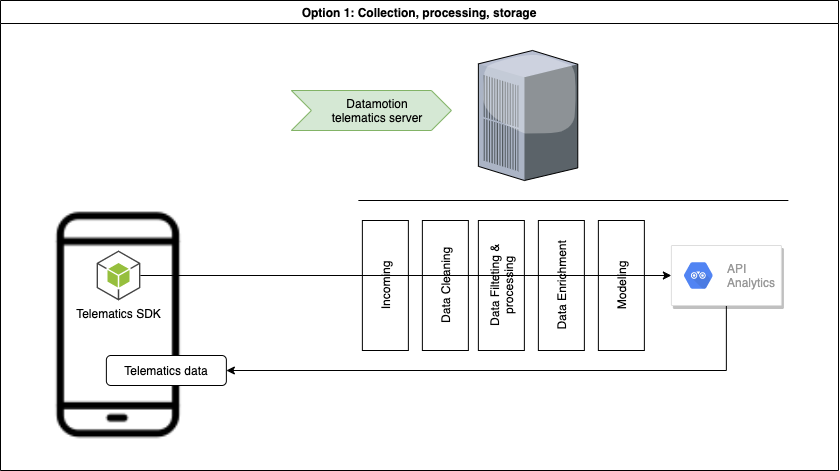\n\n## Collect, Process\n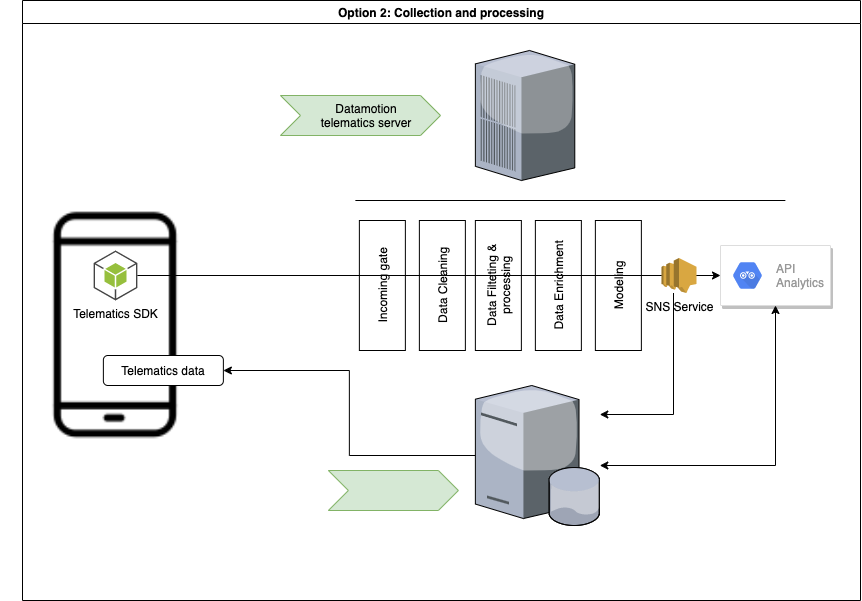\n\n## Collect\n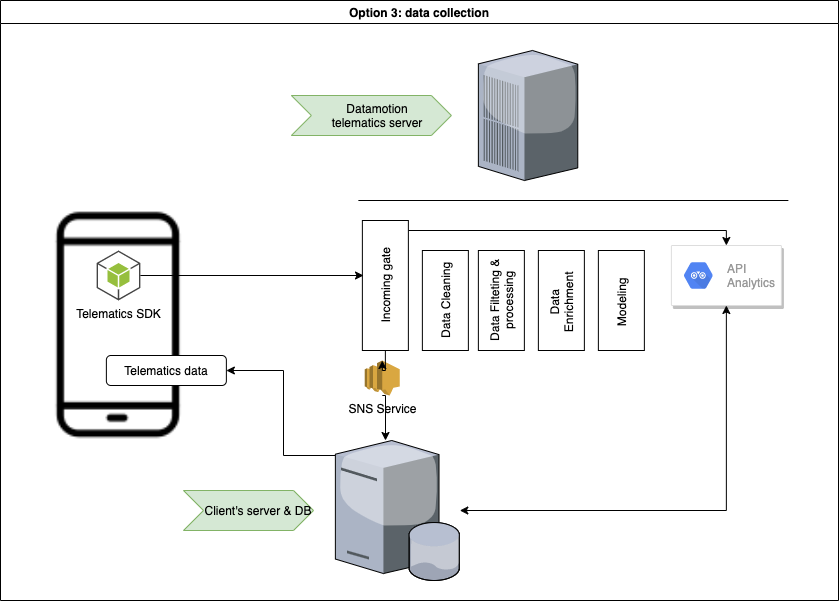\n\n***\n\n\n# Common use-cases:\n* Safe and efficient driving\n* Usage-based insurance\n* Safe driving assessment\n* Driver assessment\n* Trip log\n* Geo-analysis\n* Accident monitoring\n* Driving engagements\n* Location based services\n* Realtime Tracking\nand beyond\n\n# How to start\n* Register a [SANDBOX ACCOUNT](https://userdatahub.com)\n* Get [CREDENTIALS](https://docs.userdatahub.com/sandbox/credentials) \n* Follow the guide from [DEVELOPER POERTAL](https://docs.telematicssdk.com)\n\n# Authentication\nTo create a user on datamotion platform, you require to use InstanceID and InstanceKEY. You can get it in Datahub -> management -> user-service credentials\n\nOnce you create a user, you will get Device token, JWT token and refresh token. then, you will use it for APIs", "title": "Quick start - Telematics SDK", "version": "1.0.0", "x-apisguru-categories": [ "iot" ], "x-logo": { "url": "https://api.apis.guru/v2/cache/logo/https_www.telematicssdk.com_wp-content_uploads_2021_03_cropped-sdk-180x180.png" }, "x-origin": [ { "format": "postman", "url": "https://www.getpostman.com/collections/94fc76d14f0398faf807", "version": "2.x" } ], "x-providerName": "telematicssdk.com" }, "updated": "2021-06-21T12:16:53.715Z", "swaggerUrl": "https://api.apis.guru/v2/specs/telematicssdk.com/1.0.0/openapi.json", "swaggerYamlUrl": "https://api.apis.guru/v2/specs/telematicssdk.com/1.0.0/openapi.yaml", "openapiVer": "3.0.3", "link": "https://api.apis.guru/v2/specs/telematicssdk.com/1.0.0.json" } } }, "telnyx.com": { "added": "2020-11-10T20:51:09.677Z", "preferred": "2.0.0", "versions": { "2.0.0": { "added": "2020-11-10T20:51:09.677Z", "info": { "contact": { "email": "support@telnyx.com" }, "description": "SIP trunking, SMS, MMS, Call Control and Telephony Data Services.", "license": { "name": "MIT" }, "title": "Telnyx API", "version": "2.0.0", "x-apisguru-categories": [ "telecom" ], "x-endpoint-cost": "light", "x-origin": [ { "format": "openapi", "url": "https://raw.githubusercontent.com/team-telnyx/openapi/master/openapi/spec3.yml", "version": "3.0" } ], "x-providerName": "telnyx.com", "x-logo": { "url": "https://api.apis.guru/v2/cache/logo/https_apis.guru_assets_images_no-logo.svg" } }, "updated": "2021-08-23T09:34:59.789Z", "swaggerUrl": "https://api.apis.guru/v2/specs/telnyx.com/2.0.0/openapi.json", "swaggerYamlUrl": "https://api.apis.guru/v2/specs/telnyx.com/2.0.0/openapi.yaml", "openapiVer": "3.0.0", "link": "https://api.apis.guru/v2/specs/telnyx.com/2.0.0.json" } } }, "testfire.net:altoroj": { "added": "2021-03-03T14:29:39.499Z", "preferred": "1.0.2", "versions": { "1.0.2": { "added": "2021-03-03T14:29:39.499Z", "info": { "title": "AltoroJ REST API", "version": "1.0.2", "x-apisguru-categories": [ "security" ], "x-origin": [ { "format": "swagger", "url": "https://demo.testfire.net/swagger/properties.json", "version": "2.0" } ], "x-providerName": "testfire.net", "x-serviceName": "altoroj", "x-logo": { "url": "https://api.apis.guru/v2/cache/logo/https_apis.guru_assets_images_no-logo.svg" } }, "updated": "2021-06-21T12:16:53.715Z", "swaggerUrl": "https://api.apis.guru/v2/specs/testfire.net/altoroj/1.0.2/swagger.json", "swaggerYamlUrl": "https://api.apis.guru/v2/specs/testfire.net/altoroj/1.0.2/swagger.yaml", "openapiVer": "2.0", "link": "https://api.apis.guru/v2/specs/testfire.net:altoroj/1.0.2.json" } } }, "text2data.org": { "added": "2018-11-06T13:28:29.000Z", "preferred": "v3.4", "versions": { "v3.4": { "added": "2018-11-06T13:28:29.000Z", "info": { "contact": { "name": "text2data.com", "url": "https://text2data.com/Integration", "x-twitter": "Text2Data" }, "description": "The current api version is v3.4
The api methods listed below can be called directly from this page to test the output. You might set the api_key to pre-authenticate all requests on this page (this will work if your secret is blank).
API endpoint URL: http://{apiName}.text2data.com/v3/ {method}
The api can be consumed directly or using our SDK. Our Excel Add-In and Google Sheets Add-on are also using this api to process the data.", "license": { "name": "See license", "url": "https://text2data.com/License" }, "title": "Text Analytics & Sentiment Analysis API | api.text2data.com", "version": "v3.4", "x-apisguru-categories": [ "text" ], "x-logo": { "url": "https://api.apis.guru/v2/cache/logo/https_twitter.com_Text2Data_profile_image.png" }, "x-origin": [ { "format": "swagger", "url": "http://api.text2data.org/swagger/docs/v3.4", "version": "2.0" } ], "x-providerName": "text2data.org" }, "updated": "2020-08-19T07:25:21.527Z", "swaggerUrl": "https://api.apis.guru/v2/specs/text2data.org/v3.4/swagger.json", "swaggerYamlUrl": "https://api.apis.guru/v2/specs/text2data.org/v3.4/swagger.yaml", "openapiVer": "2.0", "link": "https://api.apis.guru/v2/specs/text2data.org/v3.4.json" } } }, "tfl.gov.uk": { "added": "2017-04-29T10:49:26.000Z", "preferred": "v1", "versions": { "v1": { "added": "2017-04-29T10:49:26.000Z", "info": { "description": "Our unified API brings together data across all modes of transport into a single RESTful API. This API provides access to the most highly requested realtime and status infomation across all the modes of transport, in a single and consistent way. Access to the developer documentation is available at https://api.tfl.gov.uk", "title": "Transport for London Unified API", "version": "v1", "x-apisguru-categories": [ "transport", "open_data" ], "x-logo": { "url": "https://api.apis.guru/v2/cache/logo/https_twitter.com_TfL_profile_image.jpeg" }, "x-origin": [ { "format": "openapi", "url": "https://api.tfl.gov.uk/swagger/docs/v1", "version": "3.0" } ], "x-providerName": "tfl.gov.uk" }, "updated": "2023-03-06T07:12:59.965Z", "swaggerUrl": "https://api.apis.guru/v2/specs/tfl.gov.uk/v1/openapi.json", "swaggerYamlUrl": "https://api.apis.guru/v2/specs/tfl.gov.uk/v1/openapi.yaml", "openapiVer": "3.0.0", "link": "https://api.apis.guru/v2/specs/tfl.gov.uk/v1.json" } } }, "thebluealliance.com": { "added": "2021-06-06T09:09:55.509Z", "preferred": "3.8.2", "versions": { "3.8.2": { "added": "2021-06-06T09:09:55.509Z", "info": { "description": "# Overview \n\n Information and statistics about FIRST Robotics Competition teams and events. \n\n# Authentication \n\nAll endpoints require an Auth Key to be passed in the header `X-TBA-Auth-Key`. If you do not have an auth key yet, you can obtain one from your [Account Page](/account).", "title": "The Blue Alliance API v3", "version": "3.8.2", "x-apisguru-categories": [ "open_data" ], "x-changes": "3.8.1-3.8.2: Replace `If-Modified-Since` with `If-None-Match` and `Last-Modified` with `ETag`. 3.8.0-3.8.1: Added Webcast date field. 3.7.0-3.8.0: Added 2020 Match Breakdown. 3.6.0-3.7.0: Added Zebra MotionWorks endpoints and models. 3.5.2-3.6.0: Added `school_name` to the Team model. 3.5.1-3.5.2: Removed `key` from the Media object, set `foreign_key` as a required property. 3.5-3.5.1: Fixed api clients crashing when requesting simple matches resulting in ties. 3.04.1 - 3.5: Updated the spec to follow OpenAPI standards. 3.04.0 - 3.04.1: Team motto will now return null. 3.03.1 - 3.04.0: Add direct_url and view_url to the Media model. 3.03.0 - 3.03.1: Fix model of /team/{team_key}/robots to match API, add min and max for year and add min for page_num. 3.02.1 - 3.03.0: Added Timeseries models and endpoints. 3.02.0 - 3.02.1: Fixed the model for `/team/{team_key}/districts` to match return from API. 3.1.0 - 3.02.0: Added `tba_gameData` to score breakdown and a leading zero to the minor version number to allow for easier sorting later. 3.0.5 - 3.1.0: Version bump for 2018 added fields and endpoints. Models Updated: `Team_Event_Status`, `Media`, 2018 Score Breakdowns. Endpoints Added: `/team/{team_key}/events/{year}/statuses`, `/event/{event_key}/teams/statuses` 3.0.4 - 3.0.5: Minor spelling fixes. Remove 2016 fields from `Match_Score_Breakdown_2017_Alliance` model. Fix `first_event_id` in `Event` model to correct type. Update `Media`.`type` enum. --- 3.0.3 - 3.0.4: Correct syntax in `Team_Event_Status_playoff` object, include descriptions in `Event_District_Points` and fix the path in `Team_Event_Status_playoff.properties.record` in order to more closely match Swagger spec. Fix syntax of `Match.video` to be correct and accurately reflect what is returned by the API. --- 3.0.2 - 3.0.3: `extra_stats` and `extra_stats_info` added to `Event_Ranking` model. Corrected match video property claiming to use the `Media` model, which it doesn't. Added `first_event_code` to the `Event` model. Added `/team/{team_key}/media/tag/{media_tag}` and year endpoints. Added `dq_team_keys` to `Match_alliance` model. --- 3.0.1 - 3.0.2: `Team_Event_Status` and `Event_Ranking` model documentation changed to reflect actual API return. Changes involved W-L-T and ranking properties. --- 3.0.0 - 3.0.1: Descriptions updated to clarify some terms and improve grammar. The `district` property on the `Event` object now points to the `District_List` model, which was identical. `Required` fields on fully documented models now represent fields that may not be `null`. `District_Ranking` model documented.", "x-logo": { "url": "https://api.apis.guru/v2/cache/logo/https_thebluealliance.com_icons_apple-touch-icon.png" }, "x-origin": [ { "format": "openapi", "url": "https://www.thebluealliance.com/swagger/api_v3.json", "version": "3.0" } ], "x-providerName": "thebluealliance.com", "x-version-info": "Versions of the API follow the format X.Y.Z, with X being a major version, Y denoting the minor version, and Z the point release. Changes to the spec or API that result in a major version change will significantly impact implementations. Changes to the minor version indicate paths and/or fields in existing models may be added, and any breaking changes will be confined to paths or models listed as in-development in the prior minor version. Changes to the point release indicate no format or structure changes to the paths or models, but updated or clarified documentation. Note that changes to paths and models refer to the actual result from the API, not the documentation." }, "updated": "2023-03-06T07:12:59.965Z", "swaggerUrl": "https://api.apis.guru/v2/specs/thebluealliance.com/3.8.2/openapi.json", "swaggerYamlUrl": "https://api.apis.guru/v2/specs/thebluealliance.com/3.8.2/openapi.yaml", "openapiVer": "3.0.1", "link": "https://api.apis.guru/v2/specs/thebluealliance.com/3.8.2.json" } } }, "thenounproject.com": { "added": "2015-11-16T21:26:35.000Z", "preferred": "1.0.0", "versions": { "1.0.0": { "added": "2015-11-16T21:26:35.000Z", "info": { "description": "Icons for Everything", "title": "The Noun Project", "version": "1.0.0", "x-apisguru-categories": [ "media" ], "x-logo": { "url": "https://api.apis.guru/v2/cache/logo/https_twitter.com_nounproject_profile_image.png" }, "x-origin": [ { "converter": { "url": "https://github.com/lucybot/api-spec-converter", "version": "2.7.11" }, "format": "swagger", "url": "http://api.thenounproject.com/config/api-doc", "version": "1.2" } ], "x-providerName": "thenounproject.com" }, "externalDocs": { "url": "https://thenounproject.com/developers/" }, "updated": "2018-08-24T14:28:47.000Z", "swaggerUrl": "https://api.apis.guru/v2/specs/thenounproject.com/1.0.0/swagger.json", "swaggerYamlUrl": "https://api.apis.guru/v2/specs/thenounproject.com/1.0.0/swagger.yaml", "openapiVer": "2.0", "link": "https://api.apis.guru/v2/specs/thenounproject.com/1.0.0.json" } } }, "thesmsworks.co.uk": { "added": "2017-12-15T11:03:17.000Z", "preferred": "1.8.0", "versions": { "1.8.0": { "added": "2017-12-15T11:03:17.000Z", "info": { "contact": { "x-twitter": "thesmsworks" }, "description": "The SMS Works provides a low-cost, reliable SMS API for developers. Pay only for delivered texts, all failed messages are refunded.", "title": "The SMS Works API", "version": "1.8.0", "x-apisguru-categories": [ "messaging" ], "x-logo": { "url": "https://api.apis.guru/v2/cache/logo/https_twitter.com_thesmsworks_profile_image.jpeg" }, "x-origin": [ { "format": "swagger", "url": "https://api.thesmsworks.co.uk/api/swagger/swagger.yaml", "version": "2.0" } ], "x-providerName": "thesmsworks.co.uk" }, "updated": "2023-03-06T07:12:59.965Z", "swaggerUrl": "https://api.apis.guru/v2/specs/thesmsworks.co.uk/1.8.0/swagger.json", "swaggerYamlUrl": "https://api.apis.guru/v2/specs/thesmsworks.co.uk/1.8.0/swagger.yaml", "openapiVer": "2.0", "link": "https://api.apis.guru/v2/specs/thesmsworks.co.uk/1.8.0.json" } } }, "thetvdb.com": { "added": "2015-11-09T22:55:27.000Z", "preferred": "3.0.0", "versions": { "3.0.0": { "added": "2015-11-09T22:55:27.000Z", "info": { "description": "API v3 targets v2 functionality with a few minor additions. The API is accessible via https://api.thetvdb.com and provides the following REST endpoints in JSON format.\n\n\nHow to use this API documentation\n----------------\n\n\nYou may browse the API routes without authentication, but if you wish to send requests to the API and see response data, then you must authenticate.\n1. Obtain a JWT token by `POST`ing to the `/login` route in the `Authentication` section with your API key and credentials.\n1. Paste the JWT token from the response into the \"JWT Token\" field at the top of the page and click the 'Add Token' button.\n\n\nYou will now be able to use the remaining routes to send requests to the API and get a response.\n\n\nLanguage Selection\n----------------\n\n\nLanguage selection is done via the `Accept-Language` header. At the moment, you may only pass one language abbreviation in the header at a time. Valid language abbreviations can be found at the `/languages` route..\n\n\nAuthentication\n----------------\n\n\nAuthentication to use the API is similar to the How-to section above. Users must `POST` to the `/login` route with their API key and credentials in the following format in order to obtain a JWT token.\n\n`{\"apikey\":\"APIKEY\",\"username\":\"USERNAME\",\"userkey\":\"USERKEY\"}`\n\nNote that the username and key are ONLY required for the `/user` routes. The user's key is labled `Account Identifier` in the account section of the main site.\nThe token is then used in all subsequent requests by providing it in the `Authorization` header. The header will look like: `Authorization: Bearer
Indicates no document package has been uploaded yet.
Date of Receipt is not yet established with this status |\n| **Uploaded** | Indicates document package has been successfully uploaded (PUT) from your system to the API server but has not yet been validated.
Date of Receipt is not yet established with this status. Any errors with the document package, such as having an unreadable PDF, may cause an Error status. |\n| **Received** | Indicates document package has been received upstream of the API and is awaiting Processing.
The VA Date of Receipt is set when this status is achieved.
This is the final status in the sandbox environment unless further progress is simulated. |\n| **Processing**| Indicates the document package is being validated, processed, and made ready to route and work. |\n| **Success** | Indicates the document package has been successfully received within VA's mail handling system.
Success is the final status for a small percentage of submitted packages with claim types, Veteran types, or exception processes that are not worked in VBMS. Most submissions reach a Success status within 1 business day. A small portion will take longer; however, some submissions may take up to 2 weeks to reach a Success status. |\n| **VBMS** | Indicates this document package was successfully uploaded into a Veteran's eFolder within VBMS.
On average, submissions reach VBMS status within 3 business days; however, processing times vary and some submissions may remain in a Success status for several weeks before reaching a VBMS status.
Some document packages are worked in VA systems other than VBMS. For these submissions, Success is the final status. |\n| **Error** | Indicates that there was an error. Refer to the error code and message for further information. |\n| **Expired** | After a POST request, there is a 15-minute window during which documents must be uploaded via a PUT request.
An Expired status means the documents were not successfully uploaded within this 15-minute window. We recommend coding to retry unsuccessful uploads within 15 minutes using the same submission in case of connection issues. |\n\n### Optional Base64 encoding\n\nBase64 is an encoding scheme that converts binary data into text format, so that encoded textual data can be easily transported over networks uncorrupted and without data loss. \n\nBase64 can be used to encode binary multipart/form-data it in its entirety. Note that the whole payload must be encoded, not individual parts/attachments.\n\nAfter encoding your payload, you'll be required to preface your base64 string with `data:multipart/form-data;base64,` in order to allow our system to distinguish the file type. Your final string payload would look something like `data:multipart/form-data;base64,(encryption string)==` and close with the standard == marker. Note that the multipart boundaries i.e. -----WebKitFormBoundaryVfOwzCyvug0JmWYo and ending ------WebKitFormBoundaryVfOwzCyvug0JmWYo- must also be included.\n\n### Consumer onboarding process\nWhen you're ready to move to production, [request a production API key.](https://developer.va.gov/go-live)\n", "title": "Benefits Intake", "version": "1.0.0", "x-apisguru-categories": [ "open_data" ], "x-logo": { "url": "https://api.apis.guru/v2/cache/logo/https_prod-va-gov-assets.s3-us-gov-west-1.amazonaws.com_img_design_icons_apple-touch-icon.png" }, "x-origin": [ { "format": "openapi", "url": "https://api.va.gov/services/vba_documents/docs/v1/api", "version": "3.0" } ], "x-providerName": "va.gov", "x-serviceName": "benefits" }, "updated": "2023-03-06T07:12:59.965Z", "swaggerUrl": "https://api.apis.guru/v2/specs/va.gov/benefits/1.0.0/openapi.json", "swaggerYamlUrl": "https://api.apis.guru/v2/specs/va.gov/benefits/1.0.0/openapi.yaml", "openapiVer": "3.0.0", "link": "https://api.apis.guru/v2/specs/va.gov:benefits/1.0.0.json" } } }, "va.gov:confirmation": { "added": "2021-04-06T16:46:05.161Z", "preferred": "0.0.1", "versions": { "0.0.1": { "added": "2021-04-06T16:46:05.161Z", "info": { "contact": { "name": "developer.va.gov" }, "description": "The Veteran Confirmation API allows you to confirm Veteran status for a given person. This can be useful for offering Veterans discounts or other benefits.\n\nThe API will only return “Confirmed” or “Not Confirmed”.\n\n## Quickstart Guide\n### 1. Get Access Credentials\nGet started by filling out the form on the [Apply for VA Lighthouse Developer Access](https://developer.va.gov/apply) page.\n\nAfter submitting a request, you will receive your credentials for using the API in the Development environment, which allows you to try it out with mock data before moving to the Production environment.\n\n### 2. Test the API\nIn the endpoint documentation below, we've provided a curl command builder for trying out the API before implementation with your app.\nUse [Test User](https://github.com/department-of-veterans-affairs/vets-api-clients/blob/master/test_accounts/confirmation_test_accounts.md) attributes to populate the request body.\n\n### 3. Build your app\nThe base URI for the Veteran Confirmation API in the Sandbox environment is:\n\nhttps://sandbox-api.va.gov/services/veteran_confirmation/v0\n\nIn this environment, use attributes from the list of [Test Users](https://github.com/department-of-veterans-affairs/vets-api-clients/blob/master/test_accounts/confirmation_test_accounts.md). Only Test Users can return a `\"confirmed\"` response.\n\nCheck out some of our [sample apps](https://github.com/department-of-veterans-affairs/vets-api-clients). Please visit our VA Lighthouse [Support portal](https://developer.va.gov/support) should you need further assistance.\n\n### 4. Show us a demo and get access to the Production environment\nAfter building your app, we ask that you give us a demo before we set you up with production credentials. Please see the [Path to Production](https://developer.va.gov/go-live) page for more details.\n\n## Authorization\nThis API requires an API key in combination with identifiable information for the person being confirmed listed below. API requests are authorized through a symmetric API token provided in an HTTP header with name `apikey`. Including more information has a better chance of making a match and returning a Confirmed status.\n### Required information:\n* First Name\n* Last Name\n* Date of Birth\n* Social Security Number\n\n### Optional information:\n* Middle Name\n* Gender\n\n## Reference\n### Sandbox vs. Production Data\nAPIs accessed via the Sandbox environment are using the same underlying logic as VA’s production APIs; only the underlying data store is different.\n\n### Master Veteran Index (MVI)\nThe Master Veteran Index confirms a user's identity. In Production, several factors are considered to confirm identity. These include: a user’s first name, last name, date of birth and Social Security number. The MVI is mocked in the Sandbox environment. In this environment, the only factor used to confirm identity is the Social Security number.\n\n### Rate Limiting\nWe implemented basic rate limiting of 60 requests per minute. If you exceed this quota, your request will return a 429 status code. You may petition for increased rate limits by emailing and requests will be decided on a case by case basis.\n\n### Raw Open API Spec\nhttps://api.va.gov/services/veteran_confirmation/docs/v0/api\n", "termsOfService": "", "title": "Veteran Confirmation", "version": "0.0.1", "x-apisguru-categories": [ "open_data" ], "x-logo": { "url": "https://api.apis.guru/v2/cache/logo/https_prod-va-gov-assets.s3-us-gov-west-1.amazonaws.com_img_design_icons_apple-touch-icon.png" }, "x-origin": [ { "format": "openapi", "url": "https://api.va.gov/services/veteran_confirmation/docs/v0/api", "version": "3.0" } ], "x-providerName": "va.gov", "x-serviceName": "confirmation" }, "updated": "2023-03-06T07:12:59.965Z", "swaggerUrl": "https://api.apis.guru/v2/specs/va.gov/confirmation/0.0.1/openapi.json", "swaggerYamlUrl": "https://api.apis.guru/v2/specs/va.gov/confirmation/0.0.1/openapi.yaml", "openapiVer": "3.0.0", "link": "https://api.apis.guru/v2/specs/va.gov:confirmation/0.0.1.json" } } }, "va.gov:facilities": { "added": "2021-03-31T13:30:20.111Z", "preferred": "0.0.1", "versions": { "0.0.1": { "added": "2021-03-31T13:30:20.111Z", "info": { "contact": { "name": "developer.va.gov" }, "description": "## Background\n\nThis RESTful API provides information about physical VA facilities. Information available includes\ngeographic location, address, phone, hours of operation, and available services.\n\nVA operates several different types of facilities, the types represented in this API include:\n- Health Facilities (vha)\n- Benefits Facilities (vba)\n- Cemeteries (nca)\n- Vet Centers (vc)\n\nTo read an FAQ on how wait times are calculated, click the \"For more information\" link on [this page](https://www.accesstocare.va.gov/PWT/SearchWaitTimes).\n\n## Getting Started\n\n### Base URLs\n\nThe base URLs for the VA Facilities API in the various environments are:\n- Sandbox: `https://sandbox-api.va.gov/services/va_facilities/v0`\n- Production: `https://api.va.gov/services/va_facilities/v0`\n\n### Authorization\n\nAPI requests are authorized through a symmetric API token, provided in an HTTP header with name `apikey`.\n\n### Response Formats\n\nClients may request several response formats by setting the `Accept` header.\n- `application/json` - The default JSON response format complies with JSON API. This media type is *not* available for bulk requests using the `/facilities/all` endpoint. It will return `406 Not Acceptable`.\n- `application/geo+json` - GeoJSON-compliant format, representing each facility as a feature with a point geometry.\n- `application/vnd.geo+json` - Deprecated. Prefer application/geo+json.\n- `text/csv` - Available for the bulk download operation only. Some structured fields are omitted from the CSV response.\n\n### Response Elements\n\nSome data elements within the response are only present for facilities of a given type:\n- The patient satisfaction scores contained in the `satisfaction` element are only applicable\n to VA health facilities.\n- The patient wait time values contained in the `wait_times` element are only applicable to\n VA health facilities.\n- The list of available services in the `services` element is only applicable to VA health and\n benefits facilities.\n- The operational hours special instructions contained in the `operational_hours_special_instructions` element is only applicable to VA health and Vet Center facilities.\n\n### Facility ID Formats and Constraints\n\nA facility ID has the format `prefix_stationNumber`. The prefix is one of nca, vc, vba, or vha. Cemeteries may be national (VA) or non-national; non-national cemeteries have the station number prefixed with an `s`. There are no other constraints on the format. Examples:\n- Health: `vha_402GA`\n- Benefits: `vba_539GB`\n- National cemetery: `nca_063`\n- Non-national cemetery: `nca_s1082`\n- Vet center: `vc_0872MVC`\n\n\n### Mobile Facilities\n\nThe mobile health facilities move regularly within a region. If a facility comes back from this API with `\"mobile\": \"true\"`, the latitude/longitude and address could be inaccurate. To get the exact current location, please call the number listed.\n\n## Deprecations\n\n- `active_status` field is deprecated and replaced with `operating_status`.\n- `application/vnd.geo+json` media type is deprecated and replaced by `application/geo+json`\n\n\n## Reference\n\n- [Raw VA Facilities Open API Spec](https://api.va.gov/services/va_facilities/docs/v0/api)\n- [GeoJSON Format](https://tools.ietf.org/html/rfc7946)\n- [JSON API Format](https://jsonapi.org/format/)", "title": "VA Facilities", "version": "0.0.1", "x-apisguru-categories": [ "location" ], "x-logo": { "url": "https://api.apis.guru/v2/cache/logo/https_prod-va-gov-assets.s3-us-gov-west-1.amazonaws.com_img_design_icons_apple-touch-icon.png" }, "x-origin": [ { "format": "openapi", "url": "https://api.va.gov/services/va_facilities/docs/v0/api", "version": "3.0" } ], "x-providerName": "va.gov", "x-serviceName": "facilities" }, "updated": "2021-07-05T15:07:17.927Z", "swaggerUrl": "https://api.apis.guru/v2/specs/va.gov/facilities/0.0.1/openapi.json", "swaggerYamlUrl": "https://api.apis.guru/v2/specs/va.gov/facilities/0.0.1/openapi.yaml", "openapiVer": "3.0.1", "link": "https://api.apis.guru/v2/specs/va.gov:facilities/0.0.1.json" } } }, "va.gov:forms": { "added": "2021-04-06T16:44:51.347Z", "preferred": "0.0.0", "versions": { "0.0.0": { "added": "2021-04-06T16:44:51.347Z", "info": { "contact": { "name": "va.gov" }, "description": "Use the VA Forms API to search for VA forms, get the form's PDF link and metadata, and check for new versions.\n\nVisit our VA Lighthouse [Contact Us page](https://developer.va.gov/support) for further assistance.\n\n## Background\nThis API offers an efficient way to stay up-to-date with the latest VA forms and information. The forms information listed on VA.gov matches the information returned by this API.\n- Search by form number, keyword, or title\n- Get a link to the form in PDF format\n- Get detailed form metadata including the number of pages, related forms, benefit categories, language, and more\n- Retrieve the latest date of PDF changes and the SHA256 checksum\n- Identify when a form is deleted by the VA\n\n## Technical summary\nThe VA Forms API collects form data from the official VA Form Repository on a nightly basis. The Index endpoint can return all available forms or, if an optional query parameter is passed, will return only forms that may relate to the query value. When a valid form name is passed to the Show endpoint, it will return a single form with additional metadata and full revision history. A JSON response is given with the PDF link (if published) and the corresponding form metadata.\n\n### Authentication and authorization\nThe form information shared by this API is publicly available. API requests are authorized through a symmetric API token, provided in an HTTP header with name apikey. [Get a sandbox API Key](https://developer.va.gov/apply).\n\n### Testing in sandbox environment\nForm data in the sandbox environment is for testing your API only, and is not guaranteed to be up-to-date. This API also has a reduced API rate limit. When you're ready to move to production, be sure to [request a production API key.](https://developer.va.gov/go-live)\n\n### SHA256 revision history\nEach form is checked nightly for recent file changes. A corresponding SHA256 checksum is calculated, which provides a record of when the PDF changed and the SHA256 hash that was calculated. This allows end users to know that they have the most recent version and can verify the integrity of a previously downloaded PDF.\n\n### Valid PDF link\nAdditionally, during the nightly refresh process, the link to the form PDF is verified and the `valid_pdf` metadata is updated accordingly. If marked `true`, the link is valid and is a current form. If marked `false`, the link is either broken or the form has been removed.\n\n### Deleted forms\nIf the `deleted_at` metadata is set, that means the VA has removed this form from the repository and it is no longer to be used.\n", "title": "VA Forms", "version": "0.0.0", "x-apisguru-categories": [ "forms" ], "x-logo": { "url": "https://api.apis.guru/v2/cache/logo/https_prod-va-gov-assets.s3-us-gov-west-1.amazonaws.com_img_design_icons_apple-touch-icon.png" }, "x-origin": [ { "format": "openapi", "url": "https://api.va.gov/services/va_forms/docs/v0/api", "version": "3.0" } ], "x-providerName": "va.gov", "x-serviceName": "forms" }, "updated": "2023-03-06T07:12:59.965Z", "swaggerUrl": "https://api.apis.guru/v2/specs/va.gov/forms/0.0.0/openapi.json", "swaggerYamlUrl": "https://api.apis.guru/v2/specs/va.gov/forms/0.0.0/openapi.yaml", "openapiVer": "3.0.0", "link": "https://api.apis.guru/v2/specs/va.gov:forms/0.0.0.json" } } }, "vatapi.com": { "added": "2015-06-18T13:16:10.000Z", "preferred": "1", "versions": { "1": { "added": "2015-06-18T13:16:10.000Z", "info": { "description": "A developer friendly API to help your business achieve VAT compliance", "title": "VAT API", "version": "1", "x-apisguru-categories": [ "financial" ], "x-logo": { "url": "https://api.apis.guru/v2/cache/logo/http_vatapi.com_graphics_logo.svg" }, "x-origin": [ { "converter": { "url": "https://github.com/lucybot/api-spec-converter", "version": "2.7.11" }, "format": "swagger", "url": "https://vatapi.com/api-docs.json", "version": "1.2" } ], "x-providerName": "vatapi.com" }, "updated": "2019-04-11T08:37:45.000Z", "swaggerUrl": "https://api.apis.guru/v2/specs/vatapi.com/1/swagger.json", "swaggerYamlUrl": "https://api.apis.guru/v2/specs/vatapi.com/1/swagger.yaml", "openapiVer": "2.0", "link": "https://api.apis.guru/v2/specs/vatapi.com/1.json" } } }, "vectara.io": { "added": "2023-03-08T08:03:07.079Z", "preferred": "1.0.0", "versions": { "1.0.0": { "added": "2023-03-08T08:03:07.079Z", "info": { "contact": { "email": "support@vectara.com", "name": "Vectara Support", "url": "http://support.vectara.com/" }, "description": "Vectara is a neural search platform, built for developers to get the most out of their data.\n\nYou can sign up for an account at [https://vectara.com](https://vectara.com).", "termsOfService": "https://vectara.com/legal/online-customer-agreement/", "title": "Vectara REST API", "version": "1.0.0", "x-dark-logo": { "altText": "Vectara", "url": "https://docs.vectara.com/img/vectara_wordmark_light.png" }, "x-logo": { "altText": "Vectara", "url": "https://api.apis.guru/v2/cache/logo/https_docs.vectara.com_img_vectara_wordmark.png" }, "x-origin": [ { "format": "openapi", "url": "https://docs.vectara.com/vectara-oas.yaml", "version": "3.0" } ], "x-providerName": "vectara.io" }, "updated": "2023-03-08T08:03:07.079Z", "swaggerUrl": "https://api.apis.guru/v2/specs/vectara.io/1.0.0/openapi.json", "swaggerYamlUrl": "https://api.apis.guru/v2/specs/vectara.io/1.0.0/openapi.yaml", "openapiVer": "3.0.0", "link": "https://api.apis.guru/v2/specs/vectara.io/1.0.0.json" } } }, "velopayments.com": { "added": "2020-08-18T13:31:23.974Z", "preferred": "2.34.63", "versions": { "2.34.63": { "added": "2020-08-18T13:31:23.974Z", "info": { "description": "## Terms and Definitions\n\nThroughout this document and the Velo platform the following terms are used:\n\n* **Payor.** An entity (typically a corporation) which wishes to pay funds to one or more payees via a payout.\n* **Payee.** The recipient of funds paid out by a payor.\n* **Payment.** A single transfer of funds from a payor to a payee.\n* **Payout.** A batch of Payments, typically used by a payor to logically group payments (e.g. by business day). Technically there need be no relationship between the payments in a payout - a single payout can contain payments to multiple payees and/or multiple payments to a single payee.\n* **Sandbox.** An integration environment provided by Velo Payments which offers a similar API experience to the production environment, but all funding and payment events are simulated, along with many other services such as OFAC sanctions list checking.\n\n## Overview\n\nThe Velo Payments API allows a payor to perform a number of operations. The following is a list of the main capabilities in a natural order of execution:\n\n* Authenticate with the Velo platform\n* Maintain a collection of payees\n* Query the payor’s current balance of funds within the platform and perform additional funding\n* Issue payments to payees\n* Query the platform for a history of those payments\n\nThis document describes the main concepts and APIs required to get up and running with the Velo Payments platform. It is not an exhaustive API reference. For that, please see the separate Velo Payments API Reference.\n\n## API Considerations\n\nThe Velo Payments API is REST based and uses the JSON format for requests and responses.\n\nMost calls are secured using OAuth 2 security and require a valid authentication access token for successful operation. See the Authentication section for details.\n\nWhere a dynamic value is required in the examples below, the {token} format is used, suggesting that the caller needs to supply the appropriate value of the token in question (without including the { or } characters).\n\nWhere curl examples are given, the –d @filename.json approach is used, indicating that the request body should be placed into a file named filename.json in the current directory. Each of the curl examples in this document should be considered a single line on the command-line, regardless of how they appear in print.\n\n## Authenticating with the Velo Platform\n\nOnce Velo backoffice staff have added your organization as a payor within the Velo platform sandbox, they will create you a payor Id, an API key and an API secret and share these with you in a secure manner.\n\nYou will need to use these values to authenticate with the Velo platform in order to gain access to the APIs. The steps to take are explained in the following:\n\ncreate a string comprising the API key (e.g. 44a9537d-d55d-4b47-8082-14061c2bcdd8) and API secret (e.g. c396b26b-137a-44fd-87f5-34631f8fd529) with a colon between them. E.g. 44a9537d-d55d-4b47-8082-14061c2bcdd8:c396b26b-137a-44fd-87f5-34631f8fd529\n\nbase64 encode this string. E.g.: NDRhOTUzN2QtZDU1ZC00YjQ3LTgwODItMTQwNjFjMmJjZGQ4OmMzOTZiMjZiLTEzN2EtNDRmZC04N2Y1LTM0NjMxZjhmZDUyOQ==\n\ncreate an HTTP **Authorization** header with the value set to e.g. Basic NDRhOTUzN2QtZDU1ZC00YjQ3LTgwODItMTQwNjFjMmJjZGQ4OmMzOTZiMjZiLTEzN2EtNDRmZC04N2Y1LTM0NjMxZjhmZDUyOQ==\n\nperform the Velo authentication REST call using the HTTP header created above e.g. via curl:\n\n```\n curl -X POST \\\n -H \"Content-Type: application/json\" \\\n -H \"Authorization: Basic NDRhOTUzN2QtZDU1ZC00YjQ3LTgwODItMTQwNjFjMmJjZGQ4OmMzOTZiMjZiLTEzN2EtNDRmZC04N2Y1LTM0NjMxZjhmZDUyOQ==\" \\\n 'https://api.sandbox.velopayments.com/v1/authenticate?grant_type=client_credentials'\n```\n\nIf successful, this call will result in a **200** HTTP status code and a response body such as:\n\n```\n {\n \"access_token\":\"19f6bafd-93fd-4747-b229-00507bbc991f\",\n \"token_type\":\"bearer\",\n \"expires_in\":1799,\n \"scope\":\"...\"\n }\n```\n## API access following authentication\nFollowing successful authentication, the value of the access_token field in the response (indicated in green above) should then be presented with all subsequent API calls to allow the Velo platform to validate that the caller is authenticated.\n\nThis is achieved by setting the HTTP Authorization header with the value set to e.g. Bearer 19f6bafd-93fd-4747-b229-00507bbc991f such as the curl example below:\n\n```\n -H \"Authorization: Bearer 19f6bafd-93fd-4747-b229-00507bbc991f \"\n```\n\nIf you make other Velo API calls which require authorization but the Authorization header is missing or invalid then you will get a **401** HTTP status response.\n", "license": { "name": "Apache License 2.0", "url": "https://www.apache.org/licenses/LICENSE-2.0.html" }, "title": "Velo Payments APIs", "version": "2.34.63", "x-apisguru-categories": [ "ecommerce" ], "x-logo": { "url": "https://api.apis.guru/v2/cache/logo/https_avatars1.githubusercontent.com_u_38107746.png" }, "x-origin": [ { "format": "openapi", "url": "https://raw.githubusercontent.com/velopaymentsapi/VeloOpenApi/master/spec/openapi.yaml", "version": "3.0" } ], "x-providerName": "velopayments.com" }, "updated": "2023-03-06T07:12:59.965Z", "swaggerUrl": "https://api.apis.guru/v2/specs/velopayments.com/2.34.63/openapi.json", "swaggerYamlUrl": "https://api.apis.guru/v2/specs/velopayments.com/2.34.63/openapi.yaml", "openapiVer": "3.0.2", "link": "https://api.apis.guru/v2/specs/velopayments.com/2.34.63.json" } } }, "vercel.com": { "added": "2023-02-20T14:47:14.026Z", "preferred": "0.0.1", "versions": { "0.0.1": { "added": "2023-02-20T14:47:14.026Z", "info": { "contact": { "email": "support@vercel.com", "name": "Vercel Support", "url": "https://vercel.com/support" }, "description": "Vercel combines the best developer experience with an obsessive focus on end-user performance. Our platform enables frontend teams to do their best work.", "title": "Vercel API", "version": "0.0.1", "x-apisguru-categories": [ "hosting" ], "x-logo": { "url": "https://api.apis.guru/v2/cache/logo/https_pbs.twimg.com_profile_images_1252531684353998848_6R0-p1Vf_400x400.jpg" }, "x-origin": [ { "format": "openapi", "url": "https://openapi.vercel.sh", "version": "3.0" } ], "x-providerName": "vercel.com" }, "updated": "2023-03-06T07:12:59.965Z", "swaggerUrl": "https://api.apis.guru/v2/specs/vercel.com/0.0.1/openapi.json", "swaggerYamlUrl": "https://api.apis.guru/v2/specs/vercel.com/0.0.1/openapi.yaml", "openapiVer": "3.1.0", "link": "https://api.apis.guru/v2/specs/vercel.com/0.0.1.json" } } }, "versioneye.com": { "added": "2023-03-08T18:17:18.523Z", "preferred": "v1", "versions": { "v1": { "added": "2023-03-08T18:17:18.523Z", "info": { "description": "VersionEye is a cross-platform search engine for free/libre/open source software libraries.", "title": "API V1", "version": "v1", "x-apisguru-categories": [ "open_data", "search" ], "x-logo": { "url": "https://api.apis.guru/v2/cache/logo/https_versioneye.files.wordpress.com_2015_05_versioneyetransparent.png" }, "x-origin": [ { "format": "openapi", "url": "https://www.versioneye.com/api-docs/v1/swagger.yaml", "version": "3.0" } ], "x-providerName": "versioneye.com" }, "updated": "2023-03-09T19:33:20.130Z", "swaggerUrl": "https://api.apis.guru/v2/specs/versioneye.com/v1/openapi.json", "swaggerYamlUrl": "https://api.apis.guru/v2/specs/versioneye.com/v1/openapi.yaml", "openapiVer": "3.0.1", "link": "https://api.apis.guru/v2/specs/versioneye.com/v1.json" } } }, "vestorly.com": { "added": "2015-10-22T19:48:00.000Z", "preferred": "1.0.0", "versions": { "1.0.0": { "added": "2015-10-22T19:48:00.000Z", "info": { "contact": { "name": "Vestorly Team" }, "description": "Vestorly Developers API", "license": { "name": "MIT" }, "termsOfService": "http://www.vestorly.com/terms/", "title": "Vestorly API", "version": "1.0.0", "x-apisguru-categories": [ "marketing" ], "x-logo": { "backgroundColor": "#252832", "url": "https://api.apis.guru/v2/cache/logo/http_d1sva73gxwx496.cloudfront.net_images_homepage_logo-white-92827ba4.png" }, "x-origin": [ { "format": "swagger", "url": "http://developers.vestorly.com/v2/swagger.json", "version": "2.0" } ], "x-providerName": "vestorly.com" }, "updated": "2020-11-23T17:04:42.171Z", "swaggerUrl": "https://api.apis.guru/v2/specs/vestorly.com/1.0.0/swagger.json", "swaggerYamlUrl": "https://api.apis.guru/v2/specs/vestorly.com/1.0.0/swagger.yaml", "openapiVer": "2.0", "link": "https://api.apis.guru/v2/specs/vestorly.com/1.0.0.json" } } }, "viator.com": { "added": "2021-06-10T07:41:38.275Z", "preferred": "1.0.0", "versions": { "1.0.0": { "added": "2021-06-10T07:41:38.275Z", "info": { "contact": { "email": "dpsupport@viator.com", "name": "Viator Partner Support Team", "url": "https://docs.viator.com/partner-api/merchant/#support-procedures-merchant/" }, "description": "<style type='text/css'>\ncode { white-space: nowrap; }\na { font-weight: bold; }\n\nfigure {\n width: 100%;\n text-align: center;\n font-style: italic;\n font-size: smaller;\n text-indent: 0;\n border: thin silver solid;\n margin: 0.5em;\n padding: 0.5em;\n}\n\n</style>\n\n## Updates\n\n### Latest update: \n\n| Date | Description |\n|------|-------------|\n| 3 Feb 2021 | Added [Special offers and on-sale pricing](#section/Key-concepts/Special-offers-and-on-sale-pricing) section |\n| 28 Oct 2020 | Updated FAQ section re booking questions, traveler names, and pricing |\n| 16 Sep 2020 | Modified FAQ section re booking currencies, supplier name display and requesting additional reviews |\n| 20 July 2020 | Added [Booking references](#section/Key-concepts/Booking-references) section |\n\n**Previous updates**: See [Update log](#section/Appendices/Update-log)\n\n# Overview\n\nThe Viator Partner API comprises a set of endpoints that can support the operation of a fully-featured tours and experiences booking website or application; or, it can be integrated with your existing travel-booking software.\n\nThe API exposes a variety of services that allow the retrieval of all product details, such as descriptions, pricing, terms and conditions, photos and reviews. This data can either be ingested periodically and managed on your local system, or calls can be made in real time to retrieve content in response to your users' activity on your systems.\n\nThe API allows product availability schedules to be retrieved in bulk or queried in real-time, and it can perform pricing calculations according to the number and type of traveler for the wide variety of product option combinations typically available in the tours and activities sales workflow.\n\nThe API provides booking and post-booking functionality, allowing booking requests, ticket purchase, and booking status updates.\n\nVarious utility services are available to map between yours and Viator's data taxonomy.\n\n**Please note:** The API does not provide services for storing data, such as user accounts. We assume that merchant partners have their own systems for storing this data.\n\n## Who is the API for?\n\nThe Viator Partner API is designed for use by organizations and individuals partnered with Viator in one of the following capacities:\n\n### Merchant partners\n\nA merchant partner is one who operates as the merchant of record; i.e., takes full responsibility for all monetary transactions carried out by their users, as well as providing customer support with regard to providing help, processing cancellations and refunds, and liaising between suppliers and customers when the need to communicate information arises.\n\nMerchant partners are invoiced periodically by Viator for all product sales. You will need to demonstrate that you have access to the appropriate infrastructure to effectively support the requisite business operations in order to become a merchant partner.\n\n### Viator Branded Affiliates (VBAs)\n\nVBAs have full access to the areas of the API relating to content, but sales of Viator products must be carried out on the Viator site itself; therefore, access to the booking or transactional endpoints necessary to operate as the merchant of record (i.e., merchant partners) is restricted. \n\nWhen a customer wishes to book a product from a VBA partner's site, they are instead redirected to [viator.com](https://viator.com) in order to complete the purchase; whereas, merchant partners are able to process and manage bookings through the Viator API itself, allowing their customers to book products without leaving the partner's site.\n\nViator affiliates instead generate unique URLs that redirect their users to the Viator site, resulting in a cookie being set such that all transactions will accrue a commission for that partner until the cookie expires.\n\nPurchases of products originating from the VBAs site are recorded and a commission on these sales is paid periodically.\n\n- **Note**: VBA partners should refer to a different document for technical specifications relevant to their partner type. If you are a VBA partner, please navigate to: [https://docs.viator.com/partner-api/affiliate/technical/](https://docs.viator.com/partner-api/affiliate/technical)\n\n### VBAs with booking capability\n\nVBAs also have the option of allowing their customers to process bookings directly from their site and via the API – similar to a merchant partner – without being redirected to viator.com to complete their transaction. This partner type sends customer details, product details and credit card payment information via the API, but Viator retains control of and responsibility for processing payments and customer support.\n\n### White label partners\n\nWhite label partners do not operate their own site infrastructure. Instead, Viator provides a white label site with full functionality that can be branded according to the partner’s wishes.\n\n## Uses of the Viator Partner API\n\nThe Viator Partner API is used to carry out the following tasks:\n\n### Product search and ingestion\n\nPartners can use the product search endpoints to retrieve lists of products from Viator’s inventory relevant to their business. The available search criteria include:\n\n- The location (destination) in which the product operates\n- Whether the product is associated with a well-known tourist attraction; e.g., Empire State Building\n- The type of product (known as its category and/or subcategory)\n- The time period during which the product operates \n- Words or phrases that occur in a product's description via a free-text search\n\nPartners who prefer to download product details periodically (instead of performing all operations in real time in response to user behavior) do so by using the product search endpoints to compile a list of products that they wish to sell on their site. They then download comprehensive product details for each via the /product endpoint.\n\n#### Product search endpoints:\n\n| Endpoint | Use |\n|-|-|\n| [/search/products](#operation/searchProducts) | Allows searching for products according to: destination / location, relationship to a known tourist attraction; category and/or subcategory; date of operation |\n| [/search/products/codes](#operation/searchProductsCodes) | Retrieves product details for products that match a list of product codes (unique identifiers for the product) |\n| [/search/freetext](#operation/searchFreetext) | Retrieves product details for products that include the search terms in the product's description and details. |\n| [/available/products](#operation/availableProducts) | Retrieves products that are identified by specific product codes, operate during a specified day range and accept a certain number of adult travelers |\n\n#### Product information endpoints:\n\nAll information about a product that must be communicated to customers prior to purchase is available via [/product](#operation/product) and its auxiliary endpoints. This content is generally used to construct product display pages and for performing local searches.\n\nImportant information about a product includes:\n\n- Product and supplier names\n- Geographic location\n- Product description\n- Category and subcategory\n- Photos (from both users and the supplier)\n- User reviews and ratings\n- Product options (variants of the tour/activity, such as starting times, passenger mix options, and inclusions/add-ons, including basic pricing information for each)\n- Which age ranges can participate\n- Booking details\n- Cancellation policies\n- Basic pricing\n- Logistics\n + Inclusions (e.g., provided meals)\n + Exclusions (e.g., entrance fees to visited attractions)\n + Health restrictions and accessibility\n + Departure times\n + Passenger pick-up\n + Duration\n + Tour routes\n\n### Availability\n\nThe availability of a tour is communicated via the API's availability endpoints. The availability aspects of a product include:\n\n- On which days and at which times the product is available to be booked\n- Whether the product option (variant) supports a certain combination of passengers according to age and number\n- Pricing information\n\nSome partners choose to bulk-ingest availability information for their products in order to expedite this part of the customer workflow or to facilitate a local search functionality on their website; but, because this information changes very regularly, a final real-time call is generally recommended to ensure that when the booking request is submitted by the customer it is unlikely to fail on account of a change in availability.\n\n#### Availability endpoints\n\n| Endpoint | Use |\n|-|-|\n| [/booking/availability](#operation/bookingAvailability) | Returns the product option with the lowest price that is available on each day |\n| [/booking/availability/dates](#operation/bookingAvailabilityDates) | Returns all available dates for a product (but without regard to product option) |\n| [/booking/availability/tourgrades](#operation/bookingAvailabilityTourgrades) | Returns all product options for a product that are available on the specified day for the specified passenger mix |\n| [/booking/availability/tourgrades/pricingmatrix](#operation/bookingAvailabilityTourgradesPricingmatrix) | Returns a detailed matrix of product options, passenger mixes and the pricing applicable to each combination |\n| [/booking/calculateprice](#operation/bookingCalculateprice) | Provides a reconfirmation of a product's availability with respect to the product option and passenger mix provided and calculates a final price; used as a final availability check immediately prior to making a booking |\n\n### Booking and cancellations\n\nMerchant partners and VBAs with booking capabilities can use the Viator Partner API to purchase the product through the [/booking/book](#operation/bookingBook) endpoint.\n\nThe API also provides services to:\n\n- Enquire about the status of an existing booking\n- Retrieve tickets/vouchers for the product\n- Cancel a booking\n\n#### Booking endpoints\n\n| Endpoint | Use |\n|-|-|\n| [/booking/book](#operation/bookingBook) | Make a booking / purchase a product |\n| [/booking/status](#operation/bookingStatus) | Retrieve multiple detailed booking statuses based on a range of specified criteria |\n| [/booking/status/items](#operation/bookingStatusItems) | Similar to [/booking/status](#operation/bookingStatus), but provides slightly less detail and can be called more frequently |\n\n#### Cancellation endpoints\n\n| Endpoint | Use |\n|-|-|\n| [/bookings/{booking-reference}/cancel-quote](#operation/bookingQuote) | Returns the expected outcome of a booking cancellation request (taking into consideration the product's cancellation policy) were the cancellation request performed immediately |\n| [/bookings/{booking-reference}/cancel](#operation/cancelBooking) | Cancels the booking and assigns a refund depending on the product’s cancellation policy |\n\n### Auxiliary services\n\nTaxonomical data sets are required to interact meaningfully with the Viator Partner API; for example, mappings from destination (location of operation) to their respective identification codes. This information may occasionally change or be added to. Consequently, the API includes endpoints that return the most up-to-date versions of this information.\n\n#### Taxonomy endpoints\n\n| Endpoint | Use |\n|-|-|\n| [/taxonomy/destinations](#operation/taxonomyDestinations) | Retrieves a list of destination names, types and unique identifiers to be used when interacting with the Viator Partner API |\n| [/taxonomy/categories](#operation/taxonomyCategories) | Retrieves a list of product categories for a destination that can be used as a means of filtering when searching for products using the [/search/products](#operation/searchProducts) endpoint |\n| [/taxonomy/attractions](#operation/taxonomyAttractions) | Retrieves a list of tourist attractions (e.g., the Eiffel Tower or Empire State Building) and their associated identification codes to be used as a means of searching for available products; for example, in the [/search/products](#operation/searchProducts) service |\n| [/booking/hotels](#operation/bookingHotels) | Retrieves a list of hotels, including names and geographic locations, to be used when making booking requests |\n\n---\n\n# Authentication\n\n**Note**:\n\n- The authentication mechanism for this API has been updated recently. Now, partners can also authenticate using a [new style of API key](#section/Authentication/exp-api-key) that is included in each call as a <u>header parameter</u>. Previously, authentication was accomplished by including an API key as a query parameter.\n\n- Partners who are currently authenticating via the [API key query parameter](#section/Authentication/Legacy-API-keys) can continue to authenticate in this way; however, access to the new booking cancellation endpoints ([/bookings/cancel-reasons](#operation/cancellationReasons), [/bookings/cancel-quote](#operation/cancelBookingQuote) and [/bookings/cancel](#operation/cancelBooking)) does require the new-style of API key. All other endpoints remain compatible with both authentication methods.\n\n- If you would like to switch to the [new style of key](#section/Authentication/exp-api-key), please speak to your business development account manager.\n\n## API key\n\nAccess to the API is managed using an **API key** that is included as a **header parameter** to every call made to all API endpoints described in this document.\n\n| Header parameter name | Example value |\n|-----------------------|---------------|\n| exp-api-key | bcac8986-4c33-4fa0-ad3f-75409487026c |\n\nIf you do not know the API key for your organization, please contact your business development account manager for these details.\n\nPlease note that language localization is now controlled on a per-call basis. Previously, language localization was controlled via API-key configuration, with one language available per API key. Under the present scheme, you can access any language enabled for your organization's point of sale via a **single API key**. \n\nLanguage selection is accomplished by specifying the desired language as a header parameter (`Accept-Language`). See [Accept-Language header](#section/Appendices/Accept-Language-header) for available language codes. If you would like access to additional languages, please contact your business development account manager.\n\n## Legacy API key\n\nPreviously, authenticating to this API was accomplished by passing an API-key **as a query parameter** appended to the URI for each call; e.g.:\n\n```html\nGET https://viatorapi.sandbox.viator.com/service/taxonomy/destinations?apiKey=xxxxxxxxxxxxxxxxxx\n```\n\nThis method of authentication remains available for backwards-compatibility with existing implementations. If you would like to upgrade to the new style of API key, please contact your business development account manager. \n\n# Key concepts\n\n## Content ingestion and caching strategy\n\nMuch of the information you will need to retrieve from the Viator API – such as the taxonomy, product lists and product details – do not change frequently.\n\nTherefore, we recommend implementing a caching strategy in order to eliminate unnecessary traffic to Viator’s servers and improve the operation of your site. \n\nThis section discusses the different strategies for retrieving and caching Viator’s product catalogue.\n\nYou will need to decide on how you will retrieve and manage content from Viator’s product catalogue. The two main options are as follows:\n\n### 1. API response caching\n\n*Partners retrieve content as-needed and cache responses on a service-by-service basis*\n\nIf you do not need to store product details locally, we recommend performing caching of on a service-by-service basis; i.e., storing the entire response and applying a time-to-live (TTL) of less than 24 hours.\n\n#### Benefits of API response caching\n\n* All the benefits of caching with minimal overhead\n* Minimal risk of serving stale or invalid data cached on the partner's side\n* No need to download data about products that are not selling\n* A smaller volume of local data improves cache hit performance\n* Fewer requests made of Viator's systems\n* Avoids rate limitations\n* Closer adherence to best practices\n* Removes need to manage a complex data structure locally\n\n#### Service endpoints to cache\n\nCaching should only be applied to services that yield infrequently changing data; i.e.:\n\n* [/taxonomy/destinations](](#operation/taxonomyDestinations)\n* [/taxonomy/categories](#operation/taxonomyCategories)\n* [/taxonomy/attractions](#operation/taxonomyAttractions)\n* [/search/products](#operation/searchProducts)\n* [/search/products/codes](#operation/searchProductsCodes)\n* [/search/freetext](#operation/searchFreetext)\n* [/product](#operation/product)\n* [/product/reviews](#operation/productReviews)\n* [/product/photos](#operation/productPhotos)\n* [/available/products](#operation/availableProducts)\n\n**Note**: these services should be considered cacheable even though some are POST and none include a Cache-Control HTTP header in their response.\n\n### 2. Periodic content ingestion\n\n*Partners download either the full product catalogue or a subset of the catalogue at regular intervals based on destination, linked attraction, or product category filters.*\n\n#### Who should use periodic ingestion\nThis approach may be preferable for partners whose requirements include:\n* **System agnosticism/data centralization** – i.e., partners who are simultaneously selling products from vendors other than Viator, have existing product databases or are likely to want to maintain a central product catalogue with a unified taxonomy / data structure\n* **Enhanced search capability** – i.e., the ability to apply different categorization rules, filters, exclusions or search optimizations to the product catalogue; e.g., grouping or filtering products according to criteria other than those supported directly by the Viator API (destination, attraction-link or category)\n\n#### Frequency of content ingestion\nWe recommend that you perform an ingestion of the product catalogue once every 24 hours.\n\n#### How to retrieve product codes\n\nMake a call to one of the product search services:\n\n* [/search/products](#operation/searchProducts) – to search by `destId` (destination), `catId` (category), `subCatId` (subcategory) or `seoId` (attraction)\n* [/search/freetext](#operation/searchFreetext) – free-text search across all identifying fields \n\n#### How to retrieve all products in the catalogue\n\nTo retrieve all products from the Viator catalogue:\n\n* Retrieve all available destination identifiers (`destId`) from the [/taxonomy/destinations](#operation/taxonomyDestinations) service\n* Iterate through the complete list of `destId`s you retrieved in the previous step, and call [/search/products](#operation/searchProducts) for each `destId`\n\n**Note**: As some products operate in multiple destinations, the same product code may be returned for a range of different destinations. Therefore, make sure your list of product codes only contains one copy of each code.\n\nYou may then iterate through this list of product codes to retrieve any other product details necessary in order to properly populate your local database with the information you require.\n\n#### Retrieving a subsection of the product catalogue\n\nYou may wish to retrieve only some of the products available in the Viator catalogue; for example, if your organization is only interested in selling products that operate locally.\n\nYour top level search using [/search/products](#operation/searchProducts) is restricted to one of the three main categorization methods for products; i.e., destination, category/subcategory, or attraction-link; however, you may employ your own methods to filter the selection of products based on any attribute in the product data structure.\n\n#### Dealing with pagination using `totalCount` and `topX`\n\nDue to the large number of results that can be returned by the [/search/products](#operation/searchProducts) service, the request might exceed the 30-second time-out limitation on both sandbox and live servers. Therefore, you will need to make multiple requests to this service including pagination information in order to retrieve all products that match your search criteria.\n\nThis is accomplished by sequentially requesting successive segments of the results using the `topX` request parameter together with the `totalCount` response field; i.e.:\n\n* For your first request, specify a `topX` of `\"1-100\"`\n - **Note**: this range is *inclusive*; i.e., `\"topX\": 1-100\"` will yield the first 100 records \n* The first response will indicate the total number of records available through the value of the `totalCount` field in the response object; e.g.: `\"totalCount\": 13843`\n* For each subsequent request, specify the next logical 'chunk' of data via the `topX` parameter of the request; e.g.:\n - \"topX\": \"1-100\"\n - \"topX\": \"101-200\"\n - ...\n - \"topX\": \"13801-13843\"\n\n#### Rate limiting\n\nDue to the heavy load that pre-caching can place on Viator's servers and the downstream servers we connect to, we apply a rate limit of **150 requests per 10 second time window**.\n\nRequest rates exceeding this limit will result in a **HTTP 429 (Too Many Requests)** status code being returned.\n\n**Note**: The rate is calculated over a rolling 10-second time window\n\n* In order to avoid running-up against rate limits:\n - insert a delay of 2s if you receive a HTTP 429 status code\n - do not run this as a multi-threaded process\n\n## Categorization of content\n\nThe products available in Viator’s catalogue are mainly categorized according to:\n\n1. **Destination**: every product in the Viator catalogue is categorized according to the destination/locale in which it operates. There are three kinds of destination:\n<table>\n <thead>\n <th>Destination type</th>\n <th>Meaning</th>\n </thead>\n <tbody>\n <tr>\n <td>“COUNTRY”</td>\n <td>A country; e.g., “Australia”, “Japan”, “USA”</td>\n </tr>\n <tr>\n <td>\"REGION\"</td>\n <td>A geographical region or state; e.g., “South Australia”, “French Riviera”, “Punjab”</td>\n </tr>\n <tr>\n <td>\"CITY\"</td>\n <td>A city within a state; e.g., “Townsville”, “Osaka”, “Singapore”</td>\n </tr>\n </tbody>\n</table>\n<table>\n <thead>\n <tr>\n <th><code>destinationName</code></th>\n <th><code>destId</code></th>\n <th><code>destinationType</code></th>\n </tr>\n </thead>\n <tbody>\n <tr>\n <td>USA</td>\n <td>77</td>\n <td>COUNTRY</td>\n </tr>\n <tr>\n <td>Wisconsin</td>\n <td>22231</td>\n <td>REGION</td>\n </tr>\n <tr>\n <td>Madison</td>\n <td>24146</td>\n <td>CITY</td>\n </tr>\n <tr>\n <td>France</td>\n <td>51</td>\n <td>COUNTRY</td>\n </tr>\n <tr>\n <td>Brittany</td>\n <td>21942</td>\n <td>REGION</td>\n </tr>\n <tr>\n <td>Rennes</td>\n <td>21943</td>\n <td>CITY</td>\n </tr>\n </tbody>\n</table>\n\n1. **Category and subcategory**: the products in the Viator catalogue are grouped according to the kind of activity they entail and may be subcategorized further to provide greater specificity; for example:\n<table>\n <thead>\n <tr>\n <th>Category</th>\n <th>Subcategories</th>\n </tr>\n </thead>\n <tbody>\n <tr>\n <td rowspan=3>Air, Helicopter & Balloon Tours</td>\n <td>Air Tours</td>\n </tr>\n <tr>\n <td>Helicopter Tours</td>\n </tr>\n <tr>\n <td>Balloon Rides</td>\n </tr>\n <tr>\n <td rowspan=2>Weddings & Honeymoons</td>\n <td>Wedding Packages</td>\n </tr>\n <tr>\n <td>Honeymoon Packages</td>\n </tr>\n </tbody>\n</table>\n1. **Attraction link** (i.e., association to a particular \"point of interest\"); e.g.:\n<table>\n <thead>\n <tr>\n <th>Attraction</th>\n <th>`seoId`</th>\n <tr>\n </thead>\n <tbody>\n <tr>\n <td>Bellagio Fountains</td>\n <td>1243</td>\n </tr>\n <tr>\n <td>Black Canyon</td>\n <td>4437</td>\n </tr>\n <tr>\n <td>Epcot Centre</td>\n <td>1141</td>\n </tr>\n </tbody>\n</table>\n\n\n## Booking concepts\n\n### Booking types - *on-request* and *freesale*\n\nBookings made with Viator can be either *freesale* (immediate confirmation) or *on-request*, which require us to confirm with our product supplier that the product has not sold out and is still available. This difference must be clearly communicated to the customer during the price check and on the *order summary* post-purchase page.\n\nFor *freesale* bookings, the voucher becomes available immediately, and the customer's credit card will be charged at the time of booking. For *on-request* bookings, confirmation will be sent to the customer within a timeframe supplied in the [/booking/calculateprice](#operation/bookingCalculateprice) and [/booking](#operation/bookingBook) service responses.\n\nThe customer's credit card will be charged once their *on-request* booking is confirmed.\n\n### bookingEngineId\n\n`bookingEngineId` is a field returned in the responses from several endpoints documented in this manual. It is a **booking type specifier** indicating whether, when the product in question is booked, the booking will be `CONFIRMED` immediately or if it will remain `PENDING` even after the booking has been made, indicating that it is an on-request product.\n\n`bookingEngineId` takes *one of* the following values:\n\n - `\"FreesaleBE\"` – the product will be confirmed immediately and the supplier will be sent a notification.\n\n - `\"UnconditionalBE\"` - the product will be confirmed immediately and the supplier will not be notified.\n\n - `\"DeferredCRMBE\"` - the product is an on-request product and the booking will not be confirmed immediately. The booking will remain with a `PENDING` status after it is made, to be confirmed by the supplier within the time specified in the `hoursConfirmed` field available in the booking response and post-booking services.\n\n - `\"FreesaleOnRequestBE\"` - The product is freesale up until a certain number of days before the travel date, after which it becomes on-request. It is then referred to as being within the *on-request period*. If a booking is made within the on-request period, the product can be considered to be an on-request product. Once the booking has been made, the `bookingEngineId` will change to either `\"FreesaleOnRequestBE:OnRequest\"` or `\"FreesaleOnRequestBE:Freesold\"` depending on the travel date and the on-request period. \n\n### Tour grades\n\nProducts can have one or more *tour grades*. Each tour grade might represent a departure time or different tour option, such as additional meals, transport and so forth. If the tour grade code is `\"DEFAULT\"`, *do not* display this to the customer, simply hide the product's tour grade information.\n\n### Language options\n\nMany tours deliver a commentary in multiple languages using multilingual tour guides or with written or prerecorded information. Where available, the customer can preselect their preferred language option.\n\n### Traveler mix (pax)\n\nSome tour grades have defined traveler mixes used to price family passes; or, they might have special mixes for limited passenger tours, such as small buggies or weddings.\n\nThese traveler mixes are provided by the [/booking/availability/tourgrades](#operation/bookingAvailabilityTourgrades) service. You may need to display these to your customers so that they are able to understand why they can or cannot select a particular tour grade if there is a traveler mix mismatch.\n\n### Pick-up location and hotel lists\n\nSome products have pick-up and return shuttle bus services. For these tours, you will need the customer to supply a pick-up hotel, or they must select *live locally* or *hotel not yet booked* options.\n\nViator maintains pick-up hotel lists for many popular destinations. These lists are available for customers to select their pick-up location for various tours. For destinations without hotel lists, customers can enter the name of their hotel. If a customer's hotel is not listed, they should be able to enter a hotel name; however, pick-up may not be possible for that hotel.\n\n### Lead traveler\n\nEach tour booking requires a lead traveler to be identified. To identify the lead traveler in your request, set the `leadTraveller` flag to `true` in the traveler class.\n\n### Booking questions\n\nSome products have a list of one or more [booking questions](#section/Appendices/Booking-questions) that need to be asked. Some are mandatory. The question, a description, etc are provided in the product details object. The answers need to be included with the booking request.\n\n### SSL/HTTPS\n\nCalls to the [/booking/book](#operation/bookingBook) service *must* use a secure channel (https) as they contain credit card information.\n\n### Promo codes\n\nViator can create promotional (promo) codes for discounts and other purposes. As it's unlikely for you to wish to support this feature, we recommend supplying `null` in the `promoCode` field and not including any customer-entered fields during the checkout process.\n\n### Partner data\n\nPartners can also supply additional information for their own internal purposes. These are attached to booking reports and other materials for use in allocating commissions to agents and so forth.\n\n## Availability services\n\nProduct availability information can be retrieved with the following services:\n\n- [/booking/availability](#operation/bookingAvailability): get the tourgrade with the lowest price available on a day\n- [/booking/availability/dates](#operation/bookingAvailabilityDates): get all available dates for a product excluding days it does not operate and blockouts\n- [/booking/availability/tourgrades](#operation/bookingAvailabilityTourgrades): list all available tour grades for a specific day\n- [/booking/availability/tourgrades/pricingmatrix](#operation/bookingAvailabilityTourgradesPricingmatrix): returns available days only (ie days which have at least one tour grade available), and the pricing matrix for that tour grade on that day\n\n### Example: multiple departures in a single day\n\nMultiple departures in a single day (each represented by a tour grade) and the language options (langServices).\n\nThis request is for 3 adults on a helicopter tour:\n- **Note:** No prices are returned if the tour grade is unavailable.\n\n**Request object** ([/booking/availability/tourgrades](#operation/bookingAvailabilityTourgrades)):\n\n```javascript\n{\n \"productCode\": \"2280AAHT\",\n \"bookingDate\": \"2013-05-11\",\n \"currencyCode\": \"EUR\",\n \"ageBands\": [{\n \"bandId\": 1,\n \"count\": 3\n }]\n}\n```\n\n**Response object** ([/booking/availability/tourgrades](#operation/bookingAvailabilityTourgrades))\n:\n\n```javascript\n{\n \"data\": [{\n \"available\": false,\n \"ageBands\": null,\n \"langServices\": null,\n \"gradeCode\": \"EARLYM\",\n \"unavailableReason\": \"BOOKING_CUTOFF_EXPIRED\",\n \"gradeTitle\": \"Early Morning Departure\",\n \"gradeDepartureTime\": \"\",\n \"gradeDescription\": \"Flight departs Las Vegas between 7am & 8am\",\n \"defaultLanguageCode\": \"en\",\n \"ageBandsRequired\": null,\n \"currencyCode\": \"ERROR\",\n \"retailPrice\": 0,\n \"bookingDate\": \"2013-05-11\",\n \"retailPriceFormatted\": \"\",\n \"merchantNetPrice\": 0,\n \"merchantNetPriceFormatted\": \"\",\n \"sortOrder\": 1\n },\n {\n \"available\": false,\n \"ageBands\": null,\n \"langServices\": null,\n \"gradeCode\": \"LATEM\",\n \"unavailableReason\": \"BOOKING_CUTOFF_EXPIRED\",\n \"gradeTitle\": \"Late Morning Departure\",\n \"gradeDepartureTime\": \"\",\n \"gradeDescription\": \"Flight departs Las Vegas between 9:45am & 10:45am\",\n \"defaultLanguageCode\": \"en\",\n \"ageBandsRequired\": null,\n \"currencyCode\": \"ERROR\",\n \"retailPrice\": 0,\n \"bookingDate\": \"2013-05-11\",\n \"retailPriceFormatted\": \"\",\n \"merchantNetPrice\": 0,\n \"merchantNetPriceFormatted\": \"\",\n \"sortOrder\": 2\n },\n {\n \"available\": false,\n \"ageBands\": null,\n \"langServices\": null,\n \"gradeCode\": \"EARLYA\",\n \"unavailableReason\": \"BOOKING_CUTOFF_EXPIRED\",\n \"gradeTitle\": \"Early Afternoon Departure\",\n \"gradeDepartureTime\": \"2:50 PM\",\n \"gradeDescription\": \"Flight departs Las Vegas between 12:30pm & 1:30pm\",\n \"defaultLanguageCode\": \"en\",\n \"ageBandsRequired\": null,\n \"currencyCode\": \"ERROR\",\n \"retailPrice\": 0,\n \"bookingDate\": \"2013-05-11\",\n \"retailPriceFormatted\": \"\",\n \"merchantNetPrice\": 0,\n \"merchantNetPriceFormatted\": \"\",\n \"sortOrder\": 3\n },\n {\n \"available\": false,\n \"ageBands\": null,\n \"langServices\": null,\n \"gradeCode\": \"LATEA\",\n \"unavailableReason\": \"BOOKING_CUTOFF_EXPIRED\",\n \"gradeTitle\": \"Late Afternoon Departure\",\n \"gradeDepartureTime\": \"\",\n \"gradeDescription\": \"Flight departs Las Vegas between 3:15pm & 4:15pm; available Ap\",\n \"defaultLanguageCode\": \"en\",\n \"ageBandsRequired\": null,\n \"currencyCode\": \"ERROR\",\n \"retailPrice\": 0,\n \"bookingDate\": \"2013-05-11\",\n \"retailPriceFormatted\": \"\",\n \"merchantNetPrice\": 0,\n \"merchantNetPriceFormatted\": \"\",\n \"sortOrder\": 4\n }],\n \"vmid\": \"221001\",\n \"errorMessage\": null,\n \"errorType\": null,\n \"dateStamp\": \"2013-06-04T17:01:34+0000\",\n \"totalCount\": 1,\n \"errorReference\": null,\n \"errorMessageText\": null,\n \"success\": true,\n \"errorName\": null\n}\n```\n\n### Example: traveler mix mismatch\n\nThe request is for five adults, but this product only support up to four adults.\n\n**Example request object** ([/booking/availability/tourgrades](#operation/bookingAvailabilityTourgrades)):\n```javascript\n{\n \"productCode\": \"2280ULTWED\",\n \"bookingDate\": \"2013-12-11\",\n \"currencyCode\": \"EUR\",\n \"ageBands\": [{\n \"bandId\": 1,\n \"count\": 5\n }]\n}\n```\n\n**Example response object**\nThe response contains `\"TRAVELLER_MISMATCH\"` and you can see the `ageBandsRequired` values for the adult (1) age band in the available tour grade.\n\n```javascript\n{\n \"data\": [{\n \"available\": false,\n \"ageBands\": null,\n \"langServices\": null,\n \"gradeCode\": \"DEFAULT\",\n \"unavailableReason\": \"TRAVELLER_MISMATCH\",\n \"gradeTitle\": \"DEFAULT\",\n \"gradeDepartureTime\": \"12:00 AM\",\n \"gradeDescription\": \"DEFAULT\",\n \"defaultLanguageCode\": \"en\",\n \"ageBandsRequired\": [\n [{\n \"bandId\": 1,\n \"minimumCountRequired\": 2,\n \"maximumCountRequired\": 2\n }],\n [{\n \"bandId\": 1,\n \"minimumCountRequired\": 3,\n \"maximumCountRequired\": 3\n }],\n [{\n \"bandId\": 1,\n \"minimumCountRequired\": 4,\n \"maximumCountRequired\": 4\n }]],\n \"currencyCode\": \"ERROR\",\n \"retailPrice\": 0,\n \"bookingDate\": \"2013-12-11\",\n \"retailPriceFormatted\": \"\",\n \"merchantNetPrice\": 0,\n \"merchantNetPriceFormatted\": \"\",\n \"sortOrder\": 1\n }],\n \"vmid\": \"221001\",\n \"errorMessage\": null,\n \"errorType\": null,\n \"dateStamp\": \"2013-06-04T17:02:35+0000\",\n \"totalCount\": 1,\n \"errorReference\": null,\n \"errorMessageText\": null,\n \"success\": true,\n \"errorName\": null\n}\n```\n\n## Understanding the pricingUnit field\n\nThis section explains the meaning and function of the `pricingUnit` field in the response object received from the [/booking/availability/tourgrades/pricingmatrix](#operation/bookingAvailabilityTourgradesPricingmatrix) service.\n\n### Request body\nThe [/booking/availability/tourgrades/pricingmatrix](#operation/bookingAvailabilityTourgradesPricingmatrix) service takes the following parameters as input in its request body:\n\n| Parameter | Type | Meaning |\n|-----------|------|---------|\n| `productCode` | string | unique alphanumeric identifier of the product to enquire about; e.g., `10040WORLD` |\n| `month` | string | **month** of the year by which to filter results |\n| `year` | string | **year** by which to filter results |\n| `currencyCode` | string | **currency code** for the currency in which to display pricing information |\n\n#### Example request body\n\nSending the following request body to the [/booking/availability/tourgrades/pricingmatrix](#operation/bookingAvailabilityTourgradesPricingmatrix) service will retrieve pricing information for \"Skip the Line: World of Discoveries Entrance Ticket in Porto\" (product code: 10040WORLD).\n\n```javascript\n{\n \"productCode\": \"10040WORLD\",\n \"currencyCode\": \"USD\",\n \"month\": \"06\",\n \"year\": \"2019\"\n}\n```\n\n### Response object\n\nWithin each object item of the `tourGrades` array – each of which gives the pricing details for a specific tour grade – is a `pricingMatrix` array. Each object in this array details the per-age-band pricing for a specific pricing unit (`pricingUnit`) associated with that product.\n\nUsing this information, you should be able to calculate the total cost of the booking – considering any booking options – with regard to the number of participants.\n\nHow to identify the fundamental unit prices for a booking, which are then summed in order to calculate a total price, is detailed below.\n\nNote that in the response object received from the service, pricing schedules are organized hierarchically as follows:\n\n```c\nbookingDate\n--tourGrade\n----ageBand\n------price\n```\n\n### Types of pricing unit\nThere are two fundamental types of pricing unit – **per-person** and **per-group**.\n\n#### Per-person pricing schedule\nIf the pricing is *per-person*, then the total price of the booking will be directly proportional to the number of participants (passengers) of each type that are booking the product; i.e., a direct multiple of the per-person price.\n\nThe only pricing unit specifier for *per-person* pricing is “per person”, given in the `pricingUnit` field; i.e.:\n\n- `\"pricingUnit\": \"per person\"`\n\n| Pricing unit | Example product | Meaning |\n|--------------|---------|---------|\n| `\"per person\"` | **10040WORLD** | **Per-person pricing** – the unit price refers to the price for an individual participant.<br />Some products have tiered pricing arrangements; i.e., a different per-person price can apply if certain numbers and combinations of participants in a particular age band are booking the product; e.g.:<br /><ul><li>**1-2 adults**: $50 per person</li><li>**3-4 adults**: $45 per person</li></ul><br />Whether a range is available to be booked depends on whether the customer’s desired passenger mix satisfies the `minimumCountRequired` and `maximumCountRequired` fields in each item of the `ageBandPrices` array. |\n\n#### Per-group pricing\nIf the pricing is per-group, then the total price of the booking will depend on the number of groups and types of group that ideally accommodate the participant mix.\n\nThe following pricing schedules follow “per-group” logic:\n\n- `\"pricingUnit\": \"per vehicle\"`\n- `\"pricingUnit\": \"per car\"`\n- `\"pricingUnit\": \"per group\"`\n- `\"pricingUnit\": \"per boat\"`\n- `\"pricingUnit\": \"per package\"`\n- `\"pricingUnit\": \"per jetski\"`\n- `\"pricingUnit\": \"per vessel\"`\n- `\"pricingUnit\": \"per helicopter\"`\n- `\"pricingUnit\": \"per room\"`\n- `\"pricingUnit\": \"per bike\"`\n- `\"pricingUnit\": \"per flight\"`\n- `\"pricingUnit\": \"per plane\"`\n- `\"pricingUnit\": \"per couple\"`\n\nEligibility for a certain individual pricing schedule; or, for inclusion in a particular group type, depends on the tour grade for the product, the type of participant (e.g., the age-band they fall into) and the date of the booking.\n\n#### Group pricing schedules\n\n| Pricing unit | Example product | Meaning |\n|---------------|-----------|---------|\n| `\"per group\"` | **10847P42** | **Per-group** pricing – the unit price is calculated according to the number of groups the specified passenger will fit into rather than the exact number of participants. `minimumCountRequired` and `maximumCountRequired` must be considered as these fields relate to the available group sizes. |\n| `\"per room\"` | **6279P26** | **Per-room** pricing relates the room price, which depends on the number of participants making the booking. |\n| `\"per package\"` | **25941P70** | **Per-package** pricing refers to products that are sold as part of a package; for example a family package stipulating a passenger mix of two adults and two children |\n| `\"per vehicle\"` | **6154SHOP** | **Per-vehicle** pricing is calculated according to the number of vehicles required for the specified passenger mix rather than the exact number of participants. `minimumCountRequired` and `maximumCountRequired` must be considered as these fields relate to the occupancy limitations for each vehicle. The minimum price will depend on the rate for a single vehicle. |\n| `\"per car\"` | **10175P10** | **Per-car** pricing – identical to \"per vehicle\", but refers specifically to vehicles that are cars. |\n| `\"per boat\"` | **11121P40** | **Per-boat** pricing – identical to \"per vehicle\", but refers specifically to vehicles that are boats. |\n| `\"per jetski\"` | **28965P127** | **Per-jetski** pricing – identical to \"per vehicle\", but refers specifically to vehicles that are jet-skis. |\n| `\"per vessel\"` | **17295P24** | **Per-vessel** pricing – identical to \"per vehicle\", but refers specifically to maritime vessels that are not strictly boats. |\n| `\"per helicopter\"` | **12189P23** | **Per-helicopter** pricing – identical to \"per vehicle\", but refers specifically to vehicles that are helicopters. |\n| `\"per bike\"` | **17448P8** | **Per-bike** pricing – identical to \"per vehicle\", but refers specifically to vehicles that are bikes. |\n| `\"per flight\"` | **28965P134** | **Per-flight** pricing – identical to \"per vehicle\", but refers specifically to the act of being aboard a flying vehicle. |\n| `\"per plane\"` | **14876P5** | **Per-plane** pricing – identical to \"per vehicle\", but refers specifically to vehicles that are aeroplanes. |\n\n### Interpreting response objects by example\n\nIn this section, we’ll have a look at snippets from the response objects received from the [/booking/availability/tourgrades/pricingmatrix](#operation/bookingAvailabilityTourgradesPricingmatrix) service and interpret the results.\n\n#### Per-person pricing\n##### Request object\n```javascript\n{\n \"productCode\": \"10040WORLD\",\n \"currencyCode\": \"USD\",\n \"month\": \"06\",\n \"year\": \"2019\"\n}\n```\n#### Response snippet\n\n**Note:** `pricingMatrix` is an array of objects that detail the available pricing schedules for the product:\n\n```javascript\n\"pricingMatrix\": [\n {\n \"sortOrder\": 1,\n \"pricingUnit\": \"per person\",\n \"bookingDate\": \"2019-06-01\",\n \"ageBandPrices\": [\n {\n \"bandId\": 1,\n \"prices\": [\n {\n \"sortOrder\": 1,\n \"currencyCode\": \"USD\",\n \"price\": 13.85,\n \"priceFormatted\": \"$13.85\",\n \"merchantNetPrice\": 11.05,\n \"merchantNetPriceFormatted\": \"$11.05\",\n \"minNoOfTravellersRequiredForPrice\": 1\n }\n ],\n \"sortOrder\": 1,\n \"minimumCountRequired\": 0,\n \"maximumCountRequired\": 15\n },\n {\n \"bandId\": 2,\n \"prices\": [\n {\n \"sortOrder\": 1,\n \"currencyCode\": \"USD\",\n \"price\": 6.92,\n \"priceFormatted\": \"$6.92\",\n \"merchantNetPrice\": 5.53,\n \"merchantNetPriceFormatted\": \"$5.53\",\n \"minNoOfTravellersRequiredForPrice\": 1\n }\n ],\n \"sortOrder\": 2,\n \"minimumCountRequired\": 0,\n \"maximumCountRequired\": 15\n },\n {\n \"bandId\": 3,\n \"prices\": [\n {\n \"sortOrder\": 1,\n \"currencyCode\": \"USD\",\n \"price\": 0,\n \"priceFormatted\": \"$0.00\",\n \"merchantNetPrice\": 0,\n \"merchantNetPriceFormatted\": \"$0.00\",\n \"minNoOfTravellersRequiredForPrice\": 1\n }\n ],\n \"sortOrder\": 3,\n \"minimumCountRequired\": 0,\n \"maximumCountRequired\": 15\n },\n {\n \"bandId\": 5,\n \"prices\": [\n {\n \"sortOrder\": 1,\n \"currencyCode\": \"USD\",\n \"price\": 10.39,\n \"priceFormatted\": \"$10.39\",\n \"merchantNetPrice\": 8.3,\n \"merchantNetPriceFormatted\": \"$8.30\",\n \"minNoOfTravellersRequiredForPrice\": 1\n }\n ],\n \"sortOrder\": 4,\n \"minimumCountRequired\": 0,\n \"maximumCountRequired\": 15\n }\n ]\n }\n]\n```\n\nIn this example, four age bands (1, 2, 3 and 5) have pricing information available. These numerically-identified age bands are the age bands allowed to book the product. Details of the age ranges that the product operator has defined are available from the **/product** service.\n\nA call to **/product** regarding `10040WORLD` yields the following information:\n\n```javascript\n\"ageBands\": [\n {\n \"sortOrder\": 1,\n \"ageFrom\": 13,\n \"ageTo\": 64,\n \"adult\": true,\n \"bandId\": 1,\n \"pluralDescription\": \"Adults\",\n \"treatAsAdult\": true,\n \"count\": 0,\n \"description\": \"Adult\"\n },\n {\n \"sortOrder\": 2,\n \"ageFrom\": 65,\n \"ageTo\": 99,\n \"adult\": false,\n \"bandId\": 5,\n \"pluralDescription\": \"Seniors\",\n \"treatAsAdult\": true,\n \"count\": 0,\n \"description\": \"Senior\"\n },\n {\n \"sortOrder\": 3,\n \"ageFrom\": 4,\n \"ageTo\": 12,\n \"adult\": false,\n \"bandId\": 2,\n \"pluralDescription\": \"Children\",\n \"treatAsAdult\": false,\n \"count\": 0,\n \"description\": \"Child\"\n },\n {\n \"sortOrder\": 4,\n \"ageFrom\": 0,\n \"ageTo\": 3,\n \"adult\": false,\n \"bandId\": 3,\n \"pluralDescription\": \"Infants\",\n \"treatAsAdult\": false,\n \"count\": 0,\n \"description\": \"Infant\"\n }\n```\n\nProduct operators choose the age bands available for their product from the following five categories and define the age ranges that pertain to each band; i.e.:\n\n| `bandId` | `description` |\n|:----------:|:-----------:|\n| **1** | Adult |\n| **2** | Child |\n| **3** | Infant |\n| **4** | Youth |\n| **5** | Senior |\n\nFor this product, the age bands have been defined as follows:\n\n| `bandId` | `description` | `ageFrom` | `ageTo` |\n|:--------:|:-----------:|:-------:|:-----:|\n| **1** | Adult | 13 | 64 |\n| **5** | Senior | 65 | 99 |\n| **2** | Child | 4 | 12 |\n| **3** | Infant | 0 | 3 |\n\nTherefore, for this product, the following pricing applies:\n\n| Passenger type | Number | Price |\n|----------------|:------:|-------|\n| **Adult** | 1-15 | $13.85 per person |\n| **Senior** | 1-15 | $10.39 per person |\n| **Child** | 1-15 | $6.92 per person |\n| **Infant** | 1-15 | free ($0) |\n\nPer-person pricing might depend on the mix of passengers booking the tour. In the following example (`5010SYDNEY`), a \"48 Hour Family Pass Ticket\" has a different price for children depending on how many are participating, which we'll see in the following snippet.\n\n##### Response snippet\n```javascript\n\"tourGrades\": [\n {\n \"sortOrder\": 1,\n \"gradeCode\": \"14HFAM\",\n \"gradeTitle\": \"48 Hour Family Pass Ticket\",\n \"pricingMatrix\": [\n {\n \"sortOrder\": 1,\n \"pricingUnit\": \"per person\",\n \"bookingDate\": \"2019-08-01\",\n \"ageBandPrices\": [\n {\n \"bandId\": 1,\n \"prices\": [\n {\n \"sortOrder\": 1,\n \"currencyCode\": \"USD\",\n \"price\": 133.47,\n \"minNoOfTravellersRequiredForPrice\": 1,\n \"priceFormatted\": \"$133.47\",\n \"merchantNetPrice\": 106.62,\n \"merchantNetPriceFormatted\": \"$106.62\"\n }\n ],\n \"sortOrder\": 1,\n \"minimumCountRequired\": 1,\n \"maximumCountRequired\": 1\n },\n {\n \"bandId\": 2,\n \"prices\": [\n {\n \"sortOrder\": 1,\n \"currencyCode\": \"USD\",\n \"price\": 0,\n \"minNoOfTravellersRequiredForPrice\": 1,\n \"priceFormatted\": \"$0.00\",\n \"merchantNetPrice\": 0,\n \"merchantNetPriceFormatted\": \"$0.00\"\n }\n ],\n \"sortOrder\": 2,\n \"minimumCountRequired\": 2,\n \"maximumCountRequired\": 2\n },\n {\n \"bandId\": 3,\n \"prices\": [\n {\n \"sortOrder\": 1,\n \"currencyCode\": \"USD\",\n \"price\": 0,\n \"minNoOfTravellersRequiredForPrice\": 1,\n \"priceFormatted\": \"$0.00\",\n \"merchantNetPrice\": 0,\n \"merchantNetPriceFormatted\": \"$0.00\"\n }\n ],\n \"sortOrder\": 3,\n \"minimumCountRequired\": 0,\n \"maximumCountRequired\": null\n }\n ]\n },\n {\n \"sortOrder\": 2,\n \"pricingUnit\": \"per person\",\n \"bookingDate\": \"2019-08-01\",\n \"ageBandPrices\": [\n {\n \"bandId\": 1,\n \"prices\": [\n {\n \"sortOrder\": 1,\n \"currencyCode\": \"USD\",\n \"price\": 133.47,\n \"minNoOfTravellersRequiredForPrice\": 1,\n \"priceFormatted\": \"$133.47\",\n \"merchantNetPrice\": 106.62,\n \"merchantNetPriceFormatted\": \"$106.62\"\n }\n ],\n \"sortOrder\": 1,\n \"minimumCountRequired\": 1,\n \"maximumCountRequired\": 1\n },\n {\n \"bandId\": 2,\n \"prices\": [\n {\n \"sortOrder\": 1,\n \"currencyCode\": \"USD\",\n \"price\": 3.71,\n \"minNoOfTravellersRequiredForPrice\": 1,\n \"priceFormatted\": \"$3.71\",\n \"merchantNetPrice\": 2.96,\n \"merchantNetPriceFormatted\": \"$2.96\"\n }\n ],\n \"sortOrder\": 2,\n \"minimumCountRequired\": 3,\n \"maximumCountRequired\": 4\n },\n {\n \"bandId\": 3,\n \"prices\": [\n {\n \"sortOrder\": 1,\n \"currencyCode\": \"USD\",\n \"price\": 0,\n \"minNoOfTravellersRequiredForPrice\": 1,\n \"priceFormatted\": \"$0.00\",\n \"merchantNetPrice\": 0,\n \"merchantNetPriceFormatted\": \"$0.00\"\n }\n ],\n \"sortOrder\": 3,\n \"minimumCountRequired\": 0,\n \"maximumCountRequired\": null\n }\n ]\n }\n ]\n },\n …\n]\n```\n\n##### Interpretation\n\nTo be eligible for a family pass ticket, the group must consist of an adult and at least two children.\n\n| Passenger mix | Adult price | Child price | Infant price |\n|---------------|:-----------:|:-----------:|:------------:|\n| 1 Adult +<br />1 Child | N/A | N/A | N/A |\n| 1 Adult +<br />2 Children +<br />Any infants | $133.47 | FREE | FREE |\n| 1 Adult +<br />3-4 Children +<br />Any infants | $133.47 | $3.71 | FREE |\n\n#### Tiered per-person pricing\n\nIn this example, we see a per-person pricing schedule with a tiered arrangement, where the per-person price decreases depending on how many people are booking the tour, but the total price is still calculated as the sum of the individual per-person prices rather than an overall 'group' price.\n\n##### Request object\n```javascript\n{\n \"productCode\": \"17972P102\",\n \"currencyCode\": \"USD\",\n \"month\": \"08\",\n \"year\": \"2019\"\n}\n```\n##### Response snippet\n\n```javascript\n\"tourGrades\": [\n {\n \"sortOrder\": 1,\n \"gradeCode\": \"TG1\",\n \"gradeTitle\": \"Arrival transfer\",\n \"pricingMatrix\": [\n {\n \"sortOrder\": 1,\n \"pricingUnit\": \"per person\",\n \"bookingDate\": \"2019-08-01\",\n \"ageBandPrices\": [\n {\n \"bandId\": 1,\n \"prices\": [\n {\n \"sortOrder\": 1,\n \"currencyCode\": \"USD\",\n \"price\": 52.45,\n \"priceFormatted\": \"$52.45\",\n \"merchantNetPrice\": 40.87,\n \"merchantNetPriceFormatted\": \"$40.87\",\n \"minNoOfTravellersRequiredForPrice\": 1\n }\n ],\n \"sortOrder\": 1,\n \"maximumCountRequired\": 1,\n \"minimumCountRequired\": 1\n }\n ]\n },\n {\n \"sortOrder\": 2,\n \"pricingUnit\": \"per person\",\n \"bookingDate\": \"2019-08-01\",\n \"ageBandPrices\": [\n {\n \"bandId\": 1,\n \"prices\": [\n {\n \"sortOrder\": 1,\n \"currencyCode\": \"USD\",\n \"price\": 26.22,\n \"priceFormatted\": \"$26.22\",\n \"merchantNetPrice\": 20.44,\n \"merchantNetPriceFormatted\": \"$20.44\",\n \"minNoOfTravellersRequiredForPrice\": 1\n }\n ],\n \"sortOrder\": 1,\n \"maximumCountRequired\": 2,\n \"minimumCountRequired\": 2\n }\n ]\n },\n {\n \"sortOrder\": 3,\n \"pricingUnit\": \"per person\",\n \"bookingDate\": \"2019-08-01\",\n \"ageBandPrices\": [\n {\n \"bandId\": 1,\n \"prices\": [\n {\n \"sortOrder\": 1,\n \"currencyCode\": \"USD\",\n \"price\": 17.91,\n \"priceFormatted\": \"$17.91\",\n \"merchantNetPrice\": 13.62,\n \"merchantNetPriceFormatted\": \"$13.62\",\n \"minNoOfTravellersRequiredForPrice\": 1\n }\n ],\n \"sortOrder\": 1,\n \"maximumCountRequired\": 3,\n \"minimumCountRequired\": 3\n }\n ]\n },\n {\n \"sortOrder\": 4,\n \"pricingUnit\": \"per person\",\n \"bookingDate\": \"2019-08-01\",\n \"ageBandPrices\": [\n {\n \"bandId\": 1,\n \"prices\": [\n {\n \"sortOrder\": 1,\n \"currencyCode\": \"USD\",\n \"price\": 19.19,\n \"priceFormatted\": \"$19.19\",\n \"merchantNetPrice\": 14.99,\n \"merchantNetPriceFormatted\": \"$14.99\",\n \"minNoOfTravellersRequiredForPrice\": 1\n }\n ],\n \"sortOrder\": 1,\n \"maximumCountRequired\": 4,\n \"minimumCountRequired\": 4\n }\n ]\n },\n {\n \"sortOrder\": 5,\n \"pricingUnit\": \"per person\",\n \"bookingDate\": \"2019-08-01\",\n \"ageBandPrices\": [\n {\n \"bandId\": 1,\n \"prices\": [\n {\n \"sortOrder\": 1,\n \"currencyCode\": \"USD\",\n \"price\": 15.35,\n \"priceFormatted\": \"$15.35\",\n \"merchantNetPrice\": 12.25,\n \"merchantNetPriceFormatted\": \"$12.25\",\n \"minNoOfTravellersRequiredForPrice\": 1\n }\n ],\n \"sortOrder\": 1,\n \"maximumCountRequired\": 5,\n \"minimumCountRequired\": 5\n }\n ]\n },\n {\n \"sortOrder\": 6,\n \"pricingUnit\": \"per person\",\n \"bookingDate\": \"2019-08-01\",\n \"ageBandPrices\": [\n {\n \"bandId\": 1,\n \"prices\": [\n {\n \"sortOrder\": 1,\n \"currencyCode\": \"USD\",\n \"price\": 12.66,\n \"priceFormatted\": \"$12.66\",\n \"merchantNetPrice\": 10.08,\n \"merchantNetPriceFormatted\": \"$10.08\",\n \"minNoOfTravellersRequiredForPrice\": 1\n }\n ],\n \"sortOrder\": 1,\n \"maximumCountRequired\": 6,\n \"minimumCountRequired\": 6\n }\n ]\n },\n {\n \"sortOrder\": 7,\n \"pricingUnit\": \"per person\",\n \"bookingDate\": \"2019-08-01\",\n \"ageBandPrices\": [\n {\n \"bandId\": 1,\n \"prices\": [\n {\n \"sortOrder\": 1,\n \"currencyCode\": \"USD\",\n \"price\": 10.94,\n \"priceFormatted\": \"$10.94\",\n \"merchantNetPrice\": 8.72,\n \"merchantNetPriceFormatted\": \"$8.72\",\n \"minNoOfTravellersRequiredForPrice\": 1\n }\n ],\n \"sortOrder\": 1,\n \"maximumCountRequired\": 7,\n \"minimumCountRequired\": 7\n }\n ]\n }\n ]\n }\n```\n\n##### Interpretation\n\n| Travelers | Per-person price | Total price |\n|:----------------:|:----------------:|:-----------:|\n| 1 | $52.45 | $52.45 |\n| 2 | $26.22 | $52.44 |\n| 3 | $17.91 | $53.73 |\n| 4 | $19.19 | $76.76 |\n| 5 | $15.35 | $76.75 |\n| 6 | $12.66 | $75.96 |\n| 7 | $10.94 | $76.58 |\n\n#### Per-group pricing\n##### Request object\n```javascript\n{\n \"productCode\": \"10847P42\",\n \"currencyCode\": \"USD\",\n \"month\": \"06\",\n \"year\": \"2019\"\n}\n```\n\n##### Response snippet\n\n```javascript\n\"pricingMatrix\": [\n {\n \"sortOrder\": 1,\n \"pricingUnit\": \"per group\",\n \"bookingDate\": \"2019-06-01\",\n \"ageBandPrices\": [\n {\n \"bandId\": 1,\n \"prices\": [\n {\n \"sortOrder\": 1,\n \"currencyCode\": \"USD\",\n \"price\": 390,\n \"minNoOfTravellersRequiredForPrice\": 1,\n \"priceFormatted\": \"$390.00\",\n \"merchantNetPrice\": 339.74,\n \"merchantNetPriceFormatted\": \"$339.74\"\n },\n {\n \"sortOrder\": 2,\n \"currencyCode\": \"USD\",\n \"price\": 390,\n \"minNoOfTravellersRequiredForPrice\": 2,\n \"priceFormatted\": \"$390.00\",\n \"merchantNetPrice\": 0,\n \"merchantNetPriceFormatted\": \"$0.00\"\n }\n ],\n \"sortOrder\": 1,\n \"minimumCountRequired\": 1,\n \"maximumCountRequired\": 10\n }\n ]\n }\n]\n```\n\n##### Interpretation\n\n- \"$390 per group of up to 10 adults\"\n\n#### Per-room pricing\n\n##### Request object\n```javascript\n{\n \"productCode\": \"100245P40\",\n \"currencyCode\": \"USD\",\n \"month\": \"08\",\n \"year\": \"2019\"\n}\n```\n##### Response snippet\n\n```javascript\n\"pricingMatrix\": [\n{\n \"sortOrder\": 1,\n \"pricingUnit\": \"per room\",\n \"bookingDate\": \"2019-08-01\",\n \"ageBandPrices\": [\n {\n \"bandId\": 1,\n \"prices\": [\n {\n \"sortOrder\": 1,\n \"currencyCode\": \"USD\",\n \"price\": 110,\n \"minNoOfTravellersRequiredForPrice\": 1,\n \"priceFormatted\": \"$110.00\",\n \"merchantNetPrice\": 95.85,\n \"merchantNetPriceFormatted\": \"$95.85\"\n },\n {\n \"sortOrder\": 2,\n \"currencyCode\": \"USD\",\n \"price\": 110,\n \"minNoOfTravellersRequiredForPrice\": 2,\n \"priceFormatted\": \"$110.00\",\n \"merchantNetPrice\": 0,\n \"merchantNetPriceFormatted\": \"$0.00\"\n }\n ],\n \"sortOrder\": 1,\n \"minimumCountRequired\": 1,\n \"maximumCountRequired\": 10\n }\n ]\n }\n]\n```\n\n##### Interpretation\n- \"$110 per group of up to 10 adults\"\n\n#### Per-package pricing\n\n##### Request object\n```javascript\n{\n \"productCode\": \"25941P70\",\n \"currencyCode\": \"USD\",\n \"month\": \"02\",\n \"year\": \"2019\"\n}\n```\n\n##### Response snippet\n```javascript\n\"pricingMatrix\": [\n {\n \"sortOrder\": 1,\n \"pricingUnit\": \"per package\",\n \"bookingDate\": \"2019-02-01\",\n \"ageBandPrices\": [\n {\n \"bandId\": 1,\n \"prices\": [\n {\n \"sortOrder\": 1,\n \"currencyCode\": \"USD\",\n \"price\": 87.7,\n \"minNoOfTravellersRequiredForPrice\": 1,\n \"priceFormatted\": \"$87.70\",\n \"merchantNetPrice\": 67.23,\n \"merchantNetPriceFormatted\": \"$67.23\"\n },\n {\n \"sortOrder\": 2,\n \"currencyCode\": \"USD\",\n \"price\": 87.7,\n \"minNoOfTravellersRequiredForPrice\": 2,\n \"priceFormatted\": \"$87.70\",\n \"merchantNetPrice\": 0,\n \"merchantNetPriceFormatted\": \"$0.00\"\n }\n ],\n \"sortOrder\": 1,\n \"minimumCountRequired\": 1,\n \"maximumCountRequired\": 10\n }\n ]\n }\n]\n```\n\n##### Interpretation\n- \"$87.70 per group of up to 10 adults\"\n\n#### Per-vehicle pricing\n\n##### Request object\n```javascript\n{\n \"productCode\": \"20190P4\",\n \"currencyCode\": \"USD\",\n \"month\": \"06\",\n \"year\": \"2019\"\n}\n```\n\n##### Response snippet\n```javascript\n\"pricingMatrix\": [\n {\n \"sortOrder\": 1,\n \"pricingUnit\": \"per vehicle\",\n \"bookingDate\": \"2019-06-01\",\n \"ageBandPrices\": [\n {\n \"bandId\": 1,\n \"prices\": [\n {\n \"sortOrder\": 1,\n \"currencyCode\": \"USD\",\n \"price\": 250,\n \"minNoOfTravellersRequiredForPrice\": 1,\n \"priceFormatted\": \"$250.00\",\n \"merchantNetPrice\": 186.38,\n \"merchantNetPriceFormatted\": \"$186.38\"\n },\n {\n \"sortOrder\": 2,\n \"currencyCode\": \"USD\",\n \"price\": 250,\n \"minNoOfTravellersRequiredForPrice\": 2,\n \"priceFormatted\": \"$250.00\",\n \"merchantNetPrice\": 0,\n \"merchantNetPriceFormatted\": \"$0.00\"\n }\n ],\n \"sortOrder\": 1,\n \"minimumCountRequired\": 1,\n \"maximumCountRequired\": 7\n }\n ]\n }\n]\n```\n\n##### Interpretation\n- \"$250 per group of up to 7 adults\"\n\n#### Per-car pricing\n##### Request object\n```javascript\n{\n \"productCode\": \"10175P10\",\n \"currencyCode\": \"USD\",\n \"month\": \"06\",\n \"year\": \"2019\"\n}\n```\n\n#### Response snippet\n\n```javascript\n\"pricingMatrix\": [\n {\n \"sortOrder\": 1,\n \"pricingUnit\": \"per car\",\n \"bookingDate\": \"2019-06-01\",\n \"ageBandPrices\": [\n {\n \"bandId\": 1,\n \"prices\": [\n {\n \"sortOrder\": 1,\n \"currencyCode\": \"USD\",\n \"price\": 98.08,\n \"priceFormatted\": \"$98.08\",\n \"merchantNetPrice\": 78.34,\n \"merchantNetPriceFormatted\": \"$78.34\",\n \"minNoOfTravellersRequiredForPrice\": 1\n },\n {\n \"sortOrder\": 2,\n \"currencyCode\": \"USD\",\n \"price\": 98.08,\n \"priceFormatted\": \"$98.08\",\n \"merchantNetPrice\": 0,\n \"merchantNetPriceFormatted\": \"$0.00\",\n \"minNoOfTravellersRequiredForPrice\": 2\n }\n ],\n \"sortOrder\": 1,\n \"minimumCountRequired\": 1,\n \"maximumCountRequired\": 3\n }\n ]\n }\n]\n```\n##### Interpretation\n- \"$98.08 per group of up to 3 adults\"\n\n#### Per-boat pricing\n##### Request object\n```javascript\n{\n \"productCode\": \"11121P40\",\n \"currencyCode\": \"USD\",\n \"month\": \"08\",\n \"year\": \"2018\"\n}\n```\n##### Response snippet\n\n```javascript\n\"pricingMatrix\": [\n {\n \"sortOrder\": 1,\n \"pricingUnit\": \"per boat\",\n \"bookingDate\": \"2018-06-01\",\n \"ageBandPrices\": [\n {\n \"bandId\": 1,\n \"prices\": [\n {\n \"sortOrder\": 1,\n \"currencyCode\": \"USD\",\n \"price\": 266.21,\n \"merchantNetPrice\": 226.81,\n \"merchantNetPriceFormatted\": \"$226.81\",\n \"priceFormatted\": \"$266.21\",\n \"minNoOfTravellersRequiredForPrice\": 1\n },\n {\n \"sortOrder\": 2,\n \"currencyCode\": \"USD\",\n \"price\": 266.21,\n \"merchantNetPrice\": 0,\n \"merchantNetPriceFormatted\": \"$0.00\",\n \"priceFormatted\": \"$266.21\",\n \"minNoOfTravellersRequiredForPrice\": 2\n }\n ],\n \"sortOrder\": 1,\n \"minimumCountRequired\": 1,\n \"maximumCountRequired\": 2\n }\n ]\n }\n]\n```\n\n##### Interpretation\n- \"$266.21 per group of up to 2 adults\"\n\n#### Per-jetski pricing\n##### Request object\n```javascript\n{\n \"productCode\": \"28965P127\",\n \"currencyCode\": \"USD\",\n \"month\": \"08\",\n \"year\": \"2018\"\n}\n```\n##### Response snippet\n```javascript\n\"tourGrades\": [\n {\n \"sortOrder\": 1,\n \"gradeCode\": \"TG1\",\n \"gradeTitle\": \"20 minutes for 1 person\",\n \"pricingMatrix\": [\n {\n \"sortOrder\": 1,\n \"pricingUnit\": \"per jetski\",\n \"bookingDate\": \"2018-06-01\",\n \"ageBandPrices\": [\n {\n \"bandId\": 1,\n \"prices\": [\n {\n \"sortOrder\": 1,\n \"currencyCode\": \"USD\",\n \"price\": 55.46,\n \"minNoOfTravellersRequiredForPrice\": 1,\n \"priceFormatted\": \"$55.46\",\n \"merchantNetPrice\": 47.25,\n \"merchantNetPriceFormatted\": \"$47.25\"\n }\n ],\n \"sortOrder\": 1,\n \"minimumCountRequired\": 1,\n \"maximumCountRequired\": 1\n }\n ]\n }\n ]\n },\n {\n \"sortOrder\": 2,\n \"gradeCode\": \"TG3\",\n \"gradeTitle\": \"20 minutes for 2 persons\",\n \"pricingMatrix\": [\n {\n \"sortOrder\": 1,\n \"pricingUnit\": \"per jetski\",\n \"bookingDate\": \"2018-06-01\",\n \"ageBandPrices\": [\n {\n \"bandId\": 1,\n \"prices\": [\n {\n \"sortOrder\": 1,\n \"currencyCode\": \"USD\",\n \"price\": 66.55,\n \"minNoOfTravellersRequiredForPrice\": 1,\n \"priceFormatted\": \"$66.55\",\n \"merchantNetPrice\": 56.7,\n \"merchantNetPriceFormatted\": \"$56.70\"\n },\n {\n \"sortOrder\": 2,\n \"currencyCode\": \"USD\",\n \"price\": 66.55,\n \"minNoOfTravellersRequiredForPrice\": 2,\n \"priceFormatted\": \"$66.55\",\n \"merchantNetPrice\": 0,\n \"merchantNetPriceFormatted\": \"$0.00\"\n }\n ],\n \"sortOrder\": 1,\n \"minimumCountRequired\": 1,\n \"maximumCountRequired\": 2\n }\n ]\n }\n ]\n }\n]\n```\n\n##### Interpretation\n\nThis example shows how group prices can differ according to the size of the group in question. In this case, two adults can ride together on a two-person jet ski, whereas a single adult requires his or her own jet ski, and therefore the unit price is slightly higher for the single adult.\n\n| Travelers | Vehicle type | Price per jet ski | Price per person |\n|:----------:|--------------|:-----------------:|:----------------:|\n| 1 | Single-person jet ski | $55.46 | $55.46 |\n| 2 | Two-person jet ski | $66.55 | $33.275 |\n\n#### Per-vessel pricing\n\n##### Request object\n\n```javascript\n{\n \"productCode\": \"17295P24\",\n \"currencyCode\": \"USD\",\n \"month\": \"06\",\n \"year\": \"2019\"\n}\n```\n\n##### Response snippet\n\n```javascript\n\"pricingMatrix\": [\n {\n \"sortOrder\": 1,\n \"pricingUnit\": \"per vessel\",\n \"bookingDate\": \"2019-06-01\",\n \"ageBandPrices\": [\n {\n \"bandId\": 1,\n \"prices\": [\n {\n \"sortOrder\": 1,\n \"currencyCode\": \"USD\",\n \"price\": 799,\n \"priceFormatted\": \"$799.00\",\n \"merchantNetPrice\": 680.75,\n \"merchantNetPriceFormatted\": \"$680.75\",\n \"minNoOfTravellersRequiredForPrice\": 1\n },\n {\n \"sortOrder\": 2,\n \"currencyCode\": \"USD\",\n \"price\": 799,\n \"priceFormatted\": \"$799.00\",\n \"merchantNetPrice\": 0,\n \"merchantNetPriceFormatted\": \"$0.00\",\n \"minNoOfTravellersRequiredForPrice\": 2\n }\n ],\n \"sortOrder\": 1,\n \"minimumCountRequired\": 1,\n \"maximumCountRequired\": 12\n }\n ]\n }\n]\n```\n\n##### Interpretation\n- \"$799.00 per group of up to 12 adults\"\n\n#### Per-helicopter pricing\n\n##### Request object\n\n```javascript\n{\n \"productCode\": \"12189P23\",\n \"currencyCode\": \"USD\",\n \"month\": \"08\",\n \"year\": \"2018\"\n}\n```\n\n##### Response snippet\n```javascript\n\"tourGrades\": [\n {\n \"sortOrder\": 1,\n \"gradeCode\": \"TG1\",\n \"gradeTitle\": \"Private Helicopter 1 to 2 Pax\",\n \"pricingMatrix\": [\n {\n \"sortOrder\": 1,\n \"pricingUnit\": \"per helicopter\",\n \"bookingDate\": \"2018-06-01\",\n \"ageBandPrices\": [\n {\n \"bandId\": 1,\n \"prices\": [\n {\n \"sortOrder\": 1,\n \"currencyCode\": \"USD\",\n \"price\": 1714.83,\n \"priceFormatted\": \"$1,714.83\",\n \"merchantNetPrice\": 1461.03,\n \"merchantNetPriceFormatted\": \"$1,461.03\",\n \"minNoOfTravellersRequiredForPrice\": 1\n },\n {\n \"sortOrder\": 2,\n \"currencyCode\": \"USD\",\n \"price\": 1714.83,\n \"priceFormatted\": \"$1,714.83\",\n \"merchantNetPrice\": 0,\n \"merchantNetPriceFormatted\": \"$0.00\",\n \"minNoOfTravellersRequiredForPrice\": 2\n }\n ],\n \"sortOrder\": 1,\n \"minimumCountRequired\": 1,\n \"maximumCountRequired\": 2\n }\n ]\n }\n ]\n },\n {\n \"sortOrder\": 2,\n \"gradeCode\": \"TG2\",\n \"gradeTitle\": \"Private Helicopter 1 to 3 Pax\",\n \"pricingMatrix\": [\n {\n \"sortOrder\": 1,\n \"pricingUnit\": \"per helicopter\",\n \"bookingDate\": \"2018-06-01\",\n \"ageBandPrices\": [\n {\n \"bandId\": 1,\n \"prices\": [\n {\n \"sortOrder\": 1,\n \"currencyCode\": \"USD\",\n \"price\": 2047.41,\n \"priceFormatted\": \"$2,047.41\",\n \"merchantNetPrice\": 1744.4,\n \"merchantNetPriceFormatted\": \"$1,744.40\",\n \"minNoOfTravellersRequiredForPrice\": 1\n },\n {\n \"sortOrder\": 2,\n \"currencyCode\": \"USD\",\n \"price\": 2047.41,\n \"priceFormatted\": \"$2,047.41\",\n \"merchantNetPrice\": 0,\n \"merchantNetPriceFormatted\": \"$0.00\",\n \"minNoOfTravellersRequiredForPrice\": 2\n }\n ],\n \"sortOrder\": 1,\n \"minimumCountRequired\": 1,\n \"maximumCountRequired\": 3\n }\n ]\n }\n ]\n }\n]\n```\n\n##### Interpretation\n| Travelers | Vehicle type | Price per helicopter | Price per person |\n|:----------:|--------------|:--------------------:|:----------------:|\n| 1 | 1-2-person helicopter | $1,714.83 | $1,714.83 |\n| 2 | 1-2-person helicopter | $1,714.83 | $857.415 |\n| 3 | 1-3-person helicopter | $2,047.41 | $682.47 |\n\n#### Per-bike pricing\n\n##### Request object\n```javascript\n{\n \"productCode\": \"17448P8\",\n \"currencyCode\": \"USD\",\n \"month\": \"08\",\n \"year\": \"2018\"\n}\n```\n\n#### Response snippet\n```javascript\n\"pricingMatrix\": [\n {\n \"sortOrder\": 1,\n \"pricingUnit\": \"per bike\",\n \"bookingDate\": \"2018-06-01\",\n \"ageBandPrices\": [\n {\n \"bandId\": 1,\n \"prices\": [\n {\n \"sortOrder\": 1,\n \"currencyCode\": \"USD\",\n \"price\": 208.53,\n \"priceFormatted\": \"$208.53\",\n \"merchantNetPrice\": 177.67,\n \"merchantNetPriceFormatted\": \"$177.67\",\n \"minNoOfTravellersRequiredForPrice\": 1\n },\n {\n \"sortOrder\": 2,\n \"currencyCode\": \"USD\",\n \"price\": 208.53,\n \"priceFormatted\": \"$208.53\",\n \"merchantNetPrice\": 0,\n \"merchantNetPriceFormatted\": \"$0.00\",\n \"minNoOfTravellersRequiredForPrice\": 2\n }\n ],\n \"sortOrder\": 1,\n \"minimumCountRequired\": 1,\n \"maximumCountRequired\": 2\n }\n ]\n }\n]\n```\n\n##### Interpretation\n\n- \"$208.53 per bike, with up to two adults per bike\"\n\n#### Per-flight pricing\n\n##### Request object\n\n```javascript\n{\n \"productCode\": \"28965P134\",\n \"currencyCode\": \"USD\",\n \"month\": \"08\",\n \"year\": \"2018\"\n}\n```\n\n##### Response snippet\n\n```javascript\n\"tourGrades\": [\n {\n \"sortOrder\": 1,\n \"gradeCode\": \"TG1\",\n \"gradeTitle\": \"Individual flight\",\n \"pricingMatrix\": [\n {\n \"sortOrder\": 1,\n \"pricingUnit\": \"per flight\",\n \"bookingDate\": \"2018-06-01\",\n \"ageBandPrices\": [\n {\n \"bandId\": 1,\n \"prices\": [\n {\n \"sortOrder\": 1,\n \"currencyCode\": \"USD\",\n \"price\": 61.01,\n \"merchantNetPrice\": 51.98,\n \"merchantNetPriceFormatted\": \"$51.98\",\n \"priceFormatted\": \"$61.01\",\n \"minNoOfTravellersRequiredForPrice\": 1\n }\n ],\n \"sortOrder\": 1,\n \"minimumCountRequired\": 1,\n \"maximumCountRequired\": 1\n }\n ]\n }\n ]\n },\n {\n \"sortOrder\": 2,\n \"gradeCode\": \"TG2\",\n \"gradeTitle\": \"Double\",\n \"pricingMatrix\": [\n {\n \"sortOrder\": 1,\n \"pricingUnit\": \"per flight\",\n \"bookingDate\": \"2018-06-01\",\n \"ageBandPrices\": [\n {\n \"bandId\": 1,\n \"prices\": [\n {\n \"sortOrder\": 1,\n \"currencyCode\": \"USD\",\n \"price\": 94.28,\n \"merchantNetPrice\": 80.33,\n \"merchantNetPriceFormatted\": \"$80.33\",\n \"priceFormatted\": \"$94.28\",\n \"minNoOfTravellersRequiredForPrice\": 1\n },\n {\n \"sortOrder\": 2,\n \"currencyCode\": \"USD\",\n \"price\": 94.28,\n \"merchantNetPrice\": 0,\n \"merchantNetPriceFormatted\": \"$0.00\",\n \"priceFormatted\": \"$94.28\",\n \"minNoOfTravellersRequiredForPrice\": 2\n }\n ],\n \"sortOrder\": 1,\n \"minimumCountRequired\": 1,\n \"maximumCountRequired\": 2\n }\n ]\n }\n ]\n }\n]\n```\n\n##### Interpretation\n\n| Travelers | `gradeTitle` | Price per flight | Price per person |\n|:----------:|-----------|:----------------:|:----------------:|\n| 1 | Individual flight | $61.01 | $61.01 |\n| 2 | Double | $94.28 | $47.14 |\n\n#### Per-plane pricing\n\n##### Request object\n\n```javascript\n{\n \"productCode\": \"14876P5\",\n \"currencyCode\": \"USD\",\n \"month\": \"06\",\n \"year\": \"2019\"\n}\n```\n\n##### Response snippet\n\n```javascript\n\"pricingMatrix\": [\n {\n \"sortOrder\": 1,\n \"pricingUnit\": \"per plane\",\n \"bookingDate\": \"2019-01-02\",\n \"ageBandPrices\": [\n {\n \"bandId\": 1,\n \"prices\": [\n {\n \"sortOrder\": 1,\n \"currencyCode\": \"USD\",\n \"price\": 433.03,\n \"priceFormatted\": \"$433.03\",\n \"merchantNetPrice\": 391.99,\n \"merchantNetPriceFormatted\": \"$391.99\",\n \"minNoOfTravellersRequiredForPrice\": 1\n },\n {\n \"sortOrder\": 2,\n \"currencyCode\": \"USD\",\n \"price\": 433.03,\n \"priceFormatted\": \"$433.03\",\n \"merchantNetPrice\": 0,\n \"merchantNetPriceFormatted\": \"$0.00\",\n \"minNoOfTravellersRequiredForPrice\": 2\n }\n ],\n \"sortOrder\": 1,\n \"minimumCountRequired\": 1,\n \"maximumCountRequired\": 3\n }\n ]\n }\n]\n```\n\n##### Interpretation\n- \"$433.03 per group of up to three people\"\n\n## Working with age bands\n\n### Age bands\n\nThe available age bands for a product, such as *adult*, *child*, *infant*, etc., are returned by the [/product](#operation/product) service. The customer can select a different number of people from each age band during the price check and checkout process.\n\n### Why have age bands?\n\nTour and experience product operators can set different prices for (and impose different rules on) those wishing to make a booking for their product according to how old they are. \n\nFor example, suppliers might choose to charge people 18 years and older ('adults') the full ticket price, while 'children' can book at a lower price. \n\nOr, the tour operator may only allow children to make a group booking for the tour so long as the group contains 'at least one adult'.\n\nViator provides five categories (age bands) that product operators can use to segregate travelers into age groups (the limits of which they also define) in order to set pricing and traveler-count participation rules for their product according to the age band categories.\n\n### Supported age band categories\n\nThe age bands supported by the Viator API are as follows:\n\n| `bandId` | Description |\n|:------:|-------|\n| **1** | Adult |\n| **2** | Child |\n| **3** | Infant |\n| **4** | Youth |\n| **5** | Senior |\n\nThe names and corresponding numeric identifiers of these categories are fixed as in the table above (i.e., `1` is always `Adult`); however, the exact age range to which each category pertains must be defined manually by the supplier.\n\nThe maximum and minimum ages that each age band describes for each product can be retrieved from the [/product](#operation/product) service.\n\n### Example of age band definitions\n\nFor example, a call to [/product](#operation/product) regarding `10040WORLD` yields the following `ageBands` array within its response object:\n\n```javascript\n\"ageBands\": [\n {\n \"sortOrder\": 1,\n \"ageFrom\": 13,\n \"ageTo\": 64,\n \"adult\": true,\n \"bandId\": 1,\n \"pluralDescription\": \"Adults\",\n \"treatAsAdult\": true,\n \"count\": 0,\n \"description\": \"Adult\"\n },\n {\n \"sortOrder\": 2,\n \"ageFrom\": 65,\n \"ageTo\": 99,\n \"adult\": false,\n \"bandId\": 5,\n \"pluralDescription\": \"Seniors\",\n \"treatAsAdult\": true,\n \"count\": 0,\n \"description\": \"Senior\"\n },\n {\n \"sortOrder\": 3,\n \"ageFrom\": 4,\n \"ageTo\": 12,\n \"adult\": false,\n \"bandId\": 2,\n \"pluralDescription\": \"Children\",\n \"treatAsAdult\": false,\n \"count\": 0,\n \"description\": \"Child\"\n },\n {\n \"sortOrder\": 4,\n \"ageFrom\": 0,\n \"ageTo\": 3,\n \"adult\": false,\n \"bandId\": 3,\n \"pluralDescription\": \"Infants\",\n \"treatAsAdult\": false,\n \"count\": 0,\n \"description\": \"Infant\"\n }\n```\n\nFor this product, the age bands have been defined as follows:\n\n| `bandId` | `description` | `ageFrom` | `ageTo` |\n|:--------:|:-----------:|:-------:|:-----:|\n| **1** | Adult | 13 | 64 |\n| **5** | Senior | 65 | 99 |\n| **2** | Child | 4 | 12 |\n| **3** | Infant | 0 | 3 |\n\nProduct operators must define at least one age band for their tour, and there are no 'default' age ranges. Therefore, if the product operator has only specified a single 'adult' age band covering ages 18-99, it must be assumed that only people aged 18-99 are eligible to book the tour, essentially excluding children and centenarians in this case.\n\n| Field | Type | Definition |\n|-------|------|------|\n| `sortOrder` | integer | the sort order for *this* age band |\n| `adult` | boolean | `true` if this age band is the 'adult' age band |\n| `treatAsAdult` | boolean | `true` if this age band can book the tour without the need for adult accompaniment |\n\n**Note**: `bandId` must be supplied in the request body of the following services:\n\n- [/booking/availability](#operation/bookingAvailability)\n- [/booking/availability/tourgrades](#operation/bookingAvailabilityTourgrades)\n- [/booking/calculateprice](#operation/bookingCalculateprice)\n- [/booking/book](#operation/bookingBook)\n\nAge bands are referenced by their `bandId` in the responses from the following services:\n\n- [/product](#operation/product)\n- [/booking/availability/tourgrades](#operation/bookingAvailabilityTourgrades)\n- [/booking/availability/tourgrades/pricingmatrix](#operation/bookingAvailabilityTourgradesPricingmatrix)\n- [/booking/book](#operation/bookingBook)\n- [/booking/pastbooking](#operation/bookingPastbooking)\n- [/booking/mybookings](#operation/bookingMybookings)\n- [/booking/calculateprice](#operation/bookingCalculateprice)\n\n## How to report a product issue\n\nOccasionally, a product schema in the Viator database will contain incorrect or invalid information. Usually, this occurs due to a mistake made by the supplier of the product when creating the product or updating its details.\n\nNonetheless, it's in all our best interests for product information to be accurate and up-to-date; therefore, if you discover a problem with a product, we would greatly appreciate it if you could report the error through our [product issue reporting form](https://www.tfaforms.com/433240).\n\n### How to use the product issue reporting form\n\n1. Navigate to the [product issue reporting page](https://www.tfaforms.com/433240)\n2. Fill in the **Reporter**, **Supplier ID**, **Product Code** and **Booking ID** fields:\n\n| Field | How to fill it in | Example |\n|-------|-------------------|---------|\n| Reporter | Enter your email address for tracking or correspondence | `you@emailserver.com` |\n| Supplier ID | Enter the value returned in the `supplierCode` field by the [/product](#operation/product) service for the product in question. | `3072` |\n| Product Code | Enter the value returned in the `code` field by the [/product](#operation/product) service for the product in question. | `3072LASALL` |\n| Booking ID | Leave this field blank | |\n\n3. In the **Reason** box below, choose **Content** by clicking on its radio selector. A list of categories will appear, with meanings as follows:\n\n| Category | Included issues | \n|----------|---------|\n| Additional Info | clauses in the `additionalInfo` array in the response from [/product](#operation/product); e.g., departure time or hotel pick-up information |\n| Availability & Blockouts | N/A |\n| Booking Details | N/A |\n| Highlights | `highlights` array items in the response from [/product](#operation/product) |\n| Inclusions / Exclusions | `inclusions` or `exclusions` array items in the response from [/product](#operation/product) |\n| Images | `productPhotos` and `userPhotos` returned by [/product](#operation/product) or [/product/photos](#operation/productPhotos) |\n| Product Title | `title` in the response from [/product](#operation/product), [/search/products](#operation/searchProducts), [/search/products/codes](#operation/searchProductsCodes) and [/search/products/freetext](#operation/searchFreetext) |\n| Product Descriptions | `description` and `shortDescription` in the response from [/product](#operation/product)|\n| SAPI | N/A |\n| Tour Options & Pricing | pricing issues; e.g. when the value of `merchantNetPrice` is `0`; or, if `merchantNetPrice` > `price` |\n| Taxonomy | <ul><li>destination issues in response from [/taxonomy/destination](#operation/taxonomyDestinations)</li><li>category / subcategory issues in response from [/taxonomy/categories](#operation/taxonomyCategories)</li></ul> |\n| Translation Incorrect | mistakes in any natural-language field in the response from any service where `translationLevel` is non-zero |\n| TVRM | N/A |\n| VUC incorrect | N/A |\n\n4. After selecting the category of issue from the options shown, fill-in the **Description / Action Required** box with a good, clear description of the problem and any specific additional actions you would like us to take\n5. Click **Submit** to send the report\n\n<figure>\n <img src=\"https://docs.viator.com/partner-api/resources/merchant/technical/img/tae-report-a-product-issue.jpg\" alt=\"Tripadvisor experiences report a product form\"/>\n <figcaption>Example Report a Product Issue form</figcaption>\n</figure>\n\nOnce your report has been submitted, a member of our Supplier Support Team will contact the supplier of the product in question to resolve any problems with their listing.\n\n## Selling on-request products\n\nThis section explains what merchant API partners need to do in order to be granted access to (and, ultimately, sell) the many on-request products available in Viator's product catalogue.\n\n### 'Freesale' vs 'on-request' products\n\nAmong the products in our inventory, a major differentiating feature is whether they are 'freesale' or 'on-request':\n\n- **Freesale** products are always available to be booked on their days of operation; therefore, when a freesale product is purchased, the booking is confirmed and the customer is charged immediately.\n- **On-request** products only operate at the discretion of the supplier, who must confirm (or reject) each booking request, which will remain 'pending' in the interim. The customer is only charged once confirmation is received.\n\n#### Access to on-request products\n\nBy default, you will only have access to the freesale product range; access to the on-request product range is restricted on account of the extra complexities involved with handling this kind of booking.\n\n### Should I elect to sell on-request products?\n\n#### Business case for including on-request products in your inventory\n\nWhile the majority of products in our inventory are 'freesale', a significant proportion remain 'on-request'. Upgrading your booking platform to support on-request products can lead to an increase in revenue of between 5% and 13%, depending on the locale(s) in which you operate.\n\n| Locale | Revenue increase % |\n|:------:|:------------------------:|\n| en | 8% |\n| es | 8% |\n| fr | 11% |\n| de | 10% |\n| pt | 5% |\n| nl | 12% |\n| it | 10% |\n| ja | 10% |\n| sv | 8% |\n| no | 8% |\n| da | 13% |\n| tw | 13% |\n| zh | 6% |\n\nHaving a wider range of products on offer can be a key differentiator with respect to your competitors. \n\nCustomers often purchase multiple products in the same session – if the product they're looking for isn't available on your platform, they are likely to seek a competitor with a more complete range of products for sale.\n\n#### Logistical considerations to enable on-request products\n\nIn order to sell on-request products, you will need to:\n\n- Modify your back-end systems to support extra logic and API requests\n- Establish and support an extra, email-based communications channel with your customers\n- Create some email templates\n- Modify your platform's front end to accommodate the extra steps required in the booking process\n- Write copy that ensures customers clearly understand that they are booking a product that will not be confirmed or charged immediately\n\nHowever, as the on-request booking confirmation process is fully automated, you will not need to:\n\n- Undertake any additional manual steps compared with booking a freesale product\n- Personally contact the product supplier or our partner support team\n\nInstead, checking the status of bookings (whether confirmed or not) can be accomplished using the [/booking/status](#operation/bookingStatus) and [/booking/status/items](#operation/bookingStatusItems) services. These services can be polled periodically to determine the confirmation status of your bookings.\n\n<u>**Note**</u>: We recommend using the [/booking/status/items](#operation/bookingStatusItems) service to poll for booking statuses, as it is both faster and can be polled more frequently than [/booking/status](#operation/bookingStatus), which can only be polled once every thirty minutes.\n\n### How to support on-request products\n\n#### Product detail page\n\nManaging customer expectations is a key factor in supporting on-request products on your booking platform. \n\nMake clear mention that this is a product for which confirmation will not be received immediately, but rather within 48 hours of making the booking.\n\nThis fact, as well as other pertinent tidbits, can be found in the `additionalInfo` array in the response from **/product**. It is mandatory that all clauses in the `additionalInfo` array are clearly displayed on your product detail page.\n\n<figure>\n <img src=\"https://docs.viator.com/partner-api/resources/merchant/technical/img/additional-info-on-request-clause.jpg\" alt=\"Additional info displayed on a product page on the Viator site\"/>\n <figcaption>Additional info displayed on a product page on the Viator site\n </figcaption>\n</figure>\n\n#### Check-out\n\nAs you will only charge the customer's credit card once the on-request booking is confirmed (i.e., after we have received confirmation of the booking from the product supplier) it's best to display a message to this effect at a prominent point of the check-out flow for all on-request products.\n\n<figure>\n <img src=\"https://docs.viator.com/partner-api/resources/merchant/technical/img/checkout-flow-confirmation-info.jpg\" alt=\"Example checkout-flow instruction on the Viator site\"/>\n <figcaption>Example checkout-flow instruction on the Viator site</figcaption>\n</figure>\n\nIn this way, customers can be reassured that they are not being charged for a booking that may never be confirmed, thereby minimizing needless calls to your customer service team.\n\n#### Combination purchases\n\nIf a single booking includes both freesale (instantly confirmed) and on-request products, only the amount for the freesale product should be charged immediately; the portion corresponding to the on-request booking should only be charged once confirmation is received. \n\nUntil that time, a pre-authorization should be held against the customer’s credit card until confirmation is received.\n\nIt is important that you clearly differentiate between products that are confirmed and those that are pending confirmation, and communicate the status of each and that the pre-authorization will only finalize once the on-request products are confirmed.\n\n#### Confirmation page\n\nChanges will need to be made to your confirmation page because it will not be possible for your customer to download a voucher after completing an on-request booking.\n\nVouchers for freesale products, however, must be made available immediately following the completion of the booking process.\n\n#### Email communications\n\nYou will need to create email templates for <u>all</u> the following scenarios:\n\n- Confirmation emails for bookings with on-request products should indicate that the item is pending confirmation from the supplier; and, that confirmation for this activity will take up to 48 hours, depending on availability.\n- If the on-request booking is confirmed by the supplier (this time including the voucher details)\n- If the on-request booking is rejected\n- If multiple on-request products have been booked:\n + If all items have been accepted/confirmed\n + If all items were rejected\n + If there is a mixture of acceptance and rejection; i.e., 'pending' + 'rejected' + 'cancelled' + 'amended' and so forth.\n- If a mixture of freesale and on-request products are booked at the same time; i.e., in the same cart or booking\n\n<u>**Note**</u>: When a booking is declined, it is useful to mention that the customer's card was not charged.\n\n##### Example email for an on-request booking pending confirmation:\n\n<figure>\n <img src=\"https://docs.viator.com/partner-api/resources/merchant/technical/img/on-request-confirmation-email-1.jpg\" alt=\"Viator website showing translation attribution\"/>\n <img src=\"https://docs.viator.com/partner-api/resources/merchant/technical/img/on-request-confirmation-email-2.jpg\" alt=\"Viator website showing translation attribution\"/>\n <img src=\"https://docs.viator.com/partner-api/resources/merchant/technical/img/on-request-confirmation-email-3.jpg\" alt=\"Viator website showing translation attribution\"/>\n</figure>\n\n### Confirmation time-outs resulting in rejection\n\nAs mentioned above, once a booking for an on-request product is made, it remains in a 'pending' state, awaiting confirmation by the supplier. The supplier has the option of 'confirming' or 'rejecting' the booking.\n\nSuch bookings will not remain 'pending' indefinitely, however. If the supplier has not confirmed the booking within 72 hours – or if they have not confirmed the booking by the time it reaches 24 hours from departure – our systems will automatically reject the booking, and this will be reflected in the response from the [/booking/status/items](#operation/bookingStatusItems) and [/booking/status](#operation/bookingStatus) services.\n\nThere will be no indication that the rejection occurred on account of the supplier being unable to perform their duties. Therefore, you should simply inform the customer that, for reasons out of your control, this on-request tour was unavailable.\n\n### Building in the sandbox environment\n\nUpgrading your booking platform to support on-request products will require you to build and test this functionality in the sandbox environment. However, as no actual booking requests are made with the supplier when using a sandbox-only API-key, you will need to contact our API tech support team at [apitechsupport@viator.com](mailto:apitechsupport@viator.com) and request that the booking be confirmed or rejected as you require.\n\nWhile necessary, this is a manual process. We'd genuinely appreciate your effort in keeping the number of these requests to a minimum.\n\n### Certification and going live\n\nOnce you have completed all tasks mentioned here and sent your Viator account manager the email copy for the different scenarios [described above](#email-communications), we will change the status of your product API-key to include on-request products.\n\n## Localization and translation\n\n### Foreign language products\n\nThe products available through the Viator API have been created in a variety of languages, often by the suppliers of those products themselves. \n\nAlthough the majority of these have been created in English, many have been created in other languages. For example, a tour that operates in Paris might have been created in French.\n\nViator provides translation services to localize product descriptions to the language of the locale in which they are being presented. In this way, products with descriptions – for example, in French – can be displayed in English on English-language websites. Conversely, products with English-language-descriptions can be displayed in French on French-language websites.\n\n * **Note**: product descriptions are translated into the language specified in the `Accept-Language` header parameter in the request to each endpoint. \n\n### Human and machine translation\n\nSome products have been translated by actual humans – 'human translated' – while others have been automatically translated using Google Translate – 'machine translated'.\n\nThe type of translation that has been applied to a product (if any) is indicated by its `translationLevel`, a numeric specifer with meanings as follows:\n\n| `translationLevel` | Meaning |\n|-----------------|---------|\n| `0` | The product was created by the supplier in the language you specifed using the `Accept-Language` header parameter in the request; i.e., the natural-language text in this response has not been translated |\n| `80` | All product information has been <u>machine translated</u> |\n| `90` or `100` | All product information has been <u>human translated</u> |\n\nTherefore, any product with a non-zero `translationLevel` has been translated either by a human or via an automatic process.\n\nThe `translationLevel` field is returned in the response objects from the following services:\n\n* [/search/products](#operation/searchProducts)\n* [/search/products/codes](#operation/searchProductsCodes)\n* [/search/freetext](#operation/searchFreetext)\n* [/product](#operation/product)\n* [/available/products](#operation/availableProducts)\n\nWhen performing a product search using any of these services, you will receive - by default - products with a `translationLevel` of:\n\n* `0` (products that are in the language you specified in `Accept-Language` and are configured for your API-keys), and\n* `90` or `100` (products that have been <u>fully human translated</u>)\n\n### Accessing machine-translated products\n\nIf your implementation can support the large number of products available that are machine translated, you can.\n\nHowever, access to the considerable volume of machine-translated products (level `80`), is <u>not granted by default</u>.\n\nTo access machine-translated products, you will need to: \n\n1. Request access to machine-translated products in sandbox from your Business Development account manager.\n2. Test your site with sandbox to ensure that you can download and display all the available content.\n3. Have your Business Development account manager review your implementation and grant access in the production environment.\n\n## Merchant pricing\n\nMany of the endpoints in the Viator API return pricing information. Due to the necessity of supporting legacy implementations, some pricing fields may not be named in an intuitive way.\n\nThis section seeks to clarify what each of the pricing fields returned by each endpoint actually refer to and how you need to use this information in your implementation.\n\n### Categories of pricing\n\n| Category | Meaning |\n|----------|---------|\n| **Suggested retail price** | The recommended retail price for the product and the price that the product is sold at on the Viator site |\n| **Merchant net rate** | The amount that Viator will invoice the merchant for this sale, **excluding the transaction fee** |\n| **Merchant total price** | The total amount that Viator will invoice the merchant for this sale, **including the transaction fee** |\n\n| Service | Suggested retail price | Merchant net rate |\n|---------|------------------------|-------------------|\n| [/search/products](#operation/searchProducts) | `price`, `priceFormatted` | `merchantNetPriceFrom`, `merchantNetPriceFromFormatted` |\n| [/product](#operation/product) | `price`, `priceFormatted`, `priceFrom`, `priceFromFormatted` | `merchantNetPriceFrom`, `merchantNetPriceFromFormatted` |\n| [/booking/availability](#operation/bookingAvailability) | `retailPrice`, `retailPriceFormatted` | `merchantNetPrice`, `merchantNetPriceFormatted` |\n| [/booking/availability/tourgrades](#operation/bookingAvailabilityTourgrades) | `retailPrice`, `retailPriceFormatted` | `merchantNetPrice`, `merchantNetPriceFormatted` |\n| [/booking/availability/tourgrades/pricingmatrix](#operation/bookingAvailabilityTourgradesPricingmatrix) | `price`, `priceFormatted` | `merchantNetPrice`, `merchantNetPriceFormatted` |\n| [/booking/book](#operation/bookingBook) | N/A | `merchantNetPrice`, `merchantNetPriceFormatted`, `lastRetailPrice`, `lastRetailPriceFormatted` |\n| [/booking/pricingmatrix](#operation/bookingPricingmatrix) | `price`, `priceFormatted` | `merchantNetPrice`, `merchantNetPriceFormatted` |\n| [/booking/calculateprice](#operation/bookingCalculateprice) | N/A | `merchantNetPrice`, `merchantNetPriceFormatted`, `lastRetailPrice`, `lastRetailPriceFormatted`, `itineraryFromPrice`, `itineraryFromPriceFormatted`, `itineraryNewPrice`, `itineraryNewPriceFormatted` |\n| [/booking/pastbooking](#operation/bookingPastbooking) | N/A | `merchantNetPrice`, `merchantNetPriceFormatted`, `lastRetailPrice`, `lastRetailPriceFormatted`, |\n| [/booking/mybookings](#operation/bookingMybookings) | N/A | `merchantNetPrice`, `merchantNetPriceFormatted`, `lastRetailPrice`, `lastRetailPriceFormatted` |\n\nThe following services return the **merchant total price** (i.e., the merchant net rate + transaction fee) in the fields shown:\n\n| Service | Merchant total price fields |\n|---------|-----------------------------|\n| [/booking/book](#operation/bookingBook) | `price`, `priceFormatted`, `totalPrice`, `totalPriceFormatted`, `priceUSD`, `totalPriceUSD` |\n| [/booking/calculateprice](#operation/bookingCalculateprice) | `price`, `priceFormatted`, `priceUSD`, `totalPrice`, `totalPriceFormatted`, `totalPriceUSD` |\n| [/booking/pastbooking](#operation/bookingPastbooking) | `price`, `priceFormatted`, `totalPrice`, `totalPriceFormatted`, `priceUSD`, `totalPriceUSD`, |\n| [/booking/mybookings](#operation/bookingMybookings) | `price`, `priceFormatted`, `priceUSD`, `totalPrice`, `totalPriceFormatted`, `totalPriceUSD` |\n\n### Using the pricing fields\n\nLet's have a look at the various pricing fields for a specific product - the Grand Canyon All-American Helicopter Tour (product code: 2280AAHT).\n\nA search for this product (at the time of writing) on the Viator.com site gives the 'from' price of the tour as **$601.11**:\n\n<figure>\n <img src=\"https://docs.viator.com/partner-api/resources/merchant/technical/img/suggested-retail-price.jpg\" alt=\"'from' price on viator.com product detail page\"/>\n <figcaption>Retail price shown on viator.com</figcaption>\n</figure>\n\nThis value comes from the `price` or `priceFormatted` fields in the response from [/product](#operation/product) for this tour; i.e.,:\n\n```javascript\n{\n ...,\n \"price\": 601.11,\n \"priceFormatted\": \"$601.11\",\n ...\n}\n```\n\nEssentially, this value is the price that the product is sold at on the viator site, and is therefore the **suggested retail price**; i.e., the price at which we recommend you advertise and sell the product for.\n\nIt is also the price of the tour grade with the lowest price; in this case, the \"Earlybird A-Star\" tour grade detailed here:\n\n```javascript\n{\n \"sortOrder\": 5,\n \"currencyCode\": \"AUD\",\n \"langServices\": {\n \"en/SERVICE_AUDIO\": \"English - Audio\"\n },\n \"gradeCode\": \"EB_ASTAR_SP\",\n \"merchantNetPriceFrom\": 555.37,\n \"priceFrom\": 601.11,\n \"priceFromFormatted\": \"$601.11\",\n \"merchantNetPriceFromFormatted\": \"$555.37\",\n \"gradeTitle\": \"Special: Earlybird A-Star\",\n \"gradeDepartureTime\": \"\",\n \"gradeDescription\": \"Special Offer: Receive a discounted seat for the Grand Canyon All American Helicopter Tour departing between 6:45am and 7am on an A-Star helicopter\",\n \"defaultLanguageCode\": \"en\"\n},\n```\n\nAs you can see, the \"suggested retail price\" is given in the `priceFrom` field.\n\n#### Low and zero-margin products\n\nWhen setting the retail price at which you sell products on your site, it’s important to remember that the “suggested sell price” is the price at which the product is currently advertised on the Viator site and reflects the current standard industry price for the product. It <u>does not</u> take into consideration the merchant net price (i.e., the price at which you as a merchant partner will be invoiced for the sale) and, in the case of discounting scenarios, may in fact be less than the merchant net price.\n\nTherefore, to ensure that you sell the product at a price which guarantees that you receive at least as much as you will be invoiced for, as well as any extra profit margin that you desire to generate, we recommend you include a check in your implementation that these requirements are satisfied by comparing the suggested retail and merchant net prices and adjusting the retail price at which you advertise the product accordingly.\n\nFor example, if the merchant net price for a product is $100, the suggested sell price is $101, and your requirement for a minimum margin is 5%, you should adjust the price at which you advertise the product to $105.\n\nWhile we recommend that you charge your customers this amount, it is ultimately up to you as to the price you set for the product, bearing in mind that Viator will then invoice you for the **merchant net rate** (`merchantNetPriceFrom`) of $555.37 <u>plus</u> a **transaction fee** calculated as a percentage of the net rate; i.e., the **merchant total price**. \n\n**The exact value of this transaction fee is detailed in your contract with Viator.**\n\n## Special offers and on-sale pricing\n\nSuppliers have the option of setting special pricing deals for their products. When a product is 'on sale'; i.e., has a temporarily lowered price, it will be reflected in the product content response, as follows:\n\n| Field name | Standard pricing | Special offer / on-sale pricing |\n|------------|----------------|-------------------------|\n| `specialOfferAvailable` | `false` | `true` |\n| `specialOffer` | `\"\"` (empty string) | e.g.: `\"Book by February 28 to save 10%\"` |\n| `rrp` | `0.0` | pre-discount price |\n| `rrpFormatted` | `\"\"` (empty string) | currency-formatted pre-discount price |\n| `price` | standard price | special offer price |\n| `priceFormatted` | currency-formatted **standard price** | currency-formatted **special-offer price** |\n| `merchantNetPriceFrom` | standard merchant net rate | special offer merchant net rate |\n| `merchantNetPriceFromFormatted` | currency formatted standard merchant net rate | currency formatted special offer merchant net rate |\n| `priceFormatted` | currency-formatted **standard price** | currency-formatted **special-offer price** |\n| `priceFrom` (in `tourgrades`) | standard price | special offer price |\n| `priceFromFormatted` (in `tourgrades`) | currency-formatted **standard price** | currency-formatted **special-offer price** |\n\nYou can use this information to highlight which products are on special and provide details to the user about the special offer.\n\n## Supplier communications\n\n### How can suppliers communicate with end customers?\n\nSuppliers occasionally need to reach out to customers for a variety of reasons, such as:\n\n* Requesting pick-up locations, flight details or passenger weight information\n* Providing weather alerts, sold-out notifications or general messaging\n\nTo allow suppliers to contact customers directly, Viator provides a **Closed Loop Communication (CLC)** system. \n\n### How to enable CLC\n\nCLC is enabled per-booking and at the time of booking by supplying the customer’s `email` and either `homePhone` or [`cellphone` + `cellPhoneCountryCode`] – or both – in the `booker` object in the request body sent to the [/booking/book](#operation/bookingBook) service when making a booking.\n\nThis will allow suppliers to send CLC messages directly to the end customer.\n\n#### Note:\n\n* You will receive a CC of each supplier message to your customer support email address in case further assistance is required, but no action from your support team will be necessary for suppliers to communicate with customers.\n\n* Merchants choosing this option should mention to their customers that they are purchasing a product from a third-party supplier, and that they may therefore receive communications regarding the purchase directly from that supplier. \n\n#### Example request body snippet to enable direct CLC\n```javascript\n{\n ...\n \"booker\": {\n \"homePhone\": \"(02)66987564\",\n \"firstname\": \"Homer Test\",\n \"surname\": \"Simpson Test\",\n \"title\": \"Mr\",\n \"cellPhoneCountryCode\": \"61\",\n \"cellPhone\": \"431532778\",\n \"email\": \"hsimpson@customeremail.com\"\n }\n ...\n}\n```\n\n### Supplier communications without CLC\n\nTo have CLCs from the supplier sent <u>only</u> to your (the merchant's) customer support team:\n\n* Leave the `cellPhone`, `cellPhoneCountryCode` and `homePhone` fields blank in the request to the [/booking/book](#operation/bookingBook) service when making a booking.\n\n**Note:** Utilizing this option requires merchants to manage the final loop of communication with the end customer to ensure that their tour/activity can be fulfilled successfully.\n\n## Cancellation policy\n\nAs well as *making* bookings, merchant partners are also able to *cancel* bookings through the Viator API using the [/bookings/cancel-reasons](#operation/cancellationReasons), [/bookings/{booking-ref}/cancel-quote](#operation/cancelBookingQuote) and [/bookings/{booking-ref}/cancel](#operation/cancelBooking) endpoints. Items cancelled via the [/bookings/{booking-ref}/cancel](#operation/cancelBooking) endpoint will be cancelled in full, and only one booking can be cancelled at a time.\n\nFor more information about the content of the new `merchantTermsAndConditions` object, see [Cancellation policy](#section/Key-concepts/Cancellation-policy).\n\n\n### Cancellation policies\n\nAll products can be cancelled by the merchant; however, the refund granted by the supplier to the customer differs depending on the cancellation policy for the product in question.\n\nThere are <u>three</u> cancellation policy categories, **standard**, **custom** and **all sales final**, represented by an integer in the `merchantTermsAndConditionsType` field in the `merchantTermsAndConditions` object returned by [/product](#operation/product): `1`, `2` or `3`, respectively.\n\n**Note:** *These policies are those provided by Viator to our merchant partners. Merchants can choose whether to extend these terms to their customers unchanged or set their own cancellation terms. For example, the merchant partner can choose to make all products non-refundable; or, they might change the full-refund cancellation window to 72 hours instead of 24 hours, and so forth.*\n\n### `1` – Standard cancellation policy\nProducts in this category are cancellable up to 24 hours before the travel date (local supplier time) for a full refund. However, a <u>100% cancellation penalty</u> applies for cancellations submitted less than 24 hours before the start time. Most products (about 85%) fall into this category.\n\n#### Example response snippet\n\n- **Source endpoint**: [/product](#operation/product)\n- **Product**: `5010SYDNEY`\n\n```javascript\n{\n \"data\": {\n \"merchantTermsAndConditions\": {\n \"termsAndConditions\": \"For a full refund, cancel at least 24 hours in advance of the start date of the experience.\",\n \"merchantTermsAndConditionsType\": 1,\n \"amountRefundable\": null,\n \"cancellationFromTourDate\": [\n {\n \"dayRangeMin\": 0,\n \"dayRangeMax\": 1,\n \"percentageRefundable\": 0,\n \"policyStartTimestamp\": null,\n \"policyEndTimestamp\": null\n },\n {\n \"dayRangeMin\": 1,\n \"dayRangeMax\": null,\n \"percentageRefundable\": 100,\n \"policyStartTimestamp\": null,\n \"policyEndTimestamp\": null\n }\n ]\n },\n \"...\": \"...\"\n }\n}\n```\n\nThis product has the *standard* cancellation policy; i.e., when a booking is cancelled:\n\n| Policy | **dayRangeMin** | **dayRangeMax** | Logic | **percentageRefundable** |\n|--------|:-----------:|:-----------:|-------|:--------------------------:|\n| *less than* <u>one</u> day (24 hours) before the start time | 0 | 1 | (product_start_time - cancellation_time) >= 0 days && (product_start_time - cancellation_time) < 1 days | 0 |\n| *more than* <u>one</u> day (24 hours) before the start time | 1 | null | (product_start_time - cancellation_time) >= 1 day | 100 |\n\n### `2` – Custom cancellation policy\nThe refund amount for products in this category varies depending on how long before its start time the product is cancelled. Many products on a custom policy are multi-day tours, which require more sophisticated planning on the supplier’s end. Only a small number of products (around 5%) fall into this category.\n\n#### Example response snippet\n\n- **Source endpoint**: [/product](#operation/product)\n- **Product**: `2264RJ410`\n\n```javascript\n\"data\": {\n \"merchantTermsAndConditions\": {\n \"termsAndConditions\": \"If you cancel at least 30 day(s) in advance of the scheduled departure, there is no cancellation fee.<br>If you cancel between 10 and 29 day(s) in advance of the scheduled departure, there is a 50 percent cancellation fee.<br>If you cancel within 9 day(s) of the scheduled departure, there is a 100 percent cancellation fee.<br>\",\n \"merchantTermsAndConditionsType\": 2,\n \"amountRefundable\": null,\n \"cancellationFromTourDate\": [\n {\n \"dayRangeMin\": 10,\n \"dayRangeMax\": 30,\n \"percentageRefundable\": 50,\n \"policyStartTimestamp\": null,\n \"policyEndTimestamp\": null\n },\n {\n \"dayRangeMin\": 30,\n \"dayRangeMax\": null,\n \"percentageRefundable\": 100,\n \"policyStartTimestamp\": null,\n \"policyEndTimestamp\": null\n },\n {\n \"dayRangeMin\": 0,\n \"dayRangeMax\": 10,\n \"percentageRefundable\": 0,\n \"policyStartTimestamp\": null,\n \"policyEndTimestamp\": null\n }\n ]\n },\n \"...\": \"...\"\n}\n```\n\nThis product has a complex cancellation policy; where cancellations processed:\n\n| Policy | **dayRangeMin** | **dayRangeMax** | Logic | **percentageRefundable** |\n|--------|:-----------:|:-----------:|-------|:--------------------------:|\n| <u>30</u> days or more before the start time | 30 | null | (product_start_time - cancellation_time) >= 30 days | 100 |\n| <u>10</u> days and *less than* <u>30</u> days (10 to 30 days) *before* the start time or more | 10 | 30 | (product_start_time - cancellation_time) >= 10 days && (product_start_time - cancellation_time) < 30 days | 50 |\n| *less than* <u>10</u> days *before* the start time | 0 | 10 | (product_start_time - cancellation_time) < 10 days | 0 |\n\n**Note:** `null` in the `dateRangeMax` field means *negative infinity*; i.e., *infinitely far in the past with respect to* `dateRangeMin`.\n\nAdditional clauses will be included in the `termsAndConditions` field in natural language. This field is for human consumption and is not classically machine-interpretable.\n\n### `3` – All sales final (100% cancellation penalty / no refund offered)\n\nProducts in this category cannot be cancelled or amended without incurring a 100% penalty; i.e., the refund amount will be zero. Around 10% of products fall into this category.\n\n#### Example response snippet\n\n- **Source endpoint**: [/product](#operation/product)\n- **Product**: `5985P7`\n\n```javascript\n{\n \"data\": {\n \"merchantTermsAndConditions\": {\n \"termsAndConditions\": \"All sales are final and incur 100% cancellation penalties.<br>\",\n \"merchantTermsAndConditionsType\": 3,\n \"amountRefundable\": null,\n \"cancellationFromTourDate\": [\n {\n \"dayRangeMin\": 0,\n \"dayRangeMax\": null,\n \"percentageRefundable\": 0,\n \"policyStartTimestamp\": null,\n \"policyEndTimestamp\": null\n }\n ]\n },\n \"...\": \"...\"\n }\n}\n```\nProducts in this category can be cancelled, but no refund will be granted (in most cases...)\n\n### Canceling items with a 'pending' booking status\n\nAs alluded, there is an exception to this rule. Products with an 'on-request' [booking type](#section/Key-concepts/Booking) can still be cancelled when their booking status is `\"pending\"` – i.e., before the supplier has confirmed the booking – and a full refund will be granted.\n\nIt is impossible to predict how long an 'on-request' booking will remain 'pending'. However, it is possible to check by enquiring about the booking using one of the post-booking services; i.e.:\n\n* [/booking/status](#operation/bookingStatus)\n* [/booking/status/items](#operation/bookingStatusItems)\n* [/booking/pastbooking](#operation/bookingPastbooking)\n* [/booking/mybookings](#operation/bookingMybookings)\n\nAn 'all sales final' product in a 'pending' state that can be cancelled and a refund granted will have the following characteristics:\n\n1. The `bookingStatus` object returned from one of the services above will have a `type` of `\"PENDING\"`, and `pending` will be `true`.\n2. The `amountRefundable` field of the `merchantTermsAndConditions` object will be non-zero and non-null. Rather, it will contain a currency-formatted string showing the amount that would be refunded if the cancellation were performed immediately; e.g., \"USD 55.33\".\n\n\n### Policy start and end times\n\nWithin the `merchantTermsAndConditions` object returned in the response from [/booking/book](#operation/bookingBook), [/booking/pastbooking](#operation/bookingPastbooking) and [/booking/mybookings](#operation/bookingMybookings), the `amountRefundable` field shows the amount of money in the selected currency that will be refunded if the cancellation is processed now, while the `policyStartTimestamp` and `policyEndTimestamp` fields indicate the exact times between which the different cancellation refund rates apply.\n\n#### Example response snippet (`merchantTermsAndConditions`) from [/booking/book](#operation/bookingBook)\n\n- **Product**: `5010SYDNEY`\n- **Note**: observe that `amountRefundable`, `policyStartTimestamp` and `policyEndTimestamp` are populated here.\n\n```javascript\n\"data\": {\n \"merchantTermsAndConditions\": {\n \"termsAndConditions\": \"For a full refund, cancel at least 24 hours in advance of the start date of the experience.\",\n \"amountRefundable\": \"USD 55.33\",\n \"cancellationFromTourDate\": [\n {\n \"dayRangeMin\": 1,\n \"dayRangeMax\": null,\n \"percentageRefundable\": 100,\n \"policyStartTimestamp\": null,\n \"policyEndTimestamp\": 1551513600000\n },\n {\n \"dayRangeMin\": 0,\n \"dayRangeMax\": 1,\n \"percentageRefundable\": 0,\n \"policyStartTimestamp\": 1551340800000,\n \"policyEndTimestamp\": 1551427200000\n }\n ]\n },\n \"...\": \"...\"\n}\n```\n\n### Post-travel cancellations\n\nOccasionally, customers seek a refund for a product **after** completing their travels.\n\nThe reason for this might be because they were unable to attend the tour due to the supplier having cancelled the tour due to bad weather or some other reason out of the customer's control; or, the customer might have been extremely dissatisfied with the tour itself, felt that it was misrepresented in its advertising, or some other serious complaint.\n\nWhen this occurs, you will need to [send a refund request by email to dpsupport](mailto:dpsupport@viator.com) and include both \"CANCEL\" and the booking reference number in the subject line.\n\nFor **all** post-travel cancellation requests, you will need to include a detailed description of the issue. \n\nExcept in cases of known service interruptions (e.g., due to extreme weather events), we will first verify the issue and seek authorization from the product supplier. \n\nOnce a decision regarding the refund has been made, we will notify your Customer Services Department with this information. You will then need to advise your customer directly and process the refund if granted.\n\n### Interpreting `policyStartTimestamp` and `policyEndTimestamp`\n\nThe integers that populate the `policyStartTimestamp` and `policyEndTimestamp` fields represent points in time that mark the boundaries of the policy time period in the [Unix time format](https://en.wikipedia.org/wiki/Unix_time); i.e., the number of seconds that have elapsed since 00:00:00 Thursday, 1 January 1970, Coordinated Universal Time (UTC), minus leap seconds.\n\nUnix timestamps can be easily read and interpreted using the 'time' (or similar) library of your favorite programming language. For human purposes, an [online conversion tool](https://www.epochconverter.com/) can be used.\n\nAs per the example above, canceling this booking between the following times yields zero refund (because it is within the 24 hour window):\n\n| **Field name** | `policyStartTimestamp` | `policyEndTimestamp` |\n|----------------|------------------------|----------------------|\n| **Unix time** | 1551340800000 | 1551427200000 |\n| **Human readable time** | GMT: Thursday, February 28, 2019 8:00:00 AM | GMT: Friday, March 1, 2019 8:00:00 AM |\n\n* **Note**: Please use `policyStartTimestamp` and `policyEndTimestamp`, rather than `dayRangeMin` and `dayRangeMax`, to determine which cancellation policy is in effect.\n\n### Partial refunds\n\nWhile we recommend that you, as a merchant partner, support the processing of partial refunds for your customers, it is up to your whether you implement this functionality. \n\nIf you would prefer to only grant the full (100%) refund that is offered on most products so long as the cancellation is processed more than 24 hours prior to the product's start time, we recommend that you implement logic that checks whether a 100% refund is available for the product at the time the customer wishes to cancel their booking.\n\n| **Type 1: Standard policy** (`merchantTermsAndConditionsType` is `1`) |\n|-------------------------------------------------------------|\n| The 100% refund is available so long as the cancellation is performed more than 24 hours prior to the product start time |\n\n| **Type 2: Custom policy** (`merchantTermsAndConditionsType` is `2`) |\n|-----------------------------------------------------------|\n| You will need to check whether any of the object-items in the `cancellationFromTourDate` array have: <ul><li>a `percentageRefundable` value of `100`, and</li><li>`dayRangeMin` and `dayRangeMax` **or** `policyStartTimestamp` and `policyEndTimestamp` values that include the present time</li></ul> |\n\n| **Type 3: All sales final** (`merchantTermsAndConditionsType` is `3`) |\n|-------------------------------------------------------------|\n| No refunds are available; therefore, granting a refund to your customer for this kind of product will be solely at *your* expense (i.e., you will still be invoiced for the cost of the tour by Viator). Therefore, we recommend that you do not allow refunds for products with this policy. |\n\n## Booking references \n\nWhen a booking is made successfully via the [/booking/book](#operation/bookingBook) endpoint, Viator assigns it a numeric identifier, now known as the **booking reference**.\n\nThis booking reference is returned in the service's response in the `itemId` field; however, this `itemId` is found in different locations depending on the endpoint used:\n\n| Endpoint | itemId element location |\n|----------|-------------------|\n| [/booking/book](#operation/bookingBook) | `data.itemSummaries[].itemId` |\n| [/booking/status](#operation/bookingStatus) | `data.itemSummaries[].itemId` |\n| [/booking/status/items](#operation/bookingStatusItems) | `data[].itemId` |\n| [/booking/pastbooking](#operation/bookingPastbooking) | `data.itemSummaries[].itemId` |\n| [/booking/mybookings](#operation/bookingMybookings) | `data[].itemSummaries[].itemId` |\n\nThe booking reference can used in the **request** in the following endpoints as the value in the `itemId` field or in the `itemIds` array:\n\n- [/booking/status](#operation/bookingStatus)\n- [/booking/status/items](#operation/bookingStatusItems)\n- [/booking/pastbooking](#operation/bookingPastbooking)\n- [/booking/mybookings](#operation/bookingMybookings)\n- [/booking/voucher](#operation/bookingVoucher)\n\n### New booking references\n\nThe new booking cancellation endpoints; i.e.: \n\n- [/bookings/{booking-reference}/cancel-quote](#operation/cancelBookingQuote)\n- [/bookings/{booking-reference}/cancel](#operation/cancelBooking)\n\n...use this booking reference value as an in-URL request parameter, but its format is slightly different. \n\nEssentially, it is the booking's numeric identifier (`itemId`), but prepended with `BR-`. For example, if the `itemId` is `580254558`, the `bookingId` value in the cancellation request should be `BR-580254558`. \n\nThe booking cancellation endpoints confirm the booking reference in the response in the `bookingId` field; e.g.:\n\n```json\n{\n \"bookingId\": \"BR-580669678\",\n \"refundDetails\": {\n \"itemPrice\": 412.04,\n \"refundAmount\": 412.04,\n \"refundPercentage\": 100,\n \"currencyCode\": \"USD\"\n },\n \"status\": \"CANCELLABLE\"\n}\n```\n\n# Common workflows and data validation\n\nUsers of the API usually implement a booking process workflow. The common workflows are:\n- [add to cart](#section/Common-workflows-and-data-validation/Add-to-cart)\n- [checkout](#section/Common-workflows-and-data-validation/Checkout)\n- [view voucher or confirmation status](#section/Common-workflows-and-data-validation/View-voucher-or-confirmation-status)\n- [make a booking](#section/Common-workflows-and-data-validation/Booking-process-flow)\n\n## Add to cart\n\n### Summary\n\nBecause the Viator API is both stateless and does not include services for managing a customer's shopping cart, this functionality must be fully managed on the merchant's side.\n\nViator's servers can generate a price quote for one or several items, but this collection will not be saved by the server.\n\nWe recommend the following process:\n\n1. **View product** - allow the customer to browse products and product details\n2. **Select date and passengers** - allow the customer to check available dates and select the type and number of passengers\n3. **Select tourgrade** - display the available tour grades\n4. **View cart** -> **price quote** - display a total price (including multiple items)\n\n### View product\nFrom your *view product details* section, a button should be presented to **check availability** or **book now** or something similar. Use the [/product](#operation/product) service to retrieve product details and schedules.\n\n### Select date and passengers\nHere, the customer is presented with the dates that remain available for the product. Available dates can be obtained via a request to [/booking/availability/dates](#operation/bookingAvailabilityDates). The list of [age bands](#section/Key-concepts/Working-with-age-bands) (i.e.: 'adult', 'child'; and, each band's maximum and minimum age) is available from the [/product](#operation/product) service.\n\n**Validation** – ensure that:\n1. The total number of travelers being booked does not exceed the limit returned in the `maxTravellerCount` field of the [/product](#operation/product) service\n2. *At least one* adult (or adult equivalent) passenger has been selected\n3. The selected dates are available (use [/booking/availability/dates](#operation/bookingAvailabilityDates))\n\n### Select tour grade\n\nOnce the date and traveler mix have been selected, the customer may need to select a tour grade. Products that do not have this information recorded in the Viator database are assigned a tour grade of `\"DEFAULT\"`. For these products, it is unnecessary to select a tour grade.\n\nTour grade options must be displayed to the customer when the product has multiple tour grades, due to:\n- different departure times\n- traveler mix price deals, like family passes\n- different inclusions and prices - e.g., limo pickup, different language delivery options), or...\n- non-default tour grades – these tour grades *must* be presented to the customer.\n\nThe tour grades for a product are retrieved with the [/booking/availability/tourgrades](#operation/bookingAvailabilityTourgrades) service. If a tour grade is available (check the `available` flag), an 'add to cart' button can be displayed. For unavailable tour grades (`available` is `false`), a reason (`unavailableReason`) is provided, which will be one of:\n\n- `\"TRAVELLER_MISMATCH\"`\n- `\"BLOCKED_OUT\"`, or\n- `\"UNAVAILABLE\"`\n\nYou may choose to hide the blocked-out tour grades (if all tour grades are unavailable on a particular day, a day's tour grades are all `\"BLOCKED_OUT\"`, or the product is not operating that day, the [/booking/availability/dates](#operation/bookingAvailabilityDates) service will not return that date).\n\nYou may also find that a product has no bookable tour grades on a day if the traveler mix does not meet that tour grade's traveler mix restrictions. For example, a honeymoon might require two adults as the only possible traveler mix.\n\nYou can choose to hide the `\"BLOCKED_OUT\"` tour grades, but you will probably want to display the `\"TRAVELLER_MISMATCH\"` grades with the traveler mix requirements listed so that the customer can elect to alter their traveler mix to suit (e.g., for family passes, etc.) You cannot allow the passenger to book with an incompatible traveler mix.\n\nThe return object includes information about tour grade restrictions:\n\n`ageBandsRequired`:\n- `minimumCountRequired`: minimum number of travelers for an [age band](#section/Key-concepts/Working-with-age-bands)\n- `maximumCountRequired`: maximum number of travelers for an [age band](#section/Key-concepts/Working-with-age-bands). If this field is `null`, any number of travelers may be booked.\n\nYou will need to present the `ageBandsRequired` information as in the following examples:\n\n| In 'Adult' age band | Meaning |\n|---------------------|---------|\n| `minimumCountRequired` = 1<br>`maximumCountRequired` = 3 | From 1 to 3 adults |\n| `minimumCountRequired` = 0<br>`maximumCountRequired` = 3 | up to three adults |\n| `minimumCountRequired` = 3<br>`MaximumCountRequired` = | 3 or more adults |\n| `minimumCountRequired` = 2<br>`MaximumCountRequired` = 2 | 2 adults |\n\n\n**Note:** There is a singular and plural version for each age band definition. We recommend automatically generating language that ensures the samples above are grammatically correct using this information.\n\nThe user can click **back** and change their traveler mix; or, they can try selecting another day.\n\n### View cart / price quote\n\nOnce the item has been added to the cart, you will need to preserve this information as part of the session data in your back-end, or as a browser cookie. In particular, you will need to store the *product code* and *age band to quantity traveler mix*.\n\n#### Sample PHP shopping cart item class\n**Note:** this is only an example and is implementation dependent. Alternatively, you could use the item class (as used in the API calls), but much of the information it contains does not need to be stored:\n\n```javascript\nclass shoppingCartItem {\n var $productCode;\n var $tourGrade;\n var $date;\n var $ageBandIdToQty; // assoc array\n}\n```\n\nTo obtain a price quote, you must call the [/booking/calculateprice](#operation/bookingCalculateprice) service. This service requires a currency code and an array of items to be specified. Each item contains the date, product code, tour grade code and an associative array of `ageBandIds` -> `quantity`.\n\n**Validation** – the data must contain [valid age bands](#section/Key-concepts/Working-with-age-bands), tour codes, dates, etc. acquired in previous requests to the API.\n\n**Note:** A product's availability can change in the time between API calls as tour grades or products may be blocked out, or the booking window may close for upcoming dates.\n\n## Checkout\n\n### Summary\n\nThe checkout process can be accomplished using the [/booking/book](#operation/bookingBook) service, but you may need to make requests to other services to calculate prices, display product information (age-band names, etc.) and list available pick-up hotels for user selection.\n\nThe Viator mobile website breaks the workflow down into three steps. For multiple items, some steps will need to be repeated, such as capturing the traveler names for each tour. In your implementation, you can reorganize/reorder the data collection to better suit your needs.\n\n**Example workflow:**\n\n1. **Collect traveler details** - collect the names of the lead traveler and all other travelers\n2. **Collect travel details** - ask any additional questions, including those about any special requirements, and select pick-up options.\n - **Note:** the aforementioned steps will need to be repeated for each item)\n3. **Collect booking details**\n - **Note:** billing and payment details *should not* be sent to Viator.\n\nThe classes for the booking request are defined here in Booking Data Classes. You will need implement these in your chosen programming language and verify that the correct JSON objects are generated during serialization.\n\n### Traveler details\n\nThe traveler details are used to populate the `booking->items[]->travellers[]` objects.\n\nOne passenger must be identified as the \"lead traveler\". A boolean field in the traveler object represents this flag. The lead traveler must be an adult or have the age band `treatAsAdult` flag set to `true`.\n\nAll other travelers must be included.\n\n**Validation** \n\nEnsure that:\n\n - `bandId` is a [valid age band ID](#section/Key-concepts/Working-with-age-bands) for the product\n - `firstname` is less than 16 chars\n - `surname` is less than 36 chars\n - `title` is not included unnecessarily (it is optional)\n - `leadTraveller` is set to `true` for one of the travelers who is in an [age band](#section/Key-concepts/Working-with-age-bands) that has the `treatAsAdult` flag set to `true`\n\n### Other details\n\n#### Booking questions\n\nThe travel details include the [booking questions](#section/Appendices/Booking-questions) that are supplied in the [/product](#operation/product) service.\n\n**Sample question**\n\n**Note:** There may be more than one.\n\n```javascript\nbookingQuestions: [{\n \"message\": \"For safety reasons you must enter the weight of <b>all</b> passengers\",\n \"required\": true,\n \"questionId\": 23,\n \"title\": \"Passenger Weights\",\n \"subTitle\": \"(e.g. 127 pounds, 145 kilos, etc)\",\n \"sortOrder\": 1\n}]\n```\nThe questions should be displayed with the title, message, subtitle and whether it is mandatory (required) or not.\n\n**Validation** – if the question is mandatory, the user must enter at least one character.\n\n#### Special requirements\n\n'Special requirements' should be presented as a text input field so that customers can record whether they require wheelchair assistance, for example. It is not mandatory for the customer to enter any text.\n\n#### Pick-up information\n\nThe last thing that must be collected for each item being booked is the pick-up information. If the product includes pick-up, the `hotelPickup` flag will be set to `true` (in the product object).\n\nIf pick-up is included, you will need to make a request to [/booking/hotels](#operation/bookingHotels) to determine if a hotel list exists. If it does, the list must be displayed so that the customer can make their selection. If not, a text input field should be displayed for hotel name collection.\n\nPlease note that the *first three results* in the list are *not* hotels; rather, these three are alternative selections, comprising:\n\n- 'Hotel not listed'\n- 'Live locally or staying with family/friends'\n- 'Hotel not yet booked'\n\nIf the customer selects 'hotel not listed', you *must* provide a hotel selection text input field. For the other two options, no hotel name is required. In all cases, the hotel ID must be updated with either a hotel ID or the IDs of the three items listed.\n\nIf no hotel list is available, you must provide a text input field for collecting the customer's hotel name. Please include instructions to enter 'live locally' or 'hotel not yet booked' if they cannot provide a hotel name.\n\n**Validation** – if hotel list is available, the `hotelId` must be supplied. If the `hotelId` is `notListed` the, `pickupPoint` field *must* have at least one character.\n\nIf a hotel list is not available, then `pickupPoint` must contain a value.\n\n#### Language services\n\nIf the response from the [/product](#operation/product) service contains information in the `languageServices` field, e.g.:\n\n```javascript\n\"langServices\": {\n \"en/SERVICE_AUDIO\": \"English - Audio\"\n}\n```\n\n...you must specify which language option you wish to book for this tour in the `languageOptionCode` field (see request body schema of the [/booking/book service](#operation/bookingBook)).\n\n## View voucher or confirmation status\n\nThe object returned by the [/booking/book](#operation/bookingBook) service contains booking details that can be used to display an order summary to the customer.\n\nConfirmed bookings of freesale products will return a `voucherKey` and `voucherURL`. The `voucherURL` is accessible by the customer to view their voucher.\n\nPending bookings of on-request products will return `null` in the `voucherKey`/`voucherURL` fields. These fields will only contain values once the booking is confirmed.\n\nA `bookingStatus` object is included in the response that contains the status of the booking.\n\n```javascript\n\"bookingStatus\": {\n \"status\": 1,\n \"text\": \"Paid & Confirmed\",\n \"type\": \"CONFIRMED\",\n \"level\": \"ITEM\",\n \"failed\": false,\n \"confirmed\": true,\n \"amended\": false,\n \"pending\": false,\n \"cancelled\": false\n}\n```\n\nThe status field corresponds to a number described in [bookingStatus field values and meanings](#section/Appendices/bookingStatus-field-values-and-meanings).\n\nBoolean flags that you can inspect to determine the booking status of the item:\n- `failed`\n- `cancelled`\n- `confirmed`\n- `amended`\n- `pending`\n\n### Pending bookings\nA booking is considered *pending* if the booking process is 'in progress'. For example, an on-request booking would be *pending* until it is confirmed/rejected by the supplier.\n\nIf a customer has made an amendment to an on-request booking that is yet to be accepted by the supplier, the booking would then have a status of *amended* when the supplier or customer service accepts the amendment.\n\n**Example response object:**\n\n```javascript\n{\n \"errorReference\": null,\n \"data\": {\n \"sortOrder\": 0,\n \"rulesApplied\": [],\n \"bookingStatus\": {\n \"status\": 3,\n \"text\": \"Confirmed\",\n \"type\": \"CONFIRMED\",\n \"level\": \"ITINERARY\",\n \"confirmed\": true,\n \"pending\": false,\n \"amended\": false,\n \"cancelled\": false,\n \"failed\": false\n },\n \"itemSummaries\": [{\n \"sortOrder\": 0,\n \"rulesApplied\": [],\n \"bookingStatus\": {\n \"status\": 1,\n \"text\": \"Paid & Confirmed\",\n \"type\": \"CONFIRMED\",\n \"level\": \"ITEM\",\n \"pending\": false,\n \"failed\": false,\n \"confirmed\": true,\n \"amended\": false,\n \"cancelled\": false\n },\n \"travellerAgeBands\": [{\n \"sortOrder\": 0,\n \"count\": 1,\n \"pluralDescription\": \"Adults\",\n \"description\": \"Adult\",\n \"ageBandId\": 1\n }],\n \"voucherKey\": \"1005851866:4af44c13ecf3f1a7d3f9ef2fc00c2257e08fa42ae20f877f3039ff9b52aba24e:580669678\",\n \"voucherURL\": \"https://viatorapi.live.rc.viator.com/service/merchant/voucher.jspa?code=1005851866:4af44c13ecf3f1a7d3f9ef2fc00c2257e08fa42ae20f877f3039ff9b52aba24e:580669678&embedResources=false\",\n \"voucherRequirements\": \"You must present a paper voucher for this to\",\n \"productPulledDown\": false,\n \"merchantCancellable\": true,\n \"productWidgetList\": null,\n \"savingAmount\": 0,\n \"passbooks\": null,\n \"termsAndConditions\": null,\n \"itineraryId\": 1000024753,\n \"tourGradeCode\": \"1DAYBOAT\",\n \"productCode\": \"2065CPT\",\n \"leadTravellerSurname\": \"Test\",\n \"distributorItemRef\": \"distroItemRefJDP1803151135\",\n \"languageServicesLanguageCode\": \"en\",\n \"travelDate\": \"2016-02-01\",\n \"price\": 3.72,\n \"bookingEngineId\": \"UF\",\n \"merchantNetPrice\": 3.51,\n \"merchantNetPriceFormatted\": \"$3.51\",\n \"leadTravellerTitle\": \"Mr\",\n \"leadTravellerFirstname\": \"Homer\",\n \"lastRetailPrice\": 3.51,\n \"destId\": 318,\n \"voucherOption\": \"VOUCHER_PAPER_ONLY\",\n \"productTitle\": \"Cape Town City Hop-on Hop-off Tour\",\n \"itemId\": 700025496,\n \"barcodeOption\": \"perperson\",\n \"barcodeType\": \"code128\",\n \"obfsId\": 3696,\n \"priceFormatted\": \"$3.72\",\n \"savingAmountFormated\": \"\",\n \"priceUSD\": 3.72,\n \"lastRetailPriceFormatted\": \"$3.51\",\n \"departsFrom\": \"Cape Town, South Africa\",\n \"hoursConfirmed\": 0,\n \"currencyCode\": \"USD\"\n }],\n \"voucherKey\": \"1005851866:4af44c13ecf3f1a7d3f9ef2fc00c2257e08fa42ae20f877f3039ff9b52aba24e:580669678\",\n \"voucherURL\": \"https://viatorapi.live.rc.viator.com/service/merchant/voucher.jspa?code=1005851866:4af44c13ecf3f1a7d3f9ef2fc00c2257e08fa42ae20f877f3039ff9b52aba24e:580669678&embedResources=false\",\n \"bookerEmail\": \"apitest@viator.com\",\n \"userId\": null,\n \"itineraryId\": 1000024753,\n \"exchangeRate\": 1,\n \"totalPriceFormatted\": \"$3.51\",\n \"totalPriceUSD\": 3.51,\n \"bookingDate\": \"2015-03-17\",\n \"distributorRef\": \"distroRefJDP1803151135\",\n \"totalPrice\": 3.51,\n \"hasVoucher\": true,\n \"currencyCode\": \"USD\"\n },\n \"dateStamp\": \"2015-03-17T17:36:32+0000\",\n \"errorType\": null,\n \"errorMessage\": null,\n \"errorName\": null,\n \"success\": true,\n \"totalCount\": 1,\n \"vmid\": \"321003\",\n \"errorMessageText\": null\n}\n```\n\n### Checking the status of bookings\n\n#### Checking the status of a single booking:\n\n- [/booking/mybookings](#operation/bookingMybookings) can be used to check the status of a booking after it has been purchased. This is useful for checking the status of a pending booking, particularly if there are multiple items within the booking.\n\n It is recommended that you poll the service no more than once per hour.\n\n#### Checking the status of multiple bookings:\n\n- [/booking/status](#operation/bookingStatus) will return the status of all bookings, based on the following:\n - booking date range\n - travel date range\n - specific distributor/distributor item references\n - lead traveler date/first name\n\nThis is useful for checking the status of recently-made, but still *pending* bookings, or those that will commence soon.\n\n**Note:** You can only poll this service (successful calls) once every 30 minutes.\n\n### Confirming the booking via email\n\nUpon receiving a successful response from [/booking/book](#operation/bookingBook), merchant partners should confirm the booking with the customer via email. This email must be sent by the merchant partner (not Viator).\n\n#### Sample confirmation email\n\n<pre>\nDear Traveller,\n\nThank you for booking with [PARTNER NAME] on [www.domain.com]. Your booking is confirmed. This is your booking notification and receipt. Please retain this email for your records.\n\nPlease note:\n\nWe offer three types of vouchers. Be sure to check below for what type of voucher your tour / activity requires. Voucher requirements vary by tour, so if you've booked more than one tour, be sure to check each one. See below for instructions.\n\nHOTEL/FLIGHT ITINERARY\n-----------------------------------------------------------------------\n[Your standard reply here]\n\nTOURS\n-----------------------------------------------------------------------\n\n1. Name: Whale Watching Cruise\n e-Voucher or Paper Voucher Accepted\n You can present either a paper or an electronic voucher for this activity.\n Voucher: [VOUCHERURL]\n Please click on the above link, follow the directions, and print your voucher to present as per instructions on the voucher under 'Important Information'.\n2. Name: Boston City Pass\n Paper Voucher Required\n You must present a paper voucher for this tour. Voucher: [VOUCHERURL]\n Please click on the above link, follow the directions, and print your voucher to present as per instructions on the voucher under 'Important Information'.\n3. Name: SuperShuttle Airport Transfer\n Voucher Not Required\n You must present a paper voucher for this tour. Voucher: [VOUCHERURL]\n You can present a paper or electronic voucher for this activity, or you can simply present the Lead Traveller’s Photo ID. Our supplier has your reservation on file and only requires proof of identity on the day of travel.\n\nIMPORTANT INFORMATION\n-----------------------------------------------------------------------\n[Your standard reply here]\n\nTERMS AND CONDITIONS\n-----------------------------------------------------------------------\n[Your standard reply here]\n</pre>\n\n## Booking process flow\n\nIn this section, we show a sample booking process flow using Viator API services.\n\n### Search for a product\n\n1. Determine the `destinationId` for the desired destination using the [/taxonomy/destinations](#operation/taxonomyDestinations) service.\n2. Search for products in the destination with the [/search/products](#operation/searchProducts) service using the `destinationId`, along with optional parameters like the date range (`startDate` and `endDate`), attraction link (`seoId`), category (`catId`) and subcategory (`subCatId`).\n\n#### Example [/search/products](#operation/searchProducts) POST request body:\n\n```javascript\n{\n \"startDate\": \"2018-12-25\",\n \"endDate\": \"2018-12-28\",\n \"topX\": \"1-15\", \n \"destId\": 684, \n \"currencyCode\": \"USD\",\n \"sortOrder\": \"TOP_SELLERS\"\n}\n```\n**Note**: the `startDate` and `endDate` must be in the future.\n\n3. Get the product details with the [/product](#operation/product) service.\n\n#### Example parameters for a [/product](#operation/product) GET request:\n\n```html\ncode=5010SYDNEY¤cyCode=USD\n```\n\n### Determine the product's available dates\n\nUse the [/booking/availability/dates](#operation/bookingAvailabilityDates) service to retrieve a list of dates on which the product is operating. This list can be used to populate a calendar display of available dates.\n\n#### Example parameters for an availability check using the [/booking/availability/dates](#operation/bookingAvailabilityDates) service:\n\n```html\nproductCode=5010SYDNEY\n```\n\n### Determine the available age bands for the product\n\nBecause the product option (tour grade) availability check requires the desired passenger mix, the user will first need to select the number of travelers and the age band into which each can be classified.\n\nNote: The exact ages to which each age band refers to differs between products. See [Working with age bands](#section/Key-concepts/Working-with-age-bands) for more information.\n\n1. Determine the number of passengers/travelers (and their respective agebands) by having the user input the passenger mix for which they wish to make a booking.\n2. Check for available tour grades for the date chosen using the [/booking/availability/tourgrades](#operation/bookingAvailabilityTourgrades) service; or, check for available tour grades by month using the [/booking/availability/tourgrades/pricingmatrix](#operation/bookingAvailabilityTourgradesPricingmatrix) service\n\n#### [/booking/availability/tourgrades](#operation/bookingAvailabilityTourgrades) POST request:\n```javascript\n{\n \"productCode\": \"5010SYDNEY\",\n \"bookingDate\": \"2018-12-05\",\n \"currencyCode\": \"USD\",\n \"ageBands\": [\n { \n \"bandId\": 1,\n \"count\": 2 \n } \n ]\n}\n```\n\n#### [/booking/availability/tourgrades/pricingmatrix](#operation/bookingAvailabilityTourgrades) POST request:\n```javascript\n{\n \"productCode\": \"5010SYDNEY\",\n \"month\": \"12\",\n \"year\": \"2018\",\n \"currencyCode\": \"USD\"\n}\n```\n3. Finalize pricing using the [/booking/availability/tourgrades/pricingmatrix](#operation/bookingAvailabilityTourgradesPricingmatrix) service. \n - **Note**: we strongly recommend using the [/booking/calculateprice](#operation/bookingCalculateprice) service prior to making the booking, as it reconfirms the product availability for the specified dates and passenger mix.\n\n4. Make the booking\n - Note that the [/booking/book](#operation/bookingBook) service supports multi-item bookings. The response from the [/product](#operation/product) service indicates mandatory information that must be sent when making the booking, such as required [booking questions](#section/Appendices/Booking-questions) and hotel pick-up options.\n - For hotel pick-up:\n - Send a hotel ID to the [/booking/book](#operation/bookingBook) service if `hotelPickup` is `true` for the product.\n - [/booking/hotels](#operation/bookingHotels) can be used to return a list of hotels available for the product.\n - The `hotelId` is the `id` field in the response from the [/booking/hotels](#operation/bookingHotels) service. This can be:\n - a number (represented as a string) – e.g., `'4119'`\n - `'local'` – if the customer resides near the location in which the product operates \n - `'notBooked'` – if the customer's hotel is not yet booked\n - `'notListed'` – if the customer's hotel is not listed in the response from [/booking/hotels](#operation/bookingHotels). If this is the case, capture the customer’s hotel details in a text box and pass this information in the `pickupPoint` field in the request body of the [/booking/book](#operation/bookingBook) service.\n\n#### [/booking/book](#operation/bookingBook) POST request example:\n\n```javascript\n{\n \"demo\": true,\n \"currencyCode\": \"USD\",\n \"partnerDetail\": {\n \"distributorRef\": \"distributorRef1550616101308\"\n },\n \"booker\": {\n \"firstname\": \"Homer Test\",\n \"surname\": \"Simpson Test\",\n \"title\": \"Mr\",\n \"email\": \"apitest@viator.com\",\n \"homePhone\": \"(02)66987564\"\n },\n \"items\": [\n {\n \"partnerItemDetail\": {\n \"distributorItemRef\": \"distributorItemRef1550616101308\"\n },\n \"hotelId\": null,\n \"pickupPoint\": null,\n \"travelDate\": \"2019-03-19\",\n \"productCode\": \"5010SYDNEY\",\n \"tourGradeCode\": \"24HOUR\",\n \"languageOptionCode\": \"en/SERVICE_GUIDE\",\n \"bookingQuestionAnswers\": [\n {\n \"questionId\": 100,\n \"answer\": \"120 kgs\"\n }\n ],\n \"specialRequirements\": \"\",\n \"travellers\": [\n {\n \"bandId\":1,\n \"firstname\": \"Homer\",\n \"surname\": \"Simpson Test\",\n \"title\": \"Mr\",\n \"leadTraveller\": true\n }, {\n \"bandId\": 1,\n \"firstname\": \"Marge\",\n \"surname\": \"Merchant Viator Test\",\n \"title\": \"Mrs\"\n }\n ]\n }\n ]\n}\n```\n\n#### [/booking/hotels](#operation/bookingHotels) GET example parameters:\n\n```html\nproductCode=5010SYDNEY\n```\nor\n```html\ndestId=684\n```\n\n5. You will receive different booking statuses depending on the product's booking engine. \n - For products that are free-sale (`'FreesaleBE'`), unconditional free-sale (`'UnconditionalBE'`) and free-sale / on-request (`'FreesaleOnRequestBE'`) - i.e., during the free-sale period, confirmation should occur instantly. \n - The `'FreesaleOnRequestBE'` status means that the product will only remain free-sale up until a certain number of days before the travel date, after which it becomes on-request. \n - Normally, if the product is on-request, its booking status will be `'Pending'`.\n\n### Post-booking\n\n#### Displaying vouchers\n\nTo display the voucher to your customer, direct them to the URL returned in the `voucherURL` field in the response from the [/booking/book](#operation/bookingBook) service.\n\n**Note**: the voucher will not be available until the booking is confirmed – the value of the `hoursConfirmed` field in the response from the [/booking/book](#operation/bookingBook) service can be shown to the customer to indicate the time frame within which they are likely to be notified as to their booking confirmation.\n\n#### Viewing bookings\n\n- To view a **single** booking, use the [/booking/pastbooking](#operation/bookingPastbooking) service, which returns one booking at a time. \n- To retrieve **all** bookings for a customer, use the [/booking/mybookings](#operation/bookingMybookings) service.\n\n#### Viewing booking statuses\n\nTo view the booking statuses for multiple items based on various criteria, use the [/booking/status](#operation/bookingStatus) service.\n\nNote that this service can only be polled once every five minutes. Ideally, this service should be used by your software implementation to perform bulk updates of pending itineraries. The maximum number of itinerary results returned is 1,000.\n\n#### `merchantNetPrice` and `price` in the [/search/products](#operation/searchProducts) service\n\nThe difference between these fields is as follows:\n\n- `merchantNetPrice` is the amount you, as the merchant partner will be invoiced for, excluding any fees.\n- `price` is the price at which Viator sells the product\n\n**Note**: these prices are also returned (per age band) by the following services:\n\n- [/booking/availability/tourgrades/pricingmatrix](#operation/bookingAvailabilityTourgradesPricingmatrix)\n- [/booking/pricingmatrix](#operation/bookingPricingmatrix)\n- [/booking/book](#operation/bookingBook)\n\n### Currency considerations for bookings\n\nIf the booking shows prices converted to and formatted according to a different currency to that in which it was made, it is because each API partner has a particular 'base currency', and all bookings will be made in that currency.\n\n### Booking and transaction fees\n\nThe total price may be different to the `merchantNetPrice` due to the fact that a booking fee – i.e., a transaction fee or commission – is added to all bookings.\n\nThis fee is a fixed percentage with a capped maximum. The exact percentage depends on your merchant partner agreement with Viator and can be found in your contract with Viator.\n\n### Making demo bookings\n\nTo make a demo booking, simply set the `demo` field to `true` in the [/booking/book](#operation/bookingBook) service.\n\nWhile demo bookings are allowed on the live production environment, we recommend not doing so as it is possible that a notification could be sent to the supplier. Performing a cancellation of the demo booking is therefore recommended.\n\nTo cancel the booking, partners should use the [/bookings/{id}/cancel](#operation/cancelBooking) service. For details on canceling a booking, see: [Cancellation API workflow](#section/Common-workflows-and-data-validation/Cancellation-API-workflow)\n\n## Cancellation UX\n\nOn the Viator.com website, once the customer has made a booking, they are able to access the details of all their upcoming, past and cancelled bookings by navigating to the **bookings** section of the website.\n\nYou must communicate to the user the terms and conditions that pertain to canceling their booking; i.e., what to expect in terms of the refund they will receive if they were to cancel their booking now.\n\nOn the Viator website, this information is communicated in the cancellation button text. In the following example, the user has booked the \"San Francisco City Tour with Alcatraz\", and is viewing their **bookings** page.\n\nIn this way, the user is told that they can \"cancel for free by Oct 22\" – i.e., they will be issued a full refund if they cancel the product prior to October 22:\n\n\n\nThis text is programmatically generated by inspecting the product's cancellation policy, which is contained within the `merchantTermsAndConditions` object, which is included in the response object from the following endpoints:\n\n- [/booking/book](/partner-api/merchant/technical/#operation/bookingBook)\n- [/booking/pastbooking](/partner-api/merchant/technical/#operation/bookingPastbooking)\n- [/booking/mybookings](/partner-api/merchant/technical/#operation/bookingMybookings)\n\nFor details on how to interpret the `merchantTermsAndConditions` object, see: [Cancellation policy](#section/Key-concepts/Cancellation-policy)\n\nOnce the user clicks the button labelled: **Cancel for free by Oct 22**, they are brought to the cancellation confirmation page, where they are provided a more formal cancellation quote prior to confirming their intention to cancel the product.\n\n### Cancellation refund display\n\nAs the merchant of record, the amount your customer was charged for the product was your decision; therefore, the amount that you elect to grant the customer as a refund is also up to you, so you will need to retrieve the amount the customer has paid for the product from your own records/databases.\n\nThe amount that Viator would have invoiced you for the booking – equivalent to the merchant net price at the time of booking plus the transaction fee – can be retrieved using the [/bookings/{booking-ref}/cancel-quote](#operation/cancelBookingQuote) endpoint. For more information see: [Get a cancellation quote](#get-a-cancellation-quote)\n\nHere, the customer is shown that they will receive a full refund if they cancel the product now:\n\n\n\n### Displaying and choosing cancellation reasons\n\nAt this point in the workflow, the user must select a reason for their cancellation. Viator's systems require that a reason for the cancellation be given in order to carry out the cancellation process.\n\nAs the set of acceptable reasons for canceling a booking are formally specified by the Viator Partner API and are not necessarily immutable (new reasons may be added at any time) you should retrieve the presently available cancellation reasons from the [/bookings/cancel-reasons](#operation/cancellationReasons) endpoint. We require you to present these to the customer for them to select.\n\nUse the `cancellationReasonText` fields in the response to populate the list from which the customer can select the most-appropriate match for why they are canceling, as on the Viator website:\n\n\n\nFor more information about getting cancellation reasons, see: [Getting cancellation reasons](#getting-cancellation-reasons)\n\n**Note**: As it is necessary for the user to provide a cancellation reason, it is required that the **Cancel Booking** button remain disabled until a reason has been selected by the customer.\n\n### Completing the cancellation\n\nOnce the user has selected a reason, the **Cancel Booking** button can be activated:\n\n\n\nClicking the **Cancel Booking** button is the final action required of the customer to complete the cancellation.\n\nAt this point, you will want to cancel the booking using the [/bookings/{booking-ref}/cancel](#operation/cancelBooking) API endpoint. For more information on using this service, see: [Cancel the booking](#cancel-the-booking)\n\n### Obtaining confirmation for the cancellation\n\nOn the Viator.com site, the following confirmation message is displayed on the page that loads after the **Cancel Booking** button is clicked:\n\n\n\n### Cancellation confirmation email\n\nOnce the cancellation is accepted, a short, succinct email informing the customer that their booking has been successfully canceled is sent immediately:\n\n\n\n### Viewing canceled bookings\n\nClicking on the **View reservation details** button in the cancellation confirmation email returns the customer to their bookings page, where the fact of the booking being canceled is communicated clearly:\n\n\n\n## Cancellation API workflow\n\n### Note:\n\n- All booking cancellations (except for those requested after the date of travel) must now be performed via the API. Viator no longer offers ordinary cancellation services via our customer support function.\n- To cancel a booking after the tour or activity has occurred, please contact [Viator Partner Support](mailto:dpsupport@viator.com)\n- **Legacy API keys:** Bookings made via the [v1 /booking/book](#operation/bookingBook) endpoint using a [v1 legacy API key](#section/Authentication/Legacy-API-keys) can be canceled using the [v2 cancellation endpoint](#operation/cancelBooking) and a [v2 API key](#section/Authentication/API-key) so long as the [legacy (v1) API key](#section/Authentication/Legacy-API-keys) used to make the booking is linked to the partner's [v2 API key](#section/Authentication/API-key).\n\n\n### Getting cancellation reasons\n<a id=\"getting-cancellation-reasons\"></a>\n\nWhen canceling a booking, you are required to submit a valid 'reason for the cancellation' to assist with Viator's internal processes. This is accomplished via the inclusion of a valid reason code in the body of the request. The reason codes can be retrieved from the [/bookings/cancel-reasons](#operation/cancellationReasons) endpoint.\n\nAs the acceptable reasons for cancellation may be extended at any point (existing reasons will not change or be removed), we recommend retrieving an up-to-date list from this endpoint at least weekly.\n\nThe output from the [/bookings/cancel-reasons](#operation/cancellationReasons) endpoint at the time of writing is as follows:\n\n```javascript\n{\n \"reasons\": [\n {\n \"cancellationReasonCode\": \"Customer_Service.I_canceled_my_entire_trip\",\n \"cancellationReasonText\": \"I canceled my entire trip\"\n },\n {\n \"cancellationReasonCode\": \"Customer_Service.Booked_wrong_tour_date\",\n \"cancellationReasonText\": \"Booked wrong tour/date\"\n },\n {\n \"cancellationReasonCode\": \"Customer_Service.Duplicate_Booking\",\n \"cancellationReasonText\": \"Duplicate Booking\"\n },\n {\n \"cancellationReasonCode\": \"Customer_Service.Chose_a_different_cheaper_tour\",\n \"cancellationReasonText\": \"Chose a different/cheaper tour\"\n },\n {\n \"cancellationReasonCode\": \"Customer_Service.Weather\",\n \"cancellationReasonText\": \"Weather\"\n },\n {\n \"cancellationReasonCode\": \"Customer_Service.Unexpected_medical_circumstances\",\n \"cancellationReasonText\": \"Unexpected/medical circumstances\"\n },\n {\n \"cancellationReasonCode\": \"Customer_Service.Tour operator asked me to cancel\",\n \"cancellationReasonText\": \"Tour operator asked me to cancel\"\n }\n ]\n}\n```\n\n### Canceling a booking\n\n#### Getting a cancellation quote\n<a id=\"get-a-booking-cancellation-quote\"></a>\n\nBefore canceling the booking, call the [/bookings/{booking-reference}/cancel-quote](#operation/cancelBookingQuote) endpoint to get information about whether the booking can be canceled using this endpoint and what the refund will be, for example:\n\n```html\nGET https://api.viator.com/partner/bookings/BR-580254558/cancel-quote\n```\n\n**Note**: For information about the **{booking-reference}** in URL parameter, see [Key concepts: Booking references](#section/Key-concepts/Booking-references)\n\nYou will receive a cancellation quote object, e.g.:\n\n```javascript\n{\n \"bookingId\": \"BR-580254558\",\n \"status\": \"CANCELLABLE\",\n \"refundDetails\": {\n \"itemPrice\": 109.77,\n \"refundAmount\": 109.77,\n \"currencyCode\": \"USD\",\n \"refundPercentage\": 100.00\n }\n}\n```\n\n **Note**: Bookings that have not been confirmed by the supplier and have a status of `\"PENDING\"` will report an `itemPrice`, `refundAmount` and `refundPercentage` of `0`, as no fees are charged until the booking's status is `\"CONFIRMED\"`.\n\nThe data elements in this object have meanings as follows:\n\n| Element | Meaning | Example |\n|---------|---------|---------|\n| `bookingId` | the booking reference number prepended with `BR-` | `BR-580254556` |\n| `status` | One of the following: <ul><li>`CANCELLABLE`: the booking is eligible to be cancelled</li><li>`CANCELLED`: the booking has already been cancelled</li><li>`NOT_CANCELLABLE`: the booking is for a product that operated in the past, and therefore cannot be cancelled using this endpoint (you will need to [send an email to dpsupport](mailto:dpsupport@viator.com) including both \"CANCEL\" and the booking reference number in the subject line in order to request a refund for such a booking)</li></ul> | `CANCELLABLE` |\n| `refundDetails` | object containing information about the refund | |\n| `itemPrice` | the **merchant net price** + **transaction fee** for this product at the time of booking in the currency specified by `currencyCode` | `109.77` |\n| `refundAmount` | the amount that will be deducted from your invoice if the booking is cancelled now | `109.77` |\n| `currencyCode` | the currency code for the currency in which pricing information is displayed | `USD` |\n| `refundPercentage` | the refund amount expressed as a percentage of the `itemPrice` | `100.00` |\n\n#### Canceling the booking\n<a id=\"cancel-the-booking\"></a>\n\nIf the `status` field has a value of `CANCELLABLE` and you are happy with the `refundAmount`, call the [/bookings/{booking-ref}/cancel](#operation/cancelBooking) endpoint to cancel the booking, e.g.:\n\n```html\nPOST https://api.viator.com/partner/bookings/BR-580254558/cancel\n```\n\nA reason code corresponding to the reason for cancellation must be included in the request body; e.g.:\n\n```javascript\n{\n \"reasonCode\":\"Customer_Service.Chose_a_different_cheaper_tour\"\n}\n```\n\nYou should receive a response indicating that the cancellation was successful, e.g.:\n\n```javascript\n{\n \"bookingId\": \"BR-580254558\",\n \"status\": \"ACCEPTED\"\n}\n```\n\nA `status` of `ACCEPTED` indicates that the booking was successfully canceled.\n\n## Calculating prices\n\nThe [/booking/calculateprice](#operation/bookingCalculateprice) service is used to calculate a total price for one or more products, with the ability to specify the date and passenger mix for each product individually. \n\nIt also reconfirms the availability and pricing of the products for the requested dates and passenger mixes. We strongly recommended that you call this service prior to [making a booking](#section/Common-workflows-and-data-validation/Making-a-booking) to establish that the booking will succeed once submitted.\n\nThis endpoint is useful when implementing a shopping cart, as multiple product bookings can be enquired about in a single call to this service.\n\n#### Example request body (JSON)\n\n```javascript\n{\n \"currencyCode\": \"USD\",\n \"items\": [{\n \"travelDate\": \"2015-03-01\",\n \"productCode\": \"2916ROME\",\n \"tourGradeCode\":\"24HR\",\n \"travellers\": [\n {\n \"bandId\": 1\n },\n {\n \"bandId\": 1\n }\n ]\n }]\n}\n```\nThe quirky `travellers` array is used to specify the number of travellers in each age band. Each member object of this array corresponds to a single traveller. The example above signifies \"two adults from bandId: 1\".\n\nAnother example might be \"three travelers from bandId:1 and two travelers from bandId:2\". That would be as follows:\n\n```javascript\n\"travellers\": [\n {\n \"bandId\": 1\n },\n {\n \"bandId\": 1\n },\n {\n \"bandId\": 1\n },\n {\n \"bandId\": 2\n },\n {\n \"bandId\": 2\n }\n]\n```\n\n- **Note**: See [Working with age bands](#section/Key-concepts/Working-with-age-bands) for more information.\n\n#### Price information\n\nThe **total price** (i.e., including the transaction fee) that you will be invoiced for the products to be booked is given in the following fields in the response from this service:\n\n- `data.itemSummaries[].price` (numeric total price of item)\n- `data.itemSummaries[].priceFormatted` (currency formatted total price of item) \n- `data.itinerary.totalPrice` (numeric total price of item)\n- `data.itinerary.totalPriceFormatted` (currency-formatted total price of item)\n\nFor more information about pricing fields and their meaning throughout this API, see: [Merchant pricing](#section/Key-concepts/Merchant-pricing).\n\n#### Determining whether the product is 'freesale' or 'on request'\n\nYou can determine whether the booking is *freesale* or *on-request* by examining the response from this endpoint. 'Freesale' bookings are those that are confirmed immediately (with a status of `\"CONFIRMED\"`) when booked, while *on-request* bookings are instead confirmed by the supplier at a later time. \n\nThe approximate time window for confirmation is provided in the `hoursConfirmed` (integer) field. This can be presented to the customer. \n\n- An `hoursConfirmed` of `0` means that the booking is *freesale*. \n- An `hoursConfirmed` greater than `0` indicates that the booking is *on-request*.\n\n## Finding hotel pick-up points\n\n### Hotel pickup example:\n\n#### Example response body ([/booking/hotels](#operation/bookingHotels))\n```javascript\n{\n \"vmid\":\"221002\",\n \"errorMessage\": null,\n \"errorType\": null,\n \"dateStamp\": \"2012-04-12T13:48:27+0000\",\n \"success\": true,\n \"errorReference\": null,\n \"errorMessageText\": null,\n \"totalCount\": 1,\n \"errorName\": null\n \"data\": [\n {\n \"address\": null,\n \"name\": \"I live locally / I'm staying with friends, relatives\",\n \"id\": \"local\",\n \"phone\": null,\n \"productCodes\": null,\n \"destinationId\": 0,\n \"city\": null,\n \"notes\": null,\n \"latitude\": null,\n \"longitude\": null,\n \"postcode\": null,\n \"brand\": null,\n \"hotelString\": \"I live locally / I'm staying with friends, relatives\",\n \"sortOrder\": 1\n },\n {\n \"address\": null,\n \"name\": \"My hotel is not yet booked\",\n \"id\": \"notBooked\",\n \"phone\": null,\n \"productCodes\": null,\n \"destinationId\": 0,\n \"city\": null,\n \"notes\": null,\n \"latitude\": null,\n \"longitude\": null,\n \"postcode\": null,\n \"brand\": null,\n \"hotelString\": \"My hotel is not yet booked\",\n \"sortOrder\": 2\n },\n {\n \"address\": null,\n \"name\": \"My hotel is not listed\",\n \"id\": \"notListed\",\n \"phone\": null,\n \"productCodes\": null,\n \"destinationId\": 0,\n \"city\": null,\n \"notes\": null,\n \"latitude\": null,\n \"longitude\": null,\n \"postcode\": null,\n \"brand\": null,\n \"hotelString\": \"My hotel is not listed\",\n \"sortOrder\": 3\n },\n {\n \"address\": \"375 East Harmon Avenue\",\n \"name\": \"Alexis Park Resort Hotel\",\n \"id\": \"684_2\",\n \"phone\": \"\",\n \"productCodes\": null,\n \"destinationId\": 684,\n \"city\": \"Las Vegas\",\n \"notes\": null,\n \"latitude\": 36.106258,\n \"longitude\": -115.156146,\n \"postcode\": \"89169\",\n \"brand\": \"\",\n \"hotelString\": null,\n \"sortOrder\": 4\n },\n {\n \"address\": \"167 East Tropicana Avenue\",\n \"name\": \"Americas Best Value Inn\",\n \"id\": \"684_3\",\n \"phone\": \"\",\n \"productCodes\": null,\n \"destinationId\": 684,\n \"city\": \"Las Vegas\",\n \"notes\": null,\n \"latitude\": 36.100778,\n \"longitude\": -115.165522,\n \"postcode\": \"89109\",\n \"brand\": \"\",\n \"hotelString\": null,\n \"sortOrder\": 5\n },\n {\n \"address\": \"3131 Las Vegas Boulevard South\",\n \"name\": \"Wynn Resort\",\n \"id\": \"684_126\",\n \"phone\": \"\",\n \"productCodes\": null,\n \"destinationId\": 684,\n \"city\": \"Las Vegas\",\n \"notes\": null,\n \"latitude\": 36.127563,\n \"longitude\": -115.167704,\n \"postcode\": \"89109\",\n \"brand\": \"\",\n \"hotelString\": null,\n \"sortOrder\": 119\n }\n ]\n}\n```\n## Making a booking\n\nTo make a booking, use the [/booking/book](#operation/bookingBook) service.\n\nTo make a *real* booking, ensure `demo` is set to `false` in the booking request.\n\nDemo bookings will enter our system as a test booking and will not charge the merchant. To enable demo bookings, set `demo` to `true` in the booking request and pass `\"test\"` as the traveler's first or last name.\n\n**Note:** Avoid testing on **Live**, as the booking may be sent to the supplier (depending on the product). Any test bookings on live must be cancelled via the [/bookings/{id}/cancel](#operation/cancelBooking) service; or, contact dpsupport@viator.com if you experience any other issues.\n\n### distrbutorRef and distributorItemRef\n\nThe `distributorRef` and `distrbutorItemRef` fields are the merchant partner's own reference for the booking. All merchant partners must pass a `distributorRef` and a `distributorItemRef` in all bookings.\n\nIt can be any alphanumeric string, and in for the `distrbutorRef`, it must be unique to bookings made by the merchant.\n\nIf an existing `distributorRef` is passed, the booking with the matching `distributorRef` will be returned in the response, and a new booking will not be made.\n\nPlease see the description for these fields in the table below for more information.\n\n**Example request**\n\n```javascript\n{\n \"demo\": true,\n \"currencyCode\": \"USD\",\n \"partnerDetail\": {\n \"distributorRef\": \"distroRef0412141435\"\n },\n \"booker\": {\n \"email\": \"apitest@viator.com\",\n \"firstname\": \"Homer Test\",\n \"surname\": \"Simpson Test\",\n \"title\": \"Mr\"\n },\n \"items\": [{\n \"partnerItemDetail\": {\n \"distributorItemRef\": \"distroItemRef0412141435_1\"\n },\n \"hotelId\": null,\n \"pickupPoint\": null,\n \"travelDate\": \"2015-03-31\",\n \"productCode\": \"2916ROME\",\n \"tourGradeCode\": \"24HR\",\n \"languageOptionCode\": \"en/SERVICE_GUIDE\",\n \"bookingQuestionAnswers\": [{\n \"questionId\": 100,\n \"answer\": \"120 kgs\"\n }],\n \"specialRequirements\": \"\",\n \"travellers\": [{\n \"bandId\": 1,\n \"firstname\": \"Homer\",\n \"surname\": \"Simpson Test\",\n \"title\": \"Mr\",\n \"leadTraveller\": true\n }]\n }]\n}\n```\n\n**Description of JSON request parameters**\n\n| Object name | Element name | Type | Comments | Mandatory |\n|-------------|--------------|:----:|----------|:---------:|\n| | `demo` | boolean | If this is set to True, then it is a demo booking only. Full demos do not send any notifications, are automatically confirmed and OnRequest products become freesale products. Default value is true. Production must have `demo` set to `false`. | ❌ |\n| | `currencyCode` | string | The currency the booking will be submitted in. You will be billed in this currency. | ❌ |\n| `partnerDetail` | | object | Applicable only for extra partner detail for either partner or merchant partner for sending partner specific information | ❌ |\n| | `distributorRef` | string | Merchant API partners must pass a `distributorRef` at itinerary level in the `partnerDetails` object. The `distributorRef` passed must be alphanumeric and unique to bookings made by the merchant. Passing an existing `distributorRef`: If an existing distributorRef is passed, the booking with the matching `distributorRef` will be returned in the response and a new booking will not be made. The fields in the response are identical to the response for a new booking.| ✅ |\n| `partnerItemDetail` | | object | For extra partner detail at an item level, for either partner or merchant partner. | ❌ |\n| | `distributorItemRef` | string | Merchant API partners must pass a `distributorItemRef` into the `partnerItemDetails` object for each item in the items object. The `distributorItemRef` passed must be alphanumeric and unique to the itinerary. | ✅ |\n| `booker` | | object | The information of the primary contact. This contact does not have to be a traveler. | ✅ |\n| | `email` | string | Email address of the primary contact | ❌ |\n| | `homePhone` | string | Home phone number of the primary contact | ❌ |\n| | `firstname` | string | First name of the primary contact | ✅ |\n| | `surname` | string | Surname of the primary contact | ✅ |\n| | `title` | string | Title of the primary contact | ❌ |\n| `items` | | | Array of items in itinerary to be booked | ✅ |\n| | `productCode` | string | product code of the itinerary to be booked | ✅ |\n| | `tourGradeCode` | string | `tourGradeCode` of the item to be booked. If tour grades are supplied in [/product](#operation/product), you must allow the customer to select a tour grade code. If no tour grades are available for the product, pass `\"DEFAULT\"`. | ✅ |\n| | `languageOptionCode` | string | The language service provided for this product that has been chosen for this booking. Usually in the format langcode/Service eg `\"en/SERVICE_GUIDE\"`. If the product details service [/product](#operation/product) for the product returns a langService, this must be provided. | ✅<br />(if `languageServices` are provided in [/product](#operation/product)) |\n| | `travelDate` | date | date of travel for the item (format is YYYY-MM-DD; e.g. 2013-12-25) | ✅ |\n| | `hotelId` | string | If [/product](#operation/product) returns `hotelPickup`: `true` and a list of hotels is available for this product in [/booking/hotels](#operation/bookingHotels), a `hotelId` must be captured. The hotel id as per the hotel service (id field) or use one of these alternative hotel ids:<br />`local`: customer lives locally<br />`notBooked`: Customer has not booked their hotel yet<br />`notListed`: Hotel not listed | ✅<br />(if [/product](#operation/product) returns `hotelPickup`: `true` for `productCode` and hotels available) |\n| | `pickupPoint` | string | Pickup point information related to hotel pickup. Details of the hotel or pickup point must be provided if the `hotelId` selected by the user is `\"notListed\"` or if no hotels are returned for the product in [/booking/hotels](#operation/bookingHotels) where `hotelPickup`: `true` | ✅<br />(if `hotelId` = `\"notListed\"` or no hotels returned) |\n| | `specialRequirements` | string | Capture any additional requirements for the booking, such as dietary requirements or if a wheelchair is required. Suggested workflow is if there are no `bookingQuestionAnswers` for the product, to collect `specialRequirements`. | ❌ |\n| `travellers` | | | Array of traveller names with a required lead traveller selected per item. | ✅ |\n| | `bandId` | integer | [Age band id](#section/Key-concepts/Working-with-age-bands). Available age band details for the product is listed in [/product](#operation/product). | ✅ |\n| | `firstname` | string | First name of the traveller | ✅ |\n| | `surname` | string | Surname of the traveller | ✅ |\n| | `title` | string | Title of the traveller. Suggested options: Mr, Mrs, Ms, Miss, Mstr, Dr | ✅ |\n| | `leadTraveller` | boolean | Each item must have one traveller assigned as the lead traveller for the tour. The lead traveller will have a value of true, all other travellers will have a value of false. The lead traveller can have a mobile phone number added to the booking. | ✅ |\n| | `cellPhoneCountryCode` | string | Ideally only collect the phone number country code for the lead traveller. Alternatively, collect the phone number of the booker instead. | ❌ |\n| | `cellPhone` | string | Ideally only collect the phone number country code for the lead traveller. Alternatively, collect the phone number of the booker instead. | ❌ |\n| `bookingQuestionAnswers` | | object | Answers to [booking questions](#section/Appendices/Booking-questions) for the particular item. If a booking question is available in the `bookingQuestions` array in [/product](#operation/product) for the product, the matching `bookingQuestionAnswers` must be passed. If a product does not have any `bookingQuestion` items, you can omit the `bookingQuestionAnswers` field completely. Any invalid or unnecessary `bookingQuestionAnswers` that are passed to [/booking/book](#operation/bookingBook) will be ignored (no exceptions will be raised) | ✅<br />(if [/product](#operation/product) returns `bookingQuestions`) |\n| | `questionId` | integer | `questionId` (provided in [/product](#operation/product)) | ✅ |\n| | `answer` | string | Answer to the question at the `questionId` listed. Recommended length for the answer is 500 characters. | ✅ |\n\n**JSON Response**\n\nThe prices returned in the booking response represent the net rate, which is the amount merchant API partners will be invoiced for. See [merchant pricing](#section/Key-concepts/Merchant-pricing) for more information.\n\n### Booking errors\n\nA number of errors may be returned in the response to the [/booking/book](#operation/bookingBook) service. If any errors are reported, NO items will be booked, NO items/data will be returned in the response, and NO billing will occur.\n\nThere are two error types:\n- `\"VALIDATION\"` - occurs if a required field is missing or a field is not formatted properly\n- `\"EXCEPTION\"` - occurs when there are issues with the booking date, product / tour grade code or the payment.\n\nExample of an error message:\n\n```javascript\n{\n \"data\": null,\n \"vmid\": \"221001\",\n \"errorMessage\": [ \"Missing distributor reference\" ],\n \"errorType\": \"EXCEPTION\",\n \"dateStamp\": \"2013-04-24T15:50:05+0000\",\n \"errorReference\": \"~3713624959841553334512668\",\n \"errorMessageText\": [\"Missing distributor reference\" ],\n \"success\": false,\n \"totalCount\": 1,\n \"errorName\": \"Exception\"\n}\n```\n\nPlease see \"Standard JSON fields\" in the Appendix for an explanation of the fields.\n\n| Scenario | `errorType` | Example error message text |\n|----------|-----------|----------------------------|\n| Lead traveller is not specified | `VALIDATION` | A traveler needs to be selected as lead traveler. Lead Traveler's name must match credit card name. |\n| Traveller names are not provided | `VALIDATION` | First name of traveler 1 is required, Last name of traveler 1 is required |\n| No travellers provided | `VALIDATION` | A traveler needs to be selected as lead traveler. Lead Traveler's name must match credit card name. |\n| Product code does not exist | `EXCEPTION` | We're sorry, we cannot find the tour, activity or attraction you are looking for\n| Product code exists, but tour grade code does not exist | `EXCEPTION` | SICInvalidTourGrade |\n| Booking date is in the past | `EXCEPTION` | We're sorry, the following tour you are trying to book is sold out and no longer available: Grand Canyon All American Helicopter Tour (2280AAHT) |\n| `languageOptionCode` is in the wrong format | `EXCEPTION` | languageOptionCode should be LangCode/LangServices |\n| Missing required answers for item | `EXCEPTION` | Additional questions missing |\n| Unsupported currency | `EXCEPTION` | Could not lookup SGD:java.lang.RuntimeException: Could not lookup SGDf:au.com.fim.v3.etravel.PiusRecordNotFoundException: No currency found: select * from CurrencyFormat where currencyID = 'SGD' |\n| `distributorRef` not provided in `partnerDetail` object | `EXCEPTION` | Missing distributor reference |\n| `distributorItemRef` not provided in `partnerItemDetail` object | `EXCEPTION` | Missing distributor item reference |\n| `partnerItemDetail` object not provided for the item | `EXCEPTION` | Missing partner item details! |\n\n## Get the booking status for multiple items\n\nThe [/booking/status](#operation/bookingStatus) service retrieves the booking status for multiple items based on different criteria.\n\nThis service can only be polled every 30 minutes. This would ideally be used in software for bulk updates of pending itineraries.\n\nThe maximum number of results returned is 1,000 itineraries. Narrow your search if you expect results greater than this.\n\n**NOTE:** This will return both live and test bookings.\n\n**Example request body**\n\n```javascript\n{\n \"bookingDateFrom\": \"2013-03-22\",\n \"bookingDateTo\": \"2013-03-25\",\n \"itineraryIds\": null,\n \"itemIds\": null,\n \"distributorRefs\": [\"Ref20132603_1\",\"Ref20132603_5\"],\n \"distributorItemRefs\": null,\n \"leadFirstName\": null,\n \"leadSurname\": null,\n \"test\": true\n}\n```\n\nAll fields are optional and can be omitted, however at least one needs to be provided.\n\n| Field | Meaning |\n|-------|---------|\n| `bookingDateFrom` | The booking date is greater than or equal this date |\n| `bookingDateTo` | The booking date is less than or equal this date |\n| `itemIds` | Array of item ids (AKA Viator Item Reference) to check for; e.g., `[1234657,2345267,3245154]` |\n| `distributorRefs` | Array of partner-defined distributor references; e.g., `[\"ref1\",\"ref2\",\"ref3\"]` |\n| `distributorItemRefs` | Array of partner-defined distributor item references; e.g., `[\"refItem1\",\"refItem2\",\"refItem3\"]` |\n| `leadFirstName` | The lead traveller's first name |\n| `leadSurname` | The lead traveller's surname |\n| `test` | Setting `test` to `true` will bypass the poll limit on the sandbox environment only. The default value for `test` is `false`. |\n\n**Example response object** ([/booking/status](#operation/bookingStatus))\n\n```javascript\n{\n \"data\": [\n {\n \"itineraryId\": 3332064,\n \"bookingStatus\": {\n \"type\": \"CONFIRMED\",\n \"level\": \"ITINERARY\",\n \"failed\": false,\n \"text\": \"Confirmed\",\n \"cancelled\": false,\n \"status\": 3,\n \"confirmed\": true,\n \"amended\": false,\n \"pending\": false\n },\n \"bookingDate\": \"2013-03-25\",\n \"distributorRef\": \"Ref20132603_1\",\n \"itemSummaries\": [{\n \"itineraryId\": 3332064,\n \"itemId\": 600088886,\n \"bookingStatus\": {\n \"type\": \"CONFIRMED\",\n \"level\": \"ITEM\",\n \"failed\": false,\n \"text\": \"Paid & Confirmed\",\n \"cancelled\": false,\n \"status\": 1,\n \"confirmed\": true,\n \"amended\": false,\n \"pending\": false\n },\n \"travelDate\": \"2013-12-03\",\n \"distributorItemRef\": \"ItemRefA\",\n \"sortOrder\": 0\n }],\n \"sortOrder\": 1\n },\n {\n \"itineraryId\": 3332076,\n \"bookingStatus\": {\n \"type\": \"CONFIRMED\",\n \"level\": \"ITINERARY\",\n \"failed\": false,\n \"text\": \"Confirmed\",\n \"cancelled\": false,\n \"status\": 3,\n \"confirmed\": true,\n \"amended\": false,\n \"pending\": false\n },\n \"bookingDate\": \"2013-03-26\",\n \"distributorRef\": \"Ref20132603_5\",\n \"itemSummaries\": [{\n \"itineraryId\": 3332076,\n \"itemId\": 600088907,\n \"bookingStatus\": {\n \"type\": \"CONFIRMED\",\n \"level\": \"ITEM\",\n \"failed\": false,\n \"text\": \"Paid & Confirmed\",\n \"cancelled\": false,\n \"status\": 1,\n \"confirmed\": true,\n \"amended\": false,\n \"pending\": false\n },\n \"travelDate\": \"2013-12-03\",\n \"distributorItemRef\": \"ItemRefA\",\n \"sortOrder\": 0\n }],\n \"sortOrder\": 2\n }],\n \"vmid\": \"221002\",\n \"errorMessage\": null,\n \"errorType\": null,\n \"dateStamp\": \"2013-03-26T10:25:57+0000\",\n \"errorReference\": null,\n \"errorMessageText\": null,\n \"success\": true,\n \"totalCount\": 2,\n \"errorName\": null\n}\n```\n\n### Exceeding the poll limit\n\nYou will receive the following error if you exceed the number of calls allowed to the service within the timeframe:\n\n```javascript\n{\n \"data\": null,\n \"vmid\": \"221002\",\n \"errorMessage\": [\n \"Access allowed every 30 minutes\"\n ],\n \"errorType\": \"EXCEPTION\",\n \"dateStamp\": \"2013-03-26T10:28:51+0000\",\n \"errorReference\": \"~55315512721712161381352771\",\n \"errorMessageText\": [\n \"Access allowed every 30 minutes\"\n ],\n \"success\": false,\n \"totalCount\": 1,\n \"errorName\": \"PollingDeniedException\"\n}\n```\n\n## Get the tour grade pricing matrix\n\nThe [/booking/pricingmatrix](#operation/bookingPricingmatrix) service retrieves the pricing matrix for tour grades, product age bands and pax (passenger) mixes.\n\n**Example request object** ([/booking/pricingmatrix](#operation/bookingPricingmatrix))\n\n```javascript\n \"productCode\": \"5261HTLAP\",\n \"tourGradeCode\": \"Zone 1\",\n \"bookingDate\": \"2013-12-01\",\n \"currencyCode\": \"USD\",\n \"specialReservation\": false\n```\n\n`bookingDate`: The date to check for pricing data. This is an optional parameter for a normal product.\n\nIf the date is not provided then the nearest available date is determined (i.e. not blocked out or unavailable for any reason)\n\n**Example response object** ([/booking/pricingmatrix](#operation/bookingPricingmatrix))\n\n```javascript\n{\n \"data\": [{\n \"pricingUnit\": \"per person\",\n \"bookingDate\": \"2013-12-01\",\n \"sortOrder\": 1,\n \"ageBandPrices\": [{\n \"bandId\": 1,\n \"prices\": [{\n \"sortOrder\": 1,\n \"currencyCode\": \"USD\",\n \"price\": 81.94,\n \"priceFormatted\": \"$81.94\",\n \"merchantNetPrice\": 65.44,\n \"merchantNetPriceFormatted\": \"$65.44\",\n \"minNoOfTravellersRequiredForPrice\": 1\n }],\n \"sortOrder\": 1,\n \"minimumCountRequired\": 1,\n \"maximumCountRequired\": 1\n }]\n },\n {\n \"pricingUnit\": \"per person\",\n \"bookingDate\": \"2013-12-01\",\n \"sortOrder\": 2,\n \"ageBandPrices\": [{\n \"bandId\": 1,\n \"prices\": [{\n \"sortOrder\": 1,\n \"currencyCode\": \"USD\",\n \"price\": 40.97,\n \"priceFormatted\": \"$40.97\",\n \"merchantNetPrice\": 32.73,\n \"merchantNetPriceFormatted\": \"$32.73\",\n \"minNoOfTravellersRequiredForPrice\": 1\n }],\n \"sortOrder\": 1,\n \"minimumCountRequired\": 2,\n \"maximumCountRequired\": 2\n }]\n },\n {\n \"pricingUnit\": \"per person\",\n \"bookingDate\": \"2013-12-01\",\n \"sortOrder\": 3,\n \"ageBandPrices\": [{\n \"bandId\": 1,\n \"prices\": [{\n \"sortOrder\": 1,\n \"currencyCode\": \"USD\",\n \"price\": 27.32,\n \"priceFormatted\": \"$27.32\",\n \"merchantNetPrice\": 21.81,\n \"merchantNetPriceFormatted\": \"$65.44\",\n \"minNoOfTravellersRequiredForPrice\": 1\n }],\n \"sortOrder\": 1,\n \"minimumCountRequired\": 3,\n \"maximumCountRequired\": 3\n }]\n }],\n \"errorReference\": null,\n \"dateStamp\": \"2017-11-24T21:30:47+0000\",\n \"errorType\": null,\n \"errorCodes\": null,\n \"errorMessage\": null,\n \"errorName\": null,\n \"success\": true,\n \"totalCount\": 3,\n \"errorMessageText\": null,\n \"vmid\": \"321050\"\n}\n```\n\n**Description of elements in JSON response object**\n\n| Object | Element | Type | Comments | To be viewed by customer | Required field |\n|--------|---------|------|----------|:------------------------:|:--------------:|\n| `data` | | object | main response object | ❌ | ✅ |\n| | `sortOrder` | integer | order in which to show the pricing | ✅ | ✅ |\n| | `bookingDate` | date | booking date criteria | ✅ | ✅ |\n| | `pricingUnit` | string | unit for pricing: currently, only \"per person\" is supported | ✅ | ✅ |\n| `ageBandPrices` | | object | available age bands and their pricing | ❌ | ✅ |\n| | `sortOrder` | integer | sort order for age band display | ✅ | ✅ |\n| | `bandId` | integer | **Note**: the numeric `bandId` is associated with an age band description (e.g., `\"Adult\"`, `\"Infant\"` etc.) and a corresponding age range (e.g., from 12 to 99) - these details are available from the [/product](#operation/product) service. See [Working with age bands](#section/Key-concepts/Working-with-age-bands) | ❌ | ✅ |\n| | `minimumCountRequired` | integer | minimum number of pricing units that apply to these prices | | ✅ |\n| | `maximumCountRequired` | integer | maximum number of pricing units that apply to these prices | | ✅ |\n| `prices` | | object | pricing available for the age band (based on the min and max count requirements) | ✅ | ✅ |\n| | `currencyCode` | string | currency of the pricing | ✅ | ✅ |\n| | `sortOrder` | integer | order the pricing is to be shown within the `bandId` | ✅ | ✅ |\n| | `price` | number | price in decimal format (for merchant API partners, this is the 'suggested sell price') | ❌ | ✅ |\n| | `priceFormatted` | string | suggested sell price formatted according to the currency selected (with two decimal places where applicable) | ✅ | ✅ |\n| | `merchantNetPrice` | number | merchant net price in decimal format | ❌ | ✅ |\n| | `merchantNetPriceFormatted` | string | merchant net price formatted according to the selected currency | ❌ | ✅ |\n| | `minNoOfTravellersRequiredForPrice` | integer | number of units that the pricing applies to (e.g., a `minNoOfTravellersRequiredForPrice` of `3` means that the price is for three people) | ✅ | ✅ |\n\n\n\n## Dealing with vouchers\n\nThe [/booking/voucher](#operation/bookingVoucher) service retrieves details for a complete itinerary or a single itinerary item. The data is returned as HTML that can be wrapped in a header/footer.\n\n### Sample URL parameters\n\n`leadLastName=DP&itemId=600033670`\n\nor\n\n`voucherKey=3299307:93c7f36a56b18ba1068787ba7fb7988da5c8ad08db77604110141ff21498603e:600033670`\n\n### Key concepts\n\n#### `voucherKey`\n- Use either the `voucherKey` or the three separate parameters.\n- If `voucherKey` is provided as well as other parameters, then the `voucherKey` overrides the other parameters.\n- The `voucherKey` is obtained from [/booking/mybookings](#operation/bookingMybookings) or in the [/booking/book](#operation/bookingBook) response object when a booking is made.\n\n#### `fullHTML`\nThis is an optional parameter: \n- If `true`, the full HTML (including `<!DOCTYPE>`, `<html>` and `<head>` tags) will be returned.\n- If `false`, an HTML `<div>` element will be returned.\n- The default for this parameter is `false`\n\n#### `mobileVoucher`\n- Optional parameter. Defaults to `true`. If `true`, the mobile (cut down) voucher HTML is returned; otherwise, the full voucher HTML is returned and `fullHTML` is ignored\n- This field should only be enabled for products that have a `voucherOption` of `\"VOUCHER_E\"` (electronic voucher). Do not enable `mobileVouchers` for paper vouchers (`voucherOption` of `\"VOUCHER_PAPER_ONLY\"`) as no barcode is returned.\n- The voucher information is available in the responses for:\n - [/product](#operation/product)\n - [/booking/book](#operation/bookingBook)\n - [/booking/pastbooking](#operation/bookingPastbooking)\n - [/booking/mybookings](#operation/bookingMybookings)\n- Voucher information is also displayed under the **Redemption Info** heading in the response from this service.\n\n**Example response object** ([/booking/voucher](#operation/bookingVoucher))\n\n```javascript\n{\n \"data\": \"<div style=\\'line-height: 1.5;font-family:\\'Arial\\',\\'Helvetica\\',\\'Verdana\\',sans-serif; font-size: 12px; padding: 0 10px; border-bottom: 1pxsolid #CAE2EA;\\'><h2 style=\\'font-size:16px;font-weight:bold;margin:0.5em 0;padding:0;\\'>San FranciscoBay Sunset Catamaran Cruise ®</h2><h2 style=\\'font-size:16px;font-weight:bold;margin:0.5em0;padding:0;\\'>SAMPLE ONLY</h2><ul style=\\'margin:0 0 1em 1em; padding:0;\\'> <li><strong>Date:</strong>Friday April 13, 2012 </li><li><strong>Time:</strong><strong>2011:</strong><br><ul><li><strong>Nov. 6 to Nov. 27</strong>: 4:00pm (Fri., Sat. & Sun)</li></ul><p><strong>2012:</strong></p><ul><li><strong>March 2 to March 10:</strong> 5:00 pm (Fri., Sat. & Sun)</li><li><strong>March 11 to April 15:</strong> 6:00pm Daily</li><li><strong>April 16 to May 20:</strong> 6:30 pm Daily</li><li><strong>May 21 to July 22:</strong> 7:00 pm Daily</li><li><strong>July 23 to Aug 26: </strong>6:30 pm Daily</li><li><strong>Aug 27 to Sept 23:</strong>6:00 pm Daily</li><li><strong>Sept. 24 to Nov. 3:</strong> 5:30 pm Daily</li><li><strong>Nov 4 to Dec 2:</strong> 4:00pm (Friday, Sat., & Sun.)</li></ul><p>Please arrive 30 minutes prior to cruise departure.</li></ul> <ul style=\\'margin:0 0 1em 1em; padding:0;\\'> <li><strong>Lead Traveler: </strong> jos dp</li><li><strong>Number of Travelers: </strong> 1 Adult</li> <li><strong>Booking Reference: </strong>VIATOR600033672</li><li><strong>Product Code: </strong>2316SUN</li><li><strong>Confirmation Details:</strong>SUN </li> <li><strong>Location </strong><div><p>Pier 39</p></div><div></div><div>When you get to Pier 39, stand on the sidewalk & look towards the water, do NOT go down the center wherethe shops are, but take the left OUTSIDE walkway. Go towards the sea lions & look for a gate with the letter J on it</div></li></ul><h3 style=\\'font-size:14px;font-weight:bold;margin:0.5em 0;padding:0;\\'> Redemption Info</h3><ul style=\\'margin:0 0 1em 1em; padding:0;\\'> <li>You can present either a paper or an electronic voucherfor this activity. </li> </ul> <h3 style=\\'font-size:14px;font-weight:bold;margin:0.5em 0;padding:0;\\'>Important</h3> <ul><li>Your local contact is Adventure Cat Sailing Charters on +1 800 498 4228.</li><li>Please note: You mustreconfirm directly with Adventure Cat Sailing Charters at <ul> <li>Locally on 415 777 1630</li></ul> at least 24 Hour(s)prior to your tour/activity date. If you are not arriving within the specified timeframe, please contact Adventure CatSailing Charters prior to your travels, or immediately upon arrival at your destination.</li></ul><ul><li>Duringthe months of March, April and November, the weather in San Francisco can be unpredictable and sailings are subject tocancellation or rescheduling. Please ensure that you call the operator 1 day prior to sailing to confirm your tour</li></ul><h3 style=\\'font-size:14px;font-weight:bold;margin:0.5em 0;padding:0;\\'>Inclusions</h3><ul><li>1.5-hour Sunset Cruise</li><li>Light hors d\\'oeuvres</li><li>Two complimentary drinks</li></ul><h3 style=\\'font-size:14px;font-weight:bold;margin:0.5em 0;padding:0;\\'>Terms and Conditions </h3> Read our completeTerms & Conditions for information on cancellations, date changes and other modifications to this confirmed reservation. </div><!-- end of voucher_item --></div>\",\n \"vmid\": \"221001\",\n \"errorMessage\": null,\n \"errorType\": null,\n \"dateStamp\": \"2012-04-13T10:40:47+0000\",\n \"success\": true,\n \"errorReference\": null,\n \"errorMessageText\": null,\n \"totalCount\": 1,\n \"errorName\": null\n}\n```\n\n## Reviewing bookings\n\nThe [/booking/pastbooking](#operation/bookingPastbooking) service gets the details of a single specific past booking based on the `voucherKey` or `itemId` passed into it.\n\n### Sample query Parameters\n\n`\"email=john.doe@viator.com&itemId=600033670\"`\n\nor\n\n`\"voucherKey=3299307:93c7f36a56b18ba1068787ba7fb7988da5c8ad08db77604110141ff21498603e:600033670\"`\n\n### Key concepts\n#### Email\n\nThe email address passed must match the email address associated to the itinerary\n\n#### Departure Details\n\nDeparture details, such as the `departurePoint`, `departurePointAddress` and `departurePointDirections`, will be included in the response. These fields may contain HTML escape characters, such as `&` and special characters that are escaped by a backslash. Ensure that these fields are parsed after receiving the response, or it may cause your JSON to be invalid.\n\n\n**Example response object** ([/booking/pastbooking](#operation/bookingPastbooking)):\n\n```javascript\n{\n \"errorReference\": null,\n \"data\": {\n \"sortOrder\": 0,\n \"rulesApplied\": null,\n \"bookingStatus\": {\n \"status\": 3,\n \"text\": \"Confirmed\",\n \"type\": \"CONFIRMED\",\n \"level\": \"ITINERARY\",\n \"confirmed\": true,\n \"pending\": false,\n \"amended\": false,\n \"cancelled\": false,\n \"failed\": false\n },\n \"itemSummaries\": [{\n \"sortOrder\": 0,\n \"rulesApplied\": null,\n \"bookingStatus\": {\n \"status\": 1,\n \"text\": \"Paid & Confirmed\", \"type\": \"CONFIRMED\",\n \"level\": \"ITEM\",\n \"failed\": false,\n \"confirmed\": true,\n \"amended\": false,\n \"pending\": false,\n \"cancelled\": false\n },\n \"travellerAgeBands\": [{\n \"sortOrder\": 0,\n \"count\": 2,\n \"pluralDescription\": \"Adults\",\n \"description\": \"Adult\",\n \"ageBandId\": 1\n }],\n \"voucherKey\": \"1000308214:899757cf8b419ed11f39045636b0b30af986d19126d04547097f4b9c05fb4b69:700179574\",\n \"voucherURL\": \"https://viatorapi.sandbox.viator.com/service/merchant/voucher.jspa?code=1000308214:899757cf8b419ed11f39045636b0b30af986d19126d04547097f4b9c05fb4b69:700179574&embedResources=false\",\n \"voucherRequirements\": \"You must present a paper voucher for this tour. We will email a link to access and print your voucher at the Lead Travelers email address.\",\n \"productPulledDown\": false,\n \"merchantCancellable\": true,\n \"productWidgetList\": null,\n \"savingAmount\": 0,\n \"vouchers\": null,\n \"passbooks\": null,\n \"termsAndConditions\": null,\n \"itineraryId\": 1000308214,\n \"productCode\": \"2065CPT\",\n \"tourGradeCode\": \"1DAY\",\n \"distributorItemRef\": \"distroItemRefJDP1006151732\",\n \"languageServicesLanguageCode\": \"en\",\n \"travelDate\": \"2015-09-03\",\n \"price\": 26.28,\n \"leadTravellerSurname\": \"Test\",\n \"barcodeOption\": \"tour\",\n \"barcodeType\": \"code128\",\n \"destId\": 318,\n \"voucherOption\": \"VOUCHER_PAPER_ONLY\",\n \"productTitle\": \"City Sightseeing Cape Town Hop-On Hop-Off Tour\",\n \"itemId\": 700179574,\n \"obfsId\": 27643,\n \"departurePoint\": \"Tour starts at V&A Waterfront, outside the Two Oceans Aquarium, however you may board the bus at any one of the stops throughout the city (see the Itinerary section below for a list of stops)\",\n \"departurePointAddress\": \"\",\n \"departurePointDirections\": \"\",\n \"leadTravellerTitle\": \"Mr\",\n \"leadTravellerFirstname\": \"Homer\",\n \"lastRetailPrice\": 26.28,\n \"bookingEngineId\": \"UF\",\n \"priceFormatted\": \"$26.28\",\n \"savingAmountFormated\": \"\",\n \"merchantNetPrice\": 26.28,\n \"merchantNetPriceFormatted\": \"$26.28\",\n \"currencyCode\": \"USD\",\n \"lastRetailPriceFormatted\": \"$26.28\",\n \"departsFrom\": \"Cape Town, South Africa\",\n \"tourGradeDescription\": \"1-Day Bus Tour (1DAY)\",\n \"hoursConfirmed\": 0,\n \"priceUSD\": 26.28\n }],\n \"voucherURL\": \"https://viatorapi.sandbox.viator.com/service/merchant/voucher.jspa?code=1000308214:899757cf8b419ed11f39045636b0b30af986d19126d04547097f4b9c05fb4b69&embedResources=false\",\n \"voucherKey\": \"1000308214:899757cf8b419ed11f39045636b0b30af986d19126d04547097f4b9c05fb4b69\",\n \"bookerEmail\": \"jocelyn@viator.com\",\n \"itineraryId\": 1000308214,\n \"exchangeRate\": 1,\n \"distributorRef\": \"distroRefJDP1006151732\",\n \"totalPrice\": 26.28,\n \"bookingDate\": \"2015-06-10\",\n \"totalPriceFormatted\": \"$26.28\",\n \"totalPriceUSD\": 26.28,\n \"hasVoucher\": true,\n \"userId\": null,\n \"currencyCode\": \"USD\"\n }\n}\n\n```\n\n\n## Checking bookings\n\nThe [/booking/mybookings](#operation/bookingMybookings) service gets a user's future bookings; i.e., those with travel dates in the future. This service can also be used to check the status of a booking.\n\n### Key concepts\n#### Sample URL parameters\n\n- `\"sessionId=xxx\"`, or\n- `\"voucherKey=xxx\"`, or\n- `\"email=terry.smith@viator.com&lastCCFourDigits=4242\"`, or\n- `\"email=terry.smith@viator.com&itineraryOrItemId=3299307\"`\n\nProvide *one* of:\n- a `sessionId` for all bookings related to a user account, or\n- a `voucherKey`, or\n- an email address (`email`) and the last four digits of the credit card number (`lastCCFourDigits`) used to make the booking to get all associated bookings, or\n- an email address (`email`) and `itemId`\n\n...in that order\n\nFor `\"Failed\"` items, display a message that communicates the following information to your customers:\n\n<pre>\"The booking has failed either because this tour or activity was not available or there was a technical issue. Please contact Customer Service if you need more information.\"</pre>\n\n**See also**: [Booking and item status list](#section/Appendix/bookingStatus-field-values-and-meanings)\n\n#### Departure details\n\nDeparture details, such as the `departurePoint`, `departurePointAddress` and `departurePointDirections` will be included in the response. These fields may contain HTML escape characters, such as `&` and special characters that are escaped using a backslash. Ensure that these fields are parsed after receiving the response or it may cause your JSON to be invalid.\n\n**Example response object** ([/booking/mybookings](#operation/bookingMybookings)):\n\n```javascript\n{\n \"errorReference\": null,\n \"data\": {\n \"sortOrder\": 0,\n \"rulesApplied\": null,\n \"bookingStatus\": {\n \"status\": 3,\n \"text\": \"Confirmed\",\n \"type\": \"CONFIRMED\",\n \"level\": \"ITINERARY\",\n \"confirmed\": true,\n \"pending\": false,\n \"amended\": false,\n \"cancelled\": false,\n \"failed\": false\n },\n \"itemSummaries\": [{\n \"sortOrder\": 0,\n \"rulesApplied\": null,\n \"bookingStatus\": {\n \"status\": 1,\n \"text\": \"Paid & Confirmed\",\n \"type\": \"CONFIRMED\",\n \"level\": \"ITEM\",\n \"failed\": false,\n \"confirmed\": true,\n \"amended\": false,\n \"pending\": false,\n \"cancelled\": false\n },\n \"travellerAgeBands\": [{\n \"sortOrder\": 0,\n \"count\": 2,\n \"pluralDescription\": \"Adults\",\n \"description\": \"Adult\",\n \"ageBandId\": 1\n }],\n \"voucherKey\": \"1000308214:899757cf8b419ed11f39045636b0b30af986d19126d04547097f4b9c05fb4b69:700179574\",\n \"voucherURL\": \"https://viatorapi.sandbox.viator.com/service/merchant/voucher.jspa?code=1000308214:899757cf8b419ed11f39045636b0b30af986d19126d04547097f4b9c05fb4b69:700179574&embedResources=false\",\n \"voucherRequirements\": \"You must present a paper voucher for this tour. We will email a link to access and print your voucher at the Lead Travelers email address.\",\n \"productPulledDown\": false,\n \"merchantCancellable\": true,\n \"productWidgetList\": null,\n \"savingAmount\": 0,\n \"vouchers\": null,\n \"passbooks\": null,\n \"termsAndConditions\": null,\n \"itineraryId\": 1000308214,\n \"productCode\": \"2065CPT\",\n \"tourGradeCode\": \"1DAY\",\n \"distributorItemRef\": \"distroItemRefJDP1006151732\",\n \"languageServicesLanguageCode\": \"en\",\n \"travelDate\": \"2015-09-03\",\n \"price\": 26.28,\n \"leadTravellerSurname\": \"Test\",\n \"barcodeOption\": \"tour\",\n \"barcodeType\": \"code128\",\n \"destId\": 318,\n \"voucherOption\": \"VOUCHER_PAPER_ONLY\",\n \"productTitle\": \"City Sightseeing Cape Town Hop-On Hop-Off Tour\",\n \"itemId\": 700179574,\n \"obfsId\": 27643,\n \"departurePoint\": \"Tour starts at V&A Waterfront, outside the Two Oceans Aquarium, however you may board the bus at any one of the stops throughout the city (see the Itinerary section below for a list of stops)\",\n \"departurePointAddress\": \"\",\n \"departurePointDirections\": \"\",\n \"leadTravellerTitle\": \"Mr\",\n \"leadTravellerFirstname\": \"Homer\",\n \"lastRetailPrice\": 26.28,\n \"bookingEngineId\": \"UF\",\n \"priceFormatted\": \"$26.28\",\n \"savingAmountFormatted\": \"\",\n \"merchantNetPrice\": 26.28,\n \"merchantNetPriceFormatted\": \"$26.28\",\n \"currencyCode\": \"USD\",\n \"lastRetailPriceFormatted\": \"$26.28\",\n \"departsFrom\": \"Cape Town, South Africa\",\n \"tourGradeDescription\": \"1-Day Bus Tour (1DAY)\",\n \"hoursConfirmed\": 0,\n \"priceUSD\": 26.28\n }],\n \"voucherURL\": \"https://viatorapi.sandbox.viator.com/service/merchant/voucher.jspa?code=1000308214:899757cf8b419ed11f39045636b0b30af986d19126d04547097f4b9c05fb4b69&embedResources=false\",\n \"voucherKey\": \"1000308214:899757cf8b419ed11f39045636b0b30af986d19126d04547097f4b9c05fb4b69\",\n \"bookerEmail\": \"jocelyn@viator.com\",\n \"itineraryId\": 1000308214,\n \"exchangeRate\": 1,\n \"distributorRef\": \"distroRefJDP1006151732\",\n \"totalPrice\": 26.28,\n \"bookingDate\": \"2015-06-10\",\n \"totalPriceFormatted\": \"$26.28\",\n \"totalPriceUSD\": 26.28,\n \"hasVoucher\": true,\n \"userId\": null,\n \"currencyCode\": \"USD\"\n },\n \"dateStamp\": \"2015-06-10T00:33:24+0000\", \"errorType\": null,\n \"errorMessage\": null,\n \"errorName\": null,\n \"success\": true,\n \"totalCount\": 1,\n \"vmid\": \"321004\",\n \"errorMessageText\": null\n}\n```\n\n# Testing\n\n## Postman collection for testing\n\nTo facilitate your testing of the APIs functionality in the sandbox environment, please use the following file, which can be loaded into the [Postman](https://www.getpostman.com/) API development environment via its **import** function:\n\n - [Merchant partner API Postman collection](https://docs.viator.com/partner-api/resources/merchant/technical/postman/Viator-API-merchant-Postman.json)\n\n### Setting up API-key authentication in Postman\n\nBefore you start using the linked Postman collection for testing, you will need to set up the authorization method you wish to use. This can be either the new method (the `exp-api-key` <u>header</u> parameter) or, the legacy method (the `apiKey` <u>query</u> parameter).\n\nWhile both methods remain available, we strongly recommend that you use the new method, as it:\n\n1. Provides access to all languages available for your organization with a single API-key as opposed to one API-key per language\n2. Allows access to the new [booking cancellation endpoints](#section/Common-workflows-and-data-validation/Cancellation-API-workflow), as well as all newly-created endpoints in future\n \nPlease speak to your account manager if you are still using the legacy apiKey and would like to switch to our new authentication mechanism.\n\n#### How to set up the new exp-api-key header parameter\n\n1. Select **Edit** from the collection menu:\n\n\n\n2. Set the following values:\n\n* **Key**: `exp-api-key`\n* **Value**: Your organization's single exp-api-key, which will have an identical format to that shown in the image below\n* **Add to**: Header\n\n\n\n3. Click **Update**\n\n#### How to set up the legacy apiKey query parameter\n\n1. Select **Edit** from the collection menu:\n\n\n\n2. Set the following values:\n\n* **Key**: `apiKey`\n* **Value**: One of your organization's legacy apiKeys, which will have an identical format to that shown in the image below\n* **Add to**: Query Params\n\n\n\n3. Click **Update**\n\n# FAQs\n\n**Is a confirmation email sent to the customer or supplier when a booking is made in the sandbox environment?**\n\n* No.\n\n**How do I make a demo booking?**\n\n* To make a demo booking, make sure you set `demo` to `true` in your request to the [/booking/book](#operation/bookingBook) service.\n\n**What should I do if I successfully create a test booking in the Live environment?**\n\n* Firstly, please don't make test bookings in the Live environment, as doing so may cause a confirmation email to be sent to the product supplier. Nonetheless, if you have made a test booking, cancel it using the [/bookings/{id}/cancel](#operation/cancelBooking) service; or, send an email to dpsupport@viator.com and include both \"CANCEL\" and the booking reference number in the subject line.\n\n**Which currencies can I use when making a booking?**\n\n* You can make a booking using the [/booking/book](#operation/bookingBook) endpoint using any of the [supported currencies](#section/Appendices/Supported-currency-codes).\n* If you attempt to use a non-supported currency, you will receive an error message similar to the following:\n\n```json\n{\n \"errorReference\": \"3D45567E:2D4A_0A5D033A:01BB_5F616D10_1FBBC9:7035\",\n \"data\": null,\n \"dateStamp\": \"2020-09-15T18:41:00+0000\",\n \"errorType\": \"EXCEPTION\",\n \"errorCodes\": [\n \"UNKNOWN_ERROR\"\n ],\n \"errorMessage\": [\n \"Merchant API does not allow the specified currency\"\n ],\n \"errorName\": \"RuntimeException\",\n \"extraInfo\": {},\n \"extraObject\": null,\n \"success\": false,\n \"totalCount\": 1,\n \"errorMessageText\": [\n \"Merchant API does not allow the specified currency\"\n ],\n \"vmid\": \"331001\"\n}\n```\n\n**Why am I having an SSL handshake issue?**\n\n* It may be that your SSL certificates have expired. Check this. Also, if you are using Java, make sure that it's [updated to the latest version](https://www.java.com/en/download/).\n\n**What is the difference between `merchantNetPrice` and `price` in the response from the [/search/products](#operation/searchProducts) service?**\n\n* `merchantNetPrice` is the amount you, as the merchant partner, will be invoiced for, excluding any fees.\n* `price` is the price at which Viator sells the product\n\n**Why is a different price displayed in [/booking/availability/tourgrades](#operation/bookingAvailabilityTourgrades) and [/product](#operation/product)**\n\n* [/product](#operation/product) displays the lowest possible price per traveller; whereas, [/booking/availability/tourgrades](#operation/bookingAvailabilityTourgrades) shows the per-traveller price based on the age-band and number of travellers within that age-band.\n\n**A destination is missing its latitude, longitude or time zone**\n\n* Some destinations in the **sandbox** environment may be missing geolocation or time zone data. However, if you encounter a destination in the **Live** environment with missing information, this can be regarded as an unintended omission – please contact us so that we can update our destination information.\n\n**How do I make a test booking?**\n\nTo make a test booking, make sure you:\n\n- set `firstname` and/or `surname` in the `booker` object to `'test'`.\n- set `demo` to `true`\n\nExample:\n\n```javascript\n{\n \"demo\": true,\n \"currencyCode\": \"USD\",\n \"partnerDetail\": {\n \"distributorRef\": \"distroRef0412141435\"\n },\n \"booker\": {\n \"email\": \"apitest@viator.com\",\n \"firstname\": \"Test\",\n \"surname\": \"Test\",\n \"title\": \"Mr\"\n },\n \"items\": [{\n \"partnerItemDetail\": {\n \"distributorItemRef\": \"distroItemRef0412141435_1\"\n },\n \"hotelId\": null,\n \"pickupPoint\": null,\n \"travelDate\": \"2015-03-31\",\n \"productCode\": \"2916ROME\",\n \"tourGradeCode\": \"24HR\",\n \"languageOptionCode\": \"en/SERVICE_GUIDE\",\n \"bookingQuestionAnswers\": [{\n \"questionId\": 100,\n \"answer\": \"120 kgs\"\n }],\n \"specialRequirements\": \"\",\n \"travellers\": [{\n \"bandId\": 1,\n \"firstname\": \"Homer\",\n \"surname\": \"Simpson Test\",\n \"title\": \"Mr\",\n \"leadTraveller\": true\n }]\n }]\n}\n```\n\n**Is it possible to use a custom value for `distributorRef` and `distributorItemRef`**\n\n* Yes! In fact, this is what you're supposed to do. You can pass anything you like in these fields; however, if you use a `distributorRef` that has already been used, the API will return the previous booking made with that `distributorRef` rather than creating a new booking.\n* **Note**: `distributorRef` must be fewer than 40 characters\n\n**What are some common reasons for bookings to fail in the Viator API?**\n\n- `homePhone` or any phone field in the booking request contains spaces. The only acceptable non-numeric characters are: “-“, “+” , “(“, and “)”\n\n- `distributorRef` has been re-used. When making a booking request, a `distributorRef` and `distributorItemRef` must be provided. This is the partner’s ID for the booking, and it must be unique. If a `distributorRef` has been re-used, a booking will not be made and instead, the existing booking will be returned in the response.\n\n- `distributorRef` exceeds 40 characters\n\n- No traveller or an incorrect traveller has been set as the lead traveller in the booking request;\n + `leadTraveller`:`true` must be set for one traveller\n + the `leadTraveller` must be from an `ageBand` that has `treatAsAdult` set to `true`. The data is available in the `ageBands` object in the product details service.\n\n- `languageOptionCode` is invalid\n + To find the valid language option codes for a particular product, have a look at the `langServices` object in the response from the [/product](#operation/product) service; e.g.,\n\n```javascript\n\"langServices\": {\n \"en/SERVICE_AUDIO\": \"English - Audio\"\n}\n```\n + You must then ensure that the `languageOptionCode` in the request to the [/booking/book](#operation/bookingBook) service is populated in the same way; i.e.,\n\n```javascript\n\"languageOptionCode\": \"en/SERVICE_AUDIO\"\n```\n\n**What does it mean if I receive a \"Section level access denied\" error message?**\n\n- This means that your API-key does not have the correct permissions to access the particular service you were attempting to access when you received this error message. If you feel you would like to use this service nonetheless in your implementation, please contact your account manager to discuss having access granted.\n\n**What does it mean if I receive a \"503 Service Unavailable\" response?**\n\n- This means that there was a temporary service outage on our end at that time. We recommend that you re-try the operation until you no longer receive this error.\n\n**Does API rate limiting apply to all services?**\n\n- Yes, it does. Regardless of the service you are making requests to, the fundamental rate limits apply equally.\n\n**Can I cancel multiple bookings or items at the same time using the Viator API?**\n\n- No, you may only cancel one booking at a time.\n\n**How many concurrent requests can be made of the API from the same IP address?**\n\n- Three.\n\n**Will my API-key expire?**\n\n- If any API-key is not used for a period of six months, that key is automatically deactivated as a security measure. If this has happened to you, contact your account manager to have the key reactivated or a new key issued to you.\n\n**Why am I getting an empty response when checking booking details?**\n\n- If you are attempting to check a booking using the [/booking/status](#operation/bookingStatus) or [/booking/status/items](#operation/bookingStatusItems) endpoints and receive an empty response, it may be that the booking was made with the demo parameter set to `true`, as the booking status endpoints will ignore demo bookings. Please try making the booking again, ensuring the demo parameter is set to `false`. If this also fails, please email dpsupport@viator.com and include a copy of the request and response JSON objects.\n\n**Must I always provide details for all travelers when booking a product where `allTravellerNamesRequired`=`true`?**\n\n- Approximately 45% of the products in our catalog require all traveller details to be supplied at the time of booking, and this requirement is enforced by the API. While it is technically possible to bypass this requirement – for example, by setting the lead traveler's name, but using dummy values for the the remaining travelers' details ('traveler 2', etc.) – we strongly advise against this, as it can cause problems for suppliers for whom this is a strict requirement. Examples include: Alcatraz tickets, theme park tickets that require a QR code, bookings for flights needing to meet TSA requirements; or, vehicle, Segway or jet-ski rentals. If you are unable to implement the collection of all traveler details on your site, we recommend filtering-out products where this is a strict requirement. You may also request that we filter-out these products for you so that they do not appear in product search results.\n\n**Must I always provide answers to the required booking questions when making a booking?**\n\n- Yes. You must provide answers to all necessary booking questions when making a booking. Approximately 40% of the products in our catalog have booking questions, some of which may be necessary to fulfil the suplier's legal requirements. In the case that the customer cannot provide specific details at the time of booking – e.g., a departure flight number – they may enter 'unknown' and the supplier will manually send a follow-up message to ask for this information.\n\n**Why is there such a big difference in price between that given in the product endpoints and the actual price at the time of booking?**\n\n- The price returned in the product endpoints is the 'From Price', which is the <u>lowest possible price</u> for an adult passenger when taking into account all available tour grades, group bookings and so forth. The exact price can only be determined when you check the availability for a specific date and passenger/traveler mix. We recommend using the [/booking/availability/tourgrades](#operation/bookingAvailabilityTourgrades) endpoint for this purpose.\n\n**Why doesn't the [/taxonomy/destinations](#operation/taxonomyDestinations) endpoint return continent-level information?**\n\n- Products are categorized according to their 'destination', which includes cities, regions and countries. The next logical grouping would be 'by continent'; however, this would be too broad a grouping, resulting in too many search results and lengthy response times if the product catalogue were to be searched by continent. For more information, see: [Categorization of content](#section/Key-concepts/Categorization-of-content)\n\n**Will there ever be a discrepancy between the amount charged for a tour and the amount refunded due to currency exchange-rate fluctuations?**\n\n- In short: no. Firstly, the cost of the booking and the refund amount are always calculated in the product supplier's native currency – no exchange rate calculations are applied. I.e., if the cost of the booking was USD 100 and the refund percentage is 100% (full refund, as per the response from [/bookings/{booking-reference}/cancel-quote](#operation/cancelBookingQuote)), Viator will simply not invoice you for that USD 100 that we would have if the booking was not canceled. Furthermore, we do not invoice you for the cost of a booking prior to its departure date. \n\n# Appendices\n\n## Update log\n\n| Date | Description |\n|------|-------------|\n| 20 July 2020 | Added [Booking references](#section/Key-concepts/Booking-references) section |\n| 14 July 2020 | Updated [Calculating prices](#section/Common-workflows-and-data-validation/Calculating-prices) section |\n| 2 June 2020 | Updated Postman collections and [Testing](#section/Testing) section |\n| 18 May 2020 | Added note regarding cancel codes to [Legacy merchant cancellation](#section/Appendices/Legacy-merchant-cancellation) section |\n| 7 May 2020 | Upgraded search feature; enabled 'Try it Out' console |\n| 10 Mar 2020 | Created new [Overview](#section/Overview) section; removed 'Availability services' section, moving section contents into [Key Concepts](#section/Key-concepts) section |\n\n## Accept-Language header\n\nThe `Accept-Language` header parameter controls which language the natural language fields in the response from each endpoint will be translated into.\n\nNote that you can only specify languages that have been configured for your API-key. Therefore, if you wish to access additional languages, you will need to contact your business development account manager.\n\n| Language | Accept-Language parameter value |\n|----------|-------|\n| English | `en`, `en-US` |\n| Danish | `da`, `da-DK` |\n| Dutch | `nl`, `nl-NL` |\n| Norwegian | `no`, `no-NO` |\n| Spanish | `es`, `es-ES` |\n| Swedish | `sv`, `sv-SE` |\n| French | `fr`, `fr-FR` |\n| Italian | `it`, `it-IT` |\n| German | `de`, `de-DE` |\n| Portuguese | `pt`, `pt-PT` |\n| Japanese | `ja`, `ja-JP` |\n| Chinese (simplified) | `zh-CN` |\n| Chinese (traditional) | `zh-TW` |\n| Korean | `ko`, `ko-KR` |\n\n## Standard JSON fields\n\nEvery service returns a standard set of JSON fields at the end of the JSON response, which indicates if it was processed successfully by the API.\n\nIn addition to the `success` flag, you will also need to check the `errorMessage` values for the status of the response. \n\nAn error-free response will have:\n\n- `\"success\"`:`true`\n- `\"errorType\"`:`null`\n- `\"errorMessage\"`:`null`\n\n### Example JSON - successful:\n\n```javascript\n{\n \"data\": [],\n \"vmid\": \"321001\",\n \"errorMessage\": null,\n \"errorType\": null,\n \"dateStamp\": \"2013-03-06T19:45:10+0000\",\n \"errorReference\": null,\n \"errorMessageText\": null,\n \"success\": true,\n \"totalCount\": 114,\n \"errorName\": null\n}\n```\n\n### Example JSON - unsuccessful:\n\n```javascript\n{\n \"errorReference\": \"~5793740141815885188840666\",\n \"data\": null,\n \"dateStamp\": \"2013-09-09T11:29:48+0000\",\n \"errorType\": \"EXCEPTION\",\n \"errorMessage\": [\"* Additional questions missing\\n\"],\n \"errorName\": \"ValidationException\",\n \"success\": false,\n \"totalCount\": 1,\n \"vmid\": \"221001\",\n \"errorMessageText\": [\"* Additional questions missing\" ]\n}\n```\n\n| Element | Type | Comments | To be viewed by customer | Required |\n|---------|------|----------|:------------------------:|:--------:|\n| `vmid` | string | The server id that processed the service | ❌ | ✅ |\n| `errorMessage` | string | The error message in HTML | ❌ | ✅ |\n| `errorType` | string | Type of error: EXCEPTION | ❌ | ✅ |\n| `dateStamp` | string | timestamp of the response | ❌ | ✅ |\n| `errorReference` | string | The error reference is logged for future reference | ❌ | ✅ |\n| `errorMessageText` | string | The textual version of the error message | ✅<br /> (if an error has occurred) | ✅ |\n| `success` | boolean | <ul><li>`true` if the API request was successful with no errors</li><li>`false` if an error was encountered</li></ul> | ❌ | ✅ |\n| `totalCount` | integer | The number of results returned (minimum = `1`) | ✅<br /> (if displaying the number of results found in a search etc.) | ✅ |\n| `errorName` | string | The name of the error type | ❌ | ✅ |\n\n## Country codes\n| Country code | Country |\n|--------------|---------|\n| AF | Afghanistan |\n| AL | Albania |\n| DZ | Algeria |\n| AS | American Samoa |\n| AD | Andorra |\n| AO | Angola |\n| AI | Anguilla |\n| AQ | Antarctica |\n| AG | Antigua and Barbuda |\n| AR | Argentina |\n| AM | Armenia |\n| AW | Aruba |\n| AU | Australia |\n| AT | Austria |\n| AZ | Azerbaijan |\n| BS | Bahamas |\n| BH | Bahrain |\n| BD | Bangladesh |\n| BB | Barbados |\n| BY | Belarus |\n| BE | Belgium |\n| BZ | Belize |\n| BJ | Benin |\n| BM | Bermuda |\n| BT | Bhutan |\n| BO | Bolivia |\n| BA | Bosnia Herzegovina |\n| BW | Botswana |\n| BR | Brazil |\n| BN | Brunei |\n| BG | Bulgaria |\n| BF | Burkina Faso |\n| BI | Burundi |\n| KH | Cambodia |\n| CM | Cameroon |\n| CA | Canada |\n| CV | Cape Verde |\n| KY | Cayman Islands |\n| CF | Central Africa |\n| TD | Chad |\n| CL | Chile |\n| CN | China |\n| CX | Christmas Island |\n| CC | Cocos (Keeling) Islands |\n| CO | Colombia |\n| KM | Comoros |\n| CK | Cook Islands |\n| CR | Costa Rica |\n| CI | Cote D'Ivoire |\n| HR | Croatia |\n| CY | Cyprus |\n| CZ | Czech Republic |\n| DK | Denmark |\n| DJ | Djibouti |\n| DM | Dominica |\n| DO | Dominican Republic |\n| EC | Ecuador |\n| EG | Egypt |\n| SV | El Salvador |\n| GQ | Equatorial Guinea |\n| ER | Eritrea |\n| EE | Estonia |\n| ET | Ethiopia |\n| FK | Falkland Island |\n| FO | Faroe Islands |\n| FJ | Fiji |\n| FI | Finland |\n| FR | France |\n| GF | French Guiana |\n| PF | French Polynesia |\n| GA | Gabon |\n| GM | Gambia |\n| GE | Georgia |\n| DE | Germany |\n| GH | Ghana |\n| GI | Gibraltar |\n| GR | Greece |\n| GL | Greenland |\n| GD | Grenada |\n| GP | Guadeloupe |\n| GU | Guam |\n| GT | Guatemala |\n| GN | Guinea |\n| GW | Guinea Bissau |\n| GY | Guyana |\n| HT | Haiti |\n| HN | Honduras |\n| HK | Hong Kong |\n| HU | Hungary |\n| IS | Iceland |\n| IN | India |\n| ID | Indonesia |\n| IQ | Iraq |\n| IE | Ireland |\n| IL | Israel |\n| IT | Italy |\n| JM | Jamaica |\n| JP | Japan |\n| JO | Jordan |\n| KZ | Kazakhstan |\n| KE | Kenya |\n| KI | Kiribati |\n| KW | Kuwait |\n| KG | Kyrgyzstan |\n| LA | Lao People's Democratic Republic |\n| LV | Latvia |\n| LB | Lebanon |\n| LS | Lesotho |\n| LR | Liberia |\n| LY | Libyan Arab Jamahiriya |\n| LI | Liechtenstein |\n| LT | Lithuania |\n| LU | Luxembourg |\n| MO | Macau |\n| MK | Macedonia |\n| MG | Madagascar |\n| MW | Malawi |\n| MY | Malaysia |\n| MV | Maldives |\n| ML | Mali |\n| MT | Malta |\n| MQ | Martinique |\n| MR | Mauritania |\n| MU | Mauritius |\n| YT | Mayotte |\n| MX | Mexico |\n| FM | Micronesia |\n| MD | Moldova |\n| MC | Monaco |\n| MN | Mongolia |\n| MS | Monserrat |\n| MA | Morocco |\n| MZ | Mozambique |\n| NA | Namibia |\n| NR | Nauru |\n| NP | Nepal |\n| NL | Netherlands |\n| AN | Netherlands Antilles |\n| KN | Nevis- St Kitts |\n| NC | New Caledonia |\n| NZ | New Zealand |\n| NI | Nicaragua |\n| NE | Niger |\n| NG | Nigeria |\n| NU | Niue |\n| NF | Norfolk Island |\n| KP | North Korea |\n| MP | Northern Mariana Islands |\n| NO | Norway |\n| OM | Oman |\n| PK | Pakistan |\n| PW | Palau |\n| PS | Palestinian Territory, Occupied |\n| PA | Panama |\n| PG | Papua New Guinea |\n| PY | Paraguay |\n| PE | Peru |\n| PH | Philippines |\n| PN | Pitcairn |\n| PL | Poland |\n| PT | Portugal |\n| PR | Puerto Rico |\n| QA | Qatar |\n| RE | Reunion |\n| RO | Romania |\n| RU | Russian Federation |\n| RW | Rwanda |\n| SH | Saint Helena |\n| LC | Saint Lucia |\n| SM | San Marino |\n| ST | Sao Tome and Principe |\n| SA | Saudi Arabia |\n| SN | Senegal |\n| YU | Serbia and Montenegro |\n| SC | Seychelles |\n| SL | Sierra Leone |\n| SG | Singapore |\n| SK | Slovakia |\n| SI | Slovenia |\n| SB | Solomon Islands |\n| SO | Somalia |\n| ZA | South Africa |\n| KR | South Korea |\n| ES | Spain |\n| LK | Sri Lanka |\n| PM | St Pierre Miquelon |\n| VC | St Vincent and Grenadines |\n| SR | Suriname |\n| SZ | Swaziland |\n| SE | Sweden |\n| CH | Switzerland |\n| SY | Syria |\n| TW | Taiwan |\n| TJ | Tajikistan |\n| TZ | Tanzania |\n| TH | Thailand |\n| TL | Timor-Leste |\n| TG | Togo |\n| TK | Tokelau |\n| TO | Tonga |\n| TT | Trinidad and Tobago |\n| TN | Tunisia |\n| TR | Turkey |\n| TM | Turkmenistan |\n| TC | Turks and Caicos Islands |\n| TV | Tuvalu |\n| UG | Uganda |\n| UA | Ukraine |\n| AE | United Arab Emirates |\n| GB | United Kingdom |\n| UY | Uruguay |\n| UM | US Minor Outlying Islands |\n| US | United States of America |\n| UZ | Uzbekistan |\n| VU | Vanuatu |\n| VE | Venezuela |\n| VN | Vietnam |\n| VG | Virgin Islands-British |\n| VI | Virgin Islands-US |\n| WF | Wallis and Futuna Islands |\n| WS | Western Samoa |\n| YE | Yemen Republic |\n| ZM | Zambia |\n| ZW | Zimbabwe |\n\n## US state codes\n| State code | State |\n|------------|-------|\n| AL | Alabama |\n| AK | Alaska |\n| AZ | Arizona |\n| AR | Arkansas |\n| CA | California |\n| CO | Colorado |\n| CT | Connecticut |\n| DE | Delaware |\n| DC | District of Columbia |\n| FL | Florida |\n| GA | Georgia |\n| HI | Hawaii |\n| ID | Idaho |\n| IL | Illinois |\n| IN | Indiana |\n| IA | Iowa |\n| KS | Kansas |\n| KY | Kentucky |\n| LA | Louisiana |\n| ME | Maine |\n| MD | Maryland |\n| MA | Massachusetts |\n| MI | Michigan |\n| MN | Minnesota |\n| MS | Mississippi |\n| MO | Missouri |\n| MT | Montana |\n| NE | Nebraska |\n| NV | Nevada |\n| NH | New Hampshire |\n| NJ | New Jersey |\n| NM | New Mexico |\n| NY | New York |\n| NC | North Carolina |\n| ND | North Dakota |\n| OH | Ohio |\n| OK | Oklahoma |\n| OR | Oregon |\n| PA | Pennsylvania |\n| RI | Rhode Island |\n| SC | South Carolina |\n| SD | South Dakota |\n| TN | Tennessee |\n| TX | Texas |\n| UT | Utah |\n| VT | Vermont |\n| VA | Virginia |\n| WA | Washington |\n| WV | West Virginia |\n| WI | Wisconsin |\n| WY | Wyoming |\n\n## Canadian provinces\n\n| Code | Province |\n|------|----------|\n| Alberta | Alberta |\n| British Columbia | British Columbia |\n| Manitoba | Manitoba |\n| New Brunswick | New Brunswick |\n| Newfoundland and Labrador | Newfoundland |\n| Northwest Territories | Northwest Territories |\n| Nova Scotia | Nova Scotia |\n| Nunavut | Nunavut |\n| Ontario | Ontario |\n| Prince Edward Island | Prince Edward Island |\n| Quebec | Quebec |\n| Saskatchewan | Saskatchewan |\n| Yukon | Yukon Territory |\n\n## Australian states\n\n| Code | State |\n|------|-------|\n| ACT | Australian Capital Territory |\n| NSW | New South Wales |\n| NT | Northern Territory |\n| QLD | Queensland |\n| SA | South Australia |\n| TAS | Tasmania |\n| VIC | Victoria |\n| WA | Western Australia |\n\n## bookingStatus field values and meanings\n\n| Field: `type` | Field: `status` | Meaning |\n|-------|:-----:|---------|\n| `\"WAITING\"` | `0` | This item has not been booked. Part of an unfinished itinerary. |\n| `\"CONFIRMED\"` | `1` | This item has been successfully booked |\n| `\"UNAVAILABLE\"` | `2` | This item has been had an availability check, that came back false. |\n| `\"PENDING\"` | `3` | This item has begun booking, but has paused in a deferred booking engine |\n| `\"FAILED\"` | `4` | A merchant partner with a freesale-only API-key has attempted to book an on-request product |\n| `\"CANCELLED\"` | `5` | This item has successfully been cancelled. |\n| `\"EXPIRED\"` | `6` | This item is now expired. |\n| `\"AMENDED\"` | `7` | This item has been amended after booking. |\n| `\"PENDING_AMEND\"` | `8` | This item has a pending amendment which can be cancelled. |\n| `\"REJECTED\"` | `12` | Viator only |\n| `\"ON_HOLD\"` | `13` | Viator only |\n\n## Supported currency codes\n\nSupported currency codes for merchant partners:\n\n| Currency code | Currency |\n|---------------|----------|\n| USD | US dollar |\n| GBP | British pound |\n| EUR | Euro |\n| AUD | Australian dollar |\n\n**Note:** Partners will be billed in the currency of the booking.\n\n## Viator API error codes\n\n| Error code | Services | Error message | Description |\n|------------|----------|---------------|-------------|\n| ADDRESS_REQUIRED | [/booking/book](#operation/bookingBook) | \"You have not entered an address. Please enter your address information.\" | `ccAddress1` was empty |\n| ADDRESS_SIZE_EXCEEDED | [/booking/book](#operation/bookingBook) | \"Billing address is restricted to 50 characters long.\" | `address` field was longer than 51 characters |\n| ATTRIBUTE_NOT_FOUND | [/product](#operation/product) | | |\n| AGE_BAND_INVALID | [/booking/book](#operation/bookingBook) | | a `bandId` has been submitted that does not correspond to any `bandId` available for the tour grade in question |\n| BOOKING_QUESTIONS_MISSING | [/booking/book](#operation/bookingBook) | \"Additional questions missing\" | one or more required [booking questions](#section/Appendices/Booking-questions) are missing in the booking request |\n| CARD_EXPIRED | [/booking/book](#operation/bookingBook) | | submitted credit card details corresponding to an expired card |\n| CITY_REQUIRED | [/booking/book](#operation/bookingBook) | \"You have not entered a city in the address section. Please enter your city.\" | address is required in the credit card section |\n| CITY_SIZE_EXCEEDED | [/booking/book](#operation/bookingBook) | \"City is restricted to 40 characters long.\" | city name submitted was more than 40 characters long |\n| COUNTRY_REQUIRED | [/booking/book](#operation/bookingBook) | \"You have not entered a country. Please enter your country.\" | no country was submitted in the booking request |\n| CREDIT_CARD_DECLINED | [/booking/book](#operation/bookingBook) | | credit card used for booking was declined by the payment processor |\n| CREDIT_CARD_EXPIRY_DATE_INVALID | [/booking/book](#operation/bookingBook) | \"The expiration date for your credit card is not formatted properly. Please verify and re-enter the expiration date.\" | incorrectly-formatted credit card expiration date was submitted |\n| CREDIT_CARD_HOLDER_NAME_INVALID | [/booking/book](#operation/bookingBook) | | credit card holder's name was invalid, perhaps due to the inclusion of invalid characters |\n| CREDIT_CARD_NUMBER_INVALID | [/booking/book](#operation/bookingBook) | \"Please verify and re-enter the credit card details, or use a different credit card\" | invalid characters in credit card number |\n| CREDIT_CARD_NUMBER_REQUIRED | [/booking/book](#operation/bookingBook) | \"Credit card number is required\" | credit card number was omitted |\n| CREDIT_CARD_SECURITY_NUMBER_INVALID | [/booking/book](#operation/bookingBook) | \"The card security number you entered for your credit card is invalid. It must contain 3 digits (or 4 with American Express cards). Please re-enter the card security number.\" | incorrect CCV code submitted |\n| CREDIT_CARD_SECURITY_NUMBER_REQUIRED | [/booking/book](#operation/bookingBook) | \"Credit card security number is required\" | CCV was not provided |\n| DEMO_BOOKING_WITH_REAL_CARD | [/booking/pricingmatrix](#operation/bookingPricingmatrix) | | `demo` is `true`, but credit card details are real |\n| DISTRIBUTOR_REFERENCE_MISMATCH | [/booking/pastbooking](#operation/bookingPastbooking); [/booking/mybookings](#operation/bookingMybookings) | \"The distributor reference associated with this itinerary does not match the one provided.\" | attempt to retrieve a booking with an `itineraryId` or `itemId` and `distributorRef`, but the reference doesn't match the one saved in the itinerary |\n| EMAIL_ADDRESS_INVALID | [/booking/book](#operation/bookingBook) | \"Your email address format is invalid\" | email address is formatted incorrectly |\n| EMAIL_REQUIRED | [/booking/book](#operation/bookingBook) | \"Email is required\" | email address is missing in the booking request |\n| FIRST_NAME_INVALID | [/booking/book](#operation/bookingBook) | \"You have entered a name for the credit-card holder that is not valid. Please verify and re-enter the name of the credit card holder.\" | first name is formatted incorrectly or contains invalid characters in the booking request - string length must be > 1 and must not contain the following characters: <>%;\"(),|\n| FIRST_NAME_REQUIRED | [/booking/book](#operation/bookingBook) | \"First name of credit card details is required\" | no first name specified |\n| FIRST_NAME_SIZE_EXCEEDED | [/booking/book](#operation/bookingBook) | \"First name of credit card details is restricted to 30 characters long\" | first name exceeds 30 characters |\n| INTERNAL_ERROR | *any* | *any* | the API itself has experienced an unexpected error |\n| LAST_NAME_INVALID | [/booking/book](#operation/bookingBook) | \"You have entered a name for the credit-card holder that is not valid. Please verify and re-enter the name of the credit card holder.\" | last name is formatted incorrectly in the booking request - string length must be > 1 and must not contain the following characters: <>%;\"(), |\n| LAST_NAME_REQUIRED | [/booking/book](#operation/bookingBook) | \"Last name of credit card details is required\" | no last name supplied in the `ccname` field of the `ccPayDetail` object |\n| LAST_NAME_SIZE_EXCEEDED | [/booking/book](#operation/bookingBook) | \"Last name of credit card details is restricted to 35 characters long\" | the surname in the `ccname` field of the `ccPayDetail` object must not exceed 35 characters in length |\n| LEAD_TRAVELLER_REQUIRED | [/booking/book](#operation/bookingBook) | \"A traveler needs to be selected as lead traveler.\" | one traveller object within the `travellers` array in the booking request needs to have `leadTraveller` set to `true` |\n| PAYMENT_AMOUNTS_CHANGED | [/booking/book](#operation/bookingBook) | e.g. \"PAYMENT_AMOUNTS_CHANGED: HKD 2213.20 (was HKD 2210.26)\" | This error indicates that the exchange rate was updated while the booking was being made. Refresh the product's pricing information and retry the booking. |\n| PAYMENT_CURRENCY_MISMATCH | [/booking/book](#operation/bookingBook) | | |\n| PAYMENT_ENCRYPTION_ERROR | [/booking/book](#operation/bookingBook) | | Viator-only internal error - retry booking request |\n| PAYMENT_INTERNAL_ERROR | [/booking/book](#operation/bookingBook) | | Viator-only internal error - retry booking request |\n| PAYMENT_LIMIT_REACHED | [/booking/book](#operation/bookingBook) | | Viator-only internal error - retry booking request |\n| PAYMENT_REJECTED | [/booking/book](#operation/bookingBook) | | triggered when expiry: `\"01/2018\"` and card number: `\"4539791001730106\"` were submitted |\n| POSTCODE_REQUIRED | [/booking/book](#operation/bookingBook) | \"You have not entered a zip code / post code. Please enter your zip code / post code.\", | `ccaddressZip` was empty |\n| POSTCODE_SIZE_EXCEEDED | [/booking/book](#operation/bookingBook) | \"Zip code / post code is restricted to 10 characters long.\" | `ccaddressZip` was more than 10 characters in length |\n| PRICING_DATA_MISSING | | | Viator-only internal error - retry booking request |\n| PRODUCT_TOUR_GRADE_UNKNOWN | [/booking/pricingmatrix](#operation/bookingPricingmatrix) | Unknown tour grade: <TOUR_GRADE> for product | an invalid tour grade code was submitted |\n| PRODUCT_UNAVAILABLE | [/booking/book](#operation/bookingBook) | | Viator-only internal error - retry booking request |\n| REFUND_REJECTED | | | Viator-only internal error - retry booking request |\n| STATE_REQUIRED | [/booking/book](#operation/bookingBook) | | `ccaddressState` is required for this billing request |\n| STATE_SIZE_EXCEEDED | [/booking/book](#operation/bookingBook) | | `ccaddressState` must be fewer than 35 characters long |\n| TOUR_NOT_AVAILABLE | [/booking/book](#operation/bookingBook) | \"We're sorry, the following tour you are trying to book is sold out and no longer available\" | the tour is not available on the requested date |\n| TOUR_GONE | [/product](#operation/product) | \"We're sorry, we cannot find the tour, activity or attraction you are looking for\" | no product corresponding to the supplied details was found |\n| TOUR_NOT_AVAILABLE_BETWEEN_DATES | | | |\n| TOUR_NOT_FOUND | [/product](#operation/product) | \"We're sorry, we cannot find the tour, activity or attraction you are looking for\" | no product corresponding to the supplied details was found |\n| TRAVELLER_COUNT_EXCEEDED_MAX_LIMIT | | | number of travellers in the booking request was greater than the limit for the product being booked |\n| TRAVELLER_FIRST_NAME_INVALID | [/booking/book](#operation/bookingBook) | \"First name of traveler 1 must only contain alphabetical characters\" | non-alphabetical characters were used in the traveller's first name |\n| TRAVELLER_FIRST_NAME_REQUIRED | [/booking/book](#operation/bookingBook) | \"First name of traveler 1 is required\" | `firstname` in the `booker` object was omitted |\n| TRAVELLER_LAST_NAME_INVALID | [/booking/book](#operation/bookingBook) | \"Last name of traveler 1 should contain alphabet only\" | `surname` in the `booker` object contained non-alphabetical characters |\n| TRAVELLER_LAST_NAME_REQUIRED | [/booking/book](#operation/bookingBook) | \"Last name of traveler 1 is required\" | `surname` in the `booker` object was omitted |\n| TRAVELLER_MISMATCH | [/booking/availability/tourgrades](#operation/bookingAvailabilityTourgrades) | | the `bandId` is not available for the selected tour grade; or, the product does not support the number of travelers requested |\n| UNKNOWN_ERROR | *any* | *any* | the API reports this error when the exception from the underlying system (e.g. booking server) is not recognized |\n| UNKNOWN_PAYMENT_METHOD | | | |\n| UNSUPPORTED_CARD | | | `cctype` is not one of `\"Visa\"`, `\"Mastercard\"` or `\"Amex\"` |\n\n## Booking questions\n\nExample product codes were valid at the time of writing. If you find that any of these product codes are invalid or do not include the relevant booking question, please [inform us about it via email](apitechsupport@viator.com).\n\n| Id | stringQuestionId | title | subtitle | message | example product |\n|:----------:|-------------|-------|----------|----------|-----|\n| 1 | `dateOfBirth_dob` | Date of Birth | (e.g. 20 October 1970) | Enter your date of birth. | 100009P2 |\n| 2 | `heights_passengerHeights` | Passenger Heights | (eg. 5'2, 158cm etc) | For safety reasons you must enter the height of all passengers. Please indicate inches or centimetres. | 100009P1 |\n| 3 | `passport_expiry` | Passport Expiry Date | (e.g. 15 September 2015. If multiple passengers, separate each entry e.g. 01 July 2012, 31 May 2014) | Enter passport expiry date for all passengers | 100014P10 |\n| 4 | `passport_nationality` | Passport Nationality | (e.g. United States of America. If multiple passengers, separate each entry e.g. Australia, China) | Enter country of issue of passport for all passengers | 100014P10 |\n| 5 | `passport_passportNo` | Passport Number | (e.g. 0123456789. If multiple passengers, separate each entry e.g. 0123456789, 9876543210) | Enter passport number for all passengers | 100014P10 |\n| 6 | N/A | N/A | N/A | N/A | N/A |\n| 7 | `transfer_air_arrival_airline` | Arrival Airline | (e.g. United, British Airways, Qantas, etc) | Enter the name of your airline. | 100006P15 |\n| 8 | `transfer_air_arrival_flightNo` | Arrival Flight No | (e.g. UA 864, BA 923, QA 233, etc) | Enter your flight number. | 100006P15 |\n| 9 | `transfer_air_departure_airline` | Departure Airline | (e.g. United, British Airways, Qantas, etc) | Enter the name of your airline. | 100006P17 |\n| 10 | `transfer_air_departure_flightNo` | Departure Flight No | (e.g. UA 864, BA 923, QA 233, etc) | Enter your flight number. | 100006P17 |\n| 11 | `transfer_arrival_dropOff` | Drop Off Location | (e.g. 1234 Cedar Way, Brooklyn, NY 00123) | Enter the address for drop off. | 100006P15 |\n| 12 | `transfer_arrival_time` | Arrival Time | (eg. 8pm, 20:30 etc) | Enter your arrival time. Please indicate AM/PM or use the 24-hour clock. | 100006P15 |\n| 13 | `transfer_departure_date` | Departure date | (e.g. 15 September 2015) | Enter your departure date. | 100006P15 |\n| 14 | `transfer_departure_pickUp` | Pick up Location | (e.g. 1234 Cedar Way, Brooklyn, NY 00123) | Enter the address for pick up. | 100006P17 |\n| 15 | `transfer_departure_time` | Departure Time | (eg. 8pm, 20:30 etc) | Enter your departure time. Please indicate AM/PM or use the 24-hour clock. | 100006P17 |\n| 16 | `transfer_port_arrival_time` | Disembarkation Time | (eg. 8pm, 20:30 etc) | Enter your disembarkation time. Please indicate AM/PM or use the 24-hour clock. | 100014P14 |\n| 17 | `transfer_port_cruiseShip` | Cruise Ship | (e.g. Brilliance of the Seas, etc) | Enter your cruise ship. | 100014P14 |\n| 18 | `transfer_port_departure_time` | Boarding Time | (eg. 8pm, 20:30 etc) | Enter your boarding time. Please indicate AM/PM or use the 24-hour clock. | 100014P4 |\n| 19 | `transfer_rail_arrival_line` | Arrival Rail Line | (e.g. Amtrak, etc) | Enter the name of the rail provider. | 100006P15 |\n| 20 | `transfer_rail_arrival_station` | Arrival Rail Station | (e.g. Central Station, etc) | Enter name of arrival and/or departure station. | 100006P15 |\n| 21 | `transfer_rail_departure_line` | Departure Rail Line | (e.g. Amtrak, etc) | Enter the name of the rail provider. | 100014P10 |\n| 22 | `transfer_rail_departure_station` | Departure Rail Station | (e.g. Central Station, etc) | Enter name of arrival and/or departure station. | 100014P10 |\n| 23 | `weights_passengerWeights` | Passenger Weights | (e.g. 127 pounds, 145 kilos, etc) | For safety reasons you must enter the weight of <b>all</b> passengers. Please indicate pounds or kilos. | 100111P12 |\n\n## Legacy merchant cancellation\n\n**Note:** This functionality has been replaced by the [cancellationReasons](#operation/cancellationReasons), [bookingQuote](#operation/bookingQuote) and [cancelBooking](#operation/cancelBooking) endpoints.\n\n### Requirements for cancellations\n\n- To successfully cancel a booking via the [/merchant/cancellation](#operation/merchantCancellation) service, you must include the itinerary item to cancel (`itemId`). \n\n- `itineraryItemId` and `itineraryId` need to match the `distributorRef` and `distributorItemRef`, so these four values must also be included in the request body. \n\n- You must also include a `cancelCode` - a number corresponding to the reason for cancellation. You can use the <a href=\"#suggested-cancellation-codes\">suggested cancel codes</a> shown in the table below.\n\n\n<mark>**Note**: Post-travel cancellations **will not be processed** unless a cancel code of `62` or `66` is passed in the `cancelCode` parameter.</mark>\n### The [/merchant/cancellation](#operation/merchantCancellation) service:\n\n#### Description of JSON request parameters for the [/merchant/cancellation](#operation/merchantCancellation) service:\n\n| Parameter | Type | Comments | Required |\n|-----------|------|----------|:--------:|\n| `itineraryId` | integer | Viator itinerary reference number | ✅ |\n| `distributorRef` | string | Merchant partner's itinerary reference for booking | ✅ |\n| `cancelItems` | array | Array of item to cancel in itinerary | ✅ |\n| `itemId` | integer | Viator `itemId` of item to cancel in itinerary | ✅ |\n| `distributorItemRef` | string | Merchant partner's itinerary item (booking) reference | ✅ |\n| `cancelCode` | string | A number indicating the reason for cancelling the booking. A list of <a href=\"#suggested-cancellation-codes\">suggested cancel codes</a> is shown in the table below. | ✅ |\n| `cancelDescription` | string | Natural-language reason for cancellation. A reason **must** be provided if a `cancelCode` of `'62'` or `'66'` is passed. | ✅ for `cancelCode` `'62'` or `'66'`; otherwise ❌ |\n\n#### Example [/merchant/cancellation](#operation/merchantCancellation) request:\n\nIn this request, we wish to cancel the booking identified by the following:\n\n| Parameter | Value |\n|-----------|-------|\n| `itneraryId` | `12345655` |\n| `distributorRef` | `\"Jdp122\"` |\n| `itemId` | `330056` |\n| `distributorItemRef` | `\"JdpItin001\"` |\n| `cancelCode` | `\"82\"` (Honest mistake - incorrect purchase) |\n\nThis is accomplished as follows:\n\n**API Service**\n\n```html\nPOST /merchant/cancellation\n```\n\n**Request body**\n\n```javascript\n{\n \"itineraryId\": 1234655,\n \"distributorRef\": \"Jdp122\",\n \"cancelItems\": [\n {\n \"itemId\": 330056,\n \"distributorItemRef\": \"JdpItin001\",\n \"cancelCode\": \"82\"\n }]\n}\n```\n\n#### Example response\n```javascript\n{\n \"data\": {\n \"itineraryId\": 1234655,\n \"cancelItems\": [\n {\n \"cancellationResponseStatusCode\": \"Confirmed\",\n \"cancellationResponseDescription\": \"No further action required\",\n \"itemId\": 330056,\n \"distributorItemRef\": \"JdpItin001\"\n }],\n \"distributorRef\": \"Jdp122\"\n },\n \"vmid\": \"221002\",\n \"errorMessage\": null,\n \"errorType\": null,\n \"dateStamp\": \"2013-03-21T14:28:08+0000\",\n \"errorReference\": null,\n \"errorMessageText\": null,\n \"success\": true,\n \"totalCount\": 1,\n \"errorName\": null\n}\n```\n\n### <a name=\"suggested-cancellation-codes\"></a>Suggested cancellation codes:\n\n| cancelcode | meaning |\n|:-:|:-|\n| `'00'` | Testing (use for test cancellations) |\n| `'51'` | Flight cancellation affecting customer |\n| `'52'` | Flight schedule change unacceptable to customer |\n| `'53'` | Death of the customer or a member of their immediate family |\n| `'54'` | Jury duty/court summons affecting customer |\n| `'56'` | Medical emergency/hospitalization involving the customer or their immediate family |\n| `'57'` | Customer is required for military service |\n| `'58'` | National disaster (insurrection, terrorism, war) affecting the customer |\n| `'59'` | Natural disaster (earthquake, fire, flood) affecting the customer |\n| `'62'` | **Post-travel cancellation**: the product was cancelled by the supplier and the traveller was not given sufficient notice |\n| `'63'` | Transport strike/labor dispute affecting customer |\n| `'66'` | **Post-travel cancellation**: the product was not cancelled, but the customer was dissatisfied with the product |\n| `'71'` | Credit card fraud |\n| `'72'` | Car segment cancellation affecting customer |\n| `'73'` | Package segment cancellation affecting customer |\n| `'74'` | Hotel segment cancellation affecting customer |\n| `'77'` | Re-book |\n| `'78'` | Duplicate purchase |\n| `'82'` | Honest mistake (incorrect purchase) |\n| `'87'` | Non-refundable cancellation more than 24 hours prior to travel |\n| `'88'` | Non-refundable cancellation less than 24 hours prior to travel |\n| `'98'` | Customer service/technical support response outside time limit |\n| `'99'` | Duplicate processing |\n\n### Cancellation errors\n\nIf the cancellation was **not** successful, you will receive an error response.\n\n#### Example error response\n\n```javascript\n{\n \"data\": {\n \"itineraryId\": \"3331605\", \n \"cancelItems\": [{\n \"cancellationResponseStatusCode\": \"Error.ItineraryUnknown\", \n \"cancellationResponseDescription\": \"Please double check the details or contact...\"\n \"itemId\": \"600088255\",\n \"distributorItemRef\": \"ItinItemRef012\"\n }],\n \"distributorRef\": null \n },\n \"vmid\": \"221002\",\n \"errorMessage\": null,\n \"errorType\": null,\n \"dateStamp\": \"2013-03-21T14:43:38+0000\", \n \"errorReference\": null, \n \"errorMessageText\": null,\n \"success\": true, \n \"totalCount\": 1, \n \"errorName\": null\n}\n```\n\n### <a name=\"cancellation-response-status-codes-and-their-meanings\"></a>Cancellation response status codes and their meanings\n\n| `cancellationResponseStatusCode` | Meaning | Action |\n|----------------------------------|----------|--------|\n| `\"Confirmed\"` | The request to cancel and refund the item has been accepted and processed | No further action is required. |\n| `\"Pending\"` | Confirmation of the request to cancel and refund the item is pending. This only applies when a `cancelCode` is `'62'` or `'66'` was sent and the booking was in a 'pending' state. | No action required. Partner will be contacted when a decision to confirm/reject has been made by the supplier. |\n| `\"Rejected\"` | The cancellation request was denied | No action required. The item cannot be cancelled. |\n| `\"Error.ItemUnknown\"` | Item not found | Double-check `itemId`. Contact Viator Customer Service for more information if required. |\n| `\"Error.ItineraryUnknown\"` | Itinerary not found | Double-check `itineraryId`. Contact Viator Customer Service for more information if required. |\n| `\"Error.MultipleRequests\"` | Cancellation request contains multiple requests | Submit **only one** item per cancellation request. |\n| `\"Error.NoCancellationCodeOrDescription\"` | Invalid `cancelCode` | `cancelCode` is invalid – ensure it is **two** digits long |\n| `\"Error.Unknown\"` | An undefined error has occurred | Double-check the `distributorRef` and `distributorItemRef`. If the error is still occurring, [contact the Viator partner support team](mailto:dpsupport@viator.com). |\n\n### Resubmitting a cancellation request\n\nIf the same cancellation request is sent more than once, Viator will respond with the last known response.", "license": { "name": "CC BY 4.0", "url": "https://creativecommons.org/licenses/by/4.0/au" }, "title": "Viator API Documentation & Specification – Merchant Partners", "version": "1.0.0", "x-apisguru-categories": [ "location", "ecommerce" ], "x-logo": { "url": "https://api.apis.guru/v2/cache/logo/https_pbs.twimg.com_profile_images_1399749485719396353_AdiW3Ds1.jpg" }, "x-origin": [ { "format": "openapi", "url": "blob:https://docs.viator.com/blobId", "version": "3.0" } ], "x-providerName": "viator.com", "x-tags": [ "lgbt" ] }, "updated": "2021-06-10T09:33:56.864Z", "swaggerUrl": "https://api.apis.guru/v2/specs/viator.com/1.0.0/openapi.json", "swaggerYamlUrl": "https://api.apis.guru/v2/specs/viator.com/1.0.0/openapi.yaml", "openapiVer": "3.0.1", "link": "https://api.apis.guru/v2/specs/viator.com/1.0.0.json" } } }, "victorops.com": { "added": "2017-06-13T10:07:43.000Z", "preferred": "0.0.3", "versions": { "0.0.3": { "added": "2017-06-13T10:07:43.000Z", "info": { "contact": { "x-twitter": "VictorOps" }, "description": "This API allows you to interact with the VictorOps platform in various ways. Your account may be limited\nto a total number of API calls per month. Also, some of these API calls have rate limits.\n\nNOTE: In this documentation when creating a sample curl request (clicking the TRY IT OUT! button), in some API\nviewing interfaces, the '@' in an email address may be encoded. Please note that the REST endpoints will not\nprocess the encoded version. Make sure that the encoded character '%40' is changed to its unencoded form before\nsubmitting the curl request.\n", "title": "VictorOps", "version": "0.0.3", "x-apisguru-categories": [ "developer_tools" ], "x-logo": { "url": "https://api.apis.guru/v2/cache/logo/https_twitter.com_VictorOps_profile_image.png" }, "x-origin": [ { "format": "swagger", "url": "https://portal.victorops.com/public/api-docs/victorops-api-v1.yaml", "version": "2.0" } ], "x-providerName": "victorops.com" }, "updated": "2019-07-22T11:04:56.000Z", "swaggerUrl": "https://api.apis.guru/v2/specs/victorops.com/0.0.3/swagger.json", "swaggerYamlUrl": "https://api.apis.guru/v2/specs/victorops.com/0.0.3/swagger.yaml", "openapiVer": "2.0", "link": "https://api.apis.guru/v2/specs/victorops.com/0.0.3.json" } } }, "vimeo.com": { "added": "2018-12-22T22:19:13.000Z", "preferred": "3.4", "versions": { "3.4": { "added": "2018-12-22T22:19:13.000Z", "info": { "contact": { "url": "https://developer.vimeo.com/help", "x-twitter": "vimeo" }, "title": "Vimeo", "version": "3.4", "x-apisguru-categories": [ "entertainment" ], "x-logo": { "url": "https://api.apis.guru/v2/cache/logo/https_twitter.com_vimeo_profile_image.jpeg" }, "x-origin": [ { "converter": { "url": "https://github.com/lucybot/api-spec-converter", "version": "2.7.31" }, "format": "openapi", "url": "https://raw.githubusercontent.com/vimeo/openapi/master/api.yaml", "version": "3.0" } ], "x-providerName": "vimeo.com" }, "updated": "2019-03-17T16:45:57.000Z", "swaggerUrl": "https://api.apis.guru/v2/specs/vimeo.com/3.4/openapi.json", "swaggerYamlUrl": "https://api.apis.guru/v2/specs/vimeo.com/3.4/openapi.yaml", "openapiVer": "3.0.2", "link": "https://api.apis.guru/v2/specs/vimeo.com/3.4.json" } } }, "visagecloud.com": { "added": "2017-02-26T17:03:31.000Z", "preferred": "1.1", "versions": { "1.1": { "added": "2017-02-26T17:03:31.000Z", "info": { "contact": { "email": "office@visagecloud.com", "name": "VisageCloud", "url": "https://visagecloud.com" }, "description": "Face search, recognition & classification API. Just make a call to our REST API each time your app needs to access face recognition and classification capabilities.", "license": { "name": "As per Developer Terms of Use", "url": "https://visagecloud.com/developer-terms-of-use" }, "termsOfService": "https://visagecloud.com/terms-of-use", "title": "VisageCloud", "version": "1.1", "x-apisguru-categories": [ "search" ], "x-origin": [ { "format": "swagger", "url": "https://visagecloud.com/v2/api-docs", "version": "2.0" } ], "x-providerName": "visagecloud.com", "x-logo": { "url": "https://api.apis.guru/v2/cache/logo/https_apis.guru_assets_images_no-logo.svg" } }, "updated": "2018-08-24T14:28:47.000Z", "swaggerUrl": "https://api.apis.guru/v2/specs/visagecloud.com/1.1/swagger.json", "swaggerYamlUrl": "https://api.apis.guru/v2/specs/visagecloud.com/1.1/swagger.yaml", "openapiVer": "2.0", "link": "https://api.apis.guru/v2/specs/visagecloud.com/1.1.json" } } }, "visiblethread.com": { "added": "2018-06-11T05:59:01.000Z", "preferred": "1.0", "versions": { "1.0": { "added": "2018-06-11T05:59:01.000Z", "info": { "contact": { "x-twitter": "VisibleThread" }, "description": "## Introduction\nThe VisibleThread b API provides services for analyzing/searching documents and web pages.\nTo use the service you need an API key. \n\n**Contact us at support@visiblethread.com to request an API key**. \n\nThe services are split into **Documents** and **Webscans**.\n\n### Documents\nUpload documents and dictionaries so you can :\n- Measure the readability of your document\n- search a document for all terms from a dictionary\n- retrieve all paragraphs from a document or only matching paragraphs\n\n### Webscans\nAnalyze web pages so you can: \n- Measure the readability of your web content\n- Identify & highlight content issues e.g. long sentences, passive voice\n\nThe VisibleThread API allows you to programatially submit webpage urls to be scanned, \ncheck on the results of a scan, and view a list of previous scans you have performed.\n \n-------------\n\nThe VisibleThread API is a HTTP-based JSON API, accessible at https://api.visiblethread.com \nEach request to the service requires your API key to be successful.\n\n## Getting Started With Webscans\n\nSteps:\n1. Enter your API key above and hit **Explore**. \n2. Run a new scan by submitting a **POST to /webscans** (title and some webUrls are required).\n The scan runs asynchronously in the background but returns immediately with a JSON response containing an \"id\" that represents your scan.\n3. Check on the status of a scan by submitting **GET /webscans/{scanId}**, if the scan is still in progress it will return a HTTP 503. If \n it is complete it will return a HTTP 200 with the appropriate JSON outlining the urls scanned and the summary statistics for each url.\n4. Retrieve all your previous scan results by submitting **GET /webscans**. \n5. Retrieve detailed results for a url within a scan (readability, long sentence and passive language instances) by submitting \n **GET /webscans/{scanId}/webUrls/{urlId}** (scanId and urlId are required)\n\n## Getting Started With Document scans:\n\nSteps:\n1. Enter your API key above and hit **Explore**\n2. Run a new scan by submitting a **POST to /documents** (document required). The scan runs asynchronously in the background but returns\n immediately with a JSON response containins an \"id\" that represents your scan\n3. Check on the status of a scan by submitting **GET /documents/{scanId}**, if the scan is still in progress it will return a HTTP 503. If \n it is complete it will return a HTTP 200 with the appropriate JSON outlining the document readability results. It will contain detailed\n analysis of each paragraph in the document\n4. Retrieve all your previous scan results by submitting **GET /documents**\n\n### Searching a document for keywords\n\nThe VisibleThread API allows you to upload a set of keywords or a 'dictionary'. You can then perform a search of a already uploaded document \nusing that dictionary\n\nSteps (Assuming you have uploaded your document using the steps above):\n1. Upload a csv file to use as a keyword dictionary by submitting a **POST to /dictionaries** (csv file required). This returns a JSON \n response with the dictionary Id \n2. Search a document with the dictionary by submitting a **POST to /searches** (document id and dictionary id required). \n3. Get the resuhlts of the search by submitting **GET /searches/{docId}/{dictionaryId}\" . This will return JSON response containing \n detailed results of searching the document using the dictionary.\n4. To view the list of all searches you have performed submit a **GET /searches**. \n\nBelow is a list of the available API endpoints, documentation & a form to try out each operation.", "title": "VisibleThread API", "version": "1.0", "x-apisguru-categories": [ "text" ], "x-logo": { "url": "https://api.apis.guru/v2/cache/logo/https_twitter.com_VisibleThread_profile_image.jpeg" }, "x-origin": [ { "format": "swagger", "url": "https://api.visiblethread.com/example/vt.yaml", "version": "2.0" } ], "x-providerName": "visiblethread.com" }, "updated": "2021-06-21T12:16:53.715Z", "swaggerUrl": "https://api.apis.guru/v2/specs/visiblethread.com/1.0/swagger.json", "swaggerYamlUrl": "https://api.apis.guru/v2/specs/visiblethread.com/1.0/swagger.yaml", "openapiVer": "2.0", "link": "https://api.apis.guru/v2/specs/visiblethread.com/1.0.json" } } }, "visualcrossing.com:weather": { "added": "2020-03-23T14:22:08.000Z", "preferred": "4.6", "versions": { "4.6": { "added": "2020-03-23T14:22:08.000Z", "info": { "contact": { "email": "info@visualcrossing.com", "name": "Visual Crossing Corporation", "url": "https://www.visualcrossing.com/weather-api", "x-twitter": "visualcrossing" }, "description": "Weather Forecast and Historical Weather Data via RESTful API.", "license": { "name": "Visual Crossing Weather API", "url": "https://www.visualcrossing.com/weather-api" }, "termsOfService": "https://www.visualcrossing.com/weather-services-terms", "title": "Visual Crossing Weather API", "version": "4.6", "x-apisguru-categories": [ "location" ], "x-logo": { "url": "https://api.apis.guru/v2/cache/logo/https_twitter.com_visualcrossing_profile_image.jpeg" }, "x-origin": [ { "format": "openapi", "url": "https://www.visualcrossing.com/weather/specs/visualcrossing-weather-api-openapi.json", "version": "3.0" } ], "x-providerName": "visualcrossing.com", "x-serviceName": "weather" }, "externalDocs": { "description": "Full Timeline Weather API Documentation", "url": "https://www.visualcrossing.com/resources/documentation/weather-api/timeline-weather-api/" }, "updated": "2023-03-06T07:12:59.965Z", "swaggerUrl": "https://api.apis.guru/v2/specs/visualcrossing.com/weather/4.6/openapi.json", "swaggerYamlUrl": "https://api.apis.guru/v2/specs/visualcrossing.com/weather/4.6/openapi.yaml", "openapiVer": "3.0.1", "link": "https://api.apis.guru/v2/specs/visualcrossing.com:weather/4.6.json" } } }, "visualstudio.com": { "added": "2020-09-24T16:01:49.112Z", "preferred": "v1", "versions": { "v1": { "added": "2020-09-24T16:01:49.112Z", "info": { "description": "Public APIs for managing VS Codespaces", "title": "VSOnline", "version": "v1", "x-apisguru-categories": [ "developer_tools", "collaboration" ], "x-origin": [ { "format": "openapi", "url": "https://online.visualstudio.com/api/v1/swagger", "version": "3.0" } ], "x-providerName": "visualstudio.com", "x-logo": { "url": "https://api.apis.guru/v2/cache/logo/https_apis.guru_assets_images_no-logo.svg" } }, "updated": "2023-03-06T07:12:59.965Z", "swaggerUrl": "https://api.apis.guru/v2/specs/visualstudio.com/v1/openapi.json", "swaggerYamlUrl": "https://api.apis.guru/v2/specs/visualstudio.com/v1/openapi.yaml", "openapiVer": "3.0.1", "link": "https://api.apis.guru/v2/specs/visualstudio.com/v1.json" } } }, "vmware.local:vrni": { "added": "2021-06-07T16:22:55.199Z", "preferred": "1.0.0", "versions": { "1.0.0": { "added": "2021-06-07T16:22:55.199Z", "info": { "description": "vRealize Network Insight API Reference", "title": "vRealize Network Insight API Reference", "version": "1.0.0", "x-apisguru-categories": [ "developer_tools" ], "x-origin": [ { "format": "swagger", "url": "https://vdc-download.vmware.com/vmwb-repository/dcr-public/c1b5a60c-3635-4b8c-84b2-3ea54172cf31/f8595072-cedd-4f97-9b05-1720e0f41f92/vrni_api_spec.json", "version": "2.0" } ], "x-providerName": "vmware.local", "x-serviceName": "vrni", "x-logo": { "url": "https://api.apis.guru/v2/cache/logo/https_apis.guru_assets_images_no-logo.svg" } }, "updated": "2021-06-21T12:16:53.715Z", "swaggerUrl": "https://api.apis.guru/v2/specs/vmware.local/vrni/1.0.0/openapi.json", "swaggerYamlUrl": "https://api.apis.guru/v2/specs/vmware.local/vrni/1.0.0/openapi.yaml", "openapiVer": "3.0.0", "link": "https://api.apis.guru/v2/specs/vmware.local:vrni/1.0.0.json" } } }, "vocadb.net": { "added": "2017-11-26T17:10:51.000Z", "preferred": "1.0", "versions": { "1.0": { "added": "2017-11-26T17:10:51.000Z", "info": { "contact": { "x-twitter": "vocadb" }, "title": "VocaDbWeb", "version": "1.0", "x-apisguru-categories": [ "media" ], "x-logo": { "url": "https://api.apis.guru/v2/cache/logo/https_twitter.com_vocadb_profile_image.jpeg" }, "x-origin": [ { "format": "openapi", "url": "https://vocadb.net/swagger/v1/swagger.json", "version": "3.0" } ], "x-providerName": "vocadb.net" }, "updated": "2023-03-08T18:18:16.759Z", "swaggerUrl": "https://api.apis.guru/v2/specs/vocadb.net/1.0/openapi.json", "swaggerYamlUrl": "https://api.apis.guru/v2/specs/vocadb.net/1.0/openapi.yaml", "openapiVer": "3.0.0", "link": "https://api.apis.guru/v2/specs/vocadb.net/1.0.json" } } }, "vonage.com:account": { "added": "2019-09-30T16:36:50.000Z", "preferred": "1.11.8", "versions": { "1.11.8": { "added": "2019-09-30T16:36:50.000Z", "info": { "contact": { "name": "Vonage Business Cloud Support", "url": "https://businesssupport.vonage.com/contactus" }, "description": "The Vonage Business Cloud Account API enables you to retrieve information about accounts.\n\nYour application must subscribe to the Provisioning API suite to use this API.\n", "termsOfService": "https://www.vonage.com/business/legal-policy-center/business-cloud/tos", "title": "Account API", "version": "1.11.8", "x-origin": [ { "format": "openapi", "url": "https://raw.githubusercontent.com/nexmo/api-specification/master/definitions/vonage-business-cloud/account.yml", "version": "3.0" } ], "x-providerName": "vonage.com", "x-serviceName": "account", "x-logo": { "url": "https://api.apis.guru/v2/cache/logo/https_apis.guru_assets_images_no-logo.svg" } }, "updated": "2020-07-22T15:39:06.186Z", "swaggerUrl": "https://api.apis.guru/v2/specs/vonage.com/account/1.11.8/openapi.json", "swaggerYamlUrl": "https://api.apis.guru/v2/specs/vonage.com/account/1.11.8/openapi.yaml", "openapiVer": "3.0.0", "link": "https://api.apis.guru/v2/specs/vonage.com:account/1.11.8.json" } } }, "vonage.com:extension": { "added": "2019-09-30T16:36:50.000Z", "preferred": "1.11.8", "versions": { "1.11.8": { "added": "2019-09-30T16:36:50.000Z", "info": { "contact": { "name": "Vonage Business Cloud Support", "url": "https://businesssupport.vonage.com/contactus" }, "description": "The Vonage Business Cloud Extension API enables you to retrieve information about extensions.\n\nYour application must subscribe to the Provisioning API suite to use this API.\n", "termsOfService": "https://www.vonage.com/business/legal-policy-center/business-cloud/tos", "title": "Extension API", "version": "1.11.8", "x-origin": [ { "format": "openapi", "url": "https://raw.githubusercontent.com/nexmo/api-specification/master/definitions/vonage-business-cloud/extension.yml", "version": "3.0" } ], "x-providerName": "vonage.com", "x-serviceName": "extension", "x-logo": { "url": "https://api.apis.guru/v2/cache/logo/https_apis.guru_assets_images_no-logo.svg" } }, "updated": "2020-07-22T15:39:06.186Z", "swaggerUrl": "https://api.apis.guru/v2/specs/vonage.com/extension/1.11.8/openapi.json", "swaggerYamlUrl": "https://api.apis.guru/v2/specs/vonage.com/extension/1.11.8/openapi.yaml", "openapiVer": "3.0.0", "link": "https://api.apis.guru/v2/specs/vonage.com:extension/1.11.8.json" } } }, "vonage.com:reports": { "added": "2019-09-30T16:36:50.000Z", "preferred": "1.0.1", "versions": { "1.0.1": { "added": "2019-09-30T16:36:50.000Z", "info": { "contact": { "name": "Vonage Business Cloud Support", "url": "https://businesssupport.vonage.com/contactus" }, "description": "The Vonage Business Cloud Reports API enables you to retrieve call logs for your account.\n\nYour application must subscribe to the Reports API suite to use this API.\n", "termsOfService": "https://www.vonage.com/business/legal-policy-center/business-cloud/tos", "title": "Reports API", "version": "1.0.1", "x-origin": [ { "format": "openapi", "url": "https://raw.githubusercontent.com/nexmo/api-specification/master/definitions/vonage-business-cloud/reports.yml", "version": "3.0" } ], "x-providerName": "vonage.com", "x-serviceName": "reports", "x-logo": { "url": "https://api.apis.guru/v2/cache/logo/https_apis.guru_assets_images_no-logo.svg" } }, "updated": "2020-07-22T15:39:06.186Z", "swaggerUrl": "https://api.apis.guru/v2/specs/vonage.com/reports/1.0.1/openapi.json", "swaggerYamlUrl": "https://api.apis.guru/v2/specs/vonage.com/reports/1.0.1/openapi.yaml", "openapiVer": "3.0.0", "link": "https://api.apis.guru/v2/specs/vonage.com:reports/1.0.1.json" } } }, "vonage.com:user": { "added": "2019-09-30T16:36:50.000Z", "preferred": "1.11.8", "versions": { "1.11.8": { "added": "2019-09-30T16:36:50.000Z", "info": { "contact": { "name": "Vonage Business Cloud Support", "url": "https://businesssupport.vonage.com/contactus" }, "description": "The Vonage Business Cloud User API enables you to retrieve information about users.\n\nYour application must subscribe to the Provisioning API suite to use this API.\n", "termsOfService": "https://www.vonage.com/business/legal-policy-center/business-cloud/tos", "title": "User API", "version": "1.11.8", "x-origin": [ { "format": "openapi", "url": "https://raw.githubusercontent.com/nexmo/api-specification/master/definitions/vonage-business-cloud/user.yml", "version": "3.0" } ], "x-providerName": "vonage.com", "x-serviceName": "user", "x-logo": { "url": "https://api.apis.guru/v2/cache/logo/https_apis.guru_assets_images_no-logo.svg" } }, "updated": "2020-07-22T15:39:06.186Z", "swaggerUrl": "https://api.apis.guru/v2/specs/vonage.com/user/1.11.8/openapi.json", "swaggerYamlUrl": "https://api.apis.guru/v2/specs/vonage.com/user/1.11.8/openapi.yaml", "openapiVer": "3.0.0", "link": "https://api.apis.guru/v2/specs/vonage.com:user/1.11.8.json" } } }, "vonage.com:vgis": { "added": "2019-09-30T16:36:50.000Z", "preferred": "1.0.1", "versions": { "1.0.1": { "added": "2019-09-30T16:36:50.000Z", "info": { "contact": { "email": "gunifydevops@vonage.com", "name": "VGIS", "url": "https://integrate.vonage.com" }, "description": "The Vonage Integration Suite API enables call control and webhooks for call events.\n\nYour application must subscribe to the VonageIntegrationSuite API suite to use this API.\n", "title": "Vonage Integration Suite", "version": "1.0.1", "x-origin": [ { "format": "openapi", "url": "https://raw.githubusercontent.com/nexmo/api-specification/master/definitions/vonage-business-cloud/vgis.yml", "version": "3.0" } ], "x-providerName": "vonage.com", "x-serviceName": "vgis", "x-logo": { "url": "https://api.apis.guru/v2/cache/logo/https_apis.guru_assets_images_no-logo.svg" } }, "updated": "2020-07-22T15:39:06.186Z", "swaggerUrl": "https://api.apis.guru/v2/specs/vonage.com/vgis/1.0.1/openapi.json", "swaggerYamlUrl": "https://api.apis.guru/v2/specs/vonage.com/vgis/1.0.1/openapi.yaml", "openapiVer": "3.0.0", "link": "https://api.apis.guru/v2/specs/vonage.com:vgis/1.0.1.json" } } }, "voodoomfg.com": { "added": "2017-11-27T10:58:20.000Z", "preferred": "2.0.0", "versions": { "2.0.0": { "added": "2017-11-27T10:58:20.000Z", "info": { "contact": { "email": "support@voodoomfg.com", "x-twitter": "voodoomfg" }, "description": "Welcome to the Voodoo Manufacturing API docs!\n\nYour Voodoo Manufacturing API key must be included with each request to the API. The API will look for the key in the \"api_key\" header of the request. You can request a key here.\n\nThis API provides a programmatic interface for submitting printing orders to Voodoo Manufacturing. The general process for creating an order is as follows:\n - Get a list of the available materials with the /materials endpoint\n - Upload models to the API with the /models endpoint\n - Get quotes for shipping methods with the /order/shipping endpoint\n - Get a quote for an order with the /order/create endpoint\n - Confirm the order with the /order/confirm endpoint\n\nUploaded models and orders can be retrieved either in bulk or by id at the /model and /order endpoints, respectively.\n\nIn some cases, you may wish to get a quote for a specific model without the context of an order. In this case, you may use the /model/quote (if you've already uploaded the model to the API) or the /model/quote_attrs (lets you quote based on calculated model attributes) endpoints.\n", "title": "Voodoo Manufacturing 3D Print API", "version": "2.0.0", "x-apisguru-categories": [ "tools" ], "x-logo": { "url": "https://api.apis.guru/v2/cache/logo/https_twitter.com_voodoomfg_profile_image.jpeg" }, "x-origin": [ { "format": "swagger", "url": "https://api.voodoomfg.com/voodoo.yaml", "version": "2.0" } ], "x-providerName": "voodoomfg.com" }, "updated": "2020-07-22T15:39:06.186Z", "swaggerUrl": "https://api.apis.guru/v2/specs/voodoomfg.com/2.0.0/swagger.json", "swaggerYamlUrl": "https://api.apis.guru/v2/specs/voodoomfg.com/2.0.0/swagger.yaml", "openapiVer": "2.0", "link": "https://api.apis.guru/v2/specs/voodoomfg.com/2.0.0.json" } } }, "vtex.local:Catalog-API": { "added": "2023-03-03T14:11:52.034Z", "preferred": "1.0", "versions": { "1.0": { "added": "2023-03-03T14:11:52.034Z", "info": { "contact": {}, "description": "\r\n> Check the new [Catalog onboarding guide](https://developers.vtex.com/docs/guides/catalog-overview). We created this guide to improve the onboarding experience for developers at VTEX. It assembles all documentation on our Developer Portal about Catalog and is organized by focusing on the developer's journey.\r\n\r\nMethods for collecting product/SKU catalog data, categories, brands and other information. All content that comes between `{{}}` keys must be replaced with the correct data before performing the request.\r\n\r\n\r\n## Index\r\n\r\n- [Product](https://developers.vtex.com/docs/api-reference/catalog-api#get-/api/catalog_system/pvt/products/GetProductAndSkuIds) - Here you can consult, create, or update a Product. For more information, check [this article](https://help.vtex.com/tracks/catalog-101--5AF0XfnjfWeopIFBgs3LIQ/1wmX3QvQVxbKVmalhIE5Ru).\r\n- [Product Specification](https://developers.vtex.com/docs/api-reference/catalog-api#get-/api/catalog_system/pvt/products/-productId-/specification) - You can consult, create, or update additional information of a Product. For more information, check [this article](https://help.vtex.com/tracks/catalog-101--5AF0XfnjfWeopIFBgs3LIQ/2NQoBv8m4Yz3oQaLgDRagP#product-specification).\r\n- [SKU](https://developers.vtex.com/docs/api-reference/catalog-api#get-/api/catalog_system/pvt/sku/stockkeepingunitids) - Here you can consult, create, or update an SKU. For more information, check [this article](https://help.vtex.com/tracks/catalog-101--5AF0XfnjfWeopIFBgs3LIQ/3mJbIqMlz6oKDmyZ2bKJoA).\r\n- [SKU Complement](https://developers.vtex.com/docs/api-reference/catalog-api#get-/api/catalog/pvt/stockkeepingunit/-skuId-/complement) - You can consult, create, or update an SKU Complement. An SKU Complement is a new SKU that has a Parent SKU.\r\n- [SKU EAN](https://developers.vtex.com/docs/api-reference/catalog-api#get-/api/catalog_system/pvt/sku/stockkeepingunitbyean/-ean-) - Here you can consult, create, or update an SKU unique identification code (barcode).\r\n- [SKU Attachment](https://developers.vtex.com/docs/api-reference/catalog-api#post-/api/catalog/pvt/skuattachment) - You can consult, create, or update an SKU Attachment. An attachment is used to add custom information about the item. For more information, check [this article](https://help.vtex.com/tutorial/what-is-an-attachment--aGICk0RVbqKg6GYmQcWUm?locale=en).\r\n- [SKU File](https://developers.vtex.com/docs/api-reference/catalog-api#get-/api/catalog/pvt/stockkeepingunit/-skuId-/file) - Here you can consult, create, or update an SKU File. An SKU File is an image associated with an SKU.\r\n- [SKU Kit](https://developers.vtex.com/docs/api-reference/catalog-api#get-/api/catalog/pvt/stockkeepingunitkit) - You can consult, create, or update an SKU Kit. A kit is an SKU composed of one or more SKUs. For more information, check [this article](https://help.vtex.com/tutorial/what-is-a-kit--5ov5s3eHM4AqAAgqWwoc28?locale=en).\r\n- [SKU Seller](https://developers.vtex.com/docs/api-reference/catalog-api#get-/api/catalog_system/pvt/skuseller/-sellerId-/-sellerSkuId-) - Here you can consult and delete an SKU Seller. An SKU Seller is a seller associated with an SKU. For more information, check [this article](https://help.vtex.com/tutorial/what-is-a-seller--5FkLvhZ3Few4CWWIuYOK2w?locale=en).\r\n- [SKU Service](https://developers.vtex.com/docs/api-reference/catalog-api#put-/api/catalog/pvt/skuservice/-skuServiceId-) - You can create, update, or delete an SKU Service. A service is an item that may come with a product, optionally, and with a cost. For more information, check [this article](https://help.vtex.com/tutorial/what-is-a-service--46Ha8CEEQoC6Y40i6akG0y?locale=en).\r\n- [SKU Service Attachment](https://developers.vtex.com/docs/api-reference/catalog-api#post-/api/catalog/pvt/skuservicetypeattachment) - Here you can associate or disassociate an Attachment to an SKU Service.\r\n- [SKU Service Type](https://developers.vtex.com/docs/api-reference/catalog-api#post-/api/catalog/pvt/skuservicetype) - You can create, update, or delete an SKU Service Type. A service type is the behavior configuration of a service.\r\n- [SKU Service Value](https://developers.vtex.com/docs/api-reference/catalog-api#post-/api/catalog/pvt/skuservicevalue) - Here you can create, update, or delete an SKU Service Value. Service value is how much the customer will be charged for the service.\r\n- [SKU Specification](https://developers.vtex.com/docs/api-reference/catalog-api#get-/api/catalog/pvt/stockkeepingunit/-skuId-/specification) - You can consult, create, or delete an SKU Specification. SKU Specification is used to create site browsing filters and to differentiate SKUs within the product page. For more information, check [this article](https://help.vtex.com/tracks/catalog-101--5AF0XfnjfWeopIFBgs3LIQ/2NQoBv8m4Yz3oQaLgDRagP?locale=en#sku-specifications).\r\n- [Legacy Subcollection](https://developers.vtex.com/docs/api-reference/catalog-api#post-/api/catalog/pvt/subcollection/-subCollectionId-/stockkeepingunit) - Here you can can consult, create, or delete an SKU, Brand or Category from a Subcollection, as well as create, delete and update subcollections. A subcollection is a group type associated with a collection. For more information, check [this article](https://help.vtex.com/tracks/catalog-101--5AF0XfnjfWeopIFBgs3LIQ/3moFonW33dgOYDrU21Z1X0#group-types).\r\n- [Category](https://developers.vtex.com/docs/api-reference/catalog-api#get-/api/catalog_system/pub/category/tree/-categoryLevels-) - You consult, create, or update a Category. A category is a hierarchical level of product classification. For more information, check [this article](https://help.vtex.com/tracks/catalog-101--5AF0XfnjfWeopIFBgs3LIQ/2gkZDjXRqfsq62TlAkj4uf).\r\n- [Similar Category](https://developers.vtex.com/docs/api-reference/catalog-api#get-/api/catalog/pvt/product/-productId-/similarcategory/) - Here you can create and delete a Similar Category to a Product. This way the Product will be shown in both categories (main and similar).\r\n- [Category Specification](https://developers.vtex.com/docs/api-reference/catalog-api#get-/api/catalog_system/pub/specification/field/listByCategoryId/-categoryId-) - You can consult all Specifications by Category. For more information about Specification, check [this article](https://help.vtex.com/tracks/catalog-101--5AF0XfnjfWeopIFBgs3LIQ/2NQoBv8m4Yz3oQaLgDRagP).\r\n- [Brand](https://developers.vtex.com/docs/api-reference/catalog-api#get-/api/catalog_system/pvt/brand/list) - You can consult, create, update, or delete a Brand. A brand is a product property. For more information, check [this article](https://help.vtex.com/tracks/catalog-101--5AF0XfnjfWeopIFBgs3LIQ/7i3sB8fgkqUp5NoH5yJtfh).\r\n- [Attachment](https://developers.vtex.com/docs/api-reference/catalog-api#get-/api/catalog/pvt/attachment/-attachmentid-) - You can consult, create, or update an Attachment. An attachment is used to add custom information about the item. For more information, check [this article](https://help.vtex.com/tutorial/what-is-an-attachment--aGICk0RVbqKg6GYmQcWUm?locale=en).\r\n- [Collection Beta](https://developers.vtex.com/docs/api-reference/catalog-api#get-/api/catalog_system/pvt/collection/search) - The new [Beta Collections module](https://help.vtex.com/announcements/new-beta-collections-module-easily-create-and-manage-product-collections--6KvFxylC5SNsbVm8L8XZpZ#) launch allowed us to engineer new endpoints that create and manage Collections. For more information, check [this article](https://help.vtex.com/en/tutorial/creating-collections-beta--yJBHqNMViOAnnnq4fyOye?&utm_source=autocomplete#).\r\n- [Legacy Collection](https://developers.vtex.com/docs/api-reference/catalog-api#get-/api/catalog/pvt/collection/-collectionId-) - Here you can consult, create, update, or delete a Collection. A collection is a group of items. For more information, check [this article](https://help.vtex.com/tracks/catalog-101--5AF0XfnjfWeopIFBgs3LIQ/4hN41yU8IPeb8HKmmaXoca?locale=en).\r\n- [Specification](https://developers.vtex.com/docs/api-reference/catalog-api#get-/api/catalog/pvt/specification/-specificationId-) - Here you can consult, create, or delete a Specification. A specification is used to create site browsing filters and to differentiate SKUs and Products within the product page. For more information, check [this article](https://help.vtex.com/tracks/catalog-101--5AF0XfnjfWeopIFBgs3LIQ/2NQoBv8m4Yz3oQaLgDRagP?locale=en).\r\n- [Specification Field](https://developers.vtex.com/docs/api-reference/catalog-api#get-/api/catalog_system/pub/specification/fieldGet/-fieldId-) - You can consult, create, or update a Specification Field. A specification field allows you to present more detailed items. \r\n- [Specification Field Value](https://developers.vtex.com/docs/api-reference/catalog-api#get-/api/catalog_system/pvt/specification/fieldValue/-fieldValueId-) - Here you can consult, create, or update a Specification Field Value. \r\n- [Specification Value](https://developers.vtex.com/docs/api-reference/catalog-api#get-/api/catalog/pvt/specificationvalue/-specificationValueId-) - You can consult, create, or update a Specification Value.\r\n- [Specification Group](https://developers.vtex.com/docs/api-reference/catalog-api#get-/api/catalog_system/pvt/specification/groupbycategory/-categoryId-) - Here you can consult, create, or update a Specification Group.\r\n- [Non Structured Specification](https://developers.vtex.com/docs/api-reference/catalog-api#get-/api/catalog/pvt/specification/nonstructured/-Id-) - You can consult or delete a Non Structured Specification.\r\n- [Sales Channel](https://developers.vtex.com/docs/api-reference/catalog-api#get-/api/catalog_system/pvt/saleschannel/list) - Here you can consult Sales Channel.\r\n- [Seller](https://developers.vtex.com/docs/api-reference/catalog-api#get-/api/catalog_system/pvt/seller/list) - You can consult, create, or update a Seller. A seller is the _product owner_. For more information, check [this article](https://help.vtex.com/tutorial/what-is-a-seller--5FkLvhZ3Few4CWWIuYOK2w?locale=en).\r\n- [Supplier](https://developers.vtex.com/docs/api-reference/catalog-api#post-/api/catalog/pvt/supplier) - Here you can consult, create, or update a Supplier.\r\n- [Trade Policy](https://developers.vtex.com/docs/api-reference/catalog-api#get-/api/catalog/pvt/product/-productId-/salespolicy) - You can create, update, or delete a Trade Policy. Trade policy is required when one of the above factors is different among the sale channel. For more information, check [this article](https://help.vtex.com/tutorial/what-is-a-sales-policy--563tbcL0TYKEKeOY4IAgAE?locale=en).\r\n- [Product Indexing](https://developers.vtex.com/docs/api-reference/catalog-api#get-/api/catalog_system/pvt/products/GetIndexedInfo/-productId-) - Here you can consult Product Indexed information.\r\n- [Commercial Conditions](https://developers.vtex.com/docs/api-reference/catalog-api#get-/api/catalog_system/pvt/commercialcondition/list) - Here you can consult commercial conditions registered in the store.\r\n\r\n\r\n## Common parameters\r\n\r\n| Parameter name | Description |\r\n|---------------------------|-----------------------------------------------------------------------------------------|\r\n| `{{accountName}}` | Store account name |\r\n| `{{environment}` | The environment that will be called. Change for vtexcommercestable or vtexcommmercebeta |\r\n| `{{X-VTEX-API-AppKey}}` | Located in the headers of the requests, user authentication key |\r\n| `{{X-VTEX-API-AppToken}}` | Located in the headers of the requests, authentication password |", "title": "Catalog API", "version": "1.0", "x-origin": [ { "format": "openapi", "url": "https://raw.githubusercontent.com/vtex/openapi-schemas/master/VTEX - Catalog API.json", "version": "3.0" } ], "x-providerName": "vtex.local", "x-serviceName": "Catalog-API", "x-logo": { "url": "https://api.apis.guru/v2/cache/logo/https_apis.guru_assets_images_no-logo.svg" } }, "updated": "2023-03-03T14:11:52.034Z", "swaggerUrl": "https://api.apis.guru/v2/specs/vtex.local/Catalog-API/1.0/openapi.json", "swaggerYamlUrl": "https://api.apis.guru/v2/specs/vtex.local/Catalog-API/1.0/openapi.yaml", "openapiVer": "3.0.0", "link": "https://api.apis.guru/v2/specs/vtex.local:Catalog-API/1.0.json" } } }, "vtex.local:Catalog-API-Seller-Portal": { "added": "2023-03-03T14:11:52.034Z", "preferred": "1.0.0", "versions": { "1.0.0": { "added": "2023-03-03T14:11:52.034Z", "info": { "contact": {}, "description": "\r\nWith the Catalog API for Seller Portal, you will be able to create, edit and consult products and their variations, brands, and categories.\r\n\r\n> This API is part of the [Seller Portal Catalog](https://help.vtex.com/en/tutorial/how-the-seller-portal-catalog-works--7pMB6YOt6YQDQQbzFB4Pxp). This functionality is in the Beta stage and can be discontinued at any moment at VTEX's discretion. VTEX will not be responsible for any instabilities caused by its use or discontinuity. If you have any questions, please contact [our Support Center](https://support.vtex.com/hc/en-us/requests).\r\n\r\n## Index\r\n\r\n### Product\r\n\r\n`GET` [Get Product by ID](https://developers.vtex.com/docs/api-reference/catalog-api-seller-portal#get-/api/catalog-seller-portal/products/-productId-)\r\n`PUT` [Update Product](https://developers.vtex.com/docs/api-reference/catalog-api-seller-portal#put-/api/catalog-seller-portal/products/-productId-)\r\n`GET` [Get Product Description by Product ID](https://developers.vtex.com/docs/api-reference/catalog-api-seller-portal#get-/api/catalog-seller-portal/products/-productId-/description)\r\n`PUT` [Update Product Description by Product ID](https://developers.vtex.com/docs/api-reference/catalog-api-seller-portal#put-/api/catalog-seller-portal/products/-productId-/description)\r\n`GET` [Get Product by external ID, SKU ID, SKU external ID or slug](https://developers.vtex.com/docs/api-reference/catalog-api-seller-portal#get-/api/catalog-seller-portal/products/-param-)\r\n`POST` [Create Product](https://developers.vtex.com/docs/api-reference/catalog-api-seller-portal#post-/api/catalog-seller-portal/products)\r\n\r\n### SKU\r\n\r\n`GET` [Search for SKU](https://developers.vtex.com/docs/api-reference/catalog-api-seller-portal#get-/api/catalog-seller-portal/skus/_search)\r\n`GET` [Get List of SKUs](https://developers.vtex.com/docs/api-reference/catalog-api-seller-portal#get-/api/catalog-seller-portal/skus/ids)\r\n\r\n### Brand\r\n\r\n`GET` [Get List of Brands](https://developers.vtex.com/docs/api-reference/catalog-api-seller-portal#get-/api/catalog-seller-portal/brands)\r\n`POST` [Create a Brand](https://developers.vtex.com/docs/api-reference/catalog-api-seller-portal#post-/api/catalog-seller-portal/brands)\r\n`GET` [Get Brand by ID](https://developers.vtex.com/docs/api-reference/catalog-api-seller-portal#get-/api/catalog-seller-portal/brands/-brandId-)\r\n`PUT` [Update Brand](https://developers.vtex.com/docs/api-reference/catalog-api-seller-portal#put-/api/catalog-seller-portal/brands/-brandId-)\r\n\r\n### Category\r\n\r\n`GET` [Get Category Tree](https://developers.vtex.com/docs/api-reference/catalog-api-seller-portal#get-/api/catalog-seller-portal/category-tree)\r\n`PUT` [Update Category Tree](https://developers.vtex.com/docs/api-reference/catalog-api-seller-portal#put-/api/catalog-seller-portal/category-tree)\r\n`GET` [Get Category by ID](https://developers.vtex.com/docs/api-reference/catalog-api-seller-portal#get-/api/catalog-seller-portal/category-tree/categories/-categoryId-)\r\n`POST` [Create a Category](https://developers.vtex.com/docs/api-reference/catalog-api-seller-portal#post-/api/catalog-seller-portal/category-tree/categories)", "title": "Catalog API - Seller Portal", "version": "1.0.0", "x-origin": [ { "format": "openapi", "url": "https://raw.githubusercontent.com/vtex/openapi-schemas/master/VTEX - Catalog API Seller Portal.json", "version": "3.0" } ], "x-providerName": "vtex.local", "x-serviceName": "Catalog-API-Seller-Portal", "x-logo": { "url": "https://api.apis.guru/v2/cache/logo/https_apis.guru_assets_images_no-logo.svg" } }, "updated": "2023-03-03T14:11:52.034Z", "swaggerUrl": "https://api.apis.guru/v2/specs/vtex.local/Catalog-API-Seller-Portal/1.0.0/openapi.json", "swaggerYamlUrl": "https://api.apis.guru/v2/specs/vtex.local/Catalog-API-Seller-Portal/1.0.0/openapi.yaml", "openapiVer": "3.0.0", "link": "https://api.apis.guru/v2/specs/vtex.local:Catalog-API-Seller-Portal/1.0.0.json" } } }, "vtex.local:Checkout-API": { "added": "2023-03-03T14:11:52.034Z", "preferred": "1.0", "versions": { "1.0": { "added": "2023-03-03T14:11:52.034Z", "info": { "contact": {}, "description": ">ℹ️ Check the new [Checkout onboarding guide](https://developers.vtex.com/vtex-rest-api/docs/checkout-overview). We created this guide to improve the onboarding experience for developers at VTEX. It assembles all documentation on our Developer Portal about the Checkout and is organized by focusing on the developer's journey.\r\n\r\nThe Checkout API allows you to obtain and configure information about the shopping cart and its attachments, personalization of custom fields, orderForm structure, fulfillment data, order management, and identification of the sellers delivery region.\r\n\r\n>ℹ️ Data modification operations (`POST`, `PATCH`, `PUT` or `DELETE` endpoints) shall not be performed in parallel in the Checkout APIs. They need to be enqueued by the client/requester. Otherwise, old values can be overwritten incorrectly or competition errors may occur.\r\n\r\n>⚠️ All endpoints that consult or edit the orderForm can change the authentication depending on the customer context. If you are handling information from a customer with a complete profile on the store, authentication will be required. You can only access or modify the customer data for these profiles with an authenticated request.\r\n\r\n## Shopping cart\r\n\r\nAllows merchants to simulate, configure and customize shopping cart information.\r\n\r\n- [POST - Cart Simulation](https://developers.vtex.com/vtex-rest-api/reference/cartsimulation)\r\n- [GET - Get current or create a new cart](https://developers.vtex.com/vtex-rest-api/reference/createanewcart)\r\n- [GET - Get cart information by ID](https://developers.vtex.com/vtex-rest-api/reference/getcartinformationbyid)\r\n- [POST - Remove all items](https://developers.vtex.com/vtex-rest-api/reference/removeallitems)\r\n- [GET - Remove all personal data](https://developers.vtex.com/vtex-rest-api/reference/removeallpersonaldata)\r\n- [POST - Update cart items](https://developers.vtex.com/vtex-rest-api/reference/itemsupdate)\r\n- [POST - Add cart items](https://developers.vtex.com/vtex-rest-api/reference/items)\r\n- [PUT - Change price](https://developers.vtex.com/vtex-rest-api/reference/pricechange)\r\n- [PATCH - Ignore profile data](https://developers.vtex.com/vtex-rest-api/reference/ignoreprofiledata)\r\n- [GET - Cart installments](https://developers.vtex.com/vtex-rest-api/reference/getcartinstallments)\r\n- [POST - Add coupons to the cart](https://developers.vtex.com/vtex-rest-api/reference/addcoupons)\r\n\r\n\r\n## Cart attachments\r\n\r\nAllows merchants to obtain client profiles and add information to a given shopping cart.\r\n\r\n- [GET - Get client profile by email](https://developers.vtex.com/vtex-rest-api/reference/getclientprofilebyemail)\r\n- [POST - Add client profile](https://developers.vtex.com/vtex-rest-api/reference/addclientprofile)\r\n- [POST - Add shipping address and select delivery option](https://developers.vtex.com/vtex-rest-api/reference/addshippingaddress)\r\n- [POST - Add client preferences](https://developers.vtex.com/vtex-rest-api/reference/addclientpreferences)\r\n- [POST - Add marketing data](https://developers.vtex.com/vtex-rest-api/reference/addmarketingdata)\r\n- [POST - Add payment data](https://developers.vtex.com/vtex-rest-api/reference/addpaymentdata)\r\n- [POST - Add merchant context data](https://developers.vtex.com/vtex-rest-api/reference/addmerchantcontextdata)\r\n\r\n\r\n## Custom data\r\n\r\nAllows merchants to manage custom fields that were created by an app in their account.\r\n\r\n- [PUT - Set multiple custom field values](https://developers.vtex.com/vtex-rest-api/reference/setmultiplecustomfieldvalues)\r\n- [PUT - Set single custom field value](https://developers.vtex.com/vtex-rest-api/reference/setsinglecustomfieldvalue)\r\n- [DELETE - Remove single custom field value](https://developers.vtex.com/vtex-rest-api/reference/removesinglecustomfieldvalue)\r\n\r\n\r\n## Configuration\r\n\r\nAllows merchants to configure orderForm in the account and seller exchange on a given order.\r\n\r\n- [GET - Get orderForm configuration](https://developers.vtex.com/vtex-rest-api/reference/getorderformconfiguration)\r\n- [POST - Update orderForm configuration](https://developers.vtex.com/vtex-rest-api/reference/updateorderformconfiguration)\r\n- [GET - Get window to change seller](https://developers.vtex.com/vtex-rest-api/reference/getwindowtochangeseller)\r\n- [POST - Update window to change seller](https://developers.vtex.com/vtex-rest-api/reference/updatewindowtochangeseller)\r\n- [POST - Clear orderForm messages](https://developers.vtex.com/vtex-rest-api/reference/clearorderformmessages)\r\n\r\n\r\n## Fulfillment\r\n\r\nAllows merchants to obtain pickup points and address information.\r\n\r\n- [GET - List pickup points by location](https://developers.vtex.com/vtex-rest-api/reference/listpickupppointsbylocation)\r\n- [GET - Get address by postal code](https://developers.vtex.com/vtex-rest-api/reference/getaddressbypostalcode)\r\n\r\n\r\n## Order placement\r\n\r\nAllows merchants to place and process orders by creating a new cart or using an existing cart.\r\n\r\n- [POST - Place order from an existing cart](https://developers.vtex.com/vtex-rest-api/reference/placeorderfromexistingorderform)\r\n- [PUT - Place order](https://developers.vtex.com/vtex-rest-api/reference/placeorder)\r\n- [POST - Process order](https://developers.vtex.com/vtex-rest-api/reference/processorder)\r\n\r\n\r\n## Region\r\n\r\nAllows merchants to obtain a list of sellers serving a specific delivery region.\r\n\r\n- [GET - Get sellers by region or address](https://developers.vtex.com/vtex-rest-api/reference/getsellersbyregion)", "title": "Checkout API", "version": "1.0", "x-origin": [ { "format": "openapi", "url": "https://raw.githubusercontent.com/vtex/openapi-schemas/master/VTEX - Checkout API.json", "version": "3.0" } ], "x-providerName": "vtex.local", "x-serviceName": "Checkout-API", "x-logo": { "url": "https://api.apis.guru/v2/cache/logo/https_apis.guru_assets_images_no-logo.svg" } }, "updated": "2023-03-03T14:11:52.034Z", "swaggerUrl": "https://api.apis.guru/v2/specs/vtex.local/Checkout-API/1.0/openapi.json", "swaggerYamlUrl": "https://api.apis.guru/v2/specs/vtex.local/Checkout-API/1.0/openapi.yaml", "openapiVer": "3.0.0", "link": "https://api.apis.guru/v2/specs/vtex.local:Checkout-API/1.0.json" } } }, "vtex.local:Customer-Credit-API": { "added": "2023-03-03T14:11:52.034Z", "preferred": "1.0", "versions": { "1.0": { "added": "2023-03-03T14:11:52.034Z", "info": { "contact": {}, "description": "With Customer Credit your store can enable **credit payments** through the checkout. You can also control **invoices** and the **credit limits** of your clients.\r\n\r\nLearn more about Customer Credit in our [Help Center article](https://help.vtex.com/en/tracks/customer-credit-getting-started--1hCRg21lXYy2seOKgqQ2CC/36grlQ69NK6OCuioeekyCs).\r\n\r\nAll requests need the **authorization header**.\r\n\r\nAdditionally, you can find more information on installment payments for an order in the `customData` field found in the [Get Order](https://developers.vtex.com/docs/api-reference/orders-api#get-/api/oms/pvt/orders/-orderId-) endpoint of the Orders API. This includes the number of installments, amount and due dates.\r\n\r\nThis API allows two kinds of authorization:\r\n1. Authorization header containing the VTEX ID authentication token.\r\n2. VTEX Appkey and Apptoken headers.", "title": "Customer Credit API", "version": "1.0", "x-origin": [ { "format": "openapi", "url": "https://raw.githubusercontent.com/vtex/openapi-schemas/master/VTEX - Customer Credit API.json", "version": "3.0" } ], "x-providerName": "vtex.local", "x-serviceName": "Customer-Credit-API", "x-logo": { "url": "https://api.apis.guru/v2/cache/logo/https_apis.guru_assets_images_no-logo.svg" } }, "updated": "2023-03-03T14:11:52.034Z", "swaggerUrl": "https://api.apis.guru/v2/specs/vtex.local/Customer-Credit-API/1.0/openapi.json", "swaggerYamlUrl": "https://api.apis.guru/v2/specs/vtex.local/Customer-Credit-API/1.0/openapi.yaml", "openapiVer": "3.0.0", "link": "https://api.apis.guru/v2/specs/vtex.local:Customer-Credit-API/1.0.json" } } }, "vtex.local:GiftCard-Hub-API": { "added": "2023-03-03T14:11:52.034Z", "preferred": "1.0", "versions": { "1.0": { "added": "2023-03-03T14:11:52.034Z", "info": { "contact": {}, "description": ">ℹ️ Check the new [Payments onboarding guide](https://developers.vtex.com/vtex-rest-api/docs/payments-overview). We created this guide to improve the onboarding experience for developers at VTEX. It assembles all documentation on our Developer Portal about Payments and is organized by focusing on the developer's journey.\r\n\r\nThe Gift Card Hub API allows interactions with all Gift Card providers registered to a store from a single point.\r\n\r\nGift Card providers are systems capable of providing cards to be used in the buying process.\r\n\r\nThe following is the sequence diagram that represents calls in the purchase closing process.\r\n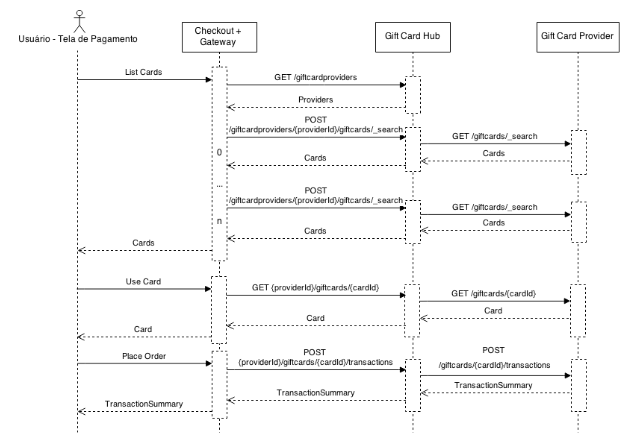\r\n\r\n**Checkout + Gateway**: Systems responsible for the sale and for processing orders and payments.\r\n\r\n**Gift Card Hub**: System responsible for managing multiple registered Gift Card providers for a store.\r\n\r\n**Gift Card Provider**: System responsible for providing the Gift Cards available to the user not closing a purchase. This system can be implemented by third parties.", "title": "GiftCard Hub API", "version": "1.0", "x-origin": [ { "format": "openapi", "url": "https://raw.githubusercontent.com/vtex/openapi-schemas/master/VTEX - GiftCard Hub API.json", "version": "3.0" } ], "x-providerName": "vtex.local", "x-serviceName": "GiftCard-Hub-API", "x-logo": { "url": "https://api.apis.guru/v2/cache/logo/https_apis.guru_assets_images_no-logo.svg" } }, "updated": "2023-03-03T14:11:52.034Z", "swaggerUrl": "https://api.apis.guru/v2/specs/vtex.local/GiftCard-Hub-API/1.0/openapi.json", "swaggerYamlUrl": "https://api.apis.guru/v2/specs/vtex.local/GiftCard-Hub-API/1.0/openapi.yaml", "openapiVer": "3.0.0", "link": "https://api.apis.guru/v2/specs/vtex.local:GiftCard-Hub-API/1.0.json" } } }, "vtex.local:Giftcard-API": { "added": "2023-03-03T14:11:52.034Z", "preferred": "1.0", "versions": { "1.0": { "added": "2023-03-03T14:11:52.034Z", "info": { "contact": {}, "description": ">ℹ️ Onboarding guide\r\n>\r\n> Check the new [Payments onboarding guide](https://developers.vtex.com/docs/guides/payments-overview). We created this guide to improve the onboarding experience for developers at VTEX. It assembles all documentation on our Developer Portal about Payments and is organized by focusing on the developer's journey.\r\n\r\nThe Gift Card is a payment method configured as a cash value associated with a client. It is used to grant a discount on the value of the order at the store.\r\n\r\n> ⚠ A Gift Card works as a **payment method**, not a promotion.", "title": "GiftCard API", "version": "1.0", "x-origin": [ { "format": "openapi", "url": "https://raw.githubusercontent.com/vtex/openapi-schemas/master/VTEX - Giftcard API.json", "version": "3.0" } ], "x-providerName": "vtex.local", "x-serviceName": "Giftcard-API", "x-logo": { "url": "https://api.apis.guru/v2/cache/logo/https_apis.guru_assets_images_no-logo.svg" } }, "updated": "2023-03-03T14:11:52.034Z", "swaggerUrl": "https://api.apis.guru/v2/specs/vtex.local/Giftcard-API/1.0/openapi.json", "swaggerYamlUrl": "https://api.apis.guru/v2/specs/vtex.local/Giftcard-API/1.0/openapi.yaml", "openapiVer": "3.0.0", "link": "https://api.apis.guru/v2/specs/vtex.local:Giftcard-API/1.0.json" } } }, "vtex.local:Headless-CMS-API": { "added": "2023-03-03T14:11:52.034Z", "preferred": "0.31.2", "versions": { "0.31.2": { "added": "2023-03-03T14:11:52.034Z", "info": { "contact": {}, "description": "\nThe VTEX Headless CMS is a no-code management system for storefront content. \nThat means you can store your content as structured data in a layer decoupled from the frontend and \nuse the VTEX Headless CMS to access and deliver your content to your storefront project.\n\nNotice that the VTEX Headless CMS typically works with **FastStore** projects only. In this case, you can use this API\nto fetch data using SSR (NextJS and Gatsby v4+) or SSG (NextJS).\n\n**Servers**\n- `https://{account}.myvtex.com/`\n- `https://{workspace}--{account}.myvtex.com/`\n\n**Server variables**\n- `accountName`: Name of your VTEX account.\n- `workspace`: Name of your VTEX workspace.\n", "title": "VTEX Headless CMS", "version": "0.31.2", "x-origin": [ { "format": "openapi", "url": "https://raw.githubusercontent.com/vtex/openapi-schemas/master/VTEX - Headless CMS API.json", "version": "3.0" } ], "x-providerName": "vtex.local", "x-serviceName": "Headless-CMS-API", "x-logo": { "url": "https://api.apis.guru/v2/cache/logo/https_apis.guru_assets_images_no-logo.svg" } }, "updated": "2023-03-03T14:11:52.034Z", "swaggerUrl": "https://api.apis.guru/v2/specs/vtex.local/Headless-CMS-API/0.31.2/openapi.json", "swaggerYamlUrl": "https://api.apis.guru/v2/specs/vtex.local/Headless-CMS-API/0.31.2/openapi.yaml", "openapiVer": "3.0.0", "link": "https://api.apis.guru/v2/specs/vtex.local:Headless-CMS-API/0.31.2.json" } } }, "vtex.local:Intelligent-Search-API": { "added": "2023-03-03T14:11:52.034Z", "preferred": "0.1.12", "versions": { "0.1.12": { "added": "2023-03-03T14:11:52.034Z", "info": { "description": ">ℹ️ Onboarding guide\r\n>\r\n> Check the new [Search onboarding guide](https://developers.vtex.com/docs/guides/search-overview). We created this guide to improve the onboarding experience for developers at VTEX. It assembles all documentation on our Developer Portal about Search and is organized by focusing on the developer's journey.\r\n\r\nThis API is from the [VTEX Intelligent Search](https://help.vtex.com/en/tracks/vtex-intelligent-search--19wrbB7nEQcmwzDPl1l4Cb/3qgT47zY08biLP3d5os3DG) solution, an alternative to the platform’s native search, as it assists the customer in their purchase journey, and it presents results since the first interaction with the search bar.\r\n\r\n## Index\r\n- [Get list of the 10 most searched terms](https://developers.vtex.com/docs/api-reference/intelligent-search-api#get-/top_searches)\r\n- [Get list of suggested terms and attributes similar to the search term](https://developers.vtex.com/docs/api-reference/intelligent-search-api#get-/autocomplete_suggestions)\r\n- [Get attempt of correction of a misspelled term](https://developers.vtex.com/docs/api-reference/intelligent-search-api#get-/correction_search)\r\n- [Get list of banners registered for query](https://developers.vtex.com/docs/api-reference/intelligent-search-api#get-/banners/-facets-)\r\n- [Get list of suggested terms similar to the search term](https://developers.vtex.com/docs/api-reference/intelligent-search-api#get-/search_suggestions)\r\n- [Get list of products for a query](https://developers.vtex.com/docs/api-reference/intelligent-search-api#get-/product_search/-facets-)\r\n- [Get list of the possible facets for a given query](https://developers.vtex.com/docs/api-reference/intelligent-search-api#get-/facets/-facets-)", "license": { "name": "MIT" }, "title": "Intelligent Search API", "version": "0.1.12", "x-origin": [ { "format": "openapi", "url": "https://raw.githubusercontent.com/vtex/openapi-schemas/master/VTEX - Intelligent Search API.json", "version": "3.0" } ], "x-providerName": "vtex.local", "x-serviceName": "Intelligent-Search-API", "x-logo": { "url": "https://api.apis.guru/v2/cache/logo/https_apis.guru_assets_images_no-logo.svg" } }, "updated": "2023-03-03T14:11:52.034Z", "swaggerUrl": "https://api.apis.guru/v2/specs/vtex.local/Intelligent-Search-API/0.1.12/openapi.json", "swaggerYamlUrl": "https://api.apis.guru/v2/specs/vtex.local/Intelligent-Search-API/0.1.12/openapi.yaml", "openapiVer": "3.0.0", "link": "https://api.apis.guru/v2/specs/vtex.local:Intelligent-Search-API/0.1.12.json" } } }, "vtex.local:License-Manager-API": { "added": "2023-03-03T14:11:52.034Z", "preferred": "1.0", "versions": { "1.0": { "added": "2023-03-03T14:11:52.034Z", "info": { "contact": {}, "description": "## Welcome!\r\n\r\nThe License Manager API allows you to create users, modify their names and emails, as well as add and remove roles from users.\r\n\r\n### ATTRIBUTES\r\n\r\n|Attribute name | Description |\r\n|:------------|--------------|\r\n|accountName | Account name in VTEX License Manager |\r\n|environment | Environment on which you want to run the query e.g. vtexcommercestable |\r\n|userId | Unique user identification string |\r\n|roleId | Integer that represents a role, can be looked up on the License Manager UI |", "title": "License Manager API", "version": "1.0", "x-origin": [ { "format": "openapi", "url": "https://raw.githubusercontent.com/vtex/openapi-schemas/master/VTEX - License Manager API.json", "version": "3.0" } ], "x-providerName": "vtex.local", "x-serviceName": "License-Manager-API", "x-logo": { "url": "https://api.apis.guru/v2/cache/logo/https_apis.guru_assets_images_no-logo.svg" } }, "updated": "2023-03-03T14:11:52.034Z", "swaggerUrl": "https://api.apis.guru/v2/specs/vtex.local/License-Manager-API/1.0/openapi.json", "swaggerYamlUrl": "https://api.apis.guru/v2/specs/vtex.local/License-Manager-API/1.0/openapi.yaml", "openapiVer": "3.0.0", "link": "https://api.apis.guru/v2/specs/vtex.local:License-Manager-API/1.0.json" } } }, "vtex.local:Logistics-API": { "added": "2023-03-03T14:11:52.034Z", "preferred": "1.0", "versions": { "1.0": { "added": "2023-03-03T14:11:52.034Z", "info": { "contact": {}, "description": "\r\n\r\n>Check the [Fulfillment onboarding guide](https://developers.vtex.com/docs/guides/fulfillment). We created this guide to improve the onboarding experience for developers at VTEX. It assembles all documentation on our Developer Portal about fulfillment and is organized by focusing on the developer's journey.\r\n\r\nLogistics or fulfillment is the module responsible for shipping calculation and inventory management. \r\n\r\nThe variable `{{environment}}` can be filled with `vtexcommercestable` or `vtexcommercebeta`, depending on the environment you want to test.", "title": "Logistics API", "version": "1.0", "x-origin": [ { "format": "openapi", "url": "https://raw.githubusercontent.com/vtex/openapi-schemas/master/VTEX - Logistics API.json", "version": "3.0" } ], "x-providerName": "vtex.local", "x-serviceName": "Logistics-API", "x-logo": { "url": "https://api.apis.guru/v2/cache/logo/https_apis.guru_assets_images_no-logo.svg" } }, "updated": "2023-03-03T14:11:52.034Z", "swaggerUrl": "https://api.apis.guru/v2/specs/vtex.local/Logistics-API/1.0/openapi.json", "swaggerYamlUrl": "https://api.apis.guru/v2/specs/vtex.local/Logistics-API/1.0/openapi.yaml", "openapiVer": "3.0.0", "link": "https://api.apis.guru/v2/specs/vtex.local:Logistics-API/1.0.json" } } }, "vtex.local:Marketplace-APIs": { "added": "2023-03-03T14:11:52.034Z", "preferred": "1.0", "versions": { "1.0": { "added": "2023-03-03T14:11:52.034Z", "info": { "contact": {}, "description": "\r\nThe **Marketplace API** enables marketplaces and sellers hosted on VTEX to perform their collaborative operations. \r\n\r\n>⚠️ The marketplace must [create an appKey and appToken](https://developers.vtex.com/docs/guides/getting-started-authentication) for each non-VTEX seller that will use this API.\r\n\r\n## Index\r\n\r\n### Notification\r\n\r\nEndpoints used by sellers to notify marketplaces that the price or inventory language has changed for one of their SKUs.\r\n\r\n`POST` [Notify marketplace of price update](https://developers.vtex.com/docs/api-reference/marketplace-apis#post-/notificator/-sellerId-/changenotification/-skuId-/price)\r\n\r\n`POST` [Notify marketplace of inventory update](https://developers.vtex.com/docs/api-reference/marketplace-apis#post-/notificator/-sellerId-/changenotification/-skuId-/inventory)\r\n\r\n\r\n### Suggestions\r\n\r\n#### Get Suggestions\r\n\r\nSearch and filter all suggestions using specific criteria.\r\n\r\n`GET` [Get all SKU Suggestions](https://developers.vtex.com/docs/api-reference/marketplace-apis-suggestions#get-/suggestions)\r\n\r\n`GET` [Get SKU Suggestion by ID](https://developers.vtex.com/docs/api-reference/marketplace-apis-suggestions#get-/suggestions/-sellerId-/-sellerSkuId-)\r\n\r\n\r\n#### Manage Suggestions\r\n\r\nSend or delete SKU suggestions from the seller to marketplace.\r\n\r\n`PUT` [Send SKU Suggestion](https://developers.vtex.com/docs/api-reference/marketplace-apis-suggestions#put-/suggestions/-sellerId-/-sellerSkuId-)\r\n\r\n`DELETE` [Delete SKU Suggestion](https://developers.vtex.com/docs/api-reference/marketplace-apis-suggestions#delete-/suggestions/-sellerId-/-sellerSkuId-)\r\n\r\n\r\n#### Get Versions\r\n\r\nSearch and filter all versions of suggestions, using specific criteria.\r\n\r\n`GET` [Get all versions](https://developers.vtex.com/docs/api-reference/marketplace-apis-suggestions#get-/suggestions/-sellerId-/-sellerskuid-/versions)\r\n\r\n`GET` [Get version by ID](https://developers.vtex.com/docs/api-reference/marketplace-apis-suggestions#get-/suggestions/-sellerId-/-sellerskuid-/versions/-version-)\r\n\r\n\r\n#### Match Received SKUs\r\n\r\nMatch SKU suggestions received in the marketplace.\r\n\r\n`PUT` [Match Received SKUs individually](https://developers.vtex.com/docs/api-reference/marketplace-apis-suggestions#put-/suggestions/-sellerId-/-sellerskuid-/versions/-version-/matches/-matchid-)\r\n\r\n`PUT` [Match Multiple Received SKUs](https://developers.vtex.com/docs/api-reference/marketplace-apis-suggestions#put-/suggestions/matches/action/-actionName-)\r\n\r\n\r\n#### SKU Approval Settings\r\n\r\nAllows marketplaces to configure rules for automatically and manually approving SKUs received from sellers.\r\n\r\n`GET`[Get autoApprove Status in Account Settings](https://developers.vtex.com/docs/api-reference/marketplace-apis-suggestions#get-/suggestions/configuration/autoapproval/toggle) \r\n\r\n`PUT`[Activate autoApprove in Marketplace's Account](https://developers.vtex.com/docs/api-reference/marketplace-apis-suggestions#put-/suggestions/configuration/autoapproval/toggle) \r\n\r\n`GET`[Get Account's Approval Settings](https://developers.vtex.com/docs/api-reference/marketplace-apis-suggestions#get-/suggestions/configuration)\r\n\r\n`PUT`[Save Account's Approval Settings](https://developers.vtex.com/docs/api-reference/marketplace-apis-suggestions#put-/suggestions/configuration)\r\n\r\n`GET`[Get Seller's Approval Settings](https://developers.vtex.com/docs/api-reference/marketplace-apis-suggestions#get-/suggestions/configuration/seller/-sellerId-)\r\n\r\n`PUT`[Save Seller's Approval Settings](https://developers.vtex.com/docs/api-reference/marketplace-apis-suggestions#put-/suggestions/configuration/seller/-sellerId-)\r\n\r\n`PUT`[Activate autoApprove Setting for a Seller](https://developers.vtex.com/docs/api-reference/marketplace-apis-suggestions#put-/suggestions/configuration/autoapproval/toggle/seller/-sellerId-) \r\n\r\n\r\n### Matched Offers\r\n\r\nOffers are seller products and SKUs that were sent to the marketplace, and already have their price and inventory level configured.\r\n\r\n`GET`[Get Matched Offers List](https://developers.vtex.com/docs/api-reference/marketplace-apis#get-/offer-manager/pvt/offers)\r\n\r\n`GET`[Get Matched Offer's Data by SKU ID](https://developers.vtex.com/docs/api-reference/marketplace-apis#get-/offer-manager/pvt/product/-productId-/sku/-skuId-) \r\n\r\n`GET`[Get Matched Offer's Data by Product ID](https://developers.vtex.com/docs/api-reference/marketplace-apis#get-/offer-manager/pvt/product/-productId-)\r\n", "title": "Marketplace API", "version": "1.0", "x-origin": [ { "format": "openapi", "url": "https://raw.githubusercontent.com/vtex/openapi-schemas/master/VTEX - Marketplace APIs.json", "version": "3.0" } ], "x-providerName": "vtex.local", "x-serviceName": "Marketplace-APIs", "x-logo": { "url": "https://api.apis.guru/v2/cache/logo/https_apis.guru_assets_images_no-logo.svg" } }, "updated": "2023-03-03T14:11:52.034Z", "swaggerUrl": "https://api.apis.guru/v2/specs/vtex.local/Marketplace-APIs/1.0/openapi.json", "swaggerYamlUrl": "https://api.apis.guru/v2/specs/vtex.local/Marketplace-APIs/1.0/openapi.yaml", "openapiVer": "3.0.0", "link": "https://api.apis.guru/v2/specs/vtex.local:Marketplace-APIs/1.0.json" } } }, "vtex.local:Marketplace-APIs-": { "added": "2023-03-03T14:11:52.034Z", "preferred": "1.0", "versions": { "1.0": { "added": "2023-03-03T14:11:52.034Z", "info": { "contact": {}, "description": "\r\nThe **Marketplace API** enables marketplaces and sellers hosted on VTEX to perform their collaborative operations. \r\n\r\n>⚠️ The marketplace must [create an appKey and appToken](https://developers.vtex.com/docs/guides/getting-started-authentication) for each non-VTEX seller that will use this API.\r\n\r\n## Index\r\n\r\n### Notification\r\n\r\nEndpoints used by sellers to notify marketplaces that the price or inventory language has changed for one of their SKUs.\r\n\r\n`POST` [Notify marketplace of price update](https://developers.vtex.com/docs/api-reference/marketplace-apis#post-/notificator/-sellerId-/changenotification/-skuId-/price)\r\n\r\n`POST` [Notify marketplace of inventory update](https://developers.vtex.com/docs/api-reference/marketplace-apis#post-/notificator/-sellerId-/changenotification/-skuId-/inventory)\r\n\r\n\r\n### Suggestions\r\n\r\n#### Get Suggestions\r\n\r\nSearch and filter all suggestions using specific criteria.\r\n\r\n`GET` [Get all SKU Suggestions](https://developers.vtex.com/docs/api-reference/marketplace-apis-suggestions#get-/suggestions)\r\n\r\n`GET` [Get SKU Suggestion by ID](https://developers.vtex.com/docs/api-reference/marketplace-apis-suggestions#get-/suggestions/-sellerId-/-sellerSkuId-)\r\n\r\n\r\n#### Manage Suggestions\r\n\r\nSend or delete SKU suggestions from the seller to marketplace.\r\n\r\n`PUT` [Send SKU Suggestion](https://developers.vtex.com/docs/api-reference/marketplace-apis-suggestions#put-/suggestions/-sellerId-/-sellerSkuId-)\r\n\r\n`DELETE` [Delete SKU Suggestion](https://developers.vtex.com/docs/api-reference/marketplace-apis-suggestions#delete-/suggestions/-sellerId-/-sellerSkuId-)\r\n\r\n\r\n#### Get Versions\r\n\r\nSearch and filter all versions of suggestions, using specific criteria.\r\n\r\n`GET` [Get all versions](https://developers.vtex.com/docs/api-reference/marketplace-apis-suggestions#get-/suggestions/-sellerId-/-sellerskuid-/versions)\r\n\r\n`GET` [Get version by ID](https://developers.vtex.com/docs/api-reference/marketplace-apis-suggestions#get-/suggestions/-sellerId-/-sellerskuid-/versions/-version-)\r\n\r\n\r\n#### Match Received SKUs\r\n\r\nMatch SKU suggestions received in the marketplace.\r\n\r\n`PUT` [Match Received SKUs individually](https://developers.vtex.com/docs/api-reference/marketplace-apis-suggestions#put-/suggestions/-sellerId-/-sellerskuid-/versions/-version-/matches/-matchid-)\r\n\r\n`PUT` [Match Multiple Received SKUs](https://developers.vtex.com/docs/api-reference/marketplace-apis-suggestions#put-/suggestions/matches/action/-actionName-)\r\n\r\n\r\n#### SKU Approval Settings\r\n\r\nAllows marketplaces to configure rules for automatically and manually approving SKUs received from sellers.\r\n\r\n`GET`[Get autoApprove Status in Account Settings](https://developers.vtex.com/docs/api-reference/marketplace-apis-suggestions#get-/suggestions/configuration/autoapproval/toggle) \r\n\r\n`PUT`[Activate autoApprove in Marketplace's Account](https://developers.vtex.com/docs/api-reference/marketplace-apis-suggestions#put-/suggestions/configuration/autoapproval/toggle) \r\n\r\n`GET`[Get Account's Approval Settings](https://developers.vtex.com/docs/api-reference/marketplace-apis-suggestions#get-/suggestions/configuration)\r\n\r\n`PUT`[Save Account's Approval Settings](https://developers.vtex.com/docs/api-reference/marketplace-apis-suggestions#put-/suggestions/configuration)\r\n\r\n`GET`[Get Seller's Approval Settings](https://developers.vtex.com/docs/api-reference/marketplace-apis-suggestions#get-/suggestions/configuration/seller/-sellerId-)\r\n\r\n`PUT`[Save Seller's Approval Settings](https://developers.vtex.com/docs/api-reference/marketplace-apis-suggestions#put-/suggestions/configuration/seller/-sellerId-)\r\n\r\n`PUT`[Activate autoApprove Setting for a Seller](https://developers.vtex.com/docs/api-reference/marketplace-apis-suggestions#put-/suggestions/configuration/autoapproval/toggle/seller/-sellerId-) \r\n\r\n\r\n### Matched Offers\r\n\r\nOffers are seller products and SKUs that were sent to the marketplace, and already have their price and inventory level configured.\r\n\r\n`GET`[Get Matched Offers List](https://developers.vtex.com/docs/api-reference/marketplace-apis#get-/offer-manager/pvt/offers)\r\n\r\n`GET`[Get Matched Offer's Data by SKU ID](https://developers.vtex.com/docs/api-reference/marketplace-apis#get-/offer-manager/pvt/product/-productId-/sku/-skuId-) \r\n\r\n`GET`[Get Matched Offer's Data by Product ID](https://developers.vtex.com/docs/api-reference/marketplace-apis#get-/offer-manager/pvt/product/-productId-)\r\n", "title": "Suggestions", "version": "1.0", "x-origin": [ { "format": "openapi", "url": "https://raw.githubusercontent.com/vtex/openapi-schemas/master/VTEX - Marketplace APIs - Suggestions.json", "version": "3.0" } ], "x-providerName": "vtex.local", "x-serviceName": "Marketplace-APIs-", "x-logo": { "url": "https://api.apis.guru/v2/cache/logo/https_apis.guru_assets_images_no-logo.svg" } }, "updated": "2023-03-03T14:11:52.034Z", "swaggerUrl": "https://api.apis.guru/v2/specs/vtex.local/Marketplace-APIs-/1.0/openapi.json", "swaggerYamlUrl": "https://api.apis.guru/v2/specs/vtex.local/Marketplace-APIs-/1.0/openapi.yaml", "openapiVer": "3.0.0", "link": "https://api.apis.guru/v2/specs/vtex.local:Marketplace-APIs-/1.0.json" } } }, "vtex.local:Marketplace-Protocol": { "added": "2023-03-03T14:11:52.034Z", "preferred": "1.0", "versions": { "1.0": { "added": "2023-03-03T14:11:52.034Z", "info": { "contact": {}, "description": "\r\nThe _Marketplace Protocol_ is a set of API requests and definitions to help you integrate external sellers into a VTEX marketplace as well as external marketplaces into VTEX sellers.\r\n\r\n## External Seller\r\n\r\nHere you will find the endpoints involved in the integration between a VTEX marketplace and an external seller. Note that some of these requests are typically sent by the seller while others are received.\r\n\r\n| **Request** | **From** | **To** |\r\n|-|-|-|\r\n| [Fulfillment simulation](https://developers.vtex.com/vtex-rest-api/reference/fulfillment-simulation) | Marketplace | Seller |\r\n| [Order placement](https://developers.vtex.com/vtex-rest-api/reference/order-placement) | Marketplace | Seller |\r\n| [Authorize fulfillment](https://developers.vtex.com/vtex-rest-api/reference/authorize-fulfillment) | Marketplace | Seller |\r\n| [Marketplace order cancellation](https://developers.vtex.com/vtex-rest-api/reference/marketplace-order-cancellation) | Marketplace | Seller |\r\n| [Send invoice](https://developers.vtex.com/vtex-rest-api/reference/send-invoice) | Seller | Marketplace |\r\n| [Send tracking information](https://developers.vtex.com/vtex-rest-api/reference/send-tracking-information) | Seller | Marketplace |\r\n| [Update tracking status](https://developers.vtex.com/vtex-rest-api/reference/update-tracking-status) | Seller | Marketplace |\r\n| [Cancel order in marketplace](https://developers.vtex.com/vtex-rest-api/reference/cancel-order-in-marketplace) | Seller | Marketplace |\r\n\r\nFor a detailed explanation of the steps required to develop a custom connector to sell products from an external seller in your storefront, check out our complete [External Seller Integration Guide](https://developers.vtex.com/docs/guides/external-seller-integration-guide).\r\n\r\n\r\n## External Marketplace\r\n\r\nIn this section, you will find the endpoints involved in the VTEX integration between an external marketplace and a VTEX seller.\r\n\r\n\r\n| **Request** | **From** | **To** |\r\n|-|-|-|\r\n| [VTEX Mapper Registration](https://developers.vtex.com/vtex-rest-api/reference/vtex-mapper-registration) | External marketplace | VTEX system |\r\n| [Send Category Mapping to VTEX Mapper](https://developers.vtex.com/vtex-rest-api/reference/send-category-mapping-to-vtex-mapper) | External marketplace | VTEX system |\r\n| [Authorize fulfillment](https://developers.vtex.com/vtex-rest-api/reference/authorize-fulfillment) | Marketplace | Seller |\r\n| [Place fulfillment order](https://developers.vtex.com/vtex-rest-api/reference/place-fulfillment-order) | External marketplace | VTEX Seller |\r\n| [Authorize dispatch for fulfillment order](https://developers.vtex.com/vtex-rest-api/reference/authorize-dispatch-for-fulfillment-order) | External marketplace | VTEX Seller |\r\n\r\n\r\nFor a detailed explanation of the steps required to develop a custom connector to become an external marketplace for VTEX sellers, check out our complete [External Marketplace Integration Guide](https://developers.vtex.com/docs/guides/external-marketplace-integration-guide).", "title": "Marketplace Protocol", "version": "1.0", "x-origin": [ { "format": "openapi", "url": "https://raw.githubusercontent.com/vtex/openapi-schemas/master/VTEX - Marketplace Protocol.json", "version": "3.0" } ], "x-providerName": "vtex.local", "x-serviceName": "Marketplace-Protocol", "x-logo": { "url": "https://api.apis.guru/v2/cache/logo/https_apis.guru_assets_images_no-logo.svg" } }, "updated": "2023-03-03T14:11:52.034Z", "swaggerUrl": "https://api.apis.guru/v2/specs/vtex.local/Marketplace-Protocol/1.0/openapi.json", "swaggerYamlUrl": "https://api.apis.guru/v2/specs/vtex.local/Marketplace-Protocol/1.0/openapi.yaml", "openapiVer": "3.0.0", "link": "https://api.apis.guru/v2/specs/vtex.local:Marketplace-Protocol/1.0.json" } } }, "vtex.local:Master-Data-API-": { "added": "2023-03-03T14:11:52.034Z", "preferred": "1.0", "versions": { "1.0": { "added": "2023-03-03T14:11:52.034Z", "info": { "contact": {}, "description": "# ATTENTION: **This version isn't compliant with data entities of old version (e.g. CL and AD). It's possible to use this configuration only to new data entities.**\r\n\r\n\r\n## Welcome!\r\n\r\nVTEX Master Data is an easy-to-use, secure, fast, scalable and extensible repository. On it you can create your own Entities, store data and consult directly from the storefront or use it to store info for some external integration.\r\n\r\nThere are internal VTEX modules that use VTEX Master Data as data repository. We have the VTEX Customer Service, VTEX Profile System and VTEX InStore, for example. It is also used by other internal services.\r\n\r\nThere are two ways to use Master Data:\r\n\r\n1. Directly from the storefront\r\n2. External integration\r\n\r\n### Directly from the storefront\r\n\r\nIf your scenario is to be used inside the storefront, be aware of the following observations:\r\n\r\n1. Use the storefront host to query or store information to avoid **CORS**;\r\n2. Configure which information should be public and which shouldn't, inside the JSON Schema of the Data Entity;\r\n3. Do not create query loops (the storefront may be affected with Throttling and apis may be turned off as a security protection);\r\n4. Never add via JS any type of authentication key (x-vtex-api-appkey or x-vtex-api-apptoken);\r\n\r\n**It's important to avoid CORS using the relative path**\r\n\r\n### External Integration\r\n\r\nIf your scenario is to perform external integration, such as migrating client data from another service, be aware of the following observations:\r\n\r\n1. Use the host ```{{accountName}}.vtexcommercestable.com.br```;\r\n2. Use the authentication keys (x-vtex-api-appkey ou x-vtex-api-apptoken);\r\n\r\n### Most used attributes listed here\r\n\r\n| Name | Description |\r\n| -------- | -------- |\r\n| accountName | Account name in VTEX License Manager |\r\n| name | Data Entity name |\r\n| schema | JSON Schema of a Data Entity |\r\n| id | Identifier of a document |\r\n| x-vtex-api-appKey | User key |\r\n| x-vtex-api-appToken | User token |", "title": "Master Data API - v2", "version": "1.0", "x-origin": [ { "format": "openapi", "url": "https://raw.githubusercontent.com/vtex/openapi-schemas/master/VTEX - Master Data API - v2.json", "version": "3.0" } ], "x-providerName": "vtex.local", "x-serviceName": "Master-Data-API-", "x-logo": { "url": "https://api.apis.guru/v2/cache/logo/https_apis.guru_assets_images_no-logo.svg" } }, "updated": "2023-03-03T14:11:52.034Z", "swaggerUrl": "https://api.apis.guru/v2/specs/vtex.local/Master-Data-API-/1.0/openapi.json", "swaggerYamlUrl": "https://api.apis.guru/v2/specs/vtex.local/Master-Data-API-/1.0/openapi.yaml", "openapiVer": "3.0.0", "link": "https://api.apis.guru/v2/specs/vtex.local:Master-Data-API-/1.0.json" } } }, "vtex.local:MasterData-API-": { "added": "2023-03-03T14:11:52.034Z", "preferred": "1.0", "versions": { "1.0": { "added": "2023-03-03T14:11:52.034Z", "info": { "contact": {}, "description": "", "title": "MasterData API - v1", "version": "1.0", "x-origin": [ { "format": "openapi", "url": "https://raw.githubusercontent.com/vtex/openapi-schemas/master/VTEX - MasterData API - v10.2.json", "version": "3.0" } ], "x-providerName": "vtex.local", "x-serviceName": "MasterData-API-", "x-logo": { "url": "https://api.apis.guru/v2/cache/logo/https_apis.guru_assets_images_no-logo.svg" } }, "updated": "2023-03-03T14:11:52.034Z", "swaggerUrl": "https://api.apis.guru/v2/specs/vtex.local/MasterData-API-/1.0/openapi.json", "swaggerYamlUrl": "https://api.apis.guru/v2/specs/vtex.local/MasterData-API-/1.0/openapi.yaml", "openapiVer": "3.0.0", "link": "https://api.apis.guru/v2/specs/vtex.local:MasterData-API-/1.0.json" } } }, "vtex.local:Message-Center-API": { "added": "2023-03-03T14:11:52.034Z", "preferred": "1.0.0", "versions": { "1.0.0": { "added": "2023-03-03T14:11:52.034Z", "info": { "license": { "name": "MIT" }, "title": "Message Center API", "version": "1.0.0", "x-origin": [ { "format": "openapi", "url": "https://raw.githubusercontent.com/vtex/openapi-schemas/master/VTEX - Message Center API.json", "version": "3.0" } ], "x-providerName": "vtex.local", "x-serviceName": "Message-Center-API", "x-logo": { "url": "https://api.apis.guru/v2/cache/logo/https_apis.guru_assets_images_no-logo.svg" } }, "updated": "2023-03-03T14:11:52.034Z", "swaggerUrl": "https://api.apis.guru/v2/specs/vtex.local/Message-Center-API/1.0.0/openapi.json", "swaggerYamlUrl": "https://api.apis.guru/v2/specs/vtex.local/Message-Center-API/1.0.0/openapi.yaml", "openapiVer": "3.0.0", "link": "https://api.apis.guru/v2/specs/vtex.local:Message-Center-API/1.0.0.json" } } }, "vtex.local:Orders-API": { "added": "2023-03-03T14:11:52.034Z", "preferred": "1.0", "versions": { "1.0": { "added": "2023-03-03T14:11:52.034Z", "info": { "contact": {}, "description": "\r\n\r\n>Check the new [Orders onboarding guide](https://developers.vtex.com/docs/guides/orders-overview). We created this guide to improve the onboarding experience for developers at VTEX. It assembles all documentation on our Developer Portal about Orders and is organized by focusing on the developer's journey.\r\n\r\nReceive, process, and manage every order in your store through our Order Management API.", "title": "Orders API", "version": "1.0", "x-origin": [ { "format": "openapi", "url": "https://raw.githubusercontent.com/vtex/openapi-schemas/master/VTEX - Orders API.json", "version": "3.0" } ], "x-providerName": "vtex.local", "x-serviceName": "Orders-API", "x-logo": { "url": "https://api.apis.guru/v2/cache/logo/https_apis.guru_assets_images_no-logo.svg" } }, "updated": "2023-03-03T14:11:52.034Z", "swaggerUrl": "https://api.apis.guru/v2/specs/vtex.local/Orders-API/1.0/openapi.json", "swaggerYamlUrl": "https://api.apis.guru/v2/specs/vtex.local/Orders-API/1.0/openapi.yaml", "openapiVer": "3.0.0", "link": "https://api.apis.guru/v2/specs/vtex.local:Orders-API/1.0.json" } } }, "vtex.local:Orders-API-(PII-version)": { "added": "2023-03-03T14:11:52.034Z", "preferred": "1.0", "versions": { "1.0": { "added": "2023-03-03T14:11:52.034Z", "info": { "contact": {}, "description": "Endpoints that deal with order management. New version of the orders API.", "title": "Orders API (PII version)", "version": "1.0", "x-origin": [ { "format": "openapi", "url": "https://raw.githubusercontent.com/vtex/openapi-schemas/master/VTEX - Orders API (PII version).json", "version": "3.0" } ], "x-providerName": "vtex.local", "x-serviceName": "Orders-API-(PII-version)", "x-logo": { "url": "https://api.apis.guru/v2/cache/logo/https_apis.guru_assets_images_no-logo.svg" } }, "updated": "2023-03-03T14:11:52.034Z", "swaggerUrl": "https://api.apis.guru/v2/specs/vtex.local/Orders-API-(PII-version)/1.0/openapi.json", "swaggerYamlUrl": "https://api.apis.guru/v2/specs/vtex.local/Orders-API-(PII-version)/1.0/openapi.yaml", "openapiVer": "3.0.0", "link": "https://api.apis.guru/v2/specs/vtex.local:Orders-API-(PII-version)/1.0.json" } } }, "vtex.local:Payments-Gateway-API": { "added": "2023-03-03T14:11:52.034Z", "preferred": "1.0", "versions": { "1.0": { "added": "2023-03-03T14:11:52.034Z", "info": { "contact": {}, "description": ">ℹ️ Onboarding guide\r\n>\r\n> Check the new [Payments onboarding guide](https://developers.vtex.com/docs/guides/payments-overview). We created this guide to improve the onboarding experience for developers at VTEX. It assembles all documentation on our Developer Portal about Payments and is organized by focusing on the developer's journey.\r\n\r\nThe Payments Gateway API allows you to get payment data and process your store's transactions.", "title": "Payments Gateway API", "version": "1.0", "x-origin": [ { "format": "openapi", "url": "https://raw.githubusercontent.com/vtex/openapi-schemas/master/VTEX - Payments Gateway API.json", "version": "3.0" } ], "x-providerName": "vtex.local", "x-serviceName": "Payments-Gateway-API", "x-logo": { "url": "https://api.apis.guru/v2/cache/logo/https_apis.guru_assets_images_no-logo.svg" } }, "updated": "2023-03-03T14:11:52.034Z", "swaggerUrl": "https://api.apis.guru/v2/specs/vtex.local/Payments-Gateway-API/1.0/openapi.json", "swaggerYamlUrl": "https://api.apis.guru/v2/specs/vtex.local/Payments-Gateway-API/1.0/openapi.yaml", "openapiVer": "3.0.0", "link": "https://api.apis.guru/v2/specs/vtex.local:Payments-Gateway-API/1.0.json" } } }, "vtex.local:Policies-System-API": { "added": "2023-03-03T14:11:52.034Z", "preferred": "1.0.0", "versions": { "1.0.0": { "added": "2023-03-03T14:11:52.034Z", "info": { "contact": {}, "description": "\r\n This API will create promotion alarms when selling products with undesired prices and promotions. It will create conditions that will check if the prices and the promotions are correct. If not, the system will alarm the store with information about the product sold at unexpected prices.\r\n\r\n ## Index\r\n\r\n `GET` [Get Policy List](https://developers.vtex.com/docs/api-reference/policies-system-api#get-/api/policy-engine/policies)\r\n `POST` [Evaluate Policies](https://developers.vtex.com/docs/api-reference/policies-system-api#post-/api/policy-engine/evaluate)\r\n `GET` [Get Policy by ID](https://developers.vtex.com/docs/api-reference/policies-system-api#get-/api/policy-engine/policies/-id-)\r\n `POST` [Create Policy](https://developers.vtex.com/docs/api-reference/policies-system-api#post-/api/policy-engine/policies/-id-)\r\n `PUT` [Update Policy](https://developers.vtex.com/docs/api-reference/policies-system-api#put-/api/policy-engine/policies/-id-)\r\n `DELETE` [Delete Policy by ID](https://developers.vtex.com/docs/api-reference/policies-system-api#delete-/api/policy-engine/policies/-id-)", "title": "Policies System API", "version": "1.0.0", "x-origin": [ { "format": "openapi", "url": "https://raw.githubusercontent.com/vtex/openapi-schemas/master/VTEX - Policies System API.json", "version": "3.0" } ], "x-providerName": "vtex.local", "x-serviceName": "Policies-System-API", "x-logo": { "url": "https://api.apis.guru/v2/cache/logo/https_apis.guru_assets_images_no-logo.svg" } }, "updated": "2023-03-03T14:11:52.034Z", "swaggerUrl": "https://api.apis.guru/v2/specs/vtex.local/Policies-System-API/1.0.0/openapi.json", "swaggerYamlUrl": "https://api.apis.guru/v2/specs/vtex.local/Policies-System-API/1.0.0/openapi.yaml", "openapiVer": "3.0.0", "link": "https://api.apis.guru/v2/specs/vtex.local:Policies-System-API/1.0.0.json" } } }, "vtex.local:Price-Simulations": { "added": "2023-03-03T14:11:52.034Z", "preferred": "1.0", "versions": { "1.0": { "added": "2023-03-03T14:11:52.034Z", "info": { "contact": {}, "description": "\r\n> Check the new [Pricing onboarding guide](https://developers.vtex.com/docs/guides/pricing-overview). We created this guide to improve the onboarding experience for developers at VTEX. It assembles all documentation on our Developer Portal about Pricing and is organized by focusing on the developer's journey\r\n\r\nThe Price Simulations API allows you to configure custom price selectors for B2B stores, based on the context set by the [Orders Configuration app](https://developers.vtex.com/docs/guides/vtex-order-configuration).\r\n\r\n## Custom Prices\r\n\r\nIn this section, you can create a specific shopping scenario with the criteria you want. For explaining purpose, we used the `orderType` and `state` as default values, but it can be others too.\r\n\r\n`GET` [Get custom prices schema](https://developers.vtex.com/docs/api-reference/price-simulations#get-/_v/custom-prices/session/schema)\r\n`POST` [Create or Update custom prices schema](https://developers.vtex.com/docs/api-reference/price-simulations#post-/_v/custom-prices/session/schema)\r\n\r\n## Session Management\r\n\r\nEvery time you edit a configuration value set on the Custom Prices session, you must use this endpoint to update the Order Configuration.\r\n\r\n`POST` [Update Order Configuration](https://developers.vtex.com/docs/api-reference/price-simulations#post-/sessions/)\r\n\r\n\r\n## Price Association\r\n\r\nUse these routes to associate a shopping scenario, created at the Custom Price session, to a specific price table.\r\n\r\n`GET` [Get price association by ID](https://developers.vtex.com/docs/api-reference/price-simulations#get-/_v/custom-prices/rules/-priceAssociationId-)\r\n`POST` [Create price association](https://developers.vtex.com/docs/api-reference/price-simulations#post-/_v/custom-prices/rules)\r\n`PUT` [Update price association by ID](https://developers.vtex.com/docs/api-reference/price-simulations#put-/_v/custom-prices/rules/-priceAssociationId-)\r\n`DELETE` [Disassociate price association by ID](https://developers.vtex.com/docs/api-reference/price-simulations#delete-/_v/custom-prices/rules/-priceAssociationId-)", "title": "Price Simulations API", "version": "1.0", "x-origin": [ { "format": "openapi", "url": "https://raw.githubusercontent.com/vtex/openapi-schemas/master/VTEX - Price Simulations.json", "version": "3.0" } ], "x-providerName": "vtex.local", "x-serviceName": "Price-Simulations", "x-logo": { "url": "https://api.apis.guru/v2/cache/logo/https_apis.guru_assets_images_no-logo.svg" } }, "updated": "2023-03-03T14:11:52.034Z", "swaggerUrl": "https://api.apis.guru/v2/specs/vtex.local/Price-Simulations/1.0/openapi.json", "swaggerYamlUrl": "https://api.apis.guru/v2/specs/vtex.local/Price-Simulations/1.0/openapi.yaml", "openapiVer": "3.0.0", "link": "https://api.apis.guru/v2/specs/vtex.local:Price-Simulations/1.0.json" } } }, "vtex.local:Pricing-API": { "added": "2023-03-03T14:11:52.034Z", "preferred": "1.0", "versions": { "1.0": { "added": "2023-03-03T14:11:52.034Z", "info": { "contact": {}, "description": "\r\n> Check the new [Pricing onboarding guide](https://developers.vtex.com/vtex-rest-api/docs/pricing-overview). We created this guide to improve the onboarding experience for developers at VTEX. It assembles all documentation on our Developer Portal about Pricing and is organized by focusing on the developer's journey.\r\n\r\nPricing is the VTEX module responsible for the SKU's price list. At this module we have the base price of each SKU, some optional fixed prices by trade policy, and some rules that can be applied to generate dynamically different final prices according to the purchase context and the trade policy. The variables used in this collection are:\r\n\r\n * **{{accountName}}** = You VTEX account name.\r\n * **{{tradePolicyId}}** = Current Trade Policy ID.\r\n * **{{itemId}}** = SKU ID.\r\n * **{{X-VTEX-API-AppKey}}** and **{{X-VTEX-API-AppToken}}** = Credentials.\r\n\r\nYou can get more information about how to use this module and its business logic at [VTEX Help](http://help.vtex.com).\r\n\r\n## Rate Limits\r\n\r\n### Limits per route\r\n\r\n- `GET`: routes are not rate limited at the moment\r\n- `PUT or POST`: `40 requests/second/account` in any **price insert/update route** with 1000 *Burst Credits*\r\n- `DELETE`: `16 requests/second/account` in any **price deletion route**, with 300 *Burst Credits*.\r\n\r\n### What are Burst Credits?\r\n\r\nIn case the account exceeds the limit frequency for a `Rate Limiter` (for instance, when one account makes `41 requests/second` in any `price insert/update route`), we decrease from the *Burst Credit* count the exceeding (in this example, *1 Credit*).\r\n\r\nIn the event of the *Burst Credits* reaching **0 (zero)**, the request is blocked with a `Status 429` response.\r\n\r\nThe credits fill up over time when the route is not being used, in the same rate as the route's `Rate Limiter`. In our example, for each second not sending a **PUT or POST request**, we increase *40 Burst Credits* to this `Rate Limiter`\r\n\r\n### New Response Headers\r\n\r\nIn the response headers of any request to Pricing v2 there are some new headers indicating the current status of the Rate Limiting.\r\nThis information may be useful to evaluate the ideal frequency to send requests to a route, and when to send a new request in the event of reaching a Rate Limit.\r\n\r\n- `Ratelimit-Limit` - Total *Burst Credits* offered to a route\r\n- `Ratelimit-Remaining` - How many *Burst Credits* are still available to use\r\n- `Ratelimit-Reset` - How long (in seconds) it will take to the *Burst Credits* to fill up completely (It will fill up to the `Ratelimit-Limit`)\r\n- `Retry-After` - Indicates how many seconds you will need to wait until the `Rate Limiter` accepts a new request to this route again. If this header response exists, this means your current request has been rate limited and has not been processed.\r\n\r\n### How to integrate with Pricing v2 considering our Rate Limits\r\n\r\nIntegrate considering the limits of **requests/route/account** specified in the [*Limits per route*](#rate-limits) section, avoiding to surpass this frequency.\r\n\r\nIf you happen to be Rate Limited, wait the time in seconds specified in `Retry-After` before making another request to the service, and reduce the rate of requests per second that your integration is making.", "title": "Pricing API", "version": "1.0", "x-origin": [ { "format": "openapi", "url": "https://raw.githubusercontent.com/vtex/openapi-schemas/master/VTEX - Pricing API.json", "version": "3.0" } ], "x-providerName": "vtex.local", "x-serviceName": "Pricing-API", "x-logo": { "url": "https://api.apis.guru/v2/cache/logo/https_apis.guru_assets_images_no-logo.svg" } }, "updated": "2023-03-03T14:11:52.034Z", "swaggerUrl": "https://api.apis.guru/v2/specs/vtex.local/Pricing-API/1.0/openapi.json", "swaggerYamlUrl": "https://api.apis.guru/v2/specs/vtex.local/Pricing-API/1.0/openapi.yaml", "openapiVer": "3.0.0", "link": "https://api.apis.guru/v2/specs/vtex.local:Pricing-API/1.0.json" } } }, "vtex.local:Pricing-Hub": { "added": "2023-03-03T14:11:52.034Z", "preferred": "1.0", "versions": { "1.0": { "added": "2023-03-03T14:11:52.034Z", "info": { "contact": {}, "description": "> This feature is in closed beta, available only for selected customers. If you have any questions, contact our [Support](https://support.vtex.com/hc/en-us/requests). \r\n\r\n In the B2B scenario, it is common for stores to have personalized prices per customer and complex pricing systems that require external integrations. Pricing Hub is a system developed for the B2B context that works as an intermediary between VTEX and external pricing systems.\r\n\r\n In VTEX, B2B stores have the option to use our internal pricing system or an external one. If the store chooses to operate with an external pricing system, Pricing Hub will query an external price calculation API. The external API should then respond with the price for all items in the shopping cart according to its predefined tax rules.\r\n\r\n\r\n\r\n## Implementation\r\n\r\nTo connect with external pricing systems using Pricing Hub, it is necessary to build a VTEX IO middleware app. We offer two reference implementation templates to simplify this process:\r\n\r\n- [C# template](https://github.com/vtex-apps/external-prices-app)\r\n- [Node template](https://github.com/vtex-apps/external-prices-node)\r\n\r\nRead the documentation on each repository to learn more about the required steps to use and customize the app.\r\n\r\n> The app used by Pricing Hub to connect must be a `major 0`. \r\n\r\n## Specifications\r\n\r\nSee below all the specifications of the request and the response expected when communicating with Pricing Hub.\r\n\r\n### Price calculation request\r\n\r\nThe external prices calculation tool must provide an endpoint that will receive a `POST` [Get Prices](https://developers.vtex.com/docs/api-reference/pricing-hub#post-/api/pricing-hub/prices) request. This route retrieves and applies prices for the items that are passed in the request. Pricing Hub will select the pricing method that will be used for each item and will fetch their respective price from the selected pricing method.\r\n\r\n>⚠️ Responses from Pricing Hub tend to have a greater delay when compared to other VTEX systems. That is expected, however, due to the complexity of its nested requests. The timeout for this request is 900 milliseconds.\r\n\r\nIn this request, Pricing Hub provides a body in a specific format, exemplified below. This means that either the endpoint must be prepared to receive this body format, or the app must contain a parser to adapt it to the correct format.\r\n\r\n#### Request body example\r\n\r\n```json\r\n{\r\n \"item\": \r\n {\r\n \"index\": 0,\r\n \"skuId\": \"880011\",\r\n \"quantity\": 1\r\n },\r\n \"context\":{\r\n \"email\": \"john@email.com\"\r\n }\r\n}\r\n```\r\n\r\nThe request body should have the following properties:\r\n\r\n| **Attribute** | **Type** | **Description** |\r\n|---------------|----------|----------------------------------------------------------------------------------------------------------------------------------------------------------------------------------------------------------|\r\n| `item` | object | The item whose price is supposed to be fetched by Pricing Hub. |\r\n| ↪ `index` | integer | This is the index of the item at Checkout's cart. It has to be unique in the items array. |\r\n| ↪ `skuId` | string | This is the SKU ID of the item that will be priced. |\r\n| ↪ `quantity` | integer | This is the amount of items that will be priced. It is possible to have a volume discount for many repeated items. Hence, the price may not be the quantity of the item multiplied by the unitary price. |\r\n| `context` | object | The object that contains the context to inform the query. |\r\n| ↪ `email` | string | The customer's email address. If there is no value, use an empty string. |\r\n\r\n### External prices provider response\r\n\r\nIn response to the request sent by Pricing Hub, we expect an outcome in the following format:\r\n\r\n```json\r\n{\r\n \"item\": {\r\n \"price\": 54035,\r\n \"priceTables\": \"special\",\r\n \"index\": 0,\r\n \"skuId\": \"880011\",\r\n \"listPrice\": 54035,\r\n \"costPrice\": 50000,\r\n \"sellingPrice\": 54035,\r\n \"priceValidUntil\": \"2023-01-27T20:29:57Z\",\r\n \"tradePolicyId\": \"special\"\r\n }\r\n}\r\n```\r\n\r\nThe response should have the following properties:\r\n\r\n| **Attribute** | **Type** | **Description** |\r\n|---------------------|----------|--------------------------------------------------------------------------------------------------------------------------------------------------------|\r\n| `item` | object | The object that contains the price data. |\r\n| ↪ `price` | integer | The price returned by the pricing API that was used by Pricing-Hub. It is measured in cents, so 5000 means 50,00 in local currency. |\r\n| ↪ `priceTables` | string | The price table that was used to price the item. |\r\n| ↪ `index` | integer | The same index referring to Checkout's cart that was passed to the API. |\r\n| ↪ `skuId` | string | The same SKU ID that was passed to the API. |\r\n| ↪ `listPrice` | integer | The list price returned by the pricing API that was used by Pricing Hub. It is measured in cents, so 5000 means 50,00 in local currency. |\r\n| ↪ `costPrice` | integer | The cost price returned by the pricing API that was used by Pricing-Hub. It is measured in cents, so 5000 means 50,00 in local currency. |\r\n| ↪ `sellingPrice` | integer | The computed price before applying coupons, taxes or promotions. |\r\n| ↪ `priceValidUntil` | string | The moment up until the price is valid. After that moment, it will be necessary to call the pricing API again. The format of the string is in RFC3339. |\r\n| ↪ `tradePolicyId` | string | Trade Policy ID. |\r\n\r\n## Index - Pricing Hub API\r\n\r\n`POST` [Get Prices](https://developers.vtex.com/docs/api-reference/pricing-hub#post-/api/pricing-hub/prices)\r\n`PUT` [Configure External Price Source](https://developers.vtex.com/docs/api-reference/pricing-hub#put-/config)\r\n", "title": "Pricing Hub", "version": "1.0", "x-origin": [ { "format": "openapi", "url": "https://raw.githubusercontent.com/vtex/openapi-schemas/master/VTEX - Pricing Hub.json", "version": "3.0" } ], "x-providerName": "vtex.local", "x-serviceName": "Pricing-Hub", "x-logo": { "url": "https://api.apis.guru/v2/cache/logo/https_apis.guru_assets_images_no-logo.svg" } }, "updated": "2023-03-03T14:11:52.034Z", "swaggerUrl": "https://api.apis.guru/v2/specs/vtex.local/Pricing-Hub/1.0/openapi.json", "swaggerYamlUrl": "https://api.apis.guru/v2/specs/vtex.local/Pricing-Hub/1.0/openapi.yaml", "openapiVer": "3.0.0", "link": "https://api.apis.guru/v2/specs/vtex.local:Pricing-Hub/1.0.json" } } }, "vtex.local:Profile-System": { "added": "2023-03-03T14:11:52.034Z", "preferred": "1.0", "versions": { "1.0": { "added": "2023-03-03T14:11:52.034Z", "info": { "contact": {}, "description": "Create shopper profiles and manage their information.", "title": "Profile System", "version": "1.0", "x-origin": [ { "format": "openapi", "url": "https://raw.githubusercontent.com/vtex/openapi-schemas/master/VTEX - Profile System.json", "version": "3.0" } ], "x-providerName": "vtex.local", "x-serviceName": "Profile-System", "x-logo": { "url": "https://api.apis.guru/v2/cache/logo/https_apis.guru_assets_images_no-logo.svg" } }, "updated": "2023-03-03T14:11:52.034Z", "swaggerUrl": "https://api.apis.guru/v2/specs/vtex.local/Profile-System/1.0/openapi.json", "swaggerYamlUrl": "https://api.apis.guru/v2/specs/vtex.local/Profile-System/1.0/openapi.yaml", "openapiVer": "3.0.0", "link": "https://api.apis.guru/v2/specs/vtex.local:Profile-System/1.0.json" } } }, "vtex.local:Promotions-": { "added": "2023-03-03T14:11:52.034Z", "preferred": "1.0", "versions": { "1.0": { "added": "2023-03-03T14:11:52.034Z", "info": { "contact": {}, "description": "\r\n> Check the new [Promotions onboarding guide](https://developers.vtex.com/vtex-rest-api/docs/promotions-overview). We created this guide to improve the onboarding experience for developers at VTEX. It assembles all documentation on our Developer Portal about Promotions and is organized by focusing on the developer's journey.\r\n\r\n The Promotions & Taxes API allows you to manage and retrieve all promotions, coupons and tax rules from your VTEX store.\r\n\r\n ## Index\r\n\r\n ### Coupons \r\n`POST` [Create multiple coupons](https://developers.vtex.com/vtex-rest-api/reference/post_api-rnb-pvt-multiple-coupons) \r\n`POST` [Create coupon](https://developers.vtex.com/vtex-rest-api/reference/post_api-rnb-pvt-coupon) \r\n`GET` [Get coupon by coupon code](https://developers.vtex.com/vtex-rest-api/reference/getbycouponcode) \r\n`GET` [Get archived coupon by coupon code](https://developers.vtex.com/vtex-rest-api/reference/getarchivedbycouponcode) \r\n`POST` [Archive coupon by coupon code](https://developers.vtex.com/vtex-rest-api/reference/archivebycouponcode) \r\n`POST` [Update coupon](https://developers.vtex.com/vtex-rest-api/reference/update) \r\n`GET` [Get all coupons](https://developers.vtex.com/vtex-rest-api/reference/getall) \r\n`POST` [Coupon Massive Generation](https://developers.vtex.com/vtex-rest-api/reference/massivegeneration) \r\n`GET` [Get coupon usage](https://developers.vtex.com/vtex-rest-api/reference/getusage) \r\n`POST` [Unarchive coupon by coupon code](https://developers.vtex.com/vtex-rest-api/reference/unarchivebycouponcode) \r\n\r\n### Promotions and Taxes \r\n`GET` [Get All Promotions](https://developers.vtex.com/vtex-rest-api/reference/getallbenefits) \r\n`GET` [Get All Taxes](https://developers.vtex.com/vtex-rest-api/reference/getalltaxes) \r\n`GET` [Get Promotion or Tax By ID](https://developers.vtex.com/vtex-rest-api/reference/getcalculatorconfigurationbyid) \r\n`POST` [Create or Update Promotion or Tax](https://developers.vtex.com/vtex-rest-api/reference/createorupdatecalculatorconfiguration) \r\n`POST` [Create Multiple SKU Promotion](https://developers.vtex.com/vtex-rest-api/reference/post_api-rnb-pvt-import-calculatorconfiguration) \r\n`PUT` [Update Multiple SKU Promotion](https://developers.vtex.com/vtex-rest-api/reference/put_api-rnb-pvt-import-calculatorconfiguration-promotionid) \r\n`POST` [Archive Promotion or Tax](https://developers.vtex.com/vtex-rest-api/reference/archivepromotion-1) \r\n`POST` [Unarchive Promotion or Tax](https://developers.vtex.com/vtex-rest-api/reference/unarchivepromotion-1) \r\n`GET` [List archived Promotions](https://developers.vtex.com/vtex-rest-api/reference/getarchivedpromotions) \r\n`GET` [List archived Taxes](https://developers.vtex.com/vtex-rest-api/reference/getarchivedtaxes) \r\n\r\n\r\n### Campaign Audiences \r\n`GET` [Get campaign audience configuration](https://developers.vtex.com/vtex-rest-api/reference/getcampaignconfiguration) \r\n`POST` [Create campaign audience](https://developers.vtex.com/vtex-rest-api/reference/setcampaignconfiguration)", "title": "Promotions & Taxes API", "version": "1.0", "x-origin": [ { "format": "openapi", "url": "https://raw.githubusercontent.com/vtex/openapi-schemas/master/VTEX - Promotions & Taxes API.json", "version": "3.0" } ], "x-providerName": "vtex.local", "x-serviceName": "Promotions-", "x-logo": { "url": "https://api.apis.guru/v2/cache/logo/https_apis.guru_assets_images_no-logo.svg" } }, "updated": "2023-03-03T14:11:52.034Z", "swaggerUrl": "https://api.apis.guru/v2/specs/vtex.local/Promotions-/1.0/openapi.json", "swaggerYamlUrl": "https://api.apis.guru/v2/specs/vtex.local/Promotions-/1.0/openapi.yaml", "openapiVer": "3.0.0", "link": "https://api.apis.guru/v2/specs/vtex.local:Promotions-/1.0.json" } } }, "vtex.local:Recurrence-(v1-": { "added": "2023-03-03T14:11:52.034Z", "preferred": "1.0", "versions": { "1.0": { "added": "2023-03-03T14:11:52.034Z", "info": { "contact": {}, "description": "", "title": "Subscription (v1 - deprecated)", "version": "1.0", "x-origin": [ { "format": "openapi", "url": "https://raw.githubusercontent.com/vtex/openapi-schemas/master/VTEX - Recurrence (v1 - deprecated).json", "version": "3.0" } ], "x-providerName": "vtex.local", "x-serviceName": "Recurrence-(v1-", "x-logo": { "url": "https://api.apis.guru/v2/cache/logo/https_apis.guru_assets_images_no-logo.svg" } }, "updated": "2023-03-03T14:11:52.034Z", "swaggerUrl": "https://api.apis.guru/v2/specs/vtex.local/Recurrence-(v1-/1.0/openapi.json", "swaggerYamlUrl": "https://api.apis.guru/v2/specs/vtex.local/Recurrence-(v1-/1.0/openapi.yaml", "openapiVer": "3.0.0", "link": "https://api.apis.guru/v2/specs/vtex.local:Recurrence-(v1-/1.0.json" } } }, "vtex.local:Reviews-and-Ratings-API": { "added": "2023-03-03T14:11:52.034Z", "preferred": "1.0", "versions": { "1.0": { "added": "2023-03-03T14:11:52.034Z", "info": { "contact": {}, "description": "\r\nReviews & Ratings is a [VTEX IO native solution](https://developers.vtex.com/vtex-developer-docs/docs/vtex-reviews-and-ratings) that allows shoppers to submit reviews and ratings for products, as well as see them while navigating the store.\r\n\r\n## Rating\r\n\r\n- [Get Product Rating](https://developers.vtex.com/vtex-rest-api/reference/getproductrating)\r\n\r\n## Review\r\n\r\n- [Get Review by Review ID](https://developers.vtex.com/vtex-rest-api/reference/getreviewbyreviewid)\r\n- [Delete Review](https://developers.vtex.com/vtex-rest-api/reference/deletereview)\r\n- [Update a Review](https://developers.vtex.com/vtex-rest-api/reference/editreview)\r\n- [Get a list of Reviews](https://developers.vtex.com/vtex-rest-api/reference/getalistofreviews)\r\n- [Create Multiple Reviews](https://developers.vtex.com/vtex-rest-api/reference/savemultiplereviews)\r\n- [Delete Multiple Reviews](https://developers.vtex.com/vtex-rest-api/reference/deletemultiplereviews)\r\n- [Create a Review](https://developers.vtex.com/vtex-rest-api/reference/savereview)", "title": "Reviews and Ratings API", "version": "1.0", "x-origin": [ { "format": "openapi", "url": "https://raw.githubusercontent.com/vtex/openapi-schemas/master/VTEX - Reviews and Ratings API.json", "version": "3.0" } ], "x-providerName": "vtex.local", "x-serviceName": "Reviews-and-Ratings-API", "x-logo": { "url": "https://api.apis.guru/v2/cache/logo/https_apis.guru_assets_images_no-logo.svg" } }, "updated": "2023-03-03T14:11:52.034Z", "swaggerUrl": "https://api.apis.guru/v2/specs/vtex.local/Reviews-and-Ratings-API/1.0/openapi.json", "swaggerYamlUrl": "https://api.apis.guru/v2/specs/vtex.local/Reviews-and-Ratings-API/1.0/openapi.yaml", "openapiVer": "3.0.0", "link": "https://api.apis.guru/v2/specs/vtex.local:Reviews-and-Ratings-API/1.0.json" } } }, "vtex.local:SKU-Bindings-API": { "added": "2023-03-03T14:11:52.034Z", "preferred": "1.0", "versions": { "1.0": { "added": "2023-03-03T14:11:52.034Z", "info": { "contact": {}, "title": "SKU Bindings API", "version": "1.0", "x-origin": [ { "format": "openapi", "url": "https://raw.githubusercontent.com/vtex/openapi-schemas/master/VTEX - SKU Bindings API.json", "version": "3.0" } ], "x-providerName": "vtex.local", "x-serviceName": "SKU-Bindings-API", "x-logo": { "url": "https://api.apis.guru/v2/cache/logo/https_apis.guru_assets_images_no-logo.svg" } }, "updated": "2023-03-03T14:11:52.034Z", "swaggerUrl": "https://api.apis.guru/v2/specs/vtex.local/SKU-Bindings-API/1.0/openapi.json", "swaggerYamlUrl": "https://api.apis.guru/v2/specs/vtex.local/SKU-Bindings-API/1.0/openapi.yaml", "openapiVer": "3.0.0", "link": "https://api.apis.guru/v2/specs/vtex.local:SKU-Bindings-API/1.0.json" } } }, "vtex.local:Search-API": { "added": "2023-03-03T14:11:52.034Z", "preferred": "1.0", "versions": { "1.0": { "added": "2023-03-03T14:11:52.034Z", "info": { "contact": {}, "description": "\r\n> Check the new [Search onboarding guide](https://developers.vtex.com/vtex-rest-api/docs/search-onboarding). We created this guide to improve the onboarding experience for developers at VTEX. It assembles all documentation on our Developer Portal about Search and is organized by focusing on the developer's journey.\r\n\r\nThis API lets you search and sort products in the Catalog using Fulltext, Category and Brand search terms. \r\n\r\nRetrieve product data to create custom searches and product shelves.", "title": "Legacy Search API", "version": "1.0", "x-origin": [ { "format": "openapi", "url": "https://raw.githubusercontent.com/vtex/openapi-schemas/master/VTEX - Search API.json", "version": "3.0" } ], "x-providerName": "vtex.local", "x-serviceName": "Search-API", "x-logo": { "url": "https://api.apis.guru/v2/cache/logo/https_apis.guru_assets_images_no-logo.svg" } }, "updated": "2023-03-03T14:11:52.034Z", "swaggerUrl": "https://api.apis.guru/v2/specs/vtex.local/Search-API/1.0/openapi.json", "swaggerYamlUrl": "https://api.apis.guru/v2/specs/vtex.local/Search-API/1.0/openapi.yaml", "openapiVer": "3.0.0", "link": "https://api.apis.guru/v2/specs/vtex.local:Search-API/1.0.json" } } }, "vtex.local:Session-Manager-API": { "added": "2023-03-03T14:11:52.034Z", "preferred": "1.0", "versions": { "1.0": { "added": "2023-03-03T14:11:52.034Z", "info": { "contact": {}, "description": "This documentation goes in detail how to interact with Session Manager's API. For a more top-level approach, check the [design documentation](https://help.vtex.com/tutorial/using-session-manager-to-track-browsing-sessions-in-vtex-stores--1pA0tqsD4BFnJYhQ7ORQBd).", "title": "Session Manager API", "version": "1.0", "x-origin": [ { "format": "openapi", "url": "https://raw.githubusercontent.com/vtex/openapi-schemas/master/VTEX - Session Manager API.json", "version": "3.0" } ], "x-providerName": "vtex.local", "x-serviceName": "Session-Manager-API", "x-logo": { "url": "https://api.apis.guru/v2/cache/logo/https_apis.guru_assets_images_no-logo.svg" } }, "updated": "2023-03-03T14:11:52.034Z", "swaggerUrl": "https://api.apis.guru/v2/specs/vtex.local/Session-Manager-API/1.0/openapi.json", "swaggerYamlUrl": "https://api.apis.guru/v2/specs/vtex.local/Session-Manager-API/1.0/openapi.yaml", "openapiVer": "3.0.0", "link": "https://api.apis.guru/v2/specs/vtex.local:Session-Manager-API/1.0.json" } } }, "vtex.local:Subscriptions-API-(v2)": { "added": "2023-03-03T14:11:52.034Z", "preferred": "1.0", "versions": { "1.0": { "added": "2023-03-03T14:11:52.034Z", "info": { "contact": {}, "description": "VTEX Subscriptions REST API Documentation\n\nThis documentation describes the available REST APIs for VTEX Subscription System.\n\nWith Subscriptions you can set up regularly scheduled deliveries.\n\nAll requests need authorization (VTEX Id authentication token or VTEX Appkey and Apptoken headers)", "title": "Subscriptions API (v2 - DEPRECATED)", "version": "1.0", "x-origin": [ { "format": "openapi", "url": "https://raw.githubusercontent.com/vtex/openapi-schemas/master/VTEX - Subscriptions API (v2).json", "version": "3.0" } ], "x-providerName": "vtex.local", "x-serviceName": "Subscriptions-API-(v2)", "x-logo": { "url": "https://api.apis.guru/v2/cache/logo/https_apis.guru_assets_images_no-logo.svg" } }, "updated": "2023-03-03T14:11:52.034Z", "swaggerUrl": "https://api.apis.guru/v2/specs/vtex.local/Subscriptions-API-(v2)/1.0/openapi.json", "swaggerYamlUrl": "https://api.apis.guru/v2/specs/vtex.local/Subscriptions-API-(v2)/1.0/openapi.yaml", "openapiVer": "3.0.0", "link": "https://api.apis.guru/v2/specs/vtex.local:Subscriptions-API-(v2)/1.0.json" } } }, "vtex.local:Subscriptions-API-(v3)": { "added": "2023-03-03T14:11:52.034Z", "preferred": "1.0", "versions": { "1.0": { "added": "2023-03-03T14:11:52.034Z", "info": { "contact": {}, "description": "\r\nA **Subscription** is a list of items (SKUs) tied to certain recurring purchase settings:\r\n\r\n- User profile\r\n- Address\r\n- Payment method\r\n- Frequency\r\n- Cycle\r\n\r\nOnce you have [configured subscriptions](https://help.vtex.com/tutorial/how-to-configure-subscriptions%20--1FA9dfE7vJqxBna9Nft5Sj) in your store, the Subscriptions API allows you to create, manage and monitor your customers' subscriptions.\r\n\r\n\r\n\r\nTo read more about the Subscriptions feature, check our article [How Subscription works](https://help.vtex.com/tutorial/how-subscriptions-work--frequentlyAskedQuestions_4453).", "title": "Subscriptions API (v3)", "version": "1.0", "x-origin": [ { "format": "openapi", "url": "https://raw.githubusercontent.com/vtex/openapi-schemas/master/VTEX - Subscriptions API (v3).json", "version": "3.0" } ], "x-providerName": "vtex.local", "x-serviceName": "Subscriptions-API-(v3)", "x-logo": { "url": "https://api.apis.guru/v2/cache/logo/https_apis.guru_assets_images_no-logo.svg" } }, "updated": "2023-03-03T14:11:52.034Z", "swaggerUrl": "https://api.apis.guru/v2/specs/vtex.local/Subscriptions-API-(v3)/1.0/openapi.json", "swaggerYamlUrl": "https://api.apis.guru/v2/specs/vtex.local/Subscriptions-API-(v3)/1.0/openapi.yaml", "openapiVer": "3.0.0", "link": "https://api.apis.guru/v2/specs/vtex.local:Subscriptions-API-(v3)/1.0.json" } } }, "vtex.local:VTEX-Do-API": { "added": "2023-03-03T14:11:52.034Z", "preferred": "1.0", "versions": { "1.0": { "added": "2023-03-03T14:11:52.034Z", "info": { "contact": {}, "description": "VTEX DO is a task management system for authorized users to process orders. It is possible to control notes, and create, update, list, and retrieve tasks.", "title": "VTEX Do API", "version": "1.0", "x-origin": [ { "format": "openapi", "url": "https://raw.githubusercontent.com/vtex/openapi-schemas/master/VTEX - VTEX Do API.json", "version": "3.0" } ], "x-providerName": "vtex.local", "x-serviceName": "VTEX-Do-API", "x-logo": { "url": "https://api.apis.guru/v2/cache/logo/https_apis.guru_assets_images_no-logo.svg" } }, "updated": "2023-03-03T14:11:52.034Z", "swaggerUrl": "https://api.apis.guru/v2/specs/vtex.local/VTEX-Do-API/1.0/openapi.json", "swaggerYamlUrl": "https://api.apis.guru/v2/specs/vtex.local/VTEX-Do-API/1.0/openapi.yaml", "openapiVer": "3.0.0", "link": "https://api.apis.guru/v2/specs/vtex.local:VTEX-Do-API/1.0.json" } } }, "vtex.local:VTEX_TEMPLATE": { "added": "2023-03-03T14:11:52.034Z", "preferred": "1.0.0", "versions": { "1.0.0": { "added": "2023-03-03T14:11:52.034Z", "info": { "license": { "name": "MIT" }, "title": "Pets Api", "version": "1.0.0", "x-origin": [ { "format": "openapi", "url": "https://raw.githubusercontent.com/vtex/openapi-schemas/master/VTEX_TEMPLATE.json", "version": "3.0" } ], "x-providerName": "vtex.local", "x-serviceName": "VTEX_TEMPLATE", "x-logo": { "url": "https://api.apis.guru/v2/cache/logo/https_apis.guru_assets_images_no-logo.svg" } }, "updated": "2023-03-03T14:11:52.034Z", "swaggerUrl": "https://api.apis.guru/v2/specs/vtex.local/VTEX_TEMPLATE/1.0.0/openapi.json", "swaggerYamlUrl": "https://api.apis.guru/v2/specs/vtex.local/VTEX_TEMPLATE/1.0.0/openapi.yaml", "openapiVer": "3.0.0", "link": "https://api.apis.guru/v2/specs/vtex.local:VTEX_TEMPLATE/1.0.0.json" } } }, "walletobjects.googleapis.com:pay-passes": { "added": "2020-07-17T14:44:15.028Z", "preferred": "v1", "versions": { "v1": { "added": "2020-07-17T14:44:15.028Z", "info": { "contact": { "name": "Google", "url": "https://google.com" }, "description": "API for issuers to save and manage Google Wallet Objects.", "license": { "name": "Creative Commons Attribution 3.0", "url": "http://creativecommons.org/licenses/by/3.0/" }, "termsOfService": "https://developers.google.com/terms/", "title": "Google Pay Passes API", "version": "v1", "x-origin": [ { "format": "google", "url": "https://walletobjects.googleapis.com/$discovery/rest?version=v1", "version": "v1" } ], "x-providerName": "walletobjects.googleapis.com", "x-serviceName": "pay-passes", "x-logo": { "url": "https://api.apis.guru/v2/cache/logo/https_apis.guru_assets_images_no-logo.svg" } }, "externalDocs": { "url": "https://developers.google.com/pay/passes" }, "updated": "2023-03-06T07:12:59.965Z", "swaggerUrl": "https://api.apis.guru/v2/specs/walletobjects.googleapis.com/pay-passes/v1/openapi.json", "swaggerYamlUrl": "https://api.apis.guru/v2/specs/walletobjects.googleapis.com/pay-passes/v1/openapi.yaml", "openapiVer": "3.0.0", "link": "https://api.apis.guru/v2/specs/walletobjects.googleapis.com:pay-passes/v1.json" } } }, "walmart.com:inventory": { "added": "2018-03-28T12:55:05.000Z", "preferred": "1.0.0", "versions": { "1.0.0": { "added": "2018-03-28T12:55:05.000Z", "info": { "contact": { "x-twitter": "Walmart" }, "description": "Maintaining up-to-date inventory for your items on Walmart.com ensures a great experience for your customers and greater sales opportunities for you.", "title": "Inventory Management", "version": "1.0.0", "x-apisguru-categories": [ "ecommerce" ], "x-logo": { "url": "https://api.apis.guru/v2/cache/logo/https_twitter.com_Walmart_profile_image.jpeg" }, "x-origin": [ { "format": "openapi", "url": "https://developer.walmart.com/api/detail", "version": "3.0" } ], "x-providerName": "walmart.com", "x-serviceName": "inventory" }, "updated": "2023-03-06T07:12:59.965Z", "swaggerUrl": "https://api.apis.guru/v2/specs/walmart.com/inventory/1.0.0/openapi.json", "swaggerYamlUrl": "https://api.apis.guru/v2/specs/walmart.com/inventory/1.0.0/openapi.yaml", "openapiVer": "2.0", "link": "https://api.apis.guru/v2/specs/walmart.com:inventory/1.0.0.json" } } }, "walmart.com:item": { "added": "2018-03-28T12:55:05.000Z", "preferred": "3.0.1", "versions": { "3.0.1": { "added": "2018-03-28T12:55:05.000Z", "info": { "contact": { "name": "partnerapis@walmartlabs.com", "x-twitter": "Walmart" }, "description": "Please make sure you use the correct version of the APIs for your use case. To find out the appropriate version, go to the API Docs drop down on the menu.", "title": "Item API", "version": "3.0.1", "x-apisguru-categories": [ "ecommerce" ], "x-logo": { "url": "https://api.apis.guru/v2/cache/logo/https_twitter.com_Walmart_profile_image.jpeg" }, "x-origin": [ { "format": "swagger", "url": "https://developer.walmart.com/v1/swaggerProxy?type=item", "version": "2.0" } ], "x-providerName": "walmart.com", "x-serviceName": "item" }, "updated": "2020-10-19T08:23:36.113Z", "swaggerUrl": "https://api.apis.guru/v2/specs/walmart.com/item/3.0.1/swagger.json", "swaggerYamlUrl": "https://api.apis.guru/v2/specs/walmart.com/item/3.0.1/swagger.yaml", "openapiVer": "2.0", "link": "https://api.apis.guru/v2/specs/walmart.com:item/3.0.1.json" } } }, "walmart.com:order": { "added": "2018-03-28T12:55:05.000Z", "preferred": "3.0.1", "versions": { "3.0.1": { "added": "2018-03-28T12:55:05.000Z", "info": { "contact": { "name": "partnerapis@walmartlabs.com", "x-twitter": "Walmart" }, "description": "Please make sure you use the correct version of the APIs for your use case. To find out the appropriate version, go to the API Docs drop down on the menu.", "title": "Orders API", "version": "3.0.1", "x-apisguru-categories": [ "ecommerce" ], "x-logo": { "url": "https://api.apis.guru/v2/cache/logo/https_twitter.com_Walmart_profile_image.jpeg" }, "x-origin": [ { "format": "swagger", "url": "https://developer.walmart.com/v1/swaggerProxy?type=order", "version": "2.0" } ], "x-providerName": "walmart.com", "x-serviceName": "order" }, "updated": "2020-07-22T15:39:06.186Z", "swaggerUrl": "https://api.apis.guru/v2/specs/walmart.com/order/3.0.1/swagger.json", "swaggerYamlUrl": "https://api.apis.guru/v2/specs/walmart.com/order/3.0.1/swagger.yaml", "openapiVer": "2.0", "link": "https://api.apis.guru/v2/specs/walmart.com:order/3.0.1.json" } } }, "walmart.com:price": { "added": "2018-03-28T12:55:05.000Z", "preferred": "1.0.0", "versions": { "1.0.0": { "added": "2018-03-28T12:55:05.000Z", "info": { "contact": { "x-twitter": "Walmart" }, "description": "The price is a fundamental building block for your listing on Walmart.com. You can use the price management APIs to set up and manage the price for a given item", "title": "Price Management", "version": "1.0.0", "x-apisguru-categories": [ "ecommerce" ], "x-logo": { "url": "https://api.apis.guru/v2/cache/logo/https_twitter.com_Walmart_profile_image.jpeg" }, "x-origin": [ { "format": "openapi", "url": "https://developer.walmart.com/api/detail", "version": "3.0" } ], "x-providerName": "walmart.com", "x-serviceName": "price" }, "updated": "2023-03-06T07:12:59.965Z", "swaggerUrl": "https://api.apis.guru/v2/specs/walmart.com/price/1.0.0/openapi.json", "swaggerYamlUrl": "https://api.apis.guru/v2/specs/walmart.com/price/1.0.0/openapi.yaml", "openapiVer": "2.0", "link": "https://api.apis.guru/v2/specs/walmart.com:price/1.0.0.json" } } }, "warwick.ac.uk:enterobase": { "added": "2018-11-15T08:12:27.000Z", "preferred": "v2.0", "versions": { "v2.0": { "added": "2018-11-15T08:12:27.000Z", "info": { "contact": { "email": "enterobase@warwick.ac.uk", "name": "Nabil-Fareed Alikhan" }, "description": "\nAPI for EnteroBase (https://enterobase.warwick.ac.uk) \n\nEnteroBase is a user-friendly online resource, where users can upload their \nown sequencing data for de novo assembly by a stream-lined pipeline. The assemblies \nare used for calling MLST and wgMLST patterns, allowing users to compare their strains \nto publically available genotyping data from other EnteroBase users, GenBank and classical MLST databases.\n\nClick here to find how to get and use an API token: http://bit.ly/1TKlaOU\n", "title": "Enterobase-API", "version": "v2.0", "x-apisguru-categories": [ "open_data" ], "x-logo": { "backgroundColor": "#FFFFFF", "url": "https://api.apis.guru/v2/cache/logo/https_twitter.com_warwickuni_profile_image.jpeg" }, "x-origin": [ { "format": "openapi", "url": "http://enterobase.warwick.ac.uk/api/v2.0/swagger", "version": "3.0" } ], "x-providerName": "warwick.ac.uk", "x-serviceName": "enterobase" }, "updated": "2023-03-06T07:12:59.965Z", "swaggerUrl": "https://api.apis.guru/v2/specs/warwick.ac.uk/enterobase/v2.0/openapi.json", "swaggerYamlUrl": "https://api.apis.guru/v2/specs/warwick.ac.uk/enterobase/v2.0/openapi.yaml", "openapiVer": "2.0", "link": "https://api.apis.guru/v2/specs/warwick.ac.uk:enterobase/v2.0.json" } } }, "watchful.li": { "added": "2015-11-09T22:55:27.000Z", "preferred": "1.0.0", "versions": { "1.0.0": { "added": "2015-11-09T22:55:27.000Z", "info": { "title": "watchful.li", "version": "1.0.0", "x-apisguru-categories": [ "hosting" ], "x-logo": { "backgroundColor": "#1B4E65", "url": "https://api.apis.guru/v2/cache/logo/https_d2071nnd6m4201.cloudfront.net_templates_balloon_images_logo.svg" }, "x-origin": [ { "converter": { "url": "https://github.com/lucybot/api-spec-converter", "version": "2.7.31" }, "format": "swagger", "url": "hhttps://app.watchful.net/api/v1/api-docs/", "version": "1.2" } ], "x-providerName": "watchful.li" }, "externalDocs": { "url": "https://watchful.li/faqs/tools/watchful-rest-api.html" }, "updated": "2019-02-25T11:01:54.000Z", "swaggerUrl": "https://api.apis.guru/v2/specs/watchful.li/1.0.0/swagger.json", "swaggerYamlUrl": "https://api.apis.guru/v2/specs/watchful.li/1.0.0/swagger.yaml", "openapiVer": "2.0", "link": "https://api.apis.guru/v2/specs/watchful.li/1.0.0.json" } } }, "waterlinked.com": { "added": "2018-03-10T16:30:06.000Z", "preferred": "1.0.0", "versions": { "1.0.0": { "added": "2018-03-10T16:30:06.000Z", "info": { "contact": { "x-twitter": "waterlinkedas" }, "description": "API for the Water Linked Underwater GPS. For more details: http://www.waterlinked.com\n\nRecommended approach for connecting to a Underwater GPS via the API is:\n- If \"GET /api/\" times out, the Underwater GPS is not running (on this IP address)\n- If \"GET /api/\" responds with 200 OK check that the api version returrned (eg \"v1\") is supported by the client (eg: also supports \"v1\").\n- If the api version returned does not match what the client supports: give an error to the user and recommend upgrading. (Eg: response is \"v2\" while client only supports \"v1\")\n- If \"GET /api/\" responds with 301 Moved permanently. \"GET /api/v1/version\" to check if the kit has a version earlier than 1.5.\n- \"GET /api/v1/version\" will always respond with 200 OK on Underwater GPS earlier than 1.5 release.\n\nConfiguration API is is not considered stable and will potentially be changed", "title": "The Water Linked Underwater GPS API", "version": "1.0.0", "x-apisguru-categories": [ "location" ], "x-logo": { "url": "https://api.apis.guru/v2/cache/logo/https_twitter.com_waterlinkedas_profile_image.jpeg" }, "x-origin": [ { "format": "swagger", "url": "http://demo.waterlinked.com/swagger/swagger.json", "version": "2.0" } ], "x-providerName": "waterlinked.com" }, "updated": "2023-03-06T07:12:59.965Z", "swaggerUrl": "https://api.apis.guru/v2/specs/waterlinked.com/1.0.0/swagger.json", "swaggerYamlUrl": "https://api.apis.guru/v2/specs/waterlinked.com/1.0.0/swagger.yaml", "openapiVer": "2.0", "link": "https://api.apis.guru/v2/specs/waterlinked.com/1.0.0.json" } } }, "wealthreader.com": { "added": "2023-03-04T15:26:35.900Z", "preferred": "1.0.0", "versions": { "1.0.0": { "added": "2023-03-04T15:26:35.900Z", "info": { "contact": { "email": "info@wealthreader.com" }, "description": "Las APIs regulatorias basadas en PSD2 proporcionan acceso a cierta información financiera como saldos de cuentas bancarias y transacciones. Sin embargo, hay otras fuentes de información patrimonial que no son accesibles por estas APIs. La API de Wealth Reader amplía la información ofrecida por las APIs regulatorias proporcionando acceso en tiempo real a las fuentes patrimoniales adicionales en cualquier entidad del mundo. Existen otros dos documentos relacionados que te ayudarán a integrar la API de Wealth Reader. Uno es la guía de integración del widget Javascript: https://docs-es.wealthreader.com/, y el otro una colección Postman basada en esta documentación.", "title": "Wealth Reader API", "version": "1.0.0", "x-logo": { "url": "https://api.apis.guru/v2/cache/logo/.._.._i_favicon.png" }, "x-origin": [ { "format": "openapi", "url": "https://api.swaggerhub.com/apis/Wealth-Reader/api/1.0.0", "version": "3.0" } ], "x-providerName": "wealthreader.com" }, "externalDocs": { "url": "https://docs-es.wealthreader.com/" }, "updated": "2023-03-06T07:12:59.965Z", "swaggerUrl": "https://api.apis.guru/v2/specs/wealthreader.com/1.0.0/openapi.json", "swaggerYamlUrl": "https://api.apis.guru/v2/specs/wealthreader.com/1.0.0/openapi.yaml", "openapiVer": "3.0.0", "link": "https://api.apis.guru/v2/specs/wealthreader.com/1.0.0.json" } } }, "weatherbit.io": { "added": "2017-11-25T11:22:43.000Z", "preferred": "2.0.0", "versions": { "2.0.0": { "added": "2017-11-25T11:22:43.000Z", "info": { "contact": { "x-twitter": "weatherbitio" }, "description": "This an interactive version of the documentation for the Weatherbit API. The base URL for the API is [http://api.weatherbit.io/v2.0/](http://api.weatherbit.io/v2.0/) or [https://api.weatherbit.io/v2.0/](http://api.weatherbit.io/v2.0/). Below is the Swagger UI documentation for the API. All API requests require the `key` parameter. An Example for a 48 hour forecast for London, UK would be `http://api.weatherbit.io/v2.0/forecast/hourly?lat=51.5072`&`lon=-0.1276`. See our [Weather API description page](https://www.weatherbit.io/api) for the full documentation.", "title": "Weatherbit - Interactive Swagger UI Documentation", "version": "2.0.0", "x-apisguru-categories": [ "location" ], "x-logo": { "url": "https://api.apis.guru/v2/cache/logo/https_twitter.com_weatherbitio_profile_image.jpeg" }, "x-origin": [ { "format": "swagger", "url": "https://www.weatherbit.io/static/swagger.json", "version": "2.0" } ], "x-providerName": "weatherbit.io" }, "updated": "2023-03-06T07:12:59.965Z", "swaggerUrl": "https://api.apis.guru/v2/specs/weatherbit.io/2.0.0/swagger.json", "swaggerYamlUrl": "https://api.apis.guru/v2/specs/weatherbit.io/2.0.0/swagger.yaml", "openapiVer": "2.0", "link": "https://api.apis.guru/v2/specs/weatherbit.io/2.0.0.json" } } }, "weber-gesamtausgabe.de": { "added": "2018-03-10T16:48:12.000Z", "preferred": "1.0.0", "versions": { "1.0.0": { "added": "2018-03-10T16:48:12.000Z", "info": { "description": "⚠️DEPRECATION WARNING⚠️
This version of the WeGA API specification is outdated and superseded by [version 1.1.0](https://weber-gesamtausgabe.de/api/v1/openapi.json).
For feedback or requests about this API please contact stadler@weber-gesamtausgabe.de or start the discussion at https://github.com/Edirom/WeGA-WebApp", "title": "WeGA API", "version": "1.0.0", "x-apisguru-categories": [ "open_data" ], "x-logo": { "backgroundColor": "#FFFFFF", "url": "https://api.apis.guru/v2/cache/logo/https_web.archive.org_web_20180313153846im__https_weber-gesamtausgabe.de_resources_img_logo_weber.png" }, "x-origin": [ { "format": "swagger", "url": "https://weber-gesamtausgabe.de/api/v1/swagger.json", "version": "2.0" } ], "x-providerName": "weber-gesamtausgabe.de" }, "updated": "2023-03-06T07:12:59.965Z", "swaggerUrl": "https://api.apis.guru/v2/specs/weber-gesamtausgabe.de/1.0.0/swagger.json", "swaggerYamlUrl": "https://api.apis.guru/v2/specs/weber-gesamtausgabe.de/1.0.0/swagger.yaml", "openapiVer": "2.0", "link": "https://api.apis.guru/v2/specs/weber-gesamtausgabe.de/1.0.0.json" } } }, "webflow.com": { "added": "2023-03-04T15:40:45.229Z", "preferred": "2023-03-01T164537Z", "versions": { "2023-03-01T164537Z": { "added": "2023-03-04T15:40:45.229Z", "info": { "title": "Lucidtech API", "version": "2023-03-01T16:45:37Z", "x-logo": { "url": "https://api.apis.guru/v2/cache/logo/https_assets-global.website-files.com_5d3e265ac89f6a3e64292efc_5d5595354de4fbdd8c554dba_default_webclip.png" }, "x-origin": [ { "format": "openapi", "url": "https://raw.githubusercontent.com/LucidtechAI/cradl-docs/master/static/oas.yaml", "version": "3.0" } ], "x-providerName": "webflow.com" }, "updated": "2023-03-06T07:12:59.965Z", "swaggerUrl": "https://api.apis.guru/v2/specs/webflow.com/2023-03-01T164537Z/openapi.json", "swaggerYamlUrl": "https://api.apis.guru/v2/specs/webflow.com/2023-03-01T164537Z/openapi.yaml", "openapiVer": "3.0.1", "link": "https://api.apis.guru/v2/specs/webflow.com/2023-03-01T164537Z.json" } } }, "webscraping.ai": { "added": "2020-10-22T11:24:00.491Z", "preferred": "2.0.7", "versions": { "2.0.7": { "added": "2020-10-22T11:24:00.491Z", "info": { "contact": { "email": "support@webscraping.ai", "name": "WebScraping.AI Support", "url": "https://webscraping.ai" }, "description": "A client for https://webscraping.ai API. It provides a web scaping automation API with Chrome JS rendering, rotating proxies and builtin HTML parsing.", "title": "WebScraping.AI", "version": "2.0.7", "x-apisguru-categories": [ "developer_tools" ], "x-origin": [ { "format": "openapi", "url": "https://webscraping.ai/openapi.yml", "version": "3.0" } ], "x-providerName": "webscraping.ai", "x-logo": { "url": "https://api.apis.guru/v2/cache/logo/https_apis.guru_assets_images_no-logo.svg" } }, "updated": "2023-03-06T07:12:59.965Z", "swaggerUrl": "https://api.apis.guru/v2/specs/webscraping.ai/2.0.7/openapi.json", "swaggerYamlUrl": "https://api.apis.guru/v2/specs/webscraping.ai/2.0.7/openapi.yaml", "openapiVer": "3.0.2", "link": "https://api.apis.guru/v2/specs/webscraping.ai/2.0.7.json" } } }, "wellknown.ai": { "added": "2023-04-05T10:29:36.555Z", "preferred": "1.0.0", "versions": { "1.0.0": { "added": "2023-04-05T10:29:36.555Z", "info": { "contact": { "email": "cfortuner@gmail.com", "name": "Wellknown", "url": "https://wellknown.ai" }, "description": "A registry of AI Plugins.", "title": "Wellknown", "version": "1.0.0", "x-apisguru-categories": [ "open_data" ], "x-logo": { "url": "https://api.apis.guru/v2/cache/logo/https_wellknown.ai_icon.png" }, "x-origin": [ { "format": "openapi", "url": "https://www.wellknown.ai/api/doc", "version": "3.0" } ], "x-providerName": "wellknown.ai" }, "updated": "2023-04-05T10:29:36.555Z", "swaggerUrl": "https://api.apis.guru/v2/specs/wellknown.ai/1.0.0/openapi.json", "swaggerYamlUrl": "https://api.apis.guru/v2/specs/wellknown.ai/1.0.0/openapi.yaml", "openapiVer": "3.0.0", "link": "https://api.apis.guru/v2/specs/wellknown.ai/1.0.0.json" } } }, "whapi.com:accounts": { "added": "2017-11-26T16:51:11.000Z", "preferred": "2.0.0", "versions": { "2.0.0": { "added": "2017-11-26T16:51:11.000Z", "info": { "contact": { "email": "platform@williamhill.com", "name": "William Hill Labs", "url": "http://developer.williamhill.com", "x-twitter": "WilliamHill" }, "description": "The Accounts API is a collection of methods used to query a customer account. It allows the developer to retrieve account-related data such as the user account balance. It should be noted that regional variations may exist - so some fields may not be returned for certain territories.", "title": "Accounts API", "version": "2.0.0", "x-apisguru-categories": [ "entertainment" ], "x-logo": { "url": "https://api.apis.guru/v2/cache/logo/https_twitter.com_WillHillHelp_profile_image.jpeg" }, "x-origin": [ { "format": "swagger", "url": "https://developer.williamhill.com/wh-docs/docs-sdks/accounts/swagger/docs", "version": "2.0" } ], "x-providerName": "whapi.com", "x-serviceName": "accounts" }, "updated": "2021-06-21T12:16:53.715Z", "swaggerUrl": "https://api.apis.guru/v2/specs/whapi.com/accounts/2.0.0/swagger.json", "swaggerYamlUrl": "https://api.apis.guru/v2/specs/whapi.com/accounts/2.0.0/swagger.yaml", "openapiVer": "2.0", "link": "https://api.apis.guru/v2/specs/whapi.com:accounts/2.0.0.json" } } }, "whapi.com:bets": { "added": "2017-11-26T16:51:11.000Z", "preferred": "2.0.0", "versions": { "2.0.0": { "added": "2017-11-26T16:51:11.000Z", "info": { "contact": { "email": "platform@williamhill.com", "name": "William Hill Labs", "url": "http://developer.williamhill.com", "x-twitter": "WilliamHill" }, "description": "The Bets API methods are used to place single, multiple and complex bets and to retrieve a customer’s bet history. When retrieving a customer’s bet history you can organize the bets from the betting history in terms of date, bet type and whether the bet is settled or not. You can also specify what fields to be included/excluded or return a list of all default fields the method returns.
The Bets API will also generate a bet delay if you’re placing a single/multiple bet in-Play by creating a time margin to negate the effects of major changes to the market (for example, goals during a football match). Note that in version 2 of our APIs, Bets API contains the functionality of both Bets API v1 and the Betslips API v1.", "title": "Bets API", "version": "2.0.0", "x-apisguru-categories": [ "entertainment" ], "x-logo": { "url": "https://api.apis.guru/v2/cache/logo/https_twitter.com_WillHillHelp_profile_image.jpeg" }, "x-origin": [ { "format": "openapi", "url": "https://developer.williamhill.com/wh-docs/docs-sdks/bets/swagger/docs", "version": "3.0" } ], "x-providerName": "whapi.com", "x-serviceName": "bets" }, "updated": "2021-06-21T12:16:53.715Z", "swaggerUrl": "https://api.apis.guru/v2/specs/whapi.com/bets/2.0.0/openapi.json", "swaggerYamlUrl": "https://api.apis.guru/v2/specs/whapi.com/bets/2.0.0/openapi.yaml", "openapiVer": "3.0.0", "link": "https://api.apis.guru/v2/specs/whapi.com:bets/2.0.0.json" } } }, "whapi.com:locations": { "added": "2017-11-26T16:51:11.000Z", "preferred": "2.0", "versions": { "2.0": { "added": "2017-11-26T16:51:11.000Z", "info": { "contact": { "x-twitter": "WilliamHill" }, "description": "The Locations API is a collection of methods that support geographical information. The first method is an address lookup service for UK addresses. This service can be used to provide a new customer with a list of possible addresses from which they can populate a registration form.", "title": "Locations", "version": "2.0", "x-apisguru-categories": [ "entertainment" ], "x-logo": { "url": "https://api.apis.guru/v2/cache/logo/https_twitter.com_WillHillHelp_profile_image.jpeg" }, "x-origin": [ { "format": "swagger", "url": "https://developer.williamhill.com/wh-docs/docs-sdks/locations/swagger/docs", "version": "2.0" } ], "x-providerName": "whapi.com", "x-serviceName": "locations" }, "updated": "2018-01-17T08:35:04.000Z", "swaggerUrl": "https://api.apis.guru/v2/specs/whapi.com/locations/2.0/swagger.json", "swaggerYamlUrl": "https://api.apis.guru/v2/specs/whapi.com/locations/2.0/swagger.yaml", "openapiVer": "2.0", "link": "https://api.apis.guru/v2/specs/whapi.com:locations/2.0.json" } } }, "whapi.com:numbers": { "added": "2017-11-26T16:51:11.000Z", "preferred": "2.0", "versions": { "2.0": { "added": "2017-11-26T16:51:11.000Z", "info": { "contact": { "x-twitter": "WilliamHill" }, "description": "The William Hill Numbers API uses a single method that allows you to generate random numbers for your application. Numbers can either be unique or can be produced with the chance that some might be the same. For example, you can have a highest value of 6 and a lowest value of 1 with a count of 2 with a unique value of false - this will give you two numbers between 1 and 6 which are independent, just like two dice being rolled.
The Numbers API is a Private API and therefore not automatically available to developers. To use this API, contact your business manager who will guide you through the separate Terms and Conditions of use before you can have the API assigned to your application.", "license": { "name": "William Hill Online", "url": "https://www.williamhill.com/" }, "title": "Numbers API", "version": "2.0", "x-apisguru-categories": [ "entertainment" ], "x-logo": { "url": "https://api.apis.guru/v2/cache/logo/https_twitter.com_WillHillHelp_profile_image.jpeg" }, "x-origin": [ { "format": "swagger", "url": "https://developer.williamhill.com/wh-docs/docs-sdks/numbers/swagger/docs", "version": "2.0" } ], "x-providerName": "whapi.com", "x-serviceName": "numbers" }, "updated": "2023-03-03T17:44:41.174Z", "swaggerUrl": "https://api.apis.guru/v2/specs/whapi.com/numbers/2.0/swagger.json", "swaggerYamlUrl": "https://api.apis.guru/v2/specs/whapi.com/numbers/2.0/swagger.yaml", "openapiVer": "2.0", "link": "https://api.apis.guru/v2/specs/whapi.com:numbers/2.0.json" } } }, "whapi.com:sessions": { "added": "2017-11-26T16:51:11.000Z", "preferred": "2.0.0", "versions": { "2.0.0": { "added": "2017-11-26T16:51:11.000Z", "info": { "contact": { "email": "platform@williamhill.com", "name": "William Hill Labs", "url": "http://developer.williamhill.com", "x-twitter": "WilliamHill" }, "description": "The William Hill Sessions API uses a central authentication service (CAS*) on all resources that require access to a customer’s account or betting functionality. To authenticate, you’ll need to supply a sportsbook username and password, in return you will be given an authentication ticket, which you can use on the majority of requests found within our services.
The Sessions API should be used whenever you want to login a customer and:
- continue to use the William Hill API for that customer’s transactions
- use other CAS-enabled William Hill services outside the suite of APIs
CAS is an enterprise Single Sign-On solution for web services (see https://wiki.jasig.org/display/CAS/Home). It is used by many William Hill services.
Note: all requests must be executed over HTTPS and include an API key and secret.
Authentication Ticket Expiration Times
When a customer is logged in using the Sessions API, they are given an Authentication Ticket; using this ticket on subsequent API requests gives you access to account activities (such as placing a bet, deposits, etc). However, this ticket is only valid for a given period of time depending on how it is used. If the ticket is used and then has a period of inactivity longer than 7,200 seconds (2 hours), then the ticket will expire and further requests using the ticket will be denied - in effect, a customer has been logged out and will need to authenticate again.
Normally, any ticket issued only has a maximum life expectancy of 28,000 seconds (8 hours) after which it can no longer be used, even if it has been used regularly. The customer again will be effectively logged out and will need to authenticate again. If you wish to avoid this, you need to set the query parameter extended to Y, which will enable your application to generate a ticket valid for 60 days without expiring due to inactivity.
", "title": "Sessions API", "version": "2.0.0", "x-apisguru-categories": [ "entertainment" ], "x-logo": { "url": "https://api.apis.guru/v2/cache/logo/https_twitter.com_WillHillHelp_profile_image.jpeg" }, "x-origin": [ { "format": "swagger", "url": "https://developer.williamhill.com/wh-docs/docs-sdks/sessions/swagger/docs", "version": "2.0" } ], "x-providerName": "whapi.com", "x-serviceName": "sessions" }, "updated": "2021-06-21T12:16:53.715Z", "swaggerUrl": "https://api.apis.guru/v2/specs/whapi.com/sessions/2.0.0/swagger.json", "swaggerYamlUrl": "https://api.apis.guru/v2/specs/whapi.com/sessions/2.0.0/swagger.yaml", "openapiVer": "2.0", "link": "https://api.apis.guru/v2/specs/whapi.com:sessions/2.0.0.json" } } }, "whapi.com:sportsdata": { "added": "2017-11-26T16:51:11.000Z", "preferred": "2", "versions": { "2": { "added": "2017-11-26T16:51:11.000Z", "info": { "contact": { "name": "William Hill Labs", "url": "http://developer.williamhill.com", "x-twitter": "WilliamHill" }, "description": "The William Hill SportsData REST API is a collection of GET methods to provide William Hill product data such as sport, competition, event, market and selection data (including prices).", "title": "SportsData API", "version": "2", "x-apisguru-categories": [ "entertainment" ], "x-logo": { "url": "https://api.apis.guru/v2/cache/logo/https_twitter.com_WillHillHelp_profile_image.jpeg" }, "x-origin": [ { "format": "swagger", "url": "https://developer.williamhill.com/wh-docs/docs-sdks/sportsdata/swagger/docs", "version": "2.0" } ], "x-providerName": "whapi.com", "x-serviceName": "sportsdata" }, "updated": "2021-06-21T12:16:53.715Z", "swaggerUrl": "https://api.apis.guru/v2/specs/whapi.com/sportsdata/2/swagger.json", "swaggerYamlUrl": "https://api.apis.guru/v2/specs/whapi.com/sportsdata/2/swagger.yaml", "openapiVer": "2.0", "link": "https://api.apis.guru/v2/specs/whapi.com:sportsdata/2.json" } } }, "whatsapp.local": { "added": "2019-07-25T16:00:41.000Z", "preferred": "1.0", "versions": { "1.0": { "added": "2019-07-25T16:00:41.000Z", "info": { "contact": { "x-twitter": "WhatsApp" }, "description": "See https://developers.facebook.com/docs/whatsapp", "title": "WhatsApp Business API", "version": "1.0", "x-apisguru-categories": [ "messaging" ], "x-logo": { "url": "https://api.apis.guru/v2/cache/logo/https_twitter.com_WhatsApp_profile_image.png" }, "x-origin": [ { "format": "openapi", "url": "https://raw.githubusercontent.com/unblu/WhatsApp-Business-API-OpenAPI/master/openapi.yaml", "version": "3.0" } ], "x-providerName": "whatsapp.local", "x-unofficialSpec": true }, "updated": "2021-06-21T12:16:53.715Z", "swaggerUrl": "https://api.apis.guru/v2/specs/whatsapp.local/1.0/openapi.json", "swaggerYamlUrl": "https://api.apis.guru/v2/specs/whatsapp.local/1.0/openapi.yaml", "openapiVer": "3.0.0", "link": "https://api.apis.guru/v2/specs/whatsapp.local/1.0.json" } } }, "wheretocredit.com": { "added": "2020-04-27T10:15:12.000Z", "preferred": "1.0", "versions": { "1.0": { "added": "2020-04-27T10:15:12.000Z", "info": { "contact": { "x-twitter": "wheretocredit" }, "description": "The Where to Credit API provides mileage earning calculations for frequent flyer programs around the world.", "title": "Where to Credit API", "version": "1.0", "x-apisguru-categories": [ "transport" ], "x-logo": { "url": "https://api.apis.guru/v2/cache/logo/https_twitter.com_wheretocredit_profile_image.jpeg" }, "x-origin": [ { "format": "openapi", "url": "https://www.wheretocredit.com/swagger/v1/swagger.json", "version": "3.0" } ], "x-providerName": "wheretocredit.com" }, "updated": "2021-06-21T12:16:53.715Z", "swaggerUrl": "https://api.apis.guru/v2/specs/wheretocredit.com/1.0/openapi.json", "swaggerYamlUrl": "https://api.apis.guru/v2/specs/wheretocredit.com/1.0/openapi.yaml", "openapiVer": "3.0.1", "link": "https://api.apis.guru/v2/specs/wheretocredit.com/1.0.json" } } }, "who-hosts-this.com": { "added": "2018-02-25T19:27:27.000Z", "preferred": "0.0.1", "versions": { "0.0.1": { "added": "2018-02-25T19:27:27.000Z", "info": { "contact": { "name": "Who Hosts This", "url": "https://www.who-hosts-this.com/Contact" }, "description": "Discover the hosting provider for any web site", "title": "Who Hosts This API", "version": "0.0.1", "x-apisguru-categories": [ "hosting", "iot", "tools" ], "x-logo": { "backgroundColor": "#2c3e50", "url": "https://api.apis.guru/v2/cache/logo/https_www.who-hosts-this.com_data__uploaded_image_logo-who-hosts-padded.png" }, "x-origin": [ { "format": "swagger", "url": "https://www.who-hosts-this.com/APISpecification", "version": "2.0" } ], "x-providerName": "who-hosts-this.com" }, "externalDocs": { "url": "https://www.who-hosts-this.com/Documentation" }, "updated": "2021-06-21T12:16:53.715Z", "swaggerUrl": "https://api.apis.guru/v2/specs/who-hosts-this.com/0.0.1/swagger.json", "swaggerYamlUrl": "https://api.apis.guru/v2/specs/who-hosts-this.com/0.0.1/swagger.yaml", "openapiVer": "2.0", "link": "https://api.apis.guru/v2/specs/who-hosts-this.com/0.0.1.json" } } }, "wikimedia.org": { "added": "2015-12-14T18:53:29.000Z", "preferred": "1.0.0", "versions": { "1.0.0": { "added": "2015-12-14T18:53:29.000Z", "info": { "contact": { "name": "the Wikimedia Services team", "url": "http://mediawiki.org/wiki/REST_API" }, "description": "This API provides cacheable and straightforward access to Wikimedia content and data, in machine-readable formats.\n### Global Rules\n- Limit your clients to no more than 200 requests/s to this API.\n Each API endpoint's documentation may detail more specific usage limits.\n- Set a unique `User-Agent` or `Api-User-Agent` header that\n allows us to contact you quickly. Email addresses or URLs\n of contact pages work well.\n\nBy using this API, you agree to Wikimedia's [Terms of Use](https://wikimediafoundation.org/wiki/Terms_of_Use) and [Privacy Policy](https://wikimediafoundation.org/wiki/Privacy_policy). Unless otherwise specified in the endpoint documentation below, content accessed via this API is licensed under the [CC-BY-SA 3.0](https://creativecommons.org/licenses/by-sa/3.0/) and [GFDL](https://www.gnu.org/copyleft/fdl.html) licenses, and you irrevocably agree to release modifications or additions made through this API under these licenses. See https://www.mediawiki.org/wiki/REST_API for background and details.\n### Endpoint documentation\nPlease consult each endpoint's documentation for details on:\n- Licensing information for the specific type of content\n and data served via the endpoint.\n- Stability markers to inform you about development status and\n change policy, according to\n [our API version policy](https://www.mediawiki.org/wiki/API_versioning).\n- Endpoint specific usage limits.\n", "license": { "name": "Software available under the Apache 2 license", "url": "http://www.apache.org/licenses/LICENSE-2.0" }, "termsOfService": "https://wikimediafoundation.org/wiki/Terms_of_Use", "title": "Wikimedia", "version": "1.0.0", "x-apisguru-categories": [ "media" ], "x-logo": { "url": "https://api.apis.guru/v2/cache/logo/https_twitter.com_Wikipedia_profile_image.jpeg" }, "x-origin": [ { "format": "swagger", "url": "https://wikimedia.org/api/rest_v1/?spec", "version": "2.0" } ], "x-providerName": "wikimedia.org" }, "updated": "2019-01-03T07:01:34.000Z", "swaggerUrl": "https://api.apis.guru/v2/specs/wikimedia.org/1.0.0/swagger.json", "swaggerYamlUrl": "https://api.apis.guru/v2/specs/wikimedia.org/1.0.0/swagger.yaml", "openapiVer": "2.0", "link": "https://api.apis.guru/v2/specs/wikimedia.org/1.0.0.json" } } }, "wikipathways.org": { "added": "2020-07-13T15:19:33.880Z", "preferred": "1.0", "versions": { "1.0": { "added": "2020-07-13T15:19:33.880Z", "info": { "title": "WikiPathways Webservices", "version": "1.0", "x-origin": [ { "format": "swagger", "url": "http://webservice.wikipathways.org/index.php?swagger", "version": "2.0" } ], "x-providerName": "wikipathways.org", "x-logo": { "url": "https://api.apis.guru/v2/cache/logo/https_apis.guru_assets_images_no-logo.svg" } }, "updated": "2021-06-21T12:16:53.715Z", "swaggerUrl": "https://api.apis.guru/v2/specs/wikipathways.org/1.0/openapi.json", "swaggerYamlUrl": "https://api.apis.guru/v2/specs/wikipathways.org/1.0/openapi.yaml", "openapiVer": "3.0.0", "link": "https://api.apis.guru/v2/specs/wikipathways.org/1.0.json" } } }, "windows.net:batch-BatchService": { "added": "2016-04-10T23:18:20.000Z", "preferred": "2018-08-01.7.0", "versions": { "2015-12-01.2.2": { "added": "2016-04-10T23:18:20.000Z", "info": { "description": "A client for issuing REST requests to the Azure Batch service.", "title": "BatchService", "version": "2015-12-01.2.2", "x-apisguru-categories": [ "cloud" ], "x-logo": { "url": "https://api.apis.guru/v2/cache/logo/https_assets.onestore.ms_cdnfiles_onestorerolling-1606-01000_shell_v3_images_logo_microsoft.png" }, "x-ms-code-generation-settings": { "name": "BatchServiceClient" }, "x-origin": [ { "format": "openapi", "url": "https://raw.githubusercontent.com/Azure/azure-rest-api-specs/master/specification/batch/data-plane/Microsoft.Batch/stable/2015-12-01.2.2/BatchService.json", "version": "3.0" } ], "x-preferred": false, "x-providerName": "windows.net", "x-serviceName": "batch-BatchService" }, "updated": "2020-07-22T15:39:06.186Z", "swaggerUrl": "https://api.apis.guru/v2/specs/windows.net/batch-BatchService/2015-12-01.2.2/openapi.json", "swaggerYamlUrl": "https://api.apis.guru/v2/specs/windows.net/batch-BatchService/2015-12-01.2.2/openapi.yaml", "openapiVer": "3.0.0", "link": "https://api.apis.guru/v2/specs/windows.net:batch-BatchService/2015-12-01.2.2.json" }, "2016-02-01.3.0": { "added": "2016-04-10T23:18:20.000Z", "info": { "description": "A client for issuing REST requests to the Azure Batch service.", "title": "BatchService", "version": "2016-02-01.3.0", "x-apisguru-categories": [ "cloud" ], "x-logo": { "url": "https://api.apis.guru/v2/cache/logo/https_assets.onestore.ms_cdnfiles_onestorerolling-1606-01000_shell_v3_images_logo_microsoft.png" }, "x-ms-code-generation-settings": { "name": "BatchServiceClient" }, "x-origin": [ { "format": "openapi", "url": "https://raw.githubusercontent.com/Azure/azure-rest-api-specs/master/specification/batch/data-plane/Microsoft.Batch/stable/2016-02-01.3.0/BatchService.json", "version": "3.0" } ], "x-preferred": false, "x-providerName": "windows.net", "x-serviceName": "batch-BatchService" }, "updated": "2020-07-22T15:39:06.186Z", "swaggerUrl": "https://api.apis.guru/v2/specs/windows.net/batch-BatchService/2016-02-01.3.0/openapi.json", "swaggerYamlUrl": "https://api.apis.guru/v2/specs/windows.net/batch-BatchService/2016-02-01.3.0/openapi.yaml", "openapiVer": "3.0.0", "link": "https://api.apis.guru/v2/specs/windows.net:batch-BatchService/2016-02-01.3.0.json" }, "2016-07-01.3.1": { "added": "2016-04-10T23:18:20.000Z", "info": { "description": "A client for issuing REST requests to the Azure Batch service.", "title": "BatchService", "version": "2016-07-01.3.1", "x-apisguru-categories": [ "cloud" ], "x-logo": { "url": "https://api.apis.guru/v2/cache/logo/https_assets.onestore.ms_cdnfiles_onestorerolling-1606-01000_shell_v3_images_logo_microsoft.png" }, "x-ms-code-generation-settings": { "name": "BatchServiceClient" }, "x-origin": [ { "format": "swagger", "url": "https://raw.githubusercontent.com/Azure/azure-rest-api-specs/master/specification/batch/data-plane/Microsoft.Batch/stable/2016-07-01.3.1/BatchService.json", "version": "2.0" } ], "x-preferred": false, "x-providerName": "windows.net", "x-serviceName": "batch-BatchService" }, "updated": "2020-07-22T15:39:06.186Z", "swaggerUrl": "https://api.apis.guru/v2/specs/windows.net/batch-BatchService/2016-07-01.3.1/swagger.json", "swaggerYamlUrl": "https://api.apis.guru/v2/specs/windows.net/batch-BatchService/2016-07-01.3.1/swagger.yaml", "openapiVer": "2.0", "link": "https://api.apis.guru/v2/specs/windows.net:batch-BatchService/2016-07-01.3.1.json" }, "2017-01-01.4.0": { "added": "2016-04-10T23:18:20.000Z", "info": { "description": "A client for issuing REST requests to the Azure Batch service.", "title": "BatchService", "version": "2017-01-01.4.0", "x-apisguru-categories": [ "cloud" ], "x-logo": { "url": "https://api.apis.guru/v2/cache/logo/https_assets.onestore.ms_cdnfiles_onestorerolling-1606-01000_shell_v3_images_logo_microsoft.png" }, "x-ms-code-generation-settings": { "name": "BatchServiceClient" }, "x-origin": [ { "format": "swagger", "url": "https://raw.githubusercontent.com/Azure/azure-rest-api-specs/master/specification/batch/data-plane/Microsoft.Batch/stable/2017-01-01.4.0/BatchService.json", "version": "2.0" } ], "x-preferred": false, "x-providerName": "windows.net", "x-serviceName": "batch-BatchService" }, "updated": "2020-07-22T15:39:06.186Z", "swaggerUrl": "https://api.apis.guru/v2/specs/windows.net/batch-BatchService/2017-01-01.4.0/swagger.json", "swaggerYamlUrl": "https://api.apis.guru/v2/specs/windows.net/batch-BatchService/2017-01-01.4.0/swagger.yaml", "openapiVer": "2.0", "link": "https://api.apis.guru/v2/specs/windows.net:batch-BatchService/2017-01-01.4.0.json" }, "2017-05-01.5.0": { "added": "2016-04-10T23:18:20.000Z", "info": { "description": "A client for issuing REST requests to the Azure Batch service.", "title": "BatchService", "version": "2017-05-01.5.0", "x-apisguru-categories": [ "cloud" ], "x-logo": { "url": "https://api.apis.guru/v2/cache/logo/https_assets.onestore.ms_cdnfiles_onestorerolling-1606-01000_shell_v3_images_logo_microsoft.png" }, "x-ms-code-generation-settings": { "name": "BatchServiceClient" }, "x-origin": [ { "format": "swagger", "url": "https://raw.githubusercontent.com/Azure/azure-rest-api-specs/master/specification/batch/data-plane/Microsoft.Batch/stable/2017-05-01.5.0/BatchService.json", "version": "2.0" } ], "x-preferred": false, "x-providerName": "windows.net", "x-serviceName": "batch-BatchService" }, "updated": "2020-07-22T15:39:06.186Z", "swaggerUrl": "https://api.apis.guru/v2/specs/windows.net/batch-BatchService/2017-05-01.5.0/swagger.json", "swaggerYamlUrl": "https://api.apis.guru/v2/specs/windows.net/batch-BatchService/2017-05-01.5.0/swagger.yaml", "openapiVer": "2.0", "link": "https://api.apis.guru/v2/specs/windows.net:batch-BatchService/2017-05-01.5.0.json" }, "2017-06-01.5.1": { "added": "2016-04-10T23:18:20.000Z", "info": { "description": "A client for issuing REST requests to the Azure Batch service.", "title": "BatchService", "version": "2017-06-01.5.1", "x-apisguru-categories": [ "cloud" ], "x-logo": { "url": "https://api.apis.guru/v2/cache/logo/https_assets.onestore.ms_cdnfiles_onestorerolling-1606-01000_shell_v3_images_logo_microsoft.png" }, "x-ms-code-generation-settings": { "name": "BatchServiceClient" }, "x-origin": [ { "format": "swagger", "url": "https://raw.githubusercontent.com/Azure/azure-rest-api-specs/master/specification/batch/data-plane/Microsoft.Batch/stable/2017-06-01.5.1/BatchService.json", "version": "2.0" } ], "x-preferred": false, "x-providerName": "windows.net", "x-serviceName": "batch-BatchService" }, "updated": "2021-06-07T09:52:13.337Z", "swaggerUrl": "https://api.apis.guru/v2/specs/windows.net/batch-BatchService/2017-06-01.5.1/swagger.json", "swaggerYamlUrl": "https://api.apis.guru/v2/specs/windows.net/batch-BatchService/2017-06-01.5.1/swagger.yaml", "openapiVer": "2.0", "link": "https://api.apis.guru/v2/specs/windows.net:batch-BatchService/2017-06-01.5.1.json" }, "2017-09-01.6.0": { "added": "2016-04-10T23:18:20.000Z", "info": { "description": "A client for issuing REST requests to the Azure Batch service.", "title": "BatchService", "version": "2017-09-01.6.0", "x-apisguru-categories": [ "cloud" ], "x-logo": { "url": "https://api.apis.guru/v2/cache/logo/https_assets.onestore.ms_cdnfiles_onestorerolling-1606-01000_shell_v3_images_logo_microsoft.png" }, "x-ms-code-generation-settings": { "name": "BatchServiceClient" }, "x-origin": [ { "format": "swagger", "url": "https://raw.githubusercontent.com/Azure/azure-rest-api-specs/master/specification/batch/data-plane/Microsoft.Batch/stable/2017-09-01.6.0/BatchService.json", "version": "2.0" } ], "x-preferred": false, "x-providerName": "windows.net", "x-serviceName": "batch-BatchService" }, "updated": "2021-06-07T09:52:13.337Z", "swaggerUrl": "https://api.apis.guru/v2/specs/windows.net/batch-BatchService/2017-09-01.6.0/swagger.json", "swaggerYamlUrl": "https://api.apis.guru/v2/specs/windows.net/batch-BatchService/2017-09-01.6.0/swagger.yaml", "openapiVer": "2.0", "link": "https://api.apis.guru/v2/specs/windows.net:batch-BatchService/2017-09-01.6.0.json" }, "2018-03-01.6.1": { "added": "2016-04-10T23:18:20.000Z", "info": { "description": "A client for issuing REST requests to the Azure Batch service.", "title": "BatchService", "version": "2018-03-01.6.1", "x-apisguru-categories": [ "cloud" ], "x-logo": { "url": "https://api.apis.guru/v2/cache/logo/https_assets.onestore.ms_cdnfiles_onestorerolling-1606-01000_shell_v3_images_logo_microsoft.png" }, "x-ms-code-generation-settings": { "name": "BatchServiceClient" }, "x-origin": [ { "format": "swagger", "url": "https://raw.githubusercontent.com/Azure/azure-rest-api-specs/master/specification/batch/data-plane/Microsoft.Batch/stable/2018-03-01.6.1/BatchService.json", "version": "2.0" } ], "x-preferred": false, "x-providerName": "windows.net", "x-serviceName": "batch-BatchService" }, "updated": "2021-06-07T09:52:13.337Z", "swaggerUrl": "https://api.apis.guru/v2/specs/windows.net/batch-BatchService/2018-03-01.6.1/swagger.json", "swaggerYamlUrl": "https://api.apis.guru/v2/specs/windows.net/batch-BatchService/2018-03-01.6.1/swagger.yaml", "openapiVer": "2.0", "link": "https://api.apis.guru/v2/specs/windows.net:batch-BatchService/2018-03-01.6.1.json" }, "2018-08-01.7.0": { "added": "2016-04-10T23:18:20.000Z", "info": { "description": "A client for issuing REST requests to the Azure Batch service.", "title": "BatchService", "version": "2018-08-01.7.0", "x-apisguru-categories": [ "cloud" ], "x-logo": { "url": "https://api.apis.guru/v2/cache/logo/https_assets.onestore.ms_cdnfiles_onestorerolling-1606-01000_shell_v3_images_logo_microsoft.png" }, "x-ms-code-generation-settings": { "name": "BatchServiceClient" }, "x-origin": [ { "format": "swagger", "url": "https://raw.githubusercontent.com/Azure/azure-rest-api-specs/master/specification/batch/data-plane/Microsoft.Batch/stable/2018-08-01.7.0/BatchService.json", "version": "2.0" } ], "x-preferred": true, "x-providerName": "windows.net", "x-serviceName": "batch-BatchService" }, "updated": "2021-06-07T09:52:13.337Z", "swaggerUrl": "https://api.apis.guru/v2/specs/windows.net/batch-BatchService/2018-08-01.7.0/swagger.json", "swaggerYamlUrl": "https://api.apis.guru/v2/specs/windows.net/batch-BatchService/2018-08-01.7.0/swagger.yaml", "openapiVer": "2.0", "link": "https://api.apis.guru/v2/specs/windows.net:batch-BatchService/2018-08-01.7.0.json" } } }, "windows.net:graphrbac": { "added": "2016-06-29T10:28:32.000Z", "preferred": "1.6", "versions": { "1.6": { "added": "2016-06-29T10:28:32.000Z", "info": { "description": "The Graph RBAC Management Client", "title": "GraphRbacManagementClient", "version": "1.6", "x-apisguru-categories": [ "cloud" ], "x-logo": { "url": "https://api.apis.guru/v2/cache/logo/https_assets.onestore.ms_cdnfiles_onestorerolling-1606-01000_shell_v3_images_logo_microsoft.png" }, "x-origin": [ { "format": "openapi", "url": "https://raw.githubusercontent.com/Azure/azure-rest-api-specs/master/specification/graphrbac/data-plane/Microsoft.GraphRbac/stable/1.6/graphrbac.json", "version": "3.0" } ], "x-providerName": "windows.net", "x-serviceName": "graphrbac" }, "updated": "2021-06-07T09:52:13.337Z", "swaggerUrl": "https://api.apis.guru/v2/specs/windows.net/graphrbac/1.6/openapi.json", "swaggerYamlUrl": "https://api.apis.guru/v2/specs/windows.net/graphrbac/1.6/openapi.yaml", "openapiVer": "3.0.0", "link": "https://api.apis.guru/v2/specs/windows.net:graphrbac/1.6.json" } } }, "winsms.co.za": { "added": "2019-02-04T18:15:20.000Z", "preferred": "1.0.0", "versions": { "1.0.0": { "added": "2019-02-04T18:15:20.000Z", "info": { "contact": { "email": "support@winsms.co.za", "name": "WinSMS Support", "url": "http://support.winsms.co.za/", "x-twitter": "winsms1" }, "description": "WinSMS RESTful API", "termsOfService": "https://www.winsms.co.za/terms-conditions/", "title": "WINSMS", "version": "1.0.0", "x-apisguru-categories": [ "messaging" ], "x-logo": { "url": "https://api.apis.guru/v2/cache/logo/https_twitter.com_winsms1_profile_image.png" }, "x-origin": [ { "format": "swagger", "url": "https://www.winsms.co.za/api/restdocs/swagger.json", "version": "2.0" } ], "x-providerName": "winsms.co.za" }, "updated": "2023-03-06T07:12:59.965Z", "swaggerUrl": "https://api.apis.guru/v2/specs/winsms.co.za/1.0.0/swagger.json", "swaggerYamlUrl": "https://api.apis.guru/v2/specs/winsms.co.za/1.0.0/swagger.yaml", "openapiVer": "2.0", "link": "https://api.apis.guru/v2/specs/winsms.co.za/1.0.0.json" } } }, "wiremock.org:admin": { "added": "2021-06-07T19:53:58.426Z", "preferred": "2.35.0", "versions": { "2.35.0": { "added": "2021-06-07T19:53:58.426Z", "info": { "title": "WireMock", "version": "2.35.0", "x-apisguru-categories": [ "developer_tools" ], "x-origin": [ { "format": "openapi", "url": "http://wiremock.org/assets/js/wiremock-admin-api.json", "version": "3.0" } ], "x-providerName": "wiremock.org", "x-serviceName": "admin", "x-logo": { "url": "https://api.apis.guru/v2/cache/logo/https_apis.guru_assets_images_no-logo.svg" } }, "externalDocs": { "description": "WireMock user documentation", "url": "http://wiremock.org/docs/" }, "updated": "2023-03-06T07:12:59.965Z", "swaggerUrl": "https://api.apis.guru/v2/specs/wiremock.org/admin/2.35.0/openapi.json", "swaggerYamlUrl": "https://api.apis.guru/v2/specs/wiremock.org/admin/2.35.0/openapi.yaml", "openapiVer": "3.0.0", "link": "https://api.apis.guru/v2/specs/wiremock.org:admin/2.35.0.json" } } }, "wmata.com:bus-realtime": { "added": "2017-08-12T17:06:43.000Z", "preferred": "1.0", "versions": { "1.0": { "added": "2017-08-12T17:06:43.000Z", "info": { "description": "Real-time bus prediction methods.", "title": "Real-Time Bus Predictions", "version": "1.0", "x-apisguru-categories": [ "transport" ], "x-logo": { "url": "https://api.apis.guru/v2/cache/logo/https_twitter.com_wmata_profile_image.png" }, "x-origin": [ { "format": "swagger", "url": "https://developer.wmata.com/docs/services/5476365e031f590f38092508/export?DocumentFormat=Swagger", "version": "2.0" } ], "x-providerName": "wmata.com", "x-serviceName": "bus-realtime" }, "updated": "2021-06-21T12:16:53.715Z", "swaggerUrl": "https://api.apis.guru/v2/specs/wmata.com/bus-realtime/1.0/swagger.json", "swaggerYamlUrl": "https://api.apis.guru/v2/specs/wmata.com/bus-realtime/1.0/swagger.yaml", "openapiVer": "2.0", "link": "https://api.apis.guru/v2/specs/wmata.com:bus-realtime/1.0.json" } } }, "wmata.com:bus-route": { "added": "2017-08-12T17:06:43.000Z", "preferred": "1.0", "versions": { "1.0": { "added": "2017-08-12T17:06:43.000Z", "info": { "description": "Bus stop information, route and schedule data, and bus positions.", "title": "Bus Route and Stop Methods", "version": "1.0", "x-apisguru-categories": [ "transport" ], "x-logo": { "url": "https://api.apis.guru/v2/cache/logo/https_twitter.com_wmata_profile_image.png" }, "x-origin": [ { "format": "swagger", "url": "https://developer.wmata.com/docs/services/54763629281d83086473f231/export?DocumentFormat=Swagger", "version": "2.0" } ], "x-providerName": "wmata.com", "x-serviceName": "bus-route" }, "updated": "2021-06-30T09:57:47.461Z", "swaggerUrl": "https://api.apis.guru/v2/specs/wmata.com/bus-route/1.0/swagger.json", "swaggerYamlUrl": "https://api.apis.guru/v2/specs/wmata.com/bus-route/1.0/swagger.yaml", "openapiVer": "2.0", "link": "https://api.apis.guru/v2/specs/wmata.com:bus-route/1.0.json" } } }, "wmata.com:incidents": { "added": "2017-08-12T17:06:43.000Z", "preferred": "1.0", "versions": { "1.0": { "added": "2017-08-12T17:06:43.000Z", "info": { "description": "Rail, bus, and elevator disruptions/outages.", "title": "Incidents", "version": "1.0", "x-apisguru-categories": [ "transport" ], "x-logo": { "url": "https://api.apis.guru/v2/cache/logo/https_twitter.com_wmata_profile_image.png" }, "x-origin": [ { "format": "swagger", "url": "https://developer.wmata.com/docs/services/54763641281d83086473f232/export?DocumentFormat=Swagger", "version": "2.0" } ], "x-providerName": "wmata.com", "x-serviceName": "incidents" }, "updated": "2021-06-21T12:16:53.715Z", "swaggerUrl": "https://api.apis.guru/v2/specs/wmata.com/incidents/1.0/swagger.json", "swaggerYamlUrl": "https://api.apis.guru/v2/specs/wmata.com/incidents/1.0/swagger.yaml", "openapiVer": "2.0", "link": "https://api.apis.guru/v2/specs/wmata.com:incidents/1.0.json" } } }, "wmata.com:rail-realtime": { "added": "2017-08-12T17:06:43.000Z", "preferred": "1.0", "versions": { "1.0": { "added": "2017-08-12T17:06:43.000Z", "info": { "description": "Real-time rail prediction methods.", "title": "Real-Time Rail Predictions", "version": "1.0", "x-apisguru-categories": [ "transport" ], "x-logo": { "url": "https://api.apis.guru/v2/cache/logo/https_twitter.com_wmata_profile_image.png" }, "x-origin": [ { "format": "swagger", "url": "https://developer.wmata.com/docs/services/547636a6f9182302184cda78/export?DocumentFormat=Swagger", "version": "2.0" } ], "x-providerName": "wmata.com", "x-serviceName": "rail-realtime" }, "updated": "2021-06-21T12:16:53.715Z", "swaggerUrl": "https://api.apis.guru/v2/specs/wmata.com/rail-realtime/1.0/swagger.json", "swaggerYamlUrl": "https://api.apis.guru/v2/specs/wmata.com/rail-realtime/1.0/swagger.yaml", "openapiVer": "2.0", "link": "https://api.apis.guru/v2/specs/wmata.com:rail-realtime/1.0.json" } } }, "wmata.com:rail-station": { "added": "2017-08-12T17:06:43.000Z", "preferred": "1.0", "versions": { "1.0": { "added": "2017-08-12T17:06:43.000Z", "info": { "description": "Rail line and station information, including locations, fares, times, and parking.", "title": "Rail Station Information", "version": "1.0", "x-apisguru-categories": [ "transport" ], "x-logo": { "url": "https://api.apis.guru/v2/cache/logo/https_twitter.com_wmata_profile_image.png" }, "x-origin": [ { "format": "swagger", "url": "https://developer.wmata.com/docs/services/5476364f031f590f38092507/export?DocumentFormat=Swagger", "version": "2.0" } ], "x-providerName": "wmata.com", "x-serviceName": "rail-station" }, "updated": "2021-06-21T12:16:53.715Z", "swaggerUrl": "https://api.apis.guru/v2/specs/wmata.com/rail-station/1.0/swagger.json", "swaggerYamlUrl": "https://api.apis.guru/v2/specs/wmata.com/rail-station/1.0/swagger.yaml", "openapiVer": "2.0", "link": "https://api.apis.guru/v2/specs/wmata.com:rail-station/1.0.json" } } }, "wolframalpha.com": { "added": "2023-04-02T17:50:36.884Z", "preferred": "v0.1", "versions": { "v0.1": { "added": "2023-04-02T17:50:36.884Z", "info": { "title": "Wolfram", "version": "v0.1", "x-apisguru-categories": [ "machine_learning" ], "x-logo": { "url": "https://api.apis.guru/v2/cache/logo/https_www.wolframcdn.com_images_icons_Wolfram.png" }, "x-origin": [ { "format": "openapi", "url": "https://www.wolframalpha.com/.well-known/apispec.json", "version": "3.1" } ], "x-providerName": "wolframalpha.com" }, "updated": "2023-04-02T17:50:36.884Z", "swaggerUrl": "https://api.apis.guru/v2/specs/wolframalpha.com/v0.1/openapi.json", "swaggerYamlUrl": "https://api.apis.guru/v2/specs/wolframalpha.com/v0.1/openapi.yaml", "openapiVer": "3.1.0", "link": "https://api.apis.guru/v2/specs/wolframalpha.com/v0.1.json" } } }, "wordassociations.net": { "added": "2018-01-08T11:33:39.000Z", "preferred": "1.0", "versions": { "1.0": { "added": "2018-01-08T11:33:39.000Z", "info": { "contact": { "email": "contact@wordassociations.net" }, "description": "The Word Associations Network API allows developers to embed the ability to find associations for a word or phrase into their mobile apps or web services. Words are grouped by semantics, meaning, and psychological perception. The Word Associations Network API currently supports English, French, Spanish, German, Italian, Portuguese, and Russian vocabulary. Please [register and subscribe](https://api.wordassociations.net/subscriptions/) to one of available tariff plans to get a valid API key.", "termsOfService": "https://wordassociations.net/en/api", "title": "Word Associations API", "version": "1.0", "x-apisguru-categories": [ "text" ], "x-logo": { "backgroundColor": "#FFFFFF", "url": "https://api.apis.guru/v2/cache/logo/https_wordassociations.net_en_images_network.png" }, "x-origin": [ { "format": "swagger", "url": "https://api.wordassociations.net/documentation/swagger.json", "version": "2.0" } ], "x-providerName": "wordassociations.net" }, "updated": "2021-06-21T12:16:53.715Z", "swaggerUrl": "https://api.apis.guru/v2/specs/wordassociations.net/1.0/swagger.json", "swaggerYamlUrl": "https://api.apis.guru/v2/specs/wordassociations.net/1.0/swagger.yaml", "openapiVer": "2.0", "link": "https://api.apis.guru/v2/specs/wordassociations.net/1.0.json" } } }, "wordnik.com": { "added": "2015-12-22T17:23:32.000Z", "preferred": "4.0", "versions": { "4.0": { "added": "2015-12-22T17:23:32.000Z", "info": { "description": "Wordnik is the worlds biggest online English dictionary, by number of words", "title": "Wordnik", "version": "4.0", "x-apisguru-categories": [ "text" ], "x-logo": { "url": "https://api.apis.guru/v2/cache/logo/https_wordnik.com_img_logo-wordnik-home.png" }, "x-origin": [ { "converter": { "url": "https://github.com/mermade/oas-kit", "version": "2.6.2" }, "format": "openapi", "url": "https://developer.wordnik.com/api-docs/swagger.json", "version": "3.0" } ], "x-providerName": "wordnik.com" }, "externalDocs": { "url": "http://developer.wordnik.com/" }, "updated": "2023-03-06T07:12:59.965Z", "swaggerUrl": "https://api.apis.guru/v2/specs/wordnik.com/4.0/openapi.json", "swaggerYamlUrl": "https://api.apis.guru/v2/specs/wordnik.com/4.0/openapi.yaml", "openapiVer": "3.0.0", "link": "https://api.apis.guru/v2/specs/wordnik.com/4.0.json" } } }, "worldtimeapi.org": { "added": "2021-03-16T15:35:52.445Z", "preferred": "20210108", "versions": { "20210108": { "added": "2021-03-16T15:35:52.445Z", "info": { "description": "A simple API to get the current time based on a request with a timezone.", "title": "World Time API", "version": "20210108", "x-apisguru-categories": [ "location" ], "x-origin": [ { "format": "openapi", "url": "http://worldtimeapi.org/api", "version": "3.0" } ], "x-providerName": "worldtimeapi.org", "x-logo": { "url": "https://api.apis.guru/v2/cache/logo/https_apis.guru_assets_images_no-logo.svg" } }, "updated": "2021-07-26T08:51:53.432Z", "swaggerUrl": "https://api.apis.guru/v2/specs/worldtimeapi.org/20210108/openapi.json", "swaggerYamlUrl": "https://api.apis.guru/v2/specs/worldtimeapi.org/20210108/openapi.yaml", "openapiVer": "3.0.1", "link": "https://api.apis.guru/v2/specs/worldtimeapi.org/20210108.json" } } }, "wowza.com": { "added": "2017-11-25T12:39:25.000Z", "preferred": "1", "versions": { "1": { "added": "2017-11-25T12:39:25.000Z", "info": { "contact": { "name": "Contact Us", "url": "https://www.wowza.com/contact", "x-twitter": "wowzamedia" }, "description": "\n# About the REST API\n\nThe Wowza Streaming CloudTM REST API (application programming interface) offers complete programmatic control over live streams, transcoders, stream sources, and stream targets. Anything you can do in the Wowza Streaming Cloud UI can also be achieved by making HTTP-based requests to cloud-based servers through the REST API.\n\nThe Wowza Streaming Cloud REST API features *cross-origin resource sharing*, or CORS.\nCORS is a [W3C specification](https://www.w3.org/TR/cors/) that provides headers in HTTP requests to enable a web server to safely make a network request to another domain.\n\nIn order to protect shared resources, the Wowza Streaming Cloud REST API is subject to limits. For details, see [Wowza Streaming Cloud REST API limits](https://www.wowza.com/docs/wowza-streaming-cloud-rest-api-limits).\n# About this documentation\nThis reference documentation is based on the open-source [Swagger framework](http://swagger.io/specification/).\nIt allows you to view the operations, parameters, and request and reponse schemas for every resource. Request samples are presented in cURL (Shell) and JavaScript; some samples also include just the JSON object. Response samples are all JSON.\n\nFor more information and examples on using the Wowza Streaming Cloud REST API, see our [library of Wowza Streaming Cloud REST API technical articles](https://www.wowza.com/docs/wowza-streaming-cloud-rest-api).\n\n# Query requirements\nThe Wowza Streaming Cloud REST API uses HTTP requests to retrieve data from cloud-based servers. Requests must contain proper JSON, two authentication keys, and the correct version number in the base path.\n\n## JSON\nThe Wowza Streaming Cloud REST API uses the [JSON API specification](http://jsonapi.org/format/) to request and return data. This means requests must include the header `Content-Type: application/json` and must include a single resource object in JSON format as primary data.\n\nResponses include HTTP status codes that indicate whether the query was successful. If there was an error, a description explains the problem so that you can fix it and try again.\n\n## Authentication\nRequests to the Wowza Streaming Cloud REST API must be authenticated with two keys: an API key and an access key. Each key is a 64-character alphanumeric string that you can find on the **API Access** page in Wowza Streaming Cloud.\n\nUse the `wsc-api-key` and `wsc-access-key` headers to authenticate requests, like this (in cURL):\n\n```bash\ncurl -H 'wsc-api-key: [64-character-api-key-goes-here]' -H 'wsc-access-key: [64-character-access-key-goes-here]'\n```\n\n\n\n## Version\nThe Wowza Streaming Cloud API is currently at version 1.0.0. Use `v1` in your base path in every request, like this path to the live_streams endpoint:\n```\nhttps://api.cloud.wowza.com/api/v1/live_streams\n```\n## Example query\nHere is a complete example POST request, in cURL, with proper JSON syntax, headers, authentication, and version information:\n```bash\ncurl -H 'wsc-api-key: [64-character-api-key-goes-here]' -H 'wsc-access-key: [64-character-access-key-goes-here]'\n -H 'Content-Type: application/json' -X POST -d '{\n \"live_stream\": {\n \"name\": \"My live Stream\",\n \"...\": \"...\"\n }\n }' https://api.cloud.wowza.com/api/v1/live_streams\n```\n", "license": { "name": "Terms of Use", "url": "https://www.wowza.com/legal/terms-of-use" }, "termsOfService": "http://www.wowza.com/legal/terms-of-use", "title": "Wowza Streaming Cloud REST API Reference Documentation", "version": "1", "x-apisguru-categories": [ "media" ], "x-logo": { "url": "https://api.apis.guru/v2/cache/logo/https_twitter.com_wowzamedia_profile_image.png" }, "x-origin": [ { "format": "swagger", "url": "https://sandbox.cloud.wowza.com/en/docs/api/v1", "version": "2.0" } ], "x-providerName": "wowza.com" }, "externalDocs": { "description": "Quick Start: How to broadcast a live stream by using the Wowza Streaming Cloud REST API", "url": "https://www.wowza.com/docs/how-to-broadcast-a-live-stream-by-using-the-wowza-streaming-cloud-rest-api" }, "updated": "2017-11-25T12:39:25.000Z", "swaggerUrl": "https://api.apis.guru/v2/specs/wowza.com/1/swagger.json", "swaggerYamlUrl": "https://api.apis.guru/v2/specs/wowza.com/1/swagger.yaml", "openapiVer": "2.0", "link": "https://api.apis.guru/v2/specs/wowza.com/1.json" } } }, "wso2apistore.com:transform": { "added": "2017-11-27T08:50:06.000Z", "preferred": "1.0.0", "versions": { "1.0.0": { "added": "2017-11-27T08:50:06.000Z", "info": { "contact": { "x-twitter": "wso2" }, "description": "This API provides XML to JSON, JSON to XML transformations.", "title": "Transform", "version": "1.0.0", "x-apisguru-categories": [ "developer_tools" ], "x-logo": { "url": "https://api.apis.guru/v2/cache/logo/https_twitter.com_wso2_profile_image.jpeg" }, "x-origin": [ { "format": "openapi", "url": "https://developers.wso2apistore.com/api-docs/manjular-AT-wso2.com-AT-developer/Transform/1.0.0", "version": "3.0" } ], "x-providerName": "wso2apistore.com", "x-serviceName": "transform" }, "updated": "2020-11-23T17:04:42.171Z", "swaggerUrl": "https://api.apis.guru/v2/specs/wso2apistore.com/transform/1.0.0/openapi.json", "swaggerYamlUrl": "https://api.apis.guru/v2/specs/wso2apistore.com/transform/1.0.0/openapi.yaml", "openapiVer": "3.0.0", "link": "https://api.apis.guru/v2/specs/wso2apistore.com:transform/1.0.0.json" } } }, "xero.com:xero-identity": { "added": "2021-02-25T08:01:03.964Z", "preferred": "2.9.4", "versions": { "2.9.4": { "added": "2021-02-25T08:01:03.964Z", "info": { "contact": { "email": "api@xero.com", "name": "Xero Platform Team", "url": "https://developer.xero.com", "x-twitter": "XeroAPI" }, "description": "These endpoints are related to managing authentication tokens and identity for Xero API", "license": { "name": "MIT", "url": "https://github.com/XeroAPI/Xero-OpenAPI/blob/master/LICENSE" }, "termsOfService": "https://developer.xero.com/xero-developer-platform-terms-conditions/", "title": "Xero OAuth 2 Identity Service API", "version": "2.9.4", "x-apisguru-categories": [ "financial" ], "x-origin": [ { "format": "openapi", "url": "https://raw.githubusercontent.com/XeroAPI/Xero-OpenAPI/master/xero-identity.yaml", "version": "3.0" } ], "x-providerName": "xero.com", "x-serviceName": "xero-identity", "x-logo": { "url": "https://api.apis.guru/v2/cache/logo/https_apis.guru_assets_images_no-logo.svg" } }, "updated": "2021-02-25T08:01:03.964Z", "swaggerUrl": "https://api.apis.guru/v2/specs/xero.com/xero-identity/2.9.4/openapi.json", "swaggerYamlUrl": "https://api.apis.guru/v2/specs/xero.com/xero-identity/2.9.4/openapi.yaml", "openapiVer": "3.0.0", "link": "https://api.apis.guru/v2/specs/xero.com:xero-identity/2.9.4.json" } } }, "xero.com:xero-payroll-au": { "added": "2021-02-25T08:01:03.964Z", "preferred": "2.9.4", "versions": { "2.9.4": { "added": "2021-02-25T08:01:03.964Z", "info": { "contact": { "email": "api@xero.com", "name": "Xero Platform Team", "url": "https://developer.xero.com", "x-twitter": "XeroAPI" }, "description": "This is the Xero Payroll API for orgs in Australia region.", "license": { "name": "MIT", "url": "https://github.com/XeroAPI/Xero-OpenAPI/blob/master/LICENSE" }, "termsOfService": "https://developer.xero.com/xero-developer-platform-terms-conditions/", "title": "Xero Payroll AU API", "version": "2.9.4", "x-apisguru-categories": [ "financial" ], "x-origin": [ { "format": "openapi", "url": "https://raw.githubusercontent.com/XeroAPI/Xero-OpenAPI/master/xero-payroll-au.yaml", "version": "3.0" } ], "x-providerName": "xero.com", "x-serviceName": "xero-payroll-au", "x-logo": { "url": "https://api.apis.guru/v2/cache/logo/https_apis.guru_assets_images_no-logo.svg" } }, "updated": "2021-02-25T08:01:03.964Z", "swaggerUrl": "https://api.apis.guru/v2/specs/xero.com/xero-payroll-au/2.9.4/openapi.json", "swaggerYamlUrl": "https://api.apis.guru/v2/specs/xero.com/xero-payroll-au/2.9.4/openapi.yaml", "openapiVer": "3.0.0", "link": "https://api.apis.guru/v2/specs/xero.com:xero-payroll-au/2.9.4.json" } } }, "xero.com:xero_accounting": { "added": "2021-02-25T08:01:03.964Z", "preferred": "2.9.4", "versions": { "2.9.4": { "added": "2021-02-25T08:01:03.964Z", "info": { "contact": { "email": "api@xero.com", "name": "Xero Platform Team", "url": "https://developer.xero.com", "x-twitter": "XeroAPI" }, "termsOfService": "https://developer.xero.com/xero-developer-platform-terms-conditions/", "title": "Xero Accounting API", "version": "2.9.4", "x-apisguru-categories": [ "financial" ], "x-origin": [ { "format": "openapi", "url": "https://raw.githubusercontent.com/XeroAPI/Xero-OpenAPI/master/xero_accounting.yaml", "version": "3.0" } ], "x-providerName": "xero.com", "x-serviceName": "xero_accounting", "x-logo": { "url": "https://api.apis.guru/v2/cache/logo/https_apis.guru_assets_images_no-logo.svg" } }, "updated": "2021-02-25T08:01:03.964Z", "swaggerUrl": "https://api.apis.guru/v2/specs/xero.com/xero_accounting/2.9.4/openapi.json", "swaggerYamlUrl": "https://api.apis.guru/v2/specs/xero.com/xero_accounting/2.9.4/openapi.yaml", "openapiVer": "3.0.0", "link": "https://api.apis.guru/v2/specs/xero.com:xero_accounting/2.9.4.json" } } }, "xero.com:xero_assets": { "added": "2021-02-25T08:01:03.964Z", "preferred": "2.9.4", "versions": { "2.9.4": { "added": "2021-02-25T08:01:03.964Z", "info": { "contact": { "email": "api@xero.com", "name": "Xero Platform Team", "url": "https://developer.xero.com", "x-twitter": "XeroAPI" }, "description": "The Assets API exposes fixed asset related functions of the Xero Accounting application and can be used for a variety of purposes such as creating assets, retrieving asset valuations etc.", "license": { "name": "MIT", "url": "https://github.com/XeroAPI/Xero-OpenAPI/blob/master/LICENSE" }, "termsOfService": "https://developer.xero.com/xero-developer-platform-terms-conditions/", "title": "Xero Assets API", "version": "2.9.4", "x-apisguru-categories": [ "financial" ], "x-origin": [ { "format": "openapi", "url": "https://raw.githubusercontent.com/XeroAPI/Xero-OpenAPI/master/xero_assets.yaml", "version": "3.0" } ], "x-providerName": "xero.com", "x-serviceName": "xero_assets", "x-logo": { "url": "https://api.apis.guru/v2/cache/logo/https_apis.guru_assets_images_no-logo.svg" } }, "updated": "2021-02-25T08:01:03.964Z", "swaggerUrl": "https://api.apis.guru/v2/specs/xero.com/xero_assets/2.9.4/openapi.json", "swaggerYamlUrl": "https://api.apis.guru/v2/specs/xero.com/xero_assets/2.9.4/openapi.yaml", "openapiVer": "3.0.0", "link": "https://api.apis.guru/v2/specs/xero.com:xero_assets/2.9.4.json" } } }, "xero.com:xero_bankfeeds": { "added": "2021-02-25T08:01:03.964Z", "preferred": "2.9.4", "versions": { "2.9.4": { "added": "2021-02-25T08:01:03.964Z", "info": { "contact": { "email": "api@xero.com", "name": "Xero Platform Team", "url": "https://developer.xero.com", "x-twitter": "XeroAPI" }, "description": "The Bank Feeds API is a closed API that is only available to financial institutions that have an established financial services partnership with Xero. If you're an existing financial services partner that wants access, contact your local Partner Manager. If you're a financial institution who wants to provide bank feeds to your business customers, contact us to become a financial services partner.", "license": { "name": "MIT", "url": "https://github.com/XeroAPI/Xero-OpenAPI/blob/master/LICENSE" }, "termsOfService": "https://developer.xero.com/xero-developer-platform-terms-conditions/", "title": "Xero Bank Feeds API", "version": "2.9.4", "x-apisguru-categories": [ "financial" ], "x-origin": [ { "format": "openapi", "url": "https://raw.githubusercontent.com/XeroAPI/Xero-OpenAPI/master/xero_bankfeeds.yaml", "version": "3.0" } ], "x-providerName": "xero.com", "x-serviceName": "xero_bankfeeds", "x-logo": { "url": "https://api.apis.guru/v2/cache/logo/https_apis.guru_assets_images_no-logo.svg" } }, "updated": "2021-02-25T08:01:03.964Z", "swaggerUrl": "https://api.apis.guru/v2/specs/xero.com/xero_bankfeeds/2.9.4/openapi.json", "swaggerYamlUrl": "https://api.apis.guru/v2/specs/xero.com/xero_bankfeeds/2.9.4/openapi.yaml", "openapiVer": "3.0.0", "link": "https://api.apis.guru/v2/specs/xero.com:xero_bankfeeds/2.9.4.json" } } }, "xero.com:xero_files": { "added": "2021-02-25T08:01:03.964Z", "preferred": "2.9.4", "versions": { "2.9.4": { "added": "2021-02-25T08:01:03.964Z", "info": { "contact": { "email": "api@xero.com", "name": "Xero Platform Team", "url": "https://developer.xero.com", "x-twitter": "XeroAPI" }, "description": "These endpoints are specific to Xero Files API", "termsOfService": "https://developer.xero.com/xero-developer-platform-terms-conditions/", "title": "Xero Files API", "version": "2.9.4", "x-apisguru-categories": [ "financial" ], "x-origin": [ { "format": "openapi", "url": "https://raw.githubusercontent.com/XeroAPI/Xero-OpenAPI/master/xero_files.yaml", "version": "3.0" } ], "x-providerName": "xero.com", "x-serviceName": "xero_files", "x-logo": { "url": "https://api.apis.guru/v2/cache/logo/https_apis.guru_assets_images_no-logo.svg" } }, "updated": "2021-02-25T08:01:03.964Z", "swaggerUrl": "https://api.apis.guru/v2/specs/xero.com/xero_files/2.9.4/openapi.json", "swaggerYamlUrl": "https://api.apis.guru/v2/specs/xero.com/xero_files/2.9.4/openapi.yaml", "openapiVer": "3.0.0", "link": "https://api.apis.guru/v2/specs/xero.com:xero_files/2.9.4.json" } } }, "xkcd.com": { "added": "2015-11-26T00:19:00.000Z", "preferred": "1.0.0", "versions": { "1.0.0": { "added": "2015-11-26T00:19:00.000Z", "info": { "description": "Webcomic of romance, sarcasm, math, and language.", "title": "XKCD", "version": "1.0.0", "x-apisguru-categories": [ "media" ], "x-logo": { "url": "https://api.apis.guru/v2/cache/logo/http_imgs.xkcd.com_static_terrible_small_logo.png" }, "x-origin": [ { "format": "openapi", "url": "https://raw.githubusercontent.com/APIs-guru/unofficial_openapi_specs/master/xkcd.com/1.0.0/openapi.yaml", "version": "3.0" } ], "x-providerName": "xkcd.com", "x-tags": [ "humor", "comics" ], "x-unofficialSpec": true }, "externalDocs": { "url": "https://xkcd.com/json.html" }, "updated": "2021-04-07T09:52:45.374Z", "swaggerUrl": "https://api.apis.guru/v2/specs/xkcd.com/1.0.0/openapi.json", "swaggerYamlUrl": "https://api.apis.guru/v2/specs/xkcd.com/1.0.0/openapi.yaml", "openapiVer": "3.0.0", "link": "https://api.apis.guru/v2/specs/xkcd.com/1.0.0.json" } } }, "xtrf.eu": { "added": "2023-03-05T11:32:47.841Z", "preferred": "2.0", "versions": { "2.0": { "added": "2023-03-05T11:32:47.841Z", "info": { "description": "XTRF Home Portal API enables you to perform operations on Projects, Quotes, Customers, Vendors etc. as a XTRF Home Portal user.
The documentation is generated from OpenAPI specification 3.0 available here
\n The API client/consumer code may be easily generated in 60+ programming languages using an open source code generator available at the time of writing this documentation at https://editor.swagger.io/ Thank you for using XTRF Application Programming interface (XTRF API). By using the API you agree to the terms below. If you disagree with any of these terms, XTRF does not grant you a license to use the XTRF API. XTRF reserves the right to update and change these terms from time to time without a prior notice of API users. You can always find the most recent version of these terms here: ", "license": { "name": "Apache 2.0", "url": "http://www.apache.org/licenses/LICENSE-2.0.html" }, "termsOfService": "https://legal.xtrf.eu/2017/products/GeneralTermsAndConditions.pdf", "title": "XTRF Home Portal API", "version": "2.0", "x-logo": { "url": "https://api.apis.guru/v2/cache/logo/https_xtrf.eu_wp-content_uploads_2023_01_cropped-XTRF-Favicon--180x180.webp" }, "x-origin": [ { "format": "openapi", "url": "https://presentation.s.xtrf.eu/home-api/openapi.json", "version": "3.0" } ], "x-providerName": "xtrf.eu" }, "updated": "2023-03-06T07:12:59.965Z", "swaggerUrl": "https://api.apis.guru/v2/specs/xtrf.eu/2.0/openapi.json", "swaggerYamlUrl": "https://api.apis.guru/v2/specs/xtrf.eu/2.0/openapi.yaml", "openapiVer": "3.0.1", "link": "https://api.apis.guru/v2/specs/xtrf.eu/2.0.json" } } }, "yodlee.com": { "added": "2021-06-07T16:32:17.682Z", "preferred": "1.1.0", "versions": { "1.1.0": { "added": "2021-06-07T16:32:17.682Z", "info": { "contact": { "email": "developer@yodlee.com" }, "description": "This file describes the Yodlee Platform APIs using the swagger notation. You can use this swagger file to generate client side SDKs to the Yodlee Platform APIs for many different programming languages. Yodlee supports the Java SDK and it is available here. You can generate a client SDK for Python, Java, JavaScript, PHP or other languages according to your development needs. For more details about the APIs, refer to Yodlee API v1.1 - Overview.", "license": { "name": "Yodlee Developer License", "url": "https://developer.yodlee.com/terms/condition#_Services_1" }, "termsOfService": "https://developer.yodlee.com/terms/condition", "title": "Yodlee Core APIs", "version": "1.1.0", "x-apisguru-categories": [ "financial" ], "x-origin": [ { "format": "openapi", "url": "https://developer.yodlee.com/sites/default/files/api_spec/coreapisoas3.yml", "version": "3.0" } ], "x-providerName": "yodlee.com", "x-logo": { "url": "https://api.apis.guru/v2/cache/logo/https_apis.guru_assets_images_no-logo.svg" } }, "updated": "2021-06-21T12:16:53.715Z", "swaggerUrl": "https://api.apis.guru/v2/specs/yodlee.com/1.1.0/openapi.json", "swaggerYamlUrl": "https://api.apis.guru/v2/specs/yodlee.com/1.1.0/openapi.yaml", "openapiVer": "3.0.1", "link": "https://api.apis.guru/v2/specs/yodlee.com/1.1.0.json" } } }, "youneedabudget.com": { "added": "2019-02-26T10:48:58.000Z", "preferred": "1.0.0", "versions": { "1.0.0": { "added": "2019-02-26T10:48:58.000Z", "info": { "contact": { "x-twitter": "ynab" }, "description": "Our API uses a REST based design, leverages the JSON data format, and relies upon HTTPS for transport. We respond with meaningful HTTP response codes and if an error occurs, we include error details in the response body. API Documentation is at https://api.youneedabudget.com", "title": "YNAB API Endpoints", "version": "1.0.0", "x-apisguru-categories": [ "financial" ], "x-logo": { "url": "https://api.apis.guru/v2/cache/logo/https_twitter.com_ynab_profile_image.jpeg" }, "x-origin": [ { "format": "openapi", "url": "https://api.youneedabudget.com/papi/spec-v1-swagger.json", "version": "3.0" } ], "x-providerName": "youneedabudget.com" }, "updated": "2023-03-06T07:12:59.965Z", "swaggerUrl": "https://api.apis.guru/v2/specs/youneedabudget.com/1.0.0/openapi.json", "swaggerYamlUrl": "https://api.apis.guru/v2/specs/youneedabudget.com/1.0.0/openapi.yaml", "openapiVer": "3.0.0", "link": "https://api.apis.guru/v2/specs/youneedabudget.com/1.0.0.json" } } }, "zalando.com": { "added": "2017-09-04T15:05:43.000Z", "preferred": "v1.0", "versions": { "v1.0": { "added": "2017-09-04T15:05:43.000Z", "info": { "description": "The shop API empowers developers to build amazing new apps or websites using Zalando shop data and services.", "title": "Zalando Shop", "version": "v1.0", "x-apisguru-categories": [ "ecommerce" ], "x-logo": { "url": "https://api.apis.guru/v2/cache/logo/https_twitter.com_Zalando_profile_image.jpeg" }, "x-origin": [ { "format": "swagger", "url": "https://api.zalando.com/schema/swagger.json", "version": "2.0" } ], "x-providerName": "zalando.com" }, "updated": "2018-09-27T12:24:15.000Z", "swaggerUrl": "https://api.apis.guru/v2/specs/zalando.com/v1.0/swagger.json", "swaggerYamlUrl": "https://api.apis.guru/v2/specs/zalando.com/v1.0/swagger.yaml", "openapiVer": "2.0", "link": "https://api.apis.guru/v2/specs/zalando.com/v1.0.json" } } }, "zapier.com:nla": { "added": "2023-03-22T16:58:56.437Z", "preferred": "1.0.0", "versions": { "1.0.0": { "added": "2023-03-22T16:58:56.437Z", "info": { "description": "
 \n\n## Hi, there!\nWelcome to the **Zapier Natural Language Actions API docs**. You are currently viewing the **root** API.\n\nThe endpoints of this **root** API are static and useful for reference. To see the live playground with dynamic API endpoints that match up to your own **actions**, [log in first](/login/zapier/), then go here:\n\n**[NLA Dynamic API](/api/v1/dynamic/docs).**\n\n\n## Overview \n\nZapier is an integration platform with over 5,000+ apps and 50,000+ actions. You can view the [full list here](https://zapier.com/apps). Zapier is used by millions of users, most of whom are non-technical builders -- but often savvy with software. Zapier offers several no code products to connect together the various apps on our platform. NLA exposes the same integrations Zapier uses to build our products, to you, to plug-in the capabilties of Zapier's platform into your own products. \n\nFor example, you can use the NLA API to:\n* Send messages in [Slack](https://zapier.com/apps/slack/integrations)\n* Add a row to a [Google Sheet](https://zapier.com/apps/google-sheets/integrations)\n* Draft a new email in [Gmail](https://zapier.com/apps/gmail/integrations)\n* ... and thousands more, with one universal natural language API\n\nThe typical use-case for NLA is to expose our ecosystem of thousands of apps/actions within your own product. NLA is optimized for products that receive user input in natural language (eg. chat, assistant, or other large language model based experience) -- that said, it can also be used to power _any_ product that needs integrations. In this case, think of NLA as a more friendly, human API.\n\nNLA contains a decade of experience with API shenanigans, so you don't have to. Common API complexity, automatically handled:\n* **Every type of auth** (Basic, Session, API Key, OAuth v1, Oauth v2, Digest, ...), Zapier securely handles and signs requests for you\n* **Support for create, update, and search actions**, endpoints optimized for natural language usage\n* **Support for custom fields**, Spreadsheet, CRM, and Mailing List friendly!\n* **Reference by name, not ID**, humans use natural language names, not IDs, to reference things in their apps, so NLA does too\n* **Smart, human defaults**, APIs sometimes have 100 options. Zapier's platform data helps us make NLA simpler for users out of the box\n\n#### Two Usage Modes \n\nNLA handles all the underlying API auth and translation from natural language --> underlying API call --> return simplified output. The key idea is you (the developer), or your users, expose a set of actions via an oauth-like setup window, which you can then query and execute via a REST API. NLA offers both API Key and OAuth for signing NLA API requests.\n\n1. **Server-side only** (API Key): for quickly getting started, testing, and production scenarios where your app will only use actions exposed in the developer's Zapier account (and will use the developer's connected accounts on Zapier.com)\n\n2. **User-facing** (Oauth): for production scenarios where you are deploying an end-user facing application and your app needs access to end-user's exposed actions and connected accounts on Zapier.com\n\n#### Why Natural Language? \n\nSimply, it makes the API easier to use for both developers and users (and also for [large language models](https://en.wikipedia.org/wiki/Wikipedia:Large_language_models)!)\n\nWe designed NLA to expose the power of Zapier's platform without passing along the complexity. A few design choices:\n* There is a [user-facing component](https://cdn.zappy.app/83728f684b91c0afe7d435445fe4ac90.png) to NLA, exposed via a popup window, users set up and enable basic actions which \"expose\" them to you, the `provider`.\n* The default action setup for users is minimal and fast. [All required fields are guessed](https://cdn.zappy.app/20afede9be56bf4e30d31986bc5325f8.png). This guessing is accomplished using an lanuage model on the NLA side.\n* Users can [choose to override any guessed field](https://cdn.zappy.app/e07f6eabfe7512e9decf01cba0c9e847.png) with a fixed value or choice, increasing trust to use the natural language interface.\n* Custom fields (ex. spreadsheet columns) can also be [dynamically guessed at action run time](https://cdn.zappy.app/9061499b4b973200fc345f695b33e3c7.png), or fixed by the user.\n\nUsing the API is then simple:\n\n```\ncurl -v \\\n -d '{\"instructions\": \"Add Bryan Helmig at Zapier to my NLA test sheet, oh and he loves guitars!\"}' \\\n -H \"Authorization: Bearer
 \", \\\n \"grant_type\": \"authorization_code\", \\\n \"client_id\": \"\", \\\n \"client_secret\": \"\" \\\n }' \\\n -H \"Content-Type: application/json\" \\\n -X POST 'https://nla.zapier.com/oauth/token/'\n```\n\n5. **Finally, receive `refresh_token` and `access_token` in response**\n\nSave the refresh token, you'll need to use it to request a new access tokehn when it expires.\n\nNow you can use the `access_token` to make authenticated requests:\n\n```\ncurl -v -H \"Authorization: Bearer \" https://nla.zapier.com/api/v1/dynamic/openapi.json\n```\n\n6. **When the `access_token` expires, refresh it**\n\n```\ncurl -v \\\n -d '{ \\\n \"refresh_token\": \"\", \\\n \"grant_type\": \"refresh_token\", \\\n \"client_id\": \"\", \\\n \"client_secret\": \"\" \\\n }' \\\n -H \"Content-Type: application/json\" \\\n -X POST 'https://nla.zapier.com/oauth/token/'\n```\n\n## Action Setup Window \n\nUsers set up their actions inside a window popup, that looks and feels similar to an OAuth window. The setup URL is the same for all your users: `https://nla.zapier.com//start/`\n\nYou can check the validity of an access/refresh token by checking against the `api/v1/check/` endpoint to determine if you should present the `oauth/authorize/` or `/start/` url.\n\nYou'd typically include a button or link somewhere inside your product to open the setup window.\n\n```javascript\nvar nla = window.open('https://nla.zapier.com//start', 'nla', 'width=650,height=700');\n```\n\n_Note: the setup window is optimized for 650px width, 700px height_\n\n## Using the API \n\n#### Understanding the AI guessing flow \n\nNLA is optimized for a chat/assistant style usage paradigm where you want to offload as much work to a large language model, as possible. For end users, the action setup flow that takes ~seconds (compared to minutes/hours with traditional, complex integration setup).\n\nAn action is then run (executed) via an API call with one single natural language parameter `instructions`. In the chat/assistant use case, these instructions are likely being generated by your own large language model. However NLA works just as well even in more traditional software paradigm where `instructions` are perhaps hard-coded into your codebase or supplied by the user directly.\n\nConsider the case where you've built a chat product and your end user wants to expose a \"Send Slack Message\" action to your product. Their action setup [might look like this](https://cdn.zappy.app/d19215e5a2fb3896f6cddf435dfcbe27.png).\n\nThe user only has to pick Slack and authorize their Slack account. By default, all required fields are set to \"Have AI guess\". In this example there are two required fields: Channel and Message Text.\n\nIf a field uses \"Have AI guess\", two things happen:\n1. When the action is run via the API, NLA will interpret passed `instructions` (using a language model) to fill in the values for Channel and Message Text. NLA is smart about fields like Channel -- Slack's API requires a Channel ID, not a plain text Channel name. NLA handles all such cases automatically.\n2. The field will be listed as an optional hint parameter in the OpenAPI spec (see \"hint parameters\" below) which allows you (the developer) to override any `instructions` guessing.\n\nSometimes language models hallucinate or guess wrong. And if this were a particuarly sensitive Slack message, the user may not want to leave the selection of \"Channel\" up to chance. NLA allows the user [to use a specific, fixed value like this](https://cdn.zappy.app/dc4976635259b4889f8412d231fb3be4.png).\n\nNow when the action executes, the Message Text will still be automatically guessed but Channel will be fixed to \"#testing\". This significantly increases user trust and unlocks use cases where the user may have partial but not full trust in an AI guessing.\n\nWe call the set of fields the user denoted \"Have AI guess\" as \"hint parameters\" -- Message Text above in the above example is one. They are *always* optional. When running actions via the API, you (the developer) can choose to supply none/any/all hint parameters. Any hint parameters provided are treated exactly like \"Use a specific value\" at the user layer -- as an override. \n\nOne aside: custom fields. Zapier supports custom fields throughout the platform. The degenerate case is a spreadsheet, where _every_ column is a custom field. This introduces complexity because sheet columns are unknowable at action setup time if the user picks \"Have AI guess\" for which spreadsheet. NLA handles such custom fields using the same pattern as above with one distinction: they are not listed as hint parameters because they are literally unknowable until run time. Also as you may expect, if the user picks a specific spreadsheet during action setup, custom fields act like regular fields and flow through normally.\n\nIn the typical chat/assistant product use case, you'll want to expose these hint parameters alongside the exposed action list to your own language model. Your language model is likely to have broader context about the user vs the narrowly constrained `instructions` string passed to the API and will result in a better guess.\n\nIn summary:\n\n```\n[user supplied \"Use specific value\"] --overrides--> [API call supplied hint parameters] --overrides--> [API call supplied \"instructions\"]\n```\n\n\n#### Common API use cases \n\nThere are three common usages:\n1. Get a list of the current user's exposed actions\n2. Get a list of an action's optional hint parameters\n3. Execute an action\n\nLet's go through each, assuming you have a valid access token already.\n\n### 1. Get a list of the current user's exposed actions \n\n```\n# via the RESTful list endpoint:\ncurl -v -H \"Authorization: Bearer \" https://nla.zapier.com/api/v1/dynamic/exposed/\n\n# via the dynamic openapi.json schema:\ncurl -v -H \"Authorization: Bearer \" https://nla.zapier.com/api/v1/dynamic/openapi.json\n```\n\nExample of [full list endpoint response here](https://nla.zapier.com/api/v1/dynamic/exposed/), snipped below:\n\n```\n{\n \"results\": [\n {\n \"id\": \"01GTB1KMX72QTJEXXXXXXXXXX\",\n \"description\": \"Slack: Send Channel Message\",\n ...\n```\n\nExample of [full openapi.json response here](https://nla.zapier.com/api/v1/dynamic/openapi.json), snipped below:\n\n```\n{\n ...\n \"paths\": {\n ...\n \"/api/v1/dynamic/exposed/01GTB1KMX72QTJEXXXXXXXXXX/execute/\": {\n \"post\": {\n \"operationId\": \"exposed_01GTB1KMX72QTJEXXXXXXXXXX_execute\",\n \"summary\": \"Slack: Send Channel Message (execute)\",\n ...\n\n```\n\n### 2. Get a list of an action's optional hint parameters \n\nAs a reminder, hint parameters are _always_ optional. By default, all parameters are filled in via guessing based on a provided `instructions` parameter. If a hint parameter is supplied in an API request along with instructions, the hint parameter will _override_ the guess.\n\n```\n# via the RESTful list endpoint:\ncurl -v -H \"Authorization: Bearer \" https://nla.zapier.com/api/v1/dynamic/exposed/\n\n# via the dynamic openapi.json schema:\ncurl -v -H \"Authorization: Bearer \" https://nla.zapier.com/api/v1/dynamic/openapi.json\n```\n\nExample of [full list endpoint response here](https://nla.zapier.com/api/v1/dynamic/exposed/), snipped below:\n\n```\n{\n \"results\": [\n {\n \"id\": \"01GTB1KMX72QTJEXXXXXXXXXX\",\n \"description\": \"Slack: Send Channel Message\",\n \"input_params\": {\n \"instructions\": \"str\",\n \"Message_Text\": \"str\",\n \"Channel\": \"str\",\n ...\n```\n\nExample of [full openapi.json response here](https://nla.zapier.com/api/v1/dynamic/openapi.json), snipped below:\n\n```\n{\n ...\n \"components\": {\n \"schemas\": {\n ...\n \"PreviewExecuteRequest_01GTB1KMX72QTJEXXXXXXXXXX\": {\n \"title\": \"PreviewExecuteRequest_01GTB1KMX72QTJEXXXXXXXXXX\",\n \"type\": \"object\",\n \"properties\": {\n \"instructions\": {\n ...\n },\n \"Message_Text\": {\n ...\n },\n \"Channel_Name\": {\n ...\n }\n\n```\n\n_Note: Every list of input_params will contain `instructions`, the only required parameter for execution._ \n\n### 3. Execute (or preview) an action \n\nFinally, with an action ID and any desired, optional, hint parameters in hand, we can run (execute) an action. The parameter `instructions` is the only required parameter run an action.\n\n```\ncurl -v \\\n -d '{\"instructions\": \"send a short poem about automation and robots to slack\", \"Channel_Name\": \"#fun-zapier\"}' \\\n -H \"Content-Type: application/json\" \\\n -X POST 'https://nla.zapier.com/api/v1/dynamic/exposed/01GTB1KMX72QTJEXXXXXXXXXX/execute/'\n```\n\nAnother example, this time an action to retrieve data:\n\n```\ncurl -v \\\n -d '{\"instructions\": \"grab the latest email from bryan helmig\"}' \\\n -H \"Content-Type: application/json\" \\\n -X POST 'https://nla.zapier.com/api/v1/dynamic/exposed/01GTA3G1WD49GN1XXXXXXXXX/execute/'\n```\n\nOne more example, this time requesting a preview of the action:\n\n```\ncurl -v \\\n -d '{\"instructions\": \"say Hello World to #fun-zapier\", \"preview_only\": true}' \\\n -H \"Content-Type: application/json\" \\\n -X POST 'https://nla.zapier.com/api/v1/dynamic/exposed/01GTB1KMX72QTJEXXXXXXXXXX/execute/'\n```\n\n\n#### Execution Return Data \n\n##### The Status Key \n\nAll actions will contain a `status`. The status can be one of four values:\n\n`success`\n\nThe action executed successfully and found results.\n\n`error`\n\nThe action failed to execute. An `error` key will have its value populated.\n\nExample:\n\n```\n {\n ...\n \"action_used\": \"Gmail: Send Email\",\n \"result\": null,\n \"status\": \"error\",\n \"error\": \"Error from app: Required field \"subject\" (subject) is missing. Required field \"Body\" (body) is missing.\"\n }\n```\n\n`empty`\n\nThe action executed successfully, but no results were found. This status exists to be explicit that having an empty `result` is correct.\n\n`preview`\n\nThe action is a preview and not a real execution. A `review_url` key will contain a URL to optionally execute the action from a browser,\nor just rerun without the `preview_only` input parameter.\n\nExample:\n\n```\n {\n ...\n \"action_used\": \"Slack: Send Channel Message\",\n \"input_params\": {\n \"Channel\": \"fun-zapier\",\n \"Message_Text\": \"Hello World\"\n },\n \"review_url\": \"https://nla.zapier.com/execution/01GW2E2ZNE5W07D32E41HFT5GJ/?needs_confirmation=true\",\n \"status\": \"preview\",\n }\n```\n\n##### The Result Key \n\nAll actions will return trimmed `result` data. `result` is ideal for humans and language models alike! By default, `full_results` is not included but can be useful for machines (contact us if you'd like access to full results). The trimmed version is created using some AI and heuristics:\n\n* selects for data that is plain text and human readable\n* discards machine data like IDs, headers, etc.\n* prioritizes data that is very popular on Zapier\n* reduces final result into about ~500 words\n\nTrimmed results are ideal for inserting directly back into the prompt context of a large language models without blowing up context token window limits.\n\nExample of a trimmed results payload from \"Gmail: Find Email\":\n\n```\n {\n \"result\": {\n \"from__email\": \"mike@zapier.com\",\n \"from__name\": \"Mike Knoop\",\n \"subject\": \"Re: Getting setup\",\n \"body_plain\": \"Hi Karla, thanks for following up. I can confirm I got access to everything! ... Thanks! Mike\",\n \"cc__emails\": \"bryan@zapier.com, wade@zapier.com\"\n \"to__email\": \"Mike Knoop\",\n }\n }\n```\n## Changelog \n\n**Mar 20, 2023**\nShipped two minor but breaking changes, and one other minor change to the API's response data:\n\n* Route: `/api/v1/configuration-link/`\n * Key `url` is now `configuration_link` **(breaking change)**\n* Route: `/api/v1/exposed/{exposed_app_action_id}/execute/`\n * Key `rating_url` is now `review_url` **(breaking change)**\n* Route: `/api/v1/exposed/`\n * Added `configuration_link` key",
"title": "Zapier Natural Language Actions (NLA) API - Beta",
"version": "1.0.0",
"x-apisguru-categories": [
"developer_tools"
],
"x-logo": {
"url": "https://api.apis.guru/v2/cache/logo/https_cdn.zappy.app_510654b671e2f1ac493e282bc11882ee.png"
},
"x-origin": [
{
"format": "openapi",
"url": "https://nla.zapier.com/api/v1/openapi.json",
"version": "3.0"
}
],
"x-providerName": "zapier.com",
"x-serviceName": "nla"
},
"updated": "2023-03-22T16:58:56.437Z",
"swaggerUrl": "https://api.apis.guru/v2/specs/zapier.com/nla/1.0.0/openapi.json",
"swaggerYamlUrl": "https://api.apis.guru/v2/specs/zapier.com/nla/1.0.0/openapi.yaml",
"openapiVer": "3.0.2",
"link": "https://api.apis.guru/v2/specs/zapier.com:nla/1.0.0.json"
}
}
},
"zappiti.com": {
"added": "2017-03-24T15:09:24.000Z",
"preferred": "4.15.174",
"versions": {
"4.15.174": {
"added": "2017-03-24T15:09:24.000Z",
"info": {
"description": "Move your app forward with the Zappiti Player API. Use http://your-player-ip:8990/ as base URL for your requests.",
"title": "Zappiti Player API",
"version": "4.15.174",
"x-apisguru-categories": [
"media"
],
"x-logo": {
"backgroundColor": "#FFFFFF",
"url": "https://api.apis.guru/v2/cache/logo/https_cloud.githubusercontent.com_assets_21603_24292732_7e3a8038-1086-11e7-90c0-434e4dcc3474.png"
},
"x-origin": [
{
"format": "swagger",
"url": "http://zappiti.com/api/zappiti-player-4k/swagger/swagger.yaml",
"version": "2.0"
}
],
"x-providerName": "zappiti.com"
},
"updated": "2020-07-22T15:39:06.186Z",
"swaggerUrl": "https://api.apis.guru/v2/specs/zappiti.com/4.15.174/swagger.json",
"swaggerYamlUrl": "https://api.apis.guru/v2/specs/zappiti.com/4.15.174/swagger.yaml",
"openapiVer": "2.0",
"link": "https://api.apis.guru/v2/specs/zappiti.com/4.15.174.json"
}
}
},
"zeit.co": {
"added": "2021-01-16T08:45:46.584Z",
"preferred": "v2019-01-07",
"versions": {
"v2019-01-07": {
"added": "2021-01-16T08:45:46.584Z",
"info": {
"contact": {
"email": "javi@zeit.co",
"name": "Javi Velasco",
"url": "zeit.co"
},
"title": "ZEIT API",
"version": "v2019-01-07",
"x-apisguru-categories": [
"hosting"
],
"x-logo": {
"url": "https://api.apis.guru/v2/cache/logo/https_logo-core.clearbit.com_zeit.co.png"
},
"x-origin": [
{
"format": "openapi",
"url": "https://unpkg.com/@zeit/openapi",
"version": "3.0"
}
],
"x-providerName": "zeit.co"
},
"externalDocs": {
"url": "https://zeit.co/docs/api/"
},
"updated": "2021-06-21T12:16:53.715Z",
"swaggerUrl": "https://api.apis.guru/v2/specs/zeit.co/v2019-01-07/openapi.json",
"swaggerYamlUrl": "https://api.apis.guru/v2/specs/zeit.co/v2019-01-07/openapi.yaml",
"openapiVer": "3.0.0",
"link": "https://api.apis.guru/v2/specs/zeit.co/v2019-01-07.json"
}
}
},
"zeno.fm": {
"added": "2023-02-22T17:08:56.624Z",
"preferred": "0.6-99cfdac",
"versions": {
"0.6-99cfdac": {
"added": "2023-02-22T17:08:56.624Z",
"info": {
"description": "Aggregators API",
"title": "Aggregators API Service",
"version": "0.6-99cfdac",
"x-apisguru-categories": [
"media"
],
"x-logo": {
"url": "https://api.apis.guru/v2/cache/logo/https_i.postimg.cc_m2vR2wwB_ZenoAPI.png"
},
"x-origin": [
{
"format": "openapi",
"url": "https://api.zeno.fm/v3/api-docs",
"version": "3.0"
}
],
"x-providerName": "zeno.fm"
},
"updated": "2023-02-22T17:08:56.624Z",
"swaggerUrl": "https://api.apis.guru/v2/specs/zeno.fm/0.6-99cfdac/openapi.json",
"swaggerYamlUrl": "https://api.apis.guru/v2/specs/zeno.fm/0.6-99cfdac/openapi.yaml",
"openapiVer": "3.0.1",
"link": "https://api.apis.guru/v2/specs/zeno.fm/0.6-99cfdac.json"
}
}
},
"zenoti.com": {
"added": "2018-06-09T11:27:53.000Z",
"preferred": "1.0.0",
"versions": {
"1.0.0": {
"added": "2018-06-09T11:27:53.000Z",
"info": {
"contact": {
"email": "apisupport@zenoti.com",
"x-twitter": "ZenotiSoftware"
},
"description": "Our API documentation has been moved to https://docs.zenoti.com. \n\n",
"title": "Zenoti API",
"version": "1.0.0",
"x-apisguru-categories": [
"customer_relation"
],
"x-origin": [
{
"format": "openapi",
"url": "https://zenotiopenapi.docs.apiary.io/api-description-document",
"version": "3.0"
}
],
"x-providerName": "zenoti.com",
"x-logo": {
"url": "https://api.apis.guru/v2/cache/logo/https_apis.guru_assets_images_no-logo.svg"
}
},
"updated": "2021-06-30T12:40:43.501Z",
"swaggerUrl": "https://api.apis.guru/v2/specs/zenoti.com/1.0.0/openapi.json",
"swaggerYamlUrl": "https://api.apis.guru/v2/specs/zenoti.com/1.0.0/openapi.yaml",
"openapiVer": "3.0.0",
"link": "https://api.apis.guru/v2/specs/zenoti.com/1.0.0.json"
}
}
},
"zoom.us": {
"added": "2018-02-02T13:43:28.000Z",
"preferred": "2.0.0",
"versions": {
"2.0.0": {
"added": "2018-02-02T13:43:28.000Z",
"info": {
"contact": {
"email": "developersupport@zoom.us",
"name": "Zoom Developers",
"url": "https://developer.zoom.us/",
"x-twitter": "zoom_us"
},
"description": "The Zoom API allows developers to access information from Zoom. You can use this API to build private services or public applications on the [Zoom App Marketplace](http://marketplace.zoom.us). To learn how to get your credentials and create private/public applications, read our [Authorization Guide](https://marketplace.zoom.us/docs/guides/authorization/credentials).\nAll endpoints are available via `https` and are located at `api.zoom.us/v2/`.\n\nFor instance you can list all users on an account via `https://api.zoom.us/v2/users/`.",
"license": {
"name": "MIT for OAS 2.0",
"url": "https://opensource.org/licenses/MIT"
},
"termsOfService": "https://zoom.us/docs/en-us/zoom_api_license_and_tou.html",
"title": "Zoom API",
"version": "2.0.0",
"x-apisguru-categories": [
"telecom"
],
"x-logo": {
"url": "https://api.apis.guru/v2/cache/logo/https_twitter.com_zoom_us_profile_image.jpeg"
},
"x-origin": [
{
"format": "openapi",
"url": "https://marketplace.zoom.us/docs/api-reference/zoom-api/Zoom%20API.oas2.json",
"version": "3.0"
}
],
"x-providerName": "zoom.us"
},
"updated": "2021-07-02T15:01:12.863Z",
"swaggerUrl": "https://api.apis.guru/v2/specs/zoom.us/2.0.0/openapi.json",
"swaggerYamlUrl": "https://api.apis.guru/v2/specs/zoom.us/2.0.0/openapi.yaml",
"openapiVer": "3.0.0",
"link": "https://api.apis.guru/v2/specs/zoom.us/2.0.0.json"
}
}
},
"zoomconnect.com": {
"added": "2015-08-23T20:35:00.000Z",
"preferred": "1",
"versions": {
"1": {
"added": "2015-08-23T20:35:00.000Z",
"info": {
"description": "The world's greatest SMS API",
"title": "www.zoomconnect.com",
"version": "1",
"x-apisguru-categories": [
"messaging",
"marketing"
],
"x-logo": {
"url": "https://api.apis.guru/v2/cache/logo/https_zoomconnect.com_assets_logo.png"
},
"x-origin": [
{
"converter": {
"url": "https://github.com/lucybot/api-spec-converter",
"version": "2.7.31"
},
"format": "swagger",
"url": "https://www.zoomconnect.com/zoom/api-docs",
"version": "1.2"
}
],
"x-providerName": "zoomconnect.com",
"x-tags": [
"SMS",
"bulk SMS"
]
},
"updated": "2019-07-22T11:04:56.000Z",
"swaggerUrl": "https://api.apis.guru/v2/specs/zoomconnect.com/1/swagger.json",
"swaggerYamlUrl": "https://api.apis.guru/v2/specs/zoomconnect.com/1/swagger.yaml",
"openapiVer": "2.0",
"link": "https://api.apis.guru/v2/specs/zoomconnect.com/1.json"
}
}
},
"zuora.com": {
"added": "2017-12-11T13:15:36.000Z",
"preferred": "2021-08-20",
"versions": {
"2021-08-20": {
"added": "2017-12-11T13:15:36.000Z",
"info": {
"contact": {
"email": "docs@zuora.com",
"x-twitter": "Zuora"
},
"description": "\n\n# Introduction\n\nWelcome to the reference for the Zuora Billing REST API!\n\nTo learn about the common use cases of Zuora Billing REST APIs, check out the [API Guides](https://www.zuora.com/developer/api-guides/).\n\nIn addition to Zuora API Reference; Billing, we also provide API references for other Zuora products:\n\n * [API Reference: Collect](https://www.zuora.com/developer/collect-api/)\n * [API Reference: Revenue](https://www.zuora.com/developer/revpro-api/)\n \nThe Zuora REST API provides a broad set of operations and resources that:\n\n * Enable Web Storefront integration from your website.\n * Support self-service subscriber sign-ups and account management.\n * Process revenue schedules through custom revenue rule models.\n * Enable manipulation of most objects in the Zuora Billing Object Model.\n\nWant to share your opinion on how our API works for you? Tell us how you feel about using our API and what we can do to make it better.\n\n## Access to the API\n\nIf you have a Zuora tenant, you can access the Zuora REST API via one of the following endpoints:\n\n| Tenant | Base URL for REST Endpoints |\n|-------------------------|-------------------------|\n|US Production | https://rest.zuora.com |\n|US API Sandbox | https://rest.apisandbox.zuora.com|\n|US Performance Test | https://rest.pt1.zuora.com |\n|US Production Copy | Submit a request at Zuora Global Support to enable the Zuora REST API in your tenant and obtain the base URL for REST endpoints. See [REST endpoint base URL of Production Copy (Service) Environment for existing and new customers](https://community.zuora.com/t5/API/REST-endpoint-base-URL-of-Production-Copy-Service-Environment/td-p/29611) for more information. |\n|US Cloud Production | \thttps://rest.na.zuora.com |\n|US Cloud API Sandbox | \thttps://rest.sandbox.na.zuora.com |\n|US Central Sandbox | \thttps://rest.test.zuora.com | \n|EU Production | https://rest.eu.zuora.com |\n|EU API Sandbox | https://rest.sandbox.eu.zuora.com |\n|EU Central Sandbox | \thttps://rest.test.eu.zuora.com |\n\nThe Production endpoint provides access to your live user data. Sandbox tenants are a good place to test code without affecting real-world data. If you would like Zuora to provision a Sandbox tenant for you, contact your Zuora representative for assistance.\n\n\nIf you do not have a Zuora tenant, go to https://www.zuora.com/resource/zuora-test-drive and sign up for a Production Test Drive tenant. The tenant comes with seed data, including a sample product catalog.\n\n# API Changelog\nYou can find the Changelog of the API Reference: Billing in the Zuora Community.\n\n# Authentication\n\n## OAuth v2.0\n\nZuora recommends that you use OAuth v2.0 to authenticate to the Zuora REST API. Currently, OAuth is not available in every environment. See [Zuora Testing Environments](https://knowledgecenter.zuora.com/BB_Introducing_Z_Business/D_Zuora_Environments) for more information.\n\nZuora recommends you to create a dedicated API user with API write access on a tenant when authenticating via OAuth, and then create an OAuth client for this user. See Create an API User for how to do this. By creating a dedicated API user, you can control permissions of the API user without affecting other non-API users.\n\nIf a user is deactivated, all of the user's OAuth clients will be automatically deactivated.\n\nAuthenticating via OAuth requires the following steps:\n1. Create a Client\n2. Generate a Token\n3. Make Authenticated Requests\n\n### Create a Client\n\nYou must first [create an OAuth client](https://knowledgecenter.zuora.com/CF_Users_and_Administrators/A_Administrator_Settings/Manage_Users#Create_an_OAuth_Client_for_a_User) in the Zuora UI. To do this, you must be an administrator of your Zuora tenant. This is a one-time operation. You will be provided with a Client ID and a Client Secret. Please note this information down, as it will be required for the next step.\n\n**Note:** The OAuth client will be owned by a Zuora user account. If you want to perform PUT, POST, or DELETE operations using the OAuth client, the owner of the OAuth client must have a Platform role that includes the \"API Write Access\" permission.\n\n### Generate a Token\n\nAfter creating a client, you must make a call to obtain a bearer token using the [Generate an OAuth token](https://www.zuora.com/developer/api-reference/#operation/createToken) operation. This operation requires the following parameters:\n- `client_id` - the Client ID displayed when you created the OAuth client in the previous step\n- `client_secret` - the Client Secret displayed when you created the OAuth client in the previous step\n- `grant_type` - must be set to `client_credentials`\n\n**Note**: The Client ID and Client Secret mentioned above were displayed when you created the OAuth Client in the prior step. The [Generate an OAuth token](https://www.zuora.com/developer/api-reference/#operation/createToken) response specifies how long the bearer token is valid for. You should reuse the bearer token until it is expired. When the token is expired, call [Generate an OAuth token](https://www.zuora.com/developer/api-reference/#operation/createToken) again to generate a new one.\n\n### Make Authenticated Requests\n\nTo authenticate subsequent API requests, you must provide a valid bearer token in an HTTP header:\n\n`Authorization: Bearer {bearer_token}`\n\nIf you have [Zuora Multi-entity](https://www.zuora.com/developer/api-reference/#tag/Entities) enabled, you need to set an additional header to specify the ID of the entity that you want to access. You can use the `scope` field in the [Generate an OAuth token](https://www.zuora.com/developer/api-reference/#operation/createToken) response to determine whether you need to specify an entity ID.\n\nIf the `scope` field contains more than one entity ID, you must specify the ID of the entity that you want to access. For example, if the `scope` field contains `entity.1a2b7a37-3e7d-4cb3-b0e2-883de9e766cc` and `entity.c92ed977-510c-4c48-9b51-8d5e848671e9`, specify one of the following headers:\n- `Zuora-Entity-Ids: 1a2b7a37-3e7d-4cb3-b0e2-883de9e766cc`\n- `Zuora-Entity-Ids: c92ed977-510c-4c48-9b51-8d5e848671e9`\n\n**Note**: For a limited period of time, Zuora will accept the `entityId` header as an alternative to the `Zuora-Entity-Ids` header. If you choose to set the `entityId` header, you must remove all \"-\" characters from the entity ID in the `scope` field.\n\nIf the `scope` field contains a single entity ID, you do not need to specify an entity ID.\n\n## Other Supported Authentication Schemes\n\nZuora continues to support the following additional legacy means of authentication:\n\n * Use username and password. Include authentication with each request in the header: \n \n * `apiAccessKeyId` \n * `apiSecretAccessKey`\n \n Zuora recommends that you create an API user specifically for making API calls. See Create an API User for more information.\n \n * Use an authorization cookie. The cookie authorizes the user to make calls to the REST API for the duration specified in **Administration > Security Policies > Session timeout**. The cookie expiration time is reset with this duration after every call to the REST API. To obtain a cookie, call the [Connections](https://www.zuora.com/developer/api-reference/#tag/Connections) resource with the following API user information: \n \n * ID \n * Password\n \n * For CORS-enabled APIs only: Include a 'single-use' token in the request header, which re-authenticates the user with each request. See below for more details.\n\n### Entity Id and Entity Name\n\nThe `entityId` and `entityName` parameters are only used for [Zuora Multi-entity](https://knowledgecenter.zuora.com/BB_Introducing_Z_Business/Multi-entity \"Zuora Multi-entity\"). These are the legacy parameters that Zuora will only continue to support for a period of time. Zuora recommends you to use the `Zuora-Entity-Ids` parameter instead.\n\n\nThe `entityId` and `entityName` parameters specify the Id and the [name of the entity](https://knowledgecenter.zuora.com/BB_Introducing_Z_Business/Multi-entity/B_Introduction_to_Entity_and_Entity_Hierarchy#Name_and_Display_Name \"Introduction to Entity and Entity Hierarchy\") that you want to access, respectively. Note that you must have permission to access the entity. \n\nYou can specify either the `entityId` or `entityName` parameter in the authentication to access and view an entity.\n\n * If both `entityId` and `entityName` are specified in the authentication, an error occurs. \n * If neither `entityId` nor `entityName` is specified in the authentication, you will log in to the entity in which your user account is created. \n \n\nTo get the entity Id and entity name, you can use the GET Entities REST call. For more information, see [API User Authentication](https://knowledgecenter.zuora.com/BB_Introducing_Z_Business/Multi-entity/A_Overview_of_Multi-entity#API_User_Authentication \"API User Authentication\").\n \n ### Token Authentication for CORS-Enabled APIs\n \n The CORS mechanism enables REST API calls to Zuora to be made directly from your customer's browser, with all credit card and security information transmitted directly to Zuora. This minimizes your PCI compliance burden, allows you to implement advanced validation on your payment forms, and makes your payment forms look just like any other part of your website.\n \nFor security reasons, instead of using cookies, an API request via CORS uses **tokens** for authentication.\n\nThe token method of authentication is only designed for use with requests that must originate from your customer's browser; **it should not be considered a replacement to the existing cookie authentication** mechanism.\n\nSee [Zuora CORS REST](https://knowledgecenter.zuora.com/DC_Developers/C_REST_API/Zuora_CORS_REST \"Zuora CORS REST\") for details on how CORS works and how you can begin to implement customer calls to the Zuora REST APIs. See [HMAC Signatures](https://www.zuora.com/developer/api-reference/#operation/POSTHMACSignature \"HMAC Signatures\") for details on the HMAC method that returns the authentication token.\n\n# Requests and Responses\n\n## Request IDs \nAs a general rule, when asked to supply a \"key\" for an account or subscription (accountKey, account-key, subscriptionKey, subscription-key), you can provide either the actual ID or the number of the entity.\n\n## HTTP Request Body\n\nMost of the parameters and data accompanying your requests will be contained in the body of the HTTP request. \n\nThe Zuora REST API accepts JSON in the HTTP request body. No other data format (e.g., XML) is supported.\n\n### Data Type\n\n([Actions](https://www.zuora.com/developer/api-reference/#tag/Actions) and CRUD operations only) We recommend that you do not specify the decimal values with quotation marks, commas, and spaces. Use characters of `+-0-9.eE`, for example, `5`, `1.9`, `-8.469`, and `7.7e2`. Also, Zuora does not convert currencies for decimal values.\n\n## Testing a Request\n\nUse a third party client, such as [curl](https://curl.haxx.se \"curl\"), [Postman](https://www.getpostman.com \"Postman\"), or [Advanced REST Client](https://advancedrestclient.com \"Advanced REST Client\"), to test the Zuora REST API.\n\nYou can test the Zuora REST API from the Zuora API Sandbox or Production tenants. If connecting to Production, bear in mind that you are working with your live production data, not sample data or test data.\n\n## Testing with Credit Cards\n\nSooner or later it will probably be necessary to test some transactions that involve credit cards. For suggestions on how to handle this, see [Going Live With Your Payment Gateway](https://knowledgecenter.zuora.com/CB_Billing/M_Payment_Gateways/C_Managing_Payment_Gateways/B_Going_Live_Payment_Gateways#Testing_with_Credit_Cards \"C_Zuora_User_Guides/A_Billing_and_Payments/M_Payment_Gateways/C_Managing_Payment_Gateways/B_Going_Live_Payment_Gateways#Testing_with_Credit_Cards\"\n).\n\n## Concurrent Request Limits\n\nZuora enforces tenant-level concurrent request limits. See Concurrent Request Limits for more information.\n\n## Timeout Limit\n\nIf a request does not complete within 120 seconds, the request times out and Zuora returns a Gateway Timeout error.\n\n\n# Error Handling\n\nIf a request to Zuora Billing REST API with an endpoint starting with `/v1` (except [Actions](https://www.zuora.com/developer/api-reference/#tag/Actions) and CRUD operations) fails, the response will contain an eight-digit error code with a corresponding error message to indicate the details of the error.\n\nThe following code snippet is a sample error response that contains an error code and message pair:\n\n```\n {\n \"success\": false,\n \"processId\": \"CBCFED6580B4E076\",\n \"reasons\": [\n {\n \"code\": 53100320,\n \"message\": \"'termType' value should be one of: TERMED, EVERGREEN\"\n }\n ]\n }\n```\nThe `success` field indicates whether the API request has succeeded. The `processId` field is a Zuora internal ID that you can provide to Zuora Global Support for troubleshooting purposes.\n\nThe `reasons` field contains the actual error code and message pair. The error code begins with `5` or `6` means that you encountered a certain issue that is specific to a REST API resource in Zuora Billing. For example, `53100320` indicates that an invalid value is specified for the `termType` field of the `subscription` object.\n\nThe error code beginning with `9` usually indicates that an authentication-related issue occurred, and it can also indicate other unexpected errors depending on different cases. For example, `90000011` indicates that an invalid credential is provided in the request header. \n\nWhen troubleshooting the error, you can divide the error code into two components: REST API resource code and error category code. See the following Zuora error code sample:\n\n \n\n\n**Note:** Zuora determines resource codes based on the request payload. Therefore, if GET and DELETE requests that do not contain payloads fail, you will get `500000` as the resource code, which indicates an unknown object and an unknown field. \nThe error category code of these requests is valid and follows the rules described in the [Error Category Code](https://www.zuora.com/developer/api-reference/#section/Error-Handling/Error-Category-Code) section. \nIn such case, you can refer to the returned error message to troubleshoot.\n\n\n## REST API Resource Code\n\nThe 6-digit resource code indicates the REST API resource, typically a field of a Zuora object, on which the issue occurs. In the preceding example, `531003` refers to the `termType` field of the `subscription` object. \n\nThe value range for all REST API resource codes is from `500000` to `679999`. See [Resource Codes](https://knowledgecenter.zuora.com/Central_Platform/API/AA_REST_API/Resource_Codes) in the Knowledge Center for a full list of resource codes.\n\n## Error Category Code\n\nThe 2-digit error category code identifies the type of error, for example, resource not found or missing required field. \n\nThe following table describes all error categories and the corresponding resolution:\n\n| Code | Error category | Description | Resolution |\n|:--------|:--------|:--------|:--------|\n| 10 | Permission or access denied | The request cannot be processed because a certain tenant or user permission is missing. | Check the missing tenant or user permission in the response message and contact [Zuora Global Support](https://support.zuora.com) for enablement. |\n| 11 | Authentication failed | Authentication fails due to invalid API authentication credentials. | Ensure that a valid API credential is specified. |\n| 20 | Invalid format or value | The request cannot be processed due to an invalid field format or value. | Check the invalid field in the error message, and ensure that the format and value of all fields you passed in are valid. |\n| 21 | Unknown field in request | The request cannot be processed because an unknown field exists in the request body. | Check the unknown field name in the response message, and ensure that you do not include any unknown field in the request body. |\n| 22 | Missing required field | The request cannot be processed because a required field in the request body is missing. | Check the missing field name in the response message, and ensure that you include all required fields in the request body. |\n| 30 | Rule restriction | The request cannot be processed due to the violation of a Zuora business rule. | Check the response message and ensure that the API request meets the specified business rules. |\n| 40 | Not found | The specified resource cannot be found. | Check the response message and ensure that the specified resource exists in your Zuora tenant. |\n| 45 | Unsupported request | The requested endpoint does not support the specified HTTP method. | Check your request and ensure that the endpoint and method matches. |\n| 50 | Locking contention | This request cannot be processed because the objects this request is trying to modify are being modified by another API request, UI operation, or batch job process. |
 Resubmit the request first to have another try.
If this error still occurs, contact [Zuora Global Support](https://support.zuora.com) with the returned `Zuora-Request-Id` value in the response header for assistance.
|\n| 60 | Internal error | The server encounters an internal error. | Contact [Zuora Global Support](https://support.zuora.com) with the returned `Zuora-Request-Id` value in the response header for assistance. |\n| 70 | Request exceeded limit | The total number of concurrent requests exceeds the limit allowed by the system. | Resubmit the request after the number of seconds specified by the `Retry-After` value in the response header.
Check [Concurrent request limits](https://knowledgecenter.zuora.com/BB_Introducing_Z_Business/Policies/Concurrent_Request_Limits) for details about Zuora’s concurrent request limit policy.
|\n| 90 | Malformed request | The request cannot be processed due to JSON syntax errors. | Check the syntax error in the JSON request body and ensure that the request is in the correct JSON format. |\n| 99 | Integration error | The server encounters an error when communicating with an external system, for example, payment gateway, tax engine provider. | Check the response message and take action accordingly. |\n\n\n# Pagination\n\nWhen retrieving information (using GET methods), the optional `pageSize` query parameter sets the maximum number of rows to return in a response. The maximum is `40`; larger values are treated as `40`. If this value is empty or invalid, `pageSize` typically defaults to `10`.\n\nThe default value for the maximum number of rows retrieved can be overridden at the method level.\n\nIf more rows are available, the response will include a `nextPage` element, which contains a URL for requesting the next page. If this value is not provided, no more rows are available. No \"previous page\" element is explicitly provided; to support backward paging, use the previous call.\n\n## Array Size\n\nFor data items that are not paginated, the REST API supports arrays of up to 300 rows. Thus, for instance, repeated pagination can retrieve thousands of customer accounts, but within any account an array of no more than 300 rate plans is returned.\n\n# API Versions\n\nThe Zuora REST API are version controlled. Versioning ensures that Zuora REST API changes are backward compatible. Zuora uses a major and minor version nomenclature to manage changes. By specifying a version in a REST request, you can get expected responses regardless of future changes to the API.\n\n## Major Version\n\nThe major version number of the REST API appears in the REST URL. Currently, Zuora only supports the **v1** major version. For example, `POST https://rest.zuora.com/v1/subscriptions`.\n\n## Minor Version\n\nZuora uses minor versions for the REST API to control small changes. For example, a field in a REST method is deprecated and a new field is used to replace it. \n\nSome fields in the REST methods are supported as of minor versions. If a field is not noted with a minor version, this field is available for all minor versions. If a field is noted with a minor version, this field is in version control. You must specify the supported minor version in the request header to process without an error. \n\nIf a field is in version control, it is either with a minimum minor version or a maximum minor version, or both of them. You can only use this field with the minor version between the minimum and the maximum minor versions. For example, the `invoiceCollect` field in the POST Subscription method is in version control and its maximum minor version is 189.0. You can only use this field with the minor version 189.0 or earlier.\n\nIf you specify a version number in the request header that is not supported, Zuora will use the minimum minor version of the REST API. In our REST API documentation, if a field or feature requires a minor version number, we note that in the field description.\n\nYou only need to specify the version number when you use the fields require a minor version. To specify the minor version, set the `zuora-version` parameter to the minor version number in the request header for the request call. For example, the `collect` field is in 196.0 minor version. If you want to use this field for the POST Subscription method, set the `zuora-version` parameter to `196.0` in the request header. The `zuora-version` parameter is case sensitive.\n\nFor all the REST API fields, by default, if the minor version is not specified in the request header, Zuora will use the minimum minor version of the REST API to avoid breaking your integration. \n\n### Minor Version History\n\nThe supported minor versions are not serial. This section documents the changes made to each Zuora REST API minor version.\n\nThe following table lists the supported versions and the fields that have a Zuora REST API minor version.\n\n| Fields | Minor Version | REST Methods | Description |\n|:--------|:--------|:--------|:--------|\n| invoiceCollect | 189.0 and earlier | [Create Subscription](https://www.zuora.com/developer/api-reference/#operation/POST_Subscription \"Create Subscription\"); [Update Subscription](https://www.zuora.com/developer/api-reference/#operation/PUT_Subscription \"Update Subscription\"); [Renew Subscription](https://www.zuora.com/developer/api-reference/#operation/PUT_RenewSubscription \"Renew Subscription\"); [Cancel Subscription](https://www.zuora.com/developer/api-reference/#operation/PUT_CancelSubscription \"Cancel Subscription\"); [Suspend Subscription](https://www.zuora.com/developer/api-reference/#operation/PUT_SuspendSubscription \"Suspend Subscription\"); [Resume Subscription](https://www.zuora.com/developer/api-reference/#operation/PUT_ResumeSubscription \"Resume Subscription\"); [Create Account](https://www.zuora.com/developer/api-reference/#operation/POST_Account \"Create Account\")|Generates an invoice and collects a payment for a subscription. |\n| collect | 196.0 and later | [Create Subscription](https://www.zuora.com/developer/api-reference/#operation/POST_Subscription \"Create Subscription\"); [Update Subscription](https://www.zuora.com/developer/api-reference/#operation/PUT_Subscription \"Update Subscription\"); [Renew Subscription](https://www.zuora.com/developer/api-reference/#operation/PUT_RenewSubscription \"Renew Subscription\"); [Cancel Subscription](https://www.zuora.com/developer/api-reference/#operation/PUT_CancelSubscription \"Cancel Subscription\"); [Suspend Subscription](https://www.zuora.com/developer/api-reference/#operation/PUT_SuspendSubscription \"Suspend Subscription\"); [Resume Subscription](https://www.zuora.com/developer/api-reference/#operation/PUT_ResumeSubscription \"Resume Subscription\"); [Create Account](https://www.zuora.com/developer/api-reference/#operation/POST_Account \"Create Account\")|Collects an automatic payment for a subscription. |\n| invoice | 196.0 and 207.0| [Create Subscription](https://www.zuora.com/developer/api-reference/#operation/POST_Subscription \"Create Subscription\"); [Update Subscription](https://www.zuora.com/developer/api-reference/#operation/PUT_Subscription \"Update Subscription\"); [Renew Subscription](https://www.zuora.com/developer/api-reference/#operation/PUT_RenewSubscription \"Renew Subscription\"); [Cancel Subscription](https://www.zuora.com/developer/api-reference/#operation/PUT_CancelSubscription \"Cancel Subscription\"); [Suspend Subscription](https://www.zuora.com/developer/api-reference/#operation/PUT_SuspendSubscription \"Suspend Subscription\"); [Resume Subscription](https://www.zuora.com/developer/api-reference/#operation/PUT_ResumeSubscription \"Resume Subscription\"); [Create Account](https://www.zuora.com/developer/api-reference/#operation/POST_Account \"Create Account\")|Generates an invoice for a subscription. |\n| invoiceTargetDate | 196.0 and earlier | [Preview Subscription](https://www.zuora.com/developer/api-reference/#operation/POST_SubscriptionPreview \"Preview Subscription\") |Date through which charges are calculated on the invoice, as `yyyy-mm-dd`. |\n| invoiceTargetDate | 207.0 and earlier | [Create Subscription](https://www.zuora.com/developer/api-reference/#operation/POST_Subscription \"Create Subscription\"); [Update Subscription](https://www.zuora.com/developer/api-reference/#operation/PUT_Subscription \"Update Subscription\"); [Renew Subscription](https://www.zuora.com/developer/api-reference/#operation/PUT_RenewSubscription \"Renew Subscription\"); [Cancel Subscription](https://www.zuora.com/developer/api-reference/#operation/PUT_CancelSubscription \"Cancel Subscription\"); [Suspend Subscription](https://www.zuora.com/developer/api-reference/#operation/PUT_SuspendSubscription \"Suspend Subscription\"); [Resume Subscription](https://www.zuora.com/developer/api-reference/#operation/PUT_ResumeSubscription \"Resume Subscription\"); [Create Account](https://www.zuora.com/developer/api-reference/#operation/POST_Account \"Create Account\")|Date through which charges are calculated on the invoice, as `yyyy-mm-dd`. |\n| targetDate | 207.0 and later | [Preview Subscription](https://www.zuora.com/developer/api-reference/#operation/POST_SubscriptionPreview \"Preview Subscription\") |Date through which charges are calculated on the invoice, as `yyyy-mm-dd`. |\n| targetDate | 211.0 and later | [Create Subscription](https://www.zuora.com/developer/api-reference/#operation/POST_Subscription \"Create Subscription\"); [Update Subscription](https://www.zuora.com/developer/api-reference/#operation/PUT_Subscription \"Update Subscription\"); [Renew Subscription](https://www.zuora.com/developer/api-reference/#operation/PUT_RenewSubscription \"Renew Subscription\"); [Cancel Subscription](https://www.zuora.com/developer/api-reference/#operation/PUT_CancelSubscription \"Cancel Subscription\"); [Suspend Subscription](https://www.zuora.com/developer/api-reference/#operation/PUT_SuspendSubscription \"Suspend Subscription\"); [Resume Subscription](https://www.zuora.com/developer/api-reference/#operation/PUT_ResumeSubscription \"Resume Subscription\"); [Create Account](https://www.zuora.com/developer/api-reference/#operation/POST_Account \"Create Account\")|Date through which charges are calculated on the invoice, as `yyyy-mm-dd`. |\n| includeExisting DraftInvoiceItems | 196.0 and earlier| [Preview Subscription](https://www.zuora.com/developer/api-reference/#operation/POST_SubscriptionPreview \"Preview Subscription\"); [Update Subscription](https://www.zuora.com/developer/api-reference/#operation/PUT_Subscription \"Update Subscription\") | Specifies whether to include draft invoice items in subscription previews. Specify it to be `true` (default) to include draft invoice items in the preview result. Specify it to be `false` to excludes draft invoice items in the preview result. |\n| includeExisting DraftDocItems | 207.0 and later | [Preview Subscription](https://www.zuora.com/developer/api-reference/#operation/POST_SubscriptionPreview \"Preview Subscription\"); [Update Subscription](https://www.zuora.com/developer/api-reference/#operation/PUT_Subscription \"Update Subscription\") | Specifies whether to include draft invoice items in subscription previews. Specify it to be `true` (default) to include draft invoice items in the preview result. Specify it to be `false` to excludes draft invoice items in the preview result. |\n| previewType | 196.0 and earlier| [Preview Subscription](https://www.zuora.com/developer/api-reference/#operation/POST_SubscriptionPreview \"Preview Subscription\"); [Update Subscription](https://www.zuora.com/developer/api-reference/#operation/PUT_Subscription \"Update Subscription\") | The type of preview you will receive. The possible values are `InvoiceItem`(default), `ChargeMetrics`, and `InvoiceItemChargeMetrics`. |\n| previewType | 207.0 and later | [Preview Subscription](https://www.zuora.com/developer/api-reference/#operation/POST_SubscriptionPreview \"Preview Subscription\"); [Update Subscription](https://www.zuora.com/developer/api-reference/#operation/PUT_Subscription \"Update Subscription\") | The type of preview you will receive. The possible values are `LegalDoc`(default), `ChargeMetrics`, and `LegalDocChargeMetrics`. |\n| runBilling | 211.0 and later | [Create Subscription](https://www.zuora.com/developer/api-reference/#operation/POST_Subscription \"Create Subscription\"); [Update Subscription](https://www.zuora.com/developer/api-reference/#operation/PUT_Subscription \"Update Subscription\"); [Renew Subscription](https://www.zuora.com/developer/api-reference/#operation/PUT_RenewSubscription \"Renew Subscription\"); [Cancel Subscription](https://www.zuora.com/developer/api-reference/#operation/PUT_CancelSubscription \"Cancel Subscription\"); [Suspend Subscription](https://www.zuora.com/developer/api-reference/#operation/PUT_SuspendSubscription \"Suspend Subscription\"); [Resume Subscription](https://www.zuora.com/developer/api-reference/#operation/PUT_ResumeSubscription \"Resume Subscription\"); [Create Account](https://www.zuora.com/developer/api-reference/#operation/POST_Account \"Create Account\")|Generates an invoice or credit memo for a subscription. **Note:** Credit memos are only available if you have the Invoice Settlement feature enabled. |\n| invoiceDate | 214.0 and earlier | [Invoice and Collect](https://www.zuora.com/developer/api-reference/#operation/POST_TransactionInvoicePayment \"Invoice and Collect\") |Date that should appear on the invoice being generated, as `yyyy-mm-dd`. |\n| invoiceTargetDate | 214.0 and earlier | [Invoice and Collect](https://www.zuora.com/developer/api-reference/#operation/POST_TransactionInvoicePayment \"Invoice and Collect\") |Date through which to calculate charges on this account if an invoice is generated, as `yyyy-mm-dd`. |\n| documentDate | 215.0 and later | [Invoice and Collect](https://www.zuora.com/developer/api-reference/#operation/POST_TransactionInvoicePayment \"Invoice and Collect\") |Date that should appear on the invoice and credit memo being generated, as `yyyy-mm-dd`. |\n| targetDate | 215.0 and later | [Invoice and Collect](https://www.zuora.com/developer/api-reference/#operation/POST_TransactionInvoicePayment \"Invoice and Collect\") |Date through which to calculate charges on this account if an invoice or a credit memo is generated, as `yyyy-mm-dd`. |\n| memoItemAmount | 223.0 and earlier | [Create credit memo from charge](https://www.zuora.com/developer/api-reference/#operation/POST_CreditMemoFromPrpc \"Create credit memo from charge\"); [Create debit memo from charge](https://www.zuora.com/developer/api-reference/#operation/POST_DebitMemoFromPrpc \"Create debit memo from charge\") | Amount of the memo item. |\n| amount | 224.0 and later | [Create credit memo from charge](https://www.zuora.com/developer/api-reference/#operation/POST_CreditMemoFromPrpc \"Create credit memo from charge\"); [Create debit memo from charge](https://www.zuora.com/developer/api-reference/#operation/POST_DebitMemoFromPrpc \"Create debit memo from charge\") | Amount of the memo item. |\n| subscriptionNumbers | 222.4 and earlier | [Create order](https://www.zuora.com/developer/api-reference/#operation/POST_Order \"Create order\") | Container for the subscription numbers of the subscriptions in an order. |\n| subscriptions | 223.0 and later | [Create order](https://www.zuora.com/developer/api-reference/#operation/POST_Order \"Create order\") | Container for the subscription numbers and statuses in an order. |\n| creditTaxItems | 238.0 and earlier | [Get credit memo items](https://www.zuora.com/developer/api-reference/#operation/GET_CreditMemoItems \"Get credit memo items\"); [Get credit memo item](https://www.zuora.com/developer/api-reference/#operation/GET_CreditMemoItem \"Get credit memo item\") | Container for the taxation items of the credit memo item. |\n| taxItems | 238.0 and earlier | [Get debit memo items](https://www.zuora.com/developer/api-reference/#operation/GET_DebitMemoItems \"Get debit memo items\"); [Get debit memo item](https://www.zuora.com/developer/api-reference/#operation/GET_DebitMemoItem \"Get debit memo item\") | Container for the taxation items of the debit memo item. |\n| taxationItems | 239.0 and later | [Get credit memo items](https://www.zuora.com/developer/api-reference/#operation/GET_CreditMemoItems \"Get credit memo items\"); [Get credit memo item](https://www.zuora.com/developer/api-reference/#operation/GET_CreditMemoItem \"Get credit memo item\"); [Get debit memo items](https://www.zuora.com/developer/api-reference/#operation/GET_DebitMemoItems \"Get debit memo items\"); [Get debit memo item](https://www.zuora.com/developer/api-reference/#operation/GET_DebitMemoItem \"Get debit memo item\") | Container for the taxation items of the memo item. |\n| chargeId | 256.0 and earlier | [Create credit memo from charge](https://www.zuora.com/developer/api-reference/#operation/POST_CreditMemoFromPrpc \"Create credit memo from charge\"); [Create debit memo from charge](https://www.zuora.com/developer/api-reference/#operation/POST_DebitMemoFromPrpc \"Create debit memo from charge\") | ID of the product rate plan charge that the memo is created from. |\n| productRatePlanChargeId | 257.0 and later | [Create credit memo from charge](https://www.zuora.com/developer/api-reference/#operation/POST_CreditMemoFromPrpc \"Create credit memo from charge\"); [Create debit memo from charge](https://www.zuora.com/developer/api-reference/#operation/POST_DebitMemoFromPrpc \"Create debit memo from charge\") | ID of the product rate plan charge that the memo is created from. |\n| comment | 256.0 and earlier | [Create credit memo from charge](https://www.zuora.com/developer/api-reference/#operation/POST_CreditMemoFromPrpc \"Create credit memo from charge\"); [Create debit memo from charge](https://www.zuora.com/developer/api-reference/#operation/POST_DebitMemoFromPrpc \"Create debit memo from charge\"); [Create credit memo from invoice](https://www.zuora.com/developer/api-reference/#operation/POST_CreditMemoFromInvoice \"Create credit memo from invoice\"); [Create debit memo from invoice](https://www.zuora.com/developer/api-reference/#operation/POST_DebitMemoFromInvoice \"Create debit memo from invoice\"); [Get credit memo items](https://www.zuora.com/developer/api-reference/#operation/GET_CreditMemoItems \"Get credit memo items\"); [Get credit memo item](https://www.zuora.com/developer/api-reference/#operation/GET_CreditMemoItem \"Get credit memo item\"); [Get debit memo items](https://www.zuora.com/developer/api-reference/#operation/GET_DebitMemoItems \"Get debit memo items\"); [Get debit memo item](https://www.zuora.com/developer/api-reference/#operation/GET_DebitMemoItem \"Get debit memo item\") | Comments about the product rate plan charge, invoice item, or memo item. |\n| description | 257.0 and later | [Create credit memo from charge](https://www.zuora.com/developer/api-reference/#operation/POST_CreditMemoFromPrpc \"Create credit memo from charge\"); [Create debit memo from charge](https://www.zuora.com/developer/api-reference/#operation/POST_DebitMemoFromPrpc \"Create debit memo from charge\"); [Create credit memo from invoice](https://www.zuora.com/developer/api-reference/#operation/POST_CreditMemoFromInvoice \"Create credit memo from invoice\"); [Create debit memo from invoice](https://www.zuora.com/developer/api-reference/#operation/POST_DebitMemoFromInvoice \"Create debit memo from invoice\"); [Get credit memo items](https://www.zuora.com/developer/api-reference/#operation/GET_CreditMemoItems \"Get credit memo items\"); [Get credit memo item](https://www.zuora.com/developer/api-reference/#operation/GET_CreditMemoItem \"Get credit memo item\"); [Get debit memo items](https://www.zuora.com/developer/api-reference/#operation/GET_DebitMemoItems \"Get debit memo items\"); [Get debit memo item](https://www.zuora.com/developer/api-reference/#operation/GET_DebitMemoItem \"Get debit memo item\") | Description of the the product rate plan charge, invoice item, or memo item. |\n\n\n#### Version 207.0 and Later\n\nThe response structure of the [Preview Subscription](https://www.zuora.com/developer/api-reference/#operation/POST_SubscriptionPreview \"Preview Subscription\") and [Update Subscription](https://www.zuora.com/developer/api-reference/#operation/PUT_Subscription \"Update Subscription\") methods are changed. The following invoice related response fields are moved to the invoice container:\n\n * amount\n * amountWithoutTax\n * taxAmount\n * invoiceItems\n * targetDate\n * chargeMetrics\n\n# Zuora Billing Object Model\n\nThe following diagram is a high-level view of how key business objects are related to one another within Zuora Billing.\n\nClick the diagram to open it in a new tab and zoom in.\nFor more information about the different sections of the diagram, see\nZuora Billing business object model.\n\n \n\nThis diagram is intended to provide a conceptual understanding; it does not illustrate a specific way to integrate with Zuora.\n\nThe diagram includes the Orders feature and the Invoice Settlement feature.\nIf your organization does not use either of these features, see\nZuora Billing business object model prior to Orders and Invoice Settlement\nfor an alternative diagram.\n\n## API Names\n\nYou can use the [Describe object](https://www.zuora.com/developer/api-reference/#operation/GET_Describe) operation to list the fields of each Zuora object that is available in your tenant. When you call the operation, you must specify the API name of the Zuora object.\n\nThe following table provides the API name of each Zuora object:\n\n| Object | API Name |\n|-----------------------------------------------|--------------------------------------------|\n| Account | `Account` |\n| Accounting Code | `AccountingCode` |\n| Accounting Period | `AccountingPeriod` |\n| Amendment | `Amendment` |\n| Application Group | `ApplicationGroup` |\n| Billing Run |
 `BillingRun` - API name used in the [Describe object](https://www.zuora.com/developer/api-reference/#operation/GET_Describe) operation, Export ZOQL queries, and Data Query.
`BillRun` - API name used in the [Actions](https://www.zuora.com/developer/api-reference/#tag/Actions). See the CRUD oprations of [Bill Run](https://www.zuora.com/developer/api-reference/#tag/Bill-Run) for more information about the `BillRun` object. `BillingRun` and `BillRun` have different fields. |\n| Contact | `Contact` |\n| Contact Snapshot | `ContactSnapshot` |\n| Credit Balance Adjustment | `CreditBalanceAdjustment` |\n| Credit Memo | `CreditMemo` |\n| Credit Memo Application | `CreditMemoApplication` |\n| Credit Memo Application Item | `CreditMemoApplicationItem` |\n| Credit Memo Item | `CreditMemoItem` |\n| Credit Memo Part | `CreditMemoPart` |\n| Credit Memo Part Item | `CreditMemoPartItem` |\n| Credit Taxation Item | `CreditTaxationItem` |\n| Custom Exchange Rate | `FXCustomRate` |\n| Debit Memo | `DebitMemo` |\n| Debit Memo Item | `DebitMemoItem` |\n| Debit Taxation Item | `DebitTaxationItem` |\n| Discount Applied Metrics | `DiscountAppliedMetrics` |\n| Entity | `Tenant` |\n| Feature | `Feature` |\n| Gateway Reconciliation Event | `PaymentGatewayReconciliationEventLog` |\n| Gateway Reconciliation Job | `PaymentReconciliationJob` |\n| Gateway Reconciliation Log | `PaymentReconciliationLog` |\n| Invoice | `Invoice` |\n| Invoice Adjustment | `InvoiceAdjustment` |\n| Invoice Item | `InvoiceItem` |\n| Invoice Item Adjustment | `InvoiceItemAdjustment` |\n| Invoice Payment | `InvoicePayment` |\n| Journal Entry | `JournalEntry` |\n| Journal Entry Item | `JournalEntryItem` |\n| Journal Run | `JournalRun` |\n| Order | `Order` |\n| Order Action | `OrderAction` |\n| Order ELP | `OrderElp` |\n| Order Line Items | `OrderLineItems` | \n| Order Item | `OrderItem` |\n| Order MRR | `OrderMrr` |\n| Order Quantity | `OrderQuantity` |\n| Order TCB | `OrderTcb` |\n| Order TCV | `OrderTcv` |\n| Payment | `Payment` |\n| Payment Application | `PaymentApplication` |\n| Payment Application Item | `PaymentApplicationItem` |\n| Payment Method | `PaymentMethod` |\n| Payment Method Snapshot | `PaymentMethodSnapshot` |\n| Payment Method Transaction Log | `PaymentMethodTransactionLog` |\n| Payment Method Update | `UpdaterDetail` |\n| Payment Part | `PaymentPart` |\n| Payment Part Item | `PaymentPartItem` |\n| Payment Run | `PaymentRun` |\n| Payment Transaction Log | `PaymentTransactionLog` |\n| Processed Usage | `ProcessedUsage` |\n| Product | `Product` |\n| Product Feature | `ProductFeature` |\n| Product Rate Plan | `ProductRatePlan` |\n| Product Rate Plan Charge | `ProductRatePlanCharge` |\n| Product Rate Plan Charge Tier | `ProductRatePlanChargeTier` |\n| Rate Plan | `RatePlan` |\n| Rate Plan Charge | `RatePlanCharge` |\n| Rate Plan Charge Tier | `RatePlanChargeTier` |\n| Refund | `Refund` |\n| Refund Application | `RefundApplication` |\n| Refund Application Item | `RefundApplicationItem` |\n| Refund Invoice Payment | `RefundInvoicePayment` |\n| Refund Part | `RefundPart` |\n| Refund Part Item | `RefundPartItem` |\n| Refund Transaction Log | `RefundTransactionLog` |\n| Revenue Charge Summary | `RevenueChargeSummary` |\n| Revenue Charge Summary Item | `RevenueChargeSummaryItem` |\n| Revenue Event | `RevenueEvent` |\n| Revenue Event Credit Memo Item | `RevenueEventCreditMemoItem` |\n| Revenue Event Debit Memo Item | `RevenueEventDebitMemoItem` |\n| Revenue Event Invoice Item | `RevenueEventInvoiceItem` |\n| Revenue Event Invoice Item Adjustment | `RevenueEventInvoiceItemAdjustment` |\n| Revenue Event Item | `RevenueEventItem` |\n| Revenue Event Item Credit Memo Item | `RevenueEventItemCreditMemoItem` |\n| Revenue Event Item Debit Memo Item | `RevenueEventItemDebitMemoItem` |\n| Revenue Event Item Invoice Item | `RevenueEventItemInvoiceItem` |\n| Revenue Event Item Invoice Item Adjustment | `RevenueEventItemInvoiceItemAdjustment` |\n| Revenue Event Type | `RevenueEventType` |\n| Revenue Schedule | `RevenueSchedule` |\n| Revenue Schedule Credit Memo Item | `RevenueScheduleCreditMemoItem` |\n| Revenue Schedule Debit Memo Item | `RevenueScheduleDebitMemoItem` |\n| Revenue Schedule Invoice Item | `RevenueScheduleInvoiceItem` |\n| Revenue Schedule Invoice Item Adjustment | `RevenueScheduleInvoiceItemAdjustment` |\n| Revenue Schedule Item | `RevenueScheduleItem` |\n| Revenue Schedule Item Credit Memo Item | `RevenueScheduleItemCreditMemoItem` |\n| Revenue Schedule Item Debit Memo Item | `RevenueScheduleItemDebitMemoItem` |\n| Revenue Schedule Item Invoice Item | `RevenueScheduleItemInvoiceItem` |\n| Revenue Schedule Item Invoice Item Adjustment | `RevenueScheduleItemInvoiceItemAdjustment` |\n| Subscription | `Subscription` |\n| Subscription Product Feature | `SubscriptionProductFeature` |\n| Taxable Item Snapshot | `TaxableItemSnapshot` |\n| Taxation Item | `TaxationItem` |\n| Updater Batch | `UpdaterBatch` |\n| Usage | `Usage` |\n",
"title": "API Reference: Billing",
"version": "2021-08-20",
"x-apisguru-categories": [
"financial"
],
"x-logo": {
"url": "https://api.apis.guru/v2/cache/logo/https_www.zuora.com_wp-content_uploads_2016_10_zuora-dev-logo-api-ref.svg"
},
"x-origin": [
{
"format": "openapi",
"url": "https://www.zuora.com/wp-content/themes/zuora/yaml/swagger.yaml?v-7.0",
"version": "3.0"
}
],
"x-providerName": "zuora.com"
},
"updated": "2021-08-23T09:34:59.789Z",
"swaggerUrl": "https://api.apis.guru/v2/specs/zuora.com/2021-08-20/openapi.json",
"swaggerYamlUrl": "https://api.apis.guru/v2/specs/zuora.com/2021-08-20/openapi.yaml",
"openapiVer": "3.0.0",
"link": "https://api.apis.guru/v2/specs/zuora.com/2021-08-20.json"
}
}
}
}